Belkin F5U235ea User Manual To The D32a17e9 B662 44af A0d5 F773da2477ed
User Manual: Belkin F5U235ea to the manual
Open the PDF directly: View PDF  .
.
Page Count: 26
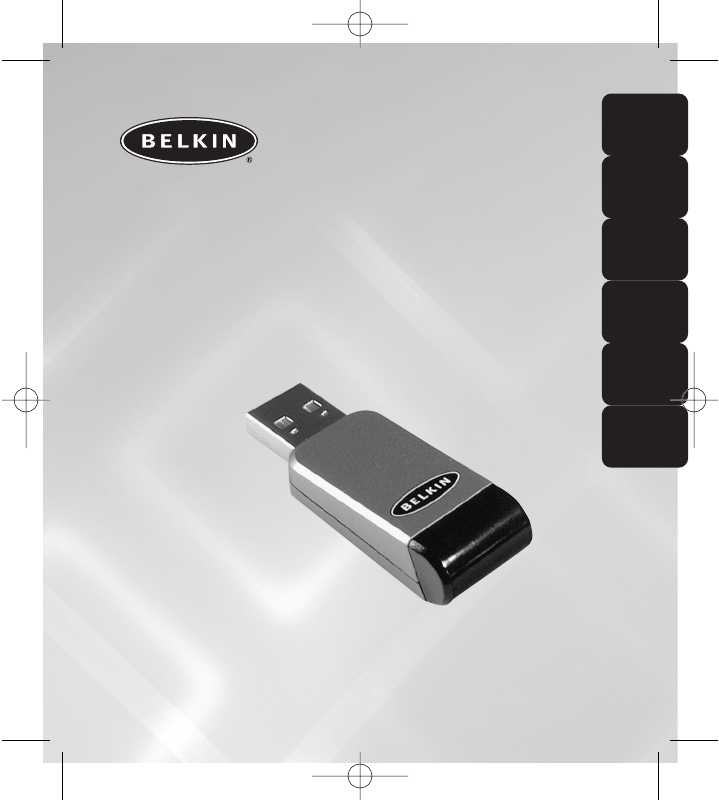
USB-Infrared
Smartbeam
Making your Infrared device talk to your PC
User Manual
F5U235ea
En
Fr
De
Nl
Es
It
P74479ea_F5U235ea_uk.qxd 2/24/04 10:58 AM Page 1
P74479ea_F5U235ea_uk.qxd 2/24/04 10:58 AM Page 2
En
TABLE OF CONTENTS
Introduction . . . . . . . . . . . . . . . . . . . . . . . . . . . . . . . . . . . . .1
Overview . . . . . . . . . . . . . . . . . . . . . . . . . . . . . . . . . . . . . . . .2
System Requirements . . . . . . . . . . . . . . . . . . . . . . . . . . . . .2
Package Contents . . . . . . . . . . . . . . . . . . . . . . . . . . . . . . .2
Install the driver of USB-Infrared Smartbeam . . . . . . . . . . . . . . .3
Windows 98SE . . . . . . . . . . . . . . . . . . . . . . . . . . . . . . . . . .3
Windows ME . . . . . . . . . . . . . . . . . . . . . . . . . . . . . . . . . . .7
Windows 2000 . . . . . . . . . . . . . . . . . . . . . . . . . . . . . . . . .9
Windows XP . . . . . . . . . . . . . . . . . . . . . . . . . . . . . . . . . .11
Installation . . . . . . . . . . . . . . . . . . . . . . . . . . . . . . . . . . . . .15
Ensuring that the USB-Infrared Smartbeam is installed
successfully under Windows 98SE/ME . . . . . . . . . . . . . . . . . .15
Ensuring that the USB-Infrared Smartbeam is installed
successfully under under Windows 2000/XP . . . . . . . . . . . . . .16
Removal of the USB-Infrared Smartbeam . . . . . . . . . . . . . . . . .17
Windows 98SE/ME . . . . . . . . . . . . . . . . . . . . . . . . . . . . . .17
Windows 2000/XP . . . . . . . . . . . . . . . . . . . . . . . . . . . . . .19
Information . . . . . . . . . . . . . . . . . . . . . . . . . . . . . . . . . . . . .21
P74479ea_F5U235ea_uk.qxd 2/24/04 10:58 AM Page 3
P74479ea_F5U235ea_uk.qxd 2/24/04 10:58 AM Page 4
1
En
INTRODUCTION
Thank you for choosing the USB Infrared SmartbeamTM (USB-IrDA
Adapter) from Belkin.
The USB-Infrared Smartbeam supports FIR (4Mbps) and SIR (115200bps)
baud rate to the infrared devices for example: mobile phone, PDA,
printers, computers etc. The USB-Infrared Smartbeam is compliant with
the USB 1.1 specification.
P74479ea_F5U235ea_uk.qxd 2/24/04 10:58 AM Page 1
2
OVERVIEW
System Requirements
• USB host controller (PCI or PCMCIA interface).
• Windows 98SE/Me/2000/XP operating system.
Package Contents
• USB-Infrared Smartbeam
• USB Extension Cable
• User Manual
• CD
Note: Please review installation instructions fully before installation as
installation differs under Windows 98SE.
P74479ea_F5U235ea_uk.qxd 2/24/04 10:58 AM Page 2
3
En
INSTALL THE DRIVER OF USB-INFRARED
SMARTBEAM
Windows 98SE
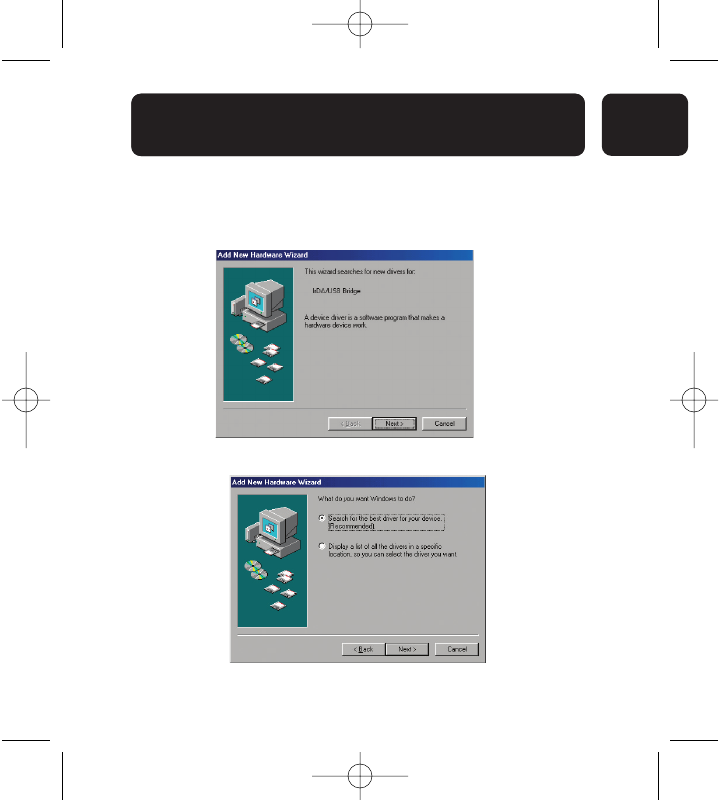
1. Insert the supplied CD Rom and then connect the USB-Infrared
Smartbeam to the USB host controller of PC or Notebook.
2. Click “Next” to continue the driver installation.
3. Select “Search for the best driver for your device.” Click “Next” to
continue.
P74479ea_F5U235ea_uk.qxd 2/24/04 10:58 AM Page 3
INSTALL THE DRIVER OF USB-INFRARED
SMARTBEAM
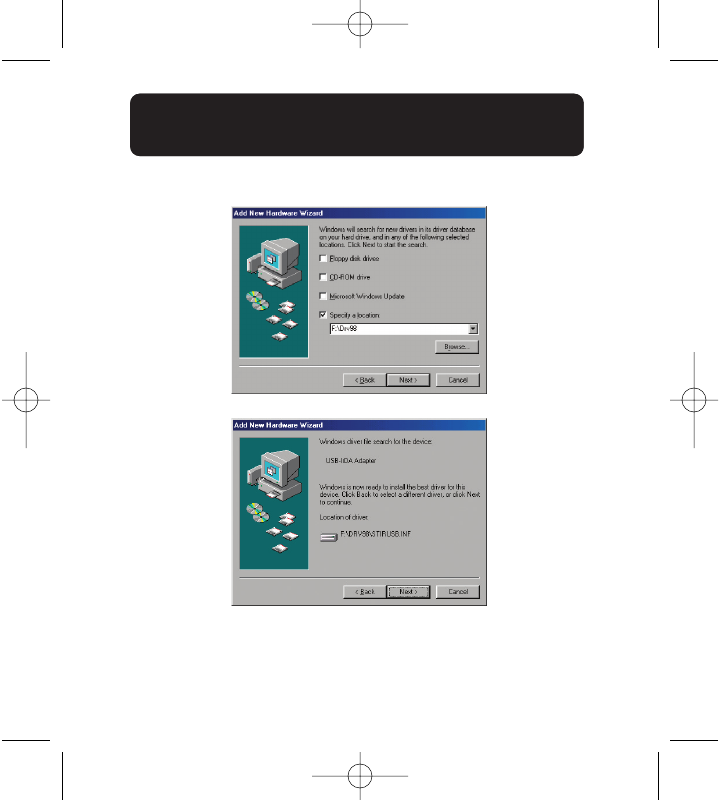
4. Select “Specify a location” , click “Browse” then browse to the folder
named “Drv98” on the supplied CD. Click “Next” to continue.
5. Click “Next” to continue.
INSTALL THE DRIVER OF USB-INFRARED
SMARTBEAM
4
P74479ea_F5U235ea_uk.qxd 2/24/04 10:58 AM Page 4
5
En
INSTALL THE DRIVER OF USB-INFRARED
SMARTBEAM
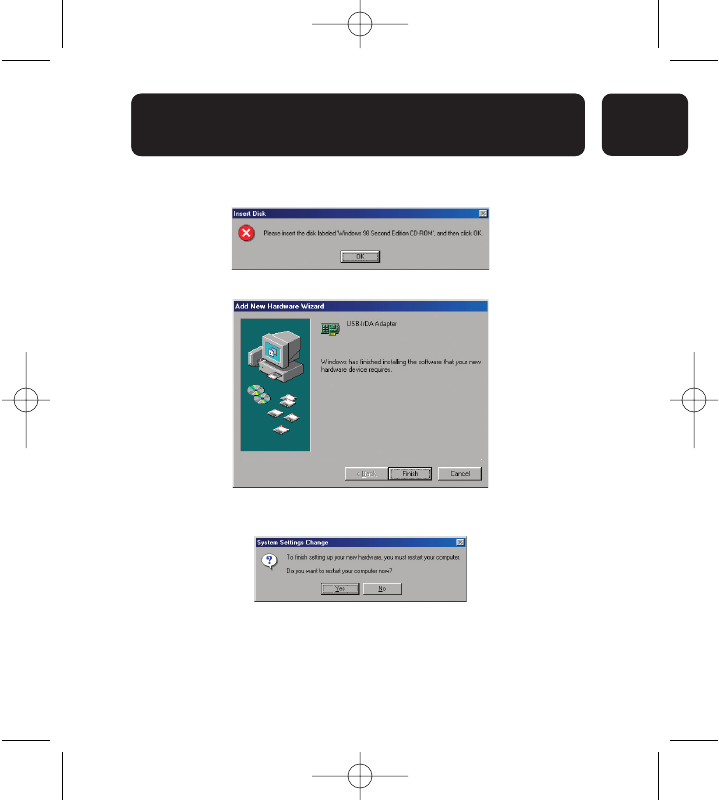
6. You maybe required to enter your Windows 98SE CD, if requested
please insert the Windows 98SE CD. Click “OK” to continue
7. Click “Finish” to complete the driver installation.
8. Once installation is complete you will need to restart your computer.
Click “Yes” to restart your computer.
P74479ea_F5U235ea_uk.qxd 2/24/04 10:58 AM Page 5
6
INSTALL THE DRIVER OF USB-INFRARED
SMARTBEAM
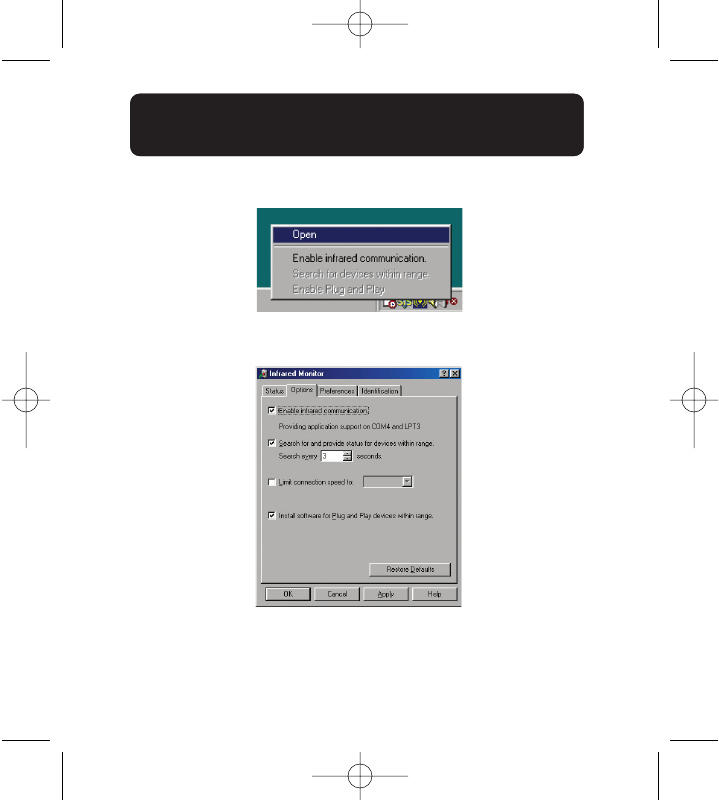
9. Move the cursor to the IRDA icon in the system tray near the clock.
Click the mouse right button to select “Open” item.
10. Select “Options” item.
Click “Enable infrared communication” check option to enable.
Click “OK” to complete the setting and close the Infrared Monitor.
Installation is now complete.
Please enable the infrared on the device you wish to connect to.
P74479ea_F5U235ea_uk.qxd 2/24/04 10:58 AM Page 6
7
En
INSTALL THE DRIVER OF USB-INFRARED
SMARTBEAM
Windows ME
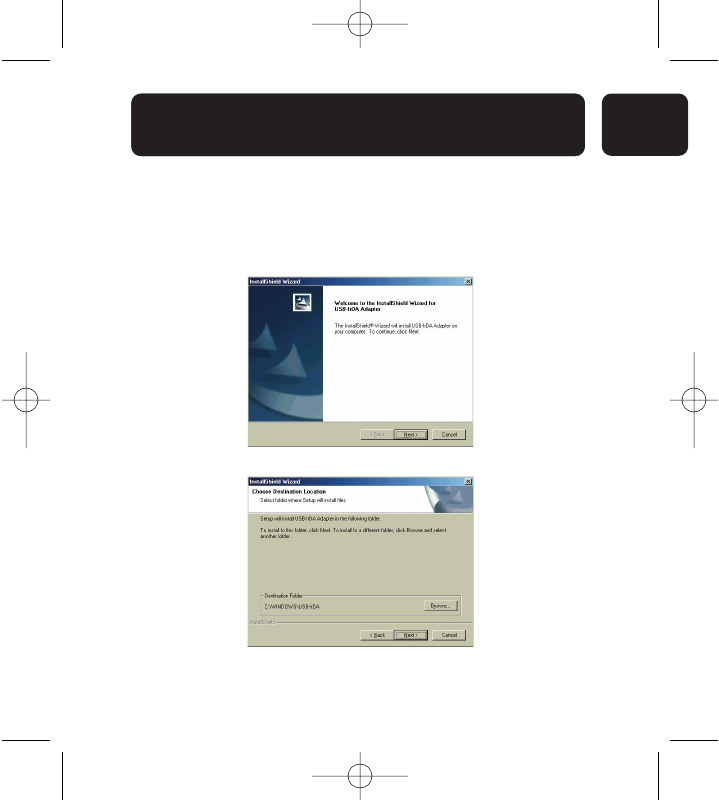
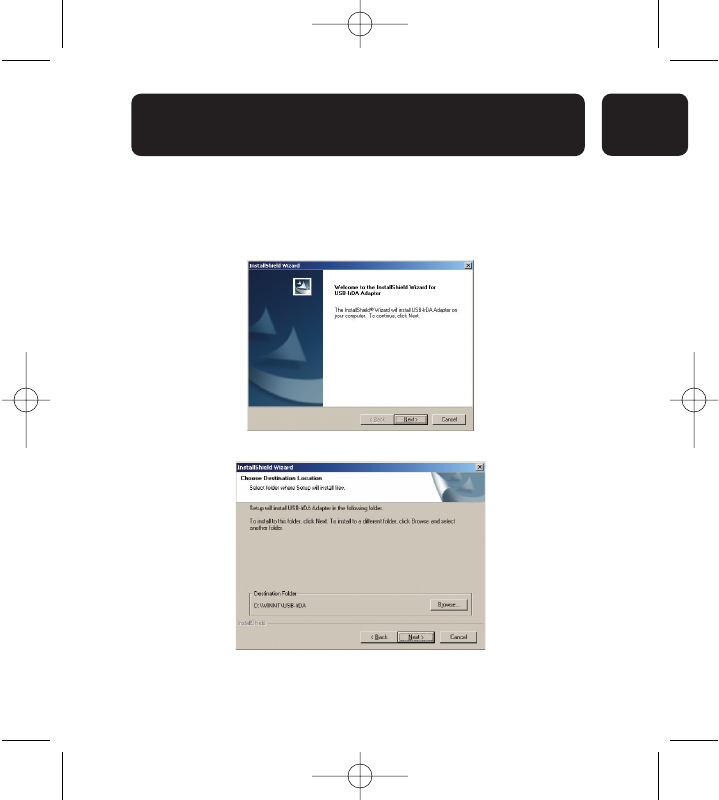
1. Insert the supplied CD and double click on “my computer”, then
double click your CD rom drive. A list of files will be displayed. Double
click the “SETUP.EXE” program file to install the USB-Infrared
Smartbeam.
2. Click “Next” to continue.
3. Click “Next” to continue.
P74479ea_F5U235ea_uk.qxd 2/24/04 10:58 AM Page 7
8
INSTALL THE DRIVER OF USB-INFRARED
SMARTBEAM
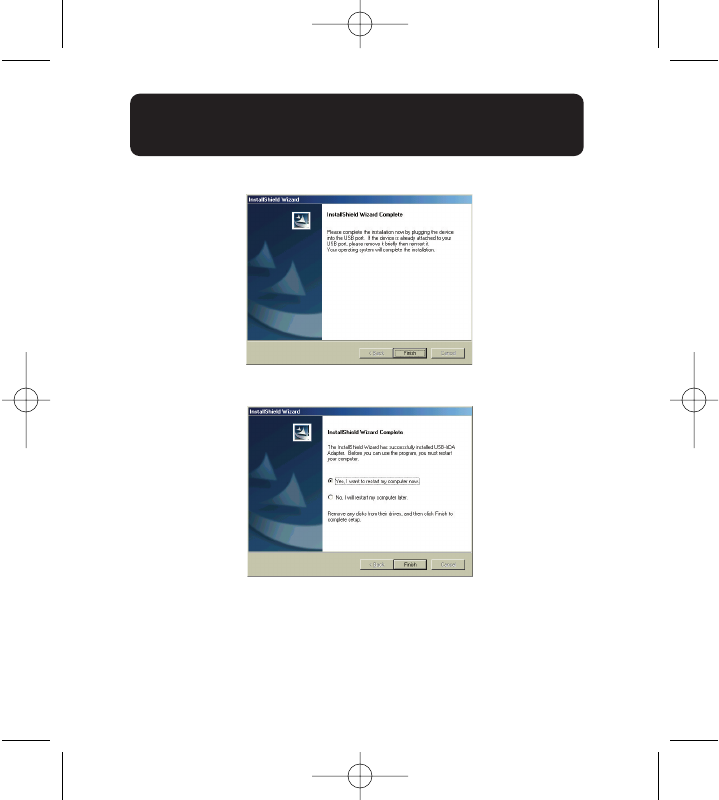
4. Click “Finish” to complete the driver installation.
5. Select “Yes, I want to restart my computer now”. Click “Finish” to
reboot your computer.
Once restarted connect the USB-Infrared Smartbeam into your USB port
of your PC or Notebook.
P74479ea_F5U235ea_uk.qxd 2/24/04 10:58 AM Page 8
9
En
INSTALL THE DRIVER OF USB-INFRARED
SMARTBEAM
Windows 2000
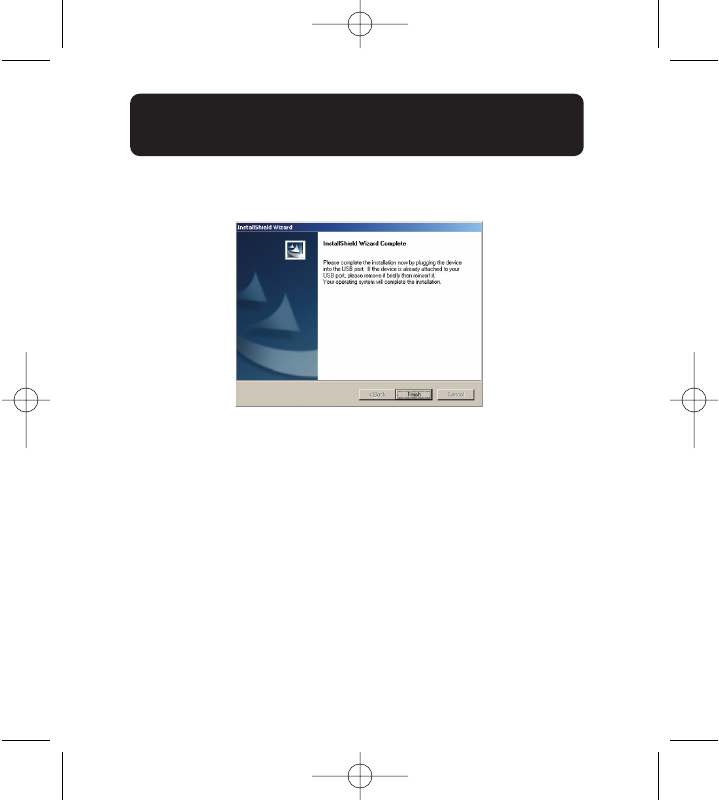
1. Insert the supplied CD, double click on “my computer”, then double
click your CD rom drive. A list of files will be displayed. Double click
the “SETUP.EXE” program file to install the USB-Infrared Smartbeam
2. Click “Next” to continue
3. Click “Next” to continue
P74479ea_F5U235ea_uk.qxd 2/24/04 10:58 AM Page 9
10
INSTALL THE DRIVER OF USB-INFRARED
SMARTBEAM
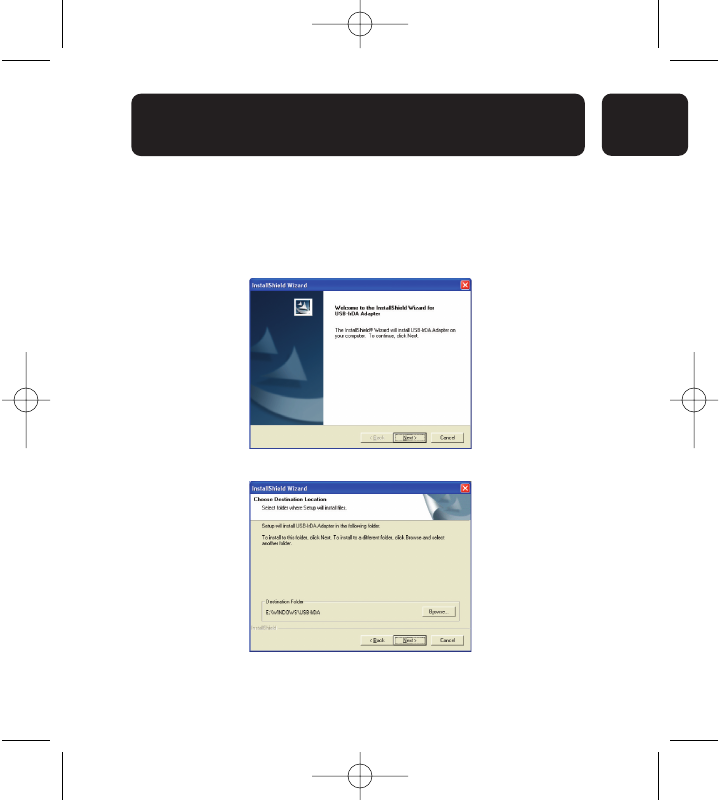
4. Click “Finish” and then plug the USB-Infrared Smartbeam into the USB
port of your PC or Notebook.
P74479ea_F5U235ea_uk.qxd 2/24/04 10:58 AM Page 10
11
En
INSTALL THE DRIVER OF USB-INFRARED
SMARTBEAM
Windows XP
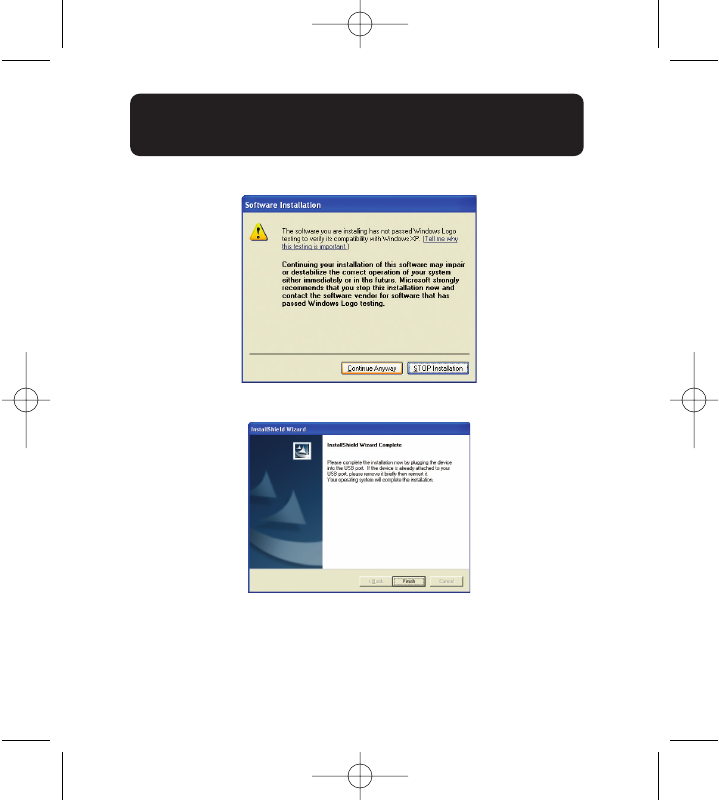
1. Insert the supplied CD and double click on “my computer”, then
double click your CD rom drive. A list of files will be displayed. Double
click the “SETUP.EXE” program file to install the USB-Infrared
Smartbeam.
2. Click “Next” to continue.
3. Click “Next” to continue.
P74479ea_F5U235ea_uk.qxd 2/24/04 10:58 AM Page 11
12
INSTALL THE DRIVER OF USB-INFRARED
SMARTBEAM
4. Select “Continue Anyway” button to continue
5. Click “Finish” and then plug the USB-Infrared Smartbeam into the USB
port of your PC or Notebook.
P74479ea_F5U235ea_uk.qxd 2/24/04 10:58 AM Page 12
13
En
INSTALL THE DRIVER OF USB-INFRARED
SMARTBEAM
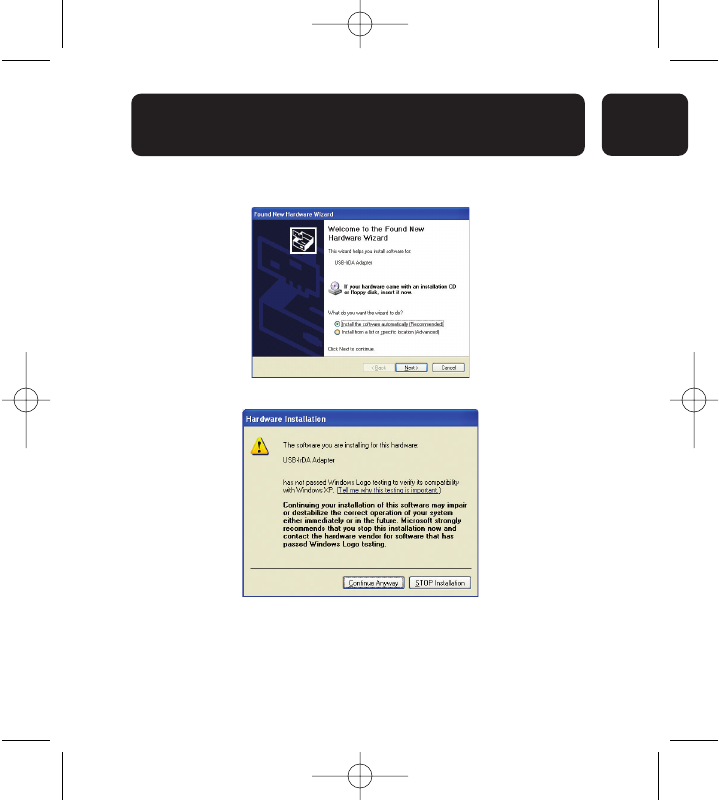
6. Select “Install the software automatically” and click “Next” to
continue.
7. Click “Continue Anyway” button to continue.
P74479ea_F5U235ea_uk.qxd 2/24/04 10:58 AM Page 13
14
INSTALL THE DRIVER OF USB-INFRARED
SMARTBEAM
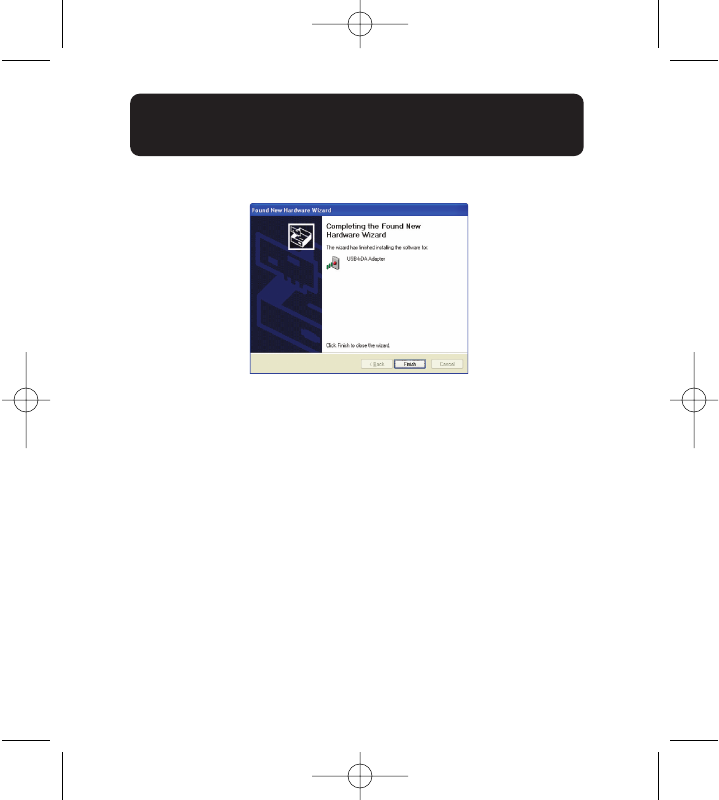
8. Click “Finish” to complete the hardware installation.
P74479ea_F5U235ea_uk.qxd 2/24/04 10:58 AM Page 14
15
En
INSTALLATION
Ensuring that the USB-Infrared Smartbeam is installed
successfully under Windows 98SE/ME
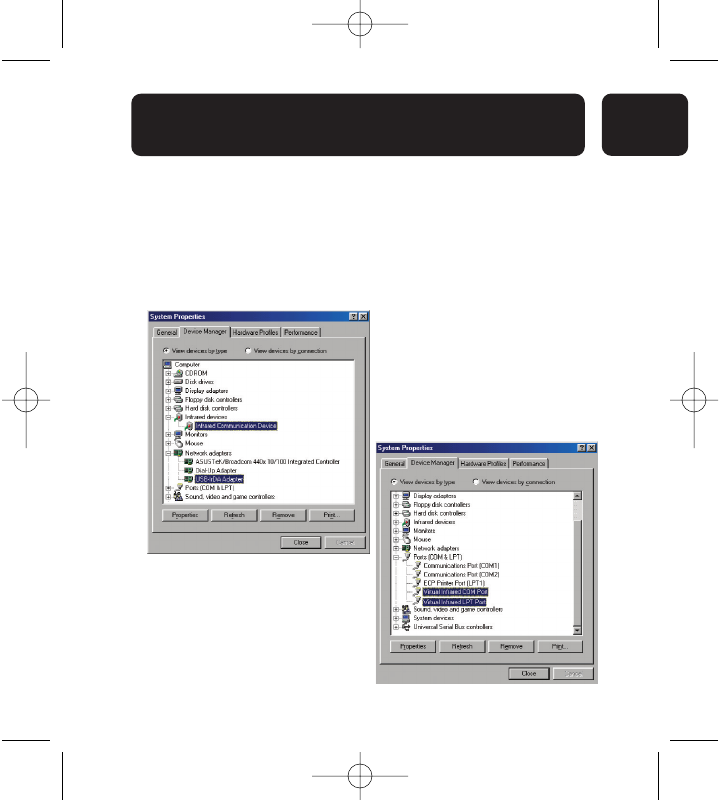
Right click “My computer”, select properties and then select “Device
Manager”.
Please ensure that the 4 highlighted entries are listed. If these are not
listed, or installed with an exclamation mark please fully uninstall using
instructions listed below.
P74479ea_F5U235ea_uk.qxd 2/24/04 10:58 AM Page 15
16
INSTALLATION
Ensuring that the USB-Infrared Smartbeam is installed
successfully under under Windows 2000/XP
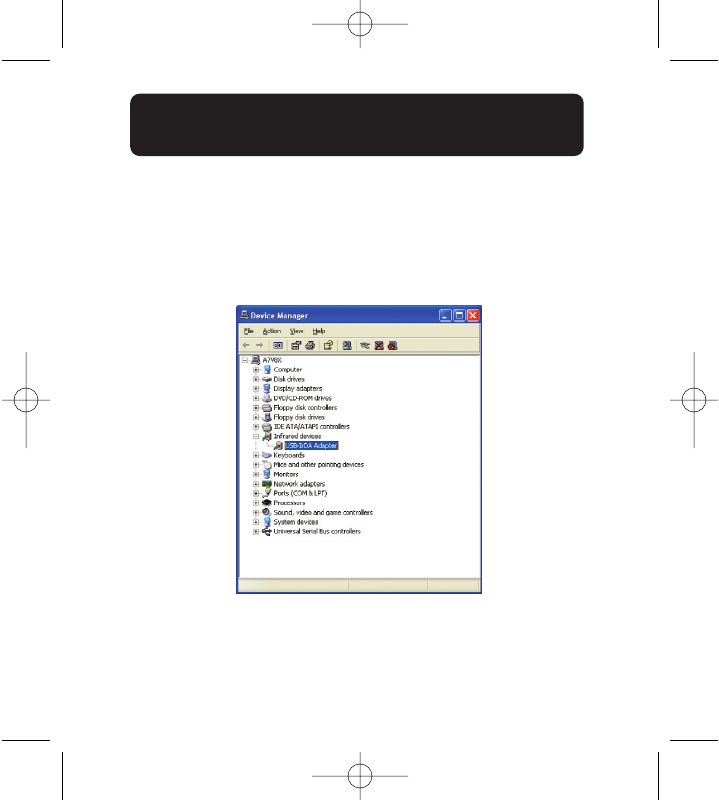
Right click “My computer” , select properties. Click “Hardware” , then
select “Device Manager”.
Please ensure that the USB-Infrared Smartbeam is listed as below. If this
is not the case please uninstall and re-install the device using the
instructions listed below
P74479ea_F5U235ea_uk.qxd 2/24/04 10:58 AM Page 16
17
En
REMOVAL OF THE USB-INFRARED
SMARTBEAM
Windows 98SE/ME
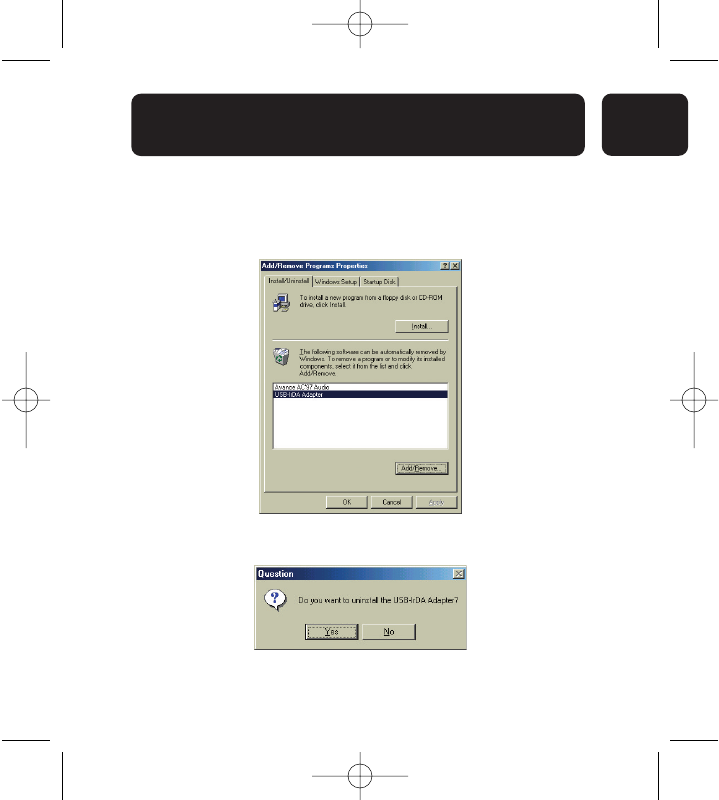
1. Click start, control panel.
Double click Add/Remove Programs
Select the “USB-IrDA Adapter” and click “Add/Remove” to uninstall
the driver.
2. Click “Yes” to uninstall the USB-Infrared Smartbeam.
P74479ea_F5U235ea_uk.qxd 2/24/04 10:58 AM Page 17
18
REMOVAL OF THE USB-INFRARED
SMARTBEAM
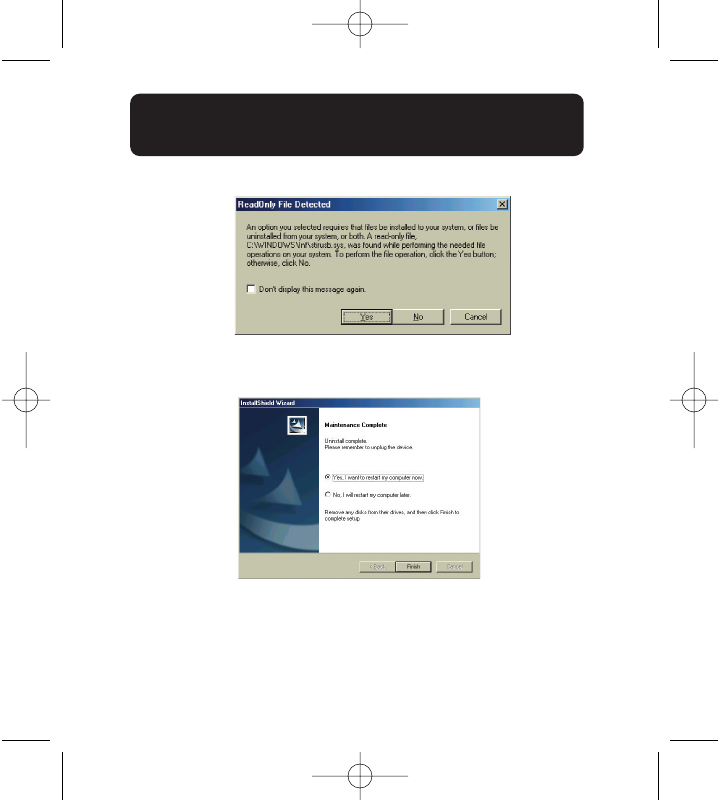
3. You may see the message listed below, if so Click “Yes” to continue.
4. Select “Yes, I want to restart my computer now.”
Unplug the “USB-Infrared Smartbeam” and click finish to restart the
computer
P74479ea_F5U235ea_uk.qxd 2/24/04 10:58 AM Page 18
19
En
REMOVAL OF THE USB-INFRARED
SMARTBEAM
Windows 2000/XP
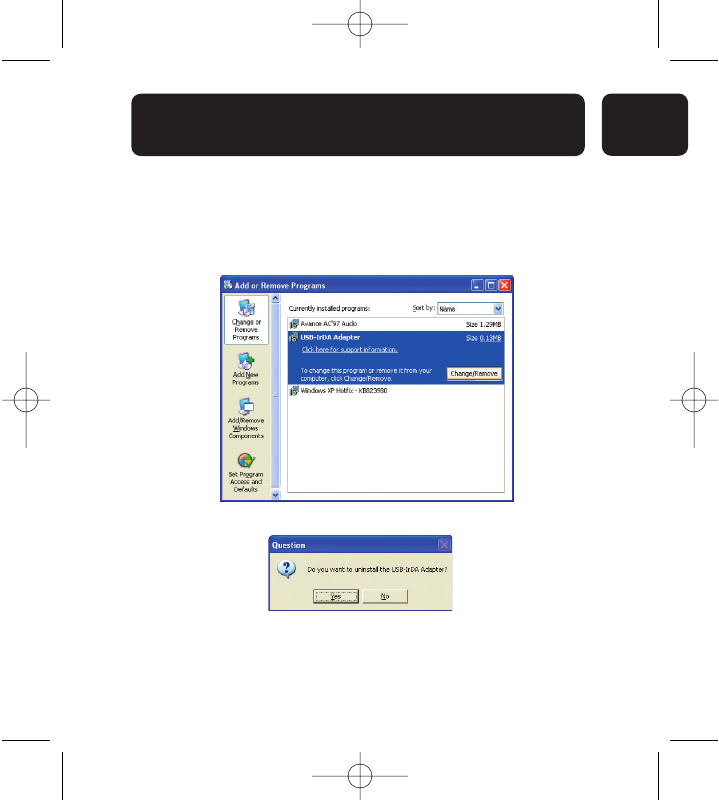
1. Click start, then control panel and double click “Add/Remove
Programs (for Windows 2000)” “Add or Remove Programs (for Windows
XP)”and double click.
Select the “USB-IrDA Adapter” item and click “Change/Remove” to
uninstall the driver.
2. Click “Yes” to uninstall the USB-Infrared Smartbeam.
P74479ea_F5U235ea_uk.qxd 2/24/04 10:58 AM Page 19
20
REMOVAL OF THE USB-INFRARED
SMARTBEAM
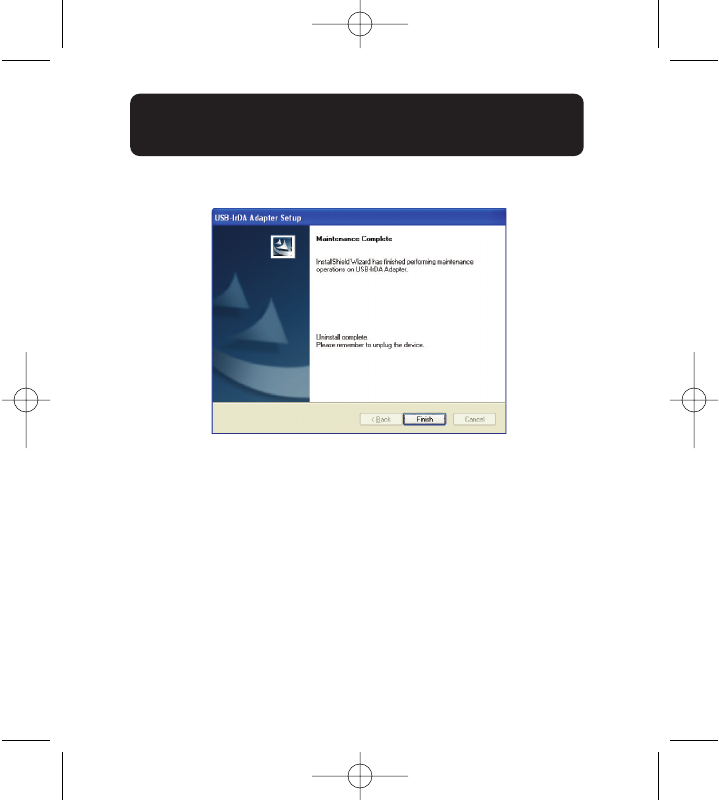
3. Click “Finish” and unplug the USB-Infrared Smartbeam.
P74479ea_F5U235ea_uk.qxd 2/24/04 10:58 AM Page 20
21
En
INFORMATION
FCC Statement
DECLARATION OF CONFORMITY WITH FCC RULES FOR ELECTROMAGNETIC
COMPATIBILITY
We, Belkin Corporation, of 501 West Walnut Street, Compton, CA 90220, declare under our sole
responsibility that the product:
F5U235ea
to which this declaration relates:
Complies with Part 15 of the FCC Rules. Operation is subject to the following two conditions:
(1) this device may not cause harmful interference, and (2) this device must accept any
interference received, including interference that may cause undesired operation.
CE Declaration of Conformity
We, Belkin Components, declare under our sole responsibility that the F5U235, to which this
declaration relates, is in conformity with Generic Emissions Standard EN550022 1998 and with
Generic Immunity Standard EN550024 1998, EN61000-3-2, and EN61000-3-3.
Belkin Corporation Limited Lifetime Product Warranty
Belkin Corporation warrants this product against defects in materials and workmanship for its
lifetime. If a defect is discovered, Belkin will, at its option, repair or replace the product at no
charge provided it is returned during the warranty period, with transportation charges prepaid,
to the authorized Belkin dealer from whom you purchased the product. Proof of purchase may
be required.
This warranty does not apply if the product has been damaged by accident, abuse, misuse, or
misapplication; if the product has been modified without the written permission of Belkin; or
if any Belkin serial number has been removed or defaced.
THE WARRANTY AND REMEDIES SET FORTH ABOVE ARE EXCLUSIVE IN LIEU OF ALL OTHERS,
WHETHER ORAL OR WRITTEN, EXPRESSED OR IMPLIED. BELKIN SPECIFICALLY DISCLAIMS ANY
AND ALL IMPLIED WARRANTIES, INCLUDING, WITHOUT LIMITATION, WARRANTIES OF
MERCHANTABILITY AND FITNESS FOR A PARTICULAR PURPOSE.
No Belkin dealer, agent, or employee is authorized to make any modification, extension, or
addition to this warranty.
BELKIN IS NOT RESPONSIBLE FOR SPECIAL, INCIDENTAL, OR CONSEQUENTIAL DAMAGES
RESULTING FROM ANY BREACH OF WARRANTY, OR UNDER ANY OTHER LEGAL THEORY, INCLUDING
BUT NOT LIMITED TO LOST PROFITS, DOWNTIME, GOODWILL, DAMAGE TO OR REPROGRAMMING
OR REPRODUCING ANY PROGRAM OR DATA STORED IN OR USED WITH BELKIN PRODUCTS.
P74479ea_F5U235ea_uk.qxd 2/24/04 10:58 AM Page 21
Belkin Corporation
501 West Walnut Street
Compton • CA • 90220 • USA
Tel: 310.898.1100
Fax: 310.898.1111
Belkin Components, Ltd.
Express Business Park
Shipton Way • Rushden • NN10 6GL
United Kingdom
Tel: +44 (0) 1933 35 2000
Fax: +44 (0) 1933 31 2000
Belkin Components B.V.
Starparc Building • Boeing Avenue 333
1119 PH Schiphol-Rijk • The Netherlands
Tel: +31 (0) 20 654 7300
Fax: +31 (0) 20 654 7349
Belkin GmbH
Hanebergstrasse 2
80637 München • Germany
Tel: +49 (0) 89 1434 05-0
Fax: +49 (0) 89 / 143405-100
Belkin Tech Support
US: 310.898.1100 ext. 2263
800.223.5546 ext. 2263
Europe: 00 800 223 55 460
Australia: 1800 666 040
© 2004 Belkin Corporation. All rights reserved.
All trade names are registered trademarks of respective manufacturers listed.
P74479ea
P74479ea_F5U235ea_uk.qxd 2/24/04 10:58 AM Page 22
