Beltronics USA G8M3 Radar Detector User Manual STi Manual

Beltronics USA Inc Radar Detector STi Manual

Manual

BELTRONICS5442 West Chester RoadWest Chester OH45069 USAUSA 800-341-2288Canada 800-268-3994www.beltronics.com©2005 BELTRONICSMade in CanadaFeatures, specifications and prices subject to change without notice.Model: STi DRIVERDIGITAL RADAR•LASER•SAFETY DETECTOROwner’s ManualMAGNESIUMCONSTRUCTIONSTi Manual  3/28/05  3:39 PM  Page 1
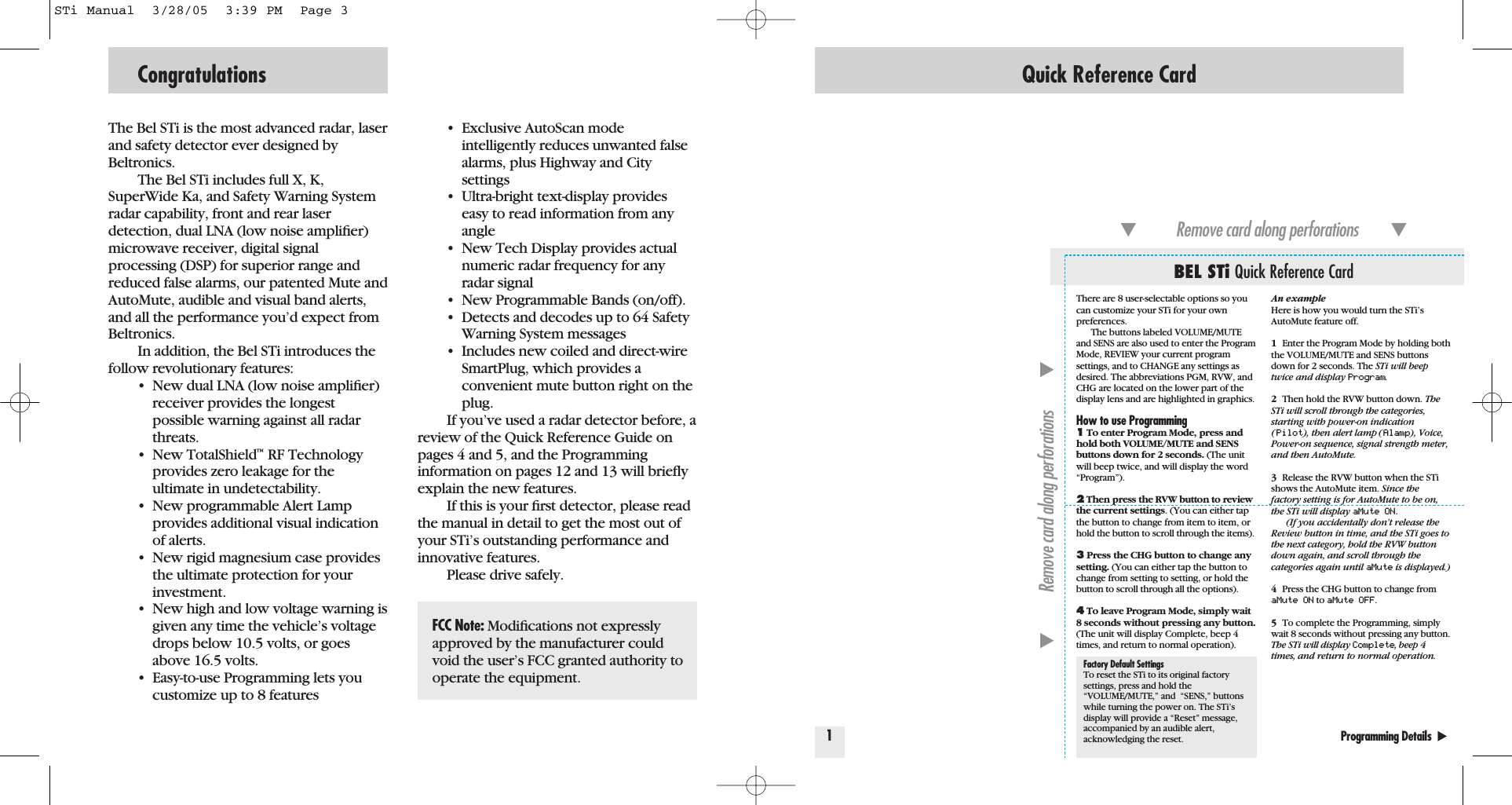
The Bel STi is the most advanced radar, laserand safety detector ever designed byBeltronics.The Bel STi includes full X, K,SuperWide Ka, and Safety Warning Systemradar capability, front and rear laser detection, dual LNA (low noise amplifier)microwave receiver, digital signalprocessing (DSP) for superior range andreduced false alarms, our patented Mute andAutoMute, audible and visual band alerts,and all the performance you’d expect fromBeltronics.In addition, the Bel STi introduces thefollow revolutionary features:• New dual LNA (low noise amplifier) receiver provides the longest possible warning against all radar threats.• New TotalShield™RF Technology provides zero leakage for the ultimate in undetectability.• New programmable Alert Lamp provides additional visual indication of alerts.• New rigid magnesium case provides the ultimate protection for your investment.• New high and low voltage warning is given any time the vehicle’s voltage drops below 10.5 volts, or goes above 16.5 volts. • Easy-to-use Programming lets you customize up to 8 features• Exclusive AutoScan mode intelligently reduces unwanted false alarms, plus Highway and City settings• Ultra-bright text-display provides easy to read information from any angle• New Tech Display provides actual numeric radar frequency for any radar signal• New Programmable Bands (on/off).  • Detects and decodes up to 64 Safety Warning System messages• Includes new coiled and direct-wire SmartPlug, which provides aconvenient mute button right on the plug.If you’ve used a radar detector before, areview of the Quick Reference Guide onpages 4 and 5, and the Programming information on pages 12 and 13 will brieflyexplain the new features.If this is your first detector, please readthe manual in detail to get the most out ofyour STi’s outstanding performance andinnovative features.Please drive safely.Congratulations Quick Reference Card1Programming Details  ̈BEL STi Quick Reference Card̄Remove card along perforations         ̄̄Remove card along perforations         ̄An exampleHere is how you would turn the STi’sAutoMute feature off. 1Enter the Program Mode by holding boththe VOLUME/MUTE and SENS buttonsdown for 2 seconds. The STi will beeptwice and display Program.2Then hold the RVW button down. TheSTi will scroll through the categories,starting with power-on indication(Pilot), then alert lamp (Alamp), Voice,Power-on sequence, signal strength meter,and then AutoMute.3Release the RVW button when the STishows the AutoMute item. Since thefactory setting is for AutoMute to be on,the STi will display aMute ON .(If you accidentally don’t release theReview button in time, and the STi goes tothe next category, hold the RVW buttondown again, and scroll through the categories again until aMute is displayed.)4Press the CHG button to change fromaMute ON to aMute OFF.5To complete the Programming, simplywait 8 seconds without pressing any button.The STi will display Complete, beep 4times, and return to normal operation.There are 8 user-selectable options so youcan customize your STi for your own preferences.The buttons labeled VOLUME/MUTEand SENS are also used to enter the ProgramMode, REVIEW your current programsettings, and to CHANGE any settings asdesired. The abbreviations PGM, RVW, andCHG are located on the lower part of thedisplay lens and are highlighted in graphics.How to use Programming1To enter Program Mode, press andhold both VOLUME/MUTE and SENSbuttons down for 2 seconds. (The unitwill beep twice, and will display the word“Program”).2Then press the RVW button to reviewthe current settings. (You can either tapthe button to change from item to item, orhold the button to scroll through the items).3Press the CHG button to change anysetting. (You can either tap the button tochange from setting to setting, or hold thebutton to scroll through all the options).4To leave Program Mode, simply wait8 seconds without pressing any button.(The unit will display Complete, beep 4times, and return to normal operation).Factory Default SettingsTo reset the STi to its original factorysettings, press and hold the“VOLUME/MUTE,” and  “SENS,” buttonswhile turning the power on. The STi’sdisplay will provide a “Reset” message,accompanied by an audible alert,acknowledging the reset.FCC Note: Modifications not expresslyapproved by the manufacturer couldvoid the user’s FCC granted authority tooperate the equipment.STi Manual  3/28/05  3:39 PM  Page 3
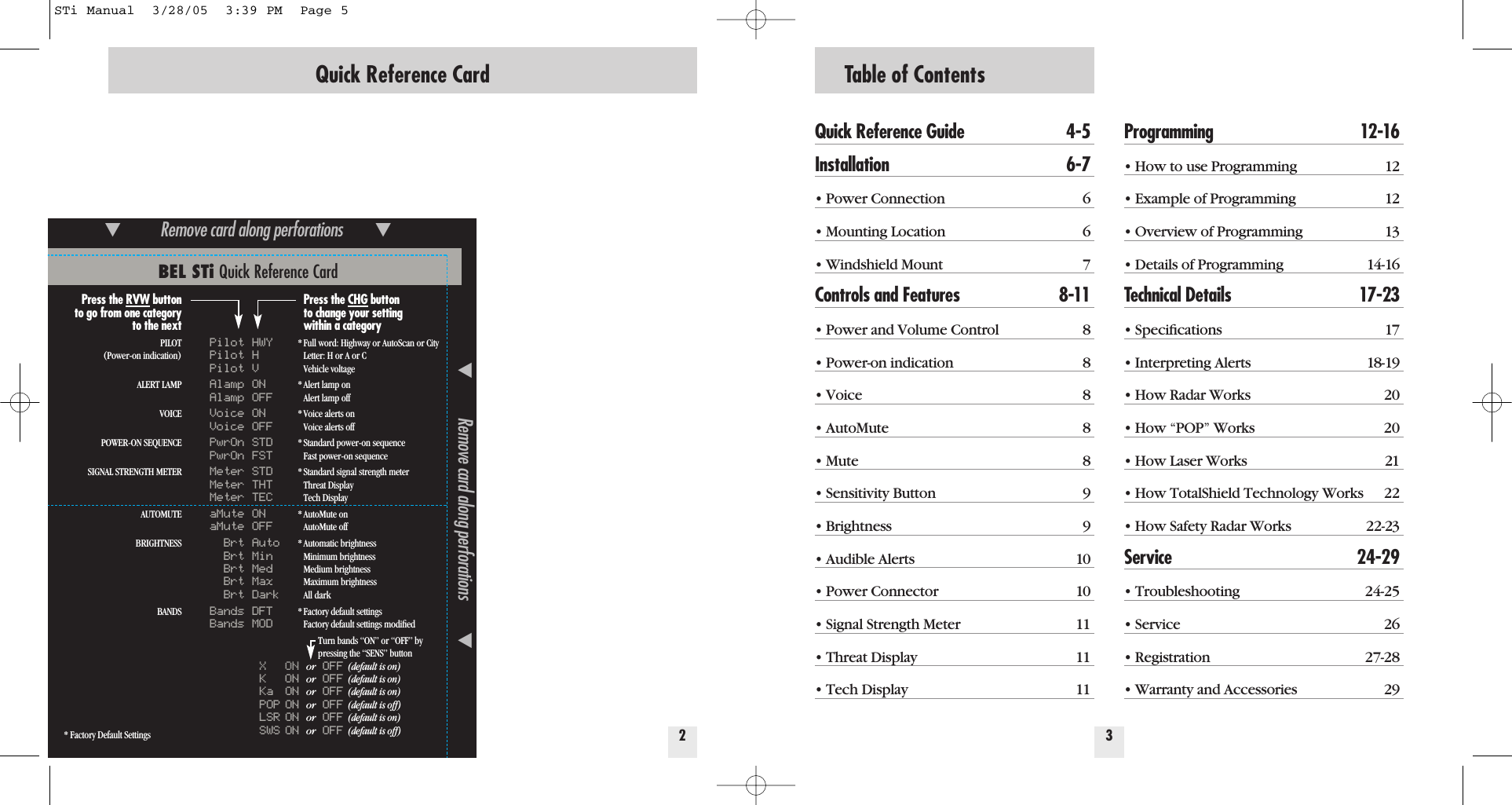
Table of ContentsQuick Reference Guide 4-5Installation 6-7• Power Connection 6• Mounting Location 6• Windshield Mount 7Controls and Features 8-11• Power and Volume Control 8• Power-on indication 8• Voice 8• AutoMute 8• Mute 8• Sensitivity Button 9• Brightness 9• Audible Alerts 10• Power Connector 10• Signal Strength Meter 11• Threat Display 11• Tech Display 11Programming 12-16• How to use Programming 12• Example of Programming 12• Overview of Programming 13• Details of Programming 14-16Technical Details 17-23• Specifications 17• Interpreting Alerts 18-19• How Radar Works 20• How “POP” Works 20• How Laser Works 21• How TotalShield Technology Works 22• How Safety Radar Works 22-23Service 24-29• Troubleshooting 24-25• Service 26• Registration 27-28• Warranty and Accessories 2932Quick Reference CardBEL STi Quick Reference Card* Factory Default Settings̄Remove card along perforations         ̄̄Remove card along perforations         ̄Press the RVW buttonto go from one categoryto the nextPILOT(Power-on indication)ALERT LAMPVOICEPOWER-ON SEQUENCESIGNAL STRENGTH METERAUTOMUTEBRIGHTNESSBANDSPilot HWYPilot HPilot VAlamp ONAlamp OFFVoice ONVoice OFFPwrOn STDPwrOn FSTMeter STDMeter THTMeter TECaMute ONaMute OFFBrt AutoBrt MinBrt MedBrt MaxBrt DarkBands DFTBands MODXONor OFF (default is on)KONor OFF (default is on)Ka ON or OFF (default is on)POP ON or OFF (default is off)LSR ON or OFF (default is on)SWS ON or OFF (default is off)Press the CHG buttonto change your settingwithin a category* Full word: Highway or AutoScan or CityLetter: H or A or CVehicle voltage* Alert lamp onAlert lamp off* Voice alerts onVoice alerts off* Standard power-on sequenceFast power-on sequence* Standard signal strength meterThreat DisplayTech Display* AutoMute onAutoMute off* Automatic brightness Minimum brightnessMedium brightnessMaximum brightnessAll dark* Factory default settingsFactory default settings modifiedTurn bands “ON” or “OFF” bypressing the “SENS” buttonSTi Manual  3/28/05  3:39 PM  Page 5
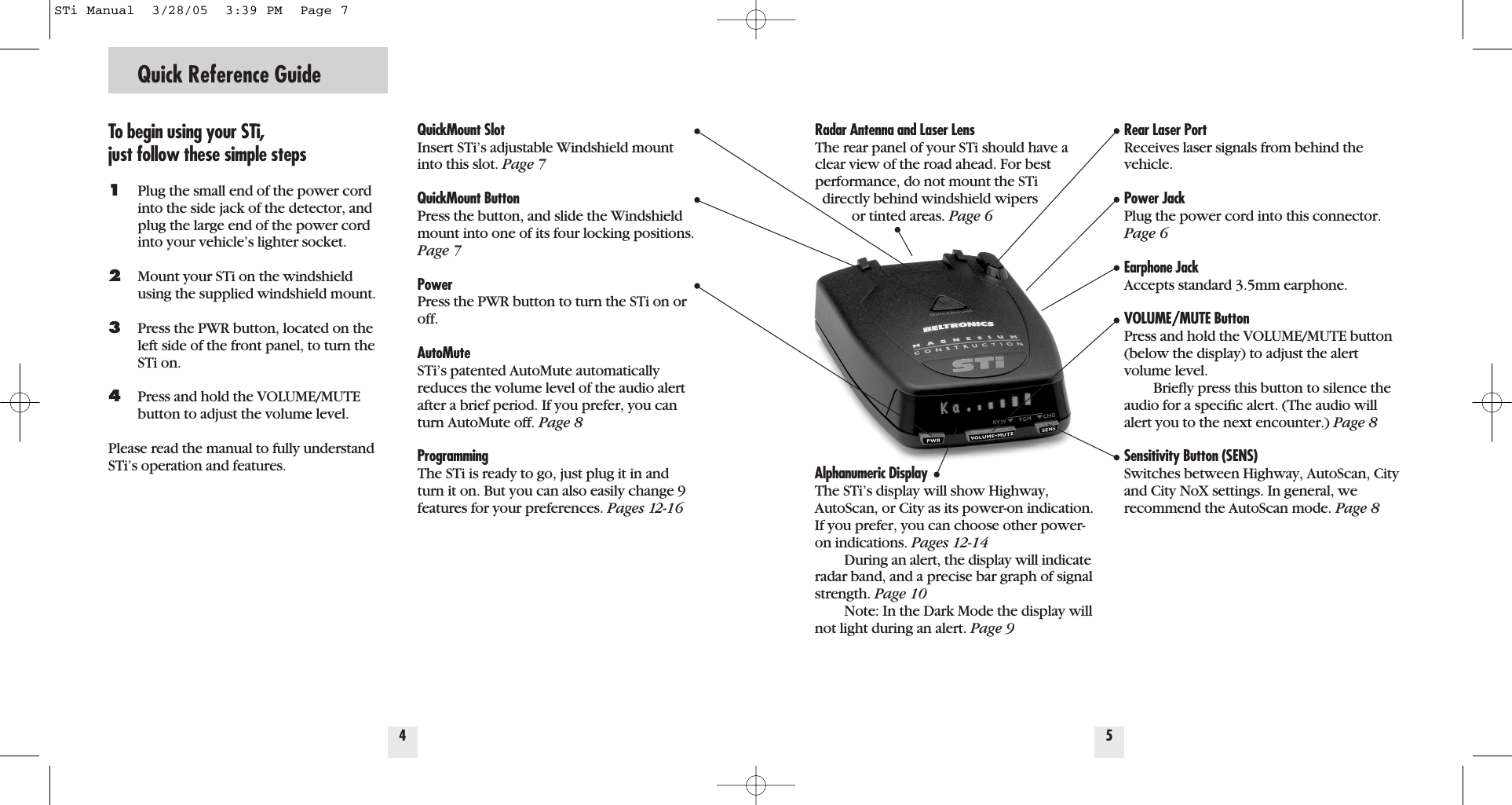
Radar Antenna and Laser LensThe rear panel of your STi should have aclear view of the road ahead. For bestperformance, do not mount the STi directly behind windshield wipers or tinted areas. Page 6Alphanumeric DisplayThe STi’s display will show Highway,AutoScan, or City as its power-on indication.If you prefer, you can choose other power-on indications. Pages 12-14During an alert, the display will indicateradar band, and a precise bar graph of signalstrength. Page 10Note: In the Dark Mode the display willnot light during an alert. Page 9Quick Reference GuideTo begin using your STi, just follow these simple steps1Plug the small end of the power cord into the side jack of the detector, and plug the large end of the power cord into your vehicle’s lighter socket.2Mount your STi on the windshield  using the supplied windshield mount.3Press the PWR button, located on the left side of the front panel, to turn the STi on.4Press and hold the VOLUME/MUTE button to adjust the volume level.Please read the manual to fully understandSTi’s operation and features.QuickMount Slot Insert STi’s adjustable Windshield mountinto this slot. Page 7QuickMount ButtonPress the button, and slide the Windshieldmount into one of its four locking positions.Page 7PowerPress the PWR button to turn the STi on oroff.AutoMuteSTi’s patented AutoMute automaticallyreduces the volume level of the audio alertafter a brief period. If you prefer, you canturn AutoMute off. Page 8ProgrammingThe STi is ready to go, just plug it in andturn it on. But you can also easily change 9features for your preferences. Pages 12-164Rear Laser PortReceives laser signals from behind thevehicle.Power Jack Plug the power cord into this connector.Page 6Earphone JackAccepts standard 3.5mm earphone.VOLUME/MUTE Button Press and hold the VOLUME/MUTE button(below the display) to adjust the alertvolume level.Briefly press this button to silence theaudio for a specific alert. (The audio willalert you to the next encounter.) Page 8Sensitivity Button (SENS)Switches between Highway, AutoScan, Cityand City NoX settings. In general, we recommend the AutoScan mode. Page 85STi Manual  3/28/05  3:39 PM  Page 7
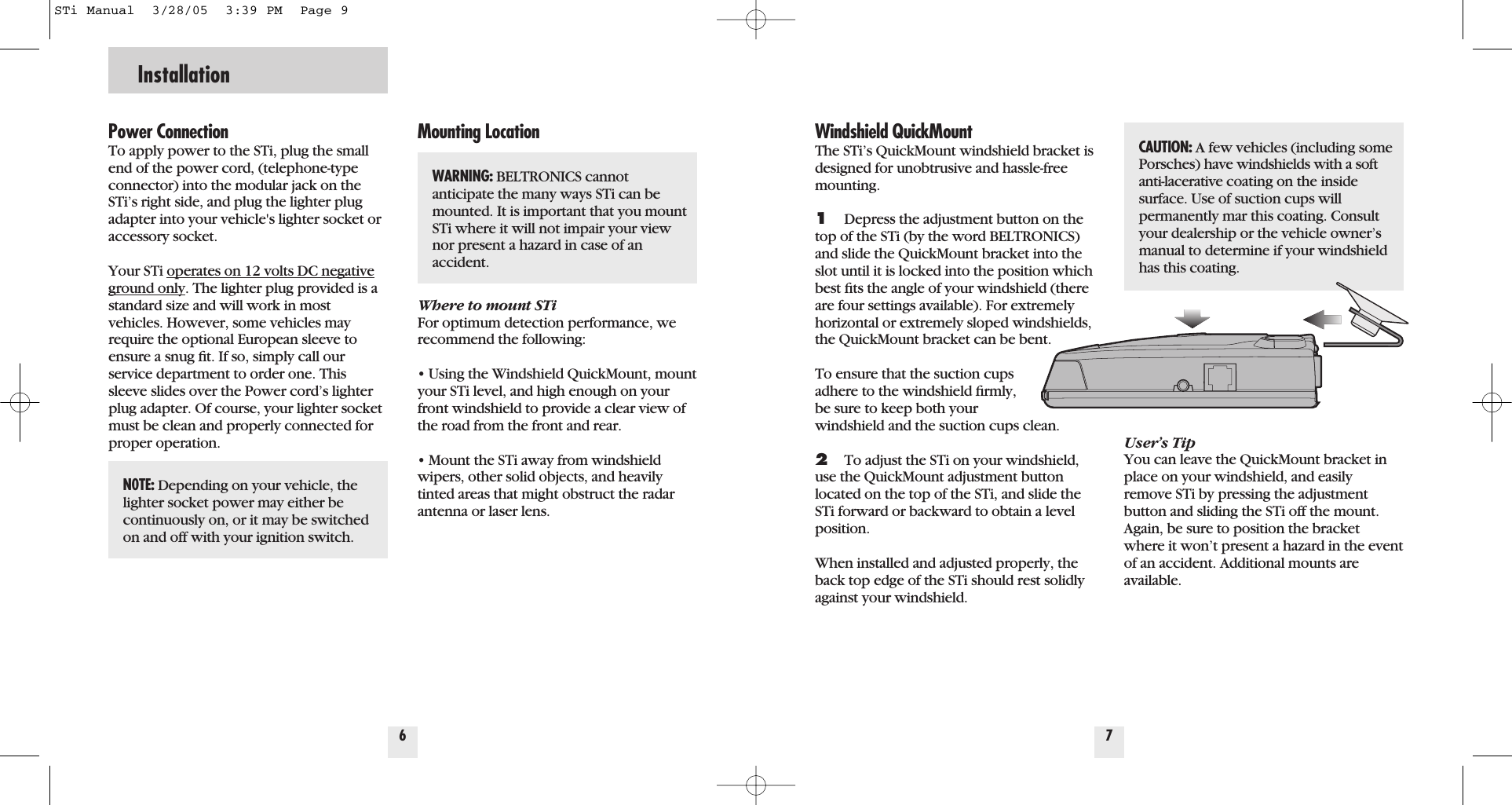
Power ConnectionTo apply power to the STi, plug the smallend of the power cord, (telephone-typeconnector) into the modular jack on theSTi’s right side, and plug the lighter plugadapter into your vehicle's lighter socket oraccessory socket.Your STi operates on 12 volts DC negativeground only. The lighter plug provided is astandard size and will work in most vehicles. However, some vehicles mayrequire the optional European sleeve toensure a snug fit. If so, simply call ourservice department to order one. Thissleeve slides over the Power cord’s lighterplug adapter. Of course, your lighter socketmust be clean and properly connected forproper operation.Mounting LocationWhere to mount STiFor optimum detection performance, werecommend the following:• Using the Windshield QuickMount, mountyour STi level, and high enough on yourfront windshield to provide a clear view ofthe road from the front and rear.• Mount the STi away from windshieldwipers, other solid objects, and heavilytinted areas that might obstruct the radarantenna or laser lens.6InstallationWindshield QuickMountThe STi’s QuickMount windshield bracket isdesigned for unobtrusive and hassle-freemounting. 1Depress the adjustment button on thetop of the STi (by the word BELTRONICS)and slide the QuickMount bracket into theslot until it is locked into the position whichbest fits the angle of your windshield (thereare four settings available). For extremelyhorizontal or extremely sloped windshields,the QuickMount bracket can be bent.To ensure that the suction cups adhere to the windshield firmly, be sure to keep both your windshield and the suction cups clean.2To adjust the STi on your windshield,use the QuickMount adjustment buttonlocated on the top of the STi, and slide theSTi forward or backward to obtain a level position.When installed and adjusted properly, theback top edge of the STi should rest solidlyagainst your windshield.User’s TipYou can leave the QuickMount bracket inplace on your windshield, and easilyremove STi by pressing the adjustmentbutton and sliding the STi off the mount.Again, be sure to position the bracketwhere it won’t present a hazard in the eventof an accident. Additional mounts are available.7N0TE: Depending on your vehicle, thelighter socket power may either be continuously on, or it may be switchedon and off with your ignition switch.CAUTION: A few vehicles (including somePorsches) have windshields with a softanti-lacerative coating on the insidesurface. Use of suction cups will permanently mar this coating. Consultyour dealership or the vehicle owner’smanual to determine if your windshieldhas this coating.WARNING: BELTRONICS cannot anticipate the many ways STi can bemounted. It is important that you mountSTi where it will not impair your viewnor present a hazard in case of an accident.STi Manual  3/28/05  3:39 PM  Page 9
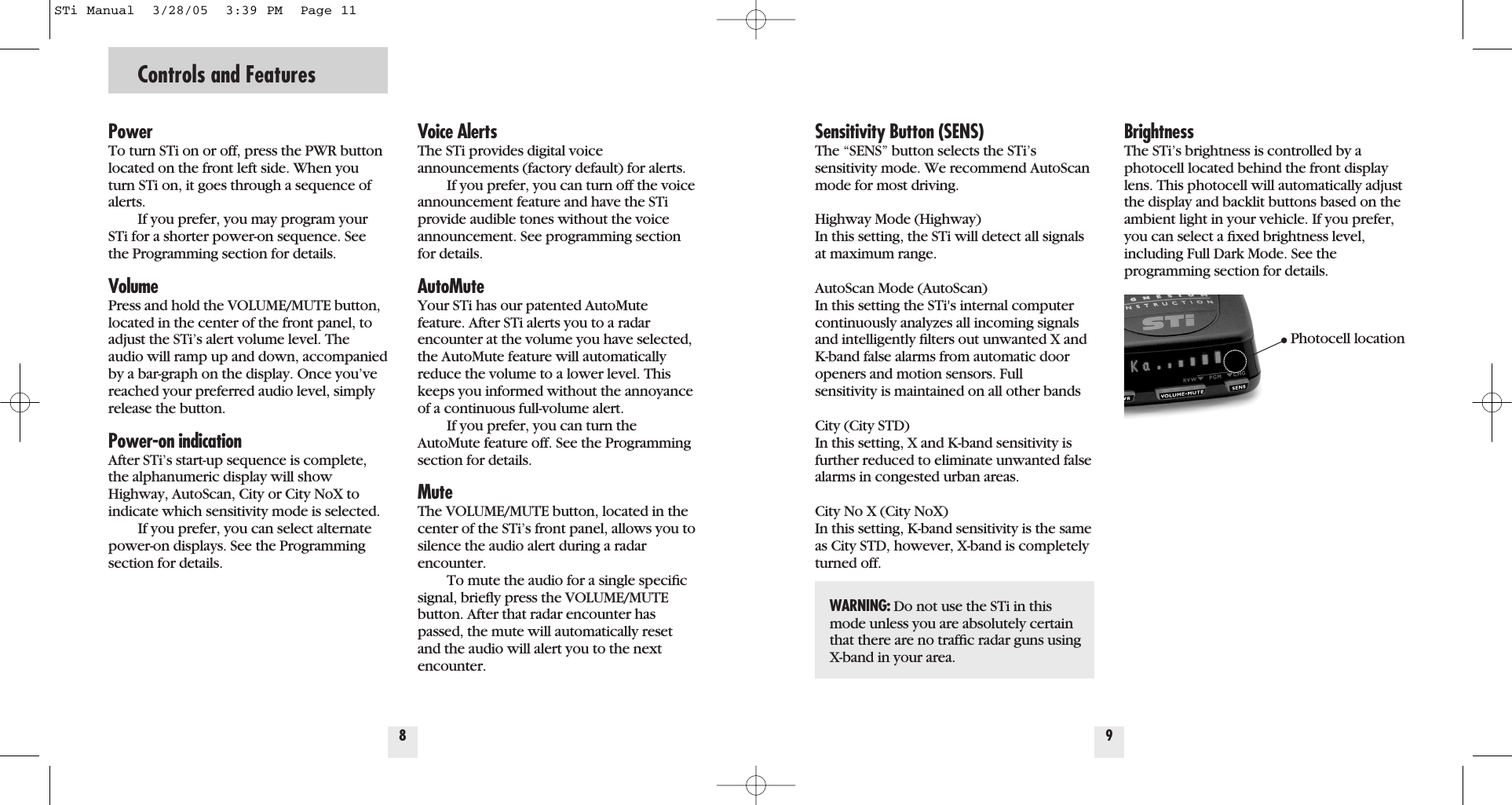
Controls and FeaturesPowerTo turn STi on or off, press the PWR buttonlocated on the front left side. When youturn STi on, it goes through a sequence ofalerts.If you prefer, you may program yourSTi for a shorter power-on sequence. Seethe Programming section for details.VolumePress and hold the VOLUME/MUTE button,located in the center of the front panel, toadjust the STi’s alert volume level. Theaudio will ramp up and down, accompaniedby a bar-graph on the display. Once you’vereached your preferred audio level, simplyrelease the button.Power-on indicationAfter STi’s start-up sequence is complete,the alphanumeric display will showHighway, AutoScan, City or City NoX toindicate which sensitivity mode is selected.If you prefer, you can select alternatepower-on displays. See the Programmingsection for details.Voice AlertsThe STi provides digital voice announcements (factory default) for alerts. If you prefer, you can turn off the voiceannouncement feature and have the STiprovide audible tones without the voiceannouncement. See programming sectionfor details.AutoMuteYour STi has our patented AutoMutefeature. After STi alerts you to a radarencounter at the volume you have selected,the AutoMute feature will automaticallyreduce the volume to a lower level. Thiskeeps you informed without the annoyanceof a continuous full-volume alert.If you prefer, you can turn theAutoMute feature off. See the Programmingsection for details.MuteThe VOLUME/MUTE button, located in thecenter of the STi’s front panel, allows you tosilence the audio alert during a radarencounter.To mute the audio for a single specificsignal, briefly press the VOLUME/MUTEbutton. After that radar encounter haspassed, the mute will automatically resetand the audio will alert you to the nextencounter.8Sensitivity Button (SENS)The “SENS” button selects the STi’s sensitivity mode. We recommend AutoScanmode for most driving.Highway Mode (Highway)In this setting, the STi will detect all signalsat maximum range.AutoScan Mode (AutoScan)In this setting the STi's internal computercontinuously analyzes all incoming signalsand intelligently filters out unwanted X andK-band false alarms from automatic dooropeners and motion sensors. Fullsensitivity is maintained on all other bandsCity (City STD)In this setting, X and K-band sensitivity isfurther reduced to eliminate unwanted falsealarms in congested urban areas.  City No X (City NoX)In this setting, K-band sensitivity is the sameas City STD, however, X-band is completelyturned off.9BrightnessThe STi’s brightness is controlled by aphotocell located behind the front displaylens. This photocell will automatically adjustthe display and backlit buttons based on theambient light in your vehicle. If you prefer,you can select a fixed brightness level,including Full Dark Mode. See the programming section for details.WARNING: Do not use the STi in thismode unless you are absolutely certainthat there are no traffic radar guns usingX-band in your area.Photocell locationSTi Manual  3/28/05  3:39 PM  Page 11
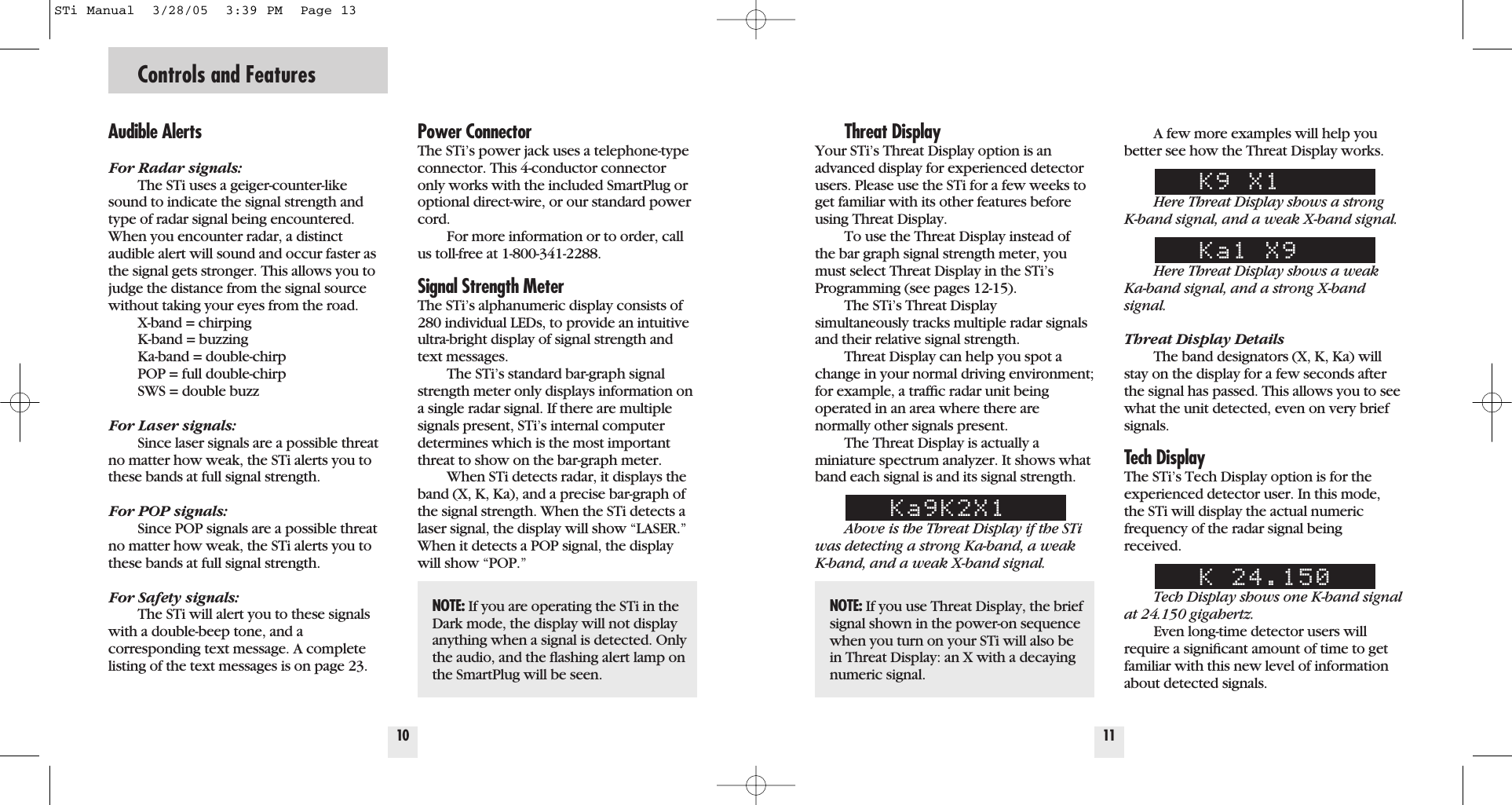
Controls and Features10Power ConnectorThe STi’s power jack uses a telephone-typeconnector. This 4-conductor connectoronly works with the included SmartPlug oroptional direct-wire, or our standard powercord.For more information or to order, callus toll-free at 1-800-341-2288.Signal Strength Meter The STi’s alphanumeric display consists of280 individual LEDs, to provide an intuitiveultra-bright display of signal strength andtext messages.The STi’s standard bar-graph signalstrength meter only displays information ona single radar signal. If there are multiplesignals present, STi’s internal computerdetermines which is the most importantthreat to show on the bar-graph meter.When STi detects radar, it displays theband (X, K, Ka), and a precise bar-graph ofthe signal strength. When the STi detects alaser signal, the display will show “LASER.”When it detects a POP signal, the displaywill show “POP.”Threat DisplayYour STi’s Threat Display option is anadvanced display for experienced detectorusers. Please use the STi for a few weeks toget familiar with its other features beforeusing Threat Display.To use the Threat Display instead ofthe bar graph signal strength meter, youmust select Threat Display in the STi’sProgramming (see pages 12-15).The STi’s Threat Display simultaneously tracks multiple radar signalsand their relative signal strength. Threat Display can help you spot achange in your normal driving environment;for example, a traffic radar unit being operated in an area where there arenormally other signals present.The Threat Display is actually a miniature spectrum analyzer. It shows whatband each signal is and its signal strength.Ka9K2X1Above is the Threat Display if the STiwas detecting a strong Ka-band, a weak K-band, and a weak X-band signal.11A few more examples will help youbetter see how the Threat Display works.K9 X1Here Threat Display shows a strong K-band signal, and a weak X-band signal.Ka1 X9Here Threat Display shows a weakKa-band signal, and a strong X-bandsignal.Threat Display DetailsThe band designators (X, K, Ka) willstay on the display for a few seconds afterthe signal has passed. This allows you to seewhat the unit detected, even on very briefsignals.Tech DisplayThe STi’s Tech Display option is for theexperienced detector user. In this mode,the STi will display the actual numericfrequency of the radar signal beingreceived.K 24.150Tech Display shows one K-band signalat 24.150 gigahertz.Even long-time detector users willrequire a significant amount of time to getfamiliar with this new level of informationabout detected signals.Audible AlertsFor Radar signals:The STi uses a geiger-counter-likesound to indicate the signal strength andtype of radar signal being encountered.When you encounter radar, a distinctaudible alert will sound and occur faster asthe signal gets stronger. This allows you tojudge the distance from the signal sourcewithout taking your eyes from the road. X-band = chirpingK-band = buzzingKa-band = double-chirpPOP = full double-chirpSWS = double buzzFor Laser signals:Since laser signals are a possible threatno matter how weak, the STi alerts you tothese bands at full signal strength.For POP signals:Since POP signals are a possible threatno matter how weak, the STi alerts you tothese bands at full signal strength.For Safety signals:The STi will alert you to these signalswith a double-beep tone, and a corresponding text message. A completelisting of the text messages is on page 23.NOTE: If you are operating the STi in theDark mode, the display will not displayanything when a signal is detected. Onlythe audio, and the flashing alert lamp onthe SmartPlug will be seen.NOTE: If you use Threat Display, the briefsignal shown in the power-on sequencewhen you turn on your STi will also bein Threat Display: an X with a decayingnumeric signal.STi Manual  3/28/05  3:39 PM  Page 13
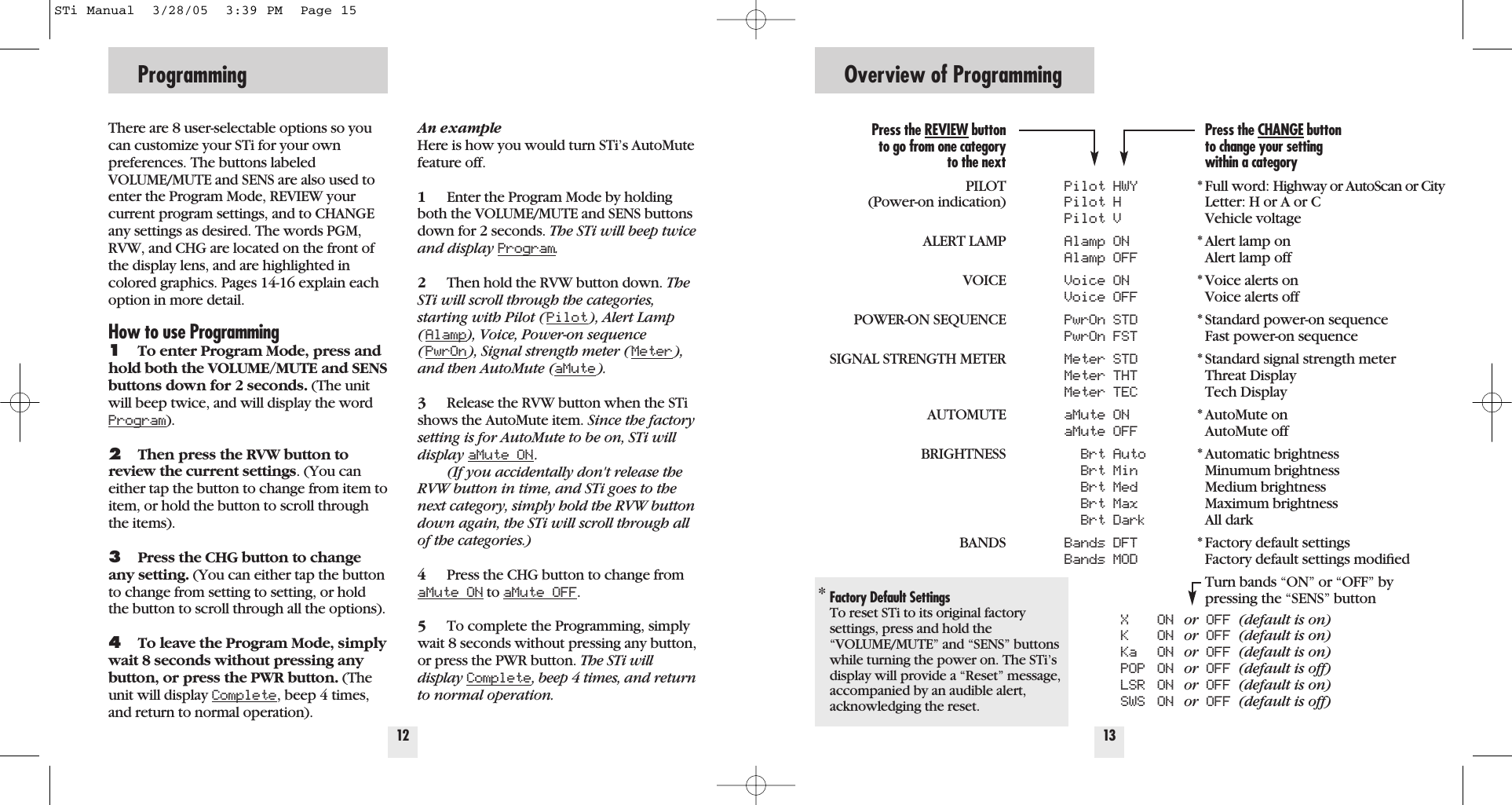
Programming12There are 8 user-selectable options so youcan customize your STi for your own preferences. The buttons labeledVOLUME/MUTE and SENS are also used toenter the Program Mode, REVIEW yourcurrent program settings, and to CHANGEany settings as desired. The words PGM,RVW, and CHG are located on the front ofthe display lens, and are highlighted incolored graphics. Pages 14-16 explain eachoption in more detail.How to use Programming1To enter Program Mode, press andhold both the VOLUME/MUTE and SENSbuttons down for 2 seconds. (The unitwill beep twice, and will display the wordProgram).2Then press the RVW button toreview the current settings. (You caneither tap the button to change from item toitem, or hold the button to scroll throughthe items).3Press the CHG button to changeany setting. (You can either tap the buttonto change from setting to setting, or holdthe button to scroll through all the options).4To leave the Program Mode, simplywait 8 seconds without pressing anybutton, or press the PWR button. (Theunit will display Complete, beep 4 times,and return to normal operation).An exampleHere is how you would turn STi’s AutoMutefeature off. 1Enter the Program Mode by holdingboth the VOLUME/MUTE and SENS buttonsdown for 2 seconds. The STi will beep twiceand display Program.2Then hold the RVW button down. TheSTi will scroll through the categories,starting with Pilot (Pilot), Alert Lamp(Alamp), Voice, Power-on sequence(PwrOn), Signal strength meter (Meter),and then AutoMute (aMute).3Release the RVW button when the STishows the AutoMute item. Since the factorysetting is for AutoMute to be on, STi willdisplay aMute ON.(If you accidentally don't release theRVW button in time, and STi goes to thenext category, simply hold the RVW buttondown again, the STi will scroll through allof the categories.)4Press the CHG button to change fromaMute ON to aMute OFF.5To complete the Programming, simplywait 8 seconds without pressing any button,or press the PWR button. The STi willdisplay Complete, beep 4 times, and returnto normal operation.Overview of Programming13Pilot HWYPilot HPilot VAlamp ONAlamp OFFVoice ONVoice OFFPwrOn STDPwrOn FSTMeter STDMeter THTMeter TECaMute ONaMute OFFBrt AutoBrt MinBrt MedBrt MaxBrt DarkBands DFTBands MODX ON  or OFF (default is on)K ON  or OFF (default is on)Ka ON  or OFF (default is on)POP ON  or OFF (default is off)LSR ON  or OFF (default is on)SWS ON  or OFF (default is off)Press the CHANGE buttonto change your settingwithin a category* Full word: Highway or AutoScan or CityLetter: H or A or CVehicle voltage* Alert lamp onAlert lamp off* Voice alerts onVoice alerts off* Standard power-on sequenceFast power-on sequence* Standard signal strength meterThreat DisplayTech Display* AutoMute onAutoMute off* Automatic brightness Minumum brightnessMedium brightnessMaximum brightnessAll dark* Factory default settingsFactory default settings modifiedTurn bands “ON” or “OFF” bypressing the “SENS” buttonPress the REVIEW buttonto go from one categoryto the nextPILOT(Power-on indication)ALERT LAMPVOICEPOWER-ON SEQUENCESIGNAL STRENGTH METERAUTOMUTEBRIGHTNESSBANDS*Factory Default SettingsTo reset STi to its original factorysettings, press and hold the“VOLUME/MUTE” and “SENS” buttonswhile turning the power on. The STi’sdisplay will provide a “Reset” message,accompanied by an audible alert,acknowledging the reset.STi Manual  3/28/05  3:39 PM  Page 15
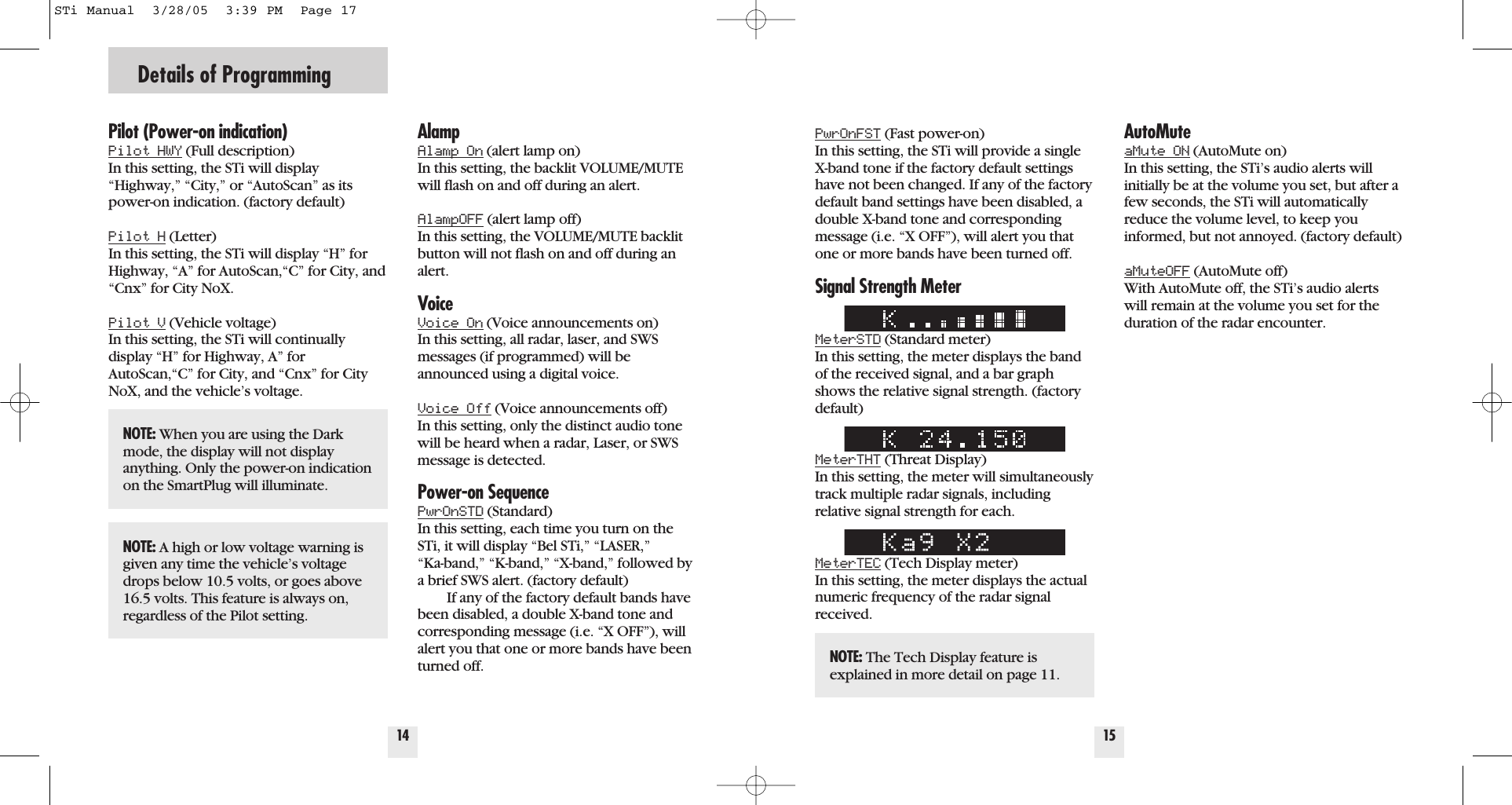
Details of Programming14Pilot (Power-on indication)Pilot HWY (Full description) In this setting, the STi will display“Highway,” “City,” or “AutoScan” as itspower-on indication. (factory default)Pilot H (Letter) In this setting, the STi will display “H” forHighway, “A” for AutoScan,“C” for City, and“Cnx” for City NoX. Pilot V (Vehicle voltage)  In this setting, the STi will continuallydisplay “H” for Highway, A” forAutoScan,“C” for City, and “Cnx” for CityNoX, and the vehicle’s voltage.AlampAlamp On (alert lamp on) In this setting, the backlit VOLUME/MUTEwill flash on and off during an alert.AlampOFF (alert lamp off) In this setting, the VOLUME/MUTE backlitbutton will not flash on and off during analert.VoiceVoice On (Voice announcements on) In this setting, all radar, laser, and SWSmessages (if programmed) will beannounced using a digital voice.Voice Off (Voice announcements off) In this setting, only the distinct audio tonewill be heard when a radar, Laser, or SWSmessage is detected.Power-on SequencePwrOnSTD (Standard) In this setting, each time you turn on theSTi, it will display “Bel STi,” “LASER,” “Ka-band,” “K-band,” “X-band,” followed bya brief SWS alert. (factory default) If any of the factory default bands havebeen disabled, a double X-band tone andcorresponding message (i.e. “X OFF”), willalert you that one or more bands have beenturned off.15PwrOnFST (Fast power-on) In this setting, the STi will provide a singleX-band tone if the factory default settingshave not been changed. If any of the factorydefault band settings have been disabled, adouble X-band tone and correspondingmessage (i.e. “X OFF”), will alert you thatone or more bands have been turned off.Signal Strength MeterMeterSTD (Standard meter) In this setting, the meter displays the bandof the received signal, and a bar graphshows the relative signal strength. (factorydefault)MeterTHT (Threat Display) In this setting, the meter will simultaneouslytrack multiple radar signals, including relative signal strength for each.MeterTEC (Tech Display meter) In this setting, the meter displays the actualnumeric frequency of the radar signalreceived.AutoMuteaMute ON (AutoMute on) In this setting, the STi’s audio alerts willinitially be at the volume you set, but after afew seconds, the STi will automaticallyreduce the volume level, to keep youinformed, but not annoyed. (factory default)aMuteOFF (AutoMute off) With AutoMute off, the STi’s audio alertswill remain at the volume you set for the duration of the radar encounter.NOTE: When you are using the Darkmode, the display will not displayanything. Only the power-on indicationon the SmartPlug will illuminate.NOTE: A high or low voltage warning isgiven any time the vehicle’s voltagedrops below 10.5 volts, or goes above16.5 volts. This feature is always on,regardless of the Pilot setting.NOTE: The Tech Display feature isexplained in more detail on page 11.STi Manual  3/28/05  3:39 PM  Page 17
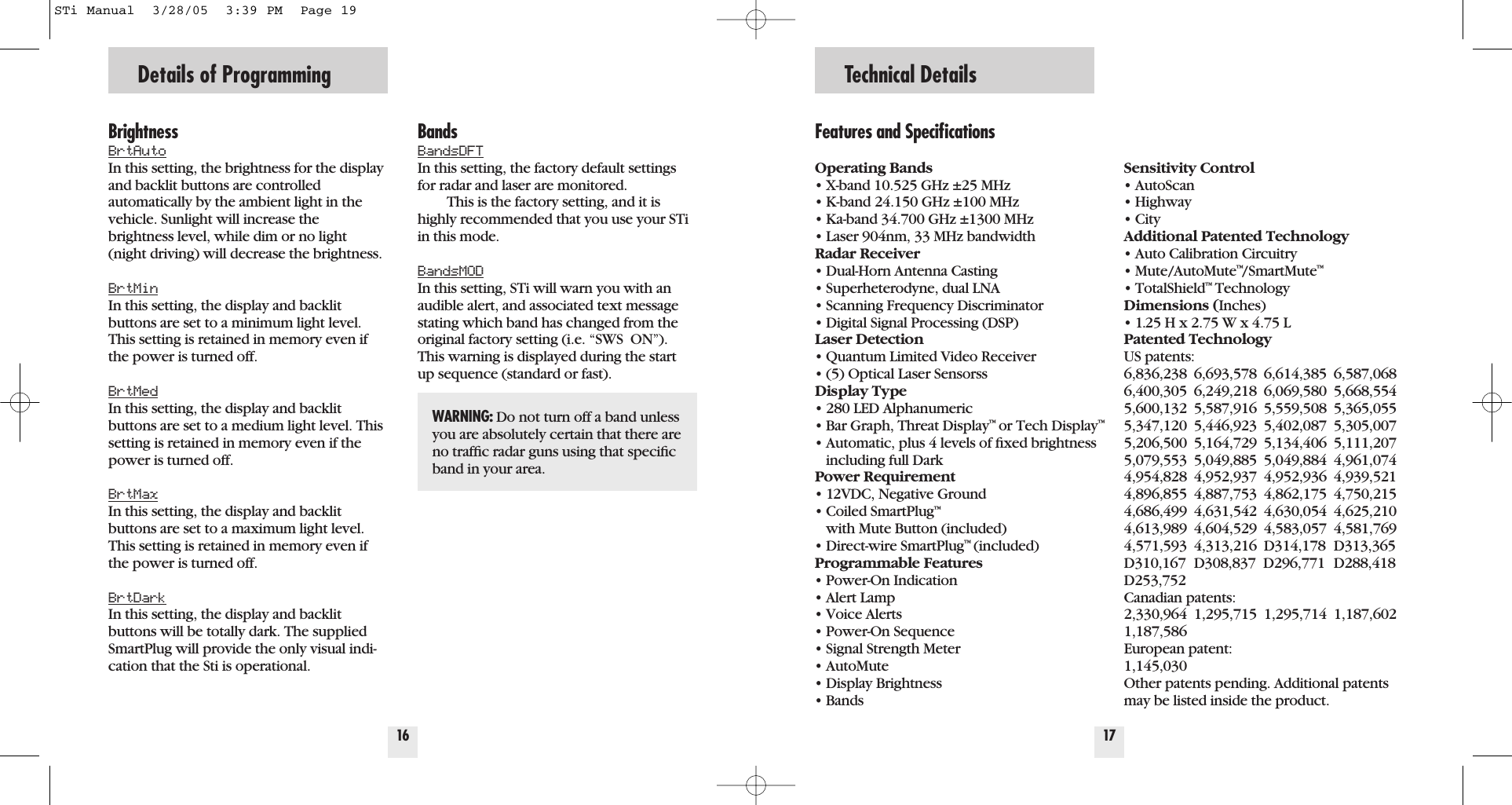
BrightnessBrtAutoIn this setting, the brightness for the displayand backlit buttons are controlled automatically by the ambient light in thevehicle. Sunlight will increase the brightness level, while dim or no light(night driving) will decrease the brightness.BrtMinIn this setting, the display and backlitbuttons are set to a minimum light level.This setting is retained in memory even ifthe power is turned off.BrtMedIn this setting, the display and backlitbuttons are set to a medium light level. Thissetting is retained in memory even if thepower is turned off.BrtMaxIn this setting, the display and backlitbuttons are set to a maximum light level.This setting is retained in memory even ifthe power is turned off.BrtDarkIn this setting, the display and backlitbuttons will be totally dark. The suppliedSmartPlug will provide the only visual indi-cation that the Sti is operational.16Details of ProgrammingFeatures and SpecificationsOperating Bands• X-band 10.525 GHz ±25 MHz• K-band 24.150 GHz ±100 MHz• Ka-band 34.700 GHz ±1300 MHz• Laser 904nm, 33 MHz bandwidthRadar Receiver• Dual-Horn Antenna Casting• Superheterodyne, dual LNA• Scanning Frequency Discriminator• Digital Signal Processing (DSP)Laser Detection• Quantum Limited Video Receiver • (5) Optical Laser SensorssDisplay Type• 280 LED Alphanumeric• Bar Graph, Threat Display™or Tech Display™• Automatic, plus 4 levels of fixed brightness including full DarkPower Requirement• 12VDC, Negative Ground• Coiled SmartPlug™with Mute Button (included)• Direct-wire SmartPlug™(included)Programmable Features• Power-On Indication• Alert Lamp• Voice Alerts• Power-On Sequence• Signal Strength Meter• AutoMute• Display Brightness• BandsSensitivity Control• AutoScan• Highway• CityAdditional Patented Technology• Auto Calibration Circuitry• Mute/AutoMute™/SmartMute™• TotalShield™TechnologyDimensions (Inches)• 1.25 H x 2.75 W x 4.75 LPatented TechnologyUS patents: 6,836,238 6,693,578 6,614,385 6,587,0686,400,305 6,249,218 6,069,580 5,668,5545,600,132 5,587,916 5,559,508 5,365,0555,347,120 5,446,923 5,402,087 5,305,0075,206,500 5,164,729 5,134,406 5,111,2075,079,553 5,049,885 5,049,884 4,961,0744,954,828 4,952,937 4,952,936 4,939,5214,896,855 4,887,753 4,862,175 4,750,2154,686,499 4,631,542 4,630,054 4,625,2104,613,989 4,604,529 4,583,057 4,581,7694,571,593 4,313,216 D314,178 D313,365D310,167 D308,837  D296,771 D288,418D253,752Canadian patents:2,330,964 1,295,715 1,295,714 1,187,6021,187,586European patent:1,145,030Other patents pending. Additional patentsmay be listed inside the product.17Technical DetailsBandsBandsDFTIn this setting, the factory default settingsfor radar and laser are monitored.This is the factory setting, and it ishighly recommended that you use your STiin this mode. BandsMODIn this setting, STi will warn you with anaudible alert, and associated text messagestating which band has changed from theoriginal factory setting (i.e. “SWS  ON”).This warning is displayed during the startup sequence (standard or fast).WARNING: Do not turn off a band unlessyou are absolutely certain that there areno traffic radar guns using that specificband in your area.STi Manual  3/28/05  3:39 PM  Page 19
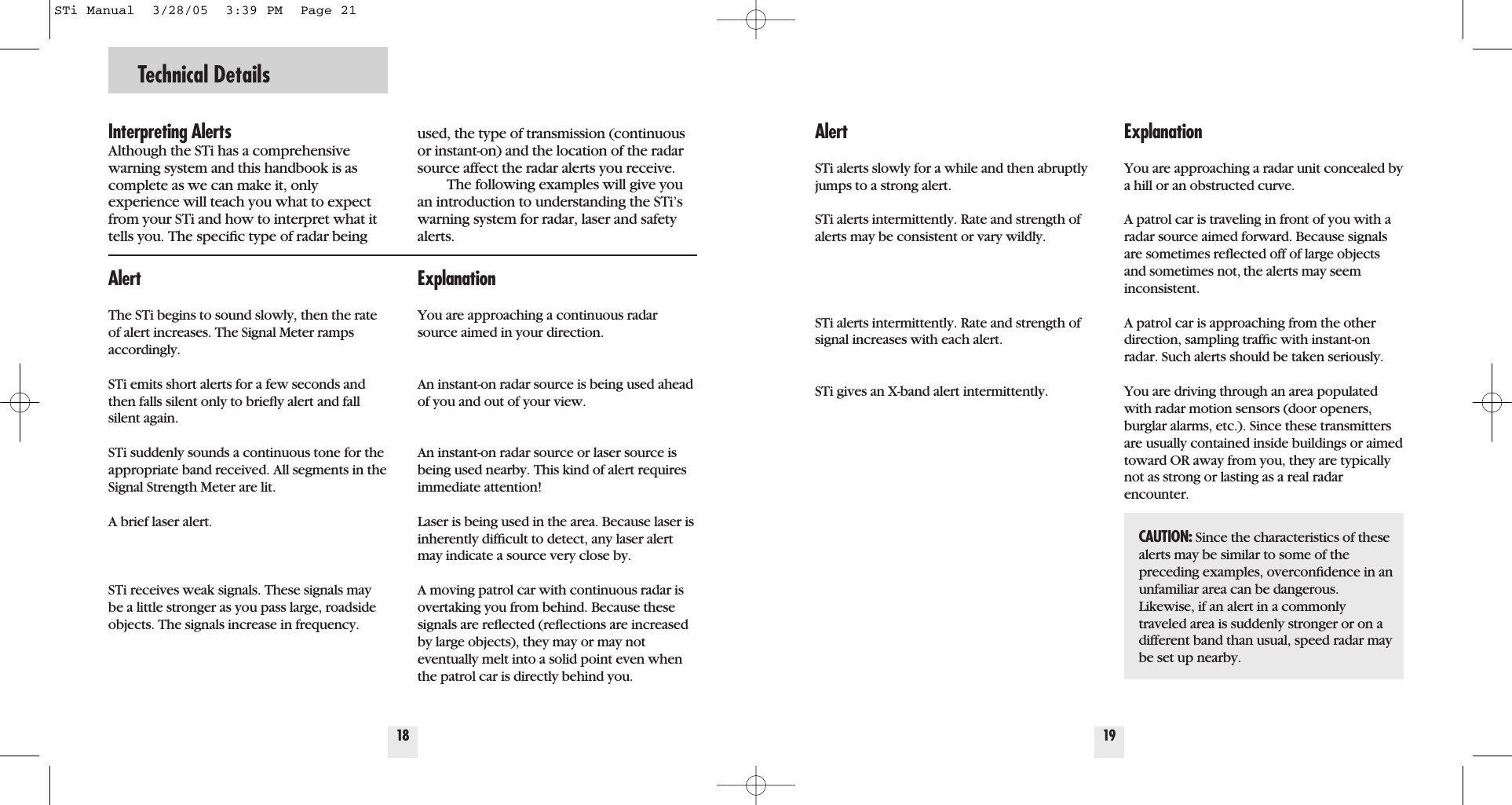
Technical Details18Interpreting AlertsAlthough the STi has a comprehensivewarning system and this handbook is ascomplete as we can make it, only experience will teach you what to expectfrom your STi and how to interpret what ittells you. The specific type of radar beingused, the type of transmission (continuousor instant-on) and the location of the radarsource affect the radar alerts you receive.The following examples will give youan introduction to understanding the STi’swarning system for radar, laser and safetyalerts.ExplanationYou are approaching a continuous radarsource aimed in your direction.  An instant-on radar source is being used aheadof you and out of your view. An instant-on radar source or laser source isbeing used nearby. This kind of alert requiresimmediate attention!Laser is being used in the area. Because laser isinherently difficult to detect, any laser alertmay indicate a source very close by. A moving patrol car with continuous radar isovertaking you from behind. Because thesesignals are reflected (reflections are increasedby large objects), they may or may not eventually melt into a solid point even whenthe patrol car is directly behind you. AlertThe STi begins to sound slowly, then the rateof alert increases. The Signal Meter rampsaccordingly.STi emits short alerts for a few seconds andthen falls silent only to briefly alert and fallsilent again.         STi suddenly sounds a continuous tone for theappropriate band received. All segments in theSignal Strength Meter are lit.A brief laser alert. STi receives weak signals. These signals maybe a little stronger as you pass large, roadsideobjects. The signals increase in frequency.19ExplanationYou are approaching a radar unit concealed bya hill or an obstructed curve.A patrol car is traveling in front of you with aradar source aimed forward. Because signalsare sometimes reflected off of large objectsand sometimes not, the alerts may seem inconsistent. A patrol car is approaching from the otherdirection, sampling traffic with instant-onradar. Such alerts should be taken seriously.  You are driving through an area populatedwith radar motion sensors (door openers,burglar alarms, etc.). Since these transmittersare usually contained inside buildings or aimedtoward OR away from you, they are typicallynot as strong or lasting as a real radarencounter.AlertSTi alerts slowly for a while and then abruptlyjumps to a strong alert.STi alerts intermittently. Rate and strength ofalerts may be consistent or vary wildly.         STi alerts intermittently. Rate and strength ofsignal increases with each alert.         STi gives an X-band alert intermittently.CAUTION: Since the characteristics of these alerts may be similar to some of thepreceding examples, overconfidence in anunfamiliar area can be dangerous.Likewise, if an alert in a commonly traveled area is suddenly stronger or on adifferent band than usual, speed radar maybe set up nearby.STi Manual  3/28/05  3:39 PM  Page 21
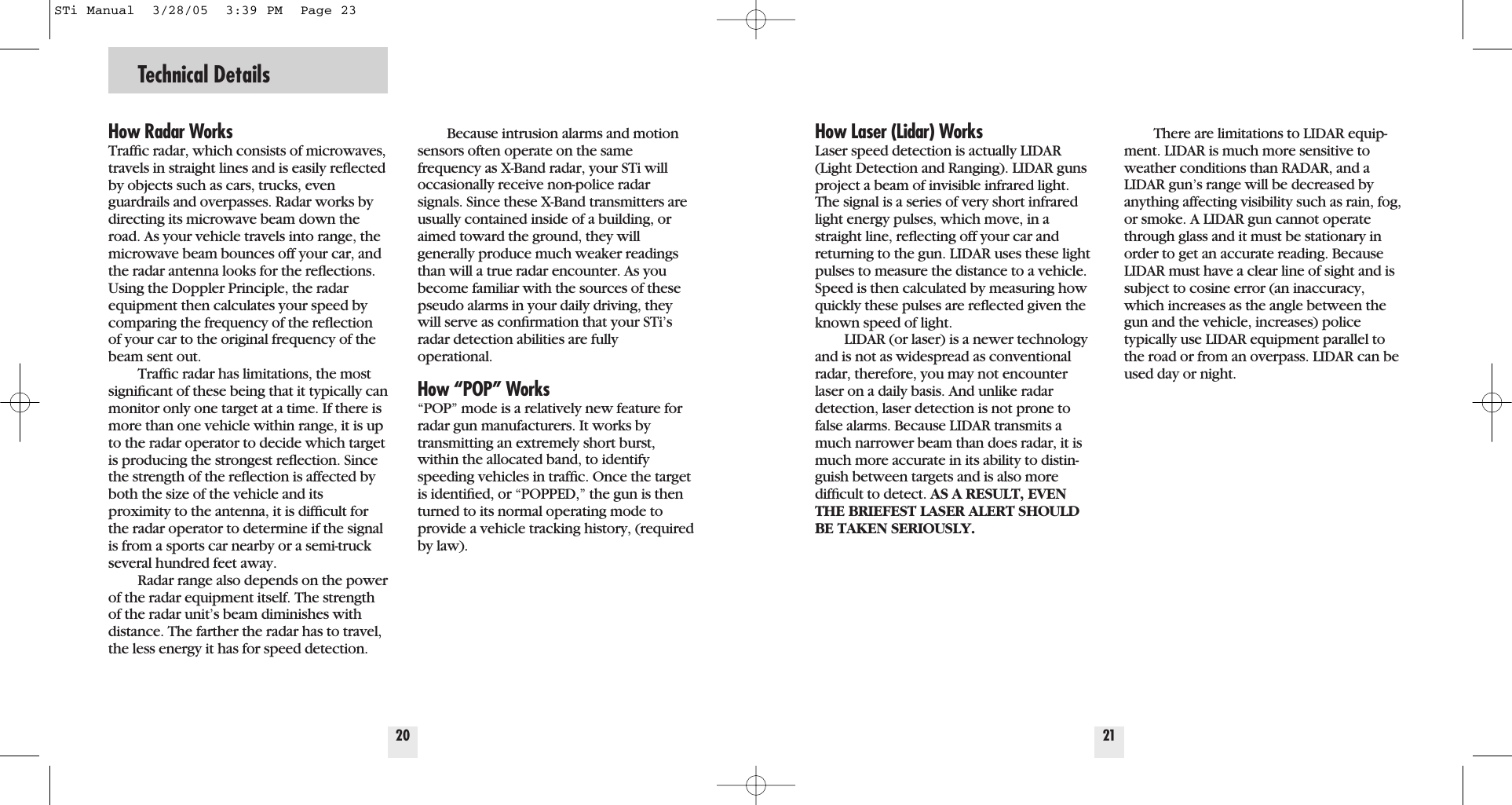
Technical Details20How Radar WorksTraffic radar, which consists of microwaves,travels in straight lines and is easily reflectedby objects such as cars, trucks, evenguardrails and overpasses. Radar works bydirecting its microwave beam down theroad. As your vehicle travels into range, themicrowave beam bounces off your car, andthe radar antenna looks for the reflections.Using the Doppler Principle, the radarequipment then calculates your speed bycomparing the frequency of the reflectionof your car to the original frequency of thebeam sent out.Traffic radar has limitations, the mostsignificant of these being that it typically canmonitor only one target at a time. If there ismore than one vehicle within range, it is upto the radar operator to decide which targetis producing the strongest reflection. Sincethe strength of the reflection is affected byboth the size of the vehicle and its proximity to the antenna, it is difficult forthe radar operator to determine if the signalis from a sports car nearby or a semi-truckseveral hundred feet away.Radar range also depends on the powerof the radar equipment itself. The strengthof the radar unit’s beam diminishes withdistance. The farther the radar has to travel,the less energy it has for speed detection.Because intrusion alarms and motionsensors often operate on the samefrequency as X-Band radar, your STi willoccasionally receive non-police radarsignals. Since these X-Band transmitters areusually contained inside of a building, oraimed toward the ground, they will generally produce much weaker readingsthan will a true radar encounter. As youbecome familiar with the sources of thesepseudo alarms in your daily driving, theywill serve as confirmation that your STi’sradar detection abilities are fully operational.How “POP” Works“POP” mode is a relatively new feature forradar gun manufacturers. It works by transmitting an extremely short burst,within the allocated band, to identifyspeeding vehicles in traffic. Once the targetis identified, or “POPPED,” the gun is thenturned to its normal operating mode toprovide a vehicle tracking history, (requiredby law).21How Laser (Lidar) WorksLaser speed detection is actually LIDAR(Light Detection and Ranging). LIDAR gunsproject a beam of invisible infrared light.The signal is a series of very short infraredlight energy pulses, which move, in astraight line, reflecting off your car andreturning to the gun. LIDAR uses these lightpulses to measure the distance to a vehicle.Speed is then calculated by measuring howquickly these pulses are reflected given theknown speed of light. LIDAR (or laser) is a newer technologyand is not as widespread as conventionalradar, therefore, you may not encounterlaser on a daily basis. And unlike radardetection, laser detection is not prone tofalse alarms. Because LIDAR transmits amuch narrower beam than does radar, it ismuch more accurate in its ability to distin-guish between targets and is also more difficult to detect. AS A RESULT, EVENTHE BRIEFEST LASER ALERT SHOULDBE TAKEN SERIOUSLY.There are limitations to LIDAR equip-ment. LIDAR is much more sensitive toweather conditions than RADAR, and aLIDAR gun’s range will be decreased byanything affecting visibility such as rain, fog,or smoke. A LIDAR gun cannot operatethrough glass and it must be stationary inorder to get an accurate reading. BecauseLIDAR must have a clear line of sight and issubject to cosine error (an inaccuracy,which increases as the angle between thegun and the vehicle, increases) police typically use LIDAR equipment parallel tothe road or from an overpass. LIDAR can beused day or night.STi Manual  3/28/05  3:39 PM  Page 23
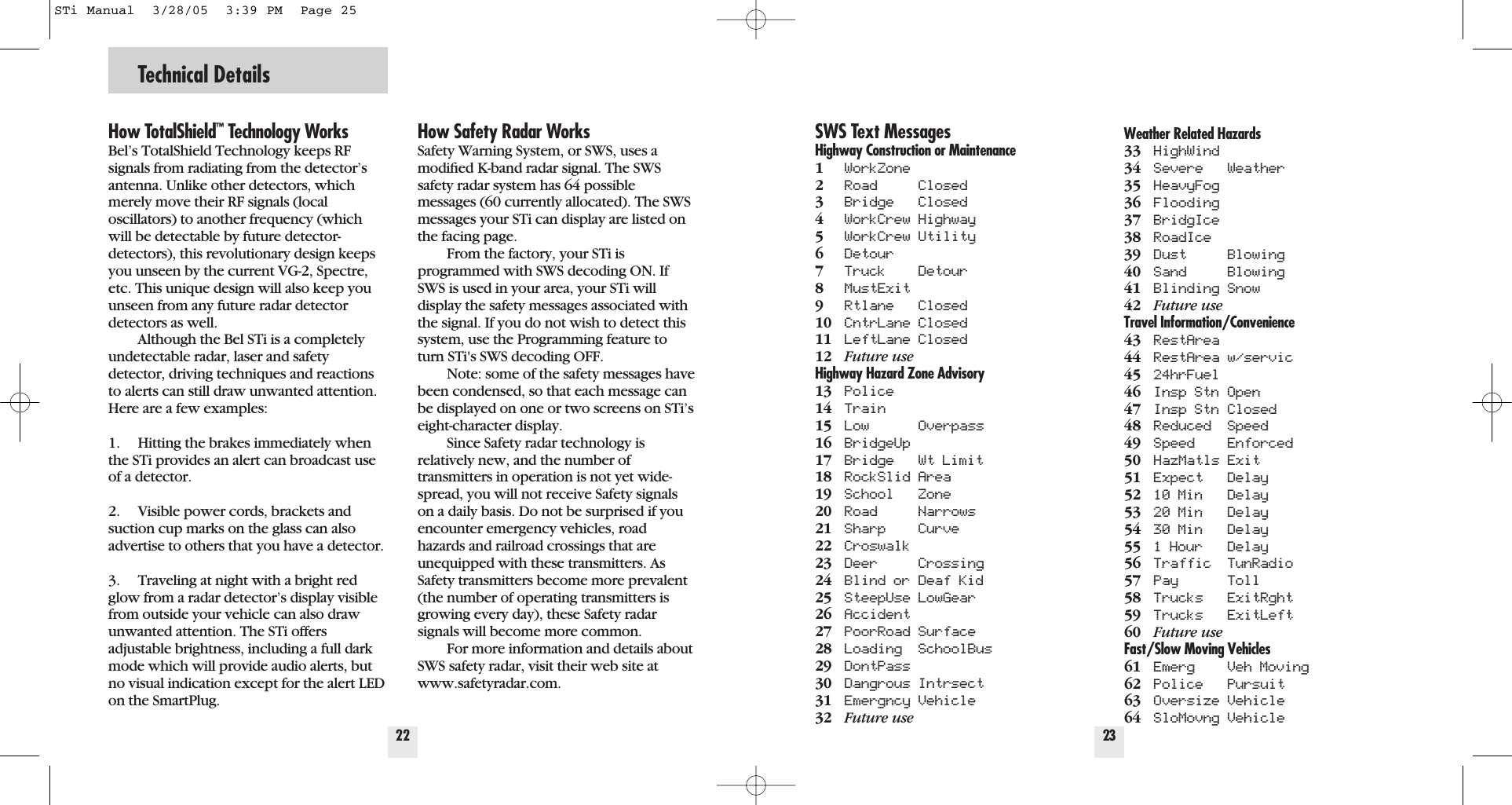
Technical Details22How TotalShield™Technology WorksBel’s TotalShield Technology keeps RFsignals from radiating from the detector’santenna. Unlike other detectors, whichmerely move their RF signals (local oscillators) to another frequency (whichwill be detectable by future detector-detectors), this revolutionary design keepsyou unseen by the current VG-2, Spectre,etc. This unique design will also keep youunseen from any future radar detectordetectors as well.Although the Bel STi is a completely undetectable radar, laser and safetydetector, driving techniques and reactionsto alerts can still draw unwanted attention.Here are a few examples:1. Hitting the brakes immediately whenthe STi provides an alert can broadcast useof a detector.2. Visible power cords, brackets andsuction cup marks on the glass can alsoadvertise to others that you have a detector.3. Traveling at night with a bright redglow from a radar detector’s display visiblefrom outside your vehicle can also drawunwanted attention. The STi offersadjustable brightness, including a full darkmode which will provide audio alerts, butno visual indication except for the alert LEDon the SmartPlug.How Safety Radar WorksSafety Warning System, or SWS, uses amodified K-band radar signal. The SWSsafety radar system has 64 possiblemessages (60 currently allocated). The SWSmessages your STi can display are listed onthe facing page.From the factory, your STi isprogrammed with SWS decoding ON. IfSWS is used in your area, your STi willdisplay the safety messages associated withthe signal. If you do not wish to detect thissystem, use the Programming feature toturn STi's SWS decoding OFF.Note: some of the safety messages havebeen condensed, so that each message canbe displayed on one or two screens on STi’seight-character display.Since Safety radar technology is relatively new, and the number oftransmitters in operation is not yet wide-spread, you will not receive Safety signalson a daily basis. Do not be surprised if youencounter emergency vehicles, roadhazards and railroad crossings that areunequipped with these transmitters. AsSafety transmitters become more prevalent(the number of operating transmitters isgrowing every day), these Safety radarsignals will become more common.For more information and details aboutSWS safety radar, visit their web site atwww.safetyradar.com.23SWS Text MessagesHighway Construction or Maintenance1WorkZone2Road Closed3Bridge Closed4WorkCrew Highway5WorkCrew Utility6Detour7Truck Detour8MustExit9Rtlane Closed10 CntrLane Closed11 LeftLane Closed12 Future useHighway Hazard Zone Advisory13 Police14 Train15 Low Overpass16 BridgeUp17 Bridge Wt Limit18 RockSlid Area19 School Zone20 Road Narrows21 Sharp Curve22 Croswalk23 Deer Crossing24 Blind or Deaf Kid25 SteepUse LowGear26 Accident27 PoorRoad Surface28 Loading SchoolBus29 DontPass30 Dangrous Intrsect31 Emergncy Vehicle32 Future useWeather Related Hazards33 HighWind34 Severe Weather35 HeavyFog36 Flooding37 BridgIce38 RoadIce39 Dust Blowing40 Sand Blowing41 Blinding Snow42 Future useTravel Information/Convenience43 RestArea44 RestArea w/servic45 24hrFuel46 Insp Stn Open47 Insp Stn Closed48 Reduced Speed49 Speed Enforced50 HazMatls Exit51 Expect Delay52 10 Min Delay53 20 Min Delay54 30 Min Delay55 1 Hour Delay56 Traffic TunRadio57 Pay Toll58 Trucks ExitRght59 Trucks ExitLeft60 Future useFast/Slow Moving Vehicles61 Emerg Veh Moving62 Police Pursuit63 Oversize Vehicle64 SloMovng VehicleSTi Manual  3/28/05  3:39 PM  Page 25
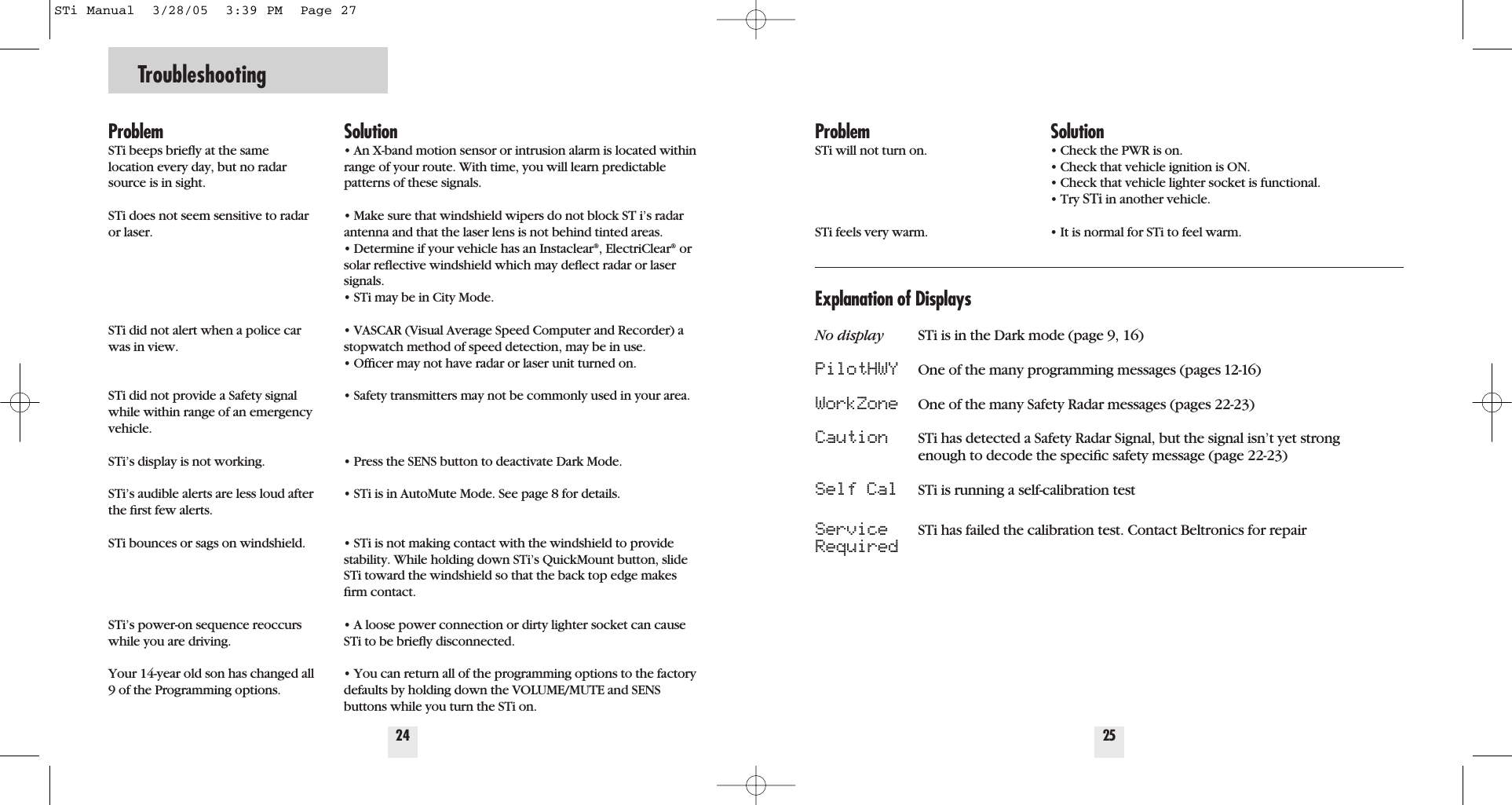
Troubleshooting24ProblemSTi beeps briefly at the same location every day, but no radarsource is in sight.STi does not seem sensitive to radaror laser.STi did not alert when a police carwas in view.STi did not provide a Safety signalwhile within range of an emergencyvehicle.STi’s display is not working.STi’s audible alerts are less loud afterthe first few alerts.STi bounces or sags on windshield.STi’s power-on sequence reoccurswhile you are driving. Your 14-year old son has changed all9 of the Programming options.Solution• An X-band motion sensor or intrusion alarm is located withinrange of your route. With time, you will learn predictablepatterns of these signals.• Make sure that windshield wipers do not block ST i’s radarantenna and that the laser lens is not behind tinted areas.• Determine if your vehicle has an Instaclear®, ElectriClear®orsolar reflective windshield which may deflect radar or lasersignals.• STi may be in City Mode.• VASCAR (Visual Average Speed Computer and Recorder) astopwatch method of speed detection, may be in use.• Officer may not have radar or laser unit turned on.• Safety transmitters may not be commonly used in your area.• Press the SENS button to deactivate Dark Mode.• STi is in AutoMute Mode. See page 8 for details.• STi is not making contact with the windshield to providestability. While holding down STi’s QuickMount button, slideSTi toward the windshield so that the back top edge makesfirm contact.• A loose power connection or dirty lighter socket can causeSTi to be briefly disconnected.• You can return all of the programming options to the factorydefaults by holding down the VOLUME/MUTE and SENSbuttons while you turn the STi on.25ProblemSTi will not turn on.STi feels very warm. Solution• Check the PWR is on.• Check that vehicle ignition is ON.• Check that vehicle lighter socket is functional.• Try STi in another vehicle.• It is normal for STi to feel warm.Explanation of DisplaysNo display STi is in the Dark mode (page 9, 16)PilotHWY One of the many programming messages (pages 12-16)WorkZone One of the many Safety Radar messages (pages 22-23)Caution STi has detected a Safety Radar Signal, but the signal isn’t yet strong enough to decode the specific safety message (page 22-23)Self Cal STi is running a self-calibration test Service STi has failed the calibration test. Contact Beltronics for repairRequiredSTi Manual  3/28/05  3:39 PM  Page 27
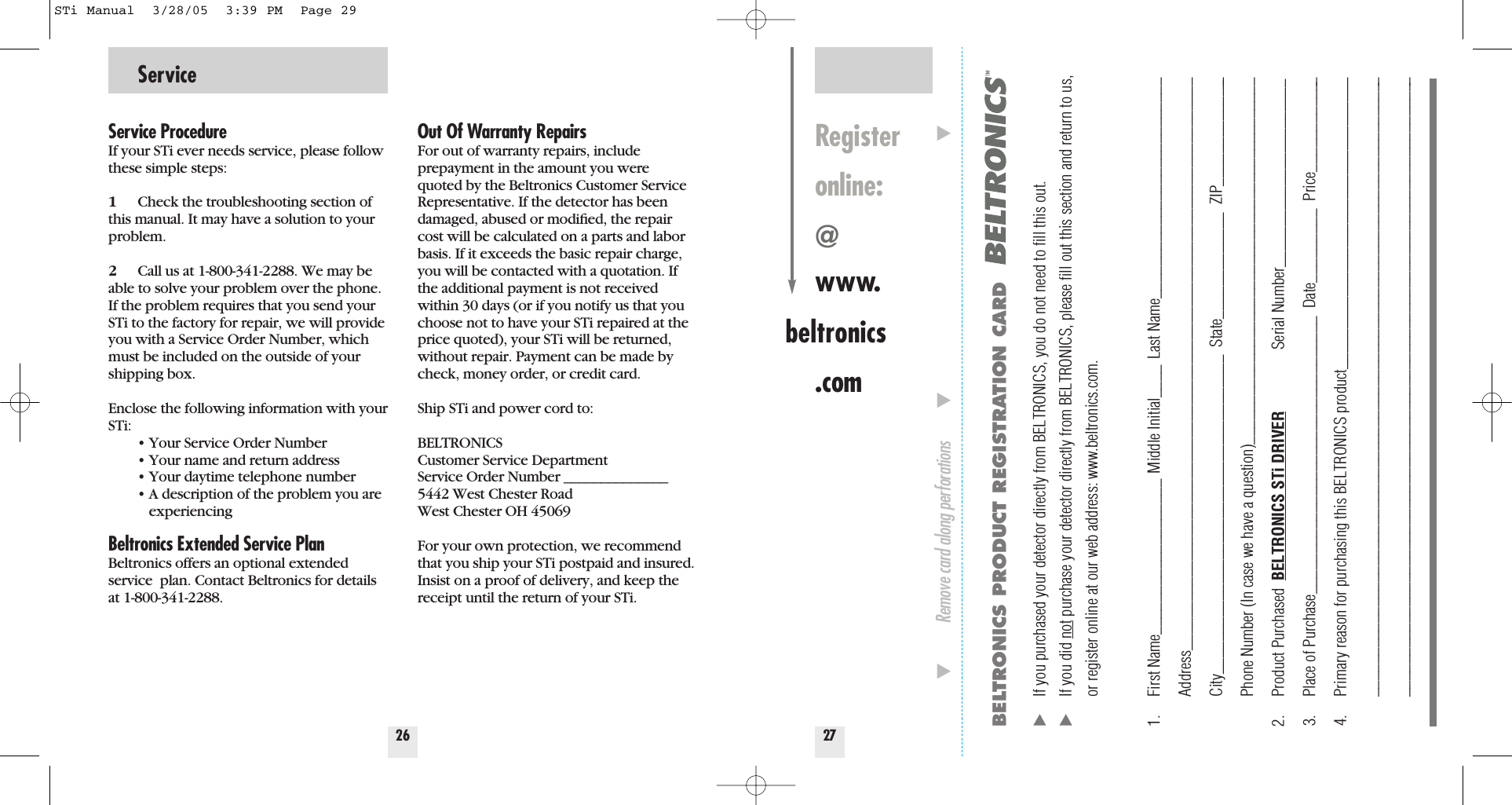
Service26Service ProcedureIf your STi ever needs service, please followthese simple steps:1Check the troubleshooting section ofthis manual. It may have a solution to yourproblem.2Call us at 1-800-341-2288. We may beable to solve your problem over the phone.If the problem requires that you send yourSTi to the factory for repair, we will provideyou with a Service Order Number, whichmust be included on the outside of yourshipping box. Enclose the following information with yourSTi:• Your Service Order Number• Your name and return address• Your daytime telephone number• A description of the problem you are experiencingBeltronics Extended Service PlanBeltronics offers an optional extendedservice  plan. Contact Beltronics for detailsat 1-800-341-2288.Out Of Warranty RepairsFor out of warranty repairs, include prepayment in the amount you werequoted by the Beltronics Customer ServiceRepresentative. If the detector has beendamaged, abused or modified, the repaircost will be calculated on a parts and laborbasis. If it exceeds the basic repair charge,you will be contacted with a quotation. Ifthe additional payment is not receivedwithin 30 days (or if you notify us that youchoose not to have your STi repaired at theprice quoted), your STi will be returned,without repair. Payment can be made bycheck, money order, or credit card.Ship STi and power cord to: BELTRONICSCustomer Service DepartmentService Order Number ______________5442 West Chester RoadWest Chester OH 45069For your own protection, we recommendthat you ship your STi postpaid and insured.Insist on a proof of delivery, and keep thereceipt until the return of your STi.27Registeronline:@www.beltronics.comBELTRONICS PRODUCT REGISTRATION CARD̈If you purchased your detector directly from BELTRONICS, you do not need to fill this out.̈If you did not purchase your detector directly from BELTRONICS, please fill out this section and return to us, or register online at our web address: www.beltronics.com. 1. First Name___________________ Middle Initial____ Last Name___________________________Address______________________________________________________________________City_______________________________________  State_____________  ZIP______________Phone Number (In case we have a question)_____________________________________________2. Product Purchased  BELTRONICS STi DRIVER Serial Number_______________________3. Place of Purchase__________________________________  Date_________  Price____________4. Primary reason for purchasing this BELTRONICS product____________________________________________________________________________________________________________________________________________________________________________________________̄Remove card along perforations         ̄                                                         ̄STi Manual  3/28/05  3:39 PM  Page 29
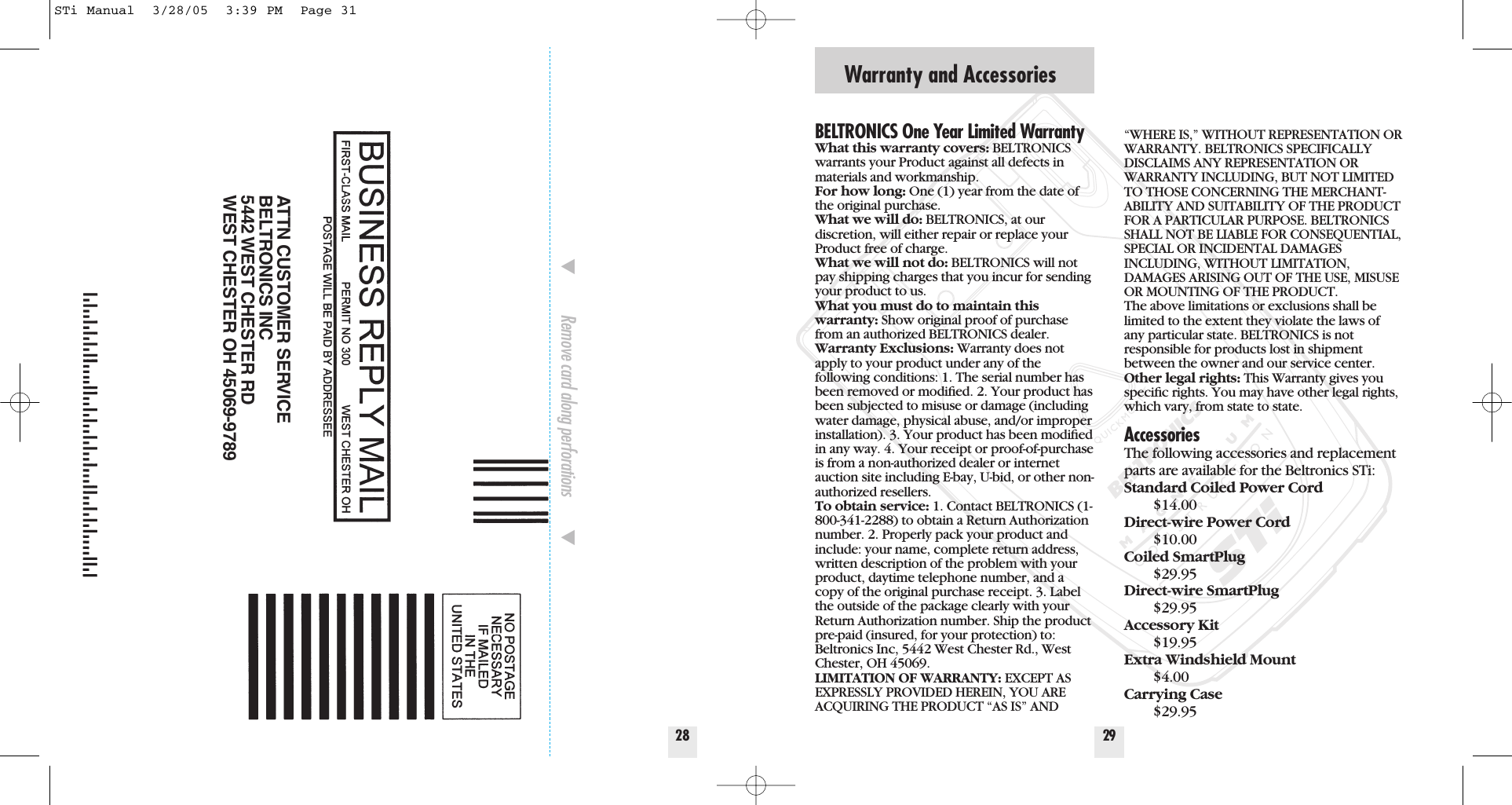
Warranty and Accessories29BELTRONICS One Year Limited WarrantyWhat this warranty covers: BELTRONICSwarrants your Product against all defects inmaterials and workmanship. For how long: One (1) year from the date ofthe original purchase.  What we will do: BELTRONICS, at our discretion, will either repair or replace yourProduct free of charge. What we will not do: BELTRONICS will notpay shipping charges that you incur for sendingyour product to us.What you must do to maintain thiswarranty: Show original proof of purchasefrom an authorized BELTRONICS dealer.Warranty Exclusions: Warranty does notapply to your product under any of thefollowing conditions: 1. The serial number hasbeen removed or modified. 2. Your product hasbeen subjected to misuse or damage (includingwater damage, physical abuse, and/or improperinstallation). 3. Your product has been modifiedin any way. 4. Your receipt or proof-of-purchaseis from a non-authorized dealer or internetauction site including E-bay, U-bid, or other non-authorized resellers.To obtain service: 1. Contact BELTRONICS (1-800-341-2288) to obtain a Return Authorizationnumber. 2. Properly pack your product andinclude: your name, complete return address,written description of the problem with yourproduct, daytime telephone number, and acopy of the original purchase receipt. 3. Labelthe outside of the package clearly with yourReturn Authorization number. Ship the productpre-paid (insured, for your protection) to:Beltronics Inc, 5442 West Chester Rd., WestChester, OH 45069.LIMITATION OF WARRANTY: EXCEPT ASEXPRESSLY PROVIDED HEREIN, YOU AREACQUIRING THE PRODUCT “AS IS” AND“WHERE IS,” WITHOUT REPRESENTATION ORWARRANTY. BELTRONICS SPECIFICALLYDISCLAIMS ANY REPRESENTATION ORWARRANTY INCLUDING, BUT NOT LIMITEDTO THOSE CONCERNING THE MERCHANT-ABILITY AND SUITABILITY OF THE PRODUCTFOR A PARTICULAR PURPOSE. BELTRONICSSHALL NOT BE LIABLE FOR CONSEQUENTIAL,SPECIAL OR INCIDENTAL DAMAGESINCLUDING, WITHOUT LIMITATION,DAMAGES ARISING OUT OF THE USE, MISUSEOR MOUNTING OF THE PRODUCT.  The above limitations or exclusions shall belimited to the extent they violate the laws ofany particular state. BELTRONICS is not responsible for products lost in shipmentbetween the owner and our service center.Other legal rights: This Warranty gives youspecific rights. You may have other legal rights,which vary, from state to state.AccessoriesThe following accessories and replacementparts are available for the Beltronics STi:Standard Coiled Power Cord$14.00Direct-wire Power Cord$10.00Coiled SmartPlug$29.95Direct-wire SmartPlug$29.95Accessory Kit$19.95Extra Windshield Mount$4.00Carrying Case$29.9528̄Remove card along perforations         ̄ATTN CUSTOMER SERVICEBELTRONICS INC5442 WEST CHESTER RDWEST CHESTER OH 45069-9789STi Manual  3/28/05  3:39 PM  Page 31

Navigation menu