BenQ Mobile and OHG A71 GSM 850/1800/1900 Mobile Phone User Manual Dorado
BenQ Mobile GmbH & Co. OHG GSM 850/1800/1900 Mobile Phone Dorado
User Manual

right page (1) of A71 FCC, LAM en (19.08.2005, 11:40)
© Siemens AG 2004, C:\Siemens\DTP-Satz\Produkte\A71\output\A71_LAM_FCC_en_050819_te\DoradoIVZ.fm
Table of Contents 1
VAR Language: en2; VAR issue date: 050331
Legal notices .......................................2
Safety precautions ..............................4
Antenna care ...................................5
Phone operation ..............................5
Electronic devices ............................6
Overview of the phone .......................9
Getting started .................................10
Using the SIM card/battery .............10
Charge battery ...............................11
Switch on/off, PIN entry ....................11
User guide .....................................11
Security .............................................11
Clear SIM card barring ....................12
Prevent accidental activation ..........12
Making a phone call .........................12
Phonebook ........................................13
New entry ......................................13
Text entry ......................................13
Call/search for an entry ..................14
Call with record no. ........................14
Edit entry .......................................14
Groups ...........................................14
Messages (SMS) ................................15
Read messages ..............................15
Inbox/Outbox .................................15
Compose a message ......................15
Setup ................................................15
Profiles ..........................................15
Display ...........................................16
Screensaver ...................................16
Call setup .......................................16
Clock .............................................16
Security .........................................16
Network .........................................17
Ring tones .........................................17
Alarm clock ...................................... 18
Fast access key ................................. 18
Customer Care ................................. 19
Product data ..................................... 20
Care and maintenance ..................... 21
Accessories ....................................... 22
SAR ................................................. 23
U.S. FDA ........................................... 24
FCC/Industry Canada Notice ............ 28
Ten Driving Safety Tips .................... 29
Intellectual property ........................ 31
End user license agreement ............ 32
Table of
Contents

© Siemens AG 2004, C:\Siemens\DTP-Satz\Produkte\A71\output\A71_LAM_FCC_en_050819_te\A71_LegalNotices.fm
left page (2) of A71 FCC, LAM en, (19.08.2005, 11:40)
Legal notices
2
VAR Language: en2; VAR issue date: 050331
Legal notices
The mobile phone described in this guide is approved for use on the GSM and GPRS net-
works operating on the GSM 850, 1800 (DCS/PCN) and 1900 (PCS) bands. It is approved
for use in the country where it was originally sold and may be approved for use in other
countries.
© 2005 Siemens Information and Communication Mobile, LLC.
All rights reserved.
Siemens and the A71 model phone are
trademarks or registered trademarks of
Siemens AG and/or its affiliates in the
United States and/or other countries.
T9® is a registered trademark of America
Online, Inc. in the United States. Java and
all Java-based trademarks and logos are
trademarks or registered trademarks of Sun
Microsystems, Inc. in the U.S and other
countries. The names of actual companies
and products mentioned herein may be the
trademarks of their respective owners.
Disclaimer
The information contained in the User
Guide is written for the A71 phone.
Siemens reserves the right to make changes
and improvements to the products and any
of the features of the products described in
this document without prior notice. The
contents of the user guide are provided "AS
IS". Except as required by applicable law, no
warranties of any kind, either express or im-
plied, including, but not limited to, the im-
plied warranties of merchantability and fit-
ness for a particular purpose, are made in
relation to the accuracy, reliability or con-
tents of this document. Siemens reserves
the right to revise the user guide or with-
draw it at any time without prior notice. Un-
der no circumstances shall Siemens be re-
sponsible for any loss of data or income or
any special, incidental, consequential or in-
direct damages howsoever caused.
Export Information
The mobile phone may be subject to export
regulation of the United States and other
countries. Diversion contrary to law is pro-
hibited. You must comply with all applica-
ble export laws, restrictions and regulations
of the United States foreign agencies or au-
thorities, and may not export, or transfer
for the purpose of re-export, the mobile
phone or any part of the phone in violation
of any applicable restrictions, laws or regu-
lations, or without all necessary approvals.
Network Services
A number of features included in this
guide are called Network Services. They
are special services provided by wireless
service providers. In order to use any of
these Network Services, you must sub-
scribe to these service(s) from your ser-
vice provider and obtain instructions for
their use. Some of these Network Servic-
es may not be available when roaming on
a network other than your home network.
Standby and
Talk Time Information
The mobile phone incorporates features
that are new to the mobile phone world.
These may include color displays and
lighting, graphic games, music reproduc-
tion and browsing the Internet. The way
you use the display and the features will
affect the performance of the battery and
how long it lasts between charge cycles.
The quoted standby times and talk times
show the minimum and maximum per-
formance that can be expected from the
right page (3) of A71 FCC, LAM en, (19.08.2005, 11:40)
© Siemens AG 2004, C:\Siemens\DTP-Satz\Produkte\A71\output\A71_LAM_FCC_en_050819_te\A71_LegalNotices.fm
3
Legal notices
VAR Language: en2; VAR issue date: 050331
battery under normal network conditions
and with the default settings as set by the
factory. However, playing games (particu-
larly with the backlight continuously
switched on) and listening to music will
shorten the time available for standby
and to make and receive telephone calls.
Operation times also vary depending on
network conditions, SIM settings, charg-
ing and battery condition, how you use
your phone and other factors.
Memory
The mobile phone contains an internal
memory device that stores the software
required to operate the mobile phone,
communicate with the GSM/GPRS net-
work and provide the user interface.
Some features in the internal memory
run additional devices and some addition-
al games and utilities. The amount of
memory available in the mobile phone is
finite and may be insufficient to store
large numbers of applications and files.
Warning!
Remember to back up your data and to do so fre-
quently. Always back up all data and programs
before sending the mobile phone in for repair.
© Siemens AG 2004, C:\Siemens\DTP-Satz\Produkte\A71\output\A71_LAM_FCC_en_050819_te\A71_SecurityInfo.fm
left page (4) of A71 FCC, LAM en, (23.08.2005, 08:53)
Safety precautions
4
VAR Language: en2; VAR issue date: 050331
Safety precautions
Information for parents
Please read the operating instructions and safety precautions carefully before use.
Explain the content and the hazards associated with using the phone to your children.
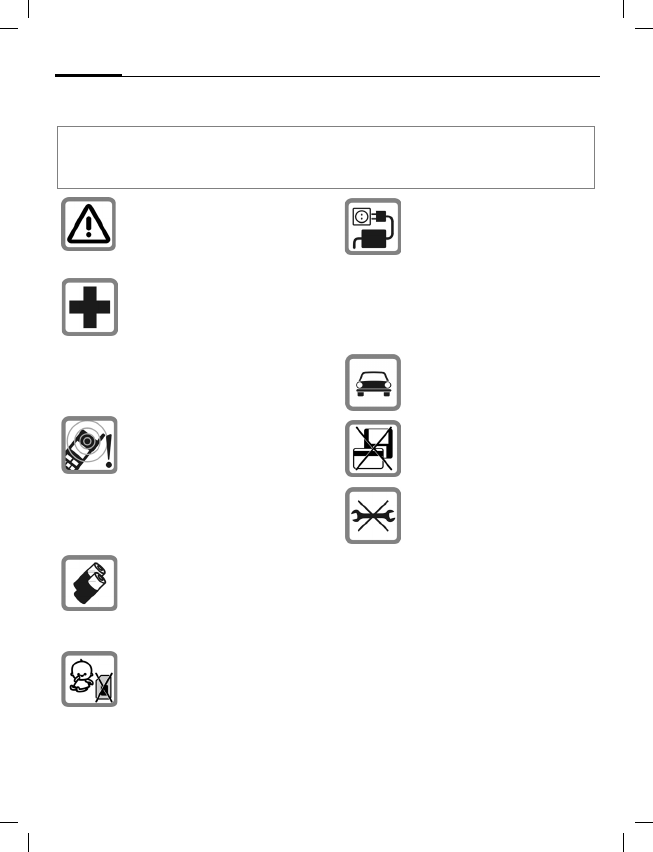
Remember to comply with legal re-
quirements and local restrictions
when using the phone. For example
in aeroplanes, petrol stations, hos-
pitals or while driving.
Mobile phones can interfere with
the functioning of medical devices
such as hearing aids or pacemak-
ers. Keep at least 20 cm/9 inches
between phone and pacemaker.
When using the mobile phone hold
it to the ear which is further away
from the pacemaker. For more
information consult your doctor.
The ringtones (p. 17), message to-
nes (p. 17) and handsfree talking
are reproduced through the loud-
speaker. Do not hold the phone to
your ear when it rings or when you
have switched on the handsfree
function (p. 12). Otherwise you risk
serious permanent damage to your
hearing.
Only use original Siemens batteries
(100 % mercury-free) and – charg-
ing devices. Otherwise you risk seri-
ous damage to health and property.
The battery could explode, for in-
stance.
Small parts such as the SIM card,
sealing stop, lens ring and lens cap
can be dismantled and swallowed
by small children. The phone must
therefore be stored out of the reach
of small children.
The mains voltage specified on the
power supply unit (V) must not be
exceeded. Otherwise the charging
device may be destroyed.
The power supply must be plugged
into an easily accessible AC mains
power socket when charging the
battery. The only way to turn off the
charging device after charging the
battery is to unplug it.
Do not use a handheld while
driving.
Do not place the phone near to elec-
tromagnetic data carriers such as
credit cards and floppy disks. Infor-
mation stored on them could be lost.
You may only open the phone to re-
place the battery (100 % mercury-
free) or SIM card. You must not
open the battery under any circum-
stances. All other changes to this
device are strictly prohibited and will
invalidate the guarantee.
right page (5) of A71 FCC, LAM en, (23.08.2005, 08:53)
© Siemens AG 2004, C:\Siemens\DTP-Satz\Produkte\A71\output\A71_LAM_FCC_en_050819_te\A71_SecurityInfo.fm
5
Safety precautions
VAR Language: en2; VAR issue date: 050331
Antenna care
Use only the supplied or an approved re-
placement antenna. Unauthorized anten-
nas, modifications, or attachments could
damage the phone and may violate FCC
regulations.
Phone operation
Normal position
Hold the phone as you would any other
telephone with the antenna pointed up
and over your shoulder.
Tips on efficient operation
For your phone to operate most
efficiently:
• Extend your antenna fully
(if applicable).
• Do not touch the antenna unnecessari-
ly when the phone is in use. Contact
with the antenna affects call quality
and may cause the phone to operate at
a higher power level than otherwise
needed.
Important:
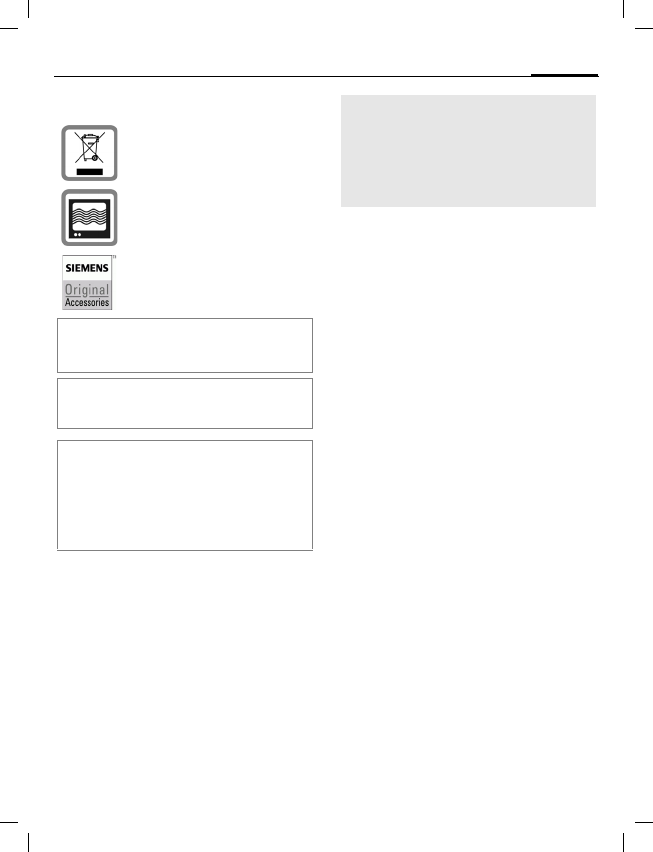
Please dispose of unwanted batter-
ies and phones as permitted by the
laws in your country.
The phone may cause interference
in the vicinity of TV sets, radios and
PCs.
Use only Siemens original accesso-
ries. This will avoid potential risks to
health or property and ensure com-
pliance with all relevant regulations.
Improper use will invalidate the guarantee!
These safety instructions also apply to Siemens
original accessories.
Product attributes are subject to changes in tech-
nology, design and availability. Siemens reserves
the right to modify products without prior notice.
This cellular phone offers a range of functions, it
can be used in positions other than the head, such
as on the body. In this case, separation distance
of 1.0 cm is required. When a carry case, belt clip
or holder is used for body-worn operation, it
should not contain metal and should position the
device the above-stated distance from your body.
Important
Read this information before using your
wireless handheld phone.
As this mobile phone is equipped with a
fixed (non-retractable) antenna, some
paragraphs in the text below may not be
applicable.

© Siemens AG 2004, C:\Siemens\DTP-Satz\Produkte\A71\output\A71_LAM_FCC_en_050819_te\A71_SecurityInfo.fm
left page (6) of A71 FCC, LAM en, (23.08.2005, 08:53)
Safety precautions
6
VAR Language: en2; VAR issue date: 050331
Driving
Laws pertaining to the use of mobile
phones while driving vary significantly from
state to state and sometimes even from lo-
cality to locality within states. For example,
some areas may allow persons to use their
mobile phones only if they employ a hands-
free device, and some areas may prohibit
the use of cell phones entirely. Accordingly,
Siemens recommends that persons check
the laws for the areas in which they drive or
will be driving. For areas where the use of
mobile phones while driving is permitted,
Siemens encourages persons to use their
phones responsibly and to employ hands-
free devices. Also, if using your phone while
driving, please:
• Give full attention to driving – driving
safely is your first responsibility;
• Use hands-free operation, if available;
• Pull off the road and park before mak-
ing or answering a call, if driving condi-
tions so require.
For vehicles equipped with air bags
An air bag inflates with great force. DO NOT
place objects, including either installed or
portable wireless equipment, in the area
over the air bag or in the air bag deploy-
ment area. If in-vehicle wireless equipment
is improperly installed and the air bag in-
flates, serious injury could result.
Electronic devices
Most modern electronic equipment is
shielded from radio frequency (RF) sig-
nals. However, certain electronic equip-
ment may not be shielded against the RF
signals from your wireless phone.
Pacemakers
The Health Industry Manufacturers' Associ-
ation recommends that a minimum separa-
tion of six inches (6") be maintained be-
tween a handheld wireless phone and a
pacemaker to avoid potential interference
with the pacemaker. These recommenda-
tions are consistent with the independent
research by and recommendations of Wire-
less Technology Research.
Persons with pacemakers
• should ALWAYS keep the phone more
than six inches from their pacemaker
when the phone is turned ON;
• should not carry the phone in a breast
pocket;
• should use the ear opposite the pace-
maker to minimize the potential for in-
terference;
• should turn the phone OFF immediate-
ly if there is any reason to suspect that
interference is taking place.
Hearing aids
Some digital wireless phones may
interfere with some hearing aids. In the
event of such interference, you may want
to consult your service provider or your
hearing aid manufacturer to discuss alter-
natives.
Other medical devices
If you use any other personal medical de-
vices, consult the manufacturers of your
devices to determine if they are ade-
quately shielded from external RF energy.
Your physician may be able to assist you
in obtaining this information.
Turn your phone OFF in health care facili-
ties when any regulations posted in these
areas instruct you to do so. Hospitals or
health care facilities may be using equip-
ment that could be sensitive to external
RF energy.

right page (7) of A71 FCC, LAM en, (23.08.2005, 08:53)
© Siemens AG 2004, C:\Siemens\DTP-Satz\Produkte\A71\output\A71_LAM_FCC_en_050819_te\A71_SecurityInfo.fm
7
Safety precautions
VAR Language: en2; VAR issue date: 050331
Vehicles
RF signals may affect improperly installed
or inadequately shielded electronic sys-
tems in motor vehicles. Check with the
manufacturer or its representative regard-
ing your vehicle. You should also consult
the manufacturer of any equipment that
has been added to your vehicle.
Posted facilities
Turn your phone OFF in any facility where
posted notices so require.
Airplanes
FCC and Airline Regulations prohibit using
your phone while in the air. Turn your
phone OFF when requested by the airline.
Check and comply with the policy of your
airline regarding the use of your phone
while the airplane is on the ground.
Blasting areas
To avoid interfering with blasting opera-
tions, turn your phone OFF when in a
“blasting area” or in areas posted: “Turn
off two-way radio.” Obey all signs and in-
structions.
Potentially explosive atmospheres
Turn your phone OFF when in any area with
a potentially explosive atmosphere and
obey all signs and instructions. Sparks in
such areas could cause an explosion or fire
resulting in bodily injury or even death.
Areas with a potentially explosive atmo-
sphere are often but not always clearly
marked. They include: fueling areas such
as gasoline stations; below deck on boats;
fuel or chemical transfer or storage facili-
ties; vehicles using liquefied petroleum
gas (such as propane or butane); areas
where the air contains chemicals or parti-
cles, such as grain, dust or metal pow-
ders; and any other area where you
would normally be advised to turn off
your vehicle engine.
Emergency calls (SOS)
Your wireless phone can be used to make
emergency calls. You can make an emer-
gency call from the main display screen.
Enter the local emergency number such
as 911 and then press the A key.
This phone, like any wireless phone, oper-
ates using radio signals, wireless and
landline networks, and user-pro-
grammed functions. Because of this, con-
nections in all conditions cannot be guar-
anteed. Therefore, you should never rely
solely on any wireless phone for essential
communications (for example, medical
emergencies). Remember – to make or
receive any calls, the phone must be
switched on and be used in a service area
that has adequate signal strength. Emer-
gency calls might not be possible on all
wireless phone networks or when certain
network services or phone features are in
use. Check with local service providers re-
garding their network features.
Always make certain that your phone is
properly charged before attempting any
emergency calls. If you allow your battery
to discharge, you will be unable to receive
or make calls, including emergency calls.
You must then wait a few minutes after
the charging begins to place any
emergency calls.
When making an emergency call,
remember to give all of the necessary in-
formation as accurately as possible. Re-
member that your wireless phone might
be the only means of communication at
the scene of an accident, therefore you
should not terminate the call until given
permission to do so.

© Siemens AG 2004, C:\Siemens\DTP-Satz\Produkte\A71\output\A71_LAM_FCC_en_050819_te\A71_SecurityInfo.fm
left page (8) of A71 FCC, LAM en, (23.08.2005, 08:53)
Safety precautions
8
VAR Language: en2; VAR issue date: 050331
Batteries and Chargers
Only use original Siemens batteries
(100% mercury-free) and charging
devices. Use of non-Siemens batteries
and/or charging devices may cause explo-
sion resulting in serious injury and/or
property damage. Use original Siemens
accessories in order to avoid possible
injury and property damage and to
ensure compliance with applicable laws
and regulations. Improper use invalidates
the warranty.
Battery safety precautions
To reduce the risk of fire, injury or electric
shock, and to properly dispose of batter-
ies, please read and understand the fol-
lowing instructions. CONTAINS LITHIUM-
ION OR NICKEL-METAL HYDRIDE BATTERY.
BATTERY MUST BE RECYCLED OR DIS-
POSED OF PROPERLY. DO NOT DISPOSE IN
MUNICIPAL WASTE.
1. Only use the batteries specified for use
with this mobile phone.
2. Do not use batteries of different sizes
or from different manufacturers in this
mobile phone.
3. Do not dispose of the battery in a fire; it
may explode. Dispose of used batteries
and phones in accordance with applica-
ble laws and safety regulations. Do not
expose battery to water. Check with
local codes for special disposal
instructions.
4. Do not open or mutilate the battery.
Doing so may cause damage to the
eyes or skin.
5. Exercise care in handling the battery in
order not to short the battery with con-
ducting materials such as rings, brace-
lets, and keys. The battery or conduct-
ing material may overheat and cause
burns or fire.
6. Charge the battery provided with, or
identified for use with, this product
only in accordance with the instruc-
tions and limitations specified in the
User's Guide. Do not attempt to charge
the battery by any means other than
those specified in the User's Guide.
right page (9) of A71 FCC, LAM en, A31008-H2710-A43-1-4A19 (19.08.2005, 11:40)
© Siemens AG 2004, C:\Siemens\DTP-Satz\Produkte\A71\output\A71_LAM_FCC_en_050819_te\Dorado_Overview.fm
9
Overview of the phone
VAR Language: en2; VAR issue date: 050331
Overview of the phone
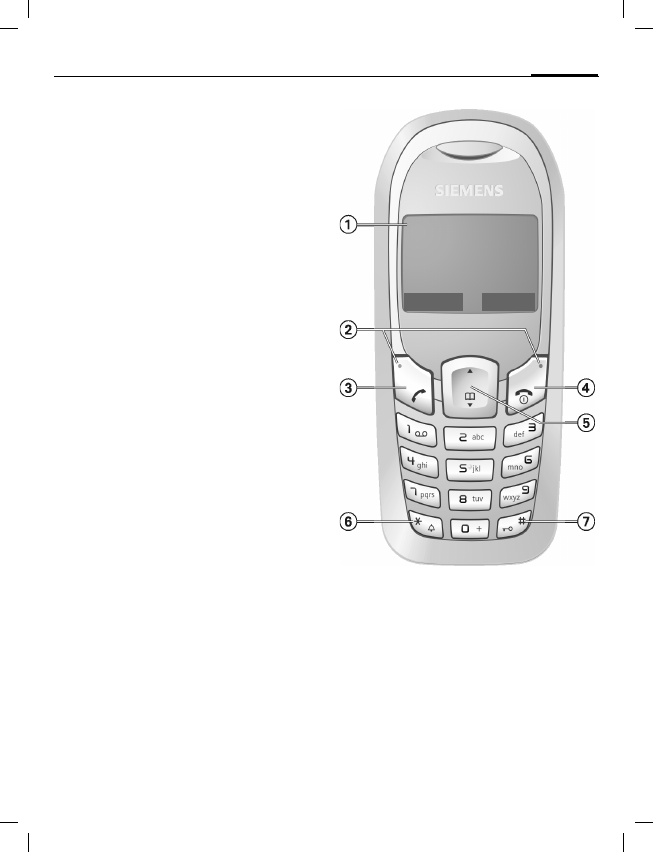
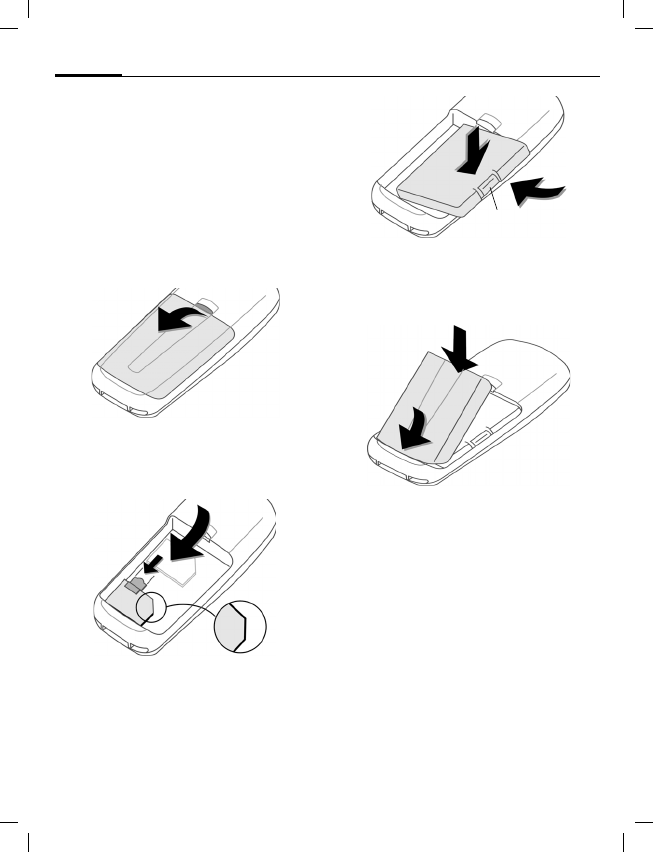
1Display indicators
Signal strength and battery level.
2Soft keys
Press the soft key to call up the function
that is displayed as §Text§ or icon on the
grey fields above the key.
3ACall key
Dial displayed phone number or name,
accept calls. In standby mode: Display the
last calls.
4BOn/Off/End key
• Switched off: press and hold to
switch on.
• During a conversation or in an
application: press briefly to finish.
• In menus: press briefly to go back a
level. Press and hold to return to
standby mode.
• In standby mode: press and hold to
switch off phone.
5 Control key
• In standby mode:
FOpen Phonebook.
•During conversation:
EStart adjusting the volume then set
volume withG.
6*Press and hold
• In standby mode: switch on/off all sig-
nal tones (except alarm).
• For incoming calls: only switch off ring
tones.
7Press and hold
In standby mode: switch key lock on/off.
_ g
Service provider
17.06.2005 09:15
NewSMS Menu
© Siemens AG 2004, C:\Siemens\DTP-Satz\Produkte\A71\output\A71_LAM_FCC_en_050819_te\Dorado_Main.fm
left page (10) of A71 FCC, LAM en, A31008-H2710-A43-1-4A19 (23.08.2005, 08:52)
Getting started
10
VAR Language: en2; VAR issue date: 050331
Getting started
Using the SIM card/battery
Your phone's display is delivered with a
protective film. Remove this film before get-
ting started. The service provider supplies
you with a SIM card on which all the im-
portant data for your account is stored. If
the SIM card is credit card-sized, snap out
the smaller segment and trim any rough
edges.
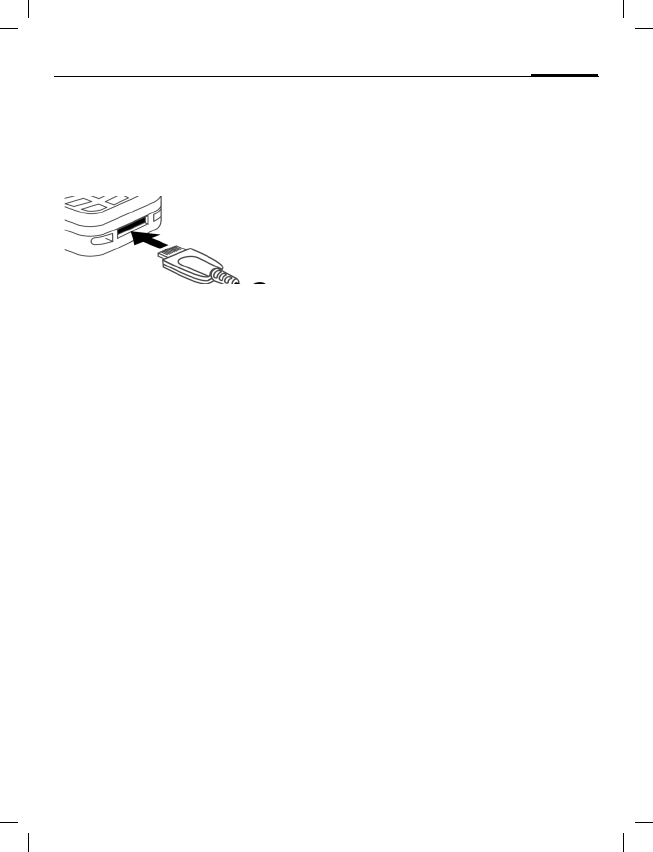
Remove the battery cover upwards 1.
Insert SIM card 2 and push it fully into
the locating slot (make sure the angled
corner is in the correct position 3). Then
push the retaining catch over the top of
the SIM card 4.
Insert the battery sideways into the
phone 5, then press downwards 6
until it engages.
To remove, press the retaining tab 7
then lift the battery out.
Insert the battery cover by the tabs at the
bottom 8, then press downwards 9,
until it engages.
Always switch off phone before removing
the battery!
Only 3V SIM cards are supported. Please
contact your service provider if you have
an older card.
1
2
4
3
6
7
5
8
9
right page (11) of A71 FCC, LAM en, A31008-H2710-A43-1-4A19 (23.08.2005, 08:52)
© Siemens AG 2004, C:\Siemens\DTP-Satz\Produkte\A71\output\A71_LAM_FCC_en_050819_te\Dorado_Main.fm
11
Switch on/off, PIN entry
VAR Language: en2; VAR issue date: 050331
Charge battery
The battery is not fully charged when de-
livered. Plug in the charger cable at the
bottom of the phone, plug in the power
supply unit to the mains power socket
and charge for at least two hours.
Charging time
The charging time is 2 hours. Ambient
temperature of 5 °C to 40 °C (icon flashes
as a warning when 5 °C above/below this).
Switch on/off, PIN entry
Switch on/off
Press and hold On/Off/End keyBto
switch on or off.
Enter PIN
The SIM card can be protected with a
4 - 8 digit PIN. Enter the PIN code using
the number keys (the display shows a se-
ries of asterisks) If you make a mistake
press §Clear§. Confirm your input with §OK§.
Logging on to the network will take a few
seconds.
First time switching on phone, the time
and date must be set.
Standby mode
When the name of the service provider/
logo appears on the display, the phone is
in standby mode and ready for use.
Press and hold the On/Off/End keyBto
return to standby mode from any menu
option.
User guide
The following symbols are used to explain
operation:
JEnter numbers or letters.
BOn/Off/End key.
ACall key.
DPress the control ley on the side
indicated.
§Menu§ Displays a soft-key function.
LFunction depends on the service
provider, special registration
may be necessary.
Security
The phone and SIM card are protected
against misuse by several security codes.
Keep these confidential numbers in a safe
place where you can access them again if
required.
§Menu§ ¢Setup ¢Security ¢Codes
¢Select a function.
PIN control
The PIN is usually requested each time
the phone is switched on. You can deacti-
vate this feature but you risk unauthor-
ised use of the phone. Some service pro-
viders do not permit deactivation of the
control.
Change PIN
You can change the PIN to any 4 - 8 digit
number you may find easier to remember.
Change PIN2
(Displayed only if PIN2 is available.)
Proceed as with Change PIN.

© Siemens AG 2004, C:\Siemens\DTP-Satz\Produkte\A71\output\A71_LAM_FCC_en_050819_te\Dorado_Main.fm
left page (12) of A71 FCC, LAM en, A31008-H2710-A43-1-4A19 (23.08.2005, 08:52)
Making a phone call
12
VAR Language: en2; VAR issue date: 050331
Change phonecode
You define and enter the phone code
(4 - 8 digits) when calling a phone code
protected function (e.g. Direct call, p. 13)
for the first time. It is then valid for all
protected functions. If it is entered incor-
rectly three times the phone is locked.
Contact the Siemens Service.
Clear SIM card barring
If the PIN is entered incorrectly three
times, the SIM card is barred. Enter the
PUK (MASTER PIN) provided by your serv-
ice provider with the SIM card. If the PUK
(MASTER PIN) has been lost, please con-
tact your service provider.
Prevent accidental activation
Even if PIN use is deactivated (p. 11) con-
firmation is required to switch on the
phone.
This prevents accidental activation of the
phone, e.g. when you are carrying it in a
bag or when you are travelling in an
aircraft.
After pressing and holding the On/Off/End
keyBselect §OK§ to switch on the phone
or abort the operation with §Cancel§.
Making a phone call
Dialling with number keys
The phone must be switched on (standby
mode). Enter the number (always with
prefix, if necessary with the international
dialling code). Press §Clear§ to clear the last
digit, press and hold to clear the entire
phone number. To dial press theAkey.
End call
Press the End keyBbriefly. Press this key
even if the person on the other end of the
line has hung up first.
Set volume
Use the scroll keyEto start adjusting
the volume during conversation. Set vol-
ume withG.
Redial previous numbers
To redial the phone number last called,
press the Call keyAtwice. To redial other
numbers that were dialled previously,
pick out the required phone number from
the list withG, then pressAto dial.
When a number is busy
For automatically dialling the phone
number for up to 15 minutes at increas-
ing intervals, press §Auto dial§. For phone
ringing when the busy number is free,
press §Call back§ (L ). Press §Prompt§ and a
beep will remind you to redial the dis-
payed phone number after 15 minutes.
Accept call
The phone must be switched on (standby
mode). An incoming call will interrupt
any other use of the phone.
Press §Answer§ orA.
If the phone number has been transmitted
by the network, it is displayed. If the number
and the name are stored in the Phonebook,
the corresponding name is displayed in-
stead. If set, an animation can be dis-
played instead of the bell icon.
Reject call
§Reject§ or B press briefly.
Held call
Make a new connection during a call with
y menu§ ¢Hold ¢J (dial new phone
number, also from Phonebook:F). With
§Swap§ you can swap back and forth be-
tween both calls.
Additional costs will be incurred for the
2nd phone connection.

right page (13) of A71 FCC, LAM en, A31008-H2710-A43-1-4A19 (23.08.2005, 08:52)
© Siemens AG 2004, C:\Siemens\DTP-Satz\Produkte\A71\output\A71_LAM_FCC_en_050819_te\Dorado_Main.fm
13
Phonebook
VAR Language: en2; VAR issue date: 050331
Conference b
Make a new connection during a call with
y menu§ ¢Hold ¢J (dial a new phone
number).
With y menu§ ¢Conference you can join
the held call. Repeat this procedure until
all participants are linked together (up to
5participants).
All calls in the conference are ended si-
multaneously when the End keyBis
pressed.
Additional costs will be incurred for
every additional phone connection.
Call menu
Several functions are only available dur-
ing a call:
y menu§ ¢Select a function.
Direct call
The phone can be locked, so it's only pos-
sible to dial a defined number.
Switch on
§Menu§ ¢Setup ¢Security ¢Direct call
Press §Select§ and enter phone code. When
first prompted you define and enter the
phone code (4 - 8 digits). Please do not for-
get this code! Confirm input with §OK§ and
press §Change§. Select phone number from
the Phonebook (p. 13) or enter a new
one. With §OK§ confirm On.
Use
Press and hold the right soft key>to
dial.
Switch off
Press and hold and enter phone code.
Confirm input with §OK§ and press §Change§.
With §OK§ confirm Off.
Phonebook
New entry
Open Phonebook (in standby mode)
F (select <New entry>) ¢§Select§
¢Activate input fields.
Number: Always enter phone number with
an area dialling code.
Name: Enter first name or surname.
Group: Organise entries in groups, select
with §Change§.
Location: Select location: SIM, Mobile or
Protected SIM.
Record no.: This is automatically assigned
to the entry. Change with §Change§.
Press §Save§ to store the new entry.
Text entry
Press number key repeatedly until the re-
quired letter appears. The cursor advanc-
es after a short delay. Example:
2Press once for a, twice for b etc.
Press and hold to write the
number.
Ä, ä, 1–9 Umlauts and numbers are dis-
played after the relevant letters.
§Clear§ Press briefly to delete the letter
before the cursor, press and hold
to delete the whole word.
GMove the cursor (forwards/back).
Press briefly: Switch between:
abc, Abc, ABC, T9abc, T9Abc,
T9ABC, 123. Status indicator in
the top line of the display.
Press and hold: All input modes
are displayed.
*Press briefly: Select special
characters. Press and hold:
Open input menu.

© Siemens AG 2004, C:\Siemens\DTP-Satz\Produkte\A71\output\A71_LAM_FCC_en_050819_te\Dorado_Main.fm
left page (14) of A71 FCC, LAM en, A31008-H2710-A43-1-4A19 (23.08.2005, 08:52)
Phonebook
14
VAR Language: en2; VAR issue date: 050331
0Press once/repeatedly:
. , ? ! ’ " 0 - ( ) @ / : _ + ~ &
Press and hold: Writes 0.
1Writes blank. Press twice =
skip line.
Call/search for an entry
Open PhonebookF, select name by typ-
ing first letter or scroll and dial withA.
Call with record no.
A record number is automatically assigned
to every new entry in the Phonebook.
J Enter record number (in standby
mode) ¢ ¢A
Edit entry
G ¢Select entry ¢§Options§ ¢Edit
¢G (select required input field)
¢Make changes ¢§Save§
Location:
An entry can be moved to different stor-
age locations in the Phonebook.
SIM (standard) ¢
Entries that are stored in the Phonebook
on the SIM card can also be used on a dif-
ferent GSM phone.
Mobile v
Phonebook entries are stored in the
memory of the mobile phone when the
memory of the SIM card is full.
Protected SIM ¡ b
Phone numbers can be stored in protect-
ed locations on a special SIM card. A PIN2
is needed for editing (p. 11).
Groups
If there are many Phonebook entries it is
best to assign them to a group, e.g.:
Family, Friends, VIP, Others
A special ring tone can sound and/or a sym-
bol can be displayed if the phone number
of a call is registered in a group.
Select a group
§Menu§ ¢Phonebook ¢<Groups>
¢G(select a group) ¢§View§
All entries of the selected group are
displayed.
Change group assignment
You can assign a Phonebook entry to a
group when you enter it (p. 13).
F ¢Select entry ¢§View§ ¢§Edit§
¢G(scroll to group) ¢§Change§
¢Select a new goup ¢§Save§
SMS to group
A memo (SMS) can be sent as a "circular"
to all members of a group. Each SMS is
charged separately!
Open <Groups> in Phonebook menu and
scroll to a group.
§Options§ ¢SMS to group ¢§Select§
¢Compose message ¢A(the group
is displayed) ¢§OK§ ¢A
The SMS is sent to the first recipient.
Press Aagain to start the next send op-
eration. Each send operation must be
confirmed. Individual recipients may be
skipped.
Call to group b
You can call up to 5 group members one
by one and link them together in a con-
ference (function may need to be enabled
by the service provider).
Open <Groups> in Phonebook menu and
scroll to a group.
§Select§ ¢Select the entries ¢§Change§
(mark/unmark entry) ¢§OK§
The first entry is dialled and the call is put
on hold. ProceedAby calling the next
entry until all marked entries are called.
With §Options§ you can link the calls on
hold in a conference.
right page (15) of A71 FCC, LAM en, A31008-H2710-A43-1-4A19 (23.08.2005, 08:52)
© Siemens AG 2004, C:\Siemens\DTP-Satz\Produkte\A71\output\A71_LAM_FCC_en_050819_te\Dorado_Main.fm
15
Messages (SMS)
VAR Language: en2; VAR issue date: 050331
Group call tones
You can assign different ringtones to
groups.
§Menu§ ¢Ring tones ¢Group calls
¢Select a group ¢§Select§
¢Select ring tone ¢§Select§
Messages (SMS)
Read messages
A new message is indicated on the display
with ]. Press the control key on the left
to read the message. Scroll through the
message line by line withG.
Reply menu
§Reply§ Open the reply menu.
Inbox/Outbox
§Menu§ ¢Messages ¢Inbox or Outbox
The list of saved messages is shown.
Compose a message
§Menu§ ¢Messages ¢New SMS
¢Write text ¢A
¢J/ Q (enter phone number or
select from Phonebook) ¢§OK§
The SMS is sent to the service centre for
transmission.
Text menu
§Options§ Open the text menu.
Write text fragments
§Menu§ ¢Messages ¢Predef. texts
¢<New entry> ¢J(write text
fragment) ¢§Save§
Use text fragments
J(write message text) ¢§Options§
¢Insert text ¢G (select text
fragment from the list) ¢§Select§
The text fragment is inserted into the text
to the left of the cursor.
Text entry with T9
T9 deduces the correct word from the in-
dividual key entries by making compari-
sons with an extensive dictionary. Write a
word and finish it without looking at the
display. Simply press the keys where the
relevant letter is located once. If several
options are found in the dictionary the
most probably is displayed first. For fur-
ther options please press the right
softkey.
Setup
§Menu§ ¢Setup ¢Select a function.
Profiles
Three profiles are standard with default
settings, they can be changed however:
Normal envi., Quiet environ., Noisy environ.
You can set two personal profiles
(<No Title>).
The special profile Aircraft mode cannot be
changed.
Activate
Select default profile or personal profile
¢§Select§.
Change setting
Select profile ¢§Options§ ¢Change sett.
The list of available functions is displayed.
T9® Text Input is licensed under one or more
of the following:
U.S. Pat. Nos. 5,818,437, 5,953,541, 5,187,480,
5,945,928 and 6,011,554;
Canadian Pat. No. 1,331,057;
United Kingdom Pat. No. 2238414B;
Hong Kong Standard Pat. No. HK0940329;
Republic of Singapore Pat. No. 51383;
Euro.Pat. No. 0 842 463 (96927260.8)
DE/DK, FI, FR, IT, NL, PT, ES, SE, GB;
and additional patents are pending worldwide.

© Siemens AG 2004, C:\Siemens\DTP-Satz\Produkte\A71\output\A71_LAM_FCC_en_050819_te\Dorado_Main.fm
left page (16) of A71 FCC, LAM en, A31008-H2710-A43-1-4A19 (23.08.2005, 08:52)
Setup
16
VAR Language: en2; VAR issue date: 050331
Aircraft mode
The phone will automatically switch off if
you select this profile. Even the alarm
tone is deactivated. It is not possible to
modify this profile.
Normal operation
The next time you switch on the phone
and return to normal operation the de-
fault profile will be activated.
Display
Language
Set the language of the display text.
"Automatic" will set the language of your
home service provider. Reset to this lan-
guage in standby status:
* # 0 0 0 0 # A
Screensaver
The screensaver shows a picture on the
display as soon as a period that can be set
by you has elapsed. The function is ended
by an incoming call or by pressing any key.
Call setup
Hide ID b
When switched off, the display of the call-
ing party shows your phone number (de-
pendent on service provider). To suppress
this display, you can activate the "Hide ID"
mode.
Call waiting b
If you are registered for this service, you
can check whether it is set and you can
activate/deactivate it with Call waiting.
Minute beep
During the call, you will hear a beep after
each minute as a reminder of the time
elapsed.
Divert
You can set the conditions for which calls
are diverted to your mailbox or other
numbers.
Set up call divert (example)
All calls b
All calls are diverted. n is shown in the
top line of the display in standby mode.
Unanswered calls b
Includes Unanswered, Not reachable,
No reply, Busy.
§Select§ ¢Set ¢J (Enter the phone
number to which the call should be
diverted) ¢§OK§
After a short pause, the setting is con-
firmed by the network.
Status check
After a short pause the current informa-
tion is shown.
pCondition set.
oNot set.
Display, if status is unknown
(e.g. on a new SIM card).
Clear all b
All set diversions are cleared.
Clock
§Menu§ ¢Setup ¢Clock
¢Select a function.
Security
§Menu§ ¢Setup ¢Security
¢Select a function.
Auto key lock
The keypad is locked automatically if no
key has been pressed for one minute in
standby mode. This prevents the phone
from being used accidentally. However,
you can still be called and you can still
make an emergency call.
Direct call
Only one phone number can be dialled.
Press and hold control key on the right
(p. 13).

right page (17) of A71 FCC, LAM en, A31008-H2710-A43-1-4A19 (23.08.2005, 08:52)
© Siemens AG 2004, C:\Siemens\DTP-Satz\Produkte\A71\output\A71_LAM_FCC_en_050819_te\Dorado_Main.fm
17
Ring tones
VAR Language: en2; VAR issue date: 050331
This SIM only b
Your phone is prevented from being used
with a different SIM card.
Barrings b
Network barring restricts the use of your
SIM card.
All outgoing: All outgoing calls except
emergency numbers are barred.
Outgo internat: Only national calls can be
made.
Outgo internat. x home barred: International
calls are not permitted, except for calls to
your home country.
All incoming calls: The phone is blocked
from receiving all incoming calls.
When roaming: You do not receive any calls
outside your home network.
Status check: Query the status of your
barrings.
Clear all: Clear all barrings. Password
protected!
Phone identity
The phone identity number (IMEI) is
displayed.
Factory settings
The phone is reset to the default values
(does not apply to SIM card and network
settings).
Alternative input in standby mode:
* # 9 9 9 9 # A
Network
§Menu§ ¢Setup ¢Network
¢Select a function.
Network info
The list of GSM networks currently availa-
ble is displayed.
Auto network selection
If activated, the next network is dialled in
the order of your "preferred networks".
Choose network
The network search is restarted.
Preferred network
Set the service providers you prefer when
you leave your home network.
Fast search
Speed up network reconnection.
Ring tones
§Menu§ ¢Ring tones ¢Select a function.
Set the tones to match your needs.
Ringer setting
Activate/deactivate the ring tone or re-
duce it to a short beep.
Volume
Set the same volume for all ring tones.
GSet volume.
§OK§ Confirm.
d Calls, Group tones, Other calls,
Alarm clock, Message tone
The ring tones for the stated types of
call/functions can be set separately.
More tones...
Call screening b
Only calls from numbers that are in the
Phonebook or in a predefined group are
signalled audibly or by silent alert. Other
calls are only displayed.
Key tones
Set acoustic key acknowledge:
Click or Tone or Silent
Minute beep
During the call, you will hear a beep once
a minute as a reminder.
Information tones
Set service and alarm tones.

© Siemens AG 2004, C:\Siemens\DTP-Satz\Produkte\A71\output\A71_LAM_FCC_en_050819_te\Dorado_Main.fm
left page (18) of A71 FCC, LAM en, A31008-H2710-A43-1-4A19 (23.08.2005, 08:52)
Alarm clock
18
VAR Language: en2; VAR issue date: 050331
Alarm clock
Activate/deactivate
§Menu§ ¢Alarm clock
The alarm will ring at the time set by you,
even when the phone is switched off.
§On§/§Off§ Activate/deactivate the alarm.
Setting
Set time for alarm call (hh:mm), then §OK§.
Fast access key
Left soft key
You can assign an important phone
number or function to the left soft key.
For example, Games is assigned to the
softkey. To change this (in standby
mode):
§Games§ Press briefly ¢§Change§
¢Gscroll to the application or Phone
number (select a name from the
Phonebook) ¢§Select§ Confirm.
Apply (in standby mode) e.g.:
§Games§ Press and hold.
Speed dialling keys (2 to 9)
You can assign a phone number or func-
tion to each of the keys from 2 to 9
(speed dialling numbers). Number key 1
is reserved for the mailbox.
Set (in standby mode)
J(Key 2-9) ¢Gscroll to the
application or Phone number (select a
name from the Phonebook) ¢§Select§
Confirm.
Apply (in standby mode) e.g.:
2Press and hold.

right page (19) of A71 FCC, LAM en, A31008-H2710-A43-1-4A19 (23.08.2005, 08:52)
© Siemens AG 2004, C:\Siemens\DTP-Satz\Produkte\A71\output\A71_LAM_FCC_en_050819_te\Dorado_Main.fm
19
Customer Care
VAR Language: en2; VAR issue date: 050331
Customer Care
Qualified Siemens employees are waiting
to offer you expert information about our
products and installation.
In some countries repair and replace serv-
ices are impossible where the products
are not sold through our authorised
dealers.
If repair work is necessary, please contact
one of our service centres:
Abu Dhabi .........................................0 26 42 38 00
Argentina .....................................0 80 08 88 98 78
Australia..........................................13 00 66 53 66
Austria.............................................05 17 07 50 04
Bahrain .................................................... 40 42 34
Bangladesh.......................................0 17 52 74 47
Belgium.............................................0 78 15 22 21
Bolivia ...............................................0 21 21 41 14
Bosnia Herzegovina..........................0 33 27 66 49
Brunei ..................................................02 43 08 01
Bulgaria................................................02 73 94 88
Cambodia ............................................12 80 05 00
Canada ........................................1 88 87 77 02 11
Chile..................................................8 00 53 06 62
China ...........................................0 21 38 98 47 77
Colombia....................................01 80 07 00 66 24
Croatia ..............................................0 16 10 53 81
Czech Republic.................................2 33 03 27 27
Denmark ............................................. 35 25 86 00
Dubai ................................................0 43 96 64 33
Ecuador ..........................................18 00 10 10 00
Egypt.................................................0 23 33 41 11
Estonia................................................ 06 30 47 97
Finland............................................09 22 94 37 00
France.............................................01 56 38 42 00
Germany ......................................0 90 01 00 77 00
Greece ............................................80 11 11 11 16
Hong Kong.......................................... 28 61 11 18
Hungary ..........................................06 14 71 24 44
Iceland .................................................. 5 11 30 00
India.............................22 24 98 70 00 Extn: 70 40
Indonesia .....................................0 21 46 82 60 81
Ireland.............................................18 50 77 72 77
Italy .................................................02 24 36 44 00
Ivory Coast.......................................... 05 02 02 59
Jordan...............................................0 64 39 86 42
Kenya.................................................... 2 72 37 17
Kuwait ................................................... 2 45 41 78
Latvia .................................................... 7 50 11 18
Lebanon.............................................. 01 44 30 43
Libya ...............................................02 13 50 28 82
Lithuania ...........................................8 52 74 20 10
Luxembourg........................................ 43 84 33 99
Macedonia .......................................... 02 13 14 84
Malaysia....................................+ 6 03 77 12 43 04
Malta.......................................+ 35 32 14 94 06 32
Mauritius ............................................... 2 11 62 13
Mexico .......................................01 80 07 11 00 03
Morocco .............................................. 22 66 92 09
Netherlands .................................0 90 03 33 31 00
New Zealand...................................08 00 57 43 63
Nigeria ..............................................0 14 50 05 00
Norway................................................ 22 70 84 00
Oman ....................................................... 79 10 12
Pakistan ..........................................02 15 66 22 00
Paraguay ..........................................8 00 10 20 04
Peru ..................................................0 80 05 24 00
Philippines ........................................0 27 57 11 18
Poland.............................................08 01 30 00 30
Portugal ............................................8 08 20 15 21
Qatar................................................... 04 32 20 10
We offer fast, individual advice! You have sever-
al options:
Our online support on the Internet:
www.siemens.com/
mobilephonescustomercare
We can be reached any time, any place. You are
given 24 hour support on all aspects of our prod-
ucts. Here you will find an interactive fault-finding
system, a compilation of the most frequently
asked questions and answers, plus user guides
and current software updates to download.
When calling customer service, please have
ready your receipt and the phone identity
number (IMEI, to display press *#06#), the soft-
ware version (to display, press *#06#, then
§Info§) and if available, your Siemens Service
customer number.
© Siemens AG 2004, C:\Siemens\DTP-Satz\Produkte\A71\output\A71_LAM_FCC_en_050819_te\Dorado_Main.fm
left page (20) of A71 FCC, LAM en, A31008-H2710-A43-1-4A19 (23.08.2005, 08:52)
Product data
20
VAR Language: en2; VAR issue date: 050331
Romania .........................................02 12 04 60 00
Russia..........................................8 80 02 00 10 10
Saudi Arabia .....................................0 22 26 00 43
Serbia .............................................01 13 07 00 80
Singapore ............................................62 27 11 18
Slovak Republic ..............................02 59 68 22 66
Slovenia............................................0 14 74 63 36
South Africa ....................................08 60 10 11 57
Spain.................................................9 02 11 50 61
Sweden.............................................0 87 50 99 11
Switzerland .....................................08 48 21 20 00
Taiwan ............................................02 23 96 10 06
Thailand............................................0 27 22 11 18
Tunisia .................................................71 86 19 02
Turkey..........................................0 21 65 79 71 00
Ukraine ........................................8 80 05 01 00 00
United Arab Emirates........................0 43 66 03 86
United Kingdom ...........................0 87 05 33 44 11
USA .............................................1 88 87 77 02 11
Venezuela....................................0 80 01 00 56 66
Vietnam...........................................84 89 20 24 64
Zimbabwe ............................................04 36 94 24
Product data
Declaration of conformity
Siemens Information and Communication
mobile hereby declares that the phone
described in this user guide is in compli-
ance with the essential requirements and
other relevant provisions of European Di-
rective 1999/5/EC (R&TTE).
The declaration of conformity (DoC) con-
cerned has been signed. Please call the
company hotline if you require a copy of
the original, or go to:
www.siemens.com/mobiledocs
Technical data
GSM class: 4 (2 watt)
Frequency range: 824–894 MHz
GSM class: 1 (1 watt)
Frequency range: 1710–1880 MHz
GSM class: 1 (1 watt)
Frequency range: 1850–1990 MHz
Weight: 78 g
Dimensions: 101×45×20mm
Li-Ion battery: 650 mAh
Operating temperature: –10 °C to 55 °C
(14°F to 131°F)
Standby time: 60 h - 230 h
Talk time: 90 min - 250 min
SIM card: 3.0 V

right page (21) of A71 FCC, LAM en, A31008-H2710-A43-1-4A19 (23.08.2005, 08:52)
© Siemens AG 2004, C:\Siemens\DTP-Satz\Produkte\A71\output\A71_LAM_FCC_en_050819_te\Dorado_Main.fm
21
Care and maintenance
VAR Language: en2; VAR issue date: 050331
Care and maintenance
Your phone has been designed and manufactured
to the highest of standards and should be treated
with great care. The suggestions below will help
you to enjoy your phone for many years.
• Protect your phone from moisture and humidity.
Precipitation, humidity and liquids contain min-
erals that will corrode electronic circuits. Never-
theless, should your phone become wet,
disconnect it immediately from the power sup-
ply to avoid electric shock. Do not place your
phone (even to dry it) on/in a source of heat
such as a microwave oven, oven or radiator.
The phone may become overheated and
possibly explode.
• Do not use or store the phone in dusty, dirty ar-
eas. Its moving parts may be damaged and the
casing may become deformed and discoloured.
• Do not store your phone in hot environments
(e.g. vehicle instrument panel in the summer).
High temperatures can shorten the life of elec-
tronic devices, damage batteries and warp or
melt certain plastics.
• Do not store your phone in cold environments.
When the phone warms up again (to its normal
ambient temperature), moisture can form inside
the phone, which may damage electronic circuit
boards.
• Do not drop, knock or shake your phone. Rough
handling can damage internal circuit boards!
• Do not use harsh chemicals, cleaning solvents,
or strong detergents to clean the phone!
The suggestions given above apply equally to your
phone, battery, charger and all accessories. If any
of these parts is not working properly, obtain fast
and reliable help at our service centres.
Battery quality statement
The capacity of your mobile phone battery will re-
duce each time it is charged/emptied. Storage at
too high or low temperatures will also result in a
graduly capacity loss. As a result the operating
time of your mobile phone may be considerably re-
duced, evan after a rull recharge of the battery.
Regardless of this, the battery has been designed
and manufactured so that it can be recharged and
used for six months after the purchase of your mo-
bile phone. After six months, if the battery is clearly
suffering from loss of performance, we recommend
that your replace it. Please buy only Siemens origi-
nal batteries.
Display quality declaration
For technological reasons, a few small dots with
different colours may appear in the display in ex-
ceptional cases.
Just remember that the appearance of brighter or
darker dots generally does not mean that a fault
has occurred.
© Siemens AG 2004, C:\Siemens\DTP-Satz\Produkte\A71\output\A71_LAM_FCC_en_050819_te\Dorado_Main.fm
left page (22) of A71 FCC, LAM en, A31008-H2710-A43-1-4A19 (23.08.2005, 08:52)
Accessories
22
VAR Language: en2; VAR issue date: 050331
Accessories
Available Accessories are:
Fashion & Carry
Tour Case FCT-650
Belt Case FCL-600
Energy
Li-Ion Battery 700 mAh EBA-510
Travel Charger ETC-500 (EU)
Car Charger Plus ECC-600
Desk Top Stand EDS-600
Handsfree Portable
Headset Basic HHS-500
Headset HHS-510
Headset Purestyle HHS-610
Car Solutions
Car Kit Portable HKP-500
Car Kit Easy HKP-700
Car Kit Easy Upgrade HKO-700
Products can be obtained in specialist
shops or you can visit the Siemens Mobile
Store online:
Siemens Original Accessories
www.siemens.com/shop

right page (23) of A71 FCC, LAM en, (23.08.2005, 08:53)
© Siemens AG 2004, C:\Siemens\DTP-Satz\Produkte\A71\output\A71_LAM_FCC_en_050819_te\A71_SAR_fcc.fm
23
SAR
VAR Language: en2; VAR issue date: 050331
SAR
INFORMATION ON RF EXPOSURE / SPECIF-
IC ABSORPTION RATE (SAR)
THIS MODEL MEETS THE GOVERNMENT’S
REQUIREMENTS FOR EXPOSURE TO RADIO
WAVES
Your cellular phone is a radio transmitter
and receiver. It is designed to meet the re-
quirements for exposure to radio waves
established by the Federal Communica-
tions Commission (FCC, USA) and by
Health Canada. These requirements in-
clude safety margins designed to assure
the protection of all persons, regardless of
age and health. They use a unit of mea-
surement known as the Specific Absorp-
tion Rate (SAR). The SAR limit is 1.6 W/kg
averaged over one gram of tissue.
The highest SAR value for this device
when tested at the ear was 0.86 W/kg. In
positions other than the head, such as on
the body, a separation distance of 1.0 cm
is required. The highest SAR value in this
case was 0.66 W/kg.
Information about this device model can
be found at http://www.fcc.gov/oet/fccid
by searching the equipment authorization
system using FCC ID: PWX-A71.
As SAR is measured utilizing the device’s
highest transmitting power, the actual
SAR of this device while operating is typi-
cally below that indicated above. This is
due to automatic changes to the power
level of the device to ensure it only uses
the minimum level required to reach the
network.
Additional Information can be found on the
websites of the World Health Organization
(http://www.who.int/emf),
the Cellular Telecommunications Industry
Association (CTIA) web-site at
www.phonefacts.net,
the Canadian Wireless Telecommunica-
tions Association (CWTA) website
www.cwta.ca
or Siemens
(www.siemens.com/mobilephones).
© Siemens AG 2004, C:\Siemens\DTP-Satz\Produkte\A71\output\A71_LAM_FCC_en_050819_te\A71_FDA.fm
left page (24) of A71 FCC, LAM en, (19.08.2005, 11:40)
U.S. FDA
24
VAR Language: en2; VAR issue date: 050331
U.S. FDA
The U.S. Food and Drug Administration's
(FDA) Center for Devices and Radiologi-
cal Health Consumer Update on Mobile
Phones
FDA has been receiving inquiries about
the safety of mobile phones, including
cellular phones and PCS phones. The fol-
lowing summarizes what is know – and
what remains unknown – about whether
these products can pose a hazard to
health, and what can be done to mini-
mize any potential risk. This information
may be used to respond to questions.
Why the concern?
Mobile phones emit low levels of radio
frequency energy (i.e., radio frequency
radiation) in the microwave range while
being used. They also emit very low levels
of radio frequency energy (RF), consid-
ered non-significant, when in the stand-
by mode. It is well known that high levels
of RF can produce biological damage
through heating effects (this is how your
microwave oven is able to cook food).
However, it is not known whether, to
what extent, or through what mecha-
nism, lower levels of RF might cause ad-
verse health effects as well. Although
some research has been done to address
these questions, no clear picture of the bi-
ological effects of this type of radiation
has emerged to date. Thus, the available
science does not allow us to conclude
that mobile phones are absolutely safe, or
that they are unsafe. However, the avail-
able scientific evidence does not demon-
strate adverse health effects associated
with the use of mobile phones.
What kinds of phones are in question?
Questions have been raised about hand-
held mobile phones, the kind that have a
built-in antenna that is positioned close
to the user's head during normal tele-
phone conversation. These types of mo-
bile phones are of concern because of the
short distance between the phone's an-
tenna – the primary source of the RF –
and the person's head. The exposure to
RF from mobile phones in which the an-
tenna is located at greater distances from
the user (on the outside of a car, for ex-
ample) is drastically lower than that from
hand-held phones, because a person's RF
exposure decreases rapidly with distance
from the source. The safety of so-called
“cordless phones,” which have a base unit
connected to the telephone wiring in a
house and which operate at far lower
power levels and frequencies, has not
been questioned.
How much evidence is there that hand-held mo-
bile phones might be harmful?
Briefly, there is not enough evidence to
know for sure, either way; however, re-
search efforts are on-going. The existing
scientific evidence is conflicting and
many of the studies that have been done
to date have suffered from flaws in their
research methods. Animal experiments
investigating the effects of RF exposures
characteristic of mobile phones have
yielded conflicting results. A few animal
studies, however, have suggested that
low levels of RF could accelerate the de-
velopment of cancer in laboratory ani-
mals. In one study, mice genetically al-
tered to be predisposed to developing
one type of cancer developed more than
twice as many such cancers when they
were exposed to RF energy compared to
controls. There is much uncertainty
among scientists about whether results
obtained from animal studies apply to the
use of mobile phones. First, it is uncertain
how to apply the results obtained in rats
and mice to humans. Second, many of
the studies showed increased tumor de-

right page (25) of A71 FCC, LAM en, (19.08.2005, 11:40)
© Siemens AG 2004, C:\Siemens\DTP-Satz\Produkte\A71\output\A71_LAM_FCC_en_050819_te\A71_FDA.fm
25
U.S. FDA
VAR Language: en2; VAR issue date: 050331
velopment used animals that had already
been treated with cancer-causing chemi-
cals, and other studies exposed the ani-
mals to the RF virtually continuously – up
to 22 hours per day.
For the past five years in the United
States, the mobile phone industry has
supported research into the safety of mo-
bile phones. This research has resulted in
two findings in particular that merit addi-
tional study:
1. In a hospital-based, case-control study,
researchers looked for an association be-
tween mobile phone use and either glio-
ma (a type of brain cancer) or acoustic
neuroma (a benign tumor of the nerve
sheath). No statistically significant associ-
ation was found between mobile phone
use and acoustic neuroma. There was
also no association between mobile
phone use and gliomas when all types of
gliomas were considered together. It
should be noted that the average length
of mobile phone exposure in this study
was less than three years.
When 20 types of glioma were considered
separately, however, an association was
found between mobile phone use and
one rare type of glioma, neuroepithel-
liomatous tumors. It is possible with mul-
tiple comparisons of the same sample
that this association occurred by chance.
Moreover, the risk did not increase with
how often the mobile phone was used, or
the length of the calls. In fact, the risk ac-
tually decreased with cumulative hours of
mobile phone use. Most cancer causing
agents increase risk with increased expo-
sure. An ongoing study of brain cancers
by the National Cancer Institute is expect-
ed to bear on the accuracy and repeat-
ability of these results.1
2. Researchers conducted a large battery
of laboratory tests to assess the effects of
exposure to mobile phone RF on genetic
material. These included tests for several
kinds of abnormalities, including muta-
tions, chromosomal aberrations, DNA
strand breaks, and structural changes in
the genetic material of blood cells called
lymphocytes. None of the tests showed
any effect of the RF except for the micro-
nucleus assay, which detects structural ef-
fects on the genetic material. The cells in
this assay showed changes after exposure
to simulated cell phone radiation, but
only after 24 hours of exposure. It is pos-
sible that exposing the test cells to radia-
tion for this long resulted in heating.
Since this assay is known to be sensitive
to heating, heat alone could have caused
the abnormalities to occur. The data al-
ready in the literature on the response of
the micronucleus assay to RF are conflict-
ing. Thus follow-up research is
necessary.2
FDA is currently working with govern-
ment, industry, and academic groups to
ensure the proper follow-up to these in-
dustry-funded research findings. Collabo-
ration with the Cellular Telecommunica-
tions Industry Association (CTIA) in
particular is expected to lead to FDA pro-
viding research recommendations and sci-
entific oversight of new CTIA-funded re-
search based on such recommendations.
Two other studies of interest have been
reported recently in the literature:
• Two groups of 18 people were exposed
to simulated mobile phone signals un-
der laboratory conditions while they
performed cognitive function tests.
There were no changes in the subjects'
ability to recall words, numbers, or pic-
tures, or in their spatial memory, but
they were able to make choices more
quickly in one visual test when they
were exposed to simulated mobile
phone signals. This was the only
change noted among more than
20 variables compared.3
• In a study of 209 brain tumor cases and
425 matched controls, there was no in-
creased risk of brain tumors associated
with mobile phone use. When tumors
did exist in certain locations, however,

© Siemens AG 2004, C:\Siemens\DTP-Satz\Produkte\A71\output\A71_LAM_FCC_en_050819_te\A71_FDA.fm
left page (26) of A71 FCC, LAM en, (19.08.2005, 11:40)
U.S. FDA
26
VAR Language: en2; VAR issue date: 050331
they were more likely to be on the side
of the head where the mobile phone
was used. Because this occurred in only
a small number of cases, the increased
likelihood was too small to be statisti-
cally significant.4
In summary, we do not have enough in-
formation at this point to assure the pub-
lic that there are, or are not, any low inci-
dent health problems associated with use
of mobile phones. FDA continues to work
with all parties, including other federal
agencies and industry, to assure that re-
search is undertaken to provide the nec-
essary answers to the outstanding ques-
tions about the safety of mobile phones.
What is known about cases of human cancer
that have been reported in users of hand-held
mobile phones?
Some people who have used mobile
phones have been diagnosed with brain
cancer. But it is important to understand
that this type of cancer also occurs
among people who have not used mobile
phones. In fact, brain cancer occurs in the
U.S. population at a rate of about 6 new
cases per 100,000 people each year. At
that rate, assuming 80 million users of
mobile phones (a number increasing at a
rate of about 1 million per month), about
4800 cases of brain cancer would be ex-
pected each year among those 80 million
people, whether or not they used their
phones. Thus it is not possible to tell
whether any individual's cancer arose be-
cause of the phone, or whether it would
have happened anyway. A key question is
whether the risk of getting a particular
form of cancer is greater among people
who use mobile phones than among the
rest of the population. One way to an-
swer that question is to compare the us-
age of mobile phones among people with
brain cancer with the use of mobile
phones among appropriately matched
people without brain cancer. This is called
a case-control study. The current case-
control study of brain cancers by the Na-
tional Cancer Institute, as well as the fol-
low-up research to be sponsored by in-
dustry, will begin to generate this type of
information.
What is FDA's role concerning the safety of
mobile phones?
Under the law, FDA does not review the
safety of radiation emitting consumer
products such as mobile phones before
marketing, as it does with new drugs or
medical devices. However, the agency
has authority to take action if mobile
phones are shown to emit radiation at a
level that is hazardous to the user. In such
a case, FDA could require the manufactur-
ers of mobile phones to notify users of
the health hazard and to repair, replace or
recall the phones so that the hazard no
longer exists.
Although the existing scientific data do
not justify FDA regulatory actions at this
time, FDA has urged the mobile phone in-
dustry to take a number of steps to assure
public safety. The agency has recom-
mended that the industry:
• Support needed research into possible
biological effects of RF of the type emit-
ted by mobile phones;
• Design mobile phones in a way that
minimizes any RF exposure to the user
that is not necessary for device func-
tion; and
• Cooperate in providing mobile phone
users with the best possible informa-
tion on what is known about possible
effects of mobile phone use on human
health.
• At the same time, FDA belongs to an in-
teragency working group of the federal
agencies that have responsibility for
different aspects of mobile phone safe-
ty to ensure a coordinated effort at the
federal level. These agencies are:
• National Institute for Occupational
Safety and Health
• Environmental Protection Agency
• Federal Communications Commission

right page (27) of A71 FCC, LAM en, (19.08.2005, 11:40)
© Siemens AG 2004, C:\Siemens\DTP-Satz\Produkte\A71\output\A71_LAM_FCC_en_050819_te\A71_FDA.fm
27
U.S. FDA
VAR Language: en2; VAR issue date: 050331
• Occupational Health and Safety
Administration
• National Telecommunications and In-
formation Administration
The National Institutes of Health also par-
ticipates in this group.
In the absence of conclusive information about
any possible risk, what can concerned individ-
uals do?
If there is a risk from these products – and
at this point we do not know that there is
– it is probably very small. But if people
are concerned about avoiding even po-
tential risks, there are simple steps they
can take to do so. For example, time is a
key factor in how much exposure a per-
son receives. Those persons who spend
long periods of time on their hand-held
mobile phones could consider holding
lengthy conversations on conventional
phones and reserving the hand-held
models for shorter conversations or for
situations when other types of phones
are not available.
People who must conduct extended con-
versations in their cars every day could
switch to a type of mobile phone that plac-
es more distance between their bodies
and the source of the RF, since the expo-
sure level drops off dramatically with dis-
tance. For example, they could switch to:
• a mobile phone in which the antenna is
located outside the vehicle,
• a hand-held phone with a built-in an-
tenna connected to a different antenna
mounted on the outside of the car or
built into a separate package, or
• a headset with a remote antenna to a
mobile phone carried at the waist.
Where can I find additional information?
For additional information, see the fol-
lowing websites:
• Federal Communications Commission
(FCC) RF Safety Program (select “Infor-
mation on Human Exposure to RF
Fields from Cellular and PCS Radio
Transmitters”):
www.fcc.gov/oet/rfsafety
• World Health Organization (WHO) In-
ternational Commission on Non-Ioniz-
ing Radiation Protection (select Qs &
As):
www.who.int/emf
• United Kingdom, National Radiological
Protection Board:
www.nrpb.org.uk
• Cellular Telecommunications Industry
Association (CTIA):
www.wow-com.com
• U.S. Food and Drug Administration
(FDA) Center for devices and Radiolog-
ical Health:
www.fda.gov/cdhr/consumer/
1 Muscat et al. Epidemiological Study of Cellular
Telephone Use and Malignant Brain Tumors. In:
State of the Science Symposium; 1999 June 20;
Long Beach, California.
2 Tice et al. Tests of mobile phone signals for activ-
ity in genotoxicity and other laboratory assays. In:
Annual Meeting of the Environmental Mutagen So-
ciety; March 29, 1999, Washington, DC; and per-
sonal communication, unpublished results.
3 Preece, AW, Iwi, G, Davies-Smith, A, Wesnes, K,
Butler, S, Lim, E, and Varey, A. Effect of a 915-
MHz simulated mobile phone signal on cognitive
function in man. Int. J. Radiat. Biol., April 8, 1999.
4 Hardell, L, Nasman, A, Pahlson, A, Hallquist, A
and Mild, KH. Use of cellular telephones and the
risk for brain tumors; a case-control study. Int. J.
Oncol, 15: 113-116, 1999.

© Siemens AG 2004, C:\Siemens\DTP-Satz\Produkte\A71\output\A71_LAM_FCC_en_050819_te\A71_FDA.fm
left page (28) of A71 FCC, LAM en, (19.08.2005, 11:40)
FCC/Industry Canada Notice
28
VAR Language: en2; VAR issue date: 050331
FCC/Industry Canada
Notice
Your phone may cause TV or radio inter-
ference (for example, when using a tele-
phone in close proximity to receiving
equipment). The FCC or Industry Canada
can require you to stop using your tele-
phone if such interference cannot be
eliminated. If you require assistance,
please contact your local service facility.
This device complies with part 15 of the
FCC rules. Operation is subject to the con-
dition that this device does not cause
harmful interference.
right page (29) of A71 FCC, LAM en, (19.08.2005, 11:40)
© Siemens AG 2004, C:\Siemens\DTP-Satz\Produkte\A71\output\A71_LAM_FCC_en_050819_te\A71_Driving_Tips.fm
29
Ten Driving Safety Tips
VAR Language: en2; VAR issue date: 050331
Ten Driving Safety Tips
Your Siemens wireless phone gives you
the power to communicate by voice – al-
most anywhere, anytime. But an impor-
tant responsibility accompanies the bene-
fits of wireless phones, one that every
user must uphold.
When driving a car, driving is your first re-
sponsibility. When using your wireless
phone behind the wheel of a car, practice
good common sense and remember the
following tips:
Get to know your phone and its features such
as speed dial and redial.
Carefully read your instruction manual
and learn to take advantage of valuable
features most phones offer including, au-
tomatic redial and memory dial – most
phones can store up to 99 numbers in
memory dial. Also, work to memorize the
phone keypad so you can use the speed
dial function without taking your atten-
tion off the road.
When available, use a hands-free device.
A number of hands-free wireless phone
accessories are readily available today.
Whether you choose an installed mount-
ed device for your phone or a speaker
phone accessory, take advantage of these
devices if they are available to you.
Position your phone within easy reach.
Make sure you place your wireless phone
within easy reach and where you can
grab it without removing your eyes from
the road. If you get an incoming call at an
inconvenient time, let your voicemail an-
swer it for you.
Suspend conversations during hazardous driv-
ing conditions or situations.
Let the person you are speaking to know
you are driving; if necessary, suspend the
call in heavy traffic or hazardous weather
conditions. Rain, sleet, snow and ice can
be hazardous, but so is heavy traffic. As a
driver, your first responsibility is to pay at-
tention to the road.
Do not take notes or look up phone numbers
while driving.
If you are reading an address book or
business card while driving a car, or writ-
ing a “to do” list, then you are not watch-
ing where you are going. It’s common
sense. Don’t get caught in a dangerous
situation because you are reading or writ-
ing and not paying attention to the road
or nearby vehicles.
Dial sensibly and assess the traffic.
If possible, place calls when you are not
moving or before pulling into traffic. Try to
plan your calls before you begin your trip,
or attempt to coincide your calls with
times you may be stopped at a stop sign,
red light or otherwise stationary. But if you
need to dial while driving, follow this sim-
ple tip – dial only a few numbers, check
the road and your mirrors, then continue.
Do not engage in stressful or emotional conver-
sations that may be distracting.
Stressful or emotional conversations and
driving do not mix – they are distracting
and even dangerous when you are be-
hind the wheel. Make people you are talk-
ing with aware you are driving and if nec-
essary, suspend phone conversations that
have the potential to divert your attention
from the road.
Use your phone to call for help.
Your wireless phone is one of the greatest
tools you can own to protect yourself and
your family in dangerous situations –
with your phone at your side, help is only
three numbers away. Dial 9-1-1 in the
case of fire, traffic accident, road hazard,
or medical emergency. Remember, it is a
free call on your wireless phone.

© Siemens AG 2004, C:\Siemens\DTP-Satz\Produkte\A71\output\A71_LAM_FCC_en_050819_te\A71_Driving_Tips.fm
left page (30) of A71 FCC, LAM en, (19.08.2005, 11:40)
Ten Driving Safety Tips
30
VAR Language: en2; VAR issue date: 050331
Use your phone to help others in emergencies.
Your wireless phone provides you a per-
fect opportunity to be a “good Samaritan”
in your community. If you see an auto ac-
cident, crime in progress or other serious
emergencies where lives are in danger,
call 9-1-1, as you would want others to do
for you.
Call roadside assistance or a special wireless
non-emergency assistance number when nec-
essary.
Certain situations you encounter while
driving may require attention, but are not
urgent enough to merit a call to 9-1-1.
But you can still use your wireless phone
to lend a hand. If you see a broken-down
vehicle posing no serious hazard, a bro-
ken traffic signal, a minor traffic accident
where no one appears injured, or a vehi-
cle you know to be stolen, call roadside
assistance or other special non-emergen-
cy wireless numbers.
Provided by the Cellular Telecommunications In-
dustry Association (CTIA)
“The wireless industry reminds you to use
your phone safely when driving.”
For more information, please call
1 (888) 901-SAFE, or visit our Web site at:
www.wow-com.com

right page (31) of A71 FCC, LAM en, (19.08.2005, 11:40)
© Siemens AG 2004, C:\Siemens\DTP-Satz\Produkte\A71\output\A71_LAM_FCC_en_050819_te\A71_Intellectual_property.fm
31
Intellectual property
VAR Language: en2; VAR issue date: 050331
Intellectual property
Intellectual Property Restrictions
All Intellectual Property, as defined below,
which is owned by or otherwise the prop-
erty of Siemens Information and Commu-
nications Mobile, LLC ("Siemens"), its af-
filiates, partners or suppliers, relating to
the Phone, including but not limited to
accessories, parts or software relating
thereto (the “Phone System”), is propri-
etary under federal laws, state laws and
International treaty provisions. Intellectu-
al Property includes, but is not limited to,
inventions (patentable or unpatentable),
patents, trade secrets, copyrights, soft-
ware, computer programs, and related
documentation and other works of au-
thorship. You may not infringe or other-
wise violate the rights secured by the In-
tellectual Property. Moreover, you agree
that you will not (and will not attempt to)
disassemble, decompile, reverse engi-
neer, prepare derivative works from,
modify or make any other effort to create
source code from the software. No title to
ownership in the Intellectual Property is
transferred to you through purchase or
possession of the Phone or its compo-
nents. All applicable rights of the Intellec-
tual Property shall remain with Siemens,
its affiliates, partners or suppliers.
Siemens will have no liability with respect
to any claim of patent infringement
which is based upon the combination of
the Product or parts furnished hereunder
with software, apparatus or devices not
furnished by Siemens, nor will Siemens
have any liability for the use of ancillary
equipment or software not furnished by
Siemens which is attached to or used in
connection with the Product, The forego-
ing states the entire liability of Siemens
with respect to infringement of patents
by the Product or any parts thereof.
Laws in the United States and other coun-
tries preserve for Siemens certain exclu-
sive rights for copyrighted Siemens soft-
ware, such as the exclusive rights to
reproduce and distribute copies of such
Siemens software. Siemens software may
be used only in the Product in which the
software was originally embodied when
purchased, and such software in such
Product may not be replaced, copied, dis-
tributed. modified in any way, or used to
produce any derivative thereof. No other
use including, without limitation, alter-
ation, modification, reproduction, distri-
bution. or reverse engineering of such
Siemens software or exercise of rights in
such Siemens software is permitted. No
license is granted by implication, estoppel
or otherwise under Siemens patent rights
or copyrights.

© Siemens AG 2004, C:\Siemens\DTP-Satz\Produkte\A71\output\A71_LAM_FCC_en_050819_te\A71_EndUserLic.fm
left page (32) of A71 FCC, LAM en, (19.08.2005, 11:40)
End user license agreement
32
VAR Language: en2; VAR issue date: 050331
End user license agreement
This Software License Agreement
("Agreement") is between You and
Siemens Information and Communication
Mobile, LLC and/or one of its affiliates
("Licensor"). The Agreement authorizes
You to use the Software specified in
Clause 1 below, which may be included
on Your phone, stored on a CD-ROM, sent
to You by electronic mail, downloaded
from Licensor's Web pages or servers or
from other sources under the terms and
conditions set forth below. This is an
agreement on end user rights and not an
agreement for sale. Licensor continues to
own the copy of the Software and any
other copy that You are authorized to
make pursuant to this Agreement. Read
this Agreement carefully before installing,
downloading or using the Software. Fur-
ther, by installing, downloading and/or
using the Software, You agree to the
terms and conditions of this Agreement.
1. Software.
As used in this Agreement, the term "Soft-
ware" means, collectively:
(i) all the software in Your phone, all of
the contents of the disk(s), CD-ROM(s),
electronic mail and its file attachments, or
other media with which this Agreement is
provided;
(ii) related Licensor or third party software;
(iii) digital images, stock photographs, clip
art or other artistic works ("Stock Files");
(iv) related explanatory written materials
("Documentation");
(v) fonts;
(vi) upgrades, modified versions, up-
dates, additions and copies of the Soft-
ware, if any, licensed to You by Licensor
(collectively "Updates") and
(vii) any other possible documentation re-
lated thereto.
2. End user rights and use.
Licensor grants to You a non-exclusive,
non-transferable end user right to install
the Software or use the Software installed
on the phone. The Software is licensed
with the phone as a single integrated
product and may be used with the phone
only as set forth in these licensing terms.
3. Limitations on end user rights.
(a) You may not copy, distribute, or make
derivative works of the Software.
(b) You may not use, modify, translate, re-
produce or transfer the right to use the
Software or copy the Software except as
expressly provided in this Agreement.
(c) You may not resell, sublicense, rent,
lease or lend the Software; except You
may permanently transfer all of Your
rights as set forth in the Agreement only
as part of a permanent sale or transfer of
the phone, provided the recipient agrees
to the terms of this Agreement.
(d) You may not reverse engineer, reverse
compile, disassemble or otherwise attempt
to discover the source code of the Software
(except to the extent that this restriction is
expressly prohibited by law) or create deriv-
ative works based on the Software.
(e) You shall not display, modify,
reproduce or distribute any of the Stock
Files included with the Software.
(f) You shall not display, modify, repro-
duce or distribute any of the pre-loaded
content included with the software unless
permitted as stated in the User Guide or in
the prompts in the Software. In the event
that You are allowed to display, modify, re-
produce or distribute certain parts of the
pre-loaded content, You shall review the
"Readme" files associated with the pre-
loaded content (contained on the CD) to
ascertain what rights You have with re-
spect to such materials. Pre-loaded con-
tent may not be used in the production of
libelous, defamatory, fraudulent, infring-

right page (33) of A71 FCC, LAM en, (19.08.2005, 11:40)
© Siemens AG 2004, C:\Siemens\DTP-Satz\Produkte\A71\output\A71_LAM_FCC_en_050819_te\A71_EndUserLic.fm
33
End user license agreement
VAR Language: en2; VAR issue date: 050331
ing, lewd, obscene or pornographic mate-
rial or in any otherwise illegal manner.
You agree that You shall only use the pre-
loaded content in a manner that complies
with all applicable laws, including, but not
limited to, applicable restrictions concern-
ing copyright and other intellectual prop-
erty rights. You may not register or claim
any rights in the pre-loaded content or de-
rivative works there of.
(g) You agree that You shall only use the
Software in a manner that complies with
all applicable laws in the jurisdiction in
which You use the Software, including,
but not limited to, applicable restrictions
concerning copyright and other intellec-
tual property rights.
4. Copyright.
Licensor and/or its software suppliers and
their respective affiliates own the Soft-
ware and all rights, including without limi-
tation including proprietary rights therein,
are protected by international treaty provi-
sions and other applicable national laws
of the country in which it is being used.
The structure, organization and code of
the Software are the valuable trade se-
crets and confidential information.
5. Multiple copies/updates.
If the Software supports multiple plat-
forms or languages, if You receive the
Software on multiple media, of if You oth-
erwise receive multiple copies of the Soft-
ware, the number of phones on which all
versions of the Software are installed
shall be one phone. If the Software is an
Update to a previous version of the Soft-
ware, You must possess a valid end user
right to such previous version in order to
use the Update and You may use the pre-
vious version for ninety (90) days after
You receive the Update in order to assist
You in the transition to the Update. After
such time You no longer have a right to
use the previous version, except for the
sole purpose of enabling You to install the
Update.
6. Commencement & termination.
This Agreement is effective from the first
date You use or install the Software. Your
end user rights automatically and imme-
diately terminate without notice from Li-
censor if You fail to comply with any pro-
vision of this Agreement. In such event,
You must immediately delete, destroy or
return at Your own cost and expense, and
without entitlement to any refund of the
purchase price, the phone and the Soft-
ware, and all related material to Licensor.
7. Except as expressly provided
in the limited warranty for the phone, you
acknowledge the Software is provided "as
is" without warranty of any kind express
or implied. To the maximum extent per-
mitted by applicable law neither Licensor,
Licensor's Software suppliers or their re-
spective affiliates, nor the copyright hold-
ers make any representations or warran-
ties, express or implied, including but not
limited to the warranties of merchantabil-
ity or fitness for a particular purpose or
that the Software will not infringe any
third party patents, copyrights, trade-
marks or other rights. There is no warran-
ty by Licensor or by any other party that
the functions contained in the Software
will meet your requirements or that the
operation of the Software will be uninter-
rupted or error free.
8. Not fault tolerant.
The Software may contain technoloy that
is not fault tolerant and is not designed,
manufactured, or intended for use in en-
vironments or applications in which the
failure of the licensed Software could
lead direclty to death, personal injury, or
severe physical or environmental damage
or financial loss.

© Siemens AG 2004, C:\Siemens\DTP-Satz\Produkte\A71\output\A71_LAM_FCC_en_050819_te\A71_EndUserLic.fm
left page (34) of A71 FCC, LAM en, (19.08.2005, 11:40)
End user license agreement
34
VAR Language: en2; VAR issue date: 050331
9. Limitation of liability.
To the maximum extent permitted by ap-
plicable law, in no event shall Licensor or
Licensor's Software suppliers or their re-
specitve affiliates and employees be liable
for any lost profits, revenue, sales, data or
costs of procurement of substitute goods
or services, property damage, personal
injury, interruption of business, loss of
business information or for any special,
direct, indirect, incidental, economic, cov-
er, punitive, special or consequential
damages, however caused and whether
arising under contract, tort, negligence,
or other theory of liability arising out of
the use of or inability to use the Software,
even if Licensor or its Software suppliers
are advised of the possibility of such dam-
ages. Because some countries/states/ju-
risdictions do not allow the exclusion or
limitation of liability, but may allow liabili-
ty to be limited, in such cases, the liability
of Licensor, its Software suppliers and
their respective affiliates and employees
shall be limited to, at Licensor's option, ei-
ther (a) return of the price paid less a rea-
sonable amount for usage, or (b) repair or
replacment of the Software that does not
meet the limited warranty provided with
the phone and which is returned in accor-
dance with the requirements of the limit-
ed warranty.
Nothing contained in this Agreement
shall prejudice the statutory rights of any
party dealing as a consumer. Nothing
contained in this Agreement limits Licen-
sor's liability to You in the event of death
or personal injury resulting from Licen-
sor's negligence if law prohibits such a
limitation. Licensor is acting on behalf of
its software suppliers and their respective
employees and affiliates for the purpose
of disclaiming, excluding and/or restrict-
ing obligations, warranties and liability as
provided in this clause 9, but in no other
respects and for no other purpose.
10. Technical support.
Licensor has no obligation to furnish You
with technical support except as agreed
in writing between You and Licensor in
the Limited Warranty provided with the
phone.
11. Export control.
The Software may be subject to export
regulations of the United States and other
countries. You agree that You shall com-
ply with all applicable export laws, restric-
tions and regulations of the United States
or foreign agencies or authorities, and
shall not export, or transfer for the pur-
pose of re-export, any Software, product
or technical data received under this
Agreement or any Software or product
produced by use of such technical data,
including processes and services, in viola-
tion of any applicable restrictions, laws or
regulations, or without all necessary
approvals.
12. Applicable law & general provisions.
This Agreement shall be governed by and
construed in accordance with the laws of
the State of California without regard to
its conflicts of laws rules. This is the entire
agreement between Licensor and You re-
lating to the Software and it supersedes
any prior representations, discussions,
undertakings, end user agreements, com-
munications or advertising relating to the
Software.