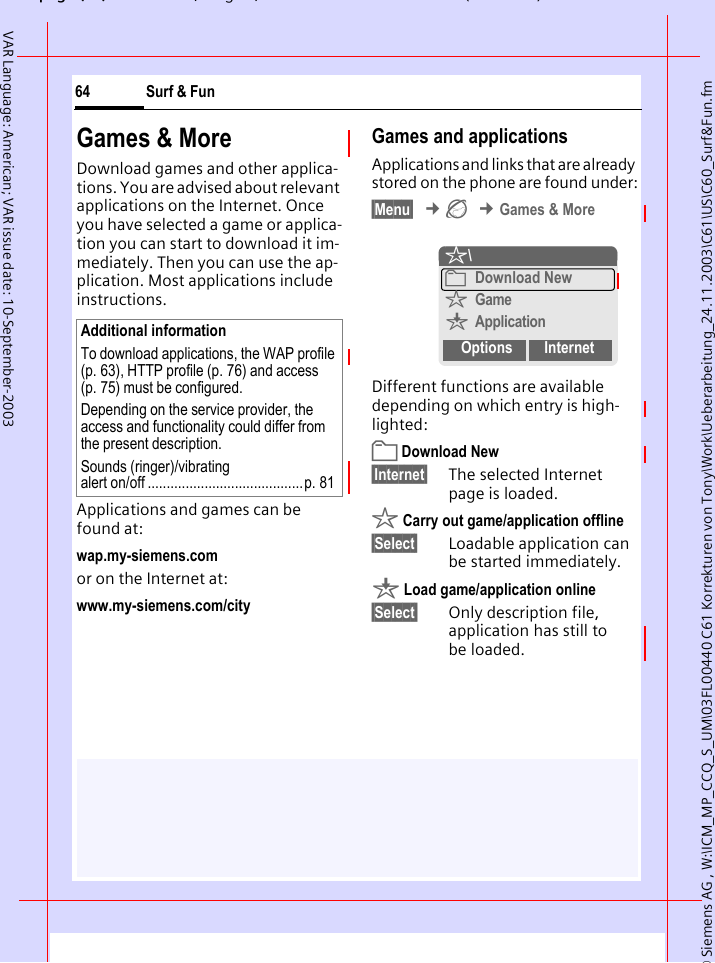
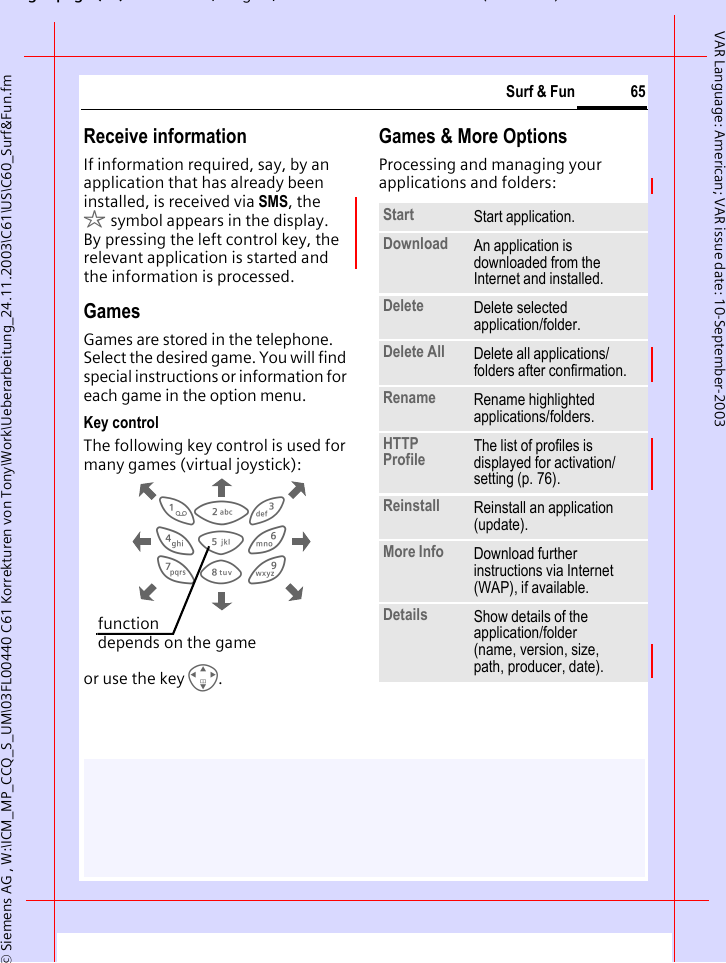
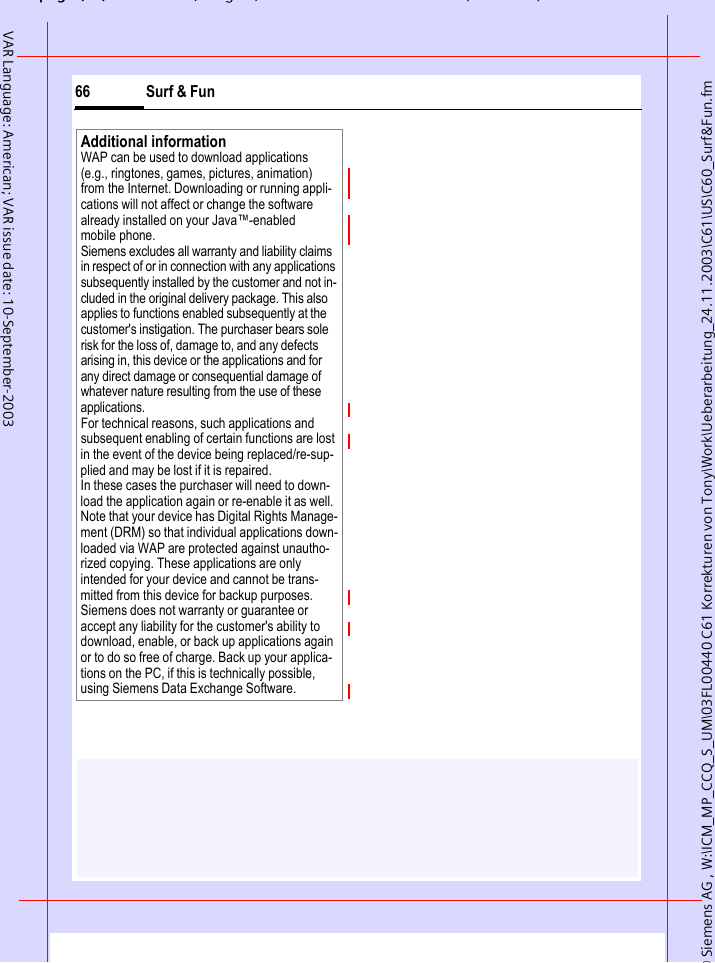
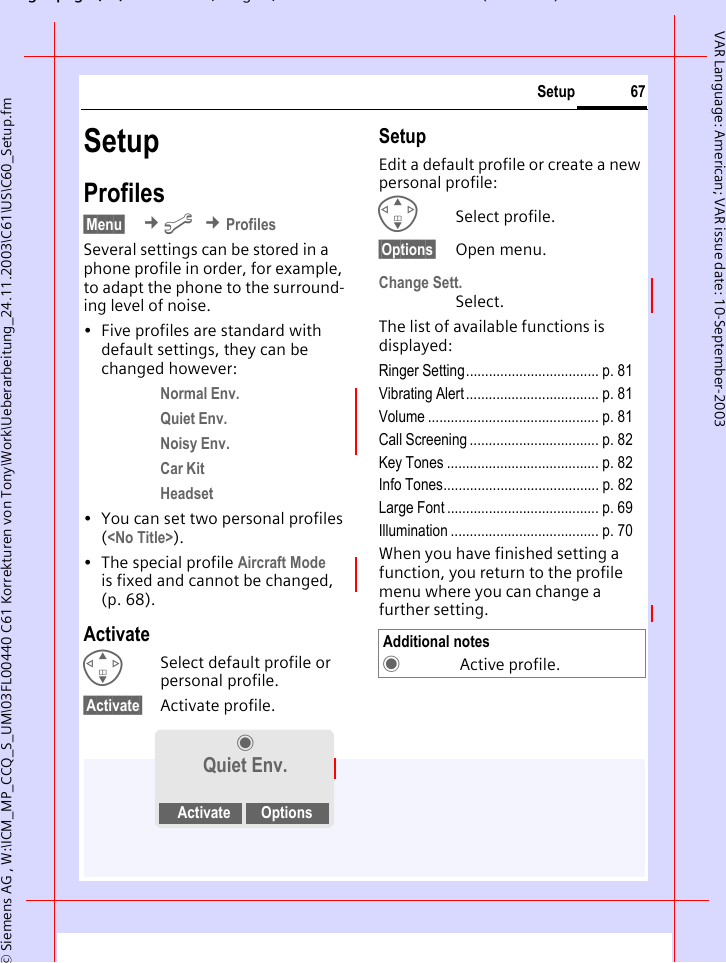
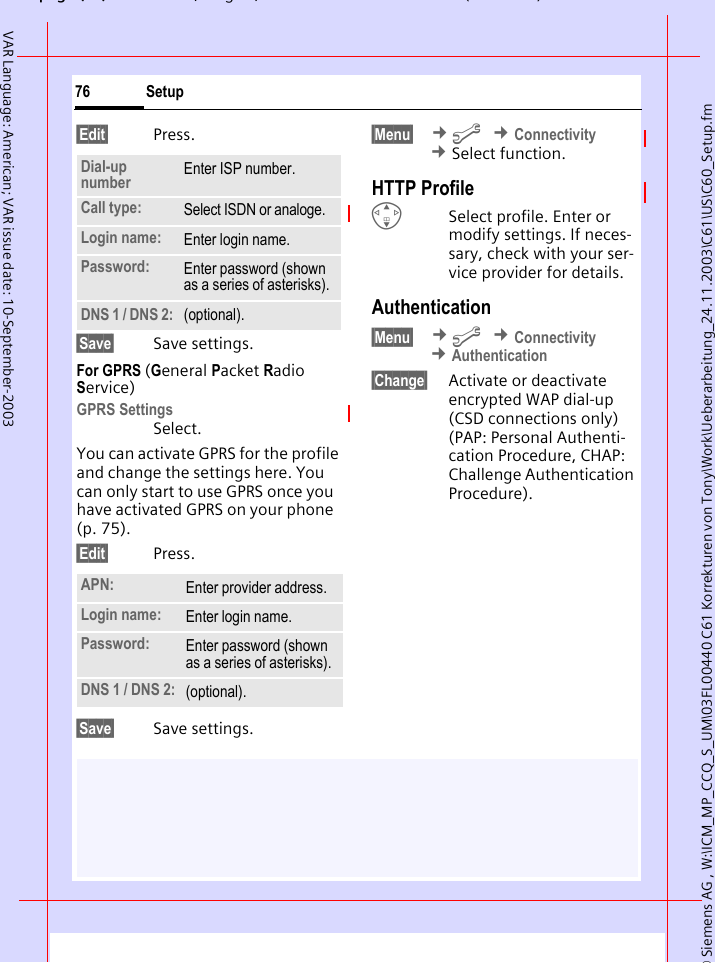
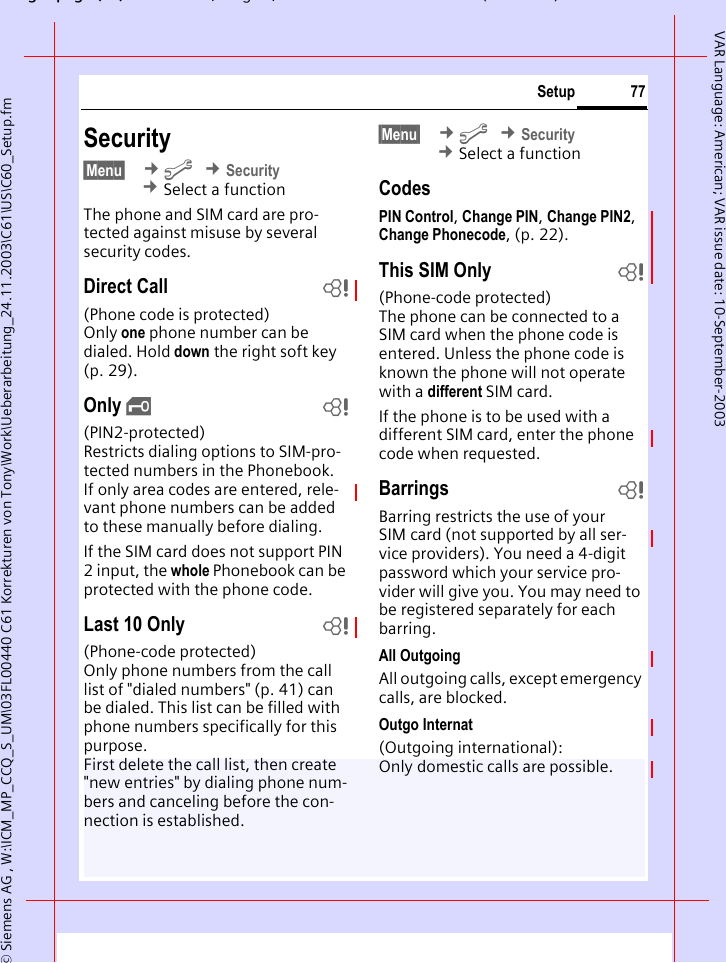
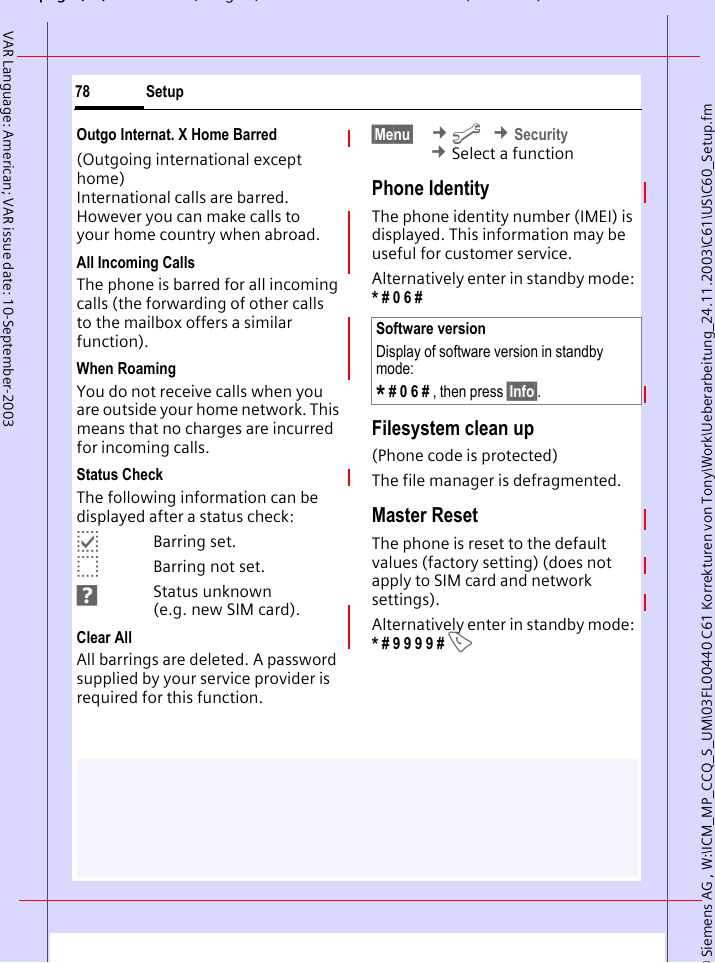
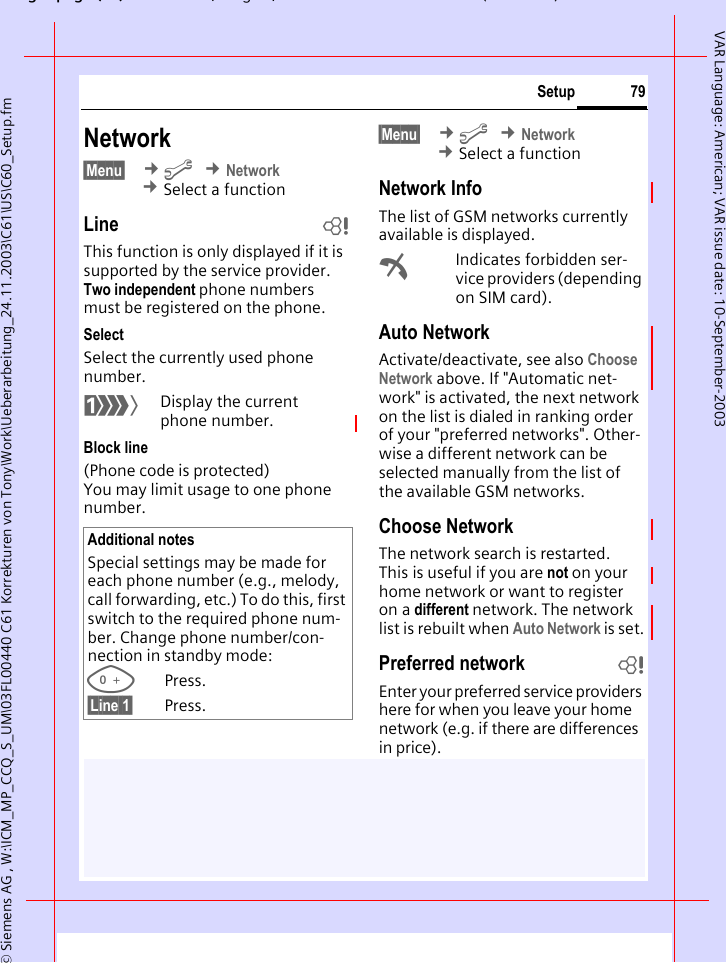
BenQ Mobile and OHG C61 GSM 850/1900 Mobile Phone User Manual C61 Lion us

BenQ Mobile GmbH & Co. OHG GSM 850/1900 Mobile Phone C61 Lion us

Users Manual

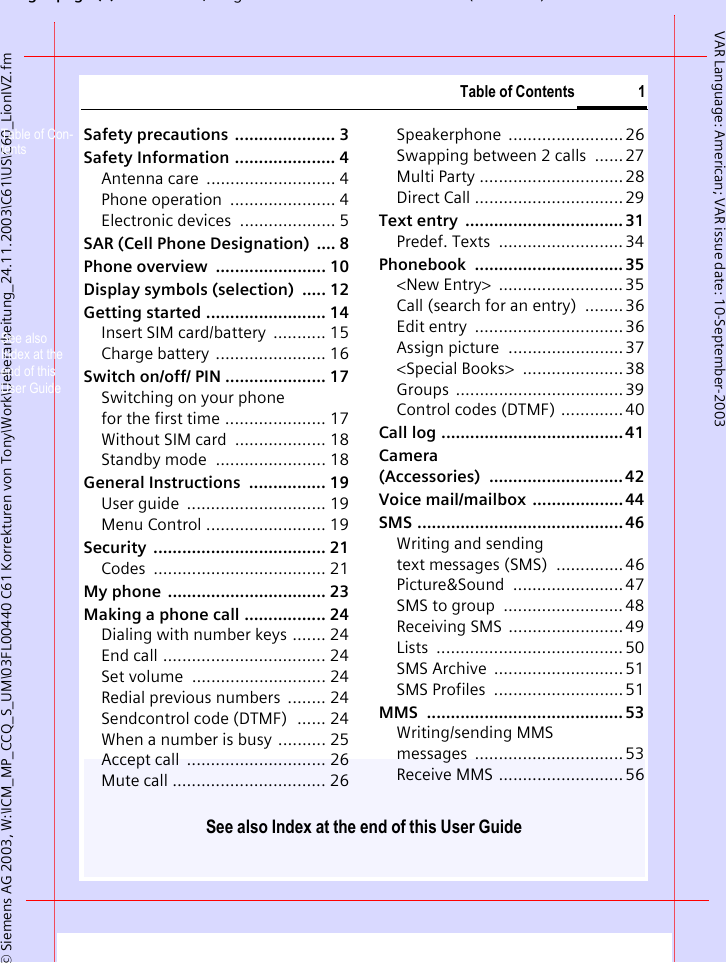
gpg(),g ( )© Siemens AG 2003, W:\ICM_MP_CCQ_S_UM\03FL00440 C61 Korrekturen von Tony\Work\Ueberarbeitung_24.11.2003\C61\US\C60_LionIVZ.fmTable of Contents 1See also Index at the end of this User GuideVAR Language: American; VAR issue date: 10-September-2003Safety precautions  ..................... 3Safety Information ..................... 4Antenna care  ........................... 4Phone operation  ...................... 4Electronic devices  .................... 5SAR (Cell Phone Designation)  .... 8Phone overview  ....................... 10Display symbols (selection)  ..... 12Getting started ......................... 14Insert SIM card/battery  ........... 15Charge battery ....................... 16Switch on/off/ PIN ..................... 17Switching on your phone for the first time ..................... 17Without SIM card  ................... 18Standby mode  ....................... 18General Instructions  ................ 19User guide  ............................. 19Menu Control ......................... 19Security .................................... 21Codes .................................... 21My phone  ................................. 23Making a phone call ................. 24Dialing with number keys ....... 24End call .................................. 24Set volume  ............................ 24Redial previous numbers  ........ 24Sendcontrol code (DTMF)  ...... 24When a number is busy .......... 25Accept call  ............................. 26Mute call ................................ 26Speakerphone ........................ 26Swapping between 2 calls  ......27Multi Party .............................. 28Direct Call ............................... 29Text entry  ................................. 31Predef. Texts  .......................... 34Phonebook ............................... 35<New Entry>  ..........................35Call (search for an entry)  ........ 36Edit entry  ............................... 36Assign picture  ........................ 37<Special Books>  ..................... 38Groups ...................................39Control codes (DTMF) ............. 40Call log ...................................... 41Camera (Accessories) ............................42Voice mail/mailbox  ...................44SMS ........................................... 46Writing and sending text messages (SMS)  ..............46Picture&Sound ....................... 47SMS to group  ......................... 48Receiving SMS  ........................49Lists .......................................50SMS Archive  ...........................51SMS Profiles  ...........................51MMS ......................................... 53Writing/sending MMSmessages ...............................53Receive MMS ..........................56Table of Con-tentsSee also Index at the end of this User Guide
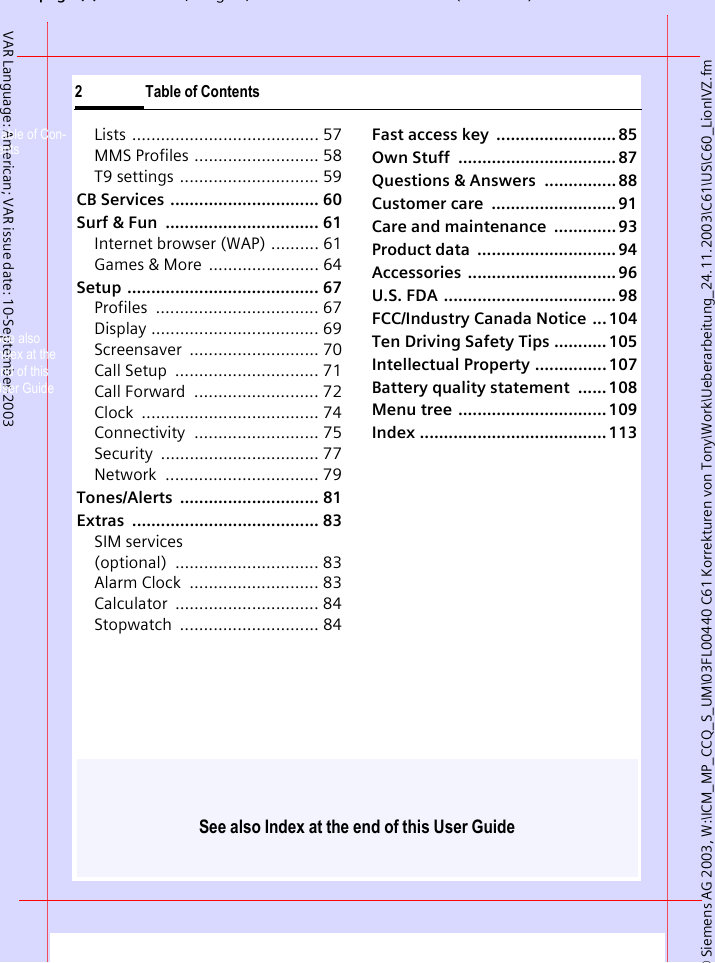
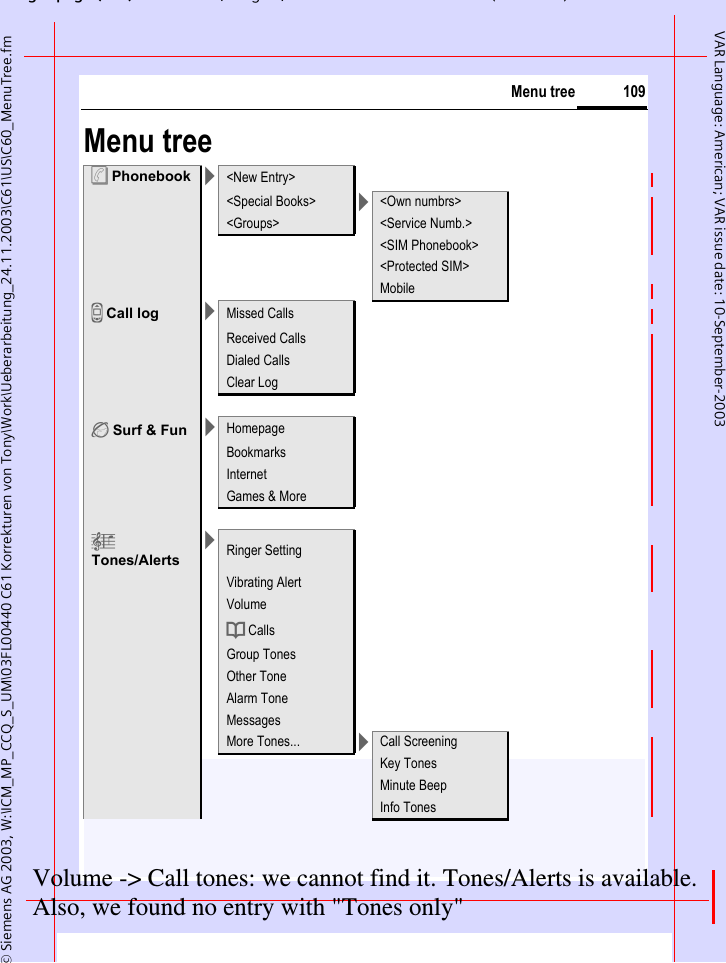
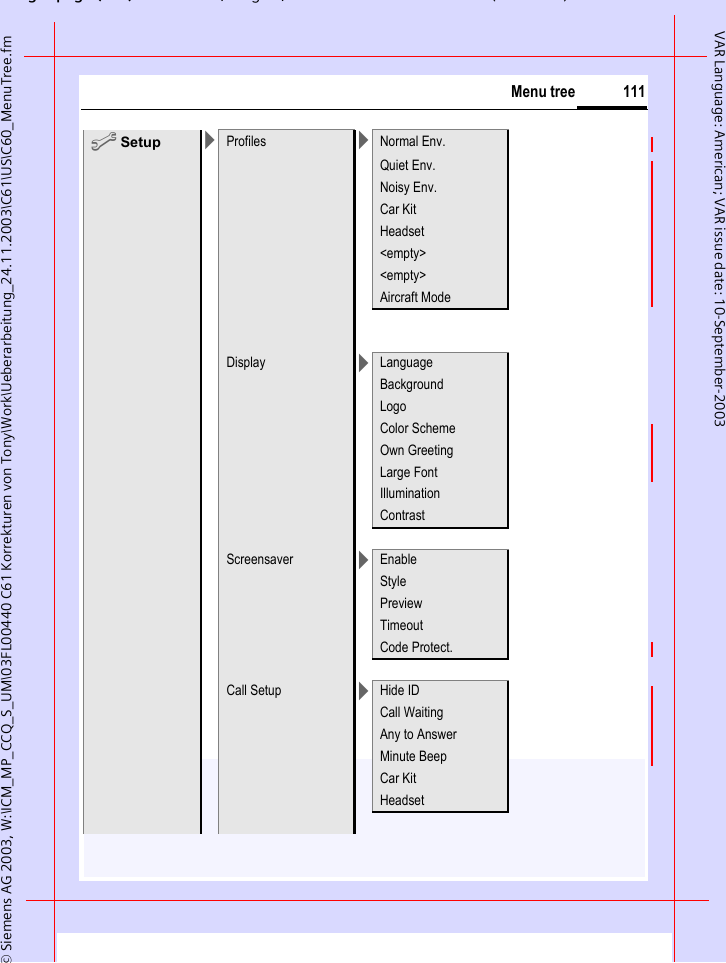
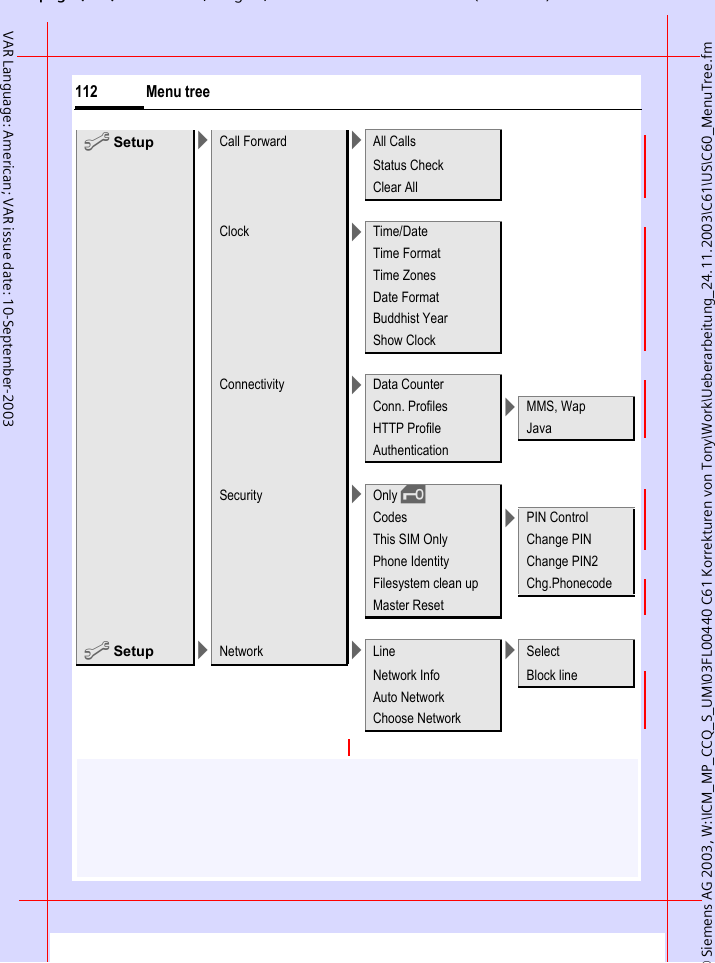
See also Index at the end of this User Guide© Siemens AG 2003, W:\ICM_MP_CCQ_S_UM\03FL00440 C61 Korrekturen von Tony\Work\Ueberarbeitung_24.11.2003\C61\US\C60_LionIVZ.fmpg (),g, ( )2 Table of ContentsVAR Language: American; VAR issue date: 10-September-2003Lists ....................................... 57MMS Profiles .......................... 58T9 settings ............................. 59CB Services  ............................... 60Surf & Fun  ................................ 61Internet browser (WAP) .......... 61Games & More  ....................... 64Setup ........................................ 67Profiles .................................. 67Display ................................... 69Screensaver ........................... 70Call Setup  .............................. 71Call Forward  .......................... 72Clock ..................................... 74Connectivity .......................... 75Security ................................. 77Network ................................ 79Tones/Alerts ............................. 81Extras ....................................... 83SIM services (optional) .............................. 83Alarm Clock  ........................... 83Calculator .............................. 84Stopwatch ............................. 84Fast access key  ......................... 85Own Stuff  ................................. 87Questions & Answers  ............... 88Customer care  .......................... 91Care and maintenance  ............. 93Product data  ............................. 94Accessories ............................... 96U.S. FDA .................................... 98FCC/Industry Canada Notice  ... 104Ten Driving Safety Tips ........... 105Intellectual Property ............... 107Battery quality statement  ...... 108Menu tree ............................... 109Index ....................................... 113Table of Con-tentsSee also Index at the end of this User Guide
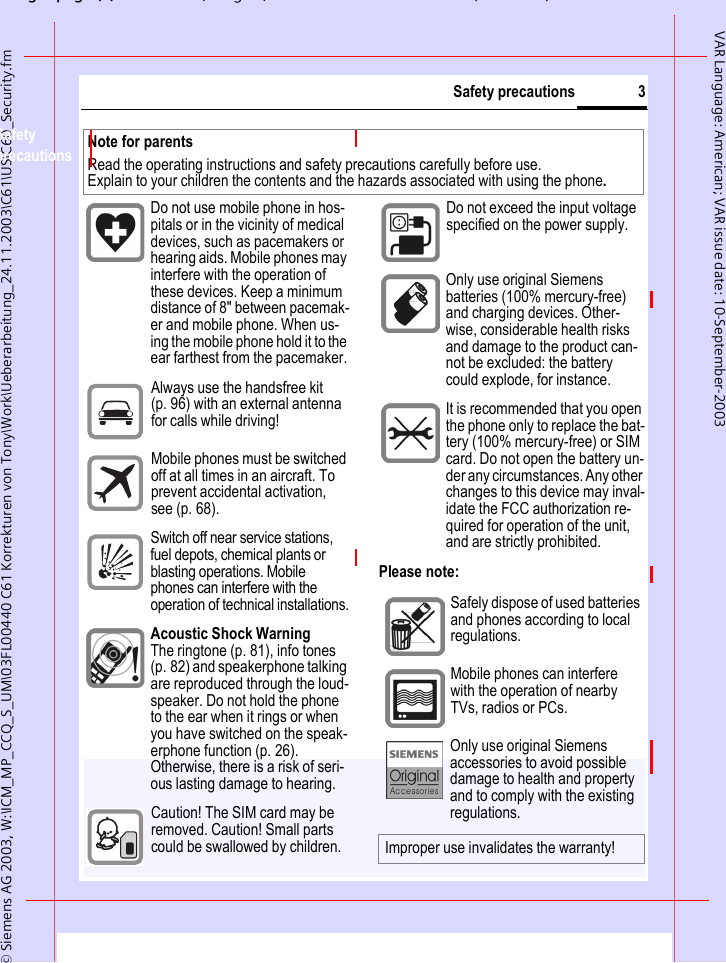
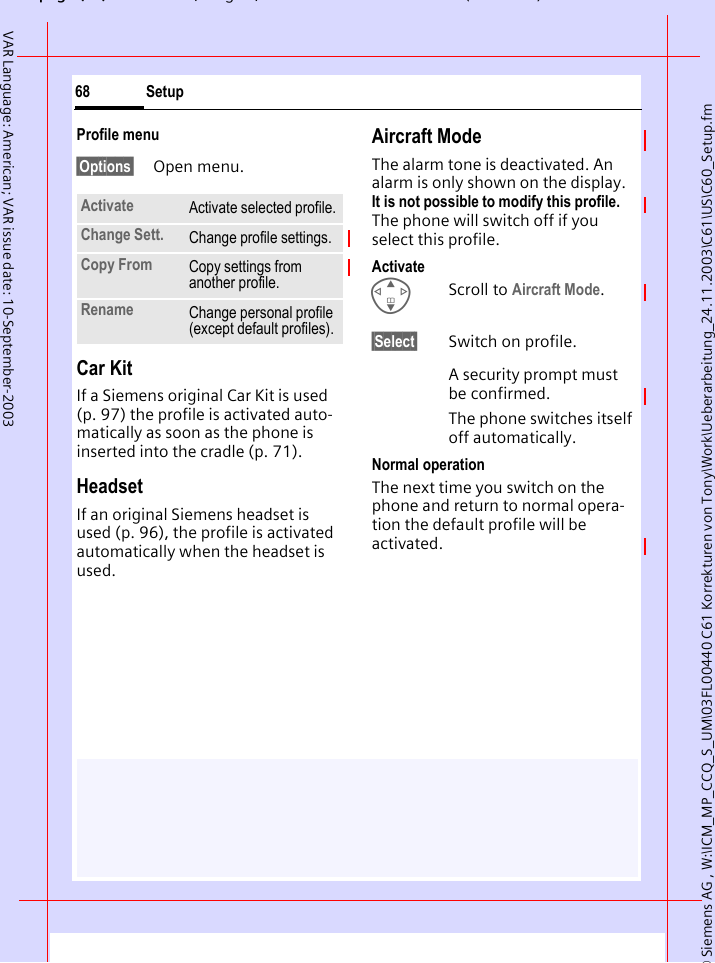
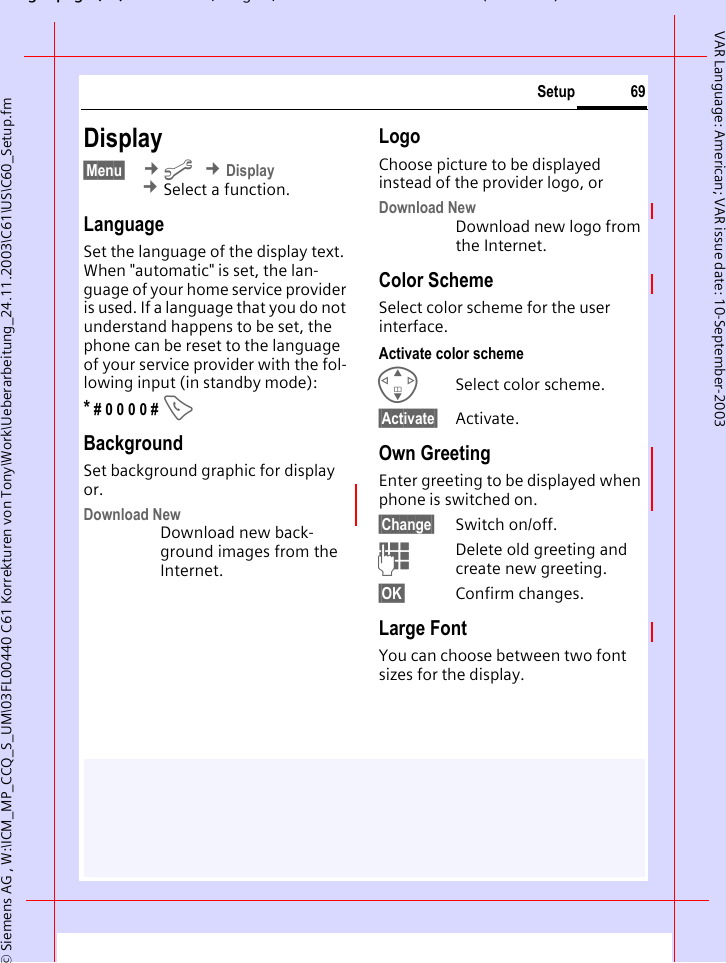
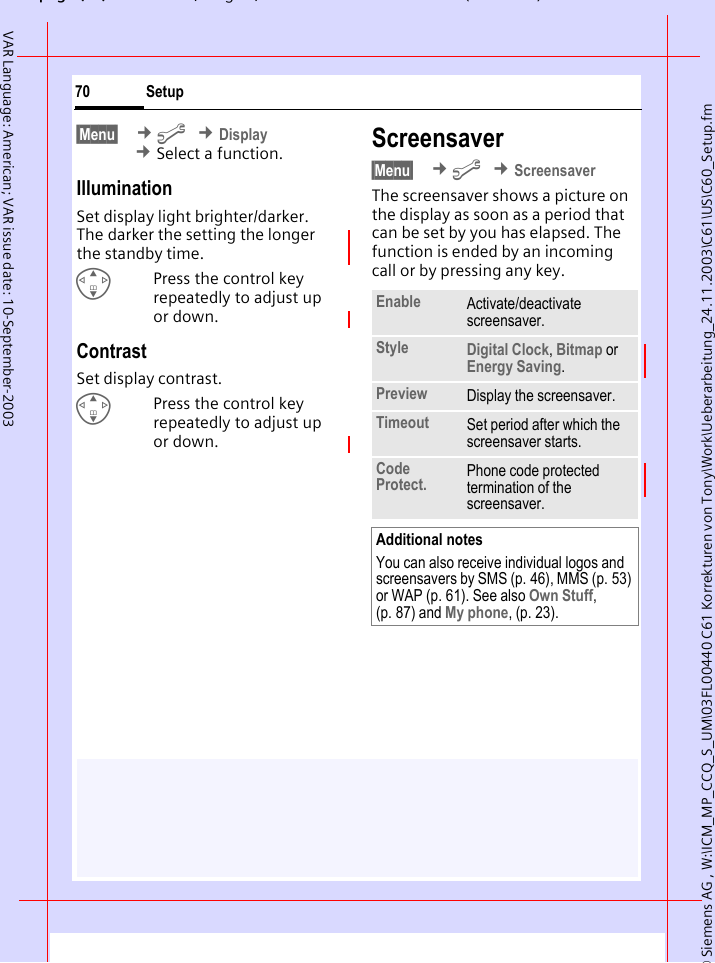
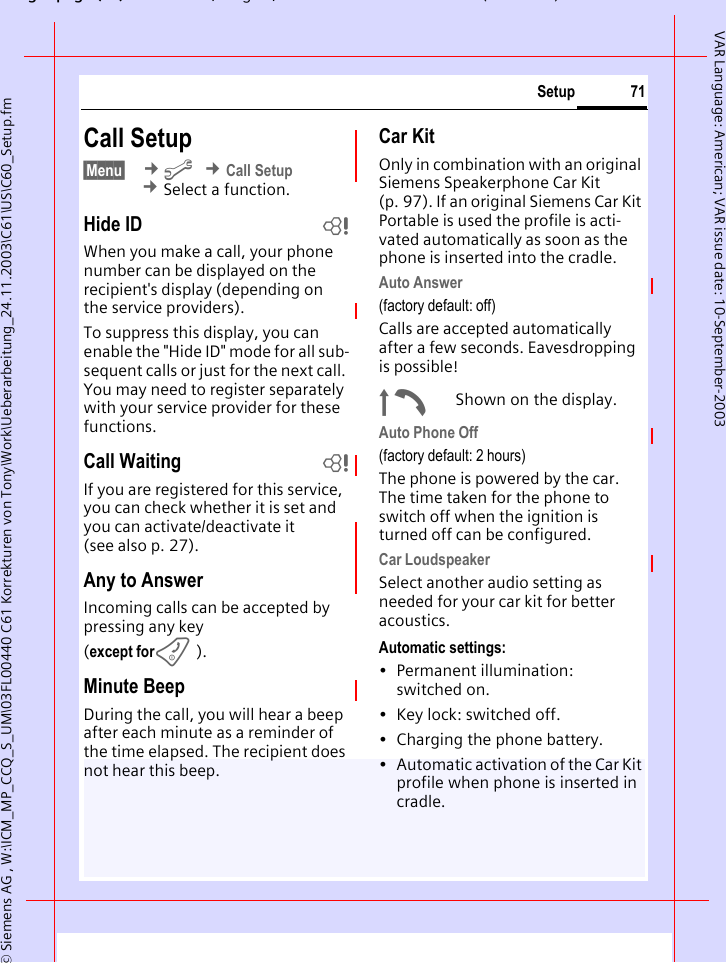
gpg(),g, ( )© Siemens AG 2003, W:\ICM_MP_CCQ_S_UM\03FL00440 C61 Korrekturen von Tony\Work\Ueberarbeitung_24.11.2003\C61\US\C60_Security.fm3Safety precautionsVAR Language: American; VAR issue date: 10-September-2003Safety precautionsPlease note:Note for parentsRead the operating instructions and safety precautions carefully before use. Explain to your children the contents and the hazards associated with using the phone.Do not use mobile phone in hos-pitals or in the vicinity of medical devices, such as pacemakers or hearing aids. Mobile phones may interfere with the operation of these devices. Keep a minimum distance of 8" between pacemak-er and mobile phone. When us-ing the mobile phone hold it to the ear farthest from the pacemaker.Always use the handsfree kit (p. 96) with an external antenna for calls while driving!Mobile phones must be switched off at all times in an aircraft. To prevent accidental activation, see (p. 68).Switch off near service stations, fuel depots, chemical plants or blasting operations. Mobile phones can interfere with the operation of technical installations.Acoustic Shock WarningThe ringtone (p. 81), info tones (p. 82) and speakerphone talking are reproduced through the loud-speaker. Do not hold the phone to the ear when it rings or when you have switched on the speak-erphone function (p. 26). Otherwise, there is a risk of seri-ous lasting damage to hearing.Caution! The SIM card may be removed. Caution! Small parts could be swallowed by children.Do not exceed the input voltage specified on the power supply.. Only use original Siemens batteries (100% mercury-free) and charging devices. Other-wise, considerable health risks and damage to the product can-not be excluded: the battery could explode, for instance.It is recommended that you open the phone only to replace the bat-tery (100% mercury-free) or SIM card. Do not open the battery un-der any circumstances. Any other changes to this device may inval-idate the FCC authorization re-quired for operation of the unit, and are strictly prohibited.Safely dispose of used batteries and phones according to local regulations.Mobile phones can interfere with the operation of nearby TVs, radios or PCs.Only use original Siemens accessories to avoid possible damage to health and property and to comply with the existing regulations.Improper use invalidates the warranty!
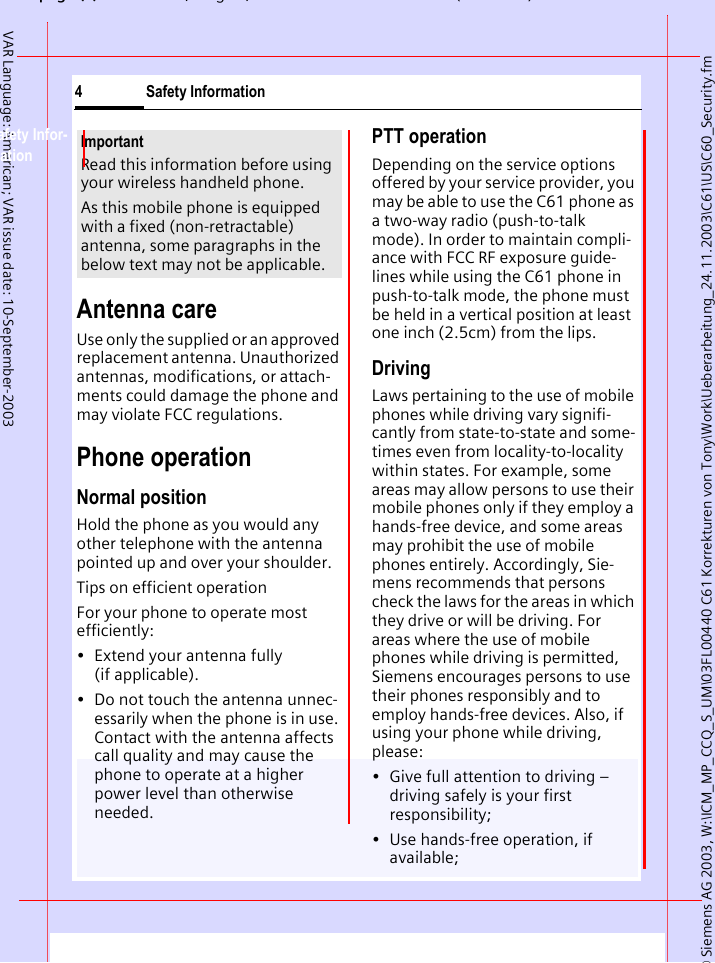
© Siemens AG 2003, W:\ICM_MP_CCQ_S_UM\03FL00440 C61 Korrekturen von Tony\Work\Ueberarbeitung_24.11.2003\C61\US\C60_Security.fmpg (),g, ( )Safety Information4VAR Language: American; VAR issue date: 10-September-2003Safety Infor-mationAntenna careUse only the supplied or an approved replacement antenna. Unauthorized antennas, modifications, or attach-ments could damage the phone and may violate FCC regulations.Phone operationNormal positionHold the phone as you would any other telephone with the antenna pointed up and over your shoulder.Tips on efficient operationFor your phone to operate most efficiently:• Extend your antenna fully (if applicable).• Do not touch the antenna unnec-essarily when the phone is in use. Contact with the antenna affects call quality and may cause the phone to operate at a higher power level than otherwise needed.PTT operationDepending on the service options offered by your service provider, you may be able to use the C61 phone as a two-way radio (push-to-talk mode). In order to maintain compli-ance with FCC RF exposure guide-lines while using the C61 phone in push-to-talk mode, the phone must be held in a vertical position at least one inch (2.5cm) from the lips.DrivingLaws pertaining to the use of mobile phones while driving vary signifi-cantly from state-to-state and some-times even from locality-to-locality within states. For example, some areas may allow persons to use their mobile phones only if they employ a hands-free device, and some areas may prohibit the use of mobile phones entirely. Accordingly, Sie-mens recommends that persons check the laws for the areas in which they drive or will be driving. For areas where the use of mobile phones while driving is permitted, Siemens encourages persons to use their phones responsibly and to employ hands-free devices. Also, if using your phone while driving, please:• Give full attention to driving – driving safely is your first responsibility;• Use hands-free operation, if available;ImportantRead this information before using your wireless handheld phone.As this mobile phone is equipped with a fixed (non-retractable) antenna, some paragraphs in the below text may not be applicable.
gpg(),g, ( )© Siemens AG 2003, W:\ICM_MP_CCQ_S_UM\03FL00440 C61 Korrekturen von Tony\Work\Ueberarbeitung_24.11.2003\C61\US\C60_Security.fm5Safety InformationVAR Language: American; VAR issue date: 10-September-2003• Pull off the road and park before making or answering a call, if driving conditions so require.For vehicles equipped with Air BagsAn air bag inflates with great force. DO NOT place objects, including ei-ther installed or portable wireless equipment, in the area over the air bag or in the air bag deployment ar-ea. If in-vehicle wireless equipment is improperly installed and the air bag inflates, serious injury could result.Electronic devicesMost modern electronic equipment is shielded from radiofrequency (RF) signals. However, certain electronic equipment may not be shielded against the RF signals from your wireless phone.PacemakersThe Health Industry Manufacturer’s Association recommends that a mini-mum separation of six inches (6”) be maintained between a handheld wireless phone and a pacemaker to avoid potential interference with the pacemaker. These recommendations are consistent with the independent research by and recommendations of Wireless Technology Research.Persons with pacemakers:• should ALWAYS keep the phone more than six inches from their pacemaker when the phone is turned ON;• should not carry the phone in a breast pocket;• should use the ear opposite the pacemaker to minimize the poten-tial for interference;• should turn the phone OFF imme-diately if there is any reason to suspect that interference is taking place.Hearing AidsSome digital wireless phones may interfere with some hearing aids. In the event of such interference, you may want to consult your service provider or your hearing aid manu-facturer to discuss alternatives.Other Medical DevicesIf you use any other personal medi-cal devices, consult the manufactur-ers of your devices to determine if they are adequately shielded from external RF energy. Your physician may be able to assist you in obtain-ing this information.Turn your phone OFF in health care facilities when any regulations post-ed in these areas instruct you to do so. Hospitals or health care facilities may be using equipment that could be sensitive to external RF energy.
© Siemens AG 2003, W:\ICM_MP_CCQ_S_UM\03FL00440 C61 Korrekturen von Tony\Work\Ueberarbeitung_24.11.2003\C61\US\C60_Security.fmpg (),g, ( )Safety Information6VAR Language: American; VAR issue date: 10-September-2003VehiclesRF signals may affect improperly installed or inadequately shielded electronic systems in motor vehicles. Check with the manufacturer or its representative regarding your vehi-cle. You should also consult the manufacturer of any equipment that has been added to your vehicle.Posted FacilitiesTurn your phone OFF in any facility where posted notices so require.AirplanesFCC and Airline Regulations prohibit using your phone while in the air. Turn your phone OFF when request-ed by the airline.Check and comply with the policy of your airline regarding the use of your phone while the airplane is on the ground.Blasting areasTo avoid interfering with blasting op-erations, turn your phone OFF when in a “blasting area” or in areas post-ed: “Turn off two-way radio.” Obey all signs and instructions.Potentially explosive atmospheresTurn your phone OFF when in any area with a potentially explosive atmosphere and obey all signs and instructions. Sparks in such areas could cause an explosion or fire resulting in bodily injury or even death.Areas with a potentially explosive at-mosphere are often but not always clearly marked. They include: fueling areas such as gasoline stations; be-low deck on boats; fuel or chemical transfer or storage facilities; vehicles using liquefied petroleum gas (such as propane or butane); areas where the air contains chemicals or parti-cles, such as grain, dust or metal powders; and any other area where you would normally be advised to turn off your vehicle engine.Emergency calls (SOS)Your wireless phone can be used to make emergency calls. You can make an emergency call from the main display screen. Enter the local emergency number such as 911 and then press the A keyThis phone, like any wireless phone, operates using radio signals, wire-less and landline networks, and user-programmed functions. Because of this, connections in all conditions cannot be guaranteed. Therefore, you should never rely solely on any wireless phone for essential commu-nications (for example, medical emergencies). Remember - to make or receive any calls, the phone must be switched on and be used in a ser-vice area that has adequate signal strength. Emergency calls might not
gpg(),g, ( )© Siemens AG 2003, W:\ICM_MP_CCQ_S_UM\03FL00440 C61 Korrekturen von Tony\Work\Ueberarbeitung_24.11.2003\C61\US\C60_Security.fm7Safety InformationVAR Language: American; VAR issue date: 10-September-2003be possible on all wireless phone networks or when certain network services or phone features are in use. Check with local service providers re-garding their network features. Always make certain that your phone is properly charged before attempting any emergency calls. If you allow your battery to discharge, you will be unable to receive or make calls, including emergency calls. You must then wait a few minutes after the charging begins to place any emergency calls.When making an emergency call, remember to give all of the neces-sary information as accurately as possible. Remember that your wire-less phone might be the only means of communication at the scene of an accident, therefore you should not terminate the call until given permis-sion to do so.
© Siemens AG 2003, W:\ICM_MP_CCQ_S_UM\03FL00440 C61 Korrekturen von Tony\Work\Ueberarbeitung_24.11.2003\C61\US\C60_SAR.fmpg (),g, ( )SAR (Cell Phone Designation)8VAR Language: American; VAR issue date: 10-September-2003SAR (Cell Phone Designation)RF EXPOSURE /SPECIFIC ABSORPTION RATE (SAR) INFORMATIONTHIS SIEMENS C61 PHONE MEETS THE GOVERNMENT'S REQUIREMENTS FOR EXPOSURE TO ELECTROMAGNETIC FIELDS.Your cell phone is a radio transmitter and receiver. It is designed and man-ufactured not to exceed the emission limits for exposure to radio fre-quency (RF) energy established by the Federal Communications Com-mission (FCC) of the U.S. Govern-ment and by Health Canada. These limits are part of comprehensive guidelines and establish permitted levels of RF energy for the general population. The guidelines were developed and confirmed by inde-pendent scientific organizations through periodic and thorough eval-uation of scientific studies*. The lim-its include a substantial safety mar-gin designed to assure the safety of all persons, regardless of age and health.The exposure standard for cell phones employs a unit of measure-ment known as the Specific Absorp-tion Rate, or SAR. The SAR limit established by the FCC and by Health Canada is 1.6 W/kg**. Tests for SAR are conducted using standard oper-ating positions accepted by the FCC and by Industry Canada with the phone transmitting at its highest cer-tified power level in all tested fre-quency bands. Although the SAR is determined at the highest certified power level, the actual SAR level of the phone while operating can be well below the maximum value. This is because the phone is designed to operate at multiple power levels so as to use only the power required to reach the network. In general, the closer you are to a wireless base sta-tion, the lower the power output. Before a phone model is available for sale to the public, it must be tested and the manufacturer must certify to the FCC and Industry Canada that it does not exceed the limit estab-lished by each government for safe exposure. The tests are performed in positions and locations (e.g., at the ear and worn on the body), reported to the FCC and available for review by Industry Canada. The highest SAR value for this model phone when testest for use at the ear is0.656 W/kg***and when worn on the body+ is0.637 W/kg***and during PTT operation ++ is0.117 W/kg***Additional information on Specific Absorption Rates (SAR) can be found on the Cellular Telecommunications Internet Association (CTIA) web-site at www.phonefacts.net or the Cana-dian Wireless Telecommunications Association (CWTA) website www.cwta.ca. SAR information on this Siemens C61 phone is on file with the FCC and can be found under the Display
gpg(),g, ( )© Siemens AG 2003, W:\ICM_MP_CCQ_S_UM\03FL00440 C61 Korrekturen von Tony\Work\Ueberarbeitung_24.11.2003\C61\US\C60_SAR.fm9SAR (Cell Phone Designation)VAR Language: American; VAR issue date: 10-September-2003Grant section of http://www.fcc.gov/oet/fccid after searching on FCC ID PWX-C61.While there may be differences between the SAR levels of various phones and at various positions, all Siemens products meet the governmental requirements for safe RF exposure. +  For body worn operation, this mobile phone has been tested and meets FCC RF exposure guidelines when used with a Siemens accesory designated for this product , where available, or  when  used with a carry accessory  that contains no metal and that positions the handset at least 1.5 cm/0.59 in from the body. Use of other carry accessories may not ensure compliance with FCC RF exposure guidelines.++ For PTT operation, this device has been tested and meets FCC RF exposure guidelines with the front of the device vertically positioned at least 2.5 cm/1 in from the lips.* The World Health Organization (WHO, CH-1211 Geneva 27, Switzerland), on the basis of the actual knowledge, does not see any necessity for special precautionary measures when using cell phones.Further information: www.who.int/peh-emf, www.mmfai.org, www.my-siemens.com.** averaged over 1 g of tissue.***SAR values may vary depending on national requirements and network bands. SAR information for different regions can be found at www.my-siemens.com
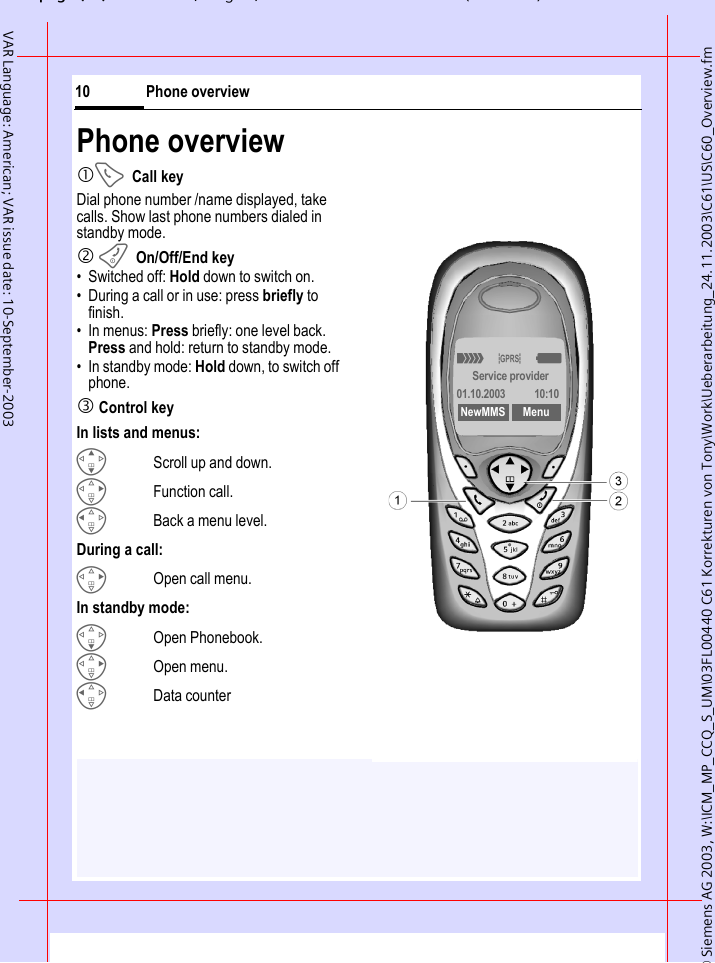
© Siemens AG 2003, W:\ICM_MP_CCQ_S_UM\03FL00440 C61 Korrekturen von Tony\Work\Ueberarbeitung_24.11.2003\C61\US\C60_Overview.fmpg ( ),g, ( )Phone overview10VAR Language: American; VAR issue date: 10-September-2003Phone overview1ACall keyDial phone number /name displayed, take calls. Show last phone numbers dialed in standby mode. 2 BOn/Off/End key• Switched off: Hold down to switch on.• During a call or in use: press briefly to finish. • In menus: Press briefly: one level back.Press and hold: return to standby mode.• In standby mode: Hold down, to switch off phone.3 Control keyIn lists and menus:GScroll up and down.DFunction call.CBack a menu level.During a call:DOpen call menu.In standby mode:FOpen Phonebook.DOpen menu.CData counter_ªgService provider01.10.2003 10:10NewMMS Menu
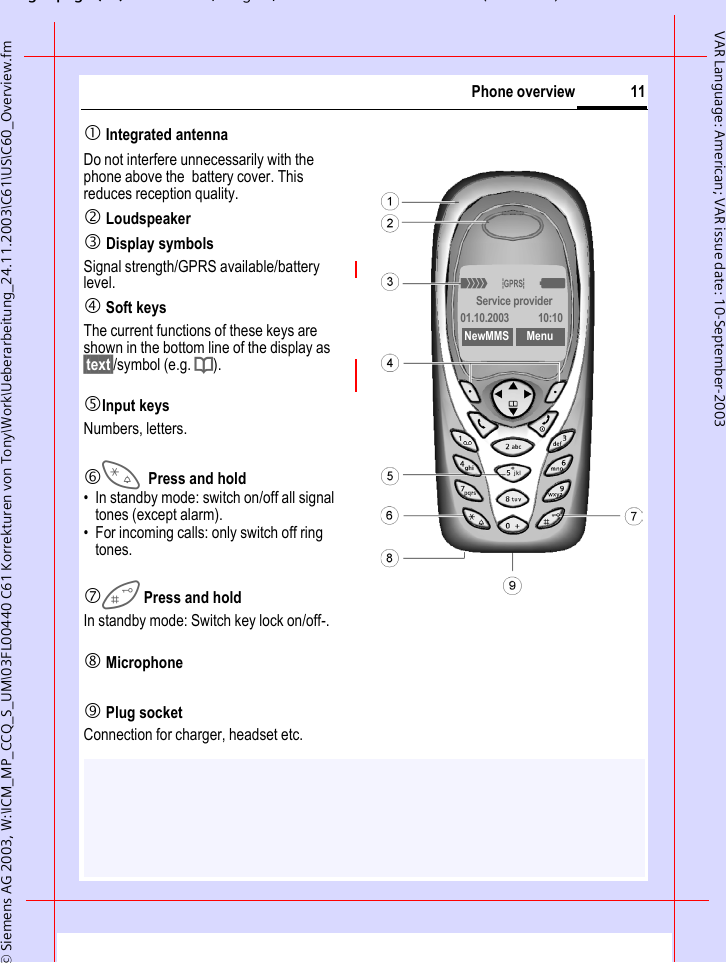
gpg(),g, ( )© Siemens AG 2003, W:\ICM_MP_CCQ_S_UM\03FL00440 C61 Korrekturen von Tony\Work\Ueberarbeitung_24.11.2003\C61\US\C60_Overview.fm11Phone overviewVAR Language: American; VAR issue date: 10-September-20031 Integrated antenna Do not interfere unnecessarily with the phone above the  battery cover. This reduces reception quality.2 Loudspeaker3 Display symbolsSignal strength/GPRS available/battery level.4 Soft keysThe current functions of these keys are shown in the bottom line of the display as §text§/symbol (e.g. d).5Input keysNumbers, letters.6*Press and hold• In standby mode: switch on/off all signal tones (except alarm). • For incoming calls: only switch off ring tones.7Press and holdIn standby mode: Switch key lock on/off-.8 Microphone9 Plug socketConnection for charger, headset etc._ªgService provider01.10.2003 10:10NewMMS Menu
© Siemens AG , W:\ICM_MP_CCQ_S_UM\03FL00440 C61 Korrekturen von Tony\Work\Ueberarbeitung_24.11.2003\C61\US\C60_DisplaySymbols.fmpg ( ),g, ( )Display symbols (selection)12VAR Language: American; VAR issue date: 10-September-2003Display symbols (selection)Display symbols_ Signal strength.h Charging.d Battery charging status, e.g., 50 %.è PhonebookZ Call LogÉ Surf & Funç Tones/Alerts] Messages Cameray ExtrasÑ Ownm Setupn Other calls are forwarded.j Ringer off.k Short ringer (beep) only.l Ringer only, if the caller is stored in the Phonebook.Ö Alarm clock active.µ Key lock active.Phone numbers/names:Q On the SIM card¡ On the SIM card (PIN 2 protected).Q In the phone memory.² No network access.p,o Function activated/deactivated.ABC/Abc/abc Indicates whether upper- or lower case letters are active.™ Text input with T9.« Activated and available.ª Registered. Temporarily interrupted.© GPRS download.Ê WAP Online.Ë WAP via GPRS online.Ì WAP No network. Headset active.± Auto answer feature on.Depending on the service provider, some of the symbols displayed here may differ from those in the phone.
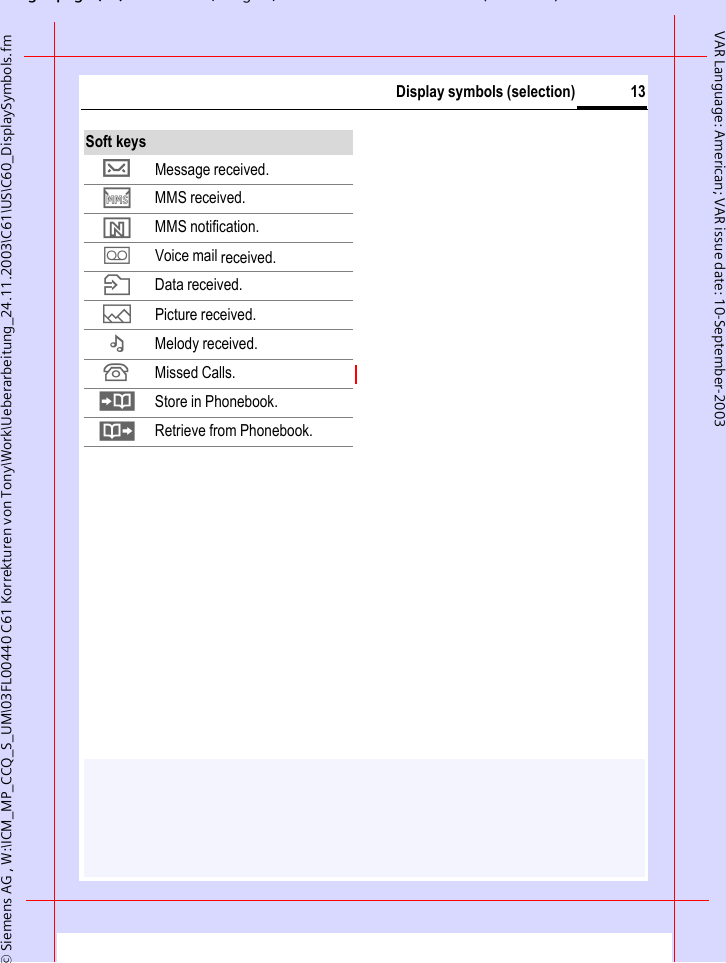
gpg(),g, ( )© Siemens AG , W:\ICM_MP_CCQ_S_UM\03FL00440 C61 Korrekturen von Tony\Work\Ueberarbeitung_24.11.2003\C61\US\C60_DisplaySymbols.fm13Display symbols (selection)VAR Language: American; VAR issue date: 10-September-2003Soft keys… Message received.  MMS received. MMS notification.\ Voice mail received.  Data received.— Picture received.– Melody received.¿ Missed Calls.  Store in Phonebook.· Retrieve from Phonebook.
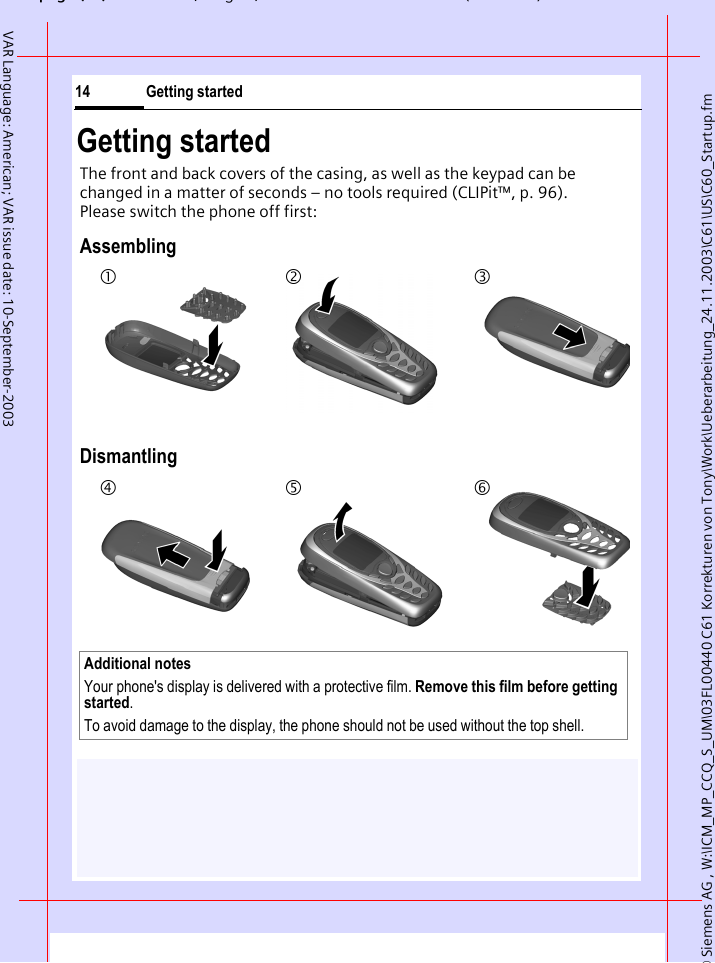
© Siemens AG , W:\ICM_MP_CCQ_S_UM\03FL00440 C61 Korrekturen von Tony\Work\Ueberarbeitung_24.11.2003\C61\US\C60_Startup.fmpg ( ),g, ( )Getting started14VAR Language: American; VAR issue date: 10-September-2003Getting startedThe front and back covers of the casing, as well as the keypad can be changed in a matter of seconds – no tools required (CLIPit™, p. 96). Please switch the phone off first:AssemblingDismantlingAdditional notes Your phone's display is delivered with a protective film. Remove this film before getting started. To avoid damage to the display, the phone should not be used without the top shell.123456
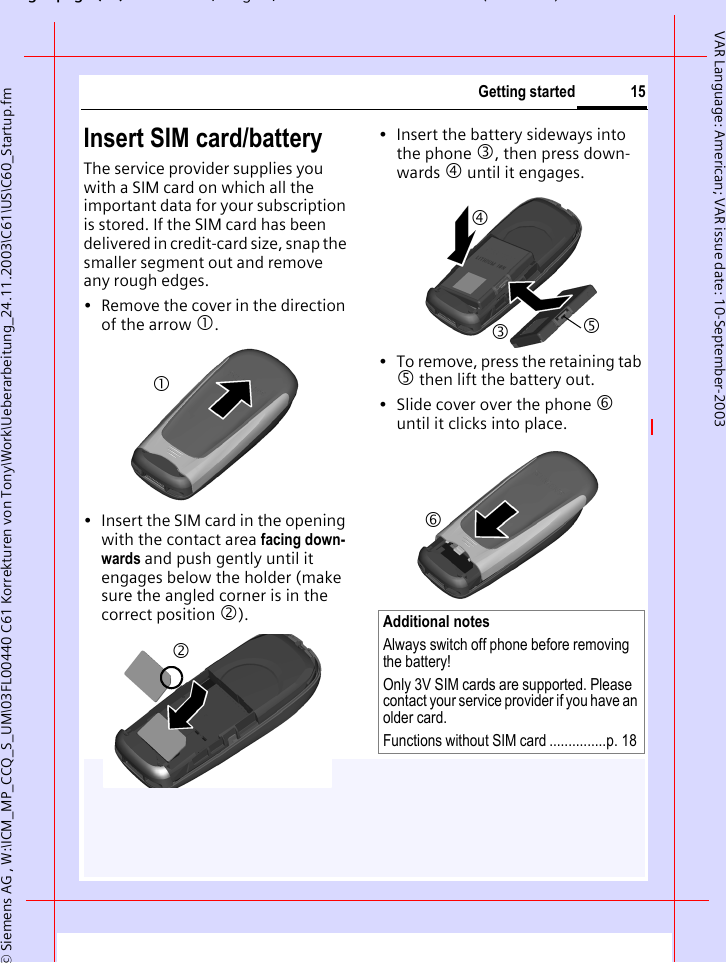
gpg(),g, ( )© Siemens AG , W:\ICM_MP_CCQ_S_UM\03FL00440 C61 Korrekturen von Tony\Work\Ueberarbeitung_24.11.2003\C61\US\C60_Startup.fm15Getting startedVAR Language: American; VAR issue date: 10-September-2003Insert SIM card/batteryThe service provider supplies you with a SIM card on which all the important data for your subscription is stored. If the SIM card has been delivered in credit-card size, snap the smaller segment out and remove any rough edges.• Remove the cover in the direction of the arrow 1.• Insert the SIM card in the opening with the contact area facing down-wards and push gently until it engages below the holder (make sure the angled corner is in the correct position 2).• Insert the battery sideways into the phone 3, then press down-wards 4 until it engages. • To remove, press the retaining tab 5 then lift the battery out.• Slide cover over the phone 6 until it clicks into place.12Additional notes Always switch off phone before removing the battery!Only 3V SIM cards are supported. Please contact your service provider if you have an older card.Functions without SIM card ...............p. 183456
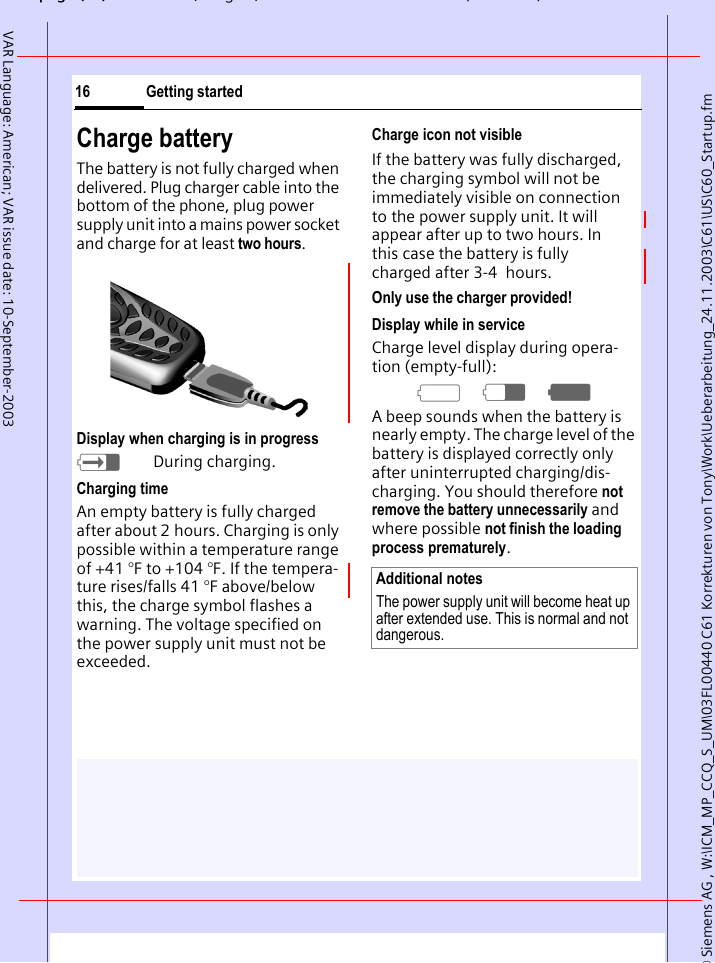
© Siemens AG , W:\ICM_MP_CCQ_S_UM\03FL00440 C61 Korrekturen von Tony\Work\Ueberarbeitung_24.11.2003\C61\US\C60_Startup.fmpg ( ),g, ( )Getting started16VAR Language: American; VAR issue date: 10-September-2003Charge batteryThe battery is not fully charged when delivered. Plug charger cable into the bottom of the phone, plug power supply unit into a mains power socket and charge for at least two hours.Display when charging is in progresshDuring charging.Charging timeAn empty battery is fully charged after about 2 hours. Charging is only possible within a temperature range of +41 °F to +104 °F. If the tempera-ture rises/falls 41 °F above/below this, the charge symbol flashes a warning. The voltage specified on the power supply unit must not be exceeded. Charge icon not visibleIf the battery was fully discharged, the charging symbol will not be immediately visible on connection to the power supply unit. It will appear after up to two hours. In this case the battery is fully charged after 3-4  hours.Only use the charger provided! Display while in serviceCharge level display during opera-tion (empty-full):adg A beep sounds when the battery is nearly empty. The charge level of the battery is displayed correctly only after uninterrupted charging/dis-charging. You should therefore not remove the battery unnecessarily and where possible not finish the loading process prematurely.Additional notesThe power supply unit will become heat up after extended use. This is normal and not dangerous.
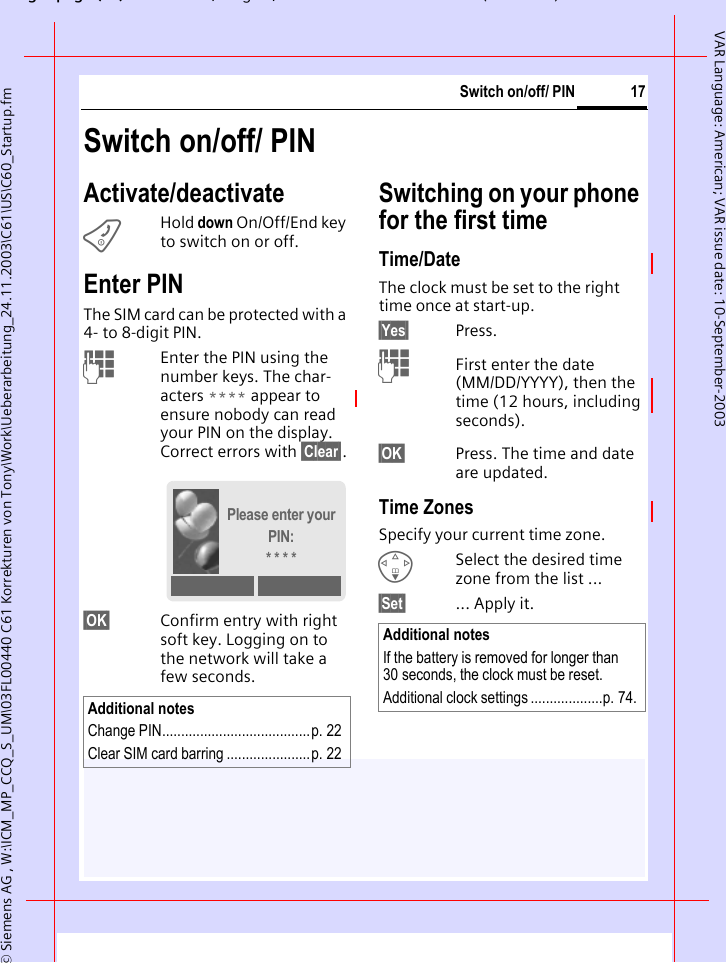
gpg(),g, ( )© Siemens AG , W:\ICM_MP_CCQ_S_UM\03FL00440 C61 Korrekturen von Tony\Work\Ueberarbeitung_24.11.2003\C61\US\C60_Startup.fm17Switch on/off/ PINVAR Language: American; VAR issue date: 10-September-2003Switch on/off/ PINActivate/deactivateBHold down On/Off/End key to switch on or off.Enter PINThe SIM card can be protected with a 4- to 8-digit PIN.JEnter the PIN using the number keys. The char-acters **** appear to ensure nobody can read your PIN on the display. Correct errors with §Clear§.§OK§ Confirm entry with right soft key. Logging on to the network will take a few seconds.Switching on your phone for the first timeTime/DateThe clock must be set to the right time once at start-up.§Yes§ Press.JFirst enter the date (MM/DD/YYYY), then the time (12 hours, including seconds).§OK§ Press. The time and date are updated.Time ZonesSpecify your current time zone.FSelect the desired time zone from the list ...§Set§ ... Apply it.Additional notesChange PIN.......................................p. 22Clear SIM card barring ......................p. 22Please enter your PIN:* * * *Additional notesIf the battery is removed for longer than 30 seconds, the clock must be reset. Additional clock settings ...................p. 74.
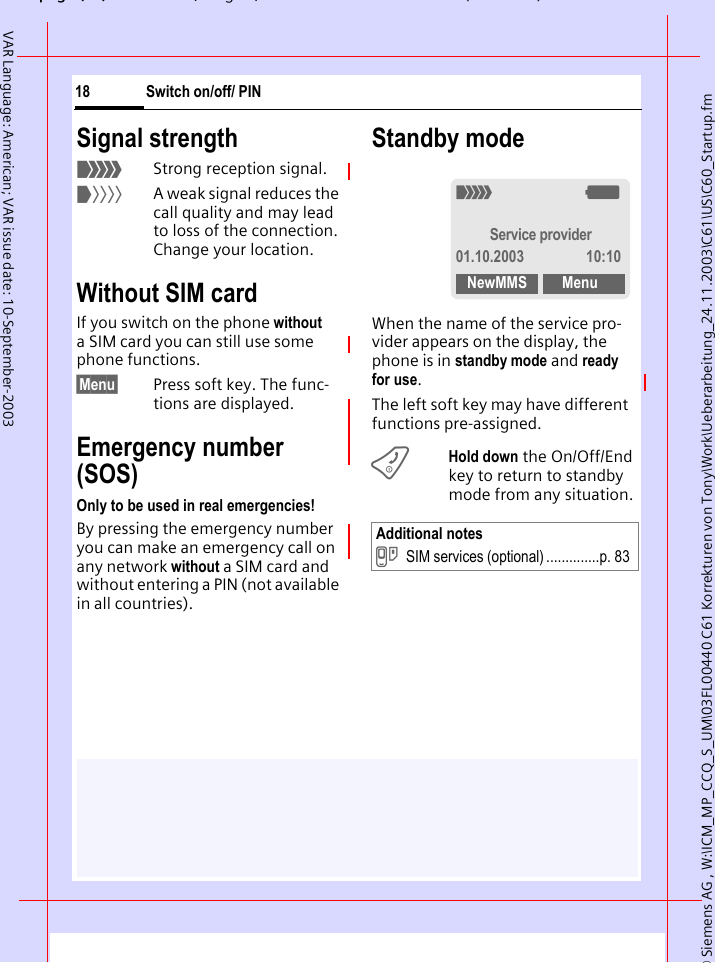
© Siemens AG , W:\ICM_MP_CCQ_S_UM\03FL00440 C61 Korrekturen von Tony\Work\Ueberarbeitung_24.11.2003\C61\US\C60_Startup.fmpg ( ),g, ( )Switch on/off/ PIN18VAR Language: American; VAR issue date: 10-September-2003Signal strength_Strong reception signal.^A weak signal reduces the call quality and may lead to loss of the connection. Change your location.Without SIM cardIf you switch on the phone without a SIM card you can still use some phone functions.§Menu§ Press soft key. The func-tions are displayed.Emergency number (SOS)Only to be used in real emergencies!By pressing the emergency number you can make an emergency call on any network without a SIM card and without entering a PIN (not available in all countries). Standby modeWhen the name of the service pro-vider appears on the display, the phone is in standby mode and ready for use.The left soft key may have different functions pre-assigned.BHold down the On/Off/End key to return to standby mode from any situation.Additional notes}SIM services (optional) ..............p. 83_gService provider01.10.2003 10:10NewMMS Menu
gpg(),g, ( )© Siemens AG , W:\ICM_MP_CCQ_S_UM\03FL00440 C61 Korrekturen von Tony\Work\Ueberarbeitung_24.11.2003\C61\US\C60_Startup.fm19General InstructionsVAR Language: American; VAR issue date: 10-September-2003General InstructionsUser guideThe following symbols are used to explain operation:Menu ControlThe steps needed to reach a function are shown in a concise form in this user guide, e. g. to display call list for missed calls:§Menu§  ¢Z ¢Missed CallsThis corresponds to: §Menu§ Open menu.From standby mode: press the right soft key. ESelect Call log Z.Press top of control key.J Enter numbers or letters.B On/Off/End key.A Call key.D Press the control key on the side indicated.< > Soft keys§Menu§ Displays a soft-key function.L Function depends on the service provider, special registration may be necessary._gService provider01.10.2003 10:10NewMMS Menu1 Messages    5NewMMS Selectè Z É ç ] y Ñ m ]
© Siemens AG , W:\ICM_MP_CCQ_S_UM\03FL00440 C61 Korrekturen von Tony\Work\Ueberarbeitung_24.11.2003\C61\US\C60_Startup.fmpg ( ),g, ( )General Instructions20VAR Language: American; VAR issue date: 10-September-2003§Select§ Press.Press right soft key to open the Call log submenu. §Select§ Press.Press right soft key to open the Missed Calls list.FScroll to entry required.Press control key at the bottom to scroll down.§View§ Press.Press left soft key to show phone number with date, time and number of calls.Call log 2NewMMS Selectè Z É ç ]  y Ñ m Z3 Z Call log 2-1› Missed CallsSelect4 ZMissed CallsCarolView Options5 ZMissed CallsCarolView Options6 NViewCarol+5552476547601.10.200310:10 §5§OK Options7
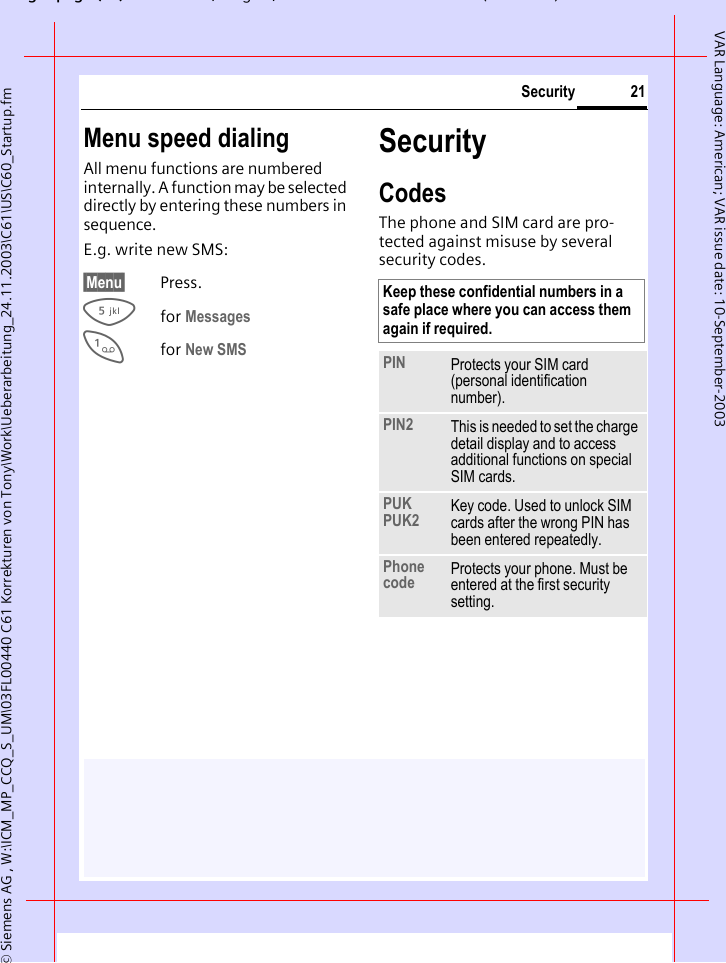
gpg(),g, ( )© Siemens AG , W:\ICM_MP_CCQ_S_UM\03FL00440 C61 Korrekturen von Tony\Work\Ueberarbeitung_24.11.2003\C61\US\C60_Startup.fm21SecurityVAR Language: American; VAR issue date: 10-September-2003Menu speed dialingAll menu functions are numbered internally. A function may be selected directly by entering these numbers in sequence.E.g. write new SMS:§Menu§ Press.5for Messages 1for New SMS SecurityCodesThe phone and SIM card are pro-tected against misuse by several security codes. Keep these confidential numbers in a safe place where you can access them again if required. PIN Protects your SIM card (personal identification number).PIN2 This is needed to set the charge detail display and to access additional functions on special SIM cards.PUKPUK2 Key code. Used to unlock SIM cards after the wrong PIN has been entered repeatedly.Phone code Protects your phone. Must be entered at the first security setting.
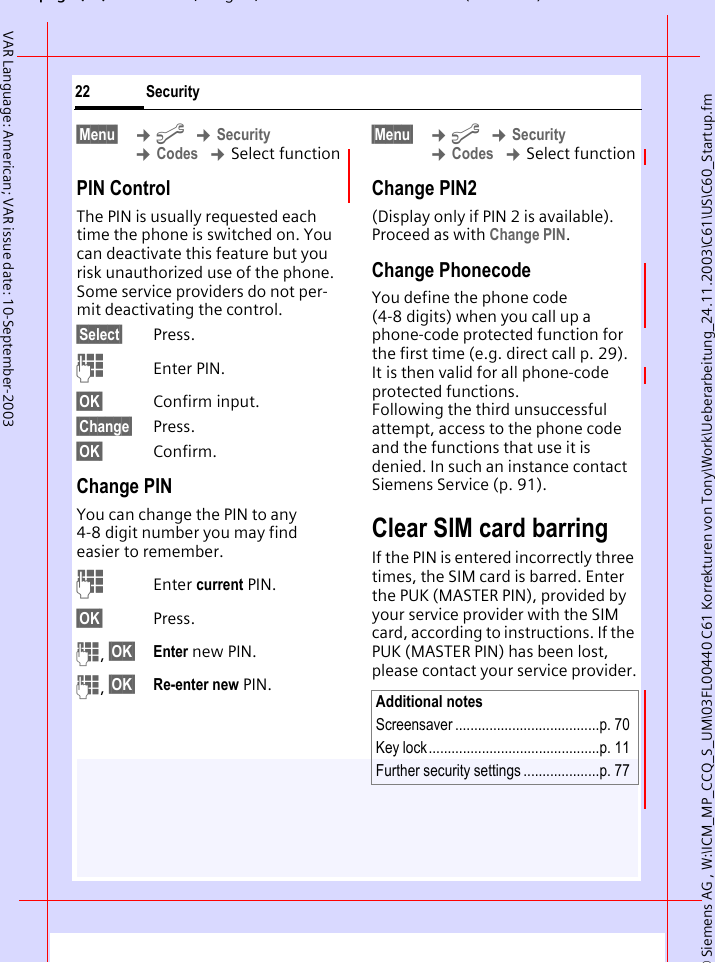
© Siemens AG , W:\ICM_MP_CCQ_S_UM\03FL00440 C61 Korrekturen von Tony\Work\Ueberarbeitung_24.11.2003\C61\US\C60_Startup.fmpg ( ),g, ( )Security22VAR Language: American; VAR issue date: 10-September-2003§Menu§  ¢m ¢Security ¢Codes ¢Select functionPIN ControlThe PIN is usually requested each time the phone is switched on. You can deactivate this feature but you risk unauthorized use of the phone. Some service providers do not per-mit deactivating the control.§Select§ Press.JEnter PIN.§OK§ Confirm input.§Change§ Press.§OK§ Confirm.Change PINYou can change the PIN to any 4-8 digit number you may find easier to remember.JEnter current PIN.§OK§ Press.J, §OK§ Enter new PIN.J, §OK§ Re-enter new PIN.§Menu§  ¢m ¢Security ¢Codes ¢Select functionChange PIN2(Display only if PIN 2 is available). Proceed as with Change PIN.Change PhonecodeYou define the phone code (4-8 digits) when you call up a phone-code protected function for the first time (e.g. direct call p. 29). It is then valid for all phone-code protected functions. Following the third unsuccessful attempt, access to the phone code and the functions that use it is denied. In such an instance contact Siemens Service (p. 91).Clear SIM card barringIf the PIN is entered incorrectly three times, the SIM card is barred. Enter the PUK (MASTER PIN), provided by your service provider with the SIM card, according to instructions. If the PUK (MASTER PIN) has been lost, please contact your service provider.Additional notesScreensaver ......................................p. 70Key lock.............................................p. 11Further security settings ....................p. 77
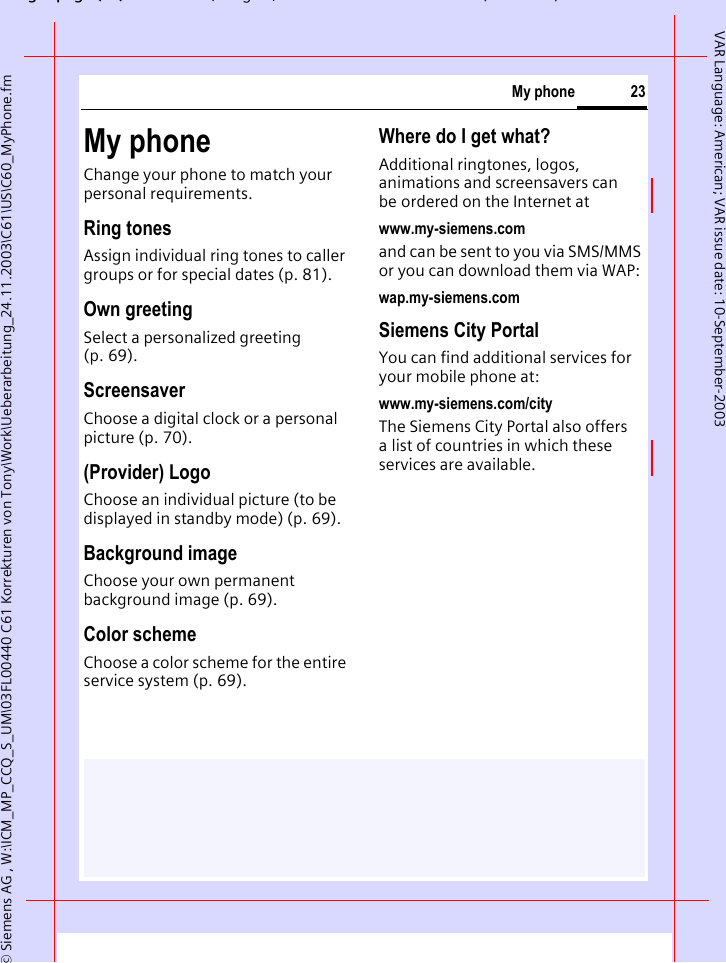
gpg(),g, ( )© Siemens AG , W:\ICM_MP_CCQ_S_UM\03FL00440 C61 Korrekturen von Tony\Work\Ueberarbeitung_24.11.2003\C61\US\C60_MyPhone.fm23My phoneVAR Language: American; VAR issue date: 10-September-2003My phoneChange your phone to match your personal requirements.Ring tonesAssign individual ring tones to caller groups or for special dates (p. 81).Own greetingSelect a personalized greeting (p. 69).ScreensaverChoose a digital clock or a personal picture (p. 70).(Provider) LogoChoose an individual picture (to be displayed in standby mode) (p. 69).Background imageChoose your own permanent background image (p. 69).Color schemeChoose a color scheme for the entire service system (p. 69).Where do I get what?Additional ringtones, logos, animations and screensavers can be ordered on the Internet atwww.my-siemens.comand can be sent to you via SMS/MMS or you can download them via WAP:wap.my-siemens.comSiemens City PortalYou can find additional services for your mobile phone at:www.my-siemens.com/cityThe Siemens City Portal also offers a list of countries in which these services are available.
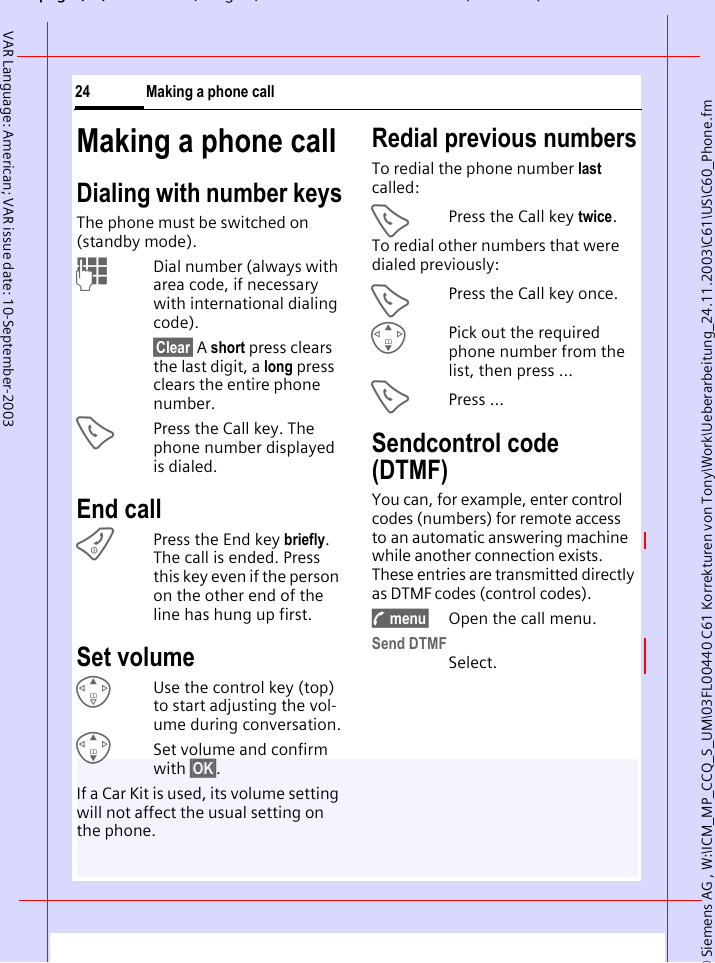
© Siemens AG , W:\ICM_MP_CCQ_S_UM\03FL00440 C61 Korrekturen von Tony\Work\Ueberarbeitung_24.11.2003\C61\US\C60_Phone.fmpg ( ),g, ( )Making a phone call24VAR Language: American; VAR issue date: 10-September-2003Making a phone callDialing with number keysThe phone must be switched on (standby mode).JDial number (always with area code, if necessary with international dialing code). §Clear§ A short press clears the last digit, a long press clears the entire phone number.APress the Call key. The phone number displayed is dialed.End callBPress the End key briefly. The call is ended. Press this key even if the person on the other end of the line has hung up first.Set volumeEUse the control key (top) to start adjusting the vol-ume during conversation.GSet volume and confirm with §OK§.If a Car Kit is used, its volume setting will not affect the usual setting on the phone.Redial previous numbersTo redial the phone number last called:APress the Call key twice.To redial other numbers that were dialed previously:APress the Call key once.GPick out the required phone number from the list, then press ...APress ...Sendcontrol code (DTMF) You can, for example, enter control codes (numbers) for remote access to an automatic answering machine while another connection exists. These entries are transmitted directly as DTMF codes (control codes).y menu§ Open the call menu.Send DTMFSelect.
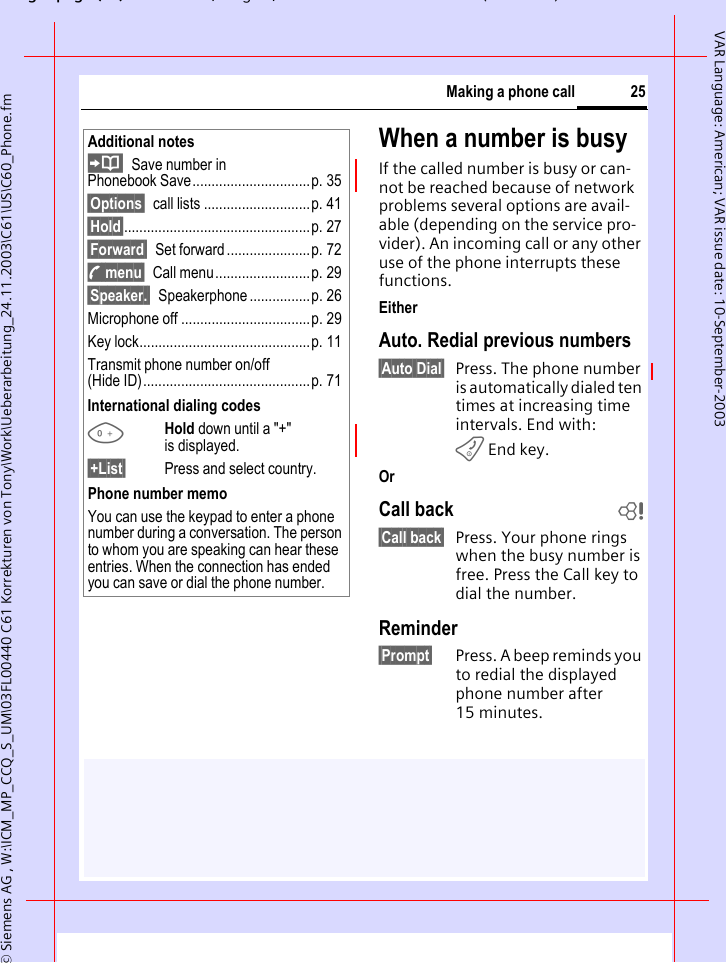
gpg(),g, ( )© Siemens AG , W:\ICM_MP_CCQ_S_UM\03FL00440 C61 Korrekturen von Tony\Work\Ueberarbeitung_24.11.2003\C61\US\C60_Phone.fm25Making a phone callVAR Language: American; VAR issue date: 10-September-2003When a number is busyIf the called number is busy or can-not be reached because of network problems several options are avail-able (depending on the service pro-vider). An incoming call or any other use of the phone interrupts these functions.EitherAuto. Redial previous numbers§Auto Dial§ Press. The phone number is automatically dialed ten times at increasing time intervals. End with:B End key.OrCall back b§Call back§ Press. Your phone rings when the busy number is free. Press the Call key to dial the number. Reminder§Prompt§ Press. A beep reminds you to redial the displayed phone number after 15 minutes.Additional notesSave number in Phonebook Save...............................p. 35§Options§ call lists ............................p. 41§Hold§.................................................p. 27§Forward§ Set forward ......................p. 72y menu§ Call menu.........................p. 29§Speaker.§ Speakerphone ................p. 26Microphone off ..................................p. 29Key lock.............................................p. 11Transmit phone number on/off(Hide ID)............................................p. 71International dialing codes0Hold down until a "+" is displayed. §+List§ Press and select country. Phone number memoYou can use the keypad to enter a phone number during a conversation. The person to whom you are speaking can hear these entries. When the connection has ended you can save or dial the phone number.
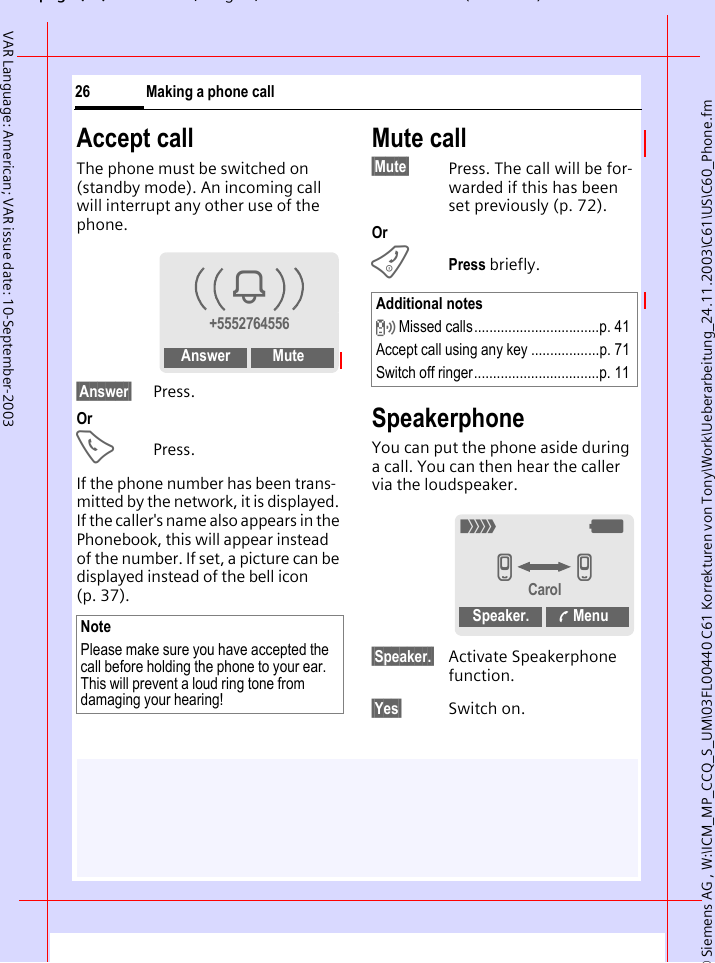
© Siemens AG , W:\ICM_MP_CCQ_S_UM\03FL00440 C61 Korrekturen von Tony\Work\Ueberarbeitung_24.11.2003\C61\US\C60_Phone.fmpg ( ),g, ( )Making a phone call26VAR Language: American; VAR issue date: 10-September-2003Accept callThe phone must be switched on (standby mode). An incoming call will interrupt any other use of the phone.§Answer§ Press.OrAPress.If the phone number has been trans-mitted by the network, it is displayed. If the caller's name also appears in the Phonebook, this will appear instead of the number. If set, a picture can be displayed instead of the bell icon (p. 37).Mute call§Mute§ Press. The call will be for-warded if this has been set previously (p. 72).OrBPress briefly.SpeakerphoneYou can put the phone aside during a call. You can then hear the caller via the loudspeaker. §Speaker.§ Activate Speakerphone function.§Yes§ Switch on.NotePlease make sure you have accepted the call before holding the phone to your ear. This will prevent a loud ring tone from damaging your hearing!i+5552764556Answer MuteAdditional notes Missed calls.................................p. 41Accept call using any key ..................p. 71Switch off ringer.................................p. 11_gvvCarolSpeaker.  Menu
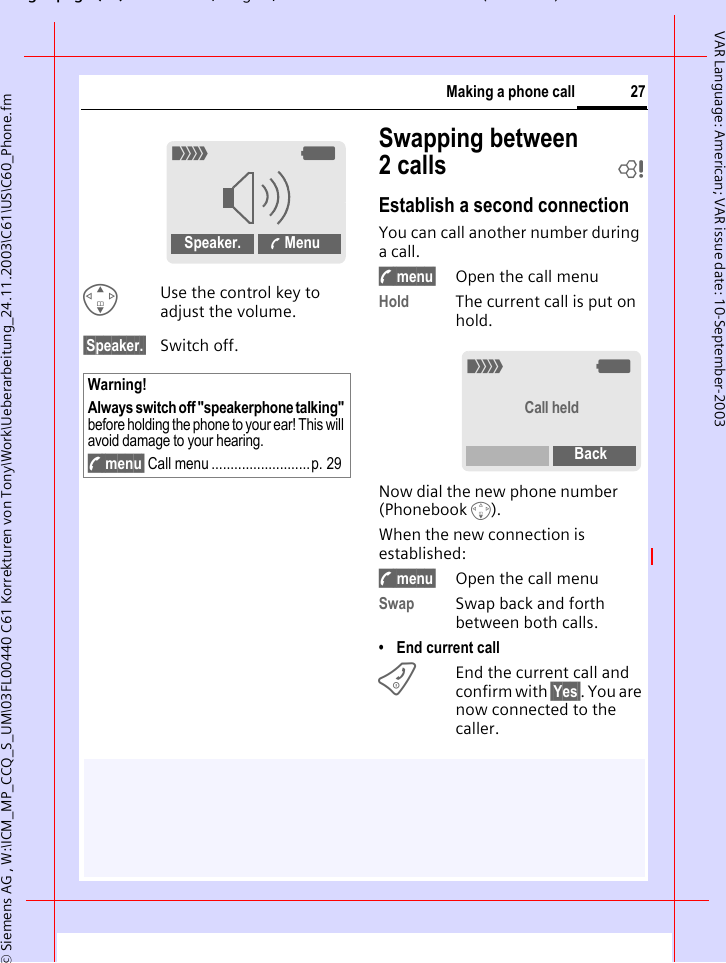
gpg(),g, ( )© Siemens AG , W:\ICM_MP_CCQ_S_UM\03FL00440 C61 Korrekturen von Tony\Work\Ueberarbeitung_24.11.2003\C61\US\C60_Phone.fm27Making a phone callVAR Language: American; VAR issue date: 10-September-2003GUse the control key to adjust the volume.§Speaker.§ Switch off.Swapping between 2calls bEstablish a second connectionYou can call another number during a call.y menu§ Open the call menuHold The current call is put on hold.Now dial the new phone number (Phonebook F). When the new connection is established:y menu§ Open the call menuSwap Swap back and forth between both calls.• End current callBEnd the current call and confirm with §Yes§. You are now connected to the caller.Warning!Always switch off "speakerphone talking" before holding the phone to your ear! This will avoid damage to your hearing.y menu§ Call menu ..........................p. 29_gSpeaker.  Menu_gCall heldBack
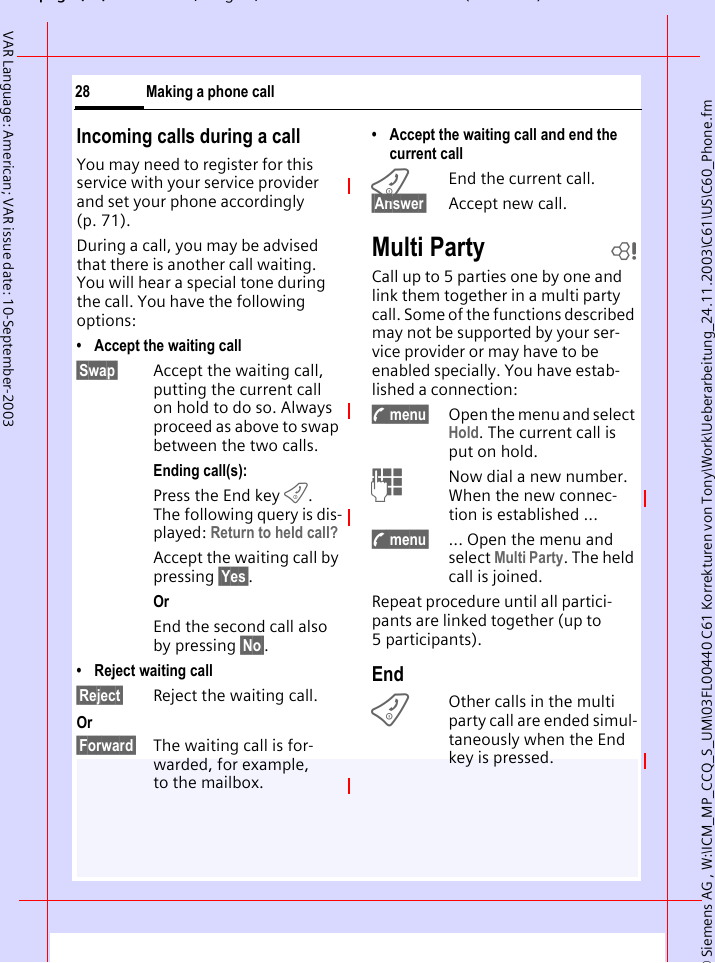
© Siemens AG , W:\ICM_MP_CCQ_S_UM\03FL00440 C61 Korrekturen von Tony\Work\Ueberarbeitung_24.11.2003\C61\US\C60_Phone.fmpg ( ),g, ( )Making a phone call28VAR Language: American; VAR issue date: 10-September-2003Incoming calls during a callYou may need to register for this service with your service provider and set your phone accordingly (p. 71). During a call, you may be advised that there is another call waiting. You will hear a special tone during the call. You have the following options:• Accept the waiting call§Swap§ Accept the waiting call, putting the current call on hold to do so. Always proceed as above to swap between the two calls.Ending call(s):Press the End key B. The following query is dis-played: Return to held call?Accept the waiting call by pressing §Yes§.OrEnd the second call also by pressing §No§.• Reject waiting call§Reject§ Reject the waiting call. Or§Forward§ The waiting call is for-warded, for example, to the mailbox.• Accept the waiting call and end the current callBEnd the current call.§Answer§ Accept new call.Multi Party bCall up to 5 parties one by one and link them together in a multi party call. Some of the functions described may not be supported by your ser-vice provider or may have to be enabled specially. You have estab-lished a connection: y menu§ Open the menu and select Hold. The current call is put on hold.JNow dial a new number. When the new connec-tion is established ...y menu§ ... Open the menu and select Multi Party. The held call is joined.Repeat procedure until all partici-pants are linked together (up to 5participants).EndBOther calls in the multi party call are ended simul-taneously when the End key is pressed.
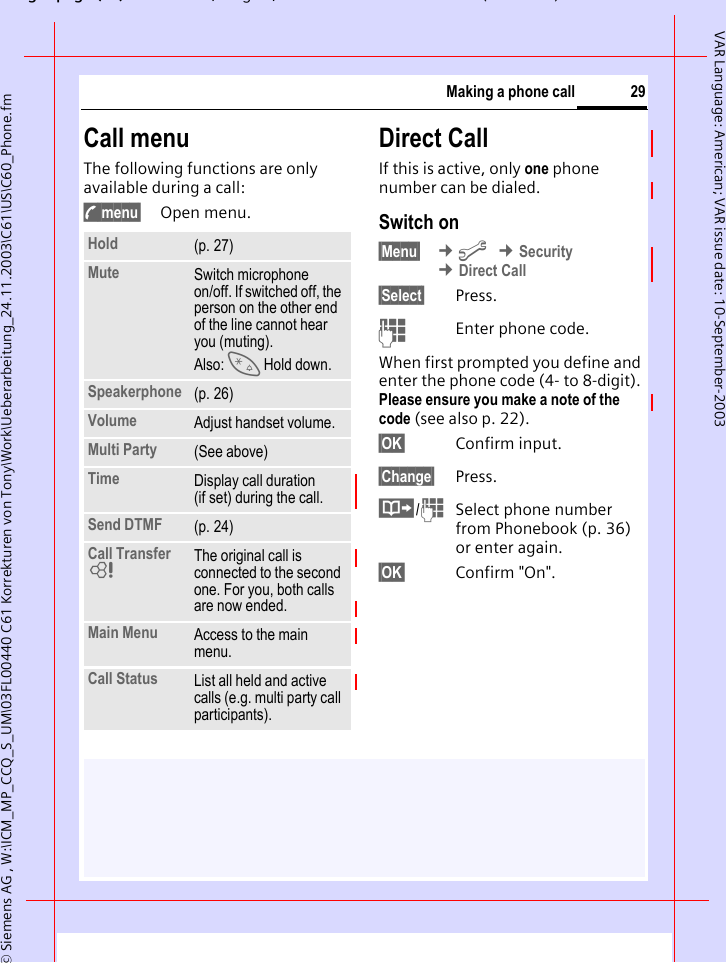
gpg(),g, ( )© Siemens AG , W:\ICM_MP_CCQ_S_UM\03FL00440 C61 Korrekturen von Tony\Work\Ueberarbeitung_24.11.2003\C61\US\C60_Phone.fm29Making a phone callVAR Language: American; VAR issue date: 10-September-2003Call menuThe following functions are only available during a call:y menu§ Open menu.Direct CallIf this is active, only one phone number can be dialed.Switch on§Menu§  ¢m ¢Security ¢Direct Call§Select§ Press.JEnter phone code.When first prompted you define and enter the phone code (4- to 8-digit).Please ensure you make a note of the code (see also p. 22). §OK§ Confirm input.§Change§ Press.·/JSelect phone number from Phonebook (p. 36) or enter again. §OK§ Confirm "On".Hold (p. 27)Mute Switch microphone on/off. If switched off, the person on the other end of the line cannot hear you (muting). Also: * Hold down.Speakerphone (p. 26)Volume Adjust handset volume.Multi Party (See above)Time Display call duration (if set) during the call.Send DTMF (p. 24)Call Transfer LThe original call is connected to the second one. For you, both calls are now ended.Main Menu Access to the main menu.Call Status List all held and active calls (e.g. multi party call participants).
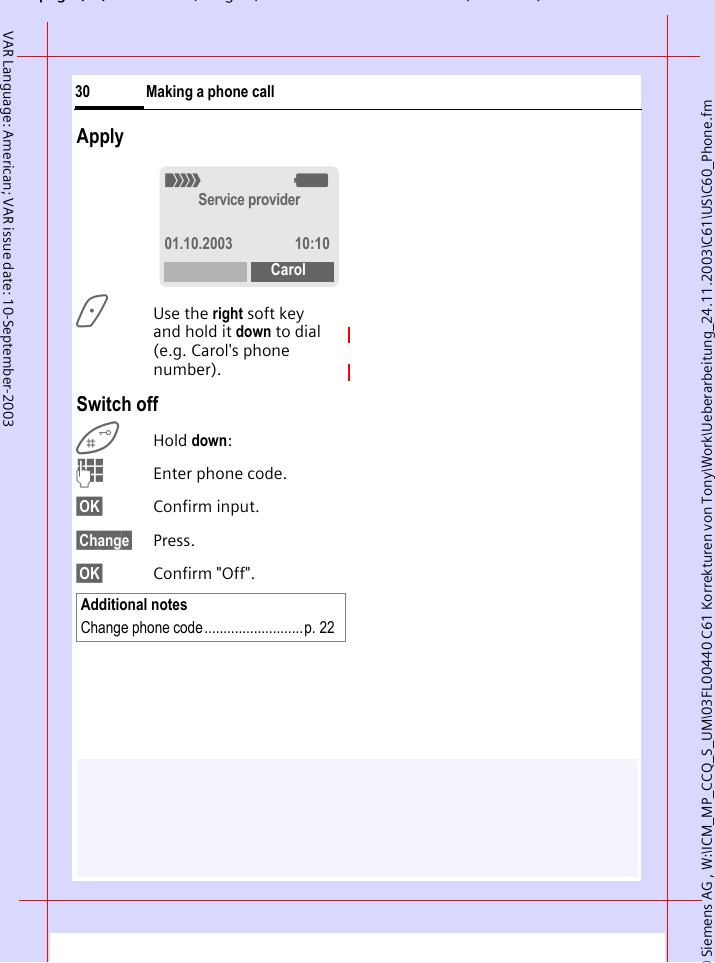
© Siemens AG , W:\ICM_MP_CCQ_S_UM\03FL00440 C61 Korrekturen von Tony\Work\Ueberarbeitung_24.11.2003\C61\US\C60_Phone.fmpg ( ),g, ( )Making a phone call30VAR Language: American; VAR issue date: 10-September-2003Apply>Use the right soft key and hold it down to dial (e.g. Carol's phone number). Switch offHold down:JEnter phone code.§OK§ Confirm input.§Change§ Press.§OK§ Confirm "Off".Additional notesChange phone code..........................p. 22_gService provider01.10.2003 10:10Carol
gpg(),g, ( )© Siemens AG , W:\ICM_MP_CCQ_S_UM\03FL00440 C61 Korrekturen von Tony\Work\Ueberarbeitung_24.11.2003\C61\US\C60_text.fm31Text entryVAR Language: American; VAR issue date: 10-September-2003Text entryText entry without T9Press number key repeatedly until the required letter appears. The cursor advances after a short delay. Example:2Pressing briefly once types the letter a, twice the let-ter b, etc.Hold down to write the number.Ä,ä,1-9 Special letters and num-bers are displayed after the relevant letters.§Clear§ Press briefly to delete the letter before the cursor, hold down to erase the whole word.HMove the cursor (forwards/back).Press briefly: Swap between abc, Abc, T9abc, ABC, T9Abc, T9ABC, 123. Status indicator in the top line of the display.Hold down: All input modes are displayed.*Press briefly: Special characters are shown.Hold down: Open input menu.0Press once/repeatedly:. , ? ! ’ " 0 - ( ) @ / : _ Hold down: Writes 0.1Writes blank. Press twice = skip line.Special characters*Press briefly. The charac-ter map is displayed: 1) Line skipG,HNavigate to characters.§Select§ Press.1)¿¡_;.,?!+-"’:*  /()¤¥$£€@\&#[]{}%~<=> | ^ § Γ ∆ Θ Λ Ξ Π Σ Φ Ψ Ω
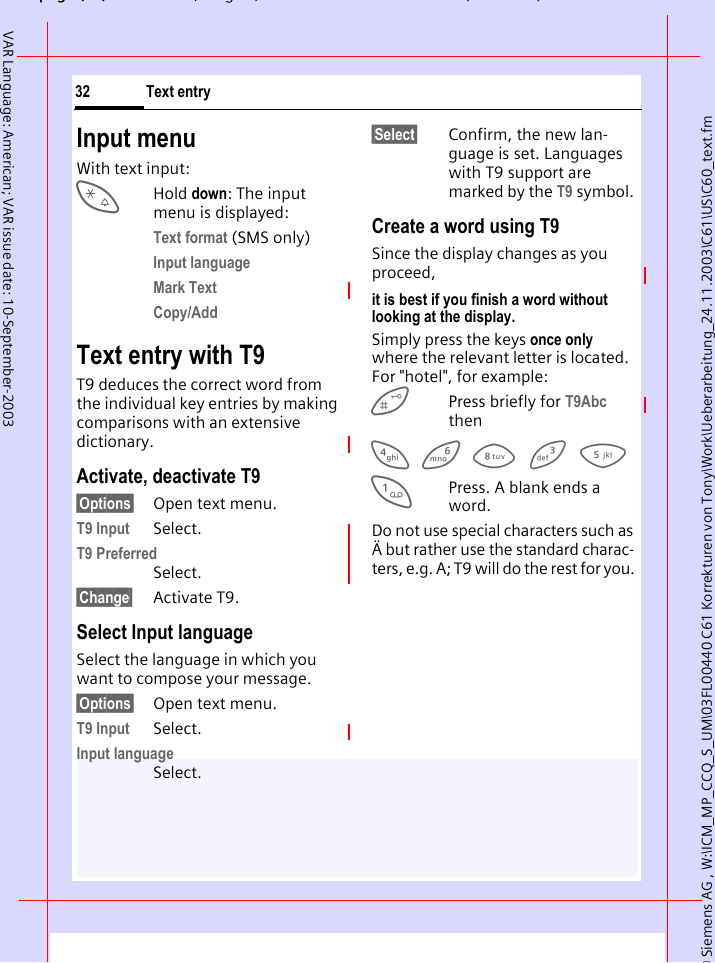
© Siemens AG , W:\ICM_MP_CCQ_S_UM\03FL00440 C61 Korrekturen von Tony\Work\Ueberarbeitung_24.11.2003\C61\US\C60_text.fmpg ( ),g, ( )Text entry32VAR Language: American; VAR issue date: 10-September-2003Input menuWith text input:*Hold down: The input menu is displayed:Text format (SMS only)Input language Mark Text Copy/Add Text entry with T9T9 deduces the correct word from the individual key entries by making comparisons with an extensive dictionary.Activate, deactivate T9§Options§ Open text menu.T9 Input Select.T9 PreferredSelect.§Change§ Activate T9.Select Input languageSelect the language in which you want to compose your message.§Options§ Open text menu.T9 Input Select.Input languageSelect.§Select§ Confirm, the new lan-guage is set. Languages with T9 support are marked by the T9 symbol. Create a word using T9Since the display changes as you proceed,it is best if you finish a word without looking at the display.Simply press the keys once only where the relevant letter is located. For "hotel", for example:  Press briefly for T9Abc then4 6 8 3 5 1Press. A blank ends a word.Do not use special characters such as Ä but rather use the standard charac-ters, e.g. A; T9 will do the rest for you.
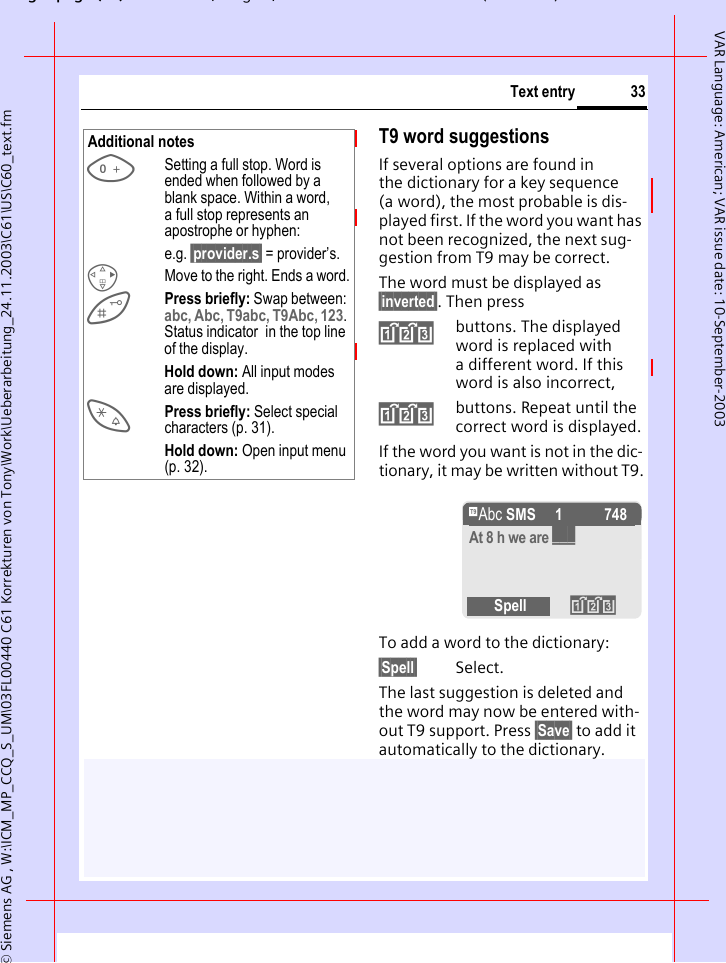
gpg(),g, ( )© Siemens AG , W:\ICM_MP_CCQ_S_UM\03FL00440 C61 Korrekturen von Tony\Work\Ueberarbeitung_24.11.2003\C61\US\C60_text.fm33Text entryVAR Language: American; VAR issue date: 10-September-2003T9 word suggestionsIf several options are found in the dictionary for a key sequence (a word), the most probable is dis-played first. If the word you want has not been recognized, the next sug-gestion from T9 may be correct.The word must be displayed as §inverted§. Then press»buttons. The displayed word is replaced with a different word. If this word is also incorrect,»buttons. Repeat until the correct word is displayed.If the word you want is not in the dic-tionary, it may be written without T9.To add a word to the dictionary:§Spell§ Select.The last suggestion is deleted and the word may now be entered with-out T9 support. Press §Save§ to add it automatically to the dictionary.Additional notes0Setting a full stop. Word is ended when followed by a blank space. Within a word, a full stop represents an apostrophe or hyphen:e.g. §provider.s§ = provider’s.DMove to the right. Ends a word.Press briefly: Swap between: abc, Abc, T9abc, T9Abc, 123. Status indicator  in the top line of the display.Hold down: All input modes are displayed.*Press briefly: Select special characters (p. 31).Hold down: Open input menu (p. 32).™ SMS   1 748At 8 h we are ___Spell »
© Siemens AG , W:\ICM_MP_CCQ_S_UM\03FL00440 C61 Korrekturen von Tony\Work\Ueberarbeitung_24.11.2003\C61\US\C60_text.fmpg ( ),g, ( )Text entry34VAR Language: American; VAR issue date: 10-September-2003Correct a wordWords written with T9:HMove left or right, word by word, until the required word is §inverted§.»Scroll through the T9 word suggestions again.§Clear§ Deletes the character to the left of the cursor and displays a new possible word!Words not created using T9:HMove letter by letter to the left/right.§Clear§ Deletes the letter to the left of the cursor.JLetters are inserted at the cursor position.Predef. TextsThe phone contains predefined texts that you can add to your messages (SMS, MMS). You can also create and store up to 5 personal stored texts. Each stored text can contain up to 32 characters.Unlike personal stored texts, pre-defined texts cannot be changed or deleted.Write personal stored texts§Menu§  ¢] ¢Predef. Texts§Options§ <New Entry> Select.JWrite personal stored text.§Save§ Press. The text is saved. Use predefined textsJWrite message text (SMS, MMS).§Options§ Open text menu.GSelect Insert Text. GSelect predefined text from the list.§Select§ Confirm. The predefined text is inserted into the text to the left of the cursor.Additional notesWithin a "T9 word", individual letters may not be edited without removing T9 first. In most cases it is better to rewrite the complete word.T9® Text Input is licensed under one or more of the following: U.S. Pat. Nos. 5,818,437, 5,953,541, 5,187,480, 5,945,928, and 6,011,554; Canadian Pat. No. 1,331,057; United Kingdom Pat. No. 2238414B; Hong Kong Standard Pat. No. HK0940329; Republic of Singapore Pat. No. 51383; Euro.Pat. No. 0 842 463 (96927260.8) DE/DK, FI, FR, IT, NL, PT, ES, SE, GB; and additional patents are pending worldwide.
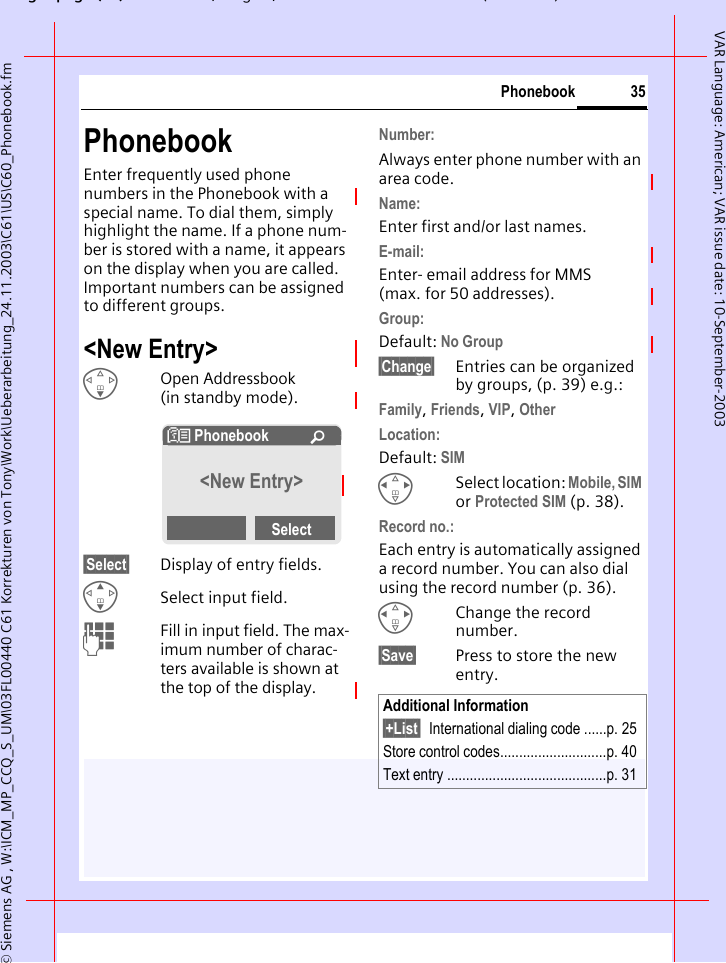
gpg(),g, ( )© Siemens AG , W:\ICM_MP_CCQ_S_UM\03FL00440 C61 Korrekturen von Tony\Work\Ueberarbeitung_24.11.2003\C61\US\C60_Phonebook.fm35PhonebookVAR Language: American; VAR issue date: 10-September-2003PhonebookEnter frequently used phone numbers in the Phonebook with a special name. To dial them, simply highlight the name. If a phone num-ber is stored with a name, it appears on the display when you are called. Important numbers can be assigned to different groups.<New Entry>FOpen Addressbook (in standby mode).§Select§ Display of entry fields.GSelect input field.JFill in input field. The max-imum number of charac-ters available is shown at the top of the display. Number: Always enter phone number with an area code.Name: Enter first and/or last names.E-mail:Enter- email address for MMS (max. for 50 addresses).Group:Default: No Group§Change§ Entries can be organized by groups, (p. 39) e.g.:Family, Friends, VIP, Other Location:Default: SIMHSelect location: Mobile, SIM or Protected SIM (p. 38).Record no.: Each entry is automatically assigned a record number. You can also dial using the record number (p. 36). HChange the record number.§Save§ Press to store the new entry.N Phonebook Ú<New Entry>SelectAdditional Information§+List§ International dialing code ......p. 25Store control codes............................p. 40Text entry ..........................................p. 31
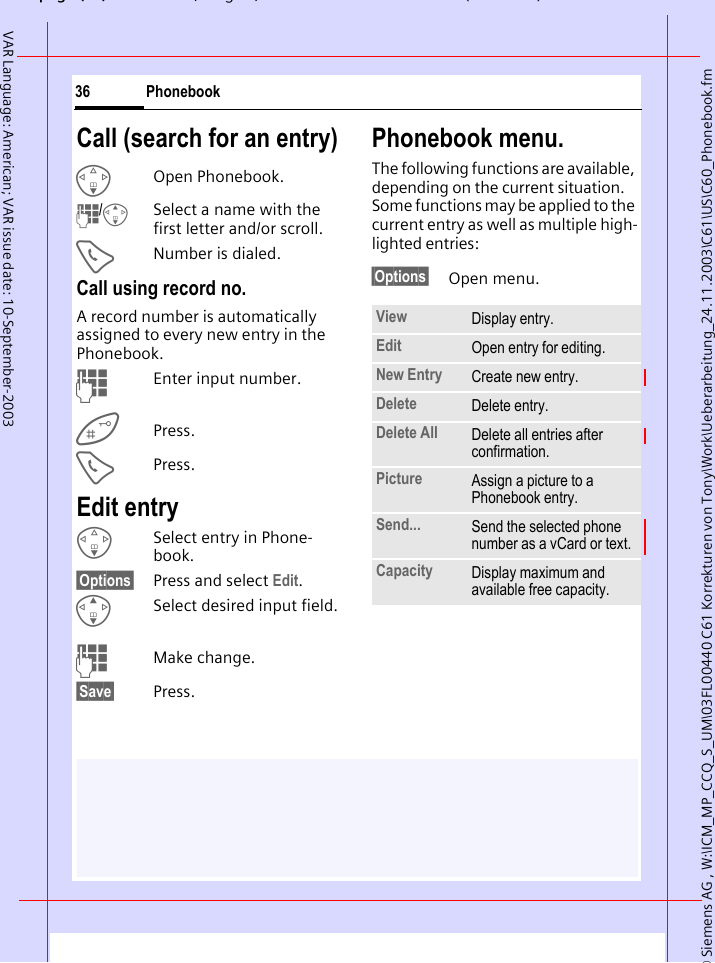
© Siemens AG , W:\ICM_MP_CCQ_S_UM\03FL00440 C61 Korrekturen von Tony\Work\Ueberarbeitung_24.11.2003\C61\US\C60_Phonebook.fmpg ( ),g, ( )Phonebook36VAR Language: American; VAR issue date: 10-September-2003Call (search for an entry)FOpen Phonebook.J/GSelect a name with the first letter and/or scroll.ANumber is dialed.Call using record no.A record number is automatically assigned to every new entry in the Phonebook.JEnter input number.Press.APress.Edit entryFSelect entry in Phone-book.§Options§ Press and select Edit.GSelect desired input field.JMake change.§Save§ Press.Phonebook menu.The following functions are available, depending on the current situation. Some functions may be applied to the current entry as well as multiple high-lighted entries:§Options§ Open menu.View Display entry.Edit Open entry for editing.New Entry Create new entry.Delete Delete entry.Delete All Delete all entries after confirmation.Picture Assign a picture to a Phonebook entry. Send... Send the selected phone number as a vCard or text.Capacity Display maximum and available free capacity.
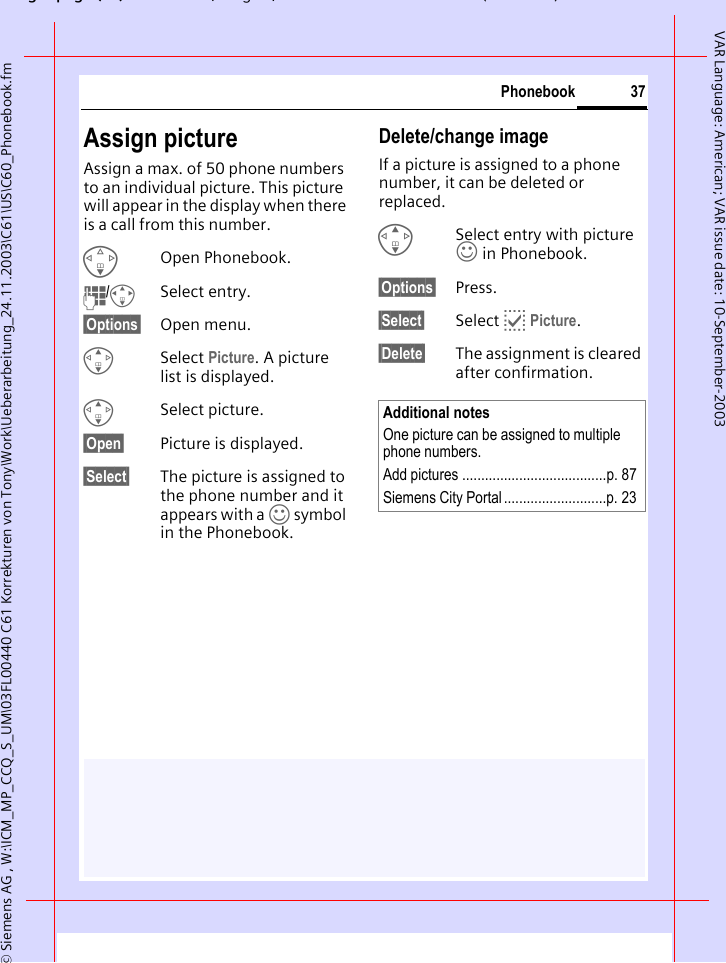
gpg(),g, ( )© Siemens AG , W:\ICM_MP_CCQ_S_UM\03FL00440 C61 Korrekturen von Tony\Work\Ueberarbeitung_24.11.2003\C61\US\C60_Phonebook.fm37PhonebookVAR Language: American; VAR issue date: 10-September-2003Assign pictureAssign a max. of 50 phone numbers to an individual picture. This picture will appear in the display when there is a call from this number.FOpen Phonebook.J/ISelect entry.§Options§ Open menu.GSelect Picture. A picture list is displayed.GSelect picture.§Open§ Picture is displayed.§Select§ The picture is assigned to the phone number and it appears with a › symbol in the Phonebook.Delete/change imageIf a picture is assigned to a phone number, it can be deleted or replaced.GSelect entry with picture › in Phonebook.§Options§ Press.§Select§ Select p Picture.§Delete§ The assignment is cleared after confirmation.Additional notesOne picture can be assigned to multiple phone numbers.Add pictures ......................................p. 87Siemens City Portal...........................p. 23
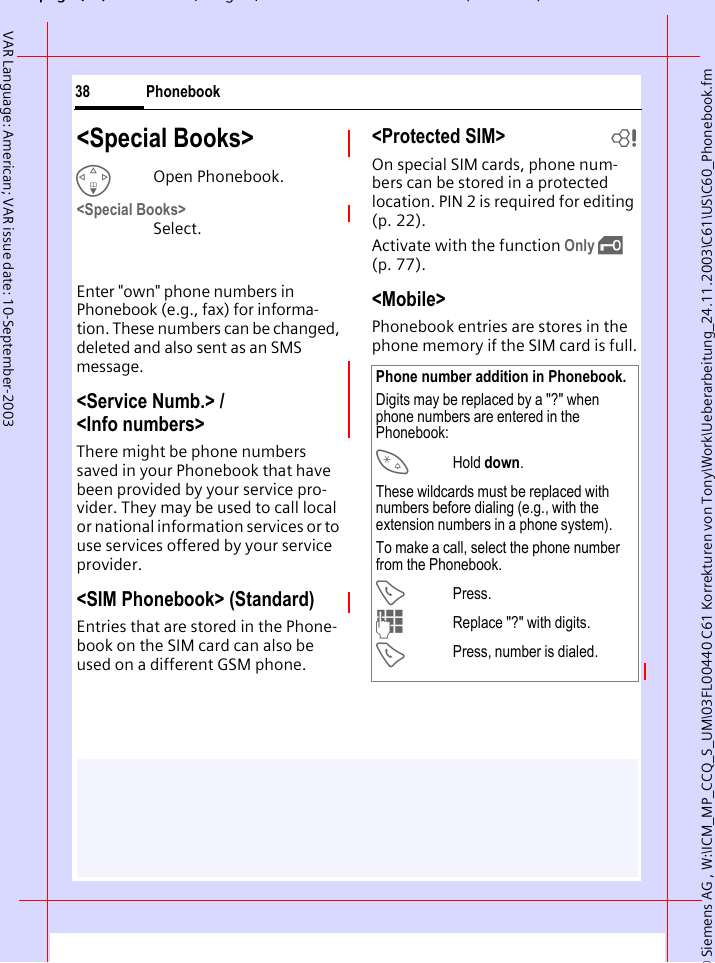
© Siemens AG , W:\ICM_MP_CCQ_S_UM\03FL00440 C61 Korrekturen von Tony\Work\Ueberarbeitung_24.11.2003\C61\US\C60_Phonebook.fmpg ( ),g, ( )Phonebook38VAR Language: American; VAR issue date: 10-September-2003<Special Books>FOpen Phonebook.<Special Books> Select.Enter "own" phone numbers in Phonebook (e.g., fax) for informa-tion. These numbers can be changed, deleted and also sent as an SMS message.<Service Numb.> / <Info numbers>There might be phone numbers saved in your Phonebook that have been provided by your service pro-vider. They may be used to call local or national information services or to use services offered by your service provider.<SIM Phonebook> (Standard)Entries that are stored in the Phone-book on the SIM card can also be used on a different GSM phone.<Protected SIM>  bOn special SIM cards, phone num-bers can be stored in a protected location. PIN 2 is required for editing (p. 22). Activate with the function Only ‚ (p. 77).<Mobile>Phonebook entries are stores in the phone memory if the SIM card is full.Phone number addition in Phonebook.Digits may be replaced by a "?" when phone numbers are entered in the Phonebook:*Hold down.These wildcards must be replaced with numbers before dialing (e.g., with the extension numbers in a phone system). To make a call, select the phone number from the Phonebook.APress.JReplace "?" with digits.APress, number is dialed.
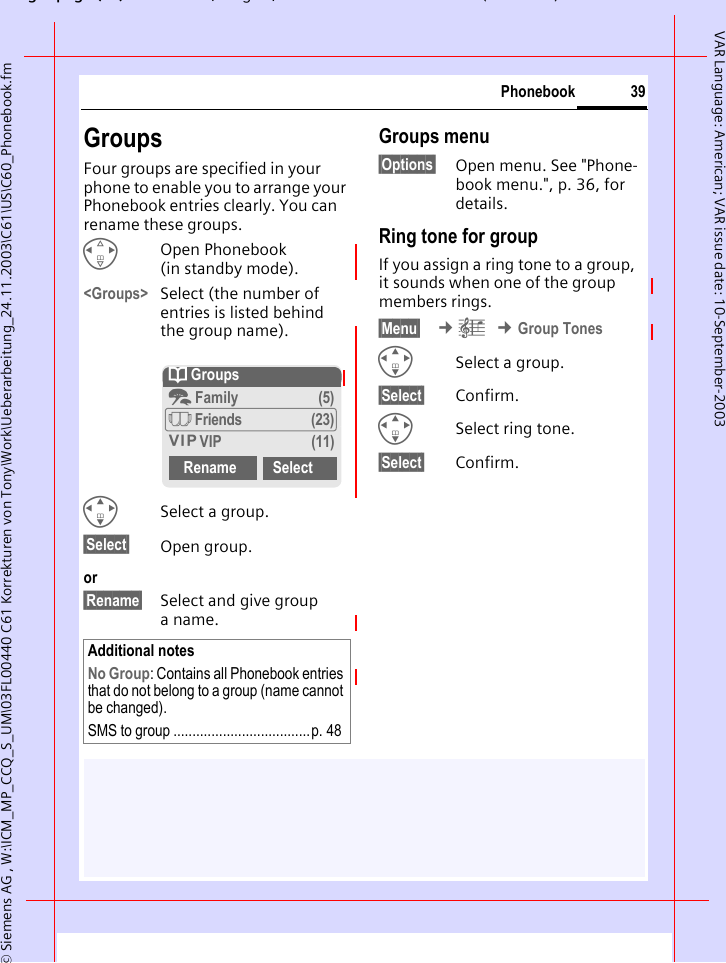
gpg(),g, ( )© Siemens AG , W:\ICM_MP_CCQ_S_UM\03FL00440 C61 Korrekturen von Tony\Work\Ueberarbeitung_24.11.2003\C61\US\C60_Phonebook.fm39PhonebookVAR Language: American; VAR issue date: 10-September-2003GroupsFour groups are specified in your phone to enable you to arrange your Phonebook entries clearly. You can rename these groups.HOpen Phonebook (in standby mode).<Groups> Select (the number of entries is listed behind the group name).ISelect a group.§Select§ Open group.or§Rename§ Select and give group aname.Groups menu§Options§ Open menu. See "Phone-book menu.", p. 36, for details.Ring tone for groupIf you assign a ring tone to a group, it sounds when one of the group members rings. §Menu§  ¢ç ¢Group TonesISelect a group.§Select§ Confirm.ISelect ring tone.§Select§ Confirm.Additional notesNo Group: Contains all Phonebook entries that do not belong to a group (name cannot be changed).SMS to group ....................................p. 48Q Groupst Family (5)à Friends (23)Å VIP (11)Rename Select
© Siemens AG , W:\ICM_MP_CCQ_S_UM\03FL00440 C61 Korrekturen von Tony\Work\Ueberarbeitung_24.11.2003\C61\US\C60_Phonebook.fmpg ( ),g, ( )Phonebook40VAR Language: American; VAR issue date: 10-September-2003Control codes (DTMF)You can, for example, enter control codes (numbers) for remote access to an automatic answering machine while a connection exists. These entries are transmitted directly as DTMF codes (control codes).y menu§ Open the call menu.Send DTMFSelect.Use Phonebook Store phone numbers and control codes (DTMF  codes) in the Phone-book in the same way as a normal entry.JEnter phone number.0Press until a "+" appears in the display (wait for the connection to be estab-lished).JEnter DTMF codes (numbers).0If necessary, wait again for three seconds at a time for the receiver to process the entries safely.JEnter a name.§Save§ Press.You may also store just the DTMF codes (numbers) and then send them during the call.
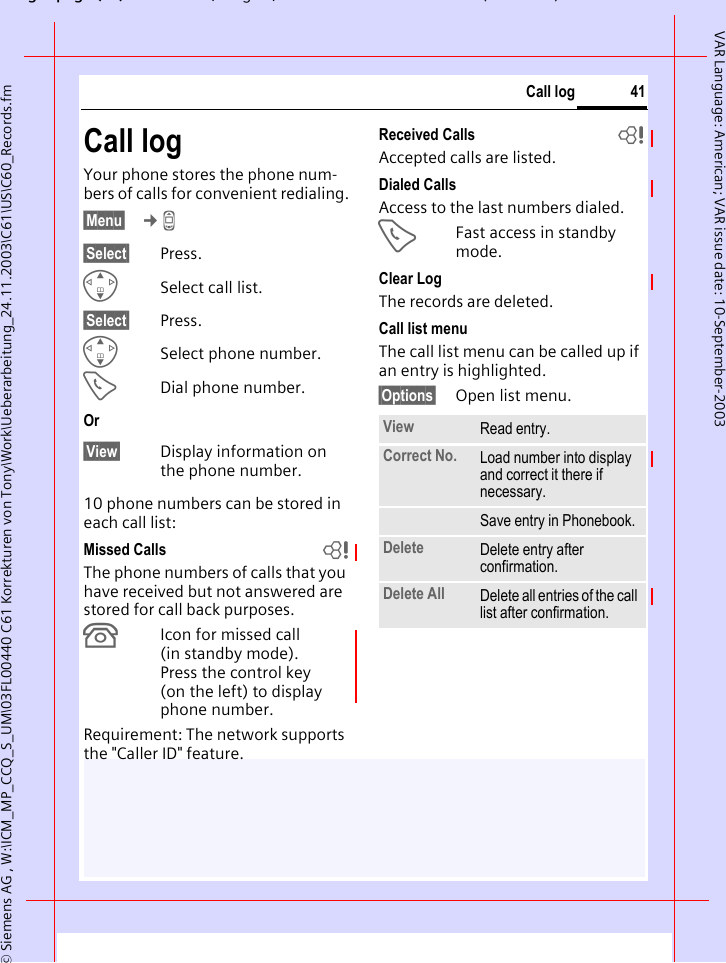
gpg(),g, ( )© Siemens AG , W:\ICM_MP_CCQ_S_UM\03FL00440 C61 Korrekturen von Tony\Work\Ueberarbeitung_24.11.2003\C61\US\C60_Records.fm41Call logVAR Language: American; VAR issue date: 10-September-2003Call logYour phone stores the phone num-bers of calls for convenient redialing.§Menu§  ¢Z §Select§ Press.GSelect call list.§Select§ Press.GSelect phone number.ADial phone number.Or§View§ Display information on the phone number.10 phone numbers can be stored in each call list:Missed Calls bThe phone numbers of calls that you have received but not answered are stored for call back purposes.¿Icon for missed call (in standby mode). Press the control key (on the left) to display phone number.Requirement: The network supports the "Caller ID" feature.Received Calls bAccepted calls are listed. Dialed CallsAccess to the last numbers dialed.AFast access in standby mode.Clear LogThe records are deleted. Call list menuThe call list menu can be called up if an entry is highlighted.§Options§ Open list menu.View Read entry.Correct No. Load number into display and correct it there if necessary.Save entry in Phonebook. Delete Delete entry after confirmation.Delete All Delete all entries of the call list after confirmation.
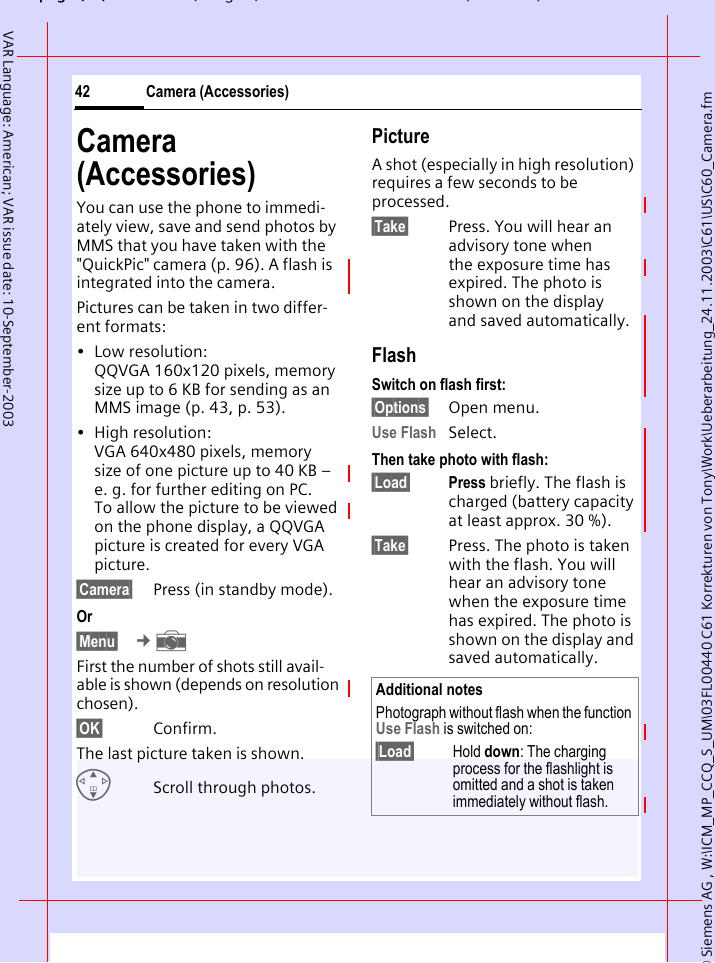
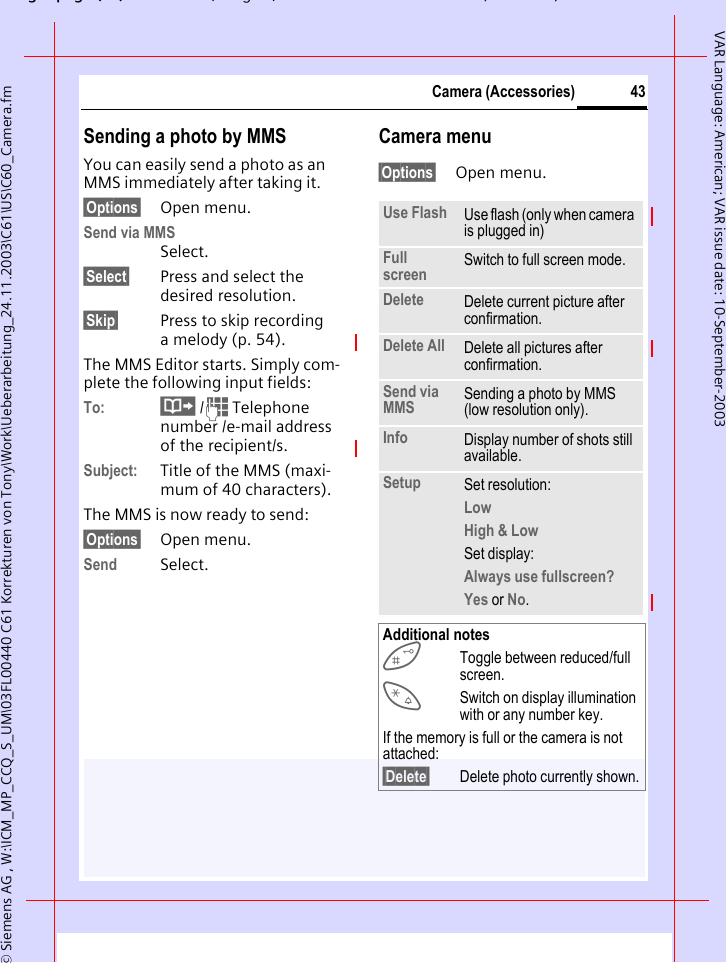
© Siemens AG , W:\ICM_MP_CCQ_S_UM\03FL00440 C61 Korrekturen von Tony\Work\Ueberarbeitung_24.11.2003\C61\US\C60_Camera.fmpg ( ),g, ( )Camera (Accessories)42VAR Language: American; VAR issue date: 10-September-2003Camera (Accessories)You can use the phone to immedi-ately view, save and send photos by MMS that you have taken with the "QuickPic" camera (p. 96). A flash is integrated into the camera.Pictures can be taken in two differ-ent formats:• Low resolution: QQVGA 160x120 pixels, memory size up to 6 KB for sending as an MMS image (p. 43, p. 53).• High resolution: VGA 640x480 pixels, memory size of one picture up to 40 KB – e. g. for further editing on PC. To allow the picture to be viewed on the phone display, a QQVGA picture is created for every VGA picture.§Camera§ Press (in standby mode).Or§Menu§  ¢ First the number of shots still avail-able is shown (depends on resolution chosen).§OK§ Confirm. The last picture taken is shown. GScroll through photos.PictureA shot (especially in high resolution) requires a few seconds to be processed.§Take§ Press. You will hear an advisory tone when the exposure time has expired. The photo is shown on the display and saved automatically.FlashSwitch on flash first:§Options§ Open menu.Use Flash Select.Then take photo with flash:§Load§ Press briefly. The flash is charged (battery capacity at least approx. 30 %).§Take§ Press. The photo is taken with the flash. You will hear an advisory tone when the exposure time has expired. The photo is shown on the display and saved automatically.Additional notesPhotograph without flash when the function Use Flash is switched on:§Load§ Hold down: The charging process for the flashlight is omitted and a shot is taken immediately without flash.
gpg(),g, ( )© Siemens AG , W:\ICM_MP_CCQ_S_UM\03FL00440 C61 Korrekturen von Tony\Work\Ueberarbeitung_24.11.2003\C61\US\C60_Camera.fm43Camera (Accessories)VAR Language: American; VAR issue date: 10-September-2003Sending a photo by MMSYou can easily send a photo as an MMS immediately after taking it.§Options§ Open menu.Send via MMSSelect.§Select§ Press and select the desired resolution.§Skip§ Press to skip recording a melody (p. 54). The MMS Editor starts. Simply com-plete the following input fields:To: · /J Telephone number /e-mail address of the recipient/s.Subject: Title of the MMS (maxi-mum of 40 characters).The MMS is now ready to send:§Options§ Open menu.Send Select. Camera menu§Options§ Open menu.Use Flash Use flash (only when camera is plugged in)Full screen Switch to full screen mode.Delete Delete current picture after confirmation.Delete All Delete all pictures after confirmation.Send via MMS Sending a photo by MMS (low resolution only).Info Display number of shots still available.Setup Set resolution:Low High & Low Set display:Always use fullscreen? Yes or No.Additional notesToggle between reduced/full screen.*Switch on display illumination with or any number key.If the memory is full or the camera is not attached:§Delete§ Delete photo currently shown.
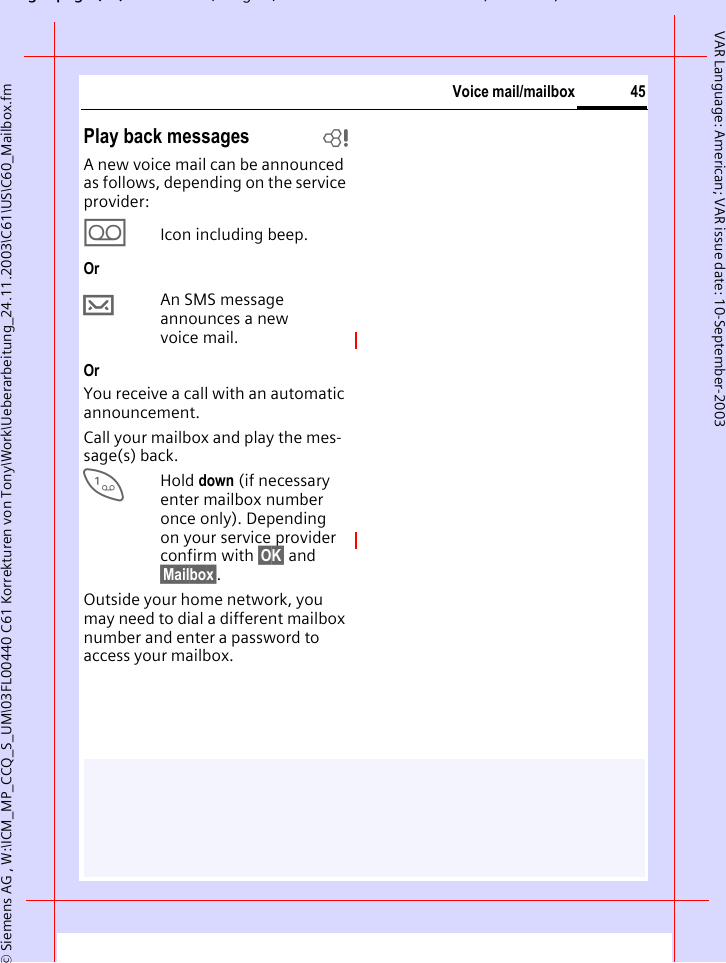
© Siemens AG , W:\ICM_MP_CCQ_S_UM\03FL00440 C61 Korrekturen von Tony\Work\Ueberarbeitung_24.11.2003\C61\US\C60_Mailbox.fmpg ( ),g, ( )Voice mail/mailbox44VAR Language: American; VAR issue date: 10-September-2003Voice mail/mailbox§Menu§  ¢] ¢Msg. Setup ¢Voice MessageMost service providers offer you an external answering service. In this mailbox, a caller may leave a voice message for you• if your phone is switched off or not ready to receive,• if you do not want to answer,• if you are making a phone call (and Call Waiting is not activated, p. 71).If voice mail is not part of your service provider's package, you will need to register and settings may have to be made manually. The pro-cedure described below may vary slightly depending on the service provider.Settings: bYour service provider supplies you with two phone numbers:Save mailbox numberYou call this phone number to listen to the voice mails left for you. §Menu§  ¢] ¢Msg. Setup ¢Voice Message· /JSelect or enter/change phone number §OK§ Confirm.Save call forwarding numberCalls are forwarded to this phone number. §Menu§  ¢m ¢Call Forward ¢e. g. Unanswered ¢SetEnter call forwarding number.§OK§ Registration with net-work. Forwarding will be confirmed after a few seconds.Further information on call forward-ing can be found on p. 72.
gpg(),g, ( )© Siemens AG , W:\ICM_MP_CCQ_S_UM\03FL00440 C61 Korrekturen von Tony\Work\Ueberarbeitung_24.11.2003\C61\US\C60_Mailbox.fm45Voice mail/mailboxVAR Language: American; VAR issue date: 10-September-2003Play back messages bA new voice mail can be announced as follows, depending on the service provider:\Icon including beep.Or…An SMS message announces a new voice mail.OrYou receive a call with an automatic announcement.Call your mailbox and play the mes-sage(s) back.1Hold down (if necessary enter mailbox number once only). Depending on your service provider confirm with §OK§ and §Mailbox§.Outside your home network, you may need to dial a different mailbox number and enter a password to access your mailbox.
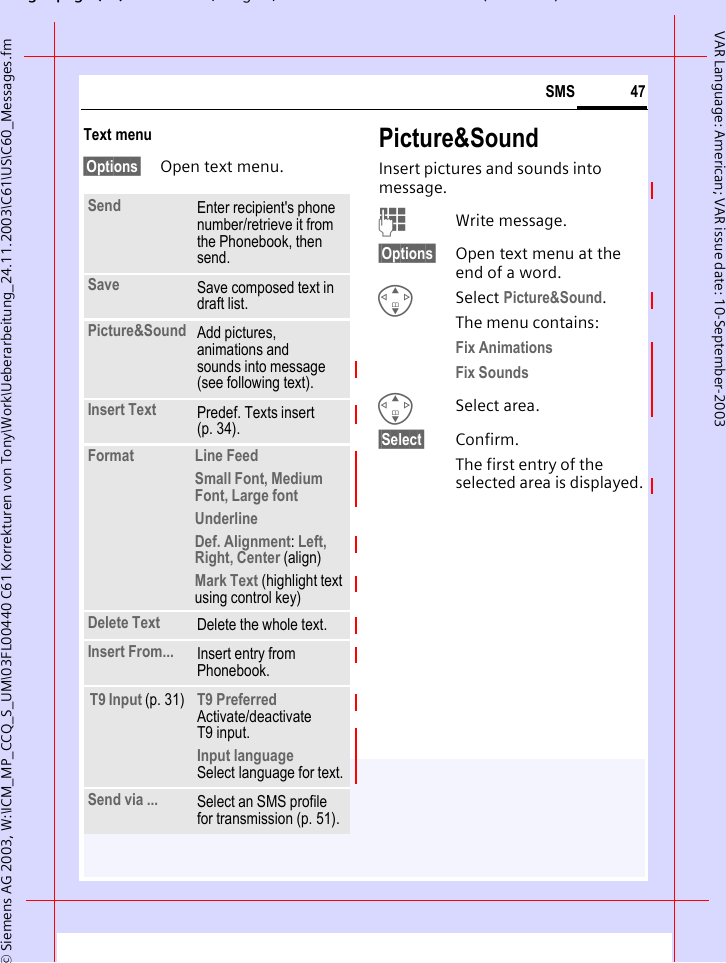
© Siemens AG 2003, W:\ICM_MP_CCQ_S_UM\03FL00440 C61 Korrekturen von Tony\Work\Ueberarbeitung_24.11.2003\C61\US\C60_Messages.fmpg ( ),g, ( )SMS46VAR Language: American; VAR issue date: 10-September-2003SMSYou can transmit and receive very long messages (up to 760 characters) on your phone. They are automati-cally composed of several "normal" SMS messages (note higher charges).Additionally you can insert pictures and sounds in an SMS.Depending on the service provider, e-mails and faxes can also be sent and e-mails received via SMS (change setting if necessary, p. 51).Writing and sending text messages (SMS)§Menu§  ¢] ¢New SMSJText input using "T9" (p. 32) allows you to create longer messages very quickly using just a few key strokes.§Clear§ Press briefly to delete letter-by-letter, hold down to delete by word.APress.· /JDial number or pick out from the Phonebook.§Group§ SMS to group (p. 48).§OK§ Confirm. Send the SMS to the service center for transmission. The sent SMS is saved in the "Sent" list.§OK§ Back to text input. Display in the uppermost line: ™ T9 active.abc/Abc/ABC/123 Switch between upper-case/lower-case letters and digits.SMS Display title.1Number of the required SMS messages.739 Number of characters still available.Additional notesInsert pictures & sounds into text.......p. 47SMS profile........................................p. 51The following may be Message Type, Validity Period, Service Centerqueried ..............................................p. 51Enter special characters ....................p. 31™SMS 1 742We start at 8 a.m.
gpg(),g, ( )© Siemens AG 2003, W:\ICM_MP_CCQ_S_UM\03FL00440 C61 Korrekturen von Tony\Work\Ueberarbeitung_24.11.2003\C61\US\C60_Messages.fm47SMSVAR Language: American; VAR issue date: 10-September-2003Text menu§Options§ Open text menu.Picture&SoundInsert pictures and sounds into message.JWrite message.§Options§ Open text menu at the end of a word.GSelect Picture&Sound. The menu contains:Fix Animations Fix Sounds GSelect area.§Select§ Confirm.The first entry of the selected area is displayed.Send Enter recipient's phone number/retrieve it from the Phonebook, then send.Save Save composed text in draft list.Picture&Sound  Add pictures, animations and sounds into message (see following text).Insert Text Predef. Texts insert (p. 34). Format  Line FeedSmall Font, Medium Font, Large fontUnderlineDef. Alignment: Left, Right, Center (align)Mark Text (highlight text using control key)Delete Text Delete the whole text.Insert From... Insert entry from Phonebook.T9 Input (p. 31) T9 Preferred Activate/deactivate T9 input.Input language Select language for text.Send via ... Select an SMS profile for transmission (p. 51).
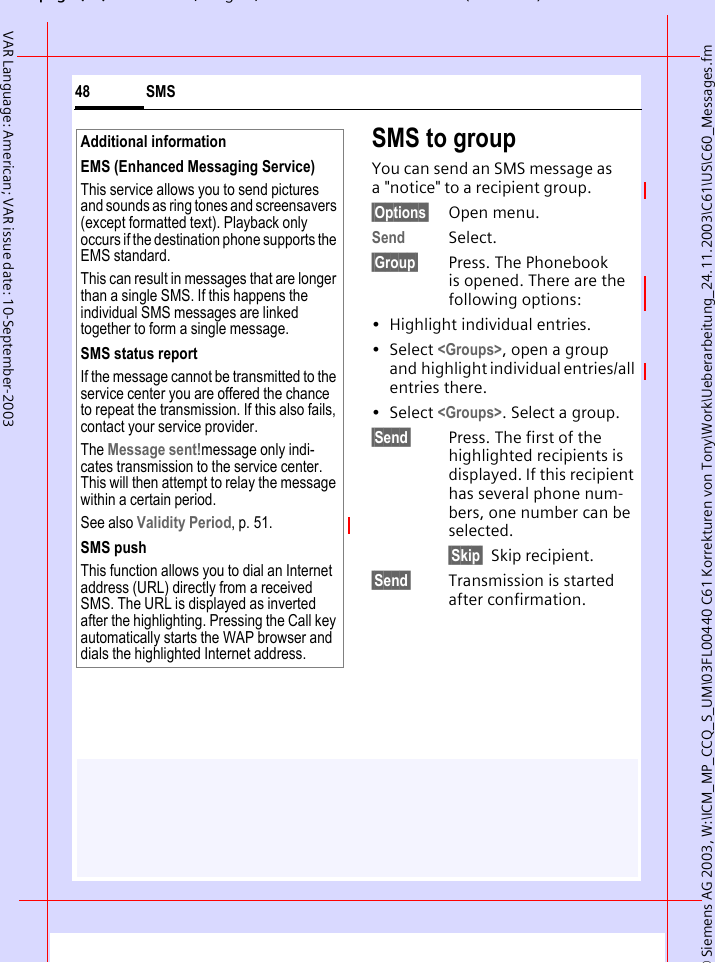
© Siemens AG 2003, W:\ICM_MP_CCQ_S_UM\03FL00440 C61 Korrekturen von Tony\Work\Ueberarbeitung_24.11.2003\C61\US\C60_Messages.fmpg ( ),g, ( )SMS48VAR Language: American; VAR issue date: 10-September-2003SMS to groupYou can send an SMS message as a "notice" to a recipient group.§Options§ Open menu.Send Select.§Group§ Press. The Phonebook is opened. There are the following options:• Highlight individual entries.• Select <Groups>, open a group and highlight individual entries/all entries there.• Select <Groups>. Select a group.§Send§ Press. The first of the highlighted recipients is displayed. If this recipient has several phone num-bers, one number can be selected.§Skip§ Skip recipient.§Send§ Transmission is started after confirmation.Additional informationEMS (Enhanced Messaging Service)This service allows you to send pictures and sounds as ring tones and screensavers (except formatted text). Playback only occurs if the destination phone supports the EMS standard. This can result in messages that are longer than a single SMS. If this happens the individual SMS messages are linked together to form a single message.SMS status reportIf the message cannot be transmitted to the service center you are offered the chance to repeat the transmission. If this also fails, contact your service provider.The Message sent!message only indi-cates transmission to the service center. This will then attempt to relay the message within a certain period.See also Validity Period, p. 51.SMS pushThis function allows you to dial an Internet address (URL) directly from a received SMS. The URL is displayed as inverted after the highlighting. Pressing the Call key automatically starts the WAP browser and dials the highlighted Internet address.
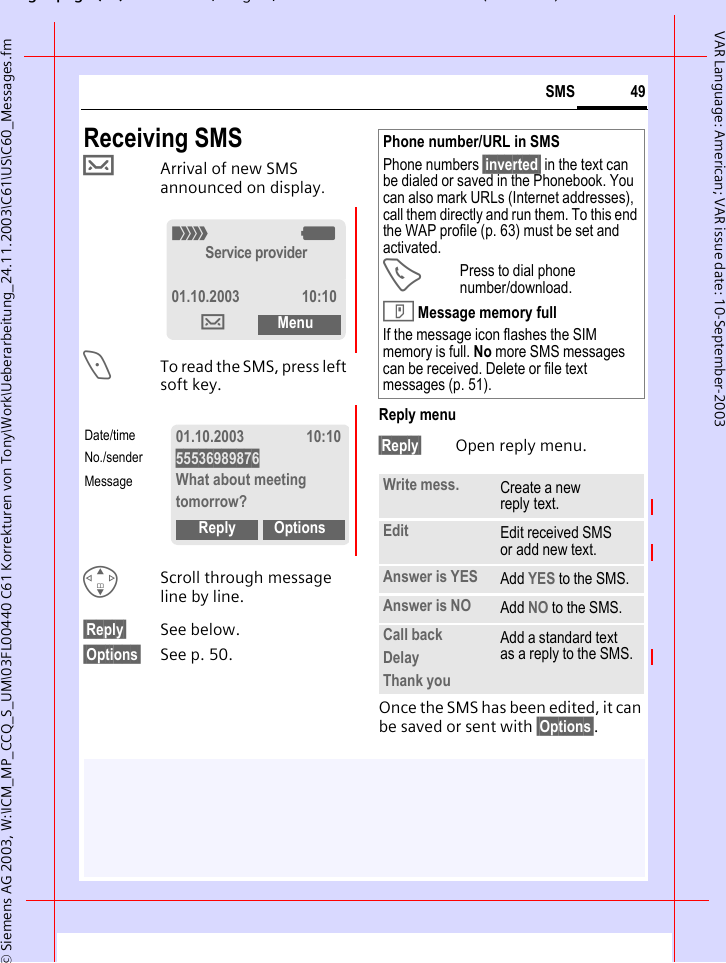
gpg(),g, ( )© Siemens AG 2003, W:\ICM_MP_CCQ_S_UM\03FL00440 C61 Korrekturen von Tony\Work\Ueberarbeitung_24.11.2003\C61\US\C60_Messages.fm49SMSVAR Language: American; VAR issue date: 10-September-2003Receiving SMS…Arrival of new SMS announced on display.<To read the SMS, press left soft key.GScroll through message line by line.§Reply§ See below.§Options§ See p. 50.Reply menu §Reply§ Open reply menu.Once the SMS has been edited, it can be saved or sent with §Options§. _gService provider01.10.2003 10:10…Menu01.10.2003 10:1055536989876What about meeting tomorrow?Reply OptionsDate/timeNo./senderMessagePhone number/URL in SMSPhone numbers §inverted§ in the text can be dialed or saved in the Phonebook. You can also mark URLs (Internet addresses), call them directly and run them. To this end the WAP profile (p. 63) must be set and activated.APress to dial phone number/download.T Message memory fullIf the message icon flashes the SIM memory is full. No more SMS messages can be received. Delete or file text messages (p. 51).Write mess. Create a new reply text.Edit Edit received SMS or add new text.Answer is YES Add YES to the SMS.Answer is NO Add NO to the SMS.Call backDelayThank youAdd a standard text as a reply to the SMS.
© Siemens AG 2003, W:\ICM_MP_CCQ_S_UM\03FL00440 C61 Korrekturen von Tony\Work\Ueberarbeitung_24.11.2003\C61\US\C60_Messages.fmpg ( ),g, ( )SMS50VAR Language: American; VAR issue date: 10-September-2003ListsAll SMS and MMS messages are stored in one of the following lists according to status.Inbox§Menu§  ¢] ¢Inbox ¢SMSThe list of received SMS messages is displayed.Draft§Menu§  ¢] ¢Draft ¢SMSThe list of as yet unsent SMS mes-sages is displayed.Unsent§Menu§  ¢] ¢Unsent ¢SMSThe list of concatenated SMS mes-sages not yet fully sent is displayed. You can restart sending.Sent§Menu§  ¢] ¢Sent ¢SMSThe list of sent SMS messages is displayed.Lists menuEach list offers different functions:§Options§ Open menu.] InboxƒYou have 1 new voicemail…How are you doing?…Call me later.View OptionsView Read entry.Reply Directly answer incoming SMS messages.Delete Delete selected SMS messages.Delete All Delete all SMS messages after confirmation.Send Dial number or select from the Phonebook, then send.Edit Open SMS message to edit.Capacity Display free capacity on SIM card/phone. In case of segments: number of concatenated SMS messages.Mark a.unread Mark the message as unread.Save to dAccept a highlighted phone number into Phonebook.Archive Shift SMS message to archive.Send via ... Select an SMS profile for transmission (p. 51).Picture&Sound Save pictures or sounds from the SMS.
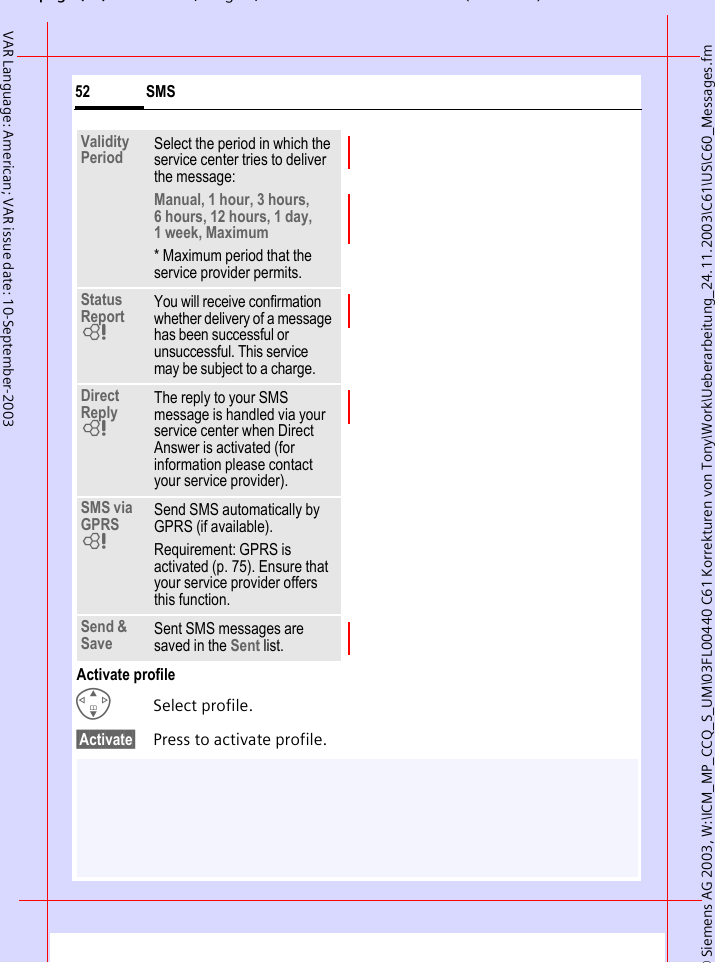
gpg(),g, ( )© Siemens AG 2003, W:\ICM_MP_CCQ_S_UM\03FL00440 C61 Korrekturen von Tony\Work\Ueberarbeitung_24.11.2003\C61\US\C60_Messages.fm51SMSVAR Language: American; VAR issue date: 10-September-2003SMS Archive§Menu§  ¢] ¢SMS ArchiveThe list of SMS messages stored in the phone is displayed.Different functions are available depending on the context:Archive menu§Options§ Open menu.SMS Profiles§Menu§  ¢] ¢Msg. Setup ¢SMS ProfilesA maximum of 3 SMS profiles can be set. They define the transmission characteristics for an SMS. The pre-setting depends on the SIM card inserted.GSelect profile.§Options§ Open menu.Change Sett. Select.… Unread.ƒ Read‚ Draft.„ Sent.¢ Entry on SIM card.X Concatenated message.View Read entry.Send Dial number or select from the Phonebook, then send.Edit Open text input for editing.Ñ\SMS archive Inbox Draft UnsentOpen OptionsService Center Enter or change the service-center phone numbers as supplied by service provider.Recipient Enter the standard recipient for this transmission profile or select from the Phonebook.Message Type ManualThe message type is requested for each message.Standard TextNormal SMS message.FaxTransmission via SMS.E-mailTransmission via SMS.NewYou may need to obtain the required code number from your service provider.
© Siemens AG 2003, W:\ICM_MP_CCQ_S_UM\03FL00440 C61 Korrekturen von Tony\Work\Ueberarbeitung_24.11.2003\C61\US\C60_Messages.fmpg ( ),g, ( )SMS52VAR Language: American; VAR issue date: 10-September-2003Activate profileGSelect profile.§Activate§ Press to activate profile.Validity Period Select the period in which the service center tries to deliver the message:Manual, 1 hour, 3 hours, 6 hours, 12 hours, 1 day, 1 week, Maximum * Maximum period that the service provider permits.Status Report LYou will receive confirmation whether delivery of a message has been successful or unsuccessful. This service may be subject to a charge.Direct Reply LThe reply to your SMS message is handled via your service center when Direct Answer is activated (for information please contact your service provider).SMS via GPRS LSend SMS automatically by GPRS (if available).Requirement: GPRS is activated (p. 75). Ensure that your service provider offers this function.Send & Save Sent SMS messages are saved in the Sent list.
gpg(),g, ( )© Siemens AG 2003, W:\ICM_MP_CCQ_S_UM\03FL00440 C61 Korrekturen von Tony\Work\Ueberarbeitung_24.11.2003\C61\US\C60_Messages.fm53MMSVAR Language: American; VAR issue date: 10-September-2003MMSThe Multimedia Messaging Service enables you to send texts, pictures (also photos) and sounds in a com-bined message to another mobile phone or to an e-mail address. All elements of an MMS message are merged to form a "slide show".Depending on your phone's settings, you will receive either the complete message automatically or notifica-tion that an MMS has been saved in the network, giving sender and size details. You may then download it to your phone to read it. Ask your service provider whether this service is available. You may need to register for this service separately.Writing/sending MMS messagesAn MMS consists of the address header and the content. An MMS message can consist of a number of pages. Each page can contain text, a sound and an image.Texts can be written with the help of T9 (p. 32).Pictures and graphics that have been produced with accessories such as the QuickPic camera (p. 96) and can be attached in JPEG, WBMP, GIF or GIF format. See also Own Stuff, p. 87.Music is sent and received in a MIDI file, single tones/sounds in an AMR file. NavigationGScroll line by line with the control key.§Menu§  ¢] ¢New MMSInput fields:To: ·/J Phone number/e-mail address of recipient/s.Subject: Enter MMS heading (up to 40 characters)Picture: §Insert§ buttons. The picture list is opened for selection.Additional informationYou can also easily send an image by MMS immediately after taking it with the QuickPic Camera (see p. 43).Ÿ MMS EditorTo:Subject: 1ºOptions
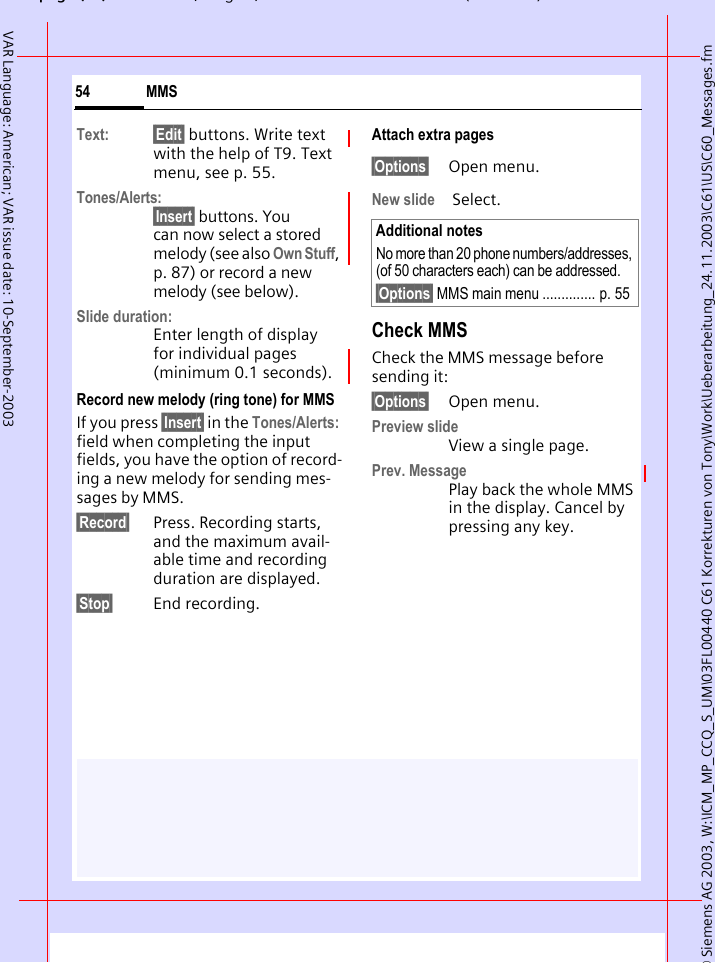
© Siemens AG 2003, W:\ICM_MP_CCQ_S_UM\03FL00440 C61 Korrekturen von Tony\Work\Ueberarbeitung_24.11.2003\C61\US\C60_Messages.fmpg ( ),g, ( )MMS54VAR Language: American; VAR issue date: 10-September-2003Text: §Edit§ buttons. Write text with the help of T9. Text menu, see p. 55.Tones/Alerts:§Insert§ buttons. You can now select a stored melody (see also Own Stuff, p. 87) or record a new melody (see below).Slide duration:Enter length of display for individual pages (minimum 0.1 seconds).Record new melody (ring tone) for MMSIf you press §Insert§ in the Tones/Alerts: field when completing the input fields, you have the option of record-ing a new melody for sending mes-sages by MMS.§Record§ Press. Recording starts, and the maximum avail-able time and recording duration are displayed.§Stop§ End recording.Attach extra pages§Options§ Open menu.New slide  Select.Check MMSCheck the MMS message before sending it: §Options§ Open menu.Preview slide View a single page.Prev. MessagePlay back the whole MMS in the display. Cancel by pressing any key. Additional notesNo more than 20 phone numbers/addresses, (of 50 characters each) can be addressed.§Options§ MMS main menu .............. p. 55
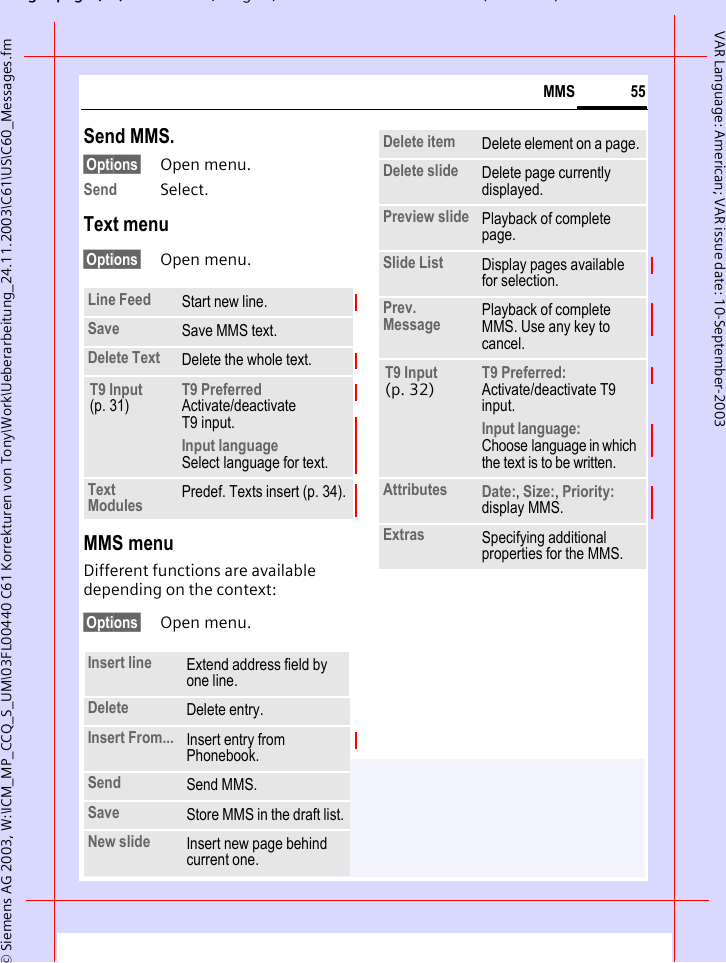
gpg(),g, ( )© Siemens AG 2003, W:\ICM_MP_CCQ_S_UM\03FL00440 C61 Korrekturen von Tony\Work\Ueberarbeitung_24.11.2003\C61\US\C60_Messages.fm55MMSVAR Language: American; VAR issue date: 10-September-2003Send MMS.§Options§ Open menu.Send Select. Text menu§Options§ Open menu. MMS menuDifferent functions are available depending on the context:§Options§ Open menu. Line Feed Start new line.Save Save MMS text.Delete Text Delete the whole text.T9 Input (p. 31)T9 Preferred Activate/deactivate T9 input.Input language Select language for text.Text Modules Predef. Texts insert (p. 34).Insert line Extend address field by one line.Delete Delete entry.Insert From... Insert entry from Phonebook.Send Send MMS.Save Store MMS in the draft list.New slide Insert new page behind current one.Delete item Delete element on a page.Delete slide Delete page currently displayed.Preview slide Playback of complete page.Slide List Display pages available for selection.Prev. Message Playback of complete MMS. Use any key to cancel.T9 Input (p. 32) T9 Preferred: Activate/deactivate T9 input.Input language: Choose language in which the text is to be written.Attributes Date:, Size:, Priority: display MMS.Extras Specifying additional properties for the MMS.
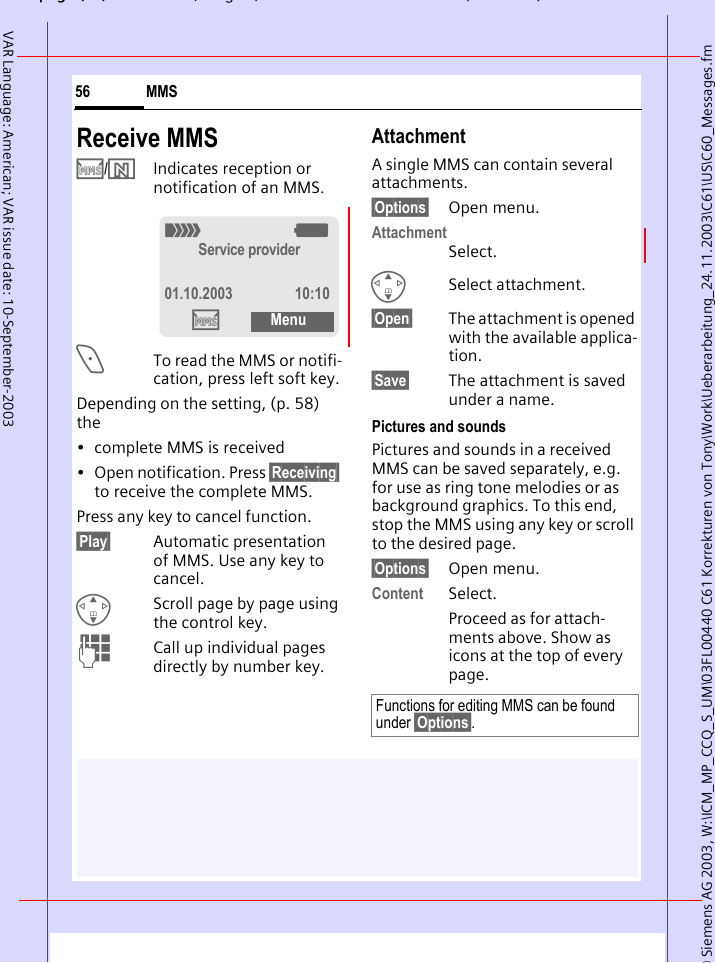
© Siemens AG 2003, W:\ICM_MP_CCQ_S_UM\03FL00440 C61 Korrekturen von Tony\Work\Ueberarbeitung_24.11.2003\C61\US\C60_Messages.fmpg ( ),g, ( )MMS56VAR Language: American; VAR issue date: 10-September-2003Receive MMS/Indicates reception or notification of an MMS.<To read the MMS or notifi-cation, press left soft key.Depending on the setting, (p. 58) the• complete MMS is received• Open notification. Press §Receiving§ to receive the complete MMS.Press any key to cancel function. §Play§ Automatic presentation of MMS. Use any key to cancel.GScroll page by page using the control key.JCall up individual pages directly by number key.AttachmentA single MMS can contain several attachments.§Options§ Open menu.AttachmentSelect.GSelect attachment.§Open§ The attachment is opened with the available applica-tion.§Save§ The attachment is saved under a name.Pictures and soundsPictures and sounds in a received MMS can be saved separately, e.g. for use as ring tone melodies or as background graphics. To this end, stop the MMS using any key or scroll to the desired page.§Options§ Open menu.Content Select.Proceed as for attach-ments above. Show as icons at the top of every page._gService provider01.10.2003 10:10MenuFunctions for editing MMS can be found under §Options§.
gpg(),g, ( )© Siemens AG 2003, W:\ICM_MP_CCQ_S_UM\03FL00440 C61 Korrekturen von Tony\Work\Ueberarbeitung_24.11.2003\C61\US\C60_Messages.fm57MMSVAR Language: American; VAR issue date: 10-September-2003ListsAll MMS messages are stored in one of the following lists.Inbox§Menu§  ¢] ¢Inbox ¢MMSThe list of MMS messages and notifi-cations received is displayed. To receive an MMS afterwards, open notification and press §Empfang§. Draft§Menu§  ¢] ¢Draft ¢MMSThe list of as yet unsent MMS mes-sages is displayed.Unsent§Menu§  ¢] ¢Unsent ¢MMSThe list of MMS messages not yet successfully sent is displayed.Sent§Menu§  ¢] ¢Sent ¢MMSThe list of sent MMS messages is displayed.Lists menuEach list offers different functions:§Options§ Open menu.Play Play back MMS.Edit Open text input for editing.Reply Reply to MMS immediately.Receive MMS Start inward transmission of MMS when only notifica-tion is highlighted (p. 58).Receiv.all MMS Start receipt of all new MMS messages.Forward Forward MMS to new recipients.Delete Delete selected MMS messages.Delete All Delete all entries after confirmation.Mark a.unread Mark MMS as unread.Copy phone number/e-mail address into Phonebook.Attributes Information on MMS is displayed:• Sender•Arrival time• Subject•Size•PriorityCapacity Size of current MMS as well as capacity still available are shown.
© Siemens AG 2003, W:\ICM_MP_CCQ_S_UM\03FL00440 C61 Korrekturen von Tony\Work\Ueberarbeitung_24.11.2003\C61\US\C60_Messages.fmpg ( ),g, ( )MMS58VAR Language: American; VAR issue date: 10-September-2003MMS Profiles§Menu§  ¢] ¢Msg. Setup ¢MMS Profiles3 MMS profiles can be selected. The transmission characteristics of an MMS are defined in these. GSelect profile.§Options§ Open menu.Change Sett.Select.Preview slide Play back current page.Slide List Display pages available for selection.Attachment Open list of attachments received.Content Selection of page contents to be archived, such as picture or sound.Save Store MMS in outbox list.Symbol Meaning ‰ MMS unread‡ MMS read† MMS draft MMS sentÝ MMS read and forwarded.Þ MMS read with dispatched confirmationÛ Notification unreadÜ Notification readExpire Time Select the maximum period for which the service center should try to deliver the message. After this period if the message is still un-delivered it will be deleted from the service center.Manual, 1 hour, 3 hours, 6 hours, 12 hours, 1 day, 1 week, Maximum* * Maximum period that the service provider permits.Def. Priority Send priority: Medium, High, LowDef. Duration Length of display for an MMS page (standard requirement).
gpg(),g, ( )© Siemens AG 2003, W:\ICM_MP_CCQ_S_UM\03FL00440 C61 Korrekturen von Tony\Work\Ueberarbeitung_24.11.2003\C61\US\C60_Messages.fm59MMSVAR Language: American; VAR issue date: 10-September-2003Activate profileGSelect profile.§Activate§ Press to activate profile.T9 settings§Menu§  ¢] ¢Msg. Setup ¢Select a function.T9 PreferredActivate/deactivate intelligent text entry (see also p. 32).Input languageSelect language for text entry. Lan-guages with T9 support are marked by the T9 symbol.Retrieval Receive complete MMS or only notification of arrival.AutomaticReceive complete MMS immediately.Auto.homenetReceive complete MMS immediately in home networkManualOnly the notification is received.MMS Relaysrv. MMS relay URL, e.g.http://www.webpage.comIP Settings IP address: Enter IP-address.Port: * Enter port number.IP address: Enter IP-address.Port: * Enter port number.These settings can be different from those of the WAP browser.Conn.profile: Select or set access profile (p. 75).
© Siemens AG , W:\ICM_MP_CCQ_S_UM\03FL00440 C61 Korrekturen von Tony\Work\Ueberarbeitung_24.11.2003\C61\US\C60_CB.fmpg ( ),g, ( )CB Services60VAR Language: American; VAR issue date: 10-September-2003CB Services§Menu§  ¢] ¢Msg. Setup ¢CB ServicesSome service providers offer infor-mation services (info channels, Cell Broadcast). If reception is activated, your Topic Listwill supply you with messages on the activated topics. BroadcastYou can activate and deactivate the CB service. If the CB service is activated, standby time for the phone will be reduced.CB messages are displayed in standby mode, longer messages are automatically scrolled. Topic ListEnter these in your list of interesting topics. New topic Select.Enter topic with channel number and name and confirm with §OK§.§Channel: Select§Options§ Open list menu.If a topic is selected in the list you can view it, activate/ deactivate it, edit it or delete it.To switch to "full page view": press, then press §View CB§.Displaysp,oTopic activated/deactivated.…New messages received on the topic.ƒMessages already read.
gpg(),g, ( )© Siemens AG , W:\ICM_MP_CCQ_S_UM\03FL00440 C61 Korrekturen von Tony\Work\Ueberarbeitung_24.11.2003\C61\US\C60_Surf&Fun.fm61Surf & FunVAR Language: American; VAR issue date: 10-September-2003Surf & FunInternet browser (WAP)§Menu§  ¢É ¢Select  functionGet the latest information from the Internet that is specifically adapted to the display options of your phone. Internet access may required regis-tration with your service provider.Home bA homepage is established with the Internet provider’s portal (may be specified/configured by default by your service provider).BookmarksList of URLs for fast access. Internet bThe browser is activated as soon as you call up the function. The func-tions of the soft keys vary, depend-ing on the internet page, for exam-ple "link" or "menu". The contents of the option menus are also variable. If necessary, set the way in which WAP access should be made (see browser menu, Setup, Start with..., p. 62). For example the start menu appears:GSelect desired function.§Select§ Confirm. Start menuHomepage The connection to the Internet provider's portal is established (may be set/preset by the service provider).Bookmarks List of URLs for fast access. Resume Call up recently visited pages that are still in the memory.Inbox Inbox for messages from the WAP server (WAP push).Profiles The list of profiles is displayed for activation/setting (p. 63).Exit browser Close the browser and shutdown the connection.ÍStart menu É1 Home2§Bookmarks§3 ResumeSelect
© Siemens AG , W:\ICM_MP_CCQ_S_UM\03FL00440 C61 Korrekturen von Tony\Work\Ueberarbeitung_24.11.2003\C61\US\C60_Surf&Fun.fmpg ( ),g, ( )Surf & Fun62VAR Language: American; VAR issue date: 10-September-2003End connectionBHold down to clear down the connection and close the browser.Browser menuIf the browser is active, the menu can be activated as follows:APressorEÍ confirm.More ... (in menu)Homepage A connection is established with the Internet provider’s portal (may be specified/configured by default by your service provider).Bookmarks Up to 50 URLs stored in the phone for fast access.Resume Call up recently visited pages that are still in the memory.Go to... Enter URL to access WAP page directly, e.g.wap.my-siemens.comSelect from list of most recently visited WAP addresses.Reload Reload page.Your Internet browser is licensed by: Inbox Inbox for messages from the WAP server (WAP push).Disconnect End connection. Save bitmap Save picture(s) of displayed page.More ... See below.Exit browser Close the browser and shutdown the connection.Profiles The list of profiles is displayed for activation/setting (p. 63).Setup Font sizeProtocol parameters•Push• Push can force online• Timeout for unanswered network requestsSecurity• Secure prompt• Current certificate• CA certificates• Private Key PINs• AuthenticationStart with... •Start menu• Browsermenü•Home•Resume• BookmarksPicture&Sound•Picture• Dithering• Sounds
gpg(),g, ( )© Siemens AG , W:\ICM_MP_CCQ_S_UM\03FL00440 C61 Korrekturen von Tony\Work\Ueberarbeitung_24.11.2003\C61\US\C60_Surf&Fun.fm63Surf & FunVAR Language: American; VAR issue date: 10-September-2003WAP profiles §Menu§  ¢É ¢Internet ¢ProfilesPreparation of the phone for WAP Internet access depends on your service provider:• The settings have already been installed by your provider. You can start immediately.• Access profiles for a number of service providers have already been set. Then select and activate profile.• The access profile must be set manually.Check with your service provider if necessary. Activate WAP profile You can change the current profile each time before accessing the Internet.GSelect profile.§Select§ Activate. The current profile is selected.WAP profile settingUp to 5 WAP profiles can be config-ured (may be limited by the service provider). The specifications may vary according to service provider:GSelect profile.§Edit§ Open to make settings.Profile nameEnter/change name.WAP param. b§Save§ Save settings.Reset Restart session and clear cache.About Openwave Display browser version.Additional notesÍBrowser menu.ÉOffline.ÊOnline.ËGPRS online.ÌNo network.*Select special characters, such as @, ~, \ , see p. 31or0press repeatedly for:. , ? ! ’ " 0 - ( ) @ / : _ IP address: Enter IP- address.Port: Enter port number.Homepage: Enter homepage, if not set by the service provider.GPRS lingertimeCSD lingertimeTime in seconds after which a connection should be ended if no input or data exchange takes place.Conn.profile: Select or set access profile (p. 75).
© Siemens AG , W:\ICM_MP_CCQ_S_UM\03FL00440 C61 Korrekturen von Tony\Work\Ueberarbeitung_24.11.2003\C61\US\C60_Surf&Fun.fmpg ( ),g, ( )Surf & Fun64VAR Language: American; VAR issue date: 10-September-2003Games & MoreDownload games and other applica-tions. You are advised about relevant applications on the Internet. Once you have selected a game or applica-tion you can start to download it im-mediately. Then you can use the ap-plication. Most applications include instructions. Applications and games can be found at: wap.my-siemens.comor on the Internet at:www.my-siemens.com/city Games and applicationsApplications and links that are already stored on the phone are found under:§Menu§ ¢É ¢Games & MoreDifferent functions are available depending on which entry is high-lighted: Download New§Internet§ The selected Internet page is loaded. § Carry out game/application offline§Select§ Loadable application can be started immediately.¦ Load game/application online§Select§ Only description file, application has still to be loaded.Additional informationTo download applications, the WAP profile (p. 63), HTTP profile (p. 76) and access (p. 75) must be configured.Depending on the service provider, the access and functionality could differ from the present description.Sounds (ringer)/vibrating alert on/off .........................................p. 81§\Download New§Game¦ApplicationOptions Internet
gpg(),g, ( )© Siemens AG , W:\ICM_MP_CCQ_S_UM\03FL00440 C61 Korrekturen von Tony\Work\Ueberarbeitung_24.11.2003\C61\US\C60_Surf&Fun.fm65Surf & FunVAR Language: American; VAR issue date: 10-September-2003Receive informationIf information required, say, by an application that has already been installed, is received via SMS, the §symbol appears in the display. By pressing the left control key, the relevant application is started and the information is processed.GamesGames are stored in the telephone. Select the desired game. You will find special instructions or information for each game in the option menu.Key controlThe following key control is used for many games (virtual joystick):or use the key I. Games & More OptionsProcessing and managing your applications and folders:813795264function depends on the gameStart  Start application.Download  An application is downloaded from the Internet and installed.Delete Delete selected application/folder.Delete All Delete all applications/folders after confirmation.Rename Rename highlighted applications/folders.HTTP Profile The list of profiles is displayed for activation/setting (p. 76).Reinstall Reinstall an application (update).More Info Download further instructions via Internet (WAP), if available.Details Show details of the application/folder (name, version, size, path, producer, date).
© Siemens AG , W:\ICM_MP_CCQ_S_UM\03FL00440 C61 Korrekturen von Tony\Work\Ueberarbeitung_24.11.2003\C61\US\C60_Surf&Fun.fmpg ( ),g, ( )Surf & Fun66VAR Language: American; VAR issue date: 10-September-2003Additional informationWAP can be used to download applications (e.g., ringtones, games, pictures, animation) from the Internet. Downloading or running appli-cations will not affect or change the software already installed on your Java™-enabled mobile phone.Siemens excludes all warranty and liability claims in respect of or in connection with any applications subsequently installed by the customer and not in-cluded in the original delivery package. This also applies to functions enabled subsequently at the customer's instigation. The purchaser bears sole risk for the loss of, damage to, and any defects arising in, this device or the applications and for any direct damage or consequential damage of whatever nature resulting from the use of these applications.For technical reasons, such applications and subsequent enabling of certain functions are lost in the event of the device being replaced/re-sup-plied and may be lost if it is repaired. In these cases the purchaser will need to down-load the application again or re-enable it as well. Note that your device has Digital Rights Manage-ment (DRM) so that individual applications down-loaded via WAP are protected against unautho-rized copying. These applications are only intended for your device and cannot be trans-mitted from this device for backup purposes. Siemens does not warranty or guarantee or accept any liability for the customer's ability to download, enable, or back up applications again or to do so free of charge. Back up your applica-tions on the PC, if this is technically possible, using Siemens Data Exchange Software.
gpg(),g, ( )© Siemens AG , W:\ICM_MP_CCQ_S_UM\03FL00440 C61 Korrekturen von Tony\Work\Ueberarbeitung_24.11.2003\C61\US\C60_Setup.fm67SetupVAR Language: American; VAR issue date: 10-September-2003SetupProfiles§Menu§  ¢m ¢ProfilesSeveral settings can be stored in a phone profile in order, for example, to adapt the phone to the surround-ing level of noise.• Five profiles are standard with default settings, they can be changed however: Normal Env. Quiet Env. Noisy Env. Car Kit Headset • You can set two personal profiles (<No Title>).• The special profile Aircraft Mode is fixed and cannot be changed, (p. 68).ActivateGSelect default profile or personal profile.§Activate§ Activate profile.SetupEdit a default profile or create a new personal profile:GSelect profile.§Options§ Open menu.Change Sett.Select.The list of available functions is displayed:Ringer Setting................................... p. 81Vibrating Alert ................................... p. 81Volume ............................................. p. 81Call Screening .................................. p. 82Key Tones ........................................ p. 82Info Tones......................................... p. 82Large Font ........................................ p. 69Illumination ....................................... p. 70When you have finished setting a function, you return to the profile menu where you can change a further setting.½Quiet Env.Activate OptionsAdditional notes½Active profile.
© Siemens AG , W:\ICM_MP_CCQ_S_UM\03FL00440 C61 Korrekturen von Tony\Work\Ueberarbeitung_24.11.2003\C61\US\C60_Setup.fmpg ( ),g, ( )Setup68VAR Language: American; VAR issue date: 10-September-2003Profile menu§Options§ Open menu.Car Kit If a Siemens original Car Kit is used (p. 97) the profile is activated auto-matically as soon as the phone is inserted into the cradle (p. 71).HeadsetIf an original Siemens headset is used (p. 96), the profile is activated automatically when the headset is used.Aircraft ModeThe alarm tone is deactivated. An alarm is only shown on the display. It is not possible to modify this profile. The phone will switch off if you select this profile.ActivateGScroll to Aircraft Mode.§Select§ Switch on profile.A security prompt must be confirmed. The phone switches itself off automatically.Normal operationThe next time you switch on the phone and return to normal opera-tion the default profile will be activated.Activate Activate selected profile.Change Sett. Change profile settings.Copy From Copy settings from another profile.Rename Change personal profile (except default profiles).
gpg(),g, ( )© Siemens AG , W:\ICM_MP_CCQ_S_UM\03FL00440 C61 Korrekturen von Tony\Work\Ueberarbeitung_24.11.2003\C61\US\C60_Setup.fm69SetupVAR Language: American; VAR issue date: 10-September-2003Display§Menu§  ¢m ¢Display ¢Select a function.LanguageSet the language of the display text. When "automatic" is set, the lan-guage of your home service provider is used. If a language that you do not understand happens to be set, the phone can be reset to the language of your service provider with the fol-lowing input (in standby mode):* # 0 0 0 0 # ABackgroundSet background graphic for display or.Download NewDownload new back-ground images from the Internet. LogoChoose picture to be displayed instead of the provider logo, orDownload NewDownload new logo from the Internet. Color SchemeSelect color scheme for the user interface.Activate color schemeGSelect color scheme.§Activate§ Activate.Own GreetingEnter greeting to be displayed when phone is switched on.§Change§ Switch on/off.JDelete old greeting and create new greeting.§OK§ Confirm changes.Large FontYou can choose between two font sizes for the display.
© Siemens AG , W:\ICM_MP_CCQ_S_UM\03FL00440 C61 Korrekturen von Tony\Work\Ueberarbeitung_24.11.2003\C61\US\C60_Setup.fmpg ( ),g, ( )Setup70VAR Language: American; VAR issue date: 10-September-2003§Menu§  ¢m ¢Display ¢Select a function.IlluminationSet display light brighter/darker. The darker the setting the longer the standby time.GPress the control key repeatedly to adjust up or down.ContrastSet display contrast. GPress the control key repeatedly to adjust up or down.Screensaver §Menu§  ¢m ¢ScreensaverThe screensaver shows a picture on the display as soon as a period that can be set by you has elapsed. The function is ended by an incoming call or by pressing any key. Enable Activate/deactivate screensaver.Style Digital Clock, Bitmap or Energy Saving.Preview Display the screensaver.Timeout Set period after which the screensaver starts.Code Protect. Phone code protected termination of the screensaver.Additional notesYou can also receive individual logos and screensavers by SMS (p. 46), MMS (p. 53) or WAP (p. 61). See also Own Stuff, (p. 87) and My phone, (p. 23).
gpg(),g, ( )© Siemens AG , W:\ICM_MP_CCQ_S_UM\03FL00440 C61 Korrekturen von Tony\Work\Ueberarbeitung_24.11.2003\C61\US\C60_Setup.fm71SetupVAR Language: American; VAR issue date: 10-September-2003Call Setup§Menu§  ¢m ¢Call Setup ¢Select a function.Hide ID bWhen you make a call, your phone number can be displayed on the recipient's display (depending on the service providers).To suppress this display, you can enable the "Hide ID" mode for all sub-sequent calls or just for the next call. You may need to register separately with your service provider for these functions.Call Waiting bIf you are registered for this service, you can check whether it is set and you can activate/deactivate it (see also p. 27).Any to AnswerIncoming calls can be accepted by pressing any key(except forB).Minute BeepDuring the call, you will hear a beep after each minute as a reminder of the time elapsed. The recipient does not hear this beep.Car KitOnly in combination with an original Siemens Speakerphone Car Kit (p. 97). If an original Siemens Car Kit Portable is used the profile is acti-vated automatically as soon as the phone is inserted into the cradle.Auto Answer (factory default: off)Calls are accepted automatically after a few seconds. Eavesdropping is possible!±Shown on the display.Auto Phone Off(factory default: 2 hours)The phone is powered by the car. The time taken for the phone to switch off when the ignition is turned off can be configured.Car LoudspeakerSelect another audio setting as needed for your car kit for better acoustics.Automatic settings:• Permanent illumination: switched on.• Key lock: switched off. • Charging the phone battery.• Automatic activation of the Car Kit profile when phone is inserted in cradle.
© Siemens AG , W:\ICM_MP_CCQ_S_UM\03FL00440 C61 Korrekturen von Tony\Work\Ueberarbeitung_24.11.2003\C61\US\C60_Setup.fmpg ( ),g, ( )Setup72VAR Language: American; VAR issue date: 10-September-2003§Menu§  ¢m ¢Call Setup ¢Select a function.HeadsetOnly in conjunction with an original Siemens headset (p. 96). If an original Siemens Headset is used the profile is automatically activated when the headset is plugged in. Auto Answer (factory default: off)Calls are accepted automatically after a few seconds (except where the ringer is switched off or set to beep). You should therefore be wearing the headset. Eavesdropping is possible!Automatic settingAccept call with the Call key or PTT key (Push To Talk) when the key lock is activated.Call Forward§Menu§  ¢m ¢Call Forward ¢Select a function.You can set the conditions for which calls are forwarded to your mailbox or other numbers.Set up call forwarding (example):The most common condition for call forwarding is, for example:All Calls bOther calls are forwarded.nSymbol in the top line of the display in standby mode.Unanswered  bGSelect Unanswered. (Includes the conditions Not Reachable, No Reply, Busy see below)§Select§ Press.Set Select.JEnter the phone number to which the caller will be forwarded (if not already done)Or·Select this phone number from the Phonebook or via §Mailbox§.§OK§ Confirm. After a short pause, the setting is con-firmed by the network.Auto answerIf you do not notice that you phone has accepted a call, there is the danger that the caller may eavesdrop.
gpg(),g, ( )© Siemens AG , W:\ICM_MP_CCQ_S_UM\03FL00440 C61 Korrekturen von Tony\Work\Ueberarbeitung_24.11.2003\C61\US\C60_Setup.fm73SetupVAR Language: American; VAR issue date: 10-September-2003Not ReachableForwarding occurs if phone is switched off or is out of range.No ReplyA call is only forwarded after a delay that is determined by the network. The period can be set to a maximum of 30 seconds in 5 second intervals.BusyForwarding occurs if a call is in progress. If Call Waiting is activated (p. 71), you will hear the call waiting tone during a call.Status CheckYou can check the current forward-ing status for all conditions.After a short pause, the current situ-ation is transmitted by the network and displayed.pCondition set.oNot set.sDisplay if status is unknown (e.g. with a new SIM card). Clear All bAll set forwardings are cleared.Additional notesNote that the forwarding is stored in the network and not in the phone (when the SIM card is changed for example).Check condition or delete itFirst select the condition.§Select§ Press.Check statusSelect.OrDelete Select.Reactivate forwardingThe last forwarding has been stored. Proceed as with Setting. The stored phone number is displayed. Confirm phone number.Edit phone numberProceed as with "Set forwarding". When the stored phone number is displayed:§Delete§ Press. The phone number is deleted.Enter new number and confirm.
© Siemens AG , W:\ICM_MP_CCQ_S_UM\03FL00440 C61 Korrekturen von Tony\Work\Ueberarbeitung_24.11.2003\C61\US\C60_Setup.fmpg ( ),g, ( )Setup74VAR Language: American; VAR issue date: 10-September-2003Clock§Menu§  ¢m ¢Clock ¢Select function.Time/DateThe clock must be set correctly once at start-up.§Change§ Press.JFirst enter the date (month/day/year), then the time (12 hours, including seconds).Time FormatSelect Format 24h or Format 12h.Time ZonesSpecify your current time zone.FSelect the desired time zone from the list ...§Set§ ... Apply it.§Options§ Open menu. Date FormatDD.MM.YYYY or MM/DD/YYYY Show ClockActivate/deactivate time display in standby mode.Additional notesIf the battery is removed for longer than 30 seconds, the clock must be reset. Setting of the date format to:DD: Day (2-digit)MM: Month (2-digit)YYYY: Year (4-digit)DST Activate/deactivate selection. A sun is displayed when summer time is activated.View Display selected time zone with date and time.Set Set time zone.Rename Rename the time zone.Auto timezoneLThe time zone is automati-cally converted to local time by the network.
gpg(),g, ( )© Siemens AG , W:\ICM_MP_CCQ_S_UM\03FL00440 C61 Korrekturen von Tony\Work\Ueberarbeitung_24.11.2003\C61\US\C60_Setup.fm75SetupVAR Language: American; VAR issue date: 10-September-2003Connectivity §Menu§  ¢m ¢Connectivity ¢Select a function.GPRS bFor GPRS (General Packet Radio Service)GPRS is a new method for transmit-ting data faster in the mobile net-work. Use GPRS and if the network has sufficient capacity, you can be connected to the Internet perma-nently. Only the actual transmission time is charged by the network operator.Some service providers do not yet support this service.§Yes§ / §No§ Switch GPRS function on/offShown in display:«Activated and available.ªRegistered.Connection briefly lost.©DownloadData CounterDisplay of connection data.Data ServicesFor the MMS, Wap and Java applica-tion at least one connection profile must be set up and activated. Pre-sets of the phone depends on cur-rent service provider. If necessary, check with your service provider for details. The current settings for a service provider can be found on the Internet at www.my-siemens.com/customercare under "FAQ".GSelect profile.§Options§ Open menu.Change Sett.Press, then:For CSD (Circuit Switched Data) CSD settingsSelect.If it has not been pre-installed, enter the data or enter the required set-tings (your service provider will sup-ply you with information on this):
© Siemens AG , W:\ICM_MP_CCQ_S_UM\03FL00440 C61 Korrekturen von Tony\Work\Ueberarbeitung_24.11.2003\C61\US\C60_Setup.fmpg ( ),g, ( )Setup76VAR Language: American; VAR issue date: 10-September-2003§Edit§ Press. §Save§ Save settings.For GPRS (General Packet Radio Service)GPRS SettingsSelect. You can activate GPRS for the profile and change the settings here. You can only start to use GPRS once you have activated GPRS on your phone (p. 75).§Edit§ Press.§Save§ Save settings.§Menu§  ¢m ¢Connectivity ¢Select function.HTTP ProfileGSelect profile. Enter or modify settings. If neces-sary, check with your ser-vice provider for details.Authentication§Menu§  ¢m ¢Connectivity ¢Authentication§Change§ Activate or deactivate encrypted WAP dial-up (CSD connections only) (PAP: Personal Authenti-cation Procedure, CHAP: Challenge Authentication Procedure).Dial-up number Enter ISP number.Call type: Select ISDN or analoge.Login name: Enter login name.Password: Enter password (shown as a series of asterisks).DNS 1 / DNS 2: (optional).APN: Enter provider address. Login name: Enter login name.Password: Enter password (shown as a series of asterisks).DNS 1 / DNS 2: (optional).
gpg(),g, ( )© Siemens AG , W:\ICM_MP_CCQ_S_UM\03FL00440 C61 Korrekturen von Tony\Work\Ueberarbeitung_24.11.2003\C61\US\C60_Setup.fm77SetupVAR Language: American; VAR issue date: 10-September-2003Security§Menu§  ¢m ¢Security ¢Select a functionThe phone and SIM card are pro-tected against misuse by several security codes.Direct Call b(Phone code is protected)Only one phone number can be dialed. Hold down the right soft key (p. 29).Only ‚b(PIN2-protected)Restricts dialing options to SIM-pro-tected numbers in the Phonebook. If only area codes are entered, rele-vant phone numbers can be added to these manually before dialing.If the SIM card does not support PIN 2 input, the whole Phonebook can be protected with the phone code.Last 10 Only b(Phone-code protected)Only phone numbers from the call list of "dialed numbers" (p. 41) can be dialed. This list can be filled with phone numbers specifically for this purpose. First delete the call list, then create "new entries" by dialing phone num-bers and canceling before the con-nection is established.§Menu§  ¢m ¢Security ¢Select a functionCodesPIN Control, Change PIN, Change PIN2, Change Phonecode, (p. 22).This SIM Only b(Phone-code protected)The phone can be connected to a SIM card when the phone code is entered. Unless the phone code is known the phone will not operate with a different SIM card.If the phone is to be used with a different SIM card, enter the phone code when requested.Barrings bBarring restricts the use of your SIM card (not supported by all ser-vice providers). You need a 4-digit password which your service pro-vider will give you. You may need to be registered separately for each barring.All OutgoingAll outgoing calls, except emergency calls, are blocked.Outgo Internat(Outgoing international): Only domestic calls are possible.
© Siemens AG , W:\ICM_MP_CCQ_S_UM\03FL00440 C61 Korrekturen von Tony\Work\Ueberarbeitung_24.11.2003\C61\US\C60_Setup.fmpg ( ),g, ( )Setup78VAR Language: American; VAR issue date: 10-September-2003Outgo Internat. X Home Barred(Outgoing international except home)International calls are barred. However you can make calls to your home country when abroad.All Incoming CallsThe phone is barred for all incoming calls (the forwarding of other calls to the mailbox offers a similar function).When RoamingYou do not receive calls when you are outside your home network. This means that no charges are incurred for incoming calls.Status CheckThe following information can be displayed after a status check:pBarring set.oBarring not set.sStatus unknown (e.g. new SIM card).Clear AllAll barrings are deleted. A password supplied by your service provider is required for this function.§Menu§  ¢m ¢Security ¢Select a functionPhone IdentityThe phone identity number (IMEI) is displayed. This information may be useful for customer service. Alternatively enter in standby mode: * # 0 6 #Filesystem clean up(Phone code is protected)The file manager is defragmented.Master ResetThe phone is reset to the default values (factory setting) (does not apply to SIM card and network settings).Alternatively enter in standby mode: * # 9 9 9 9 # ASoftware versionDisplay of software version in standby mode:* # 0 6 # , then press §Info§.
gpg(),g, ( )© Siemens AG , W:\ICM_MP_CCQ_S_UM\03FL00440 C61 Korrekturen von Tony\Work\Ueberarbeitung_24.11.2003\C61\US\C60_Setup.fm79SetupVAR Language: American; VAR issue date: 10-September-2003Network§Menu§  ¢m ¢Network ¢Select a functionLine bThis function is only displayed if it is supported by the service provider. Two independent phone numbers must be registered on the phone.SelectSelect the currently used phone number.‘Display the current phone number.Block line(Phone code is protected)You may limit usage to one phone number.§Menu§  ¢m ¢Network ¢Select a functionNetwork InfoThe list of GSM networks currently available is displayed.²Indicates forbidden ser-vice providers (depending on SIM card).Auto Network Activate/deactivate, see also Choose Network above. If "Automatic net-work" is activated, the next network on the list is dialed in ranking order of your "preferred networks". Other-wise a different network can be selected manually from the list of the available GSM networks.Choose NetworkThe network search is restarted. This is useful if you are not on your home network or want to register on a different network. The network list is rebuilt when Auto Network is set.Preferred network  bEnter your preferred service providers here for when you leave your home network (e.g. if there are differences in price).Additional notesSpecial settings may be made for each phone number (e.g., melody, call forwarding, etc.) To do this, first switch to the required phone num-ber. Change phone number/con-nection in standby mode:0Press. §Line 1§ Press.
© Siemens AG , W:\ICM_MP_CCQ_S_UM\03FL00440 C61 Korrekturen von Tony\Work\Ueberarbeitung_24.11.2003\C61\US\C60_Setup.fmpg ( ),g, ( )Setup80VAR Language: American; VAR issue date: 10-September-2003Your service provider is displayed:§List§ Display list of preferred networks.Create new entry: • Select empty line, press §Entry§ then select another entry from the list of service providers and confirm.Change/delete entry:• Select entry, press §Change§, then select a different entry from the list of service providers and con-firm it or press §Clear§.Fast SearchWhen this function is active, net-work reconnection is speeded up (standby time is reduced).Additional informationIf you are outside your home network, your phone automatically dials another GSM network.If the field strength of the preferred network is not strong enough when you switch the phone on, the mobile phone may register with a different network. This can change when the telephone is next switched on or if you manually select another network.
gpg(),g, ( )© Siemens AG , W:\ICM_MP_CCQ_S_UM\03FL00440 C61 Korrekturen von Tony\Work\Ueberarbeitung_24.11.2003\C61\US\C60_RingTones.fm81Tones/AlertsVAR Language: American; VAR issue date: 10-September-2003Tones/Alerts§Menu§  ¢ç ¢Select function.You can set the tones to match your needs.Ringer Setting On/Off Activate/deactivate all ring tones. Beep Reduce ring tone to a short signal (beep).Vibrating AlertTo avoid the disturbance caused by a ringing phone, you can activate the vibrating alert function as an alternative. The vibrating alert can also be activated in addition to the ringer (e.g. in noisy environments). This function is deactivated when the battery is being charged.VolumeYou can set the same volume for all ring tones.GSet volume.§OK§ Confirm.d Calls, Group calls, Other calls:, Alarm Clock, MessagesHere you can set the ring tone separately for the stated call types/functions.GSelect ring tone.§OK§ Confirm.With Download New you can down-load new ring tones from the Inter-net.Additional noteskDisplays: Beep.jDisplays: Ringer off.Additional notesPlease make sure you have accepted the call before holding the phone to your ear. This will prevent a loud ring tone from damaging your hearing!Additional notesIndividual ring tone melodies can be sent to you via SMS/MMS or you can download them via WAP (p. 61). See also Own Stuff, p. 87 and My phone, p. 23.
© Siemens AG , W:\ICM_MP_CCQ_S_UM\03FL00440 C61 Korrekturen von Tony\Work\Ueberarbeitung_24.11.2003\C61\US\C60_RingTones.fmpg ( ),g, ( )Tones/Alerts82VAR Language: American; VAR issue date: 10-September-2003More Tones...§Menu§  ¢ç ¢More Tones... ¢Select a function.Call Screening bOnly calls from numbers that are in the Phonebook or in a predefined group are signaled audibly or by vibrating alert. Other calls are only displayed. If you do not accept these calls, they are forwarded to your mailbox (if set, p. 72).lScreen display in standby mode: when call screening is activated.Key TonesYou can set the acoustic key acknowledge tone:Click or Tone or StillMinute BeepDuring the call, you will hear a beep after each minute as a reminder of the time elapsed. The recipient does not hear this beep.Info TonesSet service and alarm tones:On/Off Activate/deactivate tones.
gpg(),g, ( )© Siemens AG , W:\ICM_MP_CCQ_S_UM\03FL00440 C61 Korrekturen von Tony\Work\Ueberarbeitung_24.11.2003\C61\US\C60_Extras.fm83ExtrasVAR Language: American; VAR issue date: 10-September-2003Extras§Menu§  ¢y ¢Select function.SIM services (optional) bYour service provider may offer special applications such as mobile banking, share prices, etc. via the SIM card.If you have such a SIM card, the SIM services will appear in the main menu under "Extras" or directly above the control key (on the left).}Symbol for SIM services.Where there are several applications, these are displayed in an SIM services menu.With the SIM services menu, your phone is ready to support future additions in your service provider's user package. For further informa-tion, please contact your service provider.Alarm ClockThe alarm will ring at the time set by you, even when the phone is switched off. SettingSet the time for the alarm call (hh:mm).§OK§ Confirm settings.§On/off§ Activate/deactivate the alarm.Additional notesyAlarm clock activated. zAlarm clock deactivated.ÖScreen display in standby mode: Alarm clock activated.yAlarm Clock 11:56:27z 07:30On/off OK
© Siemens AG , W:\ICM_MP_CCQ_S_UM\03FL00440 C61 Korrekturen von Tony\Work\Ueberarbeitung_24.11.2003\C61\US\C60_Extras.fmpg ( ),g, ( )Extras84VAR Language: American; VAR issue date: 10-September-2003§Menu§  ¢y ¢Select function.CalculatorJEnter number(up to 8 digits). JRepeat procedure with other numbers.Result is displayed. StopwatchTwo intermediate times can be recorded and saved.§Reset§ Reset to zero.Start/stop.*Intermediate time.Stopwatch menu§Options§ Open menu.Select calculate function.Calculator functions§.§=§+§-§*§/§ Press the right soft key repeatedly.Toggle between "+" and "-".%Convert to percent.ÏSave the displayed number.ÐRetrieve the number saved.eExponent (maximum of two digits).Special keys:*Set decimal point.0Add (hold down).I+—/xSave Record the time(s) measured and assign a name to them.Reset Reset stopwatch.Stopwatch list Display the stored times.View Display the stored times and intermediate times.Rename Rename stored entry.Delete Delete entry.Delete All Delete list.æStopwatch00:00:00.000Start Options
gpg(),g, ( )© Siemens AG , W:\ICM_MP_CCQ_S_UM\03FL00440 C61 Korrekturen von Tony\Work\Ueberarbeitung_24.11.2003\C61\US\C60_FastDial.fm85Fast access keyVAR Language: American; VAR issue date: 10-September-2003Fast access keyThe left soft key and the number keys 2 to 9 (speed dialing numbers) can each be assigned an important phone number or a function. The phone number can then be dialed or the function can be started at the touch of a button.Available key assignments:Internet (WAP) ..................................p. 61Phone number...................................p. 35Alarm Clock.......................................p. 83New SMS ..........................................p. 46Illumination ........................................p. 70Hide ID ..............................................p. 71Missed Calls......................................p. 41Received Calls ..................................p. 41Inbox (Messages)..............................p. 50Phonebook........................................p. 35Games & More ..................................p. 64Predef. Texts.....................................p. 34Drafts.......................................p. 51, p. 58Camera .............................................p. 42Calculator ..........................................p. 84Stopwatch .........................................p. 84Screensaver ..................................... p. 70Vibrating Alert ................................... p. 81Call Screening .................................. p. 82Call Forward ..................................... p. 72<empty>Left soft keyAssign a function/phone number to the left soft key for fast access.Change§Internet§ Press briefly.§Change§ Scroll to application in the list.• Assign a new function (e.g. New SMS) to the soft key.•Special case Phone Number. Retrieve a name (e.g. 'Carol') as the default for the soft key.§Select§ Confirm setting.ApplyThe setting "Carol" is used here only as an example.§Carola§ Hold down.Additional notesThe left soft key may already have a function allocated by your service provider (e.g. access to "} SIM card services"). It may not be possible to modify this key assignment.The left soft key may also sometimes be replaced automatically by ]/\ to access a new message._gService provider01.10.2003 10:10Internet Menu
© Siemens AG , W:\ICM_MP_CCQ_S_UM\03FL00440 C61 Korrekturen von Tony\Work\Ueberarbeitung_24.11.2003\C61\US\C60_FastDial.fmpg ( ),g, ( )Fast access key86VAR Language: American; VAR issue date: 10-September-2003Speed dialing keysNumber keys 2 to 9 can be used as speed dialing numbers for fast access. For available key assign-ments see p. 85. Number key 1 is reserved for the mailbox number (p. 44).ChangeIn standby mode:JPress number key (2- 9). If the key is not yet assigned:§Set§ Press.Or§New SMS Press briefly (if assigned to New SMS, for example).§Change§ Scroll to application in the list.Special case Phone Num-ber. Pick out a name from the Phonebook for assign-ment to the key.Special case Bookmarks. Scroll to a URL in the bookmark list for assign-ment to the key.§Select§ Confirm setting.ApplySelect a stored phone number or start a stored application (e. g. New SMS).In standby mode:3Press briefly.The assignment of the number key 3 is displayed above the right soft key e.g.:§New SMS§ Hold down:Or simply3 Hold down.
gpg(),g, ( )© Siemens AG , W:\ICM_MP_CCQ_S_UM\03FL00440 C61 Korrekturen von Tony\Work\Ueberarbeitung_24.11.2003\C61\US\C60_Explorer.fm87Own StuffVAR Language: American; VAR issue date: 10-September-2003Own Stuff The following folders are provided or organizing your files: Pictures, Animations, Sounds.§Menu§  ¢ÑFiles and folders are displayed. You can scroll through these lists using the control key:GScroll up and down.CJump back from a folder.§Open§ Open folder or execute file using related applica-tion. Index structureThe file manager assigns special folders to different data types.The following folders are also included in these main folders:File manager menu§Options§ Open menu.Folders Contents FormatPictures Images *.bmp*.gif*.jpg*.jpeg Camera Own Photos (p. 42)*.pngAnimations Animations *.bmx*.gifSounds Ring tones, melodies, sounds*.midDownload New This enables you to download new files from the Internet..EMS Files that can be received per SMS/MMS.Open Open folder.Delete Delete current entry.Delete All Delete all entries.Rename Rename highlighted entry.Send via... Send highlighted entry.Attributes Display information on file or folder selected.Capacity Display the capacity used and available."Sounds" was replaced by "Tones&Alerts"I’m quite sure, a folder name willnot  contain the &.Please make name sure.(Has to be changed in menu tree, too
© Siemens AG , W:\ICM_MP_CCQ_S_UM\03FL00440 C61 Korrekturen von Tony\Work\Ueberarbeitung_24.11.2003\C61\US\C60_faq.fmpg ( ),g, ( )Questions & Answers88VAR Language: American; VAR issue date: 10-September-2003Questions & AnswersIf you have any questions regarding the use of your phone, you can contact us at www.my-siemens.com/customercare at any time. In addition to this we have listed some frequently asked questions and answers below.Question Possible causes Possible solutionPhone cannot be switched on.On/Off key not pressed long enough.Press On/Off key for at least two seconds.Dead battery. Charge battery. Check charging indicator in the display.Battery contacts dirty. Clean contacts.See also below under: “Charging error”Insufficient standby time.Frequent use of organizer or games.Restrict use if necessary.Speed search active. Deactivate speed search (p. 80).Display illumination switched on. Switch off display illumination (p. 70).Unintentional keystrokes (illumination!).Switch on key lock ( press for long time).Charging error (charge icon not displayed).Battery totally discharged. 1) Plug in charger cable, battery is on charge. 2) Charge icon appears after approx. 2 hours.3) Charge battery.Temperature out of range: +41 °F to +104 °F.Make sure the ambient temperature is right, wait a while, then recharge.Contact problem. Check power supply and connection to the phone. Check battery contacts and device plug socket, clean them if necessary, then insert battery again.No voltage. Use different power socket, check voltage.Wrong charger. Only use original Siemens accessories.Battery faulty. Replace battery.SIM error. SIM card not correctly inserted. Check that the SIM card is inserted correctly (p. 15).SIM card contacts dirty. Use a dry cloth to clean the SIM card.SIM card with wrong voltage. Use 3 V SIM cards only.SIM card damaged (e.g. broken). Visually inspect the damage. Have SIM card replaced by service provider.
gpg(),g, ( )© Siemens AG , W:\ICM_MP_CCQ_S_UM\03FL00440 C61 Korrekturen von Tony\Work\Ueberarbeitung_24.11.2003\C61\US\C60_faq.fm89Questions & AnswersVAR Language: American; VAR issue date: 10-September-2003No connection to network.Weak signal. Move to higher location, to a window or open space.Outside GSM range. Check coverage area of service provider.SIM card not valid. Contact the service provider.New network not authorized. Try manual selection or select a different network (p. 79).Network barring is set. Check barrings (p. 77).Network overloaded. Try again later.Phone loses network.Signal too weak. Reconnection to another service provider is automatic (p. 79). Switching the phone off and on may speed this up.Calls not possible.2nd line set. Set first line ‘ (p. 79).New SIM card inserted. Check for new restrictions.Credit used up. Load credit.Certain uses of the phone not possible.Call restrictions are set. Barrings may be set by your service provider. Check barrings (p. 77).No entries possible in Phonebook.Phonebook is full. Delete entries in Phonebook (p. 35).Voice mail does not workCall forwarding to the mailbox not set.Set call forwarding to the mailbox (p. 72).SMS (text message) Tflashing.SMS memory full. To free up capacity, delete (p. 50) or file (p. 51) text messages (SMS).Function cannot be set.Not supported by service provider or registration required.Contact your service provider.Memory problems for, e.g. messages, ring tones, pictures.Phone memory full. Delete files in the applicable areas and unneeded T9 dictionaries.No WAP access, no download possible.Profile not activated, profile settings wrong/incomplete.Activate WAP profile (p. 63), set (p. 63). If necessary, ask your service provider.Question Possible causes Possible solution
© Siemens AG , W:\ICM_MP_CCQ_S_UM\03FL00440 C61 Korrekturen von Tony\Work\Ueberarbeitung_24.11.2003\C61\US\C60_faq.fmpg ( ),g, ( )Questions & Answers90VAR Language: American; VAR issue date: 10-September-2003Message cannot be sent.Service provider does not support this service.Check with your service provider.Phone number of the service center is not set or is wrong.Set service center (p. 51).SIM card contract does not support this service.Contact your service provider.Service center too busy. Repeat message.Recipient does not have a compatible phone.Check.EMS pictures and sounds not displayed at destination phone.Recipient's phone does not support EMS standard.No Internet access possible.Wrong WAP profile set or settings wrong, incomplete.Check settings, speak to service provider if necessary.PIN error/PIN2 error.Three wrong entries. Enter the PUK (MASTER PIN) supplied with the SIM card according to the instructions. If the PUK (MASTER PIN) has been lost, please contact your service provider.Phone code error.Three wrong entries. Contact Siemens Service (p. 91).Service provider code- error.No authorization for this service. Contact your service provider.Too few/too many menu entries.Functions may have been added or removed by your service provider via the SIM card.Check with your service provider.Charge counter does not work.Charge pulse is not transmitted. Contact your service provider.Question Possible causes Possible solutionDamageSevere shock. Remove battery and SIM and insert them again. Do not dismantle phone!Phone became wet. Remove battery and SIM. Dry immediately with a cloth, but do not apply heat. Dry connector contacts thoroughly. Set phone to vertical position in air flow. Do not dismantle phone!Reset settings to factory default (see also p. 78): * # 9 9 9 9 # A
gpg(),g, ( )© Siemens AG , W:\ICM_MP_CCQ_S_UM\03FL00440 C61 Korrekturen von Tony\Work\Ueberarbeitung_24.11.2003\C61\US\C60_Hotline.fm91Customer careVAR Language: American; VAR issue date: 10-September-2003Customer careAbu Dhabi .........................................0 26 42 38 00Argentina .....................................0 80 08 88 98 78Australia..........................................13 00 66 53 66Austria.............................................05 17 07 50 04Bahrain .................................................... 40 42 34Bangladesh.......................................0 17 52 74 47Belgium.............................................0 78 15 22 21...............................................................................Bosnia Herzegovina..........................0 33 27 66 49Brazil............................................0 80 07 07 12 48Brunei ..................................................02 43 08 01Bulgaria................................................02 73 94 88Cambodia ............................................12 80 05 00Canada ........................................1 88 87 77 02 11China ...........................................0 21 50 31 81 49Croatia ..............................................0 16 10 53 81Czech Republic...............................02 33 03 27 27Denmark ............................................. 35 25 86 00Dubai ................................................0 43 96 64 33Egypt.................................................0 23 33 41 11Estonia................................................ 06 30 47 97Finland............................................09 22 94 37 00France.............................................01 56 38 42 00Germany ......................................0 18 05 33 32 26Greece .........................................0 80 11 11 11 16Hong Kong.......................................... 28 61 11 18Hungary ..........................................06 14 71 24 44Iceland .................................................. 5 11 30 00India.........................................01 13 73 85 89 - 98Indonesia .....................................0 21 46 82 60 81Ireland.............................................18 50 77 72 77Italy .................................................02 24 36 44 00Ivory Coast.......................................... 21 35 02 35Jordan...............................................0 64 39 86 42We offer fast, individual advice! You have several options:Our online support on the Internet:www.my-siemens.com/customercare We can be reached any time, any place. You are given 24 hour support on all aspects of our products. Here you will find an interactive fault-finding system, a compilation of the most frequently asked questions and answers, plus user guides and current software updates to download.You can also look up the most frequently asked questions and answers in this user guide in the "Questions & Answers" section, p. 88.Replacement or repair services are not on offer in countries in which our products are sold by non-authorized dealers.You will be given personal advice about our range of products on our Premium Hotline: United Kingdom 0906 9597500(£0.75 per minute)When calling, please have ready your receipt, the phone identity number (IMEI, to display, press *# 0 6 #), the software version (to display, press *# 0 6 #, then §Info§) and, if applica-ble, your Siemens Service customer number.Qualified Siemens employees are waiting to offer you expert information about our products and installation. If repair work is necessary or you have a claim under warranty or guarantee you will receive rapid, reliable assistance from our Service Centers:
© Siemens AG , W:\ICM_MP_CCQ_S_UM\03FL00440 C61 Korrekturen von Tony\Work\Ueberarbeitung_24.11.2003\C61\US\C60_Hotline.fmpg ( ),g, ( )Customer care92VAR Language: American; VAR issue date: 10-September-2003Kenya.....................................................2 72 37 17Kuwait....................................................2 45 41 78Latvia .....................................................7 50 11 18Lebanon...............................................01 44 30 43Libya ...............................................02 13 50 28 82Lithuania ...........................................8 52 74 20 10Luxembourg........................................ 43 84 33 99Macedonia ...........................................02 13 14 84Malaysia..........................................03 21 63 11 18Malta.....................................00 35 32 14 94 06 32Mauritius ................................................2 11 62 13...............................................................................Morocco...............................................22 66 92 09Netherlands .................................0 90 03 33 31 00New Zealand...................................08 00 27 43 63...............................................................................Norway.................................................22 70 84 00Oman....................................................... 79 10 12Pakistan..........................................02 15 66 22 00...............................................................................Philippines ........................................0 27 57 11 18Poland.............................................08 01 30 00 30Portugal ............................................8 08 20 15 21Qatar....................................................04 32 20 10Romania .........................................02 12 04 60 00Russia..........................................8 80 02 00 10 10Saudi Arabia .....................................0 22 26 00 43Serbia .............................................01 13 22 84 85Singapore ............................................62 27 11 18Slovak Republic ..............................02 59 68 22 66Slovenia............................................0 14 74 63 36South Africa ....................................08 60 10 11 57Spain.................................................9 02 11 50 61Sweden.............................................0 87 50 99 11Switzerland .....................................08 48 21 20 00Taiwan ............................................02 23 96 10 06Thailand............................................0 22 68 11 18Tunisia .................................................71 86 19 02Turkey..........................................0 21 65 79 71 00Ukraine ........................................8 80 05 01 00 00United Arab Emirates........................0 43 31 95 78United Kingdom ...........................0 87 05 33 44 11USA .............................................1 88 87 77 02 11Vietnam................................................45 63 22 44Zimbabwe ............................................04 36 94 24
gpg(),g, ( )© Siemens AG 2003, W:\ICM_MP_CCQ_S_UM\03FL00440 C61 Korrekturen von 93Care and maintenanceVAR Language: American; VAR issue date: 10-September-2003Care and maintenanceYour phone has been designed and crafted with great care and attention and should also be treated with care. The suggestions below will help you to enjoy your phone for many years.• Protect your phone from moisture and humidity! Precipitation, humidity and liquids contain minerals that will corrode electronic circuits. Nevertheless, should your phone become wet, disconnect it immediately from the power supply and remove the battery!• Do not use or store the phone in dusty, dirty areas. Its moving parts may become damaged.• Do not store the phone in hot areas. High temperatures can shorten the life of electronic devices, damage batteries and warp or melt certain plastics. • Do not store your phone in cold areas. When the phone warms up again (to its normal ambient temperature), moisture can form inside the phone, which may damage electronic circuit boards. • Do not drop, knock or shake your phone. Rough handling can damage internal circuit boards!• Do not use abrasive chemicals, cleaning solvents, or strong detergents to clean the phone!The suggestions given above apply equally to your phone, battery, charger and all accessories. If any of these parts are not working properly, take them to your nearest qualified service outlet. The personnel there will assist you and, if necessary, repair the device.
© Siemens AG , W:\ICM_MP_CCQ_S_UM\03FL00440 C61 Korrekturen von Tony\Work\Ueberarbeitung_24.11.2003\C61\US\C60_Data.fmpg ( ),g, ( )Product data94VAR Language: American; VAR issue date: 10-September-2003Product dataDeclaration of conformitySiemens Information and Commu-nication mobile hereby declares that the phone described in this user guide is in compliance with the essential requirements and other relevant provisions of European Directive 1999/5/EC (R&TTE).The declaration of conformity (DoC) concerned has been signed. Please call the company hotline if you require a copy of the original.Technical data Operating time A full battery will deliver up to 250 hours of standby time or up to 270 minutes of talk time.The operating time depends upon the use: Extreme temperatures reduce the phone's standby time considerably. You should therefore avoid the leaving the phone in the sun or on a radiator.GSM class: 4 (2 watt)Frequency range: 880 - 960 MHzGSM class: 1 (1 watt)Frequency range: 1,850 -1,990 MHzWeight: 85 gSize: 110x47x23 mm (91 ccm)Li-Poly battery: 700 mAhOperating temperature:50 °F… 131 °FSIM card: 3.0 VAction taken Time(min)Reduces standby time byMaking a phone call1 30 - 90 minutesLight * 1 40 minutesNetwork search1 5 -10 minutes* Keypad entry, games etc.Phone IDYou will need the following details if you lose your phone or SIM card. Please enter here: the number of the SIM card (on the card):..............................................................15-the 15-digit serial number of the phone (under the battery):..............................................................the service provider’s Customer Service number:..............................................................
gpg(),g, ( )© Siemens AG , W:\ICM_MP_CCQ_S_UM\03FL00440 C61 Korrekturen von Tony\Work\Ueberarbeitung_24.11.2003\C61\US\C60_Data.fm95Product dataVAR Language: American; VAR issue date: 10-September-2003Lost phoneIf you lose your phone or SIM card contact your service provider immediately to prevent misuse.
© Siemens AG , W:\ICM_MP_CCQ_S_UM\03FL00440 C61 Korrekturen von Tony\Work\Ueberarbeitung_24.11.2003\C61\US\C60_Accessory.fmpg ( ),g, ( )Accessories96VAR Language: American; VAR issue date: 10-September-2003AccessoriesEnergyLi-Ion Battery 700mAh EBA-510Spare battery.Travel ChargerETC-520 Travel charger with an extended input voltage range of 100-240V.Car Charger ECC-500Charger for the cigarette lighter socket in the car.Desk Top Charger EDC-510The Desk Top Charger enables the phone to be charged easily as well as an additional battery.Handsfree PortableHeadset PTT HHS-510Headset with PTT button for accepting or ending calls.MultitainmentMobile Camera IQP-500Camera that plugs into the mobile phone. Take photos and send the images from your mobile phone via MMS to other mobile phones or by email to a PC. Optional inte-grated flash that can be switched on or off as needed.Fashion & MobilityTour Case FCT-651Stylish protection for active use.CLIPit CoversYou can buy exchangeable front and back covers in stores or from our online shop.Original Siemens Accessorieswww.siemens.com/mobilestore
gpg(),g, ( )© Siemens AG , W:\ICM_MP_CCQ_S_UM\03FL00440 C61 Korrekturen von Tony\Work\Ueberarbeitung_24.11.2003\C61\US\C60_Accessory.fm97AccessoriesVAR Language: American; VAR issue date: 10-September-2003Car Solutions Portable Car Kit HKP-500Speakerphone kit with integrated loud-speaker and microphone and auto answer feature. Simply plug into the cigarette lighter socket. Particularly ideal for easy transfer between vehicles.Basic Car Pack HKB-500Allows in-car charging of your mobile phone as well as handsfree talking. Contains a Car Charger, a Headset PTT and a Y adapter.TTY Cable DCA-531The TTY Cable connects and allows com-munication between a TTY device and Sie-mens GSM headsets.Products can be obtained in specialist shops or you can visit our online shop at: Original Siemens Accessorieswww.siemens.com/mobilestore
© Siemens AG , W:\ICM_MP_CCQ_S_UM\03FL00440 C61 Korrekturen von Tony\Work\Ueberarbeitung_24.11.2003\C61\US\C60_FDA.fmpg ( ),g, ( )U.S. FDA98VAR Language: American; VAR issue date: 10-September-2003U.S. FDAThe U.S. Food and Drug Administration's (FDA) Center for Devices and Radiological Health Consumer Update on Mobile PhonesFDA has been receiving inquiries about the safety of mobile phones, including cellular phones and PCS phones. The following summarizes what is know — and what remains unknown — about whether these products can pose a hazard to health, and what can be done to minimize any potential risk. This in-formation may be used to respond to questions.Why the concern?Mobile phones emit low levels of ra-dio frequency energy (i.e., radio fre-quency radiation) in the microwave range while being used. They also emit very low levels of radio frequen-cy energy (RF), considered non-sig-nificant, when in the stand-by mode. It is well known that high levels of RF can produce biological damage through heating effects (this is how your microwave oven is able to cook food). However, it is not known whether, to what extent, or through what mechanism, lower levels of RF might cause adverse health effects as well. Although some research has been done to address these ques-tions, no clear picture of the biologi-cal effects of this type of radiation has emerged to date. Thus, the avail-able science does not allow us to conclude that mobile phones are ab-solutely safe, or that they are unsafe. However, the available scientific evi-dence does not demonstrate ad-verse health effects associated with the use of mobile phones.What kinds of phones are in question?Questions have been raised about hand-held mobile phones, the kind that have a built-in antenna that is positioned close to the user's head during normal telephone conversa-tion. These types of mobile phones are of concern because of the short distance between the phone's an-tenna — the primary source of the RF — and the person's head. The ex-posure to RF from mobile phones in which the antenna is located at greater distances from the user (on the outside of a car, for example) is drastically lower than that from hand-held phones, because a per-son's RF exposure decreases rapidly with distance from the source. The safety of so-called “cordless phones,” which have a base unit connected to the telephone wiring in a house and which operate at far lower power levels and frequencies, has not been questioned.
gpg(),g, ( )© Siemens AG , W:\ICM_MP_CCQ_S_UM\03FL00440 C61 Korrekturen von Tony\Work\Ueberarbeitung_24.11.2003\C61\US\C60_FDA.fm99U.S. FDAVAR Language: American; VAR issue date: 10-September-2003How much evidence is there that hand-held mobile phones might be harmful?Briefly, there is not enough evidence to know for sure, either way; howev-er, research efforts are on-going. The existing scientific evidence is conflicting and many of the studies that have been done to date have suffered from flaws in their research methods. Animal experiments inves-tigating the effects of RF exposures characteristic of mobile phones have yielded conflicting results. A few ani-mal studies, however, have suggest-ed that low levels of RF could accel-erate the development of cancer in laboratory animals. In one study, mice genetically altered to be predis-posed to developing one type of can-cer developed more than twice as many such cancers when they were exposed to RF energy compared to controls. There is much uncertainty among scientists about whether re-sults obtained from animal studies apply to the use of mobile phones. First, it is uncertain how to apply the results obtained in rats and mice to humans. Second, many of the stud-ies showed increased tumor devel-opment used animals that had al-ready been treated with cancer-causing chemicals, and other studies exposed the animals to the RF virtu-ally continuously — up to 22 hours per day.For the past five years in the United States, the mobile phone industry has supported research into the safe-ty of mobile phones. This research has resulted in two findings in partic-ular that merit additional study:1. In a hospital-based, case-control study, researchers looked for an as-sociation between mobile phone use and either glioma (a type of brain cancer) or acoustic neuroma (a be-nign tumor of the nerve sheath). No statistically significant association was found between mobile phone use and acoustic neuroma. There was also no association between mobile phone use and gliomas when all types of gliomas were considered together. It should be noted that the average length of mobile phone ex-posure in this study was less than three years.When 20 types of glioma were con-sidered separately, however, an as-sociation was found between mobile phone use and one rare type of glio-ma, neuroepithelliomatous tumors. It is possible with multiple compari-sons of the same sample that this as-sociation occurred by chance. More-over, the risk did not increase with how often the mobile phone was used, or the length of the calls. In fact, the risk actually decreased with cumulative hours of mobile phone use. Most cancer causing agents in-crease risk with increased exposure. An ongoing study of brain cancers by the National Cancer Institute is ex-pected to bear on the accuracy and repeatability of these results.1
© Siemens AG , W:\ICM_MP_CCQ_S_UM\03FL00440 C61 Korrekturen von Tony\Work\Ueberarbeitung_24.11.2003\C61\US\C60_FDA.fmpg ( ),g, ( )U.S. FDA100VAR Language: American; VAR issue date: 10-September-20032. Researchers conducted a large battery of laboratory tests to assess the effects of exposure to mobile phone RF on genetic material. These included tests for several kinds of ab-normalities, including mutations, chromosomal aberrations, DNA strand breaks, and structural chang-es in the genetic material of blood cells called lymphocytes. None of the tests showed any effect of the RF except for the micronucleus assay, which detects structural effects on the genetic material. The cells in this assay showed changes after expo-sure to simulated cell phone radia-tion, but only after 24 hours of expo-sure. It is possible that exposing the test cells to radiation for this long re-sulted in heating. Since this assay is known to be sensitive to heating, heat alone could have caused the ab-normalities to occur. The data al-ready in the literature on the re-sponse of the micronucleus assay to RF are conflicting. Thus follow-up re-search is necessary. 2FDA is currently working with government, industry, and academic groups to ensure the proper follow-up to these industry-funded research findings. Collaboration with the Cellular Telecommunications Industry Association (CTIA) in particular is expected to lead to FDA providing research recommendations and scientific oversight of new CTIA-funded research based on such recommendations.Two other studies of interest have been reported recently in the litera-ture:• Two groups of 18 people were ex-posed to simulated mobile phone signals under laboratory condi-tions while they performed cogni-tive function tests. There were no changes in the subjects' ability to recall words, numbers, or pic-tures, or in their spatial memory, but they were able to make choic-es more quickly in one visual test when they were exposed to simu-lated mobile phone signals. This was the only change noted among more than 20 variables com-pared.3• In a study of 209 brain tumor cas-es and 425 matched controls, there was no increased risk of brain tumors associated with mo-bile phone use. When tumors did exist in certain locations, howev-er, they were more likely to be on the side of the head where the mobile phone was used. Because this occurred in only a small num-ber of cases, the increased likeli-hood was too small to be statistically significant.4In summary, we do not have enough information at this point to assure the public that there are, or are not, any low incident health problems as-sociated with use of mobile phones. FDA continues to work with all par-
gpg( ),g, ( )© Siemens AG , W:\ICM_MP_CCQ_S_UM\03FL00440 C61 Korrekturen von Tony\Work\Ueberarbeitung_24.11.2003\C61\US\C60_FDA.fm101U.S. FDAVAR Language: American; VAR issue date: 10-September-2003ties, including other federal agencies and industry, to assure that research is undertaken to provide the neces-sary answers to the outstanding questions about the safety of mobile phones.What is known about cases of human cancer that have been reported in users of hand-held mobile phones?Some people who have used mobile phones have been diagnosed with brain cancer. But it is important to understand that this type of cancer also occurs among people who have not used mobile phones. In fact, brain cancer occurs in the U.S. popu-lation at a rate of about 6 new cases per 100,000 people each year. At that rate, assuming 80 million users of mobile phones (a number increas-ing at a rate of about 1 million per month), about 4800 cases of brain cancer would be expected each year among those 80 million people, whether or not they used their phones. Thus it is not possible to tell whether any individual's cancer arose because of the phone, or whether it would have happened anyway. A key question is whether the risk of getting a particular form of cancer is greater among people who use mobile phones than among the rest of the population. One way to answer that question is to com-pare the usage of mobile phones among people with brain cancer with the use of mobile phones among appropriately matched peo-ple without brain cancer. This is called a case-control study. The cur-rent case-control study of brain can-cers by the National Cancer Institute, as well as the follow-up research to be sponsored by industry, will begin to generate this type of information.What is FDA's role concerning the safety of mobile phones?Under the law, FDA does not review the safety of radiation emitting con-sumer products such as mobile phones before marketing, as it does with new drugs or medical devices. However, the agency has authority to take action if mobile phones are shown to emit radiation at a level that is hazardous to the user. In such a case, FDA could require the manu-facturers of mobile phones to notify users of the health hazard and to re-pair, replace or recall the phones so that the hazard no longer exists. Although the existing scientific data do not justify FDA regulatory actions at this time, FDA has urged the mo-bile phone industry to take a number of steps to assure public safety. The agency has recommended that the industry:• Support needed research into pos-sible biological effects of RF of the type emitted by mobile phones;• Design mobile phones in a way that minimizes any RF exposure to the user that is not necessary for device function; and
© Siemens AG , W:\ICM_MP_CCQ_S_UM\03FL00440 C61 Korrekturen von Tony\Work\Ueberarbeitung_24.11.2003\C61\US\C60_FDA.fmpg ( ),g, ( )U.S. FDA102VAR Language: American; VAR issue date: 10-September-2003• Cooperate in providing mobile phone users with the best possible information on what is known about possible effects of mobile phone use on human health.At the same time, FDA belongs to an interagency working group of the federal agencies that have responsi-bility for different aspects of mobile phone safety to ensure a coordinat-ed effort at the federal level. These agencies are:• National Institute for Occupation-al Safety and Health• Environmental Protection Agency• Federal Communications Com-mission• Occupational Health and Safety Administration• National Telecommunications and Information AdministrationThe National Institutes of Health also participates in this group.In the absence of conclusive information about any possible risk, what can con-cerned individuals do?If there is a risk from these products — and at this point we do not know that there is — it is probably very small. But if people are concerned about avoiding even potential risks, there are simple steps they can take to do so. For example, time is a key factor in how much exposure a per-son receives. Those persons who spend long periods of time on their hand-held mobile phones could con-sider holding lengthy conversations on conventional phones and reserv-ing the hand-held models for shorter conversations or for situations when other types of phones are not avail-able.People who must conduct extended conversations in their cars every day could switch to a type of mobile phone that places more distance be-tween their bodies and the source of the RF, since the exposure level drops off dramatically with distance. For example, they could switch to:• a mobile phone in which the an-tenna is located outside the vehi-cle,• a hand-held phone with a built-in antenna connected to a different antenna mounted on the outside of the car or built into a separate package, or• a headset with a remote antenna to a mobile phone carried at the waist.Where can I find additional information?For additional information, see the following websites:• Federal Communications Com-mission (FCC) RF Safety Program (select “Information on Human Ex-posure to RF Fields from Cellular and PCS Radio Transmitters”): http://www.fcc.gov/oet/rfsafety.
gpg( ),g, ( )© Siemens AG , W:\ICM_MP_CCQ_S_UM\03FL00440 C61 Korrekturen von Tony\Work\Ueberarbeitung_24.11.2003\C61\US\C60_FDA.fm103U.S. FDAVAR Language: American; VAR issue date: 10-September-2003• World Health Organization (WHO) International Commission on Non-Ionizing Radiation Protection (select Qs & As): http://www.who.int/emf• United Kingdom, National Radio-logical Protection Board: http://www.nrpb.org.uk• Cellular Telecommunications In-dustry Association (CTIA): http://www.wow-com.com• U.S. Food and Drug Administra-tion (FDA) Center for devices and Radiological Health: http://www.fda.gov/cdhr/consumer/1 Muscat et al. Epidemiological Study of Cel-lular Telephone Use and Malignant Brain Tumors. In: State of the Science Sympo-sium; 1999 June 20; Long Beach, California.2 Tice et al. Tests of mobile phone signals for activity in genotoxicity and other laboratory assays. In: Annual Meeting of the Environ-mental Mutagen Society; March 29, 1999, Washington, DC; and personal communica-tion, unpublished results.3 Preece, AW, Iwi, G, Davies-Smith, A, Wesnes, K, Butler, S, Lim, E, and Varey, A. Effect of a 915- MHz simulated mobile phone signal on cognitive function in man. Int. J. Radiat. Biol., April 8, 1999.4 Hardell, L, Nasman, A, Pahlson, A, Hallquist, A and Mild, KH. Use of cellular telephones and the risk for brain tumors; a case-control study. Int. J. Oncol, 15: 113-116, 1999.
© Siemens AG , W:\ICM_MP_CCQ_S_UM\03FL00440 C61 Korrekturen von Tony\Work\Ueberarbeitung_24.11.2003\C61\US\C60_FDA.fmpg ( ),g, ( )FCC/Industry Canada Notice104VAR Language: American; VAR issue date: 10-September-2003FCC/Industry Canada NoticeYour phone may cause TV or radio in-terference (for example, when using a telephone in close proximity to re-ceiving equipment). The FCC or In-dustry Canada can require you to stop using your telephone if such in-terference cannot be eliminated. If you require assistance, please con-tact your local service facility.
gpg( ),g, ( )© Siemens AG , W:\ICM_MP_CCQ_S_UM\03FL00440 C61 Korrekturen von Tony\Work\Ueberarbeitung_24.11.2003\C61\US\C60_Driving_Tips.fm105Ten Driving Safety TipsVAR Language: American; VAR issue date: 10-September-2003Ten Driving Safety TipsYour Siemens wireless phone gives you the power to communicate by voice — almost anywhere, anytime. But an important responsibility ac-companies the benefits of wireless phones, one that every user must uphold.When driving a car, driving is your first responsibility. When using your wireless phone behind the wheel of a car, practice good common sense and remember the following tips:Get to know your phone and its features such as speed dial and redial.Carefully read your instruction man-ual and learn to take advantage of valuable features most phones offer including, automatic redial and memory dial — most phones can store up to 99 numbers in memory dial. Also, work to memorize the phone keypad so you can use the speed dial function without taking your attention off the road.When available, use a hands-free device.A number of hands-free wireless phone accessories are readily avail-able today. Whether you choose an installed mounted device for your phone or a speaker phone accessory, take advantage of these devices if they are available to you.Position your phone within easy reach.Make sure you place your wireless phone within easy reach and where you can grab it without removing your eyes from the road. If you get an incoming call at an inconvenient time, let your voicemail answer it for you.Suspend conversations during hazard-ous driving conditions or situations.Let the person you are speaking to know you are driving; if necessary, suspend the call in heavy traffic or hazardous weather conditions. Rain, sleet, snow and ice can be hazard-ous, but so is heavy traffic. As a driv-er, your first responsibility is to pay attention to the road.Do not take notes or look up phone num-bers while driving.If you are reading an address book or business card while driving a car, or writing a “to do” list, then you are not watching where you are going. It’s common sense. Don’t get caught in a dangerous situation because you are reading or writing and not paying at-tention to the road or nearby vehi-cles.
© Siemens AG , W:\ICM_MP_CCQ_S_UM\03FL00440 C61 Korrekturen von Tony\Work\Ueberarbeitung_24.11.2003\C61\US\C60_Driving_Tips.fmpg ( ),g, ( )Ten Driving Safety Tips106VAR Language: American; VAR issue date: 10-September-2003Dial sensibly and assess the traffic.If possible, place calls when you are not moving or before pulling into traffic. Try to plan your calls before you begin your trip, or attempt to co-incide your calls with times you may be stopped at a stop sign, red light or otherwise stationary. But if you need to dial while driving, follow this sim-ple tip — dial only a few numbers, check the road and your mirrors, then continue.Do not engage in stressful or emotional conversations that may be distracting.Stressful or emotional conversations and driving do not mix — they are distracting and even dangerous when you are behind the wheel. Make people you are talking with aware you are driving and if neces-sary, suspend phone conversations that have the potential to divert your attention from the road.Use your phone to call for help.Your wireless phone is one of the greatest tools you can own to pro-tect yourself and your family in dan-gerous situations — with your phone at your side, help is only three numbers away. Dial 9-1-1 in the case of fire, traffic accident, road hazard, or medical emergency. Remember, it is a free call on your wireless phone.Use your phone to help others in emer-gencies.Your wireless phone provides you a perfect opportunity to be a “good Sa-maritan” in your community. If you see an auto accident, crime in progress or other serious emergen-cies where lives are in danger, call 9-1-1, as you would want others to do for you.Call roadside assistance or a special wireless non-emergency assistance number when necessary.Certain situations you encounter while driving may require attention, but are not urgent enough to merit a call to 9-1-1. But you can still use your wireless phone to lend a hand. If you see a broken-down vehicle posing no serious hazard, a broken traffic signal, a minor traffic accident where no one appears injured, or a vehicle you know to be stolen, call roadside assistance or other special non-emergency wireless numbers.Provided by the Cellular Telecommunica-tions Industry Association (CTIA)“The wireless industry reminds you to use your phone safely when driving.”For more information, please call 1 (888) 901-SAFE, or visit our Web site at: www.wow-com.com
gpg( ),g, ( )© Siemens AG , W:\ICM_MP_CCQ_S_UM\03FL00440 C61 Korrekturen von 107Intellectual PropertyVAR Language: American; VAR issue date: 10-September-2003Intellectual Property Intellectual Property RestrictionsAll Intellectual Property, as defined below, which is owned by or other-wise the property of Siemens Infor-mation and Communications Mo-bile, LLC (“Siemens”), its affiliates, partners or suppliers, relating to the Phone, including but not limited to accessories, parts or software relat-ing thereto (the “Phone System”), is proprietary under federal laws, state laws and International treaty provi-sions. Intellectual Property includes, but is not limited to, inventions (pat-entable or unpatentable), patents, trade secrets, copyrights, software, computer programs, and related documentation and other works of authorship. You may not infringe or otherwise violate the rights secured by the Intellectual Property. More-over, you agree that you will not (and will not attempt to) disassem-ble, decompile, reverse engineer, prepare derivative works from, mod-ify or make any other effort to create source code from the software. No title to ownership in the Intellectual Property is transferred to you through purchase or possession of the Phone or its components. All ap-plicable rights of the Intellectual Property shall remain with Siemens, its affiliates, partners or suppliers.Siemens will have no liability with re-spect to any claim of patent infringe-ment which is based upon the com-bination of the Product or parts furnished hereunder with software, apparatus or devices not furnished by Siemens, nor will Siemens have any liability for the use of ancillary equipment or software not fur-nished by Siemens which is attached to or used in connection with the Product, The foregoing states the en-tire liability of Siemens with respect to infringement of patents by the Product or any parts thereof.Laws in the United States and other countries preserve for Siemens cer-tain exclusive rights for copyrighted Siemens software, such as the exclu-sive rights to reproduce and distrib-ute copies of such Siemens software. Siemens software may be used only in the Product in which the software was originally embodied when pur-chased, and such software in such Product may not be replaced, cop-ied, distributed. modified in any way, or used to produce any deriva-tive thereof. No other use including, without limitation, alteration, modi-fication, reproduction, distribution. or reverse engineering of such Sie-mens software or exercise of rights in such Siemens software is permit-ted. No license is granted by implica-tion, estoppel or otherwise under Si-emens patent rights or copyrights.
© Siemens AG , W:\ICM_MP_CCQ_S_UM\03FL00440 C61 Korrekturen von pg ( ),g, ( )Battery quality statement108VAR Language: American; VAR issue date: 10-September-2003Battery quality statementThe capacity of your cell phone battery will reduce each time it is charged/emptied. Storage at too high or low temperatures will also result in a gradual capacity loss. As a result the operating time of your cell phone may be considerably reduced, even after a full recharge of the battery.Regardless of this, the battery has been designed and manufactured so that it can be recharged and used for six months after the purchase of your cell phone. After six months, if the battery is clearly suffering from loss of performance, we recommend that you replace it. Please buy only Siemens original batteries.
gpg( ),g, ( )© Siemens AG 2003, W:\ICM_MP_CCQ_S_UM\03FL00440 C61 Korrekturen von Tony\Work\Ueberarbeitung_24.11.2003\C61\US\C60_MenuTree.fm109Menu treeVAR Language: American; VAR issue date: 10-September-2003Menu treeè Phonebook ><New Entry><Special Books> ><Own numbrs><Groups> <Service Numb.><SIM Phonebook><Protected SIM>MobileZ Call log >Missed CallsReceived CallsDialed CallsClear LogÉ Surf & Fun >HomepageBookmarksInternetGames & Moreç Tones/Alerts>Ringer SettingVibrating AlertVolumed Calls Group TonesOther ToneAlarm ToneMessagesMore Tones... >Call ScreeningKey TonesMinute BeepInfo TonesVolume -> Call tones: we cannot find it. Tones/Alerts is available.Also, we found no entry with "Tones only"
© Siemens AG 2003, W:\ICM_MP_CCQ_S_UM\03FL00440 C61 Korrekturen von Tony\Work\Ueberarbeitung_24.11.2003\C61\US\C60_MenuTree.fmpg ( ),g, ( )Menu tree110VAR Language: American; VAR issue date: 10-September-2003] Messages >New SMSNew MMSPredef. TextsInbox >SMSMMSDraft >SMSMMSUnsent >SMSMMSSent >SMSMMSSMS ArchiveMsg. Setup >T9 PreferredInput languageSMS ProfilesMMS ProfilesVoice MessageCB Services >BroadcastTopic List Cameray Extras >Alarm ClockCalculatorÑ Own Stuff >PicturesAnimationsTones/Alerts
gpg( ),g, ( )© Siemens AG 2003, W:\ICM_MP_CCQ_S_UM\03FL00440 C61 Korrekturen von Tony\Work\Ueberarbeitung_24.11.2003\C61\US\C60_MenuTree.fm111Menu treeVAR Language: American; VAR issue date: 10-September-2003m Setup >Profiles >Normal Env.Quiet Env.Noisy Env.Car KitHeadset<empty><empty>Aircraft ModeDisplay >LanguageBackgroundLogoColor SchemeOwn GreetingLarge FontIlluminationContrastScreensaver >Enable StylePreviewTimeoutCode Protect.Call Setup >Hide IDCall WaitingAny to AnswerMinute BeepCar KitHeadset
© Siemens AG 2003, W:\ICM_MP_CCQ_S_UM\03FL00440 C61 Korrekturen von Tony\Work\Ueberarbeitung_24.11.2003\C61\US\C60_MenuTree.fmpg ( ),g, ( )Menu tree112VAR Language: American; VAR issue date: 10-September-2003m Setup >Call Forward >All CallsStatus CheckClear AllClock >Time/DateTime FormatTime ZonesDate FormatBuddhist YearShow ClockConnectivity >Data CounterConn. Profiles >MMS, WapHTTP Profile JavaAuthenticationSecurity >Only ‚Codes >PIN ControlThis SIM Only Change PINPhone Identity Change PIN2Filesystem clean up Chg.PhonecodeMaster Resetm Setup >Network >Line >SelectNetwork Info Block lineAuto NetworkChoose Network
gpg( ),g, ( )© Siemens AG 2003, W:\ICM_MP_CCQ_S_UM\03FL00440 C61 Korrekturen von Tony\Work\Ueberarbeitung_24.11.2003\C61\US\C60_LionSIX.fm113IndexVAR Language: American; VAR issue date: 10-September-2003IndexAAccessories ................................71, 96Acoustic Shock Warning...................3Alarm clock ...................................... 83Alarm tones .....................................82All incoming (Barrings) .................. 78Answering service (in the network).............................. 44Any key answer (answer call)........ 71Application (download) ................. 64Archive (SMS).................................. 51Authentication ................................ 76Auto displayClock............................................. 74Auto time zone................................ 74Automatic Redial previous numbers........................................... 25BBackground...................................... 69BatteryCharge.......................................... 16Insert ............................................15Operating time............................94Quality statement..................... 108quality statement...................... 108Battery operating time ................... 94Bookmarks (WAP)............................61Browser, WAP .................................. 62Busy number.................................... 25CCalculator......................................... 84Calculator functions........................ 84CallAccept/end .................................. 26Barred .......................................... 78End ............................................... 24Forwarding.................................. 72Held.............................................. 27Menu............................................ 29Multi Party................................... 28Reject ........................................... 26Call back........................................... 25Call records...................................... 41Call transfer (incoming call).......... 29Call waiting...................................... 28Calls dialed (call list)....................... 41Calls received (call list)................... 41Camera............................................. 42Car KitSetting ......................................... 71Care of phone ................................. 93CB services....................................... 60Cell Broadcast (CB) ......................... 60Charge battery ................................ 16Clock................................................. 74Color schemes................................. 69Connection profile.......................... 75Contrast (message on display)...... 70Control code (DTMF)................ 24, 40CSDData.............................................. 75Customer service, Siemens ........... 91
© Siemens AG 2003, W:\ICM_MP_CCQ_S_UM\03FL00440 C61 Korrekturen von Tony\Work\Ueberarbeitung_24.11.2003\C61\US\C60_LionSIX.fmpg ( ),g, ( )Index114VAR Language: American; VAR issue date: 10-September-2003DData Connection (settings)............ 75Data exchange (settings)............... 75Data service (settings).................... 75Date format .....................................74Dialing with number keys.............. 24Direct call ......................................... 29DisplayColor schemes............................. 69Contrast ....................................... 70Illumination ................................. 70Symbols........................................ 12Upper-case letters....................... 69Display (settings) ............................ 69Driving safety ................................ 105DTMF codes (control codes)..........................24, 40EEmergency number ........................ 18EMS................................................... 48Entry no. (phonebook)................... 35Extras..........................................83, 93FFactory settings............................... 78Fast access .......................................85Fast search....................................... 80FilterIncoming calls ............................. 82Flash ................................................. 42GGames (download) ......................... 64Getting started ................................ 14GPRSSwitch on/off............................... 75Group................................................39SMS to group............................... 48HHeadsetAccessories.................................. 96Setting ......................................... 72Headset volume.............................. 24Held call ........................................... 27Hide ID ............................................. 71Home network ................................ 79Hotline Siemens.............................. 91HTTP profile..................................... 76IIdentity number (IMEI) .................. 78Illumination (display) ..................... 70IMEI number.................................... 78InboxMMS............................................. 57SMS .............................................. 50Information services (CB) .............. 60Input language (T9) ....................... 32International dialing code ............. 25Internet ............................................ 61JJava .................................................. 75KKey tones......................................... 82LLast 10 only..................................... 77Logo, provider logo ........................ 69Loss of phone, SIM card................. 95MMailbox ............................................ 44Maintenance of phone .................. 93Making a phone call ....................... 24MenuControl......................................... 19Speed dialing .............................. 21
gpg( ),g, ( )© Siemens AG 2003, W:\ICM_MP_CCQ_S_UM\03FL00440 C61 Korrekturen von Tony\Work\Ueberarbeitung_24.11.2003\C61\US\C60_LionSIX.fm115IndexVAR Language: American; VAR issue date: 10-September-2003Menu tree ...................................... 109MessageCB..................................................60MMS .............................................53SMS.........................................46, 49Message memory............................ 49MessagesCB..................................................60MMS .............................................53SMS............................................... 46Microphone on/off.......................... 29Minute beep ..............................71, 82Missed calls (call list) ...................... 41MMSLists............................................... 57Profile........................................... 58Receive......................................... 56Write............................................. 53Multi Party........................................ 28Muting (microphone)..................... 29My phone......................................... 23NNetworkBarrings........................................ 77Connection .................................. 79Setup ............................................ 79OOnly ‚..................................... 77Only this SIM ...................................77Other calls (forwarding)................. 72Own (phone) numbers................... 38Own files.......................................... 87Own greeting .................................. 69Own stuff......................................... 87PPhone (settings).............................. 71Phone barrings ................................ 77Phone code...................................... 21Phone data ...................................... 94Phone identity number (IMEI)....... 78Phone number transfer on/off ...... 71PhonebookCall an entry ................................ 36New entry.................................... 35Picture in Phonebook ..................... 37Pictures & sounds (SMS)................ 47PINChange ........................................ 22Control......................................... 22Enter ............................................ 17Error ............................................. 90PIN 2................................................. 21Pocket calculator ............................ 84Predefined text ............................... 34Prefix ................................................ 24Product data.................................... 94ProfilesHTTP............................................. 76MMS............................................. 58Phone........................................... 67SMS .............................................. 51WAP.............................................. 63Provider logo................................... 69PUK, PUK2........................................ 21QQuestions & Answers ..................... 88RRedial previous numbers ............... 24Reminder ......................................... 25Ring tones........................................ 81Ringer setting.................................. 81SSafety precautions............................ 3Screensaver..................................... 70Second phone number .................. 79Security...................................... 21, 77
© Siemens AG 2003, W:\ICM_MP_CCQ_S_UM\03FL00440 C61 Korrekturen von Tony\Work\Ueberarbeitung_24.11.2003\C61\US\C60_LionSIX.fmpg ( ),g, ( )Index116VAR Language: American; VAR issue date: 10-September-2003Security codes .................................21Service center (SMS)....................... 51Service numbers (Siemens)........... 91Service tones ................................... 82SetupCall forwarding............................72Clock............................................. 74Data connection.......................... 75Network ....................................... 79Phone ........................................... 71Security ........................................ 77Short message (SMS) ..................... 46Shown in the display ...................... 12Siemens City Portal ......................... 23Signal strength ................................ 18SIM cardClear barring................................ 22Insert ............................................15Problems...................................... 88SIM services (optional)................... 83SMSArchive ......................................... 51Lists............................................... 50Picture & sounds ......................... 47Profile........................................... 51Read..............................................49T9 input........................................ 32To group ...................................... 48Write............................................. 46SOS ...............................................6, 18Speakerphone function.................. 26Special characters ........................... 31Speech time (battery)..................... 94Speed dialing keys .......................... 86Standard values............................... 78Standby mode ................................. 18Standby time................................... 94Start menu (WAP)........................... 61Surf & Fun........................................ 61Swapping calls ................................ 27Switch on......................................... 17Symbols ........................................... 12TT9Text entry .................................... 32Word suggestions....................... 33Technical data................................. 94Text entry with T9 .......................... 32Text entry without T9 .................... 31Time zones ................................ 17, 74Time/Date setting ........................... 74UUnanswered .................................... 72Upper, lowercase letters................ 31Upper-case letters (message on display)....................................... 69VValidity periodMMS............................................. 58SMS .............................................. 52Vibrating alert ................................. 81Voice message (mailbox) .............. 44Volume, handsetHeadset volume.......................... 24Profiles......................................... 67Ring tone..................................... 81WWAPBrowser........................................ 62Parameters .................................. 63

Navigation menu