BenQ Mobile and OHG CL75 Tri-Band GSM/GPRS Cellular Phone User Manual WegaCL75
BenQ Mobile GmbH & Co. OHG Tri-Band GSM/GPRS Cellular Phone WegaCL75
User Manual

© Siemens AG 2003, D:\Werkstatt\CL75 am fcc\S_WEGA_TOC.fm
1
VAR Language: en; VAR issue date: 050210
left page (1) of S_Wega CL75 am, A31008-H1550-A40-1-7619 (10.03.2005, 15:16)
Legal notices .............................. 2
Safety precautions ..................... 4
Phone Overview ......................... 6
Display symbols ......................... 8
Getting started ........................... 9
General instructions ................ 13
Standard functions .................. 15
Security .................................... 16
Text entry ................................. 18
Calling ...................................... 20
Contacts ................................... 22
Phonebook ............................... 24
Call records .............................. 26
Internet .................................... 28
Camera ..................................... 30
Message ................................... 32
SMS .......................................... 33
MMS ......................................... 35
Voice mailbox/CB ..................... 40
Organiser ..................................41
Games & App ............................ 43
Ringtones ................................. 43
Alarm clock ...............................43
Extra ......................................... 44
Settings .................................... 46
Fast dial .................................... 55
My Stuff ....................................57
Customer Care .......................... 58
Care and maintenance ............. 60
Product Data ............................. 61
U.S. FDA .................................... 63
FCC/Industry Canada Notice ..... 69
Ten driving safety tips .............. 70
Intellectual property ................ 72
End user license agreement .....73
SAR (CL75) ................................ 78
Menu tree ................................. 80
Index ......................................... 86

© Siemens AG 2003, D:\Werkstatt\CL75 am fcc\LegalNotices.fm
Legal notices2
VAR Language: en; VAR issue date: 050210
left page (2) of S_Wega CL75 am, A31008-H1550-A40-1-7619 (10.03.2005, 14:32)
Legal notices
The mobile phone described in this guide is approved for use on the GSM and
GPRS networks operating on the GSM 850, 1800 (DCS/PCN) and 1900 (PCS)
bands. It is approved for use in the country where it was originally sold and
may be approved for use in other countries.
© 2004 Siemens Information and Communication Mobile, LLC.
All rights reserved.
Siemens and the CL75 model phone are
trademarks or registered trademarks of
Siemens AG and/or its affiliates in the United
States and/or other countries.
T9® is a registered trademark of America
Online, Inc. in the United States. Java and all
Java-based trademarks and logos are trade-
marks or registered trademarks of Sun
Microsystems, Inc. in the U.S and other
countries. The names of actual companies
and products mentioned herein may be the
trademarks of their respective owners.
Disclaimer
The information contained in the User Guide
is written for the CL75 phone. Siemens
reserves the right to make changes and
improvements to the products and any of the
features of the products described in this
document without prior notice. The contents
of the user guide are provided "AS IS".
Except as required by applicable law, no
warranties of any kind, either express or
implied, including, but not limited to, the
implied warranties of merchantability and fit-
ness for a particular purpose, are made in
relation to the accuracy, reliability or con-
tents of this document. Siemens reserves
the right to revise the user guide or withdraw
it at any time without prior notice. Under no
circumstances shall Siemens be responsible
for any loss of data or income or any special,
incidental, consequential or indirect dam-
ages howsoever caused.
Export Information
The mobile phone may be subject to export
regulation of the United States and other
countries. Diversion contrary to law is pro-
hibited. You must comply with all applicable
export laws, restrictions and regulations of
the United States foreign agencies or
authorities, and may not export, or transfer
for the purpose of re-export, the mobile
phone or any part of the phone in violation of
any applicable restrictions, laws or regula-
tions, or without all necessary approvals.
Network Services
A number of features included in this guide
are called Network Services. They are spe-
cial services provided by wireless service
providers. In order to use any of these Net-
work Services, you must subscribe to these
service(s) from your service provider and
obtain instructions for their use. Some of
these Network Services may not be avail-
able when roaming on a network other than
your home network.
© Siemens AG 2003, D:\Werkstatt\CL75 am fcc\LegalNotices.fm
3Legal notices
VAR Language: en; VAR issue date: 050210
left page (3) of S_Wega CL75 am, A31008-H1550-A40-1-7619 (10.03.2005, 14:32)
Standby and
Talk Time Information
The mobile phone incorporates features that
are new to the mobile phone world. These
may include color displays and lighting,
graphic games, music reproduction and
browsing the Internet. The way you use the
display and the features will affect the perfor-
mance of the battery and how long it lasts
between charge cycles. The quoted standby
times and talk times show the minimum and
maximum performance that can be expected
from the battery under normal network con-
ditions and with the default settings as set by
the factory. However, playing games (partic-
ularly with the backlight continuously
switched on) and listening to music will
shorten the time available for standby and to
make and receive telephone calls. Operation
times also vary depending on network condi-
tions, SIM settings, charging and battery
condition, how you use your phone and
other factors.
Memory
The mobile phone contains an internal mem-
ory device that stores the software required
to operate the mobile phone, communicate
with the GSM/GPRS network and provide
the user interface. Some features in the
internal memory run additional devices and
some additional games and utilities. The
amount of memory available in the mobile
phone is finite and may be insufficient to
store large numbers of applications and files.
Third party web sites
The phone contains links to the web pages
of third parties. A link to a non-Siemens site
does not imply that Siemens endorses the
site or the products or services referenced
on such third party site. Siemens shall have
no liability for the contents of such web
pages and does not make representations
about or endorse such web pages or their
contents as its own, as Siemens does not
control the information on such web pages
and is not responsible for the contents and
information given thereon. When linking to a
third-party site, you do so at your own risk
and should review and determine if you
agree to that site's terms and conditions of
use (legal policy, privacy policy, etc.) before
using such site.
Warning!
Remember to back up your data and to do
so frequently. Always back up all data and
programs before sending the mobile phone
in for repair.
© Siemens AG 2003, D:\Werkstatt\CL75 am fcc\S_WEGA_SecurityInfo.fm
Safety precautions4
VAR Language: en; VAR issue date: 050210
left page (4) of S_Wega CL75 am, A31008-H1550-A40-1-7619 (10.03.2005, 15:21)
Safety precautions
Information for parents
Please read the operating instructions and safety precautions carefully before use.
Explain the content and the hazards associated with using the phone to your children.
Remember to comply with legal
requirements and local restric-
tions when using the phone. For
example in aeroplanes, petrol
stations, hospitals or while
driving.
Mobile phones can interfere
with the functioning of medical
devices such as hearing aids or
pacemakers. Keep at least
20 cm/9 inches between phone
and pacemaker. When using
the mobile phone hold it to the
ear which is further away from
the pacemaker. For more infor-
mation consult your doctor.
Small parts such as the SIM
card, sealing stop, lens ring and
lens cap can be dismantled and
swallowed by small children.
The phone must therefore be
stored out of the reach of small
children.
Do not use an optical magnifier
to look at the activated infrared
interface [Class 1 LED product
(classification as per
IEC 60825-1)].
The mains voltage specified on
the power supply unit (V) must
not be exceeded. Otherwise the
charging device may be
destroyed.
The power supply must be
plugged into an easily accessi-
ble AC mains power socket
when charging the battery. The
only way to turn off the charging
device after charging the bat-
tery is to unplug it.
The ringtones (page 47), info
tones (page 51) and handsfree
talking are reproduced through
the loudspeaker. Do not hold
the phone to your ear when it
rings or when you have
switched on the handsfree func-
tion (page 20). Otherwise you
risk serious permanent damage
to your hearing.
Only use original Siemens bat-
teries (100 % mercury-free) and
– charging devices. Otherwise
you risk serious damage to
health and property. The bat-
tery could explode, for instance.
© Siemens AG 2003, D:\Werkstatt\CL75 am fcc\S_WEGA_SecurityInfo.fm
5Safety precautions
VAR Language: en; VAR issue date: 050210
left page (5) of S_Wega CL75 am, A31008-H1550-A40-1-7619 (10.03.2005, 15:21)
You may only open the phone
to replace the battery (100 %
mercury-free) or SIM card. You
must not open the battery under
any circumstances. All other
changes to this device are
strictly prohibited and will invali-
date the guarantee.
Please dispose of unwanted
batteries and phones as permit-
ted by the laws in your country.
The phone may cause interfer-
ence in the vicinity of TV sets,
radios and PCs.
Use only Siemens original ac-
cessories. This will avoid poten-
tial risks to health or property
and ensure compliance with all
relevant regulations.
Improper use will invalidate the guarantee!
These safety instructions also apply to
Siemens original accessories.
Cautions
In August 1996 the Federal Communica-
tions Commission (FCC) of the United
States with its action in Report and Order
FCC 96-326 adopted an updated safety
standard for human exposure to radio fre-
quency electromagnetic energy emitted by
FCC regulated transmitters. Those guide-
lines are consistent with the safety Stand-
ard previously Set by both U.S. and
international standards bodies. The design
of this phone complies with the FCC guide-
lines and these international standards.
Use only the supplied or an approved an-
tenna. Unauthorized antennas, modifica-
tions, or attachments could impair call
quality, damage the phone, or result in
violation of FCC regulations. Do not use
the phone with a damaged antenna. If a
damaged antenna comes into contact with
the skin, a minor burn may result. Please
contact your local dealer for replacement
antenna.
Body-worn operation
This device was tested for typical body-
worn operations with the back of the phone
kept 1.5cm from the body. To maintain
compliance with FCC RF exposure require-
ments, use only belt-clips, holsters or simi-
lar accessories that maintain a 1.5cm
separation distance between the user's
body and the back of the phone including
the antenna. The use of belt-clips, holsters
and similar accessories should not contain
metallic components in its assembly. The
use of accessories that do not satisfy these
requirements may not comply with FCC RF
exposure requirements, and should be
avoided.
© Siemens AG 2003, D:\Werkstatt\CL75 am fcc\S_WEGA_Overview.fm
Phone Overview6
VAR Language: en; VAR issue date: 050210
left page (6) of S_Wega CL75 am, A31008-H1550-A40-1-7619 (10.03.2005, 15:21)
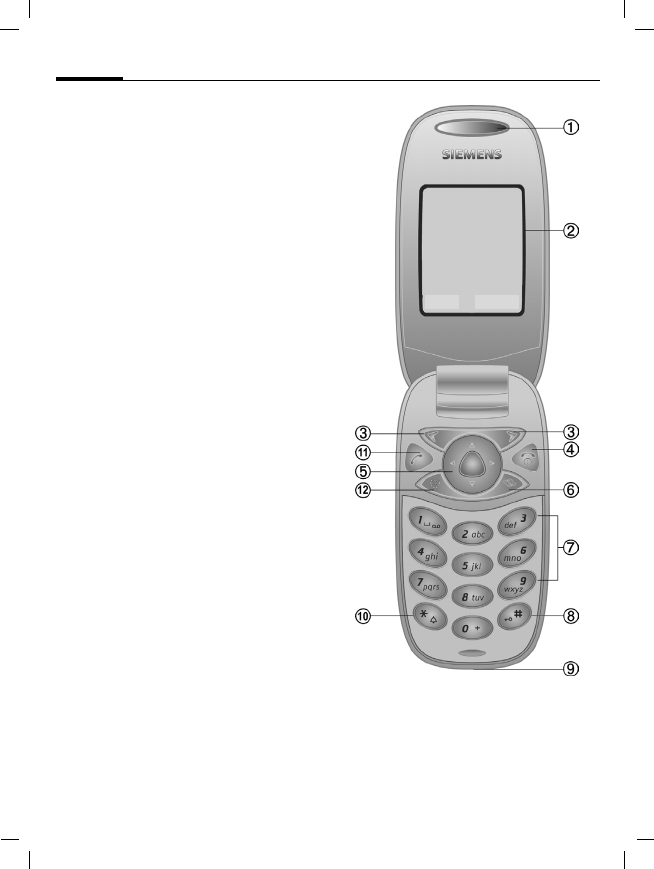
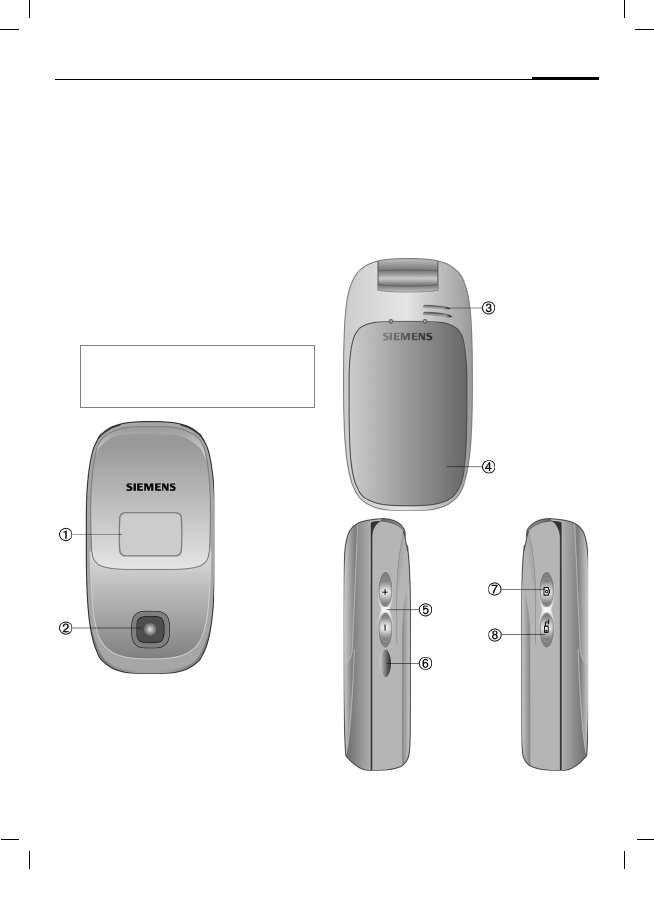
Phone Overview
1 Loudspeaker
2 Main display
Display time, date, service provider,
available functions, and icons of battery
and reception.
3 Right/Left softkey
Select functions available on the bottom
line of the display.
4 On/Off/End key
• Switched on/off: Press and hold to
power on/off the phone.
• During a conversation or in an applica-
tion: Press briefly to go back a level.
Press and hold to go back to standby
mode.
• In standby mode: Press and hold to
switch off the phone.
5 Navi key
C Press down the navi-key to start an
application or function.
In standby mode:
C Open main menu.
G Open Shortcut.
H Open Contacts.
In lists, messages and menus:
I Scroll up and down.
During a call:
I Set volume.
D Open menu.
6 Additional key for WAP access
(if required, and no other default setting
is made.)
7 Numeric keys
8 Key lock
Press and hold in standby mode:
Switch key lock on/off.
9 Connection socket
For charger, headset, flash, etc.
Z £ X
2005.06.01 12:00
Provider
Menu Contacts
© Siemens AG 2003, D:\Werkstatt\CL75 am fcc\S_WEGA_Overview.fm
7Phone Overview
VAR Language: en; VAR issue date: 050210
left page (7) of S_Wega CL75 am, A31008-H1550-A40-1-7619 (10.03.2005, 15:21)
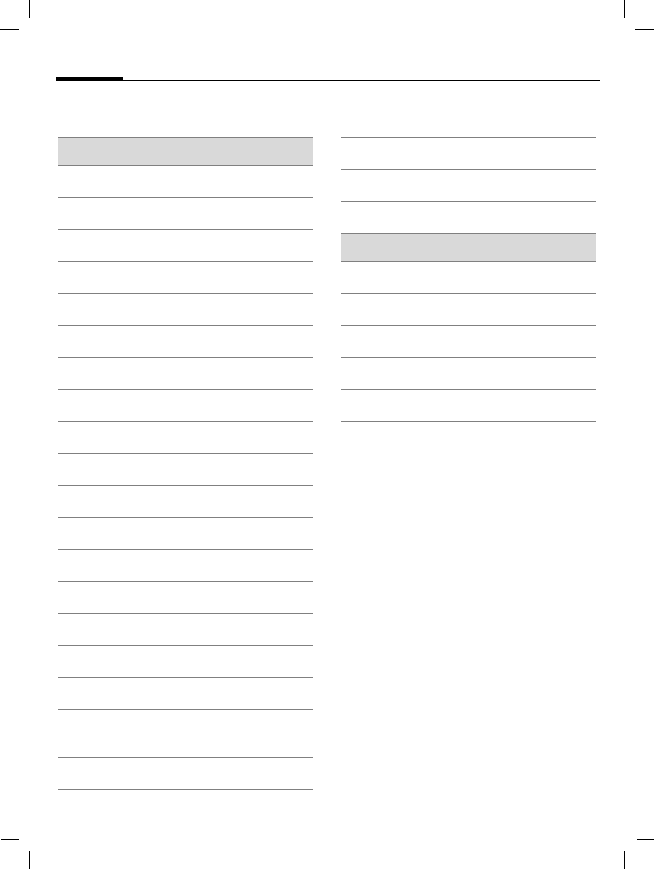
: Ring tone
• Press and hold in standby mode:
Switch ringtones on/off (except alarm).
• Press and hold on incoming call:
Switch off ringtone for this call only.
! Call key
Dial phone number/name dis-
played/highlighted, take calls. Show last
phone numbers dialled in standby
mode.
" Display key
Press to turn on/off the display to use it
as a mirror.
Note
The keypad is still active with turned off
display.
1 Second display
Displays time, date, service provider,
and icons of battery and reception.
2 Camera lens
3 Loudspeaker
4 Battery bay
Z X
Tu 12:18
1Provider
5 Volume keys
navigate up/down
6 Infrared Interface (IrDA)
7 Camera button
Press to take a self-portrait picture (see
page 30) via the mini display.
8 Handsfree mode
© Siemens AG 2003, D:\Werkstatt\CL75 am fcc\S_WEGA_Displaysymbols.fm
Display symbols8
VAR Language: en; VAR issue date: 050210
left page (8) of S_Wega CL75 am, A31008-H1550-A40-1-7619 (10.03.2005, 14:32)
Display symbols
Display symbols (selection)
Z Signal strength
W Battery charge level, e.g. 50%
L Contacts
P Records
O Internet
R Camera
M Messages
Q Organiser
} Ringtones
| Alarm clock
S Extra
N My Stuff
T Settings
~ Games
‘ All calls are diverted.
¿ Ringing tone off.
¾ Short ring (beep) only.
¼ Ring tone only if the caller is
stored in the Phonebook.
¹ Alarm set.
Å Auto answer features on.
£ Activated and available.
Ä Keypad locked
Message symbols (selection)
p Unread
q Read
s Sent
w MMS received
y MMS with DRM contents
© Siemens AG 2003, D:\Werkstatt\CL75 am fcc\S_WEGA_Startup.fm
9Getting started
VAR Language: en; VAR issue date: 050210
left page (9) of S_Wega CL75 am, A31008-H1550-A40-1-7619 (10.03.2005, 15:21)
Getting started
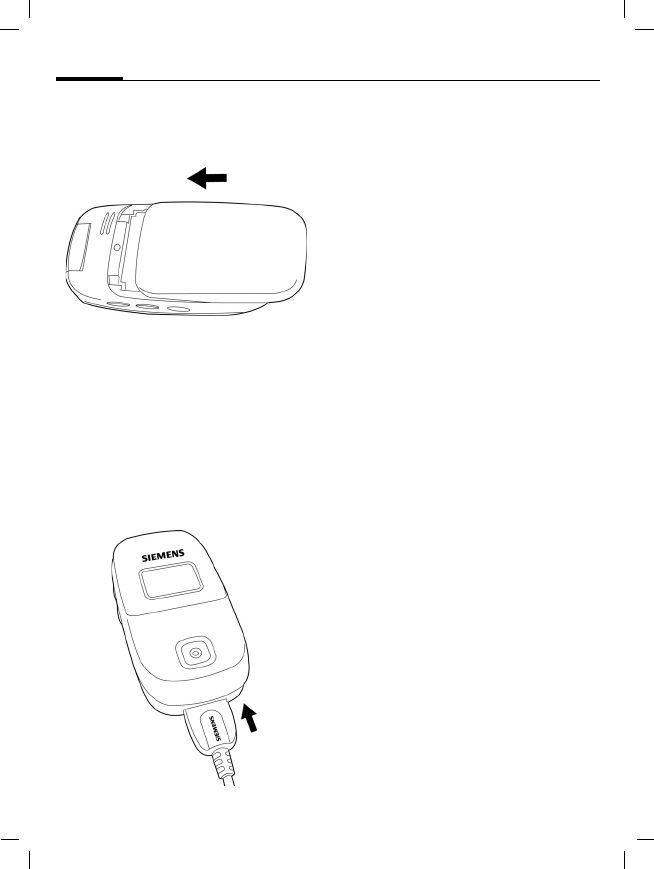
Inserting the SIM card/
battery
The service provider supplies you
with a SIM card on which all the im-
portant data for your line is stored. If
the SIM card has been delivered in
credit-card size, snap the smaller
segment out and remove any rough
edges.
• Slide backward to open the door
of battery compartment. Push the
battery towards the hinge and lift
it up.
Notice the SIM card direction 1.
• Insert the SIM card into the slot
with the contact surface facing
downwards (ensure that the cham-
fered corner is in the correct
position).
• Insert the battery back to the
phone 2, then press it down-
wards until it engages 3.
Additional Information
Please power off your phone before remov-
ing the battery!
Only 3 V SIM cards are supported. Please
contact your service provider if your SIM
card wore out.
1
3 2
© Siemens AG 2003, D:\Werkstatt\CL75 am fcc\S_WEGA_Startup.fm
Getting started10
VAR Language: en; VAR issue date: 050210
left page (10) of S_Wega CL75 am, A31008-H1550-A40-1-7619 (10.03.2005, 15:21)
• Place the cover in position and
push it towards the front until it
latches into place.
Charging the battery
Charging the battery
The battery is not fully charged
when delivered. Plug charger cable
into the bottom of the phone, plug
power supply unit into a mains pow-
er socket and charge for at least
three hours.
YDisplay during charging.
Charging time
An empty battery is fully charged af-
ter about 2 hours. Charging is only
possible within a temperature range
of +5°C to 45°C. If the temperature
rises/falls 5°C above/below this, the
charge symbol flashes a warning.
The mains voltage specified on the
power supply unit must not be
exceeded.
Operating time
The operating time depends on the
respective conditions of use. Ex-
treme temperatures reduce the
phone's standby time. Avoid placing
the phone in the sun or on a heater.
Call time: 180 minutes
Standby time: 220 hours minimum
Charge icon not visible
If the battery is fully discharged, the
charge icon is not immediately visi-
ble when the power supply is
plugged in. It will appear after up to
two hours. In this case the battery is
fully charged after 3 to 4 hours.
Only use the plug-in power supply
included in delivery!
© Siemens AG 2003, D:\Werkstatt\CL75 am fcc\S_WEGA_Startup.fm
11Getting started
VAR Language: en; VAR issue date: 050210
left page (11) of S_Wega CL75 am, A31008-H1550-A40-1-7619 (10.03.2005, 15:21)
Display while in service
Charge level display during opera-
tion (empty – full):
V W X
A beep sounds when the battery is
nearly empty. The charge level of the
battery is only displayed correctly af-
ter an uninterrupted charging/dis-
charging cycle.
Do not remove the battery when the
phone has not finished the charging
process.
Switching phone on/off
BPress and hold the key to
power on the phone.
Enter PIN
The SIM card can be protected with a
4 to 8-digit PIN.
JEnter the PIN using the
number keys. The charac-
ters **** appear to ensure
nobody can read your PIN
on the display. Correction
with §Clear§.
§OK§ Confirm. Logging on to
the network will take a
few seconds.
Emergency number
(SOS)
Only to be used in real emergencies!
By pressing the softkey §SOS§ you can
make an emergency call on any net-
work without a SIM card and without
entering a PIN (not available in all
countries).
Additional information
The power supply unit heats up when used
for a long time. This is normal and not
dangerous.
If the battery is removed for longer than
30 seconds, the clock will be reset.
Additional information
Change PIN..................................page 16
Clear SIM card barring .................page 17

© Siemens AG 2003, D:\Werkstatt\CL75 am fcc\S_WEGA_Startup.fm
Getting started12
VAR Language: en; VAR issue date: 050210
left page (12) of S_Wega CL75 am, A31008-H1550-A40-1-7619 (10.03.2005, 15:21)
Switching on your phone
for the first time
Time / date
When using the phone for the first
time, set the clock so that it displays
the correct time. You will not have to
make this setting again.
§Edit§ Press this key to start set-
ting date and/or date.
§Change§ Press to select the date
from a calendar.
JFirst enter the date
(day/month/year), then
the time (24 hours, in-
cluding seconds).
§Save§ Press this key to confirm
the setting.
Time zone
ISelect the time zone.
§Options§ Select the desired time
zone. Or choose to turn
on/off Auto time.
Copying SIM addresses
The first time you insert your SIM
card, the entries on it can be copied
to your phone memory. Please do not
interrupt this procedure. During this
time, do not accept incoming calls. Fol-
low the instructions in the display.
You can also copy data from the
SIM card at a later time (please see
page 25).
© Siemens AG 2003, D:\Werkstatt\CL75 am fcc\S_WEGA_Startup.fm
13General instructions
VAR Language: en; VAR issue date: 050210
left page (13) of S_Wega CL75 am, A31008-H1550-A40-1-7619 (10.03.2005, 15:21)
General instructions
Standby mode
When the phone displays the name
of your service provider, it is in stand-
by mode and ready for use.
BPress to return to standby
mode from any situation.
Signal strength
ZStrong signal received.
[Weak signal. The quality
to call and receive a call is
poor, which may lead to
loss of connection.
Change location.
Digital Rights Mgmt.
(DRM)
Remember that your telephone has
digital rights management. The use
of downloaded pictures, tones or ap-
plications can be restricted by the
suppliers, e.g. copy protection, use
for a limited period of time only,
number of times it can be used etc.
Main menu
The main menu is displayed graphi-
cally with symbols:
CCall up the main menu
from standby mode
F/ISelect the application
symbols.
CStart an application.
Main menu options
COpen menu.
Different functions are available de-
pending on the context:
Big letters Selection between two
font sizes.

© Siemens AG 2003, D:\Werkstatt\CL75 am fcc\S_WEGA_Startup.fm
General instructions14
VAR Language: en; VAR issue date: 050210
left page (14) of S_Wega CL75 am, A31008-H1550-A40-1-7619 (10.03.2005, 15:21)
User guide
Menu controls
In this manual, all the steps are
shown graphically and simply as
follow:
C¢I¢M
This comprises the following steps:
COpen main menu.
I or F
Navigate up/down or
right/left to the desired
item.
§Select§ Confirm your choice (by
pressing the left or right
softkeys.
Menu speed dialling
All menus are numbered so that a
function (such as writing a new SMS)
can be selected directly from stand-
by mode by entering a number:
CPress this key to display
the main menu.
5Press this key for
Messages.
Symbols
The following symbols are used to
explain operation:
J Enter numbers/letters
B On/Off/End key
A Call key
</> Right/left softkeys
§Menu§ Displays a softkey function.
C Press the joystick vertically,
e.g., to call up the menu or
to confirm a setting.
F/I Press the joystick in the di-
rection indicated.
= Function dependent on
service provider, special
registration may be
required.
© Siemens AG 2003, D:\Werkstatt\CL75 am fcc\S_WEGA_Startup.fm
15Standard functions
VAR Language: en; VAR issue date: 050210
left page (15) of S_Wega CL75 am, A31008-H1550-A40-1-7619 (10.03.2005, 15:21)
Standard functions
Option menus
List of functions repeatedly appear in
options menus.
§Options§ Open menu.
Highlighting mode
Highlight one or more entries in or-
der to perform a function on it/them.
§Options§ Open menu.
Mark Activate mode.
§Mark§ Highlight a non-highlight-
ed entry.
§Unmark§ Remove the highlighting
from a highlighted entry.
Additional highlighting functions:
Edit Open the entry to edit.
View View entry details.
Delete/
Delete all Delete one/all entries after
confirmation.
New entry Create a new entry.
Send Select transmission service
and medium for sending.
Reply/
Reply all The sender becomes the
recipient. "Re" is placed in
front of the subject matter
and the received text is
transferred into the new
message.
Save Store entry.
Save to: Save recipients in the cur-
rent address directory.
Text input
(page 18)
T9 preferred: Activate/de-
activate T9 input. Input lan-
guage: Select language for
text.
Capacity Display memory capacity.
Help Display instructions.
Mark All Highlight all entries.
© Siemens AG 2003, D:\Werkstatt\CL75 am fcc\S_WEGA_Startup.fm
Security16
VAR Language: en; VAR issue date: 050210
left page (16) of S_Wega CL75 am, A31008-H1550-A40-1-7619 (10.03.2005, 15:21)
Security
This section explains how to protect
your phone against unauthorized
use.
Codes
C¢T¢Security
¢PIN codes
¢Select function.
PIN control
The PIN is usually requested each
time the phone is switched on. You
can deactivate this feature but you
risk unauthorized use of the phone.
Some service providers do not per-
mit deactivating the control.
IGo to the PIN Control.
§Change§ Select to change PIN
Control.
JEnter PIN.
§Change§ Confirm input.
§OK§ Press to store the entry.
Change PIN
You can change the PIN to any
4- to 8-digit number you find easier
to remember.
JEnter current PIN.
CConfirm.
J/CEnter new PIN.
J/CEnter new PIN again.
Keep these confidential numbers in a
safe place where you can access them
again if required.
PIN Protects your SIM card (per-
sonal identification number).
PIN2 This is needed to set the
charge detail display and to
access additional functions on
special SIM cards.
PUK
PUK2 Key code. Used to unlock SIM
cards after the wrong PIN has
been entered repeatedly.
Phone
code Protects your phone. Must be
entered at the first security
setting.

© Siemens AG 2003, D:\Werkstatt\CL75 am fcc\S_WEGA_Startup.fm
17Security
VAR Language: en; VAR issue date: 050210
left page (17) of S_Wega CL75 am, A31008-H1550-A40-1-7619 (10.03.2005, 15:21)
C¢T¢Security
¢PIN codes
¢Select function.
Change PIN2
(Display only if PIN2 is available).
Proceed as with Change PIN.
Change phone code
You define the phone code
(4-8 digits) when you call up a
phone-code protected function for
the first time (See page 16). It is then
valid for all phone-code protected
functions.
If you fail to enter the correct
PIN number for the third time, ac-
cess to the phone code and the func-
tions that use it is denied. If this oc-
curs, contact the Siemens Service
Center (page 58).
Clearing SIM card barring
If the PIN is entered incorrectly three
times, the SIM card is barred. Enter
the PUK (MASTER PIN) provided by
your service provider with the
SIM card in accordance with the
instructions.
If the PUK (MASTER PIN) has been
lost, please contact your service
provider.
Preventing accidental
activation
Even if PIN use is deactivated, confir-
mation is required to switch on the
phone.
This prevents accidental activation
of the phone, e.g. when you are car-
rying it in a bag or when you are trav-
elling in an aircraft.
BPress and hold the key.
§OK§ Press §OK§ to switch on the
phone.
§Cancel§ Press §Cancel§ or take no
action. The phone does
not switch on.
Block or unblock the keypad in
standby mode. In each case:
#Press and hold.
© Siemens AG 2003, D:\Werkstatt\CL75 am fcc\S_WEGA_Text.fm
Text entry18
VAR Language: en; VAR issue date: 050210
left page (18) of S_Wega CL75 am, A31008-H1550-A40-1-7619 (10.03.2005, 14:32)
Text entry
Text entry without T9
Press number key repeatedly until
the required letter appears.
Example:
2Press once briefly to enter
the letter a, twice to enter
b etc.
§Clear§ Press briefly to delete the
letter before the cursor,
press and hold to erase the
whole word.
FMove the cursor (for-
ward/back).
#Press briefly: Swap be-
tween abc, Abc, T9abc,
T9Abc, T9ABC, 123.
Press and hold: All input
variants are displayed.
*Press briefly: Special char-
acters are shown.
Press and hold: Open
edit menu.
0Press once/repeatedly:
. , ? ! ’ " 0 + - ( ) @ / : _
Press and hold: Writes 0.
1Writes blank.
Press twice = line break.
Special characters
*Press briefly.
1) Space
F/INavigate to the desired
characters.
</ >
Select the character/Clear
the character.
Options Menu
Send, Save, Format, Picture & sound,
Insert, Clear text, Send With……
Text input with T9
"T9" combines the correct value from
the various key inputs.
#Activate deactivate text
entry mode, e. g. T9.
INavigate to the desired
mode such as T9abc.
Select.
1) ¿¡ _; . ,
?! +- * ‘ : “
/ ( ) ¤¥$£€
@\&#[]{}
%~ < = > |^§
Γ ∆ Θ Λ Ξ Π Σ Φ
Ψ Ω
© Siemens AG 2003, D:\Werkstatt\CL75 am fcc\S_WEGA_Text.fm
19Text entry
VAR Language: en; VAR issue date: 050210
left page (19) of S_Wega CL75 am, A31008-H1550-A40-1-7619 (10.03.2005, 14:32)
Select Input language
C¢T¢Phone setup
¢Language¢T9 input
¢display language.
IScroll to the desired lan-
guages. Select.
Write with T9
It is best if you finish a word without look-
ing at the display.
You simply press the keys where the
relevant letter is located once only.
1/EA blank space or moving
to the right ends the
word.
Do not use special characters such as
Ä. Instead use the standard charac-
ters such as A and T9 will do the rest
for you.
T9 word suggestions
If several options are found in the
dictionary for a word, the most prob-
able is displayed first.
^Press this key. If the word
is incorrect, press the key
again.
^Press this key until the
correct word is displayed.
Add a new word to the dictionary:
§Spell§ Select and enter word
without T9. And
then §Save§.
Correct a word
Words written with T9:
FMove left or right, word
by word, until the re-
quired word is
§highlighted§.
^Scroll through the T9
word suggestions again.
§Clear§ Deletes the character to
the left of the cursor and
displays a new possible
word!
Text Modules
C¢M¢Text Modules
Text modules can be stored in the
phone for adding to your messages
(SMS, MMS).
Additional information
#Press briefly: Switch be-
tween: abc, Abc, T9abc,
T9Abc, T9ABC, ABC, 123.
#Press and hold: All input
modes are displayed.
T9® Text Input is licensed under one or more of
the following:
U.S. Pat. Nos. 5,818,437, 5,953,541, 5,187,480,
5,945,928 and 6,011,554;
United Kingdom Pat. No. 2238414B;
Hong Kong Standard Pat. No. HK0940329;
Republic of Singapore Pat. No. 51383;
Euro. Pat. No. 0 842 463 (96927260.8)
DE/DK, FI, FR, IT, NL, PT, ES, SE, GB; and addi-
tional patents are pending worldwide.

© Siemens AG 2003, D:\Werkstatt\CL75 am fcc\S_WEGA_Phone.fm
Calling20
VAR Language: en; VAR issue date: 050210
left page (20) of S_Wega CL75 am, A31008-H1550-A40-1-7619 (10.03.2005, 14:32)
Calling
JEnter the number (always
with prefix/international
dialing code).
§Clear§ A short press clears the
last digit; a long press
clears the entire phone
number.
ADial phone number.
End a call
BPress the End key briefly.
Or
Close the clamshell.
Set volume
IDuring the call, press up-
wards/downwards in or-
der to regulate the
volume. Or you may press
the volume key on the
right side of your phone.
Redial previous numbers
APress twice to redial the
phone number last called:
Call up the redial list:
APress once.
IPick out a phone number,
then to select it.
APress to redial.
Accept call
With open clamshell:
APress to receive a call.
With closed clamshell: open phone
to answer a call.
Reject call
BPress to reject a call.
Call options
§Options§ See functions only availa-
ble during the call.
Additional information
Accept the call before bringing the tele-
phone to your ear in order to avoid ear
damage caused by the ringing tones.
ÐStore phone number in the ad-
dressbook/phonebook.
§Handsf.§§ Playback via loudspeaker
(hands-free calling).
Always switch off "handsfree
talking" before holding the
phone to your ear! Otherwise,
you will damage your hearing!
*Press and hold to switch mi-
crophone off.
International dialling codes
0Press and hold until a "+" is
displayed.
§Country:§ Select country.

© Siemens AG 2003, D:\Werkstatt\CL75 am fcc\S_WEGA_Phone.fm
21Calling
VAR Language: en; VAR issue date: 050210
left page (21) of S_Wega CL75 am, A31008-H1550-A40-1-7619 (10.03.2005, 14:32)
Swapping between
2calls b
Establish a second connection
§Hold§ Hold current call, then di-
al the new phone
number.
§Swap§ Swapping between calls.
Incoming calls during a call
You will hear a "knocking tone" and
you can now:
•Accept the waiting call in addition to
the first
§Swap§ Accept the call and put
the current call on hold.
•Reject the waiting call
§Reject§ Reject the call.
•Accept the waiting call and end the
current call
BEnd a call.
CAccept a new call.
End call(s)
BPress the End key.
Conference b
You call 5 up to conference partici-
pants one after the other. Once you
have established a connection:
§Hold§ Select to put the current
call on hold.
JNow dial a new
number.When the new
connection is established.
§Options§ Open menu and select
Conference. Repeat until
all participants are con-
nected.
End
BWhen the End key is
pressed, all calls in the
multiparty conversation
are ended.
Tone sequences (DTMF)
Open phone book to select a number
to send as DTMF.
§Options§ Open menu and select
Send DTMF.
© Siemens AG 2003, D:\Werkstatt\CL75 am fcc\S_WEGA_Pref_Book.fm
Contacts22
VAR Language: en; VAR issue date: 050210
left page (22) of S_Wega CL75 am, A31008-H1550-A40-1-7619 (10.03.2005, 14:32)
Contacts
C¢L¢Select function.
You can save phone numbers or in-
formation either in the phone's
memory or in the SIM card memory.
In Contacts all entries are shown,
whereas the SIM contacts only list
entries saved on the SIM card.
Show entries
The entries in the standard directory
are shown. Note that when you nav-
igate to an entry, the phone would
voice the name.
FYou may scroll between
different categories for
Contacts: All contacts,
Groups, and SIM contacts.
J/ISelect a name with the
first letter and/or scroll.
New entry
Create a new entry in your phone-
book or SIM card memory.
C¢L¢New entry
¢SIM or Phone ¢edit
Entry items differ between SIM and
Phone memory. The SIM memory
usually contains items such as
Name, Phone, Groups, Location, and
Record no. The phone memory con-
tains more entry items: Name, Phone:,
Tel./office:, Tel./mobile:, Fax:, Notes,
Company:, Addr. Buz. Street:, Post
code:, Country:, City:, URL:, Birthday,
Date, Time, Groups, Caller ID : and
Melodies.
Business card
Create your own business card to
send to a different GSM-phone. If no
business card has been created yet,
you will be asked for your input.
IMove from field to field to
put in your details.
§Save§ Press to store the entry.
Additional information
The content of the business card corre-
sponds to international standards (vCard).
Copy numbers from Addressbook/
Phonebook.

© Siemens AG 2003, D:\Werkstatt\CL75 am fcc\S_WEGA_Pref_Book.fm
23Contacts
VAR Language: en; VAR issue date: 050210
left page (23) of S_Wega CL75 am, A31008-H1550-A40-1-7619 (10.03.2005, 14:32)
Predial
The phone allows you to predefine
5 phone numbers so that you can
speed up dialling.
C¢L
¢All contacts/SIM contacts
¢Predial ¢edit
Groups
9 groups are specified in your phone,
enabling you to arrange your Con-
tacts entries clearly. You can rename
8groups.
COpen Contacts (in standby
mode).
<Groups> Select (the number of en-
tries is listed behind the
group name).
ISelect group.

© Siemens AG 2003, D:\Werkstatt\CL75 am fcc\S_WEGA_Phonebook.fm
Phonebook24
VAR Language: en; VAR issue date: 050210
left page (24) of S_Wega CL75 am, A31008-H1550-A40-1-7619 (10.03.2005, 14:32)
Phonebook
Entries in the Phonebook (on the SIM
card) are managed separately from
those in the phone memory. There
are Name, Phone, Groups, Location,
and Record no.
New entry
If the Phonebook has been selected
as standard:
HOpen Contacts (in standby
mode).
HSelect <New entry>.
CDisplay input fields.
INavigate between and fill
in the input fields.
Phone number
Always enter phone number with
prefix. An entry can be saved with-
out a phone number.
Name
Enter first and/or last names.
Groups
Default No group
Important phone numbers can be
combined together in a group (VIP).
Location
Default SIM
Special SIM cards can save phone
numbers in a protected area
(<Protected SIM>) (PIN2 required).
Record no.
Is automatically allocated to every
entry. The phone number can be
dialled with your record number.
§Save§ Press to store the new
entry.
Call/sort an entry
HOpen Contacts.
J /ISelect a name with the
first letter and/or scroll.
ANumber is dialed.
Change entry
ISelect entry in
Phonebook.
§Options§ Press.
§Edit§ Select.
ISelect desired input field.
JMake changes.
§Save§ Store the entry.
© Siemens AG 2003, D:\Werkstatt\CL75 am fcc\S_WEGA_Phonebook.fm
25Phonebook
VAR Language: en; VAR issue date: 050210
left page (25) of S_Wega CL75 am, A31008-H1550-A40-1-7619 (10.03.2005, 14:32)
Phonebook options
The following functions are availa-
ble, depending on the current
situation.
§Options§ Open menu.
<Spec. Books>
HOpen Contacts and select
<Spec. Books>.
<Own numbers>
Enter "own" phone numbers
in Phonebook (e.g., fax) for
information.
<SIM phonebook>
Entries stored in the Phonebook on
the SIM card can also be used on oth-
er GSM phones.
<Protected SIM>
On special SIM cards, phone num-
bers can be stored in a protected lo-
cation. PIN2 is required for editing.
View See details.
Copy to Phone Copy the selected entry
to the phone.
Move to.. Move the highlighted
entry to a desired
group.
Delete Delete the entry
Mark Mark entry.
Send Send entry via SMS,
MMS or IrDA.
Sort Sort entries by first or
last name.
Memory status Status of used and free
memory.

© Siemens AG 2003, D:\Werkstatt\CL75 am fcc\S_WEGA_Records_Time.fm
Call records26
VAR Language: en; VAR issue date: 050210
left page (26) of S_Wega CL75 am, A31008-H1550-A40-1-7619 (10.03.2005, 14:32)
Call records
Phone numbers are saved to make it
easier to redial them.
C¢P
FSelect record.
COpen call list.
ISelect phone number.
ADial phone number.
Every record list has a capacity of
50 entries:
Dialed calls
Access to the last numbers dialled.
AFast access in standby
mode.
Missed calls
The phone numbers of calls that you
have received but not answered are
stored for call back purposes.
Received calls
Accepted calls are listed.
Call options
§Options§ Open the Option menu.
Functions may be differ-
ent depending on the
text: View, Extract number,
Store, Delete, Delete all,
Send SMS, and Send MMS.
Other calling information
Other calling information is saved
for your reference. Information con-
tains details for calling duration and
call cost.
C¢P
FScroll left or right to the
calling history.
Available information is:
Last call duration, Total incoming dura-
tion, Total outgoing duration, All calls
cost and Cost left.
CNavigate to the desired
item.
§Options§ Open the following
options:
Reset Delete the item.
Reset all Delete all items from the
list.

© Siemens AG 2003, D:\Werkstatt\CL75 am fcc\S_WEGA_Records_Time.fm
27Call records
VAR Language: en; VAR issue date: 050210
left page (27) of S_Wega CL75 am, A31008-H1550-A40-1-7619 (10.03.2005, 14:32)
Charge settings
Opens menu of following options:
Currency
Edit your currency.
Personal rate
Enter the currency as well as the
charge per unit and time.
Auto display
Call duration and charges are auto-
matically displayed.
Max cost
Special SIM cards allow you or the
service provider to define a credit or
a period after which the phone is
barred for outgoing calls.

© Siemens AG 2003, D:\Werkstatt\CL75 am fcc\S_WEGA_Internet.fm
Internet28
VAR Language: en; VAR issue date: 050210
left page (28) of S_Wega CL75 am, A31008-H1550-A40-1-7619 (10.03.2005, 14:32)
Internet
Get the latest information from the
Internet that is specifically adapted
to the display options of your phone.
In addition, you can download
games and applications to your
phone. Internet access may require
registration with the service
provider.
Internet
C¢O¢Internet
The browser is activated with the
pre-set option as soon as you call up
the function (Browser settings may
be specified/pre-assigned by service
provider).
Main menu
<URL-Siemens/Provider>
Open the predefined
Siemens URL.
Bookmarks Display bookmarks stored
in the phone; save
bookmark.
Internet Link to the Internet.
WAP settings
Enter to edit/launch the
WAP.
Browser menu
Before connecting to the Internet,
you may select one of the following
menu options:
>Open Menu.
ISelect Retry, Done, or
Menu.
Menu options
Home Go back to the
homepage.
Open Page Open the page.
Mark Page Mark the page.
Forward Forward the page.
Reload Refresh the page.
Advanced For more functions.
Advanced menu
Settings You may change settings
for Homepage:, Download,
Scroll Mode, Key Press Time-
out, Circuit Prompt, and
Resend Data Prompt.
Security Options include Secure
Prompt, Current Certificate,
CA Certificates, Send Refer-
rer, Authentication.
Clear You may clear History,
Cache, Cookies, and
Auto Fill.
Restart Browser
Click to refresh the
browser.
About Software addition of the
mobile browser.
After being connected to the Inter-
net, you may select the following
functions:
© Siemens AG 2003, D:\Werkstatt\CL75 am fcc\S_WEGA_Internet.fm
29Internet
VAR Language: en; VAR issue date: 050210
left page (29) of S_Wega CL75 am, A31008-H1550-A40-1-7619 (10.03.2005, 14:32)
Navigate Navigate allows you to do
such functions as Home,
Open Page, Mark page,
Reload, Inbox and
Advanced.
Bookmark You may select More to
see more favorite URLs or
go to the Saved Pages.
History The URL history list.
Tools Functions include Show
URL, Send Link, Save
Items, Save page, Find
Text, and Copy Text.
End connection
BPress and hold to cancel
the connection and close
the browser.
Navigation in the browser
Enter special characters
#/*Select important special
characters.
Profiles
Preparation of the phone for Internet
access depends on the service pro-
vider concerned:
Profile pre-set
In most cases, access profiles have
already been created for one or more
service provider(s).
ISelect profile.
CActivate profile.
Set profile manually
You will receive the necessary data
from the service provider or via the
"Setting Configurator" at:
www.siemens.com/
mobilephonescustomercare
Bookmarks
C¢O¢Bookmarks
URLs stored in the phone are dis-
played. New bookmarks can be
saved. It is possible to process or
manage bookmarks in files.
C • Select a link.
• Settings, status, on/off.
B Press briefly to return to the
previous page.
I • Open the input field/link forward/
back.
• Scroll one line.
Your Internet browser is licensed by:

© Siemens AG 2003, D:\Werkstatt\CL75 am fcc\S_WEGA_Camera.fm
Camera30
VAR Language: en; VAR issue date: 050210
left page (30) of S_Wega CL75 am, A31008-H1550-A40-1-7619 (10.03.2005, 14:32)
Camera
You can view photos/videos record-
ed on the integrated camera imme-
diately and,
• Use the photo as a background
image, logo, a switch on/off ani-
mation or a screensaver
• Send the photo/video via MMS.
Switch on
C¢R
Or
aPress the camera button
on the side of the phone.
Select the mode from the option
menu.
The current (preview) image is dis-
played. You will see the following in
the first line from left to right:
ÙBrightness.
ÚZoom factor.
×Flash connected.
Beneath the preview image, you will
find a reference to the selected reso-
lution.
Take a Picture
This phone allows you to take a pic-
ture with the fold open or closed.
With the open fold, you may take a
picture of others via the main dis-
play, while closed fold allows you to
self-portrait via the mini display.
To take a picture with open
clamshell:
CTakes a photo.
CDisplays the preview im-
age of the next photo.
To take a picture with folded
clamshell:
aTakes a photo.
The photo is saved with a name, the
date and the time. To enter the
name, see Setup in the options
menu.
Settings prior to taking a photo:
FSets the brightness.
ISets the zoom factor.
© Siemens AG 2003, D:\Werkstatt\CL75 am fcc\S_WEGA_Camera.fm
31Camera
VAR Language: en; VAR issue date: 050210
left page (31) of S_Wega CL75 am, A31008-H1550-A40-1-7619 (10.03.2005, 14:32)
Image resolution
A setting can be made for the quality
of the image regardless of the pre-
view image resolution.
The resolution may decrease de-
pending on the selected digital
zoom.
Record Video
The video mode resolution is the
same as the preview image
resolution.
CStart the video recording.
CTerminate the video
recording.
A red point appears in the top right
in the display while the video record-
ing is being made.
§Play§ Plays the video recording.
Flash (Accessories)
If the flash is active, this is shown by
a symbol in the display. The flash is
constantly loaded while connected
to the telephone. This reduces the
stand-by time.
×This symbol flashes when
the flash is being loaded.
Settings, see options
menu.
Camera options
The following functions are availa-
ble, depending on the current
situation.
§Options§ Open menu.
Premium: 640 × 480 (VGA)
High: 320 × 240 (QVGA)
Medium: 160 × 120 (QQVGA)
Change
Mode Change between viewfind-
er camera or video.
Setting • File name for recordings
• Image resolution &
quality
View
pictures Displays list of photos.
Flash Choose between:
Automaic, Off, Red eye.
Shutter
Sound Select to define a sound
from the defined lis.
Twilight Select to turn on/off twilight
effect.
Portrait Select to turn on/off portrait
effect.
Other
videos Displays list of videos.
Help Follow the instruction to
take a picture.
Exit Exit the menu.

© Siemens AG 2003, D:\Werkstatt\CL75 am fcc\S_WEGA_Lists.fm
Message32
VAR Language: en; VAR issue date: 050210
left page (32) of S_Wega CL75 am, A31008-H1550-A40-1-7619 (10.03.2005, 14:32)
Message
Inbox
Your inbox is a central input folder
contains all texts and call records,
which have been received. The en-
tries are marked with a symbol to in-
dicate their type and status.
To call up the central input folder,
e.g. if a new SMS has been received:
pPress the softkey beneath
the symbol.
When you open an entry, the rele-
vant application also starts. After a
set time span, entries which have al-
ready been read and opened are only
displayed in the (§Options§) message-
related incoming lists.
In the central input folder, you will
find the following message types:
SMS, MMS
System messages
Message about MMS, Missed alarms,
Missed appointments., Missed calls,
Voice memo.
Message lists
All SMS, MMS are each displayed in
four separate lists.
C¢M¢Inbox
¢Select message type.
List of receive messages.
C¢M¢Draft
¢Select message type.
List of saved drafts.
C¢M¢Unsent
¢Select message type.
List of messages not yet
successfully sent.
C¢M¢Sent
¢Select message type.
List of received messages.
§Options§ Call up the function menu
to process the messages.

© Siemens AG 2003, D:\Werkstatt\CL75 am fcc\S_WEGA_SMS.fm
33SMS
VAR Language: en; VAR issue date: 050210
left page (33) of S_Wega CL75 am, A31008-H1550-A40-1-7619 (10.03.2005, 15:21)
SMS
You can transmit and receive mes-
sages (up to 1520/660 characters,
depending on entry method) on
your phone. They are automatically
composed of several "normal" SMS
messages (note higher charges). Ad-
ditionally you can insert pictures and
sounds in an SMS.
Writing/sending an SMS
C¢M¢Create new¢SMS
JEnter text (see also
page 15).
§Options§ Text creation
functions.
AStart sending procedure.
#/ JSelect phone number
from the Phonebook/ Ad-
dressbook or enter it.
CThe SMS is transmitted to
the service centre to be
sent.
Special functions
Picture & sound
Send the pictures and tones with or
without accompanying text. Re-
member that these may be protect-
ed (DRM, page 13).
The text input field is open:
§Options§ Open menu.
ISelect Picture & sound.
The menu contains: Fix an-
imations, Fix sounds, Own
animations, Own pictures,
Own sounds
ISelect area.
CConfirm. The first entry of
the selected section is
displayed.
IScroll to entry required.
For Fix animations/Fix sounds:
CThe selection is displayed/
played back.
§Select§ The selection is added to
the SMS.
SMS Archive
C¢M¢SMS Archive
The list of SMS messages stored in
the phone's archive is displayed.
They are sorted by Inbox or Outbox.
© Siemens AG 2003, D:\Werkstatt\CL75 am fcc\S_WEGA_SMS.fm
SMS34
VAR Language: en; VAR issue date: 050210
left page (34) of S_Wega CL75 am, A31008-H1550-A40-1-7619 (10.03.2005, 15:21)
SMS to group
You can send an SMS message as a
"circular" to a recipient group.
§Options§ Open menu.
§Send§ Select.
§Groups§ The list of groups is
displayed.
ISelect group.
COpen group and highlight
all/individual entries.
CSending is started after a
safety inquiry.
Read
pArrival of a new SMS an-
nounced in the display.
The Inbox is opened. It offers you a
quick overview of the messages cur-
rently received.
CTo read the SMS, press the
joystick.
IScroll through message
line by line.
Reply
After reading the received message,
you may reply right away. The new
additional text is placed above the
received text.
CReply immediately.
Making SMS settings
SMS signature
C¢M¢Message settings
¢SMS¢Signature
You can enter a "signature" with a
maximum of 16 characters. This sig-
nature will then be attached to each
SMS except §Reply§ and when chang-
es are made to an existing SMS.
Set signature
>Select §Edit§ to personalize
your signature.
ãIf this symbol flashes, the
SIMmemory is full. Delete or
file messages.
© Siemens AG 2003, D:\Werkstatt\CL75 am fcc\S_WEGA_MMS.fm
35MMS
VAR Language: en; VAR issue date: 050210
left page (35) of S_Wega CL75 am, A31008-H1550-A40-1-7619 (10.03.2005, 15:21)
MMS
The Multimedia Messaging Service
enables you to send texts, pictures/
videos and sounds in a combined
message to another mobile phone.
Depending on your telephone set-
ting, you will either receive the com-
plete message or only a notification
with sender details and size. The ac-
tual MMS can then be downloaded
manually later.
Writing an MMS
An MMS consists of the address
header and the content. This may
consist of a series of pages. Each
page may contain a text, a picture
and a sound. Remember that pic-
tures and sounds may be protected
(DRM, page 13).
Create standard MMS
C¢M¢Create new¢MMS
First select an object for processing
to be added to the first page of the
MMS:
Picture Select.
CDisplay picture/video
functions: Insert, Camera
Sound Select.
CDisplay sound functions:
Insert, Record
Text Select.
CDisplay text functions
(see also page 18).
Options
§Options§ Open menu.
Writing options
§Options§ Open menu.
Insert item Select from Picture, Video,
Sound, Text, Digital cam-
era, Video camera, Sound
recorder, and Page.
Picture For example, after you se-
lect an item, the menu goes
to My Stuff, and you many
select to insert any multi-
media item from My Stuff
folder.
Send Send MMS.
Insert item Insert items such as pic-
tures, video, sound, text,
digital camera, video cam-
era, Sound record, and
page.
Preview
MMS Play entire MMS on the
display.
Preview
page Preview the page.
© Siemens AG 2003, D:\Werkstatt\CL75 am fcc\S_WEGA_MMS.fm
MMS36
VAR Language: en; VAR issue date: 050210
left page (36) of S_Wega CL75 am, A31008-H1550-A40-1-7619 (10.03.2005, 15:21)
Template
C¢M¢Template
MMS templates are saved MMS with
not address. They can be sent as new
MMS or used as part of a new MMS.
Send
The page(s) of the new MMS is
(are) already created. The MMS is
displayed.
AOpen address only.
Subject: Enter a brief description
of the MMS.
To: Enter one or more phone
number(s).
Cc: Send a courtesy copy to
other recipients.
Sender visibility:
Select to turn on/off your
visibility status.
Priority: Options include Normal,
High, and Low.
Delivery report:
Select to/not to get a
delivery report.
Read report:
Select to get a report
whether the receiver read
the message yet.
Expiry time:
Expiry time include Maxi-
mum, 1 hour, 3 hours,
6 Hours, 12 hours, 1 day and
1 week.
Attachment Add attachment:
•File
•Business card
•Appointment
Page list Display MMS pages for
viewing and/or changing.
Msg. detail View the message details.
Timing Set the time.
Save After creating MMS, save it
as a template.
Delete Delete the MMS.
Help
Delete item This function is available
after you insert an item to
the MMS. Select to delete
the item you just inserted.
Replace
object This function is available
after you insert an item to
the MMS. Select to replace
with other objects.
© Siemens AG 2003, D:\Werkstatt\CL75 am fcc\S_WEGA_MMS.fm
37MMS
VAR Language: en; VAR issue date: 050210
left page (37) of S_Wega CL75 am, A31008-H1550-A40-1-7619 (10.03.2005, 15:21)
AStart sending procedure.
CThe MMS is sent after con-
firmation.
Receiving an MMS
p/wArrival of new MMS/notifi-
cation announced on
display.
<Press to view details of
the received message.
In order to receive the complete
MMS subsequently, the message
must be opened.
§Retrieve§ Start transfer.
Read
An MMS has been fully received.
CStart playback.
Key functions for playback:
ETo the next page.
DPress briefly once to return
to the start of the current
page.
IScroll the message up or
down.
C/BTerminate
The downloaded message includes
the following details:
Subject: A brief description of the
MMS.
To: One or more recipients'
phone number(s).
From: Indicating the sender's
phone number.
Cc: Send a courtesy copy to
other recipients.
Bcc: Send a blind courtesy
copy to other recipient.
Size: Display the MMS size.
Msg class: Indicate the type of the
message.
Sender visibility:
Select to turn on/off your
visibility status.
Priority: Options include Normal,
High, and Low.
Delivery report:
Select to/not to get a de-
livery report.
Read report:
Select to get a report
whether the receiver read
the message yet.
Note
To adjust volume, please use the side
keys.
© Siemens AG 2003, D:\Werkstatt\CL75 am fcc\S_WEGA_MMS.fm
MMS38
VAR Language: en; VAR issue date: 050210
left page (38) of S_Wega CL75 am, A31008-H1550-A40-1-7619 (10.03.2005, 15:21)
Contain DRM:
Indicates whether the
message has DRM
restriction.
Expiry time:
Directly shows the expiry
time and date.
Date: Shows when the message
was sent.
Message settings
C¢M¢Message settings
¢MMS¢Select function.
MMS profile
5 MMS profiles can be set. The send-
ing properties are specified in these
profiles. If the setting has not yet
been set, you will receive the neces-
sary data from the service provider
or via the "Setting Configuration" at:
www.siemens.com/
mobilephonescustomercare
ISelect profile
COpen to edit the profile.
Setting options
§Options§ Open menu.
Activate, Rename, Change settings.
User settings
Set the MMS dispatch to suit your
requirements:
Sender
visibility: Select to turn on or off for
sender visibility.
Priority: Send priority:
Normal, High, Low
Delivery
report: Request delivery confirma-
tion for sent messages.
Read
report: Request confirmation that
the MMS has been read.
Expiry time: Select the period in which
the service centre is to try
to deliver the message:
1 hour, 3 hours, 6 Hours,
12 hours, 1 day, 1 week,
Maximum*
* Maximum period that the
service provider permits.
Delivery
time: Transmission from the
service centre to the
recipient:
Immediate, Tomorrow
© Siemens AG 2003, D:\Werkstatt\CL75 am fcc\S_WEGA_MMS.fm
39MMS
VAR Language: en; VAR issue date: 050210
left page (39) of S_Wega CL75 am, A31008-H1550-A40-1-7619 (10.03.2005, 15:21)
Help
Select help to see more details about
message setting.
Retrieval: Receive complete MMS or
only notification of arrival.
Automatic
Receive complete MMS
immediately.
Auto. homenet
Receive complete MMS im-
mediately in home network
Manual
Only the notification is
received.
Spam filter: Settings for receipt of pro-
motional MMS.

© Siemens AG 2003, D:\Werkstatt\CL75 am fcc\S_WEGA_Mailbox_CB.fm
Voice mailbox/CB40
VAR Language: en; VAR issue date: 050210
left page (40) of S_Wega CL75 am, A31008-H1550-A40-1-7619 (10.03.2005, 14:32)
Voice mailbox/CB
Voice mailbox
C¢M¢Message settings
¢Voice mailbox
If you have a mailbox, a caller can
leave a voice message for you
• if your phone is switched off or
not ready to receive,
• if you do not want to answer,
• or if you are making a phone call.
You may have to register for this
function and make manual settings.
Setup
The service provider supplies you
with two phone numbers:
Save mailbox number
Call this phone number to listen to
your voice messages.
C¢M¢Message settings
¢Voice mailbox
Enter phone number and confirm
with §OK§.
Save call divert number
Calls are diverted to this phone
number.
C¢T¢Call setup
¢Call Diverts
¢Unanswered¢Set
Enter phone number and register it
at the network with §OK§.
Listening to message b
A new voice message can be an-
nounced as follows, depending on
the service provider:
ÀIcon plus beep.
Or
pNotification via SMS.
Or
You receive a call with an automatic
announcement.
Call your mailbox and play the mes-
sage(s) back.
1Press and hold (if neces-
sary enter mailbox
number once only).
Confirm with §OK§ and
§Mailbox§ depending on
your service provider.
Cell Broadcast
C¢M¢Message settings
¢Cell Broadcast
Some service providers offer infor-
mation services (info channels, Cell
Broadcast). If reception is activated,
your Topic list will supply you with
messages on the activated topics.
© Siemens AG 2003, D:\Werkstatt\CL75 am fcc\S_WEGA_Organizer.fm
41Organiser
VAR Language: en; VAR issue date: 050210
left page (41) of S_Wega CL75 am, A31008-H1550-A40-1-7619 (10.03.2005, 15:21)
Organiser
C¢Q¢Select function.
Calendar
You can enter new appointments in
the calendar. Time and date must be
set correctly.
The calendar offers you two views:
monthly view and weekly view.
The various entries are color-coded.
Appointments are shown as a verti-
cal color bar on the horizontal hour
division.
Navigation:
F/IScroll between
weeks/days/hours.
Appointment
Appointments are displayed in
chronological order in a list.
Enter new appointment
<New entry>
Select.
Types:
cMemo: Text input for
description.
dVoice memo: Enter voice
memos.
eCall: Enter phone number.
Shown with alarm.
fMeeting: Text input for
description.
gHoliday: Enter start and
end date.
hBirthday: Enter name and
date.
Different input/selection fields are
displayed depending on the type.
The number of fields can be restrict-
ed, see Standard at the end of the list.
Tasks
A task is displayed like an appoint-
ment in the agenda of the selected
day. However, unlike an appoint-
ment it does not require a time.
When no time is entered the task ap-
pears at the top of the list every day
until it is marked as completed. The
entries are made in the same was as
Appointment (see "Appointment").
Additional information
¹Alarm clock, alarm set.
»Scheduler, alarm set.
An alarm sounds even when the phone is
switched off (except in Aircraft mode).
The phone does not go to standby mode.
To deactivate it press any key.
© Siemens AG 2003, D:\Werkstatt\CL75 am fcc\S_WEGA_Organizer.fm
Organiser42
VAR Language: en; VAR issue date: 050210
left page (42) of S_Wega CL75 am, A31008-H1550-A40-1-7619 (10.03.2005, 15:21)
Notes
T9-support makes writing short
notes such as shopping lists easier.
Save confidential notes with the
phone code.
Missed appointments
Events with an alarm (Appointment,
Tasks) to which you have not reacted
are listed for reading.
Voice memo
Use this function to record short
voice memos.
New recording
<New entry>
Select.
CAfter a brief beep, speak
the memo.
CSwitch between
pause/record.
DEnd recording. The re-
cording is automatically
saved with a timestamp.
Rename with §Options§.
Playback
ISelect the desired
recording.
CSwitch between play-
back/pause.
D/EPress and hold for rapid re-
wind and fast forward.
World clock
See page 52.
Warning!
The use of this feature may be subject to
restrictions under criminal law.
Please inform the other party to the conver-
sation in advance if you want to record the
conversation and please keep such record-
ings confidential. You may only use this
feature if the other party to the conversa-
tion agrees.

© Siemens AG 2003, D:\Werkstatt\CL75 am fcc\S_WEGA_Games_Appl.fm
43Games & App
VAR Language: en; VAR issue date: 050210
left page (43) of S_Wega CL75 am, A31008-H1550-A40-1-7619 (10.03.2005, 15:21)
Games & App
You may download games and appli-
cations from the Internet. Once you
download them, they are sent via
your phone. Most applications in-
clude instructions. Some games and
applications are pre-installed on
your phone. Also, you may find oth-
ers here:
www.siemens.com/fundownloads and
wap.siemens.com
Requirements
Configure WAP profile and the
access before you start using the
function.
Download
Select the correct access depending
on whether you are loading games
or applications:
C¢~¢Games & App
In addition to URLs and service pro-
viders for the download, any availa-
ble applications/games and folders
are displayed.
Download new
ISelect a service provider
or URL.
CStart WAP browser and
visit URL.
Ringtones
See page 47.
Alarm clock
See page 47.
Additional information
You can use the browser to download applica-
tions (e.g. ringtones, games, pictures, anima-
tions) from the Internet.
Siemens excludes all warranty and liability
claims in respect of or in connection with any
applications subsequently installed by the
customer and any software not included in the
original delivery package. This also applies to
functions enabled subsequently at the cus-
tomer's instigation. The purchaser bears sole
risk for the loss of, damage to, and any defects
arising in, this device or the applications and
for any direct damage or consequential dam-
age of whatever nature resulting from the use
of this application. For technical reasons, such
applications and subsequent enabling of cer-
tain functions are lost in the event of the de-
vice being replaced/re-supplied and may be
lost if it is repaired. In such cases, the buyer is
required to download or enable the application
again. Please ensure that your phone has
Digital Rights Management (DRM) so that
downloaded applications are protected from
unauthorised reproduction. These applica-
tions are then exclusively intended for your
phone and cannot be transferred from this
even to create a backup. Siemens offers no
warranty or guarantee nor does it accept any
liability for the customer's ability to download
or enable applications again or to do so free of
charge. We recommend that you carry out a
backup from time to time of the applications
on your Windows® PC using the “Mobile
Phone Manager”
(www.siemens.com/cl75).

© Siemens AG 2003, D:\Werkstatt\CL75 am fcc\S_WEGA_Extras.fm
Extra44
VAR Language: en; VAR issue date: 050210
left page (44) of S_Wega CL75 am, A31008-H1550-A40-1-7619 (10.03.2005, 14:32)
Extra
C¢S¢Select function.
Calculator
The calculator can be used in a basic
version or with an extended range of
functions (§Options§).
JEnter digit(s).
F/INavigate functions.
CUse function.
Unit converter
You can convert various measure-
ment units into other measurement
units.
Sound recorder
Use the sound recorder to record
noises and tones for use as
ringtones.
New recording
<New entry>
Select. The remaining
time available, as well as
the recording time, are
shown in the display.
Start it from another application as
follows
The recording display appears:
CA brief beep sounds when
the recording starts.
CSwitch between
pause/record.
DEnd recording.
The recording is saved
with a timestamp in the
folder Sounds. Rename
with §Options§.
§Insert§ Transfer the recording in-
to the application.
Playback
ISelect the desired
recording.
CSwitch between play-
back/pause.
D/EPress and hold for rapid re-
wind and fast forward.

© Siemens AG 2003, D:\Werkstatt\CL75 am fcc\S_WEGA_Extras.fm
45Extra
VAR Language: en; VAR issue date: 050210
left page (45) of S_Wega CL75 am, A31008-H1550-A40-1-7619 (10.03.2005, 14:32)
Stopwatch
C¢S¢Stopwatch
Two intermediate times can be re-
corded and saved.
§Start§ Start/stop/reset to zero.
Countdown
C¢S¢Countdown
A set time elapses. The last
3 seconds are indicated by a beep.
At the end a special beep sounds.
Favorites
C¢S¢Favorites

© Siemens AG 2003, D:\Werkstatt\CL75 am fcc\S_WEGA_Setup.fm
Settings46
VAR Language: en; VAR issue date: 050210
left page (46) of S_Wega CL75 am, A31008-H1550-A40-1-7619 (10.03.2005, 15:21)
Settings
Profiles
C¢T¢Profiles
Several settings can be stored in a
phone profile in order, for example,
to adapt the phone to the surround-
ing level of noise.
• Five standard profiles are provided
with default settings. They can be
changed however: Normal envir.,
Quiet envir., Noisy envir., Car Kit, and
Headset.
• You can set two personal profiles
(<Name>).
• The special profile Aircraft Mode is
fixed and cannot be changed.
Profile settings
Edit a default profile or create a new
personal profile:
ISelect profile.
§Options§ Open menu and select
Change settings.
The list of available functions is
displayed.
When you have finished setting a
function, you return to the profile
menu where you can change a
further setting.
Car Kit
If an original Siemens Car Kit is used,
the profile is switched on automati-
cally as soon as the phone is inserted
into the cradle.
Headset
The profile is only switched on auto-
matically if an original Siemens
headset is used.
Aircraft Mode
All alarms (appointments, alarm
clock) are deactivated. This profile
cannot be modified.
Switch on
HScroll to Aircraft mode.
CConfirm selection.
§Select§ Press left softkey to
activate profile.
§Yes§Press right softkey to con-
firm that phone switches
to aircraft mode.
Normal mode
When you switch on your phone
again, the previously set profile will
be reactivated automatically.

© Siemens AG 2003, D:\Werkstatt\CL75 am fcc\S_WEGA_Setup.fm
47Settings
VAR Language: en; VAR issue date: 050210
left page (47) of S_Wega CL75 am, A31008-H1550-A40-1-7619 (10.03.2005, 15:21)
Ringtones
C¢T¢Ringtones
¢Select function.
Set the tones on the telephone to
suit your requirements.
Volume
Set different volumes for types of
call/functions.
Melody & Tone Setting
You may customize melody and
tones (depending on different items:
On/ off/ Beep) for the following
items: Calls, Messages, Appoint-
ments& Tasks, Alarm clock, Games,
Startup, Shutdown, Open clamshell,
and Close clamshell.
Alarm Clock
C¢}¢Select function.
Set the alarm clock
The alarm will ring at the time set by
you, even when the phone is
switched off. There are four alarm
clocks for your setting.
INavigate to the desired
alarm clock.
<Press Select to open the
menu options: Activate,
Edit, Delete, and Delete all.
Edit the Alarm clock
Details include Time, Weekday,
Status and Description.
You can set the alarm to repeat with
Pause.
Themes
C¢T¢Themes
Load a completely new user inter-
face in your telephone. At the press
of a button, various functions are re-
arranged thematically, e.g. start
up/shutdown animation, Wallpaper,
Screensaver, start-up/shutdown
melody, additional animations.
© Siemens AG 2003, D:\Werkstatt\CL75 am fcc\S_WEGA_Setup.fm
Settings48
VAR Language: en; VAR issue date: 050210
left page (48) of S_Wega CL75 am, A31008-H1550-A40-1-7619 (10.03.2005, 15:21)
It is possible that the existing set-
tings could be overwritten.
Topic files are compressed to save
memory space. After a download or
a call from My Stuff, these are auto-
matically unzipped when activated.
Activate new topic
ISelect topic.
CActivate new theme.
CConfirm.
Display
C¢T¢Display
¢Select function.
Wallpaper
Set wallpaper graphic for display.
Logo
Choose picture to be displayed in-
stead of the provider logo.
Screensaver
The screensaver shows a picture in
the display when a period set by you
has elapsed. An incoming call and
pressing any key will end the func-
tion except if the safety function is
activated.
Start up anim.
Shown when the phone is switched
on.
Shutdn anim.
Shown when the phone is switched
off.
Own greeting
Is displayed instead of an animation
when you switch on the phone.
Big letters
You can choose between two font
sizes for the display.
Illumination
You can select the illuminiation
duration.
Note
The Digital clock screensaver reduces the
phone standby time.
© Siemens AG 2003, D:\Werkstatt\CL75 am fcc\S_WEGA_Setup.fm
49Settings
VAR Language: en; VAR issue date: 050210
left page (49) of S_Wega CL75 am, A31008-H1550-A40-1-7619 (10.03.2005, 15:21)
Keypad backlight
Turn keypad light on/off.
Hide network name
Select to make network visible/
invisible.
Vibrator
C¢T¢Vibrator
Select to turn on/off the vibration.
Connectivity
C¢T¢Connectivity
¢Select function.
IrDA
Your phone has an infrared inter-
face. The distance between the two
devices must not exceed 30 cm. The
infrared windows in both appliances
must be aligned as accurately as pos-
sible with each other.
When activated the phone will scan
for other reachable devices support-
ing IrDA.
GPRS info
(General Packet Radio Service)
GPRS is a new method for transmit-
ting data faster in the mobile net-
work. Display connection informa-
tion. Displays the total number of
data transfered and time connected.
CSD settings
CSD function is available for your cell
phone. Before you start transmitting
data, you need to complete your CSD
settings with information such as us-
er name and password. Please con-
tact your service provider for de-
tailed information.
GPRS settings
If you are using GPRS connectivity
setting, you need to complete your
GPRS setting with information such
as user name and password. Please
contact your service provider for de-
tailed information.
www.siemens.com/
mobilephonescustomercare
Key setup
See page 55.
Note
This will decrease the standby time.

© Siemens AG 2003, D:\Werkstatt\CL75 am fcc\S_WEGA_Setup.fm
Settings50
VAR Language: en; VAR issue date: 050210
left page (50) of S_Wega CL75 am, A31008-H1550-A40-1-7619 (10.03.2005, 15:21)
Call setup
C¢T¢Call setup
¢Select function.
Hide ID
If activated, your phone number
will not appear on the other party's
display (depending on the service
providers).
Call waiting
If you are registered for this service,
you can check whether it is set and
you can activate/deactivate it.
Call Diverts
You can specify when calls should be
diverted to your mailbox or other
numbers.
Set up call divert (example)
Unanswered
‘Select Unanswered.
(Includes the conditions
Not reachable, No reply,
Busy, see below)
§Select§ Confirm and select §Set§,
then enter the phone
number to which the call
will be diverted.
§Select§ Confirm the network
setting.
All calls
All calls are diverted.
‘Icon in the top line of the
display in standby mode.
Other possibilities for divert: Not
reachable, No reply, Busy, Status check
and Clear all.
Alert calls from
Only calls from phone numbers that
are in the Phonebook/Addressbook
or in a group are signaled. Other calls
are only displayed.
Any key answer
Incoming calls can be accepted by
pressing any key (except for B).
Minute beep
During the call, you (and only you!)
will hear a beep after each minute as
a reminder of the time elapsed.

© Siemens AG 2003, D:\Werkstatt\CL75 am fcc\S_WEGA_Setup.fm
51Settings
VAR Language: en; VAR issue date: 050210
left page (51) of S_Wega CL75 am, A31008-H1550-A40-1-7619 (10.03.2005, 15:21)
Phone setup
C¢T¢Phone setup
¢Select function.
Language
Set the language of the display text.
When "automatic" is set, the lan-
guage chosen by your home service
provider is used.
If a language that you do not under-
stand happens to be set, the phone
can be reset to the language of your
service provider with the following
input (in standby mode):
* # 0 0 0 0 # A
T9 preferred
Activate / deactivate T9 input
method.
Key tones
Set the type of acoustic key acknowl-
edgement.
Info tones
Set service and alarm tones.
Auto Switch Off
The phone switches off each day at
the set time.
File system
Format
(Phone-code protected)
The telephone memory is formatted
and all saved data such as ringtones,
pictures, games, etc. is deleted. For-
matting can last longer than one
minute.
Phone identity
The phone identity number (IMEI) is
displayed. This information may be
useful for customer service.
§More§ Press several times to display
additional information about the
device.
Master reset
Reset phone to default values (facto-
ry setting). This does not affect the
SIM card.

© Siemens AG 2003, D:\Werkstatt\CL75 am fcc\S_WEGA_Setup.fm
Settings52
VAR Language: en; VAR issue date: 050210
left page (52) of S_Wega CL75 am, A31008-H1550-A40-1-7619 (10.03.2005, 15:21)
Clock
C¢T¢Clock
¢Select function.
Time / date
§Change§ First enter the date, then
the time.
Time zone
World map
Display of the world time zones.
FSelect a time zone.
Date format
Select the display format for the
date.
Time format
Select 24h or 12h.
Buddhist year
Switch over to the Buddhism year.
Show clock
Activate/deactivate time display.
Auto time b
When activated the time setting will
be adjusted automatically by the
network.
Security
C¢T¢Security
¢Select function.
Direct call
Only one phone number can be di-
aled. The required phone code
(4 to 8 digits) is set by you and en-
tered at the first security setting.
#To switch off, press and
hold, then enter the tele-
phone code.
Fixed dial
Select to turn on/off the fixed dial
function.
PIN codes
Description, see page 16:
PIN control, Change PIN, Change PIN2,
Chg.phonecode
This SIM only
Your phone is prevented from being
used with a different SIM card.

© Siemens AG 2003, D:\Werkstatt\CL75 am fcc\S_WEGA_Setup.fm
53Settings
VAR Language: en; VAR issue date: 050210
left page (53) of S_Wega CL75 am, A31008-H1550-A40-1-7619 (10.03.2005, 15:21)
Barrings
Network barring restricts the use of
your SIM card.
All outgoing
All outgoing calls except emergency
numbers are barred.
Outgoing intl.
(International outgoing)
Only national calls can be made.
Out. int'l x home
(International outgoing
without home country)
No international calls, only calls to
the home country.
All incoming
The phone is barred for all incoming
calls.
When roaming
You will not receive calls when out-
side your home network.
Status check
Status check for network barring
Clear all
Clear all barring.
Password
Enter bar password.
Network
C¢T¢Network
¢Select function.
Line
Two independent phone numbers
must be registered.
Network info
The list of GSM networks currently
available is displayed.
Choose network
Network search is restarted.
Auto network
If activated, the next network is di-
aled in the order of your "preferred
networks".
Preferred network
Set the service providers you prefer
when you leave your home network.
Band Selection
Select from 5 choices: GSM900,
GSM1800, GSM1900, GSM900/
1800, or GSM900/1900. Make sure
that your service provider supports
the selected band.

© Siemens AG 2003, D:\Werkstatt\CL75 am fcc\S_WEGA_Setup.fm
Settings54
VAR Language: en; VAR issue date: 050210
left page (54) of S_Wega CL75 am, A31008-H1550-A40-1-7619 (10.03.2005, 15:21)
User Group
Depending on service provider, you
can create groups with this service.
These can have access to internal
(company) information, for exam-
ple, or special tariffs apply. Please
check with your service provider for
details.
Accessories
C¢T¢Accessories
¢Select function.
Car Kit
Only in combination with an original
Siemens handsfree car kit. The car kit
profile is activated automatically as
soon as the phone is inserted into
the cradle.
Auto answer
(factory default: off)
Calls are accepted automatically af-
ter a few seconds. Eavesdropping is
possible!
Edit profile
Select to personalize the profile.
Headset
Only in conjunction with an original
Siemens headset. If an original Sie-
mens Headset is used the profile is
automatically activated when the
headset is plugged in.
Auto answer
(factory default: off)
Calls are accepted automatically af-
ter a few seconds (except where the
ringer is switched off or set to beep).
You should therefore be wearing the
headset.
If you do not notice that you phone
has accepted a call, there is the dan-
ger that the caller may eavesdrop.
Edit profile
Select to personalize the profile.

© Siemens AG 2003, D:\Werkstatt\CL75 am fcc\S_WEGA_Fast dial_MyMenu.fm
55Fast dial
VAR Language: en; VAR issue date: 050210
left page (55) of S_Wega CL75 am, A31008-H1550-A40-1-7619 (10.03.2005, 14:32)
Fast dial
Softkeys
Assign one phone number or func-
tion to each of the two softkeys.
Change
For example, the Internet function is
assigned to the softkey. To change
this (in standby mode):
§Internet§ Briefly press, and then
§Change§.
Select a new function
from the list and confirm
with C.
Apply
The "Internet" is just used as an ex-
ample here.
§Internet§ Press and hold, the appli-
cation is started.
Speed keys
Assign one phone number or func-
tion to each of the keys from 2 to 9.
Number key 1 is reserved for the
mailbox. Before you redefine the nu-
meric keys 2-9, enable/disable the
redefine function.
Assigning functions
3Press a number key
(e.g.key 3) briefly, and
then hen press §Set§.
Select a new function to
be assigned from the list
and confirm with C.
Apply
Select a stored phone number
or start a stored application
(e. g. Internet).
In standby mode:
3Press and hold.
My menu
CPress.
§My§menu§Press.
Set up your own menu. The list of
10 entries is preset, but can be
changed.
Change menu
You can replace each entry (1-10)
with another entry from the selec-
tion list.
ISelect entry.
§Change§ Open the function list
opened for selection.

© Siemens AG 2003, D:\Werkstatt\CL75 am fcc\S_WEGA_Fast dial_MyMenu.fm
Fast dial56
VAR Language: en; VAR issue date: 050210
left page (56) of S_Wega CL75 am, A31008-H1550-A40-1-7619 (10.03.2005, 14:32)
ISel ect the new entry from
the list.
CConfirm. The entry is
saved.
Reset all
§Reset all§ Select. After a security
query, the default setting
is reset.
© Siemens AG 2003, D:\Werkstatt\CL75 am fcc\S_WEGA_My Stuff_Player.fm
57My Stuff
VAR Language: en; VAR issue date: 050210
left page (57) of S_Wega CL75 am, A31008-H1550-A40-1-7619 (10.03.2005, 14:32)
My Stuff
This file management function al-
lows you to organize your file, which
is very similar to the function on your
PC. Folders have already been crated
for different data types.
C¢N
Display the list of folders and files.
Navigation
ISelect a file/folder from
the list.
F/IMove the cursor freely in
the preview.
COpen folder or start file
with related application.
§Options§ Access to various adminis-
tration functions.
Pictures/Sounds
The application for the folder cur-
rently selected is loaded.
<New downl.> b
The browser is started and the down-
load page displayed.
Folder Description
Pictures Pictures
Videos Videos
Animations Start up/shut down
animations
Sounds Sounds
Themes Loaded theme (zipped)
Theme configuration
(unzipped)
Games Java archive
Download info
Misc Text modules
Voice recordings
Depending on the service provider, the
structure, content and range of functions in
My Stuff may vary.
© Siemens AG 2003, D:\Werkstatt\CL75 am fcc\S_WEGA_Hotline.fm
Customer Care58
VAR Language: en; VAR issue date: 050210
left page (58) of S_Wega CL75 am, A31008-H1550-A40-1-7619 (10.03.2005, 14:32)
Customer Care
You can also get personal advice about our
range of products on our Premium Hotline:
United Kingdom ............................ 0906 9597500
(0.75 £ per minute)
Qualified Siemens employees are waiting to
offer you expert information about our
products and installation.
In some countries repair and replace servic-
es are impossible where the products are
not sold through our authorised dealers.
If repair work is necessary, please contact
one of our service centres:
Abu Dhabi .........................................0 26 42 38 00
Argentina .....................................0 80 08 88 25 93
Australia..........................................13 00 66 53 66
Austria.............................................05 17 07 50 04
Bahrain .................................................... 40 42 34
Bangladesh.......................................0 17 52 74 47
Belgium.............................................0 78 15 22 21
Bolivia ...............................................0 21 21 41 14
Bosnia Herzegovina..........................0 33 27 66 49
Brazil............................................0 80 07 07 12 48
Brunei ................................................. 02 43 08 01
Bulgaria............................................... 02 73 94 88
Cambodia ........................................... 12 80 05 00
Canada ........................................1 88 87 77 02 11
Chile..................................................8 00 53 06 62
China ............................................. 021 2301 7188
Colombia....................................01 80 07 00 66 24
Croatia ..............................................0 16 10 53 81
Czech Republic.................................2 33 03 27 27
Denmark ............................................. 35 25 86 00
Dubai ................................................0 43 96 64 33
Ecuador ..........................................18 00 10 10 00
Egypt.................................................0 23 33 41 11
Estonia.................................................. 6 30 47 97
Finland ............................................09 22 94 37 00
France.............................................01 56 38 42 00
Germany ......................................0 18 05 33 32 26
Greece ............................................80 11 11 11 16
Hong Kong .......................................... 28 61 11 18
Hungary ..........................................06 14 71 24 44
Iceland .................................................. 5 11 30 00
India .............................22 24 98 70 00 Extn: 70 40
Indonesia .....................................0 21 46 82 60 81
Ireland.............................................18 50 77 72 77
Italy .................................................02 24 36 44 00
Ivory Coast.......................................... 05 02 02 59
Jordan...............................................0 64 39 86 42
Kenya.................................................... 2 72 37 17
Kuwait ................................................... 2 45 41 78
Latvia .................................................... 7 50 11 18
Lebanon.............................................. 01 44 30 43
Libya ...............................................02 13 50 28 82
Lithuania ...........................................8 52 74 20 10
Luxembourg........................................ 43 84 33 99
Macedonia .......................................... 02 13 14 84
Malaysia....................................+ 6 03 77 12 43 04
Malta .......................................+ 35 32 14 94 06 32
Mauritius ............................................... 2 11 62 13
Mexico .......................................01 80 07 11 00 03
Morocco .............................................. 22 66 92 09
Netherlands .................................0 90 03 33 31 00
New Zealand...................................08 00 27 43 63
Nigeria ..............................................0 14 50 05 00
We offer fast, individual advice! You have
several options:
Our online support on the Internet:
www.siemens.com/
mobilephonescustomercare
We can be reached any time, any place.
You are given 24 hour support on all as-
pects of our products. Here you will find an
interactive fault-finding system, a compila-
tion of the most frequently asked ques-
tions and answers, plus user guides and
current software updates to download.
When calling customer service, please
have ready your receipt and the phone
identity number (IMEI, to display press
*#06#), the software version (to display,
press *#06#, then §More§) and if available,
your Siemens Service customer number.

© Siemens AG 2003, D:\Werkstatt\CL75 am fcc\S_WEGA_Hotline.fm
59Customer Care
VAR Language: en; VAR issue date: 050210
left page (59) of S_Wega CL75 am, A31008-H1550-A40-1-7619 (10.03.2005, 14:32)
Norway.................................................22 70 84 00
Oman ....................................................... 79 10 12
Pakistan ..........................................02 15 66 22 00
Paraguay ..........................................8 00 10 20 04
Peru ..................................................0 80 05 24 00
Philippines ........................................0 27 57 11 18
Poland.............................................08 01 30 00 30
Portugal ............................................8 08 20 15 21
Qatar....................................................04 32 20 10
Romania .........................................02 12 04 60 00
Russia..........................................8 80 02 00 10 10
Saudi Arabia .....................................0 22 26 00 43
Serbia .............................................01 13 07 00 80
Singapore ............................................62 27 11 18
Slovak Republic ..............................02 59 68 22 66
Slovenia ............................................0 14 74 63 36
South Africa ....................................08 60 10 11 57
Spain.................................................9 02 11 50 61
Sweden.............................................0 87 50 99 11
Switzerland .....................................08 48 21 20 00
Taiwan ............................................02 23 96 10 06
Thailand ............................................0 27 22 11 18
Tunisia .................................................71 86 19 02
Turkey..........................................0 21 65 79 71 00
Ukraine ........................................8 80 05 01 00 00
United Arab Emirates ........................0 43 66 03 86
United Kingdom ...........................0 87 05 33 44 11
USA .............................................1 88 87 77 02 11
Venezuela....................................0 80 01 00 56 66
Vietnam...........................................84 89 20 24 64
Zimbabwe ............................................04 36 94 24

© Siemens AG 2003, D:\Werkstatt\CL75 am fcc\S_WEGA_Maintenance_Akku.fm
Care and maintenance60
VAR Language: en; VAR issue date: 050210
left page (60) of S_Wega CL75 am, A31008-H1550-A40-1-7619 (10.03.2005, 14:32)
Care and maintenance
Your phone has been designed and manu-
factured to the highest of standards and
should be treated with great care. The sug-
gestions below will help you to enjoy your
phone for many years.
• Protect your phone from moisture and hu-
midity! Precipitation, humidity and liquids
contain minerals that will corrode electron-
ic circuits. Should your phone nonetheless
become wet, disconnect it immediately
from any power supply, remove the battery
and leave the open phone to dry at room
temperature!
• Do not use or store the phone in dusty,
dirty areas. Its moving parts may become
damaged.
• Do not store your phone in hot areas. High
temperatures can shorten the life of elec-
tronic devices, damage batteries and warp
or melt certain plastics.
• Do not store your phone in cold areas.
When the phone warms up again (to its
normal ambient temperature), moisture
can form inside the phone, which may
damage electronic circuit boards.
• Do not drop, knock or shake your phone.
Rough handling can damage internal cir-
cuit boards!
• Do not use harsh chemicals, cleaning sol-
vents, or strong detergents to clean the
phone!
The suggestions given above apply equally
to your phone, battery, charger and all ac-
cessories. If any of these parts are not work-
ing properly, take them to your nearest
qualified service outlet. The personnel there
will assist you and, if necessary, repair the
device.
Battery quality statement
The capacity of your mobile phone battery
will reduce each time it is charged/emptied.
Storage at too high or low temperatures will
also result in a gradually capacity loss. As a
result the operating time of your mobile
phone may be considerably reduced, even
after a null recharge of the battery.
Regardless of this, the battery has been de-
signed and manufactured so that it can be
recharged and used for six months after the
purchase of your mobile phone. After six
months, if the battery is clearly suffering from
loss of performance, we recommend that
your replace it. Please buy only Siemens
original batteries.
Display quality
declaration
For technological reasons, a few small dots
with different colors may appear in the dis-
play in exceptional cases.
Just remember that the appearance of
brighter or darker dots generally does not
mean that a fault has occurred.
© Siemens AG 2003, D:\Werkstatt\CL75 am fcc\S_WEGA_Data.fm
61Product Data
VAR Language: en; VAR issue date: 050210
left page (61) of S_Wega CL75 am, A31008-H1550-A40-1-7619 (10.03.2005, 15:21)
Product Data
Declaration of conformity
Siemens Information and Communication
mobile hereby declares that the phone de-
scribed in this user guide is in compliance
with the essential requirements and other re-
levant provisions of European Directive
1995/5/EC (R&TTE). The declaration of con-
formity (DoC) concerned has been signed.
Please call the company hotline if you re-
quire a copy of ht eoriginal, or:
www.siemens.com/
mobilephonescustomercare
Technical Data
Additional information to users
The product was shown to meet the re-
quirements of the R&TTE Directive through
third party tests to harmonized standards.
Hereby, Quanta Computer Inc., declared
that this Siemens CL75 is in compliance
with the essestial requirements and other
relevant provisions of Directive 1999/5/EC.
GSM class: 4 (2 watt)
Frequency range: 880 … 960 MHz
GSM class: 1 (1 watt)
Frequency range: 1,710… 1,880 MHz
GSM class: 1 (1 watt)
Frequency range: 1,850 … 1,990 MHz
Weight: 90 g / 3.17 oz.
Size: 87 x 44 x 23 mm
(74 ccm)
Li-Ion battery: 780 mAh
Operating
temperature:
-10 °C … +55 °C
(14 °F to 130 °F)
Charging
temperature:
+5 °C… +45 °C
(41 °F to 113 °F
SIM card: 3.0 V
Camera: VGA incl. 4x zoom,
Video recording
Video: Recording, playback,
Packet video, 3GPP;
H.263, MPEG4
Sounds: AAC, AMR-NB, SMAF,
SP-Midi, WAV AD-
PCM, 40 chords poly-
phonic ringtones
(MA3)
Phone ID
You will need the following details if you
lose your phone or SIM card:
The number of the SIM card (on the card):
..............................................................
15-digit serial number of the phone
(under the battery):
..............................................................
The customer service number of the
service provider:
..............................................................
Lost phone
If you lose your phone or SIM card contact
your service provider immediately to
prevent misuse.
© Siemens AG 2003, D:\Werkstatt\CL75 am fcc\S_WEGA_Data.fm
Product Data62
VAR Language: en; VAR issue date: 050210
left page (62) of S_Wega CL75 am, A31008-H1550-A40-1-7619 (10.03.2005, 15:21)
Operating Time
The operating time depends on the
respective conditions of use:
Extreme temperatures considerably
reduce the phone's standby time.
Avoid placing the phone int eh sun
or on a heater.
Call time: 180 minutes
Standby time: 220 hours (minimum)
Action taken Time
(min)
Reduction of stand-
by time by
Calling 1 30–90 minutes
Light * 1 40 minutes
Network
search
1 5–10 minutes
* Key input, games, organizer etc.
© Siemens AG 2003, D:\Werkstatt\CL75 am fcc\FDA.fm
63U.S. FDA
VAR Language: en; VAR issue date: 050210
left page (63) of S_Wega CL75 am, A31008-H1550-A40-1-7619 (10.03.2005, 14:32)
U.S. FDA
The U.S. Food and Drug
Administration's (FDA) Center
for Devices and Radiological
Health Consumer Update on
Mobile Phones
FDA has been receiving inquiries
about the safety of mobile phones,
including cellular phones and PCS
phones. The following summarizes
what is know – and what remains
unknown – about whether these
products can pose a hazard to
health, and what can be done to
minimize any potential risk. This in-
formation may be used to
respond to questions.
Why the concern?
Mobile phones emit low levels of ra-
dio frequency energy (i.e., radio fre-
quency radiation) in the microwave
range while being used. They also
emit very low levels of radio frequen-
cy energy (RF), considered non-sig-
nificant, when in the stand-by mode.
It is well known that high levels of RF
can produce biological damage
through heating effects (this is how
your microwave oven is able to cook
food). However, it is not known
whether, to what extent, or through
what mechanism, lower levels of RF
might cause adverse health effects
as well. Although some research has
been done to address these ques-
tions, no clear picture of the biologi-
cal effects of this type of radiation
has emerged to date. Thus, the avail-
able science does not allow us to
conclude that mobile phones are ab-
solutely safe, or that they are unsafe.
However, the available scientific evi-
dence does not demonstrate ad-
verse health effects associated with
the use of mobile phones.
What kinds of phones are in question?
Questions have been raised about
hand-held mobile phones, the kind
that have a built-in antenna that is
positioned close to the user's head
during normal telephone conversa-
tion. These types of mobile phones
are of concern because of the short
distance between the phone's an-
tenna – the primary source of the RF
– and the person's head. The expo-
sure to RF from mobile phones in
which the antenna is located at
greater distances from the user (on
the outside of a car, for example) is
drastically lower than that from
hand-held phones, because a per-
son's RF exposure decreases rapidly
with distance from the source. The
safety of so-called “cordless phones,”
which have a base unit connected to
the telephone wiring in a house and
which operate at far lower power
levels and frequencies, has not been
questioned.

© Siemens AG 2003, D:\Werkstatt\CL75 am fcc\FDA.fm
U.S. FDA64
VAR Language: en; VAR issue date: 050210
left page (64) of S_Wega CL75 am, A31008-H1550-A40-1-7619 (10.03.2005, 14:32)
How much evidence is there that hand-
held mobile phones might be harmful?
Briefly, there is not enough evidence
to know for sure, either way; howev-
er, research efforts are on-going.
The existing scientific evidence is
conflicting and many of the studies
that have been done to date have
suffered from flaws in their research
methods. Animal experiments inves-
tigating the effects of RF exposures
characteristic of mobile phones have
yielded conflicting results. A few ani-
mal studies, however, have suggest-
ed that low levels of RF could accel-
erate the development of cancer in
laboratory animals. In one study,
mice genetically altered to be predis-
posed to developing one type of can-
cer developed more than twice as
many such cancers when they were
exposed to RF energy compared to
controls. There is much uncertainty
among scientists about whether re-
sults obtained from animal studies
apply to the use of mobile phones.
First, it is uncertain how to apply the
results obtained in rats and mice to
humans. Second, many of the stud-
ies showed increased tumor devel-
opment used animals that had al-
ready been treated with cancer-
causing chemicals, and other studies
exposed the animals to the RF virtu-
ally continuously – up to 22 hours
per day.
For the past five years in the United
States, the mobile phone industry
has supported research into the safe-
ty of mobile phones. This research
has resulted in two findings in partic-
ular that merit additional study:
1. In a hospital-based, case-control
study, researchers looked for an as-
sociation between mobile phone use
and either glioma (a type of brain
cancer) or acoustic neuroma
(a benign tumor of the nerve
sheath). No statistically significant
association was found between mo-
bile phone use and acoustic neuro-
ma. There was also no association
between mobile phone use and glio-
mas when all types of gliomas were
considered together. It should be
noted that the average length of mo-
bile phone exposure in this study
was less than three years.
When 20 types of glioma were con-
sidered separately, however, an as-
sociation was found between mobile
phone use and one rare type of glio-
ma, neuroepithelliomatous tumors.
It is possible with multiple compari-
sons of the same sample that this as-
sociation occurred by chance. More-
over, the risk did not increase with
how often the mobile phone was
used, or the length of the calls. In
fact, the risk actually decreased with
cumulative hours of mobile phone
use. Most cancer causing agents in-
crease risk with increased exposure.
An ongoing study of brain cancers by
the National Cancer Institute is ex-
pected to bear on the accuracy and
repeatability of these results.1

© Siemens AG 2003, D:\Werkstatt\CL75 am fcc\FDA.fm
65U.S. FDA
VAR Language: en; VAR issue date: 050210
left page (65) of S_Wega CL75 am, A31008-H1550-A40-1-7619 (10.03.2005, 14:32)
2. Researchers conducted a large
battery of laboratory tests to assess
the effects of exposure to mobile
phone RF on genetic material. These
included tests for several kinds of ab-
normalities, including mutations,
chromosomal aberrations, DNA
strand breaks, and structural chang-
es in the genetic material of blood
cells called lymphocytes. None of
the tests showed any effect of the RF
except for the micronucleus assay,
which detects structural effects on
the genetic material. The cells in this
assay showed changes after expo-
sure to simulated cell phone radia-
tion, but only after 24 hours of expo-
sure. It is possible that exposing the
test cells to radiation for this long re-
sulted in heating. Since this assay is
known to be sensitive to heating,
heat alone could have caused the ab-
normalities to occur. The data al-
ready in the literature on the re-
sponse of the micronucleus assay to
RF are conflicting. Thus follow-up re-
search is necessary. 2
FDA is currently working with gov-
ernment, industry, and academic
groups to ensure the proper follow-
up to these industry-funded research
findings. Collaboration with the Cel-
lular Telecommunications Industry
Association (CTIA) in particular is ex-
pected to lead to FDA providing re-
search recommendations and scien-
tific oversight of new CTIA-funded
research based on such recommen-
dations.
Two other studies of interest have
been reported recently in the litera-
ture:
• Two groups of 18 people were ex-
posed to simulated mobile phone
signals under laboratory condi-
tions while they performed cogni-
tive function tests. There were no
changes in the subjects' ability to
recall words, numbers, or pic-
tures, or in their spatial memory,
but they were able to make choic-
es more quickly in one visual test
when they were exposed to simu-
lated mobile phone signals. This
was the only change noted among
more than 20 variables com-
pared.3
• In a study of 209 brain tumor cas-
es and 425 matched controls,
there was no increased risk of
brain tumors associated with mo-
bile phone use. When tumors did
exist in certain locations, howev-
er, they were more likely to be on
the side of the head where the
mobile phone was used. Because
this occurred in only a small num-
ber of cases, the increased likeli-
hood was too small to be
statistically significant.4
In summary, we do not have enough
information at this point to assure
the public that there are, or are not,
any low incident health problems as-
sociated with use of mobile phones.
FDA continues to work with all par-
ties, including other federal agencies

© Siemens AG 2003, D:\Werkstatt\CL75 am fcc\FDA.fm
U.S. FDA66
VAR Language: en; VAR issue date: 050210
left page (66) of S_Wega CL75 am, A31008-H1550-A40-1-7619 (10.03.2005, 14:32)
and industry, to assure that research
is undertaken to provide the neces-
sary answers to the outstanding
questions about the safety of mobile
phones.
What is known about cases of human
cancer that have been reported in users
of hand-held mobile phones?
Some people who have used mobile
phones have been diagnosed with
brain cancer. But it is important to
understand that this type of cancer
also occurs among people who have
not used mobile phones. In fact,
brain cancer occurs in the U.S. popu-
lation at a rate of about 6 new cases
per 100,000 people each year. At
that rate, assuming 80 million users
of mobile phones (a number increas-
ing at a rate of about 1 million per
month), about 4800 cases of brain
cancer would be expected each year
among those 80 million people,
whether or not they used their
phones. Thus it is not possible to tell
whether any individual's cancer
arose because of the phone, or
whether it would have happened
anyway. A key question is whether
the risk of getting a particular form
of cancer is greater among people
who use mobile phones than among
the rest of the population. One way
to answer that question is to com-
pare the usage of mobile phones
among people with brain cancer
with the use of mobile phones
among appropriately matched peo-
ple without brain cancer. This is
called a case-control study. The cur-
rent case-control study of brain can-
cers by the National Cancer Institute,
as well as the follow-up research to
be sponsored by industry, will begin
to generate this type of information.
What is FDA's role concerning the safety
of mobile phones?
Under the law, FDA does not review
the safety of radiation emitting con-
sumer products such as mobile
phones before marketing, as it does
with new drugs or medical devices.
However, the agency has authority
to take action if mobile phones are
shown to emit radiation at a level
that is hazardous to the user. In such
a case, FDA could require the manu-
facturers of mobile phones to notify
users of the health hazard and to re-
pair, replace or recall the phones so
that the hazard no longer exists.
Although the existing scientific data
do not justify FDA regulatory actions
at this time, FDA has urged the mo-
bile phone industry to take a number
of steps to assure public safety. The
agency has recommended that the
industry:
• Support needed research into pos-
sible biological effects of RF of the
type emitted by mobile phones;
• Design mobile phones in a way
that minimizes any RF exposure
to the user that is not necessary
for device function; and

© Siemens AG 2003, D:\Werkstatt\CL75 am fcc\FDA.fm
67U.S. FDA
VAR Language: en; VAR issue date: 050210
left page (67) of S_Wega CL75 am, A31008-H1550-A40-1-7619 (10.03.2005, 14:32)
• Cooperate in providing mobile
phone users with the best possible
information on what is known
about possible effects of mobile
phone use on human health.
• At the same time, FDA belongs to
an interagency working group of
the federal agencies that have re-
sponsibility for different aspects
of mobile phone safety to ensure
a coordinated effort at the federal
level. These agencies are:
• National Institute for Occupation-
al Safety and Health
• Environmental Protection Agency
• Federal Communications
Commission
• Occupational Health and Safety
Administration
• National Telecommunications and
Information Administration
The National Institutes of Health also
participates in this group.
In the absence of conclusive information
about any possible risk, what can con-
cerned individuals do?
If there is a risk from these products
– and at this point we do not know
that there is – it is probably very
small. But if people are concerned
about avoiding even potential risks,
there are simple steps they can take
to do so. For example, time is a key
factor in how much exposure a per-
son receives. Those persons who
spend long periods of time on their
hand-held mobile phones could con-
sider holding lengthy conversations
on conventional phones and reserv-
ing the hand-held models for shorter
conversations or for situations when
other types of phones are not
available.
People who must conduct extended
conversations in their cars every day
could switch to a type of mobile
phone that places more distance be-
tween their bodies and the source of
the RF, since the exposure level
drops off dramatically with distance.
For example, they could switch to:
• a mobile phone in which the an-
tenna is located outside the
vehicle,
• a hand-held phone with a built-in
antenna connected to a different
antenna mounted on the outside
of the car or built into a separate
package, or
• a headset with a remote antenna
to a mobile phone carried at the
waist.
Where can I find additional information?
For additional information, see the
following websites:
• Federal Communications Com-
mission (FCC) RF Safety Program
(select “Information on Human Ex-
posure to RF Fields from Cellular
and PCS Radio Transmitters”):
www.fcc.gov/oet/rfsafety

© Siemens AG 2003, D:\Werkstatt\CL75 am fcc\FDA.fm
U.S. FDA68
VAR Language: en; VAR issue date: 050210
left page (68) of S_Wega CL75 am, A31008-H1550-A40-1-7619 (10.03.2005, 14:32)
• World Health Organization (WHO)
International Commission on
Non-Ionizing Radiation Protection
(select Qs & As):
www.who.int/emf
• United Kingdom, National Radio-
logical Protection Board:
www.nrpb.org.uk
• Cellular Telecommunications In-
dustry Association (CTIA):
www.wow-com.com
• U.S. Food and Drug Administra-
tion (FDA) Center for devices and
Radiological Health:
www.fda.gov/cdhr/consumer/
1 Muscat et al. Epidemiological Study of
Cellular Telephone Use and Malignant Brain
Tumors. In: State of the Science Sympo-
sium; 1999 June 20; Long Beach, California.
2 Tice et al. Tests of mobile phone signals for
activity in genotoxicity and other laboratory
assays. In: Annual Meeting of the Environ-
mental Mutagen Society; March 29, 1999,
Washington, DC; and personal communica-
tion, unpublished results.
3 Preece, AW, Iwi, G, Davies-Smith, A,
Wesnes, K, Butler, S, Lim, E, and Varey, A.
Effect of a 915- MHz simulated mobile
phone signal on cognitive function in man.
Int. J. Radiat. Biol., April 8, 1999.
4 Hardell, L, Nasman, A, Pahlson, A,
Hallquist, A and Mild, KH. Use of cellular
telephones and the risk for brain tumors;
a case-control study. Int. J. Oncol, 15:
113-116, 1999.

© Siemens AG 2003, D:\Werkstatt\CL75 am fcc\FDA.fm
69FCC/Industry Canada Notice
VAR Language: en; VAR issue date: 050210
left page (69) of S_Wega CL75 am, A31008-H1550-A40-1-7619 (10.03.2005, 14:32)
FCC/Industry
Canada
Notice
Your phone may cause TV or radio in-
terference (for example, when using
a telephone in close proximity to re-
ceiving equipment). The FCC or In-
dustry Canada can require you to
stop using your telephone if such in-
terference cannot be eliminated.
If you require assistance, please con-
tact your local service facility.
© Siemens AG 2003, D:\Werkstatt\CL75 am fcc\Driving_Tips.fm
Ten driving safety tips70
VAR Language: en; VAR issue date: 050210
left page (70) of S_Wega CL75 am, A31008-H1550-A40-1-7619 (10.03.2005, 14:32)
Ten driving
safety tips
Your Siemens wireless phone gives
you the power to communicate by
voice – almost anywhere, anytime.
But an important responsibility ac-
companies the benefits of wireless
phones, one that every user must
uphold.
When driving a car, driving is your
first responsibility. When using your
wireless phone behind the wheel of
a car, practice good common sense
and remember the following tips:
Get to know your phone and its features
such as speed dial and redial.
Carefully read your instruction man-
ual and learn to take advantage of
valuable features most phones offer
including, automatic redial and
memory dial – most phones can
store up to 99 numbers in memory
dial. Also, work to memorize the
phone keypad so you can use the
speed dial function without taking
your attention off the road.
When available, use a hands-free device.
A number of hands-free wireless
phone accessories are readily avail-
able today. Whether you choose an
installed mounted device for your
phone or a speaker phone accessory,
take advantage of these devices if
they are available to you.
Position your phone within easy reach.
Make sure you place your wireless
phone within easy reach and where
you can grab it without removing
your eyes from the road. If you get
an incoming call at an inconvenient
time, let your voicemail answer it for
you.
Suspend conversations during hazard-
ous driving conditions or situations.
Let the person you are speaking to
know you are driving; if necessary,
suspend the call in heavy traffic or
hazardous weather conditions. Rain,
sleet, snow and ice can be hazard-
ous, but so is heavy traffic. As a driv-
er, your first responsibility is to pay
attention to the road.
Do not take notes or look up
phone numbers while driving.
If you are reading an address book or
business card while driving a car, or
writing a “to do” list, then you are not
watching where you are going. It’s
common sense. Don’t get caught in a
dangerous situation because you are
reading or writing and not paying at-
tention to the road or nearby
vehicles.
© Siemens AG 2003, D:\Werkstatt\CL75 am fcc\Driving_Tips.fm
71Ten driving safety tips
VAR Language: en; VAR issue date: 050210
left page (71) of S_Wega CL75 am, A31008-H1550-A40-1-7619 (10.03.2005, 14:32)
Dial sensibly and assess the traffic.
If possible, place calls when you are
not moving or before pulling into
traffic. Try to plan your calls before
you begin your trip, or attempt to co-
incide your calls with times you may
be stopped at a stop sign, red light or
otherwise stationary. But if you need
to dial while driving, follow this sim-
ple tip – dial only a few numbers,
check the road and your mirrors,
then continue.
Do not engage in stressful or emotional
conversations that may be distracting.
Stressful or emotional conversations
and driving do not mix – they are dis-
tracting and even dangerous when
you are behind the wheel. Make peo-
ple you are talking with aware you
are driving and if necessary, suspend
phone conversations that have the
potential to divert your attention
from the road.
Use your phone to call for help.
Your wireless phone is one of the
greatest tools you can own to pro-
tect yourself and your family in dan-
gerous situations – with your phone
at your side, help is only three num-
bers away. Dial 9-1-1 in the case of
fire, traffic accident, road hazard, or
medical emergency. Remember, it is
a free call on your wireless phone.
Use your phone to help others in
emergencies.
Your wireless phone provides you a
perfect opportunity to be a “good Sa-
maritan” in your community. If you
see an auto accident, crime in
progress or other serious emergen-
cies where lives are in danger, call
9-1-1, as you would want others to
do for you.
Call roadside assistance or a special
wireless non-emergency assistance
number when necessary.
Certain situations you encounter
while driving may require attention,
but are not urgent enough to merit a
call to 9-1-1. But you can still use
your wireless phone to lend a hand.
If you see a broken-down vehicle
posing no serious hazard, a broken
traffic signal, a minor traffic accident
where no one appears injured, or a
vehicle you know to be stolen, call
roadside assistance or other special
non-emergency wireless numbers.
Provided by the Cellular Telecommunica-
tions Industry Association (CTIA)
“The wireless industry reminds you to
use your phone safely when driving.”
For more information, please call
1 (888) 901-SAFE, or visit our Web site
at: www.wow-com.com

© Siemens AG 2003, D:\Werkstatt\CL75 am fcc\Intellectual_property.fm
Intellectual property72
VAR Language: en; VAR issue date: 050210
left page (72) of S_Wega CL75 am, A31008-H1550-A40-1-7619 (10.03.2005, 14:32)
Intellectual
property
Intellectual Property Restrictions
All Intellectual Property, as defined
below, which is owned by or other-
wise the property of Siemens Infor-
mation and Communications Mo-
bile, LLC ("Siemens"), its affiliates,
partners or suppliers, relating to the
Phone, including but not limited to
accessories, parts or software relat-
ing thereto (the “Phone System”), is
proprietary under federal laws, state
laws and International treaty provi-
sions. Intellectual Property includes,
but is not limited to, inventions (pat-
entable or unpatentable), patents,
trade secrets, copyrights, software,
computer programs, and related
documentation and other works of
authorship. You may not infringe or
otherwise violate the rights secured
by the Intellectual Property. More-
over, you agree that you will not
(and will not attempt to) disassem-
ble, decompile, reverse engineer,
prepare derivative works from, mod-
ify or make any other effort to create
source code from the software. No
title to ownership in the Intellectual
Property is transferred to you
through purchase or possession of
the Phone or its components. All ap-
plicable rights of the Intellectual
Property shall remain with Siemens,
its affiliates, partners or suppliers.
Siemens will have no liability with re-
spect to any claim of patent infringe-
ment which is based upon the com-
bination of the Product or parts
furnished hereunder with software,
apparatus or devices not furnished
by Siemens, nor will Siemens have
any liability for the use of ancillary
equipment or software not fur-
nished by Siemens which is attached
to or used in connection with the
Product, The foregoing states the en-
tire liability of Siemens with respect
to infringement of patents by the
Product or any parts thereof.
Laws in the United States and other
countries preserve for Siemens cer-
tain exclusive rights for copyrighted
Siemens software, such as the exclu-
sive rights to reproduce and distrib-
ute copies of such Siemens software.
Siemens software may be used only
in the Product in which the software
was originally embodied when pur-
chased, and such software in such
Product may not be replaced, cop-
ied, distributed. modified in any
way, or used to produce any deriva-
tive thereof. No other use including,
without limitation, alteration, modi-
fication, reproduction, distribution.
or reverse engineering of such
Siemens software or exercise of
rights in such Siemens software is
permitted. No license is granted by
implication, estoppel or otherwise
under Siemens patent rights or
copyrights.

© Siemens AG 2003, D:\Werkstatt\CL75 am fcc\EndUserLic.fm
73End user license agreement
VAR Language: en; VAR issue date: 050210
left page (73) of S_Wega CL75 am, A31008-H1550-A40-1-7619 (10.03.2005, 14:32)
End user license agreement
This Software License Agreement
("Agreement") is between You and
Siemens Information and Communi-
cation Mobile, LLC and/or one of its
affiliates ("Licensor"). The Agree-
ment authorizes You to use the Soft-
ware specified in Clause 1 below,
which may be included on Your
phone, stored on a CD-ROM, sent to
You by electronic mail, downloaded
from Licensor's Web pages or servers
or from other sources under the
terms and conditions set forth be-
low. This is an agreement on end
user rights and not an agreement for
sale. Licensor continues to own the
copy of the Software and any other
copy that You are authorized to
make pursuant to this Agreement.
Read this Agreement carefully be-
fore installing, downloading or using
the Software. Further, by installing,
downloading and/or using the Soft-
ware, You agree to the terms and
conditions of this Agreement.
1. Software.
As used in this Agreement, the term
"Software" means, collectively: (i) all
the software in Your phone, all of
the contents of the disk(s), CD-
ROM(s), electronic mail and its file
attachments, or other media with
which this Agreement is provided;
(ii) related Licensor or third party
software; (iii) digital images, stock
photographs, clip art or other artistic
works ("Stock Files") (iv) related ex-
planatory written materials
("Documentation"); (v) fonts (vi) up-
grades, modified versions, updates,
additions and copies of the Soft-
ware, if any, licensed to You by Li-
censor (collectively "Updates") and
(vii) any other possible documenta-
tion related thereto.
2. End user rights and use.
Licensor grants to You a non-exclu-
sive, non-transferable end user right
to install the Software or use the
Software installed on the phone. The
Software is licensed with the phone
as a single integrated product and
may be used with the phone only as
set forth in these licensing terms.
3. Limitations on end user rights.
(a) You may not copy, distribute,
or make derivative works of the
Software.
(b) You may not use, modify, trans-
late, reproduce or transfer the right
to use the Software or copy the Soft-
ware except as expressly provided in
this Agreement.
(c) You may not resell, sublicense,
rent, lease or lend the Software; ex-
cept You may permanently transfer
all of Your rights as set forth in the
Agreement only as part of a perma-
nent sale or transfer of the phone,
provided the recipient agrees to the
terms of this Agreement.

© Siemens AG 2003, D:\Werkstatt\CL75 am fcc\EndUserLic.fm
End user license agreement74
VAR Language: en; VAR issue date: 050210
left page (74) of S_Wega CL75 am, A31008-H1550-A40-1-7619 (10.03.2005, 14:32)
(d) You may not reverse engineer,
reverse compile, disassemble or oth-
erwise attempt to discover the
source code of the Software (except
to the extent that this restriction is
expressly prohibited by law) or cre-
ate derivative works based on the
Software.
(e) You shall not display, modify,
reproduce or distribute any of the
Stock Files included with the
Software.
(f) You shall not display, modify, re-
produce or distribute any of the pre-
loaded content included with the
software unless permitted as stated
in the User Guide or in the prompts
in the Software. In the event that
You are allowed to display, modify,
reproduce or distribute certain parts
of the pre-loaded content, You shall
review the "Readme" files associated
with the pre-loaded content (con-
tained on the CD) to ascertain what
rights You have with respect to such
materials. Pre-loaded content may
not be used in the production of li-
belous, defamatory, fraudulent, in-
fringing, lewd, obscene or
pornographic material or in any oth-
erwise illegal manner. You agree
that You shall only use the pre-load-
ed content in a manner that com-
plies with all applicable laws,
including, but not limited to, applica-
ble restrictions concerning copyright
and other intellectual property
rights. You may not register or claim
any rights in the pre-loaded content
or derivative works thereof.
(g) You agree that You shall only use
the Software in a manner that com-
plies with all applicable laws in the
jurisdiction in which You use the
Software, including, but not limited
to, applicable restrictions concern-
ing copyright and other intellectual
property rights.
4. Copyright.
Licensor and/or its software suppli-
ers and their respective affiliates
own the Software and all rights, in-
cluding without limitation including
proprietary rights therein, are pro-
tected by international treaty provi-
sions and other applicable national
laws of the country in which it is be-
ing used. The structure, organization
and code of the Software are the
valuable trade secrets and confiden-
tial information.
5. Multiple copies/updates.
If the Software supports multiple
platforms or languages, if You re-
ceive the Software on multiple me-
dia, of if You otherwise receive
multiple copies of the Software, the
number of phones on which all ver-
sions of the Software are installed
shall be one phone. If the Software is
an Update to a previous version of
the Software, You must possess a
valid end user right to such previous

© Siemens AG 2003, D:\Werkstatt\CL75 am fcc\EndUserLic.fm
75End user license agreement
VAR Language: en; VAR issue date: 050210
left page (75) of S_Wega CL75 am, A31008-H1550-A40-1-7619 (10.03.2005, 14:32)
version in order to use the Update
and You may use the previous ver-
sion for ninety (90) days after You
receive the Update in order to assist
You in the transition to the Update.
After such time You no longer have a
right to use the previous version, ex-
cept for the sole purpose of enabling
You to install the Update.
6. Commencement & termination.
This Agreement is effective from the
first date You use or install the Soft-
ware. Your end user rights automati-
cally and immediately terminate
without notice from Licensor if You
fail to comply with any provision of
this Agreement. In such event, You
must immediately delete, destroy or
return at Your own cost and ex-
pense, and without entitlement to
any refund of the purchase price, the
phone and the Software, and all re-
lated material to Licensor.
7. EXCEPT AS EXPRESSLY PROVIDED
IN THE LIMITED WARRANTY FOR THE
PHONE, YOU ACKNOWLEDGE THE
SOFTWARE IS PROVIDED "AS IS"
WITHOUT WARRANTY OF ANY KIND
EXPRESS OR IMPLIED. TO THE MAXI-
MUM EXTENT PERMITTED BY APPLI-
CABLE LAW NEITHER LICENSOR,
LICENSOR'S SOFTWARE SUPPLIERS
OR THEIR RESPECTIVE AFFILIATES,
NOR THE COPYRIGHT HOLDERS
MAKE ANY REPRESENTATIONS OR
WARRANTIES, EXPRESS OR IMPLIED,
INCLUDING BUT NOT LIMITED TO
THE WARRANTIES OF MERCHANT-
ABILITY OR FITNESS FOR A PARTICU-
LAR PURPOSE OR THAT THE
SOFTWARE WILL NOT INFRINGE ANY
THIRD PARTY PATENTS, COPY-
RIGHTS, TRADEMARKS OR OTHER
RIGHTS. THERE IS NO WARRANTY BY
LICENSOR OR BY ANY OTHER PARTY
THAT THE FUNCTIONS CONTAINED
IN THE SOFTWARE WILL MEET YOUR
REQUIREMENTS OR THAT THE OPER-
ATION OF THE SOFTWARE WILL BE
UNINTERRUPTED OR ERROR FREE.
8. NOT FAULT TOLERANT. THE SOFT-
WARE MAY CONTAIN TECHNOLOY
THAT IS NOT FAULT TOLERANT AND
IS NOT DESIGNED, MANUFACTURED,
OR INTENDED FOR USE IN ENVIRON-
MENTS OR APPLICATIONS IN WHICH
THE FAILURE OF THE LICENSED
SOFTWARE COULD LEAD DIRECLTY
TO DEATH, PERSONAL INJURY, OR
SEVERE PHYSICAL OR ENVIRONMEN-
TAL DAMAGE OR FINANCIAL LOSS.
9. Limitation of liability.
TO THE MAXIMUM EXTENT PERMIT-
TED BY APPLICABLE LAW, IN NO
EVENT SHALL LICENSOR OR LICEN-
SOR'S SOFTWARE SUPPLIERS OR
THEIR RESPECITVE AFFILIATES AND
EMPLOYEES BE LIABLE FOR ANY
LOST PROFITS, REVENUE, SALES,
DATA OR COSTS OF PROCUREMENT
OF SUBSTITUTE GOODS OR SERVIC-
ES, PROPERTY DAMAGE, PERSONAL
INJURY, INTERRUPTION OF BUSI-
NESS, LOSS OF BUSINESS INFORMA-
TION OR FOR ANY SPECIAL, DIRECT,
INDIRECT, INCIDENTAL, ECONOMIC,

© Siemens AG 2003, D:\Werkstatt\CL75 am fcc\EndUserLic.fm
End user license agreement76
VAR Language: en; VAR issue date: 050210
left page (76) of S_Wega CL75 am, A31008-H1550-A40-1-7619 (10.03.2005, 14:32)
COVER, PUNITIVE, SPECIAL OR CON-
SEQUENTIAL DAMAGES, HOWEVER
CAUSED AND WHETHER ARISING UN-
DER CONTRACT, TORT, NEGLIGENCE,
OR OTHER THEORY OF LIABILITY
ARISING OUT OF THE USE OF OR IN-
ABILITY TO USE THE SOFTWARE,
EVEN IF LICENSOR OR ITS SOFTWARE
SUPPLIERS ARE ADVISED OF THE
POSSIBILITY OF SUCH DAMAGES. BE-
CAUSE SOME COUNTRIES/STATES/
JURISDICTIONS DO NOT ALLOW THE
EXCLUSION OR LIMITATION OF LIA-
BILITY, BUT MAY ALLOW LIABILITY
TO BE LIMITED, IN SUCH CASES, THE
LIABILITY OF LICENSOR, ITS SOFT-
WARE SUPPLIERS AND THEIR RESPEC-
TIVE AFFILIATES AND EMPLOYEES
SHALL BE LIMITED TO, AT LICEN-
SOR'S OPTION, EITHER (A) RETURN
OF THE PRICE PAID LESS A REASON-
ABLE AMOUNT FOR USAGE, OR (B)
REPAIR OR REPLACMENT OF THE
SOFTWARE THAT DOES NOT MEET
THE LIMITED WARRANTY PROVIDED
WITH THE PHONE AND WHICH IS RE-
TURNED IN ACCORDANCE WITH THE
REQUIREMENTS OF THE LIMITED
WARRANTY.
Nothing contained in this Agree-
ment shall prejudice the statutory
rights of any party dealing as a con-
sumer. Nothing contained in this
Agreement limits Licensor's liability
to You in the event of death or per-
sonal injury resulting from Licensor's
negligence if law prohibits such a
limitation. Licensor is acting on be-
half of its software suppliers and
their respective employees and affili-
ates for the purpose of disclaiming,
excluding and/or restricting obliga-
tions, warranties and liability as pro-
vided in this clause 9, but in no other
respects and for no other purpose.
10. Technical support.
Licensor has no obligation to furnish
You with technical support except as
agreed in writing between You and
Licensor in the Limited Warranty pro-
vided with the phone.
11. Export control.
The Software may be subject to ex-
port regulations of the United States
and other countries. You agree that
You shall comply with all applicable
export laws, restrictions and regula-
tions of the United States or foreign
agencies or authorities, and shall not
export, or transfer for the purpose of
re-export, any Software, product or
technical data received under this
Agreement or any Software or prod-
uct produced by use of such techni-
cal data, including processes and
services, in violation of any applica-
ble restrictions, laws or regulations,
or without all necessary approvals.

© Siemens AG 2003, D:\Werkstatt\CL75 am fcc\EndUserLic.fm
77End user license agreement
VAR Language: en; VAR issue date: 050210
left page (77) of S_Wega CL75 am, A31008-H1550-A40-1-7619 (10.03.2005, 14:32)
12. Applicable law & general provisions.
This Agreement shall be governed by
and construed in accordance with
the laws of the State of California
without regard to its conflicts of laws
rules. This is the entire agreement
between Licensor and You relating
to the Software and it supersedes
any prior representations, discus-
sions, undertakings, end user agree-
ments, communications or
advertising relating to the Software.

© Siemens AG 2003, D:\Werkstatt\CL75 am fcc\SAR.fm
SAR (CL75)78
VAR Language: en; VAR issue date: 050210
left page (78) of S_Wega CL75 am, A31008-H1550-A40-1-7619 (10.03.2005, 15:08)
SAR (CL75)
RF EXPOSURE/SPECIFIC ABSORPTION
RATE (SAR) INFORMATION
THIS SIEMENS CL75 PHONE MEETS
THE GOVERNMENT'S REQUIRE-
MENTS FOR EXPOSURE TO ELECTRO-
MAGNETIC FIELDS.
Your cell phone is a radio transmitter
and receiver. It is designed and man-
ufactured not to exceed the emis-
sion limits for exposure to radio fre-
quency (RF) energy established by
the Federal Communications Com-
mission (FCC) of the U.S. Govern-
ment and by Health Canada. These
limits are part of comprehensive
guidelines and establish permitted
levels of RF energy for the general
population. The guidelines were
developed and confirmed by inde-
pendent scientific organizations
through periodic and thorough eval-
uation of scientific studies*. The lim-
its include a substantial safety mar-
gin designed to assure the safety of
all persons, regardless of age and
health.
The exposure standard for cell
phones employs a unit of measure-
ment known as the Specific Absorp-
tion Rate, or SAR. The SAR limit
established by the FCC and by Health
Canada is 1.6 W/kg**. Tests for SAR
are conducted using standard oper-
ating positions accepted by the FCC
and by Industry Canada with the
phone transmitting at its highest cer-
tified power level in all tested fre-
quency bands. Although the SAR is
determined at the highest certified
power level, the actual SAR level of
the phone while operating can be
well below the maximum value. This
is because the phone is designed to
operate at multiple power levels so
as to use only the power required to
reach the network. In general, the
closer you are to a wireless base sta-
tion, the lower the power output.
Before a phone model is available for
sale to the public, it must be tested
and the manufacturer must certify to
the FCC and Industry Canada that it
does not exceed the limit estab-
lished by each government for safe
exposure. The tests are performed in
positions and locations (e.g., at the
ear and worn on the body), reported
to the FCC and available for review
by Industry Canada. The highest SAR
value for this Siemens CL75 when
tested for use at the ear is
X.XX W/kg***
and when worn on the body+ is
X.XX W/kg***
Additional information on Specific
Absorption Rates (SAR) can be found
on the Cellular Telecommunications
Internet Association (CTIA) web-site
at www.phonefacts.net or the Cana-
dian Wireless Telecommunications
Association (CWTA) website
www.cwta.ca
© Siemens AG 2003, D:\Werkstatt\CL75 am fcc\SAR.fm
79SAR (CL75)
VAR Language: en; VAR issue date: 050210
left page (79) of S_Wega CL75 am, A31008-H1550-A40-1-7619 (10.03.2005, 15:08)
SAR information on this Siemens
CL75 phone is on file with the FCC
and can be found under the Display
Grant section of
www.fcc.gov/oet/fccid
after searching on FCC ID PWX-CL75.
While there may be differences
between the SAR levels of various
phones and at various positions, all
Siemens products meet the govern-
mental requirements for safe RF
exposure.
+ For body worn operation, this mobile
phone has been tested and meets FCC RF
exposure guidelines when used with a
Siemens accessory designated for this prod-
uct, where available, or when used with a
carry accessory that contains no metal and
that positions the handset at least 1.5 cm/
0.87 in is the correct testing distance from
the body. Use of other carry accessories
may not ensure compliance with FCC RF
exposure guidelines.
* The World Health Organization (WHO,
CH-1211 Geneva 27, Switzerland), on the
basis of the actual knowledge, does not see
any necessity for special precautionary mea-
sures when using cell phones.
Further information:
www.who.int/peh-emf
www.mmfai.org
www.siemens.com/mobilephones
** averaged over 1 g of tissue.
*** SAR values may vary depending on
national requirements and network bands.
SAR information for different regions can be
found at www.siemens.com/
mobilephones
© Siemens AG 2003, D:\Werkstatt\CL75 am fcc\S_WEGA_MenuTree.fm
Menu tree80
VAR Language: en; VAR issue date: 050210
left page (80) of S_Wega CL75 am, A31008-H1550-A40-1-7619 (10.03.2005, 14:32)
Menu tree
Contacts >All contacts ><New entry>
Groups <Businesscard>
Predial
SIM contacts ><Spec. Books>
<New entry>
Predial
Records >Dialed calls
Missed calls
Received calls
Durat/charges >Last call
Total incoming
Internet ><URL-Siemens/Pro-
vider> Total outgoing
All calls
Cost left
Charge settings >Currency
Bookmarks Personal rate
Internet Auto display
WAP settings Max cost
Camera >Take picture
Record video
Pictures
Animations
Messages >Create new >MMS
SMS
Inbox >MMS
SMS
© Siemens AG 2003, D:\Werkstatt\CL75 am fcc\S_WEGA_MenuTree.fm
81Menu tree
VAR Language: en; VAR issue date: 050210
left page (81) of S_Wega CL75 am, A31008-H1550-A40-1-7619 (10.03.2005, 14:32)
Messages >Draft >MMS
SMS
Unsent >MMS
>SMS
Sent >SMS
MMS
MMS Template
Text Modules
SMS Archive
Message settings >SMS >Settings
Signature
Organiser >Calendar
Appointment MMS >Connection profile
Tasks Voice mailbox User setting
Notes Cell Broadcast Help
Missed appointments
Voice memo
World clock
Games
Ringtones >Volume
Calls
Messages
Appointments & Tasks
Alarm clock
Games
Startup
Shutdown
Open clamshell
Close clamshell
© Siemens AG 2003, D:\Werkstatt\CL75 am fcc\S_WEGA_MenuTree.fm
Menu tree82
VAR Language: en; VAR issue date: 050210
left page (82) of S_Wega CL75 am, A31008-H1550-A40-1-7619 (10.03.2005, 14:32)
Alarm clock >Activate
Edit
Delete
Delete all
Extra >Special
My applications
Calculator
Unit converter
Sound recorder
Stopwatch
Countdown
My Stuff Favourites
Settings >Profiles
Ringtones >Volume >Calls
Calls Appointments &
Tasks
Messages Alarm clock
Appointments &
Tasks Messages
Alarm clock Cell Broadcast
Games Startup
Startup Shutdown
Shutdown Family
Open clamshell Friends
Close clamshell Office
VIP
Leisure
Private
Business
Received
Ignore
© Siemens AG 2003, D:\Werkstatt\CL75 am fcc\S_WEGA_MenuTree.fm
83Menu tree
VAR Language: en; VAR issue date: 050210
left page (83) of S_Wega CL75 am, A31008-H1550-A40-1-7619 (10.03.2005, 14:32)
Settings >(Themes)
Display >Wallpaper
Logo
Screensaver
Start up anim.
Shutdn anim.
Own greeting
Big letters
Illumination
Keypad backlight
Vibrator Hide network name
Connectivity >IrDA
GPRS info
CSD settings
GPRS settings
Key setup >Left Soft Key
Right Soft Key
Navigation Key
Number keys
Call setup >Hide ID
Call waiting
Call Diverts >All calls
Alert calls from Unanswered
Any key answer Not reachable
Minute beep No reply
Busy
Status check
Clear all
© Siemens AG 2003, D:\Werkstatt\CL75 am fcc\S_WEGA_MenuTree.fm
Menu tree84
VAR Language: en; VAR issue date: 050210
left page (84) of S_Wega CL75 am, A31008-H1550-A40-1-7619 (10.03.2005, 14:32)
Settings >Phone setup >Language
T9 preferred
Key tones
Info tones
Auto Switch Off
File system
Phone identity
Master reset
Clock >Time / date
Time zone
Date format
Time format
Buddhist year
Show clock
Auto time
Security >Direct call
Fixed dial
PIN codes
This SIM only >Change phonecode
PIN Control
Change PIN
Change PIN2
Barrings >All outgoing
Outgoing intl.
Out. int'l x home
All incoming
When roaming
Status check
Clear all
Password
© Siemens AG 2003, D:\Werkstatt\CL75 am fcc\S_WEGA_MenuTree.fm
85Menu tree
VAR Language: en; VAR issue date: 050210
left page (85) of S_Wega CL75 am, A31008-H1550-A40-1-7619 (10.03.2005, 14:32)
Settings >Network >Line >Select line
Network info Protected
Choose network
Auto network
Preferred network
Band Selection
User Group >Active
Select group
Outgoing access
Preferred grp
Accessories >Car Kit >Auto answer
Edit profile
Headset >Auto answer
Edit profile

© Siemens AG 2003, D:\Werkstatt\CL75 am fcc\S_WEGA_IX.fm
Index86
VAR Language: en; VAR issue date: 050210
left page (86) of S_Wega CL75 am, A31008-H1550-A40-1-7619 (10.03.2005, 14:32)
Index
A
Aircraft mode................................ 46
Alarm clock................................... 47
All calls (diversion) ......................... 50
All incoming (barrings).................... 53
Any key answ................................ 50
Appointments ............................... 41
Auto display
Clock ....................................... 52
Duration/charges........................ 26
Auto. Network............................... 53
B
Band selection............................... 53
Battery
Charge..................................... 10
Insert......................................... 9
Operating time .................... 10, 62
quality statement ....................... 60
Big letters..................................... 48
Bookmarks ................................... 29
Browser ....................................... 28
Buddhist year................................ 52
Business card ................................ 22
C
Calculator..................................... 44
Calendar ...................................... 41
Call
Accept/end ............................... 20
Barring..................................... 53
Conference ............................... 21
Divert ...................................... 50
End ......................................... 20
Reject ...................................... 20
Swap (change) .......................... 21
Call divert..................................... 50
Call waiting .................................. 50
Calling......................................... 20
Calls dialled (call list) ...................... 26
Calls received (call list).................... 26
Camera........................................ 30
Car kit (setting) ............................. 46
Care and maintenance .................... 60
Cell Broadcast (CB) ......................... 40
Central input................................. 32
Charging the battery....................... 10
Clear barring .................................17
Clock ........................................... 52
Codes .......................................... 16
Conference ................................... 21
Contacts....................................... 22
Control code (DTMF).......................21
Converter ..................................... 44
Countdown...................................45
D
Date format................................... 52
Dialling code ................................. 20
Display
Illumination............................... 49
Language..................................51
Symbols...................................... 8
Divert........................................... 50
Download.....................................43
Driving safety ................................ 70
DRM ............................................ 13
DTMF codes (tone sequences)........... 21
Duration/charges............................ 26
E
Emergency number ........................ 11
End user license agreement..............73
Extras .......................................... 44
F
Factory settings ............................. 51
Filter............................................39
Formatting (telephone memory) .......51
Frequency range ............................61
G
Games and applications................... 43
GPRS............................................49
Groups .........................................23
H
Handsfree talking..................... 20, 54
Headset (setting)...................... 46, 54
Hide ID......................................... 50
Highlighting mode.......................... 15
Hotline......................................... 58
I
Identity number (IMEI) .................... 51

© Siemens AG 2003, D:\Werkstatt\CL75 am fcc\S_WEGA_IX.fm
87Index
VAR Language: en; VAR issue date: 050210
left page (87) of S_Wega CL75 am, A31008-H1550-A40-1-7619 (10.03.2005, 14:32)
IMEI number ................................. 51
Info tones..................................... 51
Information services (CB)................. 40
Infrared (IrDA)............................... 49
Input language (T9)........................ 18
Internet ....................................... 28
K
Key tones ..................................... 51
L
Language ..................................... 51
Legal notices................................... 2
Logo ........................................... 48
Loss of phone, SIM card .................. 61
M
Maintenance of phone.................... 60
Max. cost ..................................... 27
Menu
Controls ................................... 14
My menu.................................. 55
Speed dialling............................ 14
Menu tree .................................... 80
Message
Lists......................................... 32
MMS........................................ 35
SMS......................................... 33
Microphone on/off ......................... 20
Minute beep ................................. 50
Missed calls (call list) ...................... 26
MMS
Receive .................................... 37
Send........................................ 36
Write ....................................... 35
My stuff ....................................... 57
N
Network
Auto network ............................ 53
Barring..................................... 53
Choose network......................... 53
connection ............................... 49
Notes .......................................... 42
O
Operating times (battery) .......... 10, 62
Organiser ..................................... 41
Own (phone) numbers.................... 25
P
Phone code ................................... 17
Phone identity number (IMEI) ........... 51
Phonebook
call an entry............................... 24
New entry .................................24
Protected SIM ............................ 24
VIP numbers ..............................24
Pictures & sounds (SMS) ..................33
PIN
Change..................................... 16
Control ..................................... 16
Enter........................................11
PIN2 ............................................ 16
Preferred network ..........................53
Preventing accidental activation ........ 17
Profiles (telephone) ........................46
Provider logo .................................48
PUK, PUK2 ....................................16
R
Records ........................................ 26
Redial .......................................... 20
Ringtones ..................................... 47
S
Safety precautions............................4
Screensaver...................................48
Security.................................. 16, 52
Set time/date................................. 52
Settings........................................46
Short message (SMS) ......................33
Shut down animation......................48
Signal strength ..............................13
SIM card
Clear barring..............................17
Insert ......................................... 9
SMS
Archive..................................... 33
Read ........................................34
Settings .................................... 34
To group................................... 34
Write........................................33
SOS ............................................. 11
Sound recorder .............................. 44
Special characters........................... 18
Standard functions .........................15
Standby mode ...............................13
Standby time................................. 10
Start up animation..........................48

© Siemens AG 2003, D:\Werkstatt\CL75 am fcc\S_WEGA_IX.fm
Index88
VAR Language: en; VAR issue date: 050210
left page (88) of S_Wega CL75 am, A31008-H1550-A40-1-7619 (10.03.2005, 14:32)
Stopwatch.................................... 45
Surf & fun..................................... 28
Swap........................................... 21
Switch off phone
Automatic................................. 51
Manually .................................. 11
Switch on phone............................ 12
Symbols......................................... 8
T
T9Text entry................................. 18
Word suggestions....................... 19
Tasks........................................... 41
Technical data............................... 61
Text module ................................. 19
This SIM only ................................ 52
Time zones ............................. 12, 52
U
Unanswered ................................. 50
User group ................................... 54
V
Voice memo ................................. 42
Volume
Handset volume......................... 20
Profiles..................................... 46
ringtone ................................... 47
W
Wallpaper (display)......................... 48
WAP ............................................ 43