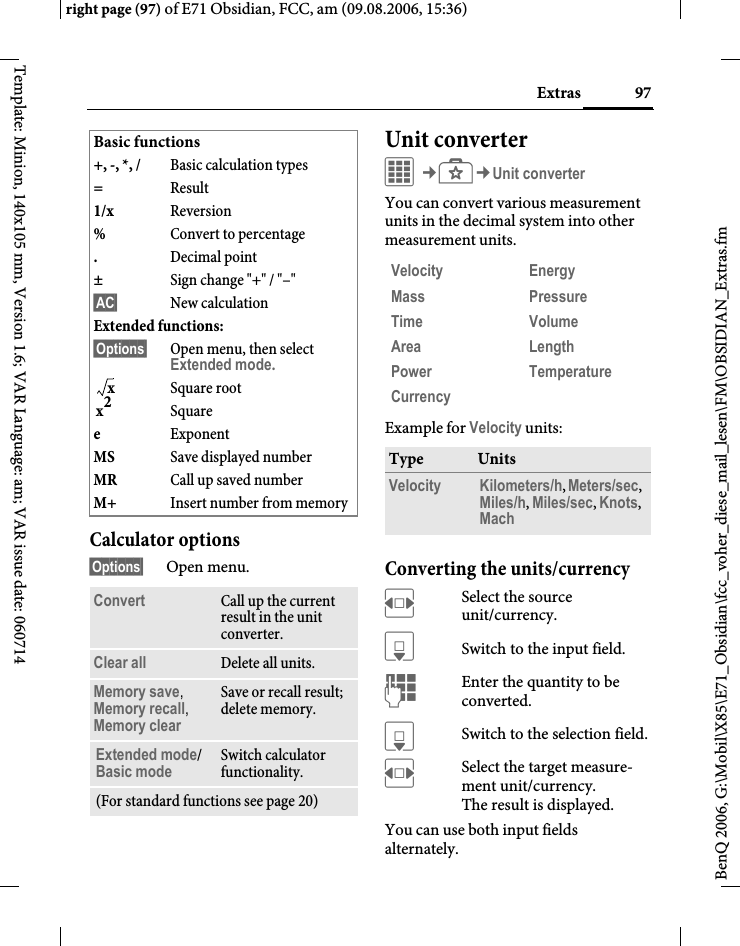
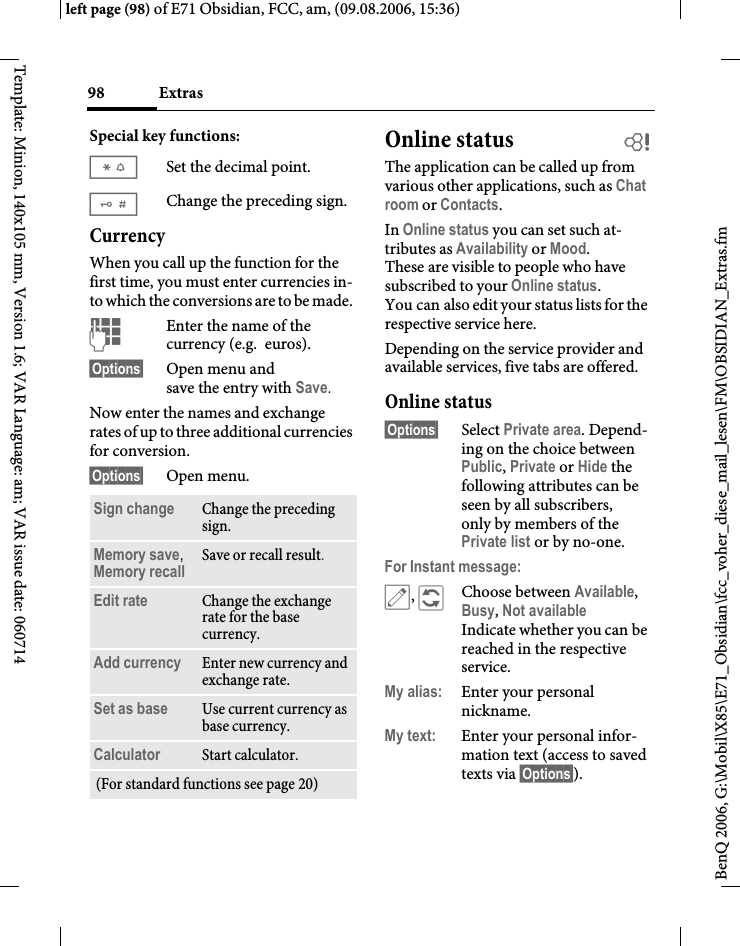
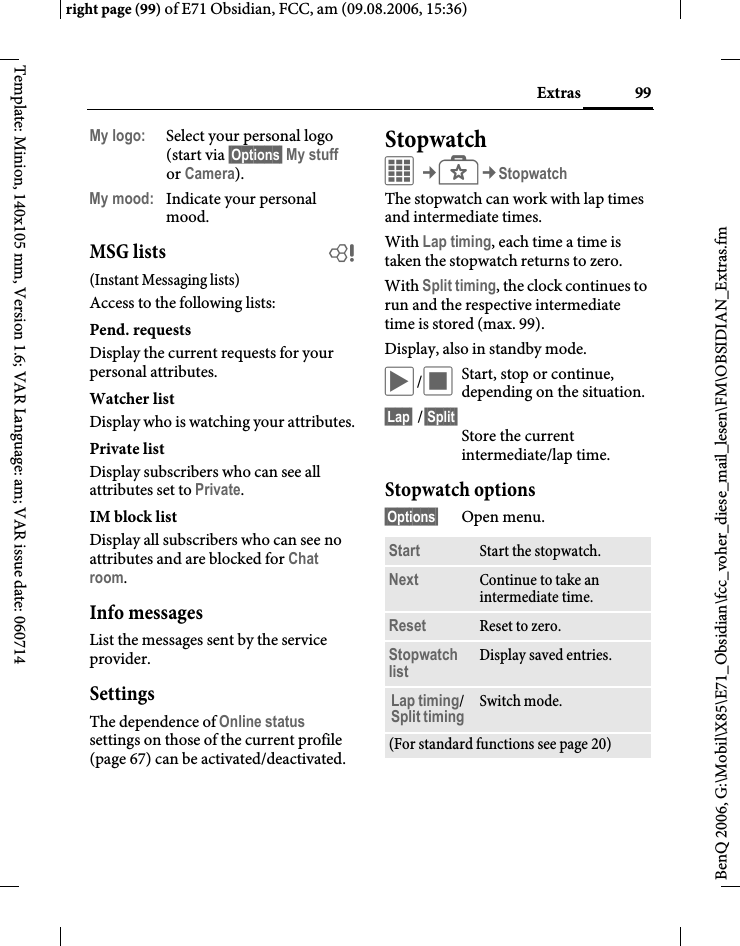
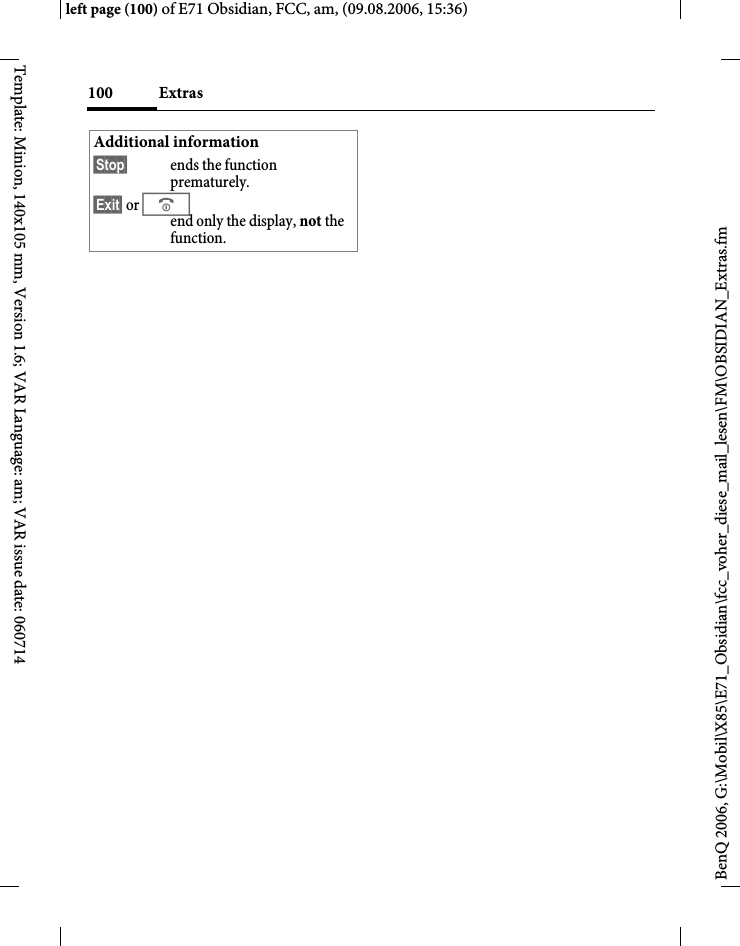
BenQ Mobile and OHG E71 GSM 900/1800/1900 Mobile Phone with BT and FM Rece User Manual OBSIDIAN FUG

BenQ Mobile GmbH & Co. OHG GSM 900/1800/1900 Mobile Phone with BT and FM Rece OBSIDIAN FUG

User Manual

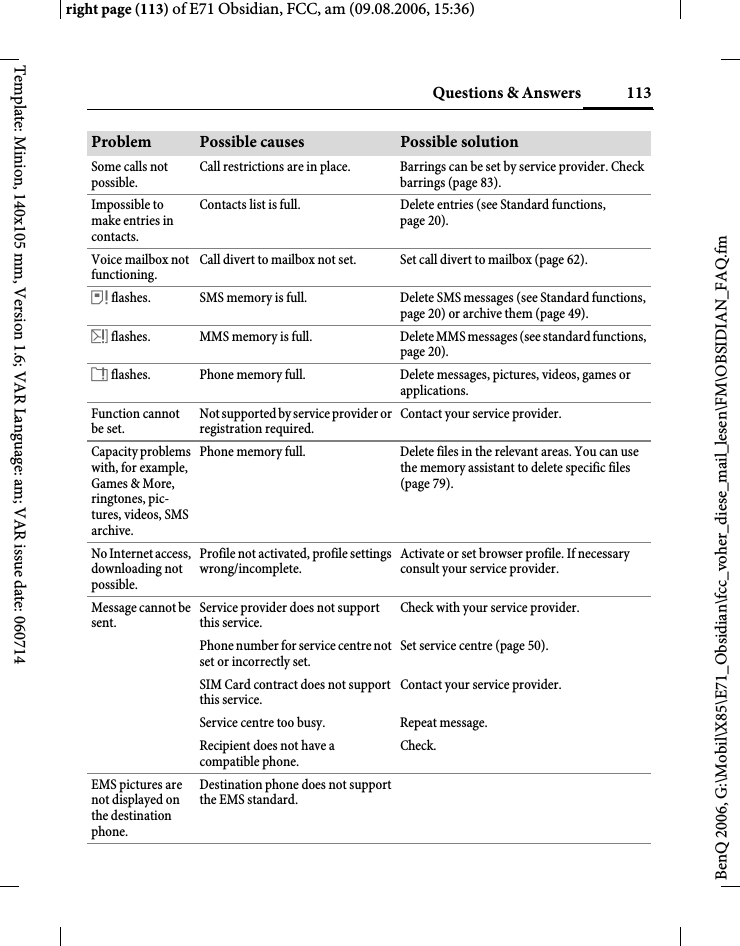
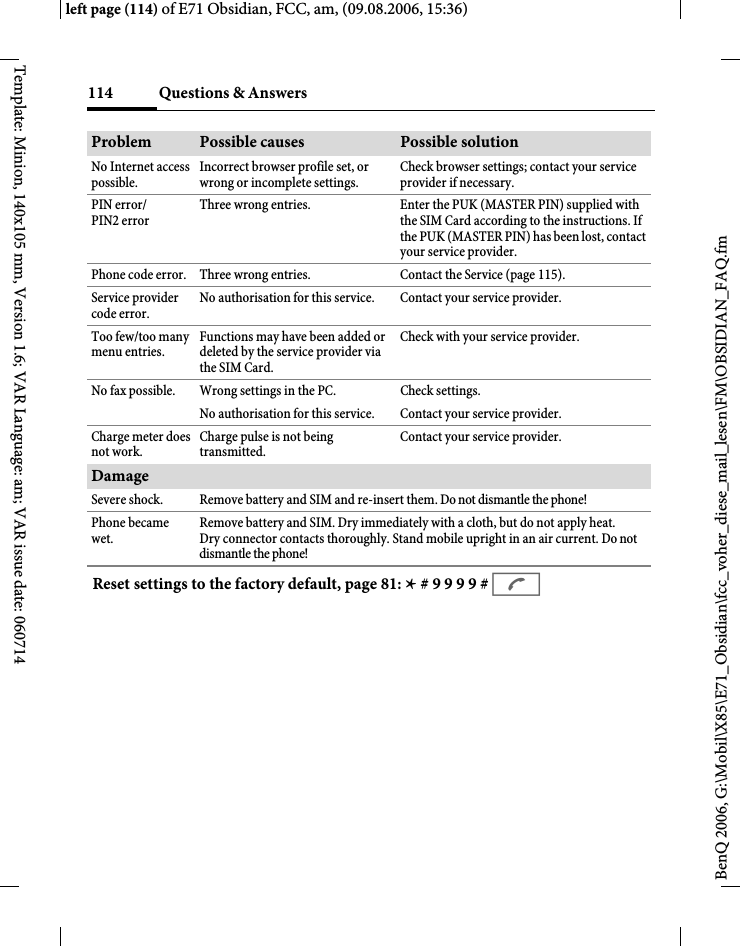
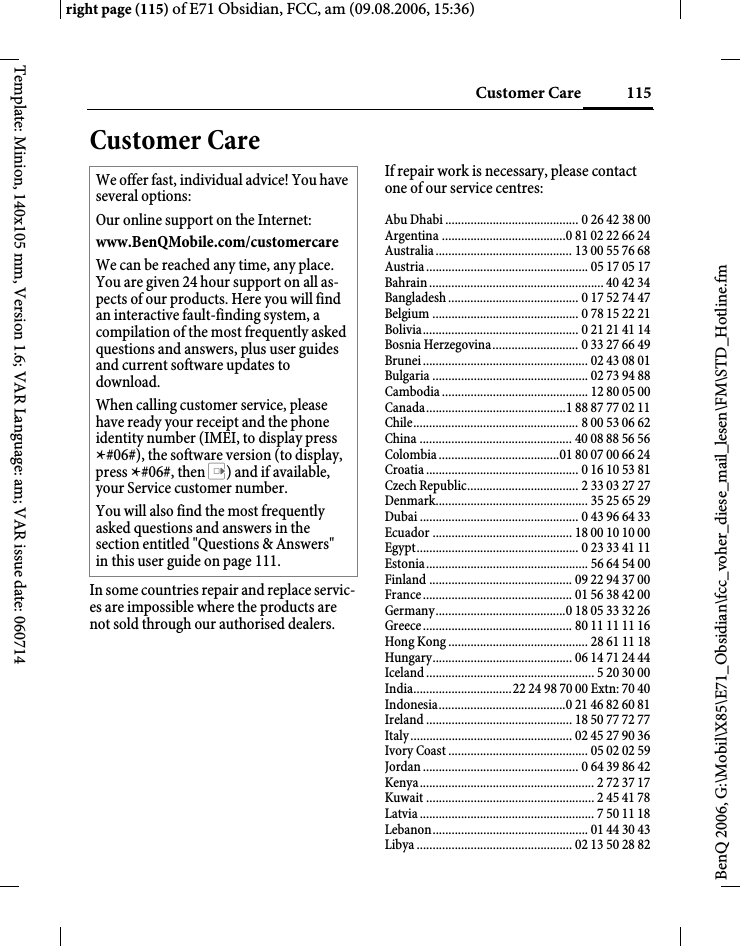
Table of Contents 1See also Index at the end of this User Guideright page (1) of E71 Obsidian, FCC, am (09.08.2006, 14:58)BenQ 2006, G:\Mobil\X85\E71_Obsidian\fcc_voher_diese_mail_lesen\FM\OBSIDIAN_FUGIVZ.fmTemplate: Minion, 140x105 mm, Version 1.6; VAR Language: am; VAR issue date: 060714Legal notices  ..................................... 3Safety precautions  ............................ 5Antenna care ......................................7Phone operation  ................................7Electronic devices ..............................8Phone overview ............................... 11Display symbols .............................. 13Getting started ................................ 15Inserting battery/ SIM Card/MicroSD card ................15Charging the battery  .......................16User guide  ........................................18Standby mode  ..................................19Tabs ...................................................19Digital Rights Mgmt. (DRM) .........19Centre key  ........................................19Menu controls ..................................20Standard functions ..........................20Security ........................................... 22PIN, PUK, Phone code ...................22Text input  ....................................... 24Calling ............................................. 28Ending a call .....................................28Setting the volume ...........................28Accepting a call ................................30Rejecting a call  .................................30Handsfree .........................................30Swapping between 2 calls .................................................31Call options  ......................................33Direct call ......................................... 33Tone sequences (DTMF) ............... 34Contacts .......................................... 35All contacts ...................................... 35Groups .............................................. 37Online status  ................................... 37SIM ................................................... 37Filter ................................................. 38General functions  ........................... 39Call records  ..................................... 41Dur./charges ................................... 42Camera ............................................ 43SMS/MMS ....................................... 45Writing an SMS  .............................. 45Writing an MMS ............................. 46Receiving/reading ........................... 48Draft ................................................. 49Outbox ............................................. 49Sent ................................................... 49Archive ............................................. 49Templates ........................................ 49SMS settings  .................................... 50MMS settings  .................................. 50Zoom in  ........................................... 51Emoticons ........................................ 51Save aft. send  ................................... 51Auto-delete ...................................... 51E-mail .............................................. 52Writing/sending ............................. 52Receiving/reading ........................... 53Table of ContentsSee also Index at the end of this User Guide
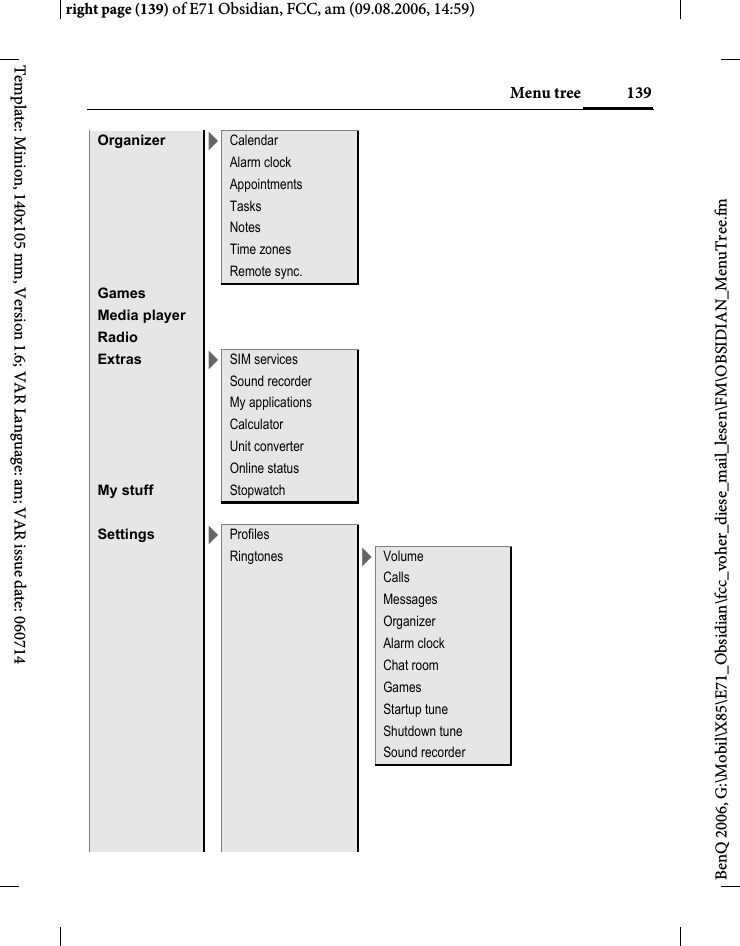
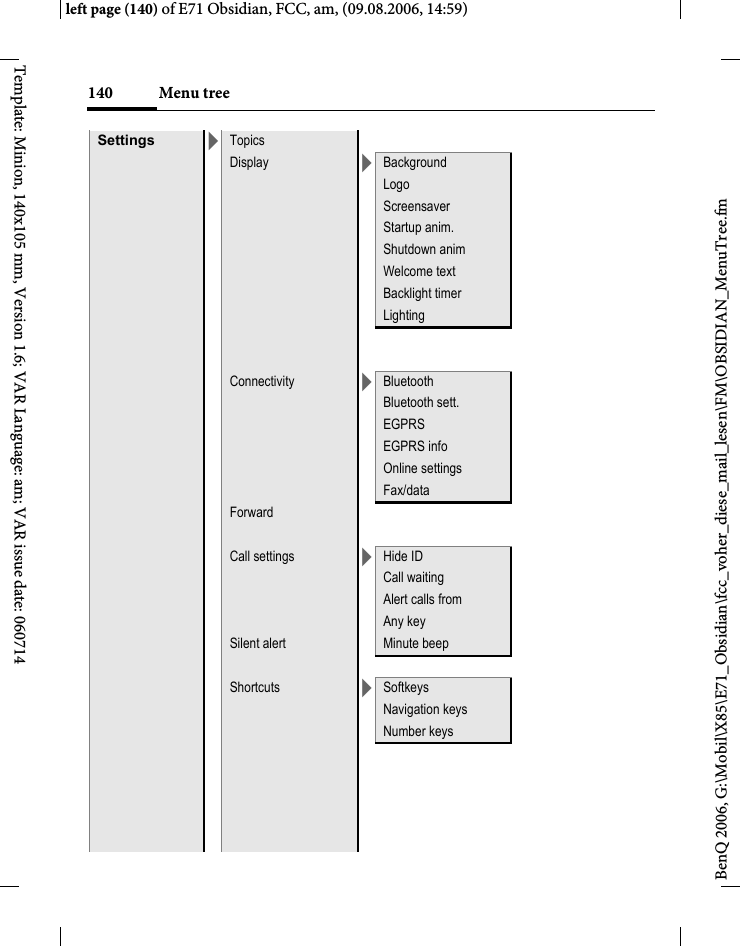
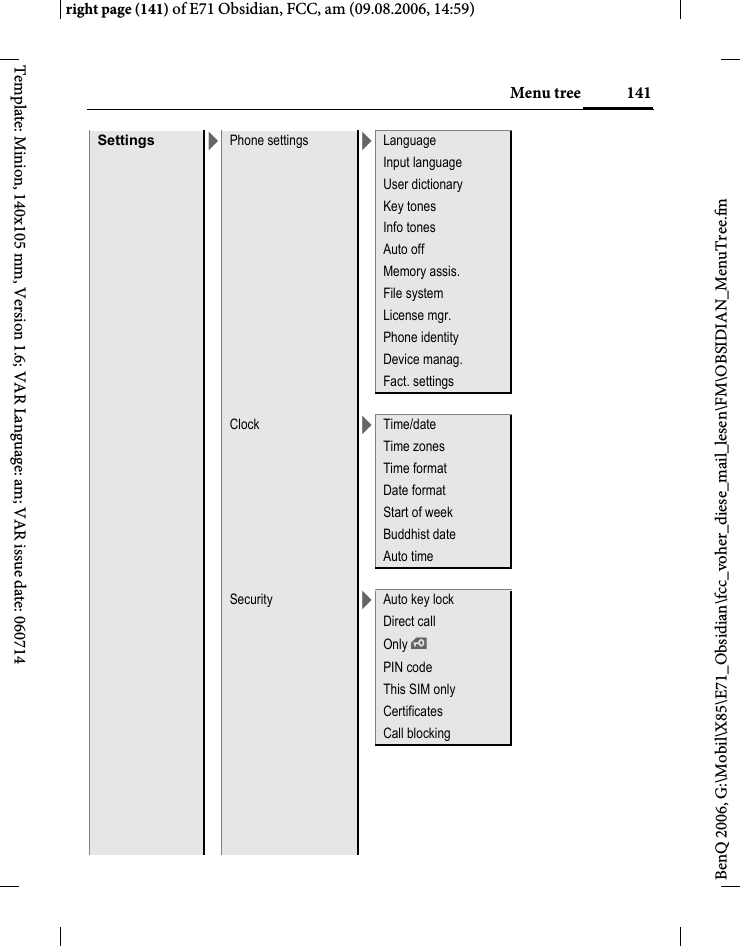
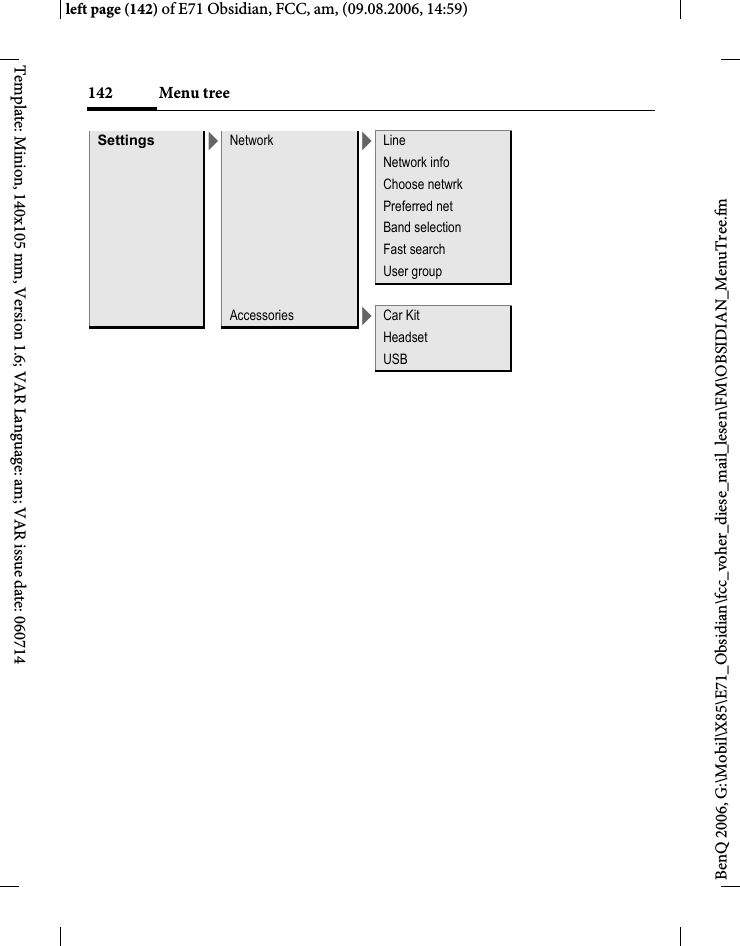
2 Table of ContentsSee also Index at the end of this User GuideBenQ 2006, G:\Mobil\X85\E71_Obsidian\fcc_voher_diese_mail_lesen\FM\OBSIDIAN_FUGIVZ.fmleft page (2) of E71 Obsidian, FCC, am,  (09.08.2006, 14:58)Template: Minion, 140x105 mm, Version 1.6; VAR Language: am; VAR issue date: 060714Draft ..................................................54Outbox ..............................................54Msg. archive  .....................................54Settings ..............................................54WAP push ....................................... 56Chat room (IMSG) ............................................ 57Voice mailbox/Mailbox  .................. 62CB services ...................................... 63Internet ........................................... 64Settings ........................................... 67Profiles ..............................................67Ringtones ..........................................68Topics ................................................69Display ..............................................70Silent alert .........................................71Connectivity .....................................71Shortcuts ...........................................75Forward ............................................76Call settings  ......................................77Phone settings ..................................78Clock .................................................81Security .............................................82Network ............................................84Accessories .......................................85Organizer ........................................ 87Calendar ...........................................87Alarm clock ......................................88Appointments ..................................89Tasks .................................................91Notes ................................................ 92Time zones  ...................................... 92Remote synchronisation ................ 93Extras .............................................. 95SIM services (optional) .................. 95Sound recorder  ............................... 95My applications ............................... 96Calculator ........................................ 96Unit converter ................................. 97Online status  ................................... 98Stopwatch ........................................ 99Radio ............................................. 101Media player  ................................. 102My stuff  ......................................... 105Mobile Phone Manager  ................ 108Questions & Answers .................... 111Customer Care .............................. 115Care and maintenance .................. 117Product data .................................. 118SAR  ............................................... 120U.S. FDA  ....................................... 121FCC/Industry Canada Notice ....... 127Intellectual property ..................... 128Ten Driving Safety Tips ................ 129End user license agreement  .......... 131Accessories .................................... 135Menu tree  ...................................... 137Index ............................................. 143
3Legal noticesright page (3) of E71 Obsidian, FCC, am (09.08.2006, 15:35)BenQ 2006, G:\Mobil\X85\E71_Obsidian\fcc_voher_diese_mail_lesen\FM\STD_LegalNotices_FCC_am.fmTemplate: Minion, 140x105 mm, Version 1.6; VAR Language: am; VAR issue date: 060714Legal noticesThe mobile phone described in this guide is approved for use on the GSM and GPRS networks operating on the GSM 900, 1800 (DCS/PCN) and 1900 (PCS) bands. It is approved for use in the country where it was originally sold and may be approved for use in other countries.© 2006 Siemens Communications Inc.All rights reserved.Siemens and the E71 model phone are trademarks or registered trademarks of Siemens and/or its affiliates in the United States and/or other countries.T9® is a registered trademark of America Online, Inc. in the United States. Java and all Java-based trademarks and logos are trademarks or registered trademarks of Sun Microsystems, Inc. in the U.S and other countries. The names of actual com-panies and products mentioned herein may be the trademarks of their respective owners. DisclaimerThe information contained in the User Guide is written for the E71 phone. Siemens reserves the right to make chang-es and improvements to the products and any of the features of the products de-scribed in this document without prior notice. The contents of the user guide are provided "AS IS". Except as required by applicable law, no warranties of any kind, either express or implied, including, but not limited to, the implied warranties of merchantability and fitness for a particu-lar purpose, are made in relation to the ac-curacy, reliability or contents of this docu-ment. Siemens reserves the right to revise the user guide or withdraw it at any time without prior notice. Under no circum-stances shall Siemens be responsible for any loss of data or income or any special, incidental, consequential or indirect dam-ages howsoever caused.Export InformationThe mobile phone may be subject to ex-port regulation of the United States and other countries. Diversion contrary to law is prohibited. You must comply with all applicable export laws, restrictions and regulations of the United States foreign agencies or authorities, and may not ex-port, or transfer for the purpose of re-ex-port, the mobile phone or any part of the phone in violation of any applicable re-strictions, laws or regulations, or without all necessary approvals.
Legal notices4BenQ 2006, G:\Mobil\X85\E71_Obsidian\fcc_voher_diese_mail_lesen\FM\STD_LegalNotices_FCC_am.fmleft page (4) of E71 Obsidian, FCC, am, (09.08.2006, 15:35)Template: Minion, 140x105 mm, Version 1.6; VAR Language: am; VAR issue date: 060714Network ServicesA number of features included in this guide are called Network Services. They are special services provided by wireless service providers. In order to use any of these Network Services, you must sub-scribe to these service(s) from your serv-ice provider and obtain instructions for their use. Some of these Network Servic-es may not be available when roaming on a network other than your home network.Standby and Talk Time InformationThe mobile phone incorporates features that are new to the mobile phone world. These may include color displays and lighting, graphic games, music reproduc-tion and browsing the Internet. The way you use the display and the features will affect the performance of the battery and how long it lasts between charge cycles. The quoted standby times and talk times show the minimum and maximum per-formance that can be expected from the battery under normal network condi-tions and with the default settings as set by the factory. However, playing games (particularly with the backlight continu-ously switched on) and listening to music will shorten the time available for stand-by and to make and receive telephone calls. Operation times also vary depend-ing on network conditions, SIM settings, charging and battery condition, how you use your phone and other factors. MemoryThe mobile phone contains an internal memory device that stores the software required to operate the mobile phone, communicate with the GSM/GPRS net-work and provide the user interface. Some features in the internal memory run additional devices and some addi-tional games and utilities. The amount of memory available in the mobile phone is finite and may be insufficient to store large numbers of applications and files. Warning!Remember to back up your data and to do so frequently. Always back up all data and programs before sending the mobile phone in for repair.
5Safety precautionsright page (5) of E71 Obsidian, FCC, am (09.08.2006, 15:35)BenQ 2006, G:\Mobil\X85\E71_Obsidian\fcc_voher_diese_mail_lesen\FM\STD_SafetyHints_FCC_am.fmTemplate: Minion, 140x105 mm, Version 1.6; VAR Language: am; VAR issue date: 060714Safety precautionsInformation for parentsPlease read the operating instructions and safety precautions carefully before use.Explain the content and the hazards associated with using the phone to your children.Remember to comply with le-gal requirements and local re-strictions when using the phone. For example in aero-planes, petrol stations, hospi-tals or whilst driving.Cellular phones can interfere with the functioning of medi-cal devices such as hearing aids or pacemakers. Keep at least 9inches (20cm) between phone and pacemaker. When using the cell phone hold it to the ear which is farthest from the pacemaker. For more in-formation consult your doc-tor.Small parts such as the SIM Card, dust cap, lens ring and lens cap as well as the Micro SD Card can be dismantled and swallowed by small chil-dren. The phone must there-fore be stored out of the reach of small children.Tones, music and handsfree talking are reproduced through the loudspeaker. Do not hold the phone to your ear when it rings or when you have switched on the handsfree func-tion. Otherwise you risk serious permanent damage to your hearing.Only use original batteries (100 % mercury-free) and – charging devices. Otherwise you risk serious damage to health and property. For in-stance, the battery may explode.The mains voltage specified on the power supply unit (V) must not be exceeded. Other-wise the charging device may be destroyed.The power supply must be plugged into an easily accessi-ble AC mains power socket when charging the battery. The only way to turn off the charging device after charging the battery is to unplug it. Do not use a handheld while driving.
Safety precautions6BenQ 2006, G:\Mobil\X85\E71_Obsidian\fcc_voher_diese_mail_lesen\FM\STD_SafetyHints_FCC_am.fmleft page (6) of E71 Obsidian, FCC, am, (09.08.2006, 15:35)Template: Minion, 140x105 mm, Version 1.6; VAR Language: am; VAR issue date: 060714Bluetooth®Your phone has a Bluetooth interface. This makes it possible to establish a wireless connection with your phone and a headset, a car kit or other Bluetooth-enabled devices.In order to establish a secure link between the devices and to prevent a third party from having access to your phone, you should observe the following points:• The initial connection between two devic-es, what is called "pairing", should take place in familiar surroundings. • Both devices must be able to identify themselves one time by using a pass-word/PIN. To ensure sufficient security, you should choose a 16-digit number combination for a password that would be difficult to guess (if a PIN has not been assigned).Do not place the phone near to electromagnetic data carriers such as credit cards and floppy disks. Information stored on them could be lost.You may only open the phone to replace the battery (100 % mercury-free) or SIM and Micro SD Card. You must not open the battery under any cir-cumstances. All other changes to this device are strictly pro-hibited and will invalidate the guarantee.Permanent hearing loss may occur if you use ear- or head-phones at high volume.You can adapt over time to a higher volume, which may sound normal but can be damaging to your hearing. Set your vol-ume to a safe level. If you expe-rience ringing in your ears, reduce the volume or discon-tinue use of your system.Please dispose of unwanted batteries and phones as per-mitted by the laws in your country.The phone may cause interfer-ence in the vicinity of TV sets, radios and PCs.Use only original accessories. This will avoid potential risks to health or property and en-sure compliance with all rele-vant regulations.Improper use will invalidate the guaran-tee! These safety instructions also apply to original accessories.Product attributes are subject to changes in technology, design and availability. BenQ reserves the right to modify prod-ucts without prior notice.This cellular phone offers a range of func-tions, it can be used in positions other than the head, such as on the body. In this case, separation distance of 2.0 cm is re-quired. When a carry case, belt clip or holder is used for body-worn operation, it should not contain metal and should po-sition the device the above-stated dis-tance from your body.
7Safety precautionsright page (7) of E71 Obsidian, FCC, am (09.08.2006, 15:35)BenQ 2006, G:\Mobil\X85\E71_Obsidian\fcc_voher_diese_mail_lesen\FM\STD_SafetyHints_FCC_am.fmTemplate: Minion, 140x105 mm, Version 1.6; VAR Language: am; VAR issue date: 060714• An automatic connection acceptance ("connection without confirmation") should only be used in exceptional cases. • In general, only trustworthy devices should be linked in order to minimise se-curity risks. • You should restrict the "visibility" of your phone if possible. This will make it much more difficult for unknown devices to establish a connection with your phone. To do this, in the Bluetooth menu, set the option Visib.to others from Always visible to Not visible (page 73).• The name of your phone is transmitted in a Bluetooth connection. The factory de-fault is the "Bluetooth ID". The first time Bluetooth is activated, or later in the Bluetooth menu, you can change this name (My BT name, page 73).• If Bluetooth is not needed, this function should be deactivated.Before using Bluetooth accessories, or a mobile phone inside a vehicle, check the ve-hicle user guide for any limitations on the use of these products. Antenna careUse only the supplied or an approved re-placement antenna. Unauthorized anten-nas, modifications, or attachments could damage the phone and may violate FCC regulations.Phone operationNormal positionHold the phone as you would any other tel-ephone with the antenna pointed up and over your shoulder.Tips on efficient operationFor your phone to operate most efficiently:• Extend your antenna fully (if applicable).• Do not touch the antenna unnecessarily when the phone is in use. Contact with the antenna affects call quality and may cause the phone to operate at a higher power level than otherwise needed.ImportantRead this information before using your wireless handheld phone.As this mobile phone is equipped with a fixed (non-retractable) antenna, some par-agraphs in the text below may not be appli-cable.
Safety precautions8BenQ 2006, G:\Mobil\X85\E71_Obsidian\fcc_voher_diese_mail_lesen\FM\STD_SafetyHints_FCC_am.fmleft page (8) of E71 Obsidian, FCC, am, (09.08.2006, 15:35)Template: Minion, 140x105 mm, Version 1.6; VAR Language: am; VAR issue date: 060714DrivingLaws pertaining to the use of mobile phones while driving vary significantly from state to state and sometimes even from locality to locality within states. For example, some ar-eas may allow persons to use their mobile phones only if they employ a hands-free de-vice, and some areas may prohibit the use of cell phones entirely. Accordingly, BenQ recommends that persons check the laws for the areas in which they drive or will be driving. For areas where the use of mobile phones while driving is permitted, BenQ encourages persons to use their phones re-sponsibly and to employ hands-free devic-es. Also, if using your phone while driving, please:• Give full attention to driving – driving safely is your first responsibility;• Use hands-free operation, if available;• Pull off the road and park before making or answering a call, if driving conditions so require.For vehicles equipped with air bagsAn air bag inflates with great force. DO NOT place objects, including either in-stalled or portable wireless equipment, in the area over the air bag or in the air bag de-ployment area. If in-vehicle wireless equip-ment is improperly installed and the air bag inflates, serious injury could result.Electronic devicesMost modern electronic equipment is shielded from radio frequency (RF) signals. However, certain electronic equipment may not be shielded against the RF signals from your wireless phone.PacemakersThe Health Industry Manufacturers' Asso-ciation recommends that a minimum sepa-ration of six inches (6") be maintained between a handheld wireless phone and a pacemaker to avoid potential interference with the pacemaker. These recommenda-tions are consistent with the independent research by and recommendations of Wire-less Technology Research.Persons with pacemakers• should ALWAYS keep the phone more than six inches from their pacemaker when the phone is turned ON;• should not carry the phone in a breast pocket;• should use the ear opposite the pacemaker to minimize the potential for interference;• should turn the phone OFF immediately if there is any reason to suspect that inter-ference is taking place.Hearing aids Some digital wireless phones may interfere with some hearing aids. In the event of such interference, you may want to consult your service provider or your hearing aid manu-facturer to discuss alternatives.
9Safety precautionsright page (9) of E71 Obsidian, FCC, am (09.08.2006, 15:35)BenQ 2006, G:\Mobil\X85\E71_Obsidian\fcc_voher_diese_mail_lesen\FM\STD_SafetyHints_FCC_am.fmTemplate: Minion, 140x105 mm, Version 1.6; VAR Language: am; VAR issue date: 060714Other medical devicesIf you use any other personal medical devic-es, consult the manufacturers of your devic-es to determine if they are adequately shielded from external RF energy. Your physician may be able to assist you in ob-taining this information.Turn your phone OFF in health care facili-ties when any regulations posted in these areas instruct you to do so. Hospitals or health care facilities may be using equip-ment that could be sensitive to external RF energy.VehiclesRF signals may affect improperly installed or inadequately shielded electronic systems in motor vehicles. Check with the manufac-turer or its representative regarding your vehicle. You should also consult the manu-facturer of any equipment that has been added to your vehicle.Posted facilitiesTurn your phone OFF in any facility where posted notices so require.AirplanesFCC and Airline Regulations prohibit using your phone while in the air. Turn your phone OFF when requested by the airline.Check and comply with the policy of your airline regarding the use of your phone while the airplane is on the ground.Blasting areasTo avoid interfering with blasting opera-tions, turn your phone OFF when in a “blast-ing area” or in areas posted: “Turn off two-way radio.” Obey all signs and instructions.Potentially explosive atmospheresTurn your phone OFF when in any area with a potentially explosive atmosphere and obey all signs and instructions. Sparks in such areas could cause an explosion or fire resulting in bodily injury or even death.Areas with a potentially explosive atmos-phere are often but not always clearly marked. They include: fueling areas such as gasoline stations; below deck on boats; fuel or chemical transfer or storage facilities; ve-hicles using liquefied petroleum gas (such as propane or butane); areas where the air contains chemicals or particles, such as grain, dust or metal powders; and any other area where you would normally be advised to turn off your vehicle engine.Emergency calls (SOS)Your wireless phone can be used to make emergency calls. You can make an emer-gency call from the main display screen. Enter the local emergency number such as 911 and then press the A key.
Safety precautions10BenQ 2006, G:\Mobil\X85\E71_Obsidian\fcc_voher_diese_mail_lesen\FM\STD_SafetyHints_FCC_am.fmleft page (10) of E71 Obsidian, FCC, am, (09.08.2006, 15:35)Template: Minion, 140x105 mm, Version 1.6; VAR Language: am; VAR issue date: 060714This phone, like any wireless phone, oper-ates using radio signals, wireless and land-line networks, and user-programmed functions. Because of this, connections in all conditions cannot be guaranteed. There-fore, you should never rely solely on any wireless phone for essential communica-tions (for example, medical emergencies). Remember – to make or receive any calls, the phone must be switched on and be used in a service area that has adequate signal strength. Emergency calls might not be pos-sible on all wireless phone networks or when certain network services or phone features are in use. Check with local service providers regarding their network features. Always make certain that your phone is properly charged before attempting any emergency calls. If you allow your battery to discharge, you will be unable to receive or make calls, including emergency calls. You must then wait a few minutes after the charging begins to place any emergency calls.When making an emergency call, remember to give all of the necessary information as ac-curately as possible. Remember that your wireless phone might be the only means of communication at the scene of an accident, therefore you should not terminate the call until given permission to do so.Batteries and ChargersOnly use original batteries (100% mercury-free) and charging devices. Use of non-orig-inal batteries and/or charging devices may cause explosion resulting in serious injury and/or property damage. Use original ac-cessories in order to avoid possible injury and property damage and to ensure compli-ance with applicable laws and regulations. Improper use invalidates the warranty.Battery safety precautionsTo reduce the risk of fire, injury or electric shock, and to properly dispose of batteries, please read and understand the following instructions. CONTAINS LITHIUM-ION OR NICKEL-METAL HYDRIDE BAT-TERY. BATTERY MUST BE RECYCLED OR DISPOSED OF PROPERLY. DO NOT DISPOSE IN MUNICIPAL WASTE.1. Only use the batteries specified for use with this mobile phone.2. Do not use batteries of different sizes or from different manufacturers in this mobile phone.3. Do not dispose of the battery in a fire; it may explode. Dispose of used batteries and phones in accordance with applica-ble laws and safety regulations. Do not expose battery to water. Check with local codes for special disposal instructions. 4. Do not open or mutilate the battery. Doing so may cause damage to the eyes or skin.5. Exercise care in handling the battery in order not to short the battery with con-ducting materials such as rings, brace-lets, and keys. The battery or conducting material may overheat and cause burns or fire.6. Charge the battery provided with, or identified for use with, this product only in accordance with the instructions and limitations specified in the User's Guide. Do not attempt to charge the battery by any means other than those specified in the User's Guide.
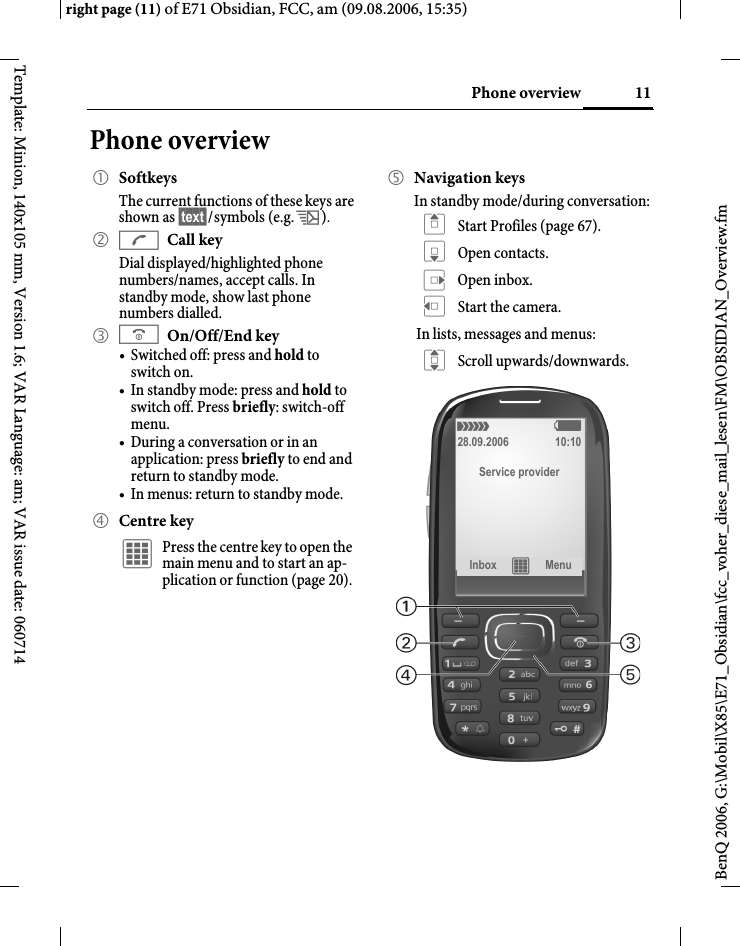
11Phone overviewright page (11) of E71 Obsidian, FCC, am (09.08.2006, 15:35)BenQ 2006, G:\Mobil\X85\E71_Obsidian\fcc_voher_diese_mail_lesen\FM\OBSIDIAN_Overview.fmTemplate: Minion, 140x105 mm, Version 1.6; VAR Language: am; VAR issue date: 060714Phone overview1 SoftkeysThe current functions of these keys are shown as §text§/symbols (e.g. p).2 ACall keyDial displayed/highlighted phone numbers/names, accept calls. In standby mode, show last phone numbers dialled. 3 BOn/Off/End key• Switched off: press and hold to switch on.• In standby mode: press and hold to switch off. Press briefly: switch-off menu.• During a conversation or in an application: press briefly to end and return to standby mode. • In menus: return to standby mode.4 Centre keyí Press the centre key to open the main menu and to start an ap-plication or function (page 20).5 Navigation keysIn standby mode/during conversation:G Start Profiles (page 67).H Open contacts.E Open inbox.D Start the camera.In lists, messages and menus:I Scroll upwards/downwards.á   ß28.09.2006 10:10Service providerInbox í Menu
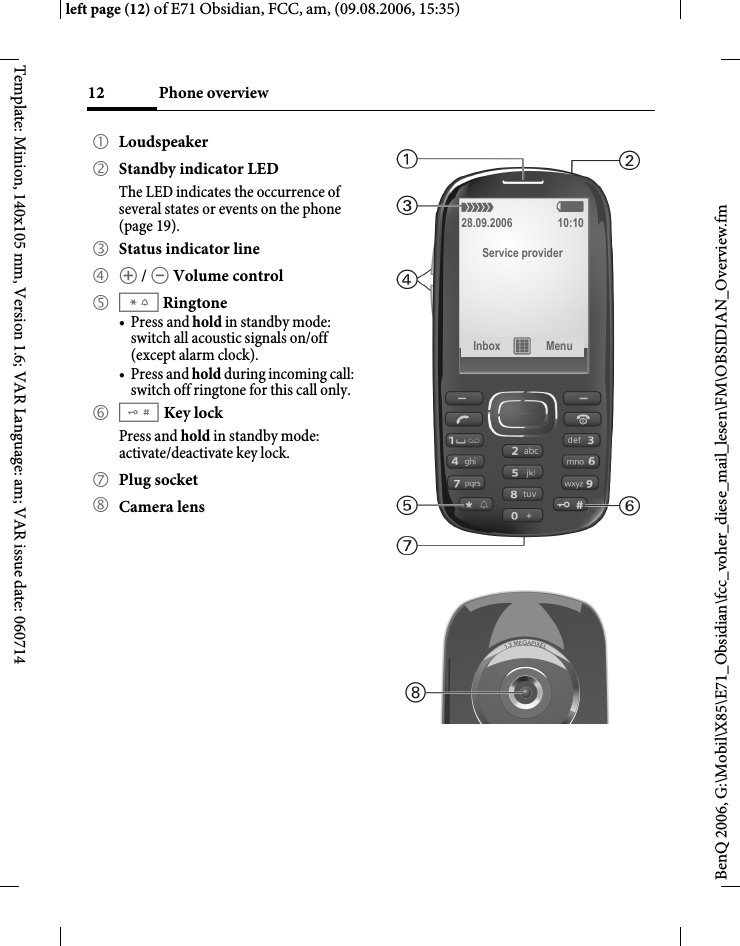
Phone overview12BenQ 2006, G:\Mobil\X85\E71_Obsidian\fcc_voher_diese_mail_lesen\FM\OBSIDIAN_Overview.fmleft page (12) of E71 Obsidian, FCC, am, (09.08.2006, 15:35)Template: Minion, 140x105 mm, Version 1.6; VAR Language: am; VAR issue date: 0607141 Loudspeaker2 Standby indicator LEDThe LED indicates the occurrence of several states or events on the phone (page 19).3 Status indicator line4 [ / \ Volume control5 *Ringtone•Press and hold in standby mode: switch all acoustic signals on/off (except alarm clock). •Press and hold during incoming call: switch off ringtone for this call only.6 #Key lock  Press and hold in standby mode: activate/deactivate key lock.7 Plug socket8 Camera lensá   ß28.09.2006 10:10Service providerInbox í Menu
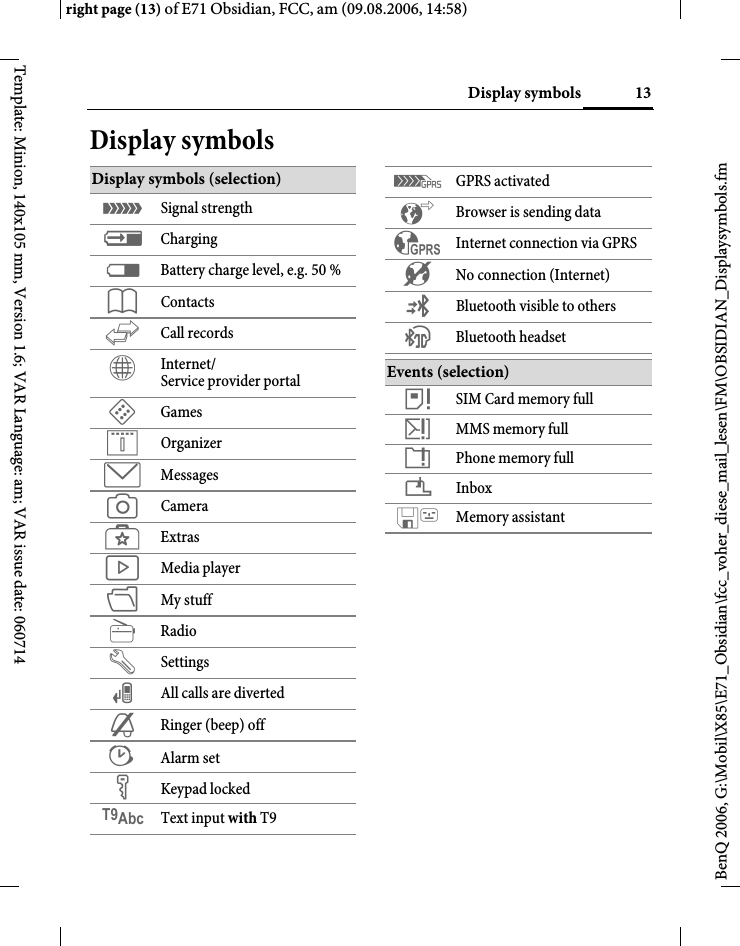
13Display symbolsright page (13) of E71 Obsidian, FCC, am (09.08.2006, 14:58)BenQ 2006, G:\Mobil\X85\E71_Obsidian\fcc_voher_diese_mail_lesen\FM\OBSIDIAN_Displaysymbols.fmTemplate: Minion, 140x105 mm, Version 1.6; VAR Language: am; VAR issue date: 060714Display symbolsDisplay symbols (selection)á Signal strengthà ChargingÞ Battery charge level, e.g. 50 %L ContactsP Call recordsO Internet/Service provider portalW GamesQ OrganizerM MessagesR CameraS ExtrasV Media playerN My stuffj RadioT SettingsÇ All calls are diverted½ Ringer (beep) off¹ Alarm setÄ Keypad lockedT9Abc Text input with T9£ GPRS activated ² Browser is sending data³ Internet connection via GPRS´ No connection (Internet)© Bluetooth visible to othersª Bluetooth headsetEvents (selection) å SIM Card memory fullæ MMS memory fullç Phone memory full¿ Inbox Memory assistant
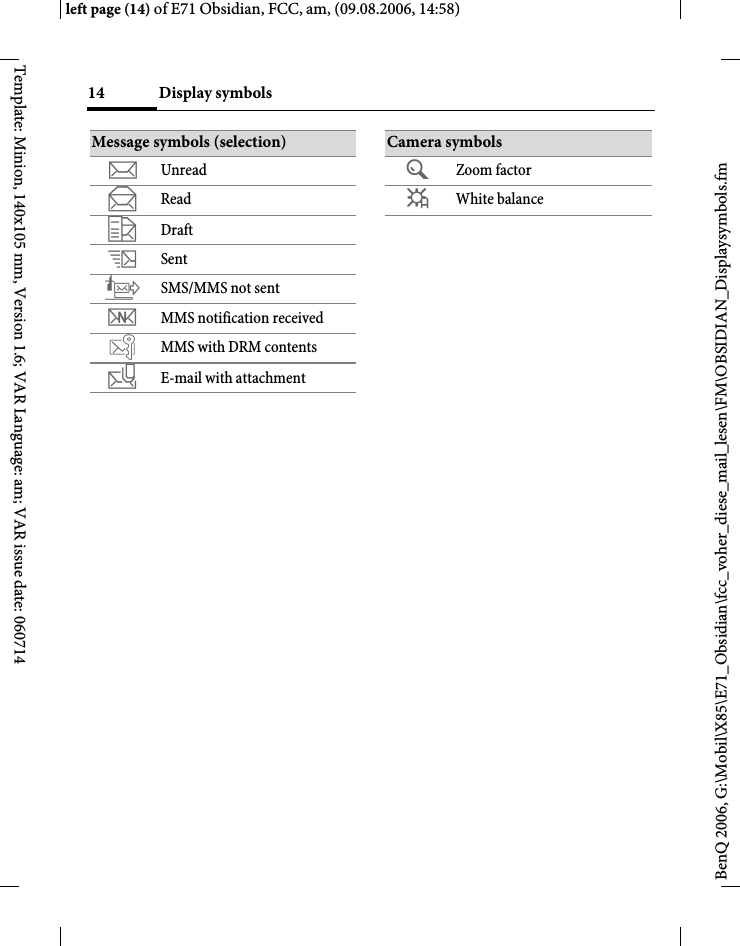
Display symbols14BenQ 2006, G:\Mobil\X85\E71_Obsidian\fcc_voher_diese_mail_lesen\FM\OBSIDIAN_Displaysymbols.fmleft page (14) of E71 Obsidian, FCC, am, (09.08.2006, 14:58)Template: Minion, 140x105 mm, Version 1.6; VAR Language: am; VAR issue date: 060714Message symbols (selection)m Unreadn Reado Draftp Sentq SMS/MMS not sentr MMS notification received MMS with DRM contents v E-mail with attachmentCamera symbolsÚ Zoom factorÛ White balance
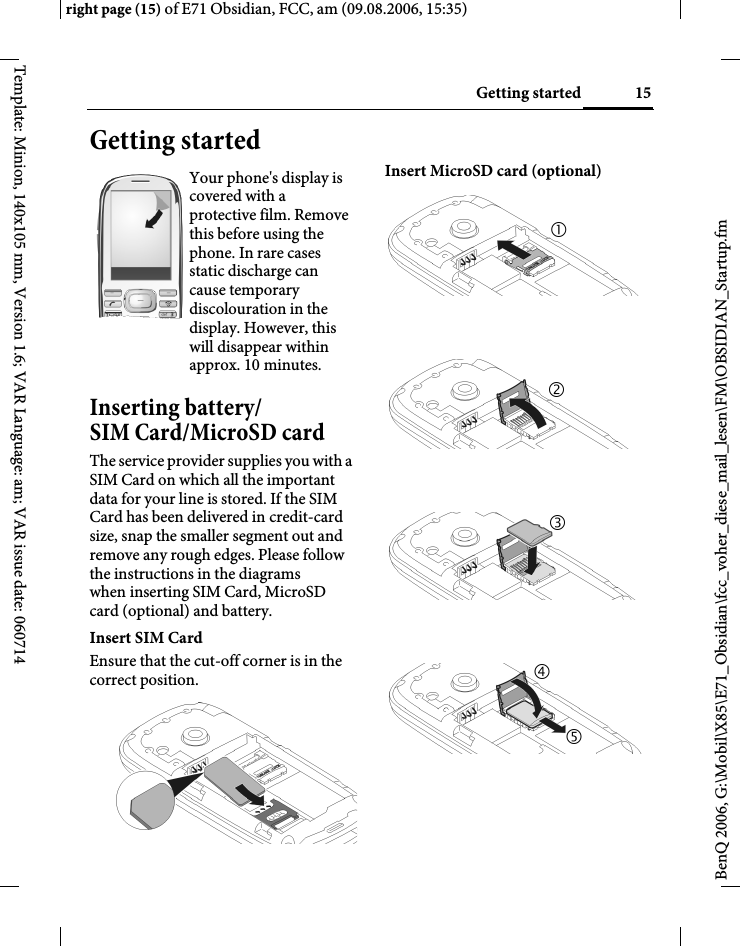
15Getting startedright page (15) of E71 Obsidian, FCC, am (09.08.2006, 15:35)BenQ 2006, G:\Mobil\X85\E71_Obsidian\fcc_voher_diese_mail_lesen\FM\OBSIDIAN_Startup.fmTemplate: Minion, 140x105 mm, Version 1.6; VAR Language: am; VAR issue date: 060714Getting startedInserting battery/ SIM Card/MicroSD cardThe service provider supplies you with a SIM Card on which all the important data for your line is stored. If the SIM Card has been delivered in credit-card size, snap the smaller segment out and remove any rough edges. Please follow the instructions in the diagrams when inserting SIM Card, MicroSD card (optional) and battery. Insert SIM Card Ensure that the cut-off corner is in the correct position.Insert MicroSD card (optional)Your phone's display is covered with a protective film. Remove this before using the phone. In rare cases static discharge can cause temporary discolouration in the display. However, this will disappear within approx. 10 minutes. 212345
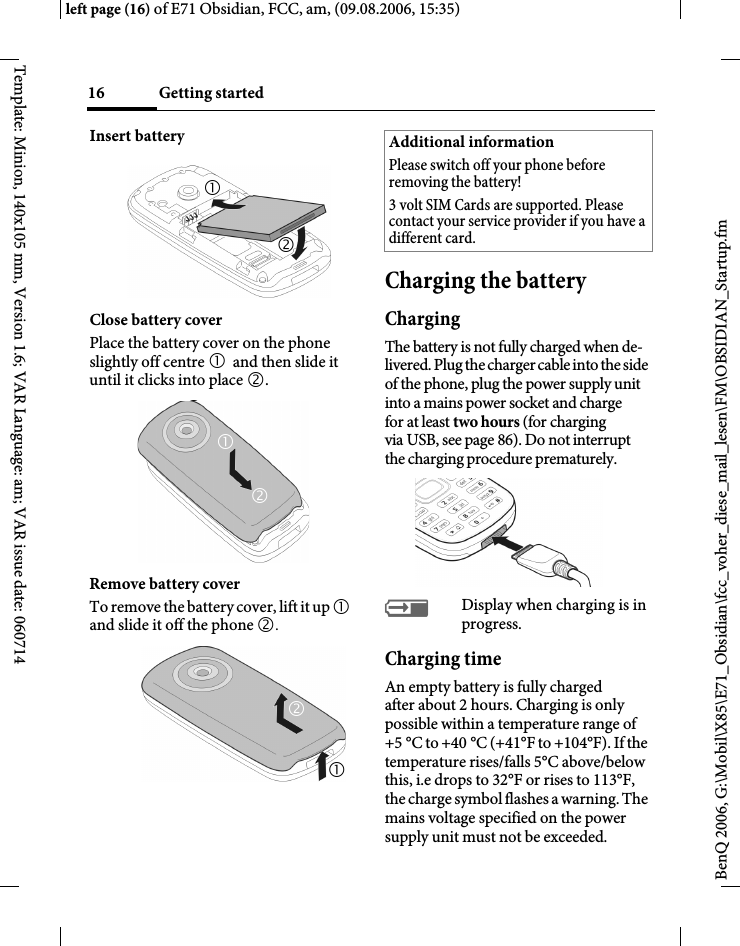
Getting started16BenQ 2006, G:\Mobil\X85\E71_Obsidian\fcc_voher_diese_mail_lesen\FM\OBSIDIAN_Startup.fmleft page (16) of E71 Obsidian, FCC, am, (09.08.2006, 15:35)Template: Minion, 140x105 mm, Version 1.6; VAR Language: am; VAR issue date: 060714Insert batteryClose battery coverPlace the battery cover on the phone slightly off centre 1 and then slide it until it clicks into place 2.Remove battery coverTo remove the battery cover, lift it up 1 and slide it off the phone 2.Charging the batteryChargingThe battery is not fully charged when de-livered. Plug the charger cable into the side of the phone, plug the power supply unit into a mains power socket and charge for at least two hours (for charging via USB, see page 86). Do not interrupt the charging procedure prematurely. àDisplay when charging is in progress.Charging timeAn empty battery is fully charged after about 2 hours. Charging is only possible within a temperature range of +5 °C to +40 °C (+41°F to +104°F). If the temperature rises/falls 5°C above/below this, i.e drops to 32°F or rises to 113°F, the charge symbol flashes a warning. The mains voltage specified on the power supply unit must not be exceeded. 126571212Additional informationPlease switch off your phone before removing the battery!3 volt SIM Cards are supported. Please contact your service provider if you have a different card.
17Switching on/off, PIN entryright page (17) of E71 Obsidian, FCC, am (09.08.2006, 15:35)BenQ 2006, G:\Mobil\X85\E71_Obsidian\fcc_voher_diese_mail_lesen\FM\OBSIDIAN_Startup.fmTemplate: Minion, 140x105 mm, Version 1.6; VAR Language: am; VAR issue date: 060714Operating timeThe operating time depends upon the respective network conditions and con-ditions of use. Extreme temperatures considerably reduce the phone’s stand-by time. You should therefore avoid the leaving the phone in the sun or on a radiator (talktime, standby time see page 119).Charge icon not visibleIf the battery has been discharged fully, the charge icon is not immediately visi-ble when the power supply is plugged in. It will appear after up to two hours. In this case the battery is fully charged after 3 to 4 hours.Only use the plug-in power supply unit included in delivery!Display during operationCharge level display during operation (empty–full):Ý Þ ß A beep sounds when the battery is near-ly empty. The charge level of the battery is only displayed correctly rafter an un-interrupted charging/discharging cycle. You should therefore not remove the battery unnecessarily and where possi-ble not terminate the charging process before completion.Switching on/off, PIN entrySwitching on/offBPress and hold the On/ Off/End key. Press briefly to open the "Switch off menu".Entering the PINThe SIM Card can be protected with a4-to 8-digit PIN.JEnter the PIN using the number keys. The charac-ters **** appear in the dis-play to ensure nobody can read your PIN. Correct with ]. §OK§ Press the left softkey to con-firm. Logging on to the net-work will take a few seconds.Additional informationThe power supply unit heats up when used for long periods. This is normal and not dangerous.If the battery is removed for longer than 30 seconds, the clock must be reset. Additional informationChanging the PIN.......................... page 22Clearing SIM Card barring........... page 23
General instructions18BenQ 2006, G:\Mobil\X85\E71_Obsidian\fcc_voher_diese_mail_lesen\FM\OBSIDIAN_Startup.fmleft page (18) of E71 Obsidian, FCC, am, (09.08.2006, 15:35)Template: Minion, 140x105 mm, Version 1.6; VAR Language: am; VAR issue date: 060714Emergency number (SOS)Only to be used in real emergencies!By pressing the left softkey §SOS§ you can make an emergency call on any network without a SIM Card and without enter-ing a PIN (not available in all countries).Switching your phone on for the first timeTime/dateSet the clock correctly once when getting started (see also page 20).ìConfirm.ñStart entry.JFirst enter the date (day/ month/year), then the time (24 hours, including seconds).ìConfirm. The time and date are updated.Time zonesFSelect the correct time zone.ISelect the city in the desired time zone.ìConfirm.General instructionsUser guideThe following symbols are used to explain operation:Receiving signaláStrong receiving signal.âA weak signal reduces the call quality and may lead to loss of the connection. Change your location.J Enter numbers, letters.B On/Off/End keyA Call key< > Softkeys§Menu§ Displays a soft-key function.í Press the centre key, for example, to call up the menu.D F E H I G Press the navigation key on the side marked with atriangle.= Function dependent on the service provider.
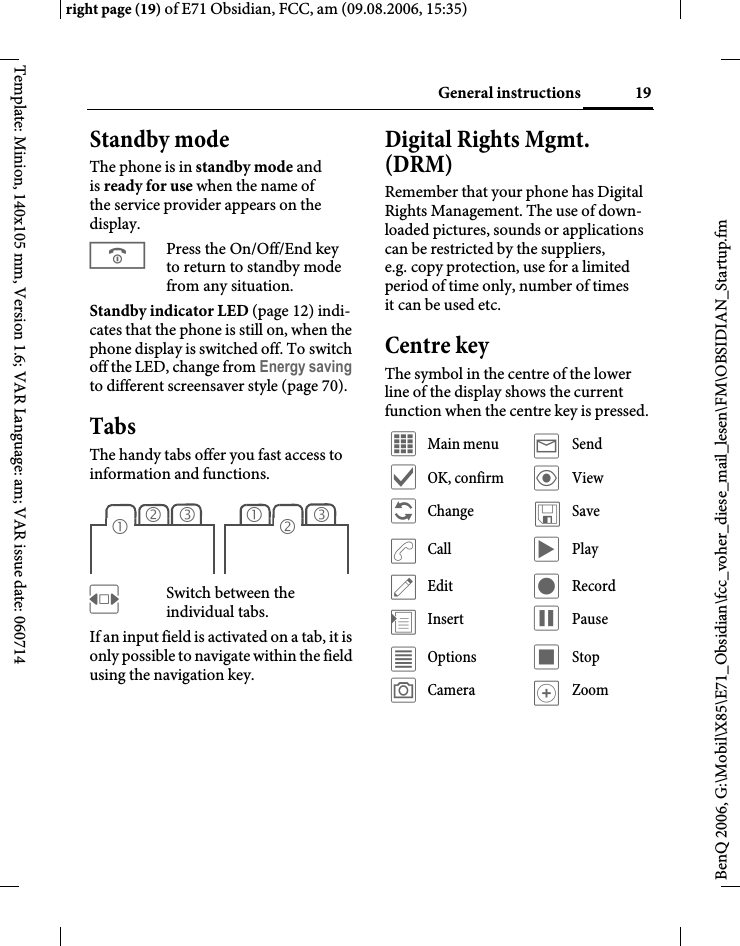
19General instructionsright page (19) of E71 Obsidian, FCC, am (09.08.2006, 15:35)BenQ 2006, G:\Mobil\X85\E71_Obsidian\fcc_voher_diese_mail_lesen\FM\OBSIDIAN_Startup.fmTemplate: Minion, 140x105 mm, Version 1.6; VAR Language: am; VAR issue date: 060714Standby mode The phone is in standby mode and is ready for use when the name of the service provider appears on the display.BPress the On/Off/End key to return to standby mode from any situation.Standby indicator LED (page 12) indi-cates that the phone is still on, when the phone display is switched off. To switch off the LED, change from Energy saving to different screensaver style (page 70).TabsThe handy tabs offer you fast access to information and functions.FSwitch between the individual tabs.If an input field is activated on a tab, it is only possible to navigate within the field using the navigation key. Digital Rights Mgmt. (DRM)Remember that your phone has Digital Rights Management. The use of down-loaded pictures, sounds or applications can be restricted by the suppliers, e.g. copy protection, use for a limited period of time only, number of times it can be used etc.Centre keyThe symbol in the centre of the lower line of the display shows the current function when the centre key is pressed.23131 2í Main menu ý Sendì OK, confirm ö Viewñ Change ûSaveðCall ò Playü Edit ô Record÷Insert ó Pauseú Options õ Stopù Camera øZoom
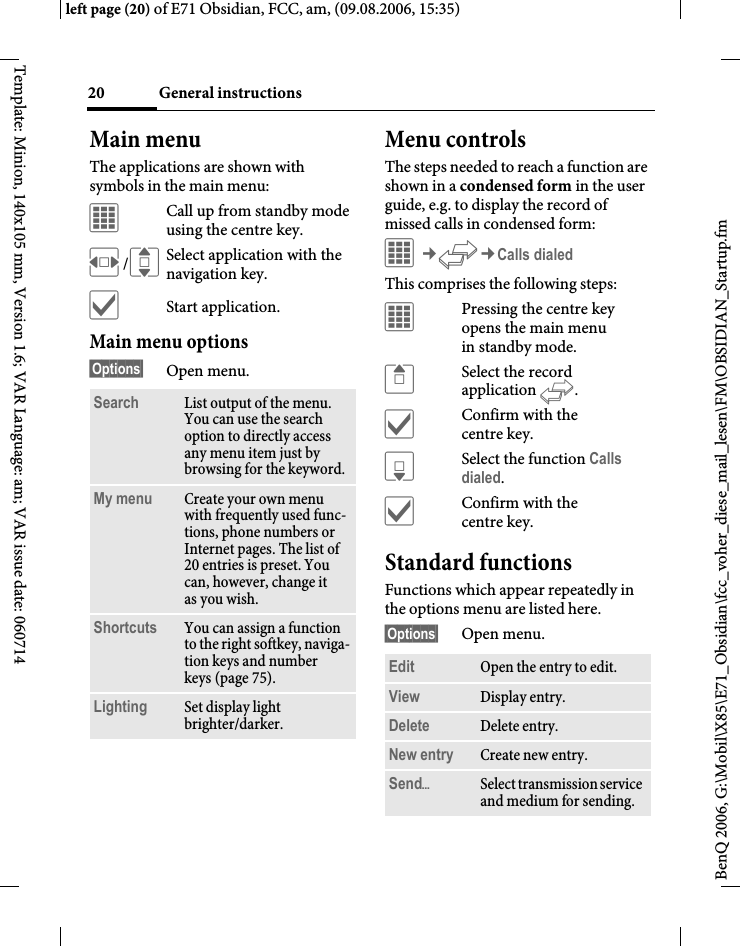
General instructions20BenQ 2006, G:\Mobil\X85\E71_Obsidian\fcc_voher_diese_mail_lesen\FM\OBSIDIAN_Startup.fmleft page (20) of E71 Obsidian, FCC, am, (09.08.2006, 15:35)Template: Minion, 140x105 mm, Version 1.6; VAR Language: am; VAR issue date: 060714Main menuThe applications are shown with symbols in the main menu:íCall up from standby mode using the centre key.F/ISelect application with the navigation key.ìStart application.Main menu options§Options§ Open menu.Menu controlsThe steps needed to reach a function are shown in a condensed form in the user guide, e.g. to display the record of missed calls in condensed form:í¢P¢Calls dialedThis comprises the following steps:íPressing the centre key opens the main menu in standby mode.GSelect the record application P.ìConfirm with the centre key.HSelect the function Calls dialed.ìConfirm with the centre key.Standard functionsFunctions which appear repeatedly in the options menu are listed here.§Options§ Open menu.Search List output of the menu. You can use the search option to directly access any menu item just by browsing for the keyword.My menu Create your own menu with frequently used func-tions, phone numbers or Internet pages. The list of 20 entries is preset. You can, however, change it as you wish.Shortcuts You can assign a function to the right softkey, naviga-tion keys and number keys (page 75).Lighting Set display light brighter/darker.Edit Open the entry to edit.View Display entry.Delete Delete entry.New entry Create new entry.SendöSelect transmission service and medium for sending.
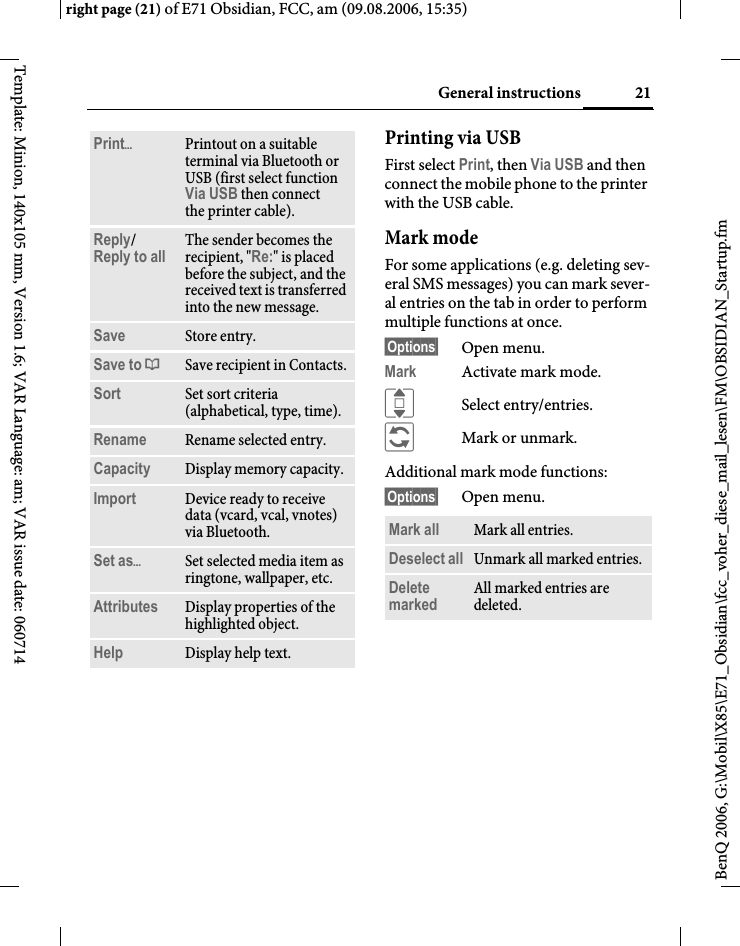
21General instructionsright page (21) of E71 Obsidian, FCC, am (09.08.2006, 15:35)BenQ 2006, G:\Mobil\X85\E71_Obsidian\fcc_voher_diese_mail_lesen\FM\OBSIDIAN_Startup.fmTemplate: Minion, 140x105 mm, Version 1.6; VAR Language: am; VAR issue date: 060714Printing via USBFirst select Print, then Via USB and then connect the mobile phone to the printer with the USB cable.Mark modeFor some applications (e.g. deleting sev-eral SMS messages) you can mark sever-al entries on the tab in order to perform multiple functions at once. §Options§ Open menu.Mark Activate mark mode. ISelect entry/entries.ñMark or unmark.Additional mark mode functions:§Options§ Open menu.PrintöPrintout on a suitable terminal via Bluetooth or USB (first select function Via USB then connect the printer cable).Reply/Reply to all  The sender becomes the recipient, "Re:" is placed before the subject, and the received text is transferred into the new message.Save Store entry.Save to ª Save recipient in Contacts.Sort Set sort criteria (alphabetical, type, time).Rename Rename selected entry.Capacity Display memory capacity.Import Device ready to receive data (vcard, vcal, vnotes) via Bluetooth.Set asöSet selected media item as ringtone, wallpaper, etc.Attributes Display properties of the highlighted object.Help Display help text.Mark all Mark all entries.Deselect all Unmark all marked entries.Delete marked All marked entries are deleted.
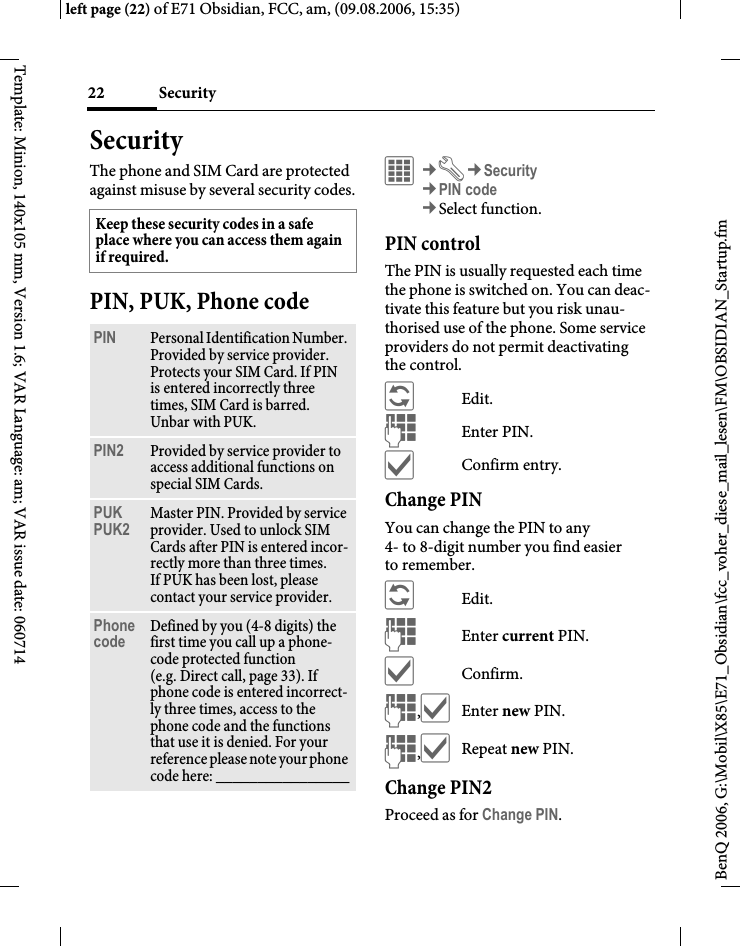
Security22BenQ 2006, G:\Mobil\X85\E71_Obsidian\fcc_voher_diese_mail_lesen\FM\OBSIDIAN_Startup.fmleft page (22) of E71 Obsidian, FCC, am, (09.08.2006, 15:35)Template: Minion, 140x105 mm, Version 1.6; VAR Language: am; VAR issue date: 060714SecurityThe phone and SIM Card are protected against misuse by several security codes.PIN, PUK, Phone codeí¢T¢Security¢PIN code¢Select function. PIN controlThe PIN is usually requested each time the phone is switched on. You can deac-tivate this feature but you risk unau-thorised use of the phone. Some service providers do not permit deactivating the control.ñEdit.JEnter PIN.ìConfirm entry.Change PINYou can change the PIN to any 4- to 8-digit number you find easier to remember.ñEdit.JEnter current PIN.ìConfirm.J,ìEnter new PIN.J,ìRepeat new PIN.Change PIN2Proceed as for Change PIN.Keep these security codes in a safe place where you can access them again if required. PIN Personal Identification Number. Provided by service provider. Protects your SIM Card. If PIN is entered incorrectly three times, SIM Card is barred. Unbar with PUK.PIN2 Provided by service provider to access additional functions on special SIM Cards.PUKPUK2 Master PIN. Provided by service provider. Used to unlock SIM Cards after PIN is entered incor-rectly more than three times. If PUK has been lost, please contact your service provider.Phone code Defined by you (4-8 digits) the first time you call up a phone-code protected function (e.g. Direct call, page 33). If phone code is entered incorrect-ly three times, access to the phone code and the functions that use it is denied. For your reference please note your phone code here: ________________
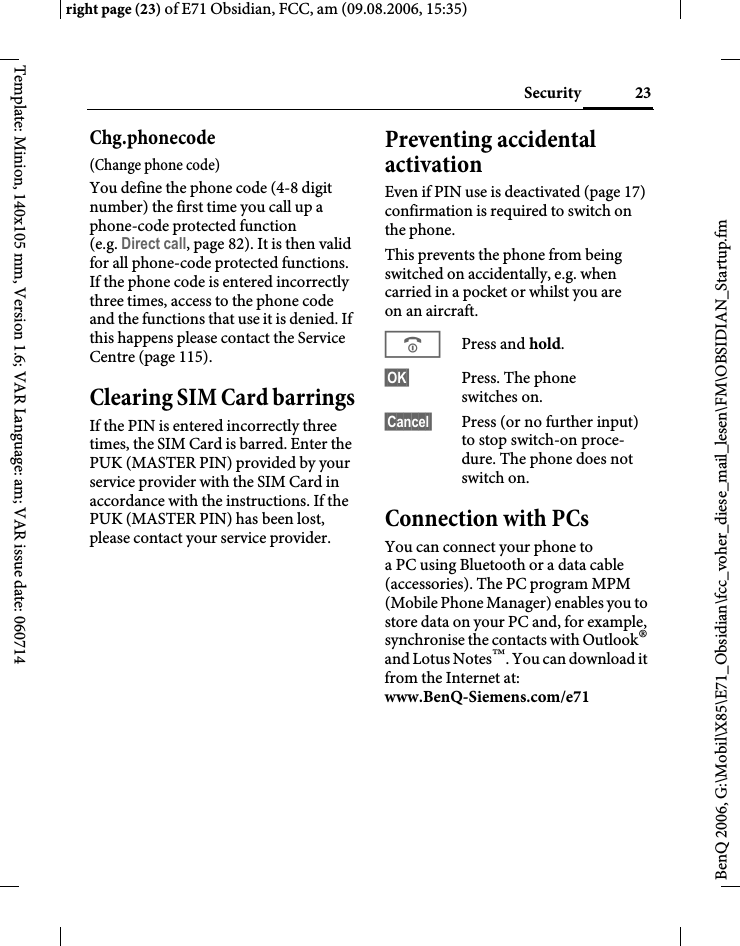
23Securityright page (23) of E71 Obsidian, FCC, am (09.08.2006, 15:35)BenQ 2006, G:\Mobil\X85\E71_Obsidian\fcc_voher_diese_mail_lesen\FM\OBSIDIAN_Startup.fmTemplate: Minion, 140x105 mm, Version 1.6; VAR Language: am; VAR issue date: 060714Chg.phonecode(Change phone code)You define the phone code (4-8 digit number) the first time you call up a phone-code protected function (e.g. Direct call, page 82). It is then valid for all phone-code protected functions. If the phone code is entered incorrectly three times, access to the phone code and the functions that use it is denied. If this happens please contact the Service Centre (page 115).Clearing SIM Card barringsIf the PIN is entered incorrectly three times, the SIM Card is barred. Enter the PUK (MASTER PIN) provided by your service provider with the SIM Card in accordance with the instructions. If the PUK (MASTER PIN) has been lost, please contact your service provider.Preventing accidental activationEven if PIN use is deactivated (page 17) confirmation is required to switch on the phone.This prevents the phone from being switched on accidentally, e.g. when carried in a pocket or whilst you are on an aircraft.BPress and hold. §OK§ Press. The phone switches on.§Cancel§ Press (or no further input) to stop switch-on proce-dure. The phone does not switch on.Connection with PCsYou can connect your phone to a PC using Bluetooth or a data cable (accessories). The PC program MPM (Mobile Phone Manager) enables you to store data on your PC and, for example, synchronise the contacts with Outlook® and Lotus Notes™. You can download it from the Internet at: www.BenQ-Siemens.com/e71
Text input24BenQ 2006, G:\Mobil\X85\E71_Obsidian\fcc_voher_diese_mail_lesen\FM\OBSIDIAN_Text.fmleft page (24) of E71 Obsidian, FCC, am, (09.08.2006, 15:35)Template: Minion, 140x105 mm, Version 1.6; VAR Language: am; VAR issue date: 060714Text inputText input without T9Press the number key repeatedly until the required character appears. After a brief interval the cursor will advance. Example:2Press once briefly to write the letter a, twice to write b, etc. Press and hold to write the number.Ä, ä, 1–9 Umlauts and numbers are displayed after the relevant letters.]Press briefly to delete the letter before the cursor, press and hold to erase the whole word.FMove the cursor (forward/back).#Press briefly: swap between abc, Abc, T9abc, T9Abc, 123. Status shown in top line of the display.Press and hold: all input variants are displayed.0Press once/repeatedly:. , ? ! ’ " 0 + - ( ) @ / : _ Press and hold: write 0.1Inserts a space. Press twice: line break.Special characters*Press briefly. The symbols chart is displayed:1) Line breakI/FScroll to a character.ìConfirm.1)¿¡_;.,?!+- "’ : */()¤¥$£€@\ &#[]{}%~<=>|^`§ Γ Δ Θ Λ Ξ Π Σ Φ Ψ Ω
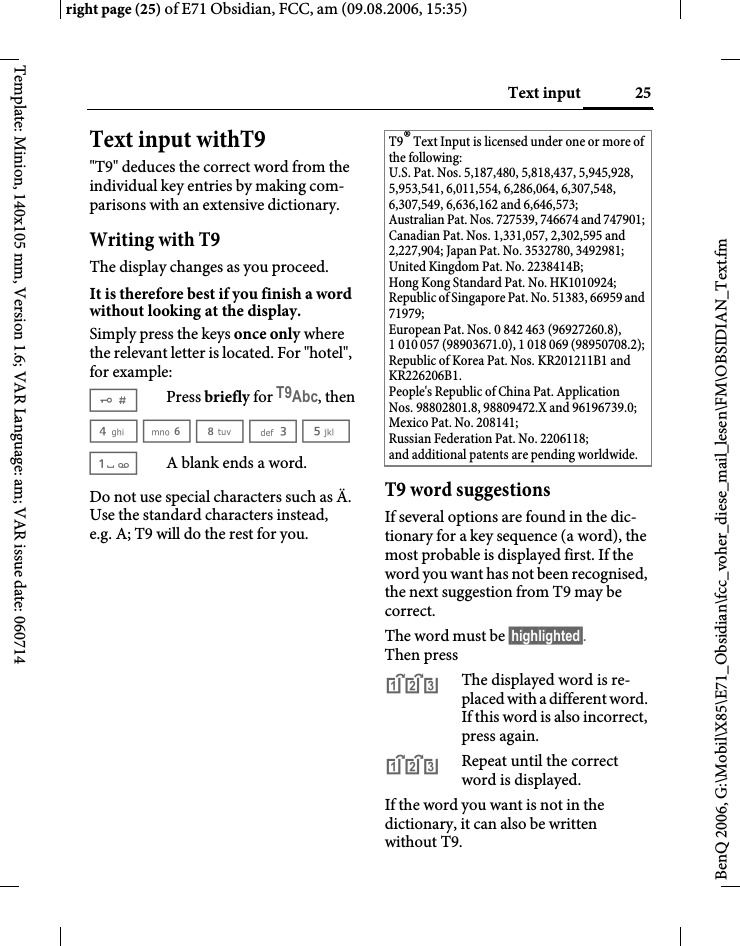
25Text inputright page (25) of E71 Obsidian, FCC, am (09.08.2006, 15:35)BenQ 2006, G:\Mobil\X85\E71_Obsidian\fcc_voher_diese_mail_lesen\FM\OBSIDIAN_Text.fmTemplate: Minion, 140x105 mm, Version 1.6; VAR Language: am; VAR issue date: 060714Text input withT9"T9" deduces the correct word from the individual key entries by making com-parisons with an extensive dictionary.Writing with T9The display changes as you proceed.It is therefore best if you finish a word without looking at the display.Simply press the keys once only where the relevant letter is located. For "hotel", for example:#Press briefly for T9Abc, then4 6 8 3 5 1A blank ends a word.Do not use special characters such as Ä. Use the standard characters instead, e.g. A; T9 will do the rest for you.T9 word suggestionsIf several options are found in the dic-tionary for a key sequence (a word), the most probable is displayed first. If the word you want has not been recognised, the next suggestion from T9 may be correct.The word must be §highlighted§. Then press^The displayed word is re-placed with a different word. If this word is also incorrect, press again.^Repeat until the correct word is displayed.If the word you want is not in the dictionary, it can also be written without T9.T9® Text Input is licensed under one or more of the following: U.S. Pat. Nos. 5,187,480, 5,818,437, 5,945,928, 5,953,541, 6,011,554, 6,286,064, 6,307,548, 6,307,549, 6,636,162 and 6,646,573; Australian Pat. Nos. 727539, 746674 and 747901; Canadian Pat. Nos. 1,331,057, 2,302,595 and 2,227,904; Japan Pat. No. 3532780, 3492981; United Kingdom Pat. No. 2238414B; Hong Kong Standard Pat. No. HK1010924; Republic of Singapore Pat. No. 51383, 66959 and 71979; European Pat. Nos. 0 842 463 (96927260.8), 1 010 057 (98903671.0), 1 018 069 (98950708.2); Republic of Korea Pat. Nos. KR201211B1 and KR226206B1. People's Republic of China Pat. Application Nos. 98802801.8, 98809472.X and 96196739.0; Mexico Pat. No. 208141; Russian Federation Pat. No. 2206118; and additional patents are pending worldwide.
Text input26BenQ 2006, G:\Mobil\X85\E71_Obsidian\fcc_voher_diese_mail_lesen\FM\OBSIDIAN_Text.fmleft page (26) of E71 Obsidian, FCC, am, (09.08.2006, 15:35)Template: Minion, 140x105 mm, Version 1.6; VAR Language: am; VAR issue date: 060714To add a word to the dictionary:§Learn§ Select.The last suggestion is deleted and the word may now be entered without T9 support. Press §Save§ to add it automatically to the dictionary.Correcting a wordFMove left or right, word by word, until the required word is §highlighted§.^Scroll through the T9 word suggestions again.]Deletes the character to the left of the cursor and displays a new possible word!Additional informationWithin a "T9 word", individual letters may not be edited without first removing the T9 status. In most cases it is better to rewrite the complete word.0Set a full stop. The word is concluded if it is followed by a space. Within a word, a full stop represents an apostrophe or hyphen:e.g. §provider.s§ = provider’s.EMoving the cursor to the right ends the word.#Press briefly: swap between: abc, Abc, T9Abc, T9Abc, 123. Status shown in top line of the display.Press and hold: all input variants are displayed.*Press briefly: select special characters (page 24).
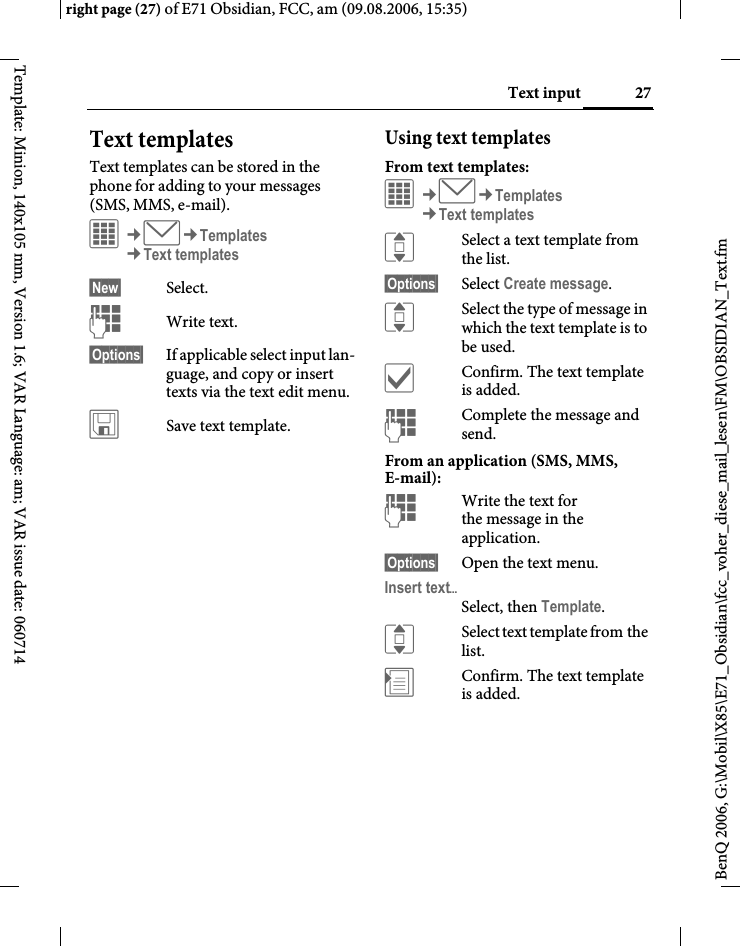
27Text inputright page (27) of E71 Obsidian, FCC, am (09.08.2006, 15:35)BenQ 2006, G:\Mobil\X85\E71_Obsidian\fcc_voher_diese_mail_lesen\FM\OBSIDIAN_Text.fmTemplate: Minion, 140x105 mm, Version 1.6; VAR Language: am; VAR issue date: 060714Text templatesText templates can be stored in the phone for adding to your messages (SMS, MMS, e-mail). í¢M¢Templates¢Text templates§New§ Select.JWrite text.§Options§  If applicable select input lan-guage, and copy or insert texts via the text edit menu.ûSave text template.Using text templatesFrom text templates:í¢M¢Templates¢Text templatesISelect a text template from the list.§Options§ Select Create message.ISelect the type of message in which the text template is to be used.ìConfirm. The text template is added.JComplete the message and send.From an application (SMS, MMS, E-mail):JWrite the text for the message in the application.§Options§ Open the text menu.Insert textöSelect, then Template.ISelect text template from the list.÷Confirm. The text template is added.
Calling28BenQ 2006, G:\Mobil\X85\E71_Obsidian\fcc_voher_diese_mail_lesen\FM\OBSIDIAN_Phone.fmleft page (28) of E71 Obsidian, FCC, am, (09.08.2006, 15:35)Template: Minion, 140x105 mm, Version 1.6; VAR Language: am; VAR issue date: 060714CallingDialling with number keysThe phone must be switched on (standby mode).JEnter number (always with area/international dialling code). ]A short press clears the last digit, press and hold clears the entire number.APress the Call key. The displayed phone number is dialled.Ending a callBPress briefly. Press this key even if the person on the other end of the line has hung up first.Setting the volume[/\Adjust the volume with the sidekeys (only possible during a call).If a Car Kit is used, its volume setting will not affect the usual setting on the phone.International dialling codes0Press and hold until a "+" is displayed.§Options§ Open call menu.Country code Press and select country.
29Callingright page (29) of E71 Obsidian, FCC, am (09.08.2006, 15:35)BenQ 2006, G:\Mobil\X85\E71_Obsidian\fcc_voher_diese_mail_lesen\FM\OBSIDIAN_Phone.fmTemplate: Minion, 140x105 mm, Version 1.6; VAR Language: am; VAR issue date: 060714Redialling bTo redial the phone number last called:APress the Call key twice.To redial other phone numbers that were dialled previously:APress the Call key once.IPick out the phone number from the list, then press …A… to dial.If the number is busyIf the called number is busy or cannot be reached because of network problems, several options are available (depending on the service provider). An incoming call or any other use of the phone interrupts these functions.Auto last number redial§Options§ Open call menu.Auto dial The phone number is auto-matically dialled ten times at increasing time intervals. ìConfirm. End with:B End key.Or Call back b§Options§ Open call menu.Call back Your phone rings when the busy number is free. Press the Call key to dial the number. ìConfirm.Reminder§Options§ Open call menu.Reminder A beep reminds you to redial the displayed phone number after 15 minutes.
Calling30BenQ 2006, G:\Mobil\X85\E71_Obsidian\fcc_voher_diese_mail_lesen\FM\OBSIDIAN_Phone.fmleft page (30) of E71 Obsidian, FCC, am, (09.08.2006, 15:35)Template: Minion, 140x105 mm, Version 1.6; VAR Language: am; VAR issue date: 060714Accepting a call The phone must be switched on. An incoming call will interrupt any other use of the phone.APress the Call key.Or ðPress the centre key.A phone number transmitted by the network plus the corresponding name are displayed if they are stored in Contacts (page 37).Rejecting a call§Reject§ Press.Or BPress briefly. HandsfreeYou can put the phone down during a call. You can then hear the caller via the loudspeaker. §Options§ Open call menu.Handsfr. Activate/deactivate handsfree talking.ìConfirm.Warning!Please make sure you have accepted the call before holding the phone to your ear. This will avoid damage to your hearing from loud ringtones.Warning!Always switch off "handsfree talking" before holding the phone to your ear. Otherwise you will damage your hearing!
31Callingright page (31) of E71 Obsidian, FCC, am (09.08.2006, 15:35)BenQ 2006, G:\Mobil\X85\E71_Obsidian\fcc_voher_diese_mail_lesen\FM\OBSIDIAN_Phone.fmTemplate: Minion, 140x105 mm, Version 1.6; VAR Language: am; VAR issue date: 060714Swapping between 2 calls bEstablishing a second connectionYou can call another number during a call.§Options§ Open call menu.Hold The current call is put on hold. ìConfirm.JEnter new phone number or H call up Contacts or A open call records and select a phone number.When the new connection is established:§Options§ Open call menu.Toggle Swap between calls.ìConfirm.Incoming calls during a callYou may need to register for this service with your service provider and set your phone accordingly. During a call, you may be advised that there is another call waiting. You will hear a special tone during the call. You have the following options:•Accept the waiting call in addition to the first §Toggle§ Accept the waiting call and place the current call on hold. Always proceed as above to swap between the two calls.•Reject the waiting call §Reject§ Press. Or §Forward§ The waiting call is diverted, for example, to mailbox (see page 76, also ringtones and vibration must be off).•Accept the waiting call and end the current call BEnd the current call.ðAccept the new call.
Calling32BenQ 2006, G:\Mobil\X85\E71_Obsidian\fcc_voher_diese_mail_lesen\FM\OBSIDIAN_Phone.fmleft page (32) of E71 Obsidian, FCC, am, (09.08.2006, 15:35)Template: Minion, 140x105 mm, Version 1.6; VAR Language: am; VAR issue date: 060714Ending callsBPress briefly.After the Return to held call? display, you have the following choice:§Yes§ You accept the call on hold.§No§ You end the second call too.Conference bYou can call up to 5 conference partici-pants one after the other and then link them together in a conference call. Some of the functions described may not be supported by your service provider or may have to be enabled specially. A connection has already been established: §Options§ Open menu and select Hold. The current connection is maintained.H/JSelect phone number from Contacts or enter it manually. When the new connection is established …§Options§ … open the menu and select Conference. The held call is joined.Repeat procedure until all participants are linked together (up to 5 participants).EndingBAll calls in the conference finish simultaneously when the End key is pressed.
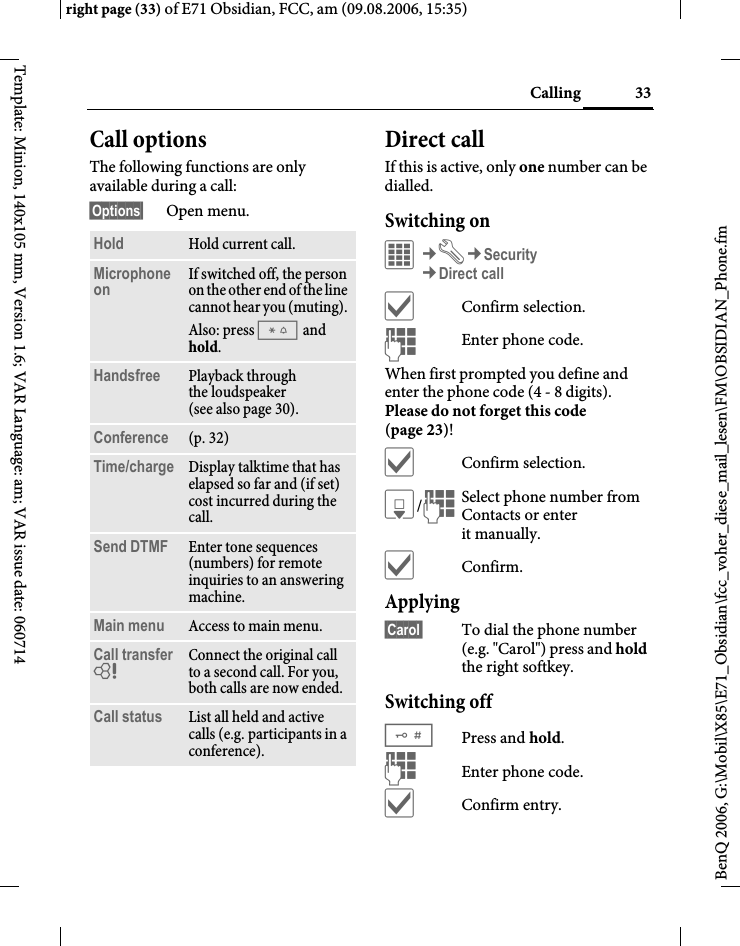
33Callingright page (33) of E71 Obsidian, FCC, am (09.08.2006, 15:35)BenQ 2006, G:\Mobil\X85\E71_Obsidian\fcc_voher_diese_mail_lesen\FM\OBSIDIAN_Phone.fmTemplate: Minion, 140x105 mm, Version 1.6; VAR Language: am; VAR issue date: 060714Call optionsThe following functions are only available during a call:§Options§ Open menu.Direct callIf this is active, only one number can be dialled.Switching onC¢T¢Security¢Direct callìConfirm selection.JEnter phone code.When first prompted you define and enter the phone code (4 - 8 digits). Please do not forget this code (page 23)! ìConfirm selection.H/JSelect phone number from Contacts or enter it manually. ìConfirm.Applying§Carol§ To dial the phone number (e.g. "Carol") press and hold the right softkey. Switching off#Press and hold.JEnter phone code.ìConfirm entry.Hold Hold current call.Microphone on If switched off, the person on the other end of the line cannot hear you (muting). Also: press * and hold.Handsfree Playback through the loudspeaker (see also page 30). Conference (p. 32)Time/charge Display talktime that has elapsed so far and (if set) cost incurred during the call.Send DTMF Enter tone sequences (numbers) for remote inquiries to an answering machine.Main menu Access to main menu.Call transfer = Connect the original call to a second call. For you, both calls are now ended.Call status List all held and active calls (e.g. participants in a conference).
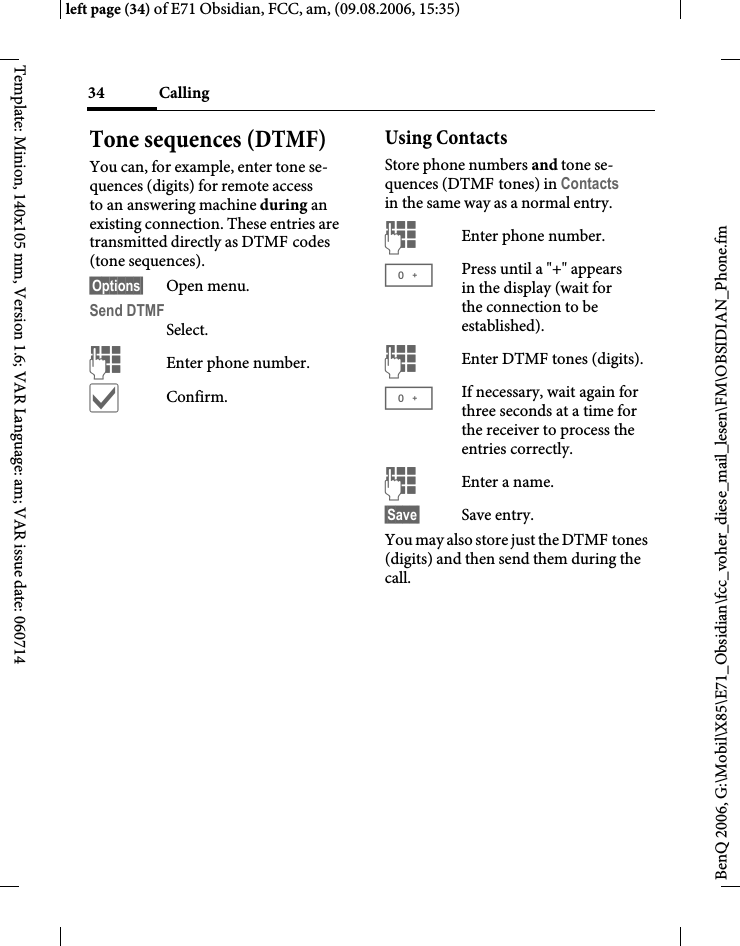
Calling34BenQ 2006, G:\Mobil\X85\E71_Obsidian\fcc_voher_diese_mail_lesen\FM\OBSIDIAN_Phone.fmleft page (34) of E71 Obsidian, FCC, am, (09.08.2006, 15:35)Template: Minion, 140x105 mm, Version 1.6; VAR Language: am; VAR issue date: 060714Tone sequences (DTMF)You can, for example, enter tone se-quences (digits) for remote access to an answering machine during an existing connection. These entries are transmitted directly as DTMF codes (tone sequences).§Options§ Open menu.Send DTMFSelect.JEnter phone number.ìConfirm.Using ContactsStore phone numbers and tone se-quences (DTMF tones) in Contacts in the same way as a normal entry.JEnter phone number.0Press until a "+" appears in the display (wait for the connection to be established).JEnter DTMF tones (digits).0If necessary, wait again for three seconds at a time for the receiver to process the entries correctly.JEnter a name.§Save§ Save entry.You may also store just the DTMF tones (digits) and then send them during the call.
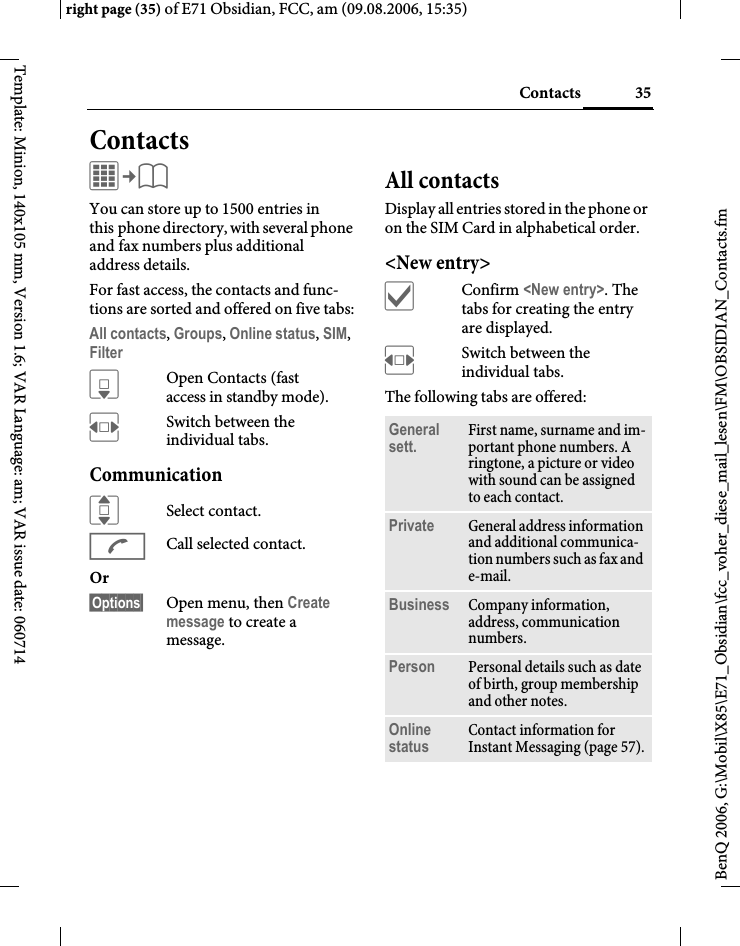
35Contactsright page (35) of E71 Obsidian, FCC, am (09.08.2006, 15:35)BenQ 2006, G:\Mobil\X85\E71_Obsidian\fcc_voher_diese_mail_lesen\FM\OBSIDIAN_Contacts.fmTemplate: Minion, 140x105 mm, Version 1.6; VAR Language: am; VAR issue date: 060714ContactsC¢L You can store up to 1500 entries in this phone directory, with several phone and fax numbers plus additional address details. For fast access, the contacts and func-tions are sorted and offered on five tabs:All contacts, Groups, Online status, SIM, Filter HOpen Contacts (fast access in standby mode).FSwitch between the individual tabs.CommunicationISelect contact.ACall selected contact.Or §Options§ Open menu, then Create message to create a message.All contactsDisplay all entries stored in the phone or on the SIM Card in alphabetical order.<New entry>ìConfirm <New entry>. The tabs for creating the entry are displayed.FSwitch between the individual tabs.The following tabs are offered:General sett. First name, surname and im-portant phone numbers. A ringtone, a picture or video with sound can be assigned to each contact.Private General address information and additional communica-tion numbers such as fax and e-mail.Business Company information, address, communication numbers.Person Personal details such as date of birth, group membership and other notes.Online status Contact information for Instant Messaging (page 57).
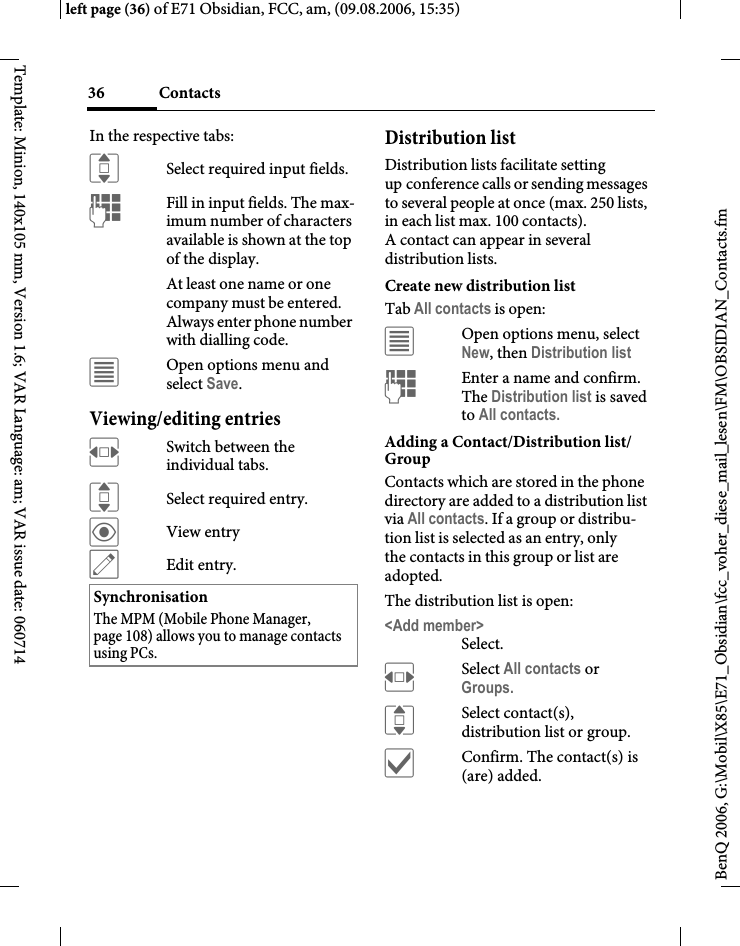
Contacts36BenQ 2006, G:\Mobil\X85\E71_Obsidian\fcc_voher_diese_mail_lesen\FM\OBSIDIAN_Contacts.fmleft page (36) of E71 Obsidian, FCC, am, (09.08.2006, 15:35)Template: Minion, 140x105 mm, Version 1.6; VAR Language: am; VAR issue date: 060714In the respective tabs:ISelect required input fields.JFill in input fields. The max-imum number of characters available is shown at the top of the display. At least one name or one company must be entered. Always enter phone number with dialling code. úOpen options menu and select Save.Viewing/editing entriesFSwitch between the individual tabs.ISelect required entry.öView entryüEdit entry.Distribution listDistribution lists facilitate setting up conference calls or sending messages to several people at once (max. 250 lists, in each list max. 100 contacts). A contact can appear in several distribution lists. Create new distribution listTab All contacts is open:úOpen options menu, select New, then Distribution listJEnter a name and confirm. The Distribution list is saved to All contacts.Adding a Contact/Distribution list/GroupContacts which are stored in the phone directory are added to a distribution list via All contacts. If a group or distribu-tion list is selected as an entry, only the contacts in this group or list are adopted.The distribution list is open:<Add member>Select.FSelect All contacts or Groups.ISelect contact(s), distribution list or group.ìConfirm. The contact(s) is (are) added.SynchronisationThe MPM (Mobile Phone Manager, page 108) allows you to manage contacts using PCs.
37Contactsright page (37) of E71 Obsidian, FCC, am (09.08.2006, 15:35)BenQ 2006, G:\Mobil\X85\E71_Obsidian\fcc_voher_diese_mail_lesen\FM\OBSIDIAN_Contacts.fmTemplate: Minion, 140x105 mm, Version 1.6; VAR Language: am; VAR issue date: 060714CommunicationISelect distribution list, open §Options§ and select Create message.OrAStart a conference call. GroupsYou are offered 10 different groups to enable you to arrange your contacts clearly. You can edit the names of groups as you wish.Editing group attributesISelect group.§Options§ Open menu and select Attributes. You can make the following changes:Name:, Ringtone:, Picture: Adding a contactContacts which are stored in the phone directory may be added to a group via All contacts tab.ISelect contact, open §Options§, select Add toöthen ™ group then a group.A contact can only belong to one group.CommunicationISelect group, open §Options§ and select Create message.OrAStart a conference call. Online statusDisplay all contacts for whom an Instant Messaging address (WV address) is entered.SIMDisplay all contacts stored on the SIM Card. <New entry>ìConfirm <New entry>, enter name and phone number, and select the storage location (SIM/protected SIM).Viewing/editing entriesISelect required entry.öView entry.üEdit entry.
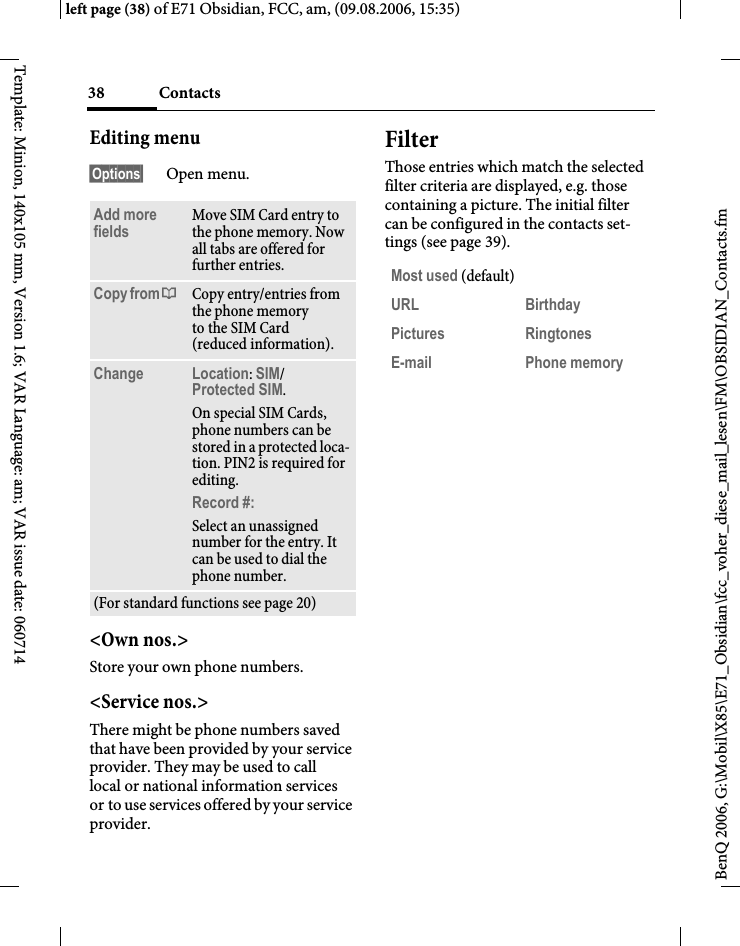
Contacts38BenQ 2006, G:\Mobil\X85\E71_Obsidian\fcc_voher_diese_mail_lesen\FM\OBSIDIAN_Contacts.fmleft page (38) of E71 Obsidian, FCC, am, (09.08.2006, 15:35)Template: Minion, 140x105 mm, Version 1.6; VAR Language: am; VAR issue date: 060714Editing menu§Options§ Open menu.<Own nos.>Store your own phone numbers. <Service nos.>There might be phone numbers saved that have been provided by your service provider. They may be used to call local or national information services or to use services offered by your service provider.FilterThose entries which match the selected filter criteria are displayed, e.g. those containing a picture. The initial filter can be configured in the contacts set-tings (see page 39).Add more fields Move SIM Card entry to the phone memory. Now all tabs are offered for further entries. Copy from † Copy entry/entries from the phone memory to the SIM Card (reduced information).Change Location: SIM/Protected SIM. On special SIM Cards, phone numbers can be stored in a protected loca-tion. PIN2 is required for editing.Record #: Select an unassigned number for the entry. It can be used to dial the phone number. (For standard functions see page 20)Most used (default)URL BirthdayPictures RingtonesE-mail Phone memory
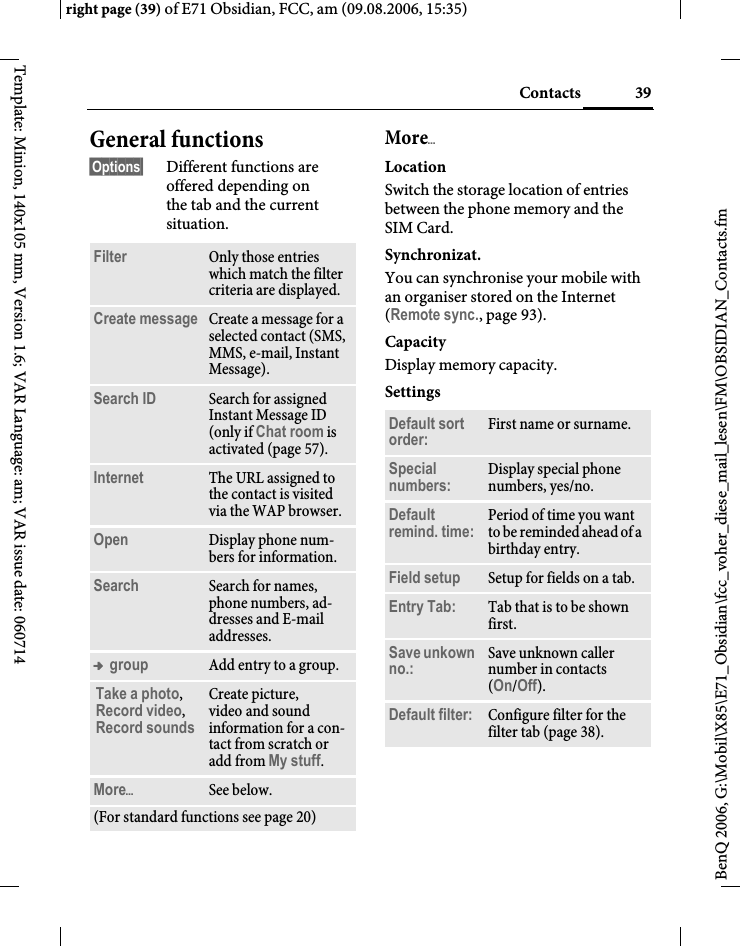
39Contactsright page (39) of E71 Obsidian, FCC, am (09.08.2006, 15:35)BenQ 2006, G:\Mobil\X85\E71_Obsidian\fcc_voher_diese_mail_lesen\FM\OBSIDIAN_Contacts.fmTemplate: Minion, 140x105 mm, Version 1.6; VAR Language: am; VAR issue date: 060714General functions§Options§ Different functions are offered depending on the tab and the current situation.MoreöLocationSwitch the storage location of entries between the phone memory and the SIM Card.Synchronizat.You can synchronise your mobile with an organiser stored on the Internet (Remote sync., page 93).CapacityDisplay memory capacity.SettingsFilter Only those entries which match the filter criteria are displayed.Create message Create a message for a selected contact (SMS, MMS, e-mail, Instant Message). Search ID Search for assigned Instant Message ID (only if Chat room is activated (page 57).Internet The URL assigned to the contact is visited via the WAP browser.Open Display phone num-bers for information.Search Search for names, phone numbers, ad-dresses and E-mail addresses.™ group Add entry to a group.Take a photo, Record video, Record soundsCreate picture, video and sound information for a con-tact from scratch or add from My stuff.MoreöSee below.(For standard functions see page 20)Default sort order: First name or surname.Special numbers: Display special phone numbers, yes/no.Default remind. time: Period of time you want to be reminded ahead of a birthday entry.Field setup Setup for fields on a tab.Entry Tab: Tab that is to be shown first. Save unkown no.: Save unknown caller number in contacts (On/Off).Default filter: Configure filter for the filter tab (page 38).
Contacts40BenQ 2006, G:\Mobil\X85\E71_Obsidian\fcc_voher_diese_mail_lesen\FM\OBSIDIAN_Contacts.fmleft page (40) of E71 Obsidian, FCC, am, (09.08.2006, 15:35)Template: Minion, 140x105 mm, Version 1.6; VAR Language: am; VAR issue date: 060714As bus. cardDefine a selected contact as a business card.Business cardEstablish a contact as your own business card to send to a different GSM phone. ImportAllows to import contact data from an-other phone via Bluetooth (see page 71).Add more fieldsMove SIM Card entry to the phone memory. Now all tabs are offered for further entries.Conference bAStart a conference with up to five participants highlighted in advance. The contacts are dialled one after another.
41Call recordsright page (41) of E71 Obsidian, FCC, am (09.08.2006, 14:58)BenQ 2006, G:\Mobil\X85\E71_Obsidian\fcc_voher_diese_mail_lesen\FM\OBSIDIAN_Records.fmTemplate: Minion, 140x105 mm, Version 1.6; VAR Language: am; VAR issue date: 060714Call recordsYour phone stores the phone numbers of calls for convenient redialling.A caller's phone number is displayed if • the caller has switched off the Hide ID function and• the network supports the "Caller Identity" function.Alternatively, a caller’s name is displayed if it is stored in Contacts.C¢P ISelect record.COpen record.ISelect phone number.ADial phone number.Or öDisplay information on the phone number.Missed callsThe phone numbers of calls made to your phone but not answered are stored for callback purposes.¿Symbol for missed call (in standby mode). Press the softkey beneath the symbol to bring up the inbox. Calls receivedAccepted calls are listed. Calls dialedAccess to the last numbers you have dialled.AFast access in standby mode.Delete recordsThe records are deleted.
Dur./charges42BenQ 2006, G:\Mobil\X85\E71_Obsidian\fcc_voher_diese_mail_lesen\FM\OBSIDIAN_TimeCharge.fmleft page (42) of E71 Obsidian, FCC, am, (09.08.2006, 14:58)Template: Minion, 140x105 mm, Version 1.6; VAR Language: am; VAR issue date: 060714Dur./chargesYou can display the charges and duration during a call. You can set a unit limit for outgoing calls.C¢P¢Dur./chargesLast call All outg. calls All incom. calls Remain. units (Only shown if supported by your service provider)ISelect display.COpen area.Dur./charges optionsúOpen menu.Charge settingsCurrency(PIN2 prompt)Enter desired currency.Charge/Unit (PIN2 prompt)Enter the currency used as well as the charge per unit or time.Account limit (PIN2 prompt)Special SIM Cards allow you or the service provider to define a credit or duration limit after which the phone is barred for outgoing calls.ñPress.JEnter PIN2.Account limitActivate.JEnter number of units.§Options§ Open menu, then select Save.Auto displayCall duration and charges are displayed during and after a call if a personal rate is set.Reset Reset the currently selected setting.Reset all Reset all settings.Charge settings Call up the menu (see below).
43Cameraright page (43) of E71 Obsidian, FCC, am (09.08.2006, 15:36)BenQ 2006, G:\Mobil\X85\E71_Obsidian\fcc_voher_diese_mail_lesen\FM\OBSIDIAN_Camera.fmTemplate: Minion, 140x105 mm, Version 1.6; VAR Language: am; VAR issue date: 060714CameraA camera is integrated in the phone. Take photos/record videos and • use photos as wallpaper, a logo, screensaver or startup and shutdown animation• assign a photo/video to a contact• send photos/videos via MMS or e-mail• save photos in My stuff (page 105).Switching onC¢R FSwitch between the Camera and Video tabs.The current (preview) image is dis-played. You will see the following in the first line from left to right:ÚZoom factor ( I)ÙNight modeÛWhite balanceThe number of photos that can still be taken in the selected resolution is dis-played in the preview image. This number varies considerably depending on the subject matter and how much storage space is required. You will also see an indication of the selected resolu-tion or, if video mode has been selected, there is an indication as to how much recording time has already been used and the maximum time still available.Take a photoùTake a photo. A sound is heard as the photo is taken (this cannot be deactivated).The photo is saved under a user defined name (Rename in camera options) or a consecutive number in the Pictures (page 107) folder in My stuff. Image resolutionIt is possible to set the quality of the image regardless of the preview image resolution.To take individual wallpaper images you need to set Background as the image resolution in the options.
Camera44BenQ 2006, G:\Mobil\X85\E71_Obsidian\fcc_voher_diese_mail_lesen\FM\OBSIDIAN_Camera.fmleft page (44) of E71 Obsidian, FCC, am, (09.08.2006, 15:36)Template: Minion, 140x105 mm, Version 1.6; VAR Language: am; VAR issue date: 060714Record videoThe video mode resolution is the same as the preview image resolution.FSelect the Record video tab.ôStart video recording.A red dot appears in the top right of the display while the video recording is being made. õEnd video recording.The video is saved with a name, the date and the time in the Videos folder (page 107) in My stuff. Video resolutionIt is possible to set the quality of the image for a video regardless of the preview image resolution. The best possible resolution is 176 x 144 pixels.Camera optionsThe following functions are available, depending on the current situation.§Options§ Open menu.Memory assis. If there is insufficient memory available the memory assistant is started.Pictures Display list of photos.Other videos Display list of videos.Microphone on Switch microphone on or off.Settings •Name for video/picture•Resolution:• Brightness:•Night mode:• Selftimer:• Recording time: Set video recording time for short/long MMS•Save in: My stuff (page 105)Frame Selection of various decorative frames. Only available if resolution is not too high.Auto-timer Set camera to take photo after a defined period of time. For the last 5 seconds, you will hear abeep each second.White balance Choose between: Automatic, Indoor, Outdoor (For standard functions see page 20)
45SMS/MMSright page (45) of E71 Obsidian, FCC, am (09.08.2006, 15:36)BenQ 2006, G:\Mobil\X85\E71_Obsidian\fcc_voher_diese_mail_lesen\FM\OBSIDIAN_SMS-MMS.fmTemplate: Minion, 140x105 mm, Version 1.6; VAR Language: am; VAR issue date: 060714SMS/MMSYou can use your phone to send and receive text messages and MMS (Multimedia Messaging Service) messages.Information about SMSYou can use your phone to transmit and receive very long messages (up to 760 characters). They are auto-matically composed of several "normal" SMS messages (note higher charges). Using special letters in some languages reduces the maximum possible length of an SMS. If you do not wish to use these letters, please change the input language in the options menu. Information about MMSThe Multimedia Messaging Service ena-bles you to send texts, pictures/ videos and sounds in a combined message to another mobile phone or to an e-mail address. All elements of an MMS mes-sage are merged to form a "slide show".Depending on your phone's settings, you will receive either the complete message automatically or notification that an MMS has been saved in the net-work, giving sender and size details. You may then download it to your phone to read it. Ask your service provider whether this service is available. You may have to register for this separately. Writing an SMS C¢M¢Create new¢SMSJEnter text. You will find information on writing texts with and without T9 in the chapter "Text input" (page 24). AEnter phone number or ú open menu, then select Add from †, select recipient from Contacts. You can add more than one.AStart sending process.SMS optionsDifferent functions are offered for edit-ing an SMS depending on the selected part of the message.§Options§ Open menu.Additional informationThe following is displayed in the upper-most line: text input status, number of SMS messages required, number of char-acters still available for the current SMS.If the length of the text exceeds 760 characters, the message is converted into an MMS.Add addressee Add recipient.Add from †Add a recipient from Contacts.
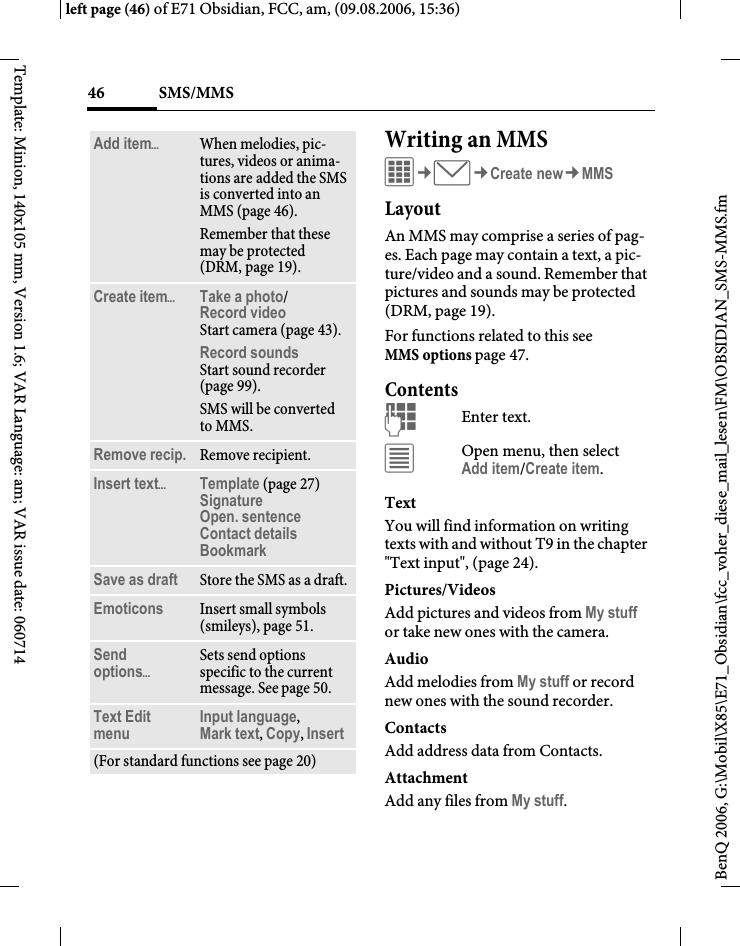
SMS/MMS46BenQ 2006, G:\Mobil\X85\E71_Obsidian\fcc_voher_diese_mail_lesen\FM\OBSIDIAN_SMS-MMS.fmleft page (46) of E71 Obsidian, FCC, am, (09.08.2006, 15:36)Template: Minion, 140x105 mm, Version 1.6; VAR Language: am; VAR issue date: 060714Writing an MMSC¢M¢Create new¢MMSLayoutAn MMS may comprise a series of pag-es. Each page may contain a text, a pic-ture/video and a sound. Remember that pictures and sounds may be protected (DRM, page 19).For functions related to this see MMS options page 47.ContentsJEnter text. úOpen menu, then selectAdd item/Create item.TextYou will find information on writing texts with and without T9 in the chapter "Text input", (page 24). Pictures/VideosAdd pictures and videos from My stuff or take new ones with the camera.AudioAdd melodies from My stuff or record new ones with the sound recorder.Contacts Add address data from Contacts.AttachmentAdd any files from My stuff.Add itemöWhen melodies, pic-tures, videos or anima-tions are added the SMS is converted into an MMS (page 46).Remember that these may be protected (DRM, page 19).Create itemöTake a photo/Record video Start camera (page 43).Record soundsStart sound recorder (page 99).SMS will be converted to MMS.Remove recip. Remove recipient.Insert textöTemplate (page 27)SignatureOpen. sentenceContact detailsBookmark Save as draft Store the SMS as a draft.Emoticons Insert small symbols (smileys), page 51.Send optionsöSets send options specific to the current message. See page 50.Text Edit menu Input language, Mark text, Copy, Insert(For standard functions see page 20)
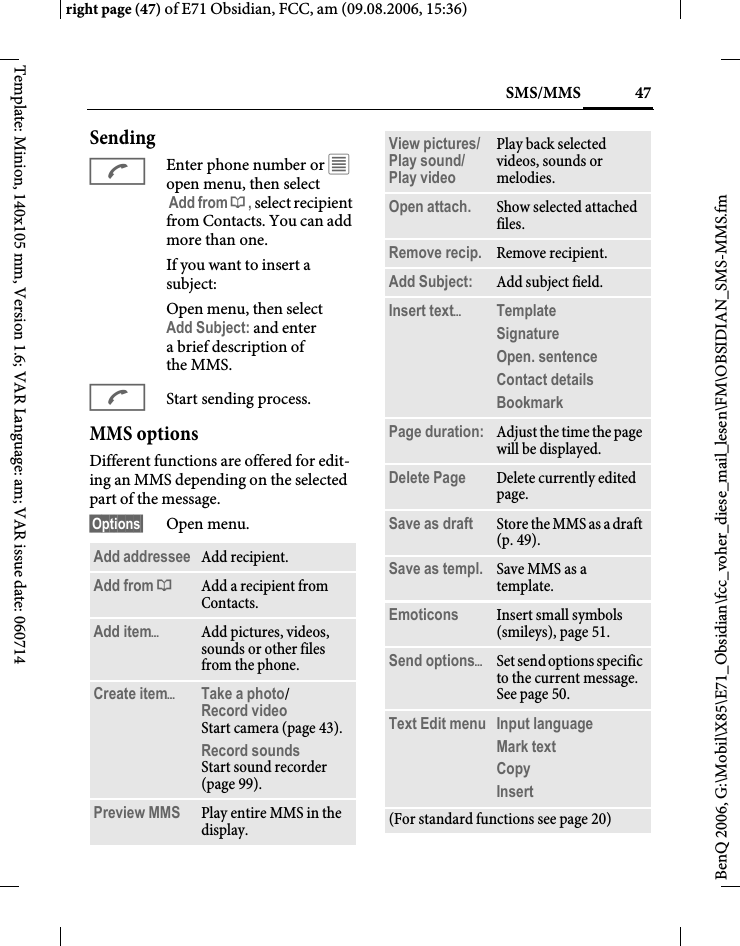
47SMS/MMSright page (47) of E71 Obsidian, FCC, am (09.08.2006, 15:36)BenQ 2006, G:\Mobil\X85\E71_Obsidian\fcc_voher_diese_mail_lesen\FM\OBSIDIAN_SMS-MMS.fmTemplate: Minion, 140x105 mm, Version 1.6; VAR Language: am; VAR issue date: 060714SendingAEnter phone number or ú open menu, then select Add from †, select recipient from Contacts. You can add more than one.If you want to insert a subject:Open menu, then select Add Subject: and enter abrief description of the MMS.AStart sending process.MMS optionsDifferent functions are offered for edit-ing an MMS depending on the selected part of the message.§Options§ Open menu.Add addressee Add recipient.Add from †Add a recipient from Contacts.Add itemöAdd pictures, videos, sounds or other files from the phone.Create itemöTake a photo/Record video Start camera (page 43).Record soundsStart sound recorder (page 99).Preview MMS Play entire MMS in the display.View pictures/Play sound/ Play video Play back selected videos, sounds or melodies.Open attach. Show selected attached files.Remove recip. Remove recipient.Add Subject: Add subject field.Insert textöTemplate Signature Open. sentence Contact details Bookmark Page duration: Adjust the time the page will be displayed.Delete Page Delete currently edited page.Save as draft Store the MMS as a draft (p. 49).Save as templ. Save MMS as a template.Emoticons Insert small symbols (smileys), page 51.Send optionsöSet send options specific to the current message. See page 50.Text Edit menu Input language Mark textCopy Insert (For standard functions see page 20)
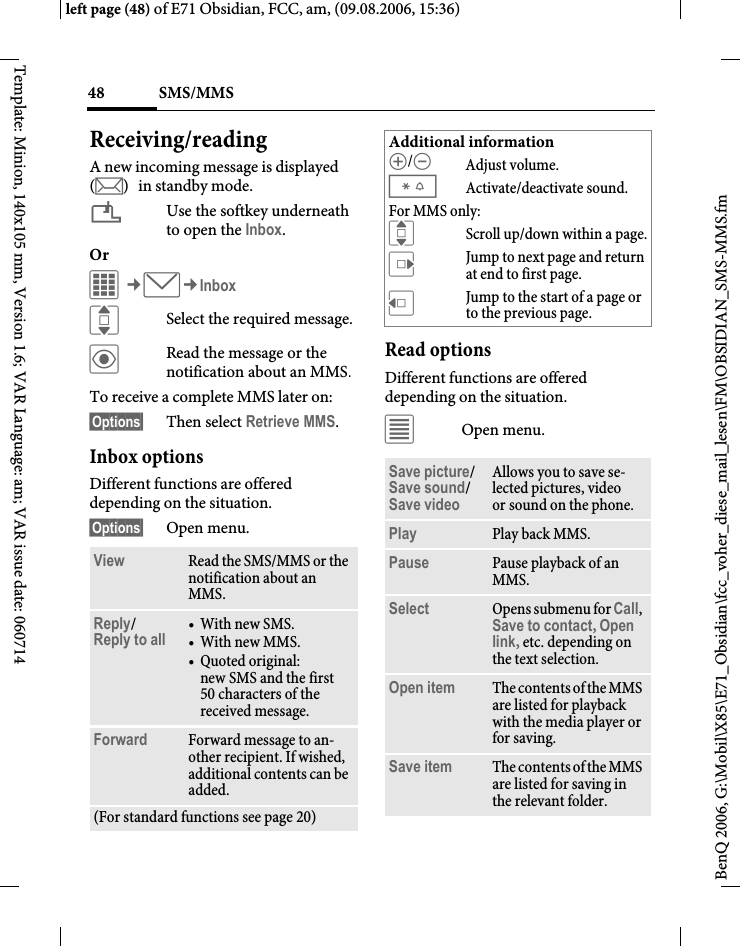
SMS/MMS48BenQ 2006, G:\Mobil\X85\E71_Obsidian\fcc_voher_diese_mail_lesen\FM\OBSIDIAN_SMS-MMS.fmleft page (48) of E71 Obsidian, FCC, am, (09.08.2006, 15:36)Template: Minion, 140x105 mm, Version 1.6; VAR Language: am; VAR issue date: 060714Receiving/readingA new incoming message is displayed (m) in standby mode.¿Use the softkey underneath to open the Inbox.Or C¢M¢InboxISelect the required message.öRead the message or the notification about an MMS.To receive a complete MMS later on: §Options§ Then select Retrieve MMS.Inbox optionsDifferent functions are offered depending on the situation.§Options§ Open menu.Read optionsDifferent functions are offered depending on the situation.úOpen menu.View Read the SMS/MMS or the notification about an MMS.Reply/Reply to all  •With new SMS.•With new MMS.• Quoted original: new SMS and the first 50 characters of the received message.Forward Forward message to an-other recipient. If wished, additional contents can be added.(For standard functions see page 20)Additional information[/\ Adjust volume.*Activate/deactivate sound.For MMS only:IScroll up/down within a page.EJump to next page and return at end to first page.DJump to the start of a page or to the previous page.Save picture/Save sound/ Save videoAllows you to save se-lected pictures, video or sound on the phone.Play Play back MMS.Pause Pause playback of an MMS.Select Opens submenu for Call, Save to contact, Open link, etc. depending on the text selection.Open item The contents of the MMS are listed for playback with the media player or for saving.Save item The contents of the MMS are listed for saving in the relevant folder.
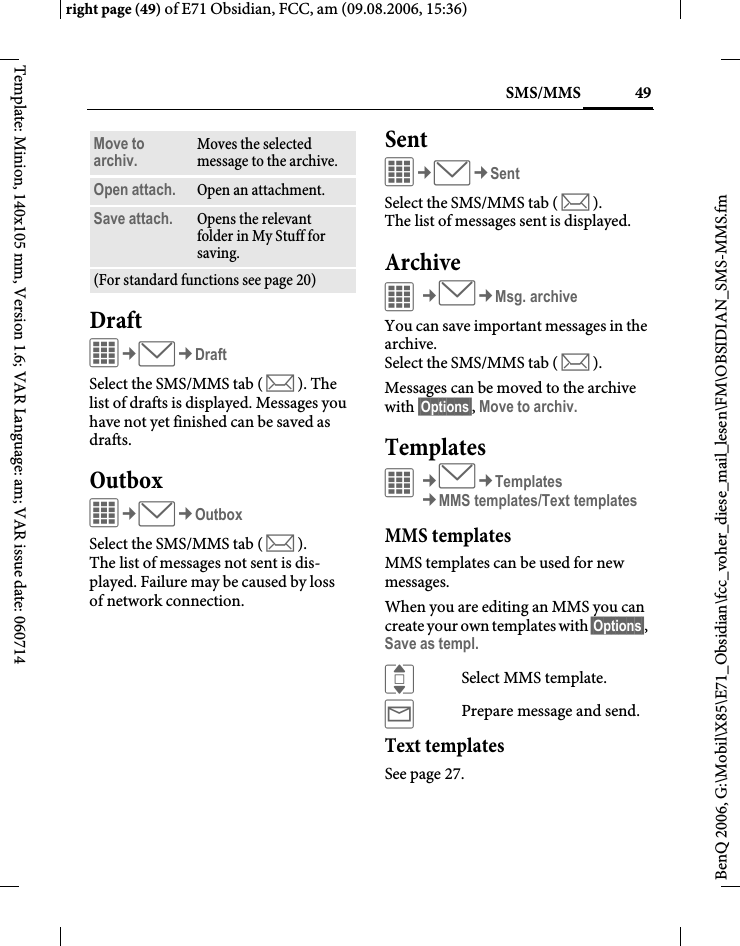
49SMS/MMSright page (49) of E71 Obsidian, FCC, am (09.08.2006, 15:36)BenQ 2006, G:\Mobil\X85\E71_Obsidian\fcc_voher_diese_mail_lesen\FM\OBSIDIAN_SMS-MMS.fmTemplate: Minion, 140x105 mm, Version 1.6; VAR Language: am; VAR issue date: 060714DraftC¢M¢DraftSelect the SMS/MMS tab ( m ). The list of drafts is displayed. Messages you have not yet finished can be saved as drafts.OutboxC¢M¢OutboxSelect the SMS/MMS tab ( m ). The list of messages not sent is dis-played. Failure may be caused by loss of network connection.SentC¢M¢SentSelect the SMS/MMS tab ( m ). The list of messages sent is displayed.ArchiveC¢M¢Msg. archiveYou can save important messages in the archive. Select the SMS/MMS tab ( m ).Messages can be moved to the archive with §Options§, Move to archiv.TemplatesC¢M¢Templates¢MMS templates/Text templatesMMS templatesMMS templates can be used for new messages. When you are editing an MMS you can create your own templates with §Options§, Save as templ.ISelect MMS template.ýPrepare message and send.Text templatesSee page 27.Move to archiv. Moves the selected message to the archive.Open attach. Open an attachment.Save attach. Opens the relevant folder in My Stuff for saving. (For standard functions see page 20)
SMS/MMS50BenQ 2006, G:\Mobil\X85\E71_Obsidian\fcc_voher_diese_mail_lesen\FM\OBSIDIAN_SMS-MMS.fmleft page (50) of E71 Obsidian, FCC, am, (09.08.2006, 15:36)Template: Minion, 140x105 mm, Version 1.6; VAR Language: am; VAR issue date: 060714SMS settingsC¢M¢Settings¢SMS¢Select function. Normally the basic settings have already been made by the service provider.Send optionsSet send options: Message center, Default recipi., Transm. rpt., SMS via EGPRS, Validity period, Direct reply = CreationSet layout option: Add signature, Open. sentence, Message type, etc.MMS settingsC¢M¢Settings¢MMS¢Select function. Normally the basic settings have already been made by the service provider.Send optionsSet send options: Transm. rpt., Read report, Validity period, Delivery time, Hide number.CreationSet layout options such as Create mode, Max. msg. size, Add signature, Open. sentence, Page duration, etc.RetrievalSettings for receipt of the message: Retrieval, Retriev.(roam.), Reject anonym., Allow deliv. rep., Allow read rep., etc. Connect. set.Select the required MMS profile in which the connection attributes are specified. You can obtain the data you need for this from the service provider or at: www.BenQMobile.com/customercare
51SMS/MMSright page (51) of E71 Obsidian, FCC, am (09.08.2006, 15:36)BenQ 2006, G:\Mobil\X85\E71_Obsidian\fcc_voher_diese_mail_lesen\FM\OBSIDIAN_SMS-MMS.fmTemplate: Minion, 140x105 mm, Version 1.6; VAR Language: am; VAR issue date: 060714C¢M¢Settings¢Select function. Zoom inYou can select one of three specified text sizes for presenting a message.EmoticonsEmoticons are small symbols (smileys) with which you can show your feelings in pictorial form. ñ  You can set whether the emoticons are to be dis-played as graphics or made up of special text characters.Insert Emoticons into message with §Options§, Emoticons.I/FSelect symbol.ìInsert at the cursor position.Save aft. sendConfigure whether messages are saved in the Sent list after sending.Auto-deleteIf you switch on this function, old mes-sages in the inbox will be deleted auto-matically when the message memory is full. You can protect important messages from getting deleted: Select Protect in the options menu in the message inbox.
E-mail52BenQ 2006, G:\Mobil\X85\E71_Obsidian\fcc_voher_diese_mail_lesen\FM\OBSIDIAN_Email.fmleft page (52) of E71 Obsidian, FCC, am, (09.08.2006, 15:36)Template: Minion, 140x105 mm, Version 1.6; VAR Language: am; VAR issue date: 060714E-mailYour phone has an e-mail program (client). You can use it to create and receive e-mails.Writing/sendingC¢M¢Create new¢E-mailJEnter text. You will find information on writing texts with and without T9 in the chapter "Text input", (page 24). AEnter e-mail address or ú open menu, then select Add from †, select recipient from Contacts. You can add more than one.Add Subject §Options§ Open menu, then select Add Subject: and enter a brief description of the e-mail.Add additional address fields§Options§ Open menu, then select Add Cc: or Add Bcc: and add additional recipients (see above).Add attachments§Options§ Open menu, then select Attach item. Select any file from your phone to add as an attachment.ASend e-mail.Write/send optionsDifferent functions are offered depending on the situation.úOpen menu.Add addressee Add a recipient.Add from †Add a recipient from Contacts.Add Subject: Add subject line (max. 255 characters).Attach itemö•My stuff: Open to make a selection. Remember that pictures and sounds may be protect-ed (DRM, page 19).•Take a photo/Record video: Start camera. • Record sounds Start sound recorder.•Contacts: Open to make a selection.
53E-mailright page (53) of E71 Obsidian, FCC, am (09.08.2006, 15:36)BenQ 2006, G:\Mobil\X85\E71_Obsidian\fcc_voher_diese_mail_lesen\FM\OBSIDIAN_Email.fmTemplate: Minion, 140x105 mm, Version 1.6; VAR Language: am; VAR issue date: 060714Receiving/readingC¢M¢InboxSelect the E-mail tab ( s ). Before an e-mail can be read, it must be retrieved from the server. úOpen menu, then select Retrieve e-mail or Ret. content.ISelect the required message.öRead message.Inbox optionsúOpen menu.Add Cc: Add address(es) of copy recipient(s).Add Bcc: Add address(es) of copy recipient(s) who are not visible to the other recipients.Remove recip. Remove recipient.Insert textöTemplate (page 27)Signature Open. sentence Contact details BookmarkSave as draft Store the e-mail as a draft.Send optionsö•Transm. rpt.Request delivery confirmation.•Read report: Request confirmation that the message has been read.•Priority: Medium, High, Low Emoticons Insert small symbols (smileys), page 51.Text Edit menu Input language Mark text Copy Insert Remove attach. Remove selected attachment from e-mail.Open attach. Open selected attachment.(For standard functions see page 20)Reply/Reply to all/Forward Send reply or forward e-mail.Ret. content Retrieve the contents of downloaded e-mail headers.Save attach. Store e-mail attachments in My stuff (page 105).Select Open submenu Call, Save to contact, Open link, etc. depending on the text selection.Save to ªStore sender in Contacts.Move to archiv. Move e-mail to archive.(For standard functions see page 20)
E-mail54BenQ 2006, G:\Mobil\X85\E71_Obsidian\fcc_voher_diese_mail_lesen\FM\OBSIDIAN_Email.fmleft page (54) of E71 Obsidian, FCC, am, (09.08.2006, 15:36)Template: Minion, 140x105 mm, Version 1.6; VAR Language: am; VAR issue date: 060714DraftC¢M¢DraftSelect the E-mail tab ( s ).The list of drafts is displayed. SentC¢M¢SentSelect the E-mail tab ( s ). The list of messages sent is displayed.OutboxC¢M¢OutboxSelect the E-mail tab ( s ). The list of messages not sent is displayed. Failure may be caused by loss of network connection.Msg. archiveC¢M¢Msg. archiveSelect the E-mail tab ( s ). Messages are saved in the archive. Select tab and read required message(s).You can move important messages to the archive with §Options§, Move to archiv..SettingsC¢M¢Settings¢E-mail¢Select function. General sett.General settings for receiving and sending.Connect. set.You can obtain the necessary data to set the server access and your e-mail parameters from your service provider. Change active profileñPress.FSelect the new profile.ìActivate.Downl. option Download either com-plete e-mails or only the header to save download costs.Size limit Limit size for receiving an e-mail in KB.Copy on server Leave copy of e-mail on the server.Delete option Delete e-mail on phone only or also at the server.Add signature A "signature" is attached to each e-mail. Choose between: Never, Always, New messages
55E-mailright page (55) of E71 Obsidian, FCC, am (09.08.2006, 15:36)BenQ 2006, G:\Mobil\X85\E71_Obsidian\fcc_voher_diese_mail_lesen\FM\OBSIDIAN_Email.fmTemplate: Minion, 140x105 mm, Version 1.6; VAR Language: am; VAR issue date: 060714Change profile settingsISelect the fields to edit.§Options§ Open, then select Save.Connect. list  List of preferred accesses.User name: Your name.E-mail address: Your e-mail address, e.g.: name@domain.abcUser ID: User ID for your e-mail account.Password: Password for your e-mail account.POP3 server:  Enter Internet address if the server type is POP3 and SMTP.POP3 port:  (Default: 110)SMTP server:  Enter Internet address.SMTP port: (Default: 25)SMTP authentic.: Set if separate authenti-cation for SMTP server is required.SMTP User ID: Separate User ID for SMTP authentication. Only if SMTP authentication is set.SMTP password: A user password will be required if "Authentication" is set to Yes.
WAP push56BenQ 2006, G:\Mobil\X85\E71_Obsidian\fcc_voher_diese_mail_lesen\FM\OBSIDIAN_WAPPush.fmleft page (56) of E71 Obsidian, FCC, am, (09.08.2006, 14:58)Template: Minion, 140x105 mm, Version 1.6; VAR Language: am; VAR issue date: 060714WAP pushWAP push messages are transmitted from special service centres. If, for ex-ample, you have requested configura-tion data from your service provider this will be transmitted via WAP push.InboxC¢M¢WAP pushISelect the required message.öRead the message or information about the transmitted data/programs and, if applicable, start a download.Inbox optionsDifferent functions are offered depending on the situation.§Options§ Open menu.SettingsC¢M¢Settings¢WAP push§Options§ Open menu, then select Settings.Execute Execute programInstall Start installationAccept/Reject Accept/reject messageSettings Call up settingsAllow push Settings to receive WAP push messages: Allow specific, Allow none, Allow all.If Allow specific has been set, the following lists may be edited.Accept list All messages from senders included in this list are accepted (max. 20 entries possible).Reject list All messages from senders included in this list are automatically deleted (max. 20 entries possible).Unk. address Handling of messages from senders neither in the accept nor the reject list: Reject, Delete
57Chat room (IMSG)right page (57) of E71 Obsidian, FCC, am (09.08.2006, 15:36)BenQ 2006, G:\Mobil\X85\E71_Obsidian\fcc_voher_diese_mail_lesen\FM\OBSIDIAN_Instantmsg.fmTemplate: Minion, 140x105 mm, Version 1.6; VAR Language: am; VAR issue date: 060714Chat room (IMSG) bYou can chat on your phone or PC with dialogue partners who are also reg-istered for this service. Your partners are entered in contact lists for this and selected from them for a private or group dialogue. Similarly, you can be in-vited to a dialogue by other subscribers.EGPRS must be switched on.Start menu (offline)If Autom. login is activated the main overview is displayed immediately.C¢M¢Chat roomLogin Start to make a connection.Account The access settings are nor-mally preconfigured. If necessary, enter User ID: and Password: to activate access.Please contact your service provider if you do not have access data.Online statusCall up the Online status to set your personal attributes (page 98).Saved convers.Access to permanently saved dialogues.Conversa. hist.Read all dialogues from the last session offline (deleted next time you log in).Settings Settings for applications and servers.Automatic login:Select your preferred login procedure: e.g. manual or when the phone is switched on.Timeout: Set the timeout in minutes after which Chat room is put in the background if no ac-tion is taken. The session continues and can be called up again via the menu. Pop-up info: Activate/deactivate popups for new messages or change the online status, for Chat room only, if the application is visible.
Chat room (IMSG)58BenQ 2006, G:\Mobil\X85\E71_Obsidian\fcc_voher_diese_mail_lesen\FM\OBSIDIAN_Instantmsg.fmleft page (58) of E71 Obsidian, FCC, am, (09.08.2006, 15:36)Template: Minion, 140x105 mm, Version 1.6; VAR Language: am; VAR issue date: 060714Main overview (online)After you have logged in successfully, depending on your service provider you will see up to 5 tabs as described below:Conversations IM contacts IM groups Info messages Saved convers. (IMSG = Instant Messaging)ConversationsThe following are shown in the list:• Online contacts in ongoing conversation.• Offline contacts with unread messages.• Joined groups.Starting a dialogueISelect an entry (individual contact or group) for adialogue.ìStart dialogue.Dialogues that have taken place previously are displayed.Navigation:IScroll in the dialogue.FSwitch between different dialogues.Dialogue:ü/JWrite text.ýSend text. Of course you can also receive messages from contacts you do not know. This will be pointed out to you in the display, and you can either switch to the dialogue or block the contact.Options§Options§ Open menu.Different functions are offered depending on the selection and situation:Contact details Additional information about the contact.Group details Additional information about the group.Online status Set your personal attributes (page 98).Add member Add a new member. Find member Look for member.
59Chat room (IMSG)right page (59) of E71 Obsidian, FCC, am (09.08.2006, 15:36)BenQ 2006, G:\Mobil\X85\E71_Obsidian\fcc_voher_diese_mail_lesen\FM\OBSIDIAN_Instantmsg.fmTemplate: Minion, 140x105 mm, Version 1.6; VAR Language: am; VAR issue date: 060714IM contactsDisplay the contact list last used and, if applicable, entries from Contacts with Instant Message ID.ISelect an entry in a contact list for a dialogue.ìStart dialogue.At the end the offline contacts are displayed, visually separated and in alphabetical order.IM contacts options§Options§ Open menu.Different functions are offered depending on the selection and situation:Invite Invite the contacts in your own group to join the dialogue.Delete member Delete contact from the list of members.IM contact Save contact in the cur-rent contact list on the server.Settings Settings for auto login.Block contact No more messages are received from the contact and the contact receives no status infor-mation from you. Message to ID Enter ID manually.Logout The session is ended and the start menu displayed.Only the display is ended with §Exit§ or the B end key.The session continues in the background. New messages are stored in the Inbox. To continue the dialogue, open the application again via the main menu.(For standard functions see page 20)Add contact User ID: Enter a unique user (login) name.Display name: Enter your own nick-name for the contact.Find contact Look for the contact in the contact lists.Block contact No more messages are re-ceived from the contact and the contact receives no status information from you.
Chat room (IMSG)60BenQ 2006, G:\Mobil\X85\E71_Obsidian\fcc_voher_diese_mail_lesen\FM\OBSIDIAN_Instantmsg.fmleft page (60) of E71 Obsidian, FCC, am, (09.08.2006, 15:36)Template: Minion, 140x105 mm, Version 1.6; VAR Language: am; VAR issue date: 060714IM groupsDisplay all groups created by you or in which you are yourself a member.Hold dialogue as for IMSG contacts.IM groups options§Options§ Open menu.Different functions are offered depending on the selection and situation:Delete contact Delete contact from the list.Contact lists Display your personal contact lists.Create new contact list: select New entry and assign an ID and a name.Block list Display the list of rejected contacts.For further functions see page 58.Invite Invite the contacts in your own group to Inst. Message.Add member Add new group member. Remove memb. Delete contact from the group member list.Group details Additional information about the group.Add group Add new group.Find group Search for group on the server (also groups no longer managed in the list). Create group Group ID: Enter an unique group name.Name: Name of group.Topic: Topic of group.Searchable: Other people can look for the group.Welcome message: Enter own greeting.Type: Restricted or open.Create group Delete group.Screen name My name for group dialogue.Contact lists Display your personal contact lists.For further functions see page 58.
61Chat room (IMSG)right page (61) of E71 Obsidian, FCC, am (09.08.2006, 15:36)BenQ 2006, G:\Mobil\X85\E71_Obsidian\fcc_voher_diese_mail_lesen\FM\OBSIDIAN_Instantmsg.fmTemplate: Minion, 140x105 mm, Version 1.6; VAR Language: am; VAR issue date: 060714Info messagesDisplay messages such as invitations to a group, server messages or other system messages.öDisplay selected message.Or öReply to invitation/ requests.To reject, open §Options§ menu and select Deny.Saved convers.Display permanently saved dialogues.öDisplay selected dialogue.Saved dialogues can be renamed or deleted via the §Options§ menu.
Voice mailbox/Mailbox62BenQ 2006, G:\Mobil\X85\E71_Obsidian\fcc_voher_diese_mail_lesen\FM\OBSIDIAN_Mailbox.fmleft page (62) of E71 Obsidian, FCC, am, (09.08.2006, 15:36)Template: Minion, 140x105 mm, Version 1.6; VAR Language: am; VAR issue date: 060714Voice mailbox/MailboxC¢M¢Voice mailboxMost service providers provide a mailbox in which a caller can leave voice mail for you• if your phone is switched off or not ready to receive,• if you do not want to answer,• if you are making a phone call (and Call waiting is not activated, page 77).If the voice mail service is not part of your service provider's standard package, you will need to register for it, and possibly set it manually. The following sequence may vary from service provider to service provider.Settings bThe service provider supplies you with two phone numbers:Save mailbox numberCall this phone number to listen to the voice mail left for you. C¢M¢Voice mailboxL/JSelect phone number from Contacts or enter/change it manually. §OK§ Confirm.Save call divert numberCalls are diverted to this phone number. C¢T¢ForwardISelect condition, e.g. Unanswered.ñConfirm change, then select Set.JEnter phone number.§Options§ Open, then select Save.Listen bOne of the following symbols will appear when you receive a new voice message:lSymbol plus beep.Or mNotification via SMS.Or You receive a call with an automatic announcement.Call your mailbox and play the message(s) back.1Press and hold (if necessary enter mailbox number once only). Confirm with §OK§ and §Mailbox§ depending on your service provider.
63CB servicesright page (63) of E71 Obsidian, FCC, am (09.08.2006, 14:58)BenQ 2006, G:\Mobil\X85\E71_Obsidian\fcc_voher_diese_mail_lesen\FM\OBSIDIAN_CB.fmTemplate: Minion, 140x105 mm, Version 1.6; VAR Language: am; VAR issue date: 060714CB services bC¢M¢CB servicesSome service providers offer informa-tion services (info channels, Cell Broad-cast). If reception is activated, you will receive messages on the activated topics in your Topic list. CB messages are displayed in standby mode; longer messages are scrolled automatically.Receive CBñActivate/deactivate CB-service. If the CB service is activated, standby time for the phone will be reduced.Read new CBìAll new messages are displayed in chronological order.Topic listAdd up to 10 topics to your personal list from the topics index. Requirements: Use Topic index is activated and the service provider supports the function.ñActivate/deactivate topic.öDisplay message on current topic if any received.New topic Add to topic list.• If the topic index is available, select a topic from it and confirm.• Create a new topic. Enter topic name and channel number. Open §Options§ menu and select Save.Auto displayñChoose to display:no messages, all messages, or only all new messages.Use Topic indexñActivate/deactivate use of the topic index.CB languagesReceive Cell Broadcast messages in just one language, in several, or in all languages.DisplaysÖ,ÕTopic activated/deactivated.mNew messages received on the topic.nMessages already read.
Internet64BenQ 2006, G:\Mobil\X85\E71_Obsidian\fcc_voher_diese_mail_lesen\FM\OBSIDIAN_Internet.fmleft page (64) of E71 Obsidian, FCC, am, (09.08.2006, 15:36)Template: Minion, 140x105 mm, Version 1.6; VAR Language: am; VAR issue date: 060714Internet C¢O¢Select function. Get the latest information from the Internet that is specifically adapted to the display options of your phone. In addition, you can visit wap.BenQ-Siemens.com ("Downloads") where you can download or update games, applications, sounds, graphics and more for your phone. Internet access may require registration with the service provider.Access to the service providerDirect call-up of the browser with the URL from your service provider.BookmarksDisplay URL/call up pageList bookmarksDisplay list of bookmarks stored in the phone.ISelect bookmark.ìCall up URL.SavingBookmark siteThe current page is saved in the phone as a bookmark.Bookmark options§Options§ Open menu.Here you will find functions for chang-ing and managing bookmarks and their folders. This includes editing individual entries with the corresponding URLs as well as deleting and moving them to other folders.Enter URLWhen a URL is entered, the browser starts and the entered page is displayed.Download wiz.Offers you support when downloading.
65Internetright page (65) of E71 Obsidian, FCC, am (09.08.2006, 15:36)BenQ 2006, G:\Mobil\X85\E71_Obsidian\fcc_voher_diese_mail_lesen\FM\OBSIDIAN_Internet.fmTemplate: Minion, 140x105 mm, Version 1.6; VAR Language: am; VAR issue date: 060714Internet Calling the function opens the browser with the preset option. C¢O¢InternetBrowser menu§Options§ Open menu.End connectionBPress to end the connection and close the browser.Navigation in the browserDisplay symbols in the browser (selection)Enter special characters*,0Select important special characters. Homepage Call up the preset homepage of the current profile.Bookmarks •List bookmarks Display list of bookmarks stored in the phone. •Bookmark site The current page is saved as a bookmark.Go toöEnter URL to dial an Internet address directly. Reload Reload current page.Show URL Display the URL of the page currently loaded for send-ing via SMS/MMS/e-mail.History Display most recently visited Internet sites.Disconnect Disconnect from the Internet.File Save the object on the current page or the complete page; display saved pages.Settings Settings for the browser (page 66).Exit browser Close the browser.ì • Select a link.• Settings, status on/off.§Back§ • Go back a level.I • One input field/link forward/back.• Scroll one line.² Sending data ´ No connection³ GPRS online  Your Internet browser is licensed by:
Internet66BenQ 2006, G:\Mobil\X85\E71_Obsidian\fcc_voher_diese_mail_lesen\FM\OBSIDIAN_Internet.fmleft page (66) of E71 Obsidian, FCC, am, (09.08.2006, 15:36)Template: Minion, 140x105 mm, Version 1.6; VAR Language: am; VAR issue date: 060714Browser settingsC¢O¢Internet§Options§ Open menu.Settings Select.Connection settingsHandling depends on the service provider (see also page 74).HistoryDisplay most recently visited Internet sites.Stored pagesDisplay list of pages stored in the phone.Browser Set start option as well as handling of pictures and sounds plus send options.Protocol parameters Set protocol parameters, push messages and abort time as well as handling of cookies.Security Set encryption.Context Reset session; delete cache, history and cookies.
67Settingsright page (67) of E71 Obsidian, FCC, am (09.08.2006, 15:36)BenQ 2006, G:\Mobil\X85\E71_Obsidian\fcc_voher_diese_mail_lesen\FM\OBSIDIAN_Settings.fmTemplate: Minion, 140x105 mm, Version 1.6; VAR Language: am; VAR issue date: 060714SettingsProfilesC¢T¢ProfilesSeveral settings can be stored in a phone profile so that the phone can be adapted, for example, to the surrounding level of noise.• Six profiles are provided with default settings. These can be changed, however: General Silent Meeting Outdoor Car Kit Headset • You can name two personal profiles (<Name>).Switching onISelect default profile or personal profile.ìActivate the profile.Changing profile settingsEdit a default profile or create a new personal profile:ISelect profile.§Options§ Open menu.Change sett.Select.The list of available functions is displayed.When you have finished setting a function, you return to the profile menu where you can change a further setting.Additional information• To call up the list in standby mode:G profile list is displayed.• The active profile is identified with ·.
Settings68BenQ 2006, G:\Mobil\X85\E71_Obsidian\fcc_voher_diese_mail_lesen\FM\OBSIDIAN_Settings.fmleft page (68) of E71 Obsidian, FCC, am, (09.08.2006, 15:36)Template: Minion, 140x105 mm, Version 1.6; VAR Language: am; VAR issue date: 060714Profile options§Options§ Open menu.Car Kit If an original Car Kit is used, the profile is switched on automatically when the phone is connected to the Car Kit (also see Accessories, page 135). HeadsetThe profile is only switched on automatically if an original headset is used (also see Accessories, page 135).RingtonesC¢T¢Ringtones¢Select function. VolumeSet the volume for all tones.ISet the volume.ìConfirm setting.Melody settingsYou can also make individual settings for the following functions:•Calls •Messages (SMS, MMS, E-mail, CB services) •Organizer •Alarm clock •Chat room •Games •Shutdown •Startup or record new ones with:•Sound recorder (page 99)Activate Activate selected profile.Change sett. Change profile settings.Copy from Copy settings from another profile.Rename Change personal profile (except default profiles).
69Settingsright page (69) of E71 Obsidian, FCC, am (09.08.2006, 15:36)BenQ 2006, G:\Mobil\X85\E71_Obsidian\fcc_voher_diese_mail_lesen\FM\OBSIDIAN_Settings.fmTemplate: Minion, 140x105 mm, Version 1.6; VAR Language: am; VAR issue date: 060714Different options are available depending on the function:TunesISelect a ringtone from My stuff.Ringer settingRing Play back the ringtone or melody at the set volume.Ascend Set ringtone to a rising volume.Beep Reduce ringtone to a short beep.Off Deactivate all tones for the function concerned.TopicsC¢T¢TopicsLoad a completely new visual presenta-tion onto your phone. Various media settings are reorganised on a theme basis at the press of a key, e.g. •Animations •Sounds •Color skins •Background Theme files are compressed to save memory space. On activation, Theme packages are extracted and registered automatically. Animations, Sounds and Pictures are placed in My stuff in their corresponding folders.Activating a new themeISelect theme.ìActivate; if required, view §Preview§.Additional informationExisting display and ringtone settings could be overwritten.
Settings70BenQ 2006, G:\Mobil\X85\E71_Obsidian\fcc_voher_diese_mail_lesen\FM\OBSIDIAN_Settings.fmleft page (70) of E71 Obsidian, FCC, am, (09.08.2006, 15:36)Template: Minion, 140x105 mm, Version 1.6; VAR Language: am; VAR issue date: 060714DisplayC¢T¢Display¢Select function. BackgroundSet wallpaper graphic for the display.LogoChoose picture to be displayed instead of the provider logo.ScreensaverAfter a set time, the screensaver shows a picture in the display. An incoming call and/or pressing any key will end the function unless code protection with the phone code is activated. PreviewDisplay the screensaver.Style:Choose between: Default, Digital clock, Analog clock, Picture, Energy saving (ex-tends the standby time significantly; the standby indicator LED (page 12) is switched on), Off. Picture:Select image in My stuff.Timeout:Set period after which the screensaver starts.Code protection:The phone code is requested to close the screensaver.Startup anim.Select animation to be shown when the phone is switched on.Shutdown animSelect animation to be shown when phone is switched off.Welcome textEnter greeting to be displayed instead of animation when phone is switched on.Backlight timerSet period after which the display illumination turns off.The illumination switches itself on when there is an incoming message and when any key is pressed.LightingSet display light brighter/darker. The darker the setting the longer the standby time.IPress the navigation key repeatedly at the top/bottom to adjust up or down.NoteThe Digital clock/Animations screensavers reduce your phone's standby time.
71Settingsright page (71) of E71 Obsidian, FCC, am (09.08.2006, 15:36)BenQ 2006, G:\Mobil\X85\E71_Obsidian\fcc_voher_diese_mail_lesen\FM\OBSIDIAN_Settings.fmTemplate: Minion, 140x105 mm, Version 1.6; VAR Language: am; VAR issue date: 060714Silent alert C¢T¢Silent alertTo avoid the disturbance caused by a ringtone, you can activate vibration as an alternative. The vibration can be switched on in addition to the ringtone (in a noisy environment, for example). This function is deactivated when the battery is being charged and accessories are connected (except the headset).Silent alertñActivate/deactivate vibration.Play demoThe types of vibration offered are demonstrated.Assigning types of vibrationEach of the following applications can be assigned their own type of vibration:Calls, Messages, Alarm pattern,Chat room ConnectivityC¢T¢Connectivity¢Select function. Bluetooth® (BT)Bluetooth is a short-range radio connection by means of which a headset or Car Kit, for example, can be connect-ed without the need for wires. Using the Sendö function in the options menu for the application concerned you can also use this route to send data. With SAP (SIM Access Profile) a car phone GSM module can, for example, use the access data from the SIM card on your phone. There is no need to swap the SIM Card. It is possible that SAP might not be supported by your service provider.Each Bluetooth device has its own spe-cific address and can be given a self-ex-planatory name as an option. Password protection ensures the security of a Bluetooth connection, as does including the BT partner in a list as a "trusted" device.To establish a Bluetooth connection be-tween your phone and other Bluetooth devices you must activate Bluetooth (for more information, see page 6).ñActivate/deactivate Bluetooth.
Settings72BenQ 2006, G:\Mobil\X85\E71_Obsidian\fcc_voher_diese_mail_lesen\FM\OBSIDIAN_Settings.fmleft page (72) of E71 Obsidian, FCC, am, (09.08.2006, 15:36)Template: Minion, 140x105 mm, Version 1.6; VAR Language: am; VAR issue date: 060714If Bluetooth is activated, standby time for the phone will be reduced.Bluetooth sett.ìBluetooth activation.Search The search can be global or just for cer-tain BT devices specified in the options menu.ìOpen selection.Specify which BT devices are to be searched for:All All BT devicesAudio E.g. headset, Car KitPhone Other BT phonesPC Personal computer with BT connectionìStart search.The number and name of the most recently found BT device are displayed. ìThe search is ended and the first 10 devices found are shown in a list.§Repeat§ Start new search.IScroll to the required entry.ìDial the device and start the procedure for acceptance as a "trusted" device in the list of known devices. To do this, enter the password for the other device. If the list is full it is not possible to add another device.Device list•Known devicesTo make selection easier, frequent BT partners can be recorded in the known device list. If entries are "trusted", no password query is made. • Last connectedList of most recently and/or still connected devices. • Reject listAttempts to make connections to devices in this list are rejected.• Last srch resultList of the last devices found.Shown in the display in standby mode©Bluetooth visible to others.ªBluetooth headset.
73Settingsright page (73) of E71 Obsidian, FCC, am (09.08.2006, 15:36)BenQ 2006, G:\Mobil\X85\E71_Obsidian\fcc_voher_diese_mail_lesen\FM\OBSIDIAN_Settings.fmTemplate: Minion, 140x105 mm, Version 1.6; VAR Language: am; VAR issue date: 060714List optionsDifferent functions are offered depending on the list.§Options§ Open menu.My BT InfoThe phone is given a name (max. 20 characters) – this is the name the partner sees. If no name is given, the phone uses the non-changeable device address.Information about the BT hardware cannot be modified.Visib.to othersMake settings to specify how your phone should "act" when in contact with other BT devices. This means that if "visible" is set, the device address or the BT name of your phone is shown to other BT devices if they request this in order to receive or send data.• Not visibleYour phone is not "visible" to other BT devices. Known devices such as the Bluetooth Headset/Car Kit continue operating.• Auto modeYour phone is "visible" to other BT de-vices for five minutes. You will then be asked if "visibility" should continue.• Always visibleYour phone is always "visible" to other BT devices. These devices can create a connection to your phone and be added to the known device list if necessary. BT aud. streamWhen a Bluetooth headset is used, all audio signals are transmitted to this exclusively.Search/Retry Search for BT devices or repeat search.Use as audio If not possible automati-cally, specify device as an "audio" device.Higher priority Move entry up the list so that, for example, a specific audio device is used first.Lower priority Move entry down the list.to reject list Move entry to the reject list.to known list Move entry to the list of known devices. (For standard functions see page 20)
Settings74BenQ 2006, G:\Mobil\X85\E71_Obsidian\fcc_voher_diese_mail_lesen\FM\OBSIDIAN_Settings.fmleft page (74) of E71 Obsidian, FCC, am, (09.08.2006, 15:36)Template: Minion, 140x105 mm, Version 1.6; VAR Language: am; VAR issue date: 060714EGPRS (EDGE)ìActivate/deactivate EGPRS.EGPRS is a method for transmitting da-ta in the mobile network faster than with GPRS. Use EGPRS and if the net-work has sufficient capacity, you can be connected to the Internet permanently. Only the actual transmission time is charged by the network operator. Some service providers do not yet support this service. Shown in the display:£ Activated EGPRS infoThe amount of data that has been trans-ferred via GPRS is displayed.Online settingsDefault setting and activation of the connection profiles for data transmission. The phone default setting varies from service provider to service provider:• The settings have already been imple-mented by the service provider. You can start immediately.• Access profiles have already been created by your service provider. Then select profile and activate.• The access profiles must be config-ured manually. In this case, you can obtain the necessary data from the service provider or visit:www.BenQMobile.com/customercareSelecting profile.ISelect the profile.ìConfirm selection.Fax/dataSend voice/fax bSet this function on the phone before transmission so that you can switch from voice mode to fax mode.Receive fax bYour service provider has given you a number for telephoning and a fax number.The call is signalled by a special ringtone and the type of call is displayed. Now start the communication program in your PC to receive the fax.
75Settingsright page (75) of E71 Obsidian, FCC, am (09.08.2006, 15:36)BenQ 2006, G:\Mobil\X85\E71_Obsidian\fcc_voher_diese_mail_lesen\FM\OBSIDIAN_Settings.fmTemplate: Minion, 140x105 mm, Version 1.6; VAR Language: am; VAR issue date: 060714ShortcutsC¢T¢ShortcutsSoftkeysYou can assign a function to the right softkey. EditingISelect key.ñCall up the edit function.IScroll to new assignment in the list.ìConfirm.ApplicationThe "Internet" is just used as an example here.§Internet§ Press and hold; the application is started.Navigation keysThe navigation key can be assigned a function for three directions (only effective in standby mode). The downwards movement is assigned to opening contacts and cannot be modified. ISelect the desired direction.ñCall up the edit function.IChoose application from the list.ìConfirm selection.Number keysNumber keys 2 to 9 can be used as fast dialling numbers or as fast access to functions. Number key 1 is reserved for the mailbox phone number (page 62).Show featuresShow the functions set for the number keys.Assigning numbers or functionsISelect the key.ñCall up the edit function.IChoose application from the list.ìConfirm selection.Additional informationThe service provider may have already assigned functions to all the keys (e.g. access to "SIM services" or direct call-up of the Internet portal). It may not be possible to modify this key assignment.
Settings76BenQ 2006, G:\Mobil\X85\E71_Obsidian\fcc_voher_diese_mail_lesen\FM\OBSIDIAN_Settings.fmleft page (76) of E71 Obsidian, FCC, am, (09.08.2006, 15:36)Template: Minion, 140x105 mm, Version 1.6; VAR Language: am; VAR issue date: 060714ApplyStart a stored application (e.g. Internet).In standby mode:3Press briefly.The assignment of the number key 3 is displayed above the right softkey e.g.:§Internet§ Press and hold.Or simply3press and hold.ForwardC¢T¢Forward¢Select function. Select the condition under which calls should be diverted to your mailbox or another phone number. To set diversion:ISelect condition, e.g. Unanswered.ñConfirm change, then select Set.JEnter phone number.§Options§ Open, then select Save.All callsAll calls are diverted.ÇSymbol in top line of display in standby mode.Unanswered  bIncludes the conditions Not reachable, No reply, Busy, see below.Not reachableDivert occurs if phone is switched off or is out of range.No replyA call is only diverted after a delay that is determined by the network. The period can be set to a maximum of 30 seconds in 5-second intervals.
77Settingsright page (77) of E71 Obsidian, FCC, am (09.08.2006, 15:36)BenQ 2006, G:\Mobil\X85\E71_Obsidian\fcc_voher_diese_mail_lesen\FM\OBSIDIAN_Settings.fmTemplate: Minion, 140x105 mm, Version 1.6; VAR Language: am; VAR issue date: 060714BusyDivert occurs if a call is in progress. If Call waiting is activated, you will hear the call waiting tone during a call.Receiving fax bFax calls are diverted to a number with a fax connection.Receiving data bData calls are diverted to a phone number with a PC connection.Status checkYou can check the current divert status for all conditions. After a short pause, the current situation is transmitted by the network and displayed.Clear all bAll set diverts are cleared. Call settingsC¢T¢Call settings¢Select function. Hide ID bWhen you make a call, your phone number can be displayed on the recipient's display (depending on the service providers).To suppress this display, you can enable the Hide ID mode for all subsequent calls or just for the next call. You may need to register separately with your service provider for these functions.Call waiting bIf you are registered for this service, you can check whether it is set and you can activate/deactivate it.Alert calls from bOnly calls from phone numbers that are in Contacts or on the SIM Card or assigned to a group are signalled audibly. Other calls are only displayed.Any keyIncoming calls can be accepted by pressing any key (except for B).Minute beepDuring the call, you will hear a beep af-ter each minute as a reminder of the time elapsed. The recipient normally does not hear this beep.Additional informationNote that the divert is stored in the net-work and not in the phone (e.g. when the SIM card is changed).Reactivating divertThe last divert has been stored. Proceed as with "Set divert". The stored phone number is displayed. Confirm number.
Settings78BenQ 2006, G:\Mobil\X85\E71_Obsidian\fcc_voher_diese_mail_lesen\FM\OBSIDIAN_Settings.fmleft page (78) of E71 Obsidian, FCC, am, (09.08.2006, 15:36)Template: Minion, 140x105 mm, Version 1.6; VAR Language: am; VAR issue date: 060714Phone settingsC¢T¢Phone settings¢Select function.LanguageSet the language for the display text. When Automatic is set, the language of your service provider is used. If a language that you do not understand happens to be set, the phone can be reset to the language of your home service provider with the following input (in standby mode):* # 0 0 0 0 # A Input languageSelect the language for text input. Languages supported by T9 are marked with the T9 symbol.User dictionaryT9 importLoad database for T9 support for the current language.T9 exportSave database for T9 support for the current language to My stuff. Key tonesSet the type of acoustic key acknowledgement.Tune, Tone, Silent Info tonesSet service and alarm tones:On/off Activate/deactivate tones.Extended If switched on, a wider range of service tones is available, e.g.: end of menu, network connection interrupted.Auto offThe phone switches off each day at the set time.ActivatingSet Select.JEnter time.§Save§ Save. Switching offSwitch off Select.ìConfirm.
79Settingsright page (79) of E71 Obsidian, FCC, am (09.08.2006, 15:36)BenQ 2006, G:\Mobil\X85\E71_Obsidian\fcc_voher_diese_mail_lesen\FM\OBSIDIAN_Settings.fmTemplate: Minion, 140x105 mm, Version 1.6; VAR Language: am; VAR issue date: 060714File systemFormat(Phone-code protected)Formatting may take longer than 1minute.Formatting the file system will remove all personal data from the phone. To format the file system:1. Switch off phone.2. Unplug SIM card.3. Switch on without SIM card.4. Enter: *#9337#.5. Confirm all questions.6. Wait until formatting is finished and phone switched off automatically.7. Insert SIM card.8. Switch on.Ready.Format cardFormat the MicroSD card.License mgr.The licensed data or applications can be displayed and managed (see also DRM, page 19). Phone identityID no.The phone identity number (IMEI) is displayed. This information may be useful for customer service.About phoneProduct name, production date, software version.CC MonitorThe call centre monitor shows information for customer service purposes.Device checkA self-test and individual tests are offered. If you select Self test, all individual tests are carried out.Memory assis.The memory assistant will help you if there is insufficient phone memory. If required it can also be started automatically from applications.After their capacities have been checked, all files and folders are dis-played along with their size and may be viewed/opened and, if necessary, deleted.Software versionDisplay the software version for your phone in standby mode:Press * # 0 6 # press, then E.
Settings80BenQ 2006, G:\Mobil\X85\E71_Obsidian\fcc_voher_diese_mail_lesen\FM\OBSIDIAN_Settings.fmleft page (80) of E71 Obsidian, FCC, am, (09.08.2006, 15:36)Template: Minion, 140x105 mm, Version 1.6; VAR Language: am; VAR issue date: 060714Device manag.With the device manager you can down-load and install software/firmware. Services Over Air (S.O.A.) enables you to update the software of your phone. The phone default setting varies from service provider to service provider:• The settings have already been imple-mented by the service provider. You can start immediately.• The access profiles must be config-ured manually. If necessary, contact your service provider. You will also find the current settings for the service provider on the Internet at www.BenQMobile.com/customercare Active account: Software§Start§ Establish a connection to the server. After the data has been transferred:§OK§ Confirm and switch off the phone.Switch on the phone then …§Yes§ The software will be updated. This procedure can take up to 15 minutes. During this time all other applications on your phone will be locked. Emergency calls are also not possible. Afterwards your phone will restart automatically. Now call up the Device manag. again.§Start§ A connection to the server will be established. Finally the successful update will be confirmed on the display.Change profile ñShow settings.FSelect the profile Software Update with the navigation key.HCheck the default settings and if necessary enter your service provider’s access settings.§Options§ Open the options menu.Save Save the profile.Last sessionöThe data for the last connection is displayed.
81Settingsright page (81) of E71 Obsidian, FCC, am (09.08.2006, 15:36)BenQ 2006, G:\Mobil\X85\E71_Obsidian\fcc_voher_diese_mail_lesen\FM\OBSIDIAN_Settings.fmTemplate: Minion, 140x105 mm, Version 1.6; VAR Language: am; VAR issue date: 060714Fact. settingsThe phone is reset to the default values (factory setting). This does not affect SIM Card, MicroSD card, network settings or data saved during Instant Messaging.Please proceed as follows:1. Switch off phone.2. Unplug SIM card.3. Switch on without SIM card.4. Enter: *#9999#.5. Confirm all questions.6. Wait until master reset is finished and phone switched off automatically.7. Insert SIM card.8. Switch on.Ready.ClockC¢T¢Clock¢Select function.Time/dateThe clock must be set to the right time once at start-up.ìStart editing.JFirst enter the date (day/ month/year), then the time (hours/minutes/seconds).Time zonesThe time zone can be selected in the world map or a city list:World mapFSelect the desired time zone.City listISelect a city in the selected time zone.Or §Options§ Open menu and select Search city.Additional information÷Display the calendar to select the date.If the battery is removed for longer than 30 seconds, the clock must be reset.
Settings82BenQ 2006, G:\Mobil\X85\E71_Obsidian\fcc_voher_diese_mail_lesen\FM\OBSIDIAN_Settings.fmleft page (82) of E71 Obsidian, FCC, am, (09.08.2006, 15:36)Template: Minion, 140x105 mm, Version 1.6; VAR Language: am; VAR issue date: 060714Time formatSelect 24h or 12h.Date formatSelect the display format for the date.Start of weekSelect the weekday on which the month-ly and weekly view on the left starts.Buddhist date bSwitch to the Buddhist year (not on all phone models). Auto time bTime and time zone are set automatically. The time zone is detected automatically.SecurityC¢T¢Security¢Select function.Auto key lockThe keypad is locked automatically if no key has been pressed for a specific (predeterminable) time. This prevents the phone from being used accidentally. However, you can still receive calls and make an emergency call.HSelect Set.JEnter time in minutes and seconds after which the keypad lock is to be activated.Direct call(Phone-code protected)Only one phone number can be dialled (page 33). Additional informationThe keypad can also be locked and unlocked directly in standby mode.In each case:#Press and hold.
83Settingsright page (83) of E71 Obsidian, FCC, am (09.08.2006, 15:36)BenQ 2006, G:\Mobil\X85\E71_Obsidian\fcc_voher_diese_mail_lesen\FM\OBSIDIAN_Settings.fmTemplate: Minion, 140x105 mm, Version 1.6; VAR Language: am; VAR issue date: 060714Only ¡b(PIN2 or phone-code protected)Dialling options are restricted to SIM-protected phone numbers. If only area codes are entered, relevant phone numbers can be added to these manual-ly before dialling.If the SIM Card does not support PIN2 input, all phone numbers on the SIM Card can be protected with the phone code.This SIM only b(PIN2 or phone-code protected)The phone can be connected to a SIM Card once the phone code is entered. Unless the phone code is known the phone will not operate with a different SIM Card.If the phone is to be used with a different SIM Card, enter the phone code when requested.CertificatesDisplay certificates for secure data connections.PIN codeFor description, see page 17:PIN control, Change PIN, Change PIN2, Chg.phonecode Call blocking bBarring restricts the use of your SIM Card (this is not supported by all service providers). You need a 4-digit network password for network barring which your service provider will give you. You may need to be registered separately for each barring.All outgoingAll outgoing calls except emergency numbers are barred.Outgoing intl. (Outgoing international)Only national calls can be made.Out.int.x home (International outgoing without home country)International calls are not permitted. However you can make calls to your home country when abroad.All incomingThe phone is barred for all incoming calls (forwarding all calls to mailbox provides a similar effect).When roamingYou do not receive calls when you are outside your home network. This means that no charges are incurred for incoming calls.Status checkStatus check for network barrings.
Settings84BenQ 2006, G:\Mobil\X85\E71_Obsidian\fcc_voher_diese_mail_lesen\FM\OBSIDIAN_Settings.fmleft page (84) of E71 Obsidian, FCC, am, (09.08.2006, 15:36)Template: Minion, 140x105 mm, Version 1.6; VAR Language: am; VAR issue date: 060714Clear allAll barrings are deleted. A password which the service provider will give you is necessary for this function.Change your password for network barrings.NetworkC¢T¢Network¢Select function. Line bThis function is only displayed if it is supported by the service provider. Two separate phone numbers must be registered on the phone.Select lineñChange the connection.ãDisplay the current phone number.Protected(Phone-code protected)You may limit usage to one phone number.Network infoThe list of GSM networks currently available is displayed.ÆIndicates forbidden service providers (depending on SIM Card).Network sel.Network search takes place again if, for example, you leave your home network or want to register on a different net-work. The search can take place in Manual (see Network info) or Automatic mode (see also Preferred net).Preferred net Enter your preferred service providers here in order of preference for when you leave your home network.The current service provider is displayed.ñThe home network is displayed.§List§ Show list of preferred networks.ñConfirm change, then select a new service provider from the list.Additional informationSpecial settings may be made for each phone number (e.g. ringtones, call diversion, etc.). To do this, first switch to the required phone number.
85Settingsright page (85) of E71 Obsidian, FCC, am (09.08.2006, 15:36)BenQ 2006, G:\Mobil\X85\E71_Obsidian\fcc_voher_diese_mail_lesen\FM\OBSIDIAN_Settings.fmTemplate: Minion, 140x105 mm, Version 1.6; VAR Language: am; VAR issue date: 060714Band selection bSelect the GSM band supported by your service provider.Fast searchWhen this function is active, network reconnection is speeded up (standby time is reduced).User group bDepending on your service provider, you can create groups with this service. These have access, for example, to inter-nal (company) information, or special tariffs apply to them. The details can be clarified with your service provider.ActiveActivate/deactivate function. "User group" must be deactivated for normal phone use.Select groupYou can select or add groups other than preferred groups (see below). Code numbers for the groups are obtained from your service provider.All outgoingIn addition to network control for a user group, it is possible to set whether out-going calls outside the group are permit-ted. If the function is deactivated, only calls within the group are permitted.Pref. groupIf activated, calls may only be made within this standard user group (depending on the network configuration).AccessoriesC¢T¢Accessories¢Select function.Car KitOnly in combination with an original wired handsfree Car Kit (see Accessories, page 135). The Car Kit profile is activated automatically when the phone is connected to the Car Kit.Edit profileSee page 68.Additional informationIf you are outside your home network, your phone automatically dials another GSM network.If the signal strength of the preferred net-work is inadequate when you switch on the phone, the phone may register in a differ-ent network. This can change when the tel-ephone is next switched on or if another network is selected manually.
Settings86BenQ 2006, G:\Mobil\X85\E71_Obsidian\fcc_voher_diese_mail_lesen\FM\OBSIDIAN_Settings.fmleft page (86) of E71 Obsidian, FCC, am, (09.08.2006, 15:36)Template: Minion, 140x105 mm, Version 1.6; VAR Language: am; VAR issue date: 060714Auto answer (Factory default: off)Calls are accepted automatically after a few seconds (only if the car ignition is on). Eavesdropping is possible!Or Answer by removing from the cradle (do not use while driving).Auto off(Factory default: 2 hours)The phone is powered by the car's power supply. You can adjust the time between switching off the ignition and the phone switching off automatically.Car loudspk.Improves playback in certain circumstances.Automatic settings• Permanent illumination: activated.• Auto key lock: deactivated. • Charging the phone battery.• Automatic activation of the Car Kit profile when the phone is connected to the Car Kit.HeadsetOnly in conjunction with an original headset (see Accessories, page 135). If an original headset is used the profile is automatically activated when the headset is plugged in. Edit profileSee page 68.Auto answer (Factory default: off)Calls are accepted automatically after a few seconds by a wired headset (except where the ringer is switched off or set to beep). You should therefore be wearing the headset. Automatic settingAccept call with Call key or Call acceptance key, even when the auto key lock is activated.USBIf the phone is connected with the data cable to a PC, the battery can also be charged in this way (only with original accessories, page 135).Auto answerIf you do not notice that your phone has accepted a call, there is the danger that the caller may eavesdrop.
87Organizerright page (87) of E71 Obsidian, FCC, am (09.08.2006, 15:36)BenQ 2006, G:\Mobil\X85\E71_Obsidian\fcc_voher_diese_mail_lesen\FM\OBSIDIAN_Organizer.fmTemplate: Minion, 140x105 mm, Version 1.6; VAR Language: am; VAR issue date: 060714OrganizerCalendarC¢Q¢CalendarYou can enter appointments in the calendar. Time and date must be set for the calendar to work correctly. The calendar offers you three views:Monthly viewSpecial appointments are highlighted in colour.IPress briefly to go forward/back a week.Press and hold to go forward/back a month.FPress briefly to go forward/back a day.ìOpen daily view.Weekly viewAppointments are shown as a colour bar on the vertical hour division. Conflicting appointments are highlighted in colour.FPress briefly to go forward/back a day.Press and hold to go forward/back a week.IForward/backward by the hour through the day.ìOpen daily view.Daily viewDescription of appointment. FOne day forward/back.IScroll by the hour or to next/last entry.ìDisplay current entry.Settings§Options§ Open menu, then select Settings.Start of day:Time when the working day begins.Start of week:Weekday on which the monthly and weekly view on the left starts.Weekend:Set the days for the weekend.Show birthdays:Yes/No.
Organizer88BenQ 2006, G:\Mobil\X85\E71_Obsidian\fcc_voher_diese_mail_lesen\FM\OBSIDIAN_Organizer.fmleft page (88) of E71 Obsidian, FCC, am, (09.08.2006, 15:36)Template: Minion, 140x105 mm, Version 1.6; VAR Language: am; VAR issue date: 060714Alarm clockC¢Q¢ Alarm clockThe alarm sounds at the set time even when the ringtones or the phone are switched off. The alarm clock is activat-ed automatically after a change is made.§Off§ Press to end the alarm.ñSet the time for the alarm call (hh:mm).Or ñActivate/deactivate the alarm clock.Setting the days for an alarm§Options§ Open the menu and select Set days.ISwitch between the days of the week.ñMark or unmark the days for an alarm.§Save§ Save the alarm call time.Alarm clock options§Options§ Open menu.¹Alarm clock18:4507:30MTue W Thu Fri Sat SunOptions ñ Exit ¹Change Set the alarm call time. Switch between am and pm if 12 hour mode set.Set days Set the days for an alarm.Ringtones Set ringtone.Clock Set time (page 81).Auto snooze If user does not react: snooze only or deactivate alarm.(For standard functions see page 20)Additional information¹Screen display in standby mode: alarm clock activated.Use §Pause§ or press any number key to set the current alarm to repeat.
89Organizerright page (89) of E71 Obsidian, FCC, am (09.08.2006, 15:36)BenQ 2006, G:\Mobil\X85\E71_Obsidian\fcc_voher_diese_mail_lesen\FM\OBSIDIAN_Organizer.fmTemplate: Minion, 140x105 mm, Version 1.6; VAR Language: am; VAR issue date: 060714AppointmentsC¢Q¢AppointmentsAppointments are displayed in chronological order in a list.Enter new appointment<New entry>Select.Category:cMemo Text input for description.dVoice memo Create a voice memo. Shown with alarm (see page 91).eCall Enter phone number to be displayed with the alarm.fMeeting Text input for description.gVacation Enter start and end date.Birthday Enter name and date.Different input/selection fields are dis-played depending on the type. The number of fields can be restricted, see All fields/Fewer fields at the end of the list. Description:Description of nature of appointment.Phone number:Enter a phone number or select one from Contacts.Voice memo: Enter a voice recording, see (see page 91).Location:Location of appointment.Whole day:Day-long appointment: yes/no.Start date:Date when appointment begins.Start time:Time when appointment starts.End date:Date when appointment ends.End time:Time when appointment ends.Additional information÷Insert date from calendar.
Organizer90BenQ 2006, G:\Mobil\X85\E71_Obsidian\fcc_voher_diese_mail_lesen\FM\OBSIDIAN_Organizer.fmleft page (90) of E71 Obsidian, FCC, am, (09.08.2006, 15:36)Template: Minion, 140x105 mm, Version 1.6; VAR Language: am; VAR issue date: 060714Alarm:On/off or Silent alert.JEnter the period of time before the appointment and select the time unit:Minutes, Hours, DaysRecurrence:Select a timeframe for repeating the appointment:No, Daily, Weekly, Monthly, Yearly Enter a parameter for repeating:Forever, Until, Events (number)If Weekly is selected, certain weekdays can be highlighted. All fields/Fewer fieldsIn the list, select those fields which are to be offered for future entries.§Options§ Open menu.Save Save appointment.Information on the alarmWhen the set date and time are reached there is an audio and a visual alarm. Alarm type Birthday: You can send special birthday greetings by SMS, MMS, e-mail or a call via §Options§. The alarm sounds one day before the birthday.Use Pause to set the alarm to repeat.Additional informationShown in the display in standby mode:¹Alarm clock»Appointment/TaskAn alarm sounds even when the phone is switched off. The phone does not go to standby mode. To deactivate it press any key.
91Organizerright page (91) of E71 Obsidian, FCC, am (09.08.2006, 15:36)BenQ 2006, G:\Mobil\X85\E71_Obsidian\fcc_voher_diese_mail_lesen\FM\OBSIDIAN_Organizer.fmTemplate: Minion, 140x105 mm, Version 1.6; VAR Language: am; VAR issue date: 060714TasksC¢Q¢TasksA task is displayed like an appointment in the agenda for the selected day. How-ever, unlike an appointment it does not require a time. When no time is entered the task appears at the top of the list eve-ry day until it is marked as completed.The entries are made in the same way as Appointments (see "Appointments"). Then:Status:Select Done or Outstanding.Priority:Select 5 levels fromLowest to Highest. Date used:If activated with Yes, the following time input option is offered.Date due:/Due time:Enter the date and time by which the task is to be completed.Alarm: As for Appointments. Save  Save task.Additional informationAdd a Voice memo to an appointment or a task:Voice memoSelect.÷Open application.<Record again>Select. The remaining time available, as well as the re-cording time, are shown in the display.ì, ôA brief beep sounds when the recording starts. Now dictate the text.ó/ôSwitch between pause/ record.§Stop§ End recording. Recording is saved with the prefix ’voice’ and a consecutive number. Rename the recording via §Options§. Play back via §Options§ and Play.
Organizer92BenQ 2006, G:\Mobil\X85\E71_Obsidian\fcc_voher_diese_mail_lesen\FM\OBSIDIAN_Organizer.fmleft page (92) of E71 Obsidian, FCC, am, (09.08.2006, 15:36)Template: Minion, 140x105 mm, Version 1.6; VAR Language: am; VAR issue date: 060714NotesC¢Q¢NotesWrite and manage brief text notes. Protect confidential information with the phone code (do not save any important data or the PIN for credit cards etc. here).Entering a new note<New entry>Write a normal note.<Confidential>Select.JEnter phone code.JEnter text. The first line is displayed later as a "title" in the notes list. ûSave. Organiser optionsDepending on the application used (Calendar, Appointments, Tasks, Notes) and the current situation, different functions are offered.§Options§ Open menu.Time zonesC¢Q¢Time zonesThe time zone can be selected in the world map or a city list:World mapFSelect the desired time zone.City listISelect a city in the selected time zone.Or §Options§ Open menu and select Search city.ìSet time zone.Delete by Delete all entries prior to a certain date.Delete done Delete all completed tasks.Activate/Deactivate Switch alarm on/off.Done Set task to completed/in progress.(For standard functions see page 20)
93Organizerright page (93) of E71 Obsidian, FCC, am (09.08.2006, 15:36)BenQ 2006, G:\Mobil\X85\E71_Obsidian\fcc_voher_diese_mail_lesen\FM\OBSIDIAN_Organizer.fmTemplate: Minion, 140x105 mm, Version 1.6; VAR Language: am; VAR issue date: 060714Remote synchronisationC¢Q¢Remote sync.You can use this function to synchro-nise the personal data on your phone (contacts, notes, calendar entries) with a remote server. The external data can, for example, be saved on a company computer. A request to synchronise data can also be received via WAP push (page 56). The user, however, must agree to the start.Settings and functionsISelect the desired function.ö/ñDisplay.Active accountTwo profiles can be set for synchronisation. ñDisplay menu for changing.FSelect profile.ñList of profiles is displayed, select a profile.ìActivate the profile.Set profile:ñDisplay menu for changing.Last sync:Tabview of: Contacts, Appointments, Tasks, NotesDisplay date, time and sync type of the last synchronisation.Date range bLimit the time for the synchronisation of appointments in days/weeks. Only appointments within the date range will be synchronised.Connect. list Select connection/proxy.Address: Enter the URL that points to remote server.Port: Enter port number, e.g. 80.User name: Enter login name.Password: Enter password (shown as a series of asterisks).Server ID: Default ID/Enter server address (for WAP push messages).Contacts path:, Appointments path:, Tasks path:, Notes path:.
Organizer94BenQ 2006, G:\Mobil\X85\E71_Obsidian\fcc_voher_diese_mail_lesen\FM\OBSIDIAN_Organizer.fmleft page (94) of E71 Obsidian, FCC, am, (09.08.2006, 15:36)Template: Minion, 140x105 mm, Version 1.6; VAR Language: am; VAR issue date: 060714Contacts, Appointments, Tasks, NotesMark application(s) whose data is to be synchronised. You can set the syn-chronisation mode for each application separately.Synchronisation modes You can choose between six modes for each application. The mode will influence the amount of data transferred and the result.Off: The data of this application will not be synchronised.Fast sync.: Only the modifications made after the last sync will be exchanged between server and mobile. Sync all: All data for the selected application will be transferred from server to mobile and also from mobile to server. Server and mobile will contain the same data afterwards. Update server: Data modified on the mobile will be transferred to the server.Update cell: Data modified on the server will be transferred to the mobile. Backup: All data from the mobile will be transferred to the server. Warning! All server data will be deleted before backup!Restore: All data from the server will be transferred to the mobile. Warning! All mobile data will be deleted before restore!SynchronisationBefore synchronisation you must select a profile (Active account) and the sync mode for the database(s). Confidential notes are not transferred. §Sync§ Synchronisation with the selected server is started.When synchronisation has been carried out successful-ly, the actions that have been performed are displayed on several tabs.
95Extrasright page (95) of E71 Obsidian, FCC, am (09.08.2006, 15:36)BenQ 2006, G:\Mobil\X85\E71_Obsidian\fcc_voher_diese_mail_lesen\FM\OBSIDIAN_Extras.fmTemplate: Minion, 140x105 mm, Version 1.6; VAR Language: am; VAR issue date: 060714ExtrasSIM services (optional)C¢S¢SIM servicesYour service provider may offer special applications such as mobile banking, share prices, etc. via the SIM Card.If you have such a SIM Card, the SIM services will appear in the main menu under "Extras" or directly above the softkey (on the left).iSymbol for SIM services.Where there are several applications, these are displayed in a SIM services menu. With the SIM services menu, your phone is ready to support future additions to your service provider's user package. For further information, please contact your service provider.Sound recorderC¢S¢Sound recorderUse the sound recorder to record noises and tones for use as ringtones. The sound recorder is usually started from other applications/functions such as assigning a ringtone.New recording<Record again>Select. The remaining time available, as well as the re-cording time, are shown in the display.ôA brief beep sounds when the recording starts. ó/ôSwitch between pause/ record.§Stop§ The recording is ended and saved with the prefix ’sound’ and a consecutively-determined number inMy stuff/Sounds. òPlay back. Rename the recording via §Options§.
Extras96BenQ 2006, G:\Mobil\X85\E71_Obsidian\fcc_voher_diese_mail_lesen\FM\OBSIDIAN_Extras.fmleft page (96) of E71 Obsidian, FCC, am, (09.08.2006, 15:36)Template: Minion, 140x105 mm, Version 1.6; VAR Language: am; VAR issue date: 060714Start the recording from another application:ìBack to application.Playback ISelect the desired recording.ò/óSwitch between playback/pause.D/EPress and hold for fast forward and rewind.§Options§ Open menu.My applicationsTo help you organise the applications you download from the Internet you can use the My applications folder in My stuff.For further information, see page 107.CalculatorC¢S¢CalculatorThe calculator is offered in a basic version and with an advanced range of functions. The input line is in the middle of the dis-play with two calculation lines above it. Beneath it is the matrix with the calculation functions. JEnter digit(s).F/INavigate to functions in the matrix.ìAccept function.JEnter digit(s).ìApply function. The result is calculated and displayed immediately.Special key functions:*Set the decimal point.#Change the preceding sign. Play Play back current recording.Set asöSet the recording as aringtone.™ contact Assign recorded sounds to acontact.Settings Set recording quality: Low, Medium, High (For standard functions see page 20)
97Extrasright page (97) of E71 Obsidian, FCC, am (09.08.2006, 15:36)BenQ 2006, G:\Mobil\X85\E71_Obsidian\fcc_voher_diese_mail_lesen\FM\OBSIDIAN_Extras.fmTemplate: Minion, 140x105 mm, Version 1.6; VAR Language: am; VAR issue date: 060714Calculator options§Options§ Open menu.Unit converterC¢S¢Unit converterYou can convert various measurement units in the decimal system into other measurement units.Example for Velocity units: Converting the units/currencyFSelect the source unit/currency.HSwitch to the input field.JEnter the quantity to be converted. HSwitch to the selection field.FSelect the target measure-ment unit/currency. The result is displayed.You can use both input fields alternately. Basic functions+, -, *, / Basic calculation types=Result1/x Reversion%Convert to percentage.Decimal point±Sign change "+" / "–"§AC§ New calculationExtended functions: §Options§ Open menu, then select Extended mode.Square rootSquareeExponentMS Save displayed numberMR Call up saved numberM+ Insert number from memoryConvert Call up the current result in the unit converter.Clear all Delete all units.Memory save, Memory recall, Memory clearSave or recall result; delete memory.Extended mode/Basic mode Switch calculator functionality.(For standard functions see page 20)xx2Velocity EnergyMass PressureTime VolumeArea LengthPower TemperatureCurrencyType UnitsVelocity Kilometers/h, Meters/sec, Miles/h, Miles/sec, Knots, Mach
Extras98BenQ 2006, G:\Mobil\X85\E71_Obsidian\fcc_voher_diese_mail_lesen\FM\OBSIDIAN_Extras.fmleft page (98) of E71 Obsidian, FCC, am, (09.08.2006, 15:36)Template: Minion, 140x105 mm, Version 1.6; VAR Language: am; VAR issue date: 060714Special key functions:*Set the decimal point.#Change the preceding sign. CurrencyWhen you call up the function for the first time, you must enter currencies in-to which the conversions are to be made. JEnter the name of the currency (e.g. euros).§Options§ Open menu and save the entry with Save.Now enter the names and exchange rates of up to three additional currencies for conversion.§Options§ Open menu.Online status  bThe application can be called up from various other applications, such as Chat room or Contacts.In Online status you can set such at-tributes as Availability or Mood. These are visible to people who have subscribed to your Online status. You can also edit your status lists for the respective service here.Depending on the service provider and available services, five tabs are offered.Online status§Options§ Select Private area. Depend-ing on the choice between Public, Private or Hide the following attributes can be seen by all subscribers, only by members of the Private list or by no-one.For Instant message:ü, ñChoose between Available, Busy, Not availableIndicate whether you can be reached in the respective service.My alias: Enter your personal nickname.My text: Enter your personal infor-mation text (access to saved texts via §Options§).Sign change Change the preceding sign.Memory save, Memory recall Save or recall result.Edit rate Change the exchange rate for the base currency.Add currency Enter new currency and exchange rate.Set as base Use current currency as base currency.Calculator Start calculator.(For standard functions see page 20)
99Extrasright page (99) of E71 Obsidian, FCC, am (09.08.2006, 15:36)BenQ 2006, G:\Mobil\X85\E71_Obsidian\fcc_voher_diese_mail_lesen\FM\OBSIDIAN_Extras.fmTemplate: Minion, 140x105 mm, Version 1.6; VAR Language: am; VAR issue date: 060714My logo: Select your personal logo (start via §Options§ My stuff or Camera).My mood: Indicate your personal mood.MSG lists b(Instant Messaging lists)Access to the following lists:Pend. requestsDisplay the current requests for your personal attributes.Watcher listDisplay who is watching your attributes.Private listDisplay subscribers who can see all attributes set to Private.IM block listDisplay all subscribers who can see no attributes and are blocked for Chat room.Info messagesList the messages sent by the service provider.SettingsThe dependence of Online status settings on those of the current profile (page 67) can be activated/deactivated. StopwatchC¢S¢StopwatchThe stopwatch can work with lap times and intermediate times. With Lap timing, each time a time is taken the stopwatch returns to zero.With Split timing, the clock continues to run and the respective intermediate time is stored (max. 99).Display, also in standby mode.ò/õStart, stop or continue, depending on the situation.§Lap§ /§Split§Store the current intermediate/lap time.Stopwatch options§Options§ Open menu.Start Start the stopwatch.Next Continue to take an intermediate time.Reset Reset to zero.Stopwatch list Display saved entries.Lap timing/ Split timing Switch mode.(For standard functions see page 20)
Extras100BenQ 2006, G:\Mobil\X85\E71_Obsidian\fcc_voher_diese_mail_lesen\FM\OBSIDIAN_Extras.fmleft page (100) of E71 Obsidian, FCC, am, (09.08.2006, 15:36)Template: Minion, 140x105 mm, Version 1.6; VAR Language: am; VAR issue date: 060714Additional information§Stop§ ends the function prematurely.§Exit§ or B end only the display, not the function.
101Radioright page (101) of E71 Obsidian, FCC, am (09.08.2006, 14:58)BenQ 2006, G:\Mobil\X85\E71_Obsidian\fcc_voher_diese_mail_lesen\FM\OBSIDIAN_Radio.fmTemplate: Minion, 140x105 mm, Version 1.6; VAR Language: am; VAR issue date: 060714RadioC ¢jThe radio function can only be used with the wired headset connected.Tuning in radio stationsYou can search for radio stations automatically or tune them in manually. Auto searchD/EPress and hold. The auto-matic search for radio sta-tions is started. During the search the frequency is displayed continuously.õ End search.Manual search/fine tuningD/EPress briefly repeatedly until the station you are looking for is tuned in. The frequency is displayed.Saving a stationOne station can be saved under each of the number keys (0-9).0-9Press and hold. The station currently tuned in is saved under the respective number key.Tuning in the saved station0-9Press briefly. The saved station is tuned in.OrG/HPress briefly. The next saved station is tuned in.Additional information[/\Set the volume with the sidekeys.*Press briefly. Switch to mute and off mute.y Volume indication.z  Signal strength indication.{ Channel number (0-9). When there is an incoming call or an alarm the radio is muted. The radio starts playing again after the event or after the incoming call has ended.
Media player102BenQ 2006, G:\Mobil\X85\E71_Obsidian\fcc_voher_diese_mail_lesen\FM\OBSIDIAN_MediaPlayer.fmleft page (102) of E71 Obsidian, FCC, am, (09.08.2006, 15:36)Template: Minion, 140x105 mm, Version 1.6; VAR Language: am; VAR issue date: 060714Media playerStarting from an applicationWhen you are viewing a picture/video or listening to a melody, the application starts a media playback.C¢V Media libraryAll music, playlist, video and image files contained on the phone and the MicroSD card are automatically added to the media library. If you would like a rebuild of the media library, however, press§Options§ ¢Refresh.After the media player starts the following tabs are displayed: MusicAll MP3, AAC and AAC+ files are displayed.AAC and MP3 files stored in the phone are automatically shown in a list in the Music tab. This list can be arranged according to the meta data (ID3 tags) by album, artist, genre or title.Play listAll playlists (file format: *.m3u) are displayed.Pictures All supported picture formats are displayed. VideosAll supported video formats are displayed. Music/VideosFunctions for playing back songs or videos. Playback takes place immedi-ately when a track is called up via a URL (streaming): §Options§ ¢ Open or via browser.ò/óPlay or pause, depending on the situation.FFast forward/rewind while key is pressed.ILoad next/previous media file.#Video: Switch to full screen mode and back again.Music: Switch between file list and music animation.[/\Set the volume with the sidekeys.*Switch to mute and off mute.§Stop§ End playback.For further services, see §Options§ page 104.
103Media playerright page (103) of E71 Obsidian, FCC, am (09.08.2006, 15:36)BenQ 2006, G:\Mobil\X85\E71_Obsidian\fcc_voher_diese_mail_lesen\FM\OBSIDIAN_MediaPlayer.fmTemplate: Minion, 140x105 mm, Version 1.6; VAR Language: am; VAR issue date: 060714Play listSeveral pieces of music are compiled in a playlist (*.m3u).§Options§ Open menu, select New and then Play list.Edit playlist options§Options§ Open menu.Playlists in "*.m3u" format created on a PC can be transferred together with the songs into the sounds directory in My stuff using the Mobile Phone Man-ager (see page 23 and page 108). When the songs are located in the same direc-tory, the playlist can be played back without any modification.PicturesZoom functions for a displayed picture. øZoom function if the dis-played picture has a higher resolution than the display. The two softkeys (+/-) enlarge/reduce the picture.F/IThe enlarged picture detail is moved using the navigation key.5 Centre picture.For further services, see §Options§ page 104.Add track Add a piece of music.Remove track Remove a piece of music.Move track Move piece of music up/down with the navigation key.Centre key functions:òPlay, play back.óPause.õStop.
Media player104BenQ 2006, G:\Mobil\X85\E71_Obsidian\fcc_voher_diese_mail_lesen\FM\OBSIDIAN_MediaPlayer.fmleft page (104) of E71 Obsidian, FCC, am, (09.08.2006, 15:36)Template: Minion, 140x105 mm, Version 1.6; VAR Language: am; VAR issue date: 060714Media player options§Options§ Open menu.Different functions are offered depending on the starting situation and the object.Play/Pause  Play back the current media file or pause.Open Select the media source such as My stuff, Bookmarks or URL. New Select an application to create a new object or a new playlist for music.Zoom Activate zoom mode.Set asöSet picture as Back-ground, Logo, for exam-ple, and sounds for Incoming call, Startup tune, for example.™ contact Assign a picture or melody to a contact.Edit playlist Edit a playlist (page 103).Play mode • Single track (individual piece of music)• Repeat track• Play all (tracks)• Repeat all (tracks)•Repeat playlist • Shuffle• Intros (the first 5 seconds of each track are played).Slideshow Automatic run-through in full screen mode. Change individual pic-ture with navigation key.Edit Access to picture editing (application must be loaded).SendöSelect transmission service and medium for sending.PrintöPrintout on a suitable terminal via Bluetooth or USB.To background Put Media player into the background. Full screen Full screen display of a picture/video.(For standard functions see page 20)Incoming callAn incoming call pauses the playback and puts the media player into the background. After the call has ended the playback continues automatically.StreamingA URL or a link to a sound/video can be entered in the options menu with Open. Playback then takes place directly online.
105My stuffright page (105) of E71 Obsidian, FCC, am (09.08.2006, 15:36)BenQ 2006, G:\Mobil\X85\E71_Obsidian\fcc_voher_diese_mail_lesen\FM\OBSIDIAN_MediaPool.fmTemplate: Minion, 140x105 mm, Version 1.6; VAR Language: am; VAR issue date: 060714My stuffTo organise your files, you can use the file system like a PC file manager. There are separate folders for the various data types in My stuff. C¢N The list of the folders and files is displayed. ISelect file or folder.ì/öOpen folder and select file or link.Depending on the selection, the file with the associated application is opened or the download started.Download Melodies, pictures, games and other applications are offered on the Internet. Once downloaded, you can access these via the phone. Most applications include instructions. The appropriate folders contain the download function for downloading new pictures, sounds, etc.Remember that pictures and sounds may be protected (DRM, page 19).Some applications and games are already pre-installed on your phone. Downloading can, if necessary, take place in two stages:Description file onlyÌThe description file is loaded for information purposes only. The application/game itself must be loaded separately. Or complete downloadËThe application/game is completely loaded (the asterisk icon may be replaced by an application/game icon).
My stuff106BenQ 2006, G:\Mobil\X85\E71_Obsidian\fcc_voher_diese_mail_lesen\FM\OBSIDIAN_MediaPool.fmleft page (106) of E71 Obsidian, FCC, am, (09.08.2006, 15:36)Template: Minion, 140x105 mm, Version 1.6; VAR Language: am; VAR issue date: 060714My stuff optionsDifferent functions are offered depending on the starting situation and the object.§Options§ Open menu.New folder Create a new folder and name it.Attributes Display information on file or folder selected.Move/Copy Select file(s) or folder, then select destination folder and insert with ì.License mgr. Handling of DRM rights.(For standard functions see page 20)Additional informationYou can use the browser to download applica-tions (e.g. ringtones, games, pictures, anima-tions) from the Internet. BenQ Mobile excludes all warranty and liability claims in respect of or in connection with any applications subsequently installed by the cus-tomer and any software not included in the orig-inal delivery package. This also applies to functions enabled subsequently at the custom-er's instigation. The buyer bears the sole risk for loss, damage or faults to the phone or applica-tion as well as all damage and implications aris-ing from the application. For technical reasons, such applications or the retrospective release for certain functions may be lost if the phone is ex-changed/re-delivered or repaired. In such cases, the buyer is required to download or release the application again. Please ensure that your phone has Digital Rights Management (DRM) so that downloaded applications are protected from un-authorised reproduction. These applications are then exclusively intended for your phone and cannot be transferred from this even to create a backup. BenQ Mobile does not warrant, guaran-tee or accept any liability for the customer's abil-ity to download or enable applications again or to do so free of charge. We recommend that you carry out a backup from time to time of the ap-plications on your PC using the "Mobile Phone Manager" (MPM, page 108). You can download the relevant latest version of the MPM from the Internet at: www.BenQ-Siemens.com/e71
107My stuffright page (107) of E71 Obsidian, FCC, am (09.08.2006, 15:36)BenQ 2006, G:\Mobil\X85\E71_Obsidian\fcc_voher_diese_mail_lesen\FM\OBSIDIAN_MediaPool.fmTemplate: Minion, 140x105 mm, Version 1.6; VAR Language: am; VAR issue date: 060714Directory structureSeparate folders have already been created for different data types in My stuff. These folders cannot be changed.Folder DescriptionThe structure, names and contents can vary, depending on the service providerFormatSounds Music, ringtones mp3m3umidamrwavaacacc+Pictures Pictures bmpbmxjpgjpegpnggifsvgwbmpVideos Videos 3gpmp4Themes Theme packages sdtGames Java archive jarDownload info jadApplica-tions Applications, such as Photo Editor or Download Assistant*Misc. Text modules tmoeBooks prcmobiInternet pages htmlwml
Mobile Phone Manager108BenQ 2006, G:\Mobil\X85\E71_Obsidian\fcc_voher_diese_mail_lesen\FM\OBSIDIAN_PhoneManager.fmleft page (108) of E71 Obsidian, FCC, am, (09.08.2006, 15:36)Template: Minion, 140x105 mm, Version 1.6; VAR Language: am; VAR issue date: 060714Mobile Phone ManagerThe MPM (Mobile Phone Manager) enables you to use extended phone functions from your PC. The phone and PC communicate via a data cable (see Accessories, page 135) or Bluetooth.You can download the latest version of the MPM software from the Internet at:www.BenQ-Siemens.com/e71OrganiserYou can use the Organiser to manage the contacts and appointments you have stored in your phone and synchronise them between your phone and Outlook® and Lotus Notes™. You can use all Call Control functions from the Organiser.Call ControlYou can dial straight from the Organiser on a mouse click. It also makes estab-lishing and managing conference calls extremely easy – the parties to the call are displayed on-screen in a virtual con-ference room, allowing you to swap ef-fortlessly between the conference call and a private call and to call and add new subscribers on a mouse click.SMS and EMS managementWrite EMS and SMS messages from the convenience of your PC. Use all the op-tions your PC offers you and use your sounds and pictures to create SMS and EMS messages. You can read, forward, print, delete and archive your messages.
109Mobile Phone Managerright page (109) of E71 Obsidian, FCC, am (09.08.2006, 15:36)BenQ 2006, G:\Mobil\X85\E71_Obsidian\fcc_voher_diese_mail_lesen\FM\OBSIDIAN_PhoneManager.fmTemplate: Minion, 140x105 mm, Version 1.6; VAR Language: am; VAR issue date: 060714Backup and RestoreWith the back-up function, you can reg-ularly make a back-up copy of your phone data on the PC. If you ever lose the data on your phone, or replace the phone, you can quickly reinstate all data with the restore function. Please observe any possible restrictions for DRM-protected data.Bookmark ManagementUse your PC to browse on the Internet and define your preferred Internet sites. Save the Internet addresses as book-marks on your phone so that you can quickly call them up at a later time when you are on the move. Phone explorerYou can access the data in your phone quickly and easily with the Phone Explorer. The phone is simply integrated in the data structure of your PC and handled exactly as if it was another folder on your PC.Mobile Modem Assistant The Mobile Modem Assistant quickly and easily establishes an Internet con-nection via your mobile phone enabling you to use your PC at home or when travelling to surf the Internet.
Mobile Phone Manager110BenQ 2006, G:\Mobil\X85\E71_Obsidian\fcc_voher_diese_mail_lesen\FM\OBSIDIAN_PhoneManager.fmleft page (110) of E71 Obsidian, FCC, am, (09.08.2006, 15:36)Template: Minion, 140x105 mm, Version 1.6; VAR Language: am; VAR issue date: 060714Picture and Photo ProcessingPicture/photo processing offers you the opportunity to conveniently create, edit and manage pictures and photos. Filters and effects are offered to help you create colourful, attractive graphics. The user-friendly interface makes child’s play of transferring pictures/photos from or to the mobile phone, and of changing the graphic settings.Media PoolMedia Pool offers you a convenient op-tion for managing ringtones, music, playlists and videos. You can store your music files in your phone, automatically converting them into a suitable format.Plug & SyncPlug & Sync carries out your routine tasks for you as you wish. With "Music > phone" you can always copy your latest tracks and playlists automatically to your phone. With "Photos > PC" you can transfer your newly taken photos to your PC.SmartSyncWith SmartSync you can always syn-chronise your data with Outlook®, Outlook Express® or Lotus Notes™ as soon as the phone is connected to a PC. New and changed contacts are synchro-nised in just the same way as messages and appointments.NotifierIf your phone is connected to a PC you will always be notified on the PC screen, if required, about incoming calls or messages – even when the phone is switched to mute.
111Questions & Answersright page (111) of E71 Obsidian, FCC, am (09.08.2006, 15:36)BenQ 2006, G:\Mobil\X85\E71_Obsidian\fcc_voher_diese_mail_lesen\FM\OBSIDIAN_FAQ.fmTemplate: Minion, 140x105 mm, Version 1.6; VAR Language: am; VAR issue date: 060714Questions & AnswersIf you have any questions about using your phone, visit us anytime at www.BenQMobile.com/customercare.For additional help, we have listed below some frequently asked questions and answers.Configuration serviceTo help you set up your mobile phone for the data service WAP, MMS, e-mail and Internet, you can use a configuration service. This service is used to have the necessary settings for your mobile phone sent to you by SMS. We recommend that you contact your network provider who will send you the configuration messages.As an alternative you can also use the "Setting Configurator" at www.BenQMobile.com/customercare. We will then send you the configuration messages. Please follow the instructions contained in those messages.Problem Possible causes Possible solutionPhone cannot be switched on.On/Off key not pressed long enough. Press On/Off key for at least 2 seconds.Flat battery. Charge battery. Check charging indicator in the display.Battery contacts dirty. Clean contacts.See also below under "Charging error".Standby time is too short.Frequent use of organiser and games.Restrict use if applicable.Fast search activated. Deactivate fast search (page 85).Display illumination switched on. Switch off display illumination (page 70) or set screensaver style to Energy saving (page 70).Unintentional keystrokes (illumination!).Switch on Auto key lock (page 82).
Questions & Answers112BenQ 2006, G:\Mobil\X85\E71_Obsidian\fcc_voher_diese_mail_lesen\FM\OBSIDIAN_FAQ.fmleft page (112) of E71 Obsidian, FCC, am, (09.08.2006, 15:36)Template: Minion, 140x105 mm, Version 1.6; VAR Language: am; VAR issue date: 060714Charging error (charge icon not displayed).Battery totally discharged. 1) Plug in charger cable, battery is on charge. 2) Charge icon appears after approx. 2 hours.3) Charge battery.Temperature out of range: 5 °C to 45 °C (41 °F to 113 °F).Make sure the ambient temperature is right, wait for a while, then recharge.Contact problem. Check power supply and connection to the phone. Check battery contacts and telephone connection socket, clean them if necessary, then insert battery again.No mains voltage. Use different mains power socket, check mains voltage.Wrong charger. Only use original accessories.Battery faulty. Replace battery.SIM error. SIM Card not inserted correctly. Check that the SIM Card is inserted correctly (page 15).Dirty SIM Card contacts. Clean SIM Card with a dry cloth.SIM Card with wrong voltage. Use 3V SIM Cards only.SIM Card damaged (e.g. broken). Carry out a visual check. Have service provider change the SIM Card.No network connection.Weak signal. Move higher, to a window or an open space.Outside the GSM range. Check service provider’s coverage area.Invalid SIM Card. Complain to the service provider.New network not authorised. Try manual selection or select a different network (page 84).Network call barring is set. Check network barrings (page 83).Network overloaded. Try again later.Phone loses network.Signal too weak. Reconnection to another service provider is automatic. Switching phone off and on again can speed this up.Calls not possible. Second line set. Set line 1 ã (page 84).New SIM Card inserted. Check for new barrings.Charge limit reached. Reset limit with PIN2 (page 42).Credit used up. Load credit.Problem Possible causes Possible solution
113Questions & Answersright page (113) of E71 Obsidian, FCC, am (09.08.2006, 15:36)BenQ 2006, G:\Mobil\X85\E71_Obsidian\fcc_voher_diese_mail_lesen\FM\OBSIDIAN_FAQ.fmTemplate: Minion, 140x105 mm, Version 1.6; VAR Language: am; VAR issue date: 060714Some calls not possible.Call restrictions are in place. Barrings can be set by service provider. Check barrings (page 83).Impossible to make entries in contacts.Contacts list is full. Delete entries (see Standard functions, page 20).Voice mailbox not functioning.Call divert to mailbox not set. Set call divert to mailbox (page 62).å flashes. SMS memory is full. Delete SMS messages (see Standard functions, page 20) or archive them (page 49).æ flashes. MMS memory is full. Delete MMS messages (see standard functions, page 20).ç flashes. Phone memory full. Delete messages, pictures, videos, games or applications.Function cannot be set.Not supported by service provider or registration required.Contact your service provider.Capacity problems with, for example, Games & More, ringtones, pic-tures, videos, SMS archive.Phone memory full. Delete files in the relevant areas. You can use the memory assistant to delete specific files (page 79).No Internet access, downloading not possible.Profile not activated, profile settings wrong/incomplete.Activate or set browser profile. If necessary consult your service provider.Message cannot be sent.Service provider does not support this service.Check with your service provider.Phone number for service centre not set or incorrectly set.Set service centre (page 50).SIM Card contract does not support this service.Contact your service provider.Service centre too busy. Repeat message.Recipient does not have a compatible phone.Check.EMS pictures are not displayed on the destination phone.Destination phone does not support the EMS standard.Problem Possible causes Possible solution
Questions & Answers114BenQ 2006, G:\Mobil\X85\E71_Obsidian\fcc_voher_diese_mail_lesen\FM\OBSIDIAN_FAQ.fmleft page (114) of E71 Obsidian, FCC, am, (09.08.2006, 15:36)Template: Minion, 140x105 mm, Version 1.6; VAR Language: am; VAR issue date: 060714No Internet access possible.Incorrect browser profile set, or wrong or incomplete settings.Check browser settings; contact your service provider if necessary.PIN error/PIN2 errorThree wrong entries. Enter the PUK (MASTER PIN) supplied with the SIM Card according to the instructions. If the PUK (MASTER PIN) has been lost, contact your service provider.Phone code error. Three wrong entries. Contact the Service (page 115).Service provider code error.No authorisation for this service. Contact your service provider.Too few/too many menu entries.Functions may have been added or deleted by the service provider via the SIM Card.Check with your service provider.No fax possible. Wrong settings in the PC. Check settings.No authorisation for this service. Contact your service provider.Charge meter does not work.Charge pulse is not being transmitted.Contact your service provider.DamageSevere shock. Remove battery and SIM and re-insert them. Do not dismantle the phone!Phone became wet.Remove battery and SIM. Dry immediately with a cloth, but do not apply heat. Dry connector contacts thoroughly. Stand mobile upright in an air current. Do not dismantle the phone!Problem Possible causes Possible solutionReset settings to the factory default, page 81: * # 9 9 9 9 # A
115Customer Careright page (115) of E71 Obsidian, FCC, am (09.08.2006, 15:36)BenQ 2006, G:\Mobil\X85\E71_Obsidian\fcc_voher_diese_mail_lesen\FM\STD_Hotline.fmTemplate: Minion, 140x105 mm, Version 1.6; VAR Language: am; VAR issue date: 060714Customer CareIn some countries repair and replace servic-es are impossible where the products are not sold through our authorised dealers.If repair work is necessary, please contact one of our service centres:Abu Dhabi .......................................... 0 26 42 38 00Argentina .......................................0 81 02 22 66 24Australia ........................................... 13 00 55 76 68Austria ................................................... 05 17 05 17Bahrain ....................................................... 40 42 34Bangladesh ......................................... 0 17 52 74 47Belgium .............................................. 0 78 15 22 21Bolivia................................................. 0 21 21 41 14Bosnia Herzegovina........................... 0 33 27 66 49Brunei .................................................... 02 43 08 01Bulgaria ................................................. 02 73 94 88Cambodia .............................................. 12 80 05 00Canada............................................1 88 87 77 02 11Chile.................................................... 8 00 53 06 62China ................................................ 40 08 88 56 56Colombia ......................................01 80 07 00 66 24Croatia ................................................ 0 16 10 53 81Czech Republic................................... 2 33 03 27 27Denmark................................................ 35 25 65 29Dubai .................................................. 0 43 96 64 33Ecuador ............................................ 18 00 10 10 00Egypt................................................... 0 23 33 41 11Estonia................................................... 56 64 54 00Finland ............................................. 09 22 94 37 00France ............................................... 01 56 38 42 00Germany.........................................0 18 05 33 32 26Greece ............................................... 80 11 11 11 16Hong Kong ............................................ 28 61 11 18Hungary............................................ 06 14 71 24 44Iceland ..................................................... 5 20 30 00India...............................22 24 98 70 00 Extn: 70 40Indonesia........................................0 21 46 82 60 81Ireland .............................................. 18 50 77 72 77Italy ................................................... 02 45 27 90 36Ivory Coast ............................................ 05 02 02 59Jordan ................................................. 0 64 39 86 42Kenya....................................................... 2 72 37 17Kuwait ..................................................... 2 45 41 78Latvia ....................................................... 7 50 11 18Lebanon................................................. 01 44 30 43Libya ................................................. 02 13 50 28 82We offer fast, individual advice! You have several options:Our online support on the Internet:www.BenQMobile.com/customercare We can be reached any time, any place. You are given 24 hour support on all as-pects of our products. Here you will find an interactive fault-finding system, a compilation of the most frequently asked questions and answers, plus user guides and current software updates to download.When calling customer service, please have ready your receipt and the phone identity number (IMEI, to display press *#06#), the software version (to display, press *#06#, then E) and if available, your Service customer number.You will also find the most frequently asked questions and answers in the section entitled "Questions & Answers" in this user guide on page 111.
Customer Care116BenQ 2006, G:\Mobil\X85\E71_Obsidian\fcc_voher_diese_mail_lesen\FM\STD_Hotline.fmleft page (116) of E71 Obsidian, FCC, am, (09.08.2006, 15:36)Template: Minion, 140x105 mm, Version 1.6; VAR Language: am; VAR issue date: 060714Lithuania ............................................ 8 70 07 07 00Luxembourg..................................... 40 66 61 56 40Macedonia.......................................... 0 23 13 18 48Malaysia...................................... + 6 03 77 12 43 04Malta......................................... + 35 32 14 94 06 32Mauritius................................................. 2 11 62 13Mexico ..........................................01 80 07 11 00 03Morocco ................................................ 22 66 92 09Netherlands....................................0 90 03 33 31 00New Zealand .................................... 08 00 27 43 63Nigeria ................................................ 0 14 50 05 00Norway .................................................. 22 57 77 46Oman .......................................................... 79 10 12Pakistan ............................................ 02 15 66 22 00Paraguay............................................. 8 00 10 20 04Peru..................................................... 0 80 05 24 00Philippines ......................................... 0 27 57 11 18Poland............................................... 08 01 30 00 30Portugal .............................................. 8 08 20 15 21Qatar ...................................................... 04 32 20 10Romania ........................................... 02 12 09 99 66Russia..............................................8 80 02 00 10 10Saudi Arabia....................................... 0 22 26 00 43Serbia................................................ 01 13 07 00 80Singapore............................................... 62 27 11 18Slovak Republic................................ 02 59 68 22 66Slovenia .............................................. 0 14 74 63 36South Africa ..................................... 08 60 10 11 57Spain ................................................... 9 02 11 50 61Sweden ............................................. 08 57 92 90 49Switzerland....................................... 08 48 84 08 45Taiwan .............................................. 02 23 96 10 06Thailand ............................................. 0 29 53 50 00Tunisia................................................... 71 86 19 02Turkey ............................................0 21 64 59 98 98Ukraine...........................................8 80 05 01 00 00United Arab Emirates........................ 0 43 66 03 86United Kingdom ............................0 87 05 33 44 11Uruguay............................................ 00 04 05 46 62USA.................................................1 88 87 77 02 11Venezuela .......................................0 80 01 00 56 66Vietnam............................................ 84 89 20 24 64Zimbabwe.............................................. 04 36 94 24
117Care and maintenanceright page (117) of E71 Obsidian, FCC, am (09.08.2006, 14:58)BenQ 2006, G:\Mobil\X85\E71_Obsidian\fcc_voher_diese_mail_lesen\FM\STD_Maintenance.fmTemplate: Minion, 140x105 mm, Version 1.6; VAR Language: am; VAR issue date: 060714Care and maintenanceYour phone has been designed and manu-factured to the highest of standards and should be treated with great care. The suggestions below will help you to enjoy your phone for many years.• Protect your phone from moisture and humidity. Precipitation, humidity and liquids contain minerals that will corrode electronic circuits. Should your phone become wet, disconnect it immediately from the power supply to avoid electric shock. Do not place your phone (even to dry it) on/in a source of heat such as a microwave oven, oven or radiator. The phone may become overheated and possibly explode.• Do not use or store the phone in dusty, dirty areas. Its moving parts may be damaged and the casing may become deformed and discoloured.• Do not store your phone in hot environ-ments (e.g. on a vehicle's dashboard in the summer). High temperatures can shorten the life of electronic devices, damage bat-teries and warp or melt certain plastics. • Do not store your phone in cold environ-ments. When the phone warms up again (to its normal ambient temperature), moisture can form inside the phone, which may damage electronic circuit boards. • Do not drop, knock or shake your phone. Rough handling can damage internal circuit boards.• Do not use harsh chemicals, cleaning solvents or strong detergents to clean the phone.The suggestions given above apply equally to your phone, battery, charger and all ac-cessories. If any of these parts is not work-ing properly, obtain fast and reliable help at our service centres.Battery quality statementThe capacity of your mobile phone battery will reduce each time it is charged/emptied. Storage at too high or low temperatures will also result in a gradual capacity loss. As a result the operating time of your mobile phone may be considerably reduced, even after a full recharge of the battery.Regardless of this, the battery has been de-signed and manufactured so that it can be recharged and used for six months after the purchase of you mobile phone. After six months, if the battery is clearly suffering from loss of performance, we recommend that you replace it. Please buy only original batteries.Display quality declarationFor technological reasons, a few small dots with different colours may appear in the display in exceptional cases.Just remember that the appearance of brighter or darker dots generally does not mean that a fault has occurred.
Product data118BenQ 2006, G:\Mobil\X85\E71_Obsidian\fcc_voher_diese_mail_lesen\FM\OBSIDIAN_Data.fmleft page (118) of E71 Obsidian, FCC, am, (09.08.2006, 15:37)Template: Minion, 140x105 mm, Version 1.6; VAR Language: am; VAR issue date: 060714Product dataDeclaration of conformityHereby, BenQ Mobile, declares that this E71is in compliance with the essential requirements and other relevant provisions of Directive 1999/5/EC. The relevant declaration of conformity (DoC) has been signed. Please call the company hotline if you require a copy of the original or visit: www.BenQMobile.com/conformity  Product nameThis information appears on the phone label which is on the back of the phone (under the battery). It shows the following:Product name E71 (approved for the GSM 900/1800/1900 network) or E71A (approved for the GSM 850/1800/1900 network).Technical dataFM Radio 87.5 - 108 MHzWeight phone: 81.6 g (app. 2.9 oz)Size: 15.1 × 104.3 × 46.0 mm (0.6x4.1x1.8 inch)(~ 73 ccm)Li-Ion battery: 730 mAhOperating temperature:-10°C to +55°C(14°F to 131°F)SIM Card: 3.0 VPhone IDYou will need the following information if you lose your phone or SIM Card: the number of the SIM Card (on the card):..............................................................15-digit serial number of the phone (under the battery):..............................................................the customer service number of the service provider:..............................................................Lost phoneIf you lose your phone or SIM Card, contact your service provider immediately to prevent misuse.
119Product dataright page (119) of E71 Obsidian, FCC, am (09.08.2006, 15:37)BenQ 2006, G:\Mobil\X85\E71_Obsidian\fcc_voher_diese_mail_lesen\FM\OBSIDIAN_Data.fmTemplate: Minion, 140x105 mm, Version 1.6; VAR Language: am; VAR issue date: 060714Operating timeTalktime: up to 450 minutesStandby time: up to 550 hoursThe operating time depends upon the respective conditions of use. Extreme temperatures considerably reduce the standby time. You should therefore avoid leaving the phone exposed to the sun or on a radiator. The following applications reduce the stand-by time and can be deactivated if required:• CB services (page 63)• Screensaver (page 70)• Lighting (page 70)• EGPRS (page 74)• Bluetooth (page 71)• Fast search (page 85)
SAR 120BenQ 2006, G:\Mobil\X85\E71_Obsidian\fcc_voher_diese_mail_lesen\FM\STD_SAR_FCC_am.fmleft page (120) of E71 Obsidian, FCC, am, (09.08.2006, 15:36)Template: Minion, 140x105 mm, Version 1.6; VAR Language: am; VAR issue date: 060714SAR INFORMATION ON RF EXPOSURE / SPECIFIC ABSORPTION RATE (SAR)THIS MODEL MEETS THE GOVERN-MENT’S REQUIREMENTS FOR EXPO-SURE TO RADIO WAVESYour cellular phone is a radio transmit-ter and receiver. It is designed to meet the requirements for exposure to radio waves established by the Federal Com-munications Commission (FCC, USA) and by Health Canada. These require-ments include safety margins designed to assure the protection of all persons, regardless of age and health. They use a unit of measurement known as the Spe-cific Absorption Rate (SAR). The SAR limit is 1.6 W/kg averaged over one gram of tissue. The highest SAR value for this device when tested at the ear was 0.41 W/kg (E71), 1.00 W/kg (E71A). In positions other than the head, such as on the body, a separation distance of 2.0 cm is required. The highest SAR value in this case was 0.41 W/kg (E71), 0.52 W/kg (E71A).Information about this device model can be found at http://www.fcc.gov/oet/fccid by searching the equipment authorization system us-ing FCC ID: PWX-E71A.As SAR is measured utilizing the de-vice’s highest transmitting power, the actual SAR of this device while operat-ing is typically below that indicated above. This is due to automatic changes to the power level of the device to ensure it only uses the minimum level required to reach the network. Additional Information can be found on the websites of the World Health Organi-zation (http://www.who.int/emf), the Cellular Telecommunications In-dustry Association (CTIA) web-site at www.phonefacts.net, the Canadian Wireless Telecommunica-tions Association (CWTA) website www.cwta.ca or BenQ Mobile (www.BenQMobile.com).
121U.S. FDAright page (121) of E71 Obsidian, FCC, am (09.08.2006, 15:36)BenQ 2006, G:\Mobil\X85\E71_Obsidian\fcc_voher_diese_mail_lesen\FM\STD_FDA_FCC_am.fmTemplate: Minion, 140x105 mm, Version 1.6; VAR Language: am; VAR issue date: 060714U.S. FDAThe U.S. Food and Drug Administration's (FDA) Center for Devices and Radiological Health Consumer Update on Mobile PhonesFDA has been receiving inquiries about the safety of mobile phones, including cellular phones and PCS phones. The fol-lowing summarizes what is know – and what remains unknown – about whether these products can pose a hazard to health, and what can be done to mini-mize any potential risk. This information may be used to respond to questions.Why the concern?Mobile phones emit low levels of radio frequency energy (i.e., radio frequency radiation) in the microwave range while being used. They also emit very low lev-els of radio frequency energy (RF), con-sidered non-significant, when in the stand-by mode. It is well known that high levels of RF can produce biological damage through heating effects (this is how your microwave oven is able to cook food). However, it is not known whether, to what extent, or through what mechanism, lower levels of RF might cause adverse health effects as well. Although some research has been done to address these questions, no clear picture of the biological effects of this type of radiation has emerged to date. Thus, the available science does not allow us to conclude that mobile phones are absolutely safe, or that they are unsafe. However, the available scien-tific evidence does not demonstrate ad-verse health effects associated with the use of mobile phones.What kinds of phones are in question?Questions have been raised about hand-held mobile phones, the kind that have a built-in antenna that is positioned close to the user's head during normal tele-phone conversation. These types of mo-bile phones are of concern because of the short distance between the phone's antenna – the primary source of the RF – and the person's head. The exposure to RF from mobile phones in which the an-tenna is located at greater distances from the user (on the outside of a car, for example) is drastically lower than that from hand-held phones, because a person's RF exposure decreases rapidly with distance from the source. The safe-ty of so-called “cordless phones,” which have a base unit connected to the tele-phone wiring in a house and which op-erate at far lower power levels and fre-quencies, has not been questioned.
U.S. FDA122BenQ 2006, G:\Mobil\X85\E71_Obsidian\fcc_voher_diese_mail_lesen\FM\STD_FDA_FCC_am.fmleft page (122) of E71 Obsidian, FCC, am, (09.08.2006, 15:36)Template: Minion, 140x105 mm, Version 1.6; VAR Language: am; VAR issue date: 060714How much evidence is there that hand-held mobile phones might be harmful?Briefly, there is not enough evidence to know for sure, either way; however, re-search efforts are on-going. The existing scientific evidence is conflicting and many of the studies that have been done to date have suffered from flaws in their research methods. Animal experiments investigating the effects of RF exposures characteristic of mobile phones have yielded conflicting results. A few animal studies, however, have suggested that low levels of RF could accelerate the de-velopment of cancer in laboratory ani-mals. In one study, mice genetically al-tered to be predisposed to developing one type of cancer developed more than twice as many such cancers when they were exposed to RF energy compared to controls. There is much uncertainty among scientists about whether results obtained from animal studies apply to the use of mobile phones. First, it is un-certain how to apply the results obtained in rats and mice to humans. Second, many of the studies showed increased tumor development used animals that had already been treated with cancer-causing chemicals, and other studies ex-posed the animals to the RF virtually continuously – up to 22 hours per day.For the past five years in the United States, the mobile phone industry has supported research into the safety of mobile phones. This research has result-ed in two findings in particular that merit additional study:1. In a hospital-based, case-control study, researchers looked for an association be-tween mobile phone use and either glio-ma (a type of brain cancer) or acoustic neuroma (a benign tumor of the nerve sheath). No statistically significant associ-ation was found between mobile phone use and acoustic neuroma. There was also no association between mobile phone use and gliomas when all types of gliomas were considered together. It should be noted that the average length of mobile phone exposure in this study was less than three years.When 20 types of glioma were consid-ered separately, however, an association was found between mobile phone use and one rare type of glioma, neuroepi-thelliomatous tumors. It is possible with multiple comparisons of the same sam-ple that this association occurred by chance. Moreover, the risk did not in-crease with how often the mobile phone was used, or the length of the calls. In fact, the risk actually decreased with cu-mulative hours of mobile phone use. Most cancer causing agents increase risk with increased exposure. An ongoing study of brain cancers by the National Cancer Institute is expected to bear on the accuracy and repeatability of these results.12. Researchers conducted a large battery of laboratory tests to assess the effects of exposure to mobile phone RF on genetic material. These included tests for sever-al kinds of abnormalities, including mu-tations, chromosomal aberrations,
123U.S. FDAright page (123) of E71 Obsidian, FCC, am (09.08.2006, 15:36)BenQ 2006, G:\Mobil\X85\E71_Obsidian\fcc_voher_diese_mail_lesen\FM\STD_FDA_FCC_am.fmTemplate: Minion, 140x105 mm, Version 1.6; VAR Language: am; VAR issue date: 060714DNA strand breaks, and structural changes in the genetic material of blood cells called lymphocytes. None of the tests showed any effect of the RF except for the micronucleus assay, which de-tects structural effects on the genetic material. The cells in this assay showed changes after exposure to simulated cell phone radiation, but only after 24 hours of exposure. It is possible that exposing the test cells to radiation for this long re-sulted in heating. Since this assay is known to be sensitive to heating, heat alone could have caused the abnormali-ties to occur. The data already in the lit-erature on the response of the micronu-cleus assay to RF are conflicting. Thus follow-up research is necessary.2FDA is currently working with govern-ment, industry, and academic groups to ensure the proper follow-up to these in-dustry-funded research findings. Collab-oration with the Cellular Telecommuni-cations Industry Association (CTIA) in particular is expected to lead to FDA providing research recommendations and scientific oversight of new CTIA-funded research based on such recom-mendations.Two other studies of interest have been reported recently in the literature:• Two groups of 18 people were ex-posed to simulated mobile phone sig-nals under laboratory conditions while they performed cognitive func-tion tests. There were no changes in the subjects' ability to recall words, numbers, or pictures, or in their spa-tial memory, but they were able to make choices more quickly in one visual test when they were exposed to simulated mobile phone signals. This was the only change noted among more than 20 variables compared.3• In a study of 209 brain tumor cases and 425 matched controls, there was no increased risk of brain tumors as-sociated with mobile phone use. When tumors did exist in certain lo-cations, however, they were more likely to be on the side of the head where the mobile phone was used. Because this occurred in only a small number of cases, the increased likeli-hood was too small to be statistically significant.4In summary, we do not have enough in-formation at this point to assure the public that there are, or are not, any low incident health problems associated with use of mobile phones. FDA contin-ues to work with all parties, including other federal agencies and industry, to assure that research is undertaken to provide the necessary answers to the outstanding questions about the safety of mobile phones.
U.S. FDA124BenQ 2006, G:\Mobil\X85\E71_Obsidian\fcc_voher_diese_mail_lesen\FM\STD_FDA_FCC_am.fmleft page (124) of E71 Obsidian, FCC, am, (09.08.2006, 15:36)Template: Minion, 140x105 mm, Version 1.6; VAR Language: am; VAR issue date: 060714What is known about cases of human cancer that have been reported in users of hand-held mobile phones?Some people who have used mobile phones have been diagnosed with brain cancer. But it is important to understand that this type of cancer also occurs among people who have not used mobile phones. In fact, brain cancer occurs in the U.S. population at a rate of about 6 new cases per 100,000 people each year. At that rate, assuming 80 million users of mobile phones (a number increasing at a rate of about 1 million per month), about 4800 cases of brain cancer would be ex-pected each year among those 80 million people, whether or not they used their phones. Thus it is not possible to tell whether any individual's cancer arose because of the phone, or whether it would have happened anyway. A key question is whether the risk of getting a particular form of cancer is greater among people who use mobile phones than among the rest of the population. One way to answer that question is to compare the usage of mobile phones among people with brain cancer with the use of mobile phones among appropri-ately matched people without brain can-cer. This is called a case-control study. The current case-control study of brain cancers by the National Cancer Institute, as well as the follow-up research to be sponsored by industry, will begin to gen-erate this type of information.What is FDA's role concerning the safety of mobile phones?Under the law, FDA does not review the safety of radiation emitting consumer products such as mobile phones before marketing, as it does with new drugs or medical devices. However, the agency has authority to take action if mobile phones are shown to emit radiation at a level that is hazardous to the user. In such a case, FDA could require the man-ufacturers of mobile phones to notify users of the health hazard and to repair, replace or recall the phones so that the hazard no longer exists. Although the existing scientific data do not justify FDA regulatory actions at this time, FDA has urged the mobile phone industry to take a number of steps to assure public safety. The agency has recommended that the industry:• Support needed research into possi-ble biological effects of RF of the type emitted by mobile phones;• Design mobile phones in a way that minimizes any RF exposure to the user that is not necessary for device function; and• Cooperate in providing mobile phone users with the best possible in-formation on what is known about possible effects of mobile phone use on human health.
125U.S. FDAright page (125) of E71 Obsidian, FCC, am (09.08.2006, 15:36)BenQ 2006, G:\Mobil\X85\E71_Obsidian\fcc_voher_diese_mail_lesen\FM\STD_FDA_FCC_am.fmTemplate: Minion, 140x105 mm, Version 1.6; VAR Language: am; VAR issue date: 060714• At the same time, FDA belongs to an interagency working group of the federal agencies that have responsi-bility for different aspects of mobile phone safety to ensure a coordinated effort at the federal level. These agen-cies are:• National Institute for Occupational Safety and Health• Environmental Protection Agency• Federal Communications Commission• Occupational Health and Safety Administration• National Telecommunications and Information AdministrationThe National Institutes of Health also participates in this group.In the absence of conclusive informa-tion about any possible risk, what can concerned individuals do?If there is a risk from these products – and at this point we do not know that there is – it is probably very small. But if people are concerned about avoiding even po-tential risks, there are simple steps they can take to do so. For example, time is a key factor in how much exposure a per-son receives. Those persons who spend long periods of time on their hand-held mobile phones could consider holding lengthy conversations on conventional phones and reserving the hand-held models for shorter conversations or for situations when other types of phones are not available.People who must conduct extended con-versations in their cars every day could switch to a type of mobile phone that places more distance between their bodies and the source of the RF, since the expo-sure level drops off dramatically with dis-tance. For example, they could switch to:• a mobile phone in which the antenna is located outside the vehicle,• a hand-held phone with a built-in an-tenna connected to a different anten-na mounted on the outside of the car or built into a separate package, or• a headset with a remote antenna to a mobile phone carried at the waist.
U.S. FDA126BenQ 2006, G:\Mobil\X85\E71_Obsidian\fcc_voher_diese_mail_lesen\FM\STD_FDA_FCC_am.fmleft page (126) of E71 Obsidian, FCC, am, (09.08.2006, 15:36)Template: Minion, 140x105 mm, Version 1.6; VAR Language: am; VAR issue date: 060714Where can I find additional information?For additional information, see the fol-lowing websites:• Federal Communications Commis-sion (FCC) RF Safety Program (select “Information on Human Exposure to RF Fields from Cellular and PCS Ra-dio Transmitters”): www.fcc.gov/oet/rfsafety• World Health Organization (WHO) International Commission on Non-Ionizing Radiation Protection (select Qs & As): www.who.int/emf• United Kingdom, National Radiolog-ical Protection Board: www.nrpb.org.uk• Cellular Telecommunications Indus-try Association (CTIA): www.wow-com.com• U.S. Food and Drug Administration (FDA) Center for devices and Radio-logical Health: www.fda.gov/cdhr/consumer/1 Muscat et al. Epidemiological Study of Cellular Telephone Use and Malignant Brain Tumors. In: State of the Science Symposium; 1999 June 20; Long Beach, California.2 Tice et al. Tests of mobile phone signals for activity in genotoxicity and other labo-ratory assays. In: Annual Meeting of the En-vironmental Mutagen Society; March 29, 1999, Washington, DC; and personal com-munication, unpublished results.3 Preece, AW, Iwi, G, Davies-Smith, A, Wesnes, K, Butler, S, Lim, E, and Varey, A. Effect of a 915- MHz simulated mobile phone signal on cognitive function in man. Int. J. Radiat. Biol., April 8, 1999.4 Hardell, L, Nasman, A, Pahlson, A, Hal-lquist, A and Mild, KH. Use of cellular tele-phones and the risk for brain tumors; a case-control study. Int. J. Oncol, 15: 113-116, 1999.
127FCC/Industry Canada Noticeright page (127) of E71 Obsidian, FCC, am (09.08.2006, 15:36)BenQ 2006, G:\Mobil\X85\E71_Obsidian\fcc_voher_diese_mail_lesen\FM\STD_FDA_FCC_am.fmTemplate: Minion, 140x105 mm, Version 1.6; VAR Language: am; VAR issue date: 060714FCC/Industry Canada NoticeYour phone may cause TV or radio in-terference (for example, when using a telephone in close proximity to receiv-ing equipment). The FCC or Industry Canada can require you to stop using your telephone if such interference can-not be eliminated. If you require assist-ance, please contact your local service facility.Statement required by 15.19 and RSS210This device complies with Part 15 of the FCC Rules and with RSS-210 of Indus-try Canada.Operation is subject to the following two conditions:(1) this device may not cause harmful interference, and(2) this device must accept any interference received, in-cluding interference that may cause undesired opera-tion.Changes or modifications not express-ly approved by the party responsible for compliance could void the user's authority to operate the equipment.For body worn operation, this phone has been tested and meets the FCC RF exposure guidelines for use with an ac-cessory that contains no metal and that positions the handset a minimum of 2.0 cm from the body.  Use of other en-hancements may not ensure compliance with FCC RF exposure guidelines.  If you do not use a body-worn accessory and are not holding the phone at the ear, position the handset a minimum of 2.0 cm from your body when the phone is switched on.
Intellectual property128BenQ 2006, G:\Mobil\X85\E71_Obsidian\fcc_voher_diese_mail_lesen\FM\STD_Intellectual_property_FCC_am.fmleft page (128) of E71 Obsidian, FCC, am, (09.08.2006, 15:36)Template: Minion, 140x105 mm, Version 1.6; VAR Language: am; VAR issue date: 060714Intellectual propertyIntellectual Property RestrictionsAll Intellectual Property, as defined below, which is owned by or otherwise the prop-erty of BenQ Mobile GmbH & Co. OHG, Germany ("BenQ Mobile"), its affiliates, partners or suppliers, relating to the Phone, including but not limited to acces-sories, parts or software relating thereto (the “Phone System”), is proprietary un-der federal laws, state laws and Interna-tional treaty provisions. Intellectual Prop-erty includes, but is not limited to, inventions (patentable or unpatentable), patents, trade secrets, copyrights, soft-ware, computer programs, and related documentation and other works of au-thorship. You may not infringe or other-wise violate the rights secured by the Intel-lectual Property. Moreover, you agree that you will not (and will not attempt to) dis-assemble, decompile, reverse engineer, prepare derivative works from, modify or make any other effort to create source code from the software. No title to owner-ship in the Intellectual Property is trans-ferred to you through purchase or posses-sion of the Phone or its components. All applicable rights of the Intellectual Prop-erty shall remain with BenQ Mobile, its af-filiates, partners or suppliers.BenQ Mobile will have no liability with respect to any claim of patent infringe-ment which is based upon the combina-tion of the Product or parts furnished hereunder with software, apparatus or devices not furnished by BenQ Mobile, nor will BenQ Mobile have any liability for the use of ancillary equipment or software not furnished by BenQ Mobile which is attached to or used in connec-tion with the Product, The foregoing states the entire liability of BenQ Mobile with respect to infringement of patents by the Product or any parts thereof.Laws in the United States and other countries preserve for BenQ Mobile cer-tain exclusive rights for copyrighted BenQ Mobile software, such as the ex-clusive rights to reproduce and distrib-ute copies of such BenQ Mobile soft-ware. BenQ Mobile software may be used only in the Product in which the software was originally embodied when purchased, and such software in such Product may not be replaced, copied, distributed. modified in any way, or used to produce any derivative thereof. No other use including, without limitation, alteration, modification, reproduction, distribution. or reverse engineering of such BenQ Mobile software or exercise of rights in such BenQ Mobile software is permitted. No license is granted by im-plication, estoppel or otherwise under BenQ Mobile patent rights or copy-rights.
129Ten Driving Safety Tipsright page (129) of E71 Obsidian, FCC, am (09.08.2006, 15:36)BenQ 2006, G:\Mobil\X85\E71_Obsidian\fcc_voher_diese_mail_lesen\FM\STD_Driving_Tips_FCC_am.fmTemplate: Minion, 140x105 mm, Version 1.6; VAR Language: am; VAR issue date: 060714Ten Driving Safety TipsYour BenQ wireless phone gives you the power to communicate by voice – almost anywhere, anytime. But an important re-sponsibility accompanies the benefits of wireless phones, one that every user must uphold.When driving a car, driving is your first responsibility. When using your wire-less phone behind the wheel of a car, practice good common sense and re-member the following tips:Get to know your phone and its fea-tures such as speed dial and redial.Carefully read your instruction manual and learn to take advantage of valuable features most phones offer including, automatic redial and memory dial – most phones can store up to 99 numbers in memory dial. Also, work to memorize the phone keypad so you can use the speed dial function without taking your attention off the road.When available, use a hands-free device.A number of hands-free wireless phone accessories are readily available today. Whether you choose an installed mount-ed device for your phone or a speaker phone accessory, take advantage of these devices if they are available to you.Position your phone within easy reach.Make sure you place your wireless phone within easy reach and where you can grab it without removing your eyes from the road. If you get an incoming call at an inconvenient time, let your voicemail answer it for you.Suspend conversations during hazard-ous driving conditions or situations.Let the person you are speaking to know you are driving; if necessary, suspend the call in heavy traffic or hazardous weather conditions. Rain, sleet, snow and ice can be hazardous, but so is heavy traffic. As a driver, your first responsi-bility is to pay attention to the road.Do not take notes or look up phone numbers while driving.If you are reading an address book or business card while driving a car, or writing a “to do” list, then you are not watching where you are going. It’s com-mon sense. Don’t get caught in a dan-gerous situation because you are read-ing or writing and not paying attention to the road or nearby vehicles.Dial sensibly and assess the traffic.If possible, place calls when you are not moving or before pulling into traffic. Try to plan your calls before you begin your trip, or attempt to coincide your calls with times you may be stopped at a stop sign, red light or otherwise stationary. But if you need to dial while driving, fol-
Ten Driving Safety Tips130BenQ 2006, G:\Mobil\X85\E71_Obsidian\fcc_voher_diese_mail_lesen\FM\STD_Driving_Tips_FCC_am.fmleft page (130) of E71 Obsidian, FCC, am, (09.08.2006, 15:36)Template: Minion, 140x105 mm, Version 1.6; VAR Language: am; VAR issue date: 060714low this simple tip – dial only a few num-bers, check the road and your mirrors, then continue.Do not engage in stressful or emotional conversations that may be distracting.Stressful or emotional conversations and driving do not mix – they are dis-tracting and even dangerous when you are behind the wheel. Make people you are talking with aware you are driving and if necessary, suspend phone conver-sations that have the potential to divert your attention from the road.Use your phone to call for help.Your wireless phone is one of the great-est tools you can own to protect yourself and your family in dangerous situations – with your phone at your side, help is only three numbers away. Dial 9-1-1 in the case of fire, traffic accident, road hazard, or medical emergency. Remem-ber, it is a free call on your wireless phone.Use your phone to help others in emergencies.Your wireless phone provides you a per-fect opportunity to be a “good Samari-tan” in your community. If you see an auto accident, crime in progress or other serious emergencies where lives are in danger, call 9-1-1, as you would want others to do for you.Call roadside assistance or a special wireless non-emergency assistance number when necessary.Certain situations you encounter while driving may require attention, but are not urgent enough to merit a call to 9-1-1. But you can still use your wireless phone to lend a hand. If you see a bro-ken-down vehicle posing no serious hazard, a broken traffic signal, a minor traffic accident where no one appears injured, or a vehicle you know to be sto-len, call roadside assistance or other spe-cial non-emergency wireless numbers.Provided by the Cellular Telecommunica-tions Industry Association (CTIA)“The wireless industry reminds you to use your phone safely when driving.”For more information, please call 1 (888) 901-SAFE, or visit our Web site at: www.wow-com.com
131End user license agreementright page (131) of E71 Obsidian, FCC, am (09.08.2006, 15:36)BenQ 2006, G:\Mobil\X85\E71_Obsidian\fcc_voher_diese_mail_lesen\FM\STD_EndUserLic_FCC_am.fmTemplate: Minion, 140x105 mm, Version 1.6; VAR Language: am; VAR issue date: 060714End user license agreementThis Software License Agreement ("Agreement") is between You and BenQ Mobile GmbH & Co. OHG, Germany and/or one of its affiliates ("Licensor"). The Agreement authorizes You to use the Software specified in Clause 1 below, which may be included on Your phone, stored on a CD-ROM, sent to You by electronic mail, downloaded from Licen-sor's Web pages or servers or from other sources under the terms and conditions set forth below. This is an agreement on end user rights and not an agreement for sale. Licensor continues to own the copy of the Software and any other copy that You are authorized to make pursuant to this Agreement. Read this Agreement carefully before installing, downloading or using the Software. Further, by install-ing, downloading and/or using the Soft-ware, You agree to the terms and condi-tions of this Agreement.1. Software.As used in this Agreement, the term "Software" means, collectively: (i) all the software in Your phone, all of the contents of the disk(s), CD-ROM(s), electronic mail and its file attachments, or other media with which this Agree-ment is provided;(ii) related Licensor or third party software;(iii) digital images, stock photographs, clip art or other artistic works ("Stock Files"); (iv) related explanatory written materi-als ("Documentation"); (v) fonts; (vi) upgrades, modified versions, up-dates, additions and copies of the Soft-ware, if any, licensed to You by Licensor (collectively "Updates") and(vii) any other possible documentation related thereto.2. End user rights and use.Licensor grants to You a non-exclusive, non-transferable end user right to install the Software or use the Software installed on the phone. The Software is licensed with the phone as a single integrated product and may be used with the phone only as set forth in these licensing terms.
End user license agreement132BenQ 2006, G:\Mobil\X85\E71_Obsidian\fcc_voher_diese_mail_lesen\FM\STD_EndUserLic_FCC_am.fmleft page (132) of E71 Obsidian, FCC, am, (09.08.2006, 15:36)Template: Minion, 140x105 mm, Version 1.6; VAR Language: am; VAR issue date: 0607143. Limitations on end user rights.(a) You may not copy, distribute, or make derivative works of the Software.(b) You may not use, modify, translate, reproduce or transfer the right to use the Software or copy the Software except as expressly provided in this Agreement.(c) You may not resell, sublicense, rent, lease or lend the Software; except You may permanently transfer all of Your rights as set forth in the Agreement only as part of a permanent sale or transfer of the phone, provided the recipient agrees to the terms of this Agreement.(d) You may not reverse engineer, re-verse compile, disassemble or otherwise attempt to discover the source code of the Software (except to the extent that this restriction is expressly prohibited by law) or create derivative works based on the Software.(e) You shall not display, modify, reproduce or distribute any of the Stock Files included with the Software.(f) You shall not display, modify, repro-duce or distribute any of the pre-loaded content included with the software un-less permitted as stated in the User Guide or in the prompts in the Software. In the event that You are allowed to dis-play, modify, reproduce or distribute certain parts of the pre-loaded content, You shall review the "Readme" files asso-ciated with the pre-loaded content (con-tained on the CD) to ascertain what rights You have with respect to such ma-terials. Pre-loaded content may not be used in the production of libelous, de-famatory, fraudulent, infringing, lewd, obscene or pornographic material or in any otherwise illegal manner. You agree that You shall only use the pre-loaded content in a manner that complies with all applicable laws, including, but not limited to, applicable restrictions con-cerning copyright and other intellectual property rights. You may not register or claim any rights in the pre-loaded con-tent or derivative works there of.(g) You agree that You shall only use the Software in a manner that complies with all applicable laws in the jurisdiction in which You use the Software, including, but not limited to, applicable restric-tions concerning copyright and other intellectual property rights.4. Copyright.Licensor and/or its software suppliers and their respective affiliates own the Software and all rights, including with-out limitation including proprietary rights therein, are protected by interna-tional treaty provisions and other appli-cable national laws of the country in which it is being used. The structure, or-ganization and code of the Software are the valuable trade secrets and confiden-tial information.
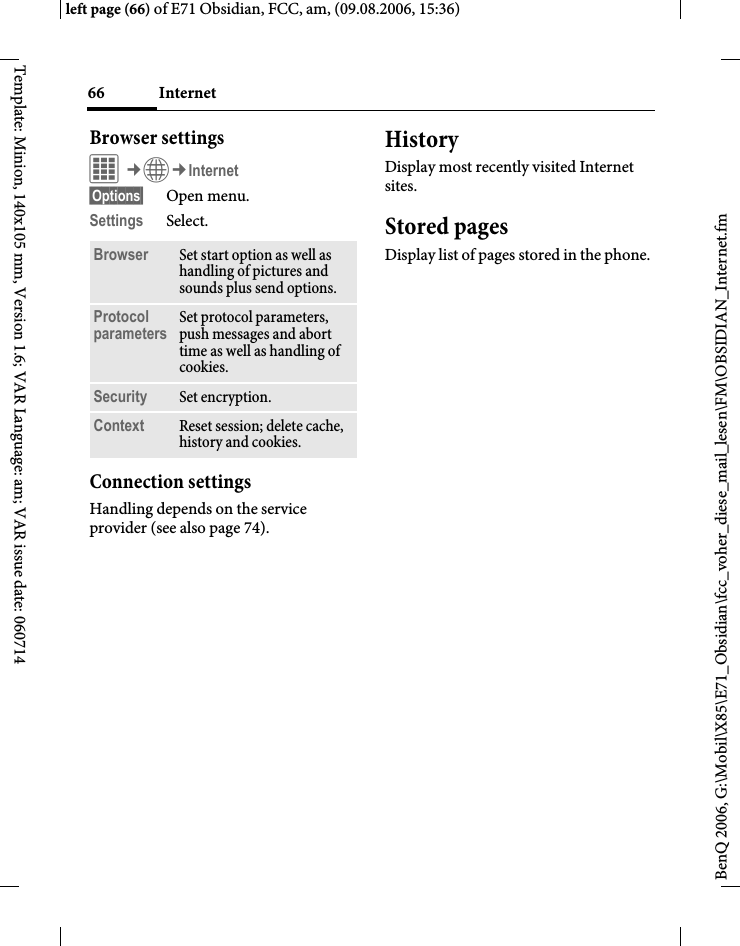
133End user license agreementright page (133) of E71 Obsidian, FCC, am (09.08.2006, 15:36)BenQ 2006, G:\Mobil\X85\E71_Obsidian\fcc_voher_diese_mail_lesen\FM\STD_EndUserLic_FCC_am.fmTemplate: Minion, 140x105 mm, Version 1.6; VAR Language: am; VAR issue date: 0607145. Multiple copies/updates.If the Software supports multiple plat-forms or languages, if You receive the Software on multiple media, of if You otherwise receive multiple copies of the Software, the number of phones on which all versions of the Software are in-stalled shall be one phone. If the Soft-ware is an Update to a previous version of the Software, You must possess a val-id end user right to such previous ver-sion in order to use the Update and You may use the previous version for ninety (90) days after You receive the Update in order to assist You in the transition to the Update. After such time You no longer have a right to use the previous version, except for the sole purpose of enabling You to install the Update.6. Commencement & termination.This Agreement is effective from the first date You use or install the Software. Your end user rights automatically and immediately terminate without notice from Licensor if You fail to comply with any provision of this Agreement. In such event, You must immediately de-lete, destroy or return at Your own cost and expense, and without entitlement to any refund of the purchase price, the phone and the Software, and all related material to Licensor.7. Except as expressly provided in the limited warranty for the phone, you acknowledge the Software is provid-ed "as is" without warranty of any kind express or implied. To the maximum ex-tent permitted by applicable law neither Licensor, Licensor's Software suppliers or their respective affiliates, nor the cop-yright holders make any representations or warranties, express or implied, in-cluding but not limited to the warranties of merchantability or fitness for a partic-ular purpose or that the Software will not infringe any third party patents, copy-rights, trademarks or other rights. There is no warranty by Licensor or by any oth-er party that the functions contained in the Software will meet your require-ments or that the operation of the Soft-ware will be uninterrupted or error free.8. Not fault tolerant. The Software may contain technoloy that is not fault tolerant and is not de-signed, manufactured, or intended for use in environments or applications in which the failure of the licensed Soft-ware could lead direclty to death, per-sonal injury, or severe physical or envi-ronmental damage or financial loss.9. Limitation of liability.To the maximum extent permitted by applicable law, in no event shall Licen-sor or Licensor's Software suppliers or their respecitve affiliates and employees be liable for any lost profits, revenue, sales, data or costs of procurement of substitute goods or services, property damage, personal injury, interruption of business, loss of business information or for any special, direct, indirect, inciden-tal, economic, cover, punitive, special or consequential damages, however caused
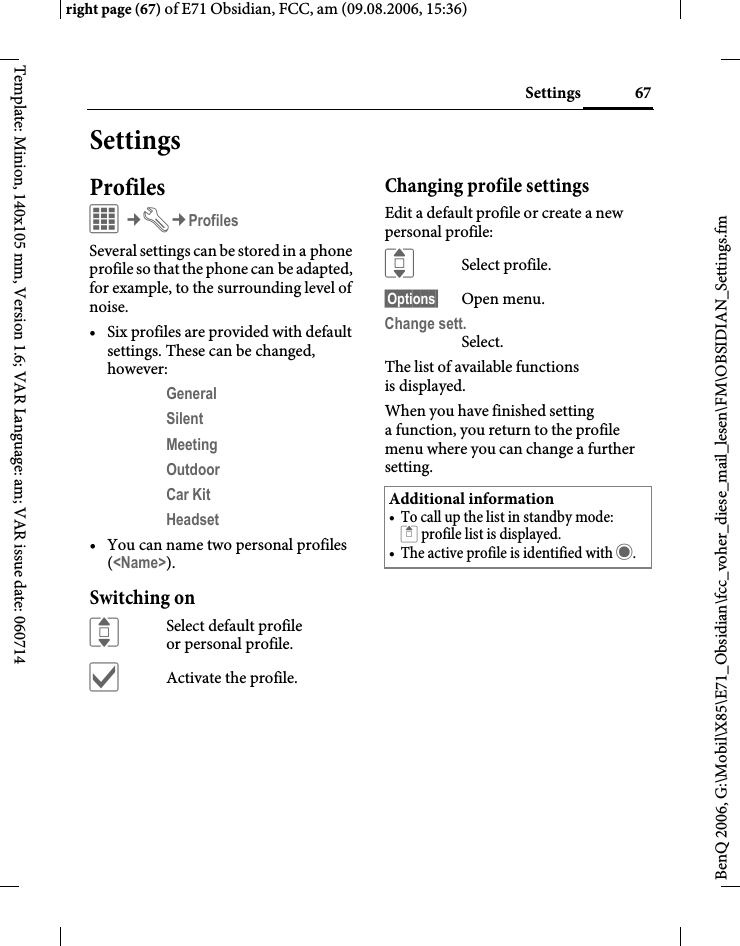
End user license agreement134BenQ 2006, G:\Mobil\X85\E71_Obsidian\fcc_voher_diese_mail_lesen\FM\STD_EndUserLic_FCC_am.fmleft page (134) of E71 Obsidian, FCC, am, (09.08.2006, 15:36)Template: Minion, 140x105 mm, Version 1.6; VAR Language: am; VAR issue date: 060714and whether arising under contract, tort, negligence, or other theory of lia-bility arising out of the use of or inability to use the Software, even if Licensor or its Software suppliers are advised of the possibility of such damages. Because some countries/states/jurisdictions do not allow the exclusion or limitation of liability, but may allow liability to be limited, in such cases, the liability of Li-censor, its Software suppliers and their respective affiliates and employees shall be limited to, at Licensor's option, either (a) return of the price paid less a reason-able amount for usage, or (b) repair or replacment of the Software that does not meet the limited warranty provided with the phone and which is returned in accordance with the requirements of the limited warranty.Nothing contained in this Agreement shall prejudice the statutory rights of any party dealing as a consumer. Noth-ing contained in this Agreement limits Licensor's liability to You in the event of death or personal injury resulting from Licensor's negligence if law prohibits such a limitation. Licensor is acting on behalf of its software suppliers and their respective employees and affiliates for the purpose of disclaiming, excluding and/or restricting obligations, warran-ties and liability as provided in this clause 9, but in no other respects and for no other purpose.10. Technical support.Licensor has no obligation to furnish You with technical support except as agreed in writing between You and Li-censor in the Limited Warranty provid-ed with the phone.11. Export control.The Software may be subject to export regulations of the United States and oth-er countries. You agree that You shall comply with all applicable export laws, restrictions and regulations of the Unit-ed States or foreign agencies or authori-ties, and shall not export, or transfer for the purpose of re-export, any Software, product or technical data received un-der this Agreement or any Software or product produced by use of such techni-cal data, including processes and servic-es, in violation of any applicable restric-tions, laws or regulations, or without all necessary approvals.12. Applicable law & general provisions.This Agreement shall be governed by and construed in accordance with the laws of the State of California without regard to its conflicts of laws rules. This is the entire agreement between Licen-sor and You relating to the Software and it supersedes any prior representations, discussions, undertakings, end user agreements, communications or adver-tising relating to the Software.
135Accessoriesright page (135) of E71 Obsidian, FCC, am (09.08.2006, 14:59)BenQ 2006, G:\Mobil\X85\E71_Obsidian\fcc_voher_diese_mail_lesen\FM\OBSIDIAN_Accessory.fmTemplate: Minion, 140x105 mm, Version 1.6; VAR Language: am; VAR issue date: 060714AccessoriesProducts can be obtained in specialist shops or you can visit the Mobile Store online. EnergyLi-Ion Battery EBA-130 (730 mAh)Spare batteryTravel ChargerTravel Charger EU ETC-100 Travel Charger UK ETC-110 Travel charger with an extended input voltage range of 100–240 V.Car Charger Plus ECC-100Charger for the cigarette lighter socket in the car. It is possible to make phone calls during charging.Desk Top Stand EDS-100A smart and practical desk station for your mobile phone.Handsfree PortableHeadset Basic HHS-100Headset HHS-110Headset with key to accept and end calls.Headset Purestyle HHS-120High quality headset with detachable earpiece and key to accept and end calls.Headset Stereo HHS-150Stereo headset with function key for enjoying music and making phone calls.Headset Bluetooth®A wide range of elegant, small and comfortable-to-wear Bluetooth headsets is available.Headset Bluetooth® HHB-100Headset Bluetooth® Clip HHB-130/131Headset Bluetooth® Comfort HHB-160/161Headset Bluetooth® HHB-700/710OfficeData Cable DCA-100For connecting the phone to the serial RS232 port of the PC.Data Cable USB DCA-140For connecting the phone to the USB port of the PC.SyncStation DSC-100Desk station for the phone to facilitate sim-ultaneous data exchange and telephone charging. Includes a desktop stand and aUSB data cable.Original Accessorieswww.BenQMobile.com/shop
Accessories136BenQ 2006, G:\Mobil\X85\E71_Obsidian\fcc_voher_diese_mail_lesen\FM\OBSIDIAN_Accessory.fmleft page (136) of E71 Obsidian, FCC, am, (09.08.2006, 14:59)Template: Minion, 140x105 mm, Version 1.6; VAR Language: am; VAR issue date: 060714MultitainmentMusic cable IHM-100Connects the phone to a HiFi system.Car SolutionsMobile Holder HMH-100Universal cradle without antenna port. Ideal for use with Headset or Car Kit Portable.Car Kit Portable HKP-100The portable handsfree car kit can easily be moved from one car to another. Simply plug into the cigarette lighter socket, connect, and talk.Car Kit Bluetooth® Easy HKW-100Compact, easy to install and to operate Bluetooth® Car Kit - simply plug into the cigarette lighter socket.Car Kit Bluetooth® Voice Classic HKW-110 Innovative Bluetooth® handsfree kit with an external key unit and voice recognition for making in-car calls safely and conveniently.Car Kit Bluetooth® Portable HKW-700High-tech Bluetooth® handsfree car kit with display no cable connection to the mobile phone. Installation is easy - simply plug into the cigarette lighter socket.Car Kit Bluetooth® SIM HKW-720Innovative Bluetooth® handsfree kit with an external display for making in-car calls safely, conveniently, and with low power consumption.
137Menu treeright page (137) of E71 Obsidian, FCC, am (09.08.2006, 14:59)BenQ 2006, G:\Mobil\X85\E71_Obsidian\fcc_voher_diese_mail_lesen\FM\OBSIDIAN_MenuTree.fmTemplate: Minion, 140x105 mm, Version 1.6; VAR Language: am; VAR issue date: 060714Menu treeContacts >All contactsGroupsOnline statusSIMFilterCall records >Missed callsCalls receivedCalls dialedDelete recordsDur./charges >Last callAll incom. callsAll outg. callsRemain. unitsCharge settingsInternet >BookmarksEnter URLDownload wiz.InternetHistoryStored pagesCamera >Take a photoRecord videoMessages >Create new >SMSMMSE-mail
Menu tree138BenQ 2006, G:\Mobil\X85\E71_Obsidian\fcc_voher_diese_mail_lesen\FM\OBSIDIAN_MenuTree.fmleft page (138) of E71 Obsidian, FCC, am, (09.08.2006, 14:59)Template: Minion, 140x105 mm, Version 1.6; VAR Language: am; VAR issue date: 060714Messages >Inbox >SMS, MMSE-mailDraft >SMS, MMSE-mailSent >SMS, MMSE-mailOutbox >SMS, MMSVoice mailbox E-mailCB services >Receive CBRead new CBTopic listAuto displayUse Topic indexCB languagesMsg. archive >SMS, MMSE-mailTemplates >Text templatesChat room MMS templatesWAP pushSettings >Zoom inEmoticonsSave aft. sendAuto-deleteSMSMMSE-mailWAP push
139Menu treeright page (139) of E71 Obsidian, FCC, am (09.08.2006, 14:59)BenQ 2006, G:\Mobil\X85\E71_Obsidian\fcc_voher_diese_mail_lesen\FM\OBSIDIAN_MenuTree.fmTemplate: Minion, 140x105 mm, Version 1.6; VAR Language: am; VAR issue date: 060714Organizer >CalendarAlarm clockAppointmentsTasksNotesTime zonesRemote sync.GamesMedia playerRadioExtras >SIM servicesSound recorderMy applicationsCalculatorUnit converterOnline statusMy stuff StopwatchSettings >ProfilesRingtones >VolumeCallsMessagesOrganizerAlarm clockChat roomGamesStartup tuneShutdown tuneSound recorder
Menu tree140BenQ 2006, G:\Mobil\X85\E71_Obsidian\fcc_voher_diese_mail_lesen\FM\OBSIDIAN_MenuTree.fmleft page (140) of E71 Obsidian, FCC, am, (09.08.2006, 14:59)Template: Minion, 140x105 mm, Version 1.6; VAR Language: am; VAR issue date: 060714Settings >TopicsDisplay >BackgroundLogoScreensaverStartup anim.Shutdown animWelcome textBacklight timerLightingConnectivity >BluetoothBluetooth sett.EGPRSEGPRS infoOnline settingsFax/dataForwardCall settings >Hide IDCall waitingAlert calls fromAny keySilent alert Minute beepShortcuts >SoftkeysNavigation keysNumber keys
141Menu treeright page (141) of E71 Obsidian, FCC, am (09.08.2006, 14:59)BenQ 2006, G:\Mobil\X85\E71_Obsidian\fcc_voher_diese_mail_lesen\FM\OBSIDIAN_MenuTree.fmTemplate: Minion, 140x105 mm, Version 1.6; VAR Language: am; VAR issue date: 060714Settings >Phone settings >LanguageInput languageUser dictionaryKey tonesInfo tonesAuto offMemory assis.File systemLicense mgr.Phone identityDevice manag.Fact. settingsClock >Time/dateTime zonesTime formatDate formatStart of weekBuddhist dateAuto timeSecurity >Auto key lockDirect callOnly ¡PIN codeThis SIM onlyCertificatesCall blocking
Menu tree142BenQ 2006, G:\Mobil\X85\E71_Obsidian\fcc_voher_diese_mail_lesen\FM\OBSIDIAN_MenuTree.fmleft page (142) of E71 Obsidian, FCC, am, (09.08.2006, 14:59)Template: Minion, 140x105 mm, Version 1.6; VAR Language: am; VAR issue date: 060714Settings >Network >LineNetwork infoChoose netwrkPreferred netBand selectionFast searchUser groupAccessories >Car KitHeadsetUSB
143Indexright page (143) of E71 Obsidian, FCC, am (09.08.2006, 14:59)BenQ 2006, G:\Mobil\X85\E71_Obsidian\fcc_voher_diese_mail_lesen\FM\OBSIDIAN_FUGSIX.fmTemplate: Minion, 140x105 mm, Version 1.6; VAR Language: am; VAR issue date: 060714IndexAAccept list ........................................................56Accessories ..............................................85, 135Alarm................................................................90Alarm clock .....................................................88Alert calls from ...............................................77All calls (diversion) ........................................76All incoming (network barrings) .................83Any key to answer ..........................................77Appointments .................................................89Auto display time/charges.............................42Auto key lock ..................................................82Auto last number redial.................................29BBand selection .................................................85Barrings (network) .........................................83BatteryCharging.....................................................16Inserting......................................................15Operating times.................................17, 119Quality declaration..................................117Bluetooth .........................................................71Bookmarks (WAP)...................................64, 65Browser ............................................................65Buddhist year ..................................................82CCalculator ........................................................96Calendar...........................................................87CallAccepting/ending......................................30Blocked .......................................................83Charges .......................................................42Conference .................................................32Diverting.....................................................76Ending.........................................................28Menu...........................................................33Putting on hold..........................................31Records .......................................................41Rejecting.....................................................30Toggling (swapping).................................31Call back...........................................................29Call divert ........................................................76Call settings .....................................................77Call transfer.....................................................33Call waiting................................................31, 77Calling ..............................................................28Calls received (call record)............................41Camera.............................................................43Car KitAccessories ...............................................136Setting .........................................................85Care of phone................................................117CB services.......................................................63Certificates.......................................................83Charges.............................................................42Charges/units ..................................................42Charging the battery.......................................16Charging via USB ...........................................86Clock.................................................................81Codes................................................................22Conference.......................................................32Connection profiles..................................66, 74Connectivity ....................................................71Contacts ...........................................................35Converter.........................................................97Credit limit ......................................................42Currency converter ........................................98DDate format......................................................82Device manager ..............................................80Dialling code ...................................................28Dialling with number keys............................28Digital Rights Management ..........................19DisplayIllumination ...............................................70Language.....................................................78Symbols.......................................................13Wallpaper ................................................... 70Distribution list...............................................36Divert................................................................76Driving safety ................................................129DTMF tones (tone sequences)......................34Duration/charges............................................42EEarpiece volume..............................................28EGPRS..............................................................71E-mailReceiving/reading......................................53Writing........................................................52Emergency number........................................18
Index144BenQ 2006, G:\Mobil\X85\E71_Obsidian\fcc_voher_diese_mail_lesen\FM\OBSIDIAN_FUGSIX.fmleft page (144) of E71 Obsidian, FCC, am, (09.08.2006, 14:59)Template: Minion, 140x105 mm, Version 1.6; VAR Language: am; VAR issue date: 060714Emoticons........................................................51End user license agreement.........................131Extras................................................................95FFactory settings ...............................................81Fast access........................................................75Fast network search........................................85Formatting (phone memory)........................79Forwarding (call)............................................33Frequency range .............................................85HHandsfree talking ...........................................30HeadsetAccessories ...............................................135Setting .........................................................86Hide ID ............................................................77Home network................................................84Hotline ...........................................................115IIdentity number (IMEI) ................................79IMEI number ..................................................79Inbox ................................................................48Info tones.........................................................78Information services (CB).............................63Inst. Message...................................................57International dialling code............................28Internet ............................................................65KKey tones..........................................................78LLanguage..........................................................78Last number redial..........................................29Legal notices......................................................3Licence Manager.............................................79Limit (duration/charges)...............................42Logo..................................................................70Loss of phone, SIM Card.............................118MMailbox ............................................................ 62Main menu ......................................................20Maintenance of phone.................................117Media player..................................................102Memory assistant............................................79Menu tree.......................................................137MessageCB................................................................63E-mail..........................................................52MMS............................................................45SMS .............................................................45Microphone on/off.........................................33Minute beep.....................................................77Missed calls (call record) ...............................41MMS.................................................................46Mobile Phone Manager ...............................108Muting (microphone)....................................33My stuff..........................................................105NNetworkBarring ........................................................83Connection.................................................84Settings........................................................84Notes.................................................................92Number busy...................................................29Numbers dialled (call record).......................41OOne number only............................................33Online settings ................................................74Online status ...................................................98Only ¡...........................................................83Operating times (battery)......................17, 119Organiser .........................................................87PPC connection.................................................23Personal greeting ............................................70Phone code ......................................................22Phone data.....................................................118Phone ID (IMEI) ............................................79Phone number transmission on/off.............77Phone settings .................................................78Photo ................................................................43PINChanging ....................................................22Entering ......................................................17Error..........................................................114Use...............................................................22PIN2..................................................................22POP3 (e-mail) .................................................55Preferred network...........................................84Preventing accidental activation ..................23Printing via USB .............................................21Product data..................................................118
145Indexright page (145) of E71 Obsidian, FCC, am (09.08.2006, 14:59)BenQ 2006, G:\Mobil\X85\E71_Obsidian\fcc_voher_diese_mail_lesen\FM\OBSIDIAN_FUGSIX.fmTemplate: Minion, 140x105 mm, Version 1.6; VAR Language: am; VAR issue date: 060714ProfilesPhone ..........................................................67WAP............................................................66Provider logo...................................................70PUK, PUK2 .....................................................22Putting a call on hold...............................31, 33QQuestions & Answers...................................111RRadio ..............................................................101Receiving signal ..............................................18Record video....................................................44Records.............................................................41Reject list..........................................................56Reminder .........................................................29Remote synchronisation................................93Ringtones.........................................................68SS.O.A. ...............................................................80Safety precautions.............................................5Screensaver......................................................70Second phone number...................................84Security.......................................................22, 82Service tones....................................................78Services Over Air............................................80Setting time/date.............................................81Settings.............................................................67Short message (SMS)......................................45Shortcuts..........................................................75Shown in the display......................................13Shut down animation.....................................70SIM CardClearing barrings.......................................23Inserting......................................................15Problems...................................................112SIM services (optional)..................................95SMSLists .............................................................49T9 input......................................................25SMTP (e-mail) ................................................55Software version..............................................79SOS ...............................................................9, 18Sound recorder .........................................95, 99Special characters............................................24Standard functions .........................................20Standby mode..................................................19Standby time..................................................119Start up animation..........................................70Stopwatch ........................................................99Streaming.......................................................104Switching microphone on/off.......................44Switching off the phoneAutomatic...................................................78Manual........................................................17Switching on (phone).....................................17Symbols............................................................13Synchronisation..............................................93TT9 text input....................................................25Take a picture..................................................43Tasks.................................................................91Technical data ...............................................118Text inputWith T9.......................................................25Without T9.................................................24Text templates.................................................27Themes.............................................................69This SIM only..................................................83Time zones...........................................18, 81, 92Tone sequence (DTMF) ................................34UUnit converter.................................................97Uppercase and lowercase letters (T9).......... 24USB...................................................................86User dictionary ...............................................78User group.......................................................85VVibration..........................................................71Video ................................................................44Video playback..............................................102Voice mail (mailbox) .....................................62VolumeEarpiece volume ........................................28Profiles ........................................................ 67Ringtone .....................................................68WWallpaper (display)........................................70WAP .................................................................64WAP push........................................................56

Navigation menu