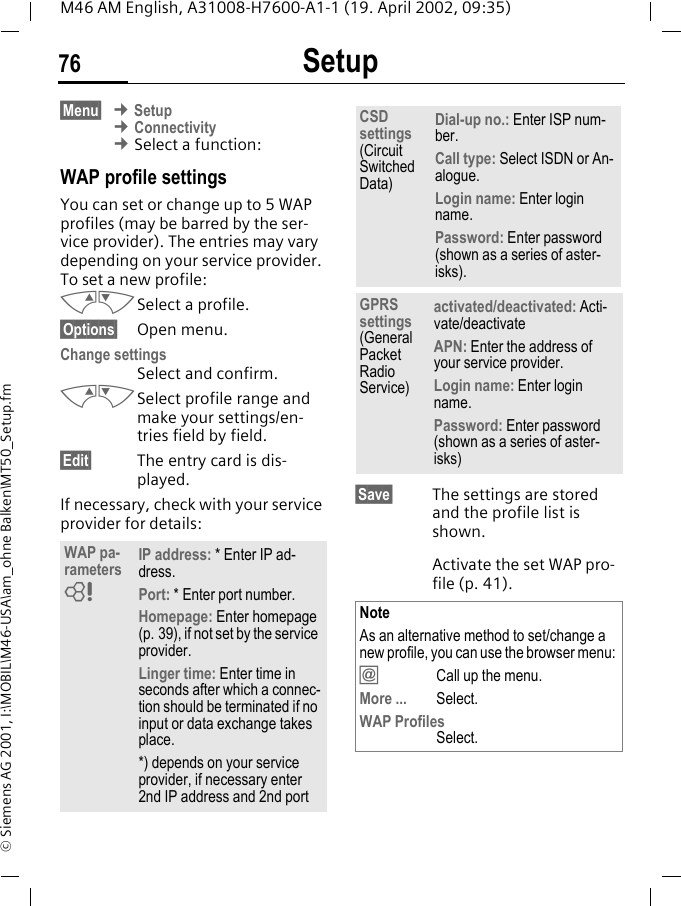
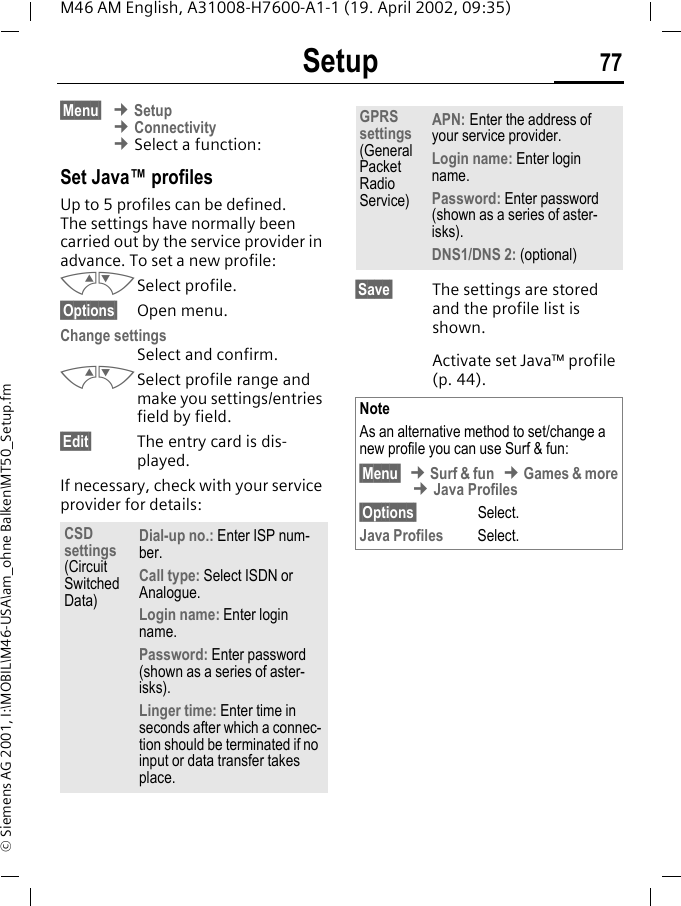
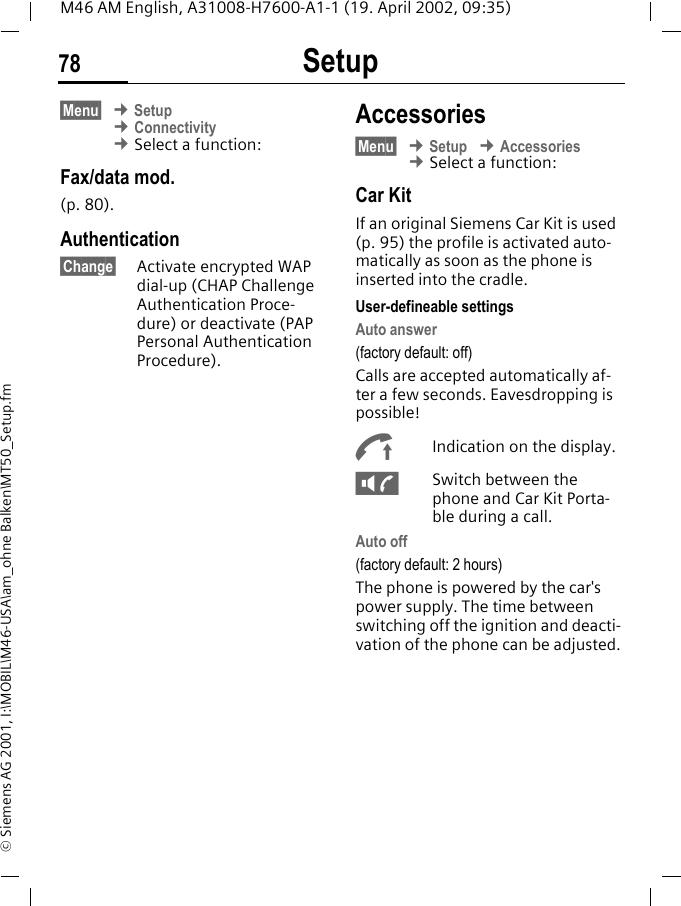
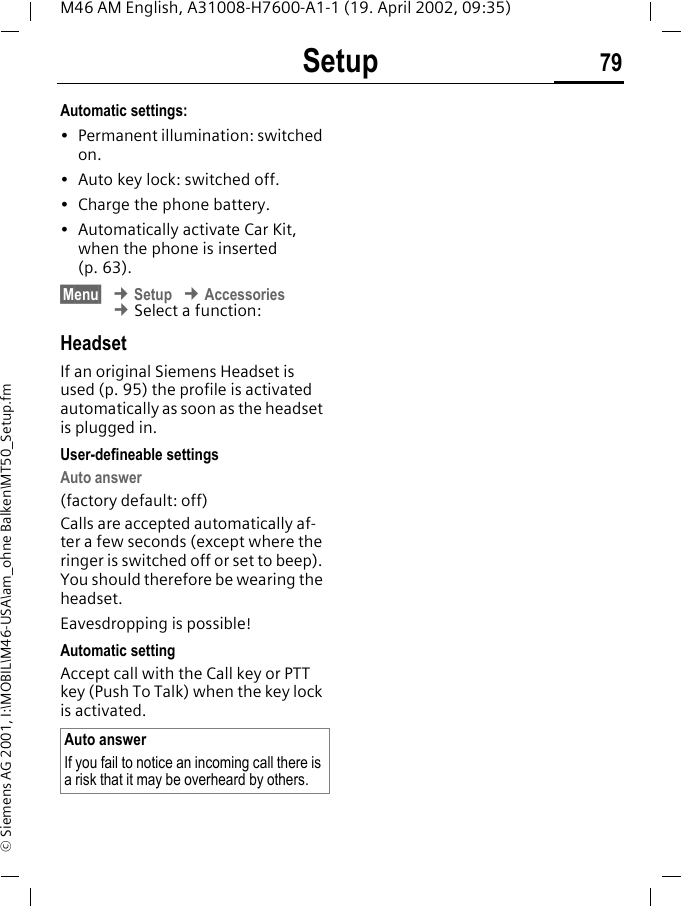
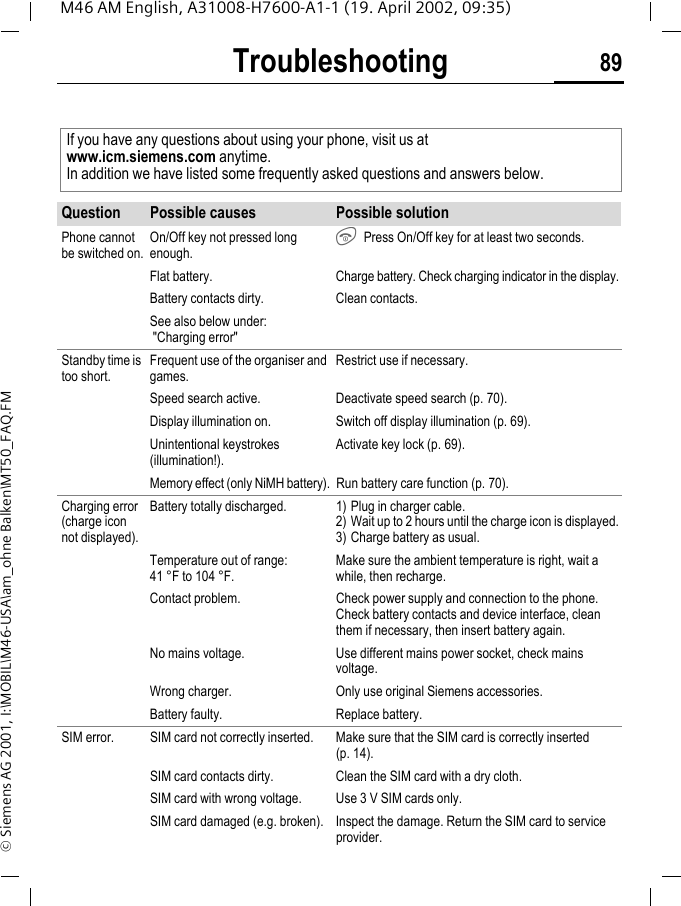
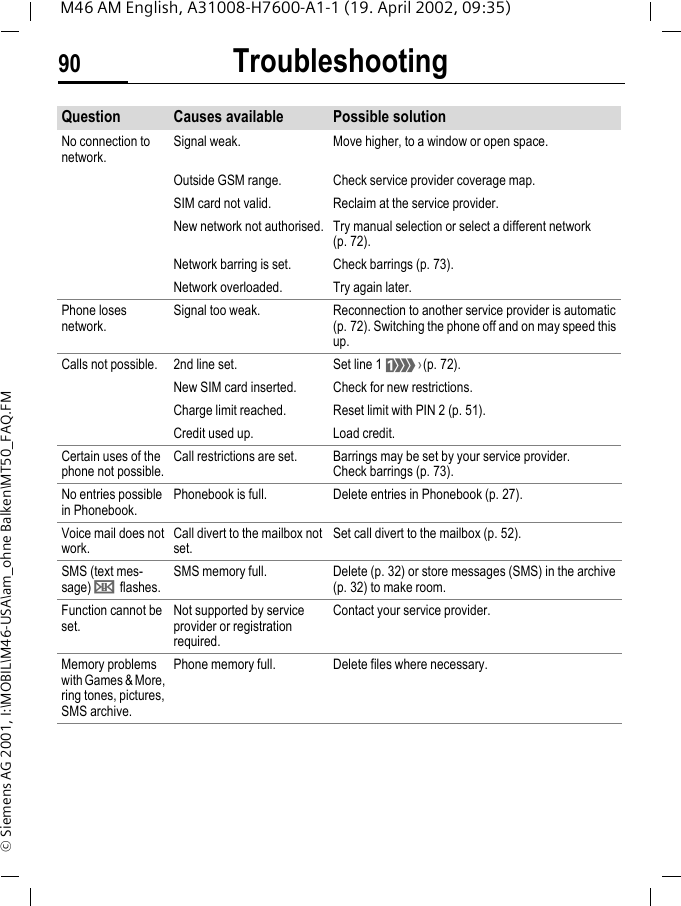
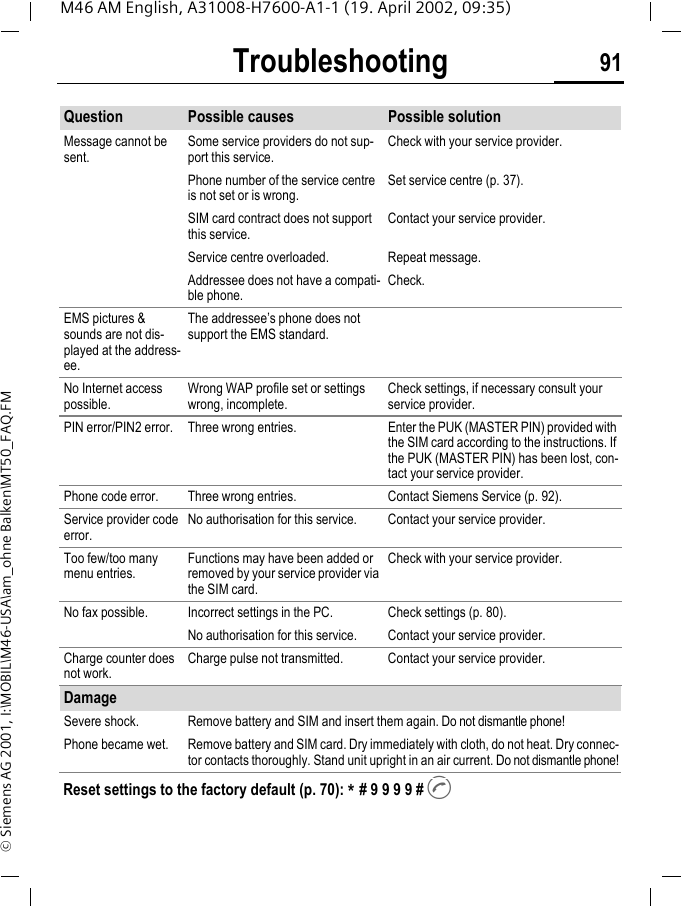
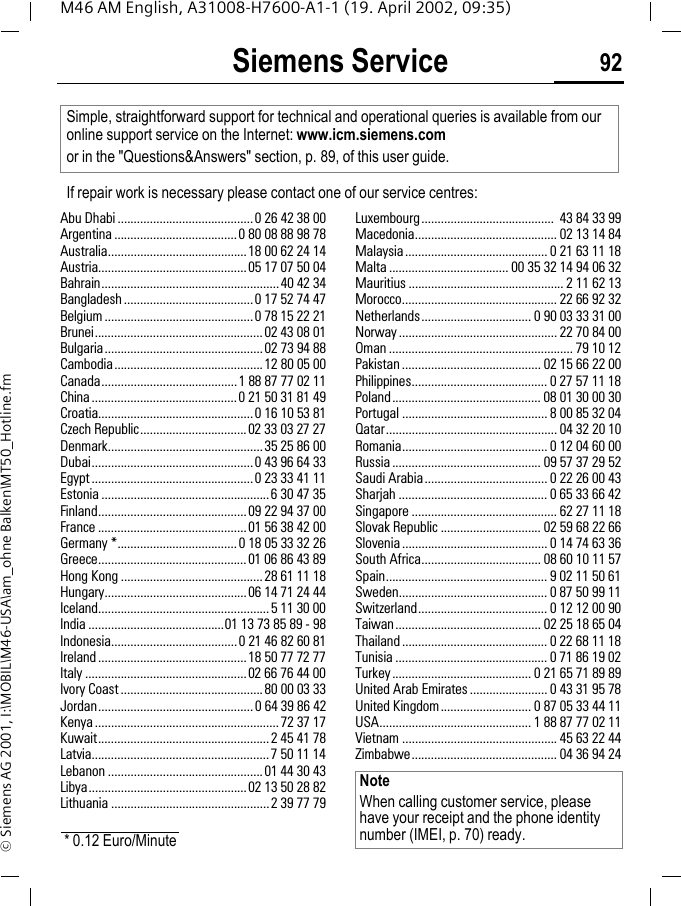
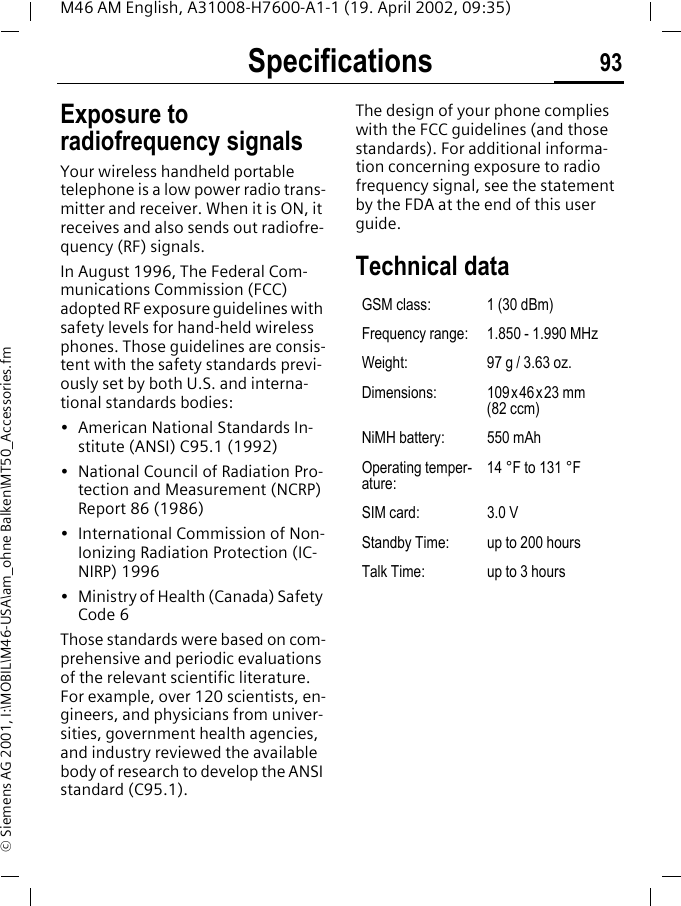
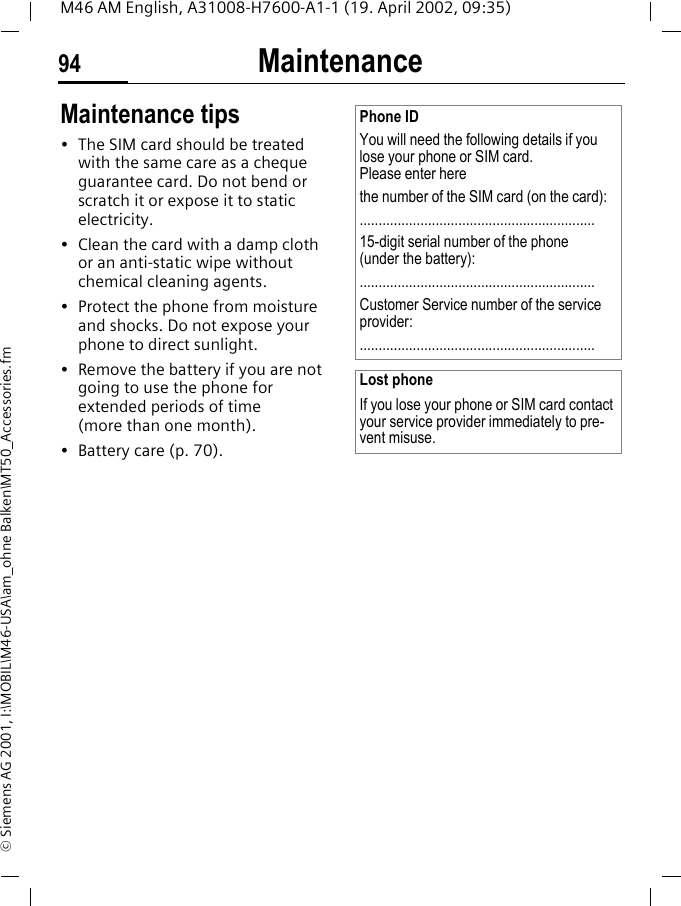
BenQ Mobile and OHG M46 PCS GSM Phone User Manual MT50

BenQ Mobile GmbH & Co. OHG PCS GSM Phone MT50

Manual

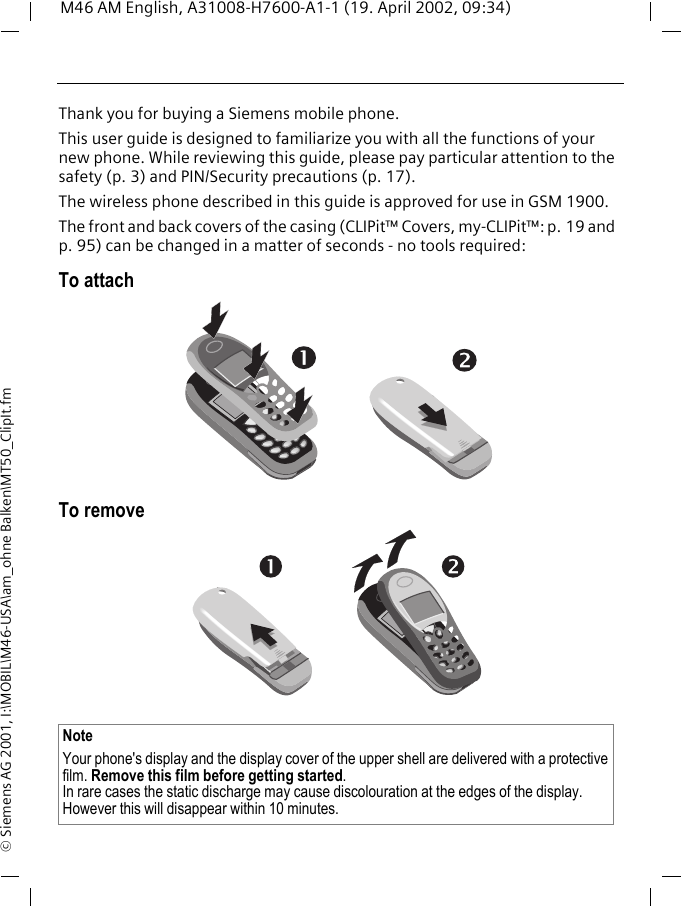
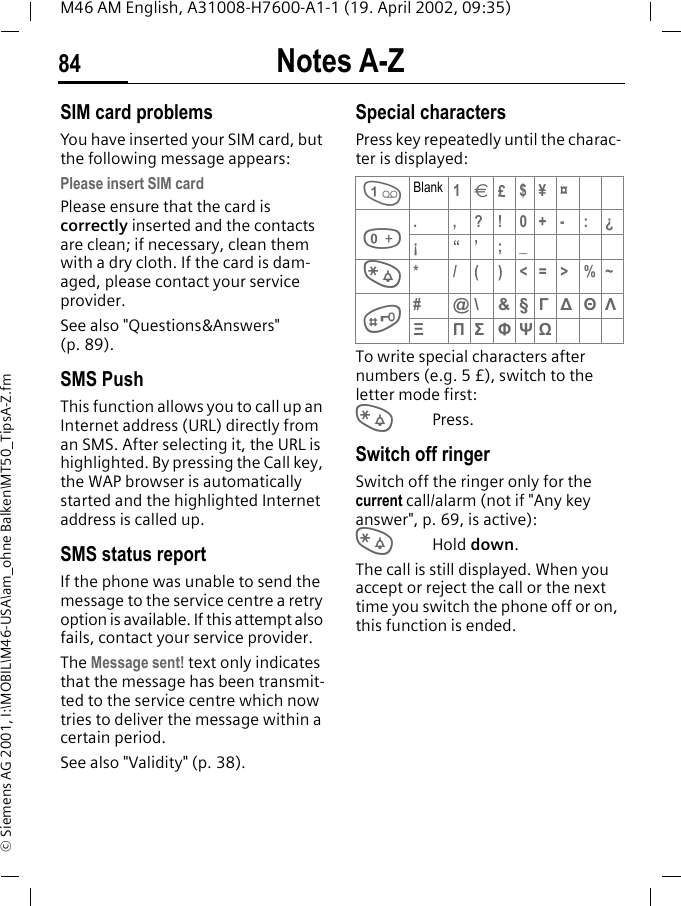
M46 AM English, A31008-H7600-A1-1 (19. April 2002, 09:34)© Siemens AG 2001, I:\MOBIL\M46-USA\am_ohne Balken\MT50_ClipIt.fmThank you for buying a Siemens mobile phone. This user guide is designed to familiarize you with all the functions of your new phone. While reviewing this guide, please pay particular attention to the safety (p. 3) and PIN/Security precautions (p. 17).The wireless phone described in this guide is approved for use in GSM 1900.The front and back covers of the casing (CLIPit™ Covers, my-CLIPit™: p. 19 and p. 95) can be changed in a matter of seconds - no tools required:To attachTo remove Note Your phone's display and the display cover of the upper shell are delivered with a protective film. Remove this film before getting started.In rare cases the static discharge may cause discolouration at the edges of the display. However this will disappear within 10 minutes.
Contents 1See also Index at the end of this user guideM46 AM English, A31008-H7600-A1-1 (19. April 2002, 09:34)© Siemens AG 2001, I:\MOBIL\M46-USA\am_ohne Balken\MT50IVZ.FMSafety precautions  ..................... 3Safety Information ..................... 4Antenna care  ........................... 4Phone operation  ...................... 4Electronic devices ..................... 5SAR (Specific Absorption Rate)  .. 9Overview phone ....................... 11General instructions ................. 12User guide  ............................. 12Soft keys ................................ 12Getting started ......................... 14Insert SIM card/battery  ........... 14Switch on, off/PIN entry  ........... 16Security .................................... 17Codes .................................... 17My phone  ................................. 19Making a phone call ................. 20Dialling with number keys  ...... 20End call .................................. 20Set volume ............................. 20Reject call  .............................. 21Call waiting/Swap ................... 22Records .................................. 24Phonebook ............................... 26<New entry> .......................... 26Call/search for an entry ........... 26Assign picture  ........................ 30Message (SMS)  .........................31Read messages  .......................31Archive ...................................32Compose a message  ...............33SMS to group ..........................34Surf & fun  .................................39Internet (WAP) ........................39Bitmap viewer  ........................44Select bitmap style  .................45Own greeting  .........................45Voice message/Mailbox ............49Cell broadcast  ...........................50Duration/charges ......................51Display ...................................51Charge settings  ......................51Divert ........................................52Groups ......................................54SMS to group ..........................54Organiser ..................................57Diary ......................................57Greetings ...............................58Notes .....................................59Missed alarms .........................60Alarm clock  ............................60Clock .........................................61Time zones .............................61Time/Date ...............................61Format time  ...........................61Format date ............................61Auto display  ...........................61Auto off ..................................61See also In-dex at the end of this user guideContents
Contents2See also Index at the end of this user guideM46 AM English, A31008-H7600-A1-1 (19. April 2002, 09:34)© Siemens AG 2001, I:\MOBIL\M46-USA\am_ohne Balken\MT50IVZ.FMProfiles ..................................... 62Car Kit .................................... 63Headset ................................. 63My menu  .................................. 64Fast access key ......................... 65Audio ........................................ 67Ringer setting  ........................ 67Volume .................................. 67Call screening  ........................ 67Silent alert  ............................. 67Key tones ............................... 67Minute beep  .......................... 68Information tones  .................. 68Melody manager  .................... 68Ringer tones ........................... 68Setup ........................................ 69User group ............................. 74Clock ..................................... 75Fax/data mode using a PC  ........ 80Notes A-Z .................................. 81Display symbols (selection)  ..... 87Troubleshooting ....................... 89Siemens Service  ....................... 92Specifications ........................... 93Exposure to radiofrequency sig-nals ........................................ 93Technical data  ....................... 93Maintenance ............................ 94Accessories ............................... 95Basics ..................................... 95Car Solutions .......................... 95LIMITED WARRANTY  .................97U.S. FDA  ....................................99FCC/Industry Canada Notice  ...105Ten Driving Safety Tips ...........107Intellectual Property ...............109Index .......................................110
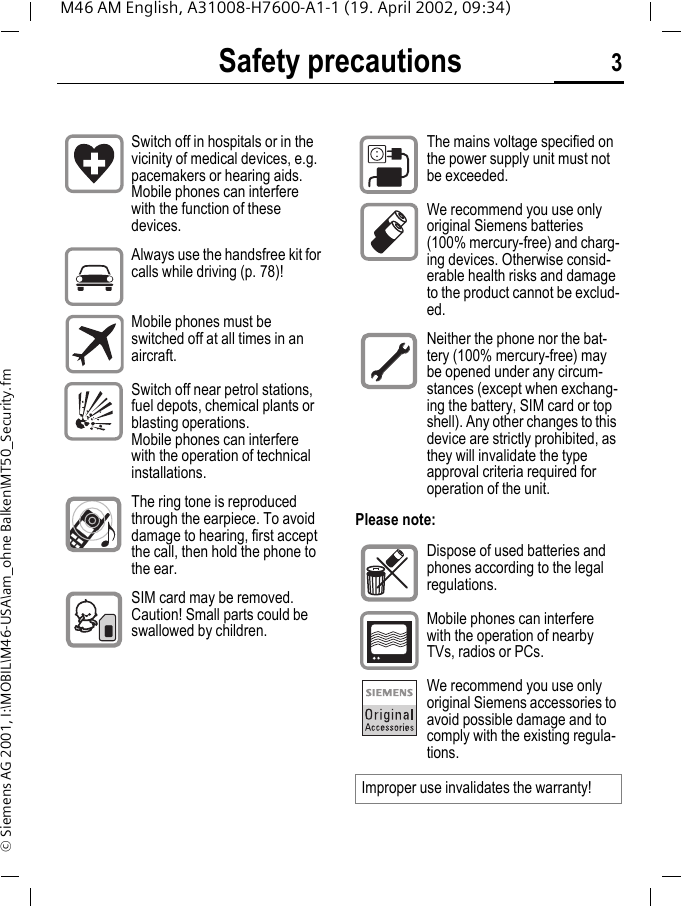
Safety precautions 3M46 AM English, A31008-H7600-A1-1 (19. April 2002, 09:34)© Siemens AG 2001, I:\MOBIL\M46-USA\am_ohne Balken\MT50_Security.fmSafety precautionsPlease note:Switch off in hospitals or in the vicinity of medical devices, e.g. pacemakers or hearing aids. Mobile phones can interfere with the function of these devices.Always use the handsfree kit for calls while driving (p. 78)!Mobile phones must be switched off at all times in an aircraft.Switch off near petrol stations, fuel depots, chemical plants or blasting operations. Mobile phones can interfere with the operation of technical installations.The ring tone is reproduced through the earpiece. To avoid damage to hearing, first accept the call, then hold the phone to the ear.SIM card may be removed. Caution! Small parts could be swallowed by children.The mains voltage specified on the power supply unit must not be exceeded.We recommend you use only original Siemens batteries (100% mercury-free) and charg-ing devices. Otherwise consid-erable health risks and damage to the product cannot be exclud-ed.Neither the phone nor the bat-tery (100% mercury-free) may be opened under any circum-stances (except when exchang-ing the battery, SIM card or top shell). Any other changes to this device are strictly prohibited, as they will invalidate the type approval criteria required for operation of the unit.Dispose of used batteries and phones according to the legal regulations.Mobile phones can interfere with the operation of nearby TVs, radios or PCs.We recommend you use only original Siemens accessories to avoid possible damage and to comply with the existing regula-tions.Improper use invalidates the warranty!
Safety Information4M46 AM English, A31008-H7600-A1-1 (19. April 2002, 09:34)© Siemens AG 2001, I:\MOBIL\M46-USA\am_ohne Balken\MT50_Security.fmSafety Infor-mationAntenna careUse only the supplied or an approved replacement antenna. Unauthorized antennas, modifications, or attach-ments could damage the phone and may violate FCC regulations.Phone operationNormal positionHold the phone as you would any other telephone with the antenna pointed up and over your shoulder.Tips on efficient operationFor your phone to operate most effi-ciently:• Extend your antenna fully (if appli-cable).• Do not touch the antenna unnec-essarily when the phone is in use. Contact with the antenna affects call quality and may cause the phone to operate at a higher pow-er level than otherwise needed.DrivingLaws pertaining to the use of mobile phones while driving vary signifi-cantly from state-to-state and some-times even from locality-to-locality within states. For example, some ar-eas may allow persons to use their mobile phones only if they employ a hands-free device, and some areas may prohibit the use of mobile phones entirely. Accordingly, Sie-mens recommends that persons check the laws for the areas in which they drive or will be driving. For ar-eas where the use of mobile phones while driving is permitted, Siemens encourages persons to use their phones responsibly and to employ hands-free devices. Also, if using your phone while driving, please:• Give full attention to driving — driving safely is your first responsi-bility;• Use hands-free operation, if avail-able;• Pull off the road and park before making or answering a call, if driv-ing conditions so require.ImportantRead this information before using your wireless handheld phone.As this mobile phone is equipped with a fixed (non-retractable) an-tenna, some paragraphs in the be-low text may not be applicable.
Safety Information 5M46 AM English, A31008-H7600-A1-1 (19. April 2002, 09:34)© Siemens AG 2001, I:\MOBIL\M46-USA\am_ohne Balken\MT50_Security.fmFor vehicles equipped with Air BagsAn air bag inflates with great force. DO NOT place objects, including ei-ther installed or portable wireless equipment, in the area over the air bag or in the air bag deployment ar-ea. If in-vehicle wireless equipment is improperly installed and the air bag inflates, serious injury could re-sult.Electronic devicesMost modern electronic equipment is shielded from radiofrequency (RF) signals. However, certain electronic equipment may not be shielded against the RF signals from your wireless phone.PacemakersThe Health Industry Manufacturer’s Association recommends that a min-imum separation of six inches (6”) be maintained between a handheld wireless phone and a pacemaker to avoid potential interference with the pacemaker. These recommenda-tions are consistent with the inde-pendent research by and recommen-dations of Wireless Technology Research.Persons with pacemakers:• should ALWAYS keep the phone more than six inches from their pacemaker when the phone is turned ON;• should not carry the phone in a breast pocket;• should use the ear opposite the pacemaker to minimize the poten-tial for interference;• should turn the phone OFF imme-diately if there is any reason to suspect that interference is taking place.Hearing AidsSome digital wireless phones may in-terfere with some hearing aids. In the event of such interference, you may want to consult your service provider or your hearing aid manu-facturer to discuss alternatives.Other Medical DevicesIf you use any other personal medi-cal devices, consult the manufactur-ers of your devices to determine if they are adequately shielded from external RF energy. Your physician may be able to assist you in obtain-ing this information.Turn your phone OFF in health care facilities when any regulations post-ed in these areas instruct you to do so. Hospitals or health care facilities may be using equipment that could be sensitive to external RF energy.
Safety Information6M46 AM English, A31008-H7600-A1-1 (19. April 2002, 09:34)© Siemens AG 2001, I:\MOBIL\M46-USA\am_ohne Balken\MT50_Security.fmVehiclesRF signals may affect improperly in-stalled or inadequately shielded electronic systems in motor vehicles. Check with the manufacturer or its representative regarding your vehi-cle. You should also consult the manufacturer of any equipment that has been added to your vehicle.Posted FacilitiesTurn your phone OFF in any facility where posted notices so require.AirplanesFCC and Airline Regulations prohibit using your phone while in the air. Turn your phone OFF before board-ing an airplane.Check and comply with the policy of your airline regarding the use of your phone while the airplane is on the ground.Blasting areasTo avoid interfering with blasting op-erations, turn your phone OFF when in a “blasting area” or in areas post-ed: “Turn off two-way radio.” Obey all signs and instructions.Potentially explosive atmospheresTurn your phone OFF when in any ar-ea with a potentially explosive atmo-sphere and obey all signs and in-structions. Sparks in such areas could cause an explosion or fire re-sulting in bodily injury or even death.Areas with a potentially explosive at-mosphere are often but not always clearly marked. They include: fueling areas such as gasoline stations; be-low deck on boats; fuel or chemical transfer or storage facilities; vehicles using liquefied petroleum gas (such as propane or butane); areas where the air contains chemicals or parti-cles, such as grain, dust or metal powders; and any other area where you would normally be advised to turn off your vehicle engine.Emergency calls (SOS)Your wireless phone can be used to make emergency calls. You can make an emergency call from the main display screen. Enter the local emergency number such as 911 and then press the A keyThis phone, like any wireless phone, operates using radio signals, wire-less and landline networks, and user-programmed functions. Because of this, connections in all conditions cannot be guaranteed. Therefore, you should never rely solely on any wireless phone for essential commu-nications (for example, medical emergencies).   Remember - to make or receive any calls, the phone must be switched on and be used in a ser-vice area that has adequate signal strength.  Emergency calls might not
Safety Information 7M46 AM English, A31008-H7600-A1-1 (19. April 2002, 09:34)© Siemens AG 2001, I:\MOBIL\M46-USA\am_ohne Balken\MT50_Security.fmbe possible on all wireless phone networks or when certain network services or phone features are in use.  Check with local service providers re-garding their network features. Always make certain that your phone is properly charged before at-tempting any emergency calls.  If you allow your battery to discharge, you will be unable to receive or make calls, including emergency calls. You must then wait a few minutes after the charging begins to place any emergency calls.When making an emergency call, re-member to give all of the necessary information as accurately as possi-ble. Remember that your wireless phone might be the only means of communication at the scene of an accident, therefore you should not terminate the call until given permis-sion to do so.
Safety Information8M46 AM English, A31008-H7600-A1-1 (19. April 2002, 09:34)© Siemens AG 2001, I:\MOBIL\M46-USA\am_ohne Balken\MT50_Security.fm
SAR (Specific Absorption Rate) 9M46 AM English, A31008-H7600-A1-1 (19. April 2002, 09:35)© Siemens AG 2001, I:\MOBIL\M46-USA\am_ohne Balken\MT50_SAR.FMSAR (Specific Absorption Rate)THIS SIEMENS M46 PHONE MEETS THE GOVERNMENT’S RE-QUIREMENTS FOR EXPOSURE TO RADIO WAVES.Your wireless Siemens M46 phone is a radio transmitter and receiver. It is designed and manufactured not to exceed the emission limits for expo-sure to radiofrequency (RF) energy set by the Federal Communications Commission of the U.S. Govern-ment. These limits are part of com-prehensive guidelines and establish permitted levels of RF energy for the general population. The guidelines are based on standards that were de-veloped by independent scientific organizations through periodic and thorough evaluation of scientific studies. The standards include a sub-stantial safety margin designed to assure the safety of all persons, re-gardless of age and health.The exposure standard for wireless mobile phones employs a unit of measurement known as the Specific Absorption Rate, or SAR. The SAR limit set by the FCC is 1.6 W/kg.* Tests for SAR are conducted using standard operating positions speci-fied by the FCC with the phone trans-mitting at its highest certified power level in all tested frequency bands. Although the  SAR is determined at the highest certified power level, the actual SAR level of the phone while operating can be well below the maximum value. This is because  the phone is designed to operate  at mul-tiple power levels so as to use only the power required to reach the net-work. In general, the closer you are to a wireless base station antenna, the lower the power output.Before a phone model is available for sale to the public, it must be tested and certified to the FCC that it does not exceed the limit established by the government-adopted require-ment for safe exposure. The tests are performed in positions and locations (for example, at the ear and worn on the body) as required by the FCC for each model. The highest SAR value for this Siemens M46 phone when tested for use at the ear is 0.71 W/kg, and when worn on the body, as de-scribed in this user guide, is 0.29 W/kg. (Body-worn measurements differ among phone models, depending upon available accessories and FCC requirements.) While there may be differences between the SAR levels of various phones and at various po-sitions, they all meet the govern-ment requirement for safe exposure.The FCC has granted an Equipment Authorization for this Siemens M46 phone with all reported SAR levels evaluated as in compliance with the FCC RF emission guidelines. SAR in-formation on this Siemens M46 phone is on file with the FCC and can be found under the Display Grant section of http://www.fcc.gov/oet/fccid after searching on FCC ID PWX-S46.
SAR (Specific Absorption Rate)10M46 AM English, A31008-H7600-A1-1 (19. April 2002, 09:35)© Siemens AG 2001, I:\MOBIL\M46-USA\am_ohne Balken\MT50_SAR.FMFor body worn operation, to main-tain compliance with FCC RF expo-sure guidelines, use only Siemens approved accessories. When carry-ing the phone while it is on, use the specific Siemens belt clip that has been tested for compliance.Use of non-Siemens-approved acces-sories may violate FCC RF exposure guidelines and should be avoided.* In the United States and Canada, the SAR limit for mobile phones used by the public is 1.6 watts/kg (W/kg) averaged over one gram of tissue. The standard incorporates a sub-stantial margin of safety to give additional protection for the public and to account for any variations in measurements.Additional information on Specific Absorp-tion Rates (SAR) can be found on the Cellu-lar Telecommunications Industry Association (CTIA) web-site at: http://www.wow-com.comFor SAR information in other regions please look under product information at: www.icm.siemens.com
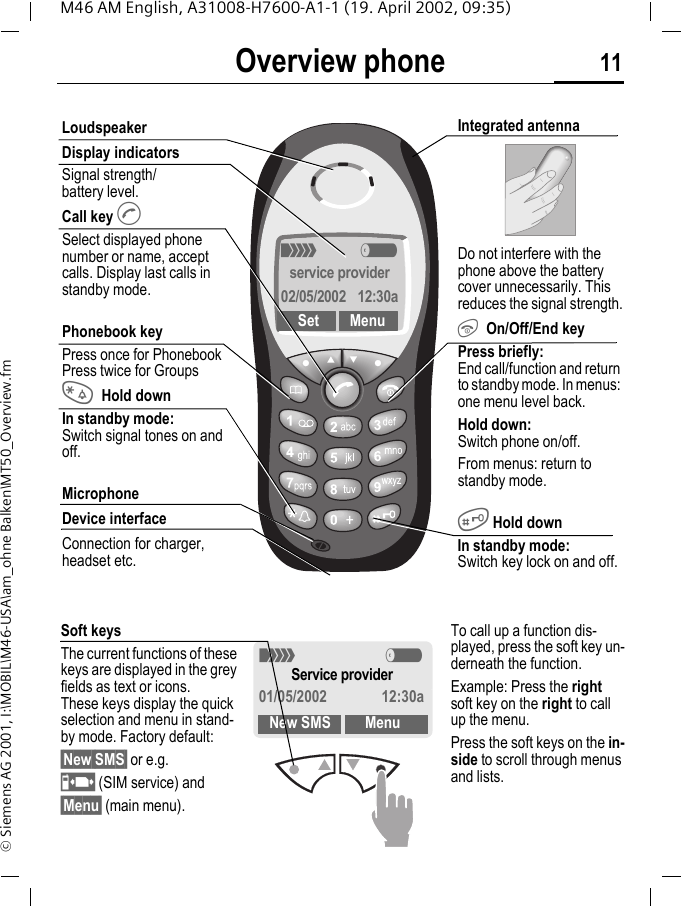
Overview phone 11M46 AM English, A31008-H7600-A1-1 (19. April 2002, 09:35)© Siemens AG 2001, I:\MOBIL\M46-USA\am_ohne Balken\MT50_Overview.fmOverview phone<     aservice provider02/05/2002  12:30aSet MenuLoudspeakerDisplay indicatorsSignal strength/battery level.Call key ASelect displayed phone number or name, accept calls. Display last calls in standby mode.Phonebook keyPress once for PhonebookPress twice for Groups*Hold downIn standby mode:Switch signal tones on and off.MicrophoneDevice interfaceConnection for charger, headset etc.Integrated antenna Do not interfere with the phone above the battery cover unnecessarily. This reduces the signal strength.S On/Off/End keyPress briefly: End call/function and return to standby mode. In menus: one menu level back. Hold down: Switch phone on/off.From menus: return to standby mode.# Hold downIn standby mode: Switch key lock on and off.Soft keysThe current functions of these keys are displayed in the grey fields as text or icons. These keys display the quick selection and menu in stand-by mode. Factory default:§New SMS§ or e.g.p (SIM service) and §Menu§ (main menu).< aService provider01/05/2002 12:30aNew SMS MenuTo call up a function dis-played, press the soft key un-derneath the function.Example: Press the right soft key on the right to call up the menu.Press the soft keys on the in-side to scroll through menus and lists.
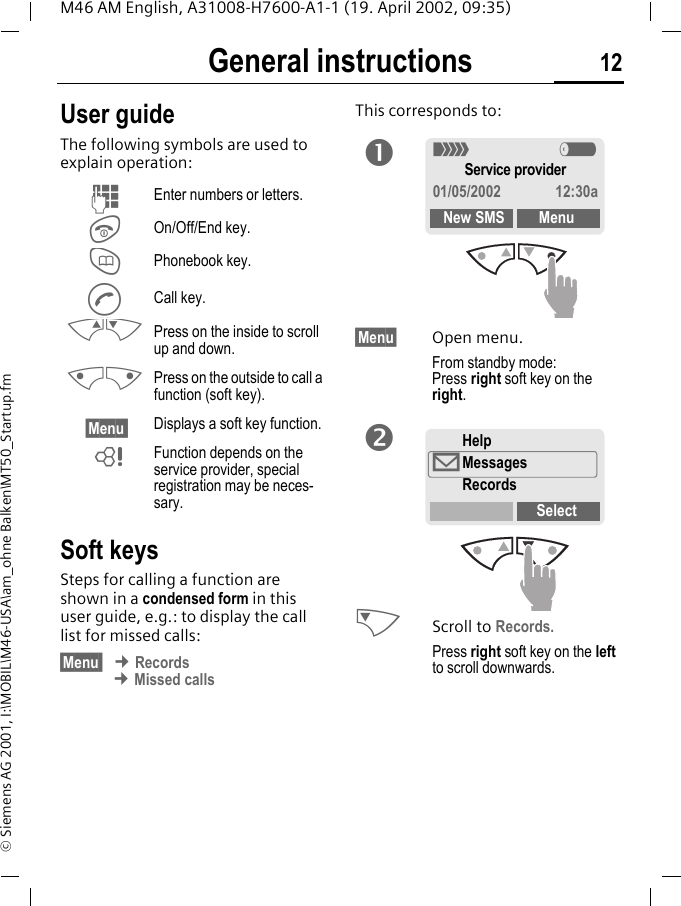
General instructions 12M46 AM English, A31008-H7600-A1-1 (19. April 2002, 09:35)© Siemens AG 2001, I:\MOBIL\M46-USA\am_ohne Balken\MT50_Startup.fmGeneral instructions User guideThe following symbols are used to explain operation:Soft keysSteps for calling a function are shown in a condensed form in this user guide, e.g.: to display the call list for missed calls:§Menu  ¢ Records ¢ Missed callsThis corresponds to: §Menu§ Open menu.From standby mode: Press right soft key on the right. NScroll to Records.Press right soft key on the left to scroll downwards.JEnter numbers or letters.SOn/Off/End key.TPhonebook key.ACall key.MN Press on the inside to scroll up and down.KL Press on the outside to call a function (soft key).§Menu  Displays a soft key function.~Function depends on the service provider, special registration may be neces-sary.n< aService provider01/05/2002 12:30aNew SMS MenuHelp©MessagesRecordsSelecto
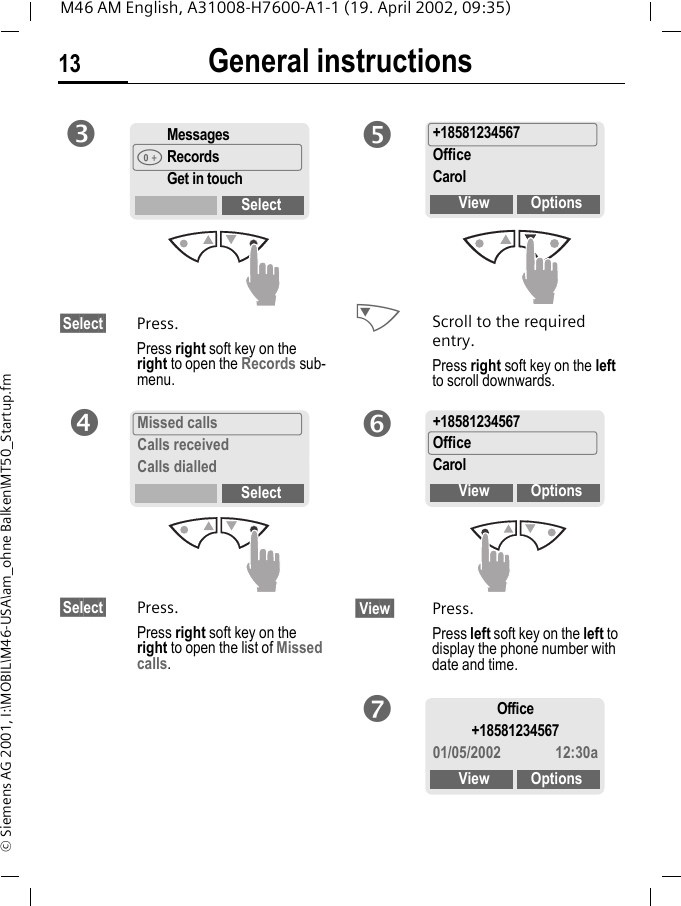
General instructions13M46 AM English, A31008-H7600-A1-1 (19. April 2002, 09:35)© Siemens AG 2001, I:\MOBIL\M46-USA\am_ohne Balken\MT50_Startup.fm§Select§ Press.Press right soft key on the right to open the Records sub-menu.§Select§ Press.Press right soft key on the right to open the list of Missed calls. NScroll to the required entry.Press right soft key on the left to scroll downwards. View  Press.Press left soft key on the left to display the phone number with date and time.MessagesšRecordsGet in touchSelectpMissed callsCalls receivedCalls dialledSelectq+18581234567OfficeCarolView Optionsr+18581234567OfficeCarolView OptionssOffice+1858123456701/05/2002 12:30aView Optionst
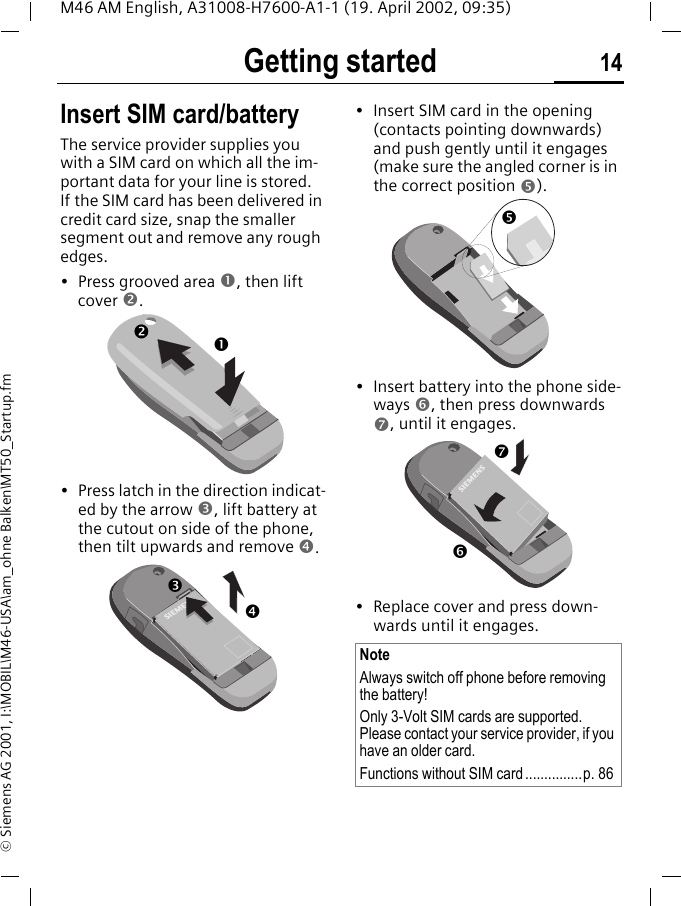
Getting started 14M46 AM English, A31008-H7600-A1-1 (19. April 2002, 09:35)© Siemens AG 2001, I:\MOBIL\M46-USA\am_ohne Balken\MT50_Startup.fmGetting started Insert SIM card/batteryThe service provider supplies you with a SIM card on which all the im-portant data for your line is stored. If the SIM card has been delivered in credit card size, snap the smaller segment out and remove any rough edges.• Press grooved area n, then lift cover o.• Press latch in the direction indicat-ed by the arrow p, lift battery at the cutout on side of the phone, then tilt upwards and remove q. • Insert SIM card in the opening (contacts pointing downwards) and push gently until it engages (make sure the angled corner is in the correct position r). • Insert battery into the phone side-ways s, then press downwards t, until it engages. • Replace cover and press down-wards until it engages.nopqNoteAlways switch off phone before removing the battery!Only 3-Volt SIM cards are supported. Please contact your service provider, if you have an older card.Functions without SIM card...............p. 86rst
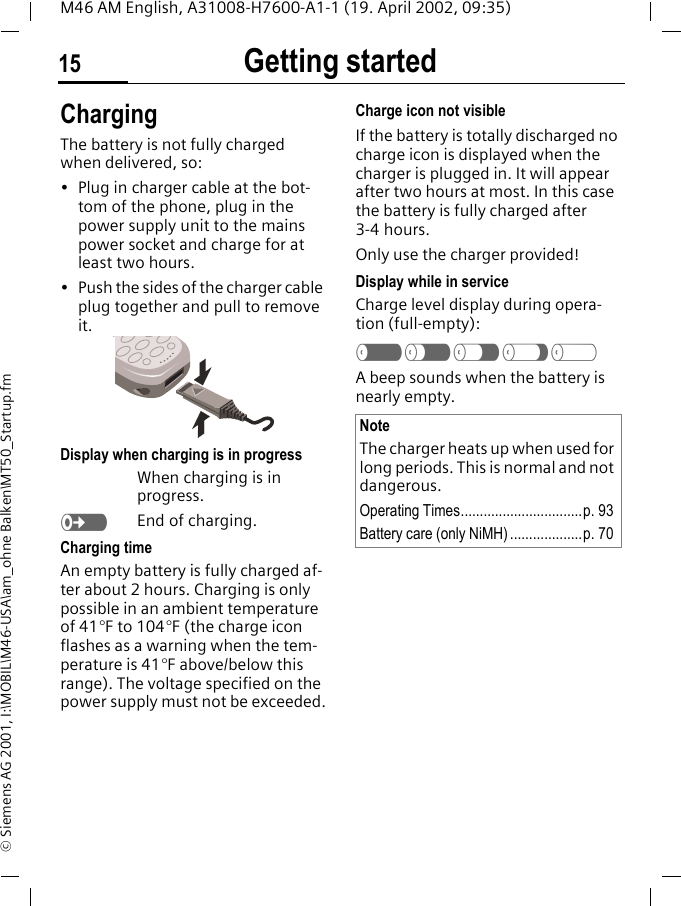
Getting started15M46 AM English, A31008-H7600-A1-1 (19. April 2002, 09:35)© Siemens AG 2001, I:\MOBIL\M46-USA\am_ohne Balken\MT50_Startup.fmChargingThe battery is not fully charged when delivered, so:• Plug in charger cable at the bot-tom of the phone, plug in the power supply unit to the mains power socket and charge for at least two hours.• Push the sides of the charger cable plug together and pull to remove it. Display when charging is in progressWhen charging is in progress.eEnd of charging.Charging timeAn empty battery is fully charged af-ter about 2 hours. Charging is only possible in an ambient temperature of 41°F to 104°F (the charge icon flashes as a warning when the tem-perature is 41°F above/below this range). The voltage specified on the power supply must not be exceeded.Charge icon not visibleIf the battery is totally discharged no charge icon is displayed when the charger is plugged in. It will appear after two hours at most. In this case the battery is fully charged after 3-4 hours.Only use the charger provided!Display while in serviceCharge level display during opera-tion (full-empty):a}b{cA beep sounds when the battery is nearly empty.NoteThe charger heats up when used for long periods. This is normal and not dangerous.Operating Times................................p. 93Battery care (only NiMH) ...................p. 70
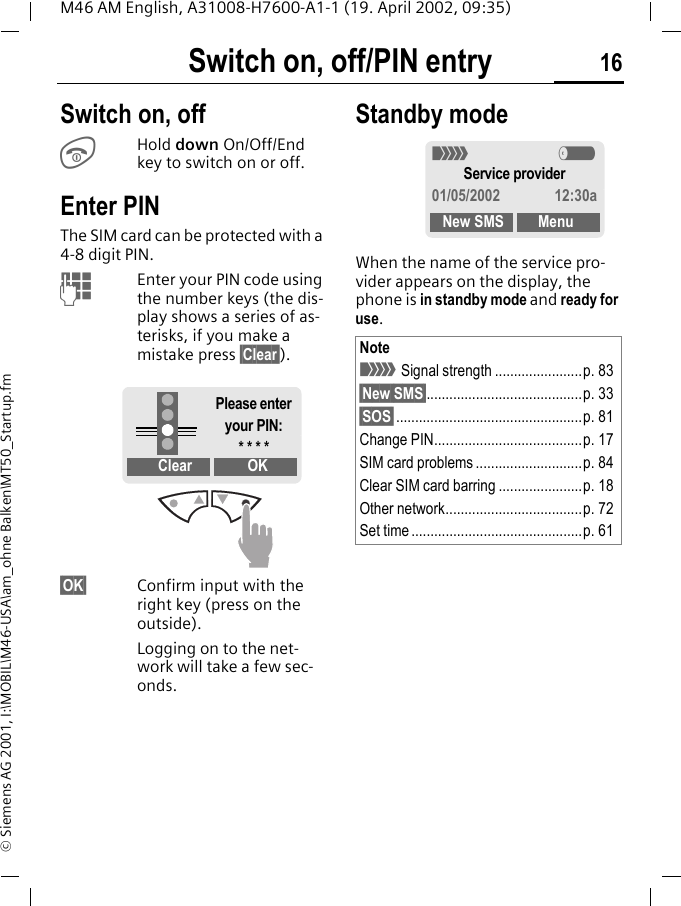
Switch on, off/PIN entry 16M46 AM English, A31008-H7600-A1-1 (19. April 2002, 09:35)© Siemens AG 2001, I:\MOBIL\M46-USA\am_ohne Balken\MT50_Startup.fmSwitch on, off/PIN entry Switch on, offSHold down On/Off/End key to switch on or off. Enter PINThe SIM card can be protected with a 4-8 digit PIN.JEnter your PIN code using the number keys (the dis-play shows a series of as-terisks, if you make a mistake press §Clear§).§OK§ Confirm input with the right key (press on the outside).Logging on to the net-work will take a few sec-onds.Standby modeWhen the name of the service pro-vider appears on the display, the phone is in standby mode and ready for use.Clear OKPlease enter your PIN:* * * *Note< Signal strength .......................p. 83§New SMS§.........................................p. 33§SOS§.................................................p. 81Change PIN.......................................p. 17SIM card problems ............................p. 84Clear SIM card barring ......................p. 18Other network....................................p. 72Set time .............................................p. 61< aService provider01/05/2002 12:30aNew SMS Menu
Security17M46 AM English, A31008-H7600-A1-1 (19. April 2002, 09:35)© Siemens AG 2001, I:\MOBIL\M46-USA\am_ohne Balken\MT50_Startup.fmSecurity The phone and SIM card are protect-ed against misuse by several security codes. §Menu  ¢ Setup ¢ Security ¢ then select a functionCodesPIN controlThe PIN is usually requested each time the phone is switched on. You can deactivate this feature but you risk unauthorised use of the phone.§Select§ Press.JEnter PIN.§OK§ Confirm input.§Change§ Press.§OK§ Confirm.Some service providers do not per-mit this function.Change PINYou can change the PIN to any 4-8 digit number you may find easier to remember.JEnter old PIN.§OK§ Press.J, §OK§ Enter new PIN.J, §OK§ Repeat new PIN.Change PIN2(display only if PIN 2 is available). Proceed as with Change PIN.Keep these confidential numbers in a safe place where you can access them again if required.PIN Protects your SIM card (person-al identification number).PIN2 This is needed to set the charge detail display and to access additional functions on special SIM cards.PUKPUK2 Key code. Used to unlocked SIM cards after the wrong PIN has been entered.Phone code Protects your phone. Must be entered at the first security set-ting.
Security 18M46 AM English, A31008-H7600-A1-1 (19. April 2002, 09:35)© Siemens AG 2001, I:\MOBIL\M46-USA\am_ohne Balken\MT50_Startup.fmChange phonecodeYou define and enter the phone code (4-8 digits) when calling up a phone code protected function (e.g. Babysitter, p. 24) for the first time. It is then valid for all functions. If you have forgotten it, please call Siemens Service (p. 92).Clear SIM card barringIf the PIN is entered incorrectly three times, the SIM card is barred. Enter the PUK (MASTER PIN) provided by your service provider together with the SIM card according to instruc-tions. If PUK (MASTER PIN) has been lost, please contact your service pro-vider.NoteScreensaver......................................p. 45Auto key lock..................................... p. 69Further security settings.................... p. 71
My phone 19M46 AM English, A31008-H7600-A1-1 (19. April 2002, 09:35)© Siemens AG 2001, I:\MOBIL\M46-USA\am_ohne Balken\MT50_MyPhone.fmMy phone Your phone offers a number of func-tions so that you can adapt it to meet your personal requirements.Ringer tonesAssign individual ring tones to caller groups or anniversaries (p. 48).The melody manager is available for managing the ring tones (p. 46).Logos, screensavers, animationsAdjust your phone according to your own wishes in the following areas to give it a personal touch:To switch onSelect a bitmap style (p. 45) and a greeting (p. 45) that you create yourself.Screensaver (p. 45)You can set an analogue clock or an individual picture as screensaver.(Provider) logo (p. 44)Select an individual picture from the bitmap viewer.Where do I get what?You can order additional ring tones, logos and screensavers on the Internet and receive them via SMS: www.icm.siemens.comOr you can directly download them via WAP:wap.my-siemens.comSiemens City PortalFurther services for your mobile phone (e.g. a Photo Logo Composer to create personal pictures for your Phonebook (p. 30)) can be found at:www.icm.siemens.comThe Siemens City Portal also offers a list of countries in which these ser-vices are available.CLIPit™ CoversSelect different colours for the top and bottom covers from the Siemens City Portal. Or use a personal photo to make your phone unique (p. 95):www.icm.siemens.comMy menuCreate your own menu with fre-quently used functions, phone num-bers or WAP pages (p. 64).
Making a phone call 20M46 AM English, A31008-H7600-A1-1 (19. April 2002, 09:35)© Siemens AG 2001, I:\MOBIL\M46-USA\am_ohne Balken\MT50_PhoneRecords.fmMaking a phone call Dialling with number keysThe phone must be switched on (standby mode).JEnter the number (always with prefix, if necessary with the international dialling code). §Clear§ A short press clears the last digit, a long press clears the entire number.APress the Call key. The phone number displayed is dialled.End callSPress the End key briefly. Call is ended. Press this key even if the person on the other end of the line has hung up first.Set volumeMNYou can adjust the hand-set volume with the scroll keys (only during the call).If a Car Kit is used, its volume setting does not affect the usual setting on the phone.Redial previous numbersTo redial the phone number last called:APress the Call key twice.To redial other numbers that were dialled previously:APress the Call key once.MNPick out the required phone number from the list, then press ...A... to dial.Note? Store number............................p. 26§Options§ Call lists.............................p. 24§Hold§.................................................p. 22; menu§ Call menu ..........................p. 23§Divert§ Divert set ..............................p. 81International dialling codes............... p. 82Auto key lock .....................................p. 69Phone number memo........................p. 83Microphone off ..................................p. 23Phone number transmission off/on (Hide ID)............................................p. 75Control codes (DTMF).......................p. 81
Making a phone call21M46 AM English, A31008-H7600-A1-1 (19. April 2002, 09:35)© Siemens AG 2001, I:\MOBIL\M46-USA\am_ohne Balken\MT50_PhoneRecords.fmWhen a number is busyIf the called number is busy or can-not be reached because of network problems several options are avail-able (depending on the service pro-vider). An incoming call or any other use of the phone interrupts these functions.EitherAuto redial previous numbers§Auto dial§ Press. The number is auto-matically dialled for up to 15 minutes at increasing intervals. End with:S End key.orCall back§Call back§ Press. Your phone rings when the busy number is free. Press the Call key to dial the number. Reminder§Prompt§ Press. A beep reminds you to redial the displayed phone number after 15 minutes.Accept callThe phone must be switched on (standby mode). An incoming call will interrupt any other use of the phone.§Reply§ Press.orA Press.If the phone number has been trans-mitted by the network, it is dis-played. If it is stored in the Phone-book, the corresponding name is displayed instead. Reject call§Reject§ Press. orSPress.If Divert is set, the caller will be for-warded to voicemail or another number you have entered. ~NoteU Missed calls...........................p. 25Accept call using any key ..................p. 69+18581234567Reply Reject+
Making a phone call 22M46 AM English, A31008-H7600-A1-1 (19. April 2002, 09:35)© Siemens AG 2001, I:\MOBIL\M46-USA\am_ohne Balken\MT50_PhoneRecords.fmHold call You can call another number during a call. §Hold§ The current call is put on hold. Now dial the new phone number.When the connection is established press...§Swap§ ... to swap back and forth between both calls. Call waiting/SwapYou may need to register for this ser-vice with your service provider and set your phone accordingly (p. 75).During a call, you may be advised that there is another call waiting. You will hear a special tone during the call. You have the following options:Accept the waiting call§Swap§ Accept the waiting call and place the current call on hold.To swap between the two calls, press §Swap§ each time.End the current call:SPress. The following que-ry is displayed: "Return to the call on hold?"§Yes§ Return to the held call.or§No§ The held call is ended.Reject waiting call§Reject§ Reject the waiting call, the caller will hear the busy tone.or§Divert§ If this is set, the waiting call will be diverted, to the mailbox for example.End current callSEnd the current call.§Reply§ Accept the new call.Note; menu§ Call menu.......................... p. 23< aZ ZCarolHold A menu~
Making a phone call23M46 AM English, A31008-H7600-A1-1 (19. April 2002, 09:35)© Siemens AG 2001, I:\MOBIL\M46-USA\am_ohne Balken\MT50_PhoneRecords.fmConferenceCall up to 5 parties one by one and link them together in a phone con-ference. Some of the functions de-scribed may not be supported by your service provider or must be enabled specifically.You have established a connection: §Hold§ The current call is put on hold. Now dial a new number. When the new connection is estab-lished...; menu§ ... open menu and select Conference. The held call is joined.Repeat procedure until all partici-pants are linked together (up to 5participants).EndSAll calls in the conference are ended simultaneously when the End key is pressed. Call menuThe following functions are only available during a call:; menu§ Open menu. ~< aZ ZCarolHold A menuMicro-phone on Switch microphone on/off. If switched off, the person on the other end of the line cannot hear you (muting). Alternatively:* Hold down.However, numbers being entered are audible when Send DTMF tones is active.Volume Adjust handset volume.Conference (see left)Duration/charges While the connection contin-ues, the call duration and (if set, p. 51) the charge de-tails are displayed.Send DT-MF tones (p. 81)Call transfer The original call is joined to the second one. For you, both calls are now ended.Main menu Access to the main menu.Call status List all held and active calls (e.g. participants in a confer-ence).~
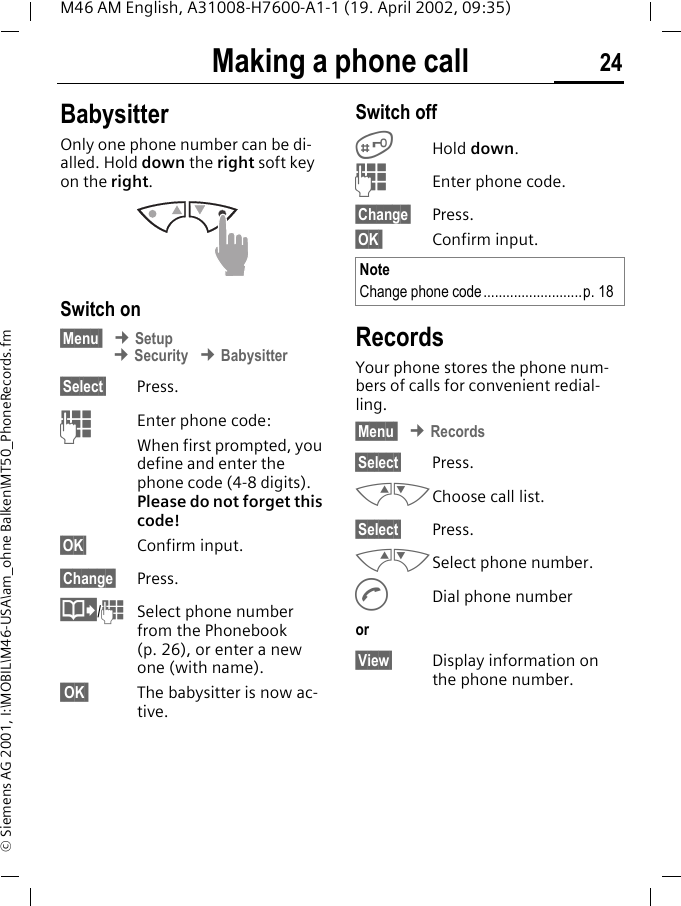
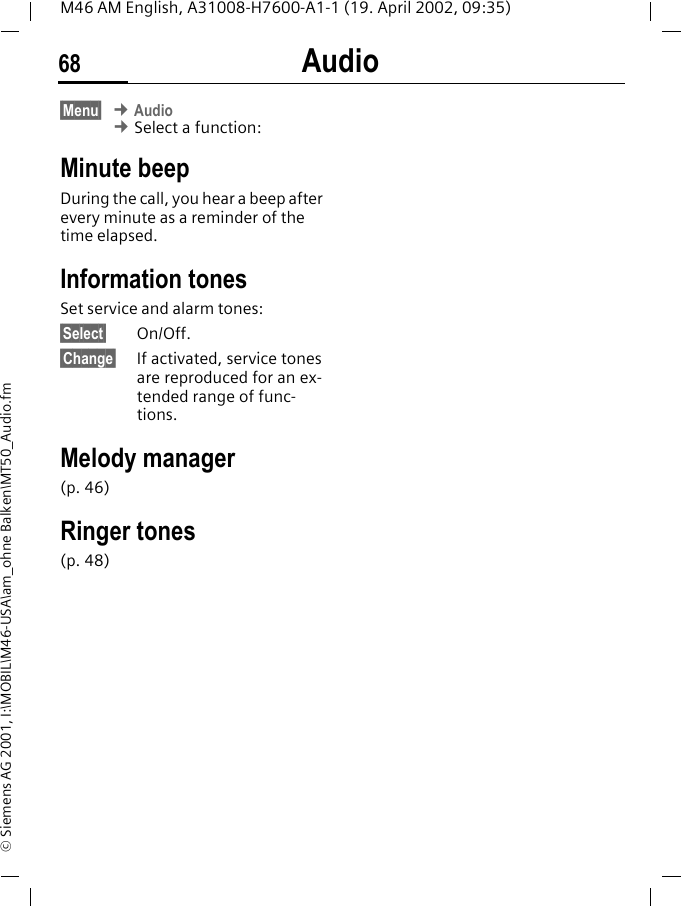
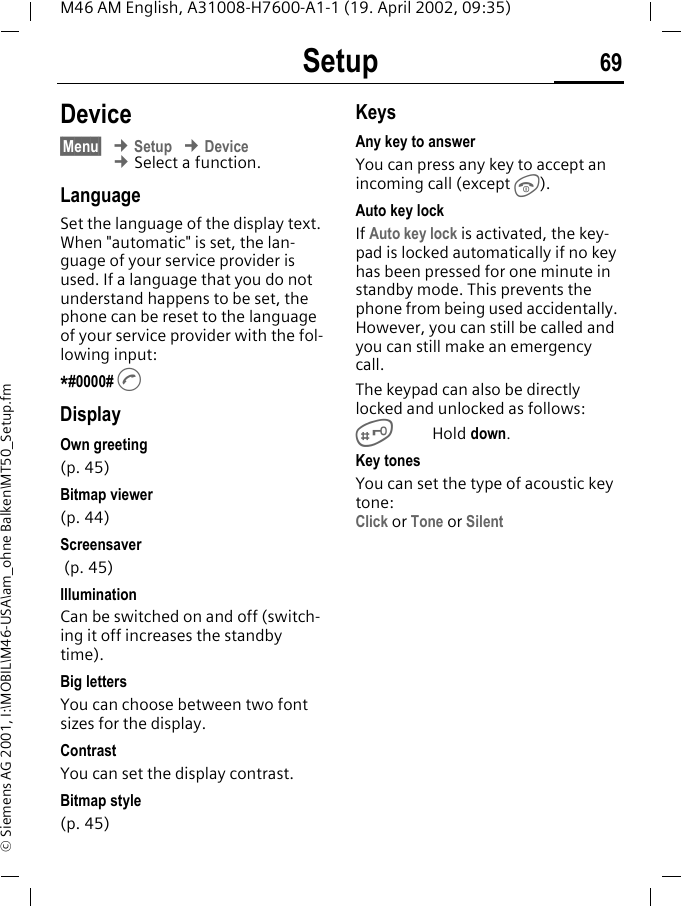
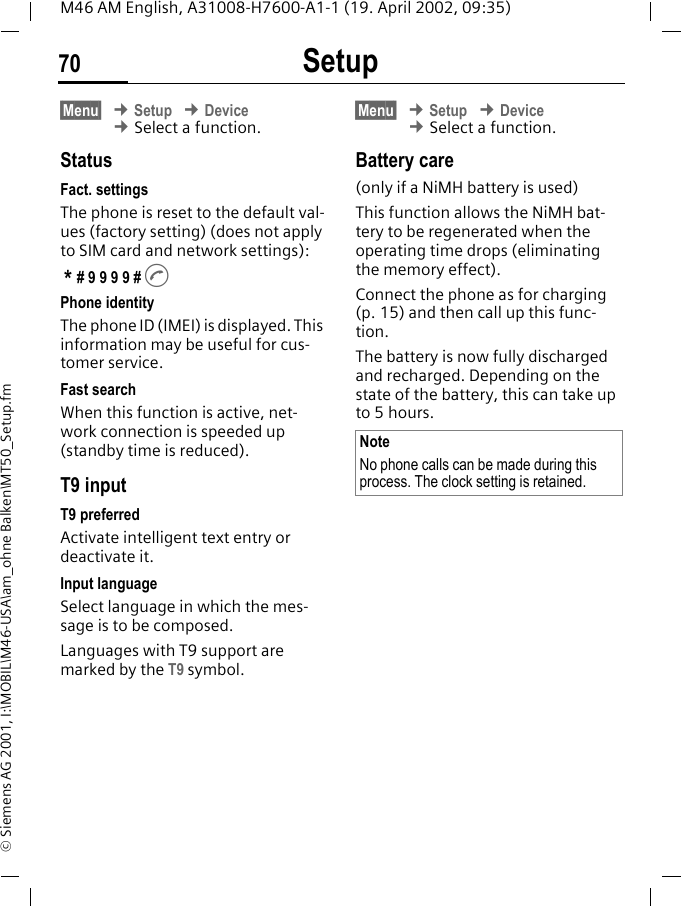
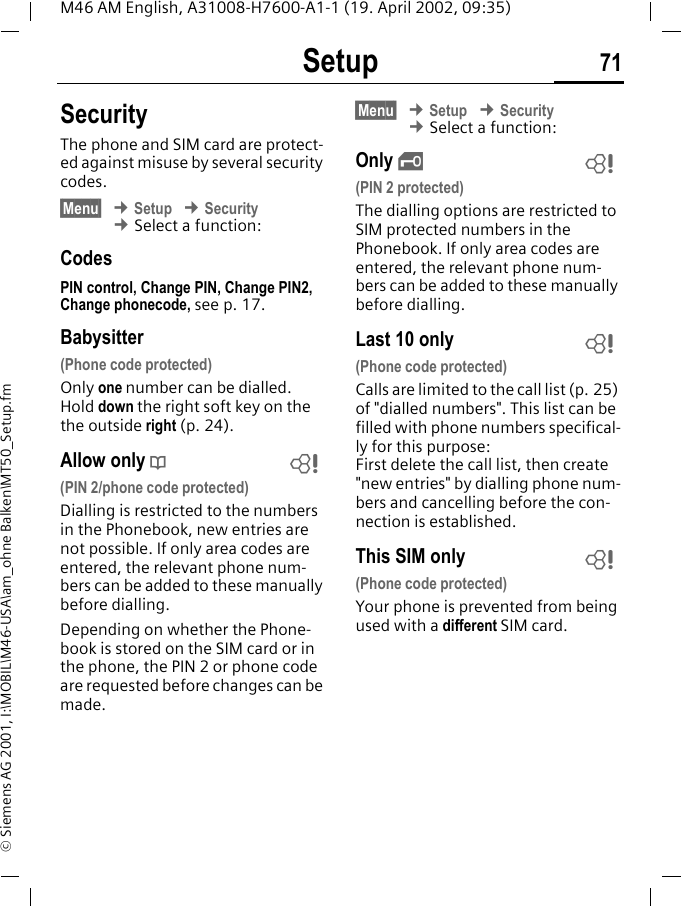
Making a phone call 24M46 AM English, A31008-H7600-A1-1 (19. April 2002, 09:35)© Siemens AG 2001, I:\MOBIL\M46-USA\am_ohne Balken\MT50_PhoneRecords.fmBabysitterOnly one phone number can be di-alled. Hold down the right soft key on the right. Switch on§Menu  ¢ Setup ¢ Security ¢ Babysitter§Select§ Press.JEnter phone code:When first prompted, you define and enter the phone code (4-8 digits).Please do not forget this code! §OK§ Confirm input.§Change§ Press.@/JSelect phone number from the Phonebook (p. 26), or enter a new one (with name).  OK  The babysitter is now ac-tive.Switch off#Hold down.JEnter phone code.§Change§ Press.§OK  Confirm input.RecordsYour phone stores the phone num-bers of calls for convenient redial-ling.§Menu  ¢ Records§Select§ Press.MNChoose call list.§Select§ Press.MNSelect phone number.ADial phone numberor§View§ Display information on the phone number.NoteChange phone code..........................p. 18
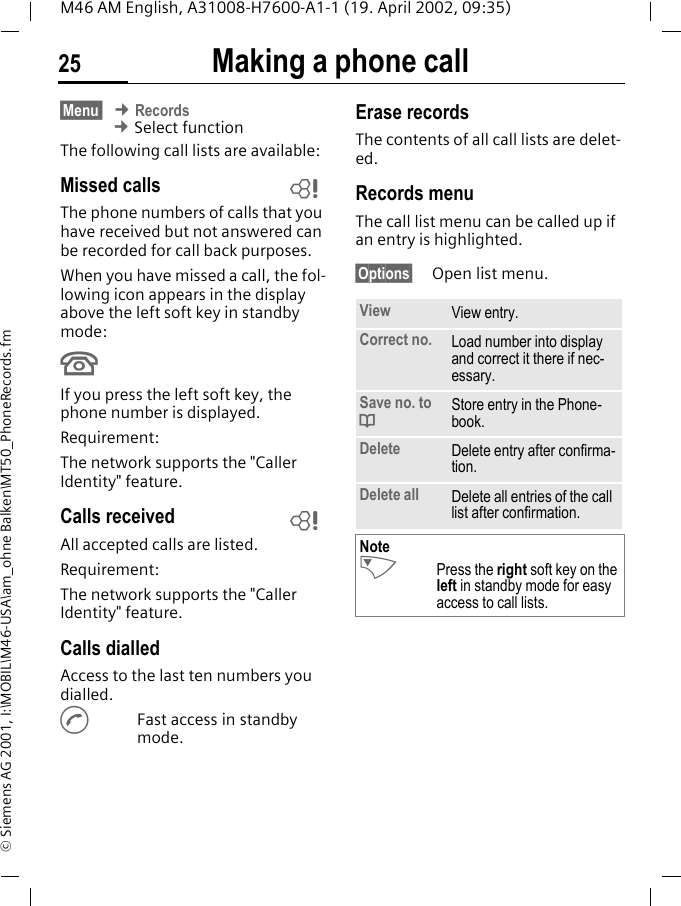
Making a phone call25M46 AM English, A31008-H7600-A1-1 (19. April 2002, 09:35)© Siemens AG 2001, I:\MOBIL\M46-USA\am_ohne Balken\MT50_PhoneRecords.fm§Menu  ¢ Records ¢ Select functionThe following call lists are available:Missed calls The phone numbers of calls that you have received but not answered can be recorded for call back purposes.When you have missed a call, the fol-lowing icon appears in the display above the left soft key in standby mode:UIf you press the left soft key, the phone number is displayed.Requirement: The network supports the "Caller Identity" feature.Calls received All accepted calls are listed.Requirement: The network supports the "Caller Identity" feature.Calls dialledAccess to the last ten numbers you dialled.AFast access in standby mode.Erase recordsThe contents of all call lists are delet-ed.Records menuThe call list menu can be called up if an entry is highlighted.§Options§ Open list menu.~~View View entry.Correct no. Load number into display and correct it there if nec-essary.Save no. to dStore entry in the Phone-book.Delete Delete entry after confirma-tion.Delete all Delete all entries of the call list after confirmation.NoteNPress the right soft key on the left in standby mode for easy access to call lists.
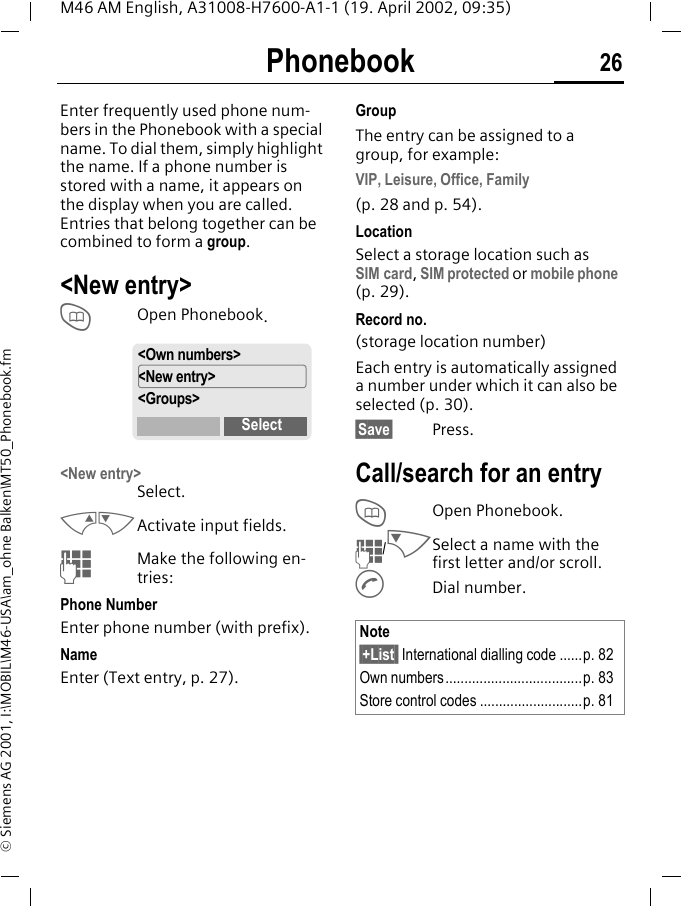
Phonebook 26M46 AM English, A31008-H7600-A1-1 (19. April 2002, 09:35)© Siemens AG 2001, I:\MOBIL\M46-USA\am_ohne Balken\MT50_Phonebook.fmPhonebook Enter frequently used phone num-bers in the Phonebook with a special name. To dial them, simply highlight the name. If a phone number is stored with a name, it appears on the display when you are called. Entries that belong together can be combined to form a group.<New entry>TOpen Phonebook.<New entry>Select.MNActivate input fields.JMake the following en-tries:Phone NumberEnter phone number (with prefix).Name Enter (Text entry, p. 27).GroupThe entry can be assigned to a group, for example:VIP, Leisure, Office, Family(p. 28 and p. 54).LocationSelect a storage location such as SIM card, SIM protected or mobile phone (p. 29). Record no. (storage location number)Each entry is automatically assigned a number under which it can also be selected (p. 30).§Save§ Press.Call/search for an entryTOpen Phonebook.J/NSelect a name with the first letter and/or scroll.ADial number.<Own numbers><New entry><Groups>SelectNote§+List  International dialling code ......p. 82Own numbers....................................p. 83Store control codes ...........................p. 81
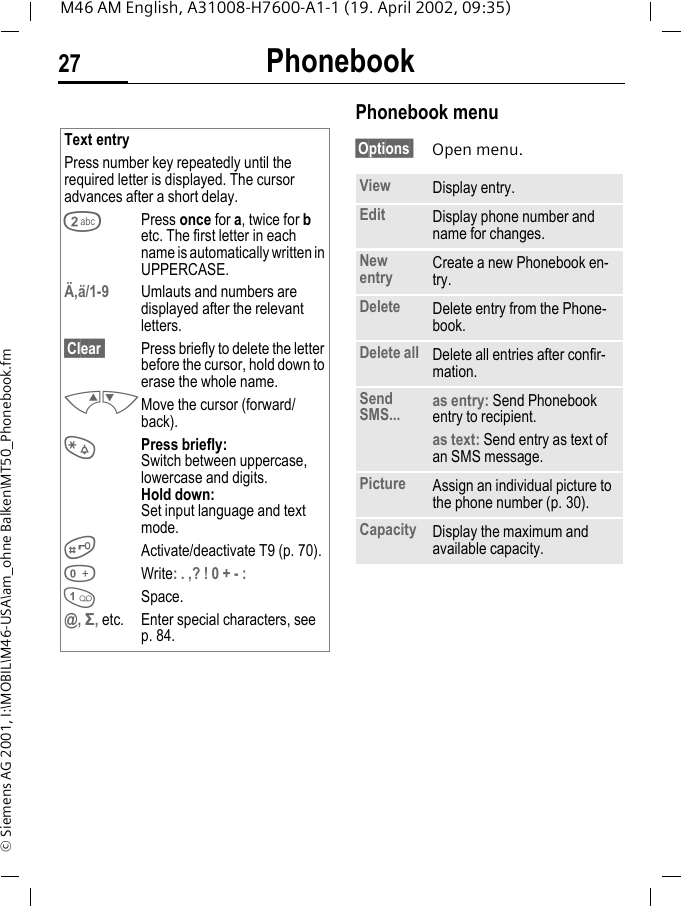
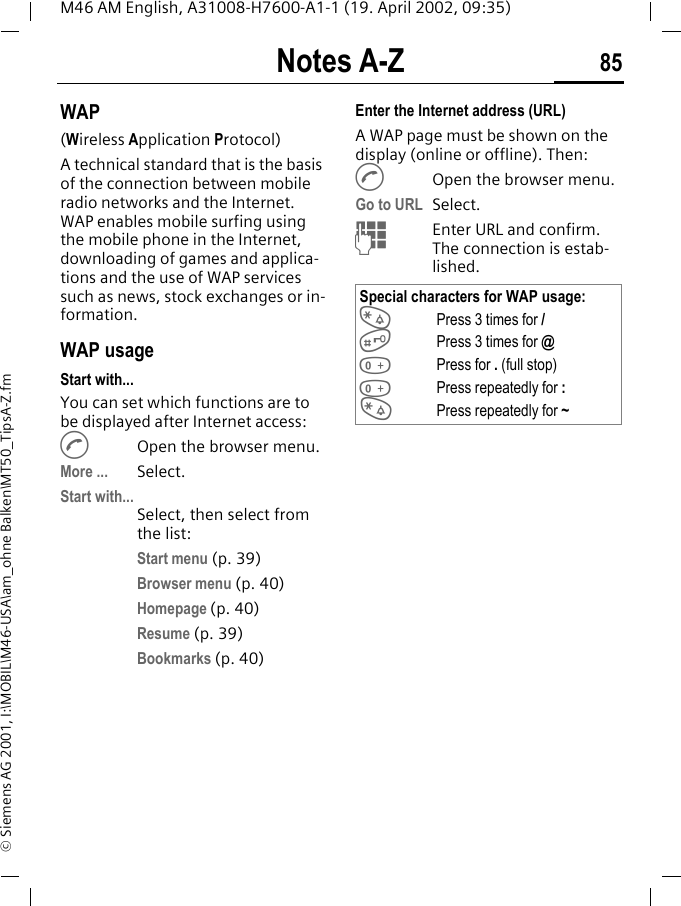
Phonebook27M46 AM English, A31008-H7600-A1-1 (19. April 2002, 09:35)© Siemens AG 2001, I:\MOBIL\M46-USA\am_ohne Balken\MT50_Phonebook.fmPhonebook menu §Options  Open menu.Text entryPress number key repeatedly until the required letter is displayed. The cursor advances after a short delay.2Press once for a, twice for b etc. The first letter in each name is automatically written in UPPERCASE.Ä,ä/1-9 Umlauts and numbers are displayed after the relevant letters.§Clear  Press briefly to delete the letter before the cursor, hold down to erase the whole name.MNMove the cursor (forward/back).*Press briefly:Switch between uppercase, lowercase and digits.Hold down:Set input language and text mode.#Activate/deactivate T9 (p. 70).0Write: . ,? ! 0 + - :1Space.@, Σ, etc. Enter special characters, see p. 84.View Display entry.Edit Display phone number and name for changes.New entry Create a new Phonebook en-try.Delete Delete entry from the Phone-book.Delete all Delete all entries after confir-mation.Send SMS... as entry: Send Phonebook entry to recipient.as text: Send entry as text of an SMS message.Picture Assign an individual picture to the phone number (p. 30).Capacity Display the maximum and available capacity.
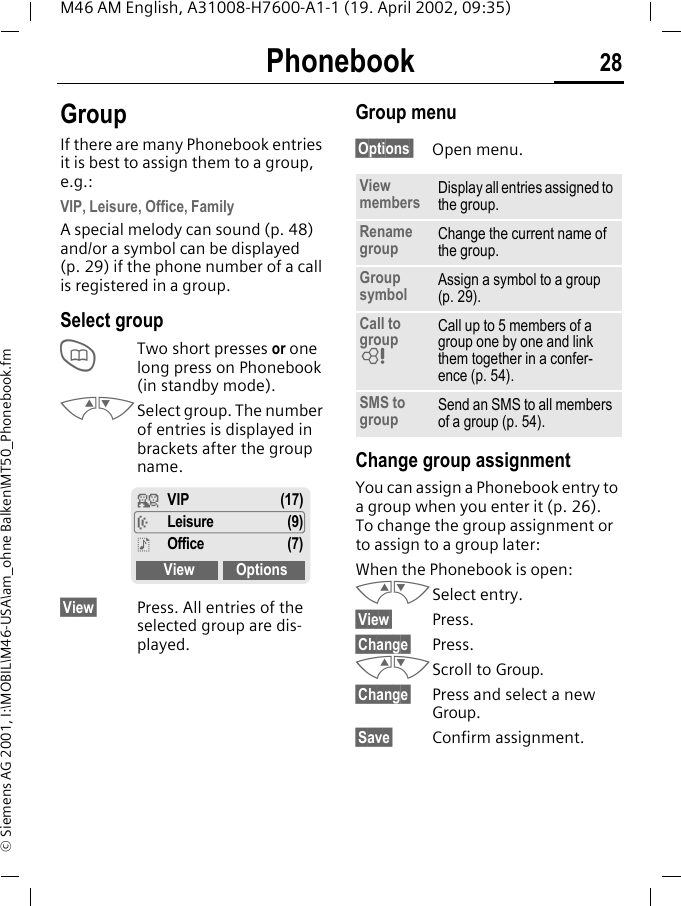
Phonebook 28M46 AM English, A31008-H7600-A1-1 (19. April 2002, 09:35)© Siemens AG 2001, I:\MOBIL\M46-USA\am_ohne Balken\MT50_Phonebook.fmGroupIf there are many Phonebook entries it is best to assign them to a group, e.g.:VIP, Leisure, Office, FamilyA special melody can sound (p. 48) and/or a symbol can be displayed (p. 29) if the phone number of a call is registered in a group.Select groupTTwo short presses or one long press on Phonebook (in standby mode).MNSelect group. The number of entries is displayed in brackets after the group name. §View§ Press. All entries of the selected group are dis-played.Group menu§Options  Open menu.Change group assignmentYou can assign a Phonebook entry to a group when you enter it (p. 26). To change the group assignment or to assign to a group later:When the Phonebook is open:MNSelect entry.§View§ Press.§Change§ Press.MNScroll to Group.§Change§ Press and select a new Group.§Save§ Confirm assignment.¿VIP (17)½Leisure (9)¾Office (7)View OptionsView members Display all entries assigned to the group.Rename group Change the current name of the group.Group symbol Assign a symbol to a group (p. 29).Call to group ~Call up to 5 members of a group one by one and link them together in a confer-ence (p. 54).SMS to group Send an SMS to all members of a group (p. 54).
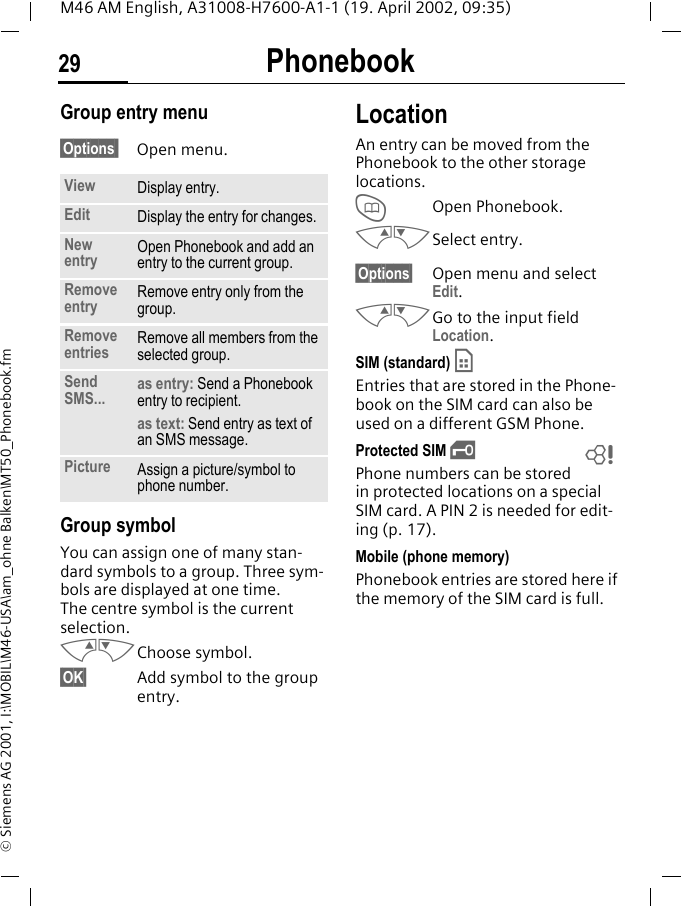
Phonebook29M46 AM English, A31008-H7600-A1-1 (19. April 2002, 09:35)© Siemens AG 2001, I:\MOBIL\M46-USA\am_ohne Balken\MT50_Phonebook.fmGroup entry menu §Options  Open menu. Group symbolYou can assign one of many stan-dard symbols to a group. Three sym-bols are displayed at one time. The centre symbol is the current selection.MNChoose symbol.§OK§ Add symbol to the group entry.LocationAn entry can be moved from the Phonebook to the other storage locations. TOpen Phonebook.MNSelect entry.§Options§ Open menu and select Edit.MNGo to the input field Location.SIM (standard) IEntries that are stored in the Phone-book on the SIM card can also be used on a different GSM Phone.Protected SIM ,Phone numbers can be stored in protected locations on a special SIM card. A PIN 2 is needed for edit-ing (p. 17).Mobile (phone memory) Phonebook entries are stored here if the memory of the SIM card is full.View Display entry.Edit Display the entry for changes.New entry Open Phonebook and add an entry to the current group.Remove entry Remove entry only from the group.Remove entries Remove all members from the selected group.Send SMS... as entry: Send a Phonebook entry to recipient.as text: Send entry as text of an SMS message.Picture Assign a picture/symbol to phone number.~
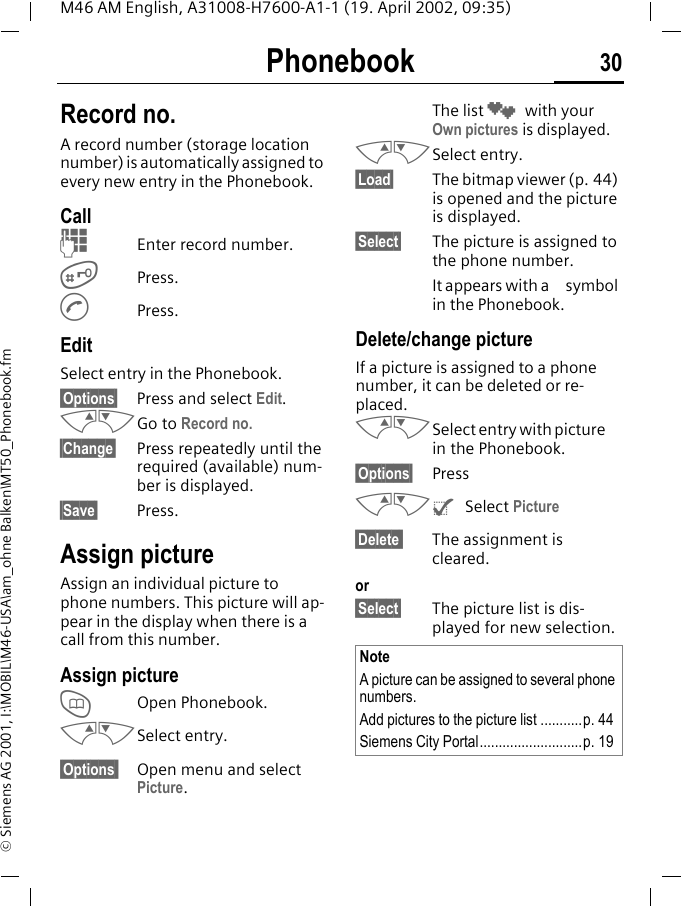
Phonebook 30M46 AM English, A31008-H7600-A1-1 (19. April 2002, 09:35)© Siemens AG 2001, I:\MOBIL\M46-USA\am_ohne Balken\MT50_Phonebook.fmRecord no.A record number (storage location number) is automatically assigned to every new entry in the Phonebook.Call JEnter record number.#Press.APress.EditSelect entry in the Phonebook.§Options§ Press and select Edit.MNGo to Record no.§Change§ Press repeatedly until the required (available) num-ber is displayed.§Save§ Press.Assign pictureAssign an individual picture to phone numbers. This picture will ap-pear in the display when there is a call from this number.Assign pictureTOpen Phonebook.MNSelect entry.§Options  Open menu and select Picture. The list ¸ with your Own pictures is displayed. MNSelect entry.§Load§ The bitmap viewer (p. 44) is opened and the picture is displayed.§Select§ The picture is assigned to the phone number. It appears with a  symbol in the Phonebook.Delete/change pictureIf a picture is assigned to a phone number, it can be deleted or re-placed.MNSelect entry with picture  in the Phonebook.§Options§ PressMN^ Select Picture§Delete  The assignment is cleared.or§Select§ The picture list is dis-played for new selection. NoteA picture can be assigned to several phone numbers.Add pictures to the picture list ...........p. 44Siemens City Portal...........................p. 19
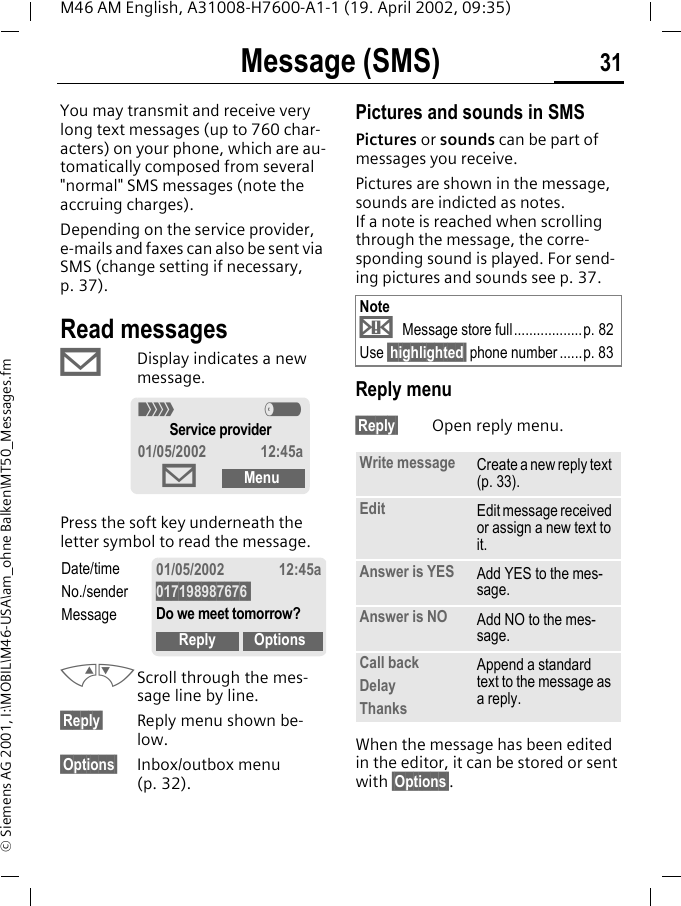
Message (SMS) 31M46 AM English, A31008-H7600-A1-1 (19. April 2002, 09:35)© Siemens AG 2001, I:\MOBIL\M46-USA\am_ohne Balken\MT50_Messages.fmMessage (SMS)You may transmit and receive very long text messages (up to 760 char-acters) on your phone, which are au-tomatically composed from several "normal" SMS messages (note the accruing charges).Depending on the service provider, e-mails and faxes can also be sent via SMS (change setting if necessary, p. 37).Read messages© Display indicates a new message. Press the soft key underneath the letter symbol to read the message. MNScroll through the mes-sage line by line.§Reply§ Reply menu shown be-low.§Options§ Inbox/outbox menu (p. 32). Pictures and sounds in SMSPictures or sounds can be part of messages you receive.Pictures are shown in the message, sounds are indicted as notes. If a note is reached when scrolling through the message, the corre-sponding sound is played. For send-ing pictures and sounds see p. 37. Reply menu §Reply§ Open reply menu.When the message has been edited in the editor, it can be stored or sent with §Options§.< aService provider01/05/2002 12:45a©MenuDate/timeNo./senderMessage01/05/2002 12:45a017198987676 Do we meet tomorrow?Reply OptionsNote¨ Message store full..................p. 82Use §highlighted§ phone number......p. 83Write message Create a new reply text (p. 33).Edit Edit message received or assign a new text to it.Answer is YES Add YES to the mes-sage.Answer is NO Add NO to the mes-sage.Call backDelayThanksAppend a standard text to the message as a reply.
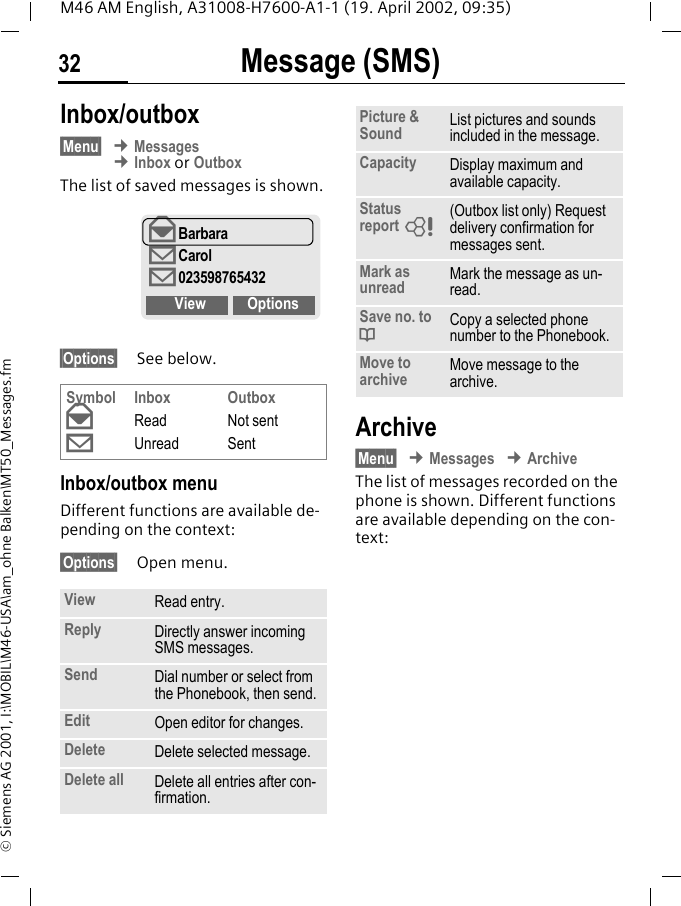
Message (SMS)32M46 AM English, A31008-H7600-A1-1 (19. April 2002, 09:35)© Siemens AG 2001, I:\MOBIL\M46-USA\am_ohne Balken\MT50_Messages.fmInbox/outbox§Menu§ ¢ Messages ¢ Inbox or OutboxThe list of saved messages is shown.§Options§ See below.Inbox/outbox menuDifferent functions are available de-pending on the context:§Options§ Open menu.Archive§Menu§ ¢ Messages ¢ ArchiveThe list of messages recorded on the phone is shown. Different functions are available depending on the con-text:Symbolª©InboxReadUnreadOutboxNot sentSentView Read entry.Reply Directly answer incoming SMS messages.Send Dial number or select from the Phonebook, then send.Edit Open editor for changes.Delete Delete selected message.Delete all Delete all entries after con-firmation.ªBarbara©Carol©023598765432View OptionsPicture & Sound List pictures and sounds included in the message.Capacity Display maximum and available capacity.Status report ~(Outbox list only) Request delivery confirmation for messages sent. Mark as unread Mark the message as un-read.Save no. to dCopy a selected phone number to the Phonebook.Move to archive Move message to the archive.
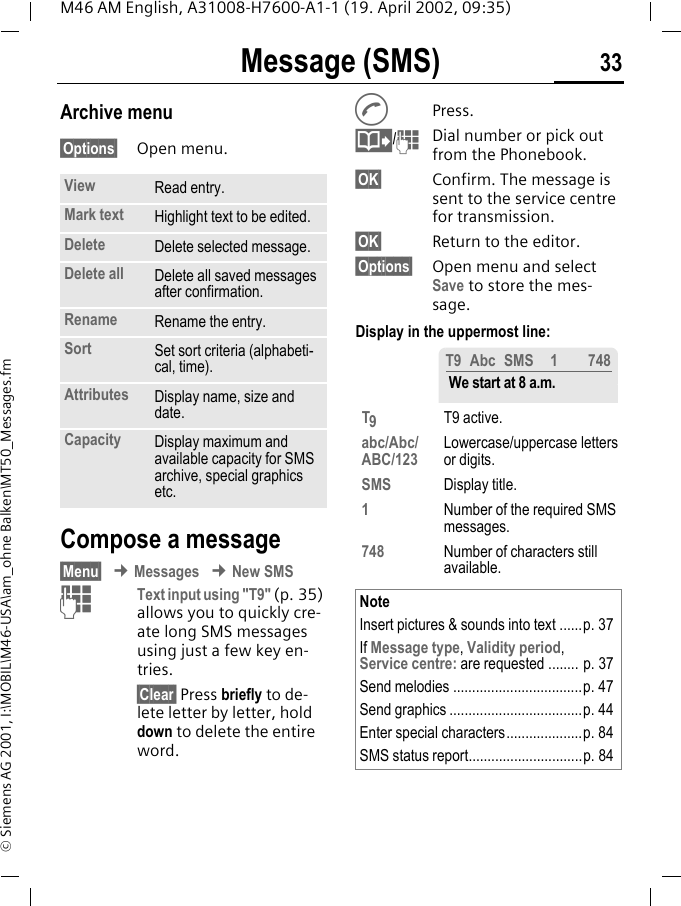
Message (SMS) 33M46 AM English, A31008-H7600-A1-1 (19. April 2002, 09:35)© Siemens AG 2001, I:\MOBIL\M46-USA\am_ohne Balken\MT50_Messages.fmArchive menu§Options§ Open menu.Compose a message§Menu§ ¢ Messages ¢ New SMSJText input using "T9" (p. 35) allows you to quickly cre-ate long SMS messages using just a few key en-tries.§Clear§ Press briefly to de-lete letter by letter, hold down to delete the entire word.APress.@/JDial number or pick out from the Phonebook.§OK§ Confirm. The message is sent to the service centre for transmission.§OK§ Return to the editor.§Options§ Open menu and select Save to store the mes-sage.Display in the uppermost line: View Read entry.Mark text Highlight text to be edited.Delete Delete selected message.Delete all Delete all saved messages after confirmation.Rename Rename the entry.Sort Set sort criteria (alphabeti-cal, time).Attributes Display name, size and date.Capacity Display maximum and available capacity for SMS archive, special graphics etc. T9T9 active.abc/Abc/ABC/123 Lowercase/uppercase letters or digits.SMS Display title.1Number of the required SMS messages.748 Number of characters still available.NoteInsert pictures & sounds into text ......p. 37If Message type, Validity period,Service centre: are requested ........ p. 37Send melodies ..................................p. 47Send graphics ...................................p. 44Enter special characters....................p. 84SMS status report..............................p. 84T9 Abc SMS 1 748 We start at 8 a.m.
Message (SMS)34M46 AM English, A31008-H7600-A1-1 (19. April 2002, 09:35)© Siemens AG 2001, I:\MOBIL\M46-USA\am_ohne Balken\MT50_Messages.fmText menu §Options§ Open the text menu.Predefined textStandard text fragments which can be added to messages are stored in the phone. You can also create five additional text fragments yourself.Write text fragments§Menu§ ¢ Messages ¢ Predefined text<New entry> Select.JWrite text fragment.§Save§ Press.Use text fragmentsJCompose message (p. 33).§Options§ Open the text menu.Insert text  Select. MNSelect text fragment from the list.§Select§ Confirm. The text frag-ment is inserted in the message at the cursor position.SMS to groupYou can send messages (SMS) as "circulars" to all members of a group (p. 54).Send Dial the number or select from the Phonebook, then send.Save Save the composed mes-sage in the outbox list.Picture & Sound Add pictures and sounds to message (p. 37).Format Line feedSmall font, Medium font, Large fontUnderlineLeft, Right, Center (align)Mark text (highlight text with the scroll key)Clear text Delete the whole text.Insert text Insert predefined text frag-ment. Insert from dOpen Phonebook and copy phone number into the mes-sage.Bookmark Insert URL from the WAP bookmarks into the text.T9 input (p. 35) T9 preferred:Activate/deactivate T9 input.Input language:Select the language in which the message is to be com-posed.
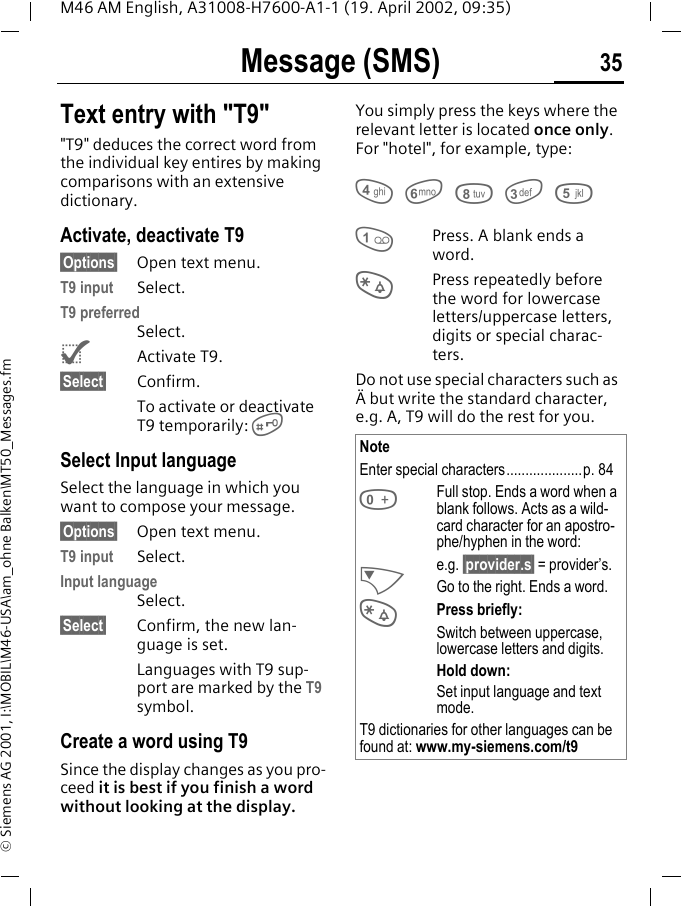
Message (SMS) 35M46 AM English, A31008-H7600-A1-1 (19. April 2002, 09:35)© Siemens AG 2001, I:\MOBIL\M46-USA\am_ohne Balken\MT50_Messages.fmText entry with "T9""T9" deduces the correct word from the individual key entires by making comparisons with an extensive dictionary.Activate, deactivate T9§Options§ Open text menu.T9 input Select.T9 preferredSelect.^Activate T9.§Select§ Confirm.To activate or deactivate T9 temporarily: #Select Input languageSelect the language in which you want to compose your message.§Options§ Open text menu.T9 input Select.Input languageSelect.§Select§ Confirm, the new lan-guage is set.Languages with T9 sup-port are marked by the T9 symbol.Create a word using T9Since the display changes as you pro-ceed it is best if you finish a word without looking at the display.You simply press the keys where the relevant letter is located once only. For "hotel", for example, type:4 6 8 3 51Press. A blank ends a word.*Press repeatedly before the word for lowercase letters/uppercase letters, digits or special charac-ters.Do not use special characters such as Ä but write the standard character, e.g. A, T9 will do the rest for you. NoteEnter special characters....................p. 840Full stop. Ends a word when a blank follows. Acts as a wild-card character for an apostro-phe/hyphen in the word:e.g. §provider.s§ = provider’s.NGo to the right. Ends a word.*Press briefly:Switch between uppercase, lowercase letters and digits.Hold down:Set input language and text mode.T9 dictionaries for other languages can be found at: www.my-siemens.com/t9
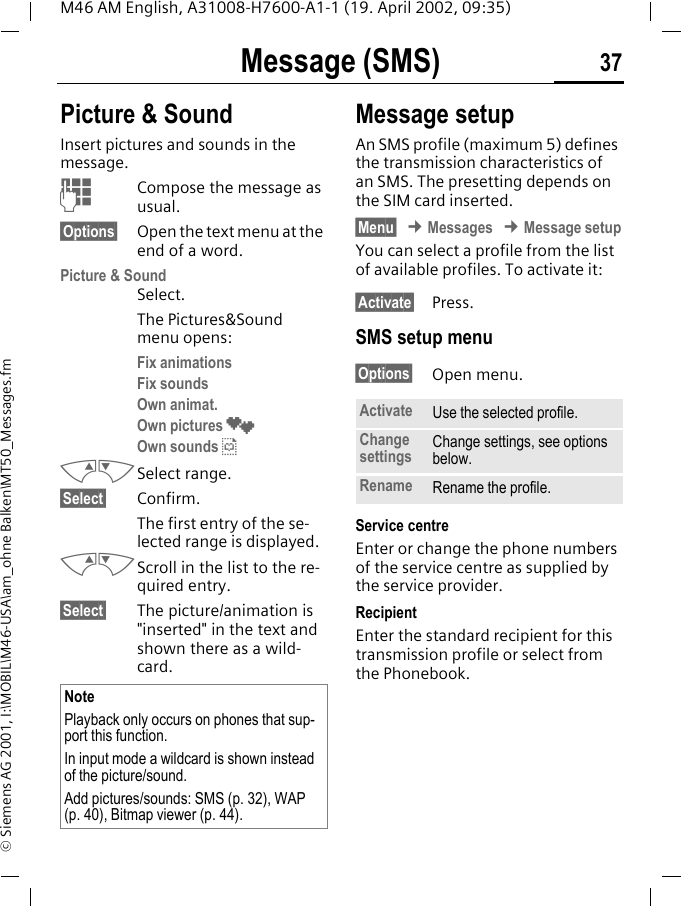
Message (SMS)36M46 AM English, A31008-H7600-A1-1 (19. April 2002, 09:35)© Siemens AG 2001, I:\MOBIL\M46-USA\am_ohne Balken\MT50_Messages.fmT9 word suggestionsIf several options are found in the dictionary for a key sequence (a word), the most probable is dis-played first. If the word you want has not been recognised, the next sug-gestion from T9 may be correct.The word must be highlighted§. Then press:The displayed word is re-placed with a different word. If this word is also incorrect,:press again. Repeat until the correct word is dis-played.If the word you want is not in the dic-tionary, it may be written without T9.To add a word to the dictionary:§Spell§ Select.The last suggestion is deleted and the word may now be entered with-out T9 support. Press §Save§ to add it automatically to the dictionary.Correct a wordWords created using T9:MNMove word by word to the left/right until the re-quired word is highlight-ed.:Scroll through the T9 word suggestions again.§Delete§ Deletes the letter to the left of the cursor and dis-plays a new possible word!Words not created using T9:MNMove character by charac-ter to the left/right.§Delete§ Deletes the letter to the left of the cursor.JCharacters are inserted at the cursor position.T9 Abc SMS    1 748At 8 h we are ___Spell :NoteWithin a "T9 word", individual letters may not be edited without cancelling T9 first. In most cases it is better to rewrite the com-plete word.T9® Text Input is licensed under one or more of the following: U.S. Pat. Nos. 5, 818, 437, 5, 953, 541, 5, 187, 480, 5, 945, 928, and 6, 011, 554; Canadian Pat. No. 1,331,057; United Kingdom Pat. No. 2238414B; Hong Kong Standard Pat. No. HK0940329; Republic of Singapore Pat. No. 51383; Euro.Pat. No. 0 842 463 (96927260.8) DE/DK, FI, FR, IT, NL, PT, ES, SE, GB; and additional patents are pending worldwide.
Message (SMS) 37M46 AM English, A31008-H7600-A1-1 (19. April 2002, 09:35)© Siemens AG 2001, I:\MOBIL\M46-USA\am_ohne Balken\MT50_Messages.fmPicture & Sound Insert pictures and sounds in the message.JCompose the message as usual.§Options§ Open the text menu at the end of a word.Picture & SoundSelect. The Pictures&Sound menu opens:Fix animations Fix sounds Own animat. Own pictures ¸Own sounds ¹MNSelect range.§Select§ Confirm.The first entry of the se-lected range is displayed.MNScroll in the list to the re-quired entry.§Select§ The picture/animation is "inserted" in the text and shown there as a wild-card. Message setupAn SMS profile (maximum 5) defines the transmission characteristics of an SMS. The presetting depends on the SIM card inserted.§Menu§ ¢ Messages ¢ Message setupYou can select a profile from the list of available profiles. To activate it:§Activate§ Press.SMS setup menu§Options§ Open menu.Service centreEnter or change the phone numbers of the service centre as supplied by the service provider. RecipientEnter the standard recipient for this transmission profile or select from the Phonebook.NotePlayback only occurs on phones that sup-port this function. In input mode a wildcard is shown instead of the picture/sound.Add pictures/sounds: SMS (p. 32), WAP (p. 40), Bitmap viewer (p. 44).Activate Use the selected profile.Change settings Change settings, see options below.Rename Rename the profile.
Message (SMS)38M46 AM English, A31008-H7600-A1-1 (19. April 2002, 09:35)© Siemens AG 2001, I:\MOBIL\M46-USA\am_ohne Balken\MT50_Messages.fmMessage typeValidity periodSelect the period in which the ser-vice centre tries to deliver the mes-sage:Manual, 1 hour, 12 hours, 1 day, 1 week, Maximum *, New*) Maximum period that the service provider permits.Status reportYou are given confirmation of the successful or unsuccessful delivery of a sent message. This service may be subject to a charge.Direct replyThe reply to your message is handled via your service centre when Direct Answer is activated (for information please contact your service provider).SMS via GPRSWhen this function is activated, SMS messages are automatically sent via GPRS (if available). Requirement: GPRS is activated (p. 75). Ensure that your service pro-vider offers this function.Manual The message type is re-quested for each message.Standard text Normal SMS message.Fax Transmission via SMS.E-mail Transmission via SMS.New You may need to obtain the required code number from your service provider.~~~
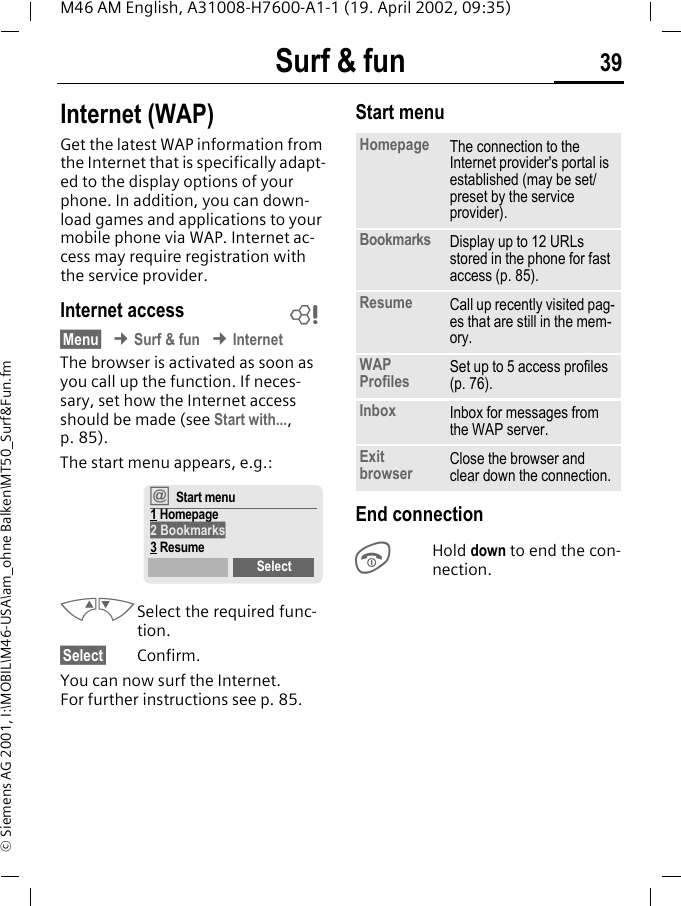
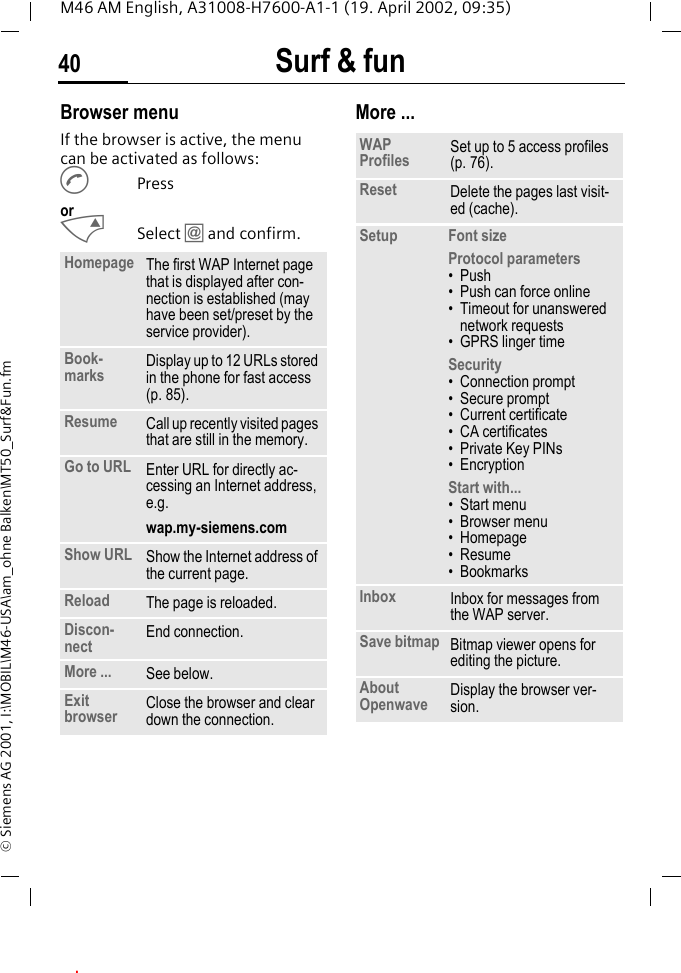
Surf & fun 39M46 AM English, A31008-H7600-A1-1 (19. April 2002, 09:35)© Siemens AG 2001, I:\MOBIL\M46-USA\am_ohne Balken\MT50_Surf&Fun.fmSurf & fun Internet (WAP)Get the latest WAP information from the Internet that is specifically adapt-ed to the display options of your phone. In addition, you can down-load games and applications to your mobile phone via WAP. Internet ac-cess may require registration with the service provider.Internet access§Menu§ ¢ Surf & fun ¢ InternetThe browser is activated as soon as you call up the function. If neces-sary, set how the Internet access should be made (see Start with..., p. 85). The start menu appears, e.g.:MNSelect the required func-tion. §Select§ Confirm.You can now surf the Internet. For further instructions see p. 85.Start menu End connectionSHold down to end the con-nection.~†Start menu1 Homepage2 Bookmarks3 ResumeSelectHomepage The connection to the Internet provider's portal is established (may be set/preset by the service provider).Bookmarks Display up to 12 URLs stored in the phone for fast access (p. 85).Resume Call up recently visited pag-es that are still in the mem-ory.WAP Profiles Set up to 5 access profiles (p. 76).Inbox Inbox for messages from the WAP server.Exit browser Close the browser and clear down the connection.
Surf & fun40M46 AM English, A31008-H7600-A1-1 (19. April 2002, 09:35)© Siemens AG 2001, I:\MOBIL\M46-USA\am_ohne Balken\MT50_Surf&Fun.fmBrowser menuIf the browser is active, the menu can be activated as follows:APressorMSelect † and confirm.More ... Homepage The first WAP Internet page that is displayed after con-nection is established (may have been set/preset by the service provider).Book-marks Display up to 12 URLs stored in the phone for fast access (p. 85).Resume Call up recently visited pages that are still in the memory.Go to URL Enter URL for directly ac-cessing an Internet address, e.g. wap.my-siemens.comShow URL Show the Internet address of the current page.Reload The page is reloaded.Discon-nect End connection. More ... See below.Exit browser Close the browser and clear down the connection.WAP Profiles Set up to 5 access profiles (p. 76).Reset Delete the pages last visit-ed (cache). Setup Font sizeProtocol parameters•Push• Push can force online • Timeout for unanswered network requests• GPRS linger timeSecurity• Connection prompt• Secure prompt• Current certificate• CA certificates• Private Key PINs• EncryptionStart with...• Start menu• Browser menu• Homepage• Resume• BookmarksInbox Inbox for messages from the WAP server.Save bitmap Bitmap viewer opens for editing the picture.About Openwave Display the browser ver-sion..
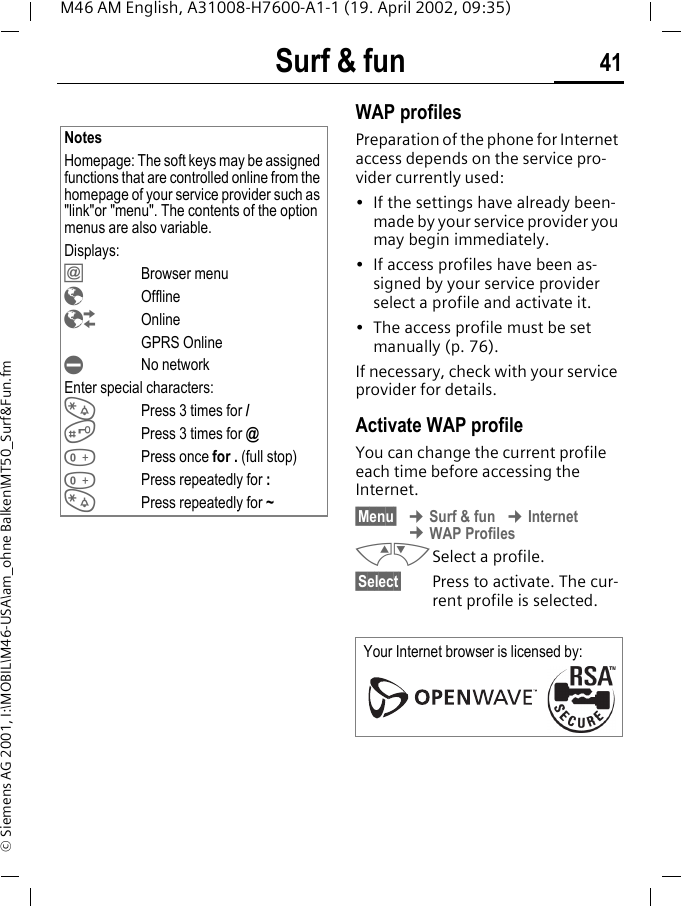
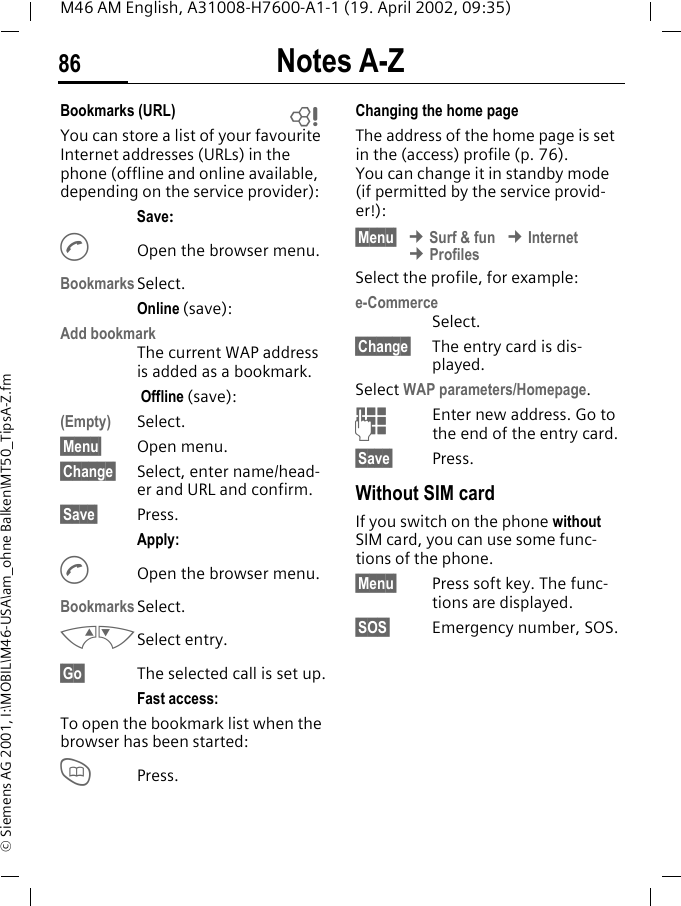
Surf & fun 41M46 AM English, A31008-H7600-A1-1 (19. April 2002, 09:35)© Siemens AG 2001, I:\MOBIL\M46-USA\am_ohne Balken\MT50_Surf&Fun.fmWAP profiles Preparation of the phone for Internet access depends on the service pro-vider currently used:• If the settings have already been-made by your service provider you may begin immediately.• If access profiles have been as-signed by your service provider select a profile and activate it.• The access profile must be set manually (p. 76).If necessary, check with your service provider for details.Activate WAP profile You can change the current profile each time before accessing the Internet.§Menu§ ¢ Surf & fun ¢ Internet ¢ WAP ProfilesMNSelect a profile.§Select§ Press to activate. The cur-rent profile is selected.NotesHomepage: The soft keys may be assigned functions that are controlled online from the homepage of your service provider such as "link"or "menu". The contents of the option menus are also variable.Displays:† Browser menu¥ Offline¦Online GPRS Online¤No networkEnter special characters:*Press 3 times for /#Press 3 times for @0Press once for . (full stop)0Press repeatedly for :*Press repeatedly for ~Your Internet browser is licensed by:
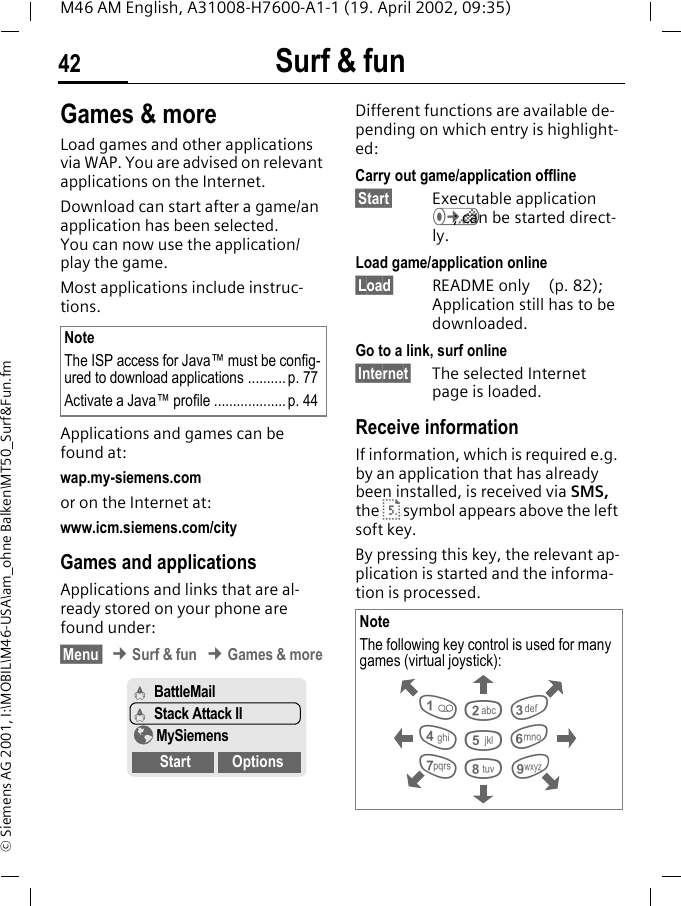
Surf & fun42M46 AM English, A31008-H7600-A1-1 (19. April 2002, 09:35)© Siemens AG 2001, I:\MOBIL\M46-USA\am_ohne Balken\MT50_Surf&Fun.fmGames & moreLoad games and other applications via WAP. You are advised on relevant applications on the Internet. Download can start after a game/an application has been selected. You can now use the application/play the game. Most applications include instruc-tions. Applications and games can be found at: wap.my-siemens.comor on the Internet at:www.icm.siemens.com/city Games and applicationsApplications and links that are al-ready stored on your phone are found under:§Menu  ¢ Surf & fun ¢ Games & more Different functions are available de-pending on which entry is highlight-ed:Carry out game/application offline§Start§ Executable application Á; can be started direct-ly.Load game/application online§Load§ README only  (p. 82); Application still has to be downloaded.Go to a link, surf online§Internet§ The selected Internet page is loaded.Receive informationIf information, which is required e.g. by an application that has already been installed, is received via SMS, the · symbol appears above the left soft key. By pressing this key, the relevant ap-plication is started and the informa-tion is processed. NoteThe ISP access for Java™ must be config-ured to download applications ..........p. 77Activate a Java™ profile ................... p. 44Á BattleMailÁ Stack Attack II¥ MySiemensStart OptionsNoteThe following key control is used for many games (virtual joystick): 28641 3759
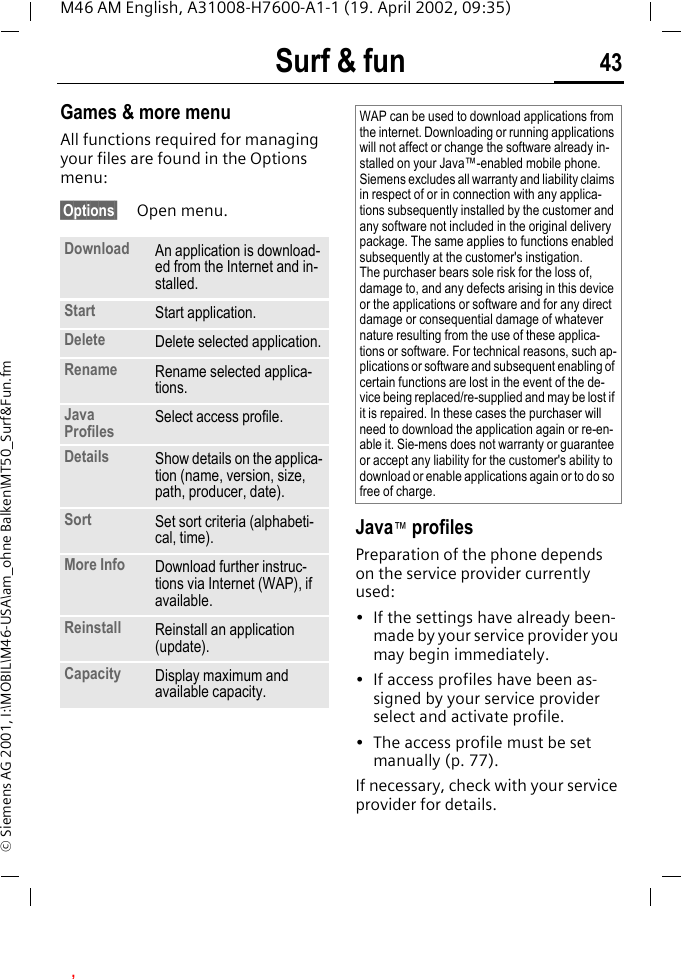
Surf & fun 43M46 AM English, A31008-H7600-A1-1 (19. April 2002, 09:35)© Siemens AG 2001, I:\MOBIL\M46-USA\am_ohne Balken\MT50_Surf&Fun.fmGames & more menuAll functions required for managing your files are found in the Options menu:§Options§ Open menu. Java™ profilesPreparation of the phone depends on the service provider currently used:• If the settings have already been-made by your service provider you may begin immediately.• If access profiles have been as-signed by your service provider select and activate profile.• The access profile must be set manually (p. 77).If necessary, check with your service provider for details.Download An application is download-ed from the Internet and in-stalled.Start Start application.Delete Delete selected application.Rename Rename selected applica-tions.Java Profiles Select access profile.Details Show details on the applica-tion (name, version, size, path, producer, date).Sort Set sort criteria (alphabeti-cal, time).More Info Download further instruc-tions via Internet (WAP), if available.Reinstall Reinstall an application (update).Capacity Display maximum and available capacity.WAP can be used to download applications from the internet. Downloading or running applications will not affect or change the software already in-stalled on your Java™-enabled mobile phone.Siemens excludes all warranty and liability claims in respect of or in connection with any applica-tions subsequently installed by the customer and any software not included in the original delivery package. The same applies to functions enabled subsequently at the customer's instigation. The purchaser bears sole risk for the loss of, damage to, and any defects arising in this device or the applications or software and for any direct damage or consequential damage of whatever nature resulting from the use of these applica-tions or software. For technical reasons, such ap-plications or software and subsequent enabling of certain functions are lost in the event of the de-vice being replaced/re-supplied and may be lost if it is repaired. In these cases the purchaser will need to download the application again or re-en-able it. Sie-mens does not warranty or guarantee or accept any liability for the customer's ability to download or enable applications again or to do so free of charge.,
Surf & fun44M46 AM English, A31008-H7600-A1-1 (19. April 2002, 09:35)© Siemens AG 2001, I:\MOBIL\M46-USA\am_ohne Balken\MT50_Surf&Fun.fmActivate Java™ profile§Menu§ ¢ Surf & fun ¢ Games & more ¢ Java ProfilesMN Select the required pro-file.§Select§ Press to activate.Bitmap viewerSet animations, logos and screensav-ers on your phone according to your wishes. Pictures and links that are already stored on your phone are found un-der:Start bitmap viewer§Menu§ ¢ Surf & fun ¢ Bitmap viewerMNSelect storage location, folder or link:Own animat.Own picturesScreensaverLogoURLDifferent functions are available depending on which entry is high-lighted:Own animat./Own picturesMNSelect folder.§Select§ Press.MNSelect picture.§Load§ The picture is displayed.Screensaver/Logo§Load§ The picture is displayed.Go to a link, surf online§Internet§ The selected Internet page is loaded.Store picturesStore pictures currently displayed in the bitmap viewer on a new storage location e.g. to create a new screen-saver:MNSelect storage location.§Save§ Press. Send pictures via SMSOpen bitmap viewer and activate the required picture then:§Options§ Open menu.§Send§ Enter recipient or use Phonebook @.§OK§ Confirm.Receive picturesIf a picture (graphic/screensaver) has been received via SMS the ¸ sym-bol appears above the left soft key. By pressing this key, the bitmap view-er is started and the picture is dis-played.When downloading via WAP, the bit-map viewer opens automatically. Internet addresses see p. 19. NoteIf a received picture has not been copied to the bitmap viewer, it will be overwritten when the next picture is received.
Surf & fun 45M46 AM English, A31008-H7600-A1-1 (19. April 2002, 09:35)© Siemens AG 2001, I:\MOBIL\M46-USA\am_ohne Balken\MT50_Surf&Fun.fmBitmap viewer menu§Options§ Open menu. Select bitmap style§Menu§ ¢ Setup ¢ Device ¢ Display ¢ Bitmap styleYou can select between two anima-tions which are shown in different situations, for example when enter-ing a PIN. Animations available on the phone are:RacingWindsurfingOwn greeting§Menu§ ¢ Setup ¢ Device ¢ Display ¢ Own greetingThe greeting is displayed instead of an animation when you switch on the phone.§Change§ Switch on/off.JDelete old message and create new message.§OK§ Confirm changes.Screensaver§Menu§ ¢ Setup ¢ Device ¢ Display ¢ ScreensaverThe screensaver shows a picture on the display once a user-definable time has elapsed. An incoming call and any key press ends the function. You can also receive and save a screensaver via SMS/WAP.Screensaver menu§Options§ Open menu. Save as... Store the current picture on one of the storage locations.Send Send picture via SMS.Load Load new picture to the bit-map viewer. Discard Delete current picture from the buffer.Delete Delete selected picture.Enable Activate screensaver.Style Analog clock or Bitmap.Preview Display the style set.Timeout Set period after which the screensaver starts.Security Enter phone code to end screensaver (as security setting).
Surf & fun46M46 AM English, A31008-H7600-A1-1 (19. April 2002, 09:35)© Siemens AG 2001, I:\MOBIL\M46-USA\am_ohne Balken\MT50_Surf&Fun.fmMelody managerYou can use the melody manager to manage your additional ring tones and a folder with more of your own ring tones and links.Start melody manager§Menu  ¢ Surf & fun ¢ Melody manag-erMNSelect folder, storage lo-cation or link:Own soundsIndividual 1Individual 2Individual 3Individual 4URLDifferent functions are available depending on which entry is high-lighted:Own soundsMNSelect folder.§Select§ Press.MNSelect ring tone.§Load§ Load ring tone to the mel-ody manager.§Play§ Play ring tone.Individual 1 To Individual 4Load§ Load ring tone to the mel-ody manager.§Play§ Play ring tone.Go to a link, surf online§Internet The selected Internet page is loaded.
Surf & fun 47M46 AM English, A31008-H7600-A1-1 (19. April 2002, 09:35)© Siemens AG 2001, I:\MOBIL\M46-USA\am_ohne Balken\MT50_Surf&Fun.fmStore ring toneSave ring tone currently loaded in the melody manager on a new stro-age location e.g. on Individual 1:§Options§ Open menu.Save as... Select.§Select§ Confirm.MNSelect storage location.§Save§ Store ring tone.The ring tones stored under Individual 1 to Individual 4 can be assigned to dif-ferent functions/anniversaries if you use the Ringer tones (p. 48) function.Send ring tones via SMSStart melody manager and load re-quired ring tone, then:§Options§ Open menu.§Send§ Enter recipient or use Phonebook @.§OK§ Confirm.Receive ring toneIf a ring tone has been received via SMS a note ¹ appears above the left soft key. Press this key to start the melody manager. The melody manager automatically opens after a melody has been load-ed via WAP. Internet addresses see p. 19.Melody manager menu§Options§ Open menu.Play Play the ring tones current-ly loaded.Save as... Store ring tone at Individu-al 1 to 4 or Own sounds.Load... Load ring tone from Individual 1 to 4 or Own sounds. Discard Delete loaded ring tone from the buffer.Delete Delete ring tone from Individual 1 to 4 or Own sounds.Send Send ring tone via SMS.
Surf & fun48M46 AM English, A31008-H7600-A1-1 (19. April 2002, 09:35)© Siemens AG 2001, I:\MOBIL\M46-USA\am_ohne Balken\MT50_Surf&Fun.fmRinger tonesFor the ranges/functions listed be-low you can choose from 20 ring tones already stored in the phone and from four own (p. 46) ring tones (Individual 1 to 4). §Menu§ ¢ Audio ¢ Ringer tonesMNSelect range (except Melody manager):All callsd CallsGroup callsAppointmentsMessagesCell broadcast services(Melody manager)MNChoose ring tone.§OK§ Confirm.NoteSpecial ring tones can be sent to you via SMS (p. 46) or you can load them via WAP (p. 39).
Voice message/Mailbox 49M46 AM English, A31008-H7600-A1-1 (19. April 2002, 09:35)© Siemens AG 2001, I:\MOBIL\M46-USA\am_ohne Balken\MT50_Voicemail.fmVoice message/MailboxMost service providers offer you an external answering service. In this mailbox, a caller may leave a voice message for you• if your phone is switched off or not ready to receive,• if you do not want to answer,• if you are making a phone call (and if Call waiting is not active p. 22).If the voice mail service is not part of your service provider's user package, you will need to register and the set-tings must be made manually. The following description may vary slightly depending on the service provider.SetupThe service provider supplies you with two phone numbers:Mailbox numberYou call this phone number to listen to the voice mails left for you. To set it up:§Menu§ ¢ Messages ¢ Voice messageSelect phone number from Phone-book or dial it/change it and confirm with §OK§.Forwarding numberCalls are diverted to this phone num-ber. To set it up:§Menu§ ¢ Divert ¢ e.g. Unanswered ¢ SetDial the number of the mailbox.§OK§ Registration at the net-work will be confirmed after some seconds.For further information on call divert see p. 52.Listen toA new voice mail can be displayed as follows:hIcon plus beep.or©a text message announc-es a new voice mail.or you receive a call with an automatic announcement.Call your mailbox and play the mes-sage(s) back.1Hold down (if necessary enter mailbox number once only). Confirm with §OK  or §Mailbox  depending on service provider.Outside your home network, you may need to dial a different mailbox number and enter a password to access your mailbox.~~
Cell broadcast50M46 AM English, A31008-H7600-A1-1 (19. April 2002, 09:35)© Siemens AG 2001, I:\MOBIL\M46-USA\am_ohne Balken\MT50_Voicemail.fmCell broadcastSome service providers offer infor-mation services (info channels). If reception is activated, you receive messages on the active topics in your "Topic list". §Menu§ ¢ Messages ¢ Cell broadcastReceive CBYou can activate and deactivate the CB service. If the CB service is activat-ed, the standby time of the phone will be reduced.Read new CB All unread CB messages are dis-played.Topic listAdd an unrestricted number of top-ics to this personal list from the topic index (see Topic index). You can pre-set 10 entries with their channel number (ID) and, if necessary, name. New topicNew topic Select.• If no topic index is available (Topic index) enter a topic with its chan-nel number and confirm with §OK§.• If the topic index has already been transmitted, select a topic and confirm with §OK§.Selection from a list §Options§ Open list menu.If a topic is selected in the list you can have a look at it, activate it, deactivate it, edit it or delete it.Auto displayCB messages are displayed in stand-by mode, longer messages are auto-matically scrolled. This display can be activated/deactivated for all or only new messages.To switch to "full page view":#, then press §View CB§.Topic index The list of topics is displayed for you to choose from. If none are displayed you must enter the channel numbers (ID) manually (see Topic list). Please contact your service provider for details.CB languagesReceive Cell Broadcast messages only in a specific language or in all languages.~Displays^, _Topic activated/deactivated.©New messages received on the topic.ªMessages already read.~
Duration/charges 51M46 AM English, A31008-H7600-A1-1 (19. April 2002, 09:35)© Siemens AG 2001, I:\MOBIL\M46-USA\am_ohne Balken\MT50_ChargeDivert.fmDuration/chargesYou can display the charge details and the duration of calls as you speak as well as setting a unit limit for outgoing calls.Display§Menu§ ¢ Records ¢ Duration/charg-esAfter you have made the charge de-tail settings, you can display the call duration/charges for the various call types or you can display the credit balance.Select a call type (see setting for All calls and Incoming calls) §Select§ Display the data.When displayed, you can:§Reset§ Clear display.§OK§ End display.Charge settings§Menu§ ¢ Records ¢ Charge settingsConv.(PIN 2 query)Enter the currency in which the charge details are to be shown.Personal rate(PIN 2 query)Enter the charges per unit/period.Account limit(PIN 2 query)Special SIM cards allow you or the service provider to define a credit/period after which the phone is blocked for outgoing calls.§Change§ Enter the number of units and confirm with §OK§.Then confirm the credit or reset the counter. The display of Prepaid cards may vary depending on the service provider.All callsActivate to display the follow-ing call types:Last callAny callRemain. unitsIncoming callsActivate to display the follow-ing call types:Last callAll outgoing callsAll incom. callsRemain. unitsAuto displayCall duration/charges are automati-cally displayed for each call.~~~~~
Divert52M46 AM English, A31008-H7600-A1-1 (19. April 2002, 09:35)© Siemens AG 2001, I:\MOBIL\M46-USA\am_ohne Balken\MT50_ChargeDivert.fmDivert You can set the conditions for which calls are diverted to your mailbox or other numbers.§Menu§ ¢ DivertSet divert:The most common condition for divert is:Unanswered §Menu§ ¢ DivertMNSelect Unanswered.(covers the Not reachable, No reply, Busy conditions, see right)§Select§ Press.Set Select.JEnter the phone number to which the caller will be diverted (if not done already)or@select this phone number from the Phonebook or via §Mailbox§.§OK§ After a short pause, the setting is confirmed by the network.All calls All calls are diverted.o Symbol in the top line of the display in standby mode.Spec. divert Not reachableDivert if the phone is switched off or out of range.No replyA call is only diverted after a delay (depends on the network). The period can be set by the user to a maximum of 30 seconds in 5 second intervals.BusyDivert if a call is in progress. If Call waiting is activated (p. 75), you will hear the call waiting tone during a call (p. 22).Receiving fax Fax calls are diverted to a number with a fax connection.Receiving data Data calls are diverted to a phone number with a PC connection. ~~~~~
Divert 53M46 AM English, A31008-H7600-A1-1 (19. April 2002, 09:35)© Siemens AG 2001, I:\MOBIL\M46-USA\am_ohne Balken\MT50_ChargeDivert.fm§Menu§ ¢ Divert ¢ Select a function.Status checkYou can check the current divert sta-tus for all conditions.After a short pause, the current situ-ation is transmitted by the network and displayed.^Condition set._Not set.?Display if status is un-known (on a new SIM card for example). Clear allAll set diversions are cleared. ~NoteNote that the divert is stored in the network and not in the phone (when the SIM card is changed for example).Check condition or delete itFirst select the condition.§Select§ Press.Check statusSelectorDelete Select.Reactivate divertThe last divert has been stored.Proceed as with Set divert.The stored phone number is displayed. Confirm the number.Edit phone numberProceed as with "Set divert". When the stored number is displayed:§Delete§ Delete the phone number.Enter new number and confirm.
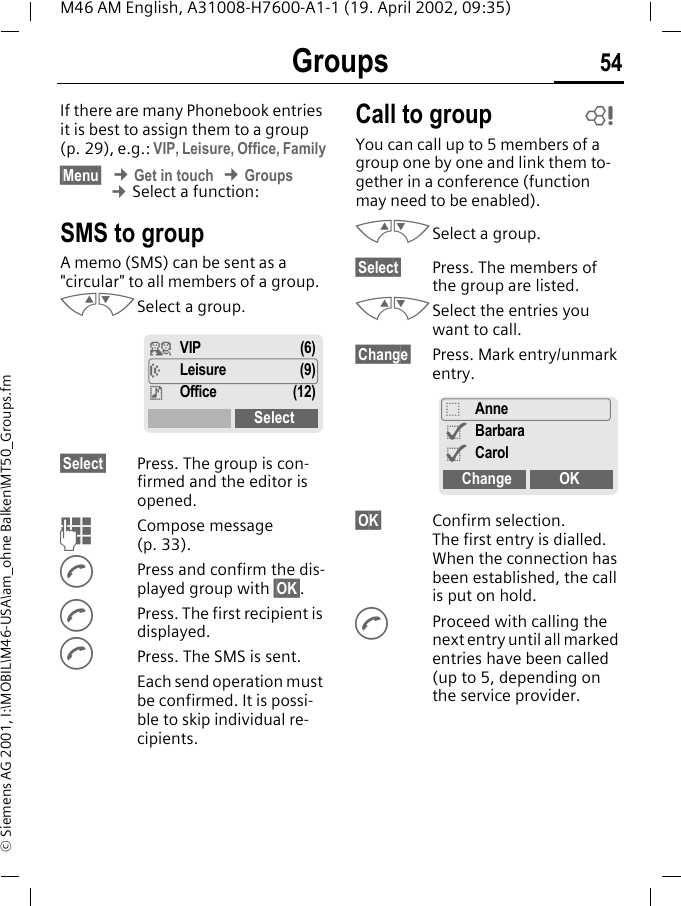
Groups 54M46 AM English, A31008-H7600-A1-1 (19. April 2002, 09:35)© Siemens AG 2001, I:\MOBIL\M46-USA\am_ohne Balken\MT50_Groups.fmGroups If there are many Phonebook entries it is best to assign them to a group (p. 29), e.g.: VIP, Leisure, Office, Family§Menu§ ¢ Get in touch ¢ Groups ¢ Select a function:SMS to groupA memo (SMS) can be sent as a "circular" to all members of a group.MNSelect a group. §Select§ Press. The group is con-firmed and the editor is opened. JCompose message (p. 33).APress and confirm the dis-played group with §OK§.APress. The first recipient is displayed.APress. The SMS is sent. Each send operation must be confirmed. It is possi-ble to skip individual re-cipients.Call to groupYou can call up to 5 members of a group one by one and link them to-gether in a conference (function may need to be enabled).MNSelect a group. §Select§ Press. The members of the group are listed.MNSelect the entries you want to call.§Change§ Press. Mark entry/unmark entry.§OK§ Confirm selection. The first entry is dialled. When the connection has been established, the call is put on hold.AProceed with calling the next entry until all marked entries have been called (up to 5, depending on the service provider.¿ VIP (6)½ Leisure (9)¾Office (12)Select~_Anne^Barbara^CarolChange OK
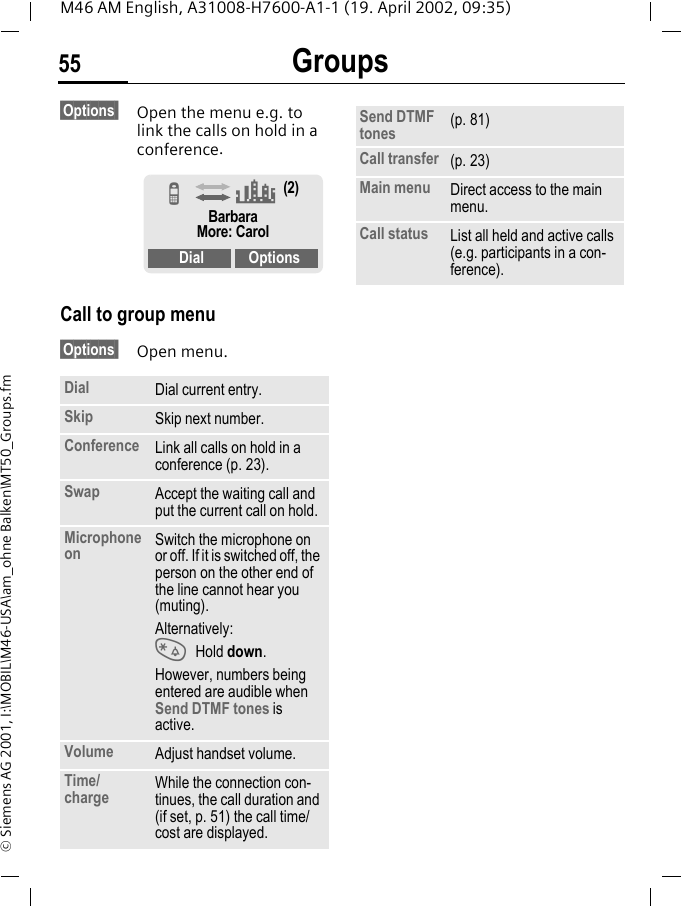
Groups55M46 AM English, A31008-H7600-A1-1 (19. April 2002, 09:35)© Siemens AG 2001, I:\MOBIL\M46-USA\am_ohne Balken\MT50_Groups.fm§Options  Open the menu e.g. to link the calls on hold in a conference. Call to group menu§Options  Open menu. Dial Dial current entry.Skip Skip next number.Conference Link all calls on hold in a conference (p. 23).Swap Accept the waiting call and put the current call on hold.Microphone on Switch the microphone on or off. If it is switched off, the person on the other end of the line cannot hear you (muting).Alternatively: * Hold down.However, numbers being entered are audible when Send DTMF tones is active.Volume Adjust handset volume.Time/charge While the connection con-tinues, the call duration and (if set, p. 51) the call time/cost are displayed.Z (2)BarbaraMore: CarolDial OptionsSend DTMF tones (p. 81)Call transfer (p. 23)Main menu Direct access to the main menu.Call status List all held and active calls (e.g. participants in a con-ference).
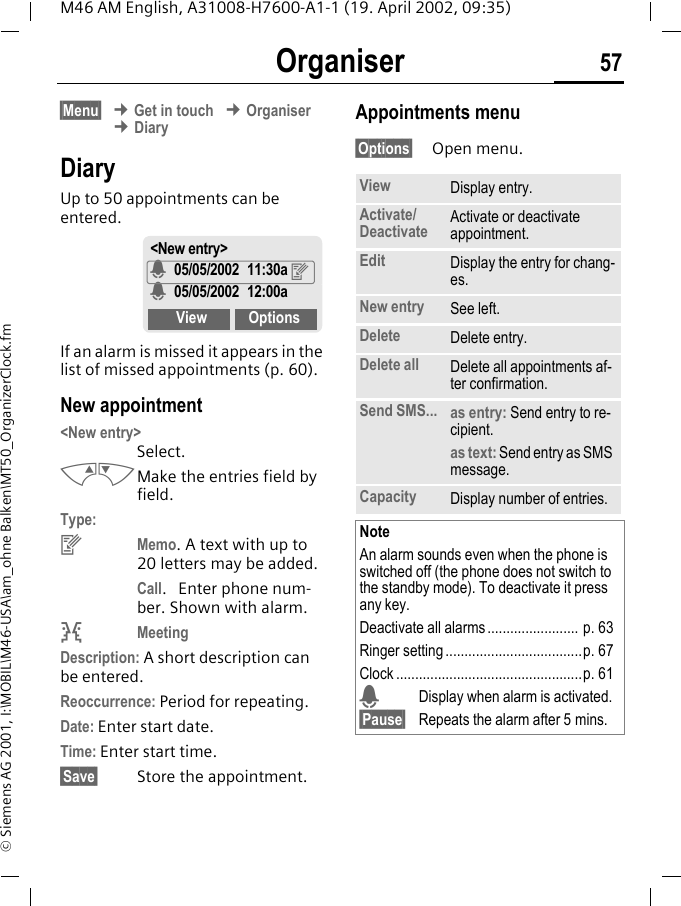
Groups 56M46 AM English, A31008-H7600-A1-1 (19. April 2002, 09:35)© Siemens AG 2001, I:\MOBIL\M46-USA\am_ohne Balken\MT50_Groups.fmGroup setup§Menu§ ¢ Get in touch ¢ GroupsMNSelect a group.§Select§ Press. The group is dispal-yed for editing.The following functions are applied to the group or all entries of a group:Group menu §Options  Open menu.Change group assignmentNormally a group is assigned to a Phonebook entry when it is entered (p. 26).To change the group assignment or to assign a group later, the following steps are necessary:When the Phonebook is open:MNSelect entry.§View§ Press.§Edit§ Press.MNScroll to group.§Edit§ Press and select new group.§Save§ Save assignment.View members Display all entries assigned to the selected group.Rename group Change the current name of the group.Group symbol Assign a symbol to a group (p. 29).Note T Phonebook key:Press once to open PhonebookPress twice to display groupsPress three times to display 1st group entries
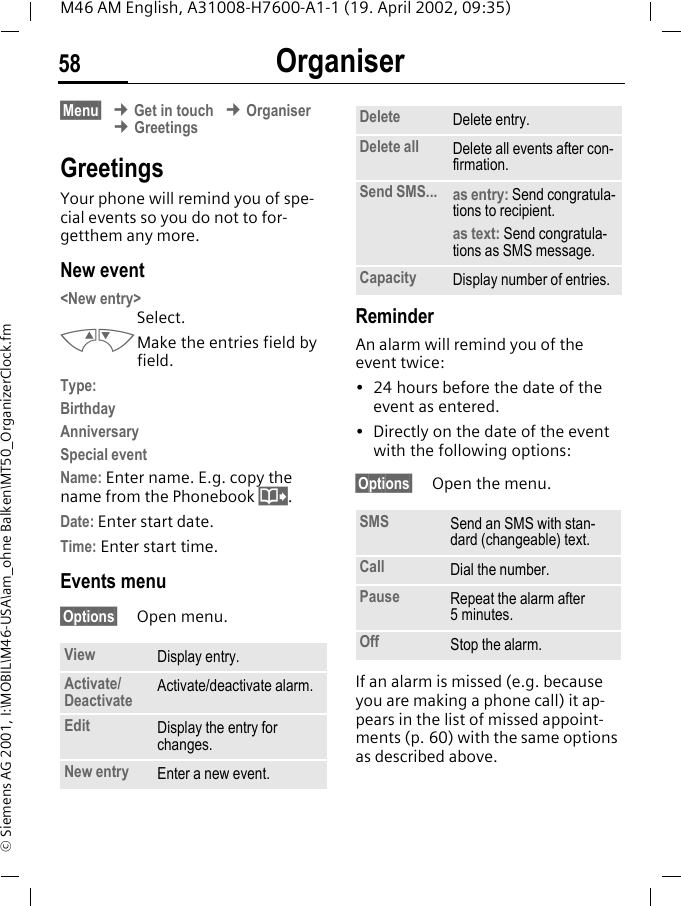
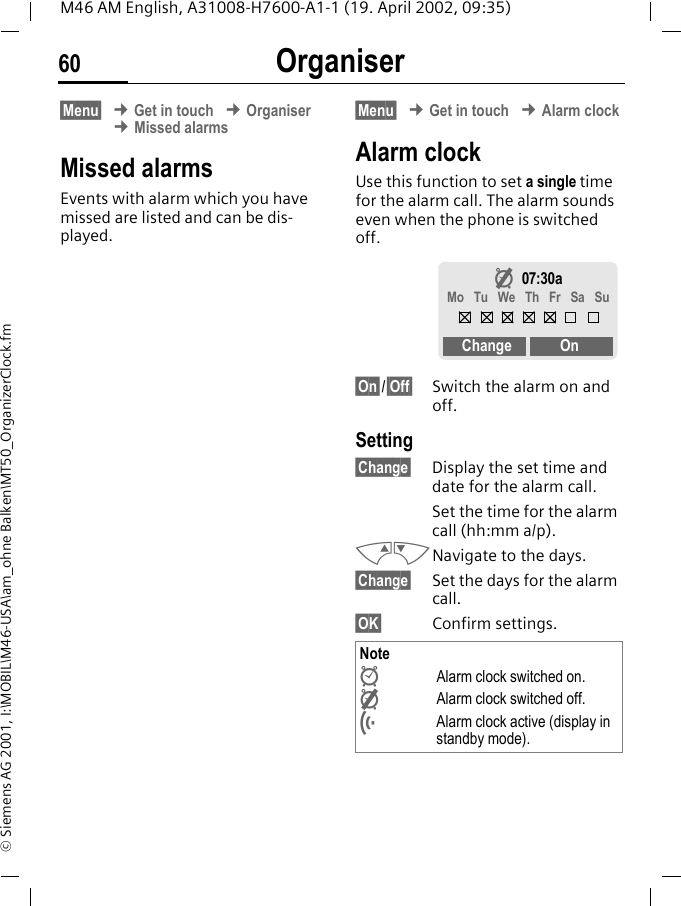
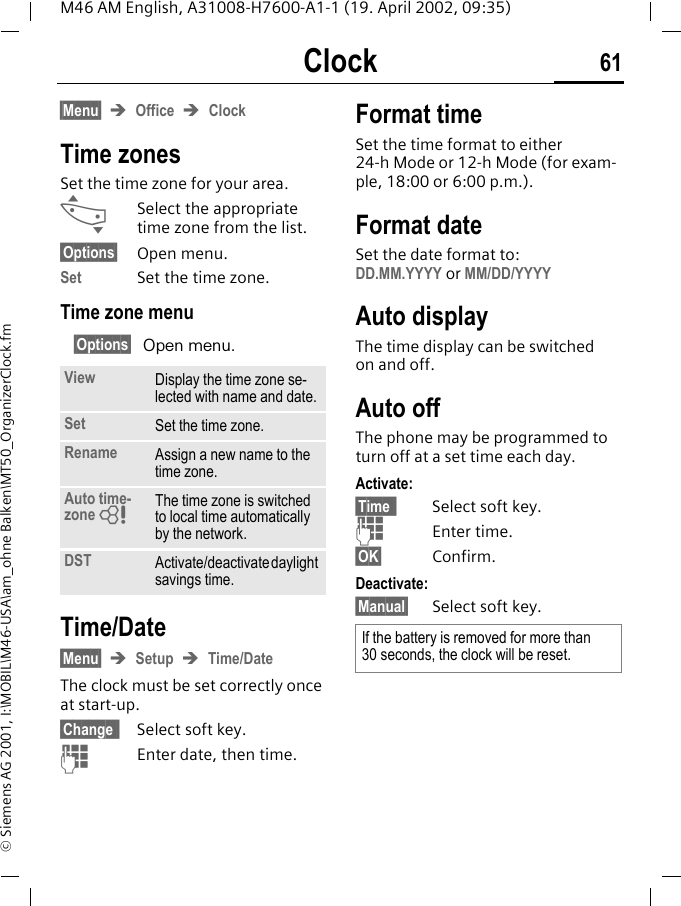
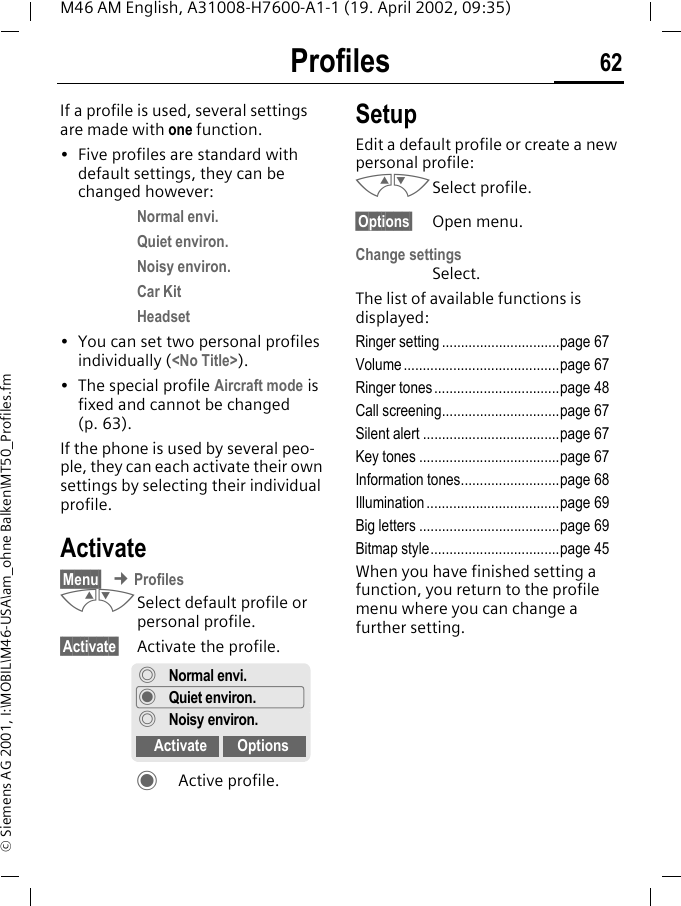
Organiser 57M46 AM English, A31008-H7600-A1-1 (19. April 2002, 09:35)© Siemens AG 2001, I:\MOBIL\M46-USA\am_ohne Balken\MT50_OrganizerClock.fmOrganiser §Menu§ ¢ Get in touch ¢ Organiser ¢ DiaryDiaryUp to 50 appointments can be entered. If an alarm is missed it appears in the list of missed appointments (p. 60).New appointment <New entry> Select.MNMake the entries field by field. Type:yMemo. A text with up to 20 letters may be added.Call.  Enter phone num-ber. Shown with alarm.vMeetingDescription: A short description can be entered.Reoccurrence: Period for repeating.Date: Enter start date.Time: Enter start time.§Save§ Store the appointment.Appointments menu§Options§ Open menu.<New entry>$ 05/05/2002 11:30a y$ 05/05/2002 12:00a View OptionsView Display entry.Activate/Deactivate Activate or deactivate appointment.Edit Display the entry for chang-es.New entry See left.Delete Delete entry.Delete all Delete all appointments af-ter confirmation.Send SMS... as entry: Send entry to re-cipient.as text: Send entry as SMS message.Capacity Display number of entries.NoteAn alarm sounds even when the phone is switched off (the phone does not switch to the standby mode). To deactivate it press any key.Deactivate all alarms ........................ p. 63Ringer setting ....................................p. 67Clock .................................................p. 61$Display when alarm is activated.§Pause§ Repeats the alarm after 5 mins.
Organiser58M46 AM English, A31008-H7600-A1-1 (19. April 2002, 09:35)© Siemens AG 2001, I:\MOBIL\M46-USA\am_ohne Balken\MT50_OrganizerClock.fm§Menu§ ¢ Get in touch ¢ Organiser ¢ GreetingsGreetings Your phone will remind you of spe-cial events so you do not to for-getthem any more. New event <New entry> Select.MNMake the entries field by field. Type:BirthdayAnniversarySpecial eventName: Enter name. E.g. copy the name from the Phonebook @.Date: Enter start date.Time: Enter start time.Events menu§Options§ Open menu.ReminderAn alarm will remind you of the event twice:• 24 hours before the date of the event as entered. • Directly on the date of the event with the following options:§Options§ Open the menu.If an alarm is missed (e.g. because you are making a phone call) it ap-pears in the list of missed appoint-ments (p. 60) with the same options as described above.View Display entry.Activate/Deactivate Activate/deactivate alarm.Edit Display the entry for changes.New entry Enter a new event.Delete Delete entry.Delete all Delete all events after con-firmation.Send SMS... as entry: Send congratula-tions to recipient.as text: Send congratula-tions as SMS message.Capacity Display number of entries. SMS Send an SMS with stan-dard (changeable) text.Call Dial the number.Pause Repeat the alarm after 5minutes.Off Stop the alarm.
Organiser 59M46 AM English, A31008-H7600-A1-1 (19. April 2002, 09:35)© Siemens AG 2001, I:\MOBIL\M46-USA\am_ohne Balken\MT50_OrganizerClock.fm§Menu§ ¢ Get in touch ¢ Organiser ¢ NotesNotesT9 support (p. 35) makes writing notes such as shopping lists easier for you. New entry<New entry> Select.JEnter the text.§Options§ Open menu.Save Store the entry.Text menu§Options§ Open menu.Display entry MNSelect entry.§View§ Open note.Notes menu§Options§ Open the menu.Save Store the entry.T9 input (p. 35) T9 preferred: Activate in-telligent text entry or deacti-vate it.Input language: Select the language in which the note is to be composed.Line feed Enter line break.Clear text Delete the note.Send Send note as text of an SMS message.View Display the entry.Edit Display the entry for chang-es.New entry Enter a new note.Delete Delete entry.Delete all Delete all notes after confir-mation.Confidential Protect entry with phone code (p. 17).Send Send entry as text of an SMS message.Capacity Display number of entries.NoteProtect confidential data with the phone code (p. 17).We recommend that you do not store any passwords (PIN, TAN etc.) as notes.
Organiser60M46 AM English, A31008-H7600-A1-1 (19. April 2002, 09:35)© Siemens AG 2001, I:\MOBIL\M46-USA\am_ohne Balken\MT50_OrganizerClock.fm§Menu§ ¢ Get in touch ¢ Organiser ¢ Missed alarmsMissed alarmsEvents with alarm which you have missed are listed and can be dis-played.§Menu§ ¢ Get in touch ¢ Alarm clockAlarm clockUse this function to set a single time for the alarm call. The alarm sounds even when the phone is switched off. §On§/§Off§ Switch the alarm on and off.Setting§Change§ Display the set time and date for the alarm call.Set the time for the alarm call (hh:mm a/p).MNNavigate to the days.§Change§ Set the days for the alarm call.§OK§ Confirm settings. NoteÌAlarm clock switched on.ËAlarm clock switched off.l  Alarm clock active (display in standby mode).Ë07:30aMo  Tu  We  Th  Fr  Sa  SuChange On
Clock 61M46 AM English, A31008-H7600-A1-1 (19. April 2002, 09:35)© Siemens AG 2001, I:\MOBIL\M46-USA\am_ohne Balken\MT50_OrganizerClock.fmClock §Menu§ ÎOffice ÎClockTime zonesSet the time zone for your area.…Select the appropriate time zone from the list.§Options§ Open menu.Set Set the time zone.Time zone menu§Options§ Open menu. Time/Date§Menu§ ÎSetup ÎTime/DateThe clock must be set correctly once at start-up.§Change § Select soft key.JEnter date, then time.Format timeSet the time format to either 24-h Mode or 12-h Mode (for exam-ple, 18:00 or 6:00 p.m.).Format dateSet the date format to: DD.MM.YYYY or MM/DD/YYYYAuto displayThe time display can be switched on and off.Auto offThe phone may be programmed to turn off at a set time each day.Activate:§Time § Select soft key.JEnter time.§OK§ Confirm.Deactivate:§Manual§ Select soft key.View Display the time zone se-lected with name and date.Set Set the time zone.Rename Assign a new name to the time zone.Auto time-zone ZThe time zone is switched to local time automatically by the network.DST Activate/deactivate daylight savings time.If the battery is removed for more than  30 seconds, the clock will be reset.
Profiles 62M46 AM English, A31008-H7600-A1-1 (19. April 2002, 09:35)© Siemens AG 2001, I:\MOBIL\M46-USA\am_ohne Balken\MT50_Profiles.fmProfiles If a profile is used, several settings are made with one function.• Five profiles are standard with default settings, they can be changed however:Normal envi.Quiet environ.Noisy environ.Car KitHeadset• You can set two personal profiles individually (<No Title>).• The special profile Aircraft mode is fixed and cannot be changed (p. 63).If the phone is used by several peo-ple, they can each activate their own settings by selecting their individual profile.Activate§Menu§ ¢ ProfilesMNSelect default profile or personal profile.§Activate§ Activate the profile.¯Active profile.SetupEdit a default profile or create a new personal profile:MNSelect profile.§Options§ Open menu.Change settingsSelect.The list of available functions is displayed:Ringer setting ...............................page 67Volume .........................................page 67Ringer tones .................................page 48Call screening...............................page 67Silent alert ....................................page 67Key tones .....................................page 67Information tones..........................page 68Illumination ...................................page 69Big letters .....................................page 69Bitmap style..................................page 45When you have finished setting a function, you return to the profile menu where you can change a further setting.°Normal envi.¯Quiet environ.°Noisy environ.Activate Options
Profiles63M46 AM English, A31008-H7600-A1-1 (19. April 2002, 09:35)© Siemens AG 2001, I:\MOBIL\M46-USA\am_ohne Balken\MT50_Profiles.fmProfiles Menu§Options§ Open menu.§Menu§ ¢ Profiles ¢ Select a function:Car KitIf an original Siemens Car Kit is used (p. 95) the profile is activated auto-matically as soon as the phone is inserted into the cradle (p. 78).HeadsetIf an original Siemens headset is used (p. 95), the profile is activated automatically as soon as the headset is plugged in (p. 79).Aircraft modeAll alarms (appointments, alarm clock) are deactivated. It is not possible to modify this profile.• The phone must be switched off when you select a profile.• In this status, alarms are not indi-cated by the ringer or silent alert.Activate§Menu§ProfilesMNScroll to Aircraft mode.§Activate§ Activate the profile.A security prompt must be confirmed. The phone switches itself off automatically.Normal operationThe next time you switch on the phone and return to normal opera-tion the default profile Normal envi. will be activated.Activate Activate profile.Change settings Change profile set-tings.Copy from Copy settings from another profile.Rename Rename personal profile.
My menu 64M46 AM English, A31008-H7600-A1-1 (19. April 2002, 09:35)© Siemens AG 2001, I:\MOBIL\M46-USA\am_ohne Balken\MT50_MyMenuFastKeys.fmMy menu §Menu  ¢ My menuCreate your own menu with fre-quently used functions, phone num-bers or WAP pages. The list of the 10 entries available is preset. However you can change it according to your wishes.ActivateMNSelect the required entry.§Select§ Press.or§Options§ Press.Activate Select.§Select§ Press. orAIf the selected entry is a phone number, you can also call it with the Call key.Change settingsYou can replace each preset entry (1-10) with another entry from the selection list of My menu.MNSelect the required entry.§Options§ Press.Change settingsSelect.§Set§ Press.MNSelect the new entry in the selection list.§Set§ Press.If you have selected a phone number or a WAP favourite as a new entry, the relevant application opens to choose from.Reset allAfter confirmation and after enter-ing the phone code, the default en-tries are set.NoteFor fast access from standby mode:LPress, then ...M... press twice on the left.
Fast access key65M46 AM English, A31008-H7600-A1-1 (19. April 2002, 09:35)© Siemens AG 2001, I:\MOBIL\M46-USA\am_ohne Balken\MT50_MyMenuFastKeys.fmFast access keyThe left soft key and the keys 2 to 9 (speed dialling numbers) can each be assigned an important phone number or a function. The phone number can then be dialled or the function can be started at the touch of a button.Available key assignments :Internet (WAP) ..................................p. 39Games & more..................................p. 42Phone number ..................................p. 26Alarm clock .......................................p. 60New SMS ..........................................p. 33Illumination........................................p. 69Hide ID ..............................................p. 75Missed calls ......................................p. 25Calls received ...................................p. 25Inbox (SMS) ......................................p. 32Outbox (SMS) ...................................p. 32My menu ........................................... p. 64Call screening ...................................p. 67Left soft keyA function/phone number may be assigned to the left soft key for fast access.Change§Internet. Press briefly.§Change§ Pick out the application from the list.• Assign the new function (e.g. New SMS) to the soft key.• Special case Phone number. Pick out a name from the Phone-book (e.g. "Carol") to assign to the soft key.§Select§ Confirm setting.ApplyThe setting "Carol" is used here only as an example.§Carol§ Hold down.NotesA function may already have been pro-grammed on the left soft key by your ser-vice provider (e.g. access to "p SIM Services"). It may not be possible to modify this key assignment.The soft key may sometimes be replaced automatically by ©/hto access a new message for example.< aService provider01/05/2002 03:45pInternet Menu
Fast access key 66M46 AM English, A31008-H7600-A1-1 (19. April 2002, 09:35)© Siemens AG 2001, I:\MOBIL\M46-USA\am_ohne Balken\MT50_MyMenuFastKeys.fmSpeed dialling keysNumber keys 2 to 9 can be used as speed dialling numbers for fast ac-cess. For available key assignments see p. 65. Number key 1 is reserved for the mailbox number (p. 49).EditIn standby mode:JPress number key (2-9). If the key is not assigned:§Set§ Press.or §New SMS§ Press briefly (if "New SMS" is assigned, for example).§Change§ Scroll to application in the list.Special case phone number. Pick out a name from the Phonebook for assign-ment to the key.Special case bookmark. Scroll to a URL in the bookmark list for assign-ment to the key.§Select§ Confirm setting.ApplySelect a stored phone number or start a stored application (e.g. New SMS).In standby mode:2Press.The assignment of the number key 2 is displayed instead of the left soft key e.g.:§New SMS§ Hold down.or simply2hold down.
Audio 67M46 AM English, A31008-H7600-A1-1 (19. April 2002, 09:35)© Siemens AG 2001, I:\MOBIL\M46-USA\am_ohne Balken\MT50_Audio.fmAudio You can set the tones that sound in specific situations to suit your partic-ular tastes.§Menu§ ¢ Audio ¢ Select a function:Ringer setting Activate/deactivate the ringer or re-duce it to a short beep.*  Hold down in standby mode (p. 84).VolumeYou can set the volume for each area.MNSelect the type:All callsd CallsGroup callsAppointmentsMessagesCell broadcast servicesMNSet volume.§OK§ Confirm.Call screeningOnly calls from numbers that are in the Phonebook or in a predefined group are signalled audibly or by silent alert. Other calls are merely displayed. If you do not accept these calls, they are diverted to your mailbox (if set, p. 49).Silent alertTo avoid being disturbed by the ring-er, you can activate the silent alert of the phone instead. The silent alert can also be activated in addition to the ringer (e.g. in noisy environ-ments). This function is deactivated when the battery is being charged.Key tonesYou can set the acoustic key tone:Click or Tone or SilentNote)Display: Beep.&Display: Ringer off.NoteDisplays rising volume.If two independent phone numbers are registered for your phone you can set different volumes for them (p. 72).Note (Displayedwhen filter is activated.~
Audio68M46 AM English, A31008-H7600-A1-1 (19. April 2002, 09:35)© Siemens AG 2001, I:\MOBIL\M46-USA\am_ohne Balken\MT50_Audio.fm§Menu§ ¢ Audio ¢ Select a function:Minute beepDuring the call, you hear a beep after every minute as a reminder of the time elapsed.Information tonesSet service and alarm tones:§Select§ On/Off.§Change§ If activated, service tones are reproduced for an ex-tended range of func-tions.Melody manager(p. 46)Ringer tones(p. 48)
Setup 69M46 AM English, A31008-H7600-A1-1 (19. April 2002, 09:35)© Siemens AG 2001, I:\MOBIL\M46-USA\am_ohne Balken\MT50_Setup.fmSetup Device§Menu§ ¢ Setup ¢ Device ¢ Select a function.LanguageSet the language of the display text. When "automatic" is set, the lan-guage of your service provider is used. If a language that you do not understand happens to be set, the phone can be reset to the language of your service provider with the fol-lowing input:*#0000# ADisplayOwn greeting(p. 45)Bitmap viewer(p. 44)Screensaver (p. 45) Illumination Can be switched on and off (switch-ing it off increases the standby time).Big lettersYou can choose between two font sizes for the display.ContrastYou can set the display contrast.Bitmap style(p. 45)KeysAny key to answerYou can press any key to accept an incoming call (except S).Auto key lockIf Auto key lock is activated, the key-pad is locked automatically if no key has been pressed for one minute in standby mode. This prevents the phone from being used accidentally. However, you can still be called and you can still make an emergency call.The keypad can also be directly locked and unlocked as follows:#Hold down.Key tonesYou can set the type of acoustic key tone:Click or Tone or Silent
Setup70M46 AM English, A31008-H7600-A1-1 (19. April 2002, 09:35)© Siemens AG 2001, I:\MOBIL\M46-USA\am_ohne Balken\MT50_Setup.fm§Menu§ ¢ Setup ¢ Device ¢ Select a function.StatusFact. settingsThe phone is reset to the default val-ues (factory setting) (does not apply to SIM card and network settings): * # 9 9 9 9 # APhone identityThe phone ID (IMEI) is displayed. This information may be useful for cus-tomer service.Fast searchWhen this function is active, net-work connection is speeded up (standby time is reduced).T9 inputT9 preferredActivate intelligent text entry or deactivate it.Input languageSelect language in which the mes-sage is to be composed.Languages with T9 support are marked by the T9 symbol.§Menu§ ¢ Setup ¢ Device ¢ Select a function.Battery care(only if a NiMH battery is used)This function allows the NiMH bat-tery to be regenerated when the operating time drops (eliminating the memory effect).Connect the phone as for charging (p. 15) and then call up this func-tion.The battery is now fully discharged and recharged. Depending on the state of the battery, this can take up to 5 hours. NoteNo phone calls can be made during this process. The clock setting is retained.
Setup 71M46 AM English, A31008-H7600-A1-1 (19. April 2002, 09:35)© Siemens AG 2001, I:\MOBIL\M46-USA\am_ohne Balken\MT50_Setup.fmSecurityThe phone and SIM card are protect-ed against misuse by several security codes.§Menu§ ¢ Setup ¢ Security ¢ Select a function: CodesPIN control, Change PIN, Change PIN2, Change phonecode, see p. 17.Babysitter(Phone code protected)Only one number can be dialled. Hold down the right soft key on the the outside right (p. 24).Allow only d(PIN 2/phone code protected)Dialling is restricted to the numbers in the Phonebook, new entries are not possible. If only area codes are entered, the relevant phone num-bers can be added to these manually before dialling.Depending on whether the Phone-book is stored on the SIM card or in the phone, the PIN 2 or phone code are requested before changes can be made.§Menu§ ¢ Setup ¢ Security ¢ Select a function: Only ,(PIN 2 protected)The dialling options are restricted to SIM protected numbers in the Phonebook. If only area codes are entered, the relevant phone num-bers can be added to these manually before dialling.Last 10 only(Phone code protected)Calls are limited to the call list (p. 25) of "dialled numbers". This list can be filled with phone numbers specifical-ly for this purpose: First delete the call list, then create "new entries" by dialling phone num-bers and cancelling before the con-nection is established.This SIM only(Phone code protected)Your phone is prevented from being used with a different SIM card.~~~~
Setup72M46 AM English, A31008-H7600-A1-1 (19. April 2002, 09:35)© Siemens AG 2001, I:\MOBIL\M46-USA\am_ohne Balken\MT50_Setup.fmNetwork§Menu§ ¢ Setup ¢ Network ¢ Select a function:LineThis function is only displayed if it is supported by the service provider. Two independent phone numbers must be registered on the phone.SelectSelect the currently used phone number.=Display the active phone number.Block line(Phone code protected)You may limit usage to one phone number.ConfigurationNetwork infoThe list of GSM networks currently available is displayed.kIndicates forbidden ser-vice providers (depending on SIM card).§Menu§ ¢ Setup ¢ Network ¢ Configuration ¢ Select a function:Choose networkThe network search is restarted. This is useful if you are not on your home network or want to register on a different network. The network info list is rebuilt when Auto network is set. Auto networkActivate or deactivate, see also "Choose network" above.If "Automatic network" is activated, the next network is dialled in the or-der of your "preferred service provid-ers". Otherwise a different network can be selected manually from the list of available GSM networks.Net operatorA list of all known GSM networks worldwide is displayed with the current codes.~
Setup 73M46 AM English, A31008-H7600-A1-1 (19. April 2002, 09:35)© Siemens AG 2001, I:\MOBIL\M46-USA\am_ohne Balken\MT50_Setup.fm§Menu§ ¢ Setup ¢ Network ¢ Configuration ¢ Select a function:Pref. network The service providers you prefer af-ter your home network are displayed here (e.g. if there are several net-works that differ in price).Your service provider is displayed:§List§ Display list of preferred networks.Create new entry: • Select empty line, press  Entry§, then select another entry from the list of service providers and con-firm.Change/delete entry:• Select entry, press  Change§, then select another entry from the list of service providers and confirm it or press §Delete§.§Menu§ ¢ Setup ¢ Network ¢ Barrings ¢ Select a function:BarringsBarring restricts the use of your SIM card (not supported by all service providers). You need a 4 digit pass-word that your service provider will give you. You may need to be regis-tered separately for each barring.Outgo. accessAll outgoing calls (except 911 and 112 emergency numbers) are barred.Outgo internatOnly national calls can be made.Out.int.x homeInternational calls are not permitted. However you can make calls to your home country when abroad.All incomingThe phone is barred for all incoming calls (the forwarding of all calls to the mailbox offers a similar effect).When roamingYou do not receive calls when you are outside your home network. This means that no charges are incurred for incoming calls.NoteIf the signal strength of your preferred net-work is not strong enough when you switch the phone on, the phone may log on to an-other network. This can change when the telephone is next switched on or if you manually select another network (p. 72).~
Setup74M46 AM English, A31008-H7600-A1-1 (19. April 2002, 09:35)© Siemens AG 2001, I:\MOBIL\M46-USA\am_ohne Balken\MT50_Setup.fm§Menu§ ¢ Setup ¢ Network ¢ Barrings ¢ Select a function:Status checkThe following information can be displayed after a status check:^Barring set._Barring not set.?Status unknown (e.g. new SIM card).Clear allAll barrings are cleared. A password which the service provider will give you is needed for this function.User group§Menu§ ¢ Setup ¢ User group ¢ Select a function:If offered by the service provider, this service enables groups to be formed. These have access for exam-ple to internal (company) informa-tion or special tariffs apply to them. Check with your service provider for details.User groupActivate or deactivate the function. "User group" must be deactivated for normal phone use (phone code, p. 17).Select groupYou may select or add groups other than the preferred groups (see be-low). The service provider supplies you with code numbers for the groups.All outgoingIn addition to network control for a user group, it is possible to set whether outgoing calls outside the group are permitted. If the function is deactivated, only calls within the group are permitted.Preferred grpIf activated, only calls within this standard user group can be made (depending on the network configu-ration).~
Setup 75M46 AM English, A31008-H7600-A1-1 (19. April 2002, 09:35)© Siemens AG 2001, I:\MOBIL\M46-USA\am_ohne Balken\MT50_Setup.fmDuring a call§Menu§ ¢ Setup ¢ During a call ¢ Select a function:Call waiting If you are registered for this service, you can check whether it is set and you can activate/deactivate it (p. 22).Hide ID When you make a call, your phone number may be displayed on the recipient's display (depending on the service providers).To suppress this display, you may activate the "Hide ID" mode for the next call or for all subsequent calls. You may need to register separately with your service provider for these functions.Clock(p. 61)Connectivity§Menu§ ¢ Setup ¢ Connectivity ¢ Select a function:GPRS(General Packet Radio Service)GPRS is a new method for transmit-ting data in the mobile network fast-er. If you use GPRS, you can be con-nected to the Internet permanently if the network capacities suffice. Some service providers do not yet support this service.§Edit§ Activate or deactivate GPRS function.Shown in the display:›GPRS activated.œGPRS available.GPRS infoDisplay of information on the con-nectivity status.MFast access in standby mode.~~~
Setup76M46 AM English, A31008-H7600-A1-1 (19. April 2002, 09:35)© Siemens AG 2001, I:\MOBIL\M46-USA\am_ohne Balken\MT50_Setup.fm§Menu§ ¢ Setup ¢ Connectivity ¢ Select a function:WAP profile settingsYou can set or change up to 5 WAP profiles (may be barred by the ser-vice provider). The entries may vary depending on your service provider. To set a new profile:MNSelect a profile.§Options§ Open menu.Change settings Select and confirm.MNSelect profile range and make your settings/en-tries field by field.§Edit§ The entry card is dis-played.If necessary, check with your service provider for details:  §Save§ The settings are stored and the profile list is shown.Activate the set WAP pro-file (p. 41).WAP pa-rameters IP address: * Enter IP ad-dress.Port: * Enter port number.Homepage: Enter homepage (p. 39), if not set by the service provider.Linger time: Enter time in seconds after which a connec-tion should be terminated if no input or data exchange takes place.*) depends on your service provider, if necessary enter 2nd IP address and 2nd port~CSD settings (Circuit Switched Data)Dial-up no.: Enter ISP num-ber.Call type: Select ISDN or An-alogue.Login name: Enter login name.Password: Enter password (shown as a series of aster-isks).GPRS settings (General Packet Radio Service)activated/deactivated: Acti-vate/deactivateAPN: Enter the address of your service provider. Login name: Enter login name.Password: Enter password (shown as a series of aster-isks)NoteAs an alternative method to set/change a new profile, you can use the browser menu: †  Call up the menu.More ... Select.WAP ProfilesSelect.
Setup 77M46 AM English, A31008-H7600-A1-1 (19. April 2002, 09:35)© Siemens AG 2001, I:\MOBIL\M46-USA\am_ohne Balken\MT50_Setup.fm§Menu§ ¢ Setup ¢ Connectivity ¢ Select a function:Set Java™ profiles Up to 5 profiles can be defined. The settings have normally been carried out by the service provider in advance. To set a new profile:MNSelect profile.§Options§ Open menu.Change settings Select and confirm.MNSelect profile range and make you settings/entries field by field.§Edit§ The entry card is dis-played.If necessary, check with your service provider for details: §Save§ The settings are stored and the profile list is shown. Activate set Java™ profile (p. 44).CSD settings(Circuit Switched Data)Dial-up no.: Enter ISP num-ber.Call type: Select ISDN or Analogue.Login name: Enter login name.Password: Enter password (shown as a series of aster-isks).Linger time: Enter time in seconds after which a connec-tion should be terminated if no input or data transfer takes place.GPRS settings (General Packet Radio Service)APN: Enter the address of your service provider. Login name: Enter login name.Password: Enter password (shown as a series of aster-isks).DNS1/DNS 2: (optional)NoteAs an alternative method to set/change a new profile you can use Surf & fun:§Menu§ ¢ Surf & fun ¢ Games & more ¢ Java Profiles§Options§ Select.Java Profiles Select.
Setup78M46 AM English, A31008-H7600-A1-1 (19. April 2002, 09:35)© Siemens AG 2001, I:\MOBIL\M46-USA\am_ohne Balken\MT50_Setup.fm§Menu§ ¢ Setup ¢ Connectivity ¢ Select a function:Fax/data mod.(p. 80).Authentication§Change§ Activate encrypted WAP dial-up (CHAP Challenge Authentication Proce-dure) or deactivate (PAP Personal Authentication Procedure).Accessories§Menu§ ¢ Setup ¢ Accessories ¢ Select a function:Car KitIf an original Siemens Car Kit is used (p. 95) the profile is activated auto-matically as soon as the phone is inserted into the cradle.User-defineable settingsAuto answer (factory default: off)Calls are accepted automatically af-ter a few seconds. Eavesdropping is possible!%Indication on the display.-Switch between the phone and Car Kit Porta-ble during a call.Auto off(factory default: 2 hours)The phone is powered by the car's power supply. The time between switching off the ignition and deacti-vation of the phone can be adjusted.
Setup 79M46 AM English, A31008-H7600-A1-1 (19. April 2002, 09:35)© Siemens AG 2001, I:\MOBIL\M46-USA\am_ohne Balken\MT50_Setup.fmAutomatic settings:• Permanent illumination: switched on.• Auto key lock: switched off. • Charge the phone battery.• Automatically activate Car Kit, when the phone is inserted (p. 63).§Menu§ ¢ Setup ¢ Accessories ¢ Select a function:HeadsetIf an original Siemens Headset is used (p. 95) the profile is activated automatically as soon as the headset is plugged in. User-defineable settingsAuto answer(factory default: off)Calls are accepted automatically af-ter a few seconds (except where the ringer is switched off or set to beep). You should therefore be wearing the headset. Eavesdropping is possible!Automatic settingAccept call with the Call key or PTT key (Push To Talk) when the key lock is activated.Auto answerIf you fail to notice an incoming call there is a risk that it may be overheard by others.
Fax/data mode using a PC80M46 AM English, A31008-H7600-A1-1 (19. April 2002, 09:35)© Siemens AG 2001, I:\MOBIL\M46-USA\am_ohne Balken\MT50_Setup.fmFax/data mode using a PC§Menu§ ¢ Setup ¢ Connectivity ¢ Fax/data mod.With the phone and a connected PC, you can transmit and receive faxes and data. Appropriate software for data communication/fax communi-cation must be available on your PC and there must be a connection to the phone. F ax and data services must be en-abled by the service provider. Differ-ent networks support different types of fax/data reception, please contact your service provider for details.§Change§ Set the required mode.Fax/data mod.Your service provider has given you a number for telephoning and a fax/data number.SendStart your PC communication pro-gram and enter the required destina-tion phone number in the program.ReceivingThe call is signalled by a special ring-er and the type of call (fax or data) is displayed.Now start the communication pro-gram in your PC to receive the fax/data.Send vce/faxSet this function on the phone before transmission so that you can switch from voice mode to fax mode.While the connection is being set up, the following soft key is available for two seconds:§Voice/fx§ Switch to Send vce/fax mode; you may now send a fax.Voice/fax rec(Only if a special fax or data number is not available). Start the required communication program in your PC and switch on the function at the phone during the call (the PC accepts the connection).End transmissionEnd transmission with PC software and/or press S.~~
Notes A-Z 81M46 AM English, A31008-H7600-A1-1 (19. April 2002, 09:35)© Siemens AG 2001, I:\MOBIL\M46-USA\am_ohne Balken\MT50_TipsA-Z.fmNotes A-Z Control codes (DTMF)Send DTMF tones You can enter control codes (digits) during a call so that an answering machine can be controlled remotely. These digits are directly transmitted as DTMF tones (control codes). Also allows for credit card number entry and calling card number entry.; menu§ Open call menu.Send DTMF Select.Use the Phonebook Store phone numbers and control codes (DTMF tones) in the Phone-book like a normal entry.JEnter phone number.0Press until a "+" appears on the display (pause for connection setup).JEnter DTMF signals (digits).0If necessary, enter further pauses of three seconds each to ensure correct processing at the destina-tion.JEnter a name.§Save§ Press.You can also store the DTMF tones (digits) without a phone number and send them during a call.Divert set§Divert§ Diverts the caller to the mailbox, for example, if Busy (p. 52) is set and the Call waiting function (p. 22) is activat-ed. Emergency calls (SOS)Your wireless phone can be used to make emergency calls. You can make an emergency call from the main display screen. Enter the local emergency number such as 911 and then press the A key.This phone, like any wireless phone, operates using radio signals, wire-less and landline networks, and user-programmed functions. Because of this, connections in all conditions cannot be guaranteed. Therefore, you should never rely solely on any wireless phone for essential commu-nications (for example, medical emergencies).   Remember - to make or receive any calls, the phone must be switched on and be used in a ser-vice area that has adequate signal strength.  Emergency calls might not be possible on all wireless phone networks or when certain network services or phone features are in use.  Check with local service providers re-garding their network features. Always make certain that your phone is properly charged before at-tempting any emergency calls.  If you allow your battery to discharge, you will be unable to receive or make
Notes A-Z82M46 AM English, A31008-H7600-A1-1 (19. April 2002, 09:35)© Siemens AG 2001, I:\MOBIL\M46-USA\am_ohne Balken\MT50_TipsA-Z.fmcalls, including emergency calls. You must then wait a few minutes after the charging begins to place any emergency calls.When making an emergency call, re-member to give all of the necessary information as accurately as possi-ble. Remember that your wireless phone might be the only means of communication at the scene of an accident, therefore you should not terminate the call until given permis-sion to do so.International dialling codesMany international dialling codes are stored in your phone. In standby mode (0 not necessary when dialling from the Phonebook): 0Hold down until a "+" is displayed. This replaces the first two digits of the international dialling code.§+List§ Press.Select the required country. The international dialling code is dis-played. Now add the national num-ber (in many countries without the first digit) and press the Call key. Java™Java™ represents the best method to use numerous games and applica-tions on your mobile phone. You can download these applications from the Internet and install them on your mobile phone. The application can be started after installation. Please refer to the operating instructions for each application. JAD Š and JAR ÁThree file types occur when using Java™: The JAD file (Java Descriptor) These files contain information on the application (JAR file) and its ad-dress for download. When a JAD file is activated, the connection to the Internet is established and the exe-cutable application is loaded.The JAR file (Java archive) These files include the executable applications. When a JAR file is acti-vated, the application is started.Combined filesThese files result from JAR files being loaded via JAD files. In this case the JAD file is added to the JAR file. The display icon is the same as for JAR files.¨ Message store fullThe SIM memory is full when the message symbol flashes. No more SMS messages can be received. Delete or save messages (p. 32).The following icons appear when using Ja-va™:ŠJAD fileÁJAR file
Notes A-Z 83M46 AM English, A31008-H7600-A1-1 (19. April 2002, 09:35)© Siemens AG 2001, I:\MOBIL\M46-USA\am_ohne Balken\MT50_TipsA-Z.fmOwn numbersYou can enter your "own numbers" in the Phonebook (e.g. fax) for infor-mation. These numbers can be changed or deleted and also be sent as SMS.Phone number memoYou can enter a number with the keypad during a call. It can be stored or dialled after the current call has ended.Phone number/URL in SMSNumbers §highlighted§ in the message can be dialled or they can be stored in the Phonebook (p. 26). URLs (Internet addresses) can be accessed directly.Quick menu selectionAll menu functions are numbered in-ternally. The current numerical order is shown in the upper right-hand cor-ner of the display. By entering these numbers one after the other the function may be start-ed at once.For example, to compose a new SMS:§Menu§ Press.1for Messages1for New SMSIf your service provider offers addi-tional functions (SIM services) in the menu system, the numerical order may change.Signal strength<Strong signal.>A weak signal reduces the call quality and may lead to loss of the connection. Change your location.
Notes A-Z84M46 AM English, A31008-H7600-A1-1 (19. April 2002, 09:35)© Siemens AG 2001, I:\MOBIL\M46-USA\am_ohne Balken\MT50_TipsA-Z.fmSIM card problemsYou have inserted your SIM card, but the following message appears:Please insert SIM cardPlease ensure that the card is correctly inserted and the contacts are clean; if necessary, clean them with a dry cloth. If the card is dam-aged, please contact your service provider. See also "Questions&Answers" (p. 89).SMS Push This function allows you to call up an Internet address (URL) directly from an SMS. After selecting it, the URL is highlighted. By pressing the Call key, the WAP browser is automatically started and the highlighted Internet address is called up. SMS status reportIf the phone was unable to send the message to the service centre a retry option is available. If this attempt also fails, contact your service provider.The Message sent! text only indicates that the message has been transmit-ted to the service centre which now tries to deliver the message within a certain period.See also "Validity" (p. 38).Special charactersPress key repeatedly until the charac-ter is displayed:To write special characters after numbers (e.g. 5 £), switch to the letter mode first:*Press.Switch off ringerSwitch off the ringer only for the current call/alarm (not if "Any key answer", p. 69, is active):*Hold down.The call is still displayed. When you accept or reject the call or the next time you switch the phone off or on, this function is ended. 1Blank 1€£$¥ ¤0.,?!0+-:¿¡“’;_**/()<=>%~##@\ & § Γ∆ΘΛΞΠΣΦΨΩ
Notes A-Z 85M46 AM English, A31008-H7600-A1-1 (19. April 2002, 09:35)© Siemens AG 2001, I:\MOBIL\M46-USA\am_ohne Balken\MT50_TipsA-Z.fmWAP(Wireless Application Protocol) A technical standard that is the basis of the connection between mobile radio networks and the Internet. WAP enables mobile surfing using the mobile phone in the Internet, downloading of games and applica-tions and the use of WAP services such as news, stock exchanges or in-formation. WAP usage Start with...You can set which functions are to be displayed after Internet access:AOpen the browser menu.More ... Select.Start with...Select, then select from the list:Start menu (p. 39)Browser menu (p. 40)Homepage (p. 40)Resume (p. 39)Bookmarks (p. 40)Enter the Internet address (URL)A WAP page must be shown on the display (online or offline). Then:AOpen the browser menu.Go to URL  Select.JEnter URL and confirm. The connection is estab-lished.Special characters for WAP usage:*Press 3 times for /#Press 3 times for @0Press for . (full stop)0Press repeatedly for :*Press repeatedly for ~
Notes A-Z86M46 AM English, A31008-H7600-A1-1 (19. April 2002, 09:35)© Siemens AG 2001, I:\MOBIL\M46-USA\am_ohne Balken\MT50_TipsA-Z.fmBookmarks (URL) You can store a list of your favourite Internet addresses (URLs) in the phone (offline and online available, depending on the service provider):Save:AOpen the browser menu.BookmarksSelect.Online (save):Add bookmark The current WAP address is added as a bookmark. Offline (save):(Empty) Select.§Menu§ Open menu.§Change§ Select, enter name/head-er and URL and confirm.§Save§ Press.Apply:AOpen the browser menu.BookmarksSelect.MNSelect entry.§Go§ The selected call is set up.Fast access:To open the bookmark list when the browser has been started:TPress.Changing the home pageThe address of the home page is set in the (access) profile (p. 76). You can change it in standby mode (if permitted by the service provid-er!):§Menu§ ¢ Surf & fun ¢ Internet ¢ ProfilesSelect the profile, for example:e-CommerceSelect.§Change§ The entry card is dis-played.Select WAP parameters/Homepage.JEnter new address. Go to the end of the entry card.§Save§ Press.Without SIM cardIf you switch on the phone without SIM card, you can use some func-tions of the phone.§Menu§ Press soft key. The func-tions are displayed.§SOS§ Emergency number, SOS.~
Display symbols (selection) 87M46 AM English, A31008-H7600-A1-1 (19. April 2002, 09:35)© Siemens AG 2001, I:\MOBIL\M46-USA\am_ohne Balken\MT50_Displaysymbols.fmDisplay symbols (selection)  Displays<Signal strength.eCharging completed.bBattery indicator.oAll calls are diverted.&Ringer off.)Short ringer (beep) only.(Ringer only, if caller is stored in the Phonebook.$Alarm is set.Alarm clock active.]Key lock active.Phone numbers/names:IOn the SIM card,On the SIM card  (PIN 2 protected).In the phone memory.kNo network access.^Function active.\Phonebook.ABC/abc/Abc Indicates whether upper or lower-case letters are active.T9 Text input with T9.›GPRS activated. œ GPRS available.¦WAP Online.£WAP via GPRS Online.¤WAP No network.XHeadset mode.ÀLoudspeaker Car Kit.YAdditional handset mode.ÆCar Kit active.%Auto answer feature on.Diary iconsyMemo.vMeeting.µ Call.Soft keys©Message received. hVoice mail received. UUnanswered call. ¸Receiving a picture.¹Receiving a melody/ring tone.¨ SIM memory full.?Store in Phonebook.@Retrieve from Phonebook.pSIM services.-Switch Car Kit Portable.:T9 word selection.
Display symbols (selection)88M46 AM English, A31008-H7600-A1-1 (19. April 2002, 09:35)© Siemens AG 2001, I:\MOBIL\M46-USA\am_ohne Balken\MT50_Displaysymbols.fm
Troubleshooting 89M46 AM English, A31008-H7600-A1-1 (19. April 2002, 09:35)© Siemens AG 2001, I:\MOBIL\M46-USA\am_ohne Balken\MT50_FAQ.FMTrouble-shooting If you have any questions about using your phone, visit us at www.icm.siemens.com anytime. In addition we have listed some frequently asked questions and answers below.Question Possible causes Possible solutionPhone cannot be switched on.On/Off key not pressed long enough. S Press On/Off key for at least two seconds.Flat battery. Charge battery. Check charging indicator in the display.Battery contacts dirty. Clean contacts.See also below under: "Charging error"Standby time is too short.Frequent use of the organiser and games.Restrict use if necessary.Speed search active. Deactivate speed search (p. 70).Display illumination on. Switch off display illumination (p. 69).Unintentional keystrokes (illumination!).Activate key lock (p. 69).Memory effect (only NiMH battery). Run battery care function (p. 70).Charging error (charge icon not displayed).Battery totally discharged. 1) Plug in charger cable.2) Wait up to 2 hours until the charge icon is displayed.3) Charge battery as usual.Temperature out of range: 41 °F to 104 °F.Make sure the ambient temperature is right, wait a while, then recharge.Contact problem. Check power supply and connection to the phone. Check battery contacts and device interface, clean them if necessary, then insert battery again.No mains voltage. Use different mains power socket, check mains voltage.Wrong charger. Only use original Siemens accessories.Battery faulty. Replace battery.SIM error. SIM card not correctly inserted. Make sure that the SIM card is correctly inserted (p. 14).SIM card contacts dirty. Clean the SIM card with a dry cloth.SIM card with wrong voltage. Use 3 V SIM cards only.SIM card damaged (e.g. broken). Inspect the damage. Return the SIM card to service provider.
Troubleshooting90M46 AM English, A31008-H7600-A1-1 (19. April 2002, 09:35)© Siemens AG 2001, I:\MOBIL\M46-USA\am_ohne Balken\MT50_FAQ.FMQuestion Causes available Possible solutionNo connection to network.Signal weak. Move higher, to a window or open space.Outside GSM range. Check service provider coverage map.SIM card not valid. Reclaim at the service provider.New network not authorised. Try manual selection or select a different network (p. 72).Network barring is set. Check barrings (p. 73).Network overloaded. Try again later.Phone loses network.Signal too weak. Reconnection to another service provider is automatic (p. 72). Switching the phone off and on may speed this up.Calls not possible. 2nd line set. Set line 1 =(p. 72).New SIM card inserted. Check for new restrictions.Charge limit reached. Reset limit with PIN 2 (p. 51).Credit used up. Load credit.Certain uses of the phone not possible.Call restrictions are set. Barrings may be set by your service provider. Check barrings (p. 73).No entries possible in Phonebook.Phonebook is full. Delete entries in Phonebook (p. 27).Voice mail does not work.Call divert to the mailbox not set.Set call divert to the mailbox (p. 52).SMS (text mes-sage) ¨ flashes.SMS memory full. Delete (p. 32) or store messages (SMS) in the archive (p. 32) to make room.Function cannot be set.Not supported by service provider or registration required.Contact your service provider.Memory problems with Games & More, ring tones, pictures, SMS archive.Phone memory full. Delete files where necessary.
Troubleshooting 91M46 AM English, A31008-H7600-A1-1 (19. April 2002, 09:35)© Siemens AG 2001, I:\MOBIL\M46-USA\am_ohne Balken\MT50_FAQ.FMQuestion Possible causes Possible solutionMessage cannot be sent.Some service providers do not sup-port this service.Check with your service provider.Phone number of the service centre is not set or is wrong.Set service centre (p. 37).SIM card contract does not support this service.Contact your service provider.Service centre overloaded. Repeat message.Addressee does not have a compati-ble phone.Check.EMS pictures & sounds are not dis-played at the address-ee.The addressee’s phone does not support the EMS standard.No Internet access possible.Wrong WAP profile set or settings wrong, incomplete.Check settings, if necessary consult your service provider.PIN error/PIN2 error. Three wrong entries. Enter the PUK (MASTER PIN) provided with the SIM card according to the instructions. If the PUK (MASTER PIN) has been lost, con-tact your service provider.Phone code error. Three wrong entries. Contact Siemens Service (p. 92).Service provider code error.No authorisation for this service. Contact your service provider.Too few/too many menu entries.Functions may have been added or removed by your service provider via the SIM card.Check with your service provider.No fax possible. Incorrect settings in the PC. Check settings (p. 80).No authorisation for this service. Contact your service provider.Charge counter does not work.Charge pulse not transmitted. Contact your service provider.DamageSevere shock. Remove battery and SIM and insert them again. Do not dismantle phone!Phone became wet. Remove battery and SIM card. Dry immediately with cloth, do not heat. Dry connec-tor contacts thoroughly. Stand unit upright in an air current. Do not dismantle phone!Reset settings to the factory default (p. 70): * # 9 9 9 9 # A
Siemens Service 92M46 AM English, A31008-H7600-A1-1 (19. April 2002, 09:35)© Siemens AG 2001, I:\MOBIL\M46-USA\am_ohne Balken\MT50_Hotline.fmSiemens ServiceAbu Dhabi ..........................................0 26 42 38 00Argentina ......................................0 80 08 88 98 78Australia...........................................18 00 62 24 14Austria..............................................05 17 07 50 04Bahrain.......................................................40 42 34Bangladesh ........................................0 17 52 74 47Belgium ..............................................0 78 15 22 21Brunei....................................................02 43 08 01Bulgaria.................................................02 73 94 88Cambodia..............................................12 80 05 00Canada..........................................1 88 87 77 02 11China.............................................0 21 50 31 81 49Croatia................................................0 16 10 53 81Czech Republic.................................02 33 03 27 27Denmark................................................35 25 86 00Dubai..................................................0 43 96 64 33Egypt ..................................................0 23 33 41 11Estonia ....................................................6 30 47 35Finland..............................................09 22 94 37 00France ..............................................01 56 38 42 00Germany *.....................................0 18 05 33 32 26Greece..............................................01 06 86 43 89Hong Kong ............................................28 61 11 18Hungary............................................06 14 71 24 44Iceland.....................................................5 11 30 00India ..........................................01 13 73 85 89 - 98Indonesia.......................................0 21 46 82 60 81Ireland ..............................................18 50 77 72 77Italy ..................................................02 66 76 44 00Ivory Coast ............................................80 00 03 33Jordan................................................0 64 39 86 42Kenya .........................................................72 37 17Kuwait.....................................................2 45 41 78Latvia.......................................................7 50 11 14Lebanon ................................................01 44 30 43Libya.................................................02 13 50 28 82Lithuania .................................................2 39 77 79Luxembourg.........................................  43 84 33 99Macedonia............................................ 02 13 14 84Malaysia............................................ 0 21 63 11 18Malta ..................................... 00 35 32 14 94 06 32Mauritius ................................................ 2 11 62 13Morocco................................................ 22 66 92 32Netherlands.................................. 0 90 03 33 31 00Norway ................................................. 22 70 84 00Oman ......................................................... 79 10 12Pakistan ........................................... 02 15 66 22 00Philippines.......................................... 0 27 57 11 18Poland.............................................. 08 01 30 00 30Portugal ............................................. 8 00 85 32 04Qatar..................................................... 04 32 20 10Romania............................................. 0 12 04 60 00Russia .............................................. 09 57 37 29 52Saudi Arabia...................................... 0 22 26 00 43Sharjah .............................................. 0 65 33 66 42Singapore ............................................. 62 27 11 18Slovak Republic ............................... 02 59 68 22 66Slovenia ............................................. 0 14 74 63 36South Africa..................................... 08 60 10 11 57Spain.................................................. 9 02 11 50 61Sweden.............................................. 0 87 50 99 11Switzerland........................................ 0 12 12 00 90Taiwan............................................. 02 25 18 65 04Thailand............................................. 0 22 68 11 18Tunisia ............................................... 0 71 86 19 02Turkey........................................... 0 21 65 71 89 89United Arab Emirates ........................ 0 43 31 95 78United Kingdom............................ 0 87 05 33 44 11USA............................................... 1 88 87 77 02 11Vietnam ................................................ 45 63 22 44Zimbabwe............................................. 04 36 94 24Simple, straightforward support for technical and operational queries is available from our online support service on the Internet: www.icm.siemens.comor in the "Questions&Answers" section, p. 89, of this user guide.If repair work is necessary please contact one of our service centres:* 0.12 Euro/MinuteNoteWhen calling customer service, please have your receipt and the phone identity number (IMEI, p. 70) ready.
Specifications 93M46 AM English, A31008-H7600-A1-1 (19. April 2002, 09:35)© Siemens AG 2001, I:\MOBIL\M46-USA\am_ohne Balken\MT50_Accessories.fmSpecifica-tions Exposure to radiofrequency signalsYour wireless handheld portable telephone is a low power radio trans-mitter and receiver. When it is ON, it receives and also sends out radiofre-quency (RF) signals.In August 1996, The Federal Com-munications Commission (FCC) adopted RF exposure guidelines with safety levels for hand-held wireless phones. Those guidelines are consis-tent with the safety standards previ-ously set by both U.S. and interna-tional standards bodies:• American National Standards In-stitute (ANSI) C95.1 (1992)• National Council of Radiation Pro-tection and Measurement (NCRP) Report 86 (1986)• International Commission of Non-Ionizing Radiation Protection (IC-NIRP) 1996• Ministry of Health (Canada) Safety Code 6Those standards were based on com-prehensive and periodic evaluations of the relevant scientific literature. For example, over 120 scientists, en-gineers, and physicians from univer-sities, government health agencies, and industry reviewed the available body of research to develop the ANSI standard (C95.1).The design of your phone complies with the FCC guidelines (and those standards). For additional informa-tion concerning exposure to radio frequency signal, see the statement by the FDA at the end of this user guide.Technical data GSM class: 1 (30 dBm)Frequency range: 1.850 - 1.990 MHzWeight: 97 g / 3.63 oz.Dimensions: 109x46x23 mm (82 ccm)NiMH battery: 550 mAhOperating temper-ature:14 °F to 131 °FSIM card: 3.0 VStandby Time: up to 200 hoursTalk Time: up to 3 hours
Maintenance94M46 AM English, A31008-H7600-A1-1 (19. April 2002, 09:35)© Siemens AG 2001, I:\MOBIL\M46-USA\am_ohne Balken\MT50_Accessories.fmMaintenance Maintenance tips• The SIM card should be treated with the same care as a cheque guarantee card. Do not bend or scratch it or expose it to static electricity.• Clean the card with a damp cloth or an anti-static wipe without chemical cleaning agents.• Protect the phone from moisture and shocks. Do not expose your phone to direct sunlight.• Remove the battery if you are not going to use the phone for extended periods of time (more than one month).• Battery care (p. 70).Phone IDYou will need the following details if you lose your phone or SIM card. Please enter here the number of the SIM card (on the card):..............................................................15-digit serial number of the phone (under the battery):..............................................................Customer Service number of the service provider:..............................................................Lost phoneIf you lose your phone or SIM card contact your service provider immediately to pre-vent misuse.
Accessories 95M46 AM English, A31008-H7600-A1-1 (19. April 2002, 09:35)© Siemens AG 2001, I:\MOBIL\M46-USA\am_ohne Balken\MT50_Accessories.fmAccessoriesBasicsNiMH Battery (550mAh)Travel ChargerDesk Top ChargerEnables simultaneous charging of the phone battery and a spare battery.Headset PTTCar ChargerMobile HolderBelt ClipLeather CaseCLIPit™ CoversSiemens Original exchangeable top and bot-tom covers can be obtained in specialist shops. Data/ApplicationsData CableCar SolutionsCar Charger / Headset AdapterCar Kit PortableHandsfree kit with integrated loud-speaker and microphone and auto answer feature. Simply plug into the cigarette lighter socket. Ideal for mo-bility between vehicles.InnovationsMP3 player USBStereo headset for handsfree talking and superior sound quality when playing MP3 audio files. The 32MB Multimedia Card saves 30 minutes of music in premium quality. The pack-age includes the software for down-loading and USB connecting cables.Visit our online shop under:Use only original Siemens accessories to  avoid possible damage and to com-ply with the existing regulations.Original Siemens Accessorieswww.icm.siemens.com
Accessories96M46 AM English, A31008-H7600-A1-1 (19. April 2002, 09:35)© Siemens AG 2001, I:\MOBIL\M46-USA\am_ohne Balken\MT50_Accessories.fm
LIMITED WARRANTY 97M46 AM English, A31008-H7600-A1-1 (19. April 2002, 09:35)© Siemens AG 2001, I:\MOBIL\M46-USA\am_ohne Balken\MT50_Warranty.fmLIMITED WARRANTYThis limited,non-transferable war-ranty is provided to the original buy-er/end-consumer ("Customer") for handsets and accessories ("Product") sold by Siemens Information and Communication Mobile LLC ("Sie-mens").WARRANTY PERIODThe Product warranty period provid-ed by Siemens is one (1) year from the original date of purchase.WARRANTY COVERAGEIf the Product is defective in materi-als or workmanship during the war-ranty period and is returned at Cus-tomer's expense at the original place of purchase, the Product will be re-paired or replaced, at Siemens'op-tion, at no charge. Customer will be required to show valid "proof-of-pur-chase" (proof of date of sale, lease, or rental). Reconditioned replace-ment components, parts or materi-als may be used in the replacement or repair.  Data in the memory of the phone or SIM Card may be lost dur-ing repair.THIS LIMITED WARRANTY DOES NOT COVER AND IS VOID WITH RE-SPECT TO THE FOLLOWING:• Cosmetic damage.• Products which have been re-paired, maintained or modified (including the antenna) by any-one ther than Siemens or a Sie-mens-approved repair facility, or that have been improperly in-stalled.• Cost of installation, removal or re-installation.• Equipment and components not manufactured, supplied or autho-rized by Siemens.• Failures or defects caused by mis-use, abuse, accidents, physical damage, abnormal operation, im-proper handling or storage, ne-glect, alterations, unauthorized installation, removal or repairs, failure to follow instructions, problems caused by your carrier ’s network coverage, exposure to fire, water or excessive moisture or dampness, floods, or extreme changes in climate or tempera-ture, acts of God, riots, acts of ter-rorism, spills of food or liquids, viruses or other software flaws in-troduced into the Product, or oth-er acts which are not the fault of Siemens and which the Product is not specified to tolerate, including damage caused by mishandling or blown fuses.• Products which have had warranty stickers, electronic serial number and/or serial number label re-moved, altered, rendered illegible or fraudulently applied to ther equipment.• Signal reception problems (unless caused by defect in material or workmanship).
LIMITED WARRANTY98M46 AM English, A31008-H7600-A1-1 (19. April 2002, 09:35)© Siemens AG 2001, I:\MOBIL\M46-USA\am_ohne Balken\MT50_Warranty.fm• Products operated outside pub-lished maximum ratings.• Performance of the Products when used in combination with ther products or equipment not manufactured, supplied or autho-rized by Siemens.• Consumables (such as fuses).• Payments for labor or service to representatives or service centers not authorized to perform product maintenance by Siemens. This warranty does not cover customer education, instruction, installa-tion or removal, set up adjust-ments, or signal reception problems. This warranty is valid only in the United States.USE WITH ACCESSORIES NOT SUP-PLIED BY SIEMENS OR NOT OTHER-WISE EXPRESSLY AUTHORIZED BY SIEMENS MAY VOID WARRANTY.
U.S. FDA 99M46 AM English, A31008-H7600-A1-1 (19. April 2002, 09:35)© Siemens AG 2001, I:\MOBIL\M46-USA\am_ohne Balken\MT50_FDA.FMU.S. FDAThe U.S. Food and Drug Administration's (FDA) Center for Devices and Radiological Health Consumer Update on Mobile PhonesFDA has been receiving inquiries about the safety of mobile phones, including cellular phones and PCS phones. The following summarizes what is know — and what remains unknown — about whether these products can pose a hazard to health, and what can be done to minimize any potential risk. This in-formation may be used to respond to questions.Why the concern?Mobile phones emit low levels of ra-dio frequency energy (i.e., radio fre-quency radiation) in the microwave range while being used. They also emit very low levels of radio frequen-cy energy (RF), considered non-sig-nificant, when in the stand-by mode. It is well known that high levels of RF can produce biological damage through heating effects (this is how your microwave oven is able to cook food). However, it is not known whether, to what extent, or through what mechanism, lower levels of RF might cause adverse health effects as well. Although some research has been done to address these ques-tions, no clear picture of the biologi-cal effects of this type of radiation has emerged to date. Thus, the avail-able science does not allow us to conclude that mobile phones are ab-solutely safe, or that they are unsafe. However, the available scientific evi-dence does not demonstrate ad-verse health effects associated with the use of mobile phones.What kinds of phones are in question?Questions have been raised about hand-held mobile phones, the kind that have a built-in antenna that is positioned close to the user's head during normal telephone conversa-tion. These types of mobile phones are of concern because of the short distance between the phone's an-tenna — the primary source of the RF — and the person's head. The ex-posure to RF from mobile phones in which the antenna is located at greater distances from the user (on the outside of a car, for example) is drastically lower than that from hand-held phones, because a per-son's RF exposure decreases rapidly with distance from the source. The safety of so-called “cordless phones,” which have a base unit connected to the telephone wiring in a house and which operate at far lower power levels and frequencies, has not been questioned.
U.S. FDA100M46 AM English, A31008-H7600-A1-1 (19. April 2002, 09:35)© Siemens AG 2001, I:\MOBIL\M46-USA\am_ohne Balken\MT50_FDA.FMHow much evidence is there that hand-held mobile phones might be harmful?Briefly, there is not enough evidence to know for sure, either way; howev-er, research efforts are on-going. The existing scientific evidence is conflicting and many of the studies that have been done to date have suffered from flaws in their research methods. Animal experiments inves-tigating the effects of RF exposures characteristic of mobile phones have yielded conflicting results. A few ani-mal studies, however, have suggest-ed that low levels of RF could accel-erate the development of cancer in laboratory animals. In one study, mice genetically altered to be predis-posed to developing one type of can-cer developed more than twice as many such cancers when they were exposed to RF energy compared to controls. There is much uncertainty among scientists about whether re-sults obtained from animal studies apply to the use of mobile phones. First, it is uncertain how to apply the results obtained in rats and mice to humans. Second, many of the stud-ies showed increased tumor devel-opment used animals that had al-ready been treated with cancer-causing chemicals, and other studies exposed the animals to the RF virtu-ally continuously — up to 22 hours per day.For the past five years in the United States, the mobile phone industry has supported research into the safe-ty of mobile phones. This research has resulted in two findings in partic-ular that merit additional study:1. In a hospital-based, case-control study, researchers looked for an as-sociation between mobile phone use and either glioma (a type of brain cancer) or acoustic neuroma (a be-nign tumor of the nerve sheath). No statistically significant association was found between mobile phone use and acoustic neuroma. There was also no association between mobile phone use and gliomas when all types of gliomas were considered together. It should be noted that the average length of mobile phone ex-posure in this study was less than three years.When 20 types of glioma were con-sidered separately, however, an as-sociation was found between mobile phone use and one rare type of glio-ma, neuroepithelliomatous tumors. It is possible with multiple compari-sons of the same sample that this as-sociation occurred by chance. More-over, the risk did not increase with how often the mobile phone was used, or the length of the calls. In fact, the risk actually decreased with cumulative hours of mobile phone use. Most cancer causing agents in-crease risk with increased exposure. An ongoing study of brain cancers by the National Cancer Institute is ex-pected to bear on the accuracy and repeatability of these results.1
U.S. FDA 101M46 AM English, A31008-H7600-A1-1 (19. April 2002, 09:35)© Siemens AG 2001, I:\MOBIL\M46-USA\am_ohne Balken\MT50_FDA.FM2. Researchers conducted a large battery of laboratory tests to assess the effects of exposure to mobile phone RF on genetic material. These included tests for several kinds of ab-normalities, including mutations, chromosomal aberrations, DNA strand breaks, and structural chang-es in the genetic material of blood cells called lymphocytes. None of the tests showed any effect of the RF except for the micronucleus assay, which detects structural effects on the genetic material. The cells in this assay showed changes after expo-sure to simulated cell phone radia-tion, but only after 24 hours of expo-sure. It is possible that exposing the test cells to radiation for this long re-sulted in heating. Since this assay is known to be sensitive to heating, heat alone could have caused the ab-normalities to occur. The data al-ready in the literature on the re-sponse of the micronucleus assay to RF are conflicting. Thus follow-up re-search is necessary. 2FDA is currently working with government, industry, and academic groups to ensure the proper follow-up to these industry-funded research findings. Collaboration with the Cellular Telecommunications Industry Association (CTIA) in particular is expected to lead to FDA providing research recommendations and scientific oversight of new CTIA-funded research based on such recommendations.Two other studies of interest have been reported recently in the litera-ture:• Two groups of 18 people were ex-posed to simulated mobile phone signals under laboratory condi-tions while they performed cogni-tive function tests. There were no changes in the subjects' ability to recall words, numbers, or pic-tures, or in their spatial memory, but they were able to make choic-es more quickly in one visual test when they were exposed to simu-lated mobile phone signals. This was the only change noted among more than 20 variables com-pared.3• In a study of 209 brain tumor cas-es and 425 matched controls, there was no increased risk of brain tumors associated with mo-bile phone use. When tumors did exist in certain locations, howev-er, they were more likely to be on the side of the head where the mobile phone was used. Because this occurred in only a small num-ber of cases, the increased likeli-hood was too small to be statistically significant.4In summary, we do not have enough information at this point to assure the public that there are, or are not, any low incident health problems as-sociated with use of mobile phones. FDA continues to work with all par-
U.S. FDA102M46 AM English, A31008-H7600-A1-1 (19. April 2002, 09:35)© Siemens AG 2001, I:\MOBIL\M46-USA\am_ohne Balken\MT50_FDA.FMties, including other federal agencies and industry, to assure that research is undertaken to provide the neces-sary answers to the outstanding questions about the safety of mobile phones.What is known about cases of human cancer that have been reported in users of hand-held mobile phones?Some people who have used mobile phones have been diagnosed with brain cancer. But it is important to understand that this type of cancer also occurs among people who have not used mobile phones. In fact, brain cancer occurs in the U.S. popu-lation at a rate of about 6 new cases per 100,000 people each year. At that rate, assuming 80 million users of mobile phones (a number increas-ing at a rate of about 1 million per month), about 4800 cases of brain cancer would be expected each year among those 80 million people, whether or not they used their phones. Thus it is not possible to tell whether any individual's cancer arose because of the phone, or whether it would have happened anyway. A key question is whether the risk of getting a particular form of cancer is greater among people who use mobile phones than among the rest of the population. One way to answer that question is to com-pare the usage of mobile phones among people with brain cancer with the use of mobile phones among appropriately matched peo-ple without brain cancer. This is called a case-control study. The cur-rent case-control study of brain can-cers by the National Cancer Institute, as well as the follow-up research to be sponsored by industry, will begin to generate this type of information.What is FDA's role concerning the safety of mobile phones?Under the law, FDA does not review the safety of radiation emitting con-sumer products such as mobile phones before marketing, as it does with new drugs or medical devices. However, the agency has authority to take action if mobile phones are shown to emit radiation at a level that is hazardous to the user. In such a case, FDA could require the manu-facturers of mobile phones to notify users of the health hazard and to re-pair, replace or recall the phones so that the hazard no longer exists. Although the existing scientific data do not justify FDA regulatory actions at this time, FDA has urged the mo-bile phone industry to take a number of steps to assure public safety. The agency has recommended that the industry:• Support needed research into pos-sible biological effects of RF of the type emitted by mobile phones;• Design mobile phones in a way that minimizes any RF exposure to the user that is not necessary for device function; and
U.S. FDA 103M46 AM English, A31008-H7600-A1-1 (19. April 2002, 09:35)© Siemens AG 2001, I:\MOBIL\M46-USA\am_ohne Balken\MT50_FDA.FM• Cooperate in providing mobile phone users with the best possible information on what is known about possible effects of mobile phone use on human health.At the same time, FDA belongs to an interagency working group of the federal agencies that have responsi-bility for different aspects of mobile phone safety to ensure a coordinat-ed effort at the federal level. These agencies are:• National Institute for Occupation-al Safety and Health• Environmental Protection Agency• Federal Communications Com-mission• Occupational Health and Safety Administration• National Telecommunications and Information AdministrationThe National Institutes of Health also participates in this group.In the absence of conclusive information about any possible risk, what can con-cerned individuals do?If there is a risk from these products — and at this point we do not know that there is — it is probably very small. But if people are concerned about avoiding even potential risks, there are simple steps they can take to do so. For example, time is a key factor in how much exposure a per-son receives. Those persons who spend long periods of time on their hand-held mobile phones could con-sider holding lengthy conversations on conventional phones and reserv-ing the hand-held models for shorter conversations or for situations when other types of phones are not avail-able.People who must conduct extended conversations in their cars every day could switch to a type of mobile phone that places more distance be-tween their bodies and the source of the RF, since the exposure level drops off dramatically with distance. For example, they could switch to:• a mobile phone in which the an-tenna is located outside the vehi-cle,• a hand-held phone with a built-in antenna connected to a different antenna mounted on the outside of the car or built into a separate package, or• a headset with a remote antenna to a mobile phone carried at the waist.Where can I find additional information?For additional information, see the following websites:• Federal Communications Com-mission (FCC) RF Safety Program (select “Information on Human Ex-posure to RF Fields from Cellular and PCS Radio Transmitters”): http://www.fcc.gov/oet/rfsafety.
U.S. FDA104M46 AM English, A31008-H7600-A1-1 (19. April 2002, 09:35)© Siemens AG 2001, I:\MOBIL\M46-USA\am_ohne Balken\MT50_FDA.FM• World Health Organization (WHO) International Commission on Non-Ionizing Radiation Protection (select Qs & As): http://www.who.int/emf• United Kingdom, National Radio-logical Protection Board: http://www.nrpb.org.uk• Cellular Telecommunications In-dustry Association (CTIA): http://www.wow-com.com• U.S. Food and Drug Administra-tion (FDA) Center for devices and Radiological Health: http://www.fda.gov/cdhr/consumer/1 Muscat et al. Epidemiological Study of Cel-lular Telephone Use and Malignant Brain Tumors. In: State of the Science Sympo-sium; 1999 June 20; Long Beach, California.2 Tice et al. Tests of mobile phone signals for activity in genotoxicity and other laboratory assays. In: Annual Meeting of the Environ-mental Mutagen Society; March 29, 1999, Washington, DC; and personal communica-tion, unpublished results.3 Preece, AW, Iwi, G, Davies-Smith, A, Wesnes, K, Butler, S, Lim, E, and Varey, A. Effect of a 915- MHz simulated mobile phone signal on cognitive function in man. Int. J. Radiat. Biol., April 8, 1999.4 Hardell, L, Nasman, A, Pahlson, A, Hallquist, A and Mild, KH. Use of cellular telephones and the risk for brain tumors; a case-control study. Int. J. Oncol, 15: 113-116, 1999.
FCC/Industry Canada Notice 105M46 AM English, A31008-H7600-A1-1 (19. April 2002, 09:35)© Siemens AG 2001, I:\MOBIL\M46-USA\am_ohne Balken\MT50_FDA.FMFCC/Industry Canada NoticeYour phone may cause TV or radio in-terference (for example, when using a telephone in close proximity to re-ceiving equipment). The FCC or In-dustry Canada can require you to stop using your telephone if such in-terference cannot be eliminated. If you require assistance, please con-tact your local service facility.This device complies with part 15 of the FCC rules. Operation is subject to the condition that this device does not cause harmful interfer-ence.
FCC/Industry Canada Notice106M46 AM English, A31008-H7600-A1-1 (19. April 2002, 09:35)© Siemens AG 2001, I:\MOBIL\M46-USA\am_ohne Balken\MT50_FDA.FM
Ten Driving Safety Tips 107M46 AM English, A31008-H7600-A1-1 (19. April 2002, 09:35)© Siemens AG 2001, I:\MOBIL\M46-USA\am_ohne Balken\MT50_Driving_Tips.fmTen Driving Safety TipsYour Siemens wireless phone gives you the power to communicate by voice — almost anywhere, anytime. But an important responsibility ac-companies the benefits of wireless phones, one that every user must uphold.When driving a car, driving is your first responsibility. When using your wireless phone behind the wheel of a car, practice good common sense and remember the following tips:Get to know your phone and its features such as speed dial and redial.Carefully read your instruction man-ual and learn to take advantage of valuable features most phones offer including, automatic redial and memory dial — most phones can store up to 99 numbers in memory dial. Also, work to memorize the phone keypad so you can use the speed dial function without taking your attention off the road.When available, use a hands-free device.A number of hands-free wireless phone accessories  are readily avail-able today. Whether you choose an installed mounted device for your phone or a speaker phone accessory, take advantage of these devices if they are available to you.Position your phone within easy reach.Make sure you place your wireless phone within easy reach and where you can grab it without removing your eyes from the road. If you get an incoming call at an inconvenient time, let your voice mail answer it for you.Suspend conversations during hazard-ous driving conditions or situations.Let the person you are speaking to know you are driving; if necessary, suspend the call in heavy traffic or hazardous weather conditions. Rain, sleet, snow and ice can be hazard-ous, but so is heavy traffic. As a driv-er, your first responsibility is to pay attention to the road.Do not take notes or look up phone num-bers while driving.If you are reading an address book or business card while driving a car, or writing a “to do” list, then you are not watching where you are going. It’s common sense. Don’t get caught in a dangerous situation because you are reading or writing and not paying at-tention to the road or nearby vehi-cles.
Ten Driving Safety Tips108M46 AM English, A31008-H7600-A1-1 (19. April 2002, 09:35)© Siemens AG 2001, I:\MOBIL\M46-USA\am_ohne Balken\MT50_Driving_Tips.fmDial sensibly and assess the traffic.If possible, place calls when you are not moving or before pulling into traffic. Try to plan your calls before you begin your trip, or attempt to co-incide your calls with times you may be stopped at a stop sign, red light or otherwise stationary. But if you need to dial while driving, follow this sim-ple tip — dial only a few numbers, check the road and your mirrors, then continue.Do not engage in stressful or emotional conversations that may be distracting.Stressful or emotional conversations and driving do not mix — they are distracting and even dangerous when you are behind the wheel. Make people you are talking with aware you are driving and if neces-sary, suspend phone conversations that have the potential to divert your attention from the road.Use your phone to call for help.Your wireless phone is one of the greatest tools you can own to pro-tect yourself and your family in dan-gerous situations — with your phone at your side, help is only three numbers away. Dial 9-1-1 in the case of fire, traffic accident, road hazard, or medical emergency. Remember, it is a free call on your wireless phone.Use your phone to help others in emer-gencies.Your wireless phone provides you a perfect opportunity to be a  “good Samaritan” in your community. If you see an auto accident, crime in progress or other serious emergen-cies where lives are in danger, call 9-1-1, as you would want others to do for you.Call roadside assistance or a special wireless non-emergency assistance number when necessary.Certain situations you encounter while driving may require attention, but are not urgent enough to merit a call to 9-1-1. But you can still use your wireless phone to lend a hand. If you see a broken-down vehicle posing no serious hazard, a broken traffic signal, a minor traffic accident where no one appears injured, or a vehicle you know to be stolen, call roadside assistance or other special non-emergency wireless numbers.Provided by the Cellular Telecommunica-tions Industry Association (CTIA)“The wireless industry reminds you to use your phone safely when driving.”For more information, please call 1 (888) 901-SAFE, or visit our Web site at: www.wow-com.com
Intellectual Property 109M46 AM English, A31008-H7600-A1-1 (19. April 2002, 09:35)© Siemens AG 2001, I:\MOBIL\M46-USA\am_ohne Balken\MT50_intellectual_property.fmIntellectual Property Intellectual Property RestrictionsAll Intellectual Property, as defined below, which is owned by or other-wise the property of Siemens Infor-mation and Communications Mo-bile, LLC (“Siemens”), its affiliates, partners or suppliers, relating to the Phone, including but not limited to accessories, parts or software relat-ing thereto (the “Phone System”), is proprietary under federal laws, state laws and International treaty provi-sions. Intellectual Property includes, but is not limited to, inventions (pat-entable or unpatentable), patents, trade secrets, copyrights, software, computer programs, and related documentation and other works of authorship. You may not infringe or otherwise violate the rights secured by the Intellectual Property. More-over, you agree that you will not (and will not attempt to) disassem-ble, decompile, reverse engineer, prepare derivative works from, mod-ify or make any other effort to create source code from the software. No title to ownership in the Intellectual Property is transferred to you through purchase or possession of the Phone or its components. All ap-plicable rights of the Intellectual Property shall remain with Siemens, its affiliates, partners or suppliers.Siemens will have no liability with re-spect to any claim of patent infringe-ment which is based upon the com-bination of the Product or parts furnished hereunder with software, apparatus or devices not furnished by Siemens, nor will Siemens have any liability for the use of ancillary equipment or software not fur-nished by Siemens which is attached to or used in connection with the Product, The foregoing states the en-tire liability of Siemens with respect to infringement of patents by the Product or any parts thereof.Laws in the United States and other countries preserve for Siemens cer-tain exclusive rights for copyrighted Siemens software, such as the exclu-sive rights to reproduce and distrib-ute copies of such Siemens software. Siemens software may be used only in the Product in which the software was originally embodied when pur-chased, and such software in such Product may not be replaced, cop-ied, distributed. modified in any way, or used to produce any deriva-tive thereof. No other use including, without limitation, alteration, modi-fication, reproduction, distribution. or reverse engineering of such Sie-mens software or exercise of rights in such Siemens software is permit-ted. No license is granted by implica-tion, estoppel or otherwise under Si-emens patent rights or copyrights.
Index 110M46 AM English, A31008-H7600-A1-1 (19. April 2002, 09:35)© Siemens AG 2001, I:\MOBIL\M46-USA\am_ohne Balken\MT50SIX.FMIndex AAccessories ................................78, 95Account limit ...................................51Activatephone profile...............................62WAP profile..................................41Aircraft mode...................................63Alarm clock ...................................... 60Alarm tones .....................................68Alarmsalarm clock .................................. 60anniversaries ...............................58appointment................................57All calls .............................................51divert ............................................ 52duration/charges.........................51All incomingduration/charge ..........................51network barring ..........................73All outgoingduration/charge ..........................51network barring ..........................73Allow only d...................................71Anniversaries ...................................58Answering service (external)......... 49Any key to answer...........................69Applicationdownload.....................................42start ..............................................42Appointments..................................57Archive, SMS....................................32Audio ................................................67Authentication ................................78Auto answer, Car Kit.......................78Auto displayCB..................................................50duration/charge ..........................51Auto network................................... 72Auto network search ...................... 72Auto off............................................ 61Auto redial previous numbers....... 21BBabysitter......................................... 24Batterycare .............................................. 70charge.......................................... 15insert............................................ 14quality declaration ..................... 83Big letters......................................... 69Birthday............................................ 58Bitmap style............................... 45, 69Bitmap viewer ................................. 44Bookmarks....................................... 64Bottom cover, my-CLIPit™ ....... 19, 95Browser, WAP.................................. 40CCallaccept/end................................... 21barrings........................................ 73charges ........................................ 51conference .................................. 23divert............................................ 52end ............................................... 20hold.............................................. 22menu............................................ 23reject............................................ 21several simultaneously .............. 22swap (toggling) .......................... 22to group....................................... 54Call back........................................... 21Call lists............................................ 24Call status ........................................ 23Call transfer ..................................... 23Call waiting...................................... 75Car Kitaccessories .................................. 78profile .......................................... 63
Index111M46 AM English, A31008-H7600-A1-1 (19. April 2002, 09:35)© Siemens AG 2001, I:\MOBIL\M46-USA\am_ohne Balken\MT50SIX.FMCar solutions....................................95CB languages ...................................50CB services .......................................50Cell Broadcast .................................. 50Charge display.................................51Charge settings ...............................51Charges/units................................... 51Charging the battery ......................15Clear all, divert ................................53CLIPit™ Cover.............................19, 95Clock .................................................61Codes................................................71Conference ......................................23Confidential numbers.....................17Configuration, network.................. 72Congratulations...............................58Connectivity.....................................75Contrast, display .............................69Control codes (DTMF).....................81Covers, my-CLIPit™ ...................19, 95DDatareceive, divert..............................52Date set ............................................61Default values..................................70Dialled calls, call list........................25Dialling with number keys ............. 20Dictionary (T9).................................36Direct reply ......................................38Display..............................................69big letters.....................................69contrast........................................69illumination .................................69Display of call duration/charges ....51Display symbols...............................87Divert................................................52Driving safety ................................107DTMF tones (control codes) ..........81Duration/charges.............................51During a call, setup......................... 75EE-mail via SMS................................. 38Emergency call................................ 81EMS .................................................. 37FFactory settings .............................. 70Fast access....................................... 65Fast search....................................... 70Favourites........................................ 64Favourites, WAP.............................. 39Faxreceive, divert ............................. 52Fax via SMS ..................................... 38Fax/data mode with PC .................. 80Filter for calls................................... 67GGames & More ................................ 42Games, download........................... 42Getting started................................ 14GPRSactivate/deactivate..................... 75set................................................. 76Greeting..................................... 45, 69Groupcall to group................................ 54settings ........................................ 56SMS to group .............................. 54HHandset volume.............................. 20Headset............................................ 79acessories .................................... 79profile .......................................... 63Hide ID on/off.................................. 75Hold call........................................... 22Home network ................................ 72Home page...................................... 39
Index 112M46 AM English, A31008-H7600-A1-1 (19. April 2002, 09:35)© Siemens AG 2001, I:\MOBIL\M46-USA\am_ohne Balken\MT50SIX.FMHotline..............................................92IIllumination, display .......................69IMEI number ....................................70Inbox, SMS.......................................32Information tones ...........................68Input language, SMS ......................35Input language, T9.......................... 70International dialling codes ........... 84JJAD file .............................................82JAR file..............................................82KKey lock ............................................ 69Key tones .........................................69Keys ..................................................69LLanguage, phone ............................69Last call, duration/charges............. 51Limit, duration/charges .................. 51Line (2nd phone number)..............72Load picture, Bitmap viewer..........44Lost phone, SIM card......................94MMailbox.............................................49Maintenance tips ............................94Melodies, ring tones .......................48Melody manager.............................46Menucontrol.......................................... 12My menu...................................... 64Message (CB)...................................50Message (SMS)................................31Message store .................................82Message, SMS..................................31Microphone off ...............................55Microphone on/off..........................23Minute beep.................................... 68Missed appointments..................... 60Missed calls, call list ....................... 25Muting ............................................. 23My menu.......................................... 64my-CLIPit™....................................... 19NNetwork ........................................... 72barrings........................................ 73choose ......................................... 72connection .................................. 72network info ............................... 72provider ....................................... 72status check ................................ 74New appointment .......................... 57New messageSMS .............................................. 31Noisy environm., profiles .............. 62Norm. environm., profiles ............. 62Notes................................................ 59Number is busy ............................... 21OOnly ,........................................... 71Only last 10 ..................................... 71Organiser ......................................... 57Out.int.o.home, network barring.73Outbox, SMS ................................... 32Outgo. internat., network barring 73Own (call) numbers........................ 83PPhone code...................................... 17Phone identity no. (IMEI)............... 70Phone memory ............................... 29Phonebookassign picture.............................. 30call................................................ 26call to group................................ 28new entry .................................... 26
Index113M46 AM English, A31008-H7600-A1-1 (19. April 2002, 09:35)© Siemens AG 2001, I:\MOBIL\M46-USA\am_ohne Balken\MT50SIX.FMstore control codes (DTMF)....... 81text entry .....................................27Picturesreceive..........................................44Pictures & Sounds (EMS)................ 37Pictures in SMS................................31PINchange .........................................17enter.............................................16error..............................................91PIN 2 .................................................17PIN control .......................................17Preferred network...........................73Prefix................................................. 20Profiles..............................................62Java.........................................43, 77phone...........................................62SMS...............................................37PUK, PUK2........................................17QQuick menu selection.....................83Quiet environm., profiles...............62RRead new CB message....................50Read new SMS................................. 31Receive/send picture.......................44Received calls ..................................25Record No. .......................................30Records.............................................24Redial previous numbers................20Remaining units, duration/charges...51Reminder.......................................... 21Ring melodies, ring tones ..............47Ring tonechoose.......................................... 68send..............................................47Ring tone setting.............................67Ringer setting.................................. 67Roaming, network barring ............ 73SSafety precautions............................ 3Screensaver ............................... 45, 69receive ................................... 45, 69Second line...................................... 72Security...................................... 17, 71Security codes................................. 71Select line, connection................... 72Send/receive ring tones ................. 47Service centre, service provider.... 37Service tones................................... 68Settingsgroup ........................................... 56Setupaccessories .................................. 78connectivity................................. 75during a call ................................ 75network ....................................... 72phone........................................... 69security ........................................ 71SMS profile.................................. 37user group................................... 74user profile .................................. 62Short message (SMS)..................... 31Show URL, WAP............................... 40Siemens City Portal......................... 19Signal strength................................ 83Signal tone, ringer.......................... 67Silent alert ....................................... 67SIM cardclear barrings .............................. 18error ............................................. 89insert............................................ 14problems ..................................... 84protect ......................................... 17SIM protected.................................. 29SMS
Index 114M46 AM English, A31008-H7600-A1-1 (19. April 2002, 09:35)© Siemens AG 2001, I:\MOBIL\M46-USA\am_ohne Balken\MT50SIX.FMarchive..........................................32capacity..................................32, 43compose message ......................33delete message ........................... 32delivery confirmation .................32inbox/outbox ...............................32insert pictures/sounds ................37read message ..............................31setup.............................................37status report ................................38text entry with T9 .......................35to group .................................28, 54via GPRS ....................................... 38Soft keyscontrol.......................................... 12explanation..................................11SOS ...............................................6, 81Sounds in SMS.................................31Spec divert .......................................52Special characters ........................... 84Specifications ..................................93Speed dialling keys .........................66Speed dialling number ...................66Standard text fragments ................34Standby mode ................................. 16Start menu.......................................39Status checkdivert ............................................ 53network barring ..........................74Status report, SMS ..........................32Storage location..............................29Storage location number ...............30Surf & Fun ........................................39Swap.................................................22Switch off phonemanually ...................................... 16Switch on phone.............................16Symbols............................................ 87TT9activate/deactivate..................... 34preferred...................................... 70text entry..................................... 35word suggestions....................... 36Technical data................................. 93Text entry ........................................ 27Text entry with T9 .......................... 35Text message, SMS......................... 31This SIM only ................................... 71Time zones ...................................... 61Time/date......................................... 61Top cover, my-CLIPit™ ............. 19, 95Topic index, CB ............................... 50Topic list, CB .................................... 50Transfer (call) .................................. 23UUnanswered calls............................ 52Upper-, lowercase..................... 27, 35User groupall outgoing................................. 74preferred group .......................... 74select group ................................ 74User guide, symbols ....................... 12VValidity,SMS .................................... 38Voice message (Mailbox)............... 49Voice/fax .......................................... 80Volume ringer ................................. 67Volume, handset volume .............. 20WWaiting call...................................... 22WAPbrowser........................................ 40exit browser ................................ 40explanation ................................. 85
Index115M46 AM English, A31008-H7600-A1-1 (19. April 2002, 09:35)© Siemens AG 2001, I:\MOBIL\M46-USA\am_ohne Balken\MT50SIX.FMoptions .........................................76Writing letters..................................27

Navigation menu