BenQ Mobile and OHG S68 Tri-Band GSM Mobile Phone with BT User Manual S75 SUG en
BenQ Mobile GmbH & Co. OHG Tri-Band GSM Mobile Phone with BT S75 SUG en
User Manual

Table of Contents 1
See also index at the end of this User Guide
right page (1) of S68 POLARIS FCC us-en, (30.01.2006, 10:08)
© Siemens AG 2004, \\Itl.eu\cottbus\Projekte_30\BenQ_Mobile\S68_POLARIS_1\output\SUG\POLARIS_1_FCC_us-
Template: X75, Version 2.1;VAR Language: en; VAR issue date: 051116
Legal notices .............................. 2
Safety precautions ..................... 4
Phone overview ....................... 11
Display symbols ....................... 13
Getting started ......................... 14
Switching on/off, PIN entry ...... 15
General instructions ................ 16
Security .................................... 18
Calling ...................................... 20
Phonebook ............................... 21
Call records .............................. 23
Voice message ......................... 23
Messages ................................. 24
Internet .................................... 29
Settings .................................... 30
Organizer ................................. 35
Alarm clock .............................. 36
Ring tones ................................ 37
Extras ........................................ 37
My stuff .................................... 38
Mobile Phone Manager ............ 40
Customer Care .......................... 41
Care and maintenance ............. 42
Product data ............................. 43
SAR .......................................... 45
U.S. FDA .................................... 46
FCC/Industry
Canada Notice .......................... 52
Ten Driving Safety Tips ............. 53
Intellectual property ................ 55
End user
license agreement .................... 56
Menu tree ................................. 61
Index ......................................... 66
Table of
Contents
See also index
at the end of
this User
Guide

Legal notices2
© Siemens AG 2004, \\Itl.eu\cottbus\Projekte_30\BenQ_Mobile\S68_POLARIS_1\output\SUG\POLARIS_1_FCC_us-
left page (2) of S68 POLARIS FCC us-en, (30.01.2006, 10:19)
Template: X75, Version 2.1;VAR Language: en; VAR issue date: 051116
Legal notices
The mobile phone described in this guide is approved for use on the GSM and
GPRS networks operating on the GSM 900, 1800 (DCS/PCN) and 1900 (PCS)
bands. It is approved for use in the country where it was originally sold and
may be approved for use in other countries.
© 2006 Siemens Communications Inc. All rights reserved.
Siemens and the S68 model phone
are trademarks or registered trade-
marks of Siemens and/or its affiliates
in the United States and/or other
countries.
T9® is a registered trademark of Amer-
ica Online, Inc. in the United States. Ja-
va and all Java-based trademarks and
logos are trademarks or registered
trademarks of Sun Microsystems, Inc.
in the U.S and other countries. The
names of actual companies and prod-
ucts mentioned herein may be the
trademarks of their respective owners.
Disclaimer
The information contained in the User
Guide is written for the S68 phone.
Siemens reserves the right to make
changes and improvements to the
products and any of the features of the
products described in this document
without prior notice. The contents of
the user guide are provided "AS IS". Ex-
cept as required by applicable law, no
warranties of any kind, either express
or implied, including, but not limited
to, the implied warranties of mer-
chantability and fitness for a particular
purpose, are made in relation to the
accuracy, reliability or contents of this
document. Siemens reserves the right
to revise the user guide or withdraw it
at any time without prior notice. Un-
der no circumstances shall Siemens be
responsible for any loss of data or in-
come or any special, incidental, conse-
quential or indirect damages howso-
ever caused.
Export Information
The mobile phone may be subject to
export regulation of the United States
and other countries. Diversion con-
trary to law is prohibited. You must
comply with all applicable export laws,
restrictions and regulations of the
United States foreign agencies or au-
thorities, and may not export, or trans-
fer for the purpose of re-export, the
mobile phone or any part of the phone
in violation of any applicable restric-
tions, laws or regulations, or without
all necessary approvals.
3Legal notices
right page (3) of S68 POLARIS FCC us-en, (30.01.2006, 10:19)
© Siemens AG 2004, \\Itl.eu\cottbus\Projekte_30\BenQ_Mobile\S68_POLARIS_1\output\SUG\POLARIS_1_FCC_us-
Template: X75, Version 2.1;VAR Language: en; VAR issue date: 051116
Network Services
A number of features included in this
guide are called Network Services.
They are special services provided by
wireless service providers. In order to
use any of these Network Services,
you must subscribe to these service(s)
from your service provider and obtain
instructions for their use. Some of
these Network Services may not be
available when roaming on a network
other than your home network.
Standby and
Talk Time Information
The mobile phone incorporates fea-
tures that are new to the mobile
phone world. These may include col-
or displays and lighting, graphic
games, music reproduction and
browsing the Internet. The way you
use the display and the features will
affect the performance of the battery
and how long it lasts between charge
cycles. The quoted standby times and
talk times show the minimum and
maximum performance that can be
expected from the battery under nor-
mal network conditions and with the
default settings as set by the factory.
However, playing games (particular-
ly with the backlight continuously
switched on) and listening to music
will shorten the time available for
standby and to make and receive
telephone calls. Operation times also
vary depending on network condi-
tions, SIM settings, charging and bat-
tery condition, how you use your
phone and other factors.
Memory
The mobile phone contains an inter-
nal memory device that stores the
software required to operate the mo-
bile phone, communicate with the
GSM/GPRS network and provide the
user interface. Some features in the
internal memory run additional de-
vices and some additional games and
utilities. The amount of memory
available in the mobile phone is finite
and may be insufficient to store large
numbers of applications and files.
Warning!
Remember to back up your data and to do
so frequently. Always back up all data and
programs before sending the mobile phone
in for repair.
Safety precautions4
© Siemens AG 2004, \\Itl.eu\cottbus\Projekte_30\BenQ_Mobile\S68_POLARIS_1\output\SUG\POLARIS_1_FCC_us-
left page (4) of S68 POLARIS FCC us-en, (30.01.2006, 10:08)
Template: X75, Version 2.1;VAR Language: en; VAR issue date: 051116
Safety precautions
Information for parents
Please read the operating instructions and safety precautions carefully be-
fore use.
Explain the content and the hazards associated with using the phone to your
children.
Remember to comply with
legal requirements and lo-
cal restrictions when us-
ing the phone. For exam-
ple in aeroplanes, petrol
stations, hospitals or
while driving.
Cellular phones can inter-
fere with the functioning of
medical devices such as
hearing aids
or pacemakers. Keep at
least 9 inches (20 cm)
between phone and pace-
maker. When using the cell
phone hold it to the ear
which is farthest from the
pacemaker. For more infor-
mation consult your doctor.
Ringtones, info tones and
handsfree talking are re-
produced through the
loudspeaker. Do not hold
the phone to the ear when
it rings or when you have
switched on the handsfree
function. Otherwise you
risk serious permanent
damage to your hearing.
Only use original batteries
(100 % mercury-free) and
– charging devices. Other-
wise you risk serious dam-
age to health and proper-
ty. The battery could
explode, for instance.
Small parts such as the
SIM card, dust cap, lens
ring and lens cap can be
dismantled and swal-
lowed by small children.
The phone must therefore
be stored out of the reach
of small children.
The mains voltage speci-
fied on the power supply
unit (V) must not be ex-
ceeded. Otherwise the
charging device may be
destroyed.
The power supply must be
plugged into an easily ac-
cessible AC mains power
socket when charging the
battery. The only way to
turn off the charging de-
vice after charging the
battery is to unplug it.
5Safety precautions
right page (5) of S68 POLARIS FCC us-en, (30.01.2006, 10:08)
© Siemens AG 2004, \\Itl.eu\cottbus\Projekte_30\BenQ_Mobile\S68_POLARIS_1\output\SUG\POLARIS_1_FCC_us-
Template: X75, Version 2.1;VAR Language: en; VAR issue date: 051116
Bluetooth®
Your phone has a Bluetooth inter-
face. This makes it possible to estab-
lish a wireless connection of your
phone with a headset of a car kit, or
with other Bluetooth-enabled
devices.
In order to establish a secure link be-
tween the devices and to prevent a
third party from having access to
your phone, you should observe the
following points:
• The initial connection between
two devices, what is called "pair-
ing", should take place in familiar
surroundings.
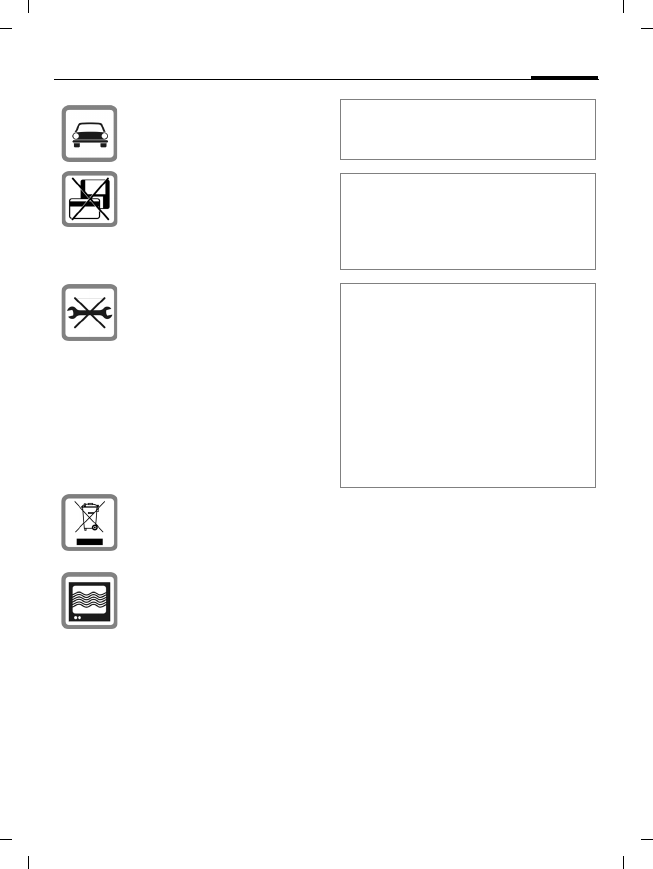
Do not use a handheld
while driving.
Do not place the phone
near to electromagnetic
data carriers such as credit
cards and floppy disks. In-
formation stored on them
could be lost.
You may only open the
phone to replace the bat-
tery (100% mercury-free)
or SIM card. You must not
open the battery under
any circumstances. All
other changes to this de-
vice are strictly prohibited
and will invalidate the
guarantee.
Important:
Please dispose of unwant-
ed batteries and phones
as permitted by the laws
in your country.
The phone may cause in-
terference in the vicinity
of TV sets, radios and PCs.
Use only original accessories. This
will avoid potential risks to health or
property and ensure compliance
with all relevant regulations.
Improper use will invalidate the
guarantee! These safety instructions
also apply to original accessories.
Product attributes are subject to
changes in technology, design and
availability. BenQ reserves the right
to modify products without prior
notice.
This cellular phone offers a range of
functions, it can be used in posi-
tions other than the head, such as
on the body. In this case, separa-
tion distance of 2.2 cm is required.
When a carry case, belt clip or hold-
er is used for body-worn operation,
it should not contain metal and
should position the device the
above-stated distance from your
body.

Safety precautions6
© Siemens AG 2004, \\Itl.eu\cottbus\Projekte_30\BenQ_Mobile\S68_POLARIS_1\output\SUG\POLARIS_1_FCC_us-
left page (6) of S68 POLARIS FCC us-en, (30.01.2006, 10:08)
Template: X75, Version 2.1;VAR Language: en; VAR issue date: 051116
• Both devices must be able to iden-
tify themselves one time by using
a password/PIN. To ensure suffi-
cient security, you should choose
a 16-digit number combination
for a password that would
be difficult to guess (if a PIN has
not been assigned).
• An automatic connection accep-
tance ("connection without confir-
mation") should only be used in
exceptional cases.
• In general, only trustworthy devic-
es should be linked in order to
minimize security risks.
• You should restrict the "visibility"
of your phone if possible. This will
make it much more difficult for
unknown devices to establish a
connection with your phone. To
do this, in the Bluetooth menu, set
the option Visib.to others of Always
visible to Not visible.
• The name of your phone is trans-
mitted in a Bluetooth connection.
The factory default is the "Blue-
tooth ID". The first time Bluetooth
is activated, or later in the
Bluetooth menu, you can change
this name (My BT info).
• If Bluetooth is not needed, this
function should be deactivated.
Before using Bluetooth accessories,
or a mobile phone inside a vehicle,
check the vehicle user guide for any
limitations on the use of these prod-
ucts.
Antenna care
Use only the supplied or an approved
replacement antenna. Unauthorized
antennas, modifications, or attach-
ments could damage the phone and
may violate FCC regulations.
Phone operation
Normal position
Hold the phone as you would any
other telephone with the antenna
pointed up and over your shoulder.
Tips on efficient operation
For your phone to operate most
efficiently:
• Extend your antenna fully
(if applicable).
• Do not touch the antenna unnec-
essarily when the phone is in use.
Contact with the antenna affects
call quality and may cause the
phone to operate at a higher pow-
er level than otherwise needed.
Important
Read this information before using
your wireless handheld phone.
As this mobile phone is equipped
with a fixed (non-retractable) an-
tenna, some paragraphs in the text
below may not be applicable.

7Safety precautions
right page (7) of S68 POLARIS FCC us-en, (30.01.2006, 10:08)
© Siemens AG 2004, \\Itl.eu\cottbus\Projekte_30\BenQ_Mobile\S68_POLARIS_1\output\SUG\POLARIS_1_FCC_us-
Template: X75, Version 2.1;VAR Language: en; VAR issue date: 051116
Driving
Laws pertaining to the use of mobile
phones while driving vary significant-
ly from state to state and sometimes
even from locality to locality within
states. For example, some areas may
allow persons to use their mobile
phones only if they employ a hands-
free device, and some areas may
prohibit the use of cell phones
entirely. Accordingly, BenQ recom-
mends that persons check the laws for
the areas in which they drive or will be
driving. For areas where the use of
mobile phones while driving is per-
mitted, BenQ encourages persons to
use their phones responsibly and to
employ hands-free devices. Also, if us-
ing your phone while driving, please:
• Give full attention to driving –
driving safely is your first
responsibility;
• Use hands-free operation, if
available;
• Pull off the road and park before
making or answering a call, if
driving conditions so require.
For vehicles equipped with
air bags
An air bag inflates with great force.
DO NOT place objects, including ei-
ther installed or portable wireless
equipment, in the area over the air
bag or in the air bag deployment ar-
ea. If in-vehicle wireless equipment is
improperly installed and the air bag
inflates, serious injury could result.
Electronic devices
Most modern electronic equipment
is shielded from radio frequency (RF)
signals. However, certain electronic
equipment may not be shielded
against the RF signals from your
wireless phone.
Pacemakers
The Health Industry Manufacturers'
Association recommends that a min-
imum separation of six inches (6")
be maintained between a handheld
wireless phone and a pacemaker to
avoid potential interference with the
pacemaker. These recommenda-
tions are consistent with the inde-
pendent research by and recommen-
dations of Wireless Technology
Research.
Persons with pacemakers
• should ALWAYS keep the phone
more than six inches from their
pacemaker when the phone is
turned ON;
• should not carry the phone in a
breast pocket;
• should use the ear opposite the
pacemaker to minimize the poten-
tial for interference;
• should turn the phone OFF imme-
diately if there is any reason to
suspect that interference is taking
place.

Safety precautions8
© Siemens AG 2004, \\Itl.eu\cottbus\Projekte_30\BenQ_Mobile\S68_POLARIS_1\output\SUG\POLARIS_1_FCC_us-
left page (8) of S68 POLARIS FCC us-en, (30.01.2006, 10:08)
Template: X75, Version 2.1;VAR Language: en; VAR issue date: 051116
Hearing aids
Some digital wireless phones may
interfere with some hearing aids. In
the event of such interference, you
may want to consult your service
provider or your hearing aid manu-
facturer to discuss alternatives.
Other medical devices
If you use any other personal medi-
cal devices, consult the manufactur-
ers of your devices to determine if
they are adequately shielded from
external RF energy. Your physician
may be able to assist you in obtain-
ing this information.
Turn your phone OFF in health care
facilities when any regulations post-
ed in these areas instruct you to do
so. Hospitals or health care facilities
may be using equipment that could
be sensitive to external RF energy.
Vehicles
RF signals may affect improperly
installed or inadequately shielded
electronic systems in motor vehicles.
Check with the manufacturer or its
representative regarding your vehi-
cle. You should also consult the
manufacturer of any equipment that
has been added to your vehicle.
Posted facilities
Turn your phone OFF in any facility
where posted notices so require.
Airplanes
FCC and Airline Regulations prohibit
using your phone while in the air.
Turn your phone OFF when request-
ed by the airline.
Check and comply with the policy of
your airline regarding the use of your
phone while the airplane is on the
ground.
Blasting areas
To avoid interfering with blasting op-
erations, turn your phone OFF when
in a “blasting area” or in areas post-
ed: “Turn off two-way radio.” Obey
all signs and instructions.
Potentially explosive atmospheres
Turn your phone OFF when in any
area with a potentially explosive
atmosphere and obey all signs and in-
structions. Sparks in such areas could
cause an explosion or fire resulting in
bodily injury or even death.
Areas with a potentially explosive at-
mosphere are often but not always
clearly marked. They include: fueling
areas such as gasoline stations; be-
low deck on boats; fuel or chemical
transfer or storage facilities; vehicles
using liquefied petroleum gas (such
as propane or butane); areas where
the air contains chemicals or parti-
cles, such as grain, dust or metal
powders; and any other area where
you would normally be advised to
turn off your vehicle engine.

9Safety precautions
right page (9) of S68 POLARIS FCC us-en, (30.01.2006, 10:08)
© Siemens AG 2004, \\Itl.eu\cottbus\Projekte_30\BenQ_Mobile\S68_POLARIS_1\output\SUG\POLARIS_1_FCC_us-
Template: X75, Version 2.1;VAR Language: en; VAR issue date: 051116
Emergency calls (SOS)
Your wireless phone can be used
to make emergency calls. You can
make an emergency call from the
main display screen. Enter the local
emergency number such as 911 and
then press the A key.
This phone, like any wireless phone,
operates using radio signals, wire-
less and landline networks, and user-
programmed functions. Because of
this, connections in all conditions
cannot be guaranteed. Therefore,
you should never rely solely on any
wireless phone for essential commu-
nications (for example, medical
emergencies). Remember – to make
or receive any calls, the phone must
be switched on and be used in a ser-
vice area that has adequate signal
strength. Emergency calls might not
be possible on all wireless phone
networks or when certain network
services or phone features are in use.
Check with local service providers re-
garding their network features.
Always make certain that your
phone is properly charged before
attempting any emergency calls. If
you allow your battery to discharge,
you will be unable to receive or make
calls, including emergency calls. You
must then wait a few minutes after
the charging begins to place any
emergency calls.
When making an emergency call,
remember to give all of the neces-
sary information as accurately as
possible. Remember that your wire-
less phone might be the only means
of communication at the scene of an
accident, therefore you should not
terminate the call until given permis-
sion to do so.
Batteries and Chargers
Only use original batteries
(100% mercury-free) and charging
devices. Use of non-original batter-
ies and/or charging devices may
cause explosion resulting in serious
injury and/or property damage. Use
original accessories in order to avoid
possible injury and property damage
and to ensure compliance with appli-
cable laws and regulations. Improper
use invalidates the warranty.

Safety precautions10
© Siemens AG 2004, \\Itl.eu\cottbus\Projekte_30\BenQ_Mobile\S68_POLARIS_1\output\SUG\POLARIS_1_FCC_us-
left page (10) of S68 POLARIS FCC us-en, (30.01.2006, 10:08)
Template: X75, Version 2.1;VAR Language: en; VAR issue date: 051116
Battery safety precautions
To reduce the risk of fire, injury or
electric shock, and to properly dis-
pose of batteries, please read and
understand the following instruc-
tions. CONTAINS LITHIUM-ION OR
NICKEL-METAL HYDRIDE BATTERY.
BATTERY MUST BE RECYCLED OR DIS-
POSED OF PROPERLY. DO NOT DIS-
POSE IN MUNICIPAL WASTE.
1. Only use the batteries specified
for use with this mobile phone.
2. Do not use batteries of different
sizes or from different manufac-
turers in this mobile phone.
3. Do not dispose of the battery in a
fire; it may explode. Dispose of
used batteries and phones in
accordance with applicable laws
and safety regulations. Do not
expose battery to water. Check
with local codes for special dis-
posal instructions.
4. Do not open or mutilate the bat-
tery. Doing so may cause damage
to the eyes or skin.
5. Exercise care in handling the bat-
tery in order not to short the bat-
tery with conducting materials
such as rings, bracelets, and keys.
The battery or conducting mate-
rial may overheat and cause burns
or fire.
6. Charge the battery provided with,
or identified for use with, this
product only in accordance with
the instructions and limitations
specified in the User's Guide. Do
not attempt to charge the battery
by any means other than those
specified in the User's Guide.
11Phone overview
right page (11) of S68 POLARIS FCC us-en, (30.01.2006, 10:08)
© Siemens AG 2004, \\Itl.eu\cottbus\Projekte_30\BenQ_Mobile\S68_POLARIS_1\output\SUG\POLARIS_1_FCC_us-
Template: X75, Version 2.1;VAR Language: en; VAR issue date: 051116
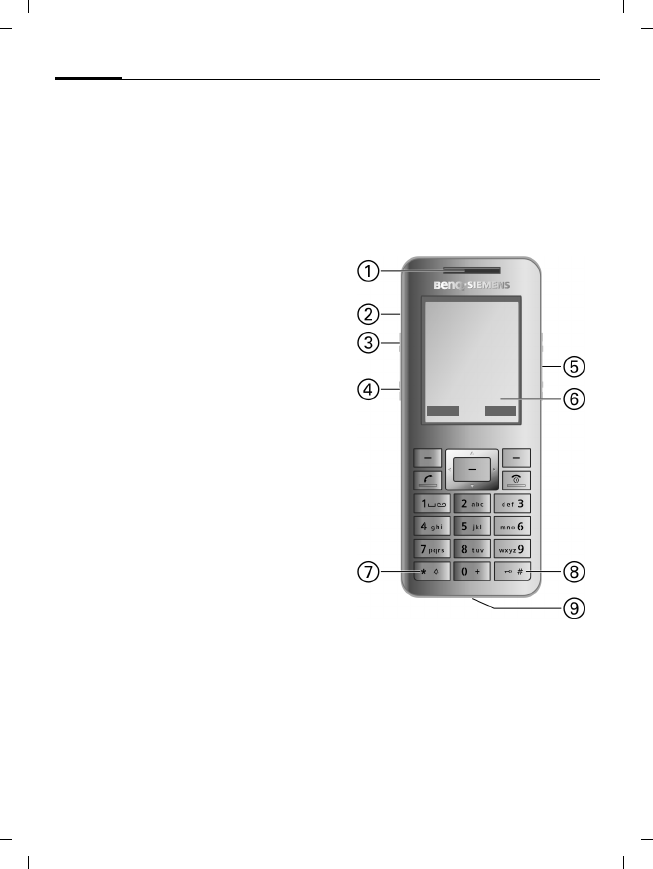
Phone overview
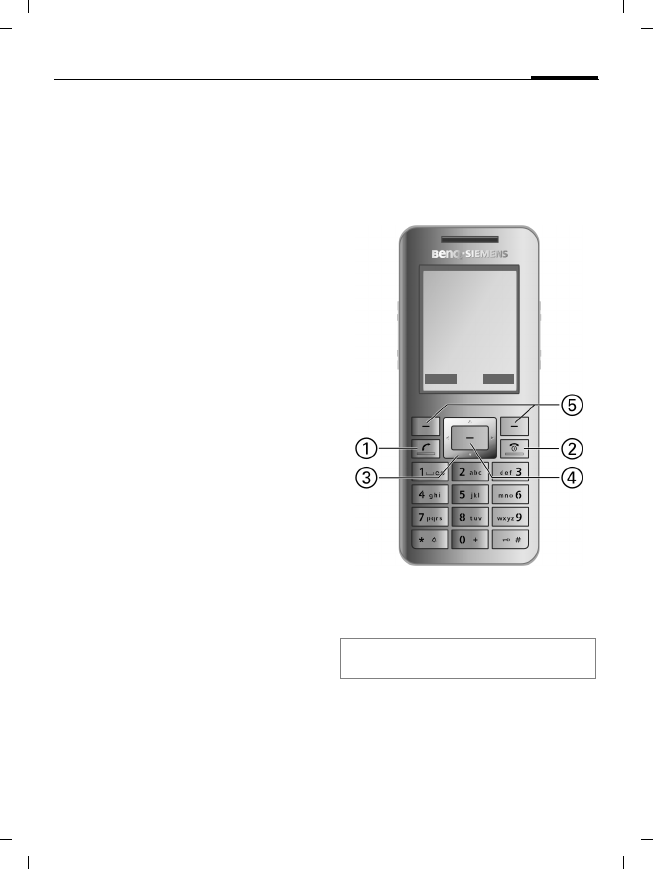
1 ACall key
• Dial the number/name dis-
played/marked, accept calls.
• In standby mode, press to open the
Call log lists.
2 BOn/Off/End key
• Press and hold to switch on
(when switched off).
• During a conversation or in an
application: press briefly to finish.
• In menus: Press and hold to go back
to standby mode.
• In standby mode, press and hold to
switch off,
press briefly: switch-off menu.
3 Navi ring
• In standby mode:
H Open the phonebook (page 21).
G Open profiles (page 30).
E Open the Inbox (page 26).
D Create new SMS (page 24).
• In lists, messages and menus:
I Scroll up and down.
F Scroll left and right.
4 ; Centre key
• Press the centre key to open the
main menu or to start an application
or function (page 17).
5 Softkeys
The current functions of these keys are
shown in the bottom line of the display
as §Text§/symbol.
Pressing any key activates the display
illumination.
á ß
10.06.05 14:20
Service provider
Inbox íMenu
Phone overview12
© Siemens AG 2004, \\Itl.eu\cottbus\Projekte_30\BenQ_Mobile\S68_POLARIS_1\output\SUG\POLARIS_1_FCC_us-
left page (12) of S68 POLARIS FCC us-en, (30.01.2006, 10:08)
Template: X75, Version 2.1;VAR Language: en; VAR issue date: 051116
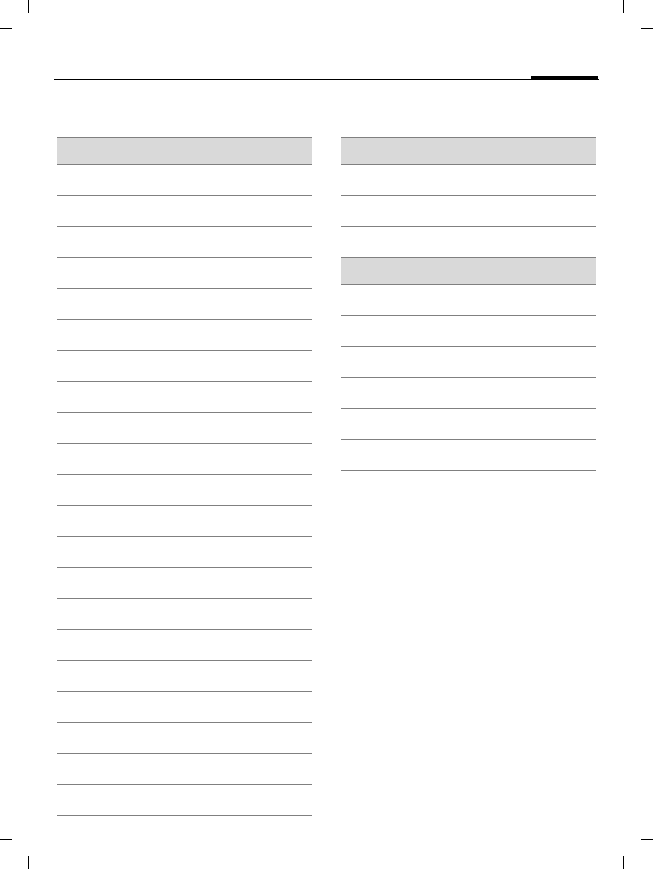
1 Earpiece/Loudspeaker
2 Double loudspeaker on both sides of
the phone
3 ƒ Dictating machine
Start the dictating machine to record a
short memo or call (page 36).
4 ‚ Fast dialling key
Dial number assigned as Fast dialling
(Assignment: page 32).
5 [/ \ Volume control
6 Display
7 *Ringtone
• In standby mode, press and hold to
switch ringtones and keaytones
on/off (e.g. alarm is still active). Vi-
bration is activated automatically.
• On incoming call, press and hold to
switch off ringtone for this call.
8 # Key lock
In standby mode, press and hold to
switch key lock on/off.
Only emergency numbers can be
dialled.
9 Connection socket
For charger, headset and other
accessories.
á ß
10.06.05 14:20
Service provider
Inbox íMenu
13Display symbols
right page (13) of S68 POLARIS FCC us-en, (30.01.2006, 10:08)
© Siemens AG 2004, \\Itl.eu\cottbus\Projekte_30\BenQ_Mobile\S68_POLARIS_1\output\SUG\POLARIS_1_FCC_us-
Template: X75, Version 2.1;VAR Language: en; VAR issue date: 051116
Display symbols
Display symbols (selection)
á Signal strength
à Charging
Þ Battery charge level, e.g. 50%
L Phonebook
M Messages
O Internet
W Games
V Voice message
P Call records
R Alarm clock
Q Organizer
S Extras
U Ring tones
T Settings
N My stuff
Ç All calls are diverted
½ Ringtone off
¹ Alarm set
Ä Keypad locked
£ Activated and available
¨ Bluetooth activated
Events (selection)
å SMS memory full
Æ No network access
ç Phone memory full
Message symbols (selection)
m Unread
n Read
p Sent
t
MMS with DRM content (page 17)
r MMS notification received
µ Voice mail received
Getting started14
© Siemens AG 2004, \\Itl.eu\cottbus\Projekte_30\BenQ_Mobile\S68_POLARIS_1\output\SUG\POLARIS_1_FCC_us-
left page (14) of S68 POLARIS FCC us-en, (30.01.2006, 10:39)
Template: X75, Version 2.1;VAR Language: en; VAR issue date: 051116
Getting started
Your phone's display is supplied with
a protective film. Remove this film
carefully before using the phone.
Inserting the SIM card
The service provider supplies you
with a SIM card on which all data for
your line is stored. If the SIM card has
been delivered in credit-card size,
snap the smaller segment out and
remove any rough edges.
Inserting the battery
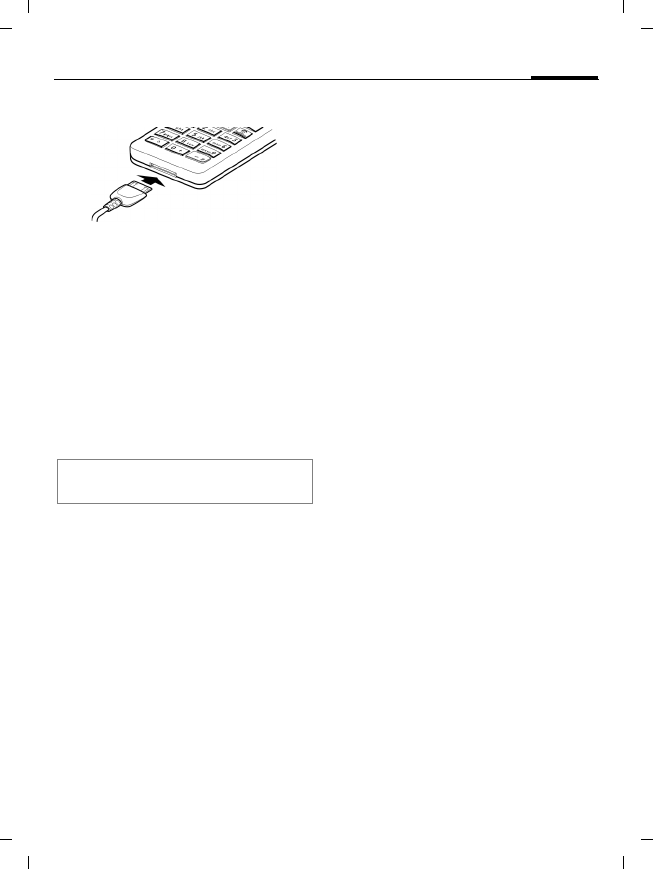
• Place the SIM card in front of the slot with
the contact surface facing downwards.
Then press the SIM card slightly to push
it in 1 (ensure that the chamfered cor-
ner is in the correct position).
• Insert the battery into the phone 2,
press it downwards 3 until it engages.
• To remove, lift the battery up and out.
• After inserting SIM card and battery close
the battery cover.
• To remove, take hold of the cover at the
small dents 4 on either side of the
phone and lift the cover up. Do not use
the acoustics slots for opening the cover.
Please switch off your phone before
removing the battery!
15Switching on/off, PIN entry
right page (15) of S68 POLARIS FCC us-en, (30.01.2006, 10:39)
© Siemens AG 2004, \\Itl.eu\cottbus\Projekte_30\BenQ_Mobile\S68_POLARIS_1\output\SUG\POLARIS_1_FCC_us-
Template: X75, Version 2.1;VAR Language: en; VAR issue date: 051116
Charging the battery
The battery is not fully charged when
delivered. Plug the charger cable into
the bottom of the phone, plug the
power supply unit into a power sock-
et and charge for at least two hours.
Display during charging: à
Charging time
An empty battery is fully charged af-
ter about 2 hours. The mains voltage
specified on the power supply unit
must not be exceeded.
Switching on/off,
PIN entry
Switching on/off
BPress and hold key.
Entering PIN
The SIM card can be protected with
a 4 to 8-digit PIN.
JEnter the PIN using the
number keys. Asterisks
are displayed to ensure
nobody can read your PIN.
Correct with ].
§OK§ Press to confirm. Logging
on to the network will
take a few seconds.
Emergency number (SOS)
Only to be used in real emergencies!
By pressing §SOS§ you can make
an emergency call on any network
without a SIM card and without
entering a PIN (not available in all
countries).
Switching your phone on for the
first time
Time/date
Set the time/date once.
;Confirm. Press ; again
to start entry.
Only use the plug-in power supply unit
included in the box!

General instructions16
© Siemens AG 2004, \\Itl.eu\cottbus\Projekte_30\BenQ_Mobile\S68_POLARIS_1\output\SUG\POLARIS_1_FCC_us-
left page (16) of S68 POLARIS FCC us-en, (30.01.2006, 10:39)
Template: X75, Version 2.1;VAR Language: en; VAR issue date: 051116
JEnter the date
(day/month/year) and
time (24 hours).
;Confirm. The time and
date are updated.
Time zones
FSelect the desired time
zone.
ISelect the city in the
desired time zone.
;Confirm.
General instructions
User guide
The following symbols are used to
explain operation:
J Enter numbers or letters.
§Options§ Displays a softkey option.
; Press the centre key.
I F Press navi ring in the di-
rection indicated.
= Function dependent on
service provider, may re-
quire special registration.
Main menu
CCall up main menu from
standby mode.
F/ISelect application symbol.
;Press to start application.
17General instructions
right page (17) of S68 POLARIS FCC us-en, (30.01.2006, 10:39)
© Siemens AG 2004, \\Itl.eu\cottbus\Projekte_30\BenQ_Mobile\S68_POLARIS_1\output\SUG\POLARIS_1_FCC_us-
Template: X75, Version 2.1;VAR Language: en; VAR issue date: 051116
Accessing menus
The steps needed to reach a function
are shown in a condensed form in the
user guide, e. g. to switch on/off
Large letters on the display:
C ¢T ¢Display
This comprises the following steps:
;Open the main menu.
F/ISelect T to open Settings
menu. Confirm with ;.
ISelect Display function
and confirm with ;.
ISelect Large letters func-
tion- and change/toggle
with ;.
Centre key
The symbol in the centre of the low-
er display line shows the current
function when pressing centre key.
Tabs
Tabs allow fast access to information
and applications
FSwitch between the
individual tabs.
If an input field is activated on a tab,
it is only possible to navigate within
the field using the navigation key.
Mark mode
You can mark several entries on the
tab in order to perform multiple
functions at once.
§Options§ Open menu and select
Mark to activate mark
mode.
ISelect entry/entries.
;Mark or remove mark.
Additional marking functions:
§Options§ Open menu.
Digital Rights Management
(DRM)
The use of downloaded pictures,
sounds or applications can be re-
stricted by the suppliers, e.g., copy
protection, use for a limited period
of time only, number of times it can
be used etc.
í Main menu ý Send
ì OK, confirm ö View
ñ Change û Save
ð Call ò Play
ü Edit ô Record
÷ Insert ó Pause
ú Options õ Stop
Mark all Mark all entries.
Unmark all Unmark all marked entries.
Delete
marked Delete marked entries.
Security18
© Siemens AG 2004, \\Itl.eu\cottbus\Projekte_30\BenQ_Mobile\S68_POLARIS_1\output\SUG\POLARIS_1_FCC_us-
left page (18) of S68 POLARIS FCC us-en, (30.01.2006, 10:39)
Template: X75, Version 2.1;VAR Language: en; VAR issue date: 051116
Security
The phone and SIM card are protect-
ed against misuse by security codes.
PIN code
PIN control
í ¢T ¢Security
¢PIN code
¢PIN control
The PIN is usually requested each
time the phone is switched on. You
can deactivate this feature but you
risk unauthorised use of the phone.
Some service providers do not per-
mit deactivating the control.
ñPress to change.
JEnter PIN. Confirm
with ;.
Change PIN codes
í ¢T ¢Security
¢PIN code
¢Select function.
Change PIN
You can change the PIN
(4 to 8 digits) to a number you
easily remember.
ñPress to change.
JEnter current PIN and
confirm with ;.
J,;Enter new PIN. Confirm.
J,;Repeat new PIN. Confirm.
Change PIN2
Proceed as for Change PIN.
Change phonecode
Define the phone code (4–8 digits)
when you start a phone-code pro-
tected function for the first time. It is
then valid for all phone-code pro-
tected functions. To change the
code proceed as with Change PIN
Following the third incorrect at-
tempt, access to the phone code
functions is denied. Please contact
Service (page 41).
Keep these security codes in a safe
place where you can access them again
if required.
PIN Protects your SIM card (personal
identification number).
PIN2 This is needed to set the charge
detail display and to access addi-
tional functions on special SIM
cards.
PUK
PUK2 Key code. Used to unlock SIM
cards after the wrong PIN has
been entered repeatedly.
Phone
code Protects your phone. Must be en-
tered at the first security setting.

19Security
right page (19) of S68 POLARIS FCC us-en, (30.01.2006, 10:39)
© Siemens AG 2004, \\Itl.eu\cottbus\Projekte_30\BenQ_Mobile\S68_POLARIS_1\output\SUG\POLARIS_1_FCC_us-
Template: X75, Version 2.1;VAR Language: en; VAR issue date: 051116
Clearing SIM card
barrings
If the PIN is entered incorrectly three
times, the SIM card is barred.
Enter the PUK (MASTER PIN) provid-
ed by your service provider in ac-
cordance with the instructions.
If the PUK has been lost, contact your
service provider.
Preventing accidental
activation
Even if PIN use is deactivated
(page 15) confirmation is required
to switch on the phone.
This prevents the phone from being
switched on accidentally, e.g. when
carried in a pocket or whilst you are
on an aircraft.
BPress and hold.
§OK§ Press.
Connection with PCs
You can connect your phone to a PC
using Bluetooth or a data cable (ac-
cessories). The PC program MPM
(Mobile Phone Manager) enables
you to store data on PC and, e.g. syn-
chronise the Addressbook with
Outlook®, Lotus Notes™ and other
Siemens phones (including Gigaset).
You will find Mobile Phone Manager
on the CD-ROM supplied or at:
www.BenQ-Siemens.com/s68
Calling20
© Siemens AG 2004, \\Itl.eu\cottbus\Projekte_30\BenQ_Mobile\S68_POLARIS_1\output\SUG\POLARIS_1_FCC_us-
left page (20) of S68 POLARIS FCC us-en, (30.01.2006, 10:27)
Template: X75, Version 2.1;VAR Language: en; VAR issue date: 051116
Calling
Dialling with number keys
JEnter number (always
with area/international
dialling code).
] A short press clears
the last digit, a long press
clears the phone number.
APress to dial the displayed
phone number.
Dialling with Fast dialling key /
short cuts
Use the Fast dialling key ‚ or the
short cut keys (2 to 9) if numbers are
assigned (see page 32). Press and
hold number key or ‚ to dial the
number.
Setting the volume
[/ \Adjust the volume.
Last number redial
APress twice. The phone
number last called is
redialled.
Calling from the redial list see Call
records, page 23.
Auto redial last number
§Options§ Open, then Auto dial. The
phone number is dialled
ten times at increasing
time intervals.
Accepting a call
APress.
Ending/Rejecting a call
BPress briefly.
Establish a second call
or conference
You can call another number during
a call or link up a multi party call.
§Options§ Open menu. Then select
Hold option. The current
call is put on hold.
J Dial the new number and
press A.
International dialling codes
0Press and hold until a "+" is
displayed.
§Options§ Open, then select Country.
Additional information
Accept the call before bringing the tele-
phone to your ear in order to avoid ear
damage caused by the ringtones.
Handsfree
§Options§ Open, then activate/deacti-
vate Handsfr.
Always switch off "handsfree talking" be-
fore holding the phone to your ear. Other-
wise, you will damage your hearing!

21Phonebook
right page (21) of S68 POLARIS FCC us-en, (30.01.2006, 10:27)
© Siemens AG 2004, \\Itl.eu\cottbus\Projekte_30\BenQ_Mobile\S68_POLARIS_1\output\SUG\POLARIS_1_FCC_us-
Template: X75, Version 2.1;VAR Language: en; VAR issue date: 051116
When connection is established …
Toggle … swap between 2 calls.
Confirm with ;.
Or
Conference
… select to start a multi
party call. The held call is
joined. Repeat procedure
until all (up to 4) partici-
pants are linked together.
Receiving a second call
During a call, you may be advised
that there is another call waiting.
You will hear a special tone during
the call.
§Toggle§ /A
Accept the waiting call.
The current call is put on
hold.
§Toggle§ Swap between calls.
;Confirm the notification.
Tone sequences
(Send DTMF)
§Options§ Open menu. Then select
Send DTMF option. Enter
tone sequences (num-
bers) for remote access to
an answering machine.
Phonebook
í ¢L
Or
HPress in standby mode.
You can store contacts with different
phone and fax numbers as well as
additional address details. Tabs are
offered for fast access: All contacts,
Groups, Online status, SIM, Filter
FSwitch between the tabs.
ISelect contact.
ACall selected contact.
Or
§Options§ Open menu, then Create
message, to create a mes-
sage for the selected
contact.
All contacts
Display all entries stored in the
phone or on the SIM card in
alphabetical order.
<New entry>
; Confirm <New entry>. The
tabs are displayed.
FSwitch between the tabs:
General sett., Private,
Business, Person, Online
status
ISelect input fields on tabs.
Phonebook22
© Siemens AG 2004, \\Itl.eu\cottbus\Projekte_30\BenQ_Mobile\S68_POLARIS_1\output\SUG\POLARIS_1_FCC_us-
left page (22) of S68 POLARIS FCC us-en, (30.01.2006, 10:27)
Template: X75, Version 2.1;VAR Language: en; VAR issue date: 051116
JEnter at least one name
and phone number with
dialling code.
;Open menu. Select Save.
Viewing/editing entries
ISelect required entry.
üOpen current tab to edit.
;Open options menu.
Groups
You are offered 10 groups to enable
you to arrange your contacts clearly.
Editing group attributes
ISelect group.
§Options§ Open menu and select
Properties.
Adding a contact
Start function in the All contacts tab.
ISelect contact, press
§Options§. Select Add to
group. A contact can only
belong to one group.
Online status
Display all contacts that have WV
addresses (Instant Messages).
SIM
Display contacts on the SIM card.
New entry
;Confirm New entry and
name. Enter phone
number and select the
storage location.
Viewing/editing entries
ISelect entry and edit.
Filter
See phone book options below.
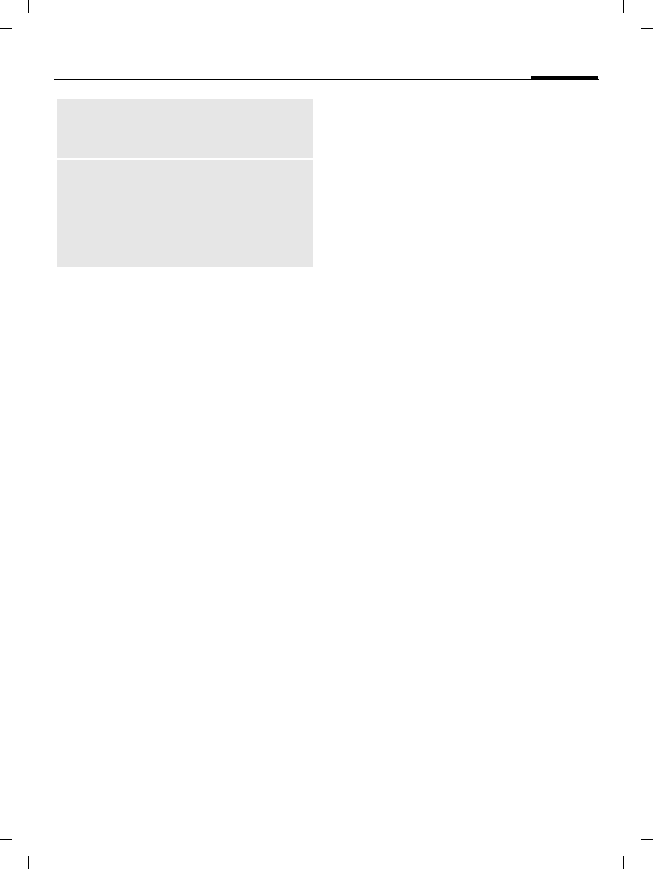
Phonebook options
Filter Only those entries
which match the filter
criteria are displayed.
Create
message Create a message for
the selected contact.
Search ID Search for assigned
Instant Message ID.
Internet The URL assigned to
the contact is visited via
the WAP browser.
Open Display own phone
numbers (e.g. fax) for
reference.
Add to group Add entry to a group.
23Call records
right page (23) of S68 POLARIS FCC us-en, (30.01.2006, 10:27)
© Siemens AG 2004, \\Itl.eu\cottbus\Projekte_30\BenQ_Mobile\S68_POLARIS_1\output\SUG\POLARIS_1_FCC_us-
Template: X75, Version 2.1;VAR Language: en; VAR issue date: 051116
Call records
Phone numbers are stored for easy
redialling.
í ¢P
ISelect and open record.
ISelect phone number.
ADial phone number.
Missed calls b
List of calls that you have received
but not answered.
¿Symbol in the display.
Calls received
List of accepted calls.
Calls dialed
List of the numbers you have dialled.
APress in standby mode.
Delete records
Delete records.
Time/charges
Display charges and duration during
a call.
í ¢P ¢Time/charges
Last call, All outg. calls, All incoming,
Remain. units
Select and open area.
§Options§ Open, then Reset to reset
the setting.
Voice message
C ¢Voice message
Most service providers offers a mail-
box in which a caller can leave voice
mail for you. If this service is not part
of your service provider's standard
package, you will need to register for
it, and possibly set it manually.
Settings b
The service provider supplies you
with two phone numbers:
Save mailbox number
Call to listen to your voice messages.
C ¢Voice message
Enter/edit the phone number and
confirm with §OK§.
Record
sounds, etc.
Create sound for a con-
tact from scratch or add
from My stuff.
More Location,
Synchronizatn.,
Capacity, Settings, As
business c., Business
card, Import, Add
more fields

Messages24
© Siemens AG 2004, \\Itl.eu\cottbus\Projekte_30\BenQ_Mobile\S68_POLARIS_1\output\SUG\POLARIS_1_FCC_us-
left page (24) of S68 POLARIS FCC us-en, (30.01.2006, 10:27)
Template: X75, Version 2.1;VAR Language: en; VAR issue date: 051116
Save call divert number
Calls are diverted to this phone
number.
C ¢T ¢Call setup
¢Divert
§Options§ Open, then select
e.g. Unanswered and
then Set.
JEnter phone number.
§Options§ Open, then select Save.
Listening b
A new voice message can be an-
nounced as follows, depending on
the service provider:
l/mSymbol with beep/an SMS
or a call with automatic
announcement.
Call your mailbox and play the mes-
sage(s) back.
1Press and hold.If necessary
enter mailbox number.
Confirm with §OK§.
Messages
Your phone can send and receive
standard text messages (SMS) and
multimedia messages (MMS).
MMS enables you to send text, pic-
tures and sounds in a combined
message.
Writing/sending an
SMS/MMS
C ¢M ¢Create new
¢SMS/MMS
JEnter text. Writing text
with or without T9 (see
below).
AEnter phone number or
open menu, then select
Add from † , select recipi-
ent(s) from phonebook.
§Options§ (for MMS) Open menu,
select Add item, select
item type or add attach-
ment. You may choose a
subject. Then
AEnter phone number or
select from phonebook.
AStart sending process.
25Messages
right page (25) of S68 POLARIS FCC us-en, (30.01.2006, 10:27)
© Siemens AG 2004, \\Itl.eu\cottbus\Projekte_30\BenQ_Mobile\S68_POLARIS_1\output\SUG\POLARIS_1_FCC_us-
Template: X75, Version 2.1;VAR Language: en; VAR issue date: 051116
Text entry with T9
T9 deduces the correct word from
the individual key entries by making
comparisons with an extensive
dictionary.
#Press briefly: Select T9abc.
Switch between the input
modes: T9Abc for capital
letters or 123 for numbers.
J Simply press the keys once
where the relevant letter
is located.
For "and", for example
263.
1A blank ends a word.
If several words are found in the dic-
tionary for a key sequence (a word),
the most probable is displayed first.
^Press, if it is not the right
one. Repeat until the cor-
rect word is displayed.
To enter a word in dictionary:
§Learn§ Press and enter the word
manually, then §Save§.
Text entry without T9
#Press briefly: Select abc.
Switch between the input
modes: Abc for capital let-
ters or 123 for numbers.
2Press once briefly to write
the letter a, twice to write
b etc. Press and hold to
write the number 2.
]Press briefly to delete the
letter left of the cursor.
Press and hold to delete
text quickly.
*Press briefly: Special char-
acters are shown.
1Press to insert space.
Press twice to insert line
feed.
T9® Text Input is licensed under one or more
of the following: U.S. Pat. Nos. 5,187,480,
5,818,437, 5,945,928, 5,953,541, 6,011,554,
6,286,064, 6,307,548, 6,307,549, 6,636,162 and
6,646,573;
Australian Pat. Nos. 727539, 746674 and
747901; Canadian Pat. Nos. 1,331,057,
2,302,595, and 2,227,904; Japan Pat. No.
3532780, 3492981; United Kingdom Pat. No.
2238414B; Hong Kong Standard Pat. No.
HK1010924; Republic of Singapore Pat. No.
51383, 66959, and 71979;
European Pat. Nos. 0 842 463 (96927260.8),
1 010 057 (98903671.0), 1 018 069
(98950708.2); Republic of Korea Pat. Nos.
KR201211B1 and KR226206B1. People's
Republic of China Pat. Application Nos.
98802801.8, 98809472.X and 96196739.0;
Mexico Pat. No. 208141; Russian Federation
Pat. No. 2206118; and additional patents are
pending worldwide.
Messages26
© Siemens AG 2004, \\Itl.eu\cottbus\Projekte_30\BenQ_Mobile\S68_POLARIS_1\output\SUG\POLARIS_1_FCC_us-
left page (26) of S68 POLARIS FCC us-en, (30.01.2006, 10:27)
Template: X75, Version 2.1;VAR Language: en; VAR issue date: 051116
SMS/MMS options (selection)
Receiving SMS/MMS
If you have received a new message
a notification is shown on the
display.
§View§ Opens the message.
In order to receive a complete MMS
later on, open the notification.
§Options§ Open, then select View.
Reply/Reply to all, Forward
Reading SMS/MMS
í ¢M ¢Inbox
Select the SMS/MMS tab.
ISelect the message.
;Read the SMS/MMS or the
MMS notification.
Message lists
Messages are displayed in separate
lists. Select tab and read message(s).
C ¢M
¢Drafts/Sent/Outbox/
Msg. archive
Drafts Save messages as draft
while creating it. A mes-
sage is saved automatical-
ly as draft if you accept an
incoming call while creat-
ing the message.
Sent List of all sent messages.
Outbox List of messages that
could not be sent yet or
where transmission
failed.
Msg. archive
List of messages you want
to keep permanently.
SMS/MMS settings
í ¢M ¢Msg settings
¢SMS/MMS
¢Select function.
The basic settings have normally al-
ready been made by the service
provider.
Add item Add contents, such as
Text, Pictures, Audio,
Contacts, Attachment.
Create item Create contents. Sound
recorder (page 38).
Preview Play entire MMS in the
display.
Text edit menu Input language, Mark
text, Copy, Insert
Insert text Text modules,
Signature, Opening
sentence, Contact
details, Bookmark

27Messages
right page (27) of S68 POLARIS FCC us-en, (30.01.2006, 10:27)
© Siemens AG 2004, \\Itl.eu\cottbus\Projekte_30\BenQ_Mobile\S68_POLARIS_1\output\SUG\POLARIS_1_FCC_us-
Template: X75, Version 2.1;VAR Language: en; VAR issue date: 051116
Send options
Set send options for SMS (Service
centre, Recipient, etc.) and MMS
(Delivery report, Validity period, etc.).
Creation
Set layout options for SMS (Add
signature, Signature, etc.) and MMS
(Creation mode, Opening sentence,
etc.).
Retrieval
Only for MMS. Settings for receipt of
the message, such as Retriev.(roam.),
Allow deliv.rep., Allow read rep., etc.
Connect. sett.
Only for MMS. Select the required
MMS profile in which the connection
attributes are specified.
You can obtain the data you need for
this from the service provider or at:
www.BenQ-Siemens.com/
mobilephonescustomercare
E-mail
Your phone has an e-mail program
(client).
Writing/sending
í ¢M ¢Create new
¢E-mail
JEnter text.
§Options§ Open menu, then select
Add item. Select item type
and/or add an attach-
ment. Insert a subject,
then select Add subject.
JEnter e-mail address(es)
or open menu, then select
recipient(s) via
Add from †..
Call up additional fields
such as Subject:, Cc:, Bcc:
via the options menu.
ASend e-mail.
Receiving/reading
í ¢M ¢Inbox
Select the E-mail tab.
;Open menu. Select
Retrieve e-mail/Retrieve
body.
ISelect message and
confirm with ;.
Additional options include Reply,
Forward, Save attach.

Messages28
© Siemens AG 2004, \\Itl.eu\cottbus\Projekte_30\BenQ_Mobile\S68_POLARIS_1\output\SUG\POLARIS_1_FCC_us-
left page (28) of S68 POLARIS FCC us-en, (30.01.2006, 10:27)
Template: X75, Version 2.1;VAR Language: en; VAR issue date: 051116
Draft/Sent/Archive
í ¢M ¢Draft/Sent/Outbox/
Msg. archive ¢E-mail
The tab for the messages not sent
yet/sent/failed to send/archived is
displayed.
Setting
í ¢M ¢Settings
¢E-mail ¢Accounts
Before using this service, set the
server access and your e-mail param-
eters. You will receive the necessary
data from the service provider or at:
www.BenQ-Siemens.com/
mobilephonescustomercare
ISelect existing account
and activate with ;.
Or
§Options§ Open. Select Edit. Com-
plete settings as indicated
by the service provider
(page 32).
Chat room b
í ¢M ¢Chat room
The function allows text-based con-
versation with one or more users
who are also registered.
Your dialogue partners are entered
in the contact lists. When a connec-
tion has been established, these lists
show who is available, whether or
not they want to be disturbed, etc.
Please refer to your service provider
for further information.
WAP push
C ¢M ¢WAP push
WAP push messages are transmitted
from special service centres. If, e.g.
you have requested configuration
data from your service provider this
will be transmitted via WAP push.
ISelect the required
message.
;Read the message about
the transmitted data and,
if applicable, trigger a
download.
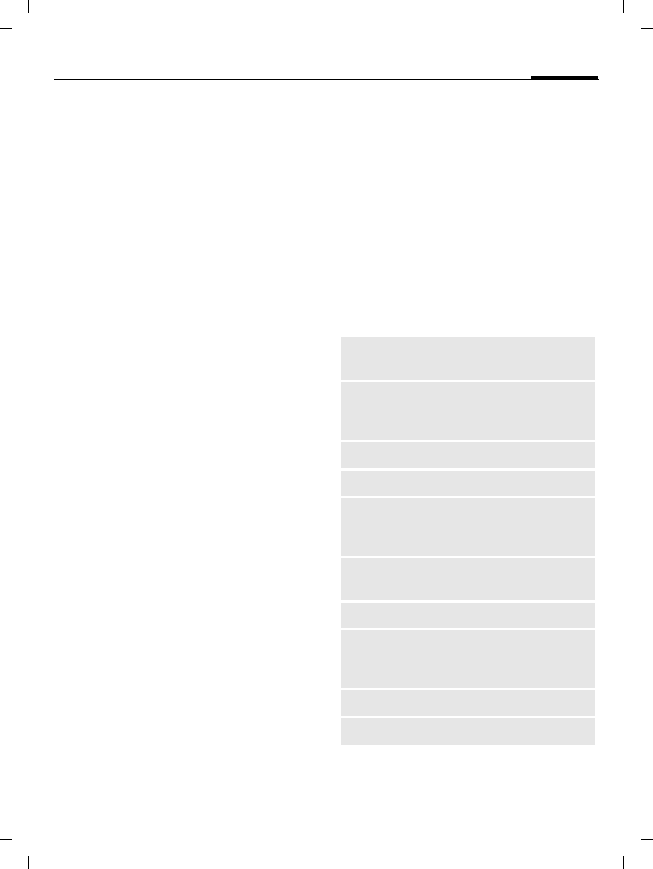
Additional options include Execute,
Install, Accept/Reject.
29Internet
right page (29) of S68 POLARIS FCC us-en, (30.01.2006, 10:27)
© Siemens AG 2004, \\Itl.eu\cottbus\Projekte_30\BenQ_Mobile\S68_POLARIS_1\output\SUG\POLARIS_1_FCC_us-
Template: X75, Version 2.1;VAR Language: en; VAR issue date: 051116
CB services b
í ¢M ¢CB services
Some service providers offer infor-
mation services (info channels, Cell
Broadcast). If reception is activated,
you will receive messages on the ac-
tivated topics in your Topic list.
Internet
C ¢O ¢Select function.
Download games, applications,
sounds, graphics etc. for your phone
at wap.siemens.com (Downloads).
Internet access may require registra-
tion with the service provider.
Access to the service provider
Direct call-up of the browser with
the URL from your service provider.
Download wiz.
You will not be left on your own dur-
ing the download.
Enter URL
On input the browser is started and
the page displayed.
Bookmarks
Display list of stored pages.
ISelect a bookmark and
call up URL with ;.
Bookmark site
The current page is saved
as a bookmark.
Internet
Start browser with pre-set option.
Browser options
End connection
BPress to end connection
and close the browser.
Homepage Call up the pre-set
homepage.
Bookmarks Display stored list of
bookmarks; save
bookmark.
Go to... Enter a URL
Reload Reload current page.
Show URL Display the URL of the
current page for sending
via SMS/MMS/e-mail.
History Display most recently vis-
ited Internet sites.
Disconnect Disconnect the Internet.
File Save the object/complete
page on the current page.
Display saved pages.
Settings Set or reset browser.
Exit browser Close the browser.
Settings30
© Siemens AG 2004, \\Itl.eu\cottbus\Projekte_30\BenQ_Mobile\S68_POLARIS_1\output\SUG\POLARIS_1_FCC_us-
left page (30) of S68 POLARIS FCC us-en, (30.01.2006, 10:27)
Template: X75, Version 2.1;VAR Language: en; VAR issue date: 051116
Navigation in the browser
Enter special characters
*,0Select special characters.
Browser settings
§Options§ Open menu, select
Settings.
History/Saved websites
Display the list of last visited/stored
internet sites.
Settings
Profiles
í ¢T ¢Profiles
Several settings can be stored in a
phone profile in order, for example,
to adapt the phone to the surround-
ing level of noise.
•General, Silent alert, Meeting,
Outdoor, Car Kit, Headset
• You can name two personal
profiles (<Name>).
ISelect profile.
ìActivate the profile.
Topics
í ¢T ¢Topics
Load a completely new visual
presentation onto your phone, e.g.
Animations, Sounds, Color skins,
Font, Wallpaper
ISelect theme.
ìActivate; if required,
view §Preview§.
ì • Select a link.
• Settings, status on/off.
• One input field/link forward via the
§Options§ menu.
• One input field/link back with §Back§ or via
the §Options§ menu.
Browser Set start option as well as
handling of pictures/sounds
plus send options.
Protocol
parameters Set protocol parameters,
push messages.
Security Set encryption.
Context Reset session; delete
cache, history and cookies.
About... Display information about
the browser.
Your Internet browser is licensed by:
Additional information
• To call up the list in standby mode:
G profile list is displayed.
• The active profile is identified with ·.
31Settings
right page (31) of S68 POLARIS FCC us-en, (30.01.2006, 10:27)
© Siemens AG 2004, \\Itl.eu\cottbus\Projekte_30\BenQ_Mobile\S68_POLARIS_1\output\SUG\POLARIS_1_FCC_us-
Template: X75, Version 2.1;VAR Language: en; VAR issue date: 051116
Display
í ¢T ¢Display
You can change display settings for
your phone such as: Wallpaper, Logo,
Screensaver, Start up anim./Shutdn
anim. or the Illumination.
Silent alert
í ¢T ¢Silent alert
The silent alert can be switched on in
addition to the ringtone (e.g. in a
noisy environment).
Connectivity
í ¢T ¢Connectivity
Bluetooth® (BT)
Activate/deactivate Bluetooth and
manage the list of known Bluetooth
devices.
Bluetooth sett.
ìBluetooth activation.
My BT name: Give the
phone a name the first
time it is switched on.
Search
Specify which BT devices are to be
searched for.
Device list
•Known devices
Record frequent BT partners in the
list of known devices. If entries are
"confidential", no password query is
made.
•Last connect.
List of most recently and/or still con-
nected devices.
•Reject list
Attempts to make connections to de-
vices in this list are rejected.
•Last srch.result
List of the last devices found.
My BT name
Give a device name
(max. 20 characters) which the part-
ner sees. If no name is given, the non-
changeable device address is used.
The Bluetooth® word mark and logos are
owned by Bluetooth SIG, Inc. and any use
of such marks by BenQ Corp. is under
licence. Other trademarks and trade names
are those of their respective owners.
Bluetooth QDID (Qualified Design ID):
B02422
Additional information
To increase the standby time deactivate
Bluetooth if it is not used.
Settings32
© Siemens AG 2004, \\Itl.eu\cottbus\Projekte_30\BenQ_Mobile\S68_POLARIS_1\output\SUG\POLARIS_1_FCC_us-
left page (32) of S68 POLARIS FCC us-en, (30.01.2006, 10:27)
Template: X75, Version 2.1;VAR Language: en; VAR issue date: 051116
•Visib.to others
Make settings to specify how your
phone should "act" when in contact
with other BT devices.
•Not visible
Your phone is not "visible" to other
BT devices.
•Auto mode
Your phone is "visible" to other BT
devices for five minutes. You will
then be asked if "visibility" should
continue.
•Always visible
Your phone is always "visible" to
other BT devices.
Online settings
Default setting and activation of the
connection profiles for data trans-
mission. The phone default setting
depend on the service provider. Con-
sult your service provider or go to:
www.BenQ-Siemens.com/
mobilephonescustomercare
Fax/data
Send voice/fax b
Set this function on the phone before
transmission so that you can switch
from voice mode to fax mode.
Rcve fax/data b
The call is signalled by a special
ringtone and the type of call (fax or
data) is displayed. Now start the
communication program in your PC
to receive the fax/data.
Shortcuts
í ¢T ¢Shortcuts sett.
Soft keys/Fast dialling key
You can assign one function to each
of the two softkeys or a dialling
number to the Fast dialling key.
Navigation keys
Assign a function to three directions
of the navigation key (only effective
in standby mode). The downwards
movement is assigned to opening
phonebook and cannot be modified.
Shown in the display
¨Bluetooth activated.
©Bluetooth visible to others.
Additional information
The service provider may have already as-
signed functions to all the keys (e.g. access
to SIM services or direct call-up of the Inter-
net portal). It may not be possible to modify
this key assignment.

33Settings
right page (33) of S68 POLARIS FCC us-en, (30.01.2006, 10:27)
© Siemens AG 2004, \\Itl.eu\cottbus\Projekte_30\BenQ_Mobile\S68_POLARIS_1\output\SUG\POLARIS_1_FCC_us-
Template: X75, Version 2.1;VAR Language: en; VAR issue date: 051116
Number keys
Use the number keys 2 to 9 as speed
dialling numbers for fast access to
functions. Number key 1 is reserved
for the mailbox number.
Assigning numbers or functions
ISelect the key.
ñOpen the list.
ISelect <Phone number>
from the list to assign a
number or select an appli-
cation to assign a func-
tion. Confirm with ;.
Call settings
í ¢T ¢Call settings
Hide ID b
If activated, your phone number
will not appear on the other party’s
display.
Call waiting b
Activate/deactivate call waiting.
Divert
Divert calls to your mailbox or other
phone numbers.
Setting up call divert
ISelect e.g. Unanswered.
(Includes the conditions
Not reachable, No reply,
Busy.). Confirm with ;.
Set Select. Enter a phone
number to which the call
is to be diverted. Confirm
the notification with ;.
All calls b
All calls are diverted.
ÇSymbol in standby mode.
Other possibilities for divert:
Not reachable, No reply, Busy, Receiving
fax, Receiving data
Alert calls from
Only calls from phone numbers that
are in the phone book or in a group
are signalled audibly. Other calls are
only displayed.
Any key
Incoming calls can be accepted by
pressing any key (except for A).
Minute beep
During the call, you (and only you)
will hear a beep after each minute as
a reminder of the time elapsed.
Settings34
© Siemens AG 2004, \\Itl.eu\cottbus\Projekte_30\BenQ_Mobile\S68_POLARIS_1\output\SUG\POLARIS_1_FCC_us-
left page (34) of S68 POLARIS FCC us-en, (30.01.2006, 10:27)
Template: X75, Version 2.1;VAR Language: en; VAR issue date: 051116
Phone settings
í ¢T ¢Phone settings
Change the phone’s Language, Key
tones, Info tones. Set that the phone
switches off automatically each day
at the same time.
Phone identity
The phone identity number (IMEI) is
displayed. This information may be
useful for customer service.
Device check
After the last information page, a
self-test (all individual tests) as well
as individual tests are offered.
Fact. settings
Reset the phone to the default val-
ues (factory setting). This does not
affect SIM card/network settings.
In standby mode enter:
* # 9 9 9 9 # A
Clock
í ¢T ¢Clock
Time/date
Set the clock to the right time once
at start-up.
;Start editing and enter
date/time.
Security
í ¢T ¢Security
Auto key lock
The key pad is locked automatically if
no key has been pressed for a specif-
ic time. You can still be called and
make an emergency call.
Direct call
Only one phone number can be
dialled.
Only ‚b
Restrict calls to SIM-protected num-
bers in the phone book.
This SIM only b
Your phone is prevented from being
used with a different SIM card.
Certificates
Display certificates for secure data
connections.
PIN code
For description, see page 18:
PIN control, Change PIN, Change PIN2,
Chg.phonecode
Software version
* # 0 6 #, then press E.
Lock/unlock key pad in standby mode. In
each case:
#Press and hold.

35Organizer
right page (35) of S68 POLARIS FCC us-en, (30.01.2006, 10:27)
© Siemens AG 2004, \\Itl.eu\cottbus\Projekte_30\BenQ_Mobile\S68_POLARIS_1\output\SUG\POLARIS_1_FCC_us-
Template: X75, Version 2.1;VAR Language: en; VAR issue date: 051116
Barring b
Network barring restricts the use of
your SIM card.
All outgoing
All outgoing calls except emergency
numbers are barred.
Other settings: Outgoing intl. (outgo-
ing international), Out.int.x home
(international outgoing without
home country), All incoming, When
roaming, Status check, Clear all.
Accessories
í ¢T ¢Accessories
Car Kit
Only in combination with an original
handsfree car kit. The car kit profile is
activated automatically when the
phone is inserted into the cradle.
Headset
Only in conjunction with an original
headset. If an original headset is
used the profile is automatically acti-
vated when the headset is plugged
in.
Upload via USB
The phone can be connected with
the USB cable to a PC. The battery
can also be charged in this way (only
with original accessories).
Organizer
C ¢Q ¢Select function
Calendar
Enter appointments in the calendar.
Set time and date (page 34) for the
calendar to work correctly. The cal-
endar offers three views: monthly
view, weekly view and daily view.
F/IScroll between
weeks/days/hours.
Appointments
Appointments are displayed in
chronological order in a list.
Enter new appointment
<New entry>
Select.
Category: Select Memo, Voice memo,
Call, Meeting, Vacation,
Birthday.
Tasks
A task is displayed like an appoint-
ment in the agenda for the selected
day. It does not require a time. When
no time is entered the task appears
at the top of the list every day until it
is marked as completed.
Notes
Write and manage text notes. Pro-
tect confidential information using
a phone code.
Alarm clock36
© Siemens AG 2004, \\Itl.eu\cottbus\Projekte_30\BenQ_Mobile\S68_POLARIS_1\output\SUG\POLARIS_1_FCC_us-
left page (36) of S68 POLARIS FCC us-en, (30.01.2006, 10:27)
Template: X75, Version 2.1;VAR Language: en; VAR issue date: 051116
Dictat.machine
C ¢Q ¢Dictat.machine
Or
ƒPress the side key.
Use the dictating machine to record
short memos or record calls.
New recording
<Record new>
Select. A brief beep
sounds.
ó / ôPause/record.
§Stop§ End recording.
Playback (via Media player)
ISelect the recording.
ò / óPlayback/pause.
D/EPress and hold, for fast
forward and rewind.
Time zones
See page 16.
Remote synchronisation
Use this function remotely to syn-
chronise the personal data on your
phone (contacts, notes, calendar en-
tries) with externally saved data.
Synchronisation
Before synchronisation you must se-
lect a profile (Active account) and a
data area and enter the correct path
to the data (Server sett.). Confidential
notes are not transferred.
§Sync§ The computer is selected
and synchronisation
started.
Two profiles can be set for
synchronisation.
Alarm clock
í ¢R
The alarm sounds at the set time
even when the ringtones or phone
are switched off. The alarm clock is
activated automatically after a
change is made.
To deactivate the alarm press any
number key.
ñSet the time for the alarm
call (hh:mm).
Or
ñActivate/deactivate the
alarm clock.
Warning!
The use of this feature may be subject to
restrictions under criminal law. Please in-
form the other party to the conversation in
advance if you want to record the conversa-
tion and please keep such recordings confi-
dential. You may only use this feature if the
other party to the conversation agrees.

37Ring tones
right page (37) of S68 POLARIS FCC us-en, (30.01.2006, 10:27)
© Siemens AG 2004, \\Itl.eu\cottbus\Projekte_30\BenQ_Mobile\S68_POLARIS_1\output\SUG\POLARIS_1_FCC_us-
Template: X75, Version 2.1;VAR Language: en; VAR issue date: 051116
Setting the days for an alarm
§Options§ Open the menu and select
Set days.
ISwitch between the days
of the week.
ñMark or unmark the days
for an alarm.
§Save§ Save the alarm call time.
Ring tones
í ¢U
Set the volume for all tones or set
the tones for the different functions,
e.g SMS, alarm clock.
Extras
í ¢S ¢Select function.
SIM services (optional)
Your service provider may offer spe-
cial applications such as mobile
banking, share prices, etc. via the
SIM card.
iSymbol for SIM services.
For further information, please con-
tact your service provider.
My applications
See My stuff page 38.
Media player
All the media files on your phone are
offered on tabs: Sounds, Pictures
FSelect tab.
ISelect file and confirm to
start playback.
Sounds
Play back melodies.
ò / óPlay or pause, depending
on the situation.
FFast forward/rewind while
key is pressed. This fea-
ture is not supported for
all file/media types.
ILoad next/previous media
file.
[/\Set volume.
*Switch to mute.
§Stop§ End playback.
Pictures
øZoom function. Zoom
in/out with the (+/-)
softkeys.
F/IMove enlarged picture.
5Centre picture.
#Switch to full screen
mode and back again.

My stuff38
© Siemens AG 2004, \\Itl.eu\cottbus\Projekte_30\BenQ_Mobile\S68_POLARIS_1\output\SUG\POLARIS_1_FCC_us-
left page (38) of S68 POLARIS FCC us-en, (30.01.2006, 10:27)
Template: X75, Version 2.1;VAR Language: en; VAR issue date: 051116
Calculator
Use the calculator for a quick
account on the way.
Unit converter
You can convert various measure-
ment units in the decimal system in-
to other measurement units.
Online status
The application can be called up
from various other applications,
such as Chat room or from Contacts. In
Online status you can set such at-
tributes as "Availability" or "Mood",
which are visible to subscribers to
Chat room. You can also edit your sta-
tus lists for the respective service
here.
Sound recorder
Use the sound recorder to record
noises and tones for use as ring-
tones.
Recording and playback see
Dictat.machine, page 36.
My menu
Create your own menu
with frequently used functions,
phone numbers or Internet pages.
My stuff
To organise your files, you can use
the file system like a PC file manager.
There are separate folders for the
various data types in My stuff.
C ¢N
Display the list of folders and files.
ISelect file or folder.
;Open folder. Select file or
link.
Depending on the selection, the file
with the associated application is
opened or the download started.
Download
Melodies, pictures, games and other
applications are offered on the Inter-
net. Once downloaded, you can ac-
cess these via the phone. Most appli-
cations include instructions. The
appropriate folders contain the
download function to download e.g.
new pictures and sounds.
Remember that pictures and sounds
may be protected (Digital Rights
Management).
Some applications and games are al-
ready pre-installed on your phone.
39My stuff
right page (39) of S68 POLARIS FCC us-en, (30.01.2006, 10:27)
© Siemens AG 2004, \\Itl.eu\cottbus\Projekte_30\BenQ_Mobile\S68_POLARIS_1\output\SUG\POLARIS_1_FCC_us-
Template: X75, Version 2.1;VAR Language: en; VAR issue date: 051116
Downloading can, if necessary, take
place in two stages:
Description file only
The description file is loaded for in-
formation purposes only. The appli-
cation/game itself must be loaded
separately.
Complete download
The application/game is completely
loaded.
Additional information
You can use the browser to download applica-
tions (e.g. ringtones, games, pictures, anima-
tions) from the Internet.
BenQ Mobile excludes all warranty and liability
claims in respect of or in connection with any ap-
plications subsequently installed by the customer
and any software not included in the original de-
livery package. This also applies to functions en-
abled subsequently at the customer's instigation.
The buyer bears the sole risk for loss, damage or
faults to the phone or application as well as all
damage and implications arising from the appli-
cation. For technical reasons, such applications
or the retrospective release for certain functions
may be lost if the phone is exchanged/re-deliv-
ered or repaired. In such cases, the buyer is
required to download or release the application
again. Please ensure that your phone has Digital
Rights Management (DRM) so that downloaded
applications are protected from unauthorised re-
production. These applications are then exclu-
sively intended for your phone and cannot be
transferred from this even to create a backup.
BenQ Mobile does not warrant, guarantee or ac-
cept any liability for the customer's ability to
download or enable applications again or to do so
free of charge. We recommend that you carry out
a backup from time to time of the applications on
your PC using the "Mobile Phone Manager". You
will find this on the supplied CD-ROM. You can
download the relevant latest version of the MPM
from the Internet at:
www.BenQ-Siemens.com/s68

Mobile Phone Manager40
© Siemens AG 2004, \\Itl.eu\cottbus\Projekte_30\BenQ_Mobile\S68_POLARIS_1\output\SUG\POLARIS_1_FCC_us-
left page (40) of S68 POLARIS FCC us-en, (30.01.2006, 10:27)
Template: X75, Version 2.1;VAR Language: en; VAR issue date: 051116
Directory structure
Separate folders have already been
created for different data types in
My stuff. These folders cannot be
changed. The structure and contents
can vary, depending on the service
provider.
Mobile Phone
Manager
MPM (Mobile Phone Manager) ena-
bles you to use extended phone
functions from your PC. The phone
and PC communicate via a data cable
or Bluetooth. MPM offers you a large
number of functions.
You can manage your address data
and contacts and synchronise them
with other phones (including Gigas-
et), dial at the press of a button, and
manage phone conferences. Creat-
ing, reading, saving and sending
SMS messages is also supported.
MPM, a detailed user guide, and on-
line help are contained on the CD en-
closed with this phone. You can
download future versions of the
software from the Internet at:
www.BenQ-Siemens.com/s68
Folder Description Format
Sounds Sounds, ringtones mid, amr
wav
Pictures Pictures bmp,
bmx
jpg, jpeg
png, gif
Topics Loaded theme
(zipped)
sdt
Theme configura-
tion (unzipped)
stc
Phone
Pilot Selection of a
character
sda
Games Java archive jar
Download info jad
Applica-
tions Applications, such
as Photo Editor or
Download Assistant
*
Other Text modules tmo
Voice recordings vmo
Internet pages html
wml
41Customer Care
right page (41) of S68 POLARIS FCC en, (30.01.2006, 10:24)
© Siemens AG 2004, \\Itl.eu\cottbus\Projekte_30\BenQ_Mobile\S68_POLARIS_1\output\SUG\POLARIS_1_FCC_us-
Template: X75, Version 2.1;VAR Language: en; VAR issue date: 060108
Customer Care
Qualified employees are waiting to offer you
expert information about our products and
installation.
In some countries repair and replace servic-
es are impossible where the products are
not sold through our authorised dealers.
If repair work is necessary, please contact
one of our service centres:
Abu Dhabi .........................................0 26 42 38 00
Argentina .....................................0 81 02 22 66 24
Australia..........................................13 00 66 53 66
Austria.............................................05 17 07 50 04
Bahrain .................................................... 40 42 34
Bangladesh.......................................0 17 52 74 47
Belgium.............................................0 78 15 22 21
Bolivia ...............................................0 21 21 41 14
Bosnia Herzegovina..........................0 33 27 66 49
Brunei ..................................................02 43 08 01
Bulgaria................................................02 73 94 88
Cambodia ............................................12 80 05 00
Canada ........................................1 88 87 77 02 11
Chile..................................................8 00 53 06 62
China ..............................................40 08 88 56 56
Colombia....................................01 80 07 00 66 24
Croatia ..............................................0 16 10 53 81
Czech Republic.................................2 33 03 27 27
Denmark ............................................. 35 25 65 29
Dubai ................................................0 43 96 64 33
Ecuador ..........................................18 00 10 10 00
Egypt.................................................0 23 33 41 11
Estonia.................................................. 6 30 47 97
Finland............................................09 22 94 37 00
France.............................................01 56 38 42 00
Germany ......................................0 18 05 33 32 26
Greece ............................................80 11 11 11 16
Hong Kong.......................................... 28 61 11 18
Hungary ..........................................06 14 71 24 44
Iceland .................................................. 5 20 30 00
India.............................22 24 98 70 00 Extn: 70 40
Indonesia .....................................0 21 46 82 60 81
Ireland.............................................18 50 77 72 77
Italy .................................................02 24 36 44 00
Ivory Coast.......................................... 05 02 02 59
Jordan...............................................0 64 39 86 42
Kenya.................................................... 2 72 37 17
Kuwait ................................................... 2 45 41 78
Latvia .................................................... 7 50 11 18
Lebanon.............................................. 01 44 30 43
Libya ...............................................02 13 50 28 82
Lithuania ...........................................8 70 07 07 00
Luxembourg........................................ 43 84 33 99
Macedonia ........................................0 23 13 18 48
Malaysia....................................+ 6 03 77 12 43 04
Malta.......................................+ 35 32 14 94 06 32
Mauritius ............................................... 2 11 62 13
Mexico .......................................01 80 07 11 00 03
Morocco .............................................. 22 66 92 09
Netherlands .................................0 90 03 33 31 00
New Zealand...................................08 00 27 43 63
Nigeria ..............................................0 14 50 05 00
Norway................................................ 22 70 84 00
Oman ....................................................... 79 10 12
Pakistan ..........................................02 15 66 22 00
Paraguay ..........................................8 00 10 20 04
Peru ..................................................0 80 05 24 00
Philippines ........................................0 27 57 11 18
We offer fast, individual advice! You have
several options:
Our online support on the Internet:
www.BenQ-Siemens.com/
mobilephonescustomercare
We can be reached any time, any place.
You are given 24 hour support on all as-
pects of our products. Here you will find an
interactive fault-finding system, a compila-
tion of the most frequently asked ques-
tions and answers, plus user guides and
current software updates to download.
When calling customer service, please
have ready your receipt and the phone
identity number (IMEI, to display press
*#06#), the software version (to display,
press *#06#, then E) and if available,
your service customer number.

Care and maintenance42
© Siemens AG 2004, \\Itl.eu\cottbus\Projekte_30\BenQ_Mobile\S68_POLARIS_1\output\SUG\POLARIS_1_FCC_us-
left page (42) of S68 POLARIS FCC en, (30.01.2006, 10:24)
Template: X75, Version 2.1;VAR Language: en; VAR issue date: 060108
Poland.............................................08 01 30 00 30
Portugal ............................................8 08 20 15 21
Qatar....................................................04 32 20 10
Romania .........................................02 12 09 99 66
Russia..........................................8 80 02 00 10 10
Saudi Arabia .....................................0 22 26 00 43
Serbia .............................................01 13 07 00 80
Singapore ............................................62 27 11 18
Slovak Republic ..............................02 59 68 22 66
Slovenia............................................0 14 74 63 36
South Africa ....................................08 60 10 11 57
Spain.................................................9 02 11 50 61
Sweden.............................................0 87 50 99 11
Switzerland .....................................08 48 21 20 00
Taiwan ............................................02 23 96 10 06
Thailand............................................0 27 22 11 18
Tunisia .................................................71 86 19 02
Turkey..........................................0 21 64 59 98 98
Ukraine ........................................8 80 05 01 00 00
United Arab Emirates........................0 43 66 03 86
United Kingdom ...........................0 87 05 33 44 11
Uruguay ..........................................00 04 05 46 62
USA .............................................1 88 87 77 02 11
Venezuela....................................0 80 01 00 56 66
Vietnam...........................................84 89 20 24 64
Zimbabwe ............................................04 36 94 24
Care and
maintenance
Your phone has been designed and manu-
factured to the highest of standards and
should be treated with great care. The sug-
gestions below will help you to enjoy your
phone for many years.
• Protect your phone from moisture and hu-
midity. Precipitation, humidity and liquids
contain minerals that will corrode electron-
ic circuits. Nevertheless, should your
phone become wet, disconnect it immedi-
ately from the power supply to avoid elec-
tric shock. Do not place your phone (even
to dry it) on/in a source of heat such as a
microwave oven, oven or radiator. The
phone may become overheated and
possibly explode.
• Do not use or store the phone in dusty,
dirty areas. Its moving parts may be dam-
aged and the casing may become de-
formed and discoloured.
• Do not store your phone in hot environ-
ments (e.g. vehicle instrument panel in the
summer). High temperatures can shorten
the life of electronic devices, damage bat-
teries and warp or melt certain plastics.
• Do not store your phone in cold environ-
ments. When the phone warms up again
(to its normal ambient temperature), mois-
ture can form inside the phone, which may
damage electronic circuit boards.
• Do not drop, knock or shake your phone.
Rough handling can damage internal
circuit boards!
• Do not use harsh chemicals, cleaning
solvents, or strong detergents to clean the
phone!
43Product data
right page (43) of S68 POLARIS FCC en, (30.01.2006, 10:24)
© Siemens AG 2004, \\Itl.eu\cottbus\Projekte_30\BenQ_Mobile\S68_POLARIS_1\output\SUG\POLARIS_1_FCC_us-
Template: X75, Version 2.1;VAR Language: en; VAR issue date: 060108
The suggestions given above apply equally
to your phone, battery, charger and all ac-
cessories. If any of these parts is not working
properly, obtain fast and reliable help at our
service centres.
Display quality
declaration
For technological reasons, a few small dots
with different colours may appear in the dis-
play in exceptional cases.
Just remember that the appearance of
brighter or darker dots generally does not
mean that a fault has occurred.
Battery quality statement
The capacity of your mobile phone battery
will reduce each time it is charged/emptied.
Storage at too high or low temperatures will
also result in a graduly capacity loss. As
a result the operating time of your mobile
phone may be considerably reduced, even
after a full recharge of the battery.
Regardless of this, the battery has been de-
signed and manufactured so that it can be
recharged and used for six months after the
purchase of your mobile phone. After six
months, if the battery is clearly suffering from
loss of performance, we recommend that
your replace it. Please buy only original
batteries.
Product data
Declaration of conformity
BenQ Mobile hereby declares that the phone
described in this user guide is in compliance
with the essential requirements and other
relevant provisions of European Directive
1999/5/EC (R&TTE). The relevant declara-
tion of conformity (DoC) has been signed.
Please call the company hotline if you re-
quire a copy of the original:
www.BenQMobile.com/conformity
Technical data
GSM class: 4 (2 watt)
Frequency range: 880 - 960 MHz
GSM class: 1 (1 watt)
Frequency range: 1.710- 1.880 MHz
GSM class: 1 (1 watt)
Frequency range: 1.850- 1.990 MHz
Weight phone: 78.5 g (2.8 oz)
Weight charger: approx. 70 - 90 g
Size: 107.5 × 44 × 13.2 mm
(4.2x1.7x 0.5 inches)
Li-Ion battery: 660 mAh
Operating
temperature:
–10 °C… 55 °C
(14°F to 131°F)
SIM card: 3.0/1.8 V
Product data44
© Siemens AG 2004, \\Itl.eu\cottbus\Projekte_30\BenQ_Mobile\S68_POLARIS_1\output\SUG\POLARIS_1_FCC_us-
left page (44) of S68 POLARIS FCC en, (30.01.2006, 10:24)
Template: X75, Version 2.1;VAR Language: en; VAR issue date: 060108
Operating time
The operating time depends upon the re-
spective conditions of use: Extreme temper-
atures considerably reduce the phone’s
standby time. Avoid placing the phone in the
sun or on a heater.
Call time
Up to 300 minutes.
Standby time
Up to 300 hours.
Phone ID
You will need the following details if you
lose your phone or SIM card:
no. of the SIM card (on the card):
...........................................................
15 digit serial number of the phone
(under the battery):
............................................................
the customer service number of the service
provider:
...........................................................
Lost phone
If you lose your phone or SIM card contact
your service provider immediately to
prevent misuse.
Action
taken
Time
(min.)
Reduction of stand-
by time by
Calling 1 30–90 minutes
Light * 1 40 minutes
Network
search 1 5–10 minutes
* Key input, games, calendar etc.

45SAR
right page (45) of S68 POLARIS FCC us-en, (30.01.2006, 10:08)
© Siemens AG 2004, \\Itl.eu\cottbus\Projekte_30\BenQ_Mobile\S68_POLARIS_1\output\SUG\POLARIS_1_FCC_us-
Template: X75, Version 2.1;VAR Language: en; VAR issue date: 051116
SAR
INFORMATION ON RF EXPOSURE /
SPECIFIC ABSORPTION RATE (SAR)
THIS MODEL MEETS THE GOVERN-
MENT’S REQUIREMENTS FOR EXPO-
SURE TO RADIO WAVES
Your cellular phone is a radio trans-
mitter and receiver. It is designed to
meet the requirements for exposure
to radio waves established by the
Federal Communications Commis-
sion (FCC, USA) and by Health Cana-
da. These requirements include safe-
ty margins designed to assure the
protection of all persons, regardless
of age and health. They use a unit of
measurement known as the Specific
Absorption Rate (SAR). The SAR limit
is 1.6 W/kg averaged over one gram
of tissue.
The highest SAR value for this device
when tested at the ear was 0.45 W/kg.
In positions other than the head,
such as on the body, a separation
distance of 2.2 cm is required. The
highest SAR value in this case was
1.39 W/kg.
Information about this device model
can be found at
http://www.fcc.gov/oet/fccid
by searching the equipment authori-
zation system using FCC ID: PWX-S68.
As SAR is measured utilizing the de-
vice’s highest transmitting power,
the actual SAR of this device while
operating is typically below that indi-
cated above. This is due to automatic
changes to the power level of the de-
vice to ensure it only uses the mini-
mum level required to reach the net-
work.
Additional Information can be found
on the websites of the World Health
Organization
(http://www.who.int/emf),
the Cellular Telecommunications In-
dustry Association (CTIA) web-site at
www.phonefacts.net,
the Canadian Wireless Telecommuni-
cations Association (CWTA) website
www.cwta.ca
or BenQ Mobile
(www.BenQMobile.com).

U.S. FDA46
© Siemens AG 2004, \\Itl.eu\cottbus\Projekte_30\BenQ_Mobile\S68_POLARIS_1\output\SUG\POLARIS_1_FCC_us-
left page (46) of S68 POLARIS FCC us-en, (30.01.2006, 10:09)
Template: X75, Version 2.1;VAR Language: en; VAR issue date: 051116
U.S. FDA
The U.S. Food and Drug
Administration's (FDA) Center
for Devices and Radiological
Health Consumer Update on
Mobile Phones
FDA has been receiving inquiries
about the safety of mobile phones,
including cellular phones and PCS
phones. The following summarizes
what is know – and what remains
unknown – about whether these
products can pose a hazard to
health, and what can be done to
minimize any potential risk. This in-
formation may be used to
respond to questions.
Why the concern?
Mobile phones emit low levels of ra-
dio frequency energy (i.e., radio fre-
quency radiation) in the microwave
range while being used. They also
emit very low levels of radio frequen-
cy energy (RF), considered non-sig-
nificant, when in the stand-by mode.
It is well known that high levels of RF
can produce biological damage
through heating effects (this is how
your microwave oven is able to cook
food). However, it is not known
whether, to what extent, or through
what mechanism, lower levels of RF
might cause adverse health effects
as well. Although some research has
been done to address these ques-
tions, no clear picture of the biologi-
cal effects of this type of radiation
has emerged to date. Thus, the avail-
able science does not allow us to
conclude that mobile phones are ab-
solutely safe, or that they are unsafe.
However, the available scientific evi-
dence does not demonstrate ad-
verse health effects associated with
the use of mobile phones.
What kinds of phones are in question?
Questions have been raised about
hand-held mobile phones, the kind
that have a built-in antenna that is
positioned close to the user's head
during normal telephone conversa-
tion. These types of mobile phones
are of concern because of the short
distance between the phone's an-
tenna – the primary source of the RF
– and the person's head. The expo-
sure to RF from mobile phones in
which the antenna is located at
greater distances from the user (on
the outside of a car, for example) is
drastically lower than that from
hand-held phones, because a per-
son's RF exposure decreases rapidly
with distance from the source. The
safety of so-called “cordless phones,”
which have a base unit connected to
the telephone wiring in a house and
which operate at far lower power
levels and frequencies, has not been
questioned.

47U.S. FDA
right page (47) of S68 POLARIS FCC us-en, (30.01.2006, 10:09)
© Siemens AG 2004, \\Itl.eu\cottbus\Projekte_30\BenQ_Mobile\S68_POLARIS_1\output\SUG\POLARIS_1_FCC_us-
Template: X75, Version 2.1;VAR Language: en; VAR issue date: 051116
How much evidence is there that hand-
held mobile phones might be harmful?
Briefly, there is not enough evidence
to know for sure, either way; howev-
er, research efforts are on-going.
The existing scientific evidence is
conflicting and many of the studies
that have been done to date have
suffered from flaws in their research
methods. Animal experiments inves-
tigating the effects of RF exposures
characteristic of mobile phones have
yielded conflicting results. A few ani-
mal studies, however, have suggest-
ed that low levels of RF could accel-
erate the development of cancer in
laboratory animals. In one study,
mice genetically altered to be predis-
posed to developing one type of can-
cer developed more than twice as
many such cancers when they were
exposed to RF energy compared to
controls. There is much uncertainty
among scientists about whether re-
sults obtained from animal studies
apply to the use of mobile phones.
First, it is uncertain how to apply the
results obtained in rats and mice to
humans. Second, many of the stud-
ies showed increased tumor devel-
opment used animals that had al-
ready been treated with cancer-
causing chemicals, and other studies
exposed the animals to the RF virtu-
ally continuously – up to 22 hours
per day.
For the past five years in the United
States, the mobile phone industry
has supported research into the safe-
ty of mobile phones. This research
has resulted in two findings in partic-
ular that merit additional study:
1. In a hospital-based, case-control
study, researchers looked for an asso-
ciation between mobile phone use
and either glioma (a type of brain can-
cer) or acoustic neuroma (a benign
tumor of the nerve sheath). No statis-
tically significant association was
found between mobile phone use and
acoustic neuroma. There was also no
association between mobile phone
use and gliomas when all types of
gliomas were considered together. It
should be noted that the average
length of mobile phone exposure in
this study was less than three years.
When 20 types of glioma were con-
sidered separately, however, an as-
sociation was found between mobile
phone use and one rare type of glio-
ma, neuroepithelliomatous tumors.
It is possible with multiple compari-
sons of the same sample that this as-
sociation occurred by chance. More-
over, the risk did not increase with
how often the mobile phone was
used, or the length of the calls. In
fact, the risk actually decreased with
cumulative hours of mobile phone
use. Most cancer causing agents in-
crease risk with increased exposure.
An ongoing study of brain cancers by
the National Cancer Institute is ex-

U.S. FDA48
© Siemens AG 2004, \\Itl.eu\cottbus\Projekte_30\BenQ_Mobile\S68_POLARIS_1\output\SUG\POLARIS_1_FCC_us-
left page (48) of S68 POLARIS FCC us-en, (30.01.2006, 10:09)
Template: X75, Version 2.1;VAR Language: en; VAR issue date: 051116
pected to bear on the accuracy and
repeatability of these results.1
2. Researchers conducted a large
battery of laboratory tests to assess
the effects of exposure to mobile
phone RF on genetic material. These
included tests for several kinds of ab-
normalities, including mutations,
chromosomal aberrations, DNA
strand breaks, and structural chang-
es in the genetic material of blood
cells called lymphocytes. None of
the tests showed any effect of the RF
except for the micronucleus assay,
which detects structural effects on
the genetic material. The cells in this
assay showed changes after expo-
sure to simulated cell phone radia-
tion, but only after 24 hours of expo-
sure. It is possible that exposing the
test cells to radiation for this long re-
sulted in heating. Since this assay is
known to be sensitive to heating,
heat alone could have caused the ab-
normalities to occur. The data al-
ready in the literature on the re-
sponse of the micronucleus assay to
RF are conflicting. Thus follow-up re-
search is necessary.2
FDA is currently working with gov-
ernment, industry, and academic
groups to ensure the proper follow-
up to these industry-funded research
findings. Collaboration with the Cel-
lular Telecommunications Industry
Association (CTIA) in particular is ex-
pected to lead to FDA providing re-
search recommendations and scien-
tific oversight of new CTIA-funded
research based on such recommen-
dations.
Two other studies of interest have
been reported recently in the
literature:
• Two groups of 18 people were ex-
posed to simulated mobile phone
signals under laboratory condi-
tions while they performed cogni-
tive function tests. There were no
changes in the subjects' ability to
recall words, numbers, or pic-
tures, or in their spatial memory,
but they were able to make choic-
es more quickly in one visual test
when they were exposed to simu-
lated mobile phone signals. This
was the only change noted among
more than 20 variables com-
pared.3
• In a study of 209 brain tumor cas-
es and 425 matched controls,
there was no increased risk of
brain tumors associated with mo-
bile phone use. When tumors did
exist in certain locations, howev-
er, they were more likely to be on
the side of the head where the
mobile phone was used. Because
this occurred in only a small num-
ber of cases, the increased likeli-
hood was too small to be
statistically significant.4
In summary, we do not have enough
information at this point to assure
the public that there are, or are not,
any low incident health problems as-
sociated with use of mobile phones.

49U.S. FDA
right page (49) of S68 POLARIS FCC us-en, (30.01.2006, 10:09)
© Siemens AG 2004, \\Itl.eu\cottbus\Projekte_30\BenQ_Mobile\S68_POLARIS_1\output\SUG\POLARIS_1_FCC_us-
Template: X75, Version 2.1;VAR Language: en; VAR issue date: 051116
FDA continues to work with all par-
ties, including other federal agencies
and industry, to assure that research
is undertaken to provide the neces-
sary answers to the outstanding
questions about the safety of mobile
phones.
What is known about cases of human
cancer that have been reported in users
of hand-held mobile phones?
Some people who have used mobile
phones have been diagnosed with
brain cancer. But it is important to
understand that this type of cancer
also occurs among people who have
not used mobile phones. In fact,
brain cancer occurs in the U.S. popu-
lation at a rate of about 6 new cases
per 100,000 people each year. At
that rate, assuming 80 million users
of mobile phones (a number increas-
ing at a rate of about 1 million per
month), about 4800 cases of brain
cancer would be expected each year
among those 80 million people,
whether or not they used their
phones. Thus it is not possible to tell
whether any individual's cancer
arose because of the phone, or
whether it would have happened
anyway. A key question is whether
the risk of getting a particular form
of cancer is greater among people
who use mobile phones than among
the rest of the population. One way
to answer that question is to com-
pare the usage of mobile phones
among people with brain cancer
with the use of mobile phones
among appropriately matched peo-
ple without brain cancer. This is
called a case-control study. The cur-
rent case-control study of brain can-
cers by the National Cancer Institute,
as well as the follow-up research to
be sponsored by industry, will begin
to generate this type of information.
What is FDA's role concerning the safety
of mobile phones?
Under the law, FDA does not review
the safety of radiation emitting con-
sumer products such as mobile
phones before marketing, as it does
with new drugs or medical devices.
However, the agency has authority
to take action if mobile phones are
shown to emit radiation at a level
that is hazardous to the user. In such
a case, FDA could require the manu-
facturers of mobile phones to notify
users of the health hazard and to re-
pair, replace or recall the phones so
that the hazard no longer exists.
Although the existing scientific data
do not justify FDA regulatory actions
at this time, FDA has urged the mo-
bile phone industry to take a number
of steps to assure public safety. The
agency has recommended that the
industry:
• Support needed research into pos-
sible biological effects of RF of the
type emitted by mobile phones;
• Design mobile phones in a way
that minimizes any RF exposure

U.S. FDA50
© Siemens AG 2004, \\Itl.eu\cottbus\Projekte_30\BenQ_Mobile\S68_POLARIS_1\output\SUG\POLARIS_1_FCC_us-
left page (50) of S68 POLARIS FCC us-en, (30.01.2006, 10:09)
Template: X75, Version 2.1;VAR Language: en; VAR issue date: 051116
to the user that is not necessary
for device function; and
• Cooperate in providing mobile
phone users with the best possible
information on what is known
about possible effects of mobile
phone use on human health.
• At the same time, FDA belongs to
an interagency working group of
the federal agencies that have re-
sponsibility for different aspects
of mobile phone safety to ensure
a coordinated effort at the federal
level. These agencies are:
• National Institute for Occupation-
al Safety and Health
• Environmental Protection Agency
• Federal Communications Com-
mission
• Occupational Health and Safety
Administration
• National Telecommunications and
Information Administration
The National Institutes of Health also
participates in this group.
In the absence of conclusive information
about any possible risk, what can con-
cerned individuals do?
If there is a risk from these products –
and at this point we do not know that
there is – it is probably very small. But
if people are concerned about avoid-
ing even potential risks, there are sim-
ple steps they can take to do so. For
example, time is a key factor in how
much exposure a person receives.
Those persons who spend long peri-
ods of time on their hand-held mobile
phones could consider holding
lengthy conversations on convention-
al phones and reserving the hand-
held models for shorter conversations
or for situations when other types of
phones are not available.
People who must conduct extended
conversations in their cars every day
could switch to a type of mobile
phone that places more distance be-
tween their bodies and the source of
the RF, since the exposure level drops
off dramatically with distance. For ex-
ample, they could switch to:
• a mobile phone in which the an-
tenna is located outside the vehi-
cle,
• a hand-held phone with a built-in
antenna connected to a different
antenna mounted on the outside
of the car or built into a separate
package, or
• a headset with a remote antenna
to a mobile phone carried at the
waist.

51U.S. FDA
right page (51) of S68 POLARIS FCC us-en, (30.01.2006, 10:09)
© Siemens AG 2004, \\Itl.eu\cottbus\Projekte_30\BenQ_Mobile\S68_POLARIS_1\output\SUG\POLARIS_1_FCC_us-
Template: X75, Version 2.1;VAR Language: en; VAR issue date: 051116
Where can I find additional information?
For additional information, see the
following websites:
• Federal Communications Com-
mission (FCC) RF Safety Program
(select “Information on Human Ex-
posure to RF Fields from Cellular
and PCS Radio Transmitters”):
www.fcc.gov/oet/rfsafety
• World Health Organization (WHO)
International Commission on
Non-Ionizing Radiation Protection
(select Qs & As):
www.who.int/emf
• United Kingdom, National Radio-
logical Protection Board:
www.nrpb.org.uk
• Cellular Telecommunications In-
dustry Association (CTIA):
www.wow-com.com
• U.S. Food and Drug Administra-
tion (FDA) Center for devices and
Radiological Health:
www.fda.gov/cdhr/consumer/
1 Muscat et al. Epidemiological Study of
Cellular Telephone Use and Malignant Brain
Tumors. In: State of the Science Sympo-
sium; 1999 June 20; Long Beach, California.
2 Tice et al. Tests of mobile phone signals for
activity in genotoxicity and other laboratory
assays. In: Annual Meeting of the Environ-
mental Mutagen Society; March 29, 1999,
Washington, DC; and personal communica-
tion, unpublished results.
3 Preece, AW, Iwi, G, Davies-Smith, A,
Wesnes, K, Butler, S, Lim, E, and Varey, A.
Effect of a 915- MHz simulated mobile
phone signal on cognitive function in man.
Int. J. Radiat. Biol., April 8, 1999.
4 Hardell, L, Nasman, A, Pahlson, A,
Hallquist, A and Mild, KH. Use of cellular
telephones and the risk for brain tumors;
a case-control study. Int. J. Oncol, 15:
113-116, 1999.

FCC/Industry Canada Notice52
© Siemens AG 2004, \\Itl.eu\cottbus\Projekte_30\BenQ_Mobile\S68_POLARIS_1\output\SUG\POLARIS_1_FCC_us-
left page (52) of S68 POLARIS FCC us-en, (30.01.2006, 10:09)
Template: X75, Version 2.1;VAR Language: en; VAR issue date: 051116
FCC/Industry Canada Notice
Your phone may cause TV or radio in-
terference (for example, when using
a telephone in close proximity to re-
ceiving equipment). The FCC or In-
dustry Canada can require you to
stop using your telephone if such in-
terference cannot be eliminated.
If you require assistance, please con-
tact your local service facility.
This device complies with part 15 of
the FCC rules. Operation is subject to
the condition that this device does
not cause harmful interference.
53Ten Driving Safety Tips
right page (53) of S68 POLARIS FCC us-en, (30.01.2006, 10:09)
© Siemens AG 2004, \\Itl.eu\cottbus\Projekte_30\BenQ_Mobile\S68_POLARIS_1\output\SUG\POLARIS_1_FCC_us-
Template: X75, Version 2.1;VAR Language: en; VAR issue date: 051116
Ten Driving Safety
Tips
Your BenQ wireless phone gives you
the power to communicate by voice
– almost anywhere, anytime. But an
important responsibility accompa-
nies the benefits of wireless phones,
one that every user must uphold.
When driving a car, driving is your
first responsibility. When using your
wireless phone behind the wheel of
a car, practice good common sense
and remember the following tips:
Get to know your phone and its features
such as speed dial and redial.
Carefully read your instruction man-
ual and learn to take advantage of
valuable features most phones offer
including, automatic redial and
memory dial – most phones can
store up to 99 numbers in memory
dial. Also, work to memorize the
phone keypad so you can use the
speed dial function without taking
your attention off the road.
When available, use a hands-free device.
A number of hands-free wireless
phone accessories are readily avail-
able today. Whether you choose an
installed mounted device for your
phone or a speaker phone accessory,
take advantage of these devices if
they are available to you.
Position your phone within easy reach.
Make sure you place your wireless
phone within easy reach and where
you can grab it without removing
your eyes from the road. If you get
an incoming call at an inconvenient
time, let your voicemail answer it for
you.
Suspend conversations during hazard-
ous driving conditions or situations.
Let the person you are speaking to
know you are driving; if necessary,
suspend the call in heavy traffic or
hazardous weather conditions. Rain,
sleet, snow and ice can be hazard-
ous, but so is heavy traffic. As a driv-
er, your first responsibility is to pay
attention to the road.
Do not take notes or look up
phone numbers while driving.
If you are reading an address book or
business card while driving a car, or
writing a “to do” list, then you are not
watching where you are going. It’s
common sense. Don’t get caught in a
dangerous situation because you are
reading or writing and not paying at-
tention to the road or nearby
vehicles.
Dial sensibly and assess the traffic.
If possible, place calls when you are
not moving or before pulling into
traffic. Try to plan your calls before
Ten Driving Safety Tips54
© Siemens AG 2004, \\Itl.eu\cottbus\Projekte_30\BenQ_Mobile\S68_POLARIS_1\output\SUG\POLARIS_1_FCC_us-
left page (54) of S68 POLARIS FCC us-en, (30.01.2006, 10:09)
Template: X75, Version 2.1;VAR Language: en; VAR issue date: 051116
you begin your trip, or attempt to co-
incide your calls with times you may
be stopped at a stop sign, red light or
otherwise stationary. But if you need
to dial while driving, follow this sim-
ple tip – dial only a few numbers,
check the road and your mirrors, then
continue.
Do not engage in stressful or emotional
conversations that may be distracting.
Stressful or emotional conversations
and driving do not mix – they are dis-
tracting and even dangerous when
you are behind the wheel. Make peo-
ple you are talking with aware you
are driving and if necessary, suspend
phone conversations that have the
potential to divert your attention
from the road.
Use your phone to call for help.
Your wireless phone is one of the
greatest tools you can own to pro-
tect yourself and your family in dan-
gerous situations – with your phone
at your side, help is only three num-
bers away. Dial 9-1-1 in the case of
fire, traffic accident, road hazard, or
medical emergency. Remember, it is
a free call on your wireless phone.
Use your phone to help others in
emergencies.
Your wireless phone provides you a
perfect opportunity to be a “good Sa-
maritan” in your community. If you
see an auto accident, crime in
progress or other serious emergen-
cies where lives are in danger, call
9-1-1, as you would want others to
do for you.
Call roadside assistance or a special
wireless non-emergency assistance
number when necessary.
Certain situations you encounter
while driving may require attention,
but are not urgent enough to merit a
call to 9-1-1. But you can still use
your wireless phone to lend a hand.
If you see a broken-down vehicle
posing no serious hazard, a broken
traffic signal, a minor traffic accident
where no one appears injured, or a
vehicle you know to be stolen, call
roadside assistance or other special
non-emergency wireless numbers.
Provided by the Cellular Telecommunica-
tions Industry Association (CTIA)
“The wireless industry reminds you to
use your phone safely when driving.”
For more information, please call
1 (888) 901-SAFE, or visit our Web site
at: www.wow-com.com

55Intellectual property
right page (55) of S68 POLARIS FCC us-en, (30.01.2006, 10:09)
© Siemens AG 2004, \\Itl.eu\cottbus\Projekte_30\BenQ_Mobile\S68_POLARIS_1\output\SUG\POLARIS_1_FCC_us-
Template: X75, Version 2.1;VAR Language: en; VAR issue date: 051116
Intellectual property
Intellectual Property Restrictions
All Intellectual Property, as defined be-
low, which is owned by or otherwise
the property of BenQ Mobile GmbH &
Co. OHG ("BenQ Mobile"), its affiliates,
partners or suppliers, relating to the
Phone, including but not limited to ac-
cessories, parts or software relating
thereto (the “Phone System”), is pro-
prietary under federal laws, state laws
and International treaty provisions. In-
tellectual Property includes, but is not
limited to, inventions (patentable or
unpatentable), patents, trade secrets,
copyrights, software, computer pro-
grams, and related documentation
and other works of authorship. You
may not infringe or otherwise violate
the rights secured by the Intellectual
Property. Moreover, you agree that
you will not (and will not attempt to)
disassemble, decompile, reverse engi-
neer, prepare derivative works from,
modify or make any other effort to cre-
ate source code from the software. No
title to ownership in the Intellectual
Property is transferred to you through
purchase or possession of the Phone
or its components. All applicable rights
of the Intellectual Property shall re-
main with BenQ Mobile, its affiliates,
partners or suppliers.
BenQ Mobile will have no liability
with respect to any claim of patent
infringement which is based upon
the combination of the Product or
parts furnished hereunder with soft-
ware, apparatus or devices not fur-
nished by BenQ Mobile, nor will
BenQ Mobile have any liability for
the use of ancillary equipment or
software not furnished by BenQ Mo-
bile which is attached to or used in
connection with the Product, The
foregoing states the entire liability of
BenQ Mobile with respect to in-
fringement of patents by the Product
or any parts thereof.
Laws in the United States and other
countries preserve for BenQ Mobile
certain exclusive rights for copyright-
ed BenQ Mobile software, such as
the exclusive rights to reproduce and
distribute copies of such BenQ Mo-
bile software. BenQ Mobile software
may be used only in the Product in
which the software was originally
embodied when purchased, and
such software in such Product may
not be replaced, copied, distributed.
modified in any way, or used to pro-
duce any derivative thereof. No other
use including, without limitation, al-
teration, modification, reproduction,
distribution. or reverse engineering
of such BenQ Mobile software or ex-
ercise of rights in such BenQ Mobile
software is permitted. No license is
granted by implication, estoppel or
otherwise under BenQ Mobile patent
rights or copyrights.

End user license agreement56
© Siemens AG 2004, \\Itl.eu\cottbus\Projekte_30\BenQ_Mobile\S68_POLARIS_1\output\SUG\POLARIS_1_FCC_us-
left page (56) of S68 POLARIS FCC us-en, (30.01.2006, 10:09)
Template: X75, Version 2.1;VAR Language: en; VAR issue date: 051116
End user license agreement
This Software License Agreement
("Agreement") is between You and
BenQ Mobile GmbH & Co. OHG and/or
one of its affiliates ("Licensor"). The
Agreement authorizes You to use the
Software specified in Clause 1 below,
which may be included on Your
phone, stored on a CD-ROM, sent to
You by electronic mail, downloaded
from Licensor's Web pages or servers
or from other sources under the terms
and conditions set forth below. This is
an agreement on end user rights and
not an agreement for sale. Licensor
continues to own the copy of the Soft-
ware and any other copy that You are
authorized to make pursuant to this
Agreement. Read this Agreement
carefully before installing, download-
ing or using the Software. Further, by
installing, downloading and/or using
the Software, You agree to the terms
and conditions of this Agreement.
1. Software.
As used in this Agreement, the term
"Software" means, collectively:
(i) all the software in Your phone, all
of the contents of the disk(s),
CD-ROM(s), electronic mail and its
file attachments, or other media with
which this Agreement is provided;
(ii) related Licensor or third party
software;
(iii) digital images, stock photo-
graphs, clip art or other artistic works
("Stock Files");
(iv) related explanatory written ma-
terials ("Documentation");
(v) fonts;
(vi) upgrades, modified versions, up-
dates, additions and copies of the
Software, if any, licensed to You by
Licensor (collectively "Updates") and
(vii) any other possible documenta-
tion related thereto.
2. End user rights and use.
Licensor grants to You a non-exclu-
sive, non-transferable end user right
to install the Software or use the
Software installed on the phone. The
Software is licensed with the phone
as a single integrated product and
may be used with the phone only as
set forth in these licensing terms.

57End user license agreement
right page (57) of S68 POLARIS FCC us-en, (30.01.2006, 10:09)
© Siemens AG 2004, \\Itl.eu\cottbus\Projekte_30\BenQ_Mobile\S68_POLARIS_1\output\SUG\POLARIS_1_FCC_us-
Template: X75, Version 2.1;VAR Language: en; VAR issue date: 051116
3. Limitations on end user rights.
(a) You may not copy, distribute, or
make derivative works of the
Software.
(b) You may not use, modify, trans-
late, reproduce or transfer the right
to use the Software or copy the Soft-
ware except as expressly provided in
this Agreement.
(c) You may not resell, sublicense,
rent, lease or lend the Software; ex-
cept You may permanently transfer
all of Your rights as set forth in the
Agreement only as part of a perma-
nent sale or transfer of the phone,
provided the recipient agrees to the
terms of this Agreement.
(d) You may not reverse engineer, re-
verse compile, disassemble or other-
wise attempt to discover the source
code of the Software (except to the
extent that this restriction is expressly
prohibited by law) or create derivative
works based on the Software.
(e) You shall not display, modify,
reproduce or distribute any of the
Stock Files included with the
Software.
(f) You shall not display, modify, re-
produce or distribute any of the pre-
loaded content included with the
software unless permitted as stated
in the User Guide or in the prompts in
the Software. In the event that You
are allowed to display, modify, repro-
duce or distribute certain parts of the
pre-loaded content, You shall review
the "Readme" files associated with
the pre-loaded content (contained
on the CD) to ascertain what rights
You have with respect to such mate-
rials. Pre-loaded content may not be
used in the production of libelous,
defamatory, fraudulent, infringing,
lewd, obscene or pornographic ma-
terial or in any otherwise illegal man-
ner. You agree that You shall only
use the pre-loaded content in a man-
ner that complies with all applicable
laws, including, but not limited to,
applicable restrictions concerning
copyright and other intellectual
property rights. You may not register
or claim any rights in the pre-loaded
content or derivative works there of.
(g) You agree that You shall only use
the Software in a manner that com-
plies with all applicable laws in the
jurisdiction in which You use the
Software, including, but not limited
to, applicable restrictions concern-
ing copyright and other intellectual
property rights.

End user license agreement58
© Siemens AG 2004, \\Itl.eu\cottbus\Projekte_30\BenQ_Mobile\S68_POLARIS_1\output\SUG\POLARIS_1_FCC_us-
left page (58) of S68 POLARIS FCC us-en, (30.01.2006, 10:09)
Template: X75, Version 2.1;VAR Language: en; VAR issue date: 051116
4. Copyright.
Licensor and/or its software suppliers
and their respective affiliates own
the Software and all rights, including
without limitation including propri-
etary rights therein, are protected by
international treaty provisions and
other applicable national laws of the
country in which it is being used. The
structure, organization and code of
the Software are the valuable trade
secrets and confidential information.
5. Multiple copies/updates.
If the Software supports multiple
platforms or languages, if You re-
ceive the Software on multiple me-
dia, of if You otherwise receive mul-
tiple copies of the Software, the
number of phones on which all ver-
sions of the Software are installed
shall be one phone. If the Software is
an Update to a previous version of
the Software, You must possess a
valid end user right to such previous
version in order to use the Update
and You may use the previous ver-
sion for ninety (90) days after You
receive the Update in order to assist
You in the transition to the Update.
After such time You no longer have a
right to use the previous version, ex-
cept for the sole purpose of enabling
You to install the Update.
6. Commencement & termination.
This Agreement is effective from the
first date You use or install the Soft-
ware. Your end user rights automati-
cally and immediately terminate
without notice from Licensor if You
fail to comply with any provision of
this Agreement. In such event, You
must immediately delete, destroy or
return at Your own cost and ex-
pense, and without entitlement to
any refund of the purchase price, the
phone and the Software, and all re-
lated material to Licensor.
7. Except as expressly provided
in the limited warranty for the
phone, you acknowledge the Soft-
ware is provided "as is" without war-
ranty of any kind express or implied.
To the maximum extent permitted
by applicable law neither Licensor,
Licensor's Software suppliers or their
respective affiliates, nor the copy-
right holders make any representa-
tions or warranties, express or im-
plied, including but not limited to
the warranties of merchantability or
fitness for a particular purpose or
that the Software will not infringe
any third party patents, copyrights,
trademarks or other rights. There is
no warranty by Licensor or by any
other party that the functions con-
tained in the Software will meet your
requirements or that the operation
of the Software will be uninterrupt-
ed or error free.

59End user license agreement
right page (59) of S68 POLARIS FCC us-en, (30.01.2006, 10:09)
© Siemens AG 2004, \\Itl.eu\cottbus\Projekte_30\BenQ_Mobile\S68_POLARIS_1\output\SUG\POLARIS_1_FCC_us-
Template: X75, Version 2.1;VAR Language: en; VAR issue date: 051116
8. Not fault tolerant.
The Software may contain technoloy
that is not fault tolerant and is not
designed, manufactured, or intend-
ed for use in environments or appli-
cations in which the failure of the li-
censed Software could lead direclty
to death, personal injury, or severe
physical or environmental damage
or financial loss.
9. Limitation of liability.
To the maximum extent permitted
by applicable law, in no event shall
Licensor or Licensor's Software sup-
pliers or their respecitve affiliates
and employees be liable for any lost
profits, revenue, sales, data or costs
of procurement of substitute goods
or services, property damage, per-
sonal injury, interruption of busi-
ness, loss of business information or
for any special, direct, indirect, inci-
dental, economic, cover, punitive,
special or consequential damages,
however caused and whether arising
under contract, tort, negligence, or
other theory of liability arising out of
the use of or inability to use the Soft-
ware, even if Licensor or its Software
suppliers are advised of the possibili-
ty of such damages. Because some
countries/states/jurisdictions do not
allow the exclusion or limitation of li-
ability, but may allow liability to be
limited, in such cases, the liability of
Licensor, its Software suppliers and
their respective affiliates and em-
ployees shall be limited to, at Licen-
sor's option, either (a) return of the
price paid less a reasonable amount
for usage, or (b) repair or replacment
of the Software that does not meet
the limited warranty provided with
the phone and which is returned in
accordance with the requirements of
the limited warranty.
Nothing contained in this Agree-
ment shall prejudice the statutory
rights of any party dealing as a con-
sumer. Nothing contained in this
Agreement limits Licensor's liability
to You in the event of death or per-
sonal injury resulting from Licensor's
negligence if law prohibits such a
limitation. Licensor is acting on be-
half of its software suppliers and
their respective employees and affili-
ates for the purpose of disclaiming,
excluding and/or restricting obliga-
tions, warranties and liability as pro-
vided in this clause 9, but in no other
respects and for no other purpose.

End user license agreement60
© Siemens AG 2004, \\Itl.eu\cottbus\Projekte_30\BenQ_Mobile\S68_POLARIS_1\output\SUG\POLARIS_1_FCC_us-
left page (60) of S68 POLARIS FCC us-en, (30.01.2006, 10:09)
Template: X75, Version 2.1;VAR Language: en; VAR issue date: 051116
10. Technical support.
Licensor has no obligation to furnish
You with technical support except as
agreed in writing between You and
Licensor in the Limited Warranty pro-
vided with the phone.
11. Export control.
The Software may be subject to ex-
port regulations of the United States
and other countries. You agree that
You shall comply with all applicable
export laws, restrictions and regula-
tions of the United States or foreign
agencies or authorities, and shall not
export, or transfer for the purpose of
re-export, any Software, product or
technical data received under this
Agreement or any Software or prod-
uct produced by use of such techni-
cal data, including processes and
services, in violation of any applica-
ble restrictions, laws or regulations,
or without all necessary approvals.
12. Applicable law & general provisions.
This Agreement shall be governed by
and construed in accordance with
the laws of the State of California
without regard to its conflicts of laws
rules. This is the entire agreement
between Licensor and You relating
to the Software and it supersedes
any prior representations, discus-
sions, undertakings, end user agree-
ments, communications or advertis-
ing relating to the Software.
61Menu tree
right page (61) of S68 POLARIS FCC us-en, (30.01.2006, 10:09)
© Siemens AG 2004, \\Itl.eu\cottbus\Projekte_30\BenQ_Mobile\S68_POLARIS_1\output\SUG\POLARIS_1_FCC_us-
Template: X75, Version 2.1;VAR Language: en; VAR issue date: 051116
Menu tree
M Messages >Create new >SMS
Inbox MMS
Draft E-mail
Sent
Outbox
Chat room
WAP push
CB services >Receive CB
Msg. archive Read new CB
Topic list
Auto display
Topic index
CB languages
Templates >Text templates
MMS templates
Settings >Text zoom
Emoticons
L Phonebook Save after send
SMS
P Call records >Missed calls MMS
Calls received E-mail
Calls dialed WAP push >Allow push
Delete records Accept list
Dur./charges Reject list
Unknown addr.
Accept list upd.
V Answering
Machine
Menu tree62
© Siemens AG 2004, \\Itl.eu\cottbus\Projekte_30\BenQ_Mobile\S68_POLARIS_1\output\SUG\POLARIS_1_FCC_us-
left page (62) of S68 POLARIS FCC us-en, (30.01.2006, 10:09)
Template: X75, Version 2.1;VAR Language: en; VAR issue date: 051116
Q Organizer >Calendar
Appointments
Tasks
Notes
Dictat.machine
Time zones
R Alarm clock Remote sync.
U Ring tones >Volume
Calls >Melody
Tone settings
Messages >Melody
SMS, MMS
CBS alert
Duration
Organizer >Melody
Alarm clock Tone settings
Chat room
Games
Startup
Shutdown
Sound recorder
O Internet ><URL>
Download wiz.
URL
Bookmark
Internet
History
W Games Stored pages
63Menu tree
right page (63) of S68 POLARIS FCC us-en, (30.01.2006, 10:09)
© Siemens AG 2004, \\Itl.eu\cottbus\Projekte_30\BenQ_Mobile\S68_POLARIS_1\output\SUG\POLARIS_1_FCC_us-
Template: X75, Version 2.1;VAR Language: en; VAR issue date: 051116
S Extras >SIM services
My applications
Media player
Calculator
Unit converter
Online status
Sound recorder
Stopwatch
Countdown
Date calculator
N My stuff My menu
T Settings >Profiles
Topics
Display >Wallpaper
Logo
Screensaver
Start up anim.
Shutdn anim.
Welcome text
Large letters
Illumination
Contrast
Silent alert >Silent alert
Play demo
Calls
Messages >Msg. pattern
Chat room SMS, MMS
Alarm pattern CBS alert
Menu tree64
© Siemens AG 2004, \\Itl.eu\cottbus\Projekte_30\BenQ_Mobile\S68_POLARIS_1\output\SUG\POLARIS_1_FCC_us-
left page (64) of S68 POLARIS FCC us-en, (30.01.2006, 10:09)
Template: X75, Version 2.1;VAR Language: en; VAR issue date: 051116
T Settings >Connectivity >Bluetooth
Bluetooth sett. >Search
Online settings Device lists
My BT info
Bluetooth sett. >Visib.to others
BT audiostream
Fax/data >Send voice/fax
Receive fax
Shortcuts sett. >Soft keys
Navigation keys
Number keys
Call settings >Hide ID
Call waiting
Divert >All calls
Alert calls from Unanswered
Any key Not reachable
Minute beep No reply
Busy
Phone settings >Language Receiving fax
Input language Receiving data
User dictionary Status check
Key tones Clear all
Info tones
Auto off
Memory assis.
File system
Licence manag.
Phone identity
Device manag.
Fact. settings
65Menu tree
right page (65) of S68 POLARIS FCC us-en, (30.01.2006, 10:09)
© Siemens AG 2004, \\Itl.eu\cottbus\Projekte_30\BenQ_Mobile\S68_POLARIS_1\output\SUG\POLARIS_1_FCC_us-
Template: X75, Version 2.1;VAR Language: en; VAR issue date: 051116
T Settings >Clock >Time/date
Time zones
Time format
Date format
Start of week
Buddhist date
Show clock
Auto time
Security >Auto key lock
Direct call
Only ‚
PIN code >PIN control
This SIM only Change PIN
Certificates Change PIN2
Chg.phonecode
Barring >All outgoing
Outgoing intl.
Network >Line Out.int.x home
Network info All incoming
Choose netwrk When roaming
Preferred net Status check
Band selection Clear all
Fast search
User group >Active
Select group
All outgoing
Pref. group
Accessories >Car Kit
Headset
USB

Index66
© Siemens AG 2004, \\Itl.eu\cottbus\Projekte_30\BenQ_Mobile\S68_POLARIS_1\output\SUG\POLARIS_1_FCC_us-
left page (66) of S68 POLARIS FCC us-en, (30.01.2006, 10:09)
Template: X75, Version 2.1;VAR Language: en; VAR issue date: 051116
Index
A
Alarm clock......................................... 36
All calls (diversion)..............................33
All incoming (network barrings) .......... 35
Answering Machine ............................23
Any key to answer .............................. 33
Appointments..................................... 35
Auto key lock ...................................... 34
Auto last number redial.......................20
B
Battery
Charge ........................................... 15
Insert.............................................. 14
Quality declaration ......................... 43
Bluetooth® (BT) ..................................31
Bookmarks (WAP) ...............................29
Browser .............................................. 30
C
Calculator ........................................... 38
Calendar............................................. 35
Call
Accepting/ending ........................... 20
Blocked .......................................... 35
Conference..................................... 20
Diverting ........................................ 33
Hold ............................................... 20
Rejecting ........................................ 20
Swap (change) ............................... 21
Call divert ........................................... 33
Call screening .....................................33
Call waiting......................................... 33
Calling ................................................ 20
Calls received (call record)................... 23
Car Kit ................................................35
Case sensitivity (T9) ............................25
Certificates ......................................... 34
Charges .............................................. 23
Charging time.....................................15
Clock .................................................. 34
Codes ................................................. 18
Conference call................................... 20
Connection profiles............................. 32
Converter ........................................... 38
Currency converter ............................. 38
Customer care .................................... 41
D
Data connections................................ 31
Declaration of conformity ................... 43
Dialling code ...................................... 20
Dialling with number keys .................. 20
Dictating machine .............................. 36
Display
Symbols ......................................... 13
Divert................................................. 33
Driving safety ..................................... 53
E
E-mail
Receiving/reading........................... 27
Settings ......................................... 28
Writing........................................... 27
Emergency number ............................ 15
End user license agreement................ 56
Extras................................................. 37
F
Factory settings.................................. 34
Fast access ......................................... 32
H
Handsfree talking ............................... 20
Headset.............................................. 35
Hide ID............................................... 33
Hold call............................................. 20
Hotline............................................... 41
I
Identity number (IMEI) ....................... 34
IMEI number ...................................... 34
International dialling code .................. 20
Internet.............................................. 29
K
Key lock ............................................. 12
L
Last number redial.............................. 20
Legal notices ........................................ 2
Lost of phone, SIM card ...................... 44

67Index
right page (67) of S68 POLARIS FCC us-en, (30.01.2006, 10:09)
© Siemens AG 2004, \\Itl.eu\cottbus\Projekte_30\BenQ_Mobile\S68_POLARIS_1\output\SUG\POLARIS_1_FCC_us-
Template: X75, Version 2.1;VAR Language: en; VAR issue date: 051116
M
Mailbox .............................................. 24
Main menu ......................................... 16
Maintenance of phone........................ 42
Mark mode .........................................17
Menu tree........................................... 61
Message
Drafts ............................................. 26
Outbox........................................... 26
Sent ............................................... 26
Minute beep ....................................... 33
Missed calls (call record) .....................23
My menu ............................................38
N
Network
Barring ........................................... 35
Notes.................................................. 35
Numbers dialled (call record) .............. 23
O
Online settings ...................................32
Only ¡.............................................. 34
Operating time ...................................44
Organiser............................................ 35
P
PC connection.....................................19
Phone
Operating time ............................... 44
Technical data ................................43
Phone code.........................................18
Phone ID (IMEI)................................... 34
Phone number transmission................ 33
PIN
Changing........................................ 18
Entering ......................................... 15
Use................................................. 18
PIN2 ................................................... 18
Preventing accidental activation.......... 19
Product data ....................................... 43
Profiles
Phone............................................. 30
PUK, PUK2 .......................................... 18
S
Safety precautions................................ 4
Screensaver........................................ 31
Security.............................................. 18
Setting time/date................................ 34
Settings.............................................. 30
Silent alert.......................................... 31
SIM card
Clearing barrings............................ 19
Inserting .................................. 14, 16
SIM services (optional) ....................... 37
SMS/MMS........................................... 24
SOS................................................ 9, 15
Sound recorder................................... 38
Standby time...................................... 44
Stopwatch.......................................... 38
Swap calls .......................................... 21
Switching off the phone, manual........ 15
Switching on (phone)......................... 15
Symbols ............................................. 13
Synchronisation ................................. 36
T
T9 text entry....................................... 25
Tabs ................................................... 17
Tasks.................................................. 35
Technical data.................................... 43
Text entry
With T9 .......................................... 25
Without T9..................................... 25
Themes .............................................. 30
This SIM only...................................... 34
Time zones......................................... 16
Toggling............................................. 20
V
Volume
Earpiece volume............................. 20
Keys............................................... 12
W
WAP ................................................... 29