Berlin Group NOBILITY 5.1 Sound System User Manual user manual

Berlin Brands Group Inc. 5.1 Sound System user manual

user_manual

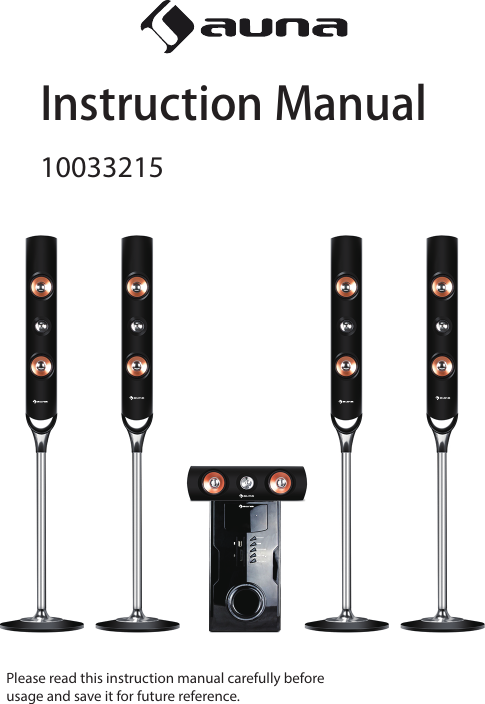
10033215Instruction ManualPlease read this instruction manual carefully beforeusage and save it for future reference.
2CONTENTSWARNING ----------------------------------------------------------------------------------------------------- 3COMPLIANCE WITH FCC REGULATIONS -------------------------------------------------------------- 4SAFETY PRECAUTIONS------------------------------------------------------------------------------------- 5INTRODUCTION --------------------------------------------------------------------------------------------- 6INTRODUCTION----------------------------------------------------------------------------------------------7USB/SD CARD OPERATION ------------------------------------------------------------------------------- 8BLUETOOTH OPERATION --------------------------------------------------------------------------------- 9AUX OPERATION -------------------------------------------------------------------------------------------- 9TROUBLE SHOOTING ------------------------------------------------------------------------------------- 10SPECIFICATIONS -------------------------------------------------------------------------------------------- 10
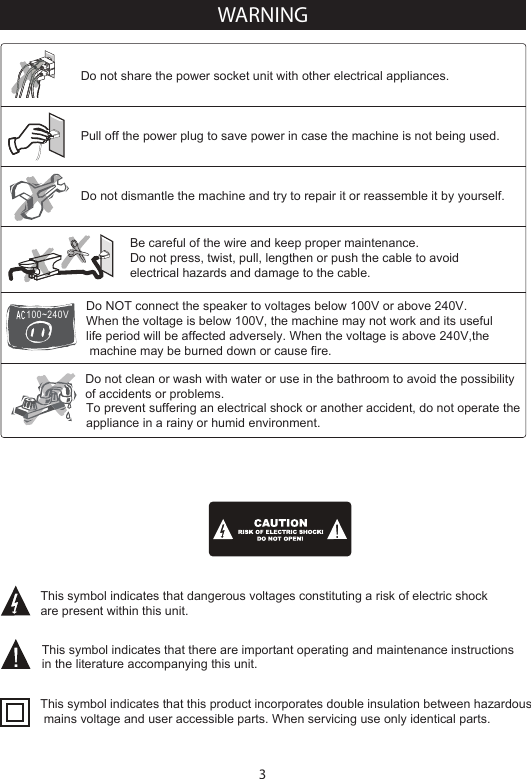
3Do NOT connect the speaker to voltages below 100V or above 240V.When the voltage is below 100V, the machine may not work and its useful life period will be affected adversely. When the voltage is above 240V,the machine may be burned down or cause fire.Be careful of the wire and keep proper maintenance.Do not press, twist, pull, lengthen or push the cable to avoid electrical hazards and damage to the cable.Do not share the power socket unit with other electrical appliances.Pull off the power plug to save power in case the machine is not being used.Do not clean or wash with water or use in the bathroom to avoid the possibility of accidents or problems.Do not dismantle the machine and try to repair it or reassemble it by yourself.To prevent suffering an electrical shock or another accident, do not operate the appliance in a rainy or humid environment.This symbol indicates that dangerous voltages constituting a risk of electric shock are present within this unit.This symbol indicates that there are important operating and maintenance instructions in the literature accompanying this unit.This symbol indicates that this product incorporates double insulation between hazardous mains voltage and user accessible parts. When servicing use only identical parts.100~240VWARNING
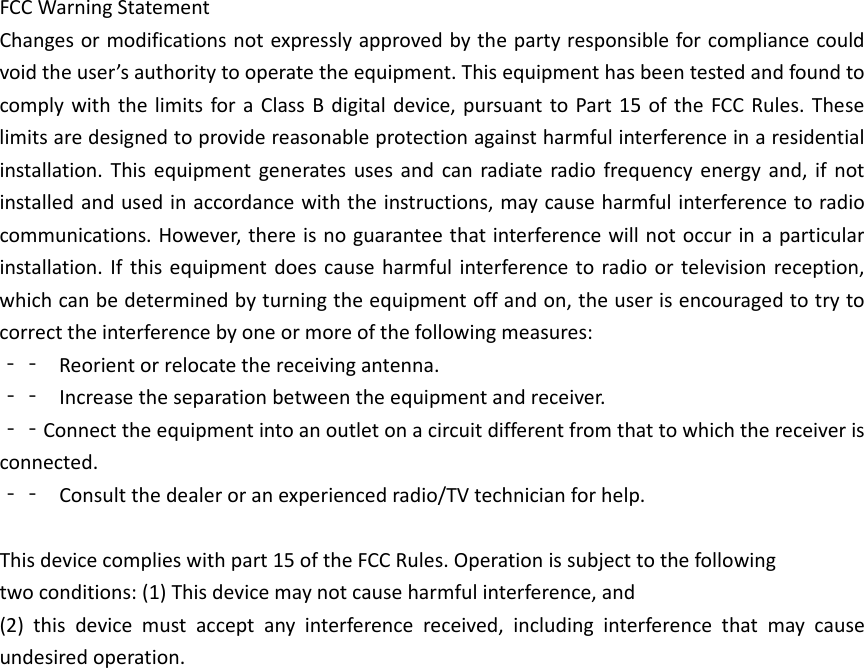
4This device complies with Part 15 of the FCC Rules. Operation is subject to the following two conditions:1.This device may not cause harmful interference, and2.This device must accept any interference received, including interference that may cause undesired operation.FCC WARNINGThis equipment has been tested and found to comply with the limits for a Class B digital device, pursuant to Part 15 of the FCC Rules. These limits are designed to provide reasonable protection against harmful interference in a residential installation. This equipment generates uses and can radiate radio frequency energy and, if not installed and used in accordance with the instructions, may cause harmful interference to radio communications.However, there is no guarantee that interference will not occur in a particular installation. If this equipment does cause harmful interference to radio or television reception, which can be determined by turning the equipment off and on, the user is encouraged to try to correct the interference by one or more of the following measures:    Reorient or relocate the receiving antenna.    Increase the separation between the equipment and receiver.    Connect the equipment into an outlet on a circuit different from that to which the receiver is     connected.    Consult the dealer or an experienced radio/TV technician for help.Caution:Changes or modifications not expressly approved by the party responsible for compliance could void the user’s authority to operate the equipment.The device has been evaluated to meet general RF exposure requirement. The devicecan be used in portable exposure condition without restriction.COMPLIANCE WITH FCC REGULATIONS
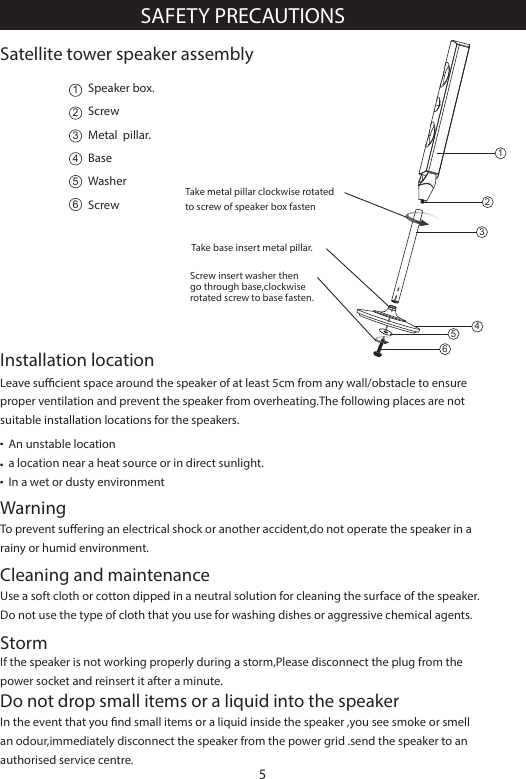
Leave sucient space around the speaker of at least 5cm from any wall/obstacle to ensure proper ventilation and prevent the speaker from overheating.The following places are not suitable installation locations for the speakers.Installation locationUse a soft cloth or cotton dipped in a neutral solution for cleaning the surface of the speaker.Do not use the type of cloth that you use for washing dishes or aggressive chemical agents.WarningTo prevent suering an electrical shock or another accident,do not operate the speaker in a rainy or humid environment.Cleaning and maintenanceIf the speaker is not working properly during a storm,Please disconnect the plug from the power socket and reinsert it after a minute.StormIn the event that you nd small items or a liquid inside the speaker ,you see smoke or smell an odour,immediately disconnect the speaker from the power grid .send the speaker to an authorised service centre.Do not drop small items or a liquid into the speakerAn unstable locationa location near a heat source or in direct sunlight.In a wet or dusty environmentSAFETY PRECAUTIONS5Satellite tower speaker assembly123456Speaker box.ScrewMetal  pillar.BaseWasherScrew123456Take base insert metal pillar.Screw insert washer then go through base,clockwise rotated screw to base fasten.Take metal pillar clockwise rotatedto screw of speaker box fasten
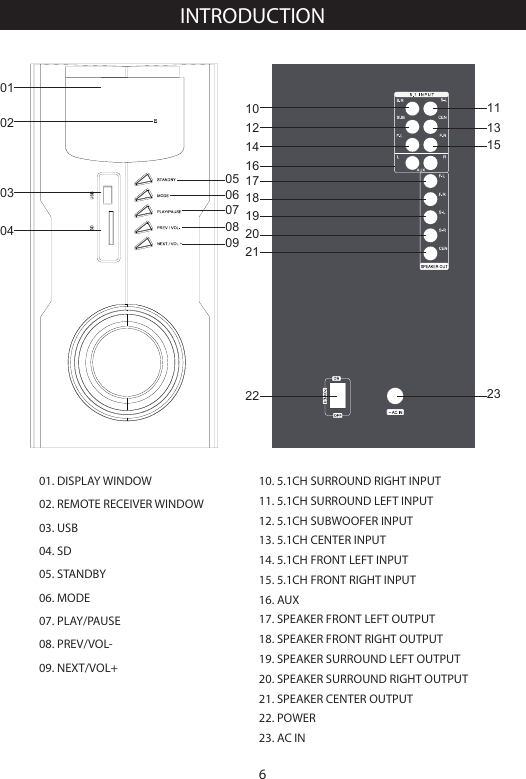
01. DISPLAY WINDOW02. REMOTE RECEIVER WINDOW03. USB04. SD05. STANDBY 06. MODE07. PLAY/PAUSE08. PREV/VOL-09. NEXT/VOL+INTRODUCTION   03010205060708090410. 5.1CH SURROUND RIGHT INPUT11. 5.1CH SURROUND LEFT INPUT12. 5.1CH SUBWOOFER INPUT13. 5.1CH CENTER INPUT14. 5.1CH FRONT LEFT INPUT15. 5.1CH FRONT RIGHT INPUT16. AUX17. SPEAKER FRONT LEFT OUTPUT18. SPEAKER FRONT RIGHT OUTPUT19. SPEAKER SURROUND LEFT OUTPUT20. SPEAKER SURROUND RIGHT OUTPUT21. SPEAKER CENTER OUTPUT22. POWER23. AC IN61012141611131718192021152322
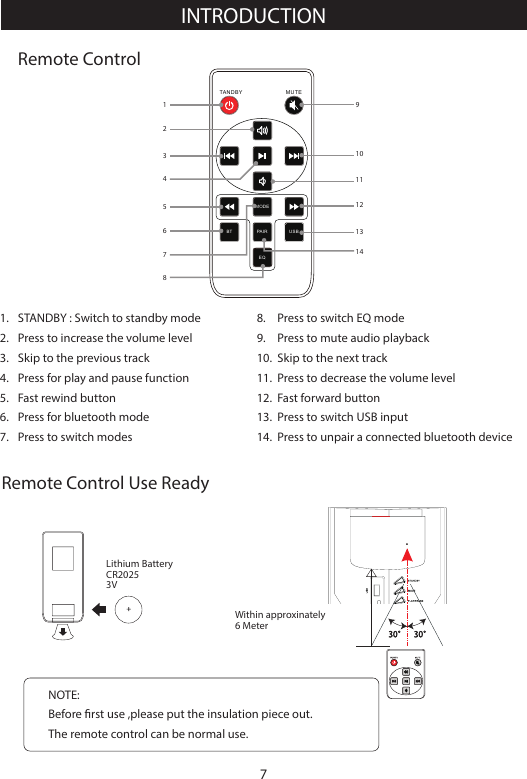
PABT IRMOD ESTANDBY MUTEUSBEQRemote ControlRemote Control Use Ready1234567891011121314STANDBY : Switch to standby modePress to increase the volume levelSkip to the previous trackPress for play and pause functionFast rewind buttonPress for bluetooth modePress to switch modes1. 2.3.4.5.6. 7. Press to switch EQ modePress to mute audio playbackSkip to the next trackPress to decrease the volume levelFast forward buttonPress to switch USB inputPress to unpair a connected bluetooth device8. 9. 10.11. 12. 13. 14. Lithium BatteryCR20253VNOTE: Before rst use ,please put the insulation piece out.The remote control can be normal use.Within approxinately6 MeterINTRODUCTION7
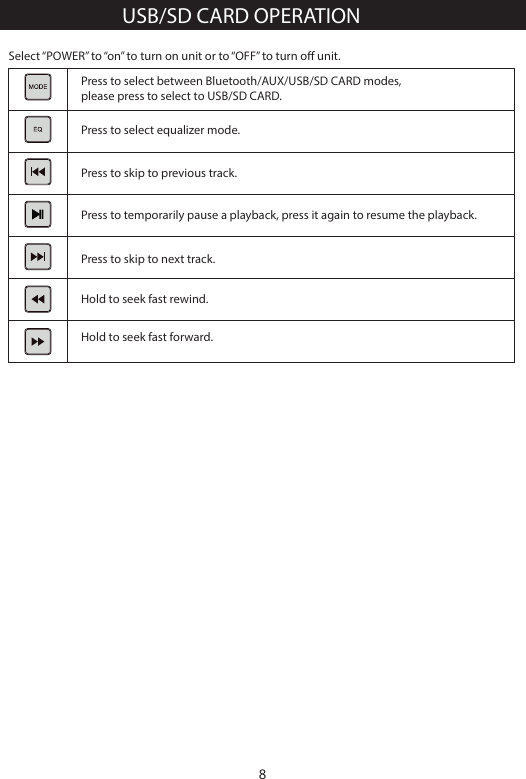
Hold to seek fast forward.Select “POWER” to “on” to turn on unit or to “OFF” to turn o unit.Press to select between Bluetooth/AUX/USB/SD CARD modes, please press to select to USB/SD CARD.Press to select equalizer mode.Press to skip to previous track.Press to temporarily pause a playback, press it again to resume the playback.Hold to seek fast rewind.Press to skip to next track.USB/SD CARD OPERATION8
BLUETOOTH OPERATIONNOTE: In Bluetooth mode, [PLAY/ PAUSE], [NEXT] and  [PREVIOUS] buttons are also active.Press to select between Bluetooth/AUX/SD CARD modes,please press to select to AUX mode.AUX OPERATIONPress to select between Bluetooth/AUX/SD CARD modes,please press to select to Bluetooth. Please connect your cellphone or Bluetooth device with unit.Press to select equalizer mode.Press to skip to previous track.Press to temporarily pause a playback; press it again to resume the playback. Hold to enter pairing modePress to dis-connect Bluetooth function with your mobile phone.Press to select equalizer mode.Press to skip to next track.The model of the unit is “ Areal Nobility ”,press [MODE] button to switch to the corresponding signal source (Bluetooth), use your enabled mobile device to search and pair the the unit by selecting The unit will synchronize play songs with your mobile device after connected successfully. Disconnect the Bluetooth connection by holding [PLAY/PAUSE] on the front panel or the remote control.NOTE: In tuner mode, [VOLUME +/-],and [MUTE] buttons are also active.9
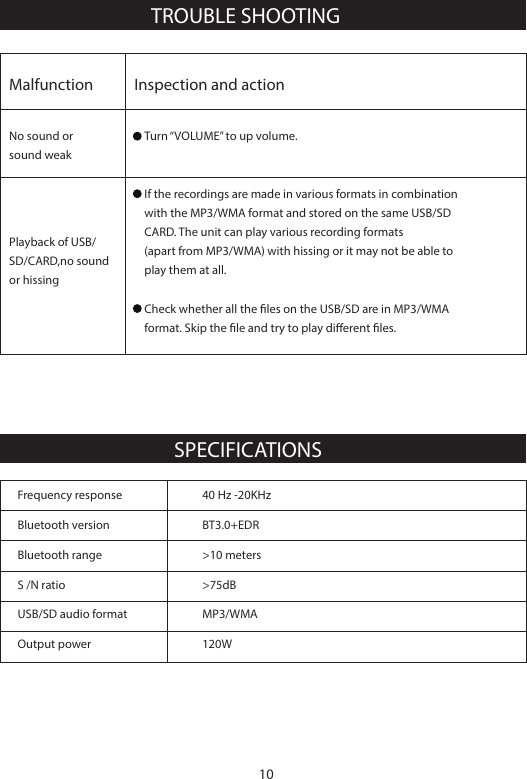
TROUBLE SHOOTINGSPECIFICATIONSFrequency response 40 Hz -20KHzBluetooth versionOutput power     120WUSB/SD audio format MP3/WMAS /N ratio  >75dBBluetooth range >10 metersBT3.0+EDRMalfunctionNo sound orsound weakPlayback of USB/SD/CARD,no sound or hissingInspection and actionTurn “VOLUME” to up volume.If the recordings are made in various formats in combination with the MP3/WMA format and stored on the same USB/SD CARD. The unit can play various recording formats (apart from MP3/WMA) with hissing or it may not be able to play them at all.Check whether all the les on the USB/SD are in MP3/WMAformat. Skip the le and try to play dierent les.10
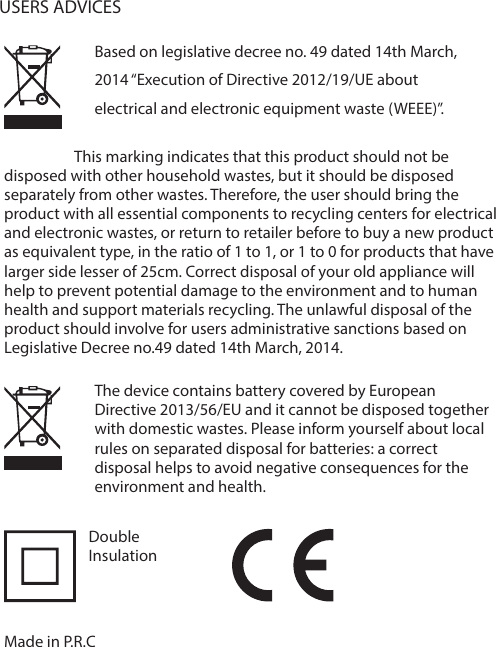
The device contains battery covered by European Directive 2013/56/EU and it cannot be disposed together with domestic wastes. Please inform yourself about local rules on separated disposal for batteries: a correct disposal helps to avoid negative consequences for the environment and health.                    This marking indicates that this product should not be disposed with other household wastes, but it should be disposed separately from other wastes. Therefore, the user should bring the product with all essential components to recycling centers for electrical and electronic wastes, or return to retailer before to buy a new product as equivalent type, in the ratio of 1 to 1, or 1 to 0 for products that have larger side lesser of 25cm. Correct disposal of your old appliance will help to prevent potential damage to the environment and to human health and support materials recycling. The unlawful disposal of the product should involve for users administrative sanctions based on Legislative Decree no.49 dated 14th March, 2014.Based on legislative decree no. 49 dated 14th March, 2014 “Execution of Directive 2012/19/UE about electrical and electronic equipment waste (WEEE)”.USERS ADVICESMade in P.R.CDoubleInsulation
FCCWarningStatementChangesormodificationsnotexpresslyapprovedbythepartyresponsibleforcompliancecouldvoidtheuser’sauthoritytooperatetheequipment.ThisequipmenthasbeentestedandfoundtocomplywiththelimitsforaClassBdigitaldevice,pursuanttoPart15oftheFCCRules.Theselimitsaredesignedtoprovidereasonableprotectionagainstharmfulinterferenceinaresidentialinstallation.Thisequipmentgeneratesusesandcanradiateradiofrequencyenergyand,ifnotinstalledandusedinaccordancewiththeinstructions,maycauseharmfulinterferencetoradiocommunications.However,thereisnoguaranteethatinterferencewillnotoccurinaparticularinstallation.Ifthisequipmentdoescauseharmfulinterferencetoradioortelevisionreception,whichcanbedeterminedbyturningtheequipmentoffandon,theuserisencouragedtotrytocorrecttheinterferencebyoneormoreofthefollowingmeasures:‐‐ Reorientorrelocatethereceivingantenna.‐‐ Increasetheseparationbetweentheequipmentandreceiver.‐‐Connecttheequipmentintoanoutletonacircuitdifferentfromthattowhichthereceiverisconnected.‐‐ Consultthedealeroranexperiencedradio/TVtechnicianforhelp.Thisdevicecomplieswithpart15oftheFCCRules.Operationissubjecttothefollowingtwoconditions:(1)Thisdevicemaynotcauseharmfulinterference,and(2)thisdevicemustacceptanyinterferencereceived,includinginterferencethatmaycauseundesiredoperation.

Navigation menu