Best Lock HC63384 B.A.S.I.S.(tm)V User Manual Exhibit D Users Manual per 2 1033 b3
Best Lock Corporation B.A.S.I.S.(tm)V Exhibit D Users Manual per 2 1033 b3
Exhibit D Users Manual per 2 1033 b3

KBV lever styles....................................................................7
Options ................................................................................7
Software overview ................................................................8
System architecture..............................................................9
Standard cards....................................................................10
Order procedure ..........................................................10, 11
Battery life chart ................................................................11
TABLE OF CONTENTS
Introduction ..................................................................2
Software and hardware features ..................................2
System components ....................................................3
HBV specifications........................................................4
HBV functions ..............................................................5
HBV lever styles ............................................................5
KBV specifications ........................................................6
KBV functions ..............................................................7
PagePage
2
STAND-ALONE EL
TABLE OF CONTENTS
FEATURES
INTRODUCTION
STAND-ALONE EL
Introducing B.A.S.I.S.™V– a highly efficient stand-alone lock system that utilizes card reader technology and is integrated
into B.A.S.I S.™2000. With B.A.S.I.S.™V, ID cards are encoded with all the necessary information to control door access.
The system integrates with virtually any existing database, and allows unsurpassed capabilities in storing and retrieving
access activity data. B.A.S.I.S.™Vinvolves no costly wiring, is easy to manage, and offers a broad range of integrated
features. In fact, everything about B.A.S.I.S.™Vwas designed to think ... so you don’t have to.
SOFTWARE FEATURES
•B.A.S.I.S.™V(an off-line system) is integrated into BEST’s on-line software, eliminating the inefficiencies of having two
separate systems – one for off-line and one for on-line.
• Dynamically integrates with most existing databases with real-time information updates, eliminating the tedious process
of re-entering user data.
• Multiple locations can be networked to conveniently access a single database.
• Complete history of access activity can easily be obtained.
• Automatic backup reduces the risk of losing data.
• Operates on a desktop PC, or laptop PC with minimal system requirements.
• Provides easy-to-use menus and dialog boxes.
• Is password protected.
• Lets you create lockset configurations, which include programming settings and a user card database, from a remote PC.
• Stores as many lockset configurations as you have disk space for.
• Programs and retrieves data from locks.
• Lets you create new lockset configurations by copying
and editing existing configurations.
• Lets many locks share the same lockset configuration.
• Can transfer data between PCs.
• Downloading and printing of history events.
• Creating standardized lock configuration templates.
HARDWARE FEATURES
• Mag stripe available as track 1 or track 2.
• Swipe reader that reads ISO standard size I.D. cards.
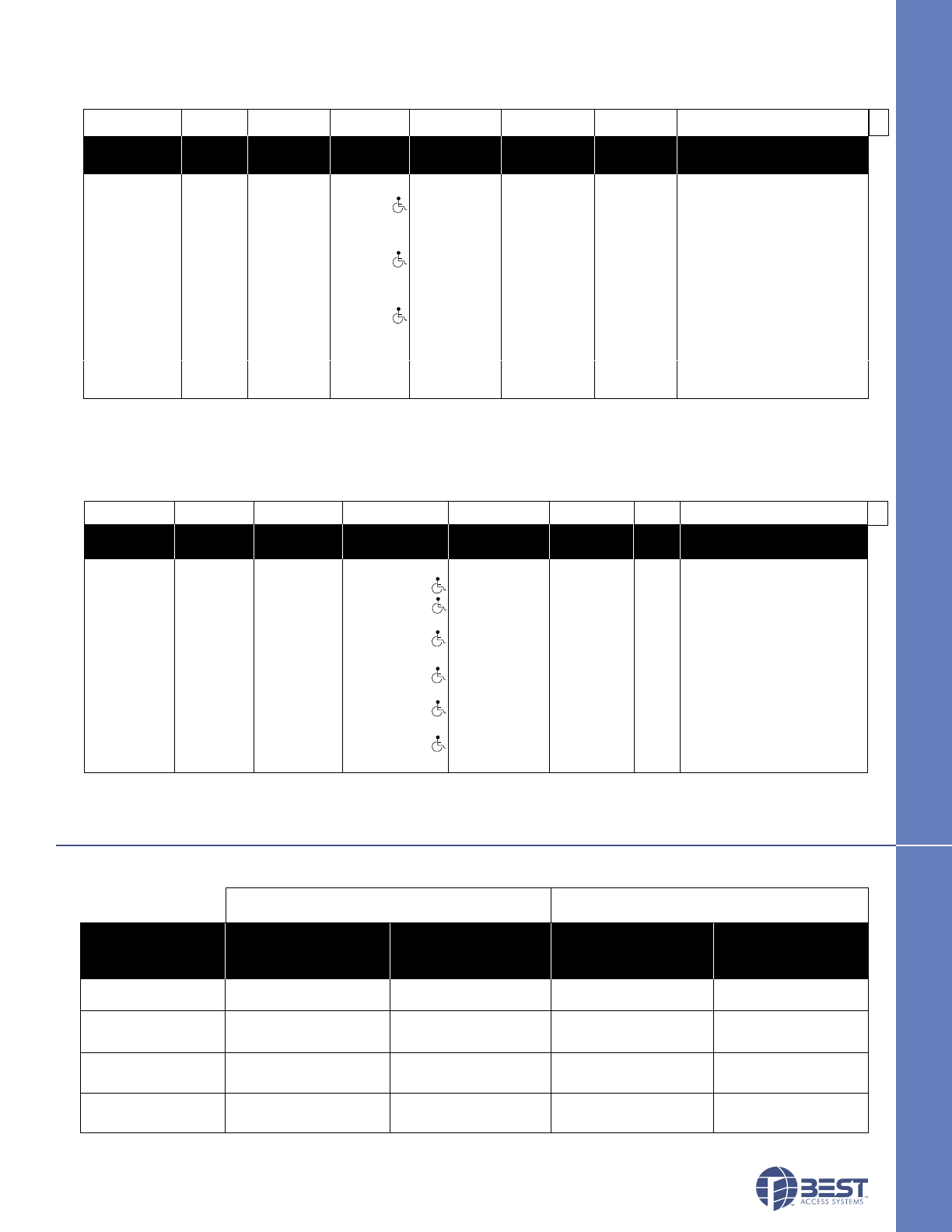
• Battery life varies depending on the token reader and chassis type chosen. (See page 11 for battery pack chart.)
• Costs are controlled by availability of replacement parts versus having to replace entire unit.
• Local factory-trained technical services are available 24 hours a day to meet any emergency need.
•B.A.S.I.S.™Vcan allow or record 5,000 users / history per lockset.
• Heavy-duty mechanical platform designed and manufactured for the toughest applications.
• Key override detection records and documents when a key is used. (Key override feature standard on B.A.S.I.S.™V.)
• Deadbolt sensing prevents access to unauthorized cards when deadbolt is thrown.
• Interchangeable core mechanical override allows for emergency access.
•B.A.S.I.S.™Vhardware is available in trims and most finishes that match BEST’s 9K cylindrical series and 30H mortise
series, providing aesthetic continuity.
• Weather-resistant for versatile applications, including doors exposed to inclement conditions.
• Available in Motorola and HID proximity readers, smart card, mag stripe card, and combination mag stripe dual keypad.
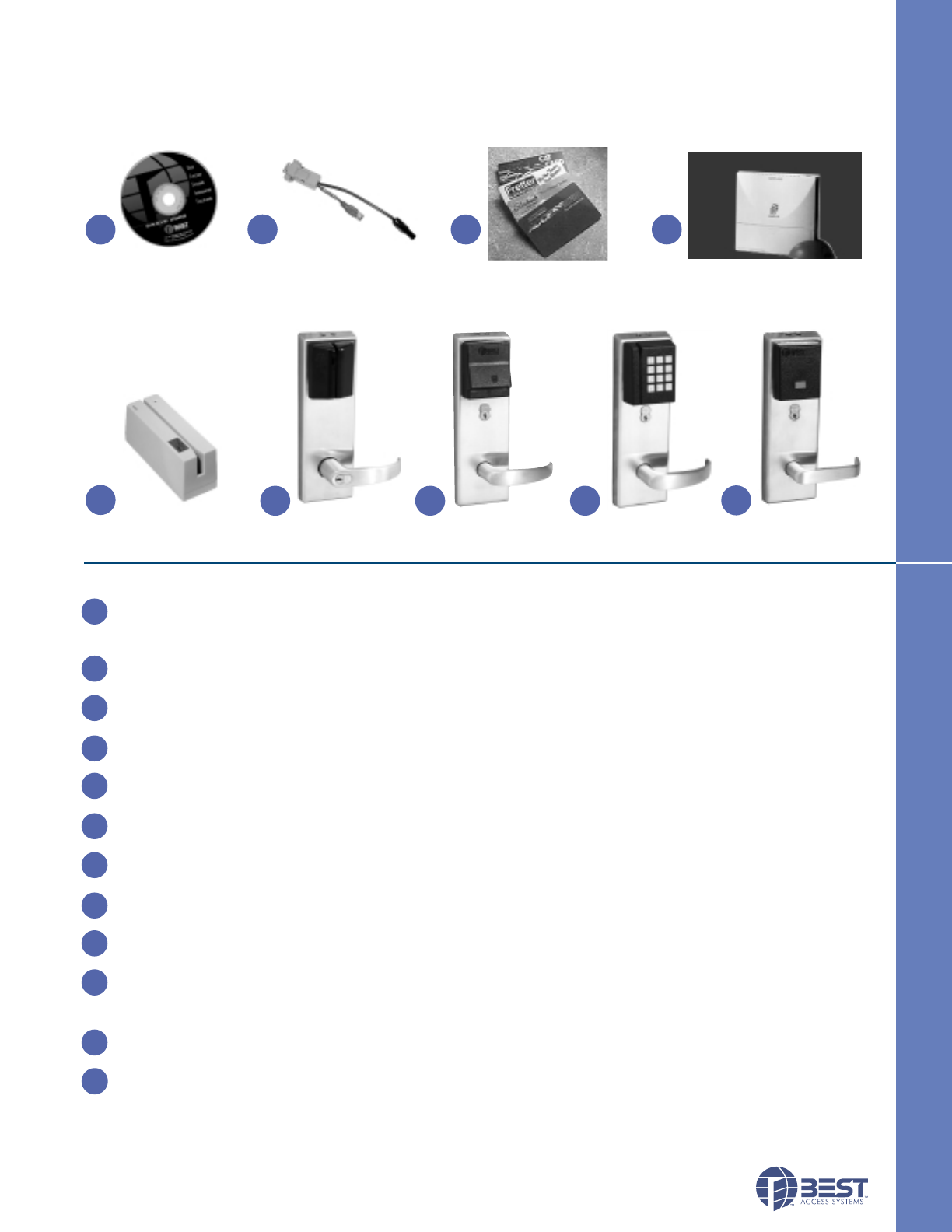
SYSTEM COMPONENTS DESCRIPTION
B.A.S.I.S. Software– Software that lets you define programming settings and the user database for groups of locks, as
well as individual locks. The software lets you view and print information about locks at any time.
(To order, contact your local Best Access Systems office.)
Programming Cable – Programming cable allows you to connect to individual locks.
(To order, contact your local Best Access Systems office.)
Smart Card Cards – A credit-card-size card with a smart card chip containing information. These cards can be encoded
and sent to the user or encoded by the user at their facility. (To order, see page 10.)
Mag Stripe Cards – A credit-card-size card with a magnetic stripe containing information. These cards can be
encoded and sent to the user or encoded by the user at their facility. (To order, see page 10.)
Proximity Cards – A credit-card-size card with a proximity chip containing information. These cards can be
encoded and sent to the user or encoded by the user at their facility. (To order, see page 10.)
Smart Card Encoder – The device that “reads”, “writes” and “erases” information on the smart card. This also
includes the software that controls the card encoder. Requires a PC B.A.S.I.S. software. (To order, see page 11.)
Mag Stripe Card Encoder – The device that “reads”, “writes” and “erases” information on the magnetic-stripe card.
This also includes the software that controls the card encoder. Requires a PC & B.A.S.I.S. software. (To order, see page 11.)
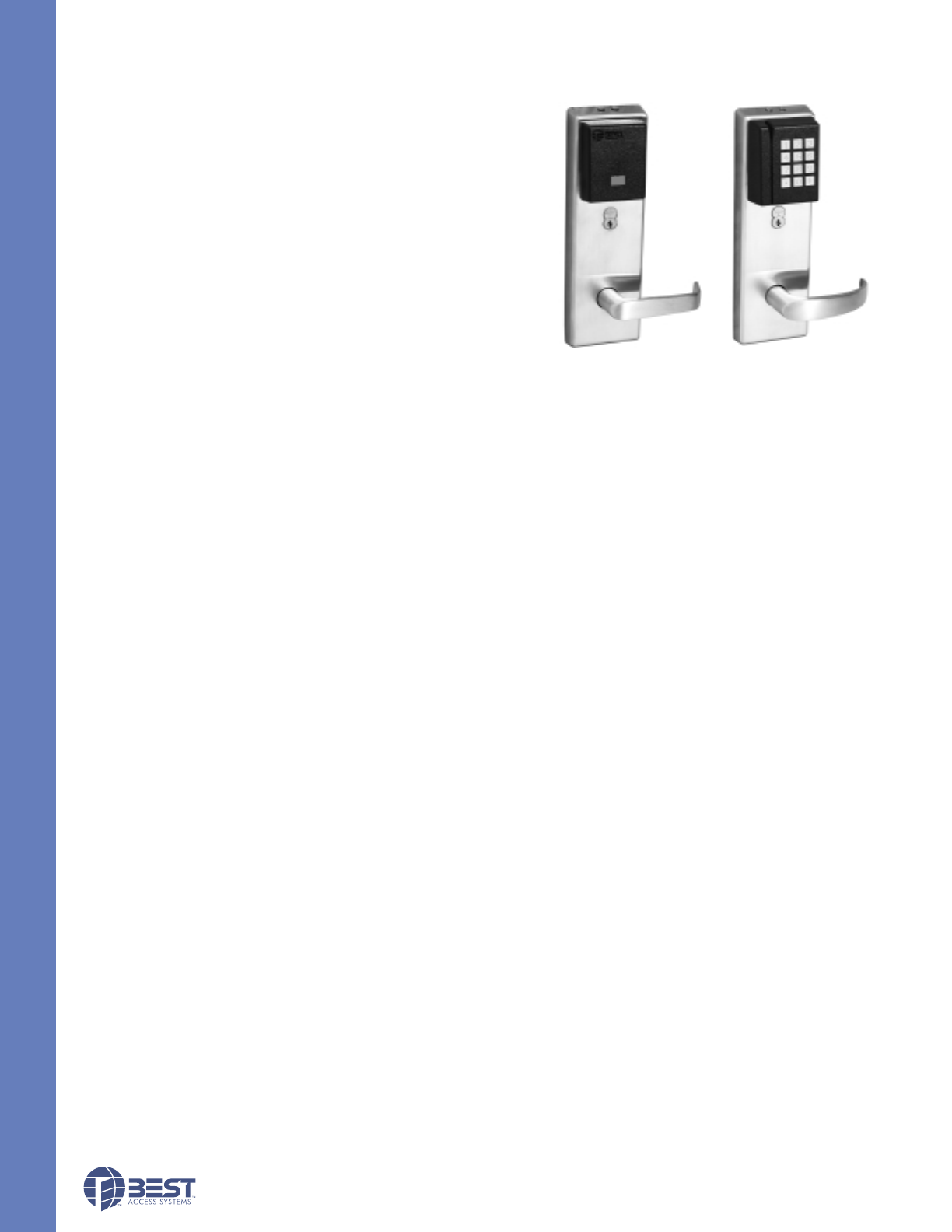
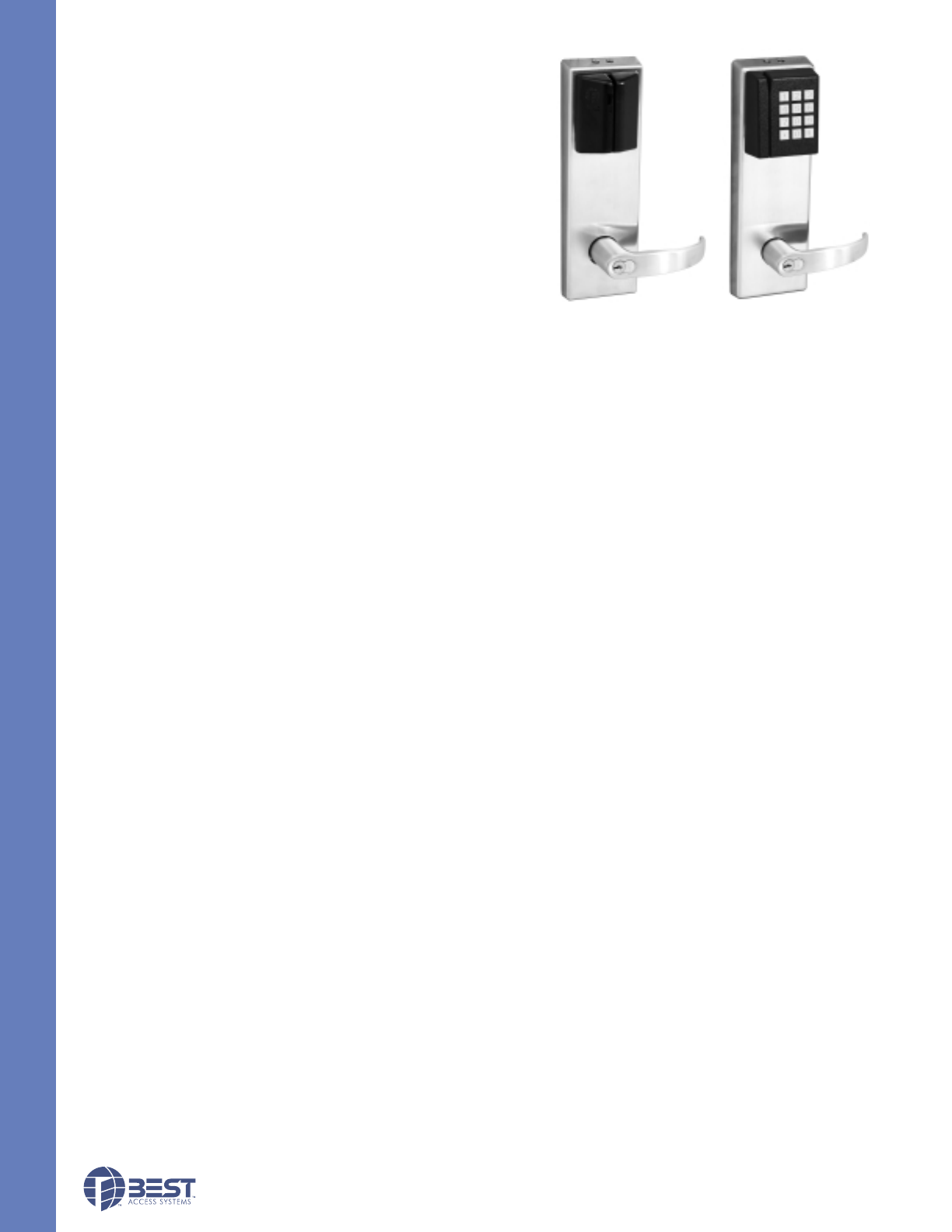
Mag Stripe Electronic Lock – A battery-powered, self-contained swipe reader electronic lock that uses standard
mag stripe cards. Controls access to door and can be programmed with B.A.S.I.S. software. (To order, see page 10.)
Smart Card Electronic Lock – A battery-powered, self-contained insertion reader electronic lock that uses smart cards.
Controls access to door and can be programmed with B.A.S.I.S. software. (To order, see page 10.)
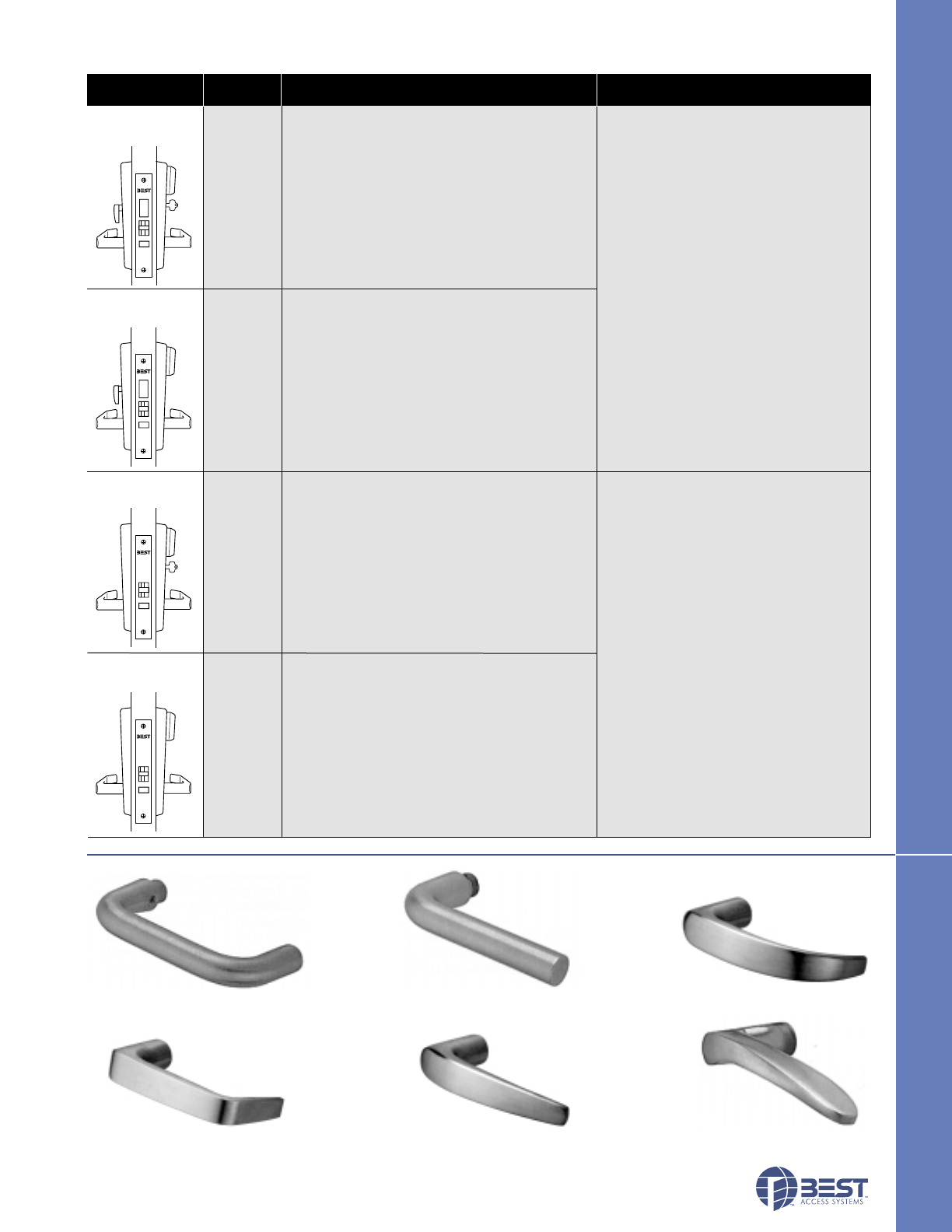
Dual Validation Reader – A battery-powered, self-contained dual validation reader electronic lock that combines standard
mag stripe and keypad validation. Controls access to door and can be programmed with B.A.S.I.S. software.
(To order, see page 10.)
Proximity Reader – A battery-powered, self-contained proximity card reader electronic lock that uses standard proximity
cards. Controls access to door and can be programmed with B.A.S.I.S. software. (To order, see page 10.)
PDA (palm top not shown) – A PDA (Personal Digital Assistant) is a palm top device that connects to a PC to transport
programming data from a B.A.S.I.S. system to the lockset or retrieve history data. The PDA can also provide diagnostic
data from the lockset. Software for the palm device is included in the B.A.S.I.S. software.
(Contact your local Best Access Systems office or visit our web site for a recommended BEST–supported device.)
3
ECTRONIC LOCKS
ECTRONIC LOCKS
SYSTEM COMPONENTS
SYSTEM COMPONENTS
The B.A.S.I.S.™VSystem is an electronic access control system that can be programmed to meet your facilities access
control needs. The system is designed to secure your facility by granting specific access rights to authorized people, based
on a defined time schedule for each lock in the system. By tracking events at the locks, the system provides information to
help you maintain the security of your facility.
Mag Stripe
Encoder
B.A.S.I.S.
Software
Mag Stripe
Electronic Lock Smart Card
Electronic Lock
Smart Card Encoder
Mag Stripe Cards/
Proximity Cards/
Smart Card Cards
COMPONENTS DESCRIPTION
1
Programming
Cable
2
67
Dual Validation
Reader Proximity
Reader
89
5
4
3
1
2
3
3
3
4
5
6
7
8
9
10
MECHANICAL
Case: Heavy wrought steel, 5 7⁄8"H x 4 1⁄4"D x 1"W steel parts are
zinc dichromate plated for corrosion protection.
Faceplate: Brass or bronze, 11⁄4"x 8"x 7⁄32". Armored. Adjustable
from flat to beveled 1⁄8"– 2".
Strike: Brass or bronze, 4 7⁄8"x 11⁄4"x 3⁄32". Fits standard door frame
cut out as specified in ANSI A115.1. Correct strike automatically
supplied with unit. Strike box supplied standard.
Door thickness: For doors 1 3⁄4"- 3"thick.
Installation: Lock requires modified door prep to mount the trim.
Faceplate dimensions fit standard door preparation as specified in
ANSI A115.1. Lockset is reversible for hand of door.
Latchbolt: Stainless steel, 3⁄4"throw with anti-friction latch.
Deadbolt: Solid stainless steel, 1"throw.
Auxiliary bolt: Stainless steel.
Die cast trim housing: Dimensions: 10 3⁄8"H x 3 1⁄4"W x 1"D
sloping down to 3⁄4".
Lever handle: Brass, bronze or stainless steel. (Lever #3, #14 and #15 conform to California Titles 19 and 24.)
Mounting: Lever attached with hardened set screw on inside knob or inside lever.
Finish: 605-bright brass, clear coated; 606-satin brass, clear coated; 611-bright bronze, clear coated; 612-satin bronze,
clear coated; 613-oxidized satin bronze, oil rubbed; 625-bright chromium plated; 626-satin chromium plated; 629-bright
stainless steel; 630-satin stainless steel.
4
STAND-ALONE EL
HBV SPECIFICATIONS
ELECTRONIC
SPECIFICATIONS FOR ALL READERS:
Primary power: Alkaline standard 4 cell or extended life cell battery pack.
Memory backup: Maintains programming and history data for up to 3 months after loss of power.
User feedback indicators: Visual and audible.
Serial communications port: Can be used to program locks individually.
Operating temperature: -35°C to +66°C (-31°F to +151°F).
Relative humidity: 10% to 90% non-condensing.
Sealing: Weatherproof lens and gasket provides protection for outdoor use.
(Usable in all environmental/exterior applications.)
Battery Life: See page 11 for battery life chart.
Dual Validation – Combination Keypad & Magstripe Reader:
Bezel size: 2 5⁄8"x 3
1⁄4".
Material: Bezel– High impact ABS. Keypad– Encapsulated elastomer.
ESD Protection: 15KV.
Button operating life: 1 million cycles.
Operating temperature: -35°C to +66°C (-31°F to +151°F).
Compliant to FCC and Canadian EMC requirements; ISO 7816, MP-COS EMV compliant; T0 & T1 protocol standard.
Magnetic Stripe Card Reader:
Read Rate: 5 inches per second to 50 inches per second.
Card thickness: ISO standard .030"±.003 thick.
Compliance to FCC, Canadian, and European EMC requirements; for interference FCC Class A digital apparatus.
Proximity Reader:
Bezel size: 2 5⁄8"x 3
1⁄4"
Material: Bezel–High impact ABS.
ESD Protection: 15KV.
Reader range: Card reader range 0"– 3".
Compliance to FCC, Canadian, and European EMC requirements; for interference FCC Class A digital apparatus.
Smart Card Reader – Contacted Insertion Reader:
Operating temperature (exterior side of door): -35°C to +66°C (-31°F to +151°F).
Smart card adaptation: Trim option that can accept other manufacturers’ cylinder.
Compliant to FCC and Canadian EMC requirements; ISO 7816, MP-COS EMV compliant; T0 & T1 protocol standard.
HBV SPECIFICATIONS
STAND-ALONE EL
Proximity Reader Dual Validation Reader
5
ECTRONIC LOCKS
HBV FUNCTIONS
ECTRONIC LOCKS
Latch w/o
key override
Deadbolt w/o
key override
Deadbolt w/
key override
Latch w/key
override Internal motor drive mechanism operated
by electronic signal, when presenting valid
card. Green light indicates valid access.
Red light and sounder indicate invalid
access attempt. Lock records card
number, time, date and type of event.
HBV FUNCTIONS
Latchbolt operated by lever either side,except
when outside lever is locked by internal motor
drive mechanism; latchbolt is retracted by key
outside. Deadbolt operated by key outside and
turn lever inside. When deadbolt is extended,
turning inside lever or electronically unlocked
outside lever retracts both deadbolt and
latchbolt simultaneously. Auxiliary latch
deadlocks latchbolt.
Internal motor drive mechanism
operated by electronic signal when
presenting valid card. Green light
indicates valid access. Red light and
sounder indicate invalid access attempt.
Lock records card number, time, date
and type of event. Electronic sensor
recognizes whether deadbolt is
retracted or thrown. Lock grants access
only to deadbolt-authorized personnel
when deadbolt is thrown.
Latchbolt operated by lever either side, except
when outside lever is locked by internal motor
drive mechanism. Deadbolt operated by turn
knob inside. When deadbolt is extended,
turning inside lever or electronically unlocked
outside lever retracts both deadbolt and
latchbolt simultaneously. Auxiliary latch
deadlocks latchbolt.
FV
LV
Latchbolt operated by lever either side, except
when outside lever is locked by internal motor
drivemechanism. Auxiliary latch deadlocks the
latchbolt.
NV
EV
Latchbolt operated by lever either side,except
when outside lever is locked by internal motor
drive mechanism; latchbolt is retracted by key
outside. Auxiliary latch deadlocks the latchbolt.
Diagram Function Mechanical Electronic
Code
HBV LEVER STYLES
#15 lever #16 lever #17 lever
#3 lever #12 lever #14 lever
HBV LEVER STYLES
6
STAND-ALONE EL
MECHANICAL
Materials: Internal parts are brass, zinc or corrosion-treated steel.
Chassis: 2 1⁄16"diameter to fit 2 1⁄8"diameter hole in door.
Strike: Brass or bronze, 4 7⁄8"x 1 1⁄4"x 3⁄32". Fits standard door
frame cut out as specified in ANSI A115.1. Correct strike
automatically supplied with unit. Strike box supplied standard.
Backset: 2 3⁄4"standard. 3 3⁄4"and 5"available.
Door thickness: For doors 1 3⁄4"- 2 1⁄4"thick.
Installation: Lock dimensions requires modified door prep,
ANSI A156.2 Series 4000, Grade 1 to mount housing.
Latchbolt: 9⁄16"throw.
Die cast trim housing: Dimensions: 10 3⁄8"H x 3 1⁄4"W x 1"D sloping
down to 3⁄4".
Lever handle: Made from high-quality zinc alloy. Body is
approximately 1 5⁄8"in diameter. Handle is approximately 4 3⁄4"in length (from center-line of chassis).
(Lever #3, #14 and #15 conform to California Titles 19 and 24.)
Finish: 605-bright brass, clear coated; 606-satin brass, clear coated; 611-bright bronze, clear coated; 612-satin bronze,
clear coated; 613-oxidized satin bronze, oil rubbed; 625-bright chromium plated; 626-satin chromium plated.
ELECTRONIC
SPECIFICATIONS FOR ALL READERS:
Primary power: Alkaline standard 4 cell or extended life cell battery pack.
Memory backup: Maintains programming and history data for up to 3 months after loss of power.
User feedback indicators: Visual and audible.
Serial communications port: Can be used to program locks individually.
Operating temperature: -35°C to +66°C (-31°F to +151°F).
Relative humidity: 10% to 90% non-condensing.
Sealing: Weatherproof lens and gasket provides protection for outdoor use.
(Usable in all environmental/exterior applications.)
Battery Life: See page 11 for battery life chart.
Dual Validation – Combination Keypad & Magstripe Reader:
Bezel size: 2 5⁄8"x 3
1⁄4".
Material: Bezel– High impact ABS. Keypad– Encapsulated elastomer.
ESD Protection: 15KV.
Button operating life: 1 million cycles.
Compliant to FCC and Canadian EMC requirements; ISO 7816, MP-COS EMV compliant; T0 & T1 protocol standard.
Magnetic Stripe Card Reader:
Read Rate: 5 inches per second to 50 inches per second.
Card thickness: ISO standard .030"±.003 thick.
Compliance to FCC, Canadian, and European EMC requirements; for interference FCC Class A digital apparatus.
Proximity Reader:
Bezel size: 2 5⁄8"x 3
1⁄4"
Material: Bezel–High impact ABS.
ESD Protection: 15KV.
Reader range: Card reader range 0"– 3".
Compliance to FCC, Canadian, and European EMC requirements; for interference FCC Class A digital apparatus.
Smart Card Reader – Contacted Insertion Reader:
Operating temperature (Exterior side of door): -35°C to +66°C (-31°F to +151°F).
Smart card adaptation: Trim option that can accept other manufacturers’ cylinder.
Compliant to FCC and Canadian EMC requirements; ISO 7816, MP-COS EMV compliant; T0 & T1 protocol standard.
Magnetic Stripe Reader
KBV SPECIFICATIONS
KBV SPECIFICATIONS
Dual Validation Reader
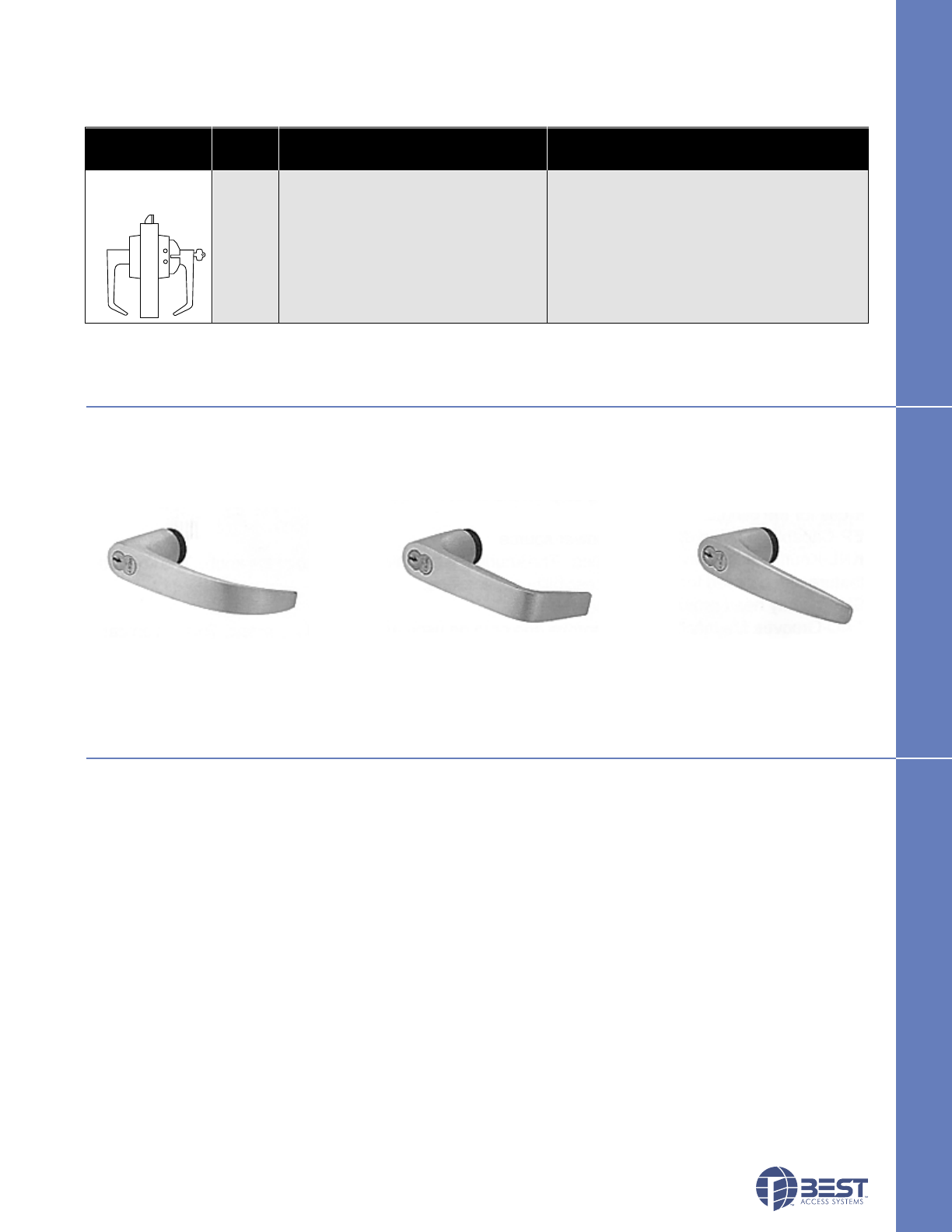
Diagram Function Mechanical Electronic
Code
7
ECTRONIC LOCKS
KBV FUNCTIONS
KBV FUNCTIONS
OPTIONS
AL– Abrasive levers from Best Access Systems are available with a special abrasive feature. Abrasive strip on the lever
immediately identifies warnings on doors to hazardous areas for the blind.
FM– The Free Motion feature allows the lever handle to move 45 degrees from parallel to the horizontal plane without
engaging the latchbolt assembly. When the lockset is in the locked mode, this feature makes over-torque or
over-leverage abuse more difficult to achieve. (Lower cost option.)
SH– Security head screws provided for all exposed screws.
Thick door– Specify thickness if other than 1 3⁄4".
TL– Tactile levers may be used in areas where improved grip is required or as a warning in hazardous or Safety First
areas. Grooves are machined into the back of the hand grasp portion of the lever to improve grip and/or provide a
sensory warning. This option can be used for blind, safety, or accessibility applications.
OPTIONS
#14 lever #15 lever #16 lever
KBV LEVER STYLES
KBV LEVER STYLES
Cylindrical Latch
w/key override DV Dead locking latchbolt operated by lever Internal motor drive mechanism operated by
either side, except when outside lever is time-activated electronic signal, or presenting
locked by internal motor drive mechanism; valid card/PIN. Green light indicates valid
latchbolt is deadlocked. access. Red light and sounder indicate invalid
access attempt. Lock records card/PIN number,
time, date and type of event.

The next generation of security & facility management systems
Best Access Systems Integrated Solutions (B.A.S.I.S.) system for Microsoft Windows®2000, NT 4.0 and Windows®98
combines the power of access control, alarm monitoring, ID card production, and personnel management into a single
seamlessly integrated software solution! One powerful and easy-to-use system allows you to create and encode
identification cards, assign cardholders access to restricted areas, and monitor security zones. This comes complete with
context-sensitive help.
Seamless integration means single system efficiency
A single seamlessly integrated solution for badge creation, ID management, access control, and alarm monitoring. Every
step is simplified, easy to perform, and tightly integrated to provide optimum efficiency and maximum security. This uses
a single database server to ensure data integrity, allow for real time security operations, and simplify system administration
tasks.
Truly distributed network architecture
Wiring from access control panels does not have to run to a central host computer, unlike traditional systems that must
have all panels wired to a single PC. This allows you to control access to any secured area and monitor any alarm from any
PC on the network.
Open architecture design means optimum flexibility
Supports an unlimited number of workstations, card readers, and cardholders. Its modularity allows you to easily upgrade or
add equipment at any time, without replacing the software. It works with any industry standard network protocol and
supports all industry standard ID card and reader technologies, including Wiegand, Proximity, bar code, and magnetic
stripe. It also supports industry standard databases including Microsoft SQL Server, Oracle Server, and Microsoft Access.
Easiest-to-use graphical user interface in the Industry
Using the keyboard or mouse, every important task can be accomplished in one or two steps! There are no overlapping
windows, confusing nested screens, or excessive menu options found in other systems.
Multimedia integration
Real-time, dynamic graphical maps mean that the graphical map screen will not have to repaint or refresh each time a new
alarm or event condition occurs. It supports customized voice alarm annunciation and flashing colored system icons for
each alarm that occurs. It also supports text instructions and pre-recorded audio voice instructions. It integrates real-time
live video user verification into alarm monitoring to allow guards to monitor cardholder activity in secure areas.
Seamless migration path
Upgrading is fast, efficient, and easy. All systems are 100% upwardly compatible. Even the graphical user interface is
identical for all systems, meaning the upgrades are virtually transparent to the user.
Hot standby, fault tolerant server architecture
Supports a fault tolerant server and redundant database architecture to allow for normal operations to occur in the event
that the database server fails. In the event of a server failure, it will automatically switch over to a backup server.
A complete solution
• Windows®2000, NT 4.0 and Windows®98 based • Configuration Wizards • Complete Reporting Capabilities
• Simple Operation, Maximum Security • Multi-Technology Cards • Data Import/Export Capabilities
• Supports Standard ID Card Technologies • Magnetic Stripe • Proximity
• Wiegand • Bar-code
E-Visitor
E-Visitor is an Internet-based solution that allows enterprise visitors to be enrolled and managed through standard Web
browsers. E-Visitor uses a customer’s existing desktop infrastructure, which means no additional software or hardware
installation is required for existing client workstations. Other advanced features of E-Visitor include visitor pre-enrollment,
visitor tracing, complete reporting capabilities and automatic e-mail notification of impending visits. E-Visitor provides the
ability to customize the system’s visitor screens and badge layouts according to the individual needs of the installation.
Asset Management
Asset Management is the only seamlessly integrated solution that is fully IBM Asset ID® enabled, utilizing HID RS-485
RFID technology. Asset tracking allows both an asset and the employee to which it is assigned, to be traced throughout an
enterprise. Asset Management delivers a truly distributed system architecture with which all asset decision-making
occurs in the Intelligent Asset Controller devices. Asset Management supports multiple asset control technologies and
has complete reporting capabilities.
8
STAND-ALONE EL
Laptop Computer
SOFTWARE OVERVIEW
SOFTWARE OVERVIEW
Programming Cable B.A.S.I.S Software PDA Photo ID Cards

Digital Video Management
Video Management is a Windows®NT-based Digital Video Management system that
seemlessly integrates with the Access Control & Alarm Monitoring and Asset
Management applications, which collectively uses a single database and one graphical
user interface. Video Management is the only solution in the industry that can link
digital video with access control alarms and events in real time. In addition, Video
Management can display live and pre-recorded video directly on alarm monitoring
workstations.
Open Architecture
B.A.S.I.S. was developed to be a true open architecture system and supports industry
standards for databases, networks, ID card printers, and video cameras. There is no
customized or proprietary PC or ID badge creation software or hardware required to
make the SYSTEM operate. The software was written to operate on a Windows®NT
multi-tasking, multi-threading 32-bit operating system as a true, native 32-bit, application.
B.A.S.I.S. is both scalable and portable to give the Customer the ability to increase performance based on customer
requirements. This gives the customer maximum flexibility and room for unlimited growth.
Open Database Connectivity Compliance
B.A.S.I.S. is Open Database Connectivity (ODBC) compliant and supports any relational database management system
with the proper 32-bit ODBC drivers. Examples of these databases include, but are not limited to, Microsoft SQL Server
and Oracle Server. These databases, through ODBC, are true client/server, high performance databases capable of
handling high transaction rates and multiple users concurrently accessing and modifying the database. The SYSTEM also
employs advanced database segmentation functionality. Each segment is allowed to have its own unique set of hardware
and system parameters, regardless of the ISC that generated the event.
Graphical User Interface
B.A.S.I.S. has an easy to use Windows Graphical User Interface. It is intuitive and all messages and commands are in
English prose. All functions are both keyboard and mouse driven. Within the alarm monitoring module of the SYSTEM, all
major functions can be accomplished in one or two mouse clicks. Help icons are available in all modules of the software
giving System Operators the ability to obtain on-line help with a single click of the mouse. Upgrading B.A.S.I.S. from
system level to system level is efficient, easy, and requires only a change in the software / hardware license key code for
the application portion of the SYSTEM.
Advanced Network Architecture
B.A.S.I.S. has been designed to allow it to work with any industry standard network protocol and topology such as TCP/IP,
Novell NetWare (IPX/SPX), and Digital (Pathworks). The SYSTEM supports an advanced distributed network architecture,
whereas Intelligent System Controllers (ISC) do not need to be home-run wired back to the database server. ISCs can be
wired to any Windows NT based PC that is licensed to run the software. The SYSTEM supports Remote Dial Up operations
to and from the ISC. The dial up connection can be either a constant connection or a scheduled connection. Also,
Intelligent System Controllers (ISC) can be connected to a Local Area Network/Wide Area Network via industry standard
TCP/IP communication protocol. Network based ISCs are able to communicate back with the database server through
industry standard network switches and routers and do not have to be on the same subnet, which means that any alarm in
the SYSTEM can be routed to any workstation(s) on the network.
Bi-Directional Data Interface
B.A.S.I.S. supports a bi-directional data interface to external databases such as Human Resources, Time & Attendance,
and Food Service Systems. The interface can be placed on a schedule to automatically import data into or export data out
of the SYSTEM database as needed.
Seamless Integration
All B.A.S.I.S. application modules, features, and functions are generated from a single source code set. The access
control, alarm monitoring, and ID management modules of the software are created from this single source code set. All
SYSTEM data reside in a single database on the network and are instantly accessible to every/any workstation connected
to the network which is licensed to do so. This provides automatic change propagation to all workstations on the SYSTEM
as well as a common database to consolidate all information and allow for better disaster recovery. This means that any
modifications made to either cardholders, time zones, or access levels are downloaded in real-time to all Intelligent Field
Panels.
9
ECTRONIC LOCKS
SYSTEM ARCHITECTURE
SYSTEM ARCHITECTURE
Access Control
10
STAND-ALONE EL
BV SERIES CARDS AND CARD OPTIONS
BV SERIES SYSTEM
BV SERIES ACCESSORIES
(not shown)
ORDER PROCEDURE
ORDER PROCEDURE
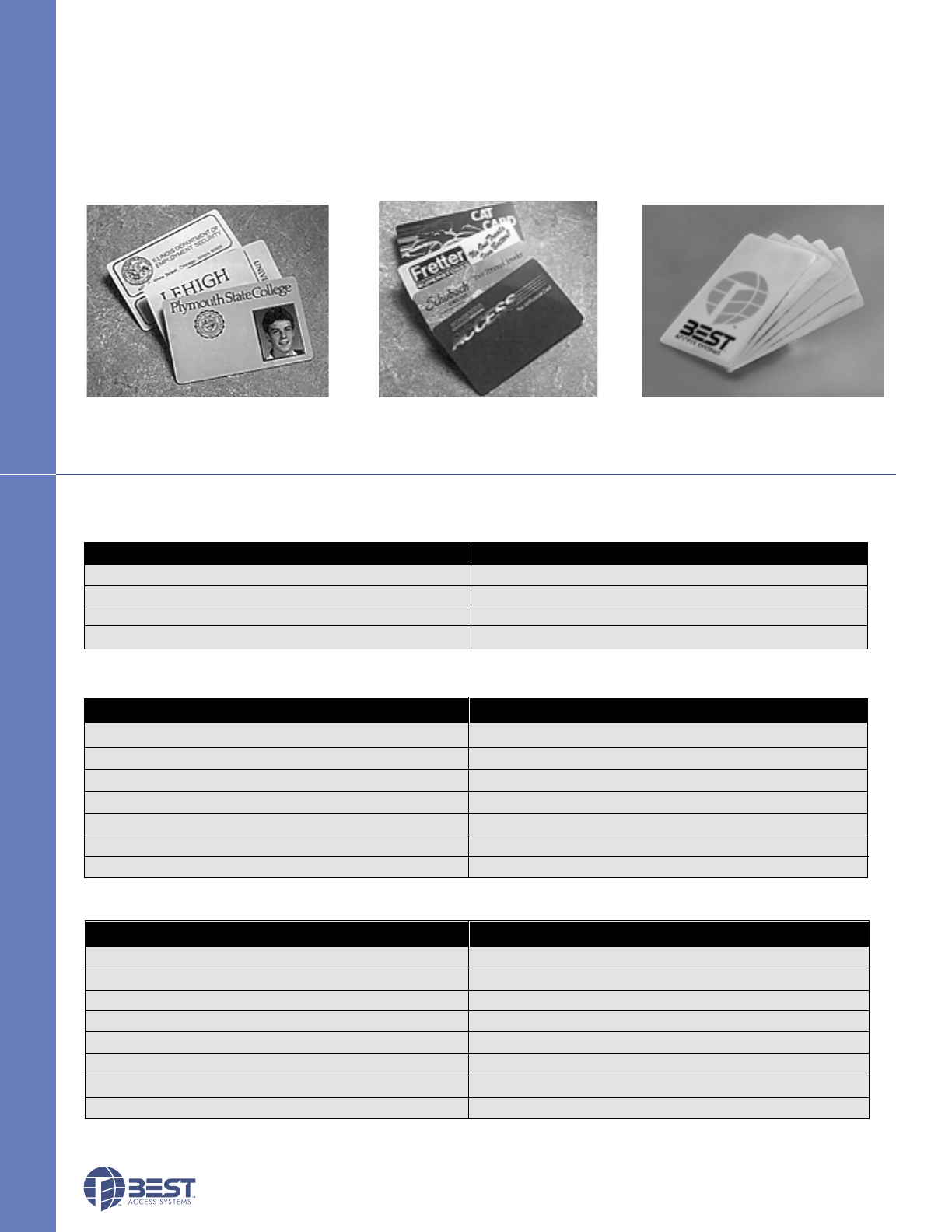
Custom Graphics Card Best Serialized Cards
Magnetic Strip / Proximity /
Smart Card
Card Specifications:
• Standard credit card size
• ISO standard .030" ±.003 thickness (PVC or Polyester)
• High coercivity ABA 3 tracks
STANDARD CARDS
STANDARD CARDS
Photo I.D. Card
Part Description Catalog Number
PVC - (Box of 500) VPA – PVC
Polyester - (Box of 500) VPA – POLY
Photo Identification/Custom Graphics*VPA – CUST
HID ProxCard® II Proximity Card 1326*VPA – HID – 1326
HID DuoProx® II Proximity Card 1336*VPA – HID – 1336
Motorola Image 30™Proximity Card ISO-30+*VPA – MOT – ISO30
Motorola LifeTime™Proximity Card ASC-121T+*VPA – MOT – ASC121T
Smart Card®* VPA – SC
*Special quote; contact local Best Access Systems office
Part Description Catalog Number
McGard™ Battery Door Screw (Specify Finish) VPD – HS – SCRW
McGard™ Driver Bit VPD – HS – DRVR
Standard Driver Bit VPD – T15
Cleaning Cards (Box of 50) VPD – CLN
Electrostatic Discharge (ESD) Kit VPD – ESD
Replacement Battery Pack VPD – BB
Extended Battery Pack VPD – EXBB
Part Description Catalog Number
Programming Cable BASD – CAB
Mag Stripe Encoder BASD – MSE
Smart Card Encoder BASD – SCE
B.A.S.I.S. Software BAS – SWS – V
11
ECTRONIC LOCKS
ORDER PROCEDURE
BATTERY LIFE CHART
ORDER PROCEDURE
Magstripe
Smart Card
Proximity
Dual Val
65,000 / 2–5 yrs.
62,000 / 2–5 yrs.
50,000 / 2–3.5 yrs.
65,000 / 2–5 yrs.
130,000 / 3–5 yrs.
110,000 / 3–5 yrs.
75,000 / 2–3.5 yrs.
130,000 / 3–5 yrs.
130,000 / 3–5 yrs.
120,000 / 3–5 yrs.
95,000 / 2–5 yrs.
130,000 / 3–5 yrs.
250,000 / 4–5 yrs.
225,000 / 4–5 yrs.
145,000 / 3–5 yrs.
250,000 / 4–5 yrs.
Reader Cylinder Mortise Cylinder Mortise
Cycles, Years Cycles, Years Cycles, Years Cycles, Years
BATTERY LIFE CHART
Standard Battery Pack Extended Battery Pack
(Page 7) (Page 7) (Page 7)
(Page 5) (Page 5) (Page 4) (Page 4) (Page 7)
HBV
35HBV 7 FV 14 MS 626 RH **
Series Core Function Lever Trim Finishes*** Hand Options
Housing Code Style Style
35HBV– lever 0– keyless EV– latch 3– solid tube MS– magnetic * 605 * 606 RH AL– abrasive lever (N/A 613)
7– 7 pin w/key w/ return stripe * 611 * 612 RHRB EXBB– extended battery pack
housing FV– deadbolt 12– solid tube PM– proximity, * 613 * 625 LH SH– security head screws*
w/key NV– latch 14– curved Motorola 626 629 LHRB Thick door– specify if other
w/o key w/return PH– proximity, 630 690 than 1 3/4" *
LV– deadbolt 15– contour w/ HID TL– tactile lever*(#14,#16)
w/o key angle return DV– dual Proximity Reader Only
16– curved validation ABA, 26 bit Weigand, 37 bit
no return Weigand
17– gullwing no
return
* Extra cost option.
** Must specify key mark and number of patented/standard keys.
*** Escutcheons are made from a zinc alloy and have been plated to be equivalent in appearance to the finishes listed.
KBV
93KBV 7 DV 14 MS STK 626 **
Series Core Function Lever Trim Strike Finishes*** Options
Housing Code Style Style Package
93KBV–2
3/4"7– 7 pin DV–14– curved MS– magnetic STK–standard *605 *606 AL– abrasive lever (N/A 613)
94KBV–3
3/4" * housing cylindrical return stripe S3–ANSI *611 *612 EXBB– extended battery pack
95KBV–5" * latch w/key 15– contour PM– proximity *613 * 625 FM– free motion †
override angle Motorola 626 690 SH– security head screws*
return PH– proximity TL– tactile lever*(#14,#16)
16– curved HID Thick door-specify if other
no return DV– dual than 1 3/4" *
validation 3/4–3/4"throw *
Proximity Reader Only
ABA, 26 bit Weigand, 37 bit
Weigand
* Extra cost option.
** Must specify key mark and number of patented/standard keys.
*** Escutcheons and levers are made from a zinc alloy and have been plated to be equivalent in appearance to the finishes listed.
† Lower cost option.
(Page 6) (Page 6 )(Page 6)

BEST ACCESS SYSTEMS
Indianapolis, Indiana
1
Planning the installation
Contents
These installation instructions describe how to install your
B.A.S.I.S. G (93KG–95KG) or B.A.S.I.S. V (93KBV–95KBV)
Cylindrical Lock. The following topics are covered.
Planning the installation................................................ 1
Preparing the door and door jamb ................................ 2
Installing the lock............................................................ 6
Completing the installation............................................9
Site survey
Use the following survey to record information about the
installation site. You need this information to determine
how to prepare the door for the lock.
Door information
Door handing and bevel:
❑Left hand (LH)
❑Left hand, reverse bevel (LHRB)
❑Right hand (RH)
❑Right hand, reverse bevel (RHRB)
Door thickness: inches (1 3/4″ to 2 1/4″)
Environment information
Ambient temperature:
❑Is within specifications. See the tables below.
This product meets the following Locked Door Outdoor
test requirements for ANSI/BHMA 156.25:
This product meets the following Full Indoor test
requirements for ANSI/BHMA 156.25:
Side of door Range
Inside +66°F to +74°F (+19°C to +23°C)
Outside –31°F to +151°F (–35°C to +66°C)
Side of door Range
Inside and outside +32°F to +120°F (0°C to +42°C)
Components checklist
Use the following checklist to make sure that you have the
items necessary to install your B.A.S.I.S. Cylindrical Lock.
Components provided in the box:
❑Chassis with outside lever and outside rose liner
assembly
❑Inside escutcheon assembly
❑Battery compartment door
❑Battery pack
❑Inside rose liner
❑Outside escutcheon assembly
❑Inside lever
❑Throw member package
❑Latch
❑Plastic bushing package
❑Escutcheon screw package
❑Strike package
❑Bar code ID sticker (for your records)
❑Temporary operator card
❑Installation template and instructions
Other components:
❑Core
❑Control key
Special tools checklist
Use the following checklist to make sure that you have the
special tools necessary to install your B.A.S.I.S. Cylindrical
Lock.
❑KD303 Drill jig
❑T15 TORX® bit driver†
❑KD325 Strike plate locating pin
❑KD315 Faceplate marking chisel
† TORX is a registered trademark of the Camcar
Division of Textron.
Installation Instructions for
B.A.S.I.S. Cylindrical Locks
Installation Instructions for B.A.S.I.S. Cylindrical Locks
BEST ACCESS SYSTEMS
Indianapolis, Indiana
Preparing the door and door jamb
2
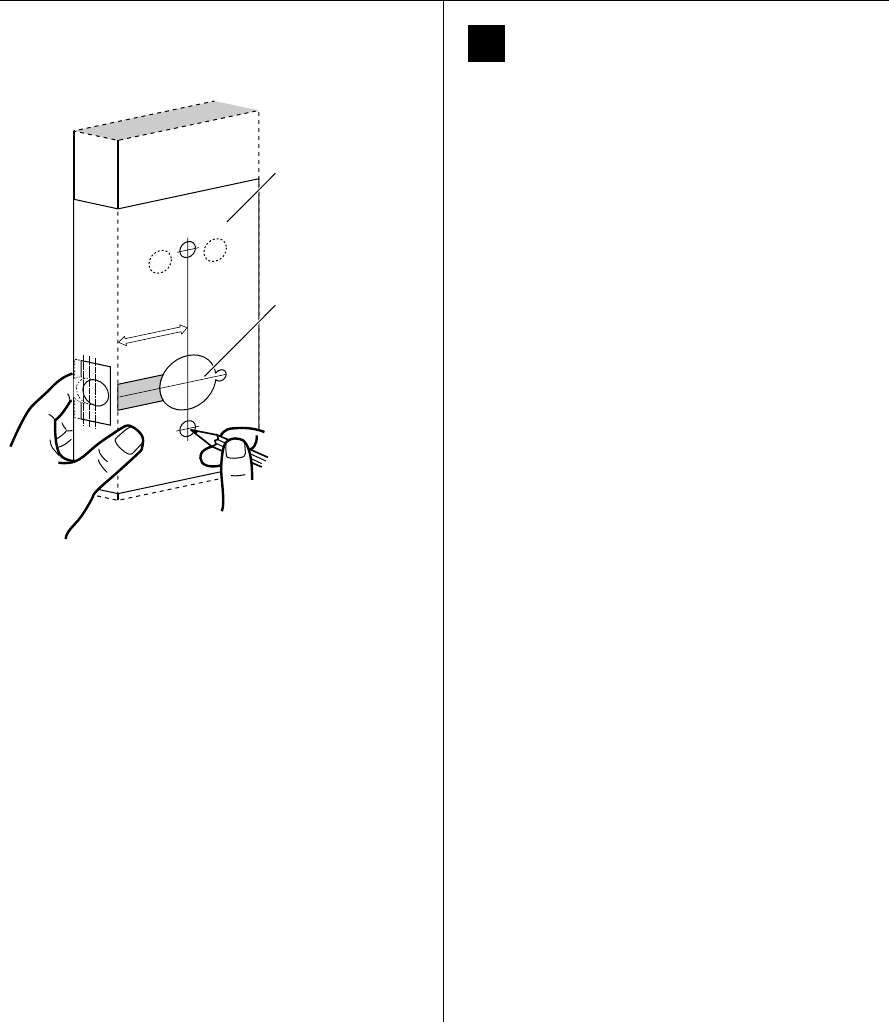
1Position template and mark drill points
Note: If the door is a fabricated hollow metal door,
determine whether it is properly reinforced to support
the lock. If door reinforcement is not adequate, consult
the door manufacturer for information on proper
reinforcement. For dimensions for preparing metal
doors, see the G01 and G02 Templates—Installation
Specifications for 93KG and 93KBV Cylindrical Locks.
Note: If the door is a LH or RH door, mark the inside of
the door. If the door is a LHRB or RHRB door, mark the
outside of the door.
For uncut doors and frames
1 Measure and mark the horizontal centerline of the
lever (the centerline for the chassis hole) on the door
and door jamb. Mark the vertical centerline of the door
edge.
Note: The recommended height from the floor to the
centerline of the lock is 38″.
2 Fold the G05 Template—Installation Template for 93KG
and 93KBV Cylindrical Locks on the dashed line and
carefully place it in position on the high side of the
door bevel.
Note: For steel frame applications, align the template’s
horizontal centerline for the latch with the horizontal
centerline of the frame’s strike preparation.
3 Tape the template to the door.
4 Center punch the necessary drill points. Refer to the
instructions on the template.
For doors with standard cylindrical preparation
1 Fold the G05 Template—Installation Template for 93KG
and 93KBV Cylindrical Locks on the dashed line.
Looking through the hole from the opposite side of
the door, align the template so that you see the
template outline of the 2 1/8″diameter chassis hole.
2 Tape the template to the door.
3 Center punch the necessary drill points. Refer to the
instructions on the template.
Figure 1 Positioning the template
Horizontal centerline
of lever
Installation template
Installation Instructions for B.A.S.I.S. Cylindrical Locks
BEST ACCESS SYSTEMS
Indianapolis, Indiana
3
Installation Instructions for B.A.S.I.S. Cylindrical Locks
Preparing the door and door jamb Components checklist
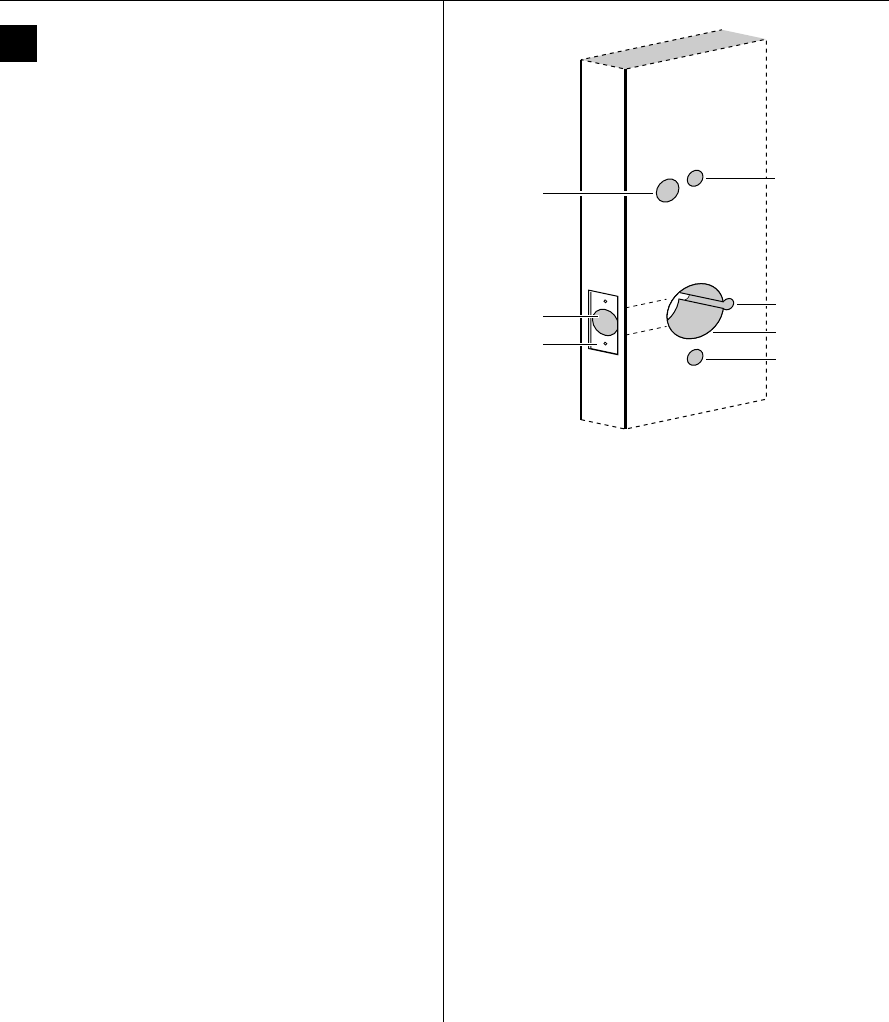
2Drill holes and mortise for latch face.
1 Drill the holes listed below:
■upper and lower trim holes
—5/8″ diameter
— through door
■harness hole
—3/4″ diameter
— through door
— location based on handing
■motor wire hole
—7/16″ diameter
— through door
— before drilling chassis hole
■chassis hole
—2 1/8″ diameter
— through door
— after drilling motor wire hole
■latch hole
—1″ diameter
— meets chassis hole
Note 1: To locate the center of a hole on the opposite
side of the door, drill a pilot hole completely through the
door.
Note 2: For holes through the door, it is best to drill
halfway from each side of the door to prevent the door
from splintering.
2 Mortise the edge of the door to fit the latch face.
3 Drill the holes for the screws used to install the latch.
Figure 2 Drilling holes and mortising for the latch face
Latch hole
Upper trim hole
Harness
hole
Motor wire hole
Chassis hole
Lower trim hole
Latch face
mortise
Inside of door
Installation Instructions for B.A.S.I.S. Cylindrical Locks
BEST ACCESS SYSTEMS
Indianapolis, Indiana
Preparing the door and door jamb
4
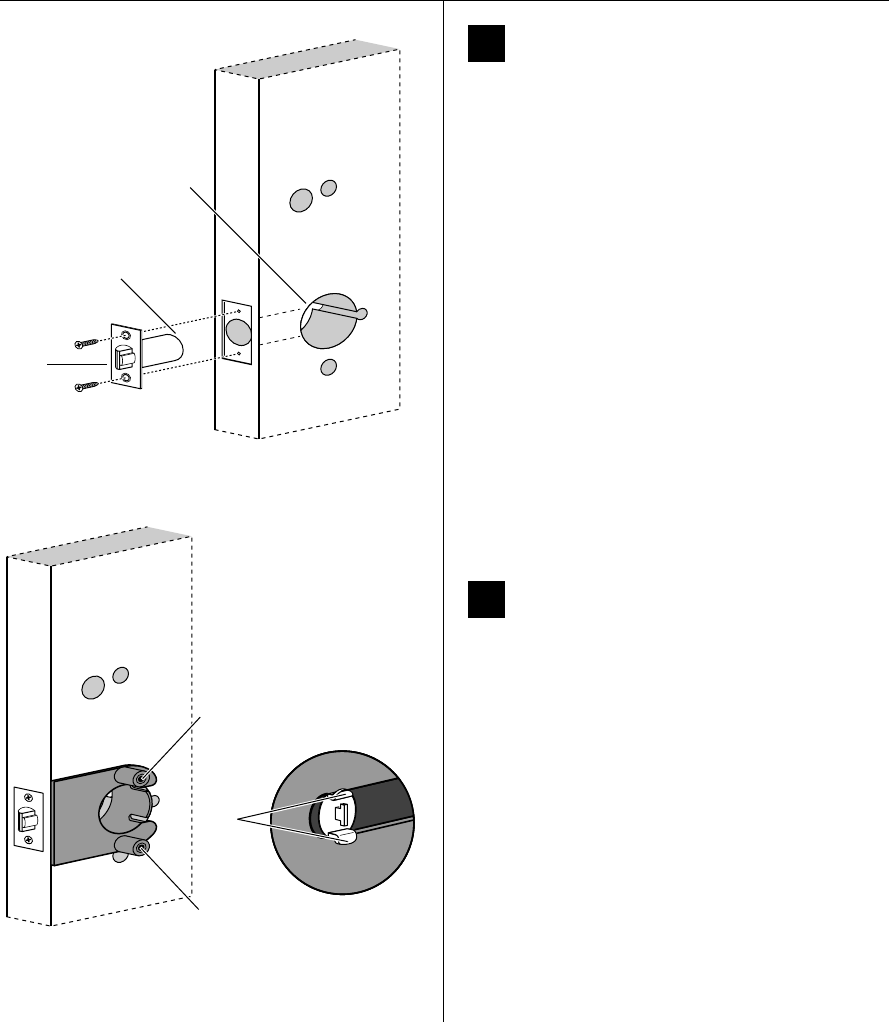
3Install latch
1 Install the latch in the door.
Note: The latch tube prongs should be centered and
should project into the chassis hole.
2 Check that the door swings freely.
4Use drill jig to drill through-bolt holes
1 Press the drill jig (KD303) onto the door, engaging it
with the latch tube prongs (see the close-up in
Figure 4). Make sure the front edge of the jig is parallel
with the door edge.
2 Drill the through-bolt holes (5/16″diameter) halfway
into the door.
3 Turn over the drill jig and repeat steps 1 and 2 from the
opposite side of the door.
Note: Replace the drill jig after 10 door preparations.
Figure 3 Installing the latch in the door
Latch
Location of latch
tube prongs
Chassis hole
Inside of door
Figure 4 Installing the drill jig and drilling the
through-bolt holes
Latch
tube
prongs
Drill upper through-bolt hole.
Drill lower through-bolt hole.
Inside of door
Installation Instructions for B.A.S.I.S. Cylindrical Locks
BEST ACCESS SYSTEMS
Indianapolis, Indiana
5
Installation Instructions for B.A.S.I.S. Cylindrical Locks
Preparing the door and door jamb
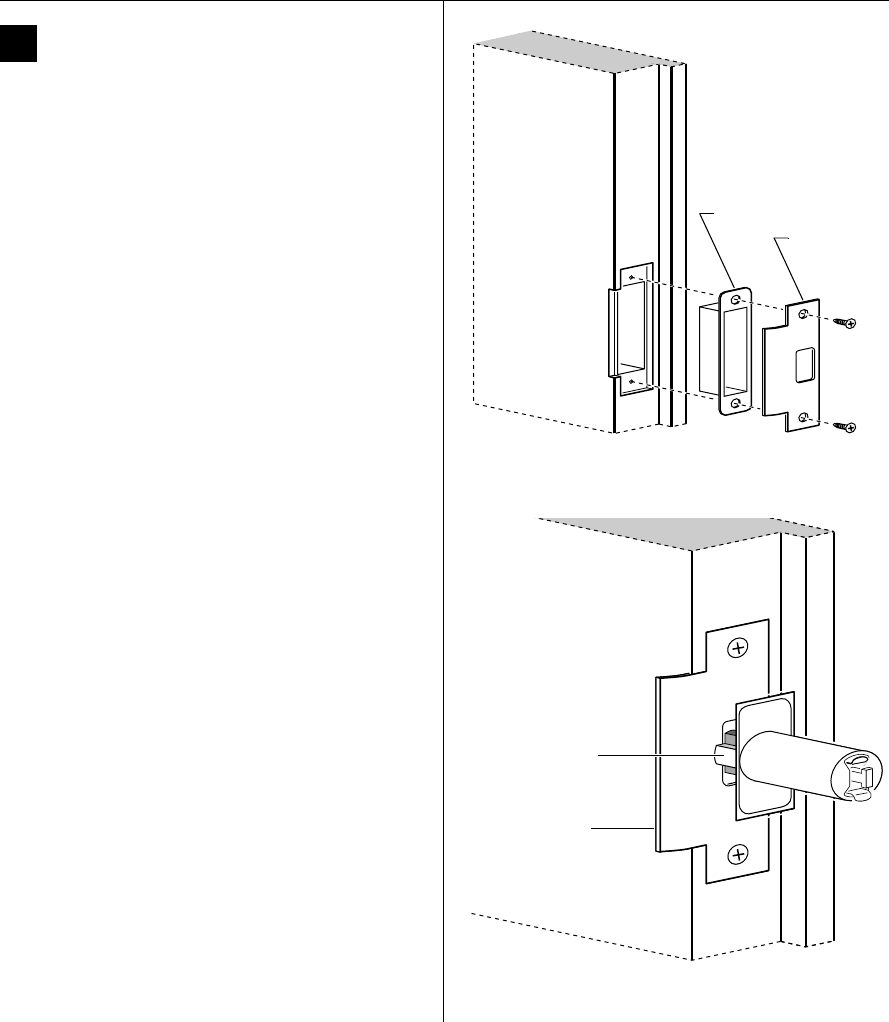
5Install strike box and strike plate
1 In alignment with the center of the latchbolt, mortise
the door jamb to fit the strike box and strike plate.
2 Drill the holes for the screws used to install the strike
box and strike plate.
3 Insert the strike box and secure the strike with the two
screws provided.
4 Check the position of the deadlocking plunger against
the strike plate.
Caution: The deadlocking plunger of the latchbolt
must make contact with the strike plate, as shown
in Figure 5b. The plunger deadlocks the latchbolt
and prevents someone from forcing the latch
open when the door is closed.
Figure 5a Installing the strike box and strike plate
Strike box
Strike plate
Door jamb
Figure 5b Aligning the deadlocking plunger with the
strike plate
Strike plate
Deadlocking
plunger
Door jamb
Installation Instructions for B.A.S.I.S. Cylindrical Locks
BEST ACCESS SYSTEMS
Indianapolis, Indiana
Installing the lock
6
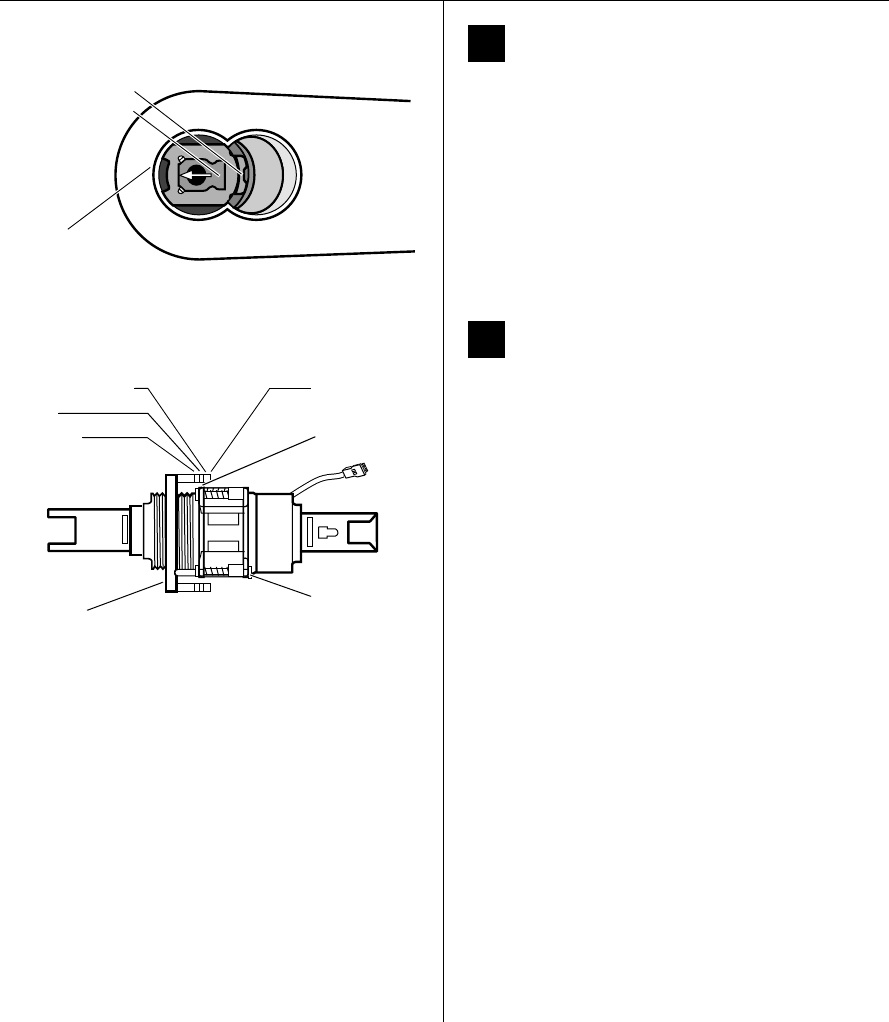
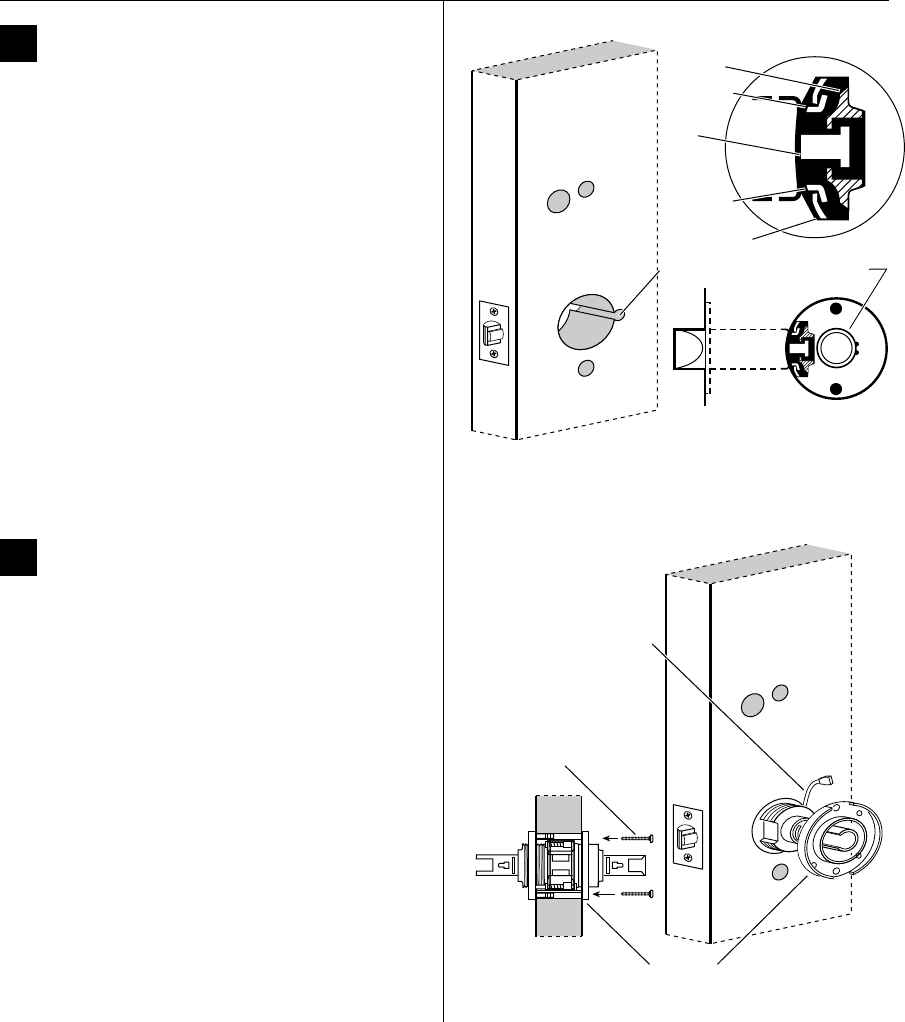
6Remove outside lever
1 Insert the control key into the core and rotate the key
15 degrees to the right.
2 Insert a flat blade screwdriver into the figure-8 core
hole and into the lever.
3 Press the screwdriver blade in the direction of the
arrow in Figure 6.
Note: You cannot remove the lever if the screwdriver
blade is inserted too far past the keeper.
4 Slide the lever off of the sleeve.
7Adjust for door thickness
1 Determine the door’s thickness.
2 Pull the rose locking pin and rotate the outside rose
liner until the proper groove on the through-bolt stud
lines up with the hub face.
Note 1: Make sure that the locking pin fully locks into
the rose liner.
Note 2: The lockset fits doors 1 3/4″ to 2 1/4″ thick.
Figure-8
core hole
Figure 6 Removing the outside lever
Insert screwdriver
blade here.
Lever keeper
Figure 7 Adjusting the rose liner for the door thickness
1 3/4″
2″
2 1/4″ groove Through-
bolt stud
Hub face
Outside
rose liner
Rose locking
pin
Installation Instructions for B.A.S.I.S. Cylindrical Locks
BEST ACCESS SYSTEMS
Indianapolis, Indiana
7
Installation Instructions for B.A.S.I.S. Cylindrical Locks
Installing the lock
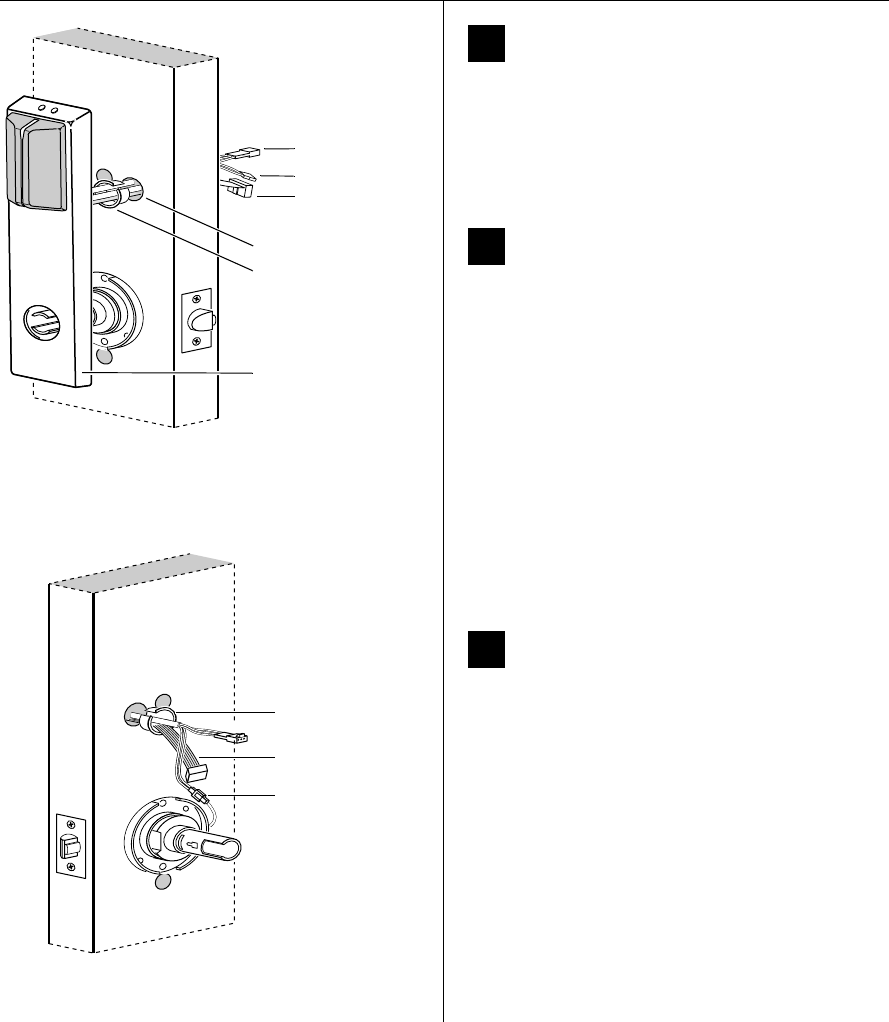
8Install lock chassis and engage
retractor in latch
From the outside of the door, insert the lock chassis
into the 2 1/8″ chassis hole, routing the motor wire
through the notch.
Caution: Make sure that the latch tube prongs
engage the chassis frame and that the latch
tailpiece engages the retractor.
9Install through-bolts and inside rose
liner
1 Place the inside rose liner on the chassis, aligning the
holes in the rose liner with the holes prepared in the
door.
Caution: Make sure that there is clearance for the
motor wire between the rose liner and the door.
2 Install the through-bolts through the rose liner and
door in the top and bottom holes.
3 Tighten the rose liner on the door with the
through-bolts.
Figure 8 Installing the lock chassis and engaging the
retractor in the latch
Latch tube
prong
Retractor
Latch
tailpiece
Chassis
Chassis frame
Latch tube
prong
Notch
Inside of door
Figure 9 Installing the through-bolts and rose liner
Through-bolt
Motor wire
Inside of door
Rose liner
Installation Instructions for B.A.S.I.S. Cylindrical Locks
BEST ACCESS SYSTEMS
Indianapolis, Indiana
Installing the lock
8
10 Remove backup battery tab
Caution: For the lock to operate properly, you
must remove the backup battery tab.
1 Locate the backup battery tab on the inside of the
outside escutcheon.
2 Pull down on the tab and remove it from the outside
escutcheon to turn on the backup battery.
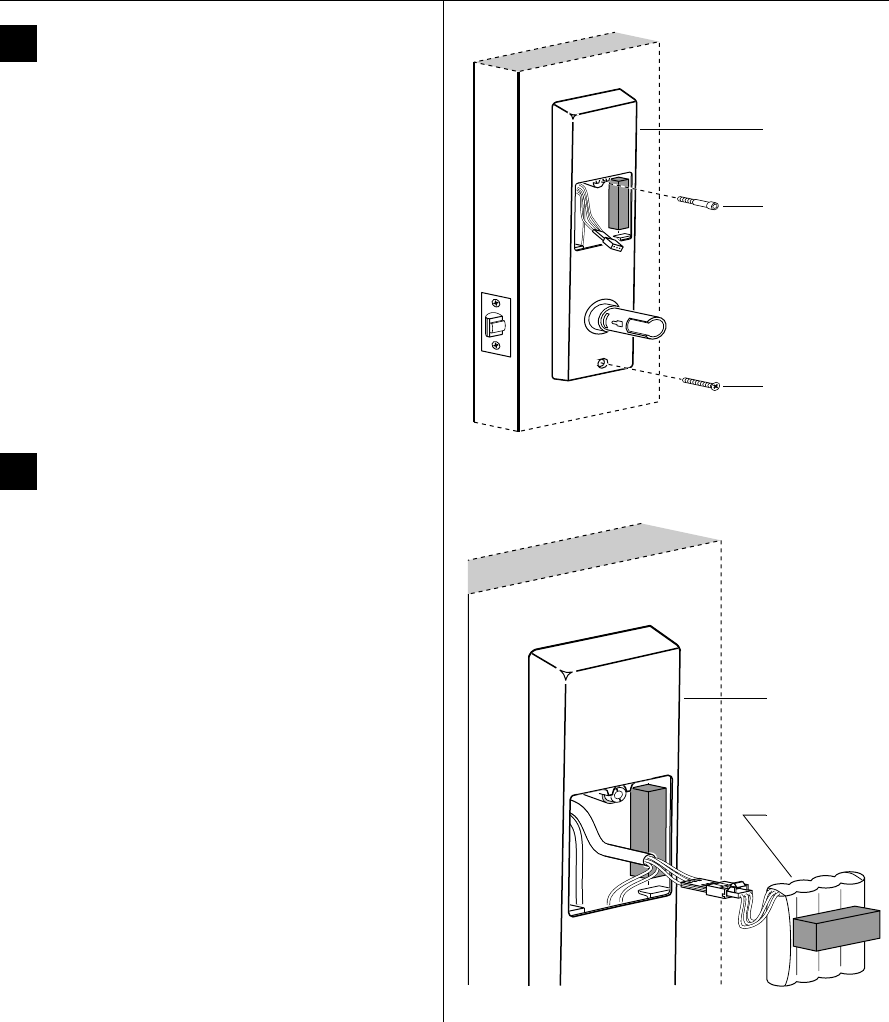
11 Route wire harness and position
outside escutcheon
1 Insert the two bushings into the harness hole on each
side of the door, as shown in Figure 11 and Figure 12.
2 From the outside of the door, feed the upgrade
connector, and then the motor connector and battery
connector, through the harness hole.
Caution: When routing the connectors, make sure
the wire harness is not routed across any sharp
edges or over any surface that could damage its
sleeving or wire insulation.
3 Temporarily rest the outside escutcheon on the door
by inserting the trim studs into the trim holes.
Note: You can temporarily install the outside lever to
hold the outside escutcheon in place. See task 15 on
page 10.
12 Make motor connection
From the inside of the door, connect the motor
connector from the chassis to its mating connector on
the wire harness.
Note: The upgrade cable is used for reprogramming the
lock’s firmware without removing the lock from the door.
This cable does not connect to a mating lock connector.
Caution: When making the motor connection,
make sure:
■there are no loose wire connections where the
wires are inserted into the connectors
■the connectors are firmly mated.
Wire connection Colors No. of
wires
No. of
pins
Motor Yellow
Gray
22
Figure 11 Feeding the wire harness connectors through
the harness hole
Motor connector
Outside escutcheon
Outside of door
Harness hole
Battery connector
Bushing
Upgrade
connector
Figure 12 Making the motor connection
Inside of door
Motor connection
Bushing
Upgrade cable
Installation Instructions for B.A.S.I.S. Cylindrical Locks
BEST ACCESS SYSTEMS
Indianapolis, Indiana
9
Installation Instructions for B.A.S.I.S. Cylindrical Locks
Installing the lock
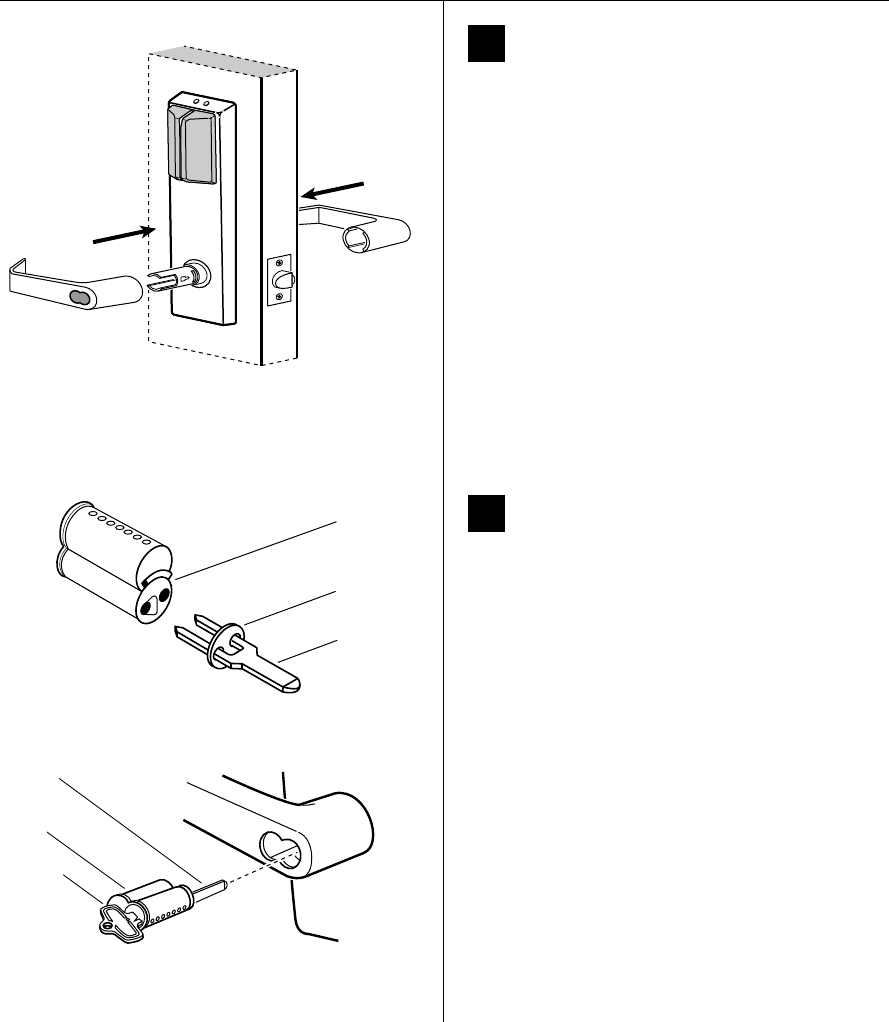
13 Secure escutcheons
1 Position the inside and outside escutcheons on the
door.
2 Making sure that the escutcheons do not pinch
the wires, secure the escutcheons to the door—but
do not tighten. Use the combination mounting screw
at the upper trim hole and the standard mounting
screw at the lower trim hole.
14 Install battery pack
1 Connect the battery pack to the battery connector on
the wire harness inside the battery compartment.
Caution 1: When routing the battery wires, make
sure the wires are not routed across any sharp
edges or over any surface that could damage their
sleeving or wire insulation.
Caution 2: When connecting the battery pack,
make sure:
■there are no loose wire connections where the
wires are inserted into the connectors
■the connectors are firmly mated.
2 Place the battery pack inside the battery compartment
so that the foam will face the battery compartment
door.
Wire
connection Color No. of
wires
No. of
pins
Battery Red w/white stripe
White
Black w/white stripe
33
Figure 13 Securing the escutcheons
Combination
mounting screw
Standard
mounting screw
Inside of door
Inside escutcheon
Figure 14 Connecting the battery pack
Battery pack
Inside escutcheon
Installation Instructions for B.A.S.I.S. Cylindrical Locks
BEST ACCESS SYSTEMS
Indianapolis, Indiana
Completing the installation
10
15 Install inside and outside levers
Note: To use a core and throw member from a
manufacturer other than BEST with a B.A.S.I.S. Lock, see
the Installation Instructions for 9K Non-
interchangeable Cores & Throw Members (T56093).
Skip task 15 and task 16.
For the inside and outside levers
1 With the handle pointing toward the door hinges,
position a lever on the outside sleeve and push firmly
on the lever until it is seated. Repeat, placing the other
lever on the inside sleeve.
2 Tighten the escutcheon mounting screws.
3 Turn the levers to check that they operate smoothly.
16 Install core and throw member
1 Install the blocking plate onto the throw member.
Caution: You must use the blocking plate to
prevent unauthorized access.
2 Insert the control key into the core and rotate the key
15 degrees to the right.
3 Insert the throw member into the core.
4 Insert the core and throw member into the lever with
the control key.
5 Rotate the control key 15 degrees to the left and
withdraw the key.
Caution: The control key can be used to remove
cores and to access doors. Provide adequate
security for the control key.
Figure 15 Installing the levers
Outside of door
Figure 16a Installing the blocking plate and throw
member
Core
Blocking
plate
Throw
member
Figure 16b Installing the core
Core
Control
key
Throw
member
Installation Instructions for B.A.S.I.S. Cylindrical Locks
BEST ACCESS SYSTEMS
Indianapolis, Indiana
11
Installation Instructions for B.A.S.I.S. Cylindrical Locks
Completing the installation
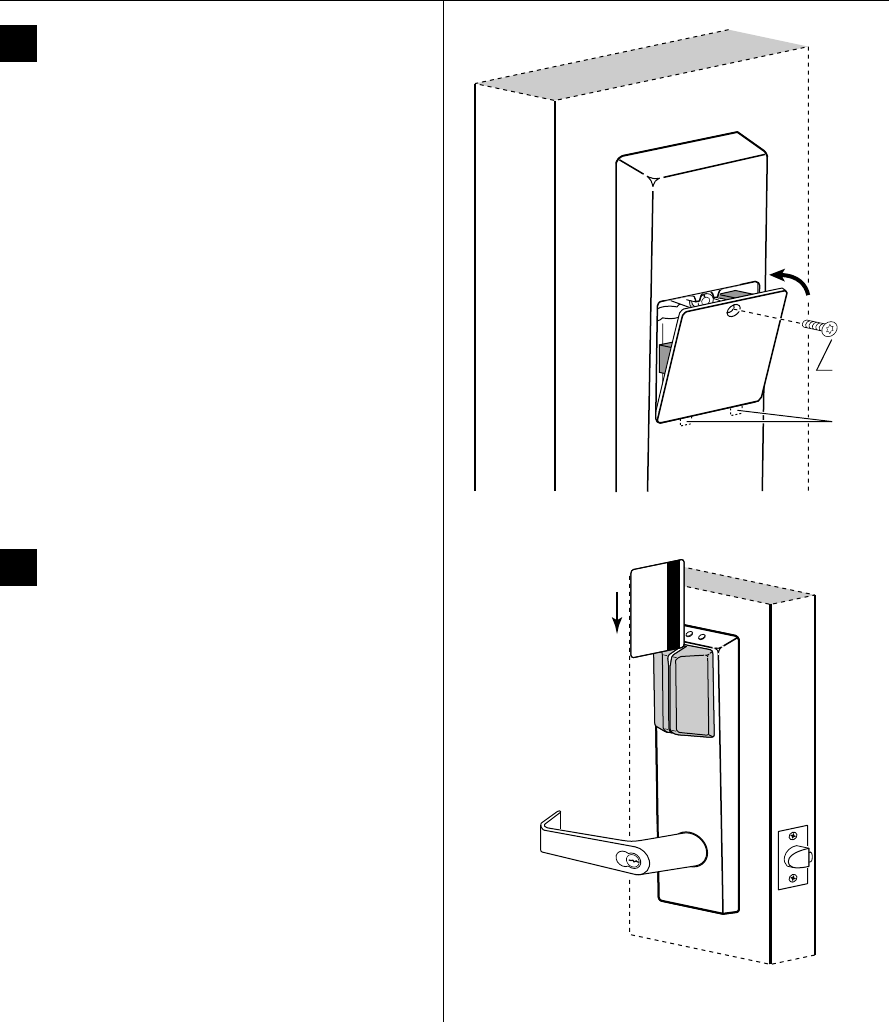
17 Install battery compartment door
1 Making sure that the battery compartment door
does not pinch any wires, insert the tabs of the
battery compartment door into its mating slots and
swing the door closed.
2 Use a T15 TORX bit driver to secure the battery
compartment door with the security screw. Tighten
firmly.
18 Test lock
To test the lock for proper operation, use the temporary
operator card that came with the lock. This card is for
temporary use only. After permanent cards have been
programmed for the lock, the temporary card should be
deleted.
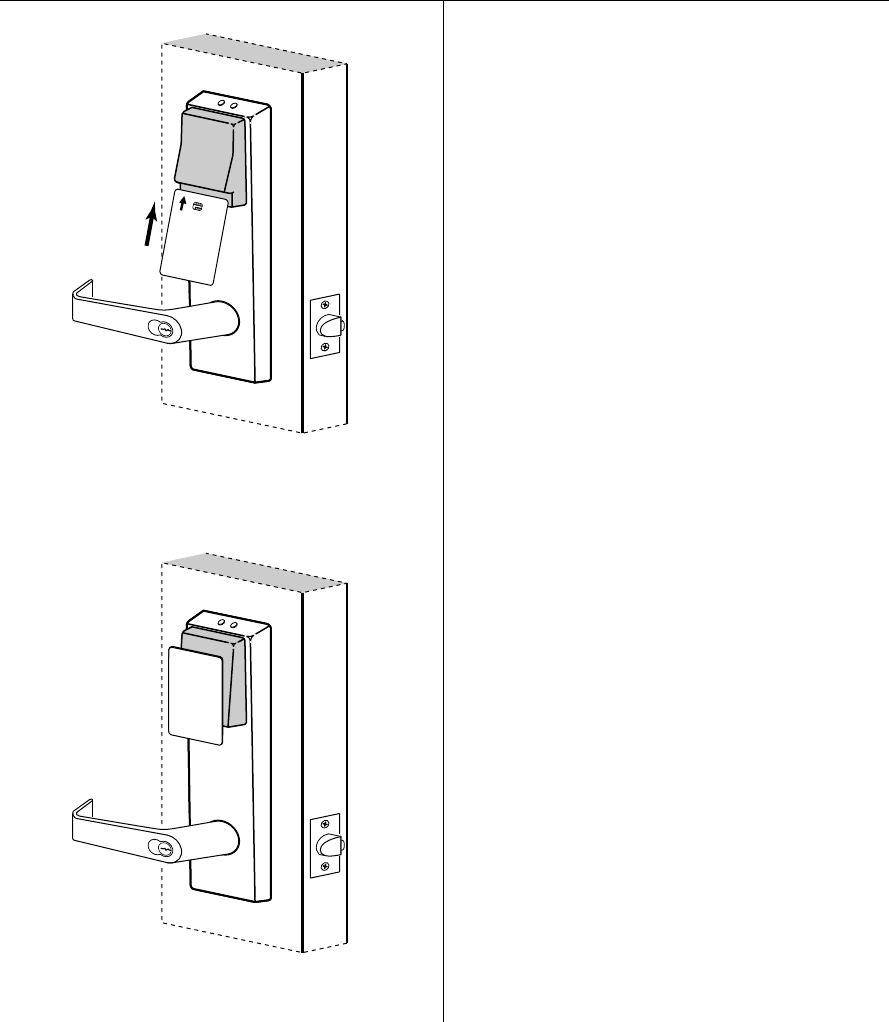
For locks with magnetic stripe card readers
1 With the magnetic stripe facing towards the right,
swipe the temporary operator card, as shown in
Figure 18a.
The green light flashes and the locking mechanism
unlocks.
2 Turn the lever and open the door.
Figure 17 Installing the access door
Tabs
Security
screw
Figure 18a Using the temporary operator card with a
magnetic stripe card reader
Installation Instructions for B.A.S.I.S. Cylindrical Locks
BEST ACCESS SYSTEMS
Indianapolis, Indiana
Completing the installation
12
For locks with smart card readers
1 With the writing facing towards you, insert and
remove the temporary operator card, as shown in
Figure 18b.
The green light flashes and the locking mechanism
unlocks.
2 Turn the lever and open the door.
For locks with proximity card readers
1 Hold the temporary operator card within an inch of the
lock’s card reader, as shown in Figure 18c.
The green light flashes and the locking mechanism
unlocks.
2 Turn the lever and open the door.
If the mechanism doesn’t unlock, refer to the
following table.
For all locks
Insert and turn the key to unlatch the door.
LEDs Sounder Access You should
—3 short
tones
Denied Use the card at a moderate
speed.
Red
flashes
3 short
tones
Denied Use the temporary
operator card provided
with the lock.
Green
flashes
— Denied Check the motor
connection.
— — Denied Check the battery
connection.
Temporary
Operator
Figure 18b Using the temporary operator card with a
smart card reader
Temporary
Operator
Figure 18c Using the temporary operator card with a
proximity card reader
© 2000 Best Lock Corporation dba Best Access Systems.
T63301/Rev B 1819347 ER-7991-12 June 2001

BEST ACCESS SYSTEMS
Indianapolis, Indiana
1
Planning the installation
Contents
These installation instructions describe how to install your
B.A.S.I.S. G (35HG) or B.A.S.I.S. V (35HBV) Mortise Lock.
The following topics are covered.
Planning the installation................................................ 1
Preparing the door and door jamb ................................ 2
Installing the lock............................................................ 5
Completing the installation..........................................10
Site survey
Use the following survey to record information about the
installation site.
Lock information
Lock function:
❑EV–Latch with key override
❑With key override sensing†
❑FV–Deadbolt with key override
❑With key override sensing†
❑LV–Deadbolt without key override
❑NV–Latch without key override
Door information
Door handing and bevel:
❑Left hand (LH)
❑Left hand, reverse bevel (LHRB)
❑Right hand (RH)
❑Right hand, reverse bevel (RHRB)
Door thickness: inches (1 3/4″ to 3″)
Environment information
Ambient temperature:
❑Is within specifications. See the tables below.
This product meets the following Locked Door Outdoor
test requirements for ANSI/BHMA 156.25:
† Key override sensing is optional for 35HG and
standard for 35HBV.
Side of door Range
Inside +66°F to +74°F (+19°C to +23°C)
Outside –31°F to +151°F (–35°C to +66°C)
This product meets the following Full Indoor test
requirements for ANSI/BHMA 156.25:
Components checklist
Use the following checklist to make sure that you have the
items necessary to install your B.A.S.I.S. Mortise Lock.
Components provided in the box:
❑Mortise case assembly
❑Mortise case faceplate
❑Inside escutcheon assembly
❑Battery compartment door
❑Battery pack
❑Outside escutcheon assembly
❑Inside and outside mounting plates
❑Inside lever
❑Outside lever & spindle assembly
❑Cylinder assembly (for EV and FV functions only)
❑Screw package
❑Plastic bushing package
❑Escutcheon screw package
❑Strike
❑Strike box
❑Bar code ID sticker (for your records)
❑Temporary operator card
❑Installation template and instructions
Other components:
❑Core (for EV and FV functions only)
❑Control key (for EV and FV functions only)
Special tools checklist
Use the following checklist to make sure that you have the
special tools necessary to install your B.A.S.I.S. Mortise
Lock.
❑T15 TORX® bit driver‡
❑ED211 cylinder wrench (for EV and FV functions only)
Side of door Range
Inside and outside +32°F to +120°F (0°C to +42°C)
‡ TORX is a registered trademark of the Camcar
Division of Textron.
Installation Instructions for
B.A.S.I.S. Mortise Locks
Installation Instructions for B.A.S.I.S. Mortise Locks
BEST ACCESS SYSTEMS
Indianapolis, Indiana
Preparing the door and door jamb
2
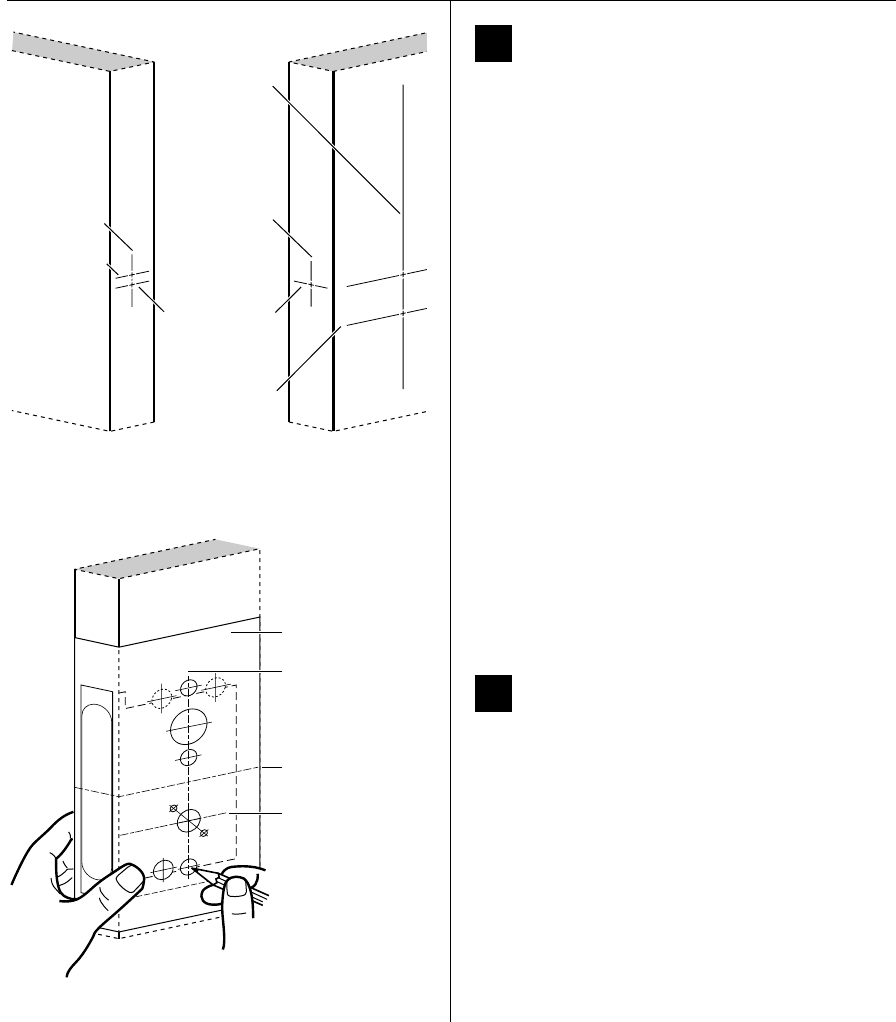
1Mark centerlines
Note: If the door is a fabricated hollow metal door,
determine whether it is properly reinforced to support
the lock. If door reinforcement is not adequate, consult
the door manufacturer for information on proper
reinforcement. For dimensions for preparing metal
doors, see the G03 Template—Installation
Specifications for 35HG and 35HBV Mortise Locks.
1 On the door, measure and mark the height of the
centerline of the lever from the floor (38″
recommended). On both sides of the door, on the
door’s edge, and on the door jamb, mark the
horizontal centerline of the lock 1 1/2″ above the
centerline of the lever.
Note: If the door is a LH or RH door, mark the inside of
the door. If the door is a LHRB or RHRB door, mark the
outside of the door.
2 On the door’s edge and door jamb, mark the vertical
centerline of the lock.
3 Measure and mark the backset (2 3/4″ standard) from
the vertical centerline on the door’s edge. On both
sides of the door, mark the vertical centerline of the
lock.
4 On the door jamb, mark the horizontal centerline of
the strike 3/8″ above the horizontal centerline of the
lock.
2Position template and mark drill points
1 Cut the G06 Template—Installation Template for 35HG
and 35HBV Mortise Locks along the dashed lines and
align the horizontal and vertical arrows with the
marked centerlines on the door.
2 Tape the template to the door.
3 Center punch the necessary drill points. Refer to the
instructions on the template.
Figure 1 Marking the centerlines
Door jamb Door
Vert. centerline
of lock
Horz. centerline
of lock
Horz. centerline
of lever
(38″ from floor
recommended)
Vert. centerline
of door’s edge
Horz. centerline
of strike
Vert. centerline
of strike
Figure 2 Positioning the template
Installation template
Horizontal centerline
of lock
Horizontal centerline
of lever
Vertical centerline
of lock
Installation Instructions for B.A.S.I.S. Mortise Locks
BEST ACCESS SYSTEMS
Indianapolis, Indiana
3
Installation Instructions for B.A.S.I.S. Mortise Locks
Preparing the door and door jamb
3Mortise for lock case and faceplate
1 Mortise the edge of the door for the lock case.
Note: The mortise cavity depth of 4 5/8″ includes
clearance for wiring behind the mortise case.
2 Insert the lock in the mortise cavity.
3 Mark the outline of the lock faceplate.
4 Remove the lock. Mortise to fit the faceplate.
Figure 3 Mortising for the lock case and faceplate
Door
Lock faceplate
mortise
Lock case mortise
Lock faceplate
Lock case
Installation Instructions for B.A.S.I.S. Mortise Locks
BEST ACCESS SYSTEMS
Indianapolis, Indiana
Preparing the door and door jamb
4
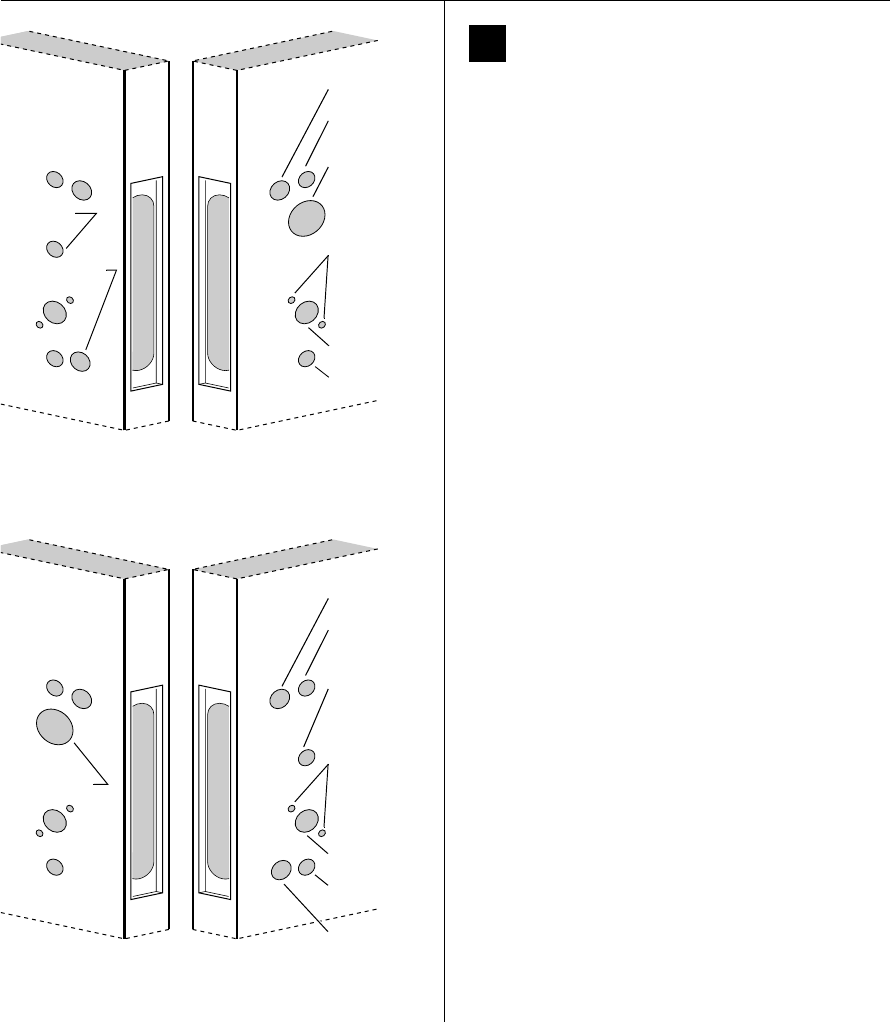
4Drill holes
Caution: Check for the correct lock function, hand,
and bevel before drilling.
Drill the holes listed below:
■upper and lower trim holes
—5/8″ diameter
— through door
■harness hole
—3/4″diameter
— through door
— location based on handing
■cylinder hole
—1 3/8″diameter
— from outside into mortise cavity
— EV and FV functions only
■turn knob hole
—5/8″ diameter
— from inside into mortise cavity
— FV and NV functions only
■upper and lower through-bolt holes
—3/8″ diameter
— through door
■lever hole
—7/8″ diameter
— through door
■sensor & motor wire hole
—3/4″ diameter
— from inside into mortise cavity, approximately
1″ deep
Note 1: To locate the center of a hole on the opposite
side of the door, drill a pilot hole completely through the
door.
Note 2: For holes through the door, it is best to drill
halfway from each side of the door to prevent the door
from splintering.
.125
Figure 4a Drilling the RH and RHRB holes
Outside of RHRB doorInside of RH door
Upper trim
hole
Harness hole
Cylinder hole
Through-bolt
holes
Lever hole
Lower trim
hole
Turn knob
hole
Sensor & motor
wire hole
.125
Figure 4b Drilling the LH and LHRB holes
Inside of LH doorOutside of LHRB door
Upper trim
hole
Harness hole
Through-bolt
holes
Lever hole
Sensor &
motor wire
hole
Lower trim
hole
Turn knob
hole
Cylinder hole
Installation Instructions for B.A.S.I.S. Mortise Locks
BEST ACCESS SYSTEMS
Indianapolis, Indiana
5
Installation Instructions for B.A.S.I.S. Mortise Locks
Preparing the door and door jamb
5Mortise for strike box and strike plate
1 On the door jamb, locate the horizontal centerline of
the strike (3/8″ above the centerline of the lock), as
well as the vertical centerline of the strike.
2 Mortise the door jamb to fit the strike box and strike
plate.
3 Drill the holes for the screws used to install the strike
box and strike plate.
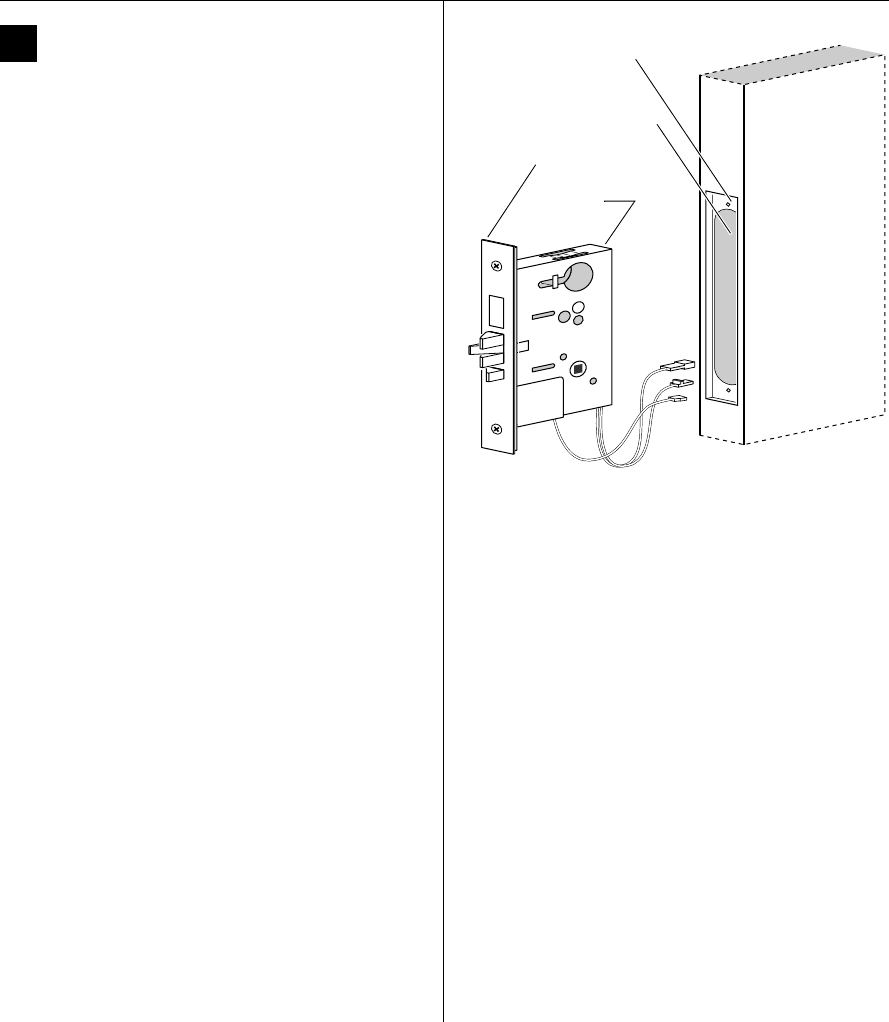
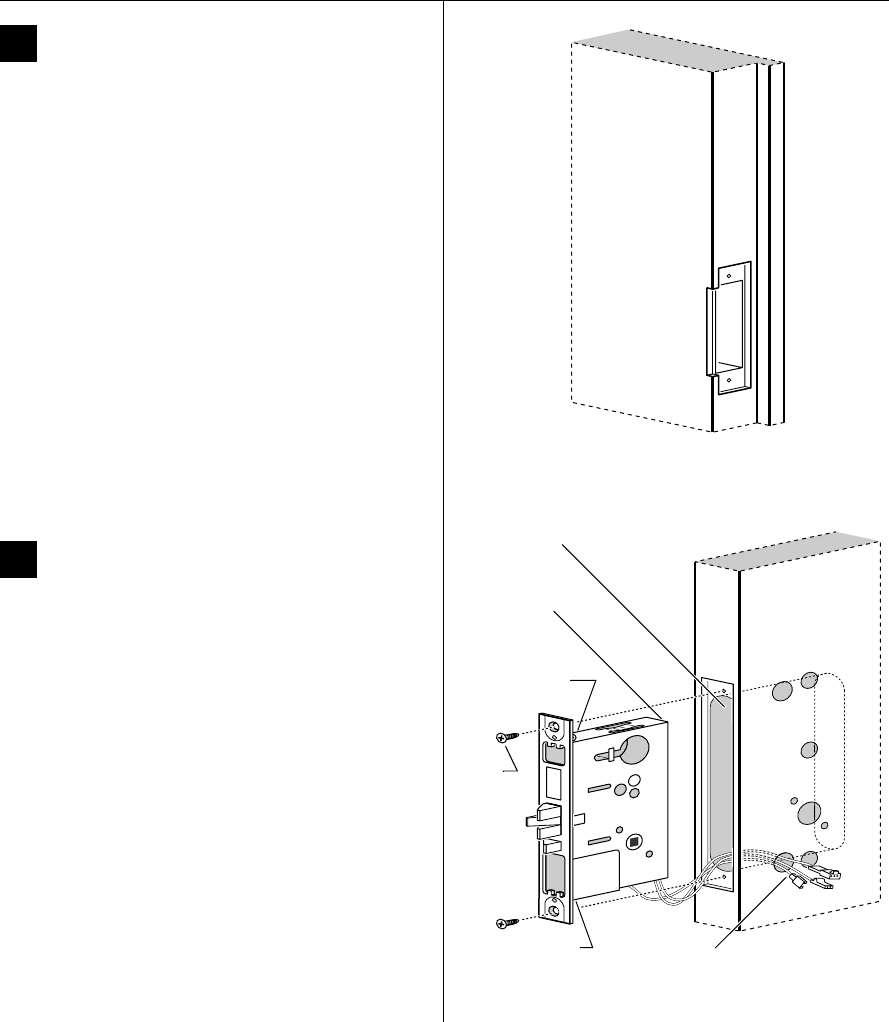
6Install mortise case
1 Remove the faceplate from the mortise case.
2 Drill the holes for the case mounting screws.
3 Insert the mortise case into the mortise cavity, while
feeding the sensor and motor wires into the mortise
cavity and out the sensor & motor wire hole to the
inside of the door.
Note: If the armored front of the mortise case is not flush
with the door edge, remove the case and loosen the
screws at the top and bottom of the case. Adjust the
bevel of the armored front of the mortise case to match
the bevel of the door. Tighten the screws and insert the
mortise case back into the mortise cavity.
4 Secure the mortise case with the case mounting
screws.
Figure 5 Mortising the door jamb for the strike box and
strike plate
Door jamb
Figure 6 Installing the mortise case
Inside of door
Sensor & motor
wire hole and wires
Mortise case
Mortise cavity
Location of bevel
adjusting screw
Bevel adjusting
screw
Case
mounting
screws
Installation Instructions for B.A.S.I.S. Mortise Locks
BEST ACCESS SYSTEMS
Indianapolis, Indiana
Installing the lock
6
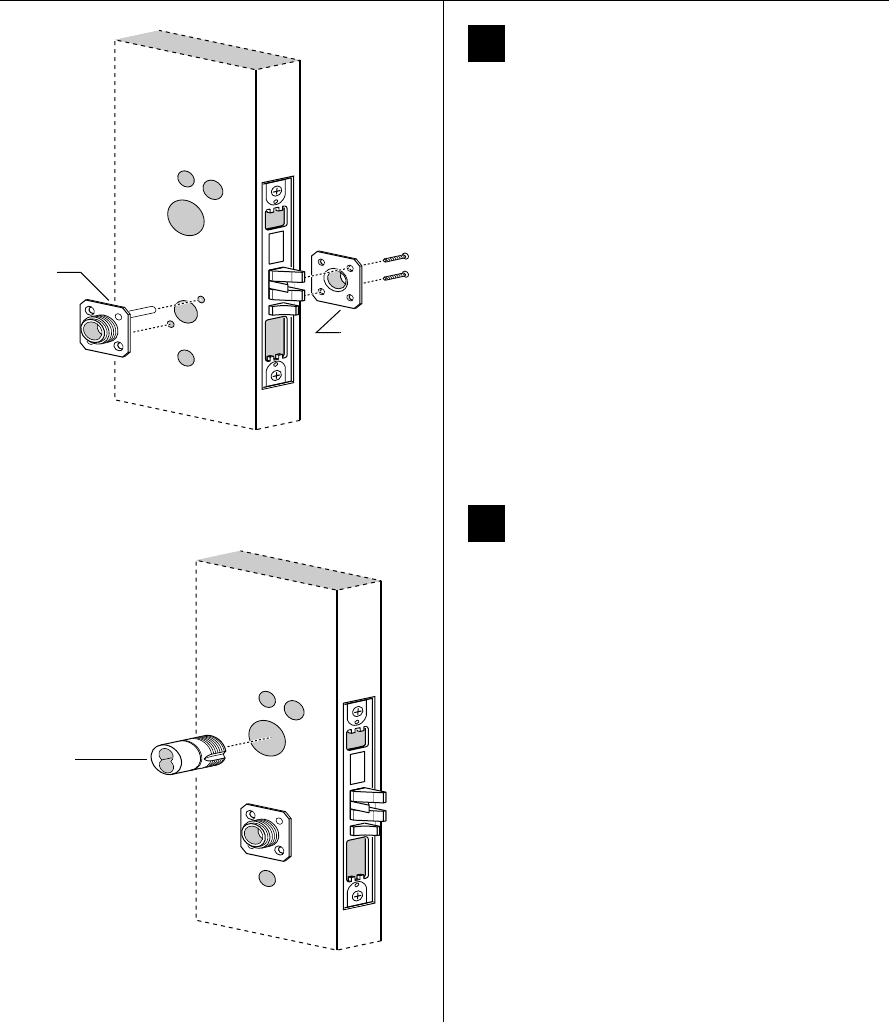
7Install mounting plates
1 Insert the outside mounting plate through the door
and mortise case.
2 Position the inside mounting plate opposite the
outside mounting plate and screw them securely in
place.
Caution: Do not overtighten the mounting plate
screws. Overtightening may compress the mortise
cavity and bind the locking mechanism.
8Install cylinder (EV and FV only)
Use a cylinder wrench (ED211) to thread the concealed
cylinder into the mortise case so that the groove
around the cylinder head is even with the door surface.
Note: Do not tighten the cylinder set screw until you
perform task 11 on page 8.
Caution: A malfunction can occur if the cylinder is
threaded in too far.
Figure 7 Installing the mounting plates
Outside of door
Outside
mounting
plate
Inside
mounting
plate
Figure 8 Installing the cylinder
Outside of door
Concealed
cylinder
Installation Instructions for B.A.S.I.S. Mortise Locks
BEST ACCESS SYSTEMS
Indianapolis, Indiana
7
Installation Instructions for B.A.S.I.S. Mortise Locks
Installing the lock
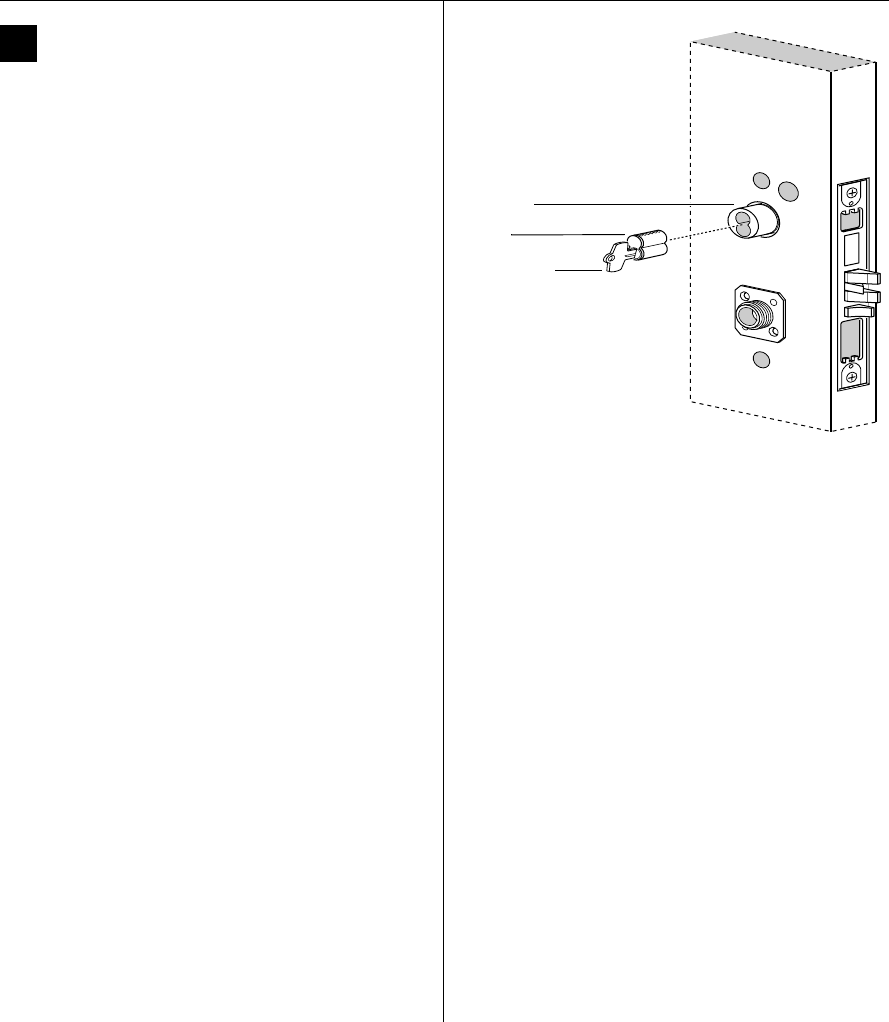
9Install core (EV and FV only)
1 Insert the control key into the core and rotate the key
15 degrees to the right.
2 With the control key in the core, insert the core into
the cylinder.
3 Rotate the control key 15 degrees to the left and
withdraw the key.
Caution: The control key can be used to remove
cores and to access doors. Provide adequate
security for the control key.
Figure 9 Installing the core
Control key
Core
Outside of door
Cylinder
Installation Instructions for B.A.S.I.S. Mortise Locks
BEST ACCESS SYSTEMS
Indianapolis, Indiana
Installing the lock
8
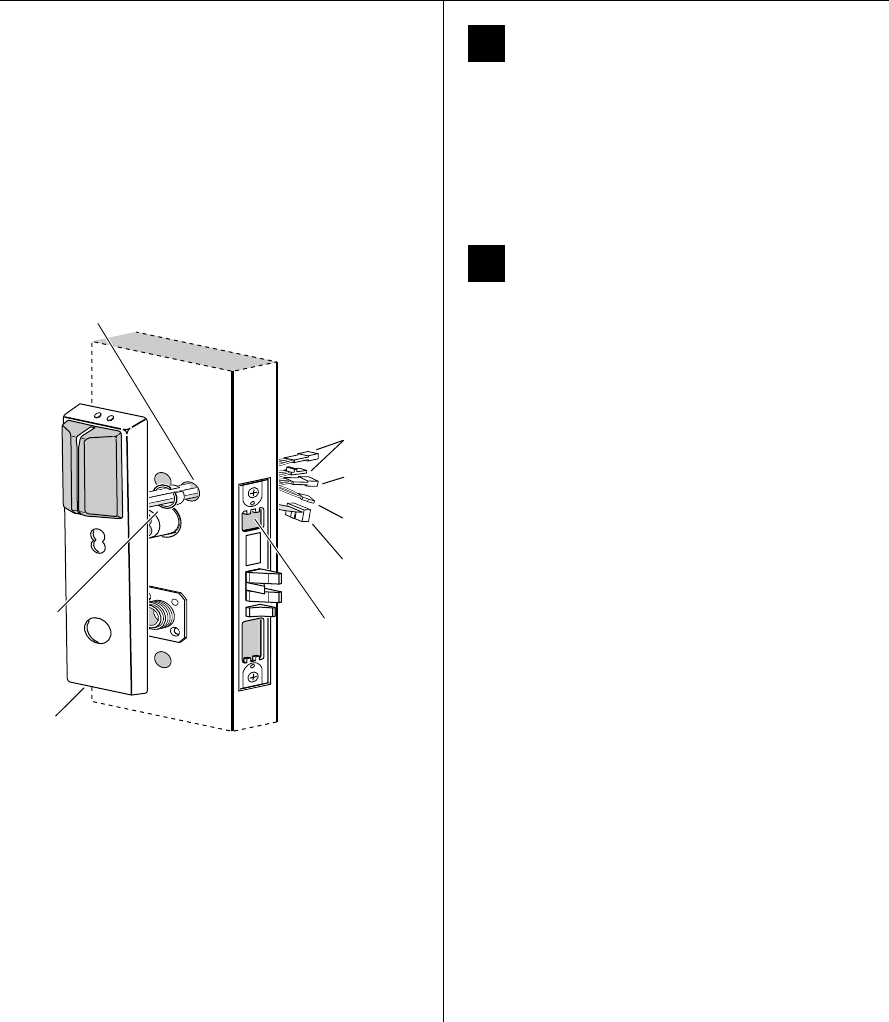
10 Remove backup battery tab
Caution: For the lock to operate properly, you
must remove the backup battery tab.
1 Locate the backup battery tab on the inside of the
outside escutcheon.
2 Pull down on the tab and remove it from the outside
escutcheon to turn on the backup battery.
11 Route wire harnesses and position
outside escutcheon
1 Insert the two bushings into the harness hole on each
side of the door, as shown in Figure 11 and Figure 12.
2 From the outside of the door, feed the upgrade
connector through the harness hole.
3 From the outside of the door, feed the motor
connector, battery connector, and sensor connectors
through the harness hole.
Note: NV function locks do not have a sensor harness.
Caution: When routing the connectors, make sure
the harnesses are not routed across any sharp
edges or over any surface that could damage their
sleeving or wire insulation.
4 For EV and NV function locks, perform these steps:
a Firmly press the outside escutcheon in position on
the door. The core should be flush with the outer
surface of the escutcheon.
b If necessary, adjust the cylinder depth plus or
minus one turn so that the core is flush with the
outer surface of the escutcheon.
c Secure the cylinder in the mortise case with the
cylinder set screw.
5 Rest the outside escutcheon on the door by inserting
the trim studs into the trim holes.
Note: You can temporarily install the outside lever to
hold the outside escutcheon in place. See task 15 on
page 11.
Figure 11 Feeding the wire harness connectors through
the harness hole
Motor
connector
Harness hole
Bushing
Outside
escutcheon Outside of door
Sensor
connectors
Battery
connector
Cylinder set
screw (inside
mortise case)
Bushing
Upgrade
connector
Installation Instructions for B.A.S.I.S. Mortise Locks
BEST ACCESS SYSTEMS
Indianapolis, Indiana
9
Installation Instructions for B.A.S.I.S. Mortise Locks
Installing the lock
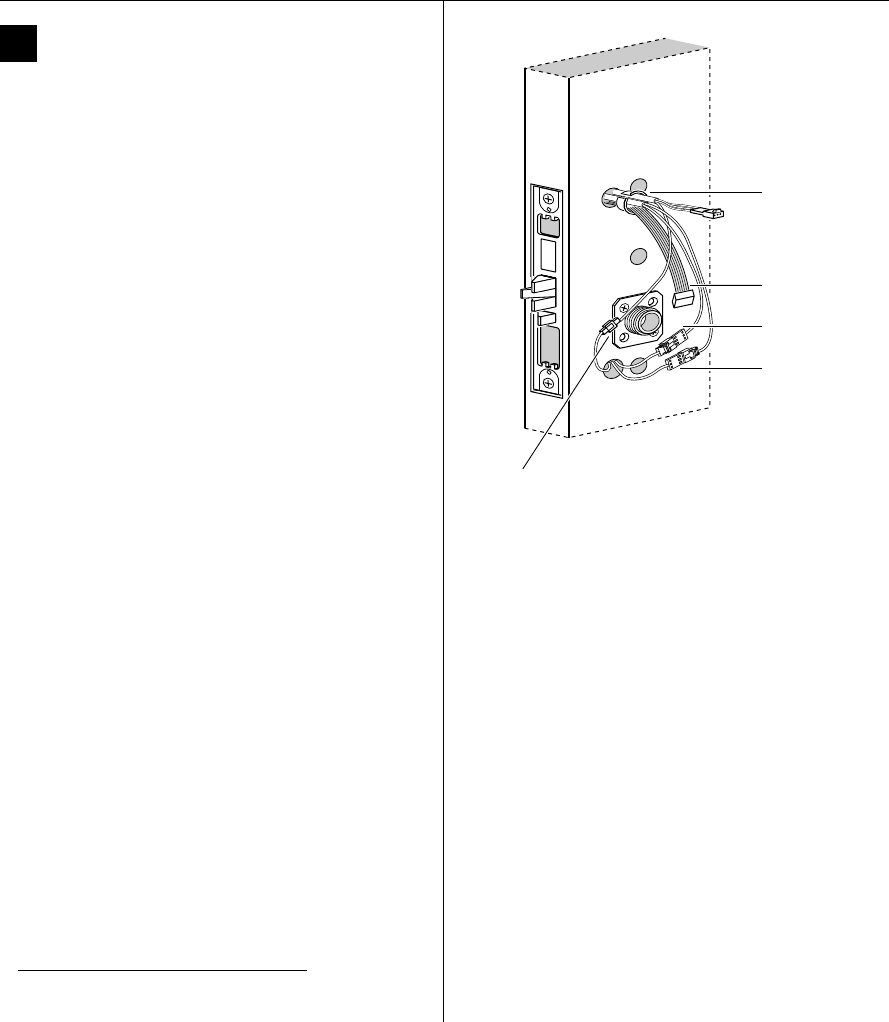
12 Make motor and sensor connections
From the inside of the door, make the motor
connection, the key override sensor connection (EV
and FV functions)†, and the deadbolt sensor
connection (FV and LV functions).
Note 1: It is physically possible to connect the key
override sensor connector from the mortise case to the
battery connector from the wire harness. To avoid this
mistake, connect only the connectors with matching wire
colors.
Note 2: The upgrade cable is used for reprogramming
the lock’s firmware without removing the lock from the
door. This cable does not connect to a mating lock
connector.
Caution: When making the motor connection and
sensor connections, make sure:
■there are no loose wire connections where the
wires are inserted into the connectors
■the connectors are firmly mated.
† Key override sensing is optional for 35HG and
standard for 35HBV.
Wire connection Colors No. of
wires
No. of
pins
Motor Yellow
Gray
22
Key override sensor Gray 2 3
Deadbolt sensor Blue 2 3
Figure 12 Making the motor connection and
sensor connections
Motor
connection
Key override
sensor connection
Bushing
Inside of door
Deadbolt sensor
connection
Upgrade cable
Installation Instructions for B.A.S.I.S. Mortise Locks
BEST ACCESS SYSTEMS
Indianapolis, Indiana
Installing the lock
10
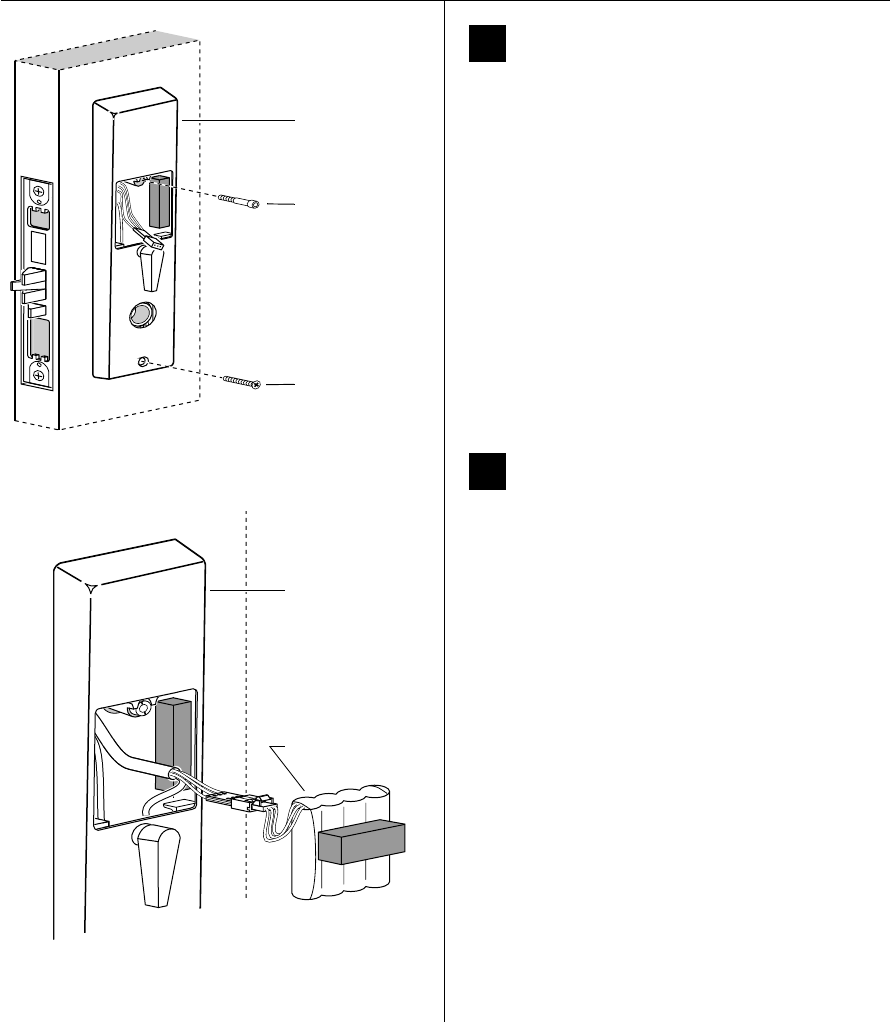
13 Secure escutcheons
1 Position the inside and outside escutcheons on the
door.
2 Making sure that the escutcheons do not pinch
the wires, secure the escutcheons to the door. Do not
tighten the screws completely. Use the combination
mounting screw in the upper trim hole and the
standard mounting screw in the lower trim hole.
14 Install battery pack
1 Connect the battery pack to the battery connector on
the wire harness inside the battery compartment.
Caution 1: When routing the battery wires, make
sure the wires are not routed across any sharp
edges or over any surface that could damage their
sleeving or wire insulation.
Caution 2: When connecting the battery pack,
make sure:
■there are no loose wire connections where the
wires are inserted into the connectors
■the connectors are firmly mated.
2 Place the battery pack inside the battery compartment
so that the foam will face the battery compartment
door.
Wire
connection Color No. of
wires
No. of
pins
Battery Red w/white stripe
White
Black w/white stripe
33
Figure 13 Securing the escutcheons
Combination
mounting screw
Standard
mounting screw
Inside of door
Inside escutcheon
Figure 14 Connecting the battery pack
Battery pack
Inside of door
Inside escutcheon
Installation Instructions for B.A.S.I.S. Mortise Locks
BEST ACCESS SYSTEMS
Indianapolis, Indiana
11
Installation Instructions for B.A.S.I.S. Mortise Locks
Completing the installation
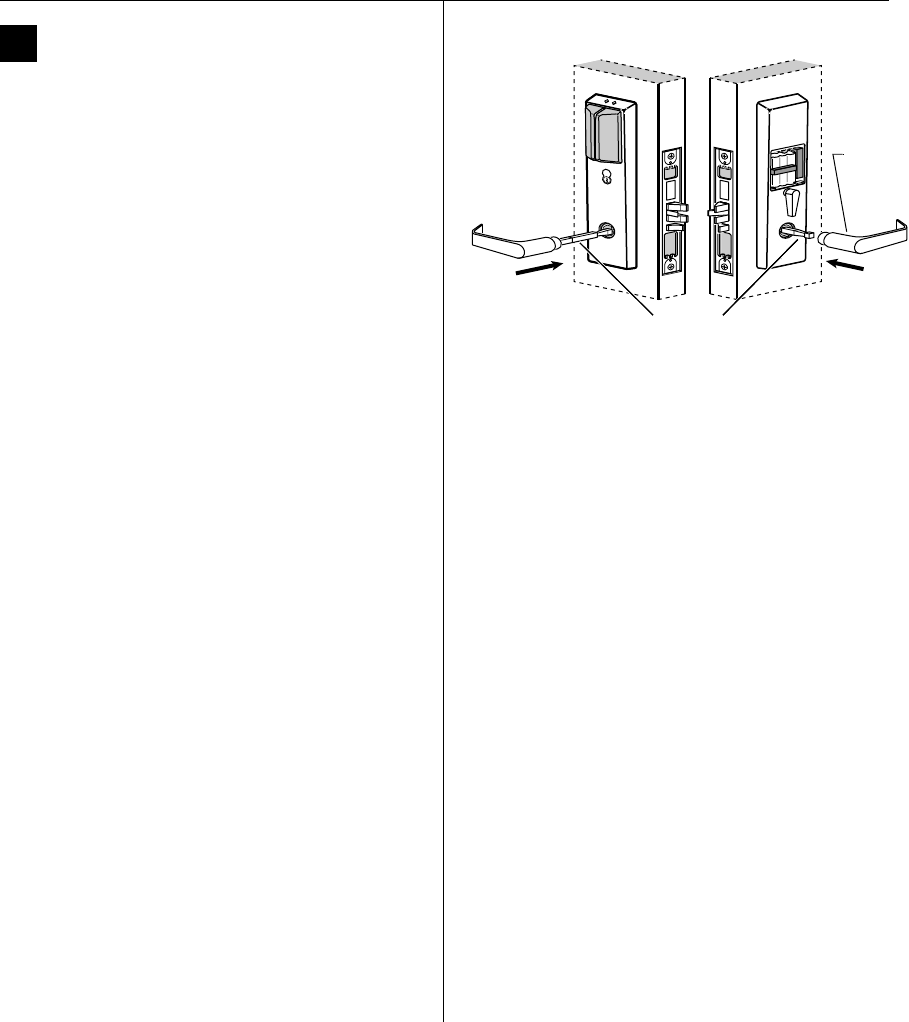
15 Install inside and outside levers
1 Unscrew the inside spindle one full turn to allow the
spindles to turn freely.
2 With the handle pointing toward the door hinges,
insert the outside lever and spindles assembly into the
lock from the outside of the door.
3 Slide the inside lever onto the inside spindle and
secure it with the set screw.
4 Making sure that the core is positioned properly in the
outside escutcheon (EV and FV only) and the
escutcheons are aligned properly on the door, tighten
the escutcheon mounting screws.
Note: If a core is not available, you can use the cylinder
wrench (ED211) to help you align the core opening in the
escutcheon.
5 Turn the levers to check that they operate smoothly.
Figure 15 Installing the levers
Spindles
Location
of set
screw
Outside of door Inside of door
Spindles
Outside of door
Installation Instructions for B.A.S.I.S. Mortise Locks
BEST ACCESS SYSTEMS
Indianapolis, Indiana
Completing the installation
12
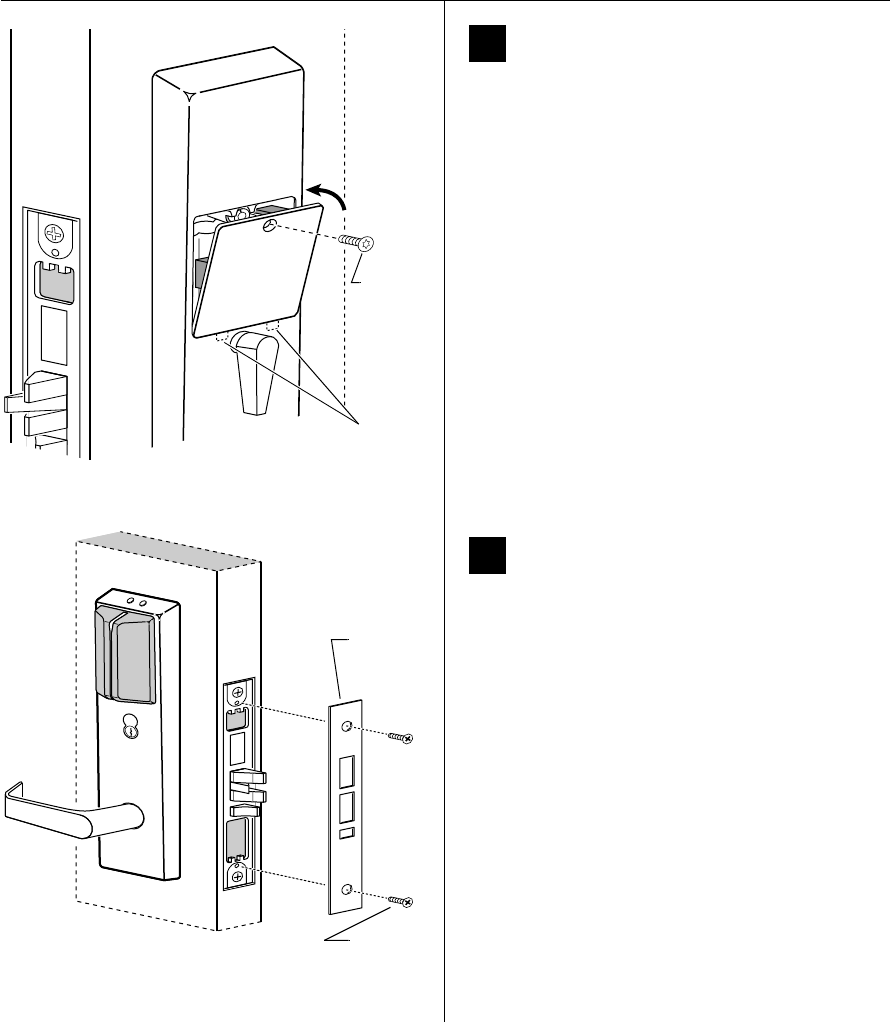
16 Install battery compartment door
1 Making sure that the battery compartment door
does not pinch any wires, insert the tabs of the
battery compartment door into its mating slots and
swing the door closed.
2 Use a T15 TORX bit driver to secure the battery
compartment door with the security screw. Tighten
firmly.
17 Install mortise case faceplate
1 Secure the mortise case faceplate to the mortise case
with the faceplate mounting screws.
2 Check the lock for proper operation.
Figure 16 Installing the battery compartment door
Security
screw
Tabs
Figure 17 Installing the mortise case faceplate
Outside of door
Mortise
case
faceplate
Faceplate
mounting
screws
Installation Instructions for B.A.S.I.S. Mortise Locks
BEST ACCESS SYSTEMS
Indianapolis, Indiana
13
Installation Instructions for B.A.S.I.S. Mortise Locks
Completing the installation
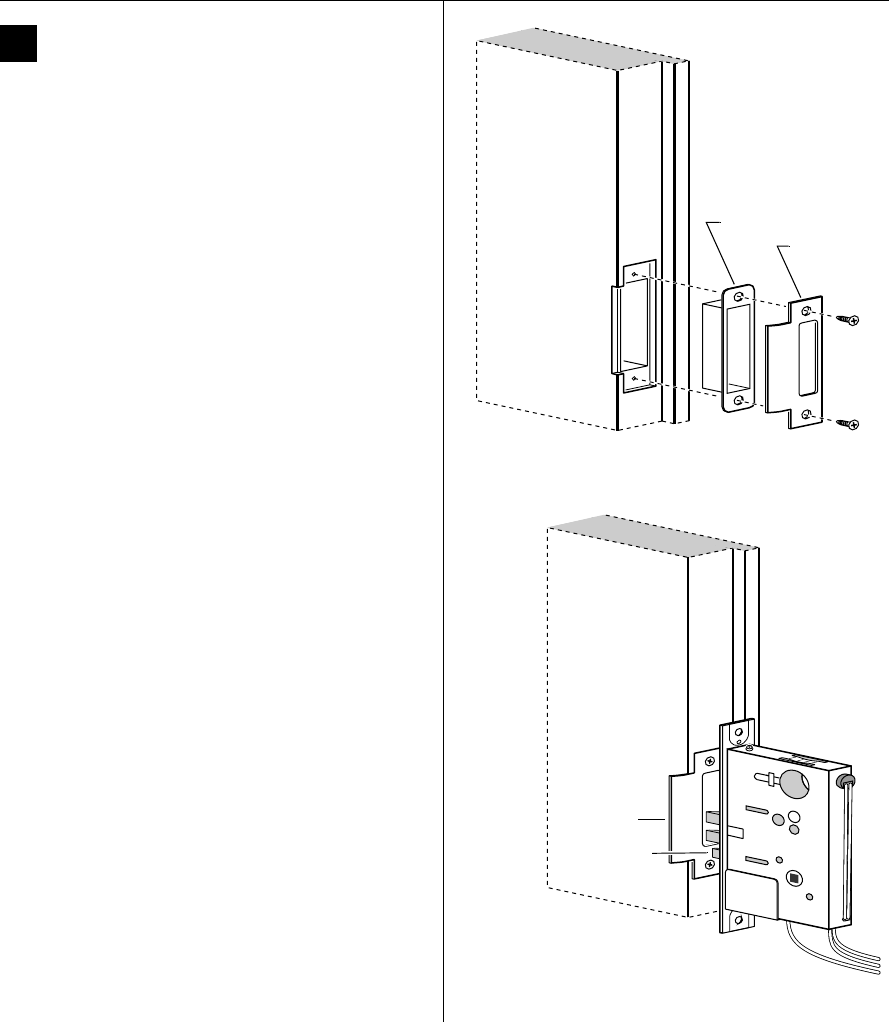
18 Install strike box and strike plate
1 Insert the strike box into the mortise in the door jamb.
Place the strike plate over the strike box and secure the
strike with the screws provided.
2 Check the position of the auxiliary bolt against the
strike plate.
Caution: The auxiliary bolt must make contact
with the strike plate. The auxiliary bolt deadlocks
the latchbolt and prevents someone from forcing
the latch open when the door is closed. If the
incorrect strike is installed, a lock-in can occur.
Note: The recommended gap between the door and
jamb is 1/8″.
Figure 18a Installing the strike box and strike plate
Strike box
Strike plate
Door jamb
Figure 18b Positioning the strike
Auxiliary bolt
Strike plate
Installation Instructions for B.A.S.I.S. Mortise Locks
BEST ACCESS SYSTEMS
Indianapolis, Indiana
Completing the installation
14
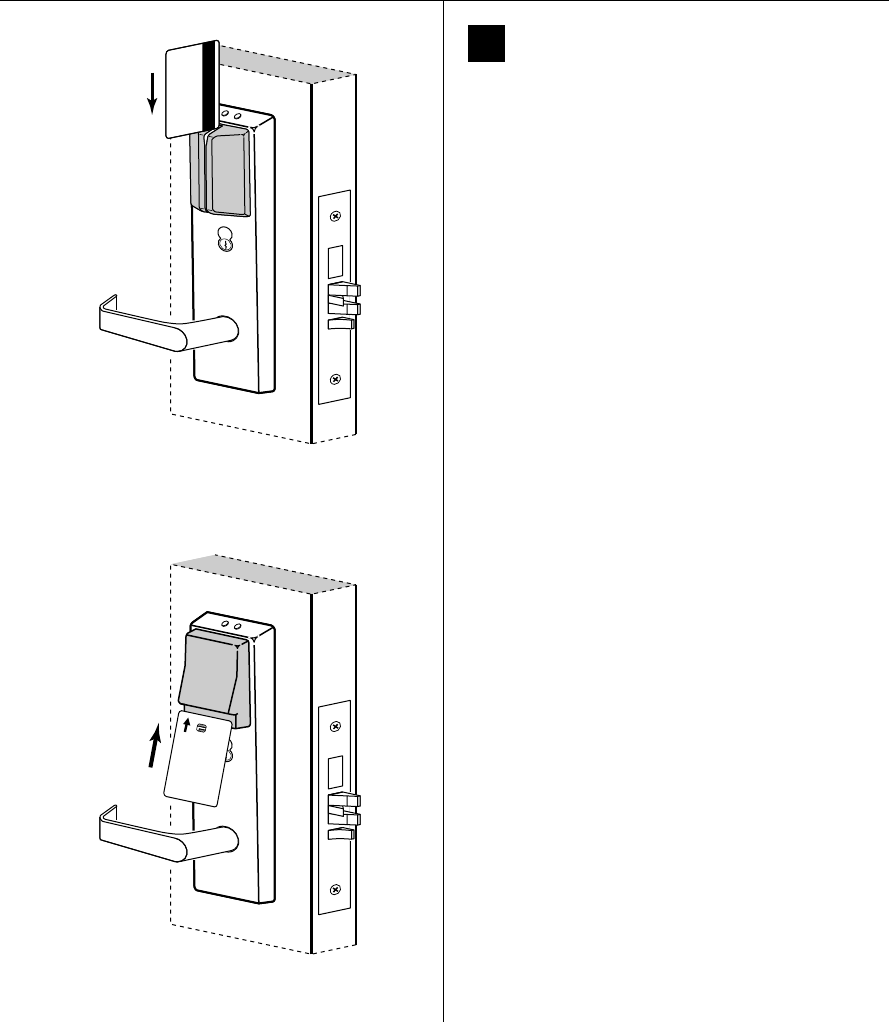
19 Test lock
To test the lock for proper operation, use the temporary
operator card that came with the lock. This card is for
temporary use only. After permanent cards have been
programmed for the lock, the temporary card should be
deleted.
For locks with magnetic stripe card readers
1 With the magnetic stripe facing towards the right,
swipe the temporary operator card, as shown in
Figure 19a.
The green light flashes and the locking mechanism
unlocks.
2 Turn the lever and open the door.
For locks with smart card readers
1 With the writing facing towards you, insert and
remove the temporary operator card, as shown in
Figure 19b.
The green light flashes and the locking mechanism
unlocks.
2 Turn the lever and open the door.
Figure 19a Using the temporary operator card with a
magnetic stripe card reader
Temporary
Operator
Figure 19b Using the temporary operator card with a
smart card reader
Installation Instructions for B.A.S.I.S. Mortise Locks
BEST ACCESS SYSTEMS
Indianapolis, Indiana
15
Installation Instructions for B.A.S.I.S. Mortise Locks
Completing the installation
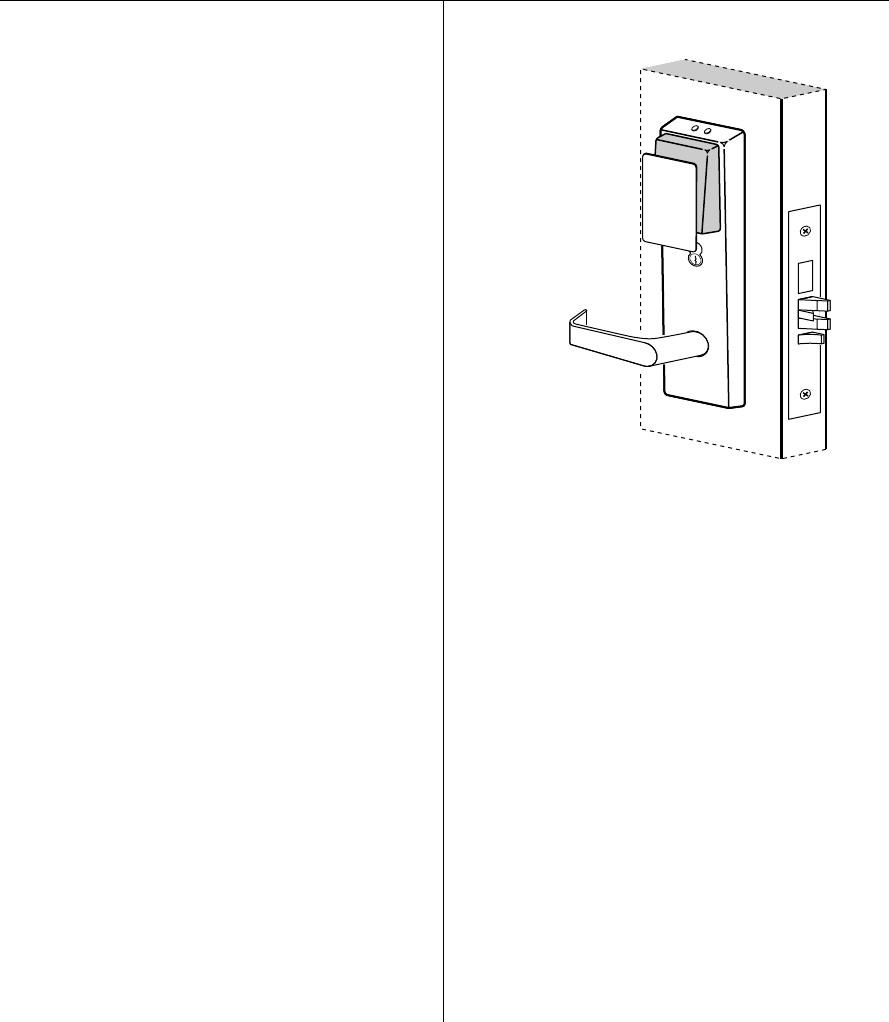
For locks with proximity card readers
1 Hold the temporary operator card within an inch of the
lock’s card reader, as shown in Figure 19c.
The green light flashes and the locking mechanism
unlocks.
2 Turn the lever and open the door.
If the mechanism doesn’t unlock, refer to the
following table.
For all EV and FV function locks
Insert and turn the key to unlatch the door.
For all FV and LV function locks
From the inside of the door, turn the turn knob and
make sure that the deadbolt operates properly.
LEDs Sounder Access You should
—3 short
tones
Denied Use the card at a moderate
speed.
Red
flashes
3 short
tones
Denied Use the temporary
operator card provided
with the lock.
Green
flashes
— Denied Check the motor
connection.
— — Denied Check the battery
connection.
Temporary
Operator
Figure 19c Using the temporary operator card with a
proximity card reader

Installation Instructions for B.A.S.I.S. Mortise Locks
BEST ACCESS SYSTEMS
Indianapolis, Indiana
16 © 2000 Best Lock Corporation dba Best Access Systems.
T63302/Rev B 1817313 ER-7991-12 June 2001