Beyerdynamic PHONUM Bluetooth Speakerphone User Manual Layout 1
Beyerdynamic Bluetooth Speakerphone Layout 1
Users Manual
PHONUM
SPEAKERPHONE
FREISPRECHTELEFON
TÉLÉPHONE MAINS LIBRES
ハンズフリー機能付き電話
Manuel d’utilisation
Bedienungsanleitung
User Manual
取扱説明
MAN_Phonum_DE-EN-FR-JP_ 03.05.18 13:18 Seite 1

Phonum speaker phone 3
English. . . . . . . . . . . . . . . . . . . . . . . . . . . . . . . . . . . . . . . . . . . . . . . . . . . . 4
Deutsch . . . . . . . . . . . . . . . . . . . . . . . . . . . . . . . . . . . . . . . . . . . . . . . . . . 12
Français . . . . . . . . . . . . . . . . . . . . . . . . . . . . . . . . . . . . . . . . . . . . . . . . . . 20
日本語 . . . . . . . . . . . . . . . . . . . . . . . . . . . . . . . . . . . . . . . . . . . . . . . . . . . 28
MAN_Phonum_DE-EN-FR-JP_ 03.05.18 13:18 Seite 2

english
Phonum speaker phone 5
Phonum speaker phone
4
Thank you for placing your trust in us and for purchasing the Phonum speaker phone.
For the best results, we would like to give you an introduction into how to use Phonum.
1. Safety information
General information
• READ this user manual.
• KEEP this user manual.
• FOLLOW the operating and safety instructions listed there.
Disclaimer
• The company beyerdynamic GmbH & Co. KG accepts no liability for damage to the
product or injury to persons caused by careless, improper, incorrect use of the
product, or use for purposes not specified by the manufacturer.
Troubleshooting / repair
• Do not attempt to open the device.
• Leave all servicing to authorised and qualified personnel only.
Cleaning
• Clean the device only with a slightly damp or dry cloth. Never use solvents, since
these may damage the surface.
Batteries
• The Phonum device is operated with the following type of rechargeable battery:
lithium ion
• High temperatures, especially at a high charge level, lead to irreversible damage.
• If you should not use the battery for a longer period of time, or if you wish to store it,
it is advisable to reduce the battery to approximately 50% of the rated charge and to
store it at temperatures of up to a maximum of 20°C.
• For transportation on land, water and by air, the battery pack used was tested
according to the UN 38.3 transport regulations for the transportation of lithium
batteries.
• Never take the batteries apart. The acid in the batteries causes damage to the skin
and clothing.
• In the event of misuse or improper use, the batteries may leak. In extreme cases,
there is a risk of: explosion, generation of heat, fire, smoke or fumes.
• Never expose batteries to excessive heat such as sunshine, fire or the like.
• Do not expose the battery to any mechanical shock.
• Charge the battery before using it for the first time.
• The battery should only be charged with the charger provided.
• Avoid deep discharge of the battery. The batteries may be damaged and the life
cycle of the batteries may be shortened.
• If battery-powered devices are not used for an extended period of time (e.g. 1 year),
this may speed up the self-discharging of the battery. For long-term storage, the
temperature should be between +10 °C and +30 °C.
• If you do not use the device for several months, you should charge the batteries at
least twice per year in order to prevent a deterioration in performance due to self-
discharging.
• Do not short-circuit the battery.
Damp / heat sources
• Keep the battery clean and dry. Never expose your device to rain or high humidity. It
should therefore not be installed in the immediate vicinity of swimming pools,
shower facilities, wet basements or other areas with exceptionally high air humidity.
• Never place objects filled with liquids (e.g. vases or drinking glasses) on the device.
Liquid in the devices can cause a short circuit.
• Never install or operate the device in the immediate vicinity of radiators, lighting
equipment or other heat-generating devices.
• If you have used the device in a cold environment and then bring it into a warm
environment, condensation may form in the housing. Wait for at least 2 hours before
putting the device into operation again.
MAN_Phonum_DE-EN-FR-JP_ 03.05.18 13:18 Seite 4
english
Phonum speaker phone 7
Phonum speaker phone
6
2. Disposal
This symbol on the product, in the user manual or on the packaging means
that your electrical and electronic devices should be disposed of separate
from household waste at the end of their life cycle. There are separate
collection systems for recycling in the EU. For further information, please
contact your local authorities or the dealer where you purchased the
product.
Battery disposal
This symbol means that your product and/or the battery should be disposed
of separate from household waste, in accordance with local laws and
regulations. When the product has reached the end of its life cycle, take it
to a collection point designated by local authorities. The separate collection
and recycling of your product and/or the battery at the time of disposal
helps to conserve natural resources and ensures that recycling takes place
in a manner that protects human health and the environment.
• Old batteries may contain substances that are harmful to your health and the
environment.
• Always dispose of used batteries in accordance with the applicable regulations.
Please do not throw used batteries into the fire (danger of explosion) or into your
household waste. Take them to your local collection points. Returning batteries is
free of charge and is required by law. Please dispose of discharged batteries only.
• All batteries are recycled to recover valuable materials such as iron, zinc or nickel.
3. Simplified EU Declaration of Conformity
beyerdynamic hereby declares that this radio transmission device is in compliance with
the EU Directive 2014/53/EU (RED). The full text of the EU Declaration of Conformity
is available on the Internet at the following address:
http://www.beyerdynamic.com/cod
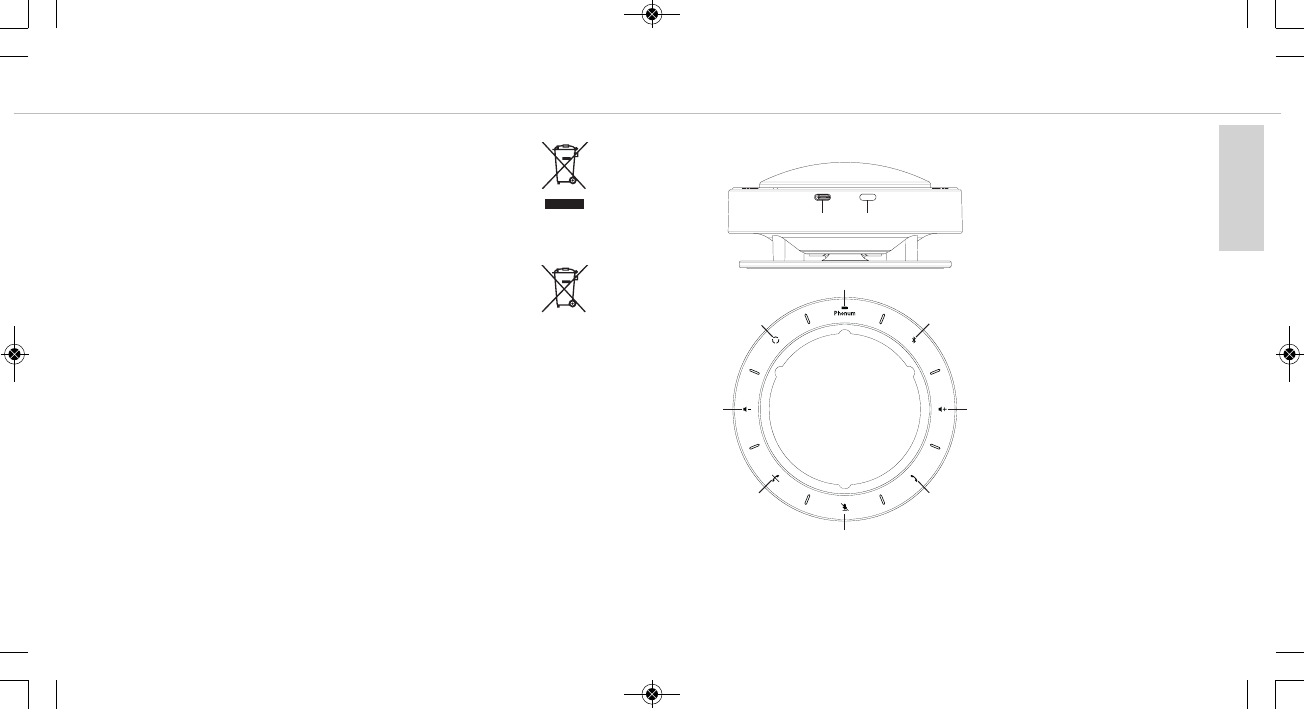
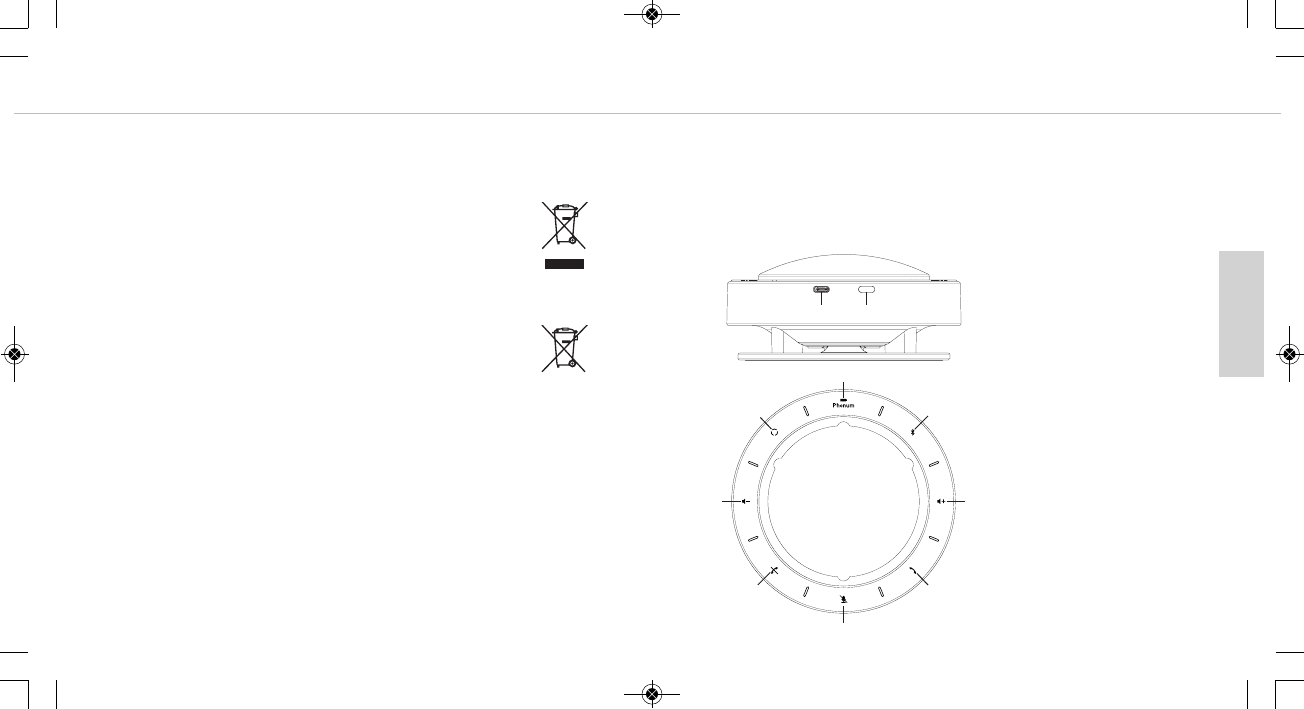
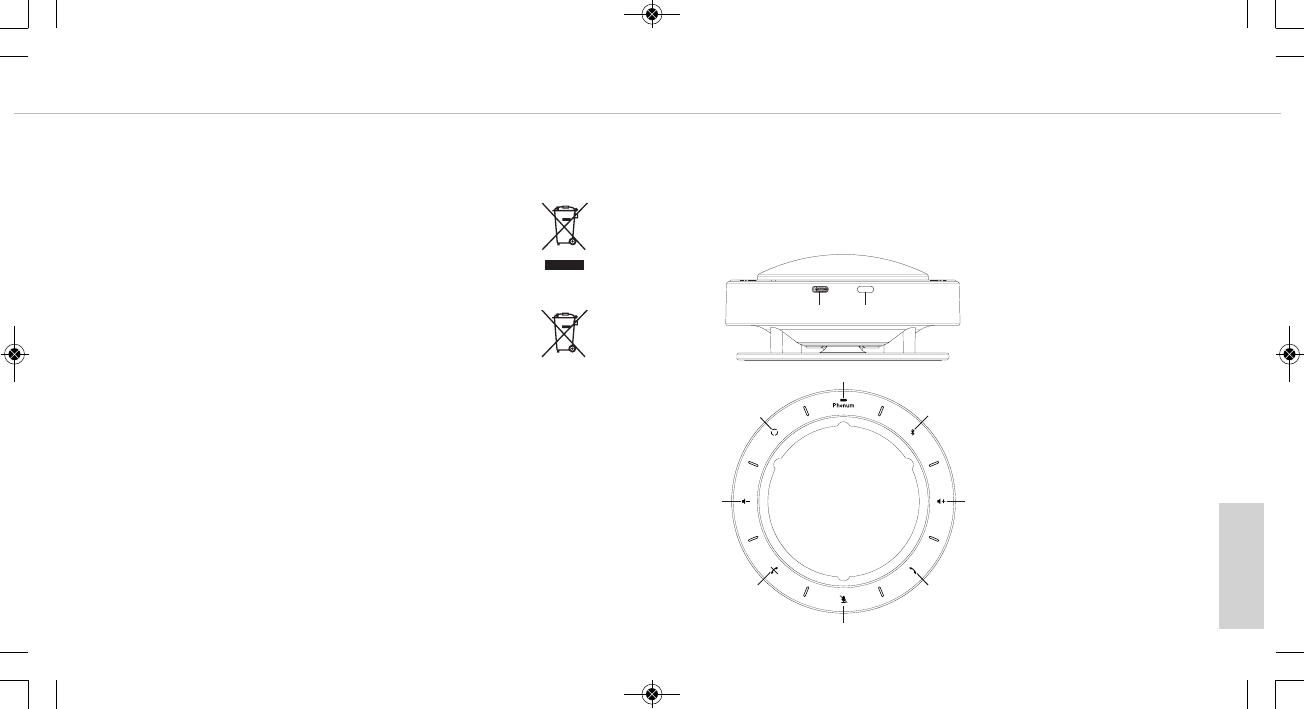
4. Control elements
USB port
On/Off button
Battery indicator
Bluetooth button
Increase volume
Accept call
Microphone on/mute switch
End call
Decrease volume
Microphone mode
MAN_Phonum_DE-EN-FR-JP_ 03.05.18 13:18 Seite 6
english
Phonum speaker phone 9
Phonum speaker phone
8
5. Operation with a smartphone
• Switch Phonum on by briefly pressing the On/Off button .
• Activate the Bluetooth feature on your smartphone.
• Activate the Bluetooth feature on Phonum by pressing the Bluetooth button .
• The Bluetooth button lights up in blue.
• Let your smartphone search for new devices.
• Select "beyerdynamic Phonum" from the available devices in the Bluetooth menu
on your smartphone and connect both devices. The two devices now connect auto-
matically every time you switch them on.
Alternatively, you can connect Phonum by NFC using an NFC-capable smartphone.
Switch Phonum on.
• Activate the NFC function on your smartphone so that all the necessary information
is transferred to your smartphone and a connection can be established.
• Hold the smartphone over Phonum so that both NFC chips are close together.
Important:
Phonum is ready for operation as soon as a connection to your smartphone has been
established.
6. Operation with laptop/PC
• Switch on your PC.
• Connect Phonum through the USB port to the USB port on your PC/laptop using a
USB cable.
• Switch Phonum on using the On/Off button .
7. Operation
You can control operation on the device itself or by using your smartphone, if you are
using Phonum with a smartphone.
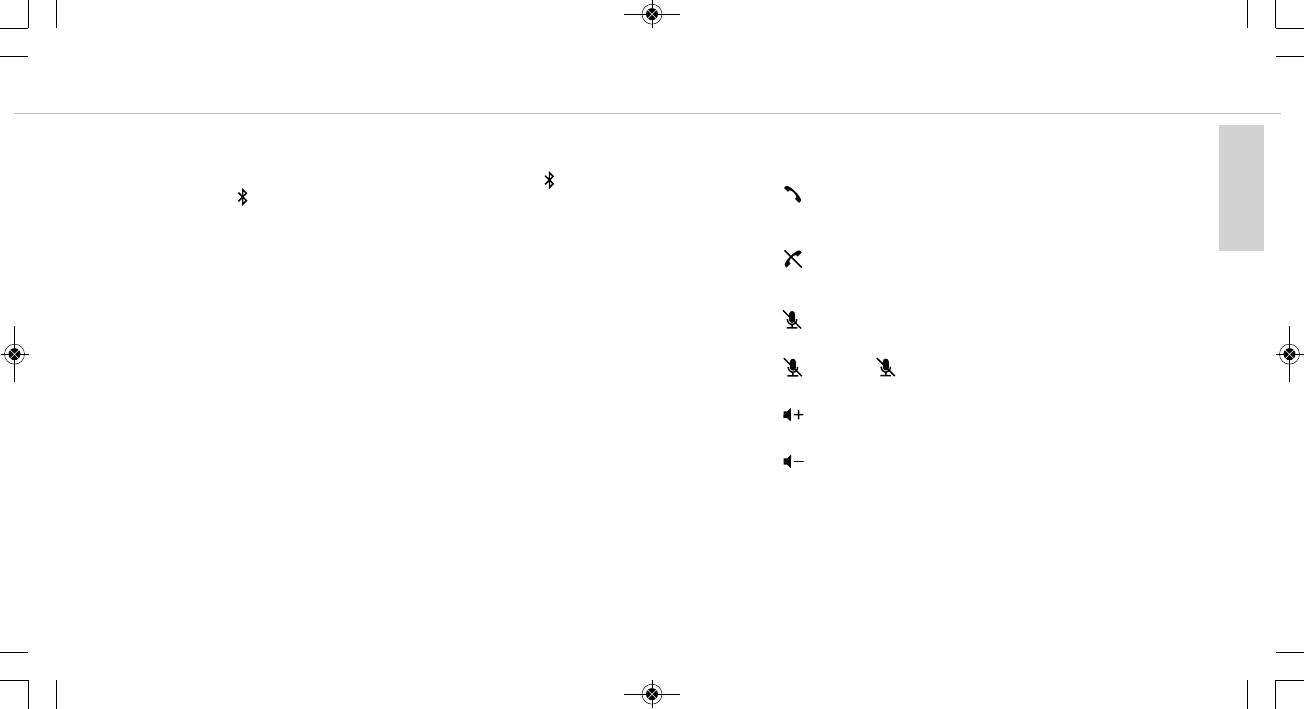
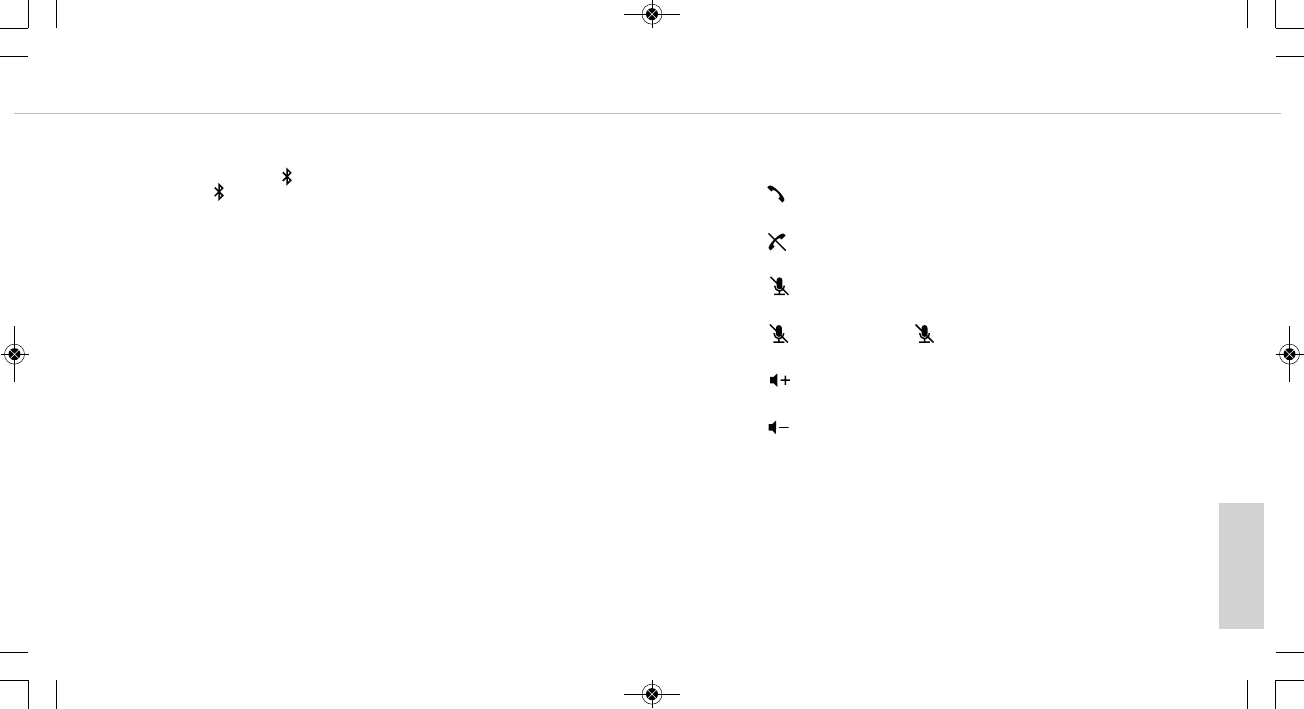
•Accept call
Press the button. The button lights up green as soon as you speak into the
microphone.
•End call
Press the button. The button lights up red as soon as you speak into the micro-
phone.
Muting the microphone
• Press the button. The lines between the individual symbols flash slowly.
Activating the microphone
• Press the button. The button lights up.
Increase volume
• Press the button.
Decrease Volume
• Press the button.
MAN_Phonum_DE-EN-FR-JP_ 03.05.18 13:18 Seite 8
english
Phonum speaker phone 11
Phonum speaker phone
10
8. Changing the microphone mode
With the button you can choose between three microphone modes. You can recognise
the selected microphone mode from the illuminated lines between the symbols.
1. Beamforming mode (factory setting)
In this mode, the microphone automatically adjusts itself to the speaker.
This is indicated by the lines that light up at the point where you are
speaking into the microphone.
2. Cardioid mode
The selected cardioid characteristic is indicated by flashing lines to the
right and left of the symbol.
3. Spherical mode
The selected spherical characteristic is indicated by all lines lighting up
between the individual symbols.
9. Charging
As soon as the battery indicator lights up, the built-in battery still has a capacity of
approximately 10%. You should charge the integrated battery at the latest when the
battery indicator begins to flash rapidly, because then it is almost empty.
• To charge the device, connect it to either a USB power adapter or to a PC/laptop
through the USB port using a USB cable.
To charge Phonum, we recommend connecting it to a USB power adapter.
If you connect the device to a PC/laptop to charge it, you can use it at the same
time while charging.
• The battery indicator flashes slowly to indicate that the device is charging.
Once the battery is fully charged, the battery indicator goes off.
MAN_Phonum_DE-EN-FR-JP_ 03.05.18 13:18 Seite 10
deutsch
Phonum – Speakerphone 13
Phonum – Speakerphone
12
Vielen Dank für Ihr Vertrauen und dass Sie sich für den Kauf des Freisprechtelefons/
Speakerphones Phonum entschieden haben.
Für ein bestmögliches Ergebnis möchten wir Ihnen eine Einführung geben, wie Sie Pho-
num verwenden können.
1. Sicherheitsinformationen
Allgemein
• LESEN Sie die Bedienungsanleitung
• BEWAHREN Sie diese Bedienungsanleitung auf.
• BEFOLGEN Sie die aufgeführten Bedienungs- und Sicherheitshinweise.
Haftungsausschluss
• Die Firma beyerdynamic GmbH & Co. KG übernimmt keine Haftung für Schäden am
Produkt oder Verletzungen von Personen aufgrund unachtsamer, unsachgemäßer,
falscher oder nicht dem vom Hersteller angegebenen Zweck entsprechender Verwen-
dung des Produkts.
Fehlerbeseitigung / Reparatur
• Öffnen Sie nicht eigenmächtig das Gerät.
• Überlassen Sie alle Servicearbeiten nur autorisiertem Fachpersonal.
Reinigung
• Reinigen Sie das Gerät nur mit einem leicht feuchtem oder trockenem Tuch. Verwen-
den Sie niemals Lösungsmittel, da diese die Oberfläche beschädigen.
Akku, Batterien
• Das Phonum-Gerät wird mit dem folgenden Akkutyp betrieben: Lithium-Ionen
• Hohe Temperaturen, vor allem mit hohem Ladezustand, führen zu irreversiblen Schäden.
• Sollten Sie den Akku längere Zeit nicht verwenden bzw. lagern, empfiehlt es sich, den
Akku auf ungefähr 50% der Ladung zu bringen und bei Temperaturen bis max. 20 °C
zu lagern.
• Für den Transport zu Lande, Wasser und Luft wurde der verwendete Akkupack gemäß
der UN 38.3 Transportvorschrift für den Transport von Lithium-Akkus/-Batterien ge-
testet.
• Nehmen Sie die Batterien/Akkus niemals auseinander. Die enthaltene Akkumulator-
säure schädigt Haut und Kleidung.
• Bei Missbrauch oder nicht ordnungsgemäßen Gebrauch können die Akkus auslaufen.
In extremen Fällen besteht die Gefahr von:
Explosion, Hitze-, Feuer-, Rauch- oder Gasentwicklung.
• Setzen Sie Batterien niemals übermäßiger Wärme wie Sonnenschein, Feuer oder
dergleichem aus.
• Setzen Sie den Akku keinem mechanischen Schock aus.
• Laden Sie den Akku vor dem erstmaligen Gebrauch.
• Laden Sie den Akku nur mit dem dafür vorgesehenen Ladegerät.
• Vermeiden Sie eine Tiefentladung der Akkus. Die Akkus könnten beschädigt werden
und die Lebensdauer der Batterien kann sich verkürzen.
• Wenn akku- oder batteriebetriebene Geräte längere Zeit nicht eingesetzt werden (z.B.
1 Jahr), kann sich die Selbstentladung der Batterie/Akku beschleunigen. Die Tempe-
ratur bei einer Langzeitaufbewahrung sollte zwischen +10 °C und +30 °C betragen.
• Setzen Sie das Gerät mehrere Monate nicht ein, sollten Sie die Akkus mindestens
zweimal pro Jahr aufladen, um eine Verschlechterung in der Leistung durch Selbst-
entladung verhindern.
• Schließen Sie den Akku nicht kurz.
Feuchtigkeit / Wärmequellen
• Halten Sie den Akku sauber und trocken. Setzen Sie das Gerät niemals Regen oder
hoher Feuchtigkeit aus. Installieren Sie es daher nicht in unmittelbarer Nähe von
Swimming Pools, Duschanlagen, feuchten Kellerräumen oder sonstigen Bereichen
mit außergewöhnlich hoher Luftfeuchtigkeit.
• Stellen Sie niemals mit Flüssigkeiten gefüllte Gegenstände (z.B. Vasen oder Trinkgläser)
auf das Gerät. Flüssigkeiten in den Geräten können einen Kurzschluss verursachen.
• Installieren und betreiben Sie das Gerät auch niemals in unmittelbarer Nähe von
Heizkörpern, Beleuchtungsanlagen oder anderen wärmeerzeugenden Geräten.
MAN_Phonum_DE-EN-FR-JP_ 03.05.18 13:18 Seite 12
deutsch
Phonum – Speakerphone 15
Phonum – Speakerphone
14
• Wenn Sie das Gerät in einer kalten Umgebung eingesetzt haben und anschließend in
eine warme Umgebung bringen, kann sich im Gehäuse Kondenswasser bilden. Warten
Sie mindestens 2 Stunden bevor Sie das Gerät wieder in Betrieb nehmen.
2. Entsorgung
Dieses Symbol auf dem Produkt, in der Bedienungsanleitung oder auf der
Verpackung bedeutet, dass Ihre elektrischen und elektronischen Geräte am
Ende ihrer Lebensdauer gesondert vom Hausmüll entsorgt werden sollten. Es
gibt getrennte Sammelsysteme für das Recycling in der EU. Für weitere In-
formationen wenden Sie sich bitte an die örtlichen Behörden oder an den
Händler, bei dem Sie das Produkt erworben haben.
Entsorgung des Akkus
Dieses Symbol bedeutet, dass entsprechend den örtlichen Gesetzen und Vor-
schriften Ihr Produkt und/oder die Batterie getrennt vom Hausmüll entsorgt
wird. Wenn das Produkt das Ende seiner Lebensdauer erreicht hat, bringen
Sie es zu einer durch lokale Behörden benannten Sammelstelle. Die
getrennte Sammlung und das Recycling Ihres Produkts und/oder des Akkus
zum Zeitpunkt der Entsorgung hilft, die natürlichen Ressourcen zu schonen
und es ist sichergestellt, dass das Recycling in einer Art und Weise stattfin-
det, die die menschliche Gesundheit und die Umwelt schützt.
• Alte Batterien können Stoffe enthalten, die schädlich für Ihre Gesundheit und die
Umwelt sind.
• Entsorgen Sie benutzte Batterien immer gemäß den geltenden Vorschriften. Bitte wer-
fen Sie die benutzten Akkus nicht ins Feuer (Explosionsgefahr) oder in Ihren Haus-
müll. Bringen Sie sie zu Ihren örtlichen Sammelstellen. Die Rückgabe ist kostenlos
und gesetzlich erforderlich. Bitte entsorgen Sie nur entladene Batterien.
• Alle Batterien werden recycelt, um wertvolle Materialien wie Eisen, Zink oder Nickel
zurückzugewinnen.
3. Vereinfachte EU-Konformitätserklärung
Hiermit erklärt beyerdynamic, dass das Funkübertragungsgerät die EU-Richtlinie
2014/53/EU (RED) erfüllt. Der vollständige Text der EU-Konformitätserklärung ist im
Internet unter folgender Adresse zu finden:
http://www.beyerdynamic.com/cod
4. Bedienelemente
USB-Anschluss
Ein-/Austaste
Batterieanzeige
Bluetooth-Taste
Lautstärke erhöhen
Anruf annehmen
Mikrofon ein/stumm schalten
Anruf beenden
Lautstärke reduzieren
Mikrofonmodus
MAN_Phonum_DE-EN-FR-JP_ 03.05.18 13:18 Seite 14

deutsch
Phonum – Speakerphone 17
Phonum – Speakerphone
16
5. Betrieb mit einem Smartphone
• Schalten Sie Phonum ein, indem Sie kurz auf die Ein-/Austaste drücken.
• Aktivieren Sie die Bluetooth-Funktion an Ihrem Smartphone.
• Aktivieren Sie die Bluetooth-Funktion an Phonum, indem Sie auf die Bluetooth-
Taste drücken.
• Die Bluetooth-Taste leuchtet blau.
• Lassen Sie mit Ihrem Smartphone ggf. nach neuen Geräten suchen.
• Wählen Sie im Bluetooth-Menü Ihres Smartphones unter den verfügbaren Geräten
„beyerdynamic Phonum“ aus und verbinden beide Geräte. Bei jedem weiteren Ein-
schalten verbinden sich beide Geräte automatisch.
Alternativ können Sie Phonum über NFC mit einem NFC-fähigen Smartphone verbin-
den. Schalten Sie Phonum ein.
• Aktivieren Sie die NFC-Funktion an Ihrem Smartphone, damit alle notwendigen In-
formationen auf das Smartphone übertragen und so eine Verbindung hergestellt wer-
den kann.
• Halten Sie das Smartphone so über Phonum, dass beide NFC-Chips dicht beieinan-
der sind.
Wichtig:
Phonum ist betriebsbereit, sobald eine Verbindung zu Ihrem Smartphone aufgebaut ist.
6. Betrieb mit Laptop/PC
• Schalten Sie Ihren PC ein.
• Schließen Sie Phonum über die USB-Buchse mit einem USB-Kabel an die USB-
Buchse Ihres PCs/Laptops an.
• Schalten Sie Phonum über die Ein-/Austaste ein.
7. Bedienung
Die Bedienung können Sie am Gerät selbst steuern oder über Ihr Smartphone, wenn
Sie Phonum mit einem Smartphone verwenden.
•Anruf annehmen
Auf die Taste drücken. Die Taste leuchtet grün, sobald in das Mikrofon gespro-
chen wird.
•Anruf beenden
Auf die Taste drücken. Die Taste leuchtet rot, sobald in das Mikrofon gesprochen
wird.
Mikrofon stumm schalten
• Auf die Taste drücken. Die Striche zwischen den einzelnen Symbolen blinken
langsam.
Mikrofon aktivieren
• Auf die Taste drücken. Die Taste leuchtet.
Lautstärke erhöhen
• Auf die Taste drücken.
Lautstärke reduzieren
• Auf die Taste drücken.
MAN_Phonum_DE-EN-FR-JP_ 03.05.18 13:18 Seite 16
deutsch
Phonum – Speakerphone 19
Phonum – Speakerphone
18
8. Mikrofonmodus umstellen
Mit der Taste können Sie zwischen drei Mikrofonmodi wählen. Den ausgewählten
Mikrofonmodus erkennen Sie durch die entsprechend leuchtenden Striche zwischen
den Symbolen.
1. Modus Beamforming (Werkseinstellung)
In diesem Modus richtet sich das Mikrofon automatisch nach dem
Sprecher aus.
Dies wird durch die Striche angezeigt, die jeweils an der Stelle
aufleuchten, an welcher gerade in das Mikrofon gesprochen wird.
2. Modus Nierencharakteristik
Die ausgewählte Nierencharakteristik wird durch aufleuchtende Striche
rechts und links vom Symbol angezeigt.
3. Modus Kugelcharakteristik
Die ausgewählte Kugelcharakteristik wird dadurch angezeigt, dass alle
Striche zwischen den einzelnen Symbolen aufleuchten.
9. Laden
Sobald die Batterieanzeige anfängt zu leuchten, hat der integrierte Akku noch eine
Kapazität von ca. 10%. Spätestens wenn die Batterieanzeige anfängt schnell zu
blinken, sollten Sie den integrierten Akku aufladen, denn dann ist er fast leer.
• Schließen Sie das Gerät zum Laden über die USB-Buchse mit einem USB-Kabel
entweder an ein USB-Netzteil oder an einen PC/Laptop an.
Wir empfehlen Phonum zum Laden an ein USB-Netzteil anzuschließen.
Sollten Sie das Gerät zum Laden an einen PC/Laptop anschließen, können Sie es
während des Ladens gleichzeitig benutzen.
• Der Ladevorgang wird durch eine langsam blinkende Batterieanzeige angezeigt.
Sobald der Akku voll geladen ist, erlischt die Batterieanzeige .
MAN_Phonum_DE-EN-FR-JP_ 03.05.18 13:18 Seite 18
français
Phonum – Téléphone mains libres 21
Phonum – Téléphone mains libres
20
Nous vous remercions de la confiance apportée à notre maison en choisissant le télé-
phone mains libres Phonum. Afin de pouvoir profiter au mieux du meilleur résultat
possible, nous souhaitons vous expliquer brièvement comment utiliser Phonum.
1. Consignes de sécurité
Généralités
• LISEZ le mode d’emploi
• CONSERVEZ ce mode d’emploi
• RESPECTEZ les instructions d’utilisation et les consignes de sécurité mentionnées.
Exclusion de la responsabilité
• La société beyerdynamic GmbH & Co. KG ne pourra être tenue responsable de tous
dommages au produit ou de toutes blessures subies par quiconque du(e)s à une
utilisation du produit négligente, incorrecte, erronée ou non conforme à l’usage
indiqué par le fabricant.
Élimination des erreurs / Réparation
• N’ouvrez jamais l’appareil de vous-même.
• Confiez tous les travaux de maintenance à du personnel qualifié agréé.
Nettoyage
• Nettoyez l’appareil uniquement avec un chiffon sec ou légèrement humide.
N’utilisez jamais de solvant qui endommage la surface.
Accu, piles
• L’appareil Phonum fonctionne avec le type d’accus suivant : lithium-ions
• Les températures élevées, surtout en cas de niveau de charge élevé, provoquent des
dommages irréversibles.
• Si vous n’utilisez pas ou si vous stockez l’accu pendant une longue durée, il est
recommandé de charger l’accu à environ 50 % et de le stocker à une température
de 20 °C max.
•
Conformément à la directive UN 38.3 sur les transports concernant le transport de piles
et de batteries au lithium, le pack d’accus utilisé a été testé pour le transport terrestre,
aérien et maritime.
• Ne tentez jamais de démonter les piles/accus. L’acide pour accumulateurs qu’ils
contiennent endommage la peau et abime les vêtements.
• En cas de mauvaise utilisation ou d'utilisation abusive, les accus peuvent couler.
Dans des cas extrêmes, il y a un risque : d’explosion, de dégagement de chaleur,
d’incendie et de dégagement de fumée ou de gaz.
• N’exposez jamais les accus et les piles à une chaleur excessive provenant des rayons
du soleil, d’un feu ou d’une autre source similaire.
• Ne soumettez pas l’accu à un choc mécanique.
• Chargez l’accu avant la première utilisation.
• Ne chargez l’accu qu’avec le chargeur prévu à cet effet.
• Évitez que les accus soient complètement déchargés. Cela peut endommager les
accus et raccourcir la durée de vie des piles.
• Lorsque des appareils fonctionnant sur accu(s) ou pile(s) ne sont pas utilisés
pendant une longue durée (par ex. 1 an), la décharge automatique de la pile/l’accu
peut s’accélérer. La température de stockage à long terme devrait être comprise
entre +10 °C et +30 °C.
•
Si vous n’utilisez pas l’appareil pendant plusieurs mois, vous devriez recharger les accus
au moins deux fois par an pour éviter une baisse de la puissance due à une décharge
automatique.
• Ne court-circuitez pas l’accu.
Humidité / Sources de chaleur
•
Maintenez l’accu sec et propre. N’exposez jamais l’appareil à la pluie ni à une forte
humidité. C’est pourquoi vous ne devez pas installer l’appareil à proximité immédiate
de piscines, de douches, de caves humides ou d’autres zones à humidité de l’air
exceptionnellement élevée.
• Ne posez jamais des objets remplis de liquides (par ex. des vases ou des verres) sur
l’appareil. Des liquides qui pénètrent dans l’appareil peuvent entraîner un court-circuit.
MAN_Phonum_DE-EN-FR-JP_ 03.05.18 13:18 Seite 20
français
Phonum – Téléphone mains libres 23
Phonum – Téléphone mains libres
22
• N’installez ni n’utilisez jamais l’appareil à proximité immédiate de radiateurs, de
systèmes d’éclairage ou d’autres sources de chaleur.
• Si vous avez utilisé l’appareil dans un environnement froid et le mettez ensuite dans
un environnement chaud, de l’eau de condensation peut se former dans le boîtier.
Attendez au moins 2 heures avant de remettre l’appareil en service.
2. Mise au rebut
Ce symbole représenté sur le produit, dans le mode d’emploi ou sur
l’emballage indique que vos appareils électriques et électroniques ne
doivent pas être éliminés avec les ordures ménagères en fin de vie. Il existe
des systèmes de collecte individuels pour le recyclage dans l’UE. Pour de
plus amples informations, merci de vous adresser aux autorités locales ou
au revendeur auprès duquel vous avez acheté le produit.
Élimination de l’accu
Ce symbole indique qu’en fonction des lois et directives locales, votre
produit et/ou sa pile doivent être éliminés séparément des ordures
ménagères. Lorsque le produit a atteint la fin de sa durée de vie, portez-le
dans l’un des points de collecte indiqués par les autorités locales. La
collecte séparée et le recyclage de votre produit et/ou de la pile au moment
de l’élimination contribuent à préserver les ressources naturelles. La
collecte permet également de garantir un recyclage protégeant la santé
humaine et préservant l’environnement.
• Les anciennes piles peuvent contenir des produits nocifs pour la santé et l’environ-
nement.
• Éliminez toujours les piles utilisées conformément aux directives applicables. Ne
jetez pas les accus utilisés dans le feu (risque d’explosion) ni dans les ordures
ménagères. Apportez-les à votre point de collecte local. Le retour est gratuit et exigé
par la loi. Éliminez uniquement les piles déchargées.
• Toutes les piles sont recyclées afin de récupérer les matériaux précieux tels que le
fer, le zinc ou le nickel.
3. Déclaration de conformité de l’UE simplifiée
beyerdynamic déclare par la présente que l’appareil de transmission radio répond à la
directive de l’Union européenne 2014/53/UE (RED). Vous trouverez le texte intégral de
la déclaration de conformité de l’UE sur Internet à l’adresse suivante :
http://www.beyerdynamic.com/cod
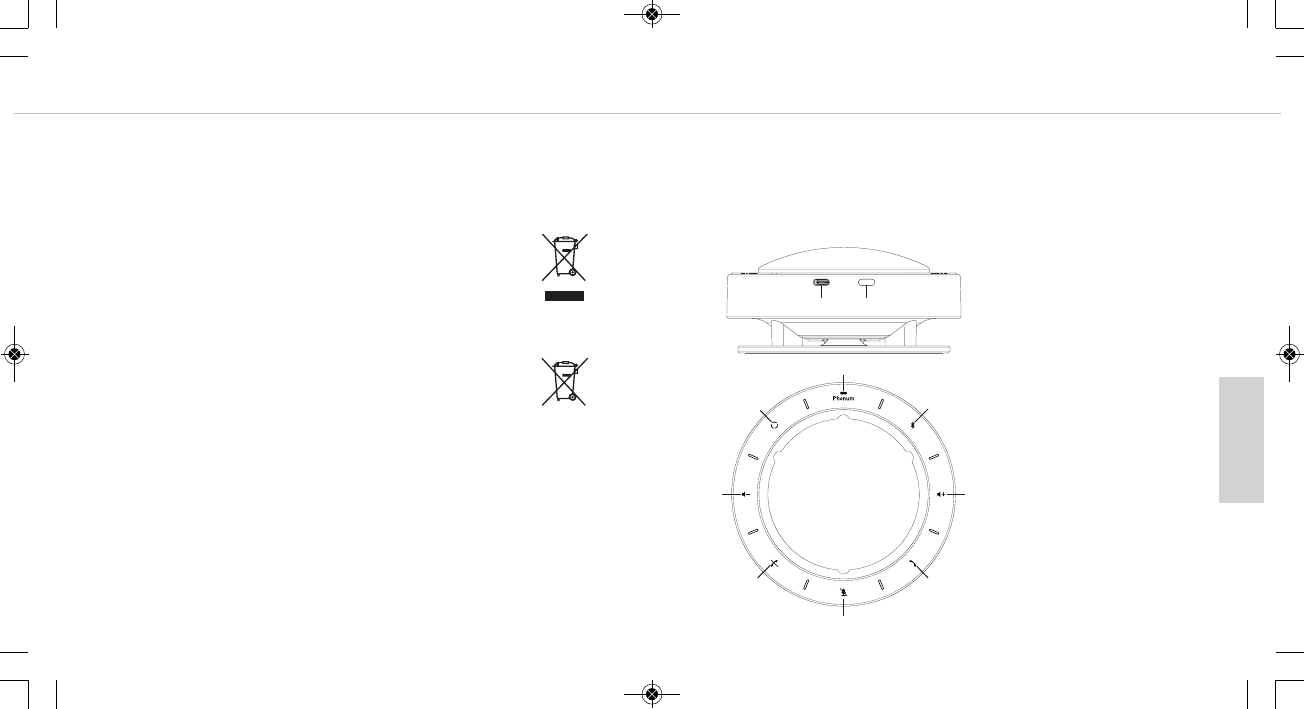
4. Éléments de commande
Prise USB
Touche Marche/Arrêt
Témoin lumineux du niveau de
charge de l’accu
Touche Bluetooth
Augmentation du volume
sonore
Prise d’appel
Activation/Mise en sourdine du
microphone
Fin d'appel
Baisse du volume sonore
Mode microphone
MAN_Phonum_DE-EN-FR-JP_ 03.05.18 13:18 Seite 22
français
Phonum – Téléphone mains libres 25
Phonum – Téléphone mains libres
24
5. Utilisation avec un smartphone
• Mettez Phonum sous tension en appuyant brièvement sur la touche Marche/Arrêt .
• Activez la fonction Bluetooth de votre smartphone.
• Activez la fonction Bluetooth de Phonum en appuyant sur la touche Bluetooth .
• La touche Bluetooth s’allume en bleu.
• Si nécessaire, laissez votre smartphone chercher de nouveaux appareils.
• Dans le menu Bluetooth de votre smartphone, sélectionnez « beyerdynamic Phonum
» parmi les appareils disponibles et connectez les deux appareils. À chaque nouvel
allumage, les deux appareils se connecteront automatiquement.
Vous pouvez également connecter Phonum par le biais de la NFC à un smartphone
compatible avec NFC. Mettez Phonum sous tension.
• Activez la fonction NFC sur votre smartphone pour que toutes les informations
nécessaires soient transmises vers le smartphone et qu’une connexion puisse être
établie.
• Tenez votre smartphone au-dessus de Phonum de manière à ce que les deux puces
NFC soient très proches l’une de l’autre.
Important :
Phonum est prêt à fonctionner dès qu’une connexion avec votre smartphone est établie.
6. Utilisation avec un ordinateur portable/ordinateur individuel
• Mettez votre PC en marche.
• Connectez Phonum à la prise USB de votre ordinateur personnel/ordinateur portable
via la prise USB et au moyen d’un câble USB.
• Mettez Phonum sous tension en appuyant sur la touche Marche/Arrêt .
7. Commande
Vous pouvez configurer la commande de l’appareil soit sur l’appareil lui-même, soit sur
votre smartphone si vous utilisez Phonum avec un smartphone.
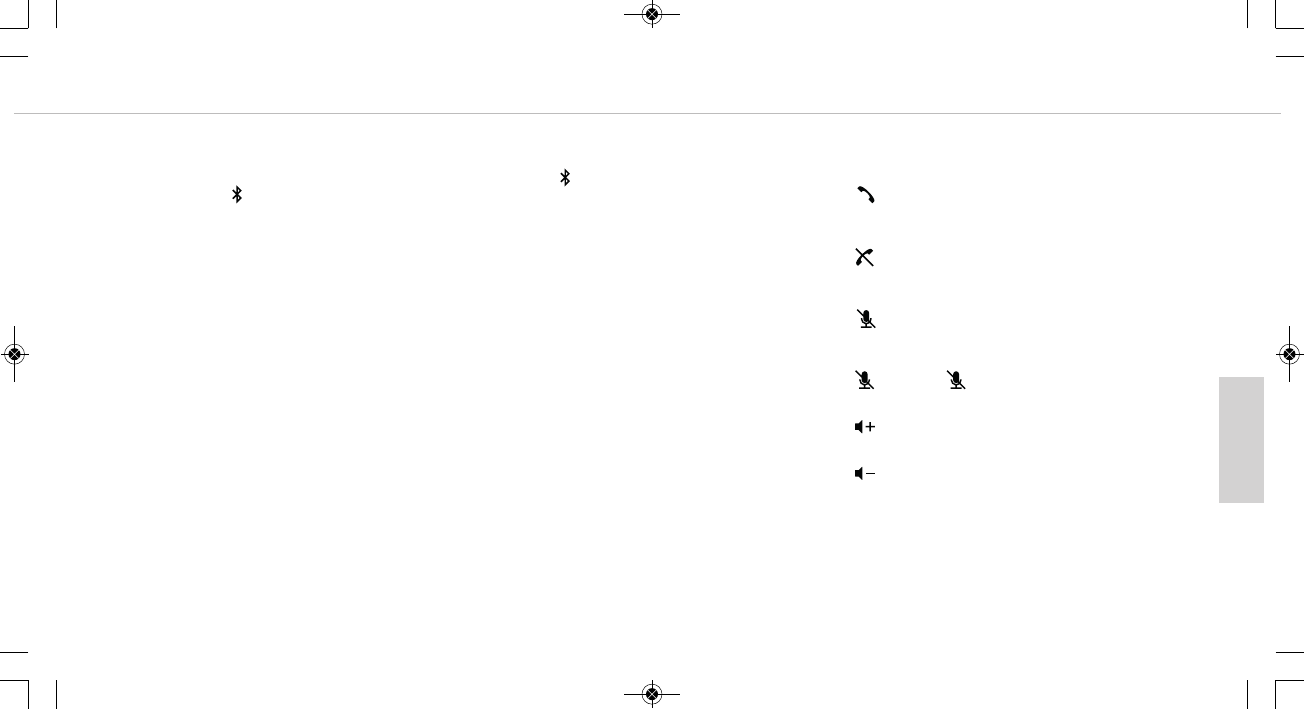
•Prendre un appel
Appuyez sur la touche . La touche s’allume en vert dès que vous parlez dans le
microphone.
•Mettre fin à un appel
Appuyez sur la touche . La touche s’allume en rouge dès que vous parlez dans le
microphone.
Activation/Mise en sourdine du microphone
• Appuyez sur la touche . Les traits s’affichant entre les différents symboles cli-
gnotent lentement.
Activer le microphone
• Appuyez sur la touche . La touche s’allume.
Augmentation du volume sonore
• Appuyez sur la touche .
Baisse du volume sonore
• Appuyez sur la touche .
MAN_Phonum_DE-EN-FR-JP_ 03.05.18 13:18 Seite 24
français
Phonum – Téléphone mains libres 27
Phonum – Téléphone mains libres
26
8. Commutation du mode de fonctionnement du microphone
La touche vous permet de commuter entre trois modes de fonctionnement du
microphone. Vous reconnaîtrez le mode de fonctionnement du microphone sélectionné
aux traits s’allumant respectivement entre les symboles.
1. Mode Beamforming (formation de faisceau) (réglage effectué en usine)
Dans ce mode, le microphone se dirige automatiquement vers la personne
qui parle. Cela est signalé par des traits qui s’allument à l’endroit où une
personne parle actuellement dans le microphone.
2. Mode de configuration cardioïde
Des traits qui s’allument à droite et à gauche de signalent que le
mode de configuration cardioïde est sélectionné.
3. Mode de caractéristique omnidirectionnelle
Tous les traits situés entre les différents symboles qui s’allument signalent
que le mode de caractéristique omnidirectionnelle est sélectionné.
9. Recharge
Dès que le témoin lumineux du niveau de charge de l’accu commence à s’allumer,
l’accu intégré a encore une capacité d’env. 10 %. Au plus tard lorsque le témoin
lumineux du niveau de charge de l’accu commence à clignoter rapidement, vous
devriez recharger l’accu intégré car il est presque déchargé.
• Pour recharger l’appareil, connectez-le à un bloc d’alimentation USB ou à un ordina-
teur personnel/ordinateur portable via la prise USB et au moyen d’un câble USB.
Pour recharger Phonum, nous conseillons de le connecter à un bloc d’alimentation
USB.
Si, pour recharger l’appareil, vous devez le connecter à un ordinateur personnel/ordi-
nateur portable, vous pouvez l’utiliser pendant qu’il se recharge.
• Le témoin lumineux du niveau de charge de l’accu qui clignote lentement indique
que le processus de recharge est en cours.
Le témoin lumineux du niveau de charge de l’accu s’éteint dès que l’accu est
chargé à 100 %.
MAN_Phonum_DE-EN-FR-JP_ 03.05.18 13:18 Seite 26
日本語
Phonum – スピーカーフォン
28 Phonum – スピーカーフォン 29
•電池を長期間使用しないため保管する場合は、電池の充電状態を約 50% にして、
最大 20 °C までの環境で保管するようにしてください。
•陸路、水路、空路による輸送ついては、UN 38.3 のリチウム電池/バッテリーの輸
送に関する輸送規則に準拠して検査されています。
•バッテリー/充電式電池は決して分解しないでください。電池の中にある電解液は
肌や衣服に損害を与えます。
•誤った、または不適切な方法で使用すると、電池から液が漏れることがあります。
極端な場合には次のような危険があります:
爆発、熱、火災、煙、ガスの発生。
•日光、火、またはその他の熱源からの過剰な熱にバッテリーがさらされることが決
してないようにしてください。
•電池に機械的ショックを与えないでください。
•はじめて使用する前に、充電式電池を充電してください。
•専用の充電器を使用して充電してください。
•充電式電池の重放電を避けてください。充電式電池が損傷することがあり、バッテ
リーの寿命が短くなる場合があります。
•充電式電池またはバッテリーで動作する機器を長期間 (1 年間など) 使用しないと、
バッテリー/充電式電池の自己放電が加速することがあります。長期間保管する際
の温度
は、+10 °C~+30 °C のあいだである必要があります。
•機器を何ヶ月も使用しない場合は、充電式電池を少なくとも 1 年に 2 回充電して
、自己放電による性能の衰えを防止してください。
•充電式電池は短絡しないようにしてください。
湿気 / 熱源
•電池は清潔で乾いた状態に保ってください。機器を決して雨に濡らしたり、高湿度
にさらしたりしないでください。プール、シャワー、湿度の高い地下室、またその
他の特に湿度の高いエリアの近くに機器を設置しないでください。
•液体が入った容器 (花瓶や飲み物が入ったグラスなど) を機器の上に決して置かな
いでください。機器に水が入ると、ショートする原因になることがあります。
•また、暖房、照明器具またはその他の熱を発する装置の近くには、機器を設置して
使用しないでください。
この度はハンズフリー機能付き電話/スピーカーフォン Phonum をお買い上げいただ
き、誠にありがとうございます。
お客さまに最高の品質をお楽しみいただくために、Phonum の使用方法を説明させて
いただきます。
1. 安全情報
全般
•取扱説明書をお読みください
•取扱説明書は保管してください
•操作および安全に関する注意に従ってください
免責事項
•beyerdynamic GmbH & Co. KG は、不注意、不適切な、誤った、または製造業者
が意図した目的に応じない方法で製品を使用したために引き起こされた、製品への
損害または人への怪我に対する責任は負いません。
トラブルシューティング / 修理
•許可なく機器を開かないでください。
•点検は資格を持つ専門家に依頼してください。
清掃
•機器は、軽く湿らせた布または乾いた布でのみ清掃してください。溶剤は表面を破
損するため、決して使用しないでください。
充電式電池、バッテリー
•Phonum では次の充電式電池タイプが使用されています: リチウムイオン
•特に電池の充電状態が高い状態で高温にさらすと、元に戻すことはできない損傷が
もたらされます。
MAN_Phonum_DE-EN-FR-JP_ 03.05.18 13:18 Seite 28
日本語
Phonum – スピーカーフォン
30 Phonum – スピーカーフォン 31
•機器を低温環境に置いた後に、温かい環境に移動すると、本体内に凝縮水が発生す
る場合があります。少なくとも 2 時間が経過するまでは、機器を使用しないよう
にしてください。
2. 廃棄
製品、使用説明、包装にある次のシンボルは、お使いの電気・電子デバイ
スの寿命が終了後、特別に家庭廃棄物と分けて廃棄する必要があることを
示しています。EU 内では、リサイクルのための分別収集システムを利用
できます。詳細情報は、お住まいの地域の当局または製品を購入した販売
業者にお問い合わせください。
電池の廃棄
このシンボルは、お住まいの地域の法律および規則に従って、お使いの製
品または電池、またはその両方を家庭廃棄物と分けて廃棄する必要がある
ことを示しています。製品の寿命が終了後、お住いの地域の当局により定
められた収集場所にお持ちください。廃棄時にお使いの製品または電池、
またはその両方を分別収集およびリサイクルすることで、自然資源を守る
手助けをします。私たちの健康と自然を保護する方法で確実にリサイクル
されます。
•古い電池には、私たちの健康と環境を損なう物質が含まれていることがあります。
•使用済みの電池は、かならず有効な規則に従って廃棄するようにしてください。使
用済みの電池は火の中に投げ入れたり (爆発の危険)、家庭廃棄物に廃棄したりしな
いでください。地域の収集場所にお持ちください。返却は無料で行うことができ、
また法律により定められています。電池は充電していない状態でのみ廃棄してくだ
さい。
•すべての電池は、鉄、亜鉛、ニッケルなどの貴重な素材を取り出すためリサイクル
されます。
3. 簡略EU適合宣言
beyerdynamic は、無線伝送機器が EU 規定 2014/53/EU (RED) を満たしていることを
宣言します。EU 適合宣言の全文は、インターネットで以下のアドレスにて参照でき
ます:
http://www.beyerdynamic.com/cod
4. 操作要素
USB ポート
オン/オフボタン
バッテリー表示
Bluetooth ボタン
音量を上げる
電話に応答
マイク オン/ミュート切替
通話を終了
音量を下げる
マイク モード
MAN_Phonum_DE-EN-FR-JP_ 03.05.18 13:18 Seite 30
日本語
Phonum – スピーカーフォン
32 Phonum – スピーカーフォン 33
5. スマートフォンと使用する場合
•オン/オフ ボタン を短く押して、Phonum の電源を入れます。
•お使いのスマートフォンの Bluetooth 機能を有効化します。
•Phonum の Bluetooth ボタン を押して、Bluetooth 機能を有効化します。
•Bluetooth ボタン が青く点灯します。
•必要な場合は、スマートフォンで新しいデバイスを検索します。
•スマートフォンの Bluetooth メニューで、使用できるデバイスから「beyerdynamic
Phonum」を選択して、両方のデバイスを接続します。これ以降、電源をオンにす
ると自動的に両方のデバイスが接続します。
または、NFC を使用して NFC 対応のスマートフォンと Phonum を接続することも
できます。Phonum の電源を入れます。
•すべての必要な情報がスマートフォンに転送され、両方のデバイスが接続されるよ
う
に、スマートフォンで NFC 機能を有効化します。
•両方の NFC チップが互いに近い位置に来るように、スマートフォンを Phonum の
上に持ちます。
重要:
スマートフォンとの接続が確立するとすぐに Phonum は使用できます。
6. ノートパソコン/PC と使用する場合
•ノートパソコンの電源を入れます。
•USB ケーブルを使用して、Phonum の USB ポート とお使いのノートパソコン
/PC の USB ポートを接続します。
•オン/オフ ボタン を使用して Phonum の電源を入れます。
7. 操作
操作は機器自体で行えます。Phonum がスマートフォンと接続されている場合は、ス
マートフォンを使用して操作することができます。
•
電話に応答
ボタン を押します。マイクに向かって話すと、ボタンは緑色に点灯します。
•
通話を終了
ボタン を押します。マイクに向かって話すと、ボタンは赤色に点灯します。
マイクのミュート切替
•ボタン を押します。各シンボルの間のラインがゆっくりと点滅します。
マイクをオンにする
•ボタン を押します。ボタン が点灯します。
音量を上げる
•ボタン を押します。
音量を下げる
•ボタン を押します。
MAN_Phonum_DE-EN-FR-JP_ 03.05.18 13:18 Seite 32
日本語
Phonum – スピーカーフォン 35
Phonum – スピーカーフォン
34
8. マイク モードの切替
ボタン を押すと、3 つのマイク モードから選択できます。選択したマイク モード
は、シンボルの間の点灯しているラインによって識別できます。
1. ビームフォーミング モード (工場設定)
このモードでは、マイクは自動的に話し手に向きます。音声を入力して
いるマイクの場所に対応して、ラインが点灯します。
2. 単一指向性モード
単一指向性モードを選択した場合は、シンボルの右側と左側のラインが
点灯します。
3.
無指向性モード
無指向性モードを選択した場合は、シンボル間のすべてのラインが点灯
します。
9. 充電
バッテリー表示 が点灯し始めたら、充電式電池の充電容量が約 10% になっていま
す。バッテリー表示 がすばやく点滅し始めたら充電がほとんど空の状態になって
いるので、ただちに統合されている充電式電池を充電してください。
•USB ケーブルを使用して、充電する機器の USB ポート を USB 電源またはノ
ートパソコン/PC と接続します。
Phonum の充電には USB 電源を使用することをお勧めします。
ノートパソコン/PC と接続して機器を充電する場合は、充電中も同時に機器を使用
できます。
•充電中は、バッテリー表示 がゆっくりと点滅します。
充電式電池の充電が完了したら、バッテリー表示 は消えます。
MAN_Phonum_DE-EN-FR-JP_ 03.05.18 13:18 Seite 34
english
Phonum – Speakerphone 37
Phonum – Speakerphone
36
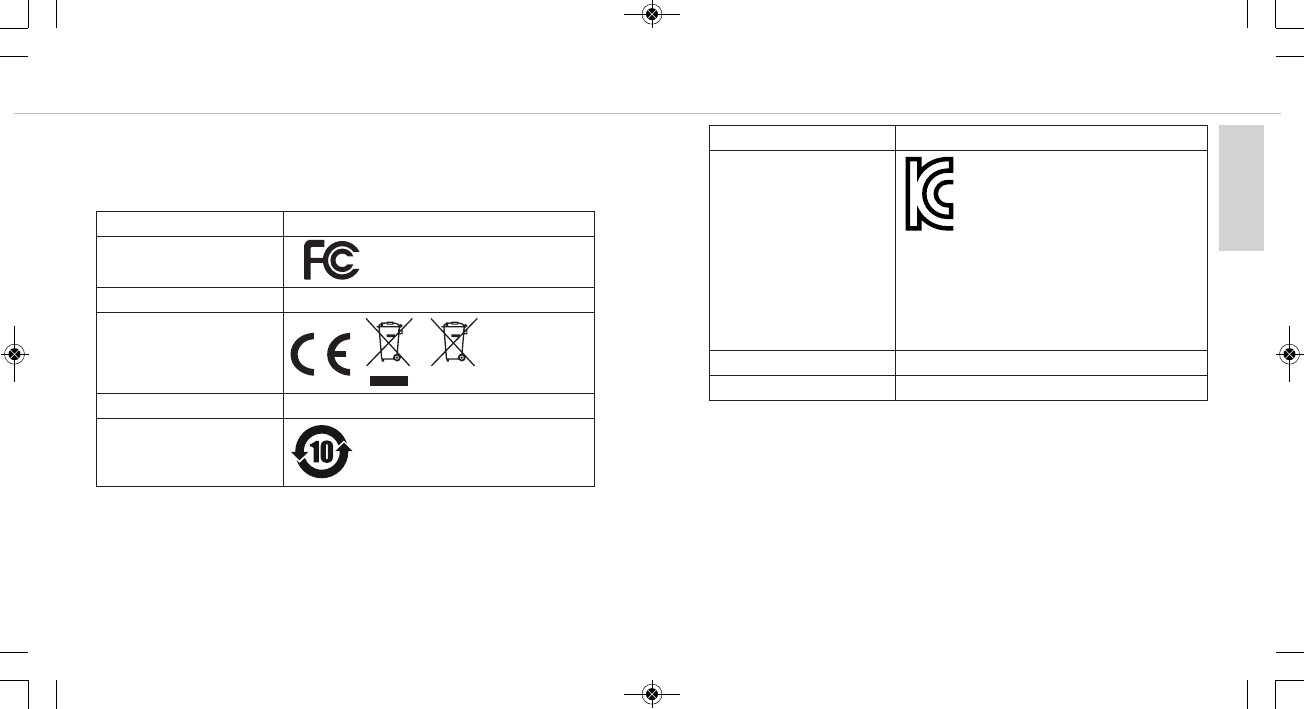
Compliance Information
Frequency band . . . . . . 2,400 - 2,483.5 MHz
Transmitter power. . . . . max. 10 mW
Country Approval
USA
Canada IC: 3628C-PHONUM
Europe
Australia / New Zealand ???
China
FCC ID: OSDPHONUM
CMIIT: ????
Country Approval
Korea
Japan ????
Taiwan ????
XXXX
모델명: PHONUM
인증번호: R-CMI-SSB-PHONUM
제조자/제조국: beyerdynamic GmbH & Co. KG /
독일
적합성평가를 받은 자의 상호: (주)사운드솔루션
제조연월: 별도 표시
MAN_Phonum_DE-EN-FR-JP_ 03.05.18 13:18 Seite 36

Phonum – Speakerphone 39
Phonum – Speakerphone
38
FCC / IC Regulation
NOTE: This equipment has been tested and found to comply with the limits for a Class B
digital device, pursuant to Part 15 of the FCC Rules. These limits are designed to provide
reasonable protection against harmful interference in a residential installation. This equip-
ment generates, uses and can radiate radio frequency energy and, if not
installed and used in accordance with the instructions, may cause harmful interference to
radio communications. However, there is no guarantee that interference will not occur in a
particular installation. If this equipment does cause harmful interference to radio or te-
levision reception, which can be determined by turning the equipment off and on, the user
is encouraged to try to correct the interference by one or more of the following measures:
• Reorient or relocate the receiving antenna.
• Increase the separation between the equipment and receiver.
• Connect the equipment into an outlet on a circuit different from that to which the
receiver is connected.
• Consult the dealer or an experienced radio/TV technician for help.
NOTICE:
This device complies with Part 15 of the FCC Rules [and with Industry Canada licence-
exempt RSS standard(s)].
Operation is subject to the following two conditions:
(1) this device may not cause harmful interference, and
(2) this device must accept any interference received, including interference that may
cause undesired operation.
Le présent appareil est conforme aux CNR d’ndustrie Canada applicables aux appareils
radio
exempts de licence. L’exploitation est autorisée aux deux conditions suivantes:
(1) l’appareil ne doit pas produire de brouillage, et
(2) l’utilisateur de l’appareil doit accepter tout brouillage radioélectrique subi, même
si le brouillage est susceptible d’en compromettre le fonctionnement.
NOTICE:
Changes or modifications made to this equipment not expressly approved by
beyerdynamic GmbH & Co. KG may void the FCC authorization to operate this equipment.
NOTICE:
This Class B digital apparatus complies with Canadian ICES-003.
Cet appareil numérique de la classe B est conforme à la norme NMB-003 du Canada.
Radio frequency radiation exposure information:
For body worn operation, this radio frequency device has been tested and meets the FCC
RF exposure guidelines when used within a minimum distance to the human body.
Informations sur l’exposition aux champs de radiofréquences :
pour le port près du corps, cet appareil émettant des radiofréquences répond aux
recommandations relatives à l'exposition aux radiofréquences de la FCC (commission
fédérale des communications) s’il est utilisé à une distance minimale du corps humain.
CONSUMER ALERT
Most users do not need a license to operate this wireless microphone system. Ne-
vertheless, operating this microphone system without a license is subject to certain
restrictions: the system may not cause harmful interference; it must operate at a low
power level (not in excess of 50 milliwatts); and it has no protection from interfe-
rence received from any other device.
MAN_Phonum_DE-EN-FR-JP_ 03.05.18 13:18 Seite 38

Phonum – Speakerphone 41
Phonum – Speakerphone
40
Purchasers should also be aware that FCC is currently evaluating use of wireless mi-
crophone systems, and these rules are subject to change.
For more information, call the FCC at 1-888-CALL-FCC (TTY: 1-888-TELL-FCC) or
visit the FCC´s wireless microphone website at www.fcc.gov/cgb/wirelessmicropho-
nes.
This device operates on a no-protection, no-inteference basis. Should the user seek
to obtain protection from other radio services operating in the same TV bands, a
radio licence is required. For further details, consult Innovation, Science and Eco-
nomic Development Canada’s document Client Procedures Circular CPC-2-1-28,
Voluntary Licensing of Licence-Exempt Low-Power Radio Apparatus in the TV
Bands.
MAN_Phonum_DE-EN-FR-JP_ 03.05.18 13:18 Seite 40
www.beyerdynamic.com
beyerdynamic GmbH & Co. KG . Theresienstraße 8 . 74072 Heilbronn . Germany
Tel. +49 7131 617-0 . Fax +49 7131 617-204 . info@beyerdynamic.de
Weitere Vertriebspartner weltweit finden Sie im Internet unter www.beyerdynamic.com
Abbildungen nicht vertragsbindend. Änderungen vorbehalten.
For further distributors worldwide, please go to www.beyerdynamic.com
Non-contractual illustrations. Subject to change without notice.
Vous trouverez d’autres partenaires commerciaux sur Internet, sur le site www.beyerdynamic.com
Les illustrations ne sont pas contractuelles. Sous réserve de modifications. EN-DE-FR-JP3 Phonum (04.18)
MAN_Phonum_DE-EN-FR-JP_ 03.05.18 13:18 Seite 42