Beyerdynamic UNITEP DECT Transceiver User Manual Layout 1
Beyerdynamic DECT Transceiver Layout 1
User Manual

UNITE RP | RP-T
BODYPACK RECEIVER
TASCHENEMPFÄNGER
QUICK START GUIDE
KURZANLEITUNG

4
This device complies with Pa 15 of the FCC Rules and
with Indury Canada licence-exempt RSS andard(s).
Operation is subject to the following two conditions: (1)
this device may not cause harmful inteerence, and (2)
this device mu accept any inteerence received,
including inteerence that may cause undesired
operation.
Le présent appareil e conforme aux CNR d’Indurie
Canada applicables aux appareils radio exempts de
licence. L’exploitation e autorisée aux deux conditions
suivantes: (1) l’appareil ne doit pas produire de brouillage,
et (2) l’utilisateur de l’appareil doit accepter tout brouil-
lage radioélectrique subi, même si le brouillage e
susceptible d’en compromettre le fonctionnement.
This equipment has been teed and found to comply
with the limits for a Class A digital device, pursuant to Pa
15 of the FCC Rules. These limits are designed to provide
reasonable protection again harmful inteerence
when the equipment is operated in a commercial envi-
ronment. This equipment generates, uses, and can radi-
ate radio frequency energy and, if not inalled and used
in accordance with the inruction manual, may cause
harmful inteerence to radio communications. Operation
of this equipment in a residential area is likely to cause
harmful inteerence in which case the user will be re-
quired to correct the inteerence at his own expense.
Changes or modifications made to this equipment not
expressly approved by Beyerdynamic may void the FCC
authorization to operate this equipment.

5
Ee produto eá homologado pela Anatel, de acordo
com os procedimentos regulamentados pela Resolução
n°. 242/2000 e atende aos requisites técnicos aplicados,
incluindo os limites de exposição da Taxa de Absorção
Específica referente a campos elétricos, magnéticos e
eletromagnéticos de radiofreqüência de acordo com as
Resoluções n°. 303/2002 e 533/2009.
This device is granted pursuant to the Japanese Radio
Law (電波法) and the Japanese Telecommunications
Business Law (電気通信事業法). This device should not be
modified (otherwise the granted designation number will
become invalid).
The devices conforms to the EU guidelines
(EMC) 2014/30/EU
(LVD) 2014/35/EU
(RED) 2014/53/EU
as atteed by the CE mark.
FCC ID: OSDUNITEP
IC: 3628C-UNITEP
Japan: R: 202-SMG006
Radiofrequency radiation exposure Information:
For body worn operation, this equipment has been teed
and meets the FCC RF exposure guidelines when used
with the Beyerdynamic accessories supplied or
designated for this product. Use of other accessories may
not ensure compliance with FCC RF exposure guidelines.

Unite RP | RP-T – Bodypack Receiver
6
Thank you for choosing the Unite RP bodypack
receiver.
To ensure an optimum peormance, we would like
to give you a brief introduction on how to use this
bodypack receiver.
The Unite RP bodypack receiver was designed for
barrier-free use:
– raised symbols on the front operating buttons for
the blind
– Braille on the side talkback button for the blind
– compatible with beyerdynamic induction loops
for the hard of hearing
For detailed operating inructions in your
language, please visit:
www.beyerdynamic.com/unite
1. Safety instructions
General
• Please READ this user manual before the first use.
• Please KEEP this user manual.
• Please FOLLOW the specified operating and
safety instructions.
Disclaimer
• beyerdynamic GmbH & Co. KG will not be liable
for any damage to the product or injury to
persons caused by negligent, improper, incorrect
or inappropriate operation of the product.

english
Unite RP | RP-T – Bodypack Receiver
7
Danger to life
• The supplied strap is only used for wearing the
device around the neck. If it is not used correctly,
the risk of strangulation may occur.
Volume
• When using headphones/headsets, make sure
that the volume is set to minimum. Adju the
volume only aer putting on the headphones/
headset.
Too high volumes and too long liening times
can damage your hearing. Hearing damage
always represents an irreversible impairment of
hearing.
• Always pay attention to the volume. As a rule of
thumb, the higher the volume, the shoer the
liening time. By law, the maximum allowed
value is 85 dB at a maximum liening time of
8 hours.
• Temporary symptoms that you have been
exposed to loud noise are:
– ringing or whiling in the ears
– high tones can no longer be perceived
Troubleshooting / repairs
• Never open the device yourself.
• Refer all service work to authorised professionals
only.

Unite RP | RP-T – Bodypack Receiver
8
Cleaning
• Only clean the device with a dry or slightly damp
cloth. Never use solvents, as these will damage
the surface.
Rechargeable battery
• The bodypack receiver is operated with the
following battery type: BAT-3707, lithium-ion, 3.7 V,
1.88 Ah, 6.96 Wh (order no. 727.679)
• Use only a USB 2.0/3.0 compliant 5V power supply
to charge the battery pack via the integrated
USB type-C port (power consumption is max.
500 mA).
• High temperatures, paicularly in association
with a high charging atus, result in irreversible
damage of the battery pack.
• If you are not intending to use the battery for an
extended period or are planning to put it into
orage, it is advisable to lower the battery’s
charging level to around 50% and to ore it at
temperatures of maximum 30 °C.
• In order to ensure safe transpo by land, sea
and air, the battery pack used for the bodypack
receiver is teed according to the UN 38.3
transpo regulation for lithium-ion batteries.
• Misuse or improper use could damage the
battery pack. In extreme cases, there is a risk of
explosion, heat, fire, smoke or gas.
• Never expose the battery pack to excessive heat
such as sunshine, fire or the like.
• Do not expose the battery pack to mechanical
shock.

english
Unite RP | RP-T – Bodypack Receiver
9
• Charge the battery pack before initial use.
• Use the specified chargers for charging the
battery pack.
• Avoid complete draining of the battery. This
could damage the battery and shorten its
service life.
• If you do not use the receiver for several months,
the batteries should be charged at least twice a
year to prevent deterioration in performance
due to self-discharge.
• Clean the charging contacts of the receiver with
a clean dry cloth, if they become dirty.
• Do not short-circuit the battery.
• The charging contacts could cause property
damage, njuries or fire damage if they come into
contact with conductive materials such as
jewellery, keys or chains. This can lead to a
closed electric circuit and, therefore, to the
material overheating. To avoid this kind of
unintentional electric circuit, the charging
contacts must be handled with care. This is
especially important if the receiver is transported
in a bag or another container containing other
metallic objects.
Moisture / heat sources
• Keep the battery pack clean and dry. Never
expose the device to rain or high humidity. Do
not install it in the immediate vicinity of
swimming pools, shower facilities, damp base-
ments or other areas with unusually high air
humidity.

Unite RP | RP-T – Bodypack Receiver
10
• Never place objects filled with water (e.g. vases
or drinking glasses) on the device. Liquids in the
devices may cause a short circuit.
• Never install or operate the device in the
immediate vicinity of radiators, lighting systems
or other heat-generating devices.
Disposal
At the end of its operating life this
product may not be disposed of along
with normal household waste. Please
take it to a designated recycling point for
electric and electronic appliances. This is
indicated by the symbol on the product,
the operating instructions or
the packaging.
Simplified EU declaration of conformity
beyerdynamic hereby declares that the wireless
transmission device complies with the EU Directive
2014/53/EU (RED). The complete text of the EU
declaration of conformity is available online at the
following address:
http://www.beyerdynamic.com/cod
2. Supplied accessories
• Unite RP or RP-T bodypack receiver with mounted
belt clip
• Quick Start Guide
• Neck strap
• Two spare caps for the talkback button
english
Unite RP | RP-T – Bodypack Receiver
11
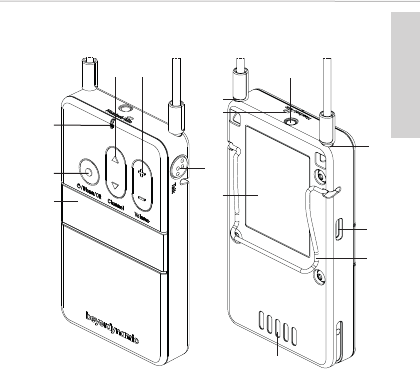
3. Operating elements
3.1 Device
Display
The display indicates the channel name, battery
status and different menus.
On/Off and menu button
Use the on/off button to turn the receiver on or
off. To switch off the device, hold down the
button for 5 seconds. In order to activate the
main menu, hold down the button for 2 seconds.
Use the menu button to confirm settings.

Unite RP | RP-T – Bodypack Receiver
12
Status indicator light
– during operation:
Indicator light Operating status
Off Device is switched off
Flashing yellow
slowly
• Ready to operate and
battery status > 10 %
• Out of range from
transmitter
Yellow Only for RP-T:
Connection established
and battery status > 10 %
Green • RP:
Connection established
and battery status > 10 %
• RP-T:
Connection established,
talkback is running and
battery status > 10 %
Flashing red slowly Low battery level < 10 %
Red • Device is starting
• Firmware update is
running
Flashing red rapidly Critical error

english
Unite RP | RP-T – Bodypack Receiver
13
– in the charger:
Multifunction button
With this button you can enter the channel
selection menu and select a channel. If you are
in a menu, you can scroll through the menu to
make various settings.
Volume button
Use this button to adjust the volume of any
connected headphone/headset/induction loop.
Use this button to adjust the volume of any
connected headphones/headsets/induction
Indicator light Charging status
Off Device is switched off
Flashing green
slowly
Charging 0 - 100%
Green Battery is charged
Flashing yellow
slowly
Pairing information is
being copied from the
transmitter/charger
Yellow for
10 seconds
Device information is
copied successfully to
device
Flashes red slowly
for 10 seconds
Paring error
Flashing green/yel-
low rapidly
Device is being localised
Flashing red rapidly Charging error

Unite RP | RP-T – Bodypack Receiver
14
loops. With “+” the volume is increased, with “-”
the volume is reduced.
Important: Please note the safety inructions
regarding the volume.
Talkback button (only with RP-T)
With this button you can ask the tour guide a
question via the integrated microphone or the
microphone of a connected headset.
Neck strap attachment
Attach the supplied neck strap by pushing the
pins at the end of the neck strap into the
fastening holes. For safety reasons, the fastening
will detach when pulled strongly.
Integrated microphone (only with RP-T)
The integrated microphone is used for short
queries to the tour guide. Maintain a distance of
10 cm from the microphone when speaking. For a
best possible audio transmission we recommend
using an external headset
RP: Headphone/induction loop connector
RP-T: Headphone/headset/induction loop
connector
USB port, Type C
You can use this connector to charge the inte-
grated battery pack via a USB power adapter.
Furthermore, you can connect the bodypack
receiver to the USB Type C port on a Unite
charger to charge it or to pair it with other
devices.
Belt clip
The belt clip allows you to attach the device to
clothing such as a waistband or belt.
english
Unite RP | RP-T – Bodypack Receiver
15
Charging contacts
The built-in battery is charged via the charging
contacts when the device is inserted into the
charger. Make sure to insert the device fully into
the charging slot of a Unite charger so that the
charging contacts have proper contact.
Type label
The type label provides information about the
name, article number, certification numbers,
hardware version, serial number and production
date.
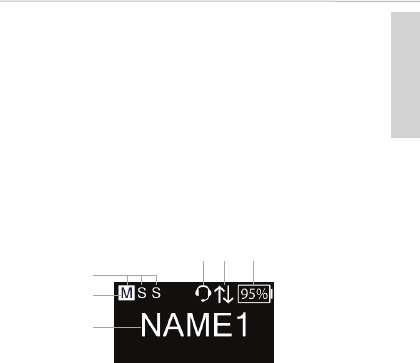
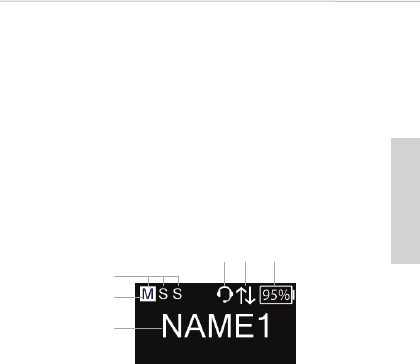
3.2 Display
The main screen (below) is displayed when the
bodypack receiver is switched on and ready for
operation.
Display of all active speakers (Master, 1st slave, 2nd
slave)
Display of current type of speaker (the bar
indicates 1st slave or 2nd slave)
Current channel name
RP-T only:
Headset connected
Talkback function activated
Display of remaining battery capacity

Unite RP | RP-T – Bodypack Receiver
16
4. General operation
•Important: Before using the bodypack receiver
for the first time, you must charge the built-in
battery. Please use an appropriate Unite
charger.
• Connect a headphone or induction loop to jack
socket .
With the RP-T variant you can also connect a
headset instead of headphones.
• Hold down the on/off button to switch on the
receiver.
• Use the volume button to adjust the volume of
the headphone/headset/induction loop.
• All devices are supplied with the group ID 256
and fixed audio encryption allowing quick and
easy initial use.
• If you require several device groups or an audio
transmission even more secure against
unauthorised listening and to avoid listening by
other Unite users using Unite devices, follow the
steps in chapter 5 of the Unite TP bodypack
transmitter quick start guide to create a new
pairing.
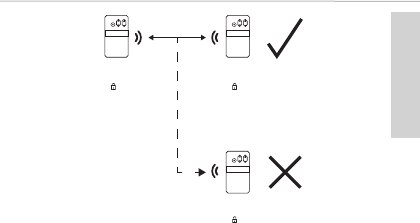
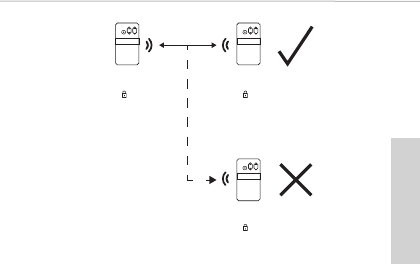
The transmitter and receiver can only
communicate if the settings mentioned in this
chapter match. Transmitters cannot
communicate with receivers that do not have
the same pairing information. This is shown in the
following diagram:
english
Unite RP | RP-T – Bodypack Receiver
17
4.1 How to select an audio channel
• If there are several transmitters in one group you
can select the channel of the appropriate
transmitter on the receiver. Use the multifunction
button on the receiver to select the desired
channel and confirm your selection by briefly
pressing the menu button .
TP
Group ID 256
Name 1
A
Group ID 256
Name 1
A
Group ID 1
Name 2
TP
TP
B

Unite RP | RP-T – Bodypack Receiver
18
5. Technical specifications
DECT RF frequency range . . . . . 1880 - 1930 MHz,
depending on the country
DECT transmission power. . . . . . up to 250 mW (peak),
depending on the country
DECT operating range . . . . . . . . . up to 300 m outside
(line of sight);
the actual operating
range depends upon the
RF output settings, the
surroundings, the signal
absorption, signal
reflection and signal
interference
Audio bandwidth
Low quality (SD) . . . . . . . . . . . . . . 200 Hz - 7 kHz (-3 dB)
High quality (HD) . . . . . . . . . . . . . 100 Hz - 14 kHz (-3 dB)
Operating mode. . . . . . . . . . . . . . . Broadcast and/or
full-duplex on all routes
Encryption . . . . . . . . . . . . . . . . . . . . . AES-256 bit encryption
Headphone/headset/
induction loop connector . . . . . 4-pin mini jack, 3.5 mm,
CTIA Standard
Integrated microphone. . . . . . . . yes
Display . . . . . . . . . . . . . . . . . . . . . . . . monochrome white OLED
display with high contrast
Max. number of
open microphones . . . . . . . . . . . . 3 (individual level control
for each microphone)
Battery . . . . . . . . . . . . . . . . . . . . . . . . lithium-ion battery pack,
replaceable by service
staff only

english
Unite RP | RP-T – Bodypack Receiver
19
Battery monitoring . . . . . . . . . . . . Battery status of
remaining capacity via
OLED display
Operating time
of battery pack . . . . . . . . . . . . . . . . > 15 hrs., typ.
Side-tone and
microphone gain . . . . . . . . . . . . . . individually adjustable
USB Type C connector . . . . . . . . . USB 2.0/3.0 standard,
compatible to 5 V power
supplies only,
power consumption
max. 500 mA
Strap anchor points . . . . . . . . . . . available, neck strap
removable
Dimensions (W x H x D) . . . . . . . . . 58 x 102 x 15.5 mm
Weight (incl. battery) . . . . . . . . . . 105 g
Temperature range
Operation. . . . . . . . . . . . . . . . . . . . -10 to +40 °C
Storage . . . . . . . . . . . . . . . . . . . . . . -20 to +70 °C
Relative humidity . . . . . . . . . . . . . . 0 to 90%
6. Service
When servicing is required, please contact an authorised
professional or directly:
beyerdynamic Service- and Logistik Center
E-mail: service@beyerdynamic.de
Never open the device yourself, as this will invalidate all
warranty claims.

Unite RP | RP-T – Taschenempfänger
20
Vielen Dank für Ihr Verauen und dass Sie sich für den
Kauf des Taschenempfängers Unite RP entschieden
haben.
Für ein bemögliches Ergebnis möchten wir Ihnen eine
kurze Einführung geben, wie Sie den Taschenempfänger
verwenden können.
Der Taschenempfänger Unite RP wurde für eine
barrierefreie Benutzung konzipie:
– erhabene Symbole auf den vorderen Bedientaen für
Blinde
– Brailleschri auf der seitlichen Talkback-Tae für
Blinde
– Unterützung von beyerdynamic Induktionsschleifen
für Schwerhörige
Eine ausführliche Bedienungsanleitung in Ihrer Sprache
finden Sie unter www.beyerdynamic.com/unite
1. Sicherheitsinformationen
Allgemein
• LESEN Sie die Bedienungsanleitung vor der ersten Inbe-
triebnahme.
• BEWAHREN Sie diese Bedienungsanleitung auf.
• BEFOLGEN Sie die aufgeführten Bedienungs- und
Sicherheitshinweise.
Haftungsausschluss
• Die Firma beyerdynamic GmbH & Co. KG übernimmt
keine Haftung für Schäden am Produkt oder Verletzun-
gen von Personen aufgrund unachtsamer, unsachge-

deutsch
Unite RP | RP-T – Taschenempfänger
21
mäßer, falscher oder nicht dem vom Hersteller
angegebenen Zweck entsprechender Verwendung des
Produkts.
Lebensgefahr
• Das mitgelieferte Umhängeband dient ausschließlich
dazu, das Gerät um den Hals zu tragen. Bei falscher
Verwendung kann Strangulationsgefahr bestehen.
Lautstärke
• Bei Verwendung von Kopfhörern/Headsets achten Sie
darauf, dass die Lautärke auf Minimum eingeellt i.
Regeln Sie die Lautärke er nach Aufsetzen des
Kopfhörers/Headsets.
Zu hohe Lautärken und zu lange Hörzeiten können
das Gehör schädigen. Hörschäden ellen immer eine
irreversible Beeinträchtigung des Hörvermögens dar.
• Achten Sie ets auf eine angemessene Lautärke. Als
Fauformel gilt: je höher die Lautärke, deo kürzer
die Hörzeit. Laut Gesetz beträgt der maximal zulässige
We 85 dB (Zimmerlautärke) bei einer maximal zuläs-
sigen Hörzeit von 8 Stunden.
• Vorübergehende Anzeichen, dass Sie einem zu lauten
Geräusch ausgesetzt waren, sind:
– Klingel- oder Pfeifgeräusche in den Ohren
– Hohe Töne können nicht mehr wahrgenommen werden
Fehlerbeseitigung / Reparatur
• Öffnen Sie nicht eigenmächtig das Gerät.
• Überlassen Sie alle Servicearbeiten nur autorisiertem
Fachpersonal.

Unite RP | RP-T – Taschenempfänger
22
Reinigung
• Reinigen Sie das Gerät nur mit einem leicht feuchtem
oder trockenem Tuch. Verwenden Sie niemals Lösungs-
mittel, da diese die Oberfläche beschädigen.
Akku, Batterien
• Der Taschenempfänger wird mit dem folgenden Akku-
typ betrieben: BAT-3707, Lithium-Ionen, 3,7 V, 1,88 Ah,
6,96 Wh (Best.-Nr. 727.679)
• Verwenden Sie zum Laden des Akkus über die inte-
grierte USB-Buchse Typ C nur ein USB 2.0/3.0 Standard
konformes 5V-Netzteil (die Stromaufnahme beträgt
max. 500 mA).
• Hohe Temperaturen, vor allem mit hohem Ladezuand,
führen zu irreversiblen Schäden am Akku.
• Sollten Sie den Akku längere Zeit nicht verwenden bzw.
lagern, empfiehlt es sich, den Akku auf ungefähr 50%
der Ladung zu bringen und bei Temperaturen bis max.
30 °C zu lagern.
• Für den Transpo zu Lande, Wasser und Lu wurde der
im Taschenempfänger verwendete Akkupack gemä
der UN 38.3 Transpovorschri für den Transpo von
Lithium-Ionen-Akkus geteet.
• Bei Missbrauch oder nicht ordnungsgemäßen Ge-
brauch kann der Akku beschädigt werden. In extremen
Fällen besteht die Gefahr von:
Explosion, Hitze-, Feuer-, Rauch- oder Gasentwicklung.
• Setzen Sie den Akku niemals übermäßiger Wärme wie
Sonnenschein, Feuer oder dergleichem aus.
• Setzen Sie den Akku keinem mechanischen Schock aus.
• Laden Sie den Akku vor dem erstmaligen Gebrauch.
• Laden Sie den Akku nur mit den dafür vorgesehenen

deutsch
Unite RP | RP-T – Taschenempfänger
23
Ladegeräten.
• Vermeiden Sie eine Tiefentladung des Akkus. Der Akku
könnte beschädigt werden und seine Lebensdauer
kann sich verkürzen.
• Setzen Sie das Gerät mehrere Monate nicht ein, sollten
Sie den Akku mindestens zweimal pro Jahr aufladen,
um eine Verschlechterung in der Leistung durch Selbst-
entladung verhindern.
• Reinigen Sie verschmutzte Kontakte am Taschenemp-
fänger mit einem trockenen sauberen Tuch.
• Schließen Sie den Akku nicht kurz.
• Die Ladekontakte können Sachbeschädigungen, Ver-
letzungen oder Brandschäden verursachen, wenn die
Kontakte mit leitenden Materialien wie Schmuck,
Schlüsseln oder Ketten in Berührung kommen. Dies
kann zu einem geschlossenen Stromkreis und dadurch
zur Erhitzung des Materials führen. Um einen solchen
ungewollten Stromkreis zu vermeiden, müssen die
Ladekontakte mit Vorsicht behandelt werden. Dies gilt
insbesondere dann, wenn der Empfänger in einer
Tasche oder einem anderen Behälter zusammen mit
metallischen Gegenständen transportiert wird.
Feuchtigkeit / Wärmequellen
• Halten Sie den Akku sauber und trocken. Setzen Sie das
Gerät niemals Regen oder hoher Feuchtigkeit aus. In-
stallieren Sie es daher nicht in unmittelbarer Nähe von
Schwimmbecken, Duschanlagen, feuchten Kellerräu-
men oder sonstigen Bereichen mit außergewöhnlich
hoher Luftfeuchtigkeit.
• Stellen Sie niemals mit Flüssigkeiten gefüllte Gegen-
stände (z.B. Vasen oder Trinkgläser) auf das Gerät.

Unite RP | RP-T – Taschenempfänger
24
Flüssigkeiten in den Geräten können einen Kurzschluss
verursachen.
• Installieren und betreiben Sie das Gerät auch niemals
in unmittelbarer Nähe von Heizkörpern, Beleuchtungs-
anlagen oder anderen wärmeerzeugenden Geräten.
Entsorgung
Dieses Symbol auf dem Produkt, in der Bedie-
nungsanleitung oder auf der Verpackung be-
deutet, dass Ihre elektrischen und
elektronischen Geräte am Ende ihrer Lebens-
dauer gesondert vom Hausmüll entsorgt wer-
den sollten. Es gibt getrennte Sammelsysteme
für das Recycling in der EU. Für weitere Infor-
mationen wenden Sie sich bitte an die örtli-
chen Behörden oder an den Händler, bei dem
Sie das Produkt erworben haben.
Vereinfachte EU-Konformitätserklärung
Hiermit erklärt beyerdynamic, dass das Funkübertra-
gungsgerät die EU-Richtlinie 2014/53/EU (RED) erfüllt. Der
vollständige Text der EU-Konformitätserklärung ist im
Internet unter folgender Adresse zu finden:
http://www.beyerdynamic.com/cod
2. Lieferumfang
• Unite RP oder RP-T Taschenempfänger mit montiertem
Gürtelclip
• Quick Start Guide
• Umhängeband
• Zwei Ersatzkappen für die Talkback-Taste
deutsch
Unite RP | RP-T – Taschenempfänger
25
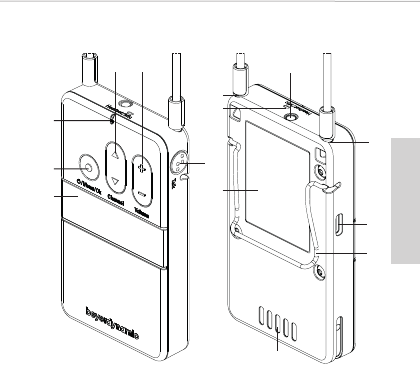
3. Bedienelemente
3.1 Gerät
Display
Das Display dient zur Anzeige des Kanalnamens,
Batteriestatus und verschiedener Menüs.
Ein/Aus- und Menütaste
Schalten Sie den Taschenempfänger mit der Ein/Aus-
Taste ein bzw. aus. Halten Sie die Taste zum Ausschalten
5 Sekunden gedrückt. Um in das Hauptmenü zu gelan-
gen, drücken Sie die Taste für 2 Sekunden, wenn der
Hauptbildschirm im Display angezeigt wird. Betätigen
Sie die Menü-Taste, um Einstellungen zu bestätigen.

Unite RP | RP-T – Taschenempfänger
26
Statusanzeige
– während des Betriebs:
Anzeige Betriebsstatus
Aus Gerät ist ausgeschaltet
Gelbes langsames
Blinken
• Betriebsbereit und
Batteriestatus > 10 %
• Außerhalb der Funkreich-
weite
Gelb Nur bei RP-T:
Verbindung hergestellt
und Batteriestatus > 10%
Grün • RP:
Verbindung hergestellt
und Batteriestatus > 10%
• RP-T:
Verbindung hergestellt,
Talkback läuft und
Batteriestatus > 10%
Rotes langsames
Blinken
Geringer Batteriestand
< 10%
Rot • Gerät startet
• Firmware Update läuft
Rotes schnelles
Blinken
Kritischer Fehler

– im Ladegerät:
Multifunktionstaste
Mit dieser Taste können Sie das Kanalwahlmenü auf-
rufen und einen Kanal auswählen. Wenn Sie sich in
einem Menü befinden, können Sie mit dieser Taste
durch das Menü blättern und darin verschiedene Ein-
stellungen vornehmen.
Lautstärketaste
deutsch
Unite RP | RP-T – Taschenempfänger
27
Anzeige Ladestatus
Aus Gerät ist ausgeschaltet
Grünes langsames
Blinken
Ladebetrieb 0 - 100%
Grün Akku ist geladen
Gelbes langsames
Blinken
Kopplungsinformationen
werden vom Sender/Lade-
gerät kopiert
10 Sekunden lang
gelb
Geräteinformationen wur-
den erfolgreich auf Geräte
kopiert
Rotes langsames
Blinken für 10 Sek.
Kopplungsfehler
Grün/Gelbes
schnelles Blinken
Gerät wird lokalisiert
Rotes schnelles
Blinken
Fehler beim Laden

Unite RP | RP-T – Taschenempfänger
28
Mit dieser Taste regulieren Sie die Lautstärke eines
evtl. angeschlossenen Kopfhörers/Headsets/Induk-
tionsschleife. Mit „+“ wird die Lautstärke erhöht, mit „-“
wird die Lautstärke reduziert. Wichtig: Beachten Sie
die Sicherheitsinformationen bezüglich zu hoher Laut-
ärke.
Talkback-Taste (nur bei RP-T)
Mit dieser Taste können Sie über das interne Mikrofon
oder über das Mikrofon eines angeschlossenen Head-
sets eine Rückfrage an den Gruppenführer stellen.
Befestigung für Umhängeband
Befestigen Sie das mitgelieferte Umhängeband, indem
Sie die Zapfenstücke am Ende des Bands in die Be-
festigungslöcher stecken. Aus Sicherheitsgründen löst
sich diese Befestigung wieder durch starkes Ziehen.
Integriertes Mikrofon (nur bei RP-T)
Das integrierte Mikrofon dient für kurze Rückfragen an
den Gruppenführer. Halten Sie einen Sprechabstand
von ca. 10 cm ein. Für bestmögliche Audioübertragung,
empfehlen wir ein externes Headset anzuschließen.
Bei RP: Anschluss für Kopfhörer und Induktionsschleife
Bei RP-T: Anschluss für Kopfhörer/Headset/Induktions-
schleife
USB-Anschluss, Typ C
Sie können diesen Anschluss zum Laden des
integrierten Akkus mit einem USB-Netzteil verwenden.
Außerdem können Sie den Taschenempfänger an die
USB-Buchse Typ C eines Unite-Ladegerätes an-
schließen, um dieses mit anderen Geräten zu koppeln.
Gürtelclip
Mit dem Gürtelclip können Sie das Gerät an Kleidung
wie z.B. an einem Hosenbund oder Gürtel befestigen.
deutsch
Unite RP | RP-T – Taschenempfänger
29
Ladekontakte
Über die Ladekontakte wird der integrierte Akku gela-
den, wenn das Gerät in das Ladegerät eingesetzt wird.
Achten Sie darauf, dass Sie das Gerät vollständig in
den Ladeschacht einsetzen, so dass die Ladekontakte
richtig kontaktiert werden.
Typenschild
Das Typenschild gibt Auskunft über Name,
Artikelnummer, FCC und IC Nummer, Hardware Version,
Seriennummer und Produktionsdatum.
3.2 Display
Folgender Hauptbildschirm erscheint, wenn Sie den
Taschenempfänger eingeschaltet haben und dieser
betriebsbereit ist.
Anzeige aller aktiv angemeldeten Sprecher
(Master, 1. Slave, 2. Slave)
Anzeige aktuelle Sprecherrolle (der Balken zeigt an, ob
1. oder 2. Slave)
Aktuell verwendeter Kanalname
Nur bei RP-T:
Headset angeschlossen
Talkback-Funktion aktiviert
Anzeige Restkapazität der Batterie

Unite RP | RP-T – Taschenempfänger
30
4. Allgemeine Bedienung
•Wichtig: Vor der ersten Inbetriebnahme des Taschen-
empfängers müssen Sie den integrierten Akku aufla-
den. Hierfür können Sie passende Unite-Ladegeräte
verwenden.
• Schließen Sie an den Klinkenanschluss einen Kopf-
hörer oder eine Induktionsschleife an.
Bei der Variante RP-T können Sie statt des Kopfhörers
auch ein Headset anschließen.
• Schalten Sie den Empfänger durch Drücken auf die
Ein-/Austaste ein.
• Die Lautstärke des Kopfhörers/Headsets/der Induk-
tionsschleife regeln Sie mit der Lautstärketaste .
• Alle Geräte werden werksseitig mit der Gruppen-ID 256
ausgeliefert. Dies ermöglicht einen schnellen und un-
problematischen ersten Einsatz.
• Wenn Sie mehrere Gerätegruppen oder eine sicherere
Audioübertragung benötigen, sodass andere Unite-
Anwender Ihre Kommunikation nicht abhören können,
müssen Sie eine Kopplung durchführen. Befolgen Sie
dazu die Anweisungen in Kapitel 5 im Quick Start
Guide des Unite TP Taschensenders.
Erst wenn die in diesem Kapitel genannten Einstellun-
gen übereinstimmen, kann eine Kommunikation
zwischen Sender und Empfänger stattfinden. Zu
Empfängern, die nicht über dieselbe Kopplungsinfor-
mationen verfügen, findet keine Kommunikation statt.
Dies veranschaulicht die nachfolgende Abbildung:
deutsch
Unite RP | RP-T – Taschenempfänger
31
4.1 Auswahl eines Audiokanals
• Befinden sich in einer Gruppe mehrere Sender können
Sie am Empfänger den Kanal des jeweiligen Senders
auswählen. Wählen Sie mit der Multifunktionstaste
am Empfänger den gewünschten Kanal aus und be-
stätigen Sie die Auswahl durch kurzes Drücken auf die
Ein-/Austaste .
TP
Gruppen-ID 256
Name 1
A
Gruppen-ID 256
Name 1
A
Gruppen-ID 1
Name 2
TP
TP
B

Unite RP | RP-T – Taschenempfänger
32
5. Technische Daten
HF-Frequenzbereich DECT. . . . . 1880 - 1930 MHz,
länderabhängig
Sendeleistung DECT. . . . . . . . . . . bis zu 250 mW (Spitze),
länderabhängig
Reichweite DECT . . . . . . . . . . . . . . bis zu 300 m bei Sicht-
verbindung im Freien; die
tatsächliche Reichweite
hängt von der HF-Leis-
tungseinstellung, der Um-
gebung, der Signalab-
sorption, -reflexion und
-interferenz ab
Audiobandbreite
Niedrige Qualität (SD). . . . . . . . 200 Hz - 7 kHz (-3 dB)
Hohe Qualität (HD). . . . . . . . . . . 100 Hz - 14 kHz (-3 dB)
Betriebsart . . . . . . . . . . . . . . . . . . . . Broadcast und/oder
Vollduplex auf allen
Strecken
Verschlüsselung. . . . . . . . . . . . . . . AES-256-Verschlüsselung
Anschluss Kopfhörer/Headset/
Induktionsschleife. . . . . . . . . . . . . 4-pol. Miniklinke, 3,5 mm,
CTIA Standard
Integriertes Mikrofon . . . . . . . . . . ja
Display. . . . . . . . . . . . . . . . . . . . . . . . Monochrom-weißes OLED
Display mit hoher
Kontraststärke
Max. Anzahl offene Mikrofon . . 3 (individuelle
Pegelregler pro Mikrofon)
Akkupack . . . . . . . . . . . . . . . . . . . . . Lithium-Ionen-Akku,
austauschbar nur durch
Servicepersonal

deutsch
Unite RP | RP-T – Taschenempfänger
33
Akkuüberwachung . . . . . . . . . . . . Batteriesstatusanzeige
Restkapazität über
OLED-Display
Akku-Betriebszeit . . . . . . . . . . . . . > 15 Stunden, typ.
Mithörlautstärke und
Mikrofonverstärkung . . . . . . . . . . individuell, einstellbar
USB Typ-C Anschluss . . . . . . . . . . USB 2.0 Standard, nur mit
5V-Netzteilen kompatibel,
Stromaufnahme
max. 500 mA
Befestigung für
Umhängeband vorhanden, Umhänge-
band abnehmbar
Abmessungen (B x H x T). . . . . . . 58 x 102 x 15,5 mm
Gewicht (inkl. Batterie) . . . . . . . . 105 g
Temperaturbereich
im Betrieb . . . . . . . . . . . . . . . . . . . -10 bis +40 °C
Lagerung. . . . . . . . . . . . . . . . . . . . -20 bis +70 °C
Relative Luftfeuchtigkeit . . . . . . 0 bis 90%
6. Service
Im Servicefall wenden Sie sich bitte an autorisiertes Fach-
personal oder direkt an:
beyerdynamic Service- und Logistik Center
E-Mail: service@beyerdynamic.de
Öffnen Sie das Gerät auf keinen Fall selbst, da Sie sonst
alle Gewährleistungsansprüche verlieren.

www.beyerdynamic.com
beyerdynamic GmbH & Co. KG
Theresienraße 8 • 74072 Heilbronn • Germany
Phone +49 7131 617-300 • info@beyerdynamic.de
For fuher diributors worldwide, please go to
www.beyerdynamic.com
Non-contractual illurations.
Subject to change without notice.
Weitere Veriebspaner weltweit finden Sie im Internet unter
www.beyerdynamic.com
Abbildungen nicht veragsbindend.
Änderungen vorbehalten.
EN-DE-3 / Unite RP / 674.451 (08.18)