Binatone Spirit 410 Users Manual A4
4102 65bc66af-9b05-41c0-ad2d-7ffac9e55288 Binatone Telephone 410 User Guide |
2014-12-13
: Binatone Binatone-Spirit-410-Users-Manual-122585 binatone-spirit-410-users-manual-122585 binatone pdf
Open the PDF directly: View PDF  .
.
Page Count: 2
Spirit 410 Corded Telephone
Unpacking your phone
Important note---back up batteries
The Spirit 410 requires 2 x 1.5V AAA size Alkaline batteries
installed into the battery compartment before use.
Warning: The caller display will not work without batteries
installed.
In the box you will find:
• Base Unit
• Handset
• Coiled Handset cord
• Telephone line cord
for Base unit
• User manual
Keep the packing
materials in a safe
place in case you later
need to transport
Keep your sales (till)
receipt, which is your
guarantee.
the unit
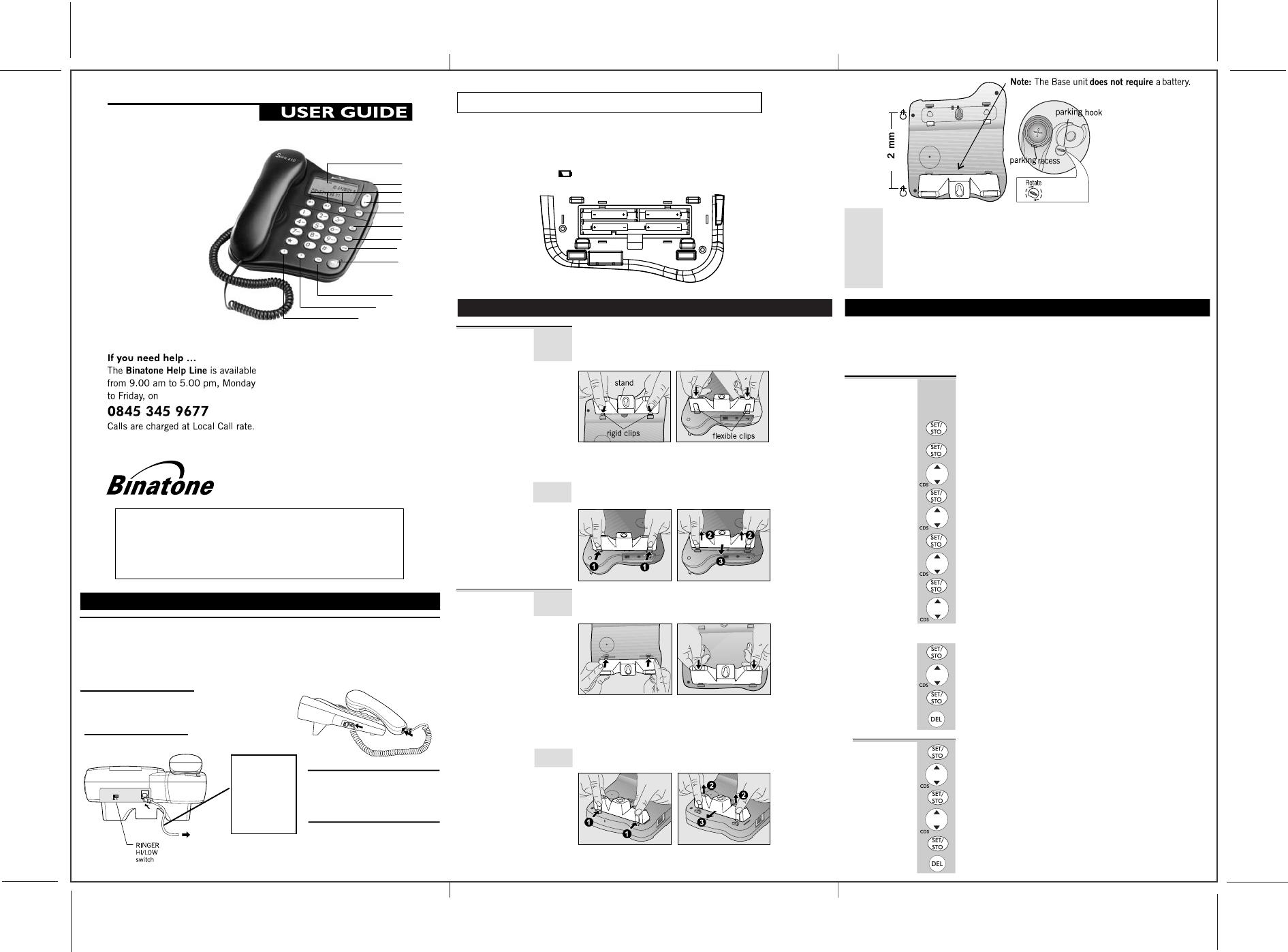
1. LCD Screen
3. M1,M2,M3 Memory buttons
4. Scroll Up & Down buttons
5. Delete button
6. Set/Store button
7. Memory button
8. LNR(Last Number Redial) button
9. Speakerphone button
10. Mute button
11.R(Recall) button
12.Pause button
2. Ringer light indication
1
2
3
4
5
6
7
8
9
10
11
12
2. Installation
1. Locating the Base unit
The Base unit should be placed on a level surface, in a position where:
the telephone line cable will reach your telephone line socket or extension socket.
it is not close to a sink, bath or shower, or anywhere else where it might get wet.
it is not close to other electrical equipment - fridges, washing machines,
2. Plug the coiled handset cord into the Handset.
Plug the other end into the jack on the left
side of the Base unit.
3. Place the Handset in the Base unit.
Make sure the plugs
click into place.
4. Plug the telephone line cord
free end into a modular wall jack.
Press the cable into the groove so
5. Lift the Handset and check
for Dial tone in the earpiece.
Always use the
telephone line
cord supplied
with your
Spirit 410 phone.
Other telephone
line cords may
not work.
to Modular
Wall jack
microwave ovens, TVs, fluorescent lights, etc.
that the Base unit stands level.
Installing (or Replacing) the Battery
IMPORTANT
- Before removing the battery compartment cover,always
make sure the base unit is disconnected from the telephone line.
Install 2 pcs of Alkaline AAA batteries into the battery compartment and
place back the cover before use.
Note: 1) Please do NOT use Rechargeable batteries in this phone.
,-8806: 27 458 24.39/0/ 810 9428
2)
?GDL QGD A@QQDOT HP JMS< CHPNJ@T
QGD A@QQDOHDP< QGDT SHJJ ADBMKD QMQ@JJT CHPBG@OFDC @LC TMRO CHPNJ@T PBODDL SHJJ LMQ SMOI=
will show up of the
SIZE AAA
SIZE AAA
SIZE AAASIZE AAA
PBODDL= >E TMR CM LMQ ODNJ@BD
3. Desk/Wall mount installation
To place the Spirit 410 on a desk, connect
the bottom of the phone in the slots near the rear of the base
as shown below.
Desk Mount
Insert the rigid clips of the stand into the slots
the phone (near the rear of
the flexible clips clicks into place.
To remove the stand, (1) pinch the flexible clips, (
the stand, and then (3) slide up and forward (3) as shown below.
To place the Spirit 410 on a wall, connect
bottom of the phone in the
cover as shown
Wall Mount
below.
the stand to
on the bottom of
the base). Press down firmly until
2) pull back
the stand to the
slots near the front of the base
0
and
inatone .com/
08453459677 0818762092 3
online
Desk/Wall mounting continue...
Insert the rigid clips of the stand into the slots on the bottom of
near the front of
the flexible clips clicks into place.
To remove the stand, (1) pinch the flexible
the stand, and then (3) slide up and forward as shown below.
Mark two points on the wall that are 92mm apart to lay the
fixing centers as shown below.
the phone ( the base). Press down firmly until
clips, (2) pull back
BE CAREFUL to check that there are no in the wall.
Fix two screws (supplied with the unit) at the
approximately 7mm
Hang the cradle unit on the screws using the wall mount slots.
You may need to remove the tighten the
does not wobble
cradle with the parking hook on the cradle arranged to fit in the parking recess
under the earpiece on the Handset.
9
electrical wires hidden
marked locations,
between the wall and the the
screw head.
telephone from the wall and
that the cradle is securely fixed and
leaving
screws so
. Place the Handset on the
Set Time/Date
1In standby mode, press SET/STO button.
ÖThe display shows ' SET 1 DATE '.
2Press SET/STO button to confirm.
ÖThe 'year' icon will be blinking.
3Press UP or DOWN button to set the year.
4. Setting up your phone
Press the SET/STO button to enter the menu
UP DOWN
SET 1 DATE SET 2 LCD SET 3 FLASH
Note: The system will time out if you leave
You will need to set the correct time and date
displayed correctly on the display.
If you subscribe to a Caller Display service, the
will be set automatically on
4Press SET/STO button to confirm.
ÖThe 'month' icon will be blinking.
5
Press UP or DOWN button to set the month.
6Press SET/STO button to confirm.
ÖThe 'date' icon will be blinking.
7 Press UP or DOWN button to set the date.
8Press SET/STO button to confirm.
ÖThe 'hour' icon will be blinking.
and then use or buttons to cycle
through the following options:
more than 8 seconds between key presses.
receipt of your first incoming call.
9Press UP or DOWN button to set the hour.
so they can be
time and date
10 Press SET/STO button to confirm.
Ö The 'minute' icon will be blinking.
Press SET/STO button to confirm the setting.
Ö The display shows ' SET 2 LCD ' , you can
11
12
or press DELETE button to return to standby mode.
Press UP or DOWN button to set the minute.
Setting up continue...
continue with
programming,
Set LCD
1In standby mode, press SET/STO button.
Ö The display shows ' SET 1 DATE '.
2Press UP or DOWN button until the display
3Press SET/STO to confirm.
4Press UP or DOWN button to select your
5Press SET/STO button to confirm the setting.
Ö The display shows ' SET 2 LCD ' , you can
programming, or press DELETE button to return to standby mode.
Contrast
shows 'SET 2 LCD'.
viewing level (1~8).
The default setting is 3.
comfortable display
continue with
Set Flash
1In standby mode, press SET/STO button.
Ö The display shows ' SET 1 DATE '.
2 Press UP or DOWN button until the display
3Press SET/STO to confirm.
4 Press UP or DOWN button to select 100
Time
shows 'SET 3 FLASH'.
This telephone gives you the possibility to
services of your network provider.
When pressing the RECALL button, the phone
interruption and the length depends on your Flash Time setting.
(default),300, 600, or 1000.
5Press SET/STO button to confirm the setting.
Ö The display shows ' SET 1 DATE ' , you can
programming, or press DELETE button to return to
use the special services
generates a line
continue with
standby mode.
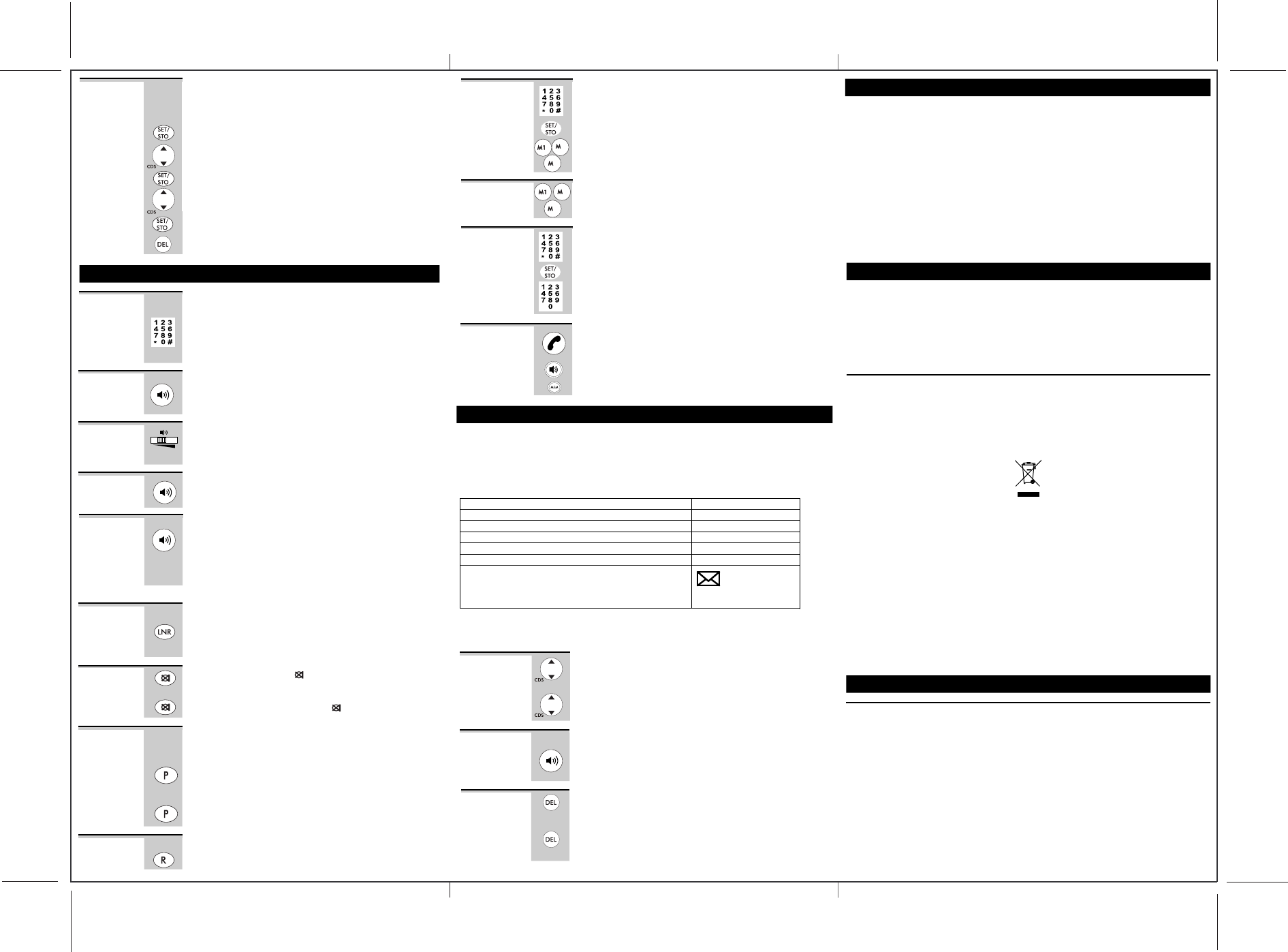
Making a
1Lift the Handset, listen for a dial tone.
Ö The display shows ' 00-00 '.
2Dial the telephone number you wish to call.
3To end the call, return the Handset to the
call
5. Telephone Operations
Ö The display shows the number as you
14 digits will be shown).
Base unit.
dial(maximum of
To answer a
call
When the phone rings;
Lift the handset or press the SPEAKERPHONE
on the Base unit.
ÖThe Call timer starts about 7 seconds after
going on line.
To adjust the
speakerphone
volume
During a call;
Adjust the volume of the speakerphone to your
volume level using the SPEAKERPHONE volume switch located at
the right side of the Base unit.
Replace the Handset on the Base unit cradle or
press the SPEAKERPHONE button on the Base unit.
ÖThe SPEAKERPHONE light indicator will
To end a call
turn OFF.
To switch
between the
Handset and the
Speakerphone
During a phone conversation through the Handset,
press the SPEAKERPHONE button to speak
The Speakerphone light will turn on, but hands-free.
through the Handset until
on the
Base unit cradle. while in speakerphone mode,
Handset to enable a private conversation.
button
comfortable
conbrtdsyion remains
the Handset is speakerphone replaced
lift the
Telphone Operation continue...
Last
Redial
1Lift the Handset or press the SPEAKERPHONE
2Press LNR button.
Ö The phone automatically dials the last
(maximum of 32 digits).
button on
Mute
1During a call press button.
Function ÖWhen the mouthpiece is muted, the person
end of the call cannot hear you but you can hear his side.
2To get back to the call, press MUTE button again to release.
MUTE
the Base unit.
number you called
at the other
Inserting a
Pressing PAUSE button immediately after the
Pause in
For some switchboard system, an access number
dialed (usually an 8 or 9) to get another
outside line.
the dialing
sequence
number, a pause of about 3.6 seconds
and the desired number can be dialed immediately.
Press PAUSE button to insert a pause when dialing or
storing Long Distance Access Codes.
1
2
Number
Storing a 1
Number in
2
Press M1.M2,M3 button to stored.
M1,M2,M3
memorys
32
Key in the telephone number
Up to a maximum 16 digits.
Ö
Press SET/STO button.
In standby mode,
you
3
Dial out
Stored
ÖThe number dials automatically.
press M1,M2,M3 buttons.
number
2
3
Press the (0-9) button to store the number in the
Storing a
Number in
(0-9)
two-touch
memorys
1
2
Key in the telephone number
3
selected memory.
Up to a maximum 16 digits.
Ö
Lift up Handset or press the SPEAKERPHONE button,
Pd Y^Va V cjbWZg hidgZY ^c Pld1idjX] bZbdgn .41=/
Cs1.< =8 <0- 0~6,;-< 7: 8:-;;
ecYU^Ydc[baY
*=<<76
Cw:-;; <0-
`Y`bdj
*=<<76 Ztmt[
Cr-A 16 <0- 5-57:A 47+~<176 6=5*-: Z_]h[
Press
SET/STO button.
In standby mode,
you wish to stored.
Ö The number dials automatically.
Dial out
Stored
number
1
2
(0-9)
two-touch
memorys
must be
dial tone and an
access
will be entered,
wish to stored.
6. Caller Display Operation
VERY IMPORTANT:
To use Caller Display you must first subscribe to your network provider's
The caller's number The date and time of the call
Caller Diaply service.
includes:
If you subscribe to a Caller Display service, you can see the phone number
you before you answer. The caller display information of the person calling
Condition of Incoming Caller Information
It is a duplicate one
It is a new one
It has exceeded the range of the service
It is a secret one
It may not be nicety for the reason of outside
There is a voice information in your mailbox
(This function is available only when you have
applied for this service from your telecommunication
network)
LCD Screen will display
REP
NEW
UNAVAILABLE
WITHHELD
ERROR
Caller Display list
Spirit 410 dynamically stores up to 30 groups (12digits) incoming information.
If a call is received when the Call list is full, then the new entry will replace the oldest one.
Viewing the
1In standby mode, press UP or DOWN Dutton.
Caller
Ö The display shows the most recent record.
If there are no Caller Display records, the display
2Press UP or DOWN again to scroll to the next
Caller Display record.
will show
Display list
To return
a call
When the Caller Display record is displayed.
ÖThe phone automatically dials out the displayed record.
Lift the handset or press the SPEAKERPHONE button on
the Base unit.
7. Guarantee and service
This product is guaranteed against manufacturing defects for a period of 1 Year.
This does not cover the product where the fault is due to misuse, abuse,
of the instructions, or where the product has been the
or alterations, or has been the subject of commercial use.
In the event of a problem with the product within the guarantee period
your nearest Argos store.
If the item is shown to have had an inherent defect present at the time of sale,
provide you with a replacement.
Your statutory rights remain unaffected.
Guarantor; Argos Ltd
489 - 499 Avebury Boulevard
Central Milton Keynes
MK9 2NW
use in contravention
subject of unauthorised modifications
please return it to
the store will
' 00 CALL'
Standard Spirit 410 Telephone
Temperature range Operating 0 ºC to 40 ºC
Storage -20 ºC to 60 ºC
PBX compatibility Timed break recall: 98 ms. Pause length: 3.6 seconds.
Signalling type: DTMF (dual-tone multifrequency) also called tone dialing.
Network connection This equipment is intended to be used in the UK only.
Operation on other countries’ PSTN termination points cannot be guaranteed.
Declaration of conformity
The Binatone Spirit 410 phone complies with the essential protective
requirements and objectives of:
EC R&TTE Directive 1999/5/EC
EC Low Voltage Directive 2006/95/EC
EC EMC Directive 89/336/EEC
and conforms to the following relevant harmonized standards:
Network: TBR37, TBR38
EMC: EN 55022, EN 55024
Safety: EN 60950
Binatone operates a policy of continuous product improvement, and so
make changes to the product and functions without notice.
Waste electrical products must not bedisposed
of with household waste.
This equipment should be taken to your local
recycling centre for safe treatment.
8. Technical details
Binatone Help Line - 0845 345 9677
Calls are charged at Local Call rate.
reserves the right to
Use on PBX
Press R (RECALL) button on your
If you are using your Spirit 410 phone on a PBX,
user guide tells you to press RECALL;
Spirit 410 phone.
and the PBX
To delete
Caller
record
When the Caller Display record is displayed.
ÖThe display shows the next Caller Display
Press and hold DELETE button 3 seconds,
Display records will be deleted.
Press DELETE button will delete the Caller Display record.
ÖThe display automatically return to standby
Display
record.
mode.
all the Caller
Connection and conditions for use
You can connect your Spirit 410e phone to a direct exchange line (DEL) -
connected to a local exchange, with its own phone number; to an
socket connected to a DEL; or to an extension on an approved
Do not connect the Spirit 410 phone as an extension to a pay phone.
The ringer equivalence numbers (RENs) of all instruments (phones, fax
etc.) connected to an exchange line must not add up to more than
one or more of them may not ring and/or answer calls correctly.
The Spirit 410 phone has a REN of 1, and most other telephones have a
unless marked otherwise.
a line
extension
compatible PBX.
machines,
4 - otherwise,
REN of 1
Contents of this User Guide
1. Where to find it
2. Installation
3. Wall mount installation
4. Setting up your phone
5. Telephone operation
6. Caller display operation
If you need help …
The Binatone Help Line is
available from 9.00 am to
5.00 pm, Monday to Friday, on
0845 345 9677
Calls are charged at Local Call
rate.
7.
8.
Guarantee and service
Technical details
Pressing buttons on your phone
When the instructions in this user guide tell you simply to ‘press’ a
you should press the button briefly, then release it.
When the instructions tell you to ‘press and hold’ a button, this means you should
keep the button pressed until the display changes and/or you hear a tone.
button, this means that
UK Argos Ver2 Jan 2008
