Biostar Microtech IBP130 Digital Blood Pressure Monitor User Manual Manual

Biostar Microtech Int'l Corp Digital Blood Pressure Monitor Manual

Manual

   “i-Kare” Intelligent Blood Pressure Monitor Model: iBP-130 / User Manual      Be sure to read this instruction before you use the device.  Ver.0.63 Issue date: 2017/07/28
‐1‐Table of Contents                               Table of Contents......................................................................................................................‐  1‐Know Your Unit.........................................................................................................................‐  3‐Introduction................................................................................................................................‐  6‐Precautions................................................................................................................................‐  7‐1. Part Description....................................................................................................................‐  9‐2. Before Start.........................................................................................................................‐  11‐2.1BatteryInstallation..........................................................................................................‐  11‐2.2SettingtheDate/Time.....................................................................................................‐  11‐2.3Fingerprintregistration....................................................................................................‐  13‐2.4Fingerprintrecognition....................................................................................................‐  14‐2.5Deletefingerprintregistration.........................................................................................‐  14‐3. Take a Measurement.........................................................................................................‐  15‐3.1CorrectPosture................................................................................................................‐  15‐3.2ApplyingtheArmCuff.....................................................................................................‐  16‐3.3TakeaMeasurement.......................................................................................................‐  17‐3.4ManualInflateFunction..................................................................................................‐  18‐3.5Reviewrecord..................................................................................................................‐  19‐4. How to Transmit Data........................................................................................................‐  21‐4.1 Wireless transmission..................................................................................................‐  21‐5. Care and Maintenance......................................................................................................‐  22‐6. Error Indicators and Troubleshooting..............................................................................‐  23‐6.1ErrorIndicators................................................................................................................‐  23‐6.2Troubleshooting...............................................................................................................‐  25‐7. Specifications......................................................................................................................‐  26‐
‐2‐8. Main Functions....................................................................................................................‐  27‐Appendix I................................................................................................................................‐  30‐Appendix II...............................................................................................................................‐  37‐Appendix III..............................................................................................................................‐  39‐
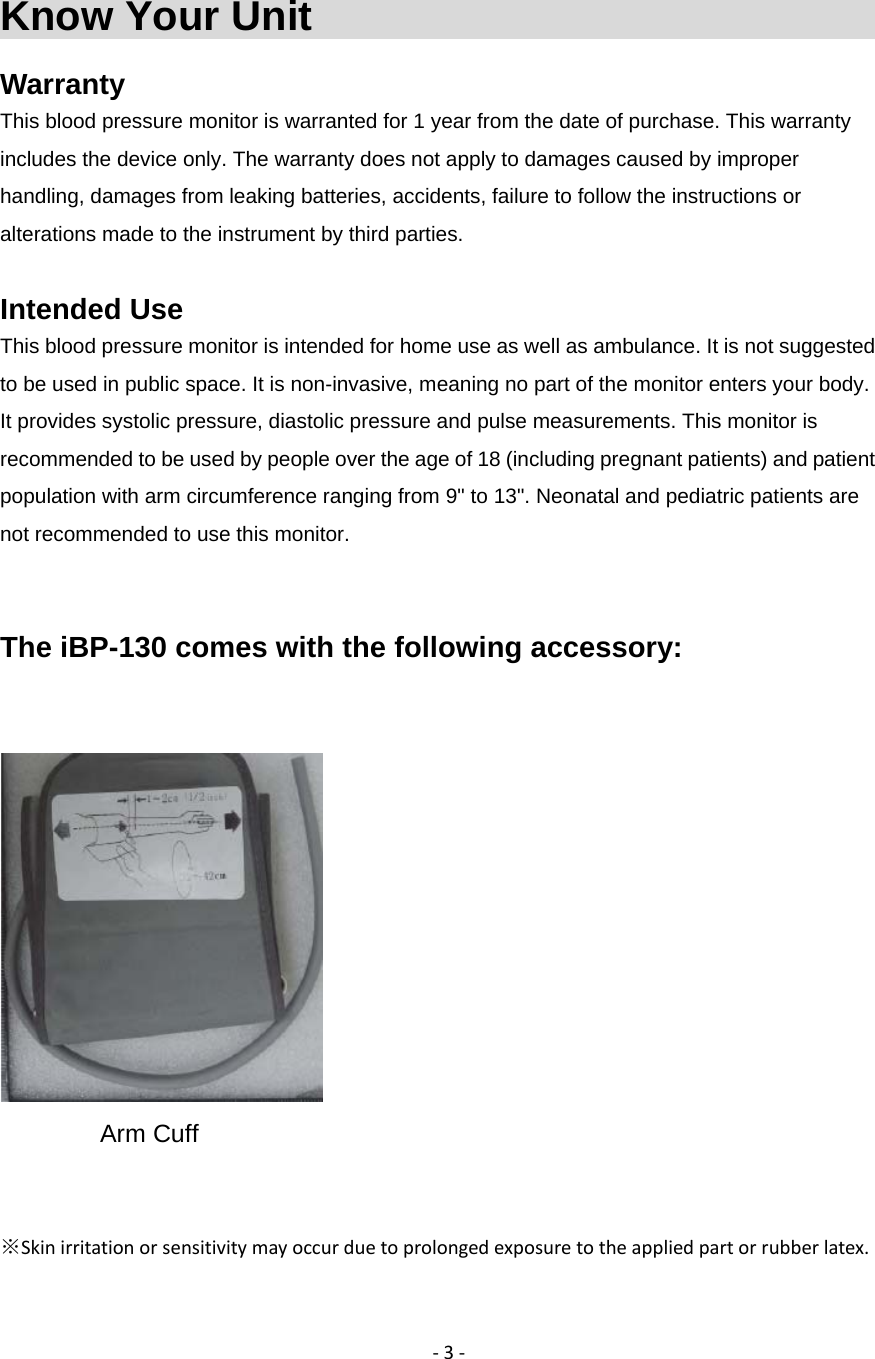
‐3‐Know Your Unit                                Warranty This blood pressure monitor is warranted for 1 year from the date of purchase. This warranty includes the device only. The warranty does not apply to damages caused by improper handling, damages from leaking batteries, accidents, failure to follow the instructions or alterations made to the instrument by third parties.  Intended Use This blood pressure monitor is intended for home use as well as ambulance. It is not suggested to be used in public space. It is non-invasive, meaning no part of the monitor enters your body. It provides systolic pressure, diastolic pressure and pulse measurements. This monitor is recommended to be used by people over the age of 18 (including pregnant patients) and patient population with arm circumference ranging from 9" to 13". Neonatal and pediatric patients are not recommended to use this monitor.     The iBP-130 comes with the following accessory:    Arm Cuff           ※Skinirritationorsensitivitymayoccurduetoprolongedexposuretotheappliedpartorrubberlatex.
‐4‐  CouncilDirective:93/42/EECM5asamendedby2007/47/EC ThedevicecomplieswithR&TTEdirective. ISO9001:2008;QualitymanagementSystems–Requirement. ISO13485:2003;Medicaldevices–Qualitymanagementsystems–Requirementsforregulatorypurposes. ENISO14971:2012;Medicaldevices–Applicationofriskmanagementtomedicaldevices. EN980:2008;Graphicalsymbolsforuseinthelabelingofmedicaldevices. EN60601‐1:2006+A1:2013;Medicalelectricalequipment,Part1:Generalrequirementsforsafety. EN60601‐1‐2:2015;Medicalelectricalequipment–Part1‐2Generalrequirementsforsafety‐collateralstandard:Electromagneticcompatibility‐requirementsandtest. EN60601‐1‐6:2010+A1:2015;Medicalelectricalequipment‐‐Part1‐6:Generalrequirementsforbasicsafetyandessential performance - Collateral standard: Usability.  EN60601-1-11:2015; Medical electrical equipment -- Part 1-11: General requirements for basic safety and essential performance - Collateral standard: Requirements for medical electrical equipment and medical electrical systems used in the home healthcare environment.  EN 1060-3:2009; Non-invasive sphygmomanometers - Part 3: Supplementary requirements for electro-mechanical blood pressure measuring systems.  EN 1060-4:2004; Non-invasive sphygmomanometer.  ISO10993-1:2009; Biological evaluation of medical devices - Part 1: Evaluation and testing within a risk management process (ISO 10993-1:2009).  ISO10993-5:2009; Biological evaluation of medical devices test for in vitro cytotoxicity.  ISO10993-12:2009; Biological evaluation of medical devices - Part 12: Sample preparation and reference materials.  ISO10993-10:2010; Biological evaluation of medical devices - Part 10: Test for irritation and skin sensitization.  EN 300 328(2006-10); Radio and telecommunications terminal equipment.  EN 62366:2008+A1:2015; Application of usability engineering to medical devices  EN 62304:2006+A1:2015; Software life-cycle processes
‐5‐Distributor BIOSTAR MICROTECH INTERNATIONAL CORP. 3F., 108-2, Min Chuan Rd., Hsin Tien Dist., New Taipei City, Taiwan (R.O.C.) Tel: 886 2 2218-0150 EU representative     Manufacturer   Type BF Applied part Biostar Microtech Netherlands BV Archimedesweg 2A, 5928PP Venlo, The Netherlands BIOSTARMICROTECH INTERNATIONALCORP.3F.,108‐2,MinChuanRd.,HsinTienDist.,NewTaipeiCity,Taiwan(R.O.C) Read this manual before use.
‐6‐Introduction                                  Before operating this monitor, please carefully read the instruction to use it correctly.   This product is designed for blood pressure monitoring and applied to adults. It is not applied to neonates and infants.   This device complies with IEC 60601-1 standard for medical products.   The device uses digital pressure sensor to measure blood pressure. It applies to high altitude or low altitude environment, and is equipped with auto-correction function.   It is designed with a large LCD display as a result the elderly and visually impaired are able to read the measurements.     The monitor not only recognizes five users with their own fingerprints but also stores up to 200 individual measurements.   The monitor passed IP22 test. The first 2 means " the level of protection that the enclosure provides against access to hazardous parts and the ingress of solid foreign objects larger than 12.5 mm " and the second 2 means “vertically dripping water shall have no harmful effect when the enclosure is tilted at an angle of 15° from its normal position. A total of four positions are tested within two axes. ” (https://en.wikipedia.org/wiki/IP_Code)
‐7‐Precautions                                    Warning: Do not use the product for any purpose other than measuring blood pressure. Warning: This product is designed for use by adults. Do not use on neonatal and infants. Warning: People suffering from a serious problem of blood flow, vascular disease or pregnant woman should   consult their physician before measuring their blood pressure themselves. Warning: Do not use the product in presence of flammable gases to avoid explosion. Warning: To avoid electric shock, not attempt to disassemble the product except for battery cover. Only trained and authorized personnel can repair, replace or adjust the machine. Warning: Do not let this product to be used by children or people who cannot express their feelings. Warning: If you can not determine the accuracy of the measurement value. Please confirm by other monitoring methods. Warning: Do not use this product in MRI or high electromagnetic radiation environment. Warning: Measurements may be affected if the device is used close to televisions, microwave oven, X-ray equipment or other devices with strong electrical fields. Measure blood pressure at a sufficient distance from such devices or switch them off. Warning: Any affecting the blood flow act will cause incorrect measurement values. Warning: Clean the monitor and cuff with a dry, soft cloth or a cloth dampened with water and a mild detergent. Never use benzene, thinner or other harsh chemicals to clean monitor or cuff.   Warning: If you fold the arm cuff excessively or bend the tube for a long time. It might shorten the lifetime of the main unit or accessories. Warning: The product is not water-proof. Do not submerge the device in water or use it in raining or high humidity environment. Warning: Avoid using the device in extreme temperatures, humidity, direct sunlight, dust or vibration environment. Do not shock or drop the device. Warning: When removing the air tube, pull on the air plug at the connection with the main unit not the tube itself. Warning: Only install 4 “AA” batteries. Do not use different types of batteries. Warning: Do not use different brands or mixing new and old batteries in one device. Warning: If the battery leakage occurs, it will damage the main unit. Warning: If the product will not be used for a long time (3 months or more ), remove the batteries. Warning: A warning that other accessories may negatively affect EMC performance. Warning: A warning regarding stacking and location close to other equipment. Warning: A warning that use of other accessories results in non-compliance. Warning: Use the other arm if patient’s left arm is used for monitoring or patient’s left side happened mastectomy.   Warning: Do not be too frequent measurement of blood pressure, to avoid blood vessels and tissue damage.
‐8‐Please be aware that the cuff and its pressurization may cause temporary intererence to blood flow and injury to the patient. Disposal: Follow the national requirement to dispose unit.
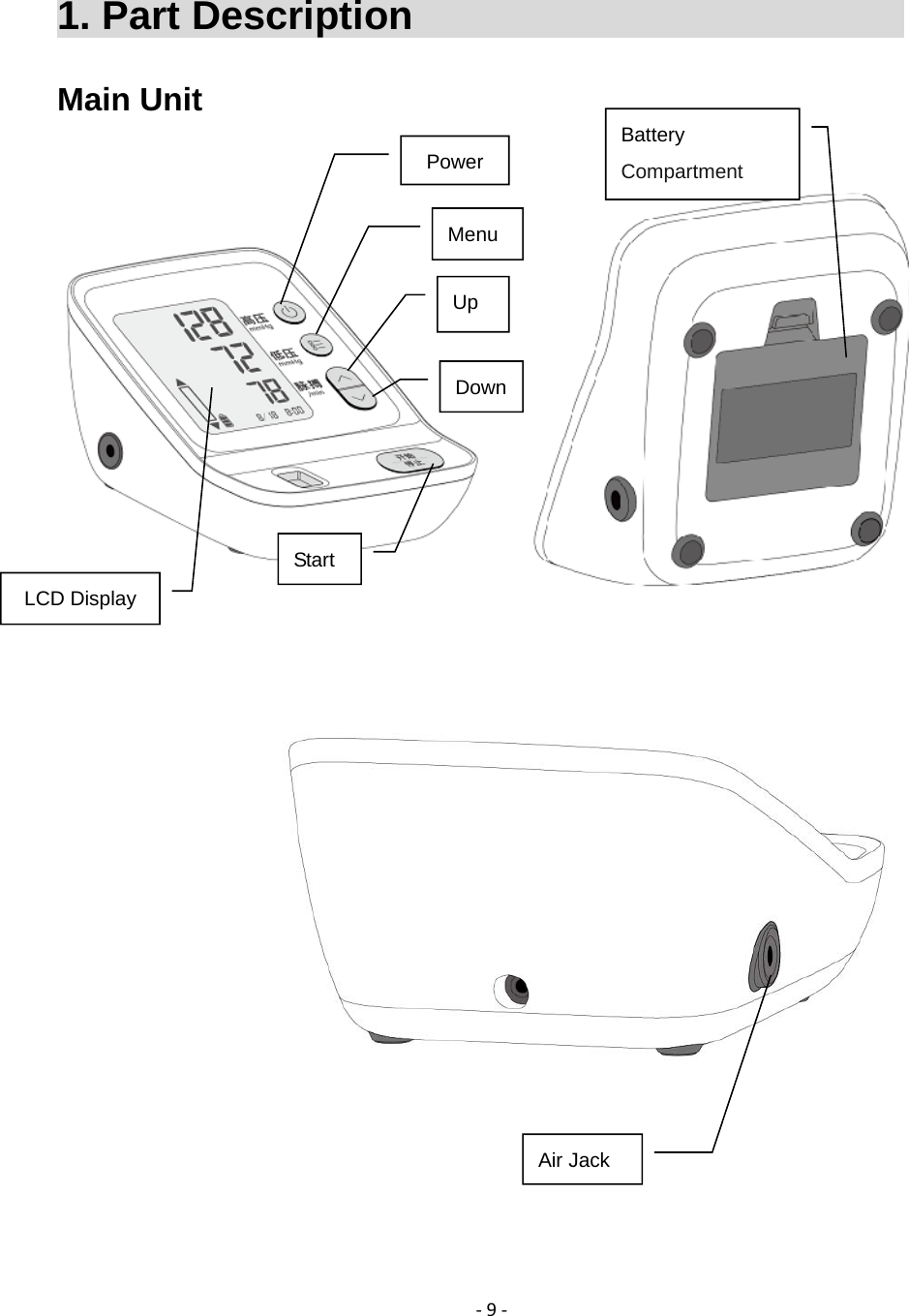
‐9‐1. Part Description                           Main Unit                    Power Menu Up  DownLCD Display Battery Compartment Air Jack Start
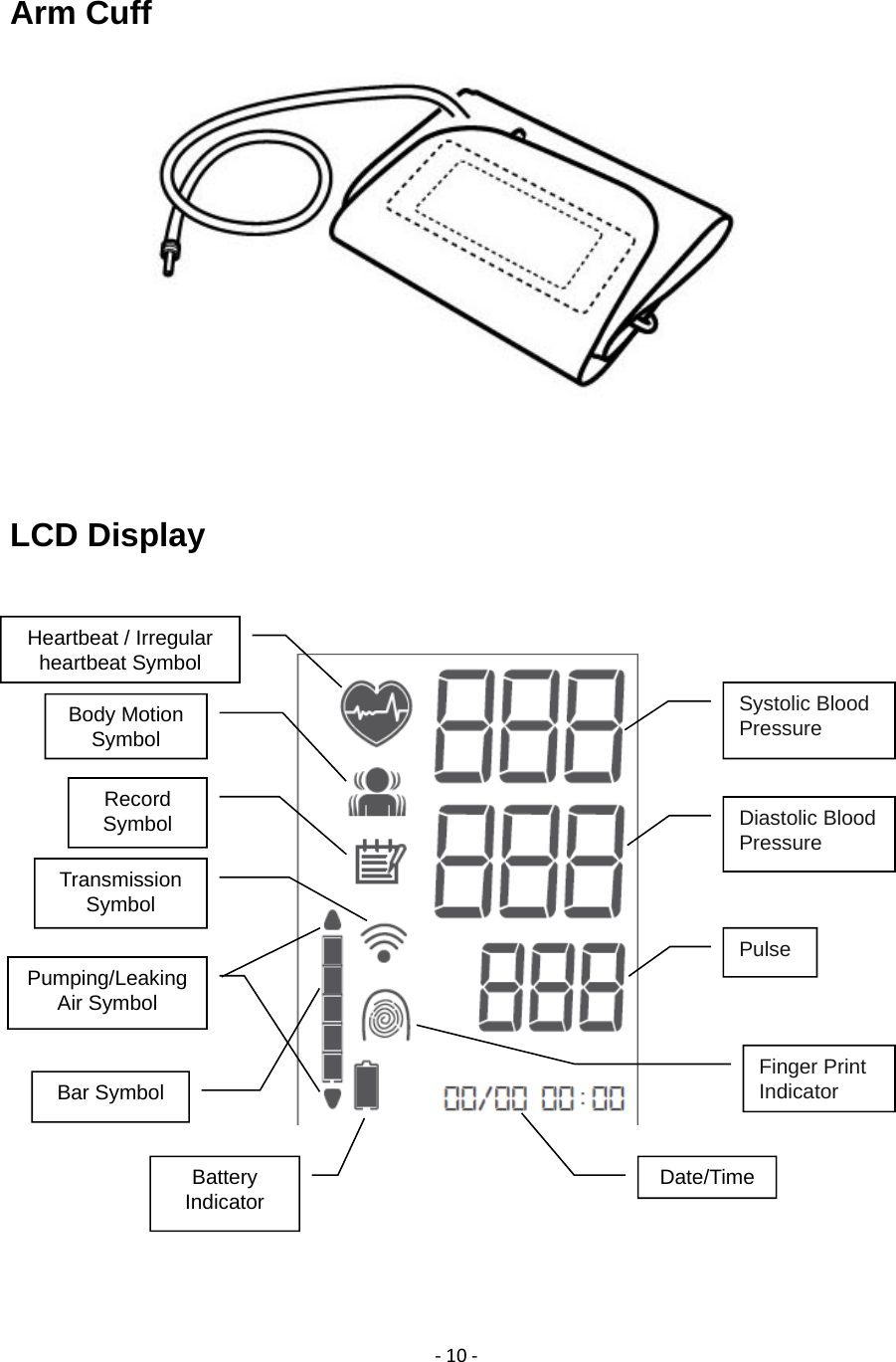
‐10‐Arm Cuff   LCD Display            Date/Time  Record Symbol Battery Indicator Body Motion Symbol Pumping/Leaking  Air Symbol Heartbeat / Irregular heartbeat Symbol Pulse   Diastolic Blood Pressure Systolic Blood Pressure Transmission Symbol Finger Print Indicator Bar Symbol
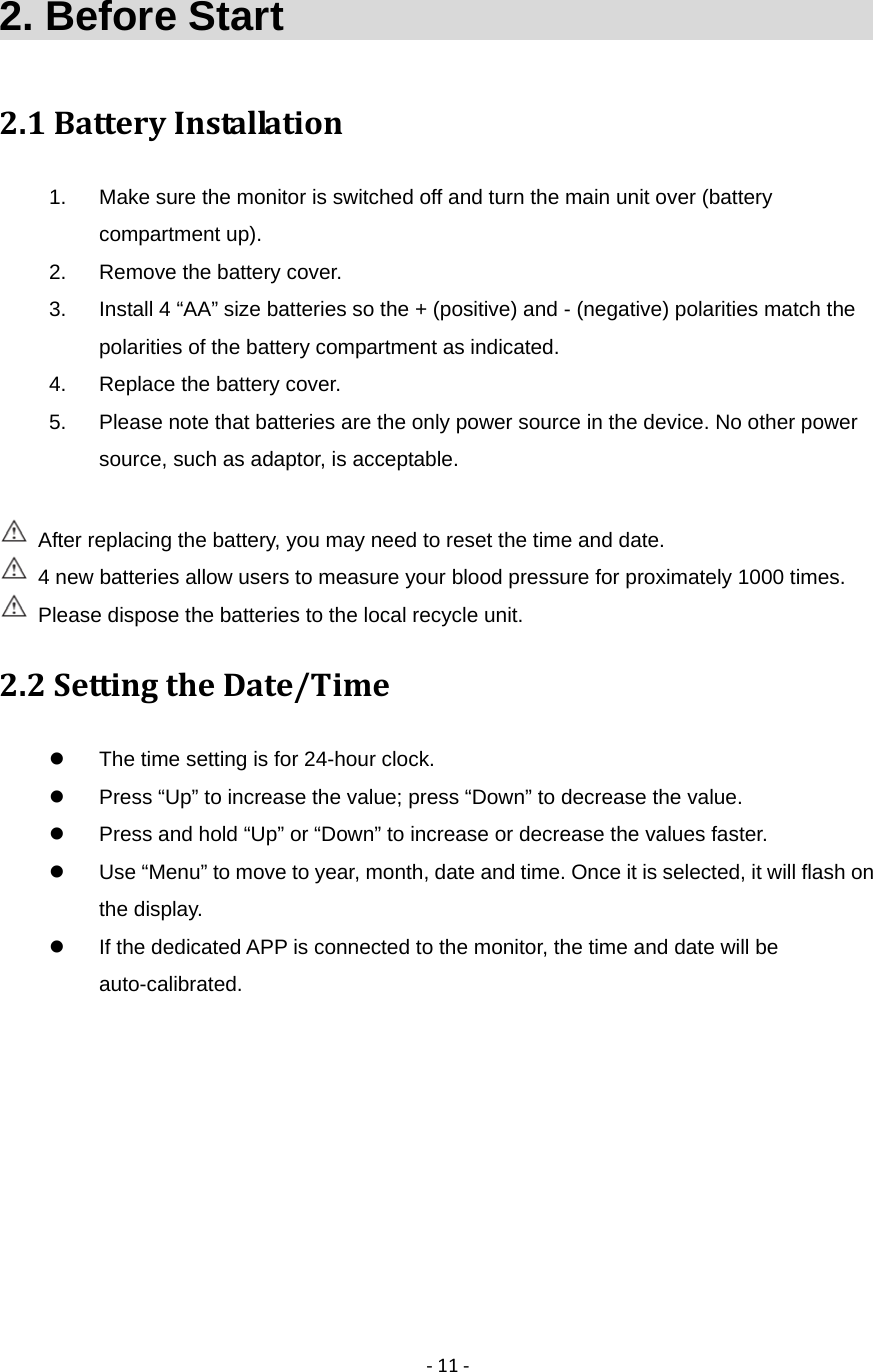
‐11‐2. Before Start                               2.1BatteryInstallation1.  Make sure the monitor is switched off and turn the main unit over (battery compartment up). 2.  Remove the battery cover. 3.  Install 4 “AA” size batteries so the + (positive) and - (negative) polarities match the polarities of the battery compartment as indicated. 4.  Replace the battery cover. 5.  Please note that batteries are the only power source in the device. No other power source, such as adaptor, is acceptable.      After replacing the battery, you may need to reset the time and date.   4 new batteries allow users to measure your blood pressure for proximately 1000 times.   Please dispose the batteries to the local recycle unit.   2.2SettingtheDate/Time  The time setting is for 24-hour clock.   Press “Up” to increase the value; press “Down” to decrease the value.   Press and hold “Up” or “Down” to increase or decrease the values faster.   Use “Menu” to move to year, month, date and time. Once it is selected, it will flash on the display.   If the dedicated APP is connected to the monitor, the time and date will be auto-calibrated.
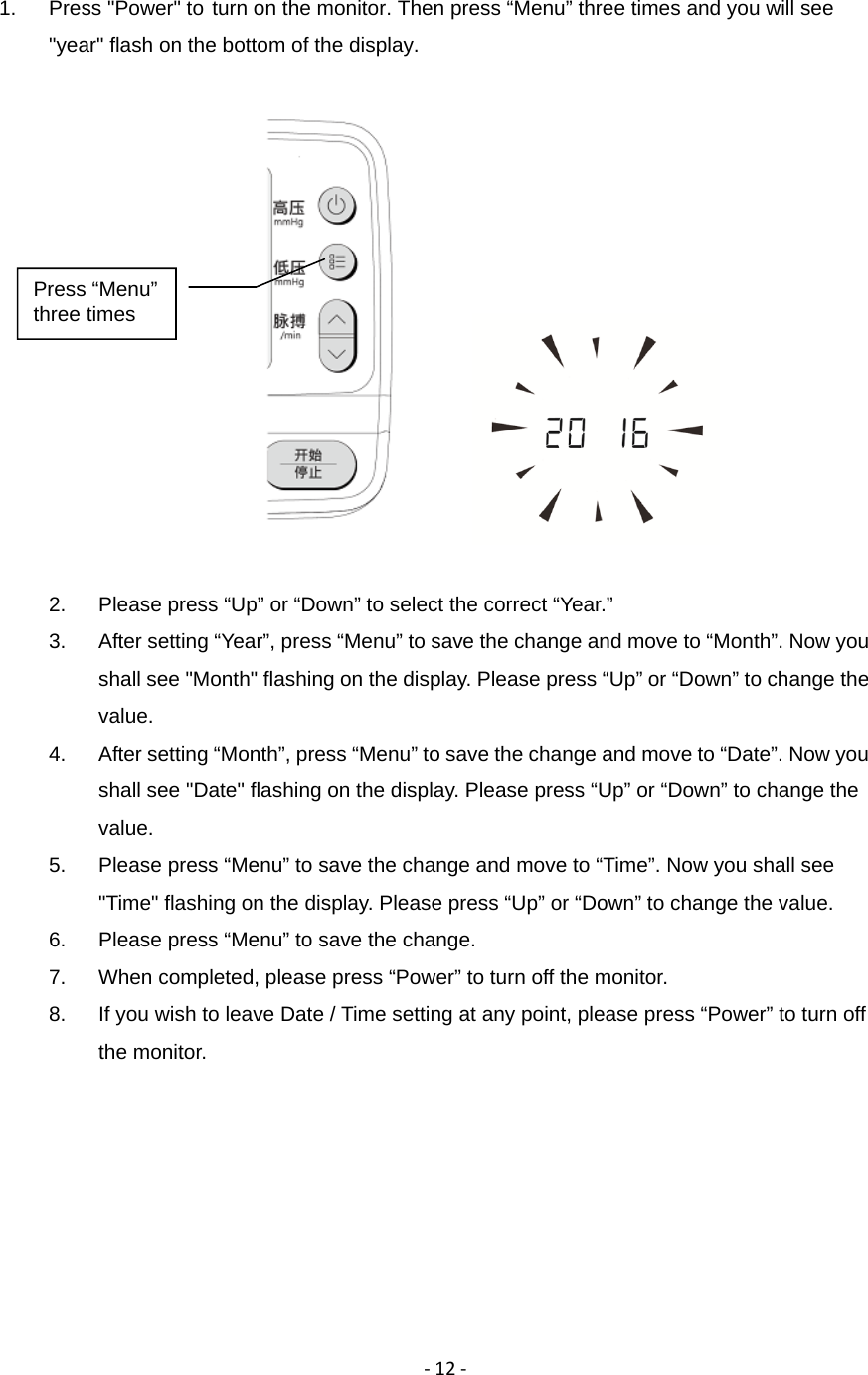
‐12‐1.  Press "Power" to turn on the monitor. Then press “Menu” three times and you will see "year" flash on the bottom of the display.           2.  Please press “Up” or “Down” to select the correct “Year.” 3.  After setting “Year”, press “Menu” to save the change and move to “Month”. Now you shall see "Month" flashing on the display. Please press “Up” or “Down” to change the value. 4.  After setting “Month”, press “Menu” to save the change and move to “Date”. Now you shall see "Date" flashing on the display. Please press “Up” or “Down” to change the value. 5.  Please press “Menu” to save the change and move to “Time”. Now you shall see "Time" flashing on the display. Please press “Up” or “Down” to change the value. 6.  Please press “Menu” to save the change.   7.  When completed, please press “Power” to turn off the monitor. 8.  If you wish to leave Date / Time setting at any point, please press “Power” to turn off the monitor. Press “Menu” three times
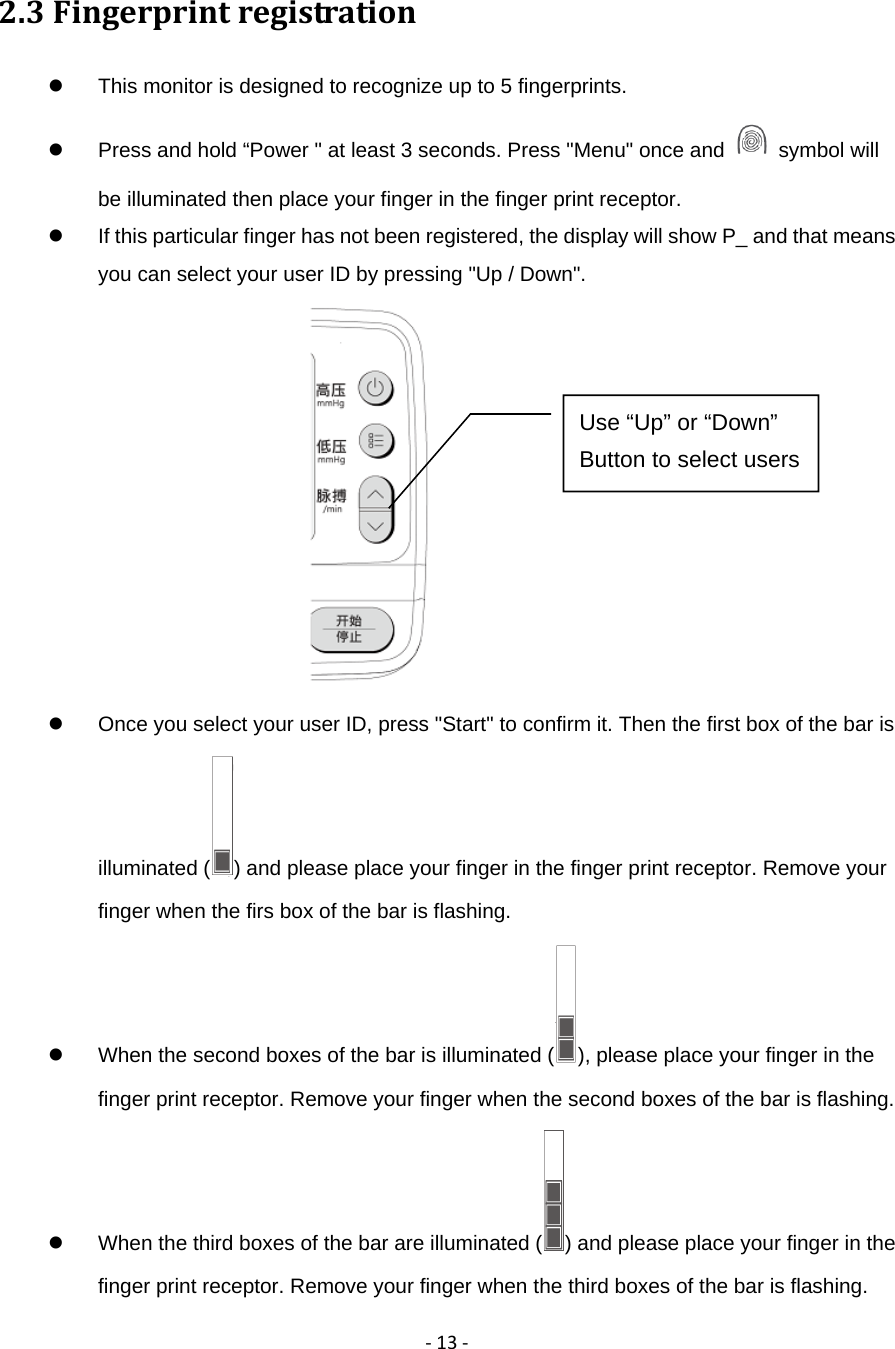
‐13‐2.3Fingerprintregistration  This monitor is designed to recognize up to 5 fingerprints.             Press and hold “Power " at least 3 seconds. Press "Menu" once and   symbol will be illuminated then place your finger in the finger print receptor.   If this particular finger has not been registered, the display will show P_ and that means you can select your user ID by pressing "Up / Down".    Once you select your user ID, press "Start" to confirm it. Then the first box of the bar is illuminated ( ) and please place your finger in the finger print receptor. Remove your finger when the firs box of the bar is flashing.         When the second boxes of the bar is illuminated ( ), please place your finger in the finger print receptor. Remove your finger when the second boxes of the bar is flashing.         When the third boxes of the bar are illuminated ( ) and please place your finger in the finger print receptor. Remove your finger when the third boxes of the bar is flashing.       Use “Up” or “Down” Button to select users
‐14‐  When the user ID and    symbol are flashing on the display, the settings is completed and press “Power” to exit.   Please note, if the finger has been registered, the display will show you user ID associated with that finger.  Please note that the display will only show available user IDs, which means if someone has been measuring his / her blood pressure under a particular user ID, the display will not show this ID.               2.4Fingerprintrecognition  The monitor needs to recognize your fingerprint in order to proceed certain functions, such as deleting fingerprint registration.   To recognize your fingerprint, please turn on the monitor. When   symbol is illuminated, place your registered finger in the finger print receptor. Your user ID will be shown on the display.       2.5Deletefingerprintregistration  If you wish to delete your registered fingerprint, please be aware that your records will be deleted as well.     Press and hold "Power" at least 3 seconds, then press "Menu" twice and   symbol on will be illuminated.   Then place your registered finger in the finger print receptor. The display will show "dEL" and your user ID.     If you wish to continue the deletion, press "Start" to confirm it.    symbol will be flashing and deletion of both your registered fingerprint and your measurement records is successful. Then press “Power” to exit.
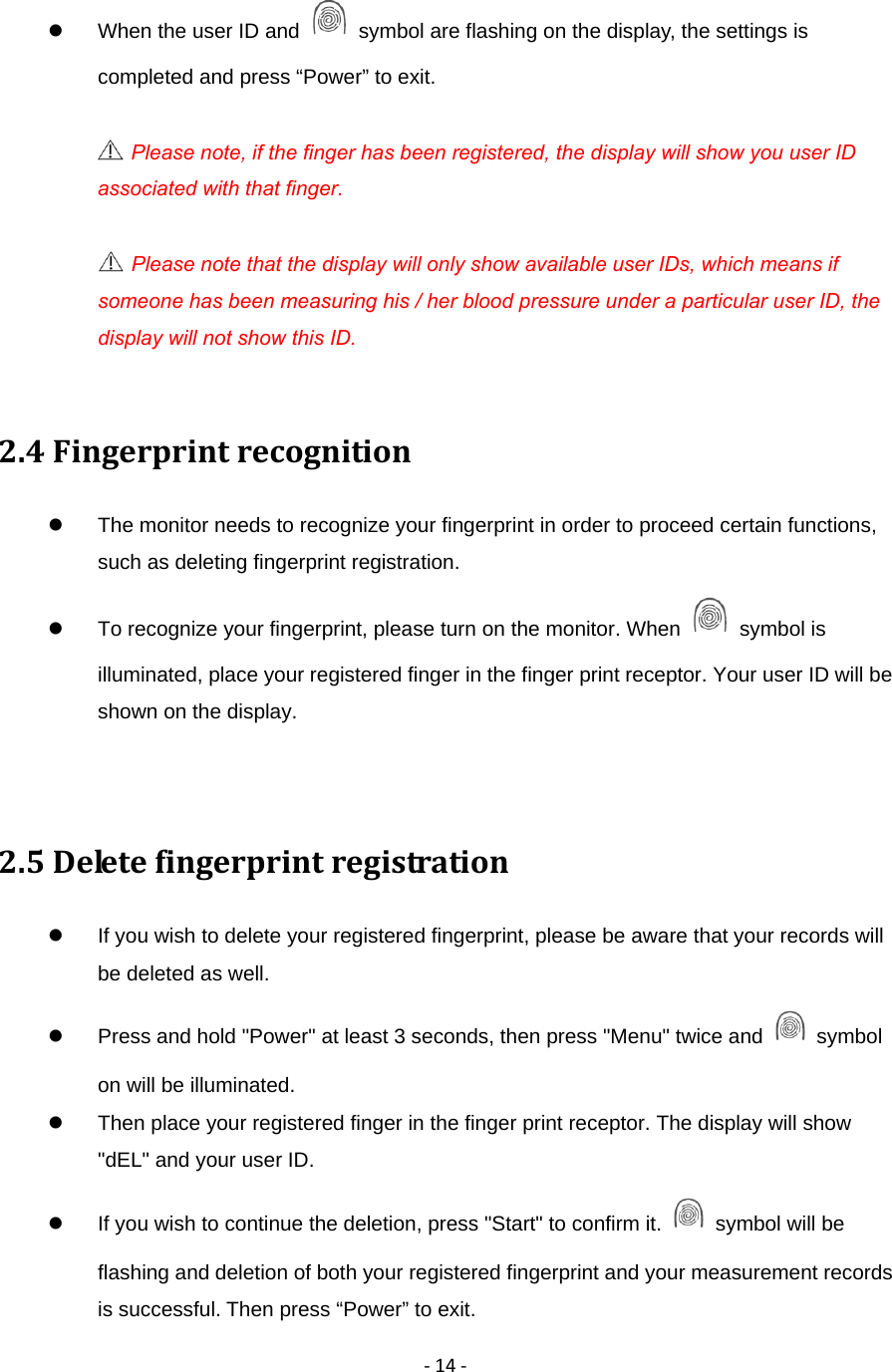
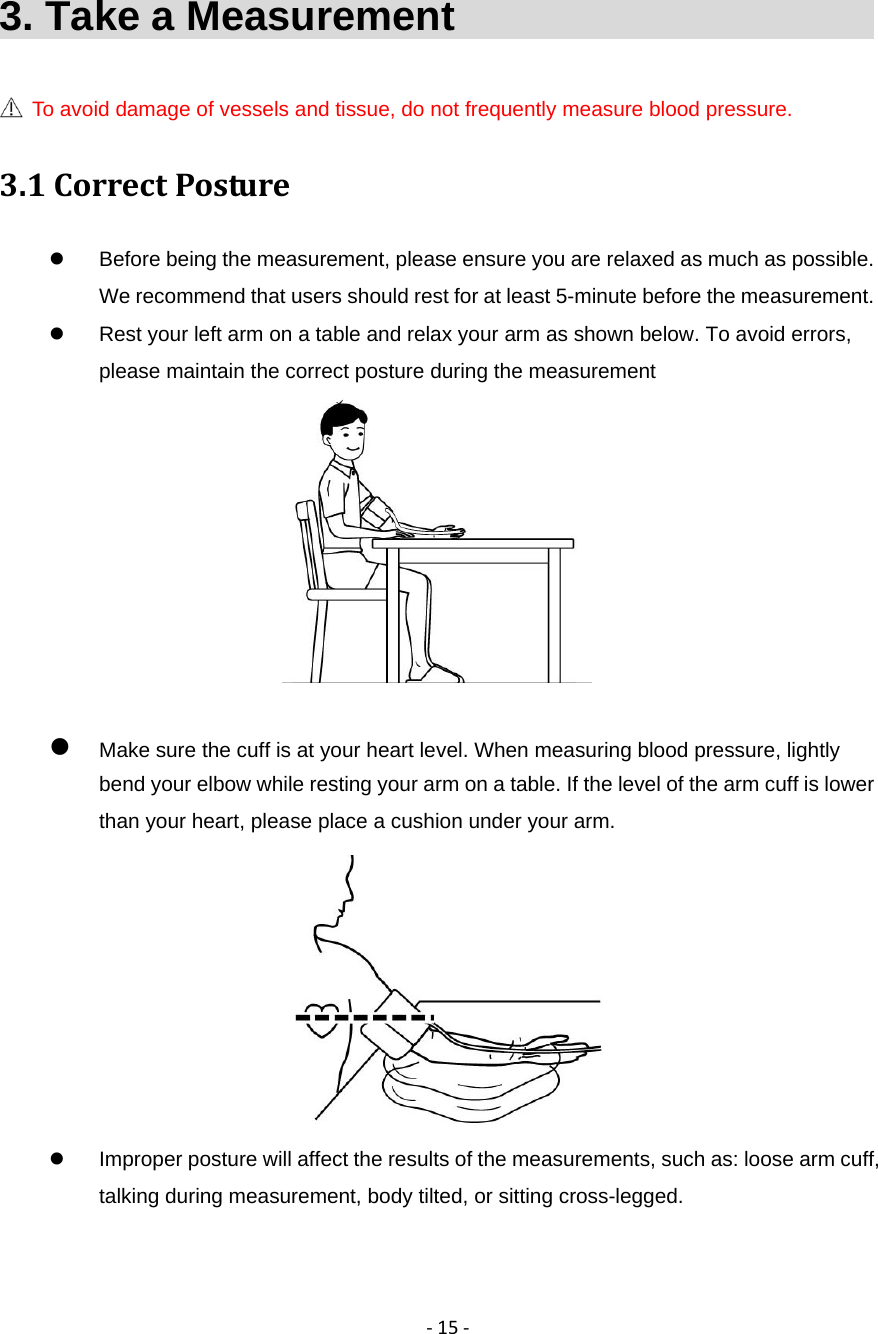
‐15‐3. Take a Measurement                           To avoid damage of vessels and tissue, do not frequently measure blood pressure. 3.1CorrectPosture  Before being the measurement, please ensure you are relaxed as much as possible. We recommend that users should rest for at least 5-minute before the measurement.     Rest your left arm on a table and relax your arm as shown below. To avoid errors, please maintain the correct posture during the measurement    Make sure the cuff is at your heart level. When measuring blood pressure, lightly bend your elbow while resting your arm on a table. If the level of the arm cuff is lower than your heart, please place a cushion under your arm.    Improper posture will affect the results of the measurements, such as: loose arm cuff, talking during measurement, body tilted, or sitting cross-legged.
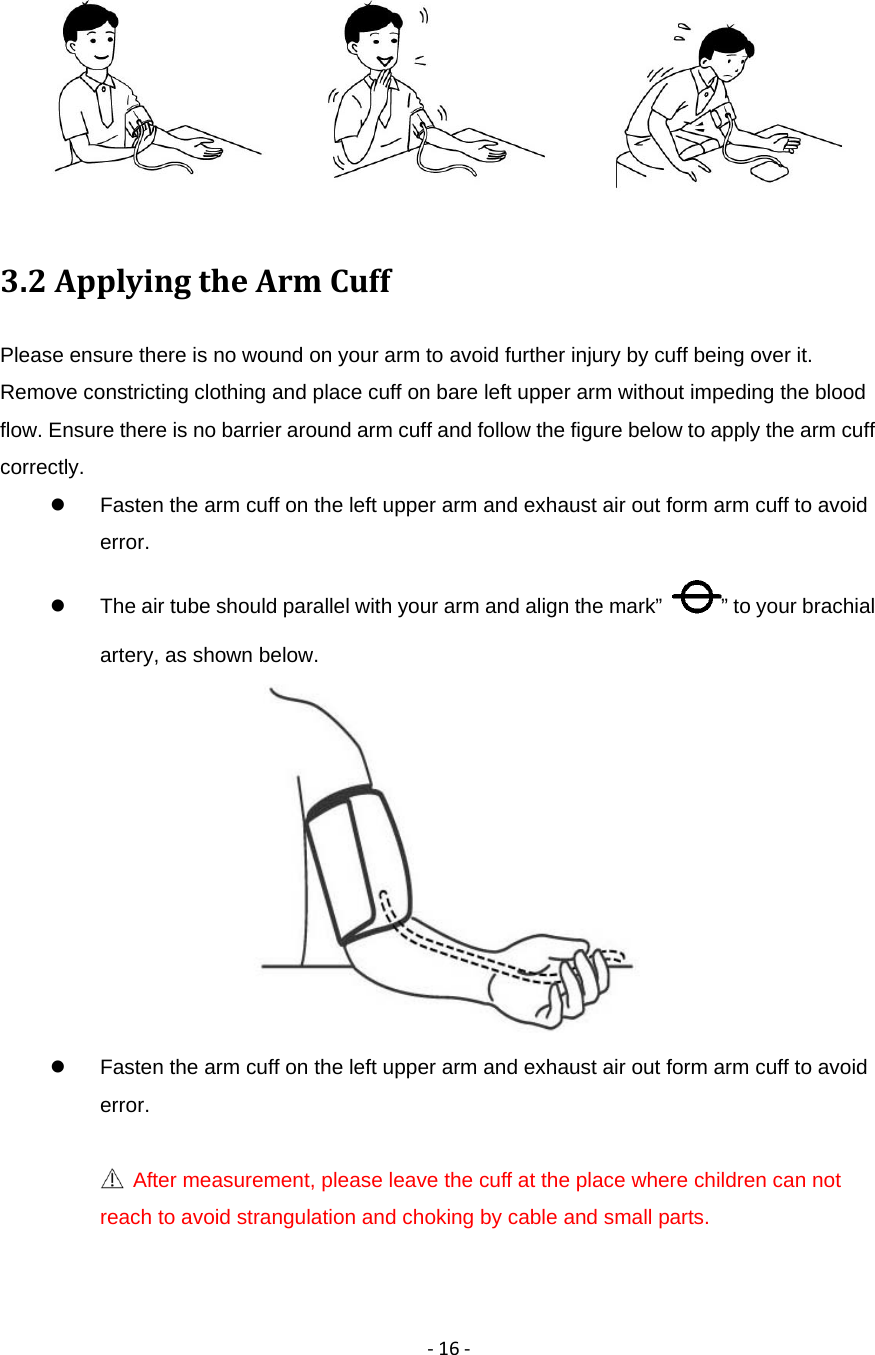
‐16‐ 3.2ApplyingtheArmCuffPlease ensure there is no wound on your arm to avoid further injury by cuff being over it. Remove constricting clothing and place cuff on bare left upper arm without impeding the blood flow. Ensure there is no barrier around arm cuff and follow the figure below to apply the arm cuff correctly.   Fasten the arm cuff on the left upper arm and exhaust air out form arm cuff to avoid error.   The air tube should parallel with your arm and align the mark”  ” to your brachial artery, as shown below.    Fasten the arm cuff on the left upper arm and exhaust air out form arm cuff to avoid error.   After measurement, please leave the cuff at the place where children can not reach to avoid strangulation and choking by cable and small parts.
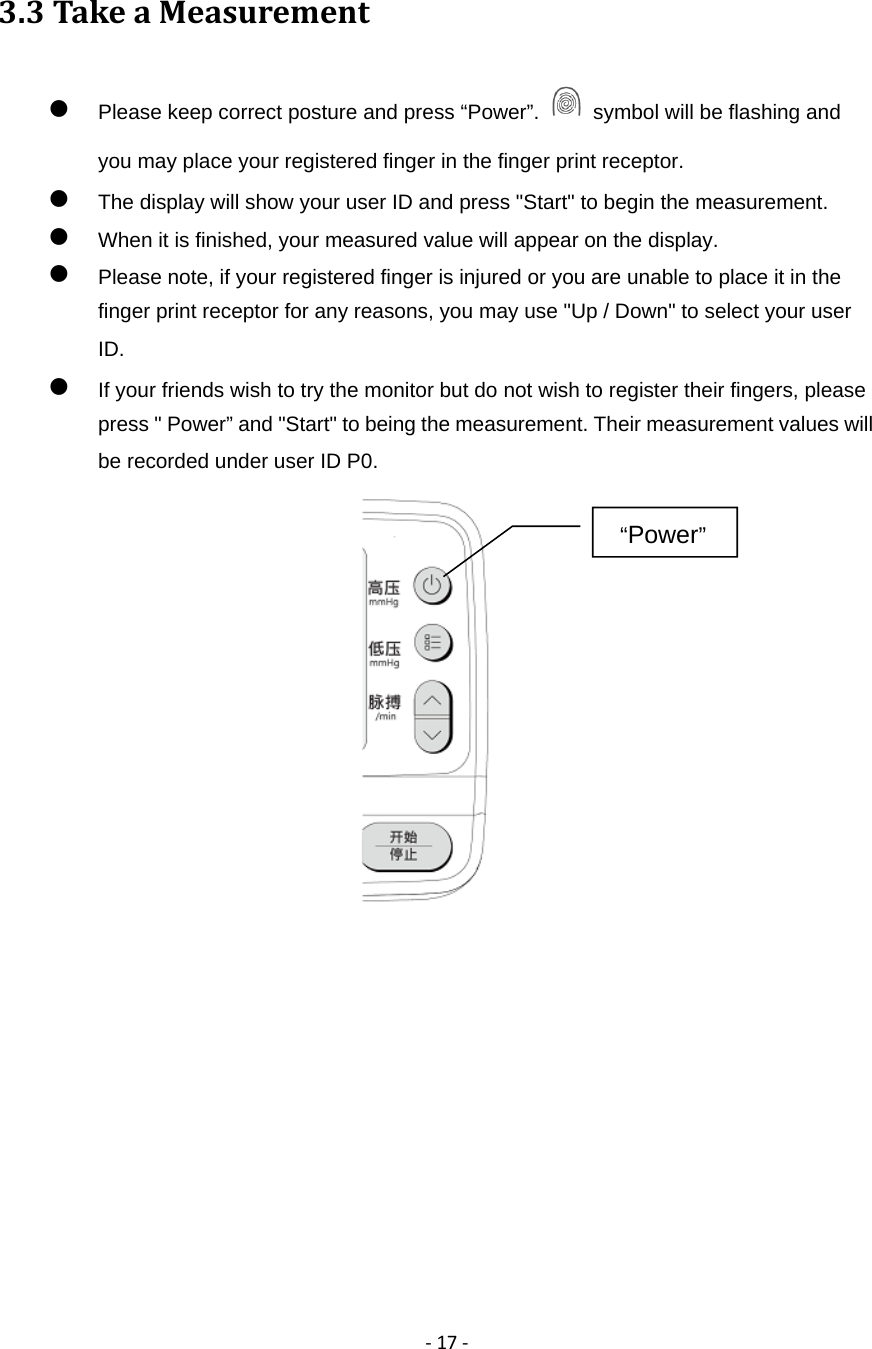
‐17‐3.3TakeaMeasurement Please keep correct posture and press “Power”.    symbol will be flashing and you may place your registered finger in the finger print receptor.  The display will show your user ID and press "Start" to begin the measurement.  When it is finished, your measured value will appear on the display.  Please note, if your registered finger is injured or you are unable to place it in the finger print receptor for any reasons, you may use "Up / Down" to select your user ID.   If your friends wish to try the monitor but do not wish to register their fingers, please press " Power” and "Start" to being the measurement. Their measurement values will be recorded under user ID P0.             “Power”
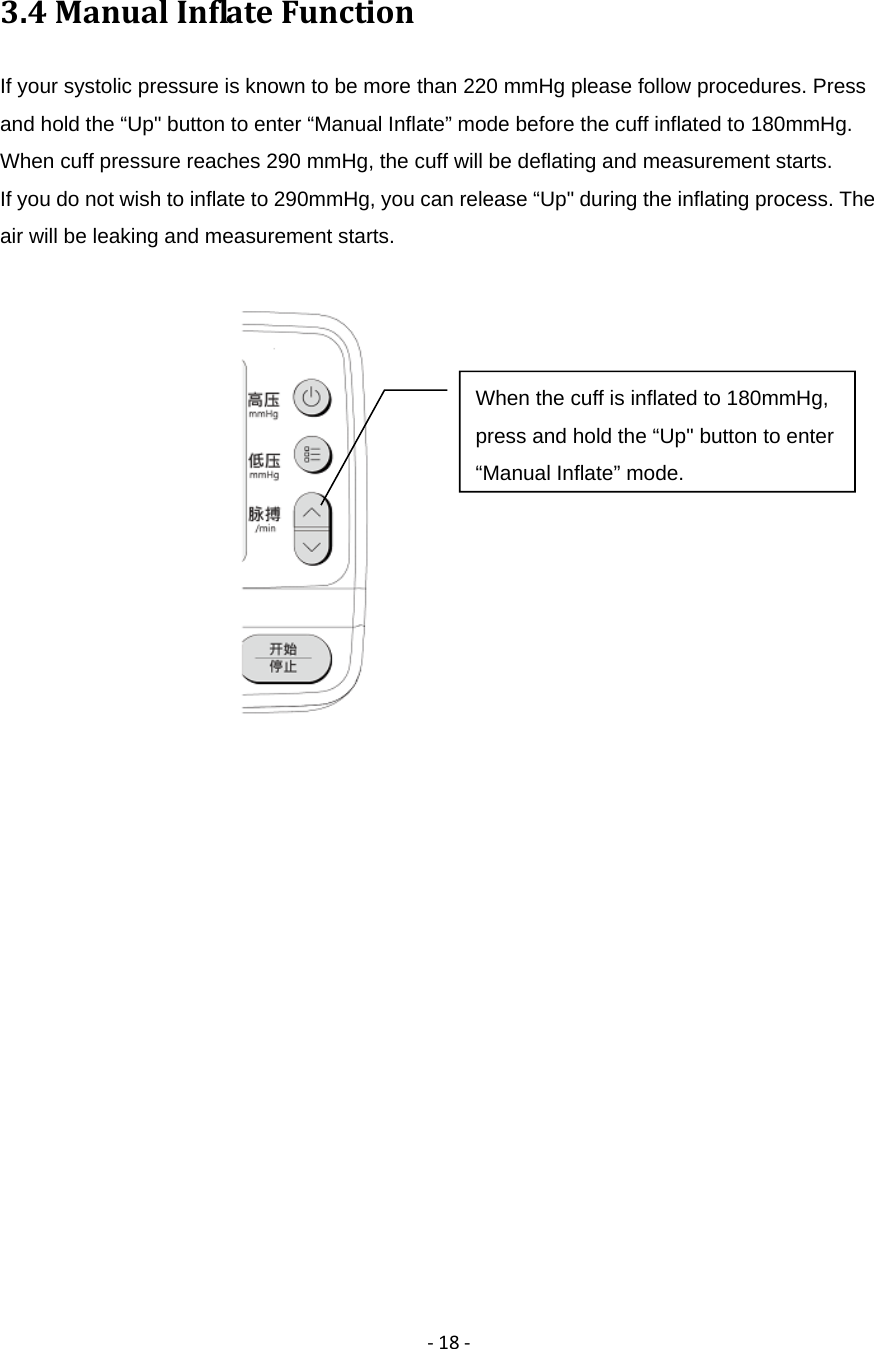
‐18‐3.4ManualInflateFunctionIf your systolic pressure is known to be more than 220 mmHg please follow procedures. Press and hold the “Up" button to enter “Manual Inflate” mode before the cuff inflated to 180mmHg. When cuff pressure reaches 290 mmHg, the cuff will be deflating and measurement starts. If you do not wish to inflate to 290mmHg, you can release “Up" during the inflating process. The air will be leaking and measurement starts.            When the cuff is inflated to 180mmHg, press and hold the “Up" button to enter “Manual Inflate” mode.
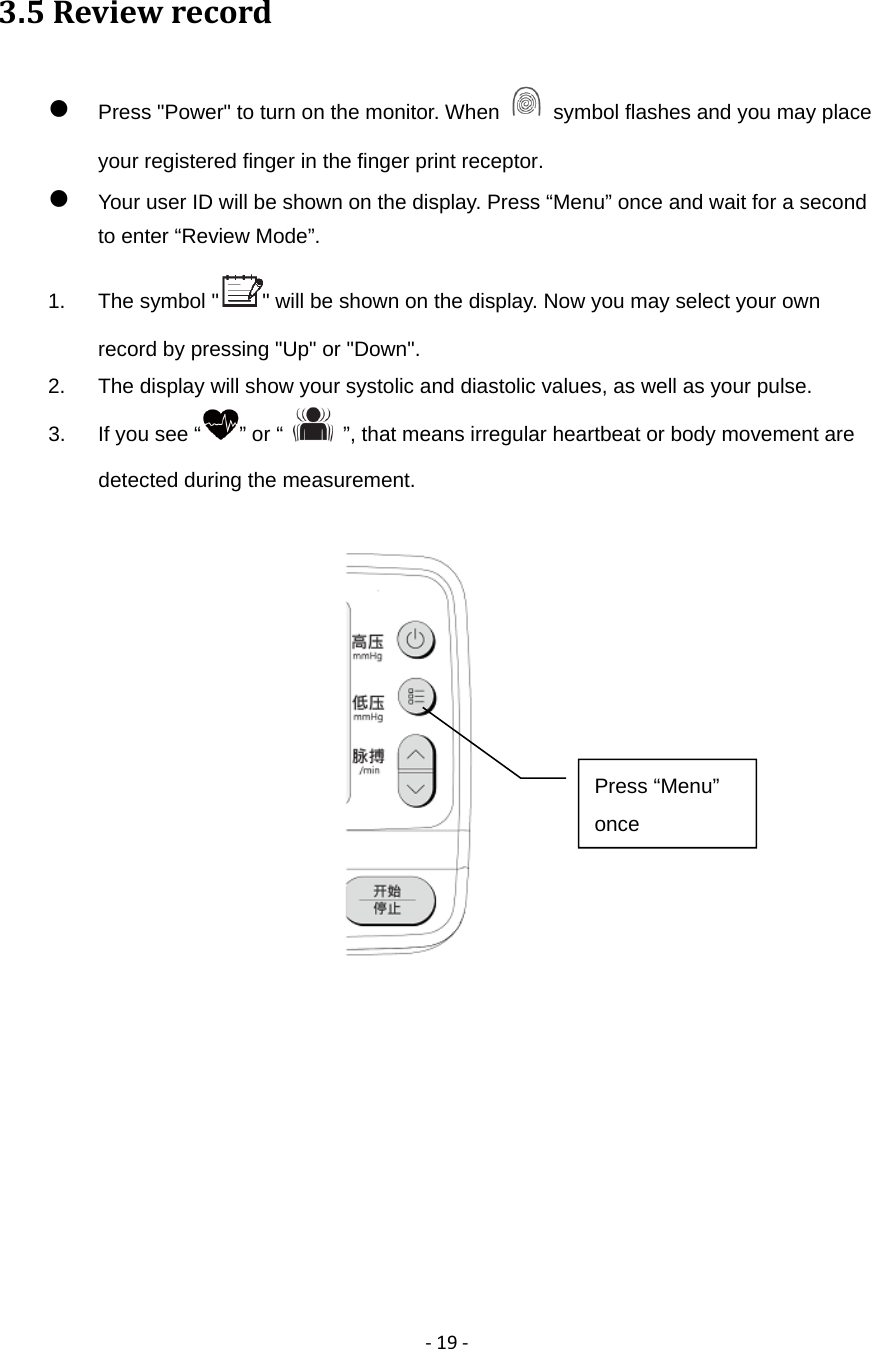
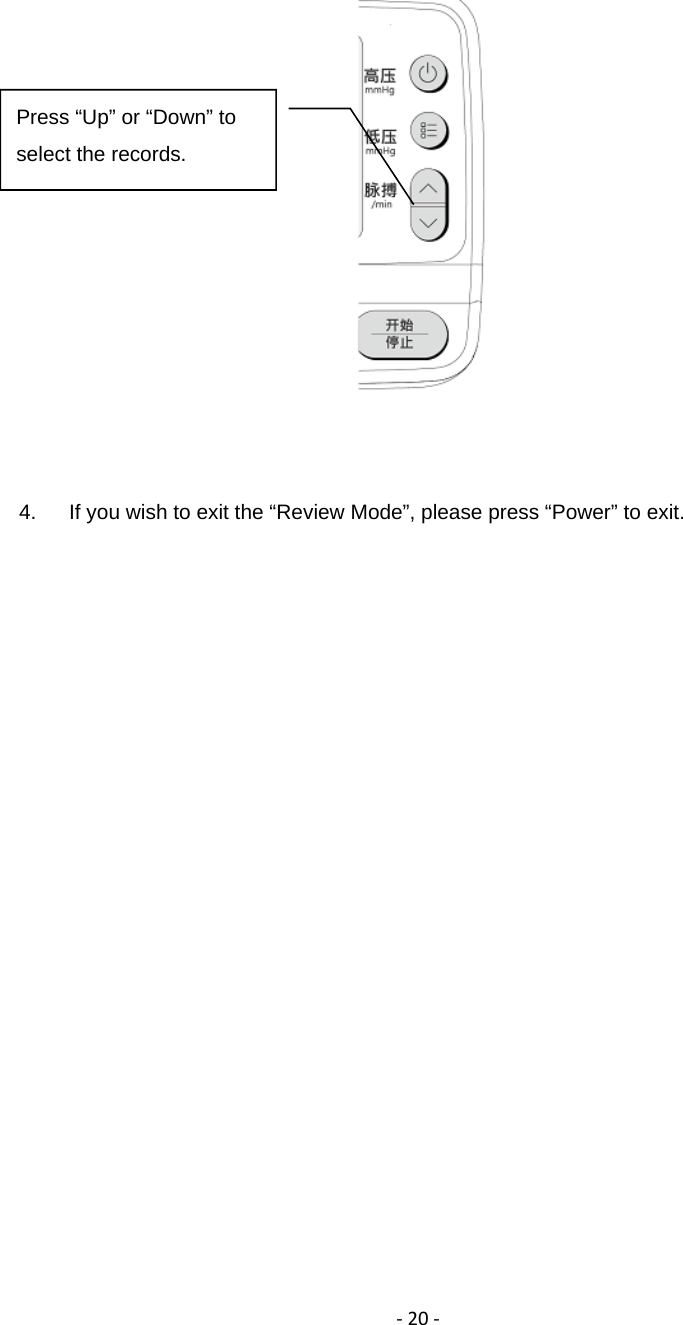
‐19‐3.5Reviewrecord Press "Power" to turn on the monitor. When    symbol flashes and you may place your registered finger in the finger print receptor.  Your user ID will be shown on the display. Press “Menu” once and wait for a second to enter “Review Mode”. 1.  The symbol " " will be shown on the display. Now you may select your own record by pressing "Up" or "Down". 2.  The display will show your systolic and diastolic values, as well as your pulse.   3.  If you see “ ” or “    ”, that means irregular heartbeat or body movement are detected during the measurement.         Press “Menu” once
‐20‐       4.  If you wish to exit the “Review Mode”, please press “Power” to exit.                Press “Up” or “Down” to select the records.
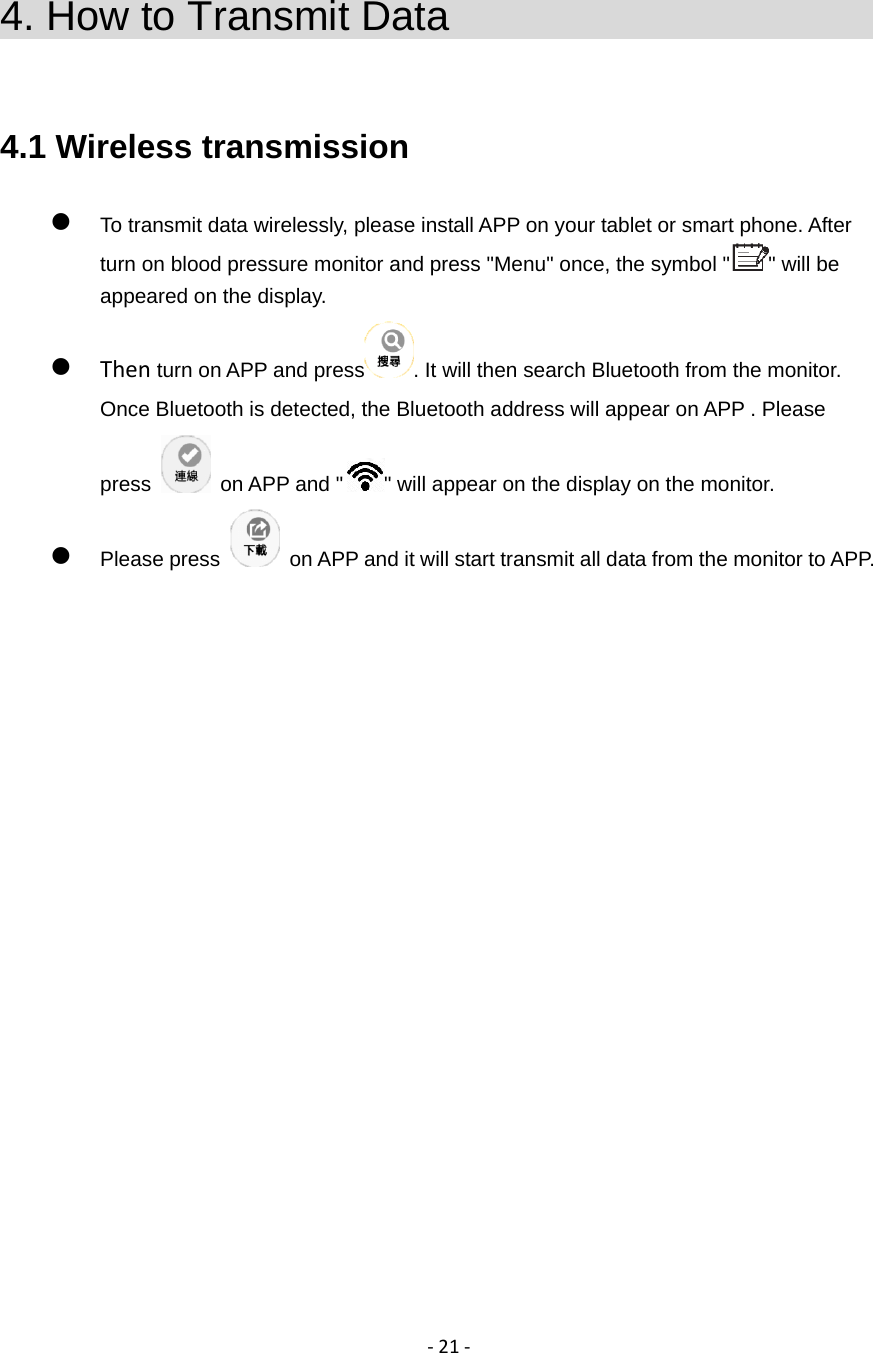
‐21‐4. How to Transmit Data                        4.1 Wireless transmission  To transmit data wirelessly, please install APP on your tablet or smart phone. After turn on blood pressure monitor and press "Menu" once, the symbol " " will be appeared on the display.  Then turn on APP and press . It will then search Bluetooth from the monitor. Once Bluetooth is detected, the Bluetooth address will appear on APP . Please press    on APP and " " will appear on the display on the monitor.  Please press    on APP and it will start transmit all data from the monitor to APP.
‐22‐5. Care and Maintenance                        To keep your intelligent blood pressure monitor in the best condition and protect the product from damage, follow the directions listed below:    Do not subject the main unit to extreme hot or cold temperatures, humidity or direct sunlight.   Do not forcefully fold the arm cuff or air tube.   Do not disassemble or attempt to repair the product or components.   Do not subject the monitor to strong shocks, such as dropping the product on the floor.  Do not spill the water on the main unit and cuff arm, or immerse them in water.   Do not use volatile liquids to clean the main unit. Cleaning the main unit with a soft & dry cloth.   Use 75% alcohol cotton to wipe the main unit if the monitor is transferred to another patient.   Do not use petrol, thinners or similar solvents to clean the arm cuff.   Do not try to repair the product by yourself. If you have any problems, such as setting up, maintaining or using, please contact Biostar. Do not open or repair the device by yourslef.   Clean the monitor and cuff with a dry, soft cloth or a cloth dampened with water and a mild detergent after the measurement.
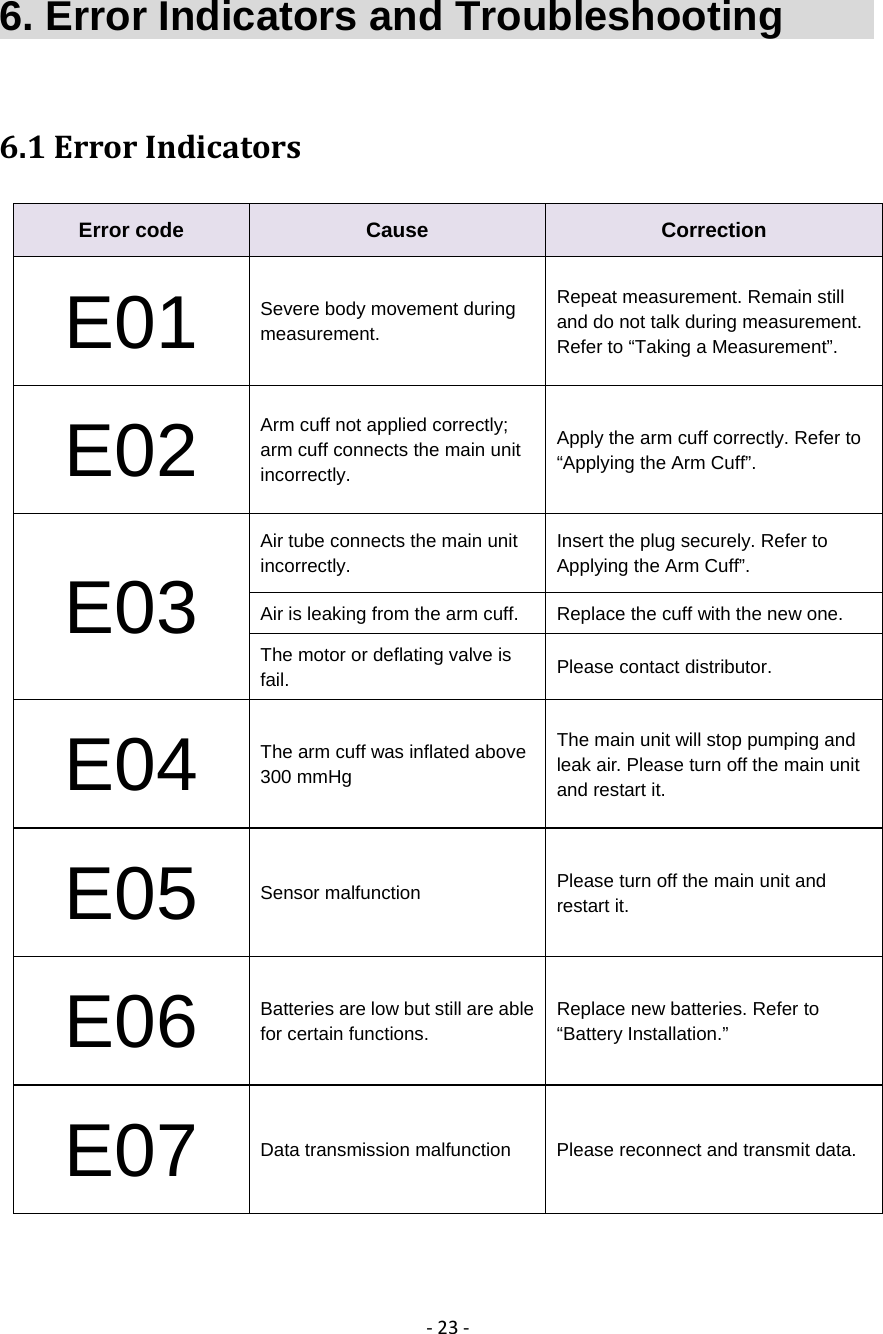
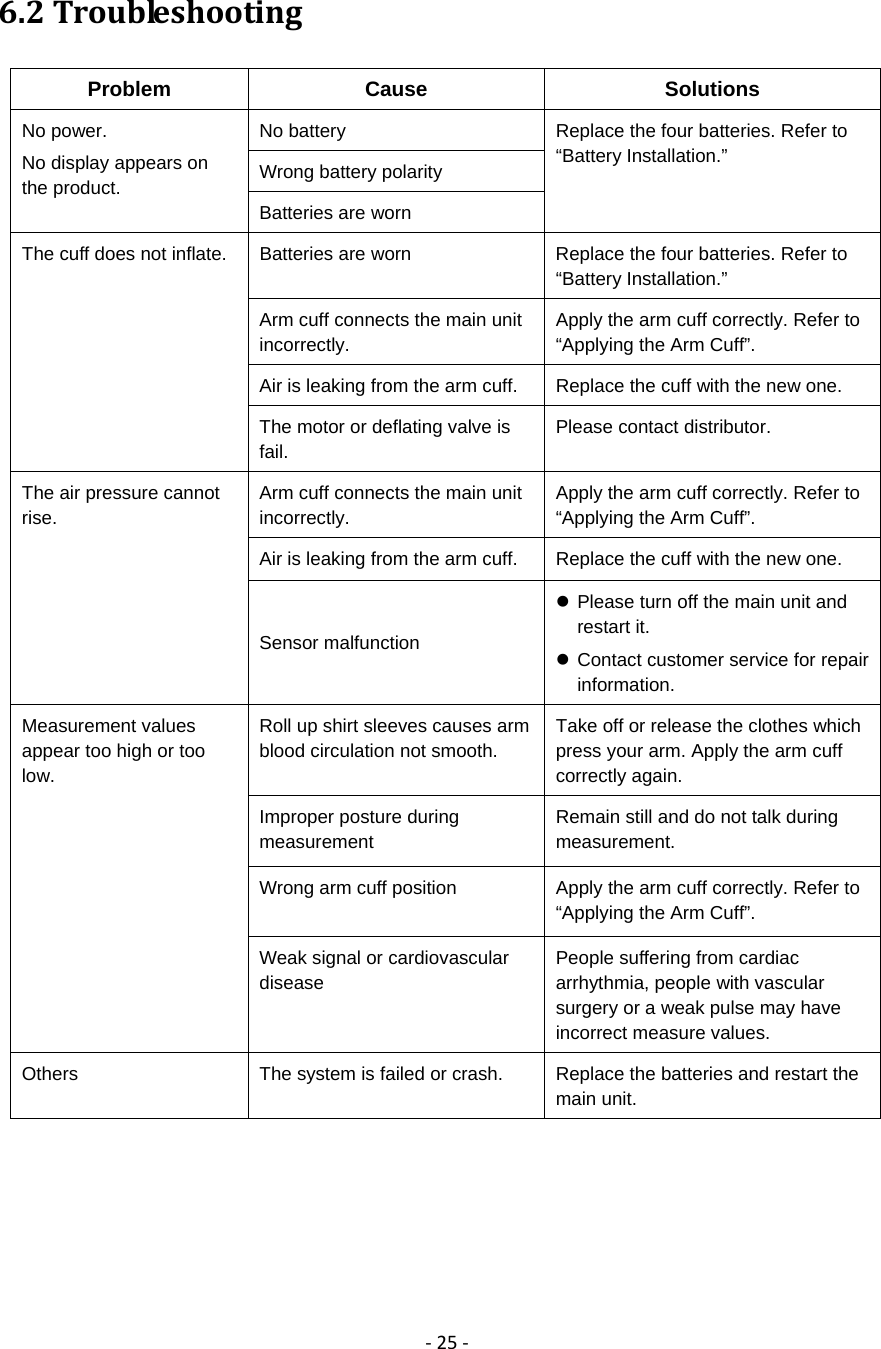
‐23‐6. Error Indicators and Troubleshooting          6.1ErrorIndicatorsError code  Cause  Correction E01  Severe body movement during measurement. Repeat measurement. Remain still and do not talk during measurement. Refer to “Taking a Measurement”. E02 Arm cuff not applied correctly; arm cuff connects the main unit incorrectly. Apply the arm cuff correctly. Refer to “Applying the Arm Cuff”. E03 Air tube connects the main unit incorrectly. Insert the plug securely. Refer to Applying the Arm Cuff”. Air is leaking from the arm cuff.  Replace the cuff with the new one. The motor or deflating valve is fail.  Please contact distributor. E04 The arm cuff was inflated above 300 mmHg The main unit will stop pumping and leak air. Please turn off the main unit and restart it. E05 Sensor malfunction  Please turn off the main unit and restart it. E06 Batteries are low but still are able for certain functions. Replace new batteries. Refer to “Battery Installation.” E07 Data transmission malfunction  Please reconnect and transmit data.
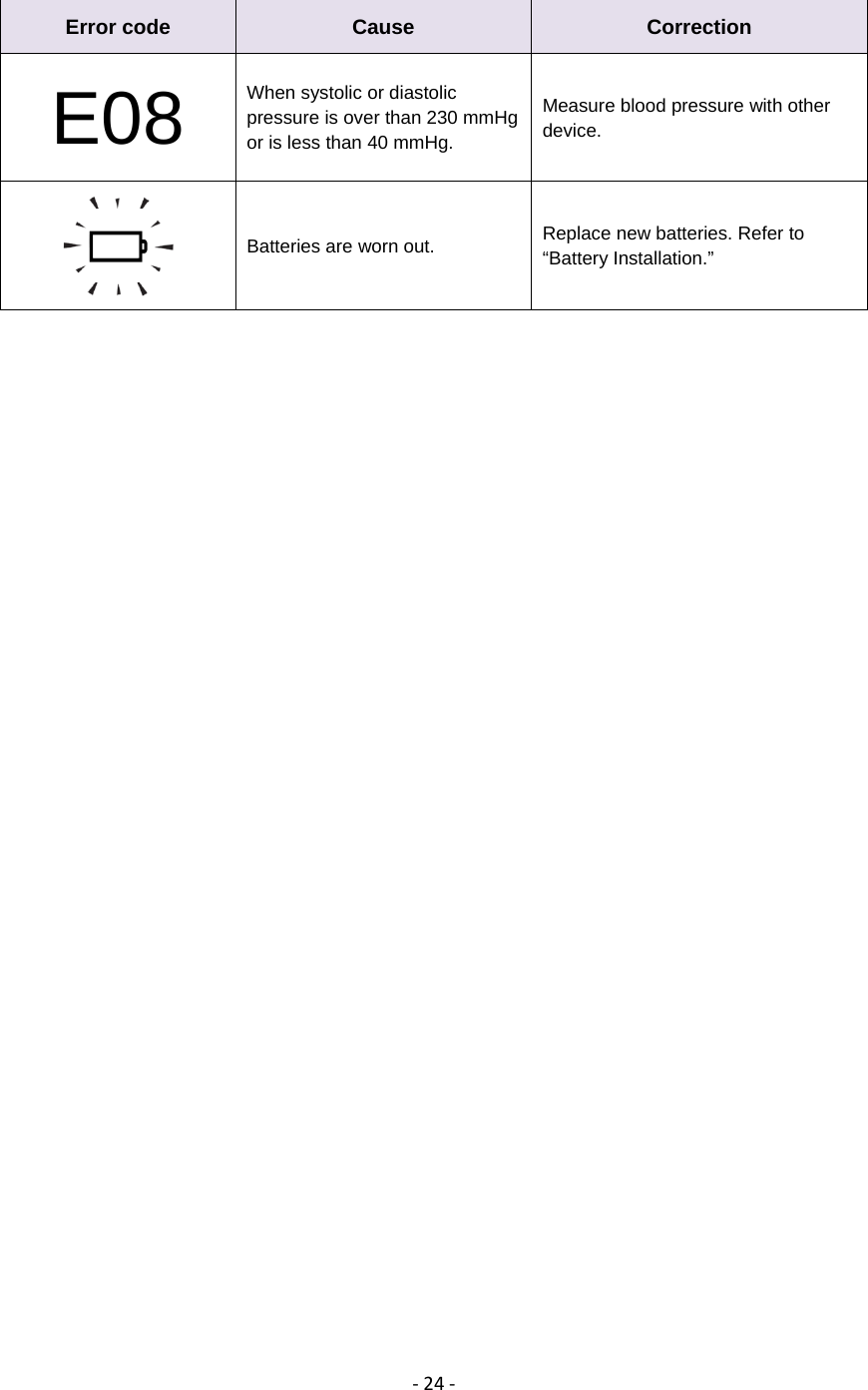
‐24‐Error code  Cause  Correction E08 When systolic or diastolic pressure is over than 230 mmHg or is less than 40 mmHg. Measure blood pressure with other device.   Batteries are worn out.  Replace new batteries. Refer to “Battery Installation.”
‐25‐6.2TroubleshootingProblem Cause  Solutions No power. No display appears on the product. No battery  Replace the four batteries. Refer to “Battery Installation.” Wrong battery polarity Batteries are worn The cuff does not inflate.  Batteries are worn  Replace the four batteries. Refer to “Battery Installation.” Arm cuff connects the main unit incorrectly. Apply the arm cuff correctly. Refer to “Applying the Arm Cuff”. Air is leaking from the arm cuff.  Replace the cuff with the new one. The motor or deflating valve is fail. Please contact distributor. The air pressure cannot rise. Arm cuff connects the main unit incorrectly. Apply the arm cuff correctly. Refer to “Applying the Arm Cuff”. Air is leaking from the arm cuff.  Replace the cuff with the new one. Sensor malfunction  Please turn off the main unit and restart it.  Contact customer service for repair information. Measurement values appear too high or too low. Roll up shirt sleeves causes arm blood circulation not smooth. Take off or release the clothes which press your arm. Apply the arm cuff correctly again. Improper posture during measurement Remain still and do not talk during measurement. Wrong arm cuff position  Apply the arm cuff correctly. Refer to “Applying the Arm Cuff”. Weak signal or cardiovascular disease People suffering from cardiac arrhythmia, people with vascular surgery or a weak pulse may have incorrect measure values. Others  The system is failed or crash.  Replace the batteries and restart the main unit.
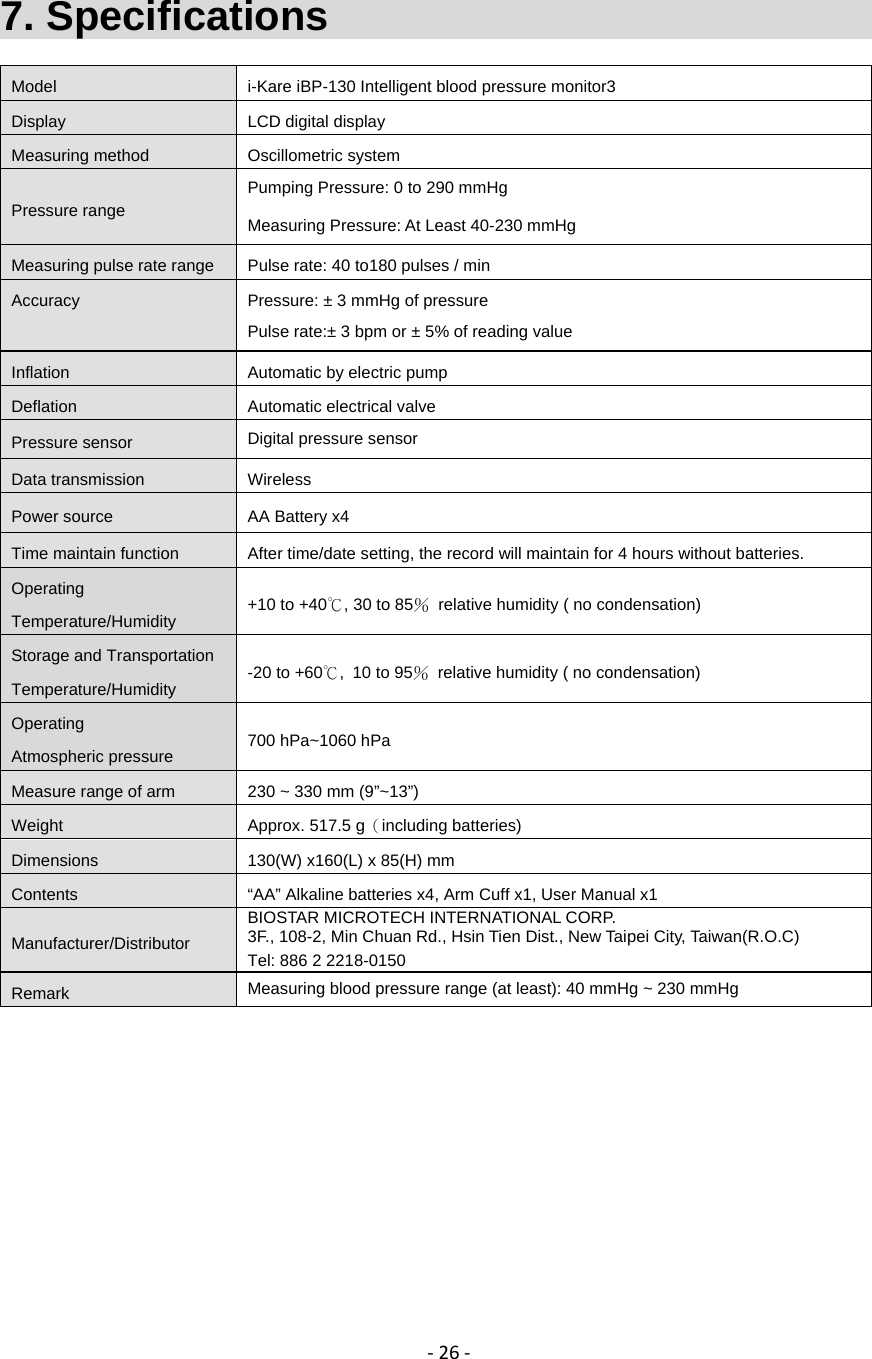
‐26‐7. Specifications                                Model  i-Kare iBP-130 Intelligent blood pressure monitor3 Display  LCD digital display Measuring method  Oscillometric system Pressure range Pumping Pressure: 0 to 290 mmHg Measuring Pressure: At Least 40-230 mmHgMeasuring pulse rate range  Pulse rate: 40 to180 pulses / min Accuracy  Pressure: ± 3 mmHg of pressure  Pulse rate:± 3 bpm or ± 5% of reading value Inflation  Automatic by electric pump Deflation  Automatic electrical valve Pressure sensor  Digital pressure sensor Data transmission  Wireless Power source  AA Battery x4   Time maintain function  After time/date setting, the record will maintain for 4 hours without batteries.   Operating Temperature/Humidity  +10 to +40℃, 30 to 85%  relative humidity ( no condensation) Storage and Transportation Temperature/Humidity  -20 to +60℃, 10 to 95%  relative humidity ( no condensation) Operating Atmospheric pressure  700 hPa~1060 hPa Measure range of arm  230 ~ 330 mm (9”~13”) Weight  Approx. 517.5 g(including batteries) Dimensions  130(W) x160(L) x 85(H) mm Contents  “AA” Alkaline batteries x4, Arm Cuff x1, User Manual x1 Manufacturer/Distributor BIOSTAR MICROTECH INTERNATIONAL CORP. 3F., 108-2, Min Chuan Rd., Hsin Tien Dist., New Taipei City, Taiwan(R.O.C) Tel: 886 2 2218-0150 Remark  Measuring blood pressure range (at least): 40 mmHg ~ 230 mmHg
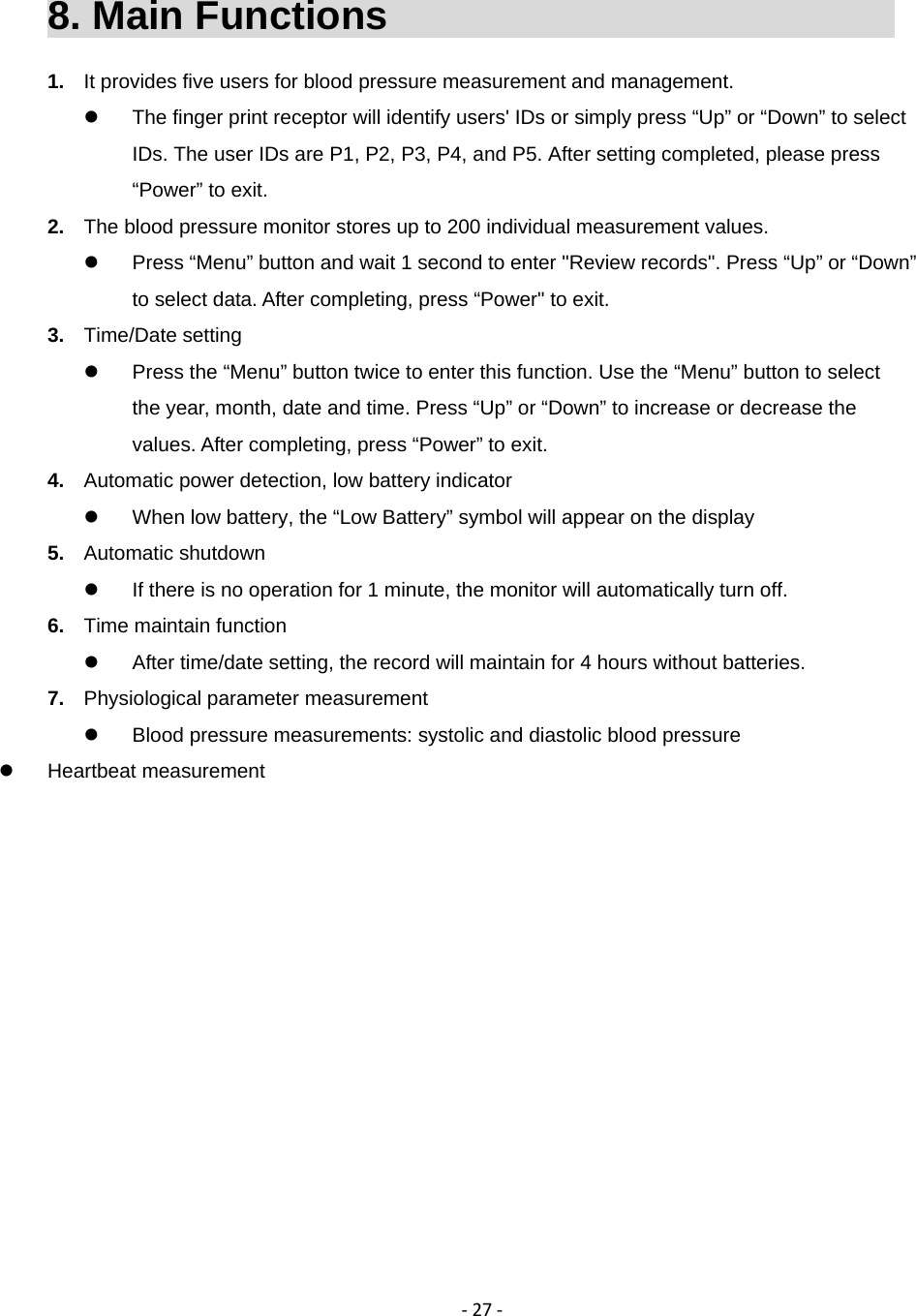
‐27‐8. Main Functions                               1.  It provides five users for blood pressure measurement and management.   The finger print receptor will identify users' IDs or simply press “Up” or “Down” to select IDs. The user IDs are P1, P2, P3, P4, and P5. After setting completed, please press “Power” to exit. 2.  The blood pressure monitor stores up to 200 individual measurement values.   Press “Menu” button and wait 1 second to enter "Review records". Press “Up” or “Down” to select data. After completing, press “Power" to exit. 3.  Time/Date setting   Press the “Menu” button twice to enter this function. Use the “Menu” button to select the year, month, date and time. Press “Up” or “Down” to increase or decrease the values. After completing, press “Power” to exit. 4.  Automatic power detection, low battery indicator   When low battery, the “Low Battery” symbol will appear on the display 5.  Automatic shutdown   If there is no operation for 1 minute, the monitor will automatically turn off. 6.  Time maintain function   After time/date setting, the record will maintain for 4 hours without batteries. 7.  Physiological parameter measurement   Blood pressure measurements: systolic and diastolic blood pressure  Heartbeat measurement
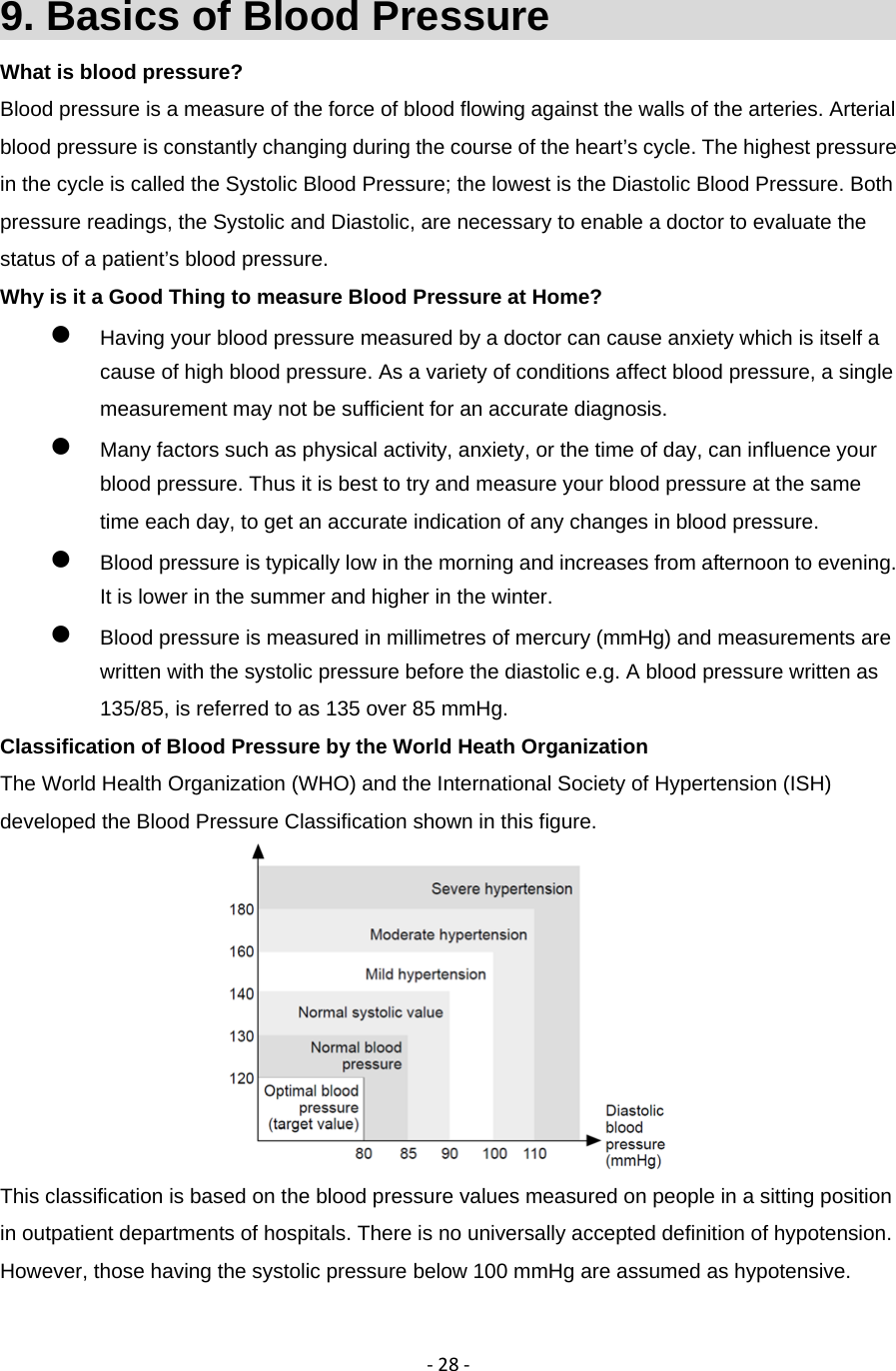
‐28‐9. Basics of Blood Pressure                     What is blood pressure? Blood pressure is a measure of the force of blood flowing against the walls of the arteries. Arterial blood pressure is constantly changing during the course of the heart’s cycle. The highest pressure in the cycle is called the Systolic Blood Pressure; the lowest is the Diastolic Blood Pressure. Both pressure readings, the Systolic and Diastolic, are necessary to enable a doctor to evaluate the status of a patient’s blood pressure. Why is it a Good Thing to measure Blood Pressure at Home?  Having your blood pressure measured by a doctor can cause anxiety which is itself a cause of high blood pressure. As a variety of conditions affect blood pressure, a single measurement may not be sufficient for an accurate diagnosis.    Many factors such as physical activity, anxiety, or the time of day, can influence your blood pressure. Thus it is best to try and measure your blood pressure at the same time each day, to get an accurate indication of any changes in blood pressure.    Blood pressure is typically low in the morning and increases from afternoon to evening. It is lower in the summer and higher in the winter.  Blood pressure is measured in millimetres of mercury (mmHg) and measurements are written with the systolic pressure before the diastolic e.g. A blood pressure written as 135/85, is referred to as 135 over 85 mmHg. Classification of Blood Pressure by the World Heath Organization The World Health Organization (WHO) and the International Society of Hypertension (ISH) developed the Blood Pressure Classification shown in this figure.  This classification is based on the blood pressure values measured on people in a sitting position in outpatient departments of hospitals. There is no universally accepted definition of hypotension. However, those having the systolic pressure below 100 mmHg are assumed as hypotensive.
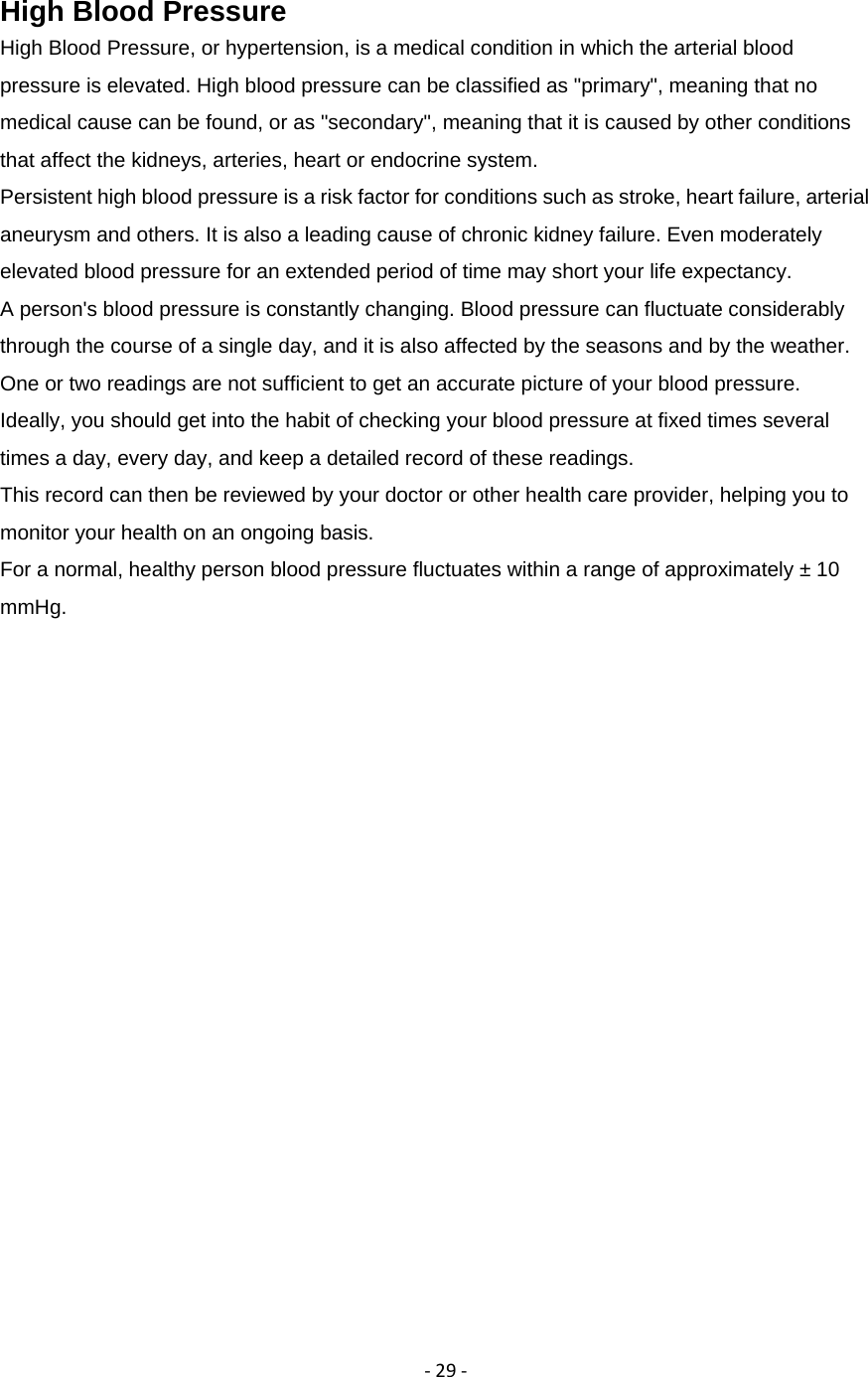
‐29‐High Blood Pressure High Blood Pressure, or hypertension, is a medical condition in which the arterial blood pressure is elevated. High blood pressure can be classified as "primary", meaning that no medical cause can be found, or as "secondary", meaning that it is caused by other conditions that affect the kidneys, arteries, heart or endocrine system. Persistent high blood pressure is a risk factor for conditions such as stroke, heart failure, arterial aneurysm and others. It is also a leading cause of chronic kidney failure. Even moderately elevated blood pressure for an extended period of time may short your life expectancy. A person's blood pressure is constantly changing. Blood pressure can fluctuate considerably through the course of a single day, and it is also affected by the seasons and by the weather. One or two readings are not sufficient to get an accurate picture of your blood pressure. Ideally, you should get into the habit of checking your blood pressure at fixed times several times a day, every day, and keep a detailed record of these readings. This record can then be reviewed by your doctor or other health care provider, helping you to monitor your health on an ongoing basis. For a normal, healthy person blood pressure fluctuates within a range of approximately ± 10 mmHg.
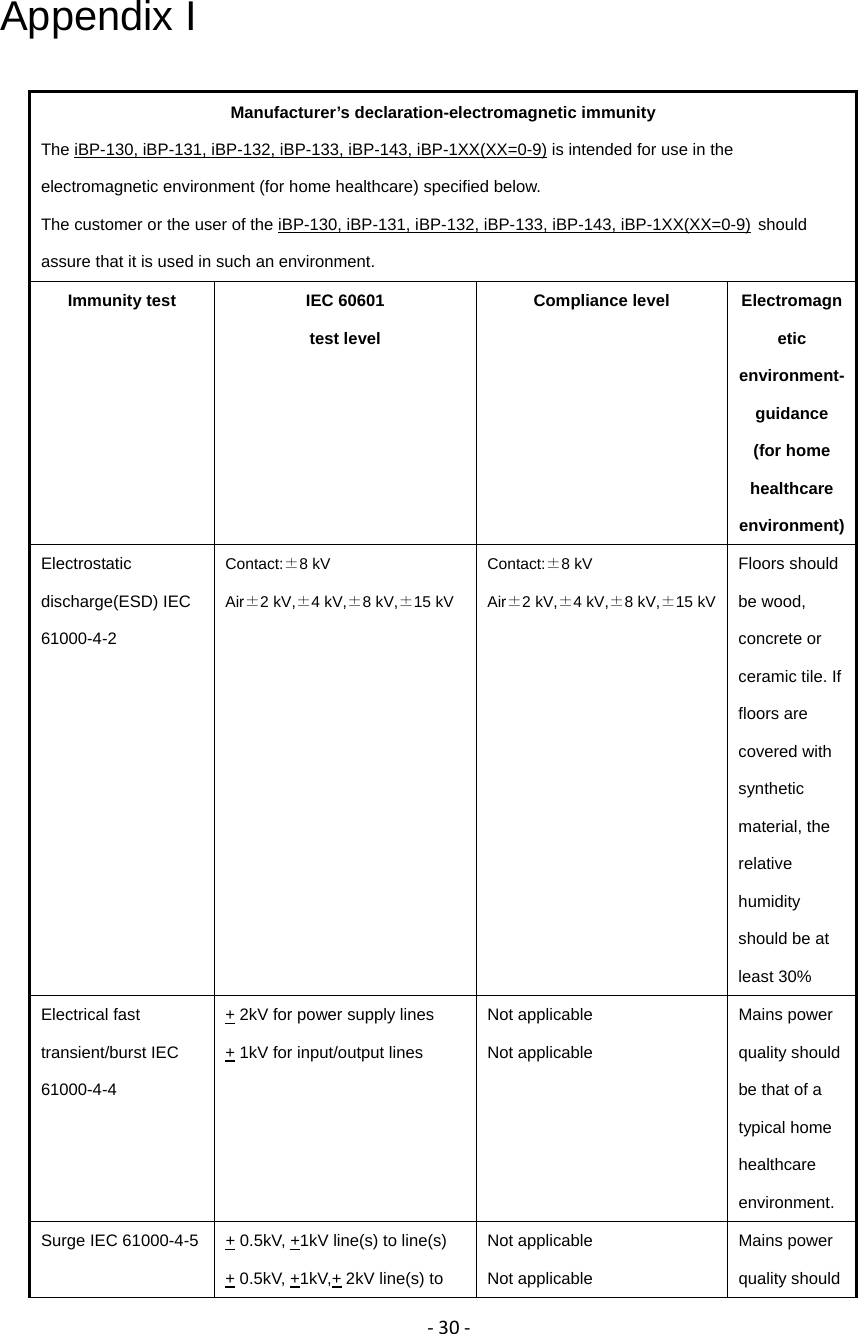
‐30‐Appendix I Manufacturer’s declaration-electromagnetic immunity The iBP-130, iBP-131, iBP-132, iBP-133, iBP-143, iBP-1XX(XX=0-9) is intended for use in the electromagnetic environment (for home healthcare) specified below. The customer or the user of the iBP-130, iBP-131, iBP-132, iBP-133, iBP-143, iBP-1XX(XX=0-9) should assure that it is used in such an environment. Immunity test  IEC 60601   test level Compliance level  Electromagnetic environment-guidance    (for home healthcare environment) Electrostatic discharge(ESD) IEC 61000-4-2 Contact:±8 kV   Air±2 kV,±4 kV,±8 kV,±15 kV Contact:±8 kV   Air±2 kV,±4 kV,±8 kV,±15 kV Floors should be wood, concrete or ceramic tile. If floors are covered with synthetic material, the relative humidity should be at least 30% Electrical fast transient/burst IEC 61000-4-4 + 2kV for power supply lines + 1kV for input/output lines Not applicable Not applicable Mains power quality should be that of a typical home healthcare environment. Surge IEC 61000-4-5 + 0.5kV, +1kV line(s) to line(s) + 0.5kV, +1kV,+ 2kV line(s) to Not applicable Not applicable Mains power quality should
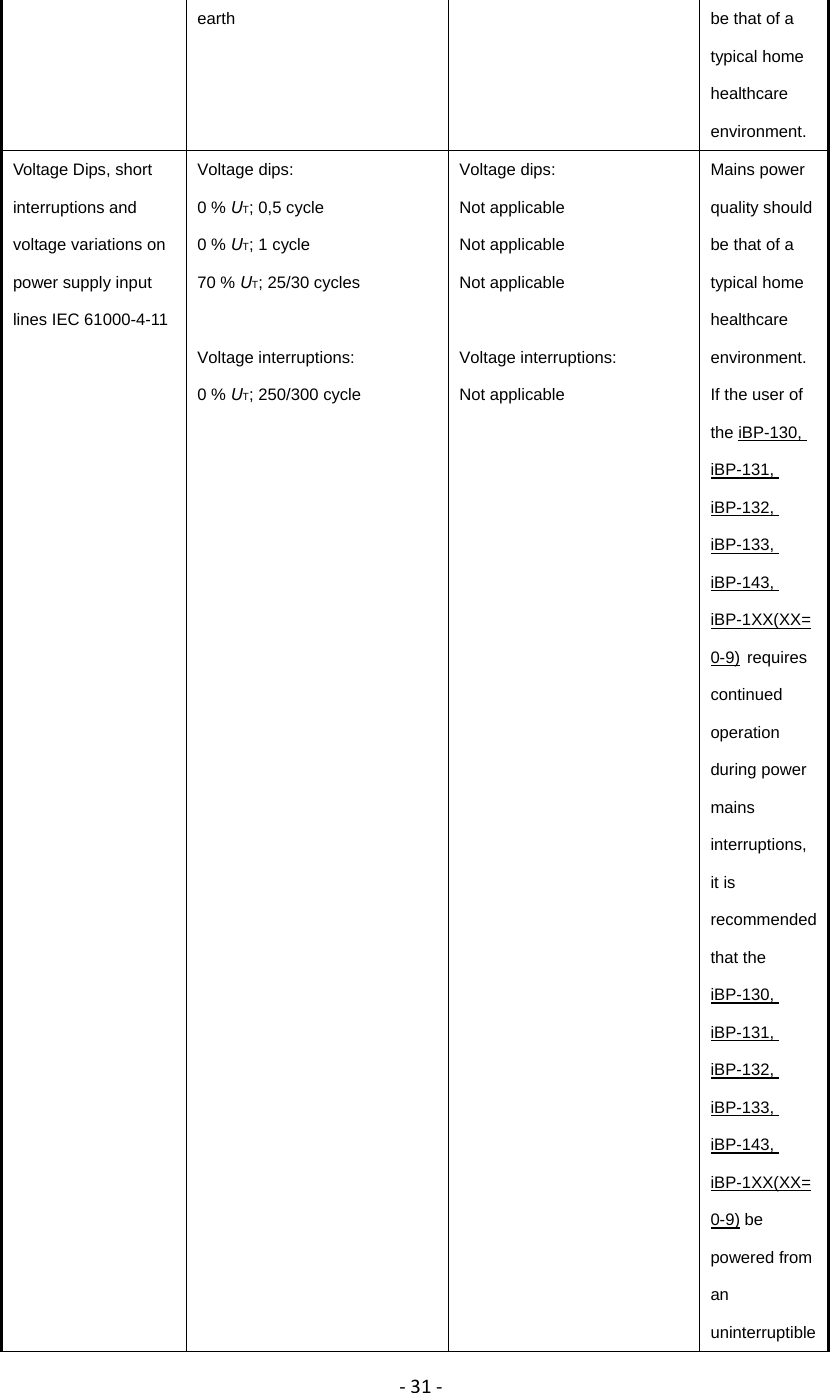
‐31‐earth  be that of a typical home healthcare environment. Voltage Dips, short interruptions and voltage variations on power supply input lines IEC 61000-4-11Voltage dips: 0 % UT; 0,5 cycle             0 % UT; 1 cycle 70 % UT; 25/30 cycles  Voltage interruptions: 0 % UT; 250/300 cycle Voltage dips: Not applicable Not applicable Not applicable  Voltage interruptions: Not applicable Mains power quality should be that of a typical home healthcare environment.   If the user of the iBP-130, iBP-131, iBP-132, iBP-133, iBP-143, iBP-1XX(XX=0-9) requires continued operation during power mains interruptions, it is recommended that the iBP-130, iBP-131, iBP-132, iBP-133, iBP-143, iBP-1XX(XX=0-9) be powered from an uninterruptible
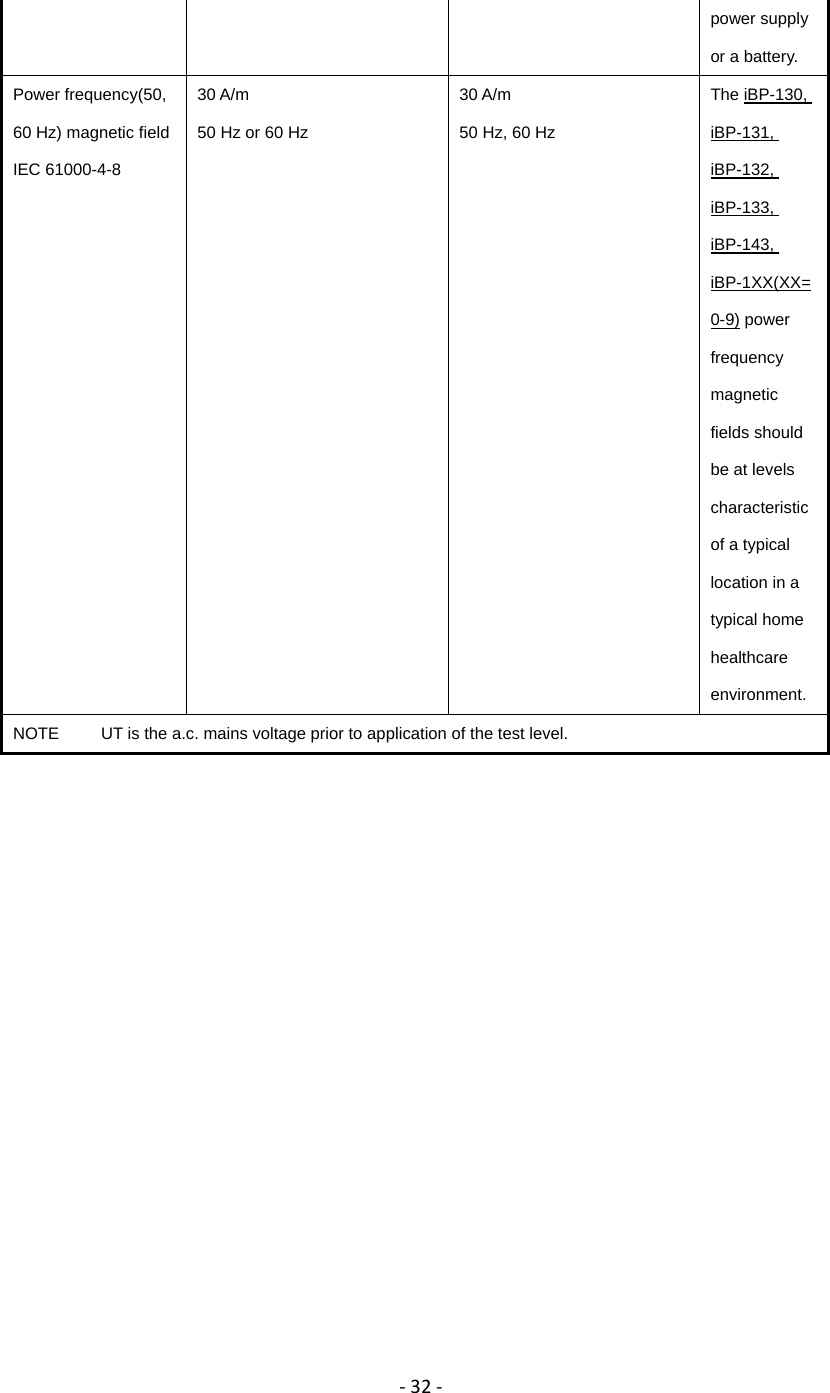
‐32‐power supply or a battery. Power frequency(50, 60 Hz) magnetic field IEC 61000-4-8 30 A/m 50 Hz or 60 Hz 30 A/m 50 Hz, 60 Hz The iBP-130, iBP-131, iBP-132, iBP-133, iBP-143, iBP-1XX(XX=0-9) power frequency magnetic fields should be at levels characteristic of a typical location in a typical home healthcare environment. NOTE     UT is the a.c. mains voltage prior to application of the test level.
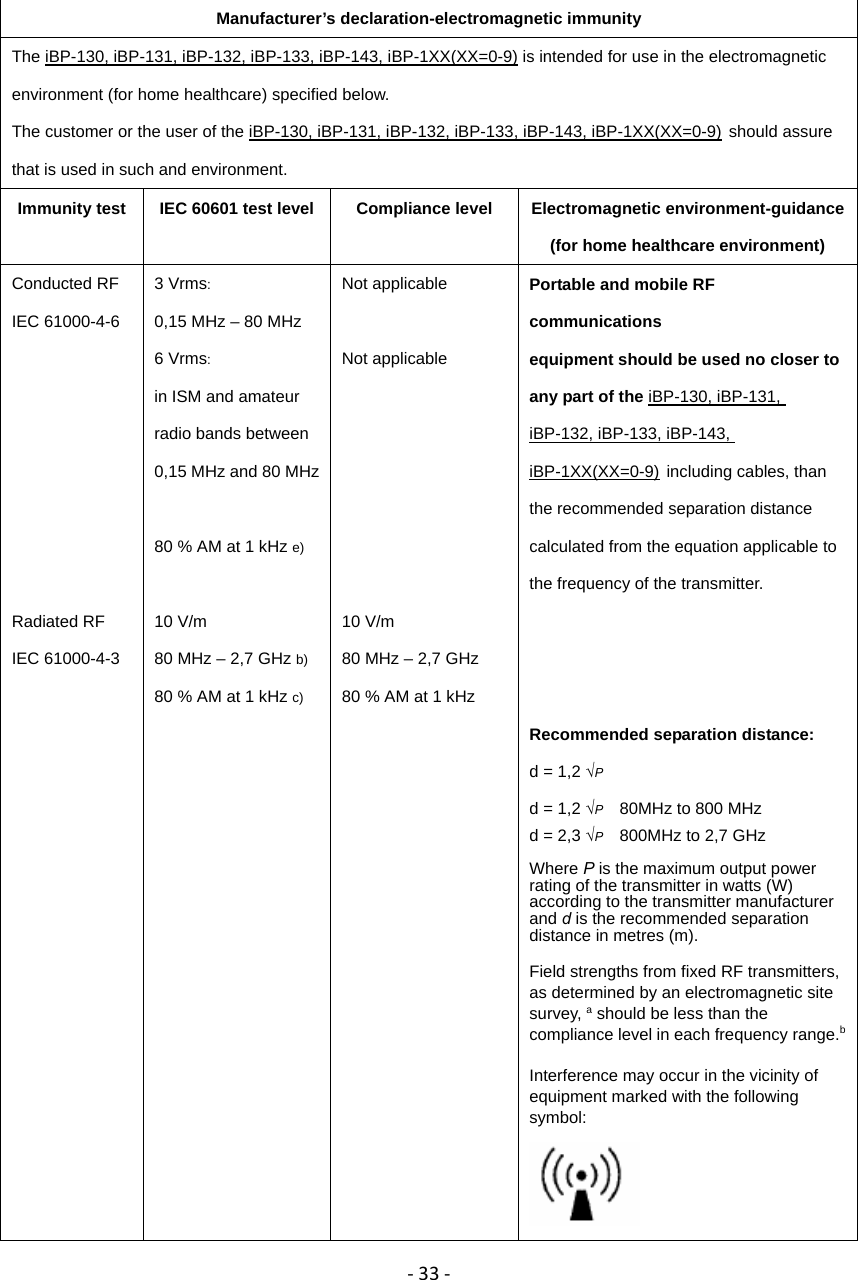
‐33‐   Manufacturer’s declaration-electromagnetic immunity The iBP-130, iBP-131, iBP-132, iBP-133, iBP-143, iBP-1XX(XX=0-9) is intended for use in the electromagnetic environment (for home healthcare) specified below. The customer or the user of the iBP-130, iBP-131, iBP-132, iBP-133, iBP-143, iBP-1XX(XX=0-9) should assure that is used in such and environment. Immunity test  IEC 60601 test level  Compliance level  Electromagnetic environment-guidance  (for home healthcare environment) Conducted RF IEC 61000-4-6        Radiated RF   IEC 61000-4-3 3 Vrms: 0,15 MHz – 80 MHz 6 Vrms:  in ISM and amateur radio bands between 0,15 MHz and 80 MHz  80 % AM at 1 kHz e)  10 V/m 80 MHz – 2,7 GHz b) 80 % AM at 1 kHz c) Not applicable  Not applicable       10 V/m 80 MHz – 2,7 GHz   80 % AM at 1 kHz   Portable and mobile RF communications  equipment should be used no closer to any part of the iBP-130, iBP-131, iBP-132, iBP-133, iBP-143, iBP-1XX(XX=0-9) including cables, than the recommended separation distance calculated from the equation applicable to the frequency of the transmitter.    Recommended separation distance: d = 1,2 √P d = 1,2 √P  80MHz to 800 MHz d = 2,3 √P    800MHz to 2,7 GHz    Where P is the maximum output power rating of the transmitter in watts (W) according to the transmitter manufacturer and d is the recommended separation distance in metres (m).  Field strengths from fixed RF transmitters, as determined by an electromagnetic site survey, a should be less than the compliance level in each frequency range.b Interference may occur in the vicinity of equipment marked with the following symbol:
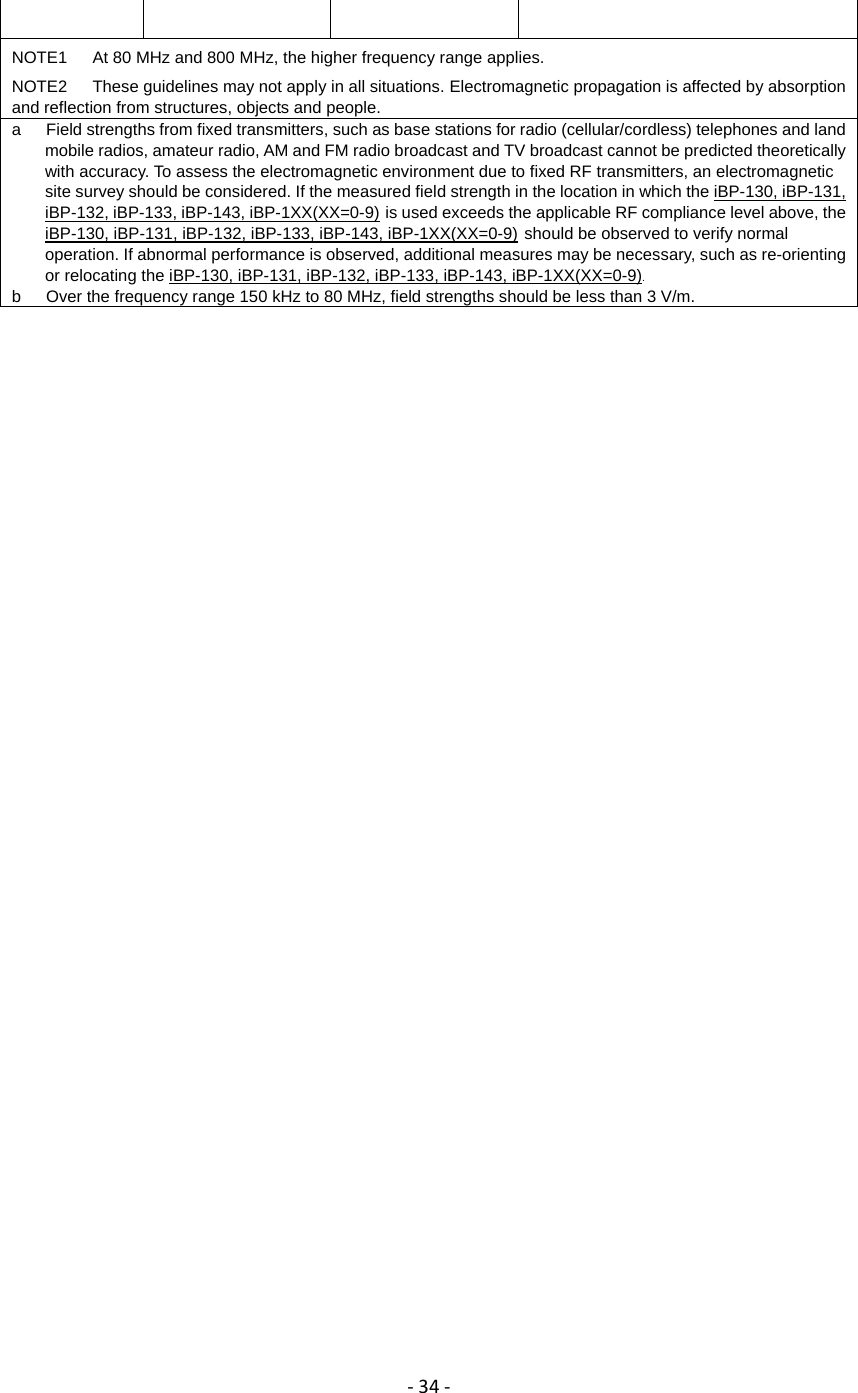
‐34‐ NOTE1      At 80 MHz and 800 MHz, the higher frequency range applies. NOTE2      These guidelines may not apply in all situations. Electromagnetic propagation is affected by absorption and reflection from structures, objects and people. a      Field strengths from fixed transmitters, such as base stations for radio (cellular/cordless) telephones and land mobile radios, amateur radio, AM and FM radio broadcast and TV broadcast cannot be predicted theoretically with accuracy. To assess the electromagnetic environment due to fixed RF transmitters, an electromagnetic site survey should be considered. If the measured field strength in the location in which the iBP-130, iBP-131, iBP-132, iBP-133, iBP-143, iBP-1XX(XX=0-9) is used exceeds the applicable RF compliance level above, the iBP-130, iBP-131, iBP-132, iBP-133, iBP-143, iBP-1XX(XX=0-9) should be observed to verify normal operation. If abnormal performance is observed, additional measures may be necessary, such as re-orienting or relocating the iBP-130, iBP-131, iBP-132, iBP-133, iBP-143, iBP-1XX(XX=0-9). b      Over the frequency range 150 kHz to 80 MHz, field strengths should be less than 3 V/m.
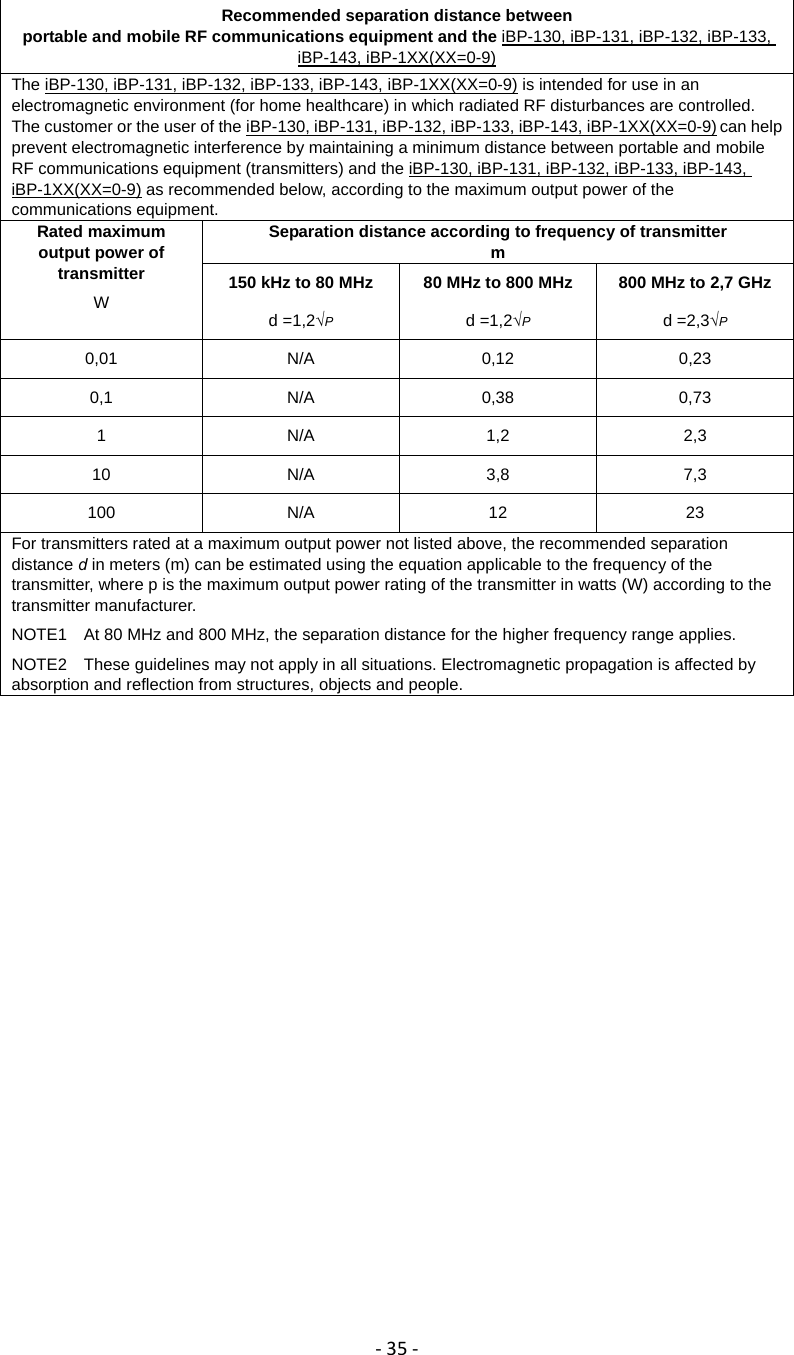
‐35‐ Recommended separation distance between portable and mobile RF communications equipment and the iBP-130, iBP-131, iBP-132, iBP-133, iBP-143, iBP-1XX(XX=0-9) The iBP-130, iBP-131, iBP-132, iBP-133, iBP-143, iBP-1XX(XX=0-9) is intended for use in an electromagnetic environment (for home healthcare) in which radiated RF disturbances are controlled. The customer or the user of the iBP-130, iBP-131, iBP-132, iBP-133, iBP-143, iBP-1XX(XX=0-9) can help prevent electromagnetic interference by maintaining a minimum distance between portable and mobile RF communications equipment (transmitters) and the iBP-130, iBP-131, iBP-132, iBP-133, iBP-143, iBP-1XX(XX=0-9) as recommended below, according to the maximum output power of the communications equipment. Rated maximum output power of transmitter W Separation distance according to frequency of transmitter m 150 kHz to 80 MHz d =1,2√P 80 MHz to 800 MHz d =1,2√P 800 MHz to 2,7 GHz d =2,3√P 0,01 N/A 0,12 0,23 0,1 N/A 0,38 0,73 1 N/A 1,2 2,3 10 N/A 3,8 7,3 100 N/A 12  23 For transmitters rated at a maximum output power not listed above, the recommended separation distance d in meters (m) can be estimated using the equation applicable to the frequency of the transmitter, where p is the maximum output power rating of the transmitter in watts (W) according to the transmitter manufacturer. NOTE1    At 80 MHz and 800 MHz, the separation distance for the higher frequency range applies. NOTE2    These guidelines may not apply in all situations. Electromagnetic propagation is affected by absorption and reflection from structures, objects and people.
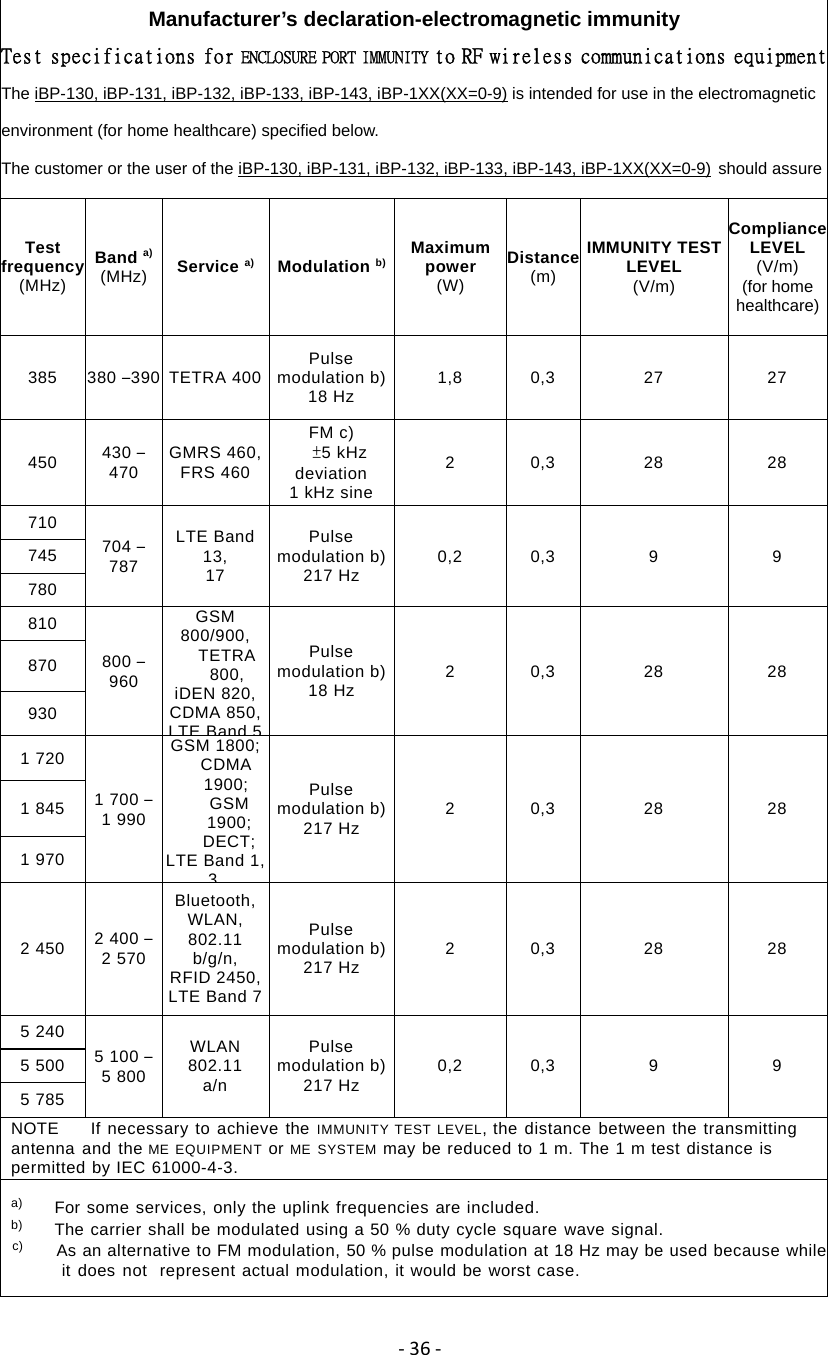
‐36‐ Manufacturer’s declaration-electromagnetic immunity Test specifications for ENCLOSURE PORT IMMUNITY to RF wireless communications equipmentThe iBP-130, iBP-131, iBP-132, iBP-133, iBP-143, iBP-1XX(XX=0-9) is intended for use in the electromagnetic environment (for home healthcare) specified below. The customer or the user of the iBP-130, iBP-131, iBP-132, iBP-133, iBP-143, iBP-1XX(XX=0-9) should assure Test frequency (MHz) Band a) (MHz)  Service a) Modulation b) Maximum power (W) Distance(m) IMMUNITY TEST LEVEL (V/m) Compliance LEVEL (V/m) (for home healthcare) 385  380 –390  TETRA 400  Pulse modulation b)18 Hz  1,8 0,3  27  27 450  430 – 470  GMRS 460, FRS 460 FM c)  ±5 kHz deviation 1 kHz sine 2 0,3  28  28 710 704 – 787 LTE Band 13, 17 Pulse modulation b)217 Hz  0,2 0,3  9  9 745 780 810 800 – 960 GSM 800/900, TETRA 800, iDEN 820, CDMA 850, LTE Band 5Pulse modulation b)18 Hz  2 0,3  28  28 870 930 1 720 1 700 – 1 990 GSM 1800; CDMA 1900; GSM 1900;  DECT; LTE Band 1, 3Pulse modulation b)217 Hz  2 0,3  28  28 1 845 1 970 2 450  2 400 – 2 570 Bluetooth,  WLAN, 802.11 b/g/n,  RFID 2450, LTE Band 7 Pulse modulation b)217 Hz  2 0,3  28  28 5 240 5 100 – 5 800 WLAN 802.11 a/n Pulse modulation b)217 Hz  0,2 0,3  9  9 5 500 5 785 NOTE    If necessary to achieve the IMMUNITY TEST LEVEL, the distance between the transmitting antenna and the ME EQUIPMENT or ME SYSTEM may be reduced to 1 m. The 1 m test distance is permitted by IEC 61000-4-3. a)     For some services, only the uplink frequencies are included. b)     The carrier shall be modulated using a 50 % duty cycle square wave signal. c)     As an alternative to FM modulation, 50 % pulse modulation at 18 Hz may be used because whileit does not  represent actual modulation, it would be worst case.
‐37‐Appendix II FCC warning statement 15.21 Federal Communications Commission (FCC) Statement The user manual or instruction manual for an intentional or unintentional radiator shall caution the user that changes or modifications not expressly approved by the part responsible for compliance could void the user’s authority to operate the equipment. You are cautioned that changes or modifications not expressly approved by the part responsible for compliance could void the user’s authority to operate the equipment. 15.105(b) Federal Communications Commission (FCC) Statement This equipment has been tested and found to comply with the limits for a Class B digital device, pursuant to part 15 of the FCC rules. These limits are designed to provide reasonable protection against harmful interference in a residential installation. This equipment generates, uses and can radiate radio frequency energy and, if not installed and used in accordance with the instructions, may cause harmful interference to radio communications. However, there is no guarantee that interference will not occur in a particular installation. If this equipment does cause harmful interference to radio or television reception, which can be determined by turning the equipment off and on, the user is encouraged to try to correct the interference by one or more of the following measures: -Reorient or relocate the receiving antenna. -Increase the separation between the equipment and receiver. -Connect the equipment into an outlet on a circuit different from that to which the receiver is connected. -Consult the dealer or an experienced radio/TV technician for help. This device complies with Part 15 of the FCC Rules. Operation is subject to the following two conditions: 1) this device may not cause harmful interference, and 2) this device must accept any interference received, including interference that may cause undesired operation of the device.
‐38‐FCC RF Radiation Exposure Statement: This Transmitter must not be co-located or operating in conjunction with any other antenna or transmitter. RF Exposure:  “For body worn operation, this device has been tested and meets FCC RF exposure guidelines when used with an accessory that contains no metal and that positions the device a minimum of 5mm from the body. Use of other accessories may not ensure compliance with FCC RF exposure guidelines.” 15.105(b) Information of the responsible party for a DoC product The identification of the product:This blood pressure monitor is intended for home use as well as ambulance. Product Name: Intelligent Blood Pressure Monitor Model: iBP-130 Technical Support: Jian Bang Lee Address:2F, No108-2, Min Chuan Road, Hsin Tien Dist. New Taipei City 231, Taiwan Telephone: + 886 2 2218 0150 Fax: +886 2 2218 1552 e-mail: banglee@biostar.com.tw  SAR Exposure This device has been tested for compliance with FCC RF Exposure (SAR) limits in typical laptop configurations. In order to comply with SAR limits established in the ANSI C95.1 standards, it is recommended when using a PC card adapter that the integrated antenna is positioned more than 2.5cm from your body or nearby persons during extended periods of operation. If the antenna is positioned less than 2.5cm from the user, it is recommended that the user limit the exposure time. Prohibition of co-location This device must not be co-located or operating in conjunction with any other antenna or transmitter. 
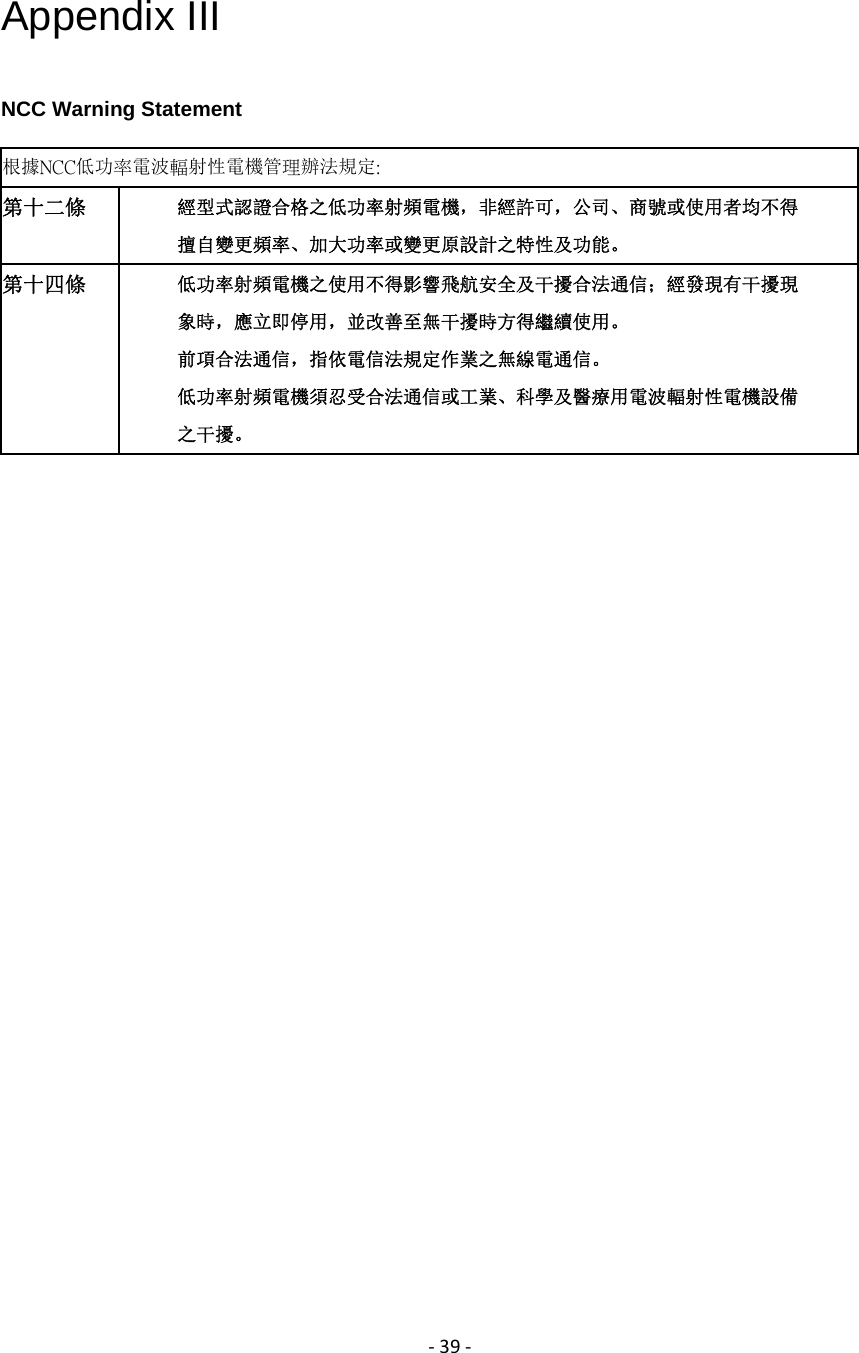
‐39‐Appendix III NCC Warning Statement 根據NCC低功率電波輻射性電機管理辦法規定:   第十二條  經型式認證合格之低功率射頻電機,非經許可,公司、商號或使用者均不得 擅自變更頻率、加大功率或變更原設計之特性及功能。 第十四條  低功率射頻電機之使用不得影響飛航安全及干擾合法通信;經發現有干擾現 象時,應立即停用,並改善至無干擾時方得繼續使用。 前項合法通信,指依電信法規定作業之無線電通信。 低功率射頻電機須忍受合法通信或工業、科學及醫療用電波輻射性電機設備 之干擾。  

Navigation menu