Biostar A780L3 Owners Manual A88GA M3S & A78LA A78LB M3S_100114
2014-07-31
: Biostar Biostar-A780L3-Owners-Manual biostar-a780l3-owners-manual biostar pdf
Open the PDF directly: View PDF  .
.
Page Count: 49

A785G3/A780L3/A780L3G Setup Manual
FCC Information and Copyright
This equipment has been tested and found to comply with the limits of a Class
B digital device, pursuant to Part 15 of the FCC Rules. These limits are designed
to provide reasonable protection against harmful interference in a residential
installation. This equipment generates, uses, and can radiate radio frequency
energy and, if not installed and used in accordance with the instructions, may
cause harmful interference to radio communications. There is no guarantee
that interference will not occur in a particular installation.
The vendor makes no representations or warranties with respect to the
contents here and specially disclaims any implied warranties of merchantability
or fitness for any purpose. Further the vendor reserves the right to revise this
publication and to make changes to the contents here without obligation to
notify any party beforehand.
Duplication of this publication, in part or in whole, is not allowed without first
obtaining the vendor’s approval in writing.
The content of this user’s manual is subject to be changed without notice and
we will not be responsible for any mistakes found in this user’s manual. All the
brand and product names are trademarks of their respective companies.

Table of Contents
Chapter 1: Introduction ............................................................ 1
1.1 Before You Start ................................................................................ 1
1.2 Package Checklist............................................................................. 1
1.3 Motherboard Features...................................................................... 2
1.4 Rear Panel Connectors ..................................................................... 3
1.5 Motherboard Layout......................................................................... 4
Chapter 2: Hardware Installation ............................................. 5
2.1 Installing Central Processing Unit (CPU)....................................... 5
2.2 FAN Headers...................................................................................... 7
2.3 Installing System Memory................................................................ 8
2.4 Connectors and Slots ....................................................................... 10
Chapter 3: Headers & Jumpers Setup .................................. 13
3.1 How to Setup Jumpers .................................................................... 13
3.2 Detail Settings.................................................................................. 13
Chapter 4: RAID Functions ..................................................... 18
4.1 Operating System............................................................................ 18
4.2 Raid Arrays ...................................................................................... 18
4.3 How RAID Works............................................................................. 18
Chapter 5: Useful Help ............................................................ 21
5.1 Driver Installation Note.................................................................. 21
5.2 Software............................................................................................ 22
5.3 Extra Information............................................................................ 26
5.4 AMI BIOS Beep Code....................................................................... 28
5.5 Troubleshooting............................................................................... 29
Appendix: SPEC In Other Languages ...................................... 30
German.................................................................................................................. 30
French .................................................................................................................... 32
Italian..................................................................................................................... 34
Spanish ................................................................................................................... 36
Portuguese ............................................................................................................ 38
Polish...................................................................................................................... 40
Russian ................................................................................................................... 42
Arabic..................................................................................................................... 44
Japanese ................................................................................................................ 46
A785G3/A780L3/A780L3G
1
CHAPTER 1: INTRODUCTION
1.1 BEFORE YOU START
Thank you for choosing our product. Before you start installing the
motherboard, please make sure you follow the instructions below:
Prepare a dry and stable working environment with
sufficient lighting.
Always disconnect the computer from power outlet
before operation.
Before you take the motherboard out from anti-static
bag, ground yourself properly by touching any safely
grounded appliance, or use grounded wrist strap to
remove the static charge.
Avoid touching the components on motherboard or the
rear side of the board unless necessary. Hold the board
on the edge, do not try to bend or flex the board.
Do not leave any unfastened small parts inside the
case after installation. Loose parts will cause short
circuits which may damage the equipment.
Keep the computer from dangerous area, such as heat
source, humid air and water.
The operating temperatures of the computer should be
0 to 45 degrees Celsius.
1.2 PACKAGE CHECKLIST
HDD Cable X 1 (optional)
Serial ATA Cable X 2
Rear I/O Panel for ATX Case X 1
Installation Guide X 1
Fully Setup Driver CD X 1 (full version manual files inside)
FDD Cable X 1 (optional)
USB 2.0 Cable X1 (optional)
Serial ATA Power Cable X 1 (optional)
Note: The package contents may be different due to area or your motherboard version.

Motherboard Manual
2
1.3 MOTHERBOARD FEATURES
A785G3 A780L3/A780L3G
CPU
Socket AM3
AMD Phenom II/ Athlon II processors
AMD 64 Architecture enables 32 and 64 bit
computing
Supports Hyper Transport 3.0 and Cool=n=Quiet
(Maximum Watt: 125W)
Socket AM3
AMD Phenom II/ Athlon II processors
AMD 64 Architecture enables 32 and 64 bit
computing
Supports Hyper Transport 3.0 and Cool=n=Quiet
(Maximum Watt: 125W)
FSB Support HyperTransport 3.0
Supports up to 5.2 GT/s Bandwidth
Support HyperTransport 3.0
Supports up to 5.2 GT/s Bandwidth
Chipset AMD 785G
AMD SB710
AMD 780L
AMD SB710
Super I/O
ITE 8718F
Provides the most co mmonly used legacy Super
I/O functionality
Low Pin Count Interface
Environment Control in it iatives
H/W Monitor
ITE's "Smart Guardian" funct ion
ITE 8718F
Provides the most commonly used legacy Super
I/O functionality
Low Pin Count Interface
Environment Control in it iatives
H/W Monitor
ITE's "Smart Guardian" funct ion
Main
Memory
DDR3 DIMM Slots x 2
Max Memory Capacity 8GB
Each DIMM supports 512MB/1GB/2GB/4GB
DDR3
Dual Channel Mode DDR3 memory module
Supports DDR3 800 / 1066 / 1333
Registered DIMM and ECC DIMM is not
supported
DDR3 DIMM Slots x 2
Max Memory Capacity 8GB
Each DIMM supports 512MB/1GB/2GB/4GB
DDR3
Dual Channel Mode DDR3 memory module
Supports DDR3 800 / 1066 / 1333
Registered DIMM and ECC DIMM is not
supported
Graphics
Integrated in AMD 785G Chipset
Max Shared V ideo Memory is 512 MB
DX10.1/HDCP/UVD2 support
Integrated in AMD 780L Chipset
Max Shared V ideo Memory is 512 MB
DX10/HDCP support
IDE
Integr ated IDE Contro ller
Ultra DMA 33 / 66 / 100 / 133 Bus Master Mode
supports PIO Mode 0~4,
Integr ated IDE Contro ller
Ultra DMA 33 / 66 / 100 / 133 Bus Master Mode
supports PIO Mode 0~4,
SATA II
Integrated Serial ATA Controller
Data transfer rates up to 3 Gb/s
SATA Version 2.0 specif icat ion co mpliant
Integrated Serial ATA Controller
Data transfer rates up to 3 Gb/s
SATA Version 2.0 specif icat ion co mpliant
LAN
Realtek RTL 8111DL
10 / 100 Mb/s / 1Gb/s auto negotiation
Half / Full duplex capability
Realtek RTL 8102EL / RTL 8111DL
10 / 100 Mb/s auto negotiation (A780L3)
10 / 100 Mb/s / 1Gb/s auto negotiation (A780L3G)
Half / Full duplex capability
Sound
ALC662
5.1 channels audio out
High Definition Audio
ALC662
5.1 channels audio out
High Definition Audio
PCI Express Gen2 x16 slot x1 PCI Express Gen2 x16 slot x1
Slots PCI slot x2 PCI slot x2
A785G3/A780L3/A780L3G
3
A785G3 A780L3/A780L3G
Floppy Connector x1 Floppy Connector x1
IDE Conn ector x1 IDE Conn ector x1
SATA Connector x4 SATA Connector x4
Front Panel Connector x1 Front Panel Connector x1
Front Audio Connector x1 Front Audio Connector x1
S/PDIF Out Connector x1 S/PDIF Out Connector x1
CPU Fan Header x1 CPU Fan Header x1
System Fan Header x1 System Fan Header x1
CMOS clear Header x1 CMOS clear Header x1
USB Connector x2 USB Connector x2
Power Connector (24pin) x1 Power Connector (24pin) x1
Power Connector (4pin) x1 Power Connector (4pin) x1
Printer Port Connector x1 Printer Port Connector x1
On Board
Connector
Serial port Connector x1 Serial port Connector x1
Back Panel
I/O
PS/2 Keyboard x1
PS/2 Mouse x1
DVI port x1
VGA port x1
LAN port x1
USB Port x4
Audio Jack x3
PS/2 Keyboard x1
PS/2 Mouse x1
DVI port x1
VGA port x1
LAN port x1
USB Port x4
Audio Jack x3
Board Size 200 mm(W) x 244 mm(L) 200 mm(W) x 244 mm(L)
Special
Features RAID 0 / 1 / 1+0 support RAID 0 / 1 / 1+0 support
OS Support
Windows XP / Vista / 7
Biostar reserves the right to add or remove
support for any OS With or without notice.
Windows XP / Vista / 7
Biostar reserves the right to add or remove
support for any OS With or without notice.
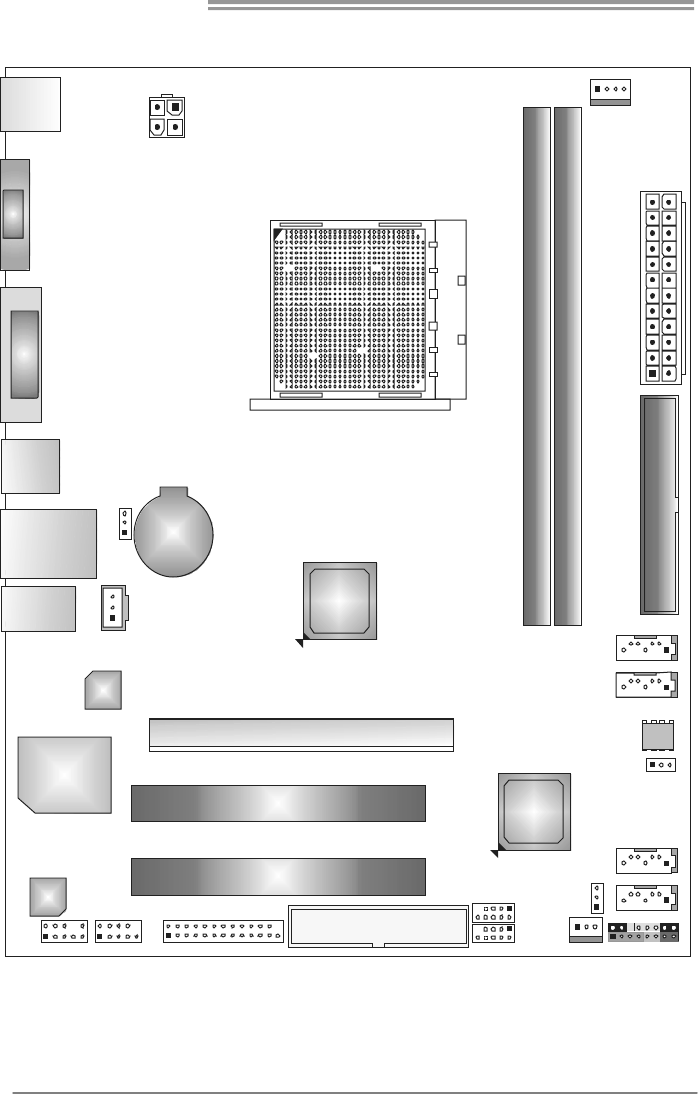
1.4 REAR PANEL CONNECTORS
PS/2
Mou se
PS/2
Keyboard
USB X2USBX2
LAN
VGA
Line In/
Surround
Line Out
Mic In 1/
Bass/ Center
DVI-D
Motherboard Manual
4
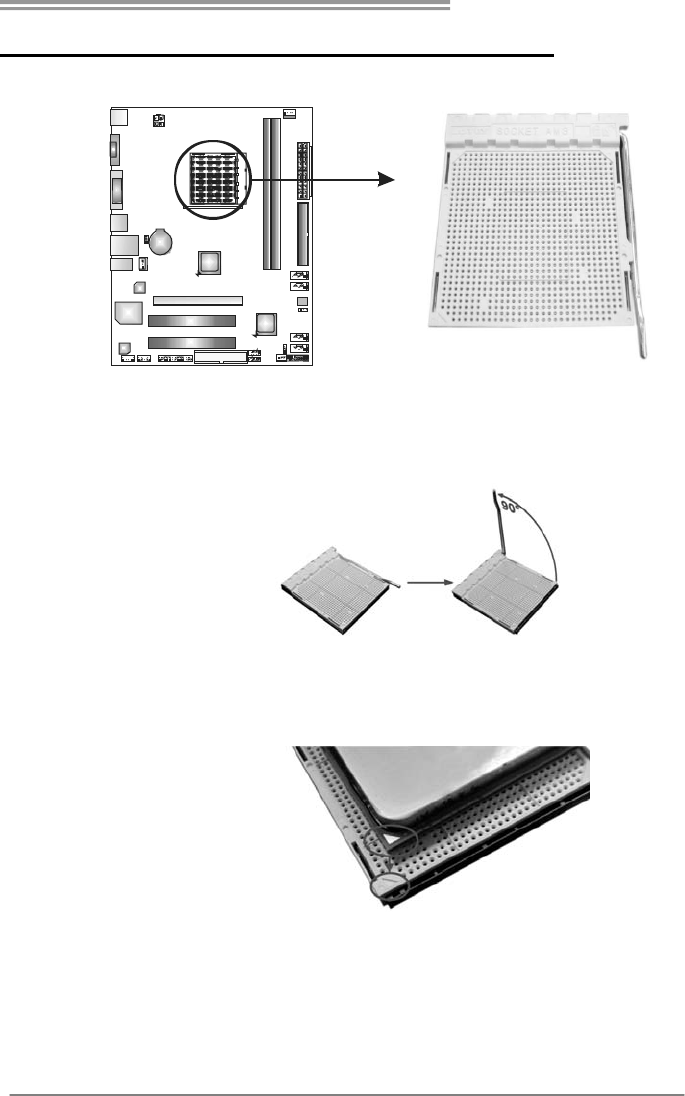
1.5 MOTHERBOARD LAYOUT
KBMS1
USB1
VGA1
DVI1
RJ45USB1
AUDIO1
BAT1
JUSBV1
JSPDIFOUT1
LAN
Super I/O
Codec
F_AUDIO1
J_COM1 J_PRINT1
FDD1
F_USB2
F_USB1
SYS_FAN1
PANEL1
JUSBV2
SATA1
SATA2
JCMO S1
BIOS
SATA3
SATA4
PCI1
PCI2
PEX16_1
IDE1
ATXPWR1
CPU_FAN1
D3_1DR A
D3_1
DR B
AMD
785G/
780L
AMD
SB710
ATXPWR2
Socket AM3
Note: represents the 1■st pin.
A785G3/A780L3/A780L3G
5
CHAPTER 2: HARDWARE INSTALLATION
2.1 INSTALLING CENTRAL PROCESSING UNIT (CPU)
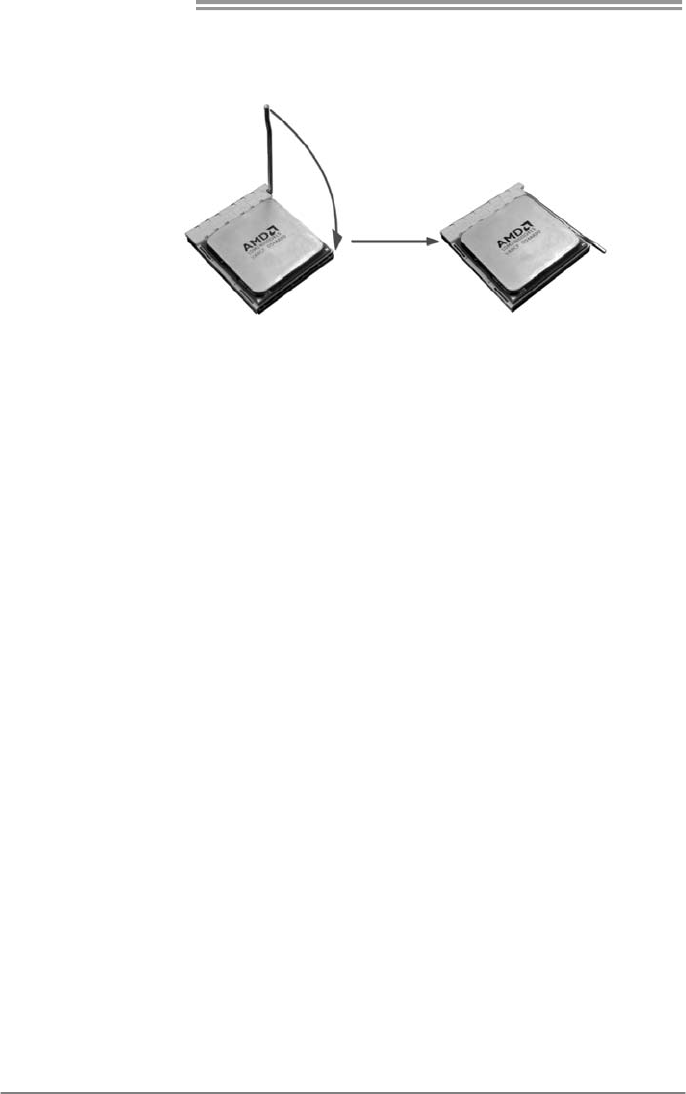
Step 1: Pull the lever toward direction A from the socket and then raise the
lever up to a 90-degree angle.
Step 2: Look for the white triangle on socket, and the gold triangle on
CPU should point towards this white triangle. The CPU will fit only
in the correct orientation.
Motherboard Manual
6
Step 3: Hold the CPU down firmly, and then close the lever toward direct
B to complete the installation.
Step 4: Put the CPU Fan on the CPU and buckle it. Connect the CPU
FAN power cable to the CPU_FAN1. This completes the
installation.
A785G3/A780L3/A780L3G
7
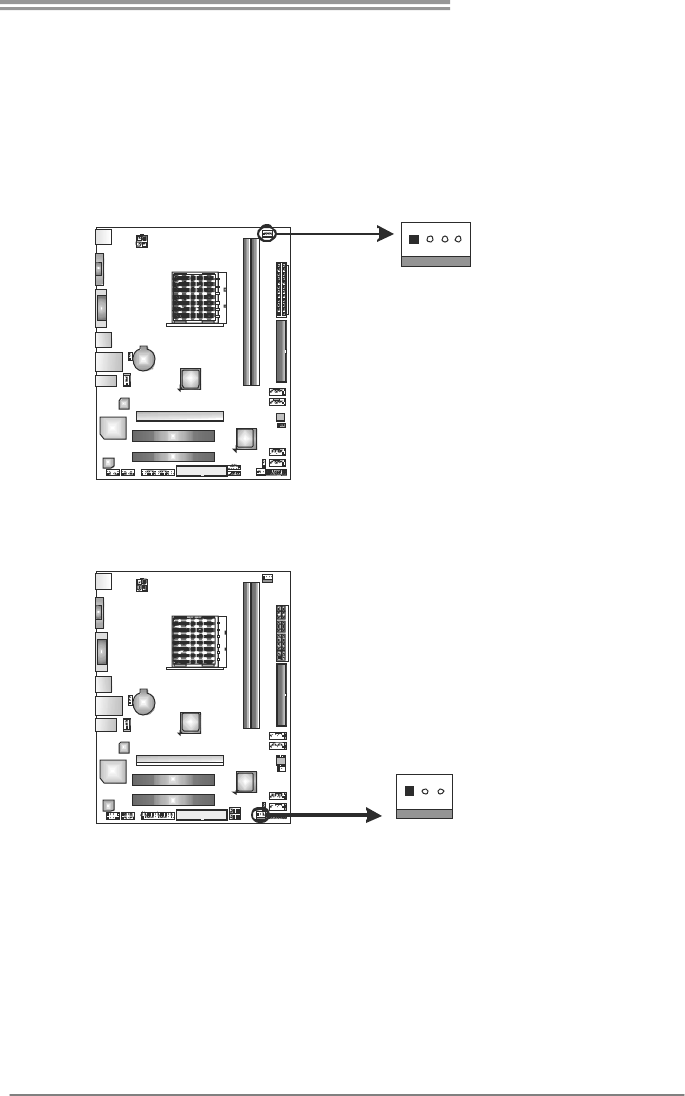
2.2 FAN HEADERS
These fan headers support cooling-fans built in the computer. The fan
cable and connector may be different according to the fan manufacturer.
Connect the fan cable to the connector while matching the black wire to
pin#1.
CPU_FAN1: CPU Fan Header
Pin
Assignment
1 Ground
2 +12V
3 FAN RPM rate
sense
41
4 Smart Fan
Control (By Fan)
SYS_FAN1: System Fan Header
Pin
Assignment
1 Ground
2 +12V
13
3 FAN RPM rate
sense
Note:
CPU_FAN1 supports 4-pin head connector. SYS_FAN1 supports 3-pin head connector.
When connecting with wires onto connectors, please note that the red wire is the positive
and should be connected to pin#2, and the black wire is Ground and should be
connected to GND.
Motherboard Manual
8
2.3 INSTALLING SYSTEM MEMORY
A. Memory Modules
DD R B3_ 1
D3_A1RD
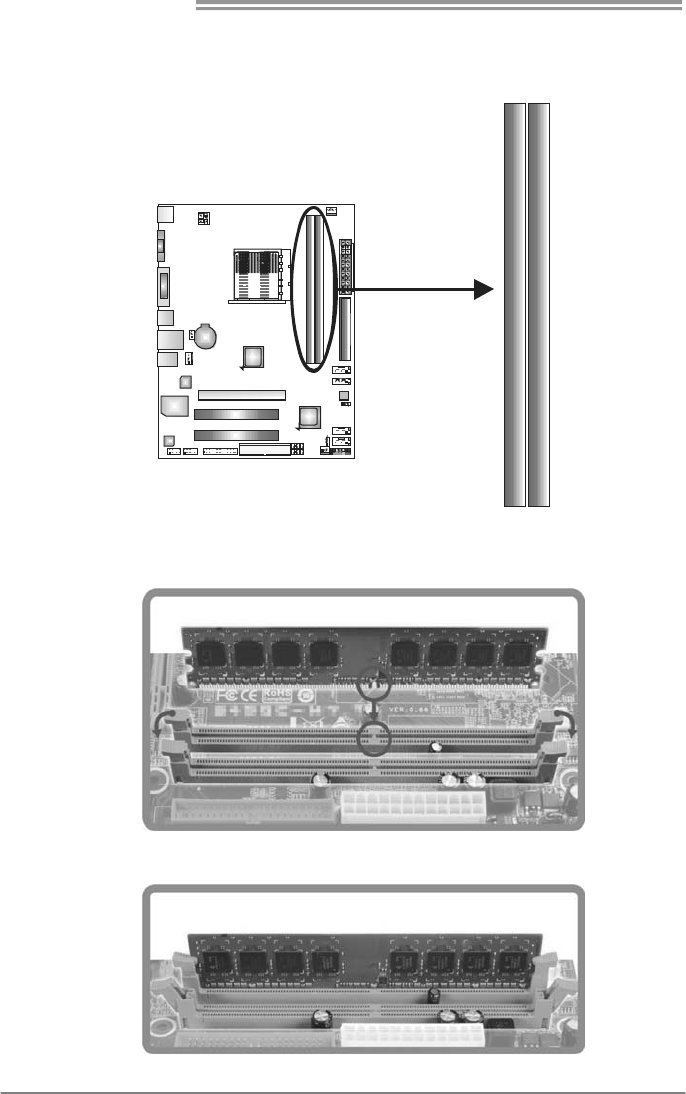
1. Unlock a DIMM slot by pressing the retaining clips outward. Align a
DIMM on the slot such that the notch on the DIMM matches the
break on the Slot.
2. Insert the DIMM vertically and firmly into the slot until the retaining
chip snap back in place and the DIMM is properly seated.

A785G3/A780L3/A780L3G
9
B. Memory Capacity
DIMM Socket
Location DDR3 Module Total Memory
Size
DDR3_A1 512MB/1GB/2GB/4GB
DDR3_B1 512MB/1GB/2GB/4GB
Max is 8GB.
C. Dual Channel Memory installation
Please refer to the following requirements to activate Dual Channel function:
Install memory module of the same density in pairs, shown in the table
Dual Channel Status DDR3_A1 DDR3_B1
Disabled X O
Disabled O X
Enabled O O
(O means memory installed, X means memory not installed.)
The DRAM bus width of the memory module must be the same (x8 or
x16)
Motherboard Manual
10
2.4 CONNECTORS AND SLOTS
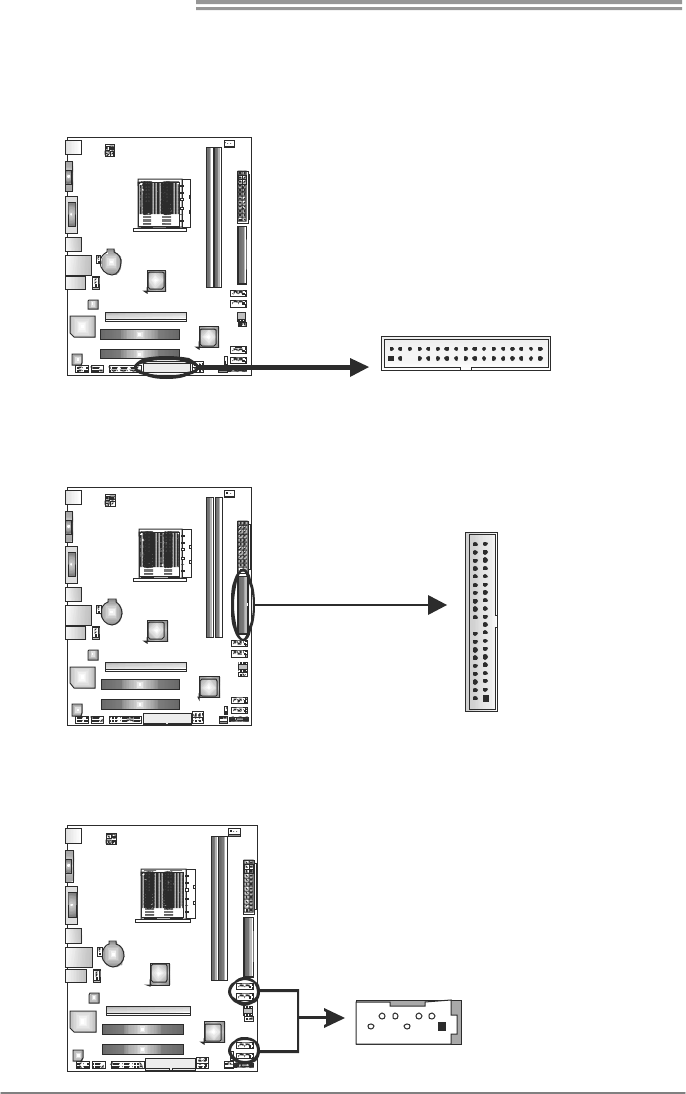
FDD1: Floppy Disk Connector
The motherboard provides a standard floppy disk connector that supports 360K,
720K, 1.2M, 1.44M and 2.88M floppy disk types.
1
3
3
234
IDE1: Hard Disk Connector
The motherboard has a 32-bit Enhanced PCI IDE Controller that provides PIO
Mode 0~4, Bus Master, and Ultra DMA 33/66/100/133 functionality.
21
3940
SATA1~SATA4: Serial ATA Connectors
The motherboard has a PCI to SATA Controller with 4 channels SATA interface,
it satisfies the SATA 2.0 spec and with transfer rate of 3.0Gb/s.
Pin
Assignment
1 Ground
2 TX+
3 TX-
4 Ground
5 RX-
6 RX+
147
SATA4
SATA3
SATA2
SATA1
7 Ground
A785G3/A780L3/A780L3G
11
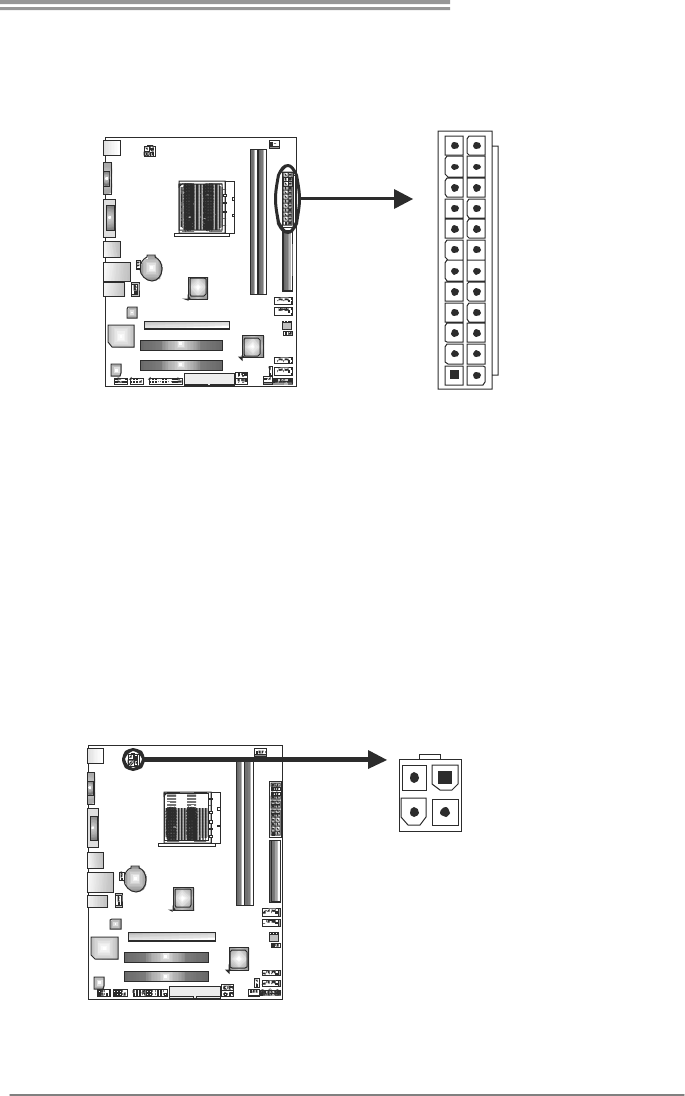
ATXPWR1: ATX Power Source Connector
This connector allows user to connect 24-pin power connector on the ATX
power supply.
1
12
13
24
Pin Assignment Pin Assignment
13 +3.3V 1 +3.3V
14 -12V 2 +3.3V
15 Ground 3 Ground
16 PS_ON 4 +5V
17 Ground 5 Ground
18 Ground 6 +5V
19 Ground 7 Ground
20 NC 8 PW_OK
21 +5V 9 Standby Voltage+5V
22 +5V 10 +12V
23 +5V 11 +12V
24 Ground 12 +3.3V
ATXPWR2: ATX Power Source Connector
Connecting this connector will provide +12V to CPU power circuit.
Pin
Assignment
1 +12V
2 +12V
3 Ground
1
2
34
4 Ground
Note:
Before you power on the system, please make sure that both ATXPWR1 and ATXPWR2
connectors have been plugged-in.
Motherboard Manual
12
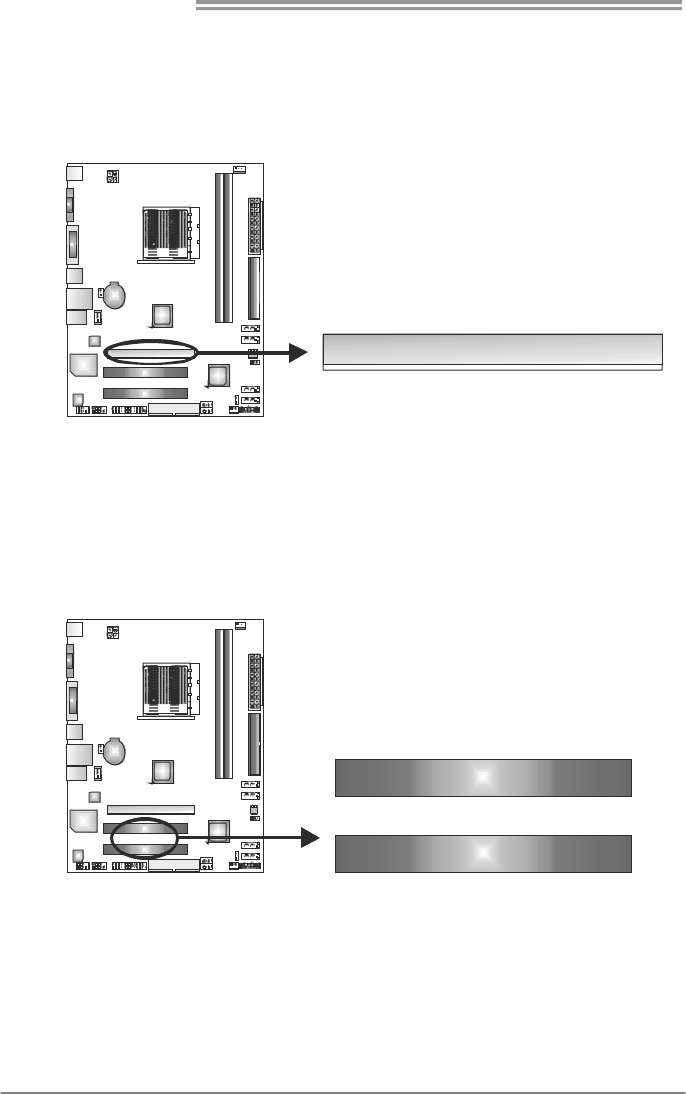
PEX16_1: PCI-Express Gen2 x16 Slot
- PCI-Express 2.0 compliant.
- Maximum theoretical realized bandwidth of 8GB/s simultaneously per
direction, for an aggregate of 16GB/s totally.
PEX16_1
PCI1~PCI2: Peripheral Component Interconnect Slots
This motherboard is equipped with 2 standard PCI slots. PCI stands for
Peripheral Component Interconnect, and it is a bus standard for expansion
cards. This PCI slot is designated as 32 bits.
PCI1
PCI2
A785G3/A780L3/A780L3G
13
CHAPTER 3: HEADERS & JUMPERS SETUP
3.1 HOW TO SETUP JUMPERS
The illustration shows how to set up jumpers. When the jumper cap is
placed on pins, the jumper is “close”, if not, that means the jumper is
“open”.
Pin opened Pin closed Pin1-2 closed
3.2 DETAIL SETTINGS
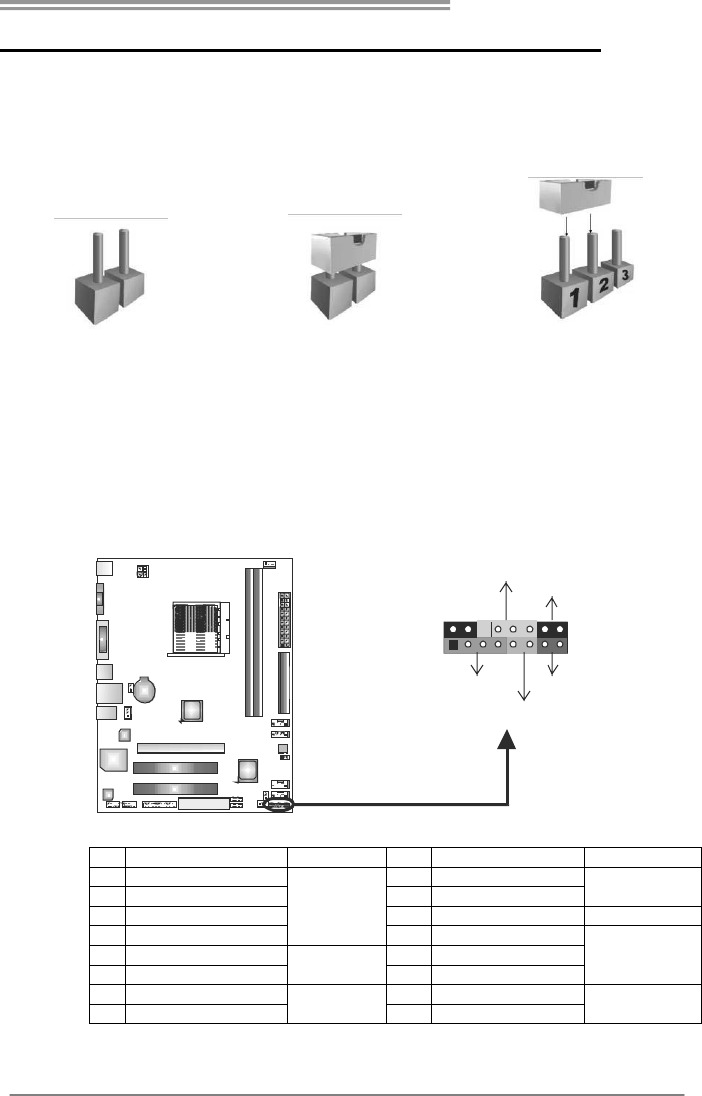
PANEL1: Front Panel Header
This 16-pin connector includes Power-on, Reset, HDD LED, Power LED, and
speaker connection. It allows user to connect the PC case’s front panel switch
functions.
18
16
PWR_LED
On/Off
RST
HLED
SPK
++
+
9
-
-
Pin Assignment Function Pin Assignment Function
1 +5V 9 N/A
2 N/A 10 N/A N/A
3 N/ A 11 N/ A N/A
4 Speaker
Speaker
Connector
12 Power LED (+)
5 HDD LED (+) 13 Power LED (+)
6 HDD LED (-)
Hard drive
LED 14 Power LED (-)
Power LED
7 Ground 15 Power button
8 Reset control Reset button 16 Ground Power-on button
Motherboard Manual
14
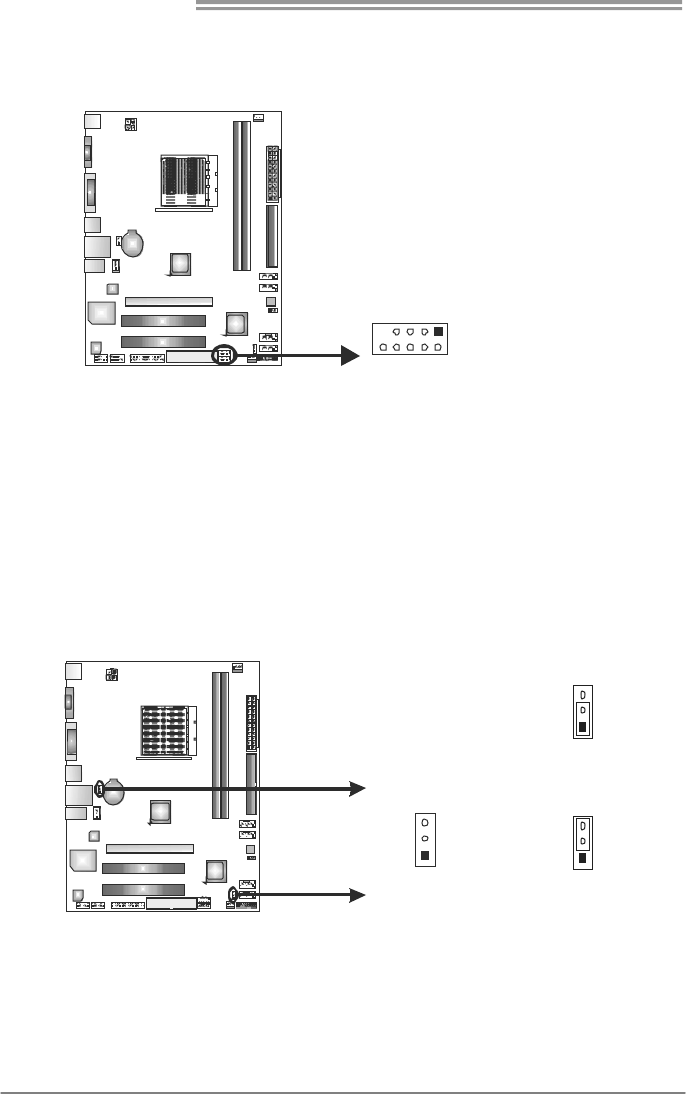
F_USB1/F_USB2: Headers for USB 2.0 Ports at Front Panel
This header allows user to connect additional USB cable on the PC front panel,
and also can be connected with internal USB devices, like USB card reader.
Pin
Assignment
1 +5V (fused)
2 +5V (fused)
3 USB-
4 USB-
5 USB+
6 USB+
7 Ground
8 Ground
9 NC
1
0
2
91
F_USB2
FUSB_1
10 Key
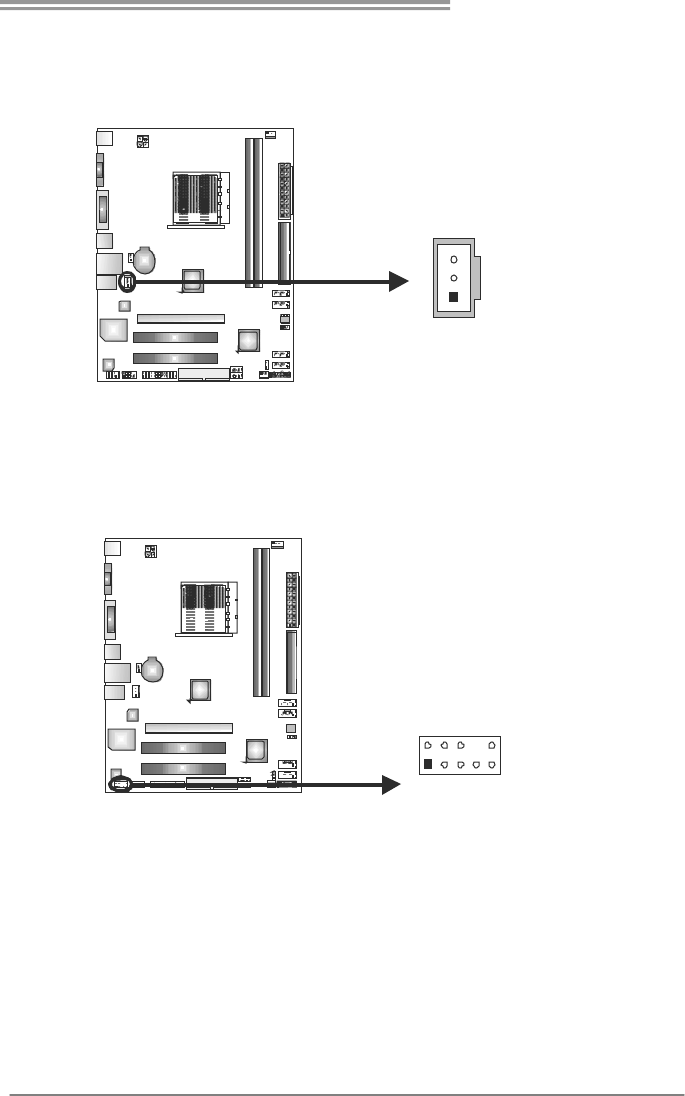
JUSBV1/JUSBV2: Power Source Headers for USB Ports
Pin 1-2 Close:
JUSBV1: +5V for USB ports at USB1/RJ45USB1.
JUSBV2: +5V for USB ports at F_USB1/F_USB2.
Pin 2-3 Close:
JUSBV1: +5V STB for USB ports at USB1/RJ45USB1.
JUSBV2: +5V STB for USB ports at F_USB1/F_USB2.
1
3
Pin 1-2 close
1
3
JUSBV2
JUSBV1
1
3
Pin 2-3 close
A785G3/A780L3/A780L3G
15
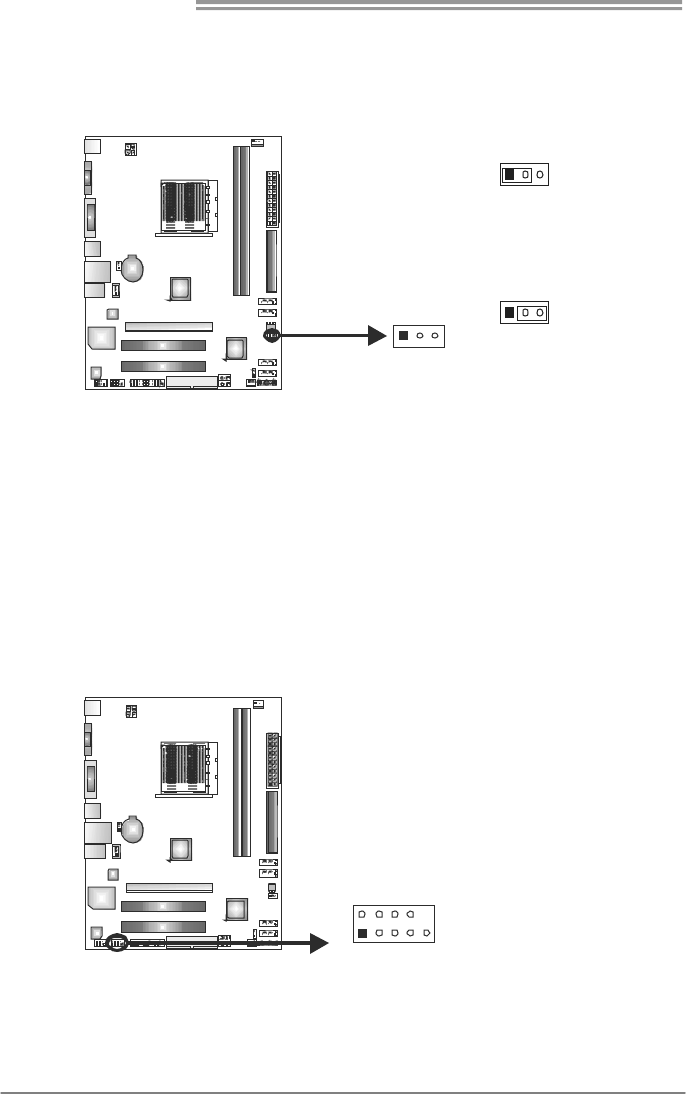
JSPDIFOUT1: Digital Audio-out Connector
This connector allows user to connect the PCI bracket SPDIF output header.
Pin
Assignment
1 +5V
2 SPDIF_OUT
1
3
3 Ground
F_AUDIO1: Front Panel Audio Header
This header allows user to connect the front audio output cable with the PC front
panel. This header allows only HD audio front panel connector; AC’97 connector
is not acceptable.
Pin
Assignment
1 Mic Left in
2 Ground
3 Mic Right in
4 GPIO
5 Right line in
6 Jack Sense
7 Front Sense
8 Key
9 Left line in
19
210
10 Jack Sense
Motherboard Manual
16
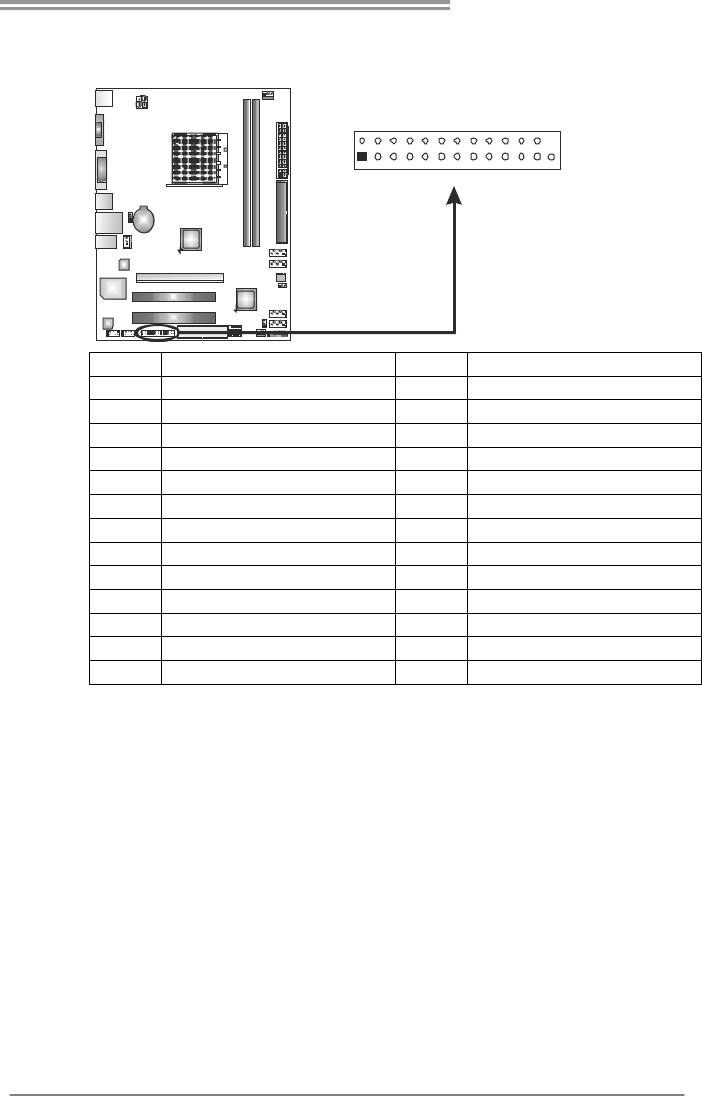
JCMOS1: Clear CMOS Header
Placing the jumper on pin2-3, it allows user to restore the BIOS safe setting and
the CMOS data. Please carefully follow the procedures to avoid damaging the
motherboard.
13
Pin 1-2 Close:
Normal Operation (default).
13
13
Pin 2-3 Close:
Clear CMOS data.
※ Clear CMOS Procedures:
1. Remove AC power line.
2. Set the jumper to “Pin 2-3 close”.
3. Wait for five seconds.
4. Set the jumper to “Pin 1-2 close”.
5. Power on the AC.
6. Reset your desired password or clear the CMOS data.
J_COM1: Serial Port Connector
The motherboard has a Serial Port Connector for connecting RS-232 Port.
Pin
Assignment
1 Carrier detect
2 Received data
3 Transmitted data
4 Data terminal ready
5 Signal ground
6 Data set ready
7 Request to send
8 Clear to send
9 Ring indicator
1
9
210
10 NC
A785G3/A780L3/A780L3G
17
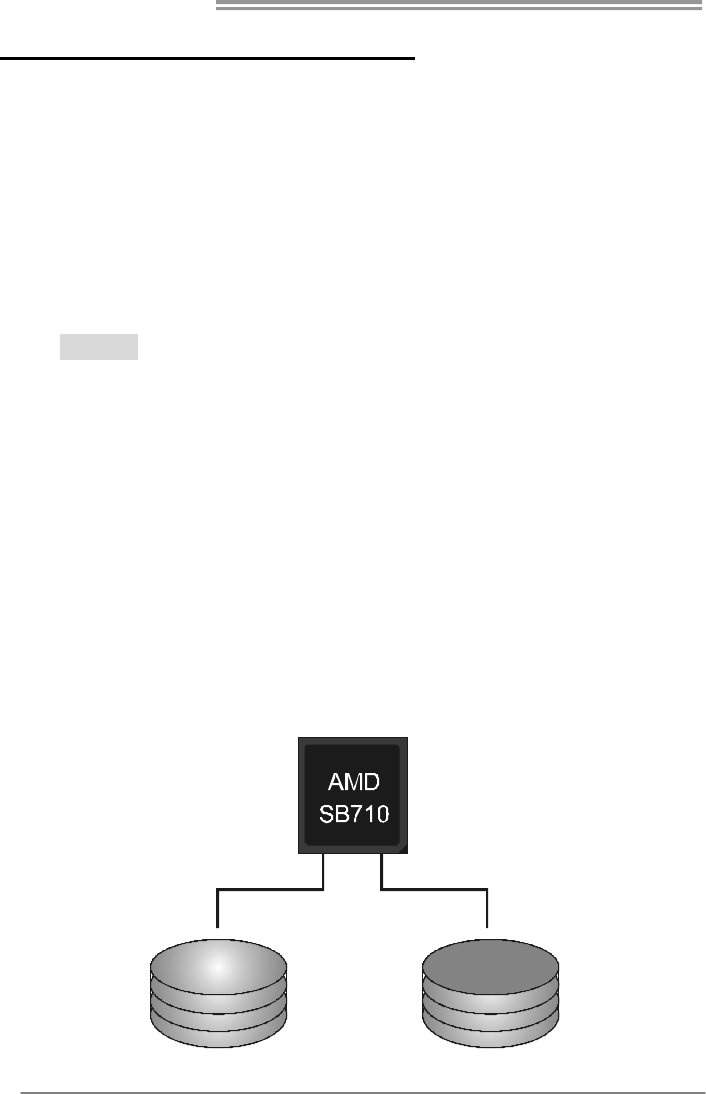
J_PRINT1: Printer Port Connector
This header allows you to connector printer on the PC.
125
226
Pin Assignment Pin Assignment
1 -Strobe 14 Ground
2 -ALF 15 Data 6
3 Data 0 16 Ground
4 -Error 17 Data 7
5 Data 1 18 Ground
6 -Init 19 -ACK
7 Data 2 20 Ground
8 -Scltin 21 Busy
9 Data 3 22 Ground
10 Ground 23 PE
11 Data 4 24 Ground
12 Ground 25 SCLT
13 Data 5 26 Key
Motherboard Manual
18
CHAPTER 4: RAID FUNCTIONS
4.1 OPERATING SYSTEM
Supports Windows XP, Windows Vista, and Windows 7.
4.2 RAID ARRAYS
RAID supports the following types of RAID arrays:
RAID 0: RAID 0 defines a disk striping scheme that improves disk read and write times for
many applications.
RAID 1: RAID 1 defines techniques for mirroring data.
RAID 1+0: RAID 1+0 combines the techniques used in RAID 0 and RAID 1.
4.3 HOW RAID WORKS
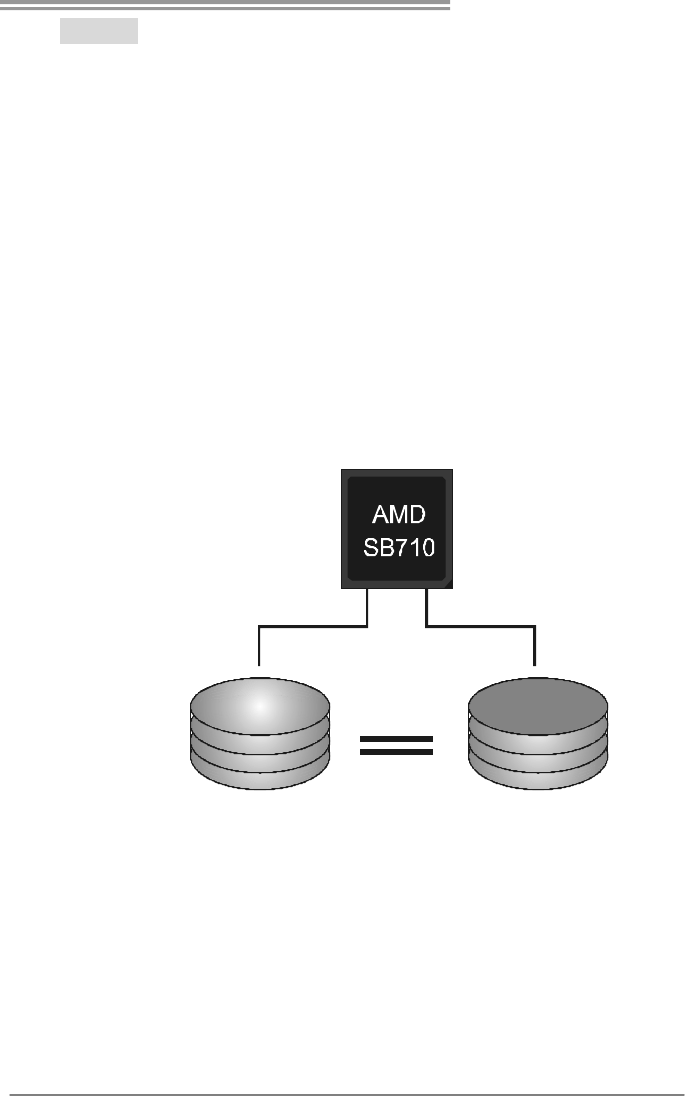
RAID 0:
The controller “stripes” data across multiple drives in a RAID 0 array system. It breaks
up a large file into smaller blocks and performs disk reads and writes across multiple
drives in parallel. The size of each block is determined by the stripe size parameter,
which you set during the creation of the RAID set based on the system environment.
This technique reduces overall disk access time and offers high bandwidth.
Features and Benefits
- Drives: Minimum 2, and maximum is up to 6 or 8. Depending on the
platform.
- Uses: Intended for non-critical data requiring high data throughput, or any
environment that does not require fault tolerance.
- Benefits: provides increased data throughput, especially for large files.
No capacity loss penalty for parity.
- Drawbacks: Does not deliver any fault tolerance. If any drive in the array
fails, all data is lost.
- Fault Tolerance: No.
Block 1
Block 3
Block 5
Block 2
Block 4
Block 6
A785G3/A780L3/A780L3G
19
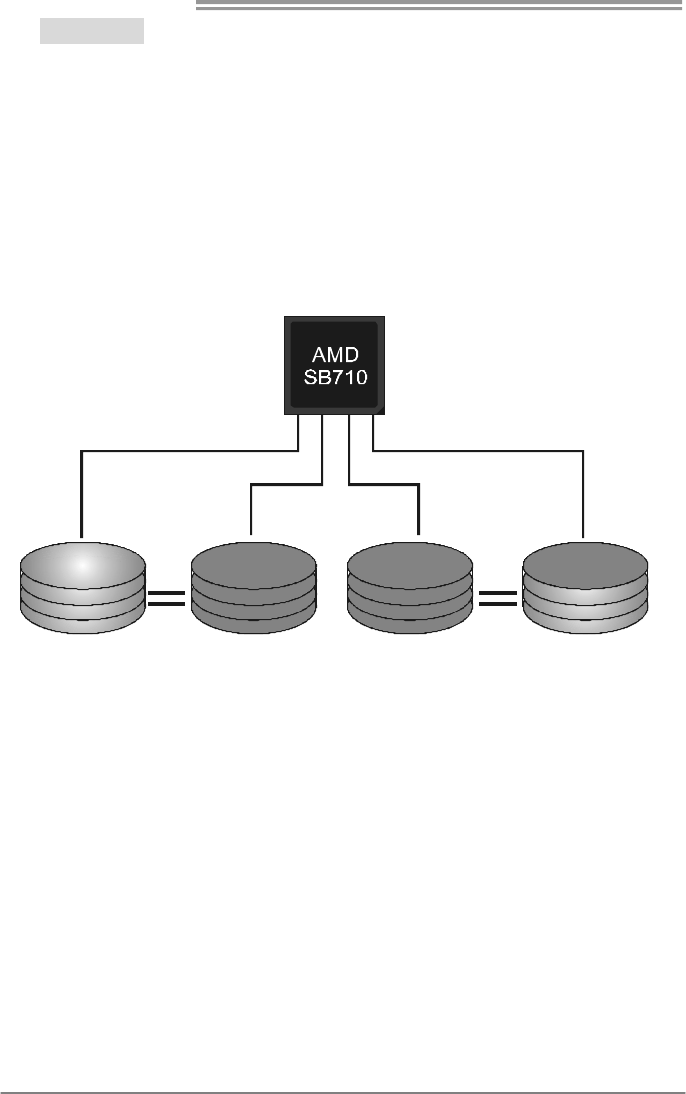
RAID 1:
Every read and write is actually carried out in parallel across 2 disk drives in a RAID 1
array system. The mirrored (backup) copy of the data can reside on the same disk or on
a second redundant drive in the array. RAID 1 provides a hot-standby copy of data if
the active volume or drive is corrupted or becomes unavailable because of a hardware
failure.
RAID techniques can be applied for high-availability solutions, or as a form of
automatic backup that eliminates tedious manual backups to more expensive and less
reliable media.
Features and Benefits
- Drives: Minimum 2, and maximum is 2.
- Uses: RAID 1 is ideal for small databases or any other application that
requires fault tolerance and minimal capacity.
- Benefits: Provides 100% data redundancy. Should one drive fail, the
controller switches to the other drive.
- Drawbacks: Requires 2 drives for the storage space of one drive.
Performance is impaired during drive rebuilds.
- Fault Tolerance: Yes.
Block 1
Block 2
Block 3
Block 1
Block 2
Block 3
Motherboard Manual
20
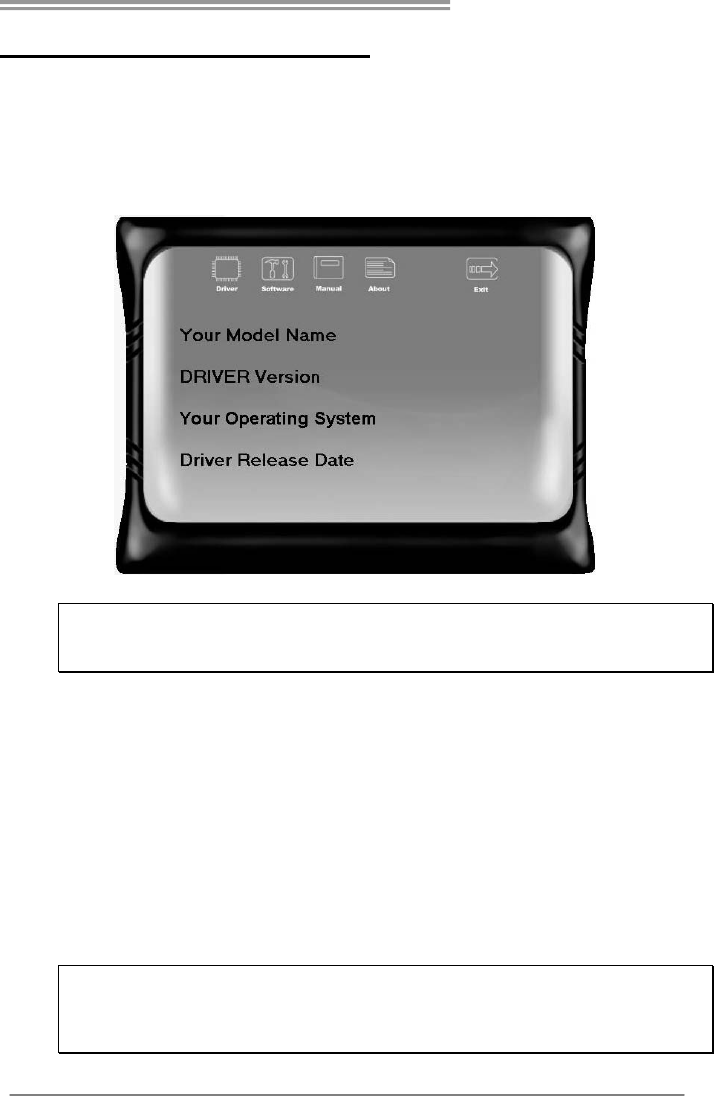
RAID 1+0:
RAID 1 drives can be stripped using RAID 0 techniques. Resulting in a RAID 1+0
solution for improved resiliency, performance and rebuild performance.
Features and Benefits
- Drives: Minimum 4, and maximum is 6 or 8, depending on the platform.
- Benefits: Optimizes for both fault tolerance and performance, allowing for
automatic redundancy. May be simultaneously used with other RAID
levels in an array, and allows for spare disks.
- Drawbacks: Requires twice the available disk space for data redundancy,
the same as RAID level 1.
- Fault Tolerance: Yes.
Block 1
Block 3
Block 5
Block 2
Block 4
Block 6
Block 1
Block 3
Block 5
Block 2
Block 4
Block 6
A785G3/A780L3/A780L3G
21
CHAPTER 5: USEFUL HELP
5.1 DRIVER INSTALLATION NOTE
After you installed your operating system, please insert the Fully Setup
Driver CD into your optical drive and install the driver for better system
performance.
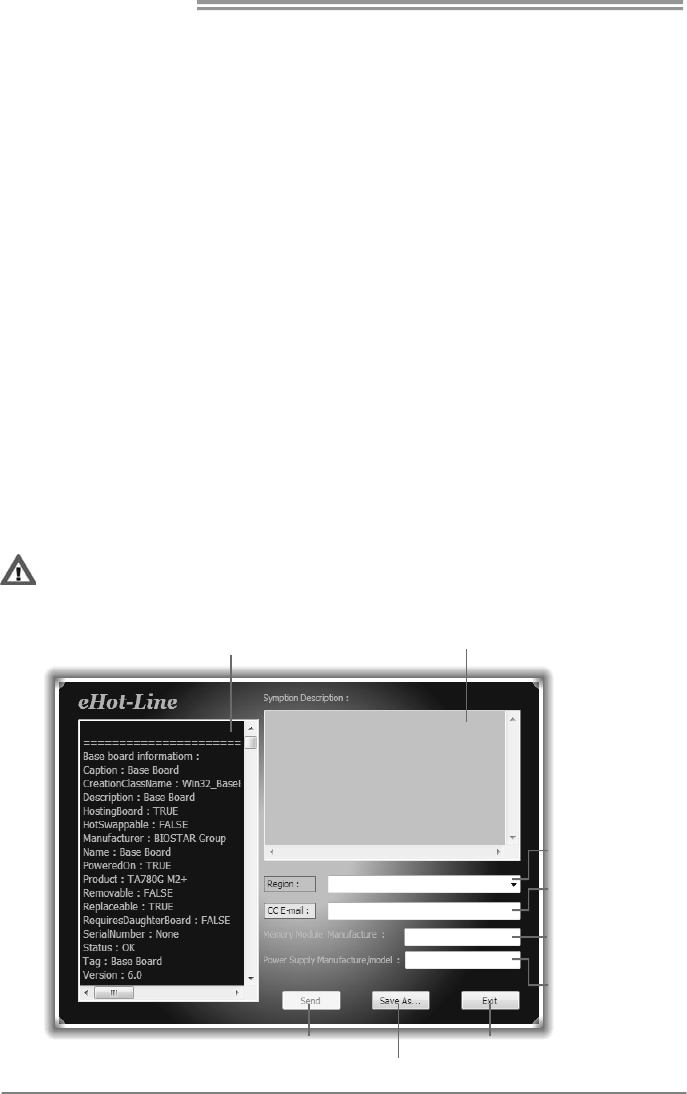
You will see the following window after you insert the CD
The setup guide will auto detect your motherboard and operating system.
Note:
If this window didn’t show up after you insert the Driver CD, please use file browser to
locate and execute the file SETUP.EXE under your optical drive.
A. Driver Installation
To install the driver, please click on the Driver icon. The setup guide will
list the compatible driver for your motherboard and operating system.
Click on each device driver to launch the installation program.
B. Software Installation
To install the software, please click on the Software icon. The setup guide
will list the software available for your system, click on each software title
to launch the installation program.
C. Manual
Aside from the paperback manual, we also provide manual in the Driver
CD. Click on the Manual icon to browse for available manual.
Note:
You will need Acrobat Reader to open the manual file. Please download the latest version
of Acrobat Reader software from
http://www.adobe.com/products/acrobat/readstep2.html
Motherboard Manual
22
5.2 SOFTWARE
Installing Software
1. Insert the Setup CD to the optical drive. The drivers installation program
would appear if the Autorun function has been enabled.
2. Select Software Installation, and then click on the respective software
title.
3. Follow the on-screen instructions to complete the installation.
Launching Software
After the installation process, you will see the software icon “eHOT Line” /
“BIOS Update” appears on the desktop. Double-click the icon to launch the
utility.
eHot-Line (Optional)
eHot-Line is a convenient utility that helps you to contact with our
Tech-Support system. This utility will collect the system information which is
useful for analyzing the problem you may have encountered, and then send
these information to our tech-support department to help you fix the problem.
Before you use this utility, please set Outlook Express as your default e-mail client application program.
This block will show
the information which
would be collected in
the mail.
Provide the e-mail
address that you would
like to send the copy to.
Provide the name of
th e power suppl y
manufacturer and the
model no.
Send th e mail out .
Save thes e in forma tion to a .txt fil
e
Exit this dialog.
Select your area or
the area close to you.
*
Pr ov id e t he name of
the memory module
manufacturer.
*
Describe condition
of your system.
*
*
repr es en ts impor tant
information that you
must provide. Without
this information, you may
not be able to send out
the mail.
A785G3/A780L3/A780L3G
23
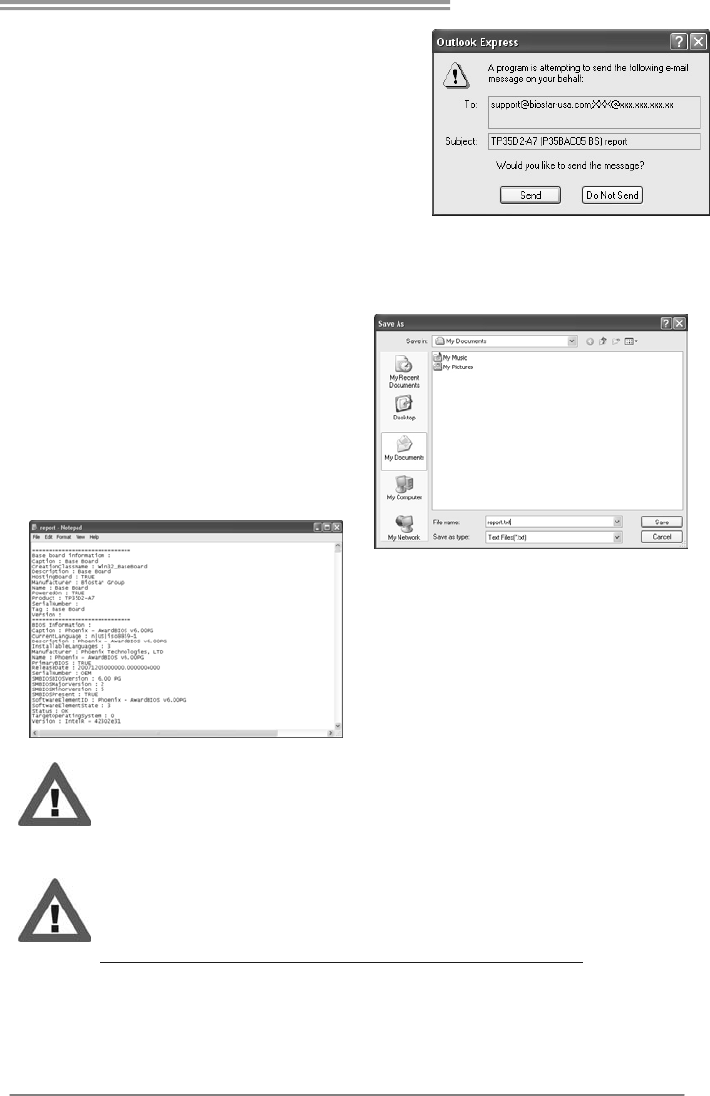
After filling up this information, click “Send”
to send the mail out. A warning dialog would
appear asking for your confirmation; click
“Send” to confirm or “Do Not Send” to cancel.
If you want to save this information to a .txt file, click “Save As…” and then you
will see a saving dialog appears asking you to enter file name.
Enter the file name and then click
“Save”. Your system information
will be saved to a .txt file.
Open the saved .txt file, you will see
your system information including
motherboard/BIOS/CPU/video/
device/OS information. This
information is also concluded in the
sent mail.
We will not share customer’s data with any other third parties,
so please feel free to provide your system information while using
eHot-Line service.
If you are not using Outlook Express as your default e-mail client
application, you may need to save the system information to a .txt file
and send the file to our tech support with other e-mail application.
Go to the following web
http://www.biostar.com.tw/app/en-us/about/contact.php for getting
our contact information.
Motherboard Manual
24
BIOS Update
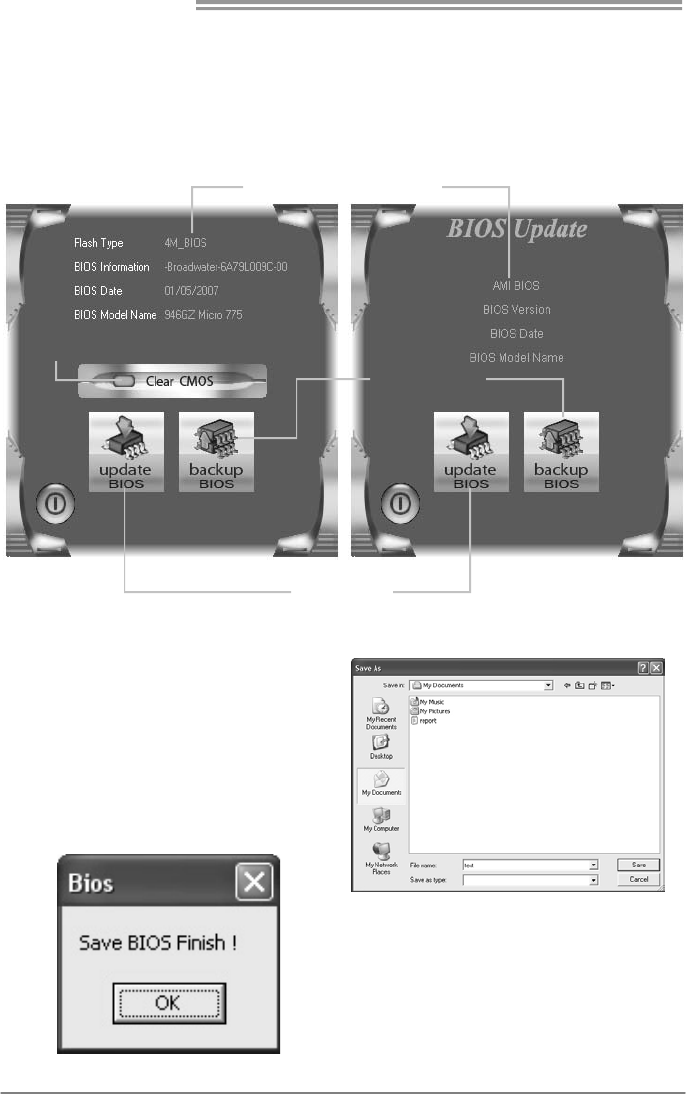
BIOS Update is a convenient utility which allows you to update your
motherboard BIOS under Windows system.
Update BIOS
with a BIOS file
Clear CMOS function
(On ly for AWARD BIOS)
Show current BIOS information
Save current BIOS
to a .bin file
AWARD BIOS AMI BIOS
<Backup BIOS>
Once click on this button, the saving
dialog will show. Choose the
position to save file and enter file
name. (We recommend that the file
name should be English/number
and no longer than 7 characters.)
Then click Save.
After the saving process, finish
dialog will show. Click on OK to
complete the BIOS Backup
procedure.
A785G3/A780L3/A780L3G
25
<Update BIOS>
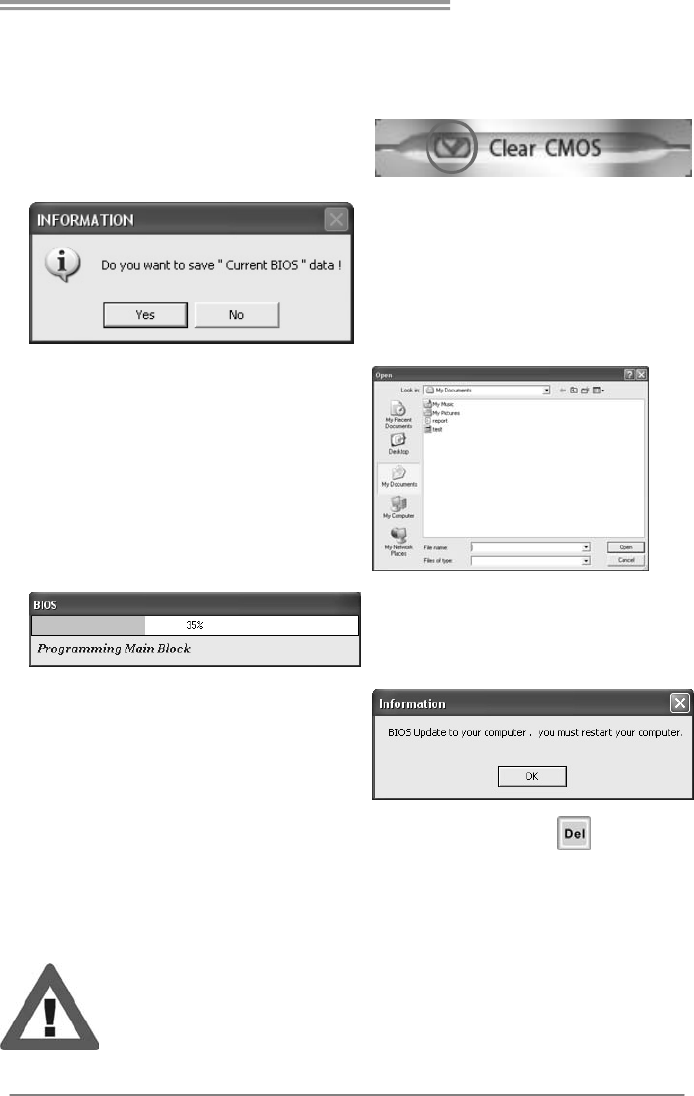
Before doing this, please download the proper BIOS file from the website.
For AWARD BIOS, update BIOS procedure
should be run with Clear CMOS function, so
please check on Clear CMOS first.
Then click Update BIOS button, a
dialog will show for asking you backup
current BIOS. Click Yes for BIOS
backup and refer to the Backup BIOS
procedure; or click No to skip this
procedure.
After the BIOS Backup procedure, the
open dialog will show for requesting the
BIOS file which is going to be updated.
Please choose the proper BIOS file for
updating, then click on Open.
The utility will update BIOS with the
proper BIOS file, and this process may
take minutes. Please do not open any
other applications during this process.
After the BIOS Update process, click on
OK to restart the system.
While the system boots up and the full screen logo shows, press <Delete>
key to enter BIOS setup.
In the BIOS setup, use the Load Optimized Defaults function and then Save and
Exit Setup to exit BIOS setup. BIOS Update is completed.
All the information and content above about the software are subject to be changed
without notice. For better performance, the software is being continuously updated.
The information and pictures described above are for your reference only. The actual
information and settings on board may be slightly different from this manual.

Motherboard Manual
26
5.3 EXTRA INFORMATION
CPU Overheated
If the system shutdown automatically after power on system for
seconds, that means the CPU protection function has been activated.
When the CPU is over heated, the motherboard will shutdown
automatically to avoid a damage of the CPU, and the system may not
power on again.
In this case, please double check:
1. The CPU cooler surface is placed evenly with the CPU surface.
2. CPU fan is rotated normally.
3. CPU fan speed is fulfilling with the CPU speed.
After confirmed, please follow steps below to relief the CPU protection
function.
1. Remove the power cord from power supply for seconds.
2. Wait for seconds.
3. Plug in the power cord and boot up the system.
Or you can:
1. Clear the CMOS data.
(See “Close CMOS Header: JCMOS1” section)
2. Wait for seconds.
3. Power on the system again.
A785G3/A780L3/A780L3G
27
BIO-Flasher
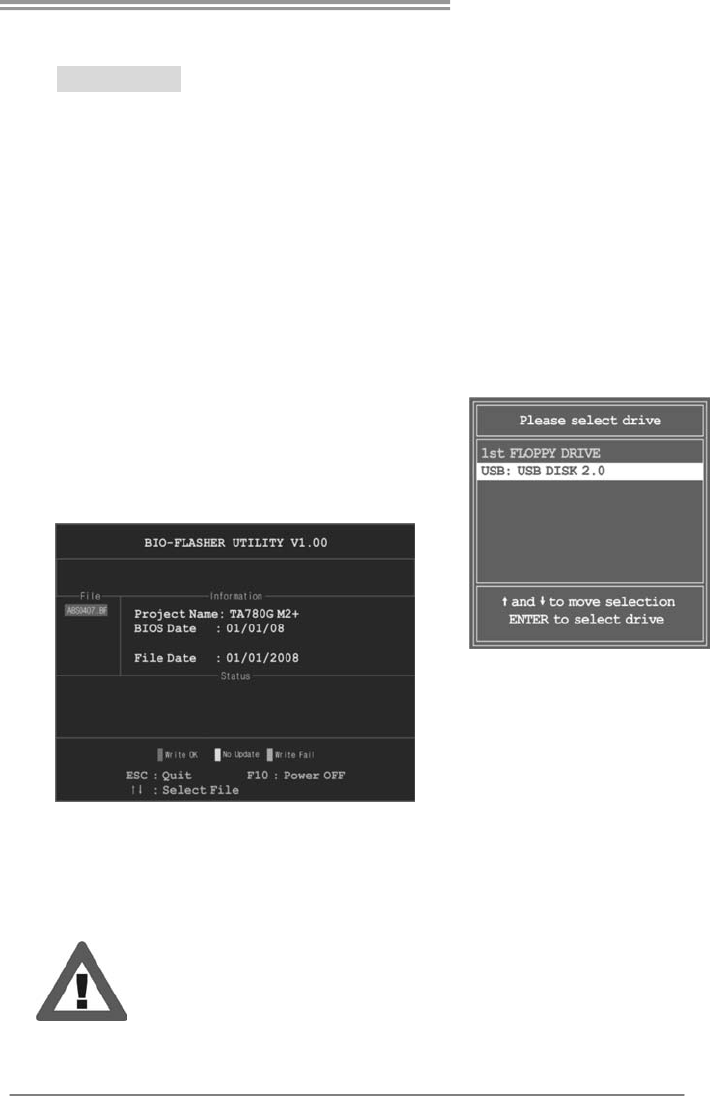
BIO-Flasher is a BIOS flashing utility providing you an easy and simple way to
update your BIOS via USB pen drive or floppy disk.
The BIO-Flasher is built in the BIOS chip. To enter the utility, press <F12>
during the Power-On Self Tests (POST) procedure while booting up.
Updating BIOS with BIO-Flasher
1. Go to the website to download the latest BIOS file for the motherboard.
2. Then, save the BIOS file into a USB pen drive or a floppy disk.
3. Insert the USB pen drive or the floppy disk that contains the BIOS file to the
USB port or the floppy disk drive.
4. Power on or reset the computer and then
press <F12> during the POST process.
A select dialog as the picture on the right
appears.
Select the device contains the BIOS file and
press <Enter> to enter the utility.
5. The utility will show the BIOS
files and their respective
information. Select the proper
BIOS file and press <Enter>
then <Y> to perform the BIOS
update process.
6. After the update process, the utility will ask you to reboot the system.
Press <Y> to proceed. BIOS update completes.
z This utility only allows storage device with FAT32/16 format and single
partition.
z Shutting down or resetting the system while updating the BIOS will lead to
system boot failure.
Motherboard Manual
28
5.4 AMI BIOS BEEP CODE
Boot Block Beep Codes
Number of Beeps Description
1 No media present. (Insert diskette in floppy drive A:)
2 “AMIBOOT.ROM” file not found in root directory of diskette in
A:
3 Insert next diskette if multiple diskettes are used for recovery
4 Flash Programming successful
5 File read error
7 No Flash EPROM detected
10 Flash Erase error
11 Flash Program error
12 “AMIBOOT.ROM” file size error
13 BIOS ROM image mismatch (file layout does not match
image present in flash device)
POST BIOS Beep Codes
Number of Beeps Description
1 Memory refresh timer error
3 Base memory read/write test error
6 Keyboard controller BAT command failed
7 General exception error (processor exception interrupt error)
8 Display memory error (system video adapter)
Troubleshooting POST BIOS Beep Codes
Number of Beeps Troubleshooting Action
1, 3 Reseat the memory, or replace with known good modules.
6, 7
Fatal error indicating a serious problem with the system.
Consult your system manufacturer. Before declaring the
motherboard beyond all hope, eliminate the possibility of
interference by a malfunctioning add-in card. Remove all
expansion cards except the video adapter.
z If beep codes are generated when all other expansion
cards are absent, consult your system manufacturer’s
technical support.
z If beep codes are not generated when all other expansion
cards are absent, one of the add-in cards is causing the
malfunction. Insert the cards back into the system one at a
time until the problem happens again. This will reveal the
malfunctioning card.
8
If the system video adapter is an add-in card, replace or
reseat the
video adapter. If the video adapter is an integrated part of the
system board, the board may be faulty.

A785G3/A780L3/A780L3G
29
5.5 TROUBLESHOOTING
Probable Solution
1. There is no power in the system.
Power LED does not shine; the
fan of the power supply does not
work
2. Indicator light on keyboard does
not shine.
1. Make sure power cable is
securely plugged in.
2. Replace cable.
3. Contact technical support.
System is inoperative. Keyboard lights
are on, power indicator lights are lit,
and hard drives are running.
Using even pressure on both ends of
the DIMM, press down firmly until the
module snaps into place.
System does not boot from a hard disk
drive, but can be booted from optical
drive.
1. Check cable running from disk to
disk controller board. Make sure
both ends are securely plugged
in; check the drive type in the
standard CMOS setup.
2. Backing up the hard drive is
extremely important. All hard
disks are capable of breaking
down at any time.
System only boots from an optical
drive. Hard disks can be read,
applications can be used, but system
fails to boot from a hard disk.
1. Back up data and applications
files.
2. Reformat the hard drive.
Re-install applications and data
using backup disks.
Screen message shows “Invalid
Configuration” or “CMOS Failure.”
Review system’s equipment. Make sure
correct information is in setup.
System cannot boot after user installs a
second hard drive.
1. Set master/slave jumpers
correctly.
2. Run SETUP program and select
correct drive types. Call the drive
manufacturers for compatibility
with other drives.

Motherboard Manual
30
APPENDIX: SPEC IN OTHER LANGUAGES
GERMAN
A785G3 A780L3/A780L3G
CPU
Sockel AM3
AMD Phenom II/ Athlon II Prozessoren
Die AMD 64-Architektur unt erstützt eine 32-Bit-
und 64-Bit-Datenverarbeitung
Unterstützt Hyper Transport 3.0 und Cool’n’Quiet
(Maximales Watt: 125W)
Sockel AM3
AMD Phenom II/ Athlon II Prozessoren
Die AMD 64-Architektur unterstützt eine 32-Bit-
und 64-Bit-Datenverarbeitung
Unterstützt Hyper Transport 3.0 und Cool’n’Quiet
(Maximales Watt: 125W)
FSB Unterstützt HyperTransport 3.0 mit einer
Bandbreite von bis zu 5.2 GT/s
Unterstützt HyperTransport 3.0 mit einer
Bandbreite von bis zu 5.2 GT/s
Chipsatz AMD 785G
AMD SB710
AMD 780L
AMD SB710
Super E/A
ITE8718F
Biet et die häufig verwendeten alten Sup er
E/A-Funktionen.
Low Pin Count-Schnittstelle
Umgebungskontrolle,
Hardware-Überwachung
"Smart Guardian"-Funktion von ITE
ITE8718F
Biet et die häufig verwendeten alten Sup er
E/A-Funktionen.
Low Pin Count-Schnittstelle
Umgebungskontrolle,
Hardware-Überwachung
"Smart Guardian"-Funktion von ITE
Arbeitsspeich
er
DDR3 DIMM-Steckplätze x 2
Max. 8GB Arbeitsspeicher
Jeder DIMM unterstützt 512MB/ 1GB/2GB/4GB
DDR3.
Dual-Kanal DDR3 Speichermodul
Unterstützt DDR3 800 / 1066 / 1333
registrierte DIMMs. ECC DIMMs werden nicht
unterstützt.
DDR3 DIMM-Steckplätze x 2
Max. 8GB Arbeitsspeicher
Jeder DIMM unterstützt 512MB/ 1GB/2GB/4GB
DDR3.
Dual-Kanal DDR3 Speichermodul
Unterstützt DDR3 800 / 1066 / 1333
registrierte DIMMs. ECC DIMMs werden nicht
unterstützt.
Grafik
Integrierter AMD 785G-Chipsatz
Max. 512MB gemeinsam benutzter
Videospeicher
Unterstützt DX10.1/HDCP/UVD2
Integrierter AMD 780L-Chipsatz
Max. 512MB gemeinsam benutzter
Videospeicher
Unterstützt DX10/HDCP
IDE
Integr iert er IDE-Controller
Ultra DMA 33 / 66 / 100 / 133 Bus
Master-Modus
Unterstützt PIO-Modus 0~4,
Integr iert er IDE-Controller
Ultra DMA 33 / 66 / 100 / 133 Bus
Master-Modus
Unterstützt PIO-Modus 0~4,
SATA
Integrierter Serial ATA-Controller
Datentransferrate bis zu 3 Gb/s
Konform mit der SATA-Spezifikation Version
2.0.
Integrierter Serial ATA-Controller
Datentransferrate bis zu 3 Gb/s
Konform mit der SATA-Spezifikation Version
2.0.
LAN
Realtek RTL 8111DL
10 / 100 / 1000 Mb/s Auto-Negotiation
Halb-/ Vollduplex-Funktion
Realtek RTL 8102EL / RTL 8111DL
10 / 100 Mb/s Auto-Negotiation (A780L3)
10 / 100 / 1000 Mb/s Auto-Negotiation (A780L3G)
Halb-/ Vollduplex-Funktion

A785G3/A780L3/A780L3G
31
A785G3 A780L3/A780L3G
HD
Audio-Unters
tützung
ALC662
5.1-Kanal-Audioausgabe
Unterstützt High-Definition Audio
ALC662
5.1-Kanal-Audioausgabe
Unterstützt High-Definition Audio
PCI Express Gen2 x16 Steckplatz x1 PCI Express Gen2 x16 Steckplatz x1
Steckplätze PCI-Steckp latz x2 PCI-Steckp latz x2
Diskettenlaufwerkanschluss x1 Diskettenlaufwerkanschluss x1
IDE-Anschluss x1 IDE-Anschluss x1
SATA-Anschluss x4 SATA-Anschluss x4
Fronttafelanschluss x1 Fronttafelanschluss x1
Front-Audioanschluss x1 Front-Audioanschluss x1
S/PDIF- Ausgangsanschluss x1 S/PDIF- Ausgangsanschluss x1
CPU-Lüfter-Sockel x1 CPU-Lüfter-Sockel x1
System-Lüfter-Sockel x1 System-Lüfter-Sockel x1
"CMOS löschen"-Sockel x1 "CMOS löschen"-Sockel x1
USB-Anschluss x2 USB-Anschluss x2
Stromanschluss (24-polig) x1 Stromanschluss (24-polig) x1
Stromanschluss (4-polig ) x1 Stromanschlus s (4-polig ) x1
Druckeranschluss Anschluss x1 Druckeranschluss Anschluss x1
Onboard-Ans
chluss
Serieller Anschluss x1 Serieller Anschluss x1
Rückseiten-E
/A
PS/2-Tastatur x1
PS/2-Maus x1
VGA-Anschluss x1
LAN-Anschluss x1
USB-Anschluss x4
Audioanschluss x3
DVI-Anschluss x1
PS/2-Tastatur x1
PS/2-Maus x1
VGA-Anschluss x1
LAN-Anschluss x1
USB-Anschluss x4
Audioanschluss x3
DVI-Anschluss x1
Platinengröß
e 200 mm (B) X 244 mm (L) 200 mm (B) X 244 mm (L)
Sonderfunkti
onen Unterstützt RAID 0 / 1 / 1+0 Unterstützt RAID 0 / 1 / 1+0
OS-Unterstü
tzung
Windows XP / Vista / 7
Biostar behält sich das Recht vor, ohne
Ankündigung die Unterstützung für ein
Betriebssystem hinzuzufügen oder zu
entfernen.
Windows XP / Vista / 7
Biostar behält sich das Recht vor, ohne
Ankündigung die Unterstützung für ein
Betriebssystem hinzuzufügen oder zu
entfernen.

Motherboard Manual
32
FRENCH
A785G3 A780L3/A780L3G
UC
Socket AM3
Processeurs AMD Phenom II/ Athlon II
L'architecture AMD 64 permet le calcul 32 et 64
bits
Prend en charge Hyper Transport 3.0 et
Cool’n’Quiet
(Watt maximum : 125W)
Socket AM3
Processeurs AMD Phenom II/ Athlon II
L'architecture AMD 64 permet le calcul 32 et 64
bits
Prend en charge Hyper Transport 3.0 et
Cool’n’Quiet
(Watt maximum : 125W)
Bus frontal Prend en charge Hyper Transport 3.0 jusqu'à
une bande passante de 5.2 GT/s
Prend en charge Hyper Transport 3.0 jusqu'à
une bande passante de 5.2 GT/s
Chipset AMD 785G
AMD SB710
AMD 780L
AMD SB710
Super E/S
ITE 8718F
Fournit la fonctionnalité de Super E/S
patrimoniales la plus utilisée.
Interface à f aib le co mpte de b roches
Initiatives de contrôle environnementales,
Mon iteur de mat ériel
Fonction "Gardien intelligent" de l'ITE
ITE 8718F
Fournit la fonctionnalité de Super E/S
patrimoniales la plus utilisée.
Interface à f aib le co mpte de b roches
Initiatives de contrôle environnementales,
Mon iteur de mat ériel
Fonction "Gardien intelligent" de l'ITE
Mémoire
principale
Fentes DDR3 DIMM x 2
Capacité mémo ire max imale de 8 Go
Chaque DIMM prend en charge des DDR3 de
256 Mo/512 Mo et 1Go/2Go/4Go
Module de mémoire DDR3 à mode à double voie
Prend en charge la DDR3 800 / 1066 / 1333
Les DIMM à registres et DIMM avec code
correcteurs d'erreurs ne sont pas prises en
charge
Fentes DDR3 DIMM x 2
Capacité mémo ire max imale de 8 Go
Chaque DIMM prend en charge des DDR3 de
256 Mo/512 Mo et 1Go/2Go/4Go
Module de mémoire DDR3 à mode à double voie
Prend en charge la DDR3 800 / 1066 / 1333
Les DIMM à registres et DIMM avec code
correcteurs d'erreurs ne sont pas prises en
charge
Graphiques
Integré dans la chipset AMD 785G
Mémoire vidéo partagée maximale de 512 Mo
Prise en charge DX10.1/HDCP/UVD2
Integré dans la chipset AMD 780L
Mémoire vidéo partagée maximale de 512 Mo
Prise en charge DX10/HDCP
IDE
Contrôleur IDE intégré
Mode principale de Bus Ultra DMA 33 / 66 / 100
/ 133
Prend en charge le mode PIO 0~4,
Contrôleur IDE intégré
Mode principale de Bus Ultra DMA 33 / 66 / 100
/ 133
Prend en charge le mode PIO 0~4,
SATA
Contrôleur Serial ATA
int égr é
Taux de transfert jusqu'à 3 Go/s.
Conforme à la spécif icat ion SATA Vers ion 2.0
Contrôleur Serial ATA
int égr é
Taux de transfert jusqu'à 3 Go/s.
Conforme à la spécif icat ion SATA Vers ion 2.0
LAN
Realtek RTL 8111DL
10 / 100 / 1000 Mb/s négociation automatique
Half / Full duplex capability
Realtek RTL 8102EL / RTL 8111DL
10 / 100 Mb/s négociation automatique
(A780L3)
10 / 100 / 1000 Mb/s négociation automatique
(A780L3G)
Half / Full duplex capability

A785G3/A780L3/A780L3G
33
A785G3 A780L3/A780L3G
Prise en
charge
audio HD
ALC662
Sortie audio à 5.1 vo ies
Prise en charge de l'audio haute définition
ALC662
Sortie audio à 5.1 vo ies
Prise en charge de l'audio haute définition
Fente PCI Express Gen2 x16 x1 Fente PCI Express Gen2 x16 x1
Fentes Fente PCI x2 Fente PCI x2
Connecteur de disquette x1 Connecteur de disquette x1
Connecteur IDE x1 Connecteur IDE x1
Connecteur SATA x4 Connecteur SATA x4
Connecteur du panneau avant x1 Connecteur du panneau avant x1
Connecteur Audio du panneau avant x1 Connecteur Audio du panneau avant x1
Connecteur de sortie S/PDIF x1 Connecteur de sortie S/PDIF x1
Embase de ventilateur UC x1 Embase de ventilateur UC x1
Embase de ventilateur système x1 Embase de ventilateur système x1
Embase d'effacement CMOS x1 Embase d'effacement CMOS x1
Connecteur USB x2 Connecteur USB x2
Connecteur d'alimentation x1
(24 broches)
Connecteur d'alimentation x1
(24 broches)
Connecteur d'alimentation x1
(4 broches)
Connecteur d'alimentation x1
(4 broches)
Connecteur de Port d'imprimante x1 Connecteur de Port d'imprimante x1
Connecteur
embarqu é
Connecteur de Port série x1 Connecteur de Port série x1
E/S du
panneau
arrière
Clavier PS/2 x1
Souris PS/2 x1
Port VGA x1
Port LAN x1
Port USB x4
Fiche audio x3
Port DVI x1
Clavier PS/2 x1
Souris PS/2 x1
Port VGA x1
Port LAN x1
Port USB x4
Fiche audio x3
Port DVI x1
Dimension
s de la
cart e
200 mm (l) X 244 mm (H) 200 mm (l) X 244 mm (H)
Fonctionnal
ités
spéciales
Prise en charge RAID 0 / 1 / 1+0 Prise en charge RAID 0 / 1 / 1+0
Support SE
Windows XP / Vista / 7
Biostar se réserve le droit d'ajouter ou de
supprimer le support de SE avec ou sans
préavis.
Windows XP / Vista / 7
Biostar se réserve le droit d'ajouter ou de
supprimer le support de SE avec ou sans
préavis.

Motherboard Manual
34
ITALIAN
A785G3 A780L3/A780L3G
CPU
Socket AM3
Processori AMD Phenom II/ Athlon II
L’architettura AMD 64 abilita la
computazione 32 e 64 bit
Supporto di Hyper Transport 3.0 e
Cool’n’Quiet
(Watt massimo: 125W)
Socket AM3
Processori AMD Phenom II/ Athlon II
L’architettura AMD 64 abilita la
computazione 32 e 64 bit
Supporto di Hyper Transport 3.0 e
Cool’n’Quiet
(Watt massimo: 125W)
FSB Supporto di HyperTransport 3.0 fino a 5.2
GT/s di larghezza di banda
Supporto di HyperTransport 3.0 fino a 5.2
GT/s di larghezza di banda
Chipset AMD 785G
AMD SB710
AMD 780L
AMD SB710
Super I/O
ITE 8718F
Fornisce le funzionalità legacy Super I/O
usate più comunemente.
Interfaccia LPC (Low Pin Count)
Funzioni di controllo dell’ambiente:
Monitoraggio hardware
Funzione "Smart Guardian" di ITE
ITE 8718F
Fornisce le funzionalità legacy Super I/O
usate più comunemente.
Interfaccia LPC (Low Pin Count)
Funzioni di controllo dell’ambiente:
Monitoraggio hardware
Funzione "Smart Guardian" di ITE
Memoria
principale
Alloggi DIMM DDR3 x 2
Capacità massima della memoria 8GB
Ciascun DIMM supporta DDR3 512MB e
1GB/2GB/4GB
Modulo di memoria DDR3 a canale doppio
Supporto di DDR3 800 / 1066 / 1333
DIMM registrati e DIMM ECC non sono
supportati
Alloggi DIMM DDR3 x 2
Capacità massima della memoria 8GB
Ciascun DIMM supporta DDR3 512MB e
1GB/2GB/4GB
Modulo di memoria DDR3 a canale doppio
Supporto di DDR3 800 / 1066 / 1333
DIMM registrati e DIMM ECC non sono
supportati
Grafica
Integrata nel Chipset AMD 785G
La memoria vid eo condivisa massima è di
512 MB
Supporto DX10.1/HDCP/UVD2
Integrata nel Chipset AMD 780L
La memoria vid eo condivisa massima è di
512 MB
Supporto DX10/HDCP
IDE
Controller IDE integrato
Modalità Bus Master Ultra DMA 33 / 66 /
100 / 133
Supporto modalità PIO Mode 0-4
Controller IDE integrato
Modalità Bus Master Ultra DMA 33 / 66 /
100 / 133
Supporto modalità PIO Mode 0-4
SATA
Controller Serial ATA integrato
Velocità di trasferimento dei dati fino a 3
Gb/s.
Compatibile specifiche SATA Versione 2.0.
Controller Serial ATA integrato
Velocità di trasferimento dei dati fino a 3
Gb/s.
Compatibile specifiche SATA Versione 2.0.
LAN
Realtek RTL 8111DL
Negoziazione automatica 10 / 100 / 1000 Mb/s
Capacità Half / Full Duplex
Realtek RTL 8102EL / RTL 8111DL
Negoziazione automatica 10 / 100 Mb/s (A780L3)
Negoziazione automatica 10 / 100 / 1000 Mb/s
(A780L3G)
Capacità Half / Full Duplex

A785G3/A780L3/A780L3G
35
A785G3 A780L3/A780L3G
Supporto
audio HD
ALC662
Uscita audio 5.1 canali
Supporto audio High-Definition (HD)
ALC662
Uscita audio 5.1 canali
Supporto audio High-Definition (HD)
Alloggio PCI Express Gen2 x16 x1 Alloggio PCI Express Gen2 x16 x1
Alloggi Alloggio PC I x2 Alloggio PC I x2
Connettore floppy x1 Connettore floppy x1
Connettore IDE x1 Connettore IDE x1
Connettore SATA x4 Connettore SATA x4
Connettore pannello frontale x1 Connettore pannello frontale x1
Connettore audio frontale x1 Connettore audio frontale x1
Connettore output SPDIF x1 Connettore output SPDIF x1
Collettore ventolina C PU x1 Collettore ventolina C PU x1
Collettore ventolina sistema x1 Collettore ventolina sistema x1
Collettore cancellaz ione CMOS x1 Collettore cancellaz ione CMOS x1
Connettore USB x2 Connettore USB x2
Connettore alimentazione x1
(24 pin)
Connettore alimentazione x1
(24 pin)
Connettore alimentazione x1
(4 pin)
Connettore alimentazione x1
(4 pin)
Connettore Porta stampante x1 Connettore Porta stampante x1
Connettori
su scheda
Connettore Porta seriale x1 Connettore Porta seriale x1
I/O
pannello
posteriore
Tas t iera PS /2 x 1
Mous e PS/2 x1
Porta VGA x1
Porta LAN x1
Porta USB x4
Connettore audio x3
Porta DVI x1
Tas t iera PS /2 x 1
Mous e PS/2 x1
Porta VGA x1
Porta LAN x1
Porta USB x4
Connettore audio x3
Porta DVI x1
Dimension
i scheda 200 mm (larghezza) x 244 mm (altezza) 200 mm (larghezza) x 244 mm (altezza)
Caratterist
iche
speciali
Supporto RAID 0 / 1 / 1+0 Supporto RAID 0 / 1 / 1+0
Sistemi
operativi
supportati
Windows XP / Vista / 7
Biostar si riserva il diritto di aggiungere o
rimuovere il supporto di qualsiasi sistema
operativo senza preavviso.
Windows XP / Vista / 7
Biostar si riserva il diritto di aggiungere o
rimuovere il supporto di qualsiasi sistema
operativo senza preavviso.

Motherboard Manual
36
SPANISH
A785G3 A780L3/A780L3G
CPU
Conector AM3
Procesadores AMD Phenom II/ Athlon II
La arquitectura AMD 64 permite el procesado de
32 y 64 bits
Soporta las tecnologías Hyper Transport 3.0 y
Cool’n’Quiet
(Vatio máximo: 125W)
Conector AM3
Procesadores AMD Phenom II/ Athlon II
La arquitectura AMD 64 permite el procesado de
32 y 64 bits
Soporta las tecnologías Hyper Transport 3.0 y
Cool’n’Quiet
(Vatio máximo: 125W)
FSB Admite HyperTransport 3.0 con un ancho de
banda de hasta 5.2 GT/s
Admite HyperTransport 3.0 con un ancho de
banda de hasta 5.2 GT/s
Conjunto
de chips
AMD 785G
AMD SB710
AMD 780L
AMD SB710
Súper E/S
ITE 8718F
Le ofrece las funcionalidades heredadas de uso
más común Súper E/S.
Interfaz de cuenta Low Pin
In iciat ivas de control d e entorno,
Monitor hardware
Función "Guardia inteligente" de ITE
ITE 8718F
Le ofrece las funcionalidades heredadas de uso
más común Súper E/S.
Interfaz de cuenta Low Pin
In iciat ivas de control d e entorno,
Monitor hardware
Función "Guardia inteligente" de ITE
Memoria
principal
Ranuras DIMM DDR3 x 2
Capacidad máxima de memoria de 8GB
Cada DIMM admite DDR de 512MB y
1GB/2GB/4GB
Módulo de memoria DDR3 de canal Doble
Admite DDR3 de 800 / 1066 / 1333
No admite DIMM registrados o DIMM
compatibles con ECC
Ranuras DIMM DDR3 x 2
Capacidad máxima de memoria de 8GB
Cada DIMM admite DDR de 512MB y
1GB/2GB/4GB
Módulo de memoria DDR3 de canal Doble
Admite DDR3 de 800 / 1066 / 1333
No admite DIMM registrados o DIMM
compatibles con ECC
Gráficos
Integrados en el conjunto de chips AMD 785G
Memoria máxima de vídeo compartida de 512
MB
Admite DX10.1/HDCP/UVD2
Integrados en el conjunto de chips AMD 780L
Memoria máxima de vídeo compartida de 512
MB
Admite DX10/HDCP
IDE
Controlador IDE integrado
Modo bus maestro Ultra DMA 33 / 66 / 100 / 133
Soporte los Modos PIO 0~4,
Controlador IDE integrado
Modo bus maestro Ultra DMA 33 / 66 / 100 / 133
Soporte los Modos PIO 0~4,
SATA
Controlador ATA Serie Integrado
Tasas de transferencia de hasta 3 Gb/s.
Compat ib le con la versión SATA 2.0.
Controlador ATA Serie Integrado
Tasas de transferencia de hasta 3 Gb/s.
Compat ib le con la versión SATA 2.0.
Red Local
Realtek RTL 8111DL
Negociación de 10 / 100 / 1000 Mb/s
Funciones Half / Full dúplex
Realtek RTL 8102EL / RTL 8111DL
Negociación de 10 / 100 Mb/s (A780L3)
Negociación de 10 / 100 / 1000 Mb/s (A780L3G)
Funciones Half / Full dúplex

A785G3/A780L3/A780L3G
37
A785G3 A780L3/A780L3G
Soporte de
sonido HD
ALC662
Salida de sonido de 5.1 canales
Soporte de sonido Alta Definición
ALC662
Salida de sonido de 5.1 canales
Soporte de sonido Alta Definición
Ranura PCI Express Gen2 x16 X1 Ranura PCI Express Gen2 x16 X1
Ranuras Ranura PCI X2 Ranura PCI X2
Conector disco flexible X1 Conector disco flexible X1
Conector IDE X1 Conector IDE X1
Conector SATA X4 Conector SATA X4
Conector de panel frontal X1 Conector de panel frontal X1
Conector de sonido frontal X1 Conector de sonido frontal X1
Conector de salida S/PDIF X1 Conector de salida S/PDIF X1
Cabecera de ventilador de CPU X1 Cabecera de ventilador de CPU X1
Cabecera de ventilador de sistema X1 Cabecera de ventilador de sistema X1
Cabecera de borrado de CMOS X1 Cabecera de borrado de CMOS X1
Conector USB X2 Conector USB X2
Conector de alimentación X1
(24 patillas)
Conector de alimentación X1
(24 patillas)
Conector de alimentación X1
(4 patillas)
Conector de alimentación X1
(4 patillas)
Conector Puerto de impresora X1 Conector Puerto de impresora X1
Conectores
en placa
Conector Puerto serie X1 Conector Puerto serie X1
Panel
trasero de
E/S
Tec lad o PS /2 X 1
Ratón PS/2 X1
Puerto VGA X1
Puerto de red local X1
Puerto USB X4
Conector de sonido X3
Puerto DV I X1
Tec lad o PS /2 X 1
Ratón PS/2 X1
Puerto VGA X1
Puerto de red local X1
Puerto USB X4
Conector de sonido X3
Puerto DV I X1
Ta maño d e
la placa 200 mm. (A) X 244 Mm. (H) 200 mm. (A) X 244 Mm. (H)
Funciones
especiales Admite RAID 0 / 1 / 1+0 Admite RAID 0 / 1 / 1+0
Soporte de
sistema
operativo
Windows XP / Vista / 7
Biostar se reserva el derecho de añadir o retirar
el soporte de cualquier SO con o sin aviso previo.
Windows XP / Vista / 7
Biostar se reserva el derecho de añadir o retirar
el soporte de cualquier SO con o sin aviso previo.

Motherboard Manual
38
PORTUGUESE
A785G3 A780L3/A780L3G
CPU
Socket AM3
Processadores AMD Phenom II/ Athlon II
A arquitectura AMD 64 permite uma
computação de 32 e 64 bits
Suporta as tecnologias Hyper Transport 3.0 e
Cool’n’Quiet
(Watt máximo: 125W)
Socket AM3
Processadores AMD Phenom II/ Athlon II
A arquitectura AMD 64 permite uma
computação de 32 e 64 bits
Suporta as tecnologias Hyper Transport 3.0 e
Cool’n’Quiet
(Watt máximo: 125W)
FSB Suporta a tecnologia HyperTransport 3.0 com
uma largura de banda até 5.2 GT/s
Suporta a tecnologia HyperTransport 3.0 com
uma largura de banda até 5.2 GT/s
Chipset AMD 785G
AMD SB710
AMD 780L
AMD SB710
Especificaç
ão Super
I/O
ITE 8718F
Proporciona as funcionalidades mais utilizadas
em termos da especificação Super I/O.
Interface LPC (Low Pin Count).
In iciat ivas para contro lo do ambiente
Monitorização do hardware
Função "Smart Guard ian" da ITE
ITE 8718F
Proporciona as funcionalidades mais utilizadas
em termos da especificação Super I/O.
Interface LPC (Low Pin Count).
In iciat ivas para contro lo do ambiente
Monitorização do hardware
Função "Smart Guard ian" da ITE
Memória
principal
Ranhuras DIMM DDR3 x 2
Capacidad e máx ima d e memória: 8 GB
Cada módulo DIMM suporta uma memória
DDR3 de 512 MB & 1 GB/2 GB/4 GB
Módulo de memória DDR3 de canal duplo
Suporta módulos DDR3 800 / 1066 / 1333
Os módulos DIMM registados e os DIMM ECC
não são suportados
Ranhuras DIMM DDR3 x 2
Capacidad e máx ima d e memória: 8 GB
Cada módulo DIMM suporta uma memória
DDR3 de 512 MB & 1 GB/2 GB/4 GB
Módulo de memória DDR3 de canal duplo
Suporta módulos DDR3 800 / 1066 / 1333
Os módulos DIMM registados e os DIMM ECC
não são suportados
Placa
gráfica
Integrada no chipset AMD 785G
Memória de vídeo máxima partilhada: 512 MB
Suporta as funções DX10.1/HDCP/UVD2
Integrada no chipset AMD 780L
Memória de vídeo máxima partilhada: 512 MB
Suporta as funções DX10/HDCP
IDE
Controlador IDE integrado
Modo Bus master Ultra DMA 33 / 66 / 100 / 133
Suporta o modo PIO 0~4,
Controlador IDE integrado
Modo Bus master Ultra DMA 33 / 66 / 100 / 133
Suporta o modo PIO 0~4,
SATA
Controlador Serial ATA integrado
Velocidades de transmissão de dados até 3
Gb/s.
Compat ibilidade co m a especificação SATA
versão 2.0.
Controlador Serial ATA integrado
Velocidades de transmissão de dados até 3
Gb/s.
Compat ibilidade co m a especificação SATA
versão 2.0.
LAN
Realtek RTL 8111DL
Auto negociação de 10 / 100 / 1000 Mb/s
Capacidade semi/full-duplex
Realtek RTL 8102EL / RTL 8111DL
Auto negociação de 10 / 100 Mb/s (A780L3)
Auto negociação de 10 / 100 / 1000 Mb/s
(A780L3G)
Capacidade semi/full-duplex

A785G3/A780L3/A780L3G
39
A785G3 A780L3/A780L3G
Suporte
para áudio
de alta
definição
ALC662
Saída de áudio de 5.1 canais
Suporta a especificação High-Definition Audio
ALC662
Saída de áudio de 5.1 canais
Suporta a especificação High-Definition Audio
Ranhura PCI Express Gen2 x16 x1 Ranhura PCI Express Gen2 x16 x1
Ranhuras Ranhura PCI x2 Ranhura PCI x2
Conector da unidade de disquetes x1 Conector da unidade de disquetes x1
Conector IDE x1 Conector IDE x1
Conector SATA x4 Conector SATA x4
Conector do painel frontal x1 Conector do painel frontal x1
Conector de áudio frontal x1 Conector de áudio frontal x1
Conector de saída S/PDIF x1 Conector de saída S/PDIF x1
Conector da ventoinha da CPU x1 Conector da ventoinha da CPU x1
Conector da ventoinha do sistema x1 Conector da ventoinha do s istema x1
Conector para limpeza do CMOS x1 Conector para limpeza do CMOS x1
Conector USB x2 Conector USB x2
Conector de alimentação x1
(24 pinos)
Conector de alimentação x1
(24 pinos)
Conector de alimentação x1
(4 p inos)
Conector de alimentação x1
(4 p inos)
Conector da para impressora x1 Conector da para impressora x1
Conectores
na placa
Conector da Porta série x1 Conector da Porta série x1
Entradas/S
aídas no
painel
traseiro
Tec lad o PS /2 x 1
Rato PS/2 x1
Porta VGA x1
Porta LAN x1
Porta USB x4
Tomada de áudio x3
Porta DVI x1
Tec lad o PS /2 x 1
Rato PS/2 x1
Porta VGA x1
Porta LAN x1
Porta USB x4
Tomada de áudio x3
Porta DVI x1
Tamanho
da placa 200 mm (L) X 244 mm (A) 200 mm (L) X 244 mm (A)
Característi
cas
especiais
Suporta as funções RAID 0 / 1 / 1+0 Suporta as funções RAID 0 / 1 / 1+0
Sistemas
operativos
suportados
Windows XP / Vista / 7
A Biostar reserva-se o direito de adicionar ou
remover suporte para qualquer sistema
operativo com ou sem aviso prévio.
Windows XP / Vista / 7
A Biostar reserva-se o direito de adicionar ou
remover suporte para qualquer sistema
operativo com ou sem aviso prévio.

Motherboard Manual
40
POLISH
A785G3 A780L3/A780L3G
Procesor
Socket AM3
AMD Phenom II/ Athlon II Procesory
Architektura AMD 64 umożliwia przetwarzanie
32 i 64 bitowe
Obsługa Hyper Transport 3.0 oraz Cool’n’Quiet
(Maksymalny Watt: 125W)
Socket AM3
AMD Phenom II/ Athlon II Procesory
Architektura AMD 64 umożliwia przetwarzanie
32 i 64 bitowe
Obsługa Hyper Transport 3.0 oraz Cool’n’Quiet
(Maksymalny Watt: 125W)
FSB Obsługa HyperTransport 3.0 o szerokości pasma
do 5.2 GT/s
Obsługa HyperTransport 3.0 o szerokości pasma
do 5.2 GT/s
Chipset AMD 785G
AMD SB710
AMD 780L
AMD SB710
Pamięć
główna
Gniazda DDR3 DIMM x 2
Maks. wielkość pamięci 8GB
Każde gniazdo DIMM obsługuje moduły 512MB
oraz 1GB/2GB/4GB DDR3
Modu ł pamięci DDR3 z trybem podwójnego
kanału
Obsługa DDR3 800 / 1066 / 1333
Brak obsługi Registered DIMM oraz ECC DIMM
Gniazda DDR3 DIMM x 2
Maks. wielkość pamięci 8GB
Każde gniazdo DIMM obsługuje moduły 512MB
oraz 1GB/2GB/4GB DDR3
Modu ł pamięci DDR3 z trybem podwójnego
kanału
Obsługa DDR3 800 / 1066 / 1333
Brak obsługi Registered DIMM oraz ECC DIMM
Super I/O
ITE 8718F
Zapewnia najbardziej powszechne funkcje
Super I/O.
Interfejs Low Pin Count
Funkcje kontroli warunków pracy,
Mon itor H/W
Funkcja ITE "Smart Guardian"
ITE 8718F
Zapewnia najbardziej powszechne funkcje
Super I/O.
Interfejs Low Pin Count
Funkcje kontroli warunków pracy,
Mon itor H/W
Funkcja ITE "Smart Guardian"
Grafika
Zintegrowana w chipsecie AMD 785G
Maks. wielkość współdz ielon ej pamięci video
wynosi 512 MB
Obsługa DX10.1/HDCP/UVD2
Zintegrowana w chipsecie AMD 780L
Maks. wielkość współdz ielon ej pamięci video
wynosi 512 MB
Obsługa DX10/HDCP
IDE
Zintegrowany kontroler IDE
Ultra DMA 33 / 66 / 100 / 133 Tryb Bus Master
obsługa PIO tryb 0~4,
Zintegrowany kontroler IDE
Ultra DMA 33 / 66 / 100 / 133 Tryb Bus Master
obsługa PIO tryb 0~4,
SATA
Zintegrowany kontroler Serial ATA
Transfer danych do 3 Gb/s.
Zgodność ze specyfikacją SATA w wersji 2.0.
Zintegrowany kontroler Serial ATA
Transfer danych do 3 Gb/s.
Zgodność ze specyfikacją SATA w wersji 2.0.
LAN
Realtek RTL 8111DL
10 / 100 / 1000 Mb/s z automatyczną
negocjacją szybkości
Działanie w tryb ie połowicznego / pełnego
dupleksu
Realtek RTL 8102EL / RTL 8111DL
10 / 100 Mb/s z automatyczną negocjacją
szybkości (A780L3)
10 / 100 / 1000 Mb/s z automatyczną
negocjacją szybkości (A780L3G)
Działanie w tryb ie połowicznego / pełnego
dupleksu

A785G3/A780L3/A780L3G
41
A785G3 A780L3/A780L3G
Obsługa
audio HD
ALC662
5.1 kanałowe wyjście audio
Obsługa High-Defin ition Aud io
ALC662
5.1 kanałowe wyjście audio
Obsługa High-Defin ition Aud io
Gniazdo PCI Express Gen2 x16 x1 Gniazdo PCI Express Gen2 x16 x1
Gniazda Gniazdo PCI x2 Gniazdo PCI x2
Złącze napędu dyskietek x1 Złącze napędu dyskietek x1
Złącze IDE x1 Złącze IDE x1
Złącze SATA x4 Złącze SATA x4
Złącze panela przedniego x1 Złącze panela przedniego x1
Przednie złącze audio x1 Przednie złącze aud io x1
Złącze wyjścia S/PDIF x1 Złącze wyjścia S/PDIF x1
Złącze główkowe wentylatora procesora x1 Złącze główkowe wentylatora procesora x1
Złącze główkowe wentylatora systemowego x1 Złącze główkowe wentylatora systemowego x1
Złącze głó wkowe kasowania CMOS x1 Złącze głó wkowe kasowania CMOS x1
Złącze USB x2 Złącze USB x2
Złącze zasilania (24 pinowe) x1 Złącze zasilania (24 pinowe) x1
Złącze zas ilania (4 p inowe) x1 Złącze zas ilania (4 pino we) x1
Złącze Port drukarki x1 Złącze Port drukarki x1
Złącza
wbudowan
e
Złącze Port szeregowy x1 Złącze Port szeregowy x1
Back Panel
I/O
Klawiatura PS/2 x1
Mysz PS /2 x 1
Port VGA x1
Port LAN x1
Port USB x4
Gniazdo audio x3
Port DVI x1
Klawiatura PS/2 x1
Mysz PS /2 x 1
Port VGA x1
Port LAN x1
Port USB x4
Gniazdo audio x3
Port DVI x1
Wymiary
płyty 200 mm (S) X 244 mm (W) 200 mm (S) X 244 mm (W)
Funkcje
specjalne Obsługa RAID 0 / 1 / 1+0 Obsługa RAID 0 / 1 / 1+0
Obsluga
systemu
operacyjne
go
Windows XP / Vista / 7
Biostar zastrzega sobie prawo dodawania lub
odwoływania obsług i dowo ln ego systemu
operacyjnego bez powiadomienia.
Windows XP / Vista / 7
Biostar zastrzega sobie prawo dodawania lub
odwoływania obsług i dowo ln ego systemu
operacyjnego bez powiadomienia.

Motherboard Manual
42
RUSSIAN
A785G3 A780L3/A780L3G
CPU
(центральны
й процессор)
Гнездо AM3
Процессоры AMD Phenom II/ Athlon II
Архитектура AMD 64 разрешать обработка
данных на 32 и 64 бит
Поддержка Hyper Transport 3.0 и Cool’n’Quiet
(Максимальн ый ватт: 125W)
Гнездо AM3
Процессоры AMD Phenom II/ Athlon II
Архитектура AMD 64 разрешать обработка
данных на 32 и 64 бит
Поддержка Hyper Transport 3.0 и Cool’n’Quiet
(Максимальн ый ватт: 125W)
FSB Поддержка HyperTransport 3.0 с пропускной
способностью до 5.2 GT/s
Поддержка HyperTransport 3.0 с пропускной
способностью до 5.2 GT/s
Набор
микросхем
AMD 785G
AMD SB710
AMD 780L
AMD SB710
Основная
память
Слоты DDR3 DIMM x 2
Максимальная ёмкость памяти 8 ГБ
Каждый модуль DIMM поддерживает 512МБ
& 1ГБ/2ГБ/4ГБ DDR3
Модуль памяти с двухканальным режимом
DDR3
Поддержка DDR3 800 / 1066 / 1333
Не поддерживает зарегистрированные
модули DIMM and ECC DIMM
Слоты DDR3 DIMM x 2
Максимальная ёмкость памяти 8 ГБ
Каждый модуль DIMM поддерживает 512МБ
& 1ГБ/2ГБ/4ГБ DDR3
Модуль памяти с двухканальным режимом
DDR3
Поддержка DDR3 800 / 1066 / 1333
Не поддерживает зарегистрированные
модули DIMM and ECC DIMM
Super I/O
ITE 8718F
Обеспечивает наиболее используемые
действующие фун кц ио нальны е
возможности Super I/O.
Интерфейс с низким количеством выводов
Инициативы по охране окружающей среды,
Аппаратный монитор
Функц ия ITE "Smart Guardian"
(Интеллектуальная защита)
ITE 8718F
Обеспечивает наиболее используемые
действующие фун кц ио нальны е
возможности Super I/O.
Интерфейс с низким количеством выводов
Инициативы по охране окружающей среды,
Аппаратный монитор
Функц ия ITE "Smart Guardian"
(Интеллектуальная защита)
Графика
Встроенная в набор микросхем AMD 785G
Максимальная совместно используемая
видео память составляет 512 МБ
Поддержка DX10.1/HDCP/UVD2
Встроенная в набор микросхем AMD 780L
Максимальная совместно используемая
видео память составляет 512 МБ
Поддержка DX10/HDCP
IDE
Встроенное устройство управл ения
встроенными интерфейсами устройств
Режим "хозяина" шины Ultra DMA 33 / 66 /
100 / 133
Поддержка режима PIO 0~4,
Встроенное устройство управл ения
встроенными интерфейсами устройств
Режим "хозяина" шины Ultra DMA 33 / 66 /
100 / 133
Поддержка режима PIO 0~4,
SATA
Встроенное последоват ельное устройство
управления ATA
скорость передачи данных до 3 гигабит/с.
Соответствие спецификации SATA версия
2.0.
Встроенное последоват ельное устройство
управления ATA
скорость передачи данных до 3 гигабит/с.
Соответствие спецификации SATA версия
2.0.
Локальная
сеть
Realtek RTL 8111DL
Автоматическое согласовани е 10 / 100 /
1000 Мб/с
Частичная / полная дуплексная способность
Realtek RTL 8102EL / RTL 8111DL
Автоматическое согласовани е 10 / 100 Мб /с
(A780L3)
Автоматическое согласовани е 10 / 100 /
1000 Мб/с (A780L3G)
Частичная / полная дуплексная способность

A785G3/A780L3/A780L3G
43
A785G3 A780L3/A780L3G
Звуко вая
поддержка
жесткого
диска
ALC662
Звуко вая поддержка High-Defin ition
5.1канальный звуковой выход
ALC662
Звуко вая поддержка High-Defin ition
5.1канальный звуковой выход
Слот PCI Express Gen2 x16 x1 Слот PCI Express Gen2 x16 x1
Слоты Слот PCI x2 Слот PCI x2
Разъём НГ МД x1 Разъём НГ МД x1
Разъём IDE x1 Разъ ём IDE x1
Разъём SATA x4 Разъ ём SATA x4
Разъём на лицевой панели x1 Разъём на лицевой панели x1
Входной звуковой разъём x1 Входной звуковой разъём x1
Разъём вывода для S/PDIF x1 Разъ ём вывода для S/PDIF x1
Контактирующее приспособление
вентил ятора центрального
процессора x1
Контактирующее приспособление
вентил ятора центрального
процессора x1
Контактирующее приспособление
вентил ятора системы x1
Контактирующее приспособление
вентил ятора системы x1
Открытое контактирующее
приспособление CMOS x1
Открытое контактирующее
приспособление CMOS x1
USB-разъём x2 USB-разъём x2
Разъем питания (24 вывод) x1 Разъем питания (24 вывод) x1
Разъем питания (4 вывод) x1 Разъ ем питания (4 вывод) x1
Разъём Порт подключения
принтера x1
Разъём Порт подключения
принтера x1
Встроенный
разъём
Разъём Последовательный порт x1 Разъём Последовательный порт x1
Задняя
панель
средств
ввода-вывод
а
Клавиатура PS/2 x1
Мышь PS/2 x1
Порт VGA x1
Порт LAN x1
USB-порт x4
Гнездо для подключения
наушнико в x3
Порт DVI x1
Клавиатура PS/2 x1
Мышь PS/2 x1
Порт VGA x1
Порт LAN x1
USB-порт x4
Гнездо для подключения
наушнико в x3
Порт DVI x1
Размер
панели 200 мм (Ш) X 244 мм (В) 200 мм (Ш) X 244 мм (В)
Специальные
технические
характеристи
ки
Поддержка RAID 0 / 1 / 1+0 Поддержка RAID 0 / 1 / 1+0
Поддержка
OS
Windows XP / Vista / 7
Biostar сохраняет за собой право добавлять
или удалять средства обеспечения для OS с
или без предварительного уведомления.
Windows XP / Vista / 7
Biostar сохраняет за собой право добавлять
или удалять средства обеспечения для OS с
или без предварительного уведомления.

Motherboard Manual
44
ARABIC
A780L3/A780L3G A785G3
ﺲﺒﻘﻣA ﺲﺒﻘﻣ AM3
تﺎﺠﻟﺎﻌﻣAMD Phenom II/ Athlon II
ﺔﻴﻨﻘﺗ ﻦﻜﻤﺗAMD 64 ﺔﻋﺮﺴﺏ ﺔﻴﺏﻮﺳﺎﺤﻟا تﺎﻴﻠﻤﻌﻟا ءاﺮﺝإ 32 و64 ﺖﺏ
ﺔﻴﻨﻘﺗ ﻢﻋﺪﺗHyper Transport و 3.0 Cool’n’Quiet
(طاو ىﻮﺼﻗ: 125و)
ﺲﺒﻘﻣAM3
تﺎﺠﻟﺎﻌﻣAMD Phenom II/ Athlon II
ﺔﻴﻨﻘﺗ ﻦﻜﻤﺗAMD 64 تﺎﻴﻠﻤﻌﻟا ءاﺮﺝإ ﺔﻋﺮﺴﺏ ﺔﻴﺏﻮﺳﺎﺤﻟا 32 و64 ﺖﺏ
ﺔﻴﻨﻘﺗ ﻢﻋﺪﺗHyper Transport و 3.0 Cool’n’Quiet
(طاو ىﻮﺼﻗ: 125و)
ةﺪﺡو ﺔﺠﻟﺎﻌﻤﻟا
ﺔیﺰآﺮﻤﻟا
ﺔﻴﻨﻘﺗ ﻢﻋﺪﺗHyperTransport ﻰﻟإ ﻞﺼی ددﺮﺘﺏ 3.0 5.2 GT/s
ﺔﻴﻨﻘﺗ ﻢﻋﺪﺗHyperTransport ﻰﻟإ ﻞﺼی ددﺮﺘﺏ 3.0 5.2 GT/s
ﻞﻗﺎﻨﻟا ﻲﻣﺎﻣﻷا ﻲﺒﻥﺎﺠﻟا
AMD 780L
AMD SB710
AMD 785G
AMD SB710 ﺔﻋﻮﻤﺠﻣ ﺢﺋاﺮﺸﻟا
ITE 8718F
ﺔﻔﻴﻇو ﺮﻓﻮﺗSuper I/O ًﺎ ﻣ ا ﺪ ﺨ ﺘﺳ ا ﺮﺜآﻷا .
ﺗﻢﻋﺪ ﺔﻴﻨﻘﺗ Low Pin Count Interface
ﺔﺌﻴﺒﻟا ﻲﻓ ﻢﻜﺤﺘﻟا ﻞﺋﺎﺳو:
ةﺰﻬﺝﻷا ﺔﻟﺎﺡ ﺔﻓﺮﻌﻤﻟ ﺐﻗاﺮﻣ
ﺔﻔﻴﻇو"Smart Guard ian" ﻦﻣ ITE
ITE 8718F
ﺔﻔﻴﻇو ﺮﻓﻮﺗSuper I/O ًﺎ ﻣ ا ﺪ ﺨ ﺘﺳ ا ﺮﺜآﻷا .
ﺗﻢﻋﺪ ﺔﻴﻨﻘﺗ Low Pin Count Interface
ﺔﺌﻴﺒﻟا ﻲﻓ ﻢﻜﺤﺘﻟا ﻞﺋﺎﺳو:
ةﺰﻬﺝﻷا ﺔﻟﺎﺡ ﺔﻓﺮﻌﻤﻟ ﺐﻗاﺮﻣ
ﺔﻔﻴﻇو"Smart Guard ian" ﻦﻣ ITE
Super I/O
ﺔﺤﺘﻓDDR3 DIMM دﺪﻋ2
ىﻮﺼﻗ ةﺮآاذ ﺔﻌﺳ8 ﺖیﺎﺏ ﺎﺠﻴﺝ
ﺔﺤﺘﻓ ﻞآ ﻢﻋﺪﺗDIMM عﻮﻥ ﻦﻣ ةﺮآاذ ﻢﻋﺪﺗ DDR3 ﺔﻌﺳ 512 ﺖیﺎﺏ ﺎﺠﻴﻣ
و1/و 2/و 4 ﺎﺠﻴﺝﺖیﺎﺏ
ﺪﺡو ةﺮآاذ ةDDR3 ﻘﻟا ﺔﺝودﺰﻣةﺎﻨ
عﻮﻥ ﻦﻣ ةﺮآاﺬﻟا ﻢﻋﺪﺗDDR3 تﺎﻌﺳ 800 / 1066 / 1333ﺖیﺎﺏ ﺎﺠﻴﻣ
ةﺮآاﺬﻟا ﻖﺋﺎﻗر ﻢﻋﺪﺗ ﻻDIMM ﻊﻣ ﻖﻓاﻮﺘﺗ ﻻ ﻲﺘﻟا ﻚﻠﺗو ECC
ﺔﺤﺘﻓDDR3 DIMM دﺪﻋ2
ىﻮﺼﻗ ةﺮآاذ ﺔﻌﺳ8 ﺖیﺎﺏ ﺎﺠﻴﺝ
ﺔﺤﺘﻓ ﻞآ ﻢﻋﺪﺗDIMM عﻮﻥ ﻦﻣ ةﺮآاذ ﻢﻋﺪﺗ DDR3 ﺔﻌﺳ 512 ﺖیﺎﺏ ﺎﺠﻴﻣ
و1/و 2/ و4 ﺎﺠﻴﺝﺖیﺎﺏ
ةﺮآاذ ةﺪﺡوDDR3 ﻘﻟا ﺔﺝودﺰﻣةﺎﻨ
عﻮﻥ ﻦﻣ ةﺮآاﺬﻟا ﻢﻋﺪﺗDDR3 تﺎﻌﺳ 800 / 1066 / 1333ﺖیﺎﺏ ﺎﺠﻴﻣ
ةﺮآاﺬﻟا ﻖﺋﺎﻗر ﻢﻋﺪﺗ ﻻDIMM ﻊﻣ ﻖﻓاﻮﺘﺗ ﻻ ﻲﺘﻟا ﻚﻠﺗو ECC
ةﺮآاﺬﻟا ﺔﻴﺴﻴﺋﺮﻟا
ﻖﺋﺎﻗر ﻲﻓ ﺔﺠﻣﺪﻣ AMD 780L
ﻰﺼﻗأ ﺔﻌﺳ ةﺮآاﺬﻟ ﻮیﺪﻴﻔﻟا ﺔآﺮﺘﺸﻤﻟا 512 ﺎﺠﻴﻣ ﺖیﺎﺏ
ﻘﺗ ﻢﻋﺪﺗ ﺔﻴﻨ DX10/HDCP
ﻖﺋﺎﻗر ﻲﻓ ﺔﺠﻣﺪﻣ AMD 785G
ﻰﺼﻗأ ﺔﻌﺳ ةﺮآاﺬﻟ ﻮیﺪﻴﻔﻟا ﺔآﺮﺘﺸﻤﻟا 512 ﺎﺠﻴﻣ ﺖیﺎﺏ
ﺔﻴﻨﻘﺗ ﻢﻋﺪﺗDX10.1/HDCP/UVD2
ﺔﻗﺎﻄﺏ تﺎﻣﻮﺳﺮﻟا
ﻢﻜﺤﺘﻣIDE ﻞﻣﺎﻜﺘﻣ
ﺔﻴﻨﻘﺘﺏ ﻞﻗﺎﻥUltra DMA 33 / 66 / 100 / 133ﻲﺴﻴﺋر ﻊﺿو
ﻊﺿو ﻢﻋدPIO Mode 0~4
ﻢﻜﺤﺘﻣIDE ﻞﻣﺎﻜﺘﻣ
ﺔﻴﻨﻘﺘﺏ ﻞﻗﺎﻥUltra DMA 33 / 66 / 100 / 133ﻲﺴﻴﺋر ﻊﺿو
ﻊﺿو ﻢﻋدPIO Mode 0~4
ﺬﻔﻨﻣ IDE
ﻢﻜﺤﺘﻣ Serial ATA ﻞﻣﺎﻜﺘﻣ
ﻞﻘﻥ تﺎﻥﺎﻴﺒﻟا تﺎﻋﺮﺴﺏ ﻞﺼﺗ ﻰﻟإ 3 ﺖﺏﺎﺠﻴﺝ/ﺔﻴﻥﺎﺙ.
ﺔﻘﺏﺎﻄﻣ تﺎﻔﺹاﻮﻤﻟ SATA راﺪﺹﻹا 2.0.
ﻢﻜﺤﺘﻣ Serial ATA ﻞﻣﺎﻜﺘﻣ
ﻞﻘﻥ تﺎﻥﺎﻴﺒﻟا تﺎﻋﺮﺴﺏ ﻞﺼﺗ ﻰﻟإ 3 ﺖﺏﺎﺠﻴﺝ/ﺔﻴﻥﺎﺙ.
ﺔﻘﺏﺎﻄﻣ تﺎﻔﺹاﻮﻤﻟ SATA ﻹاراﺪﺹ 2.0.
SATA
Realtek RTL 8102EL / RTL 8111DL
ﻲﺋﺎﻘﻠﺗ ضوﺎﻔﺗ10/100 ﺖیﺎﺏ ﺎﺠﻴﻣ /ﺔﻴﻥﺎﺙ (A780L3)
ضوﺎﻔﺗ ﻲﺋﺎﻘﻠﺗ 10/100 ﺎﺠﻴﻣ ﺖیﺎﺏ /ﺔﻴﻥﺎﺙ و1ﺎﺠﻴﺝ ﺖﺏ/ﺔﻴﻥﺎﺙ (A780L3G)
ﻞﻣﺎﻜﻟا جودﺰﻤﻟا ﻞﻘﻨﻟا ﺔﻴﻥﺎﻜﻣإ/ﻲﻔﺼﻨﻟا
Realtek RTL 8111DL
ضوﺎﻔﺗ ﻲﺋﺎﻘﻠﺗ 10/100 ﺎﺠﻴﻣ ﺖیﺎﺏ /ﺔﻴﻥﺎﺙ و1ﺎﺠﻴﺝ ﺖﺏ/ﺔﻴﻥﺎﺙ
ﻞﻣﺎﻜﻟا جودﺰﻤﻟا ﻞﻘﻨﻟا ﺔﻴﻥﺎﻜﻣإ/ﻲﻔﺼﻨﻟا
ﺔﻜﺒﺵ ﺔﻴﻠﺥاد

A785G3/A780L3/A780L3G
45
A780L3/A780L3G A785G3
ALC662
5.1 تاﻮﻨﻗ جﺮﺨﻟ تﻮﺼﻟا
ﻦﻣ ﻒیﺮﻌﺘﻟا ﻲﻟﺎﻋ تﻮﺼﻟا ﺔﻴﻨﻘﺗ ﻢﻋﺪﺗ
ALC662
5.1 تاﻮﻨﻗ جﺮﺨﻟ تﻮﺼﻟا
ﻦﻣ ﻒیﺮﻌﺘﻟا ﻲﻟﺎﻋ تﻮﺼﻟا ﺔﻴﻨﻘﺗ ﻢﻋﺪﺗ
ﻢﻋد تﻮﺼﻟا ﻲﻟﺎﻋ
ﻒیﺮﻌﺘﻟا
ﺔﺤﺘﻓGen2 x16 PCI Express دﺪﻋ1 ﺔﺤﺘﻓGen2 x16 PCI Express دﺪﻋ1
ﺔﺤﺘﻓPCI دﺪﻋ2 ﺔﺤﺘﻓPCI دﺪﻋ2
تﺎﺤﺘﻔﻟا
ﺔﻥﺮﻣ صاﺮﻗأ كﺮﺤﻣ ﺬﻔﻨﻣ دﺪﻋ1 ﺔﻥﺮﻣ صاﺮﻗأ كﺮﺤﻣ ﺬﻔﻨﻣ دﺪﻋ1
ﺬﻔﻨﻣIDE دﺪﻋ1 ﺬﻔﻨﻣIDE دﺪﻋ1
ﺬﻔﻨﻣSATA دﺪﻋ4 ﺬﻔﻨﻣSATA دﺪﻋ4
ﺔﻴﻣﺎﻣﻷا ﺔﺡﻮﻠﻟا ﺬﻔﻨﻣ دﺪﻋ1 ﺔﻴﻣﺎﻣﻷا ﺔﺡﻮﻠﻟا ﺬﻔﻨﻣ دﺪﻋ1
ﻣﻲﻣﺎﻣﻷا تﻮﺼﻟا ﺬﻔﻨ دﺪﻋ1 ﻲﻣﺎﻣﻷا تﻮﺼﻟا ﺬﻔﻨﻣ دﺪﻋ1
جﺮﺥ ﺬﻔﻨﻣS/PDIF دﺪﻋ1 جﺮﺥ ﺬﻔﻨﻣS/PDIF دﺪﻋ1
ﺔیﺰآﺮﻤﻟا ﺔﺠﻟﺎﻌﻤﻟا ةﺪﺡو ﺔﺡوﺮﻣ ﺔﻠﺹو دﺪﻋ1 ﺔیﺰآﺮﻤﻟا ﺔﺠﻟﺎﻌﻤﻟا ةﺪﺡو ﺔﺡوﺮﻣ ﺔﻠﺹو دﺪﻋ1
مﺎﻈﻨﻟا ﺔﺡوﺮﻣ ﺔﻠﺹو دﺪﻋ1 مﺎﻈﻨﻟا ﺔﺡوﺮﻣ ﺔﻠﺹو دﺪﻋ1
ﺢﺴﻣ ﺔﻠﺹوCMOS دﺪﻋ1 ﺴﻣ ﺔﻠﺹو ﺢCMOS دﺪﻋ1
ﺬﻔﻨﻣUSB دﺪﻋ2 ﺬﻔﻨﻣUSB دﺪﻋ2
ﺔﻗﺎﻄﻟا ﻞﻴﺹﻮﺗ ﺬﻔﻨﻣ)24سﻮﺏد( دﺪﻋ1 ﺔﻗﺎﻄﻟا ﻞﻴﺹﻮﺗ ﺬﻔﻨﻣ)24سﻮﺏد( دﺪﻋ1
ﺔﻗﺎﻄﻟا ﻞﻴﺹﻮﺗ ﺬﻔﻨﻣ)4سﻮﺏد( دﺪﻋ1 ﺔﻗﺎﻄﻟا ﻞﻴﺹﻮﺗ ﺬﻔﻨﻣ)4سﻮﺏد( دﺪﻋ1
ﺔﻌﺏﺎﻃ ﺬﻔﻨﻣ دﺪﻋ1 ﺔﻌﺏﺎﻃ ﺬﻔﻨﻣ دﺪﻋ1
ﻲﻠﺴﻠﺴﺗ ﺬﻔﻨﻣ دﺪﻋ1 ﻲﻠﺴﻠﺴﺗ ﺬﻔﻨﻣ دﺪﻋ1
ﺬﻓﺎﻨﻤﻟا ﻰﻠﻋ ﺢﻄﺳ
ﺔﺡﻮﻠﻟا
ﺢﻴﺗﺎﻔﻣ ﺔﺡﻮﻟPS/2 دﺪﻋ1
سوﺎﻣ PS/2 دﺪﻋ1
ﺬﻔﻨﻣVGA دﺪﻋ1
ﺔﻴﻠﺤﻣ لﺎﺼﺗا ﺔﻜﺒﺵ ﺬﻔﻨﻣ دﺪﻋ1
ﺬﻓﺎﻨﻣUSB دﺪﻋ4
تﻮﺹ ﺲﺒﻘﻣ ﺪﻋ3
ﺬﻓﺎﻨﻣDVI دﺪﻋ1
ﺢﻴﺗﺎﻔﻣ ﺔﺡﻮﻟPS/2 دﺪﻋ1
سوﺎﻣ PS/2 دﺪﻋ1
ﺬﻔﻨﻣVGA دﺪﻋ1
ﺔﻴﻠﺤﻣ لﺎﺼﺗا ﺔﻜﺒﺵ ﺬﻔﻨﻣ دﺪﻋ1
ﺬﻓﺎﻨﻣUSB دﺪﻋ4
تﻮﺹ ﺲﺒﻘﻣ ﺪﻋ3
ﺬﻓﺎﻨﻣDVI دﺪﻋ1
ﺬﻓﺎﻨﻣ ﻞﺥد/جﺮﺥ
ﺔﺡﻮﻠﻟا ﺔﻴﻔﻠﺨﻟا
200 ﻢﻣ)ضﺮﻋ (X 244 ﻢﻣ)عﺎﻔﺗرا( 200 ﻢﻣ)ضﺮﻋ (X 244 ﻢﻣ)عﺎﻔﺗرا( ﻢﺠﺡ ﺔﺡﻮﻠﻟا
ﺔﻴﻨﻘﺗ ﻢﻋﺪﺗRAID 0 / 1 / 1+0
ﺔﻴﻨﻘﺗ ﻢﻋﺪﺗRAID 0 / 1 / 1+0
ﺔﺹﺎﺥ ﺎیاﺰﻣ
Windows XP / Vista / 7
ﻆﻔﺘﺤﺗBiostar ﻞﻴﻐﺸﺗ مﺎﻈﻥ يﻷ ﻢﻋﺪﻟا ﺔﻟازإ وأ ﺔﻓﺎﺿإ ﻲﻓ ﺎﻬﻘﺤﺏ وأ رﺎﻄﺥﺈﺏ
رﺎﻄﺥإ نوﺪﺏ.
Windows XP / Vista / 7
ﻆﻔﺘﺤﺗBiostar وأ رﺎﻄﺥﺈﺏ ﻞﻴﻐﺸﺗ مﺎﻈﻥ يﻷ ﻢﻋﺪﻟا ﺔﻟازإ وأ ﺔﻓﺎﺿإ ﻲﻓ ﺎﻬﻘﺤﺏ
رﺎﻄﺥإ نوﺪﺏ.
ﻢﻋد ﺔﻤﻈﻥأ ﻞﻴﻐﺸﺘﻟا

Motherboard Manual
46
JAPANESE
A785G3 A780L3/A780L3G
CPU
Socket AM3
AMD Phenom II/ Athlon II プロセッサ
AMD 64アーキテクチャでは、32ビットと64ビット計
算が可能です
ハイパートランスポート3.0とクールアンドクワイア
ットをサポートします
(最高のワット: 125W)
Socket AM3
AMD Phenom II/ Athlon II プロセッサ
AMD 64アーキテクチャでは、32ビットと64ビット計
算が可能です
ハイパートランスポート3.0とクールアンドクワイア
ットをサポートします
(最高のワット: 125W)
FSB 5.2 GT/sのバンド幅までハイパートランスポート3.0
をサポートします
5.2 GT/sのバンド幅までハイパートランスポート3.0
をサポートします
チップセッ
ト
AMD 785G
AMD SB710
AMD 780L
AMD SB710
メインメモ
リ
DDR3 DIMMスロット x 2
最大メモリ容量8GB
各DIMMは 512MB & 1GB/2GB/4GB DDR3をサポ
ート
デュアル チャンネルモードDDR3メモリモジュール
DDR3 800 / 1066 / 1333 をサポート
登録済みDIMMとECC DIMMはサポートされません
DDR3 DIMMスロット x 2
最大メモリ容量8GB
各DIMMは 512MB & 1GB/2GB/4GB DDR3をサポ
ート
デュアル チャンネルモードDDR3メモリモジュール
DDR3 800 / 1066 / 1333 をサポート
登録済みDIMMとECC DIMMはサポートされません
Super I/O
ITE 8718F
もっとも一般に使用されるレガシーSuper I/O機能を
採用しています。
低ピンカウントインターフェイス
環境コントロールイニシアチブ、
H/Wモニター
ITEの「スマートガーディアン」機能
ITE 8718F
もっとも一般に使用されるレガシーSuper I/O機能を
採用しています。
低ピンカウントインターフェイス
環境コントロールイニシアチブ、
H/Wモニター
ITEの「スマートガーディアン」機能
グラフィッ
クス
AMD 785Gチップセットに統合
最大の共有ビデオメモリは512MBです
DX10.1/HDCP/UVD2 のサポート
AMD 780Lチップセットに統合
最大の共有ビデオメモリは512MBです
DX10/HDCP のサポート
IDE
統合IDEコントローラ
Ultra DMA 33 / 66 / 100 / 133バスマスタモード
PIO Mode 0~4のサポート、
統合IDEコントローラ
Ultra DMA 33 / 66 / 100 / 133バスマスタモード
PIO Mode 0~4のサポート、
SATA
統合シリアルATA コントローラ
最高3Gb/秒のデータ転送速度
SATAバージョン2.0仕様に準拠。
統合シリアルATA コントローラ
最高3Gb/秒のデータ転送速度
SATAバージョン2.0仕様に準拠。
LAN
Realtek RTL 8111DL
10 / 100 / 1000 Mb/秒のオートネゴシエーション
半/全二重機能
Realtek RTL 8102EL / RTL 8111DL
10 / 100 Mb/秒のオートネゴシエーション(A780L3)
10 / 100 / 1000 Mb/秒のオートネゴシエーション
(A780L3G)
半/全二重機能

A785G3/A780L3/A780L3G
47
A785G3 A780L3/A780L3G
HDオーディ
オのサポー
ト
ALC662
5.1チャンネルオーディオアウト
ハイデフィニションオーディオのサポート
ALC662
5.1チャンネルオーディオアウト
ハイデフィニションオーディオのサポート
PCI Express Gen2 x16スロット x1 PCI Express Gen2 x16スロット x1
スロット PCIスロット x2 PCIスロット x2
フロッピーコネクタ x1 フロッピーコネクタ x1
IDE コネクタ x1 IDEコネクタ x1
SATAコネクタ x4 SATAコネクタ x4
フロントパネルコネクタ x1 フロントパネルコネクタ x1
フロントオーディオコネクタ x1 フロントオーディオコネクタ x1
S/PDIFアウトコネクタ x1 S/PDIFアウトコネクタ x1
CPUファンヘッダ x1 CPUファンヘッダ x1
システムファンヘッダ x1 システムファンヘッダ x1
CMOSクリアヘッダ x1 CMOSクリアヘッダ x1
USBコネクタ x2 USBコネクタ x2
電源コネクタ(24ピン) x1 電源コネクタ(24ピン) x1
電源コネクタ(4ピン) x1 電源コネクタ(4ピン) x1
プリンタポートコネクタ x1 プリンタポートコネクタ x1
オンボード
コネクタ
シリアルポートコネクタ x1 シリアルポートコネクタ x1
背面パネル
I/O
PS/2キーボード x1
PS/2マウス x1
VGAポート x1
LANポート x1
USBポート x4
オーディオジャック x3
DVIポート x1
PS/2キーボード x1
PS/2マウス x1
VGAポート x1
LANポート x1
USBポート x4
オーディオジャック x3
DVIポート x1
ボードサイ
ズ 200 mm (幅) X 244 mm (高さ) 200 mm (幅) X 244 mm (高さ)
特殊機能 RAID 0 / 1 / 1+0 のサポート RAID 0 / 1 / 1+0 のサポート
OSサポート
Windows XP / Vista / 7
Biostarは事前のサポートなしにOSサポートを追加ま
たは削除する権利を留保します。
Windows XP / Vista / 7
Biostarは事前のサポートなしにOSサポートを追加ま
たは削除する権利を留保します。
2010/01/14
