Biostar Gf7025 M2 Owners Manual NF68S M2_0601C
2014-07-31
: Biostar Biostar-Gf7025-M2-Owners-Manual biostar-gf7025-m2-owners-manual biostar pdf
Open the PDF directly: View PDF  .
.
Page Count: 90
GF7025-M2 Setup Manual
FCC Information and Copyright
This equipment has been tested and found to comply with the limits of a Class
B digital device, pursuant to Part 15 of the FCC Rules. These limits are designed
to provide reasonable protec tion against harmful interference in a residential
installation. This equipment generates, uses, and can radiate radio frequency
energy and, if not installed and used in accordance with the instructions, may
cause harmful interference to radio communications. There is no guarantee
that interference will not occur in a particular ins tallation.
The vendor makes no representa tions or warranties with respec t to the
contents here and specially disclaims any implied warranties of merchantability
o r fi tness fo r a ny p u rp ose . F u rt he r t he ve ndo r rese rves t he ri g ht to rev ise t h is
publication and to make changes to the contents here without obligation to
notify any party beforehand.
D uplication of this publication, in part or in whole, is not allowed without first
obtaining the vendor’s approval in writing.
The content of this user’s manual is subject to be changed without notice and
we will not be res ponsible for any mis takes found in this user’s manual. All the
brand and product names are trademarks of their respective companies.

Table of Contents
Chapter 1: Introduction .............................................3
1.1 Before You Start...................................................................3
1.2 Package Checklist................................................................3
1.3 Motherboard Features..........................................................4
1.4 Rear Panel Connectors..........................................................6
1.5 Motherboard Layout............................................................7
Chapter 2: Hardware Installation..............................8
2.1 Installing Central Processing Unit (CPU)................................8
2.2 FAN Headers.......................................................................10
2.3 Installing System Memory.....................................................11
2.4 Connectors and Slots............................................................13
Chapter 3: Headers & Jumpers Setup .....................15
3.1 How to Setup Jumpers..........................................................15
3.2 Detail Settings.....................................................................15
Chapter 4: RAID Functions.......................................21
4.1 Operation System................................................................21
4.2 Raid Arrays.........................................................................21
4.3 How RAID Works.................................................................21
Chapter 5: Useful Help .............................................25
5.1 Driver Installation Note .......................................................25
5.2 Award BIOS Beep Code........................................................26
5.3 Extra Information................................................................26
5.4 Troubleshooting...................................................................27
Chapter 6: WarpSpeeder™ III .................................28
6.1 Introduction........................................................................28
6.2 System Requirement............................................................28
6.3 Installation.........................................................................29
6.4 WarpSpeeder™ III................................................................30
Appendencies: SPEC In Other Language ................36
German................................................................................................36
France..................................................................................................38
Italian..................................................................................................40
Spanish................................................................................................42
Portuguese...........................................................................................44
Polish...................................................................................................46
Russian................................................................................................48
Arabic..................................................................................................50
Japanese..............................................................................................52
GF7025-M2
3
CHAPTER 1: INTRODUCTION
1.1 BEFORE YOU START
Tha nk you for choosing our product. Before you sta rt installing the
mo the rboa rd, plea se make sure you follo w the instructions be lo w:
Prepare a dry and stable working environment with
s ufficie nt lighting .
Always disconnect the computer from power outlet
befo re ope ra tion.
Befo re you take the m o the rboa rd ou t f rom a n ti-s ta tic
bag, ground yourself properly by touching any safely
grounded appliance, o r use grounded wrist strap to
remove the static charge.
Avo id tou ch ing the compone nts o n mo the rboa rd o r the
rear side of the boa rd unless necessary. Hold the boa rd
on the edge, do not try to be nd or flex the boa rd.
Do not leave any unfastened small parts inside the
case after installation. Loose parts will cause short
circuits which may damage the equipment.
Keep the computer from dangerous area, such as heat
source, humid air and wa te r.
1.2 PACKAGE CHECKLIST
HDD Cable X 1
Se ria l ATA Cab le X 1
Rear I/O Panel for ATX Case X 1
User’s Ma nual X 1
Fully Setup Driver CD X 1
FDD Cable X 1 (optional)
USB 2.0 Cable X1 (optional)
S/P DIF ou t Ca ble X 1 (op tiona l)

Motherboard Manual
4
1.3 MOTHERBOARD FEATURES
Ver 5.x Ver 6.x
CPU
Socket AM2
AMD Athlon 64 / Athlon 64 FX / Athlon 64 x2 /
Sempron processors
AMD 64 Architecture enables 32 and 64 bit
computing
Supports Hyper Transport and Cool=n=Quiet
Socket AM2
AMD Athlon 64 / Athlon 64 FX / Athlon 64 x2 /
Sempron processors
AMD 64 Architecture enables 32 and 64 bit
computing
Supports Hyper Transport and Cool=n=Quiet
FSB Supports up to 1 GHz Bandwidth
Support HyperTransport
Supports up to 1 GHz Bandwidth
Support HyperTransport
Chipset GeForce 7025/NF630a GeForce 7025/NF630a
Super I/O
ITE 8716F
Provides the most commonl
y
us e d l e
g
ac
y
Su
p
e
r
I/O functionality.
Low Pin Count Interface
Environment Control initiatives,
H/W Monitor
Fan Speed Controller
ITE's "Smart Guardian" function
ITE 8716F
Provides the most commonly used legacy Super
I/O functionality.
Low Pin Count Interface
Environment Control initiatives,
H/W Monitor
Fan Speed Controller
ITE's "Smart Guardian" function
Main
Memory
DDR2 DIMM Slots x 2
Max Memory Capacity 4GB
Eac h DIMM supports 256MB/512MB/1GB/ 2GB
DDR2
Dual Channel Mode DDR2 memory module
Supports DDR2 533 / 667 / 800
Registered DIMM and ECC DIMM is not
supported
DDR2 DIMM Slots x 2
Max Memory Capacity 4GB
Eac h DIMM supports 256MB/512MB/1GB/ 2GB
DDR2
Dual Channel Mode DDR2 memory module
Supports DDR2 533 / 667 / 800
Registered DIMM and ECC DIMM is not
supported
Graphics Integrated in GeForce 7025/NF630a Chipset
Max Shared Video Memory is 512MB
Integrated in GeForce 7025/NF630a Chipset
Max Shared Video Memory is 512MB
IDE
Integrated IDE Controller
Ultra DMA 33 / 66 / 100 / 133 Bus Master Mode
supports PIO Mode 0~4,
Integrated IDE Controller
Ultra DMA 33 / 66 / 100 / 133 Bus Master Mode
supports PIO Mode 0~4,
SA TA II
Integrated Serial ATA Controller
Data transfer rates up to 3 Gb/s.
SATA Version 2.0 specification compliant.
Integrated Serial ATA Controller
Data transfer rates up to 3 Gb/s.
SATA Version 2.0 specification compliant.
LAN
Realtek RTL 8201N / 8211B (optional)
10 / 100 Mb/s / 1Gb/s auto negotiation (Gigabit
bandwidth is for RTL 8211B only)
Half / Full duplex capability
Realtek RTL 8201N / 8211B (optional)
10 / 100 Mb/s / 1Gb/s auto negotiation (Gigabit
bandwidth is for RTL 8211B only)
Half / Full duplex capability
GF7025-M2
5
Ver 5.x Ver 6.x
Sound
ALC888
7.1 channels audio out
High Definition Audio
ALC662
5.1 channels audio out
High Definition Audio
PCI slot x2 PCI slot x2
PCI Express x16 slot x1 PCI Express x16 slot x1 Slots
PCI Express x 1 slot x1 PCI Express x 1 slot x1
Floppy c onnector x1 Floppy c onnector x1
Printer Port connector x1 Printer Port connector x1
IDE Connector x1 IDE Connector x1
SA TA C onnector x4 SA TA C onnect or x4
Front Panel Connector x1 Front Panel Connector x1
Front Audio Connector x1 Front Audio Connector x1
CD-in Connec tor x1 CD-in Connec tor x1
S/PDIF out connector x1 S/PDIF out connector x1
CPU Fan header x1 CPU Fan header x1
Sys tem Fan header x1 Sys tem Fan header x1
CMOS clear header x1 CMOS clear header x1
USB connector x3 USB connector x3
S eri al port C onnect or x1 S eri al port C onnect or x1
Power Connector (24pin) x1 Power Connector (24pin) x1
On Board
Connector
Power Connector (4pin) x1 Power Connector (4pin) x1
Back Panel
I/O
PS/2 Keyboard x1
PS/2 Mouse x1
VGA port x1
DVI-D port x1
LAN port x1
USB Port x4
Audio Jack x6
PS/2 Keyboard x1
PS/2 Mouse x1
VGA port x1
DVI-D port x1
LAN port x1
USB Port x4
Audio Jack x3
Board Size 208 mm(W) x 244 mm(L) 208 mm(W) x 244 mm(L)
Special
Features RAID 0 / 1 / 5 / 0+1 s upport RAID 0 / 1 / 5 / 0+1 support
OS Support
Windows 2000 / XP / VISTA
Biostar Reserves the right to add or remove
support for any OS With or without notice.
Windows 2000 / XP / VISTA
Biostar Reserves the right to add or remove
support for any OS With or without notice.
Motherboard Manual
6
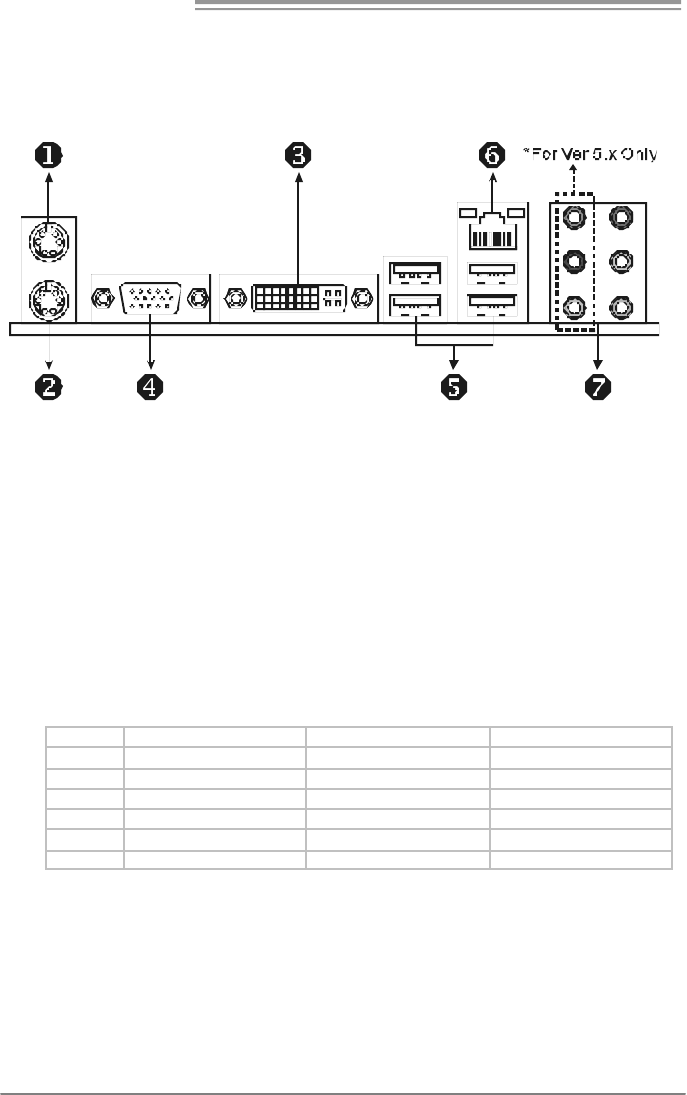
1.4 REAR PANEL CONNECTORS
X PS/2 Mouse Port Y PS/2 Keyboard Port
Z DVI-D VGA Port
The Digital Visual Int erface (DVI) is a video i nterf ace trans mitting digital video signals to
digital display devices s uch as flat panel LCDs or digital project ors. The DVI-D connector
allows digital signals trans mission onl y.
[ D-Sub VGA Port
Transmit anal og vi deo signals to computer monitor or any other dis play panels equipped
with D-S ub VGA input .
\ USB 2.0 Port x 4 ] RJ-45 LAN Port
^ Audio Jack x 6 (for Ver 5.x) / Audio Jack x 3 (for Ver 6.x)
Port 2-Channel 4-Channel 6-Channel/8-Channel
Blue Line-In Line-In Line-In
Green Line-Out Front Speaker Out Front Speaker Out
Pink Mic In Mic In Mic In
Orange Center/ Subwoofer
Black Rear Speaker O ut Rear Speaker O ut Rear Speaker O ut
Grey Side Speaker Out
GF7025-M2
7
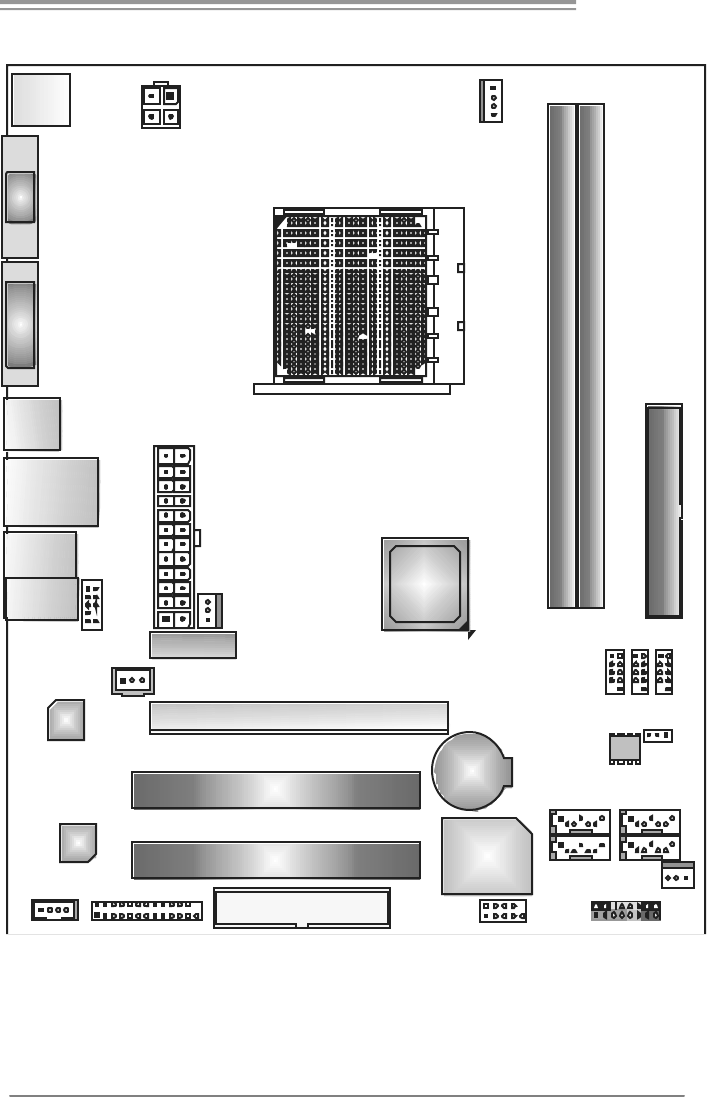
1.5 MOTHERBOARD LAYOUT
PCI-EX1_1
PCI-EX16
PCI2
FDD1
BAT1
Co de c
DI MMA1
DI MMB1
Socket A M2
Super I/O
PC I1
JATXPWR2 JCFA N1
JPRNT1
JATXP WR1
JUSB3
JCMOS1
JSFAN1
JPANEL1
JSPDIF_OUT1
JCDIN1
SATA1
IDE1
LAN
JAUDIOF1
JN FA N1 (Opt io na l )
JUSB4
JUSB2
SATA3
SATA4SATA2
JKBMS1
VGA
JUSB1
JRJ45USB1
AU DI O1
(for Ve r 5.x)
JA UDIO1
(for Ver 6.x)
DV I-D
GeForce
7025 /
aNF630
JCOM1
BI OS
Note: represents the 1■st pin.
Motherboard Manual
8
CHAPTER 2: HARDWARE INSTALLATION
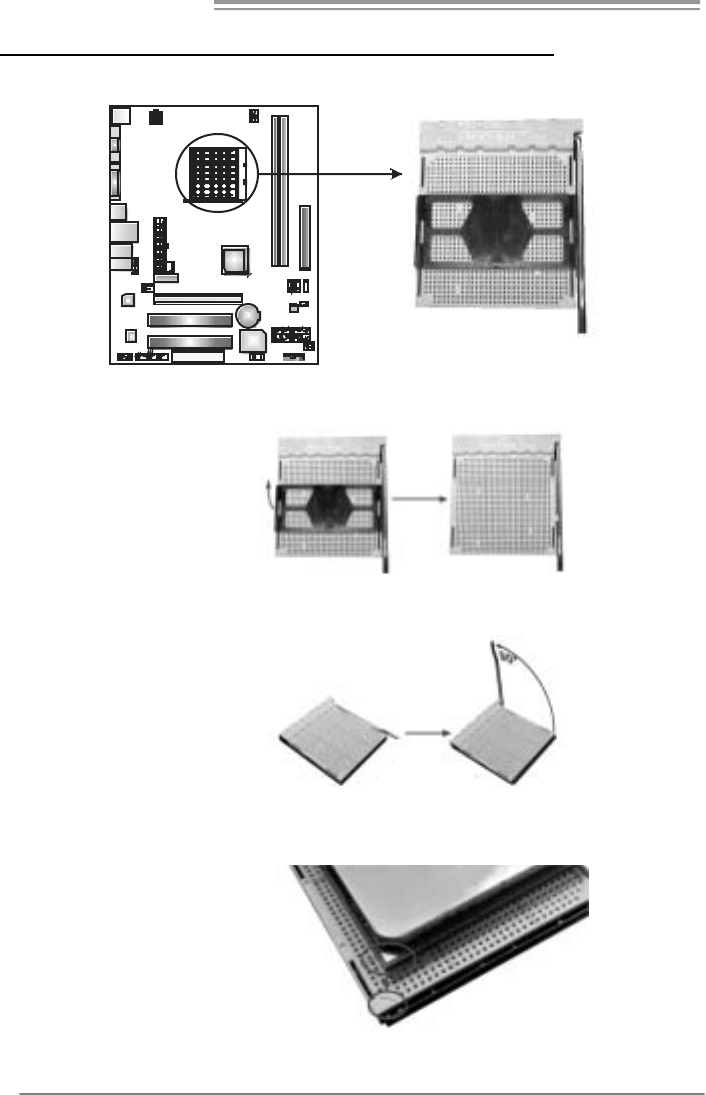
2.1 INSTALLING CENTRAL PROCESSING UNIT (CPU)
Step 1: Remove the socket protection cap.
Step 2: Pull the lever toward direction A from the socket and then raise the
lever up to a 90-degree angle.
Step 3: Look for the white triangle on socket, and the gold triangle on
CPU should point towards this white triangle. The CPU will fit only
in the correct orientation.
GF7025-M2
9
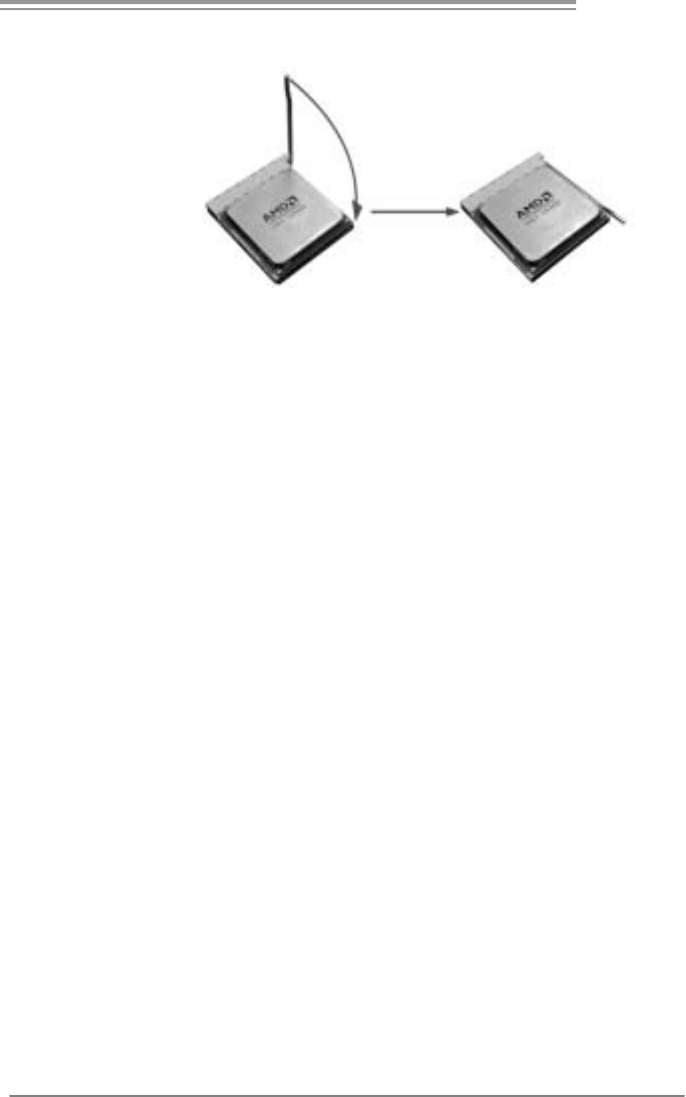
Step 4: Hold the CPU down firmly, and then close the lever toward direct
B to complete the installation.
Step 5: Put the CPU Fan on the CPU and buckle it. Connect the CPU
FAN power cable to the JCFAN1. This completes the installation.
Motherboard Manual
10
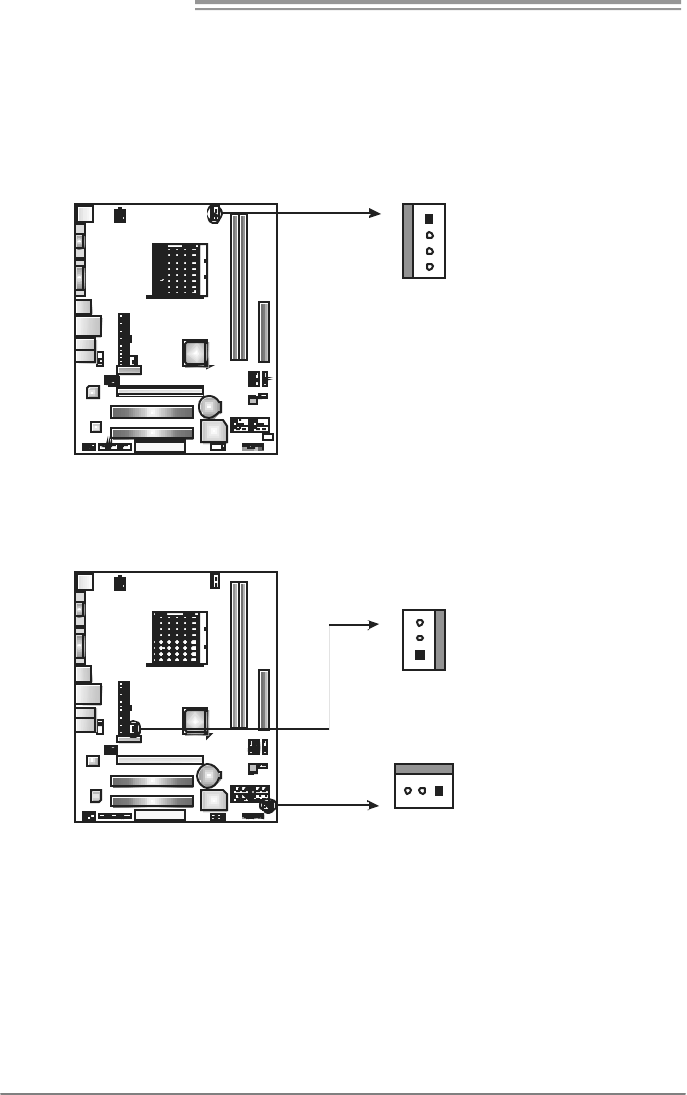
2.2 FAN HEADERS
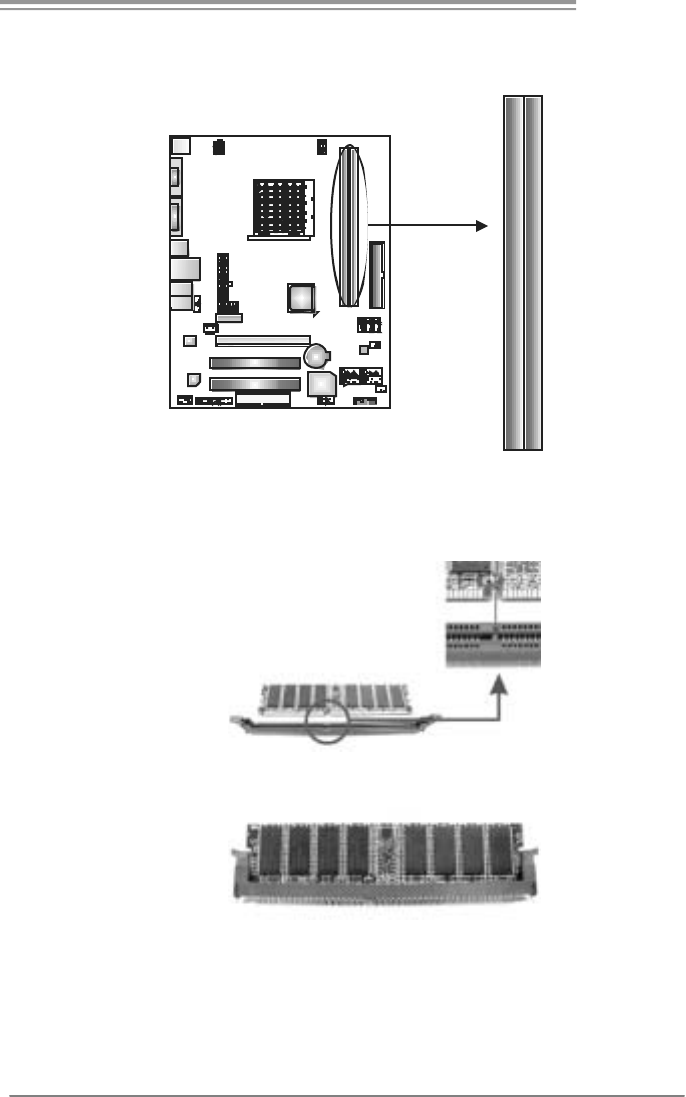
These fan headers support cooling-fans built in the computer. The fan
cable and connector may be different according to the fan manufacturer.
Connect the fan cable to the connector while matching the black wire to
pin#1.
JCFAN1: CPU Fan Header
Pin
Assignment
1 Ground
2 +12V
3 FAN RPM rate
sense
1
4
4 Smart Fan
Control (By Fan)
JNFAN1: North Bridge Fan Header (Optional)
JSFAN1: System Fan Header
Pin
Assignment
1 Ground
2 +12V
13
JNF AN
1
(Optional)
JSFAN1
1
3
3 FAN RPM
rate sense
Note:
The JCFAN1 supports 4-pin head c onnector. The J SFAN1 and JNFAN1 s upport 3-pin
head connectors. When connecting wit h wires ont o connectors, pleas e not e t hat the red
wire is t he positi ve and s hould be c onnected t o pin#2, and the bl ac k wire is Ground and
shoul d be connected t o GND.
GF7025-M2
11
2.3 INSTALLING SYSTEM MEMORY
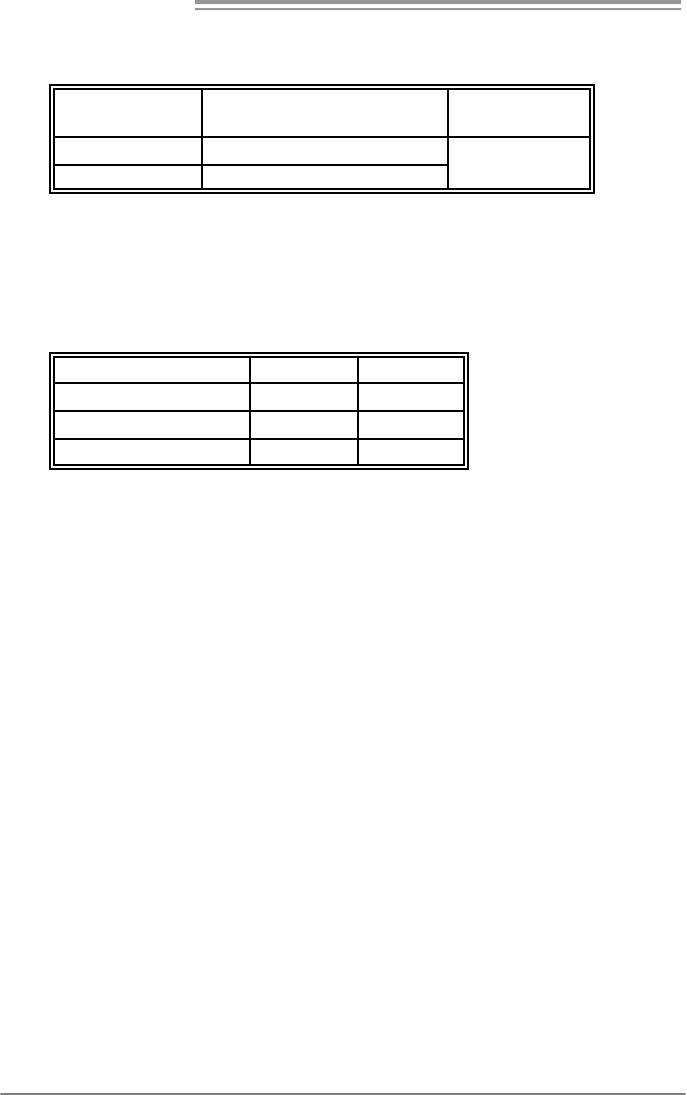
A. Memory Modules
DIMMA1
DIMMB1
1. Unlock a DIMM slot by pressing the retaining clips outward. Align a
DIMM on the slot such that the notch on the DIMM matches the
break on the Slot.
2. Insert the DIMM vertically and firmly into the slot until the retaining
chip snap back in place and the DIMM is properly seated.
Motherboard Manual
12
B. Memory Capacity
DIMM Socket
Location DDR2 Module To t a l Me m o r y
Size
DIMMA1 256MB/512MB/1GB/2GB
DIMMB1 256MB/512MB/1GB/2GB
Max is 4GB.
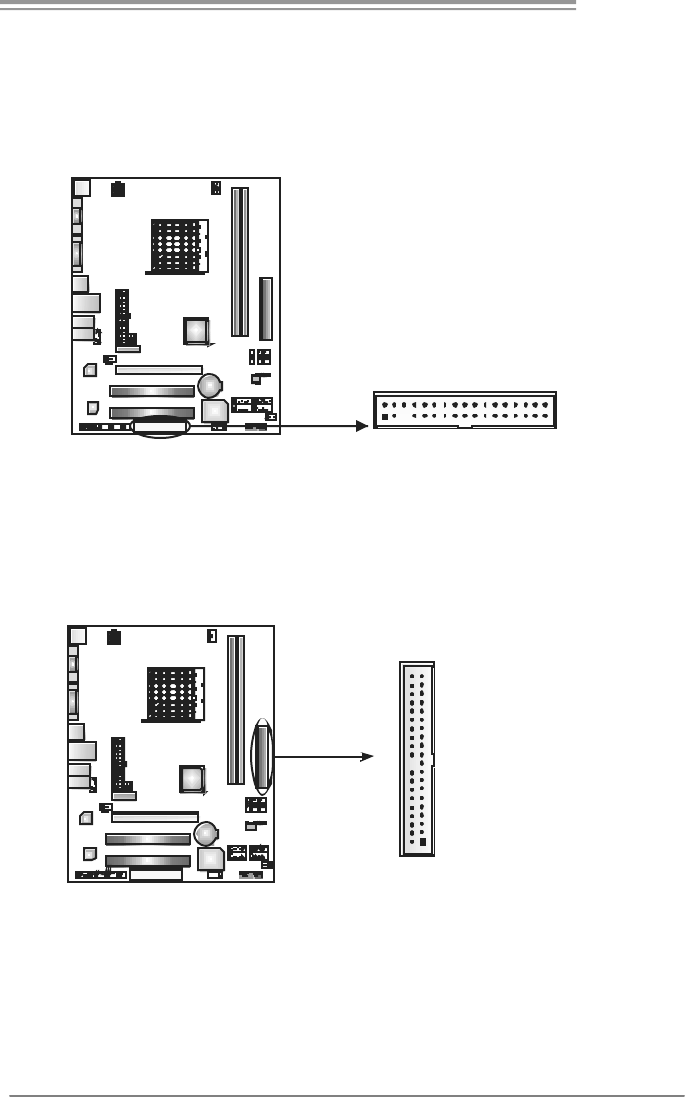
C. Dual Channel Memory installation
To trigger the Dual Channel f unction of the motherboard, the memory module
must meet the following requirements:
Install memory module of the same density in pair, shown in the f ollowing table.
Dual Channel Status DIMMA1 DIMMB1
Disabled O X
Disabled X O
Enabled O O
(O means memory installed, X means memory not installed.)
The DRAM bus width of the memory module must be the same (x8 or
x16)
GF7025-M2
13
2.4 CONNECTORS AND SLOTS
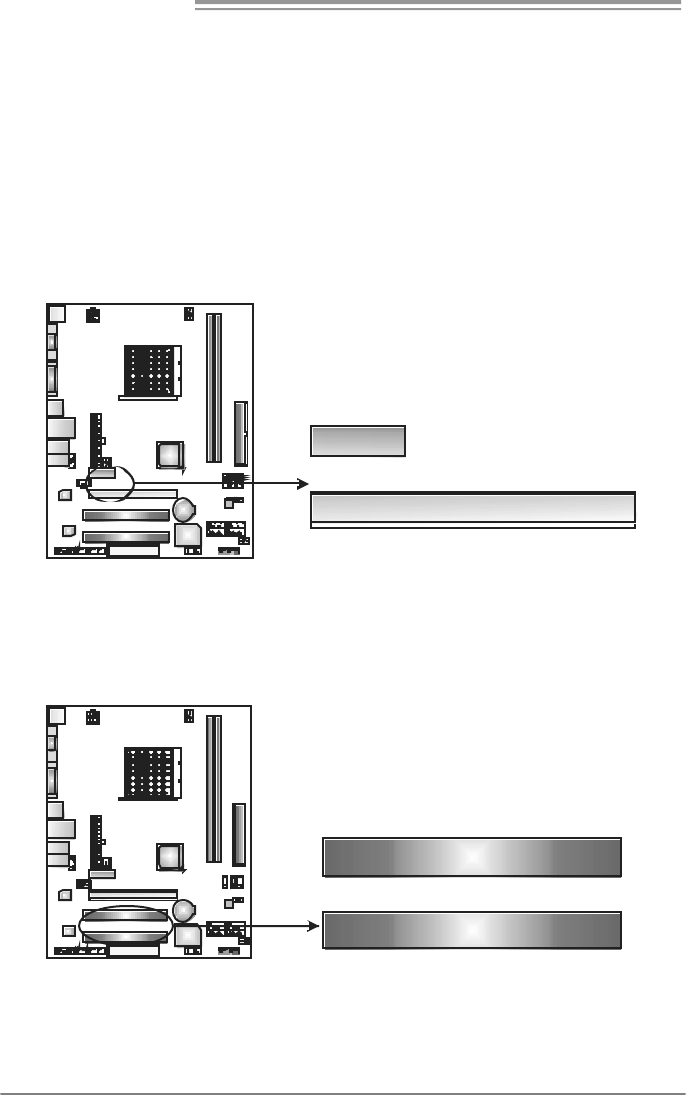
FDD1: Floppy Disk Connector
The motherboard prov ides a standard floppy disk connector that supports 360K,
720K, 1.2M, 1.44M and 2.88M floppy disk ty pes. This connector supports the
prov ided floppy drive ribbon cables.
133
234
IDE1: Hard Disk Connector
The motherboard has a 32-bit Enhanced PCI IDE Controller that prov ides PIO
Mode 0~4, Bus Master, and Ultra DMA 33/66/100/133 f unctionality.
The IDE connector can connect a master and a slave drive, so y ou can connect
up to two hard disk driv es.
21
3940
Motherboard Manual
14
PCI-EX16: PCI-Express x16 Slot
- PCI-Express 1.0a compliant.
- Maximum theoretical realized bandwidth of 4GB/s simultaneously per
direction, for an aggregate of 8GB/s totally.
PCI-EX1_1: PCI-Express x1 Slot
- PCI-Express 1.0a compliant.
- Data transf er bandwidth up to 250MB/s per direction; 500MB/s in total.
- PCI-Express supports a raw bit-rate of 2.5GB/s on the data pins.
- 2X bandwidth over the traditional PCI architecture.
PCI-EX1_1
PCI-EX16
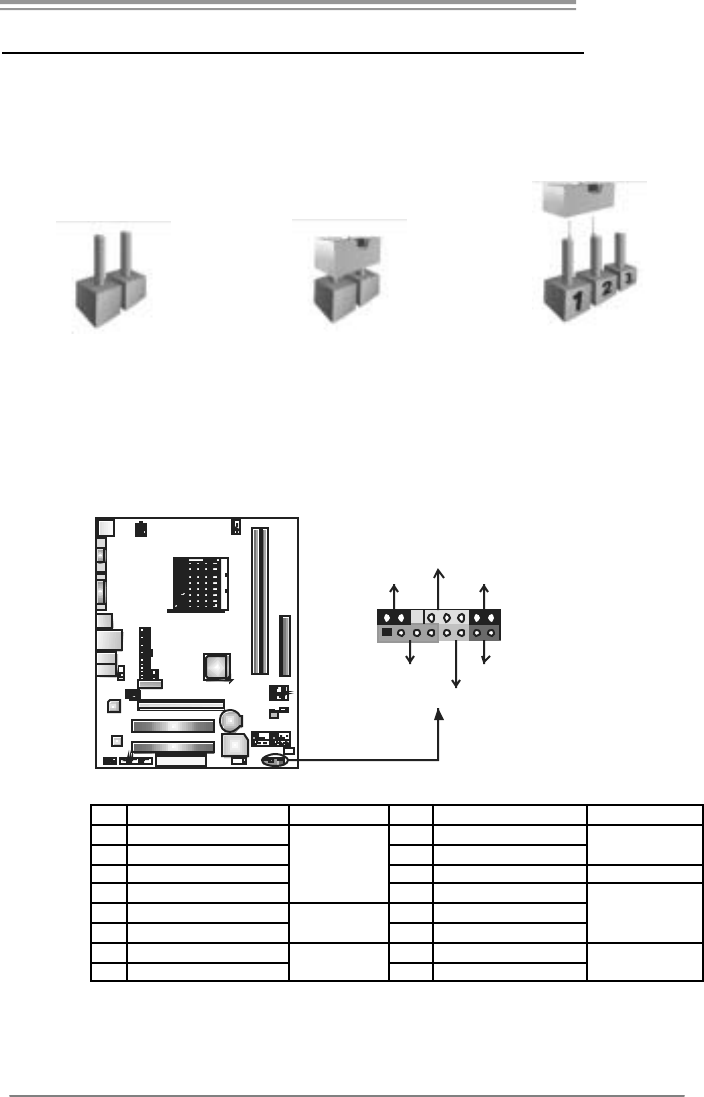
PCI1~PCI2: Peripheral Component Interconnect Slots
This motherboard is equipped with 2 standard PCI slots. PCI stands f or
Peripheral Component Interconnect, and it is a bus standard for expansion
cards. This PCI slot is designated as 32 bits.
PC I1
PCI2
GF7025-M2
15
CHAPTER 3: HEADERS & JUMPERS SETUP
3.1 HOW TO SET UP JUMPERS
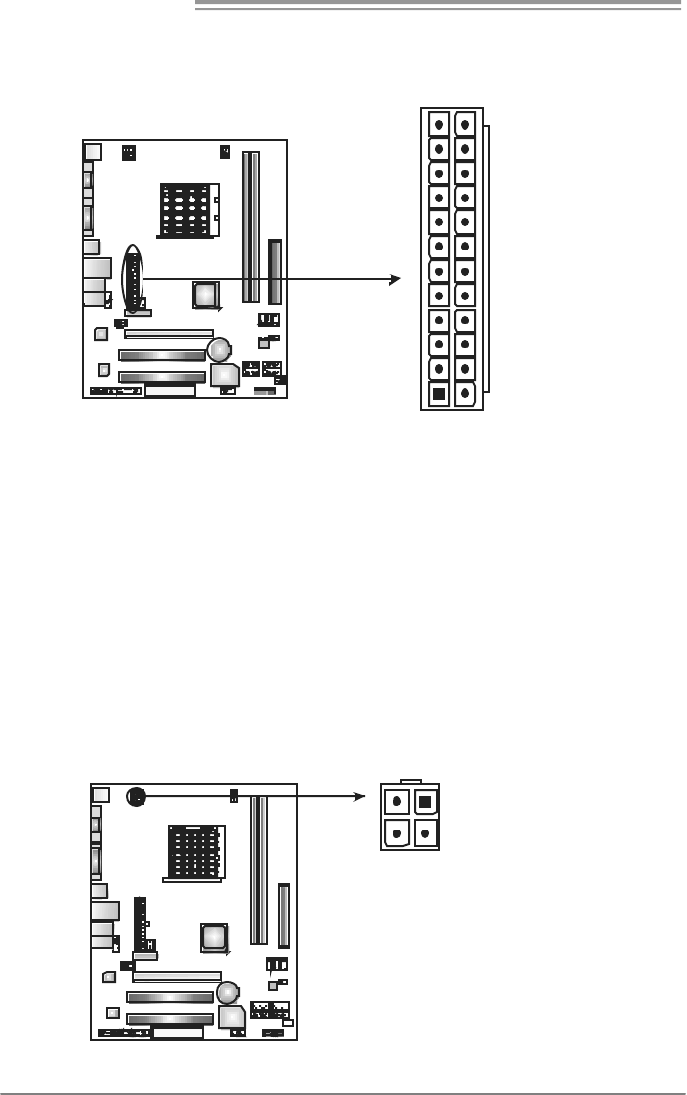
The illustration shows how to set up jumpers. When the jumper cap is
placed on pins, the jumper is “close”, if not, that means the jumper is
“open”.
Pin opened Pin closed Pin1-2 closed
3.2 DETAIL SETT INGS
JPANEL1: Front Panel Header
This 16-pin connector includes Power-on, Reset, HDD LED, Power LED, Sleep
button and speaker connection. It allows user to connect the PC case’s f ront
panel switch functions.
18
16
SLP PWR_LED
On/Off
RST
HLED
SPK
++
+
9-
-
Pin Assignment Functio n Pin Assignment Function
1 +5V 9 Sleep control
2 N/A 10 Ground Sleep button
3 N/A 11 N/A N/A
4 Speaker
Speaker
Connector
12 Power LED (+)
5 HDD LED (+) 13 Power LED (+)
6 HDD LED (-)
Hard drive
LED 14 Power LED (-)
Power LED
7 Ground 15 Power button
8 Reset control Reset button 16 Ground Power-on button
Motherboard Manual
16
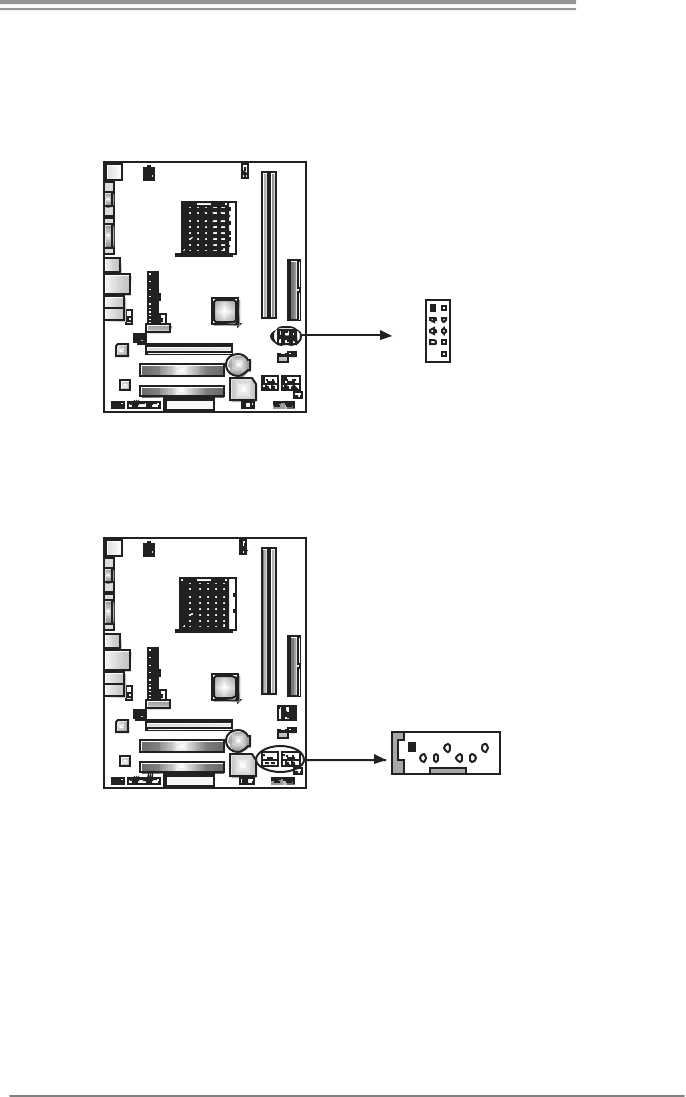
JATXPW R1: ATX Powe r S ou rce C onne ctor
This connector allows user to connect 24-pin power connector on the ATX
power supply.
1
12
13
24
Pin Assignment Pin Assignment
13 +3.3V 1 +3.3V
14 -12V 2 +3.3V
15 Ground 3 Ground
16 PS_ON 4 +5V
17 Ground 5 Ground
18 Ground 6 +5V
19 Ground 7 Ground
20 NC 8 PW_OK
21 +5V 9 Standby Voltage+5V
22 +5V 10 +12V
23 +5V 11 +12V
24 Ground 12 +3.3V
JATXPW R2: ATX Powe r S ou rce C onne ctor
By connecting this connector, it will provide +12V to CPU power circuit.
Pin
Assignment
1 +12V
2 +12V
3 Ground
1
3
2
4
4 Ground
GF7025-M2
17
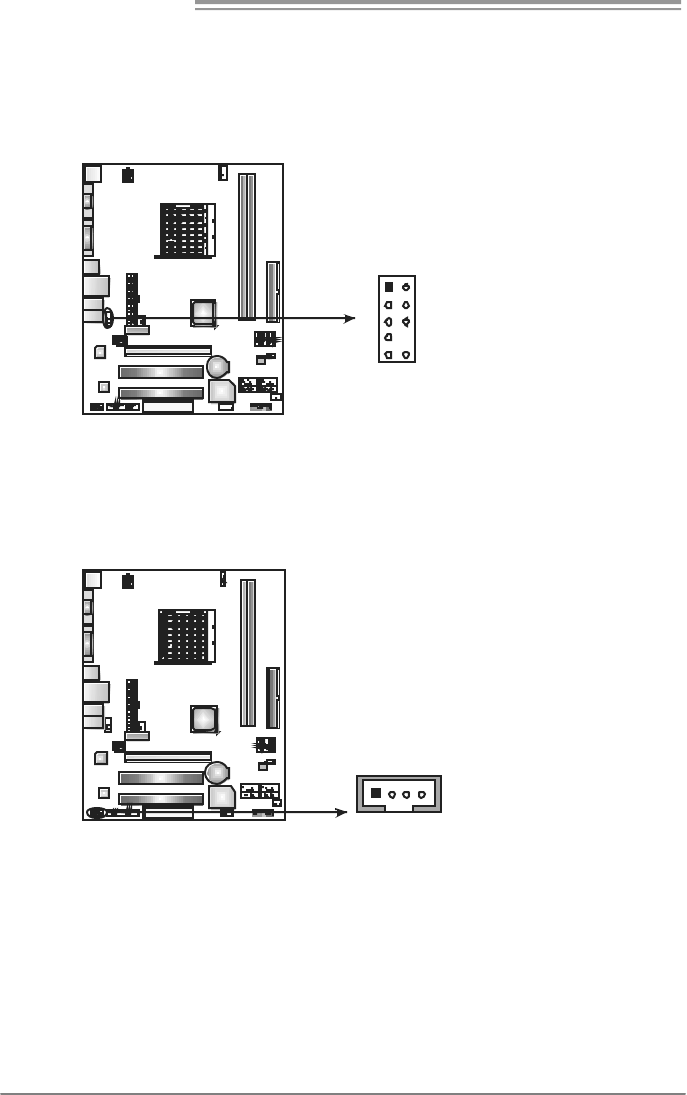
JUSB2/JUSB3/JUSB4: Headers for USB 2.0 Ports at Front Panel
This header allows user to connect additional USB cable on the PC f ront panel,
and also can be connected with internal USB devices, like USB card reader.
Pin Assignment
1 +5V (fused)
2 +5V (fused)
3 USB-
4 USB-
5 USB+
6 USB+
7 Ground
8 Ground
9 Key
10 NC
12
9
JUSB3
JUSB2
JUSB4
10
SATA1~SATA4: Serial ATA Connectors
The motherboard has a PCI to SATA Controller with 4 channels SATA interface.
Pin
Assignment
1 Ground
2 TX+
3 TX-
4 Ground
5 RX-
6 RX+
14 7
SATA2
SATA1 SATA3
SATA4
7 Ground
Motherboard Manual
18
JAUDIOF1: Front Panel Audio Header
This header allows user to connect the front audio output cable with the PC f ront
panel. It will disable the output on back panel audio connectors.
Pin Assignment
1 Mic Left in
2 Ground
3 Mic Right in
4 GPIO
5 Right line in
6 Jack Sense
7 Front Sense
8 Key
9 Left line in
10 Jack Sense
1
9
2
10
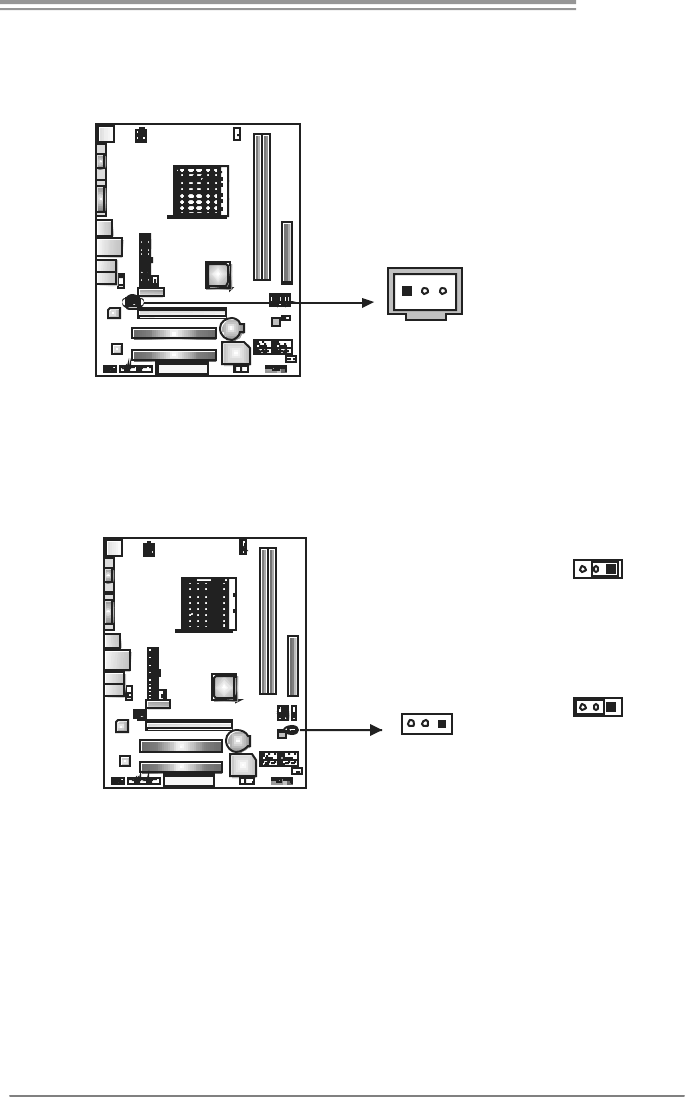
JCDIN1: CD-ROM Audio-in Connector
This connector allows user to connect the audio source from the v ariaty dev ices,
like CD-ROM, DVD-ROM, PCI sound card, PCI TV turner card etc..
Pin
Assignment
1 Left Channel
Input
2 Ground
3 Ground
14
4 Right Channel
Input
GF7025-M2
19
JSPDIF_O UT1: Digital Audio-out Connector
This connector allows user to connect the PCI bracket SPDIF output header.
Pin
Assignment
1 +5V
2 SPDIF_OUT
13
3 Ground
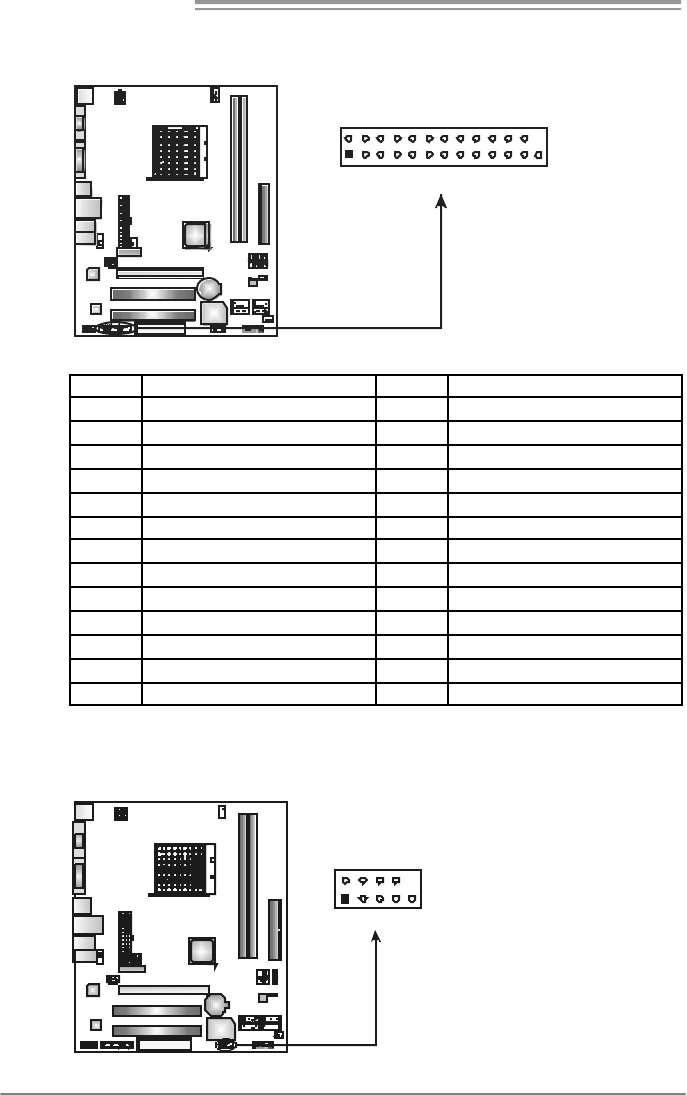
JCMOS1: Clear CMOS Header
By placing the jumper on pin2-3, it allows user to restore the BIOS saf e setting
and the CMOS data, please carefully f ollow the procedures to avoid damaging
the motherboard.
13
Pin 1-2 Close:
Normal Operation
(default).
13
13
Pin 2-3 Close:
Clear CMOS data.
※ Clear CMOS Procedures:
1. Remov e AC power line.
2. Set the jumper to “Pin 2-3 close”.
3. Wait for five seconds.
4. Set the jumper to “Pin 1-2 close”.
5. Power on the AC.
6. Reset y our desired password or clear the CMOS data.
Motherboard Manual
20
JPRNT1: Printer Port Connector
This header allows you to connector printer on the PC.
125
2
Pin Assignment Pin Assignment
1 -Strobe 14 Ground
2 -ALF 15 Data 6
3 Data 0 16 Ground
4 -Error 17 Data 7
5 Data 1 18 Ground
6 -Init 19 -ACK
7 Data 2 20 Ground
8 -Scltin 21 Busy
9 Data 3 22 Ground
10 Ground 23 PE
11 Data 4 24 Ground
12 Ground 25 SCLT
13 Data 5 26 Key
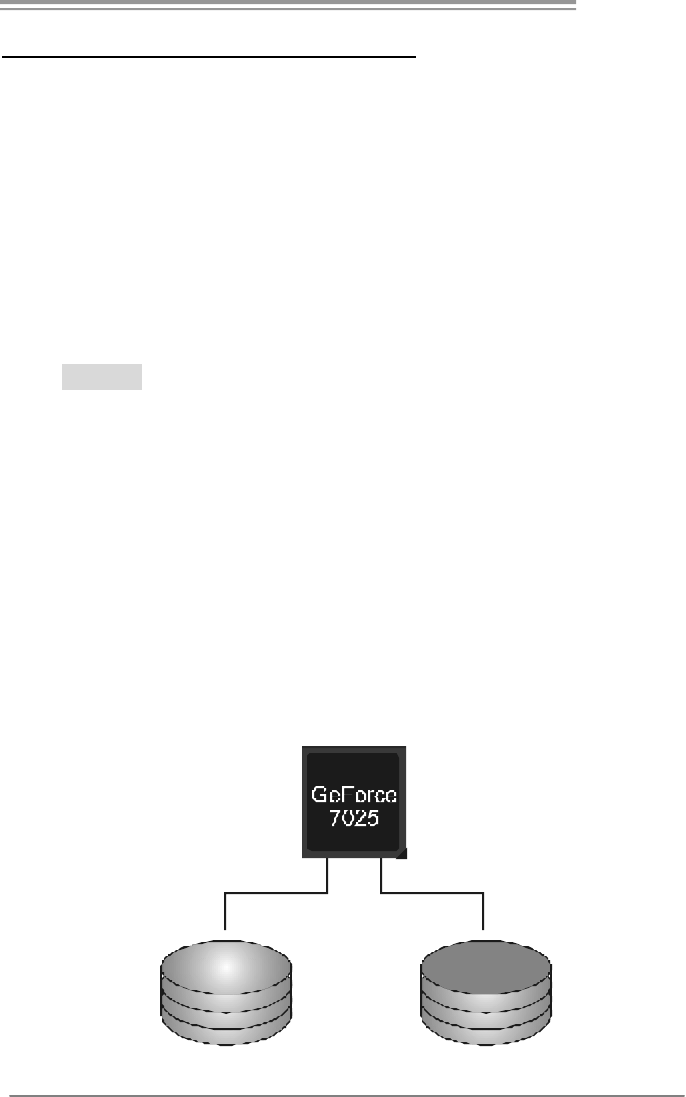
JCOM1: Serial port Connector
The motherboard has a Serial Port Connector for connecting RS-232 Port.
Pin
Assignment
1 Carrier detect
2 Received data
3 Transmitted data
4 Data terminal ready
5 Signal ground
6 Data set ready
7 Request to send
8 Clear to send
9 Ring indicator
19
210
10 Key
GF7025-M2
21
CHAPTER 4: RAID FUNCTIONS
4.1 OPERATION SYSTEM
z Supports Windows XP Home/Prof essional Edition, and Windows 2000 Prof essional.
4.2 RAID ARRAYS
RAID supports the following types of RAID arrays:
RAID 0: RAID 0 defines a disk striping scheme that improves disk read and write times for
many applications.
RAID 1: RAID 1 defines techniques for mirroring data.
RAID 0+1: RAID 0+1 combines the techniques used in RAID 0 and RAID 1.
RAID 5: RAID 5 provides fault tolerance and better utilization of disk capacity.
4.3 HOW RAID WORKS
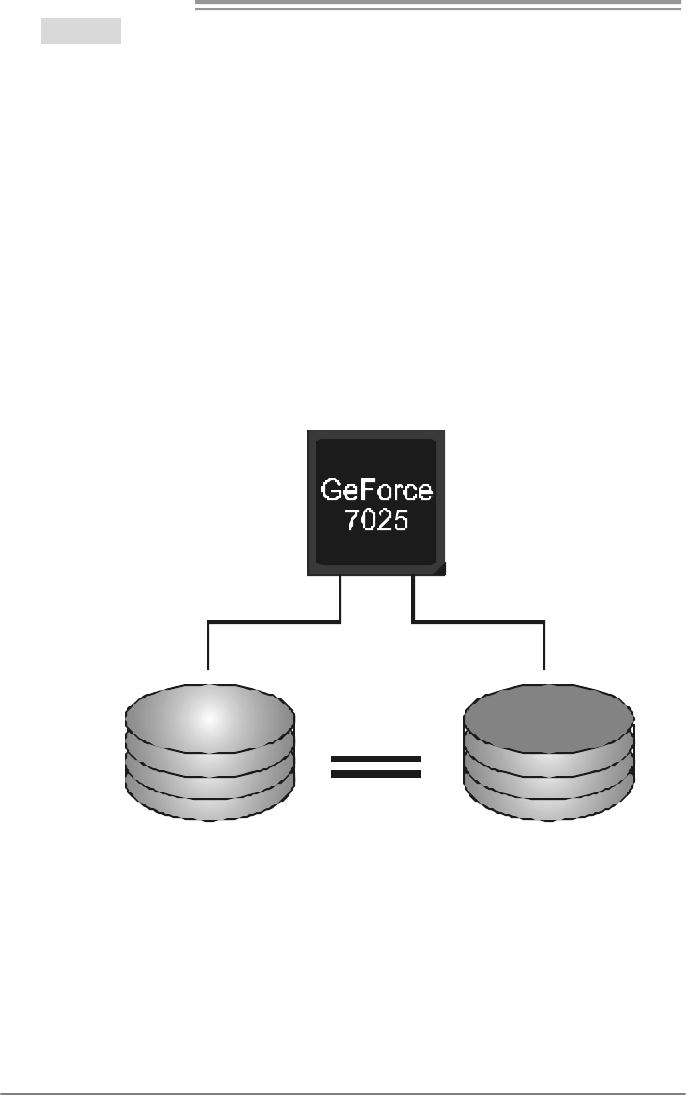
RAID 0:
The controller “stripes” data across multiple drives in a RAID 0 array system. It breaks
up a large file into smaller blocks and performs disk reads and writes across multiple
drives in parallel. The size of each block is determined by the stripe size parameter,
which you set during the creation of the RAID set based on the system environment. This
technique reduces overall disk access time and offers high bandwidth.
Features and Benefits
Drives: Minimum 1, and maximum is up to 6 or 8. Depending on the
platf orm.
Uses: Intended for non-critical data requiring high data throughput, or any
env ironment that does not require f ault tolerance.
Benefits: prov ides increased data throughput, especially f or large files. No
capacity loss penalty f or parity.
Drawbacks: Does not deliver any fault tolerance. If any drive in the array
f ails, all data is lost.
Fault Tolerance: No.
Block 1
Block 3
Block 5
Block 2
Block 4
Block 6
Motherboard Manual
22
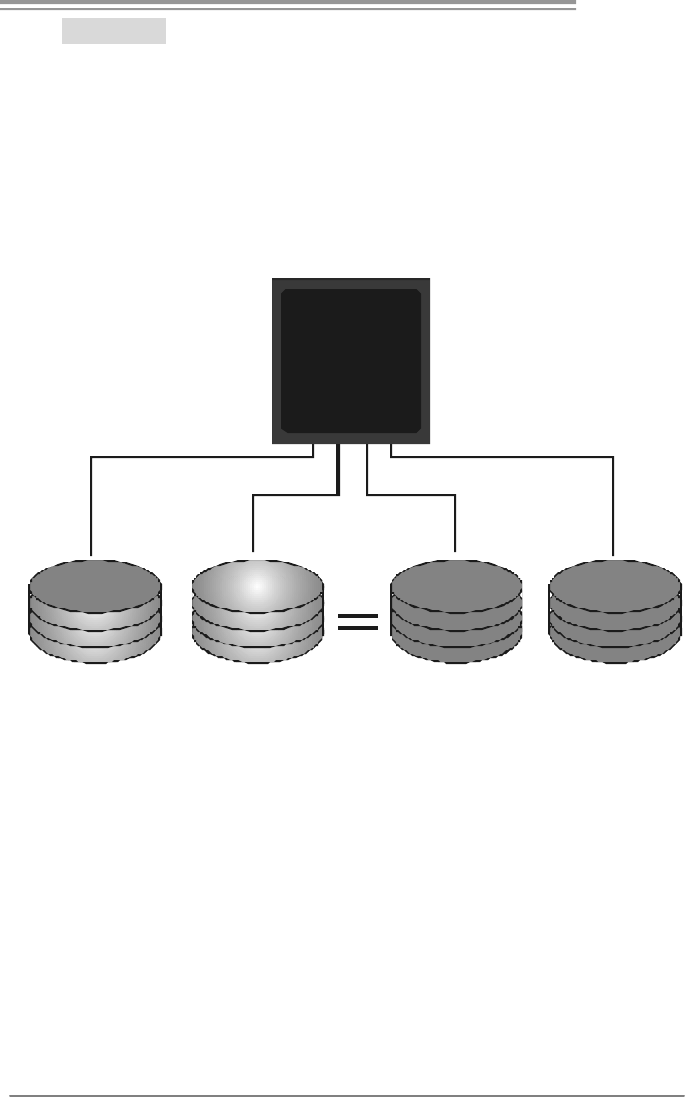
RAID 1:
Every read and write is actually carried out in parallel across 2 disk drives in a RAID 1
array system. The mirrored (backup) copy of the data can reside on the same disk or on a
second redundant drive in the array. RAID 1 provides a hot-standby copy of data if the
active volume or drive is corrupted or becomes unavailable because of a hardware failure.
RAID techniques can be applied for high-availability solutions, or as a form of automatic
backup that eliminates tedious manual backups to more expensive and less reliable
me d i a .
Features and Benefits
Drives: Minimum 2, and maximum is 2.
Uses: RAID 1 is ideal f or small databases or any other application that
requires f ault tolerance and minimal capacity.
Benefits: Prov ides 100% data redundancy. Should one driv e f ail, the
controller switches to the other drive.
Drawbacks: Requires 2 drives for the storage space of one driv e.
Perf ormance is impaired during driv e rebuilds.
Fault Tolerance: Yes.
Block 1
Block 2
Block 3
Block 1
Block 2
Block 3
GF7025-M2
23
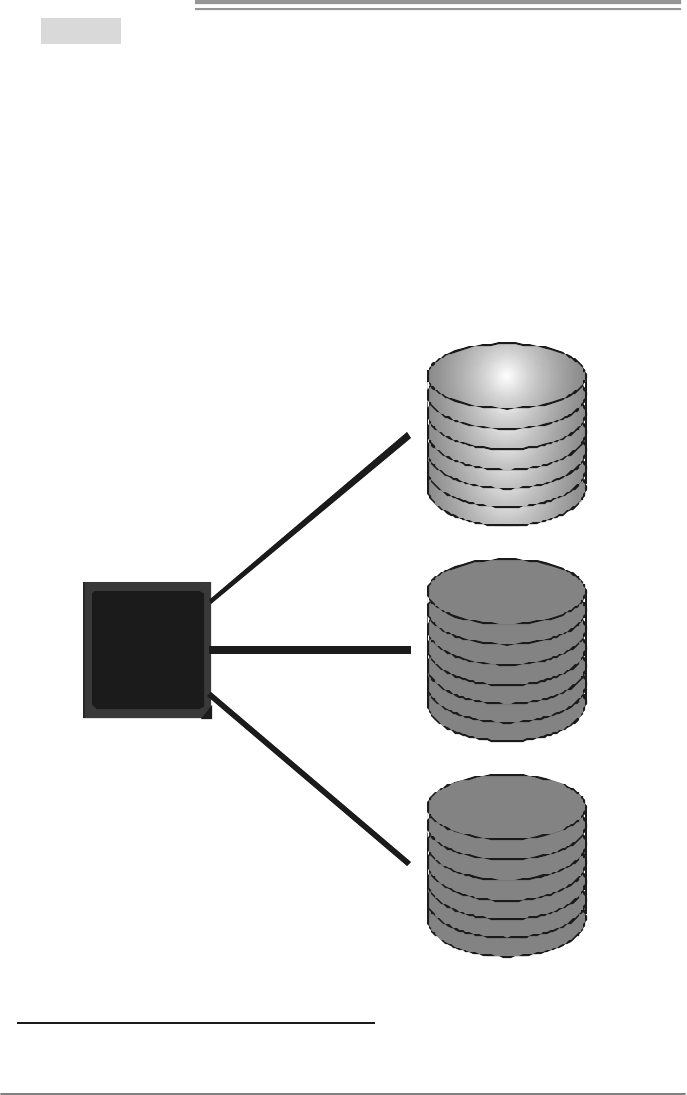
RAID 0+1:
RAID 0 drives can be mirrored using RAID 1 techniques. Resulting in a RAID 0+1
solution for improved performance plus resiliency.
Features and Benefits
Drives: Minimum 4, and maximum is 6 or 8, depending on the platform.
Benefits: Optimizes for both fault tolerance and perf ormance, allowing for
automatic redundancy. May be simultaneously used with other RAID lev els
in an array, and allows for spare disks.
Drawbacks: Requires twice the available disk space f or data redundancy,
the same as RAID level 1.
Fault Tolerance: Yes.
Block 2
Block 4
Block 6
Block 1
Block 3
Block 5
Block 2
Block 4
Block 6
Block 1
Block 3
Block 5
GeForce
7025
Motherboard Manual
24
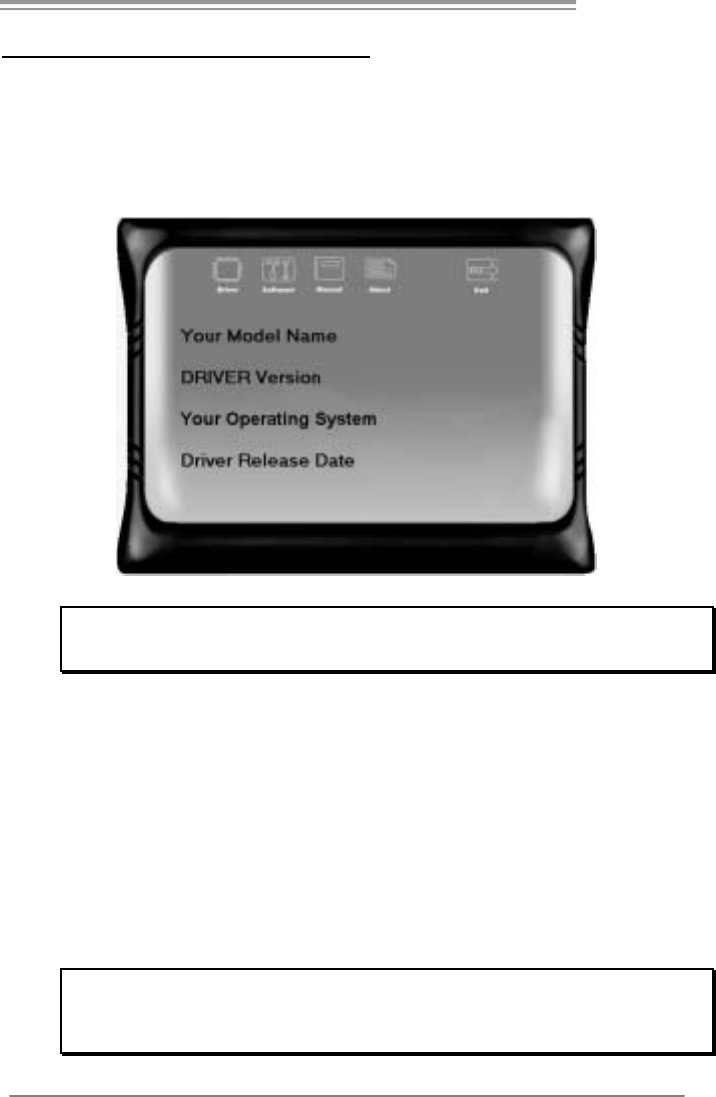
RAID 5:
RAID 5 stripes both data and parity information across three or more drives. It writes
data and parity blocks across all the drives in the array. Fault tolerance is maintained by
ensuring that the parity information for any given block of data is placed on a different
drive from those used to store the data itself.
Features and Benefits
Drives: Minimum 3.
Uses: RAID 5 is recommended for transaction processing and general
purpose service.
Benefits: An ideal combination of good performance, good f ault tolerance,
and high capacity and storage efficiency.
Drawbacks: Individual block data transfer rate same as a single disk. Write
perf ormance can be CPU intensiv e.
Fault Tolerance: Yes.
Disk 1
DATA 3
PARITY
DATA 7
DATA 1
DATA 9
PARITY
Disk 2
PA R IT Y
DATA 5
DATA 8
DATA 2
PA R IT Y
DATA 11
Disk 3
DATA 4
DATA 6
PA R IT Y
PA R IT Y
DATA 10
DATA 12
GeForce
7025
※ For more detailed setup information, please refer to the Driver CD, or go to
http://www.nvidia.com /page/pg_20011106217193.htm l to download NVIDIA nForce Tutorial Flash.
GF7025-M2
25
CHAPTER 5: USEFUL HELP
5.1 DRIVER INSTALLATION NOTE
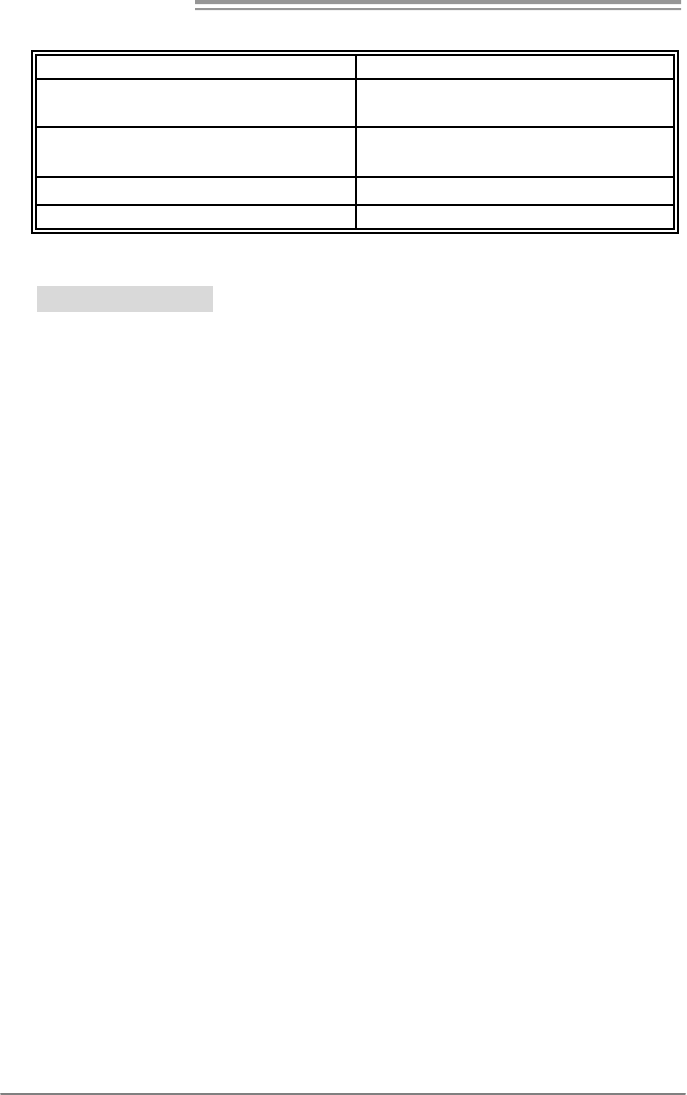
After you installed your operating system, please insert the Fully Setup
Driver CD into your optical drive and install the driver for better system
performance.
You will see the following window after you insert the CD
The setup guide will auto detect your motherboard and operating system.
Note:
If this window didn’t show up after you ins ert the Driver CD, please use file brows er to
locate and execute the file SETUP.EXE under your optical drive .
A. Driver Installation
To install the driver, please click on the Driver icon. The setup guide will
list the compatible driver for your motherboard and operating system.
Click on each device driver to launch the installation program.
B. Software Installation
To install the software, please click on the Software icon. The setup guide
will list the software available for your system, click on each software title
to launch the installation program.
C. Manual
Aside from the paperback manual, we also provide manual in the Driver
CD. Click on the Manual icon to browse for available manual.
Note:
You will need Acrobat Reader to open the manual file. Please download the latest version
of Acrobat Reader software from
http://www.adobe.com/products/acrobat/readstep2.html
Motherboard Manual
26
5.2 AWARD BIOS BEEP CODE
Beep Sound Meaning
One long beep followed by two short
beeps Video card not found or v ideo card
memory bad
High-low siren sound CPU overheated
System will shut down automatically
One Short beep when system boot-up No error found during POST
Long beeps every other second No DRAM detected or install
5.3 EXT RA INFORMATION
CPU Overheated
If the system shutdown automatically after power on system for
seconds, that means the CPU protection function has been activated.
When the CPU is over heated, the motherboard will shutdown
automatically to avoid a damage of the CPU, and the system may not
power on again.
In this case, please double check:
1. The CPU cooler surface is placed evenly with the CPU surface.
2. CPU fan is rotated normally.
3. CPU fan speed is fulfilling with the CPU speed.
After confirmed, please follow steps below to relief the CPU protection
function.
1. Remove the power cord from power supply for seconds.
2. Wai t for second s.
3. Plug in the power cord and boot up the system.
Or you can:
1. Clear the CMOS data.
(See “Close CMOS Header: JCMOS1” section)
2. Wai t for second s.
3. Power on the system again.

GF7025-M2
27
5.4 TROUBLESHOOTING
Probable Solution
1. No power to the system at all
Power light don’t illuminate, f an
inside power supply does not turn
on.
2. Indicator light on key board does
not turn on.
1. Make sure power cable is
securely plugged in.
2. Replace cable.
3. Contact technical support.
System inoperativ e. Keyboard lights
are on, power indicator lights are lit,
and hard driv e is spinning.
Using even pressure on both ends of
the DIMM, press down firmly until the
module snaps into place.
System does not boot from hard disk
driv e, can be booted f rom optical drive. 1. Check cable running from disk to
disk controller board. Make sure
both ends are securely plugged
in; c hec k t he driv e ty pe in t he
standard CMOS setup.
2. Backing up the hard drive is
extremely important. All hard
disks are capable of breaking
down at any time.
System only boots from optical driv e.
Hard disk can be read and applications
can be used but booting from hard disk
is impossible.
1. Back up data and applications
files.
2. Ref ormat the hard driv e.
Re-install applications and data
using backup disks.
Screen message says “Invalid
Conf iguration” or “CMOS Failure.” Rev iew system’s equipment. Make sur
e
correct inf ormation is in setup.
Cannot boot system after installing
second hard driv e. 1. Set master/slave jumpers
correctly.
2. Run SETUP program and select
correct drive types. Call the drive
manuf acturers f or compatibility
with other drives.

Motherboard Manual
28
CHAPTER 6: WARPSPEEDER™ III
6.1 INTRODUCTION
[WarpSpeeder™ III], a new powerful control utility, features three
user-friendly functions including Overclock Manager, Overvoltage
Manager, and Hardware Monitor.
With the Overclock Manager, users can easily adjust the frequency they
prefer or they can get the best CPU performance with just one click. The
Overvoltage Manager, on the other hand, helps to power up CPU core
voltage and Memory voltage. The cool Hardware Monitor smartly indicates
the temperatures, voltage and CPU fan speed as well as the chipset
information. Also, in the About panel, you can get detail descriptions about
BIOS model and chipsets. In addition, the frequency status of CPU,
memory, VGA and PCI along with the CPU speed are synchronically
shown on our main panel.
Moreover, to protect users' computer systems if the setting is not
appropriate when testing and results in system fail or hang,
[WarpSpeeder™ III] technology assures the system stability by
automatically rebooting the computer and then restart to a speed that is
either the original system speed or a suitable one.
6.2 SYSTEM REQUIREMENT
OS Support: Windows 98 SE, Windows Me, Windows 2000, Windows XP,
Windows Vista
DirectX: DirectX 8.1 or above. (The Windows XP operating system
includes DirectX 8.1. If you use Windows XP, you do not need to install
DirectX 8.1.)
GF7025-M2
29
6.3 INSTALLATION
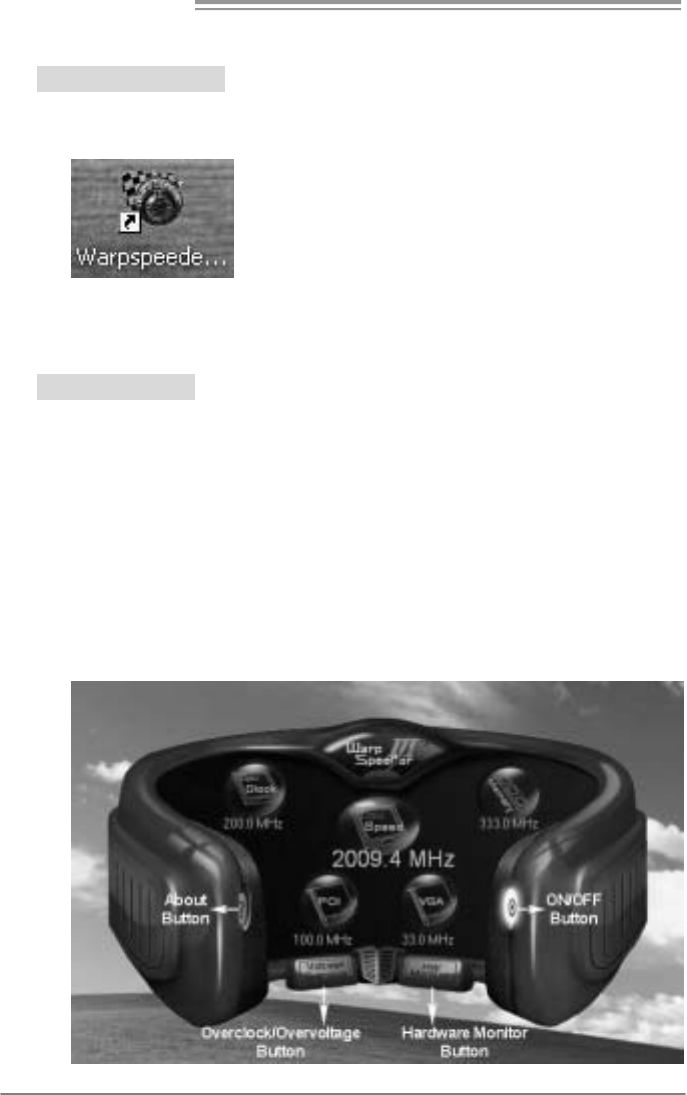
1. Execute the setup execution file, and then the following dialog will pop
up. Please click “Next” button and follow the default procedure to
install.
2. When you see the following dialog in setup procedure, it means setup
is completed. Click “Finish” button.
Usage :
The following figures are only for reference, the screen printed in this
user manual will change according to your motherboard on hand.
Motherboard Manual
30
6.4 WARPSPEEDER™ III
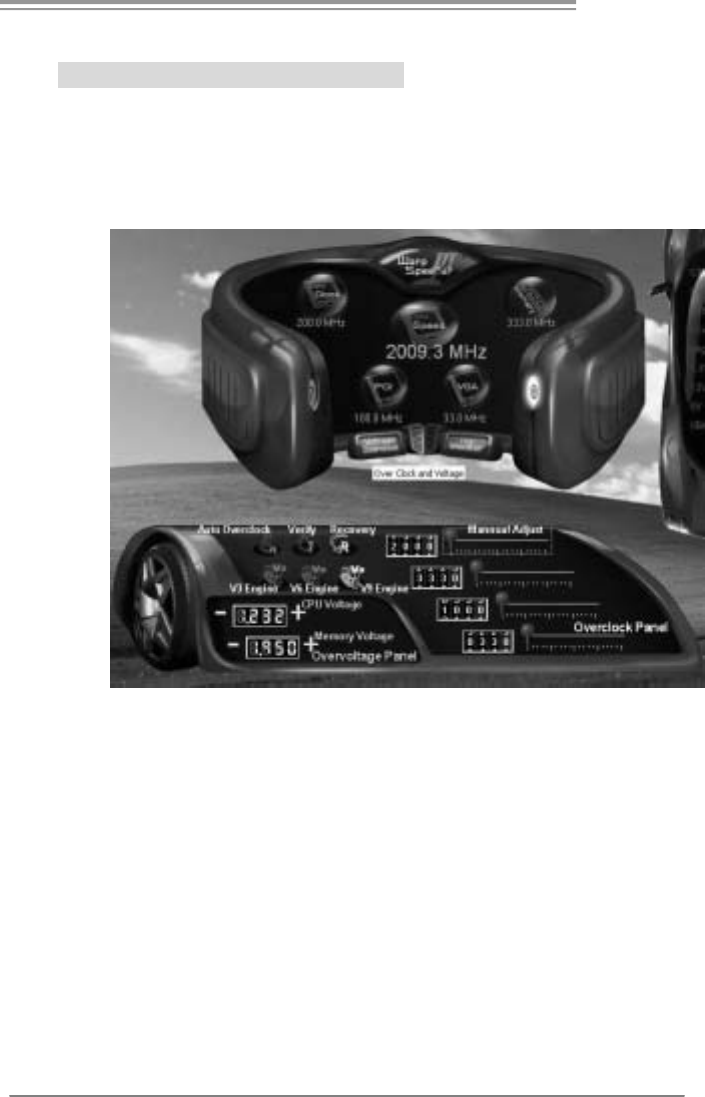
1. Desktop Icon:
After the [WarpSpeeder™ III] has been installed, a [WarpSpeeder™ III]
icon will appear on the desktop, just like the icon shown below.
Now you can launch the [WarpSpeeder™ III] utility simply by
double-clicking the desktop icon.
2. Main Panel
If you double-click the desktop icon, [WarpSpeeder™ III] will be
launched. Please refer to the following figure; the utility’s first window
you wi ll see is Main Panel .
Main Panel contains features as follows:
a. Display the CPU Speed, CPU external clock, Memory clock, VGA
clock, and PCI clock information.
b. Contains About, Voltage/Overclock, and Hardware Monitor
Buttons for invoking respective panels. The On/Off button is for
closing the program.
GF7025-M2
31
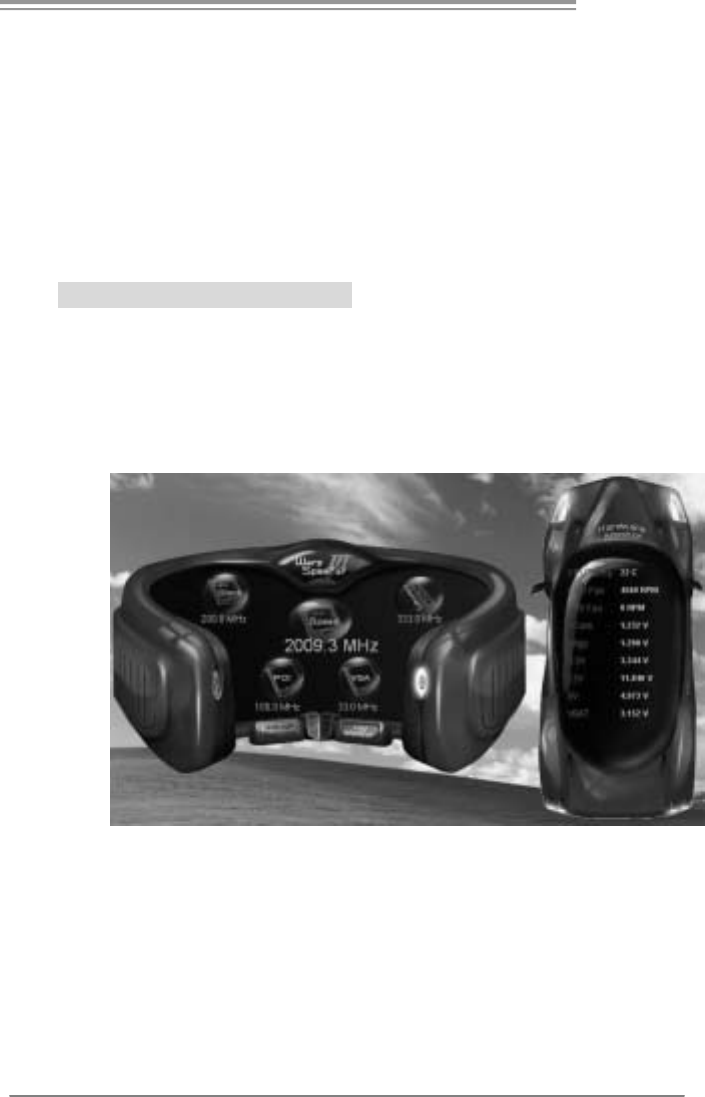
3. Overclock/Overvoltage Panel
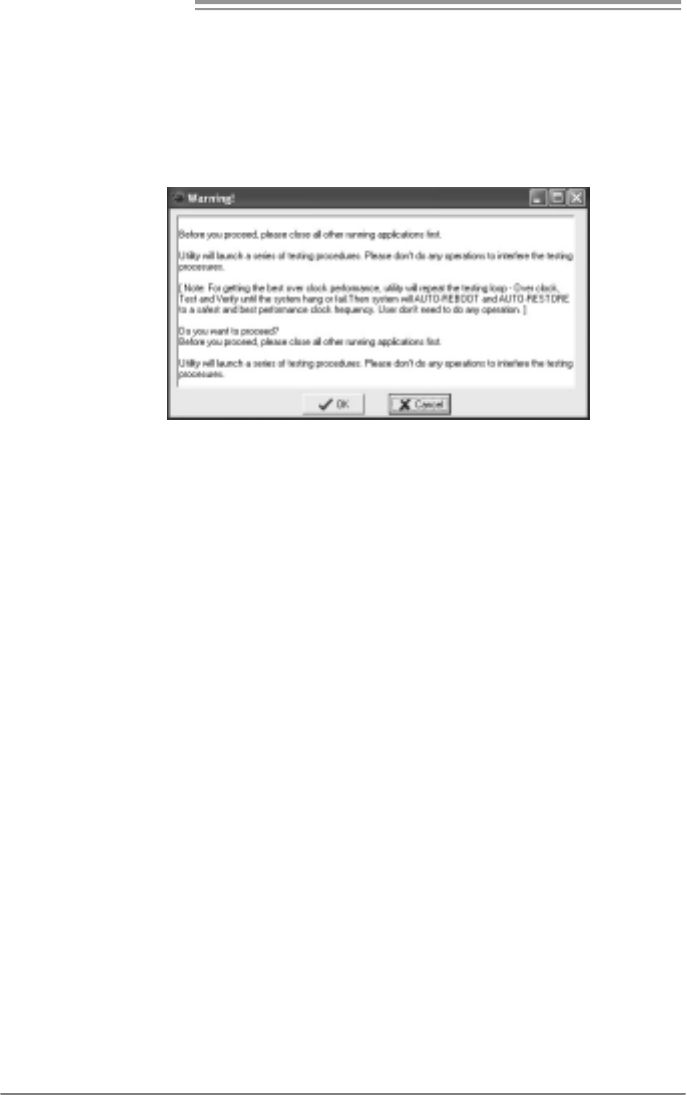
Click the Overclock/Overvoltage button in the Main Panel, the button
will be highlighted and the Overclock/Overvoltage Panel will show
up as the following figure. As you can see, the Overclock Panel is
on the right side, and the Overvoltage Panel is on the left side.
Motherboard Manual
32
Overclock Panel contains these features:
a. “Auto-Overclock”:
User can click this button and [WarpSpeeder™ III] will set the best
and stable performance and frequency automatically. A warning
dialog as below will show up to notify you that the system may
become unstable, click on “OK” to proceed.
Then [WarpSpeeder™ III] utility will execute a series of testing
until system fail. Then system will do fail-safe reboot by using
Watchdog function. After reboot, launch the [WarpSpeeder™ III]
utility again and the utility will load the previously verified best and
stable frequency.
b. “Verify”:
If you use the “Manual Adjust” bar to adjust the CPU frequency,
then you can click this button and [WarpSpeeder™ III] will proceed
a testing for current frequency. If the testing is ok, then the current
frequency will be saved into system registry. If the testing fails,
system will do a fail-safe rebooting. After reboot, the
[WarpSpeeder™ III] utility will restore to the hardware default
setting.
Warning:
Manually overclock is potentially dangerous, especially when the
ov erclocking percentage is over 110 %. We strongly recommend you
v erify ev ery speed you overclock by click the Verify button. Or, you can
just click Auto ov erclock button and let [WarpSpeeder™ III]
automatically gets the best result f or you.
c. “V3 Engine”/“V6 Engine”/“V9 Engine”:
Provide user the ability to do real-time overclock adjustment.
d. “Recovery”:
Click this button and the [WarpSpeeder™ III] utility will restore all
values to the hardware default setting.
GF7025-M2
33
O vervoltage Panel contains these features:
a. “CPU Voltage”:
This function allows user to adjust CPU voltage. Click on “+” to
increase or “-“ to decrease the CPU voltage.
b. “Memory Voltage”:
This function allows user to adjust Memory voltage. Click on “+”
to increase or “-“ to decrease the Memory voltage.
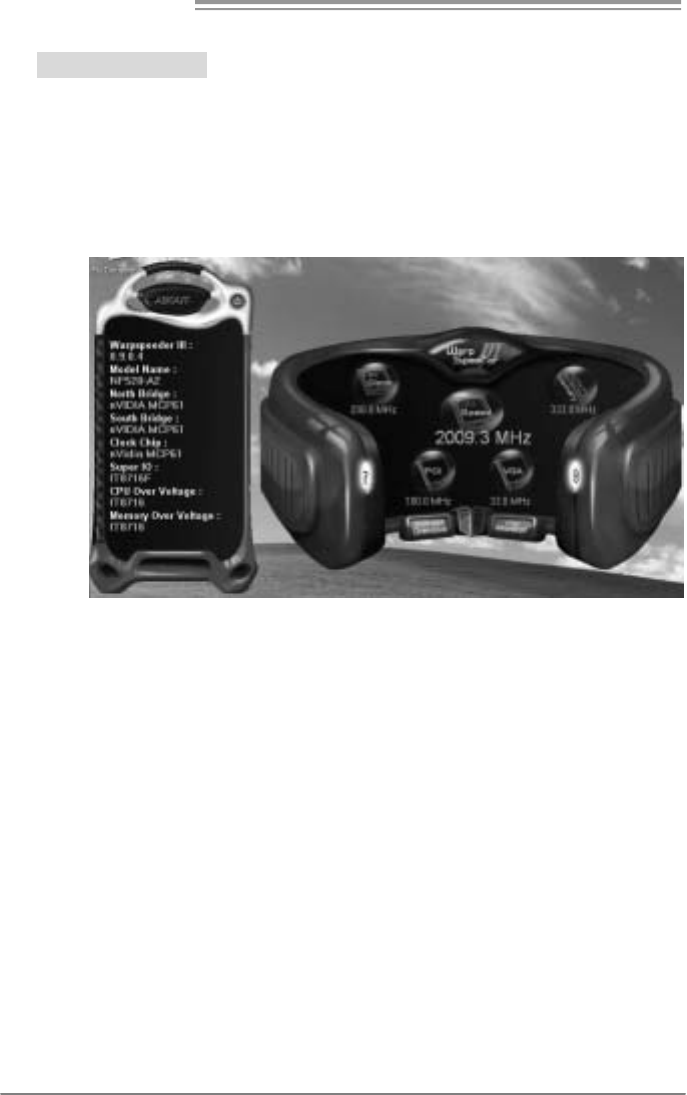
4. Hardware Monitor Panel
Click the Hardware Monitor button in Main Panel, the button will be
highlighted and the Hardware Monitor panel will show up as the
following figure.
In this panel, you can get the real-time status information of your
system. The information will be refreshed every 1 second.
Motherboard Manual
34
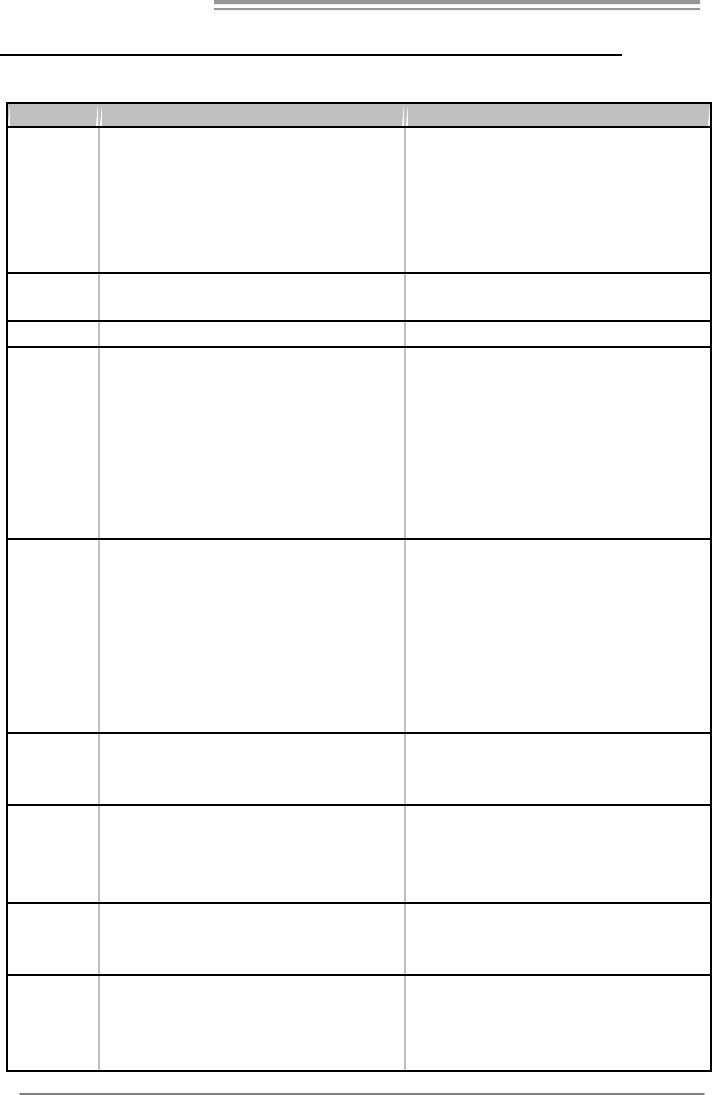
5. About Panel
Click the “about” button in Main Panel, the button will be highlighted
and the About Panel will show up as the following figure.
In this panel, you can get model name and detail information in hints
of all the chipset that are related to overclocking. You can also get
the the version number of [WarpSpeeder™ III] utility.
Note :
Because the overclock, overvoltage, and hardware monitor features
are controlled by several separate chipset, [WarpSpeeder™ III]
divide these features to separate panels. If one chipset is not on
board, the correlative button in Main panel will be disabled, but will
not interfere other panels’ functions. This property can make
[WarpSpeeder™ III] utility more robust.

GF7025-M2
35
This page is intentionally left blank.
Motherboard Manual
36
APPENDENCIES: SPEC IN OTHER LANGUAGE
GERMAN
Ver 5.x Ver 6.x
CPU
Sockel AM2
AMD Athlon 64 / Athlon 64 FX / Athlon 64 x2 /
Sempron Prozessoren
Die AMD 64-Architektur unterstützt eine 32-Bit-
und 64-Bit-Datenverarbeitung
Unterstützt Hyper Transport und Cool’n’Quiet
Sockel AM2
AMD Athlon 64 / Athlon 64 FX / Athlon 64 x2/
Sempron Prozessoren
Die AMD 64-Architektur unterstützt eine 32-Bit-
und 64-Bit-Datenverarbeitung
Unterstützt Hyper Transport und Cool’n’Quiet
FSB Unterstützt HyperTrans port mit einer Bandbreite
von bis zu 1 GHz
Unterstützt HyperTrans port mit einer Bandbreite
von bis zu 1 GHz
Chipsatz GeForce 7025/NF630a GeForce 7025/NF630a
Super E/A
ITE 8716F
Bietet die häufig verwendeten alten Super
E/A-Funktionen.
Low Pin Count-Schnittstelle
Umgebungskontrolle,
Hardware-Überwachung
Lüfterdrehzahl-Controller
"Smart Guardian"-Funktion von ITE
ITE 8716F
Bietet die häufig verwendeten alten Super
E/A-Funktionen.
Low Pin Count-Schnittstelle
Umgebungskontrolle,
Hardware-Überwachung
Lüfterdrehzahl-Controller
"Smart Guardian"-Funktion von ITE
Arbeitsspeich
er
DDR2 DIMM-Steckplätze x 2
M ax. 4GB A r beit ss peic her
Jeder DIMM unterstützt 256MB/512MB/1GB/
2GB DDR2.
Dual-Kanal DDR2 Speichermodul
Unterstützt DDR2 533 / 667 / 800
registrierte DIMMs. ECC DIMMs werden nicht
unterstützt.
DDR2 DIMM-Steckplätze x 2
M ax. 4GB A r beit ss peic her
Jeder DIMM unterstützt 256MB/512MB/1GB/
2GB DDR2.
Dual-Kanal DDR2 Speichermodul
Unterstützt DDR2 533 / 667 / 800
registrierte DIMMs. ECC DIMMs werden nicht
unterstützt.
Grafik
Integrierter GeForce 7025/NF630a-Chipsatz
Max. 512MB gemeinsam benutzter
Videospeicher
Integrierter GeForce 7025/NF630a-Chipsatz
Max. 512MB gemeinsam benutzter
Videospeicher
IDE
Integrierter IDE-Controller
Ultra DMA 33 / 66 / 100 / 133 Bus
Master-Modus
Unterstützt PIO-Modus 0~4,
Integrierter IDE-Controller
Ultra DMA 33 / 66 / 100 / 133 Bus
Master-Modus
Unterstützt PIO-Modus 0~4,
SA TA II
I nt e gr i ert e r S e ri al ATA - Contr o ll e r
Datentransferrate bis zu 3Gb/s
Konform mit der SATA-Spezifikation Version 2.0.
I nt e gr i ert e r S e ri al ATA - Contr o ll e r
Datentransferrate bis zu 3Gb/s
Konform mit der SATA-Spezifikation Version 2.0.
LAN
Realtek RTL 8201N / 8211B (optional)
10 / 100 / 1000 Mb/s Auto-Negotiation
(Gigabit-Bandbreite nur beim RTL 8211B )
Halb-/ Vollduplex-Funktion
Realtek RTL 8201N / 8211B (optional)
10 / 100 / 1000 Mb/s Auto-Negotiation
(Gigabit-Bandbreite nur beim RTL 8211B )
Halb-/ Vollduplex-Funktion

GF7025-M2
37
Ver 5.x Ver 6.x
Audio-Codec
ALC888
7.1-Kanal-Audioaus gabe
Unterstützt High-Definition Audio
ALC662
5.1-Kanal-Audioaus gabe
Unterstützt High-Definition Audio
PCI-Steckplatz x2 PCI-Steckplatz x2
PCI Express x16 Steckplatz x1 PCI Express x16 Steckplatz x1 Steckplätze
PCI Express x 1-Steckplatz x1 PCI Express x 1-Steckplatz x1
Diskettenlaufw erkansc hluss x1 Diskettenlaufw erkansc hluss x1
Druc keranschluss A nschluss x1 Druckeranschluss A nschluss x1
IDE-A nschluss x1 IDE-A nschluss x1
SATA-Anschluss x4 SATA-Anschluss x4
Fronttafelanschluss x1 Fronttafelanschluss x1
Front -A udioanschluss x1 Front -A udioanschluss x1
CD-IN-A nsc hluss x1 CD-IN-A nsc hluss x1
S/PDIF- Ausgangsanschluss x1 S/PDIF- Ausgangsanschluss x1
CPU-Lüfter-Sockel x1 CPU-Lüfter-Sockel x1
System-Lüfter-Sockel x1 System-Lüfter-Sockel x1
"CMOS löschen"-Sockel x1 "CMOS löschen"-Sockel x1
USB-Anschluss x3 US B-Ansc hluss x3
Serieller Anschluss x1 S erieller A nschluss x1
Stromanschluss (24-polig) x1 Stromanschluss (24-polig) x1
Onboard-Ans
chluss
Stromanschluss (4-polig) x1 Stromanschluss (4-polig) x1
Rückseiten-E
/A
PS/2-Tastatur x1
PS/2-Maus x1
VGA-Anschluss x1
DVI-D-Anschluss x1
LAN-Ansc hluss x1
USB-Anschluss x4
Audioansc hluss x6
PS/2-Tastatur x1
PS/2-Maus x1
VGA-Anschluss x1
DVI-D-Anschluss x1
LAN-Ansc hluss x1
USB-Anschluss x4
Audioansc hluss x3
Platinengröße
. 208 mm (B) X 244 mm (L) 208 mm (B) X 244 mm (L)
Sonderfunkti
onen Unterstützt RAID 0 / 1 / 5 / 0+1 Unterstützt RAID 0 / 1 / 5 / 0+1
OS-Unterstüt
zung
Windows 2000 / XP / VISTA
Biostar behält sich das Recht vor, ohne
Ankündigung die Unterstützung für ein
Betriebssystem hinzuzufügen oder zu
entfernen.
Windows 2000 / XP / VISTA
Biostar behält sich das Recht vor, ohne
Ankündigung die Unterstützung für ein
Betriebssystem hinzuzufügen oder zu
entfernen.

Motherboard Manual
38
FRANCE
Ver 5.x Ver 6.x
UC
Socket AM2
Process eurs AM D Athlon 64 / At hlon 64 FX /
Athlon 64 x2 / Sempron
L'architecture AMD 64 permet le calcul 32 et 64
bits
Prend en charge Hyper Transport et Cool’n’Quiet
Socket AM2
Process eurs AM D Athlon 64 / At hlon 64 FX /
Athlon 64 x2 / Sempron
L'architecture AMD 64 permet le calcul 32 et 64
bits
Prend en charge Hyper Transport et Cool’n’Quiet
Bus frontal Prend en charge Hyper Transport jusqu'à une
bande passante de1 GHz
Prend en charge Hyper Transport jusqu'à une
bande passante de1 GHz
Chipset GeForce 7025/NF630a GeForce 7025/NF630a
Super E/S
ITE 8716F
Fournit la fonc tionnalité de Super E/S
patrimoniales la plus utilisée.
Interface à faible compte de broches
Initiatives de contrôle environnementales,
Moniteur de matériel
Contrôleur de vitesse de ventilateur
Fonction "Gardien intelligent" de l'ITE
ITE 8716F
Fournit la fonc tionnalité de Super E/S
patrimoniales la plus utilisée.
Interface à faible compte de broches
Initiatives de contrôle environnementales,
Moniteur de matériel
Contrôleur de vitesse de ventilateur
Fonction "Gardien intelligent" de l'ITE
Mémoire
principale
Fentes DDR2 DIMM x 2
Capacité mémoire maximale de 4 Go
Chaque DIMM prend en charge des DDR2 de
256 Mo/512 Mo et 1Go/2Go
Module de mémoire DDR2 à mode à double voie
Prend en charge la DDR2 533 / 667 / 800
Les DIMM à registres et DIMM avec code
correcteurs d'erreurs ne sont pas prises en
charge
Fentes DDR2 DIMM x 2
Capacité mémoire maximale de 4 Go
Chaque DIMM prend en charge des DDR2 de
256 Mo/512 Mo et 1Go/2Go
Module de mémoire DDR2 à mode à double voie
Prend en charge la DDR2 533 / 667 / 800
Les DIMM à registres et DIMM avec code
correcteurs d'erreurs ne sont pas prises en
charge
Graphiques Integré dans la chipset GeForce 7025/NF630a
Mémoire vidéo partagée maximale de 512 Mo
Integré dans la chipset GeForce 7025/NF630a
Mémoire vidéo partagée maximale de 512 Mo
IDE
Contrôleur IDE intégré
Mode principale de Bus Ultra DMA 33 / 66 / 100 /
133
Prend en charge le mode PIO 0~4,
Contrôleur IDE intégré
Mode principale de Bus Ultra DMA 33 / 66 / 100 /
133
Prend en charge le mode PIO 0~4,
SA TA II
Cont rôleur Seri al ATA
intégré :
Taux de transfert jusqu'à 3 Go/s.
Conforme à la spécification SATA Version 2.0
Cont rôleur Seri al ATA
intégré :
Taux de transfert jusqu'à 3 Go/s.
Conforme à la spécification SATA Version 2.0
LAN
Realtek RTL 8201N / 8211B (optional)
10 / 100 / 1000 Mb/s négociation automatique
(La bande passante Gigabit est pour le RTL
8211B uniquement)
Half / Full duplex capability
Realtek RTL 8201N / 8211B (optional)
10 / 100 / 1000 Mb/s négociation automatique
(La bande passante Gigabit est pour le RTL
8211B uniquement)
Half / Full duplex capability

GF7025-M2
39
Ver 5.x Ver 6.x
Codec audio
ALC888
Sortie audio à 7.1 voies
Prise en charge de l'audio haute definition
ALC662
Sortie audio à 5.1 voies
Prise en charge de l'audio haute definition
Fente PCI x2 Fente PCI x2
Slot PCI Express x16 x1 Slot PCI Express x16 x1
Fentes
Slot PCI Express x 1 x1 Slot PCI Express x 1 x1
Connecteur de dis quette x1 Connecteur de disquette x1
Connecteur de Port d'imprimante x1 Connecteur de Port d'imprimante x1
Connecteur IDE x1 Connecteur IDE x1
Connec t eur SATA x4 C onnec t eur SATA x4
Connecteur du panneau avant x1 Connecteur du panneau avant x1
Connecteur Audio du panneau avant x1 Connecteur Audio du panneau avant x1
Connecteur d'entrée CD x1 Connecteur d'entrée CD x1
Connecteur de sortie S/PDIF x1 Connecteur de sortie S/PDIF x1
Embase de ventilateur UC x1 Embase de ventilateur UC x1
Embase de ventilateur système x1 Embase de ventilateur système x1
Embase d'effacement CMO S x1 Embase d'effacement CMO S x1
Connecteur USB x3 Connecteur USB x3
Connecteur de Port série x1 Connecteur de Port série x1
Connecteur d'alimentation x1
(24 broches)
Connecteur d'alimentation x1
(24 broches)
Connecteur
embarqué
Connecteur d'alimentation x1
(4 broches)
Connecteur d'alimentation x1
(4 broches)
E/S du
panneau
arrière
Clavier PS/2 x1
Souris PS/2 x1
Port VGA x1
Port DVI-D x1
Port LAN x1
Port USB x4
Fiche audio x6
Clavier PS/2 x1
Souris PS/2 x1
Port VGA x1
Port DVI-D x1
Port LAN x1
Port USB x4
Fiche audio x3
Dimensions
de la carte 208 mm (l) X 244 mm (H) 208 mm (l) X 244 mm (H)
Fonctionnali
tés
spéciales
Prise en charge RAID 0 / 1 / 5 / 0+1 Prise en charge RAID 0 / 1 / 5 / 0+1
Support SE
Windows 2000 / XP / VISTA
Biostar se réserve le droit d'ajouter ou de
supprimer le support de SE avec ou sans préavis.
Windows 2000 / XP / VISTA
Biostar se réserve le droit d'ajouter ou de
supprimer le support de SE avec ou sans préavis.

Motherboard Manual
40
ITALIAN
Ver 5.x Ver 6.x
CPU
Socket AM2
Processori AMD Athlon 64 / Athlon 64 FX /
Athlon 64 x2 / Sempron
L’architettura AMD 64 abilita la
computazione 32 e 64 bit
Supporto di Hyper Tra nsport e Cool’ n’Quiet
Socket AM2
Processori AMD Athlon 64 / Athlon 64 FX /
Athlon 64 x2/ Sempron
L’architettura AMD 64 abilita la
computazione 32 e 64 bit
Supporto di Hyper Tra nsport e Cool’ n’Quiet
FSB Supporto di Hyper Transp ort fi no a1 GHz di
larghezza di ba nda
Supporto di Hyper Transp ort fi no a1 GHz di
larghezza di ba nda
Chipset GeForce 7025/NF630a GeForce 7025/NF630a
Super I/O
ITE 871 6F
Fornisce le funzionalità legacy Super I/O
usate più comunemente.
Interfaccia LPC (Low Pin Count)
Funzioni di controllo dell’ambiente:
Monitoraggio hardware
Controller velocità ventolina
Funzione "Smart G uardi an" di I TE
ITE 871 6F
Fornisce le funzionalità legacy Super I/O
usate più comunemente.
Interfaccia LPC (Low Pin Count)
Funzioni di controllo dell’ambiente:
Monitoraggio hardware
Controller velocità ventolina
Funzione "Smart G uardi an" di I TE
Memoria
principale
Alloggi DIMM DDR 2 x 2
Capacità massima della memoria 4GB
Ciasc un DIMM su pporta DDR 2 256MB/
512MB e 1GB/2 GB
Modulo di memoria DDR2 a can ale dop pio
Supporto di DDR2 533 / 667 / 800
DIMM registrati e DIMM ECC non sono
supportati
Alloggi DIMM DDR 2 x 2
Capacità massima della memoria 4GB
Ciasc un DIMM su pporta DDR 2 256MB/
512MB e 1GB/2 GB
Modulo di memoria DDR2 a can ale dop pio
Supporto di DDR2 533 / 667 / 800
DIMM registrati e DIMM ECC non sono
supportati
Grafica
Integrata nel Chi pset GeForce
702 5/NF 63 0a
La memoria vi deo condivisa massima è di
512MB
Integrata nel Chi pset GeForce
702 5/NF 63 0a
La memoria vi deo condivisa massima è di
512MB
IDE
Controller IDE i ntegrato
Modalità Bus Master Ultra DMA 33 / 66 /
100 / 13 3
Supporto modalità PIO Mode 0- 4
Controller IDE i ntegrato
Modalità Bus Master Ultra DMA 33 / 66 /
100 / 13 3
Supporto modalità PIO Mode 0- 4
SATA II
Controller Serial ATA integrato
Velocità di trasferimento dei dati fi no a 3
Gb/s.
Compatibile specifiche SATA Versione 2.0.
Controller Serial ATA integrato
Velocità di trasferimento dei dati fi no a 3
Gb/s.
Compatibile specifiche SATA Versione 2.0.
LAN
Realtek RTL 8201N / 8211B (optional)
Negoziazione automatica 10 / 10 0 / 1 00 0
Mb/s (la lar ghezza di ban da Gigabit è solo
per RTL 8211B )
Capacità Half / Full Duplex
Realtek RTL 8201N / 8211B (optional)
Negoziazione automatica 10 / 10 0 / 1 00 0
Mb/s (la lar ghezza di ban da Gigabit è solo
per RTL 8211B )
Capacità Half / Full Duplex

GF7025-M2
41
Ver 5.x Ver 6.x
Codec
audio
ALC888
Uscita audio 7.1 canali
Supporto audio High- Defi nition (HD)
ALC662
Uscita audio 5.1 canali
Supporto audio High- Defi nition (HD)
Alloggio PCI x2 Alloggio PCI x2
Alloggio PCI Ex press x1 6 x1 Alloggio PCI Ex press x1 6 x1 Alloggi
Alloggio PCI Ex press x1 x1 Alloggio PCI Ex press x1 x1
Connettore flo ppy x1 Connettore flo ppy x1
Connettore Porta stampa nte x1 Connettore Porta stampa nte x1
Connettore IDE x1 Connettore IDE x1
Connettore SATA x4 Connettore SATA x4
Connettore pa nnello fro ntale x1 Connettore pa nnello fro ntale x1
Connettore audio frontale x1 Connettore audio frontale x1
Connettore CD-in x1 Connettore CD-in x1
Connettore output SPDIF x1 Connettore output SPDIF x1
Collettore ventolina CPU x1 Collettore ventolina CPU x1
Collettore ventolina sistema x1 Collettore ventolina sistema x1
Collettore cancellazione CMOS x1 Collettore cancellazione CMOS x1
Connettore USB x3 Connettore USB x3
Connettore Porta seriale x1 Connettore Porta seriale x1
Connettore alimentazione x1
(24 pin)
Connettore alimentazione x1
(24 pin)
Connettori
su scheda
Connettore alimentazione x1
(4 pi n)
Connettore alimentazione x1
(4 pi n)
I/O
pannello
posteriore
Ta s t i e r a P S / 2 x 1
Mouse PS/2 x1
Porta VGA x1
Porta DVI-D x1
Porta LAN x1
Porta USB x4
Connettore audio x6
Ta s t i e r a P S / 2 x 1
Mouse PS/2 x1
Porta VGA x1
Porta DVI-D x1
Porta LAN x1
Porta USB x4
Connettore audio x3
Dimension
i scheda 20 8 mm (larghezza) x 244 mm (altezza) 208 mm (larghezza) x 244 mm (altezza)
Caratterist
iche
speciali
Supporto RAID 0 / 1 / 5 / 0+1 Supporto RAID 0 / 1 / 5 / 0+1
Sistemi
operativi
supportati
Windows 2000 / XP / VISTA
Biostar si riserva il diritto di aggiungere o
rimuovere il supporto di qualsiasi sistema
operativo se nza preavviso.
Windows 2000 / XP / VISTA
Biostar si riserva il diritto di aggiungere o
rimuovere il supporto di qualsiasi sistema
operativo se nza preavviso.

Motherboard Manual
42
SPANISH
Ver 5.x Ver 6.x
CPU
Conector AM2
Procesadores AMD Athlon 64 / Athlon 64 FX /
Athlon 64 x2 / Sempron
La arquitectura AMD 64 permite el procesado de
32 y 64 bits
Soporta las tecnologías Hyper Transport y
Cool’n’Quiet
Conector AM2
Procesadores AMD Athlon 64 / Athlon 64 FX /
Athlon 64 x2/ Sempron
La arquitectura AMD 64 permite el procesado de
32 y 64 bits
Soporta las tecnologías Hyper Transport y
Cool’n’Quiet
FSB Admite HyperTransport con un ancho de banda
de hasta1 GHz
Admite HyperTransport con un ancho de banda
de hasta1 GHz
Conjunto de
chips GeForce 7025/NF630a GeForce 7025/NF630a
Súper E/S
ITE 8716F
Le ofrece las funcionalidades heredadas de us o
más común Súper E/S.
Interfaz de cuenta Low Pin
Iniciativas de control de entorno,
Monitor hardware
Controlador de velocidad de ventilador
Función "Guardia inteligente" de ITE
ITE 8716F
Le ofrece las funcionalidades heredadas de us o
más común Súper E/S.
Interfaz de cuenta Low Pin
Iniciativas de control de entorno,
Monitor hardware
Controlador de velocidad de ventilador
Función "Guardia inteligente" de ITE
Memoria
principal
Ranuras DIMM DDR2 x 2
Capacidad máxima de memoria de 4GB
Cada DIMM admite DDR de 256MB/512MB y
1GB/2GB
Módulo de memoria DDR2 de canal Doble
Admite DDR2 de 533 / 667 / 800
No admite DIMM registrados o DIMM
compatibles con ECC
Ranuras DIMM DDR2 x 2
Capacidad máxima de memoria de 4GB
Cada DIMM admite DDR de 256MB/512MB y
1GB/2GB
Módulo de memoria DDR2 de canal Doble
Admite DDR2 de 533 / 667 / 800
No admite DIMM registrados o DIMM
compatibles con ECC
Gráficos
Integrados en el conjunto de chips GeForce
7025/NF630a
Memoria máxima de vídeo compartida de
512MB
Integrados en el conjunto de chips GeForce
7025/NF630a
Memoria máxima de vídeo compartida de
512MB
IDE
Controlador IDE integrado
Modo bus maestro Ultra DMA 33 / 66 / 100 / 133
Soporte los Modos PIO 0~4,
Controlador IDE integrado
Modo bus maestro Ultra DMA 33 / 66 / 100 / 133
Soporte los Modos PIO 0~4,
SA TA II
Controlador ATA Serie Integrado
Tasas de transferencia de hasta 3 Gb/s.
Compatible con la versión SATA 2.0.
Controlador ATA Serie Integrado
Tasas de transferencia de hasta 3 Gb/s.
Compatible con la versión SATA 2.0.
Red Local
Realtek RTL 8201N / 8211B (opcional)
Negociación de 10 / 100 / 1000 Mb/s (el ancho
de banda Gigabit es únicamente para RTL
8211B )
Funciones Half / Full dúplex
Realtek RTL 8201N / 8211B (opcional)
Negociación de 10 / 100 / 1000 Mb/s (el ancho
de banda Gigabit es únicamente para RTL
8211B )
Funciones Half / Full dúplex

GF7025-M2
43
Ver 5.x Ver 6.x
Códecs de
sonido
ALC888
Salida de sonido de 7.1 canales
Soporte de sonido Alta Definición
ALC662
Salida de sonido de 5.1 canales
Soporte de sonido Alta Definición
Ranura PCI X2 Ranura PCI X2
Ranura PCI Express x16 X1 Ranura PCI Express x16 X1 Ranuras
Ranura PCI express x 1 X1 Ranura PCI express x 1 X1
Conector disco flexible X1 Conector disco flexible X1
C o nec t or P uer t o de im pr es or a X 1 C o nec t or P uer t o de im pr es or a X 1
Conector IDE X1 Conector IDE X1
Conec t or SATA X 4 Conec t or SATA X 4
Conector de panel frontal X1 Conector de panel frontal X1
Conector de sonido frontal X1 Conector de sonido frontal X1
Conector de entrada de CD X1 Conector de entrada de CD X1
Conector de salida S/PDIF X1 Conector de salida S/PDIF X1
Cabecera de ventilador de CPU X1 Cabecera de ventilador de CPU X1
Cabecera de ventilador de sistema X1 Cabecera de ventilador de sistema X1
Cabecera de borrado de CMOS X1 Cabecera de borrado de CMOS X1
Conector USB X3 Conector USB X3
Conector Puerto serie X1 Conector Puerto serie X1
Conector de alimentación X1
(24 patillas)
Conector de alimentación X1
(24 patillas)
Conectores
en placa
Conector de alimentación X1
(4 patillas)
Conector de alimentación X1
(4 patillas)
Panel
trasero de
E/S
Te c l ad o P S/ 2 X 1
Ratón PS/2 X1
Puerto VGA X1
Puerto DVI-D X1
Puerto de red local X1
Puerto USB X4
Conector de sonido X6
Te c l ad o P S/ 2 X 1
Ratón PS/2 X1
Puerto VGA X1
Puerto DVI-D X1
Puerto de red local X1
Puerto USB X4
Conector de sonido X3
Ta m a ñ o de
la placa 208 mm. (A) X 244 Mm. (H) 208 mm. (A) X 244 Mm. (H)
Funciones
especiales Admite RAID 0 / 1 / 5 / 0+1 Admite RAID 0 / 1 / 5 / 0+1
Soporte de
sistema
operativo
Windows 2000 / XP / VISTA
Biostar se reserva el derecho de añadir o retirar
el soporte de cualquier SO con o sin aviso previo.
Windows 2000 / XP / VISTA
Biostar se reserva el derecho de añadir o retirar
el soporte de cualquier SO con o sin aviso previo.

Motherboard Manual
44
PORTUGUESE
Ver 5.x Ver 6.x
CPU
Socket AM2
Processadores AMD Athlon 64 / Athlon 64 FX /
Athlon 64 x2 / Sempron
A arquit ec t ura AM D 64 perm it e um a c omput aç ão
de 32 e 64 bits
Suporta as tecnologias Hyper Transport e
Cool’n’Quiet
Socket AM2
Processadores AMD Athlon 64 / Athlon 64 FX /
Athlon 64 x2/ Sempron
A arquit ec t ura AM D 64 perm it e um a c omput aç ão
de 32 e 64 bits
Suporta as tecnologias Hyper Transport e
Cool’n’Quiet
FSB Suporta a tecnologia HyperTransport com uma
largura de banda até1 GHz
Suporta a tecnologia HyperTransport com uma
largura de banda até1 GHz
Chipset GeForce 7025/NF630a GeForce 7025/NF630a
Es pec i fi caçã
o Super I/O
ITE 8716F
Proporciona as funcionalidades mais utilizadas
em termos da especificação Super I/O.
Interface LPC (Low Pin Count).
Iniciativas para controlo do ambiente
Monitorização do hardware
Controlador da velocidade da ventoinha
Função "Smart Guardian" da ITE
ITE 8716F
Proporciona as funcionalidades mais utilizadas
em termos da especificação Super I/O.
Interface LPC (Low Pin Count).
Iniciativas para controlo do ambiente
Monitorização do hardware
Controlador da velocidade da ventoinha
Função "Smart Guardian" da ITE
Memória
principal
Ranhuras DIMM DDR2 x 2
Capacidade máxima de memória: 4 GB
Cada módulo DIMM suporta uma memória
DDR2 de 256 MB/512 MB & 1 GB/2 GB
Módulo de memória DDR2 de canal duplo
Suporta módulos DDR2 533 / 667 / 800
Os módulos DIMM registados e os DIMM ECC
não são suportados
Ranhuras DIMM DDR2 x 2
Capacidade máxima de memória: 4 GB
Cada módulo DIMM suporta uma memória
DDR2 de 256 MB/512 MB & 1 GB/2 GB
Módulo de memória DDR2 de canal duplo
Suporta módulos DDR2 533 / 667 / 800
Os módulos DIMM registados e os DIMM ECC
não são suportados
Placa
gráfica
Integrada no chipset GeForc e 7025/NF630a
Memória de vídeo máxima partilhada: 512 MB
Integrada no chipset GeForc e 7025/NF630a
Memória de vídeo máxima partilhada: 512 MB
IDE
Controlador IDE integrado
Modo Bus master Ultra DMA 33 / 66 / 100 / 133
Suporta o modo PIO 0~4,
Controlador IDE integrado
Modo Bus master Ultra DMA 33 / 66 / 100 / 133
Suporta o modo PIO 0~4,
SA TA II
Controlador Serial ATA integrado
Velocidades de transmissão de dados até 3 Gb/s.
Compatibilidade com a especificação SATA
v e rs ã o 2. 0.
Controlador Serial ATA integrado
Velocidades de transmissão de dados até 3 Gb/s.
Compatibilidade com a especificação SATA
v e rs ã o 2. 0.
LAN
Realtek RTL 8201N / 8211B (opcional)
Auto negociação de 10 / 100 / 1000 Mb/s (a
largura de banda Gigabit refere-se apenas à
especificação RTL 8211B )
Capacidade semi/full-duplex
Realtek RTL 8201N / 8211B (opcional)
Auto negociação de 10 / 100 / 1000 Mb/s (a
largura de banda Gigabit refere-se apenas à
especificação RTL 8211B )
Capacidade semi/full-duplex

GF7025-M2
45
Ver 5.x Ver 6.x
Codec de
som
ALC888
Saída de áudio de 7.1 canais
Suporta a especificação High-Definition Audio
ALC662
Saída de áudio de 5.1 canais
Suporta a especificação High-Definition Audio
Ranhura PCI x2 Ranhura PCI x2
Ranhura PCI Express x16 x1 Ranhura PCI Express x16 x1
Ranhuras
Ranhura PCI Express x 1 x1 Ranhura PCI Express x 1 x1
Conector da unidade de disquetes x1 Conector da unidade de disquetes x1
Conector da para impressora x1 Conector da para impressora x1
Conector IDE x1 Conector IDE x1
Conec t or SATA x4 Conec t or SATA x4
Conector do painel frontal x1 Conector do painel frontal x1
Conector de áudio frontal x1 Conector de áudio frontal x1
Conector para entrada de CDs x1 Conector para entrada de CDs x1
Conector de saída S/PDIF x1 Conector de saída S/PDIF x1
Conector da ventoinha da CPU x1 Conector da ventoinha da CPU x1
Conector da ventoinha do sistema x1 Conector da ventoinha do sistema x1
Conector para limpeza do CMOS x1 Conector para limpeza do CMOS x1
Conector USB x3 Conector USB x3
Conector da Porta série x1 Conector da Porta série x1
Conector de alimentação x1
(24 pinos)
Conector de alimentação x1
(24 pinos)
Conectores
na placa
Conector de alimentação x1
(4 pinos)
Conector de alimentação x1
(4 pinos)
Entradas/S
aídas no
painel
traseiro
Te c l ad o P S/ 2 x 1
Rato PS/2 x1
Porta VGA x1
Porta DVI-D x1
Porta LAN x1
Porta USB x4
Tomada de áudio x6
Te c l ad o P S/ 2 x 1
Rato PS/2 x1
Porta VGA x1
Porta DVI-D x1
Porta LAN x1
Porta USB x4
Tomada de áudio x3
Tamanho
da placa 208 mm (L) X 244 mm (A) 208 mm (L) X 244 mm (A)
Característi
cas
especiais
Suporta as funções RAID 0 / 1 / 5 / 0+1 Suporta as funções RAID 0 / 1 / 5 / 0+1
Sistemas
operativos
suportados
Windows 2000 / XP / VISTA
A Biostar reserva-se o direito de adicionar ou
remover suporte para qualquer sistema
operativo com ou sem aviso prévio.
Windows 2000 / XP / VISTA
A Biostar reserva-se o direito de adicionar ou
remover suporte para qualquer sistema
operativo com ou sem aviso prévio.

Motherboard Manual
46
POLISH
Ver 5.x Ver 6.x
Procesor
Socket AM2
AMD Athlon 64 / Athlon 64 FX / Athlon 64 x2 /
Sempron Procesory
Architektura AMD 64 umożliw ia przetwarzanie
32 i 64 bitowe
Obsługa Hyper Transport oraz Cool’n’Quiet
Socket AM2
AMD Athlon 64 / Athlon 64 FX / Athlon 64 x2 /
Sempron Procesory
Architektura AMD 64 umożliw ia przetwarzanie
32 i 64 bitowe
Obsługa Hyper Transport oraz Cool’n’Quiet
FSB Obsługa HyperTransport o szerokości pasma do1
GHz
Obsługa HyperTransport o szerokości pasma do1
GHz
Chipset GeForce 7025/NF630a GeForce 7025/NF630a
Pamięć
główna
Gniazda DDR2 DIMM x 2
Maks. wielkość pa mi ęci 4GB
Każde gniazdo DIMM obsługuje moduły
256MB/512MB oraz 1GB/2GB DDR2
Moduł pamięci DDR2 z trybem podwójnego
kanału
Obsługa DDR2 533 / 667 / 800
Brak obsługi Registered DIMM oraz ECC DIMM
Gniazda DDR2 DIMM x 2
Maks. wielkość pa mi ęci 4GB
Każde gniazdo DIMM obsługuje moduły
256MB/512MB oraz 1GB/2GB DDR2
Moduł pamięci DDR2 z trybem podwójnego
kanału
Obsługa DDR2 533 / 667 / 800
Brak obsługi Registered DIMM oraz ECC DIMM
Super I/O
ITE 8716F
Zapewnia najbardziej powszechne funkcje Super
I/O.
Interfejs Low Pin Count
Funkcje kontroli warunków pracy,
Monitor H/W
Kontroler prędkości wentylatora
Funkcja ITE "Smart Guardian"
ITE 8716F
Zapewnia najbardziej powszechne funkcje Super
I/O.
Interfejs Low Pin Count
Funkcje kontroli warunków pracy,
Monitor H/W
Kontroler prędkości wentylatora
Funkcja ITE "Smart Guardian"
Grafika
Zintegrowana w chipsecie GeForce
7025/NF630a
Maks. wielkość ws półdzielonej pamięci video
wynosi 512MB
Zintegrowana w chipsecie GeForce
7025/NF630a
Maks. wielkość ws półdzielonej pamięci video
wynosi 512MB
IDE
Z i nt e g ro w any k o nt r ol e r I D E
Ultra DMA 33 / 66 / 100 / 133 Tryb Bus Master
obsłu ga P IO t r y b 0~ 4,
Z i nt e g ro w any k o nt r ol e r I D E
Ultra DMA 33 / 66 / 100 / 133 Tryb Bus Master
obsłu ga P IO t r y b 0~ 4,
SA TA II
Zintegrowany kontroler Serial ATA
Transfer danych do 3 Gb/s.
Zgodność ze specyfikacją SATA w wersji 2.0.
Zintegrowany kontroler Serial ATA
Transfer danych do 3 Gb/s.
Zgodność ze specyfikacją SATA w wersji 2.0.
LAN
Realtek RTL 8201N / 8211B (opcja)
10 / 100 / 1000 Mb
/
s z automat
y
czn
ą
ne
g
oc
j
ac
ją
szybkośc i (P as m o gi g a bi t ow e w yłącznie dla RTL
8211B )
Działanie w trybie połow icz ne g o / p ełnego
dupleksu
Realtek RTL 8201N / 8211B (opcja)
10 / 100 / 1000 Mb
/
s z automat
y
czn
ą
ne
g
oc
j
ac
ją
szybkośc i (P as m o gi g a bi t ow e w yłącznie dla RTL
8211B )
Działanie w trybie połow icz ne g o / p ełnego
dupleksu

GF7025-M2
47
Ver 5.x Ver 6.x
Kodek
dźwiękowy
ALC888
7.1 kanałow e wy jście audio
Obsługa High-Definition Audio
ALC662
5.1 kanałow e wy jście audio
Obsługa High-Definition Audio
Gniazdo PCI x2 Gniazdo PCI x2
Gniazdo PCI Express x16 x1 Gniazdo PCI Express x16 x1
Gniazda
Gniazdo PCI Express x 1 x1 Gniazdo PCI Express x 1 x1
Złącz e napędu dyskietek x1 Złącz e napędu dyskietek x1
Złącze Port drukarki x1 Złącze Port drukarki x1
Złącz e IDE x1 Złącz e IDE x1
Złącz e SA TA x4 Z łącz e SATA x4
Złącze panela przedniego x1 Złącze panela przedniego x1
Przednie złą cz e audio x1 Przednie z łą cz e audio x1
Złącz e w ejścia CD x1 Złącz e w ejścia CD x1
Złącz e w yjścia S /PDIF x1 Z łącz e w yjści a S /PDIF x1
Złącz e głów ko we w e nt yl at o r a
procesora x1
Złącz e głów ko we w e nt yl at o r a
procesora x1
Złącz e główkowe wentylatora systemowego x1 Złącz e główkowe wentylatora systemowego x1
Złącz e głów ko we k as ow a n i a
CMOS x1
Złącz e głów ko we k as ow a n i a
CMOS x1
Złącz e US B x3 Z łącz e US B x3
Złącz e Port sz eregow y x1 Złącze Port sz eregowy x1
Złącze z as ilania (24 pinow e) x1 Złącz e z as ilania (24 pinowe) x1
Złącz a
wbudowane
Złącze z as ilania (4 pinow e) x1 Złącze zas ilania (4 pinowe) x1
Back Panel
I/O
Klawiatura PS/2 x1
Mysz PS/2 x1
Port VGA x1
Port DVI-D x1
Port LAN x1
Port USB x4
Gniazdo audio x6
Klawiatura PS/2 x1
Mysz PS/2 x1
Port VGA x1
Port DVI-D x1
Port LAN x1
Port USB x4
Gniazdo audio x3
Wymiary
płyty 208 mm (S) X 244 mm (W) 208 mm (S) X 244 mm (W)
Funkc je
specjalne Obsługa RAID 0 / 1 / 5 / 0+1 O bsługa RAID 0 / 1 / 5 / 0+1
Obsluga
systemu
operacyjne
go
Windows 2000 / XP / VISTA
Biostar z astrz ega s obie prawo dodawania lub
odwoływania obsługi dowolnego systemu
o p e r ac y j n e go b e z po wi a d om i e ni a.
Windows 2000 / XP / VISTA
Biostar z astrz ega s obie prawo dodawania lub
odwoływania obsługi dowolnego systemu
o p e r ac y j n e go b e z po wi a d om i e ni a.

Motherboard Manual
48
RUSSIAN
Ver 5.x Ver 6.x
CPU
(центральн
ый
проц ессор)
Гнездо AM2
Процессоры AMD At hlon 64 / At hlon 64 FX /
Athlon 64 X2 / Sempron
Архитектура AMD 64 разрешать обработка
данны х на 32 и 64 бит
Поддержка Hyper Transport и Cool’n’Q uiet
Гнездо AM2
Процессоры AMD At hlon 64 / At hlon 64 FX /
Athlon 64 X2 / Sempron
Архитектура AMD 64 разрешать обработка
данны х на 32 и 64 бит
Поддержка Hyper Transport и Cool’n’Q uiet
FSB Поддержка HyperTransport с пропускной
способностью до1GГц
Поддержка HyperTransport с пропускной
способностью до1GГц
Набор
микросхем GeForce 7025/NF630a GeForce 7025/NF630a
Основная
память
Слоты DDR2 DIMM x 2
Максимальная ём к ос т ь памяти 4 ГБ
Каждый модуль DIMM поддерживает 256 МБ
/512МБ & 1ГБ/2ГБ DDR2
Модуль памяти с двухканальным реж имом
DDR2
Поддержка DDR2 533 / 667 / 800
Не поддерж ивает зарегистрированные
модули DIMM and ECC DIMM
Слоты DDR2 DIMM x 2
Максимальная ём к ос т ь памяти 4 ГБ
Каждый модуль DIMM поддерживает 256 МБ
/512МБ & 1ГБ/2ГБ DDR2
Модуль памяти с двухканальным реж имом
DDR2
Поддержка DDR2 533 / 667 / 800
Не поддерж ивает зарегистрированные
модули DIMM and ECC DIMM
Super I/O
ITE 8716F
Обеспечивает наиболее ис п о ль з у е мы е
действующие функциональные возможности
Super I/O.
Интерфейс с низким количеством вы в о д о в
Иниц иативы по охране окружающей среды,
А ппаратны й монитор
Регулятор скорости
Функция ITE "Smart Guardian"
(Интеллектуальная защита)
ITE 8716F
Обеспечивает наиболее ис п о ль з у е мы е
действующие функциональные возможности
Super I/O.
Интерфейс с низким количеством вы в о д о в
Иниц иативы по охране окружающей среды,
А ппаратны й монитор
Регулятор скорости
Функция ITE "Smart Guardian"
(Интеллектуальная защита)
Графика
Вс троенная в набор микросхем GeForce
7025/NF630a
Максимальная совместно используемая видео
память составляет 512 МБ
Вс троенная в набор микросхем GeForce
7025/NF630a
Максимальная совместно используемая видео
память составляет 512 МБ
IDE
Вс троенное ус тро йс тв о управления
встроенными интерфейсами устройств
Режим "хозяина" шины Ultra DMA 33 / 66 / 100
/ 133
Поддержка режима PIO 0~4,
Вс троенное ус т р о йс тв о управления
встроенными интерфейсами устройств
Режим "хозяина" шины Ultra DMA 33 / 66 / 100
/ 133
Поддержка режима PIO 0~4,
SA TA II
Вс троенное последовательное устройство
управления ATA
скорость передачи данных до 3 гигабит/с.
Соответствие с пец ификац ии SA TA версия 2. 0.
Вс троенное последовательное устройство
управления ATA
скорость передачи данных до 3 гигабит/с.
Соответствие с пец ификац ии SA TA версия 2. 0.
Локальная
сеть
Realtek RTL 8201N / 8211B (дополнительно)
Автоматическое согласование 10
/
100
/
1000
Мб/с ( гигабитная пропускная способность
только для гигабитного физического уровня)
Частичная / полная дуплексная способность
Realtek RTL 8201N / 8211B (дополнительно)
Автоматическое согласование 10
/
100
/
1000
Мб/с ( гигабитная пропускная способность
только для гигабитного физического уровня)
Частичная / полная дуплексная способность

GF7025-M2
49
Ver 5.x Ver 6.x
Звуковой
кодек
ALC888
7.1канальный звуковой выход
Звуковая поддержка High-Definition
ALC662
5.1канальный звуковой выход
Звуковая поддержка High-Definition
Слот PCI x2 Слот PCI x2
Слот PCI Express x16 x1 Слот PCI Express x16 x1
Слоты
Слот PCI Express x 1 x1 Слот PCI Express x 1 x1
Разъём НГМД x1 Разъём НГМД x1
Разъём Порт подключения
принтера x1
Разъём Порт подключения
принтера x1
Разъём IDE x1 Разъём IDE x1
Разъём SATA x4 Разъём SATA x4
Разъём на лиц евой панели x1 Разъём на лицевой панели x1
Входной звуковой разъём x1 Входной звуковой разъём x1
Разъём ввода для CD x1 Разъём ввода для CD x1
Разъём вы в о д а для S/PDIF x1 Разъём вы в о д а для S/PDIF x1
Контактирующее приспособление x1
вентилятора центрального проц есс ора
Контактирующее приспособление x1
вентилятора центрального проц есс ора
Контактирующее приспособление
вентилятора системы x1
Контактирующее приспособление
вентилятора системы x1
Открытое ко нт а к ти р ую щ е е
приспособление CMO S x1
Открытое ко нт а к ти р ую щ е е
приспособление CMO S x1
USB-разъём x3 USB-разъём x3
Разъём Последовательный порт x1 Разъём Последовательный порт x1
Разъем питания (24 вы в о д ) x 1 Разъем питания (24 вы в о д ) x 1
Вс троенны
й разъём
Разъем питания (4 вы в о д) x1 Разъем питания (4 вы в о д) x1
Задняя
панель
средств
ввода-вы в
ода
Клавиатура PS/2 x1
Мышь PS / 2 x1
Порт VGA x1
Порт DVI-D x1
Порт LAN x1
USB-порт x4
Гнездо для подключения наушников x6
Клавиатура PS/2 x1
Мышь PS / 2 x1
Порт VGA x1
Порт DVI-D x1
Порт LAN x1
USB-порт x4
Гнездо для подключения наушников x3
Размер
панели 208 мм (Ш) X 244 мм (В) 208 мм (Ш) X 244 мм (В)
Специальн
ые
технически
е
характерис
тики
Поддержка RAID 0 / 1 / 5 / 0+1 Поддержка RAID 0 / 1 / 5 / 0+1
Поддержка
OS
Windows 2000 / XP / VISTA
Biostar сохраняет за собой право добавлять
или удалять средства обеспечения для OS с
или без предварительного уведомления.
Windows 2000 / XP / VISTA
Biostar сохраняет за собой право добавлять
или удалять средства обеспечения для OS с
или без предварительного уведомления.

Motherboard Manual
50
ARABIC
Ver 5.x Ver 6.x
ﺔ ﺠ ﻟﺎ ﻌﻤ ﻟا ةﺪﺣو
ﺔﻳﺰآ ﺮﻤ ﻟا
ﺲﺒﻘﻡAM2
تﺎ ﺠﻟﺎ ﻌﻡ AMD Athlon 64 / Athlon 64 FX
/
Athlon 64 x2
/
Sem
p
ron
ﻜﻤﺗ ﺔ ﻴﻨﻘ ﺗ ﻦAM D 64 ﺔﻋﺮﺴﺏ ﺔﻴﺏ ﻮﺳﺎ ﺤﻟا تﺎﻴﻠﻤﻌﻟا ءاﺮﺝ إ 32 و64 ﺖﺏ
ﺔ ﻴﻨﻘﺗ ﻢﻋ ﺪ ﺗ Hyper Transport و Cool’n’Quiet
ﺲﺒﻘﻡAM2
تﺎ ﺠﻟﺎ ﻌﻡ AMD Athlon 64 / Athlon 64 FX
/
Athlon 64 x2
/
Sem
p
ron
ﺔ ﻴﻨﻘﺗ ﻦ ﻜﻤﺗ AMD 64 ﺔﻋﺮﺴﺏ ﺔﻴﺏ ﻮﺳﺎ ﺤﻟا تﺎﻴﻠﻤﻌﻟا ءاﺮﺝ إ 32 و64 ﺖﺏ
ﺔ ﻴﻨﻘﺗ ﻢﻋ ﺪ ﺗ Hyper Transport و Cool’n’Quiet
ﻲﺒ ﻥﺎﺠ ﻟا ﻲﻡ ﺎﻡ ﻷا ﻞﻗﺎﻨﻟا ﺔ ﻴﻨﻘﺗ ﻢﻋ ﺪ ﺗ HyperTransport ﻰﻟإ ﻞﺼﻳ ددﺮﺘﺏ 1000دد ﺮ ﺗ
ﺔ ﻴﻨﻘﺗ ﻢﻋ ﺪ ﺗ HyperTransport ﻰﻟإ ﻞﺼﻳ ددﺮﺘﺏ 1000دد ﺮ ﺗ
ﺢﺋ اﺮﺸ ﻟا ﺔﻋﻮﻤﺠﻡ GeForce 7025/NF630a GeForce 7025/NF630a
ﺔﻴﺴ ﻴﺋﺮﻟا ةﺮآ اﺬﻟا
ﺔﺤﺘﻓDDR2 DIMM دﺪﻋ2
ىﻮﺼﻗ ةﺮآاذ ﺔﻌﺳ4 ﺎﺠﻴﺝﺖﻳ ﺎﺏ
ﺔﺤﺘﻓ ﻞآ ﻢﻋ ﺪ ﺗ DIMM عﻮﻥ ﻦﻡ ةﺮآ اذ ﻢﻋ ﺪﺗ DDR2 ﺔﻌﺳ 256/512 ﺎﺠﻴﻡ
و ﺖﻳﺎﺏ1/2 ﺎﺠﻴﺝﺖﻳﺎ ﺏ
ةﺮآ اذ ةﺪﺣوDDR2 ﻘﻟا ﺔﺝودﺰﻡةﺎﻨ
عﻮﻥ ﻦﻡ ةﺮآ اﺬﻟا ﻢﻋ ﺪ ﺗ DDR2 تﺎﻌﺳ 533 / 667 / 800ﺖﻳﺎ ﺏ ﺎﺠﻴﻡ
ةﺮآ اﺬﻟا ﻖﺋﺎﻗر ﻢﻋﺪﺗ ﻻDIMM ﻊﻡ ﻖﻓ اﻮ ﺘ ﺗ ﻻ ﻲﺘﻟا ﻚﻠﺗ و ECC
ﺔﺤﺘﻓDDR2 DIMM دﺪﻋ2
ﻗ ةﺮآاذ ﺔﻌﺳ ىﻮﺼ4 ﺖﻳ ﺎﺏ ﺎﺠﻴﺝ
ﺔﺤﺘﻓ ﻞآ ﻢﻋ ﺪ ﺗ DIMM عﻮﻥ ﻦﻡ ةﺮآ اذ ﻢﻋ ﺪﺗ DDR2 ﺔﻌﺳ 256/512 ﺎﺠﻴﻡ
و ﺖﻳﺎﺏ1/2 ﺎﺠﻴﺝﺖﻳﺎ ﺏ
ةﺮآ اذ ةﺪﺣوDDR2 ﻘﻟا ﺔﺝودﺰﻡةﺎﻨ
عﻮﻥ ﻦﻡ ةﺮآ اﺬﻟا ﻢﻋ ﺪ ﺗ DDR2 تﺎﻌﺳ 533 / 667 / 800ﺖﻳﺎ ﺏ ﺎﺠﻴﻡ
ةﺮآ اﺬﻟا ﻖﺋﺎﻗر ﻢﻋﺪﺗ ﻻDIMM ﻊﻡ ﻖﻓ اﻮ ﺘ ﺗ ﻻ ﻲﺘﻟا ﻚﻠﺗ و ECC
Super I/O
ITE 8716F
ﺔﻔﻴﻇو ﺮﻓﻮﺗSuper I/O ًﺎﻡ ا ﺪ ﺨ ﺘ ﺳا ﺮﺜ آ ﻷا .
ﺗﻢﻋ ﺪ ﺔ ﻴﻨﻘﺗ Low Pin Count Interface
ﺔ ﺌﻴﺒ ﻟا ﻲﻓ ﻢﻜ ﺤﺘ ﻟا ﻞﺋ ﺎﺳو:
ةﺰﻬ ﺝﻷ ا ﺔﻟﺎﺣ ﺔﻓﺮﻌﻤﻟ ﺐﻗاﺮﻡ
ﺔﺣوﺮﻤﻟا ﺔﻋﺮﺳ ﻲﻓ ﺐﻗاﺮﻡ
ﺔﻔﻴﻇو"Smart Guardian" ﻦﻡ ITE
ITE 8716F
ﺔﻔﻴﻇو ﺮﻓﻮﺗSuper I/O ًﺎﻡ ا ﺪ ﺨ ﺘ ﺳا ﺮﺜ آ ﻷا .
ﺗﻢﻋ ﺪ ﺔ ﻴﻨﻘﺗ Low Pin Count Interface
ﺔ ﺌﻴﺒ ﻟا ﻲﻓ ﻢﻜ ﺤﺘ ﻟا ﻞﺋ ﺎﺳو:
ةﺰﻬ ﺝﻷ ا ﺔﻟﺎﺣ ﺔﻓﺮﻌﻤﻟ ﺐﻗاﺮﻡ
ﺔﺣوﺮﻤﻟا ﺔﻋﺮﺳ ﻲﻓ ﺐﻗاﺮﻡ
ﺔﻔﻴﻇو"Smart Guardian" ﻦﻡ ITE
تﺎﻡﻮ ﺳﺮﻟا ﺔﻗﺎ ﻄﺏ
ﻖﺋ ﺎﻗر ﻲﻓ ﺔﺠﻡﺪﻡ GeForce 7025/NF630a
ﺔآﺮﺘ ﺸﻤﻟا ﻮﻳﺪﻴﻔﻟا ةﺮآاﺬﻟ ﺔﻌﺳ ﻰﺼ ﻗ أ512ﺖﻳﺎ ﺏ ﺎﺠﻴﻡ
ﻖﺋ ﺎﻗر ﻲﻓ ﺔﺠﻡﺪﻡ GeForce 7025/NF630a
آاﺬﻟ ﺔﻌﺳ ﻰﺼ ﻗ أ ﺔآﺮﺘ ﺸﻤﻟا ﻮﻳﺪﻴﻔﻟا ةﺮ 512ﺖﻳﺎ ﺏ ﺎﺠ ﻴﻡ
ﺬﻔ ﻨﻡIDE
ﻢﻜﺤﺘﻡIDEﻞﻡﺎﻜﺘﻡ
ﺔ ﻴﻨﻘﺘ ﺏ ﻞﻗﺎﻥUltra DMA 33 / 66 / 100 / 133ﻲﺴ ﻴﺋ ر ﻊﺿ و
ﻊﺿو ﻢﻋدPIO Mode 0~4
ﻢﻜﺤﺘﻡIDEﻞﻡﺎﻜﺘﻡ
ﺔ ﻴﻨﻘﺘ ﺏ ﻞﻗﺎﻥUltra DMA 33 / 66 / 100 / 133ﻲﺴ ﻴﺋ ر ﻊﺿ و
ﻊﺿو ﻢﻋدPIO Mode 0~4
SATA II
ﻢﻜﺤﺘﻡSerial ATAﻞﻡﺎﻜﺘﻡ
ﻥ ﻰﻟإ ﻞﺼﺗ تﺎﻋﺮﺴﺏ ت ﺎﻥ ﺎﻴﺒﻟا ﻞﻘ3 ﺖﺏﺎﺠﻴﺝ/ﺔ ﻴﻥﺎﺙ.
تﺎﻔﺹاﻮﻤﻟ ﺔﻘﺏﺎﻄﻡSA TA راﺪﺹﻹا 2.0.
ﻢﻜﺤﺘﻡSerial ATAﻞﻡﺎﻜﺘﻡ
ﻰﻟإ ﻞﺼﺗ تﺎﻋﺮﺴﺏ ت ﺎﻥ ﺎﻴﺒﻟا ﻞﻘﻥ3 ﺖﺏﺎﺠﻴﺝ/ﺔ ﻴﻥﺎﺙ.
تﺎﻔﺹاﻮﻤﻟ ﺔﻘﺏﺎﻄﻡSA TA راﺪﺹﻹا 2.0.
ﺔﻴﻠﺥ اد ﺔﻜﺒﺵ
Realtek RTL 8201N /
RTL 8211B )يرﺎﻴﺘﺥا(
ﻲﺋﺎﻘﻠﺗ ضوﺎ ﻔﺗ10/100 ﺖﻳ ﺎﺏ ﺎﺠﻴﻡ /و ﺔ ﻴﻥﺎ ﺙ1ﺖﺏ ﺎﺠﻴﺝ/ﺔﻴﻥﺎﺙ
ﻰﻠﻋ ﻂﻘﻓ رﻮ ﺼ ﻘ ﻡ ﺖﺏﺎﺠﻴﺠﻠﻟ يددﺮﺘﻟا قﺎ ﻄﻨ ﻟاRTL 8211B
ﻞﻡﺎﻜﻟا جودﺰﻤ ﻟا ﻞﻘﻨﻟا ﺔﻴﻥﺎﻜﻡإ/ﻲﻔﺼ ﻨﻟا
Realtek RTL 8201N /
RTL 8211B )يرﺎﻴﺘﺥا(
ﻲﺋﺎﻘﻠﺗ ضوﺎ ﻔﺗ10/100 ﺖﻳ ﺎﺏ ﺎﺠﻴﻡ /و ﺔ ﻴﻥﺎ ﺙ1ﺖﺏ ﺎﺠﻴﺝ/ﺔﻴﻥﺎﺙ
ﻰﻠﻋ ﻂﻘﻓ رﻮ ﺼ ﻘ ﻡ ﺖﺏﺎﺠﻴﺠﻠﻟ يددﺮﺘﻟا قﺎ ﻄﻨ ﻟاRTL 8211B
ﻞﻡﺎﻜﻟا جودﺰﻤ ﻟا ﻞﻘﻨﻟا ﺔﻴﻥﺎﻜﻡإ/ﻲﻔﺼ ﻨﻟا

GF7025-M2
51
Ver 5.x Ver 6.x
تﻮﺼ ﻟا ﻚﻳ دﻮ آ
ALC888
7.1 تاﻮﻨﻗ جﺮﺨﻟ تﻮﺼ ﻟا
ﻦﻡ ﻒﻳﺮﻌﺘﻟا ﻲﻟﺎﻋ تﻮ ﺼ ﻟا ﺔ ﻴﻨﻘﺗ ﻢﻋ ﺪ ﺗ
ALC662
5.1 تاﻮﻨﻗ جﺮﺨﻟ تﻮﺼ ﻟا
ﻦﻡ ﻒﻳﺮﻌﺘﻟا ﻲﻟﺎﻋ تﻮ ﺼ ﻟا ﺔ ﻴﻨﻘﺗ ﻢﻋ ﺪ ﺗ
ﺔﺤﺘﻓPCI دﺪﻋ2 ﺔﺤﺘﻓPCI دﺪﻋ2
ﺔﺤﺘﻓx16 PCI Express دﺪﻋ1 ﺔﺤﺘﻓx16 PCI Express دﺪﻋ1 تﺎ ﺤﺘﻔ ﻟا
ﺔﺤﺘﻓPCI Express x 1 دﺪﻋ1 ﺔﺤﺘﻓPCI Express x 1 دﺪﻋ1
ﺔﻥﺮ ﻡ صاﺮﻗأ كﺮﺤﻡ ﺬﻔﻨﻡ دﺪﻋ1 ﺔﻥﺮ ﻡ صاﺮﻗأ كﺮﺤﻡ ﺬﻔﻨﻡ دﺪﻋ1
ﺔﻌﺏ ﺎﻃ ﺬﻔﻨﻡ دﺪﻋ1 ﺔﻌﺏ ﺎﻃ ﺬﻔﻨﻡ دﺪﻋ1
ﺬﻔﻨﻡIDE دﺪﻋ1 ﺬﻔﻨﻡIDE دﺪﻋ1
ﺬﻔﻨﻡSATA دﺪﻋ4 ﺬﻔﻨﻡSATA دﺪﻋ4
ﺔﻴ ﻡﺎ ﻡﻷا ﺔﺣﻮﻠﻟا ﺬﻔﻨﻡ دﺪﻋ1 ﺔﻴ ﻡﺎ ﻡﻷا ﺔﺣﻮﻠﻟا ﺬﻔﻨﻡ دﺪﻋ1
ﻲﻡﺎﻡﻷا تﻮﺼﻟا ﺬﻔﻨﻡ دﺪﻋ1 ﻲﻡﺎﻡﻷا تﻮﺼﻟا ﺬﻔﻨﻡ دﺪﻋ1
ﺬﻔﻨﻡCD-IN دﺪﻋ1 ﺬﻔﻨﻡCD-IN دﺪﻋ1
جﺮﺥ ﺬﻔﻨﻡS/PDIF دﺪﻋ1 جﺮﺥ ﺬﻔﻨﻡS/PDIF دﺪﻋ1
ﺔﻳﺰآﺮ ﻤﻟ ا ﺔﺠﻟﺎﻌﻤﻟا ةﺪﺣو ﺔﺣوﺮ ﻡ ﺔﻠﺹو دﺪﻋ1 ﺔﺠﻟﺎﻌﻤﻟا ةﺪﺣو ﺔﺣوﺮ ﻡ ﺔﻠﺹوﺔﻳﺰآﺮ ﻤﻟ ا دﺪﻋ1
مﺎﻈﻨﻟا ﺔﺣوﺮ ﻡ ﺔﻠﺹو دﺪﻋ1 مﺎﻈﻨﻟا ﺔﺣوﺮ ﻡ ﺔﻠﺹو دﺪﻋ1
ﺢﺴﻡ ﺔﻠﺹوCMOS دﺪﻋ1 ﺢﺴﻡ ﺔﻠﺹوCMOS دﺪﻋ1
ﺬﻔﻨﻡUSB دﺪﻋ3 ﺬﻔﻨﻡUSB دﺪﻋ3
ﻲﻠﺴﻠﺴﺗ ﺬﻔﻨﻡ دﺪﻋ1 ﻲﻠﺴﻠﺴﺗ ﺬﻔﻨﻡ دﺪﻋ1
ﺔﻗﺎﻄﻟا ﻞﻴﺹﻮﺗ ﺬﻔﻨﻡ)24سﻮﺏد( دﺪﻋ1 ﺔﻗﺎﻄﻟا ﻞﻴﺹﻮﺗ ﺬﻔﻨﻡ)24سﻮﺏد( دﺪﻋ1
ﺢﻄﺳ ﻰﻠﻋ ﺬﻓﺎﻨﻤﻟا
ﺔﺣﻮﻠﻟا
ﺗ ﺬﻔﻨﻡ ﺔﻗﺎﻄﻟا ﻞﻴﺹﻮ)4ﺲ ﻴﺏﺎ ﺏد( دﺪﻋ1 ﺔﻗﺎﻄﻟا ﻞﻴﺹﻮﺗ ﺬﻔﻨﻡ)4ﺲ ﻴﺏﺎ ﺏد( دﺪﻋ1
ﻞﺥد ﺬﻓﺎﻨﻡ/ جﺮﺥ
ﺔﻴﻔﻠﺨ ﻟا ﺔﺣﻮﻠﻟا
ﺢﻴﺗﺎﻔﻡ ﺔﺣﻮﻟPS/2 دﺪﻋ1
سوﺎﻡ PS/2 دﺪﻋ1
ﺬﻓﺎﻨﻡVGA دﺪﻋ1
ﺬﻓﺎﻨﻡDVI-D دﺪﻋ1
ﺔﻴﻠ ﺤﻡ لﺎ ﺼ ﺗا ﺔﻜﺒ ﺵ ﺬﻔﻨﻡ دﺪﻋ1
ﺬﻓﺎﻨﻡUSB دﺪﻋ4
تﻮﺹ ﺲﺒﻘﻡ دﺪﻋ6
ﺢﻴﺗﺎﻔﻡ ﺔﺣﻮﻟPS/2 دﺪﻋ1
سوﺎﻡ PS/2 دﺪﻋ1
ﺬﻓﺎﻨﻡVGA دﺪﻋ1
ﺬﻓﺎﻨﻡDVI-D دﺪﻋ1
ﺔﻴﻠ ﺤﻡ لﺎ ﺼ ﺗا ﺔﻜﺒ ﺵ ﺬﻔﻨﻡ دﺪﻋ1
ﺬﻓﺎﻨﻡUSB دﺪﻋ4
تﻮﺹ ﺲﺒﻘﻡ دﺪﻋ3
ﺔﺹﺎﺥ ﺎﻳاﺰﻡ ﺔ ﻴﻨﻘﺗ ﻢﻋ ﺪ ﺗ RAID 0 / 1 / 5 / 0+1
ﺔ ﻴﻨﻘﺗ ﻢﻋ ﺪ ﺗ RAID 0 / 1 / 5 / 0+1
ﺔﺣﻮﻠﻟا ﻢﺠ ﺣ 208 ﻢﻡ)ضﺮﻋ (X 244 ﻢﻡ)عﺎ ﻔ ﺗر ا( 208 ﻢﻡ)ضﺮﻋ (X 244 ﻢﻡ)عﺎ ﻔ ﺗر ا(
ﻞﻴﻐﺸﺘﻟا ﺔﻤﻈﻥأ ﻢﻋد
Windows 2000 / XP / VISTA
ﻆﻔ ﺘﺤﺗ Biostar وأ رﺎ ﻄﺥ ﺈﺏ ﻞﻴﻐﺸﺗ مﺎﻈﻥ يﻷ ﻢﻋ ﺪﻟا ﺔﻟازإ وأ ﺔﻓﺎﺿإ ﻲﻓ ﺎﻬﻘﺤﺏ
رﺎ ﻄﺥ إ نوﺪﺏ.
Windows 2000 / XP / VISTA
ﻆﻔ ﺘﺤﺗ Biostar وأ رﺎ ﻄﺥ ﺈﺏ ﻞﻴﻐﺸﺗ مﺎﻈﻥ يﻷ ﻢﻋ ﺪﻟا ﺔﻟازإ وأ ﺔﻓﺎﺿإ ﻲﻓ ﺎﻬﻘﺤﺏ
رﺎ ﻄﺥ إ نوﺪﺏ.

Motherboard Manual
52
JAPANESE
Ver 5.x Ver 6.x
CPU
Socket AM2
AMD Athlon 64 / Athlon 64 FX / Athlon 64 x2/
Sempron プロセッサ
AMD 64アーキテクチャでは、32ビットと64ビット計
算が可能です
ハイパートランスポートとクールアンドクワイアット
をサポートします
Socket AM2
AMD Athlon 64 / Athlon 64 FX / Athlon 64 x2/
Sempron プロセッサ
AMD 64アーキテクチャでは、32ビットと64ビット計
算が可能です
ハイパートランスポートとクールアンドクワイアット
をサポートします
FSB 1GHzのバンド幅までハイパートランスポートをサポ
ートします
1GHzのバンド幅までハイパートランスポートをサポ
ートします
チップセット
GeForce 7025/NF630a GeForce 7025/NF630a
メインメモリ
DDR2 DIMMスロット x 2
最大メモリ容量4GB
各DIMMは 256MB/512MB & 1GB/2GB DDR2をサ
ポート
デュアル チャンネルモードDDR2メモリモジュール
DDR2 533 / 667 / 800をサポート
登録済みDI MM とECC DIMMはサポートされません
DDR2 DIMMスロット x 2
最大メモリ容量4GB
各DIMMは 256MB/512MB & 1GB/2GB DDR2をサ
ポート
デュアル チャンネルモードDDR2メモリモジュール
DDR2 533 / 667 / 800をサポート
登録済みDI MM とECC DIMMはサポートされません
Super I/O
ITE 8716F
もっとも一般に使用されるレガシーSuper I/O機能を
採用しています。
低ピンカウントインターフェイス
環境コントロールイニシアチブ、
H/Wモニター
ファン速度コントローラ/ モニター
ITEの「スマートガーディアン」機能
ITE 8716F
もっとも一般に使用されるレガシーSuper I/O機能を
採用しています。
低ピンカウントインターフェイス
環境コントロールイニシアチブ、
H/Wモニター
ファン速度コントローラ/ モニター
ITEの「スマートガーディアン」機能
グラフィック
ス
GeForce 7025/NF630aチップセットに統合
最大の共有ビデオメモリは512MBです
GeForce 7025/NF630aチップセットに統合
最大の共有ビデオメモリは512MBです
IDE
統合IDEコントローラ
Ultra DMA 33 / 66 / 100 / 133バスマスタモード
PIO Mode 0~4のサポート、
統合IDEコントローラ
Ultra DMA 33 / 66 / 100 / 133バスマスタモード
PIO Mode 0~4のサポート、
SA TA II
統合シリアルATAコントローラ
最高3 Gb/秒のデータ転送速度
SA TAバージョン2. 0 仕様に準拠。
統合シリアルATAコントローラ
最高3 Gb/秒のデータ転送速度
SA TAバージョン2. 0 仕様に準拠。
LAN
Realtek RTL 8201N / 8211B (オプション)
10 / 100 / 1000 Mb/秒のオートネゴシエーション
(Gigabitバンド幅はRTL 8211B 専用です)
半/全二重機能
Realtek RTL 8201N / 8211B (オプション)
10 / 100 / 1000 Mb/秒のオートネゴシエーション
(Gigabitバンド幅はRTL 8211B 専用です)
半/全二重機能
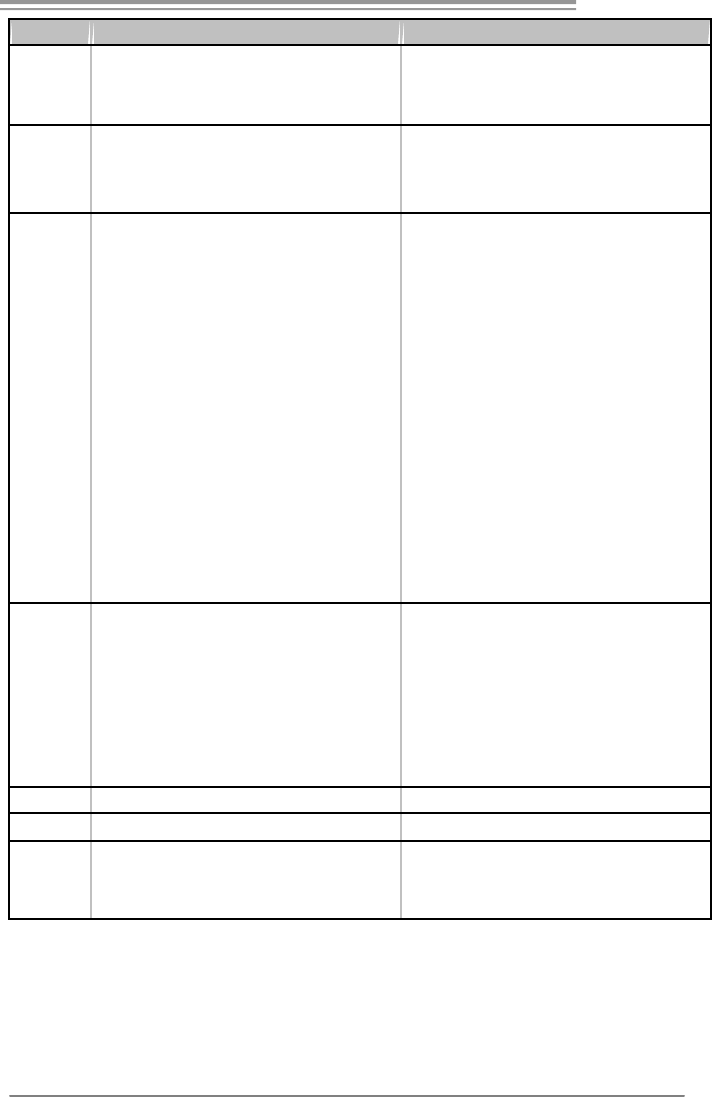
GF7025-M2
53
Ver 5.x Ver 6.x
サウンド
Codec
ALC888
7.1チャンネルオーディオアウト
ハイデフィニションオーディオのサポート
ALC662
5.1チャンネルオーディオアウト
ハイデフィニションオーディオのサポート
PCIスロット x2 PCIスロット x2
PCI Express x16スロット x1 PCI Express x16スロット x1
スロット
PCI Express x 1スロット x1 PCI Express x 1スロット x1
フロッピーコネクタ x1 フロッピーコネクタ x1
プリンタポートコネクタ x1 プリンタポートコネクタ x1
IDEコネクタ x1 IDEコネクタ x1
SA TAコネクタ x4 SATAコネクタ x4
フロントパネルコネクタ x1 フロントパネルコネクタ x1
フロントオーディオコネクタ x1 フロントオーディオコネクタ x1
CDインコネクタ x1 CDインコネクタ x1
S/PDIFアウトコネクタ x1 S/PDIFアウトコネクタ x1
CPUファンヘッダ x1 CPUファンヘッダ x1
システムファンヘッダ x1 システムファンヘッダ x1
CMOSクリアヘッダ x1 CMOSクリアヘッダ x1
USBコネクタ x3 USBコネクタ x3
シリアルポートコネクタ x1 シリアルポートコネクタ x1
電源コネクタ(24ピン) x1 電源コネクタ(24ピン) x1
オンボードコ
ネクタ
電源コネクタ(4ピン) x1 電源コネクタ(4ピン) x1
背面パネル
I/O
PS/2キーボード x1
PS/2マウス x1
VGAポート x1
DVI-Dポート x1
LANポート x1
USBポート x4
オーディオジャック x6
PS/2キーボード x1
PS/2マウス x1
VGAポート x1
DVI-Dポート x1
LANポート x1
USBポート x4
オーディオジャック x3
ボードサイズ
208 mm (幅) X 244 mm (高さ) 208 mm (幅) X 244 mm (高さ)
特殊機能 RAID 0 / 1 / 5 / 0+1 のサポート RAID 0 / 1 / 5 / 0+1 のサポート
OSサポート
Windows 2000 / XP / VISTA
Biostarは事前のサポートなしにOSサポートを追加ま
たは削除する権利を留保します。
Windows 2000 / XP / VISTA
Biostarは事前のサポートなしにOSサポートを追加ま
たは削除する権利を留保します。
2007/06/01

GF7025-M2 BIOS Setup
i
BIOS Setup ................................................................................................ 1
1 Main Menu ............................................................................................. 3
2 Standard CMOS Features..................................................................... 7
3 Advanced BIOS Features ...................................................................... 9
4 Advanced Chipset Features................................................................. 16
5 Integrated Peripherals......................................................................... 18
6 Power Management Setup................................................................... 25
7 PnP/PCI Configurations...................................................................... 29
8 PC Health Status .................................................................................. 31
9 Performance Booster Zone.................................................................. 34
GF7025-M2
1
BIOS Setup
Introduction
The purpose of this manual is to describe the settings in the Phoenix-Award™
BIOS Setup program on this motherboard. The Setup program allows users to
modify the bas ic system configuration and save these settings to CMOS RAM.
The power of CMOS RAM is supplied by a battery so that it retains the Setup
informatio n when the power is turned off.
Basic Input-Output System (BIOS) determines what a computer can do without
accessing programs from a disk. This system controls most of the input and
outp ut devices suc h as keybo ard, mouse, s erial po rts and disk drives. BIOS
activates at the first stage of the booting process, loading and executing the
operating system. Some additional features, such as virus and password
protection or chipset fine-tuning options are also included in BIOS.
The rest of this manual will to guide you through the options and settings in
BIOS Setup.
Plug and Play Support
This PHOENIX-AWARD BIOS supports the Plug and Play Version 1.0A
specification and ESCD (Extended System Configuration Data) write.
EPA Green PC Support
This PHOENIX-AWARD BIOS supports Version 1.03 of the EPA Green PC
specification.
APM Support
This PHOENIX-AWARD BIOS supports Version 1.1&1.2 of the Advanced
Power Management (APM) specification. Power management features are
implemented via the System Management Interrupt (SMI). Sleep and Suspend
power management modes are supported. Power to the hard disk drives and
video monitors can also be managed by this PHOENIX-AWARD BIOS.
GF7025-M2
2
ACPI Support
Phoenix-Award ACPI BIOS support Version 1.0b of Advanced Configuration
and Power interface specific ation (ACPI). It provides ASL code for power
management and device configuration capabilities as defined in the ACPI
specification, developed by Microsoft, Intel and Toshiba.
PCI Bus Support
This PHOENIX-AWARD BIOS also supports Version 3.0 of the Intel PCI
(Peripheral Component Interconnect) local bus specification.
DRAM Support
DDR2 SDRAM (Double Data Rate Synchronous DRAM) is supported.
Supported CPUs
This PHOENIX-AWARD BIOS supports the AMD CPU.
Using Setup
Use the arrow keys to highlight items in most of the place, press <Enter> to
select, use the <PgUp> and <PgDn> keys to change entries, press <F1> for help
and press <Esc> to quit. The following table provides more detail about how to
navigate in the Setup p rogram by using the keybo ard.
Keystroke Function
Up arro w Move to previous item
Down arrow Move to next item
Left arrow Move to the item on the left (menu bar)
Right arro w Move to the item o n the right (me nu bar)
Move Enter Move to the item you desired
PgUp key Increase the numeric value or make changes
PgDn key Decrease the numeric value or make changes
+ Key Increase the numeric value or make changes
- Key Decrease the numeric value or make changes
Esc key Main Menu – Quit and not save changes into CMOS
Status Page Setup Menu and Option Page Setup Menu – Exit
Current page and return to Main Menu
F1 key General help on Setup navigation keys
F5 key Load previous values from CMOS
F7 key Load the optimized defaults
F10 key Save all the CMOS changes and exit
GF7025-M2
3
1 Main Menu
Once you enter Phoenix-Award BIOS™ CMOS Setup Utility, the Main Menu
will appear on the screen. The Main Menu allows you to select from several
setup functions. Use the arrow keys to select amo ng the items and press <Enter>
to accept and enter the sub-menu.
Figure 1: Main Menu
Stan dard CMOS Features
This submenu contains industry standard configurable options.
!! WARNING !!
For better system performance, the BIOS firmware is being
continuous ly updated. The BIOS information described in
this manual (Figure 1, 2, 3, 4, 5, 6, 7, 8, 9) is for your
reference only. The actual BIOS information and settings on
board may be slightly different from this manual.
GF7025-M2
4
Advanced BIOS Features
This submenu allows you to configure ad vanced features of the BIOS.
Advanced Chipset Features
This submenu allows you to configure special chipset features.
Integrated Peripherals
This submenu allows you to configure certain IDE hard drive options and
Programmed Input/ Output features.
Power Management Setup
This submenu allows you to configure the power management features.
PnP/PCI Configurations
This submenu allows you to configure certain “Plug and Play” and PCI options.
PC Health Status
This sub menu allo ws you to monitor the hard ware of yo ur system.
Performance Booster Zone
This submenu allows you to change CPU Vcore Voltage and CPU/PCI clock.
(However, we suggest you to use the default setting. Changing the voltage and
clock improperly may damage the CPU o r M/B!)
Load Optimized Defaults
This selection allows you to reload the BIOS when problem occurs during
system booting sequence. These configurations are factory settings optimized
for this system. A confirmation message will be displayed before defaults are
set.
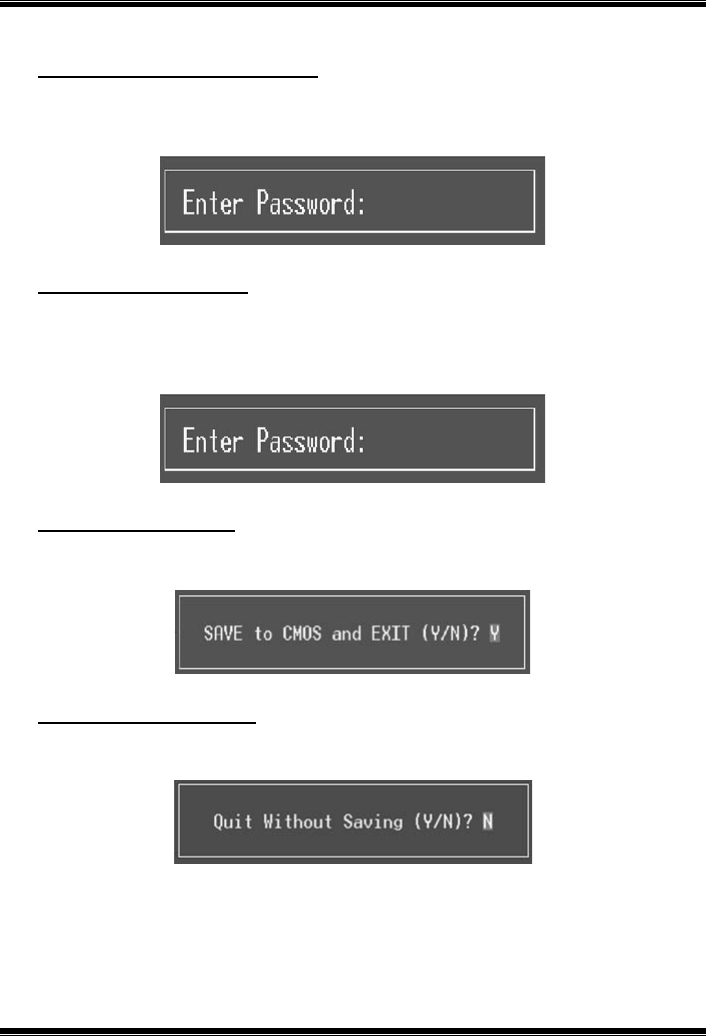
GF7025-M2
5
Set Supervisor Password
Setting the supervisor password will prohibit everyone except the supervisor
from making changes using the CMOS Setup Utility. You will be prompted with
to enter a password.
Set User Password
If the Supervisor Password is not set, then the Us er Password will function in
the same way as the Supervisor Password. If the Supervisor Password is set and
the User Password is set, the “User” will only be able to view configurations but
will not be able to change them.
Save & Exit Setup
Save all configuration changes to CMOS (memory) and exit setup. Confirmation
message will be displayed before proceeding.
Exit Without Saving
Abandon all changes made during the current session and exit setup.
Confirmation message will be displayed before proceeding.

GF7025-M2
6
Upgrade BIOS
This submenu allows you to upgrade bios.
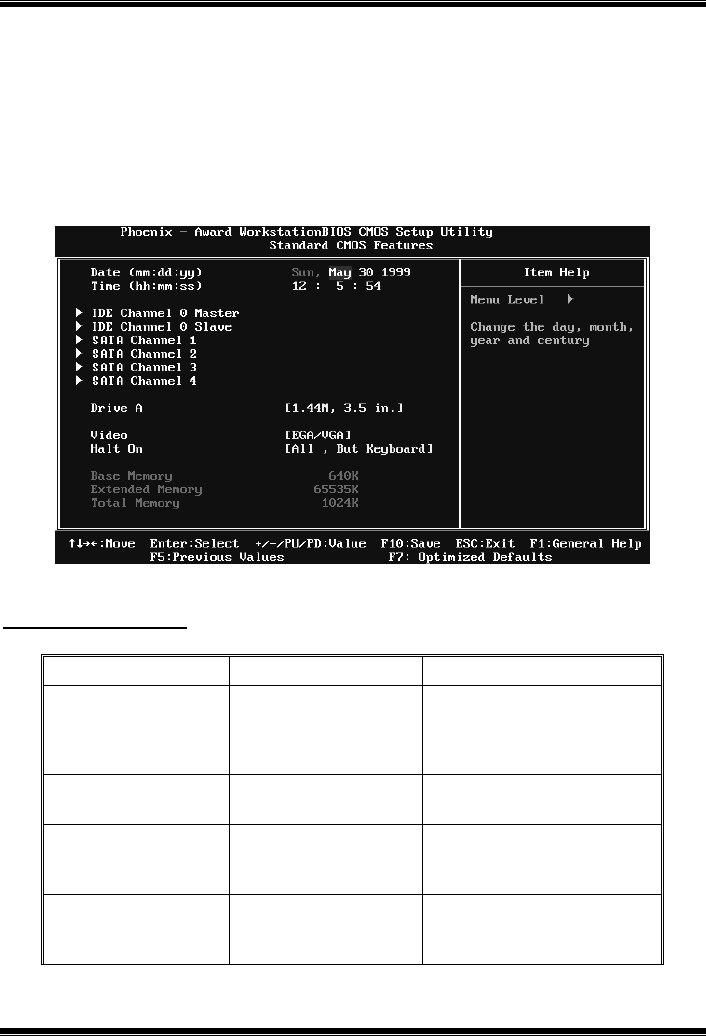
GF7025-M2
7
2 Standard CMOS Features
The items in Standard CMOS Setup Menu are divided into several categories.
Eac h category includes no, one or more than one s etup items. Use the arro w
keys to highlight the item and then use the<PgUp> or <PgDn> keys to select the
value you want in each item.
Figure 2: Standard CMOS Setup
Main Menu Selections
This table shows the items and the available options on the Main Menu.
Item Options Description
Date mm : dd : yy
Set the system date. Note
that the ‘Day’ automatically
changes when you set the
date.
Time hh : mm : ss Set the system internal
clock.
IDE Channel 0
Master
Options are in its sub
menu.
Press <Enter> to enter the
sub menu of detailed
options
IDE Channel 0
Slave
Options are in its sub
menu.
Press <Enter> to enter the
sub menu of detailed
options.

GF7025-M2
8
Item Options Description
SATA Channel 1~4 Options are in its sub
menu.
Press <Enter> to enter the
sub menu of detailed
options.
Drive A
360K, 5.25 in
1.2M, 5.25 in
720K, 3.5 in
1.44M, 3.5 in
2.88M, 3.5 in
None
Select the type of floppy
disk drive installed in your
system.
Video
EGA/VGA
CGA 40
CGA 80
MONO
Select the default video
device.
Halt On
All Errors
No Errors
All, but Keyboard
All, but Diskette
All, but Disk/ Key
Select the situation in which
you want the BIOS to stop
the POST process and
notify you.
Base Memory N/A
Displays the amount of
conventional memory
detected during boot up.
Extended Memory N/A
Displays the amount of
extended memory detected
during boot up.
Total Memory N/A Displays the total memory
available in the system.
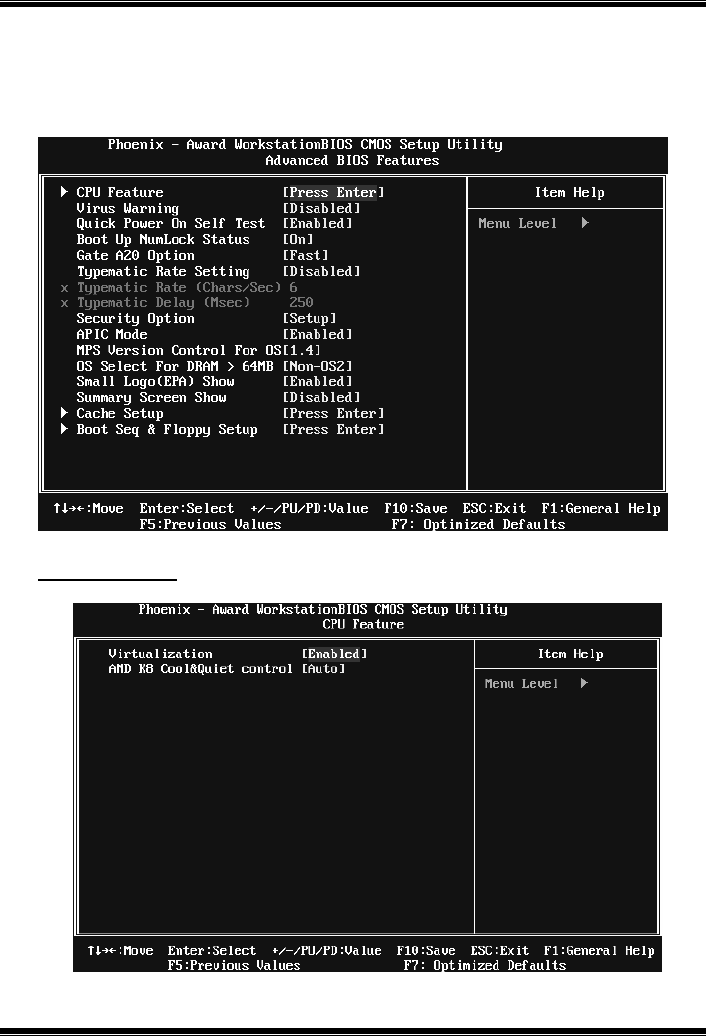
GF7025-M2
9
3 Advanced BIOS Features
Figure 3: Advanced BIOS Setup
CPU Feature
GF7025-M2
10
Virtualization
The item allows you control the Virtualization function.
The Choices: Enabled (default), Disabled.
AMD K8 Cool&Quiet control
The item allows you select K8 Cool’n’Quiet control.
The Choices: Auto (default), Disabled.
Virus Warning
This option allows you to choose the VIRUS Warning feature that is used to
protect the IDE Hard Disk boot sector. If this function is enabled and an attempt
is made to write to the boot s ector, BIOS will display a warning message on the
screen and sound an alarm beep.
Disabled (default) Virus protection is disabled.
Enabled Virus protection is activated.
Quick Power On Self Test
Enabling this option will cause an abridged version of the Power On Self-Test
(POST) to execute after yo u po wer up the co mputer.
Disabled Normal POST.
Enabled (default) Enable quic k POST.
Boot Up NumLock Status
Selects the NumLock State after the system switc hed on.
The Choices:
On (d efault) Nump ad is number keys.
Off Numpad is arrow keys.
Gate A20 Option
Select if chipset or keyboard controller should control Gate A20.
Normal A pin in the keyboard controller controls GateA20.
Fast (default) Lets chipset control Gate A20.

GF7025-M2
11
Typematic Rate Setting
When a key is held down, the keystroke will repeat at a rate determined by the
keyboard controller. When enabled, the typematic rate and typematic delay can
be configured.
The Choices: Disabled (default), Enabled.
Typematic Rate (Chars/Sec)
Sets the rate at whic h a keystroke is repeated when yo u ho ld the key down.
The Choices: 6 (default), 8, 10, 12, 15, 20, 24, 30.
Typematic Delay (Msec)
Sets the delay time after the key is held down before it begins to repeat the
keystroke.
The Choices: 250 (default), 500, 750, 1000.
Security Option
This option will enable only individuals with passwords to bring the system
online and/or to use the CMOS Setup Utility.
System: A password is required for the system to boot and is also
required to access the Setup Utility.
Setup (default): A password is required to access the Setup Utility only.
This will only apply if passwords are set from the Setup main menu.
APIC MODE
Selecting Enabled enables APIC device mode reporting from the BIOS to the
operating system.
The Choices: Enabled (default), Disabled.
MPS Version Control For OS
The BIOS supports version 1.1 and 1.4 of the Intel multiprocessor specification.
Selec t version s upported by the operation system running on this computer.
The Choices: 1.4 (default), 1.1.
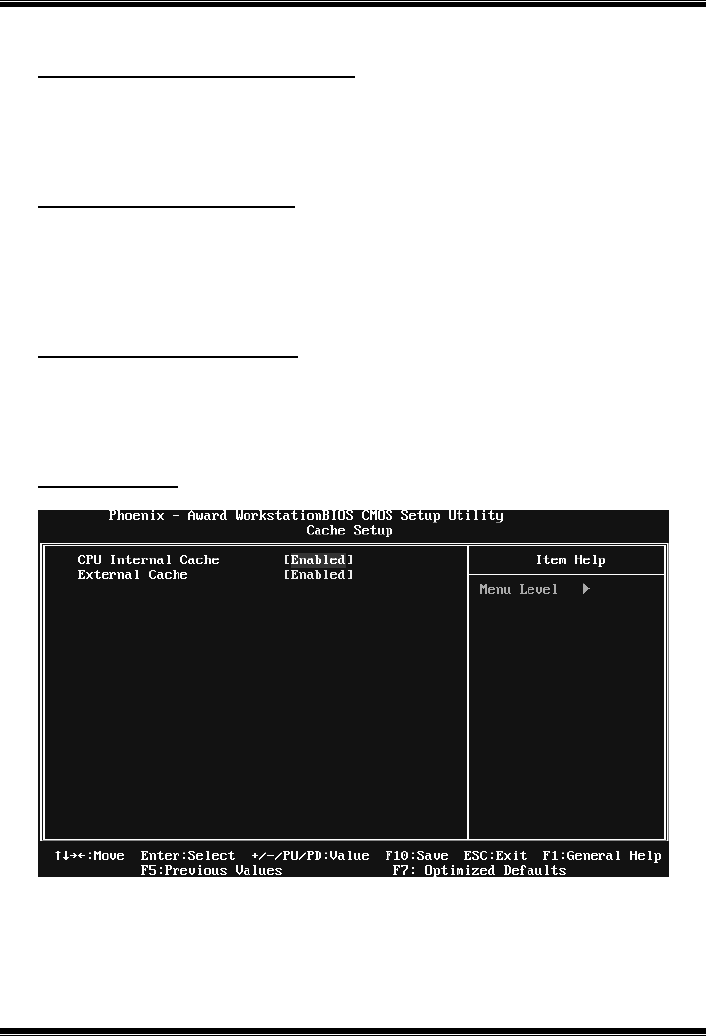
GF7025-M2
12
OS Select For DRAM > 64MB
A choice other than Non-OS2 is only used for OS2 systems with memory
exceeding 64MB.
The Choices: Non-OS2 (default), OS2.
Small Logo(EPA) Show
This item allows you to select whether the “Small Logo” shows. Enabled
(default) “Small Logo” shows when system boots up. Disabled No “Small
Logo” shows when system boots
The Choices: Enabled (default), Disabled.
Summary Screen Show
This item allows you to enable/disable the summary screen. Summary screen
means system configuration and PCI device listing.
The Choices: Disabled (default), Enabled.
Cache Setup
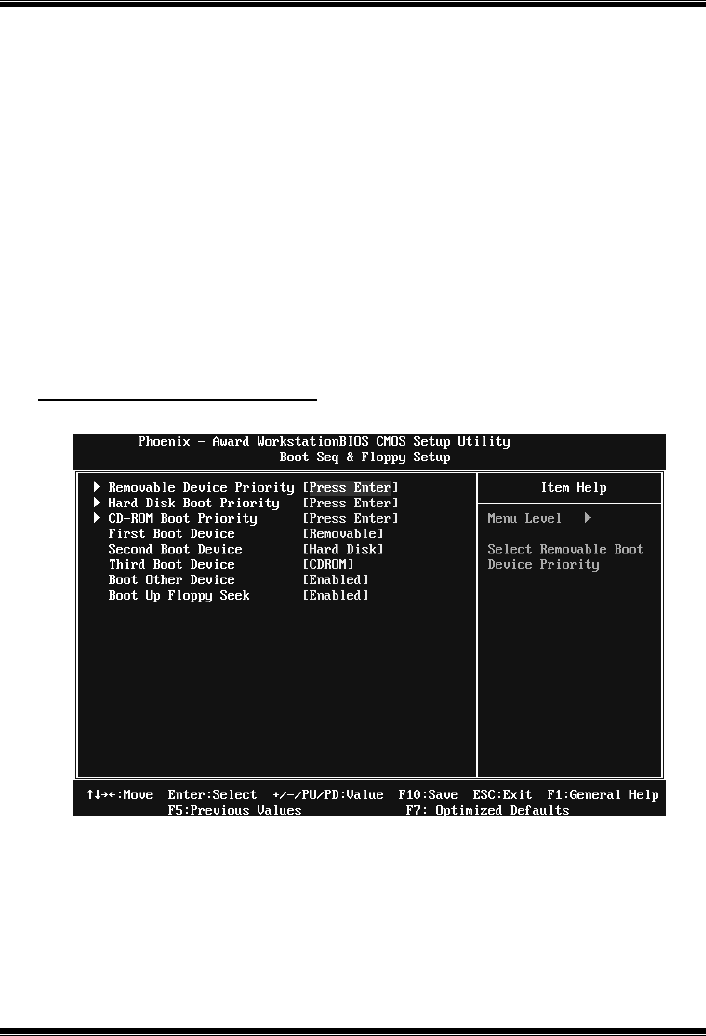
GF7025-M2
13
CPU Internal Cache
Depending on the CPU/chipset in use, you may be able to increase memory
access time with this opt ion.
Enabled (default) Enable cache.
Disabled Disable cache.
External Cache
This option enables or disables “Level 2” secondary cache on the CPU, which
may improve performance.
Enabled (default) Enable cache.
Disabled Disable cache.
Boot Seq & Floppy Setup
This item allows you to setup boot sequence & Floppy.
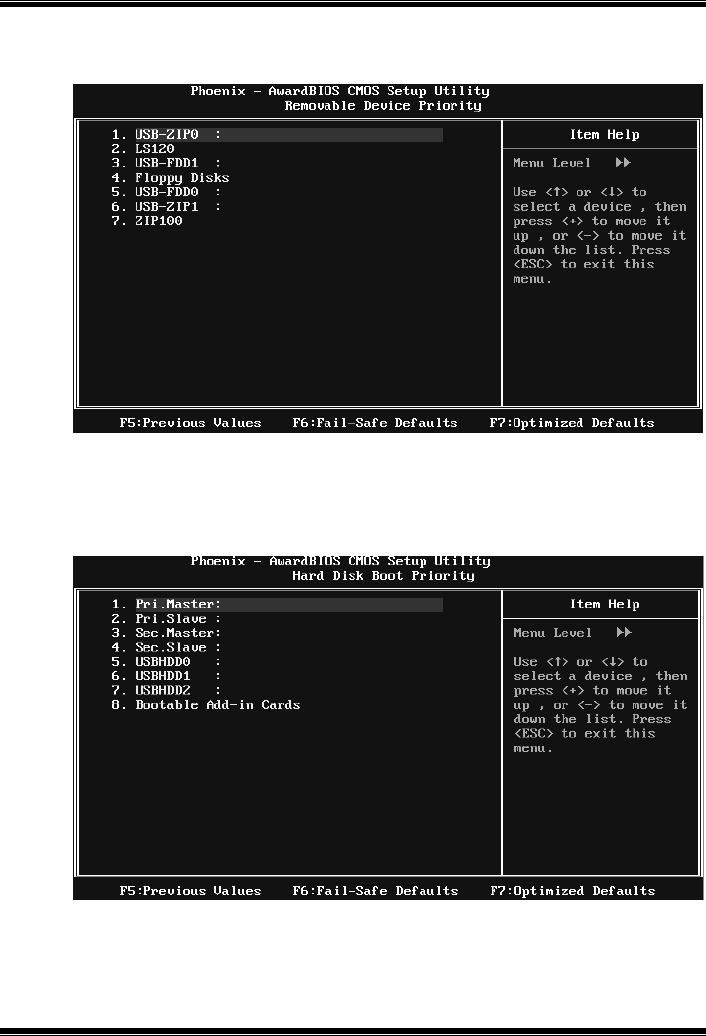
GF7025-M2
14
Removable Device Priority
Select Removable Boot Device Priority.
The Choices: Floppy Disks, Zip100, USB-FDD0, USB-FDD1, USB-ZIP0,
USB-ZIP1, LS120.
Hard Disk Boot Priority
The BIOS will attempt to arrange the Hard Disk boot sequence automatically.
You can change the Hard Disk booting sequence here.
The Choices: Pri. Master, Pri. Slave, Sec. Master, Sec. Slave, USB HDD0, USB
HDD1, USB HDD2, and Bootable Add-in Cards.
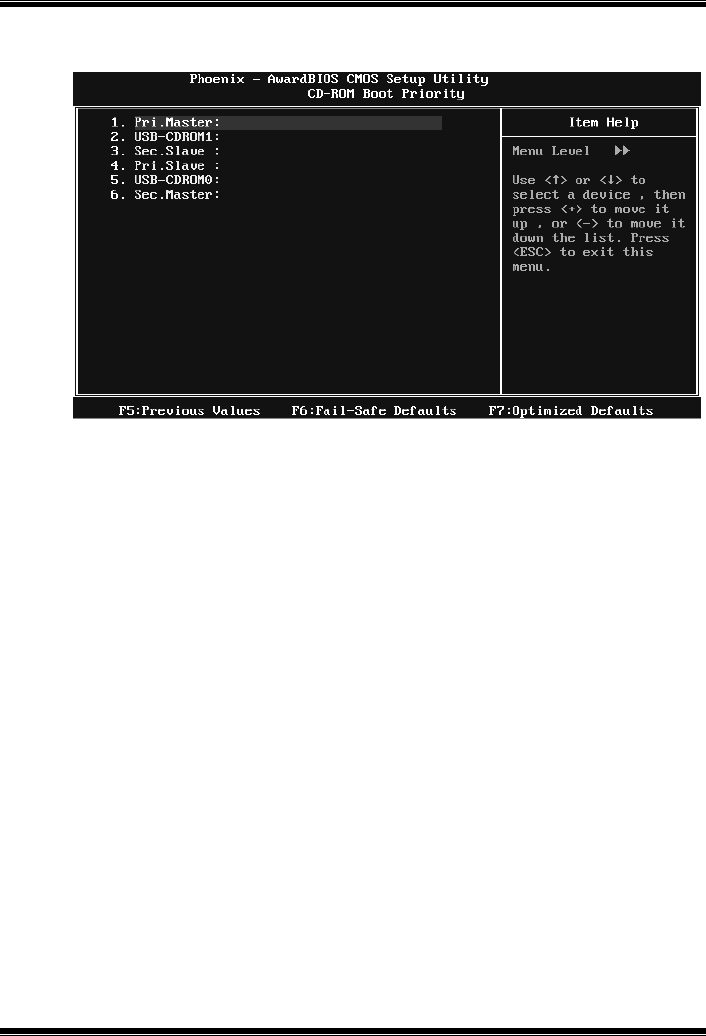
GF7025-M2
15
CD-ROM Boot Priority
The Choices: Pri. Master, Pri. Slave, Sec. Master, Sec. Slave, USB CDROM0,
USB CDROM 1.
First/Second/Third Boot Device
The BIOS will attempt to load the operating system in this order.
The Choices: Removable, Hard Disk, CDROM, Legacy LAN, Disabled.
Boot Other Device
When enabled, BIOS will try to load the operating system from other device
when it failed to load from the three devices above.
The Choices: Enabled (default), Disabled
Boot Up Floppy Seek
When enabled, System will test the floppy drives to determine if they have 40
or 80 tracks during boot up. Disabling this option reduces the time it takes to
boot-up.
The Choices: Enabled (default), Disabled.
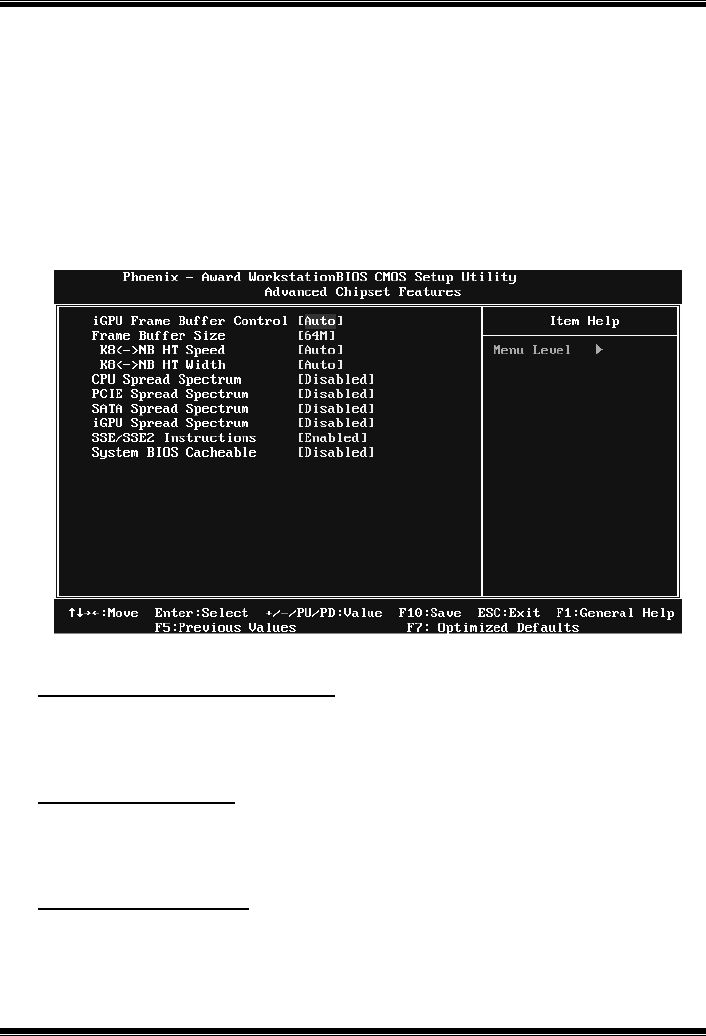
GF7025-M2
16
4 Advanced Chipset Features
This sub menu allo ws you to configure the spec ific features of the chipset
installed on your system. This chipset manage bus speeds and access to system
memory resources, such as DRAM. It also coordinates communications with the
PCI bus. The default settings that came with your system have been optimized
and therefore sho uld not be changed unless you are suspicious that the settings
have been changed incorrectly.
Figure 4: Advanced Chipset Setup
iGPU Frame Buffer Control
This item allows you to control the iGPU frame buffer.
The Choices: AUTO (default), Manual.
Frame Buffer Size
This item allows you to choose the frame buffer size of on-chip VGA.
The Choices: 64M (default), 16M, 32M, 128M, 256M, Disabled.
K8<->NB HT Speed
The Choices: AUTO (default), 1x, 2x, 3x, 4x, 5x.
GF7025-M2
17
K8<->NB HT Width
The Choices: AUTO (default), ↓8↑8, ↓16↑16.
CPU Spread Spectrum
This item allows you to select the CPU Spread Spectrum function.
The Choices: 0.50% H.Kiss Cntr, 0.50% H.Kiss Down, 0.75% H.Kiss Cntr,
0.75% H.Kiss Down, Disabled (default).
PCIE Spread Spectrum
This item allows you to select the PCIE Spread Spectrum function.
The Choices: Disabled (default), Linear Down.
SATA Spread Spectrum
This item allows you to select the SATA Spread Spectrum function.
The Choices: Disabled (default), Linear Down.
iGPU Spread Spectrum
This item allows you to select the iGPU Spread Spectrum function.
The Choices: Disabled (default), 1%, 2%, 3%.
SSE/SSE2 instructions
This item allows you to enable/disable SSE/SSE2 instruction.
The Choices: Enabled (default), Disabled.
System BIOS Cacheable
Selec ting the “Enabled” op tion allows caching of the system BIOS ROM at
F0000h-FFFFFh, which is able to improve the system performance. However,
any programs that attempts to write to this memory block will cause conflicts
and result in s ystem errors.
The Choices: Disabled (default), Enabled.
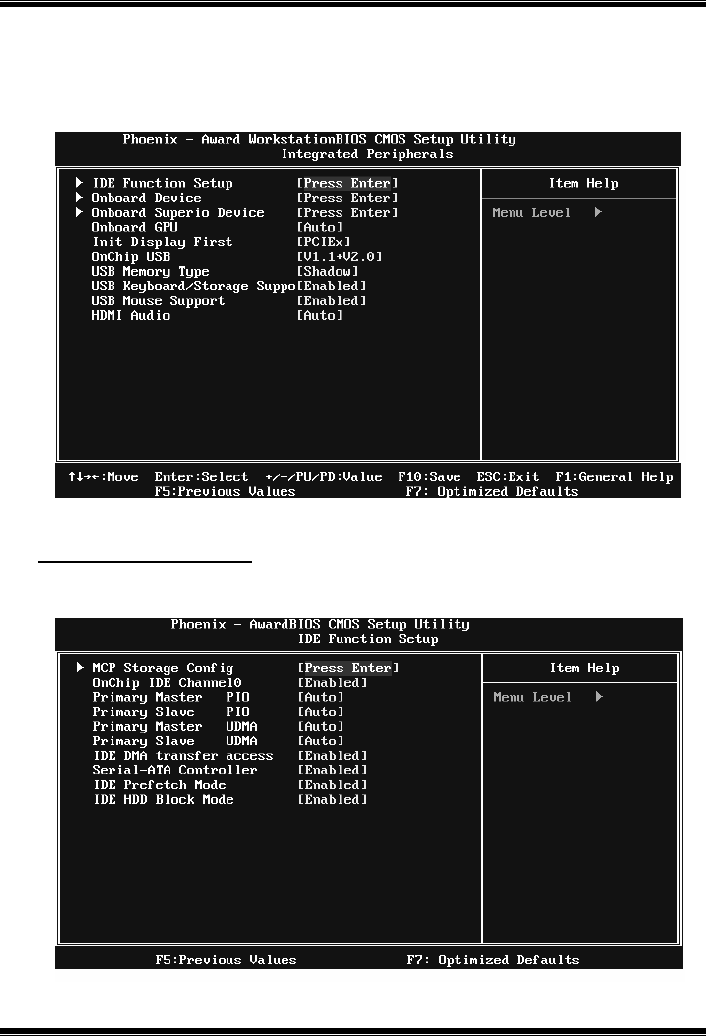
GF7025-M2
18
5 Integrated Peripherals
Figure 5. Integrated Peripherals
IDE Function Setup
Highlight the “Press Enter” label next to the “IDE Function Setup” label and
press enter key will take you a s ubmenu with the fo llowing options:
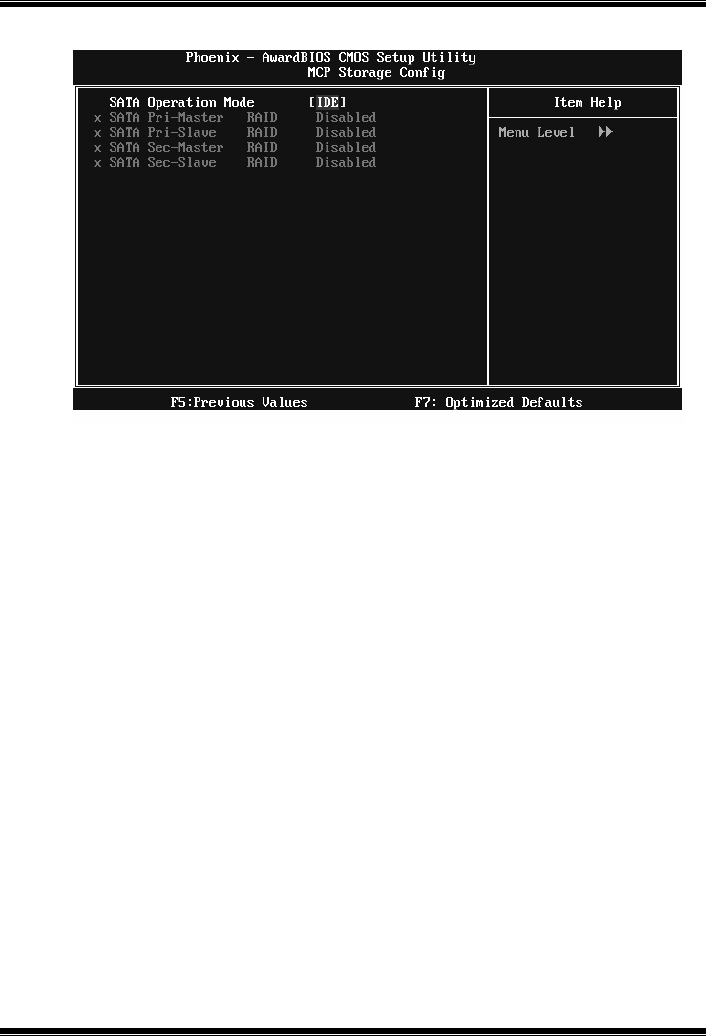
GF7025-M2
19
MCP Storage Config
SATA Operation Mode
This option allows you to choose SATA function.
The Choices: IDE (default), RAID, AHCI, Linux AHCI.
SATA Pri-/Sec- Master/Slave RAID
This option allows you to enable or disable SATA Primary/Secondary RAID.
The Choices: Disabled (default), Enabled.
On-chip IDE Channel 0
The motherboard chipset contains a PCI IDE interface with support for two
IDE channels. Select “Enabled” to activate the first and/or second IDE interface.
Select “Disabled” to deactivate an interface if you are going to install a primary
and/or secondary add-in IDE interface.
The Choices: Enabled (default), Disabled.
Primary Master/Slave PIO
The IDE PIO (Programmed Input / Output) fields let you set a PIO mode (0-4)
for each of the IDE devices that the onboard IDE interface supports. Modes 0
to 4 will increase performance progressive ly. In Auto mode, the system
automatically determines the best mode for each device.
The Choices: Auto (default), Mode0, Mode1, Mode2, Mode3, Mode4.

GF7025-M2
20
Primary Master/Slave UDMA
Ultra DMA function can be implemented if it is supported by the IDE hard
drives in your system. As well, your operating environment requires a DMA
driver (Windows 95 or OSR2may need a third party IDE bus master driver). If
your hard drive and your system software both support Ultra DMA, select Auto
to enable BIOS support.
The Choices: Auto (default), Disabled.
IDE DMA Transfer Access
This item allows you to enable or disable the IDE DMA transfer access.
The Choices: Enabled (default), Disabled.
Serial-ATA Controller
This item allows you to enable or disable the Serial ATA function.
The Choices: Enabled (default), Disabled.
IDE Prefetch Mode
The “onboard” IDE drive interfaces supports IDE prefetch function for faster
drive access. If the interface on your drive does not support prefetching, or if
you install a primary and/or secondary add-in IDE interface, set this option to
“Disabled”.
The Choices: Enabled (default), Disabled.
IDE HDD Block Mode
Block mode is also called block transfer, multiple commands, or multiple
sectors read / write. If your IDE hard drive supports block mode (most new
drives do), select Enabled for automatic detection of the optimal number of
block mode (most new drives do), select Enabled for automatic detection of the
optimal number of block read / write per sector where the drive can support.
The Choices: Enabled (default), Disabled.
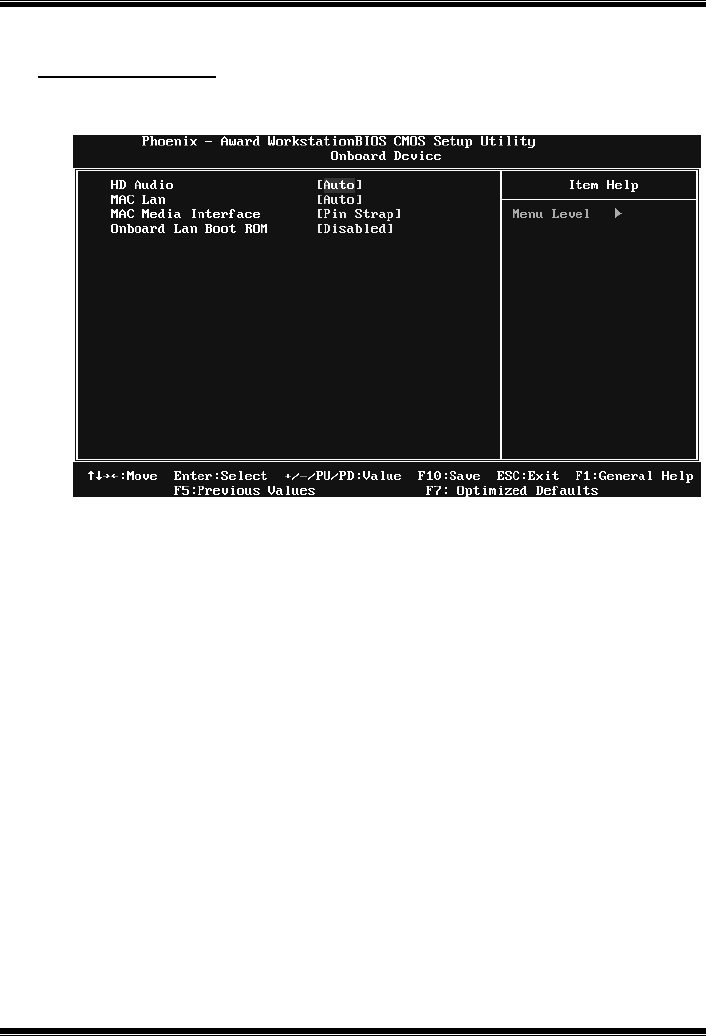
GF7025-M2
21
Onboard Device
Highlight the “Press Enter” label next to the “Onboard Device” label and press
the enter key will take you a submenu with the following options:
HD Audio
This option allows you to control the onboard HD audio.
The Choices: Auto (default), Disabled.
MAC LAN
This option allows you to control the onboard LAN.
The Choices: Auto (default), Disabled.
MAC Media Interface
T his option allows you to select the MAC media interface..
The Choices: Pin Strap (default), MII, RGMII.
Onboard LAN Boot ROM
This item allows you to enable or disable the Onboard LAN Boot ROM.
The Choices: Disabled (default), Enabled.
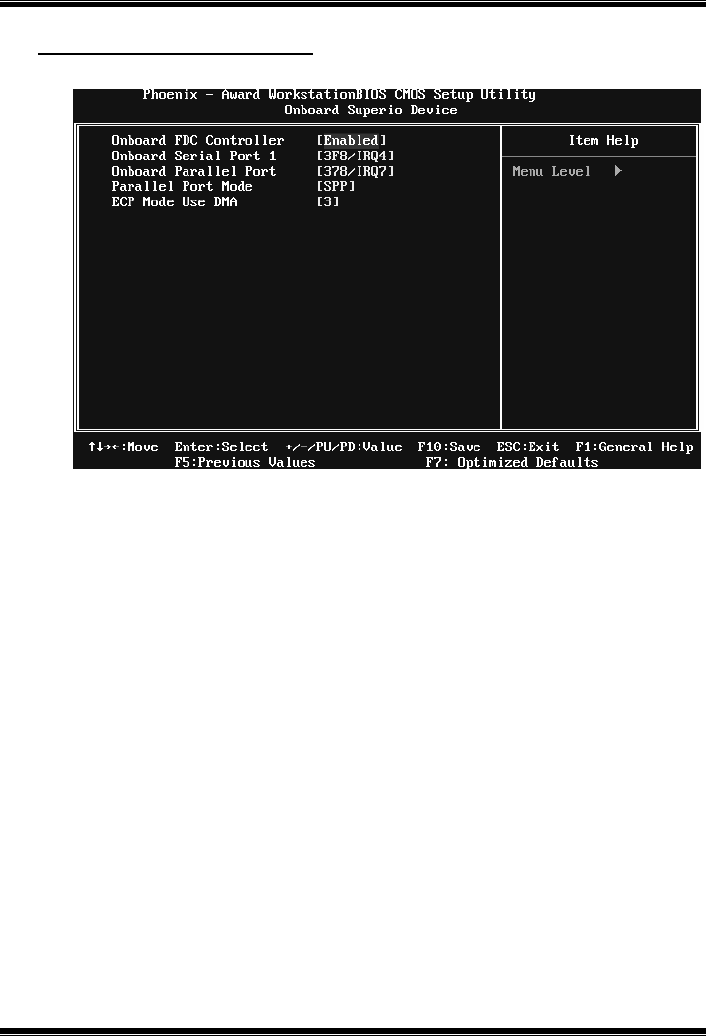
GF7025-M2
22
Onboard SuperIO Device
Press Enter to configure the Super I/O device.
Onboard FDC Controller
Select enabled if your system has a floppy disk controller (FDC) installed on
the system board and you wish to use it. If you installed another FDC or the
system uses no floppy drive, select disabled in this field.
The Choices: Enabled (default), Disabled.
Onboard Serial Port 1
Select an address and corresponding interrupt for the first and second serial
ports.
The Choices: 3F8/IRQ4 (default), Disabled, 2F8/IRQ3, 3E8/IRQ4, 2E8/IRQ3,
Auto.
Onboard Parallel Port
This item allows you to determine access onboard parallel port controller with
which I/O Address.
The Choices: 378/IRQ7 (default), 278/IRQ5, 3BC/IRQ7, Disabled.
GF7025-M2
23
Parallel Port Mode
This item allows you to determine how the parallel port should function. The
default value is SPP.
The Choices:
SPP (default) Using Parallel port as Standard Printer P ort.
EPP Usin g Parallel P ort as Enhanced P aralle l P ort.
ECP Usin g Parallel port as Extended Capabilities P ort.
ECP +EPP Usin g Parallel port as ECP & EPP mode.
ECP Mode Use DMA
Select a DMA Channel for the port.
The Choices: 3 (default), 1.
Onboard GPU
This item allows you to control the onboard GPU.
The Choices: Auto (default), Always Enable.
Init Display First
This item allows you to decide to active whether PCI Slot or on-chip VGA first.
The Choices: PCIEx (default), PCI Slot, Onboard.
OnChip USB
This option should be enabled if your system has a USB installed on the system
board. You may need to disable this feature if you add a higher performance
controller.
The Choices: V1.1+V2.0 (default), Disabled, V1.1
USB Memory Type
This option allows you to choose the USB memory type.
The Choices: SHADOW (default), Base Memory(640K).
GF7025-M2
24
USB Keyboard/Storage Support
This item allows you to enable or disable the USB Keyboard / storage Legac y
Support.
Enabled (default) Enable USB Keyboard / storage Support.
Disabled Disable USB Keyboard/ storage Support.
USB Mouse Support
This item allows you to enable or disable the USB mous e Legacy S upport.
Enabled (default) Enable USB mouse Support.
Disabled Disable USB mouse Support.
HDMI Audio
This item allows you to control the audio function of HDMI.
The Choices: Auto (default), Disabled.
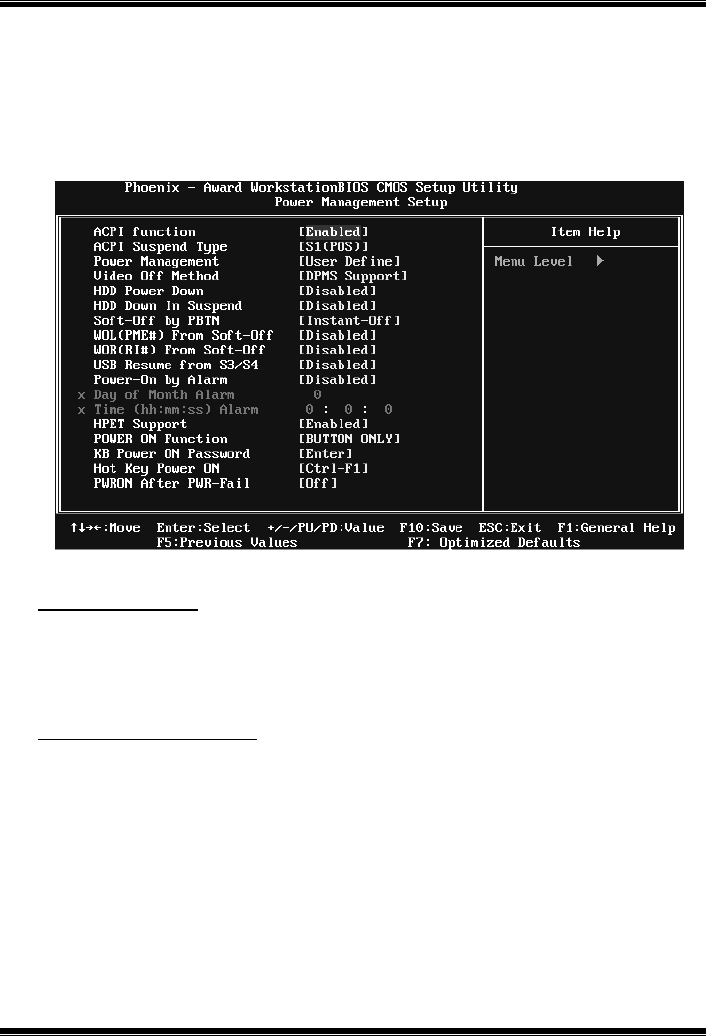
GF7025-M2
25
6 Power Management Setup
The Power Management Setup Menu allows you to configure your system to
utilize energy conservation and power up/power down features.
Figure 6. Power Management Setup
ACPI Function
This item displays the status of the Advanced Configuration and Po wer
Management (ACPI).
The Choices: Enabled (default), Disabled.
ACPI Suspend Type
The item allows you to select the suspend type under the ACPI operating
system.
The Choices: S1 (POS) (default) Power on Suspend
S3 (STR) Suspend to RAM
S1 & S3 POS+STR
GF7025-M2
26
Power Management
This category allows you to select the power saving method and is directly
related to the fo llo wing mod es :
1. HDD Po wer Do wn.
2. Suspend Mode.
There are three options of Power Management, three of which have fixed mode
settings
Min. Power Saving
Minimum power management.
Suspend Mode = 1 hr.
HDD Power Down = 15 min
Max. Power Saving
Maximum power management only available for sl CPU’s.
Suspend Mode = 1 min.
HDD Power Down = 1 min.
Use r Define (default)
Allow you to set each option individually.
When you choose user define, you can adjust each of the item from 1 min. to 1
hr. except for HDD Power Down which ranges from 1 min. to 15 min.
Video Off Method
This option determines the manner when the monitor goes blank.
V/H SYNC+Blank
This selection will cause the system to turn off the vertical and horizontal
synchronization ports and write blanks to the video buffer.
Blank Screen
This option only writes blanks to the video buffer.
DPMS S uppo rt (default)
Initial display power management signaling.
HDD Power Down
When enab led, the hard -disk drives will power down after a set time of system
inactivity. All other devices remain active.
The Choices: Disabled (default), 1 Min, 2 Min, 3 Min, 4 Min, 5 Min, 6 Min, 7
Min, 8 Min, 9 Min, 10 Min, 11 Min, 12 Min, 13 Min, 14 Min, 15Min.

GF7025-M2
27
HDD Down In Suspend
This option allows you to enabled or disabled the HDD power down function in
suspend mode.
The Choices: Disabled (default), Enabled
Soft-Off by PBTN
This item determines the behavior of system power button. Instant off turn off
the po wer immediately, and Delay 4 Sec. will req uire you to press and hold the
power button for 4 seconds to cut off the system power.
The Choices: Delay 4 Sec, Instant-Off (default).
WOL(PME#)/ From Soft-Off
This item allows you to enable or dis able Wake On LAN from Soft-Off
function.
The Choices: Disabled (default), Enabled.
WOR(RI#) From Soft-Off
This item allows you to enable or dis able Wake On Ring from Soft-Off function.
The Choices: Disabled (default), Enabled.
USB Resume From S3/S4
This item allows you to enab le or d isabled the USB resume fro m S3/S4
function.
The Choices: Disabled (default), Enabled.
Power-On by Alarm
This function is for setting date and time for your computer to boot up. When
enabled, you can choose the date and time to boot up the s ystem.
The Choices: Disabled (default), Enabled.
GF7025-M2
28
Date (of Month) Alarm
You can c hoos e which month the s ystem will boot up.
Time (hh:mm:ss) Alarm
You can c hoos e the system boot up time, input hour, minute and seco nd to
specify.
Note: If yo u have c ha nge the setting, you must le t the system boo t up until it
goes to the operating system, before this function will work.
HPET Support
This option allows you to disabled or enables the High Precision Event Timer.
The Choices: Enabled (default), Disabled.
POWER ON Function`
This item allows you to choose the power on method.
The Choices: Button Only(default), Password, Hot Key, Mous e Mo ve, Mouse
Click, Any Key, Keyboard 98.
KB Power ON Password
Input password and press Enter to set the Keyboard power on password.
Hot Key Power ON
Choose the Hot Key combination to boot up the system.
The Choices: Ctrl-F1(default), Ctrl-F2, Ctrl-F3, Ctrl-F4, Ctrl-F5, Ctrl-F6,
Ctrl-F7, Ctrl-F8, Ctrl-F9, Ctrl-F10, Ctrl-F11, and Ctrl-F12.
PWRON After PWR-Fail
This setting specifies how your system should behave after a power fail or
interrupts occurs. By c hoos ing off will leave the computer in the power off state.
Choosing On will reboot the computer. Former-Sts will restore the system to the
status before power failure or interrupt occurs.
The Choices: Off (default), On, Former-Sts.
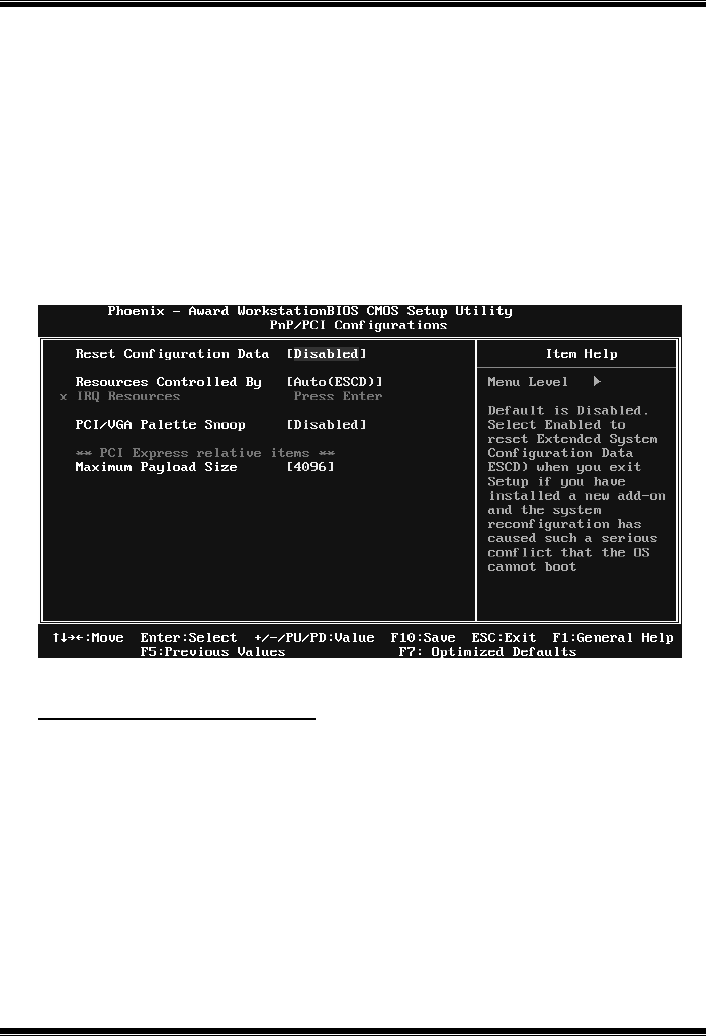
GF7025-M2
29
7 PnP/PCI Configurations
This section describes configuring the PCI bus system. PCI, or Personal
Computer Interconnect, is a system which allows I/O devices to op erate at
speeds nearing the speed o f the CPU itself uses when commun icating with its
own special components. This section covers some very technical items and it is
strongly recommended that only experienced users should make any changes to
the default settings.
Figure 7: PnP/PCI Configurations
Reset Configuration Data
The system BIOS suppo rts the PnP feature which req uires the s ystem to record
which resources are ass igned and protects resources fro m co nflict.
Every peripheral device has a node, which is called ESCD. This node records
which resourc es are ass igned to it. The sys tem needs to record and update ESCD
to the memory loc ations. These locations are reserved in the system BIOS. If the
Disabled (default) option is chosen, the system‘s ESCD will update only when
the new co nfiguration varies from the last one. If the Enab led option is chosen,
the system is forced to update ESCDs and then is automatically set to the
“Dis abled” mode.
GF7025-M2
30
The above settings will be shown on the screen only if “Manual” is chosen for
the resourc es contro lled by function.
Legacy is the term, which signifies that a resource is assigned to the ISA Bus
and provides non-PnP ISA add-on cards. PCI / ISA PnP signify that a resource
is assigned to the PCI Bus or provides for ISA PnP add-on cards and
peripherals.
The Choices: Disabled (default), Enabled.
Resources Controlled By
By Choos ing “Auto(ESCD)” (default), the system BIOS will detect the system
resources and automatically assign the relative IRQ and DMA channel for each
peripheral. By Choosing “Manual”, the user will need to assign IRQ & DMA for
add-on cards. Be sure that there are no IRQ/DMA and I/O port conflicts.
The Choices: Auto (ESCD) (default), Manual.
IRQ Resources
This submenu will allow you to assign each system interrupt a type, depending
on the type o f device using the interrupt. When you press the “Press Enter” tag,
you will be d irected to a submenu that will allo w you to configure the system
interrupts. This is only configurable when “Resources Controlled By” is set to
“Manual”.
IRQ-5 assigned to PCI Device
IRQ-7 assigned to PCI Device
IRQ-9 assigned to PCI Device
IRQ-10 assigned to PCI Device
IRQ-11 assigned to PCI Device
IRQ-14 assigned to PCI Device
PCI / VGA Palette Snoop
Some old graphic controllers need to “snoop” on the VGA palette and then map
it to their display as a way to provide boot information and VGA compatibility.
This item allows such snooping to take place.
The Choices: Disabled (default), Enabled
Ma xi mu m Pa yload Size
Set the maximum p ayload size for Transaction packets (TLP).
The Choice: 4096 (default.), 128, 256, 512, 1024, 2048.
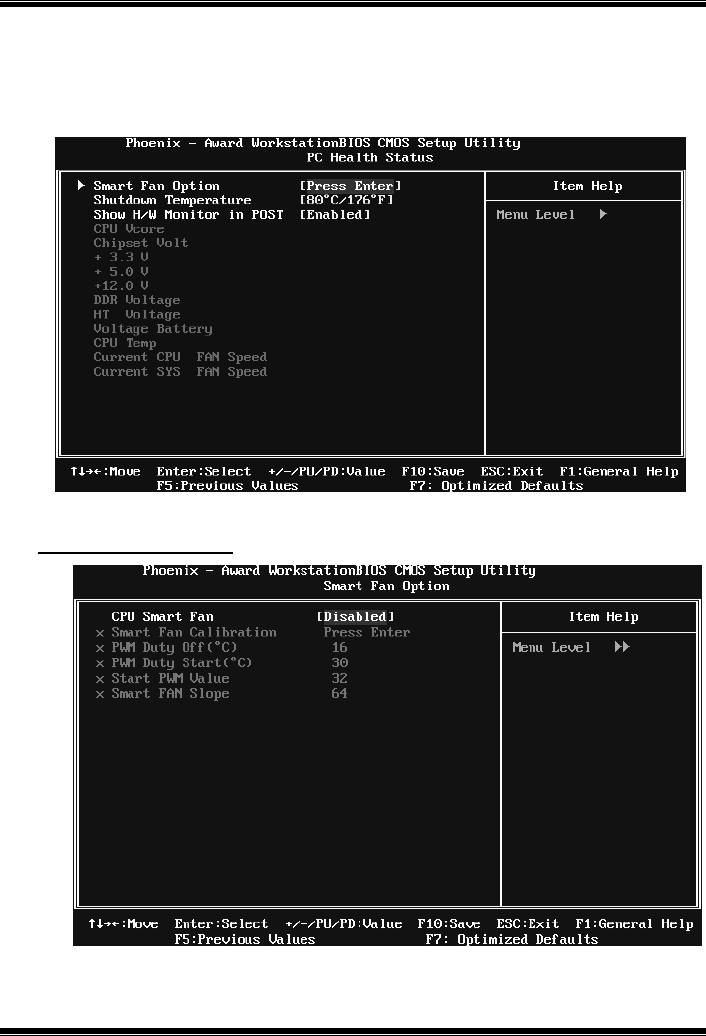
GF7025-M2
31
8 PC Health Status
Figure 8: PC Health Status
Smart Fan Option

GF7025-M2
32
CPU Smart Fan
T his item allows you to control the CPU Fan.
The Choices: Disabled (default), Auto, 4-pin, 3-pin..
Smart Fan Calibration
Choose this item and then the BIOS will auto test and detect the CPU fan
functions and show CPU fan speed.
PWM Duty Off<℃>
If the CPU Temperature is lower than the set value, FAN will turn off.
The Choices: Min=0,.Max=127, Key in a DEC number.
PWM Duty Start<℃>
CPU fan starts to work under smart fan function when arrive this set
value.
The Choices: Min=0,.Max=127, Key in a DEC number.
Start PWM Value
When CPU temperature arrives to the set value, the CPU fan will work
under Smart Fan Function mode. The range is from 0~127, with an
interval of 1.
The Choices: Min=0,.Max=127, Key in a DEC number.
Smart Fan Slope
Increasing the value of slope PWM will raise the speed of CPU fan.
The Choices: Min=1,.Max=127, Key in a DEC number.
Shutdown Temperature
This item allows you to set up the CPU shutdown Temperature. This item is
only effective under Windows 98 ACPI mode.
The Choices: Disabled , 60℃/ 140℉, 65℃/ 149℉, 70℃/ 158℉, 75℃/ 167℉,
80℃/ 176℉(default), 85℃/ 185℉, 90℃/ 167℉.
Show H/W Monitor in POST
If you computer contains a monitoring system, it will show PC health status
during POST stage. The item offers several different delay times.
The Choices: Enabled (default), Disabled.

GF7025-M2
33
CPU Vcore, Chipset Volt, +3.3V, +5.0V, +12.0V, DDR Voltage,
HT Voltage, Voltage Battery
Detect the system’s voltage status automatically.
CPU Temp
This field disp lays the c urrent temperature of CPU.
Current CPU FAN Speed
This field disp lays the current speed o f CPU fan.
Current SYS FAN Speed
This field disp lays the current speed SYSTEM fan.
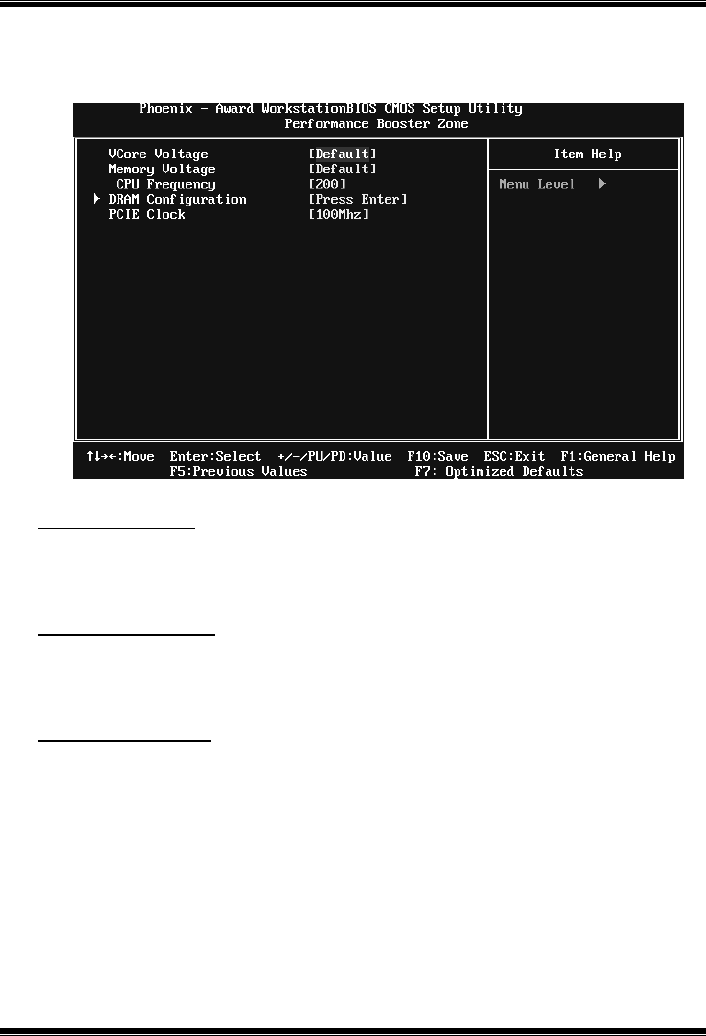
GF7025-M2
34
9 Performance Booster Zone
VCore Voltage
This item allows you to adjust the CPU Vcore voltage.
The Choices: Default (default), +3.3%, +6.6%, +10%
Memory Voltage
This item allows you to adjust the memory voltage.
The Choices: Default (default), 2.000V, 2.045V, 2.100V
CPU Frequency
This item allows you to select the CPU Frequency.
The Choices: 200 (default); Min=200, Max=450, Key in a DEC number.
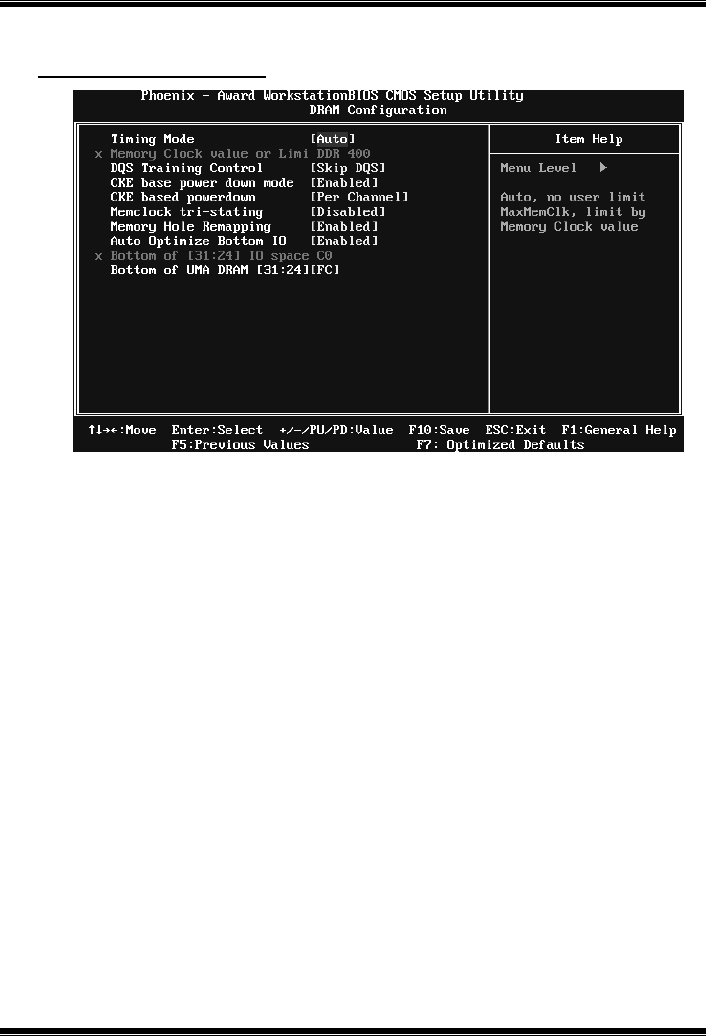
GF7025-M2
35
DRAM Configuration
Timing Mode
T his item allows you to choose to manually or automatically regu late the DDR
Timing.
The Choices: Auto (default), MaxMemClk.
Memory Clock Value OR Limi
The Choices: DDR 400 (default), DDR 533, DDR 667, DDR 800.
DQS Training Control
The Choices: Perform DQS, Skip DQS (default).
CKE base power down mode
The Choices: Enabled (default), Disabled.
CKE based power down
The Choices: Per Channel (default), Per CS.
Memclock tri-stating
The Choices: Disabled (default), Enabled.
GF7025-M2
36
Memory Hole Remapping
The Choices: Enabled (default), Disabled.
Auto Optimize Bottom IO
The Choices: Enabled (default), Disabled.
Bottom of [31:24] IO space
The Choices: C0 (default); Min=0000, Max=00FF, key in a HEX number.
Bottom of UMA DRAM [31:24]
The Choices: FC (default); Min=0000, Max=00FC, key in a HEX number.
PCIE Clock
This item allows you to select the PCIE clock.
The Choices: 100Mhz (default), 101Mhz~150Mhz.
