Blackstar Amplification CZBT03 Bluetooth Receiver User Manual Manual
Blackstar Amplification Ltd Bluetooth Receiver Manual
Manual
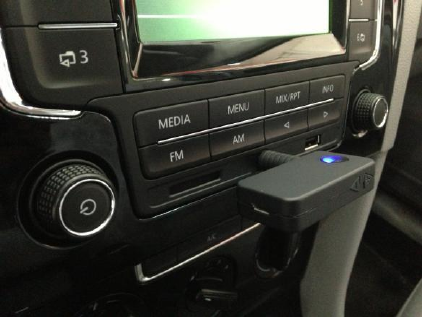
Car Bluetooth Music Receiver
User Manual
Preface
Thank you for the purchase of our products! Please read this manual carefully to get
the details how to operate the device correctly. Finally, save it properly for future use!
Notes
1.
The
battery
may
fail
for
new
machine
or
machine
which
has
not
been
used
for
quite a long time. If it occurs, connect it to USB of PC or charge it before use it
normally.
2.
Keep
it
far
away
from
high
temperature
and
damp
environment;
place
it
in
ventilated and dry environment. Exposure to rain and severe shock is forbidden!
3.
Do
not
open
the
cover
at
will
in
case
of
electrical
shock
or
any
other
accidents.
For repairs, ask help from maintenance stations of our company or professional
personnel.
4.
If
any
metal
part
or
liquor
drops
into
it,
switch
off
the
power
at
once.
It
can
be
used only after examination by professional personnel.
5. Turn it off when you do not use it.
Model: Link-CZBT03
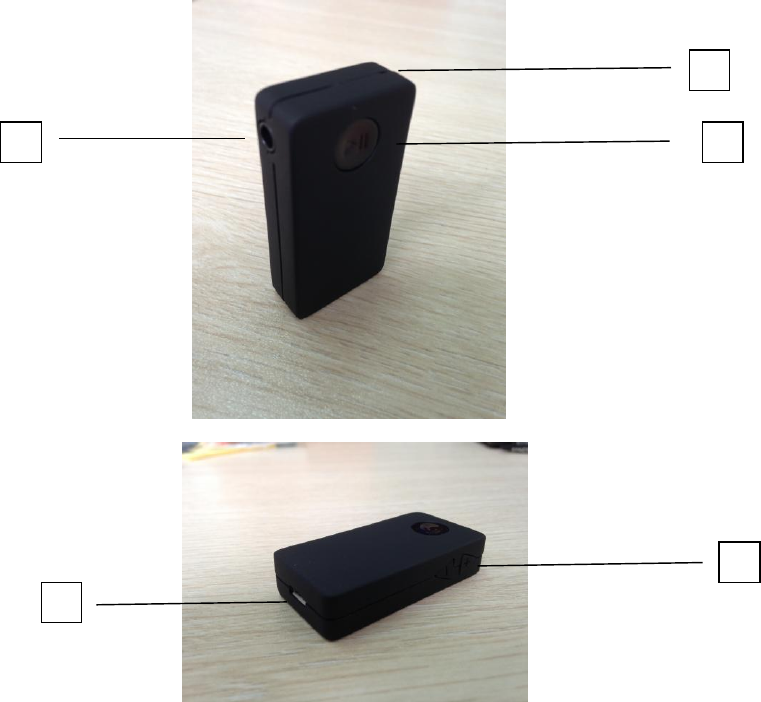
1. Microphone
2. Multi-function button --- on/off/play/stop/hang up/ring off
3. 3.5mm audio frequency port
4. Multi-function button --- up/down/music & Volume adjustment
5. Micro USB Charging Port
Package Contents
1 x Car Bluetooth Music Receiver
1 x Mirco USB Power Cable
1 x 3.5mm to 3.5mm Audio Cable
1 x 3.5mm to 3.5mm Audio adapter
1 x Manual
2
1
4
5
3
methods used
Model
:
Link-CZBT03
1. Connect the 3.5mm audio cable to Car Bluetooth Music Receiver’s earphone jack,
another head of audio cable (3.5mm or 2*RCA) need to be plug in home stereo’s
audio input jack.
2. In the status of power off , retain pressing the middle button about 5 seconds to
turn it on, and the blue LED lamp will flicker until enter pairing mode then release
the button, which means the device starts to work normally.
3. After it enters pairing mode, enable the Bluetooth function for the devices such as
smart phone, iPhone, iPad, Bluetooth PC and any other digital products with
Bluetooth function. Search Bluetooth devices to find Link-CZBT03 and connect it.
Password input for pairing is needed, and the default password is: 0000.
4. After successful pairing, the blue LED lamp will continue to bright, which means it
has been connected already. Then we can play music by player.
5. According to your favor, you can choose the music or adjust the volume by short
or long press the side button.
6.
When
the
call
comes,
short
press
the
middle
button
to
answer
the
calling
or
long
press the middle button about 2 seconds to refuse it.
7. Double click the middle button, you can dial the last call number.
8.
Short
press
middle
button
to
play
or
stop,
long
press
the
middle
button
to
turn
off the Bluetooth.
9.
When
the
distance
between
Bluetooth
Music
Receiver
and
mobile
phone
returned
to effective distance, the paused Bluetooth signal will be re-connected
automatically.
Features
Bluetooth
®
v
3
.0
with
EDR
for
superior
wireless
performance
Support
A2DP
V1.2
,
CLASS
2
Transmits
up
to
33
feet
(10meters)
away
Two-Link:
can
connect
two
B
l
uetooth
devices
at
the
same
time
NFC
function
is
optional
Powered
by
5V
DC
Inner
170
mA
Li-
battery
FCC Statement
z Changes or modifications not expressly approved by the party responsible for
compliance could void the user's authority to operate the equipment.
z This equipment has been tested and found to comply with the limits for a Class B
digital device, pursuant to Part 15 of the FCC Rules. These limits are designed to
provide reasonable protection against harmful interference in a residential installation.
This equipment generates uses and can radiate radio frequency energy and, if not
installed and used in accordance with the instructions, may cause harmful
interference to radio communications. However, there is no guarantee that
interference will not occur in a particular installation. If this equipment does cause
harmful interference to radio or television reception, which can be determined by
turning the equipment off and on, the user is encouraged to try to correct the
interference by one or more of the following measures:
-- Reorient or relocate the receiving antenna.
-- Increase the separation between the equipment and receiver.
-- Connect the equipment into an outlet on a circuit different from that to which the
receiver is connected.
-- Consult the dealer or an experienced radio/TV technician for help
z This device complies with part 15 of the FCC rules. Operation is subject to the
following two conditions (1)this device may not cause harmful interference, and (2)
this device must accept any interference received, including interference that may
cause undesired operation