Bosch PVDMTS Installation Manual (UMM LP10B, UMM LW10B) LP10B LW10B En US 2337090827
User Manual: Bosch Installation Manual (UMM-LP10B, UMM-LW10B) Accessories for LCD Monitors
Open the PDF directly: View PDF  .
.
Page Count: 20
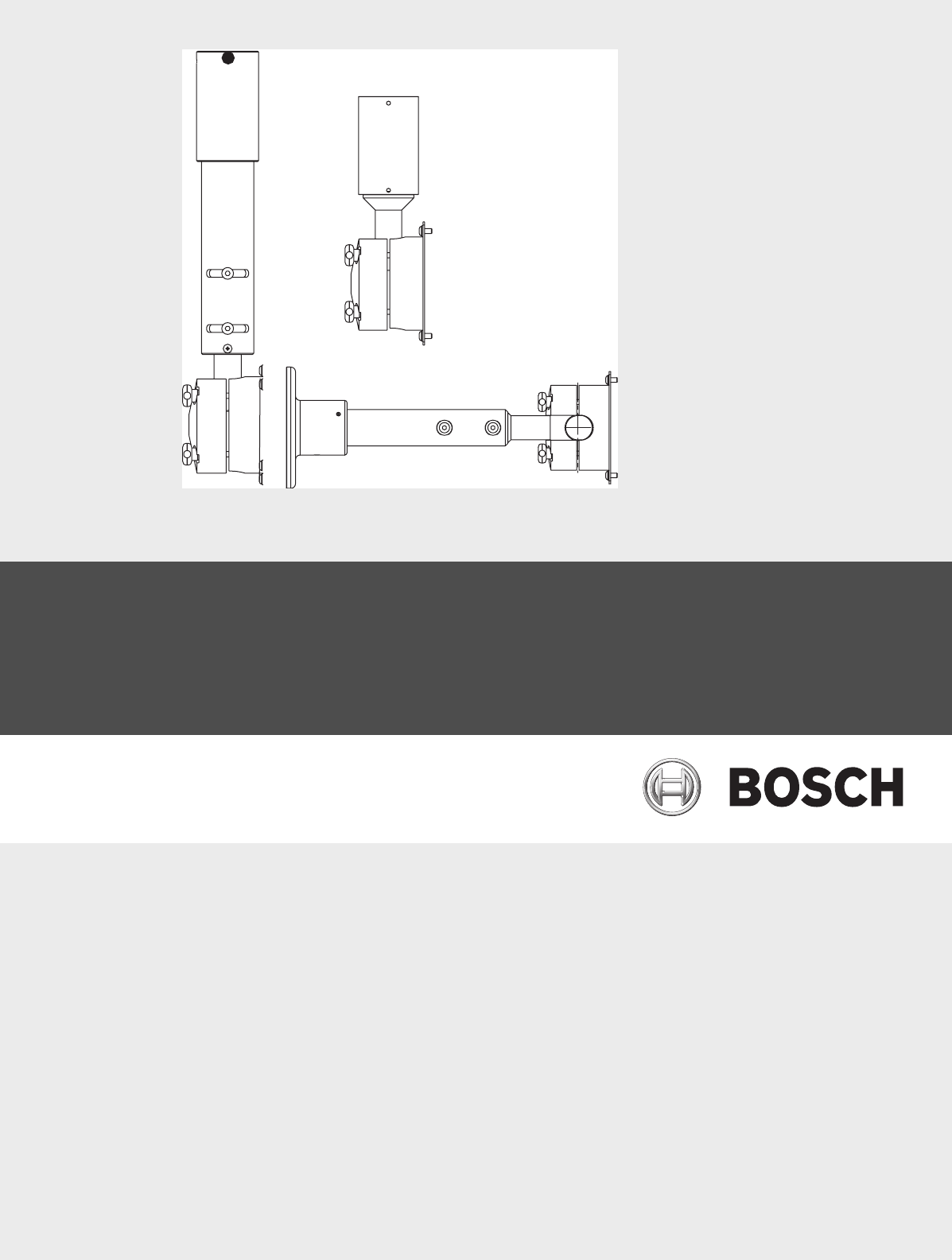
UMM Series Public View Monitor
Mounts
UMM-LP10B and UMM-LW10B
en Mounting Manual

en iii
F01U029704 | 1.0 | 2006.07 Bosch Security Systems, Inc.
Important Safeguards
1. Read, Follow, and Retain Instructions - All safety and oper-
ating instructions should be read and followed before oper-
ating the unit. Retain instructions for future reference.
2. Heed Warnings - Adhere to all warnings on the unit and in
the operating instructions.
3. Attachments - Attachments not recommended by the prod-
uct manufacturer should not be used, as they may cause
hazards.
4. Installation Cautions - Do not place this unit on an unstable
stand, tripod, bracket, or mount. The unit may fall, causing
serious injury to a person and serious damage to the unit.
Use only manufacturer-recommended accessories, or those
sold with the product. Mount the unit per the manufac-
turer's instructions. Appliance and cart combination should
be moved with care. Quick stops, excessive force, or
uneven surfaces may cause the appliance and cart combina-
tion to overturn.
5. Cleaning - Unplug the unit from the outlet before cleaning.
Follow any instructions provided with the unit. Generally,
using a damp cloth for cleaning is sufficient. Do not use liq-
uid cleaners or aerosol cleaners.
6. Servicing - Do not attempt to service this unit yourself.
Opening or removing covers may expose you to dangerous
voltage or other hazards. Refer all servicing to qualified ser-
vice personnel.
7. Damage Requiring Service - Unplug the unit from the main
AC power source and refer servicing to qualified service
personnel under the following conditions:
• When the power supply cord or plug is damaged.
• If liquid has been spilled or an object has fallen into the
unit.
• If the unit has been exposed to water and/or inclement
weather (rain, snow, etc.).
• If the unit does not operate normally, when following
the operating instructions. Adjust only those controls
specified in the operating instructions. Improper adjust-
ment of other controls may result in damage, and
require extensive work by a qualified technician to
restore the unit to normal operation.
• If the unit has been dropped or the cabinet damaged.
• If the unit exhibits a distinct change in performance, this
indicates that service is needed.
8. Replacement Parts - When replacement parts are required,
the service technician should use replacement parts speci-
fied by the manufacturer or that have the same characteris-
tics as the original part. Unauthorized substitutions may
result in fire, electrical shock or other hazards.
9. Safety Check - Upon completion of servicing or repairs to
the unit, ask the service technician to perform safety
checks to ensure proper operating condition.
10.Power Sources - Operate the unit only from the type of
power source indicated on the label. If unsure of the type of
power supply to use, contact your dealer or local power
company.
• For units intended to operate from battery power, refer
to the operating instructions.
• For units intended to operate with External Power Sup-
plies, use only the recommended approved power sup-
plies.
• For units intended to operate with a limited power
source, this power source must comply with EN60950.
Substitutions may damage the unit or cause fire or
shock.
• For units intended to operate at 24VAC, normal input
voltage is 24VAC. Voltage applied to the unit's power
input should not exceed 30VAC.
User-supplied wiring, from the 24VAC supply to unit, must
be in compliance with electrical codes (Class 2 power lev-
els). Do not ground the 24VAC supply at the terminals or at
the unit's power supply terminals.
11.Coax Grounding - If an outside cable system is connected
to the unit, ensure that the cable system is grounded.
U.S.A. models only - Section 810 of the National Electrical
Code, ANSI/NFPA No.70, provides information regarding
proper grounding of the mount and supporting structure,
grounding of the coax to a discharge unit, size of grounding
conductors, location of discharge unit, connection to
grounding electrodes, and requirements for the grounding
electrode.
12.Grounding - This unit may be equipped with a 3-wire
grounding plug (a plug with a third pin, for grounding). This
safety feature allows the plug to fit into a grounding power
outlet only. If unable to insert the plug into the outlet, con-
tact an electrician to arrange replacement of the obsolete
outlet. Do not defeat the safety purpose of the grounding
plug.
• Outdoor equipment should only be connected to the
unit's inputs after this unit has had its grounding plug
connected to a grounded outlet or its ground terminal
properly connected to a ground source.
• The unit's input connectors must be disconnected from
outdoor equipment before disconnecting the grounding
plug or grounding terminal.
• Proper safety precautions such as grounding should be
followed for any outdoor device connected to this unit.
13.Lightning - For added protection during a lightning storm,
or when this unit is left unattended and unused for long
periods of time, unplug the unit from the wall outlet and
disconnect the cable system. This will prevent damage to
the unit due to lightning and power line surges.
iv en
Bosch Security Systems, Inc. F01U029704 | 1.0 | 2006.07
Safety Precautions Sécurité
Attention : l'installation doit exclusivement être réalisée par du
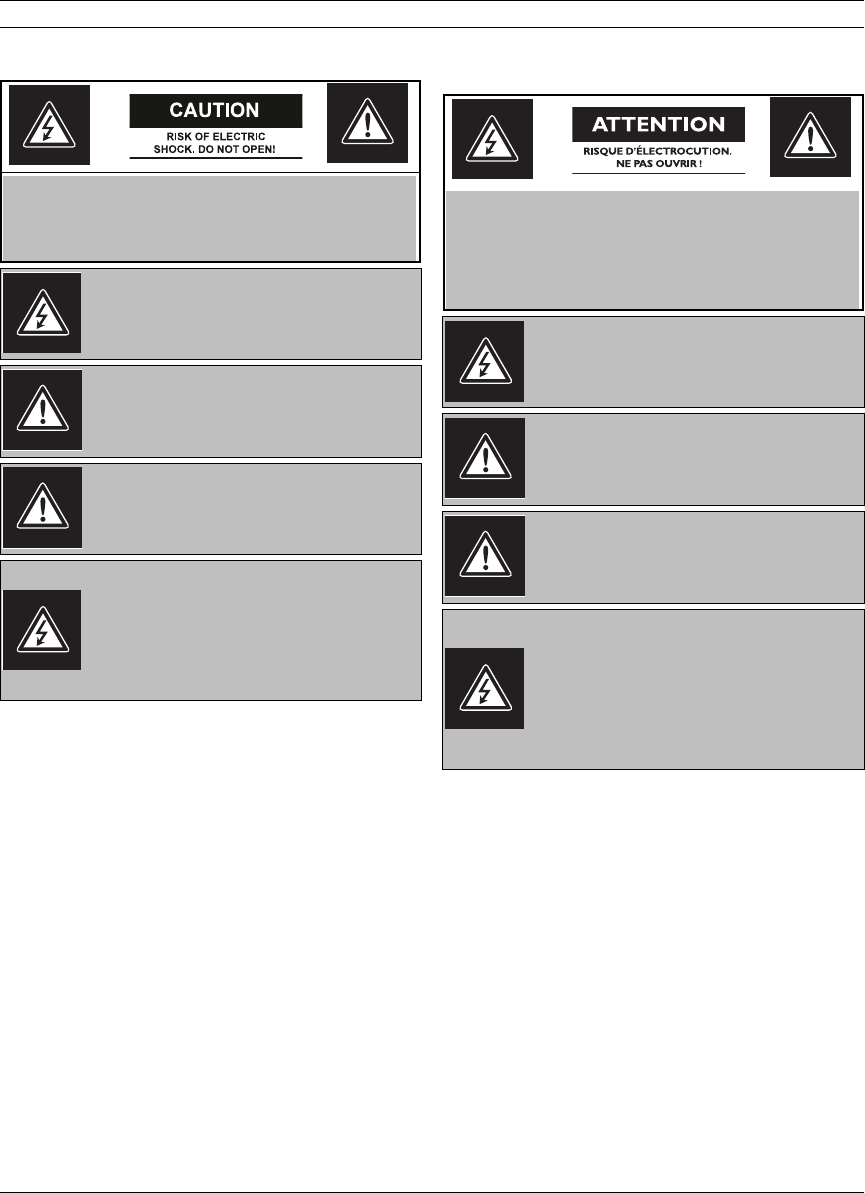
This symbol indicates the presence of uninsulated
“dangerous voltage” within the product’s enclo-
sure that can cause an electric shock.
This symbol indicates the presence of important
operating and maintenance (servicing) instruc-
tions in the literature accompanying the appli-
ance.
Installation should be performed by qualified ser-
vice personnel only in accordance with the
National Electrical Code or applicable local codes.
Power Disconnect. Units with or without ON-OFF
switches have power supplied to the unit when-
ever the power cord is inserted into the power
source; however, the unit is operational only when
the ON-OFF switch is in the ON position. The
power cord is the main power disconnect for all
units.
CAUTION: TO REDUCE THE RISK OF ELECTRIC SHOCK, DO
NOT REMOVE COVER (OR BACK). NO USER SERVICEABLE
PARTS INSIDE. REFER SERVICING TO QUALIFIED SERVICE
PERSONNEL.
Ce symbole signale que le produit renferme une «
tension potentiellement dangereuse » non isolée
susceptible de provoquer une électrocution.
Ce symbole invite l'utilisateur à consulter les
instructions d'utilisation et d'entretien (dépan-
nage) reprises dans la documentation qui
accompagne l'appareil.
Attention: l'installation doit exclusivement être
réalisée par du personnel qualifié, conformément
au code national d'électricité américain (NEC) ou
au code d'électricité local en vigueur.
Coupure de l'alimentation. Qu'ils soient pourvus
ou non d'un commutateur ON/OFF, tous les appar-
eils reçoivent de l'énergie une fois le cordon
branché sur la source d'alimentation. Toutefois,
l'appareil ne fonctionne réellement que lorsque le
commutateur est réglé sur ON. Le débranchement
du cordon d'alimentation permet de couper l'ali-
mentation des appareils.
ATTENTION : POUR ÉVITER TOUT RISQUE D'ÉLECTROCU-
TION, N'ESSAYEZ PAS DE RETIRER LE CAPOT (OU LE PAN-
NEAU ARRIÈRE). CET APPAREIL NE CONTIENT AUCUN
COMPOSANT SUSCEPTIBLE D'ÊTRE RÉPARÉ PAR L'UTILI-
SATEUR. CONFIEZ LA RÉPARATION DE L'APPAREIL À DU
PERSONNEL QUALIFIÉ.

UMM Series Public View Monitor Mounts | en v
Bosch Security Systems, Inc. Mounting Manual F01U029704 | 1.0 | 2006.07
Preface
This guide describes how to mount the UMS Series Public View Monitor using the UMM-LP10 Feed-through Pipe
Mount or the UMM-LW10 Feed-through Wall Mount.
Audience
This guide is intended for qualified installation and service personnel who are familiar with the applicable national
and local electrical codes.
Document Conventions
Customer Support and Service
If this unit needs service, contact the nearest Bosch Security Systems Service Center for authorization to return and
shipping instructions.
Service Centers
USA
Phone: 800-366-2283 or 585-340-4162
Fax: 800-366-1329
Email: cctv.repair@us.bosch.com
CCTV Spare Parts
Phone: 800-894-5215 or 408-957-3065
Fax: 408-935-5938
Email: BoschCCTVparts@ca.slr.com
Canada
Phone: 514-738-2434
Fax: 514-738-8480
Europe, Middle East & Asia Pacific Region
Phone: 44 (0) 1495 274558
Fax: 44 (0) 1495 274280
Email: rmahelpdesk@solectron.com
For additional information, see www.boschsecurity.com
Related Publications
Refer to the latest Bosch Security Systems Databook for the most up-to-date datasheets. To obtain a copy of the
Databook, please contact your local Bosch representative.
You can also visit the Bosch Security Systems World Wide Web site at:
http://www.boschsecurity.com to view a current listings of our publications.
Convention Meaning
Bold Denotes a part, item, or assembly.
Bold Italic Denotes a reference to another paragraph, figure or table.
Underline Used to emphasize a point.

vi en | UMM Series Public View Monitor Mounts
F01U029704 | 1.0 | 2006.07 Mounting Manual Bosch Security Systems, Inc.

UMM Series Public View Monitor Mounts Table of Contents | en vii
Bosch Security Systems, Inc. Mounting Manual F01U029704 | 1.0 | 2006.07
Table of Contents
1 Unpacking 1
1.1 1.1 Parts List 1
2Description 2
3 Installation 3
3.1 Wiring Requirements 3
3.2 Installing the Feed-through Pipe Mount (UMM-LP10B) 4
3.2.1 Mounting the UMS Public View Monitor to a freely rotating pipe mount: 5
3.2.2 Mounting the UMS Public View Monitor to a stationary pipe mount: 7
3.3 Installing the Feed-through Wall Mount (UMM-LW10B) 9
4 Dimensional Outlines 11

viii en | Table of Contents UMM Series Public View Monitor Mounts
F01U029704 | 1.0 | 2006.07 Mounting Manual Bosch Security Systems, Inc.
UMM Series Public View Monitor Mounts Unpacking | en 1
Bosch Security Systems, Inc. Mounting Manual F01U029704 | 1.0 | 2006.07
1 Unpacking
This equipment should be unpacked and handled with care. If an item appears to have been
damaged in shipment, notify the shipper. Verify that all parts shown in the Parts List are
included. If any items are missing, notify your Bosch Security Systems Sales or Customer Ser-
vice Representative.
The original packing carton is the safest container in which to transport the unit. Save it for
possible future use.
1.1 1.1 Parts List
The following table lists the components:
Qty Item
UMM-LP10B 10-inch Mount
1 UMM-LP10B mount
1 Mounting Hardware Kit
Four (4) 10-24 x 3/8 in. BHC SS patch lock screws
Four (4) washers
One (1) Allen wrench, 1/8-in.
1 This mounting manual
UMM-LW10B 12-inch Mount
1 UMM-LW10B mount
1 Mounting Hardware Kit
Four (4) 10-24 x 3/8 in. BHC SS patch lock screws
Four (4) washers
One (1) Allen wrench, 1/8-in.
1 This mounting manual

2en | Description UMM Series Public View Monitor Mounts
F01U029704 | 1.0 | 2006.07 Mounting Manual Bosch Security Systems, Inc.
2Description
The UMM Series is a mounting solution designed to install an LCD monitor to a pipe or to a
wall. The UMM-LP10B and UMM-LW10B mounts are capable of supporting a maximum load of
25 lbs (11.34 Kg).
UMM Series Public View Monitor Mounts Installation | en 3
Bosch Security Systems, Inc. Mounting Manual F01U029704 | 1.0 | 2006.07
3 Installation
This section provides detailed instructions on how to install the UMM-LP10B Feed-through
Pipe Mount and the UMM-LW10B Feed-through Wall Mount.
3.1 Wiring Requirements
Both UMS Public View Monitor models (UMS-20xxxA and UMS-20xxxC) feature various con-
nectors used to transmit video, receive video and to deliver power to the unit. The table below
summarizes the types of connectors and their use:
Before the UMS Public View Monitor is mounted, prepare the external 24 VAC power leads as
follows:
1. Leave six (6) inches of the external 24 VAC power leads extended beyond the wall or the
end of the pipe mount.
2. Strip the outer jackets of the external 24 VAC power leads back by four (4) inches.
3. Stagger the power leads by cutting one power lead two (2) inches shorter than the other.
This step is important to ensure that the power leads, when connected to the Wago®
clamps, fit through the entrances to the feed-through mounts.
4. Strip the ends of both leads by a 1/2 in.
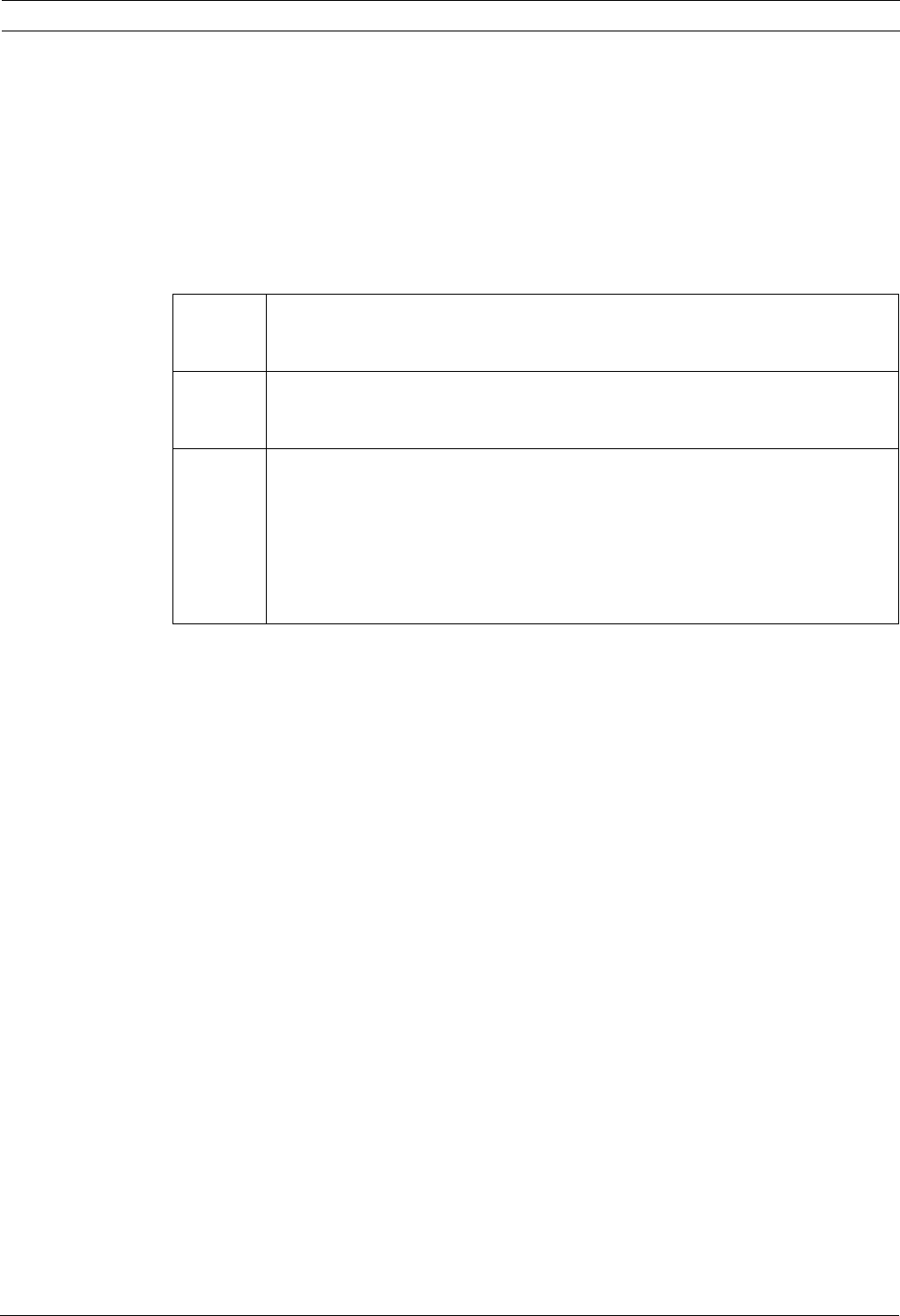
Video Out All models have a looping video output cable that is connected to the internal
camera. Use this output to connect the camera to a video recording device. You
must terminate the coax cable with an appropriate male BNC connector.
Video In The UMS-20xxxA model has an optional coax input cable that can connect to an
external video source (such as another camera or a DVD player) to display exter-
nal images.
Power All models have 24 VAC power leads coming from the UMS Series Public View
monitor and have been prepared by the manufacturer. The distances for the vari-
ous gauges or power leads for the UMS Public View Monitor Series are listed
inside the cover of the power supply and in the UMS Series Public View Monitor
Installation Manual (F01U029703).
If you are using these mounts with a monitor other than the UMS Series, refer to
the wiring requirements for the monitor.
4en | Installation UMM Series Public View Monitor Mounts
F01U029704 | 1.0 | 2006.07 Mounting Manual Bosch Security Systems, Inc.
3.2 Installing the Feed-through Pipe Mount (UMM-LP10B)
This mount attaches to a 1.5-in. NPT pipe (not provided). Ensure that you have the contents of
the UMM-LP10B Hardware Kit, the two (2) Wago® clamps (included with the UMS Public View
Monitor packaging) and a 3/32-in. Allen Wrench (not included). The combined weight of the
monitor and the mount is 16 lbs (7.26 Kg).
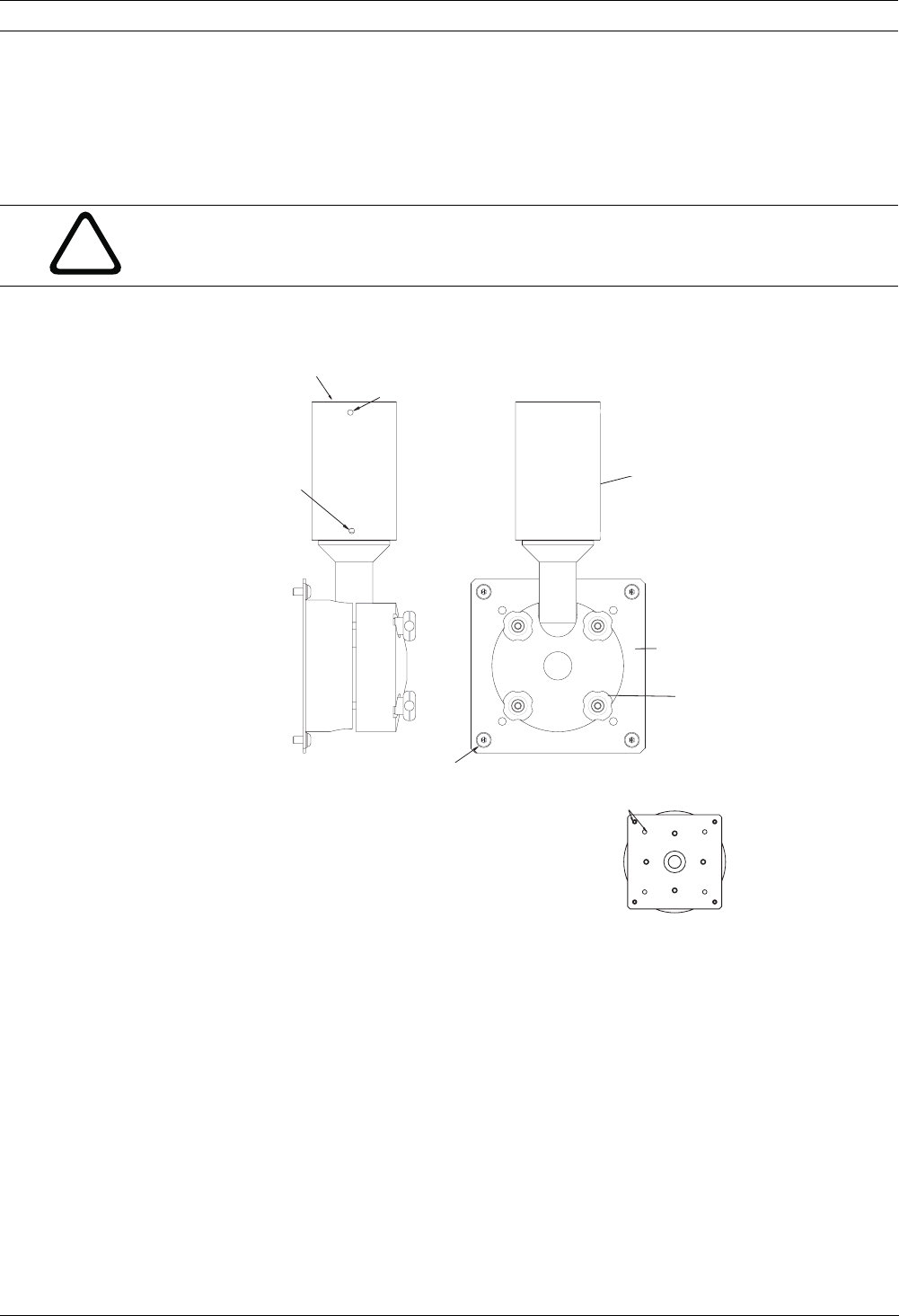
The figure below illustrates the components of the UMM-LP10B Feed-through Pipe Mount:
Fig. 3.1 UMM-LP10B Feed-through Pipe Mount Components
The instructions for using this mount depends if the pipe can rotate freely or if the pipe is
fixed. Use the appropriate instructions below.
!
CAUTION! Installation should be performed by qualified service installers only, using
construction methods in accordance with applicable local codes and standards.
CAUTION! Do not exceed the maximum rated load for the particular mount used.
M
ount w
ill
attac
h
to a 1.5" Threaded Pipe
(Not Provided)
After
attaching
Pipe Extension End to
Threaded Pipe
(not provided)
tighten this set screw
to secure.
Pipe Extension End
VESA Plate End
Attach to monitor
Standard VESA Plate Pattern
VESA Plate View
Mounting Screws10-24x3/8” BHC
SS patch lock screws (X4)
Washers (X4)
Thumbnuts (X4) allow
the monitor to
Adjust (up to 180º
horizontal).
Loosen the Thumbnuts to
position, tighten to secure.
After attaching
VESA Plate end
tighten this set screw
to secure.
75 and 100mm
1
2
34
5
After attaching the mount
-
ing plate end, tighten this
set screw to secure.
Mount attaches to a 1.5 in.
threaded pipe (not provided)
Pipe Extension End
Attach the mounting plate
end to monitor.
Use the four thumbnuts to
adjust the monitor up to
180° from horizontal.
2.95 in. and 3.94 in.
standard mounting plate pattern
VESA Plate View.Mounting Plate View
Mounting Screws:
#10-24 x 3/8 in. BHC (x4)
Washers (x4)
After attaching the Pipe Extension end to
the threaded pipe (not provided). Tighten
this set screw to secure.
UMM Series Public View Monitor Mounts Installation | en 5
Bosch Security Systems, Inc. Mounting Manual F01U029704 | 1.0 | 2006.07
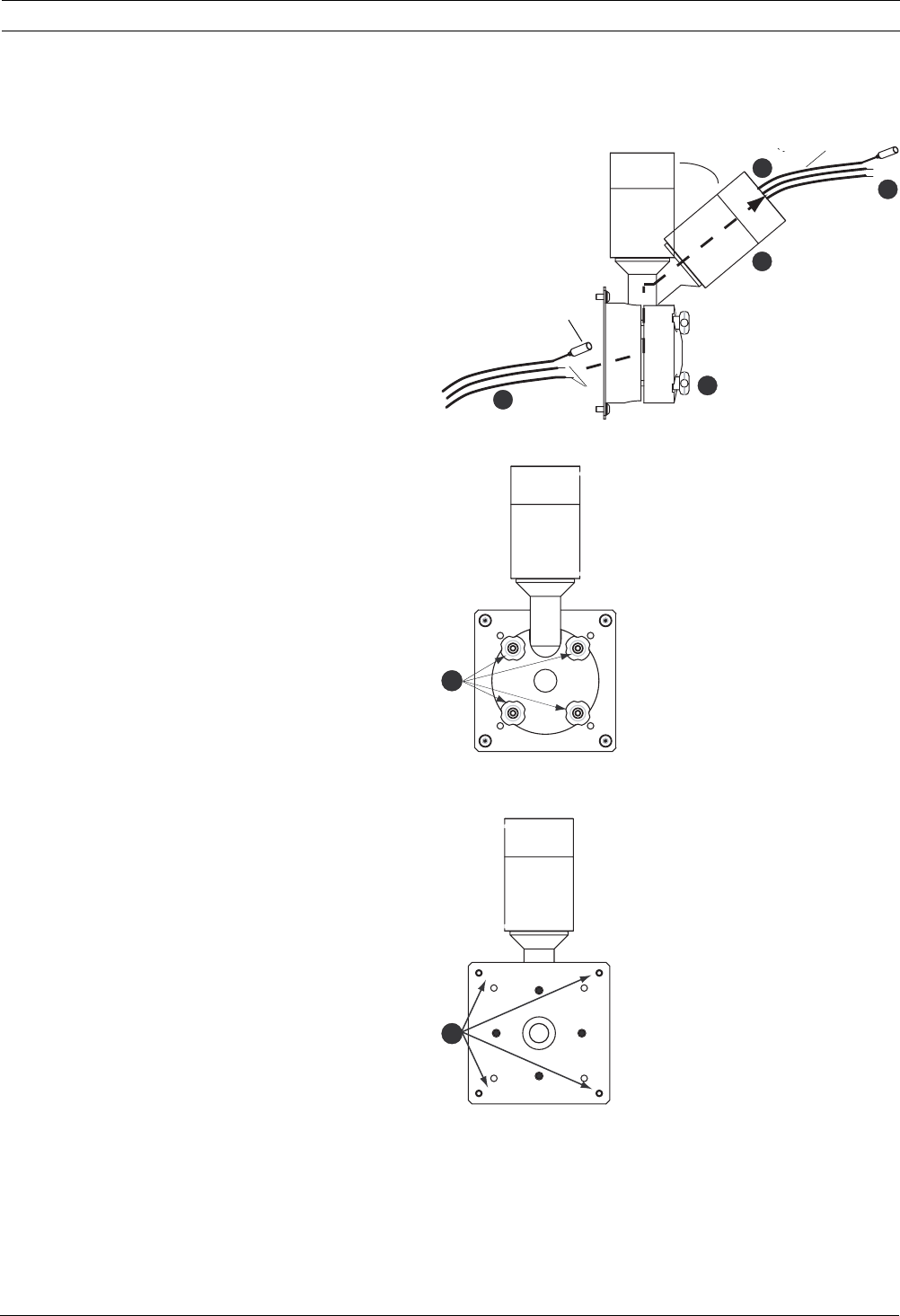
3.2.1 Mounting the UMS Public View Monitor to a freely rotating pipe mount:
1. Loosen the four (4) thumbnuts enough to allow
the pipe extension to rotate.
2. Tilt the pipe extension end approximately 30° to
allow the cables to feed through easily.
3. Feed the cables from the back of the UMS Public
View Monitor into the middle of the mounting
plate; then thread the cables up through the
mount. Pull the wires through the top of the pipe
extension end. Leave six (6) inches of the cables
exposed.
4. Connect one (1) Wago clamp to the end of each
power lead.
5. Use tape to temporarily secure the wires to the
top of the pipe extension end.
6. Rotate the pipe extension end to the 12 o’clock
position. Then, tighten the thumbnuts.
7. Attach the mounting plate end of the UMM-LP10B
to the monitor using the four (4) screws and four
(4) washers provided in the hardware kit. Tighten
securely.
1
1
2
3
4
5
6
7
30°
from
monitor
Coax BNC
24 VAC leads
to recording device
to power
supply
6en | Installation UMM Series Public View Monitor Mounts
F01U029704 | 1.0 | 2006.07 Mounting Manual Bosch Security Systems, Inc.
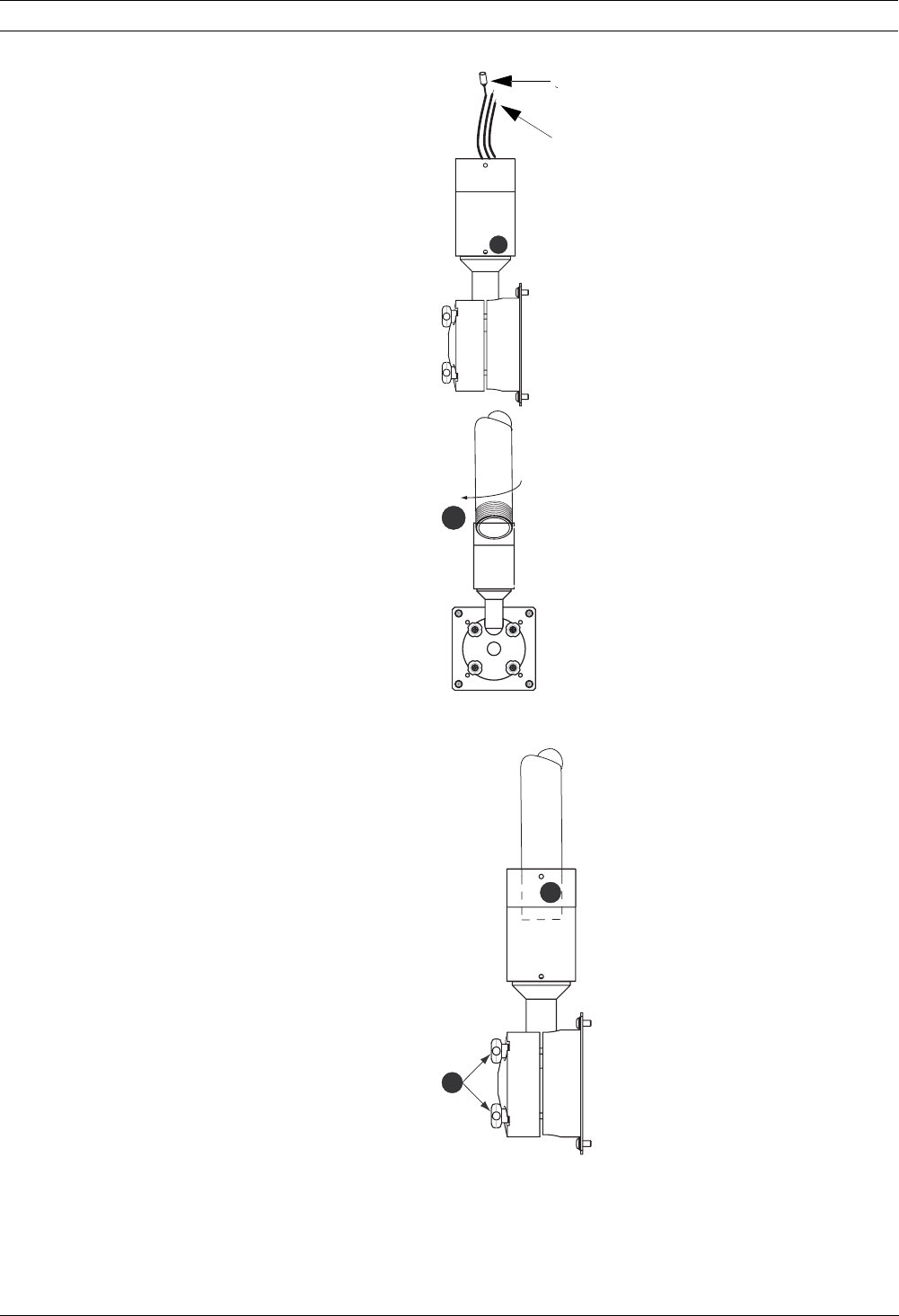
8. Tighten the set screw to secure the mounting
plate end.
9. Remove the tape from the cables.
10. Connect the external 24 VAC power leads from
the power supply to the unused end of the Wago
clamp, which is connected to power leads from
the monitor. Connect the coax cables if neces-
sary.
11. Screw the 1.5-in. threaded pipe (not included)
into the pipe extension by turning into the pipe
extension clockwise.
12. Tighten the set screw to secure the pipe exten-
sion end to the threaded pipe.
13. Adjust the monitor to the desired position and
secure using the four (4) thumbnuts.
8
11
12
13
to recording device
to power supp
l
y
UMM Series Public View Monitor Mounts Installation | en 7
Bosch Security Systems, Inc. Mounting Manual F01U029704 | 1.0 | 2006.07
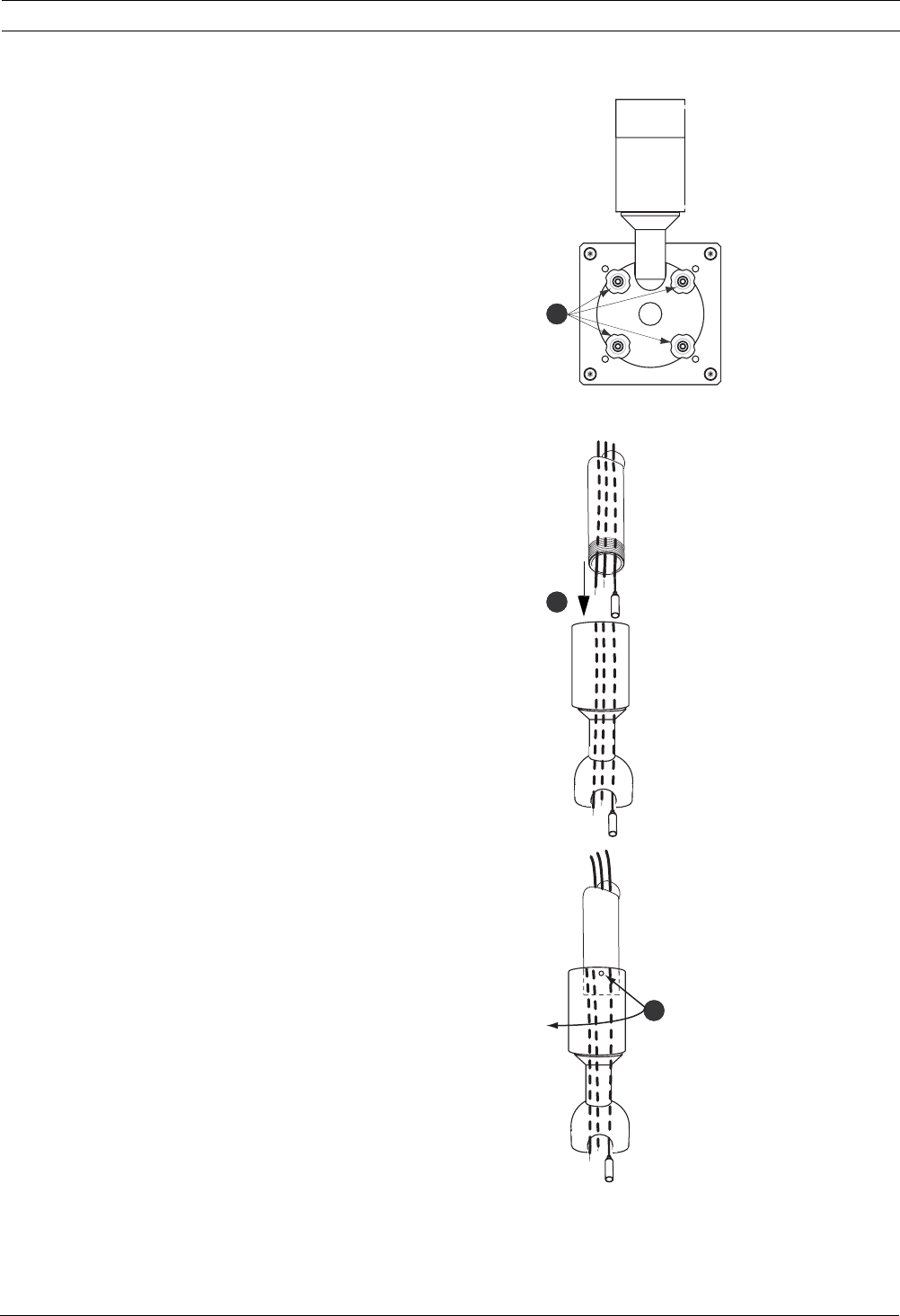
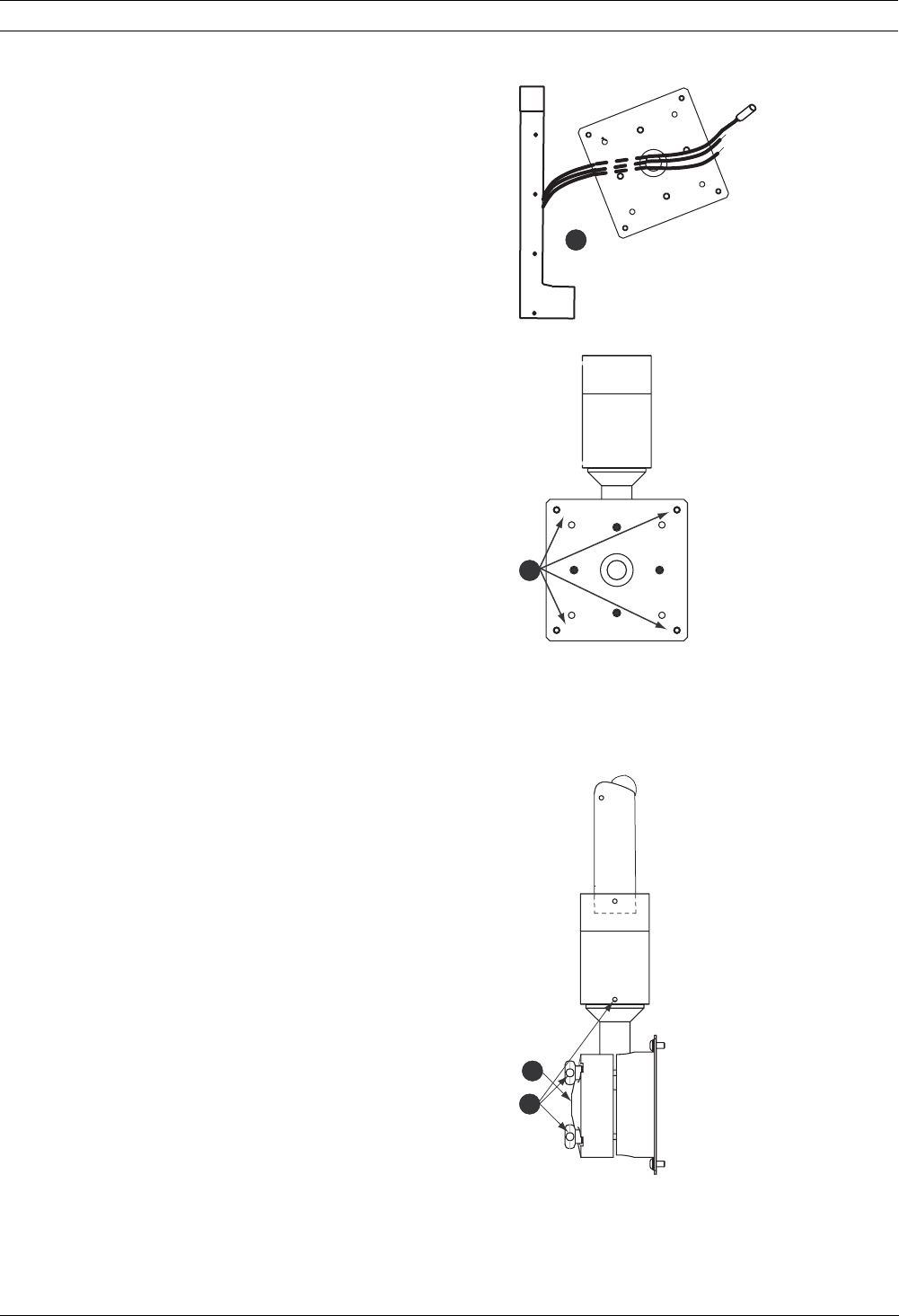
3.2.2 Mounting the UMS Public View Monitor to a stationary pipe mount:
1. Carefully remove the four (4) thumbnuts and washers from the
back of the mounting plate. Then, separate the pipe extension
end from the mounting plate.
2. Feed the 24 VAC power leads from the power supply and the
coax cable (if present) into the end of the pipe and through the
pipe extension.
3. Tighten the pipe extension end securely onto the end of the
pipe. Tighten only the top set screw at this time.
1
2
3
8en | Installation UMM Series Public View Monitor Mounts
F01U029704 | 1.0 | 2006.07 Mounting Manual Bosch Security Systems, Inc.
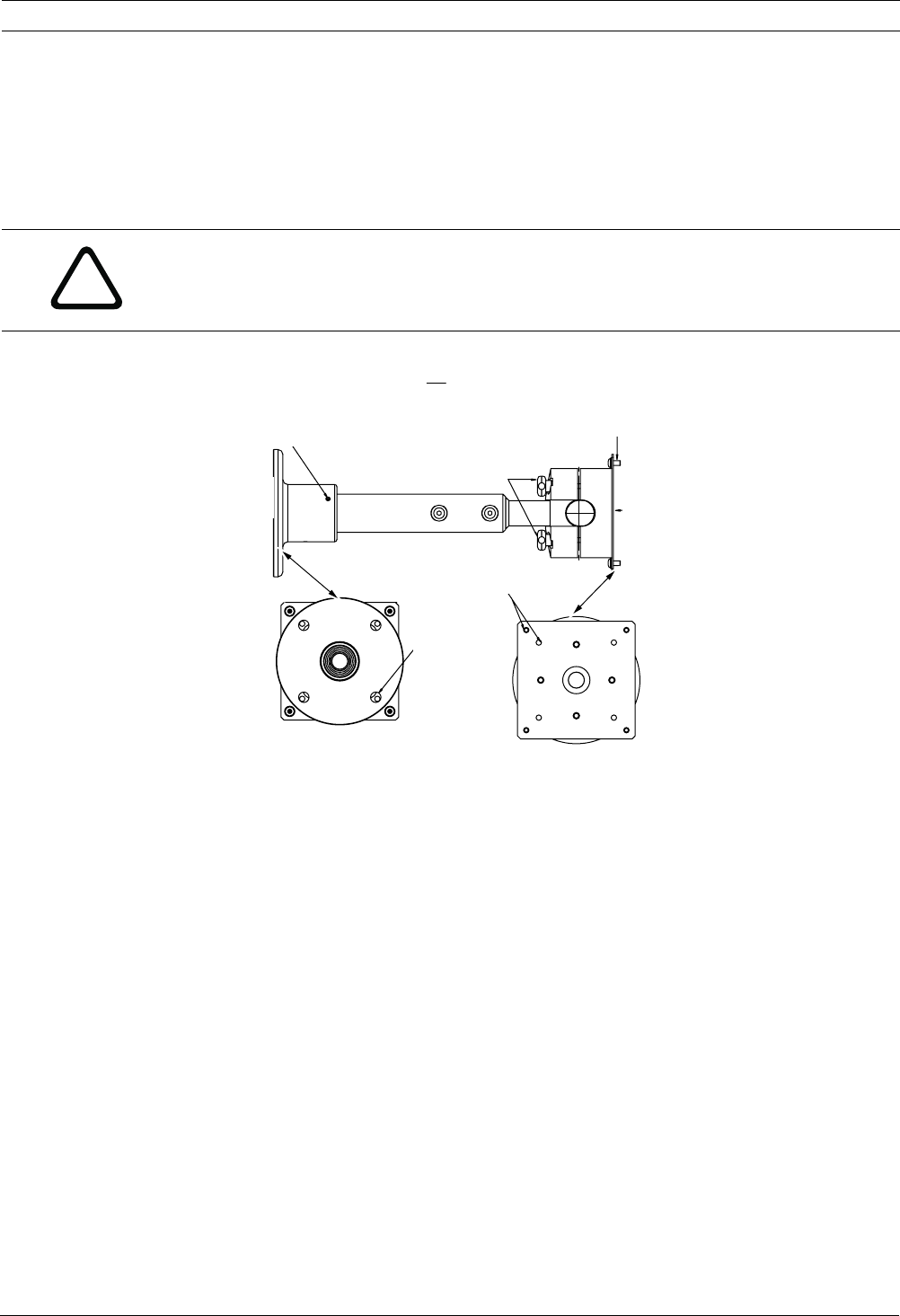
4. Ensure that the power leads from the monitor are staggered
(or offset).
5. Feed the cables from the back of the UMS Public View Mon-
itor through the hole in the middle of the mounting plate.
6. Attach the mounting plate end of the UMM-LP10B to the
monitor using the four (4) screws and four (4) washers pro-
vided in the hardware kit. Tighten securely.
7. Connect one (1) Wago clamp to the end of each power lead
from the monitor.
8. With one person holding the monitor in place, the second
person connects the external 24 VAC power leads to the
unused end of the Wago clamp, and connects the coax
cables if necessary.
9. Push the excess cables into the pipe and reattach the cap
using the four (4) thumbnuts and washers. Do not tighten
the thumbnuts.
10. Adjust the monitor to the correct position. You may loosen
the bottom set screw and rotate the monitor by turning it
180° on the pipe.
11. Tighten the bottom set screw and the four (4) thumbnuts.
5
11-
9
6
UMM Series Public View Monitor Mounts Installation | en 9
Bosch Security Systems, Inc. Mounting Manual F01U029704 | 1.0 | 2006.07
3.3 Installing the Feed-through Wall Mount (UMM-LW10B)
This mount attaches to a wall surface as described in the procedure below. The combined
weight of the monitor and the mount is 17 lbs (7.71 Kg); it is recommended to use four (4)
3/8-in. bolts to attach the mount to the wall. Ensure that you have the contents of the UMM-
LW10B Hardware Kit, the two (2) Wago® clamps (included with the UMS Public View Monitor
packaging) and a 3/32-in. Allen wrench (not included).
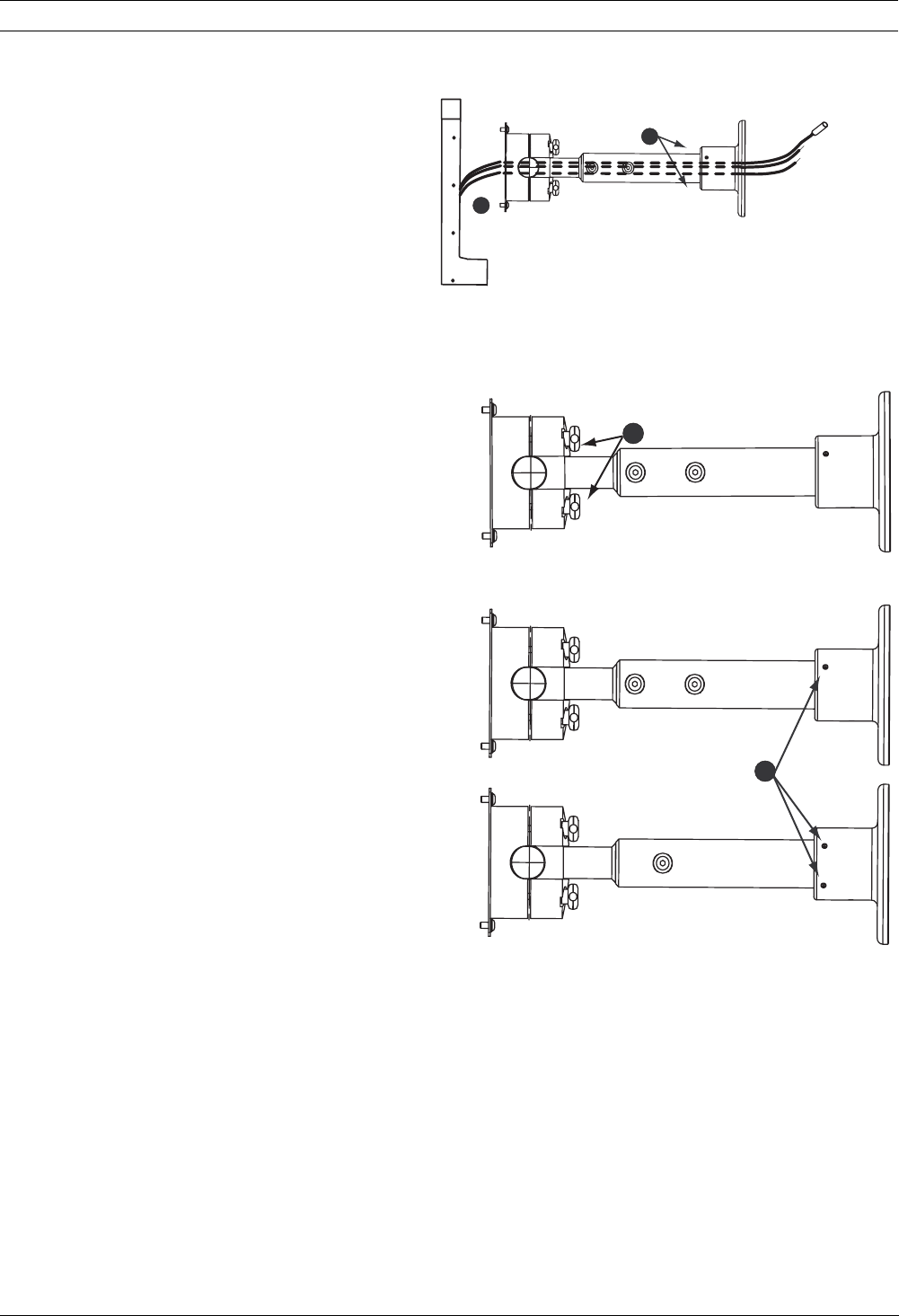
The figure below illustrates the components of the UMM-LW10B Feed-through Wall Mount:
Fig. 3.2 UMM-LW10B Feed-through Wall Mount Components
!
CAUTION! Installation should be performed by qualified service installers only, using
construction methods in accordance with applicable local codes and standards. Refer to local
building codes for installing the four (4) fasteners to the wall.
CAUTION! Do not exceed the maximum rated load for the particular mount used.
10-24x3/8” BHC SS
patch lock screw (X4)
and washers (X4)
Standard Vesa Plate Pattern
(4X) Ø.41
Typ 90º Apart
Eq. Spaced
On Ø4.000 B.C
Flange End Veiw
After installing the
monitor to the Vesa Plate.
Adjust (up to 180º horizontal)
to desired position.
Secure with the four thumbnuts.
Thumbnuts (4)
Vesa
Plate End
Attach
to monitor
Rotate pole
to desired position
and secure
with set screws (x3).
Flange End
Attach to
Wall
Vesa Plate View
1
2
Rotate pole up to 90° to the
desired position and secure with
set screws (x3).
Adjust the monitor to the desired posi-
tion (up to 180 ° from horizontal) and
secure using the 4 thumbnuts.
Thumbnuts (4)
10-24 x 3/8 in. BHC ss patch lock
screws (x4) and washers (x4)
Mounting Plate end
Attach to monitor.
Mounting Plate View
Standard mounting plate pattern
(4x) Ø.41
Typ 90° Apart
Eq. spaced on
Ø4.000 B.C.
Flange End View
Attach flange end to
wall.
10 en | Installation UMM Series Public View Monitor Mounts
F01U029704 | 1.0 | 2006.07 Mounting Manual Bosch Security Systems, Inc.
Mounting the UMS Public View Monitor to the wall mount
1. Loosen the four (4) thumbnuts enough to allow
the pipe extension to rotate.
2. Feed the cables from the back of the UMS Public
View Monitor into the middle of the mounting
plate; then thread the cables up through the
mount. Pull the wires through the top of the pipe
extension end.
3. Connect one (1) Wago clamp to the ends of each
24 VAC power lead (two leads from the monitor
and two leads from the power source).
4. Attach the mounting plate end of the UMM-LW10B
to the monitor using the four (4) screws and four
(4) washers provided in the hardware kit. Tighten
securely.
5. Mount the flange end of the UMM-LW10B to the
wall using the appropriate fasteners (not pro-
vided). It is recommended to use four (4) 3/8 in.
bolts.
6. Make any necessary adjustments to the pole and
secure using the three (3) set screws.
7. Adjust the monitor to the desired position (up to
180o horizontal) and secure using the four (4)
thumbnuts.
2
1
4
6
UMM Series Public View Monitor Mounts Dimensional Outlines | en 11
Bosch Security Systems, Inc. Mounting Manual F01U029704 | 1.0 | 2006.07
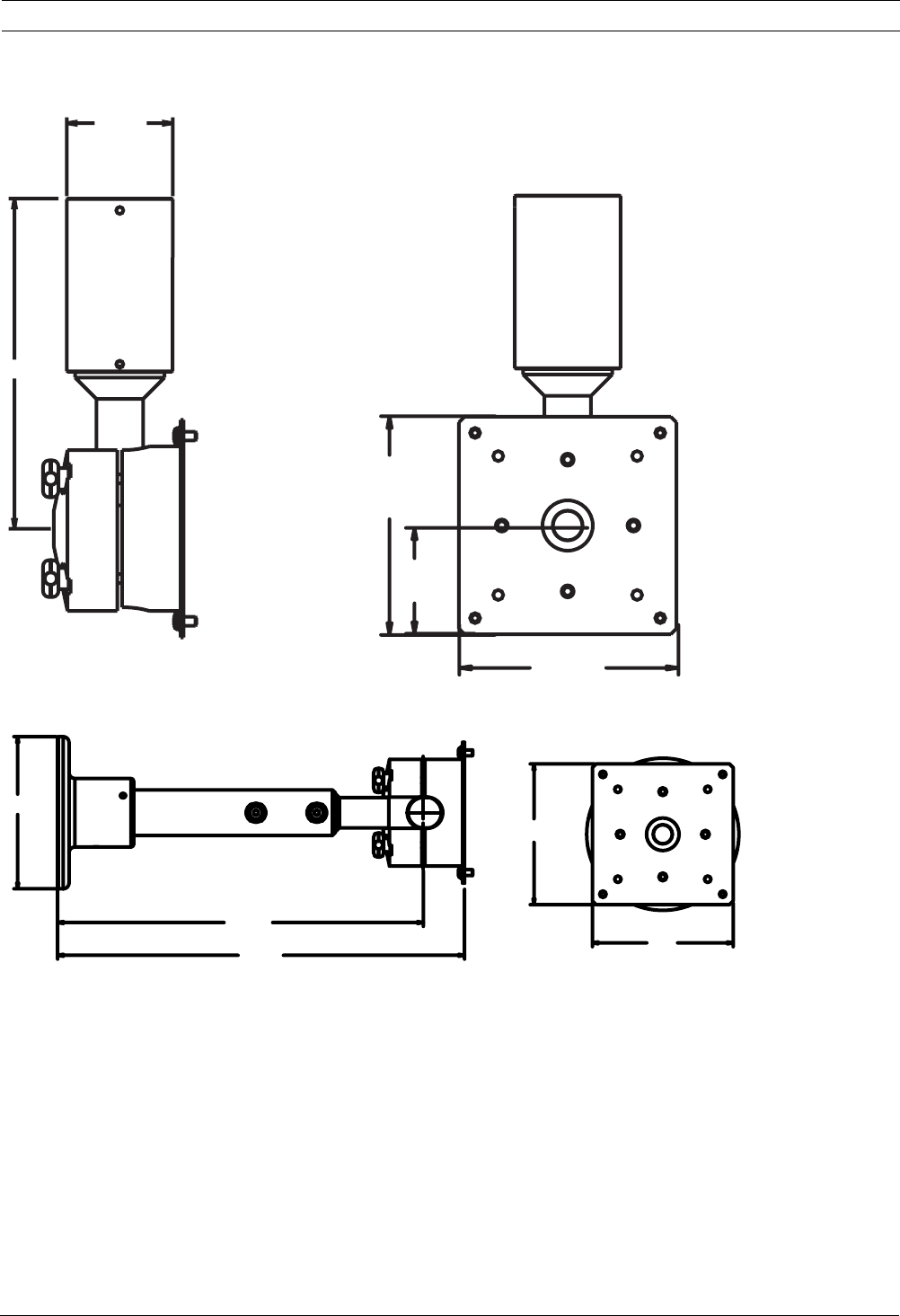
4 Dimensional Outlines
Fig. 4.1 UMM-LP10B 10-inch Pipe Mount–in inches
Fig. 4.2 UMM-LP10B 12-inch Wall Mount–in inches
7.0
2.25
ø
4.6
2.3
4.6
5.0
12.0
13.4
4.6
4.6
ø

12 en | Dimensional Outlines UMM Series Public View Monitor Mounts
F01U029704 | 1.0 | 2006.07 Mounting Manual Bosch Security Systems, Inc.

Americas:
Bosch Security Systems
130 Perinton Parkway
Fairport, New York, 14450
USA
Phone +1 800 289 0096
Fax +1 585 223 9180
www.boschsecurity.us
© Bosch Security Systems, Inc. 2006
Europe, Middle East, Asia:
Bosch Security Systems B.V.
P.O. Box 80002
5600 JB Eindhoven
The Netherlands
Phone +31 (0) 40 27 83955
Fax +31 (0) 40 27 86668
www.boschsecurity.com
Asia-Pacific:
Bosch Security Systems Pte Ltd.
38C Jalan Pemimpin
Singapore 577180
Phone +65 6319 3450
Fax +65 63139 3499
www.boschsecurity.com
