Bose 791854 Og Soundlink Micro En
User Manual: Bose SoundLink Micro Bluetooth speaker
Open the PDF directly: View PDF  .
.
Page Count: 34
Owner’s Guide
Brugervejledning
Bedienungsanleitung
Gebruikershandleiding
Guía del usuario
Käyttöohje
Notice d’utilisation
Manuale di istruzioni
Kezelési útmutató
Brukerveiledning
Podręcznik użytkownika
Manual do Proprietário
Bruksanvisning
Руководство владельца
SOUNDLINK®
MICRO

2 - ENGLISH
IMPORTANT SAFETY INSTRUCTIONS
Please read and keep all safety and use instructions.
Important Safety Instructions
1. Read these instructions.
2. Keep these instructions.
3. Heed all warnings.
4. Follow all instructions.
5. Only use attachments/accessories specified by the manufacturer.
6. Unplug this apparatus during lightning storms or when unused for long periods of time.
7. Refer all servicing to qualified personnel. Servicing is required when the apparatus has been damaged in any way,
such as power-supply cord or plug is damaged, does not operate normally, or has been dropped.
WARNINGS/CAUTIONS
This product contains magnetic material. Consult your physician on whether this might aect your implantable
medical device.
• Keep the product away from fire and heat sources. Do NOT place naked flame sources, such as lighted candles, on or
near the product.
• Do NOT make unauthorized alterations to this product.
• Use this product only with an agency approved power supply which meets local regulatory requirements
(e.g., UL, CSA, VDE, CCC).
• Do not expose products containing batteries to excessive heat (e.g. from storage in direct sunlight, fire or the like).
• The product label is located on the strap and the bottom of the product.

ENGLISH - 3
REGULATORY INFORMATION
NOTE: This equipment has been tested and found to comply with the limits for a Class B digital device, pursuant to
Part 15 of the FCC Rules. These limits are designed to provide reasonable protection against harmful interference in a
residential installation. This equipment generates, uses, and can radiate radio frequency energy and, if not installed and
used in accordance with the instructions, may cause harmful interference to radio communications. However, there is no
guarantee that interference will not occur in a particular installation. If this equipment does cause harmful interference
to radio or television reception, which can be determined by turning the equipment o and on, the user is encouraged
to try to correct the interference by one or more of the following measures:
• Reorient or relocate the receiving antenna.
• Increase the separation between the equipment and receiver.
• Connect the equipment into an outlet on a circuit dierent from that to which the receiver is connected.
• Consult the dealer or an experienced radio/TV technician for help.
Changes or modifications not expressly approved by Bose Corporation could void the user’s authority to operate
this equipment.
This device complies with part 15 of the FCC Rules and with Industry Canada license-exempt RSS standard(s). Operation
is subject to the following two conditions: (1) This device may not cause harmful interference, and (2) this device must
accept any interference received, including interference that may cause undesired operation.
This device complies with FCC and Industry Canada radiation exposure limits set forth for general population.
This transmitter must not be co-located or operating in conjunction with any other antenna or transmitter.
Meets IMDA Requirements.
Bose Corporation hereby declares that this product is in compliance with the essential requirements and other
relevant provisions of Directive 2014/53/EU and all other applicable EU directive requirements. The complete
declaration of conformity can be found at: www.Bose.com/compliance
Frequency band of operation 2400 to 2480 MHz.
Bluetooth: Maximum transmit power less than 20 dBm EIRP.
Bluetooth Low Energy: Maximum power spectral density less than 10 dBm/MHz EIRP.
Management Regulation for Low-power Radio-frequency Devices
Article XII
According to “Management Regulation for Low-power Radio-frequency Devices” without permission granted by the
NCC, any company, enterprise, or user is not allowed to change frequency, enhance transmitting power or alter original
characteristic as well as performance to an approved low power radio-frequency devices.
Article XIV
The low power radio-frequency devices shall not influence aircraft security and interfere legal communications; If found,
the user shall cease operating immediately until no interference is achieved. The said legal communications means radio
communications operated in compliance with the Telecommunications Act.
The low power radio-frequency devices must be susceptible with the interference from legal communications or ISM
radio wave radiated devices.
4 - ENGLISH
REGULATORY INFORMATION
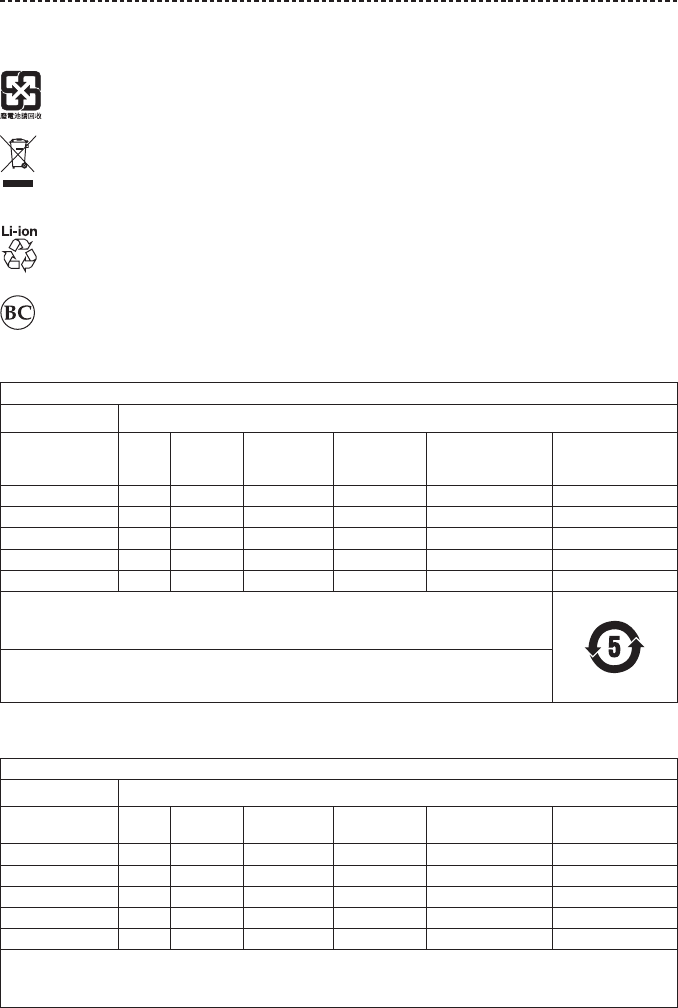
DON’T attempt to remove the rechargeable lithium-ion battery from this product. Contact your local Bose retailer or
other qualified professional for removal.
Please dispose of used batteries properly, following local regulations. Do not incinerate.
This symbol means the product must not be discarded as household waste, and should be delivered to an
appropriate collection facility for recycling. Proper disposal and recycling helps protect natural resources, human
health and the environment. For more information on disposal and recycling of this product, contact your local
municipality, disposal service, or the shop where you bought this product.
Removal of the rechargeable lithium-ion battery in this product should be conducted only
by a qualified professional. Please contact your local Bose retailer or see
http://products.bose.com/static/compliance/index.html for further information.
China Restriction of Hazardous Substances Table
Names and Contents of Toxic or Hazardous Substances or Elements
Toxic or Hazardous Substances and Elements
Part Name Lead
(Pb)
Mercury
(Hg)
Cadmium
(Cd)
Hexavalent
(CR(VI))
Polybrominated
Biphenyl
(PBB)
Polybrominated
diphenylether
(PBDE)
PCBs X O O O O O
Metal Parts X O O O O O
Plastic Parts O O O O O O
Speakers X O O O O O
Cables X O O O O O
This table is prepared in accordance with the provisions of SJ/T 11364.
O: Indicates that this toxic or hazardous substance contained in all of the homogeneous materials for this part
is below the limit requirement of GB/T 26572.
X: Indicates that this toxic or hazardous substance contained in at least one of the homogeneous materials
used for this part is above the limit requirement of GB/T 26572.
Taiwan Restriction of Hazardous Substances Table
Equipment name: Bose® SoundLink® Micro Bluetooth® speaker, Type designation: 423816
Restricted substances and its chemical symbols
Unit Lead
(Pb) Mercury (Hg) Cadmium (Cd) Hexavalent
chromium (Cr+6)
Polybrominated
biphenyls (PBB)
Polybrominated
diphenyl ethers (PBDE)
PCBs -○ ○ ○ ○ ○
Metal Parts -○ ○ ○ ○ ○
Plastic Parts ○ ○ ○ ○ ○ ○
Speakers -○ ○ ○ ○ ○
Cables -○ ○ ○ ○ ○
Note 1: “○” indicates that the percentage content of the restricted substance does not exceed the percentage of reference value
of presence.
Note 2: The “−” indicates that the restricted substance corresponds to the exemption.

ENGLISH - 5
REGULATORY INFORMATION
Please complete and retain for your records
The serial and model numbers are located on the strap and the bottom of the product.
Serial number: ______________________________________________________________________
Model number: ______________________________________________________________________
Please keep your receipt with your owner’s guide. Now is a good time to register your Bose product.
You can easily do this by going to http://global.Bose.com/register
Date of Manufacture: The eighth digit in the serial number indicates the year of manufacture; “7” is 2007 or 2017.
China Importer: Bose Electronics (Shanghai) Company Limited, Part C, Plan 9, No. 353 North Riying Road, China
(Shanghai) Pilot Free Trade Zone
EU Importer: Bose Products B.V., Gorslaan 60, 1441 RG Purmerend, The Netherlands
Taiwan Importer: Bose Taiwan Branch, 9F-A1, No.10, Section 3, Minsheng East Road, Taipei City 104, Taiwan
Phone Number: +886-2-2514 7676
Mexico Importer: Bose de México, S. de R.L. de C.V. , Paseo de las Palmas 405-204, Lomas de Chapultepec,
11000 México, D.F. Phone Number: +5255 (5202) 3545
Input Rating: 5V 1.5A
Charging temperature range: 32° F – 122° F (0° C – 50° C)
Discharging temperature range: -4° F – 158° F (-20° C – 70° C)
Apple, the Apple logo, and Siri are trademarks of Apple Inc., registered in the U.S. and other countries. App Store is a
service mark of Apple Inc.
Android, Google Now, Google Play, and the Google Play logo are trademarks of Google Inc.
The Bluetooth® word mark and logos are registered trademarks owned by Bluetooth SIG, Inc. and any use of such marks
by Bose Corporation is under license.
Bose Corporation Headquarters: 1-877-230-5639
©2018 Bose Corporation. No part of this work may be reproduced, modified, distributed or otherwise used without prior
written permission.

6 - ENGLISH
CONTENTS
Bose® Connect App
What can I do with the Bose Connect app? ........................................................... 8
What’s in the Carton
Contents ................................................................................................................................ 9
Speaker Portability
Strap configurations ......................................................................................................... 10
Water resistance ................................................................................................................. 10
Speaker Controls
Power on/o ........................................................................................................................ 12
Auto-o timer ..................................................................................................................... 12
Disable the auto-o timer ...................................................................................... 12
Speaker functions .............................................................................................................. 13
Media playback and volume functions .............................................................. 13
Call functions ............................................................................................................... 14
Access voice control ......................................................................................................... 15
Battery
Charge the speaker ........................................................................................................... 16
Charging time.............................................................................................................. 16
Hear the battery level .............................................................................................. 17
Battery protection mode ................................................................................................ 17
Status Indicators
Bluetooth® indicator .......................................................................................................... 18
Battery indicators .............................................................................................................. 19
Voice Prompts
Pre-installed languages ................................................................................................... 20
Change the language ....................................................................................................... 20
Disable voice prompts ..................................................................................................... 20

ENGLISH - 7
CONTENTS
Bluetooth Connections
Connect your mobile device using the Bose® Connect app
(recommended) ................................................................................................................. 21
Connect using the Bluetooth menu on your mobile device ............................. 22
Disconnect a mobile device ........................................................................................... 23
Reconnect a mobile device ............................................................................................ 23
Multiple Bluetooth Connections
Connect an additional mobile device ........................................................................ 24
Identify connected mobile devices ............................................................................. 24
Switch between two connected mobile devices ................................................... 24
Reconnect a previously connected mobile device ............................................... 25
Clear the speaker pairing list ......................................................................................... 25
Share Audio Between Bose Speakers
Pair the speakers using the Bose Connect app (recommended) ................... 26
Pair the speakers manually ............................................................................................ 26
Party mode ................................................................................................................... 26
Stereo mode ................................................................................................................ 28
Switch between Party mode and Stereo mode ..................................................... 28
Disable Party mode or Stereo mode .......................................................................... 28
Care and Maintenance
Clean the speaker ............................................................................................................. 29
Replacement parts and accessories ........................................................................... 29
Limited warranty ................................................................................................................ 29
Troubleshooting
Common solutions ............................................................................................................ 30
Reset your speaker ............................................................................................................ 32
8 - ENGLISH
BOSE® CONNECT APP
Download the Bose Connect app to keep your software up-to-date, personalize your
speaker settings, easily manage Bluetooth connections and access new features.
What can I do with the Bose Connect app?
• Easily connect to and switch between multiple mobile devices with a single swipe.
• Customize your speaker experience:
– Name your speaker.
– Select a voice prompt language or disable voice prompts.
– Adjust the auto-o timer.
• Pair two Bose speakers to play in Party mode or Stereo mode. Refer to the Bose
Connect app for more information about these modes.
• Find answers to frequently asked questions.
ENGLISH - 9
WHAT’S IN THE CARTON
Contents
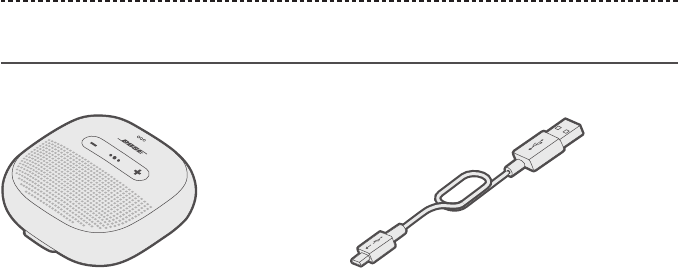
Confirm that the following parts are included:
Bose® SoundLink® Micro Bluetooth speaker USB cable
Note: If any part of the product is damaged, do not use it. Contact your authorized
Bose® dealer or Bose customer service.
Visit: global.Bose.com/Support/Micro
10 - ENGLISH
SPEAKER PORTABILITY
Strap configurations
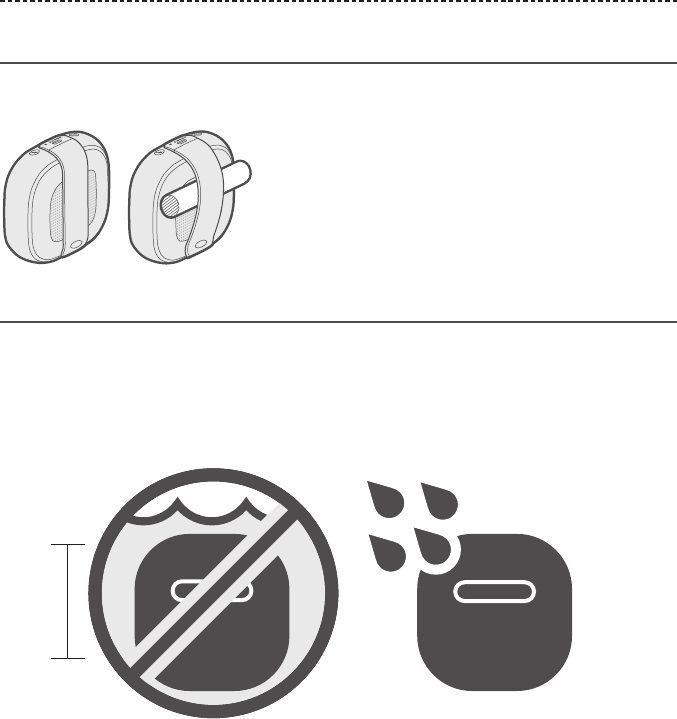
You can adjust the strap to easily transport the speaker. To secure the speaker, attach it
to an object, such as a bicycle handlebar or backpack strap.
Water resistance
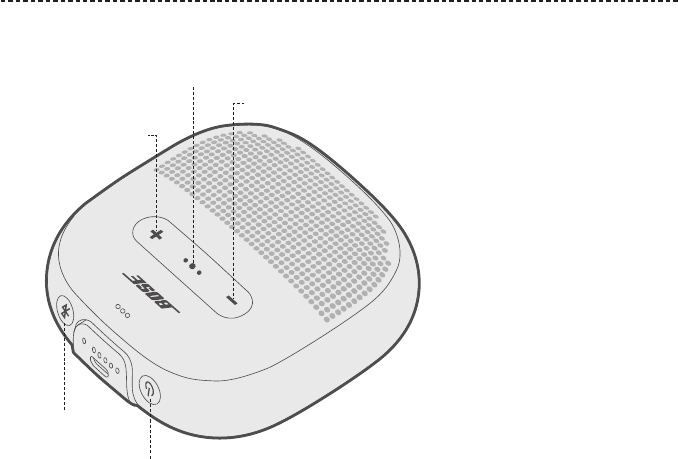
Your speaker is waterproof and splash resistant. It is rated IPX7 and IPX4. You can
immerse the speaker in water for up to 30 minutes at a depth of 3.2 ft. (1 m). It can also
be used while showering and in the rain or snow.
CAUTION: Do NOT submerge this speaker in any pool of water deeper than
3.2 ft. (1 m).
> 3.2 ft.
(1 m)
ENGLISH - 11
SPEAKER CONTROLS
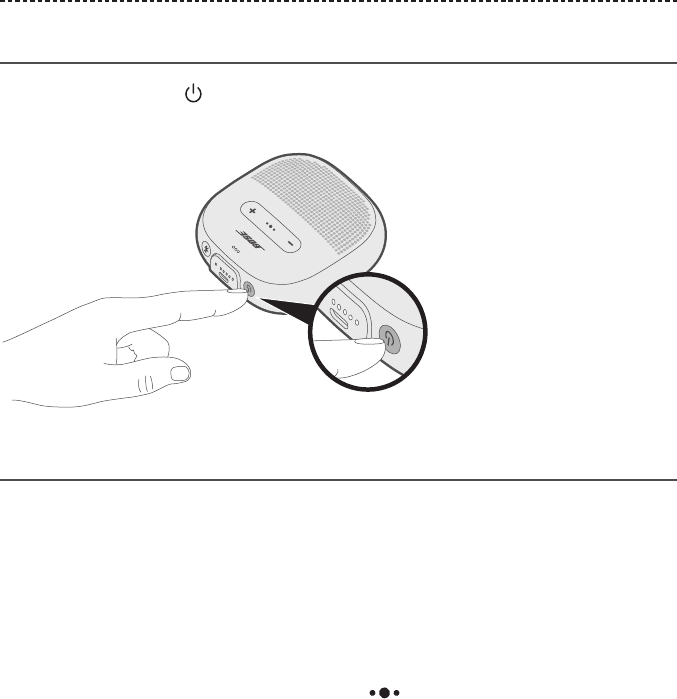
Controls are located on the top and outer edge of the speaker.
Bluetooth button
Power button
Volume down
Volume up
Multi-function button
12 - ENGLISH
SPEAKER CONTROLS
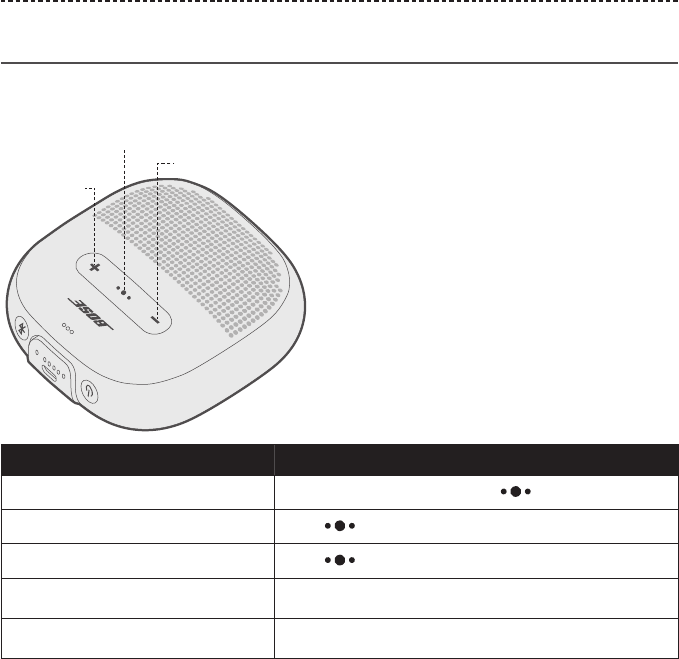
Power on/o
Press the Power button .
The battery indicators glow solid white.
Auto-o timer
The auto-o timer conserves the battery when the speaker is operating on battery
power. The speaker switches o when audio has stopped and buttons have not been
pressed for 20 minutes.
Note: To adjust the time it takes for your speaker to automatically power o, use the
Bose® Connect app.
Disable the auto-o timer
Press and hold + and the Multi-function button simultaneously.
You hear “Auto-o disabled.”
Repeat to re-enable the auto-o timer.
Tip: You can also disable the auto-o timer using the Bose Connect app.
ENGLISH - 13
SPEAKER CONTROLS
Speaker functions
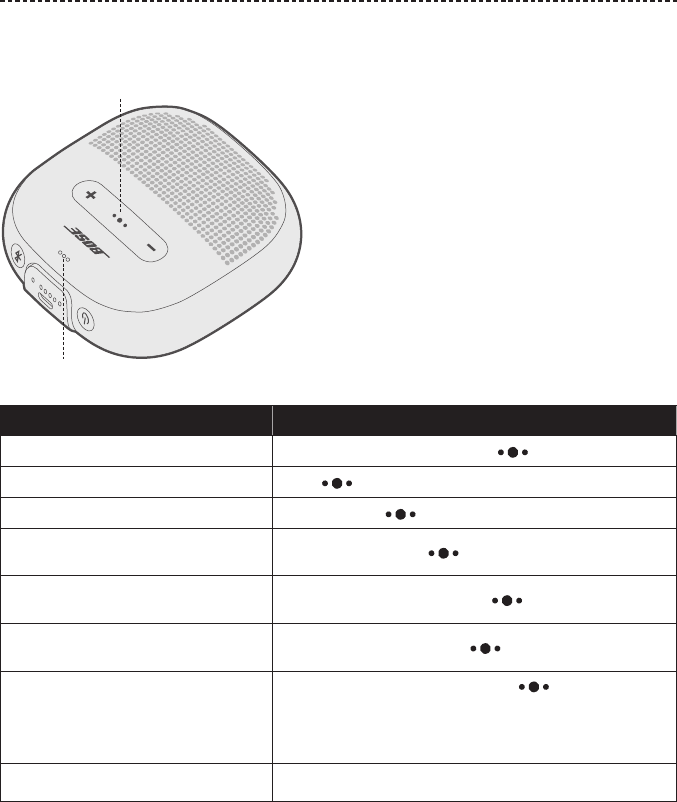
Media playback and volume functions
Function What to do
Play/Pause Press the Multi-function button .
Skip Forward Press twice quickly.
Skip Backward Press three times quickly.
Volume Up Press + .
Volume Down Press – .
Volume down
Volume up
Multi-function button
14 - ENGLISH
SPEAKER CONTROLS
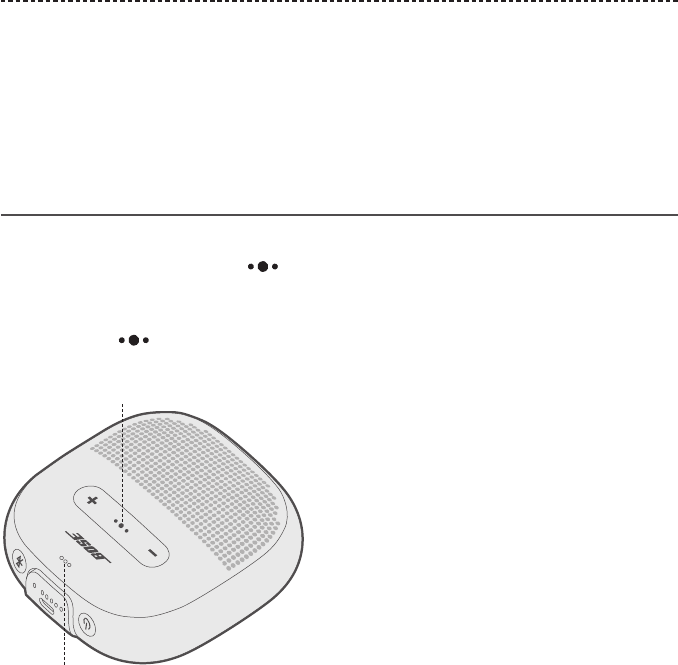
Call functions
Function What to do
Answer a call Press the Multi-function button .
End a call Press .
Decline an incoming call Press and hold for one second.
Answer a second incoming call and
put the current call on hold While on a call, press .
Decline a second incoming call and
stay on current call While on a call, press and hold for one second.
Switch between two calls With two active calls, press twice quickly.
Access voice control to make a call
While not on a call, press and hold for
one second.
Your mobile device may not support voice control. Refer
to your device owner’s guide for more information.
Mute/unmute a call While on a call, press + and – simultaneously.
Microphone
Multi-function button
ENGLISH - 15
SPEAKER CONTROLS
Voice prompt notifications
Your speaker identifies incoming callers which are saved in your contact list.
To disable this feature, see page 20.
Note: Disabling voice prompt notifications also disables voice prompts.
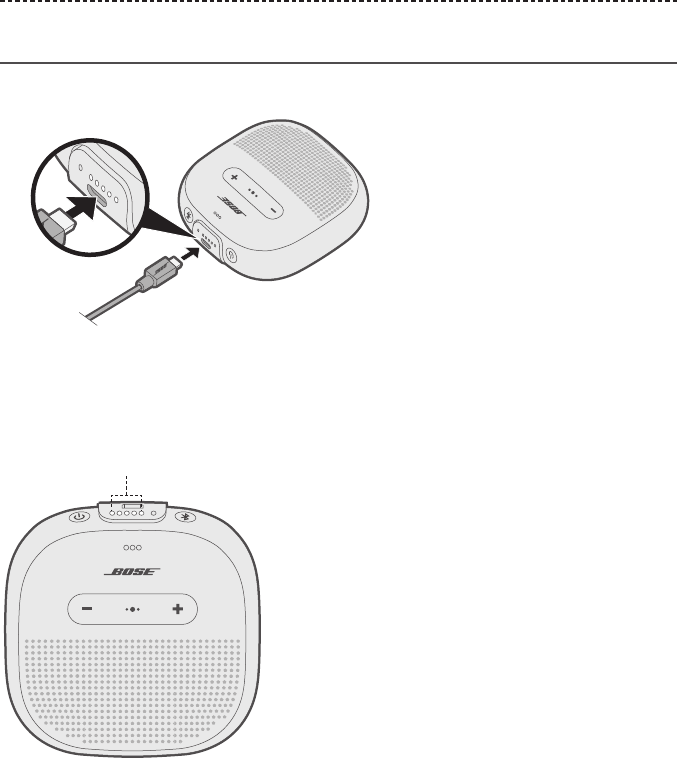
Access voice control
The speaker microphone acts as an extension of the microphone in your mobile device.
Using the Multi-function button on the speaker, you can access the voice control
capabilities on your device to make/take calls or ask Siri or Google Now™ to play music,
tell you the weather, give you the score of a game and more.
Press and hold to access voice control on your device. You hear a tone that
indicates voice control is active.
Microphone
Multi-function button
16 - ENGLISH
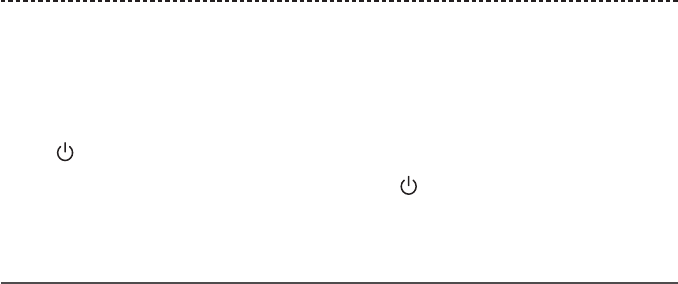
Charge the speaker
1. Plug the small end of the USB cable into the USB connector.
2. Plug the other end of the USB cable into a wall charger or computer that is
powered on.
While charging, the last lit battery indicator blinks white. When the battery is fully
charged, all five battery indicators glow solid white.
Battery indicators
Charging time
Allow up to four hours to fully charge the battery. A full charge powers the speaker for
up to six hours.
BATTERY
ENGLISH - 17
BATTERY
Hear the battery level
Each time you power on the speaker, a voice prompt announces the battery level. When
the speaker is in use, a voice prompt announces if the battery needs to be charged.
To hear the battery charge level while using your speaker, press and hold the Power
button until you hear a voice prompt.
Note: To visually check the battery, press and hold while viewing the battery
indicators (see page 19).
Battery protection mode
When your speaker battery is depleted (0%), or your speaker is unplugged and unused
for more than three days (with a remaining charge of less than 10%), it enters battery
protection mode. To reactivate your speaker, connect it to a wall charger or computer
that is powered on.
When not in use, store your speaker in a cool place.
CAUTION: Do not store your speaker for extended periods when fully charged or with
a remaining charge of less than 10 percent.
18 - ENGLISH
STATUS INDICATORS
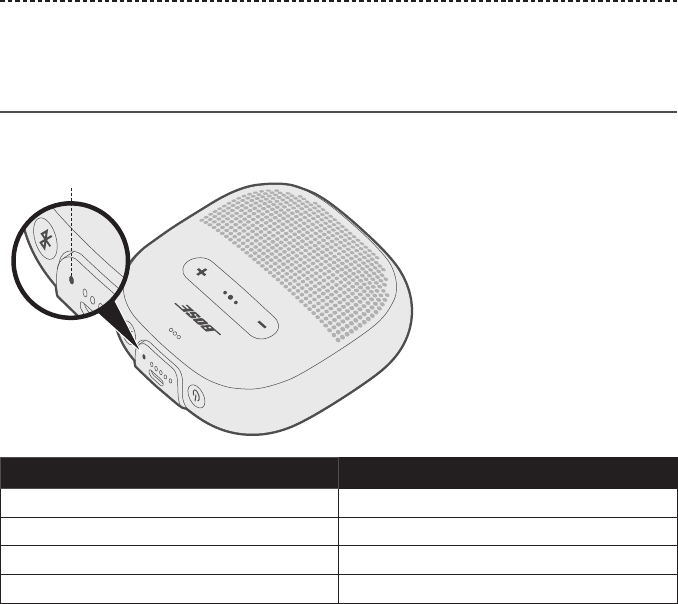
The Bluetooth and battery indicators are located on the outer edge of the speaker.
Bluetooth indicator
Shows the connection status of a mobile device.
Bluetooth indicator
Indicator activity System state
Blinking blue Ready to connect
Blinking white Connecting
Solid white Connected
Solid blue Select language
ENGLISH - 19
STATUS INDICATORS
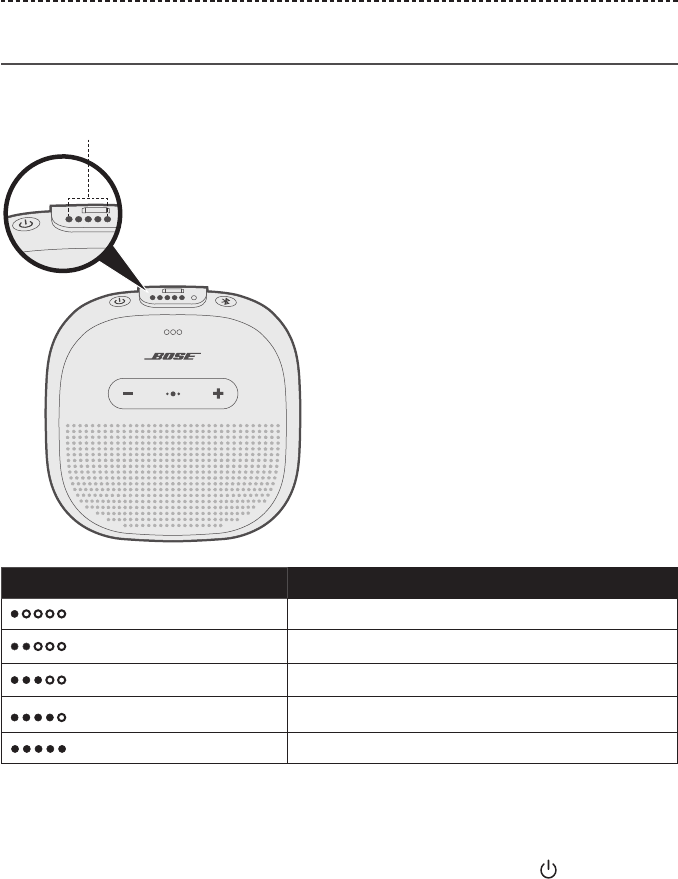
Battery indicators
Shows the battery charge level.
Battery indicators
Indicator activity Charging percentage
0% - 20%
20% - 40%
40% - 60%
60% - 80%
80% - 100%
Notes:
• When charging, the last lit battery indicator blinks white. When the speaker is fully
charged, all battery indicators glow solid white.
• To visually check the battery level, press and hold the Power button while viewing
the battery indicators.
• If connected to an Apple device, the device displays the speaker battery level near the
upper right corner of the screen and in the notification center.

20 - ENGLISH
VOICE PROMPTS
Voice prompts guide you through the Bluetooth connection process, announce the
battery level and identify connected devices. You can customize voice prompts using
the buttons on your speaker.
Tip: You can also easily manage voice prompts using the Bose® Connect app.
Pre-installed languages
The following languages are pre-installed on your speaker:
• English • Japanese • Dutch
• Spanish • Korean • Russian
• French • Italian • Polish
• German • Portuguese
• Mandarin • Swedish
Change the language
When you power on the speaker for the first time, the voice prompts are in English.
1. Press and hold the Multi-function button and – simultaneously until you hear
the voice prompt for the first language option.
2. Press + or – to move through the list of languages.
3. When you hear your language, press and hold to select.
Disable voice prompts
Press and hold + and – simultaneously until you hear “voice prompts o.”
Note: Repeat to re-enable voice prompts.
ENGLISH - 21
BLUETOOTH CONNECTIONS
Bluetooth wireless technology lets you stream music from mobile devices such as
smartphones, tablets and laptop computers. Before you can stream music from a
device, you must connect the device with your speaker.
Connect your mobile device using the
Bose® Connect app (recommended)
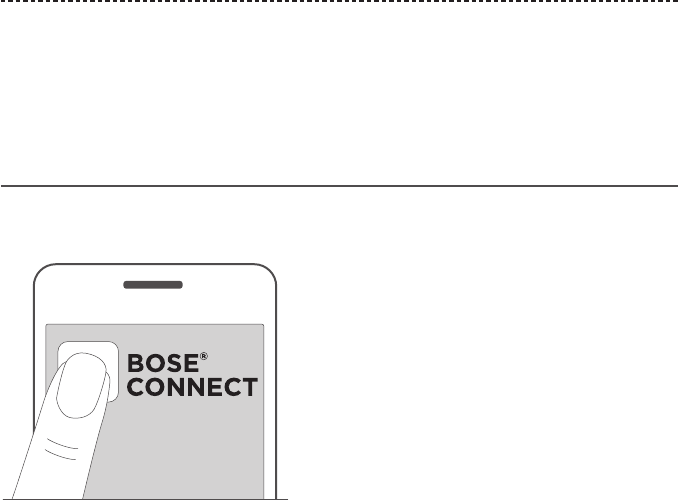
With your speaker powered on, download the Bose Connect app and follow the
on-screen connection instructions.
Once connected, you hear “Connected to <mobile device name>,” and the Bluetooth
indicator glows solid white.
22 - ENGLISH
BLUETOOTH CONNECTIONS
Connect using the Bluetooth menu on your
mobile device
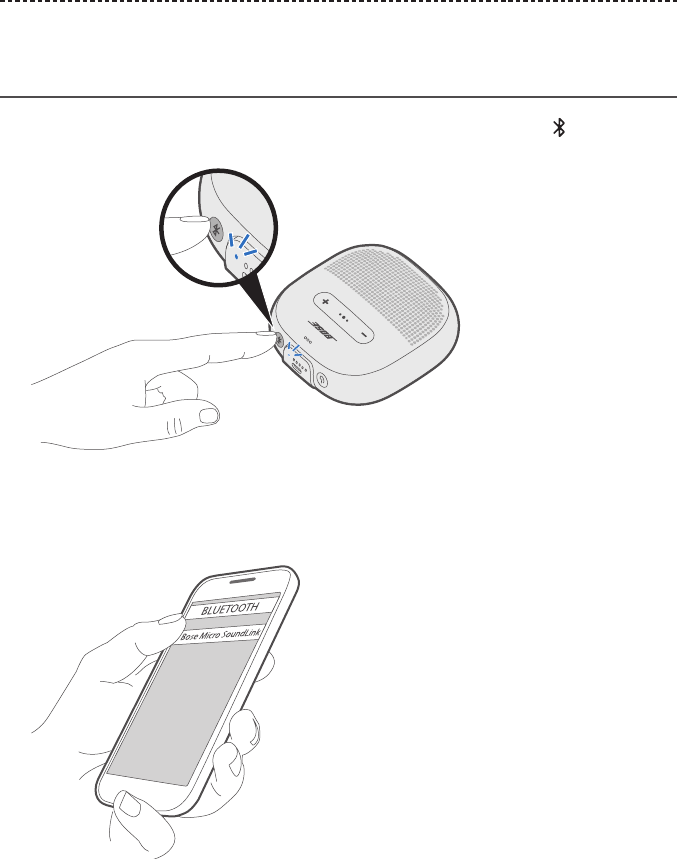
1. With your speaker powered on, press and hold the Bluetooth button until you hear
“Ready to connect,” and the Bluetooth indicator blinks blue.
2. On your device, enable the Bluetooth feature.
Tip: The Bluetooth feature is usually found in the Settings menu.
3. Select your speaker from the device list.
Once connected, you hear “Connected to <mobile device name>,” and the Bluetooth
indicator glows solid white.
Tip: Look for the name you entered for your speaker in the Bose® Connect app.

ENGLISH - 23
BLUETOOTH CONNECTIONS
Disconnect a mobile device
Disable the Bluetooth feature on your device.
Tip: You can also disconnect your device using the Bose® Connect app.
Reconnect a mobile device
When powered on, the speaker tries to reconnect with the two most recently-connected
devices.
Note: The devices must be within range (30 ft. or 9 m) and powered on.
24 - ENGLISH
MULTIPLE BLUETOOTH CONNECTIONS
You can pair additional devices to your speaker. These Bluetooth connections are
controlled with the Bluetooth button . Voice prompts guide you through controlling
multiple connections. Before connecting an additional mobile device, make sure this
feature is enabled.
Tip: You can also easily manage multiple connected devices using the Bose®
Connect app.
Connect an additional mobile device
You can store up to eight paired devices in the speaker pairing list, and your speaker can
be actively connected to two devices at a time.
To connect an additional device, download the Bose® Connect app (see page 21) or
use the Bluetooth menu on your mobile device (see page 22).
Note: You can only play audio from one device at a time.
Identify connected mobile devices
Press to hear which devices are currently connected.
Switch between two connected
mobile devices
1. Pause audio on your first device.
2. Play audio on your second device.
ENGLISH - 25
MULTIPLE BLUETOOTH CONNECTIONS
Reconnect a previously connected
mobile device
1. Press the Bluetooth button to hear which device is connected.
2. Press again within three seconds to connect to the next device in the speaker
pairing list.
3. Repeat until you hear the correct device name.
4. Play audio on the connected device.
Clear the speaker pairing list
1. Press and hold the Bluetooth button for 10 seconds until you hear “Bluetooth
device list cleared,” and the Bluetooth indicator blinks blue.
2. Delete your speaker from the Bluetooth list on your mobile device.
All devices are cleared, and the speaker is ready to connect.
26 - ENGLISH
SHARE AUDIO BETWEEN BOSE SPEAKERS
You can pair Bose speakers together to play in the following modes:
• Party mode (left and right speakers play in unison)
• Stereo mode (left speaker and right speaker play separately)
You can set this up using the Bose® Connect app (recommended) or the speaker
control buttons.
Refer to your Bose owner’s guide to determine if your secondary speaker supports
these modes.
Pair the speakers using the
Bose Connect app (recommended)
For more information, download the Bose Connect app.
Pair the speakers manually
If you are unable to access the Bose Connect app, follow the instructions below.
Party mode
1. Make sure both speakers are powered on.
2. Make sure one speaker is connected to your mobile device.
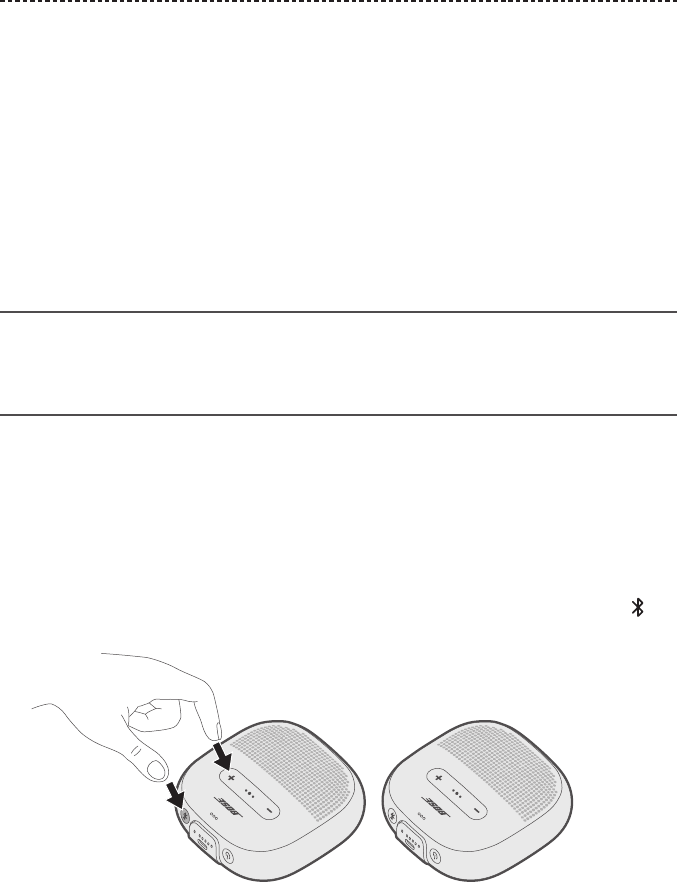
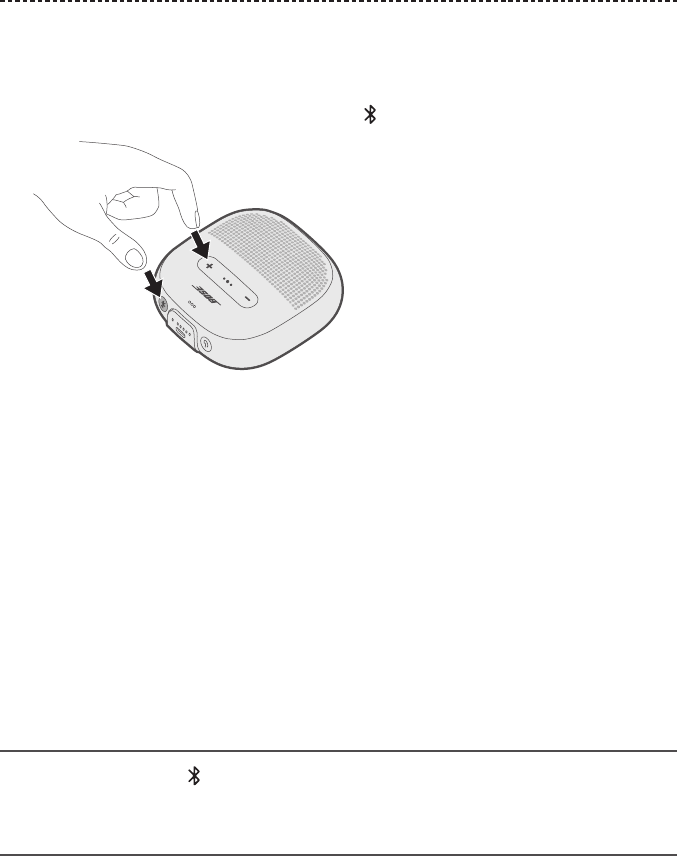
3. On the speaker connected to your device, press and hold the Bluetooth button and
+ simultaneously.
4. Release the buttons when you hear “Press the Bluetooth and volume down buttons
simultaneously on a second Bose device.”
ENGLISH - 27
SHARE AUDIO BETWEEN BOSE SPEAKERS
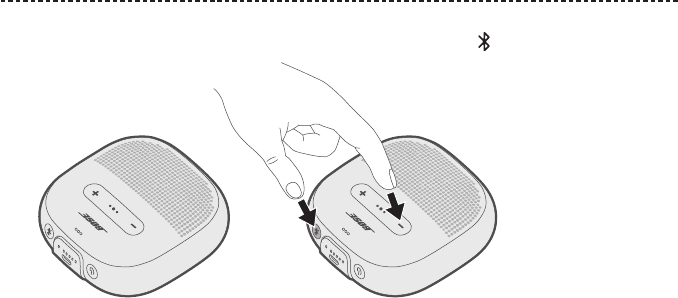
5. On the other speaker, press and hold the Bluetooth button and – simultaneously.
6. Release the buttons when the speaker emits a tone.
After about 10 seconds, you hear “Party mode” from both speakers simultaneously.
Party mode is enabled, and you are now able to play audio in unison using your
mobile device.
7. For an optimal experience, position your speakers:
• In the same room or outdoor area
• So there are no obstructions between them
Note: Performance may vary based on mobile device, distance and
environmental factors.
28 - ENGLISH
SHARE AUDIO BETWEEN BOSE SPEAKERS
Stereo mode
1. Configure your speakers for Party mode (see page 26).
2. On one speaker, press the Bluetooth button and + simultaneously.
3. Release the buttons when you hear “Stereo mode.”
You hear “Left” from the left speaker and “Right” from the right speaker.
Stereo mode is enabled, and you are now able to play audio in stereo using your
mobile device.
4. For an optimal experience, position your speakers:
• In the same room or outdoor area
• Within 10 feet of each other, free from obstructions
• So that your distance to each speaker is equal
Note: Performance may vary based on device, distance and environmental factors.
Switch between Party mode and
Stereo mode
On either speaker, press and + simultaneously.
Disable Party mode or Stereo mode
Power o the second speaker.

ENGLISH - 29
CARE AND MAINTENANCE
Clean the speaker
Your speaker may require periodic cleaning.
• Clean the surface of the speaker with a soft, damp cloth (water only).
• Do not use any solvents, chemicals or cleaning solutions containing alcohol, ammonia
or abrasives.
Replacement parts and accessories
Replacement parts and accessories can be ordered through Bose customer service.
Visit: global.Bose.com/Support/Micro
Limited warranty
Your speaker is covered by a limited warranty. Visit our website at
global.Bose.com/warranty for details of the limited warranty.
To register your product, visit global.Bose.com/register for instructions. Failure to
register will not aect your limited warranty rights.

30 - ENGLISH
TROUBLESHOOTING
Common solutions
If you experience problems with your speaker:
• Power on the speaker (see page 12).
• Check the state of the status indicators (see page 18).
• Make sure your mobile device supports Bluetooth technology (see page 22).
• Charge the battery (see page 16).
• Increase the volume on your speaker, device and music app.
• Move your device closer to the speaker and away from any interference
or obstruction.
• Try connecting another device (see page 24).
If you could not resolve your issue, see the table below to identify symptoms and
solutions to common problems. If you are unable to resolve your issue, contact
Bose customer service.
Visit: global.Bose.com/Support/Micro
Symptom Solution
No power (battery) • Battery may be in protection mode or discharged. Connect your
speaker to a wall charger or computer that is powered on.
Speaker does not connect
with mobile device
• On your device:
– Disable and then enable the Bluetooth feature.
– Delete your speaker from the Bluetooth list on your device.
Connect again (see page 24).
• Connect a dierent device (see page 25).
• Visit: global.Bose.com/Support/Micro to see how-to videos.
• Clear the speaker pairing list (see page 25). Connect again.
Bose speakers do not pair
together manually
• Download the Bose Connect app for an additional way to pair
your Bose speakers.
• Your second speaker may not support Stereo or Party mode.
Refer to your Bose speaker owner’s guide.
No sound • Make sure voice prompts are on. Press the Bluetooth button
to hear the connected device. Make sure you are using the
correct device.
• Use a dierent music source.
• Connect a dierent mobile device (see page 24).
• If two devices are connected, pause audio on the first device and
play audio on the other device.
• If two devices are connected, move the devices within range of
the speaker (30 ft. or 9 m).

ENGLISH - 31
TROUBLESHOOTING
Symptom Solution
Poor sound quality • Use a dierent music source.
• Connect a dierent device.
• Disconnect the second device.
• Disable any audio enhancement features on the device or
music app.
Speaker does not charge • Make sure the connector on the cable is correctly aligned with
the connector on the speaker.
• Try another charging source.
• Secure both ends of the USB cable.
• If your speaker has been exposed to high or low temperatures,
let it return to room temperature and then try charging again.
• Reset your speaker (see page 32).
Microphone is not picking
up sound
• Make sure the microphone opening on the top of the speaker is
not blocked.
• Try another phone call.
• Try another compatible device.
• If the speaker was exposed to water, dry it out and try again.
Mobile device not
responding to button
presses
• For multi-press functions using the Multi-function button ,
vary the speed of presses.
• Full controls may not be available for some models.
• Try another compatible device.
32 - ENGLISH
TROUBLESHOOTING
Reset your speaker
Factory reset clears connected devices and language settings from your speaker and
returns it to the original factory settings.
1. Power on your speaker.
2. Press and hold the Power button for 10 seconds.
The speaker powers o.
3. Press .
The Bluetooth indicator glows blue, and you hear “Ready to connect. To start setup,
download the Bose® Connect app” (see page 21).

ENGLISH - 33

©2018 Bose Corporation, The Mountain,
Framingham, MA 01701-9168 USA
AM791854 Rev. 03
