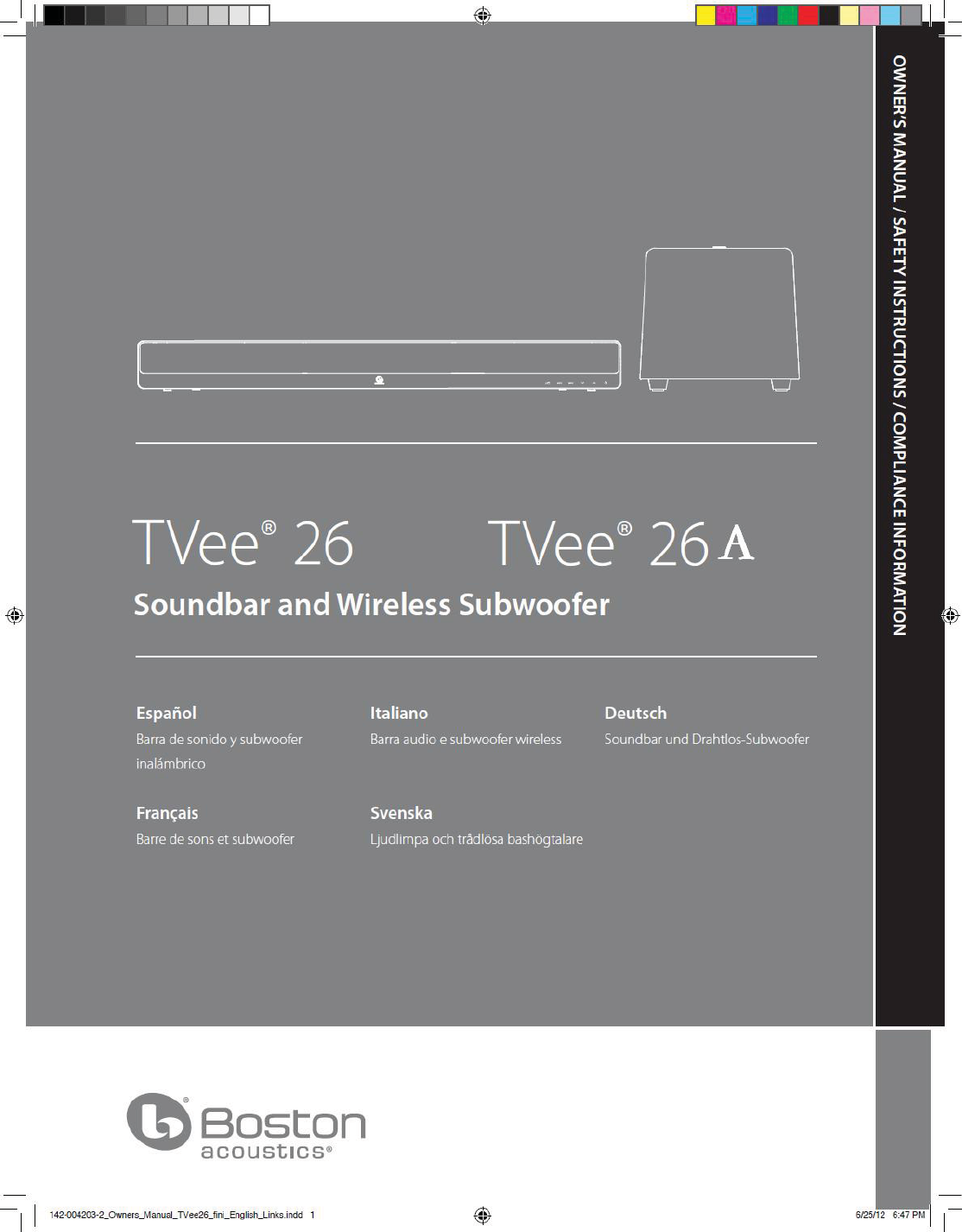
Boston Acoustics TVEE26 TX Wireless Speaker System User Manual 12

Boston Acoustics, Inc TX Wireless Speaker System 12

Contents

User manual I

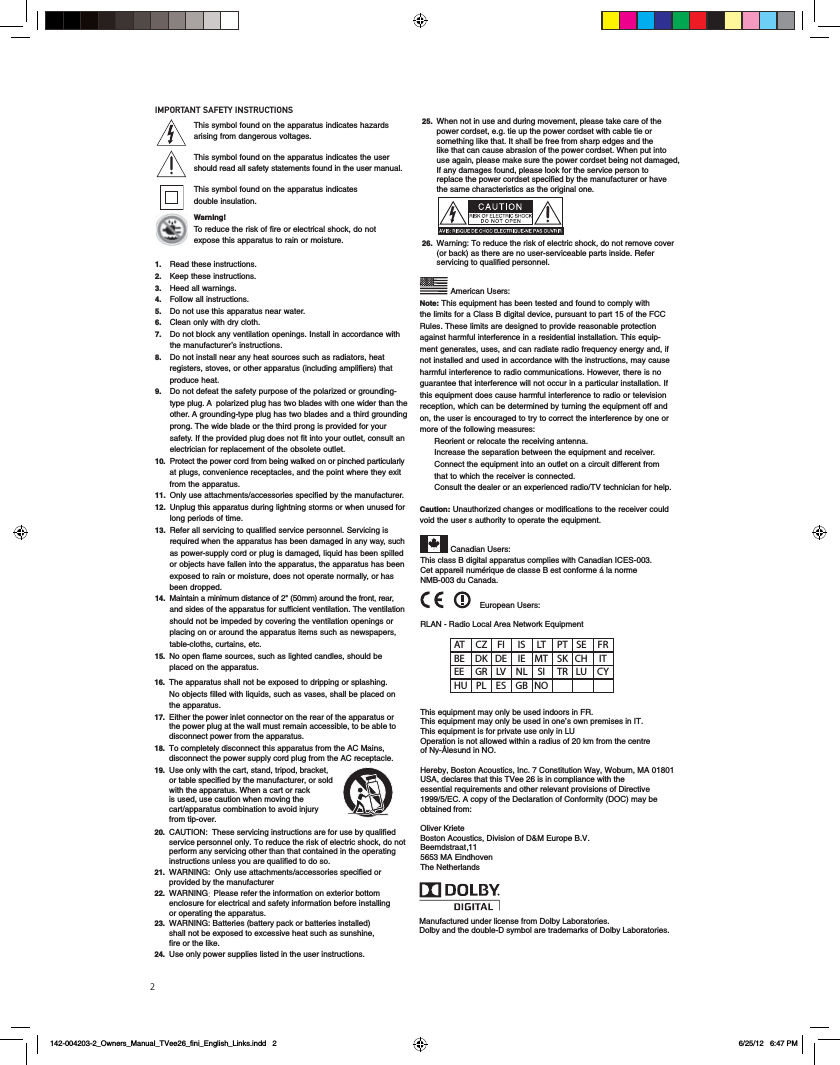
21. Read these instructions.2. Keep these instructions.3. Heed all warnings.4. Follow all instructions.5. Do not use this apparatus near water.6. Clean only with dry cloth.7. Do not block any ventilation openings. Install in accordance withthe manufacturer’s instructions.8. Do not install near any heat sources such as radiators, heat registers, stoves, or other apparatus (including amplifiers) that produce heat.9. Do not defeat the safety purpose of the polarized or grounding-type plug. A  polarized plug has two blades with one wider than theother. A grounding-type plug has two blades and a third groundingprong. The wide blade or the third prong is provided for your safety. If the provided plug does not fit into your outlet, consult an electrician for replacement of the obsolete outlet.10. Protect the power cord from being walked on or pinched particularlyat plugs, convenience receptacles, and the point where they exit from the apparatus.11. Only use attachments/accessories specified by the manufacturer.12. Unplug this apparatus during lightning storms or when unused forlong periods of time.IMPORTANT SAFETY INSTRUCTIONS13. Refer all servicing to qualified service personnel. Servicing is required when the apparatus has been damaged in any way, suchas power-supply cord or plug is damaged, liquid has been spilled or objects have fallen into the apparatus, the apparatus has been  This class B digital apparatus complies with Canadian ICES-003.Cet appareil numérique de classe B est conforme á la norme NMB-003 du Canada. exposed to rain or moisture, does not operate normally, or has been dropped.14. Maintain a minimum distance of 2" (50mm) around the front, rear,and sides of the apparatus for sufficient ventilation. The ventilationshould not be impeded by covering the ventilation openings or placing on or around the apparatus items such as newspapers, table-cloths, curtains, etc.15. No open flame sources, such as lighted candles, should be placed on the apparatus.16. The apparatus shall not be exposed to dripping or splashing. 17. Either the power inlet connector on the rear of the apparatus or the power plug at the wall must remain accessible, to be able to disconnect power from the apparatus. 18.19.To completely disconnect this apparatus from the AC Mains, disconnect the power supply cord plug from the AC receptacle. Use only with the cart, stand, tripod, bracket, or table specified by the manufacturer, or sold with the apparatus. When a cart or rack is used, use caution when moving the cart/apparatus combination to avoid injury from tip-over. 20. CAUTION:  These servicing instructions are for use by qualified service personnel only. To reduce the risk of electric shock, do not perform any servicing other than that contained in the operating instructions unless you are qualified to do so.21. WARNING:  Only use attachments/accessories specified or provided by the manufacturer 22. WARNING Please refer the information on exterior bottom enclosure for electrical and safety information before installing or operating the apparatus.  25. When not in use and during movement, please take care of the power cordset, e.g. tie up the power cordset with cable tie or something like that. It shall be free from sharp edges and the like that can cause abrasion of the power cordset. When put into use again, please make sure the power cordset being not damaged, If any damages found, please look for the service person to replace the power cordset specified by the manufacturer or have the same characteristics as the original one.  26. Warning: To reduce the risk of electric shock, do not remove cover (or back) as there are no user-serviceable parts inside. Refer servicing to qualified personnel.  No objects filled with liquids, such as vases, shall be placed on the apparatus.Note: This equipment has been tested and found to comply with the limits for a Class B digital device, pursuant to part 15 of the FCCAmerican Users:Rules. These limits are designed to provide reasonable protectionagainst harmful interference in a residential installation. This equip-ment generates, uses, and can radiate radio frequency energy and, ifnot installed and used in accordance with the instructions, may causeharmful interference to radio communications. However, there is noguarantee that interference will not occur in a particular installation. Ifthis equipment does cause harmful interference to radio or televisionreception, which can be determined by turning the equipment off andon, the user is encouraged to try to correct the interference by one ormore of the following measures: Reorient or relocate the receiving antenna. Increase the separation between the equipment and receiver. Connect the equipment into an outlet on a circuit different from that to which the receiver is connected. Consult the dealer or an experienced radio/TV technician for help.’Caution: Unauthorized changes or modifications to the receiver couldvoid the user s authority to operate the equipment.This symbol found on the apparatus indicates hazards arising from dangerous voltages.This symbol found on the apparatus indicates the usershould read all safety statements found in the user manual.This symbol found on the apparatus indicates double insulation.Warning! To reduce the risk of fire or electrical shock, do notexpose this apparatus to rain or moisture.Canadian Users:RLAN - Radio Local Area Network EquipmentThis equipment may only be used indoors in FR.This equipment may only be used in one’s own premises in IT.This equipment is for private use only in LUOperation is not allowed within a radius of 20 km from the centre of Ny-Ålesund in NO.Hereby, Boston Acoustics, Inc. 7 Constitution Way, Woburn, MA 01801 essential requirements and other relevant provisions of Directive  obtained from:Oliver KrieteBoston Acoustics, Division of D&M Europe B.V.Beemdstraat 11The NetherlandsEuropean Users:AT CZ FI  IS LT PT SE FR BE DK DE IE MT SK CH  IT EE GR LV NL SI  TR LU CY HU PL ES GB NOManufactured under license from Dolby Laboratories. Dolby and the double-D symbol are trademarks of Dolby Laboratories. 23. WARNING: Batteries (battery pack or batteries installed)shall not be exposed to excessive heat such as sunshine,fire or the like.24. Use only power supplies listed in the user instructions.
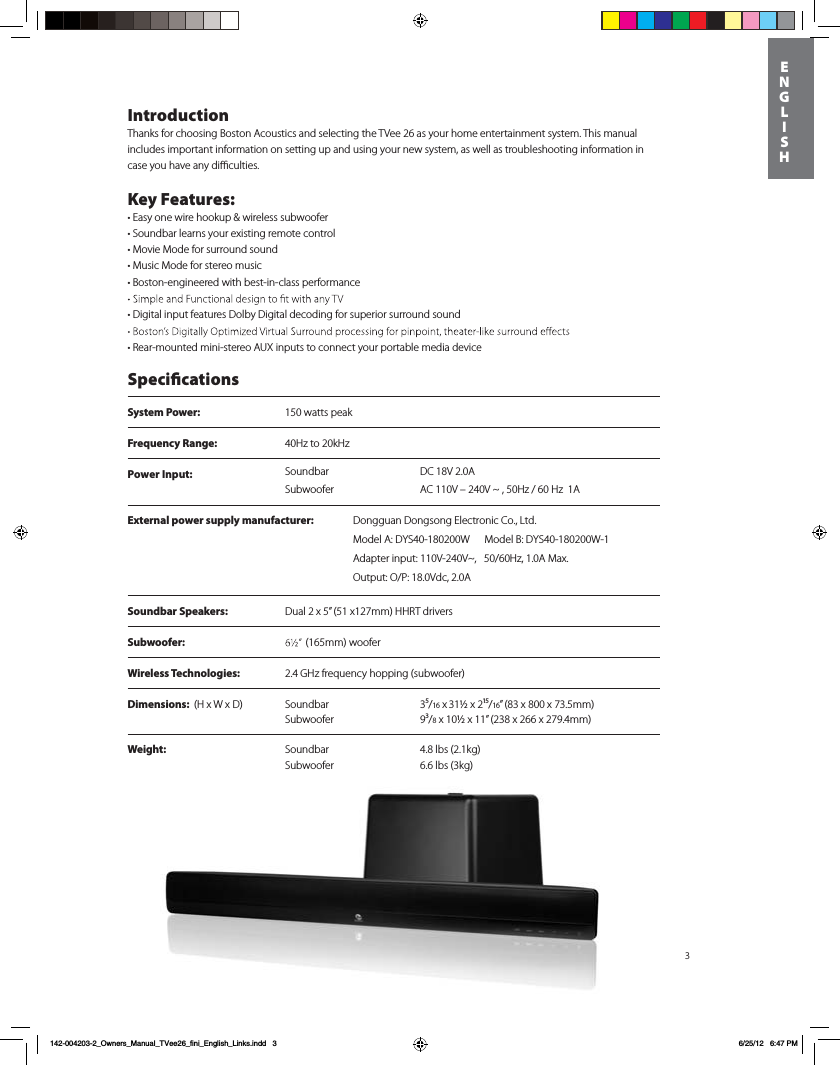
System Power:  150 watts peak Frequency Range:  40Hz to 20kHzPower Input:  DC 18V 2.0A SoundbarSubwoofer AC 110V – 240V ~ , 50Hz / 60 Hz  1A3IntroductionThanks for choosing Boston Acoustics and selecting the TVee 26 as your home entertainment system. This manual includes important information on setting up and using your new system, as well as troubleshooting information in case you have any difficulties.Key Features:t&BTZPOFXJre hookup & wireless subwoofertSoundbar learns your existing remote controltMovie Mode for surround soundtMusic Mode for stereo musict#PTton-engineered with best-in-class performance t%Jgital input features Dolby Digital decoding for superior surround sound tRear-mounted mini-stereo AUX inputs to connect your portable media device SpecicationsSoundbar Speakers: Dual 2 x 5” (51 x127mm) HHRT driversSubwoofer:  Dimensions:  (H x W x D) Soundbar 3⁵/16 x 31½ x 2¹⁵/16” (83 x 800 x 73.5mm)   Subwoofer 9³/8 x 10½ x 11” (238 x 266 x 279.4mm)       Weight: Soundbar 4.8 lbs (2.1kg) Subwoofer  6.6 lbs (3kg) Wireless Technologies: 2.4 GHz frequency hopping (subwoofer)(165mm) woofer     ENGLISH142-004203-2_Owners_Manual_TVee26_fini_English_Links.indd   3 6/25/12   6:47 PMExternal power supply manufacturer: %POHHVBO%POHTPOH&MFDUSPOJD$P-UEModel A: DYS40-180200W      Model B: DYS40-180200W-1Adapter input: 110V-240V~,   50/60Hz, 1.0A Max. Output: O/P: 18.0Vdc, 2.0A
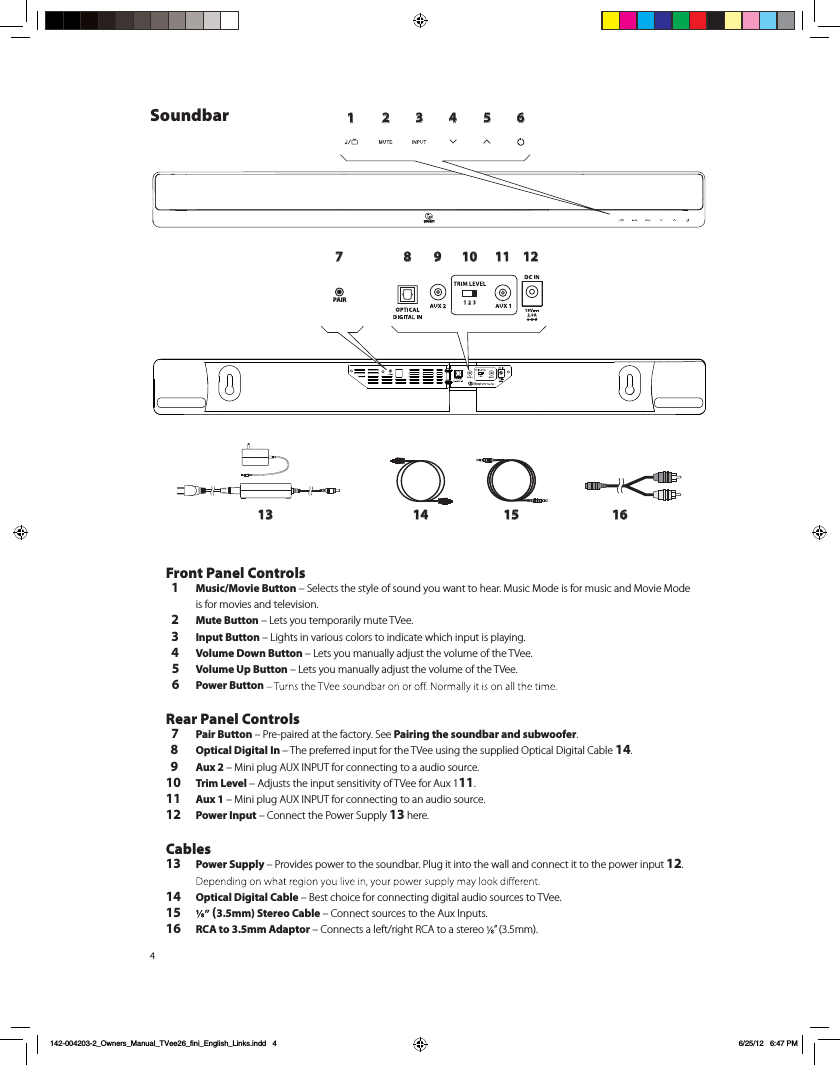
41 2 3 4 5 6789 10 11 1213 14 15 16PAIRSoundbarFront Panel Controls  1 Music/Movie Button – Selects the style of sound you want to hear. Music Mode is for music and Movie Mode  is for movies and television.  2 Mute Button – Lets you temporarily mute TVee.   3 Input Button – Lights in various colors to indicate which input is playing.  4 Volume Down Button – Lets you manually adjust the volume of the TVee.   5 Volume Up Button – Lets you manually adjust the volume of the TVee.  6 Power Button  Rear Panel Controls  7 Pair Button – Pre-paired at the factory. See Pairing the soundbar and subwoofer.  8 Optical Digital In – The preferred input for the TVee using the supplied Optical Digital Cable 14.  9 Aux 2 – Mini plug AUX INPUT for connecting to a audio source.10 Trim Level – Adjusts the input sensitivity of TVee for Aux 111.11 Aux 1 – Mini plug AUX INPUT for connecting to an audio source.12 Power Input – Connect the Power Supply 13 here. Cables13 Power Supply – Provides power to the soundbar. Plug it into the wall and connect it to the power input 12. 14 Optical Digital Cable – Best choice for connecting digital audio sources to TVee.15  (3.5mm) Stereo Cable – Connect sources to the Aux Inputs. 16 RCA to 3.5mm Adaptor – Connects a left/right RCA to a stereo  ” (3.5mm).  142-004203-2_Owners_Manual_TVee26_fini_English_Links.indd   4 6/25/12   6:47 PM
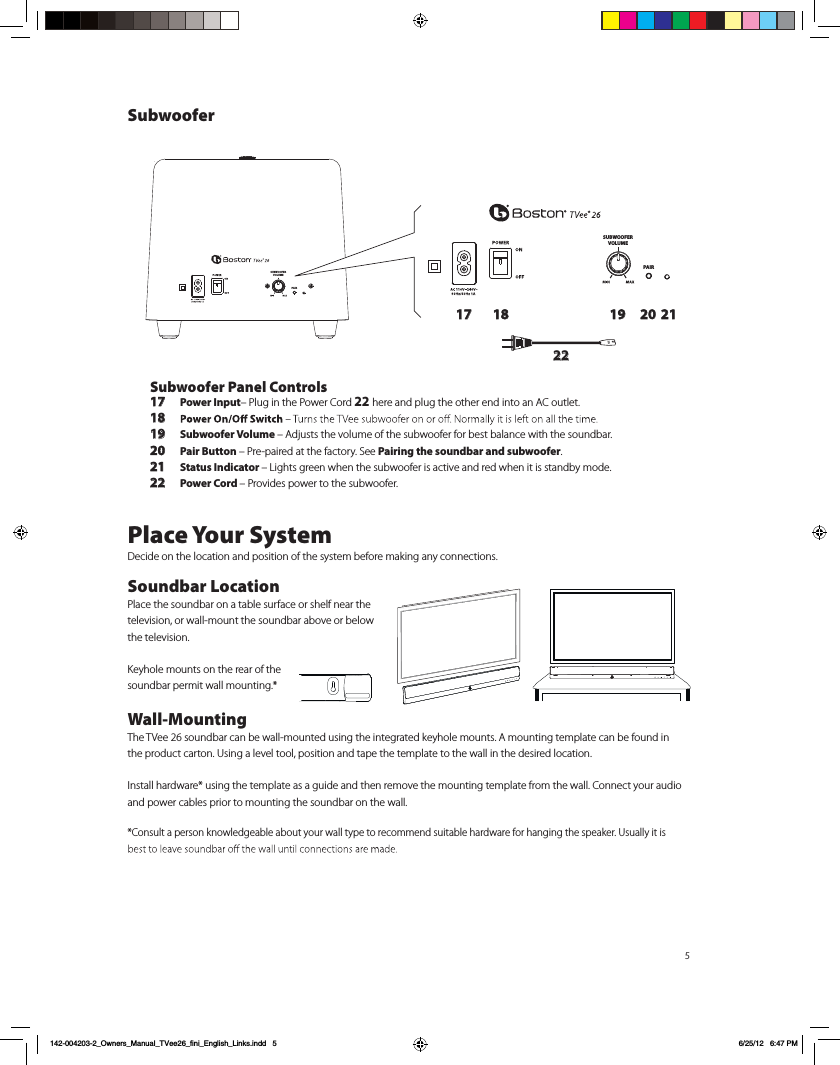
5SUBWOOFERVOLUMEPAIRSUBWOOFERVOLUMEPAIR17 18 19 20 2122Subwoofer Panel Controls17 Power Input– Plug in the Power Cord 22 here and plug the other end into an AC outlet. 18 19 Subwoofer Volume – Adjusts the volume of the subwoofer for best balance with the soundbar.20 Pair Button – Pre-paired at the factory. See Pairing the soundbar and subwoofer.21 Status Indicator – Lights green when the subwoofer is active and red when it is standby mode.22 Power Cord – Provides power to the subwoofer.Place Your SystemDecide on the location and position of the system before making any connections.  Soundbar LocationPlace the soundbar on a table surface or shelf near the television, or wall-mount the soundbar above or below the television. Keyhole mounts on the rear of the soundbar permit wall mounting.*Wall-Mounting The TVee 26 soundbar can be wall-mounted using the integrated keyhole mounts. A mounting template can be found in the product carton. Using a level tool, position and tape the template to the wall in the desired location. Install hardware* using the template as a guide and then remove the mounting template from the wall. Connect your audio and power cables prior to mounting the soundbar on the wall. *Consult a person knowledgeable about your wall type to recommend suitable hardware for hanging the speaker. Usually it is Subwoofer142-004203-2_Owners_Manual_TVee26_fini_English_Links.indd   5 6/25/12   6:47 PM
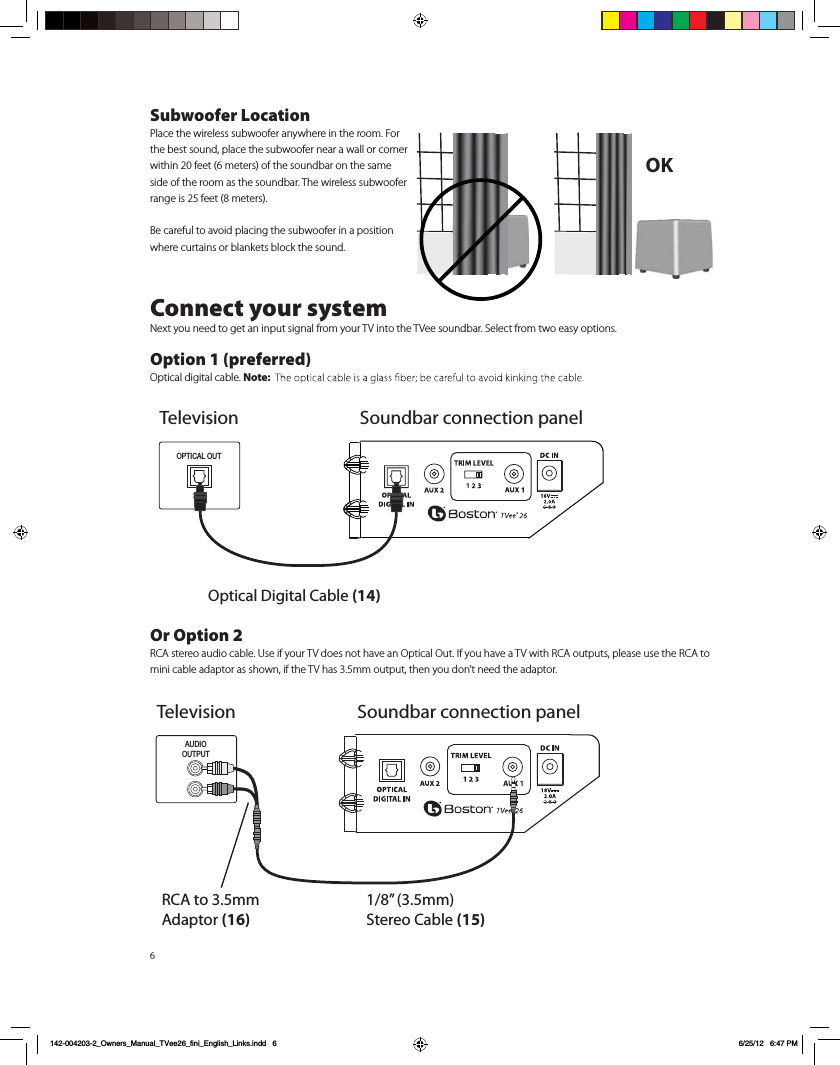
6Subwoofer LocationPlace the wireless subwoofer anywhere in the room. For the best sound, place the subwoofer near a wall or corner within 20 feet (6 meters) of the soundbar on the same side of the room as the soundbar. The wireless subwoofer range is 25 feet (8 meters).Be careful to avoid placing the subwoofer in a position where curtains or blankets block the sound.Connect your systemNext you need to get an input signal from your TV into the TVee soundbar. Select from two easy options. Option 1 (preferred)Optical digital cable. Note: Or Option 2RCA stereo audio cable. Use if your TV does not have an Optical Out. If you have a TV with RCA outputs, please use the RCA to mini cable adaptor as shown, if the TV has 3.5mm output, then you don’t need the adaptor.OK TelevisionOptical Digital Cable (14)OPTICAL OUTSoundbar connection panelAUDIOOUTPUTRCA to 3.5mm Adaptor (16)1/8” (3.5mm) Stereo Cable (15)Television Soundbar connection panel142-004203-2_Owners_Manual_TVee26_fini_English_Links.indd   6 6/25/12   6:47 PM
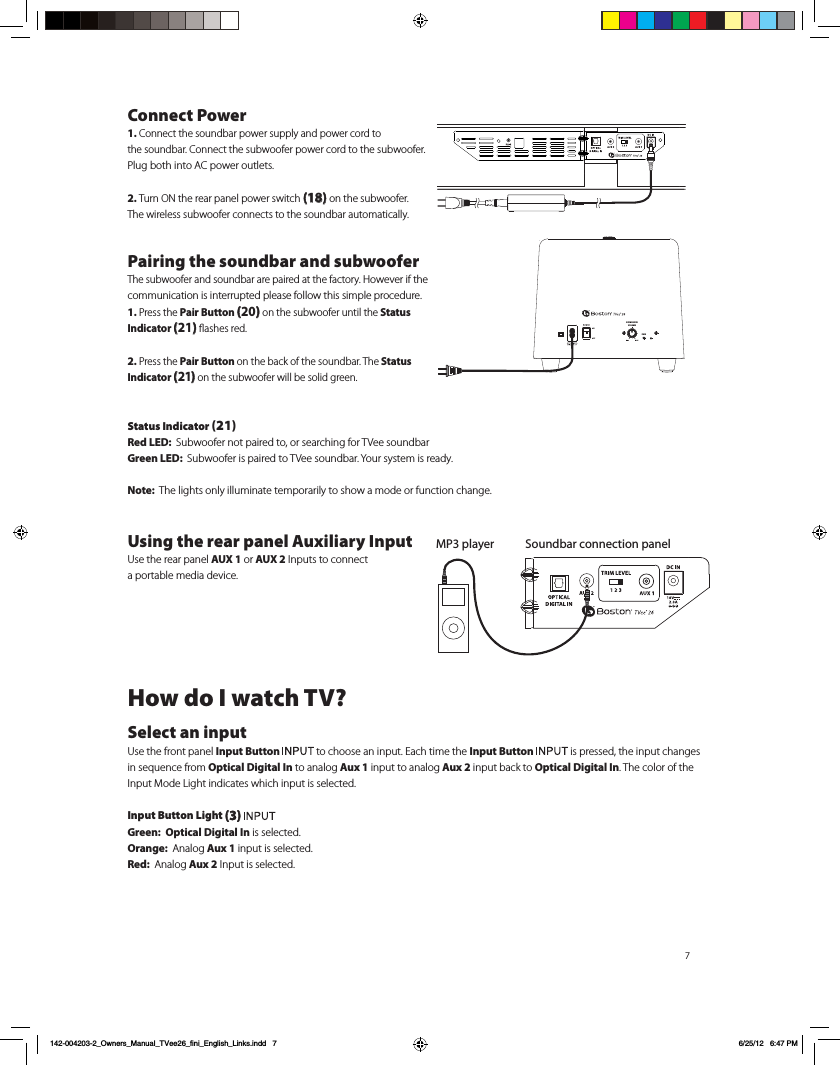
7Connect Power1. Connect the soundbar power supply and power cord to  the soundbar. Connect the subwoofer power cord to the subwoofer. Plug both into AC power outlets.2. Turn ON the rear panel power switch (18) on the subwoofer.  The wireless subwoofer connects to the soundbar automatically.Pairing the soundbar and subwooferThe subwoofer and soundbar are paired at the factory. However if the communication is interrupted please follow this simple procedure.1. Press the Pair Button (20) on the subwoofer until the Status Indicator (21) flashes red.2. Press the Pair Button on the back of the soundbar. The Status Indicator (21) on the subwoofer will be solid green.Status Indicator (21)Red LED:  Subwoofer not paired to, or searching for TVee soundbarGreen LED:  Subwoofer is paired to TVee soundbar. Your system is ready.Note:  The lights only illuminate temporarily to show a mode or function change.Using the rear panel Auxiliary Input  Use the rear panel AUX 1 or AUX 2 Inputs to connect  a portable media device. How do I watch TV?Select an inputUse the front panel Input Button   to choose an input. Each time the Input Button   is pressed, the input changes in sequence from Optical Digital In to analog Aux 1 input to analog Aux 2 input back to Optical Digital In. The color of the Input Mode Light indicates which input is selected.Input Button Light (3) Green:  Optical Digital In is selected.Orange:  Analog Aux 1 input is selected.Red:  Analog Aux 2 Input is selected. Soundbar connection panelMP3 playerSUBWOOFERVOLUMEPAIR142-004203-2_Owners_Manual_TVee26_fini_English_Links.indd   7 6/25/12   6:47 PM
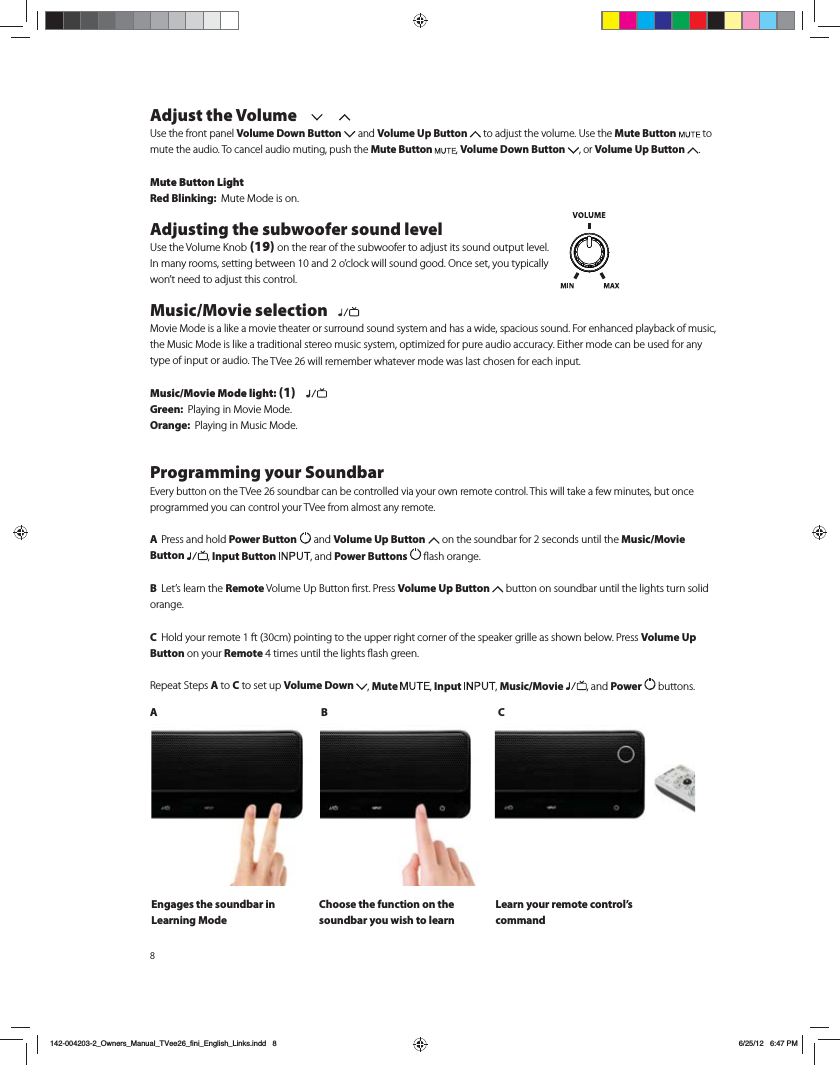
Adjust the Volume 6TFUIFGSPOUQBOFMVolume Down Button  and Volume Up Button  UPBEKVTUUIFWPMVNF6TFUIFMute Button  to mute the audio. To cancel audio muting, push the Mute Button  , Volume Down Button  , or Volume Up Button  . Mute Button LightRed Blinking:  .VUF.PEFJTPOAdjusting the subwoofer sound level6TFUIF7PMVNF,OPC (19) on the rear of the subwoofer to adjust its sound output level.*ONBOZSPPNTTFUUJOHCFUXFFOBOEPDMPDLXJMMTPVOEHPPE0ODFTFUZPVUZQJDBMMZ XPOUOFFEUPBEKVTUUIJTDPOUSPMMusic/Movie selection   .PWJF.PEFJTBMJLFBNPWJFUIFBUFSPSTVSSPVOETPVOETZTUFNBOEIBTBXJEFTQBDJPVTTPVOE'PSFOIBODFEQMBZCBDLPGNVTJDUIF.VTJD.PEFJTMJLFBUSBEJUJPOBMTUFSFPNVTJDTZTUFNPQUJNJ[FEGPSQVSFBVEJPBDDVSBDZ&JUIFSNPEFDBOCFVTFEGPSBOZtype of input or audio. The TVee 26 will remember whatever mode was last chosen for each input. Music/Movie Mode light: (1)   Green:  1MBZJOHJO.PWJF.PEFOrange:  1MBZJOHJO.VTJD.PEFProgramming your Soundbar&WFSZCVUUPOPOUIF57FFTPVOECBSDBOCFDPOUSPMMFEWJBZPVSPXOSFNPUFDPOUSPM5IJTXJMMUBLFBGFXNJOVUFTCVUPODFprogrammed you can control your TVee from almost any remote.  A Press and hold Power Button  and Volume Up Button  on the soundbar for 2 seconds until the Music/Movie Button  , Input Button  , and Power Buttons   flash orange. B -FUTMFBSOUIFRemote7PMVNF6Q#VUUPOmSTU1SFTTVolume Up Button   button on soundbar until the lights turn solid orange.C )PMEZPVSSFNPUFGUDNQPJOUJOHUPUIFVQQFSSJHIUDPSOFSPGUIFTQFBLFSHSJMMFBTTIPXOCFMPX1SFTTVolume Up Button on your Remote 4 times until the lights flash green.3FQFBU4UFQTA to C to set up Volume Down  , Mute , Input , Music/Movie , and Power   buttons.AB CEngages the soundbar in Learning ModeChoose the function on the soundbar you wish to learn Learn your remote control’s command142-004203-2_Owners_Manual_TVee26_fini_English_Links.indd   8 6/25/12   6:47 PM
9Troubleshooting TVeeSoundbar does not power on.  t*TUIFQPXFSTVQQMZQMVHHFEJOUPBMJWFXBMMPVUMFU  t*TUIFQPXFSTVQQMZQSPQFSMZDPOOFDUFEUPUIFTPVOECBSQPXFSJOQVU No sound from TVee Soundbar.  t*TUIFTPVOECBSDPOOFDUFEUPBOBVEJPTPVSDFUIBUJTQMBZJOHBVEJPUISPVHIJUTPVUQVU  t*TUIFTPVOECBSTFUUPUIFDPSSFDUJOQVUTPVSDF  t"SFUIFTPVOECBSBOETVCXPPGFSSFDFJWJOHQPXFSBOEUVSOFEPO  t5VSOVQUIFWPMVNFPGUIF57FFTPVOECBS t5VSOVQUIFWPMVNFPGUIFUFMFWJTJPOPSDBCMFCPY57FFJTDPOOFDUFEUP t$IFDL.VUFTUBUVToJTUIFMute ButtonCMJOLJOHSFE 1SFTTUIFMute Button on the soundbar.t'PSEJHJUBM57TPSPUIFSEJHJUBMTPVSDFTNBLFTVSFUIFPVUQVUGPSNBUJTTFUUPi%PMCZ%JHJUBMw4FFUIFTPVSDFQSPEVDUT  TFUVQNFOV t'PSEJHJUBMTPVSDFTNBLFTVSFUIFPQUJDBMDBCMFJTOPULJOLFEPSCSPLFO5IJTTUPQTUIFEJHJUBMMJHIUTJHOBMNo Sound from the Subwoofer.  t$IFDLUIFQPJOUTJOUIFi4PVOECBSEPFTOPUQPXFSPOwTFDUJPOBCPWF t5VSOVQUIFWPMVNFDPOUSPM t.PWFUIFTVCXPPGFSDMPTFSUPUIFTPVOECBS t$IFDLUIFStatus Indicator to make sure the light is solid green.Distorted sound from the Soundbar.  t$IBOHFUIF5SJN-FWFMTXJUDITFUUJOHUPBMPXFSOVNCFS"VYJOQVUPOMZ t$IFDLUIFTJHOBMTPVSDFUPCFTVSFUIFEJTUPSUJPOJTOPUPSJHJOBUJOHUIFSF t5VSOEPXOUIFWPMVNFPGUIFTPVSDFVOUJMUIFEJTUPSUJPOHPFTBXBZBass not loud enough.  t5VSOVQUIFTVCXPPGFS7PMVNFDPOUSPM t1MBDFUIFTVCXPPGFSDMPTFSUPBDPSOFSJOUIFSPPN t4PNFUFMFWJTJPOTBOEDBCMFCPYFTIBWFBNPEFUIBUMJNJUTUIFCBTT$IFDLUIBUQSPEVDUTBVEJPTFUVQNFOVBOETFU  UIFBVEJPNPEFUPiXJEFwSBUIFSUIBOiOPSNBMwPSiOBSSPXwTVee won’t learn my remote control commands.  t$BSFGVMMZGPMMPXUIFQSPHSBNNJOHJOTUSVDUJPOT t)PMEUIFSFNPUFTUFBEZBOEJODIFTGSPNUIFGSPOUPGUIFTPVOECBS t1SFTTBOESFMFBTFUIFSFNPUFDPOUSPMCVUUPOTslowly!  t$IFDLUIFSFNPUFDPOUSPMTCBUUFSJFT Note:  57FFMFBSOTBMNPTUBMM*3DPNNBOETCVUTPNF*3QSPUPDPMTDBOOPUCFQSPHSBNNFEVolume of my television speakers gets louder than my TVee system over time.  t8IFOUIFSFNPUFDPOUSPMWPMVNFCVUUPOJTIFMEEPXOZPVSUFMFWJTJPONBZDIBOHFWPMVNFMFWFMTGBTUFSUIFO57FF  t6TFUIFCVUUPOTPOUIFTPVOECBSUPBEKVTUUIFWPMVNFPGUIF57FFUPUIFDPSSFDUCBMBODFXJUIUIFUFMFWJTJPOTQFBLFST  t*GQPTTJCMFVTFUIFUFMFWJTJPOTTFUVQNFOVUPNVUFUIFUFMFWJTJPOTPXOTQFBLFSTThe subwoofer seems to have interference with its wireless signal.  t5IFTVCXPPGFSDPVMECFUPPGBSGSPNUIFTPVOECBSUPHFUBHPPETJHOBM5SZNPWJOHJUDMPTFSLimited WarrantyBoston Acoustics warrants to the original purchaser of our TVee system that it will be free of defects in materials and  workmanship in its mechanical parts for a period of 5 years from the date of purchase. The warranty period for the electrical components of TVee is 1 year.Your responsibilities are to install and use them according to the instructions supplied, to provide safe and secure transportation UPBOBVUIPSJ[FE#PTUPO"DPVTUJDTTFSWJDFSFQSFTFOUBUJWFBOEUPQSFTFOUQSPPGPGQVSDIBTFJOUIFGPSNPGZPVSTBMFTTMJQXIFOSFRVFTUJOHTFSWJDF142-004203-2_Owners_Manual_TVee26_fini_English_Links.indd   9 6/25/12   6:47 PM
10&YDMVEFEGSPNUIJTXBSSBOUZJTEBNBHFUIBUSFTVMUTGSPNBCVTFNJTVTFJNQSPQFSJOTUBMMBUJPOBDDJEFOUTTIJQQJOHPSSFQBJSTNPEJmDBUJPOTCZBOZPOFPUIFSUIBOBOBVUIPSJ[FE#PTUPO"DPVTUJDTTFSWJDFSFQSFTFOUBUJWF5IJTXBSSBOUZJTMJNJUFEUPUIF#PTUPO"DPVTUJDTQSPEVDUBOEEPFTOPUDPWFSEBNBHFUPBOZBTTPDJBUFEFRVJQNFOU This warranty does not cover the cost of removal or reinstallation. This warranty is void if the serial number has been removed PSEFGBDFE5IJTXBSSBOUZHJWFTZPVTQFDJmDMFHBMSJHIUTBOEZPVNBZBMTPIBWFPUIFSSJHIUTXIJDIWBSZGSPNTUBUFUPTUBUFIf Service Seems Necessary6OJUFE4UBUFT'JSTUDPOUBDUUIFEFBMFSGSPNXIPNZPVQVSDIBTFEUIFQSPEVDU*GUIBUJTOPUQPTTJCMFTFOEBOFNBJMUPTVQQPSU!CPTUPOBDPNPSXSJUFUP #PTUPO"DPVTUJDT*OD $PSQPSBUF%SJWF .BIXBI/+64"$BOBEB'JSTUDPOUBDUUIFEFBMFSGSPNXIPNZPVQVSDIBTFEUIFQSPEVDU*GUIBUJTOPUQPTTJCMFTFOEBOFNBJMUPTVQQPSU!ENDBOBEBDBPSXSJUFUP %.$BOBEB "QQMF$SFFL#MWE .BSLIBN0/-3#"MM0UIFS$PVOUSJFT$POUBDUUIFEFBMFSGSPNXIPNZPVQVSDIBTFEUIFQSPEVDUPSDPOUBDUZPVSMPDBMEJTUSJCVUPS'PSNPSFJOGPSNBUJPOQMFBTFWJTJUCPTUPOBDPVTUJDTDPNTVQQPSUThis symbol found on the product indicates that the product must not be disposed of with household XBTUF*OTUFBEJUNBZCFQMBDFEJOBTFQBSBUFDPMMFDUJPOGBDJMJUZGPSFMFDUSPOJDXBTUFPSSFUVSOFEUPBSFUBJMFSwhen purchasing similar product. The producer paid to recycle this product. Doing this contributes to reuse BOESFDZDMJOHNJOJNJ[FTBEWFSTFFõFDUTPOUIFFOWJSPONFOUBOEIVNBOIFBMUIBOEBWPJETBOZmOFTGPSincorrect disposal.142-004203-2_Owners_Manual_TVee26_fini_English_Links.indd   10 6/25/12   6:47 PM
11INSTRUCCIONES DE SEGURIDAD IMPORTANTES’AT CZ FI  IS LT PT SE FR BE DK DE IE MT SK CH  IT EE GR LV NL SI TR LU CY HU PL ES GB NOFabricado bajo licencia otorgada por Dolby Laboratories.Dolby y el símbolo de la doble D son marcas registradas de Dolby Laboratories.23.   Cuando no está en uso y durante un desplazamiento, tenga cuidado con el cable de alimentación, por ejemplo, ate el cable eléctrico con una sujeción de cable o algo similar. No debe tener bordes filosos y cosas parecidas pues podrían raspar el cable de alimentación. Al volver a ponerlo en uso, verifique que el cable de alimentación no esté dañado. Si se detectan daños, por favor pida al personal de mantenimiento que reemplace el cable de alimentación especificado por el fabricante o que tenga las mismas características que el original.  24.   Advertencia: Para reducir el riesgo de choque eléctrico, no retire la tapa (o parte trasera) pues adentro no hay piezas de mantenimiento para el usuario. Deje que el servicio técnico lo realice personal calificado.   Usuarios estadounidenses:Nota: Este equipo ha sido probado y se ha determinado que cumple con los límites para un dispositivo digital Clase B, de acuerdo con la parte 15 del Reglamento de la FCC. Estos límites están destinados a ofrecer protección razonable contra la interferencia perjudicial en una instalación residencial. Este equipo genera, usa y puede irradiar energía de radiofrecuencia y, si no se instala y utiliza según las instrucciones, puede ocasionar interferencia perjudicial para las radiocomunicaciones. Sin embargo, no hay garantía de que no se produzca interferencia en una instalación en particular. Si este equipo efectivamente ocasiona interferencia perjudicial a la recepción de radio o televisión, lo que se puede determinar apagando y encendi-endo el equipo, se recomienda al usuario intentar corregir la interferencia implementando una o más de las siguientes medidas:Reorientar o reubicar la antena receptora.Aumentar la separación entre el equipo y el receptor.Conectar el equipo a un circuito distinto al que está conectado el receptor.Consultar al distribuidor o a un técnico de radio/televisión.Precaución: Los cambios o modificaciones que se realicen al receptor sin autorización podrían anular la autoridad del usuario para utilizar el equipo. Usuarios canadienses:Este aparato digital clase B cumple con la norma canadiense ICES-003. Cet appareil numérique de classe B est conforme á la norme NMB-003 du Canada.  Usuarios europeos:RLAN - Radio Local Area Network Equipment (Equipo de red radioeléctrica de área local)Este equipo solo puede usarse en interiores en FR.Este equipo sólo puede usarse en sus propias instalaciones en IT.Este equipo es sólo para uso privado en LU.No se permite utilizarlo dentro de un radio de 20km del centro de Ny-Ålesund en NO.Por la presente, Boston Acoustics, Inc. 7 Constitution Way, Woburn, MA 01801 EE.UU., declara que este equipo TVee 26 cumple con los requerimientos esenciales y otras normas de la Directiva 1999/5/EC.  Se puede obtener una copia de la Declaración de Conformidad (Declaration of Conformity, DOC) de:Oliver KrieteBoston Acoustics, División de D&M Europe B.V.Beemdstraat 115653 MA EindhovenPaíses BajosPRECAUCIÓNRIESGO DE CHOQUE ELÉCTRICO – NO ABRIR0E8B)A8B@D43427>24;42CA8@D4=4?0B>DEA8AEste símbolo que aparece en el aparato indica peligros derivados de voltajes peligrosos.Este símbolo que aparece en el aparato indica que el usuario debe leer todos los avisos de seguridad del manual del usuario.Este símbolo que aparece en el aparato indica doble aislación.¡Advertencia!Para reducir el riesgo de incendio o choque eléctrico, no exponga el aparato a la lluvia o a la humedad.1.  Lea estas instrucciones.2.   Guarde estas instrucciones.3. Preste atención a todas las advertencias.4.   Siga todas las instrucciones.5.   No use este aparato cerca de agua.6.   Limpie únicamente con un paño seco.7.   No obstruya las aberturas de ventilación.  Instale de acuerdo con las instrucciones del fabricante.  8.   No instale cerca de fuentes de calor, por ejemplo, radiadores, rejillas de calefacción, estufas u otros aparatos (incluidos amplificadores) que emitan calor.9.   No anule el propósito de seguridad del enchufe polarizado o de puesta a tierra. Un enchufe polarizado tiene dos patas, una más ancha que la otra. Un enchufe de puesta a tierra tiene dos patas y una tercera de puesta a tierra. La pata ancha o la tercera pata es para su seguridad. Si el enchufe provisto no encaja en el toma, consulte a un electricista para reemplazar el toma obsoleto.10.   Proteja el cable de alimentación para que no se lo pise ni apriete, especialmente en los enchufes, en los receptáculos, y en el punto donde salen del aparato.11.   Utilice únicamente aditamentos o accesorios especificados por el fabricante.12.   Desenchufe el aparato durante tormentas eléctricas o cuando no se lo utilice durante períodos largos.13.   Toda la asistencia técnica debe ser proporcionada por personal de servicio calificado. Se requiere asistencia técnica cuando el aparato se ha deteriorado de cualquier manera; por ejemplo: se ha dañado el cable de alimentación o el enchufe, se ha derramado un líquido o caído un objeto dentro del aparato, se ha expuesto el aparato a la lluvia o la humedad, el aparato no funciona normalmente o se ha caído.14.   Mantenga una distancia mínima de 2” (50mm) en el frente, la parte posterior y los lados del aparato, para que el mismo tenga suficiente ventilación. No se debe obstaculizar la ventilación cubriendo las aberturas de ventilación ni colocando sobre o alrededor del aparato elementos como periódicos, manteles, cortinas, etc.15.   No se deben colocar fuentes de llama expuesta, por ejemplo, velas encendidas, sobre el aparato.16.   El aparato no se debe exponer a goteos ni salpicaduras. No se deben colocar objetos llenos de líquido, por ejemplo, floreros, sobre el aparato.17.   Tanto el conector de entrada de alimentación de la parte posterior del aparato como el enchufe de la pared deben permanecer accesibles, para poder desconectar la energía del aparato.18.   Para desconectar totalmente el aparato de la red de CA, desconecte el cable eléctrico del tomacorriente de CA.19.   Use solamente el carrito, la base, el trípode, soporte o mesa que indica  el fabricante o que se vende con el aparato. Si se usa un carrito o estante, tenga precaución al mover el carrito/aparato para evitar lesiones causadas por vuelcos.20.   PRECAUCIÓN: Estas instrucciones técnicas están destinadas exclusivamente a personal de mantenimiento calificado. Para reducir el riesgo de choque eléctrico, no realice ninguna tarea de mantenimiento no incluida en las instrucciones operativas a menos que esté calificado para hacerlo. 21.   ADVERTENCIA: Utilice únicamente aditamentos o accesorios especificados o proporcionados por el fabricante.22.   ADVERTENCIA: Por favor, antes de instalar o hacer funcionar el aparato, consulte la información eléctrica y de seguridad que figura en la caja exterior inferior.    142-004203-2_Owners_Manual_TVee26_fini_English_Links.indd   11 6/25/12   6:47 PM
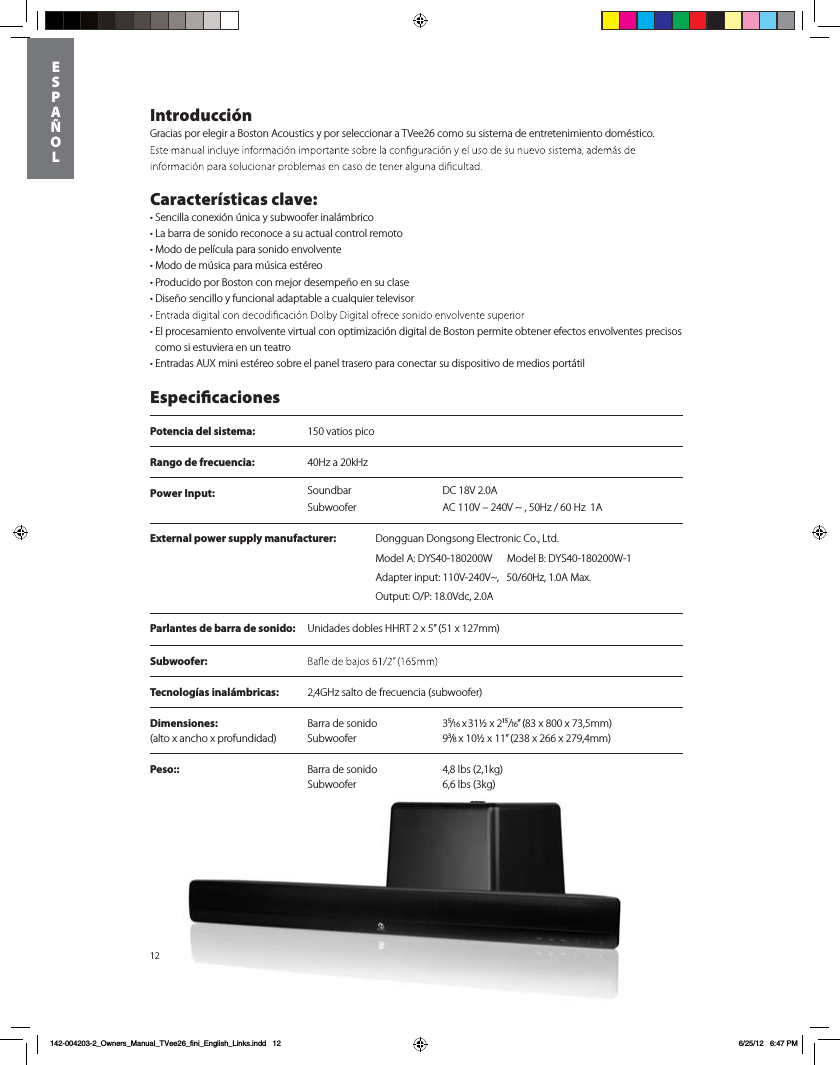
Power Input:  DC 18V 2.0ASoundbarSubwoofer AC 110V – 240V ~ , 50Hz / 60 Hz  1A12IntroducciónGracias por elegir a Boston Acoustics y por seleccionar a TVee26 como su sistema de entretenimiento doméstico.   Características clave:tSencilla conexión única y subwoofer inalámbricot-BCBrra de sonido reconoce a su actual control remototModo de película para sonido envolventetModo de música para música estéreotProducido por Boston con mejor desempeño en su clase t%JTF×PTFODJMMPZGVODJPOBMBEBQUBCMFBDVBMRVJFStelevisor t El procesamiento envolvente virtual con optimización digital de Boston permite obtener efectos envolventes precisos como si estuviera en un teatrot&OUSBEBTAUX mini estéreo sobre el panel trasero para conectar su dispositivo de medios portátil EspecicacionesPotencia del sistema:  150 vatios picoRango de frecuencia:  40Hz a 20kHzParlantes de barra de sonido: Unidades dobles HHRT 2 x 5” (51 x 127mm)Subwoofer:  Tecnologías inalámbricas:  2,4GHz salto de frecuencia (subwoofer)Dimensiones:    Barra de sonido  3⁵/16 x 31½ x 2¹⁵/16” (83 x 800 x 73,5mm) (alto x ancho x profundidad)  Subwoofer  9³/8 x 10½ x 11” (238 x 266 x 279,4mm) Peso::  Barra de sonido  4,8 lbs (2,1kg)   Subwoofer  6,6 lbs (3kg)      ESP AÑOL142-004203-2_Owners_Manual_TVee26_fini_English_Links.indd   12 6/25/12   6:47 PMExternal power supply manufacturer: %POHHVBO%POHTPOH&MFDUSPOJD$P-UEModel A: DYS40-180200W      Model B: DYS40-180200W-1Adapter input: 110V-240V~,   50/60Hz, 1.0A Max. Output: O/P: 18.0Vdc, 2.0A
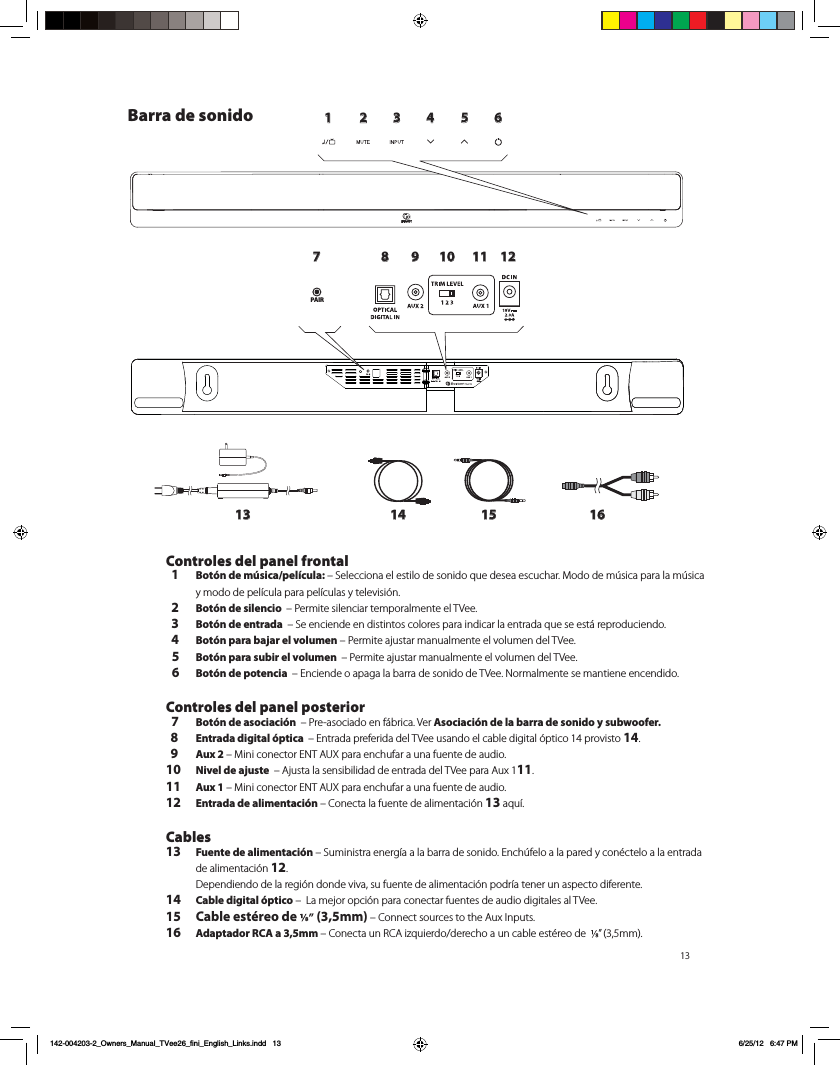
131 2 3 4 5 6789 10 11 1213 14 15 16PAIRBarra de sonido Controles del panel frontal  1 Botón de música/película: – Selecciona el estilo de sonido que desea escuchar. Modo de música para la música y modo de película para películas y televisión.  2 Botón de silencio  – Permite silenciar temporalmente el TVee.   3 Botón de entrada  – Se enciende en distintos colores para indicar la entrada que se está reproduciendo.  4 Botón para bajar el volumen – Permite ajustar manualmente el volumen del TVee.   5 Botón para subir el volumen  – Permite ajustar manualmente el volumen del TVee.  6 Botón de potencia  – Enciende o apaga la barra de sonido de TVee. Normalmente se mantiene encendido. Controles del panel posterior  7 Botón de asociación  – Pre-asociado en fábrica. Ver Asociación de la barra de sonido y subwoofer.  8 Entrada digital óptica  – Entrada preferida del TVee usando el cable digital óptico 14 provisto 14.  9 Aux 2 – Mini conector ENT AUX para enchufar a una fuente de audio.10  Nivel de ajuste  – Ajusta la sensibilidad de entrada del TVee para Aux 111.11 Aux 1 – Mini conector ENT AUX para enchufar a una fuente de audio.12 Entrada de alimentación – Conecta la fuente de alimentación 13 aquí.Cables13 Fuente de alimentación – Suministra energía a la barra de sonido. Enchúfelo a la pared y conéctelo a la entrada de alimentación 12.  Dependiendo de la región donde viva, su fuente de alimentación podría tener un aspecto diferente. 14 Cable digital óptico –  La mejor opción para conectar fuentes de audio digitales al TVee.15 Cable estéreo de   (3,5mm) – Connect sources to the Aux Inputs. 16 Adaptador RCA a 3,5mm – Conecta un RCA izquierdo/derecho a un cable estéreo de   ” (3,5mm).   142-004203-2_Owners_Manual_TVee26_fini_English_Links.indd   13 6/25/12   6:47 PM
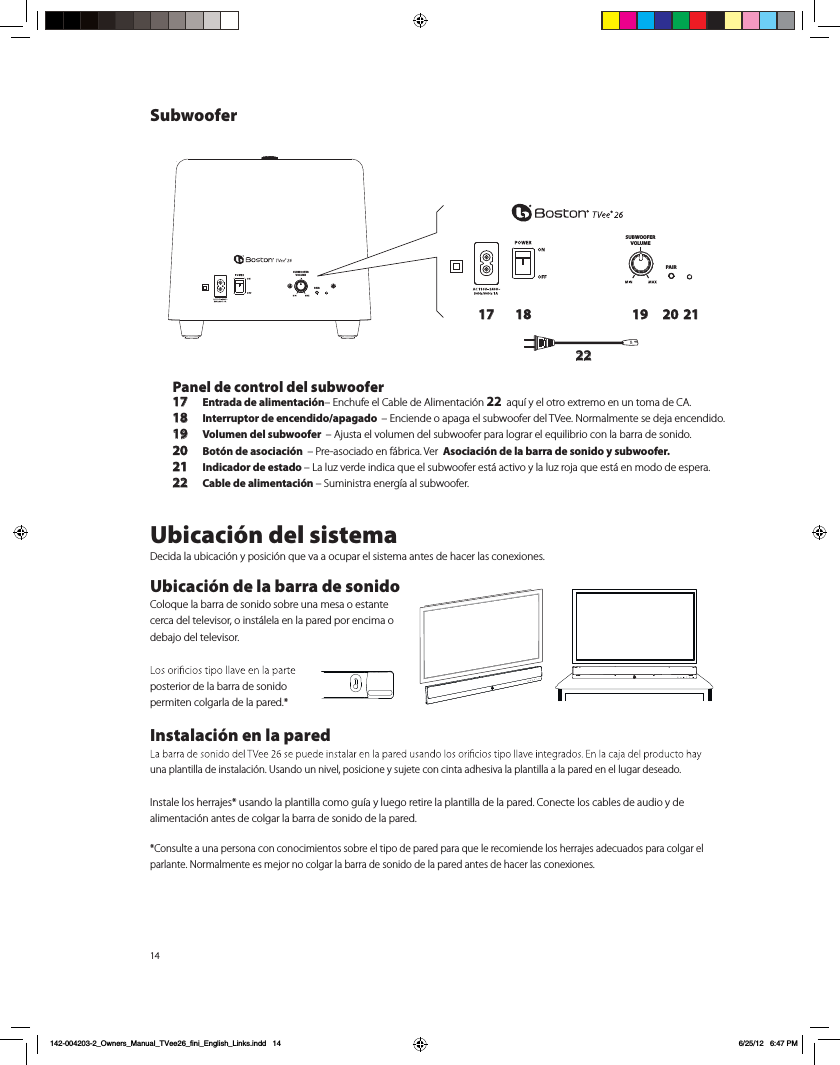
14SUBWOOFERVOLUMEPAIRSUBWOOFERVOLUMEPAIR17 18 19 20 2122Panel de control del subwoofer17 Entrada de alimentación– Enchufe el Cable de Alimentación 22  aquí y el otro extremo en un toma de CA. 18 Interruptor de encendido/apagado  – Enciende o apaga el subwoofer del TVee. Normalmente se deja encendido.19 Volumen del subwoofer  – Ajusta el volumen del subwoofer para lograr el equilibrio con la barra de sonido.20  Botón de asociación  – Pre-asociado en fábrica. Ver  Asociación de la barra de sonido y subwoofer.21 Indicador de estado – La luz verde indica que el subwoofer está activo y la luz roja que está en modo de espera.22 Cable de alimentación – Suministra energía al subwoofer.Ubicación del sistemaDecida la ubicación y posición que va a ocupar el sistema antes de hacer las conexiones.  Ubicación de la barra de sonidoColoque la barra de sonido sobre una mesa o estante cerca del televisor, o instálela en la pared por encima o debajo del televisor. posterior de la barra de sonido  permiten colgarla de la pared.*Instalación en la pared una plantilla de instalación. Usando un nivel, posicione y sujete con cinta adhesiva la plantilla a la pared en el lugar deseado. Instale los herrajes* usando la plantilla como guía y luego retire la plantilla de la pared. Conecte los cables de audio y de alimentación antes de colgar la barra de sonido de la pared. *Consulte a una persona con conocimientos sobre el tipo de pared para que le recomiende los herrajes adecuados para colgar el parlante. Normalmente es mejor no colgar la barra de sonido de la pared antes de hacer las conexiones.Subwoofer142-004203-2_Owners_Manual_TVee26_fini_English_Links.indd   14 6/25/12   6:47 PM
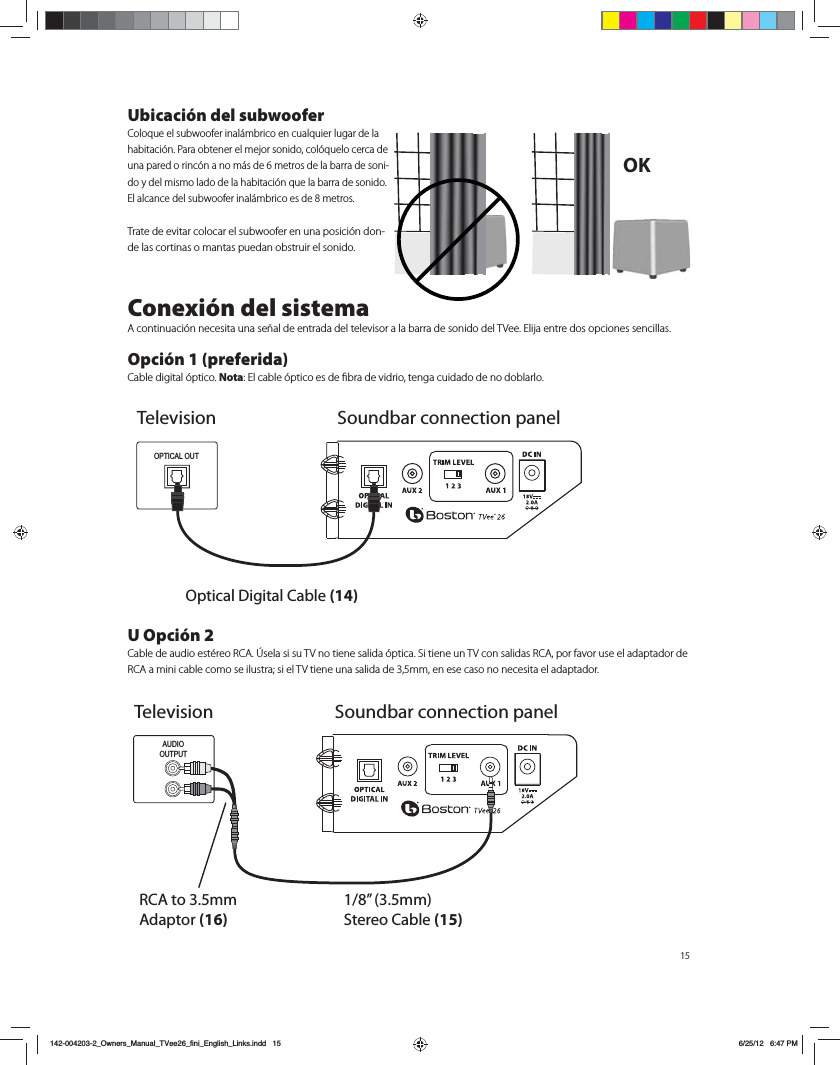
15Ubicación del subwoofer$PMPRVFFMTVCXPPGFSJOBMÈNCSJDPFODVBMRVJFSMVHBSEFMBIBCJUBDJØO1BSBPCUFOFSFMNFKPSTPOJEPDPMØRVFMPDFSDBEFVOBQBSFEPSJODØOBOPNÈTEFNFUSPTEFMBCBSSBEFTPOJ-EPZEFMNJTNPMBEPEFMBIBCJUBDJØORVFMBCBSSBEFTPOJEP&MBMDBODFEFMTVCXPPGFSJOBMÈNCSJDPFTEFNFUSPT5SBUFEFFWJUBSDPMPDBSFMTVCXPPGFSFOVOBQPTJDJØOEPO-de las cortinas o mantas puedan obstruir el sonido.Conexión del sistema"DPOUJOVBDJØOOFDFTJUBVOBTF×BMEFFOUSBEBEFMUFMFWJTPSBMBCBSSBEFTPOJEPEFM57FF&MJKBFOUSFEPTPQDJPOFTTFODJMMBT Opción 1 (preferida)$BCMFEJHJUBMØQUJDPNota&MDBCMFØQUJDPFTEFmCSBEFWJESJPUFOHBDVJEBEPEFOPEPCMBSMPU Opción 2$BCMFEFBVEJPFTUÏSFP3$"ÁTFMBTJTV57OPUJFOFTBMJEBØQUJDB4JUJFOFVO57DPOTBMJEBT3$"QPSGBWPSVTFFMBEBQUBEPSEF3$"BNJOJDBCMFDPNPTFJMVTUSBTJFM57UJFOFVOBTBMJEBEFNNFOFTFDBTPOPOFDFTJUBFMBEBQUBEPSOK TelevisionOptical Digital Cable (14)OPTICAL OUTSoundbar connection panelAUDIOOUTPUTRCA to 3.5mm Adaptor (16)1/8” (3.5mm) Stereo Cable (15)Television Soundbar connection panel142-004203-2_Owners_Manual_TVee26_fini_English_Links.indd   15 6/25/12   6:47 PM
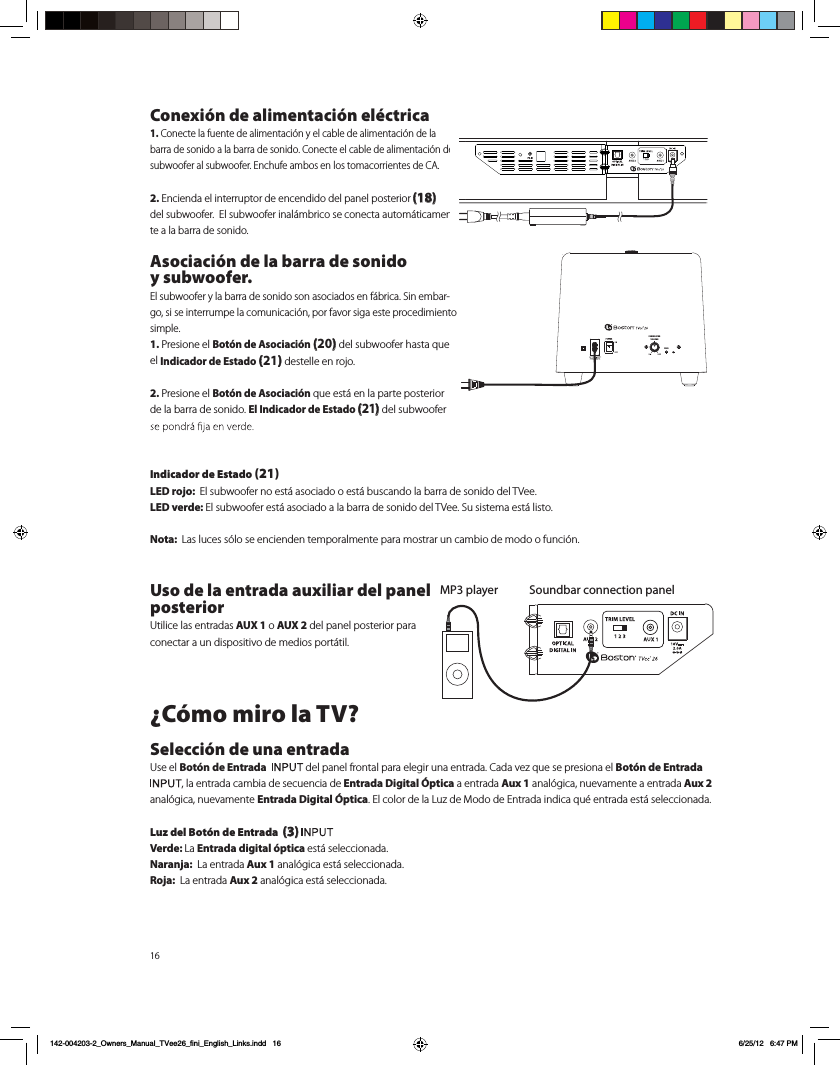
16Conexión de alimentación eléctrica1. Conecte la fuente de alimentación y el cable de alimentación de la barra de sonido a la barra de sonido. Conecte el cable de alimentación del subwoofer al subwoofer. Enchufe ambos en los tomacorrientes de CA. 2. Encienda el interruptor de encendido del panel posterior (18)   del subwoofer.  El subwoofer inalámbrico se conecta automáticamen-te a la barra de sonido. Asociación de la barra de sonido  y subwoofer.El subwoofer y la barra de sonido son asociados en fábrica. Sin embar-go, si se interrumpe la comunicación, por favor siga este procedimiento simple.1. Presione el Botón de Asociación (20) del subwoofer hasta que el Indicador de Estado (21) destelle en rojo. 2. Presione el Botón de Asociación que está en la parte posterior de la barra de sonido. El Indicador de Estado (21) del subwoofer Indicador de Estado (21)LED rojo:  El subwoofer no está asociado o está buscando la barra de sonido del TVee.LED verde: El subwoofer está asociado a la barra de sonido del TVee. Su sistema está listo.Nota:  Las luces sólo se encienden temporalmente para mostrar un cambio de modo o función.Uso de la entrada auxiliar del panel posterior  Utilice las entradas AUX 1 o AUX 2 del panel posterior para conectar a un dispositivo de medios portátil. ¿Cómo miro la TV?Selección de una entradaUse el Botón de Entrada    del panel frontal para elegir una entrada. Cada vez que se presiona el Botón de Entrada , la entrada cambia de secuencia de Entrada Digital Óptica a entrada Aux 1 analógica, nuevamente a entrada Aux 2 analógica, nuevamente Entrada Digital Óptica. El color de la Luz de Modo de Entrada indica qué entrada está seleccionada.  Luz del Botón de Entrada  (3) Verde: La Entrada digital óptica está seleccionada.Naranja:  La entrada Aux 1 analógica está seleccionada.Roja:  La entrada Aux 2 analógica está seleccionada. Soundbar connection panelMP3 playerPAIRSUBWOOFERVOLUMEPAIR142-004203-2_Owners_Manual_TVee26_fini_English_Links.indd   16 6/25/12   6:47 PM
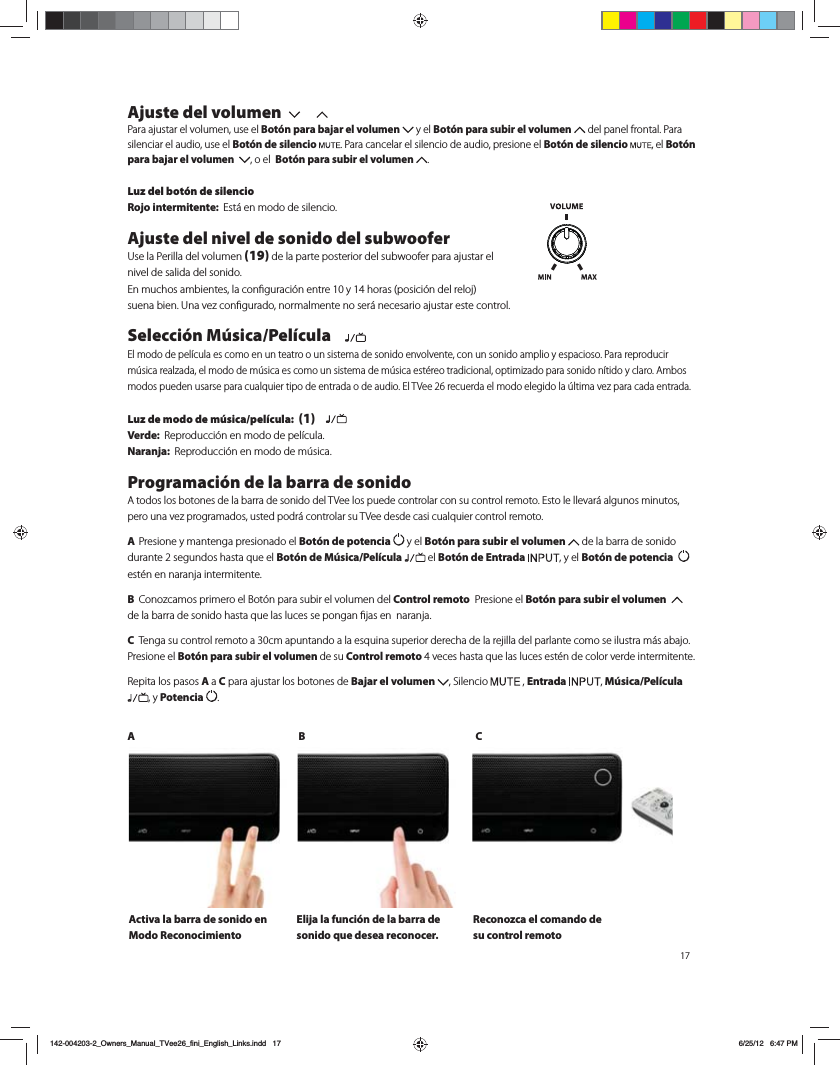
Ajuste del volumen  Para ajustar el volumen, use el Botón para bajar el volumen   y el Botón para subir el volumen   del panel frontal. Para silenciar el audio, use el Botón de silencio . Para cancelar el silencio de audio, presione el Botón de silencio  , el Botón para bajar el volumen   , o el  Botón para subir el volumen  . Luz del botón de silencioRojo intermitente:  &TUÈFONPEPEFTJMFODJPAjuste del nivel de sonido del subwoofer6TFMB1FSJMMBEFMWPMVNFO(19) de la parte posterior del subwoofer para ajustar el  nivel de salida del sonido.  &ONVDIPTBNCJFOUFTMBDPOmHVSBDJØOFOUSFZIPSBTQPTJDJØOEFMSFMPK TVFOBCJFO6OBWF[DPOmHVSBEPOPSNBMNFOUFOPTFSÈOFDFTBSJPBKVTUBSFTUFDPOUSPMSelección Música/Película    &MNPEPEFQFMÓDVMBFTDPNPFOVOUFBUSPPVOTJTUFNBEFTPOJEPFOWPMWFOUFDPOVOTPOJEPBNQMJPZFTQBDJPTP1BSBSFQSPEVDJSNÞTJDBSFBM[BEBFMNPEPEFNÞTJDBFTDPNPVOTJTUFNBEFNÞTJDBFTUÏSFPUSBEJDJPOBMPQUJNJ[BEPQBSBTPOJEPOÓUJEPZDMBSP"NCPTNPEPTQVFEFOVTBSTFQBSBDVBMRVJFSUJQPEFFOUSBEBPEFBVEJP&M57FFSFDVFSEBFMNPEPFMFHJEPMBÞMUJNBWF[QBSBDBEBFOUSBEBLuz de modo de música/película:  (1)   Verde:  3FQSPEVDDJØOFONPEPEFQFMÓDVMBNaranja:  3FQSPEVDDJØOFONPEPEFNÞTJDBProgramación de la barra de sonido"UPEPTMPTCPUPOFTEFMBCBSSBEFTPOJEPEFM57FFMPTQVFEFDPOUSPMBSDPOTVDPOUSPMSFNPUP&TUPMFMMFWBSÈBMHVOPTNJOVUPTQFSPVOBWF[QSPHSBNBEPTVTUFEQPESÈDPOUSPMBSTV57FFEFTEFDBTJDVBMRVJFSDPOUSPMSFNPUP A Presione y mantenga presionado el Botón de potencia   y el Botón para subir el volumen   de la barra de sonido EVSBOUFTFHVOEPTIBTUBRVFFMBotón de Música/Película  el Botón de Entrada  , y el Botón de potencia    estén en naranja intermitente. B $POP[DBNPTQSJNFSPFM#PUØOQBSBTVCJSFMWPMVNFOEFM Control remoto  Presione el Botón para subir el volumen    EFMBCBSSBEFTPOJEPIBTUBRVFMBTMVDFTTFQPOHBOmKBTFOOBSBOKBC 5FOHBTVDPOUSPMSFNPUPBDNBQVOUBOEPBMBFTRVJOBTVQFSJPSEFSFDIBEFMBSFKJMMBEFMQBSMBOUFDPNPTFJMVTUSBNÈTBCBKPPresione el Botón para subir el volumen de su Control remotoWFDFTIBTUBRVFMBTMVDFTFTUÏOEFDPMPSWFSEFJOUFSNJUFOUF3FQJUBMPTQBTPTA a C para ajustar los botones de Bajar el volumen  , Silencio   , Entrada  , Música/Película , y Potencia  .AB CActiva la barra de sonido en Modo ReconocimientoElija la función de la barra de sonido que desea reconocer. Reconozca el comando de su control remoto142-004203-2_Owners_Manual_TVee26_fini_English_Links.indd   17 6/25/12   6:47 PM
Solución de problemas del sistema TVeeLa barra de sonido no se activa. t{4FIBFODIVGBEPMBGVFOUFEFBMJNFOUBDJØOBVOUPNBEFQBSFEFOFSHJ[BEP  t{&TUÈCJFODPOFDUBEBMBGVFOUFEFBMJNFOUBDJØOBMBFOUSBEBEFBMJNFOUBDJØOEFMBCBSSBEFTPOJEP La barra de sonido del TVee no emite sonido. t{&TUÈDPOFDUBEBMBCBSSBEFTPOJEPBVOBGVFOUFEFBVEJPRVFTFSFQSPEVDFBUSBWÏTEFTVTBMJEB  t{4FIBDPOmHVSBEPMBCBSSBEFTPOJEPFOMBGVFOUFEFFOUSBEBDPSSFDUB  t{3FDJCFOBMJNFOUBDJØOZFTUÈOBDUJWBEPTMBCBSSBEFTPOJEPZFMTVCXPPGFS  t4VCBFMWPMVNFOEFMBCBSSBEFTPOJEPEFM57FF t4VCBFMWPMVNFOEFMUFMFWJTPSPEFMEFDPEJmDBEPSEFDBCMFBMRVFFTUÈDPOFDUBEPFM57FF t7FSJmRVFFMFTUBEPEFTJMFODJPo{FTUÈSPKPJOUFSNJUFOUFFMBotón de silencio 1VMTFFMBotón de silencio de la barra de sonido. t&OMPTUFMFWJTPSFTEJHJUBMFTVPUSBTGVFOUFTEJHJUBMFTDPNQSVFCFRVFFMGPSNBUPEFTBMJEBFTUÏDPOmHVSBEPFO i%PMCZ%JHJUBMw$POTVMUFFMNFOÞEFDPOmHVSBDJØOEFMQSPEVDUPGVFOUF t&OMBTGVFOUFTEJHJUBMFTWFSJmRVFRVFFMDBCMFØQUJDPOPFTUÏEPCMBEPPSPUP4FDPSUBMBTF×BMEFMV[EJHJUBMEl subwoofer no emite sonido.  t$PNQSVFCFMPTQVOUPTNFODJPOBEPTFOMBTFDDJØOBOUFSJPSi-BCBSSBEFTPOJEPOPTFBDUJWBw t4VCBFMDPOUSPMEFWPMVNFO t"DFSRVFFMTVCXPPGFSBMBCBSSBEFTPOJEP t7FSJmRVFFMIndicador de estadoQBSBBTFHVSBSRVFMBMV[FTUÏmKBFOWFSEFLa barra de sonido emite sonido distorsionado.  t$BNCJFMBDPOmHVSBDJØOEFMJOUFSSVQUPSEF/JWFMEFBKVTUFBVOOÞNFSPNÈTCBKP4ØMPMBFOUSBEB"VY t7FSJmRVFMBGVFOUFEFMBTF×BMQBSBBTFHVSBSTFRVFMBEJTUPSTJØOOPTFPSJHJOBBMMÓ t#BKFFMWPMVNFOEFMBGVFOUFIBTUBRVFEFTBQBSF[DBMBEJTUPSTJØOLos graves no se escuchan bien.  t4VCBFMDPOUSPMEFWPMVNFOEFMTVCXPPGFS t"DFSRVFFMTVCXPPGFSBVOSJODØOEFMBIBCJUBDJØO t"MHVOPTUFMFWJTPSFTZEFDPEJmDBEPSFTEFDBCMFUJFOFOVONPEPRVFMJNJUBMPTHSBWFT7FSJmRVFFMNFOÞEFDPOmHVSB-DJØOEFBVEJPEFMQSPEVDUPZmKFFMNPEPEFBVEJPFOiBNQMJPwFOMVHBSEFiOPSNBMwPiBOHPTUPwEl TVee no reconoce los comandos de mi control remoto.  t4JHBMBTJOTUSVDDJPOFTEFQSPHSBNBDJØODPODVJEBEP t.BOUFOHBFMDPOUSPMmSNFBQVMHBEBTEFMGSFOUFEFMBCBSSBEFTPOJEP t1SFTJPOFZTVFMUFMPTCPUPOFTEFMDPOUSPMSFNPUPlentamente.  t7FSJmRVFMBTCBUFSÓBTEFMDPOUSPMSFNPUP Nota:  &MTJTUFNB57FFSFDPOPDFMBNBZPSÓBEFMPTDPNBOEPT*3QFSPBMHVOPTQSPUPDPMPT*3OPTFQVFEFOQSPHSBNBSCon el paso del tiempo el volumen de los parlantes del televisor sube más que el del sistema TVee.  t$VBOEPTFNBOUJFOFBQSFUBEPFMCPUØOEFWPMVNFOEFMDPOUSPMSFNPUPFTQPTJCMFRVFFMUFMFWJTPSDBNCJFFMOJWFMEFWPMVNFONÈTSÈQJEPRVFFM57FF t6TFMPTCPUPOFTEFMBCBSSBEFTPOJEPQBSBBKVTUBSFMWPMVNFOEFM57FFZFRVJMJCSBSMPDPOMPTQBSMBOUFTEFMUFMFWJTPS  t4JFTQPTJCMFVTFFMNFOÞEFDPOmHVSBDJØOEFMUFMFWJTPSQBSBTJMFODJBSMPTQBSMBOUFTEFMUFMFWJTPSParece que el subwoofer tiene interferencia en la señal inalámbrica.  t&TQPTJCMFRVFFMTVCXPPGFSTFFODVFOUSFEFNBTJBEPMFKPTEFMBCBSSBEFTPOJEPQBSBPCUFOFSVOBCVFOBTF×BM *OUFOUFBDFSDBSMP142-004203-2_Owners_Manual_TVee26_fini_English_Links.indd   18 6/25/12   6:47 PM
19Garantía Limitada#PTUPO"DPVTUJDTHBSBOUJ[BBMDPNQSBEPSPSJHJOBMEFOVFTUSPTJTUFNB57FFRVFOPUFOESÈEFGFDUPTEFNBUFSJBMFTOJEFNBOPEFPCSBFOTVTQJF[BTNFDÈOJDBTEVSBOUFVOQFSÓPEPEFB×PTEFTEFMBGFDIBEFDPNQSB&MQFSÓPEPEFHBSBOUÓBEFMPTDPN-QPOFOUFTFMÏDUSJDPTEFM57FFFTEFB×P&TTVSFTQPOTBCJMJEBEJOTUBMBSMPTZVUJMJ[BSMPTDPOGPSNFBMBTJOTUSVDDJPOFTTVNJOJTUSBEBTQSPQPSDJPOBSUSBOTQPSUFTFHVSPIBTUBVOSFQSFTFOUBOUFEFTFSWJDJPBVUPSJ[BEPEF#PTUPO"DPVTUJDTZQSFTFOUBSFMDPNQSPCBOUFEFDPNQSBFOMBGPSNBEFMSFDJCPBMsolicitar el servicio.2VFEBOFYDMVJEPTEFFTUBHBSBOUÓBMPTEB×PTRVFSFTVMUFOEFMVTPJODPSSFDUPEFMNBMVTPEFVOBJOTUBMBDJØOJOBEFDVBEBEFBDDJEFOUFTEFMUSBOTQPSUFPEFSFQBSBDJPOFTNPEJmDBDJPOFTRVFOPTFBOSFBMJ[BEBTQPSFMSFQSFTFOUBOUFEFTFSWJDJPBVUPSJ[B-do de Boston Acoustics.&TUBHBSBOUÓBTFMJNJUBBMQSPEVDUPEF#PTUPO"DPVTUJDTZOPDVCSFEB×PTEFFRVJQPTBmOFT&TUBHBSBOUÓBOPDVCSFMPTDPTUPTEFEFTJOTUBMBDJØOPSFJOTUBMBDJØO&TUBHBSBOUÓBTFSÈOVMBDVBOEPTFIBZBSFUJSBEPPCPSSBEPFMOÞNFSPEFTFSJF&TUBHBSBOUÓBMFPUPSHBEFSFDIPTMFHBMFTFTQFDÓmDPTZUBNCJÏOMFQPESÓBODPSSFTQPOEFSPUSPTEFSFDIPTRVFWBSÓBOEFVOFTUBEPBPUSPSi cree que necesita servicio técnico&TUBEPT6OJEPT1SJNFSPQØOHBTFFODPOUBDUPDPOFMEJTUSJCVJEPSBMRVFMFDPNQSØFMQSPEVDUP4JFTUPOPFTQPTJCMFFOWÓFVODPSSFPFMFDUSØOJDPBTVQQPSU!CPTUPOBDPNPFTDSJCBB #PTUPO"DPVTUJDT*OD $PSQPSBUF%SJWF .BIXBI/+64"$BOBEÈ1SJNFSPQØOHBTFFODPOUBDUPDPOFMEJTUSJCVJEPSBMRVFMFDPNQSØFMQSPEVDUP4JFTUPOPFTQPTJCMFFOWÓFVODPSSFPFMFDUSØOJDPBTVQQPSU!ENDBOBEBDBPFTDSJCBB %.$BOBEB "QQMF$SFFL#MWE .BSLIBN0/-3#0USPT1BÓTFT$PNVOÓRVFTFDPOFMEJTUSJCVJEPSBUSBWÏTEFMDVBMBERVJSJØFMQSPEVDUPPDPOFMSFQSFTFOUBOUFMPDBM1BSBNÈTJOGPSNBDJØOWJTJUFCPTUPOBDPVTUJDTDPNTVQQPSU&TUFTÓNCPMPRVFBQBSFDFFOFMQSPEVDUPJOEJDBRVFFMQSPEVDUPOPEFCFTFSBSSPKBEPKVOUPDPOMPTSFTJEVPTEPNÏTUJDPT%FCFDPMPDBSTFFOVOQVOUPEFSFDPMFDDJØOTFQBSBEPQBSBEFTFDIPTFMFDUSØOJDPTPEFCFFOUSFHBSTFFOFMFTUBCMFDJNJFOUPNJOPSJTUBBMDPNQSBSVOQSPEVDUPTJNJMBS&MGBCSJDBOUFIBQBHBEPQBSBRVFFTUFQSPEVDUPTFSFDJDMF&TUBQSÈDUJDBDPOUSJCVZFBMBSFVUJMJ[BDJØOZBMSFDJDMBEPNJOJNJ[BMPTFGFDUPTBEWFSTPTTPCSFFMNFEJPBNCJFOUFZMBTBMVEIVNBOBZFWJUBMBJNQPTJDJØOEFNVMUBTQPSFMJNJOBDJØOJODPSSFDUBEFSFTJEVPT142-004203-2_Owners_Manual_TVee26_fini_English_Links.indd   196/25/12   6:47 PM
20CONSIGNES DE SÉCURITÉ IMPORTANTES’AT CZ FI  IS LT PT SE FR BE DK DE IE MT SK CH  IT EE GR LV NL SI TR LU CY HU PL ES GB NOFabriqué sous licence de Dolby Laboratories.Dolby et le symbole double-D sont des marques déposées de Dolby Laboratories.23.   Lorsqu'il n'est pas utilisé et pendant le mouvement, veuillez prendre soin du câble d'alimentation, par exemple, attacher le câble d'alimentation avec un serre-câble ou équivalent. Il doit être exempt de bords tranchants et de tout ce qui peut causer l'abrasion du câble d'alimentation. Lors de la remise en service, veuillez vous assurer que le câble d'alimentation n'est pas endommagé. Si des dégradations sont trouvées, veuillez demander à la personne en charge des réparations de remplacer le câble d'alimentation spécifié par le fabricant ou ayant les mêmes caractéristiques que l'original.   24.   Avertissement : Pour réduire le risque de choc électrique, ne pas retirer le couvercle (ou le dos) car il n'existe pas de pièces réparables par l'utilisateur à l'intérieur. Confier les réparations à un personnel qualifié.   Utilisateurs américains :Remarque : Cet équipement a été testé et déclaré conforme aux limites relatives à un appareil numérique de classe B conformément à la partie 15 des Règlements de la FCC. Ces limites sont destinées à assurer une protection raisonnable contre les interférences dommageables dans une installation résidentielle. Cet équipement génère, utilise et peut émettre de l'énergie sous forme de radiofréquences. Si son installation et son utilisation ne sont pas conformes aux présentes instructions, il peut provoquer des interférences nuisibles aux communications radio. Cependant, l'absence totale d'interférences dans une installation particulière n'est pas garantie. Si cet équipement entraîne des interférences nuisibles à la réception de la radio ou de la télévision, ce qui est vérifiable en éteignant et en rallumant l'appareil, il est recommandé de corriger ces interférences en suivant une ou plusieurs des mesures suivantes :Réorienter ou déplacer l'antenne de réception.Augmenter la distance entre l'équipement et le récepteur.Brancher l'équipement à un circuit électrique différent de la prise à laquelle le récepteur est connecté.Consulter le revendeur ou un technicien radio/TV expérimenté pour obtenir de l'aide.Attention : tout changement ou modification non autorisé du récepteur peut annuler le droit des utilisateurs à employer cet équipement. Utilisateurs canadiens :Cet appareil numérique de classe B est conforme á la norme ICES-003 du Canada.  Utilisateurs européens :RLAN – Radio-équipement de réseau local sans filCet équipement peut être utilisé uniquement à l'intérieur en France (FR).Cet équipement peut être utilisé uniquement dans la résidence d'une personne en Italie (IT).Cet équipement est destiné uniquement à une utilisation privée au Luxembourg (LU).L'utilisation est interdite dans un rayon de 20 km du centre de Ny-Ålesund en Norvège (NO).Par la présente, Boston Acoustics, Inc. 7 Constitution Way, Woburn, MA 01801 USA, déclare que son appareil TVee 26 est conforme aux exigences essentielles et autres dispositions applicables de la Directive 1999/5/CE. Une copie de la Déclaration de Conformité peut être obtenue auprès de :Oliver KrieteBoston Acoustics, Division of D&M Europe B.V.Beemdstraat 115653 MA EindhovenPays-BasATTENTIONRISQUE DE CHOC ÉLECTRIQUE - NE PAS OUVRIR0E8B)A8B@D43427>2q;42CA8@D4=4?0B>DEA8ACe symbole apposé sur l'appareil indique des tensions dangereuses.Ce symbole apposé sur l'appareil indique à l'utilisateur qu'il doit lire l'ensemble des consignes de sécurité mentionnées dans le manuel de l'utilisateur.Ce symbole apposé sur l'appareil indique une double isolation.Avertissement !Pour réduire les risques d'incendie ou de choc électrique, ne pas exposer cet appareil à la pluie ou à l'humidité.1.  Lire les présentes instructions.2.   Conserver les présentes instructions.3. Respecter tous les avertissements.4.   Suivre toutes les instructions.5.   Ne pas faire fonctionner cet appareil à proximité d'un liquide.6.   Nettoyer l'appareil uniquement avec un chiffon sec.7.   Ne pas obturer les ouvertures d'aération. Installer l'appareil suivant les instructions du fabricant. 8.   Ne pas installer l'appareil à proximité d'une source de chaleur, telle qu'un radiateur, une bouche de chaleur, une cuisinière ou autre appareil (y compris des amplificateurs) qui dégage de la chaleur.9.   Ne pas désactiver le dispositif de sécurité de la prise de terre ou de la prise polarisée. Une prise polarisée est équipée de deux fiches, l'une étant plus large que l'autre. Une prise de terre est équipée de trois fiches dont l'une est une fiche de terre. Cette troisième fiche ou fiche la plus large est présente pour des raisons de sécurité. Si la prise fournie ne correspond pas à votre prise murale, consultez un électricien pour remplacer cette prise murale inadaptée.10.   Protéger le câble d'alimentation (personne ne doit marcher dessus et il ne doit pas être pincé, en particulier au niveau des prises), les prises de courant et le point où les prises sortent de l'appareil.11.   Utiliser uniquement les accessoires recommandés par le fabricant.12.   Débrancher l'appareil pendant les orages ou pendant les périodes prolongées de non-utilisation.13.   Consulter un professionnel qualifié pour toutes les réparations. L'appareil doit être réparé quand il a été endommagé, notamment si le câble d'alimentation ou la prise sont abîmés, si un liquide a été renversé ou si des objets sont tombés sur l'appareil, si l'appareil a été exposé à la pluie ou à l'humidité, s'il ne fonctionne pas correctement, ou s'il est tombé.14.   Maintenir une distance minimale de 50 mm tout autour de l'appareil afin d'assurer une aération adéquate. L'aération ne doit pas être bloquée en obturant les ouvertures d'aération ou en plaçant sur ou à côté de l'appareil des objets tels que des journaux, des nappes, des rideaux, etc.15.   Aucune flamme nue, notamment des bougies allumées, ne doit être placée sur l'appareil.16.   L'appareil ne doit pas être exposé à un suintement ou des éclabous-sures d'eau. Aucun objet rempli de liquide, tel qu'un vase, ne doit être posé sur l'appareil.17.   Soit le connecteur d'entrée d'alimentation situé à l'arrière de l'appareil, soit la prise d'alimentation murale doit rester accessible afin de pouvoir couper l'alimentation de l'appareil.18.   Pour déconnecter totalement cet appareil du secteur d’alimentation, débranchez le câble d'alimentation de la prise murale d’alimentation.19.   Utiliser uniquement un chariot, un trépied, une console ou une table spécifié par le fabricant, ou vendu avec l'appareil. Quand un chariot ou un porte bagage est utilisé, soyez prudent lorsque vous déplacez l'ensemble chariot / appareil afin d'éviter toute blessure en cas de chute.20.   ATTENTION :  Ces instructions de réparation sont destinées uniquement à un usage réservé au personnel qualifié. Pour réduire le risque de choc électrique, ne pas effectuer d'autres réparations que celles contenues dans les instructions de fonctionnement sauf si vous êtes qualifiés pour le faire.21.   AVERTISSEMENT :  Utiliser uniquement les accessoires spécifiés ou fournis par le fabricant.22.   AVERTISSEMENT :  Veuillez vous référer aux informations au-dessous de l’extérieur de l'enceinte pour obtenir les informations électriques et de sécurité avant d'installer ou de faire fonctionner l'appareil.   142-004203-2_Owners_Manual_TVee26_fini_English_Links.indd   20 6/25/12   6:47 PM
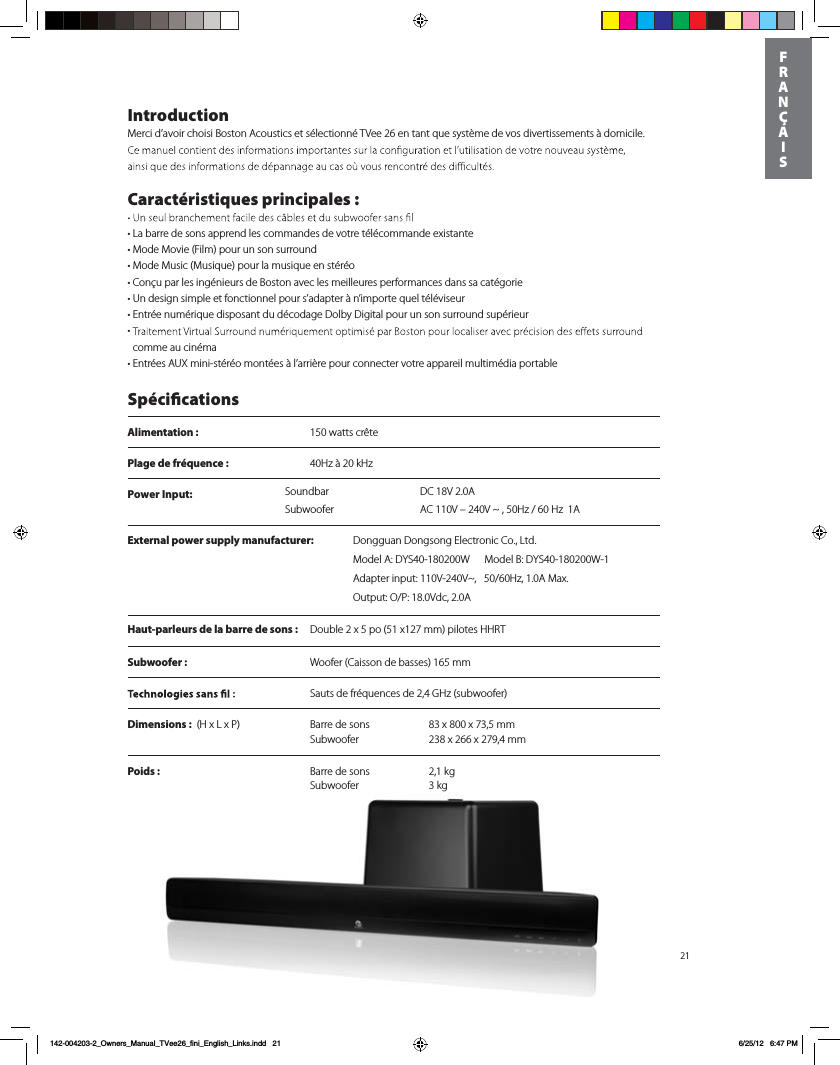
Power Input:  DC 18V 2.0ASoundbarSubwoofer AC 110V – 240V ~ , 50Hz / 60 Hz  1A21IntroductionMerci d’avoir choisi Boston Acoustics et sélectionné TVee 26 en tant que système de vos divertissements à domicile.   Caractéristiques principales :t-BCBrre de sons apprend les commandes de votre télécommande existantetMode Movie (Film) pour un son surroundtMode Music (Musique) pour la musique en stéréotConçu par les ingénieurs de Boston avec les meilleures performances dans sa catégorie t6OEFTJgn simple et fonctionnel pour s’adapter à n’importe quel téléviseur t&OUrée numérique disposant du décodage Dolby Digital pour un son surround supérieur t comme au cinémat&OUrées A69NJOJTtéréo montées à l’arrière pour connecter votre appareil multimédia portable SpécicationsAlimentation :  150 watts crêtePlage de fréquence :  40Hz à 20 kHzHaut-parleurs de la barre de sons :  Double 2 x 5 po (51 x127 mm) pilotes HHRTSubwoofer :   Woofer (Caisson de basses) 165 mm  Sauts de fréquences de 2,4 GHz (subwoofer)Dimensions :)Y-Y1  Barre de sons  83 x 800 x 73,5 mm   Subwoofer  238 x 266 x 279,4 mmPoids :  Barre de sons  2,1 kg   Subwoofer 3 kg     FRANÇAIS142-004203-2_Owners_Manual_TVee26_fini_English_Links.indd   21 6/25/12   6:47 PMExternal power supply manufacturer: %POHHVBO%POHTPOH&MFDUSPOJD$P-UE.PEFM"%:48.PEFM#%:48"EBQUFSJOQVU77_)[".BY0VUQVU017ED"
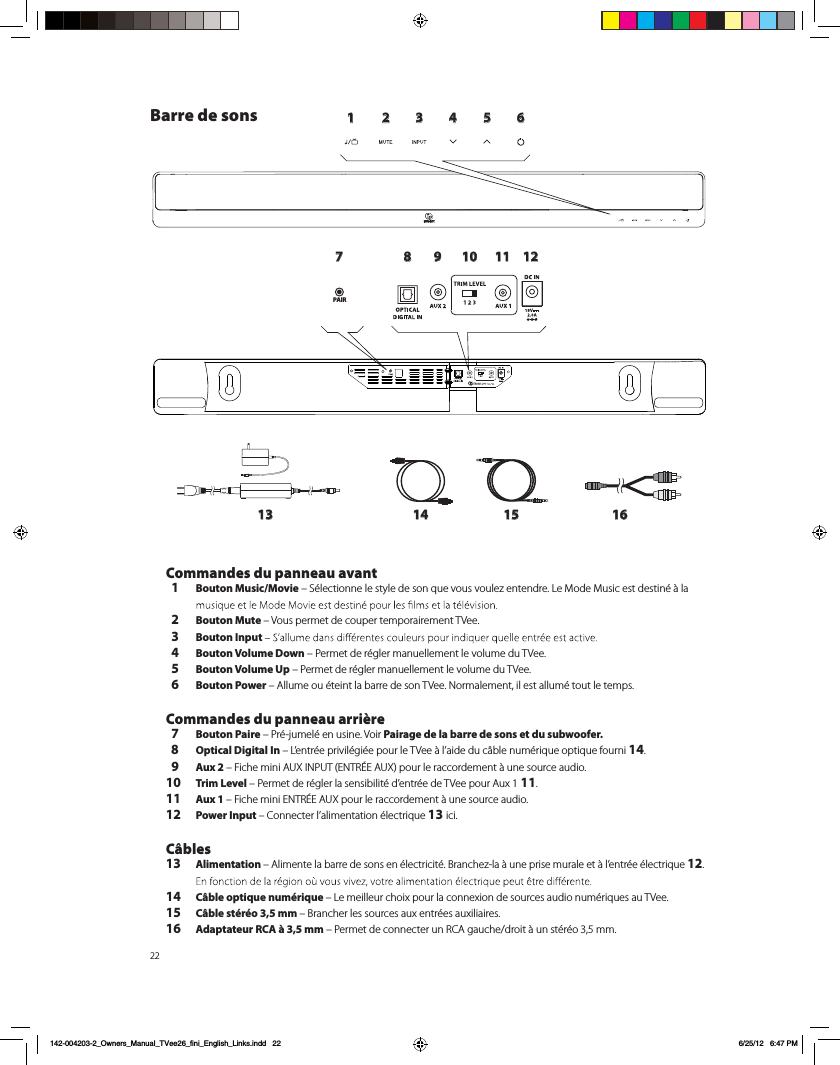
221 2 3 4 5 6789 10 11 1213 14 15 16PAIRBarre de sons Commandes du panneau avant  1 Bouton Music/Movie – Sélectionne le style de son que vous voulez entendre. Le Mode Music est destiné à la   2 Bouton Mute – Vous permet de couper temporairement TVee.   3 Bouton Input   4 Bouton Volume Down – Permet de régler manuellement le volume du TVee.   5 Bouton Volume Up – Permet de régler manuellement le volume du TVee.  6 Bouton Power – Allume ou éteint la barre de son TVee. Normalement, il est allumé tout le temps.  Commandes du panneau arrière  7 Bouton Paire – Pré-jumelé en usine. Voir Pairage de la barre de sons et du subwoofer.  8 Optical Digital In – L’entrée privilégiée pour le TVee à l’aide du câble numérique optique fourni 14.  9 Aux 2 – Fiche mini AUX INPUT (ENTRÉE AUX) pour le raccordement à une source audio.10 Trim Level – Permet de régler la sensibilité d’entrée de TVee pour Aux 1 11.11 Aux 1 – Fiche mini ENTRÉE AUX pour le raccordement à une source audio.12 Power Input – Connecter l’alimentation électrique 13 ici.   Câbles13 Alimentation – Alimente la barre de sons en électricité. Branchez-la à une prise murale et à l’entrée électrique 12. 14  Câble optique numérique – Le meilleur choix pour la connexion de sources audio numériques au TVee.15 Câble stéréo 3,5 mm – Brancher les sources aux entrées auxiliaires. 16 Adaptateur RCA à 3,5 mm – Permet de connecter un RCA gauche/droit à un stéréo 3,5 mm.    142-004203-2_Owners_Manual_TVee26_fini_English_Links.indd   22 6/25/12   6:47 PM
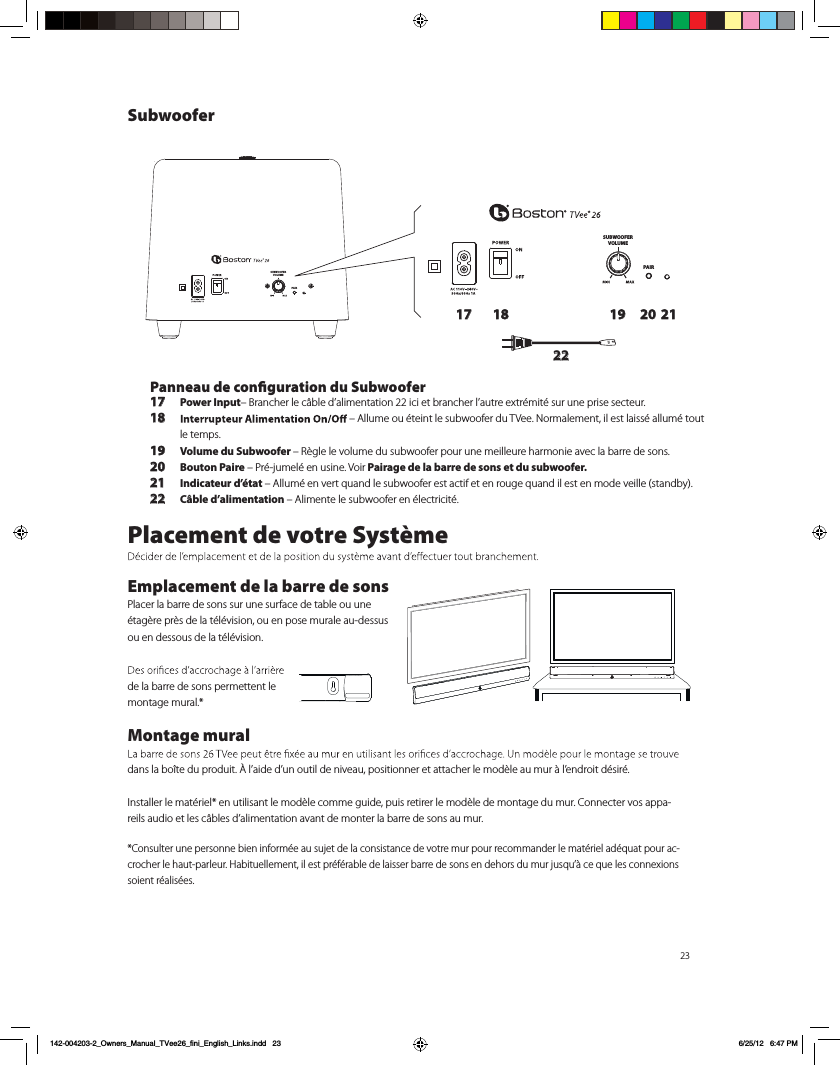
23SUBWOOFERVOLUMEPAIRSUBWOOFERVOLUMEPAIR17 18 19 20 2122Panneau de conguration du Subwoofer17 Power Input– Brancher le câble d’alimentation 22 ici et brancher l’autre extrémité sur une prise secteur. 18  – Allume ou éteint le subwoofer du TVee. Normalement, il est laissé allumé tout le temps.19 Volume du Subwoofer – Règle le volume du subwoofer pour une meilleure harmonie avec la barre de sons.20 Bouton Paire – Pré-jumelé en usine. Voir Pairage de la barre de sons et du subwoofer.21 Indicateur d’état – Allumé en vert quand le subwoofer est actif et en rouge quand il est en mode veille (standby).22 Câble d’alimentation – Alimente le subwoofer en électricité.Placement de votre SystèmeEmplacement de la barre de sonsPlacer la barre de sons sur une surface de table ou une étagère près de la télévision, ou en pose murale au-dessus ou en dessous de la télévision. de la barre de sons permettent le montage mural.*Montage mural dans la boîte du produit. À l’aide d’un outil de niveau, positionner et attacher le modèle au mur à l’endroit désiré. Installer le matériel* en utilisant le modèle comme guide, puis retirer le modèle de montage du mur. Connecter vos appa-reils audio et les câbles d’alimentation avant de monter la barre de sons au mur. *Consulter une personne bien informée au sujet de la consistance de votre mur pour recommander le matériel adéquat pour ac-crocher le haut-parleur. Habituellement, il est préférable de laisser barre de sons en dehors du mur jusqu’à ce que les connexions soient réalisées.Subwoofer142-004203-2_Owners_Manual_TVee26_fini_English_Links.indd   23 6/25/12   6:47 PM
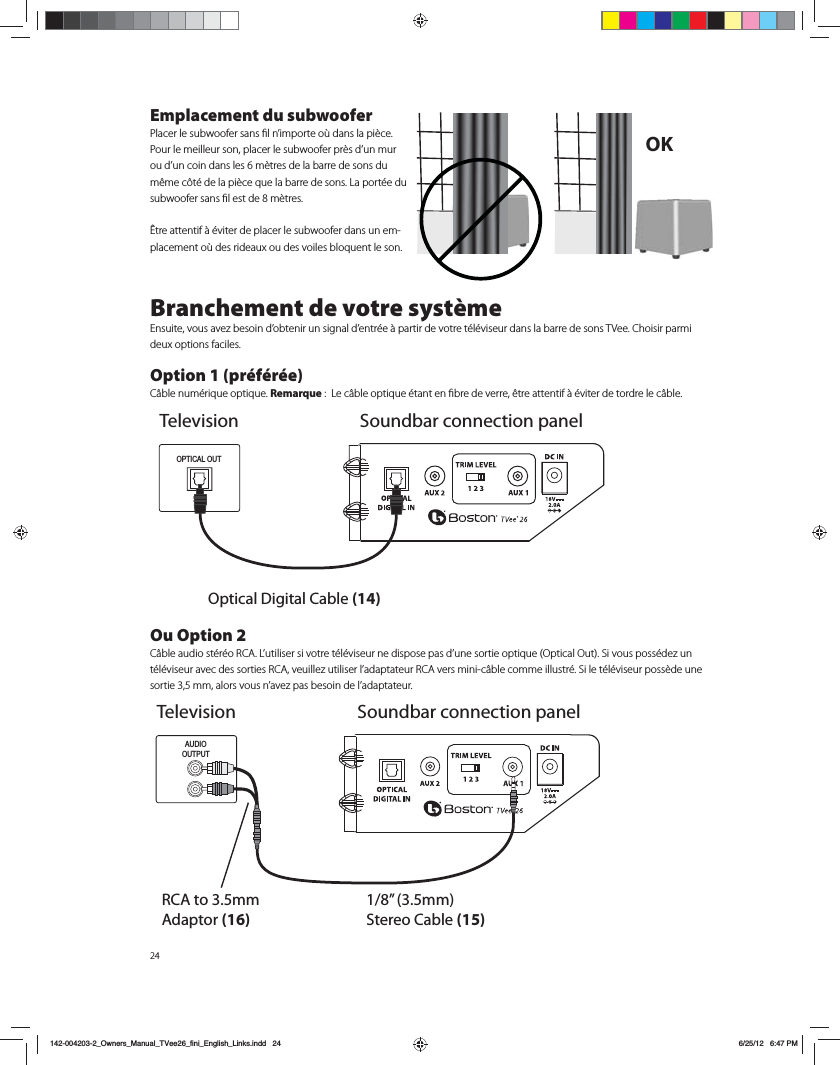
24Emplacement du subwoofer1MBDFSMFTVCXPPGFSTBOTmMOJNQPSUFPáEBOTMBQJÒDF1PVSMFNFJMMFVSTPOQMBDFSMFTVCXPPGFSQSÒTEVONVSPVEVODPJOEBOTMFTNÒUSFTEFMBCBSSFEFTPOTEVNÐNFDÙUÏEFMBQJÒDFRVFMBCBSSFEFTPOT-BQPSUÏFEVTVCXPPGFSTBOTmMFTUEFNÒUSFT³USFBUUFOUJGËÏWJUFSEFQMBDFSMFTVCXPPGFSEBOTVOFN-QMBDFNFOUPáEFTSJEFBVYPVEFTWPJMFTCMPRVFOUMFTPOBranchement de votre système&OTVJUFWPVTBWF[CFTPJOEPCUFOJSVOTJHOBMEFOUSÏFËQBSUJSEFWPUSFUÏMÏWJTFVSEBOTMBCBSSFEFTPOT57FF$IPJTJSQBSNJEFVYPQUJPOTGBDJMFT Option 1 (préférée)$ÉCMFOVNÏSJRVFPQUJRVFRemarque-FDÉCMFPQUJRVFÏUBOUFOmCSFEFWFSSFÐUSFBUUFOUJGËÏWJUFSEFUPSESFMFDÉCMFOu Option 2$ÉCMFBVEJPTUÏSÏP3$"-VUJMJTFSTJWPUSFUÏMÏWJTFVSOFEJTQPTFQBTEVOFTPSUJFPQUJRVF0QUJDBM0VU4JWPVTQPTTÏEF[VOUÏMÏWJTFVSBWFDEFTTPSUJFT3$"WFVJMMF[VUJMJTFSMBEBQUBUFVS3$"WFSTNJOJDÉCMFDPNNFJMMVTUSÏ4JMFUÏMÏWJTFVSQPTTÒEFVOFTPSUJFNNBMPSTWPVTOBWF[QBTCFTPJOEFMBEBQUBUFVSOK TelevisionOptical Digital Cable (14)OPTICAL OUTSoundbar connection panelAUDIOOUTPUTRCA to 3.5mm Adaptor (16)1/8” (3.5mm) Stereo Cable (15)Television Soundbar connection panel142-004203-2_Owners_Manual_TVee26_fini_English_Links.indd   246/25/12   6:47 PM
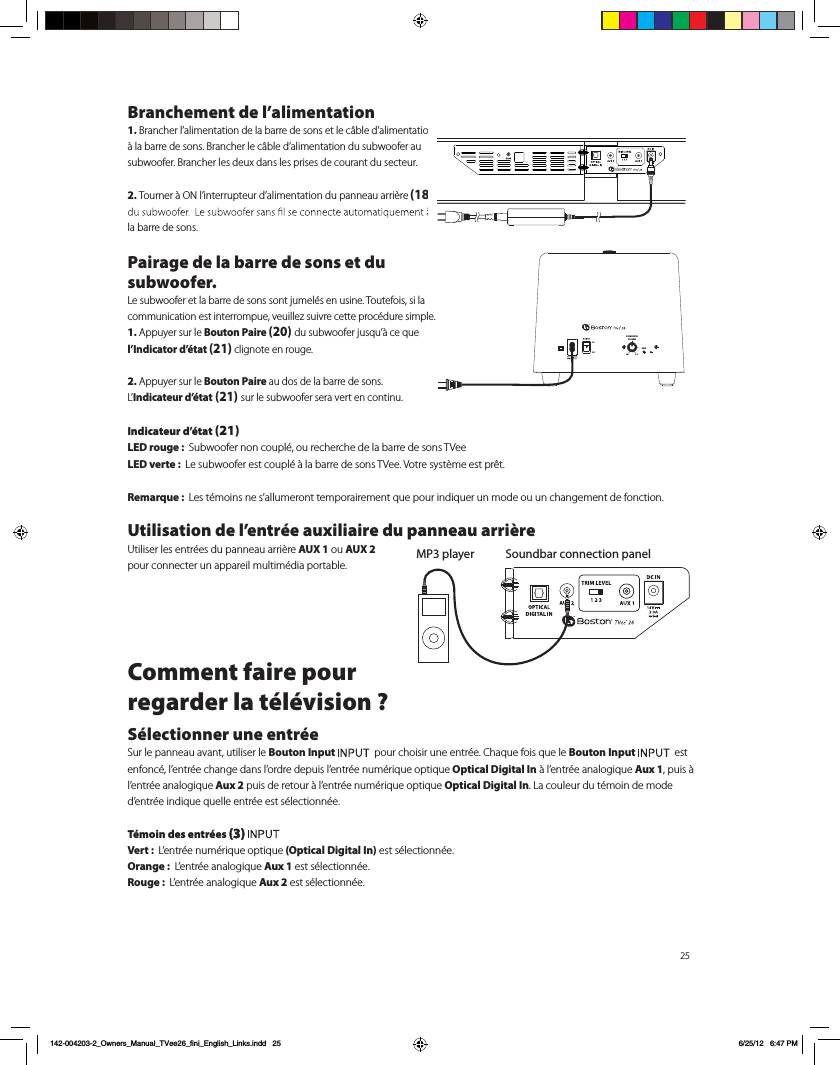
25Branchement de l’alimentation1. Brancher l’alimentation de la barre de sons et le câble d’alimentation à la barre de sons. Brancher le câble d’alimentation du subwoofer au subwoofer. Brancher les deux dans les prises de courant du secteur.2. Tourner à ON l’interrupteur d’alimentation du panneau arrière (18) la barre de sons.Pairage de la barre de sons et du subwoofer.Le subwoofer et la barre de sons sont jumelés en usine. Toutefois, si la communication est interrompue, veuillez suivre cette procédure simple.1. Appuyer sur le Bouton Paire (20) du subwoofer jusqu’à ce que l’Indicator d’état (21) clignote en rouge.2. Appuyer sur le Bouton Paire au dos de la barre de sons.  L’Indicateur d’état (21) sur le subwoofer sera vert en continu.Indicateur d’état (21)LED rouge :  Subwoofer non couplé, ou recherche de la barre de sons TVeeLED verte :  Le subwoofer est couplé à la barre de sons TVee. Votre système est prêt.Remarque :  Les témoins ne s’allumeront temporairement que pour indiquer un mode ou un changement de fonction.Utilisation de l’entrée auxiliaire du panneau arrière  Utiliser les entrées du panneau arrière AUX 1 ou AUX 2  pour connecter un appareil multimédia portable. Comment faire pour  regarder la télévision ?Sélectionner une entréeSur le panneau avant, utiliser le Bouton Input    pour choisir une entrée. Chaque fois que le Bouton Input    est enfoncé, l’entrée change dans l’ordre depuis l’entrée numérique optique Optical Digital In à l’entrée analogique Aux 1, puis à l’entrée analogique Aux 2 puis de retour à l’entrée numérique optique Optical Digital In. La couleur du témoin de mode d’entrée indique quelle entrée est sélectionnée.Témoin des entrées (3) Vert :  L’entrée numérique optique (Optical Digital In) est sélectionnée.Orange :  L’entrée analogique Aux 1 est sélectionnée.Rouge :  L’entrée analogique Aux 2 est sélectionnée. Soundbar connection panelMP3 playerPAIRSUBWOOFERVOLUMEPAIR142-004203-2_Owners_Manual_TVee26_fini_English_Links.indd   25 6/25/12   6:47 PM
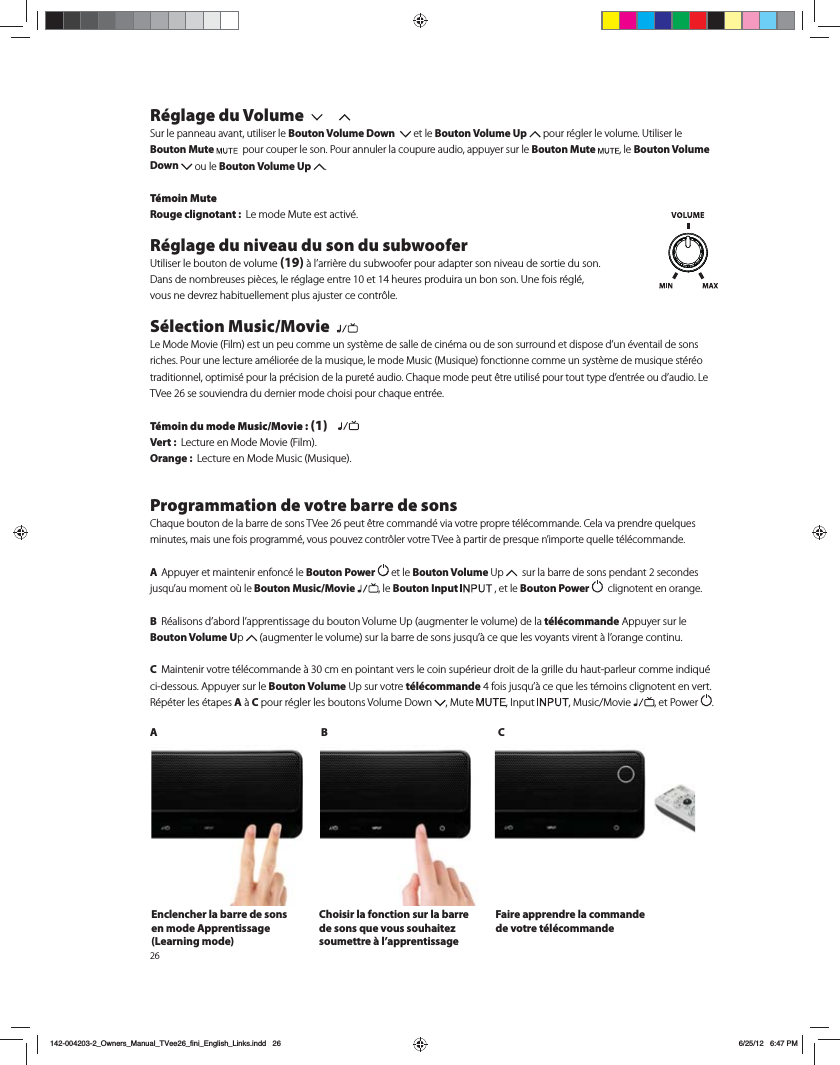
26Réglage du Volume Sur le panneau avant, utiliser le Bouton Volume Down    et le Bouton Volume Up QPVSSÏHMFSMFWPMVNF6UJMJTFSMFBouton Mute   pour couper le son. Pour annuler la coupure audio, appuyer sur le Bouton Mute  , le Bouton Volume Down  ou le Bouton Volume Up  .  Témoin MuteRouge clignotant :  -FNPEF.VUFFTUBDUJWÏRéglage du niveau du son du subwoofer6UJMJTFSMFCPVUPOEFWPMVNF(19)ËMBSSJÒSFEVTVCXPPGFSQPVSBEBQUFSTPOOJWFBVEFTPSUJFEVTPO%BOTEFOPNCSFVTFTQJÒDFTMFSÏHMBHFFOUSFFUIFVSFTQSPEVJSBVOCPOTPO6OFGPJTSÏHMÏ WPVTOFEFWSF[IBCJUVFMMFNFOUQMVTBKVTUFSDFDPOUSÙMFSélection Music/Movie  -F.PEF.PWJF'JMNFTUVOQFVDPNNFVOTZTUÒNFEFTBMMFEFDJOÏNBPVEFTPOTVSSPVOEFUEJTQPTFEVOÏWFOUBJMEFTPOTSJDIFT1PVSVOFMFDUVSFBNÏMJPSÏFEFMBNVTJRVFMFNPEF.VTJD.VTJRVFGPODUJPOOFDPNNFVOTZTUÒNFEFNVTJRVFTUÏSÏPUSBEJUJPOOFMPQUJNJTÏQPVSMBQSÏDJTJPOEFMBQVSFUÏBVEJP$IBRVFNPEFQFVUÐUSFVUJMJTÏQPVSUPVUUZQFEFOUSÏFPVEBVEJP-F57FFTFTPVWJFOESBEVEFSOJFSNPEFDIPJTJQPVSDIBRVFFOUSÏFTémoin du mode Music/Movie : (1)   Vert :  -FDUVSFFO.PEF.PWJF'JMNOrange :  -FDUVSFFO.PEF.VTJD.VTJRVFProgrammation de votre barre de sons$IBRVFCPVUPOEFMBCBSSFEFTPOT57FFQFVUÐUSFDPNNBOEÏWJBWPUSFQSPQSFUÏMÏDPNNBOEF$FMBWBQSFOESFRVFMRVFTNJOVUFTNBJTVOFGPJTQSPHSBNNÏWPVTQPVWF[DPOUSÙMFSWPUSF57FFËQBSUJSEFQSFTRVFOJNQPSUFRVFMMFUÏMÏDPNNBOEF A  Appuyer et maintenir enfoncé le Bouton Power  et le Bouton Volume 6Q   sur la barre de sons pendant 2 secondes KVTRVBVNPNFOUPáMF Bouton Music/Movie , le Bouton Input   , et le Bouton Power    clignotent en orange. B 3ÏBMJTPOTEBCPSEMBQQSFOUJTTBHFEVCPVUPO7PMVNF6QBVHNFOUFSMFWPMVNFEFMBtélécommande Appuyer sur le Bouton Volume Up  BVHNFOUFSMFWPMVNFTVSMBCBSSFEFTPOTKVTRVËDFRVFMFTWPZBOUTWJSFOUËMPSBOHFDPOUJOVC .BJOUFOJSWPUSFUÏMÏDPNNBOEFËDNFOQPJOUBOUWFSTMFDPJOTVQÏSJFVSESPJUEFMBHSJMMFEVIBVUQBSMFVSDPNNFJOEJRVÏci-dessous. Appuyer sur le Bouton Volume6QTVSWPUSFtélécommandeGPJTKVTRVËDFRVFMFTUÏNPJOTDMJHOPUFOUFOWFSU3ÏQÏUFSMFTÏUBQFTAËC pour régler les boutons Volume Down  .VUF *OQVU .VTJD.PWJF , et Power  .AB CEnclencher la barre de sons en mode Apprentissage (Learning mode)Choisir la fonction sur la barre de sons que vous souhaitez soumettre à l’apprentissage Faire apprendre la commande de votre télécommande142-004203-2_Owners_Manual_TVee26_fini_English_Links.indd   26 6/25/12   6:47 PM
Dépannage du TVeeLa barre de sons ne s’allume pas. t-BMJNFOUBUJPOFTUFMMFCSBODIÏFEBOTVOFQSJTFNVSBMFTPVTUFOTJPO  t-BMJNFOUBUJPOFTUFMMFDPSSFDUFNFOUDPOOFDUÏFËMFOUSÏFEBMJNFOUBUJPOEFMBCBSSFEFTPOT Aucun son ne sort de la barre de sons TVee. t-BCBSSFEFTPOTFTUFMMFSFMJÏFËVOFTPVSDFBVEJPFODPVSTEFMFDUVSFBVEJPQBSMFCJBJTEFTBTPSUJF  t-BCBSSFEFTPOTFTUFMMFSÏHMÏFËMBTPVSDFEFOUSÏFDPSSFDUF  t-BCBSSFEFTPOTFUMFTVCXPPGFSSFÎPJWFOUJMTMBMJNFOUBUJPOÏMFDUSJRVFFUTPOUJMTBMMVNÏT  t"VHNFOUFSMFWPMVNFEFMBCBSSFEFTPOT57FF t"VHNFOUFSMFWPMVNFEVUÏMÏWJTFVSPVEVEÏDPEFVSEFDÉCMFDPOOFDUÏBWFDMF57FF t7ÏSJmFSMÏUBUEFMBGPODUJPO.VUFoMFBouton Mute DMJHOPUFUJMFOSPVHF "QQVZFSTVSMFBouton Mute sur la  barre des sons. t1PVSMFTUÏMÏWJTFVSTOVNÏSJRVFTPVEBVUSFTTPVSDFTOVNÏSJRVFTTBTTVSFSRVFMFGPSNBUEFTPSUJFFTUSÏHMÏTVS j%PMCZ%JHJUBMx7PJSMFNFOVEFSÏHMBHFEVQSPEVJUTPVSDF t1PVSMFTTPVSDFTOVNÏSJRVFTTBTTVSFSRVFMFDÉCMFPQUJRVFOFTUQBTQMJÏPVDBTTÏ$FMBBSSÐUFMFTJHOBM OVNÏSJRVFPQUJRVFAucun son ne sort du subwoofer.  t7ÏSJmFSMFTQPJOUTEBOTMBTFDUJPOj-BCBSSFEFTPOTOFTBMMVNFQBTxDJEFTTVT t5PVSOFSMBDPNNBOEFEFWPMVNFFOMBVHNFOUBOU t%ÏQMBDFSMFTVCXPPGFSQMVTQSÐUEFMBCBSSFEFTPOT t7ÏSJmFSMIndicateur d’étatQPVSTBTTVSFSRVFMFUÏNPJOFTUWFSUFODPOUJOVLe son est déformé par la barre de sons.  t$IBOHFSMFSÏHMBHFEFMJOUFSSVQUFVSEF/JWFBVEF4FOTJCJMJUÏ5SJN-FWFMËVOOVNÏSPJOGÏSJFVSTFVMFNFOUMFOUSÏF"VY t7ÏSJmFSMBTPVSDFEVTJHOBMQPVSÐUSFTßSRVFMBEJTUPSTJPOOFQSPWJFOUQBTEVTPOEPSJHJOF t#BJTTFSMFWPMVNFEFMBTPVSDFKVTRVËDFRVFMBEJTUPSTJPOEJTQBSBJTTFLes basses ne sont pas assez fortes.  t5PVSOFSMBDPNNBOEFEFWPMVNFEVTVCXPPGFSFOMBVHNFOUBOU t1MBDFSMFTVCXPPGFSQMVTQSPDIFEVODPJOEFMBQJÒDF t$FSUBJOTUÏMÏWJTFVSTFUEÏDPEFVSTDÉCMFPOUVONPEFRVJMJNJUFMFTCBTTFT7ÏSJmFSQBSMFNFOVEFDPOmHVSBUJPOEVQSPEVJUBVEJPFUSÏHMFSMFNPEFBVEJPËjMBSHFxQMVUÙURVBjOPSNBMxPVjÏUSPJUxTVee n’apprend pas mes commandes de la commande à distance.  t4VJWSFBUUFOUJWFNFOUMFTJOTUSVDUJPOTEFQSPHSBNNBUJPO t5FOJSEFNBOJÒSFTUBCMFMBDPNNBOEFËEJTUBODFËDNEFMBWBOUEFMBCBSSFEFTPOT t"QQVZFSQVJTSFMÉDIFSMFTUPVDIFTEFMBUÏMÏDPNNBOEFlentement!  t7ÏSJmFSMFTQJMFTEFMBUÏMÏDPNNBOEF  Remarque :  57FFBQQSFOEQSFTRVFUPVUFTMFTDPNNBOEFTJOGSBSPVHFTNBJTDFSUBJOTQSPUPDPMFTJOGSBSPVHFTQFVWFOUne pas être programmés.Le volume des haut-parleurs de la télévision s’entendent plus fort que mon système TVee au l du temps.  t-PSTRVFMFCPVUPOEVWPMVNFEFMBUÏMÏDPNNBOEFFTUNBJOUFOVFOGPODÏWPUSFUÏMÏWJTFVSQFVUDIBOHFSMFTOJWFBVYEFWPMVNFQMVTSBQJEFNFOURVF57FF t6UJMJTFSMFTCPVUPOTEFMBCBSSFEFTPOTQPVSSÏHMFSMFWPMVNFEV57FFËVOKVTUFÏRVJMJCSFBWFDMFTIBVUQBSMFVSTEFMBtélévision.  t4JQPTTJCMFVUJMJTFSMFNFOVEFSÏHMBHFEFMBUÏMÏWJTJPOQPVSDPVQFSMFTQSPQSFTIBVUQBSMFVSTEVUÏMÏWJTFVSLe subwoofer semble avoir d’interférence avec son signal sans l.  t-FTVCXPPGFSQFVUÐUSFUSPQMPJOEFMBCBSSFEFTPOTQPVSPCUFOJSVOCPOTJHOBM&TTBZFSFOMFEÏQMBÎBOUQMVTQSÒT142-004203-2_Owners_Manual_TVee26_fini_English_Links.indd   27 6/25/12   6:47 PM
Garantie limitée#PTUPO"DPVTUJDTHBSBOUJUËMBDIFUFVSEPSJHJOFRVFMFTQJÒDFTNÏDBOJRVFTEVTZTUÒNF57FFOFDPNQPSUFOUBVDVOEÏGBVUEFQJÒDFFUNBJOEVWSFQFOEBOUVOFQÏSJPEFEFBOTËQBSUJSEFMBEBUFEBDIBU-BQÏSJPEFEFHBSBOUJFEFTDPNQPTBOUTÏMFDUSJRVFTEV57FFFTUEFBO7PUSFSFTQPOTBCJMJUÏDPOTJTUFËJOTUBMMFSFUËVUJMJTFSMFTBQQBSFJMTTFMPOMFTJOTUSVDUJPOTGPVSOJFTËBTTVSFSVOUSBOTQPSUTÏDVSJTÏWFSTVOSFQSÏTFOUBOUEFTFSWJDFBHSÏÏEF#PTUPO"DPVTUJDTFUËQSÏTFOUFSVOFQSFVWFEBDIBUTPVTMBGPSNFEVOUJDLFUEFDBJTTFFODBTEFEFNBOEFEFTFSWJDFBQSÒTWFOUF-FTEPNNBHFTSÏTVMUBOUEVOFVUJMJTBUJPOBCVTJWFPVFSSPOÏFEVOFJOTUBMMBUJPOJODPSSFDUFEVOBDDJEFOUEVOFFYQÏEJUJPOJOBEBQUÏFPVEFSÏQBSBUJPOTNPEJmDBUJPOTQBSVOFQFSTPOOFBVUSFRVVOSFQSÏTFOUBOUEFTFSWJDFBHSÏÏEF#PTUPO"DPVTUJDTTPOUFYDMVTEFDFUUFHBSBOUJF-BQSÏTFOUFHBSBOUJFFTUSÏTFSWÏFBVQSPEVJUEF#PTUPO"DPVTUJDTFUOFDPVWSFQBTMFTEPNNBHFTEVORVFMDPORVFÏRVJQF-NFOUBTTPDJÏ$FUUFHBSBOUJFOFDPVWSFQBTMFDPßUEFMFOMÒWFNFOUPVEFMBSÏJOTUBMMBUJPO-BQSÏTFOUFHBSBOUJFFTUBOOVMÏFTJMFOVNÏSPEFTÏSJFBÏUÏFOMFWÏPVSFOEVJMMJTJCMF$FUUFHBSBOUJFWPVTBDDPSEFEFTESPJUTMÏHBVYTQÏDJmRVFT7PVTQPVWF[EJTQPTFSEFESPJUTDPNQMÏNFOUBJSFTRVJEJõÒSFOUEVO²UBUËMBVUSFDemande de service après-vente²UBUT6OJT7FVJMMF[DPOUBDUFSFOQSFNJFSMJFVMFSFWFOEFVSBVQSÒTEVRVFMWPVTBWF[BDIFUÏDFQSPEVJU4JDFMBOFTUQBTQPTTJCMFFOWPZFSVOFNBJMËTVQQPSU!CPTUPOBDPNPVÏDSJSFË #PTUPO"DPVTUJDT*OD $PSQPSBUF%SJWF .BIXBI/+64"$BOBEB7FVJMMF[DPOUBDUFSFOQSFNJFSMJFVMFSFWFOEFVSBVQSÒTEVRVFMWPVTBWF[BDIFUÏDFQSPEVJU4JDFMBOFTUQBTQPTTJCMFFOWPZFSVOFNBJMËTVQQPSU!ENDBOBEBDBPVÏDSJSFË %.$BOBEB "QQMF$SFFL#MWE .BSLIBN0/-3#Tous les autres pays$POUBDUFSMFSFWFOEFVSBVQSÒTEVRVFMWPVTBWF[BDIFUÏMFQSPEVJUPVDPOUBDUFSWPUSFEJTUSJCVUFVSMPDBM1PVSQMVTEJOGPSNBUJPOTWFVJMMF[WJTJUFSCPTUPOBDPVTUJDTDPNTVQQPSU-BQSÏTFODFEFDFTZNCPMFTVSMFQSPEVJUJOEJRVFRVFDFEFSOJFSOFQFVUQBTÐUSFKFUÏEBOTMFTPSEVSFTNÏOBHÒSFT7PVTEFWF[MFEÏQPTFSEBOTVOFJOTUBMMBUJPOEFDPMMFDUFTÏQBSÏFEFTUJOÏFBVYEÏDIFUTÏMFDUSP-OJRVFTPVMFSFUPVSOFSDIF[VOSFWFOEFVSMPSTEFMBDIBUEVOQSPEVJUTJNJMBJSF-FGBCSJDBOUBQBZÏQPVSMFSFDZDMBHFEFDFQSPEVJU"JOTJWPVTDPOUSJCVF[ËMBSÏVUJMJTBUJPOFUBVSFDZDMBHFWPVTNJOJNJTF[MFTFõFUTOÏGBTUFTTVSMFOWJSPOOFNFOUFUMBTBOUÏFUWPVTÏWJUF[EFTBNFOEFTQPVSVOFNJTFBVSFCVUJODPSSFDUF142-004203-2_Owners_Manual_TVee26_fini_English_Links.indd   28 6/25/12   6:47 PM

Navigation menu