Bowflex M5_1Box_AM.OM.WARR_090117.EN.B Assembly & Owner's Manual (received In One Box) BFX.M5.One Box.AM.OM.WARR.EN
Assembly & Owner's Manual (received in one box) BFX.M5.OneBox.AM.OM.WARR.EN Bowflex Product Manuals | Bowflex
User Manual: Bowflex Assembly & Owner's Manual (received in one box) Bowflex Product Manuals | Bowflex
Open the PDF directly: View PDF  .
.
Page Count: 56
M5
OWNER’S / ASSEMBLY MANUALOWNER’S / ASSEMBLY MANUAL
Manual en Español
Latino Americano:
www.support.nautilus.com

Assembly / Owner’s Manual
2
Important Safety Instructions 3
Safety Warning Labels / Serial Number 5
Specications 6
BeforeAssembly 6
Parts 7
Hardware 8
Tools 8
Assembly 9
Moving the Machine 18
Leveling the Machine 18
Features 19
Console Features 20
Fitness Basics 25
Operations 31
Mounting / Dismounting 31
Getting Started 32
Power Up / Idle Mode 32
Manual (Quick Start) Program 33
MAX Workout Program 33
Workout Programs 34
Paused/ResultsMode 36
EditaUserProle 36
CustomizeMAXProgram 36
Customize the Workout Goals 37
Console Setup Mode 38
Maintenance 39
Maintenance Parts 40
Troubleshooting 42
Body Weight Loss Plan 45
Warranty 55
To validate warranty support, keep the original proof of purchase and record the following information:
Serial Number __________________________
Date of Purchase _______________________
Toregisteryourproductwarranty,goto:www.bowex.com/registerorcall1(800)605–3369.
Ifyouhavequestionsorproblemswithyourproduct,pleasecall1(800)NAUTILUS(628–8458).
Table of Contents / Registration
Nautilus,Inc.,(800)NAUTILUS/(800)628-8458,www.NautilusInc.com-CustomerService:NorthAmerica(800)605-3369,csnls@nautilus.com|
outsideU.S.www.nautilusinternational.com|PrintedinChina|©2017Nautilus,Inc.|®indicatestrademarksregisteredintheUnitedStates.These
marksmayberegisteredinothernationsorotherwiseprotectedbycommonlaw.Bowex,theBlogo,BowexMaxTrainer,MaxTrainer,SelectTech,
BowexConnect,BowexTrainer,Nautilus,Schwinn,andUniversalaretrademarksownedbyorlicensedtoNautilus,Inc.iTunesisaregistered
trademark of Apple, Inc. Google Play is a trademark of Google Inc. The Bluetooth® word mark and logos are registered trademarks owned by
Bluetooth SIG, Inc., and any use of such marks by Nautilus, Inc. is under license. Polar, OwnCode, MyFitnessPal, and Nut Thins are trademarks of
their respective owners.
Assembly / Owner’s Manual
3
Important Safety Instructions
When using an electrical appliance, basic precautions should always be followed, including the following:
This icon means a potentially hazardous situation which, if not avoided, could result in death or serious injury.
Obey the following warnings:
Read and understand all warnings on this machine.
Carefully read and understand the Assembly instructions.
Carefully read and understand the Assembly instructions. Read and understand the complete Manual. Keep the Manual
for future reference.
To reduce the risk of electrical shock or unsupervised usage of the equipment, always unplug this machine from the
electrical outlet immediately after using and before cleaning.
To decrease the risk of burns, electric shock, or injury to persons, read and understand the complete Owner’s Manual.
Failure to follow these guidelines can cause a serious or possibly fatal electrical shock or other serious injury.
• Keep bystanders and children away from the product you are assembling at all times.
• Do not connect power supply to the machine until instructed to do so.
• The machine should never be left unattended when plugged in. Unplug from outlet when not in use and before cleaning, maintaining or repairing
the machine.
• Beforeeachuse,examinethemachinefordamagetopowercord,loosepartsorsignsofwear.Donotuseiffoundinthiscondition.Contact
Nautilus Customer Service for repair information.
• Not intended for use by persons with medical conditions where those conditions may impact the safe operation of the machine or pose a risk of
injury to the user.
• Do not drop or put objects into any opening of the machine.
• Never operate this machine with the air openings blocked. Keep the air openings free of lint, hair and the like.
• Do not assemble this machine outdoors or in a wet or moist location.
• Makesureassemblyisdoneinanappropriateworkspaceawayfromfoottrafcandexposuretobystanders.
• Some components of the machine can be heavy or awkward. Use a second person when doing the assembly steps involving these parts. Do
not do steps that involve heavy lifting or awkward movements on your own.
• Set up this machine on a solid, level, horizontal surface.
• Do not try to change the design or functionality of this machine. This could compromise the safety of this machine and will void the warranty.
• If replacement parts are necessary, use only genuine Nautilus replacement parts and hardware. Failure to use genuine replacement parts can
cause a risk to users, keep the machine from operating correctly and void the warranty.
• Do not use until the machine has been fully assembled and inspected for correct performance in accordance with the Manual.
• ReadandunderstandthecompleteManualsuppliedwiththismachinebeforerstuse.KeeptheManualforfuturereference.
• Do all assembly steps in the sequence given. Incorrect assembly can lead to injury or incorrect function.
• SAVE THESE INSTRUCTIONS.

Assembly / Owner’s Manual
4
Before using this equipment, obey the following warnings:
Read and understand the complete Manual. Keep the Manual for future reference.
Read and understand all warnings on this machine. If at any time the Warning stickers become loose, unreadable or dislodged,
contact Nautilus Customer Service for replacement stickers.
To reduce the risk of electrical shock or usage of the equipment, always unplug the power cord from the wall outlet and
the machine and wait 5 minutes before cleaning, maintaining or repairing the machine. Place the power cord in a secure location.
• Children must not be let on or near to this machine. Moving parts and other features of the machine can be dangerous to children.
• Not intended for use by anyone under 14 years of age.
• Consultaphysicianbeforeyoustartanexerciseprogramoranewhealthanddietplan.Stopexercisingifyoufeelpainortightnessinyour
chest, become short of breath, or feel faint. Contact your doctor before you use the machine again. Use the values calculated or measured
bythemachine’scomputerforreferencepurposesonly.Theheartratedisplayedontheconsoleisanapproximationandshouldbeusedfor
reference only.
• Beforeeachuse,examinethismachineforloosepartsorsignsofwear.Donotuseiffoundinthiscondition.MonitorthePedalsandCrank
Arms closely. Contact Nautilus Customer Service for repair information.
• Maximumuserweightlimit:300lbs.(136kg).Donotuseifyouareoverthisweight.
• This machine is for home use only.
• Donotwearlooseclothingorjewelry.Thismachinecontainsmovingparts.Donotputngersorotherobjectsintomovingpartsoftheexercise
equipment.
• Set up and operate this machine on a solid, level, horizontal surface.
• Make the Pedals stable before you step on them. Use caution when you step on and off the machine.
• Do not operate this machine outdoors or in moist or wet locations.
• Keepatleast24”(0.6m)oneachsideofthemachineclear.Thisistherecommendedsafedistanceforaccessandpassagearoundand
emergency dismounts from the machine. Keep third parties out of this space when machine is in use.
• Donotoverexertyourselfduringexercise.Operatethemachineinthemannerdescribedinthismanual.
• Perform all regular and periodic maintenance procedures recommended in the Owner’s Manual.
• Keep the Pedals and Handlebars clean and dry.
• Exerciseonthismachinerequirescoordinationandbalance.Besuretoanticipatethatchangesinspeedandresistancelevelcanoccurduring
workouts, and be attentive in order to avoid loss of balance and possible injury.
• This machine cannot stop the Pedals or Upper Handlebars independently of the Resistance Fan. Reduce the pace to slow the Resistance Fan,
Upper Handlebars and Pedals to a stop. Do not dismount the machine until the Pedals and Upper Handlebars have come to a complete stop.
• Do not drop or put objects into any opening of the machine.
• Prior to use read and understand the Owner’s Manual. The appliance is not to be used by persons with functional limitations and impairments,
reducedphysical,sensoryormentalcapabilities,orlackofexperienceandknowledge.
Important Safety Instructions
Assembly / Owner’s Manual
5
FCC Compliance
Changes or modications to this unit not expressly approved by the party responsible for compliance could void the user’s
authority to operate the equipment.
The machine and power supply comply with part 15 of the FCC rules. Operation is subject to the following two conditions: (1) This device may not
cause harmful interference, and (2) this device must accept any interference received, including interference that may cause undesired operation.
Note: This machine and power supply have been tested and found to comply with the limits for a Class A digital device, pursuant to Part 15 of
the FCC Rules. These limits are designed to provide reasonable protection against harmful interference in a residential installation. This
equipment generates, uses and can radiate radio frequency energy and, if not installed and used in accordance with the instructions, may
cause harmful interference to radio communications.
However, there is no guarantee that interference will not occur in a particular installation. If this equipment does cause harmful interference to radio
or television reception, which can be determined by turning the equipment off and on, the user is encouraged to try to correct the interference by one
or more of the following measures:
• Reorient or relocate the receiving antenna.
• Increase the separation between the equipment and receiver.
• Connect the equipment into an outlet on a circuit different from that to which the receiver is connected.
•Consultthedealeroranexperiencedradio/TVtechnicianforhelp.
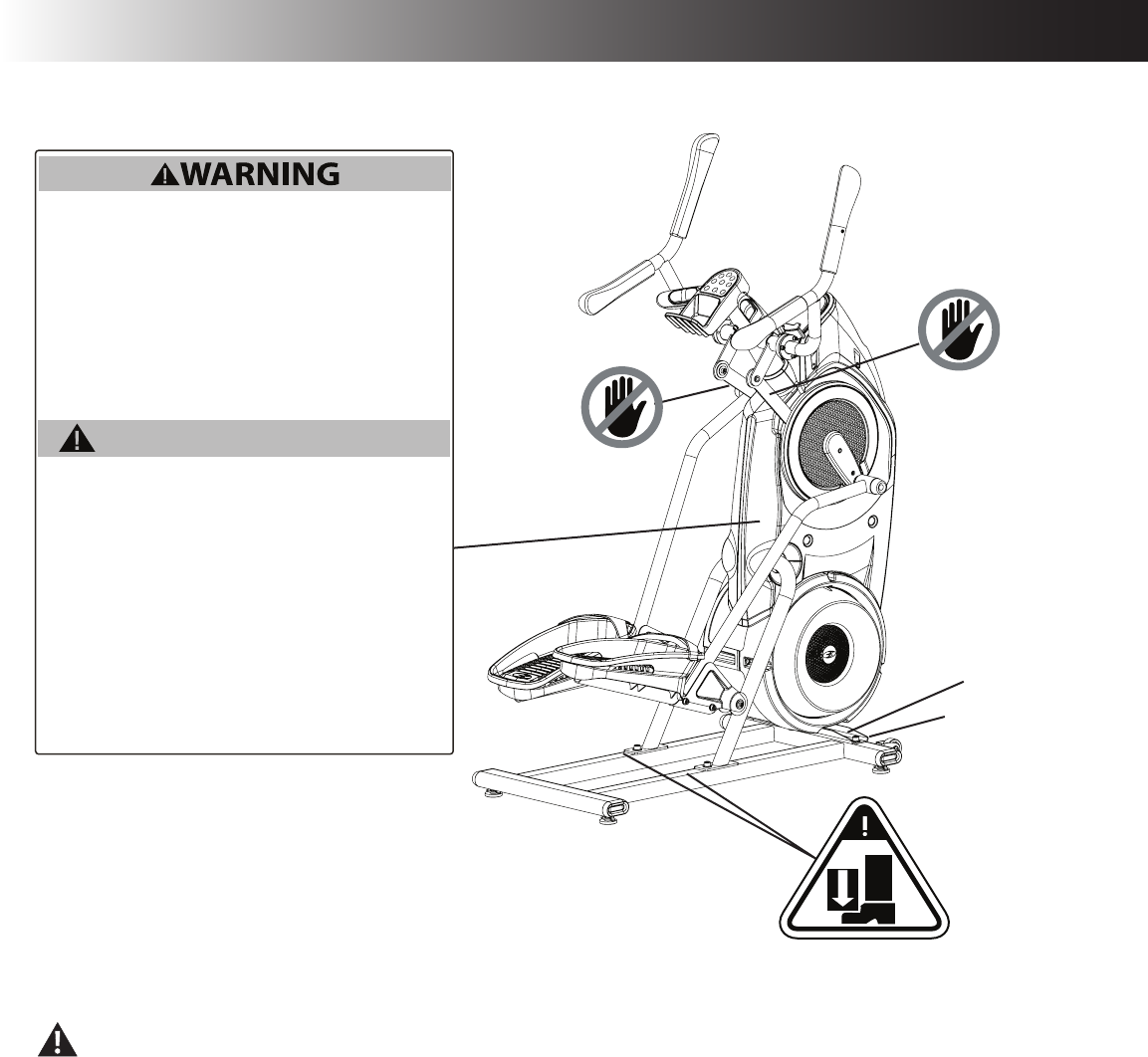
Safety Warning Labels and Serial Number
8011889_B
• Injury or death is possible if caution is not used while
using this machine.
• Keep children and pets away.
• Read and follow all warnings on this machine.
• Refer to the Owner's Manual for additional warnings and
safety information.
• The heart rate displayed is an approximation and should
be used for reference only.
• Not intended for use by anyone under 14 years of age.
• The maximum user weight for this machine is 300 lbs
(136 kg.).
• This machine is for home use only.
• Consult a physician prior to using any exercise equipment.
• Une imprudence lors de l'utilisation de cet appareil
pourrait être dangereuse, voire mortelle.
• Éloignez les enfants et les animaux de compagnie de
l'appareil.
• Lisez et assimilez tous les avertissements apposés sur
cet appareil.
• Consultez le Guide du propriétaire pour prendre
connaissance des consignes de sécurité et
avertissements supplémentaires.
• La fréquence cardiaque affichée est approximative et
doit être utilisée uniquement à titre indicatif.
• Non destiné à des personnes âgées de moins de 14 ans.
• Le poids maximum de l'utilisateur pour cette machine est
136 kg (300 lbs).
• Cet appareil est à usage domestique uniquement.
• Consulter un médecin avant d'utiliser tout équipement
d'exercice physique.
ADVERTISSEMENT
ProductSpecication
Label
Serial Number Label
Assembly / Owner’s Manual
6
Before Assembly
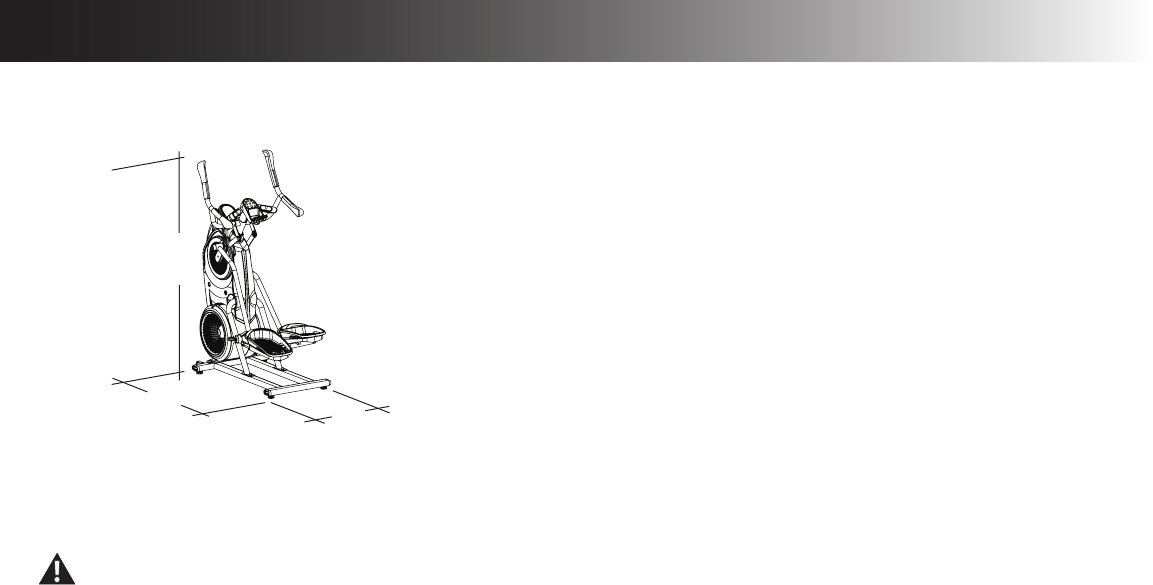
Select the area where you are going to set up and operate your machine. For safe operation, the location must be on a hard, level surface. Allow
aworkoutareaofaminimum97”(246.4cm)x74.5”(189.2cm).Besurethattheworkoutspaceyouareutilizinghasadequateheightclearance,
takingintoconsiderationtheheightoftheuserandthemaximumpedalheightofthetnessmachine.
Basic Assembly Tips
Follow these basic points when you assemble your machine:
• Read and understand the “Important Safety Instructions” before assembly.
• Collect all the pieces necessary for each assembly step.
• Using the recommended wrenches, turn the bolts and nuts to the right (clockwise) to tighten, and the left (counterclockwise) to loosen, unless
instructed otherwise.
• When attaching 2 pieces, lightly lift and look through the bolt holes to help insert the bolt through the holes.
• The assembly requires 2 people.
Machine Mat
TheBowexMaxTrainer®MachineMatisanoptionalaccessorythathelpskeepyourworkoutareaclearandaddsalayerofprotectiontoyouroor.
Therubbermachinematprovidesanon-slip,rubbersurfacewhichlimitsstaticdischargeandreducesthepossibilityofdisplayorrunningerrors.If
possible,putyourBowexMAXTrainer™ Machine Mat in your selected workout area before you begin assembly.
Toordertheoptionalmachinemat,goto:www.bowex.com,orcall1(800)605–3369.
Maximum User Weight: 300lbs.(136kg)
Maximum Pedal Height: 19.1 inches ( 48.5 cm)
Power Requirements:
Operational Voltage: 9VDC
Operating Current: 1500 mA
Heart Rate Chest Strap: 1 CR2032 battery
Regulatory Approvals:
ACPowerAdapter: ULlisted,CSAcertied(orequivalent),Rated120V60Hz
Input, 9VDC, 1500mA Output. Class 2 or LPS.
This product, its packaging, and components contain chemicals known to the State of California to cause cancer, birth defects, or
reproductive harm. This Notice is provided in accordance with California’s Proposition 65. If you would like additional information,
please refer to our website at www.nautilus.com/prop65.
63.5”
(161.3 cm)
49”
(124.5 cm) 26.5”
(67.3 cm)
Specifications / Before Assembly
Assembly / Owner’s Manual
7
Parts
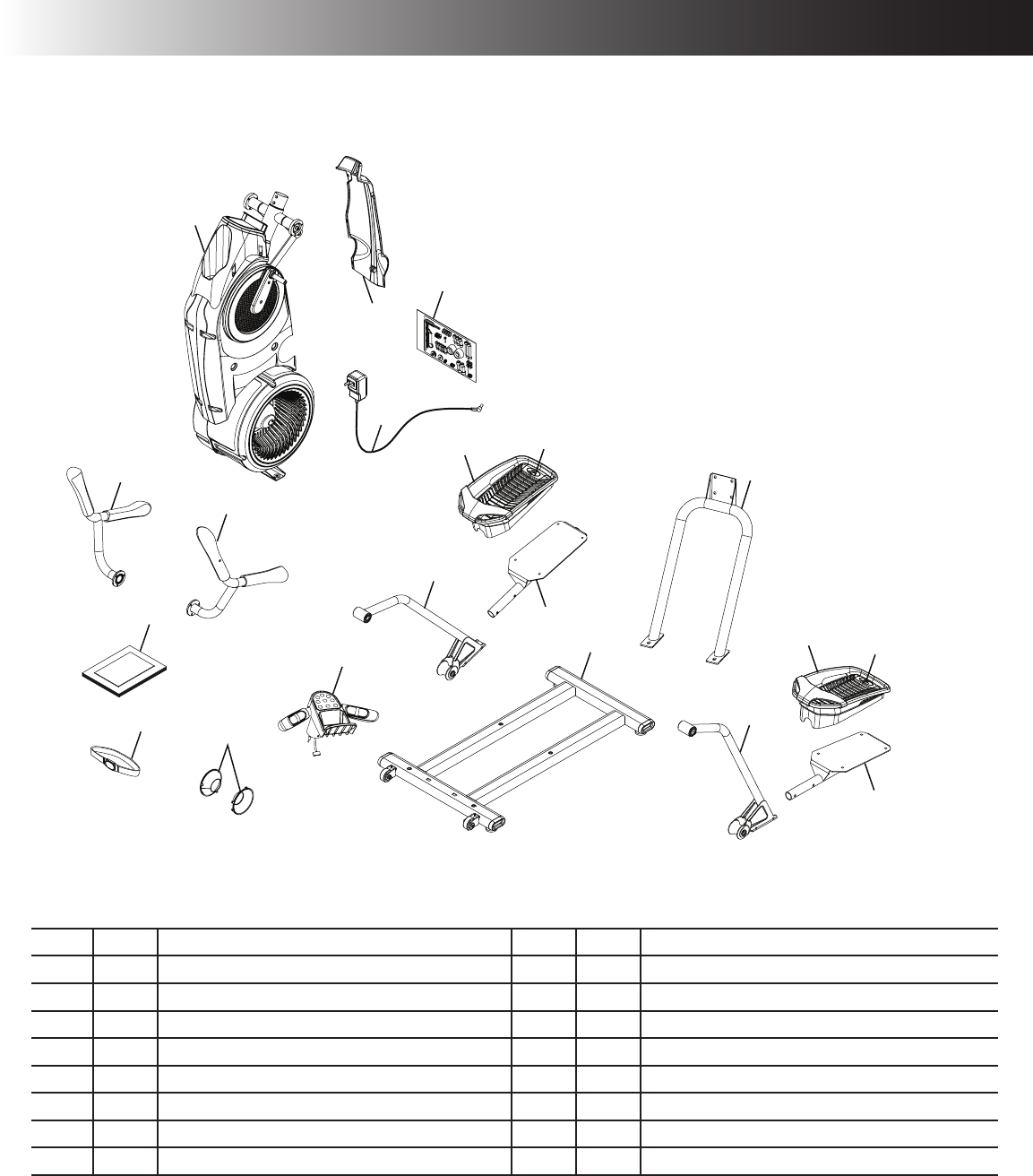
A decal has been applied to all right (“ R ”) and left (“ L ”) parts to assist with assembly.
Item Qty Description Item Qty Description
1 1 Frame 9 2 Foot Pad Insert
2 1 Shroud, Rear 10 2 Pedal
3 1 AC Adapter 11 1Rail Assembly
4 1 Hardware Card 12 1 Stabilizer Assembly
5 1 Upper Handlebar, Right 13 1 Static Handlebar Assembly
61 Upper Handlebar, Left 14 2 Cap
7 2 Leg 15 1 Heart Rate Chest Strap
8 2 Foot Pad 16 1 Manual Kit
5
10
7
9
11
10
7
6
13
14
3
12
9
8
8
1
2
15
4
16
5
10
7
9
11
10
7
6
13
14
3
12
9
8
8
1
2
15
4
16
Assembly / Owner’s Manual
8
Tools
Included Not Included
#2
5 mm
6mm
8 mm
(recommended)
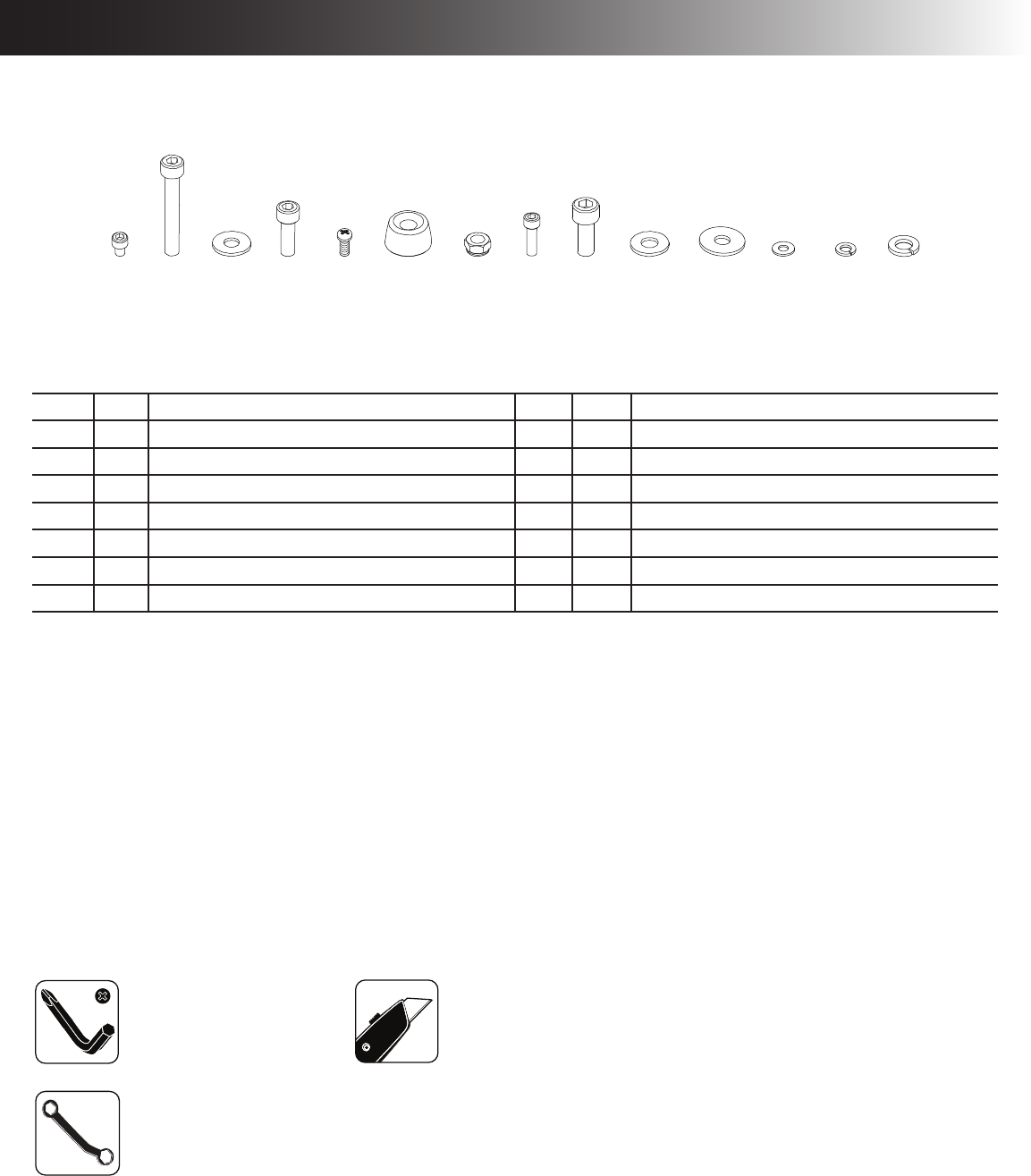
A B C D E F G H I J K L M N
13 mm
Item Qty Description Item Qty Description
A 8 SocketHeadHexScrew,M6x1.0x8 H 10 SocketHeadHexScrew,M6x1.0x20
B 4 SocketHeadHexScrew,M8x1.25x55 I 4 SocketHeadHexScrew,M10x1.5x25
C 12 Washer,FlatM8x18 J 4 Washer,FlatM10x23
D6 SocketHeadHexScrew,M8x1.25x20 K 2 Washer,FlatM8x24
E 1 PanPhillipsScrew,M5x0.8x20 L 4 Washer,FlatM6x13
F 2 Cap M 10 LockWasher,M6
G 4 Lock Nut, M8 N 6Lock Washer, M8
Hardware / Tools
Assembly / Owner’s Manual
9
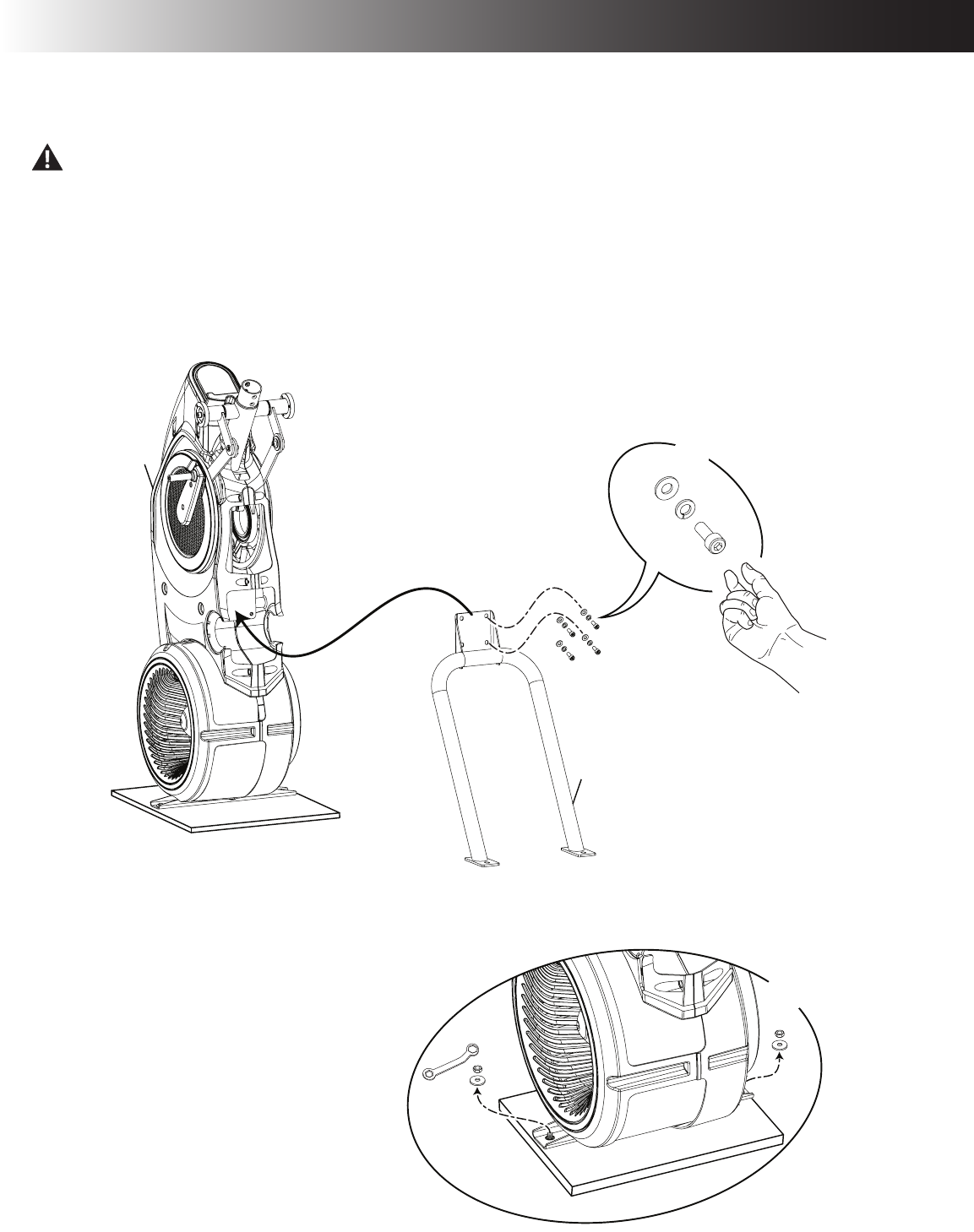
1. Attach Rail Assembly to Frame and then Release the Frame from the Shipping Plate
Some components of the machine can be heavy or awkward. Use a second person when doing the assembly steps involving these
parts. Do not do steps that involve heavy lifting or awkward movements on your own.
NOTICE: Hand tighten hardware.
13mm
X2
C
11
X4
N
D
1
Assembly
Assembly / Owner’s Manual
10
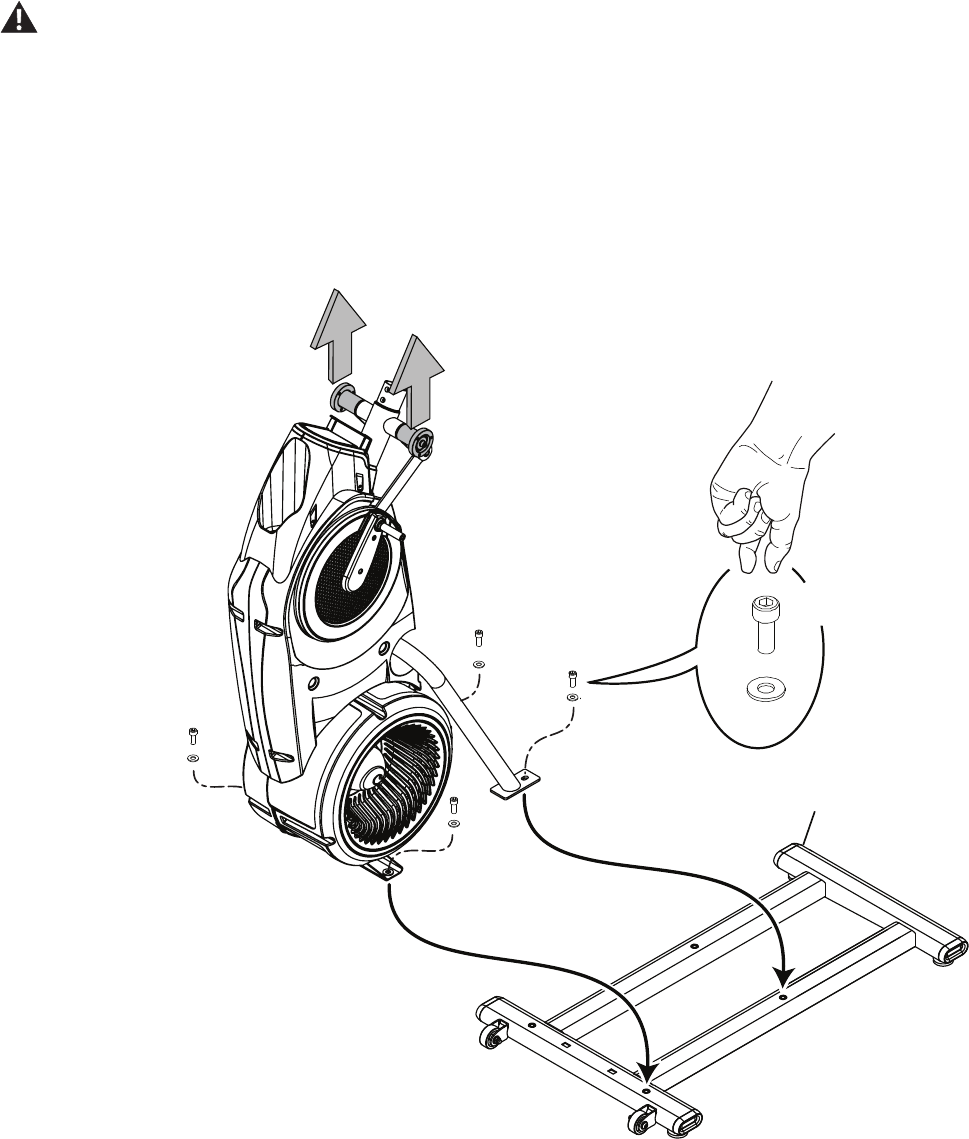
2. Carefully Lift the Frame Assembly from the Shipping Plate and Attach to the Stabilizer Assembly
Some components of the machine can be heavy or awkward. Use a second person when doing the assembly steps involving these
parts. Do not do steps that involve heavy lifting or awkward movements on your own. Lift the Frame Assembly from the exterior of
the pivot assembly as indicated below.
NOTICE: Once all hardware has been hand tightened, fully tighten ALL hardware from previous steps.
I
J
X4
12
Assembly / Owner’s Manual
11
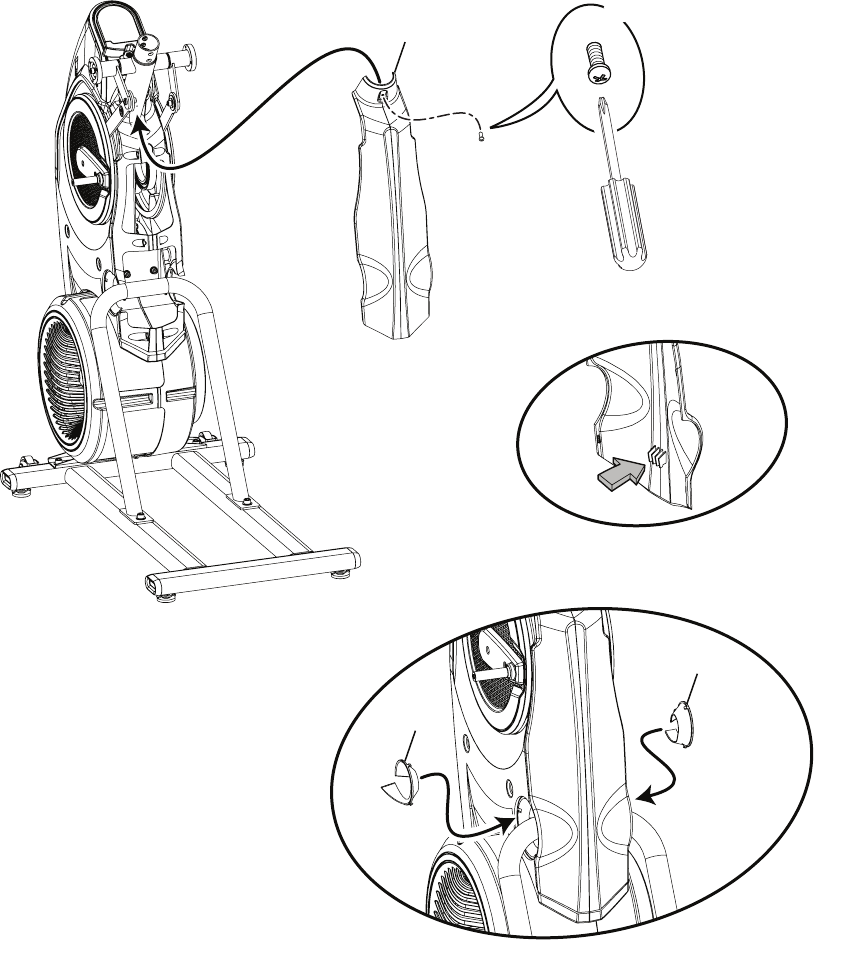
3. Attach Rear Shroud and Caps to the Frame Assembly
NOTICE: Place the inside hook of the Rear Shroud on the Frame Assembly and then pivot it up into place.
14
14
2
#2
X1
E
Assembly / Owner’s Manual
12
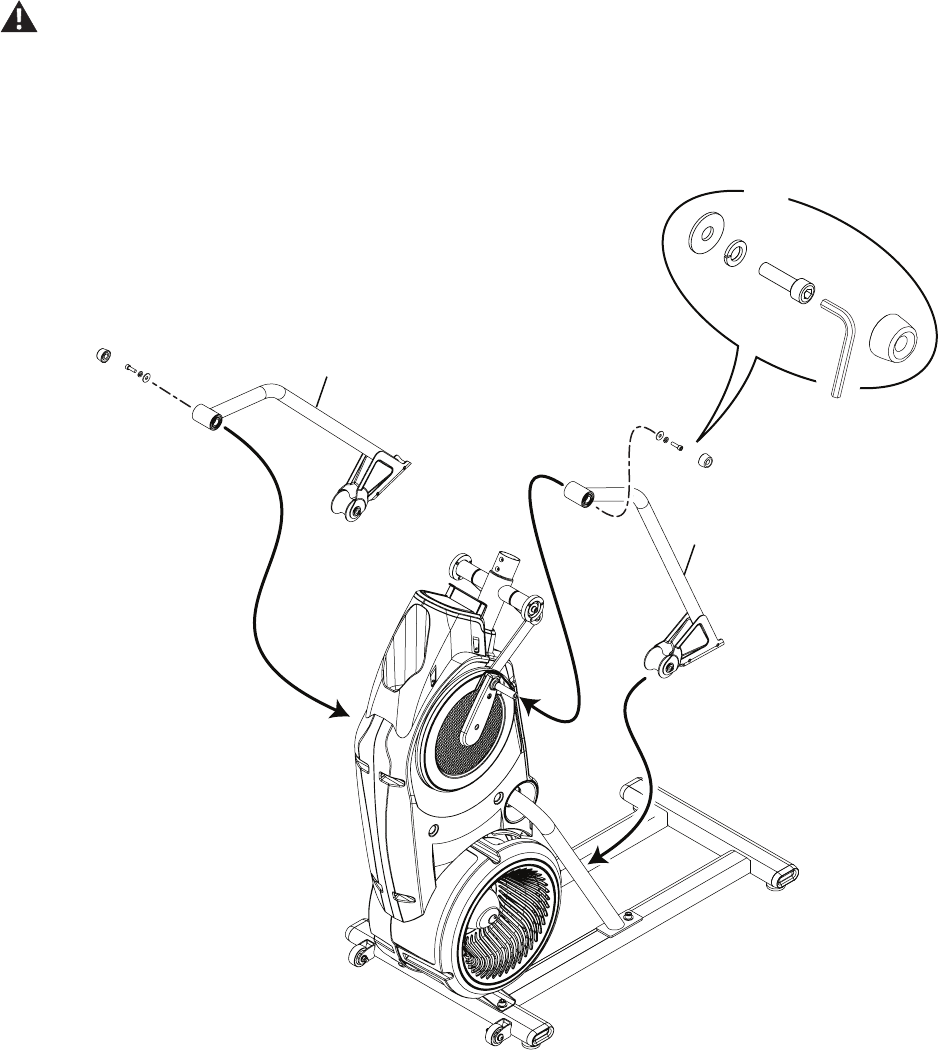
4. Attach Legs to Frame Assembly
Be aware that the Legs are connected and when either of these parts move the other does as well.
K
X2
N
D
F
6mm
7
7
Assembly / Owner’s Manual
13
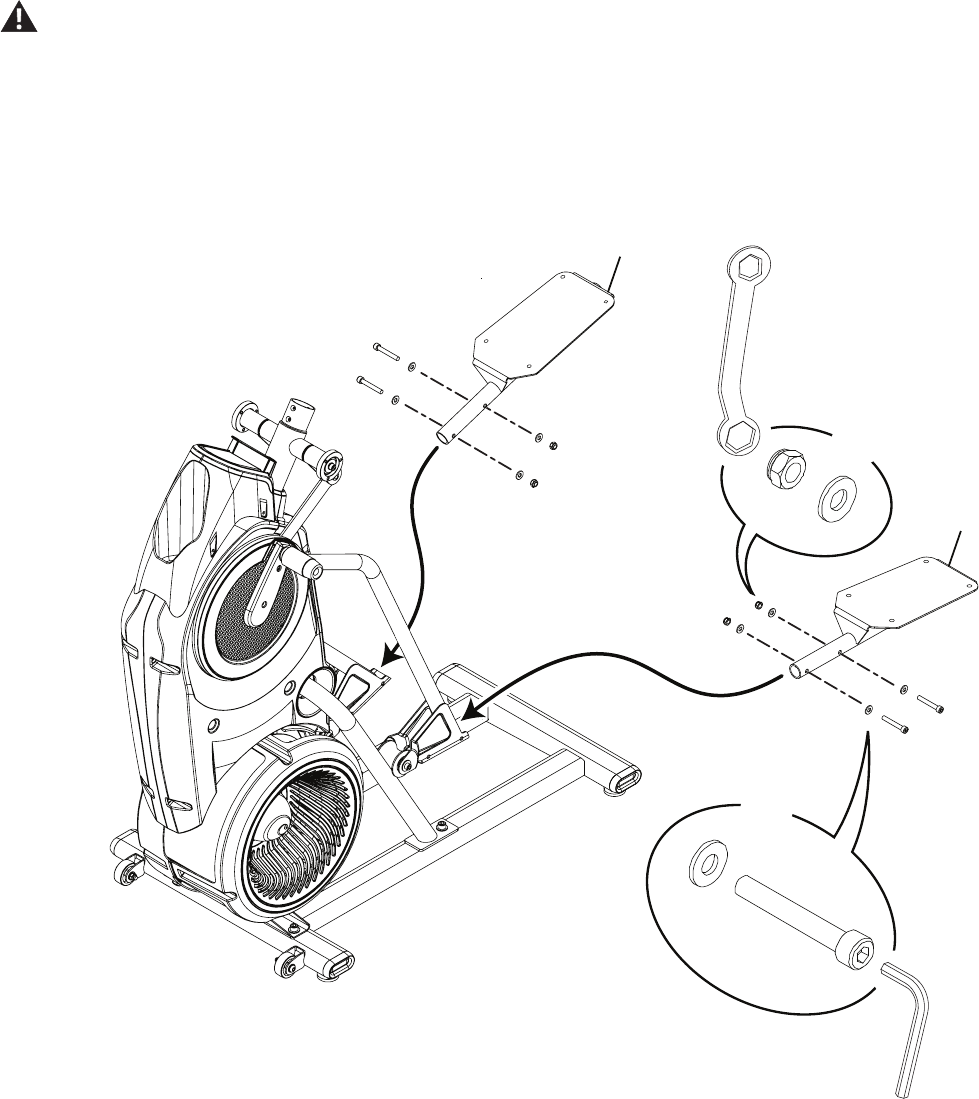
5. Attach Pedals to Frame Assembly
In order to avoid possible serious injury, when inserting the tube ends into the Leg Assemblies be careful to avoid fingers or hands
being caught or pinched.
B
X4
6mm
C
G
X4
C
10
10
13mm
Assembly / Owner’s Manual
14
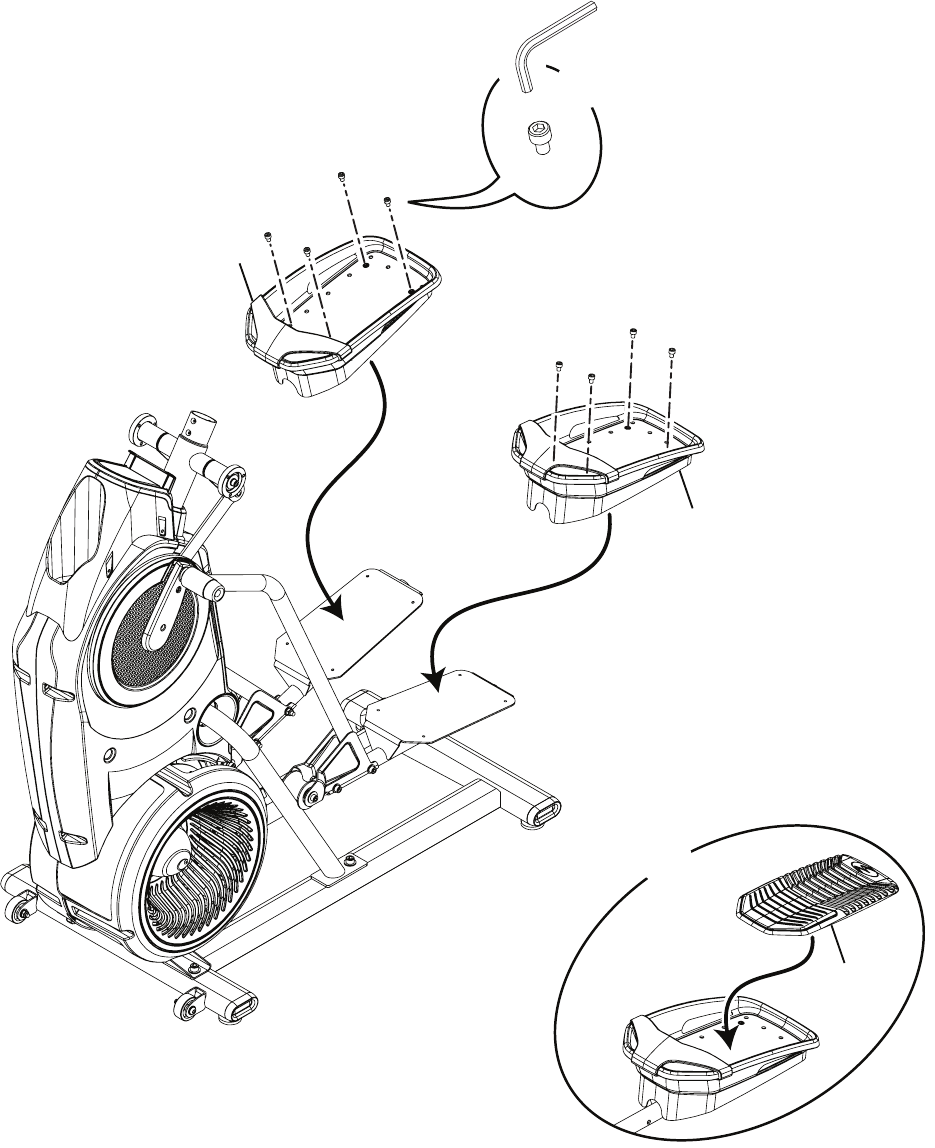
6. Connect the Foot Pads and then the Foot Pad Inserts
9
X2
X8
5mm
8
8
A
Assembly / Owner’s Manual
15
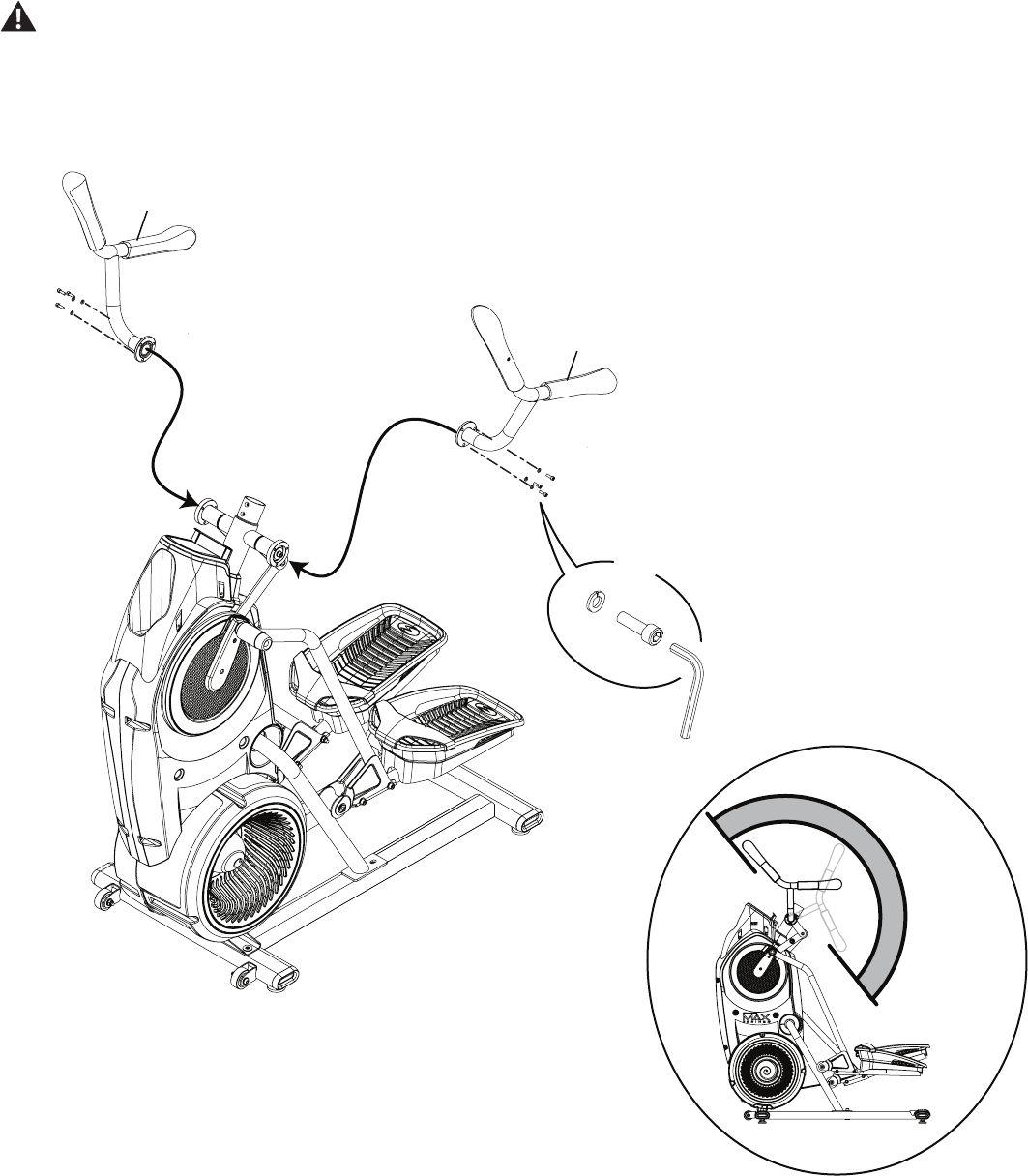
7. Attach the Upper Handlebars to Frame Assembly
Be aware that the Pedals and the Upper Handlebars are connected and when either of these parts move the other does as well.
Some components of the machine can be heavy or awkward. Use a second person when doing the assembly steps involving these
parts. Do not do steps that involve heavy lifting or awkward movements on your own.
NOTICE: Be sure to attach the Upper Handlebars so that they are in the range of operation for the User.
5
6
H
M
X6
5mm
Assembly / Owner’s Manual
16
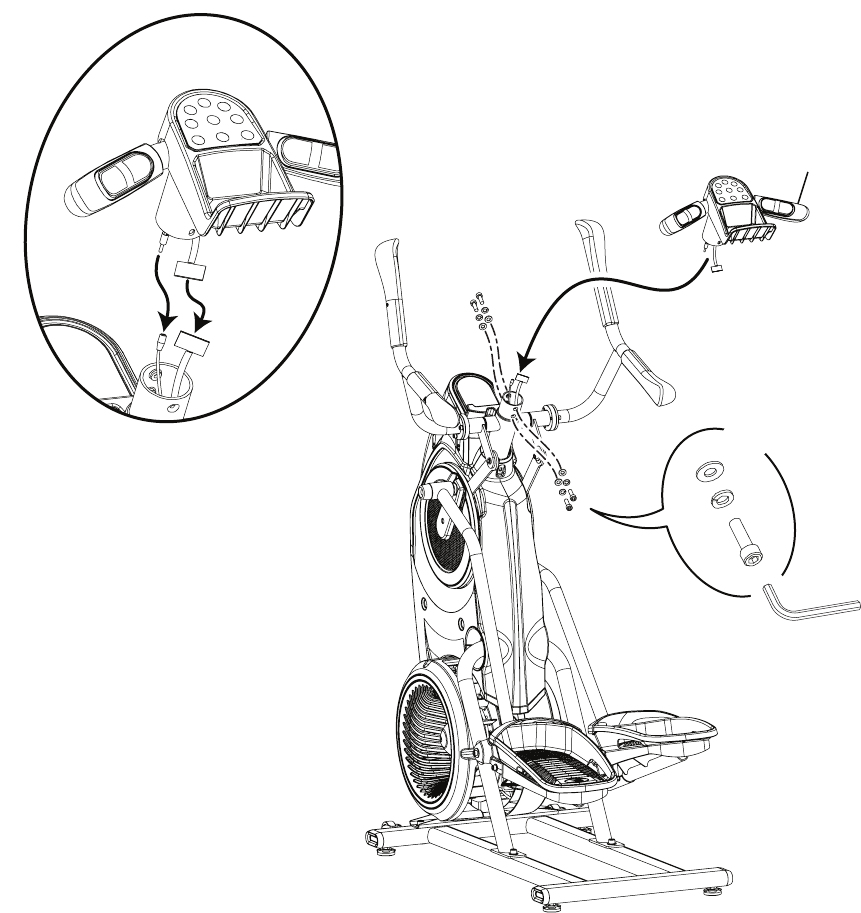
8. Connect the Static Handlebar Assembly to Frame Assembly
NOTICE: Do not crimp the Console Cable.
13
5mm
X4
L
M
H
Assembly / Owner’s Manual
17
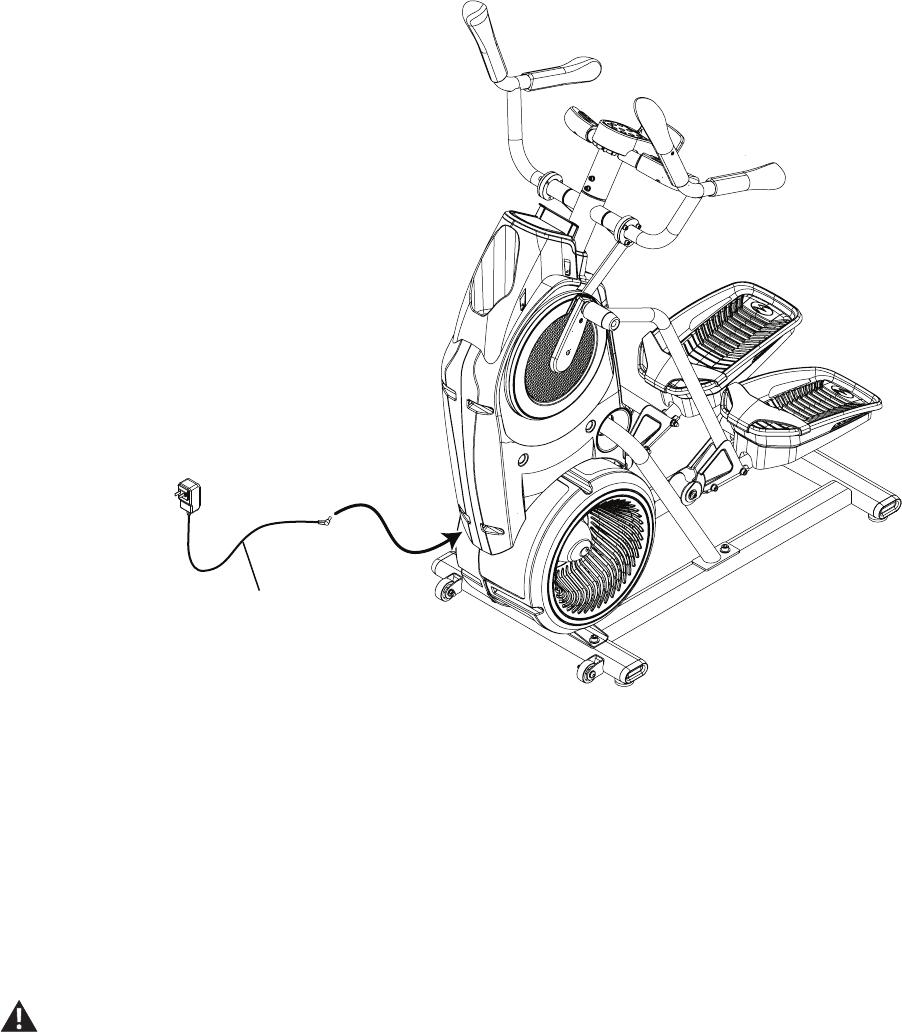
9. Connect the AC Adapter to the Frame Assembly
3
10. Final Inspection
Inspect your machine to ensure that all hardware is tight and components are properly assembled.
Besuretorecordtheserialnumberintheeldprovidedatthefrontofthismanual.
Do not use until the machine has been fully assembled and inspected for correct performance in accordance with the Owner’s
Manual.
Assembly / Owner’s Manual
18
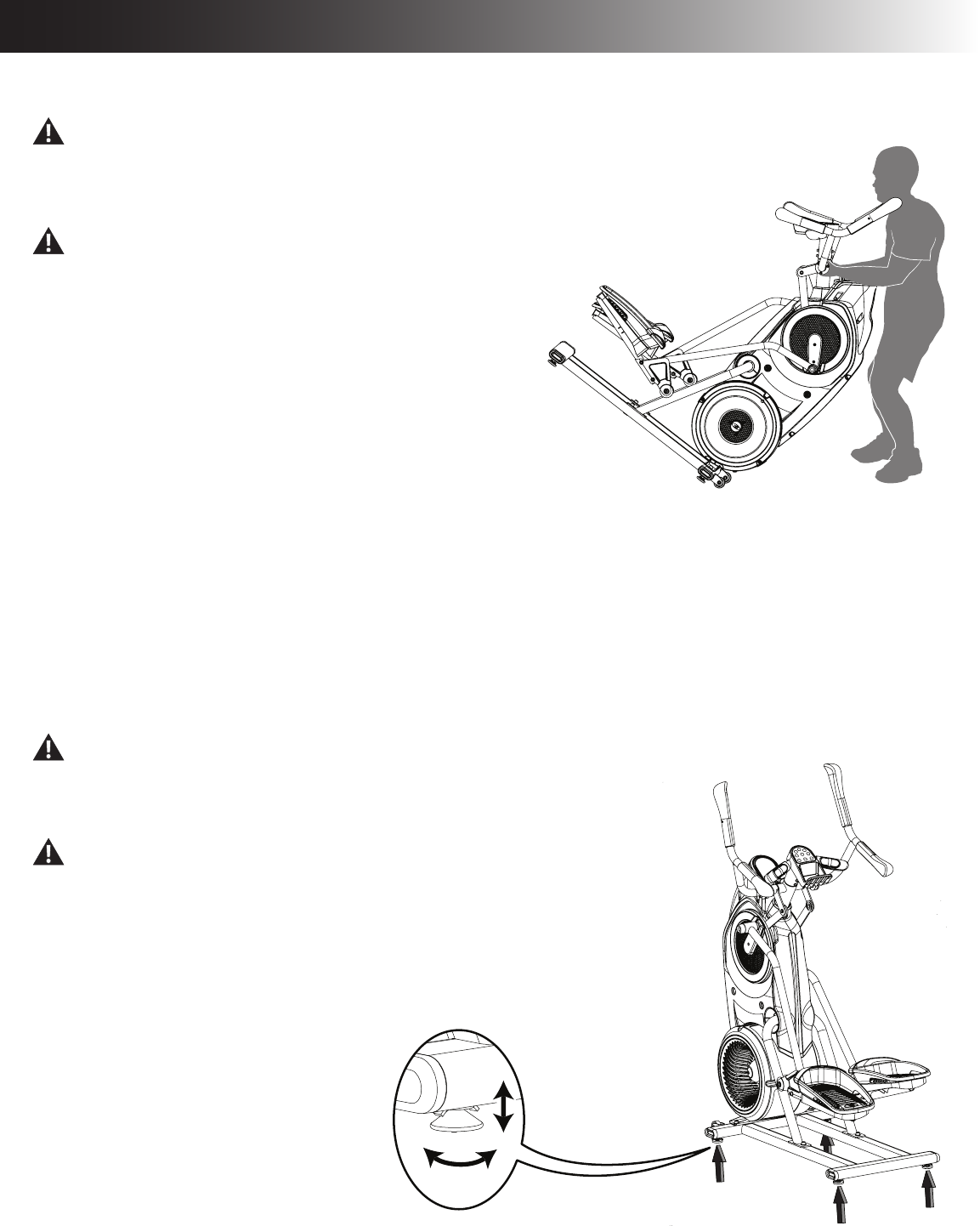
Moving the Machine
The machine may be moved by one or more persons depending on their physical abilities and capacities. Make sure that you and
others are all physically t and able to move the machine safely.
1. Grasp the inner, unmoving part of the Pivot Assembly to carefully tilt the
machine toward you onto the transport rollers.
Be aware of the Handlebars and the weight of the machine before
tilting the machine.
2. Push the machine into position.
3. Carefully lower the machine into position.
NOTICE: Be careful when you move the machine. All abrupt motions can affect
the computer operation.
Leveling the Machine
ThemachineneedstobeleveledifyourworkoutareaisunevenoriftheRailAssemblyisslightlyofftheoor.Toadjust:
1. Place the machine in your workout area.
2. Loosenthelockingnutsandadjustthelevelersuntiltheyareevenlybalancedincontactwiththeoor.
Do not adjust the levelers to such a height that they detach or unscrew from the machine. Injury to you or damage to the machine
can occur.
3. Tighten the locking nuts.
Make sure the machine is level and stable before you exercise.
Adjustments
Assembly / Owner’s Manual
19
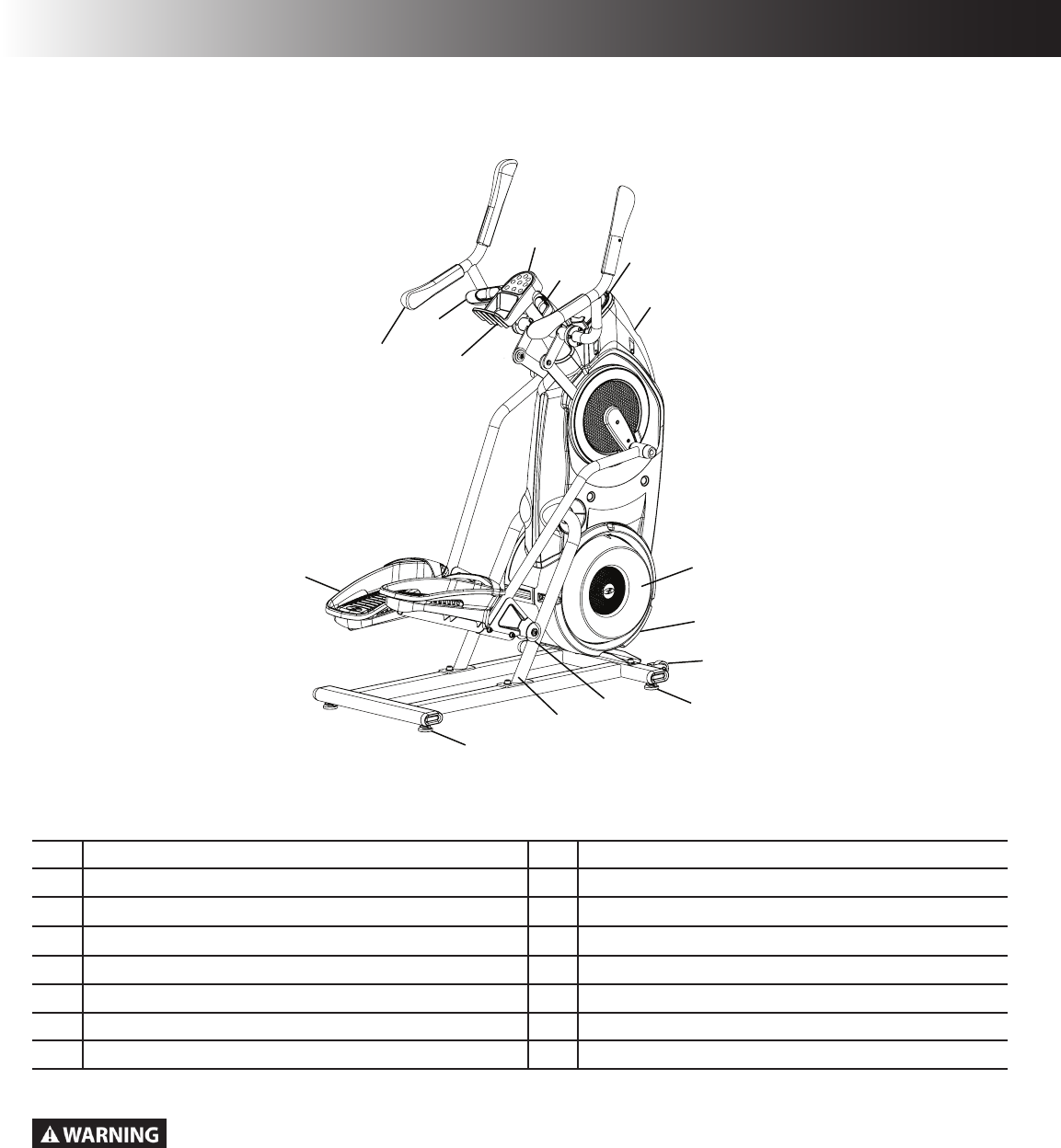
AConsole Button Assembly I Roller
B Contact Heart Rate (CHR) Sensors J Rail Assembly
C Console Display K Pedal
D Water Bottle Holder L Storage Bin
E Resistance Fan M Static Handlebar
F Power Connector N Upper Handlebar
G Transport Roller O Bluetooth® Connectivity (not shown)
H Leveler
Use the values calculated or measured by the machine’s computer for reference purposes only. The heart rate
displayed is an approximation and should be used for reference only. Over exercising may result in serious injury or
death. If you feel faint stop exercising immediately.
F
E
G
H
H
J
I
K
B
C
A
M
NL
D
Features
Assembly / Owner’s Manual
20
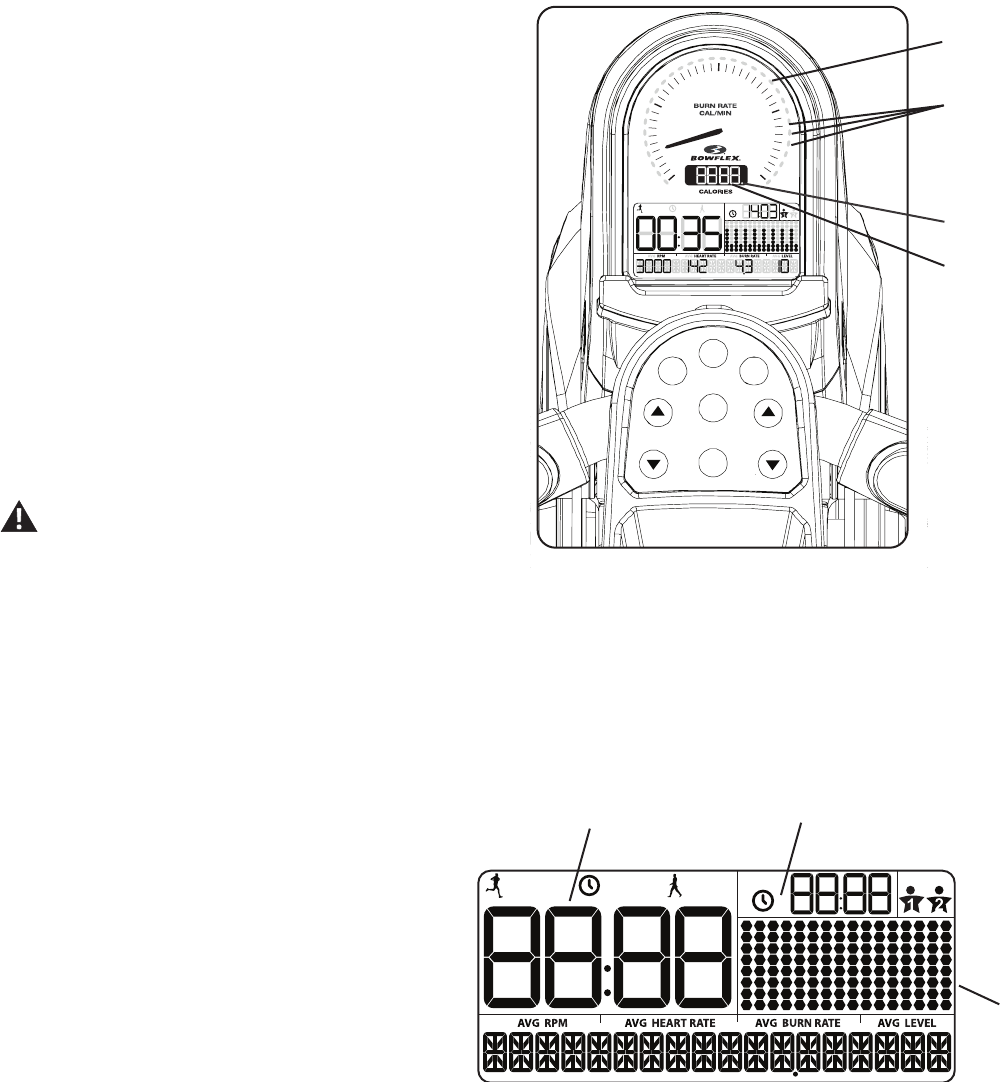
During an Interval workout, the ACTIVE segment will be red LEDs, and the REST segment will be green LEDs.
Maximum Burn Rate LED Marker
TheMaximumBurnRateLEDMarkerisanorangeLEDthatshowsthehighestrateofcalorieburnachievedduringthecurrentworkout.
Bluetooth® Synced Indicator Light
The Bluetooth® Synced Indicator Light shows when a device is paired with the App.
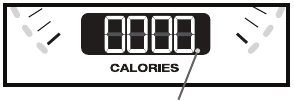
Calories
TheCaloriesdisplayeldshowstheestimated
calories that have been burned during the workout.
Themaximumdisplayis9999.
LCD Display Data
The console display shows the workout
measurements and current options.
Time
TheTIMEdisplayeldshowsthetimecountfortheactiveworkout.Therearethreetypesoftimedisplaydependingonthestyleofworkout:Interval,
Manual, or Standard.
ACTIVE:DuringanIntervalworkout,theTIMEdisplaywillshiftbetweentheACTIVEandRESTintervalswithanaudibleconrmation,countingthe
time down for the current segment. ACTIVE is the sprint, or high Intensity, segment of the Interval workout.
TOTAL: During a Manual workout, the TIME display will count up until the workout is ended. During a Standard workout, the total time of the workout
will count down.
Themaximumdisplayis99:99.Ifthetimecountismore,theworkoutwillbeended.
USER
TOTAL
ACTIVE
REST TOTAL
Workout
Profile
Display
Time Total Time
PAUSE/END
START
/ENTER
MAX
Interval
PROGRAMS USER
USER
TOTAL
ACTIVE
REST TOTAL
BURN
RATE
RESISTANCE
LEVEL
0
10
20
40
30 Target Burn Rate
LED Range
Bluetooth®
Synced Indicator
Light
Calories
Burn Rate
Display
Console Features
The Console provides information about your workout on the display
screen.
Burn Rate Display
The Burn Rate Display shows the level of calories being burned per
minute. This rate is a function of Intensity, which is the current level
ofRPM(pedalspeed)andresistancelevel(1-16).Aseitherofthose
values increase, the Burn Rate will increase.
Target Burn Rate LED Range
The Target Burn Rate LED Range is a workout coach based on
thesettingsoftheselectedUserProle.ArangeofveLED’sare
activatedduringaworkout.TherstoftheLEDsintherangeisa
suggested beginner level, with the higher LEDs being for a more
advancedtnessuser.TheIntensityoftherangeisbasedonthe
WorkoutProleDisplay.
Note: BesuretheUserProleiscurrentforamoreexactcalorie
burn rate and suggested target range.
The Target LED Range is a suggested workout level, and
should only be followed if your physical tness level
allows.

Assembly / Owner’s Manual
21
REST:ThereducedworkoutlevelduringanIntervalworkoutthatcountsdownuntilthenextACTIVEsegment.
Total Time
TheTOTALTIMEdisplayeldshowsthetotaltimecountonlyduringanIntervalworkout.ThisdisplaywillbeblankduringaManualorStandard
workout.
Themaximumdisplayis99:99.Ifthetimecountismore,theworkoutwillbeended.
User Prole
TheUSERPROFILEdisplayshowstheselecteduserprole.Auserproleisalwaysselected.
Note:FormoreaccuratecaloriecountsandtargetCalorieBurnRates,customizeyourUserProle.
Workout Prole Display
TheWorkoutProleDisplayareashowsthecourseproleoftheprogramiseitherBurnRateorResistanceLevel.Eachcolumnintheproleshows
one interval (workout segment). The higher the column, the higher the intensity of the workout.
DuringaStandardprogram,theproleshowsthelevelofresistance(Level).TheConsolewilladjusttheResistanceLevelduringtheworkout.
DuringaSMARTprogram,theproleshowsthelevelofBurnRate.TheConsolewilladjusttheresistanceleveltoencourageaUserreachthe
Targeted Burn Rate (based on the pedal speed).
Theashingcolumnshowsthecurrentinterval.
RPM
TheRPMdisplayeldshowsthemachinerevolutionsperminute(pedalspeed).Themaximumdisplayis200.
Heart Rate
The Heart Rate display shows the heart rate in beats per minute (BPM) from the heart rate sensors. This value will not be shown if a heart rate signal
is not detected.
Consult a physician before you start an exercise program. Stop exercising if you feel pain or tightness in your chest, become short
of breath, or feel faint. Contact your doctor before you use the machine again. The heart rate displayed on the console is an
approximation and should be used for reference only.
Burn Rate
TheBurnRatedisplayeldshowsthecurrentrateatwhichcaloriesarebeingburnedperminute.TheRPMandResistanceLeveldirectlychange
thisrate.TheUserProlesettingsalsoaffecttherate(Userweight).
Level
TheLeveldisplayeldshowsthecurrentResistanceLevel(1-16).ThehighertheResistanceLevel,theharderitwillbetopushthePedals.
During a Smart workout, the Console will adjust the resistance level to encourage a User to reach the Targeted Burn Rate (based on the pedal
speed).
Keypad Functions
PROGRAMSbutton-Pushtoselectaworkoutprogram,pushandholdfor3secondstocustomizetheselectedworkout.
MAXINTERVALbutton-PushtostarttheMAXINTERVALworkout,pushandholdfor3secondstoedittheintervaltimes(ACTIVEandREST)and
Burn Rates for the MAX workout program.
USERbutton-PushtoselectthedesiredUserProle,pushandholdfor3secondstoedittheselectedUserProle
Burn Rate Increase ()button-IncreasestheTargetBurnRateduringaworkout,orincreasesavalue(time,age,weight,orheight).
Assembly / Owner’s Manual
22
START/ENTERbutton-FromtheWELCOMEscreenstartsaManualworkout,startsaselectedProgramworkout,orresumesapausedworkout.
Push to accept the displayed value for an option.
Resistance Level Increase ()button-Increasestheresistanceleveloftheworkout.
Burn Rate Decrease ()button-DecreasestheTargetBurnRateduringaworkout,ordecreasesavalue(time,age,weight,orheight).
PAUSE/ENDbutton-Pausesanactiveworkout,endsapausedworkout,orgoes back to the previous screen.
Resistance Level Decrease ()button-Decreasestheresistanceleveloftheworkout.
Connectivity on your Bowex Max Trainer® cardio machine
TheBowexMaxTrainer® M5 cardio machine is equipped with Bluetooth®connectivityandcanwirelesslysyncwiththe“BowexMaxTrainer®” Fit-
ness App on supported devices.
Note: Foracompletelistofsupporteddevices,visitwww.bowexmaxtrainer.com.
Fitness App ( “Bowex Max Trainer® 2" )
TheBowexMaxTrainer®2AppsyncswithyourBowexMaxTrainer® M5 to track total calories burned, time, watts, and more. Records and stores
every workout for quick reference. Plus, it automatically syncs your workout data with MyFitnessPal® to make hitting your daily goals easier than
ever! Track your results and share with friends and family.
1. DownloadthefreesoftwareApp,named“BowexMaxTrainer®2". The software app is available on Google Play™ and iTunes®.
Note: Foracompletelistofsupporteddevices,visitwww.bowexmaxtrainer.com.
2. FollowtheinstructionsontheApptosyncyourdevicetotheBowexMaxTrainer® cardio machine.
The Console will activate the Bluetooth® synced indicator light when a Bluetooth® enabled device is
synced.
Note: If the Bluetooth® synced indicator light is active and your Bluetooth® enabled device is not
synced,thetnessmachinemayhavesyncedtoanotherBluetooth® enabled device. Turn the
powerofftothemachine,wait5minutes,andrestartitwithyoursmartdevicenearthetness
machine.
Ifthesyncedindicatorlightdoesnotactivateandyoursmartdeviceisenabled,de-activateandre-
activate the Bluetooth® wireless feature on your smart device. Then click on the "Sync to Machine" button from within the App. When synced,
the indicator light will activate.
Contact Heart Rate Sensors
Contact Heart Rate (CHR) sensors send your heart rate signals to the Console. The CHR sensors are the stainless steel parts of the Handlebars.
Touse,putyourhandscomfortablyaroundthesensors.Besurethatyourhandstouchboththetopandthebottomofthesensors.Holdrm,but
not too tight or loose. Both hands must make contact with the sensors for the Console to detect a pulse. After the Console detects four stable pulse
signals, your initial pulse rate will be shown.
Once the Console has your initial heart rate, do not move or shift your hands for 10 to 15 seconds. The Console will now validate the heart rate.
Manyfactorsinuencetheabilityofthesensorstodetectyourheartratesignal:
• Movement of the upper body muscles (including arms) produces an electrical signal (muscle artifact) that can interfere with pulse detection. Slight
hand movement while in contact with the sensors can also produce interference.
• Calluses and hand lotion may act as an insulating layer to reduce the signal strength.
• Some Electrocardiogram (EKG) signals generated by individuals are not strong enough to be detected by the sensors.
• Theproximityofotherelectronicmachinescangenerateinterference.
040
Bluetooth® synced indicator
light

Assembly / Owner’s Manual
23
Remote Heart Rate Monitor
MonitoringyourHeartRateisoneofthebestprocedurestocontroltheintensityofyourexercise.ContactHeartRate(CHR)sensorsareinstalledto
send your heart rate signals to the Console. The Console can also read telemetry HR signals from a Heart Rate Chest Strap Transmitter that oper-
atesinthe4.5kHz-5.5kHzrange.
Note: The heart rate chest strap must be an uncoded heart rate strap from Polar Electro or an uncoded POLAR® compatible model. (Coded
POLAR® heart rate straps such as POLAR® OwnCode® chest straps will not work with this equipment.)
If you have a pacemaker or other implanted electronic device, consult your doctor before using a wireless chest strap or other
telemetric heart rate monitor.
The heart rate displayed on the console is an approximation and should be used for reference only.
Chest Strap
Using the heart rate transmitter chest strap lets you monitor your heart rate at any time during your workout.
Consult a physician before you start an exercise program. Stop exercising if you feel pain or tightness in your chest, become short
of breath, or feel faint. Contact your doctor before you use the machine again. Use the values calculated or measured by the
machine’s computer for reference purposes only.
To put on your chest strap:
1. Adjustthestraplengthtotsnuglyandcomfortablyagainstyourskin.Securethestraparoundyourchest,justbelowthechestmuscles,and
buckle it.
2. Lift the transmitter off your chest and moisten the two Grooved Electrode Areas on the back.
3. Checkthatthewetelectrodeareasarermlyagainstyourskin.
The transmitter will send your heart rate to the machine’s receiver and display your estimated Beats Per Minute (BPM).
Always remove the transmitter before you clean the chest strap. Clean the chest strap regularly with mild soap and water, and thoroughly dry it.
Residual sweat and moisture may keep the transmitter active and drain the battery in the transmitter. Dry and wipe clean the transmitter after each
use.
Note: Do not use abrasives or chemicals such as steel wool or alcohol when you clean the chest strap, as they can damage the electrodes
permanently.
IftheConsoledoesnotdisplayaheartratevalue,thetransmittermaybeatfault.Checkthatthetexturedcontactareasonthecheststrapare
making contact with your skin. You may need to lightly wet the contact areas. If no signal appears or you need further assistance, call your Nautilus
Representative.
Before discarding a chest strap, remove the battery. Dispose of in accordance with local regulations and/or at approved recycling
centers.
Heart Rate Calculations
Yourmaximumheartrateusuallydecreasesfrom220BeatsPerMinute(BPM)inchildhoodtoapproximately160BPMbyage60.Thisfallinheart
rateisusuallylinear,decreasingbyapproximatelyoneBPMforeachyear.Thereisnoindicationthattraininginuencesthedecreaseinmaximum
heartrate.Individualsofthesameagecouldhavedifferentmaximumheartrates.Itismoreaccuratetondthisvaluebycompletingastresstest
than by using an age related formula.
Yourat-restheartrateisinuencedbyendurancetraining.Thetypicaladulthasanat-restheartrateofapproximately72BPM,whereashighly
trained runners may have readings of 40 BPM or lower.
Assembly / Owner’s Manual
24
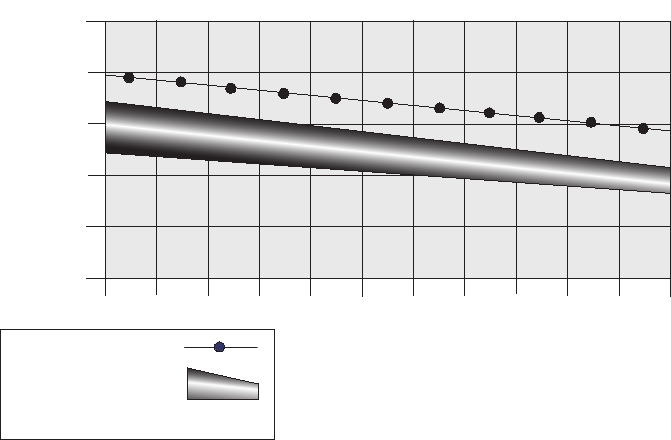
The Heart Rate table is an estimate of what Heart Rate Zone (HRZ) is effective to burn fat and improve your cardiovascular system. Physical condi-
tions vary, therefore your individual HRZ could be several beats higher or lower than what is shown.
Themostefcientproceduretoburnfatduringexerciseistostartataslowpaceandgraduallyincreaseyourintensityuntilyourheartratereaches
between60–85%ofyourmaximumheartrate.Continueatthatpace,keepingyourheartrateinthattargetzoneforover20minutes.Thelonger
you maintain your target heart rate, the more fat your body will burn.
The graph is a brief guideline, describing the generally suggested target heart rates based on age. As noted above, your optimal target rate may be
higher or lower. Consult your physician for your individual target heart rate zone.
Note: Aswithallexercisesandtnessregimens,alwaysuseyourbestjudgmentwhenyouincreaseyourexercisetimeorintensity.
20-24
FAT-BURNING TARGET HEART RATE
Heart Rate BPM (beats per minute)
Age
25-29
0
50
100
150
200
250
30-34 35-39 40-44 45-49 50-54 55-59 60-64 65-69 70+
196 191 186 181 176 171 166 161 156 151 146
167 162 158 154 150 145 141 137 133 128 126
Maximum Heart Rate
Target Heart Rate Zone
(keep within this range
for optimum fat-burning)
11 8 11 5 11 2 109 106 103 100 97 94 91 88
FAT-BURNING
ANAEROBIC
AEROBIC
Assembly / Owner’s Manual
25
Fitness Basics
Frequency
Tomaintaingoodhealth,loseweightandimproveyourcardiovascularendurance,usetheBowexMaxTrainer® cardio machine a minimum of 3
times per week, around 14 minutes each day.
Ifyouarenewtoexercise(orreturningtoaregularexerciseprogram),andyouareunabletocomfortablycomplete14minutesofcontinuousexer-
ciseatonetime,justdo5–10minutes,andgraduallyincreaseyourworkouttimeuntilyoucanreacha14minutetotal.
Ifyourscheduleisbusy,andyouareunabletot14minutesofcontinuousexerciseintoyourday,tryaccumulating14minutesbydoingmultiple
shorterworkoutsonthesameday.Forexample,7minutesinthemorningand7minutesintheevening.Thismaybeagreatwaytostartyourcardio
training if you are new to vigorous activity.
Forbestresults,combineyourBowexMaxTrainer®cardiomachineworkoutswithastrengthtrainingprogramusingaBowex® home gym or Bow-
ex® SelectTech®dumbbells,andfollowtheBowex® Body Weight Loss Guide included in this manual.
Consistency
Busyworkschedules,familyobligationsanddailychorescanmakeitdifculttotregularexerciseintoyourlife.Trythesetipstoincreaseyour
chances of success:
Scheduleyourworkoutsthesamewayyouschedulemeetingsorappointments.Selectspecicdaysandtimeseachweek,andtrynottochange
your workout times.
Make a commitment to a family member, friend or spouse, and encourage each other to stay on track each week. Leave messages with friendly
reminders to be consistent, and keep each other accountable.
Makeyourworkoutsmoreinterestingbyalternatingbetweensteadystate(single-speed)workoutsandintervaltraining(variedspeed)workouts.The
BowexMaxTrainer® cardio machine is even more fun when you add this kind of variety.
Apparel
Itisimportanttowearappropriate,safeandcomfortablefootwearandclothingwhenusingtheBowexMaxTrainer® cardio machine, including:
• Rubber-soledathleticwalkingorrunningshoes.
• Exerciseclothingthatallowsyoutomovefreely,andkeepcomfortablycool.
• Athletic support that provides stability and comfort.
• Exercisefriendlywaterbottleforconstanthydration.
Assembly / Owner’s Manual
26
Warm-Up *
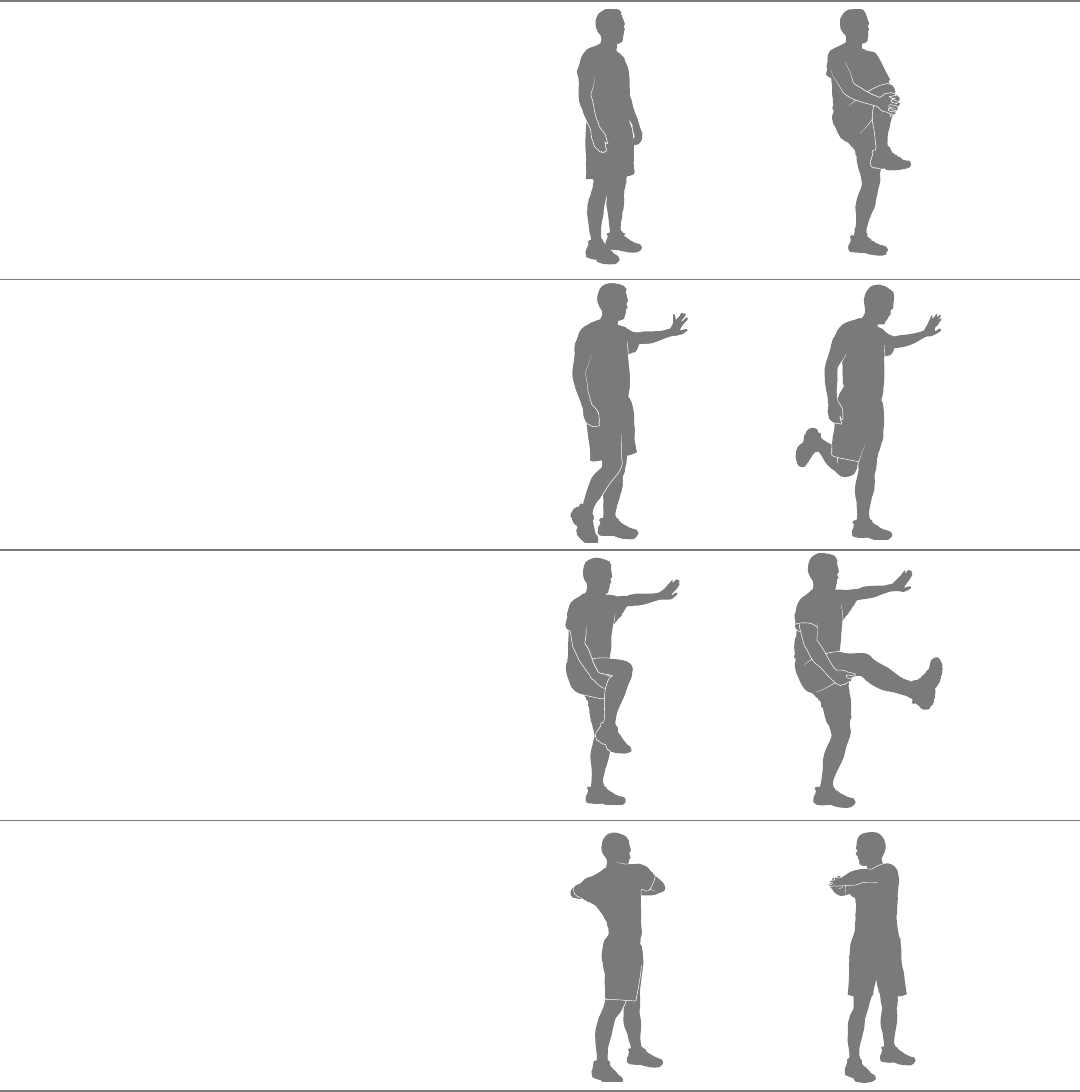
BeforeyouuseyourBowexMaxTrainer®cardiomachine,considerdoingthesedynamicwarm-upstretches,whichwillhelpprepareyourbodyfor
the workout:
Dynamic Knee Hug
Stand with the feet together. Bring one knee forward and up
toward the chest. Place the hands around the shin and pull
the knee into the chest. Release the stretch by putting the
footontheoor.Eachrepetitionofthesequenceshouldtake
1to3seconds.Repeatasacontinuous,controlled,uidse-
quence 10 or 20 times. Repeat the stretch with the other leg.
Dynamic Knee Bend
Stand with the feet together. Hold onto a wall for balance with
one hand, if necessary. Raise the heel of one foot toward the
gluteals.Releasethestretchbyputtingthefootontheoor.
Each repetition of the sequence should take 1 to 3 seconds.
Repeatasacontinuous,controlled,uidsequence10or20
times. Repeat the stretch with the other leg.
Dynamic Knee Kick
Stand tall and hold one leg up with the hands at hip height,
keeping the knee bent. Hold onto a wall for balance with one
hand, if necessary. Straighten the knee as far as comfortably
possible. Release the stretch by bending the knee. Each rep-
etition of the sequence should take 1 to 3 seconds. Repeat
asacontinuous,controlled,uidsequence10or20times.
Repeat the stretch with the other leg.
Dynamic Twist
Standwiththefeetshoulder-widthapart.Bendtheelbows;
hold the arms out to the sides. Twist the upper body to one
side and then the other side as far as comfortably possible.
Each repetition of the sequence should take 1 to 3 seconds.
Repeatasacontinuous,controlled,uidsequence10or20
times
*Source:JayBlahnik’sFull-BodyFlexibility,SecondEdition,2010.HumanKinetics.com.
Assembly / Owner’s Manual
27
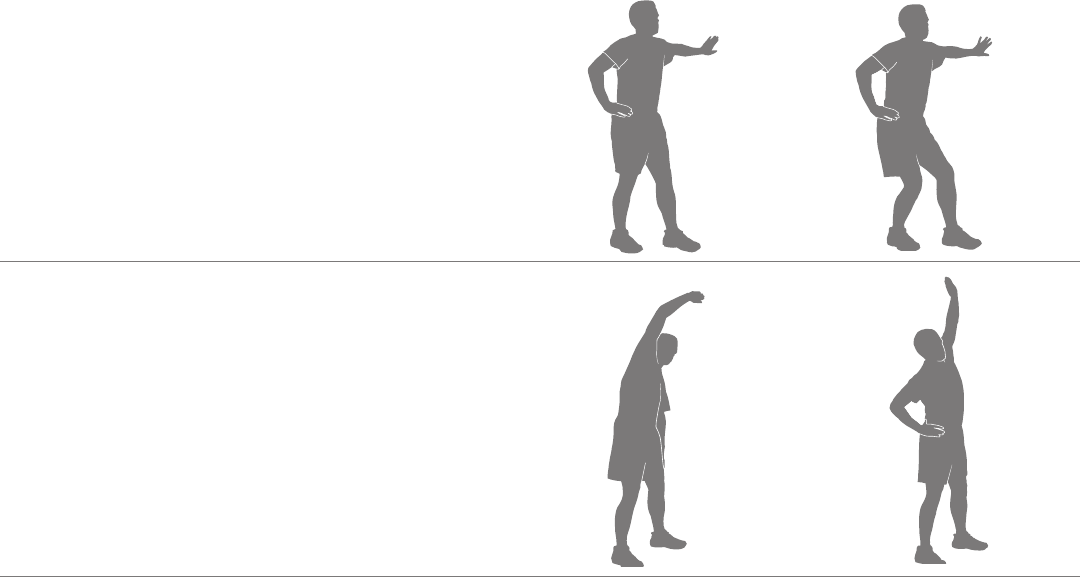
Dynamic Bent Knee Heel Press
Standwithonefootforwardandonefootback,hip-width
apart and feet facing forward. Hold onto a wall for balance
with one hand, if necessary. Bend both knees putting weight
on the back heel. Release the stretch by returning to the start
position. Each repetition of the sequence should take 1 to 3
seconds.Repeatasacontinuous,controlled,uidsequence
10 or 20 times. Repeat the stretch with the other leg. Touch a
wall or hold onto something for balance, if necessary.
Dynamic Side Reach
Stand with the feet apart, the knees slightly bent and the
arms at the sides of the body. Reach with one hand above
the head and lean over to the opposite side. Release the
stretch by returning to the start position. Then reach with the
other hand to the opposite side. Use the other arm to support
the body weight on the thigh, if necessary. Each repetition
of the sequence should take 1 to 3 seconds. Repeat as a
continuous,controlled,uidsequence10or20times.

Assembly / Owner’s Manual
28
Workouts
Followtheseguidelinestoeaseyourselfintoaweeklyexerciseregimen.Useyourjudgmentand/ortheadviceofyourphysicianorhealthcare
professionaltondtheintensityandlevelofyourworkouts.
Consult a physician before you start an exercise program. Stop exercising if you feel pain or tightness in your chest, become short
of breath, or feel faint. Contact your doctor before you use the machine again. Use the values calculated or measured by the
machine’s computer for reference purposes only. The heart rate displayed on the console is an approximation and should be used
for reference only.
SteadyStateandIntervalTrainingare2typesofworkoutsyoucandoonyourBowexMaxTrainer® cardio machine:
Steady State workouts
A Steady State workout involves slowly increasing your workout speed to a challenging, but comfortable, speed you can hold for most of your work-
out.GettingyourHeartRateupintotheFat-Burning,HeartZonezoneforanentireworkoutwouldbeagreatSteadyStateworkout.Forexample,
holdinga6caloriesperminuteBurnRatepacefortheentireworkout,exceptduringthewarm-upandcool-down.SteadyStateworkoutshelpyou
buildexercisecondence,staminaandendurance,andareessentialtoawell-roundedcardiovasculartrainingprogram.
Interval Training workouts
AnIntervalTrainingworkoutinvolvesadjustingyourworkoutintensityforspeciclengthsoftimetoraiseandloweryourbreathingrate,heartrate
and calorie burn. This form of workout allows you to burn more calories than a standard workout in a shorter period of time. Using the Calorie Burn
Rate display, you can adjust the intensity of your workout quickly to achieve your goals.
TheBowexMaxTrainer® cardio machine combines 8 “ACTIVE” and 8 “REST” segments to create an Interval workout. During an “ACTIVE”
segment, push yourself to a level of high calorie burn that can be repeated for the 8 segments. Then during the “REST” segments, allow yourself
todecreasetheintensityandprepareforthenext“ACTIVE”segment.Theseextremechangesinintensity,alongwithpushingyourbodytoward
exhaustion,iswherethemaximumbenetsaregainedfromIntervalTrainingworkouts.
IntervalTrainingworkoutsprovidevariety,helpminimizeoveruseinjuries(thatsometimesoccurfromdoingonlySteadyStateworkouts),maximize
calorieburnandimprovetness.
TheBowexMaxTrainer® cardio machine is designed to cushion your joints and muscles, and both Steady State and Interval Training workouts
should feel much more comfortable than walking or running outside on a hard surface or a treadmill.
After Burn Rate
AttheendofanintenseIntervalTrainingworkout,yourbodywillactuallyneedtoexpendadditionalenergytoreplenishyourbody’sreserves.This
additionalamountofenergythatyourbodywillbeusingistheAfterBurnRate,orEPOC(ExcessPost-exerciseOxygenConsumption).Thelevelof
thisadditionalenergyrequirementforyourbodyisdirectlyrelatedtomanyfactors.Somefactorsareyourphysicaltnesslevel,intensitylevelofthe
intervaltrainingworkout,lengthofoxygendeprivationduringtheworkout,andphysicaldemandsduringtherecoveryphase.
In summary, your body may be burning more calories after your workout. So after an intense MAX Interval workout, you may feel the effects for
hours afterwards.
Assembly / Owner’s Manual
29
Workout Log
Use this log to track your workouts and progress. Tracking your workouts helps you stay motivated and achieve your goals.
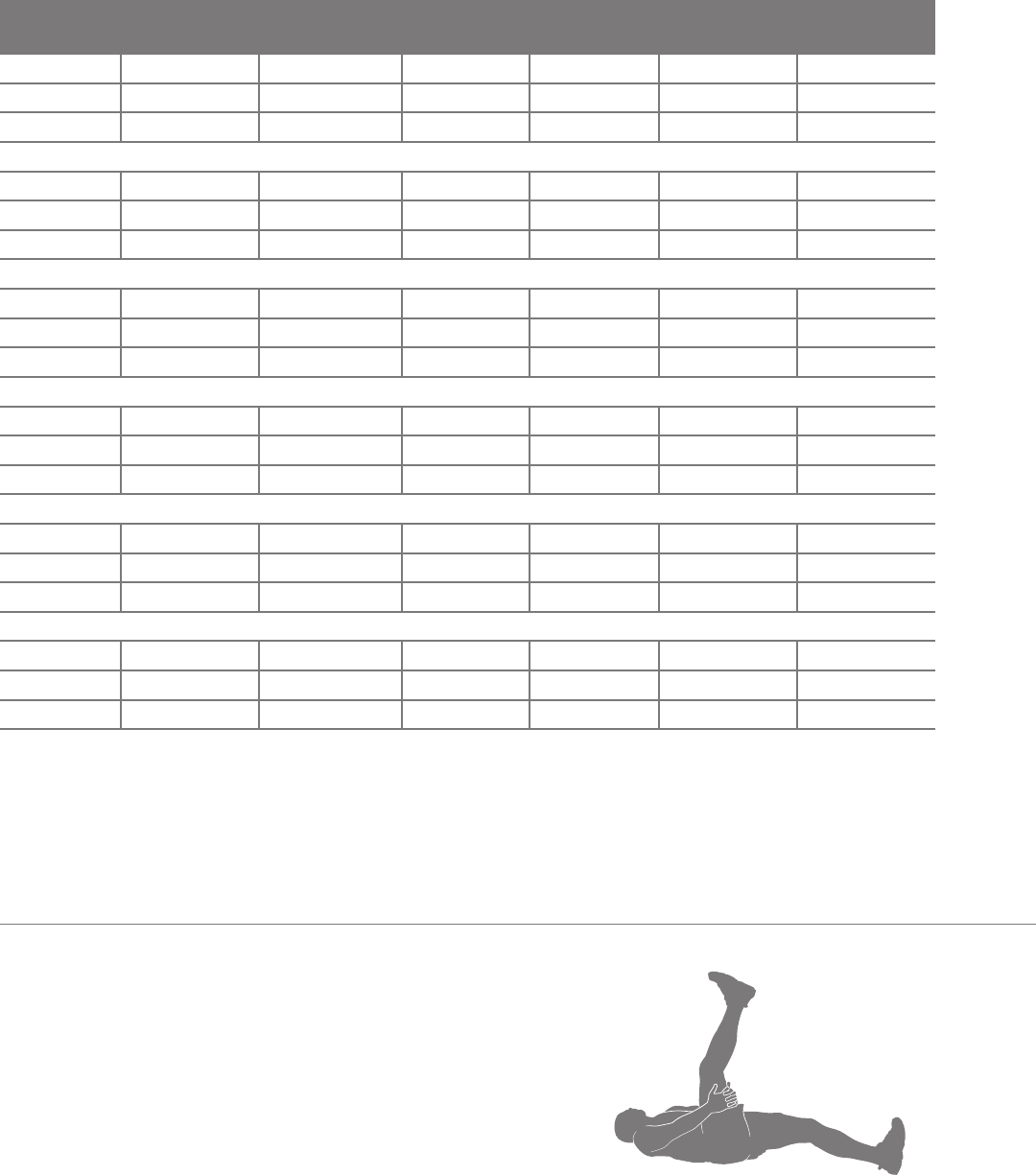
Date Calories Burn Rate (aver-
age)
Time RPM (average) Heart Rate (aver-
age)
Level (average)
Cool-Down *
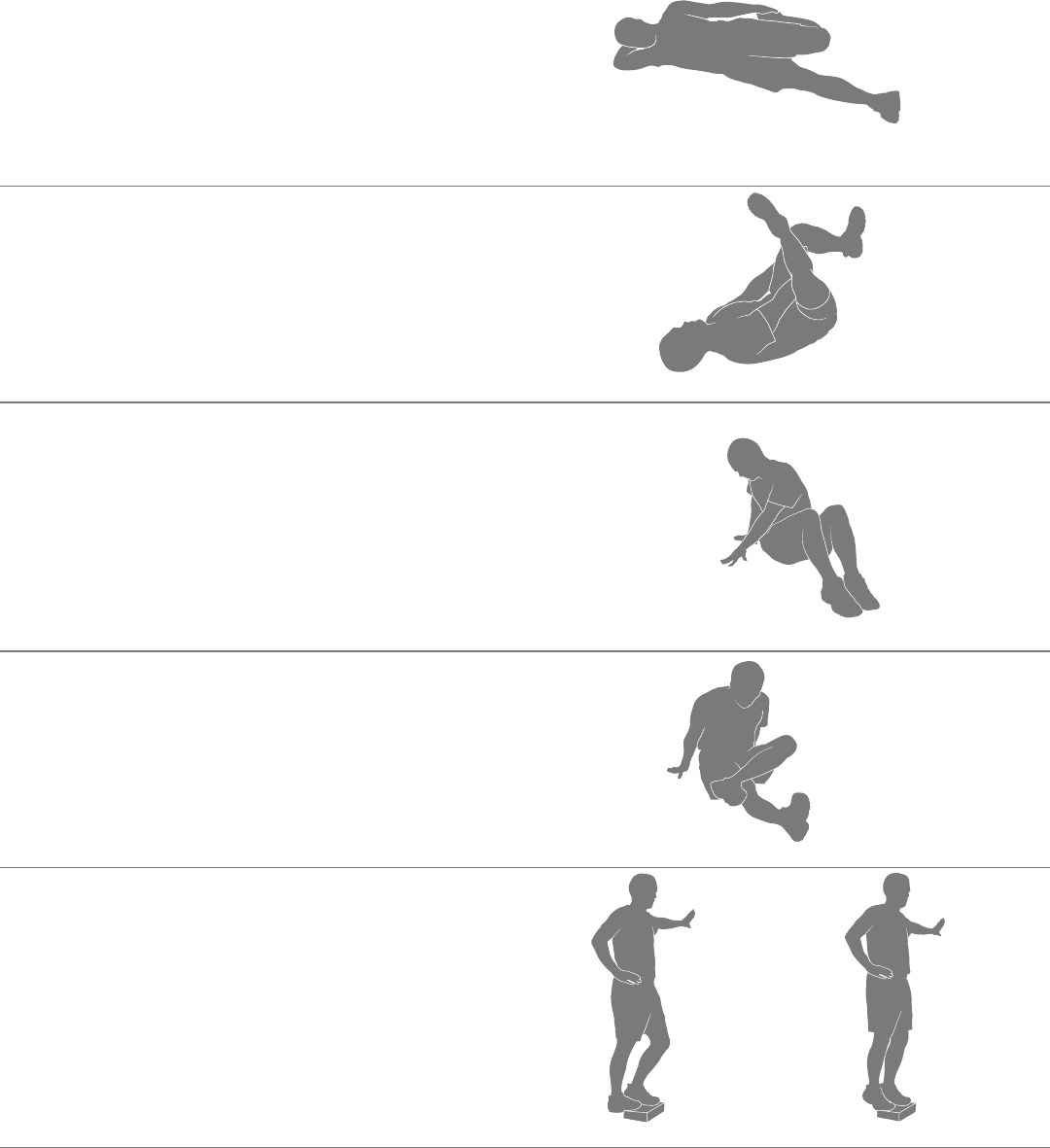
Whenyouaredoneusingyourcardiomachine,considerdoingtheserelaxingstretches,whichwillhelpyourbodyrecoverfromtheworkoutand
makeyoumoreexible:
Lying Leg Raise
Lieontheoorfaceupwiththelegsslightlybent.Liftoneleg
up toward the ceiling, keeping the knee straight. Place the
hands (or a strap) around the thigh and move the leg closer
to the head. Hold the stretch for 10 to 30 seconds. Repeat the
stretchontheotherleg.Keeptheheadontheooranddo
not round the spine.
Assembly / Owner’s Manual
30
Side Lying Knee Bend
Lieontheoorononesideofthebodyandresttheheadon
the lower arm. Bend the top knee and hold the ankle with the
same-sidehand,thenpulltheheeltowardthegluteals.Hold
the stretch for 10 to 30 seconds. Lie on the other side and
repeat the stretch with the other leg. Remember to hold the
knees close together.
Lying Figure Four
Lieontheoorfaceupwiththelegsbent.Placeonefoot
acrossthethighoftheoppositeleginthegurefourposition.
Reachforthelegontheoorandpullittowardthechest.
Hold the stretch for 10 to 30 seconds. Repeat the stretch with
theotherleg.Keeptheheadontheoor.
Seated Twist
Sitontheoorandextendthelegsstraightoutinfrontofthe
bodywiththekneesslightlybent.Placeonehandontheoor
behind the body and the other hand across the thigh. Twist
the upper body as far as comfortably possible to one side.
Hold the stretch for 10 to 30 seconds. Repeat the stretch on
the other side.
Seated Figure Four
Sitontheoorandextendonelegstraightoutinfrontofthe
body. Place the foot of the other leg across the thigh in the
gurefourposition.Movethechesttowardthelegs,pivoting
at the hip. Hold the stretch for 10 to 30 seconds. Repeat on
the other leg. Use the arms to support the back.
Dynamic Heel Drop
Place the ball of one foot on the edge of a step or staircase.
Place the other foot slightly in front. Hold onto a wall for bal-
ance with one hand, if necessary. Lower the heel of the back
foot as far as comfortably possible, keeping the knee straight.
Release the stretch by lifting the heel as high as comfortably
possible. Each repetition of the sequence should take 1 to 3
seconds.Repeatasacontinuous,controlled,uidsequence
10 or 20 times. Repeat the stretch with the other leg
*Source:JayBlahnik’sFull-BodyFlexibility,SecondEdition,2010.HumanKinetics.com.

Assembly / Owner’s Manual
31
How Often Should You Exercise
Consult a physician before you start an exercise program. Stop exercising if you feel pain or tightness in your chest, become short
of breath, or feel faint. Contact your doctor before you use the machine again. Use the values calculated or measured by the
machine’s computer for reference purposes only. The heart rate displayed on the console is an approximation and should be used
for reference only.
• 3 times a week for about 14 minutes each day.
• Schedule workouts in advance and try to follow the schedule.
Note: Ifyouarenewtoexercise(orreturningtoaregularexerciseprogram),andyouareunabletocomfortablycomplete14minutesofcon-
tinuousexerciseatonetime,justdo5–10minutes,andgraduallyincreaseyourworkouttimeuntilyoucanreacha14minutetotal.
Intensity of Workout
To increase the intensity of your workout:
• Push yourself to increase the number of Pedal revolutions per minute
• Place your feet further out toward the rear of the Pedals
• Increase the Intensity Level and keep your RPM consistent, or increase it as well
• Use your upper and lower body at different levels
• Shift your grip location on the Upper Handlebars to work out other parts of your upper body
Hand Placement (Grip Selection)
ThetnessmachineisequippedwithUpperHandlebarsthatallowforavarietyofupperbodyworkouts.Whenstartingout,placeyourhandswhere
itfeelsmostcomfortableandstableontheUpperHandlebars.Asyouprogressonyourtnessroutine,shiftyourhandplacementtotargetdifferent
muscle groups.
Exercise on this machine requires coordination and balance. Be sure to anticipate that changes in speed and resistance level can
occur during workouts, and be attentive in order to avoid loss of balance and possible injury.
The Static Handlebars can also be used to add stability and allow you to focus the workout more on your legs.
Mounting and Dismounting Your Machine
Care should be used when mounting or dismounting the machine.
Be aware that the Pedals and the Handlebars are connected and when either of these parts move the other does as well. In order to
avoid possible serious injury, grasp the Static Handlebars to steady yourself.
Be sure there is nothing under the Pedals or in the Air Resistance Fan before moving anything on the machine.
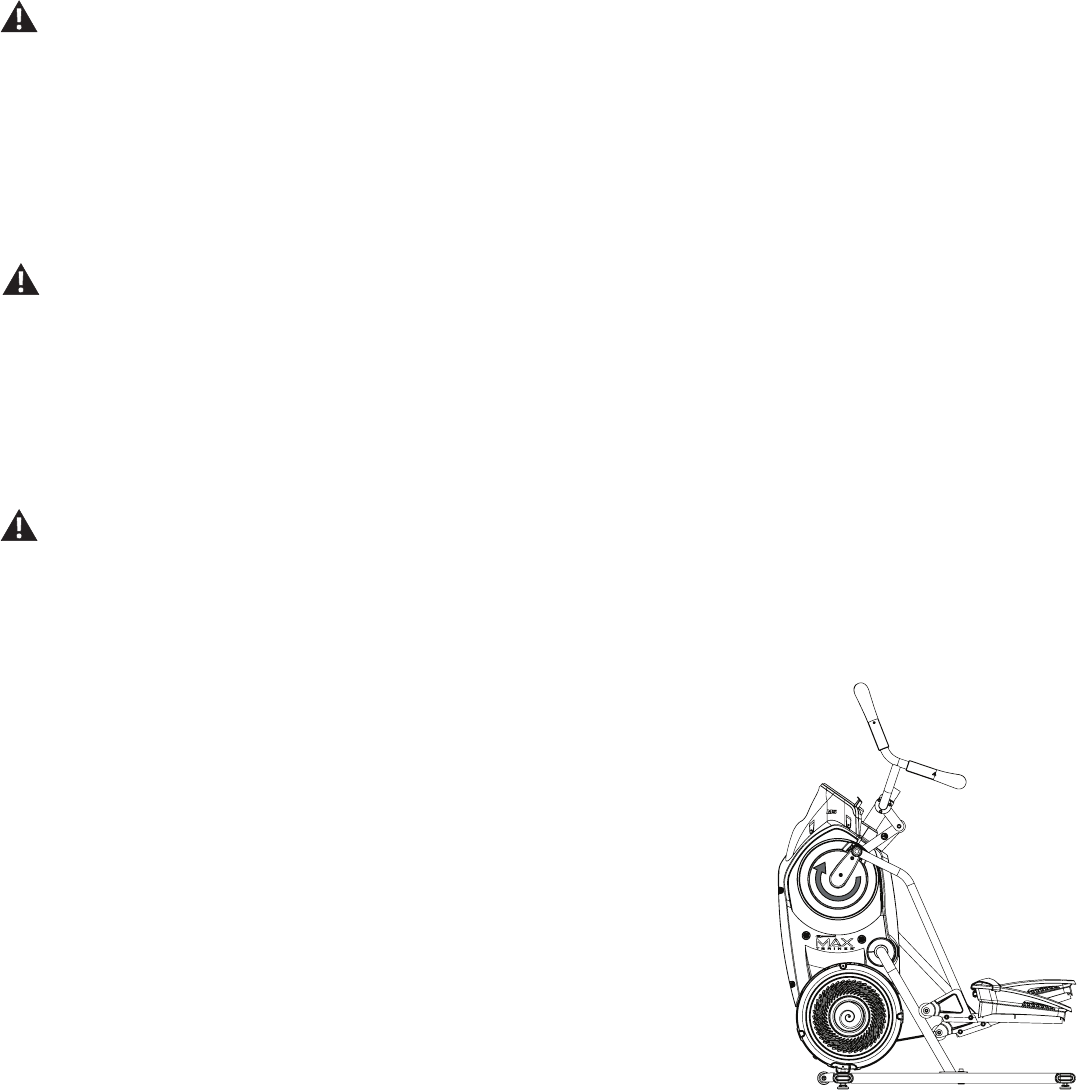
Tomountyourtnessmachine:
1. Move the Pedals until the one nearest to you is in the lowest position.
2. Grasp the Static Handlebars under the Console Button Assembly.
3. Steadying yourself with the Static Handlebars, step up onto the lowest Pedal and place your other foot onto the opposite Pedal.
Note: "Bottomed out” is when the User is unable to start a workout because the Pedals will not move. If this occurs, safely grasp the Static
Handlebars and apply your weight to the heel of the higher foot. While still grasping the Static Handlebar, lean back slightly applying
more weight onto the heel. Once the Pedals begin to move, resume your intended workout.
Operations
Assembly / Owner’s Manual
32
Todismountyourtnessmachine:
1. Move the Pedal you want to dismount from to the highest position, and bring the machine to a complete stop.
This machine is not equipped with a free-wheel. Pedal speed should be reduced in a controlled manner.
2. Grasp the Static Handlebars under the Console to steady yourself.
3. Withyourweightonthelowestfoot,swingtheupperfootoffthemachineanddownontotheoor.
4. Step off of the machine and release your grip from the Static Handlebars.
Getting Started
1. Placethetnessmachineinyourworkoutarea.
Place the machine on a clean, hard, level surface, free from unwanted material or other objects that may hamper your ability to
move freely. A rubber mat can be used below the machine to prevent the release of static electricity and protect your ooring.
The machine can be moved by one or more persons. Make sure that your own physical strength is capable of safely moving the
machine.
2. ExamineforanyobjectsbelowthePedalsandintheAirResistanceFan.Besureitisclear.
3. Connect the power cord to the machine and into a grounded AC Wall Outlet.
4. If you use the Heart Rate Monitor, follow the Chest Strap directions.
5. To mount the machine, move the Pedals until the one nearest you is in the lowest position.
Care should be used when mounting or dismounting the machine.
Be aware that the Pedals and the Handlebars are connected and when either of these parts move the other does as well. In order to
avoid possible serious injury, grasp the Static Handlebars to steady yourself.
6. GrasptheStaticHandlebarsundertheConsoleButtonAssembly.
7. Steadying yourself with the Static Handlebars, step up onto the lowest Pedal and place your other foot onto the opposite Pedal.
Note: “Bottomed out” is when the User is unable to start a workout because the Pedals will not
move. If this occurs, safely grasp the Static Handlebars and apply your weight to the heel
of the higher foot. While still grasping the Static Handlebar, lean back slightly applying more
weight onto the heel. Once the Pedals begin to move, resume your intended workout.
8. PushtheUSERbuttontoselectthedesiredUserProle.
9. Push the START button to begin a Quick Start workout. Starting with a Quick Start workout will get
youfamiliarwithhowyourBowexMaxTrainer® machine operates and responds to adjustments of
Resistance Level and Burn Rate.
Note: WhenoperatingtheBowexMaxTrainer® machine, be sure the Legs are moving in the direc-
tion as shown on the Crank Cover.
WhenreadyforaBowexMaxTrainer®workout,besuretoprogramyourUserProle(seetheEdita
UserProlesection)beforestartingtheMAXworkout.ThesuggestedTargetBurnRatesarebasedon
yourUserProlesettings.
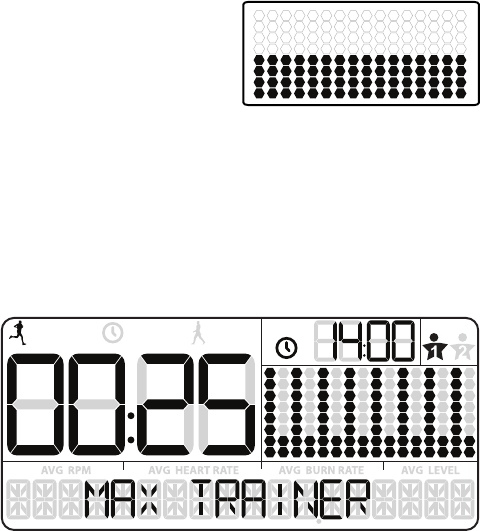
Power-Up / Idle Mode ( WELCOME screen )
The Console will enter Power-Up / Idle Mode if it is plugged into a power source, any button is pushed, or if it receives a signal from the RPM sensor
as a result of pedaling the machine.
Auto Shut-Off (Sleep Mode)
IftheConsoledoesnotreceiveanyinputinapproximately5minutes,itwillautomaticallyshutoff.TheLCDdisplayisoffwhileinSleepMode.
Note: The Console does not have an On/Off switch.
Assembly / Owner’s Manual
33
USER
TOTAL
ACTIVE
REST TOTAL
Manual ( Quick Start ) Program
TheManualworkoutprogramisanopen-endedworkoutthattracksyourtotaltime,allowingyoutotalcontrol.The
WorkoutProleDisplayshowstheTargetBurnRatefortheManualprogram.
1. Stand on the machine.
2. The Console will show the WELCOME screen. PushtheUSERbuttontoselectyourUserProle.
Note: Duringtheworkout,theConsolewillshowtheTargetLEDRangebasedontheselectedUserProlesettings.
3. Push the START/ENTER button to begin the Manual workout program.
4. When done with your workout, stop pedaling and push PAUSE/STOP to pause the workout. Push the PAUSE/STOP button again to end the
workout.
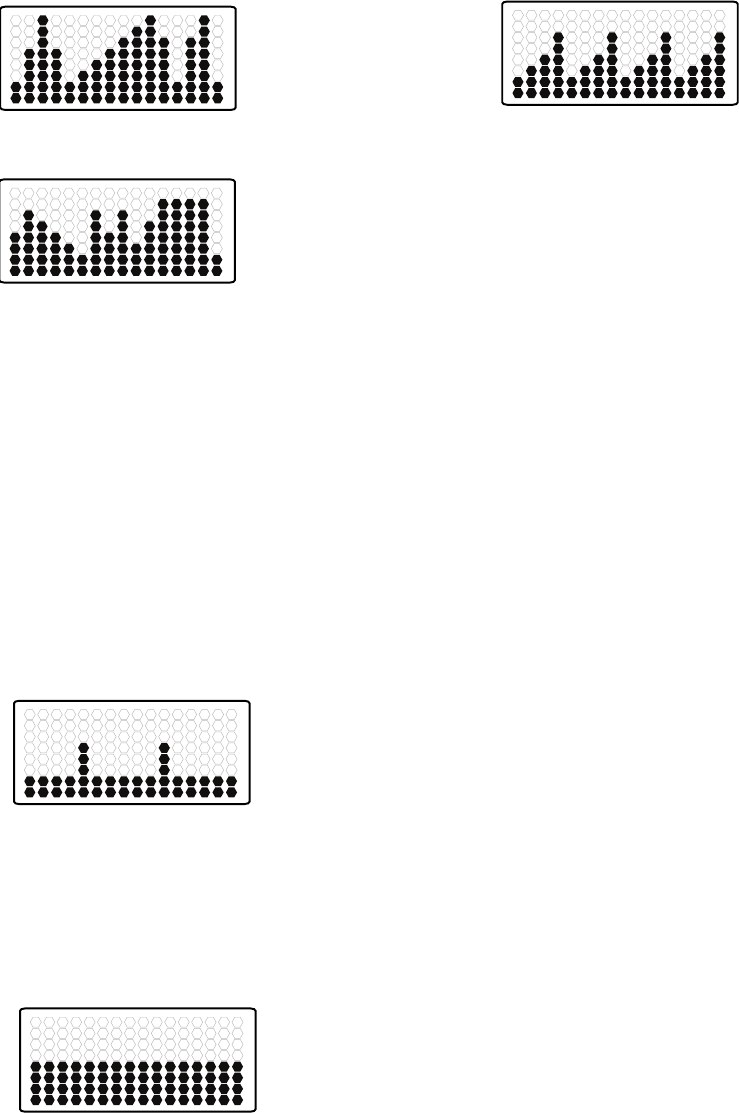
MAX Interval Workout Program
The MAX Interval Workout Program is a workout that alternates from intense
bursts of output ( “ACTIVE” ), to a slower paced, ‘catch your breath’ time period
(“REST”),bothofwhicharerepeatedovereightcycles.TheWorkoutProle
Display shows the Target Burn Rate for the MAX Interval program.
1. Stand on the machine.
2. PushtheUSERbuttontoselectyourUserProle.
Note: During the workout, the Console will show the Target LED Range
basedontheselectedUserProlesettings.
3. Push the MAX Interval button.
Note: TheWorkoutProleDisplaywilladjusttheBurnRateproletothecurrentUsersettings.
4. The workout will begin with an audible countdown as the Burn Rate display needle sweeps across the display and then settles on the current
Burn Rate. The Target Burn Rate LED’s will also activate and sweep up to the recommended Burn Rate.
Therstworkoutsegmentisan“ACTIVE”intervalthatlastsforashorterperiodoftime.SafelypushyourselftogettheBurnRatedisplayinto
the Target Burn Rate (red LED’s) and keep it in the range until the time reaches 00:00.
Note: The Target Burn Rate (LED) Range is provided only as a suggested target. The 5 LED range provides a lesser target, and allows a User
toprogresstothehigherLED’sintherangeastheirtnesslevelincreases.TochangetheTargetBurnRate(LED)Range,pushtheap-
propriate Burn Rate button until the Target Range is near the desired value.
At the last 3 seconds of the “ACTIVE” workout, the Console will begin an audible countdown.
5. Astheintervaltimereaches“00:00”,theConsolewillmakethethirdaudibleconrmationandthenextsegmentoftheworkout,a“REST”seg-
ment, will begin.
The Target LED Range will shift from red to green and sweep to a reduced Burn Rate. During the REST Interval, continue to work out but at a
lower Intensity.
At the last 3 seconds of the “REST” workout, the Console will begin an audible countdown. The interval is about to shift from a “REST” to an
“ACTIVE” interval again.
6. Astheintervaltimereaches“00:00”,theConsolewillmakeanaudibleconrmationandshifttothenext“ACTIVE”segment.
The shift from “ACTIVE” to “REST” segments will repeat for a total of 8 cycles over the workout.
7. When the last “REST” segment is completed, the Console will display ”WORKOUT COMPLETE”, and then show the workout results. The Con-
sole will display the total time of the “ACTIVE” intervals, along with TOTAL TIME. If there is no input for 5 minutes, the Console will automatically
go into Sleep Mode.
Note: IfanIntervalworkoutisendedbeforeall16segmentshavebeencompleted,theConsolewillonlyshowthelastsegmentcompletedon
theProgramProle.
Speed Interval
Calorie Burn
30 seconds
90 seconds
90 seconds
30 seconds
90 seconds
30 seconds
90 seconds
30 seconds
90 seconds
30 seconds
90 seconds
30 seconds
90 seconds
30 seconds
90 seconds
30 seconds
Strength Interval
45 seconds
90 seconds
90 seconds
45 seconds
90 seconds
45 seconds
90 seconds
45 seconds
90 seconds
45 seconds
90 seconds
45 seconds
90 seconds
45 seconds
90 seconds
45 seconds
Fat Burn
Stairs
Max Interval *
25 seconds
80 seconds
80 seconds
25 seconds
80 seconds
25 seconds
80 seconds
25 seconds
80 seconds
25 seconds
80 seconds
25 seconds
80 seconds
25 seconds
80 seconds
25 seconds
Manual *
Calorie Goal
Fitness Test
Assembly / Owner’s Manual
34
Workout Programs
The Workout Programs are organized into two different styles of Workouts: Standard Workouts and SMART Workouts.
STANDARD WORKOUTS
Calorie Burn Stairs
Speed Interval
Calorie Burn
30 seconds
90 seconds
90 seconds
30 seconds
90 seconds
30 seconds
90 seconds
30 seconds
90 seconds
30 seconds
90 seconds
30 seconds
90 seconds
30 seconds
90 seconds
30 seconds
Strength Interval
45 seconds
90 seconds
90 seconds
45 seconds
90 seconds
45 seconds
90 seconds
45 seconds
90 seconds
45 seconds
90 seconds
45 seconds
90 seconds
45 seconds
90 seconds
45 seconds
Fat Burn
Stairs
Max Interval *
25 seconds
80 seconds
80 seconds
25 seconds
80 seconds
25 seconds
80 seconds
25 seconds
80 seconds
25 seconds
80 seconds
25 seconds
80 seconds
25 seconds
80 seconds
25 seconds
Manual *
Calorie Goal
Fitness Test
Speed Interval
Calorie Burn
30 seconds
90 seconds
90 seconds
30 seconds
90 seconds
30 seconds
90 seconds
30 seconds
90 seconds
30 seconds
90 seconds
30 seconds
90 seconds
30 seconds
90 seconds
30 seconds
Strength Interval
45 seconds
90 seconds
90 seconds
45 seconds
90 seconds
45 seconds
90 seconds
45 seconds
90 seconds
45 seconds
90 seconds
45 seconds
90 seconds
45 seconds
90 seconds
45 seconds
Fat Burn
Stairs
Max Interval *
25 seconds
80 seconds
80 seconds
25 seconds
80 seconds
25 seconds
80 seconds
25 seconds
80 seconds
25 seconds
80 seconds
25 seconds
80 seconds
25 seconds
80 seconds
25 seconds
Manual *
Calorie Goal
Fitness Test
Fat Burn
Speed Interval
Calorie Burn
30 seconds
90 seconds
90 seconds
30 seconds
90 seconds
30 seconds
90 seconds
30 seconds
90 seconds
30 seconds
90 seconds
30 seconds
90 seconds
30 seconds
90 seconds
30 seconds
Strength Interval
45 seconds
90 seconds
90 seconds
45 seconds
90 seconds
45 seconds
90 seconds
45 seconds
90 seconds
45 seconds
90 seconds
45 seconds
90 seconds
45 seconds
90 seconds
45 seconds
Fat Burn
Stairs
Max Interval *
25 seconds
80 seconds
80 seconds
25 seconds
80 seconds
25 seconds
80 seconds
25 seconds
80 seconds
25 seconds
80 seconds
25 seconds
80 seconds
25 seconds
80 seconds
25 seconds
Manual *
Calorie Goal
Fitness Test
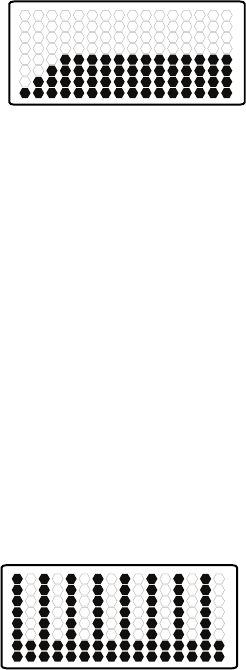
StandardWorkoutsshowthecourseproleofResistanceLevelsfortheprogram.Eachcolumnintheproleshowsoneworkoutsegment.The
higherthecolumn,thehighertheresistancelevel.EachcolumnofaStandardWorkoutisfor1minute(16minuteworkout).
Theashingcolumnshowsyourcurrentinterval.TheConsolewilladjusttheResistanceLeveltotheWorkoutProleDisplay.
Note:IftheResistanceLevelischangedduringaworkout,theproleoftheWorkoutProgramwillchange.
SMART WORKOUT PROGRAMS
SMARTWorkoutsshowthecourseproleofBurnRatefortheprogram.Eachcolumnintheproleshowsoneworkoutsegment.Thehigherthe
column, the higher the Burn Rate. The Console will adjust the resistance level to assist the User to reach the Target Burn Rate.
Note:TheWorkoutProleDisplaywilladjusttheBurnRateproletothecurrentUsersettings.
Calorie Goal
Speed Interval
Calorie Burn
30 seconds
90 seconds
90 seconds
30 seconds
90 seconds
30 seconds
90 seconds
30 seconds
90 seconds
30 seconds
90 seconds
30 seconds
90 seconds
30 seconds
90 seconds
30 seconds
Strength Interval
45 seconds
90 seconds
90 seconds
45 seconds
90 seconds
45 seconds
90 seconds
45 seconds
90 seconds
45 seconds
90 seconds
45 seconds
90 seconds
45 seconds
90 seconds
45 seconds
Fat Burn
Stairs
Max Interval *
25 seconds
80 seconds
80 seconds
25 seconds
80 seconds
25 seconds
80 seconds
25 seconds
80 seconds
25 seconds
80 seconds
25 seconds
80 seconds
25 seconds
80 seconds
25 seconds
Manual *
Calorie Goal
Fitness Test
TheCalorieGoalworkoutisbasedoncaloriesburnedoveraworkout.TheConsoleassignsacalorievaluetoeachofthe16segmentsbasedonthe
Burn Rate of each segment. During a workout, when the User has burned the assigned calorie value for the current segment, the workout shifts to
thenextsegment.Attheendoftheworkout,the16segmentswillhavebeencompletedandthetotalcaloriesburnedwillmatchthecaloriegoal.
Note: If the Burn Rate is changed during a workout, the time of each remaining segment may adjust because of the new Burn Rate level.
Steady State
Speed Interval
Calorie Burn
30 seconds
90 seconds
90 seconds
30 seconds
90 seconds
30 seconds
90 seconds
30 seconds
90 seconds
30 seconds
90 seconds
30 seconds
90 seconds
30 seconds
90 seconds
30 seconds
Strength Interval
45 seconds
90 seconds
90 seconds
45 seconds
90 seconds
45 seconds
90 seconds
45 seconds
90 seconds
45 seconds
90 seconds
45 seconds
90 seconds
45 seconds
90 seconds
45 seconds
Fat Burn
Stairs
Max Interval *
25 seconds
80 seconds
80 seconds
25 seconds
80 seconds
25 seconds
80 seconds
25 seconds
80 seconds
25 seconds
80 seconds
25 seconds
80 seconds
25 seconds
80 seconds
25 seconds
Manual *
Calorie Goal
Fitness Test
TheSteadyStateworkoutprogramisanopen-endedworkoutthattracksthetotalworkouttime.AsRPMmayuctuateoveraworkout,theConsole
will adjust the Resistance Level to keep the User in the Target Burn Rate Range.
Note:Becauseoftheopen-endeddesignoftheSteadyStateworkout,itisonlyadjustableduringaworkout.
Assembly / Owner’s Manual
35
Fitness Test
Speed Interval
Calorie Burn
30 seconds
90 seconds
90 seconds
30 seconds
90 seconds
30 seconds
90 seconds
30 seconds
90 seconds
30 seconds
90 seconds
30 seconds
90 seconds
30 seconds
90 seconds
30 seconds
Strength Interval
45 seconds
90 seconds
90 seconds
45 seconds
90 seconds
45 seconds
90 seconds
45 seconds
90 seconds
45 seconds
90 seconds
45 seconds
90 seconds
45 seconds
90 seconds
45 seconds
Fat Burn
Stairs
Max Interval *
25 seconds
80 seconds
80 seconds
25 seconds
80 seconds
25 seconds
80 seconds
25 seconds
80 seconds
25 seconds
80 seconds
25 seconds
80 seconds
25 seconds
80 seconds
25 seconds
Manual *
Calorie Goal
Fitness Test
TheFitnessTestmeasurestheimprovementsofyourphysicaltnesslevel.Thetestcomparesyourpoweroutputtoyourheartrate.Asyourtness
level improves, your power output will increase at a given heart rate.
Note: The Console must be able to read the heart rate information from the Contact Heart Rate (CHR) sensors or Heart Rate Monitor (HRM) to
work correctly.
TheConsolewillusetheAgeandWeightvaluesfortheselectedUserProletocalculatetheFitnessScore.
Start to work out and hold the Heart Rate Sensors. The workout starts with a Target Burn Rate that increases with each column. Safely keep your
current Burn Rate in the Target Burn Rate Range, increasing your heart rate. The Target Burn Rate continues to increase automatically until your
heartratereachesthe“TestZone”.Thiszoneisindividuallycomputedtobenear75percentofthemaximumheartrateofyourUserProle.When
you reach the Test Zone, the machine holds the Burn Rate steady for 3 minutes. This lets you reach a stable condition (where your heart rate
becomes steady). At the end of the 3 minutes, the Console measures your heart rate and the power output. These numbers, along with information
about your age and weight, are computed to produce a “Fitness Score”.
Note:FitnessTestscoresshouldonlybecomparedtoyourpreviousscoresandnottootherUserProles.
Compare your Fitness Scores to see your improvement.
SMART MAX Interval
Speed Interval
Calorie Burn
30 seconds
90 seconds
90 seconds
30 seconds
90 seconds
30 seconds
90 seconds
30 seconds
90 seconds
30 seconds
90 seconds
30 seconds
90 seconds
30 seconds
90 seconds
30 seconds
Strength Interval
45 seconds
90 seconds
90 seconds
45 seconds
90 seconds
45 seconds
90 seconds
45 seconds
90 seconds
45 seconds
90 seconds
45 seconds
90 seconds
45 seconds
90 seconds
45 seconds
Fat Burn
Stairs
Max Interval *
25 seconds
80 seconds
80 seconds
25 seconds
80 seconds
25 seconds
80 seconds
25 seconds
80 seconds
25 seconds
80 seconds
25 seconds
80 seconds
25 seconds
80 seconds
25 seconds
Manual *
Calorie Goal
Fitness Test
The SMART MAX Interval program is the MAX Interval Workout Program with the Console shifting the resistance level for the User. To get the User
into the Target Burn Rate Range, the Console will adjust the resistance level based on the current RPM.
During a workout, the Console attempts to coach the User into the selected Target Burn Rate range. If the User is above the Target Burn Rate, the
Console will decrease the Resistance Level. If the User is below the Target Burn Rate, the Console will increase the Resistance Level.
The Time Intervals and Burn Rate levels can be customized.
To start a Workout Program:
1. Stand on the machine.
2. Push the PROGRAMS button until you select the desired Workout Program.
3. Push the START/ENTER button to begin the selected Workout Program.
4. When done with your workout, stop pedaling and push PAUSE/END to pause the workout. Push the PAUSE/END button again to end the
workout.
Assembly / Owner’s Manual
36
Paused / Results Mode
To Pause a workout:
1. Stop pedaling and push the PAUSE/STOP button to pause your workout.
No te: The Console will automatically pause if there is no RPM signal for 5 seconds.
2. To continue your workout, push START/ENTER or start pedaling.
Whenpaused,theConsoledisplaywillshow“WORKOUTPAUSED”,andthenashtheworkoutvalues.
If the workout does not resume or if the PAUSE/STOP button is pushed, the workout will display “WORKOUT
COMPLETE”, and the result values are displayed (Total Calories, Total Time, Average RPM, Average Heart
Rate, Average Burn Rate, and Average Level). If the workout was a MAX Interval workout, the Console will also display the total “ACTIVE” interval
time.
IfthereisnoRPMfor5minutes,theConsoleautomaticallygoestothePower-Up/IdleMode.
Edit a User Prole
ForamoreaccuratecaloriecountandTargetCalorieBurn,aUserProleshouldbecustomizedtotheUser.
1. PushUSERbuttontoselectyourUserProle(User1orUser2).
2. Push and hold the USER button for 3 seconds to begin the Edit User mode.
3. The Console will display the AGE prompt with the default age value ( “32” ). Use the Burn Rate/Increase or Burn Rate/Decrease buttons to
adjust the value, and push START/ENTER to set the value.
4. The Console will display the GENDER prompt with the default gender value ( “FEMALE” ). Use the Burn Rate/Increase or Burn Rate/Decrease
buttons to adjust the value, and push START/ENTER to set the value.
5. The Console will display the UNITS prompt with the default units value ( “LBS” ). Use the Burn Rate/Increase or Burn Rate/Decrease buttons to
adjust the value, and push START/ENTER to set the value.
6. TheConsolewilldisplaytheWEIGHTpromptwiththedefaultweightvalue(“160”).UsetheBurnRate/IncreaseorBurnRate/Decreasebut-
tons to adjust the value, and push START/ENTER to set the value.
7. TheConsolewilldisplaytheHEIGHTpromptwiththedefaultheightvalue(“60INCHES”).UsetheBurnRate/IncreaseorBurnRate/Decrease
buttons to adjust the value, and push START/ENTER to set the value.
8. The Console will display the RESET SETTINGS prompt with the default value ( “NO” ). Use the Burn Rate/Increase or Burn Rate/Decrease
buttons to adjust the value, and push START/ENTER to accept the value. All Workout settings for the User will be reset to the default settings.
9. The Console will display the RESET USER prompt with the default value ( “NO” ). Use the Burn Rate/Increase or Burn Rate/Decrease buttons
to adjust the value, and push START/ENTER to accept the value. All Workout results and settings for the User will be erased with a reset.
10. TheUserProlereviewiscomplete,andtheConsolewilldisplaytheWELCOMEscreen.
OntheinitialeditofeachUserProle,allscreensmustbereviewedandaccepted.Aftertheinitialedit,aUsercanadjustavalue,setit,andpush
PAUSE/STOPtoexittheEditUsermode.
Customize the MAX (and SMART MAX) Interval Program
The interval times and burn rate levels can be adjusted on the MAX Interval Program. The adjusted values will be set as the default settings for
future workouts.
1. Step up to the machine.
2. Push and hold down the MAX Interval button for 3 seconds.
3. TheConsolewilldisplaythe“ACTIVE”intervaltime,ashing.TheACTIVEsegmentsintheProledisplaywillalsobeashing.PushtheBurn
Rate/Increase or Burn Rate/Decrease buttons to adjust the “ACTIVE” interval time.
Note: Intervalsarelimitedtoamaximumof10:00foreachtype(“ACTIVE”or“REST”),andtheentireworkoutislimitedtoamaximumof99:04
minutes.
PAUSE/END
START
/ENTER
MAX
Interval
PROGRAMS USER
BURN
RATE
RESISTANCE
LEVEL
Assembly / Owner’s Manual
37
4. Push the START/ENTER button to set the displayed value.
5. TheConsolewilldisplaythe“ACTIVE”BurnRateadjustedtotheUsersettings,ashing.PushtheBurnRate/IncreaseorBurnRate/Decrease
buttons to adjust the “ACTIVE” Burn Rate level.
6. PushtheSTART/ENTERbuttontosetthedisplayedvalue.
7. The“REST”intervaltimeisnowdisplayed,ashing,alongwiththeothersegmentsontheProledisplay.PushtheBurnRate/IncreaseorBurn
Rate/Decrease buttons to adjust the “REST” interval time.
8. Push the START/ENTER button to set the displayed value.
9. TheConsolewilldisplaythe“REST”BurnRateadjustedtotheUsersettings,ashing.PushtheBurnRate/IncreaseorBurnRate/Decrease
buttons to adjust the “REST” Burn Rate level.
10. Push the START/ENTER button to set the displayed value.
Note:ThisprocedurealsoworkswiththeSMARTMAXIntervalProgram.TheWorkoutdefaultscanberesetintheUserProlesettings.
Customize the Workout Goals
The workout goals (time and calories) for the Standard and Calorie Goal Workouts can be adjusted. Once changed, the new values will be the
default for future workouts.
1. Step up to the machine.
2. Push the PROGRAMS button until the desired Program is selected.
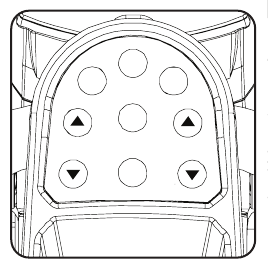
3. Push and hold down the PROGRAMS button for 3 seconds.
4. Push the Burn Rate/Increase or Burn Rate/Decrease buttons to adjust the displayed value.
Default values:
CalorieBurn,FatBurn,andStairs: 16minutes
Calorie Goal: 300 calories
5. Push START/ENTER to set the displayed value.
6. TheConsolewilldisplaytheselectedProgramwiththeadjustedTotalTimeorCalorievalue.
Note:TheWorkoutdefaultscanberesetfromtheUserProlesettings.

Assembly / Owner’s Manual
38
The Console Setup Mode lets you control the sound settings, or see maintenance statistics (Total Run Hours and Software Version).
1. PushandholddowntheBurnRate/IncreaseandPAUSE/ENDbuttonsfor3secondswhileinthePower-UpModetogointotheConsoleSetup
Mode.
Note:PushPAUSE/ENDtoexittheConsoleSetupModeandreturntothePower-UpModescreen.
2. The Console display shows the Sound Settings prompt with the current setting. Push the Burn Rate/Increase or Burn Rate/Decrease buttons to
change between the settings of “OFF” and “1” through “7”. A setting of 7 is the loudest sound level
3. Push START/ENTER to set.
4. The Console display shows the TOTAL RUN HOURS for the machine.
5. Forthenextprompt,pushtheSTART/ENTERbutton.
6. TheConsoledisplayshowstheSoftwareVersionprompt.
7. PushtheSTART/ENTERbuttontoexittheConsoleSetupMode..
TheConsolewilldisplaythePower-UpModescreen.
Console Setup Mode
Assembly / Owner’s Manual
39
Read all maintenance instructions fully before you start any repair work. In some conditions, an assistant is required to do the necessary tasks.
Equipment must be regularly examined for damage and repairs. The owner is responsible to make sure that
regular maintenance is done. Worn or damaged components must be repaired or replaced immediately.
Only manufacturer supplied components can be used to maintain and repair the equipment.
If at any time the Warning labels become loose, unreadable or dislodged, contact Nautilus Customer Ser-
vice for replacement labels.
To reduce the risk of electrical shock or usage of the equipment, always unplug the power cord
from the wall outlet and the machine and wait 5 minutes before cleaning, maintaining or repairing the machine.
Place the power cord in a secure location.
Daily: Beforeeachuse,examinetheexercisemachineforloose,broken,damaged,orwornparts.Donotuseif
foundinthiscondition.Repairorreplaceallpartsattherstsignofwearordamage.Aftereachworkout,use
a damp cloth to wipe your machine and Console free of sweat.
Note:AvoidexcessivemoistureontheConsole.
Weekly: Check for smooth roller operation. Wipe the machine to remove dust, dirt, or grime. Clean the rails and
surface of the rollers with a damp cloth.
Note: Do not use petroleum based products.
Monthly
or after 20
hours:
Make sure all bolts and screws are tight. Tighten as necessary.
NOTICE: Do not clean with a petroleum based solvent or an automotive cleaner. Be sure to keep the Console free of moisture.
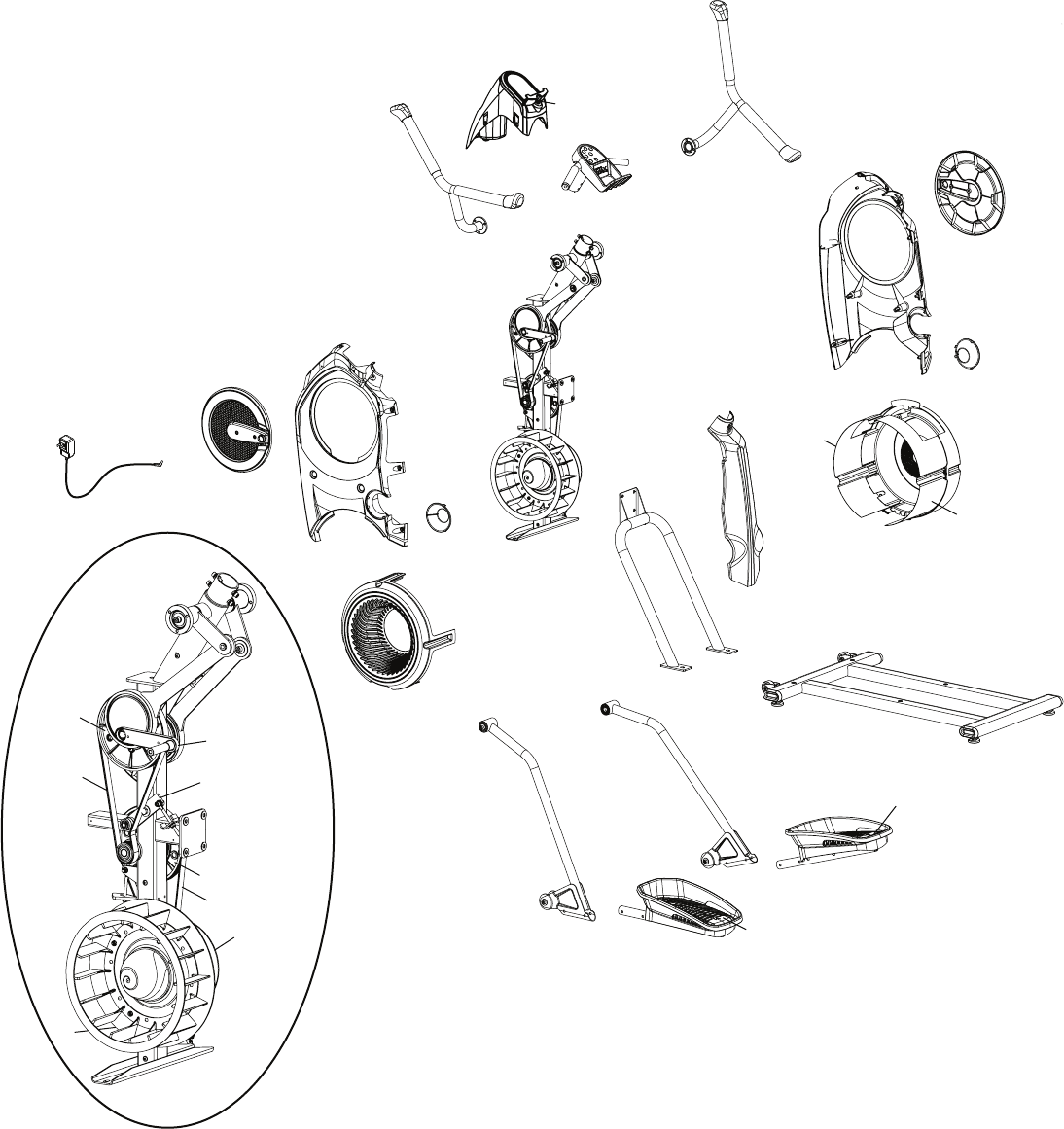
Replace Batteries in Chest Strap
The heart rate (HR) chest strap uses a CR2032 battery.
Do not perform this procedure outdoors or in moist or wet
locations.
1. Using a coin, loosen the slotted cover on the battery bay. Remove the
cover and battery.
2. When replacing the battery, insert it in the battery bay with the +
symbol facing up.
Note: The chest strap uses CR2032 size batteries.
3. Reinstall the cover on the strap.
4. Discard the old battery. Dispose of in accordance with local
regulations and/or at approved recycling centers.
5. Inspect your chest strap to ensure function.
Do not use until the equipment has been fully assembled and inspected for correct performance in accordance with the Owner’s
Manual.
Maintenance
CR2032
+
Assembly / Owner’s Manual
40
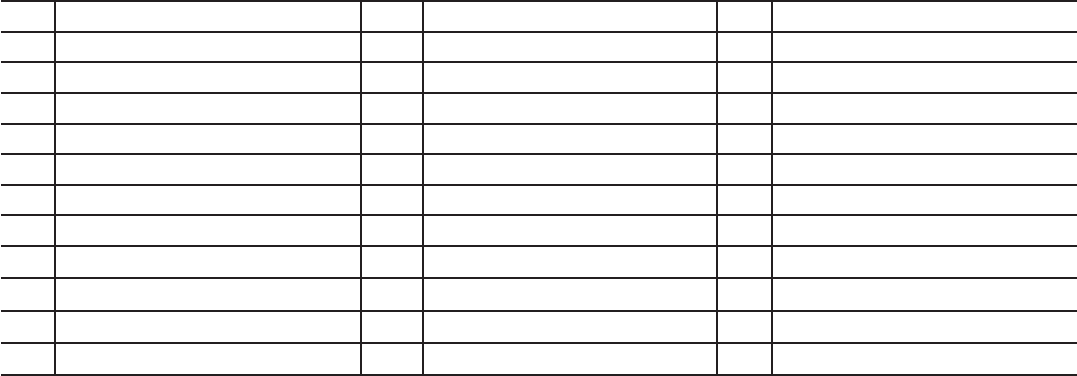
Maintenance Parts
D
E
F
C
A
BG
H
A
C
I
L
K
J
NM
O
S
Q
R
P
V
V
W
W
U
T
U
T
X
L
Z
K
Y
AA
EE
BB
DD
FF
CC
GG
HH
N
II
II
Assembly / Owner’s Manual
41
A Upper Handle Grip M Shroud, Right Fan Y Fan Assembly
B Handlebar, Left N Fan Assembly Inserts Z Shroud, Right
C Lower Handle Grip O Shroud, Rear AA Drive Pulley, Upper
D Console Shroud / Water Bottle Holder P Rail Assembly BB Arm Drive Assembly
EConsole Assembly Q Transport Wheel CC Crank Arm
F Speaker R Stabilizer DD Tensioner
G Handlebar, Static S Leveler EE Drive Pulley, Lower
HConsole Button Assembly T Foot Pad Insert FF Fan Back Plate
I Handlebar, Right U Foot Pad GG Speed Sensor (behind Fan)
J Shroud, Right V Roller HH Power Cord
K Crank Cover W Leg II Drive Belt
L Cap X Shroud, Left Fan
Assembly / Owner’s Manual
42
Condition/Problem Things to Check Solution
No display/partial display/unit
will not turn on
Check electrical (wall) outlet Make sure unit is plugged into a functioning wall outlet.
Check connection at front of unit Connection should be secure and undamaged. Replace adapter or connec-
tion at unit if either are damaged.
Check data cable
connections/orientation
Be sure cable is connected securely and oriented properly. Small latch on
connector should line up and snap into place.
Check data cable integrity All wires in cable should be intact. If any are visibly crimped or cut, replace
cable.
Check console display for
damage
Check for visual sign that console display is cracked or otherwise damaged.
Replace Console if damaged.
AC Adapter Check for visual sign that AC Adapter is cracked or otherwise damaged.
Replace AC Adapter if damaged.
Console Display IfConsoleonlyhaspartialdisplayandallconnectionsarene,replacethe
Console.
If the above steps do not resolve the problem, contact Customer Care for
further assistance.
No response on Console when
button is pushed
Console Button Assembly Try other buttons to get any response on the Console.
Check data cable integrity from
Console Button Assembly to
Console
All wires in cable should be intact. If any are visibly crimped or cut, replace
cable.
Check data cable
connections/orientation
Be sure cable is connected securely and oriented properly. Small latch on
connector should line up and snap into place.
Check console display for
damage
Check for visual sign that console display is cracked or otherwise damaged.
Replace Console if damaged.
Check Console Button As-
sembly
Check for visual sign that the Console Button Assembly is otherwise dam-
aged. Replace the Console Button Assembly if damaged.
If the above steps do not resolve the problem, contact Customer Care for
further assistance.
No speed/RPM reading Check data cable integrity All wires in cable should be intact. If any are cut or crimped, replace cable.
Check data cable
connections/orientation
Be sure cable is connected securely and oriented properly. Small latch on
connector should line up and snap into place.
Check magnet position (requires
shroud removal)
Magnet should be in place on pulley.
Check Speed Sensor (requires
shroud removal)
Speed sensor should be aligned with magnet and connected to data cable.
Realign sensor if necessary. Replace if there is any damage to the sensor or
the connecting wire.
Console Electronics If tests reveal no other issues, contact Customer Care.
Unit operates but Telemetric HR
not displayed
Chest Strap Strap should be “POLAR®” compatible and uncoded. Make sure strap is
directly against skin and contact area is wet.
Interference Try moving unit away from sources of interference (TV, Microwave, etc).
Replace Chest Strap If interference is eliminated and HR does not function, replace strap.
Troubleshooting
Assembly / Owner’s Manual
43
Condition/Problem Things to Check Solution
Console shuts off (enters sleep
mode) while in use
Check electrical (wall) outlet Make sure unit is plugged into a functioning wall outlet.
Check connection at front of unit Connection should be secure and undamaged. Replace adapter or connec-
tion at unit if either are damaged.
Check data cable integrity All wires in the cable should be intact. If any are cut or crimped, replace
cable.
Check data cable
connections/orientation
Be sure cable is connected securely and oriented properly. Small latch on
connector should line up and snap into place.
Reset machine Unplug unit from electrical outlet for 5 minutes. Reconnect to outlet.
Check magnet position (requires
shroud removal)
Magnet should be in place on pulley.
Check Speed Sensor (requires
shroud removal)
Speed sensor should be aligned with magnet and connected to data cable.
Realign sensor if necessary. Replace if there is any damage to the sensor or
the connecting wire.
Pedals will not move Pedal locations The Pedals may be “bottomed out”. Safely grasp the Static
Handlebars and apply your weight to the heel of the higher foot. While still
grasping the Static Handlebar, lean back slightly applying more weight onto
the heel. Once the Pedals begin to move, resume your intended workout.
Fan will not turn Check for blockage of fan Remove material from fan. Be sure not to move the Handlebars, Legs or
Pedals.
Be aware that the Fan, Handlebars, Legs and Pedals are con-
nected and when either of these parts move the other does as
well.
If necessary, detach the Shrouds to help with removal. Do not operate ma-
chine until Shrouds have been replaced.
Unit rocks/does not sit level Check leveler adjustment Adjust levelers until machine is level.
Check surface under unit Adjustmentmaynotbeabletocompensateforextremelyunevensurfaces.
Move machine to level area.
Footpedalsloose/unitdifcult
to operate
Hardware Tightly secure all hardware on the Pedal Arms and Handlebar Arms.
Rubbing sound outside of
Shrouds during operation
Caps Slightly loosen Caps on Crank Arms
Metallic rubbing sound from
within Shrouds during operation
Brake bracket Brake bracket needs to be aligned. Contact Customer Care for further as-
sistance.
Machine seems to release
Pedals for a moment during
operation
Belt slip Contact Customer Care for further assistance.
Workout results will not sync
with Bluetooth® enabled device
Current console mode Machine must be in Idle Mode to sync. Push the PAUSE/STOP button until
the "WELCOME" screen is displayed.
Total time of workout A workout must be longer than 1 minute to be saved and posted by the
Console.
Fitness machine Unplug unit from electrical outlet for 5 minutes. Reconnect to outlet.
Bluetooth® enabled device Consult your device to be sure that the Bluetooth® wireless feature has been
enabled on it.
Fitness App ReviewSpecicationsofFitnessAppandconrmyourdeviceiscompatible.
Contactappsupport@nautilus.comforfurtherassistance.
Sync fails Review account and password for MyFitnessPal®
Assembly / Owner’s Manual
44
Workout results not posting to
BowexConnect™
Fitness App on Bluetooth®
enabled device
Workout results transfer from the machine to the App, and then post to the
BowexConnect™website.ReviewaccountandpasswordfortheBowex
Connect™ website.
Contactappsupport@nautilus.comforfurtherassistance.
Workout results not posting
fromBowexConnect™to
MyFitnessPal® account
Sync accounts FromtheMenuiconontheBowexConnect™website,selecttheSyncto
MyFitnessPal®.
Sync fails Review account and password for MyFitnessPal®.
Contactappsupport@nautilus.comforfurtherassistance.

Assembly / Owner’s Manual
45
Introduction and Overview
WelcometotheBowex™BodyWeightLossGuide.ThisguideisdesignedtobeusedwithyourBowex® equipment and will help you:
• Lose weight and get lean
• Improve your health and wellness
• Increase your energy and vitality
Consult a physician before you start an exercise program or a new health and diet plan. Stop exercising if
you feel pain or tightness in your chest, become short of breath, or feel faint. Contact your doctor before
you use the machine again. Use the values calculated or measured by the machine’s computer for reference
purposes only. The heart rate displayed on the console is an approximation and should be used for refer-
ence only.
ByfocusingonthemainthreeelementsoftheBowex™BodyWeightLossGuide-quality,balance,andconsistency-you’llbeabletoreachand
maintainyourweightlossandtnessgoalsforthenextsixweeksandbeyond.
• Quality–Theemphasisofthisplanisoneatingmorewholefoodsandgettingthemostnutrientsfromyourcaloriesaspossible.Makingthe
majorityofyourdietfromfoodsthathaveasingleingredient(forexamplefruits,vegetables,sh,leanprotein,eggs,beans,nuts,andwhole
grains)providesthevitamins,minerals,ber,protein,andhealthyfatsyourbodyneeds.
• Balance–Eachofthemealsandsnacksinthisguidehaveasourceofberorsmartcarbohydrate,protein,andhealthyfattokeepyour
energy levels consistent throughout the day to fuel your workouts. By having this balance you’ll feel fuller longer, which is critical to weight loss
success.
• Consistency–Gettingaboutthesamenumberofcalorieseachdayisimportantforyourmetabolismandyourmindset.Ifyouoverdoitone
day,don’ttrytomakeupforitthenextdaybynoteatingorcuttingyourcaloriesdrastically.Getrightbackontrackbyfollowingthisguide!
Results & Expectations
Resultswillvarydependingonyourage,startingweight,andexerciselevel.Byadheringtoadietandexerciseroutine,youmaylose1-3lbsper
weekandexperienceincreasedenergylevels.
5 Tips for Long-Term Success
1. Keep a food logincludinghungerlevelsandwaterintake.Freeonlinefoodlogsandmobileappsareavailableatwww.mytnesspal.comand
www.loseit.com
2. Weigh and/or take measurements weekly–nomoreandnoless.Weighingweeklyratherthandailyoreveryotherdayisbest.You’lltrack
your progress and keep yourself in check without getting discouraged if the scale doesn’t move for a few days. And remember, weight is just
anumberandit’sinuencedbymusclegainaswellasfatloss.Feelinghowyourclothestcanoftenbeabetterindicatorofprogressasyour
bodyadaptstoexerciseandnutritionchanges.
3. Measure portions–Toavoidportioncreep,usemeasuringcupsandspoonsforgrains(rice,pasta,cereal),beans,nuts,oils,anddairy.Use
the Portion Sizes Guide for other foods.
4. Plan ahead–Makeamealplanfortheweekorlogyourfoodadayinadvance.Planningsetsyouupforsuccess,especiallyforsocialevents
and eating out.
5. Practice your desired long-term habits–It’seasytojustifypooreatingchoiceswhenyou’reonlyfocusedontheshortterm.Focusonthe
longtermsatisfactionofaslimmer,healthieryouratherthanthetemporarygraticationyou’llgetfromsplurging.
How to Use this Guide
• Eat breakfast within 90 minutes of waking up and balance your meals and snacks throughout the day
–Don’tgolongerthan5-6hourswithouteating
–Ifyou’renotusedtoeatingbreakfast,startoutsmallwithapieceoffruitandhavesomethingelse1-2hourslater.Yourbodyadaptsto
not eating breakfast, but as soon as you start eating early in the day and cutting back on dinner portions you’ll notice your hunger will
increase. This is a good sign your metabolism is working!
• Mix and match meal options
–Select1optionfromtheappropriatemealplan(maleorfemale)forbreakfast,lunch,anddinner,payingcloseattentiontoportionsizes
–Select1-2snackoptionsperday
–Youhavetheoptiontosubstituteonesnackforonetreatunder150calories
Bowflex™ Body Weight Loss Guide
Assembly / Owner’s Manual
46
–Usethemealplan,sampleoptions,andgrocerylisttocreateyourownmealsformorevariety
–Youcanswapoutanytypeofprotein,vegetablesorsmartcarbsforthesuggestedmealoptions.Forexample:
• Turkey for tuna
• Anyshorseafoodforchicken
• Cooked vegetables instead of salad
• Eat your calories
–Cutouthighcaloriebeverageslikesoda,juices,coffeedrinks,andalcohol
–Stickwithwater,unsweetenedtea,andcoffee.Aimforaminimumof64oz(1.9liters)ofwaterperdaytostaywellhydrated
• If you’re still hungry after or in between meals:
–Haveaglassofwaterandwait15-20minutes.Manytimeswemistakethirst(orevenboredom!)forhunger.Waitouttheinitialurgetoeat
and sometimes it will pass.
–Ifyou’restillhungryafterwaiting15-20minuteshaveasnackormini-mealwithfruit,vegetables,andprotein.
If your goal is muscle gain or strength:
• Usethesamemealplanbutincreaseportionsizesinthesameratiostoincreasethetotalnumberofcaloriesyoueateveryday.Forexample,
increaseportionsizesofproteinandsmartcarbsatmealsby50%.Addingasnackisanotheroptiontomeetyourbody’sincreasedcalorie
needs in order to gain muscle and strength.
• Focusonpost-workoutnutritionbyhavingoneofyoursnackswithin30minutesafteryoucompleteyourworkout.Makesuretohaveacom-
bination of carbohydrates such as fruit with protein (yogurt, milk, or protein powder) to promote muscle growth and recovery. Chocolate milk is
also a great option.
Meal Plan Overview
Thefemalemealplanprovidesabout1400calories,andthemaleplanprovidesabout1600calories,ofhighqualitynutritiontonotonlyhelpyou
loseweightandfeelgreatbutgetthemostoutofyourcalories.Thevitamins,minerals,andantioxidantsfromeatingmostlywholefoodshelpsup-
port optimal health. These calorie levels will result in healthy weight loss for the majority of people. Keep in mind that everyone’s metabolism is very
different depending on age, height, weight, activity level, and genetics. Pay close attention to your weight, hunger levels, and energy and adjust your
calories if needed.
Follow these guidelines if you’re over 55:
• If you’re over 55, you need fewer calories because your metabolism slows as you age. Stick with three meals with one optional snack per day.
Follow these guidelines if you’re under 25:
• Ifyou’reunder25youmayneedmorecalories.Addanothersnackifyoufeellowonenergyorareextremelyhungry.
Breakfast
Breakfastincludesasmartcarb,fruit,andasourceofprotein,whichwillalsohavefat.Withabalanceofcarbohydratesandberfromthesmartcarb
and fruit combined with protein and fat, you’ll energize your day and help control hunger levels throughout the day.
Snacks
Eachsnackisabalanceofcarbohydratesandproteintokeepyourbloodsugarmoreconsistent,whichmeansyouwon’texperiencehungerand
energy level spikes and drops.
Thishappenswhenyouhaveahighcarb-onlysnacklikechips,candy,soda,crackers,orpretzels.
Lunch and Dinner
Lunchcombinesllingberfromvegetablesandsmartcarbswithalean,orlow-fat,protein.Thehealthyfatcancomeeitherfromtheproteinadded
during cooking (nuts on a salad) or as a dressing or sauce (such as oil and vinegar salad dressing).
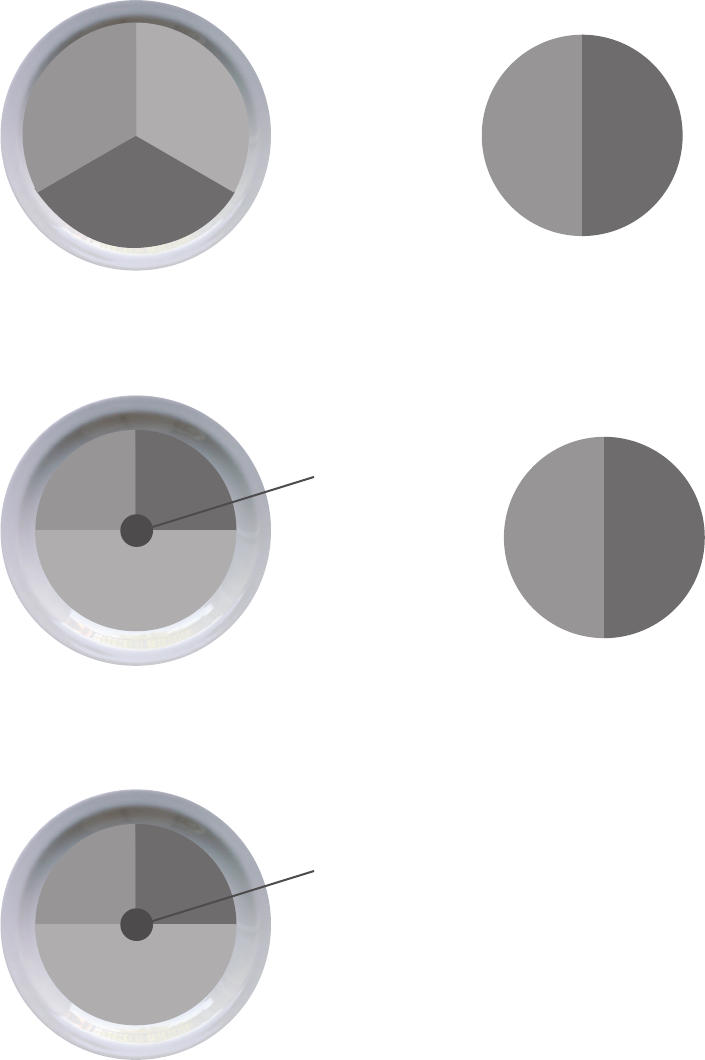
Assembly / Owner’s Manual
47
protein
veggies
rich
carbs
Here’s an overview of what an ideal day looks like:
(See Portion Size Guide for proper serving sizes)
smart
carb
protein/fat
Breakfast
Lunch
Dinner
Snack #1
Snack #2
fruit
smart
carb protein
healthy
fat
smart
carb protein
veggies
smart
carb protein
healthy
fat
smart
carb protein
veggies
Assembly / Owner’s Manual
48
Breakfast Options Fruit Smart Carb Protein/Fat
Fruit and Nut Oatmeal Cook
plain oats in water. Top with fruit,
nuts, milk, cinnamon, and honey.
Berries or banana Plain oats
(Regularorquick-cook)
Nuts and milk
Egg Mufn Cook egg/s. Toast
bread and top with 1 slice of
cheese, 1 slice of ham, and
tomato.
Tomato Englishmufnorsandwichthin Egg, ham, and cheese
Yogurt Power Parfait Top yogurt
with fruit. Sprinkle with 1 serving
ofnuts,2-3tbspwheatgerm,or
groundaxseed,1tbspoats,and
cinnamon.
Chopped fruit of your choice Oats, wheat germ, and ground
axseed
Plainnon-fatGreekyogurtand
nuts
On the Go PB & Apple Sand-
wich Toast bread. Spread on
peanut butter, thin slices of ½ an
apple, and 1 teaspoon of honey.
Sliced apple Sandwich thin, bread, or bagel
thin
Peanut butter
Lunch & Dinner Options Lean Protein Smart Carb Veggies
Pork Loin, Sweet Potato &
Green Beans
Grilled or baked pork loin Baked Sweet Potato Green Beans
Chicken Stir Fry
Flavor with 2 tablespoon teriyaki
sauce
Chicken breast or boneless skin-
less thigh
Brown or wild rice Mixedstirfryvegetables
(fresh or frozen)
Steak Tacos with Side Salad (3
for males, 2 for females) Top with
salsa, cilantro, and sprinkle of
shredded cheese
Flank or sirloin steak Corn tortillas Salad
Whole Wheat Pasta with
Shrimp or Cannellini Beans &
Marinara Sauce
Shrimp (frozen or fresh) or can-
nellini beans
Whole wheat pasta Steamed broccoli
Bunless Burgers with Oven
Fries, Corn, & Salad
Grill burgers. Bake sliced pota-
toes on sprayed cookie sheet for
25-30minutes@425°F.
93%leangroundbeeforturkey Oven baked fries Corn on the cob + side salad
Tuna & Avocado Wrap with
Vegetable Soup
Use 3oz of tuna (1 can). Top with
lettuce, tomato, avocado, and
mustard.
Tuna High-berwrap Vegetable soup
(homemadeorlow-sodium
canned)
Assembly / Owner’s Manual
49
Snack Options
Smart Carb Protein
1 medium apple 10-15almonds
Baby carrots 2 tbsp hummus
1 serving of crackers* 1 string cheese
Energy or protein bar with <200 calories*
*Seewww.Bowex.com/Resourcesforbrandrecommendations
Optional Treats
YouhavethechoiceofreplacingSnack#2witha100-150calorietreat.Youcanhaveanoptionaltreateverydaybutforoptimalhealthitisrecom-
mendedtolimitsmallsplurgesto3-4timesperweek.Usetheapproachthatworksbestforyou.Hereareafewexamples:
• ½ cup lowfat ice cream
• 1 small bag of baked potato chips
• 4oz of wine or 12oz light beer
• 3cupsofair-poppedorlightpopcorn
Sample 3 Day Plan
Based on each of the meal options listed above, a typical 3 day plan could look like this:
Day 1 Day 2 Day 3
Breakfast Eggmufn Power yogurt parfait Fruit + nut oatmeal
Snack 1 Apple with almonds Nut Thins® + string cheese Baby carrots and hummus
Lunch Tuna & avocado wrap with soup Leftoversfromdinner-day1 Leftoversfromdinner-day2
Optional Snack 2 or Treat ½ cup ice cream bar Energy bar 100 calorie bag of light popcorn
Dinner Shrimp pasta Chicken stir fry Bunless burgers
Assembly / Owner’s Manual
50
1 cup = baseball
1/2 cup = lightbulb
1 oz or 2 tbsp
= golf ball
1/4 cup nuts
= Altoids tin
3 oz chicken or meat
= deck of cards
1 medium potato
= computer mouse
1 medium piece of
fruit = tennis ball
1 -1/2 oz cheese
= 3 dice
Portion Size Guide
Each of the items listed are for one serving
MALE FEMALE
PROTEIN
2 eggs
5ozchicken,sh,leanmeat,ortofu
2/3 cup beans or lentils*
1 cup greek yogurt*
1.5oz cheese*
1 egg
3ozchicken,sh,orleanmeat
1/2 cup beans or lentils*
1/2 cup greek yogurt*
1.5oz cheese*
HEALTHY FAT
2 Tblspn peanut or nut butter*
2tspnolive,ax,orwalnutoil
1/4 cup of nuts
1/3 medium avocado
1 tblspn peanut or nut butter*
1tspnolive,axorwalnutoil
1/8cupor2tablespoonsofnuts(approx.15almonds)
1/4 medium avocado
SMART CARB
1 cup cooked grains (1/2 cup raw): oats, brown rice,
quinoa, pasta
1 medium sweet or regular potato
2 corn tortillas
1 slice of bread (or 2 light slices equaling 120 calories
or less)
1englishmufn,sandwichthin,orhigh-berwrap
1/2 cup cooked (1/4 cup raw) grains
1/2 medium sweet potato or
regular potato
2 corn tortillas
1 slice of bread (or 2 light slices equaling 120 calories or
less)
1englishmufn,sandwichthin,orhigh-berwrap
FRUIT
1 medium apple, orange, or pear
1 small banana (length of your hand)
1 cup berries or chopped fruit
1/4 cup dried fruit (fresh or frozen is optimal)
Vegetables*Youcanhaveunlimitedvegetablesexceptforpeasandcorn;stickwith1/2cupserving
2 cups spinach or lettuce = 2 cupped hands
1 cup raw vegetables
1/2 cup cooked vegetables
6ozlowsodiumvegetablejuice
OPTIONAL TREATS
1/2 cup lowfat ice cream
1 small bag of baked potato chips
1oz dark chocolate
4oz of wine or 12oz light beer
3cupsair-poppedorlightpopcorn
* some foods are a combination of protein and carbs or protein and fat
Assembly / Owner’s Manual
51
Grocery List
BREAD & GRAINS
100%wholewheatbread
Sprouted grain breads
Lightorwholewheatenglishmufns
Sandwich or bagel thins
Cornorlow-carbwholewheattortillas
High-berwraps
Plain oats: 1 minute or old fashioned
Whole grains: brown rice, bulgar, barley, quinoa, couscous
Tips:Lookfor100%wholewheatastherstingredient.Lookfor4gof
berpersliceor5gper2slicesoflightordietbread.Aimforbreadwith
less than 100 calories per slice.
DAIRY & DAIRY ALTERNATIVES
Plainnon-fatgreekyogurt
Ker(yogurtlikedrink)
Organiclow-fatmilk
Enriched almond or soy milk
Cheese: feta, parmesan, mozzarella, light havarti, provolone, swiss,
string cheese, or single serving packages
MEAT, FISH, POULTRY & PROTEIN
Wild game
Salmon, halibut, tuna, tilapia, shrimp,
catsh,scallops,orcrab
Pork loin, pork chops, or pork roast
Chicken or turkey breast or thighs (no skin)
Eggsand100%eggwhites
Leanbeef:sirloin,chuck,round,tenderloin,93%lean(organicand
grass fed is best)
Canned salmon or tuna (in water)
Nitrate-free,reducedsodiumham,turkey,chicken,orroastbeeflunch-
meat
Anytypeofbean,dryorcannedlow-sodiumvarieties
Tofu and tempeh
Tips: Look for “Choice” or “Select” cuts of meat rather than “Prime”.
Prime cuts are fattier. Limit intake of highly processed meat and
imitation meat products like sausage, bacon, pepperoni, and hot dogs to
once a week or less.
FROZEN FOODS
All vegetables without sauce
All fruit
Grains and grain medleys
CRACKERS, SNACKS & ENERGY BARS
Any unsalted nuts or seeds
Air-poppedorlightpopcorn
Edamame in the pod
Energy bars
Crackers
Hummus
Tips:Limitcrackers,pretzels,andchipsto2-3servingsperweek.
Always pair with protein such as hummus, cheese, or nuts. Look for
energy bars with less than 200 calories and 20g of sugar and at least 3g
ofproteinand3gofber.Lookforcrackerswithlessthan130calories
and 4g or less of fat per serving.
FATS & OILS
Avocado
Olive,grapeseed,walnut,sesame,oraxseedoil
Butter/spreads: look for products free of trans fats and partially
hydrogenated oils on the ingredient list.
Tips:Lightoliveoilreferstotheavor,notthecaloriecontent.Always
measure oil and butter. Even if a fat is considered healthy, it’s still very
high in calories and portions need to be controlled.
DRESSINGS, CONDIMENTS & SAUCES
Vinegars: rice, wine, balsamic
All fresh or dried herbs and spices
Mustard
Salsa and chili sauce
Marinarasaucewithnohigh-fructosecornsyrup
Lemon and lime juice
Bottled minced garlic and ginger
Low-sodiumsoysauce
Tips: Look for products free of MSG, added colors, and high fructose
corn syrup. Look for sauces under 50 calories per serving. Avoid cream
based sauces and dressings like ranch, bleu cheese, and alfredo.
Allfruitsandvegetables,freshandfrozen,aregreatchoices.Sinceeverymealhasoneorboth,yourshoppingcartshouldreectthis.
Assembly / Owner’s Manual
52
Keep It Going
Tips for continued weight loss and maintaining changes
• Keep weighing yourself weekly, even after you’ve reached your goal weight
• Continue keeping a food log.Ifyouhaveyourmealplanwell-established,logyourfoodeveryotherweektokeepyourselfontrack.Don’t
feel like you have to do it every day.
• Prepare for plateaus.Thescalemightnotbudgeforafewweeksorevenmonthsaftersomeinitialweightloss.Thisisnormalandtobeex-
pected.It’sthebody’snaturalprocessforadjustingtoyournewlowerweight.Stayfocusedonyourlong-termgoal,celebrateyoursuccesses
andchanges,andmixupyourworkoutstohelpovercometheplateau.
• Calorie adjustments for maintaining weight loss.Onceyou’vereachedyourgoalweight,youcanincreaseyourcalories100-200perday
as long as your activity level stays the same
• Treat yourself.Haveanon-foodrewardforeachgoalyouhitsuchasamassage,anewoutt,oranoutingwithfriendsandfamily
• Use the resources belowtondnewrecipes,getexpertadvice,andsupporttostaymotivated
Resources
Downloadable Resources from Bowex™ Website(www.Bowex.com/Resources)
• Grocery Shopping List for Fridge (Blank Form)
• 7 Day Meal Planning Form
• Additional Dinner Options
• Pre and Post Workout Fueling Guide
Questions & Support
• Askquestions,postsuggestions,andconnectwithouronlineBowex™DietitianontheBowexFacebookpage
Recipes
• www.wholeliving.com
• www.eatingwell.com
• www.whfoods.org
• www.livebetteramerica.org
Online food logs
• www.mytnesspal.com
• www.loseit.com
Assembly / Owner’s Manual
53
Assembly / Owner’s Manual
54

Assembly / Owner’s Manual
55
Who Is Covered
This warranty is valid only to the original purchaser and is not transferable or applicable to any other person(s).
What Is Covered
Nautilus, Inc. warrants that this product is free from defects in materials and workmanship, when used for the purpose intended, under normal conditions, and provided it receives
proper care and maintenance as described in the Product’s Assembly and Owner’s manual. This warranty is good only for authentic, original, legitimate machines manufactured by
Nautilus, Inc. and sold through an authorized agent and used in the United States or Canada.
Terms
• Frame 2 years
• Mechanical parts 2 years
• Electronics 2 years
• All other components 2 years
• Labor 90 days
(Labor support does not include the installation of replacement parts involved in the initial product assembly and preventative maintenance services. All repairs covered
under the labor portion of the warranty must be preauthorized by Nautilus.)
How Nautilus Will Support the Warranty
Throughout the terms of the warranty coverage, Nautilus, Inc. will repair any machine that proves to be defective in materials or workmanship. Nautilus reserves the right to replace
the product in the event a repair is not possible. When Nautilus determines replacement is the correct remedy, Nautilus may apply a limited credit reimbursement toward another
Nautilus, Inc. brand Product, at our discretion. This reimbursement may be prorated based on length of ownership. Nautilus, Inc. provides repair service within major metropolitan
areas. Nautilus, Inc. reserves the right to charge the consumer for travel outside these areas. Nautilus, Inc. is not responsible for dealer labor or maintenance charges beyond the
applicable warranty period(s) stated herein. Nautilus, Inc. reserves the right to substitute material, parts or products of equal or better quality if identical materials or products are
not available at the time of service under this warranty. Any replacement of the product under the terms of the Warranty in no way extends the original Warranty period. Any limited
credit reimbursement may be prorated based on length of ownership. THESE REMEDIES ARE THE EXCLUSIVE AND SOLE REMEDIES FOR ANY BREACH OF WARRANTY.
What You Must Do
• Retain appropriate and acceptable Proof of Purchase.
• Operate, maintain, and inspect the Product as specified in the Product Documentation (Assembly, Owner’s Manuals, etc.).
• Product must be used exclusively for the purpose intended.
• Notify Nautilus within 30 days after detecting an issue with the Product.
• Install replacement parts or components in accordance with any Nautilus instructions.
• Perform diagnostic procedures with a trained Nautilus, Inc representative if requested.
What Is Not Covered
• Damage due to abuse, tampering or modification of the Product, failure to properly follow assembly instructions, maintenance instructions, or safety warnings as stated in the
Product Documentation (Assembly, Owner’s Manuals, etc), damage due to improper storage or the effect of environmental conditions such as moisture or weather, misuse,
mishandling, accident, natural disasters, power surges.
• A machine placed or used in a commercial or institutional setting. This includes gyms, corporations, work places, clubs, fitness centers and any public or private entity that
has a machine for use by its members, customers, employees or affiliates.
• Damage caused by exceeding maximum user weights as defined in the Product’s Owner’s manual or warning label.
• Damage due to normal usage and wear and tear.
• This warranty does not extend to any territories or countries outside the United States and Canada.
How to Obtain Service
For Products purchased directly from Nautilus, Inc. contact the Nautilus office listed on the Contacts page of the products Owner’s manual. You may be required to return the
defective component to a specified address for repair or inspection, at your expense. Standard ground shipping of any warranty replacement parts will be paid by Nautilus, Inc. For
products purchased from a retailer, you may be asked to contact your retailer for warranty support.
Exclusions
The preceding warranties are the sole and exclusive express warranties made by Nautilus, Inc. They supersede any prior, contrary or additional representations, whether oral or
written. No agent, representative, dealer, person or employee has the authority to alter or increase the obligations or limitations of this warranty. Any implied warranties, including
the WARRANTY OF MERCHANTABILITY and any WARRANTY OF FITNESS FOR A PARTICULAR PURPOSE, are limited in duration to the term of the applicable express warranty
provided above, whichever is longer. Some states do not allow limitations on how long an implied warranty lasts, so the above limitation may not apply to you.
Limitation of Remedies
EXCEPT AS OTHERWISE REQUIRED BY APPLICABLE LAW, THE PURCHASER’S EXCLUSIVE REMEDY IS LIMITED TO REPAIR OR REPLACEMENT OF ANY COMPONENT DEEMED BY
NAUTILUS, INC. TO BE DEFECTIVE UNDER THE TERMS AND CONDITIONS STATED HEREIN. IN NO EVENT WILL NAUTILUS, INC. BE LIABLE FOR ANY SPECIAL, CONSEQUENTIAL,
INCIDENTAL, INDIRECT OR ECONOMIC DAMAGES, REGARDLESS OF THE THEORY OF LIABILITY (INCLUDING, WITHOUT LIMITATION, PRODUCT LIABILITY, NEGLIGENCE OR OTHER
TORT) OR FOR ANY LOST REVENUE, PROFIT, DATA, PRIVACY OR FOR ANY PUNITIVE DAMAGES ARISING OUT OF OR RELATED TO THE USE OF THE FITNESS MACHINE EVEN IF
NAUTILUS, INC. HAS BEEN ADVISED OF THE POSSIBILITY OF SUCH DAMAGES. THIS EXCLUSION AND LIMITATION SHALL APPLY EVEN IF ANY REMEDY FAILS OF ITS ESSENTIAL
PURPOSE. SOME STATES DO NOT ALLOW THE EXCLUSION OR LIMITATION OF CONSEQUENTIAL OR INCIDENTAL TYPE DAMAGES SO THE ABOVE LIMITATION MAY NOT APPLY TO
YOU.
State Laws
This warranty gives you specific legal rights. You may also have other rights, which vary from state to state.
Expirations
If the warranty has expired, Nautilus, Inc. may assist with replacements or repairs to parts and labor, but there will be a charge for these services. Contact a Nautilus® office for
information on post-warranty parts and services. Nautilus® does not guarantee availability of spare parts after expiration of warranty period.
International Purchases
If you purchased your machine outside of the United States consult your local distributor or dealer for warranty coverage.
Warranty
8014837.100117.B
EN
