Boya Audio Equipment BY-WM4 2.4GHz Wireless Microphone User Manual BY WM4 01

Boya Audio Equipment (Shenzhen) Co., Ltd. 2.4GHz Wireless Microphone BY WM4 01

User Manual

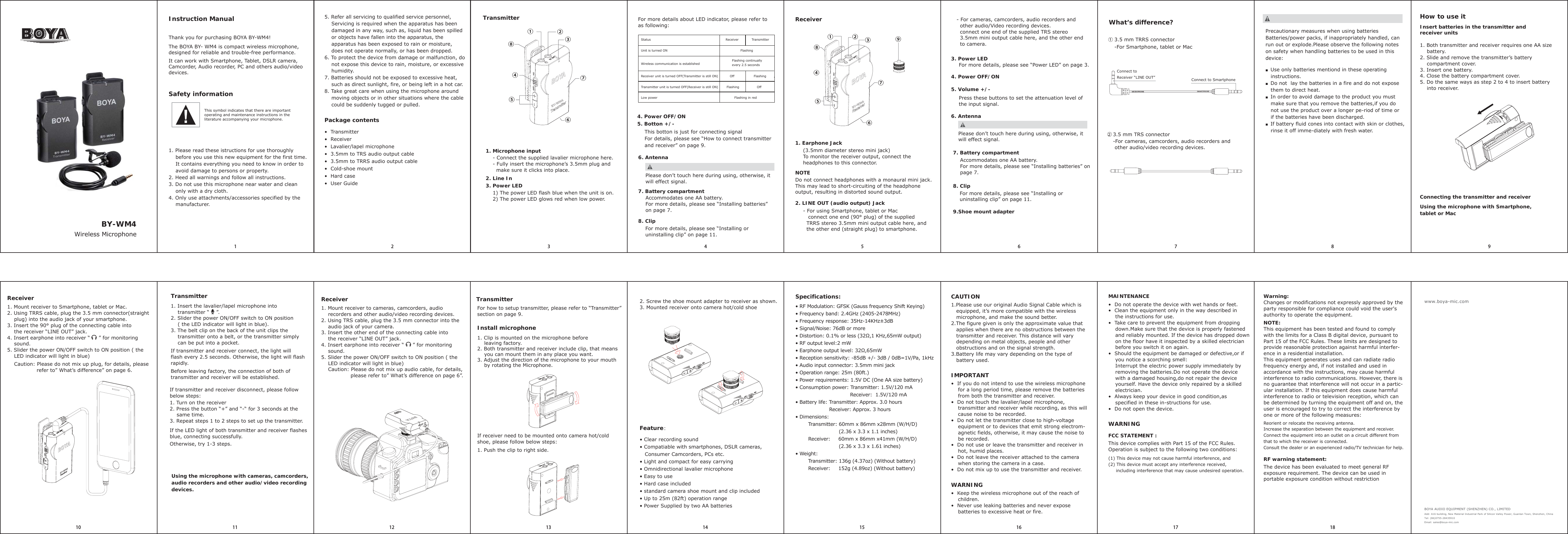
Thank you for purchasing BOYA BY-WM4!Please don’t touch here during using, otherwise, it will effect signal.Please don’t touch here during using, otherwise, it will effect signal.7. Battery compartmentAccommodates one AA battery.For more details, please see “Installing batteries” on page 7.For more details, please see “Installing or uninstalling clip” on page 11.8. Clip1. Earphone JackInstruction Manual1. Please read these istructions for use thoroughly     before you use this new equipment for the first time.    It contains everything you need to know in order to     avoid damage to persons or property.2. Heed all warnings and follow all instructions.3. Do not use this microphone near water and clean     only with a dry cloth.4. Only use attachments/accessories specified by the     manufacturer.(3.5mm diameter stereo mini jack)To monitor the receiver output, connect the headphones to this connector.NOTEDo not connect headphones with a monaural mini jack.This may lead to short-circuiting of the headphone output, resulting in distorted sound output.2. LINE OUT (audio output) Jack- For cameras, camcorders, audio recorders and  other audio/Video recording devices.  connect one end of the supplied TRS stereo  3.5mm mini output cable here, and the other end  to camera.3. Power LEDFor more details, please see “Power LED” on page 3.4. Power OFF/ONPress these buttons to set the attenuation level of the input signal.6. Antenna7. Battery compartmentAccommodates one AA battery.For more details, please see “Installing batteries” on page 7.8. ClipFor more details, please see “Installing or uninstalling clip” on page 11.9.Shoe mount adapter①②③④⑧⑤⑥⑦②① ③④⑤⑥⑦⑧What’s difference?MICROPHONE SMARTPHONEHow to use itInsert batteries in the transmitter and receiver units1. Both transmitter and receiver requires one AA size    battery.2. Slide and remove the transmitter’s battery     compartment cover.3. Insert one battery.4. Close the battery compartment cover.5. Do the same ways as step 2 to 4 to insert battery     into receiver.Precautionary measures when using batteriesBatteries/power packs, if inappropriately handled, can run out or explode.Please observe the following notes on safety when handling batteries to be used in this device:■   Use only batteries mentiond in these operating    instructions.■   Do not  lay the batteries in a fire and do not expose    them to direct heat.■   In order to avoid damage to the product you must    make sure that you remove the batteries,if you do    not use the product over a longer pe-riod of time or    if the batteries have been discharged.■   If battery fluid cones into contact with skin or clothes,    rinse it off imme-diately with fresh water.Connecting the transmitter and receiverUsing the microphone with Smartphone, tablet or MacReceiverUsing the microphone with cameras, camcorders, audio recorders and other audio/video recording devices. ReceiverReceiver3.5 mm TRS connector2-For cameras, camcorders, audio recorders and  other audio/video recording devices.3.5 mm TRRS connector-For Smartphone, tablet or Mac1Connect to Receiver “LINE OUT” Connect to Smartphone12345678910 11 12 13 14 15 16 17 18- For using Smartphone, tablet or Mac   connect one end (90° plug) of the supplied  TRRS stereo 3.5mm mini output cable here, and   the other end (straight plug) to smartphone.5. Volume +/-The BOYA BY- WM4 is compact wireless microphone, designed for reliable and trouble-free performance.It can work with Smartphone, Tablet, DSLR camera, Camcorder, Audio recorder, PC and others audio/video devices.5. Refer all servicing to qualified service personnel,     Servicing is required when the apparatus has been     damaged in any way, such as, liquid has been spilled     or objects have fallen into the apparatus, the     apparatus has been exposed to rain or moisture,     does not operate normally, or has been dropped.6. To protect the device from damage or malfunction, do     not expose this device to rain, moisture, or excessive    humidity.7. Batteries should not be exposed to excessive heat,     such as direct sunlight, fire, or being left in a hot car.8. Take great care when using the microphone around     moving objects or in other situations where the cable     could be suddenly tugged or pulled.Package contents  Transmitter  Receiver   Lavalier/lapel microphone  3.5mm to TRS audio output cable  3.5mm to TRRS audio output cable  Cold-shoe mount  Hard case  User *uide1. Microphone input- Connect the supplied lavalier microphone here. - Fully insert the microphone’s 3.5mm plug and   make sure it clicks into place.2. Line In3. Power LED1) The power LED flash blue when the unit is on.2) The power LED glows red when low power.For more details about LED indicator, please refer to as following:Status                                                   Receiver  TransmitterUnit is turned ON                                                      FlashingWireless communication is established                        Receiver unit is turned OFF(Transmitter is still ON)           Off    FlashingTransmitter unit is turned OFF(Receiver is still ON)        Flashing       OffLow power                                                                     Flashing in redFlashing continually every 2.5 seconds4. Power OFF/ON5. Botton +/-This botton is just for connecting signalFor details, please see “How to connect transmitter and receiver” on page 9.6. AntennaTransmitterTransmitter1. Insert the lavalier/lapel microphone into     transmitter “    ”.2. Slider the power ON/OFF switch to ON position     ( the LED indicator will light in blue).3. The belt clip on the back of the unit clips the     transmitter onto a belt, or the transmitter simply     can be put into a pocket.If transmitter and receiver connect, the light will flash every 2.5 seconds. Otherwise, the light will flash rapidly.Before leaving factory, the connection of both of transmitter and receiver will be established.TransmitterIf transmitter and receiver disconnect, please follow below steps:1. Turn on the receiver2. Press the button “+” and “-“ for 3 seconds at the     same time.3. Repeat steps 1 to 2 steps to set up the transmitter.If the LED light of both transmitter and receiver flashes blue, connecting successfully.Otherwise, try 1-3 steps.Feature: Clear recording sound Compatiable with smartphones, DSLR cameras,    Consumer Camcorders, PCs etc. Light and compact for easy carrying Omnidirectional lavalier microphone Easy to use Hard case included standard camera shoe mount and clip included Up to 25m (82ft) operation range Power Supplied by two AA batteriesSpecifications: RF Modulation: *FS. (*auss frequency Shift .eying) Frequency band: 2.4*Hz (2405-2478MHz) Frequency response: 35Hz-14.Hz3dB Signal/Noise: 76dB or more Distortion: 0.1 or less (32ƻ,1 .Hz,65mW output) RF output level:2 mW Earphone output level: 32ƻ,65mW Reception sensitivity: -85dB +/- 3dB / 0dB 1V/Pa, 1kHz Audio input connector: 3.5mm mini jack Operation range: 25m (80ft.) Power requirements: 1.5V DC (One AA size battery) Consumption power: Transmitter: 1.5V/120 mA                                   Receiver:  1.5V/120 mA Battery life: Transmitter: Approx. 3.0 hours                     Receiver: Approx. 3 hours Dimensions:        Transmitter: 60mm x 86mm x28mm (W/H/D)                            (2.36 x 3.3 x 1.1 inches)        Receiver:     60mm x 86mm x41mm (W/H/D)                            (2.36 x 3.3 x 1.61 inches) Weight:        Transmitter: 136g (4.37oz) (Without battery)        Receiver:     152g (4.89oz) (Without battery)CAUTION1.Please use our original Audio Signal Cable which is    equipped, it’s more compatible with the wireless    microphone, and make the sound better.2.The figure given is only the approximate value that    applies when there are no obstructions between the    transmitter and receiver. This distance will vary    depending on metal objects, people and other    obstructions and on the signal strength.3.Battery life may vary depending on the type of    battery used.IMPORTANT  If you do not intend to use the wireless microphone     for a long period time, please remove the batteries     from both the transmitter and receiver.  Do not touch the lavalier/lapel microphone,     transmitter and receiver while recording, as this will     cause noise to be recorded.  Do not let the transmitter close to high-voltage     equipment or to devices that emit strong electrom-    agnetic fields, otherwise, it may cause the noise to     be recorded.  Do not use or leave the transmitter and receiver in     hot, humid places.  Do not leave the receiver attached to the camera     when storing the camera in a case.  Do not mix up to use the transmitter and receiver.MAINTENANCE  Do not operate the device with wet hands or feet.  Clean the equipment only in the way described in     the instructions for use.  Take care to prevent the equipment from dropping     down.Make sure that the device is properly fastened     and reliably mounted. If the device has dropped down     on the floor have it inspected by a skilled electrician     before you switch it on again.  Should the equipment be damaged or defective,or if     you notice a scorching smell:    Interrupt the electric power supply immediately by     removing the batteries.Do not operate the device     with a damaged housing,do not repair the device     yourself. Have the device only repaired by a skilled     electrician.  Always keep your device in good condition,as     specified in these in-structions for use.  Do not open the device.WARNING  .eep the wireless microphone out of the reach of     children.  Never use leaking batteries and never expose     batteries to excessive heat or fire.WARNINGFCC STATEMENT :This device complies with Part 15 of the FCC Rules. Operation is subject to the following two conditions:(1) This device may not cause harmful interference, and(2) This device must accept any interference received,      including interference that may cause undesired operation.Warning: Changes or modifications not expressly approved by the party responsible for compliance could void the user's authority to operate the equipment.NOTE: This equipment has been tested and found to comply with the limits for a Class B digital device, pursuant to Part 15 of the FCC Rules. These limits are designed to provide reasonable protection against harmful interfer-ence in a residential installation.This equipment generates uses and can radiate radio frequency energy and, if not installed and used in accordance with the instructions, may cause harmful interference to radio communications. However, there is no guarantee that interference will not occur in a partic-ular installation. If this equipment does cause harmful interference to radio or television reception, which can be determined by turning the equipment off and on, theuser is encouraged to try to correct the interference by one or more of the following measures:Reorient or relocate the receiving antenna.Increase the separation between the equipment and receiver.Connect the equipment into an outlet on a circuit different from that to which the receiver is connected.Consult the dealer or an experienced radio/TV technician for help.RF warning statement:The device has been evaluated to meet general RF exposure requirement. The device can be used in portable exposure condition without restrictionBOYA AUDIO EQUIPMENT (SHENZHEN) CO., LIMITEDAdd: A16 building, New Material Industrial Park of Silicon Valley Power, *uanlan Town, Shenzhen, ChinaTel: (86)0755-28435910Email: sales@boya-mic.comwww.boya-mic.comSafety informationThis symbol indicates that there are important operating and maintenance instructions in the literature accompanying your microphone.1. Mount receiver to Smartphone, tablet or Mac.2. Using TRRS cable, plug the 3.5 mm connector(straight     plug) into the audio jack of your smartphone.3. Insert the 90° plug of the connecting cable into     the receiver “LINE OUT” jack.4. Insert earphone into receiver “     ” for monitoring     sound.5. Slider the power ON/OFF switch to ON position ( the     LED indicator will light in blue)    Caution: Please do not mix up plug, for details, please                  refer to” What’s difference” on page 6.1. Mount receiver to cameras, camcorders, audio     recorders and other audio/video recording devices. 2. Using TRS cable, plug the 3.5 mm connector into the     audio jack of your camera.3. Insert the other end of the connecting cable into     the receiver “LINE OUT” jack.4. Insert earphone into receiver “     ” for monitoring     sound.5. Slider the power ON/OFF switch to ON position ( the     LED indicator will light in blue)    Caution: Please do not mix up audio cable, for details,                  please refer to” What’s difference on page 6”.For how to setup transmitter, please refer to “Transmitter”section on page 9.Install microphone1. Clip is mounted on the microphone before     leaving factory.2. Both transmitter and receiver include clip, that means     you can mount them in any place you want.3. Adjust the direction of the microphone to your mouth     by rotating the Microphone.If receiver need to be mounted onto camera hot/cold shoe, please follow below steps:1. Push the clip to right side.2. Screw the shoe mount adapter to receiver as shown. 3. Mounted receiver onto camera hot/cold shoeBY-WM4Wireless Microphone⑨

Navigation menu