Boya Audio Equipment BY-WM8 UHF Dual-Channel Wireless Microphone System User Manual WM8

Boya Audio Equipment (Shenzhen) Co., Ltd. UHF Dual-Channel Wireless Microphone System WM8

User manual

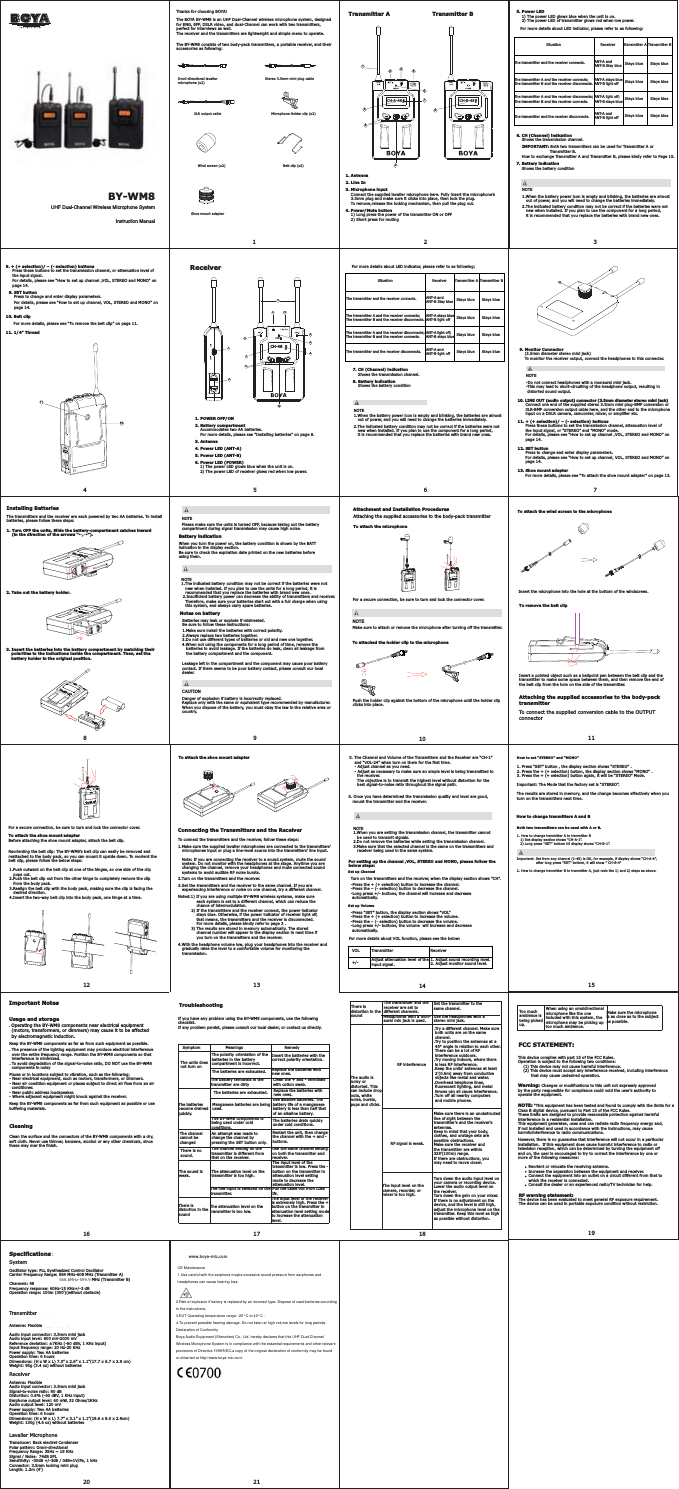
www.boya-mic.com,QVWUXFWLRQ0DQXDOBY-WM8Thanks for choosing BOYA!The BOYA BY-WM8 is an UHF Dual-Channel wireless microphone system, designedfor ENG, EFP, DSLR video, and dual-Channel can work with two transmitters, perfect for interviews as well.The receiver and the transmitters are lightweight and simple menu to operate.The BY-WM8 consists of two body-pack transmitters, a portable receiver, and theiraccessories as following:Omni-directional lavalier microphone (x2)Stereo 3.5mm mini plug cableXLR output cable Microphone Holder clip (x2)Wind screen (x2) Belt clip (x2)Shoe mount adapterBattery indicationWhen you turn the power on, the battery condition is shown by the BATT indication in the display section.Be sure to check the expiration date printed on the new batteries before using them.  NOTE  1.The indicated battery condition may not be correct if the batteries were not      new when installed. If you plan to use the units for a long period, it is      recommended that you replace the batteries with brand new ones.   2.Insufficient battery power can decrease the ability of transmitters and receiver.     Therefore, make sure your batteries start out with a full charge when using      this system, and always carry spare batteries.Notes on battery  Batteries may leak or explode if mistreated.  Be sure to follow these instructions:  1.Make sure install the batteries with correct polarity.  2.Always replace two batteries together.3.Do not use different types of batteries or old and new one together.4.When not using the components for a long period of time, remove the    batteries to avoid leakage. If the batteries do leak, clean all leakage from    the battery compartment and the component.Leakage left in the compartment and the component may cause poor battery contact. If there seems to be poor battery contact, please consult our local dealer.Attachment and Installation ProceduresAttaching the supplied accessories to the body-pack transmitterTo attach the microphoneFor a secure connection, be sure to turn and lock the connector cover.NOTEMake sure to attach or remove the microphone after turning off the transmitter.To attached the holder clip to the microphonePush the holder clip against the bottom of the microphone until the holder clip clicks into place.To attach the wind screen to the microphoneInsert the microphone into the hole at the bottom of the windscreen.To remove the belt clipInsert a pointed object such as a ballpoint pen between the belt clip and the transmitter to make some space between them, and then remove the end of the belt clip from the hole on the side of the transmitter.Attaching the supplied accessories to the body-pack transmitterTo connect the supplied conversion cable to the OUTPUT connectorFor a secure connection, be sure to turn and lock the connector cover.Too much ambience is being picked up.When using an omnidirectional microphone like the one included with this system, the microphone may be picking up too much ambience.Make sure the microphone is as close as to the subjectas possible.Specifications:SystemOscillator type: PLL Synthesized Control OscillatorCarrier Frequency Range: 584 MHz-608 MHz (Transmitter A)568.6MHz-599.9 MHz (Transmitter B)Channels: 48 Frequency response: 60Hz-15 KHz+/-3 dBOperation range: 100m (300')(without obstacle)TransmitterRF output power: 20 mWAntenna: FlexibleSpurious emission: 250 nW or lessAudio input connector: 3.5mm mini jackAudio input level: 600 mV-2000 mVReference deviation: ±7KHz (-60 dBV, 1 KHz input)Input frequency range: 20 Hz-20 KHzPower supply: Two AA batteriesOperation time: 6 hoursDimensions: (H x W x L) 7.0” x 2.6” x 1.1”(17.7 x 6.7 x 2.9 cm)Weight: 95g (3.4 oz) without batteriesReceiverAntenna: FlexibleAudio input connector: 3.5mm mini jackSignal-to-noise ratio: 80 dBDistortion: 0.8% (-60 dBV, 1 KHz input)Earphone output level: 60 mW, 32 Ohms/1KHzAudio output level: 120 mVPower supply: Two AA batteriesOperation time: 6 hoursDimensions: (H x W x L) 7.7” x 3.1” x 1.1”(19.6 x 8.0 x 2.9cm)Weight: 130g (4.6 oz) without batteriesLavalier MicrophoneTransducer: Back electret Condenser Polar pattern: Omni-directionalFrequency Range: 35Hz ~ 18 KHzSignal / Noise:74dB SPLSensitivity: -30dB +/-3dB / 0dB=1V/Pa, 1 kHz    Connector: 3.5mm locking mini plugLength: 1.2m (4’)Transmitter A Transmitter B1. Antenna2. Line In3. Microphone inputConnect the supplied lavalier microphone here. Fully insert the microphone’s     3.5mm plug and make sure it clicks into place, then lock the plug.     To remove,release the locking mechanism, then pull the plug out.4. Power/Mute button1) Long press the power of the transmitter ON or OFF2) Short press for muting For more details about LED indicator, please refer to as following:6. CH (Channel) indicationShows the transmission channel.How to exchange Transmitter A and Transmitter B, please kindy refer to Page 15.7. Battery indicationShows the battery conditionNOTE1.When the battery power icon is empty and blinking, the batteries are almost    out of power, and you will need to change the batteries immediately.2.The indicated battery condition may not be correct if the batteries were not    new when installed. If you plan to use the component for a long period,    it is recommended that you replace the batteries with brand new ones.NOTEPlease make sure the units is turned OFF, because taking out the battery compartment during signal transmission may cause high noise.Before attaching the shoe mount adapter, attach the belt clip.Reorienting the belt clip: The BY-WM8’s belt clip can easily be removed and reattached to the body pack, so you can mount it upside down. To reorient the belt clip, please follow the below steps:1.Push outward on the belt clip at one of the hinges, so one side of the clip    pops out.2.Push the belt clip out from the other hinge to completely remove the clip    from the body pack.3.Realign the belt clip with the body pack, making sure the clip is facing the    desired direction.4.Insert the two-way belt clip into the body pack, one hinge at a time.To attach the shoe mount adapterConnecting the Transmitters and the ReceiverTo connect the transmitters and the receiver, follow these steps:1.Make sure the supplied lavalier microphones are connected to the transmitters’   microphones input or plug a line-level source into the transmitters’ line input.   Note: If you are connecting the receiver to a sound system, mute the sound   system. Do not monitor with the headphones at the stage. Anytime you are   changing the channel, remove your headphones and mute connected sound   systems to avoid audible RF noise bursts.2.Turn on the transmitters and the receiver.3.Set the transmitters and the receiver to the same channel. If you are   experiencing interference or noise on one channel, try a different channel.Noted:1) If you are using multiple BY-WM8 wireless systems, make sureeach system is set to a different channel, which can reduce thechance of intermodulation.2) If the transmitters and the receiver connect, the power indicatorstays blue. Otherwise, if the power indicator of receiver light off, that means, the transmitters and the receiver is disconnected.For more details, please kindly refer to page 3 .3) The results are stored in memory automatically. The storedchannel number will appear in the display section in next time ifyou turn on the transmitters and the receiver.4.With the headphone volume low, plug your headphones into the receiver and   gradually raise the level to a comfortable volume for monitoring the    transmission.6. Once you have determined the transmission quality and level are good,    mount the transmitter and the receiver. NOTE1.When you are setting the transmission channel, the transmitter cannot    be used to transmit signals.2.Do not remove the batteries while setting the transmission channel.3.Make sure that the selected channel is the same on the transmitters and    receiver being used in the same system.For setting up the channel ,VOL, STEREO and MONO, please follow the below steps:Set up Channel  Turn on the transmitters and the receiver, when the display section shows “CH”.  -Press the + (+ selection) button to increase the channel.    -Press the – (- selection) button to decrease the channel.  -Long press +/- buttons, the channel will increase and decrease    automatically.  Set up Volume  -Press “SET” button, the display section shows “VOL”  -Press the + (+ selection) button to increase the volume.      -Press the – (- selection) button to decrease the volume.  -Long press +/- buttons, the volume  will increase and decrease    automatically.For more details about VOL function, please see the below:VOL+/-TransmitterAdjust attenuation level of theinput signal.Receiver1. Adjust sound recording level.  2. Adjust monitor sound level.Important NotesUsage and storage.Operating the BY-WM8 components near electrical equipment   (motors, transformers, or dimmers) may cause it to be affected   by electromagnetic induction.Keep the BY-WM8 components as far as from such equipment as possible.. The presence of the lighting equipment may produce electrical interference   over the entire frequency range. Position the BY-WM8 components so that   interference is minimized.. To avoid degradation of the signal-to-noise ratio, DO NOT use the BY-WM8  components in noisyPlaces or in locations subject to vibration, such as the following:- Near electrical equipment, such as motors, transformers, or dimmers.- Near air condition equipment or places subject to direct air flow from an air   conditioner.- Near public address loudspeaker.- Where adjacent equipment might knock against the receiver.Keep the BY-WM8 components as far from such equipment as possible or use buffering materials.CleaningClean the surface and the connectors of the BY-WM8 components with a dry, soft cloth. Never use thinner, benzene, alcohol or any other chemicals, since these may mar the finish.TroubleshootingIf you have any problem using the BY-WM8 components, use the following checklist.If any problem persist, please consult our local dealer, or contact us directly.Symptom Meanings RemedyThe units does not turn onThe polarity orientation of the batteries in the battery compartment is incorrect.The batteries are exhausted. Replace the batteries with new ones.The battery terminals in the transmitter are dirtyClean the + and - terminals with cotton swab.Insert the batteries with the correct polarity orientation.The batteries become drained quickly.The batteries are exhausted. Replace the batteries with new ones.Manganese batteries are being used.Use alkaline batteries. The battery life of a manganese battery is less than half that of an alkaline battery.The BY-WM8 components is being used under cold conditions.The batteries drain quickly under cold conditions.The channel cannot be changedAn attempt was made to change the channel by pressing the SET button only.There is no sound.The channel setting on the transmitter is different from that on the receiver. Use the same channel setting on both the transmitter and receiver.The sound is weak.The attenuation level on the transmitter is too high.The input level of the transmitter is low. Press the -button on the transmitter in attenuation level setting mode to decrease the attenuation level.The line input is selected on the transmitter.Pull the cable out from LINE IN.There is distortion in the soundThere is distortion in the soundThe attenuation level on the transmitter is too low.The input level of the receiver is extremely high. Press the + button on the transmitter in attenuation level setting mode to increase the attenuation level.The transmitter and the receiver are set to different channels.Set the transmitter to the same channel.Headphones with a mon-aural min jack is used.Use the headphones with a stereo mini jack.RF interference.Try a different channel. Make sure  both units are on the same  channel. .Try to position the antennas at a 45° angle in relation to each other. There can be a lot of RF  interference outdoors. .Try moving indoors, where there  is less RF interference.   .Keep the units' antennas at least  2'(0.6m) away from conductive  objects like metal and water. .Overhead telephone lines,  fluorescent lighting, and metal  fences can all cause interference..Turn off all nearby computers  and mobile phones.         The audio is noisy or distorted. This can include dropouts, white noise, bursts, pops and clicks.RF signal is weak.Make sure there is an unobstructed line of sight between the transmitter's and the receiver's antennas. Keep in mind that your body, clothes, and onstage sets arepossible obstructions. Make sure the receiver and the transmitter are within 328'(100m) range.If there are obstructions, you may need to move closer.The input level on the camera, recorder, or mixer is too high.Turn down the audio input level onyour camera or recording device. Lower the audio output level onthe receiver.Turn down the gain on your mixer.  If there is no adjustment on the device, and the level is still high, adjust the microphone level on the transmitter. Keep this level as high as possible without distortion.12367458910 1112 13 14 1516 17 18 1920 215. Power LED1) The power LED glows blue when the unit is on.2) The power LED of transmitter glows red when low power.Installing BatteriesThe transmitters and the receiver are each powered by two AA batteries. To install batteries, please follow these steps:1. Turn OFF the units, Slide the battery-compartment catches inward     (in the direction of the arrows “←,→”).3. Insert the batteries into the battery compartment by matching their     polarities to the indications inside the compartment. Then, set the     battery holder in the original position.2. Take out the battery holder.8+)'XDO&KDQQHO:LUHOHVV0LFURSKRQH6\VWHP5. The Channel and Volume of the Transmitters and the Receiver are “CH-1”    and “VOL-24” when turn on them for the first time.    - Adjust channel as you need.    - Adjust as necessary to make sure an ample level is being transmitted to       the receiver.       The objective is to transmit the highest level without distortion for the       best signal-to-noise ratio throughout the signal path.Restart the unit, then change the channel with the + and - buttons.This device complies with part 15 of the FCC Rules. Operation is subject to the following two conditions:     (1) This device may not cause harmful interference.     (2) This device must accept any interference received, including interference          that may cause undesired operation.Warning: Changes or modifications to this unit not expressly approvedby the party responsible for compliance could void the user’s authority to operate the equipment.NOTE: “This equipment has been tested and found to comply with the limits for a Class B digital device, pursuant to Part 15 of the FCC Rules.  These limits are designed to provide reasonable protection against harmful interference in a residential installation.  This equipment generates, uses and can radiate radio frequency energy and, if not installed and used in accordance with the instructions, may cause harmfulinterference to radio communications.However, there is no guarantee that interference will not occur in a particular installation.  If this equipment does cause harmful interference to radio ortelevision reception, which can be determined by turning the equipment off and on, the user is encouraged to try to correct the interference by one or more of the following measures:        Reorient or relocate the receiving antenna.        Increase the separation between the equipment and receiver.        Connect the equipment into an outlet on a circuit different from that to         which the receiver is connected.        Consult the dealer or an experienced radio/TV technician for help.FCC STATEMENT:RF warning statement:The device has been evaluated to meet general RF exposure requirement. The device can be used in portable exposure condition without restriction.CH-A-48 CH-B-481234657896Situation Transmitter AReceiver Transmitter BStays blue Stays blueStays blue Stays blueStays blue Stays blueStays blue Stays blueThe transmitter and the receiver connects.The transmitter A and the receiver connects; The transmitter B and the receiver disconnects.The transmitter A and the receiver disconnects; The transmitter B and the receiver connects.The transmitter and the receiver disconnects. ANT-A and ANT-B light offANT-A and ANT-B Stay blueANT-A stays blue ANT-B light offANT-A light off; ANT-B stays blue9. SET buttonPress to change and enter display parameters.For details, please see “How to set up channel, VOL, STEREO and MONO” on     page 14.For more details, please see “To remove the belt clip” on page 11.10. Belt clip11. 1/4” Thread1011Receiver  For more details about LED indicator, please refer to as following:Situation Transmitter AReceiver Transmitter BStays blue Stays blueStays blue Stays blueStays blue Stays blueStays blue Stays blueThe transmitter and the receiver connects.The transmitter A and the receiver connects; The transmitter B and the receiver disconnects.The transmitter A and the receiver disconnects; The transmitter B and the receiver connects.The transmitter and the receiver disconnects. ANT-A and ANT-B light offANT-A and ANT-B Stay blueANT-A stays blue ANT-B light offANT-A light off; ANT-B stays blueCH-48346811129 1057121. POWER OFF/ON2. Battery compartmentAccommodates two AA batteries.For more details, please see “Installing batteries” on page 8.3. Antenna4. Power LED (ANT-A)5. Power LED (ANT-B)6. Power LED (POWER)1) The power LED glows blue when the unit is on.2) The power LED of receiver glows red when low power.7. CH (Channel) indicationShows the transmission channel.8. Battery indicationShows the battery conditionNOTE1.When the battery power icon is empty and blinking, the batteries are almost   out of power, and you will need to change the batteries immediately.1311. + (+ selection)/ – (- selection) buttonsPress these buttons to set the transmission channel, attenuation level of      the input signal, or “STEREO” and ”MONO” mode.For details, please see “How to set up channel ,VOL, STEREO and MONO” on       page 14.      Press to change and enter display parameters.For details, please see “How to set up channel, VOL, STEREO and MONO” on       page 14.12. SET button13. Shoe mount adapterFor more details, please see “To attach the shoe mount adapter” on page 13.2.The indicated battery condition may not be correct if the batteries were not    new when installed. If you plan to use the component for a long period,    it is recommended that you replace the batteries with brand new ones.CAUTIONDanger of explosion if battery is incorrectly replaced.Replace only with the same or equivalent type recommended by manufacturer.When you dispose of the battery, you must obay the law in the relative area or country.How to set “STEREO” and “MONO”1. Press “SET” button , the display section shows “STEREO” .2. Press the + (+ selection) button, the display section shows “MONO” .3. Press the + (+ selection) button again, it will be “STEREO” Mode.Important: The Mode that the factory set is “STEREO”.The results are stored in memory, and the change becomes effectively when you turn on the transmitters next time.Both two transmitters can be used with A or B.1. How to change tranmitter A to tranmitter B   1) Set display section shows “CH-A-1”.    2) Long press “SET” bottom till display shows “CH-B-1”.Important: Set from any channel (1-48) is OK, for example, if display shows “CH-A-4”,                  after long press “SET” bottom, it will show ” CH-B-4”2. How to change tranmitter B to tranmitter A, just redo the 1) and 2) steps as above.How to change tranmitters A and B9. Monitor Connector (3.5mm diameter stereo mini jack)    To monitor the receiver output, connect the headphones to this connector.NOTE-Do not connect headphones with a monaural mini jack. -This may lead to short-circuiting of the headphone output, resulting in  distorted sound output.10. LINE OUT (audio output) connector (3.5mm diameter stereo mini jack)Connect one end of the supplied stereo 3.5mm mini plug-BMP conversion or       XLR-BMP conversion output cable here, and the other end to the microphone       input on a DSLR camera, camcorder, mixer, or amplifier etc.IMPORTANT: Both two transmitters can be used for Transmitter A or Transmitter B.To attach the shoe mount adapter8. + (+ selection)/ – (- selection) buttonsPress these buttons to set the transmission channel, or attenuation level of      the input signal.  For details, please see “How to set up channel ,VOL, STEREO and MONO” on      page 14.CE Maintenance1.Use careful with the earphone maybe excessive sound pressure from earphones andheadphones can cause hearing loss.2.Risk of explosion if battery is replaced by an incorrect type. Dispose of used batteries accordingto the instructions.3.EUT Operating temperature range: -20° C to 40° C .4.To prevent possible hearing damage. Do not listen at high volume levels for long periods.Declaration of ConformityBoya Audio Equipment (Shenzhen) Co., Ltd. hereby declares that this UHF Dual-ChannelWireless Microphone System is in compliance with the essential requirements and other relevantprovisions of Directive 1999/5/EC.a copy of the original declaration of conformity may be foundor obtained at http://www.boya-mic.com/

Navigation menu