Brain Boxes BL-565 Bluetooth Compact Flash Card User Manual users manual
Brain Boxes Bluetooth Compact Flash Card users manual
users manual
Print Date: 15.05.2002
Brain Boxes Limit ed, Unit 3C, Wavertree Boulevard South, Wavertree Technolog y P ar k, Li verpool, L 7 9PF, UK
Tel: +44 (0) 151 220 2500 Fax: +44 (0)151 252 0446 Web: www.brainboxes.c om Email: s ales@brai nboxes.c om
Installation Guide
BL-565 Bluetooth Compact Flash Card in
Windows 2000
Draft: 1.0
C:\Documents and Settings\peter\My Documents\Bluetooth\Declaration of Conformity-Bluetooth BL-565.doc
Issue Date: 03/09/2002
Revision Number: Rev B
Declaration of Conformity
Bluetooth Compact Flash Card – Rev 5. Product Code: BL-565
We, Brain Boxes Limited, of Unit 3c Wavertree Boulevard South, Wavertree Technology Park,
Liverpool L7 9PF, United Kingdom declare that the Product listed above is in conformance with the
essential requirements of the European Council Directive:
1999/5/EC (R & TTE) Radio and Telecommunications Terminal Equipment Directive (following
Annex III of this Directive)
The essential requirements being:
Safety of the user (Article 3.1a) Following directive 73/23/EEC; 93/68/EEC
Electromagnetic Compatibility (article 3.1b) Following directive 89/336/EEC
Effective use of the spectrum (article 3.2) Following notified body opinion from ETS Dr
Genz, GmbH, Storkower Strasse 38c, D-15526,
Reichenwalde bei Berlin, Germany
This declaration is based upon compliance with the following standards:
EN 60950: 1992; Safety information Technology Equipment,
including Electrical Business Equipment
EN 301 489-1/-17: 2000; EN50081 – 1: 1992;
EN 50082 – 1: 1997 Electromagnetic compatibility
ETS 300 328-2: 2000 Radio Equipment and Systems (RES);
Wideband transmission systems; Technical
characteristics and test conditions for data
transmission equipment operating in the 2.4
GHz ISM band and using spread spectrum
modulation techniques.
This Declaration is made under our sole responsibility.
Authorised Signatory: Date: 03 Sept 2002
P M Gray
Brain Boxes Limited
Unit 3c Wavertree Boulevard South
Wavertree Technology Park
Liverpool L7 9PF, UK
Regulatory Information
Bluetooth product operating in 2.4GHz band for Home and Office use.
Europe – EU Declaration of Conformity
This device complies with the R&TTE Directive 1999/5/EC, and the following standards;
EN60950: 1992; EN60335-1: 1994 Safety information technology equipment, including
Electrical Business Equipment
ETS300826; EN301489/1-17:2000;
EN50081-1:1992; EN50082-1:1997
Electromagnetic compatibility
ETS300328-2:2000 Radio Equipment and Systems (RES); Widebase
transmission systems; Technical characteristics and
test conditions for data transmission equipment
operating in the 2.4GHz ISM band and using spread
spectrum modulation techniques.
Important Notice for use in France and Italy
Italy: License required for use. Your reseller will tell you the procedure to follow.
E’necessaria la concessione ministeriale anche per l’uso. Verification con I
rivenditori la procedura da seguire.
France: Low power device (1mW), there is no limitation for indoor or outdoor use.
Dispositif à faible uissance (1mW), pas de limitation pour son usage à l’intérieur
ou a l’extérieur.
STATEMENT:
This device complies with Part 15 of the FCC Rules. Operation is subject to the
following two conditions: (1) this device may not cause harmful interference, and (2)
this device must accept any interference received, including interference that may
cause undesired operation
Notice - FCC Compliance Statement for United States Users:
This equipment has been tested and found to comply within the limits for a Class B digital
device pursuant to Part 15 of the FCC Rules. These limits are designed to provide reasonable
protection against harmful interference in a residential installation. This equipment generates,
uses and can radiate radio frequency energy and, if not installed and used in accordance with
the instructions, may cause harmful interference to radio communications. However there is
no guarantee that interference will not occur in a particular installation. If this equipment does
cause harmful interference to radio or television reception, which can be determined by

turning the equipment off and on, the user is encouraged to try to correct the interference by
one or more of the following measures:
- reorient or relocate the receiving antenna
- increase the separation between the equipment and receiver
- connect the equipment into an outlet different from that to which the receiver is connected
- consult the dealer or an experienced radio/TV technician for help.
Caution - changes or modifications not expressly approved by the manufacturer could void
the user's authority to operate this equipment.
Important Safety Information
• Do not open the case. There are no user serviceable parts inside the unit
• Do NOT plug in, turn on or attempt to operate an obviously damaged unit.
• Do not alter or modify the cable assembly, or attempt to connect the cable(s) except
as directed in the User Guide.
• Do not expose this product to extremes of heat or cold, or to moisture – i.e. dripping
or splashing.
Installation Guide B L-565 Bl uetooth
CF+ card in Wi ndows2000.doc © Copyright Brain Boxes Limited 2002 Page 2 of
7
BL-565 Bluetooth Compact Flash+ Installation
This section will give you all the information that is needed to install your Brain Boxes Bluetooth Compact
Flash Hardware into your computer running the Windows2000 Operating system.
Insert the Bluetooth Product CD into your CDROM drive.
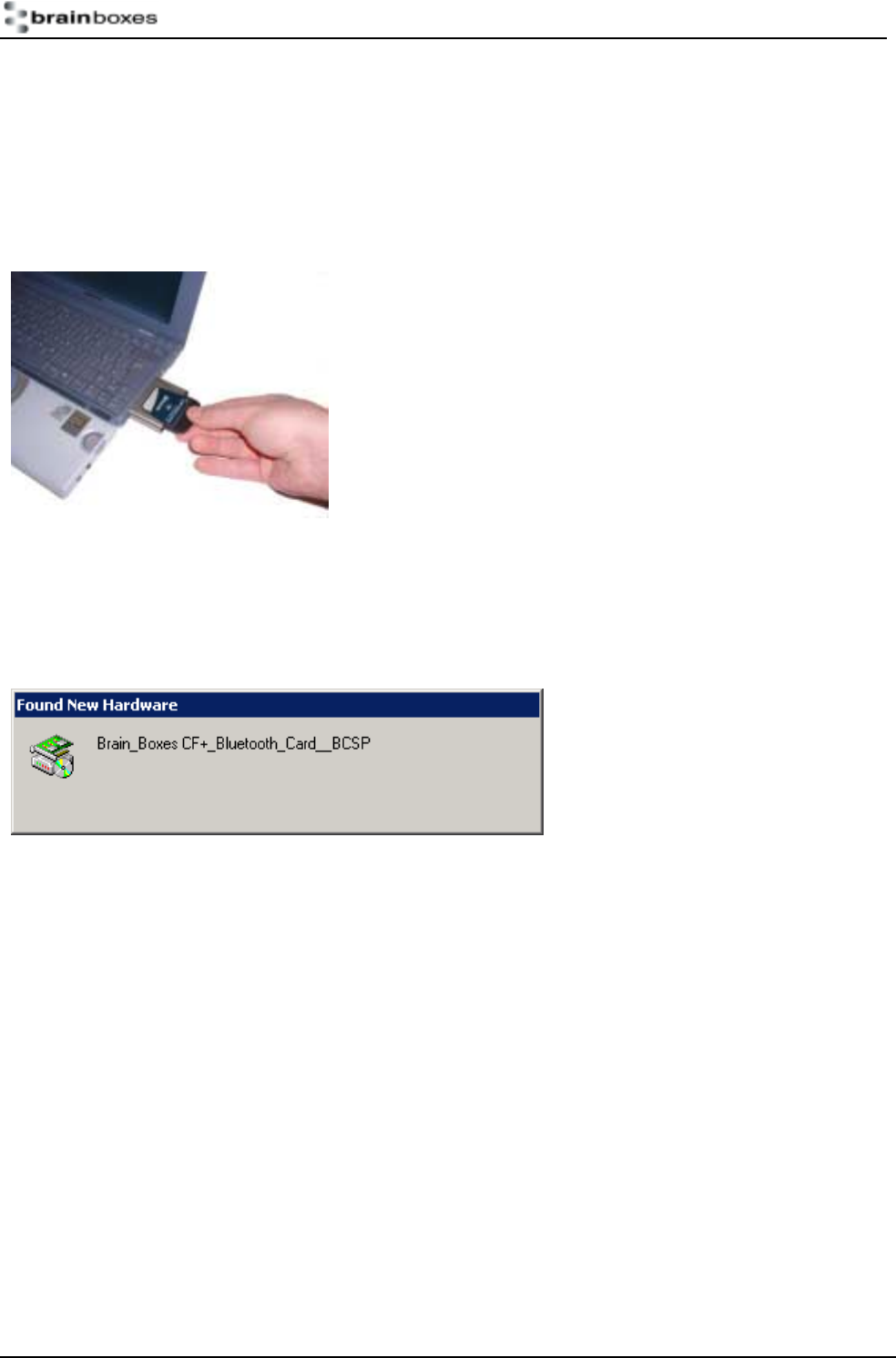
Insert the Compact Flash Card into an appropriate slot. You may need to insert the card into a PC Card
Sleeve to use this in a Laptop or similar.
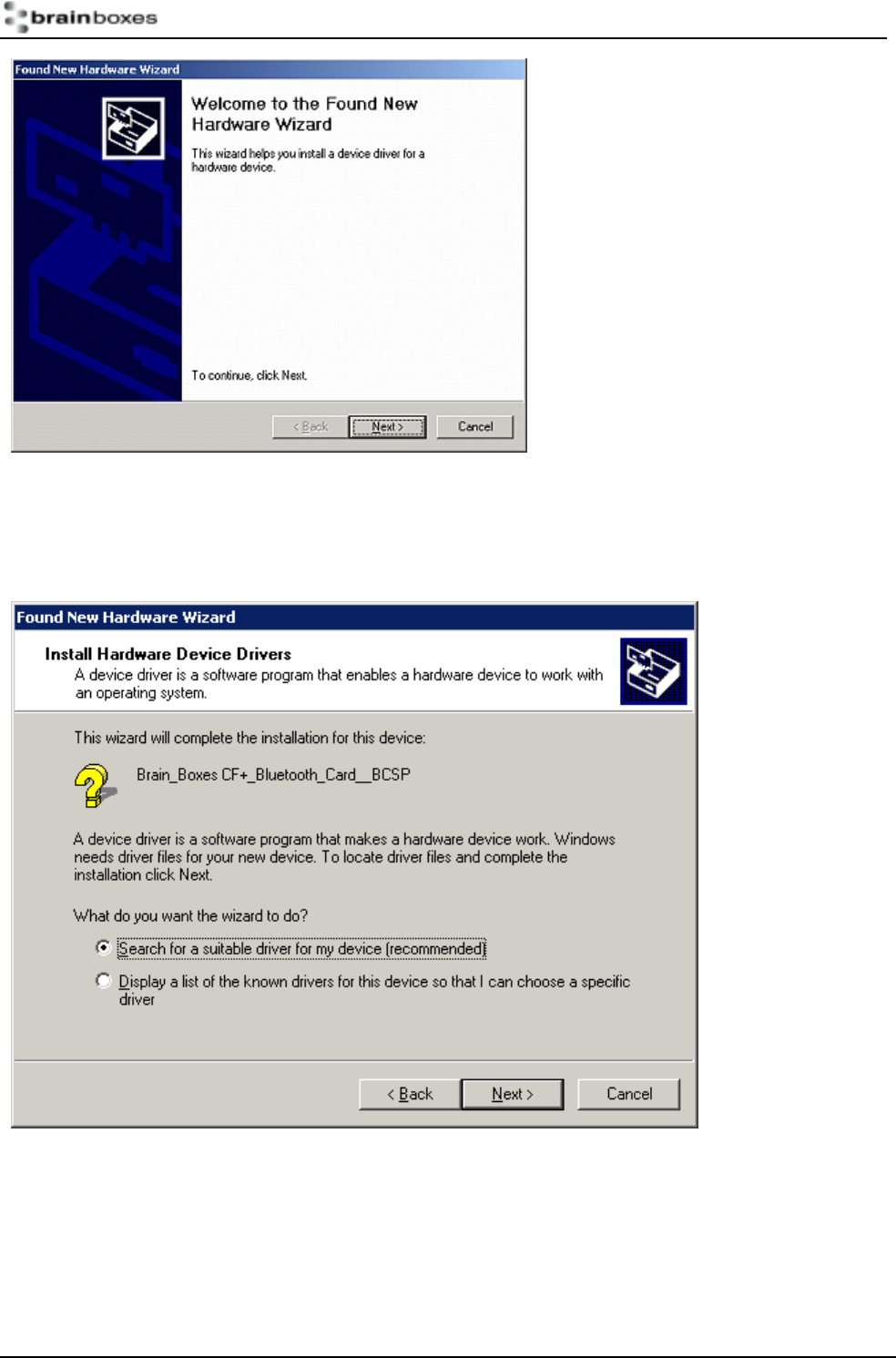
Windows 2000 will detect your card and start the Found New Hardware Wizard.
Installation Guide B L-565 Bl uetooth
CF+ card in Wi ndows2000.doc © Copyright Brain Boxes Limited 2002 Page 3 of
7
Click Next
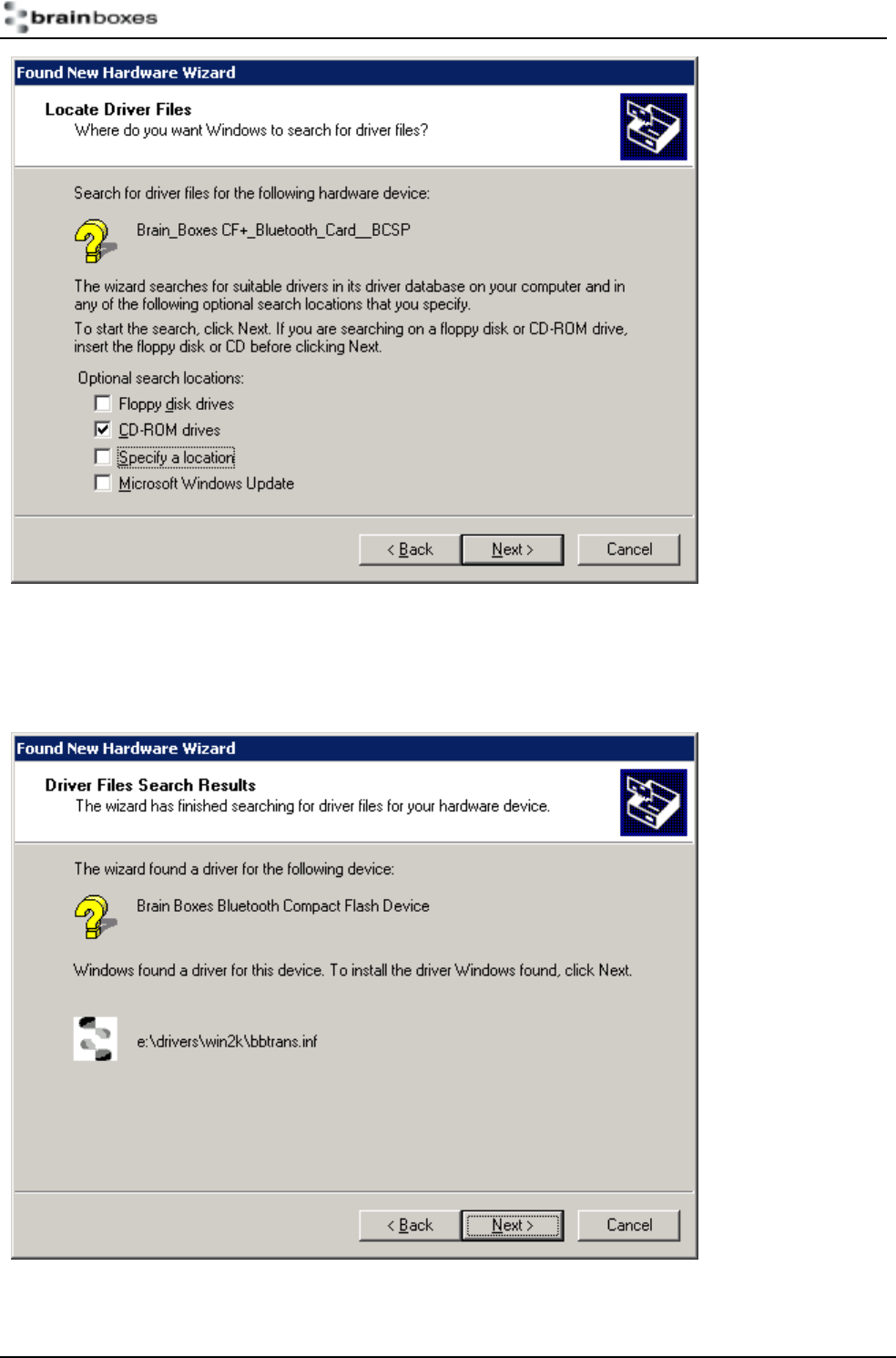
Select “Search for a suitable driver for my device”. Click Next
Installation Guide B L-565 Bl uetooth
CF+ card in Wi ndows2000.doc © Copyright Brain Boxes Limited 2002 Page 4 of
7
Select CD-ROM drives. Click Next
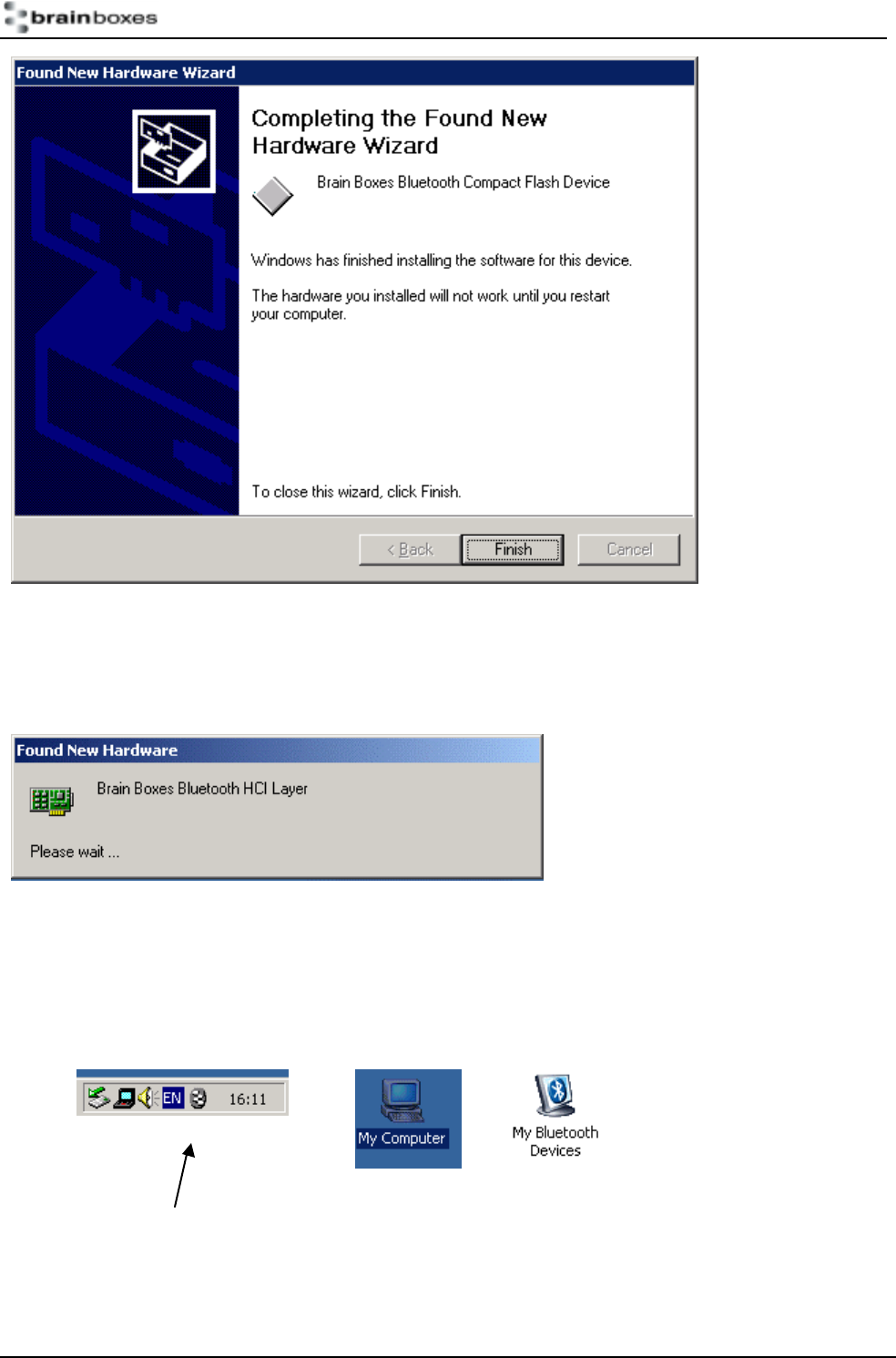
The Wizard has found the required software. Click Next
Installation Guide B L-565 Bl uetooth
CF+ card in Wi ndows2000.doc © Copyright Brain Boxes Limited 2002 Page 5 of
7
The software is now installed. Click Finish.
The Found New Hardware wizard will detect a number of devices on your card and install the drivers for
them.
A My Bluetooth devices icon will now appear in the My Computer folder on your desktop. Double clicking on
this icon will open the My Bluetooth Devices user interface which will enable you to configure your card and
establish connections with other bluetooth enabed devices.

Installation Guide B L-565 Bl uetooth
CF+ card in Wi ndows2000.doc © Copyright Brain Boxes Limited 2002 Page 6 of
7
The Brain Boxes Bluetooth icon found in the icon tray on your start bar can also be used to access this user
interface.
Full details of the My Bluetooth Devices user interface can be found in the configuration chapter.

Installation Guide B L-565 Bl uetooth
CF+ card in Wi ndows2000.doc © Copyright Brain Boxes Limited 2002 Page 7 of
7
Version History
Version Date Author Checked By Comments
1.0 13/05/2002 Gav in Jewell Name Using Beta4