Breville BREVILLE Microwave Oven User Manual 2AAODBREVILLE User manual 1

Breville Pty Ltd Microwave Oven 2AAODBREVILLE User manual 1

Contents

2AAODBREVILLE_User(manual)1
Breville is a registered trademark of Breville Pty. Ltd. A.B.N. 98 000 092 928.  Copyright Breville Pty. Ltd. 2013. Due to continued product improvement, the products illustrated/photographed  in this booklet may vary slightly from the actual product.BMO734XL - A13www.breville.comCanadaMail:  Breville Canada    2555, Avenue de l’Aviation   Pointe-Claire (Montreal)   Quebec H9P 2Z2 Phone: 1-855-683-3535Email: askus@breville.caUSAMail:  Breville USA   19400 S. Western Ave   Torrance CA   90501-1119 Phone: 1-866-273-8455  1-866-BREVILLEEmail: askus@brevilleusa.comBreville Consumer Service Center
BMO734XLthe Quick Touch™Instruction Booklet - Livret d’instructions
CONGRATULATIONSon the purchase of your Breville product*Registering is not a substitute for proof of purchase when submitting a Warranty Claim.USA Consumers: www.brevilleusa.comCanadian Consumers: www.breville.caRegister online for product support and exclusive offers.*
3CONTENTS4  Breville recommends safety first12  Know your Breville product14  Assembling your Breville product17  Operating your Breville product – Smart Cook setting  24 – Smart Reheat setting  32 – Smart Defrost setting  36 – A Bit More™  39 – Shortcuts Panel  4149  Hints & Tips52  Care & Cleaning54 Troubleshooting
9BREvILLE RECOMMENdS SAfETy fIRSTWARNINGGROUNdING INSTRUCTIONS•  This appliance is equipped with a power cord having a grounding wire with a grounding plug.  The appliance must be grounded using a 3-hole properly grounded outlet. In the event of an electrical short circuit, grounding reduces the risk of electric shock. •  Improper use of the grounding plug can result in risk of electric shock. •  If the power outlet is a standard 2-prong wall outlet, it is your personal responsibility and obligation to have it replaced with a properly grounded 3-prong wall outlet.  •  Do not, under any circumstances, cut or remove the third (ground) prong from the power cord or use an adapter. •  Consult a qualified electrician if the grounding instructions are not completely understood, or if doubt exists as to whether the appliance is properly grounded. WARNINGIf the door or door seals are damaged, the oven must not be operated until it has been repaired by a trained person. WARNINGLiquids and other foods must not be heated  in sealed containers since they are liable  to explode. WARNINGOnly allow children  to use the oven without supervision when adequate instructions have been given so that the child is able to use the oven in a safe way and understands the hazards of improper use.
10BREvILLE RECOMMENdS SAfETy fIRSTWARNINGDo not attempt to operate the oven with the door open since open-door operation can result in harmful exposure to microwave energy. It is important not to defeat or tamper  with the safety interlocks.WARNINGDo not place any object between the oven front face and the door or allow soil or cleaner residue to accumulate on sealing surfaces. WARNINGIt is hazardous for anyone other than an Authorized Breville Service Center to carry out any service or repair operation that involves the removal of a cover which gives protection against exposure to microwave energy.CAUTIONSurfaces may be hot during and after use.CAUTIONIf the appliance is not maintained in a good state of cleanliness, its surface could be degraded and affect the lifespan of the product and lead to a dangerous situation.
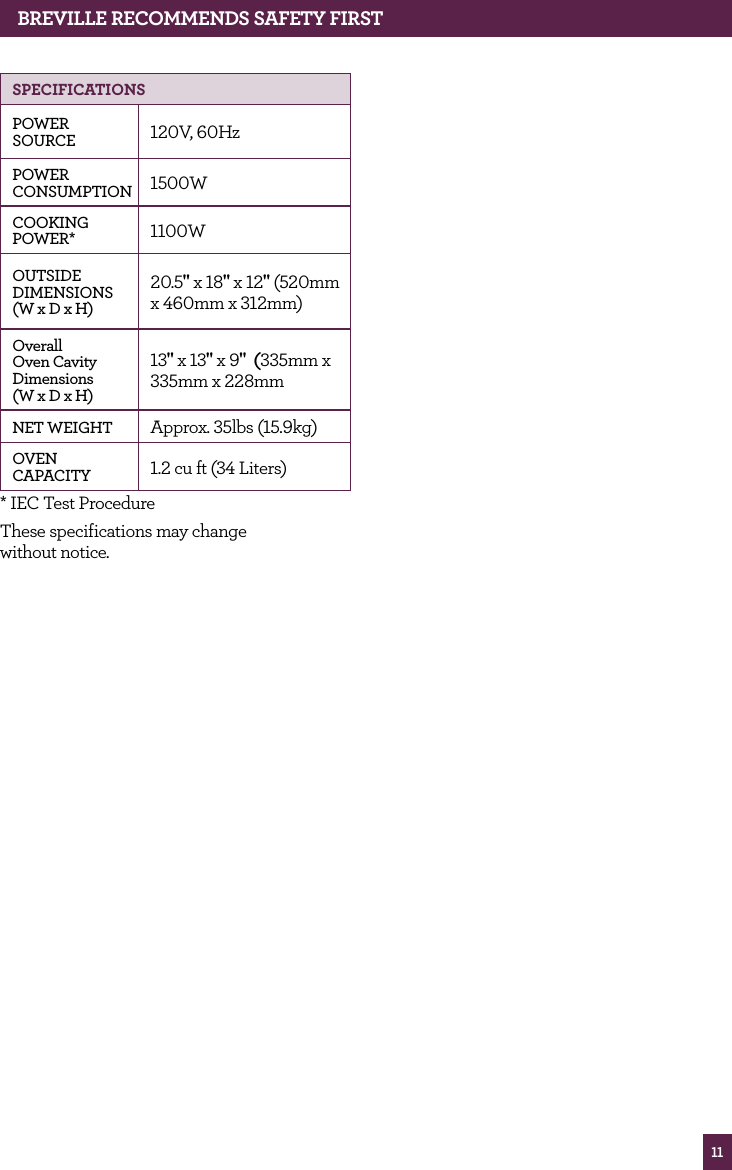
11BREvILLE RECOMMENdS SAfETy fIRSTSPECIfICATIONSPOWER SOURCE 120V, 60HzPOWER CONSUMPTION 1500WCOOKING POWER* 1100WOUTSIDE DIMENSIONS (W x D x H)20.5" x 18" x 12" (520mm x 460mm x 312mm)Overall Oven Cavity Dimensions  (W x D x H)13" x 13" x 9"  (335mm x 335mm x 228mm NET WEIGHT Approx. 35lbs (15.9kg)OVEN CAPACITY 1.2 cu ft (34 Liters)* IEC Test ProcedureThese specifications may change  without notice.
KNOw  your Breville product
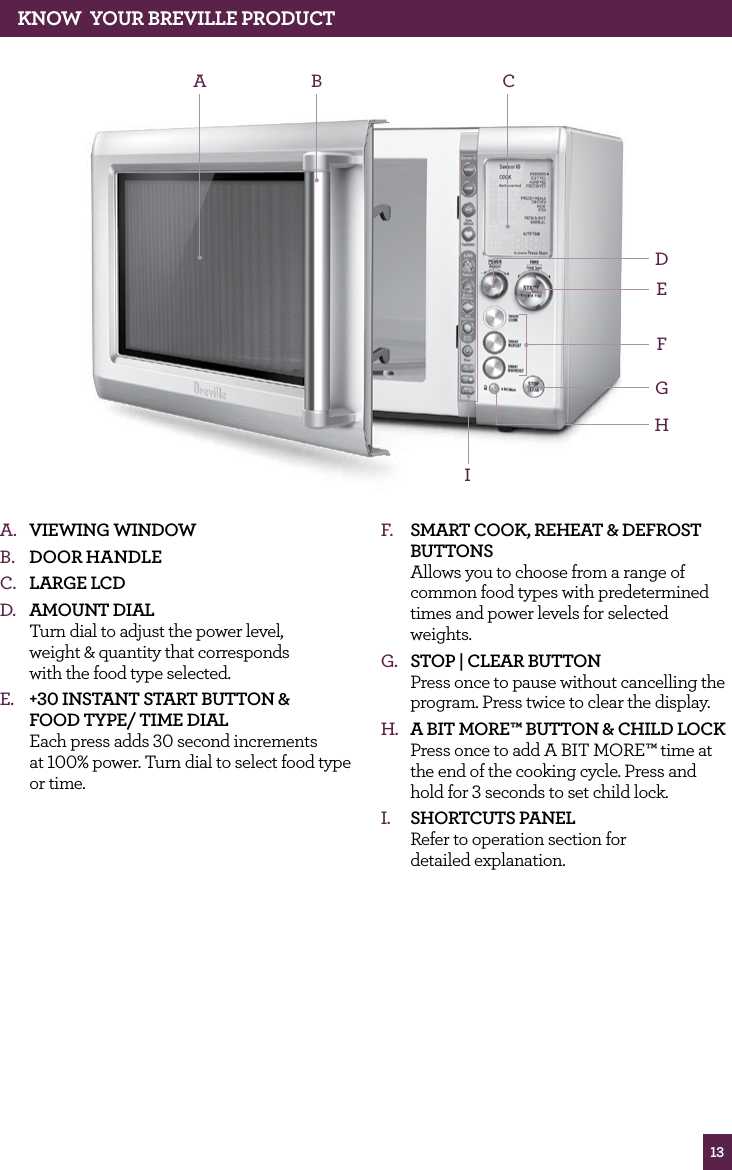
13KNOw  yOUR BREvILLE PROdUCTA.  Viewing windowB.  dooR HAndle C.  lARge lCdD.  AmoUnt diAl  Turn dial to adjust the power level,  weight & quantity that corresponds  with the food type selected.E.  +30 inStAnt StARt BUtton &  Food tYPe/ time diAl Each press adds 30 second increments  at 100% power. Turn dial to select food type  or time. A B CIEFGHDF.  SmARt Cook, ReHeAt & deFRoSt BUttonS Allows you to choose from a range of common food types with predetermined times and power levels for selected weights.G.  StoP | CleAR BUtton Press once to pause without cancelling the program. Press twice to clear the display.H.  A Bit moRe™ BUtton & CHild loCk Press once to add A BIT MORE™ time at the end of the cooking cycle. Press and hold for 3 seconds to set child lock.I.  SHoRtCUtS PAnel Refer to operation section for  detailed explanation.
ASSEMBLING your Breville product
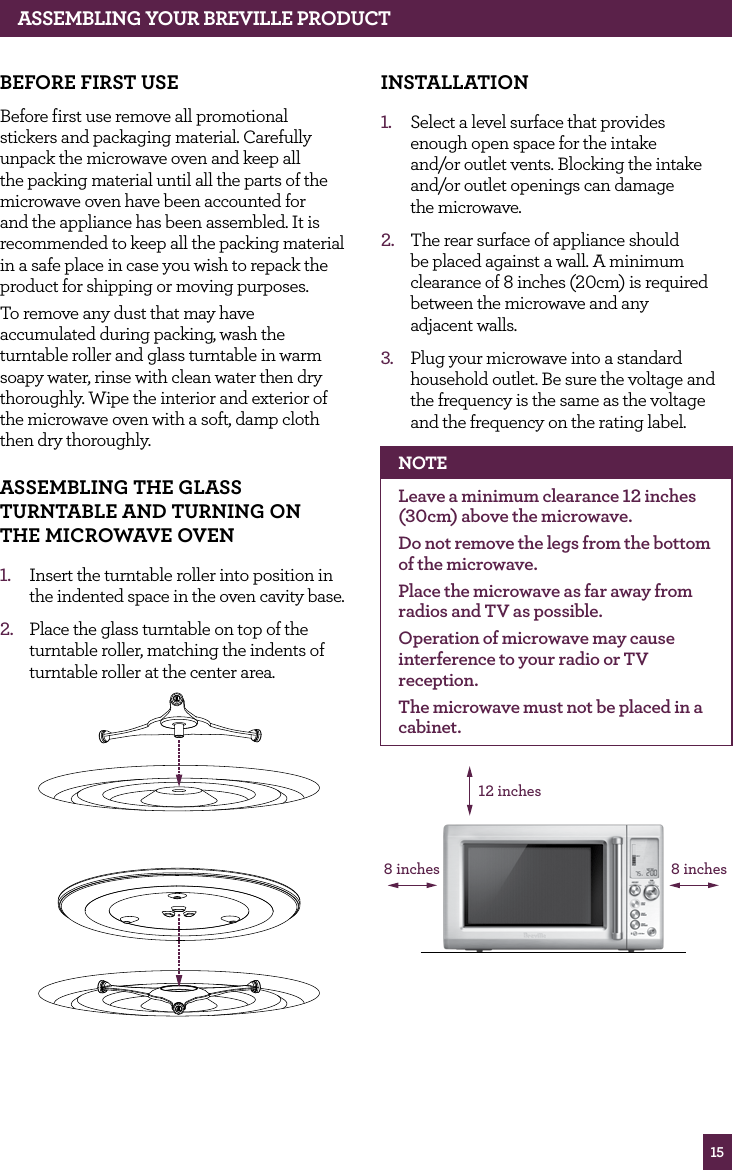
15ASSEMBLING yOUR BREvILLE PROdUCT BEfORE fIRST USEBefore first use remove all promotional stickers and packaging material. Carefully unpack the microwave oven and keep all the packing material until all the parts of the microwave oven have been accounted for and the appliance has been assembled. It is recommended to keep all the packing material in a safe place in case you wish to repack the product for shipping or moving purposes. To remove any dust that may have accumulated during packing, wash the turntable roller and glass turntable in warm soapy water, rinse with clean water then dry thoroughly. Wipe the interior and exterior of the microwave oven with a soft, damp cloth then dry thoroughly.ASSEMBLING ThE GLASS TURNTABLE ANd TURNING ON  ThE MICROwAvE OvEN1.  Insert the turntable roller into position in the indented space in the oven cavity base.2.  Place the glass turntable on top of the turntable roller, matching the indents of turntable roller at the center area. INSTALLATION1.  Select a level surface that provides  enough open space for the intake  and/or outlet vents. Blocking the intake and/or outlet openings can damage  the microwave.2.  The rear surface of appliance should be placed against a wall. A minimum clearance of 8 inches (20cm) is required between the microwave and any  adjacent walls.3.  Plug your microwave into a standard household outlet. Be sure the voltage and the frequency is the same as the voltage and the frequency on the rating label. NOTELeave a minimum clearance 12 inches (30cm) above the microwave.Do not remove the legs from the bottom of the microwave.Place the microwave as far away from radios and TV as possible.Operation of microwave may cause interference to your radio or TV reception. The microwave must not be placed in a cabinet.12 inches8 inches8 inches
16ASSEMBLING yOUR BREvILLE PROdUCT WARNINGDo not install oven over a range cooktop or other heat-producing appliances. If installed near or over a heat source, the oven could be damaged and the warranty would be void.WARNINGCheck the oven for any damage, such as misaligned or bent door, damaged door seals and sealing surface, broken or loose door hinges and latches and dents inside the cavity or on the door. If there is any damage, do not operate the oven and contact a Breville Contact Center.WARNINGDo not immerse the microwave oven, power cord or plug in water or any other liquid.
OPERATING your Breville product
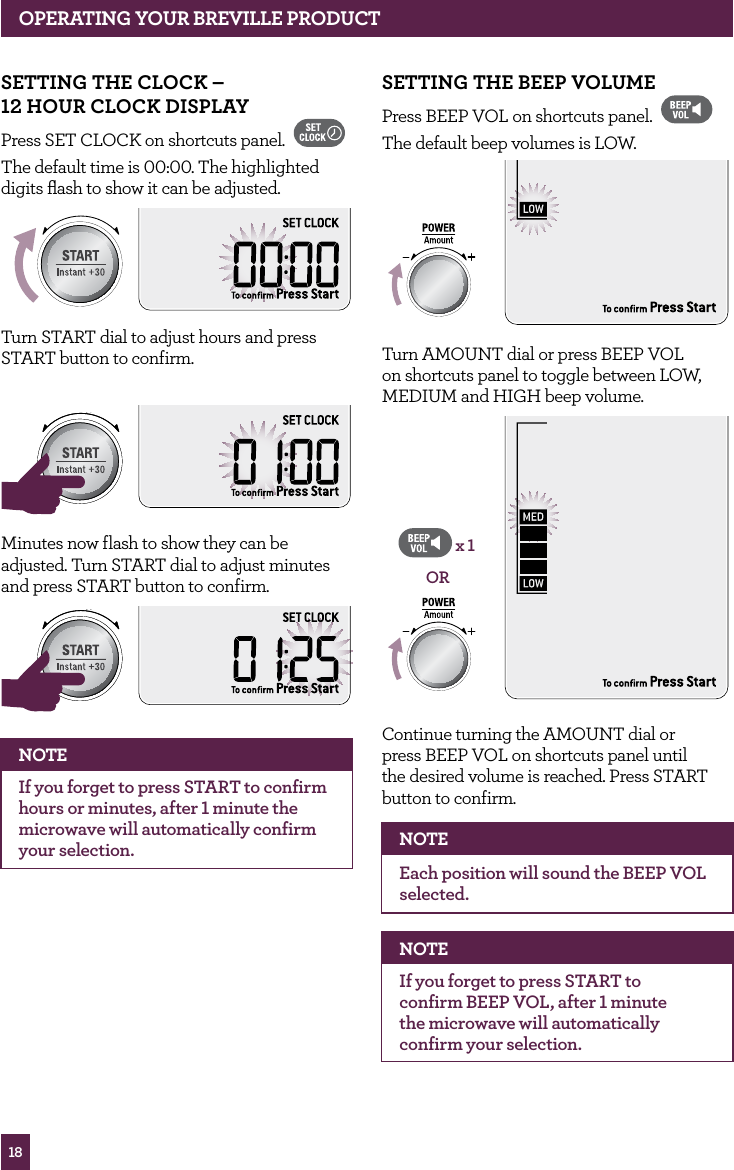
18OPERATING yOUR BREvILLE PROdUCTSETTING ThE BEEP vOLUMEPress BEEP VOL on shortcuts panel. The default beep volumes is LOW. STOPCLEARA Bit MoreTurn AMOUNT dial or press BEEP VOL on shortcuts panel to toggle between LOW, MEDIUM and HIGH beep volume.STOPCLEARA Bit MoreORx 1Continue turning the AMOUNT dial or  press BEEP VOL on shortcuts panel until  the desired volume is reached. Press START button to confirm. NOTEEach position will sound the BEEP VOL selected.NOTEIf you forget to press START to  confirm BEEP VOL, after 1 minute  the microwave will automatically confirm your selection. SETTING ThE CLOCK –  12 hOUR CLOCK dISPLAyPress SET CLOCK on shortcuts panel. The default time is 00:00. The highlighted digits flash to show it can be adjusted.STOPCLEARA Bit MoreTurn START dial to adjust hours and press START button to confirm.STOPCLEARA Bit MoreSTOPCLEARA Bit MoreMinutes now flash to show they can be adjusted. Turn START dial to adjust minutes and press START button to confirm. STOPCLEARA Bit MoreSTOPCLEARA Bit MoreNOTEIf you forget to press START to confirm hours or minutes, after 1 minute the microwave will automatically confirm your selection.
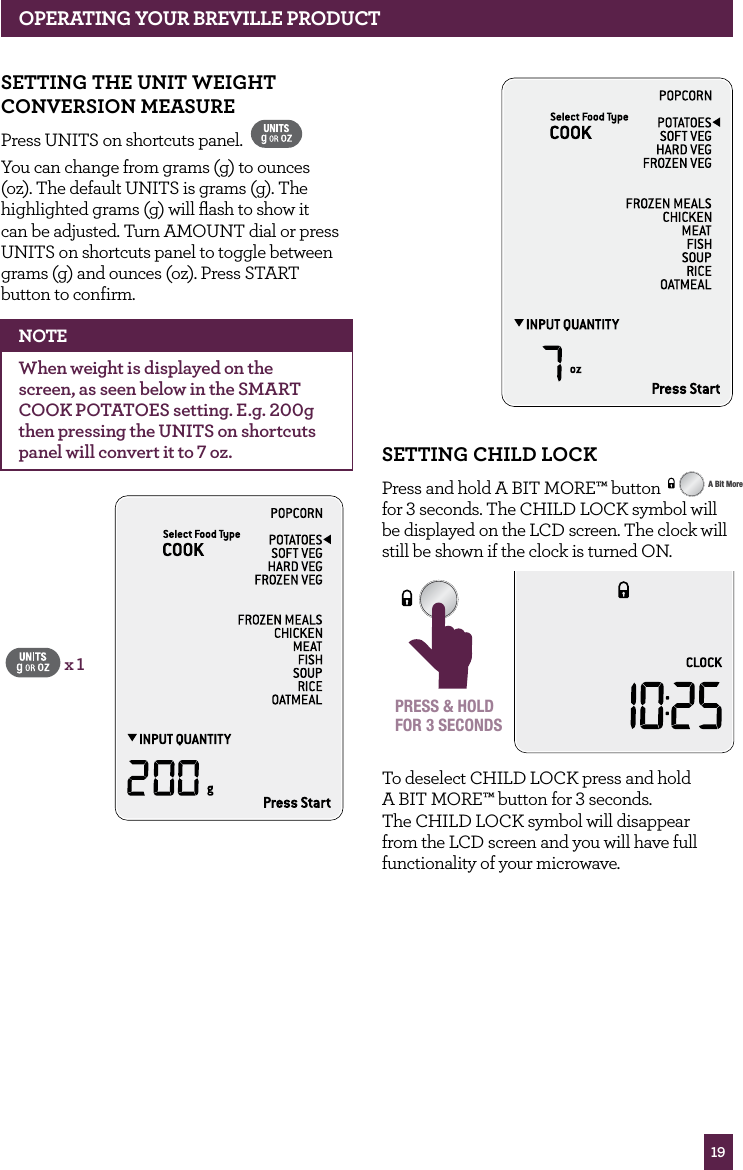
19OPERATING yOUR BREvILLE PROdUCTSETTING ChILd LOCKPress and hold A BIT MORE™ button STOPCLEARA Bit More  for 3 seconds. The CHILD LOCK symbol will  be displayed on the LCD screen. The clock will  still be shown if the clock is turned ON.STOPCLEARA Bit MorePRESS & HOLDFOR 3 SECONDSTo deselect CHILD LOCK press and hold  A BIT MORE™ button for 3 seconds.  The CHILD LOCK symbol will disappear from the LCD screen and you will have full functionality of your microwave.SETTING ThE UNIT wEIGhT CONvERSION MEASURE Press UNITS on shortcuts panel. You can change from grams (g) to ounces (oz). The default UNITS is grams (g). The highlighted grams (g) will flash to show it can be adjusted. Turn AMOUNT dial or press UNITS on shortcuts panel to toggle between grams (g) and ounces (oz). Press START button to confirm. NOTEWhen weight is displayed on the screen, as seen below in the SMART COOK POTATOES setting. E.g. 200g then pressing the UNITS on shortcuts panel will convert it to 7 oz.x 1
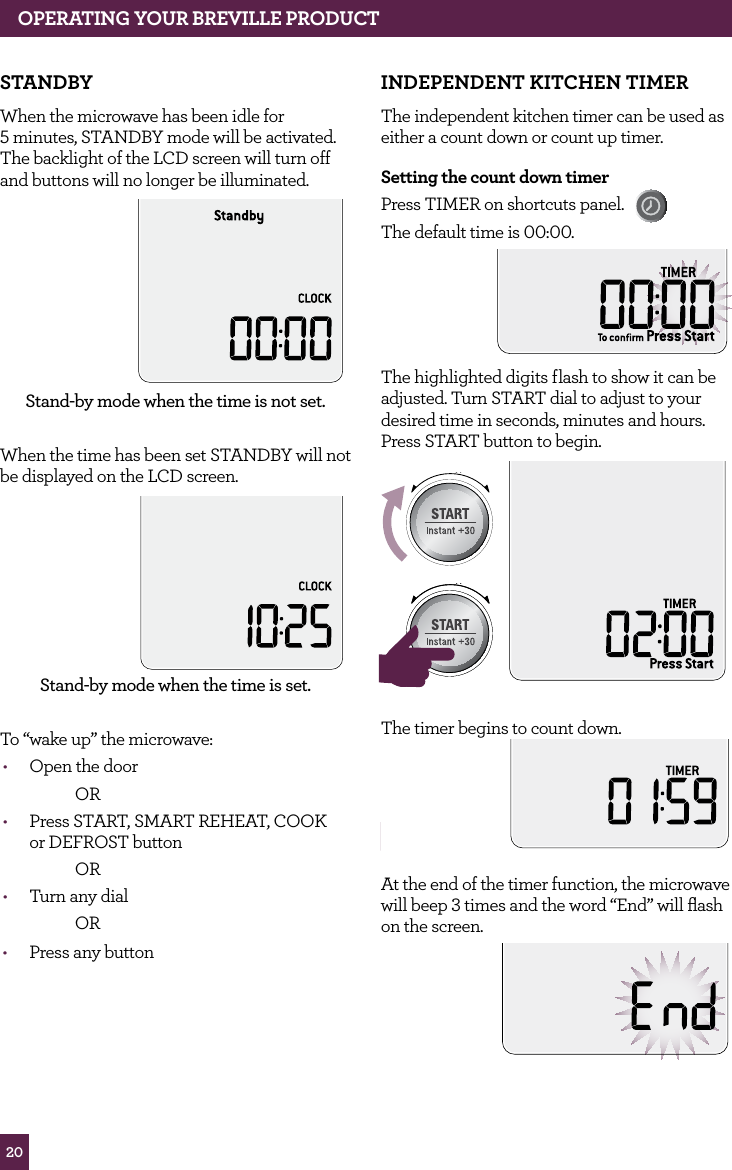
20OPERATING YOUR BREVILLE PRODUCTSTANDBYWhen the microwave has been idle for  5 minutes, STANDBY mode will be activated.  The backlight of the LCD screen will turn off and buttons will no longer be illuminated.Stand-by mode when the time is not set.When the time has been set STANDBY will not be displayed on the LCD screen.Stand-by mode when the time is set.To “wake up” the microwave:•  Open the door  OR•  Press START, SMART REHEAT, COOK  or DEFROST button OR•  Turn any dial  OR•  Press any buttonINDEPENDENT KITCHEN TIMERThe independent kitchen timer can be used as either a count down or count up timer.Setting the count down timerPress TIMER on shortcuts panel.   The default time is 00:00.The highlighted digits flash to show it can be adjusted. Turn START dial to adjust to your desired time in seconds, minutes and hours. Press START button to begin.STOPCLEARA Bit MoreSTOPCLEARA Bit MoreSTOPCLEARA Bit MoreThe timer begins to count down.STOPCLEARA Bit MoreAt the end of the timer function, the microwave will beep 3 times and the word “End” will flash on the screen.
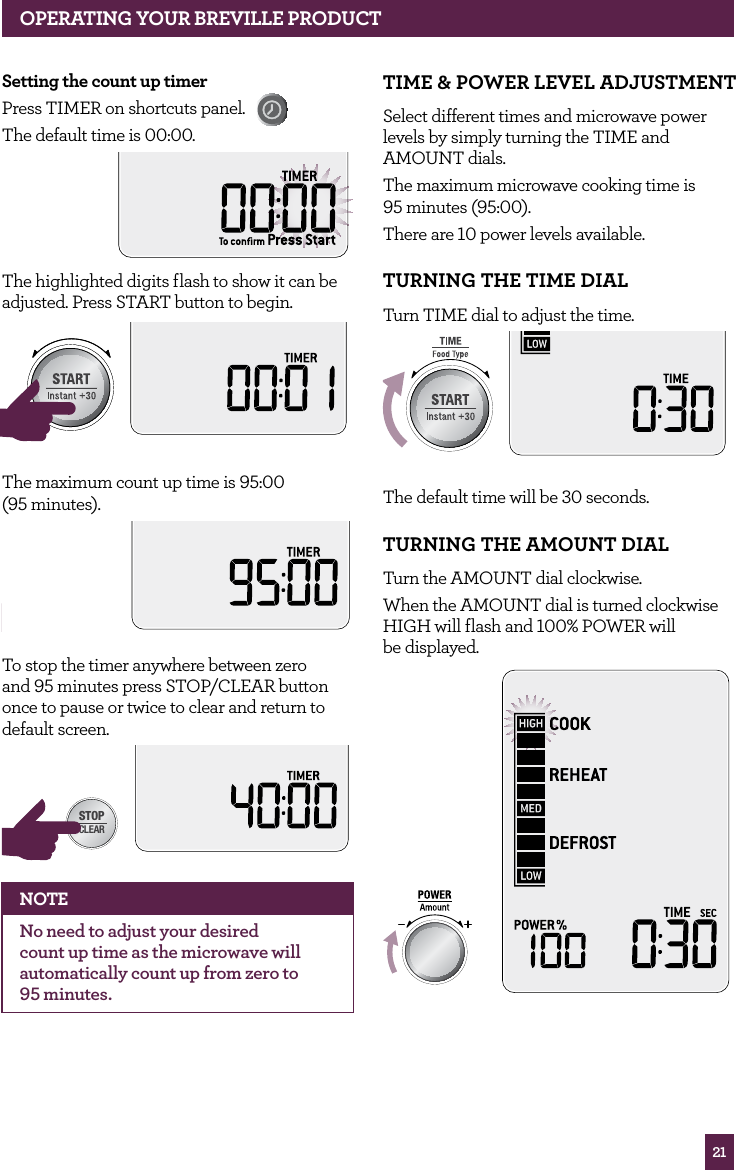
21OPERATING YOUR BREVILLE PRODUCTSetting the count up timerPress TIMER on shortcuts panel. The default time is 00:00.The highlighted digits flash to show it can be adjusted. Press START button to begin.STOPCLEARA Bit MoreSTOPCLEARA Bit MoreThe maximum count up time is 95:00  (95 minutes).STOPCLEARA Bit MoreTo stop the timer anywhere between zero  and 95 minutes press STOP/CLEAR button once to pause or twice to clear and return to  default screen.STOPCLEARA Bit MoreNOTENo need to adjust your desired count up time as the microwave will automatically count up from zero to  95 minutes.TIME & POWER LEVEL ADJUSTMENT Select different times and microwave power levels by simply turning the TIME and AMOUNT dials. The maximum microwave cooking time is  95 minutes (95:00).There are 10 power levels available.TURNING THE TIME DIAL Turn TIME dial to adjust the time.STOPCLEARA Bit MoreThe default time will be 30 seconds.TURNING THE AMOUNT DIAL Turn the AMOUNT dial clockwise.When the AMOUNT dial is turned  clockwise HIGH will flash and 100% POWER will  be displayed. STOPCLEARA Bit More
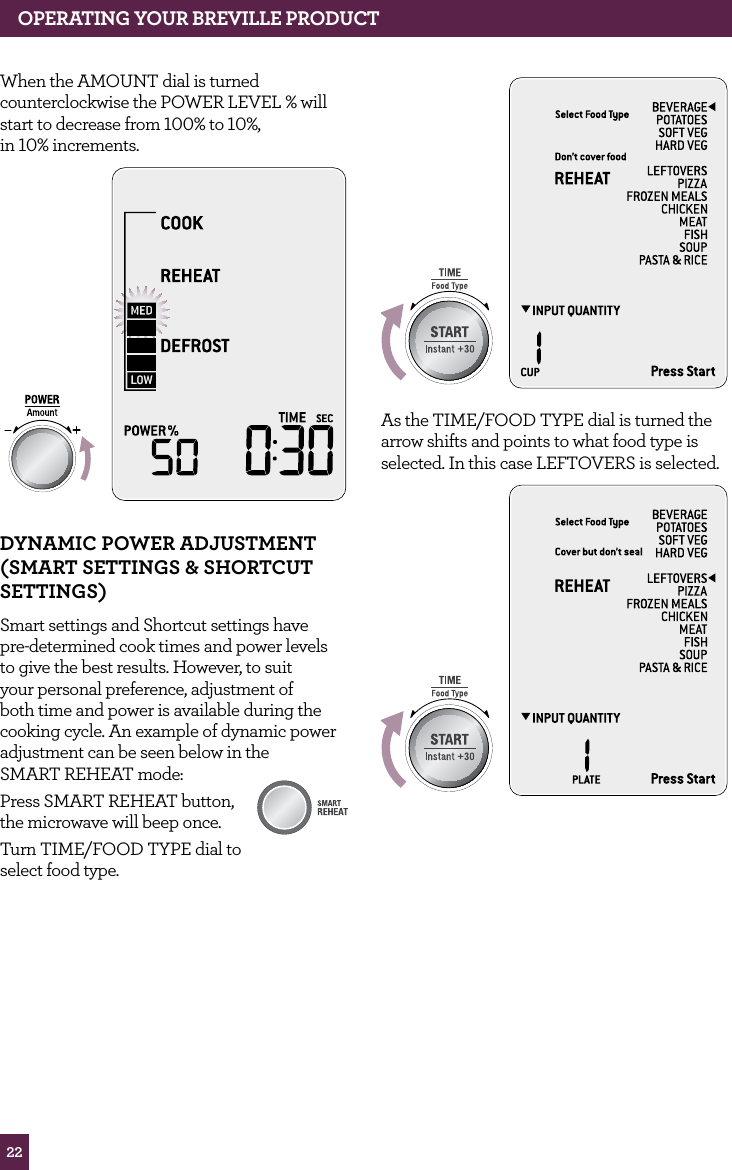
22OPERATING yOUR BREvILLE PROdUCTWhen the AMOUNT dial is turned  counterclockwise the POWER LEVEL % will start to decrease from 100% to 10%,  in 10% increments. STOPCLEARA Bit MoredyNAMIC POwER AdJUSTMENT (SMART SETTINGS & ShORTCUT SETTINGS)Smart settings and Shortcut settings have pre-determined cook times and power levels to give the best results. However, to suit your personal preference, adjustment of both time and power is available during the cooking cycle. An example of dynamic power adjustment can be seen below in the  SMART REHEAT mode: Press SMART REHEAT button, the microwave will beep once. Turn TIME/FOOD TYPE dial to select food type.STOPCLEARA Bit MoreSTOPCLEARA Bit MoreAMOUNTAs the TIME/FOOD TYPE dial is turned the arrow shifts and points to what food type is selected. In this case LEFTOVERS is selected.STOPCLEARA Bit MoreAMOUNT
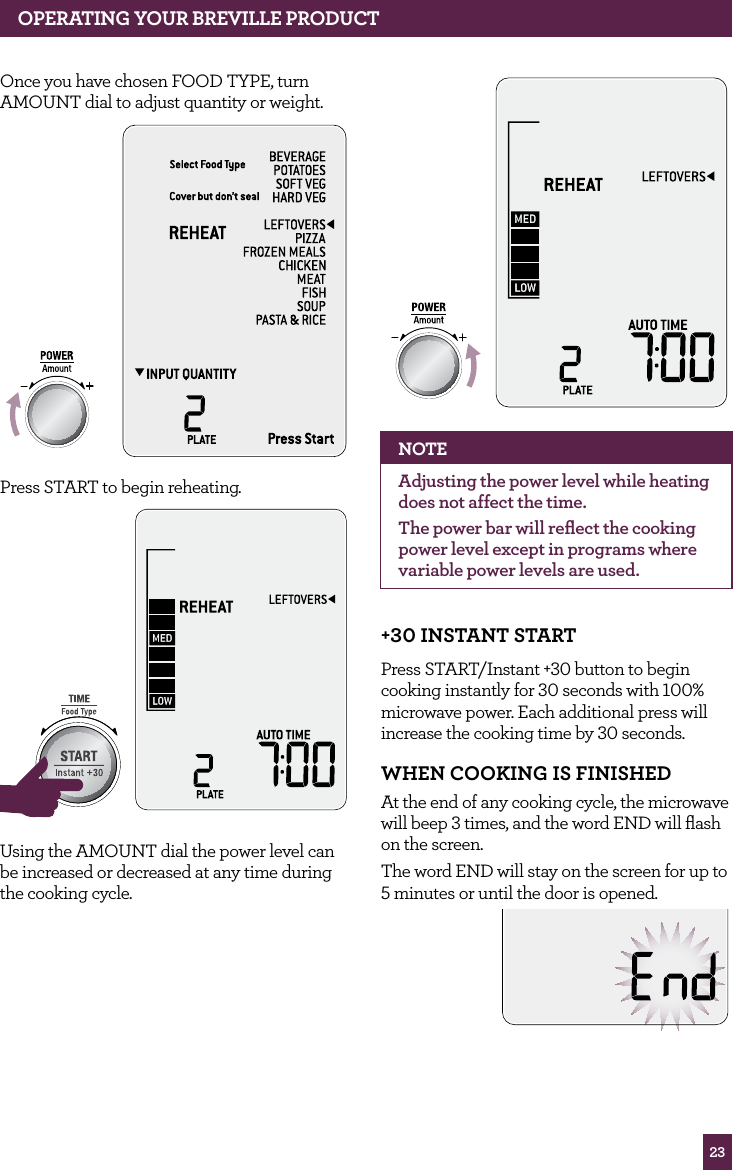
23OPERATING yOUR BREvILLE PROdUCTOnce you have chosen FOOD TYPE, turn AMOUNT dial to adjust quantity or weight.STOPCLEARA Bit MorePress START to begin reheating. STOPCLEARA Bit MoreSTOPCLEARA Bit MoreUsing the AMOUNT dial the power level can be increased or decreased at any time during the cooking cycle.STOPCLEARA Bit MoreNOTEAdjusting the power level while heating does not affect the time.The power bar will reflect the cooking power level except in programs where variable power levels are used.+30 INSTANT STARTPress START/Instant +30 button to begin cooking instantly for 30 seconds with 100% microwave power. Each additional press will increase the cooking time by 30 seconds.whEN COOKING IS fINIShEd At the end of any cooking cycle, the microwave will beep 3 times, and the word END will flash on the screen.The word END will stay on the screen for up to 5 minutes or until the door is opened.
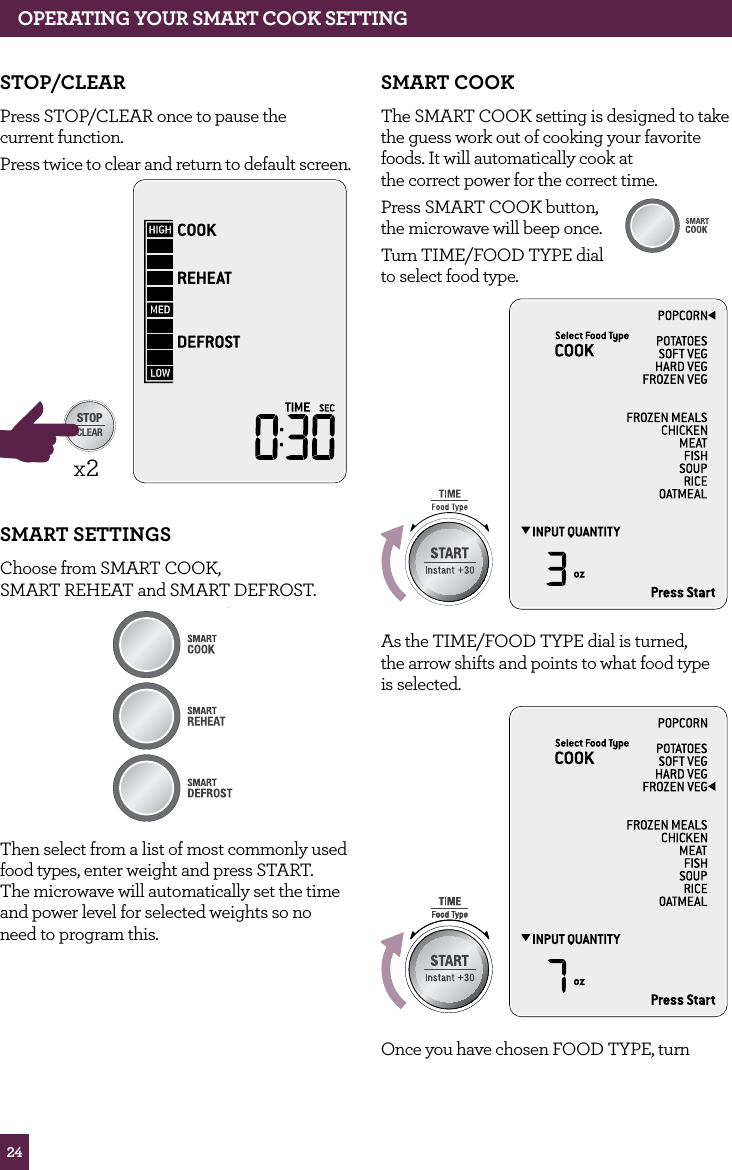
24OPERATING yOUR SMART COOK SETTINGSTOP/CLEARPress STOP/CLEAR once to pause the  current function.Press twice to clear and return to default screen. STOPCLEARA Bit Morex2SMART SETTINGSChoose from SMART COOK,  SMART REHEAT and SMART DEFROST. STOPCLEARA Bit MoreThen select from a list of most commonly used food types, enter weight and press START.  The microwave will automatically set the time and power level for selected weights so no  need to program this.SMART COOKThe SMART COOK setting is designed to take the guess work out of cooking your favorite foods. It will automatically cook at  the correct power for the correct time.Press SMART COOK button,  the microwave will beep once. Turn TIME/FOOD TYPE dial to select food type.STOPCLEARA Bit MoreAs the TIME/FOOD TYPE dial is turned,  the arrow shifts and points to what food type  is selected.STOPCLEARA Bit MoreSTOPCLEARA Bit MoreOnce you have chosen FOOD TYPE, turn STOPCLEARA Bit More
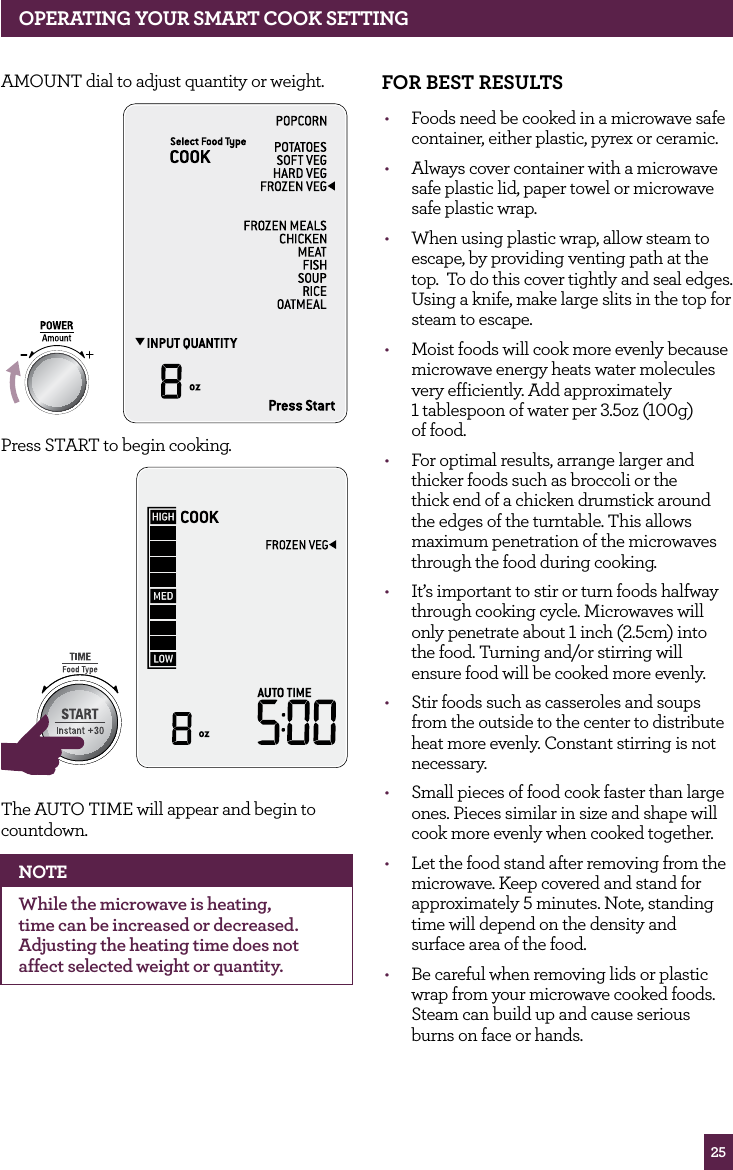
25OPERATING yOUR SMART COOK SETTINGAMOUNT dial to adjust quantity or weight.STOPCLEARA Bit MorePress START to begin cooking. STOPCLEARA Bit MoreSTOPCLEARA Bit MoreThe AUTO TIME will appear and begin to countdown.NOTEWhile the microwave is heating, time can be increased or decreased. Adjusting the heating time does not affect selected weight or quantity.fOR BEST RESULTS•  Foods need be cooked in a microwave safe container, either plastic, pyrex or ceramic.•  Always cover container with a microwave safe plastic lid, paper towel or microwave safe plastic wrap.•  When using plastic wrap, allow steam to escape, by providing venting path at the top.  To do this cover tightly and seal edges. Using a knife, make large slits in the top for steam to escape.•  Moist foods will cook more evenly because microwave energy heats water molecules very efficiently. Add approximately  1 tablespoon of water per 3.5oz (100g)  of food.•  For optimal results, arrange larger and thicker foods such as broccoli or the thick end of a chicken drumstick around the edges of the turntable. This allows maximum penetration of the microwaves through the food during cooking.•  It’s important to stir or turn foods halfway through cooking cycle. Microwaves will only penetrate about 1 inch (2.5cm) into the food. Turning and/or stirring will ensure food will be cooked more evenly.•  Stir foods such as casseroles and soups from the outside to the center to distribute heat more evenly. Constant stirring is not necessary. •  Small pieces of food cook faster than large ones. Pieces similar in size and shape will cook more evenly when cooked together.•  Let the food stand after removing from the microwave. Keep covered and stand for approximately 5 minutes. Note, standing time will depend on the density and surface area of the food.•  Be careful when removing lids or plastic wrap from your microwave cooked foods. Steam can build up and cause serious burns on face or hands.
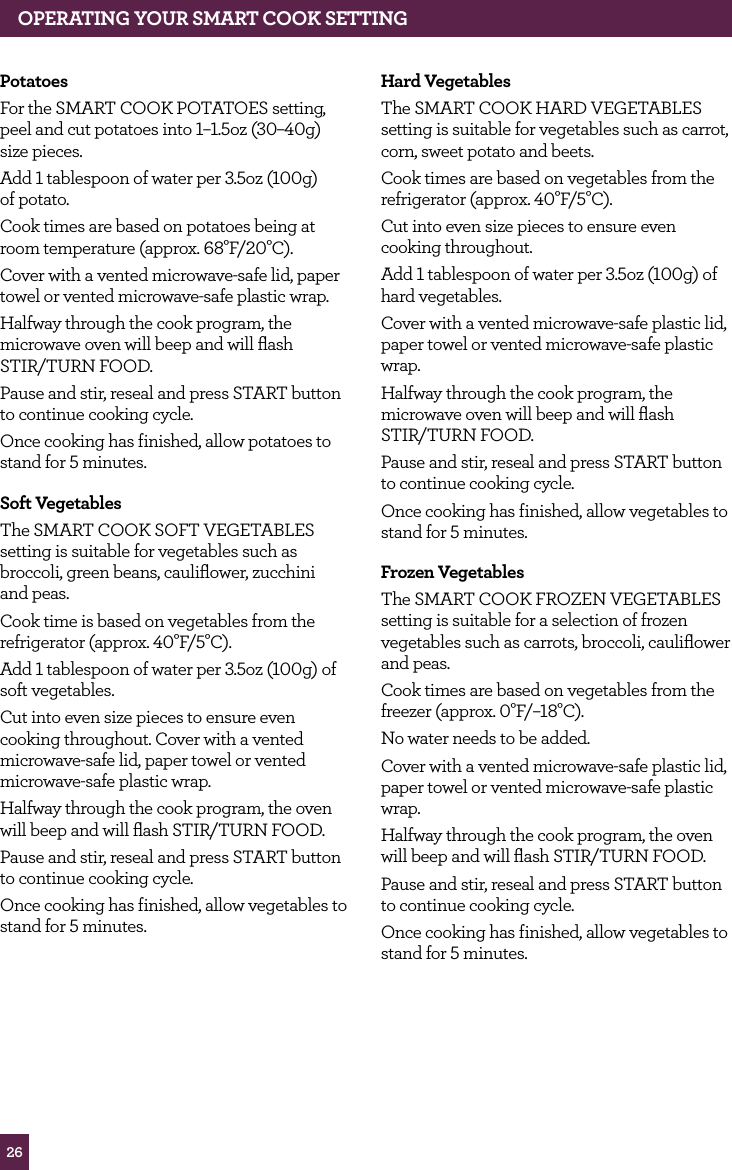
26OPERATING YOUR SMART COOK SETTINGPotatoesFor the SMART COOK POTATOES setting, peel and cut potatoes into 1–1.5oz (30–40g) size pieces.Add 1 tablespoon of water per 3.5oz (100g)  of potato.Cook times are based on potatoes being at room temperature (approx. 68°F/20°C).Cover with a vented microwave-safe lid, paper towel or vented microwave-safe plastic wrap.Halfway through the cook program, the microwave oven will beep and will flash  STIR/TURN FOOD.Pause and stir, reseal and press START button to continue cooking cycle.Once cooking has finished, allow potatoes to stand for 5 minutes.Soft VegetablesThe SMART COOK SOFT VEGETABLES setting is suitable for vegetables such as broccoli, green beans, cauliflower, zucchini  and peas. Cook time is based on vegetables from the refrigerator (approx. 40°F/5°C). Add 1 tablespoon of water per 3.5oz (100g) of  soft vegetables.Cut into even size pieces to ensure even cooking throughout. Cover with a vented microwave-safe lid, paper towel or vented microwave-safe plastic wrap.Halfway through the cook program, the oven will beep and will flash STIR/TURN FOOD.Pause and stir, reseal and press START button to continue cooking cycle.Once cooking has finished, allow vegetables to stand for 5 minutes.Hard VegetablesThe SMART COOK HARD VEGETABLES setting is suitable for vegetables such as carrot, corn, sweet potato and beets.Cook times are based on vegetables from the refrigerator (approx. 40°F/5°C).Cut into even size pieces to ensure even cooking throughout.Add 1 tablespoon of water per 3.5oz (100g) of  hard vegetables.Cover with a vented microwave-safe plastic lid, paper towel or vented microwave-safe plastic wrap.Halfway through the cook program, the microwave oven will beep and will flash  STIR/TURN FOOD.Pause and stir, reseal and press START button to continue cooking cycle.Once cooking has finished, allow vegetables to stand for 5 minutes.Frozen Vegetables The SMART COOK FROZEN VEGETABLES setting is suitable for a selection of frozen vegetables such as carrots, broccoli, cauliflower and peas.Cook times are based on vegetables from the freezer (approx. 0°F/–18°C).No water needs to be added.Cover with a vented microwave-safe plastic lid, paper towel or vented microwave-safe plastic wrap.Halfway through the cook program, the oven will beep and will flash STIR/TURN FOOD.Pause and stir, reseal and press START button to continue cooking cycle.Once cooking has finished, allow vegetables to stand for 5 minutes.
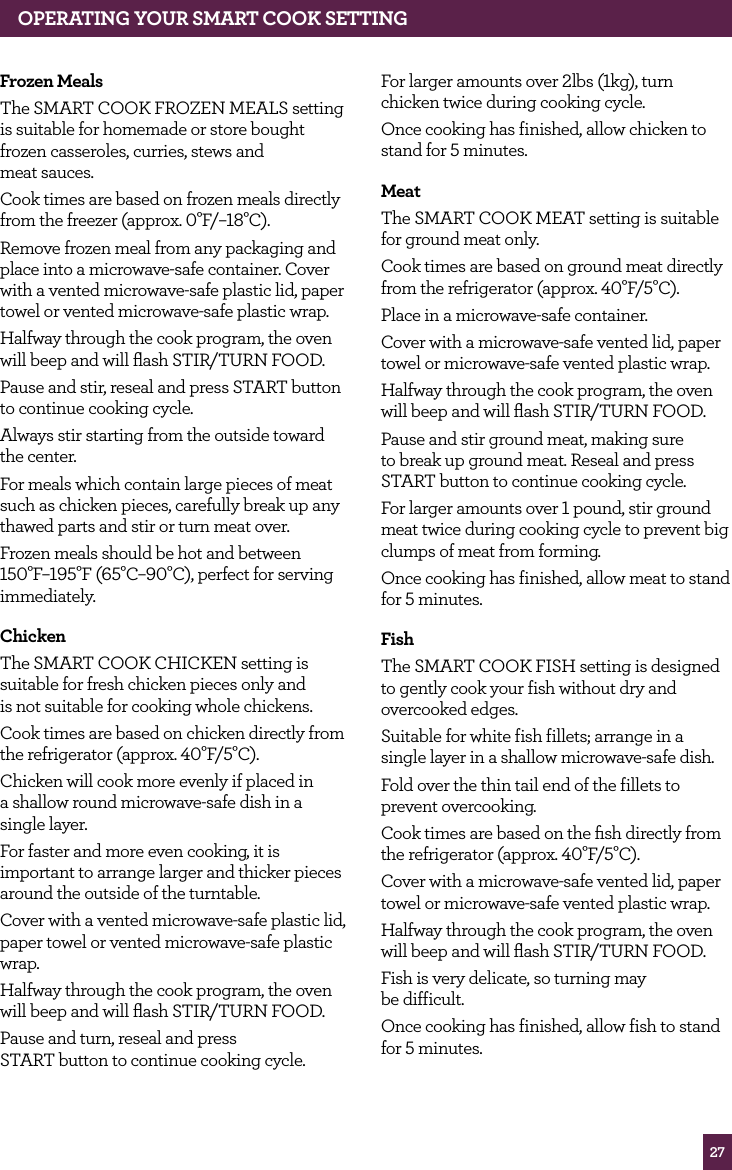
27OPERATING yOUR SMART COOK SETTINGfrozen MealsThe SMART COOK FROZEN MEALS setting is suitable for homemade or store bought frozen casseroles, curries, stews and  meat sauces.Cook times are based on frozen meals directly from the freezer (approx. 0°F/–18°C).Remove frozen meal from any packaging and place into a microwave-safe container. Cover with a vented microwave-safe plastic lid, paper towel or vented microwave-safe plastic wrap.Halfway through the cook program, the oven will beep and will flash STIR/TURN FOOD.Pause and stir, reseal and press START button to continue cooking cycle.Always stir starting from the outside toward the center.For meals which contain large pieces of meat such as chicken pieces, carefully break up any thawed parts and stir or turn meat over.Frozen meals should be hot and between 150°F–195°F (65°C–90°C), perfect for serving immediately.ChickenThe SMART COOK CHICKEN setting is suitable for fresh chicken pieces only and  is not suitable for cooking whole chickens.Cook times are based on chicken directly from the refrigerator (approx. 40°F/5°C).Chicken will cook more evenly if placed in  a shallow round microwave-safe dish in a single layer.For faster and more even cooking, it is important to arrange larger and thicker pieces around the outside of the turntable.Cover with a vented microwave-safe plastic lid, paper towel or vented microwave-safe plastic wrap.Halfway through the cook program, the oven will beep and will flash STIR/TURN FOOD.Pause and turn, reseal and press  START button to continue cooking cycle.For larger amounts over 2lbs (1kg), turn chicken twice during cooking cycle.Once cooking has finished, allow chicken to stand for 5 minutes.MeatThe SMART COOK MEAT setting is suitable for ground meat only.Cook times are based on ground meat directly from the refrigerator (approx. 40°F/5°C).Place in a microwave-safe container.Cover with a microwave-safe vented lid, paper towel or microwave-safe vented plastic wrap.Halfway through the cook program, the oven will beep and will flash STIR/TURN FOOD.Pause and stir ground meat, making sure to break up ground meat. Reseal and press START button to continue cooking cycle.For larger amounts over 1 pound, stir ground meat twice during cooking cycle to prevent big clumps of meat from forming.Once cooking has finished, allow meat to stand for 5 minutes.fishThe SMART COOK FISH setting is designed to gently cook your fish without dry and overcooked edges.Suitable for white fish fillets; arrange in a single layer in a shallow microwave-safe dish.Fold over the thin tail end of the fillets to prevent overcooking.Cook times are based on the fish directly from the refrigerator (approx. 40°F/5°C).Cover with a microwave-safe vented lid, paper towel or microwave-safe vented plastic wrap.Halfway through the cook program, the oven will beep and will flash STIR/TURN FOOD.Fish is very delicate, so turning may  be difficult.Once cooking has finished, allow fish to stand for 5 minutes.
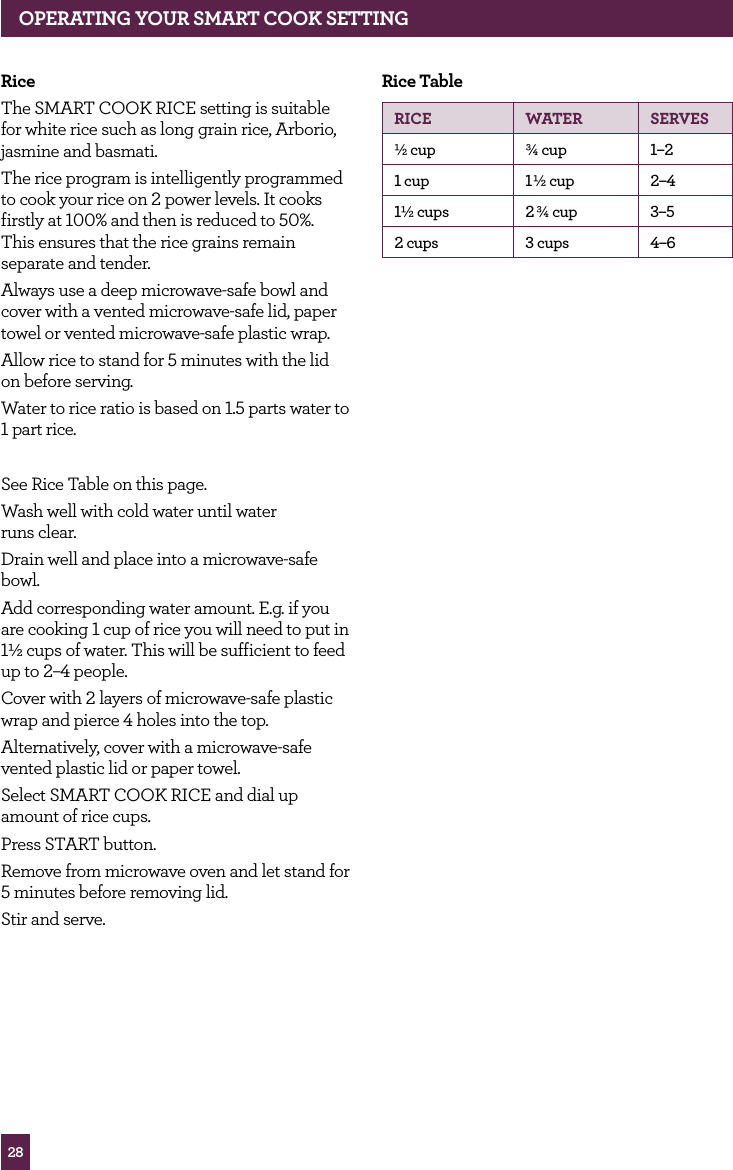
28OPERATING yOUR SMART COOK SETTINGRiceThe SMART COOK RICE setting is suitable for white rice such as long grain rice, Arborio, jasmine and basmati.The rice program is intelligently programmed to cook your rice on 2 power levels. It cooks firstly at 100% and then is reduced to 50%.  This ensures that the rice grains remain separate and tender.Always use a deep microwave-safe bowl and cover with a vented microwave-safe lid, paper towel or vented microwave-safe plastic wrap.Allow rice to stand for 5 minutes with the lid on before serving.Water to rice ratio is based on 1.5 parts water to 1 part rice. See Rice Table on this page.Wash well with cold water until water  runs clear.Drain well and place into a microwave-safe bowl.Add corresponding water amount. E.g. if you are cooking 1 cup of rice you will need to put in 1½ cups of water. This will be sufficient to feed up to 2–4 people.Cover with 2 layers of microwave-safe plastic wrap and pierce 4 holes into the top.Alternatively, cover with a microwave-safe vented plastic lid or paper towel.Select SMART COOK RICE and dial up amount of rice cups.Press START button.Remove from microwave oven and let stand for 5 minutes before removing lid.Stir and serve.Rice TableRICE wATER SERvES½ cup ¾ cup 1–21 cup 1½ cup 2–41½ cups 2 ¾ cup 3–52 cups 3 cups 4–6
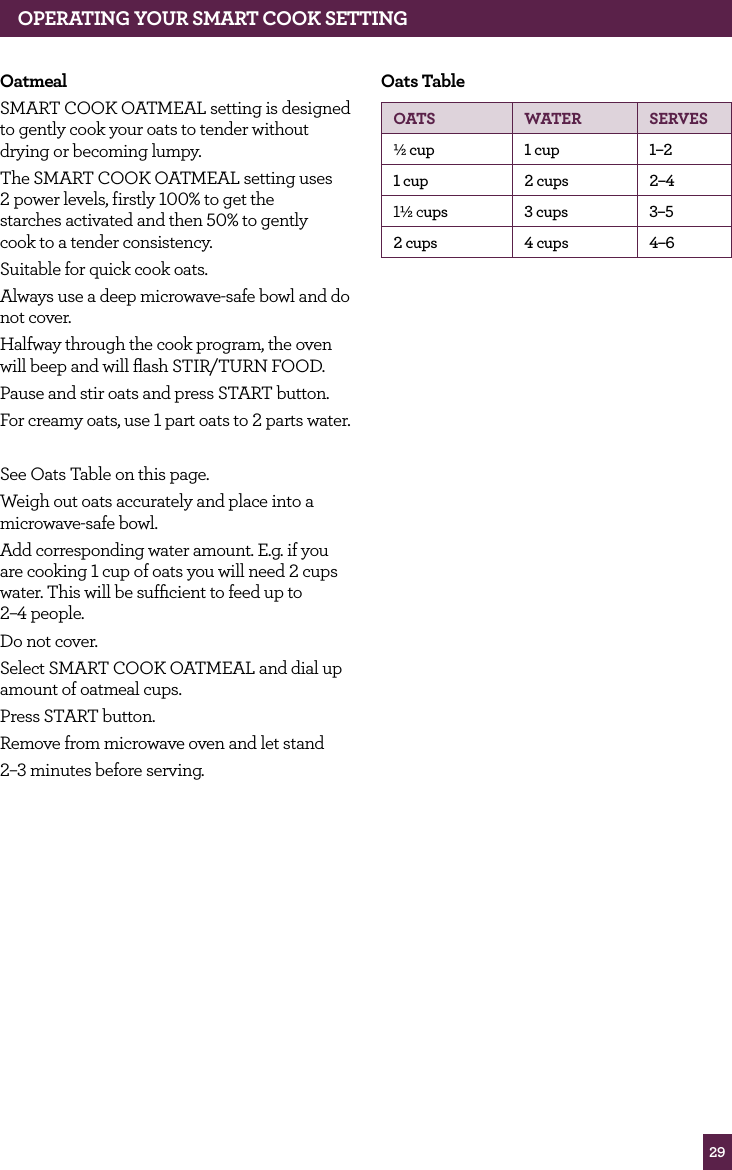
29OPERATING yOUR SMART COOK SETTINGOatmeal SMART COOK OATMEAL setting is designed to gently cook your oats to tender without drying or becoming lumpy. The SMART COOK OATMEAL setting uses  2 power levels, firstly 100% to get the  starches activated and then 50% to gently  cook to a tender consistency.Suitable for quick cook oats.Always use a deep microwave-safe bowl and do not cover.Halfway through the cook program, the oven will beep and will flash STIR/TURN FOOD.Pause and stir oats and press START button.For creamy oats, use 1 part oats to 2 parts water.See Oats Table on this page.Weigh out oats accurately and place into a microwave-safe bowl.Add corresponding water amount. E.g. if you are cooking 1 cup of oats you will need 2 cups water. This will be sufficient to feed up to  2–4 people.Do not cover.Select SMART COOK OATMEAL and dial up  amount of oatmeal cups.Press START button.Remove from microwave oven and let stand2–3 minutes before serving.Oats TableOATS wATER SERvES½ cup 1 cup 1–21 cup 2 cups 2–41½ cups 3 cups 3–52 cups 4 cups 4–6
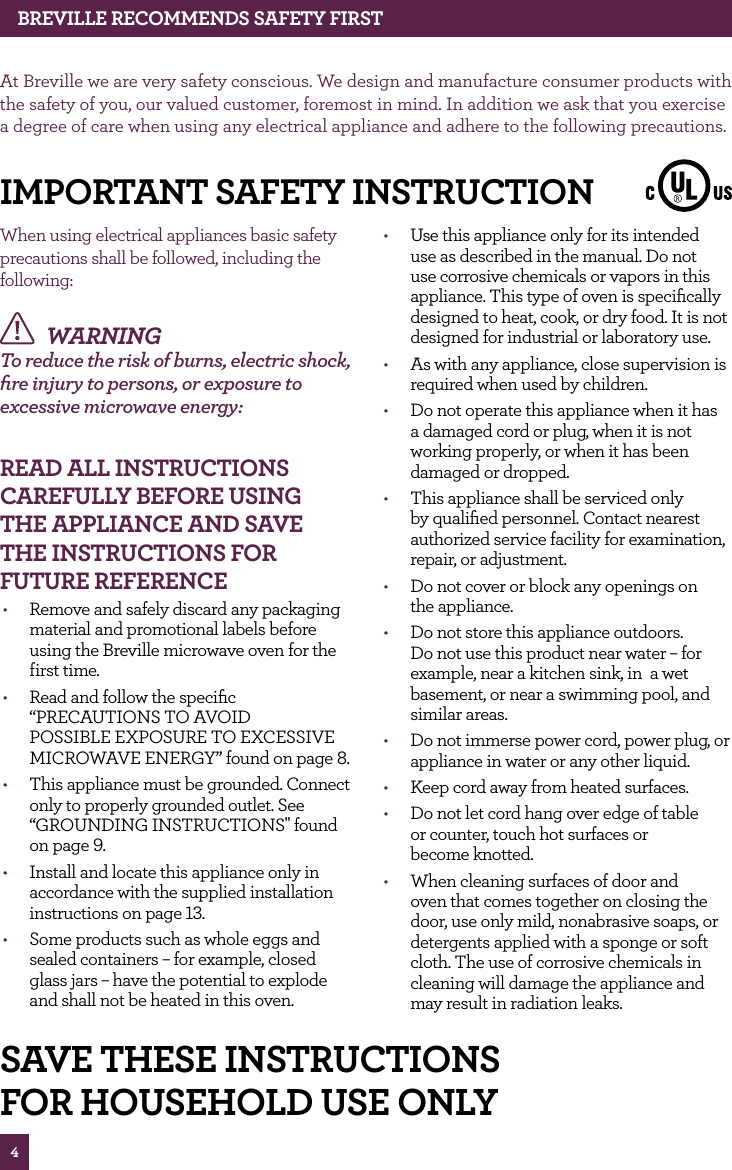
4BREvILLE RECOMMENdS SAfETy fIRSTAt Breville we are very safety conscious. We design and manufacture consumer products with the safety of you, our valued customer, foremost in mind. In addition we ask that you exercise a degree of care when using any electrical appliance and adhere to the following precautions.When using electrical appliances basic safety precautions shall be followed, including the following: WARNING  To reduce the risk of burns, electric shock, fire injury to persons, or exposure to excessive microwave energy:  REAd ALL INSTRUCTIONS CAREfULLy BEfORE USING ThE APPLIANCE ANd SAvE ThE INSTRUCTIONS fOR fUTURE REfERENCE•  Remove and safely discard any packaging material and promotional labels before using the Breville microwave oven for the  first time.•  Read and follow the specific “PRECAUTIONS TO AVOID POSSIBLE EXPOSURE TO EXCESSIVE MICROWAVE ENERGY” found on page 8.•  This appliance must be grounded. Connect only to properly grounded outlet. See “GROUNDING INSTRUCTIONS" found on page 9.•  Install and locate this appliance only in accordance with the supplied installation instructions on page 13.•  Some products such as whole eggs and sealed containers – for example, closed glass jars – have the potential to explode and shall not be heated in this oven. •  Use this appliance only for its intended use as described in the manual. Do not use corrosive chemicals or vapors in this appliance. This type of oven is specifically designed to heat, cook, or dry food. It is not designed for industrial or laboratory use. •  As with any appliance, close supervision is required when used by children. •  Do not operate this appliance when it has a damaged cord or plug, when it is not working properly, or when it has been damaged or dropped. •  This appliance shall be serviced only by qualified personnel. Contact nearest authorized service facility for examination, repair, or adjustment. •  Do not cover or block any openings on  the appliance.•  Do not store this appliance outdoors. Do not use this product near water – for example, near a kitchen sink, in  a wet basement, or near a swimming pool, and similar areas. •  Do not immerse power cord, power plug, or appliance in water or any other liquid. •  Keep cord away from heated surfaces. •  Do not let cord hang over edge of table  or counter, touch hot surfaces or  become knotted. •  When cleaning surfaces of door and oven that comes together on closing the door, use only mild, nonabrasive soaps, or detergents applied with a sponge or soft cloth. The use of corrosive chemicals in cleaning will damage the appliance and may result in radiation leaks. IMPORTANT SAfETy INSTRUCTIONSAvE ThESE INSTRUCTIONSfOR hOUSEhOLd USE ONLy
5BREvILLE RECOMMENdS SAfETy fIRST•  To reduce the risk of fire in the  oven CAVITY:i)   Do not overcook food. Carefully attend appliance when paper, plastic, or other combustible materials are placed inside the oven to facilitate cooking. ii)  Remove wire twist-ties from paper or plastic bags before placing bag in oven. iii)  In the event materials inside the oven ignite, keep oven door closed, turn oven off, and disconnect the power cord, or shut off power at the fuse or circuit breaker panel. iv) Do not use the CAVITY for storage purpose. Do not leave paper products, cooking utensils, or food in the CAVITY when not in use. •  To eliminate a choking hazard for young children, remove and safely discard the protective cover that is fitted to the power plug of the Breville microwave oven.•  Do not place the microwave oven near the edge of a bench or table during operation. Ensure all surfaces are level, clean and free of water or any other substances.•  Do not place the microwave oven on or near a hot gas or electric burner, or where  it could touch a heated oven.•  When using the microwave oven, provide adequate air space above and on all sides for air circulation. (see page 13  Installation, point 2).•  Always operate the microwave oven on a heat-resistant surface. Do not use on a cloth-covered surface, near curtains or other flammable materials.•  Do not use the microwave oven on a metal surface, for example a sink drain board.•  Always ensure the microwave oven is properly assembled before connecting to the power outlet and operating. Do not use the oven without the turntable roller and glass turntable in place. Ensure the glass turntable is positioned correctly into the indents on the turntable roller.•  The microwave oven is not intended to be operated by means of an external timer or separate remote control system.•  Never use the microwave oven without food or water in the oven cavity. Operating the microwave oven when empty could cause damage to the appliance.•  Do not leave the microwave oven unattended when in use.•  Do not touch hot surfaces. Allow the microwave oven to cool before moving or cleaning any parts.•  Do not place or store anything on top of the microwave oven.•  Always ensure the microwave oven power cord is unplugged from the power outlet before attempting to move the appliance, when not in use, if left unattended and before disassembling, cleaning or storing.•  Keep the appliance clean. Follow the cleaning instructions provided in this  book (page 44).•  Always turn the microwave oven off by pressing the STOP/CLEAR button and unplug at the power outlet when it is not in use.•  Before cleaning, always press the STOP/CLEAR button and unplug at the power outlet.
6BREvILLE RECOMMENdS SAfETy fIRSTIMPORTANT SAfEGUARdS fOR ALL ELECTRICAL APPLIANCES•  Fully unwind the power cord before use.•  The appliance is not intended for use by persons (including children) with reduced physical, sensory or mental capabilities, or lack of experience and knowledge, unless they have been given supervision or instruction concerning use of the appliance by a person responsible for  their safety.•  Children should be supervised to ensure that they do not play with the appliance.•  It is recommended to regularly inspect the appliance. To avoid a hazard do not use the appliance if power cord, power plug or appliance becomes damaged in any way. Immediately cease use and call Breville Consumer Support for examination, repair or adjustment.•  For any maintenance other than cleaning, visit www.breville.com or contact Breville Consumer Support.•  This appliance is for household use only. Do not use this appliance for anything other than its intended use. Do not use in moving vehicles or boats. Do not use outdoors. Misuse may cause injury.•  The installation of a residual current device (safety switch) is recommended to provide additional safety protection when using electrical appliances. It is advisable that a safety switch with a rated residual operating current not exceeding 30mA be installed in the electrical circuit supplying the appliance. See your electrician for professional advice.•  A short power-supply cord is supplied to reduce the risks resulting from becoming entangled in or tripping over a longer cord. •  Longer cord sets or extension cords are available and a capable of being used when care is exercised in their use. •  When a long cord or extension cord  is used:i)   The marked electrical rating of the cord set or extension cord shall be at least as great as the electrical rating of the appliance. ii)  The extension cord must be a grounding-type 3-wire cord, and iii)  The longer cord shall be arranged so that it does not drape over the counter top or tabletop where it is capable of being pulled on by children or tipped over unintentionally. SPECIAL SAfETy INSTRUCTIONS fOR yOUR MICROwAvE OvEN•  Wipe the oven cavity with a soft, damp cloth after each use. Leaving food residue, grease or fat in the cavity could cause the microwave oven cavity to overheat and may cause the microwave oven to smoke or catch fire.•  The microwave oven should be cleaned regularly and any food splattering inside the cavity should be removed. Failure to maintain the microwave oven in a clean condition could lead to deterioration of the surface, adversely affecting the life of the microwave oven and possibly resulting in  a hazardous situation.•  If the door seals or any of the microwave oven is damaged, the microwave oven must not be operated until it has been inspected. Immediately cease use and call Breville Consumer Support for examination, repair or adjustment.•  The microwave oven is intended for heating food and beverages. Drying of food or clothing and heating or warming pads, slippers, sponges, damp cloth and similar may lead to risk of injury, ignition or fire.
7BREvILLE RECOMMENdS SAfETy fIRST•  Ensure all food containers and/or plates are suitable for use in the microwave oven. This should be done prior to preparing food for heating or cooking in the microwave oven. Monitor foods and liquids heating or cooking in the microwave oven at all times due to the possibility of containers igniting.•  Containers or plates suitable for use in the microwave oven should not exceed the width of the glass turntable as this may impede the rotation of the turntable and result in food being unevenly cooked.•  Liquids or other foods must not be heated in sealed containers since they are likely   to explode.•  Some containers and/or plates may appear suitable for use in the microwave oven but may be coated in a glaze that will absorb the microwave energy, overheat and cause the container to crack. The glaze may also prevent the food from heating/cooking.•  Food and/or liquids should not be heated or cooked directly on the glass turntable. Food and/or liquids must be placed into a suitable microwave-proof container before placing onto the glass turntable.•  Food and/or liquids should not be heated or cooked in plastic or paper containers or bags, unless specified a suitable for use by the manufacturer, due to the possibility of containers exploding or igniting.•  Metal clips or twist ties should be removed from the packaging as these could cause sparking and/or fire.•  Do not use recycled paper or paper towels when cooking. Recycled paper may contain small metal or other impurities which could cause sparking and/or fire.•  Do not use metal containers or utensils in the microwave oven as these could cause sparking and/or fire.•  Food grade foil should not be used in the microwave oven as this could cause sparking and/or fire.•  Ensure that lids and caps covering containers are removed prior to  placing liquids and/or foods into the microwave oven.•  Feeding bottles and baby food jars should have lids and caps removed before warming or heating in the microwave oven. To avoid burns or scalding after heating, the contents should be stirred or shaken and the temperature checked before serving.•  Always ensure the temperature of food  or drink which has been heated or cooked in the microwave oven has been tested before eating, drinking or serving to  others, especially children, disabled or elderly people.•  The heating of liquids and beverages in the microwave oven can result in delayed eruptive boiling. Care must be taken when handling any containers containing hot liquids or beverages.•  Do not heat popcorn in the microwave oven unless it has been commercially packaged for microwave use. There may be a number of un-popped kernels that may overcook and burn when popping popcorn. Do not use oil unless recommended by the manufacturer. Do not pop popcorn longer than the manufacturer’s instructions (popping time should not exceed  3 minutes). Longer cooking could cause scorching or fire.•  Do not cook any food surrounded by a membrane (such as potatoes, chicken liver, egg yolks, oysters, etc) without first piercing the membrane several times with a fork or similar utensils.•  Eggs in the shell and whole hard boiled eggs should not be cooked or heated in the microwave oven as they may explode during cooking, at the end of cooking or after removing from the microwave oven.•  Do not heat oil or fat in the microwave oven. Doing so may cause the microwave oven and/or the oil to overheat and/or ignite.
8WARNINGPRECAUTIONS TO AvOId POSSIBLE EXPOSURE TO EXCESSIvE MICROwAvE ENERGy•  Do not attempt to operate this oven with the door open since open-door operation can result in harmful exposure to microwave energy. It is important not to defeat or tamper with the safety interlocks.•  Do not place any object between the oven front face and the door or allow soil or cleaner residue to accumulated on  sealing surfaces. •  If the door or door seals are damaged, the oven must not be operated. Immediately cease use and call Breville Consumer Support for examination, repair or adjustment. It is particularly important that the oven door close properly and that there is no damage to the : (1) Door (bent), (2) Hinges and latches (broken or loosened), (3) Door seals and sealing surfaces. •  Do not put any foreign material  between the door and door jamb of  the microwave oven.•  The oven should not be under any service, any adjustment, or repair operation that involves the removal of a microwave oven cover by anyone other than an Authorized Breville Service Center.BREvILLE RECOMMENdS SAfETy fIRST•  If any smoke is observed, switch off and unplug the microwave oven at the power outlet. Keep the door closed to stifle  any flames.•  Do not attempt to operate the microwave oven by any method other than those described in this instruction book.•  Utensils should be checked to ensure  that they are suitable for use in  microwave ovens.•  Do not disconnect the microwave oven from the power supply by pulling on the cord to unplug from the power outlet.•  Loosely wind the cord when storing the microwave oven. Do not wrap the cord around the microwave oven.•  When heating food in plastic or paper containers, keep an eye on the microwave oven due to the possibility of ignition.•  The glass window has been specially treated to make it stronger, more durable and safer than ordinary glass, however it is not unbreakable. If dropped or struck extremely hard, it may break or weaken, and could at a later time shatter into many small pieces without apparent cause.
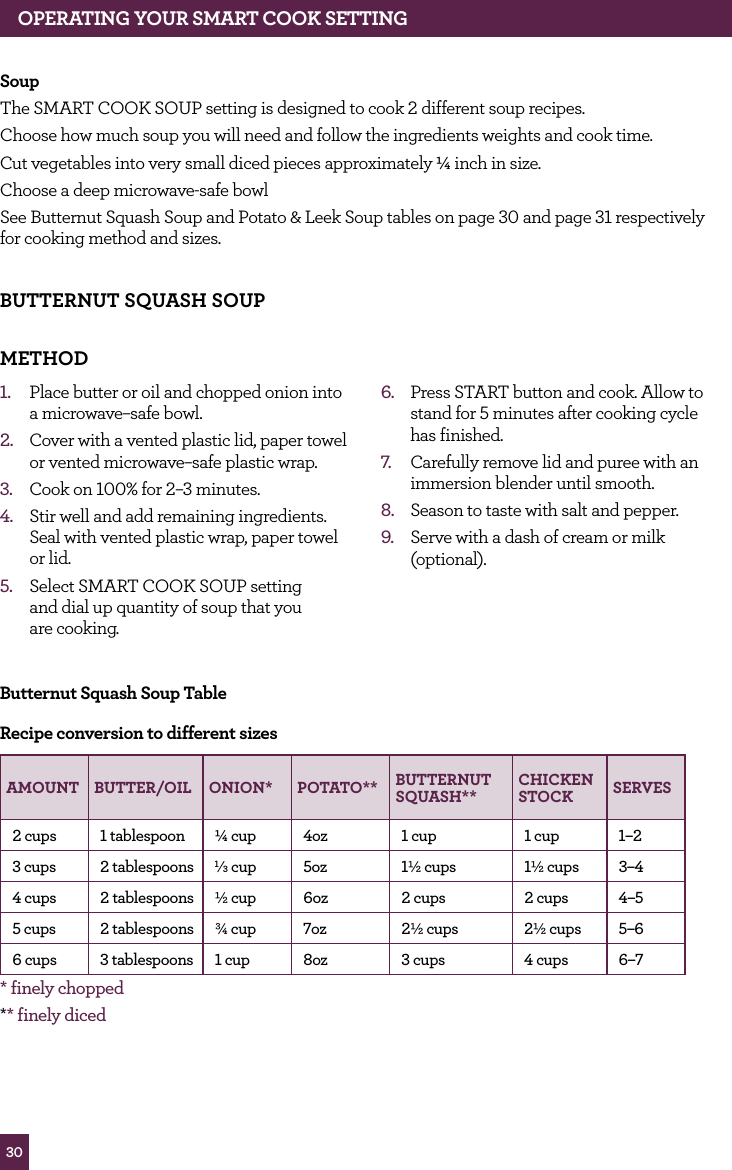
30BUTTERNUT SQUASH SOUPMETHOD       1.  Place butter or oil and chopped onion into  a microwave–safe bowl.2.  Cover with a vented plastic lid, paper towel or vented microwave–safe plastic wrap.3.  Cook on 100% for 2–3 minutes. 4.  Stir well and add remaining ingredients. Seal with vented plastic wrap, paper towel or lid.5.  Select SMART COOK SOUP setting  and dial up quantity of soup that you  are cooking.6.  Press START button and cook. Allow to stand for 5 minutes after cooking cycle  has finished.7.  Carefully remove lid and puree with an immersion blender until smooth.8.  Season to taste with salt and pepper.9.  Serve with a dash of cream or milk (optional).Butternut Squash Soup TableRecipe conversion to different sizesAMOUNT BUTTER/OIL ONION* POTATO** BUTTERNUT SQUASH** CHICKEN STOCK SERVES2 cups 1 tablespoon ¼ cup 4oz 1 cup 1 cup 1–23 cups 2 tablespoons 1⁄3 cup 5oz 1½ cups 1½ cups 3–44 cups 2 tablespoons ½ cup 6oz 2 cups 2 cups 4–55 cups 2 tablespoons ¾ cup 7oz 2½ cups 2½ cups 5–66 cups 3 tablespoons 1 cup 8oz 3 cups 4 cups 6–7* finely chopped** finely dicedOPERATING YOUR SMART COOK SETTINGSoupThe SMART COOK SOUP setting is designed to cook 2 different soup recipes.Choose how much soup you will need and follow the ingredients weights and cook time.Cut vegetables into very small diced pieces approximately ¼ inch in size.Choose a deep microwave-safe bowl See Butternut Squash Soup and Potato & Leek Soup tables on page 30 and page 31 respectively  for cooking method and sizes.
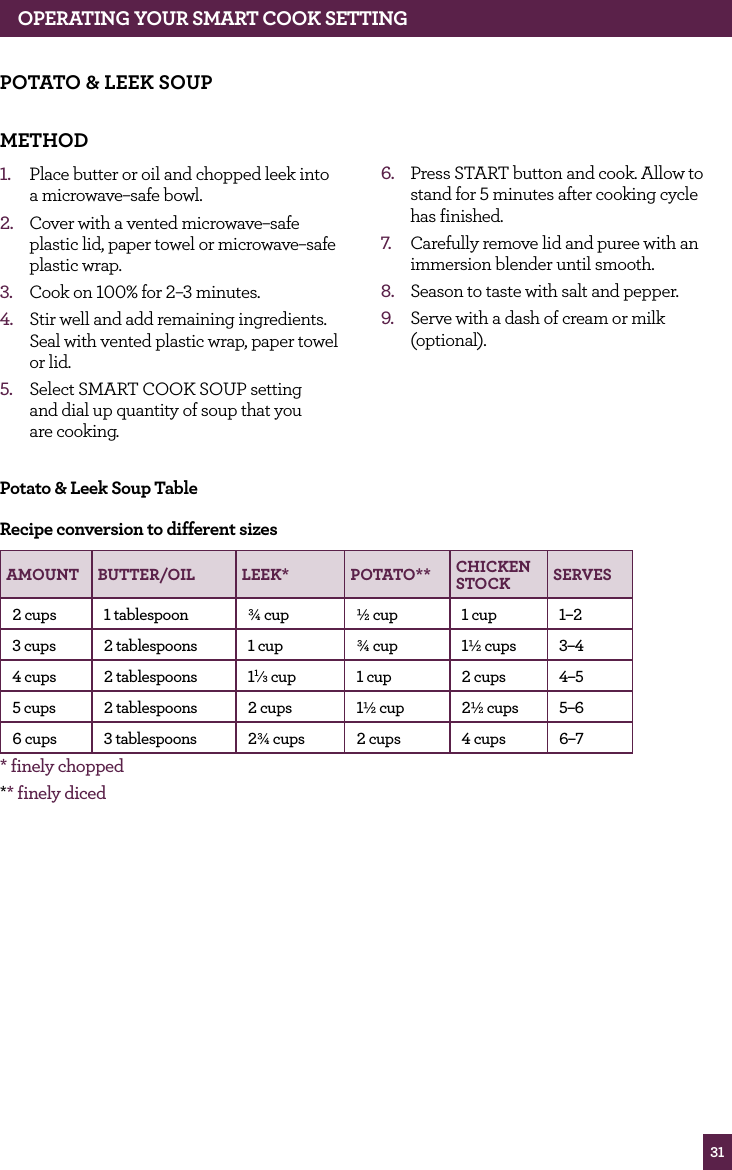
316.  Press START button and cook. Allow to stand for 5 minutes after cooking cycle  has finished.7.  Carefully remove lid and puree with an immersion blender until smooth. 8.  Season to taste with salt and pepper.9.  Serve with a dash of cream or milk (optional).POTATO & LEEK SOUPMETHOD       1.  Place butter or oil and chopped leek into  a microwave–safe bowl.2.  Cover with a vented microwave–safe plastic lid, paper towel or microwave–safe plastic wrap.3.  Cook on 100% for 2–3 minutes. 4.  Stir well and add remaining ingredients. Seal with vented plastic wrap, paper towel or lid.5.  Select SMART COOK SOUP setting  and dial up quantity of soup that you  are cooking.Potato & Leek Soup TableRecipe conversion to different sizesAMOUNT BUTTER/OIL LEEK* POTATO** CHICKEN STOCK SERVES2 cups 1 tablespoon ¾ cup ½ cup 1 cup 1–23 cups 2 tablespoons 1 cup ¾ cup 1½ cups 3–44 cups 2 tablespoons 11⁄3 cup 1 cup 2 cups 4–55 cups 2 tablespoons 2 cups 1½ cup 2½ cups 5–66 cups 3 tablespoons 2¾ cups 2 cups 4 cups 6–7* finely chopped** finely dicedOPERATING YOUR SMART COOK SETTING
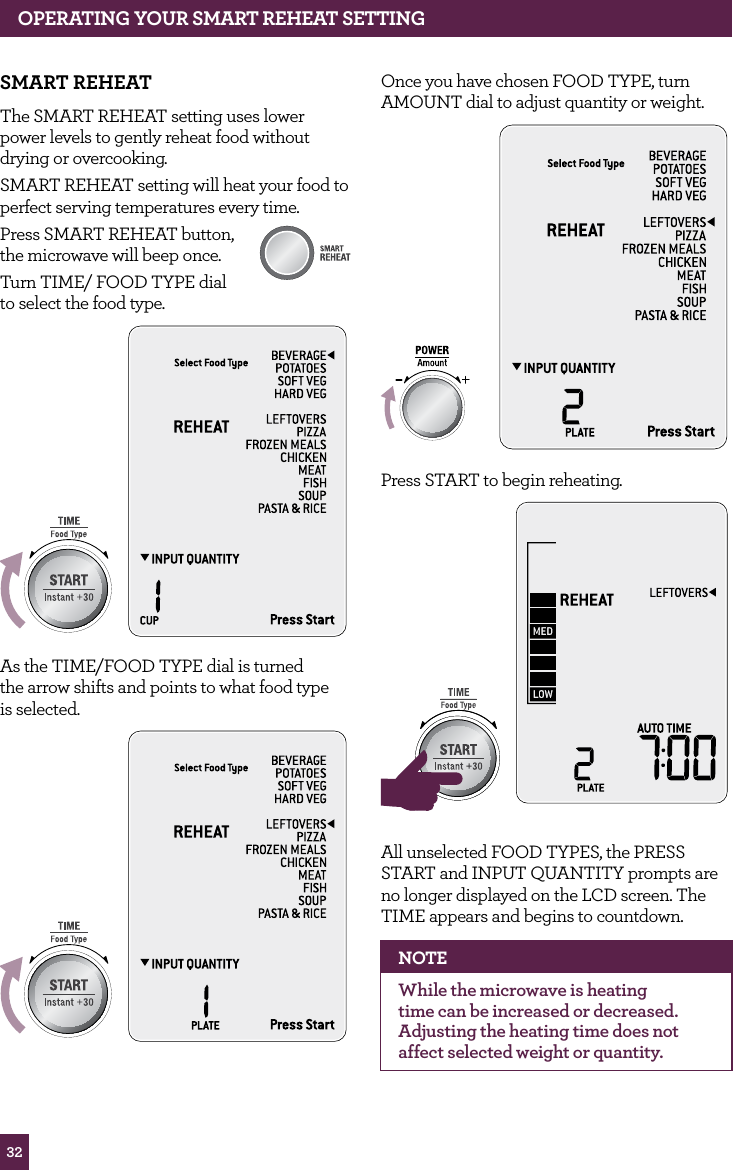
32OPERATING yOUR SMART REhEAT SETTINGSMART REhEATThe SMART REHEAT setting uses lower power levels to gently reheat food without drying or overcooking.SMART REHEAT setting will heat your food to perfect serving temperatures every time.Press SMART REHEAT button, the microwave will beep once. Turn TIME/ FOOD TYPE dial  to select the food type.STOPCLEARA Bit MoreAs the TIME/FOOD TYPE dial is turned  the arrow shifts and points to what food type  is selected. STOPCLEARA Bit MoreSTOPCLEARA Bit MoreSTOPCLEARA Bit MoreOnce you have chosen FOOD TYPE, turn AMOUNT dial to adjust quantity or weight.STOPCLEARA Bit MorePress START to begin reheating.STOPCLEARA Bit MoreSTOPCLEARA Bit MoreAll unselected FOOD TYPES, the PRESS START and INPUT QUANTITY prompts are no longer displayed on the LCD screen. The TIME appears and begins to countdown.NOTEWhile the microwave is heating time can be increased or decreased. Adjusting the heating time does not affect selected weight or quantity.
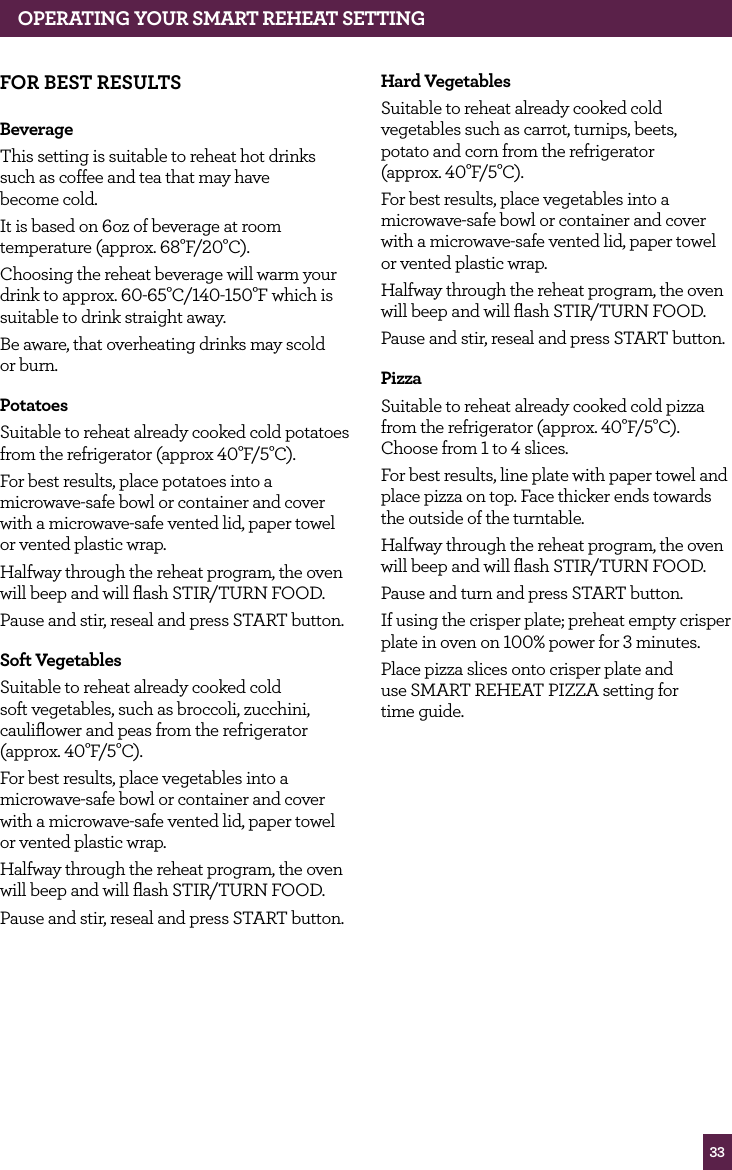
33OPERATING YOUR SMART REHEAT SETTINGFOR BEST RESULTSBeverageThis setting is suitable to reheat hot drinks such as coffee and tea that may have  become cold.It is based on 6oz of beverage at room temperature (approx. 68°F/20°C).Choosing the reheat beverage will warm your drink to approx. 60-65°C/140-150°F which is suitable to drink straight away.Be aware, that overheating drinks may scold or burn.PotatoesSuitable to reheat already cooked cold potatoes from the refrigerator (approx 40°F/5°C).For best results, place potatoes into a microwave-safe bowl or container and cover with a microwave-safe vented lid, paper towel or vented plastic wrap.Halfway through the reheat program, the oven will beep and will flash STIR/TURN FOOD.Pause and stir, reseal and press START button.Soft VegetablesSuitable to reheat already cooked cold soft vegetables, such as broccoli, zucchini, cauliflower and peas from the refrigerator (approx. 40°F/5°C).For best results, place vegetables into a microwave-safe bowl or container and cover with a microwave-safe vented lid, paper towel or vented plastic wrap.Halfway through the reheat program, the oven will beep and will flash STIR/TURN FOOD.Pause and stir, reseal and press START button.Hard VegetablesSuitable to reheat already cooked cold vegetables such as carrot, turnips, beets,  potato and corn from the refrigerator  (approx. 40°F/5°C).For best results, place vegetables into a microwave-safe bowl or container and cover with a microwave-safe vented lid, paper towel or vented plastic wrap.Halfway through the reheat program, the oven will beep and will flash STIR/TURN FOOD.Pause and stir, reseal and press START button.PizzaSuitable to reheat already cooked cold pizza from the refrigerator (approx. 40°F/5°C). Choose from 1 to 4 slices.For best results, line plate with paper towel and place pizza on top. Face thicker ends towards the outside of the turntable.Halfway through the reheat program, the oven will beep and will flash STIR/TURN FOOD.Pause and turn and press START button.If using the crisper plate; preheat empty crisper plate in oven on 100% power for 3 minutes.Place pizza slices onto crisper plate and  use SMART REHEAT PIZZA setting for  time guide.
34Frozen MealsSuitable for homemade or store bought frozen casseroles, stews and meat sauces.Cook times are based on frozen meals directly from the freezer (approx. 0°F/–18°C).Remove frozen meal from any packaging and place into a microwave-safe container. Cover with a microwave-safe vented lid, paper towel or vented microwave-safe plastic wrap.Halfway through the reheat program, the oven will beep and will flash STIR/TURN FOOD.Pause and stir, reseal and press START button.Always stir starting from the outside toward the center.For meals which contain large pieces of meat such as chicken pieces, carefully break up any thawed parts and stir or turn meat over.Frozen meals should be hot and between 150°F– 195°F(65°C–90°C), perfect for  serving immediately.ChickenSuitable for reheating already cooked  chicken pieces only. Not suitable to reheat whole chickens.Reheat times are based on chicken directly from the refrigerator (approx. 40°F/5°C).Chicken will reheat more evenly if placed in  a shallow dish in a single layer.For even heating, arrange larger and thicker pieces around the outside of the turntable.Cover with a microwave-safe vented lid, paper towel or microwave-safe vented plastic wrap.Halfway through the reheat program, the oven will beep and will flash STIR/TURN FOOD.Pause and turn chicken. Reseal and press START button.For larger amounts over 2lbs turn chicken twice during cooking cycle.MeatSuitable for reheating already cooked ground meat only. Reheat times are based on ground meat directly from the refrigerator (approx. 40°F/5°C).Cover with a microwave-safe vented lid, paper towel or microwave-safe vented plastic wrap.Halfway through the reheat program, the oven will beep and will flash STIR/TURN FOOD.Pause and stir, reseal and press START button.FishSuitable for reheating already cooked fish.Reheat times are based on fish directly from the refrigerator (approx. 40°F/5°C). It is designed to reheat gently without drying and overcooking the edges.Arrange in a single layer in a shallow microwave safe dish. Cover with a microwave-safe vented lid, paper towel or microwave-safe vented plastic wrap.Halfway through the reheat program, the oven will beep and will flash STIR/TURN FOOD.Pause and carefully turn fish if possible.  Reseal and press START button.LeftoversSuitable to reheat plates of leftovers from the refrigerator (approx. 40°F/5°C).A plate of food is equivalent to 10.5oz. For even reheating, place food onto a microwave-safe plate or into a bowl. Cover food with a vented microwave-safe lid, paper towel or vented microwave-safe plastic wrap.Halfway through the reheat program, the oven will beep and will flash STIR/TURN FOOD.Pause and stir, reseal and press START button.When reheating 2 plates at the same time, use an upturned glass or microwave trivet to stack plates on top of each other.OPERATING YOUR SMART REHEAT SETTING
35Pasta and Rice Suitable for reheating already cooked pasta and rice.Reheat temperatures are based on pasta and rice directly from the refrigerator (approx. 40°F/5°C).Place food into a microwave-safe bowl and add a few tablespoons of water. Cover with a vented microwave-safe lid, paper towel or vented microwave-safe plastic wrap.Halfway through the reheat program, the oven will beep and will flash STIR/TURN FOOD.Pause and stir, starting from the outside towards the center. Reseal and press  START button.SoupSuitable for reheating cold prepared soup from the refrigerator (approx. 40°F/5°C).Place soup into a microwave-safe bowl and cover with a vented microwave-safe lid or microwave-safe plastic wrap.Halfway through the reheat program, the oven will beep and will flash STIR/TURN FOOD.Pause and stir, starting from the outside towards the center. Reseal and press  START button.OPERATING yOUR SMART REhEAT SETTING
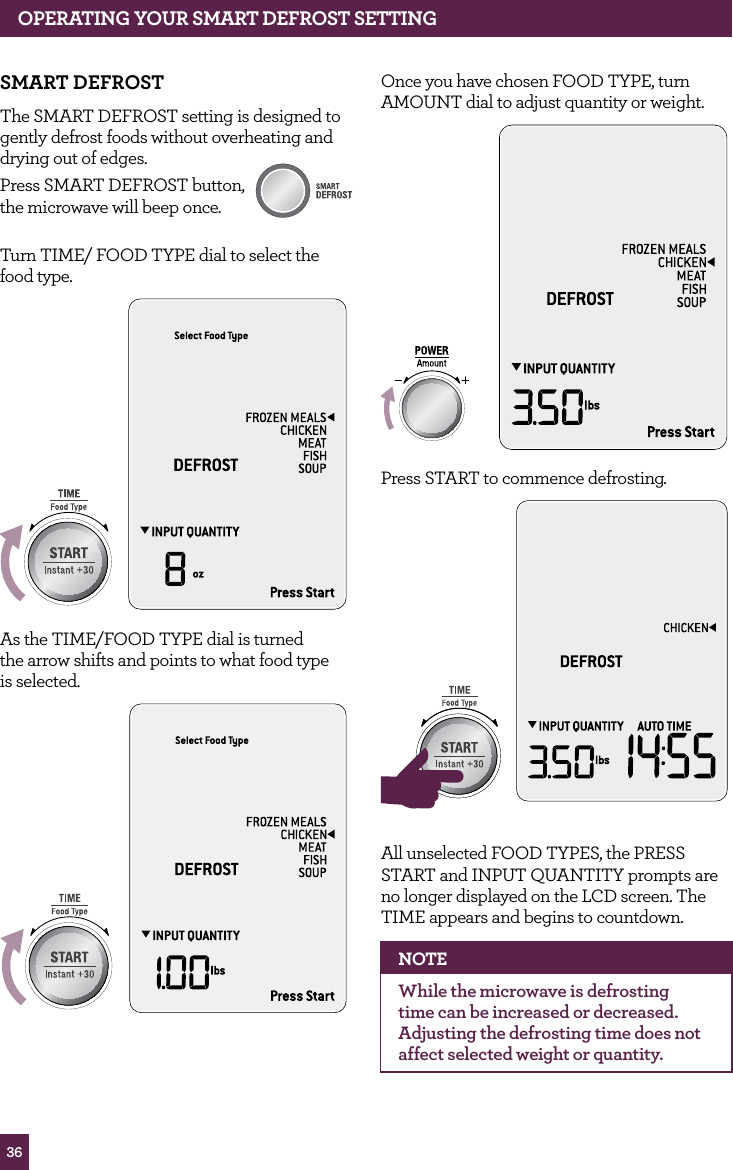
36OPERATING yOUR SMART dEfROST SETTINGSMART dEfROSTThe SMART DEFROST setting is designed to gently defrost foods without overheating and drying out of edges.Press SMART DEFROST button,  the microwave will beep once. Turn TIME/ FOOD TYPE dial to select the food type.STOPCLEARA Bit MoreAs the TIME/FOOD TYPE dial is turned  the arrow shifts and points to what food type  is selected.STOPCLEARA Bit MoreSTOPCLEARA Bit MoreSTOPCLEARA Bit MoreOnce you have chosen FOOD TYPE, turn AMOUNT dial to adjust quantity or weight.STOPCLEARA Bit MorePress START to commence defrosting.STOPCLEARA Bit MoreSTOPCLEARA Bit MoreAll unselected FOOD TYPES, the PRESS START and INPUT QUANTITY prompts are no longer displayed on the LCD screen. The TIME appears and begins to countdown.NOTEWhile the microwave is defrosting time can be increased or decreased. Adjusting the defrosting time does not affect selected weight or quantity.
37fOR BEST RESULTS•  Defrost times are for thoroughly frozen foods that has been in the freezer for at least 24 hours and maintained at temperatures of 0°F/–18°C or lower.•  When freezing meats, poultry and fish,  use good quality plastic wrap, bags  and containers.•  Always freeze meats in a single layer not thicker than ¾ inch.•  To separate meat, such as chicken pieces or steak, place wax paper or plastic film between each layer.•  For best results, form ground meat into a doughnut shape before freezing.•  Ensure that all air has been removed and packaging has been sealed securely.•  Label the packs with type and cut of meat, date and weight.•  After the defrost cycle, most foods will still be somewhat icy in the center when removed from the microwave. Stand food for 5–15 minutes until completely thawed.•  Shield thin ends of chops, steaks or chicken with foil to prevent overheating and cooking of those areas.•  Position foods in a single layer with thinner parts in the center and thicker ends around the outside of the turntable.•  Remove any packaging and bags from frozen meats. If packaging is too frozen to remove, defrost for 3 minutes using the TIME DEFROST setting; remove packaging and continue with the  SMART DEFROST setting.ChickenFor chicken pieces, position chicken pieces in  a single layer in a microwave-safe dish, plate  or container. Arrange thicker ends around the outside  of the plate/container. Shield thinner pieces  such as wings with foil to prevent overheating and cooking.Halfway through the defrost setting,  the microwave will beep and will flash  STIR/TURN FOOD.Pause and turn over chicken pieces.  Press START button to restart program.Once program has finished, remove chicken from microwave and stand 15–30 minutes to  thaw completely.For whole chickens, remove from original packaging. Shield wings and leg tips with foil.Place chicken, breast side down onto  a microwave-safe rack placed over a plate  to catch the drips.Halfway through the defrost program, the oven will beep and will flash STIR/TURN FOOD.Pause and turn chicken over. Place a strip  of foil large enough to cover the breast  meat and also the parson’s nose. Press START button to restart defrost program.After defrost cycle has ended, remove chicken from microwave and discard foil. Rinse under tap water, making sure to wash the cavity well to loosen the icy core.Place onto a clean plate and pat dry. Cover with plastic wrap and refrigerate for 1–2 hours until completely thawed.OPERATING yOUR SMART dEfROST SETTING
38MeatThe SMART DEFROST MEAT setting is suitable to defrost any type of ground or diced meat such as beef, lamb and pork.It is important that the frozen meat is not thicker than ¾ inch.Remove any packaging, foam trays and absorbent pads from the meat.Place directly onto a microwave-safe plate or shallow dish.Halfway through the defrost program, the oven will beep and will flash STIR/TURN FOOD.Pause and remove any defrosted meat and set aside in the refrigerator. Turn the frozen meat over and return to the microwave oven. Press START button to restart setting. At the end of the setting, remove meat and stand 5–15 minutes to thaw completely.fishThe SMART DEFROST FISH setting is programmed to gently thaw delicate fish fillets without cooking and heating the edges.For best results, place frozen fillets in a single layer into a microwave-safe shallow dish.Halfway through the defrost program, the oven will beep and will flash STIR/TURN FOOD.Pause and turn fish pieces over. Cover thin ends of fish fillets with a small strip of foil  and return to oven. Press START button to restart setting.At the end of the program, the fish will still be somewhat icy in the center. Remove from the microwave and stand for 5–15 minutes until completely thawed.frozen MealsSuitable for defrosting homemade frozen casseroles, stews and meat sauces.Defrost times are based on frozen meals directly from the freezer (approx. 0°F/–18°C).Remove frozen meal from any packaging and place into a microwave-safe container. Cover with a microwave-safe vented lid or vented microwave-safe plastic wrap.Halfway through the reheat program, the oven will beep and will flash STIR/TURN FOOD.Pause and stir food from the outside towards the center, reseal and press START button.For meals which contain large pieces of meat such as chicken pieces, carefully break up any thawed parts and stir or turn meat over. Frozen meals will not be hot.Choose from the SMART REHEAT settings to heat meals to food safe and serving temperatures.SoupSuitable for defrosting frozen prepared soups directly from the freezer (approx. 0°F/–18°C).Remove soup from any packaging and place into a microwave-safe bowl. Cover with a vented microwave-safe lid, paper towel or microwave-safe plastic wrap.Halfway through the defrost program, the oven will beep and will flash STIR/TURN FOOD.Pause program and break up any thawed soup. Reseal and press START button.Soup will not be hot enough to serve but broken up ready for reheating. Choose from the SMART REHEAT setting to heat soup to food safe and serving temperatures.TIME dial can be adjusted to increase or decrease the heating time.OPERATING yOUR SMART dEfROST SETTING
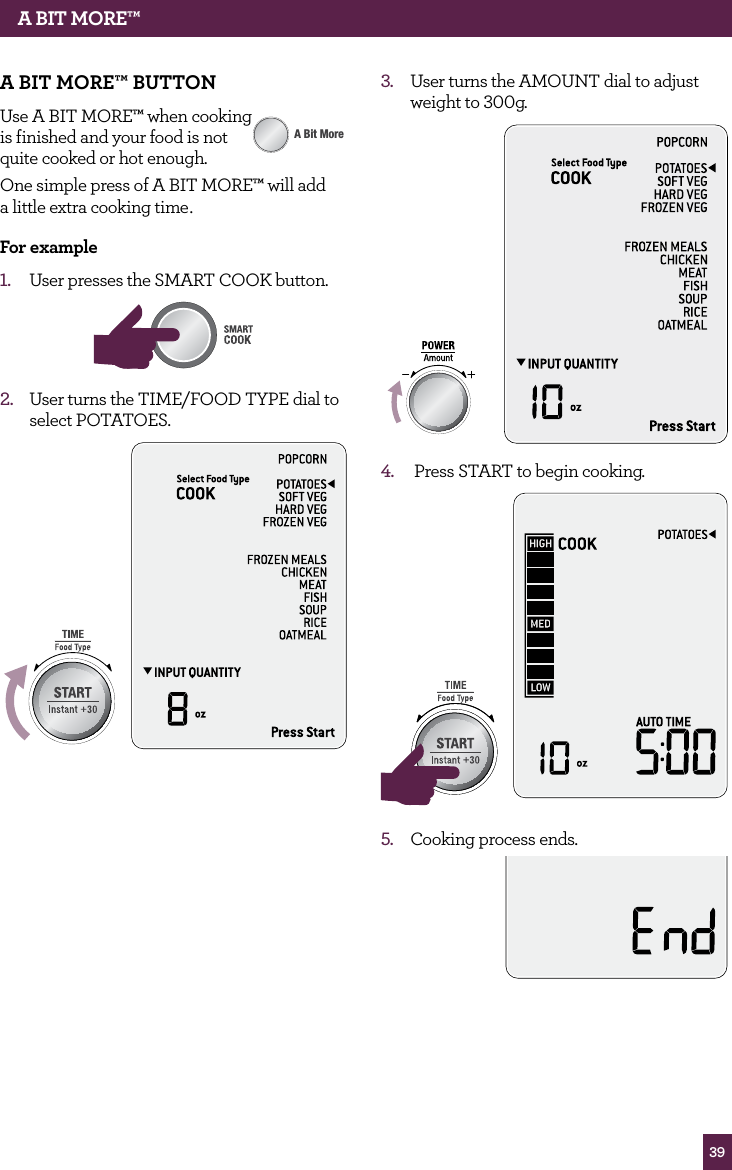
39A BIT MORE™A BIT MORE™ BUTTONUse A BIT MORE™ when cooking  is finished and your food is not  quite cooked or hot enough. One simple press of A BIT MORE™ will add  a little extra cooking time. for example1.  User presses the SMART COOK button.STOPCLEARA Bit MoreAMOUNT2.  User turns the TIME/FOOD TYPE dial to select POTATOES.STOPCLEARA Bit MoreSTOPCLEARA Bit More3.  User turns the AMOUNT dial to adjust weight to 300g.STOPCLEARA Bit More4.   Press START to begin cooking.STOPCLEARA Bit MoreSTOPCLEARA Bit More5.  Cooking process ends.
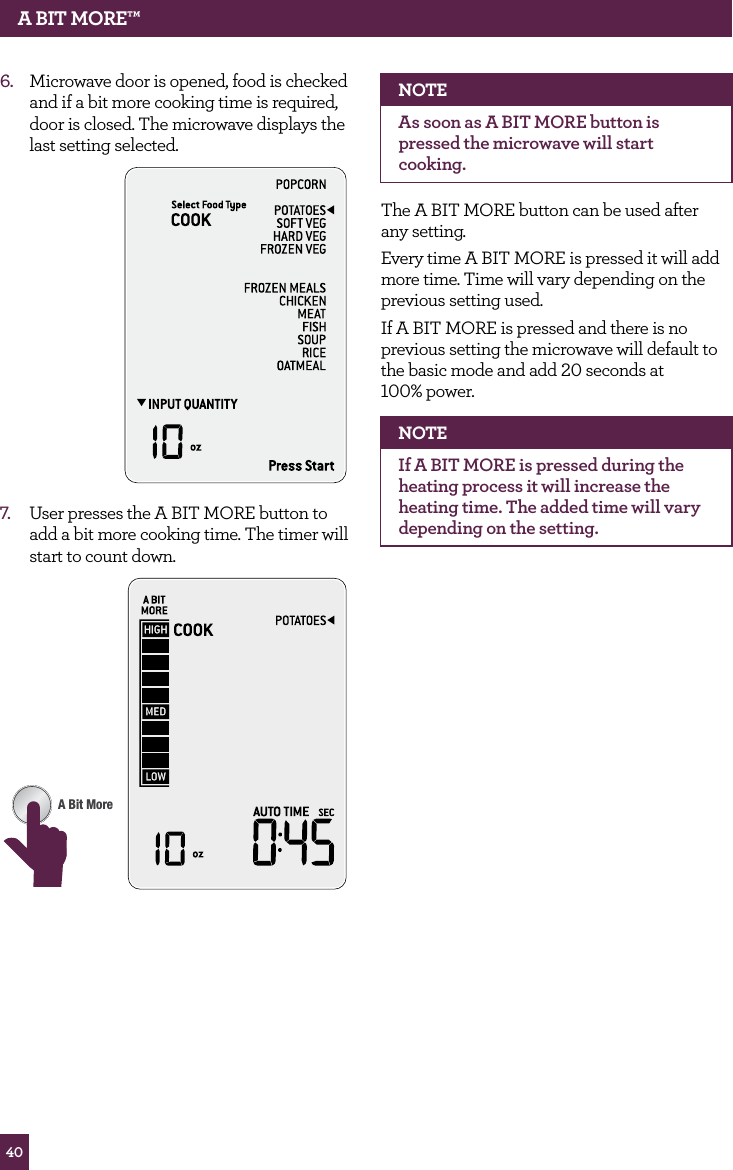
40A BIT MORE™6.  Microwave door is opened, food is checked and if a bit more cooking time is required, door is closed. The microwave displays the last setting selected.7.  User presses the A BIT MORE button to add a bit more cooking time. The timer will start to count down.STOPCLEARA Bit MoreNOTEAs soon as A BIT MORE button is pressed the microwave will start cooking.The A BIT MORE button can be used after  any setting.Every time A BIT MORE is pressed it will add more time. Time will vary depending on the previous setting used.If A BIT MORE is pressed and there is no previous setting the microwave will default to the basic mode and add 20 seconds at  100% power.NOTEIf A BIT MORE is pressed during the heating process it will increase the heating time. The added time will vary depending on the setting.
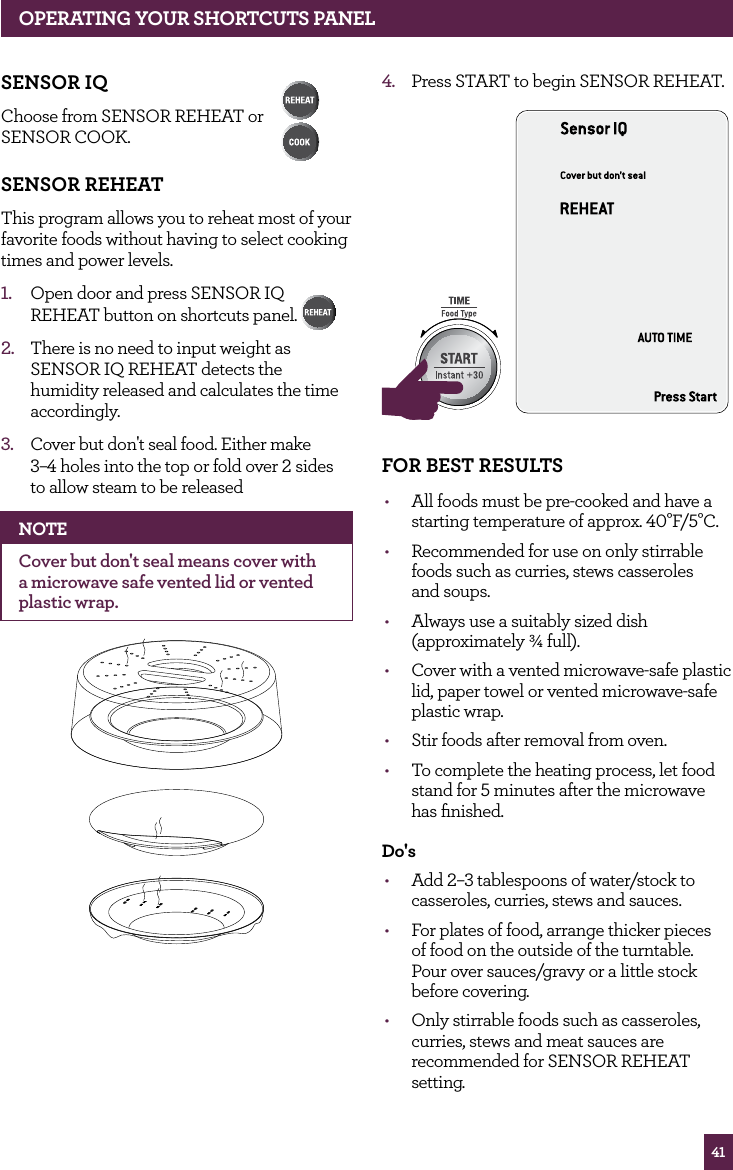
41SENSOR IqChoose from SENSOR REHEAT or  SENSOR COOK. SENSOR REhEATThis program allows you to reheat most of your favorite foods without having to select cooking times and power levels.1.   Open door and press SENSOR IQ REHEAT button on shortcuts panel. 2.   There is no need to input weight as SENSOR IQ REHEAT detects the humidity released and calculates the time accordingly.3.   Cover but don't seal food. Either make  3–4 holes into the top or fold over 2 sides to allow steam to be releasedNOTECover but don't seal means cover with a microwave safe vented lid or vented plastic wrap. 4.  Press START to begin SENSOR REHEAT.STOPCLEARA Bit MoreSTOPCLEARA Bit MorefOR BEST RESULTS•  All foods must be pre-cooked and have a starting temperature of approx. 40°F/5°C.•  Recommended for use on only stirrable foods such as curries, stews casseroles  and soups.•  Always use a suitably sized dish (approximately ¾ full).•  Cover with a vented microwave-safe plastic lid, paper towel or vented microwave-safe plastic wrap.•  Stir foods after removal from oven.•  To complete the heating process, let food stand for 5 minutes after the microwave has finished.do's•  Add 2–3 tablespoons of water/stock to casseroles, curries, stews and sauces.•  For plates of food, arrange thicker pieces  of food on the outside of the turntable.  Pour over sauces/gravy or a little stock before covering.•  Only stirrable foods such as casseroles, curries, stews and meat sauces are recommended for SENSOR REHEAT setting.OPERATING yOUR ShORTCUTS PANEL
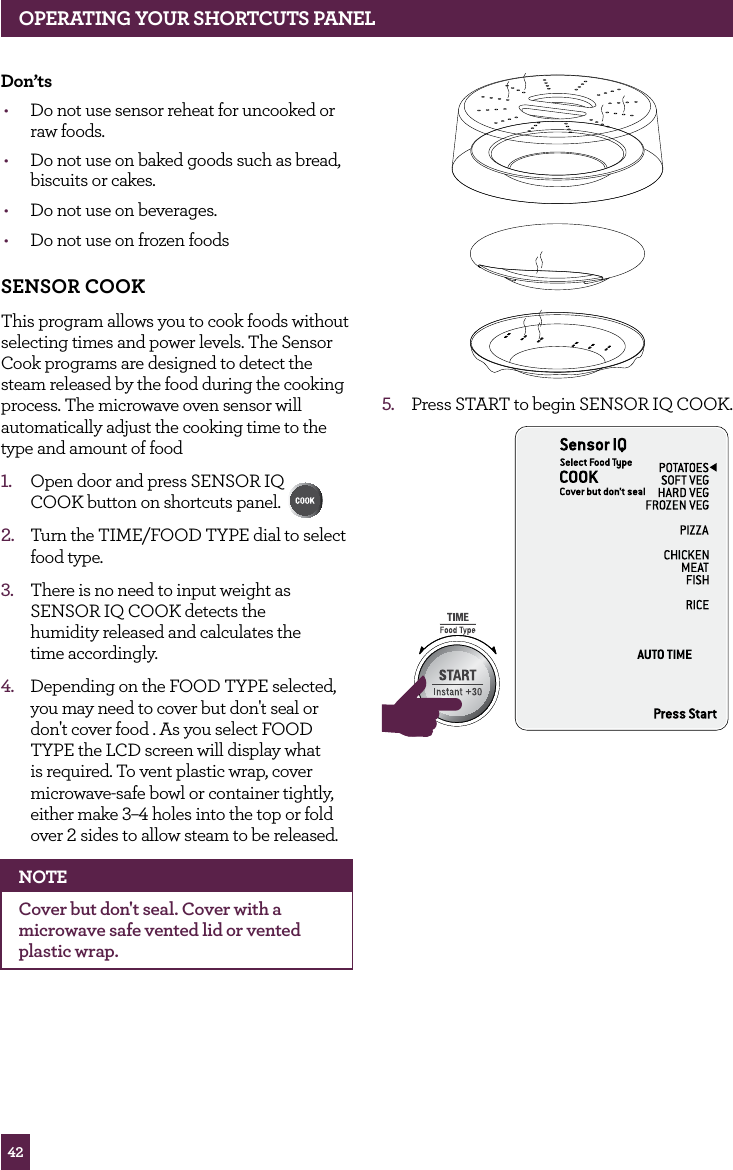
42don’ts•  Do not use sensor reheat for uncooked or  raw foods.•  Do not use on baked goods such as bread, biscuits or cakes.•  Do not use on beverages.•  Do not use on frozen foods SENSOR COOKThis program allows you to cook foods without selecting times and power levels. The Sensor Cook programs are designed to detect the steam released by the food during the cooking process. The microwave oven sensor will automatically adjust the cooking time to the type and amount of food1.   Open door and press SENSOR IQ  COOK button on shortcuts panel.  2.   Turn the TIME/FOOD TYPE dial to select food type.3.  There is no need to input weight as  SENSOR IQ COOK detects the  humidity released and calculates the  time accordingly.4.   Depending on the FOOD TYPE selected, you may need to cover but don't seal or don't cover food . As you select FOOD TYPE the LCD screen will display what is required. To vent plastic wrap, cover microwave-safe bowl or container tightly, either make 3–4 holes into the top or fold over 2 sides to allow steam to be released.NOTECover but don't seal. Cover with a microwave safe vented lid or vented plastic wrap. 5.  Press START to begin SENSOR IQ COOK.STOPCLEARA Bit MoreSTOPCLEARA Bit MoreOPERATING yOUR ShORTCUTS PANEL
43OPERATING YOUR SHORTCUTS PANELFOR BEST RESULTSDo not use one of the sensor cook settings twice in succession on the same food type.  This may result in severely overcooked or burnt food.Do's•  Minimum amount of food to be cooked must not be less than 4oz (120g).•  Place food into an appropriate size dish for the volume of food you are cooking.•  Ensure the outside of the cooking containers are dry before placing inside the oven.•  Be sure to remove excess moisture from the cavity of the microwave oven. Wipe cavity dry with a clean dry cloth before placing food inside.•  Cover loosely with vented microwave-safe lid, paper towel or vented microwave-safe plastic wrap.Don'ts•  Never use tight sealing plastic containers, as they will prevent steam from escaping.PotatoesSuitable for cooking whole potatoes starting at room temperature (approx. 68°F/20°C).Minimum amount of potato to be cooked is 8.5oz (240g) to Maximum 2lbs (960g).Before cooking, pierce each potato with a fork 5–6 times.Line microwave turntable with a piece of absorbent paper. Place potatoes around the edges. Do not cover potatoes.To complete the cooking process, let potatoes stand for 5 minutes after the microwave  has finished.Soft VegetablesSuitable for cooking any soft vegetables such as broccoli, zucchini and cauliflower directly from the refrigerator (approx. 40°F/5°C).Minimum amount of vegetables cooked is 4oz (120g) and maximum is 1lb (480g).Add 1 tablespoon of water per  3.5oz (100g) of vegetables.Cover with a vented microwave-safe plastic lid or vented microwave-safe plastic wrap.To complete the cooking process, let vegetables stand for 5 minutes after the microwave has finished.Hard VegetablesSuitable for cooking any hard vegetables such a carrot, sweet potato, potato and turnips directly from the refrigerator (approx. 40°F/5°C).Minimum amount of hard vegetables cooked is 4oz (120g) and maximum is 1lb (480g).Add 1 tablespoon of water per  3.5oz (100g) of vegetables.Cover with a vented microwave-safe plastic lid or vented microwave-safe plastic wrap.To complete the cooking process, let vegetables stand for 5 minutes after the microwave has finished.Frozen Vegetables Suitable for cooking any frozen vegetables directly from the freezer (approx. 0°F/–18°C).Minimum amount of frozen vegetables cooked is 6oz (180g) and maximum is 1lb (480g).No need to add any extra water.Cover with a vented microwave-safe plastic lid or vented microwave-safe plastic wrap.To complete the cooking process, let vegetables stand for 5 minutes after the microwave has finished.
44OPERATING YOUR SHORTCUTS PANELFrozen PizzaSuitable for heating frozen pizza slices directly from the freezer (approx. 0°F/–18°C).Minimum amount of pizza to heat is 6oz (180g) and maximum is 12.5oz (360g).Line turntable with paper towel, and separate pizza slices if possible.Arrange thick end of pizza on the outside of  the turntable.To complete the cooking process, let pizza stand for 5 minutes after the microwave  has finished.ChickenSuitable for chicken pieces only, starting with starting temperatures of approx. 40°F/5°C.Minimum amount of chicken should not be less than 8.5oz (240g) and not more than 1.5lbs (720g).Arrange chicken in a shallow microwave-safe dish, making sure to position thicker pieces towards the outside of the turntable.Cover with a vented microwave-safe plastic lid or vented microwave-safe plastic wrap.Pause and turn chicken over halfway through SENSOR COOK program.To complete the cooking process, let chicken stand for 5 minutes after the microwave  has finished.MeatSuitable for cooking any ground meat with starting temperatures of approx. 40°F/5°C.Minimum amount of mince should not be less than 8.5oz (240g) and not more than 1.5lbs (720g).Select a microwave-safe bowl and break up raw mince inside bowl.Cover with a vented microwave-safe plastic lid or vented microwave-safe plastic wrap.Pause and break up large clumps of mince halfway through SENSOR COOK program.To complete the cooking process, let mince stand for 5 minutes after the microwave  has finished. Drain off any excess juices after cooking.FishSuitable for fish fillets with starting temperatures of approx. 40°F/5°C.Minimum amount of fish should not be less than 4oz (120g) and not more than 1lb (480g).Select a shallow microwave-safe dish and arrange fish in a single layer.Add 1–2 tablespoons of stock, water, soy sauce or butter to dish.Cover with a vented microwave-safe plastic lid or vented microwave-safe plastic wrap.Pause and turn fish over carefully halfway through SENSOR COOK program.To complete the cooking process, let fish stand for 5 minutes after the microwave has finished.RiceSuitable for all types of rice.Minimum amount of rice should not be less than ½ cup and not more than 3 cups.Wash rice with cold running water until water runs clear of the starch.Use water ratio of 1 part rice to 1.5 parts water for standard white rice.Select a deep large microwave-safe bowl as this will prevent rice from boiling over.Cover with a vented microwave-safe plastic lid or vented microwave-safe plastic wrap.To complete the cooking process, let rice stand for 5 minutes after the microwave has finished.
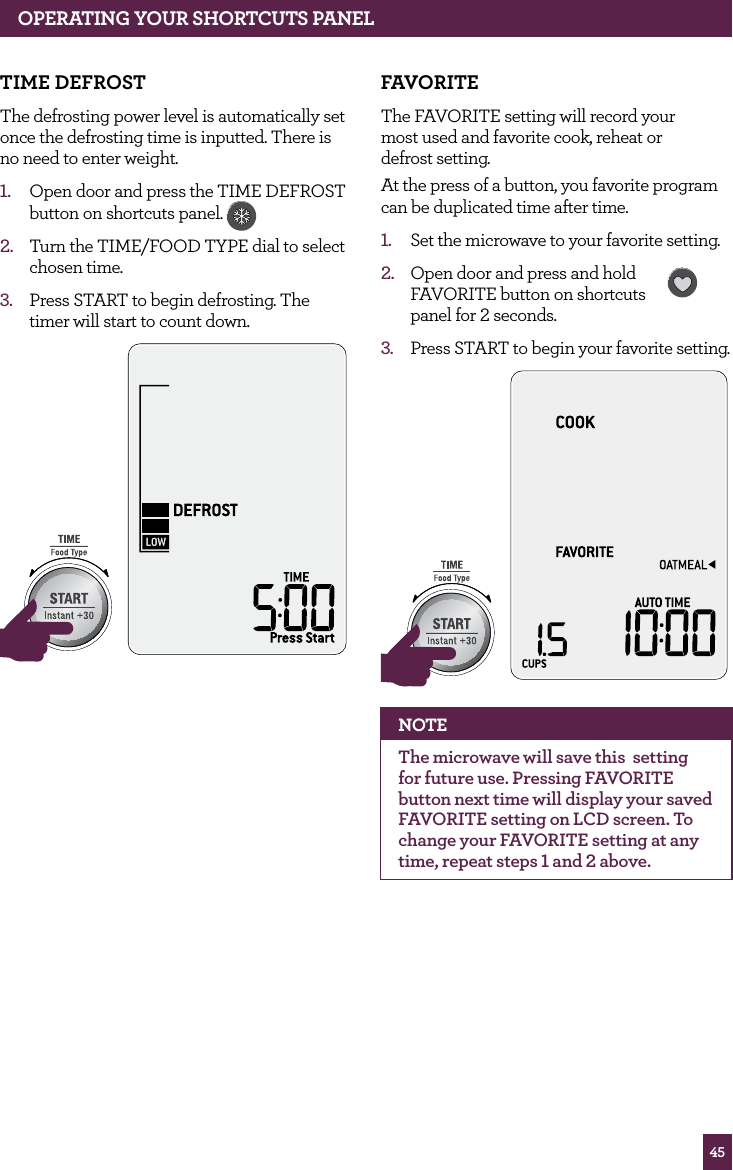
45OPERATING yOUR ShORTCUTS PANELTIME dEfROSTThe defrosting power level is automatically set once the defrosting time is inputted. There is no need to enter weight.1.  Open door and press the TIME DEFROST  button on shortcuts panel. 2.  Turn the TIME/FOOD TYPE dial to select chosen time.3.  Press START to begin defrosting. The timer will start to count down.STOPCLEARA Bit MoreSTOPCLEARA Bit MorefAvORITEThe FAVORITE setting will record your  most used and favorite cook, reheat or  defrost setting. At the press of a button, you favorite program can be duplicated time after time.1.  Set the microwave to your favorite setting.2.  Open door and press and hold  FAVORITE button on shortcuts  panel for 2 seconds.  3.  Press START to begin your favorite setting.STOPCLEARA Bit MoreSTOPCLEARA Bit MoreNOTEThe microwave will save this  setting for future use. Pressing FAVORITE button next time will display your saved FAVORITE setting on LCD screen. To change your FAVORITE setting at any time, repeat steps 1 and 2 above.
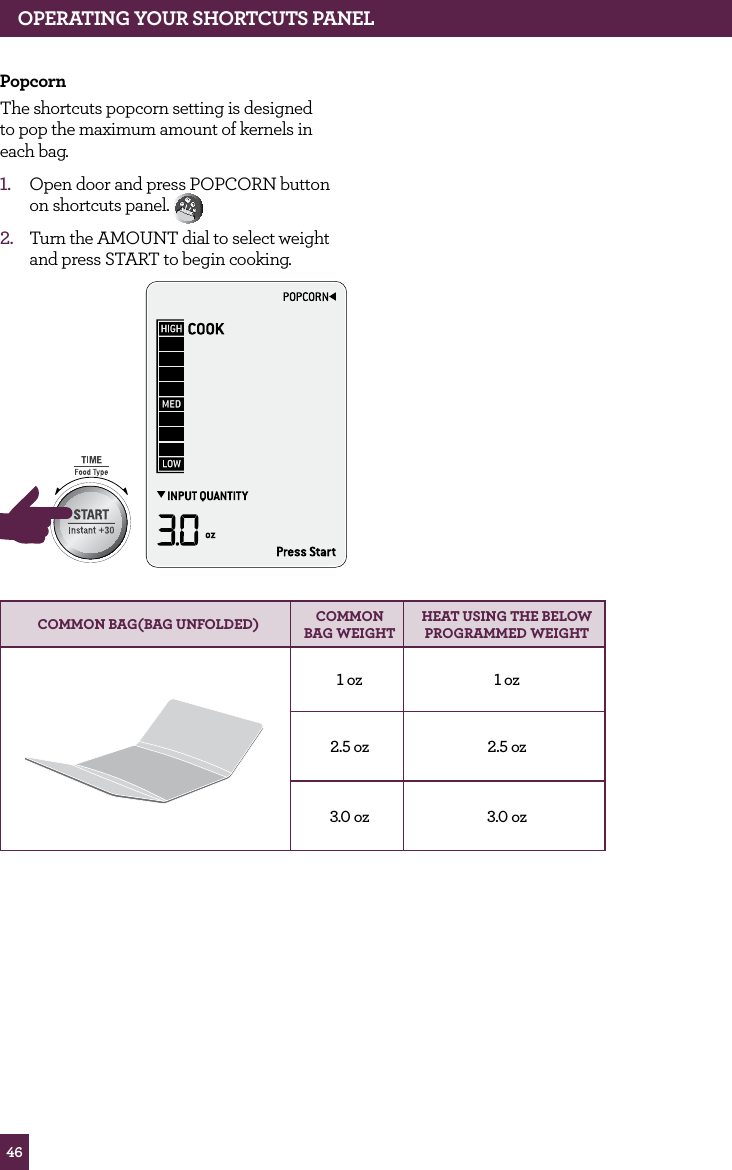
46PopcornThe shortcuts popcorn setting is designed to pop the maximum amount of kernels in each bag.1.  Open door and press POPCORN button on shortcuts panel. 2.  Turn the AMOUNT dial to select weight and press START to begin cooking.STOPCLEARA Bit MoreCOMMON BAG(BAG UNfOLdEd) COMMON BAG wEIGhT hEAT USING  ThE BELOw  PROGRAMMEd wEIGhT1 oz 1 oz2.5 oz 2.5 oz3.0 oz 3.0 ozOPERATING yOUR ShORTCUTS PANEL
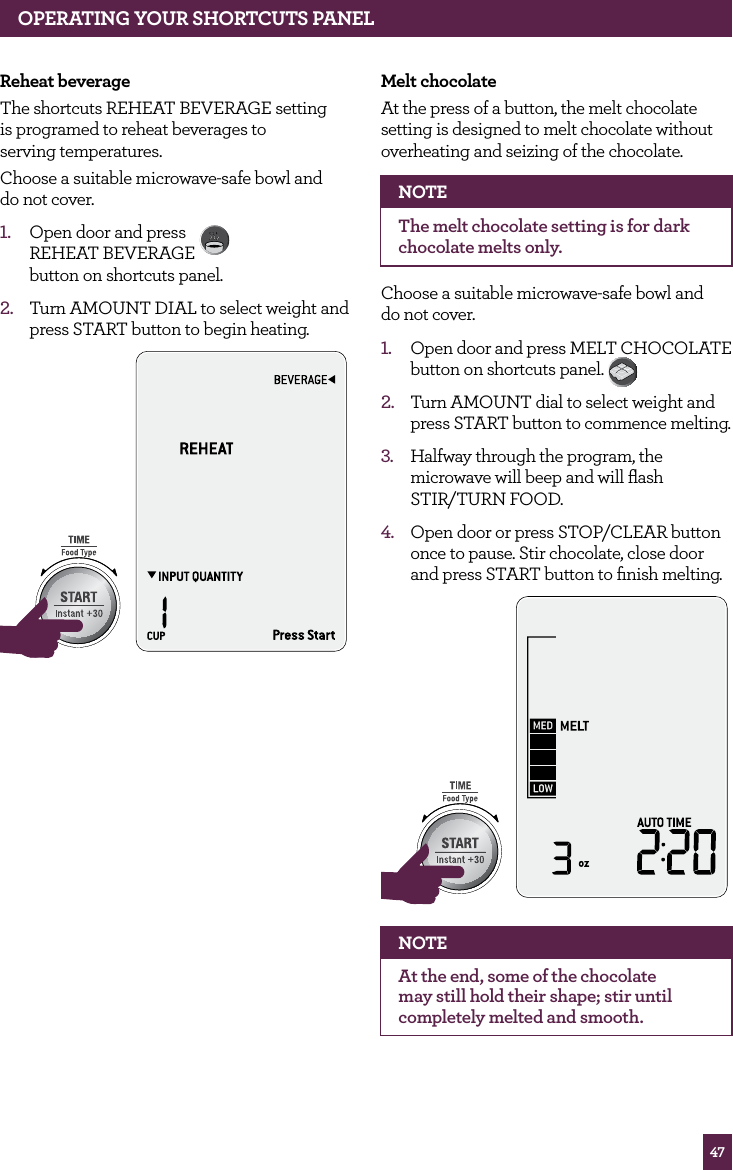
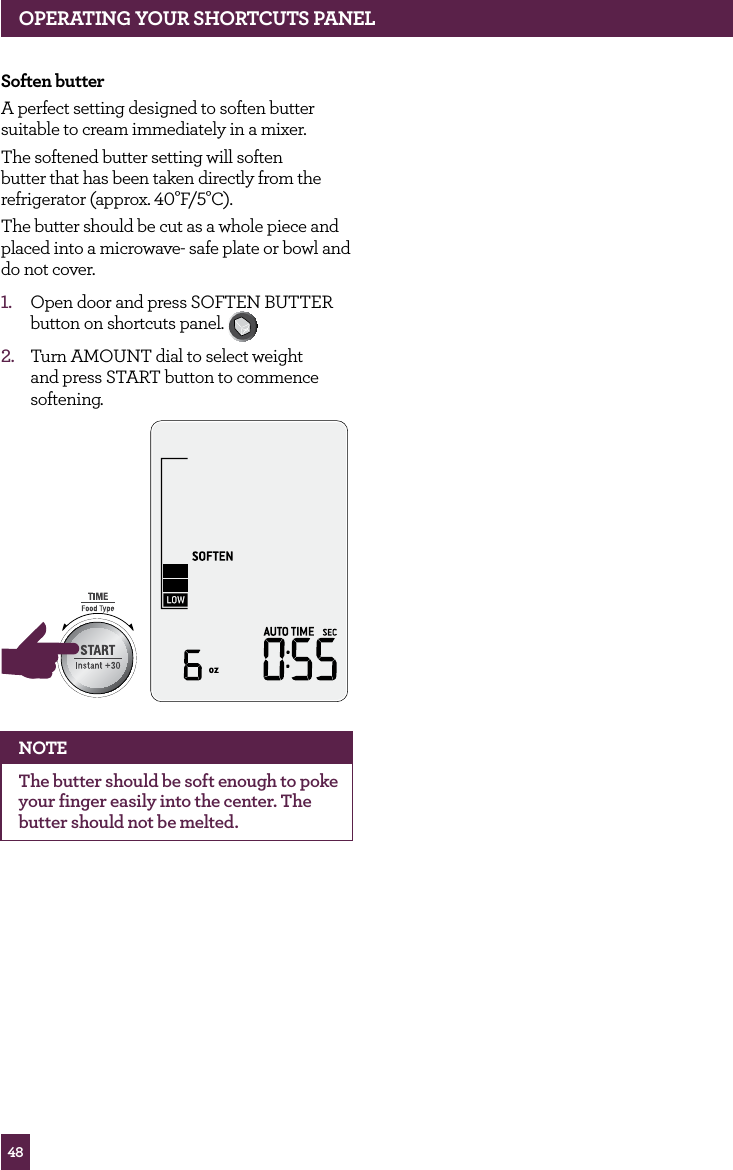
47Reheat beverageThe shortcuts REHEAT BEVERAGE setting  is programed to reheat beverages to  serving temperatures.Choose a suitable microwave-safe bowl and  do not cover.1.  Open door and press  REHEAT BEVERAGE  button on shortcuts panel. 2.  Turn AMOUNT DIAL to select weight and press START button to begin heating.STOPCLEARA Bit MoreSTOPCLEARA Bit MoreMelt chocolateAt the press of a button, the melt chocolate setting is designed to melt chocolate without overheating and seizing of the chocolate.NOTEThe melt chocolate setting is for dark chocolate melts only.Choose a suitable microwave-safe bowl and  do not cover.1.  Open door and press MELT CHOCOLATE button on shortcuts panel. 2.  Turn AMOUNT dial to select weight and press START button to commence melting.3.  Halfway through the program, the microwave will beep and will flash  STIR/TURN FOOD.4.  Open door or press STOP/CLEAR button once to pause. Stir chocolate, close door and press START button to finish melting. STOPCLEARA Bit MoreSTOPCLEARA Bit MoreNOTEAt the end, some of the chocolate may still hold their shape; stir until completely melted and smooth.OPERATING YOUR SHORTCUTS PANEL
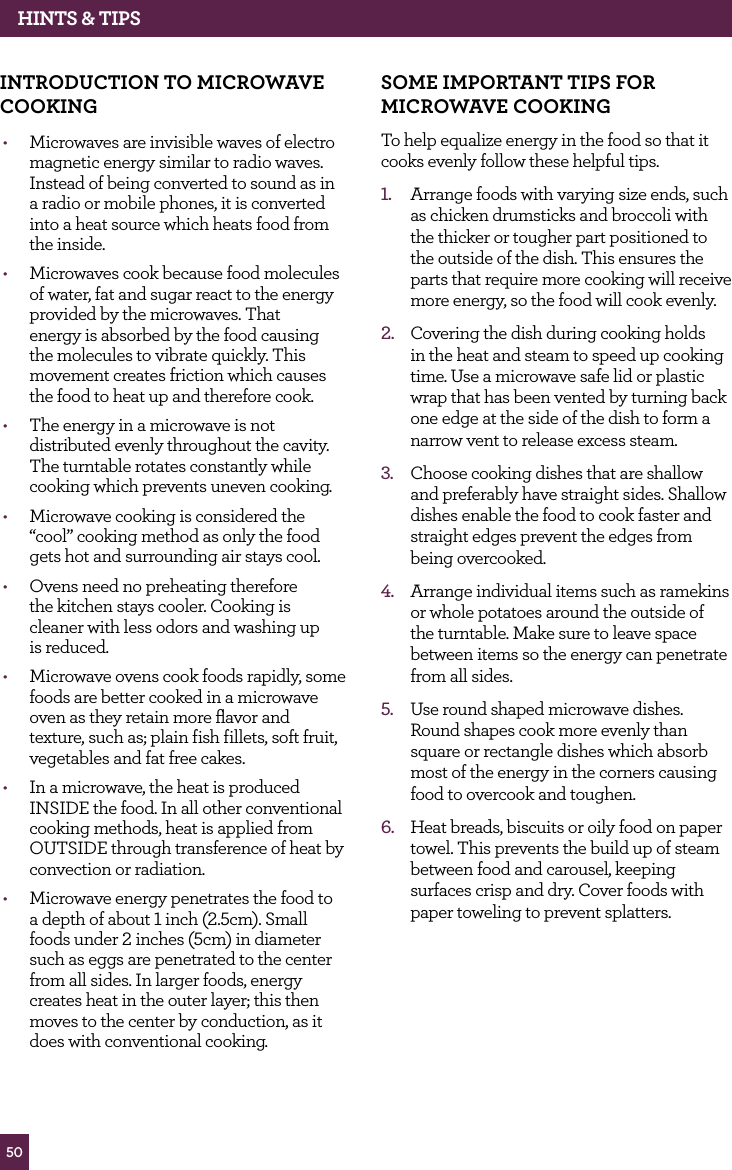
48Soften butterA perfect setting designed to soften butter suitable to cream immediately in a mixer.The softened butter setting will soften butter that has been taken directly from the refrigerator (approx. 40°F/5°C).The butter should be cut as a whole piece and placed into a microwave- safe plate or bowl and do not cover.1.  Open door and press SOFTEN BUTTER button on shortcuts panel. 2.  Turn AMOUNT dial to select weight and press START button to commence softening.STOPCLEARA Bit MoreNOTEThe butter should be soft enough to poke your finger easily into the center. The butter should not be melted.OPERATING yOUR ShORTCUTS PANEL
hINTS & TIPS
50hINTS & TIPSINTROdUCTION TO MICROwAvE COOKING  •  Microwaves are invisible waves of electro magnetic energy similar to radio waves. Instead of being converted to sound as in a radio or mobile phones, it is converted into a heat source which heats food from the inside.•  Microwaves cook because food molecules of water, fat and sugar react to the energy provided by the microwaves. That energy is absorbed by the food causing the molecules to vibrate quickly. This movement creates friction which causes the food to heat up and therefore cook.•  The energy in a microwave is not distributed evenly throughout the cavity. The turntable rotates constantly while cooking which prevents uneven cooking.•  Microwave cooking is considered the “cool” cooking method as only the food gets hot and surrounding air stays cool.•  Ovens need no preheating therefore  the kitchen stays cooler. Cooking is  cleaner with less odors and washing up  is reduced.•  Microwave ovens cook foods rapidly, some foods are better cooked in a microwave oven as they retain more flavor and texture, such as; plain fish fillets, soft fruit, vegetables and fat free cakes.•  In a microwave, the heat is produced INSIDE the food. In all other conventional cooking methods, heat is applied from OUTSIDE through transference of heat by convection or radiation.•  Microwave energy penetrates the food to  a depth of about 1 inch (2.5cm). Small foods under 2 inches (5cm) in diameter such as eggs are penetrated to the center from all sides. In larger foods, energy creates heat in the outer layer; this then moves to the center by conduction, as it does with conventional cooking.SOME IMPORTANT TIPS fOR  MICROwAvE COOKINGTo help equalize energy in the food so that it cooks evenly follow these helpful tips.1.  Arrange foods with varying size ends, such as chicken drumsticks and broccoli with the thicker or tougher part positioned to the outside of the dish. This ensures the parts that require more cooking will receive more energy, so the food will cook evenly.2.  Covering the dish during cooking holds in the heat and steam to speed up cooking time. Use a microwave safe lid or plastic wrap that has been vented by turning back one edge at the side of the dish to form a narrow vent to release excess steam.3.  Choose cooking dishes that are shallow and preferably have straight sides. Shallow dishes enable the food to cook faster and straight edges prevent the edges from being overcooked.4.  Arrange individual items such as ramekins or whole potatoes around the outside of the turntable. Make sure to leave space between items so the energy can penetrate from all sides.5.  Use round shaped microwave dishes. Round shapes cook more evenly than square or rectangle dishes which absorb most of the energy in the corners causing food to overcook and toughen.6.  Heat breads, biscuits or oily food on paper towel. This prevents the build up of steam between food and carousel, keeping surfaces crisp and dry. Cover foods with paper toweling to prevent splatters.
51hINTS & TIPS7.  Stir foods from the outside to center of the dish once or twice during cooking to equalize heat and speed microwaving.8.  Turn medium to large food items over twice during microwaving. This enables even exposure to microwaves.9.  Elevating some types of food such as cakes, roast vegetables and dough products can be advantageous. It allows more energy to penetrate the food from all sides, base and top. Use a microwave safe plastic or ceramic rack. If a rack is unavailable, use an upturned bowl or cup to elevate plates of food.10.  Do not elevate any special browning dishes, jugs of sauce or custard, small quantities of food or mugs of beverages.11.  Internal temperatures of foods continue to rise so that they continue cooking even after they have been removed from the microwave oven. It is better to undercook food as it will continue to cook once removed from the microwave.MICROwAvE UTENSILS•  Containers, plates, dishes, etc. used in the microwave oven should always be microwave–safe. Check if stated on the underside of the utensil or contact the manufacturer. •  To test if a container, plate or dish is microwave–safe, place it into the microwave oven with 1 cup of cold water (in a microwave–safe cup) and heat on High (100%) Power for 1 minute. If the container is hot and the water is cold, the container is not suitable for microwave oven use. If the container is cold and the water is hot, then the container is suitable for microwave oven use.•  Microwave-safe cookware will not become hot by the microwave energy, but it will become hot from contact with hot food. When the food becomes hot, some of this heat is transferred to the dish. Always use oven mitts or clothes to remove hot dishes from the microwave.•  Metal containers and utensils should not be used in the microwave oven.•  Aluminium foil can be used to slow down cooking. Use the reflective properties of the metal to protect foods which might overcook in some areas.
CARE & CLEANING  for your Breville product
53CARE & CLEANING  fOR yOUR BREvILLE PROdUCTCARE & CLEANING•  Remove the plug from the power outlet before cleaning.•  Keep the inside of the microwave oven clean. When food splatters or spilled liquids adhere to the microwave oven internal walls, wipe with a damp cloth. Mild detergent may be used if the cavity gets very dirty. Avoid the use of spray and other harsh cleaners as they may stain, streak or dull the door surface.•  The outside surfaces should be cleaned with a damp cloth. To prevent damage to the operating parts inside the microwave oven cavity, water should not be allowed to seep into the ventilation openings.•  Wipe the door and window on both sides of the door seals and adjacent parts frequently with a damp cloth to remove any spills or spatters. Do not use an abrasive cleaner.•  Do not allow the control panel to become wet. Clean with a soft, damp cloth. When cleaning the control panel, leave the microwave oven door open to prevent it from accidentally turning on.•  If steam accumulates inside or around the outside of the oven door, wipe with a soft dry cloth. This may occur when cooking foods high in moisture or if the microwave oven is operated under high humidity conditions, this is normal.•  It is occasionally necessary to remove the glass turntable for cleaning. Wash the glass turntable in warm soapy water, rinse in clean water and dry thoroughly.•  The turntable roller and microwave oven floor should be cleaned regularly to ensure the glass turntable rotates correctly and avoids making excessive noise. Simply wipe the bottom surface of the microwave with a soft damp cloth. The turntable roller may be washed in mild soapy water, rinse in clean water and dry thoroughly. When removing the turntable roller from the cavity floor  for cleaning, be sure to replace in the  proper position.•  Remove odors from your microwave oven by combining a cup of water with the  juice of one lemon in a deep microwave-safe bowl, microwave on High for 5 minutes. Wipe the microwave oven cavity thoroughly and dry with a soft cloth.•  When it becomes necessary to replace the oven light, contact Breville Consumer Service.•  Please do not dispose this appliance with domestic waste; it should be taken to the appropriate disposal center provided by the local council municipalities.•  If storing the microwave oven, press the STOP/CLEAR button, then unplug the power cord. Ensure the microwave oven is completely cool, clean and dry. Secure the roller ring and glass turntable and close the door.  Do not place heavy objects on top. Store the microwave oven upright.BEfORE yOU CALL fOR SERvICE •  Check to ensure that the oven is plugged in securely. If it is not, remove the plug from the power outlet, wait 10 seconds and plug it in again securely.•  Check for a blown circuit fuse or a tripped main circuit breaker. If these seem to be operating properly, test the power outlet with another appliance. •  Check to ensure that the control panel is programmed correctly and the timer is set.•  Check to ensure that the door is securely closed engaging the door safety lock system. Otherwise, the microwave energy will not flow into the oven.NOTEIf none of the above rectify the situation, then contact your Breville Consumer Service. Do NOT try to adjust or repair the oven yourself.
TROUBLEShOOTING
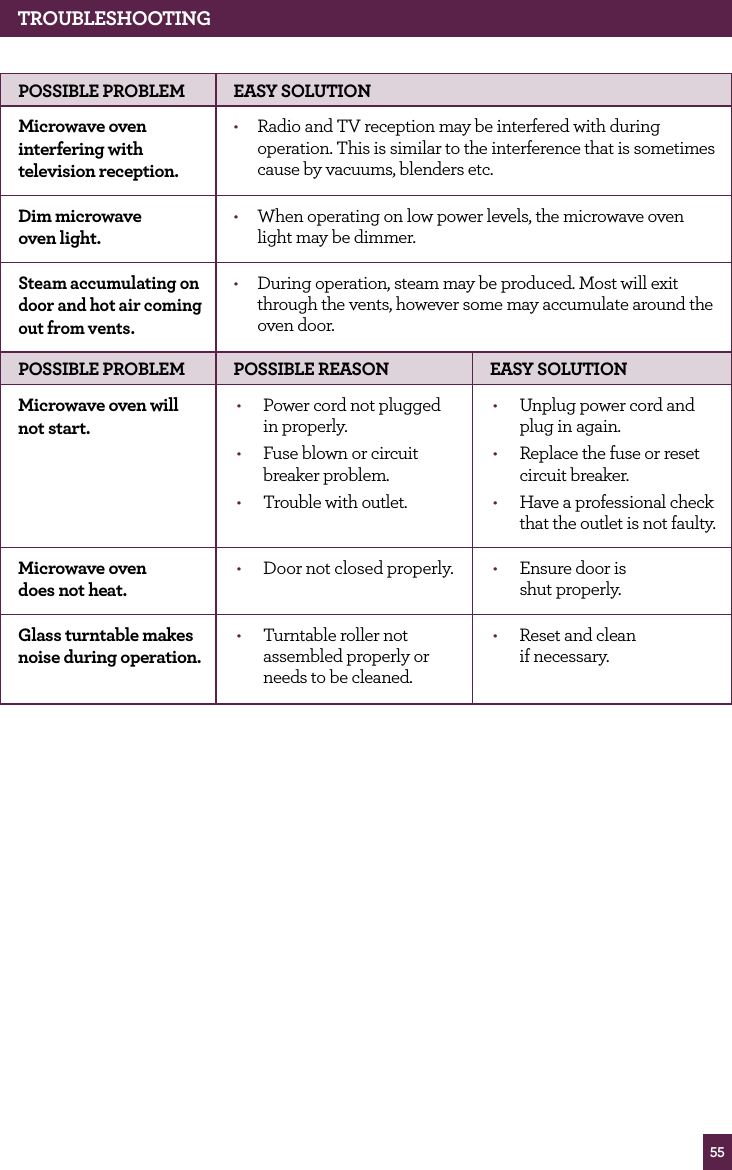
55TROUBLESHOOTINGPOSSIBLE PROBLEM EASY SOLUTIONMicrowave oven interfering with television reception.•  Radio and TV reception may be interfered with during operation. This is similar to the interference that is sometimes cause by vacuums, blenders etc.Dim microwave  oven light.•  When operating on low power levels, the microwave oven light may be dimmer.Steam accumulating on door and hot air coming out from vents.•  During operation, steam may be produced. Most will exit through the vents, however some may accumulate around the oven door.POSSIBLE PROBLEM POSSIBLE REASON EASY SOLUTIONMicrowave oven will not start.•  Power cord not plugged  in properly.•  Fuse blown or circuit breaker problem.•  Trouble with outlet.•  Unplug power cord and plug in again.•  Replace the fuse or reset circuit breaker.•  Have a professional check that the outlet is not faulty.Microwave oven  does not heat.•  Door not closed properly. •  Ensure door is  shut properly.Glass turntable makes noise during operation.•  Turntable roller not assembled properly or needs to be cleaned.•  Reset and clean  if necessary.
*L’enregistrement n’est pas un substitut à la preuve d’achat lorsque vous soumettez une réclamation de garantie.Consommateurs américains: www.brevilleusa.comConsommateurs canadiens: www.breville.caInscrivez-vous en ligne pour le soutien technique et les offres exclusives.*fÉLICITATIONS pour l’achat de votre produit Breville
57TABLE dES MATIèRES58  Breville vous recommande la sécurité avant tout66  Faites la connaissance de votre  produit Breville68  Assemblage de votre  produit Breville71  Fonctionnement de votre  produit Breville  –  Réglage de cuisson intelligente  78  –  Réglage de réchauffage intelligent  88  –  Réglage de décongélation intelligente  92 – A Bit MoreMC  (Un peu plus)  95 – Panneau de raccourcis  97106  Trucs & astuces109  Entretien & nettoyage112  Guide de dépannage
58BREvILLE vOUS RECOMMANdE LA SÉCURITÉ AvANT TOUTChez Breville, la sécurité occupe une place de choix. Nous concevons et fabriquons des produits de consommation sans jamais perdre de vue la sécurité de notre précieuse clientèle. De plus, nous vous demandons d’être très vigilant lorsque vous utilisez un appareil électrique et de suivre les consignes de sécurité suivantes:Lors de l'utilisation d'un appareil électromé-nager, des mesures de sécurité fondamentales  s'imposent, dont les suivantes:AVERTISSEMENTPour réduire le risque de brûlures, de choc électrique, d'incendie ou de blessures et l'exposition excessive à l'énergie des micro-ondes:  LIRE ATTENTIvEMENT TOUTES LES INSTRUCTIONS AvANT d'UTILISER L'APPAREIL ET LES CONSERvER POUR RÉfÉRENCE fUTURE•  Retirez et jetez tout matériel d'emballage et étiquettes promotionnelles avant d'utiliser le four à micro-ondes de Breville pour la première fois.•  Lisez et respectez les ''PRÉCAUTIONS CONTRE LE RISQUE D'EXPOSITION EXCESSIVE À L'ÉNERGIE DES MICRO-ONDES'' contenues à la page 62.•  Cet appareil doit être relié à la terre et branché uniquement sur une prise de courant correctement reliée à la terre. Voir les ''INSTRUCTIONS DE LIAISON À LA TERRE'' décrites à la page 63.•  Le four à micro-ondes doit être installé et placé selon les instructions d'installation fournies à la page 69. •  Certains produits, comme les œufs entiers en coquille et les récipients hermétiques -  par exemple, les bocaux en verre fermés-  peuvent exploser et ne doivent pas être chauffés dans le four à micro-ondes.•  Cet appareil doit être utilisé uniquement pour les applications auxquelles il est destiné, telles que décrites dans ce manuel. Ne pas utiliser de vapeurs ou de produits chimiques corrosifs dans le four à micro-ondes. Ce type de four est spécifiquement conçu pour chauffer, cuire ou sécher les aliments, mais non pour des applications industrielles ou de laboratoire.•  Comme pour tout appareil ménager, les enfants de devraient utiliser ce four que sous une supervision adéquate.•  Ne faites pas fonctionner cet appareil si le cordon d'alimentation ou la fiche sont endommagés, s'il ne fonctionne pas correctement, s'il est endommagé ou a subi une chute.•  Tous les travaux de service doivent être effectués exclusivement par un personnel d'entretien qualifié. Contactez un centre de service autorisé pour les opérations d'inspection, de réparation ou de réglage.•  Ne pas couvrir ni obstruer les évents sur le four à micro-ondes.•  Ne pas ranger cet appareil à l'extérieur. Ne pas l'utiliser à proximité de l'eau - par exemple, près d'un évier de cuisine, dans un sous-sol humide ou près d'une piscine ou d'un emplacement similaire.•  Ne pas immerger le cordon d'alimentation, la fiche de branchement ou l'appareil dans l'eau ou tout autre liquide.IMPORTANTES MESURES dE SÉCURITÉUSAGE dOMESTIqUE SEULEMENTCONSERvEZ CES INSTRUCTIONS

Navigation menu