Breville Bkc600Xl Users Manual
bkc600xl 6bf36dbb-0ade-4b82-a394-2b5e5ccf04e4 Breville Coffeemaker BKC600XL User Guide |
2015-01-05
: Breville Breville-Bkc600Xl-Users-Manual-163423 breville-bkc600xl-users-manual-163423 breville pdf
Open the PDF directly: View PDF  .
.
Page Count: 28
FILENA
BREVIL
A5 Inst
Model BK
Model BKC600XL Issue 2/07 Packaging Code: NA
Breville is a registered trademark of Breville Pty. Ltd.
Breville Customer Service Center
US Customers
✉19400 S.Western Ave
Torrance
CA 90501-1119
☎Service Center: 1 (866) BREVILLE
Email askus@brevilleUSA.com
www.breville.com
Canada Customers
✉Anglo Canadian
2555,Avenue Aviation
Pointe-Claire (Montréal) Québec
H9P 2Z2
☎Service Center: 1 (866) BREVILLE
Fax (514) 683-5554
Email askus@breville.ca
www.breville.com
© Copyright. Breville Pty. Ltd. 2007.
Keurig, Keurig Brewed, Brewing Excellence One Cup at a Time,
and K-Cups are trademarks or registered trademarks of Keurig, Incorporated.
Covered by U.S. Patents Numbers 7,165,488; D513572 and 5,840,189;
and other U.S. and foreign patents pending.
Due to continual improvements in design or otherwise, the product you purchase
may differ slightly from the one illustrated in this booklet.
BR9013 BKC600XL_IB_AMEND.qxp 11/10/07 21:43 Page a1
FILENAME: BKC600XL Book IB AMEND.qxp
BREVILLE > BR9013 > IW / GW /GC
A5 Instruction Booklet PMS 8403C and BLACK
ARTWORK SCALE 100%
PRINTED HERE AT 100%
Ver. 01
10.10.07
4:33PM BLACK PMS 8403C
Gourmet Single
Cup Brewer™
Model BKC600XL
ted.
urchase
BR9013 BKC600XL_IB_AMEND.qxp 11/10/07 21:43 Page 1
Co
on the
Contents
Page
Breville recommends safety first 4
Know your Breville Gourmet Single Cup Brewer™ 6
Operating your Breville Gourmet Single Cup Brewer™ 8
Installing the water filter 8
One-time priming process 9
Brewing a K-Cup®10
Brewing with the My K-Cup®12
Stopping the brew process 15
Brewing hot water 15
Refilling the water tank 15
Purging the brewer 16
Menu and programming options 17
Setting the ‘CLOCK SET’ feature 17
Setting the ‘ON-OFF TIME’ feature 17
Setting the ‘AUTO OFF’ feature 19
Setting the ‘BREW TEMP’ feature 20
Setting the ‘BREW SIZE’ feature 20
Care and cleaning 22
Cleaning the brewer housing 22
Cleaning the K-Cup®holder 22
Cleaning the My K-Cup®22
Cleaning the water tank and lid 23
Cleaning the water filter 23
Descaling the brewer 23
Storage 24
Trouble shooting 25
One year limited warranty 27
French F1
2
Your Br
enginee
Enjoy y
of Keur
For mo
orderin
1-866-
BR9013 BKC600XL_IB_AMEND.qxp 11/10/07 21:43 Page 2
Congratulations
on the purchase of your new Breville Gourmet Single Cup Brewer™
ge
4
6
8
8
9
0
2
5
5
5
6
7
7
7
9
0
0
2
2
2
2
3
3
3
4
5
7
1
Your Brewer has been jointly designed and
engineered by Breville-Australia and Keurig-USA.
Enjoy your Breville Brewer with over 150 varieties
of Keurig K-Cups®from 13 gourmet partners.
For more information on K-Cups®or K-Cup®
ordering, call Breville Customer Service on
1-866-BREVILLE or visit www.breville.com
BR9013 BKC600XL_IB_AMEND.qxp 11/10/07 21:43 Page 3
Breville recommends safety first
•This appliance is for household use only.
•Do not use this appliance for anything other than
its intended use. Do not use in moving vehicles or
boats. Do not use outdoors.
•To protect against fire, electrical shock and injury
to persons, do not immerse the appliance, cord or
plug in water or any other liquid.
•Do not leave the appliance unattended when in use.
•Close supervision is necessary when the appliance
is used by or near children.
•Always use the appliance on a dry, level surface.
•Do not place this appliance on or near a hot gas
or electric burner, or where it could touch a
heated oven.
•Do not touch hot surfaces. Use handles and knobs
where available.
•Do not let the cord hang over the edge of a table or
counter, touch hot surfaces or become knotted.
•The use of accessory attachments not
recommended by Breville may cause a risk of
injury to persons, fire or electric shock.
•Do not overfill the Water Tank.
•Always keep the Water Tank Lid on the Water Tank
unless you are refilling it.
•Use only water in this appliance. Do not put any
other liquids or foods in the Water Tank except as
instructed in Care and Cleaning (page 23).
•There are two sharp needles that puncture the
K-Cup®. One on the underside of the Brewing
Chamber Head, and the other in the base of the
K-Cup®Holder.To avoid risk of injury, do not
put your fingers in the Brewing Chamber or
K-Cup®Holder.
•There is extremely hot water in the K-Cup®Holder
during the brewing process.To avoid risk of injury,
do not raise the Safety Locking Arm or open the
Brewing Chamber during the brewing process.
•To turn off the appliance, press and release the
Power Switch on the lower back, right side of the
Brewer to the ‘OFF’ status and then remove the
plug from the wall outlet.
•Always switch the appliance to the ‘OFF’ status and
then remove the plug from the wall outlet when the
appliance is not being used and before cleaning.
Allow the appliance to cool before reassembling or
removing parts and before cleaning the appliance.
•Strictly follow the Care and Cleaning instructions
(page 22).
•This appliance is equipped with a power cord
having a grounding wire with a grounding plug.
The appliance must be grounded using a 3-hole
properly grounded outlet. In the event of an
electrical short circuit, grounding reduces the risk
of electrical shock.
•If the outlet is a standard 2-prong wall outlet, it
is your personal responsibility and obligation to
have it replaced with a properly grounded 3-prong
wall outlet.
4
SHOR
IMPORTANT SAFEGUARDS
We at Breville are very safety conscious.We design and manufacture consumer products with the safety of you,
our valued customer, foremost in mind.In addition we ask that you exercise a degree of care when using any
electrical appliance and adhere to the following precautions:
READ ALL INSTRUCTIONS AND SAVE THESE FOR
FUTURE REFERENCE
•Do not,
the third
use an a
•Consult
instructi
doubt ex
properly
•Regularl
actual a
if damag
malfunc
applianc
1-866-B
adjustm
•For any
Breville
Your Brevi
or property
children to
marked el
the applian
can be pu
grounding
BR9013 BKC600XL_IB_AMEND.qxp 11/10/07 21:43 Page 4
5
of the
not
or
p®Holder
of injury,
en the
cess.
se the
e of the
ve the
status and
when the
eaning.
mbling or
ppliance.
uctions
cord
plug.
3-hole
an
the risk
tlet, it
ion to
3-prong
SHORT CORD INSTRUCTIONS
ety of you,
ing any
•Do not, under any circumstances, cut or remove
the third (ground) prong from the power cord or
use an adapter.
•Consult a qualified electrician if the grounding
instructions are not completely understood, or if
doubt exists as to whether the appliance is
properly grounded.
•Regularly inspect the supply cord, plug and
actual appliance for any damage. Do not operate
if damaged in anyway or after the appliance
malfunctions. Immediately cease use of the
appliance and call Breville Customer Service at
1-866-BREVILLE for examination, repair or
adjustment.
•For any maintenance other than cleaning, call
Breville Customer Service at 1-866-BREVILLE.
Your Breville appliance comes with the unique
Assist™ Plug, conveniently designed with a finger
hole in the power plug for easy and safe removal
from the wall outlet. For safety reasons it is
recommended you plug your Breville appliance
directly into its own electrical outlet on a
dedicated circuit separate from other appliances.
If the electric circuit is overloaded with other
appliances, your Brewer may not function
properly. Use in conjunction with a power strip or
extension cord is not recommended. Note
Your Breville appliance is fitted with a short power supply cord as a safety precaution to prevent personal injury
or property damage resulting from pulling, tripping or becoming entangled with a longer cord.Do not allow
children to use or be near this appliance without close adult supervision. If an extension cord is used, (1) the
marked electrical rating of the cord set or extension cord should be at least as great as the electrical rating of
the appliance, (2) the cord should be arranged so that it will not drape over the countertop or tabletop where it
can be pulled on by children or tripped over unintentionally and (3) the extension cord must include a 3-prong
grounding plug.
SAVE THESE INSTRUCTIONS.
FOR HOUSEHOLD USE ONLY.
TO REDUCE THE RISK OF FIRE OR ELECTRICAL SHOCK, DO NOT REMOVE THE BASE PANEL.
NO USER SERVICEABLE PARTS ARE INSIDE. REPAIR SHOULD BE DONE ONLY BY
AUTHORIZED PERSONNEL ONLY.
BR9013 BKC600XL_IB_AMEND.qxp 11/10/07 21:43 Page 5
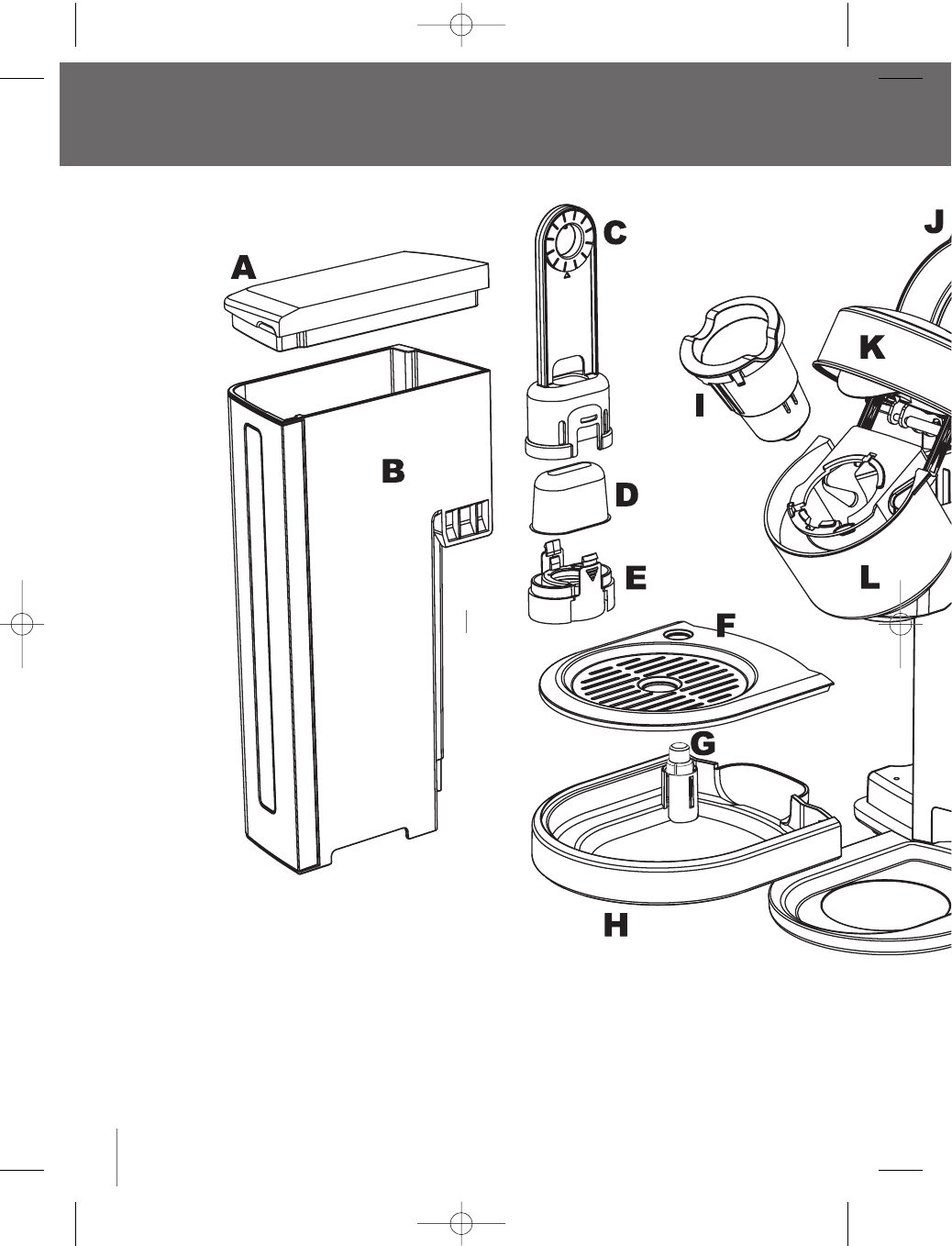
Know your Breville Gourmet Single Cup Brewer™
6
A Water tank lid
B Water tank
C Upper filter holder
DReplaceable charcoal filter
ELower filter holder
FDrip tray plate
GDrip tray level indicator
HDrip tray
IK-Cup®holder
JSafety locking arm
KBrewing chamber head
LBrewing chamber
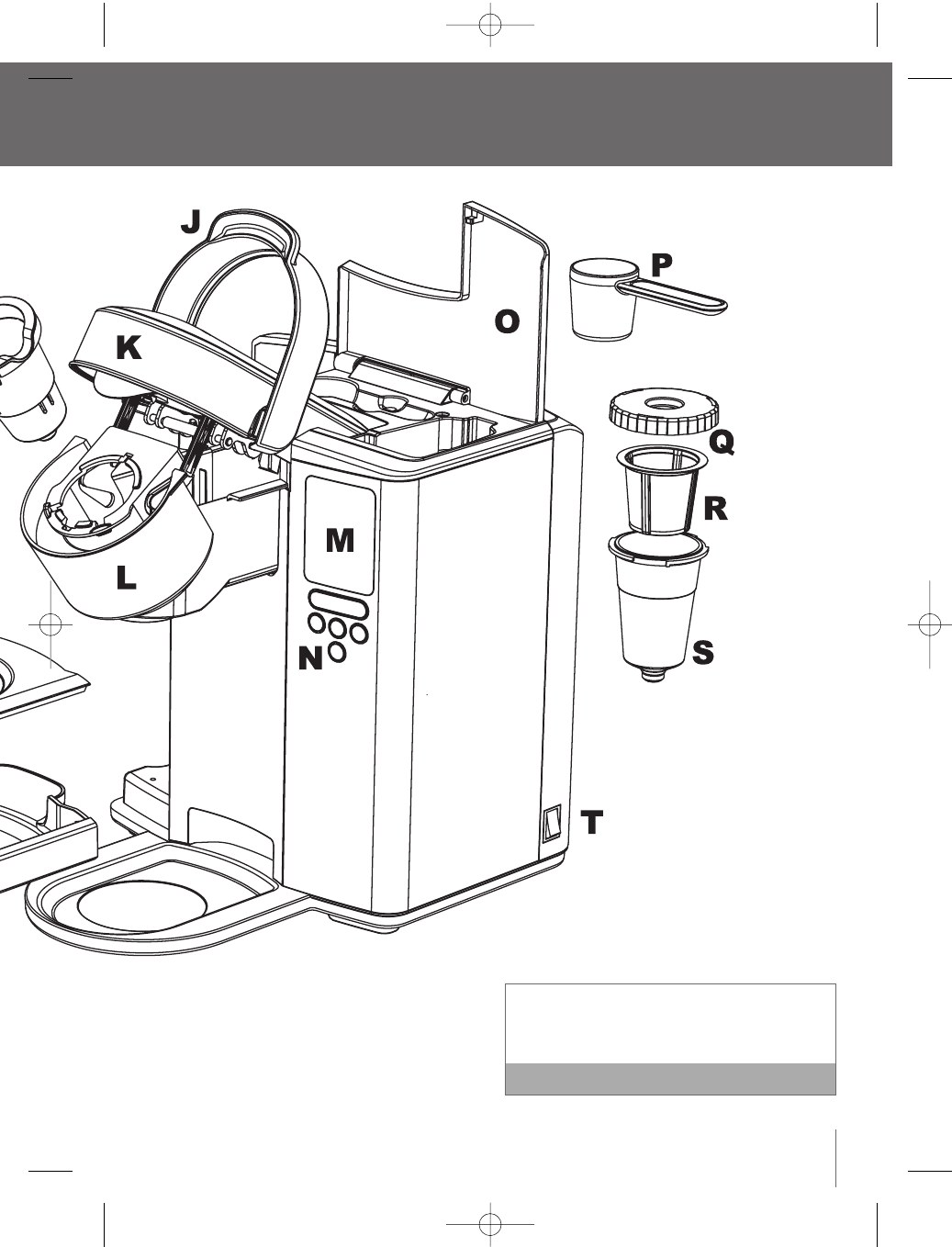
MLCD screen
NControl panel
OMy K-Cup®/K-Cup®holder storage
PMy K-C
QMy K-C
RMy K-C
SMy K-C
TPower S
BR9013 BKC600XL_IB_AMEND.qxp 11/10/07 21:43 Page 6
7
™
To order replacement Charcoal Filters, call
Breville Customer Service on 1-866-BREVILLE or
visit www.breville.com Note
der storage
PMy K-Cup®measuring scoop
QMy K-Cup®lid
RMy K-Cup®filter basket
SMy K-Cup®holder
TPower Switch
BR9013 BKC600XL_IB_AMEND.qxp 11/10/07 21:43 Page 7
Replace
60 tank
To order
Breville
visit ww
We reco
choose n
2 month
smell an
One-tim
Priming fil
the brewin
it has been
If the Br
below fr
hours to
A frozen
properly
1. Unwra
into a
2. Place
drip tr
accom
3. Fill the
approx
The W
a)
b)
Operating your Breville Gourmet Single Cup Brewer™
Installing the water filter
For the best tasting gourmet coffee,tea or hot cocoa,
Breville recommends using bottled or filtered water.
The Water Filter provided with the Brewer can
significantly reduce substances that affect the smell
and taste of water such as free chlorine, certain
pesticides and organic impurities as well as traces of
heavy metals.
The Water Filter can be removed from the Brewer.
If you choose to install the Water Filter, it is
recommended to replace the Charcoal Filter
every 2 months or 60 tank refills, more often if
you have hard water.
We recommend removing the Water Filter if using
filtered water, or if you choose not to replace the
Charcoal Filter every 2 months, as the filter may
clog and affect the smell and taste of the water.
If you choose not to install the Water Filter, you
are ready to start the One-time Priming Process
(page 9). Note
Follow these steps each time you install a new
Charcoal Filter to ensure it filters optimally.
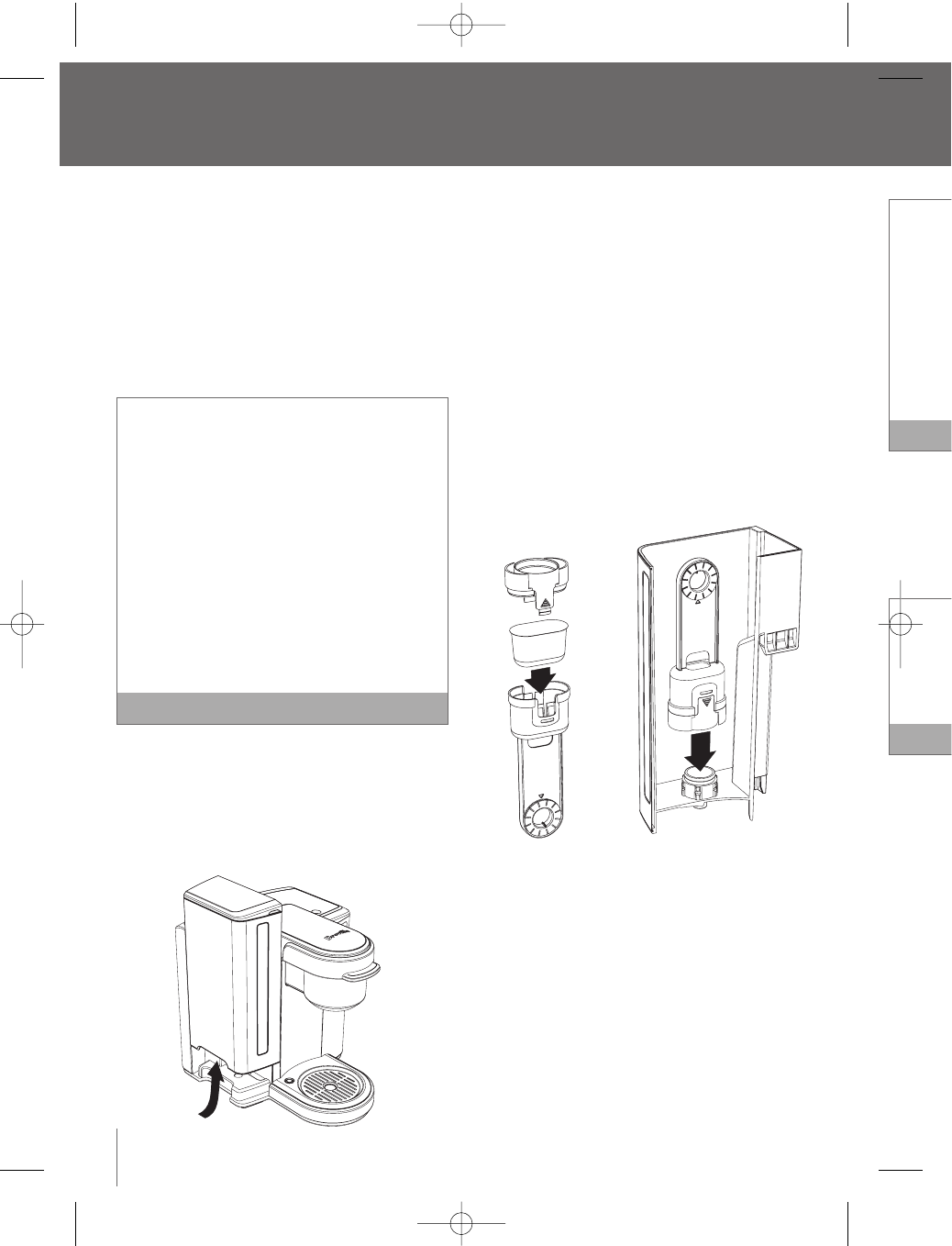
1. Remove the Water Tank from the Brewer by
gripping the handle located on the left side of the
Water Tank, then lift upwards.
2. Remove the Water Tank Lid.
3. Rinse the Water Tank with fresh water and
replace back onto the Brewer.
4. Remove the Upper and Lower Filter Holder and
Charcoal Filter from the polybag. Unwrap the
Charcoal Filter from its protective plastic.
5. Soak the Charcoal Filter for 5 minutes then rinse
for 30 seconds. It is normal to see a grey residue
after soaking the filter.
6. Wash the Lower Filter Holder, ensuring the
stainless steel mesh is free of residue.
7. Insert the Charcoal Filter into the Upper Filter
Holder, then attach the Lower Filter Holder so it
locks into place.
8. Set the date dial on the Upper Filter Holder
2 months ahead.This will remind you when the
Charcoal Filter will need to be replaced.
9. Place the assembled Filter Holder into the Water
Tank, aligning so the date dial is visible from
outside the Tank. Push down hard on the
assembled Filter Holder until it snaps into place.
10. Your Brewer is ready for the one-time
priming process.
8
BR9013 BKC600XL_IB_AMEND.qxp 11/10/07 21:43 Page 8
9
Replace the Charcoal Filter every 2 months, or
60 tank refills, more if you have hard water.
To order replacement Charcoal Filters, call
Breville Customer Service on 1-866-BREVILLE or
visit www.breville.com.
We recommend removing the Water Filter if you
choose not to replace the Charcoal Filter every
2 months, as the filter may clog and affect the
smell and taste of the water. Note
One-time priming process
Priming fills the internal tank with water and cleanses
the brewing system.You cannot use your Brewer until
it has been primed for its first use.
If the Brewer has been exposed to temperatures
below freezing, allow the Brewer at least two
hours to reach room temperature before priming.
A frozen or extremely cold Brewer will not prime
properly and can cause damage. Note
1. Unwrap the power cord and plug the Brewer
into a grounded outlet.
2. Place a 12 oz. mug on the Drip Tray Plate. The
drip tray plate and drip tray can be removed to
accomodate taller mugs and travel mugs.
3. Fill the Water Tank with water until it is
approximately 1 inch below the top edge.
The Water Tank can be filled in two ways:
a) Remove the Water Tank Lid and pour
water directly into the Water Tank while it
is still attached to the Brewer, then replace
the Lid.
b) Remove the Water Tank Lid, then gripping
the handle located on the left side of the
Water Tank, lift upwards. Fill with water.
Place the Water Tank back onto the Brewer
and replace the Lid.
4. Press and release the Power Switch located on
the lower back, right side of the Brewer.The
Power Switch is spring loaded and will return to
its original position.
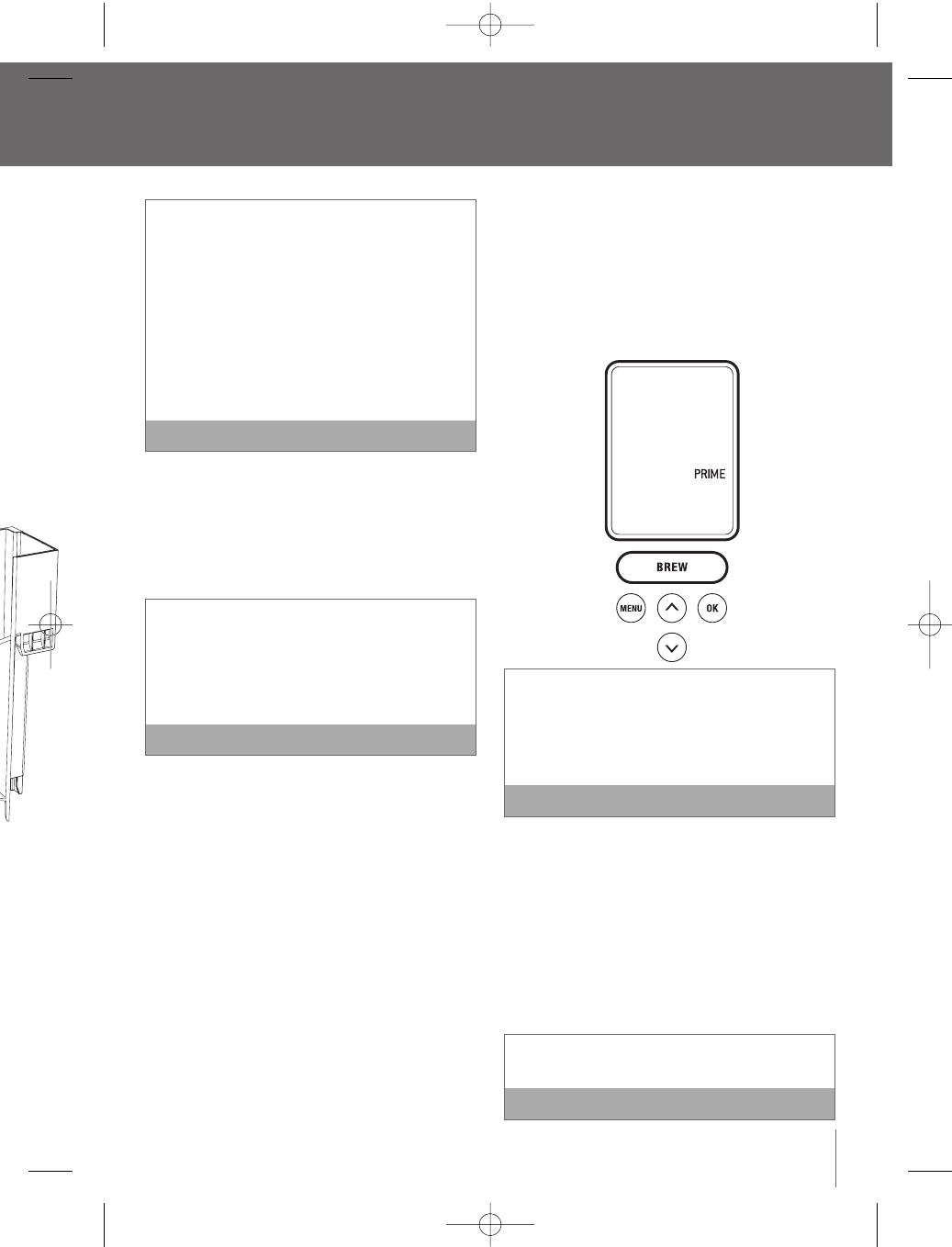
5. The Water Tank LED will illuminate.The LCD
screen will illuminate and indicate ‘PRIME’.The
‘BREW’ button will illuminate and flash.
If the Water Tank is empty or not in place on the
Brewer, the Water Tank LED’s will flash and the
LCD screen will indicate ‘REFILL TANK’. None of
the control panel buttons will be active until
water is added to the Water Tank. Note
6. A K-Cup®should not be used for the one-time
priming process.
7. Press the ‘BREW’ button.
8. The Brewer will automatically fill with water and
make a vibrating sound.This is normal.The
Brewer will then cease to vibrate and begin
heating the water. This entire process will take
approximately 4 minutes. The LCD screen will
indicate 'HEATING' during this period.
The Brewer will take about 4 minutes to heat up
during the priming process. Note
wer™
and
der and
ap the
c.
hen rinse
ey residue
the
Filter
der so it
der
when the
he Water
from
e
to place.
BR9013 BKC600XL_IB_AMEND.qxp 11/10/07 21:43 Page 9
Operating your Breville Gourmet Single Cup Brewer™
continued
9. Once the water is heated, the LCD screen will no
longer indicate ‘HEATING’.The ‘BREW’ button will
illuminate and flash for up to 60 seconds.
10. Press the 'BREW' button. This will start a
cleansing brew which will complete the priming
sequence. The LCD screen will no longer
indicate 'PRIMING'. Hot water will flow into your
mug.When the flow stops, discard the hot water.
11. The LCD screen will indicate ‘HEATING’ as the
Brewer heats the water for the next brew cycle.
Once the water is heated, the LCD screen may
indicate ‘REFILL TANK’.
12. Fill the Water Tank with water until it is
approximately 1 inch below the top edge.
13. The LCD screen will indicate ‘OPEN HEAD’.Open
the Brewing Chamber Head by raising and
lowering the Safety Locking Arm completely.The
LCD screen will indicate ‘READY TO BREW’.
14. The one-time priming process is now complete
and you are ready for your first K-Cup®brew
(page 10) or My K-Cup®brew (page 12).
Brewing a K-Cup®
1. Follow the instructions, Installing the Water Filter
(page 8) and the One-time Priming Process (page
9).The Brewer should be turned on and the
Water Tank should be filled and illuminated.
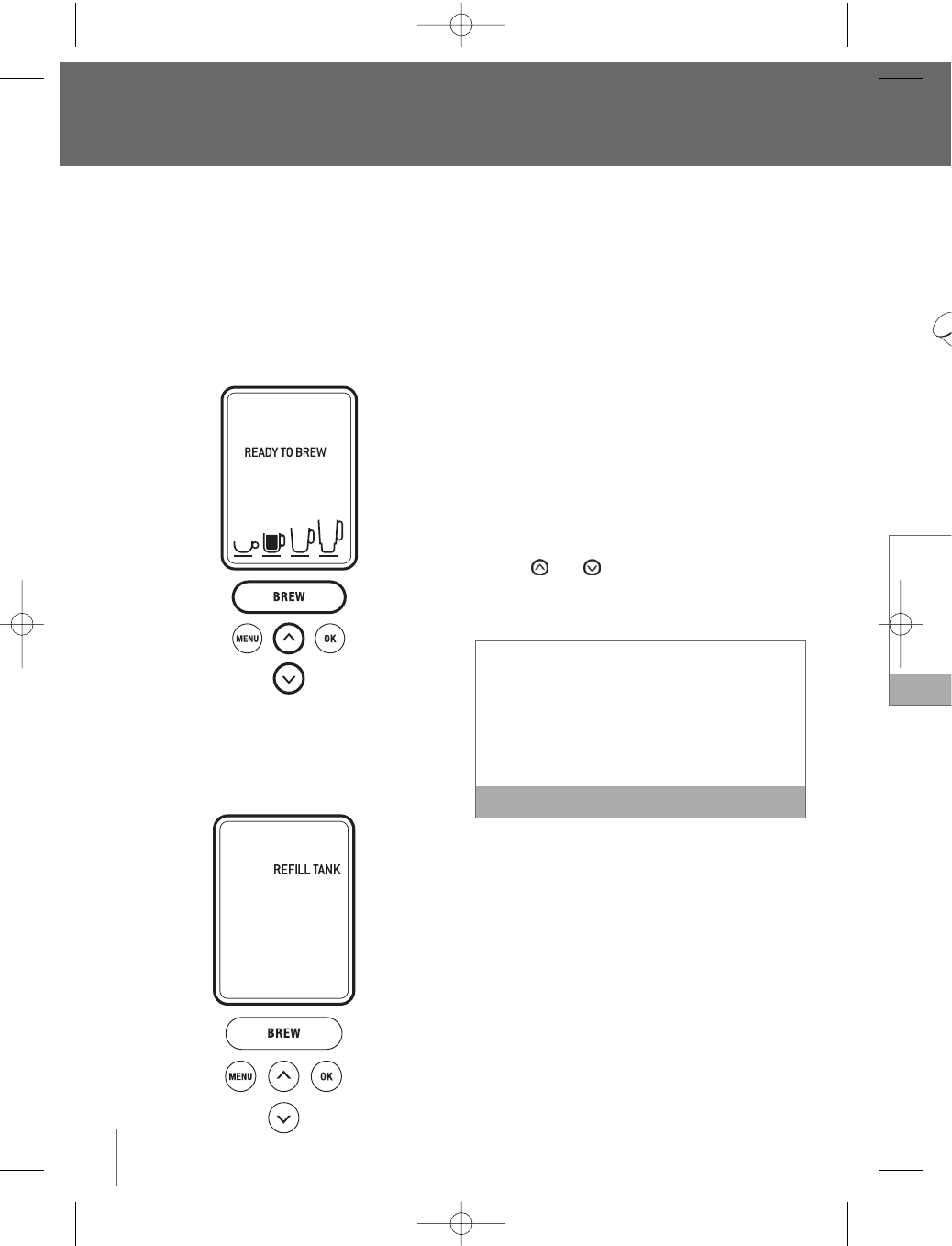
2. The LCD screen will indicate ‘READY TO BREW’.
The and buttons will illuminate and the
‘BREW’ button will illuminate and flash for up to
60 seconds.
If the ‘BREW’ button is not pressed in 60 seconds,
the LCD screen will indicate ‘OPEN HEAD’ and the
‘BREW’ button will be disabled to prevent accidental
activation.To re-activate the brew sequence, open
the Brewing Chamber Head by raising and lowering
the Safety Locking Arm completely. Note
3. Place a cup or mug on the Drip Tray Plate.The
drip tray plate and drip tray can be removed to
accomodate taller mugs and travel mugs.
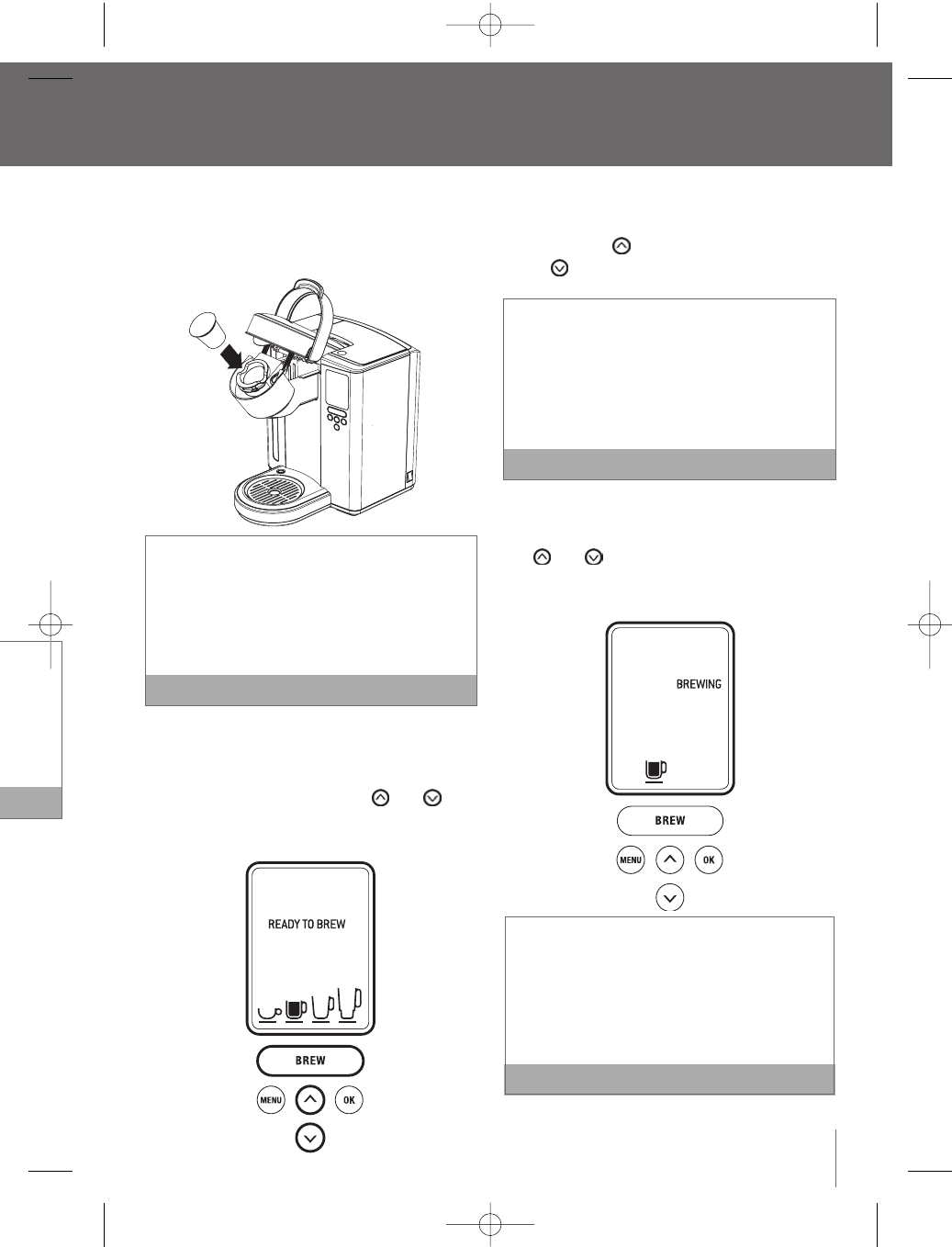
4. Raise the Safety Locking Arm. The Brewing
Chamber will open toward you.
5. Select a K-Cup®.
10
6. Place
in the
lid or
There ar
K-Cup®
Chambe
K-Cup®
put your
K-Cup®
7. Lower
Brewin
When
indica
button
illumin
BR9013 BKC600XL_IB_AMEND.qxp 11/10/07 21:43 Page 10
11
™
continued
e.
AD’. Open
and
etely.The
EW’.
omplete
®brew
2).
ater Filter
cess (page
the
ated.
O BREW’.
and the
for up to
conds,
nd the
ccidental
e,open
owering
Note
ate.The
oved to
gs.
wing
6. Place the K-Cup®in the K-Cup®Holder (located
in the Brewing Chamber). Do not remove the foil
lid or puncture the K-Cup®.
There are two sharp needles that puncture the
K-Cup®. One on the underside of the Brewing
Chamber Head and the other in the base of the
K-Cup®Holder.To avoid risk of injury, do not
put your fingers in the Brewing Chamber or
K-Cup®Holder. Note
7. Lower the Safety Locking Arm to close the
Brewing Chamber Head over the K-Cup®Holder.
When closed completely, the LCD screen will
indicate ‘READY TO BREW’. The and
buttons will illuminate and the ‘BREW’ button will
illuminate and flash for up to 60 seconds
a) The LCD screen will indicate the default brew
size (7.25 oz.).To choose a different size,
press the button to go up in size or the
button to go down in size.
Select from a stronger small cup (5.25 oz. serving),
a small mug (7.25 oz. serving), a large mug (9.25
oz. serving) or a travel mug (11.25 oz. serving).
The small mug (7.25 oz. serving) is the default
brew size.To program your favorite brew size, refer
to Setting the ‘BREW SIZE’ feature (page 20).Note
b) Once the brew size is selected, press the ‘BREW’
Button.The ‘BREW’ button will stop flashing, the
and buttons will no longer be lit.The
LCD screen will indicate ‘BREWING’ and the
selected brew size.
If the ‘BREW’ button is not pressed in 60 seconds,
the LCD screen will indicate ‘OPEN HEAD’ and the
‘BREW’ button will be disabled to prevent accidental
activation.To re-activate the brew sequence, open
the Brewing Chamber Head by raising and lowering
the Safety Locking Arm completely. Note
BR9013 BKC600XL_IB_AMEND.qxp 11/10/07 21:43 Page 11
8. Use th
Filter B
coffee
tables
on the
tables
the am
prefer
more
the gr
there a
upper
to sea
1 level s
We reco
serving.
Or, if you
cup 5.25
If you gr
1. Start
Press
2. Expe
brew
3. Avoid
could
poor
9. Raise
chamb
10. Place
Brewin
a. Rem
Cha
the
on
b. Ins
the
the
the
Operating your Breville Gourmet Single Cup Brewer™
continued
12
8. The LCD screen will indicate ‘BREWING’,however
there may be a short pause before the brewing
process begins.The process lasts about 60
seconds and ends with a burst of air to remove
all liquid from the K-Cup®.
There is extremely hot water in the K-Cup®
Holder during the brewing process.To avoid risk of
injury, do not raise the Safety Locking Arm or open
the Brewing Chamber during the brewing process.
Following the brew, the LCD screen will indicate
‘HEATING’ as the Brewer heats the water for the
next brew cycle.This process lasts about 15
seconds.The pump will make a vibrating sound.
This is normal. Note
9. Raise the Safety Locking Arm, remove and
dispose of the used K-Cup®. Use caution as the
K-Cup®will be hot.
10. Enjoy your first cup of gourmet coffee, tea or
hot cocoa!
11. The LCD screen will indicate ‘READY TO BREW’,
indicating that the next K-Cup®can be inserted
for the next brew cycle.
Brewing with the My K-Cup®Accessory
The Breville Gourmet Single Cup Brewer™ comes
with a My K-Cup®accessory. The dishwasher safe,
reusable My K-Cup®allows you to use your own
grind of coffee so you can adjust the amount and
type of coffee to suit your tastes.Along with the
included measuring scoop,this accessory
conveniently stores in the easy open compartment on
top of the brewer.
1. Follow the instructions, Installing the Water Filter
(page 8) and the One-time Priming Process (page
9).The Brewer should be turned on and the
Water Tank should be filled and illuminated.
2. The LCD screen will indicate ‘READY TO BREW’.
If the ‘BREW’ button is not pressed in 60
seconds, the LCD screen will indicate ‘OPEN
HEAD’ and the ‘BREW’ button will be disabled
to prevent accidental activation.To re-activate
the brew sequence, open the Brewing Chamber
Head by raising and lowering the Safety Locking
Arm completely. Note
3. Place a cup or mug on the Drip Tray Plate.The
drip tray plate and drip tray can be removed to
accomodate taller mugs and travel mugs.
4. Open the storage compartment located on top of
the Brewer by pressing the finger indent on the
right side. Remove the My K-Cup®accessory.
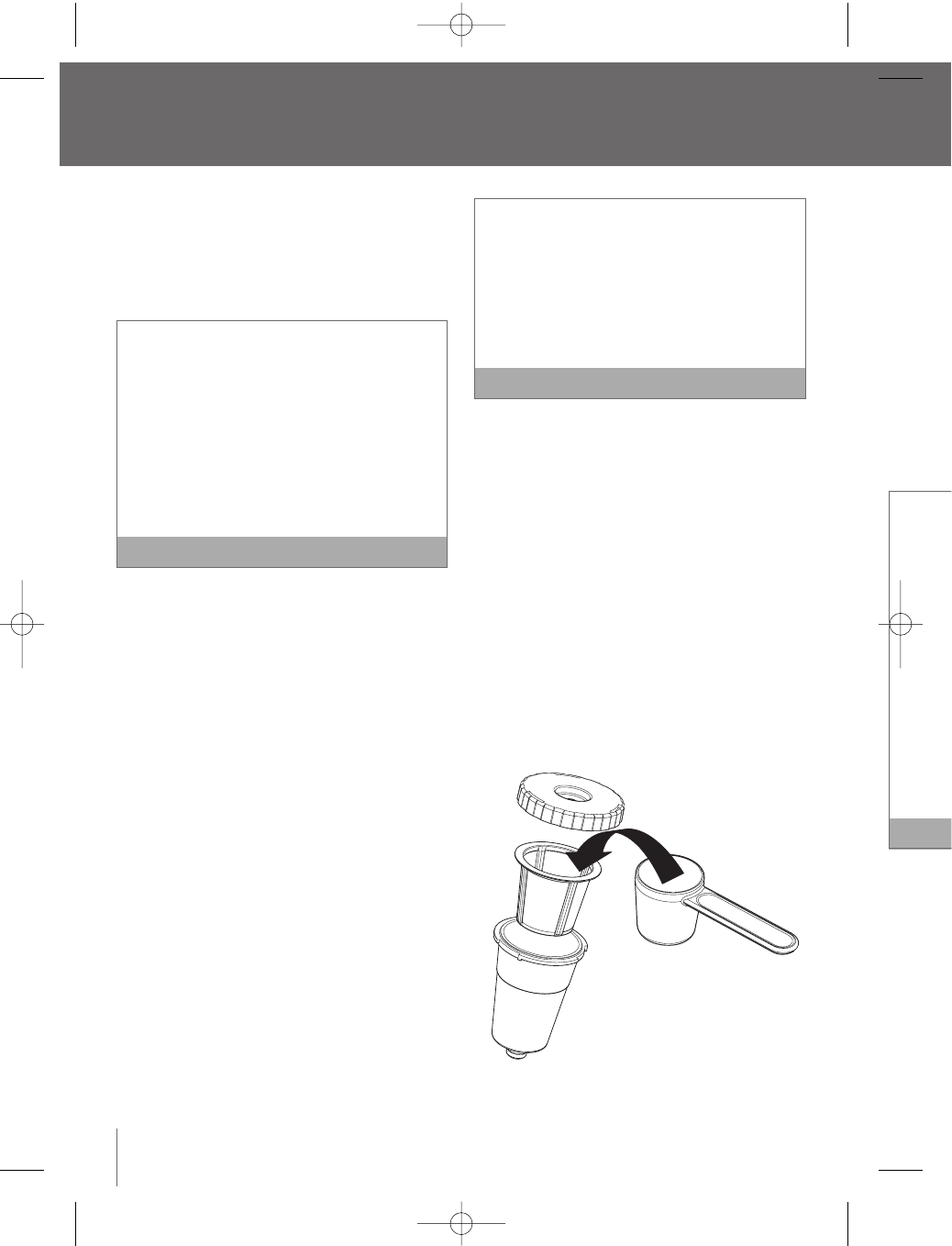
5. Disassemble the My K-Cup®accessory by
removing the Lid from the Holder in a counter-
clockwise direction.Remove the Filter Basket
from the Holder.
6. Wash the My K-Cup®Lid,Filter Basket and
Holder in warm soapy water prior to first use.
Rinse and dry thoroughly.
7. Insert the Filter Basket into the Holder.
BR9013 BKC600XL_IB_AMEND.qxp 11/10/07 21:43 Page 12
13
8. Use the My K-Cup®Measuring Scoop to fill the
Filter Basket with 1 level scoop maximum of
coffee. 1 level scoop is equivalent to 2
tablespoons.Alternatively, there are line markings
on the inside of the Filter Basket that indicate 1
tablespoon and 2 tablespoons so you can adjust
the amount of coffee to your personal
preference. Do not fill the Filter Basket with
more than one level scoop of coffee or tamp
the grinds. Ensure the coffee remains loose and
there are no coffee grinds remaining on the
upper rim of the Filter Basket.Screw on the Lid
to seal.
1 level scoop = 2 tablespoons
We recommended this for the small mug 7.25 oz.
serving.
Or, if you like a stronger brew, select the small
cup 5.25 oz. serving.
If you grind your own beans:
1. Start with a coarser grind similar to a French
Press grind.
2. Experiment with grinds similar to drip
brewing grinds.
3. Avoid a fine espresso grind setting that
could clog the Filter Basket or result in
poor extraction. Note
9. Raise the Safety Locking Arm. The Brewing
chamber will open toward you.
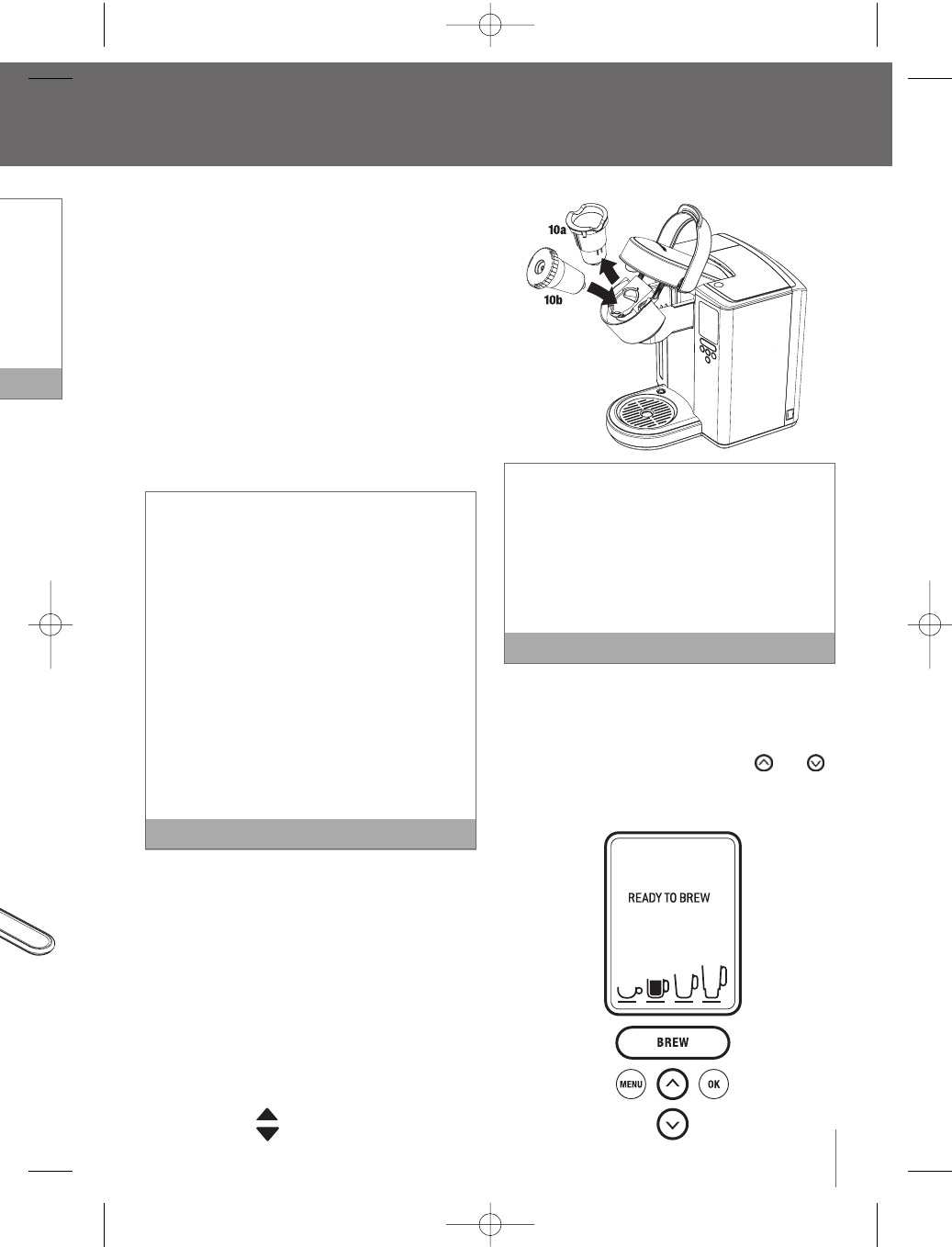
10. Place the assembled My K-Cup®Holder into the
Brewing Chamber.To do this:
a. Remove the K-Cup®Holder from the Brewing
Chamber (10a). Store the K-Cup®Holder in
the My K-Cup®Storage compartment located
on top of the Brewer.
b. Insert the assembled My K-Cup®Holder into
the Brewing Chamber (10b), ensuring to align
the arrow on the My K-Cup®Lid with
the arrow in the Brewing Chamber.
There are two sharp needles used to puncture
the K-Cup®and My K-Cup®Holder. One in
the base of the K-Cup®Holder, the other on the
underside of the Brewing Chamber Head.
To avoid risk of injury, use caution when inserting
or removing the K-Cup®, K-Cup®Holder, or My
K-Cup®Holder. Note
11. Lower the Safety Locking Arm to close the
Brewing Chamber Head over the My K-Cup®
Holder.When closed completely, the LCD screen
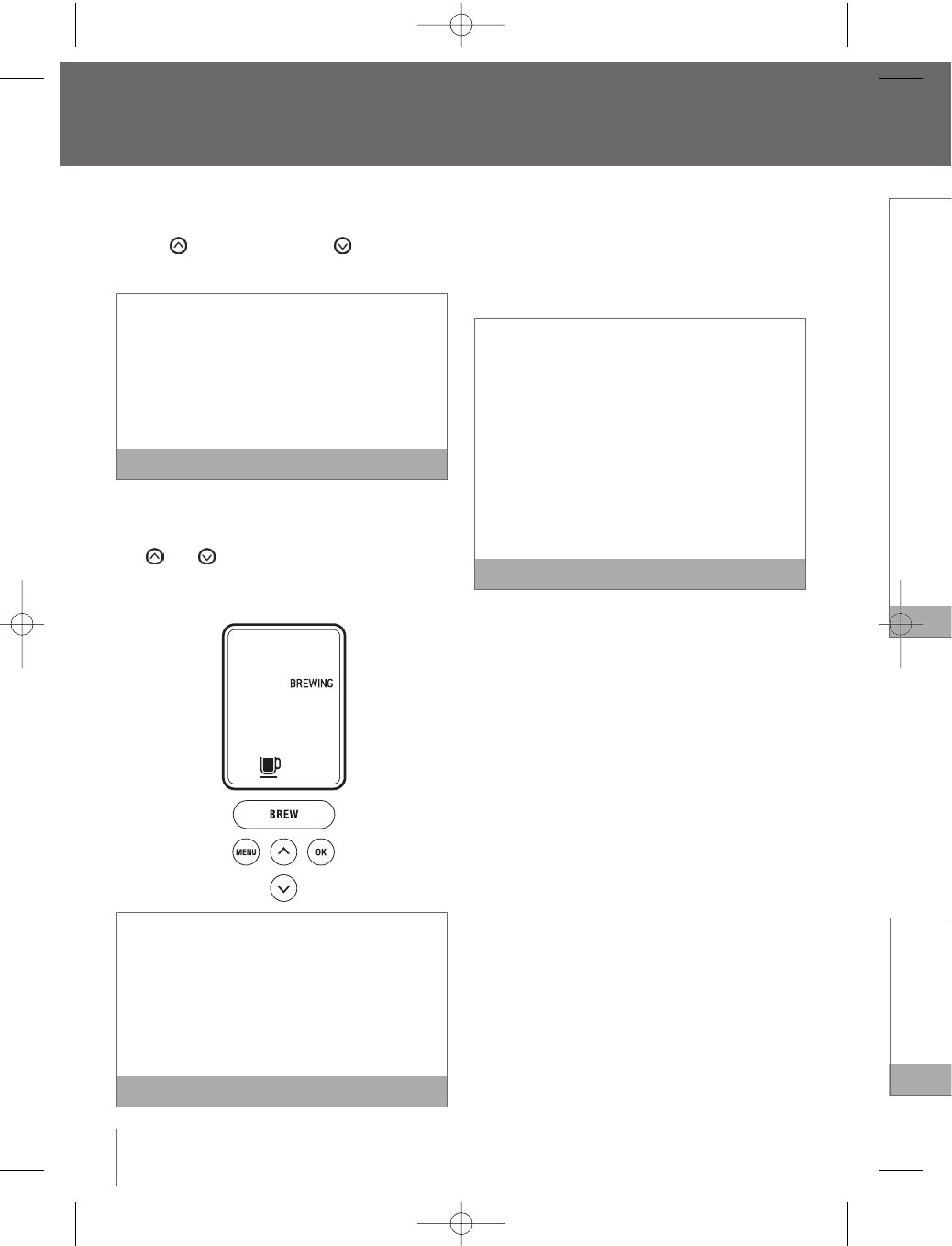
will indicate ‘READY TO BREW’.The and
buttons will illuminate and the ‘BREW’ button will
illuminate and flash for up to 60 seconds.
continued
EN
bled
vate
amber
Locking
Note
ate.The
oved to
gs.
on top of
t on the
essory.
y by
ounter-
Basket
and
st use.
BR9013 BKC600XL_IB_AMEND.qxp 11/10/07 21:43 Page 13
The My
ground
a) Use a
K-Cu
b) Use t
K-Cu
After bre
the K-Cu
Brewing
To replac
Locking
Insert K-
aligning
with the
Use caut
needle o
Head tha
Stopping
To stop bre
and releas
Brewer to
hot cocoa
and the LE
longer be
‘ON-OFF T
panel butto
back on.
You may
your nex
recomm
Brewing
then dis
the brew
Operating your Breville Gourmet Single Cup Brewer™
continued
a. The LCD screen will indicate the default brew
size (7.25 oz.).To choose a different size, press
the to go up in size or the button to go
down in size.
Select from a stronger small cup (5.25 oz. serving),
a small mug (7.25 oz. serving), a large mug (9.25
oz. serving) or a travel mug (11.25 oz. serving).
The small mug (7.25 oz. serving) is the default
brew size.To program your favorite brew size,
refer to Setting the ‘BREW SIZE’ feature (page 20).
Note
b. Once the brew size is selected, press the ‘BREW’
Button.The ‘BREW’ button will stop flashing, the
and buttons will no longer be lit.The
LCD screen will indicate ‘BREWING’ and the
selected brew size.
If the ‘BREW’ button is not pressed in 60
seconds, the LCD screen will indicate ‘OPEN
HEAD’ and the ‘BREW’ button will be disabled to
prevent accidental activation.To re-activate the
brew sequence, open the Brewing Chamber
Head by raising and lowering the Safety Locking
Arm completely. Note
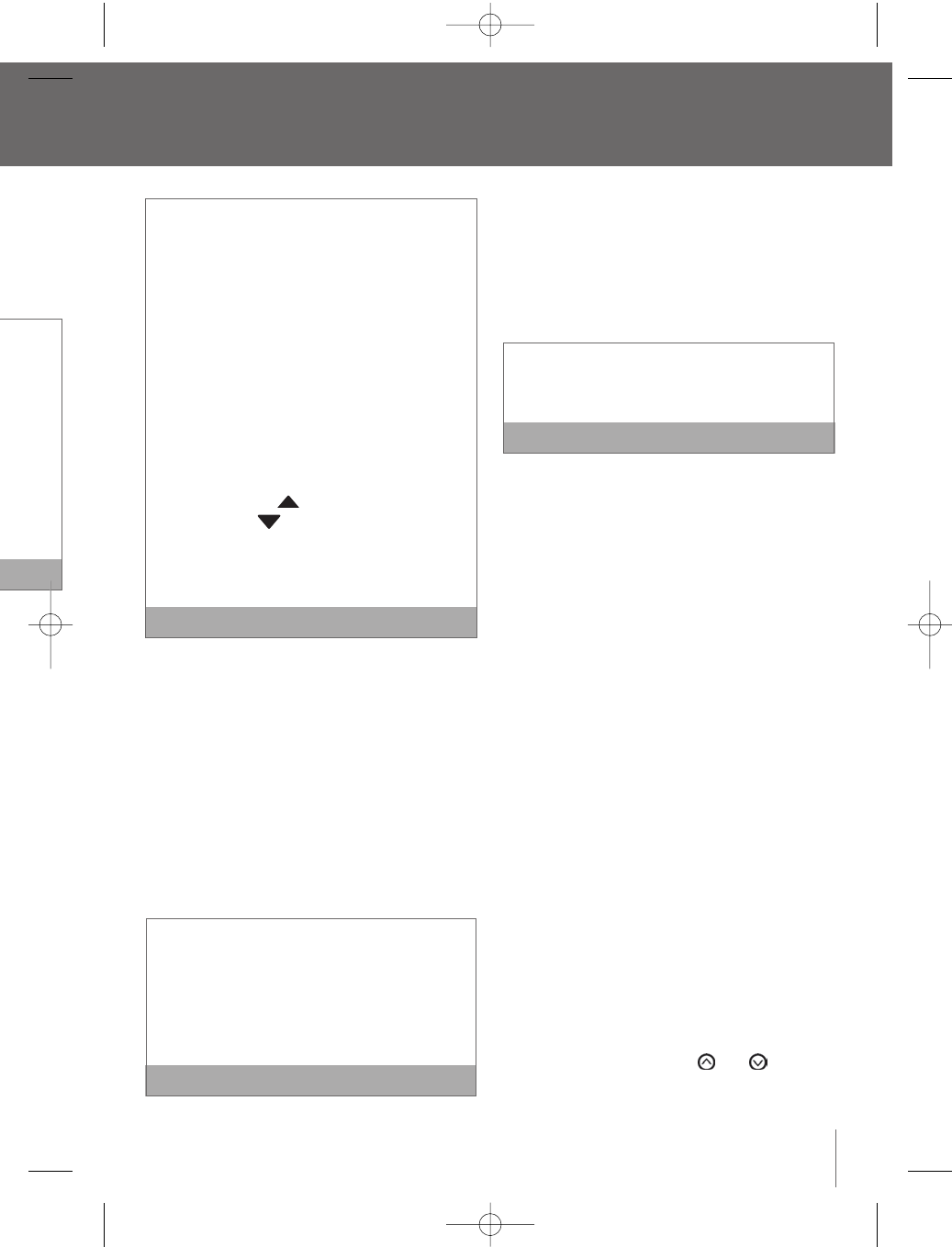
12. The LCD screen will indicate ‘BREWING’,however
there may be a short pause before the brewing
process begins.The process lasts about 60
seconds and ends with a burst of air to remove
all liquid from the My K-Cup®Holder.
There is extremely hot water in the My K-Cup®
Holder during the brewing process.To avoid risk
of injury, do not raise the Safety Locking Arm or
open the Brewing Chamber during the brewing
process.
Following the brew, the LCD screen will indicate
‘HEATING’ as the Brewer heats the water for the
next brew cycle.This process lasts about 15
seconds.The pump will make a vibrating sound.
This is normal. Note
13. Raise the Safety Locking Arm, remove the
assembled My K-Cup®Holder. Use caution as
the My K-Cup®Holder will be hot.
14. Disassemble the My K-Cup®Holder by removing
the Lid from the Holder in a counter-clockwise
direction. Remove the Filter Basket from the
Holder, discard the grounds and rinse out the
Filter Basket and Holder.
15. Enjoy your first cup of gourmet coffee, tea or
hot cocoa!
14
BR9013 BKC600XL_IB_AMEND.qxp 11/10/07 21:43 Page 14
15
The My K-Cup®accessory is designed for
ground coffee only. Do not:
a) Use a K-Cup®or coffee pod in the My
K-Cup™ Filter Basket.
b) Use the My K-Cup®Filter Basket with the
K-Cup® Holder
After brewing with the My K-Cup®accessory,
the K-Cup®Holder must be inserted into the
Brewing Chamber in order to brew a K-Cup®.
To replace the K-Cup®Holder, raise the Safety
Locking Arm, and remove the My K-Cup®Holder.
Insert K-Cup®Holder into the Brewing Chamber,
aligning the arrow on the K-Cup®Holder
with the arrow in the Brewing Chamber.
Use caution when doing this as there is a sharp
needle on the underside of the Brewing Chamber
Head that punctures the K-Cup®.Note
Stopping the brew process
To stop brewing after the process has started, press
and release the Power Switch on the right side of the
Brewer to the
‘
OFF’ status.The flow of coffee, tea or
hot cocoa will stop, the heating element will shut off
and the LED’s illuminating the Water Tank will no
longer be lit.The LCD screen will indicate the time,
‘ON-OFF TIME’ and ‘AUTO OFF’. None of the control
panel buttons will be active until the Brewer is turned
back on.
You may get less coffee, tea or hot cocoa during
your next brew. After a terminated brew, we
recommend that you follow the instructions for
Brewing hot water (page 15).Your next brew will
then dispense the correct volume according to
the brew size you have selected. Note
Brewing hot water
The Brewer is able to dispense a cup of hot water
for making hot chocolate in a packet, for use in
cooking, for making soups, etc. Follow the
instructions Brewing a K-Cup®(page 10), without
inserting a K-Cup®.
After brewing a hot cocoa K-Cup®, or stopping
the brew process mid-cycle, we recommend
running a hot water brew cycle. Note
Refilling the water tank
The LCD screen will indicate ‘REFILL TANK’ when the
water level in the Water Tank is low or if the Water
Tank has been removed.
1. Fill the Water Tank with water until it is
approximately 1 inch below the top edge.
The Water Tank can be filled in two ways:
a) Remove the Water Tank Lid and pour water
directly into the Water Tank while it is still
attached to the Brewer, then replace the Lid.
b) Remove the Water Tank Lid, then gripping the
handle located on the left side of the Water
Tank, lift upwards.Fill with water. Place the
Water Tank back onto the Brewer and replace
the Lid.
2. The LCD screen will indicate either:
a) ‘OPEN HEAD’. Raise and lower the Safety
Locking Arm completely.
b) ‘HEATING’ as the Brewer heats the water for
the next brew cycle.This process lasts about
15 seconds.The pump will make a vibrating
sound.This is normal.
3. Once the Safety Locking Arm is opened and
lowered, or the water is heated, the LCD screen
will indicate ‘READY TO BREW’,indicating the
brew cycle can begin.The and buttons
will illuminate and the ‘BREW’ button will
illuminate and flash for up to 60 seconds.
continued
’, however
brewing
t 60
remove
Cup®
oid risk
Arm or
ewing
ndicate
for the
15
sound.
Note
he
tion as
removing
ckwise
m the
ut the
tea or
BR9013 BKC600XL_IB_AMEND.qxp 11/10/07 21:43 Page 15
Setting t
Setting the
the time w
You mus
TIME’ fe
1. Press
option
blinkin
2. Press
indica
3. Press
approp
indica
4. Once t
‘OK’ b
that th
5. Press
approp
6. Once t
the ‘O
menu
Operating your Breville Gourmet Single Cup Brewer™
continued
Menu
If the ‘BREW’ button is not pressed in 60
seconds, the LCD screen will indicate ‘OPEN
HEAD’ and the ‘BREW’ button will be disabled to
prevent accidental activation.To re-activate the
brew sequence, open the Brewing Chamber Head
by raising and lowering the Safety Locking Arm
completely.
Do not remove the Water Tank during the
brewing process. Note
Purging the brewer
If the Brewer has not been used for more than one
week, you should renew the water from the inner
tank by purging the brewer.
1. If there is water in the Water Tank, remove the
Water Tank Lid, then gripping the handle located
on the left side of the Water Tank, lift upwards.
Discard the water, rinse and refill with bottled or
filtered water. Place the Water Tank back onto the
Brewer and replace the Lid.
2. If there is no water in the Water Tank, refill with
water. Place the Water Tank back onto the
Brewer and replace the Lid.
3. Ensure the Brewer is turned on. Raise and lower
the Safety Locking Arm on the Brewer without
inserting a K-Cup®.
4. The LCD screen will indicate ‘READY TO BREW’
and the ‘BREW’ button will illuminate and flash.
5. The LCD screen will indicate the default brew
size (7.25 oz. serving unless programmed
otherwise). Select the largest brew size
(11.25 oz. serving) by pressing the button
on the control panel.
6. Place a 12 oz. mug on the Drip Tray Plate. The
drip tray plate and drip tray can be removed to
accomodate taller mugs and travel mugs.
7. Press the ‘BREW’ button. Hot water will flow
into your mug.When the flow stops, discard the
hot water.
8. Repeat this process 2 more times to completely
renew the water from inner tank.
16
BR9013 BKC600XL_IB_AMEND.qxp 11/10/07 21:43 Page 16
17
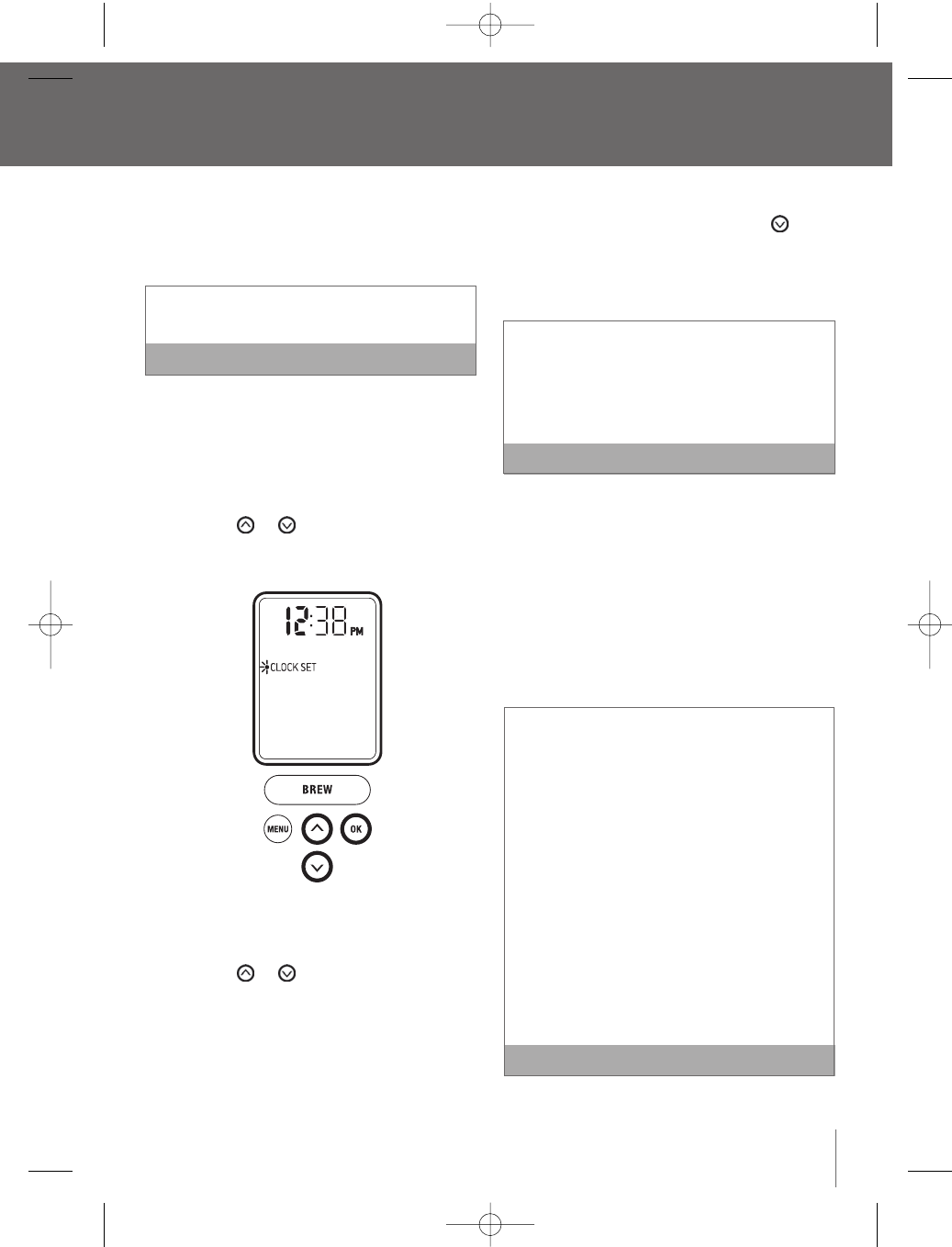
Setting the ‘CLOCK SET’ feature
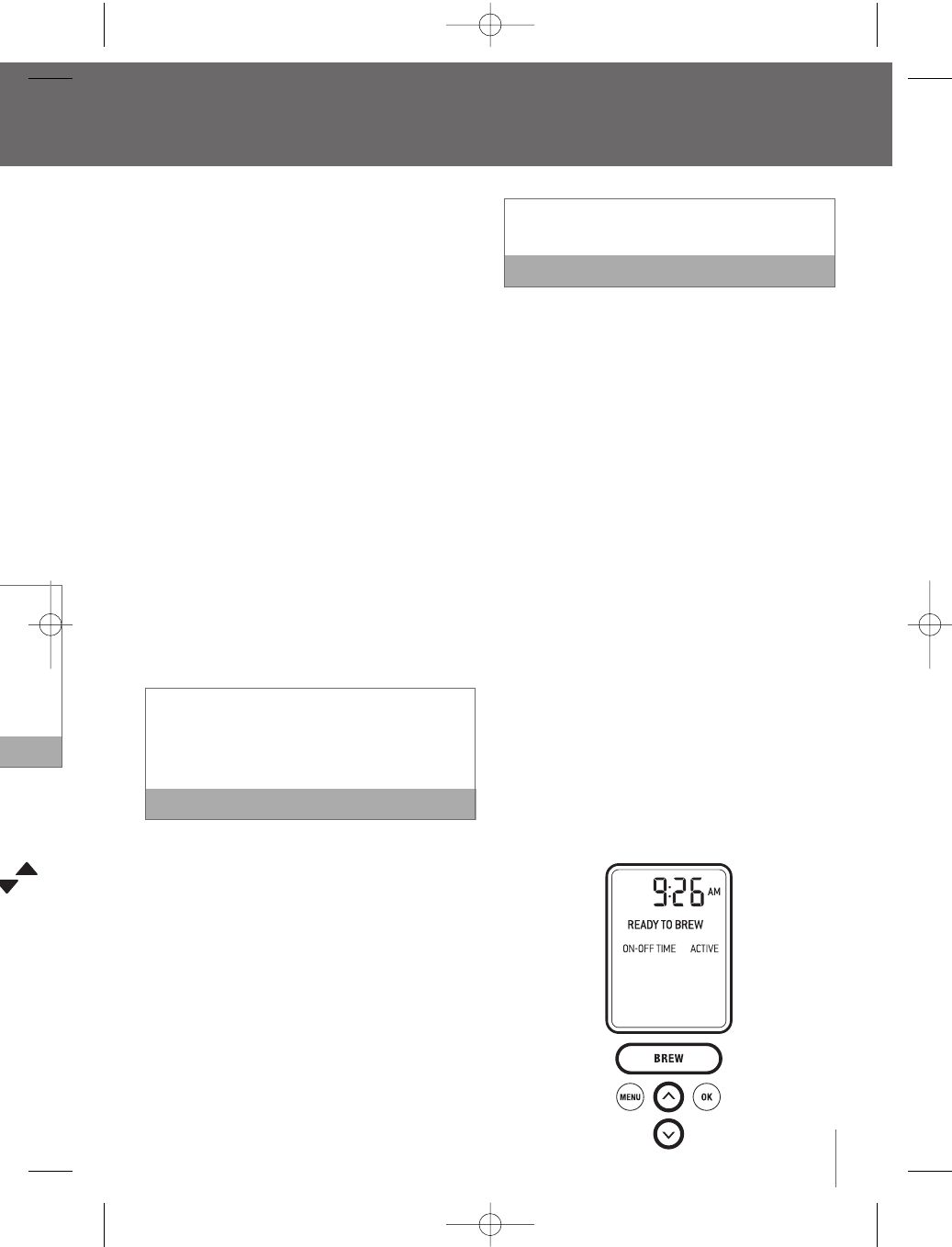
Setting the clock is optional.When the clock is set,
the time will appear on the LCD screen.
You must set the clock if using the ‘ON-OFF
TIME’ feature. Note
1. Press the ‘MENU’ button. The menu programming
options will appear on the LCD screen with a
blinking indicator on ‘CLOCK SET’.
2. Press the ‘OK’ button. The hour will blink,
indicating the hour is ready to be set.
3. Press the or button to reach the
appropriate hour. If the hour has passed 12, the
indicator switches from AM to PM.
4. Once the appropriate hour is reached, press the
‘OK’ button.The minutes will blink, indicating
that the minutes are ready to be set.
5. Press the or button to reach the
appropriate minute.
6. Once the appropriate minute is reached, press
the ‘OK’ button. The LCD screen will return to the
menu programming options.
7. To exit the menu programming options, press the
‘
MENU’ button.Alternatively, press the button
to reach ‘EXIT MENU’ and press the ‘OK’ button.
The LCD screen will return to the main screen
and indicate the time selected.
If power is interrupted to the Brewer, the clock
will need to be reset. Programmed brew size and
brew temperature settings are remembered and
restored automatically.All other settings will be
restored automatically after the clock is reset.
Note
Setting the ‘ON-OFF TIME’ feature
This feature allows you to program the specific time
when the Brewer will automatically turn on and/or
off. By programming your Brewer to automatically
turn on, you will not have to wait for the Brewer to
heat the water in the Water Tank. It will take the
Brewer approximately 3 1/2minutes to heat the water
from room temperate.
You must set the clock if using the ‘ON-OFF TIME’
feature.
An alternative to setting the ‘ON-OFF TIME’ feature is
to leave the Brewer on all the time.We recommend
this so your Brewer is always ready to brew a fresh
cup of gourmet coffee,tea or hot cocoa.
To turn the Brewer off at any time, press and
release the Power Switch on the lower back,
right side of the Brewer.The clock will remain on
if set, however you can not activate the brew
cycle. Press and release the Power Switch again
to restore power to the Brewer.You will have to
wait for the water to heat up before the Brewer
is ready to brew. Note
continued
Menu and programming options
t brew
ed
button
te.The
oved to
gs.
flow
card the
mpletely
BR9013 BKC600XL_IB_AMEND.qxp 11/10/07 21:43 Page 17
If you wa
‘OFF TIM
Switch o
Brewer t
the wate
to brew.
Setting t
This featur
2 hours fro
1. Press
option
blinkin
2. Press
3. Press
4. Press
two op
a) ‘AU
scr
Bre
the
scr
opt
Menu and programming options
continued
Setting the ‘ON-OFF TIME’ feature continued
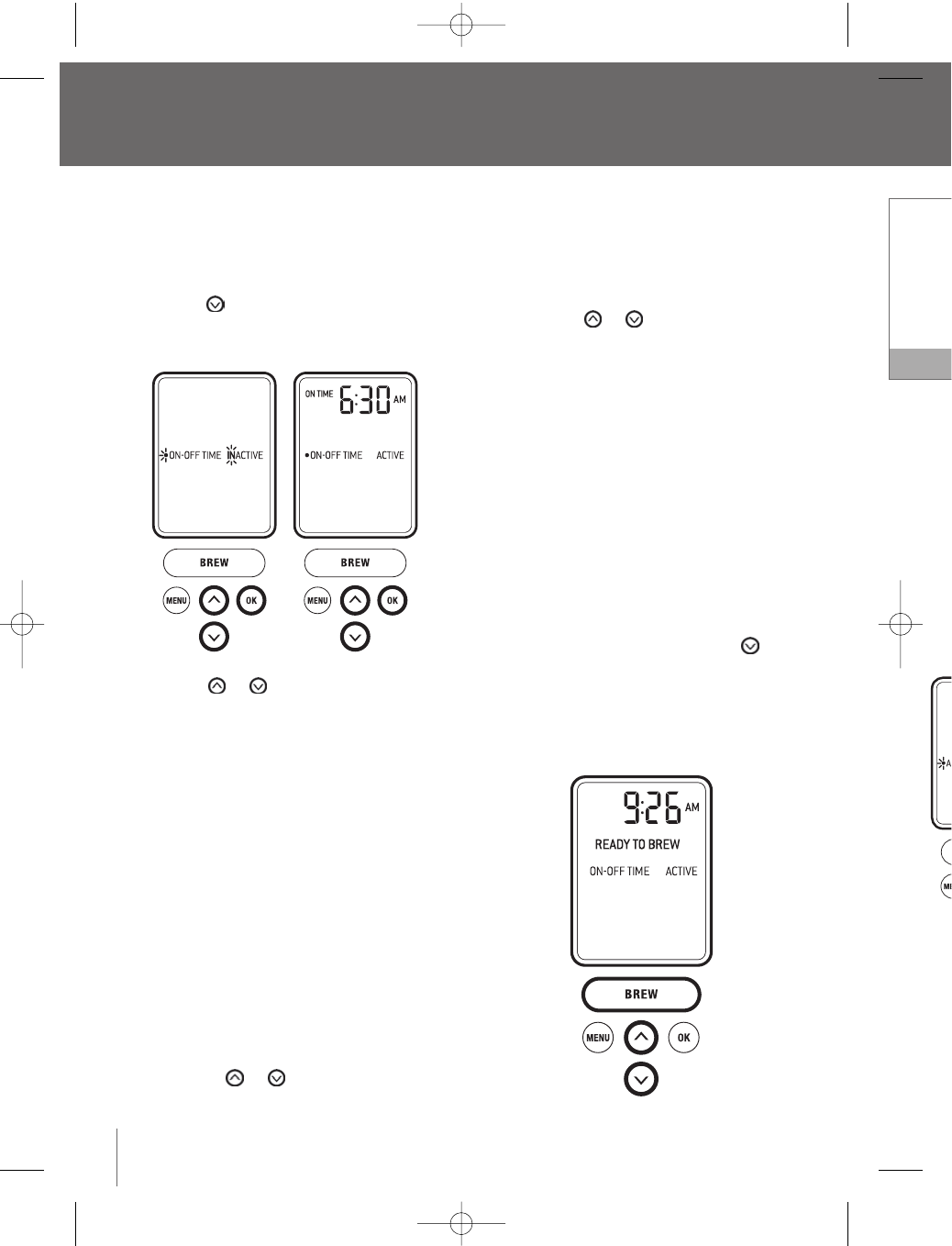
1. Press the ‘MENU’ button. The menu programming
options will appear on the LCD screen with a
blinking indicator on ‘CLOCK SET’.
2. Press the button to reach
‘
ON-OFF TIME’.
3. Press the ‘OK’ button.
4. Press the or button to see the two
options:
a. ‘ON-OFF TIME’ will be ‘INACTIVE’, indicating that
the Brewer will not turn on or off automatically.
Press the ‘OK’ button to select this option.
The LCD screen will return to the menu
programming options.
b. ‘ON-OFF TIME’ will be ‘ACTIVE’, indicating the
Brewer will automatically turn on and/or off
according to the specific times you set.
Press the ‘OK’ button to select this option.
Setting the ‘ON TIME’
i. The LCD screen will display ‘ON TIME’,
indicating that the time you wish the Brewer
to automatically turn on is ready to be set.
The hour will blink, indicting the hour is ready
to be set.
ii. Press the or button to reach the
appropriate hour. If the hour has passed 12,
the indicator switches from AM to PM.
iii. Once the appropriate hour is reached, press
the ‘OK’ button. The minutes will blink,
indicating that the minutes are ready to
be set.
iv. Press the or button to reach the
appropriate minute.
v. Once the appropriate minute is reached, press
the ‘OK’ button.The LCD screen will display
‘OFF TIME’, indicating that the time you wish
the Brewer to automatically turn off is ready to
be set.
Setting the ‘OFF TIME’
i. Follow the instructions (ii to iv) for Setting the
‘ON TIME’.
ii. Once the appropriate time is reached, press
the ‘OK’ button. The LCD screen will return to
the menu programming options
5. To exit the menu programming options, press the
‘MENU’ button.Alternatively, press the button
to reach ‘EXIT MENU’ and press the ‘OK’ button.
The LCD screen will return to the main screen
and indicate whether you have activated the
‘ON-OFF TIME’ feature.
18
BR9013 BKC600XL_IB_AMEND.qxp 11/10/07 21:43 Page 18
19
If you want to brew outside the ‘ON TIME’ and
‘OFF TIME’ selected, press and release the Power
Switch on the lower back, right side of the
Brewer to restore power.You will have to wait for
the water to heat up before the Brewer is ready
to brew. Note
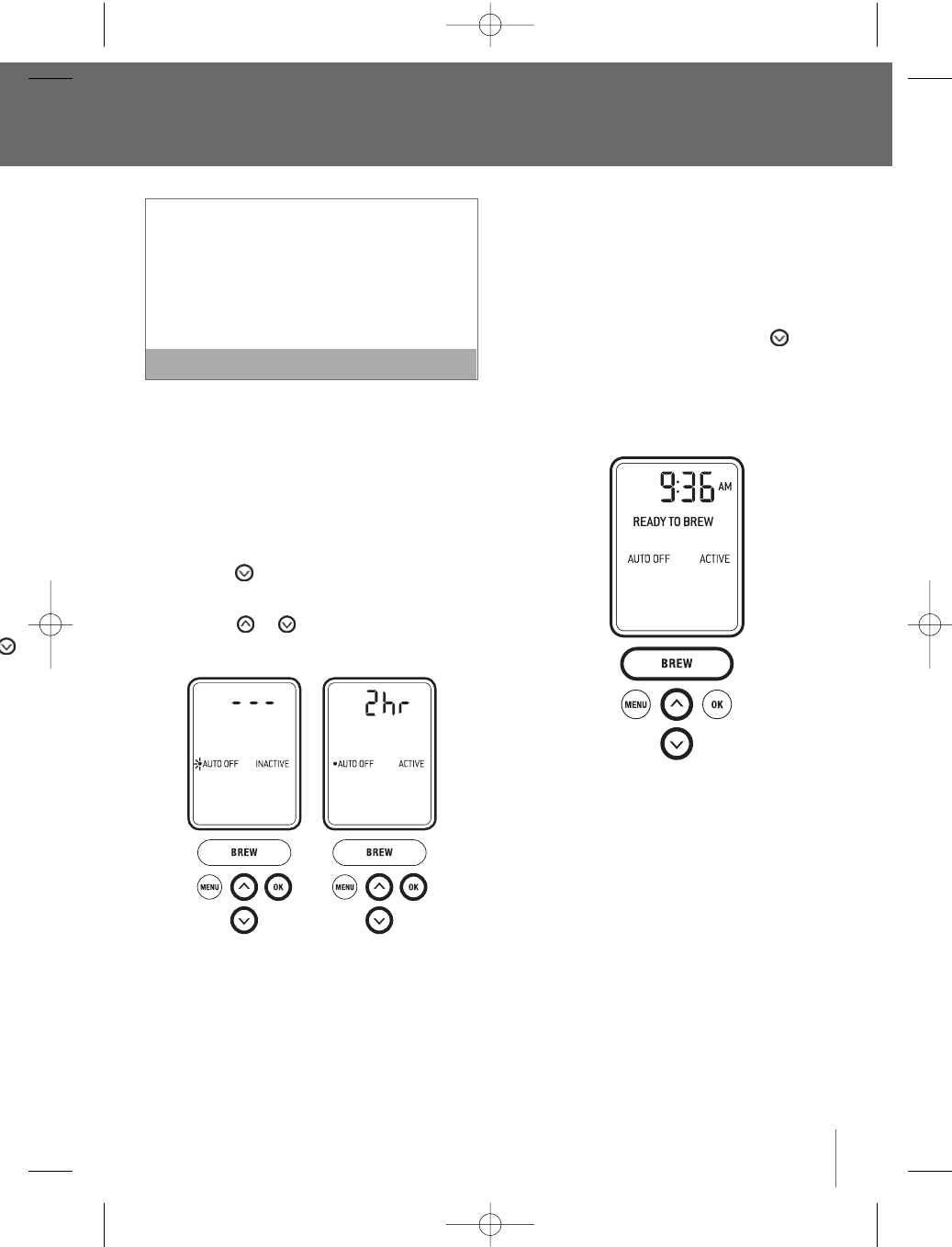
Setting the ‘AUTO OFF’ Feature
This feature automatically turns the Brewer off after
2 hours from the last brew.
1. Press the ‘MENU’ button. The programming
options will appear on the LCD screen with a
blinking indicator on ‘CLOCK SET’.
2. Press the button to reach ‘AUTO OFF’.
3. Press the ‘OK’ button.
4. Press the or button to see the
two options:
a) ‘AUTO OFF’ will be ‘INACTIVE’ and the LCD
screen will display
‘
- - -’, indicating that the
Brewer will not turn off automatically. Press
the ‘OK’ button to select this option. The LCD
screen will return to the menu programming
options.
b) ‘AUTO OFF’ will be ‘ACTIVE’ and the LCD
screen will display ‘2 hr’, indicating the Brewer
will automatically turn off after 2 hours. Press
the ‘OK’ button.The LCD screen will return to
the menu programming options.
5. To exit the menu programming options, press the
‘MENU’ button.Alternatively, press the button
to reach ‘EXIT MENU’ and press the ‘OK’ button.
The LCD screen will return to the main screen
and indicate whether you have activated the
‘AUTO OFF’ feature.
M.
d, press
nk,
y to
the
ed, press
display
ou wish
s ready to
etting the
d, press
return to
press the
button
K’ button.
screen
d the
BR9013 BKC600XL_IB_AMEND.qxp 11/10/07 21:43 Page 19
3. Press
bu
Select fr
a small m
oz. servi
4. Once t
button
progra
5. To exit
‘MENU
to reac
The LC
and in
Menu and Programming Options
continued
Setting the
‘
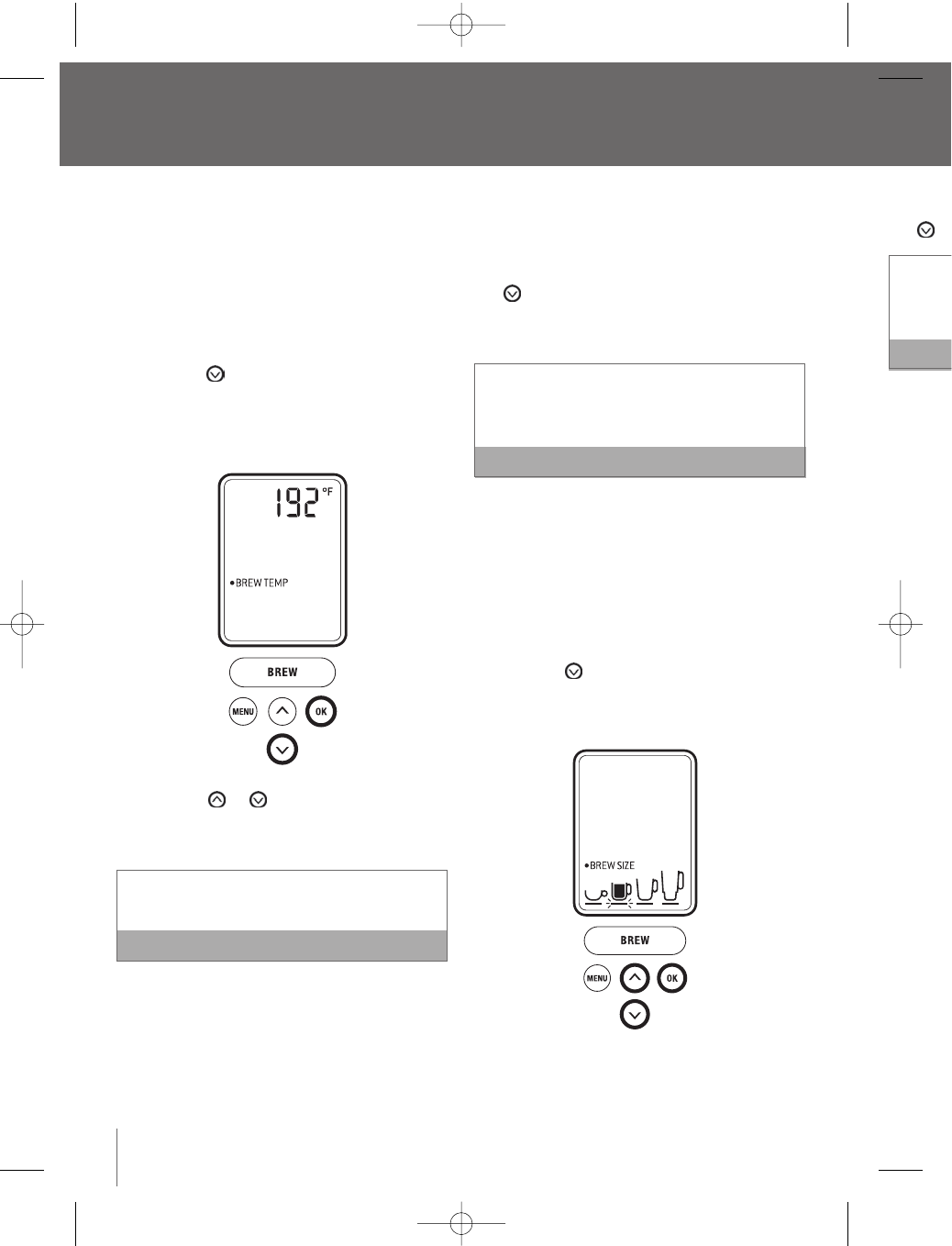
BREW TEMP’ feature
The Brewer brews coffee at a preset temperature of
192°F.You can adjust this temperature down by 5°F
if you prefer a cooler cup of coffee, tea or hot cocoa.
1. Press the ‘MENU’ button. The programming
options will appear on the LCD screen with a
blinking indicator on ‘CLOCK SET’.
2. Press the button to reach ‘BREW TEMP’.
3. Press the ‘OK’ button. The LCD screen will
indicate the default brew temperature, 192°F
or the pre-programmed brew temperature.
4. Press the or button to reach the
appropriate brew temperature.The temperature
can only be set between 187°F and 192°F.
The Brewer will remain at the selected
temperature for subsequent brews Note
5. Press the ‘OK’ button. The LCD screen will return
to the menu programming options.
6. To exit the menu programming options, press
the ‘MENU’ button. Alternatively, press the
button to reach ‘EXIT MENU’ and press the
‘OK’ button.The LCD screen will return to the
main screen.
When using the Brewer at high altitudes (over
5,000 feet), if boiling occurs, use the ‘BREW
TEMP’ feature to lower the temperature. Note
Setting the ‘BREW SIZE’ feature
This feature allows you to avoid scrolling through
brew sizes if a particular size is chosen most often.
1. Press the ‘MENU’ button. The menu programming
options will appear on the LCD screen with a
blinking indicator on ‘CLOCK SET’.
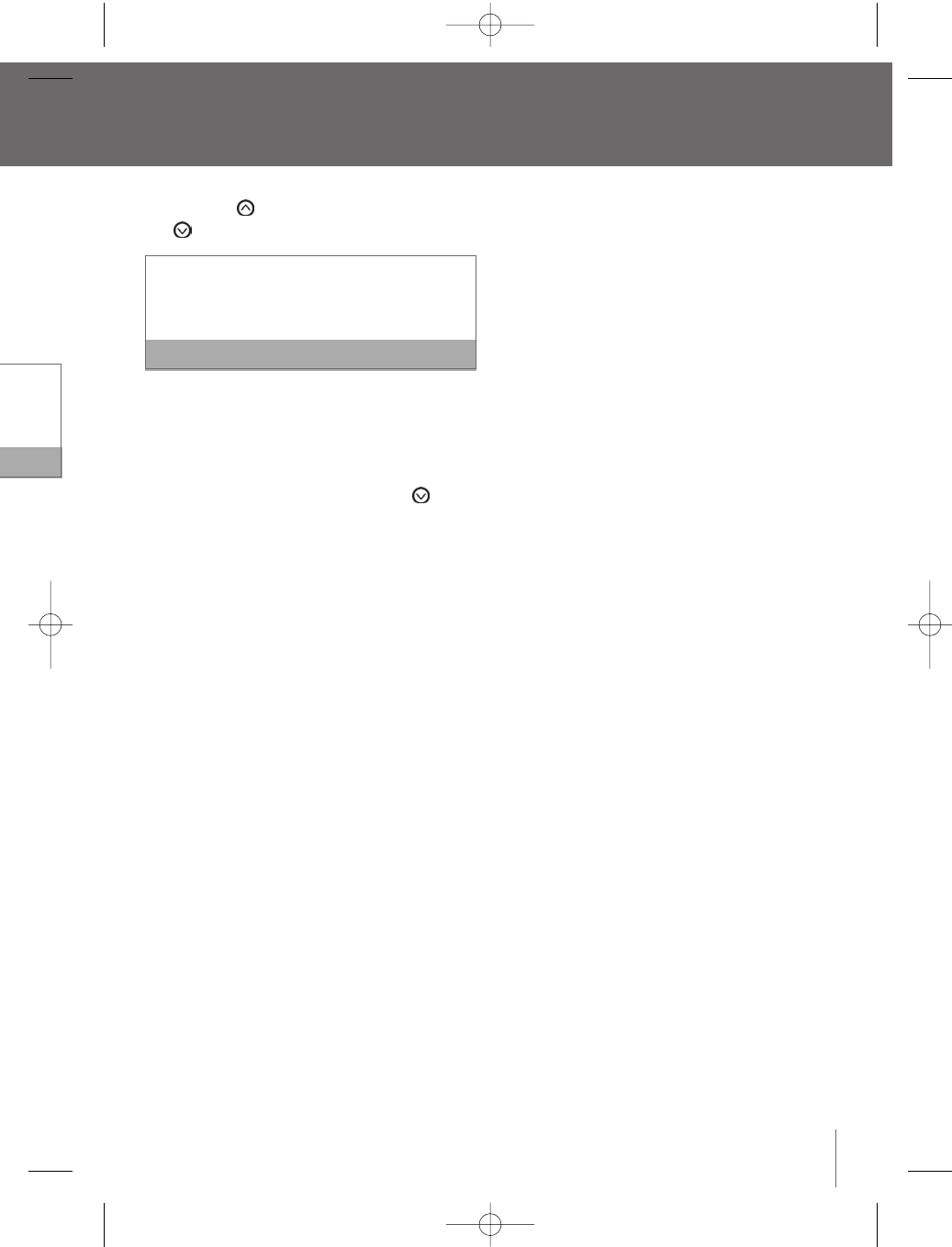
2. Press the button to reach ‘BREW SIZE’.
Press the ‘OK’ button. The LCD screen will
indicate the default brew size (7.25 oz.).
20
BR9013 BKC600XL_IB_AMEND.qxp 11/10/07 21:43 Page 20
21
3. Press the button to go up in size or the
button to go down in size.
Select from a stronger small cup (5.25 oz. serving),
a small mug (7.25 oz. serving), a large mug (9.25
oz. serving) or a travel mug (11.25 oz. serving).
Note
4. Once the brew size is selected, press the ‘OK’
button.The LCD screen will return to the menu
programming options.
5. To exit the menu programming options, press the
‘MENU’ button.Alternatively, press the button
to reach ‘EXIT MENU’ and press the ‘OK’ button.
The LCD screen will return to the main screen
and indicate the brew size selected.
will return
press
he
ess the
to the
over
EW
Note
rough
st often.
gramming
with a
ZE’.
will
.
BR9013 BKC600XL_IB_AMEND.qxp 11/10/07 21:43 Page 21
2. Disass
the Lid
directi
Holder
3. Wash
soapy
thorou
shelf d
4. Store
My K-
of the
Cleaning
1. Wipe t
then d
into th
2. Wash
soft cl
dry the
remain
the dis
Rinse th
ensure t
remain a
supply in
Cleaning
Regular cle
We sugges
replaced e
1. Disass
Lower
Discar
2. Wash
soapy
thorou
dishw
Care and cleaning
Before cleaning,ensure the Brewer has been turned
off. Switch off at the wall outlet, unplug the power
cord and allow the machine to cool.
Cleaning the brewer housing
Regular cleaning of the Brewer’s housing and
external components is recommended.
1. Never immerse the Brewer in water or other
liquids.Wipe the housing with a soft, damp
cloth then dry thoroughly.
Do not use abrasive scouring pads or cleaners
when cleaning the housing as they may scratch
the surface. Note
2. The Drip Tray and Drip Tray Plate can accumulate
up to 12 oz. of overflow.The water level indicator
visible through the Drip Tray Plate will pop up
when this occurs.The Drip Tray and Drip Tray
Plate should then be removed, emptied and
cleaned.To remove the Drip Tray assembly, slide
it toward you, keeping it level at all times to
avoid spilling.Wash both parts in warm soapy
water with a soft cloth, then rinse and dry
thoroughly.The Drip Tray and Drip Tray Plate are
also top-shelf dishwasher safe.
Cleaning the K-Cup®Holder
Regular cleaning of the K-Cup®Holder is
recommended.
1. Raise the Safety Locking Arm and remove the
K-Cup®Holder from the Brewing Chamber (refer to
Brewing with the My K-Cup®Accessory, page 12)
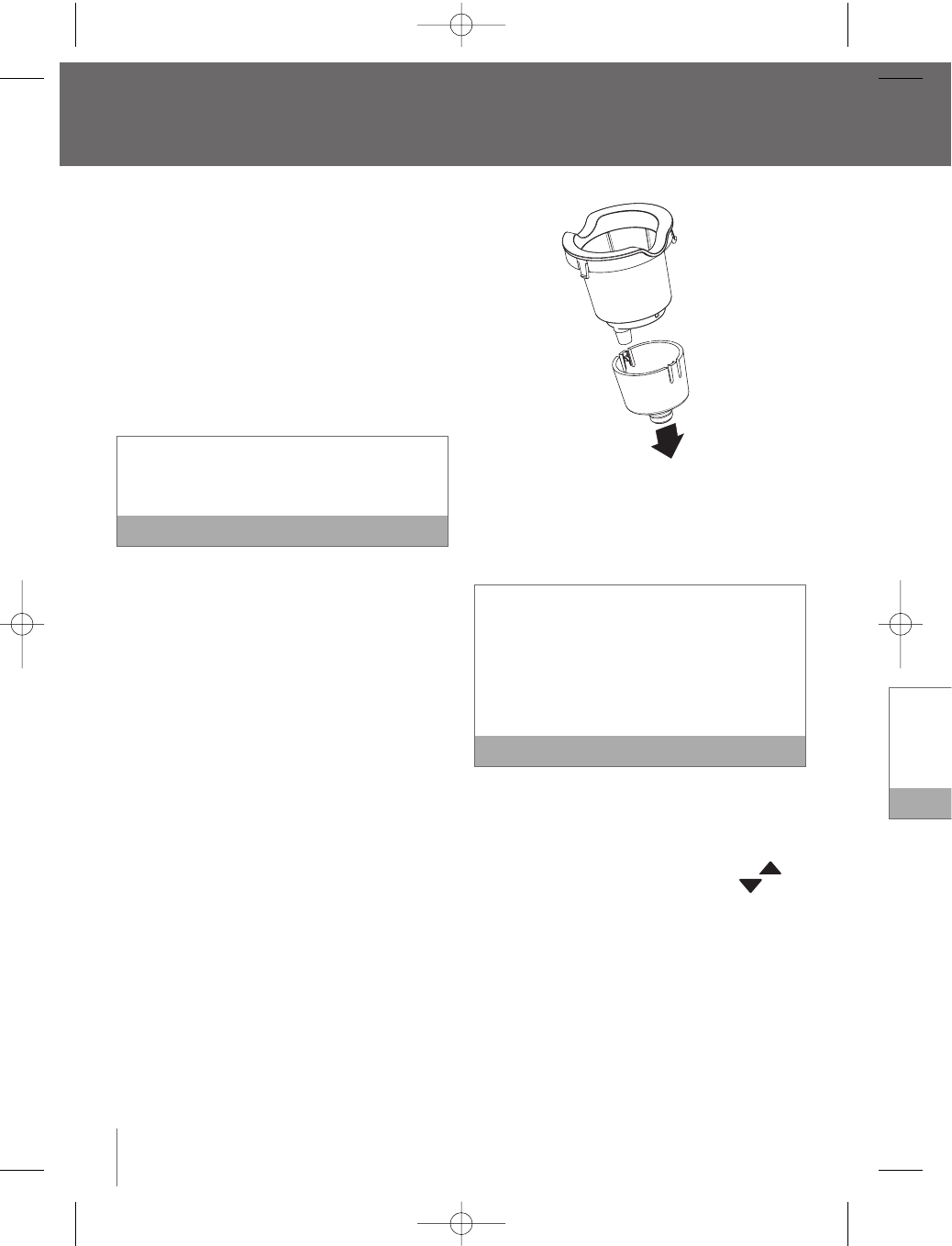
2. Disassemble the K-Cup®Holder buy pulling
downwards on the Funnel located at the base of
the Holder.
3. Wash both parts in warm soapy water with a
soft cloth,then rinse and dry thoroughly.The
K-Cup®Holder and Funnel are also top-shelf
dishwasher safe.
The K-Cup®Holder houses a needle in the inside
base. Should a clog arise due to coffee grinds, it
can be cleaned using a paper clip or similar tool.
Insert the paper clip into the Needle to loosen the
clog and push it out.To avoid risk of injury, do not
put your fingers in the K-Cup®Holder. Note
4. After cleaning,place the Funnel back onto the
K-Cup®Holder.
5. Place the assembled K-Cup®Holder back into
the Brewing Chamber, aligning the arrow
on the K-Cup®Holder with the arrow in
the Brewing Chamber. Use caution when doing
this as there is a sharp needle on the underside
of the Brewing Chamber Head that punctures the
K-Cup®.
Cleaning the My K-Cup®accessory
Regular cleaning of the My K-Cup®accessory is
recommended.
1. Remove the assembled My K-Cup®Holder from
the Brewer by raising the Safety Locking Arm. Use
caution as the My K-Cup®Holder will be hot.
22
BR9013 BKC600XL_IB_AMEND.qxp 11/10/07 21:43 Page 22
23
2. Disassemble the My K-Cup®Holder by removing
the Lid from the Holder in a counter-clockwise
direction. Remove the Filter Basket from the
Holder, discard the grounds.
3. Wash the Lid,Filter Basket and Holder in warm
soapy water with a soft cloth, then rinse and dry
thoroughly.All parts K-Cup®Holder are also top-
shelf dishwasher safe.
4. Store the assembled My K-Cup®Holder in the
My K-Cup®Storage compartment located on top
of the Brewer.
Cleaning the water tank and lid
1. Wipe the Water Tank Lid with a soft, damp cloth
then dry thoroughly. The Lid should not be put
into the dishwasher.
2. Wash the Water Tank in warm soapy water with a
soft cloth,then rinse and dry thoroughly. Do not
dry the inside of the Tank with a cloth as lint may
remain. The Water Tank should not be put into
the dishwasher.
Rinse the Water Tank thoroughly after cleaning to
ensure that no cleaners or cleaning solutions
remain as they may contaminate the water
supply in the Brewer. Note
Cleaning the water filter
Regular cleaning of the Water Filter is recommended.
We suggest doing this when the Charcoal Filter is
replaced every 2 months or 60 tank refills.
1. Disassemble the Water Filter by removing the
Lower Filter Holder from the Upper Filter Holder.
Discard the Charcoal Filter.
2. Wash the Upper and Lower Filter Holder in warm
soapy water with a soft cloth, then rinse and dry
thoroughly. Both parts are also top-shelf
dishwasher safe.
Replace the Charcoal Filter every 2 months, or 60
tank refills, more if you have hard water. Note
To order replacement Charcoal Filters, call Breville
Customer Service on 1-866-BREVILLE or visit
www.breville.com.
We recommend removing the Water Filter if you
choose not to replace the Charcoal Filter every 2
months, as the filter may clog and affect the smell
and taste of the water.
Descaling the brewer
Mineral content in water varies from place to place.
Depending on the mineral content of the water in
your area, calcium deposits or scale may build up in
your Brewer. Scale is non-toxic,but left unattended, it
can hinder the Brewer’s performance. Descaling your
Brewer helps maintain the heating element, and
other internal parts of the Brewer that come in
contact with water.
The Brewer should be descaled every 3-6 months to
ensure optimal performance. It is possible for calcium
deposits to build up faster, making it necessary to
descale more often.
This Brewer is equipped with sensors to detect when
scale buildup is interfering with the performance of
the Brewer.When this is detected, the LCD screen
will indicate ’DESCALE’.
with a
y.The
p-shelf
e inside
nds, it
ar tool.
sen the
do not
Note
nto the
ack into
w in
n doing
nderside
ctures the
ry
ory is
der from
Arm. Use
e hot.
BR9013 BKC600XL_IB_AMEND.qxp 11/10/07 21:43 Page 23
TroubCare and cleaning continued
The Brewer will continue to operate even when
the LCD screen indicates ‘DESCALE’. Note
However, if you do not descale the Brewer soon after
it is displayed, continued scale build-up could
damage the Brewer. If this occurs,‘DESCALE’ will
begin to flash, alerting you to the potential damage to
the Brewer if you do not descale immediately.
Promptly follow these steps each time the LCD
screen indicates ‘DESCALE’ to ensure the Brewer
functions optimally.
1. Empty the Water Tank.
2. Pour 60 oz.of vinegar into the Water Tank, filling to
just below the top edge of the clear viewing area.
3. Place a 12 oz. or larger ceramic cup (do not use
a plastic cup) on the Drip Tray.The Drip Tray and
Drip Tray Plate can be removed to accomodate
taller mugs and travel mugs
4. Select the largest brew size (11.25 oz. serving)
by pressing the button on the control panel.
5. Run a cleansing brew without a K-Cup®(refer to
Brewing Hot Water, page 15). Pour the contents
of the cup into the sink.
6. Repeat the cleansing brew process until the
Water Tank is empty, pouring the contents of the
cup into the sink after each cycle. Remember
to raise and lower the Safety Locking Arm
between each cycle so the control panel
buttons illuminate.
7. Let the Brewer stand for at least 4 hours while
still on.
8. Rinse the Water Tank thoroughly and fill with
fresh water.
9. Place a 12 oz. or larger ceramic cup (do not use
a plastic cup) on the Drip Tray.
10. Run a cleansing brew without a K-Cup®(refer to
Brewing Hot Water, page 15). Pour the contents
of the cup into the sink.
11. Repeat the cleansing brew process until the
Water Tank is empty, pouring the contents of the
cup into the sink after each cycle.You may need
to perform additional rinse cycles if you notice
any residual taste. Remember to raise and lower
the Safety Locking Arm between each cycle so
the control panel buttons illuminate.
12. The machine is now ready for use.
If the LCD screen continues to indicate
‘DESCALE’ after completing the process, repeat
the process above. Note
Storage
Before cleaning or moving the Brewer to a different
location, ensure the Brewer has been turned off.
Switch off at the wall outlet, unplug the power cord
and allow the machine to cool.The Water Tank
should be emptied and dried thoroughly.
•Store your Brewer in its upright position to avoid
water leakage from the inner tank.
•Store your Brewer in a frost free environment.
Storing the Brewer in a cold environment runs the
risk of water freezing inside the Brewer and
causing damage. If your Brewer has been stored in
an environment below freezing, ensure to let it
warm to room temperature for at least 2 hours
before using.
•When preparing to use the Brewer after storage,
we recommend rinsing the Water Tank with fresh
water and running three cleansing brews without
a K-Cup®(refer to Brewing Hot Water, page 15).
24
Possib
Brewer
Brewer
Coffee
or wate
There a
from 13
on K-Cu
Custom
www.br
BR9013 BKC600XL_IB_AMEND.qxp 11/10/07 21:43 Page 24
Troubleshooting
25
l the
nts of the
may need
notice
and lower
cycle so
repeat
Note
different
d off.
wer cord
ank
o avoid
ment.
runs the
nd
stored in
let it
hours
torage,
th fresh
without
ge 15).
Possible problem Easy solution
Brewer will not switch on
Brewer will not brew
Coffee is too weak
or watery
•Plug the Brewer into an independent outlet.
•Check that the Brewer is plugged in securely.
•Plug into a different outlet.
•Reset circuit breaker if necessary.
•Make sure that the Power Switch has been turned on.The Water Tank
should be illuminated.The ‘BREW’ button, and buttons should be
illuminated.
•After placing the K-Cup®in the K-Cup®Holder, or the My K-Cup®Holder
into the Brewing Chamber, ensure the Safety Locking Arm is pushed down
securely.The LCD screen should indicate ‘READY TO BREW’.The and
buttons should illuminate and the 'BREW' button should illuminate and
flash for up to 60 seconds.
•If the LCD screen indicates ‘REFILL TANK’, add water to the Water Tank or
make sure the Water Tank is attached correctly to the Brewer (page 15).
•If the LCD screen indicates ‘REFILL TANK’ even after refilling, contact
Customer Service on 1-866-BREVILLE (1-866-273-8455).
•If the ‘BREW’ button is not pressed in 60 seconds, the LCD screen will
indicate ‘OPEN HEAD’ and the ‘BREW’ button will be disabled to prevent
accidental activation.To re-activate the brew sequence, open the Brewing
Chamber Head by raising and lowering the Safety Locking Arm completely.
•The Exit Needle may be clogged (refer Cleaning the K-Cup®Holder,
page 22).
•Reduce the brew size selection for a “stronger” tasting cup of coffee
(refer to Setting the ‘BREW SIZE’ feature, page 20).
•Try an Extra Bold K-Cup®.They have 30% more ground coffee in each
K-Cup®portion pack.
There are over 150 varieties of Keurig K-Cups®
from 13 gourmet partners. For more information
on K-Cups®or K-Cup® ordering, call Breville
Customer Service on 1-866-BREVILLE, or visit
www.breville.com. Note
BR9013 BKC600XL_IB_AMEND.qxp 11/10/07 21:43 Page 25
WarrTroubleshooting continued
26
One yea
Breville®*
defects tha
workmans
date of ori
does not c
commercia
the printed
warranty f
basket, bla
disclaims a
for inciden
Some stat
or limitatio
the forego
ANY WARR
WITH RESP
TO THE ON
Some stat
of the imp
goods, so
to you.
This warra
may also h
state to sta
Possible problem Easy solution
Brewer dispenses a
partial cup
The time is not displayed
on the LCD screen
Brewer shuts off or turns
on automatically
The blue light in the
water tank is flashing
•The Exit Needle may be clogged (refer to Cleaning the K-Cup®Holder,
page 22).
•The Water Tank may have been removed during brewing. Replace the
Water Tank and perform a cleansing brew without a K-Cup®
(refer to Brewing Hot Water, page 15).
•If the LCD screen indicates ‘DESCALE’,follow the instructions, Descaling
your Brewer (page 23)
•If you have repeated the descale procedure on your Brewer two times
and the message is still displayed, contact Customer Service on
1-866-BREVILLE (1-866-273-8455).
•The time will not be displayed on the LCD screen unless you have set it.
To set the clock, follow the instructions, Setting the ‘CLOCK SET’ feature
(page 17).
•If power is interrupted to the Brewer, you will need to set the clock again.
•Check to make sure that the ‘ON-OFF TIME’ and/or the ‘AUTO OFF’
features have not been set.To do this, press the ‘MENU’ button and scroll
through the programming options. Both the ‘ON-OFF TIME’ and ‘AUTO
OFF’ features should be ‘INACTIVE‘.If ‘INACTIVE’ is not displayed, follow
the instructions, Setting the ‘ON-OFF TIME’ feature (page 17) and Setting
the ‘AUTO OFF’ feature (page 19).
•The water level is low and a full cup cannot be brewed.Add water to
the Water Tank, following the instructions, Re-filling the Water Tank
(page 15).
BR9013 BKC600XL_IB_AMEND.qxp 11/10/07 21:43 Page 26
Warranty
27
One year limited warranty
Breville®* warrants this Breville®appliance against
defects that are due to faulty material or
workmanship for a period of one (1) year from the
date of original consumer purchase.This warranty
does not cover damage from abuse, neglect,use for
commercial purposes, or any other use not found in
the printed “Instructions for use” booklet.There is no
warranty for glass parts, glass containers, filter
basket, blades and agitators. HWI Breville®expressly
disclaims all responsibility for consequential damages
for incidental losses caused by use of this appliance.
Some states or provinces do not allow this exclusion
or limitation for incidental or consequential losses, so
the foregoing disclaimer may not apply to you.
ANY WARRANTY OF MERCHANTABILITY OR FITNESS
WITH RESPECT TO THIS PRODUCT IS ALSO LIMITED
TO THE ONE YEAR LIMITED WARRANTY PERIOD.
Some states or provinces do not allow disclaimer
of the implied warranty with respect to consumer
goods, so the foregoing disclaimer may not apply
to you.
This warranty gives you specific legal rights and you
may also have other legal rights which vary from
state to state or province to province.
If the appliance should become defective within the
warranty period, do not return the appliance to the
store. Please contact our Customer Service Center.
Toll free phone number:
1-866-BREVILLE (1-866-273-8455)
Internet email:
AskUs@BrevilleUSA.com
AskUs@Breville.ca (in Canada)
ORGINAL RECEIPT IS REQUIRED FOR ALL RETURNS
*HWI Breville®products are distributed in Canada by
Anglo Canadian Housewares, L.P. and in USA by
Metro/Thebe Inc.
older,
the
scaling
mes
set it.
eature
k again.
F’
nd scroll
UTO
follow
Setting
r to
k
BR9013 BKC600XL_IB_AMEND.qxp 11/10/07 21:43 Page 27
