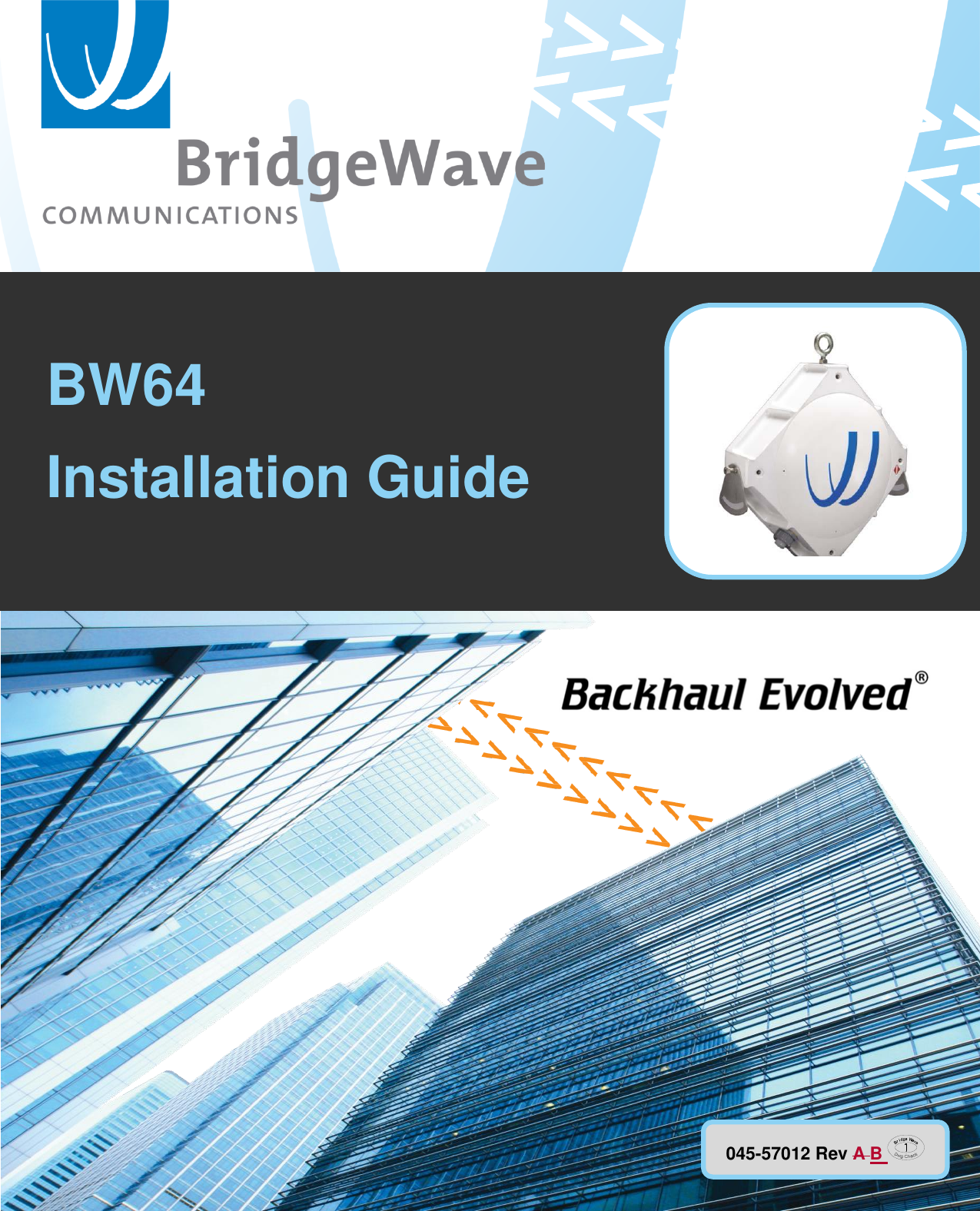
BridgeWave Communications BW64 BridgeWave BW64 & BW64E User Manual pt 2

BridgeWave Communications, Inc. BridgeWave BW64 & BW64E pt 2

Contents

User Manual pt 2

           P/N 580-00516                  BW64  Installation Guide 045-57012 Rev A B   BW64
                                                                                                       BW64 Installation Guide i 045-57012 Rev BA BridgeWave Confidential & Proprietary Copyright Notice & Disclaimer Copyright © 2004 – 20156 BridgeWave Communications. All rights reserved.  Printed in the USA  No portion of this publication may be reproduced, copied, or distributed without the written consent of BridgeWave Communications. BridgeWave reserves the right to update or change the material in this publication at any time without notice. BridgeWave has made every effort to ensure that the information and the instructions contained in the publication are adequate and is not responsible for any errors or omissions due to typing, printing, or editing of this document. Purchasers of BridgeWave products should make their own evaluation to determine the suitability of each such product for their specific application. BridgeWave’s obligations regarding the use or application of its products shall be limited to those commitments to the purchaser set forth in its Standard Terms and Conditions of Sale for a delivered product. This publication has been prepared for professional and properly trained personnel, and the customer assumes full responsibility when using the information herein.  Export Control All BridgeWave radio products are restricted commodities that fall under ECCN 5A002 of the Department of Commerce. These products are "ENC restricted" under section 740.17(b)(2) of the Export Administration Regulations (EAR). BridgeWave products may only be exported, re-exported, transferred, or retransferred in accordance with Export Administration Regulations. Diversion contrary to U.S. law is expressly prohibited.  Product Compatibility While every effort has been made to verify operation of this product with many different communications products and networks, BridgeWave makes no claim of compatibility between its products and other vendors’ equipment. It is assumed that users have thoroughly evaluated this product’s performance in the communications environment in which it will be used.
                                                                                                       BW64 Installation Guide ii 045-57012 Rev BA BridgeWave Confidential & Proprietary Safety CAUTION, WARNING, and DANGER statements have been strategically placed in the text to alert personnel of possible hazards. These statements must be closely observed. The following general safety precautions must be observed during all phases of operation and service of the products covered in this manual. Failure to comply with these precautions or with specific warnings elsewhere in this manual willfully violates standards of design, manufacture, and intended use of the product. BridgeWave assumes no liability for the customer’s failure to comply with these requirements.   These BridgeWave radios meet all applicable FCC and Industry Canada (IC) safety requirements for general population exposure to radio frequency emissions; however, it is best to avoid prolonged, unnecessary exposure to the front of the radio while it is operating.    The outdoor equipment must be properly grounded to provide some protection against voltage surges and built-up static charges. In the event of a short circuit, grounding reduces the risk of electrical shock.  For installations in the U.S.A., refer to Articles 810830 of the National Electrical Code, ANSI/NFPA No. 70, for information with respect to proper grounding and applicable lightning protection for DC cables. The installer must also follow any additional local building and electrical code regulations.  For installations in all other countries, implement protection in accordance with the safety standards and regulatory requirements of the country where the equipment is to be installed.  Do not install or operate this equipment in the presence of flammable gases or fumes. Operation of any electrical instrument in such an environment constitutes a definite safety hazard.  Do not install substitute parts or perform any unauthorized modification to the equipment. Changes or modifications not expressly approved by BridgeWave can void the user’s authority to operate the equipment.
                                                                                                       BW64 Installation Guide iii 045-57012 Rev BA BridgeWave Confidential & Proprietary Regulatory Information This device complies with FCC Part 15.255 and Industry Canada RSS-210. Operation is subject to the following two conditions: (1) This device may not cause harmful interference, and,  (2) This device must accept any interference that may cause undesired operation.  French Translation: Le présent appareil est conforme aux CNR d’Industrie Canada applicables aux appareils radio exempts de licence. L’exploitation est autorisée aux deux conditions suivantes:  (1) l’appareil ne doit pas produire de brouillage;  (2) l’utilisateur de l’appareil doit accepter tout brouillage radioélectrique subi, même si le brouillage est susceptible d’en compromettre le fonctionnement.
                                                                                                       BW64 Installation Guide iv 045-57012 Rev BA BridgeWave Confidential & Proprietary Equipment Precautions Water and Moisture - These BridgeWave radios are designed to withstand weather conditions typically encountered when installed outdoors.  Power information A suitable transient voltage suppressor shall be installed if the length of the DC supply cable exceeds 140 feet. The power supply for the equipment shall be a listed ITE power supply of Listed Class II power unit rated at +/-37.5 to 60VDC, minimum 60Watts. When used with the optional POE64 kit, the PoE Extractor accepts a ±37.5 to ±60VDC, minimum 60Watts input from an external Power Supply Equipment (PSE) source. RF Radiation Safety, Maximum Permissible Exposure (MPE) Limits Regarding guidelines for Human exposure limits to Radio Frequency (RF) electromagnetic fields, the BW64 product has been evaluated for compliance with FCC OET Bulletin 65 and human exposure limits recommended by the International Commission on Non-Ionizing Radiation Protection (ICNIRP), IEEE, and adopted by ANSI.  BW64 devices, utilizing 10inch (25.4cm) integrated antennas and BW64E devices utilizing 2ft (60cm) diameter antennas, are below the General Population/Uncontrolled Exposure limits of 1 mW/cm2, and well below the Occupational/Controlled Exposure limit of 5mW/cm2 at a distance of 82.02 centimeters for the BW64 and 206 centimeters for the BW64E.  Product Changes or Modifications Users of this equipment are hereby cautioned that changes or modifications not expressly approved by the party responsible for the compliance could void the user’s authority to operate the equipment The BW64unit, utilizing internal 10” diameter antenna is below the General Population/Uncontrolled Exposure limits of 1 mW/cm2, and well below the Occupational/Controlled Exposure limit of 5mW/cm2 at any Near-Field, Transition, or Far-Field distance region including the antenna surface.
                                                                                                       BW64 Installation Guide v 045-57012 Rev BA BridgeWave Confidential & Proprietary Restricted Access This product is for installation in a restricted-access location, where there will be no access to the equipment, except by trained service persons.
                                                                                                       BW64 Installation Guide vi 045-57012 Rev BA BridgeWave Confidential & Proprietary  Table of Contents  Copyright Notice & Disclaimer .................... i Export Control .............................................. i Product Compatibility ................................... i Safety ............................................................ ii Regulatory Information ............................... iii Equipment Precautions ............................... iv Power information ...................................... iv RF Radiation Safety, Maximum Permissible Exposure (MPE) Limits .............................. iv Restricted Access ...................................... viv 1 Introduction ............................................ 2 1.1 Purpose.............................................. 2 1.2 Prior Knowledge ............................... 2 1.3 Contact Information .......................... 3 2 Site Planning ........................................... 4 2.1 General .............................................. 4 2.2 Equipment Checklist .......................... 4 2.3 Line of Sight ...................................... 4 2.4 Link Distance Limits.......................... 4 2.5 Antenna Location .............................. 5 2.6 Cabling & Power Requirements ....... 5 2.7 Example Cabling Diagrams .............. 8 2.8 Grounding & Lightning ................... 10 2.9 Conduit ............................................ 10 3 Installation ............................................. 11 3.1 Overview.......................................... 11 3.2 Equipment Unpacking ..................... 11 3.3 Equipment Inventory ....................... 12 3.4 Installation Tools ............................. 13 3.5 Radio Mount Installation ................. 14 3.6 Radio Installation ............................ 16 3.7 Installing Optional POE64 Kit ........ 18 3.8 Attach Grounding ............................ 20 3.9 Cable & Conduit Installation .......... 21 3.10 Pre-Antenna Alignment Concepts 24 3.11 Antenna Alignment ....................... 27 3.12 Ice Shield Installation (Optional) 29 Appendix A: Troubleshooting ..................... 30 Appendix B: RSL Voltage vs. Distance ...... 32 Standard Limited Warranty & Software License ........................................................... 33
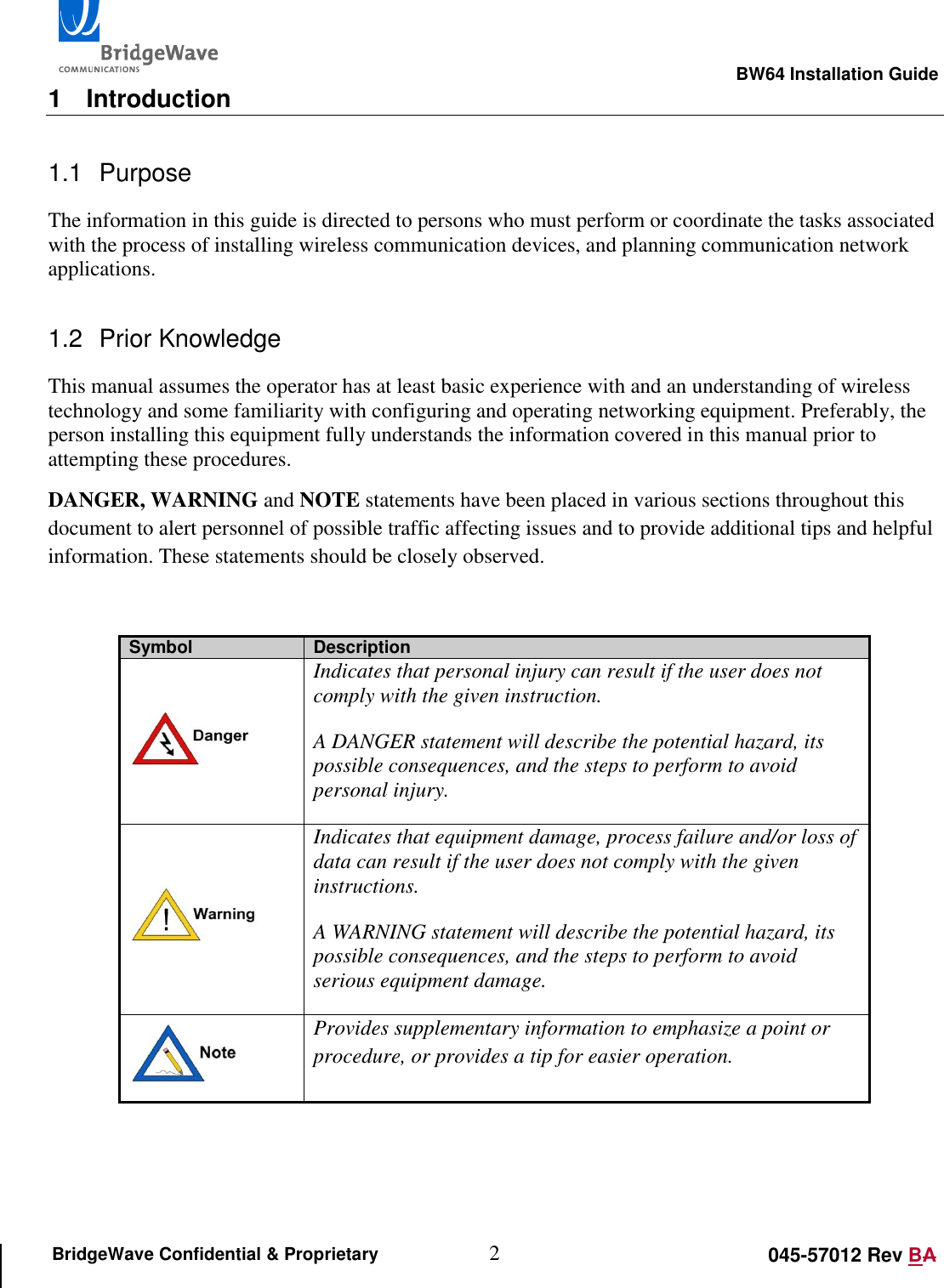
                                                                                                       BW64 Installation Guide 2 045-57012 Rev BA BridgeWave Confidential & Proprietary 1  Introduction 1.1  Purpose The information in this guide is directed to persons who must perform or coordinate the tasks associated with the process of installing wireless communication devices, and planning communication network applications. 1.2  Prior Knowledge This manual assumes the operator has at least basic experience with and an understanding of wireless technology and some familiarity with configuring and operating networking equipment. Preferably, the person installing this equipment fully understands the information covered in this manual prior to attempting these procedures. DANGER, WARNING and NOTE statements have been placed in various sections throughout this document to alert personnel of possible traffic affecting issues and to provide additional tips and helpful information. These statements should be closely observed.   Symbol Description  Indicates that personal injury can result if the user does not comply with the given instruction.  A DANGER statement will describe the potential hazard, its possible consequences, and the steps to perform to avoid personal injury.  Indicates that equipment damage, process failure and/or loss of data can result if the user does not comply with the given instructions.  A WARNING statement will describe the potential hazard, its possible consequences, and the steps to perform to avoid serious equipment damage.  Provides supplementary information to emphasize a point or procedure, or provides a tip for easier operation.
                                                                                                       BW64 Installation Guide 3 045-57012 Rev BA BridgeWave Confidential & Proprietary 1.3  Contact Information Technical Assistance and Customer Service BridgeWave distributors and resellers are authorized local service providers and are responsible for immediate Tier 1 customer support. If a problem cannot be resolved, contact BridgeWave Customer Service for assistance: Regional Standard Support Available Monday through Friday from 8:00 AM to 5:00 PM UTC local time, per region. NAM (North America) UTC -8 +1 (408) 567-6906 EMEA (Europe, Middle East, and Africa) UTC +0 +1 (408) 457-6658 APAC (Asia Pacific) UTC +8 +1 (408) 457-6659  The UTC coverage times do not reflect daylight saving time adjustments.  E-mail: support@bridgewave.com Return Material Authorization (RMA) Should BridgeWave equipment have to be returned for repair or replacement, an RMA number must be obtained from BridgeWave. When returning equipment, be sure to write the RMA number on the outside of the shipping carton, and follow instructions received from support upon approval of the RMA. BridgeWave Sales For questions pertaining to the purchase of equipment, software licenses, warranties, or services please contact sales at the following: E-mail:  sales@bridgewave.com Inside Sales: +1.866.577.6908
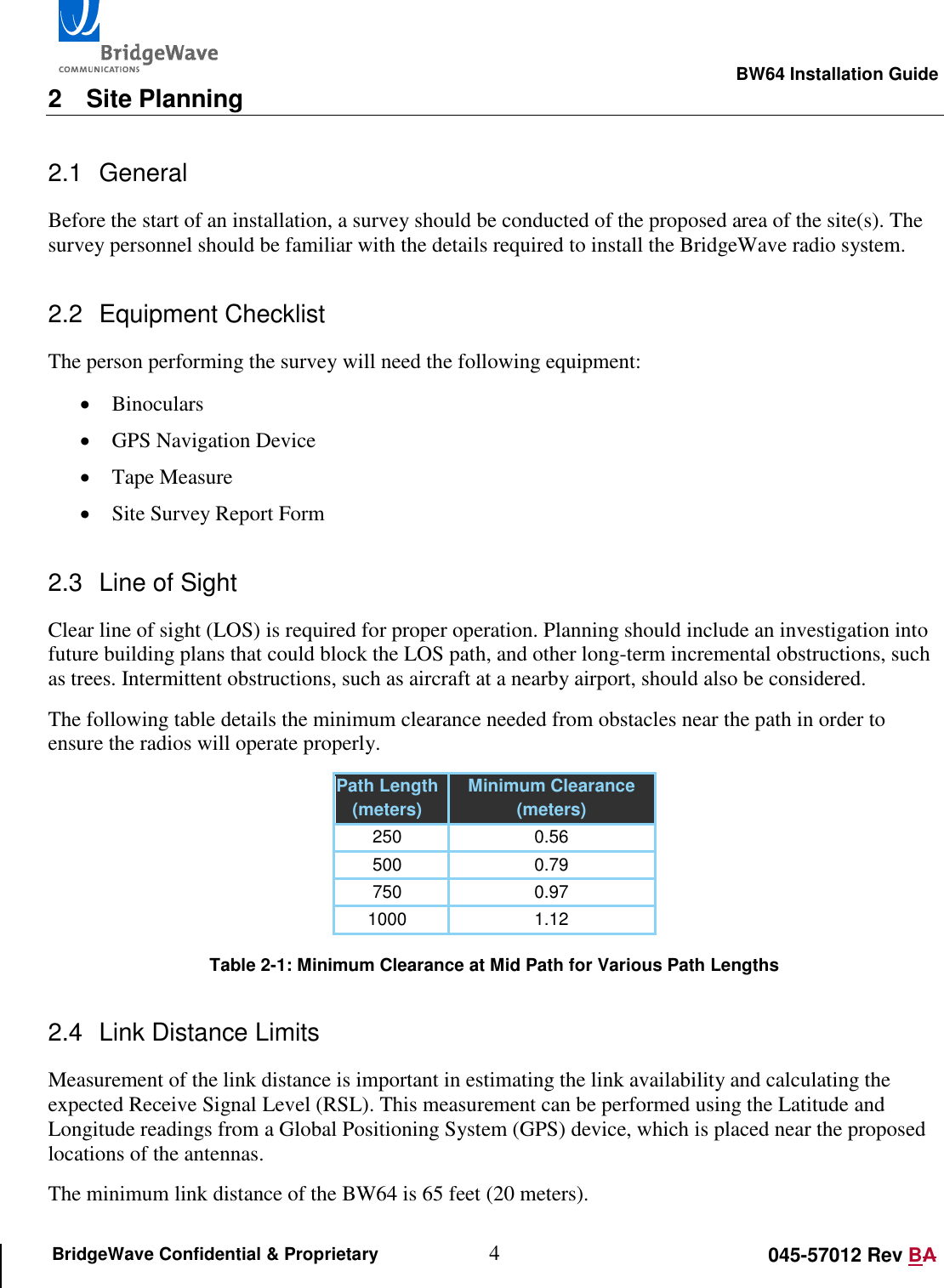
                                                                                                       BW64 Installation Guide 4 045-57012 Rev BA BridgeWave Confidential & Proprietary 2  Site Planning 2.1  General Before the start of an installation, a survey should be conducted of the proposed area of the site(s). The survey personnel should be familiar with the details required to install the BridgeWave radio system. 2.2  Equipment Checklist The person performing the survey will need the following equipment:  Binoculars  GPS Navigation Device  Tape Measure  Site Survey Report Form 2.3  Line of Sight Clear line of sight (LOS) is required for proper operation. Planning should include an investigation into future building plans that could block the LOS path, and other long-term incremental obstructions, such as trees. Intermittent obstructions, such as aircraft at a nearby airport, should also be considered. The following table details the minimum clearance needed from obstacles near the path in order to ensure the radios will operate properly. Path Length (meters) Minimum Clearance (meters) 250 0.56 500 0.79 750 0.97 1000 1.12  Table 2-1: Minimum Clearance at Mid Path for Various Path Lengths 2.4  Link Distance Limits Measurement of the link distance is important in estimating the link availability and calculating the expected Receive Signal Level (RSL). This measurement can be performed using the Latitude and Longitude readings from a Global Positioning System (GPS) device, which is placed near the proposed locations of the antennas. The minimum link distance of the BW64 is 65 feet (20 meters).
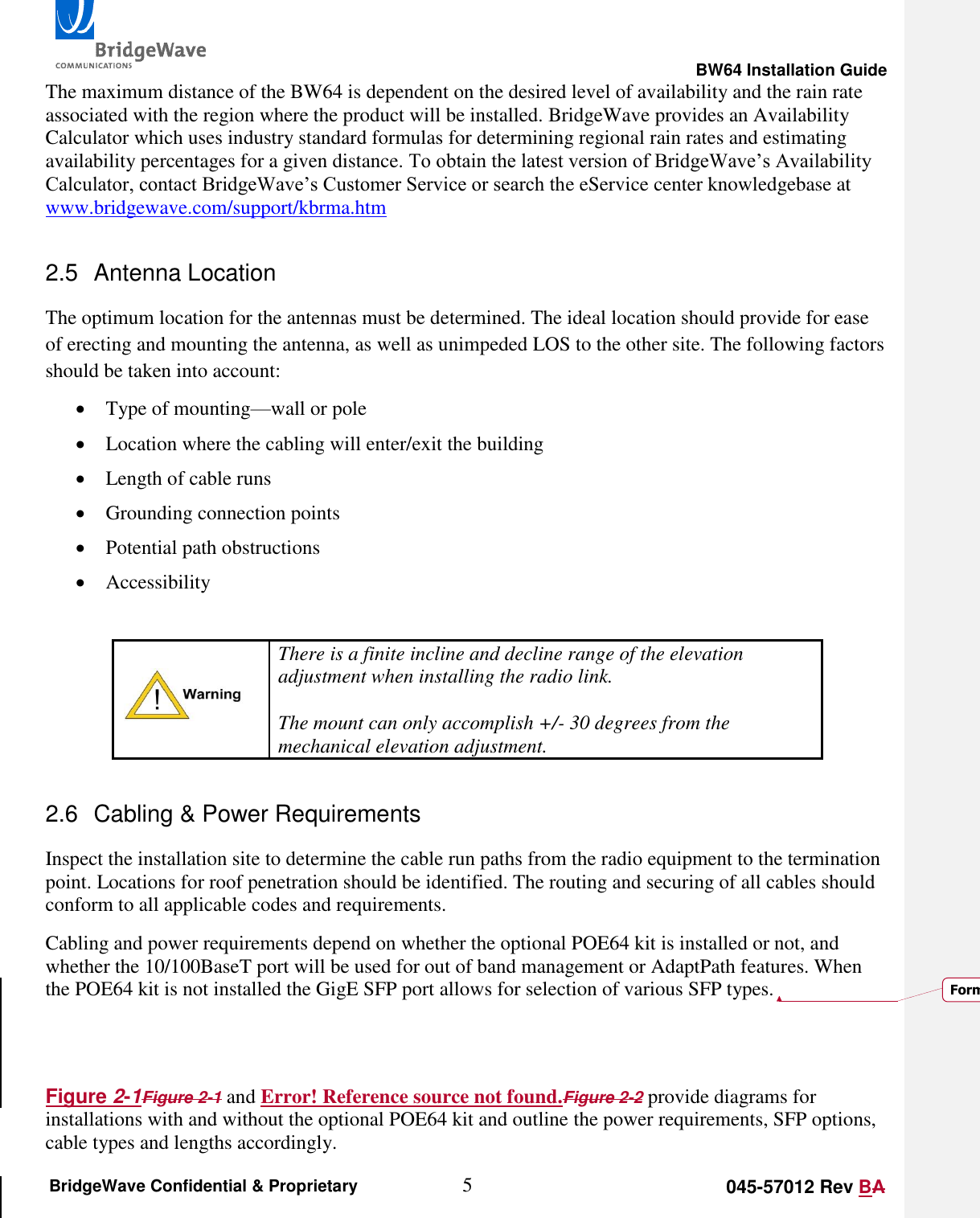
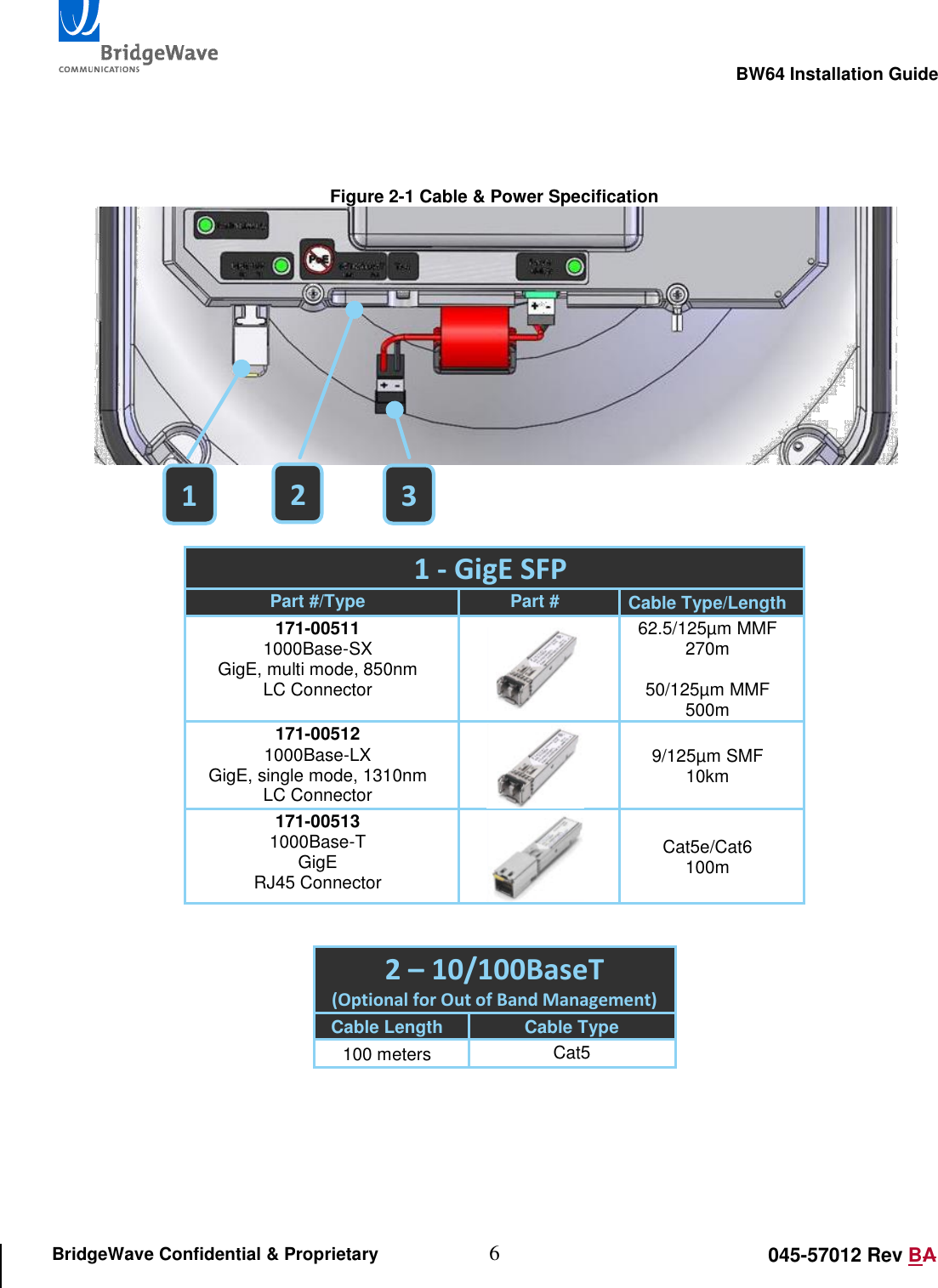
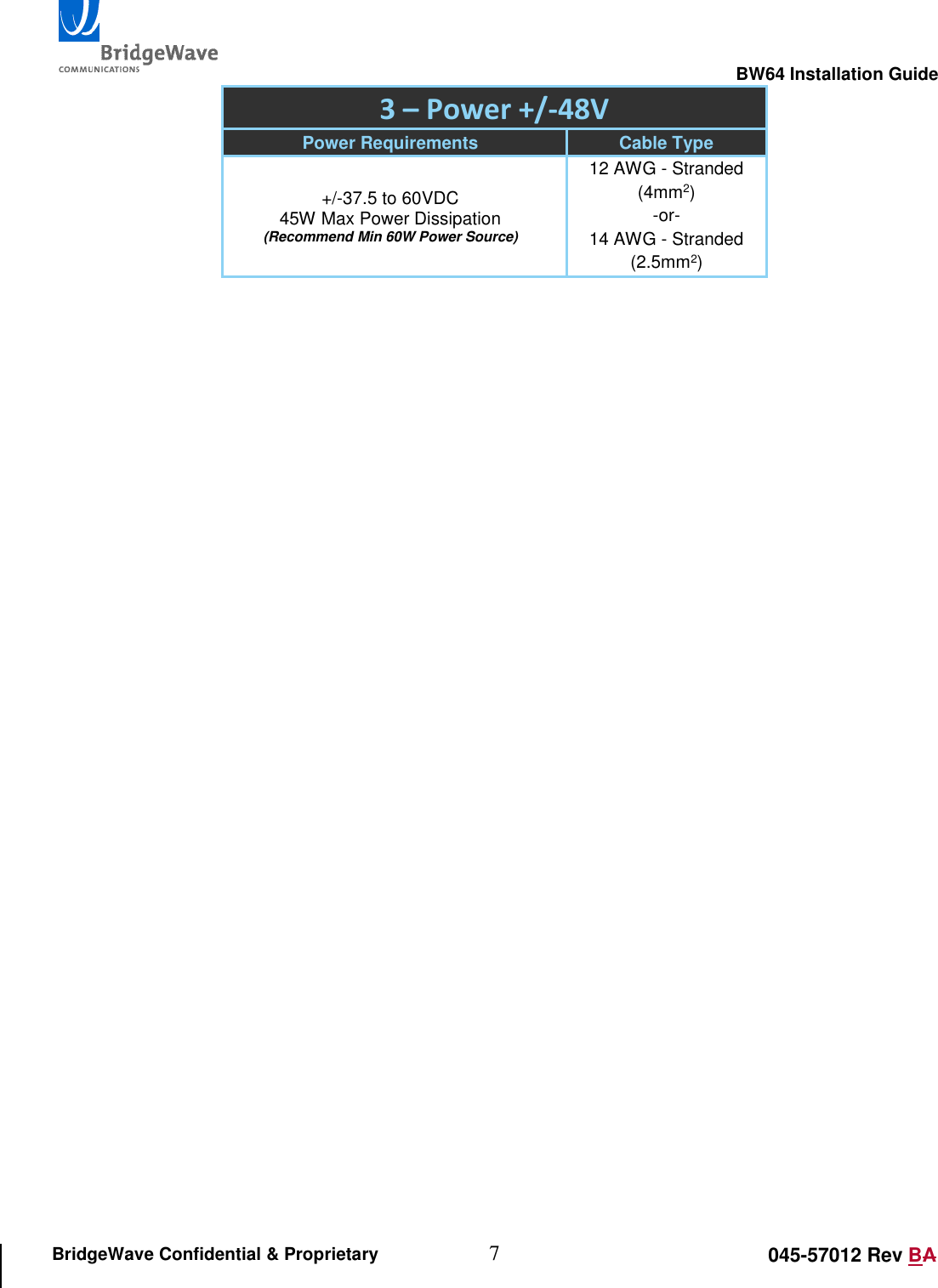
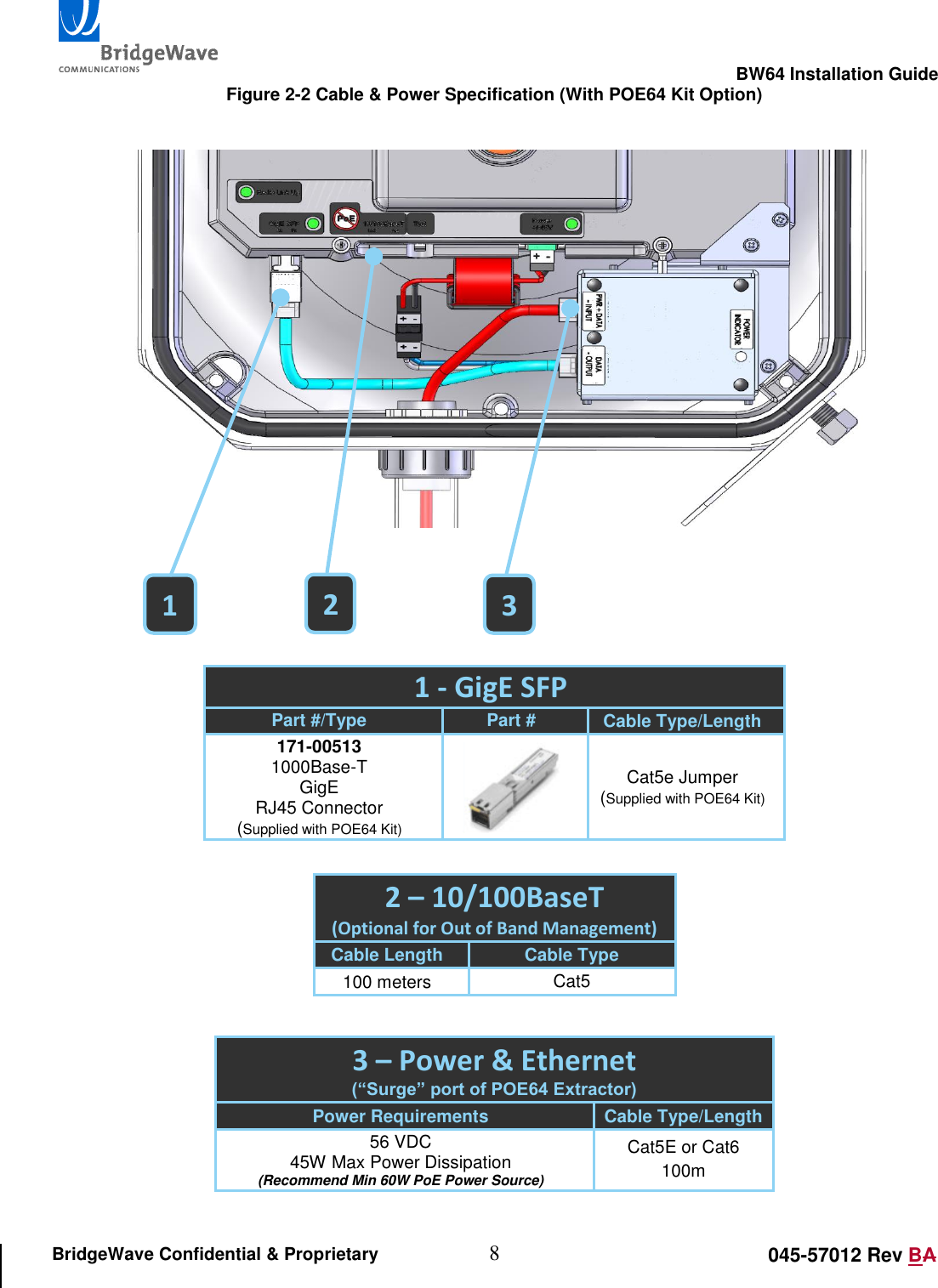
                                                                                                       BW64 Installation Guide 5 045-57012 Rev BA BridgeWave Confidential & Proprietary The maximum distance of the BW64 is dependent on the desired level of availability and the rain rate associated with the region where the product will be installed. BridgeWave provides an Availability Calculator which uses industry standard formulas for determining regional rain rates and estimating availability percentages for a given distance. To obtain the latest version of BridgeWave’s Availability Calculator, contact BridgeWave’s Customer Service or search the eService center knowledgebase at www.bridgewave.com/support/kbrma.htm 2.5  Antenna Location The optimum location for the antennas must be determined. The ideal location should provide for ease of erecting and mounting the antenna, as well as unimpeded LOS to the other site. The following factors should be taken into account:  Type of mounting—wall or pole  Location where the cabling will enter/exit the building  Length of cable runs  Grounding connection points  Potential path obstructions  Accessibility   There is a finite incline and decline range of the elevation adjustment when installing the radio link.   The mount can only accomplish +/- 30 degrees from the mechanical elevation adjustment. 2.6  Cabling & Power Requirements Inspect the installation site to determine the cable run paths from the radio equipment to the termination point. Locations for roof penetration should be identified. The routing and securing of all cables should conform to all applicable codes and requirements.  Cabling and power requirements depend on whether the optional POE64 kit is installed or not, and whether the 10/100BaseT port will be used for out of band management or AdaptPath features. When the POE64 kit is not installed the GigE SFP port allows for selection of various SFP types.    Figure 2-1Figure 2-1 and Error! Reference source not found.Figure 2-2 provide diagrams for installations with and without the optional POE64 kit and outline the power requirements, SFP options, cable types and lengths accordingly. Formatted: Font: 10 pt, Italic
                                                                                                       BW64 Installation Guide 6 045-57012 Rev BA BridgeWave Confidential & Proprietary     Figure 2-1 Cable & Power Specification    1 - GigE SFP Part #/Type Part # Cable Type/Length 171-00511 1000Base-SX GigE, multi mode, 850nm LC Connector  62.5/125µm MMF 270m  50/125µm MMF 500m 171-00512 1000Base-LX GigE, single mode, 1310nm LC Connector  9/125µm SMF 10km 171-00513 1000Base-T GigE RJ45 Connector  Cat5e/Cat6 100m  2 – 10/100BaseT  (Optional for Out of Band Management) Cable Length Cable Type 100 meters Cat5  3 2 1
                                                                                                       BW64 Installation Guide 7 045-57012 Rev BA BridgeWave Confidential & Proprietary 3 – Power +/-48V Power Requirements Cable Type +/-37.5 to 60VDC 45W Max Power Dissipation (Recommend Min 60W Power Source) 12 AWG - Stranded (4mm2) -or- 14 AWG - Stranded (2.5mm2)
                                                                                                       BW64 Installation Guide 8 045-57012 Rev BA BridgeWave Confidential & Proprietary Figure 2-2 Cable & Power Specification (With POE64 Kit Option)      1 - GigE SFP Part #/Type Part # Cable Type/Length 171-00513 1000Base-T GigE RJ45 Connector (Supplied with POE64 Kit)  Cat5e Jumper (Supplied with POE64 Kit)  2 – 10/100BaseT  (Optional for Out of Band Management) Cable Length Cable Type 100 meters Cat5  3 – Power & Ethernet (“Surge” port of POE64 Extractor) Power Requirements Cable Type/Length 56 VDC 45W Max Power Dissipation (Recommend Min 60W PoE Power Source) Cat5E or Cat6 100m   1 2 3
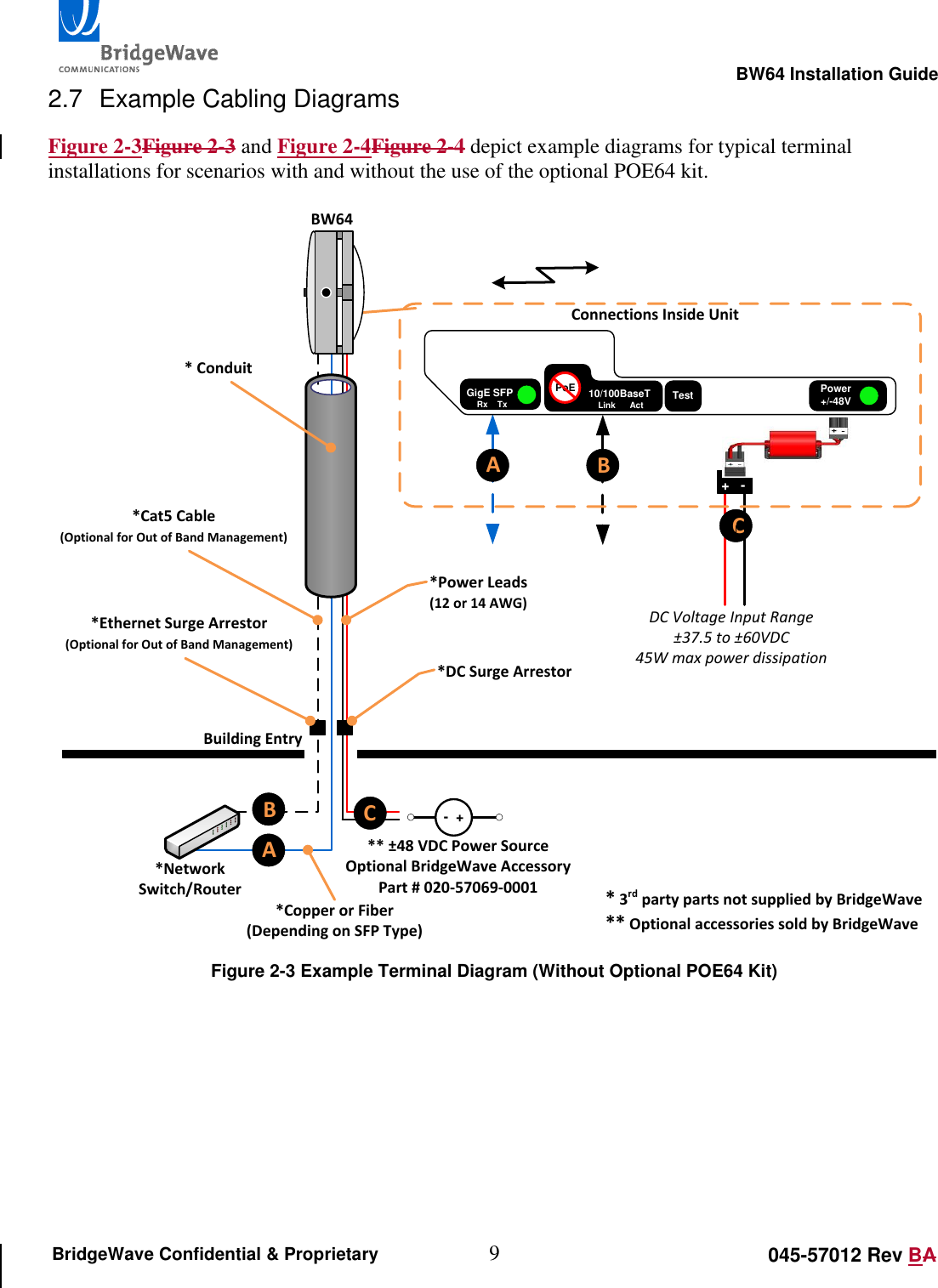
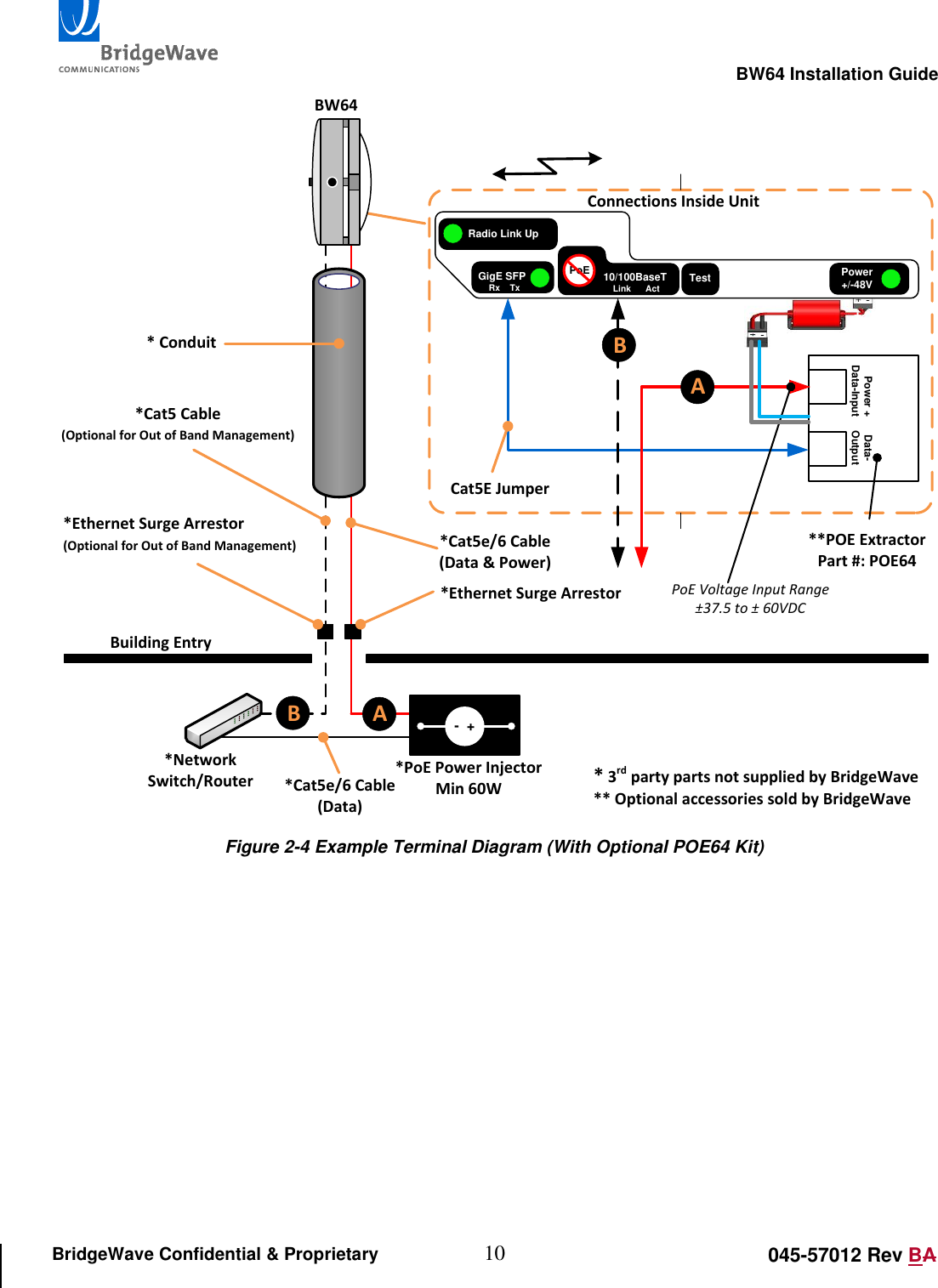
                                                                                                       BW64 Installation Guide 9 045-57012 Rev BA BridgeWave Confidential & Proprietary 2.7  Example Cabling Diagrams Figure 2-3Figure 2-3 and Figure 2-4Figure 2-4 depict example diagrams for typical terminal installations for scenarios with and without the use of the optional POE64 kit. BW64*Cat5 Cable(Optional for Out of Band Management)Building Entry*Network Switch/Router*Power Leads(12 or 14 AWG)** ±48 VDC Power SourceOptional BridgeWave Accessory Part # 020-57069-0001 -  +* 3rd party parts not supplied by BridgeWave** Optional accessories sold by BridgeWave* Conduit*Ethernet Surge Arrestor(Optional for Out of Band Management)*DC Surge Arrestor*Copper or Fiber(Depending on SFP Type)Radio Link UpConnections Inside UnitABCB+   -ACDC Voltage Input Range±37.5 to ±60VDC45W max power dissipationGigE SFPRx    TxPower+/-48VTest10/100BaseTLink      ActPoE Figure 2-3 Example Terminal Diagram (Without Optional POE64 Kit)
                                                                                                       BW64 Installation Guide 10 045-57012 Rev BA BridgeWave Confidential & Proprietary BW64*Cat5 Cable(Optional for Out of Band Management)Building Entry*Network Switch/Router * 3rd party parts not supplied by BridgeWave** Optional accessories sold by BridgeWave* Conduit*Ethernet Surge Arrestor(Optional for Out of Band Management)*Ethernet Surge ArrestorGigE SFPRx    TxPower+/-48VTest10/100BaseTLink      ActPoERadio Link UpConnections Inside Unit**POE ExtractorPart #: POE64 Data-Output+   -Power + Data-InputCat5E Jumper-  +*PoE Power InjectorMin 60W*Cat5e/6 Cable(Data & Power)*Cat5e/6 Cable(Data)B ABAPoE Voltage Input Range±37.5 to ± 60VDC Figure 2-4 Example Terminal Diagram (With Optional POE64 Kit)
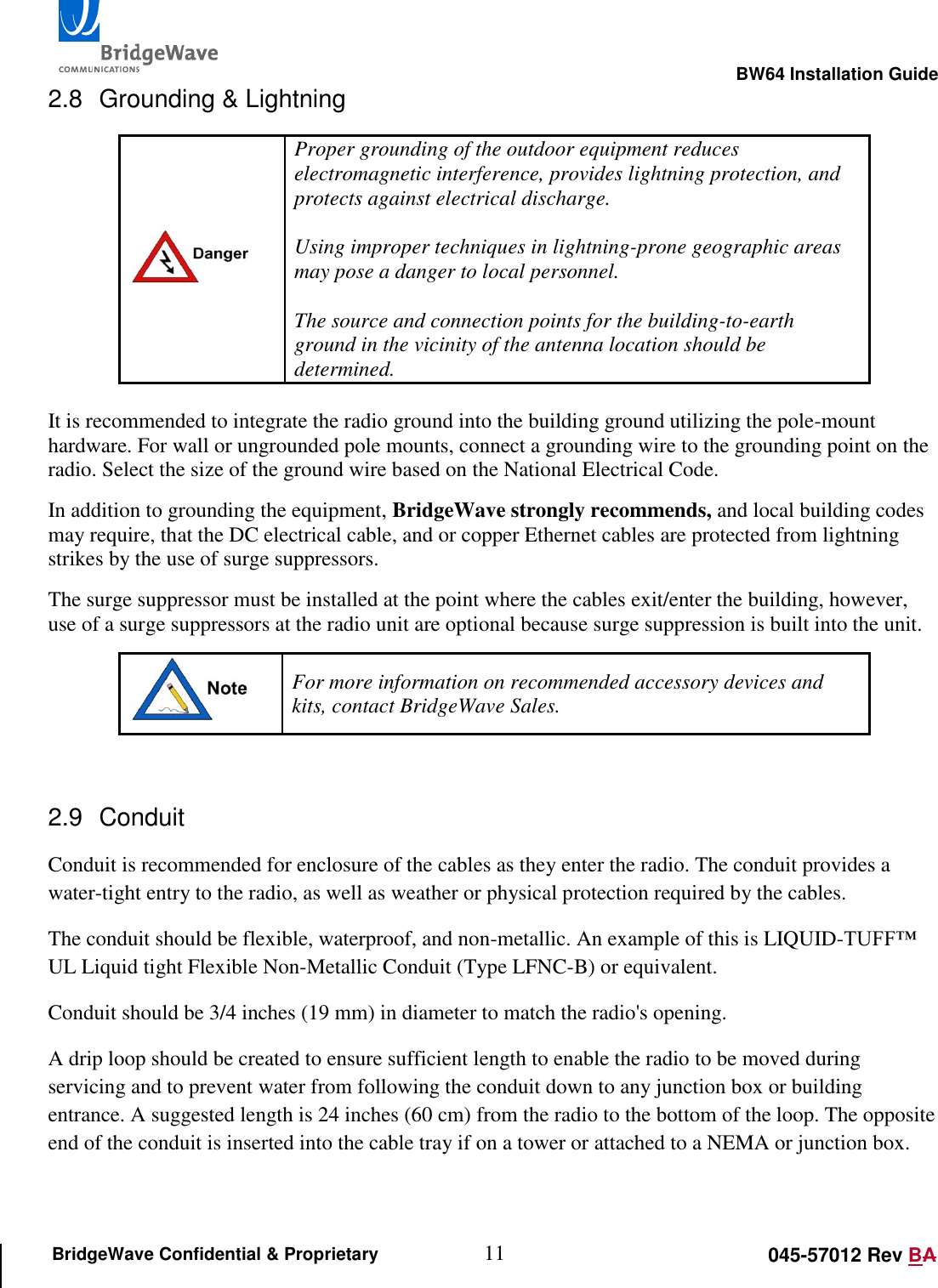
                                                                                                       BW64 Installation Guide 11 045-57012 Rev BA BridgeWave Confidential & Proprietary 2.8  Grounding & Lightning  Proper grounding of the outdoor equipment reduces electromagnetic interference, provides lightning protection, and protects against electrical discharge.   Using improper techniques in lightning-prone geographic areas may pose a danger to local personnel.  The source and connection points for the building-to-earth ground in the vicinity of the antenna location should be determined.   It is recommended to integrate the radio ground into the building ground utilizing the pole-mount hardware. For wall or ungrounded pole mounts, connect a grounding wire to the grounding point on the radio. Select the size of the ground wire based on the National Electrical Code.  In addition to grounding the equipment, BridgeWave strongly recommends, and local building codes may require, that the DC electrical cable, and or copper Ethernet cables are protected from lightning strikes by the use of surge suppressors. The surge suppressor must be installed at the point where the cables exit/enter the building, however, use of a surge suppressors at the radio unit are optional because surge suppression is built into the unit.  For more information on recommended accessory devices and kits, contact BridgeWave Sales.  2.9  Conduit Conduit is recommended for enclosure of the cables as they enter the radio. The conduit provides a water-tight entry to the radio, as well as weather or physical protection required by the cables. The conduit should be flexible, waterproof, and non-metallic. An example of this is LIQUID-TUFF™ UL Liquid tight Flexible Non-Metallic Conduit (Type LFNC-B) or equivalent. Conduit should be 3/4 inches (19 mm) in diameter to match the radio's opening. A drip loop should be created to ensure sufficient length to enable the radio to be moved during servicing and to prevent water from following the conduit down to any junction box or building entrance. A suggested length is 24 inches (60 cm) from the radio to the bottom of the loop. The opposite end of the conduit is inserted into the cable tray if on a tower or attached to a NEMA or junction box.
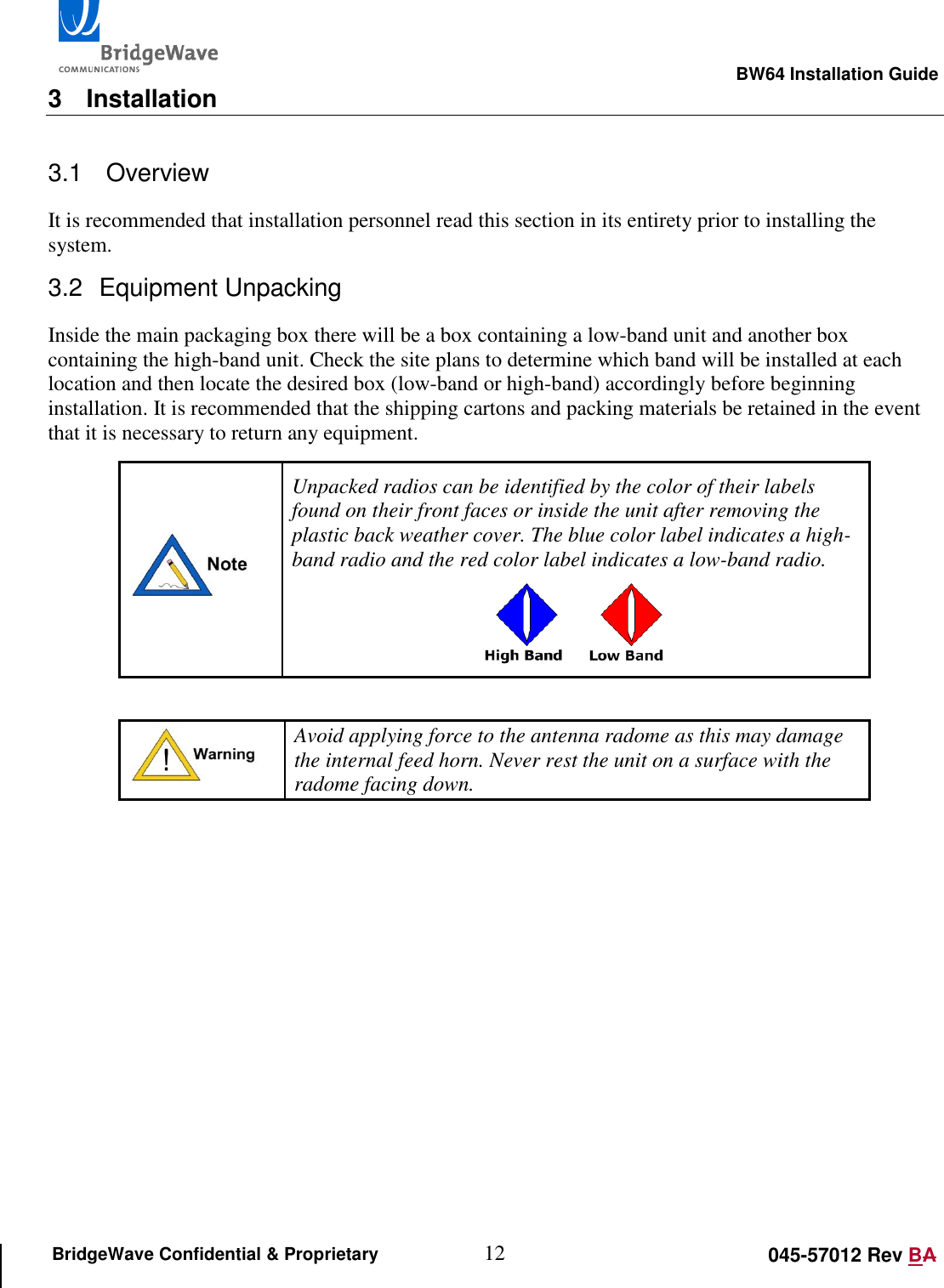
                                                                                                       BW64 Installation Guide 12 045-57012 Rev BA BridgeWave Confidential & Proprietary 3  Installation 3.1   Overview It is recommended that installation personnel read this section in its entirety prior to installing the system.  3.2  Equipment Unpacking Inside the main packaging box there will be a box containing a low-band unit and another box containing the high-band unit. Check the site plans to determine which band will be installed at each location and then locate the desired box (low-band or high-band) accordingly before beginning installation. It is recommended that the shipping cartons and packing materials be retained in the event that it is necessary to return any equipment.  Unpacked radios can be identified by the color of their labels found on their front faces or inside the unit after removing the plastic back weather cover. The blue color label indicates a high-band radio and the red color label indicates a low-band radio.       Avoid applying force to the antenna radome as this may damage the internal feed horn. Never rest the unit on a surface with the radome facing down.
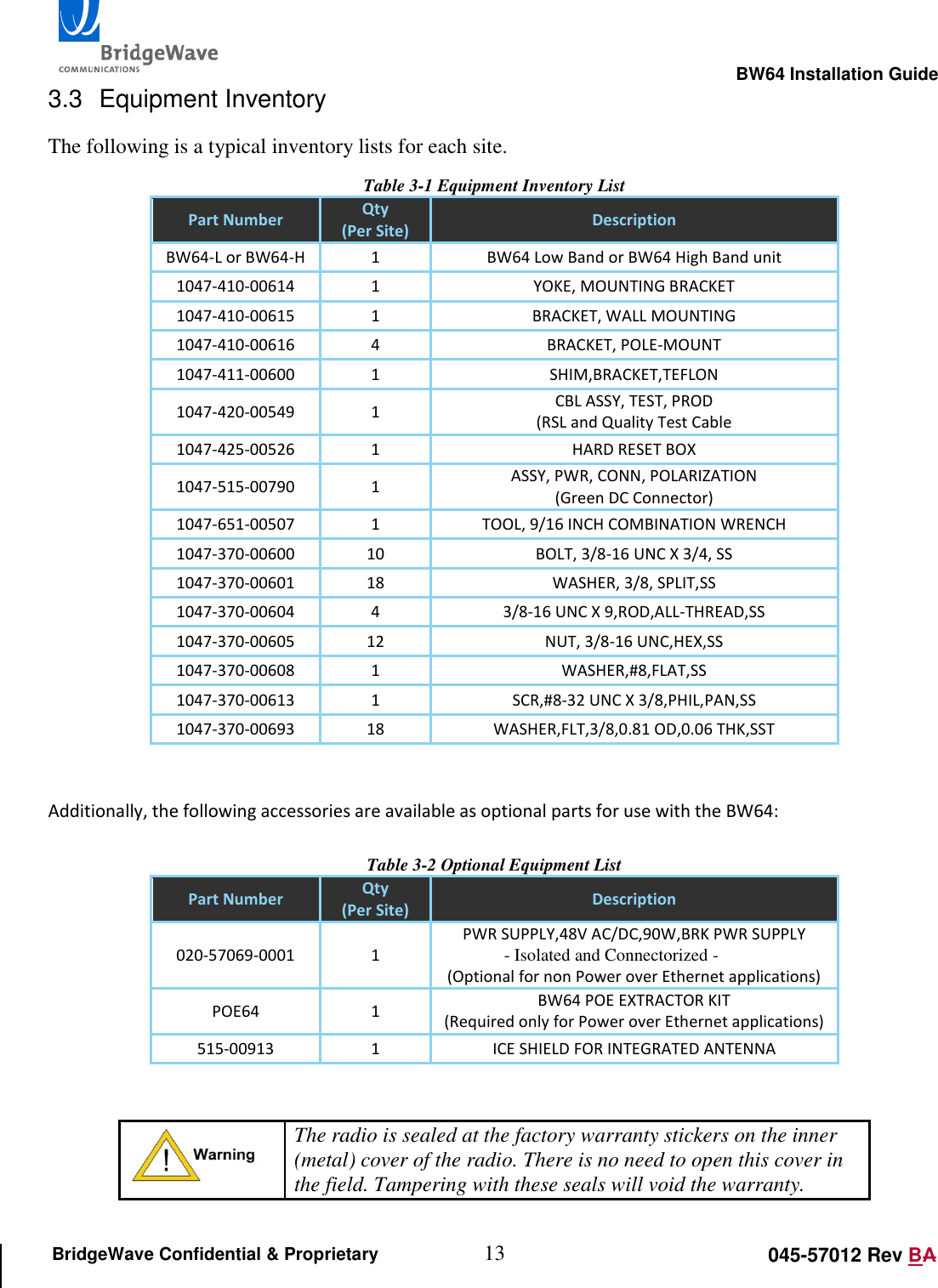
                                                                                                       BW64 Installation Guide 13 045-57012 Rev BA BridgeWave Confidential & Proprietary 3.3  Equipment Inventory The following is a typical inventory lists for each site.  Table 3-1 Equipment Inventory List Part Number Qty (Per Site) Description BW64-L or BW64-H 1 BW64 Low Band or BW64 High Band unit 1047-410-00614 1 YOKE, MOUNTING BRACKET 1047-410-00615 1 BRACKET, WALL MOUNTING 1047-410-00616 4 BRACKET, POLE-MOUNT 1047-411-00600 1 SHIM,BRACKET,TEFLON 1047-420-00549 1 CBL ASSY, TEST, PROD (RSL and Quality Test Cable 1047-425-00526 1 HARD RESET BOX 1047-515-00790 1 ASSY, PWR, CONN, POLARIZATION (Green DC Connector) 1047-651-00507 1 TOOL, 9/16 INCH COMBINATION WRENCH 1047-370-00600 10 BOLT, 3/8-16 UNC X 3/4, SS 1047-370-00601 18 WASHER, 3/8, SPLIT,SS 1047-370-00604 4 3/8-16 UNC X 9,ROD,ALL-THREAD,SS 1047-370-00605 12 NUT, 3/8-16 UNC,HEX,SS 1047-370-00608 1 WASHER,#8,FLAT,SS 1047-370-00613 1 SCR,#8-32 UNC X 3/8,PHIL,PAN,SS 1047-370-00693 18 WASHER,FLT,3/8,0.81 OD,0.06 THK,SST   Additionally, the following accessories are available as optional parts for use with the BW64:  Table 3-2 Optional Equipment List Part Number Qty (Per Site) Description 020-57069-0001 1 PWR SUPPLY,48V AC/DC,90W,BRK PWR SUPPLY  - Isolated and Connectorized -  (Optional for non Power over Ethernet applications) POE64 1 BW64 POE EXTRACTOR KIT (Required only for Power over Ethernet applications) 515-00913 1 ICE SHIELD FOR INTEGRATED ANTENNA    The radio is sealed at the factory warranty stickers on the inner (metal) cover of the radio. There is no need to open this cover in the field. Tampering with these seals will void the warranty.
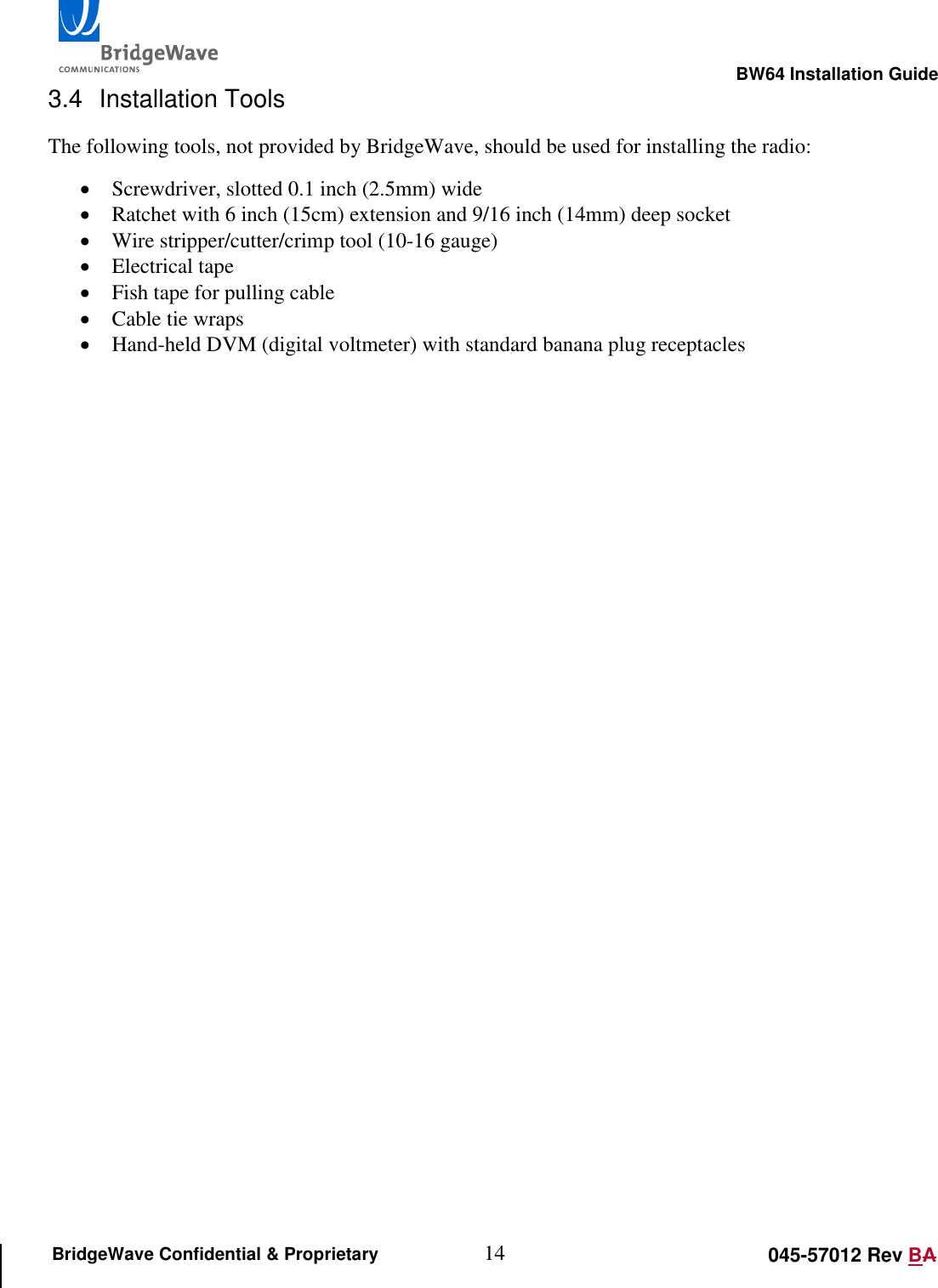
                                                                                                       BW64 Installation Guide 14 045-57012 Rev BA BridgeWave Confidential & Proprietary 3.4  Installation Tools The following tools, not provided by BridgeWave, should be used for installing the radio:  Screwdriver, slotted 0.1 inch (2.5mm) wide  Ratchet with 6 inch (15cm) extension and 9/16 inch (14mm) deep socket  Wire stripper/cutter/crimp tool (10-16 gauge)  Electrical tape  Fish tape for pulling cable  Cable tie wraps  Hand-held DVM (digital voltmeter) with standard banana plug receptacles
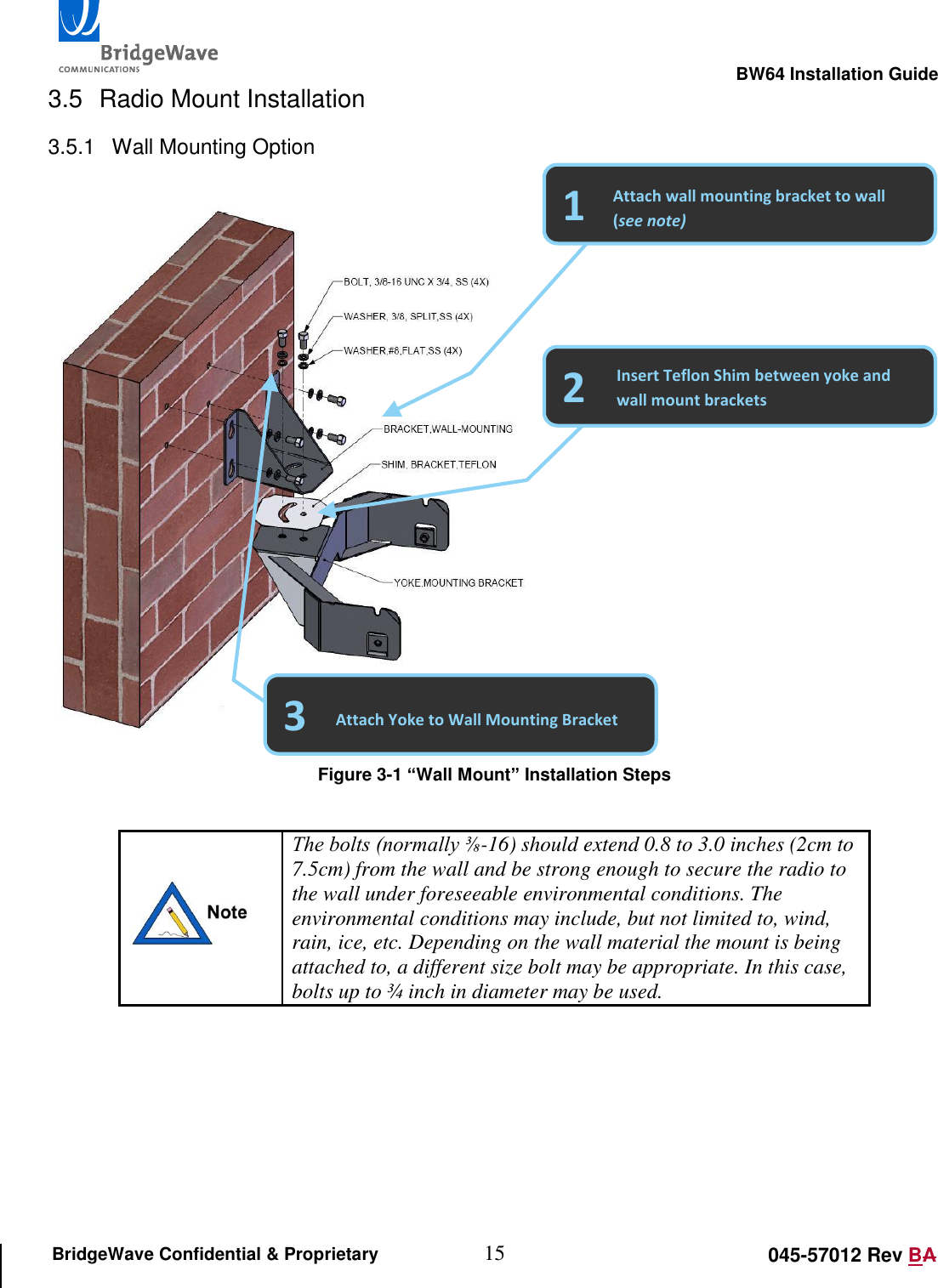
                                                                                                       BW64 Installation Guide 15 045-57012 Rev BA BridgeWave Confidential & Proprietary 3.5  Radio Mount Installation 3.5.1  Wall Mounting Option     Figure 3-1 “Wall Mount” Installation Steps   The bolts (normally ⅜-16) should extend 0.8 to 3.0 inches (2cm to 7.5cm) from the wall and be strong enough to secure the radio to the wall under foreseeable environmental conditions. The environmental conditions may include, but not limited to, wind, rain, ice, etc. Depending on the wall material the mount is being attached to, a different size bolt may be appropriate. In this case, bolts up to ¾ inch in diameter may be used.      2 1 Attach wall mounting bracket to wall (see note) Insert Teflon Shim between yoke and wall mount brackets 3 Attach Yoke to Wall Mounting Bracket
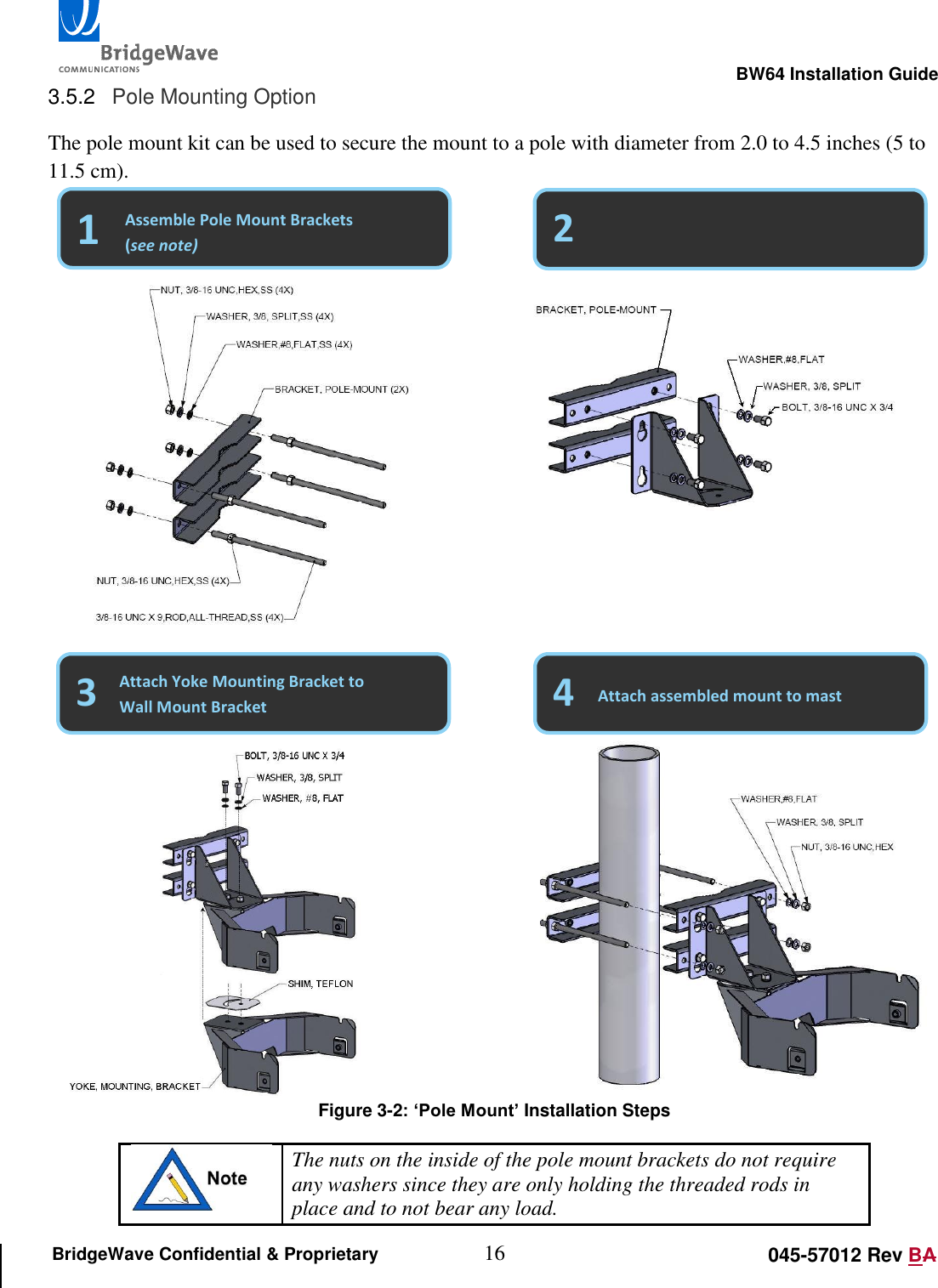
                                                                                                       BW64 Installation Guide 16 045-57012 Rev BA BridgeWave Confidential & Proprietary 3.5.2  Pole Mounting Option The pole mount kit can be used to secure the mount to a pole with diameter from 2.0 to 4.5 inches (5 to 11.5 cm).                     Figure 3-2: ‘Pole Mount’ Installation Steps  The nuts on the inside of the pole mount brackets do not require any washers since they are only holding the threaded rods in place and to not bear any load. 3 2 1   Attach Pole Mount Brackets to Wall Mount Bracket Assemble Pole Mount Brackets (see note) Attach Yoke Mounting Bracket to Wall Mount Bracket 4 Attach assembled mount to mast
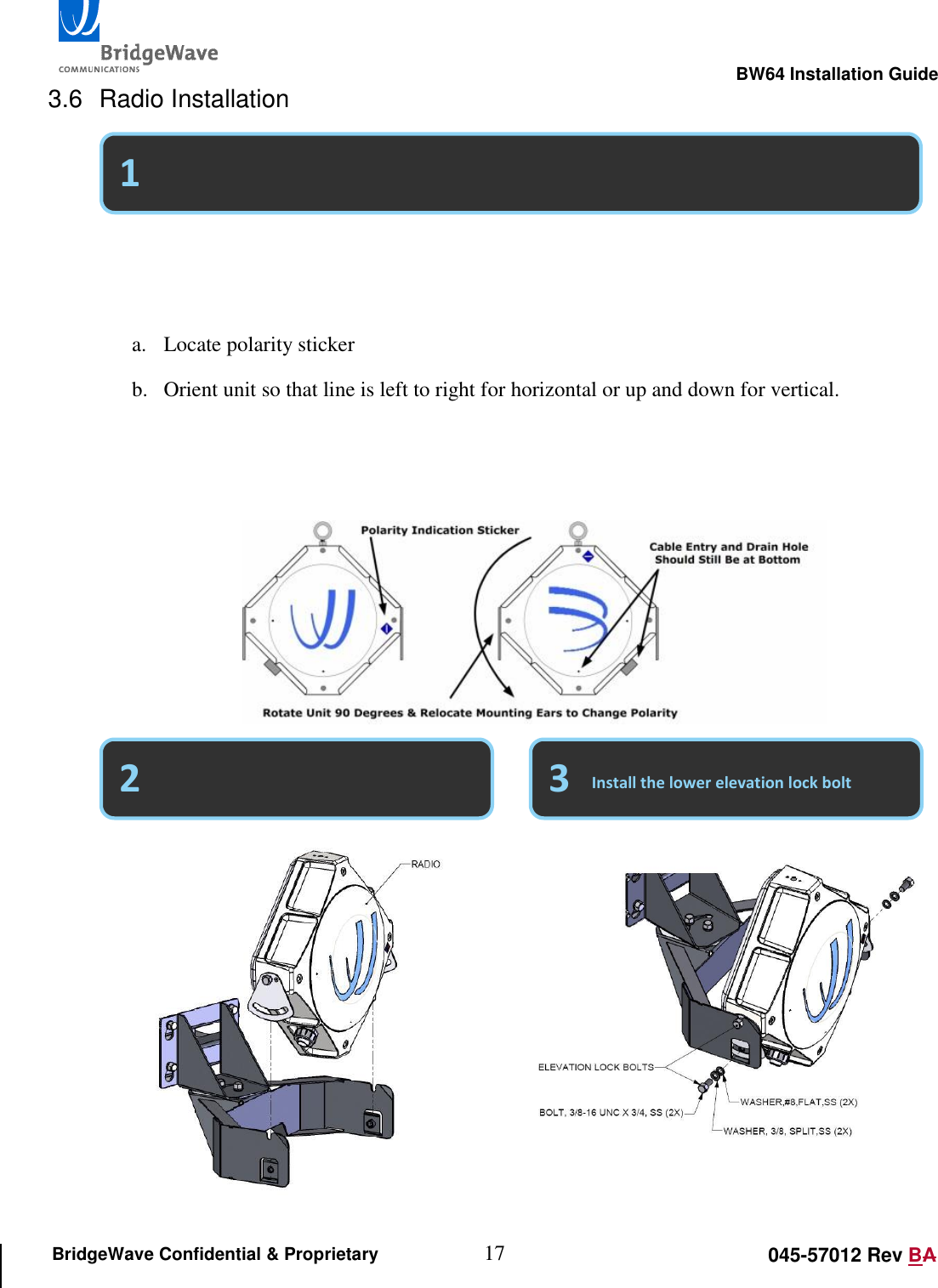
                                                                                                       BW64 Installation Guide 17 045-57012 Rev BA BridgeWave Confidential & Proprietary 3.6  Radio Installation                              Select vertical or horizontal polarity (Default is vertical)   Place the unit into the yoke mount   a. Locate polarity sticker b. Orient unit so that line is left to right for horizontal or up and down for vertical.   c. Polarity “Must” match at both ends of the link. d. Remove “Ears” and relocate if polarity needs to be changed. 3 1 2 Install the lower elevation lock bolt
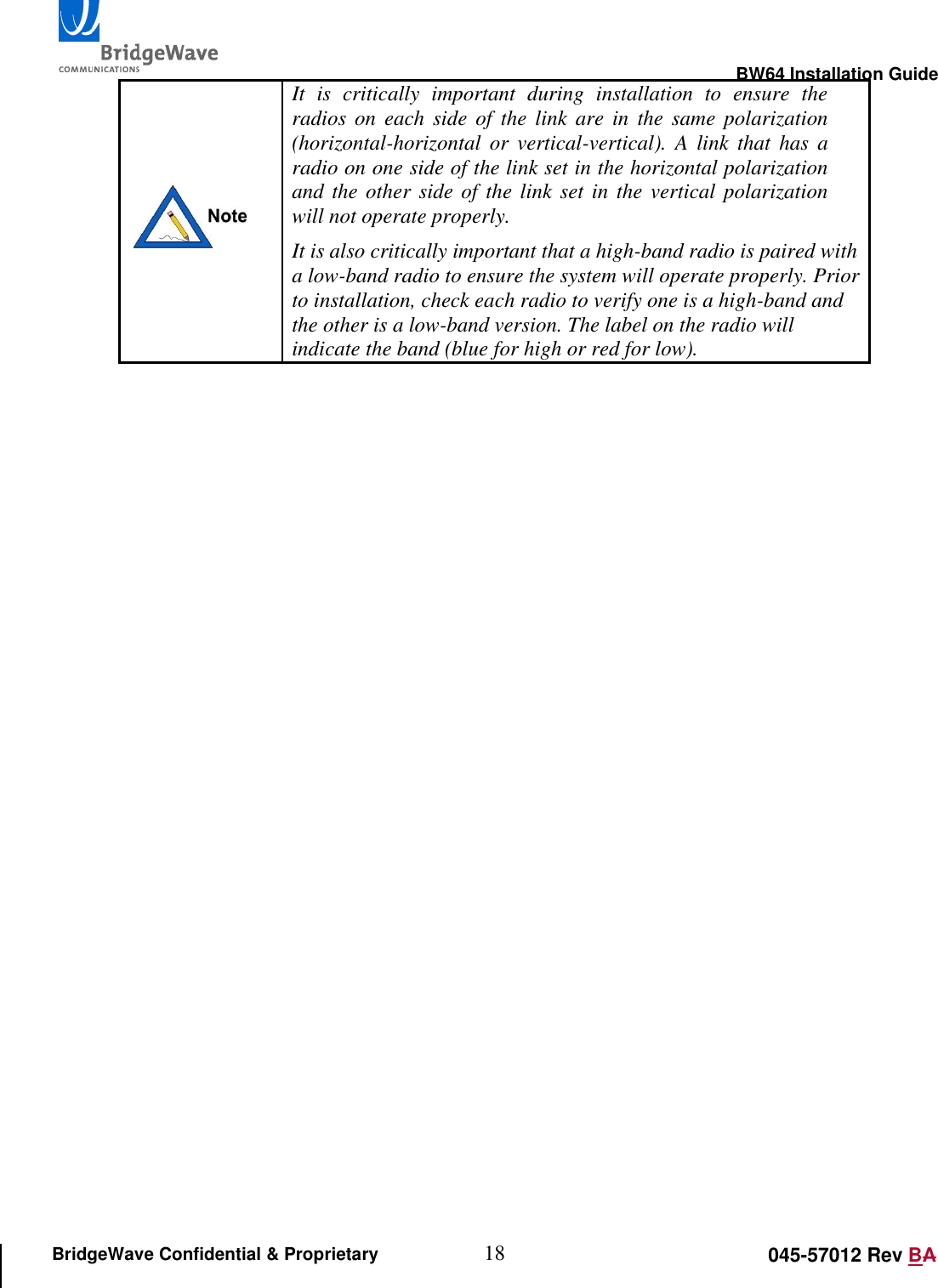
                                                                                                       BW64 Installation Guide 18 045-57012 Rev BA BridgeWave Confidential & Proprietary  It  is  critically  important  during  installation  to  ensure  the radios  on each side of the link are  in  the  same  polarization (horizontal-horizontal  or  vertical-vertical).  A  link  that  has  a radio on one side of the link set in the horizontal polarization and the other side of the link set in the vertical polarization will not operate properly. It is also critically important that a high-band radio is paired with a low-band radio to ensure the system will operate properly. Prior to installation, check each radio to verify one is a high-band and the other is a low-band version. The label on the radio will indicate the band (blue for high or red for low).
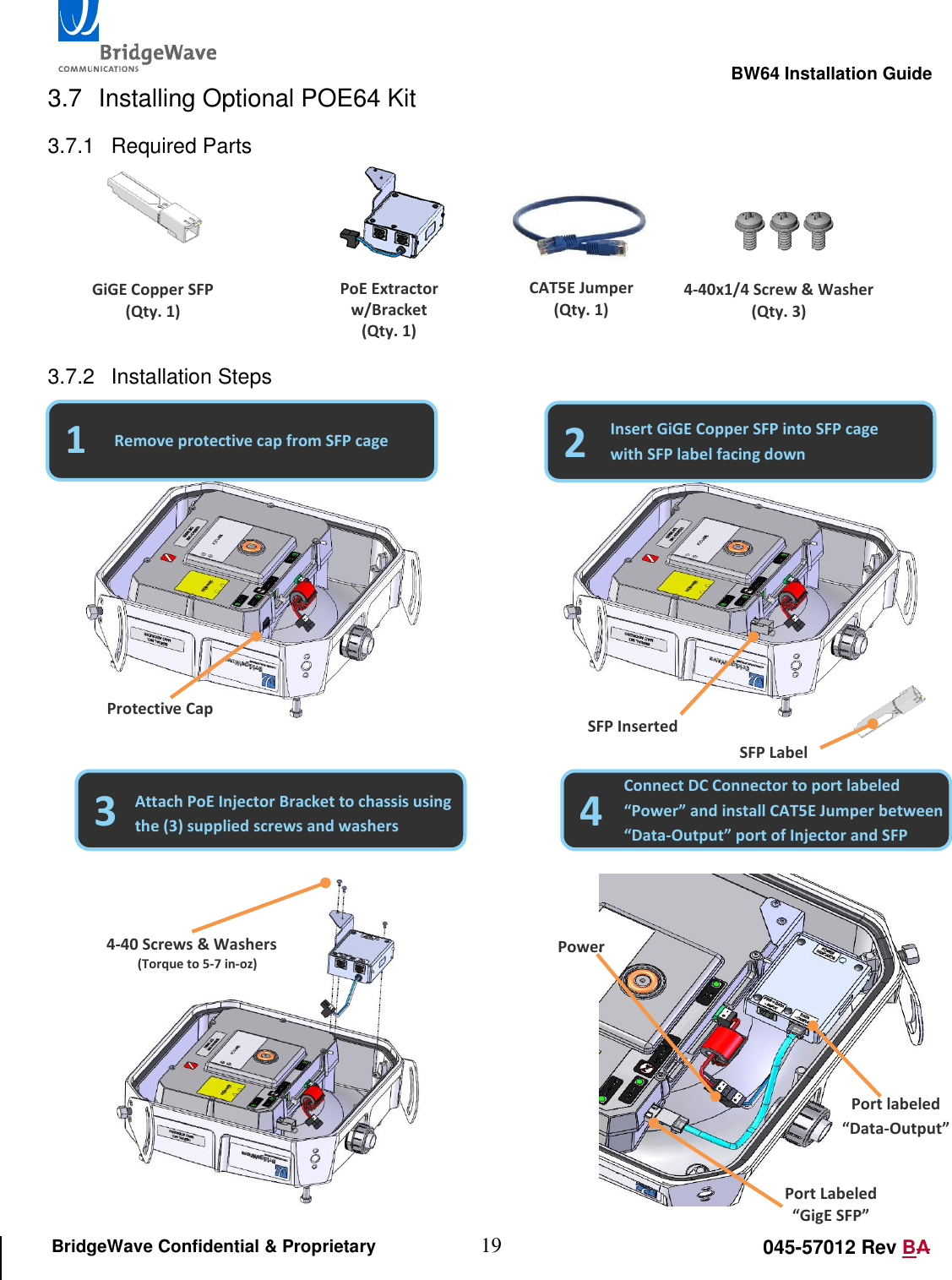
                                                                                                       BW64 Installation Guide 19 045-57012 Rev BA BridgeWave Confidential & Proprietary 3.7  Installing Optional POE64 Kit 3.7.1  Required Parts      3.7.2  Installation Steps                                                                                                         Port Labeled “GigE SFP” Port labeled “Data-Output” GiGE Copper SFP (Qty. 1) PoE Extractor w/Bracket (Qty. 1) CAT5E Jumper (Qty. 1) 4-40x1/4 Screw & Washer (Qty. 3) 1 2 Remove protective cap from SFP cage Insert GiGE Copper SFP into SFP cage with SFP label facing down Protective Cap SFP Inserted SFP Label 3 4 Attach PoE Injector Bracket to chassis using the (3) supplied screws and washers Connect DC Connector to port labeled “Power” and install CAT5E Jumper between “Data-Output” port of Injector and SFP 4-40 Screws & Washers (Torque to 5-7 in-oz) Power
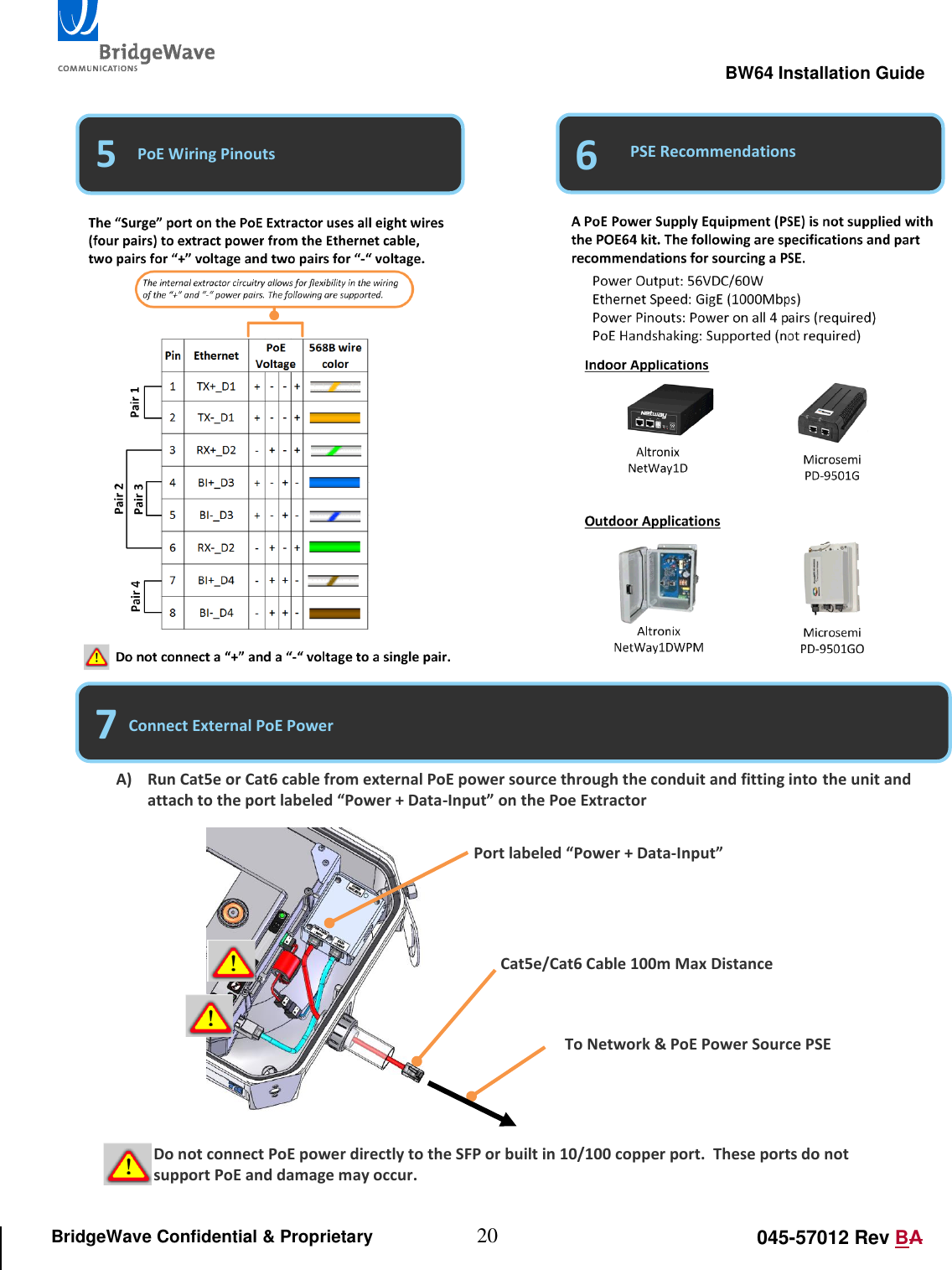
                                                                                                       BW64 Installation Guide 20 045-57012 Rev BA BridgeWave Confidential & Proprietary                                                       5 6 PoE Wiring Pinouts PSE Recommendations 7 Connect External PoE Power A) Run Cat5e or Cat6 cable from external PoE power source through the conduit and fitting into the unit and attach to the port labeled “Power + Data-Input” on the Poe Extractor Port labeled “Power + Data-Input” Cat5e/Cat6 Cable 100m Max Distance To Network & PoE Power Source PSE Do not connect PoE power directly to the SFP or built in 10/100 copper port.  These ports do not support PoE and damage may occur.
                                                                                                       BW64 Installation Guide 21 045-57012 Rev BA BridgeWave Confidential & Proprietary 3.8  Attach Grounding The preferred method for grounding the radio unit is to ground the mast (or wall-mount bracket) to a ground source, since this provides the largest grounding surface contact possible. If this is not possible, then use the following procedure:  1. Attach the lug of a 10 AWG ground cable to the radio at one of the two #8 holes at the bottom of the enclosure using a #8-32 bolt, #8 lock washer and #8 flat washers (not provided).   2. Connect other end of the ground cable to a nearby building exterior ground location.
                                                                                                       BW64 Installation Guide 22 045-57012 Rev BA BridgeWave Confidential & Proprietary 3.9  Cable & Conduit Installation Conduit is recommended for enclosure of the cables as they enter the radio. The conduit provides a water-tight entry to the radio, as well as any weather or physical protection required by the cables. The conduit should be flexible, waterproof, and non-metallic. An example of this is LIQUID-TUFF™ UL Liquidtight Flexible Non-Metallic Conduit (Type LFNC-B) or equivalent. Conduit should be 3/4 inches (19 mm) in diameter to match the radio's opening. 3.9.1  Pull Cables Through Conduit
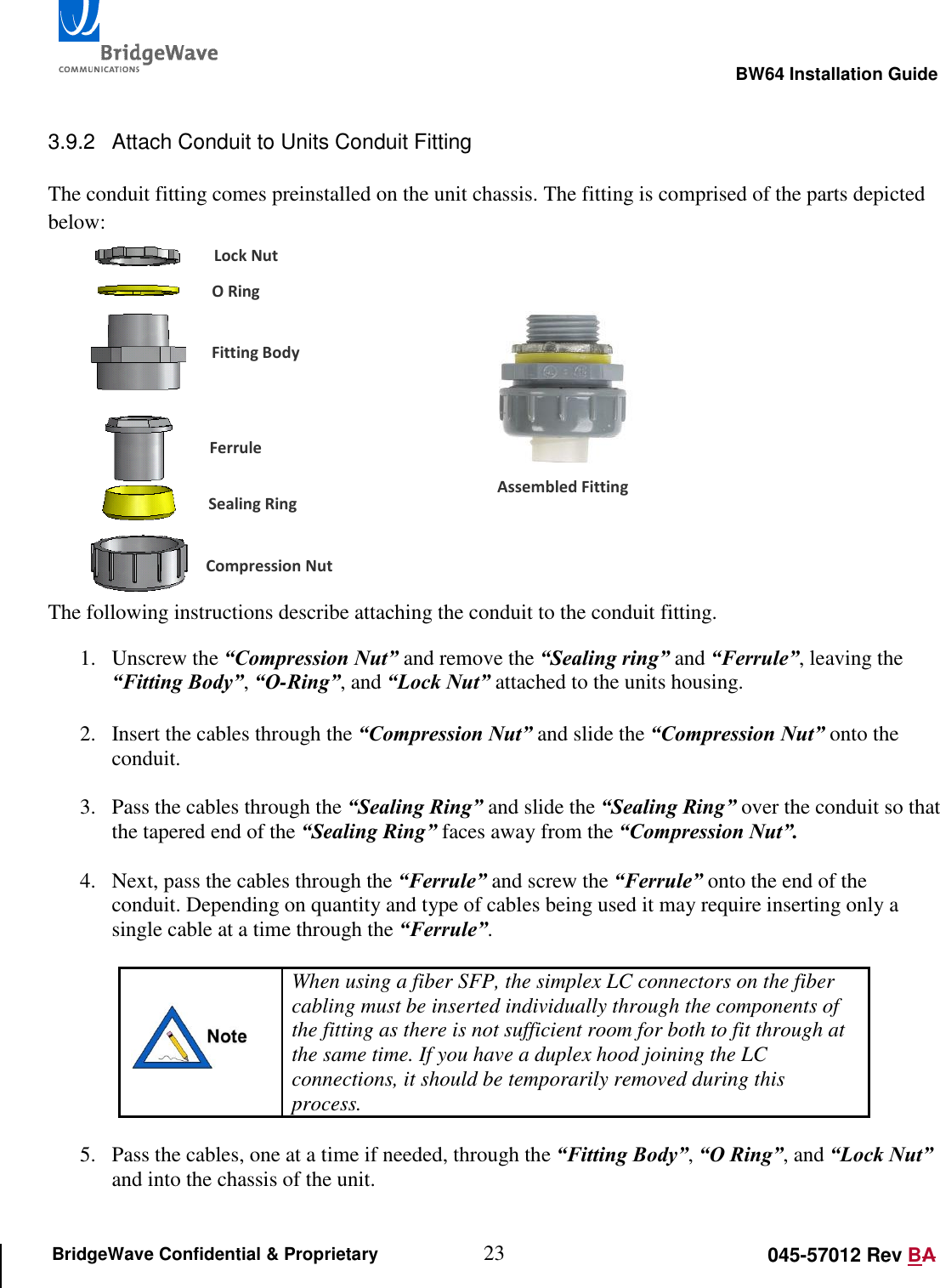
                                                                                                       BW64 Installation Guide 23 045-57012 Rev BA BridgeWave Confidential & Proprietary  3.9.2  Attach Conduit to Units Conduit Fitting  The conduit fitting comes preinstalled on the unit chassis. The fitting is comprised of the parts depicted below:         The following instructions describe attaching the conduit to the conduit fitting. 1. Unscrew the “Compression Nut” and remove the “Sealing ring” and “Ferrule”, leaving the “Fitting Body”, “O-Ring”, and “Lock Nut” attached to the units housing.   2. Insert the cables through the “Compression Nut” and slide the “Compression Nut” onto the conduit.   3. Pass the cables through the “Sealing Ring” and slide the “Sealing Ring” over the conduit so that the tapered end of the “Sealing Ring” faces away from the “Compression Nut”.  4. Next, pass the cables through the “Ferrule” and screw the “Ferrule” onto the end of the conduit. Depending on quantity and type of cables being used it may require inserting only a single cable at a time through the “Ferrule”.    When using a fiber SFP, the simplex LC connectors on the fiber cabling must be inserted individually through the components of the fitting as there is not sufficient room for both to fit through at the same time. If you have a duplex hood joining the LC connections, it should be temporarily removed during this process.  5. Pass the cables, one at a time if needed, through the “Fitting Body”, “O Ring”, and “Lock Nut” and into the chassis of the unit.   Lock Nut O Ring Fitting Body Ferrule Sealing Ring Compression Nut Assembled Fitting
                                                                                                       BW64 Installation Guide 24 045-57012 Rev BA BridgeWave Confidential & Proprietary 6. Push the conduit and “Ferrule” up against the “Fitting Body”, making sure the hex head of the “Ferrule” seats properly in the “Fitting Body”, and then screw the “Compression Nut” onto the “Fitting Body” and hand tighten.  7. Loop the cables around the inside of the enclosure: This minimizes tension on the cables when connected and maintains a proper bend-radius of cabling.  8. A drip loop should be created with the conduit to ensure sufficient length to enable the radio to be moved during servicing and to prevent water from following the conduit down to any junction box or building entrance. A suggested length is 24 inches (60 cm) from the radio to the bottom of the loop. The opposite end of the conduit is inserted into the cable tray if on a tower or onto the NEMA or junction box.  3.9.3  Attach DC Wires to DC Connector (not required when using POE64 kit)  1. Ensure that the DC wire used is either 12 or 14-gauge and the center conductor is comprised of stranded wiring and ensure that a grounded surge suppressor is located at the building’s indoor/outdoor entry point. 2. Confirm that the power source is turned off before proceeding to attach the connector. 3. Connect the provided DC connector onto the wire by inserting the stranded conductors into the “+” or “-” terminal and then using a small flat screw driver to secure the terminals on the connector.   4. Turn on the external power and confirm that the “Power” LED on the unit turns green.  3.9.4  Attach Optional Cat5 cable to 10/100BaseT Interface  For applications that require a dedicated out of band management connection to the unit, or for applications using the AdaptPath feature, a CAT5 Ethernet cable can be connected to the 10/100BaseT interface of the unit.   If the cable is run to a point of entry into the building then it is recommended to install an Ethernet surge arrestor at the point of entry into the building.
                                                                                                       BW64 Installation Guide 25 045-57012 Rev BA BridgeWave Confidential & Proprietary 3.10 Pre-Antenna Alignment Concepts Prior to performing the antenna alignment it is important to understand the fundamentals of the signal being transmitted out of the antenna so that the alignment process can be visualized. It is equally important to understand proper user of the supplied test cable and how it is to be used with a voltmeter. The following sections describe this in detail. 3.10.1 Antenna Lobes The “Main Beam”, “Side Lobes”, and “Nulls” are terms used to describe the common components of a signal being radiated from a parabolic antenna. An antenna focuses, or shapes the radiated energy into a specific direction. As a result of this focusing a majority of the energy directed into the main beam. However, as a byproduct side lobes are also formed. These side lobes are weaker in amplitude than the main beam and radiate out of the antenna at a different angle. A similar concept is the act of squeezing a water balloon. If you squeeze the balloon in the middle it will bulge out in different directions. Between the main beam and the lobes are nulls where the signal drops off. The first side lobe is the next highest peak in relationship to the main lobe and is typically around –20dB lower than the main lobe. When aligning the antennas the goal is to peak the signal on the main lobe. The diagram in Figure 3-3Figure 3-3 depicts the concept of a main beam vs. side lobes and nulls.   Figure 3-3Antenna Lobe Concepts
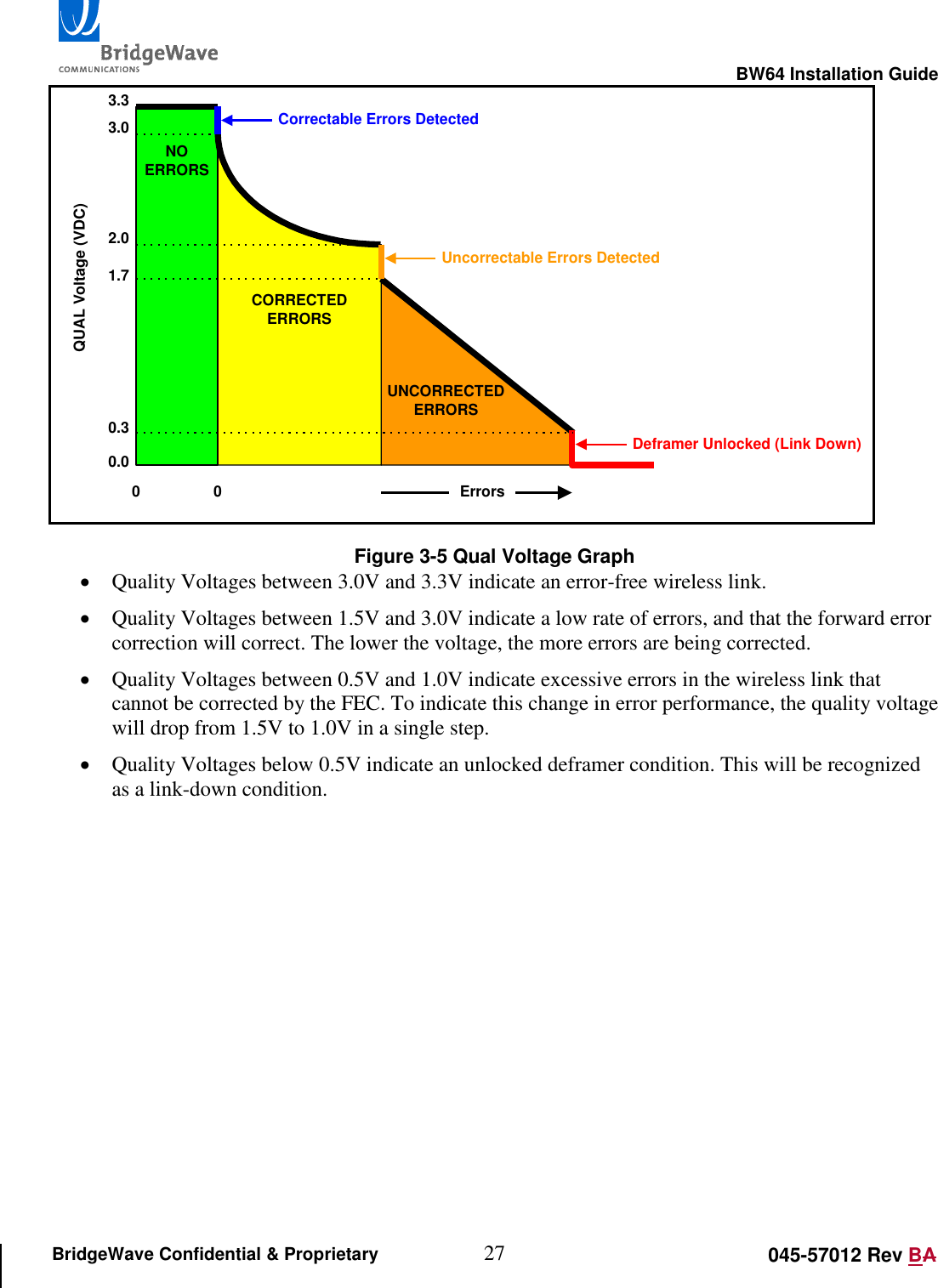
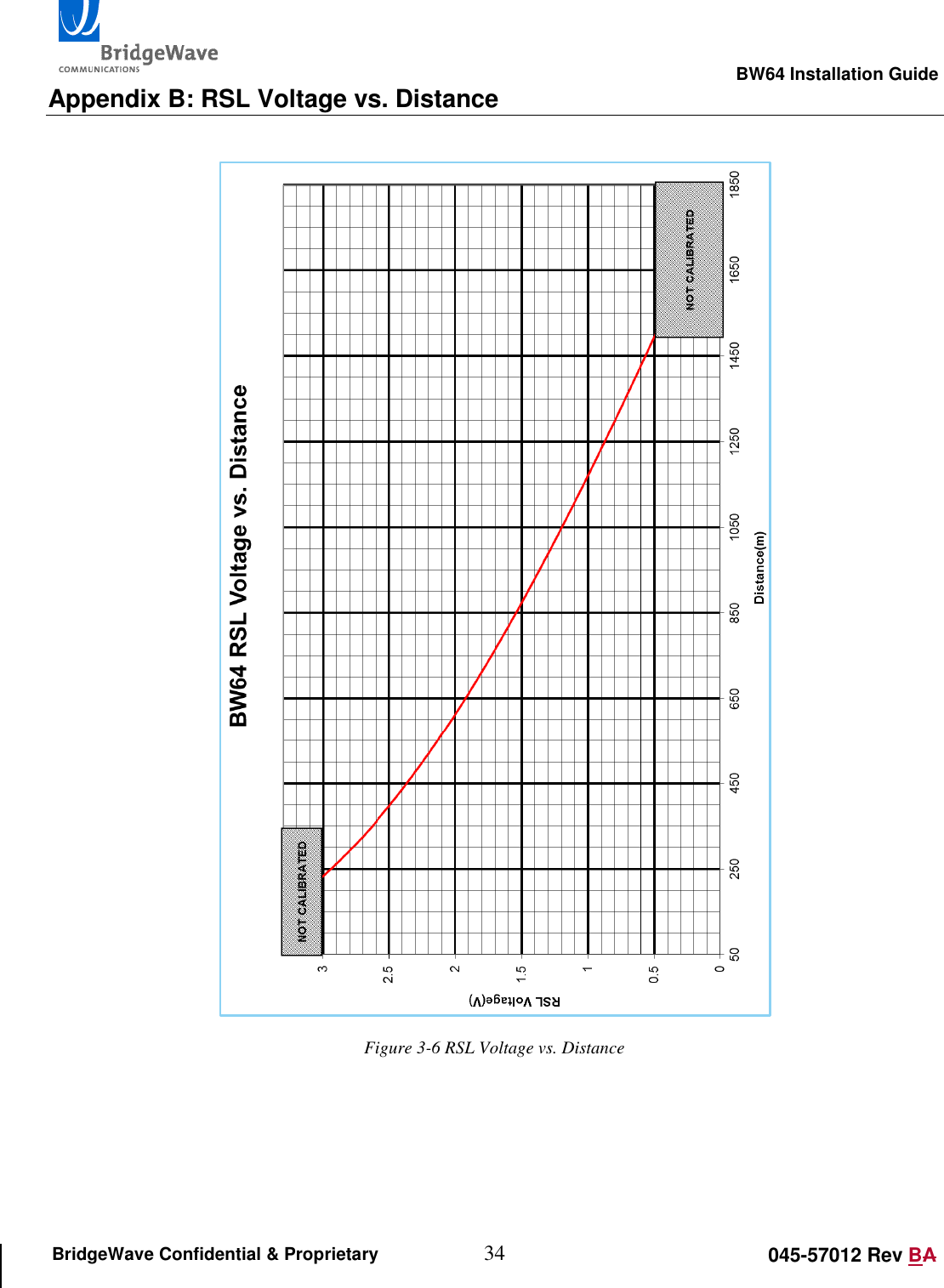
                                                                                                       BW64 Installation Guide 26 045-57012 Rev BA BridgeWave Confidential & Proprietary 3.10.2 Using the RSL/QUAL Test Cable The antenna alignment is achieved by using the supplied “RSL/QUAL Test Cable” and a DC voltmeter to peak a received signal level voltage at each end of the link until the maximum voltage is reached.  One end of the “RSL/QUAL Test Cable” contains a plug that connects to the jack labeled “Test” on the unit chassis. The other end contains three banana plugs for connecting to a voltmeter. The voltmeter should be set to measure DC voltage and set to the x20 scale. For alignment, only the lead labeled GND and the lead labeled RSL are needed. The RSL voltage will be dependent on the link distance but will max out at just over 3VDC. Refer to the graph in Appendix B to determine the target RSL voltage for the path distance.    Figure 3-4 RSL Test Cable  The “RSL/QUAL Test Cable” can also be used to check the quality of the received signal level. The QUAL lead of the test cable out puts a value (between 0 and 3.3V) to indicate the error performance of the link. The quality voltage should be disregarded until the target receive signal level has been reached and a calibration of the unit has been performed from the Maintenance page of the web interface  Refer to Figure 3-5Figure 3-5     Connect to “Test” port on unit Connect “GND” to “COM” on voltmeter To “V” on voltmeter
                                                                                                       BW64 Installation Guide 27 045-57012 Rev BA BridgeWave Confidential & Proprietary 3.33.02.01.70.3NOERRORSCORRECTEDERRORSUNCORRECTEDERRORSCorrectable Errors DetectedUncorrectable Errors DetectedDeframer Unlocked (Link Down)0 0 ErrorsQUAL Voltage (VDC)0.0 Figure 3-5 Qual Voltage Graph  Quality Voltages between 3.0V and 3.3V indicate an error-free wireless link.  Quality Voltages between 1.5V and 3.0V indicate a low rate of errors, and that the forward error correction will correct. The lower the voltage, the more errors are being corrected.  Quality Voltages between 0.5V and 1.0V indicate excessive errors in the wireless link that cannot be corrected by the FEC. To indicate this change in error performance, the quality voltage will drop from 1.5V to 1.0V in a single step.  Quality Voltages below 0.5V indicate an unlocked deframer condition. This will be recognized as a link-down condition.
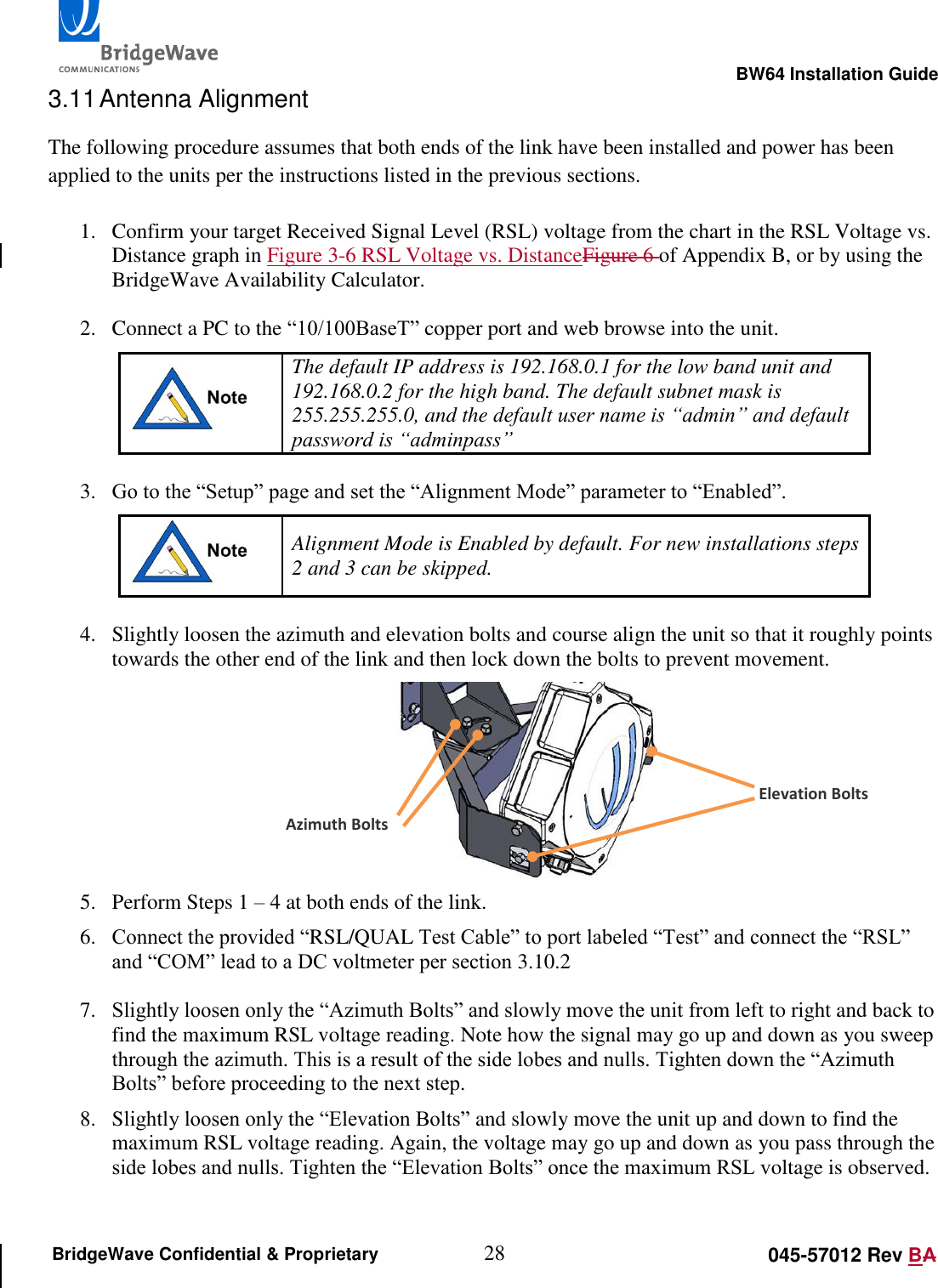
                                                                                                       BW64 Installation Guide 28 045-57012 Rev BA BridgeWave Confidential & Proprietary 3.11 Antenna Alignment The following procedure assumes that both ends of the link have been installed and power has been applied to the units per the instructions listed in the previous sections.  1. Confirm your target Received Signal Level (RSL) voltage from the chart in the RSL Voltage vs. Distance graph in Figure 3-6 RSL Voltage vs. DistanceFigure 6 of Appendix B, or by using the BridgeWave Availability Calculator.  2. Connect a PC to the “10/100BaseT” copper port and web browse into the unit.  The default IP address is 192.168.0.1 for the low band unit and 192.168.0.2 for the high band. The default subnet mask is 255.255.255.0, and the default user name is “admin” and default password is “adminpass”   3. Go to the “Setup” page and set the “Alignment Mode” parameter to “Enabled”.  Alignment Mode is Enabled by default. For new installations steps 2 and 3 can be skipped.  4. Slightly loosen the azimuth and elevation bolts and course align the unit so that it roughly points towards the other end of the link and then lock down the bolts to prevent movement.  5. Perform Steps 1 – 4 at both ends of the link. 6. Connect the provided “RSL/QUAL Test Cable” to port labeled “Test” and connect the “RSL” and “COM” lead to a DC voltmeter per section 3.10.2  7. Slightly loosen only the “Azimuth Bolts” and slowly move the unit from left to right and back to find the maximum RSL voltage reading. Note how the signal may go up and down as you sweep through the azimuth. This is a result of the side lobes and nulls. Tighten down the “Azimuth Bolts” before proceeding to the next step. 8. Slightly loosen only the “Elevation Bolts” and slowly move the unit up and down to find the maximum RSL voltage reading. Again, the voltage may go up and down as you pass through the side lobes and nulls. Tighten the “Elevation Bolts” once the maximum RSL voltage is observed.  Azimuth Bolts Elevation Bolts
                                                                                                       BW64 Installation Guide 29 045-57012 Rev BA BridgeWave Confidential & Proprietary 9. Perform steps 6 -8 on both ends of the link. Only align one end of the link at a time.  10. Once the target RSL is achieved, log into the web interface and go to the Maintenance page. Press the “Auto Cal” button to calibrate the receiver. The process takes approximately two minutes per end, during which time the link will go down and the Link LED on the unit will flash on and off. Perform the calibration at both ends of the link but only calibrate one end of the link at a time. 11. Confirm that the Radio Link light is “Green” and verify that the Quality voltage is 3.3VDC to indicate an error free link. 12. Remove the test cable from the radio, replace the back plastic cover and hand tighten the back cover nut to the point where the back cover stops (that is, when it hits the metal ring on the back metal plate). The installation is now complete.
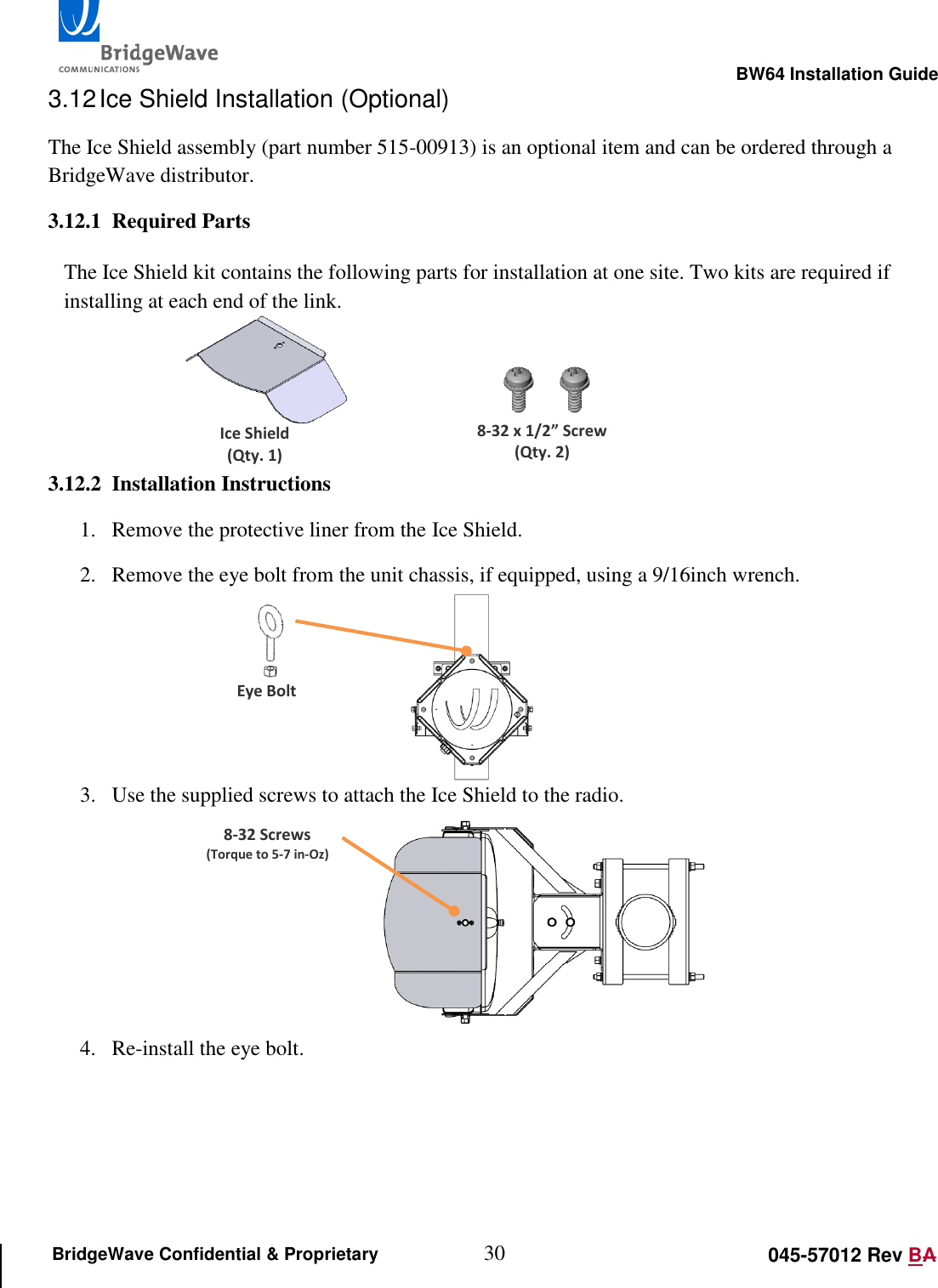
                                                                                                       BW64 Installation Guide 30 045-57012 Rev BA BridgeWave Confidential & Proprietary 3.12 Ice Shield Installation (Optional) The Ice Shield assembly (part number 515-00913) is an optional item and can be ordered through a BridgeWave distributor. 3.12.1 Required Parts  The Ice Shield kit contains the following parts for installation at one site. Two kits are required if installing at each end of the link.    3.12.2 Installation Instructions 1. Remove the protective liner from the Ice Shield. 2. Remove the eye bolt from the unit chassis, if equipped, using a 9/16inch wrench.         3. Use the supplied screws to attach the Ice Shield to the radio.      4. Re-install the eye bolt.    8-32 x 1/2” Screw (Qty. 2) Ice Shield (Qty. 1) Eye Bolt 8-32 Screws (Torque to 5-7 in-Oz)
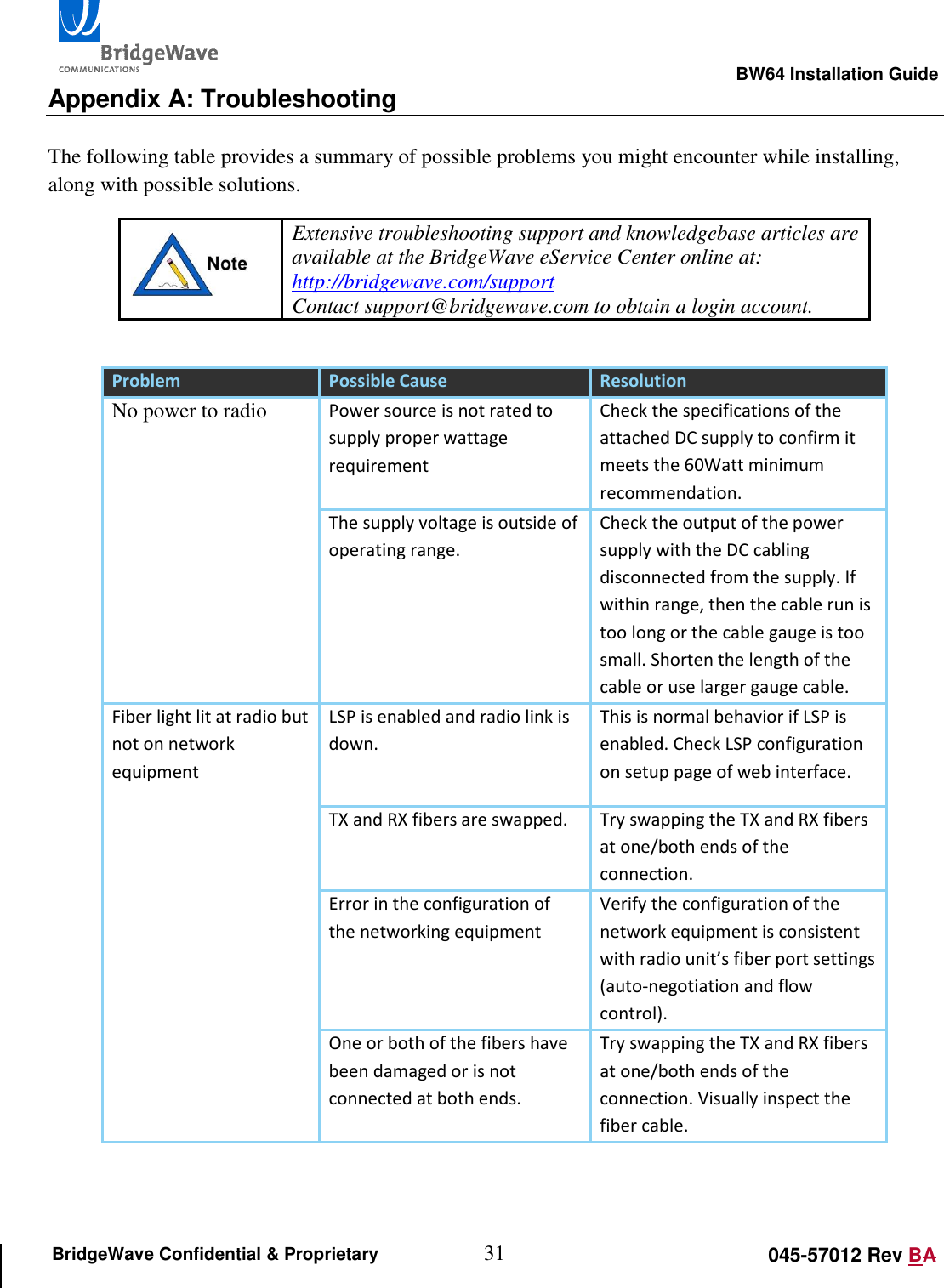
                                                                                                       BW64 Installation Guide 31 045-57012 Rev BA BridgeWave Confidential & Proprietary Appendix A: Troubleshooting  The following table provides a summary of possible problems you might encounter while installing, along with possible solutions.  Extensive troubleshooting support and knowledgebase articles are available at the BridgeWave eService Center online at: http://bridgewave.com/support Contact support@bridgewave.com to obtain a login account.  Problem Possible Cause Resolution No power to radio Power source is not rated to supply proper wattage requirement Check the specifications of the attached DC supply to confirm it meets the 60Watt minimum recommendation. The supply voltage is outside of operating range. Check the output of the power supply with the DC cabling disconnected from the supply. If within range, then the cable run is too long or the cable gauge is too small. Shorten the length of the cable or use larger gauge cable.  Fiber light lit at radio but not on network equipment  LSP is enabled and radio link is down.  This is normal behavior if LSP is enabled. Check LSP configuration on setup page of web interface. TX and RX fibers are swapped. Try swapping the TX and RX fibers at one/both ends of the connection. Error in the configuration of the networking equipment Verify the configuration of the network equipment is consistent with radio unit’s fiber port settings (auto-negotiation and flow control). One or both of the fibers have been damaged or is not connected at both ends. Try swapping the TX and RX fibers at one/both ends of the connection. Visually inspect the fiber cable.
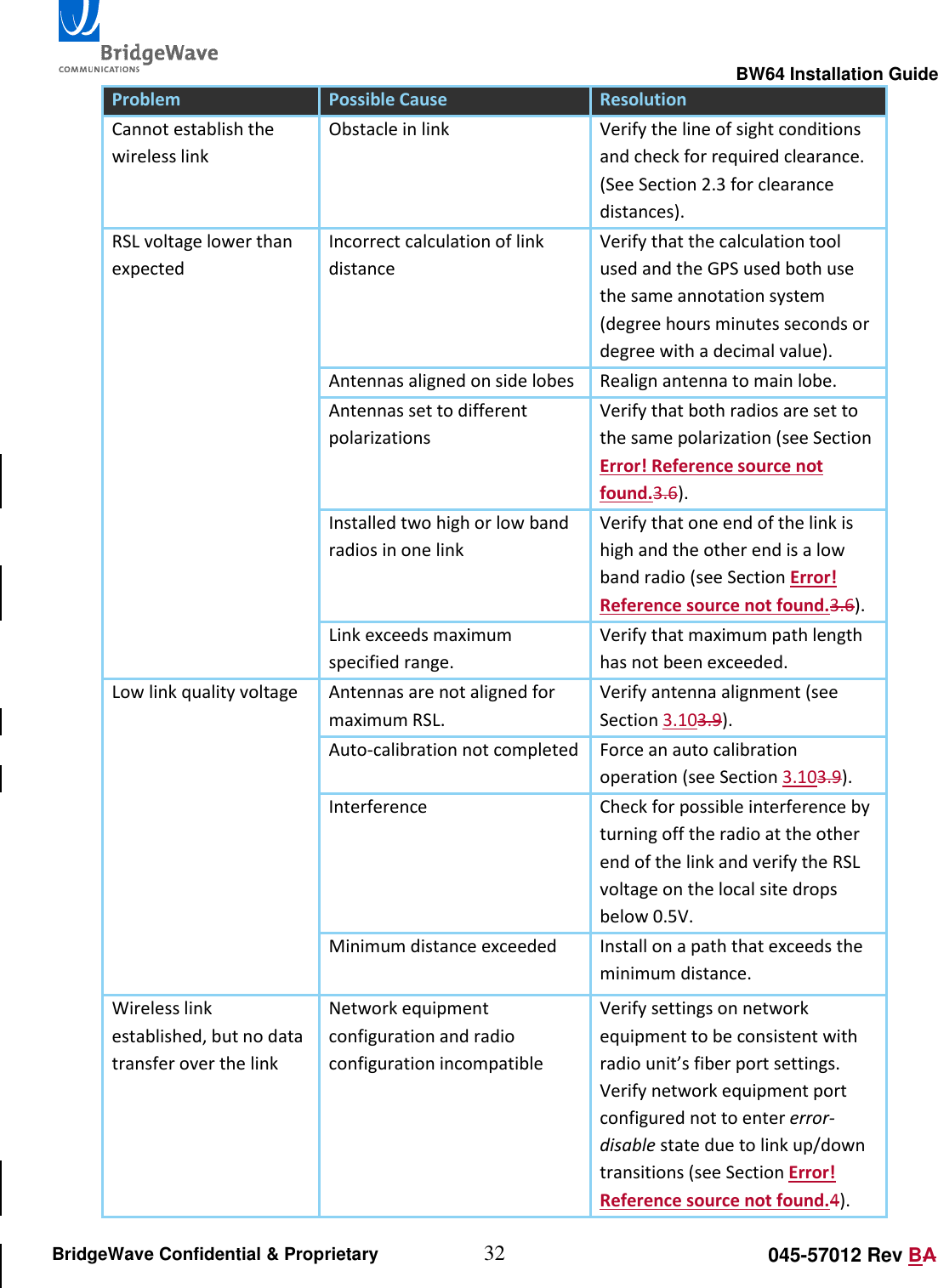
                                                                                                       BW64 Installation Guide 32 045-57012 Rev BA BridgeWave Confidential & Proprietary Problem Possible Cause Resolution Cannot establish the wireless link Obstacle in link Verify the line of sight conditions and check for required clearance. (See Section 2.3 for clearance distances). RSL voltage lower than expected Incorrect calculation of link distance Verify that the calculation tool used and the GPS used both use the same annotation system (degree hours minutes seconds or degree with a decimal value). Antennas aligned on side lobes Realign antenna to main lobe. Antennas set to different polarizations Verify that both radios are set to the same polarization (see Section Error! Reference source not found.3.6). Installed two high or low band radios in one link Verify that one end of the link is high and the other end is a low band radio (see Section Error! Reference source not found.3.6). Link exceeds maximum specified range. Verify that maximum path length has not been exceeded. Low link quality voltage Antennas are not aligned for maximum RSL. Verify antenna alignment (see Section 3.103.9). Auto-calibration not completed Force an auto calibration operation (see Section 3.103.9). Interference Check for possible interference by turning off the radio at the other end of the link and verify the RSL voltage on the local site drops below 0.5V. Minimum distance exceeded Install on a path that exceeds the minimum distance. Wireless link established, but no data transfer over the link Network equipment configuration and radio configuration incompatible Verify settings on network equipment to be consistent with radio unit’s fiber port settings. Verify network equipment port configured not to enter error-disable state due to link up/down transitions (see Section Error! Reference source not found.4).
                                                                                                       BW64 Installation Guide 33 045-57012 Rev BA BridgeWave Confidential & Proprietary
                                                                                                       BW64 Installation Guide 34 045-57012 Rev BA BridgeWave Confidential & Proprietary Appendix B: RSL Voltage vs. Distance   Figure 3-6 RSL Voltage vs. Distance
                                                                                                       BW64 Installation Guide 35 045-57012 Rev BA BridgeWave Confidential & Proprietary      Standard Limited Warranty & Software License THE FOLLOWING WARRANTY AND SOFTWARE LICENSE GRANT APPLY ONLY FOR BRIDGEWAVE COMMUNICATIONS (“BRIDGEWAVE”) PRODUCTS PURCHASED THROUGH BRIDGEWAVE AUTHORIZED CHANNEL PARTNERS WITHIN THE UNITED STATES OR CANADA BY THE ORIGINAL END PURCHASER (“BUYER”).  IF BRIDGEWAVE PRODUCTS WERE OBTAINED THROUGH OTHER CHANNELS, THE FOLLOWING PROVISIONS DO NOT APPLY AND THE SELLING PARTY SHOULD BE CONTACTED FOR INFORMATION ON ANY PRODUCT WARRANTIES AVAILABLE.  The following terms apply to the Buyer’s use of BridgeWave hardware  products (“Products”) and software products (“Software”), except to the extent otherwise provided in (a) a separate written agreement between Buyer and BridgeWave or (b) a “click-on” license agreement as part of the installation and/or downloading process for a particular Software. To the extent of  a  conflict between the provisions of these documents, the order of precedence shall be (1) the written agreement, (2) the click-on license agreement, and (3) this Limited Warranty and Software License.  LIMITED HARDWARE WARRANTY  Limited Hardware Warranty. Subject to  limitations  below,  for a  period of  twelve  (12)  months (the “Warranty Period”)  after  shipment to  Buyer  of the Hardware by BridgeWave or an authorized  distributor of BridgeWave products, BridgeWave warrants that the Products, under normal use and service, shall be free in all material respects from defective design, material and faulty workmanship and shall operate in all material respects in compliance with the  functional  specifications,  designs,  installation  instructions,  Product  descriptions  or  technical  requirements  published  by  BridgeWave  in  its  Product Manual  (“Specifications”).  The  foregoing  warranty  includes  Basic  Support  Services  (as  defined  at  www.BridgeWave.com)  from  BridgeWave  during  the Warranty Period. These warranties are provided for the benefit of the original Buyer only.  Except for the foregoing warranties, the Products are supplied “AS IS”.  Remedies for Breach of BridgeWave Warranty. If a Product is in breach of BridgeWave’s warranty during the Warranty Period, BridgeWave shall, as the sole and exclusive remedy, within thirty (30) calendar days after BridgeWave’s receipt of the returned Product, repair, replace (with new or refurbished units) or modify, as BridgeWave may solely elect, the Product as necessary so that the Product complies with the applicable Warranty, or at BridgeWave’s option, refund to the Buyer the Buyer’s purchase price paid for the Product. Before returning any Products to BridgeWave, Buyer must follow the steps set forth  in  the  Trouble  Shooting  and  Return  Merchandise  Procedure  explained  at  www.BridgeWave.com.  Any  Product  returned  to  BridgeWave  must  be shipped according to BridgeWave’s instructions with a properly issued RMA number clearly visible on the outside of the packaging. All Products returned to  BridgeWave shall  be  shipped  DDP  (Delivery  and  Duties  Paid) by  Buyer  to  BridgeWave’s designated  service  facility. BridgeWave  shall  prepay  return freight charges on repaired or replaced Products when BridgeWave determines, in its sole judgment that a breach of warranty occurred. BridgeWave may charge its standard rates for any repair or replacement work performed on returned Product that was not in breach of the warranties herein.  Replacement Product Warranty. The Warranty Period of replacement Product (whether new or refurbished) shall commence upon the shipment of the replacement Product to Buyer and shall expire on the later of ninety (90) days after shipment date or the last day of the original Warranty Period with respect to the replaced Product. All replaced parts or Product shall become the property of BridgeWave.  Limitation on Warranty. Except where they are embedded in the Products, non-BridgeWave manufactured products provided to Buyer are excluded from any BridgeWave warranty, but may be subject to a warranty provided by the original manufacturer. BridgeWave shall supply a copy of any such warranty to  Buyer  on  specific  written  request.  BridgeWave  warranties  are  void  if:  (a)  Buyer  integrates  or  assembles  the  Product  with  other  products  unless integrated or assembled in accordance with applicable Specifications; (b) the Product is wired, repaired or altered by anyone other than BridgeWave or an authorized representative of BridgeWave in strict accordance with the applicable Specifications; (c) the Product is improperly handled, stored, installed or maintained; (d) the Product  is  used in  violation  of the applicable Specifications or  BridgeWave’s  instructions or subjected  to misuse,  neglect, accident, abuse or suffers damage due to acts of nature; or (e) the Product is disassembled or its housings are removed by any person other than a BridgeWave-authorized technician.  EXCLUSION OF CERTAIN WARRANTIES. THE FOREGOING WARRANTIES ARE IN LIEU OF AND EXCLUDE ALL OTHER EXPRESS AND IMPLIED REPRESENTATION OR WARRANTIES, INCLUDING BUT NOT LIMITED TO, PRODUCT NON-INFRINGEMENT, OR WARRANTIES OF MERCHANTABILITY, FITNESS FOR A PARTICULAR
                                                                                                       BW64 Installation Guide 36 045-57012 Rev BA BridgeWave Confidential & Proprietary PURPOSE,  SATISFACTORY  QUALITY,  ERROR  FREE  NON-INTERRUPTED  OPERATIONS,  PROTECTION  FROM  UNAUTHORIZED  INTRUSION  OR  ATTACK  OR OPERATION  AT  A  SPECIFIED RANGE  OR  SIGNAL  AVAILABILITY  OR  ARISING  FROM  A  COURSE  OF  DEALING,  LAW,  USAGE  OR  TRADE  PRACTICE.  AS  EACH PRODUCT IS UNIQUE, BRIDGEWAVE DISCLAIMS LIABILITY FOR OPERATION OF THE END USER NETWORK AS A WHOLE UNDER ANY WARRANTY PROVIDED HEREIN. TO THE EXTENT A WARRANTY CANNOT BE EXCLUDED BY LAW, SUCH WARRANTY IS LIMITED IN DURATION TO THE WARRANTY PERIOD. BECAUSE SOME STATES OR JURISDICTIONS DO NOT ALLOW  LIMITATIONS ON WARRANTY DURATION, THE ABOVE LIMITATION MAY NOT APPLY. THIS WARRANTY GIVES SPECIFIC LEGAL RIGHTS WHICH MAY BE IN ADDITION TO OTHER RIGHTS WHICH VARY FROM JURISDICTION TO JURISDICTION. THIS DISCLAIMER AND EXCLUSION SHALL APPLY EVEN IF THE EXPRESS WARRANTY SET FORTH ABOVE FAILS OF ITS ESSENTIAL PURPOSE. SOFTWARE LICENSE Software License. BridgeWave provides Buyer a non-exclusive, non-transferable limited license (“License”) to use, solely as embedded in, for execution on or for communication with the Products, the object code (and not the source code) of its Software. For purposes of this License, Software shall include any BridgeWave provided documentation, component parts, user interfaces, modifications, upgrades, updates, bug fixes, corrections, backup copies and new releases. Buyer’s use of the Software shall also be limited by any other restrictions set forth in BridgeWave’s quotation or in BridgeWave’s product catalog, user documentation or web site. Title to Software. Title to the Software, and to any source code for the Software, shall at all times remain solely and exclusively with BridgeWave. Buyer agrees  not  to  take  any  action  inconsistent with  such  title.  Buyer  agrees  that  the  Software,  including  the  design  and  structure  of  individual programs, constitutes  the trade secrets  or copyrighted  material  of BridgeWave. Buyer  agrees not to  disclose  such material in  any form  to any  third party and  to implement reasonable security measures to protect such material.  License Restrictions. BridgeWave reserves all other rights to the Software not specifically licensed hereunder. Buyer has no right to, and agrees not to sell, transfer,  rent,  copy,  reverse  engineer,  reverse  compile,  decrypt,  or  reduce  to  human  readable  form  to  gain  access  to  trade  secrets  or  confidential information,  modify or  create derivative works of,  or grant  to any  third party any  rights in  the Software, or  permit any third  party  to do  any of  these prohibited acts, without BridgeWave’s prior written consent.  Buyer agrees to protect the Software licensed hereunder in a manner consistent with the maintenance  of BridgeWave’s  ownership  and  proprietary rights  therein,  including  displaying of  any  copyright  and trademark notices  in  all Software  as incorporated by BridgeWave.  Term and Termination. This License is effective until terminated. Buyer may terminate this License at any time, provided that Buyer’s termination does not entitle Buyer to any refund of purchase or license fees. BridgeWave may terminate Buyer’s rights under this License immediately upon written notice if Buyer fails to comply with any provision of this License. Upon termination, Buyer must destroy all copies of Software in its possession or control.  Export.  Software and Products, including technical data, may be subject to U.S. export control laws, including the U.S. Export Administration Act and its associated regulations, and may be subject to export or import regulations in other countries. Buyer agrees to comply strictly with all such regulations and acknowledges that Buyer has the responsibility to obtain licenses to export, re-export, or import Software and Products. Restricted  Rights.  BridgeWave’s  commercial  software  and  commercial  computer  software  documentation  is  provided  to  United  States  Government agencies in accordance with the terms of this Limited Hardware Warranty and Software License, and per subparagraph “©” of the “Commercial Computer Software – Restricted Rights” clause at FAR 52.227-19 (June 1987). For DOD agencies, the restrictions set forth in the “technical Data-Commercial Items” clause at DFARS 252.227-7015 (Nov 1995) shall also apply.  LIMITATION OF REMEDY AND LIABILITY PROVISIONS  EXCLUSIVE  REMEDIES.  THE  REMEDIES  SET  FORTH  IN  THIS  LIMITED  WARRANTY  AND  SOFTWARE  LICENSE  ESTABLISH  THE  ENTIRE  OBLIGATION  OF BRIDGEWAVE AND BUYER’S SOLE REMEDY IN REGARD TO CLAIMS RELATING TO BREACH OF WARRANTY OR INTELLECTUAL PROPERTY RIGHTS INCLUDING BUT  NOT  LIMITED  TO  CLAIMS  DIRECTED  TO  THE  INFRINGEMENT  OR  MISAPPROPRIATION  OF  PATENTS,  COPYRIGHTS,  TRADE  SECRETS  AND  OTHER PROPRIETARY RIGHTS FOR THE PRODUCTS.  NO  CONSEQUENTIAL  DAMAGES.  IN  NO  EVENT  SHALL  EITHER  PARTY,  OR  EITHER  PARTY’S  SUPPLIERS,  OFFICERS,  DIRECTORS,  EMPLOYEES,  AGENTS, SHAREHOLDERS  OR  CONTRACTORS  (“RELATED  PARTIES”),  BE  LIABLE  TO  THE  OTHER  PARTY  OR  ITS  RELATED  PARTIES  FOR  CONSEQUENTIAL,  INDIRECT, INCIDENTAL, SPECIAL, PUNITIVE OR EXEMPLARY DAMAGES OR FOR COST OF COVER, LOST REVENUES, LOST PROFITS OR LOST DATA OR OTHER ECONOMIC LOSS ARISING FROM ANY CAUSE INCLUDING BUT NOT LIMITED TO BREACH OF WARRANTY, BREACH OF CONTRACT, TORT, STRICT LIABILITY, OR FAILURE OF ESSENTIAL PURPOSE EVEN IF BRIDGEWAVE HAS BEEN ADVISED OF THE POSSIBILITY OF SUCH DAMAGES. THE FOREGOING LIMITATIONS SHALL APPLY EVEN IF THE ABOVE-STATED WARRANTY FAILS OF ITS ESSENTIAL PURPOSE. BECAUSE SOME STATES OR JURISDICTIONS DO NOT ALLOW LIMITATIONS OR EXCLUSIONS OF CONSEQUENTIAL OR INCIDENTAL DAMAGES, THE ABOVE LIMITATION MAY NOT APPLY TO BUYER. LIMIT  ON  LIABILITY.  THE  MAXIMUM  LIABILITY  OF  BRIDGEWAVE,  AND  ITS  RELATED  PARTIES,  TAKEN  AS  A  WHOLE,  FOR  ANY  AND  ALL  CLAIMS  IN CONNECTION WITH  THE  PRODUCTS  AND  SOFTWARE, INCLUDING  BUT  NOT  LIMITED  TO  CLAIMS  FOR  BREACH OF  WARRANTY,  BREACH  OF CONTRACT, TORT, STRICT LIABILITY, FAILURE OF ESSENTIAL PURPOSE OR OTHERWISE, SHALL IN NO CIRCUMSTANCE EXCEED THE PURCHASE PRICE PAID BY BUYER TO BRIDGEWAVE OR BRIDGEWAVE’S AUTHORIZED CHANNEL PARTNERS FOR THE PRODUCTS AND SOFTWARE.
                                                                                                       BW64 Installation Guide 37 045-57012 Rev BA BridgeWave Confidential & Proprietary Statute of Limitations. Any action for breach of or to enforce any right under this Limited Hardware Warranty or Software License shall be commenced within one (1) year after the cause of action accrues, or reasonably could have been discovered, or it shall be deemed waived and barred.  Administrative Provisions. This Limited Hardware Warranty and Software License shall be governed by and construed in accordance with the laws of the State of  California, without reference to  principles of  conflict of  laws, provided that  for  customers  located in a  member  state  of  the European  Union, Norway or Switzerland, English law shall apply. The United Nations Convention on the International Sale of Goods shall not apply. If any portion hereof is found to be void or unenforceable, the remaining provisions of the Limited Hardware Warranty and Software License shall remain in full force and effect. Except as expressly provided herein,  the Limited Hardware Warranty  and Software License constitutes the entire agreement  between  the parties with respect  to  warranties  on  the  Hardware  and  Licensing  of  the  Software,  and  supersedes  any  conflicting  or  additional  terms  contained  in  any  prior  or contemporaneous discussion, negotiation or agreement, including those in any purchase order or order acknowledgment.

Navigation menu