Broadcast Microwave Services HC4-6L Transmitter User Manual

Broadcast Microwave Services Inc Transmitter

User manual

 HELI-CODER™ 4 TRANSMITTER Operation Manual           Doc. No. 6051452100 Rev.C1
 Broadcast Microwave Services, Inc. | www.bms-inc.com Corporate Headquarters  12367 Crosthwaite Circle | Poway, CA 92064 US Phone: +1 800-669-9667 (US) | +1 (858) 391-3050 | Fax: +1 (858) 391-3049   BMS European Office Schwalbacherstr. 12 | 65321 Heidenrod-Kemel  GERMANY  Phone: +49-6124-7239-00 | Fax: +49-6124-7239-29  2012 Broadcast Microwave Services. All rights reserved. This document and the information contained in it is the property of Broadcast Microwaves Services, Inc. and may be the subject of patents pending and granted. It must not be used for commercial purposes nor copied, disclosed, reproduced, stored in a retrieval system or transmitted in any form or by any means (electronic, mechanical, photocopying, recording or otherwise), whether in whole or in part, without BMS prior written agreement. This printed document is uncontrolled and is for reference only. Users are to verify that this is the latest approved version.
Heli-Coder 4 Transmitter Operation Manual | Doc. No. 6051452100 Rev. C  Broadcast Microwave Services, Inc.     i Document Revision History DRAFT November 2011  Preliminary Release April 2012  Preliminary Update May 2012  Initial Release June 2012 Rev - Add Additional Figures and Software Installation Section. December 2012 Rev A Amend DO-160 compliance table July 2013 Rev B Amend for references to encryption options December 2013 Rev C Amend FCC & Channel Bandwidth June 2014 Rev C1  Conventions Used in This Manual 1.   NOTE: Notes provide supplementary information. They are highlighted for emphasis, as in this example, and are placed immediately after the relevant text.   CAUTION: Cautions give information which, if strictly followed, will prevent damage to equipment or other goods. They are boxed for emphasis, as in this example, and are placed immediately preceding the point at which the reader requires them.   WARNING: Warnings give information which, if strictly observed, will prevent personal injury or death, or damage to personal property or the environment. They are boxed and shaded for emphasis, as in this example, and are placed immediately preceding the point at which the reader requires them.   2.  ATTENTION!  DO NOT use right-angle connectors or adapters on the RF Power Out cable assemblies. Right-angle connectors may have significant RF power loss at the operating frequencies of this system. 3.   FOR ALL BMS TRANSMITTERS – Operation of a BMS transmitter product generally requires a license. It is the responsibility of the user to obtain all required operating licenses.  4.   ONLY FOR PRODUCTS AWAITING FCC CERTIFICATION – This device has not been authorized as required by the rules of the US Federal Communications Commission. This device is not, and may not be, offered for sale or lease, or sold or leased, in the US until authorization is obtained.  Acceptance Test Procedure (ATP) test data results by product serial number are typically shipped with all units and indicate the equipment to be operating within advertised specifications. Contact BMS to request this data.  Read and Follow Instructions! All safety and operating instructions should be read before this product is operated. All operating and use instructions should be followed. This manual should be retained for future reference.  EMC Compliance – This equipment is certified to the EMC requirements detailed in the technical specifications. To maintain this certification, only use the cables supplied or if in doubt contact BMS Customer Service.
 Broadcast Microwave Services, Inc.     ii           PAGE INTENTIONALLY LEFT BLANK
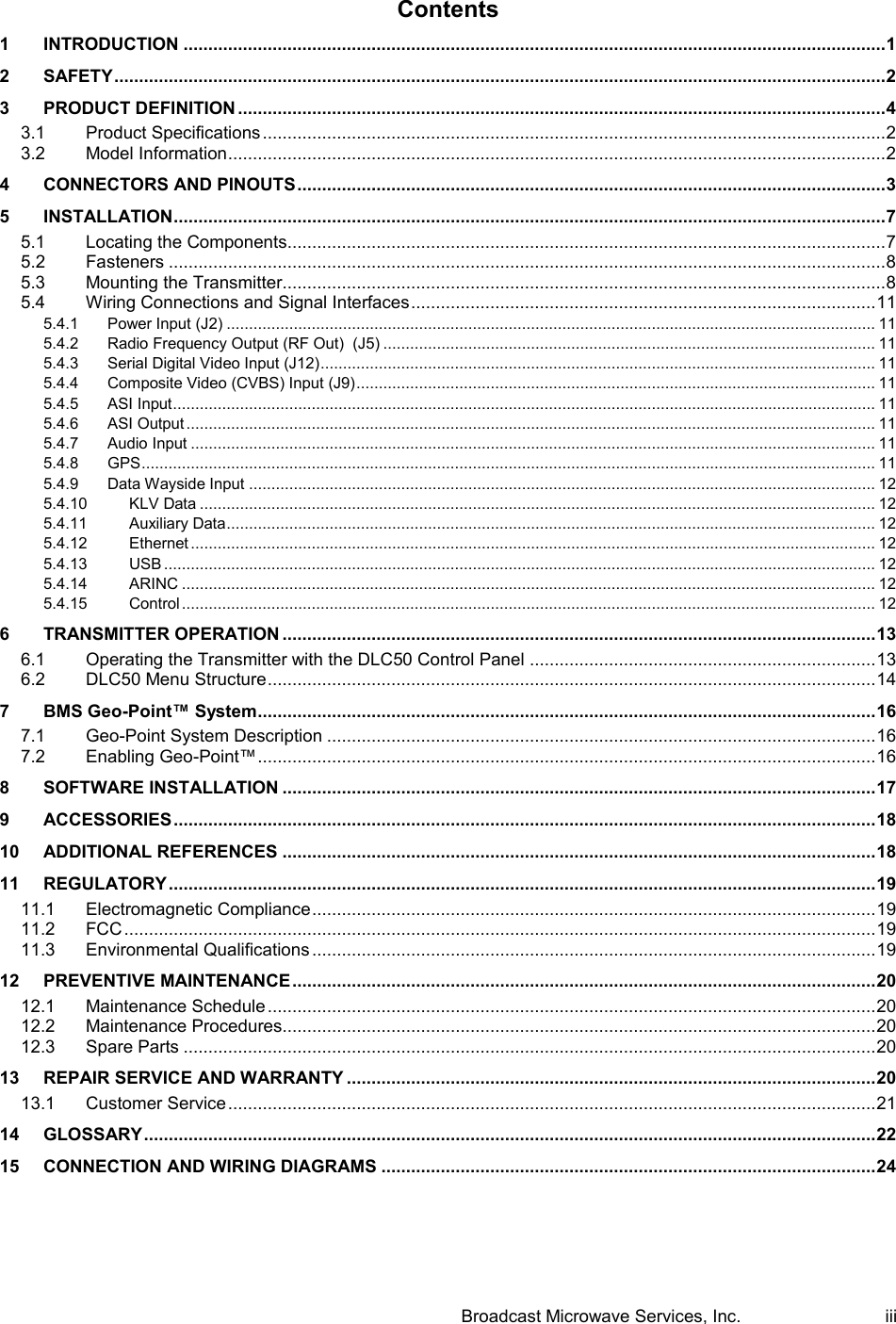
 Broadcast Microwave Services, Inc.     iii Contents 1 INTRODUCTION .............................................................................................................................................. 1 2 SAFETY ............................................................................................................................................................ 2 3 PRODUCT DEFINITION ................................................................................................................................... 4 3.1 Product Specifications .............................................................................................................................. 2 3.2 Model Information ..................................................................................................................................... 2 4 CONNECTORS AND PINOUTS ....................................................................................................................... 3 5 INSTALLATION ................................................................................................................................................ 7 5.1 Locating the Components......................................................................................................................... 7 5.2 Fasteners ................................................................................................................................................. 8 5.3 Mounting the Transmitter.......................................................................................................................... 8 5.4 Wiring Connections and Signal Interfaces .............................................................................................. 11 5.4.1 Power Input (J2) ................................................................................................................................................. 11 5.4.2 Radio Frequency Output (RF Out)  (J5) .............................................................................................................. 11 5.4.3 Serial Digital Video Input (J12) ............................................................................................................................ 11 5.4.4 Composite Video (CVBS) Input (J9) .................................................................................................................... 11 5.4.5 ASI Input ............................................................................................................................................................. 11 5.4.6 ASI Output .......................................................................................................................................................... 11 5.4.7 Audio Input ......................................................................................................................................................... 11 5.4.8 GPS .................................................................................................................................................................... 11 5.4.9 Data Wayside Input ............................................................................................................................................ 12 5.4.10 KLV Data ....................................................................................................................................................... 12 5.4.11 Auxiliary Data ................................................................................................................................................. 12 5.4.12 Ethernet ......................................................................................................................................................... 12 5.4.13 USB ............................................................................................................................................................... 12 5.4.14 ARINC ........................................................................................................................................................... 12 5.4.15 Control ........................................................................................................................................................... 12 6 TRANSMITTER OPERATION ........................................................................................................................ 13 6.1 Operating the Transmitter with the DLC50 Control Panel ...................................................................... 13 6.2 DLC50 Menu Structure ........................................................................................................................... 14 7 BMS Geo-Point™ System............................................................................................................................. 16 7.1 Geo-Point System Description ............................................................................................................... 16 7.2 Enabling Geo-Point™ ............................................................................................................................. 16 8 SOFTWARE INSTALLATION ........................................................................................................................ 17 9 ACCESSORIES .............................................................................................................................................. 18 10 ADDITIONAL REFERENCES ........................................................................................................................ 18 11 REGULATORY ............................................................................................................................................... 19 11.1 Electromagnetic Compliance .................................................................................................................. 19 11.2 FCC ........................................................................................................................................................ 19 11.3 Environmental Qualifications .................................................................................................................. 19 12 PREVENTIVE MAINTENANCE ...................................................................................................................... 20 12.1 Maintenance Schedule ........................................................................................................................... 20 12.2 Maintenance Procedures........................................................................................................................ 20 12.3 Spare Parts ............................................................................................................................................ 20 13 REPAIR SERVICE AND WARRANTY ........................................................................................................... 20 13.1 Customer Service ................................................................................................................................... 21 14 GLOSSARY .................................................................................................................................................... 22 15 CONNECTION AND WIRING DIAGRAMS .................................................................................................... 24
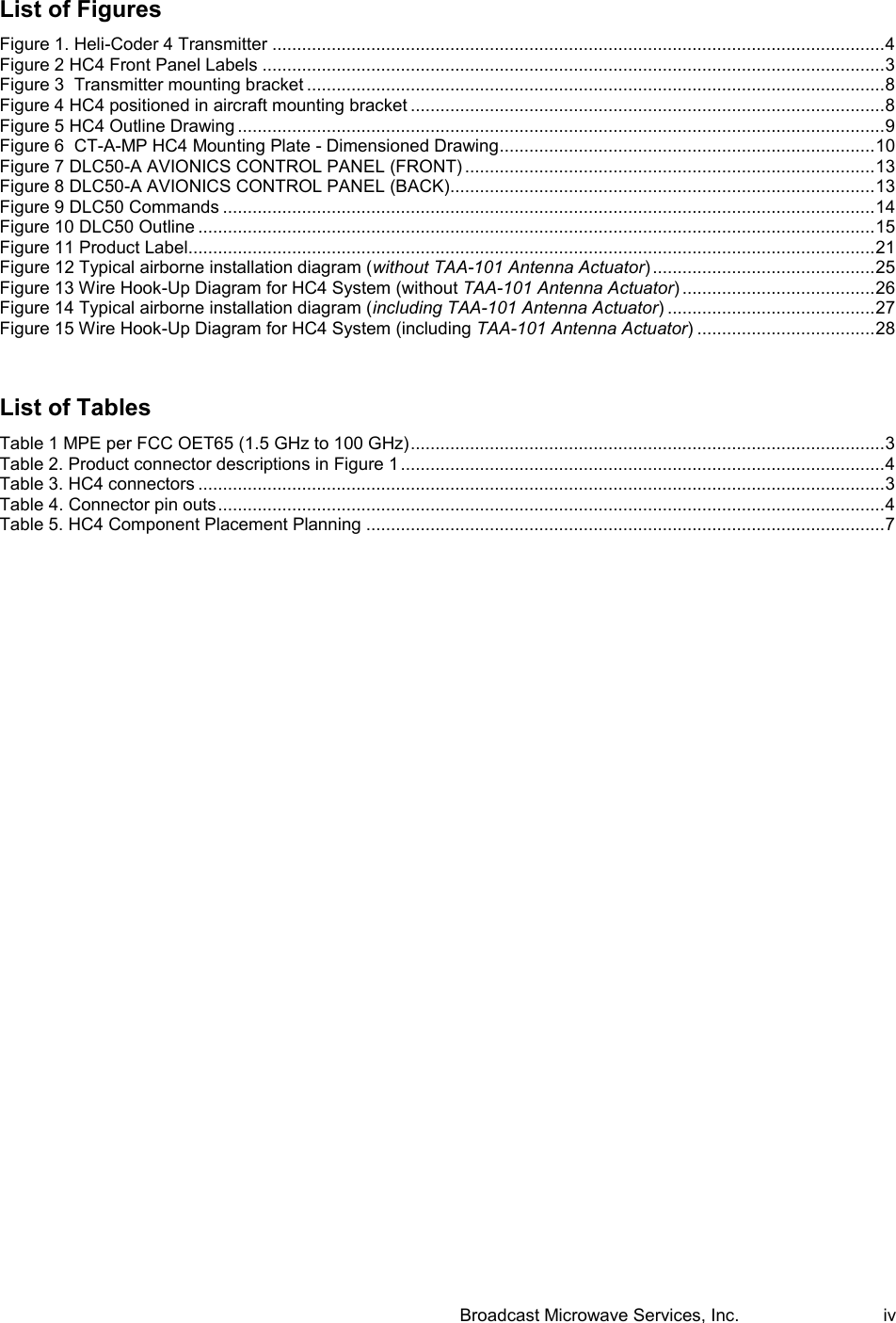
 Broadcast Microwave Services, Inc.     iv List of Figures Figure 1. Heli-Coder 4 Transmitter ............................................................................................................................ 4 Figure 2 HC4 Front Panel Labels .............................................................................................................................. 3 Figure 3  Transmitter mounting bracket ..................................................................................................................... 8 Figure 4 HC4 positioned in aircraft mounting bracket ................................................................................................ 8 Figure 5 HC4 Outline Drawing ................................................................................................................................... 9 Figure 6  CT-A-MP HC4 Mounting Plate - Dimensioned Drawing ............................................................................ 10 Figure 7 DLC50-A AVIONICS CONTROL PANEL (FRONT) ................................................................................... 13 Figure 8 DLC50-A AVIONICS CONTROL PANEL (BACK)...................................................................................... 13 Figure 9 DLC50 Commands .................................................................................................................................... 14 Figure 10 DLC50 Outline ......................................................................................................................................... 15 Figure 11 Product Label........................................................................................................................................... 21 Figure 12 Typical airborne installation diagram (without TAA-101 Antenna Actuator) ............................................. 25 Figure 13 Wire Hook-Up Diagram for HC4 System (without TAA-101 Antenna Actuator) ....................................... 26 Figure 14 Typical airborne installation diagram (including TAA-101 Antenna Actuator) .......................................... 27 Figure 15 Wire Hook-Up Diagram for HC4 System (including TAA-101 Antenna Actuator) .................................... 28  List of Tables Table 1 MPE per FCC OET65 (1.5 GHz to 100 GHz) ................................................................................................ 3 Table 2. Product connector descriptions in Figure 1 .................................................................................................. 4 Table 3. HC4 connectors ........................................................................................................................................... 3 Table 4. Connector pin outs ....................................................................................................................................... 4 Table 5. HC4 Component Placement Planning ......................................................................................................... 7
Heli-Coder 4 Transmitter Operation Manual | Doc. No. 6051452100 Rev. C Broadcast Microwave Services, Inc.     1 1  INTRODUCTION  This document provides instructions for installation, operation and maintenance of the Heli-Coder 4 (HC4) COFDM Transmitter controlled by a DLC50 Downlink Control Panel.  BMS offers a wide selection of airborne products to meet the video and data requirements of today’s real world applications.  The Heli-Coder™ 4 (HC4) together with the DLC50 controller provides a simple, powerful solution containing everything needed for high-quality, reliable transmission. This includes the video encoder, modulator, up-converter and high-power amplifier and an intuitive powerful control interface (see Figure 1.). Standard COFDM modulation offers excellent performance in urban and non-line of sight environments with significant multipath. The HC4 also provides an integrated GPS data interface that reduces the components needed to integrate location data into tracking systems. The HC4 provides everything required to achieve 10 W output power in an ultra-compact case. The DLC50 control panel allows the HC4 unit to be mounted remotely within the avionics bay while providing full control from the flight deck. With the flexibility of MPEG-2 and H.264 compression, the HC4 efficiently handles SD or HD video and can be configured to deliver high speed data as an ethernet radio. The HC4 is also Geo-Point™ capable. Geo-Point™ uses metadata supplied by the equipment serving as the video source and allows the display of bearing and distance to the location shown on the screen in real time. (Geo-Point™ requires a compatible receiver.)  NOTE: The standard version of the HC 4 is configured to be controlled by a DLC50 Control Panel. Custom configurations and control schemes may be supported.  Contact BMS regarding your operational requirements and the range of solutions BMS offers.  Broadcast Microwave Services (BMS) is a leader in wireless digital microwave technology providing innovative products for the television broadcast, video, telemetry and surveillance industries. A wholly owned subsidiary of Cohu, Inc., BMS designs and manufactures a comprehensive line of microwave communications equipment for broadcasting sports venues, law enforcement and military applications. BMS also builds and integrates the command and control centers to provide fully functioning, complex, end to end digital systems. For the latest product and system information please visit www.bms-inc.com.  Broadcast Microwave Services, Inc. 12367 Crosthwaite Circle Poway, CA 92064  Tel: +1 (858) 391-3050 Toll free (US): 800-669-9667 Fax: +1 (858) 391-3049 Email:sales@bms-inc.com www.bms-inc.com
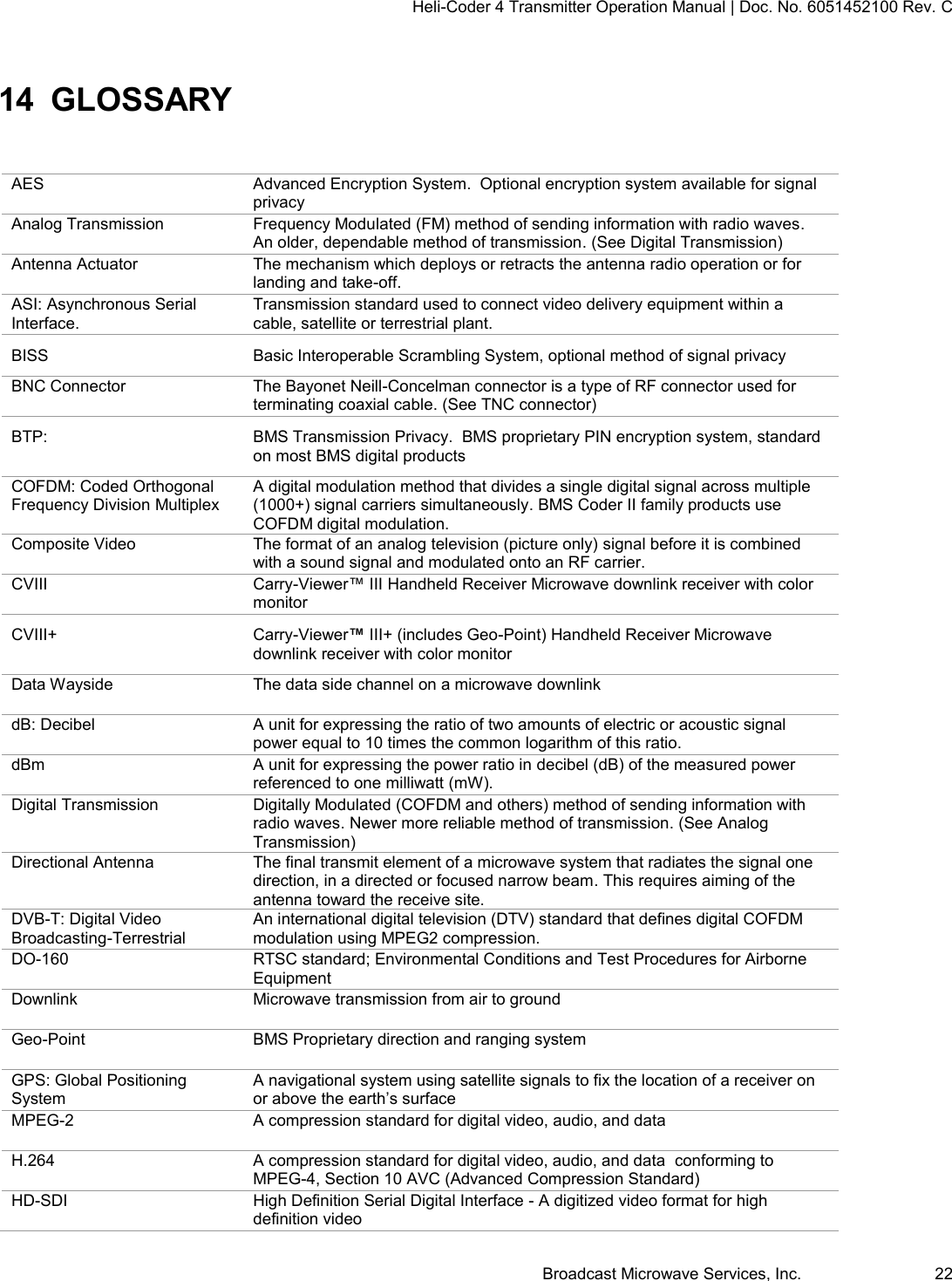
Heli-Coder 4 Transmitter Operation Manual | Doc. No. 6051452100 Rev. C Broadcast Microwave Services, Inc.     2 2  SAFETY  WARNING- RF Hazard: Non-Ionizing RF Emission Operators of this equipment should be familiar with basic RF equipment operation and safety concepts.  Users must consider many unique factors to maintain RF safety.  We offer the following guidelines with the recommendation that each individual and organization establish an RF Safety and Awareness program based on their combination of hardware and usage environment.  Radiation Exposure  The frequencies present in BMS equipment produce non-Ionizing radiation.  The FCC reference document regarding RF exposure limits is OET Bulletin 65 and can be viewed by visiting the FCC web site (www.fcc.gov ) or by clicking here; http://www.fcc.gov/Bureaus/Engineering_Technology/Documents/bulletins/oet65/oet65.pdf  (Link valid as of 6/25/2012) We also reference EU Standard EN 50392 (02-2004).  BMS references these standards as reasonable guidelines. The OET 65 document sets maximum permitted exposure (MPE) and is widely cited within the U. S. and Canada.  Exposure is divided into two categories, “controlled” and “uncontrolled” environment.  The uncontrolled environment is the harshest criteria and applies to exposure where you may not be aware and/or cannot control the exposure.  Examples are where a residence is located near a cell site or other radio tower.  You live there, cannot remove yourself from the field and cannot control the RF.  Exposure is long term and not in your control.  The “controlled environment” applies to most professional radio users.  It is assumed they are trained in RF Safety, they are aware there is an RF field, exposure is limited by transmission duty cycles, the flight or testing ends, hang up the cell phone, put up the walkie-talkie, etc. BMS recommends that operators use the uncontrolled exposure category from OET 65 as it applies to an uncontrolled environment;  a maximum power density limit of 1mW/cm². The limit table from Bulletin 65 is reproduced below.  X axis is frequency and y axis is mW/cm².
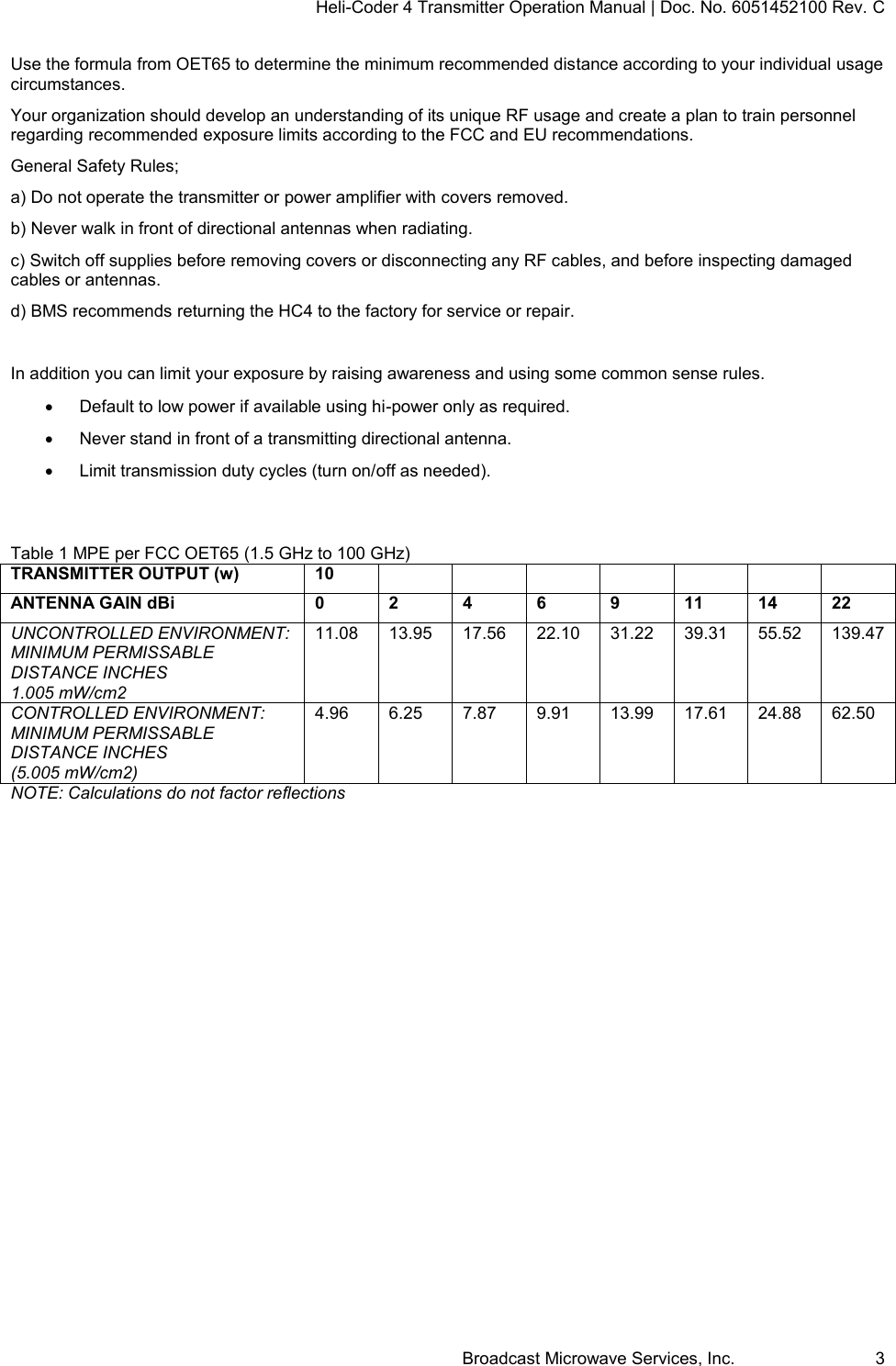
Heli-Coder 4 Transmitter Operation Manual | Doc. No. 6051452100 Rev. C Broadcast Microwave Services, Inc.     3 Use the formula from OET65 to determine the minimum recommended distance according to your individual usage circumstances.  Your organization should develop an understanding of its unique RF usage and create a plan to train personnel regarding recommended exposure limits according to the FCC and EU recommendations. General Safety Rules; a) Do not operate the transmitter or power amplifier with covers removed. b) Never walk in front of directional antennas when radiating. c) Switch off supplies before removing covers or disconnecting any RF cables, and before inspecting damaged cables or antennas.  d) BMS recommends returning the HC4 to the factory for service or repair.  In addition you can limit your exposure by raising awareness and using some common sense rules.     Default to low power if available using hi-power only as required.     Never stand in front of a transmitting directional antenna.     Limit transmission duty cycles (turn on/off as needed).   Table 1 MPE per FCC OET65 (1.5 GHz to 100 GHz) TRANSMITTER OUTPUT (w) 10               ANTENNA GAIN dBi 0 2 4 6 9 11 14 22 UNCONTROLLED ENVIRONMENT: MINIMUM PERMISSABLE DISTANCE INCHES 1.005 mW/cm2 11.08 13.95 17.56 22.10 31.22 39.31 55.52 139.47 CONTROLLED ENVIRONMENT: MINIMUM PERMISSABLE DISTANCE INCHES (5.005 mW/cm2)  4.96 6.25 7.87 9.91 13.99 17.61 24.88 62.50 NOTE: Calculations do not factor reflections
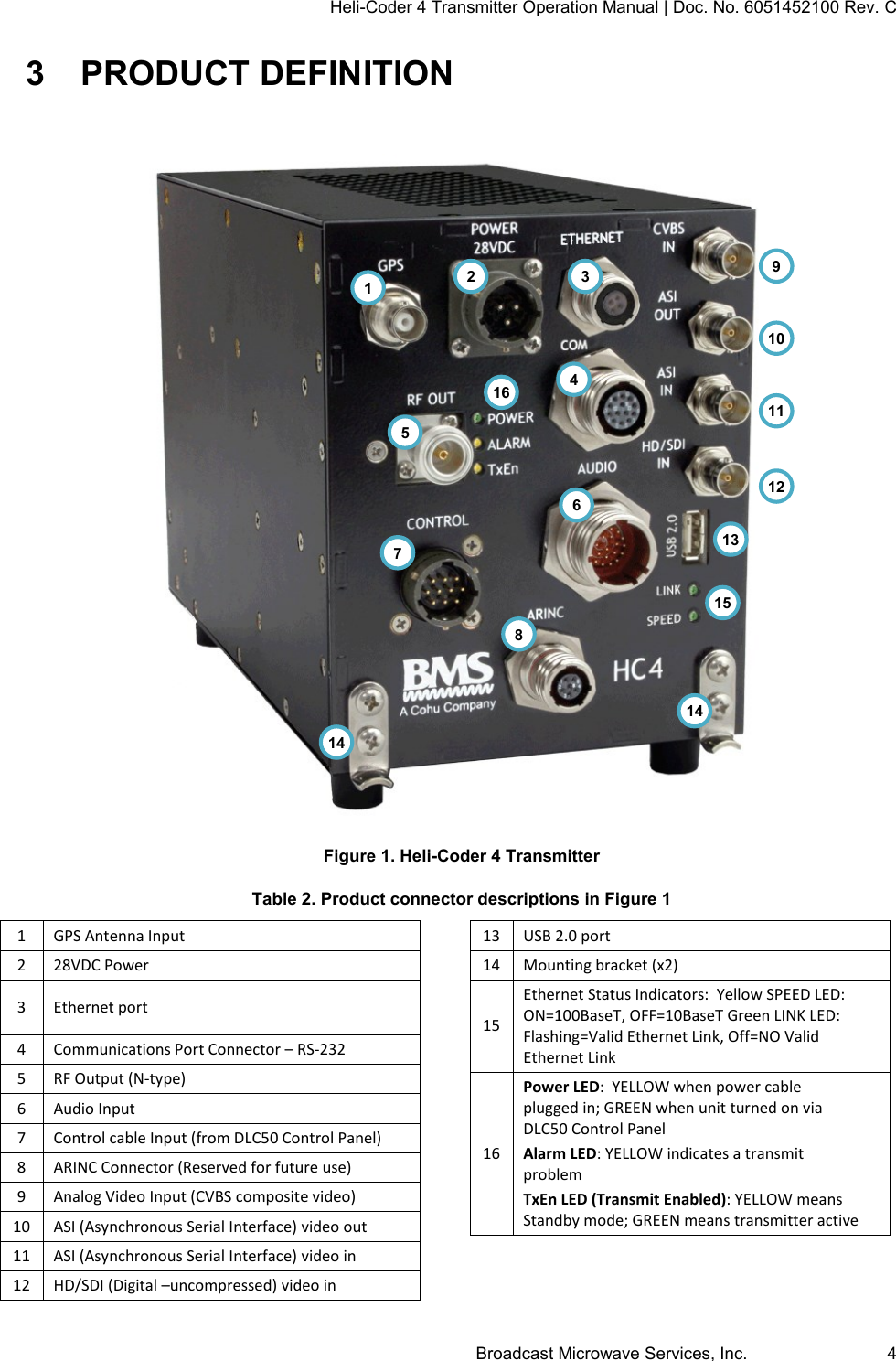
Heli-Coder 4 Transmitter Operation Manual | Doc. No. 6051452100 Rev. C Broadcast Microwave Services, Inc.     4 3  PRODUCT DEFINITION  Figure 1. Heli-Coder 4 Transmitter Table 2. Product connector descriptions in Figure 1 1 GPS Antenna Input 2 28VDC Power 3 Ethernet port 4 Communications Port Connector – RS-232 5 RF Output (N-type) 6 Audio Input 7 Control cable Input (from DLC50 Control Panel) 8 ARINC Connector (Reserved for future use) 9 Analog Video Input (CVBS composite video) 10 ASI (Asynchronous Serial Interface) video out 11 ASI (Asynchronous Serial Interface) video in 12 HD/SDI (Digital –uncompressed) video in 13 USB 2.0 port 14 Mounting bracket (x2) 15 Ethernet Status Indicators:  Yellow SPEED LED: ON=100BaseT, OFF=10BaseT Green LINK LED: Flashing=Valid Ethernet Link, Off=NO Valid Ethernet Link 16 Power LED:  YELLOW when power cable plugged in; GREEN when unit turned on via DLC50 Control Panel Alarm LED: YELLOW indicates a transmit problem TxEn LED (Transmit Enabled): YELLOW means Standby mode; GREEN means transmitter active  9 10 11 12 5 2 3 1 4 6 7 8 13 14 16 15 14
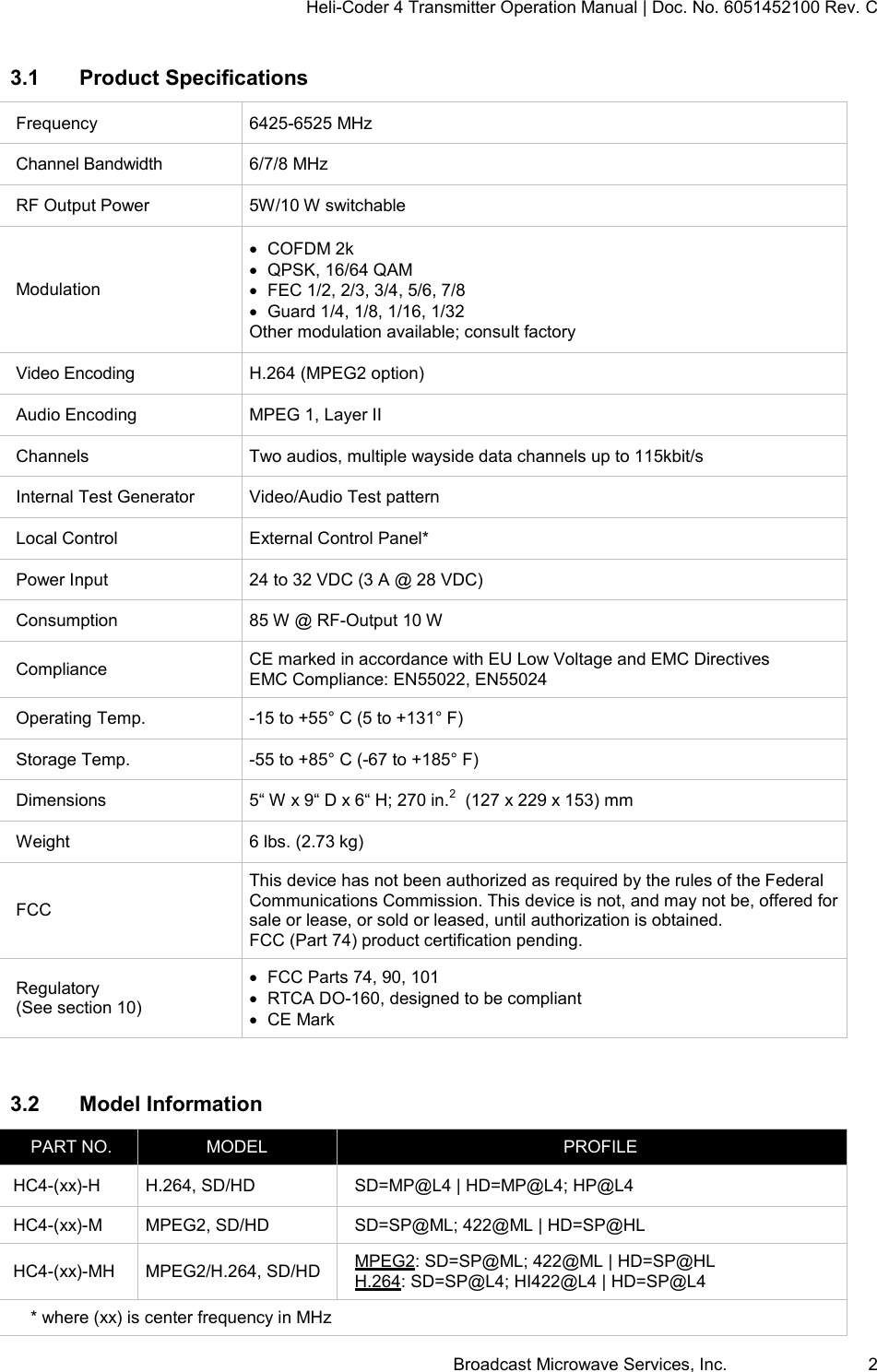
Heli-Coder 4 Transmitter Operation Manual | Doc. No. 6051452100 Rev. C Broadcast Microwave Services, Inc.     2 3.1  Product Specifications Frequency 6425-6525 MHz Channel Bandwidth 6/7/8 MHz RF Output Power 5W/10 W switchable Modulation   COFDM 2k   QPSK, 16/64 QAM   FEC 1/2, 2/3, 3/4, 5/6, 7/8   Guard 1/4, 1/8, 1/16, 1/32 Other modulation available; consult factory Video Encoding H.264 (MPEG2 option) Audio Encoding MPEG 1, Layer II Channels Two audios, multiple wayside data channels up to 115kbit/s  Internal Test Generator Video/Audio Test pattern Local Control External Control Panel* Power Input 24 to 32 VDC (3 A @ 28 VDC) Consumption 85 W @ RF-Output 10 W Compliance CE marked in accordance with EU Low Voltage and EMC Directives EMC Compliance: EN55022, EN55024 Operating Temp. -15 to +55° C (5 to +131° F) Storage Temp. -55 to +85° C (-67 to +185° F) Dimensions 5“ W x 9“ D x 6“ H; 270 in.2  (127 x 229 x 153) mm Weight 6 lbs. (2.73 kg) FCC This device has not been authorized as required by the rules of the Federal Communications Commission. This device is not, and may not be, offered for sale or lease, or sold or leased, until authorization is obtained. FCC (Part 74) product certification pending. Regulatory (See section 10)   FCC Parts 74, 90, 101   RTCA DO-160, designed to be compliant   CE Mark  3.2  Model Information PART NO. MODEL PROFILE HC4-(xx)-H H.264, SD/HD SD=MP@L4 | HD=MP@L4; HP@L4 HC4-(xx)-M MPEG2, SD/HD SD=SP@ML; 422@ML | HD=SP@HL HC4-(xx)-MH MPEG2/H.264, SD/HD MPEG2: SD=SP@ML; 422@ML | HD=SP@HL H.264: SD=SP@L4; HI422@L4 | HD=SP@L4 * where (xx) is center frequency in MHz
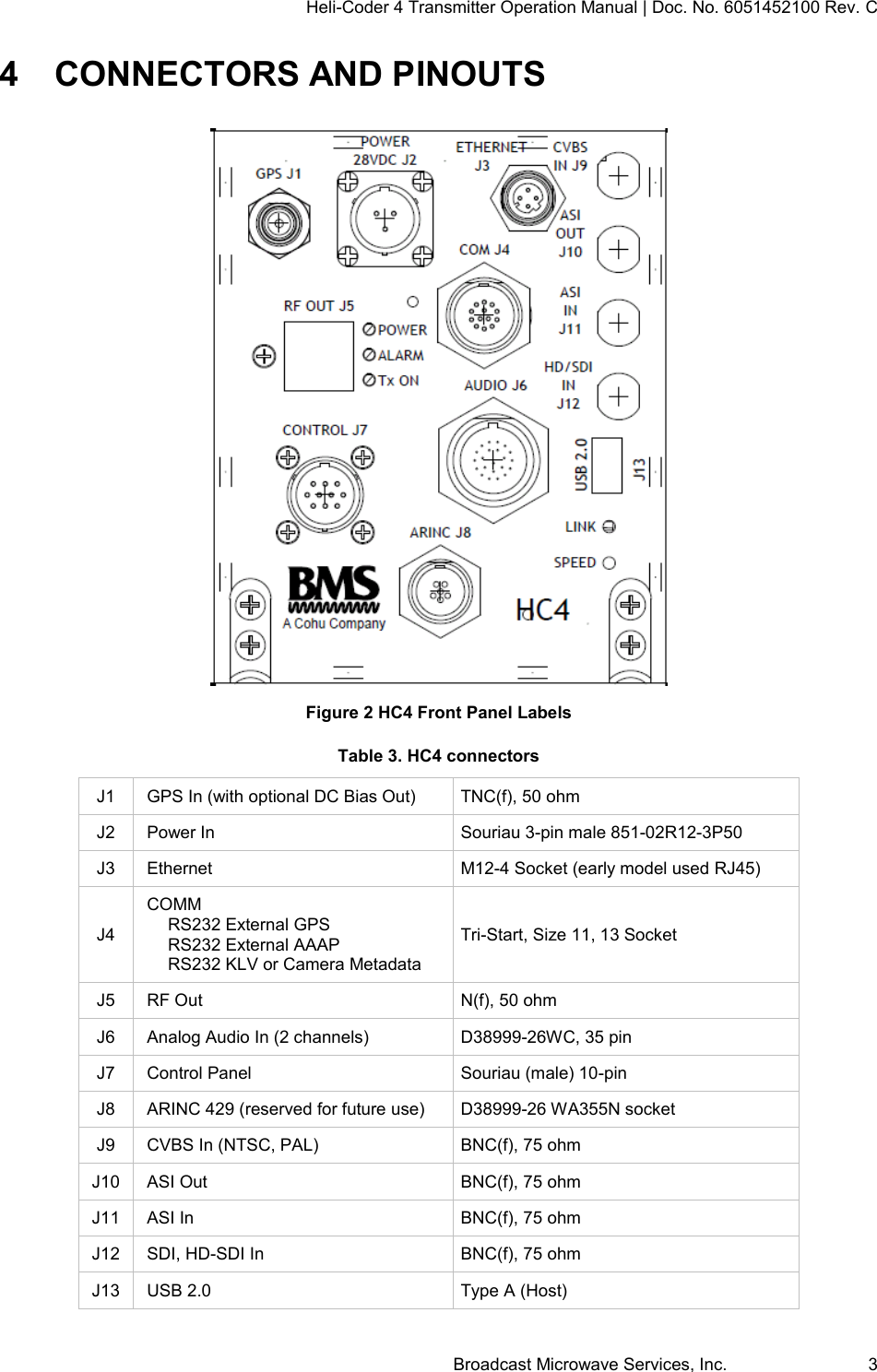
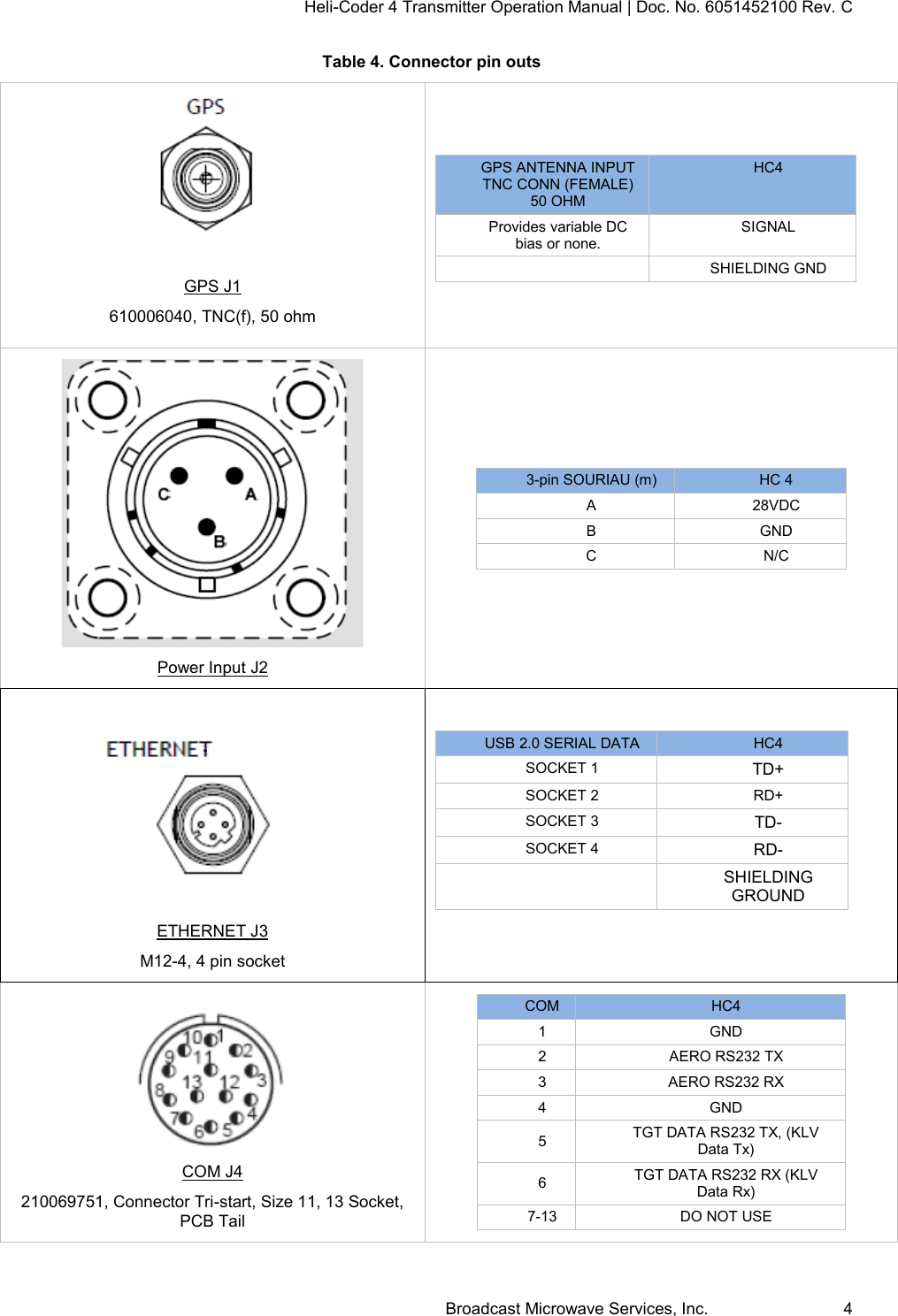
Heli-Coder 4 Transmitter Operation Manual | Doc. No. 6051452100 Rev. C Broadcast Microwave Services, Inc.     3 4  CONNECTORS AND PINOUTS  Figure 2 HC4 Front Panel Labels Table 3. HC4 connectors J1 GPS In (with optional DC Bias Out) TNC(f), 50 ohm J2 Power In Souriau 3-pin male 851-02R12-3P50 J3 Ethernet M12-4 Socket (early model used RJ45) J4 COMM   RS232 External GPS   RS232 External AAAP   RS232 KLV or Camera Metadata Tri-Start, Size 11, 13 Socket J5 RF Out N(f), 50 ohm J6 Analog Audio In (2 channels) D38999-26WC, 35 pin J7 Control Panel Souriau (male) 10-pin J8 ARINC 429 (reserved for future use) D38999-26 WA355N socket J9 CVBS In (NTSC, PAL) BNC(f), 75 ohm J10 ASI Out BNC(f), 75 ohm J11 ASI In BNC(f), 75 ohm J12 SDI, HD-SDI In BNC(f), 75 ohm J13 USB 2.0 Type A (Host)
Heli-Coder 4 Transmitter Operation Manual | Doc. No. 6051452100 Rev. C Broadcast Microwave Services, Inc.     4 Table 4. Connector pin outs   GPS J1 610006040, TNC(f), 50 ohm   GPS ANTENNA INPUT TNC CONN (FEMALE) 50 OHM HC4 Provides variable DC bias or none. SIGNAL  SHIELDING GND   Power Input J2 3-pin SOURIAU (m) HC 4 A 28VDC B GND C N/C   ETHERNET J3 M12-4, 4 pin socket  USB 2.0 SERIAL DATA HC4 SOCKET 1 TD+ SOCKET 2 RD+ SOCKET 3 TD- SOCKET 4 RD-  SHIELDING GROUND   COM J4 210069751, Connector Tri-start, Size 11, 13 Socket, PCB Tail COM HC4 1 GND 2 AERO RS232 TX 3 AERO RS232 RX 4 GND 5 TGT DATA RS232 TX, (KLV Data Tx) 6 TGT DATA RS232 RX (KLV Data Rx) 7-13 DO NOT USE
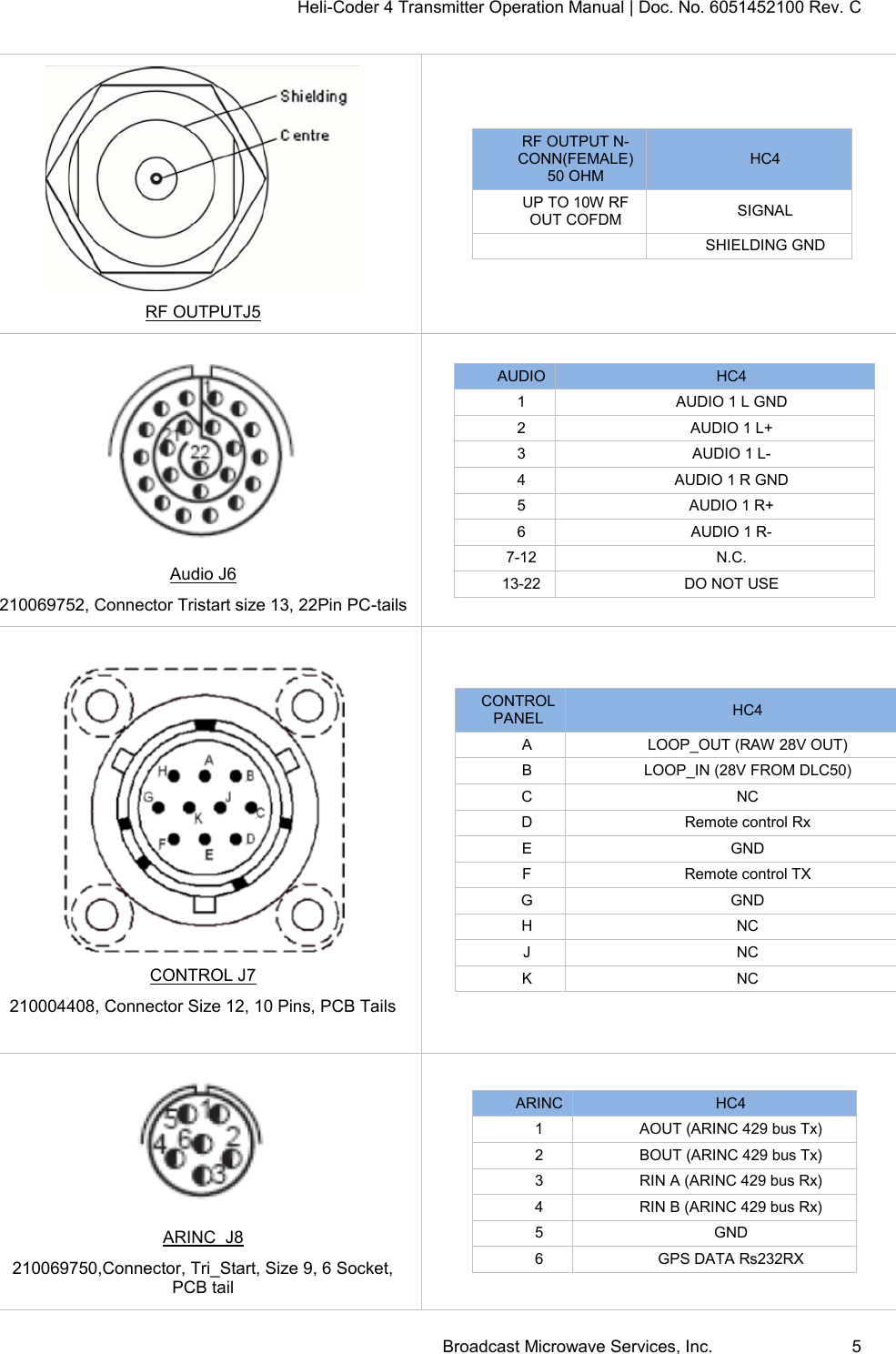
Heli-Coder 4 Transmitter Operation Manual | Doc. No. 6051452100 Rev. C Broadcast Microwave Services, Inc.     5  RF OUTPUTJ5 RF OUTPUT N- CONN(FEMALE) 50 OHM HC4 UP TO 10W RF OUT COFDM SIGNAL  SHIELDING GND   Audio J6 210069752, Connector Tristart size 13, 22Pin PC-tails AUDIO HC4 1 AUDIO 1 L GND 2 AUDIO 1 L+ 3 AUDIO 1 L- 4 AUDIO 1 R GND 5 AUDIO 1 R+ 6 AUDIO 1 R- 7-12 N.C. 13-22 DO NOT USE   CONTROL J7 210004408, Connector Size 12, 10 Pins, PCB Tails CONTROL PANEL HC4 A LOOP_OUT (RAW 28V OUT) B LOOP_IN (28V FROM DLC50) C NC D Remote control Rx  E GND F Remote control TX  G GND H NC J NC K NC   ARINC  J8 210069750,Connector, Tri_Start, Size 9, 6 Socket, PCB tail ARINC HC4 1 AOUT (ARINC 429 bus Tx) 2 BOUT (ARINC 429 bus Tx) 3 RIN A (ARINC 429 bus Rx) 4 RIN B (ARINC 429 bus Rx) 5 GND 6 GPS DATA Rs232RX
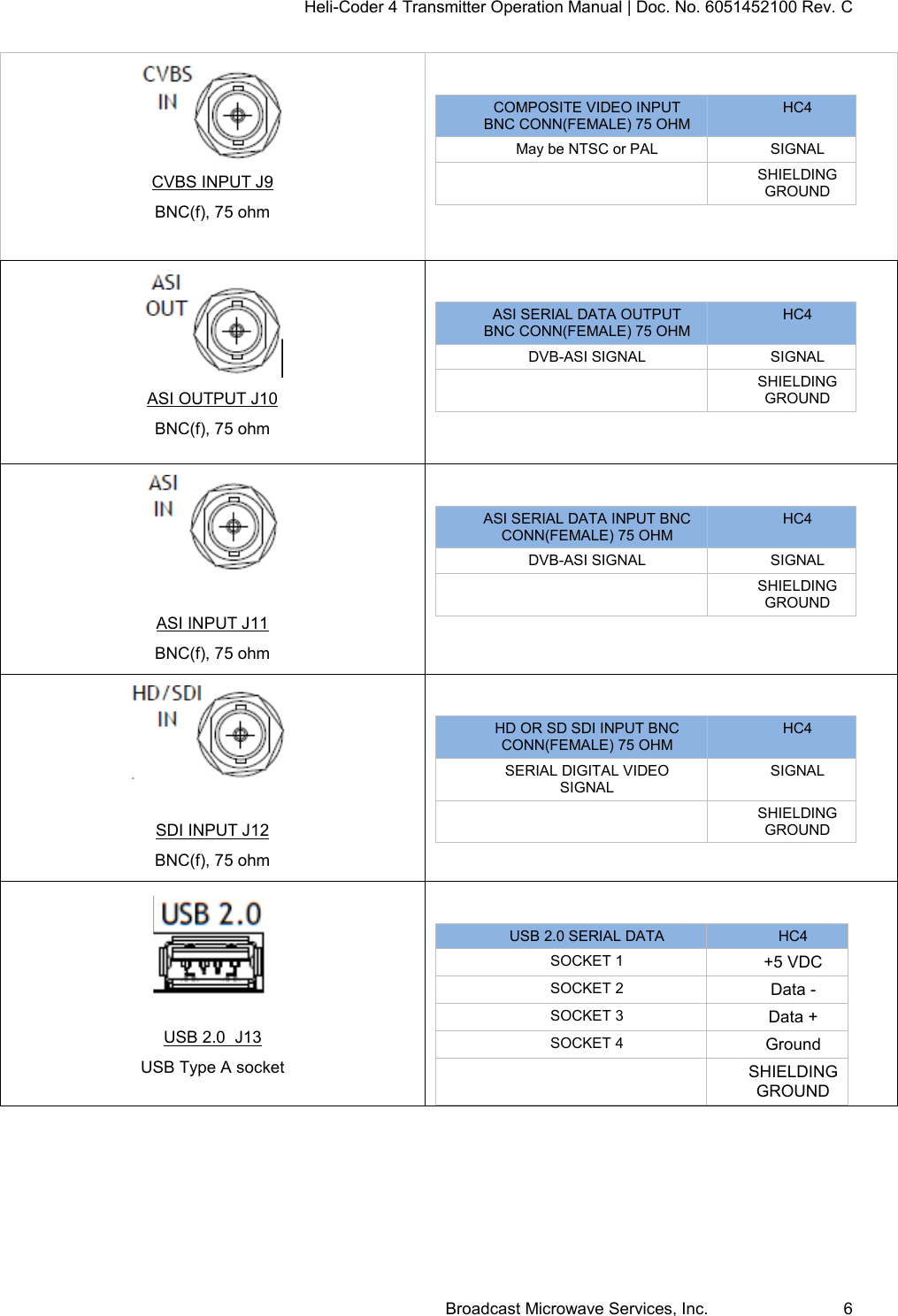
Heli-Coder 4 Transmitter Operation Manual | Doc. No. 6051452100 Rev. C Broadcast Microwave Services, Inc.     6  CVBS INPUT J9 BNC(f), 75 ohm  COMPOSITE VIDEO INPUT BNC CONN(FEMALE) 75 OHM HC4 May be NTSC or PAL SIGNAL  SHIELDING GROUND   ASI OUTPUT J10 BNC(f), 75 ohm  ASI SERIAL DATA OUTPUT BNC CONN(FEMALE) 75 OHM HC4 DVB-ASI SIGNAL SIGNAL  SHIELDING GROUND    ASI INPUT J11 BNC(f), 75 ohm  ASI SERIAL DATA INPUT BNC CONN(FEMALE) 75 OHM HC4 DVB-ASI SIGNAL SIGNAL  SHIELDING GROUND    SDI INPUT J12 BNC(f), 75 ohm  HD OR SD SDI INPUT BNC CONN(FEMALE) 75 OHM HC4 SERIAL DIGITAL VIDEO   SIGNAL SIGNAL  SHIELDING GROUND   USB 2.0  J13 USB Type A socket  USB 2.0 SERIAL DATA HC4 SOCKET 1 +5 VDC SOCKET 2 Data - SOCKET 3 Data + SOCKET 4 Ground  SHIELDING GROUND
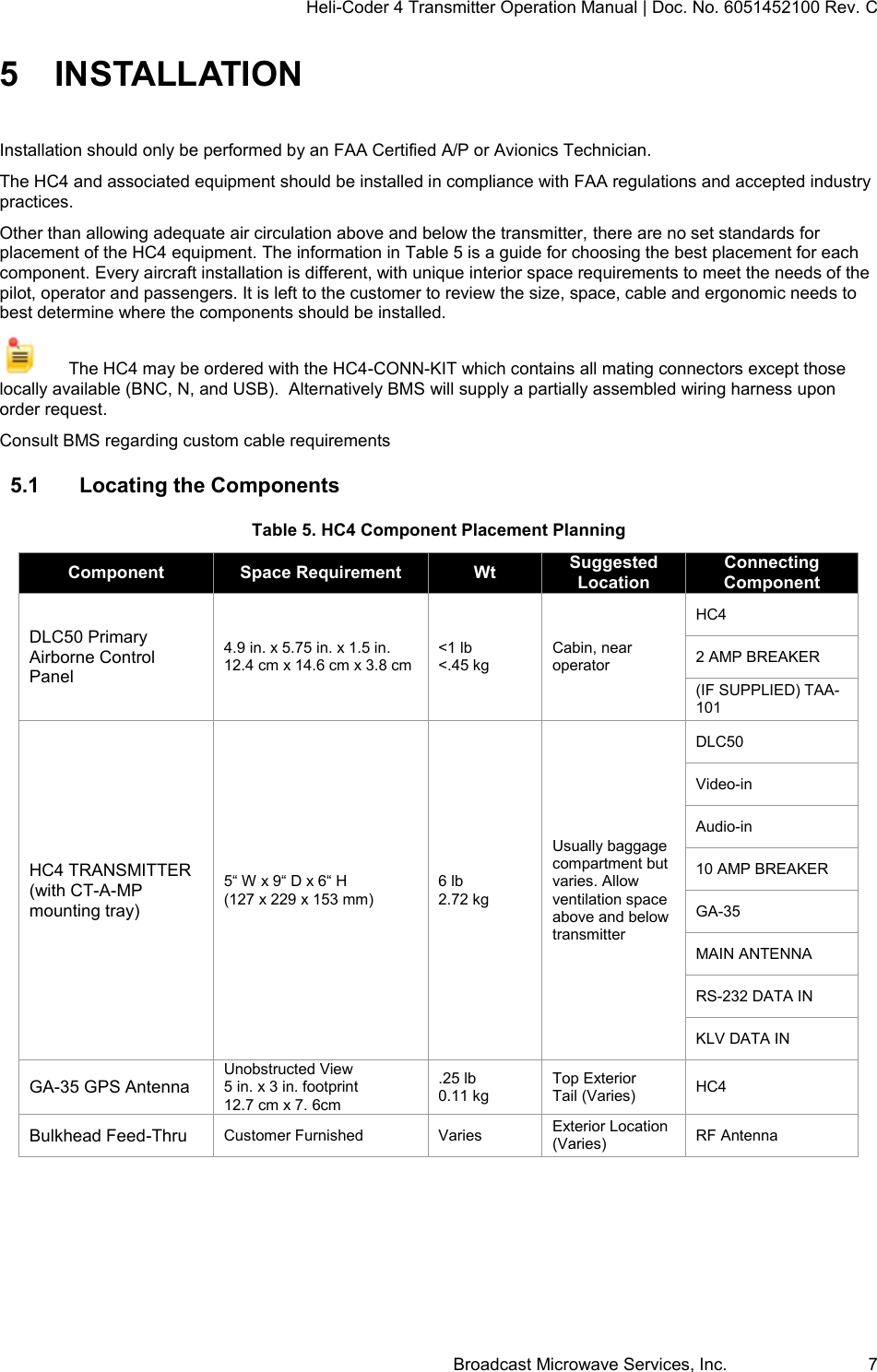
Heli-Coder 4 Transmitter Operation Manual | Doc. No. 6051452100 Rev. C Broadcast Microwave Services, Inc.     7 5  INSTALLATION Installation should only be performed by an FAA Certified A/P or Avionics Technician.  The HC4 and associated equipment should be installed in compliance with FAA regulations and accepted industry practices.  Other than allowing adequate air circulation above and below the transmitter, there are no set standards for placement of the HC4 equipment. The information in Table 5 is a guide for choosing the best placement for each component. Every aircraft installation is different, with unique interior space requirements to meet the needs of the pilot, operator and passengers. It is left to the customer to review the size, space, cable and ergonomic needs to best determine where the components should be installed.     The HC4 may be ordered with the HC4-CONN-KIT which contains all mating connectors except those locally available (BNC, N, and USB).  Alternatively BMS will supply a partially assembled wiring harness upon order request.  Consult BMS regarding custom cable requirements 5.1  Locating the Components Table 5. HC4 Component Placement Planning Component Space Requirement Wt Suggested Location Connecting Component DLC50 Primary Airborne Control Panel 4.9 in. x 5.75 in. x 1.5 in. 12.4 cm x 14.6 cm x 3.8 cm <1 lb <.45 kg Cabin, near operator HC4 2 AMP BREAKER (IF SUPPLIED) TAA-101 HC4 TRANSMITTER (with CT-A-MP mounting tray) 5“ W x 9“ D x 6“ H  (127 x 229 x 153 mm) 6 lb 2.72 kg Usually baggage compartment but varies. Allow ventilation space above and below transmitter DLC50 Video-in Audio-in 10 AMP BREAKER GA-35 MAIN ANTENNA RS-232 DATA IN KLV DATA IN GA-35 GPS Antenna Unobstructed View 5 in. x 3 in. footprint 12.7 cm x 7. 6cm .25 lb 0.11 kg Top Exterior Tail (Varies) HC4 Bulkhead Feed-Thru Customer Furnished Varies Exterior Location (Varies) RF Antenna
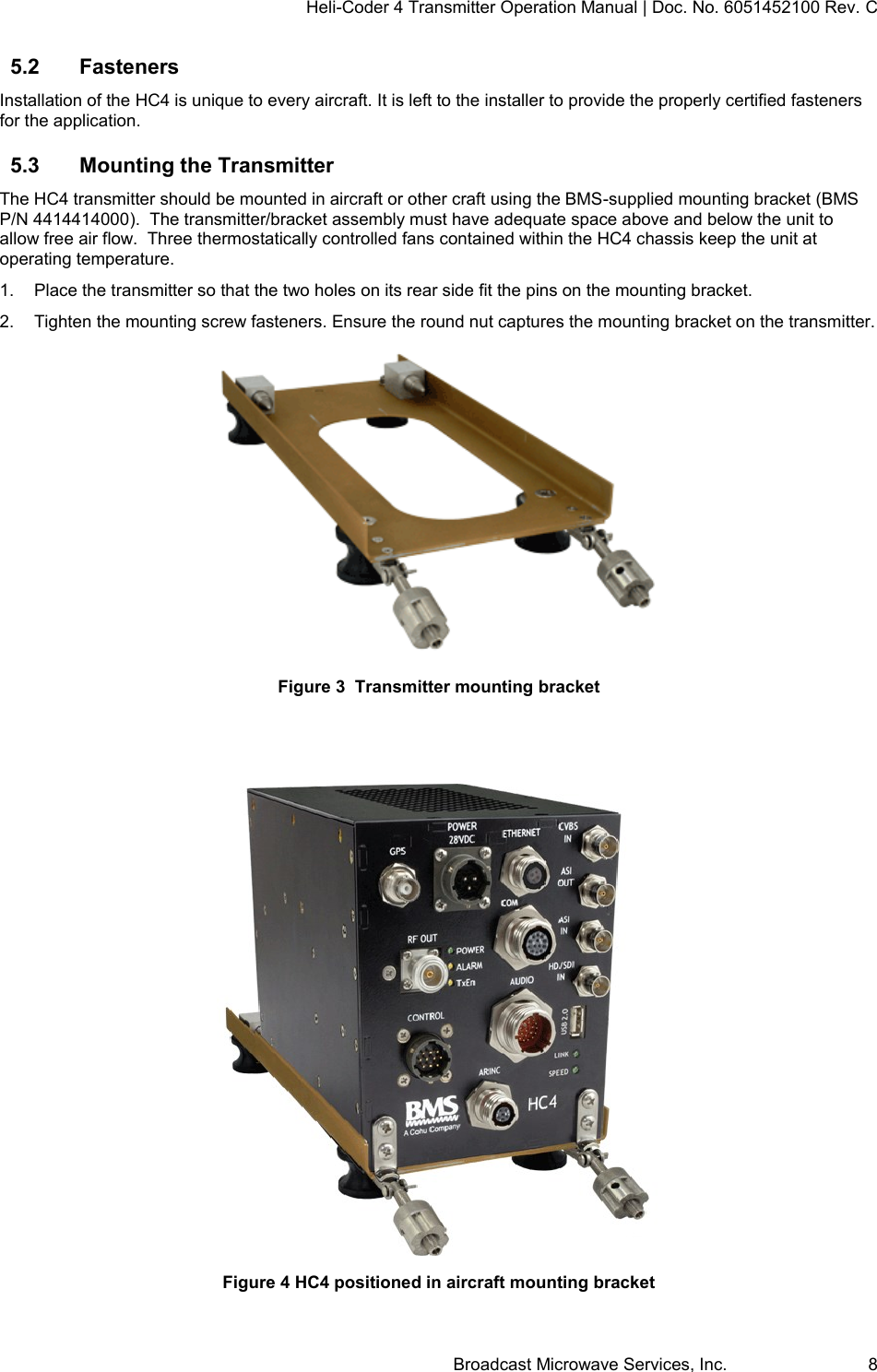
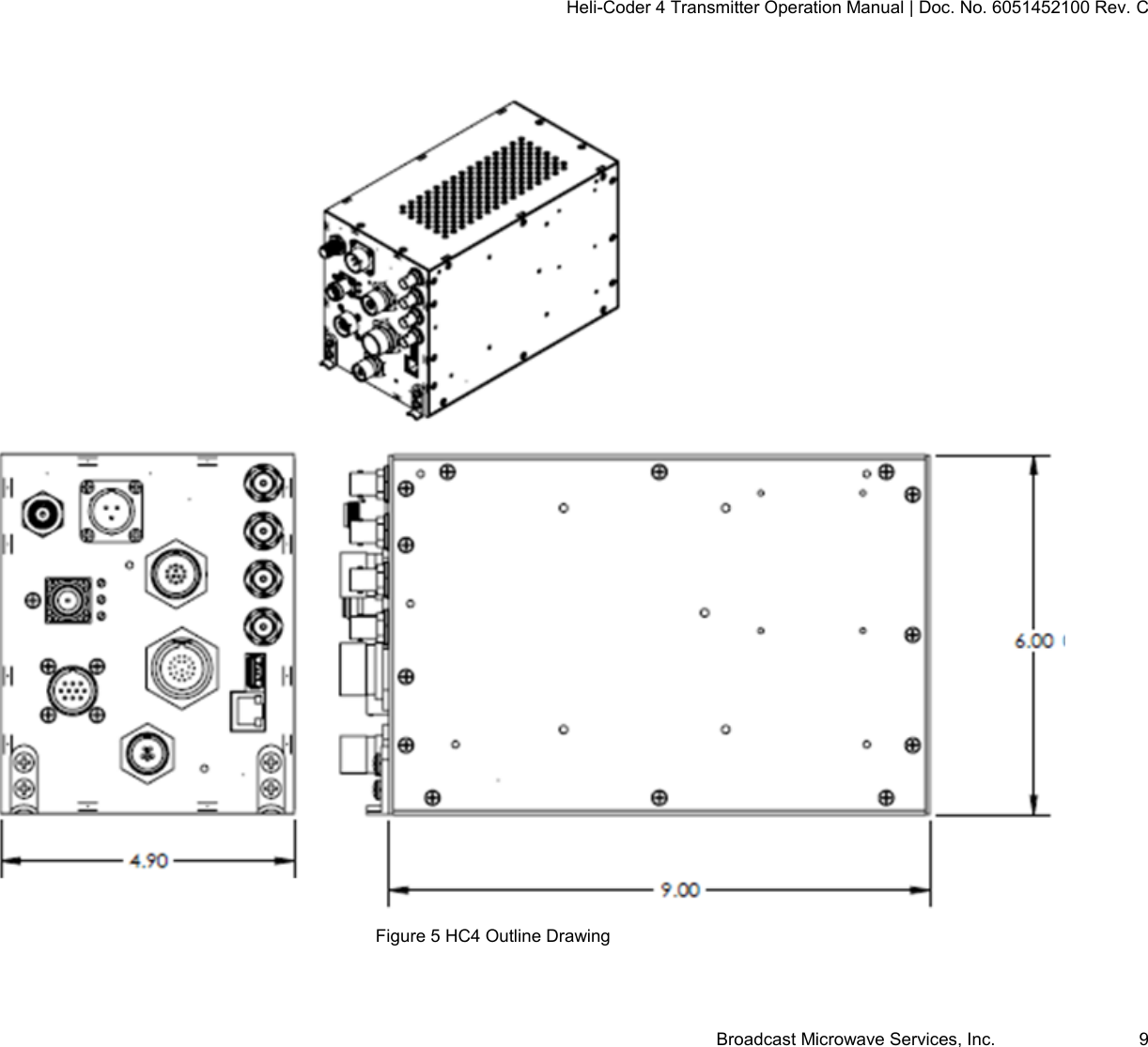
Heli-Coder 4 Transmitter Operation Manual | Doc. No. 6051452100 Rev. C Broadcast Microwave Services, Inc.     8 5.2  Fasteners Installation of the HC4 is unique to every aircraft. It is left to the installer to provide the properly certified fasteners for the application. 5.3  Mounting the Transmitter  The HC4 transmitter should be mounted in aircraft or other craft using the BMS-supplied mounting bracket (BMS P/N 4414414000).  The transmitter/bracket assembly must have adequate space above and below the unit to allow free air flow.  Three thermostatically controlled fans contained within the HC4 chassis keep the unit at operating temperature.  1.  Place the transmitter so that the two holes on its rear side fit the pins on the mounting bracket.  2.  Tighten the mounting screw fasteners. Ensure the round nut captures the mounting bracket on the transmitter.  Figure 3  Transmitter mounting bracket   Figure 4 HC4 positioned in aircraft mounting bracket
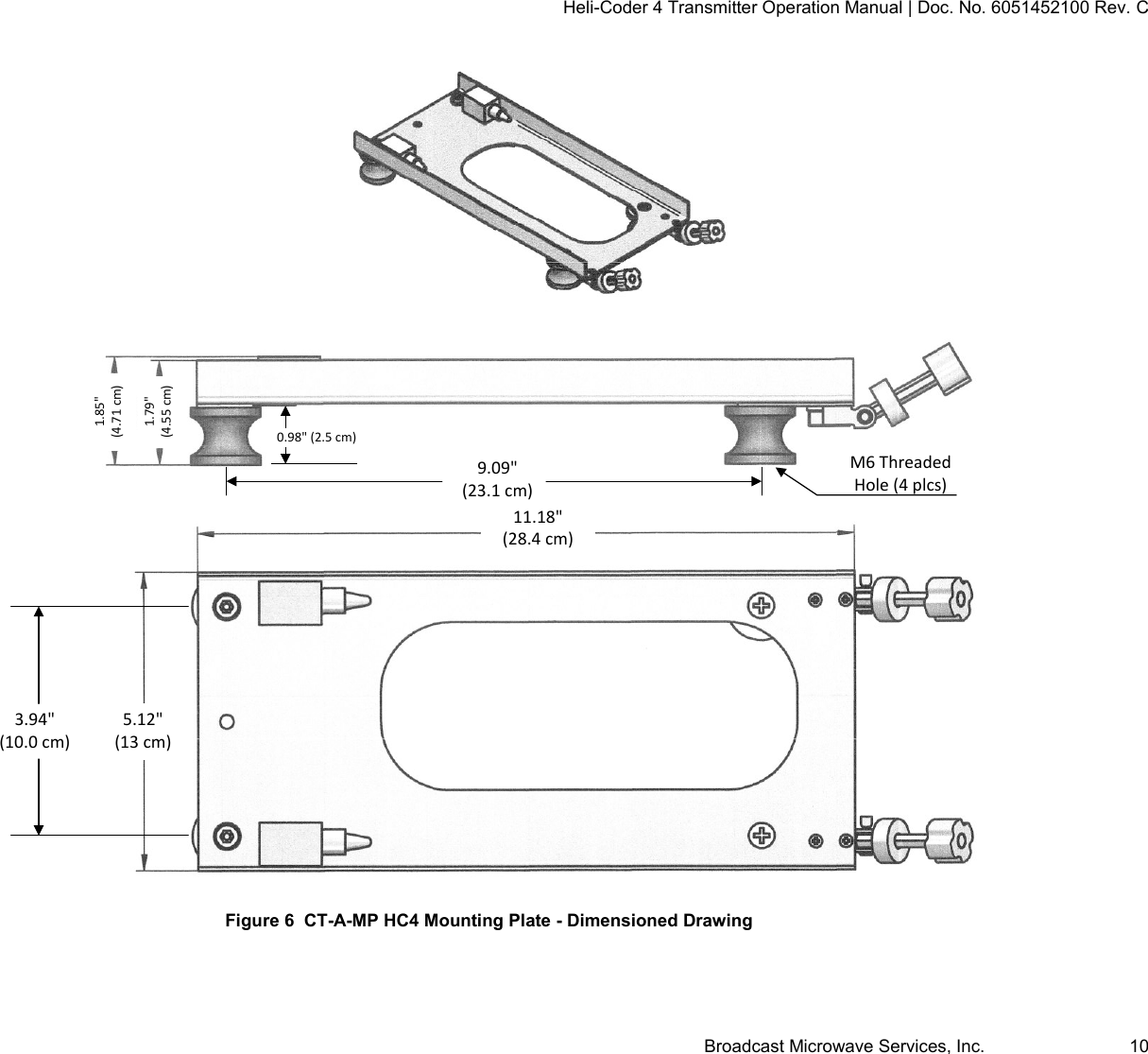
Heli-Coder 4 Transmitter Operation Manual | Doc. No. 6051452100 Rev. C Broadcast Microwave Services, Inc.     9   Figure 5 HC4 Outline Drawing
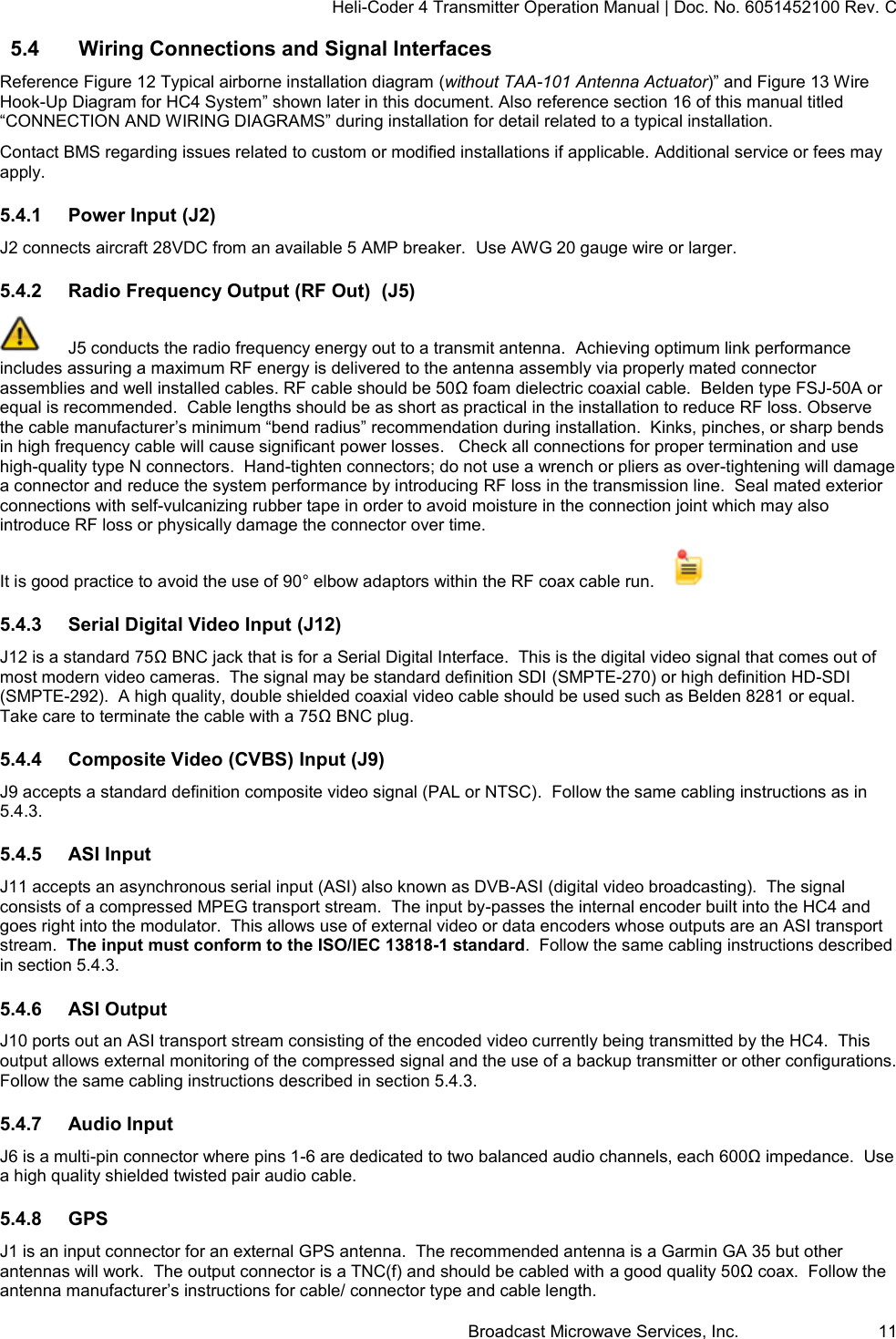
Heli-Coder 4 Transmitter Operation Manual | Doc. No. 6051452100 Rev. C Broadcast Microwave Services, Inc.     10   Figure 6  CT-A-MP HC4 Mounting Plate - Dimensioned Drawing 9.09"(23.1 cm)3.94"(10.0 cm)M6 Threaded Hole (4 plcs)1.85"(4.71 cm)1.79"(4.55 cm)11.18"(28.4 cm)5.12"(13 cm)0.98" (2.5 cm)
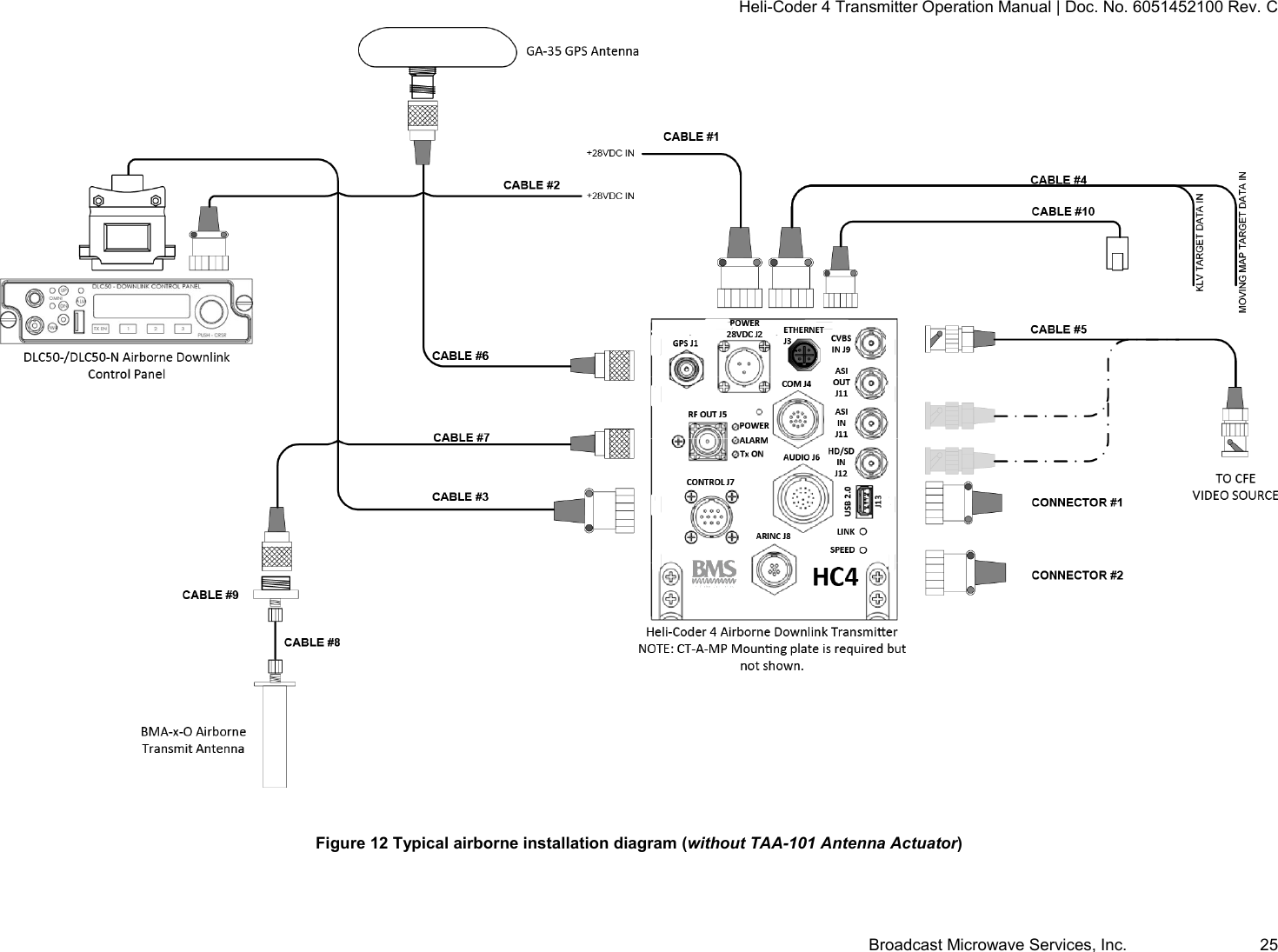
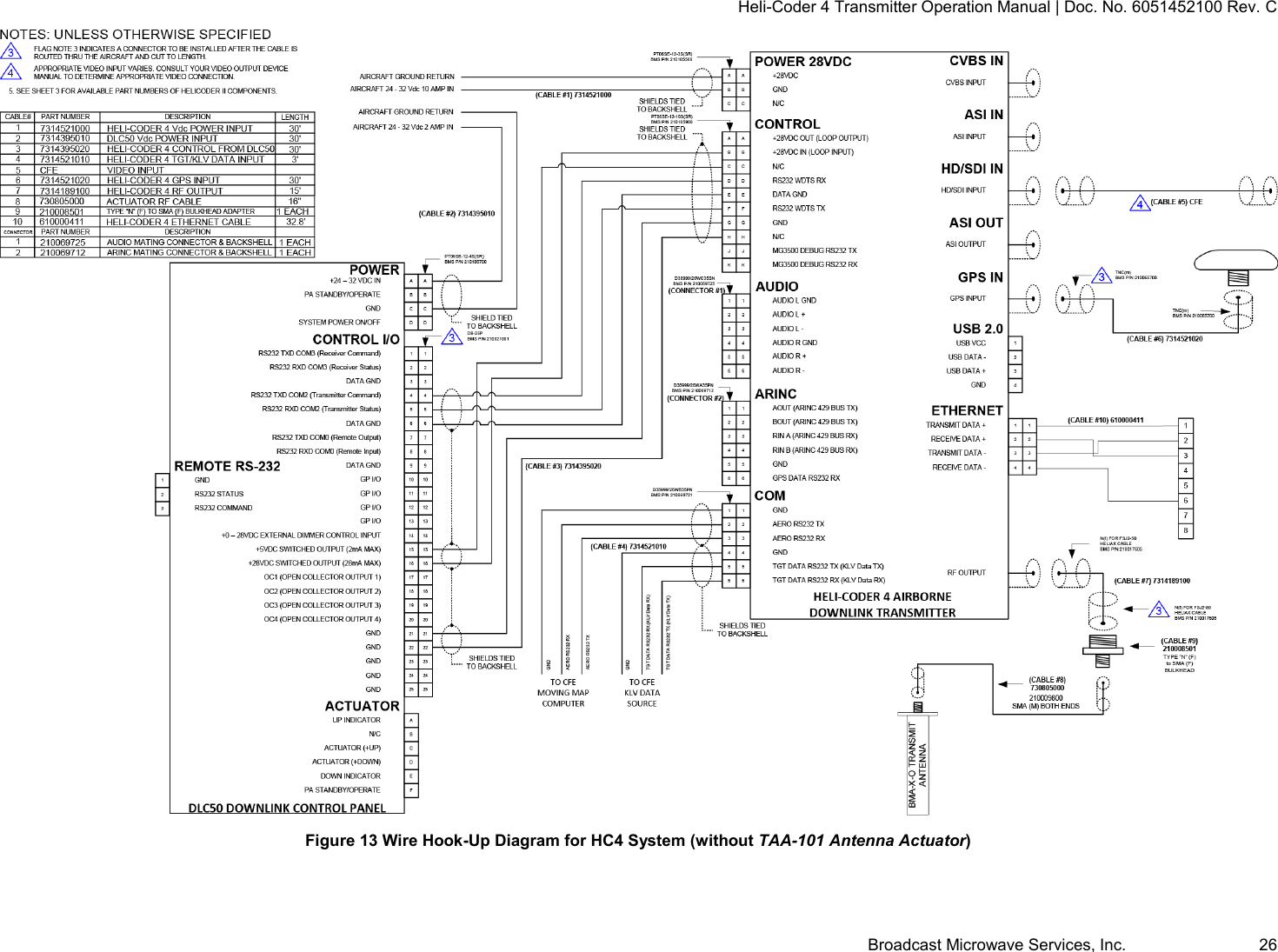
Heli-Coder 4 Transmitter Operation Manual | Doc. No. 6051452100 Rev. C Broadcast Microwave Services, Inc.     11 5.4  Wiring Connections and Signal Interfaces Reference Figure 12 Typical airborne installation diagram (without TAA-101 Antenna Actuator)” and Figure 13 Wire Hook-Up Diagram for HC4 System” shown later in this document. Also reference section 16 of this manual titled  “CONNECTION AND WIRING DIAGRAMS” during installation for detail related to a typical installation.   Contact BMS regarding issues related to custom or modified installations if applicable. Additional service or fees may apply. 5.4.1  Power Input (J2) J2 connects aircraft 28VDC from an available 5 AMP breaker.  Use AWG 20 gauge wire or larger. 5.4.2  Radio Frequency Output (RF Out)  (J5)   J5 conducts the radio frequency energy out to a transmit antenna.  Achieving optimum link performance includes assuring a maximum RF energy is delivered to the antenna assembly via properly mated connector assemblies and well installed cables. RF cable should be 50Ω foam dielectric coaxial cable.  Belden type FSJ-50A or equal is recommended.  Cable lengths should be as short as practical in the installation to reduce RF loss. Observe the cable manufacturer’s minimum “bend radius” recommendation during installation.  Kinks, pinches, or sharp bends in high frequency cable will cause significant power losses.   Check all connections for proper termination and use high-quality type N connectors.  Hand-tighten connectors; do not use a wrench or pliers as over-tightening will damage a connector and reduce the system performance by introducing RF loss in the transmission line.  Seal mated exterior connections with self-vulcanizing rubber tape in order to avoid moisture in the connection joint which may also introduce RF loss or physically damage the connector over time. It is good practice to avoid the use of 90° elbow adaptors within the RF coax cable run.      5.4.3  Serial Digital Video Input (J12)  J12 is a standard 75Ω BNC jack that is for a Serial Digital Interface.  This is the digital video signal that comes out of most modern video cameras.  The signal may be standard definition SDI (SMPTE-270) or high definition HD-SDI (SMPTE-292).  A high quality, double shielded coaxial video cable should be used such as Belden 8281 or equal.  Take care to terminate the cable with a 75Ω BNC plug.  5.4.4  Composite Video (CVBS) Input (J9) J9 accepts a standard definition composite video signal (PAL or NTSC).  Follow the same cabling instructions as in 5.4.3. 5.4.5  ASI Input J11 accepts an asynchronous serial input (ASI) also known as DVB-ASI (digital video broadcasting).  The signal consists of a compressed MPEG transport stream.  The input by-passes the internal encoder built into the HC4 and goes right into the modulator.  This allows use of external video or data encoders whose outputs are an ASI transport stream.  The input must conform to the ISO/IEC 13818-1 standard.  Follow the same cabling instructions described in section 5.4.3. 5.4.6  ASI Output J10 ports out an ASI transport stream consisting of the encoded video currently being transmitted by the HC4.  This output allows external monitoring of the compressed signal and the use of a backup transmitter or other configurations. Follow the same cabling instructions described in section 5.4.3.  5.4.7  Audio Input J6 is a multi-pin connector where pins 1-6 are dedicated to two balanced audio channels, each 600Ω impedance.  Use a high quality shielded twisted pair audio cable. 5.4.8  GPS J1 is an input connector for an external GPS antenna.  The recommended antenna is a Garmin GA 35 but other antennas will work.  The output connector is a TNC(f) and should be cabled with a good quality 50Ω coax.  Follow the antenna manufacturer’s instructions for cable/ connector type and cable length.
Heli-Coder 4 Transmitter Operation Manual | Doc. No. 6051452100 Rev. C Broadcast Microwave Services, Inc.     12 A switchable (on/off) and adjustable (0-10VDC) DC voltage bias is supplied on the center pin of the connector to power the amplifier in the GPS antenna.  The DC bias voltage is adjustable during the HC4 set-up operation.   5.4.9  Data Wayside Input J4 is a multi-pin connector for interfacing data to be transmitted with the video transport stream.  The data wayside interface is RS-232 from between 1.2 to 115 kb/s.  5.4.10  KLV Data J4 has a second channel for KLV data transmission.  The interface is RS-232 from between 1.2 to 115 kb/s. 5.4.11  Auxiliary Data J4 offers an auxiliary data interface for RS-232 data for speeds from 1.2 to 115 kb/s. 5.4.12  Ethernet Field installation of the connector is difficult so no standalone mating connector is available.  Instead, a 10-meter M12 to RJ45 cable assembly is available that may be used as-is or cut to length and re-terminated as required.   Ordering information for the cable; P/N  610000411  Cable Assembly, M12 Male to RJ45 plug, 4 Pin Ethernet, 10m (32.8 FT)    Contact the factory for price and availability. J3 is associated with two LED’s on the lower right of the HC4 labeled SPEED and LINK.  The LED’s mirror those found on a standard RJ45 LAN port and indicate the following; SPEED  Yellow LED:  ON=100BaseT OFF=10BaseT  LINK   Green LED:  Flashing=Valid Ethernet Link Off=NO Valid Ethernet Link  The Ethernet port can be used for command and control of the HC4 in a standard LAN configuration.  This may be desired where the mission hardware must be controlled from a central operator’s console running a custom PC application.  A detailed discussion for this configuration is beyond the scope of this document.  BMS will provide instructions, a command set, and reasonable support to any customer desiring this type of control ability.  In addition to Ethernet for command and control, an extension of the Ethernet port capabilities includes routing and data streaming capabilities in a unidirectional fashion.  The HC-4 is interfaced to a local area network in the aircraft. The HC-4 can then be either controlled via the network interface, or forward unidirectional IP packets such as UDP over the radio link, or receive a data payload from an IP packet (either TCP or UDP) and convert that data into a format to be sent in the MPEG transport stream.  A companion receiver (like the BMS SPRITE-PRO Series) recovers the packets and ports them out of an Ethernet connection.    5.4.13  USB J13 is a standard USB 2.0 type A jack.  It is normally left open and is used for software updates to the HC4.  The jack accepts a USB drive or may be connected to a PC via a commonly available USB cable. 5.4.14  ARINC J8 <Reserved for future use> 5.4.15  Control J7 provides interconnection between the DLC50 control panel and HC4 transmitter.
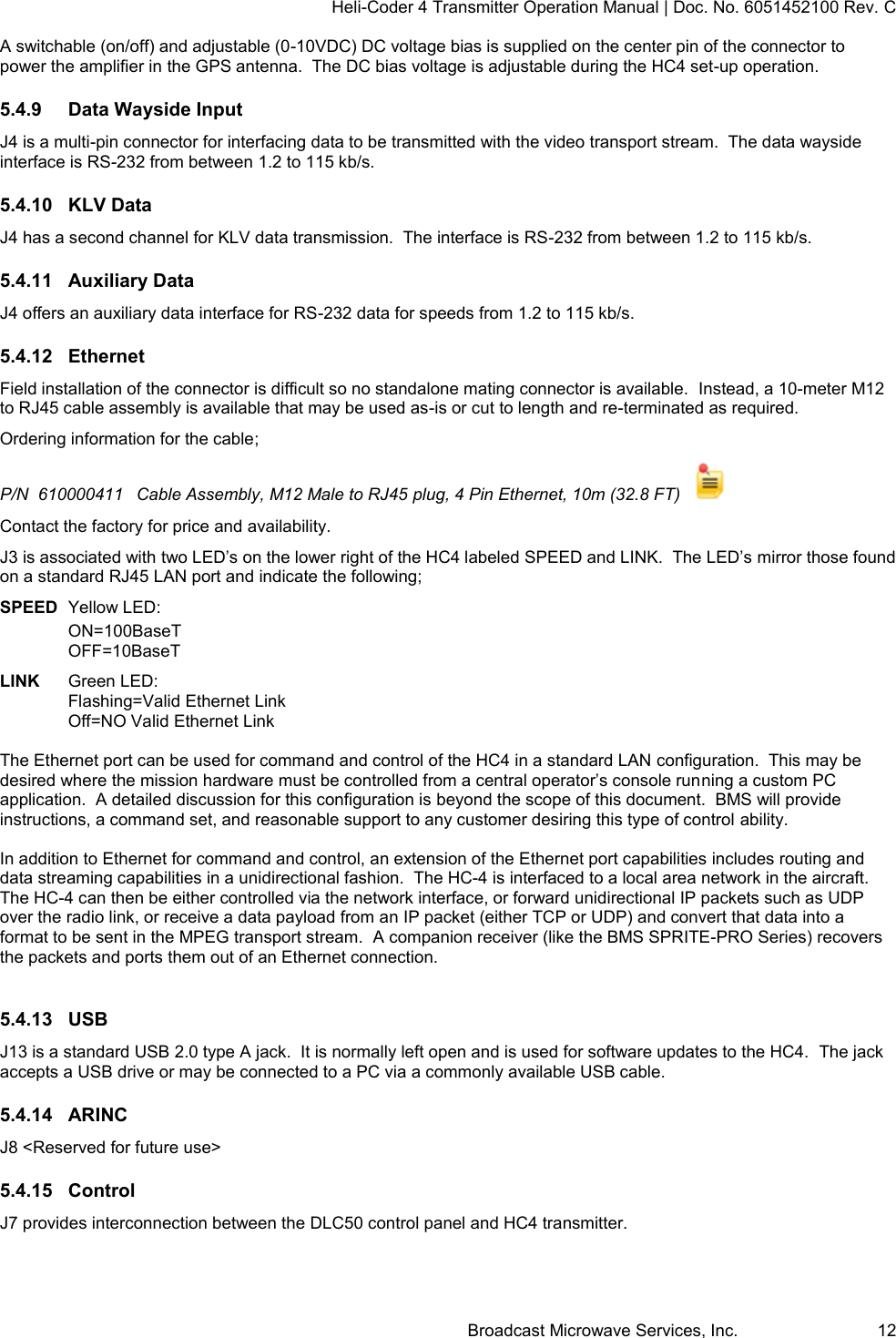
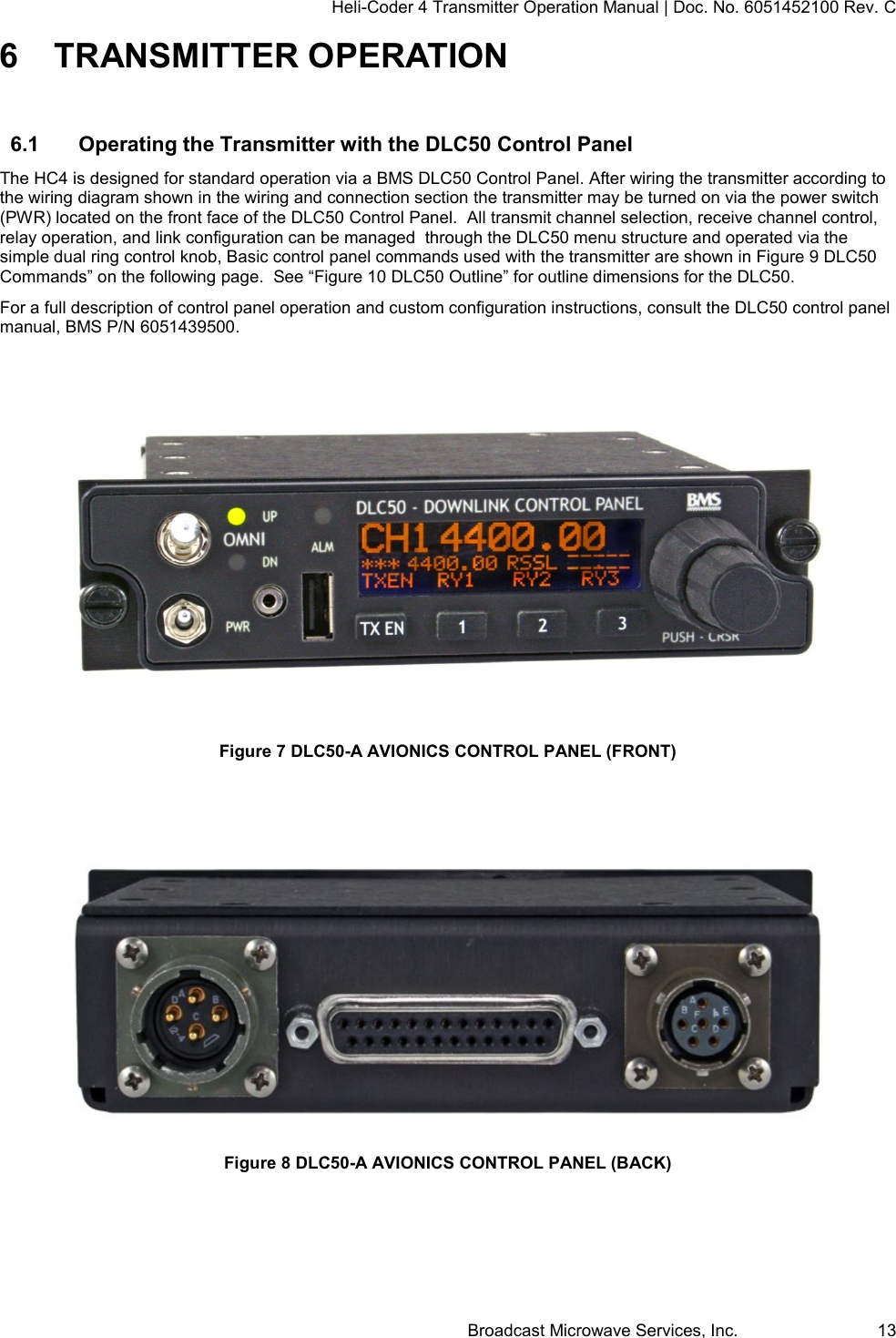
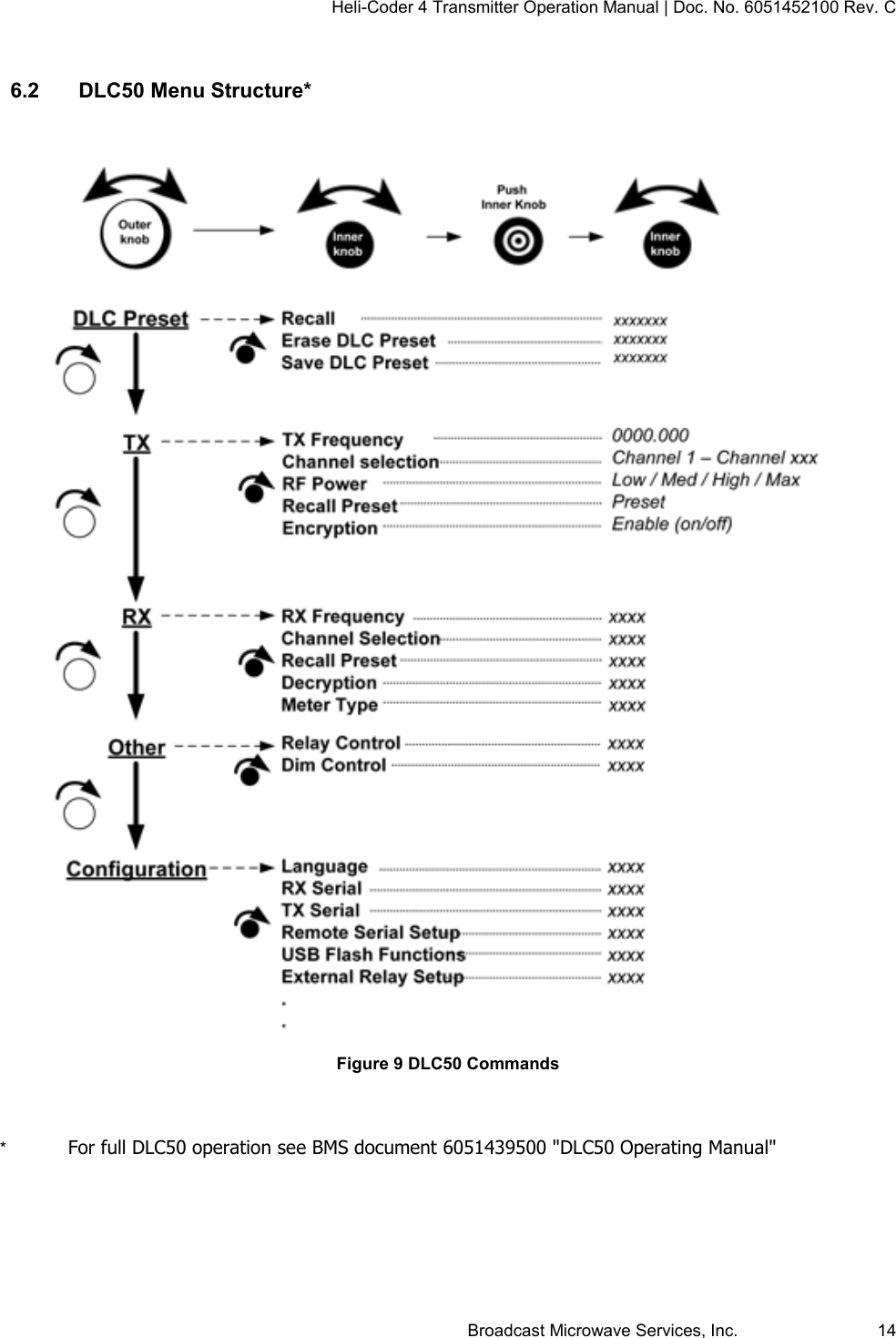
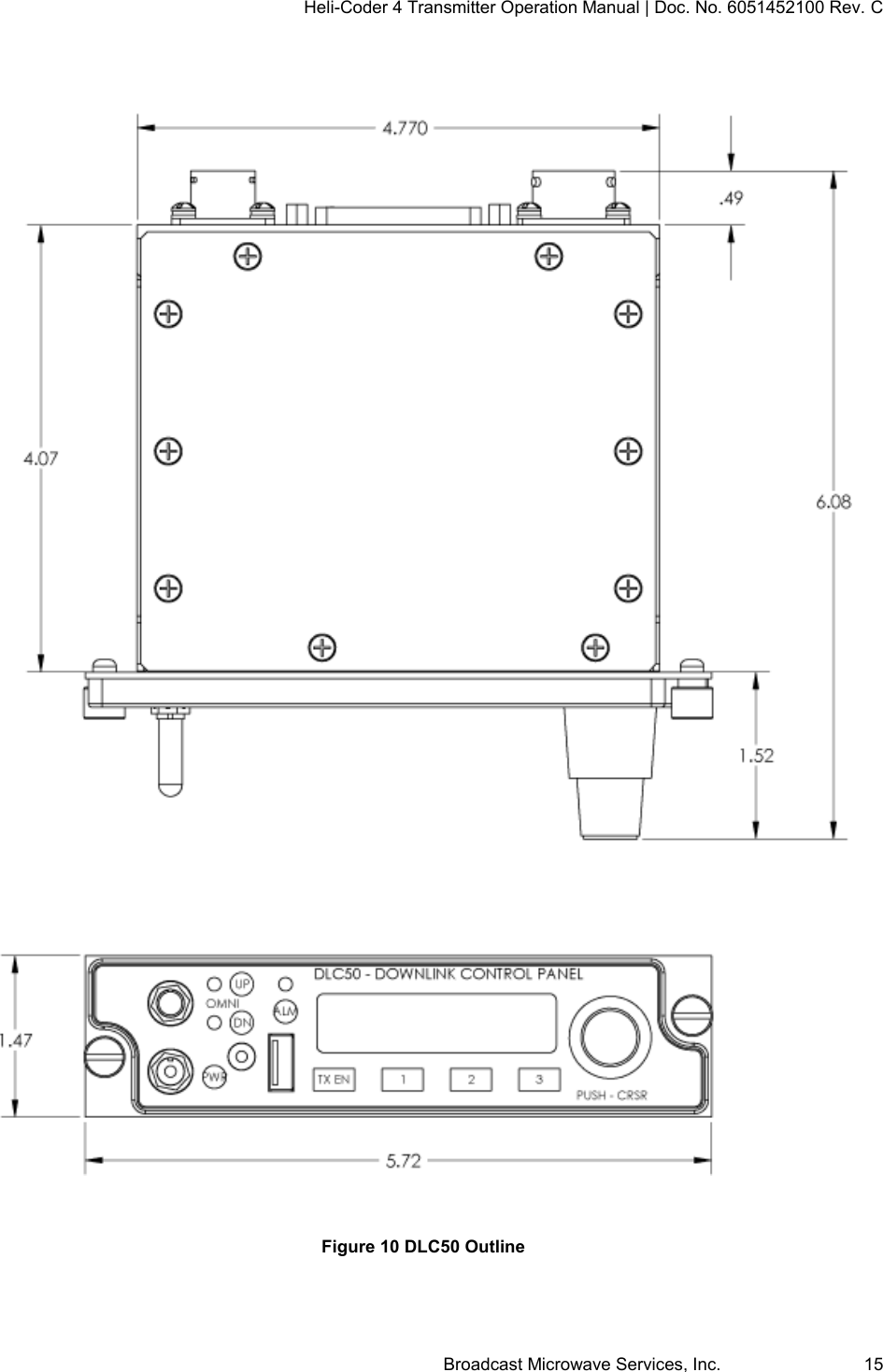
Heli-Coder 4 Transmitter Operation Manual | Doc. No. 6051452100 Rev. C Broadcast Microwave Services, Inc.     13 6  TRANSMITTER OPERATION 6.1  Operating the Transmitter with the DLC50 Control Panel The HC4 is designed for standard operation via a BMS DLC50 Control Panel. After wiring the transmitter according to the wiring diagram shown in the wiring and connection section the transmitter may be turned on via the power switch (PWR) located on the front face of the DLC50 Control Panel.  All transmit channel selection, receive channel control, relay operation, and link configuration can be managed  through the DLC50 menu structure and operated via the simple dual ring control knob, Basic control panel commands used with the transmitter are shown in Figure 9 DLC50 Commands” on the following page.  See “Figure 10 DLC50 Outline” for outline dimensions for the DLC50. For a full description of control panel operation and custom configuration instructions, consult the DLC50 control panel manual, BMS P/N 6051439500.   Figure 7 DLC50-A AVIONICS CONTROL PANEL (FRONT)    Figure 8 DLC50-A AVIONICS CONTROL PANEL (BACK)
Heli-Coder 4 Transmitter Operation Manual | Doc. No. 6051452100 Rev. C Broadcast Microwave Services, Inc.     14  6.2  DLC50 Menu Structure*   Figure 9 DLC50 Commands   *  For full DLC50 operation see BMS document 6051439500 "DLC50 Operating Manual"
Heli-Coder 4 Transmitter Operation Manual | Doc. No. 6051452100 Rev. C Broadcast Microwave Services, Inc.     15    Figure 10 DLC50 Outline
Heli-Coder 4 Transmitter Operation Manual | Doc. No. 6051452100 Rev. C Broadcast Microwave Services, Inc.     16 7  BMS Geo-Point™ System  7.1  Geo-Point System Description  The Geo-Point System provides a method for ground personnel to instantly know the range and direction to the center point of live video they are viewing.  Using information received from the camera sensor or on-board moving map, the CVIII+ hand-held receiver/monitor displays both real-time video and an easy to interpret compass “rose” that shows direction and distance information.  Unlike other tactical systems that rely on external processors, Geo-Point direction information is developed within the handheld receiver.   The Plus model CVIII contains an integral compass and GPS receiver.  Geo-Point software looks for a special word in the NMEA 0183 data stream known as Target Lat Long (TLL).  Using the TLL data received from the aircraft the receiver displays direction and distance to where the airborne camera is pointed.    Geo-Point is a proprietary feature of BMS products. 7.2  Enabling Geo-Point™ A GPS receiver is built into the HC4.  J4 (COM PORT) pins 5 and 6 accept NMEA 0183 serial data containing the “stare point” (SP) information from an external source (usually the camera or a moving map).  This function is enabled all the time.  The GPS source will be external if there is valid NMEA data on pins 5/6.  If an input on pins 5/6 is missing or corrupt, the HC4 will revert to its internal GPS source to maintain sync with the tracking sites.  Lacking the SP information the Geo-Point enabled device will report the aircraft range and position.  The SP info must be added to the NMEA stream in the TLL word (Target Lat/Long) position.  The RX site will track by reading the aircraft position LAT/LONG from the NMEA stream while Geo-Pont enabled display, (e.g. a BMS CVIII+, or CVIII+-HD) will use the TLL info to develop the range/distance report for the Geo-Point display overlay.  BMS has worked with several manufacturers to assure compatibility and support for the Geo-Point function.  The addition of the  TLL word to the GPS message is supported by several interfacing equipment manufactures or may involve a simple set-up process. To learn more about how adoption of Geo-Point can benefit your agency contact the BMS.
Heli-Coder 4 Transmitter Operation Manual | Doc. No. 6051452100 Rev. C Broadcast Microwave Services, Inc.     17 8  SOFTWARE INSTALLATION The DLC50 and HC4 both come completely loaded with the software required to operate the unit.  However field installation of software can easily be accomplished by the user in order to Update, Upgrade, or even reinstall the system software. The process to install software on either the DLC50 or the HC4 involves loading a file via the USB port on each device from a USB mass storage device.  A USB memory stick will be recognized by both the DCL50 and the HC4 and is a recommended device for providing the software update. General Notes: 1.  Control of the Installation process is accomplished via the control interface provided on the DLC50, however the USB port on each unit must be used to perform the installation on that unit.  a.  If you are loading an update into the DLC50, then the USB stick is inserted into the USB port of the DLC50. b.  If you are loading an update into the HC4, then the USB stick is inserted into the USB port of the HC4. c.  A device inserted into the USB port of the DLC50 WILL NOT be able to update the software in a connected HC4. 2.  Software files for installation MUST be stored in the root directory of the USB storage device or USB memory stick. 3.  The file type for the DLC50 is DLCsoft.hex 4.  The file type for the HC4 is hc4_app.xxxxxxxxx.bin Installation Procedure for the DLC50 1.  Prior to starting the procedure, ensure the file for theDLC50 update is in the root level directory of the USB device 2.  Ensure that the DLC50 is powered ON. 3.  Insert the USB device into the USB port on the front of the DLC50 control panel. 4.  Wait 10 seconds (typically) for the system to recognize the file on the USB device. 5.  Using the DLC50 front panel controls: a.  Rotate the OUTER knob to “Config.” b.  Rotate the INNER knob to “Config: USB Flash”. c.  Press the INNER Knob, or “OK” to select.  The DLC50 will ask for confirmation. d.  Press the INNER knob, or “OK” to select “yes” to initiate the update. Installation Procedure for the HC4 1.  Prior to starting the procedure, ensure the file for the HC4 update is in the root level directory of the USB device 2.  Ensure that both the DLC50 and HC4 are powered ON and that the DLC50 is controlling the HC4. 3.  Insert the USB device into the USB port of the HC4. 4.  Wait 10 seconds (typically) for the system to recognize the file on the USB device. 5.  Using the DLC50 front panel controls: a.  Rotate the OUTER knob to “TX”. b.  Rotate the INNER knob to “Software Update”. c.  Press the INNER Knob, or “OK” to select. The DLC50 will ask for confirmation. d.  Rotate INNER knob to highlight “yes”. e.  Press the INNER knob, or “OK” to select “yes” to initiate the update.
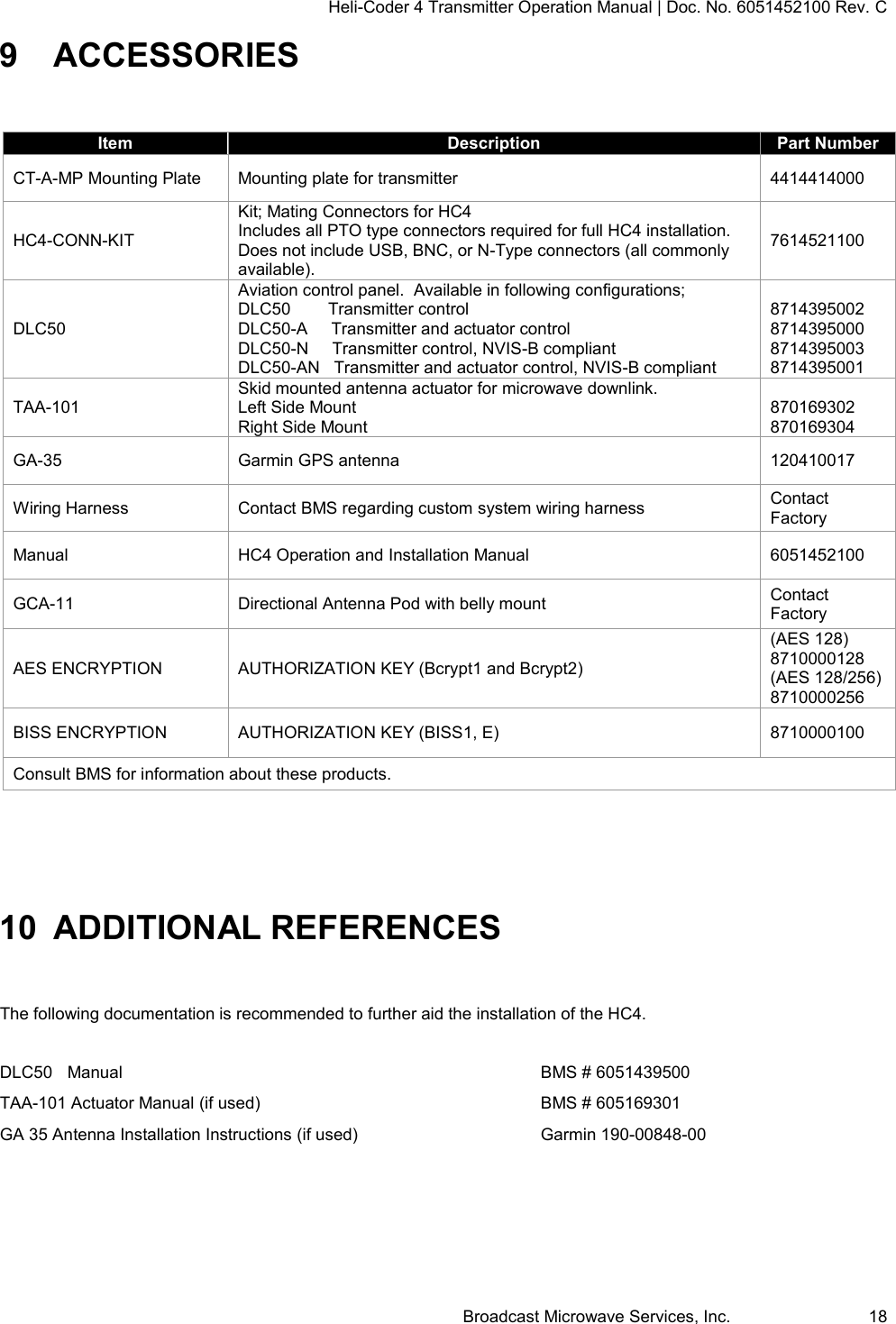
Heli-Coder 4 Transmitter Operation Manual | Doc. No. 6051452100 Rev. C Broadcast Microwave Services, Inc.     18 9  ACCESSORIES  Item Description Part Number CT-A-MP Mounting Plate Mounting plate for transmitter 4414414000 HC4-CONN-KIT Kit; Mating Connectors for HC4    Includes all PTO type connectors required for full HC4 installation.  Does not include USB, BNC, or N-Type connectors (all commonly available). 7614521100 DLC50 Aviation control panel.  Available in following configurations; DLC50        Transmitter control DLC50-A     Transmitter and actuator control DLC50-N     Transmitter control, NVIS-B compliant DLC50-AN   Transmitter and actuator control, NVIS-B compliant  8714395002 8714395000 8714395003 8714395001 TAA-101 Skid mounted antenna actuator for microwave downlink. Left Side Mount Right Side Mount  870169302 870169304 GA-35 Garmin GPS antenna 120410017 Wiring Harness Contact BMS regarding custom system wiring harness Contact Factory Manual HC4 Operation and Installation Manual 6051452100 GCA-11 Directional Antenna Pod with belly mount Contact Factory AES ENCRYPTION AUTHORIZATION KEY (Bcrypt1 and Bcrypt2) (AES 128) 8710000128 (AES 128/256) 8710000256 BISS ENCRYPTION AUTHORIZATION KEY (BISS1, E) 8710000100 Consult BMS for information about these products.  10 ADDITIONAL REFERENCES  The following documentation is recommended to further aid the installation of the HC4.   DLC50  Manual              BMS # 6051439500 TAA-101 Actuator Manual (if used)          BMS # 605169301 GA 35 Antenna Installation Instructions (if used)      Garmin 190-00848-00
Heli-Coder 4 Transmitter Operation Manual | Doc. No. 6051452100 Rev. C Broadcast Microwave Services, Inc.     19 11 REGULATORY 11.1  Electromagnetic Compliance CE marked in accordance with EU Low Voltage and EMC Directives EN55022 EN55024  11.2  FCC The HC4 is an intentional radiator and is authorized by the Federal Communications Commission (FCC) to comply with the following parts of CFR 47 (grant pending); Part 74 Part  90  11.3  Environmental Qualifications The HC4 transmitter and DLC50 control panel have been designed to meet the following sections of RTCA DO-160G;  Section 4  Category A1      Temperature and Altitude   Section 5  Category B      Temperature Variation Section 6  Category A      Humidity Section 8  Category R,U2, (8.8.3)    Vibration Section 16  Category B, Designation I    Power Input Section 17  Category A      Voltage Spike Section 20.4          Radio Susceptibility - Conducted Section 20.5          Radio Susceptibility - Radiated Section 25          Electrostatic Discharge (ESD)
Heli-Coder 4 Transmitter Operation Manual | Doc. No. 6051452100 Rev. C Broadcast Microwave Services, Inc.     20 12 PREVENTIVE MAINTENANCE In order to ensure system longevity it is highly recommended that the following preventive maintenance procedures be done at the appropriate time.  12.1  Maintenance Schedule Procedure Yearly Quarterly Monthly Prior Each Use Inspect Mounting Hardware     Inspect Wiring (connection, chafing)     Inspect control and RF cables     Inspect TAA-101 Antenna Actuator     12.2  Maintenance Procedures There are no required maintenance procedures for the HC4.  Include the following with preflight inspection: Inspect mounting hardware to ensure all components are secure.  Inspect cables and connections. 12.3  Spare Parts The HC4 has no user replaceable parts. Contact BMS for all service and repair inquiries.  Factory contact information is provided in section 20”REPAIR SERVICE AND WARRANTY” Note: Any attempts to service individual components may void the warranty. 13 REPAIR SERVICE AND WARRANTY BMS warrants that, at time of delivery, this product will be free from defects in materials and workmanship, provided the equipment or system is installed, operated and maintained in accordance with the Operation and Maintenance manual or such other BMS documentation as may be applicable. Any such defect reported to BMS within two years, BMS will take reasonable and prompt action to repair or replace such equipment. Should any of the components be defective, please contact BMS immediately. Please have the following information available so we can best serve you.   Customer Name   Contract Number   BMS Model Number   Serial Number   Detailed Description of Problem   Name of Contact Person.   Contact Information such as phone number and/or email address.   Return Information Much of this information can be found on the product label found on the component.
Heli-Coder 4 Transmitter Operation Manual | Doc. No. 6051452100 Rev. C Broadcast Microwave Services, Inc.     21  Figure 11 Product Label Defective components under BMS warranty will be repaired/replaced promptly at the discretion of BMS. Items no longer under warranty will require a PO before repairs can proceed.  NOTE: All goods returned for service require an RMA #. Any goods received without an RMA# may not be processed in a timely manner. Please contact BMS for an RMA#. 13.1  Customer Service Broadcast Microwave Services, Inc. 12367 Crosthwaite Circle, Dock 10 • Poway, CA 92064 • U.S.A. Tel: +1-858-391-3050 • Toll Free (U.S.): 800-669-9667 • Fax: +1-858-391-3049 Website: www.bms-inc.com • E-mail: sales@bms-inc.com  Broadcast Microwave Services Europe Schwalbacher Str. 12 • 65321 Heidenrod • Germany Tel: +49-6124-72 39-00 • Fax: +49-6124-72 39-29 Website: www.bms-inc.com • E-mail: saleseurope@bms-inc.com
Heli-Coder 4 Transmitter Operation Manual | Doc. No. 6051452100 Rev. C Broadcast Microwave Services, Inc.     22 14 GLOSSARY AES Advanced Encryption System.  Optional encryption system available for signal privacy Analog Transmission Frequency Modulated (FM) method of sending information with radio waves. An older, dependable method of transmission. (See Digital Transmission)   Antenna Actuator The mechanism which deploys or retracts the antenna radio operation or for landing and take-off. ASI: Asynchronous Serial Interface. Transmission standard used to connect video delivery equipment within a cable, satellite or terrestrial plant. BISS Basic Interoperable Scrambling System, optional method of signal privacy BNC Connector The Bayonet Neill-Concelman connector is a type of RF connector used for terminating coaxial cable. (See TNC connector) BTP:  BMS Transmission Privacy.  BMS proprietary PIN encryption system, standard on most BMS digital products COFDM: Coded Orthogonal Frequency Division Multiplex A digital modulation method that divides a single digital signal across multiple (1000+) signal carriers simultaneously. BMS Coder II family products use COFDM digital modulation. Composite Video The format of an analog television (picture only) signal before it is combined with a sound signal and modulated onto an RF carrier. CVIII Carry-Viewer™ III Handheld Receiver Microwave downlink receiver with color monitor CVIII+ Carry-Viewer™ III+ (includes Geo-Point) Handheld Receiver Microwave downlink receiver with color monitor Data Wayside The data side channel on a microwave downlink dB: Decibel A unit for expressing the ratio of two amounts of electric or acoustic signal power equal to 10 times the common logarithm of this ratio. dBm A unit for expressing the power ratio in decibel (dB) of the measured power referenced to one milliwatt (mW). Digital Transmission Digitally Modulated (COFDM and others) method of sending information with radio waves. Newer more reliable method of transmission. (See Analog Transmission) Directional Antenna The final transmit element of a microwave system that radiates the signal one direction, in a directed or focused narrow beam. This requires aiming of the antenna toward the receive site. DVB-T: Digital Video Broadcasting-Terrestrial An international digital television (DTV) standard that defines digital COFDM modulation using MPEG2 compression. DO-160 RTSC standard; Environmental Conditions and Test Procedures for Airborne Equipment Downlink Microwave transmission from air to ground Geo-Point BMS Proprietary direction and ranging system GPS: Global Positioning System A navigational system using satellite signals to fix the location of a receiver on or above the earth’s surface MPEG-2 A compression standard for digital video, audio, and data H.264 A compression standard for digital video, audio, and data  conforming to MPEG-4, Section 10 AVC (Advanced Compression Standard) HD-SDI High Definition Serial Digital Interface - A digitized video format for high definition video
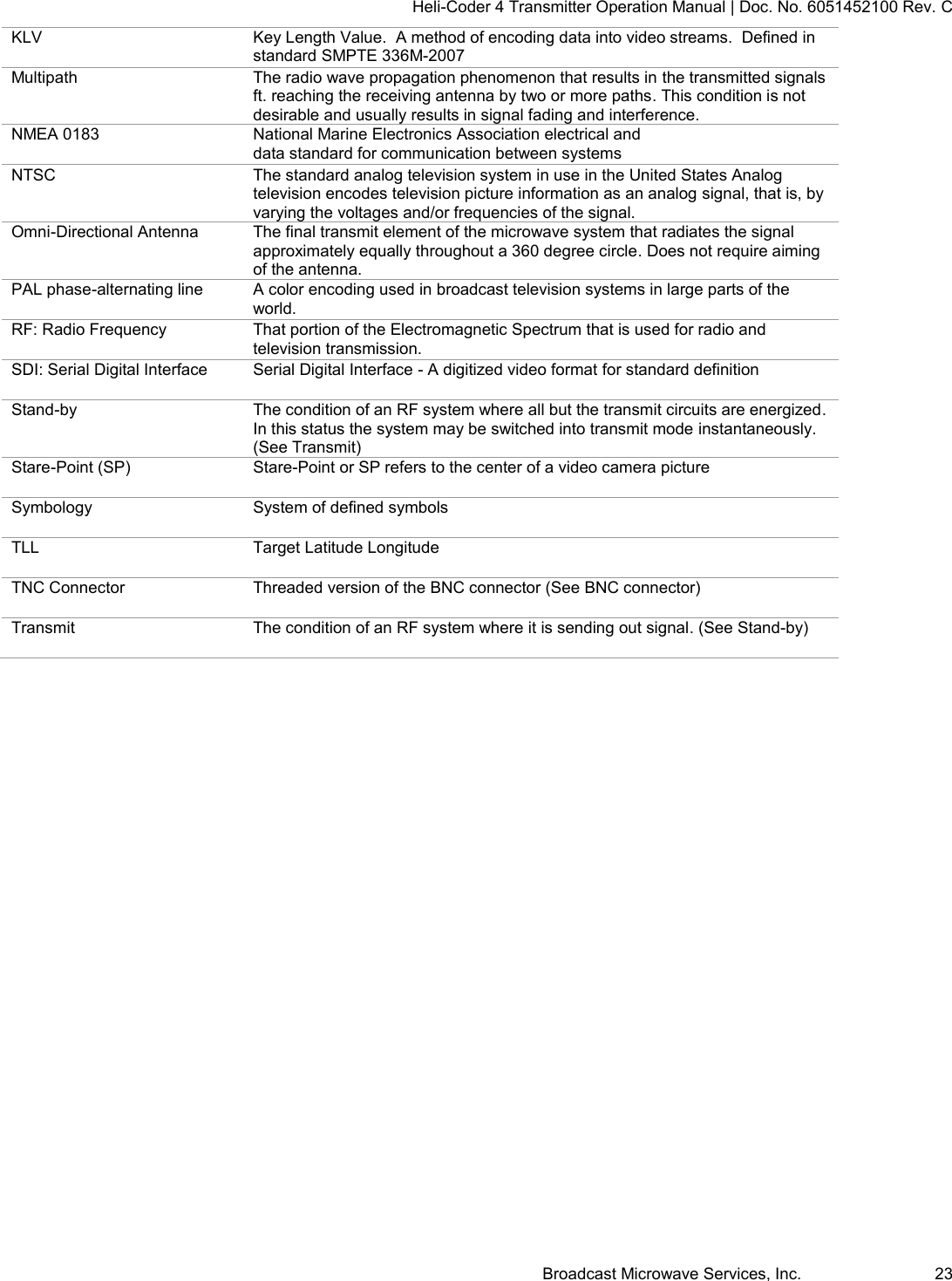
Heli-Coder 4 Transmitter Operation Manual | Doc. No. 6051452100 Rev. C Broadcast Microwave Services, Inc.     23 KLV Key Length Value.  A method of encoding data into video streams.  Defined in standard SMPTE 336M-2007 Multipath The radio wave propagation phenomenon that results in the transmitted signals ft. reaching the receiving antenna by two or more paths. This condition is not desirable and usually results in signal fading and interference. NMEA 0183 National Marine Electronics Association electrical and data standard for communication between systems NTSC The standard analog television system in use in the United States Analog television encodes television picture information as an analog signal, that is, by varying the voltages and/or frequencies of the signal. Omni-Directional Antenna The final transmit element of the microwave system that radiates the signal approximately equally throughout a 360 degree circle. Does not require aiming of the antenna. PAL phase-alternating line A color encoding used in broadcast television systems in large parts of the world. RF: Radio Frequency That portion of the Electromagnetic Spectrum that is used for radio and television transmission. SDI: Serial Digital Interface Serial Digital Interface - A digitized video format for standard definition  Stand-by The condition of an RF system where all but the transmit circuits are energized. In this status the system may be switched into transmit mode instantaneously. (See Transmit) Stare-Point (SP) Stare-Point or SP refers to the center of a video camera picture Symbology System of defined symbols TLL Target Latitude Longitude TNC Connector Threaded version of the BNC connector (See BNC connector) Transmit The condition of an RF system where it is sending out signal. (See Stand-by)
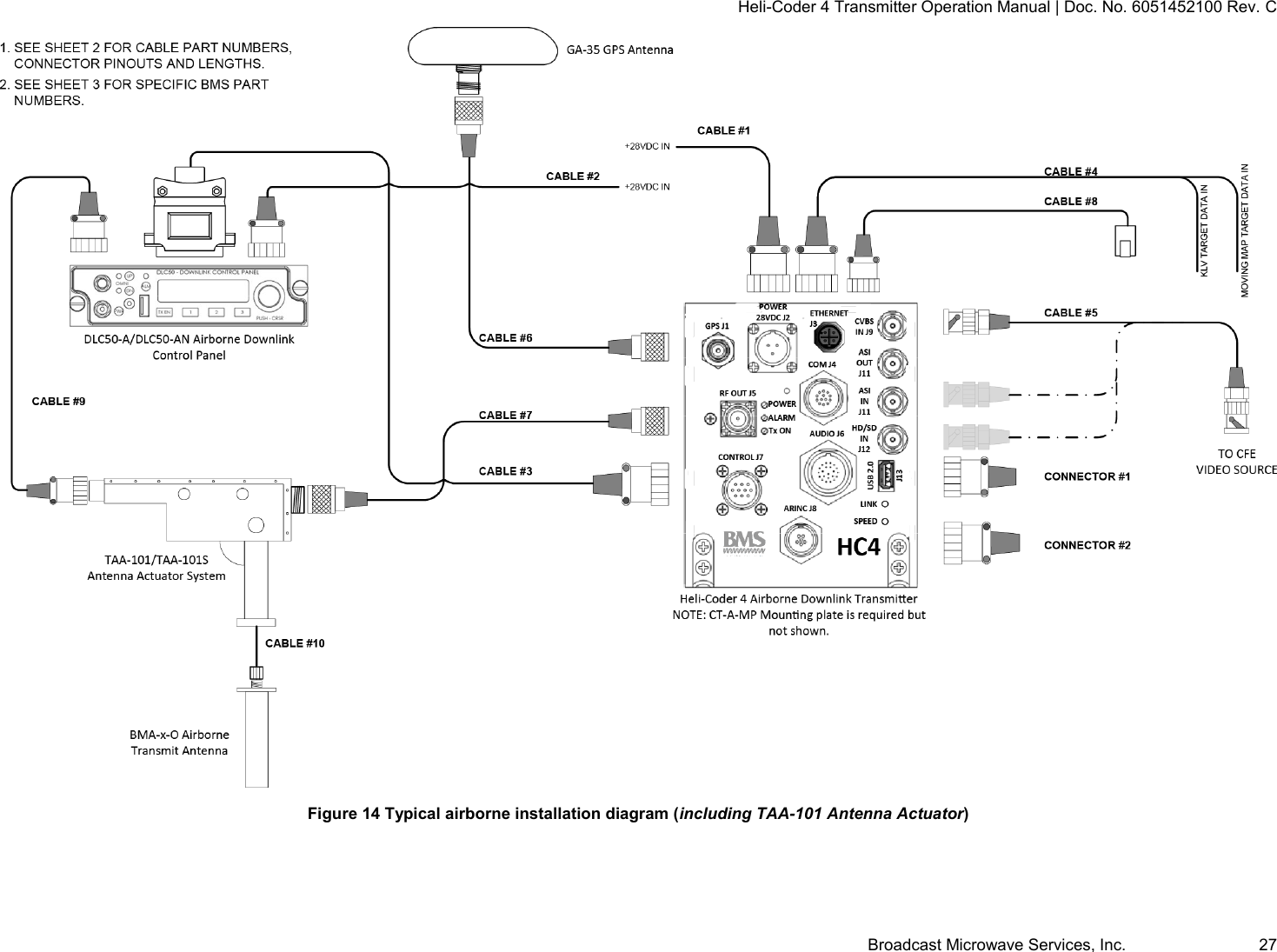
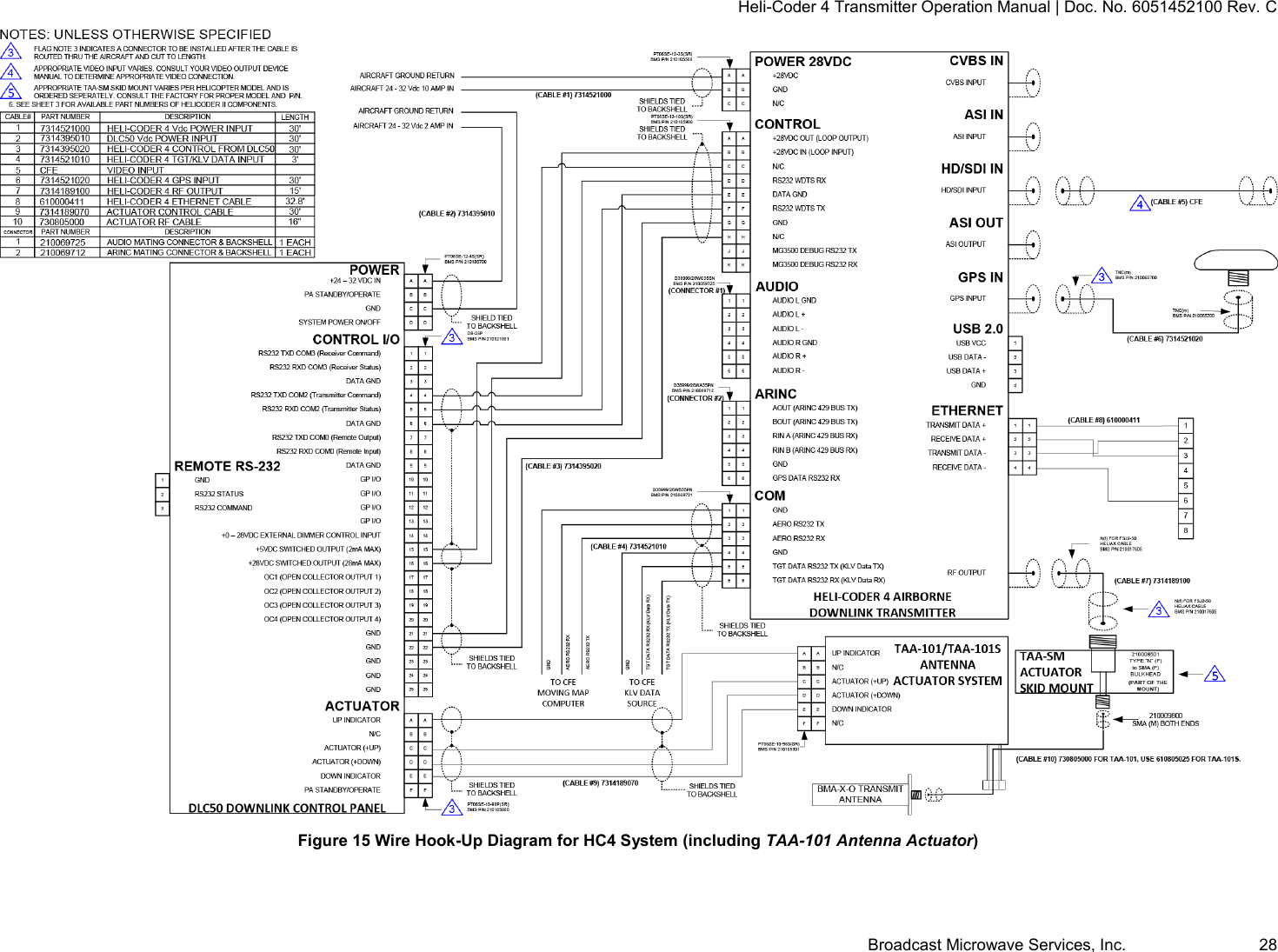
Heli-Coder 4 Transmitter Operation Manual | Doc. No. 6051452100 Rev. C Broadcast Microwave Services, Inc.     24  15 CONNECTION AND WIRING DIAGRAMS This section contains system and hook-up wiring diagrams.
Heli-Coder 4 Transmitter Operation Manual | Doc. No. 6051452100 Rev. C Broadcast Microwave Services, Inc.     25   Figure 12 Typical airborne installation diagram (without TAA-101 Antenna Actuator)
Heli-Coder 4 Transmitter Operation Manual | Doc. No. 6051452100 Rev. C Broadcast Microwave Services, Inc.     26  Figure 13 Wire Hook-Up Diagram for HC4 System (without TAA-101 Antenna Actuator)
Heli-Coder 4 Transmitter Operation Manual | Doc. No. 6051452100 Rev. C Broadcast Microwave Services, Inc.     27  Figure 14 Typical airborne installation diagram (including TAA-101 Antenna Actuator)
Heli-Coder 4 Transmitter Operation Manual | Doc. No. 6051452100 Rev. C Broadcast Microwave Services, Inc.     28  Figure 15 Wire Hook-Up Diagram for HC4 System (including TAA-101 Antenna Actuator)
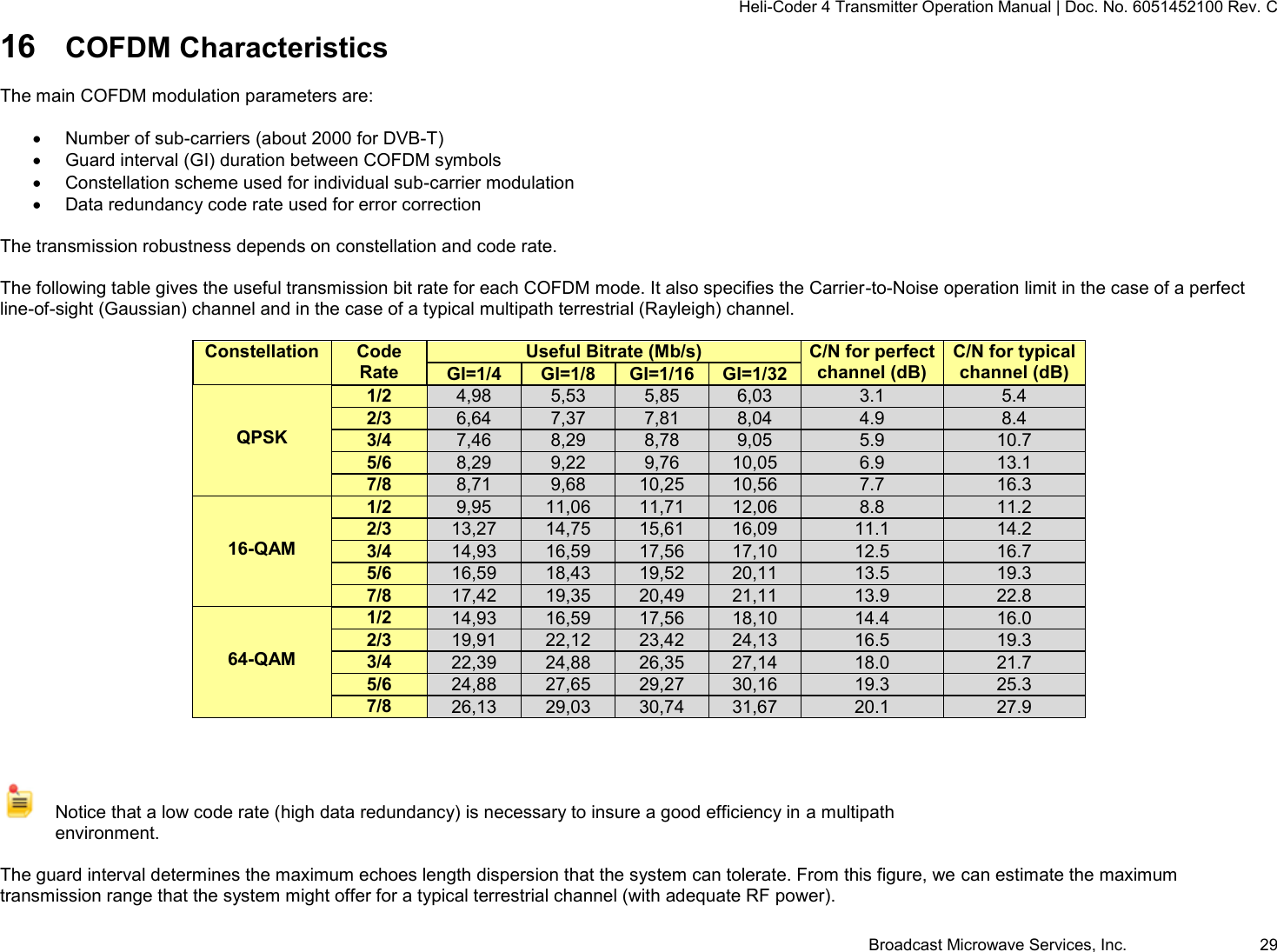
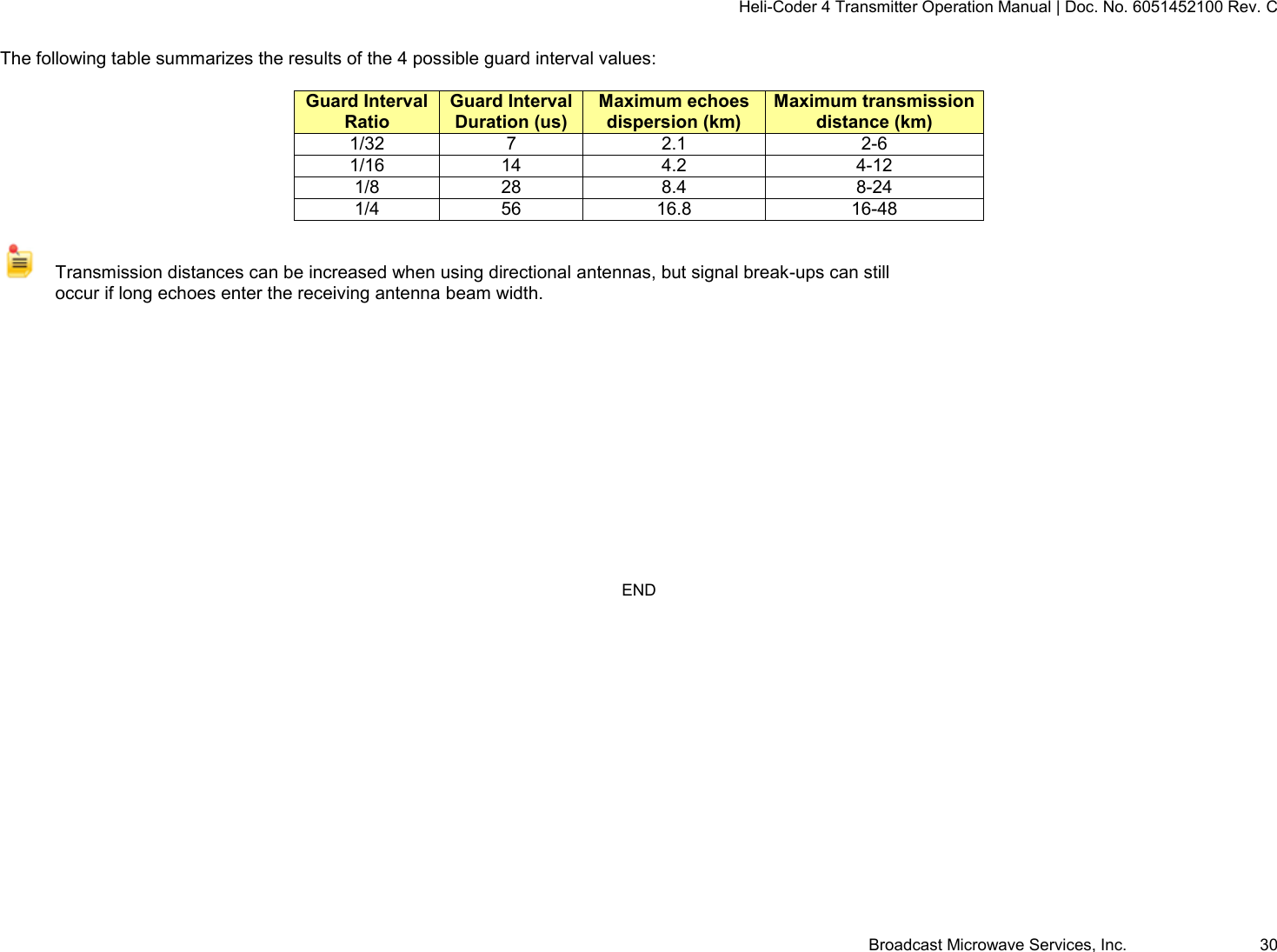
Heli-Coder 4 Transmitter Operation Manual | Doc. No. 6051452100 Rev. C Broadcast Microwave Services, Inc.     29 16 COFDM Characteristics  The main COFDM modulation parameters are:    Number of sub-carriers (about 2000 for DVB-T)   Guard interval (GI) duration between COFDM symbols   Constellation scheme used for individual sub-carrier modulation   Data redundancy code rate used for error correction  The transmission robustness depends on constellation and code rate.  The following table gives the useful transmission bit rate for each COFDM mode. It also specifies the Carrier-to-Noise operation limit in the case of a perfect line-of-sight (Gaussian) channel and in the case of a typical multipath terrestrial (Rayleigh) channel.  Constellation  Code Rate Useful Bitrate (Mb/s) C/N for perfect channel (dB) C/N for typical channel (dB) GI=1/4 GI=1/8 GI=1/16 GI=1/32   QPSK 1/2 4,98 5,53 5,85 6,03 3.1 5.4 2/3 6,64 7,37 7,81 8,04 4.9 8.4 3/4 7,46 8,29 8,78 9,05 5.9 10.7 5/6 8,29 9,22 9,76 10,05 6.9 13.1 7/8 8,71 9,68 10,25 10,56 7.7 16.3   16-QAM 1/2 9,95 11,06 11,71 12,06 8.8 11.2 2/3 13,27 14,75 15,61 16,09 11.1 14.2 3/4 14,93 16,59 17,56 17,10 12.5 16.7 5/6 16,59 18,43 19,52 20,11 13.5 19.3 7/8 17,42 19,35 20,49 21,11 13.9 22.8   64-QAM 1/2 14,93 16,59 17,56 18,10 14.4 16.0 2/3 19,91 22,12 23,42 24,13 16.5 19.3 3/4 22,39 24,88 26,35 27,14 18.0 21.7 5/6 24,88 27,65 29,27 30,16 19.3 25.3 7/8 26,13 29,03 30,74 31,67 20.1 27.9      Notice that a low code rate (high data redundancy) is necessary to insure a good efficiency in a multipath environment.  The guard interval determines the maximum echoes length dispersion that the system can tolerate. From this figure, we can estimate the maximum transmission range that the system might offer for a typical terrestrial channel (with adequate RF power).
Heli-Coder 4 Transmitter Operation Manual | Doc. No. 6051452100 Rev. C Broadcast Microwave Services, Inc.     30  The following table summarizes the results of the 4 possible guard interval values:  Guard Interval Ratio Guard Interval Duration (us) Maximum echoes dispersion (km) Maximum transmission distance (km) 1/32 7 2.1 2-6 1/16 14 4.2 4-12 1/8 28 8.4 8-24 1/4 56 16.8 16-48    Transmission distances can be increased when using directional antennas, but signal break-ups can still occur if long echoes enter the receiving antenna beam width.          END

Navigation menu