Broadcast Microwave Services TCIIAD-2 Truck Coder II System User Manual TCII Manual 4 FCC

Broadcast Microwave Services Inc Truck Coder II System TCII Manual 4 FCC

User Manual

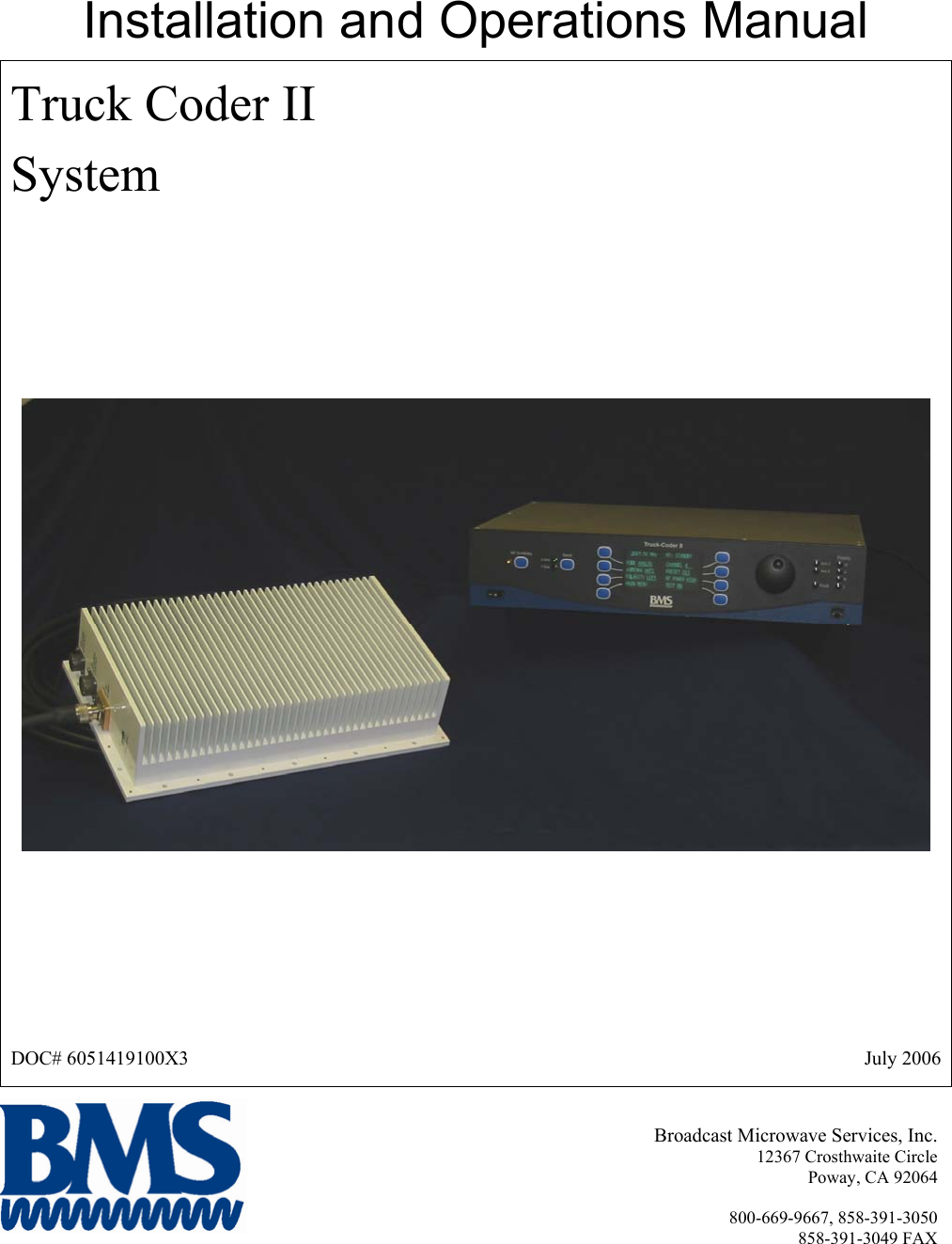
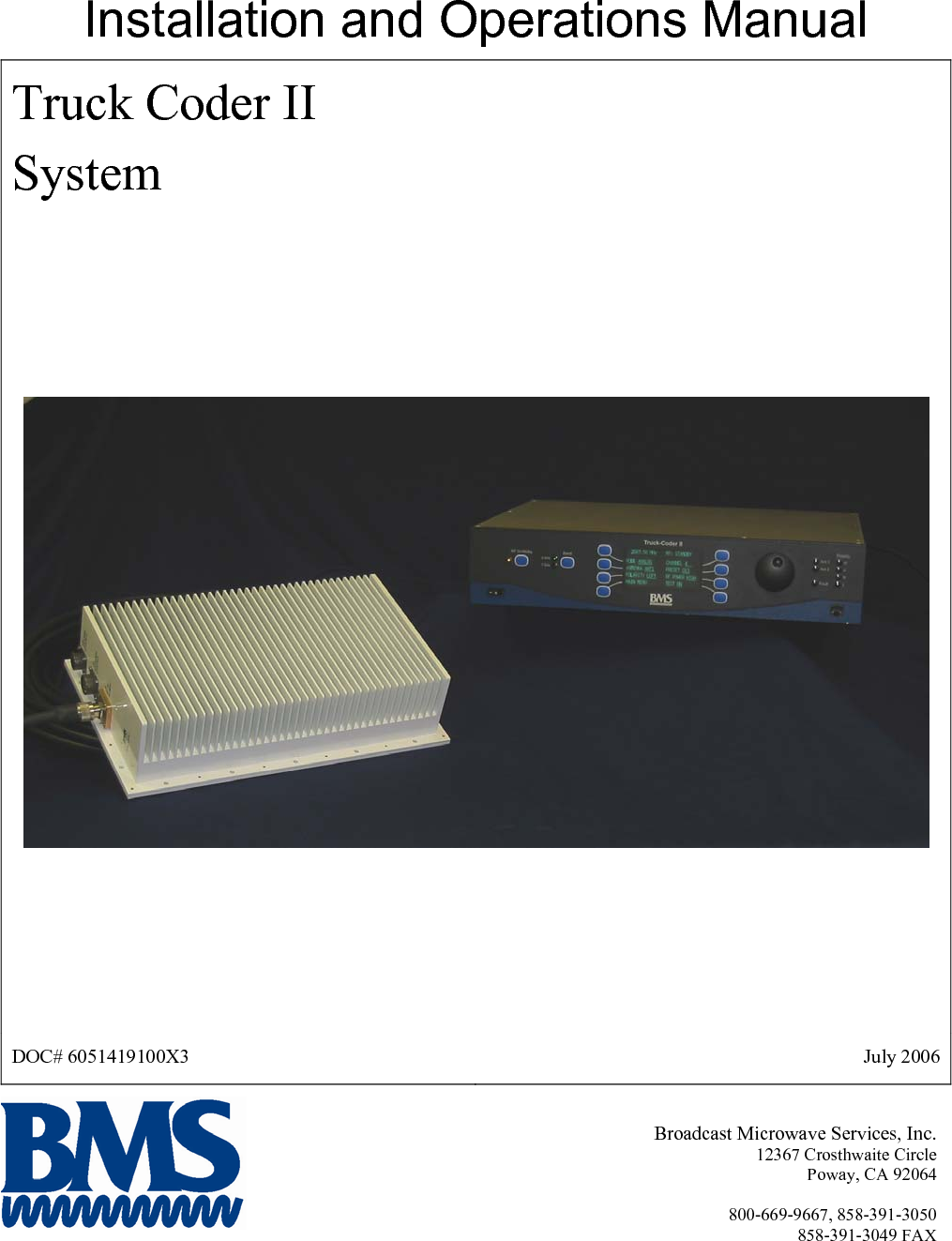
Installation and Operations Manual Truck Coder II System  DOC# 6051419100X3  July 2006 Broadcast Microwave Services, Inc. 12367 Crosthwaite Circle Poway, CA 92064  800-669-9667, 858-391-3050 858-391-3049 FAX
 This Page Intentionally Left Blank
INTRODUCTION  The BMS Truck-Coder II (TCII) is an ENG transmitter that operates in both digital (COFDM) and legacy analog (FM) transmission modes. It features a DVB-T compliant (COFDM) modulator MPEG2 video encoder. The system is designed to support both 12 MHz and 17 MHz BAS channel plans (in both Digital and FM transmission modes). The two-unit system consists of an Indoor rack-mounted exciter Unit (IDU) and an Outdoor mast-mounted RF Transmitter Unit (ODU).  An optional second RF unit can be added to support dual band operation. The system integrates support for mast mounted antenna relay, feed controls and other accessories. The indoor unit provides support for multiple analog and video signal formats and provides an industry standard 70MHz IF output. The Truck-Coder II is designed to meet the rugged environmental needs of ENG news vehicles. It blends our field proven technology with a rich feature set and the simple operation needed for ENG/OB operations.  Applications: • ENG News Vehicles • Law Enforcement Command Posts Key Features: • Digital (COFDM) and Analog (FM) Transmission • Ease of installation – a single coax cable interconnects the IDU and ODU • Simple Set-up and Operation – menu driven user interface • Up to 999 easily configurable user Presets (each capable of storing all system parameters) • Front panel Ethernet Port simplifies firmware upgrades and supports web based management • Fully configurable FM, COFDM and MPEG parameters (including PID’s) ensure product compatibility • Optional Dual Band Capability  This document provides instructions for the installation, operation and maintenance of the Truck Coder II system.   Broadcast Microwave Services (BMS) is a leader in wireless digital microwave technology providing innovative products for the television broadcast, video, telemetry and surveillance industries.  A wholly owned subsidiary of Cohu, Inc., BMS designs and manufactures a comprehensive line of microwave communications equipment for broadcasting sports venues, law enforcement and military applications.  BMS also builds and integrates command and control centers to provide fully functioning, complex, end to end digital systems.  For the latest product and system information please visit www.bms-inc.com.    Broadcast Microwave Services, Inc. 12367 Crosthwaite Circle Poway, CA 92064   Tel: +1 (858) 391-3050 Toll free (US): 800-669-9667 Fax: +1 (858) 391-3049 Email:sales@bms-inc.com Web: www.bms-inc.com
 iiThis Page Intentionally Left Blank
 iiiTable of Contents  INTRODUCTION........................................................................................................................................... i WARNING! ................................................................................................................................................... v SYSTEM DESCRIPTION ............................................................................................................................. 1 Overview.................................................................................................................................................... 1 Indoor Unit................................................................................................................................................. 2 Outdoor Unit .............................................................................................................................................. 4 Technical Specifications ............................................................................................................................ 5 UNPACKING ................................................................................................................................................ 9 Parts List .................................................................................................................................................... 9 Manuals ................................................................................................................................................. 9 Components ........................................................................................................................................... 9 Cables .................................................................................................................................................... 9 INSTALLATION......................................................................................................................................... 11 Equipment Installation ............................................................................................................................. 11 Installing the Indoor Unit (IDU).......................................................................................................... 15 Indoor Unit (IDU) Connections........................................................................................................... 17 Installing the Outdoor Unit (ODU)...................................................................................................... 18 OPERATION ............................................................................................................................................... 22 Initialization ............................................................................................................................................. 22 WARRANTY............................................................................................................................................... 25 Customer Service Information ................................................................................................................. 25 TROUBLE SHOOTING .............................................................................................................................. 27 Diagnostics............................................................................................................................................... 28 PIN OUTS................................................................................................................................................ 30 IDU ...................................................................................................................................................... 30 ODU .................................................................................................................................................... 32 US Broadcast Frequency Assignments......................................................................................................... 34 Coded Orthogonal Frequency Division Multiplex (COFDM) Modulation .................................................. 36 Glossary........................................................................................................................................................ 40   List of Figures Figure 1 TCII System Overview .................................................................................................................... 1 Figure 2 TCII IDU (Indoor Unit) Block Diagram .......................................................................................... 2
 ivFigure 3 TCII Outdoor Unit (ODU) Block Diagram...................................................................................... 4 Figure 4 IDU Footprint................................................................................................................................. 13 Figure 5 ODU Footprint ............................................................................................................................... 14 Figure 6 TCII Indoor Unit ............................................................................................................................ 15 Figure 7 TCII Indoor Unit Rear Panel Connections ..................................................................................... 17 Figure 8 TCII Outdoor Unit.......................................................................................................................... 18 Figure 9 ODU Mounting Footprint .............................................................................................................. 19 Figure 10 ODU Mounting Orientation ......................................................................................................... 20 Figure 11 ODU Connections ........................................................................................................................ 21 Figure 34 The HOME Menu ........................................................................................................................ 22 Figure 36 Product Label ............................................................................................................................... 25 Figure 37 IDU REAR PANEL CONNECTORS.......................................................................................... 30 Figure 38 ODU CONNECTORS ................................................................................................................. 32   List of Tables   Table 1 General Specifications....................................................................................................................... 5 Table 2 Analog (FM)...................................................................................................................................... 6 Table 3 Digital (COFDM).............................................................................................................................. 6 Table 4 TCII Input/Output.............................................................................................................................. 7 Table 5 Component Mounting Requirement Reference ............................................................................... 11 Table 6 ODU Connections ........................................................................................................................... 21 Table 7 AUXILIARY INPUT PINOUTS .................................................................................................... 30 Table 8 SUMMARY ALARM PINOUTS ...................................................................................................30 Table 9 AUDIO 1 IN PINOUTS .................................................................................................................. 31 Table 10 AUDIO 2 IN PINOUTS ................................................................................................................ 31 Table 11 J1 EXTERNAL DATA IN ............................................................................................................ 32 Table 12 J2 EXTERNAL DC IN PIN OUTS (Optional) ............................................................................. 32 Table 13 J4 ANTENNA CONTROL PIN OUTS......................................................................................... 33 Table 14 ODU J5 EXTERNAL CONTROL PIN OUT................................................................................ 33
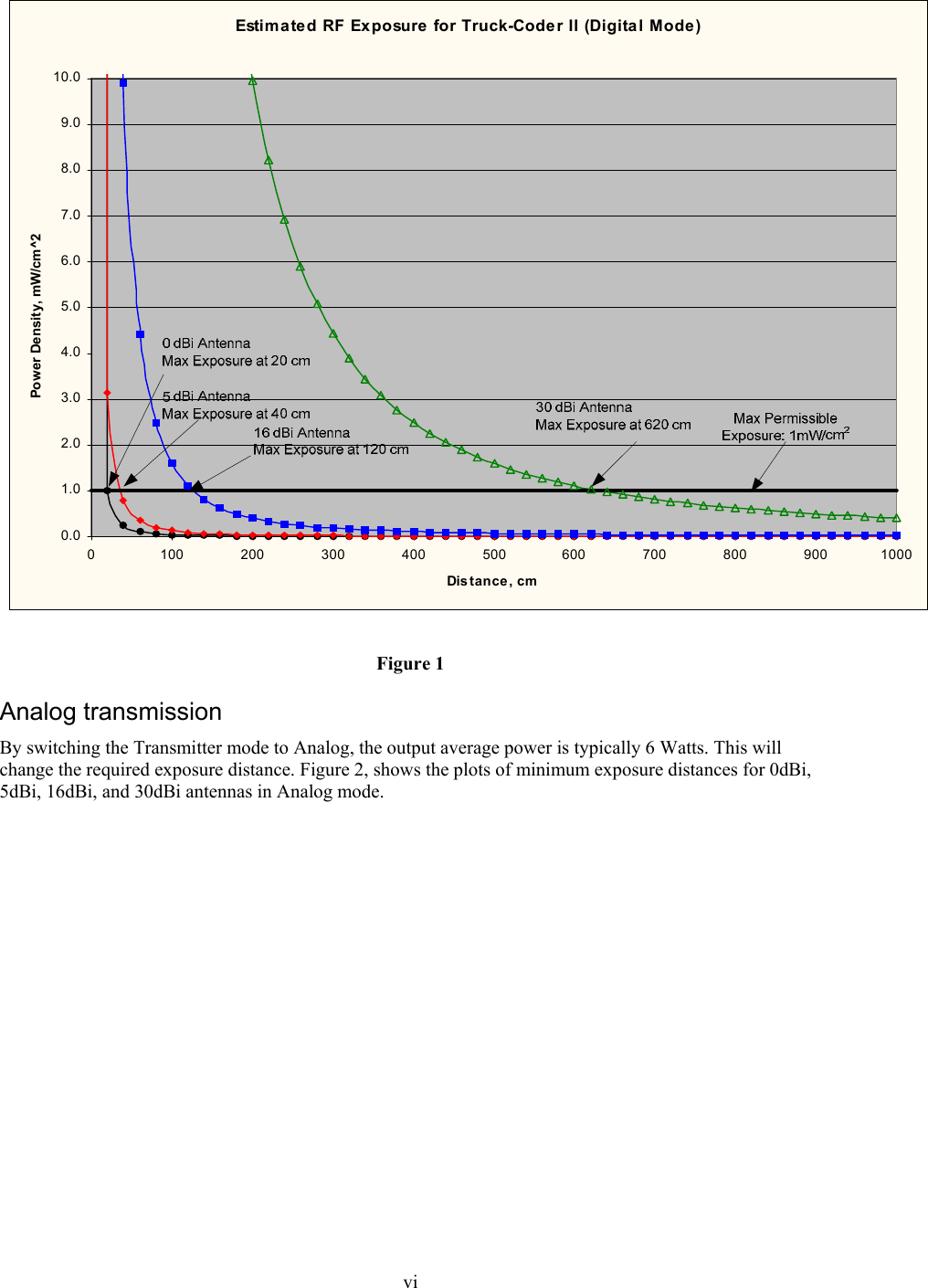
 v  WARNING! RF RADIATION EXPOSURE HAZARD  This warning is provided by Broadcast Microwave Services (BMS) Inc. for safety purpose. The following information help to reduce the risk of RF exposure hazard.    FCC Limit of RF Exposure According to Federal Communication Commission (FCC), the Maximum Permissible Exposure (MPE) for FR radiation has been set to 1.0 mW/cm2 for the Truck-Coder II equipment (OET Bulletin 65).  Truck-Coder II is a non-broadcast transmitter and without an antenna it will not create RF exposure (power density) exceeding the 1.0 W/cm2 FCC limit. However a high-gain antenna such as a parabolic dish will greatly enhance the Truck-Coder II output power density beyond the MPE limit of 1.0 mW/cm2.  In this situation a minimum distance from the antenna needs to be calculated in order to keep the MPE always below the safety limit. The calculation has been done for Truck-Coder II based on the formula mentioned in OET Bulletin 56. The calculations have been done for different commonly used antenna in Electronic New Gathering (ENG) systems.  Digital Transmission  Figure 1 shows the plot of the minimum exposure distance for 0dBi, 5dBi, 16dBi, and 30dBi antennas. The Truck-Coder II transmitter has been in digital mode with an average power of 5 Watts typical. The minimum exposure distances are found from the cross points of the exposure graphs (for various antennas) with the line of maximum permissible exposure (i.e. 1 W/cm2).  Notice that the numbers in Figure 1 predict the worse case scenario, which is straight in front of the antenna (exposing to the antenna main-lobe). Obviously the side-lobe exposures are well below these numbers as the radiation intensity dramatically reduces on the side lobes.
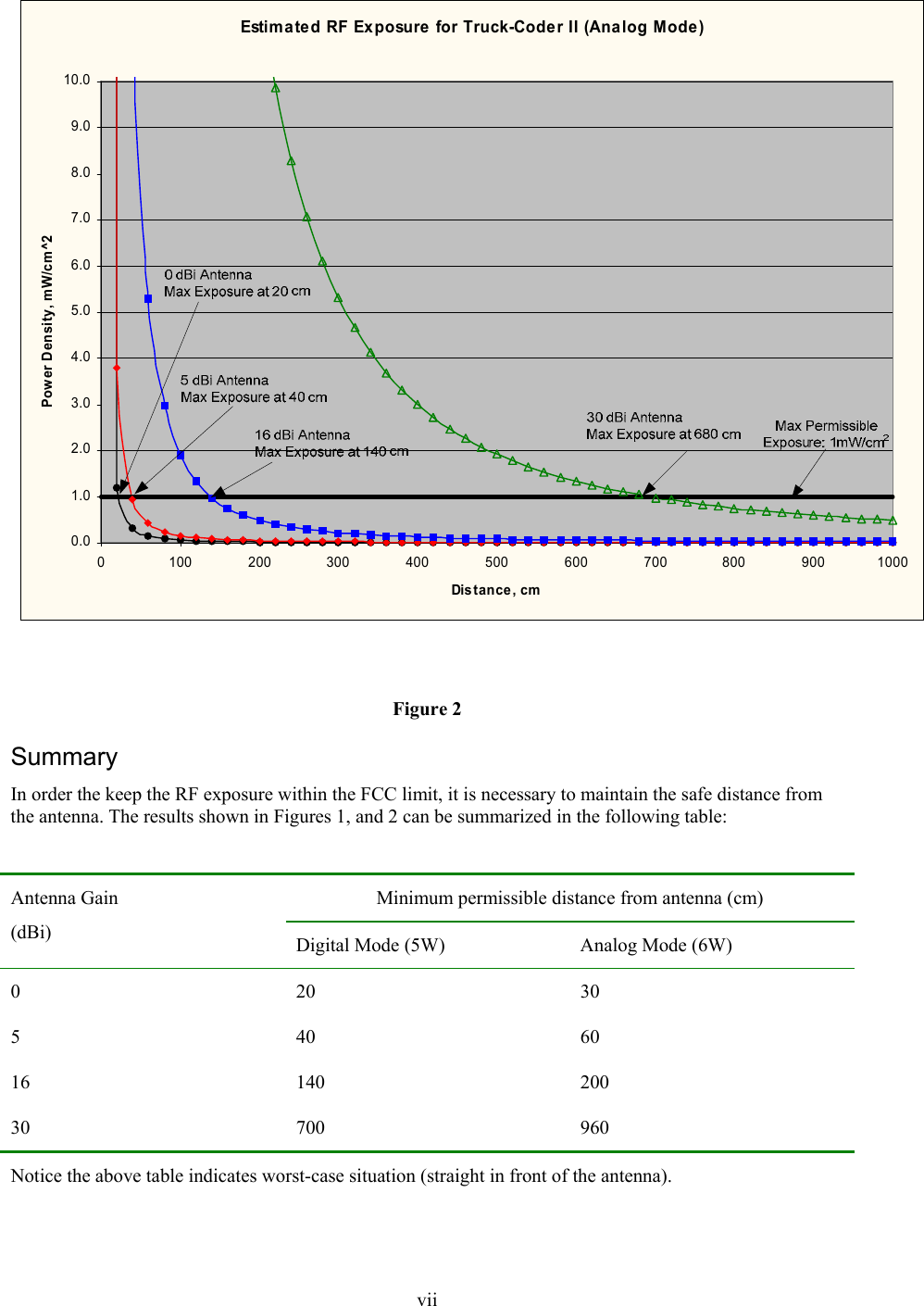
 viEstimated RF Exposure for Truck-Coder II (Digital Mode)0.01.02.03.04.05.06.07.08.09.010.00 100 200 300 400 500 600 700 800 900 1000Distance, cmPower Density, mW/cm^2 Figure 1 Analog transmission By switching the Transmitter mode to Analog, the output average power is typically 6 Watts. This will change the required exposure distance. Figure 2, shows the plots of minimum exposure distances for 0dBi, 5dBi, 16dBi, and 30dBi antennas in Analog mode.
 viiEstimated RF Exposure for Truck-Coder II (Analog Mode)0.01.02.03.04.05.06.07.08.09.010.00 100 200 300 400 500 600 700 800 900 1000Distance, cmPower Density, mW/cm^2  Figure 2 Summary In order the keep the RF exposure within the FCC limit, it is necessary to maintain the safe distance from the antenna. The results shown in Figures 1, and 2 can be summarized in the following table:  Minimum permissible distance from antenna (cm) Antenna Gain (dBi)  Digital Mode (5W)  Analog Mode (6W) 0 20 30 5 40 60 16 140 200 30 700 960 Notice the above table indicates worst-case situation (straight in front of the antenna).
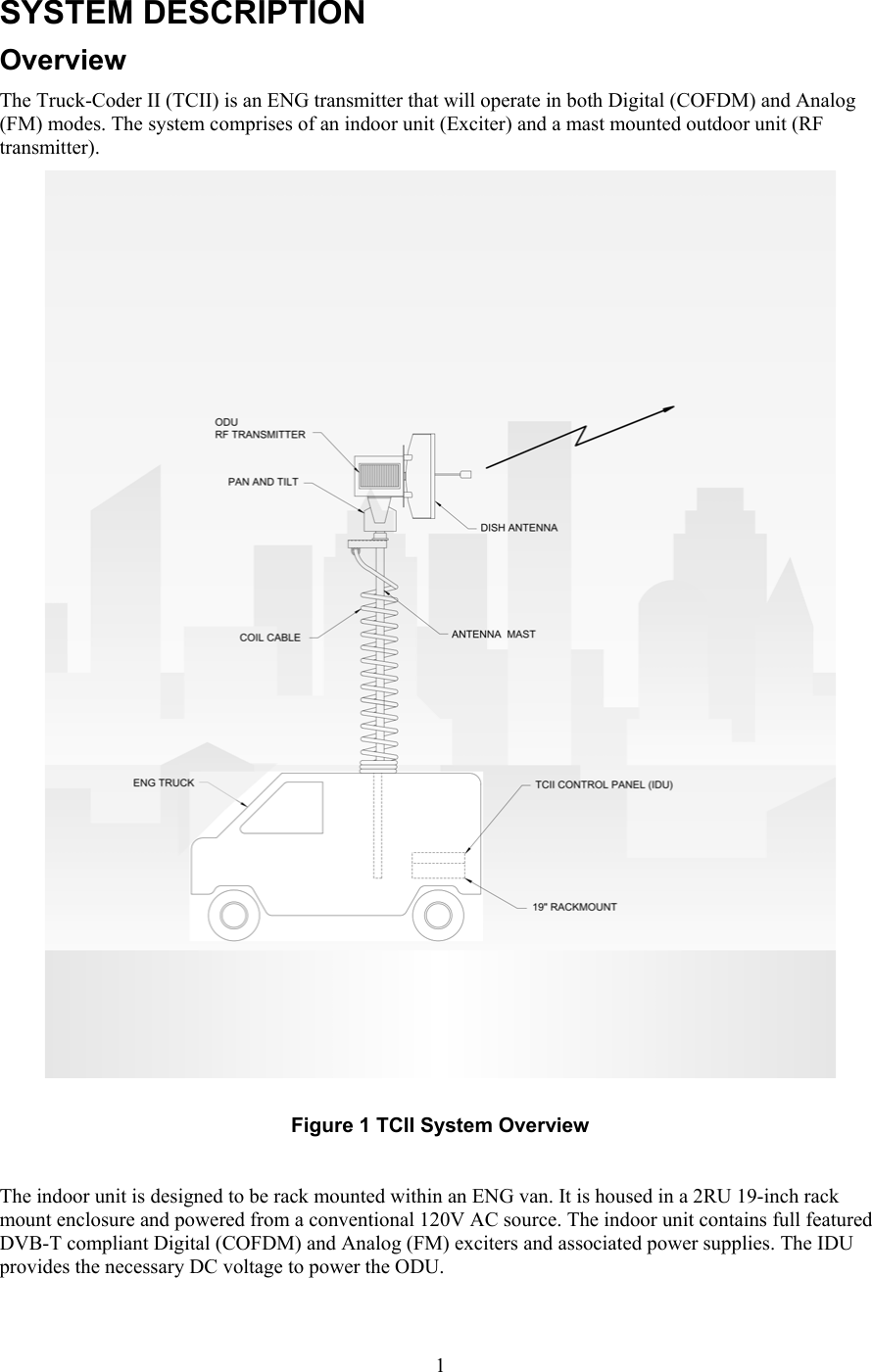
 1SYSTEM DESCRIPTION Overview The Truck-Coder II (TCII) is an ENG transmitter that will operate in both Digital (COFDM) and Analog (FM) modes. The system comprises of an indoor unit (Exciter) and a mast mounted outdoor unit (RF transmitter).    Figure 1 TCII System Overview  The indoor unit is designed to be rack mounted within an ENG van. It is housed in a 2RU 19-inch rack mount enclosure and powered from a conventional 120V AC source. The indoor unit contains full featured DVB-T compliant Digital (COFDM) and Analog (FM) exciters and associated power supplies. The IDU provides the necessary DC voltage to power the ODU.
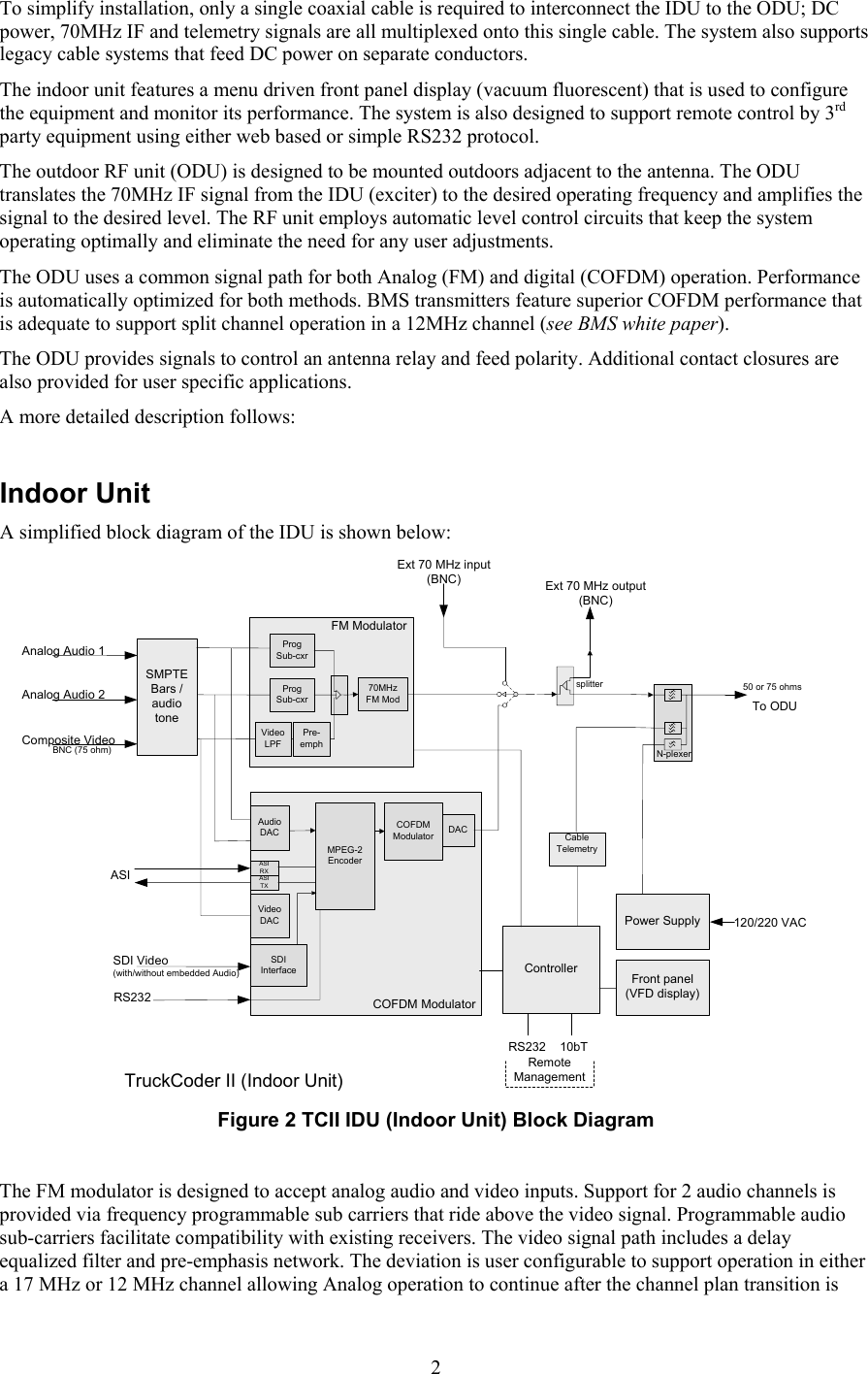
 2To simplify installation, only a single coaxial cable is required to interconnect the IDU to the ODU; DC power, 70MHz IF and telemetry signals are all multiplexed onto this single cable. The system also supports legacy cable systems that feed DC power on separate conductors. The indoor unit features a menu driven front panel display (vacuum fluorescent) that is used to configure the equipment and monitor its performance. The system is also designed to support remote control by 3rd party equipment using either web based or simple RS232 protocol. The outdoor RF unit (ODU) is designed to be mounted outdoors adjacent to the antenna. The ODU translates the 70MHz IF signal from the IDU (exciter) to the desired operating frequency and amplifies the signal to the desired level. The RF unit employs automatic level control circuits that keep the system operating optimally and eliminate the need for any user adjustments. The ODU uses a common signal path for both Analog (FM) and digital (COFDM) operation. Performance is automatically optimized for both methods. BMS transmitters feature superior COFDM performance that is adequate to support split channel operation in a 12MHz channel (see BMS white paper). The ODU provides signals to control an antenna relay and feed polarity. Additional contact closures are also provided for user specific applications.  A more detailed description follows:  Indoor Unit A simplified block diagram of the IDU is shown below: Composite Video Front panel(VFD display)Power Supply 120/220 VACExt 70 MHz input (BNC)splitterExt 70 MHz output(BNC)Cable TelemetryControllerN-plexer10bTProgSub-cxrProgSub-cxrVideoLPF70MHzFM ModFM ModulatorAnalog Audio 1RS232RemoteManagementDACCOFDM ModulatorMPEG-2EncoderAudioDACVideoDACSDI InterfaceSDI Video(with/without embedded Audio)ASIASI RXASI TXAnalog Audio 2TruckCoder II (Indoor Unit)SMPTE Bars / audio tonePre-emphRS232BNC (75 ohm)50 or 75 ohmsCOFDM ModulatorTo ODU Figure 2 TCII IDU (Indoor Unit) Block Diagram   The FM modulator is designed to accept analog audio and video inputs. Support for 2 audio channels is provided via frequency programmable sub carriers that ride above the video signal. Programmable audio sub-carriers facilitate compatibility with existing receivers. The video signal path includes a delay equalized filter and pre-emphasis network. The deviation is user configurable to support operation in either a 17 MHz or 12 MHz channel allowing Analog operation to continue after the channel plan transition is
 3complete. Analog transmission offers a more graceful degradation in performance and might be preferred under certain conditions. The Digital (COFDM) modulator also supports 2 analog audio and one analog video input but also supports advanced digital interfaces (ASI, SDI) as well. The digital modulator includes an MPEG2 encoder and a DVB-T compliant COFDM modulator. Both MPEG and COFDM parameters are fully configurable by the system controller in support of optimum performance and compatibility with other vendors equipment. For those users less familiar with detailed COFDM and MPEG settings, the equipment provides 3 preset robustness settings (low, mid and high) that each optimize video performance at the expense of modulation complexity. High robustness provides the lowest quality video but is able to operate in severely compromised locations. Low robustness provides the best quality video but may require a clear line of sight shot. An integrated SMPTE color bar generator with programmable text overlay is included. The text overlay can be conveniently programmed to show the unique ID of the ENG van. The color bar generator can be configured to turn on automatically when no video input is present or can be manually turned on/off as required. The generator can also be configured to inject audio tones. The indoor unit features a menu driven VFD front panel display. Two levels of user access are supported; Operator and Engineer. Operator is designed for non-technical users and assumes that the equipment has been preconfigured by a station engineer. Engineer has full access to all menus and the ability to set up the equipment for a less qualified operator.  The system accommodates up to 999 user programmable presets. These can be uniquely named and configured; each preset records all of the configurable variables within the system. Presets 1 thru 6 are conveniently displayed on their own screen for quick and easy recall. All presets can be uniquely named via the front panel menu system to simplify identification and can be recalled quickly to put the equipment in a known state. Presets are an ideal mechanism for the station engineer to pre-configure the equipment for simplified operation by a less skilled operator.  The COFDM modulator also provides an auxiliary data channel that can be configured for data rates up to 19.2 Kbps. One possible use of this data channel is to transport GPS data from a vehicle mounted receiver back to the central receiver. The system also features a front and rear panel ethernet interface that can be conveniently used to upload new operating firmware into the unit. This interface supports high data transfer rates and simplifies the firmware upgrade process. This equipment makes extensive use of FPGA (field programmable gate array) and microprocessor controlled hardware. Ease of firmware upgrade helps ensure that the equipment is always kept up to date. The TCII also includes embedded web based management that can be accessed with any PC using a web browser and connected to the front or rear panel Ethernet port. This interface supports all the front panel programmable features as well as others such as the ability to configure channel plans, and download preconfigured presets (duplicate equipment setups). The system can be controlled remotely via an RS232 control port as well; consult BMS for the protocol specification for this port.
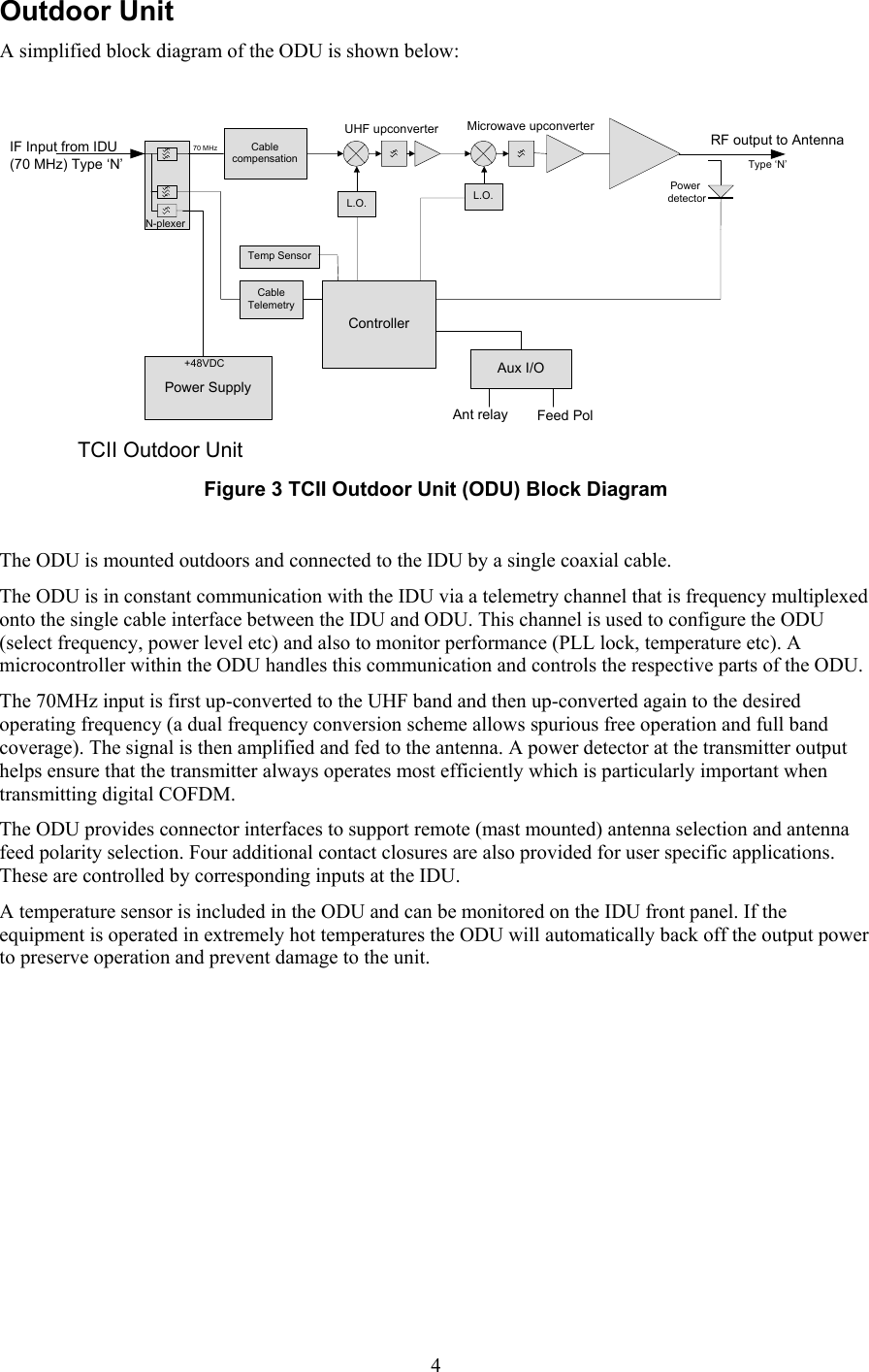
 4Outdoor Unit A simplified block diagram of the ODU is shown below:  IF Input from IDU(70 MHz) Type ‘N’Power Supply+48VDCCable TelemetryControllerN-plexerL.O.70 MHzL.O.RF output to AntennaPower detectorCable compensation  Type ‘N’Temp SensorMicrowave upconverterUHF upconverterAux I/OAnt relay Feed PolTCII Outdoor Unit  Figure 3 TCII Outdoor Unit (ODU) Block Diagram  The ODU is mounted outdoors and connected to the IDU by a single coaxial cable. The ODU is in constant communication with the IDU via a telemetry channel that is frequency multiplexed onto the single cable interface between the IDU and ODU. This channel is used to configure the ODU (select frequency, power level etc) and also to monitor performance (PLL lock, temperature etc). A microcontroller within the ODU handles this communication and controls the respective parts of the ODU. The 70MHz input is first up-converted to the UHF band and then up-converted again to the desired operating frequency (a dual frequency conversion scheme allows spurious free operation and full band coverage). The signal is then amplified and fed to the antenna. A power detector at the transmitter output helps ensure that the transmitter always operates most efficiently which is particularly important when transmitting digital COFDM. The ODU provides connector interfaces to support remote (mast mounted) antenna selection and antenna feed polarity selection. Four additional contact closures are also provided for user specific applications. These are controlled by corresponding inputs at the IDU.  A temperature sensor is included in the ODU and can be monitored on the IDU front panel. If the equipment is operated in extremely hot temperatures the ODU will automatically back off the output power to preserve operation and prevent damage to the unit.
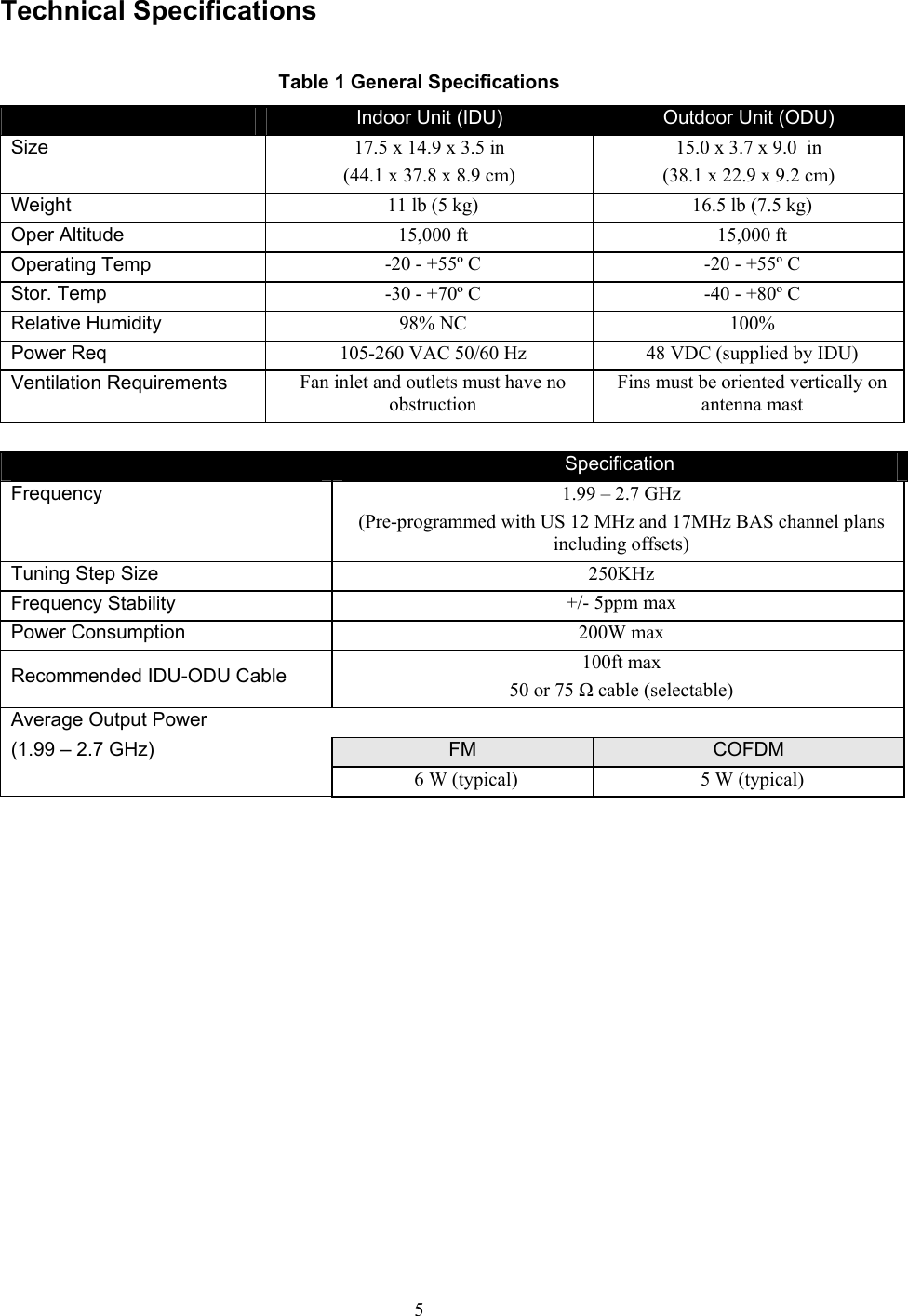
 5Technical Specifications  Table 1 General Specifications  Indoor Unit (IDU)  Outdoor Unit (ODU) Size 17.5 x 14.9 x 3.5 in (44.1 x 37.8 x 8.9 cm) 15.0 x 3.7 x 9.0  in (38.1 x 22.9 x 9.2 cm) Weight 11 lb (5 kg)  16.5 lb (7.5 kg) Oper Altitude  15,000 ft  15,000 ft Operating Temp  -20 - +55º C   -20 - +55º C  Stor. Temp  -30 - +70º C   -40 - +80º C  Relative Humidity  98% NC  100% Power Req  105-260 VAC 50/60 Hz  48 VDC (supplied by IDU) Ventilation Requirements  Fan inlet and outlets must have no obstruction  Fins must be oriented vertically on antenna mast   Specification  Frequency  1.99 – 2.7 GHz  (Pre-programmed with US 12 MHz and 17MHz BAS channel plans including offsets) Tuning Step Size  250KHz  Frequency Stability   +/- 5ppm max Power Consumption  200W max Recommended IDU-ODU Cable  100ft max 50 or 75 Ω cable (selectable) Average Output Power  (1.99 – 2.7 GHz)    FM  COFDM     6 W (typical)   5 W (typical)
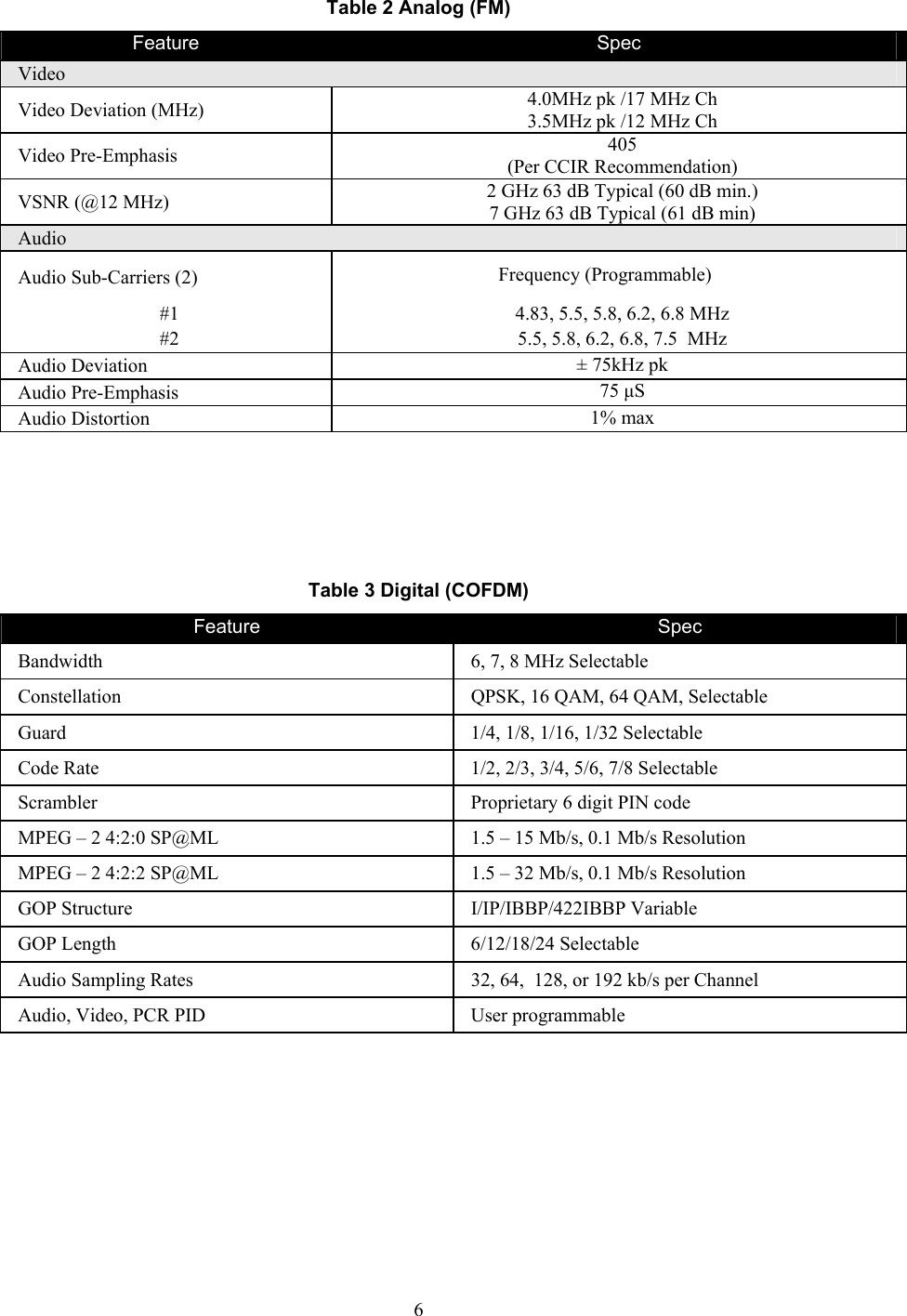
 6Table 2 Analog (FM) Feature  Spec Video Video Deviation (MHz)  4.0MHz pk /17 MHz Ch 3.5MHz pk /12 MHz Ch Video Pre-Emphasis  405  (Per CCIR Recommendation) VSNR (@12 MHz)  2 GHz 63 dB Typical (60 dB min.) 7 GHz 63 dB Typical (61 dB min) Audio Audio Sub-Carriers (2)  Frequency (Programmable) #1  4.83, 5.5, 5.8, 6.2, 6.8 MHz #2  5.5, 5.8, 6.2, 6.8, 7.5  MHz Audio Deviation  ± 75kHz pk Audio Pre-Emphasis  75 µS  Audio Distortion  1% max     Table 3 Digital (COFDM) Feature  Spec Bandwidth  6, 7, 8 MHz Selectable Constellation  QPSK, 16 QAM, 64 QAM, Selectable Guard  1/4, 1/8, 1/16, 1/32 Selectable Code Rate  1/2, 2/3, 3/4, 5/6, 7/8 Selectable Scrambler  Proprietary 6 digit PIN code MPEG – 2 4:2:0 SP@ML  1.5 – 15 Mb/s, 0.1 Mb/s Resolution MPEG – 2 4:2:2 SP@ML  1.5 – 32 Mb/s, 0.1 Mb/s Resolution GOP Structure  I/IP/IBBP/422IBBP Variable GOP Length  6/12/18/24 Selectable Audio Sampling Rates  32, 64,  128, or 192 kb/s per Channel Audio, Video, PCR PID  User programmable
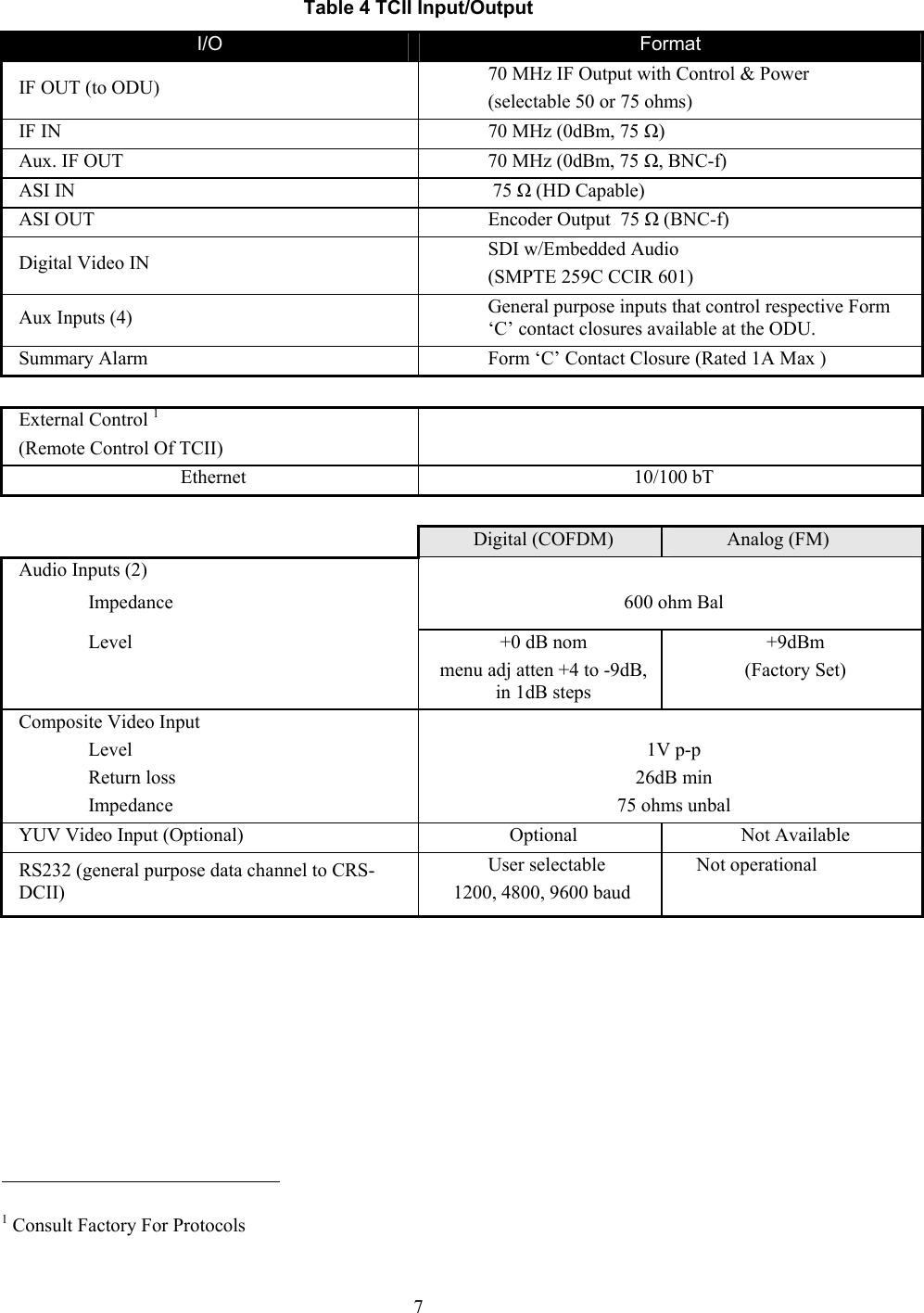
 7Table 4 TCII Input/Output I/O  Format IF OUT (to ODU)  70 MHz IF Output with Control & Power (selectable 50 or 75 ohms) IF IN  70 MHz (0dBm, 75 Ω) Aux. IF OUT  70 MHz (0dBm, 75 Ω, BNC-f) ASI IN   75 Ω (HD Capable) ASI OUT  Encoder Output  75 Ω (BNC-f) Digital Video IN  SDI w/Embedded Audio (SMPTE 259C CCIR 601) Aux Inputs (4)  General purpose inputs that control respective Form ‘C’ contact closures available at the ODU. Summary Alarm  Form ‘C’ Contact Closure (Rated 1A Max ) External Control 1 (Remote Control Of TCII)   Ethernet 10/100 bT   Digital (COFDM)  Analog (FM) Audio Inputs (2)   Impedance 600 ohm Bal Level  +0 dB nom menu adj atten +4 to -9dB, in 1dB steps +9dBm (Factory Set) Composite Video Input   Level 1V p-p Return loss  26dB min Impedance  75 ohms unbal YUV Video Input (Optional)  Optional  Not Available RS232 (general purpose data channel to CRS-DCII) User selectable  1200, 4800, 9600 baud Not operational                                                             1 Consult Factory For Protocols
 8This Page Intentionally Left Blank
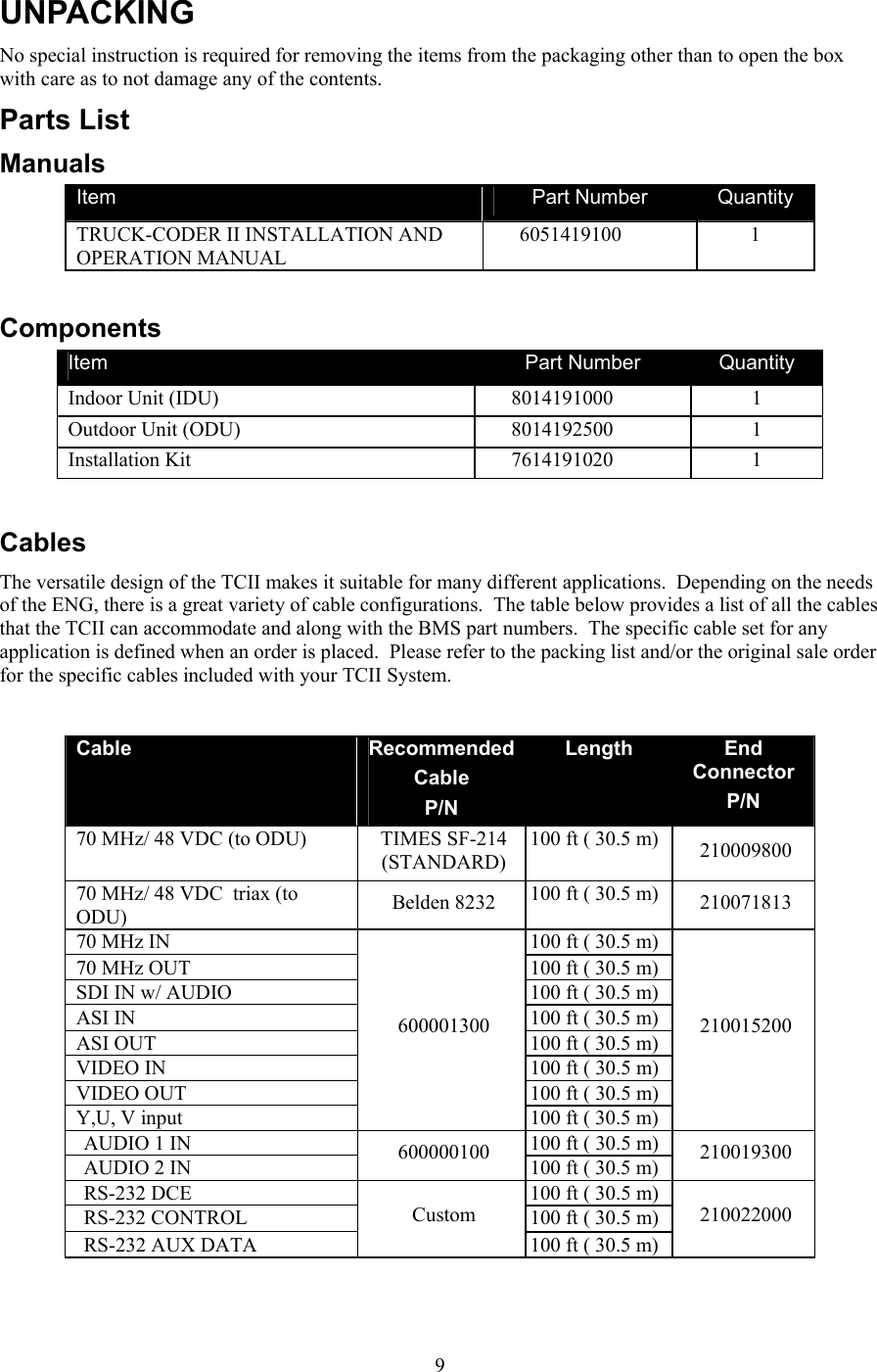
 9UNPACKING No special instruction is required for removing the items from the packaging other than to open the box with care as to not damage any of the contents. Parts List  Manuals  Item  Part Number  Quantity TRUCK-CODER II INSTALLATION AND OPERATION MANUAL 6051419100 1  Components Item  Part Number  Quantity Indoor Unit (IDU) 8014191000 1 Outdoor Unit (ODU)  8014192500  1 Installation Kit  7614191020  1   Cables The versatile design of the TCII makes it suitable for many different applications.  Depending on the needs of the ENG, there is a great variety of cable configurations.  The table below provides a list of all the cables that the TCII can accommodate and along with the BMS part numbers.  The specific cable set for any application is defined when an order is placed.  Please refer to the packing list and/or the original sale order for the specific cables included with your TCII System.  Cable  RecommendedCable P/N Length  End Connector  P/N 70 MHz/ 48 VDC (to ODU)  TIMES SF-214 (STANDARD) 100 ft ( 30.5 m)  210009800 70 MHz/ 48 VDC  triax (to ODU)  Belden 8232  100 ft ( 30.5 m)  210071813 70 MHz IN  100 ft ( 30.5 m) 70 MHz OUT  100 ft ( 30.5 m) SDI IN w/ AUDIO  100 ft ( 30.5 m) ASI IN  100 ft ( 30.5 m) ASI OUT  100 ft ( 30.5 m) VIDEO IN  100 ft ( 30.5 m) VIDEO OUT  100 ft ( 30.5 m) Y,U, V input 600001300 100 ft ( 30.5 m) 210015200 AUDIO 1 IN  100 ft ( 30.5 m) AUDIO 2 IN   600000100  100 ft ( 30.5 m)  210019300 RS-232 DCE   100 ft ( 30.5 m) RS-232 CONTROL  100 ft ( 30.5 m) RS-232 AUX DATA Custom 100 ft ( 30.5 m) 210022000
 10This Page Intentionally Left Blank
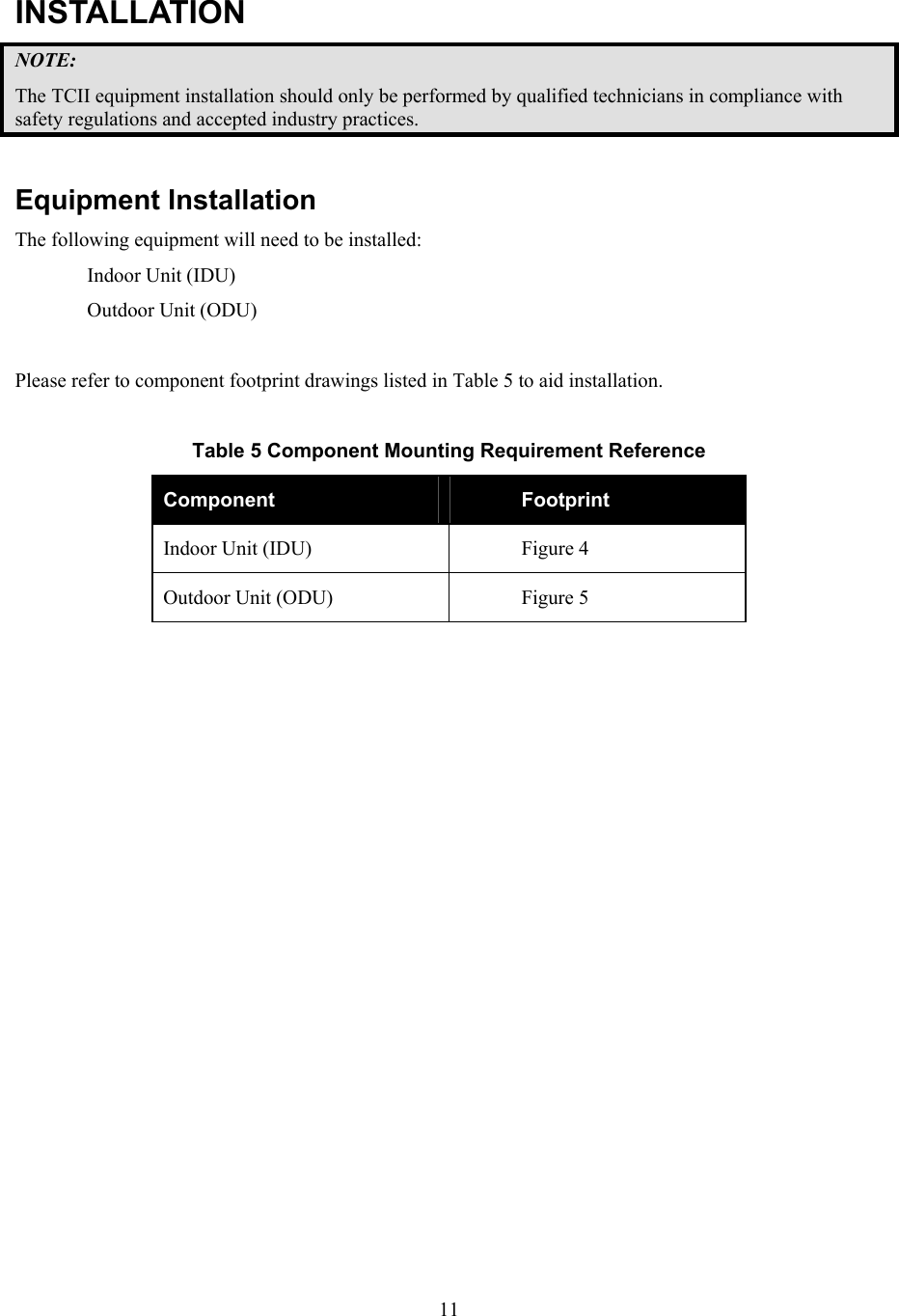
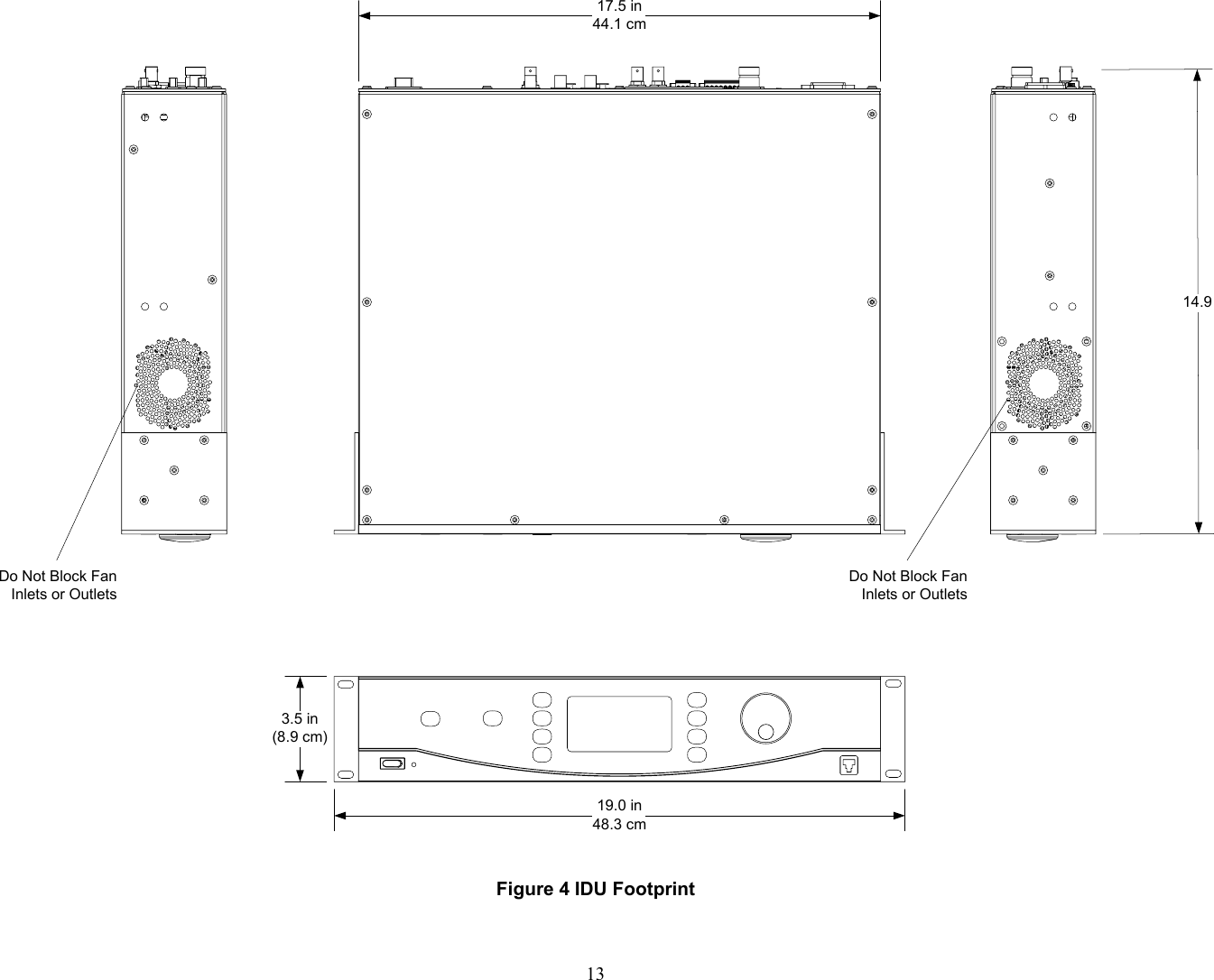
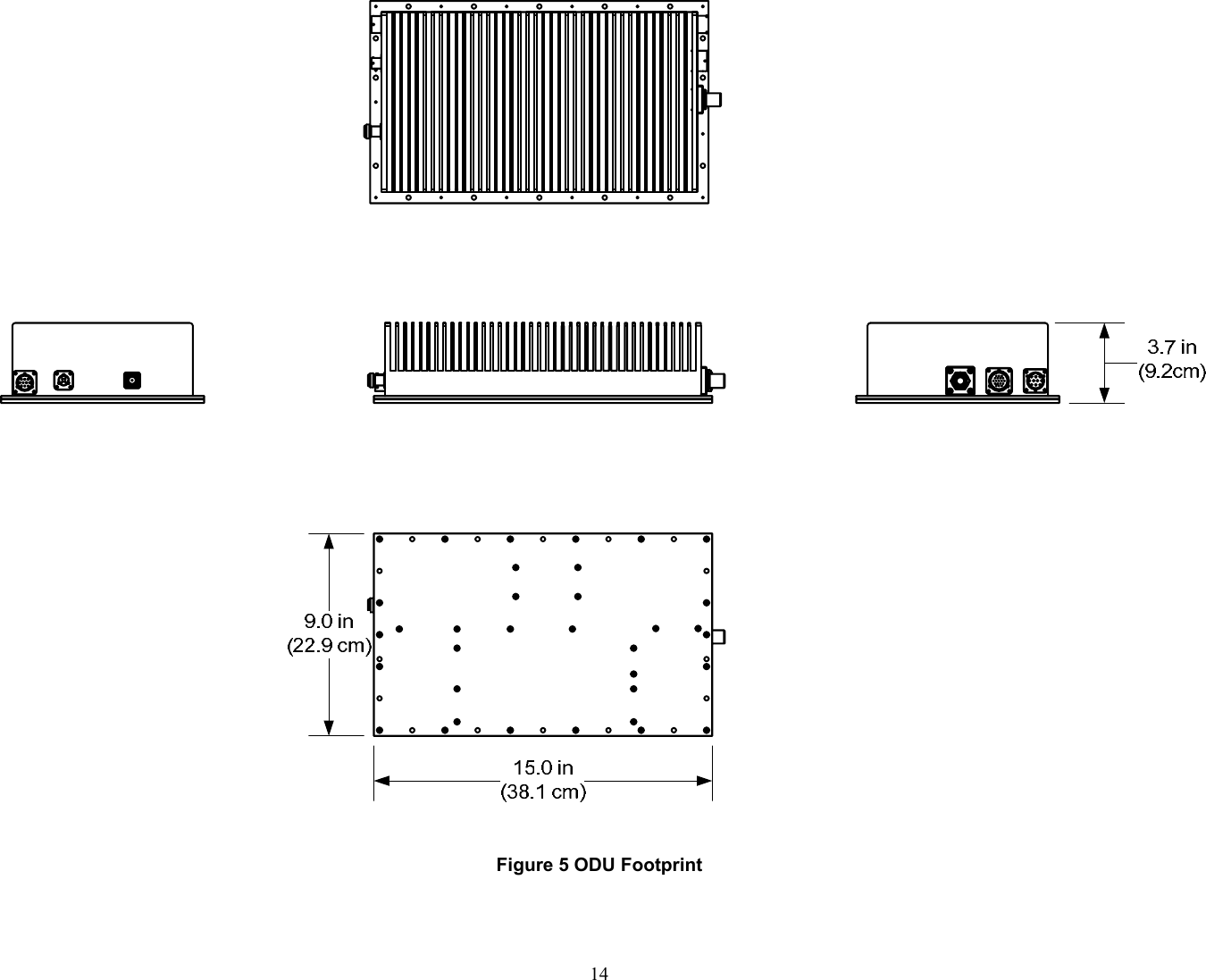
 11 INSTALLATION NOTE: The TCII equipment installation should only be performed by qualified technicians in compliance with safety regulations and accepted industry practices.   Equipment Installation The following equipment will need to be installed: Indoor Unit (IDU) Outdoor Unit (ODU)  Please refer to component footprint drawings listed in Table 5 to aid installation.  Table 5 Component Mounting Requirement Reference Component  Footprint Indoor Unit (IDU)  Figure 4 Outdoor Unit (ODU)  Figure 5
 12This Page Intentionally Left Blank
 1319.0 in48.3 cm3.5 in(8.9 cm)14.917.5 in44.1 cmDo Not Block Fan Inlets or OutletsDo Not Block Fan Inlets or Outlets Figure 4 IDU Footprint
 14 Figure 5 ODU Footprint
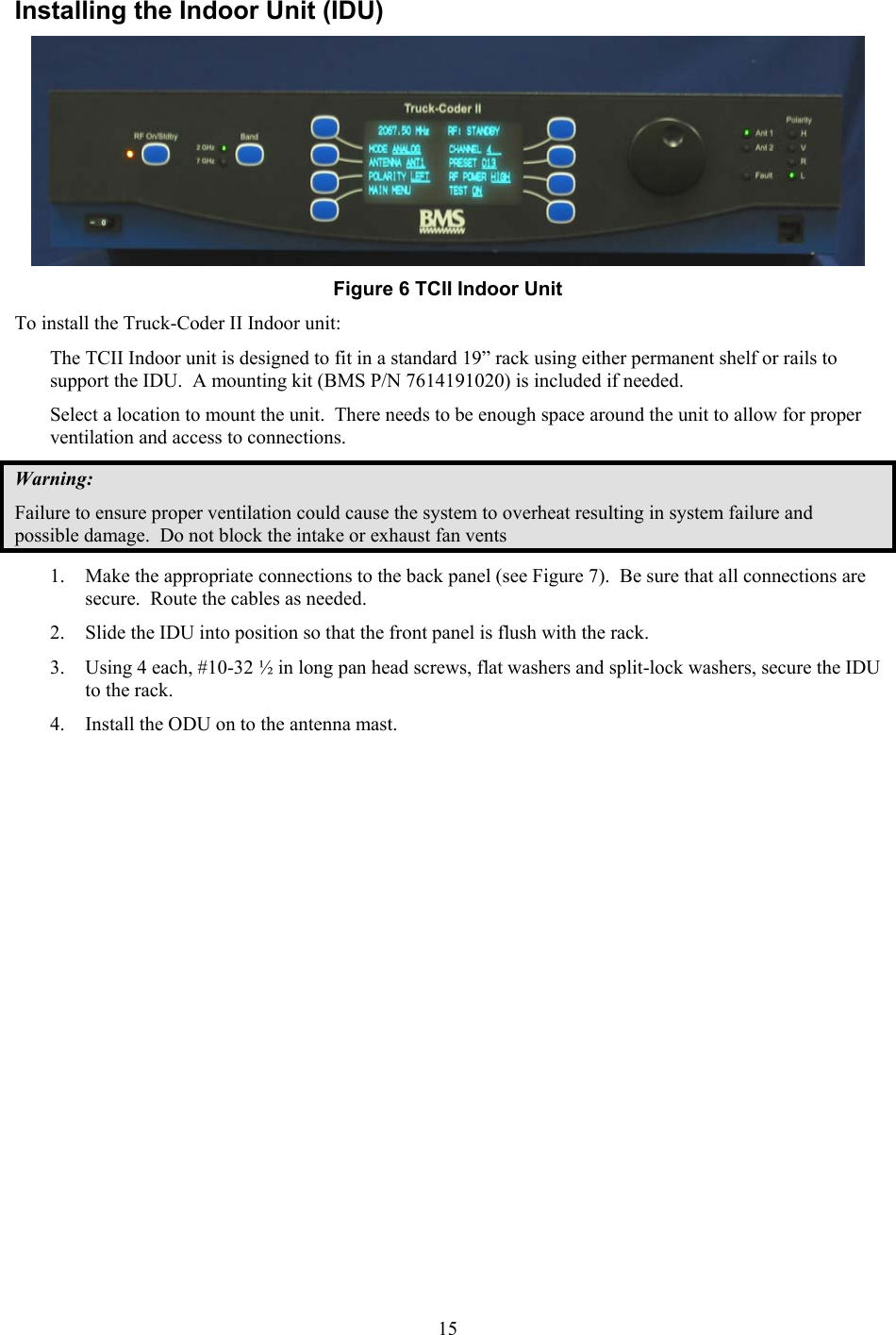
 15Installing the Indoor Unit (IDU)  Figure 6 TCII Indoor Unit To install the Truck-Coder II Indoor unit: The TCII Indoor unit is designed to fit in a standard 19” rack using either permanent shelf or rails to support the IDU.  A mounting kit (BMS P/N 7614191020) is included if needed. Select a location to mount the unit.  There needs to be enough space around the unit to allow for proper ventilation and access to connections.  Warning: Failure to ensure proper ventilation could cause the system to overheat resulting in system failure and possible damage.  Do not block the intake or exhaust fan vents 1. Make the appropriate connections to the back panel (see Figure 7).  Be sure that all connections are secure.  Route the cables as needed. 2. Slide the IDU into position so that the front panel is flush with the rack. 3. Using 4 each, #10-32 ½ in long pan head screws, flat washers and split-lock washers, secure the IDU to the rack.  4. Install the ODU on to the antenna mast.
 16This Page Intentionally Left Blank
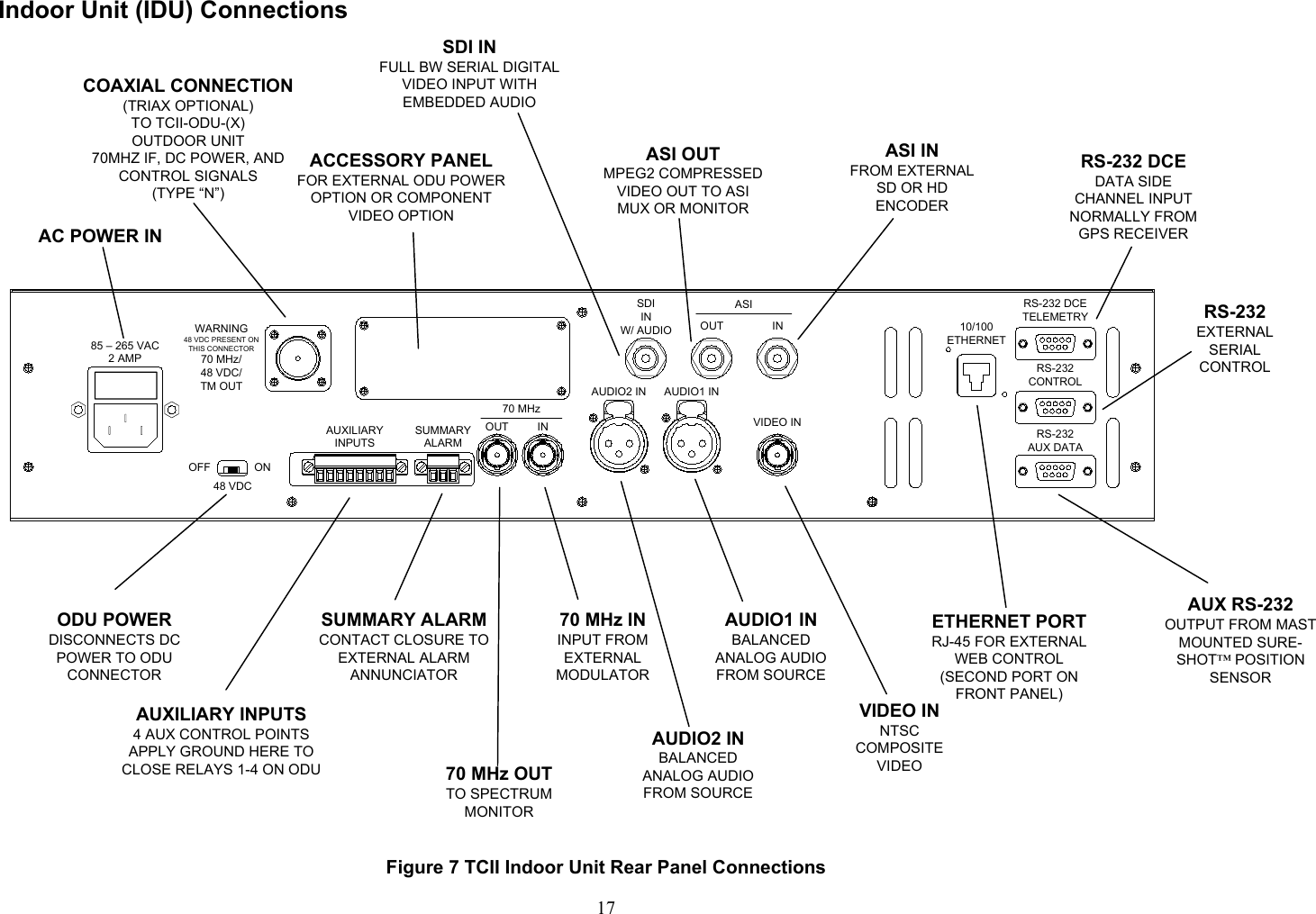
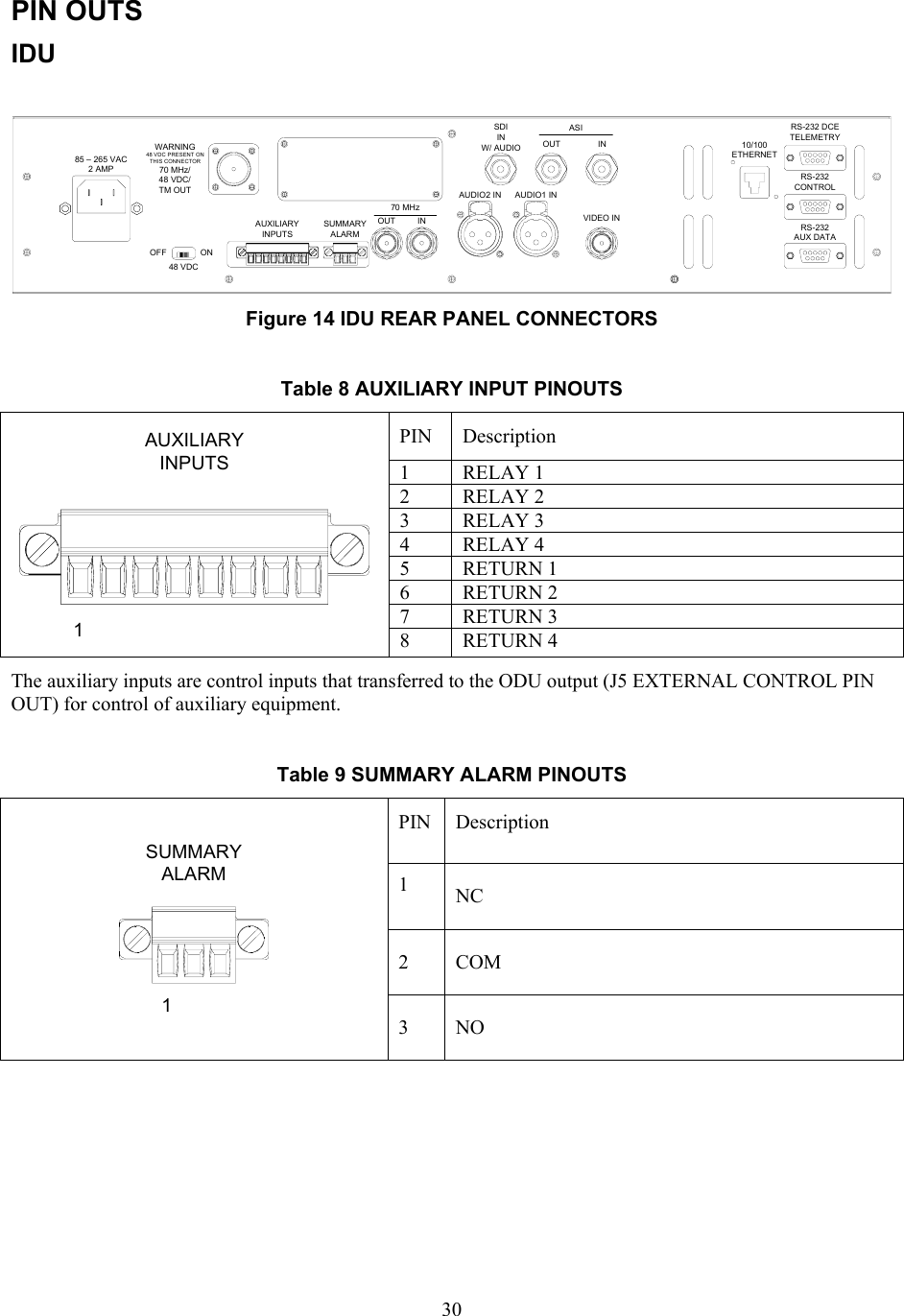
 17Indoor Unit (IDU) Connections  85 – 265 VAC2 AMPASIWARNING48 VDC PRESENT ONTHIS CONNECTOR70 MHz/48 VDC/TM OUTOFF ON48 VDCAUXILIARYINPUTSSUMMARYALARMOUT INOUT INAUDIO2 IN AUDIO1 INSDIINW/ AUDIOVIDEO INRS-232 DCETELEMETRYRS-232 CONTROLRS-232 AUX DATA10/100ETHERNET70 MHzODU POWERDISCONNECTS DC POWER TO ODU CONNECTORAUDIO2 INBALANCED ANALOG AUDIO FROM SOURCE70 MHz OUTTO SPECTRUM MONITOR70 MHz ININPUT FROM EXTERNAL MODULATOR AUXILIARY INPUTS4 AUX CONTROL POINTSAPPLY GROUND HERE TO CLOSE RELAYS 1-4 ON ODUAUDIO1 INBALANCED ANALOG AUDIO FROM SOURCEVIDEO INNTSC COMPOSITE VIDEOSUMMARY ALARMCONTACT CLOSURE TO EXTERNAL ALARM ANNUNCIATORCOAXIAL CONNECTION (TRIAX OPTIONAL)  TO TCII-ODU-(X) OUTDOOR UNIT70MHZ IF, DC POWER, AND CONTROL SIGNALS(TYPE “N”)ACCESSORY PANELFOR EXTERNAL ODU POWER OPTION OR COMPONENT VIDEO OPTIONSDI INFULL BW SERIAL DIGITAL VIDEO INPUT WITH EMBEDDED AUDIOASI OUTMPEG2 COMPRESSED VIDEO OUT TO ASI MUX OR MONITORASI INFROM EXTERNAL SD OR HD ENCODERRS-232 DCEDATA SIDE CHANNEL INPUT NORMALLY FROM GPS RECEIVERRS-232EXTERNAL SERIAL CONTROLAUX RS-232 OUTPUT FROM MAST MOUNTED SURE-SHOT™ POSITION SENSORETHERNET PORTRJ-45 FOR EXTERNAL WEB CONTROL(SECOND PORT ON FRONT PANEL)AC POWER IN Figure 7 TCII Indoor Unit Rear Panel Connections
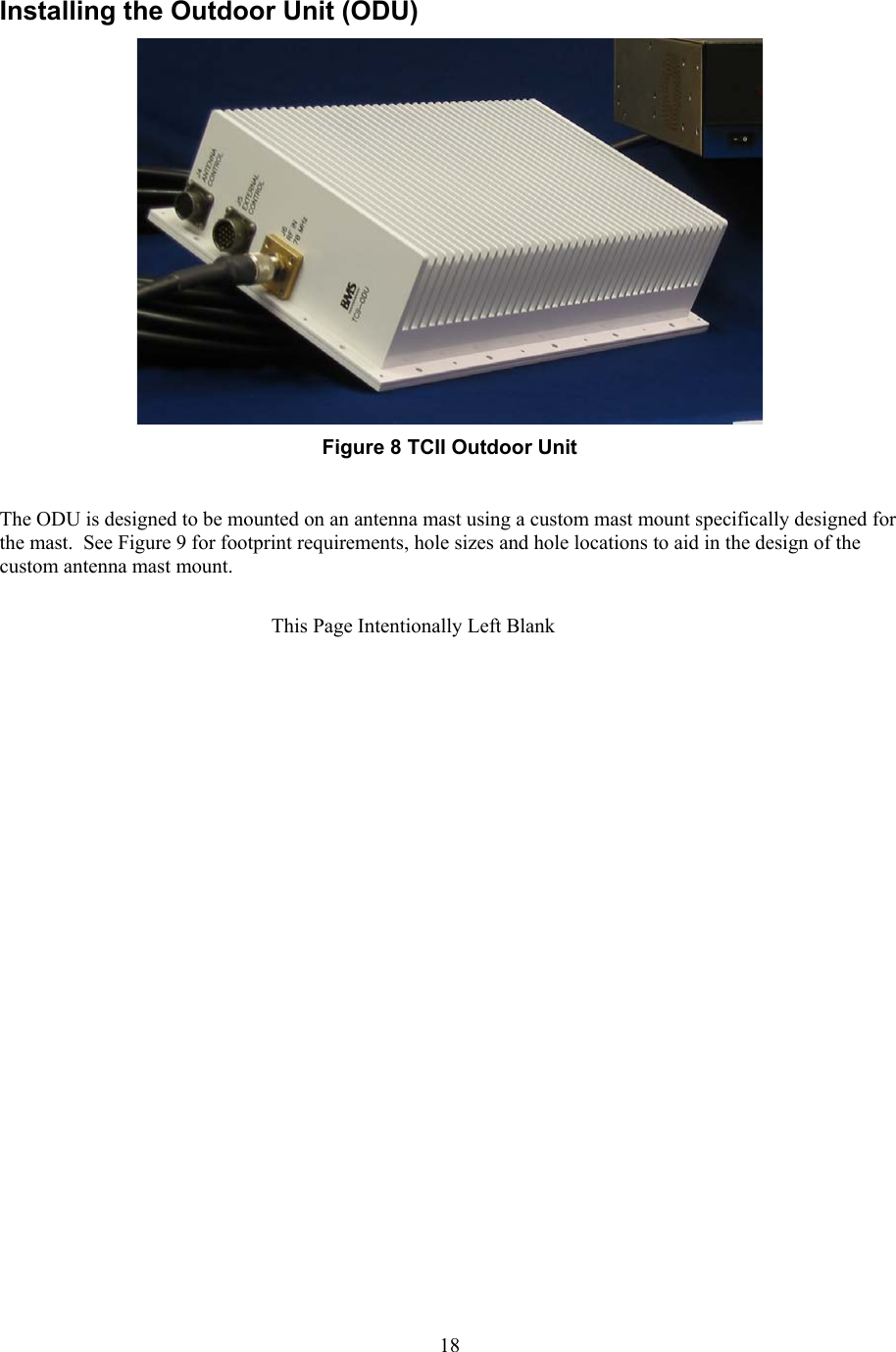
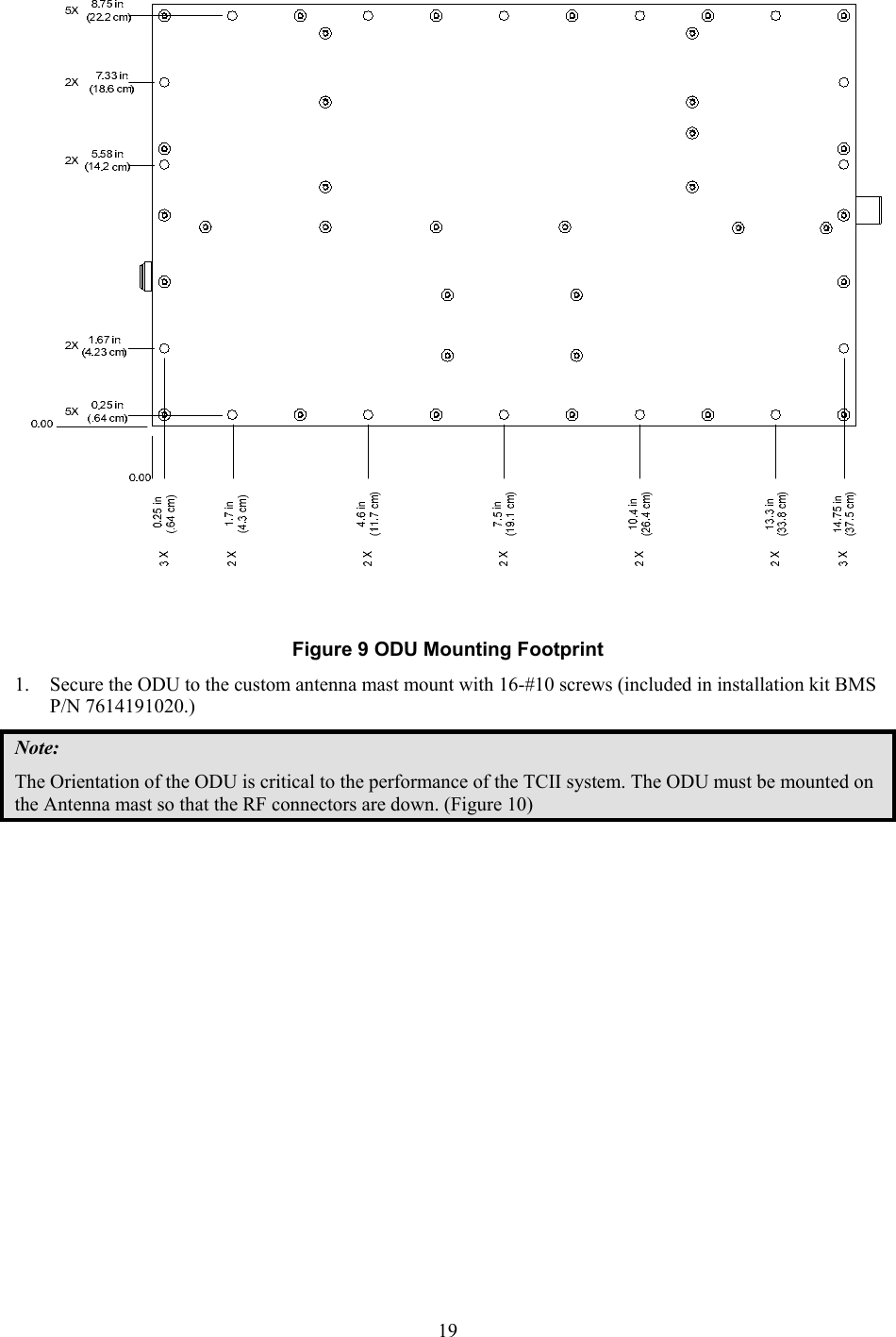
 18Installing the Outdoor Unit (ODU)   Figure 8 TCII Outdoor Unit  The ODU is designed to be mounted on an antenna mast using a custom mast mount specifically designed for the mast.  See Figure 9 for footprint requirements, hole sizes and hole locations to aid in the design of the custom antenna mast mount.  This Page Intentionally Left Blank
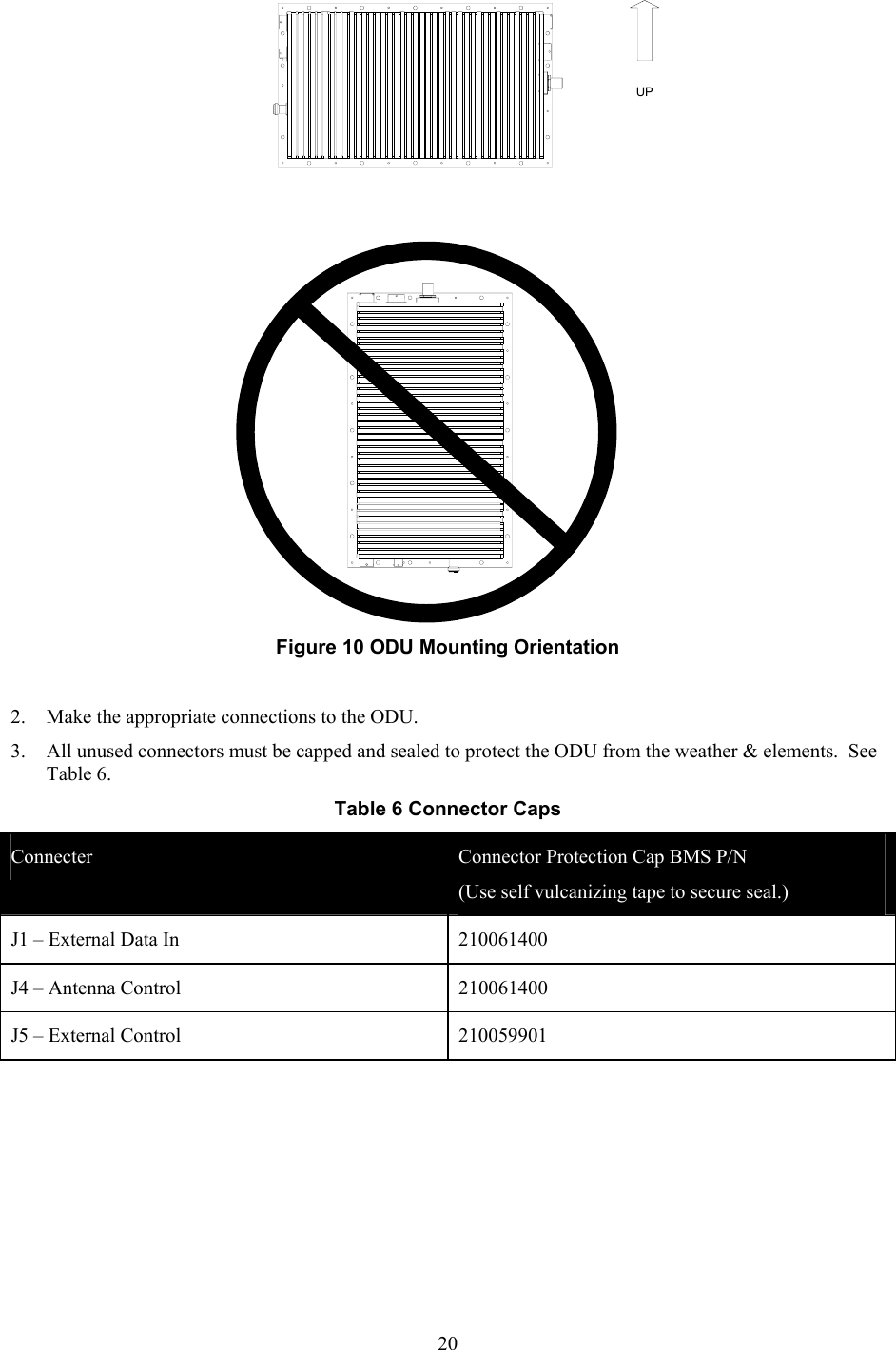
 19  Figure 9 ODU Mounting Footprint 1. Secure the ODU to the custom antenna mast mount with 16-#10 screws (included in installation kit BMS P/N 7614191020.) Note: The Orientation of the ODU is critical to the performance of the TCII system. The ODU must be mounted on the Antenna mast so that the RF connectors are down. (Figure 10)
 20UP Figure 10 ODU Mounting Orientation  2. Make the appropriate connections to the ODU.   3. All unused connectors must be capped and sealed to protect the ODU from the weather & elements.  See Table 6. Table 6 Connector Caps Connecter  Connector Protection Cap BMS P/N  (Use self vulcanizing tape to secure seal.) J1 – External Data In  210061400 J4 – Antenna Control  210061400 J5 – External Control   210059901
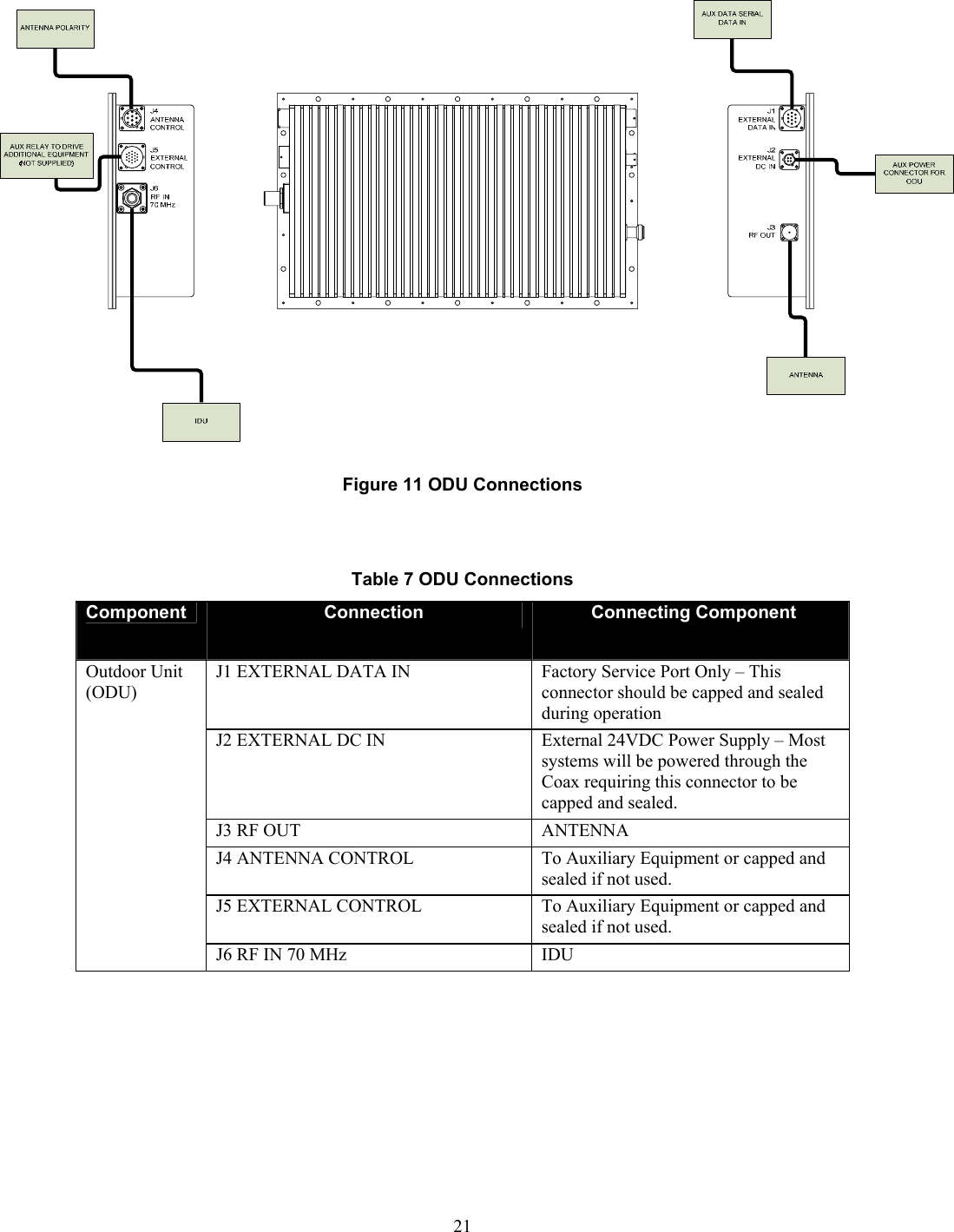
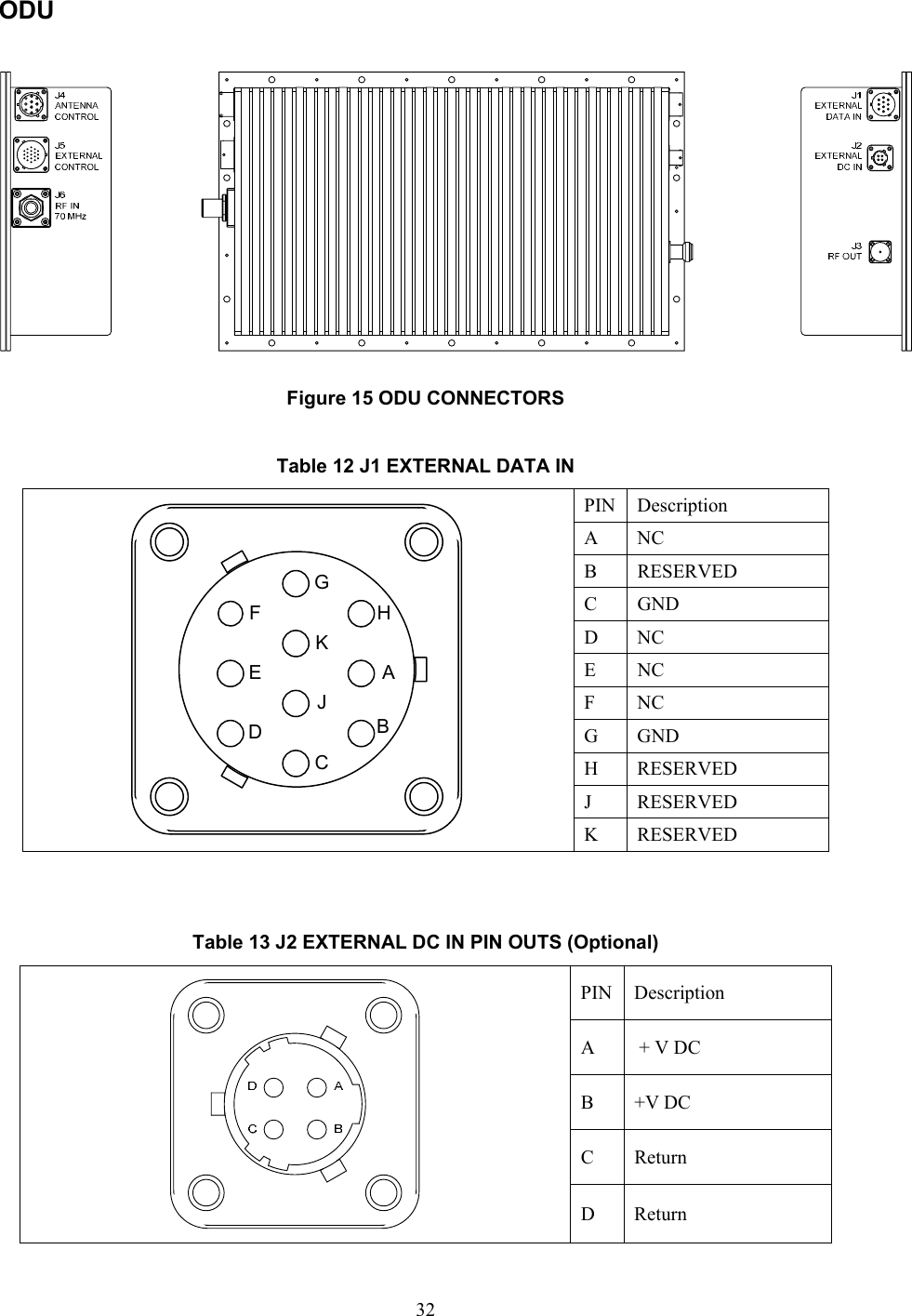
 21 Figure 11 ODU Connections   Table 7 ODU Connections Component  Connection  Connecting Component J1 EXTERNAL DATA IN  Factory Service Port Only – This connector should be capped and sealed during operation J2 EXTERNAL DC IN  External 24VDC Power Supply – Most systems will be powered through the Coax requiring this connector to be capped and sealed. J3 RF OUT  ANTENNA  J4 ANTENNA CONTROL  To Auxiliary Equipment or capped and sealed if not used. J5 EXTERNAL CONTROL  To Auxiliary Equipment or capped and sealed if not used. Outdoor Unit (ODU) J6 RF IN 70 MHz  IDU
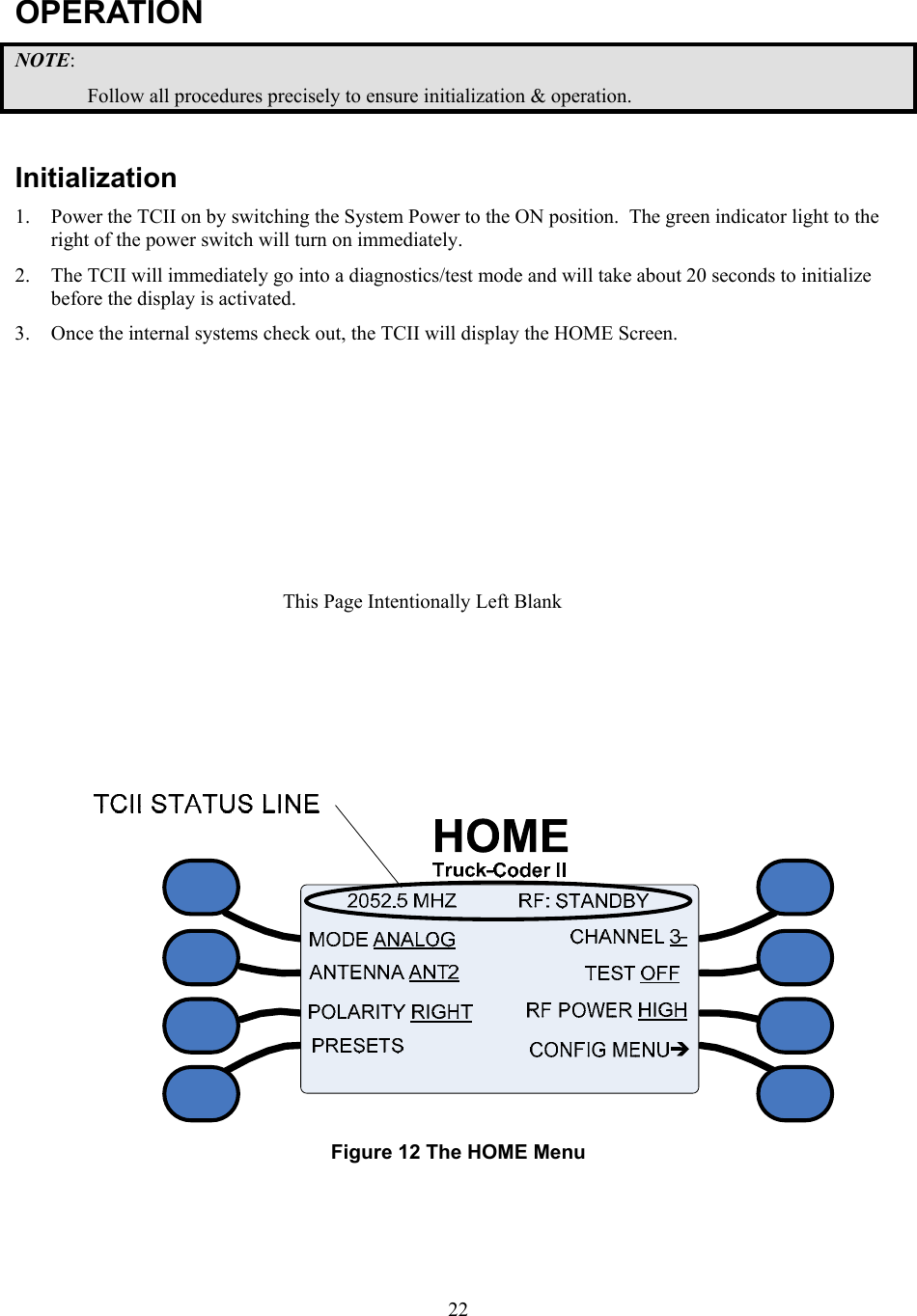
 22OPERATION NOTE: Follow all procedures precisely to ensure initialization & operation.  Initialization 1. Power the TCII on by switching the System Power to the ON position.  The green indicator light to the right of the power switch will turn on immediately. 2. The TCII will immediately go into a diagnostics/test mode and will take about 20 seconds to initialize before the display is activated. 3. Once the internal systems check out, the TCII will display the HOME Screen.    Figure 12 The HOME Menu  This Page Intentionally Left Blank
 23The home menu will display the current transmission frequency and status ( RF: STANDBY or RF: ON) and various transmission settings.   1. Verify transmission TCII status.  The frequency or the Preset Description will appear on the left in the Status line.  The transmission status will appear on the right.  The current settings for transmission MODE, selected ANTENNA, antenna POLARITY , CHANNEL, TEST signal, and RF POWER are indicated by the underline. 2. If all the settings are correct, begin transmission by pressing the RF On/Standby button on the front panel.  The Status Line will read RF: ON, the LED to the left of the RF On/Standby button will change from orange to green. 3. To end transmission, switch the transmission mode to standby pressing the RF On/Standby button again.  The Status Line will read RF: STANDBY and the RF Indicator LED will return to orange. 4. The system may now be shut down by switching the System Power switch to the OFF position.
 24
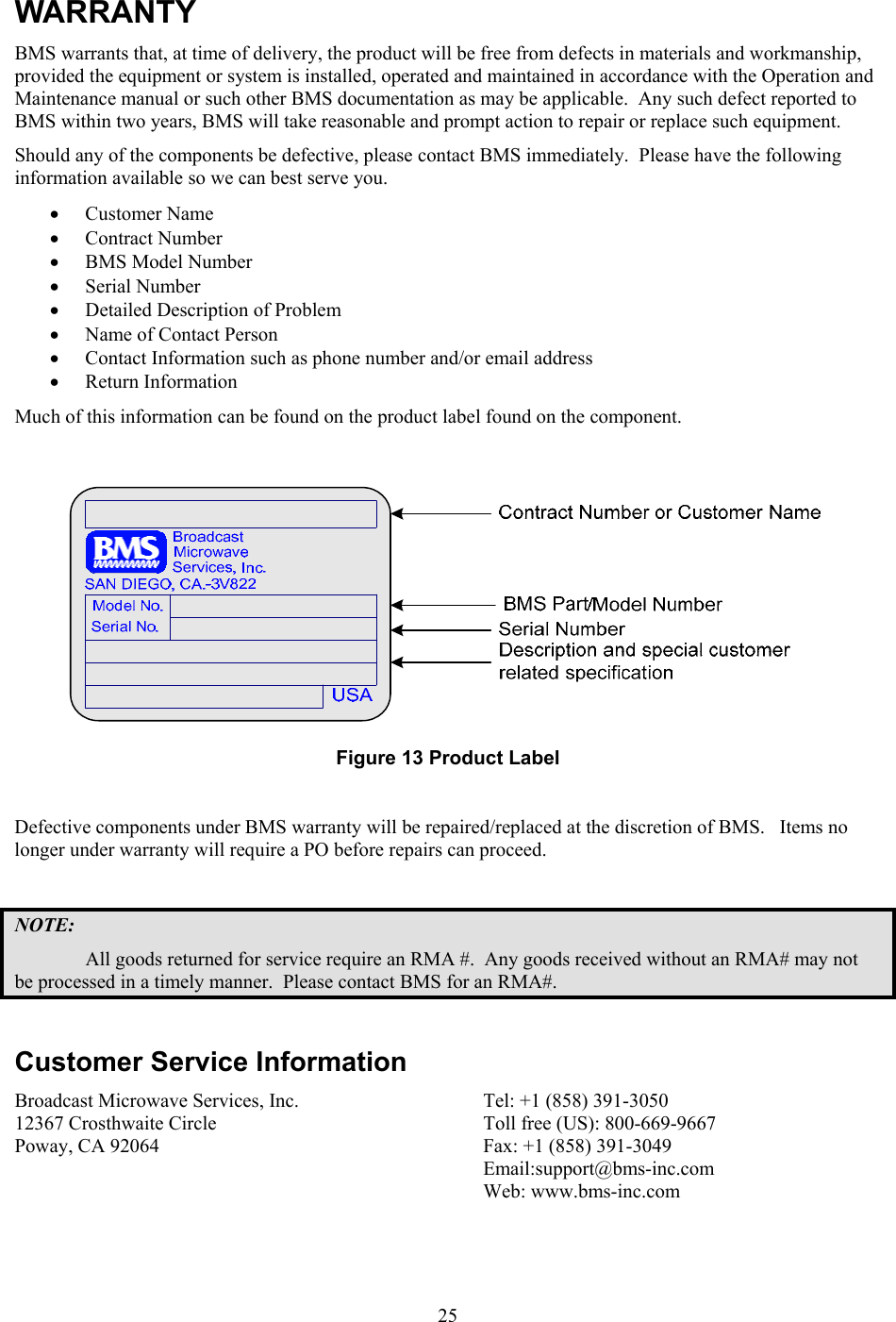
 25WARRANTY BMS warrants that, at time of delivery, the product will be free from defects in materials and workmanship, provided the equipment or system is installed, operated and maintained in accordance with the Operation and Maintenance manual or such other BMS documentation as may be applicable.  Any such defect reported to BMS within two years, BMS will take reasonable and prompt action to repair or replace such equipment. Should any of the components be defective, please contact BMS immediately.  Please have the following information available so we can best serve you.   • Customer Name  • Contract Number  • BMS Model Number  • Serial Number  • Detailed Description of Problem  • Name of Contact Person  • Contact Information such as phone number and/or email address  • Return Information Much of this information can be found on the product label found on the component.   Figure 13 Product Label  Defective components under BMS warranty will be repaired/replaced at the discretion of BMS.   Items no longer under warranty will require a PO before repairs can proceed.    NOTE: All goods returned for service require an RMA #.  Any goods received without an RMA# may not be processed in a timely manner.  Please contact BMS for an RMA#.  Customer Service Information Broadcast Microwave Services, Inc. 12367 Crosthwaite Circle Poway, CA 92064   Tel: +1 (858) 391-3050 Toll free (US): 800-669-9667 Fax: +1 (858) 391-3049 Email:support@bms-inc.com Web: www.bms-inc.com
 26This Page Intentionally Left Blank
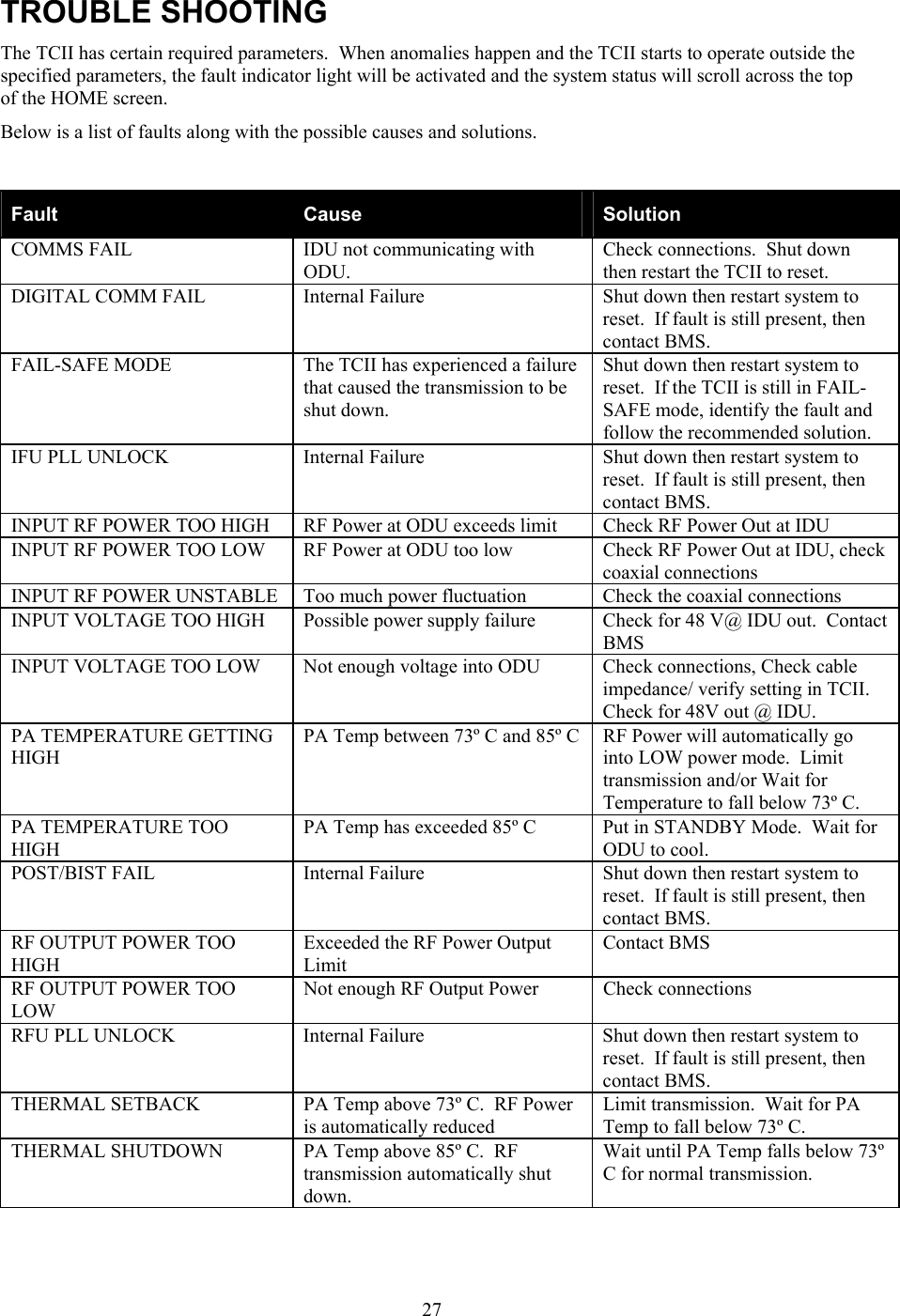
 27TROUBLE SHOOTING The TCII has certain required parameters.  When anomalies happen and the TCII starts to operate outside the specified parameters, the fault indicator light will be activated and the system status will scroll across the top of the HOME screen. Below is a list of faults along with the possible causes and solutions.   Fault  Cause  Solution COMMS FAIL  IDU not communicating with ODU. Check connections.  Shut down then restart the TCII to reset. DIGITAL COMM FAIL  Internal Failure  Shut down then restart system to reset.  If fault is still present, then contact BMS. FAIL-SAFE MODE  The TCII has experienced a failure that caused the transmission to be shut down. Shut down then restart system to reset.  If the TCII is still in FAIL-SAFE mode, identify the fault and follow the recommended solution. IFU PLL UNLOCK  Internal Failure  Shut down then restart system to reset.  If fault is still present, then contact BMS. INPUT RF POWER TOO HIGH  RF Power at ODU exceeds limit  Check RF Power Out at IDU INPUT RF POWER TOO LOW  RF Power at ODU too low  Check RF Power Out at IDU, check coaxial connections INPUT RF POWER UNSTABLE  Too much power fluctuation   Check the coaxial connections INPUT VOLTAGE TOO HIGH  Possible power supply failure  Check for 48 V@ IDU out.  Contact BMS INPUT VOLTAGE TOO LOW  Not enough voltage into ODU  Check connections, Check cable impedance/ verify setting in TCII.  Check for 48V out @ IDU.   PA TEMPERATURE GETTING HIGH PA Temp between 73º C and 85º C  RF Power will automatically go into LOW power mode.  Limit transmission and/or Wait for Temperature to fall below 73º C. PA TEMPERATURE TOO HIGH PA Temp has exceeded 85º C  Put in STANDBY Mode.  Wait for ODU to cool.  POST/BIST FAIL  Internal Failure  Shut down then restart system to reset.  If fault is still present, then contact BMS. RF OUTPUT POWER TOO HIGH Exceeded the RF Power Output Limit Contact BMS RF OUTPUT POWER TOO LOW Not enough RF Output Power  Check connections RFU PLL UNLOCK  Internal Failure  Shut down then restart system to reset.  If fault is still present, then contact BMS. THERMAL SETBACK  PA Temp above 73º C.  RF Power is automatically reduced Limit transmission.  Wait for PA Temp to fall below 73º C. THERMAL SHUTDOWN  PA Temp above 85º C.  RF transmission automatically shut down. Wait until PA Temp falls below 73º C for normal transmission.
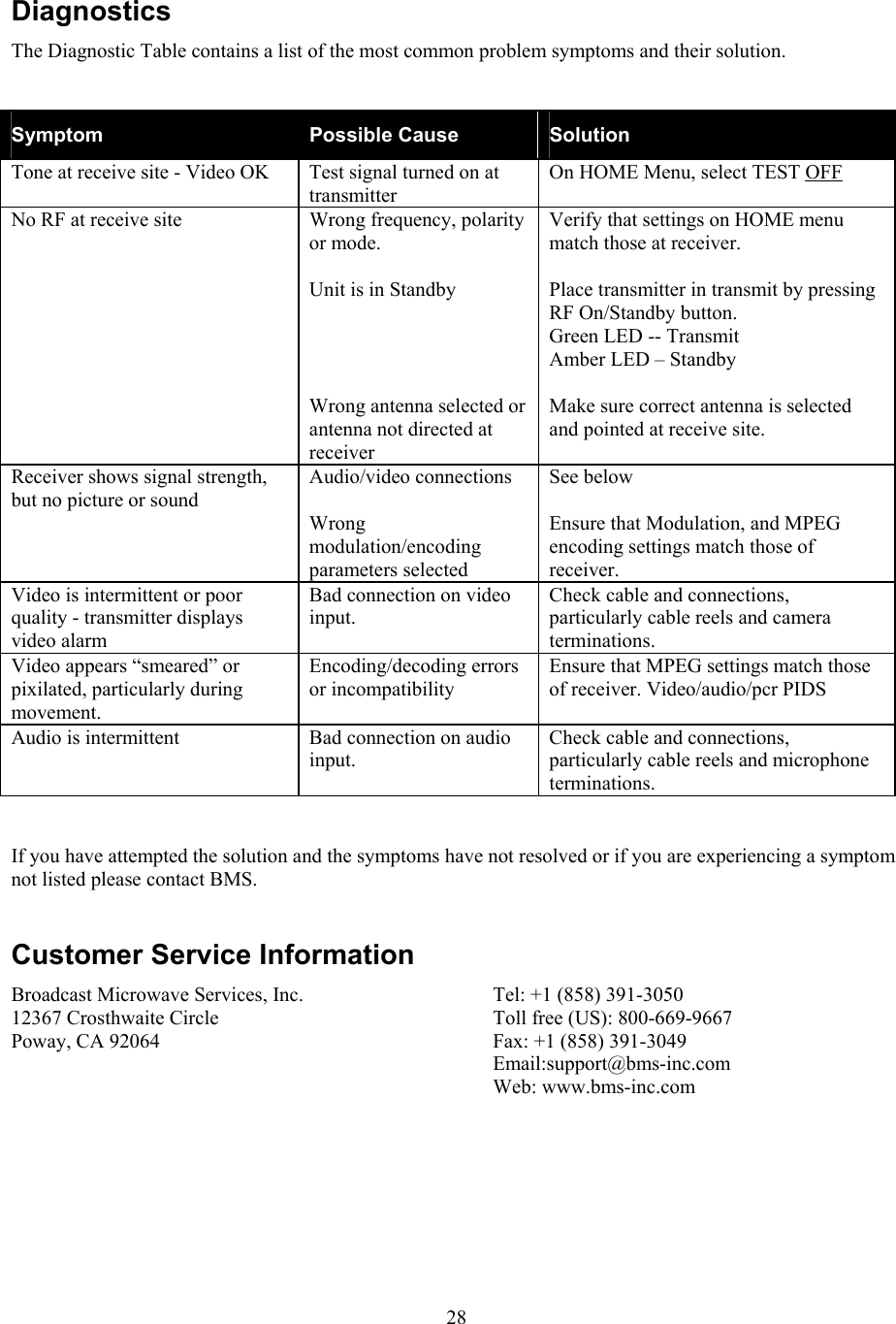
 28Diagnostics The Diagnostic Table contains a list of the most common problem symptoms and their solution.    Symptom  Possible Cause  Solution Tone at receive site - Video OK  Test signal turned on at transmitter On HOME Menu, select TEST OFF  No RF at receive site  Wrong frequency, polarity or mode.  Unit is in Standby     Wrong antenna selected or antenna not directed at receiver Verify that settings on HOME menu match those at receiver.  Place transmitter in transmit by pressing RF On/Standby button.  Green LED -- Transmit Amber LED – Standby  Make sure correct antenna is selected and pointed at receive site. Receiver shows signal strength, but no picture or sound Audio/video connections  Wrong modulation/encoding parameters selected See below  Ensure that Modulation, and MPEG encoding settings match those of receiver. Video is intermittent or poor quality - transmitter displays video alarm Bad connection on video input. Check cable and connections, particularly cable reels and camera terminations. Video appears “smeared” or pixilated, particularly during movement. Encoding/decoding errors or incompatibility Ensure that MPEG settings match those of receiver. Video/audio/pcr PIDS Audio is intermittent  Bad connection on audio input. Check cable and connections, particularly cable reels and microphone terminations.  If you have attempted the solution and the symptoms have not resolved or if you are experiencing a symptom not listed please contact BMS.  Customer Service Information Broadcast Microwave Services, Inc. 12367 Crosthwaite Circle Poway, CA 92064   Tel: +1 (858) 391-3050 Toll free (US): 800-669-9667 Fax: +1 (858) 391-3049 Email:support@bms-inc.com Web: www.bms-inc.com
 29
 30 PIN OUTS IDU  85 – 265 VAC2 AMPASIWARNING48 VDC PRESENT ONTHIS CONNECTOR70 MHz/48 VDC/TM OUTOFF ON48 VDCAUXILIARYINPUTSSUMMARYALARMOUT INOUT INAUDIO2 IN AUDIO1 INSDIINW/ AUDIOVIDEO INRS-232 DCETELEMETRYRS-232 CONTROLRS-232 AUX DATA10/100ETHERNET70 MHz Figure 14 IDU REAR PANEL CONNECTORS  Table 8 AUXILIARY INPUT PINOUTS PIN Description 1 RELAY 1 2 RELAY 2 3 RELAY 3 4 RELAY 4 5 RETURN 1 6 RETURN 2 7 RETURN 3 AUXILIARYINPUTS1 8 RETURN 4 The auxiliary inputs are control inputs that transferred to the ODU output (J5 EXTERNAL CONTROL PIN OUT) for control of auxiliary equipment.  Table 9 SUMMARY ALARM PINOUTS PIN Description 1  NC 2 COM 1SUMMARYALARM 3 NO
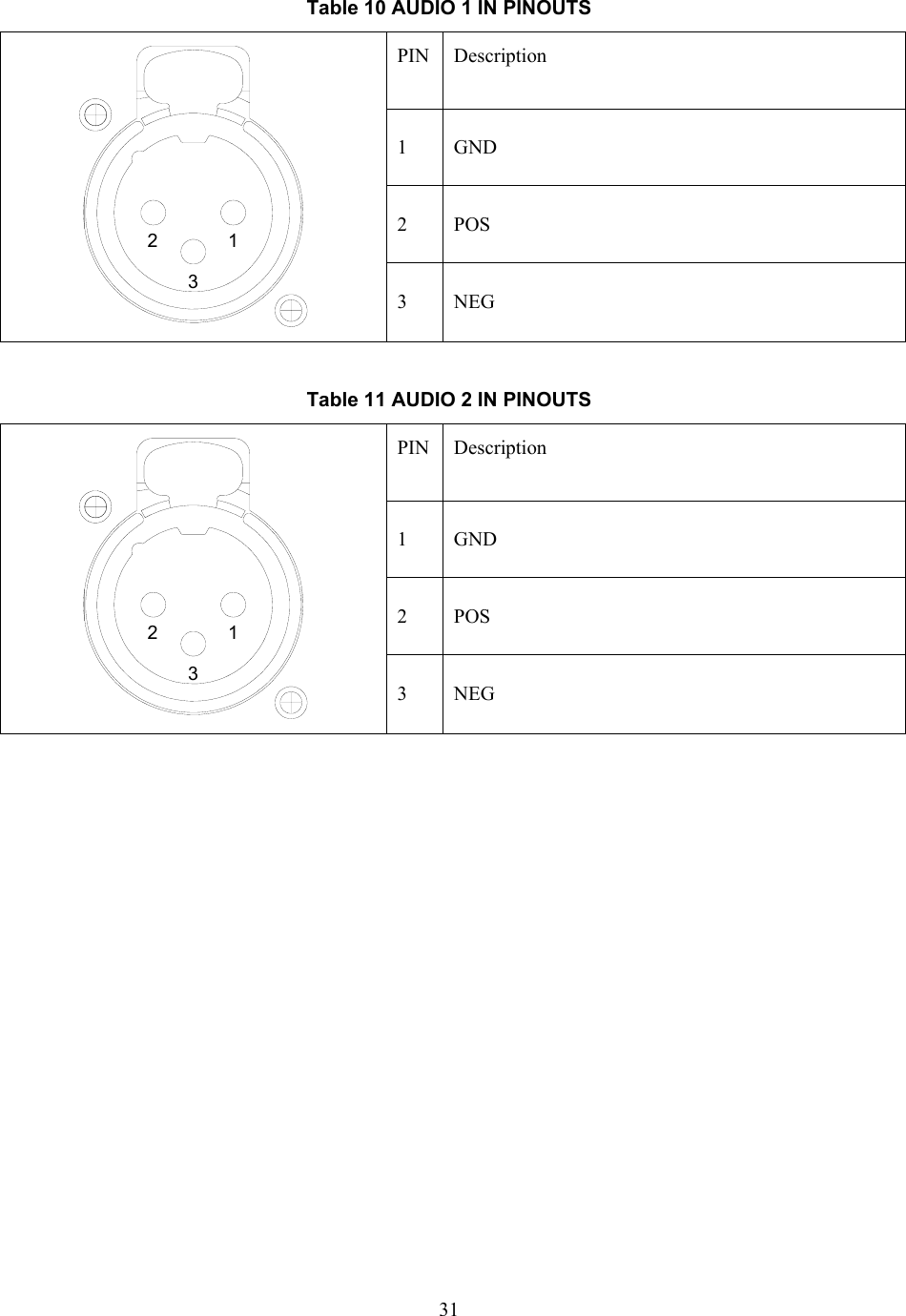
 31 Table 10 AUDIO 1 IN PINOUTS PIN Description 1 GND 2 POS 132 3 NEG  Table 11 AUDIO 2 IN PINOUTS PIN Description 1 GND 2 POS 132 3 NEG
 32ODU   Figure 15 ODU CONNECTORS  Table 12 J1 EXTERNAL DATA IN PIN Description A NC B RESERVED C GND D NC E NC F NC G GND H RESERVED J RESERVED ABCDEFGHJK K RESERVED   Table 13 J2 EXTERNAL DC IN PIN OUTS (Optional) PIN Description A   + V DC B +V DC C Return  D Return
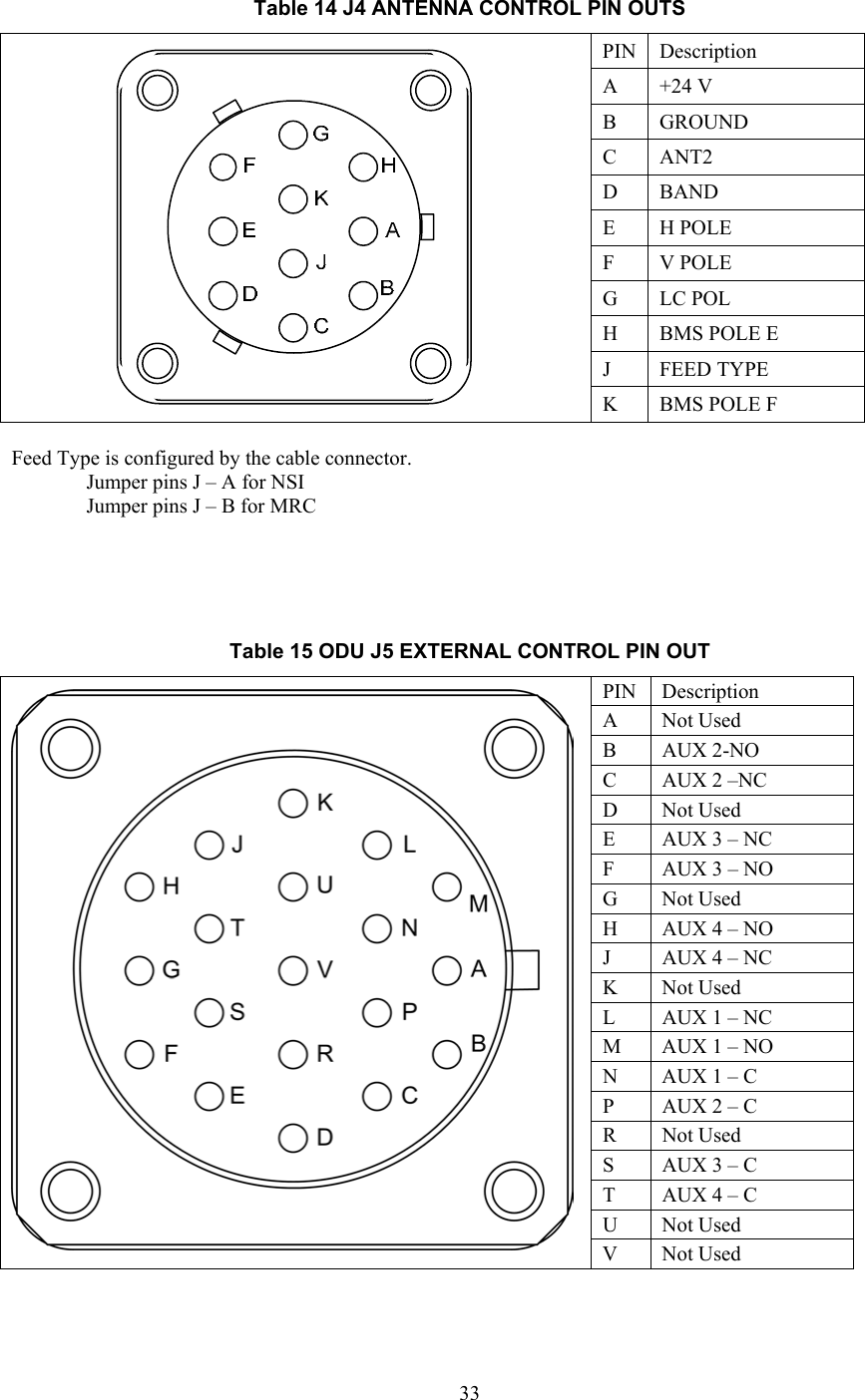
 33Table 14 J4 ANTENNA CONTROL PIN OUTS PIN Description A  +24 V  B GROUND  C ANT2 D BAND E  H POLE  F  V POLE  G LC POL H  BMS POLE E J FEED TYPE  K  BMS POLE F  Feed Type is configured by the cable connector. Jumper pins J – A for NSI Jumper pins J – B for MRC     Table 15 ODU J5 EXTERNAL CONTROL PIN OUT PIN Description A Not Used B AUX 2-NO C  AUX 2 –NC D Not Used E  AUX 3 – NC F  AUX 3 – NO G Not Used H  AUX 4 – NO J  AUX 4 – NC K Not Used L  AUX 1 – NC M  AUX 1 – NO N  AUX 1 – C P  AUX 2 – C R Not Used S  AUX 3 – C T  AUX 4 – C U Not Used  V Not Used
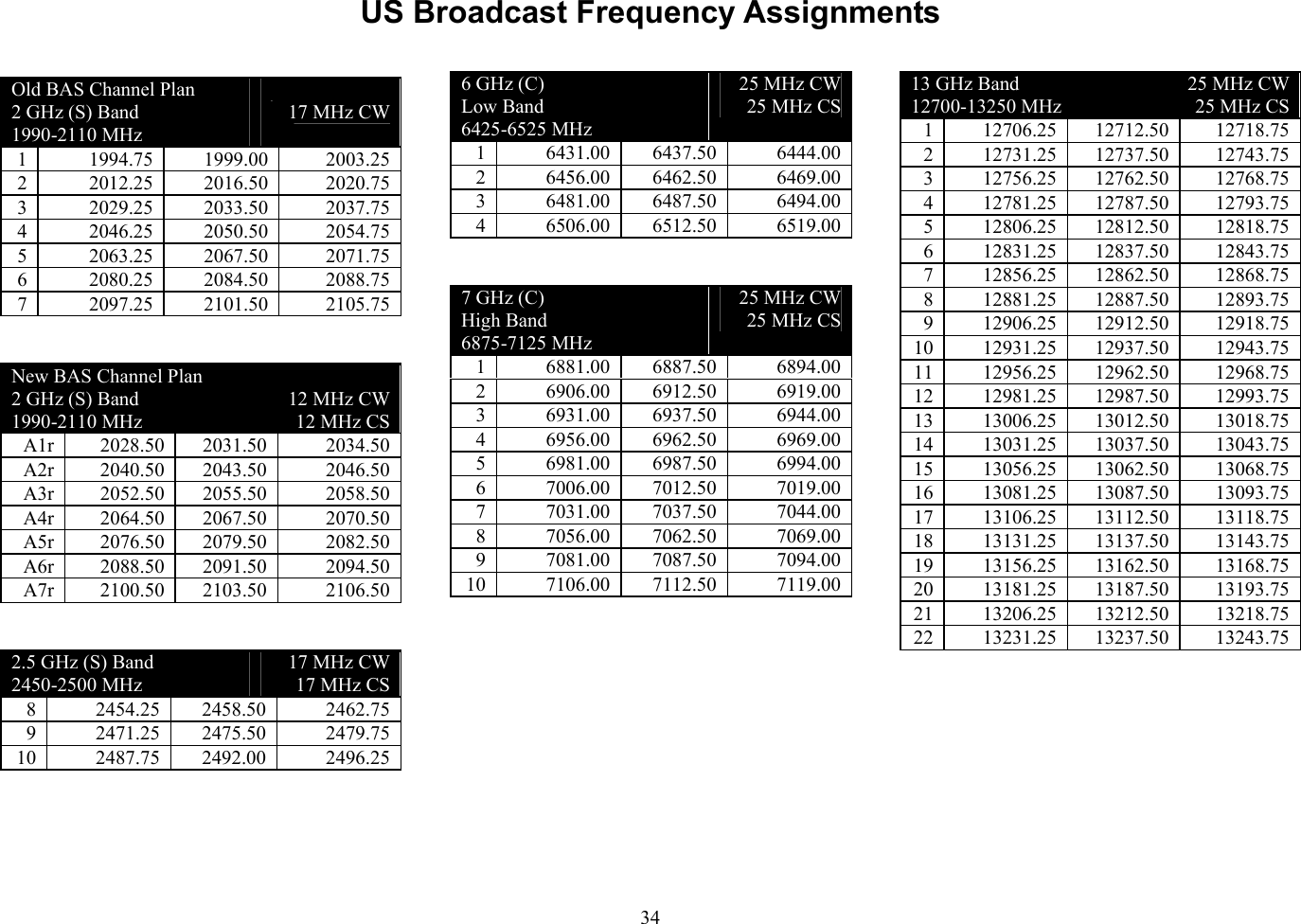
 34US Broadcast Frequency Assignments Old BAS Channel Plan 2 GHz (S) Band 1990-2110 MHz    17 MHz CW 1 1994.75 1999.00 2003.25 2 2012.25 2016.50 2020.75 3 2029.25 2033.50 2037.75 4 2046.25 2050.50 2054.75 5 2063.25 2067.50 2071.75 6 2080.25 2084.50 2088.75 7 2097.25 2101.50 2105.75  New BAS Channel Plan 2 GHz (S) Band 1990-2110 MHz  12 MHz CW 12 MHz CS A1r 2028.50 2031.50  2034.50 A2r 2040.50 2043.50  2046.50 A3r 2052.50 2055.50  2058.50 A4r 2064.50 2067.50  2070.50 A5r 2076.50 2079.50  2082.50 A6r 2088.50 2091.50  2094.50 A7r 2100.50 2103.50  2106.50  2.5 GHz (S) Band 2450-2500 MHz 17 MHz CW 17 MHz CS 8 2454.25 2458.50 2462.75 9 2471.25 2475.50 2479.75 10 2487.75 2492.00 2496.25   6 GHz (C)  Low Band 6425-6525 MHz 25 MHz CW 25 MHz CS 1 6431.00 6437.50 6444.00 2 6456.00 6462.50 6469.00 3 6481.00 6487.50 6494.00 4 6506.00 6512.50 6519.00  7 GHz (C)  High Band 6875-7125 MHz 25 MHz CW 25 MHz CS 1 6881.00 6887.50 6894.00 2 6906.00 6912.50 6919.00 3 6931.00 6937.50 6944.00 4 6956.00 6962.50 6969.00 5 6981.00 6987.50 6994.00 6 7006.00 7012.50 7019.00 7 7031.00 7037.50 7044.00 8 7056.00 7062.50 7069.00 9 7081.00 7087.50 7094.00 10 7106.00 7112.50 7119.00   13 GHz Band 12700-13250 MHz 25 MHz CW 25 MHz CS 1 12706.25 12712.50 12718.75 2 12731.25 12737.50 12743.75 3 12756.25 12762.50 12768.75 4 12781.25 12787.50 12793.75 5 12806.25 12812.50 12818.75 6 12831.25 12837.50 12843.75 7 12856.25 12862.50 12868.75 8 12881.25 12887.50 12893.75 9 12906.25 12912.50 12918.75 10 12931.25 12937.50 12943.75 11 12956.25 12962.50 12968.75 12 12981.25 12987.50 12993.75 13 13006.25 13012.50 13018.75 14 13031.25 13037.50 13043.75 15 13056.25 13062.50 13068.75 16 13081.25 13087.50 13093.75 17 13106.25 13112.50 13118.75 18 13131.25 13137.50 13143.75 19 13156.25 13162.50 13168.75 20 13181.25 13187.50 13193.75 21 13206.25 13212.50 13218.75 22 13231.25 13237.50 13243.75
 35This Page Intentionally Left Blank
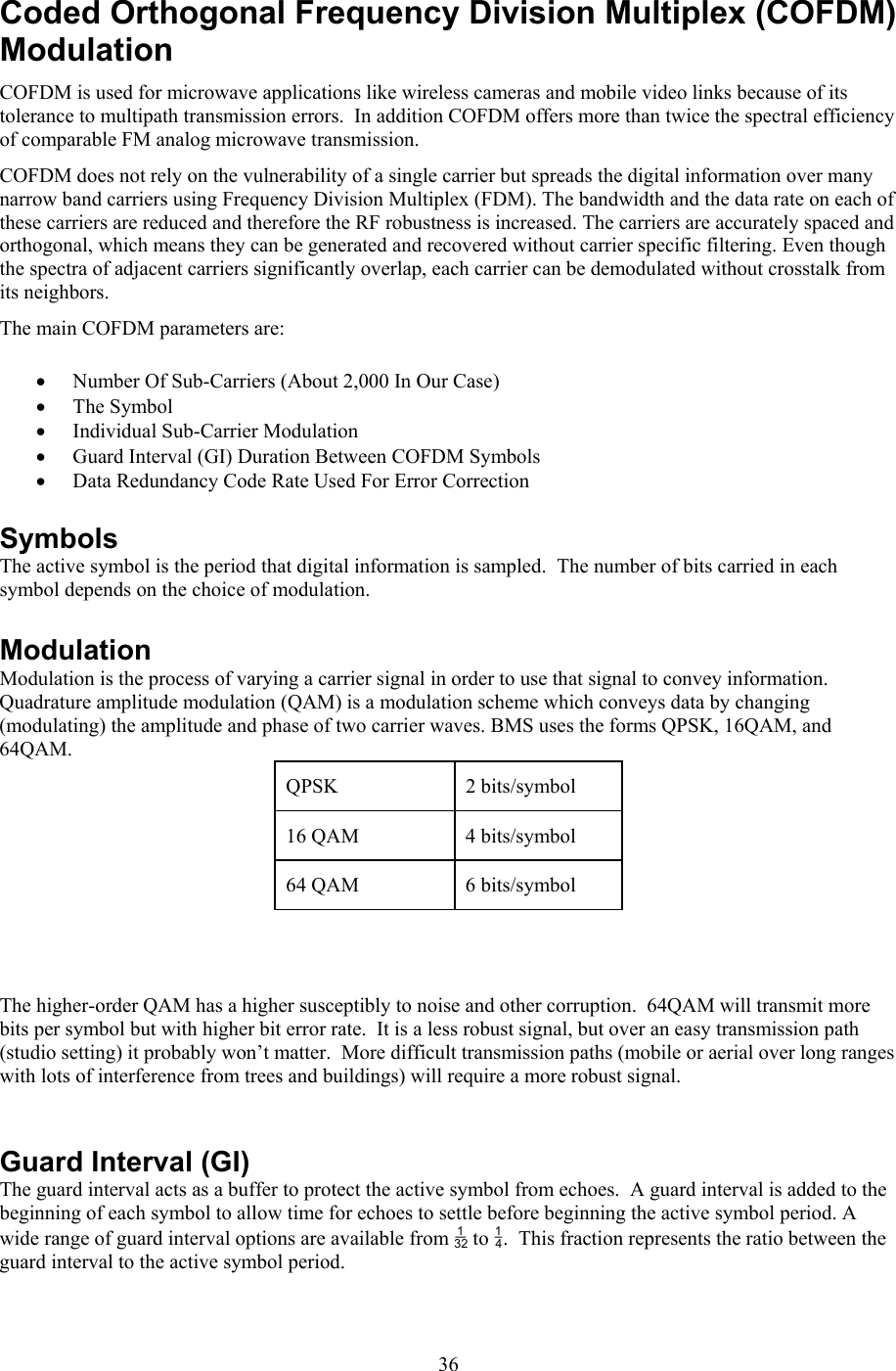
 36Coded Orthogonal Frequency Division Multiplex (COFDM) Modulation COFDM is used for microwave applications like wireless cameras and mobile video links because of its tolerance to multipath transmission errors.  In addition COFDM offers more than twice the spectral efficiency of comparable FM analog microwave transmission. COFDM does not rely on the vulnerability of a single carrier but spreads the digital information over many narrow band carriers using Frequency Division Multiplex (FDM). The bandwidth and the data rate on each of these carriers are reduced and therefore the RF robustness is increased. The carriers are accurately spaced and orthogonal, which means they can be generated and recovered without carrier specific filtering. Even though the spectra of adjacent carriers significantly overlap, each carrier can be demodulated without crosstalk from its neighbors. The main COFDM parameters are: • Number Of Sub-Carriers (About 2,000 In Our Case) • The Symbol  • Individual Sub-Carrier Modulation • Guard Interval (GI) Duration Between COFDM Symbols • Data Redundancy Code Rate Used For Error Correction Symbols The active symbol is the period that digital information is sampled.  The number of bits carried in each symbol depends on the choice of modulation.   Modulation Modulation is the process of varying a carrier signal in order to use that signal to convey information.  Quadrature amplitude modulation (QAM) is a modulation scheme which conveys data by changing (modulating) the amplitude and phase of two carrier waves. BMS uses the forms QPSK, 16QAM, and 64QAM.   QPSK   2 bits/symbol 16 QAM  4 bits/symbol 64 QAM  6 bits/symbol    The higher-order QAM has a higher susceptibly to noise and other corruption.  64QAM will transmit more bits per symbol but with higher bit error rate.  It is a less robust signal, but over an easy transmission path (studio setting) it probably won’t matter.  More difficult transmission paths (mobile or aerial over long ranges with lots of interference from trees and buildings) will require a more robust signal.       Guard Interval (GI) The guard interval acts as a buffer to protect the active symbol from echoes.  A guard interval is added to the beginning of each symbol to allow time for echoes to settle before beginning the active symbol period. A wide range of guard interval options are available from  to .  This fraction represents the ratio between the guard interval to the active symbol period.
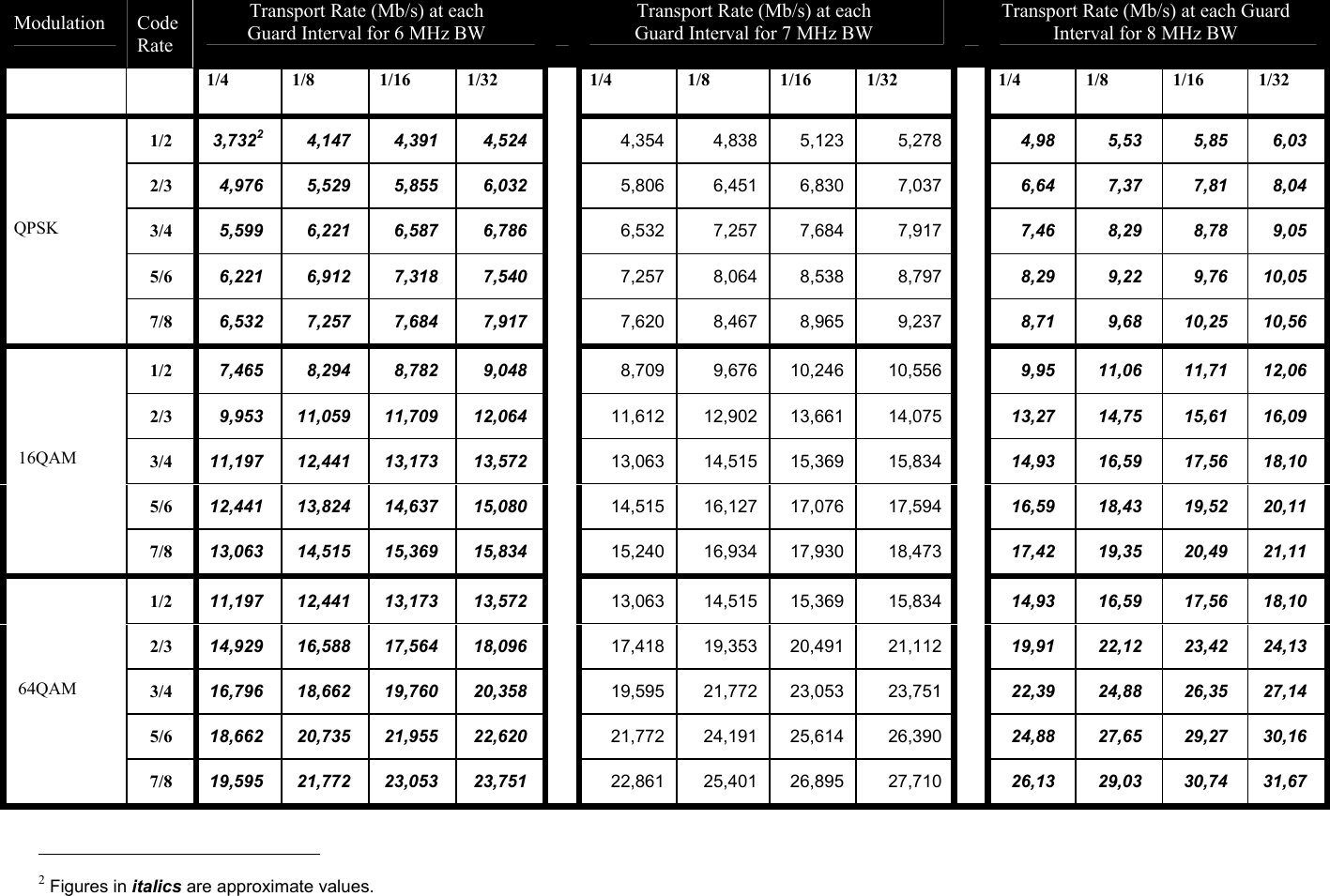
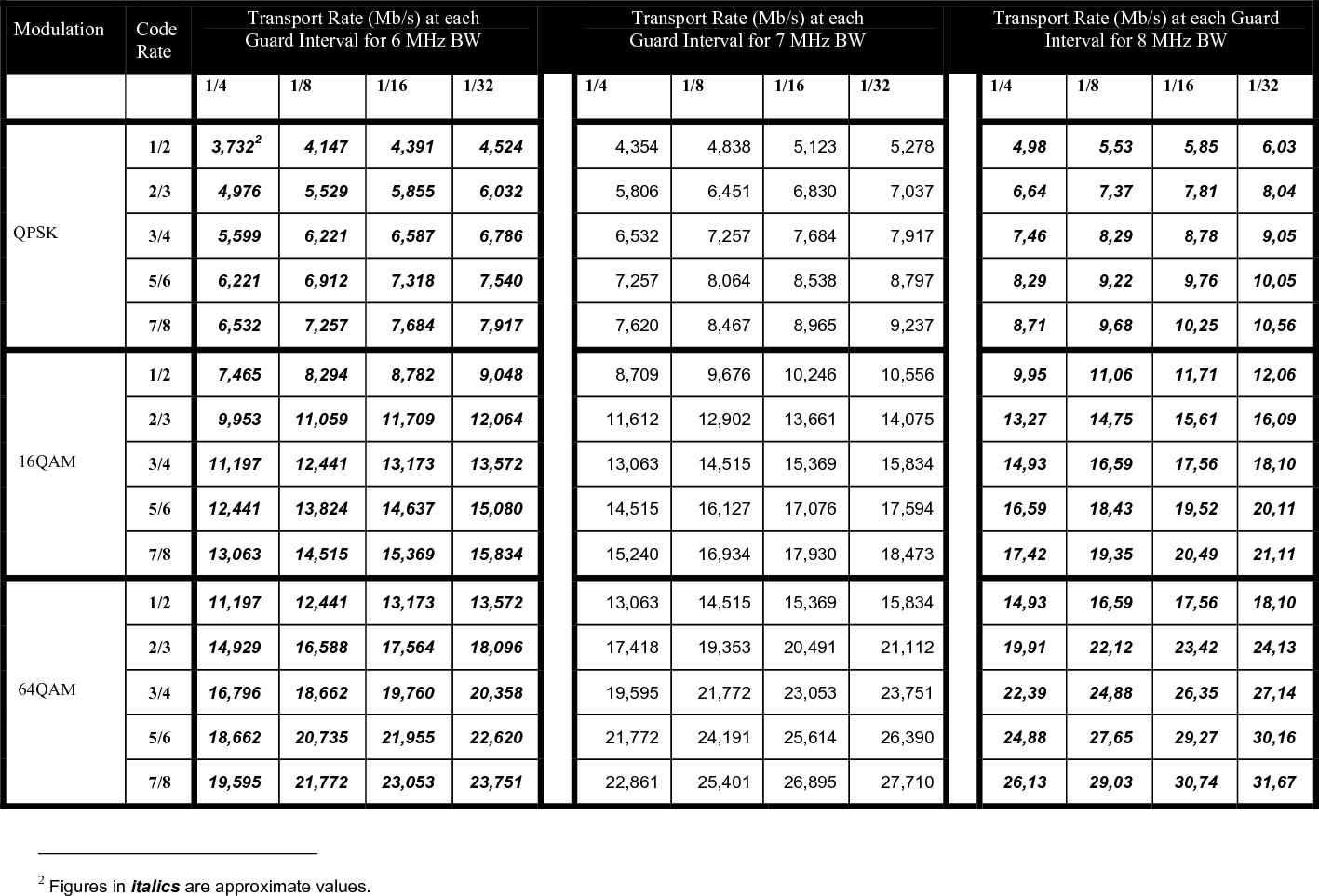
 37 Code Rate The code rate represents the amount of Forward Error Correction (FEC) used for each active symbol.  FEC is a method of obtaining error control in data transmission.  A code rate of ½ means that for two bits of information received, 1 bit is the real data.  The other bit tells how intact the first bit is.  A code rate of 7/8 means that out of the 8 bits sent, there are 7 bits of real data and only 1 bit that is to catch any errors in those 7.  Transmission Rates Finding the best transmission mode to suit a given situation means selecting the best compromise between modulation, guard interval and code rate.  What follows the ETSI EN 300 744 V1.4.1 (2001-01) standards for the useful bitrate (Mbit/s) for all combinations of guard interval, constellation and code rate for non-hierarchical systems for 6, 7, and 8 MHz channels respectively
  Modulation  Code Rate Transport Rate (Mb/s) at each  Guard Interval for 6 MHz BW   Transport Rate (Mb/s) at each  Guard Interval for 7 MHz BW   Transport Rate (Mb/s) at each Guard Interval for 8 MHz BW   1/4 1/8 1/16 1/32  1/4 1/8 1/16 1/32  1/4 1/8 1/16 1/32 1/2  3,7322 4,147 4,391 4,524  4,354 4,838 5,123  5,278  4,98 5,53 5,85 6,03 2/3  4,976 5,529 5,855 6,032  5,806 6,451 6,830  7,037  6,64 7,37 7,81 8,04 3/4  5,599 6,221 6,587 6,786  6,532 7,257 7,684  7,917  7,46 8,29 8,78 9,05 5/6  6,221 6,912 7,318 7,540  7,257 8,064 8,538  8,797  8,29 9,22 9,76 10,05 QPSK 7/8  6,532 7,257 7,684 7,917  7,620 8,467 8,965  9,237  8,71 9,68 10,25 10,56 1/2  7,465 8,294 8,782 9,048  8,709 9,676 10,246 10,556  9,95 11,06 11,71 12,06 2/3  9,953 11,059 11,709 12,064  11,612 12,902 13,661  14,075  13,27 14,75 15,61 16,09 3/4  11,197 12,441 13,173 13,572  13,063 14,515 15,369  15,834  14,93 16,59 17,56 18,10 5/6  12,441 13,824 14,637 15,080  14,515 16,127 17,076  17,594  16,59 18,43 19,52 20,11  16QAM 7/8  13,063 14,515 15,369 15,834  15,240 16,934 17,930  18,473  17,42 19,35 20,49 21,11 1/2  11,197 12,441 13,173 13,572  13,063 14,515 15,369  15,834  14,93 16,59 17,56 18,10 2/3  14,929 16,588 17,564 18,096  17,418 19,353 20,491  21,112  19,91 22,12 23,42 24,13 3/4  16,796 18,662 19,760 20,358  19,595 21,772 23,053  23,751  22,39 24,88 26,35 27,14 5/6  18,662 20,735 21,955 22,620  21,772 24,191 25,614  26,390  24,88 27,65 29,27 30,16  64QAM 7/8  19,595 21,772 23,053 23,751  22,861 25,401 26,895  27,710  26,13 29,03 30,74 31,67                                                            2 Figures in italics are approximate values.
        This Page Intentionally Left Blank
 Glossary  Analog Transmission Frequency Modulated (FM) method of sending information with radio waves.  An older, dependable method of transmission.  (See Digital Transmission)   Antenna Actuator The mechanism which deploys or retracts the antenna radio operation or for landing and take-off. ASI: Asynchronous Serial Interface. Transmission standard used to connect video delivery equipment within a cable, satellite or terrestrial plant. BNC Connector  The Bayonet Neill-Concelman connector is a type of RF connector used for terminating coaxial cable.  (See TNC connector) COFDM: Coded Orthogonal Frequency Division Multiplex A digital modulation method that divides a single digital signal across multiple (1000+) signal carriers simultaneously.  BMS Coder II family products use COFDM digital modulation. Composite Video  The format of an analog television (picture only) signal before it is combined with a sound signal and modulated onto an RF carrier. dB:  Decibel  A unit for expressing the ratio of two amounts of electric or acoustic signal power equal to 10 times the common logarithm of this ratio. dBm  A unit for expressing the power ratio in decibel (dB) of the measured power referenced to one milliwatt (mW). Digital Transmission Digitally Modulated (COFDM and others) method of sending information with radio waves.  Newer more reliable method of transmission.  (See Analog Transmission) Directional Antenna  The final transmit element of a microwave system that radiates the signal one direction, in a directed or focused narrow beam.  This requires aiming of the antenna toward the receive site. DTV: Digital Television Digital Television uses digital modulation and compression to broadcast video, audio and data signals. DVB-T:  Digital Video Broadcasting-Terrestrial An international digital television (DTV) standard that defines digital COFDM modulation using MPEG2 compression. GPS: Global Positioning System A navigational system using satellite signals to fix the location of a receiver on or above the earth surface.
 MPEG-2  A compression standard for digital video and audio data. Multipath  The radio wave propagation phenomenon that results in the transmitted signals. reaching the receiving antenna by two or more paths.  This condition is not desirable and usually results in signal fading and interference. MUX  Multiplex The combining of multiple signals into a single transmission.  Omni-Directional Antenna The final transmit element of the microwave system that radiates the signal approximately equally throughout a 360 degree circle.  Does not require aiming of the antenna. PAL phase-alternating line A color encoding used in broadcast television systems in large parts of the world. PAT  Program Association Table Indicates which PID the PMT is to be found PID Packet Identifier PMT-PID Program Map Table Yields information about the Program, Video PID, Audio PID, and PCR PID.   The PMT-PID default is 200 for BMS systems. PCR-PID Program Clock Reference A time stamp indicating the system time clock value when the stamped packet leaves the encoder buffer and enters the decoder buffer used to Synchronize the receiver System Time Clock (STC) with the transmitter STC. Default is 101 for BMS systems. RF: Radio Frequency That portion of the Electromagnetic Spectrum that is used for radio and television transmission. SDI: Serial Digital Interface A digitized video format used for broadcast grade video.  Stand-by  The condition of an RF system where all but the transmit circuits are energized.  In this status the system may be switched into transmit mode instantaneously.  (See Transmit) TNC Connector  Threaded version of the BNC connector (See BNC connector) Transmit  The condition of an RF system where it is sending out signal.  (See Stand-by) YUV  The YUV model defines a color space in terms of one luminance and two chrominance components. YUV is used in the PAL system of television broadcasting, which is the standard in much of the world.

Navigation menu