Brunswick Bowling and Billiards 501445 Brunswick Sync Tablet User Manual DVB T indd

Brunswick Bowling & Billiards Corporation Brunswick Sync Tablet DVB T indd

User manual

OPERATION MANUALBRUNSWICK  SYNC TABLET57-501445
3IMPORTANT SAFETY INSTRUCTIONSCAUTION: Any changes or modifi cations to this equipment could void the productwarranty.DANGER: To reduce the risk of electrical shock, always unplug this Brunswick  productbefore cleaning or attempting any maintenance activity.WARNING: To reduce the risk of burns, fi re, electric shock, or injury, it is imperative toconnect each product to a properly grounded electrical outlet.WARNING: To prevent injury, this product must be securely attached in accordance withthe installation instructions.Never operate a Brunswick product if it has a damaged power cord or electrical plug, or if ithas been dropped, damaged, or even partially immersed in water. If this occurs, contact Brun-swick Customer Support Services.Position this product so that the AC power cord plug is accessible to the user.Keep the power cord away from heated surfaces. Do not pull the equipment by the power cordor use the cord as a handle.If the electrical supply cord is damaged, it must be replaced by the manufacturer, an authorizedservice agent, or a similarly qualifi ed person to avoid a hazard.Always follow the product instructions for proper operation.Never insert objects into any opening of the Brunswick product. If an object should drop in-side, unplug this Brunswick product and carefully retrieve it while the unit is not in use. If theobject cannot be reached, contact Life Fitness Customer Support Services.Do not use this product outdoors, near swimming pools or in areas of high humidity. Do notexpose this product to dripping or splashing liquids. If the product should be exposed to liquid,contact Brunswick Customer Support Services.Never operate a Brunswick product with the air openings blocked. Keep air openings free oflint, hair, or any obstructing material.Use this product only for its intended use as described in this manual. Do not use attachmentsthat have not been recommended by the manufacturer.SAVE THESE INSTRUCTIONS FOR FUTURE REFERENCE.
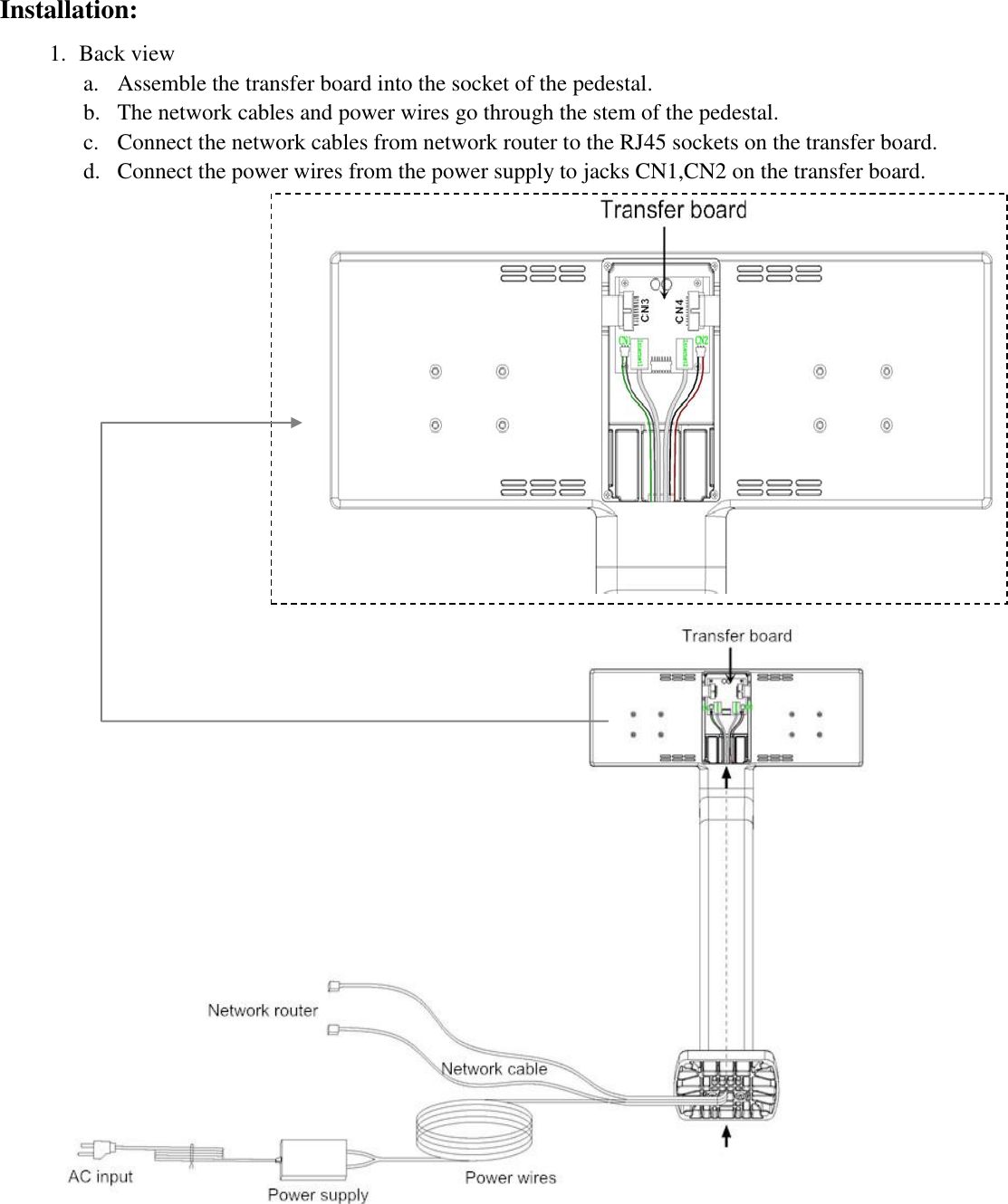
Installation: 1. Back viewa. Assemble the transfer board into the socket of the pedestal.b. The network cables and power wires go through the stem of the pedestal.c. Connect the network cables from network router to the RJ45 sockets on the transfer board.d. Connect the power wires from the power supply to jacks CN1,CN2 on the transfer board.
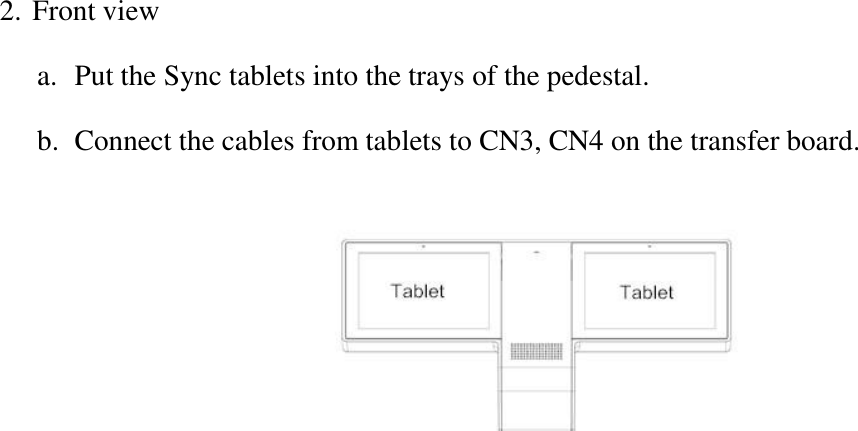
2. Front viewa. Put the Sync tablets into the trays of the pedestal.b. Connect the cables from tablets to CN3, CN4 on the transfer board.
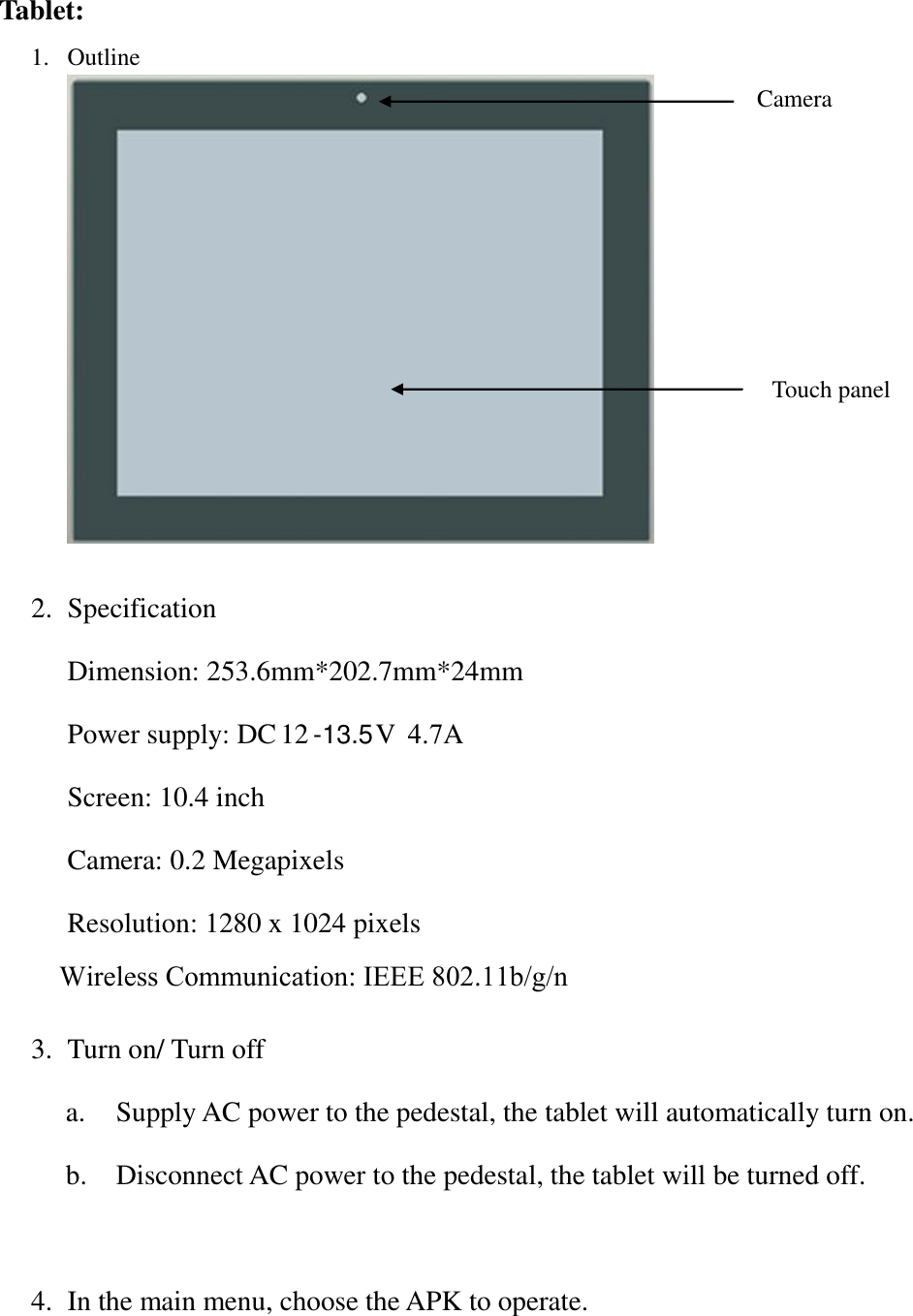
Tablet: 1. Outline2. Specification3. Turn on/ Turn offa. Supply AC power to the pedestal, the tablet will automatically turn on.b. Disconnect AC power to the pedestal, the tablet will be turned off.4. In the main menu, choose the APK to operate.Camera Touch panel Dimension: 253.6mm*202.7mm*24mmPower supply: DC 12 -13.5V  4.7A Screen: 10.4 inchCamera: 0.2 MegapixelsResolution: 1280 x 1024 pixelsWireless Communication: IEEE 802.11b/g/n
FCC Wanrning:Note: This equipment has been tested and found to comply with the limits for a Class B digital device, pursuant to Part 15 of the FCC Rules. These limits are designed to provide reasonable protection against harmful interference in a residential installation. This equipment generates, uses, and can radiate radio frequency energy, and if not installed and used in accordance with the instructions, may cause harmful interference to radio communications. However, there is no guarantee that interference will not occur in a particular installation. If this equipment does cause harmful interference to radio or television reception, which can be determined by turning the equipment off and on, the user is encouraged to try to correct the interference by one or more of the following measures:– Reorient or relocate the receiving antenna.– Increase the separation between the equipment and receiver.– Connect the equipment into an outlet on a circuit different from that towhich the receiver is connected.–Consult the dealer or an experienced radio/TV technician for help.This equipment complies with FCC radiation exposure limits set forth for an uncontrolled environment. This equipment should be installed and operated with minimum distance 20cm between the radiator and your body.

Navigation menu