Budderfly C0021031 Power Pack User Manual
Budderfly LLC Power Pack
User Manual
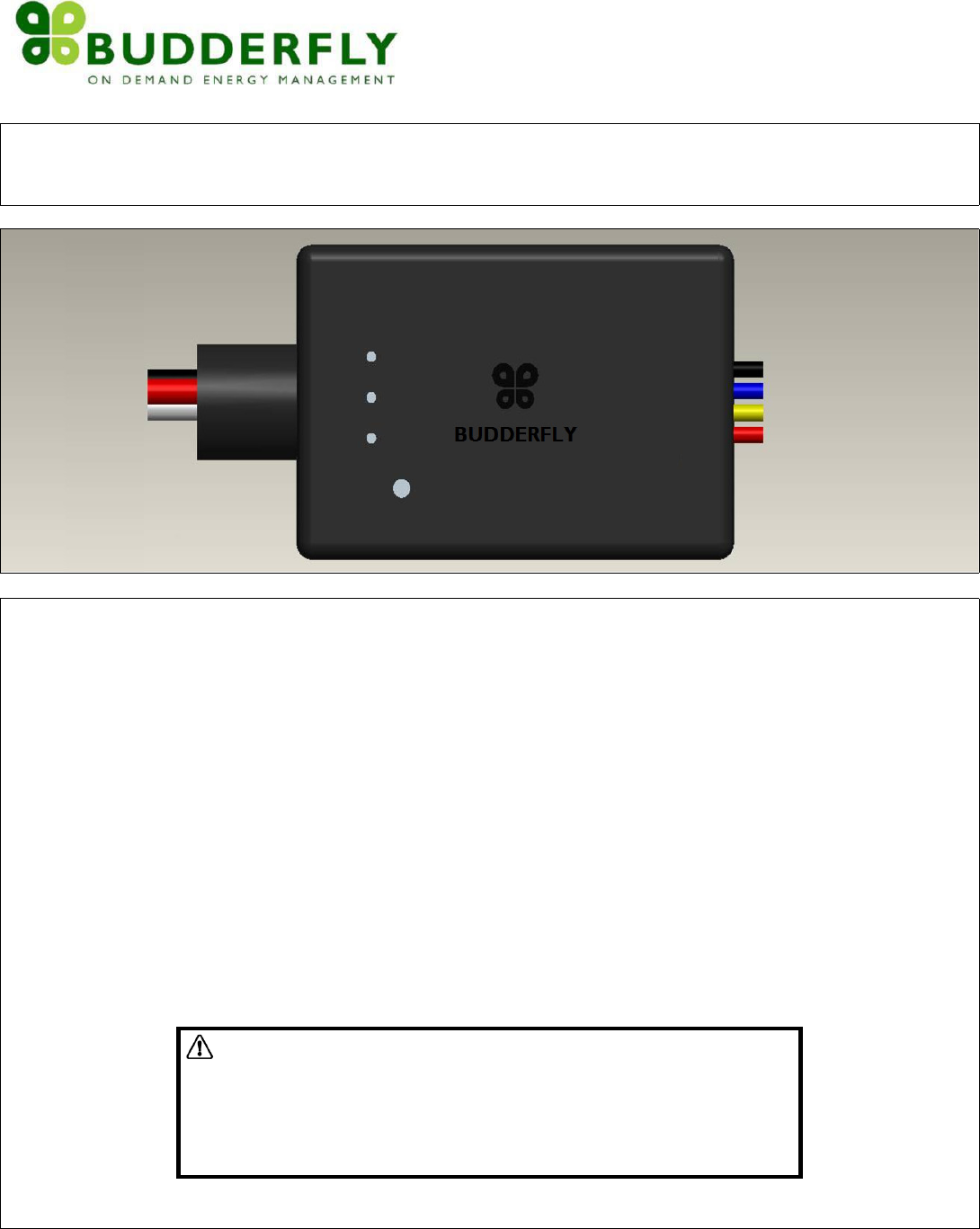
POWERPACKPartNoC0021031
ProvidesLowVoltagePowerAndLineVoltageControlForThirdPartyOccupancySensors
Description
InstallingaBudderflyadaptertransformsyourbuilding’sexistingwiringintothe“BudderflyOpenNetwork”andallowstheadapter
tomonitorenergyconsumptionandcommunicatethedatatoafacilitycontroller.
Budderflyadaptorswillusetheexistingpowerlineforcommunicationandthusrequirenore‐wiring.
UsingourBudderflysoftware,youcanvisualizeconsumptiondataandmanageeachindividualadapter.
TheBudderflyPowerPackisacomponentoftheBudderflysystemanddesignedtoworkwithallotherBudderflydevices.Itisa
plug‐and‐playreplacementforyourexistingPowerPack.Onceinstalled,theBudderflydevicesalsoactasrepeaterstoextendthe
rangeofthenetworkandincreaseefficiency.
TheBudderflyPowerPackisintendedtoprovidepowersupplyforthirdpartyoccupancysensorsthroughitsisolated12VDCand
24VDCoutputs.Itwillalsodetectinputsignalsfromtheoccupancysensorsintherangeof(10VDC~30VDC)andwilldriveloadsup
to20Aon277VAC.
Wheneveroccupancyisdetected,theoccupancysensorssignaltheBudderflyPowerPacktoturnONthelightingloads;after15
secondsofno‐occupancydetectedstatetheBudderflyPowerPackautomaticallyturnsOFFthelightingloads.
WARNING
–
ELECTRICALSHOCKHAZARD
• TheBudderflyPowerPackisintendedforinstallationinaccordancewith
theNationalElectricCodeandlocalregulationsintheUnitedStates.
• Ifyouarenotknowledgeableorcomfortablewithelectricalcircuitry,you
shouldhaveaqualifiedelectriciantoinstalltheBudderflyPowerPackfor
you.
Installation
TheBudderflyPowerPackmaybeusedinnewinstallationsortoreplaceanexistingPowerPack.Itisintendedtobeusedwiththe
differenttypesoftheavailableoccupancysensors.
Whetherit’sbeingusedinnewinstallationsortoreplaceanexistingPowerPack,theBudderflyPowerPackconvenientlymounts
intoaknockoutholeofastandardjunctionbox.Theunitcanbeplacedinsideoroutsidethejunctionboxwithasimpletwist‐on
nut.
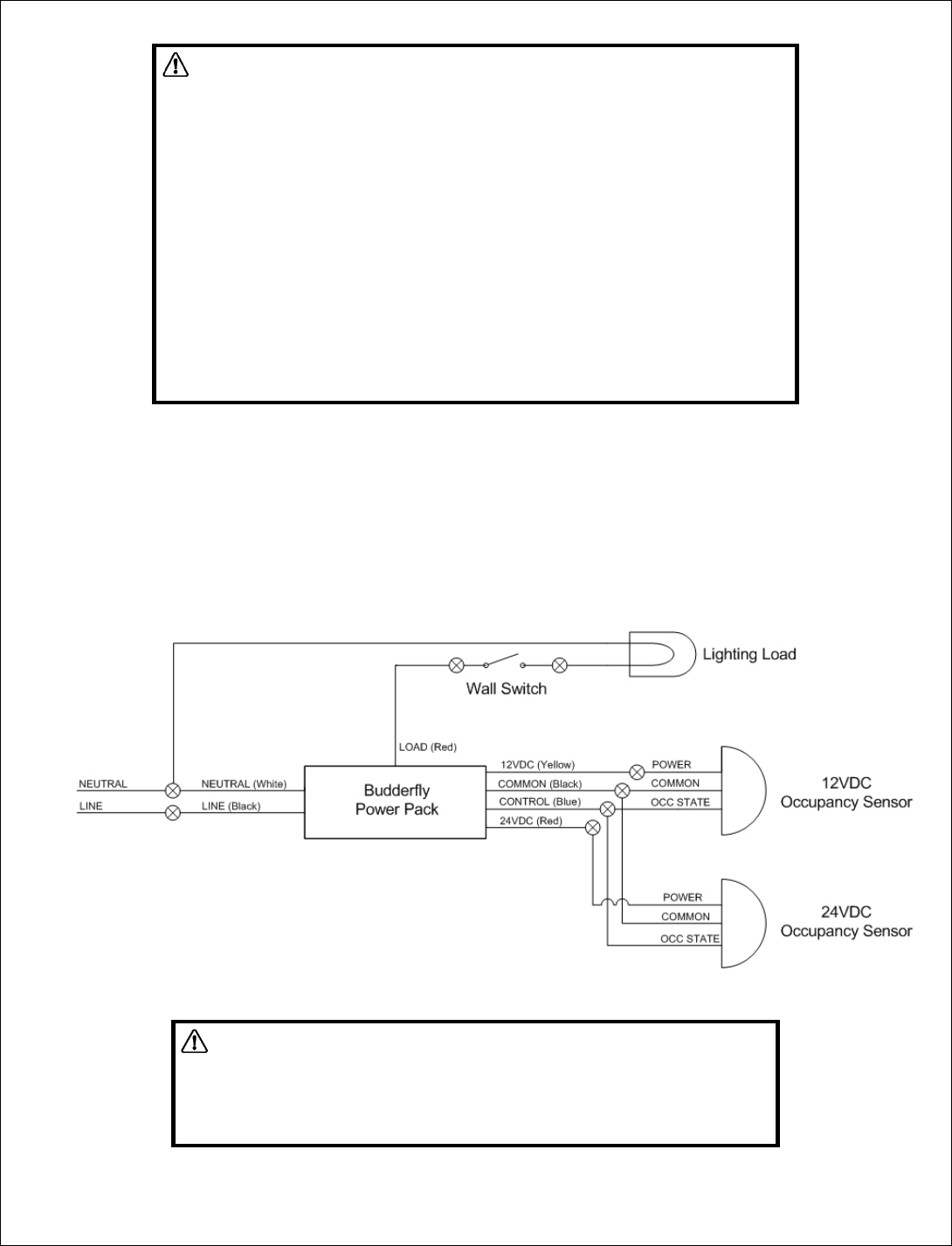
Thewiringschematicwillbeasperthebelow(installingawallswitchinserieswithload,asshownbelow,isoptional):
Warning
RISKOFFIRE
RISKOFELECTRICALSHOCK
RISKOFBURNS
ExerciseextremecautionwhenusingBudderflydevicestocontrolappliances.
ToavoidtheriskofFire,ElectricalShock,Burnsorotherhazardswerecommendthe
following:
• InstalltheBudderflydevicesindooronly.
• NeverusetheBudderflydevicestocontrolmedicaland/orlifesupport
equipment.
• DonotusetheBudderflydevicestocontrolelectricheatersoranyother
applianceswhichmaypresentahazardousconditionduetounattendedor
unintentionalpoweroncontrol.
• NeverusetheBudderflydeviceswithloadsthatexceedthemaximumrating
specified.
WARNING
–
ELECTRICALSHOCKHAZARD
• TurnOFFthepowertothebranchcircuitforthedeviceandlighting
fixtureattheservicepanel.
• AllwiringconnectionsmustbemadewiththePOWEROFFtoavoid
personalinjuryand/ordamagetothedevice.
1. Atthecircuitbreakerorfusepanel,disconnectthepowerforallofthecircuitsinthedevice
j
unctionbox.
2. DoubleCheckthatthepowerisOFFtothedeviceboxbeforecontinuingbytryingtoturnonthecontrolledloadusing
thewallswitch.
3. UnscrewthecoverofthejunctionboxwheretheBudderflyPowerPackwillbeinstalled,andremovetheexistingpower
pack(incaseyouarereplacinganexistingPowerPack).
4. FollowtheWiringinformationprovidedbelowtoconnectthewiresasfollows:
o ConnecttheLOADwire(usuallyBlack)thatgoestothelighttotheLOADwireofBudderflyPowerPack(Red).
o ConnecttheLINEwire(usuallyBlack)thatcomesfromtheelectricalservicepaneltotheHOTwireofBudderfly
PowerPack(Black).
o ConnecttheNEUTRALwire(usuallyWhite)totheNeutralwireofBudderflyPowerPack(White).
o InordertotesttheBudderflyPowerPack,withnooccupancysensorsconnected,connectthe24VDC(Red)low‐
voltageoutputtotheCONTROLwireoftheBudderflyPowerPack(Blue).ThelightsshouldturnON.Disconnect
thewires,andthelightsshouldturnOFFafter15seconds.
o ConnectthePOWERINPUTwireoftheoccupancysensor(usuallyRed)toeitherthe12VDC(Yellow)orthe24VDC
(Red)low‐voltageoutputoftheBudderflyPowerPack;incorrespondencewiththeratingsoftheinstalled
occupancysensor.
o Incaseoneofthelow‐voltagewiresisnotused(12VDCor24VDCwire),makesurethatthecopper(ofthe
unconnectedwire)isnotexposedbycoveringitwithascrewnut.
o ConnecttheCOMMONwire(usuallyBlack)oftheoccupancysensortotheCOMMONwireoftheBudderfly
PowerPack(Black)
o ConnecttheOccupancyState(Control)wireoftheoccupancysensor(usuallyWhite/Grey)totheCONTROLwire
oftheBudderflyPowerPack(Blue)
5. Afteryouhaveconnectedallofthewires,ensurethatallofthewireconnectorsarefirmlyattachedandthatthereisno
exposedcopper.
6. MounttheBudderflyPowerPacktotheknockoutholeinsidethejunctionbox,andreinstallthecover.
7. EnablepowertotheBudderflyPowerPackfromthecircuitbreakerorfusepanel.
8. AfterthePowerLEDcomeson,youcantesttheBudderflyPowerPackifitisworkingproperlywiththesensor,bymaking
interruptedmovementsintheareacoveredbythesensor;thelightsshouldturnandstayON(aslongasthereisa
movementdetectedinthearea)andturnOFF(after15secondswithoutanydetectinganymovement).
9. AddthedeviceaddresstotheBudderflywebapplication.
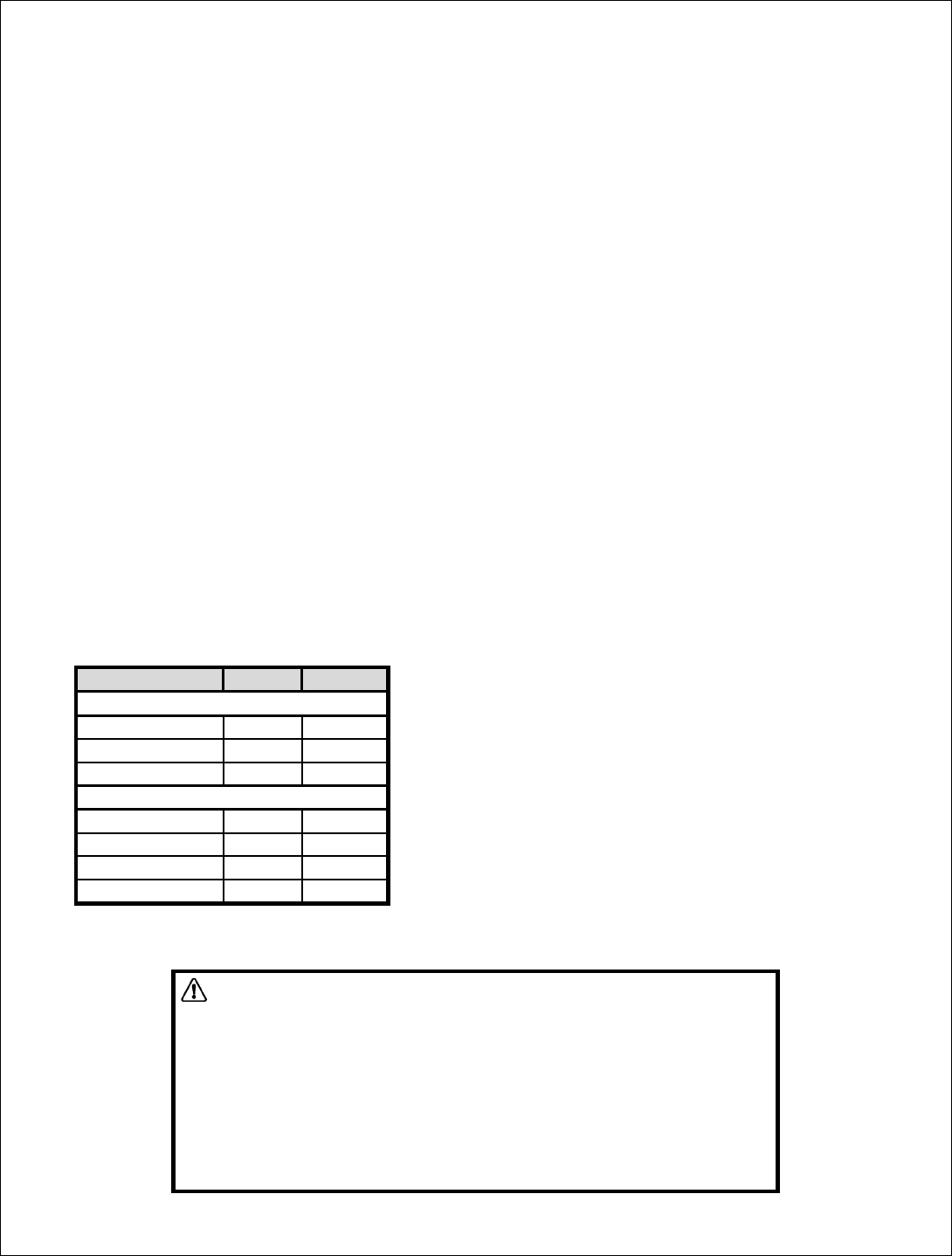
10. Wiringdesignations:
SignalTypeColorGauge
LineVoltageWires
LineWhite12AWG
NeutralBlack12AWG
LoadRed12AWG
LowVoltageWires
24VDC(Power)Red16AWG
12VDC(Power)Yellow16AWG
ControlBlue16AWG
CommonBlack16AWG
WiringInformation
• Important:Budderflydevicesareratedforandintendedtoonlybeused
withcopperwire.
• Usewiregaugesasmentionedinthetableabove.
• Remove3/4"(1.9cm)ofinsulationfromeachwire.
• Connectasfollows:Twiststrandsofeachendtightlytogether.Holdbare
endsofwirestogetherandpushfirmlyintowireNut.ScrewNut
clockwisemakingsurethatnobareconductorshowsbelowthe
connector.

Features
‐ IsolatedInternalvoltageregulators–Regulated12VDCand24VDCsources;1.44Wtotaloutput
‐ Fastinstallation–Mountstoaknockoutholewithatwist‐onnutinsideoroutsideajunctionboxoraballastcavity
‐ Size(1/2inchchasenipplenotincluded):1.7”X2.29”X3.47”(43mmX58mmX88mm)
‐ Abilitytocontrolupto20Alightingloadsbasedonthestateofoccupancystate(control)input
‐ Abilitytocreateagroupofdevices
‐ Abilitytomonitorpowerconsumption
‐ LEDindicatorstoshowthestateofthedevice
PrincipleofOperation:
‐ TheBudderflyPowerPackhastwomodesofoperation:AutomaticMode,andNon‐AutomaticMode
‐ AutomaticMode:(Defaultmodeonstart‐up)
o Loadsarecontrolledbytheoccupancystate
o Receivingan“ON”/“OFF”commandinthismodewillturntheloadsOn/Offrespectively;andcausethePowerPack
toswitchtoNon‐AutomaticMode
o Receivingan“ON”/“OFF”groupcommandinthismodehasnoeffect
o Receivingan“EnableAutomaticMode”commandinthismodehasnoeffect
‐ Non‐AutomaticMode:
o Loadsarecontrolledbycommandsfromthefacilitycontroller
o Receivingan“ON”/“OFF”commandinthismodewillturntheloadsOn/Offrespectively
o Receivingan“ON”/“OFF”groupcommandinthismodewillturntheloadsOn/Offrespectively
o Receivingan“EnableAutomaticMode”commandinthismodewillcausethePowerPacktoswitchtoAutomatic
Mode
‐ TheBudderflysoftwarewillinformyouthattheactionwassuccessful.Incasetheactionfailed,pleaserepeattheprocedure
DeviceGrouping:
‐ UsingtheBudderflywebapplication,itispossibletocreateaGroupofdevicesthatcanbecontrolledremotelysimultaneously
withjustoneclick.
‐ Budderflydevicescanjoin/disjoingroupsatanytime.
Powerconsumption:
Budderflydeviceswillmeasurethecurrent,thevoltageandthepowerconsumedbytheconnectedload,andwillstorethe
minimum,maximumandaveragedataforthepast7days.
ThedatacanbeaccessedatanytimethrutheBudderflysoftware.Theusercangeneratereports,monitortheconsumptionor
checkexpenses.
LEDIndicators:
TheBudderflydevicesareequippedwith2LEDsthatwillindicatethestateofthedevice.
‐ PowerLED:
o Color:Red
o State:
Off:Budderflydeviceisnotpowered.
On:Budderflydeviceispoweredandcanbecontrolledremotely.
‐ GroupLED:
o Color:Green
o State:
Off:Budderflydeviceisnotmemberofagroup.
On:Budderflydeviceismemberofagroup.
Blinking:Budderflydeviceisjoiningagroup(Blinkingstatedurationislessthan1second).
‐ OccupancyDetectedLED:
o Color:Blue
o State:
Off:Occupancyisnotdetected.
On:Occupancyisdetected.

Reset:
Ifthedevicestopsresponding,itcanberestartedbypushingtheResetButton.Anon‐metallicpinshouldbeusedtopushthereset
button.
Noneofthestoredparametersareaffected.
WARNING
–
ELECTRICALSHOCKHAZARD
• Useonlytheplastic(non‐metallic)pinprovidedwiththedevicetopressthereset
button.
• Neveruseametallicpintopresstheresetbutton.
Communication:
TheBudderflydevicesusethepowerlinetocommunicatewiththe“FacilityController”.
Thedevicescanreplytothefollowingcommands:
• DirectTurnOn/Offcommand:ThedevicewillturntheconnectedloadOn/Off.
• Join/Disjoingroup“X”:ThedevicewillJoin/Disjointhegroup”X”.Eachdevicecanbememberofseveralgroupsatthe
sametime.
• GroupTurnOn/Off:AllBudderflydevicesthataremembersofthesamegroupcanbecontrolledremotelywithoneclick.
• DirectRTCsynchronization:Thedevicecanreceiveacommandtosynchronizeits“RealTimeClock”
• GetActualMeasurement:Whenthedevicereceivesa“GetMeasurement”command,itwillsendbacktothefacility
controllerastringofdatathatcontains:
‐ TheCurrentinAmpere“A”.
.
.
r.
y.
s.
‐ ThePowerinWatt“W”
‐ ATimestamp
• GetStoredMeasurement:ThedevicewillsendbacktotheFacilityControllerthestoredelectricalmeasurements.
• DirectResetCommands:Thedevicecanreceive3typesofresetcommands:
‐ HardReset:Thiscommandwillrestartthedevicewithoutaffectinganystoredparamete
‐ DataReset:ThiscommandwilleraseallthemeasurementandRTCdatastoredinthenon‐volatilememor
‐ GroupReset:Thiscommandwillremovethedevicefromalljoinedgroup
• GroupResetCommands:Theaboveresetcommandscanbedirectedtoagroupofdevicesinsteadofjustonedevice.
Warranty:
BudderflyLLCwarrantstotheoriginalconsumerpurchaserandnotforthebenefitofanyoneelsethatthisproductatthetimeof
itssalebyBudderflyisfreeofdefectsinmaterialandworkmanshipundernormalandproperuseforaperiodofthree(3)years
fromdateofdeliverytoyou.Budderfly’sonlyobligationistocorrectsuchdefectsbyrepairorreplacement,atitsoption,ifwithin
suchthreeyearperiodtheproductisreturnedprepaidviaBudderfly’sReturnedMaterialsAuthorization(RMA)processto
BudderflyLLC,Att:QualityAssuranceDepartment,4CorporateDrive,Suite387,Shelton,CT06484.Innocaseisproducttobe
returnedwithoutfirstobtaininganRMA.
Thiswarrantyexcludesandthereisdisclaimedliabilityforlaborforremovalofthisproductorreinstallation.Thiswarrantyisvoid
ifthisproductisinstalledimproperlyorinanimproperenvironment,overloaded,misused,opened,abused,oralteredinany
manner,orisnotusedundernormaloperatingconditionsornotinaccordancewithanylabelsorinstructions.Therearenoother
orimpliedwarrantiesofanykind,includingmerchantabilityandfitnessforaparticularpurpose,butifanyimpliedwarrantyis
requiredbytheapplicablejurisdiction,thedurationofanysuchimpliedwarrantyisrequiredbytheapplicablejurisdiction,the
durationofanysuchimpliedwarranty,includingmerchantabilityandfitnessforaparticularpurpose,islimitedtothreeyears.
Budderflyisnotliableforincidental,indirect,special,orconsequentialdamages,includingwithoutlimitation,damageto,or
lossofuseof,anyequipment,lostsalesorprofitsordelayorfailuretoperformthiswarrantyobligation.Budderfly’sliabilityon
anyclaimfordamagesarisingoutofinconnectionwiththemanufacture,sales,installationdelivery,oruseoftheproductshall
neverexceedthepurchasepriceoftheproduct.Theremediesprovidedhereinaretheexclusiveremediesunderthiswarranty,
whetherbasedoncontract,tortorotherwise.

Specifications:
Power:120V‐277VAC/60Hz
MaximumRelayLoadRatings:
• 120VAC:
o 20AStandardBallast
o 16AElectronicBallast
o 20FLA,120LRAMotorLoad
• 240VAC:
o 17FLA,102LRAMotorLoad
o 5000WTungsten
• 277VAC:
o 20AStandardBallast
o 16AElectronicBallast
o 14FLA,84LRAMotorLoad
OperatingTemperature:0oCto+40oC
Certification:ULcertificationisinprogress
Forindooruseonly
Specificationssubjecttochangewithoutnoticeduetocontinuingproductimprovement.
WARNING
Changesormodificationsnotexpresslyapprovedbythepartyresponsibleforcompliancecouldvoidtheuser’sauthoritytooperatethis
equipment.
FCCComplianceStatement
ThisdevicecomplieswithPart15oftheFCCRules.Operationissubjecttothefollowingtwoconditions:
1) Thisdevicemaynotcauseharmfulinterferenceand
2) Thisdevicemustacceptanyinterferencereceived,includinginterferencethatmaycauseundesiredoperation.
ThisequipmenthasbeentestedandfoundtocomplywiththelimitsforaclassBdigitaldevice,pursuanttopart15oftheFCCRules.Theselimits
aredesignedtoprovidereasonableprotectionagainstharmfulinterferenceinaresidentialinstallation.Thisequipmentgenerates,usesandcan
radiateradiofrequencyenergyandifnotinstalledandusedinaccordancewiththeinstructions,maycauseharmfulinterferencetoradio
communications.However,thereisnoguaranteethatinterferencewillnotoccurinaparticularinstallation.Ifthisequipmentdoescauseharmful
interferencetoradioortelevisionreception,whichcanbedeterminedbyturningtheequipmentoffandon,theuserisencouragedtotryto
correcttheinterferencebyoneormoreofthefollowingmeasures:
• Reorientorrelocatethereceivingantenna.
• Increasetheseparationbetweentheequipmentandreceiver.
• Connecttheequipmentintoanoutletonacircuitdifferentfromthattowhichthereceiverisconnected.
• Consultthedealeroranexperiencedradio/TVtechnicianforhelp.
Theuseriscautionedthatchangesandmodificationsmadetotheequipmentwithouttheapprovalofmanufacturercouldvoidtheuser's
authoritytooperatethisequipment.
FCCID:QCVC0021031
MadeinChina