Budderfly R0610400 Controllable Outlet User Manual
Budderfly LLC Controllable Outlet
User Manual
PartNoR0610401
Description:
InstallingaBudderflyadaptertransformsyourbuilding’sexistingwiringintothe“BudderflyOpenNetwork”andallows
theadaptertomonitorenergyconsumptionandcommunicatethedatatoafacilitycontroller.
Budderflyadaptorsusetheexistingpowerlineforcommunicationandthusrequirenore‐wiring.
UsingourBudderflysoftware,youcanvisualizeconsumptiondataandmanageeachindividualadapter.
AsacomponentofBudderflysystem,theBudderflyControllableOutletisdesignedtoworkwithallotherBudderfl
y
adapters.Itisaplug‐and‐playreplacementforyourexistingduplexoutlet,anditprovidescontrolononeofitstwo
sockets.Onceinstalled,TheBudderflyControllableOutletalsoactsasarepeatertoextendtherangeofthenetworkand
increaseefficiency.
Installation:
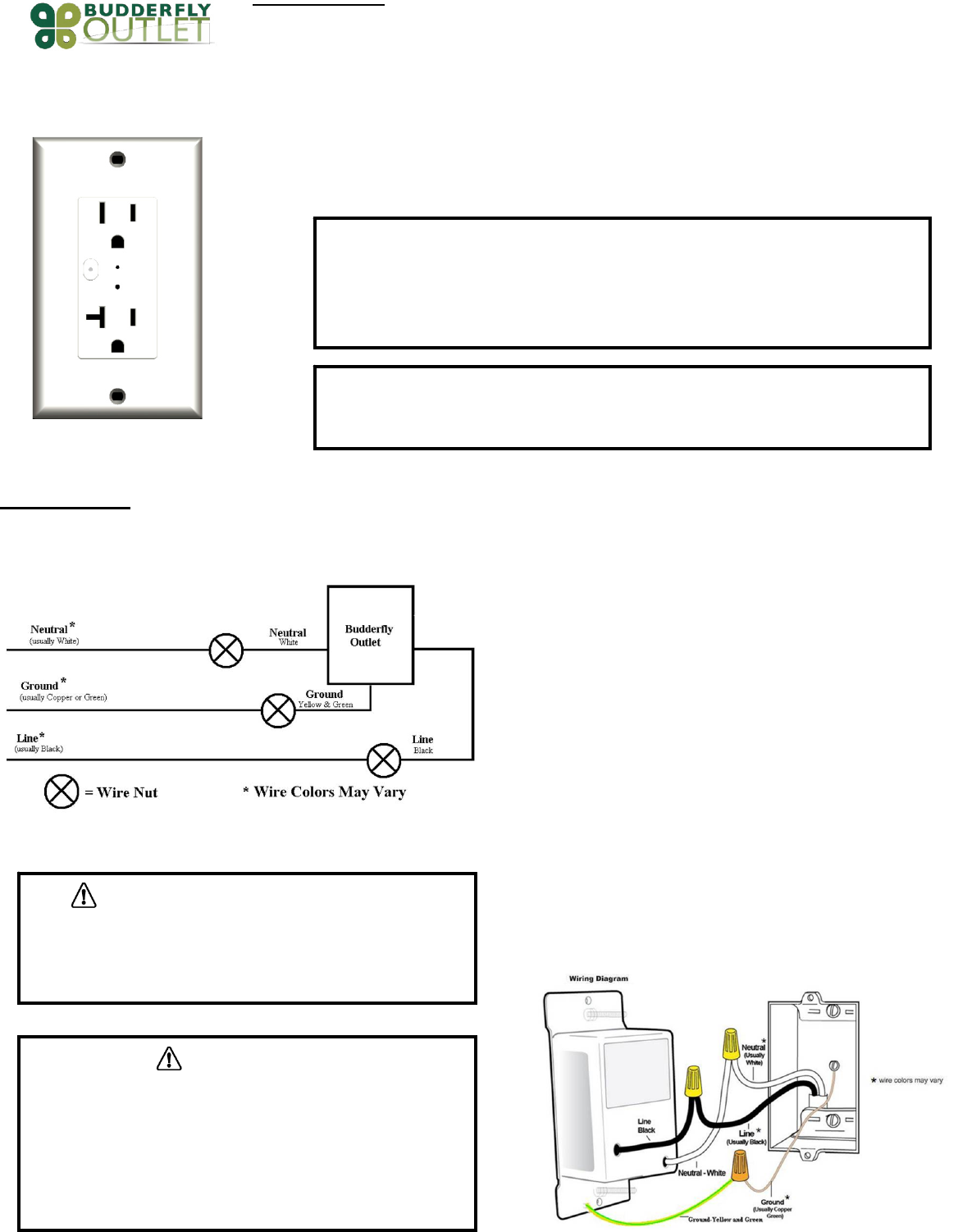
TheBudderflyControllableOutletmaybeusedinnewinstallationsortoreplaceanexistingOutlet.Thewiringschematicwillbeasperbelow:
1. Atthecircuitbreakerorfusepanel,disconnectthepowerforallofthe
circuitsintheswitchjunctionbox.
2. DoubleCheckthatthepowerisOFFtotheOutletbytryingtoturnon
a
deviceconnectedtotheplugbeforecontinuing.
3. Removethewallplatefromtheoutletyouarereplacing.Then,unscrewthe
outletitselfandpullitoutfromthejunctionbox.
4. Disconnectthewiresfromtheoutletyouarereplacing.
5. FollowtheWiringinformationprovidedbelowandconnectthewiresa
s
follows:
‐ ConnecttheGROUNDwire(usuallyBareCopperorGreen)totheGround
wireofBudderflyControllableOutlet(Yellow&Green).
‐ ConnecttheLINEwire(usuallyBlack)thatcomesfromtheelectricalservice
paneltotheHOTwireofBudderflyControllableOutlet(Black).
‐ ConnecttheNEUTRALwire(usuallyWhite)totheNeutralwireofBudderfl
y
ControllableOutlet(White).
6. Afteryouhaveconnectedallofthewires,ensurethatallofthewire
connectorsarefirmlyattachedandthatthereisnoexposedcopperexcep
t
fortheGROUNDwire.
7. GentlyplaceBudderflyControllableOutletintothejunctionbox.Then,
screwtheOutletintoplace.
8. Reinstallthewallplate
9. EnablepowertotheOutletfromthecircuitbreakerorfusepanel
10. AddthedeviceaddresstotheBudderflysoftware.
WARNING:Ifyouarenotsureaboutanypartoftheaboveinstructions,
consultaqualifiedelectrician.
WARNING–ELECTRICALSHOCKHAZARD
• TheBudderflyControllableOutletisintendedforinstallationinaccordancewiththe
NationalElectricCodeandlocalregulationsintheUnitedStates.
• Ifyouarenotknowledgeableorcomfortablewithelectricalcircuitry,youshouldhavea
qualifiedelectricianinstalltheBudderflyControllableOutletforyou.
Warning
• InstalltheBudderflyControllableOutletsindooronly.
• NeverusetheBudderflyOutletstopowermedicaland/orlifesupportequipment.
WARNING–ELECTRICALSHOCKHAZARD
• TurnOFFthepowertothebranchcircuitfortheOutletatthe
servicepanel.
• AllwiringconnectionsmustbemadewiththePOWEROFFto
avoidpersonalinjuryand/ordamagetotheOutlet.
WiringInformation
• Important:BudderflyControllableOutletisratedforand
intendedtoonlybeusedwithcopperwire.
• Use12AWGorlargerwiressuitablefor80o.
• Remove3/4"(1.9cm)ofinsulationfromeachwire.
Connectasfollows:Twiststrandsofeachendtightlytogether.Hold
bareendsofwirestogetherandpushfirmlyintowireNut.ScrewNut
clockwisemakingsurethatnobareconductorshowsbelowthe
connector
Features:
‐ RemoteOn/Offcontrol
‐ ManualOn/Offcontrol
‐ Abilitytocreateagroupofdevices
‐ Abilitytomonitorpowerconsumption
‐ LEDindicatortoshowthestateoftheOutlet
DeviceGrouping:
‐ UsingtheBudderflysoftware,itispossibletocreateaGroupof
Outlets.
Powerconsumption:
TheBudderflyControllableOutletswillmeasurethecurrent,thevoltageand
thepowerconsumedbytheconnectedload,andwillstoreenergy
consumption.
ThedatacanbeaccessedatanytimethrutheBudderflysoftware.Theuser
cangeneratereports,monitortheconsumptionorcheckexpenses.
LEDIndicators:
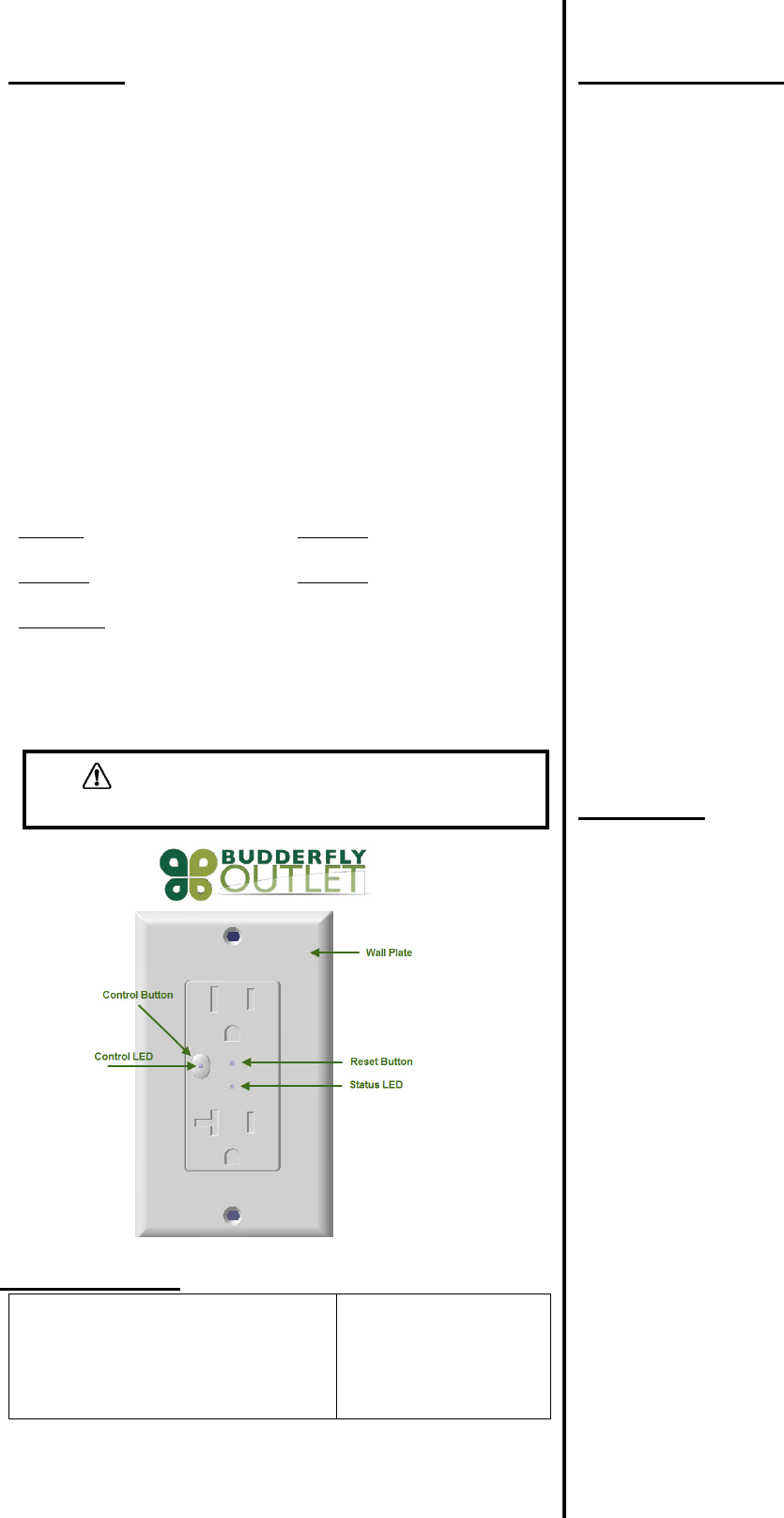
TheBudderflyControllableOutletsareequippedwith1bi‐colorLED(Status),
and1mono‐colorLEDthatwillindicatethestateofthedevice(Control).
StatusLEDControlLED
LEDisOff:TheOutletisnotpowered
up.
LEDisOFF:TheUpperOutletis
turnedOFF.
LEDisRed:TheOutletisOnandnot
memberofagroup.
LEDisRed:TheUpperOutletis
turnedON.
LEDisGreen:TheOutletisOnandis
memberofagroup.
Reset:
Ifthedevicestopsresponding,itcanberestartedbypushingtheResetButton.
Anon‐metallicpinshouldbeusedtopushtheresetbutton.
Noneofthestoredparametersareaffected.
Specifications:
Power:120VAC/60HzMaximumLoads:
OperatingTemperature:0°Cto+40°CNon‐ControllableOutlet:
20A(max),1.0HP.
Certification:ULandFCCCertificationsare
inprogress.
Forindooruseonly.
ControllableOutlet:15A
(resistive),½HP.
Specificationssubjecttochangewithoutnoticeduetocontinuingproduct
improvement.
Communication:
TheBudderflyControllableOutletsusethepowerlineandradiofrequencyto
communicatewiththe“FacilityController”.
Theoutletscanreplytothefollowingcommands:
• DirectTurnOn/Offcommand:TheTopOutletwillturnthe
connectedloadOn/Off.
• Join/Disjoingroup“X”:TheoutletwillJoin/Disjointhegroup“X”.
Eachoutletcanbeamemberofseveralgroupsatthesametime.
• DirectRTCsynchronization:Theoutletcanreceiveacommandto
synchronizeits“RealTimeClock”
• GetActualMeasurement:Whentheoutletreceivesa“Ge
t
Measurement”command,itwillsendbacktothefacilitycontrollera
stringofdatathatcontains:
‐ TheCurrentinAmps“A”.
‐ ThePowerinWatts“W”.
‐ ATimestamp.
• GetStoredMeasurement:TheoutletwillsendbacktotheFacilit
y
Controllerthestoredelectricalmeasurements.
• DirectResetCommands:Theoutletcanreceive3typesofrese
t
commands:
‐ HardReset:Thiscommandwillrestartthedevice
withoutaffectinganystoredparameter.
‐ DataReset:Thiscommandwilleraseallthe
measurementandRTCdatastoredinthenon‐volatile
memory.
‐ GroupReset:Thiscommandwillremovethedevice
fromallthejoinedgroups.
• GroupResetCommands:Theaboveresetcommandscanbe
directedtoagroupofdevicesinsteadofjustonedevice.
Warranty:
BudderflyLLCwarrantstotheoriginalconsumerpurchaserandnotforthe
benefitofanyoneelsethatthisproductatthetimeofitssalebyBudderflyis
freeofdefectsinmaterialandworkmanshipundernormalandproperusefo
r
aperiodofthree(3)yearsfromdateofdeliverytoyou.Budderfly’sonl
y
obligationistocorrectsuchdefectsbyrepairorreplacement,atitsoption,i
f
withinsuchthreeyearperiodtheproductisreturnedprepaidviaBudderfly’s
ReturnedMaterialsAuthorization(RMA)processtoBudderflyLLC,Att:
QualityAssuranceDepartment,2TrapFallsRoad,Suite507,Shelton,C
T
06484.InnocaseisproducttobereturnedwithoutfirstobtaininganRMA.
Thiswarrantyexcludesandthereisdisclaimedliabilityforlaborforremovalo
f
thisproductorreinstallation.Thiswarrantyisvoidifthisproductisinstalled
improperlyorinanimproperenvironment,overloaded,misused,opened,
abused,oralteredinanymanner,orisnotusedundernormaloperatin
g
conditionsornotinaccordancewithanylabelsorinstructions.Therearen
o
otherorimpliedwarrantiesofanykind,includingmerchantabilityand
fitnessforaparticularpurpose,butifanyimpliedwarrantyisrequiredbythe
applicablejurisdiction,thedurationofanysuchimpliedwarrantyisrequired
bytheapplicablejurisdiction,thedurationofanysuchimpliedwarranty,
includingmerchantabilityandfitnessforaparticularpurpose,islimitedto
threeyears.Budderflyisnotliableforincidental,indirect,special,o
r
consequentialdamages,includingwithoutlimitation,damageto,orlosso
f
useof,anyequipment,lostsalesorprofitsordelayorfailuretoperformthi
s
warrantyobligation.Budderfly’sliabilityonanyclaimfordamagesarisin
g
outofinconnectionwiththemanufacture,sales,installationdelivery,orus
e
oftheproductshallneverexceedthepurchasepriceoftheproduct.The
remediesprovidedhereinaretheexclusiveremediesunderthiswarranty,
whetherbasedoncontract,tortorotherwise.
WARNING–ELECTRICALSHOCKHAZARD
• Neveruseametallicpintopresstheresetbutton.
FCCID:QCVR0610400
MadeinChina
WARNING
Changesormodificationsnotexpresslyapprovedbythepartyresponsibleforcompliancecouldvoidtheuser’sauthoritytooperatethisequipment
FCCComplianceStatement
ThisdevicecomplieswithPart15oftheFCCRules.Operationissubjecttothefollowingtwoconditions:
(1) Thisdevicemaynotcauseharmfulinterferenceand
(2) Thisdevicemustacceptanyinterferencereceived,includinginterferencethatmaycauseundesiredoperation.
ThisequipmenthasbeentestedandfoundtocomplywiththelimitsforaclassBdigitaldevice,pursuanttopart15oftheFCCRules.Theselimitsare
designedtoprovidereasonableprotectionagainstharmfulinterferenceinaresidentialinstallation.Thisequipmentgenerates,uses,andcanradiate
radiofrequencyenergyandifnotinstalledandusedinaccordancewiththeinstructions,maycauseharmfulinterferencetoradiocommunications.
However,thereisnoguaranteethatinterferencewillnotoccurinaparticularinstallation.Ifthisequipmentdoescauseharmfulinterferencetoradio
ortelevisionreception,whichcanbedeterminedbyturningtheequipmentoffandon,theuserisencouragedtotrytocorrecttheinterferenceby
oneormoreofthefollowingmeasures:
• Reorientorrelocatethereceivingantenna.
• Increasetheseparationbetweentheequipmentandreceiver.
• Connecttheequipmentintoanoutletonacircuitdifferentfromthattowhichthereceiverisconnected.
• Consultthedealeroranexperiencedradio/TVtechnicianforhelp.
Theuseriscautionedthatchangesandmodificationsmadetotheequipmentwithouttheapprovalofmanufacturercouldvoidtheuser'sauthorityto
operatethisequipment.