Budderfly S0711011 Dual Band Switch User Manual Switch manual Draft FCCx
Budderfly LLC Dual Band Switch Switch manual Draft FCCx
Users Manual
PartNoS0711011
Description:
InstallingaBudderflyadaptertransformsyourbuilding’sexistingwiringintothe“BudderflyOpenNetwork”andallowstheadapterto
monitorenergyconsumptionandcommunicatethedatatoafacilitycontroller.
Budderflyadaptorswillusetheexistingpowerlineforcommunicationandthusrequirenore‐wiring.
UsingourBudderflysoftware,youcanvisualizeconsumptiondataandmanageeachindividualadapter.
TheBudderflylightingswitchisacomponentoftheBudderflysystemanddesignedtoworkwithallotherBudderflydevices.Itisa
plug‐and‐playreplacementforyourexistinglightingswitch.Onceinstalled,theBudderflyswitchesalsoactasrepeaterstoextendthe
rangeofthenetworkandincreaseefficiency.
Thisdeviceisdesignedforuseonlywithpermanentlyinstalledfixtures.
Installation:
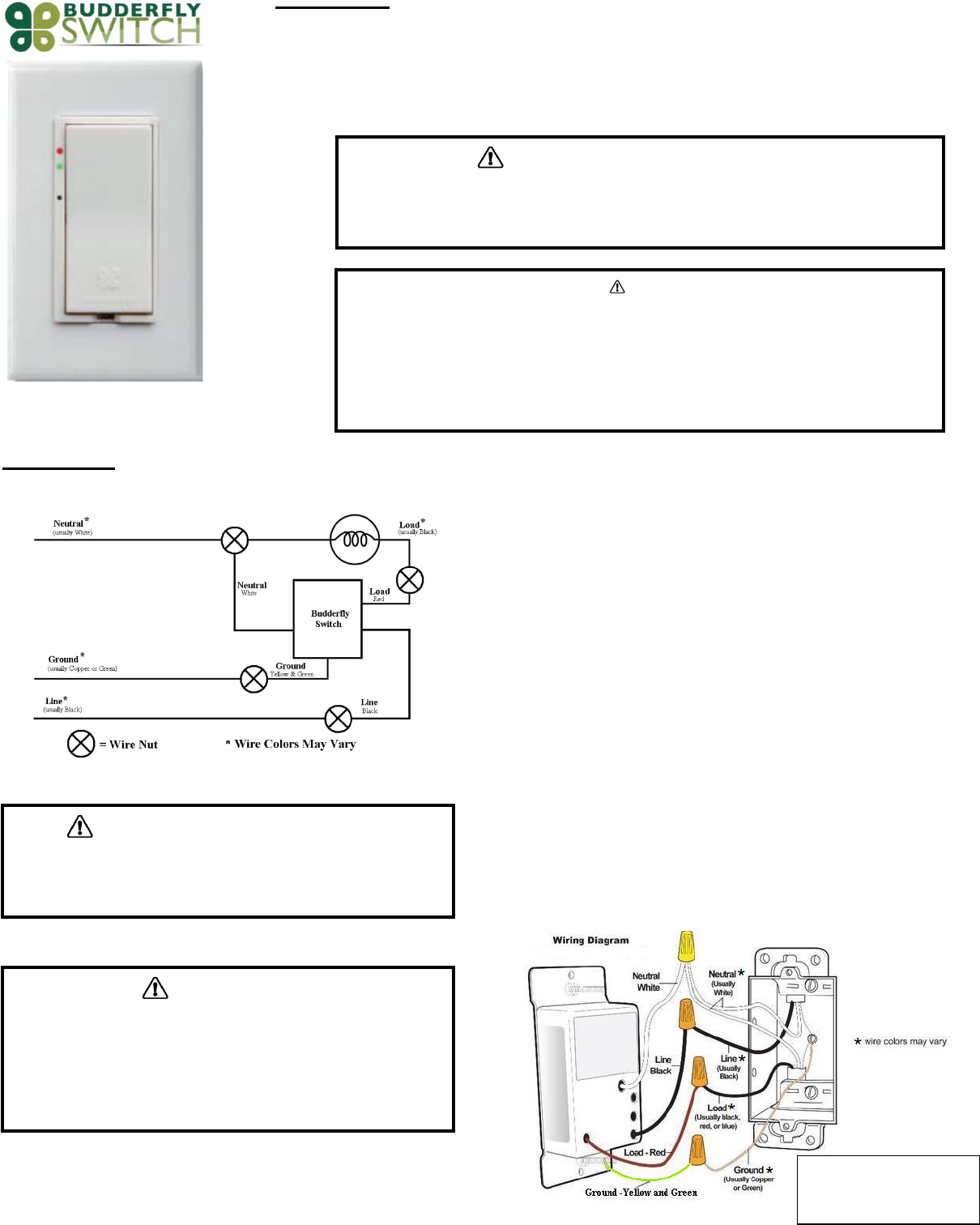
TheBudderflyswitchmaybeusedinnewinstallationsortoreplaceanexistingwallswitch.Itisintendedtobeusedonlyasa2‐wayswitch.Thewiringschematicwillbeasperbelow:
1. Atthecircuitbreakerorfusepanel,disconnectthepowerforallofthecircuitsin
theswitchjunctionbox..
2. DoubleCheckthatthepowerisOFFtotheswitchboxbeforecontinuingbytrying
toturnonthecontrolledload.
3. Removethewallplatefromtheswitchyouarereplacing.Then,unscrewtheswitch
itselfandpullitoutfromthejunctionbox.
4. Disconnectthewiresfromtheswitchyouarereplacing.
5. FollowtheWiringinformationprovidedbelowtoconnectthewiresasfollows:
o ConnecttheGROUNDwire(usuallyBareCopperorGreen)totheGroundwireof
BudderflySwitch(Yellow&Green).
o ConnecttheLOADwire(usuallyBlack)thatgoestothelighttotheLOADwireof
BudderflySwitch(Red).
o ConnecttheLINEwire(usuallyBlack)thatcomesfromtheelectricalservicepanel
totheHOTwireofBudderflySwitch(Black).
o ConnecttheNEUTRALwire(usuallyWhite)totheNeutralwireofBudderfly
Switch(White).
6. Afteryouhaveconnectedallofthewires,ensurethatallofthewireconnectors
arefirmlyattachedandthatthereisnoexposedcopperexceptfortheGROUND
wire.
7. GentlyplaceBudderflyswitchintothejunctionbox,orientingtheunitwiththeLED
barontheleft.Then,screwtheswitchintoplace.
8. Reinstallthewallplate
9. Enablepowertotheswitchfromthecircuitbreakerorfusepanel
10. AfterthePowerLEDcomeson,testthattheswitchisworkingproperlybyturning
thelightonandoff
11. AddthedeviceaddresstotheBudderflywebapplication.
WARNING–ELECTRICALSHOCKHAZARD
• TheBudderflyDualBandLightSwitchisintendedforinstallationinaccordancewiththeNationalElectric
CodeandlocalregulationsintheUnitedStates.
• Ifyouarenotknowledgeableorcomfortablewithelectricalcircuitry,youshouldhaveaqualifiedelectrician
installtheBudderflyDualBandLightSwitchforyou.
Warning
RISKOFFIRE/ELECTRICALSHOCK/BURNS
ExerciseextremecautionwhenusingBudderflyswitchingdevicestocontrolappliances.
ToavoidtheriskofFire,ElectricalShock,Burnsorotherhazardswerecommendthefollowing:
• InstalltheBudderflyswitchesindooronly.
• NeverusetheBudderlyswitchestocontrolmedicaland/orlifesupportequipment.
• DonotusetheBudderflyswitchestocontrolelectricheatersoranyotherapplianceswhichmaypresenta
hazardousconditionduetounattendedorunintentionalpoweroncontrol.
Never use the Budderfly switches with loads that exceed the maximum rating specified.
WARNING–ELECTRICALSHOCKHAZARD
• TurnOFFthepowertothebranchcircuitfortheswitchandlightingfixtureat
theservicepanel.
• AllwiringconnectionsmustbemadewiththePOWEROFFtoavoidpersonal
injuryand/ordamagetotheswitch.
WiringInformation
• Important:BudderflySwitchisratedforandintendedtoonlybeusedwith
copperwire.
• Use12AWGorlargerwiressuitablefor80o.
• Remove3/4"(1.9cm)ofinsulationfromeachwire.
• Connectasfollows:Twiststrandsofeachendtightlytogether.Holdbare
endsofwirestogetherandpushfirmlyintowireNut.ScrewNutclockwise
makingsurethatnobareconductorshowsbelowtheconnector.
WARNING:Ifyouarenotsure
aboutanypartoftheabove
instructions,consultaqualified
electrician.
Features:
‐ RemoteOn/Offcontrol
‐ ManualOn/Offcontrol
‐ Abilitytocreateagroupofdevices
‐ Abilitytomonitorpowerconsumption
‐ LEDindicatorstoshowthestateoftheswitch
On/OffControl:
‐ RemoteControl:
o TheBudderflyswitchescanbecontrolledremotelythrutheBudderflysoftware.
o TheBudderflysoftwarewillinformyouthattheactionwassuccessful.Incasetheaction
failed,pleaserepeattheprocedure
‐ ManualControl:InadditiontotheRemotecontrol,theBudderflyswitchescanbe
controlledmanually.Tapthetoporbottomoftherockertogglethestateconnectedload.
DeviceGrouping:
‐ UsingtheBudderflywebapplication,itispossibletocreateaGroupofdevicesthatcanbe
controlledremotelysimultaneouslywithjustoneclick.
‐ Budderflyswitchescanjoin/disjoingroupsatanytime.
Powerconsumption:
Budderflyswitcheswillmeasurethecurrent,thevoltageandthepowerconsumedbythe
connectedload,andwillstoretheminimum,maximumandaveragedataforthepast7days.
ThedatacanbeaccessedatanytimethrutheBudderflysoftware.Theusercangenerate
reports,monitortheconsumptionorcheckexpenses.
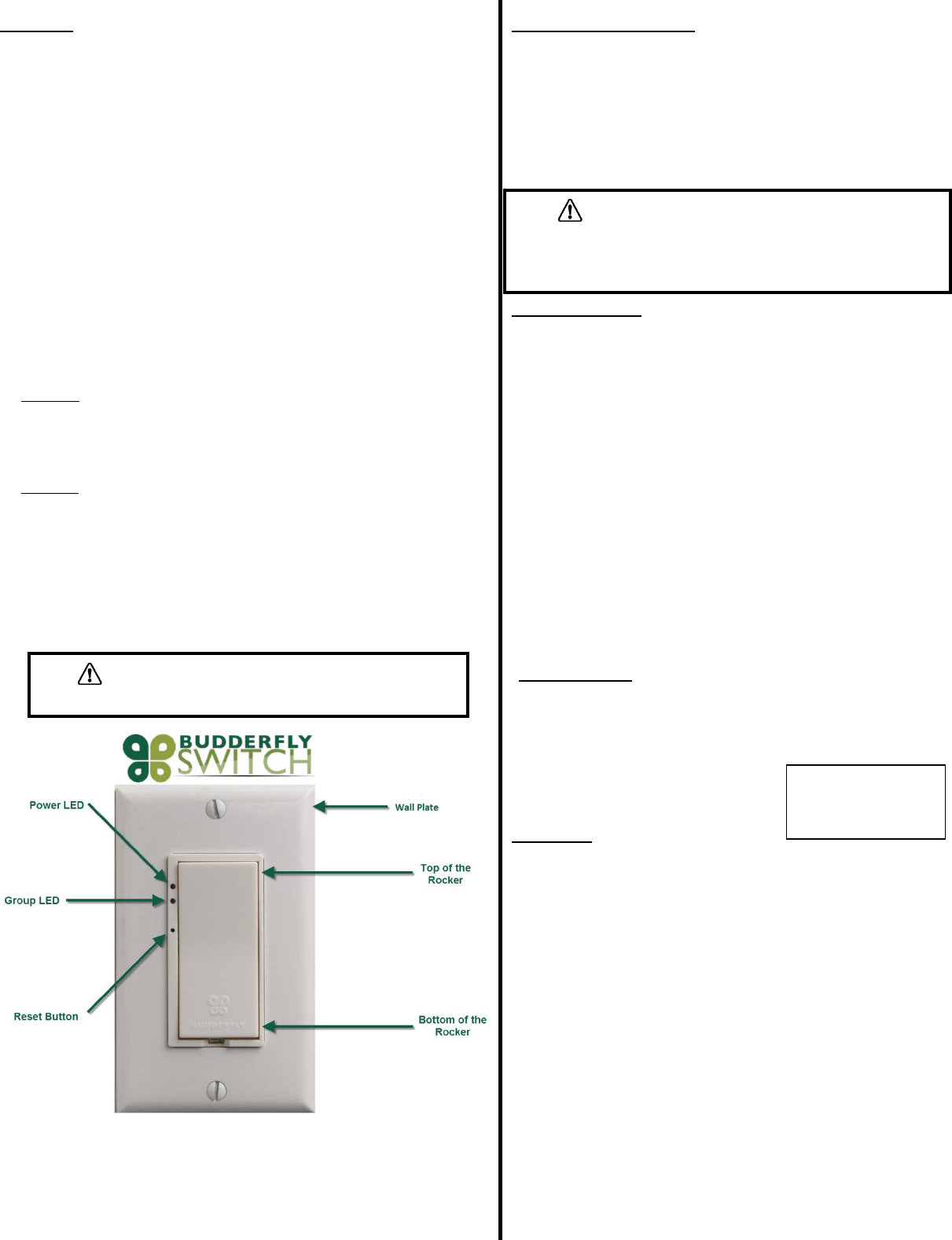
LEDIndicators:
TheBudderflyswitchesareequippedwith2LEDsthatwillindicatethestateofthedevice.
‐ PowerLED:
o Color:Red
o State:
Off:Budderflyswitchisnotpowered.
On:Budderflyswitchispoweredandcanbecontrolledremotely.
Blinking:Budderflyswitchispowered,butthe“PowerCut‐off”modeisactivated.
‐ GroupLED:
o Color:Green
o State:
Off:Budderflyswitchisnotmemberofagroup.
On:Budderflyswitchismemberofagroup.
Blinking:Budderflyswitchisjoiningagroup(Blinkingstatedurationislessthan1
second).
Reset:
Ifthedevicestopsresponding,itcanberestartedbypushingtheResetButton.Anon‐metallic
pinshouldbeusedtopushtheresetbutton.
Noneofthestoredparametersareaffected.
“PowerCut‐Off”mode:
‐ TheBudderflyswitcheshavetheabilitytocompletelydisconnectthepowerfrom
theload.
‐ Pressingthetopoftherockerfor15secondswillactivatethe“PowerCut‐off”
feature;theloadwillbeturnedoff.
‐ ThePowerLEDwillstartblinkingtoindicatethattheloadisdisconnectedandthe
switchisinthePowerCut‐offmode.
‐ Whenthe“PowerCut‐off”modeisactivated,theswitchcannotbeturnedon
throughsoftwareandcannotbeturnedonphysically.
‐ Pressingthebottomoftherockerfor15secondswillde‐activatethe“PowerCut‐
off”mode,andthedevicewillgobacktothenormalstate.
Communication:
TheBudderflyDualBandOutletsusethepowerlineandradiofrequencyto
communicatewiththe“FacilityController”.
Theoutletscanreplytothefollowingcommands:
• Join/Disjoingroup“X”:TheoutletwillJoin/Disjointhegroup”X”.Eachoutletcanbe
amemberofseveralgroupsatthesametime.
• DirectRTCsynchronization:Theoutletcanreceiveacommandtosynchronizeits
“RealTimeClock”
• GetActualMeasurement:Whentheoutletreceivesa“GetMeasurement”
command,itwillsendbacktothefacilitycontrollerastringofdatathatcontains:
‐ TheCurrentinAmpere“A”.
‐ ThePowerinWatt“W”.
‐ ATimestamp.
• GetStoredMeasurement:TheoutletwillsendbacktotheFacilityControllerthe
storedelectricalmeasurements.
• DirectResetCommands:Theoutletcanreceive3typesofresetcommands:
‐ HardReset:Thiscommandwillrestartthedevicewithoutaffectinganystored
parameter.
‐ DataReset:ThiscommandwilleraseallthemeasurementandRTCdatastoredin
thenon‐volatilememory.
‐ DisjoinGroup:Thiscommandwillremovethedevicefromallthejoinedgroups.
• GroupResetCommands:Theaboveresetcommandscanbedirectedtoagroupof
devicesinsteadofjustonedevice.
Specifications:
Power:120V‐277VAC/60Hz
MaximumLoads:
o 120VAC,60Hertz:1600WforTungsten,1400WforElectronicballast,800Wfor
Standardballast
o 277VAC,60Hertz:3300WforElectronicballast,1200WforStandardballast.
NeutralLine:Required
OperatingTemperature:10oCto+40oC
Certification:UL&FCCcertificationisinprogress
Forindooruseonly
Warranty:
BudderflyLLCwarrantstotheoriginalconsumerpurchaserandnotforthebenefitof
anyoneelsethatthisproductatthetimeofitssalebyBudderflyisfreeofdefectsin
materialandworkmanshipundernormalandproperuseforaperiodofthree(3)
yearsfromdateofdeliverytoyou.Budderfly’sonlyobligationistocorrectsuch
defectsbyrepairorreplacement,atitsoption,ifwithinsuchthreeyearperiodthe
productisreturnedprepaidviaBudderfly’sReturnedMaterialsAuthorization(RMA)
processtoBudderflyLLC,Att:QualityAssuranceDepartment,2TrapFallsRoad,
Suite507,Shelton,CT06484.Innocaseisproducttobereturnedwithoutfirst
obtaininganRMA.
Thiswarrantyexcludesandthereisdisclaimedliabilityforlaborforremovalofthis
productorreinstallation.Thiswarrantyisvoidifthisproductisinstalledimproperlyor
inanimproperenvironment,overloaded,misused,opened,abused,oralteredinany
manner,orisnotusedundernormaloperatingconditionsornotinaccordancewith
anylabelsorinstructions.Therearenootherorimpliedwarrantiesofanykind,
includingmerchantabilityandfitnessforaparticularpurpose,butifanyimplied
warrantyisrequiredbytheapplicablejurisdiction,thedurationofanysuchimplied
warrantyisrequiredbytheapplicablejurisdiction,thedurationofanysuchimplied
warranty,includingmerchantabilityandfitnessforaparticularpurpose,islimitedto
threeyears.Budderflyisnotliableforincidental,indirect,special,orconsequential
damages,includingwithoutlimitation,damageto,orlossofuseof,anyequipment,
lostsalesorprofitsordelayorfailuretoperformthiswarrantyobligation.
Budderfly’sliabilityonanyclaimfordamagesarisingoutofinconnectionwiththe
manufacture,sales,installationdelivery,oruseoftheproductshallneverexceed
thepurchasepriceoftheproduct.Theremediesprovidedhereinaretheexclusive
remediesunderthiswarranty,whetherbasedoncontract,tortorotherwise.
WARNING–ELECTRICALSHOCKHAZARD
• Neveruseametallicpintopresstheresetbutton.
WARNING–ELECTRICALSHOCKHAZARD
WhenreplacingtheBulbs,makesuretoenablethe“PowerCut‐off”
mode.IfthepowerLEDdoesnotstartblinking,pleaseconsultaqualified
electrician.
Specificationssubjectto
changewithoutnotice
duetocontinuingproduct
improvement
FCCID:QCVS0711011
MadeinChina
WARNING
Chan
g
esormodificationsnotex
p
ressl
y
a
pp
rovedb
y
the
p
art
y
res
p
onsibleforcom
p
liancecouldvoidtheuser’sauthorit
y
too
p
eratethise
q
ui
p
ment
FCCComplianceStatement
ThisdevicecomplieswithPart15oftheFCCRules.Operationissubjecttothefollowingtwoconditions:
(1) Thisdevicemaynotcauseharmfulinterferenceand
(2) Thisdevicemustacceptanyinterferencereceived,includinginterferencethatmaycauseundesiredoperation.
ThisequipmenthasbeentestedandfoundtocomplywiththelimitsforaclassBdigitaldevice,pursuanttopart15oftheFCCRules.Theselimits
aredesignedtoprovidereasonableprotectionagainstharmfulinterferenceinaresidentialinstallation.Thisequipmentgenerates,usesandcan
radiateradiofrequencyenergyandifnotinstalledandusedinaccordancewiththeinstructions,maycauseharmfulinterferencetoradio
communications.However,thereisnoguaranteethatinterferencewillnotoccurinaparticularinstallation.Ifthisequipmentdoescauseharmful
interferencetoradioortelevisionreception,whichcanbedeterminedbyturningtheequipmentoffandon,theuserisencouragedtotryto
correcttheinterferencebyoneormoreofthefollowingmeasures:
• Reorientorrelocatethereceivingantenna.
• Increasetheseparationbetweentheequipmentandreceiver.
• Connecttheequipmentintoanoutletonacircuitdifferentfromthattowhichthereceiverisconnected.
• Consultthedealeroranexperiencedradio/TVtechnicianforhelp.
Theuseriscautionedthatchangesandmodificationsmadetotheequipmentwithouttheapprovalofmanufacturercouldvoidtheuser'sauthorityto
operatethisequipment.