CCT Tech Advanced 2-9650 46/49MHz 10 Channel Cordless Phone w/ CID User Manual Sept 17 9650 IB Draft
CCT Tech Advanced Products Limited 46/49MHz 10 Channel Cordless Phone w/ CID Sept 17 9650 IB Draft
Contents
- 1. User Manual
- 2. FCC Information
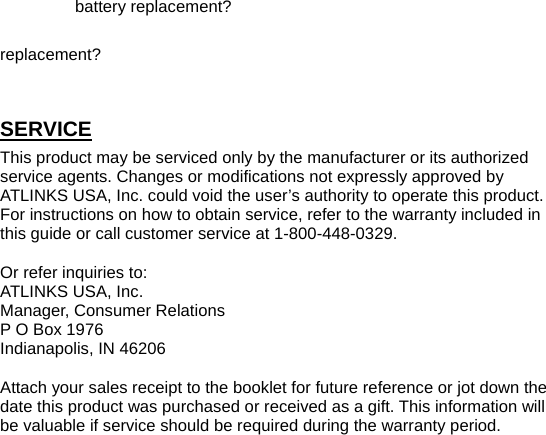
User Manual
![5. : - 重撥: Redial - 對碼: Handset Regirstratoin - 暫停: Pause 6. : TALK/LINE 7. : - 音量: Volume - 來電: CID - 去電: Recall 8. : * / Next (Display remaining numbers) 9. : - R: R Key - 調時: Set Time (Date, Time setting) -ON BASE 1. : In use 2. : Power up 3. : Speaker/ hang up 4. : IP Speed Dial / Memory 5. : - 設置: Program Setting - 存儲: Memory Store - 頻道: Channel 6. : - 刪除: Delete - 對碼: Handset Registration 7. : - 對講: - Handset intercom with base - Base paging handset - 退出: Exit 8. : - 音量: Volume - 調時: Set Time (Date, Time setting) 9. : Hold 10. : - 來電: CID - 去電: Recall 11. : - 重撥: Redial - 暫停: Pause 12. : Flash 13. : * / Next (Display remaining numbers) SET UP TONE/PULSE DIALING A TONE/PULSE switch which marked with “音頻/脈衝” is located at the bottom of base, please choose the tone or pulse dialing format. FLASH TIME SETTING Flash time 100/300/600ms can be selected by switch located at the bottom of base. NOTE: The flash time default setting is 600ms, if you have any question about the setting, please enquiry your telephone service provider. DATE AND TIME SETTING ON BASE 1. Press and hold the button for 2 seconds. 2. Press “▲” or “▼” button to adjust the month setting. 3. Press button to go to date setting 4. Press “▲” or “▼” button to adjust the date. 5. Press button to go to hour setting 6. Press “▲” or “▼” button to adjust the hour. 7. Press button to go to minute setting 8. Press “▲” or “▼” button to adjust the minute. 9. Press button again to confirm setting and go back to standby mode. 10. Press [退出] button to exit the program DATE AND TIME SETTING ON HANDSET Press and hold button for 2 seconds to enter date and time setting. CONTRAST SETTING SELECTION 1. Press and hold [存儲] button for 2 seconds. 2. “LCd” shows in the display. 3. Use the “▲” or “▼” button to adjust the level 4. Press to store selection. 5. Press button to quit the program. RINGER MELODY SELECTION 1. Press and hold [存儲] button for 2 seconds. 2. Press [頻道] button until “ring” shows in the display. 3. Use the “▲” or “▼” button to select the ringer. (5 ringer melodies can be selected) 4. Press to store selection. 5. Press button to quit the program. VIP RINGER MELODY SELECTION 1. Press and hold [存儲] button for 2 seconds. 2. Press [頻道] / [查詢] button until “UIPring” shows in the display. 3. Use the “▲” or “▼” button to select the ringer. (5 ringer melodies can be selected) 4. Press to store selection. 5. Press button to quit the program. NOTE: This feature only works when you have subscribed to Caller ID service. PAGE RINGER MELODY SELECTION 1. Press and hold [存儲] button for 2 seconds. 2. Press [ 頻道] / [ 查詢] button until “Intring” (Base) or “PAgEring” (Handset) shows in the display. 3. Use the “▲” or “▼” button to select the ringer (5 ringer melodies can be selected) 4. Press to store selection. 5. Press button to quit the program. RINGER ON/OFF Ringer ON 1. Press and hold [存儲] button for 2 seconds. 2. Press [頻道] / [查詢]button until “ringUol” shows in the display. 3. Use the “▲” or “▼” button to volume level 1 or 2. 4. Press to store selection. Ringer OFF 1. Press and hold [存儲] button for 2 seconds. 2. Press [頻道] / [查詢]button until “ringUol” shows in the display. 3. Use the “▲” or “▼” button to select OFF. 4. Press to store selection and “免打擾” will show in display. LOCAL AREA CODE SETTING If local PSTN still sends the CID with local area code attached, it is necessary to filter out the local area code when dial back from CID log. The function is to remove the local area code hence the local CID will be appeared on the CID log with local area code deleted. For example: local CID received shows “07552288788”, set the 0755 as local area code then it becomes “2288788” next time receive it. If LCD shows “7552288788”, set the “755-“ as local area code. 1. Press and hold [存儲] button for 2 seconds. 2. Press [頻道] / [查詢] button until “CodE” shows in the display. 3. Enter (1-4) area code digit, if you make a mistake, press button to backspace 4. Press to store the setting. 5. Press button to quit the program. LONG DISTANCE CODE PROGRAMMING CID LOG EDITING BEFORE DIAL OUT For example: a long distance caller ID “013928389222” will only display “13928389222” with “0” deleted. This function will activate the “0” insertion hence it will show correctly the call is a long distance call 1. Press [來電] button. 2. Press the “▲” or “▼” button, to review CID record. 3. Enter digit “0”. 4. Press to backspace left hand side number if you make a mistake. 5. Press button on handset or button on base to dial out the number. 6. Press the “▲” or “▼” button to back to the record during edit. Or press button to quit the program. INSERTING PREFIX IN PHONE BOOK RECORD 1. Press [存儲]button, then press the desired memory location number (01 through 16) in 2 digits. 2. Or press [頻道] / [查詢] button, “存儲” shows in the display. 3. Press the “▲” or “▼” button, to review the memory. 4. Enter one-digit number. (For example: If you need dial “9” for external line dialing out, then you need enter digit “9”) 5. Press to backspace the digit if you make a mistake. 6. Press button on handset or button on base to dial out the number. 7. Press the “▲” or “▼” button to back to record during edit. Or press button to quit the program. HANDSET REGISTRATION The ex-factory cordless handset had already registered by default. If you can’t linkup the handset and base or if you brought expandable handset, please follow below instruction to register the handsets (include ex-factory headset). NOTE: Maximum 4 handsets can be registered in one base unit. During in register procedures, handsets should be placed near the base unit. 1. Press and hold [對碼] button on base to enter the registration mode. Display shows text “CodE HS-1“. (Don’t release the button until all handsets had been registered.) 2. Then, press and hold [對碼] button on cordless handset. (Handset display shows text “HS –1 “ and base display shows “COdE HS-2”. Keep holding the REGISTER buttons on handset even a confirmation beep is heard from base, it means it can press button on another handset (handset displays “HS-2”, Base displays “CodE HS-3”) After registration, release the [對碼] button on handset and then release the [對碼] button on base.) VOLUME HANDSET While you are on phone, you can press the [音量] “▲” or “▼” button to adjust the volume of the handset’s earpiece. BASE When you are on phone by using the speakerphone, press button to adjust the volume of the speakerphone volume. RECEIVING A CALL BASE 1. Press button or pick up the corded handset. 2. Press button or put the corded handset on the cradle of base to hang up. HANDSET 1. Press button to pick up the call.](https://usermanual.wiki/CCT-Tech-Advanced/2-9650.User-Manual/User-Guide-470815-Page-2.png)
![2. Press to hang up after finish the conversation. MAKING A CALL BASE 1. To make a call, press button before you dial, OR 2. Enter the telephone number, then press button. OR 3. Pick u the corded handset before you dial. OR 4. Enter the telephone number, and then pick up the corded handset. HANDSET 1. To make a call, press the button before you dial. OR 2. Enter the telephone number, then press the button. CHANNEL BUTTON While talking, you might need to manually change to the channel in order to get rid of static. Press and release button to advance to the next clear channel. REDIAL (CALL BACK) 1. Press [去電] “▼” button until “去電” show in the display. 2. Press the “▲” or “▼” button to review redial telephone list. (Please wait 4 seconds or press to display the talk time. This function only available in handset) 3. Press button on handset or button on base to dial out the number. OR 1. Press the button on handset or button on base 2. Press to dial out the number. DELETING THE CURRENT REDIAL RECORD 1. Make sure the phone is OFF. 2. Use the [去電] “▼” button or [頻道] / [查詢] button until “去電” show in the display. 3. Press the “▲” or “▼” button to choose a desired redial record. 4. Press button on handset or on base, “dELEtE” shows on display. 5. Press button on handset or on base again to confirm the deletion. Or press button to cancel the deletion. DELETING ALL REDIAL RECORDS 1. Make sure the phone is OFF. 2. Use the [去電] “▼” button or [頻道] / [查詢] button until “去電” show in the display. 3. Press and hold button on handset or on base for several seconds. “dELEtE ALL” displays on screen. 4. Press button on handset or on base again to confirm the deletion. Or press button to cancel the deletion. IN USE/CHARGE INDICATOR The 電源 indicator on base it lit when the phone is ON. When the phone is in use, the 外線 indicator on the base is lit. FLASH If you get a busy signal, and want to dial the number again, press button again and dial the desired number. R KEY FUNCTION (HANDSET) During a call, you may transfer the call to another line. 1. Press button. 2. Dial the number that you need to transfer the call. 3. Call was answered, then press button to hang up. TEMPORARY TONE This feature enables pulse (rotary) service phone users to access touch-tone services offered by banks, credit card companies, etc., by pressing the * (TONE) button to temporarily make the phone touch-tone compatible. To get information about your bank account, for example, you would: 1. Call the bank’s information line. 2. Press the * (TONE) button after your call is answered. 3. Follow the voice instructions to complete your transaction. 4. Hang up when finished. The phone returns to Pulse (rotary) service. HOLD Press the button to put a call on hold. To release a line on hold, press the button again or pick up an extension phone. INTERCOM MODE PAGING HANDSET/BASE AND INTERCOM Base Page Handset: 1. Press button on base. “CALL” shows in the display. If press “1” key, it will page handset 1, if press “2” key, it will page handset 2. (Handset 1 is the default handset will be paged even “1” key was not pressed). 2. Press the button on handset to stop the page and intercom with base. 3. To terminate the intercom, press button on base or pull the corded handset on the cradle or press button on handset. Handset Page Base 1. Press on cordless handset. 2. Press button on base or pick up the corded handset to stop the page and enter INTERCOM mode. 3. To terminate INTERCOM, Press button on base, or put the corded handset on the cradle, or press button on handset. NOTE: When there is an external incoming ring during handset and base under intercom mode, intercom will terminate, and the ringer will emit. Press either button on base or button on handset to answer the call. CALL TRANSFER Base to Cordless Handset While user is in phone conversation by using base: 1. Press button on base 2. Enter the handset number that you want to transfer to [ 1, 2, 3, or 4] (Handset 1 is the default handset will be paged even “1” key was not pressed). Base will page specific handset, at the same time an intercom melody at base and handset will be heard until the handset answer the paging. (If user haven’t enter the number, then all handsets will ring) 3. Press button on handset. Then the call will be transferred to cordless handset. Cordless Handset to Base While user is in phone conversation by using cordless handset: 1. Press button on handset or “0” key. 2. Pressing button on base. Then the call will be transferred to base. Cordless Handset to Cordless Handset (Only Available to Expandable Handsets) While user is in phone conversation by using cordless handset: 1. Press button on handset 2. Enter the handset number [ 1, 2, 3, or 4] that you want to transfer to. Handset will page specific handset, at the same time an intercom melody will be heard. 3. Press button on receiving handset to directly answer the external call. 4. The sending handset will back to standby mode automatically and the call will be transferred to receiving handset. CALLER ID FEATURES This unit receives and displays information transmitted by your local phone company is running with FSK or DTMF system. The unit can store up to 48 calls for later review. CALLER ID While you have a caller ID, the display will show as follow: On handset: CID icon Number of calls Caller ID phone number On Base: CID Number of calls Date Time Caller ID phone number Provided you subscribe to Caller ID from your phone company, you are able to see who is calling. The caller identification appears in the display after you hear the tone. IMPORTANT: In order to use the Caller ID functions with this unit, you must subscribe to Number Caller ID Service. To know who is calling while you are on the phone, you must subscribe to Caller ID. RECEIVING AND STORING CALLS When you receive a call, the information is transmitted by the phone company to your Caller ID telephone between the first and second ring. When the memory is full, a new call automatically replaces the oldest call in memory. REVIEWING RECORDS As calls are received and stored, the display is updated to let you know how many calls have been received. ‧ Press the [來電] “▲” button to review the call records. ‧ Press the “▲” button to review the call records from the latest one. ‧ Press the [來電] “▲” button to scroll through the call records from the oldest to the newest. ‧ Pres the button to review the remaining digits of the CID and the date and time of the CID. TRANSFERRING CID RECORDS TO MEMORY (BASE AND HANDSET) You may transfer a Caller ID record to your phone’s memory 1. Make sure the base or handset is OFF. 2. Press the [來電] “▲” button. 3. Press the “▲” or “▼” button to display the desired Caller ID record. 4. Press the button. 5. Press the desired memory location (01-16) in 2 digits. Note: Cannot remove the first digit “0” of the memory location “01” DELETING THE CURRENT CID RECORD 1. Make sure the base or handset is OFF. 2. Press the [來電] “▲” button. 3. Press the “▲” or “▼” button to display the desired Caller ID record. 4. Press button on handset or button on base, “dELEtE” shows on display. 5. Press button on handset or button on base again to confirm the deletion. DELETING ALL CID RECORDS 1. Make sure the base or handset is OFF. 2. Press the [來電] “▲” button. 3. Press and hold button on handset or button on base for several seconds. “dELEtE ALL” displays on screen. 4. Press button on handset or button on base button on base again to confirm the deletion. DIALING A CALLER ID NUMBER 1. Make sure the base or handset is OFF. 2. Press the [來電] “▲” buttons. 3. Press the “▲” or “▼” button to display the desired Caller ID record. If the number is too long, press button to show the remaining digits. 4. If necessary, enter (1-4) digits area code as prefix. 5. If necessary, press button to backspace the entry. 6. Press button on handset or button on base. The number dials automatically. MEMORY Store up to sixteen 20-digit numbers in memory for quick dialing. (15 memory locations in base and 16 memory location in handset). This memory feature is in addition to the 48 Caller ID records that can be stored in the Caller ID memory log. STORING A NUMBER IN MEMORY 1. Make sure the base or handset is OFF. 2. Use the number keypad to enter the telephone number you want to store (up to 20 digits). Press the button, then enter the desired memory location number (01-16) in 2 digits. REVIEWING AND DIALING STORED NUMBER 1. Make sure the base or handset is OFF. 2. Press the button or [查詢] button on base or handset until “存儲” shows in the display. 3. Or press button, and enter the desired memory location (01-16). 4. Press the “▲” or “▼” button to display the desired Caller ID record. 5. Then press button on handset or button on base. The number dials automatically. Note: If the number is too long, press to review the remaining INSERTING A PAUSE IN THE DIALING SEQUENCE Press the button to insert a delay in the dialing sequence of a](https://usermanual.wiki/CCT-Tech-Advanced/2-9650.User-Manual/User-Guide-470815-Page-3.png)
![stored telephone number when a pause is needed to wait for a dial tone when storing the number. (for example after you dial 9 for an outside line, or to wait for a computer access tone). Each pause counts as 1 digit in the dialing sequence. CHANGING A STORED NUMBER Use the same procedure to change a stored number as you do to store a number—you’re just replacing the phone number with a different one. STORING A REDIAL NUMBER 1. Make sure the base and handset is OFF. 2. Press “▼” button to get into redial record menu. “去電” will show in the display 3. Press the “▲” or “▼” button to display the desired record. 4. Press the button. 5. Press number key (01-16 for) in 2 digits to store the phone number in the memory location. Note: To quit the setting, press button. VIP MEMORY You can specify a desired memory to VIP. If the memory had been specify to VIP, you will hear a VIP ringer while the specified number reach. 1. Make sure the base and handset is OFF. 2. Press the [頻道/查詢] button until “存儲” shows in the display. 3. Press the “▲” or “▼” button to review the memory and choose a memory. 4. Press button, the display will show “貴賓”. (Press button to cancel the VIP memory setting.) Note: After finish setting, press button to quit the setting. In order to use the VIP ringer function with this unit, you must subscribe to Number Caller ID Service. REVIEWING AND DELETING STORED NUMBERS 1. Make sure the base or handset is OFF. 2. Press [存儲] button, then press the desired memory location number (01 through 16) in 2 digits. 3. Or press [頻道/查詢] button, “存儲” shows in the display. 4. Press “▲” or “▼” button to review the memory and choose a memory. 5. Press button on handset or button on base while the entry is displayed, “dELEtE” shows on display. 6. Press button on handset or button on base again to confirm the deletion. Note: Press button to quit during deletion. DELETING ALL MEMORY RECORDS 1. Make sure the base or handset is OFF. 2. Press the button on handset or button on base, “存儲” shows in the display. 3. Press and hold button on handset or button on base for several seconds. “dELEtE ALL” displays on screen. 4. Press button on handset or button on base again to confirm the deletion. CHAIN DIALING FROM MEMORY Use this feature to make calls which require a sequence of numbers such as using a calling card for a frequently called long distance number. Basically, you dial each part of the sequence from memory. The following example shows how you can use chain dialing to make a call through a long distance service: The Number For Memory Location Long distance access number 7 Authorization code 8 Frequently called long distance number 9 1. Press [通話] or [免提/回撥] button. 2. Press and then press 07. 3. When you hear the access tone, press and then press 08. 4. At the next access tone, press and then 09. TIP: Wait for the access tones before pressing the next memory button, or your call might not go through. STORING THE IP NUMBER 1. Make sure your phone is OFF. 2. Press and hold button for 2 seconds, “IP” shows in the display. 3. Enter the IP dial up number 4. Press button twice. 5. Press 1 or 2 or 3 to choose the type of language. 6. Press button twice. 7. Enter the card number and pin number. 8. Then press # button. 9. Press [存儲/設置] button to confirm the number. You will hear a confirmation tone. For Example: Have one IP card, Card Number : 137311088888 , Pin Number: 9888 , storage procedures: − Press and hold button for 2 seconds, then “IP” shows in the display. − Enter 17910(UniCom dial up number). − Press button twice. − Press Key [1] (Choose Putonghua). − Press button twice. − Enter 1373110888889888 (Card number and Pin number). − Press # button. − Press button to confirm. Note: The above procedures for reference only, you may do different procedures for different cards. IP DAILING AND REDIALING Make a Long distance call with IP function: − When the phone is OFF, enter the long distance number, press IP button, then the handset adds the IP number as a prefix on the number and automatically dial up. − When the handset is in CID review mode, scroll to the desired long distance number, and press button, then the handset adds the IP number as a prefix on the number and automatically dial up. − Press the button on the handset or button on base, press button, then you will hear a dial tone, now you can enter your long distance number. Number Lock To prevent other user from dialing the long distance number or other special number, such as 聲台 “16897888”, you can set the number lock to restrict the dialing number which is unauthorized by you. For example, long distance”0” or 聲訊 “16” (1- 2 digit). To remind you, before you set the number, please set up the pin number first. (The pin number is 4-digit number). SET THE PIN NUMBER AND RESTRICTED NUMBER For example: To prevent other user from dialing 聲台 “16897888”, you can set first two digit as a restricted dial number. Pine number 0588, the setting steps: 1. Press the keys [#], [#] 2. Enter the pin number 0588. 3. Enter the restricted dial number 16 (max 2 digits.) 4. Press button to confirm the number. You will hear a confirmation tone. For example: To prevent dial up the number “0”. 1. Press the keys [#], [#] 2. Enter the pin number 0588. 3. Enter the restricted dial number 0 4. Press button to confirm the number. You will hear a confirmation tone. CANCEL THE RESTRICTED NUMBER 1. Press the keys [#], [#] 2. Enter the pin number 0588. 3. Press button to confirm the number. You will hear a confirmation tone. Note: (If you forgot the pin number, please following the below procedures to de-restricted the number) 1. Press the keys [*], [*], [4]. [0], [#], [#], button in sequence. Or 2. Reset the power of base or handset (But all the stored CID and redial records will be lost.) STORING A NUMBER IN DIRECT MEMORY 1. When base in use, handset press button, handset will emit the beep tone. It represent the base is not available for making a call. The display will show “預約”. 2. After base hang up, the handset will emit the ringing tone, to inform the handset the base is available for making a call. BATTERY INDICATOR This icon is the battery level indicator. If you see the icon change into , that means your handset battery is low and your handset keyboard is not available to use, please put the handset in cradle of charger to recharge your battery. CHANGING THE BATTERY Make sure the telephone is OFF before you replace battery. 1. Remove the battery compartment door. 2. Disconnect the cord attached to the battery pack and remove the battery pack from the handset. 3. Insert the new battery pack and connect the cord into the jack inside the handset. 4. Put the battery compartment door back on. 5. Place handset in the base to charge. Allow the handset battery to properly charge (for 12 hours) prior to first use or when you install a new battery pack. If you do not properly charge the phone, battery performance will be compromised. CAUTION: Danger of explosion if battery is incorrectly replaced. Replace only with the GPI, GP30AAAK3BMJ type battery that came with your phone. Do not dispose of the battery in a fire. The cell may explode. Check with local code for possible special disposal instructions. BATTERY SAFETY PRECAUTIONS ‧ Do not burn, disassemble, mutilate, or puncture. Like other batteries of this type, toxic materials could be released which can cause injury. ‧ To reduce the risk of fire or personal injury, use only the battery listed in the User’s Guide. ‧ Keep batteries out of the reach of children. ‧ Remove batteries if storing over 30 days. GENERAL PRODUCT CARE To keep your telephone working and looking good, follow these guidelines: ‧ Avoid putting the phone near heating appliances and devices that generate electrical noise (for example, motors or fluorescent lamps). ‧ DO NOT expose to direct sunlight or moisture. ‧ Avoid dropping and other rough treatment to the phone. ‧ Clean with a soft cloth. ‧ Never use a strong cleaning agent or abrasive powder because this will damage the finishing. ‧ Retain the original packaging in case you need to ship the phone at a later date. CAUSES OF POOR RECEPTION ‧ Aluminum siding. ‧ Foil backing on insulation. ‧ Heating ducts and other metal construction can shield radio signals. ‧ You’re too close to appliances such as microwaves, stoves, computers, etc. ‧ Atmospheric conditions, such as strong storms. ‧ Base is installed in the basement or lower floor of the house. ‧ Base is plugged into an AC outlet with other electronic devices. ‧ Baby monitor is using the same frequency. ‧ Handset battery is low. ‧ You’re out of range of the base. MESSAGE INDICATORS The following indicators show the status of a message or of the unit. UNAVALIABLE The person is calling from a number that has been blocked or out of area from transmission. NO CALL No Caller ID information was received. TROUBLESHOOTING TIPS CALLER ID Problem Solution No Display ‧ Is battery fully charged? Try replacing the battery. Make sure the battery is properly installed and connected. ‧ If you are using AC power, make sure that the unit is connected to a non-switched electrical outlet. Disconnect the unit from the plug and plug it in again. ‧ Did you order Caller ID service from your local telephone company? TELEPHONE Problem Solution No dial tone ‧ Check installation: — Is the base power cord connected to a working outlet? — Is the telephone line cord connected to the base unit and the wall jack? ‧ Disconnect the base from the wall jack and connect another phone to the same jack. If there is no dial tone in the second phone, the problem might be your wiring or local service. ‧ Is the handset out of range of the base? ‧ Make sure the battery is properly charged (12 hours). ‧ Is the battery pack installed correctly? ‧ Did the IN USE indicator come on? The battery may need to be charged. Dial tone is OK, but ‧ Make sure the tone/pulse setting is can't dial out correct. Handset does not ring ‧ Make sure the RINGER setting on the handset and base are programmed to ON. ‧ You may have too many extension phones on your line. Try unplugging some phones. ‧ See solutions for “No dial tone”. You experience ‧ Change channels static, noise, or ‧ Is handset out of range? Move closer fading in and out to the base. ‧ Does the base need to be relocated? ‧ Charge battery. ‧ Make sure base is not plugged into an outlet with another household appliance. UNIT BEEPS - Clean charging contacts on handset and base with a soft cloth, or an eraser. - See solutions for “No dial tone”. - Replace battery. MEMORY DIALING - Did you program the memory location keys correctly? - Did you follow proper dialing sequence? - Make sure the tone/pulse setting is correct. - Did you reprogram numbers into memory after power outage or](https://usermanual.wiki/CCT-Tech-Advanced/2-9650.User-Manual/User-Guide-470815-Page-4.png)