CLEVER BRIGHT CB-335076 COLOR CHANGING BLUETOOTH RECTANGLE SPEAKERS User Manual CB 335076 manual draft R13 16
CLEVER BRIGHT INTERNATIONAL (H.K.) LTD. COLOR CHANGING BLUETOOTH RECTANGLE SPEAKERS CB 335076 manual draft R13 16
User manual
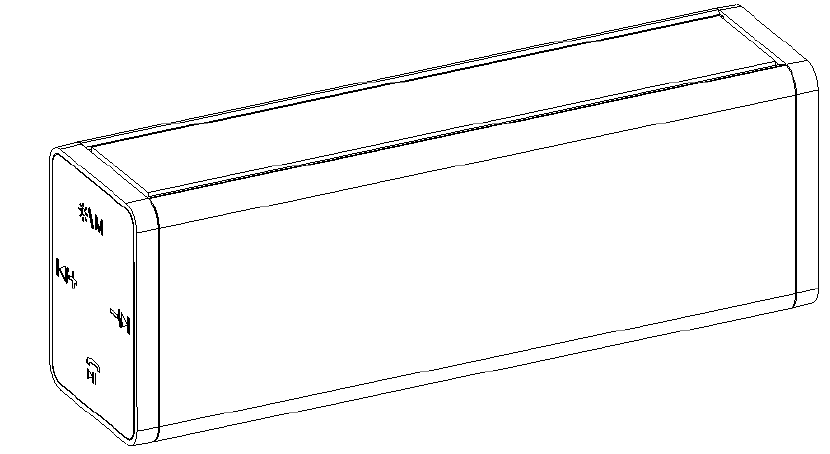
WirelessLightShowSpeaker
WithMulti‐ColorDancingLEDLight
CB‐335076
INSTRUCTIONMANUAL
PLEASEREADALLINSTRUCTIONSCAREFULLY
&RETAINFORFUTUREUSE
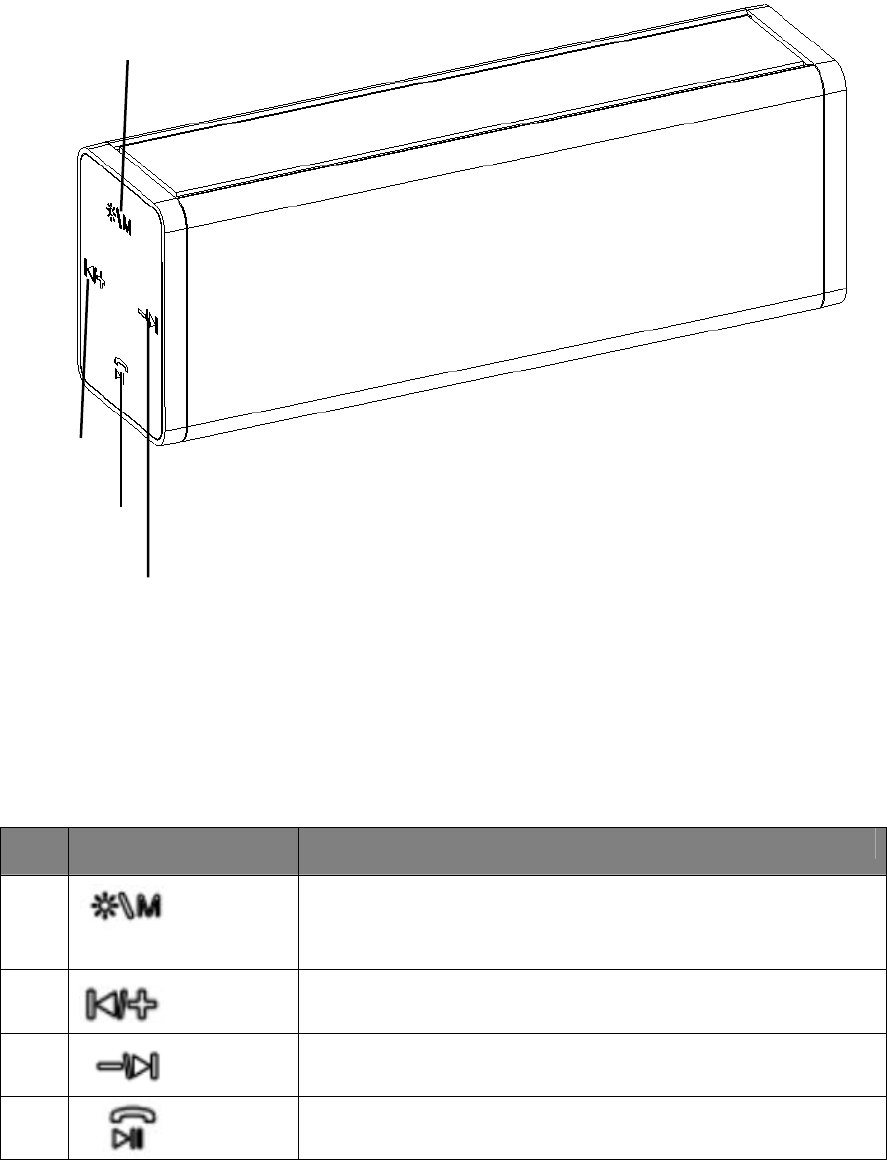
(Note:SomeofabovefunctiononlycanbeusedinBluetoothmodeonly.InAux
mode,youmayneedtocontrolthroughyoursourcedevice.)
ItemFunctionOperation
①
shortpresswillchangeLEDlightsdancingmode,10dancingmode
there(includingturnon/offthelight);
longpressswitchbetweenBluetoothandAuxinmode.
②
shortpresswillincreasethevolumelevel;
longpresswillskiptothenexttrack.
③
shortpresswilldecreasethevolumelevel;
Longpresswillreturntotheprevioustrack.
④
Shortpressanswerthecomingcallorhangacall;
Shortpresspauseorplaythemusic.
①
③
②
④

INSTRUCTIONSFORUSE
Chargingthespeaker
Forbestresults,fullychargethespeakerbeforeitsfirstuse.
1. ConnecttheUSBchargingcord(included)totheDC5Vchargingportofthespeakerand
inserttheotherendintoaportonyourcomputerorsimilarpowersource.
2. TheRedLEDturnsonindicatingthatthebatteryisbeingcharged.Onceitisfullycharged,
theRedLEDwillturnoff.Itwilltakearound4hourstofullychargethebattery.
TurnthespeakertoBluetoothpairingmode‐
1. PressPowerON/OFFabout3seconds,thelightandspeakerbothon.
2. Youwouldheartwoshortmusicnoticemessage;firstonemeanspoweron.Secondonethe
speakerisnowinpairingmode.
(Note:Speakerautomaticallypairswiththepreviouslypaireddevices)
PairingyourdevicewithBluetoothSpeaker–
YourBluetoothSpeakercanwirelesslystreamaudiofromanyBluetoothenableddevicewithin
thedistanceof27‐33Feet.Simplyfollowthebelowsteps.
1. PressPowerON/OFFabout3seconds,thelightandspeakerbothon
2. Youwouldheartwoshortmusicnoticemessage;firstonemeanspoweron.Secondone
thespeakerisnowinpairingmode.
3. TurnontheBluetoothonyourMobilePhoneorTabletorComputer.
4. Itwillsearchforvariousdevices.
5. ThepairingnameofourBluetoothSpeakeris“UBSPB95”,pairitwiththisdevice.
6. Ifrequired,enterthepassword‘0000’toconfirmtofinalizepairing.
7. Oncepairedsuccessfully,youwouldhearaindicationtone.
8. Ifyoufailtopairitwithinthetimeframeoryouwanttopairitwithanewdeviceplease
followsthestepsoutlinedabove.
SelectyourfavoritesongattheBluetoothdeviceandmusicwouldnowstreamthroughBluetooth
speaker.
ListeningtoMusicviaBluetooth(Wireless)
Pleaseensurethatyourdevice(iPhone,TabletorOtherSmartPhone)ispairedwiththe
BluetoothSpeakertostreammusicwirelessly.Onceitispaired,playmusicfromyourdevice.
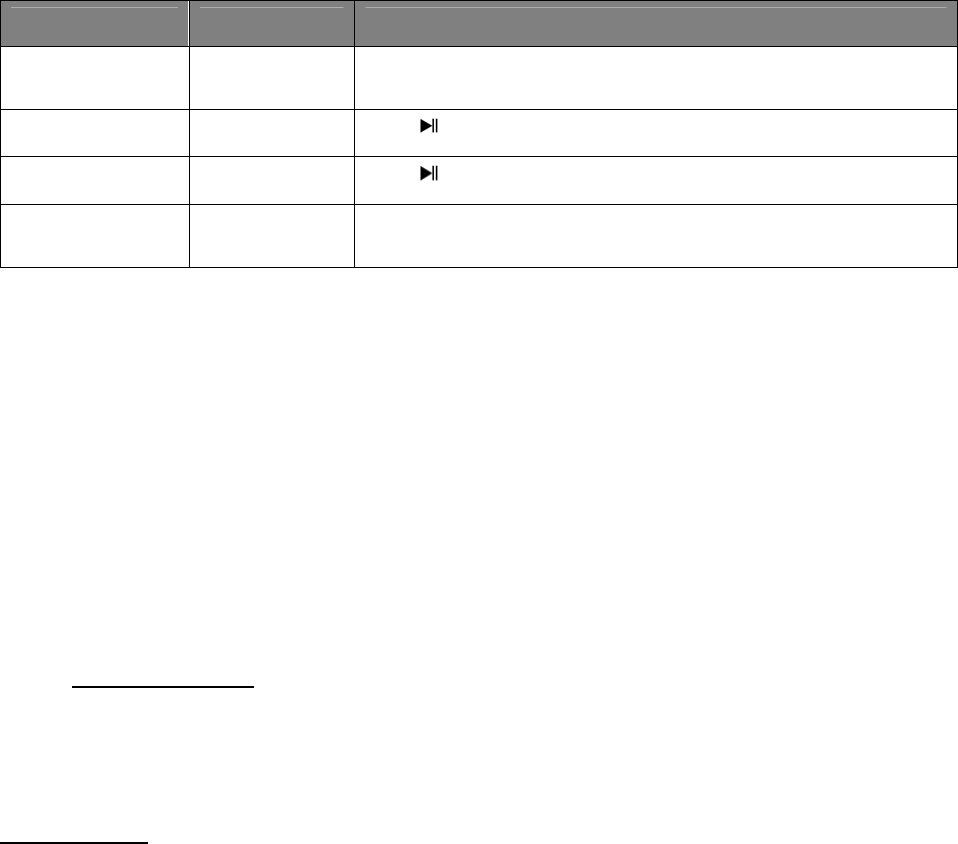
FunctionOperationButton
Increase/Decrease
Volume
Playingmusicshortpress+buttontoincreasethevolumeorshortpress‐button
todecreasethevolume
PausePlayingmusicPress oncetopausethemusic
PlayPausePress onceresumethemusic
SkipForward/Skip
Backward
Playingmusiclongpress+toskipforwardthetrack.longpress‐ toskipbackward
thetrack.
(Note:TheabovefunctionsonlycanbeusedinBluetoothmodeonly.InAuxmode,youmayneed
tocontrolthroughyoursourcedevice.)
ListeningtoMusicusingAUXMode
1. PressPowerON/OFFabout3seconds,thelightandspeakerbothon.
2. Youwouldheartwoshortmusicnoticemessage;firstonemeanspoweron.Secondone
thespeakerisnowinpairingmode.
3. InserttheLineinportofthespeaker.And,the3.5mmAuxplugtotheaudiodevice(such
ascomputer/tablet/…..etc.).
4. Selectyourfavoritesongatthesourcedevice.
5. Longpress+buttontoincreasethevolumeorlongpress–buttontodecreasethe
volume.
6. Do’sandDon’ts
7. Donotplaymusicatexcessivelevels.Damagetohearingand/orequipmentmayresult.
8. Donotuseoutdoorsinwetorindampsurroundings.
Specification
Bluetoothversion:3.0
Speaker :3Watts*2
Impedance:4ohms
Playtime :Upto4hours
ChargeVoltage:DC5V(USB)
BluetoothRange:33Feet
Built‐InRechargeable
Battery :3.7V/1200mAh
(Note:Batterylife&chargingtimemayvarybasedonusage&typesofdevicesused.)
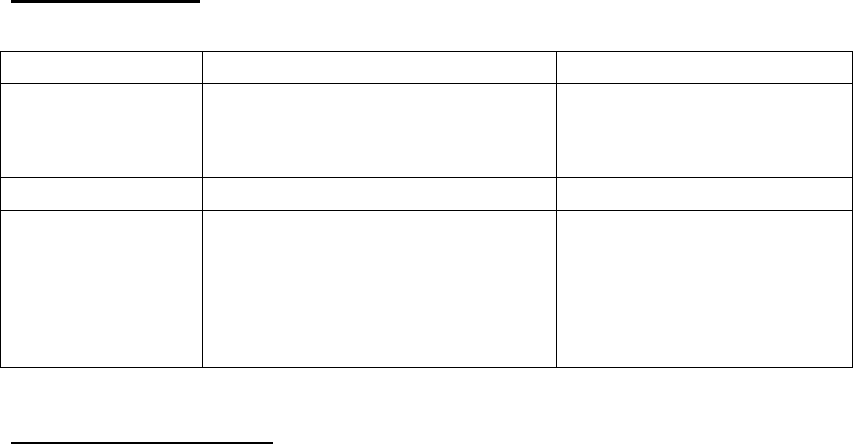
Troubleshooting
ProblemPossibleCauseSolution
LowsoundlevelSource(Tablet,MobilePhone,Laptop,
etc.)volumetoolow.
Batterydead
Adjustsourcevolume.
ChargeBattery.
SounddistortedBatterynearlydeadChargeBattery.
Nosoundatall.Source(Tablet,MobilePhone,Laptop.)
turnedoff.
Speakerturnedoff.
Volumeturneddownsource.
Mediapausedonsource.
Turnthesourceon.
Turnthespeakeron.
Adjustvolumesource.
Playmediafromsource.
CareandMaintenance
Cleantheunitwithasoft,dampcloth.Neverusechemicalsorhardabrasives.
Keepthisunitawayfromwetordampsurroundings.
Thecrossedoutwheeliebinsymbolonthisitemindicatesthatthisproductneedstobedisposed
ofinanenvironmentallyfriendlywaywhenitbecomesofnofurtheruseorhaswornout.
Contactyourlocalauthoritiesfordetailsofwheretotaketheitemforre‐cycling.
Note:iPodandiPhonearetrademarksofAppleInc,registeredintheUS,andothercountries.
FCC STATEMENT
1. This device complies with Part 15 of the FCC Rules.
Operation is subject to the following two conditions:
(1) This device may not cause harmful interference, and
This device must accept any interference received, including
interference that may cause undesired operation.
2. Changes or modifications not expressly approved by the party
responsible for compliance could void the user’s authority to operate
the equipment.
FCC Radiation Exposure Statement:
This equipment complies with FCC radiation exposure limits set forth for
an uncontrolled environment. In order to avoid the possibility of
exceeding the FCC radio frequency exposure limits, Human proximity to
the antenna shall not be less than 20cm (8 inches) during normal
operation.
NOTE: This equipment has been tested and found to comply with the
limits for a Class B digital, pursuant to Part 15 or the FCC Rules. These
limits are designed to provide reasonable protection against harmful
interference in a residential installation. This equipment generates, uses
and can radiate radio frequency energy and, if not installed and used in
accordance with the instructions, may casue harmful interference to
radio communications, However, there is no guarantee that interference
will not occur in a particular installation. If the equipment does cause
harmful interference to radio or television reception, which can be
determined by turning the equipment off and on, the user is encouraged
to try to correct the interference by one or more of the following
measures:
--- Reorient or relocate the receiving antenna.
--- Increase the separation between the equipment and receiver.
--- Connect the equipment into an outlet on a circuit different
from that to which the receiver is connected.
--- Consult the dealer or an experienced radio/ TV technician for help.