COMCN ELECTRONICS MI-SPB82-200 Bluetooth speaker User Manual
COMCN ELECTRONICS LIMITED Bluetooth speaker Users Manual
Users Manual
User Manual MERKURY SPB82
How to use the speaker
1. Slide on/off switch to ON position, the speaker will go into Bluetooth pairing mode
automatically, and the speaker will say “Bluetooth is ready to pair”.
2. Enable the Bluetooth function on your mobile device and search for the Bluetooth
speaker.
3. Select device MERKURY SPB82 that has been newly added to pairing, then it will say
“Bluetooth is connected successfully”.
4. Play music via bluetooth with your mobile device or dial with you mobile phone.
5. Pause /Play: Short press this button to play/pause the music of the device.
6. Change Songs :Short press FORWARD or NEXT button to play forward or next music.
7. Volume Adjustment: Rotate the VOLUME to turn the volume up or down.
8. Mode: Press MODE button to change the audio source around Bluetooth/FM Radio
/AUX.
9. Hands-free: when the speaker is connected with a phone via Bluetooth, music will
temporally pause; if a phone call come in while the Bluetooth is connected with
telephone, first the speaker will read the phone number, and then Short to answer
a call and hang up a call, to reject a call and call back, just long press.
10. Charge Description : use Micro USB cable connect to the charging port of the speaker
“DC 5V”
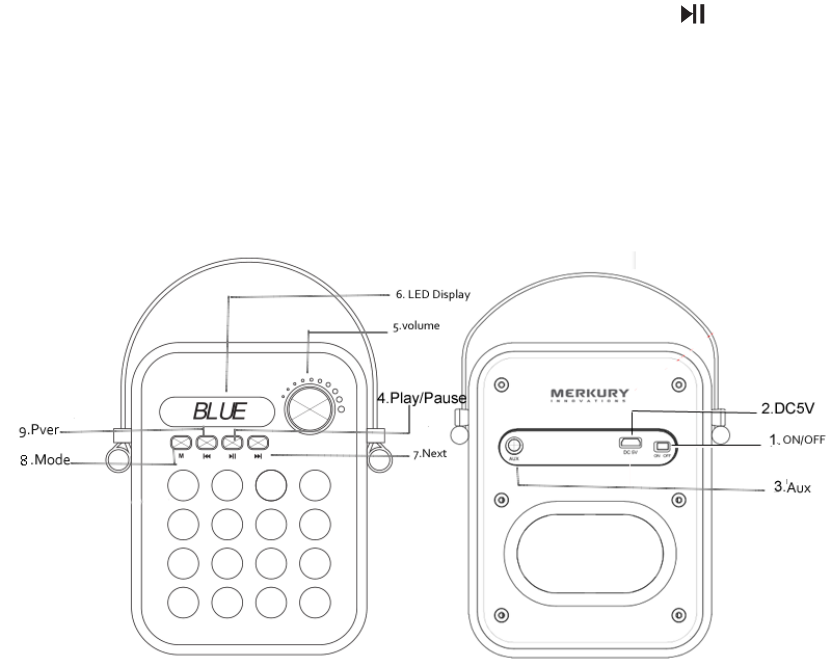
Button Functions Display
1.Power On/Off
2. DC5V: Micro USB Charging Port
3.AUX:Connection Jack
4.Play/Pause Or/ Hands-free: Hands-free: Short press to answer/ hang up a call, Long press
to reject a call redialing
5.Volume : Rotate the VOLUME to turn the volume up or down.
6.LED Display
7.Next song
8.Mode: Press MODE button to change the audio source around Bluetooth/FM Radio /AUX.
9.Previous song
Specifications
1:Bluetooth Version:V2.1+EDR(3.0)
2:Support Profiles:HFP/L2CAP/A2DP/AVCTP/AVDTP/AVCRP
3: Output Power: 3W x2
4:THD:<0.5%
5:S/N:>90dB
6:Frequency Response:80Hz-20kHz
7:Frequency :2.402-2.480GHz
8:Play Time: About 3~4 hours continuously
9:Charge Time: About 1~2 hours
10:Net Weight:2Ibs
11:Battery Capacitor: 1200mA/3.7v
12:Production Dimensions: 122*85*142 mm
Package Includes
1:LED Bluetooth Speaker x 1
2:3.5mm Audio Cable x 1
3:Micro USB Charging Cable x1
4: User Manual x 1
Friendly Reminder (FAQ) Troubleshooting
1. Make sure your mobile devices are Bluetooth-enabled before using product.
2. Make sure the speaker is fully charged when using for the first time.
3.In order to protect the circuit of this speaker and ensure the long-term performance of the
built-in battery,please do not play music while charging your mobile device.
4.If you Repeated Unsuccessful pairing: ○
1 . Shutdown and reboot the speaker ○
2. If you
device ask for a password. Please type in 0000
5.Staccato appears when Plying music: Check if the device exceeds the working distance ,Or if
there is any obstacles between them
6. stay silently when playing: ○
1 .Check if the Volume of speaker has been adjusted
○
2 check if the speaker has been muted or paused
7. stay silently after AUX is connected : Check if the audio input line is correctly connected
8.Fail to turn on: Check if the built-in battery is dead
FCC Statement
Changes or modifications not expressly approved by the party responsible for compliance
could void the user's authority to operate the equipment.
This equipment has been tested and found to comply with the limits for a Class B digital
device, pursuant to Part 15 of the FCC Rules. These limits are designed to provide
reasonable protection against harmful interference in a residential installation. This
equipment generates uses and can radiate radio frequency energy and, if not installed
and used in accordance with the instructions, may cause harmful interference to radio
communications. However, there is no guarantee that interference will not occur in a
particular installation. If this equipment does cause harmful interference to radio or
television reception, which can be determined by turning the equipment off and on, the
user is encouraged to try to correct the interference by one or more of the following
measures:
-- Reorient or relocate the receiving antenna.
-- Increase the separation between the equipment and receiver.
-- Connect the equipment into an outlet on a circuit different from that to which the receiver
is connected.
-- Consult the dealer or an experienced radio/TV technician for help
This device complies with part 15 of the FCC rules. Operation is subject to the
following two conditions (1)this device may not cause harmful interference, and (2) this
device must accept any interference received, including interference that may cause
undesired operation