CONTOUR VAMWL UNIMOUSE-WL User Manual BW User Guide 17x5 0100617 FINAL wireless
CONTOUR (GUANGZHOU) DESIGN, INC. UNIMOUSE-WL BW User Guide 17x5 0100617 FINAL wireless
CONTOUR >
User Manual

ON OFF
CONNECTING POWER ON
STROMVERSORGUNG
MISE SOUS TENSION
VERBINDUNG
BRANCHEMENT
UNIMOUSE WL
-
1) 800 2) 1000 3) 1200 4) 1400 5) 1600
6) 1800 7) 2000 8) 2200 9) 2400 10) 2800
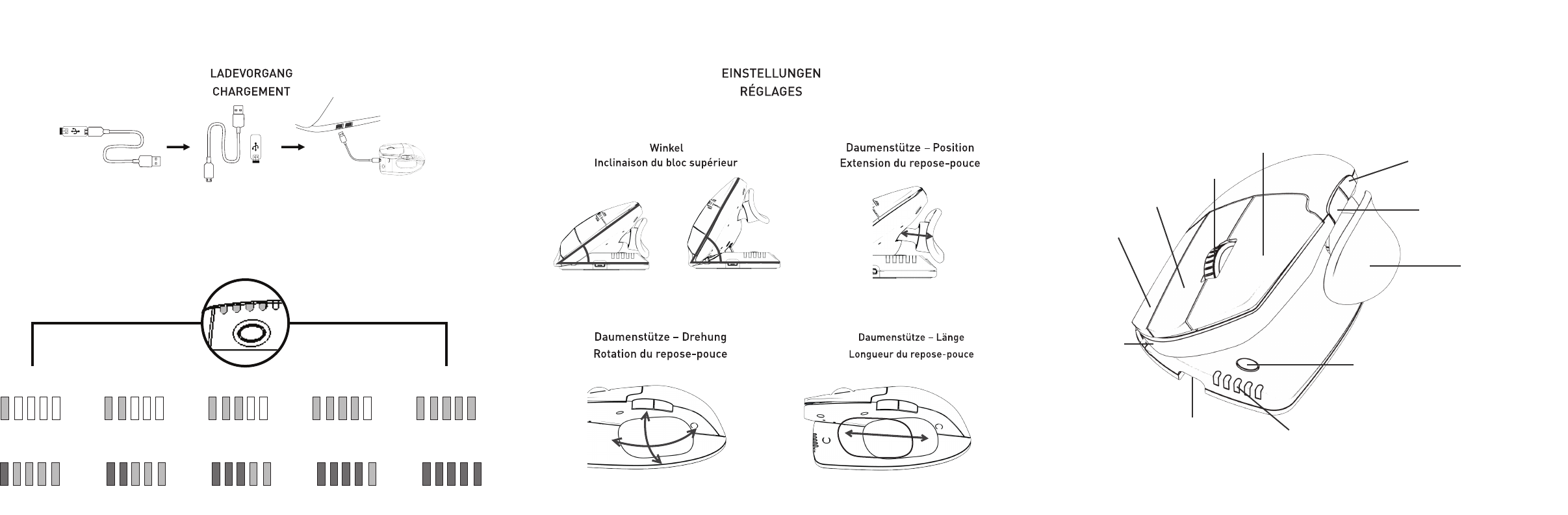
ADJUSTMENTS
CHARGING
10 CURSOR SPEEDS (DPI)
35˚ 70˚
Body Tilt
Thumb Support Rotation
Thumb Support Extension
Thumb Support Length
10 MAUSGESCHWINDIGKEITEN (DPI)
10 VITESSE DE CURSEUR (DPI)
Cursor speed/Battery indicator
Anzeige für Geschwindigkeit/Batterieladung
Vitesse du curseur/Témoin de charge de la batterie
Charge port
Ladebuchse
Prise chargeur
Thumb rest
Daumenstütze
Repose-pouce
Base/Tilt
Grundplatte/Winkel
Base/Inclinaison
Right click
Rechtsklick
Clic droit
Double click
Doppelklick.
Double clic
Scroll lock
Blocage de molette
Left click
Linksklick
Clic gauche
Cursor speed adjustment
Einstellung der Mausgeschwindigkeit
Réglage de la vitesse du curseur
Forward browser button
Browser – vor
Bouton « Suivant » du navigateur
Back browser button
Browser – zurück
Bouton « Précédent » du navigateur
FUNCTIONS
FUNKTIONEN
LES FONCTIONS
*CSA+Forward: Bluetooth/2.4G mode switch
For more information please visit:
www.contourdesign.com
Contour Design, Inc.
10 Industrial Drive
Windham, New Hampshire 03087, USA
Phone: (603) 893-4556
Email: ergoinfo@contourdesign.com
Contour Design Nordic A/S
International House
Center Boulevard 5
2300 Copenhagen S. Denmark
Phone: +45 32 46 11 20
Email: info@contour-design.com
Tested to comply with FCC
and IC standards
FCC Statement
This equipment has been tested and found to comply with the limits for a Class B digital device, pursuant to Part 15 of the FCC Rules. These
limits are designed to provide reasonable protection against harmful interference in a residential installation. This equipment generates uses and
can radiate radio frequency energy and, if not installed and used in accordance with the instructions, may cause harmful interference to radio
communications. However, there is no guarantee that interference will not occur in a particular installation. If this equipment does cause harmful
interference to radio or television reception, which can be determined by turning the equipment off and on, the user is encouraged to try to correct
the interference by one or more of the following measures:
- Reorient or relocate the receiving antenna.
- Increase the separation between the equipment and receiver.
- Connect the equipment into an outlet on a circuit different from that to which the receiver is connected.
- Consult the dealer or an experienced radio/TV technician for help.
This device complies with part 15 of the FCC rules. Operation is subject to the following two conditions (1) this device may not cause harmful
interference, and (2) this device must accept any interference received, including interference that may cause undesired operation.
IC Statement
This device complies with Industry Canada’s licence-exempt RSSs. Operation is subject to the following two conditions:
(1) This device may not cause interference; and
(2) This device must accept any interference, including interference that may cause undesired operation of the device.
Le présent appareil est conforme aux CNR d’Industrie Canada applicable aux appareils radio exempts de licence. L’exploitation est autorisée aux
deux conditions suivantes : (1) l’appareil ne doit pas produire de brouillage,
et (2) l’utilisateur de l’appareil doit accepter tout brouillage radioélectrique subi, même si le brouillage est susceptible d’en compromettre le
fonctionnement
Warranty
If there is a functional defect due to faulty manufacturing, we will replace the product. This warranty does not cover damage
that results from misuse of the product.
Attention!
If you attempt to dismantle your RollerMouse, you will invalidate your warranty.