COVALUE COMMUNICATIONS DR5000-2 DMR Two Way Radio User Manual 2

SHENZHEN COVALUE COMMUNICATIONS CO., LTD. DMR Two Way Radio 2

User Manual

Instruction Manual DR5000-2/DR5100-2/DR5200-2 DMR/FM Portable Radio ThankyouforpurchasingaCOVALUETwowayradio.Thissimpletouseradioadoptsthelatestadvancesintechnology,providingreliablecommunicationintoday’sdemandingcommunicationenvironment.NoticetotheUser:·Pleasereadthisinstructionmanualbeforeoperatingthisradio.·It’sprohibitedtousetheradioorchargeitatanyareawithapotentiallyexplosiveatmosphere(wheretheaircontainsgas,dustandsmog,etc.),aswellaswhiletakingonfuel,orwhileparkingatagasolineservicestation;oranyareawhereradiocommunicationisprohibited(suchasahospitaloraairport.)·It’sprohibitedtooperatetheradiowithoutpermissioninareaswherethegovernmentlawsprohibitradiocommunication.·Pleasedon'texposetheradiotodirectsunlightforalongtime;don'tplacetheradionearanyheatingdevices,either.·Pleasedon'tputtheradioinextremelydusty,moisthumidareasorunstablesurfaces.·Onlyqualifiedpersonal,withpropertoolsandinstrumentsareallowedtoserviceandrepairtheradios,donotdisassembletheradiobyyourselftoavoiddamages.FCCWarning: AnyChangesormodificationsnotexpresslyapprovedbythepartyresponsibleforcompliancecouldvoidtheuser’sauthoritytooperatetheequipment.Thisdevicecomplieswithpart15oftheFCCRules.Operationissubjecttothefollowingtwoconditions:(1)Thisdevicemaynotcauseharmfulinterference,and(2)thisdevicemustacceptanyinterferencereceived,includinginterferencethatmaycauseundesiredoperation.Note:ThisequipmenthasbeentestedandfoundtocomplywiththelimitsforaClassBdigitaldevice,pursuanttopart15oftheFCCRules.Theselimitsaredesignedtoprovidereasonableprotectionagainstharmfulinterferenceinaresidentialinstallation.Thisequipmentgeneratesusesandcanradiateradiofrequencyenergyand,ifnotinstalledandusedinaccordancewiththeinstructions,maycauseharmfulinterferencetoradiocommunications.However,thereisnoguaranteethatinterferencewillnotoccurinaparticularinstallation.Ifthisequipmentdoescauseharmfulinterferencetoradioortelevisionreception,whichcanbedeterminedbyturningtheequipmentoffandon,theuserisencouragedtotrytocorrecttheinterferencebyoneormoreofthefollowingmeasures:  —Reorientorrelocatethereceivingantenna.
—Increasetheseparationbetweentheequipmentandreceiver.—Connecttheequipmentintoanoutletonacircuitdifferentfromthattowhichthereceiverisconnected.—Consultthedealeroranexperiencedradio/TVtechnicianforhelp.   ISEDCwarning:NOTICE: This radio is intended for use in occupational/controlled conditions where users have full knowledge of their exposure and can exercise control over their exposure to meet the occupational limits in FCC/ISEDC and International standards. This radio device is not authorized for general population consumer use.  RF Exposure Requirements:   . To control your exposure and ensure compliance with the occupational/controlled environmental exposure limits, always adhere to the following procedures.  Guidelines:    Do not remove the RF Exposure Label from the device.    User awareness instructions should accompany device when transferred to other users.    Do not use this device if the operational requirements described herein are not met.
Operating Instructions:    Transmit no more than the rated duty factor of 50% of the time. To transmit (talk), push the Push-To-Talk (PTT)key. To receive calls, release the PTT key. Transmitting 50% of the time, or less, is important because the radio generates measurable RF energy only when transmitting (in terms of measuring for standards compliance).    Keep the radio unit at least 2.5 cm away from the face.Keeping the radio at the proper distance is important as RF exposure decreases with distance from the antenna. The antenna should be kept away from the face and eyes.    When worn on the body, always place the radio in a COVALUE approved holder, holster, case, or body harness or by use of the correct clip for this product. Use of non-approved accessories may result in exposure levels which exceed the FCC's occupational/controlled environmental RF exposure limits.    Use of non-approved antennas, batteries, and accessories causes the radio to exceed the FCC RF exposure guidelines.  Respectez toujours les procédures suivantes pour contrôler votre exposition et vous assurer de la conformité avec les limites d'exposition professionnelle en milieu de travail / environnementales contrôlées.  Des lignes directrices: Ne retirez pas l'étiquette d'exposition RF de l'appareil. Les instructions de sensibilisation des utilisateurs doivent accompagner l'appareil lors de son transfert à d'autres utilisateurs. N'utilisez pas cet appareil si les exigences opérationnelles décrites ici ne sont pas satisfaites. Mode d'emploi: Ne transmettez pas plus que le facteur de droit nominal de 50% du temps. Pour transmettre (parler), appuyez sur la touche Push-To-Talk (PTT). Pour recevoir des appels, relâchez la touche PTT. La transmission de 50% du temps, ou moins, est importante car la radio génère une énergie RF mesurable uniquement lors de la transmission (en termes de mesure pour la conformité aux normes). Maintenez l'unité radio à au moins 2,5 cm du visage.Le maintien de la radio à la distance appropriée est important car l'exposition aux radiofréquences diminue avec la distance de l'antenne. L'antenne doit être éloignée du visage et des yeux. Lorsqu'il est porté sur le corps, placez toujours la radio dans un support, un étui, un étui ou un harnais de sécurité approuvé par COVALUE ou utilisez le clip approprié pour ce produit. L'utilisation d'accessoires non approuvés peut engendrer des niveaux d'exposition supérieurs aux limites d'exposition aux RF professionnelles / environnementales contrôlées de la FCC. L'utilisation d'antennes, de piles et d'accessoires non approuvés a pour conséquence que la radio dépasse les consignes d'exposition RF de la FCC. SHENZHENCOVALUECOMMUNICATIONSCO.,LTD.
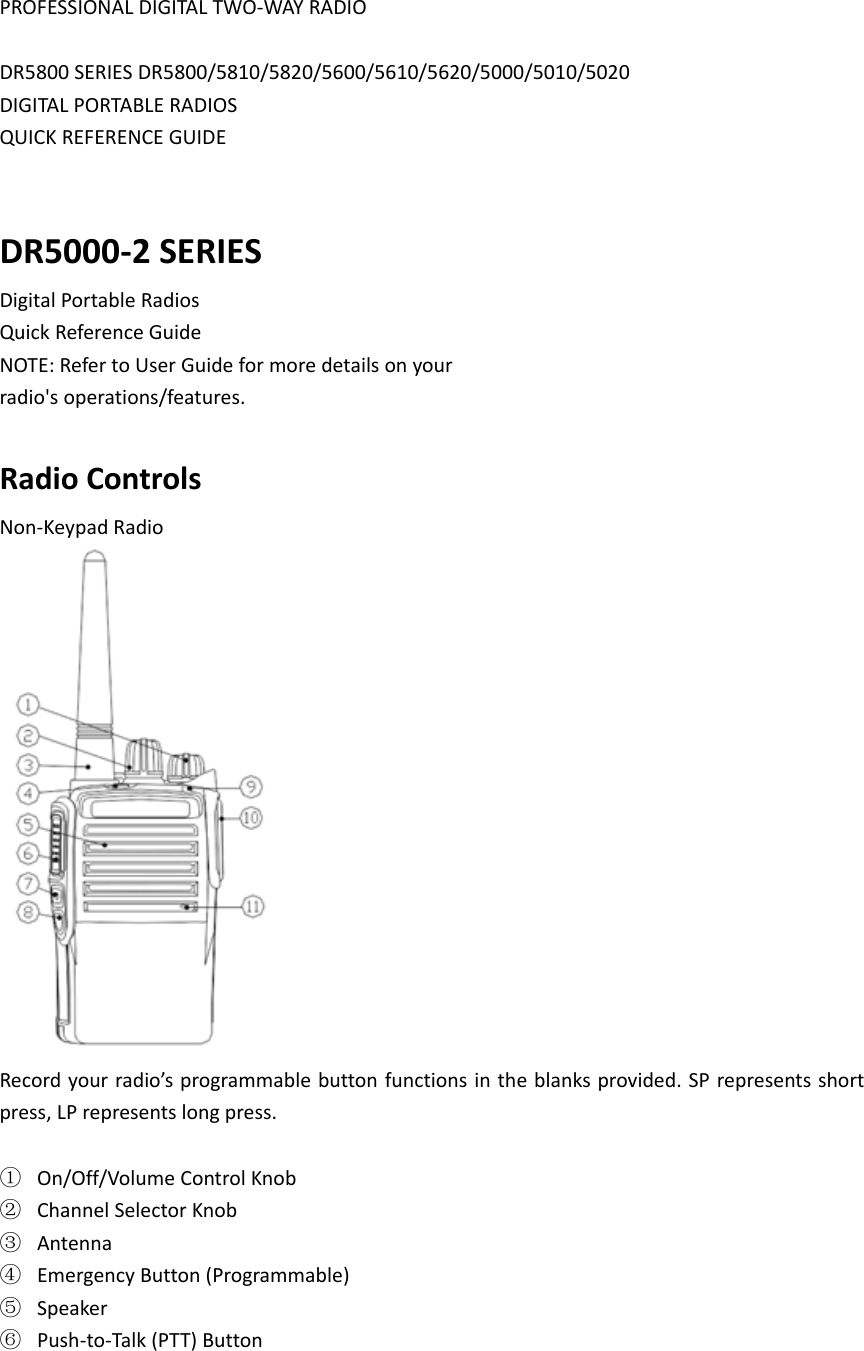
PROFESSIONALDIGITALTWO‐WAYRADIODR5800SERIESDR5800/5810/5820/5600/5610/5620/5000/5010/5020DIGITALPORTABLERADIOSQUICKREFERENCEGUIDEDR5000‐2SERIESDigitalPortableRadiosQuickReferenceGuideNOTE:RefertoUserGuideformoredetailsonyourradio'soperations/features.RadioControlsNon‐KeypadRadioRecordyourradio’sprogrammablebuttonfunctionsintheblanksprovided.SPrepresentsshortpress,LPrepresentslongpress.① On/Off/VolumeControlKnob② ChannelSelectorKnob③ Antenna④ EmergencyButton(Programmable)⑤ Speaker⑥ Push‐to‐Talk(PTT)Button
⑦ SideButton1(Programmable)SP:__________LP:___________⑧ SideButton2(Programmable)SP:__________LP:___________⑨ LEDIndicator⑩ UniversalConnectorforAccessories⑪ Microphone
■  LEDIndicatorBlinkingred–RadioisatlowbatteryconditionSolidOrange–PoweringupSolidgreen–Radioisreceiving,ordetectingactivityovertheair.SolidRED–RadioistransmittingBlinkingOrang–Radioisscanning,orinselectivecall,oremergencystate■PoweringUpandTurningOfftheRadioRotatetheOn/Off/VolumeControlKnobclockwiseuntilyouhearaclick.TheLEDlightsupsolidorangeandtheHomescreenlightsupifthebacklightsettingissettoturnonautomatically.Toturnofftheradio,rotatethisknobcounterclockwiseuntilyouhearaclick.■  AdjustingtheVolumeToincreasethevolume,turntheOn/OffVolumeControlKnobclockwise.Todecreasethevolume,turnthisknobcounterclockwise. ■SelectingaZoneAzoneisagroupofchannels.Usethefollowingproceduretoselectazone.Thenon‐keypadradiosupportsupto32channelsand2zones,withamaximumof16channelsperzone.1.PresstheprogrammedZonebutton.2.Youhearapositiveindicatortone,indicatingtheradiohasswitchedfromZone1toZone2.ORYouhearanegativeindicatortone,indicatingtheradiohasswitchedfromZone2toZone1.■  SelectingaChannelOncetherequiredzoneisdisplayed(ifyouhavemultiplezonesinyourradio),turntheprogrammedChannelSelectorKnobtoselectthechannel.■MakingaGroupCall1.TurntheChannelSelectorKnobtoselectthechannelwiththeactivegroupaliasorID.2.Holdtheradiovertically1to2inches(2.5to5.0cm)fromyourmouth.3.PressthePTTbuttontomakethecall.TheLEDlightsupsolidred.TheGroupCalliconappears.Thefirsttextlineshowsthegroupcallalias.4.WaitfortheTalkPermitTon etofinish(ifenabled)andspeakclearlyintothemicrophone.ORWaitforthePTTSidetonetofinish(ifenabled)andspeakclearlyintothemicrophone.5.ReleasethePTTbuttontolisten.Whenthetargetradioresponds,theLEDlightsupgreen.YouseetheGroupCallicon,thegroupaliasorID,andtransmittingradioaliasorIDonyourdisplay.6.IftheChannelFreeIndicationfeatureisenabled,youwillhearashortalerttonethemomentthetargetradioreleasesthePTTbutton,indicatingthechannelisfreeforyoutorespond.Press
thePTTbuttontorespond.ORIfthereisnovoiceactivityforapredeterminedperiodoftime,thecallends.7.Radioreturnstothescreenyouwereonpriortoinitiatingthecall.■MakingaPrivateCall1.TurntheChannelSelectorKnobtoselectthechannelwiththeactivesubscriberaliasorID.2.Holdtheradiovertically1to2inches(2.5to5.0cm)fromyourmouth.3.PressthePTTbuttontomakethecall.TheLEDlightsupred.ThePrivateCalliconappears.Thefirsttextlineshowsthesubscriberalias.Thesecondtextlinedisplaysthecallstatus.4.WaitfortheTalkPermitTon etofinish(ifenabled)andspeakclearlyintothemicrophone.5.ReleasethePTTbuttontolisten.Whenthetargetradioresponds,theLEDlightsupgreen.6.IftheChannelFreeIndicationfeatureisenabled,youwillhearashortalerttonethemomentthetargetradioreleasesthePTTbutton,indicatingthechannelisfreeforyoutorespond.PressthePTTbuttontorespond.ORIfthereisnovoiceactivityforapredeterminedperiodoftime,thecallends.7.Youhearashorttone.ThedisplayshowsCallEnded.■  ScanningChannelsPresstheprogrammedScanbuttontoturnscanonoroff.Duringscan,theLEDblinksorange.■  MakingaCallAlert1.PresstheprogrammedOneTouch AccessbuttontomakeaCallAlerttothepredefinedID.2.TheLEDlightsupsolidredwhenyourradioissendingtheCallAlert.3.IftheCallAlertacknowledgementisreceived,twochirpssound.ORIftheCallAlertacknowledgementisnotreceived,alow‐pitchedtonesounds.■  SendingaQuickTextMessageYoucansendQuickTextmessages,programmedbyyourdealer,viatheprogrammablebutton.1.PresstheprogrammedOneTouchAccessbuttontosendapredefinedQuickTextmessagetoapredefinedID.2.TheLEDlightsupsolidred.3.Twochirpsindicatethatthemessageissentsuccessfully.ORAlow‐pitchedtoneindicatesthatthemessagecannotbesent.■  SendinganEmergencyAlarmNOTE:IfyourradioissettoSilent,itwillnotdisplayanyaudioorvisualindicatorsduringEmergencymode.1.PresstheprogrammedEmergencyOnbutton.2.ThedisplayshowsTxAlarmandthedestinationalias.
TheLEDblinksredandtheEmergencyiconappears.ORThedisplayshowsTxTeleg ram andthedestinationalias.TheLEDblinksredandtheEmergencyiconappears.3.WhenanEmergencyAlarmacknowledgmentisreceived,theEmergencytonesoundsandtheLEDlightsoff.ThedisplayshowsAlarmSent.ORIfyourradiodoesnotreceiveanEmergencyAlarmacknowledgement,andafterallretrieshavebeenexhausted,atonesoundsandthedisplayshowsAlarmFailed.4.RadioexitstheEmergencyAlarmmodeandreturnstotheHomescreen.■  PrivacyPresstheprogrammedPrivacybuttontotoggleprivacyonoroff.

Navigation menu