COVALUE COMMUNICATIONS DR7800-2 Transceiver User Manual x
SHENZHEN COVALUE COMMUNICATIONS CO., LTD. Transceiver x
User Manual
Instruction Manual
Two way radio
ThankyouforpurchasingaCOVALUEtwo‐wayradio.Thissimpletouseradioadoptsthelatest
advancesintechnology,providingreliablecommunicationintoday’sdemandingcommunication
environment.
NoticetotheUser:
·Pleasereadthisinstructionmanualbeforeoperatingthisradio.
·It’sprohibitedtousetheradioorchargeitatanyareawithapotentiallyexplosiveatmosphere
(wheretheaircontainsgas,dustandsmog,etc.),aswellaswhiletakingonfuel,orwhile
parkingatagasolineservicestation;oranyareawhereradiocommunicationisprohibited
(suchasahospitaloraairport.)
·It’sprohibitedtooperatetheradiowithoutpermissioninareaswherethegovernmentlaws
prohibitradiocommunication.
·Pleasedon'texposetheradiotodirectsunlightforalongtime;don'tplacetheradionearany
heatingdevices,either.
·Pleasedon'tputtheradioinextremelydusty,moisthumidareasorunstablesurfaces.
·Onlyqualifiedpersonal,withpropertoolsandinstrumentsareallowedtoserviceandrepair
theradios,donotdisassembletheradiobyyourselftoavoiddamages.
2.5
Product Safety and RF Exposure for Portable Two-Way Radios Compliance with RF Energy
Exposure Standards
NOTICE:Thisradioisintendedforuseinoccupational/controlledapplicationswhereusershave
beenmadeawareofthepotentialforexposureandcanexercisecontrolovertheirexposure.This
radiodeviceisNOTauthorizedforgeneralpopulation,consumerorsimilaruse.
BEFOREUSINGTHISRADIO,READTHETRAININGMATERIALBELOWWHICHCONTAINS
IMPORTANTOPERATINGINSTRUCTIONSFORSAFEUSAGEANDRFENERGYAWARENESSAND
CONTROLINFORMATIONFORCOMPLIANCEWITHRFENERGYEXPOSURELIMITSINAPPLICABLE
NATIONALANDINTERNATIONALSTANDARDS.
FederalCommunicationCommission(FCC)Regulations
TheFCChasestablishedlimitsforsafeexposuretoradiofrequency(RF)emissionsfromportable
two‐wayradios.TheFCCrequiresmanufacturerstodemonstratecompliancewithRFexposure
limitsbeforeportabletwo‐wayradioscanbemarketedintheU.S.Whentwo‐wayradiosare
approvedforoccupational/controlledenvironmentexposurelimits,theFCCrequiresuserstobe
fullyawareof,andexercisecontrolover,theirexposure.AwarenessandcontrolofRFexposure
canbeaccomplishedbytheuseoflabels,orbyeducationandtrainingthroughappropriate
meanssuchasinformationandinstructionsinusermanualsorsafetybooklets.Yourtwo‐way
radiohasanRFexposureinformationlabelinthebatterycompartment.Thetraining
materialbelowincludesusefulinformationaboutRFexposureandhelpfulinstructions
onhowtocontrolyourRFexposure.Your
two‐wayradioisdesignedandtestedtocomply
withanumberofnationalandinternationalstandardsandguidelines(listedbelow)regarding
humanexposuretoRFelectromagneticenergy.
IntermsofmeasuringRFenergyforcompliancewithFCCexposureguidelines,
yourradioradiatesmeasurableRFenergyonlywhileitistransmitting(duringtalking),
notwhenitisreceiving(listening)orinstandbymode.
ComplianceandControlGuidelinesandOperatingInstructionsforPortableTwo‐WayRadiosTo
controlyourexposureandensurecompliancewiththeoccupational/controlledenvironment
exposurelimits,alwaysadheretothefollowingprocedures:
*Transmitnomorethan50%ofthetime.Totransmit(talk),pushthePushTo‐Talk(PTT)button.To
receivecalls,releasethePTTbutton.Transmitting50%ofthetimeorlessisimportantsincethe
radiogeneratesmeasurableRFenergyexposureonlywhentransmitting(intermsofmeasuring
standardscompliance).
*Hold the radio in a vertical position in front of face with the microphone (and the other parts of
the radio, including the antenna) at least one inch (2.5 cm) away from the mouth. Keeping the radio
at the proper distance is important because RF exposures decrease with distance from the antenna.
Antenna should be kept away from eyes.
* Forbody‐wornoperation,alwaysusethe COVALUE approved belt-clip, holder or holster case, etc.
accessories.
*UseonlyFCC‐approved,suppliedorreplacementheadsets,batteries,andaccessoriesintended
forusewiththisradio.Useofnon‐FCC/ICapprovedaccessories may exceed the FC/IC
RF exposure guidelines.
FCCWarning:
Thisdevicecomplieswithpart15oftheFCCRules.Operationissubjecttothefollowingtwo
conditions:(1)Thisdevicemaynotcauseharmfulinterference,and(2)thisdevicemustaccept
anyinterferencereceived,includinginterferencethatmaycauseundesiredoperation.Any
Changesormodificationsnotexpresslyapprovedbythepartyresponsibleforcompliancecould
voidtheuser’sauthoritytooperatetheequipment.
ISEDCWarning:
ThedevicehasbeentestedandcompliancewithSARlimits,userscanobtainCanadian
informationonRFexposureandcompliance
AprèsexamendecematérielauxconformitéauxlimitesDASet/ouauxlimitesd’intensitéde
champRF,lesutilisateurspeuventsurl’expositionauxradiofréquencesetlaconformitéand
complianced’acquérirlesinformationscorrespondantes
ThisdevicecomplieswithISEDClicenceRSSstandard(s).Operation issubject tothe
followingtwoconditions:
(1)thisdevicemaynotcauseinterference,and
(2)thisdevicemustacceptanyinterference,includinginterferencethatmaycauseundesired
operationofthedevice.
LeprésentappareilestconformeauxCNRd'ISEDCapplicablesauxappareilsradiode
licence.L'exploitationestautoriséeauxdeuxconditionssuivantes:
(1)l'appareilnedoitpasproduiredebrouillage,et
(2)l'utilisateurdel'appareildoitacceptertoutbrouillageradioélectriquesubi,mêmesile
brouillageestsusceptibled'encompromettrelefonctionnement.
SHENZHENCOVALUECOMMUNICATIONSCO.,LTD.
PROFESSIONALDIGITALTWO‐WAYRADIO
DR7800SERIESDR7800/7810/7820/7600/7610/7620/7500/7510/7520
DIGITALPORTABLERADIOS
QUICKREFERENCEGUIDE
DR7800SERIES
DigitalPortableRadios
QuickReferenceGuide
NOTE:RefertoUserGuideformoredetailsonyour
radio'soperations/features.
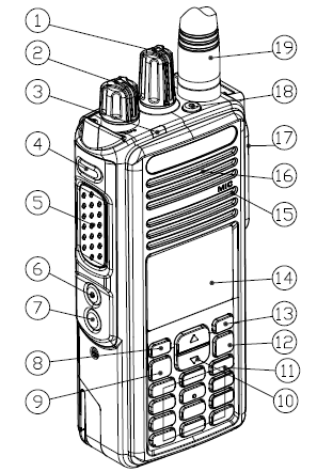
RadioControls
FullKeypadRadio
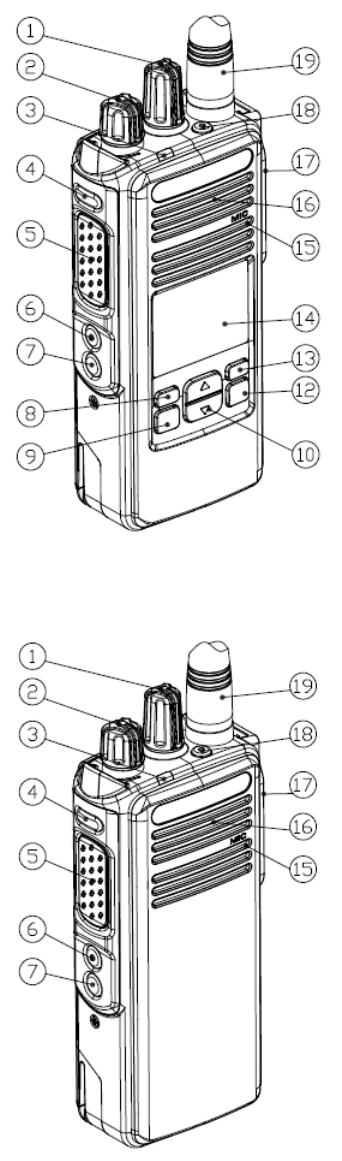
Non‐KeypadRadio
Recordyourradio’sprogrammablebuttonfunctionsinthe
blanksprovided.SPrepresentsshortpress,LPrepresents
longpress.
LimitedKeypadRadio
②On/Off/VolumeControlKnob
③LEDIndicator
④SideButton1(Programmable)
SP:__________LP:___________
⑤Push‐to‐Talk(PTT)Button
⑥SideButton2(Programmable)
SP:____________LP:___________
⑦SideButton3(Programmable)
SP:___________LP:___________
⑧FrontButtonP1(Programmable)
SP:___________LP:___________
⑨OK/MenuButton
⑩2‐WayNavigationButton
○
11 Keypad
○
12 Return/HomeButton
○
13 .FrontButtonP2(Programmable)
SP:___________LP:___________
○
14 .Display
○
15 .Microphone
○
16 .Speaker
○
17 .UniversalConnectorforAccessories
○
18 .EmergencyButton(Programmable)
○
19 .Antenna
DisplayIcons
Thefollowingaretheiconsthatappearontheradio’s
display.
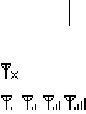
NoSignal
RSSI
ReceivedSignalStrengthIndicator(RSSI)
Thenumberofbarsdisplayedrepresentstheradiosignalstrength.Fourbarsindicatethestron‐
gestsignal.Thisiconisonlydisplayedwhilereceiving.
①ChannelSelectorKnob

Battery
Thenumberofbars(0–3)shownindicatesthechargeremaininginthebattery.
Scanning
Scanlandon
Scanfeatureisenabled.
EncryptionEnable
ThePrivacyfeatureisenabled.
AccessoriesConnected
PowerLevel
RadioissetatLowpower.
RadioissetatHighpower.
:UnreadMessage
:MissedCall
:VOXEnable
:SpeakerOpen
■ CallIcons

Thefollowingiconsappearduringacall,andintheContactslisttoindicateIDtype.
PrivateCall
IndicatesaPrivateCallinprogress.IntheContactslist,itindicatesasubscriberalias(name)orID
(number).
GroupCall/AllCall
IndicatesaGroupCallorAllCallinprogress.IntheContactslist,itindicatesagroupalias(name)
orID(number).
■ SentItemsIcons
Thefollowingiconsappearatthetoprightcorneroftheradio’sdisplayintheSentItemsfolder.
SentSuccessfully
SendFailed
•ThetextmessagetoasubscriberaliasorIDispendingtransmission,followedbywaitingfor
acknowledgement.
Or•ThetextmessagetoagroupaliasorIDispendingtransmission.
■ SwitchInputMethod:
Longpress#keytoswitchinputmethodbetween,
Lowercase
Uppercase
Digit
■ LEDIndicator
Blinkingred–Radioisatlowbatterycondition
SolidOrange–Poweringup
Solidgreen–Radioisreceiving,ordetectingactivityovertheair.
SolidRED–Radioistransmitting
BlinkingOrang–Radioisscanning,orinselectivecall,oremergencystate
■PoweringUpandTurningOfftheRadio
RotatetheOn/Off/VolumeControlKnobclockwiseuntilyouhearaclick.Youseeawelcome
messageorwelcomeimage.
TheLEDlightsupsolidorangeandtheHomescreenlightsupifthebacklightsettingissettoturn
onautomatically.
Toturnofftheradio,rotatethisknobcounterclockwiseuntilyouhearaclick.Youseeabrief
PoweringDownontheradio’sdisplay.

■ AdjustingtheVolume
Toincreasethevolume,turntheOn/OffVolumeControlKnobclockwise.
Todecreasethevolume,turnthisknobcounterclockwise.
■AccessingtheRadiofromPassword
1.Poweruptheradio.
2.Youhearacontinuoustone.
3.Enteryourcurrentsix‐digitpasswordwiththeradio’skeypad.Thedisplayshows******.
PressOKtoproceed.
Youhearapositiveindicatortoneforeverydigitpressed.Presstoremovetheeach*on
thedisplay.
4.Ifthepasswordiscorrect:
Yourradioproceedstopowerup.SeePoweringUpandTurningOfftheRadiopart
OR
Ifthepasswordisincorrect:
ThedisplayshowsPasswordInputError.RepeatStep3.
■ SelectingaZone
Azoneisagroupofchannels.Thefullkeypadandlimitedkeypadradiosupportsupto2000
channelsand250zones,withamaximumof160channelsperzone.
Usethefollowingproceduretoselectazone.
□FullKeypadRadio
PresstheprogrammedZonebuttonandproceedtoStep2.
OR
Followtheprocedurebelow.
1.OKtoaccessthemenu.
2.or toZoneandpress toselect.
3.Thecurrentzoneisdisplayedandindicatedbya⊙.
□LimitedKeypadRadio
PresstheprogrammedZonebuttonandproceedtoStep2.
1.OKtoaccessthemenu.
2.or toZoneandpress toselect.
3.Thecurrentzoneisdisplayedandindicatedbya⊙.
□ Non‐KeypadRadio
Thenon‐keypadradiosupportsupto32channelsand2zones,withamaximumof16channels
perzone.
1.PresstheprogrammedZonebutton.
2.Youhearapositiveindicatortone,indicatingtheradiohasswitchedfromZone1toZone2.
OR
Youhearanegativeindicatortone,indicatingtheradiohasswitchedfromZone2toZone1.
■ SelectingaChannel
Oncetherequiredzoneisdisplayed(ifyouhavemultiplezonesinyourradio),turnthe
programmedChannelSelectorKnobtoselectthechannel.
■MakingaGroupCall
1.TurntheChannelSelectorKnobtoselectthechannelwiththeactivegroupaliasorID.
2.Holdtheradiovertically1to2inches(2.5to5.0cm)fromyourmouth.
3.PressthePTTbuttontomakethecall.TheLEDlightsupsolidred.TheGroupCalliconappears.
Thefirsttextlineshowsthegroupcallalias.
4.WaitfortheTalkPermitTonetofinish(ifenabled)andspeakclearlyintothemicrophone.
OR
WaitforthePTTSidetonetofinish(ifenabled)andspeakclearlyintothemicrophone.
5.ReleasethePTTbuttontolisten.Whenthetargetradioresponds,theLEDlightsupgreen.You
seetheGroupCallicon,thegroupaliasorID,andtransmittingradioaliasorIDonyourdisplay.
6.IftheChannelFreeIndicationfeatureisenabled,youwillhearashortalerttonethemoment
thetargetradioreleasesthePTTbutton,indicatingthechannelisfreeforyoutorespond.Press
thePTTbuttontorespond.
OR
Ifthereisnovoiceactivityforapredeterminedperiodoftime,thecallends.
7.Radioreturnstothescreenyouwereonpriortoinitiatingthecall.
■MakingaPrivateCall
1.TurntheChannelSelectorKnobtoselectthechannelwiththeactivesubscriberaliasorID.
2.Holdtheradiovertically1to2inches(2.5to5.0cm)fromyourmouth.
3.PressthePTTbuttontomakethecall.TheLEDlightsupred.ThePrivateCalliconappears.The
firsttextlineshowsthesubscriberalias.Thesecondtextlinedisplaysthecallstatus.
4.WaitfortheTalkPermitTonetofinish(ifenabled)andspeakclearlyintothemicrophone.
5.ReleasethePTTbuttontolisten.Whenthetargetradioresponds,theLEDlightsupgreen.
6.IftheChannelFreeIndicationfeatureisenabled,youwillhearashortalerttonethemoment
thetargetradioreleasesthePTTbutton,indicatingthechannelisfreeforyoutorespond.Press
thePTTbuttontorespond.
OR
Ifthereisnovoiceactivityforapredeterminedperiodoftime,thecallends.
7.Youhearashorttone.ThedisplayshowsCallEnded.
■ ScanningChannels
PresstheprogrammedScanbuttontoturnscanonoroff.
Duringscan,theLEDblinksorangeandthescaniconisdisplayed.
■ MakingaCallAlert
□ FullKeypadRadioandLimitedKeypadRadio

PresstheprogrammedOneTouc hAccessbuttonandproceedtoStep5.
OR
Followtheprocedurebelow.
1.toaccessthemenu.
2.or toContactsandpresstoselect.
3.or totherequiredsubscriberaliasorIDandpress toselect.
OR
or toManualDialandpress toselect.
EnterthesubscriberIDyouwanttopageandpress.
NOTE
:
NotapplicableforLimitedKeypadRadio
4.or toCallAlertandpress toselect.
5.ThedisplayshowsCallAlertandthesubscriberaliasorID,indicatingthattheCallAlerthas
beensent.
6.TheLEDlightsupsolidredwhenyourradioissendingtheCallAlert.
7.IftheCallAlertacknowledgementisreceived,thedisplayshowspositivemininotice.
OR
IftheCallAlertacknowledgementisnotreceived,thedisplayshowsnegativemininotice.
□Non‐KeypadRadio
1.PresstheprogrammedOneTou ch AccessbuttontomakeaCallAlerttothepredefinedID.
2.TheLEDlightsupsolidredwhenyourradioissendingtheCallAlert.
3.IftheCallAlertacknowledgementisreceived,twochirpssound.
OR
IftheCallAlertacknowledgementisnotreceived,alow‐pitchedtonesounds.
■ SendingaQuickTex tMessage
□ FullKeypadRadio
PresstheprogrammedTex tMessagebuttonandproceedtoStep3.
OR
PresstheprogrammedOneTouchAccessbuttontosendapredefinedQuickTex tmessagetoa
predefinedaliasorIDandproceedtoStep6.
OR
Followtheprocedurebelow.
1.toaccessthemenu.
2.or toMessagesandpress toselect.
3.or toQuickTex tandpress toselect.
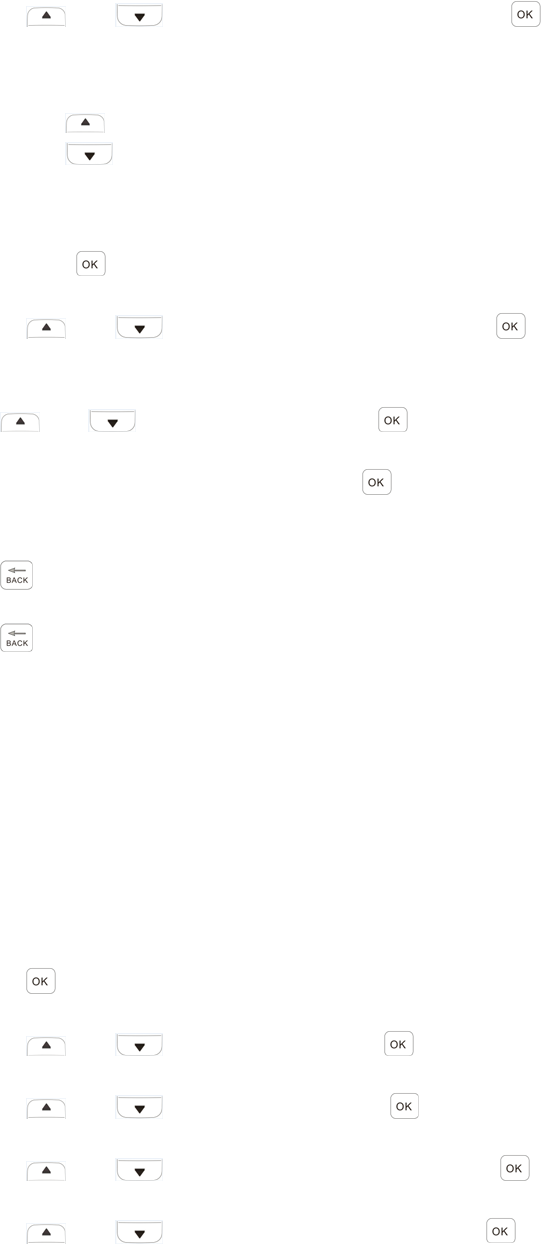
4. or totherequiredQuickTextandpress toselect.
5.Ablinkingcursorappears.
Usethekeypadtoeditthemessage,ifrequired.
Press tomovetotheleft.
Press tomovetotheright.
Pressthe*DELkeytodeleteanyunwantedcharacters.
Pressthe#keytoinputonespacetotheright.
6. Pressoncemessageiscomposed.
7.or totherequiredaliasorIDandpress toselect.
OR
or toManualDialandpress toselect.
KeyinthesubscriberaliasorIDandpress.
OR
toeditthemessage.
againtodiscardthemessageorsaveittotheDraftsfolder.
8.Thedisplayshowstransitionalmininotice,confirmingyourmessageisbeingsent.
9.Ifthemessageissent,atonesoundsandthedisplayshowspositivemininotice.
OR
Ifthemessageisnotsent,alowtonesoundsandthedisplayshowsnegativemininotice.
□ LimitedKeypadRadio
PresstheprogrammedTex tMessagebuttonandproceedtoStep3.
OR
Followtheprocedurebelow.
1.toaccessthemenu.
2.or toMessagesandpress toselect.
3.or toQuickTextandpress toselect.
4.or totherequiredQuickTextandpress toselect.
5.or totherequiredaliasorIDandpress toselect.
Thedisplayshowstransitionalmininotice,confirmingyourmessageisbeingsent.
6.Ifthemessageissent,atonesoundsandthedisplayshowspositivemininotice.
OR
Ifthemessageisnotsent,alowtonesoundsandthedisplayshowsnegativemininotice.
□ Non‐KeypadRadio
YoucansendQuickTextmessages,programmedbyyourdealer,viatheprogrammablebutton.
1.PresstheprogrammedOneTouchAccessbuttontosendapredefinedQuickTex tmessagetoa
predefinedID.
2.TheLEDlightsupsolidred.
3.Twochirpsindicatethatthemessageissentsuccessfully.
OR
Alow‐pitchedtoneindicatesthatthemessagecannotbesent.
■ SendinganEmergencyAlarm
NOTE:IfyourradioissettoSilent,itwillnotdisplayanyaudioorvisualindicatorsduring
Emergencymode.
1.PresstheprogrammedEmergencyOnbutton.
2.ThedisplayshowsTxAlarmandthedestinationalias.
TheLEDblinksredandtheEmergencyiconappears.
OR
ThedisplayshowsTxTelegramandthedestinationalias.TheLEDblinksredandtheEmergency
iconappears.
3.WhenanEmergencyAlarmacknowledgmentisreceived,theEmergencytonesoundsandthe
LEDlightsoff.ThedisplayshowsAlarmSent.
OR
IfyourradiodoesnotreceiveanEmergencyAlarmacknowledgement,andafterallretrieshave
beenexhausted,atonesoundsandthedisplayshowsAlarmFailed.
4.RadioexitstheEmergencyAlarmmodeandreturnstotheHomescreen.
■ Privacy
PresstheprogrammedPrivacybuttontotoggleprivacyonoroff.