Caavo R1100 Remote control User Manual

Caavo Inc Remote control

User Manual

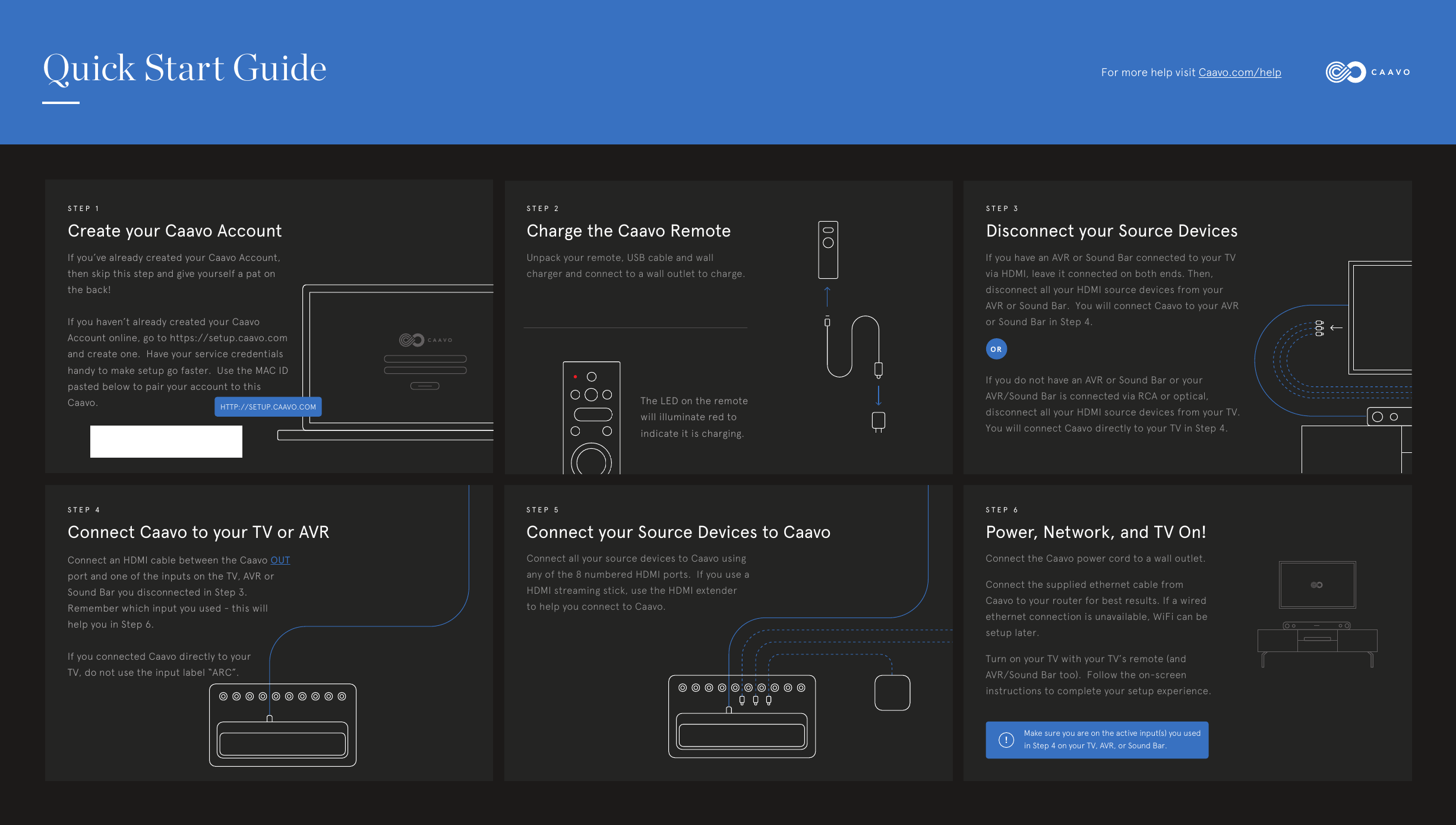
Create your Caavo AccountSTEP 1Charge the Caavo RemoteSTEP 2Disconnect your Source DevicesSTEP 3Connect Caavo to your TV or AVRSTEP 4Connect your Source Devices to CaavoSTEP 5Power, Network, and TV On!STEP 6If you’ve already created your Caavo Account, then skip this step and give yourself a pat on the back!If you haven’t already created your Caavo Account online, go to https://setup.caavo.com and create one.  Have your service credentials handy to make setup go faster.  Use the MAC ID pasted below to pair your account to this Caavo.Unpack your remote, USB cable and wall charger and connect to a wall outlet to charge.Connect an HDMI cable between the Caavo OUT port and one of the inputs on the TV, AVR or Sound Bar you disconnected in Step 3.  Remember which input you used - this will help you in Step 6.If you connected Caavo directly to your TV, do not use the input label “ARC”.Connect all your source devices to Caavo using any of the 8 numbered HDMI ports.  If you use a HDMI streaming stick, use the HDMI extender to help you connect to Caavo.The LED on the remote will illuminate red to indicate it is charging. Connect the Caavo power cord to a wall outlet. Connect the supplied ethernet cable from Caavo to your router for best results. If a wired ethernet connection is unavailable, WiFi can be setup later.Turn on your TV with your TV’s remote (and AVR/Sound Bar too).  Follow the on-screen instructions to complete your setup experience.If you have an AVR or Sound Bar connected to your TV via HDMI, leave it connected on both ends. Then, disconnect all your HDMI source devices from your AVR or Sound Bar.  You will connect Caavo to your AVR or Sound Bar in Step 4.If you do not have an AVR or Sound Bar or your AVR/Sound Bar is connected via RCA or optical, disconnect all your HDMI source devices from your TV.  You will connect Caavo directly to your TV in Step 4.Make sure you are on the active input(s) you used in Step 4 on your TV, AVR, or Sound Bar.!HTTP://SETUP.CAAVO.COMQuick Start Guide For more help visit Caavo.com/helpOR
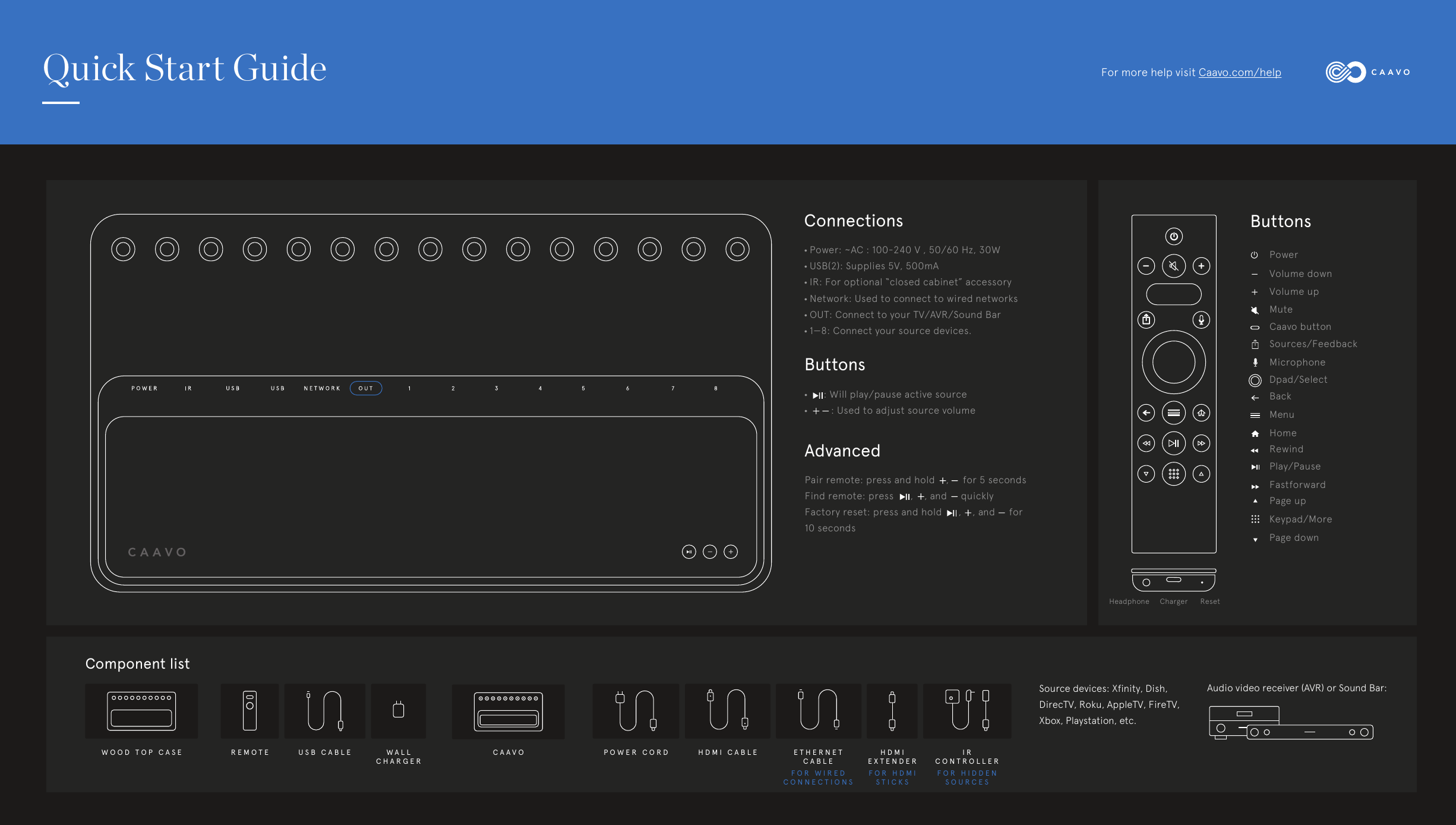
!)(&<#'&//'.9'A6'/?'#)'44!B=CD/EF/.///./.G5@'!"#$% &'( &'( )$*#"%+!"#, - . / 0 1 2 34%&)HHIJKLIM&NO&BPQIRConnections•Power: ~AC : 100-240 V , 50/60 Hz, 30W • USB(2): Supplies 5V, 500mA• IR: For optional “closed cabinet” accessory• Network: Used to connect to wired networks• OUT: Connect to your TV/AVR/Sound Bar• 1—8: Connect your source devices. AdvancedPair remote: press and hold    ,     for 5 secondsFind remote: press      ,    , and     quicklyFactory reset: press and hold      ,    , and     for 10 secondsButtons•      : Will play/pause active source•          : Used to adjust source volumePowerButtonsVolume downVolume upMuteCaavo buttonSources/FeedbackMicrophoneBackMenuHomeRewindPlay/PauseFastforwardPage upKeypad/MorePage downComponent listWOOD TOP CASE REMOTE USB CABLE POWER CORD HDMI CABLE ETHERNET CABLEHDMIEXTENDERIR CONTROLLERWALL CHARGERCAAVOFOR WIRED CONNECTIONSFOR HDMISTICKSFOR HIDDENSOURCESSource devices: Xfinity, Dish, DirecTV, Roku, AppleTV, FireTV, Xbox, Playstation, etc.Audio video receiver (AVR) or Sound Bar: Quick Start Guide For more help visit Caavo.com/helpDpad/SelectHeadphone     Charger      Reset
Thank YouWe are honored to have you as a customer. We hope you enjoy Caavo as much as we enjoyed making your TV experience the way it was meant to be. Safety and Warnings PrecautionsThis product has been designed with the highest concern for safety.  However, any electrical device, if used improperly, has the potential for cause fire, electrical shock or personal injury. For a complete list of preautions, please visit www.caavo.com/support.Use and handling• Keep all accessories, cable ties and packaging out of reach of small children.  • Do not touch Caavo or cables during an electrical storm.• Do not expose Caaov or accessories to high temperatures, high humidity, steam or smoke.• To prevent hearing damage, do not listen to Caavo at a high volme for long periods of time.• Place Caavo within range of your wireless network.• Placing Caavo in an enclosed cabinet may intefere with reception of wireless signals.For a complete list of warnings, please visit www.caavo.com/support.Proposition 65 WarningThis product contains chemical(s) know to the State of California to cause cancer and brith defects or other reproductive harm.WarrantyCaavo is commited to your happiness.  Complete details of the Caavo warranty program is available at www.caavo.com/legal/warranty.RegulatoryThis device complies with Part 15 of the FCC Rules. Operation is subject to the following two conditions:1. This device may not cause harmful interference, and2. This device must accept any interference received, including interference that may cause undesired operation.Changes or modifications not expressly approved by Caavo could void the user’s authority to operate the equipment.This equipment has been tested and found to comply with the limits for a Class B digital device, pursuant to Part 15 of the FCC Rules. These limits are designed to provide reasonable protection against harmful interference in a residential installation. This equipment generates, uses and can radiate radio frequency energy and, if not installed and used in accordance with the instructions, may cause harmful interference to radio communications. However, thereis no guarantee that interference will not occur in a particularinstallation. If this equipment does cause harmful interference to radio or television reception, which can be determined by turning the equipment off and on, the user is encouraged to try to correct the interference by one or more of the following measures:• Re-orient or relocate the receiving antenna• Increase the separation between the equipment and receiver• Connect the equipment into an outlet on a circuit different from that to which the receiver is connected• Consult the dealer or an experienced radio/TV technician for helpThe device has been evaluated to meet general RF exposure requirement.The device can be used in portable exposure condition without restriction.

Navigation menu