Canhold BTE050 Bluetooth Headset User Manual

Canhold International Ltd. Bluetooth Headset

Users Manual

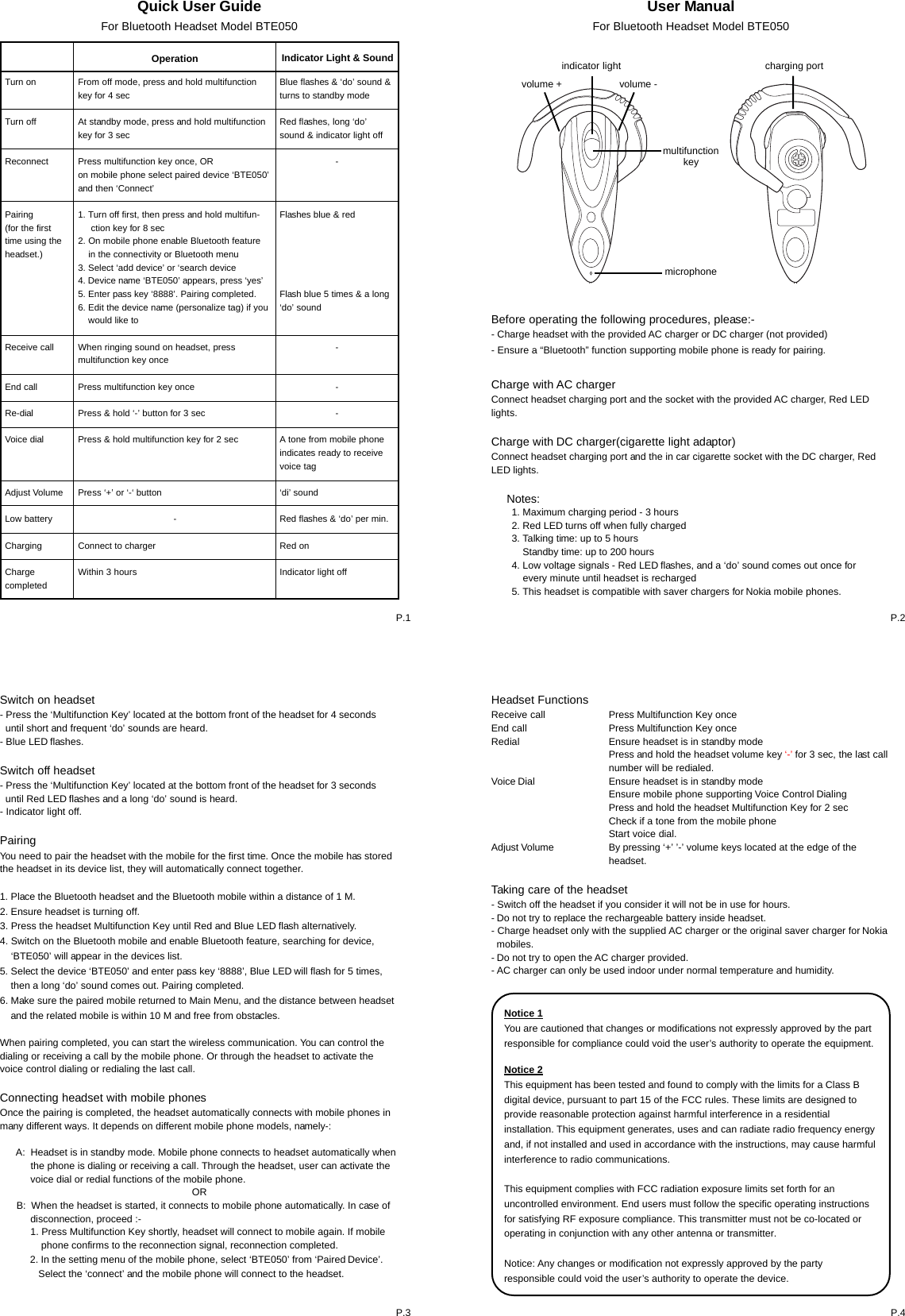
Quick User GuideFor Bluetooth Headset Model BTE050Turn onTurn offReconnectPairing(for the firsttime using theheadset.)Receive callEnd callRe-dialVoice dialAdjust VolumeLow batteryChargingChargecompletedOperation Indicator Light & SoundFrom off mode, press and hold multifunctionkey for 4 secAt standby mode, press and hold multifunctionkey for 3 secPress multifunction key once, ORon mobile phone select paired device ‘BTE050’and then ‘Connect’1. Turn off first, then press and hold multifun-     ction key for 8 sec2. On mobile phone enable Bluetooth feature    in the connectivity or Bluetooth menu3. Select ‘add device’ or ‘search device4. Device name ‘BTE050’ appears, press ‘yes’5. Enter pass key ‘8888’. Pairing completed.6. Edit the device name (personalize tag) if you    would like toWhen ringing sound on headset, pressmultifunction key oncePress multifunction key oncePress & hold ‘-’ button for 3 secPress & hold multifunction key for 2 secPress ‘+’ or ‘-‘ button-Connect to chargerWithin 3 hoursBlue flashes & ‘do’ sound &turns to standby modeRed flashes, long ‘do’sound & indicator light off-Flashes blue & redFlash blue 5 times & a long‘do’ sound---A tone from mobile phoneindicates ready to receivevoice tag‘di’ soundRed flashes & ‘do’ per min.Red onIndicator light offUser ManualFor Bluetooth Headset Model BTE050Switch on headset- Press the ‘Multifunction Key’ located at the bottom front of the headset for 4 seconds  until short and frequent ‘do’ sounds are heard.- Blue LED flashes.Switch off headset- Press the ‘Multifunction Key’ located at the bottom front of the headset for 3 seconds  until Red LED flashes and a long ‘do’ sound is heard.- Indicator light off.PairingYou need to pair the headset with the mobile for the first time. Once the mobile has storedthe headset in its device list, they will automatically connect together.1. Place the Bluetooth headset and the Bluetooth mobile within a distance of 1 M.2. Ensure headset is turning off.3. Press the headset Multifunction Key until Red and Blue LED flash alternatively.4. Switch on the Bluetooth mobile and enable Bluetooth feature, searching for device,    ‘BTE050’ will appear in the devices list.5. Select the device ‘BTE050’ and enter pass key ‘8888’, Blue LED will flash for 5 times,    then a long ‘do’ sound comes out. Pairing completed.6. Make sure the paired mobile returned to Main Menu, and the distance between headset    and the related mobile is within 10 M and free from obstacles.When pairing completed, you can start the wireless communication. You can control thedialing or receiving a call by the mobile phone. Or through the headset to activate thevoice control dialing or redialing the last call.Connecting headset with mobile phonesOnce the pairing is completed, the headset automatically connects with mobile phones inmany different ways. It depends on different mobile phone models, namely-:      A:  Headset is in standby mode. Mobile phone connects to headset automatically when           the phone is dialing or receiving a call. Through the headset, user can activate the           voice dial or redial functions of the mobile phone.OR      B:  When the headset is started, it connects to mobile phone automatically. In case of           disconnection, proceed :-           1. Press Multifunction Key shortly, headset will connect to mobile again. If mobile               phone confirms to the reconnection signal, reconnection completed.           2. In the setting menu of the mobile phone, select ‘BTE050’ from ‘Paired Device’.              Select the ‘connect’ and the mobile phone will connect to the headset.P.1 P.2P.4P.3Headset FunctionsReceive callEnd callRedialVoice DialAdjust VolumeTaking care of the headset- Switch off the headset if you consider it will not be in use for hours.- Do not try to replace the rechargeable battery inside headset.- Charge headset only with the supplied AC charger or the original saver charger for Nokia  mobiles.- Do not try to open the AC charger provided.- AC charger can only be used indoor under normal temperature and humidity.Before operating the following procedures, please:-- Charge headset with the provided AC charger or DC charger (not provided)- Ensure a “Bluetooth” function supporting mobile phone is ready for pairing.Charge with AC chargerConnect headset charging port and the socket with the provided AC charger, Red LEDlights.Charge with DC charger(cigarette light adaptor)Connect headset charging port and the in car cigarette socket with the DC charger, RedLED lights.     Notes:microphonevolume +                     volume -charging portindicator lightPress Multifunction Key oncePress Multifunction Key onceEnsure headset is in standby modePress and hold the headset volume key ‘-’ for 3 sec, the last callnumber will be redialed.Ensure headset is in standby modeEnsure mobile phone supporting Voice Control DialingPress and hold the headset Multifunction Key for 2 secCheck if a tone from the mobile phoneStart voice dial.By pressing ‘+’ ’-’ volume keys located at the edge of theheadset.multifunctionkey1. Maximum charging period - 3 hours2. Red LED turns off when fully charged3. Talking time: up to 5 hours    Standby time: up to 200 hours4. Low voltage signals - Red LED flashes, and a ‘do’ sound comes out once for    every minute until headset is recharged5. This headset is compatible with saver chargers for Nokia mobile phones.Notice 1You are cautioned that changes or modifications not expressly approved by the partresponsible for compliance could void the user’s authority to operate the equipment.Notice 2This equipment has been tested and found to comply with the limits for a Class Bdigital device, pursuant to part 15 of the FCC rules. These limits are designed toprovide reasonable protection against harmful interference in a residentialinstallation. This equipment generates, uses and can radiate radio frequency energyand, if not installed and used in accordance with the instructions, may cause harmfulinterference to radio communications.This equipment complies with FCC radiation exposure limits set forth for anuncontrolled environment. End users must follow the specific operating instructionsfor satisfying RF exposure compliance. This transmitter must not be co-located oroperating in conjunction with any other antenna or transmitter.Notice: Any changes or modification not expressly approved by the partyresponsible could void the user’s authority to operate the device.

Navigation menu