Canon Production Printing Netherlands 025 RFID MODULE User Manual SCCPS 3 30 00

Oce Display Graphics Inc RFID MODULE SCCPS 3 30 00

USERS MANUAL

  Company Confidential     SmartCoupler Communication Protocol Specification              Version:  3.30.00 Save date February 8, 2007  Colder Products Company 1001 Westgate Drive Saint Paul, Minnesota 55114 USA Phone: 651-645-0091 Fax: 651-645-5404 www.colder.com
  Company Confidential   FCC Notice:  Any change or modification not expressly approved by the manufacturer could void the users authority to operate this equipment.  This device complies with part 15 of the FCC Rules.  Operation is subject to the following two conditions: (1) This device may not cause harmful interference, and (2) this device must accept any interference received, including interference that may cause undesired operation.
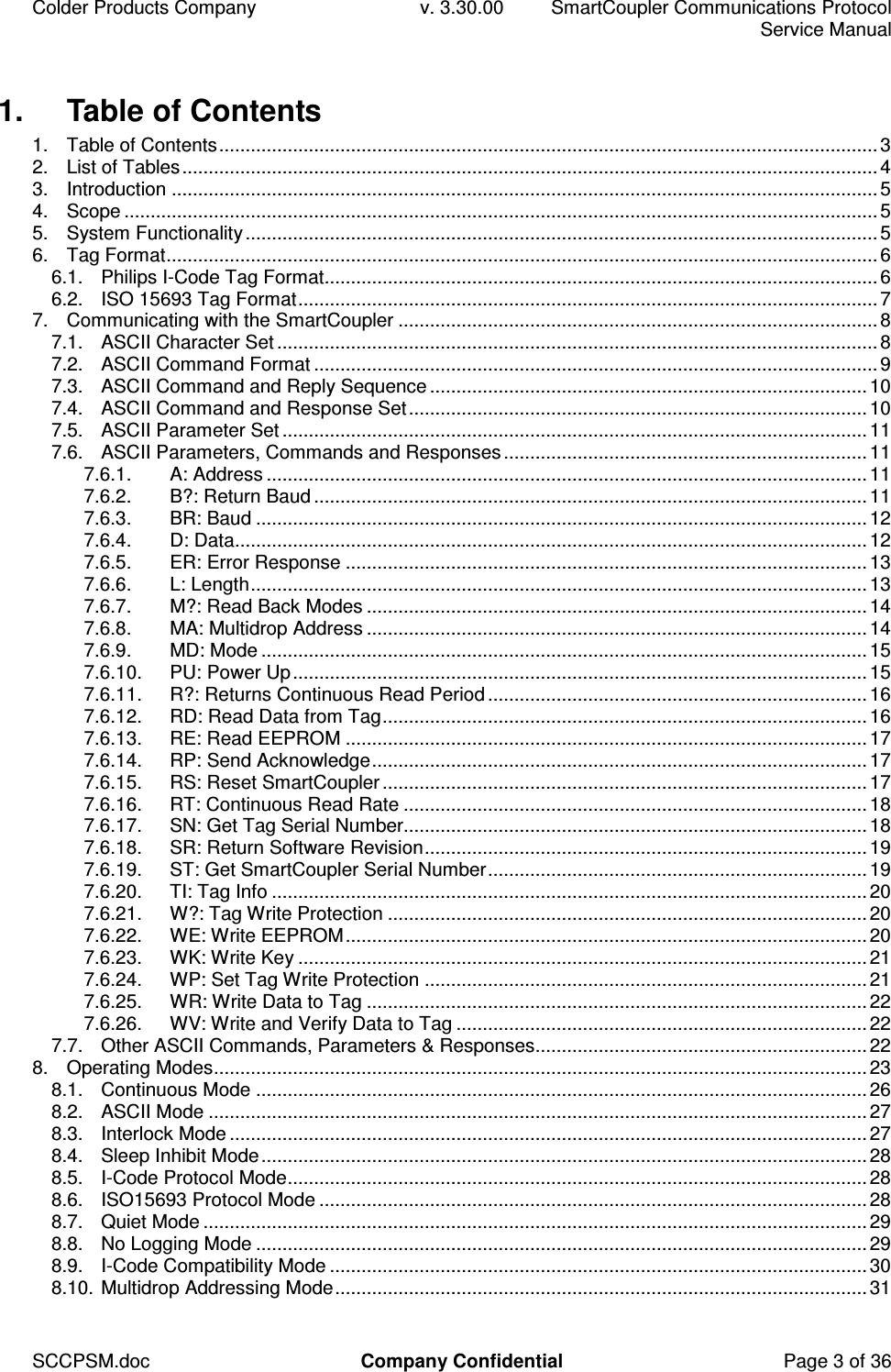
Colder Products Company  v. 3.30.00  SmartCoupler Communications Protocol     Service Manual SCCPSM.doc  Company Confidential  Page 3 of 36 1.  Table of Contents 1. Table of Contents.............................................................................................................................3 2. List of Tables....................................................................................................................................4 3. Introduction ......................................................................................................................................5 4. Scope ...............................................................................................................................................5 5. System Functionality........................................................................................................................5 6. Tag Format.......................................................................................................................................6 6.1. Philips I-Code Tag Format.........................................................................................................6 6.2. ISO 15693 Tag Format..............................................................................................................7 7. Communicating with the SmartCoupler ...........................................................................................8 7.1. ASCII Character Set ..................................................................................................................8 7.2. ASCII Command Format ...........................................................................................................9 7.3. ASCII Command and Reply Sequence ...................................................................................10 7.4. ASCII Command and Response Set.......................................................................................10 7.5. ASCII Parameter Set ...............................................................................................................11 7.6. ASCII Parameters, Commands and Responses.....................................................................11 7.6.1. A: Address ..................................................................................................................11 7.6.2. B?: Return Baud .........................................................................................................11 7.6.3. BR: Baud ....................................................................................................................12 7.6.4. D: Data........................................................................................................................12 7.6.5. ER: Error Response ...................................................................................................13 7.6.6. L: Length.....................................................................................................................13 7.6.7. M?: Read Back Modes ...............................................................................................14 7.6.8. MA: Multidrop Address ...............................................................................................14 7.6.9. MD: Mode ...................................................................................................................15 7.6.10. PU: Power Up.............................................................................................................15 7.6.11. R?: Returns Continuous Read Period ........................................................................16 7.6.12. RD: Read Data from Tag............................................................................................16 7.6.13. RE: Read EEPROM ...................................................................................................17 7.6.14. RP: Send Acknowledge..............................................................................................17 7.6.15. RS: Reset SmartCoupler............................................................................................17 7.6.16. RT: Continuous Read Rate ........................................................................................18 7.6.17. SN: Get Tag Serial Number........................................................................................18 7.6.18. SR: Return Software Revision....................................................................................19 7.6.19. ST: Get SmartCoupler Serial Number........................................................................19 7.6.20. TI: Tag Info .................................................................................................................20 7.6.21. W?: Tag Write Protection ...........................................................................................20 7.6.22. WE: Write EEPROM...................................................................................................20 7.6.23. WK: Write Key ............................................................................................................21 7.6.24. WP: Set Tag Write Protection ....................................................................................21 7.6.25. WR: Write Data to Tag ...............................................................................................22 7.6.26. WV: Write and Verify Data to Tag ..............................................................................22 7.7. Other ASCII Commands, Parameters & Responses...............................................................22 8. Operating Modes............................................................................................................................23 8.1. Continuous Mode ....................................................................................................................26 8.2. ASCII Mode .............................................................................................................................27 8.3. Interlock Mode .........................................................................................................................27 8.4. Sleep Inhibit Mode...................................................................................................................28 8.5. I-Code Protocol Mode..............................................................................................................28 8.6. ISO15693 Protocol Mode ........................................................................................................28 8.7. Quiet Mode ..............................................................................................................................29 8.8. No Logging Mode ....................................................................................................................29 8.9. I-Code Compatibility Mode ......................................................................................................30 8.10. Multidrop Addressing Mode.....................................................................................................31
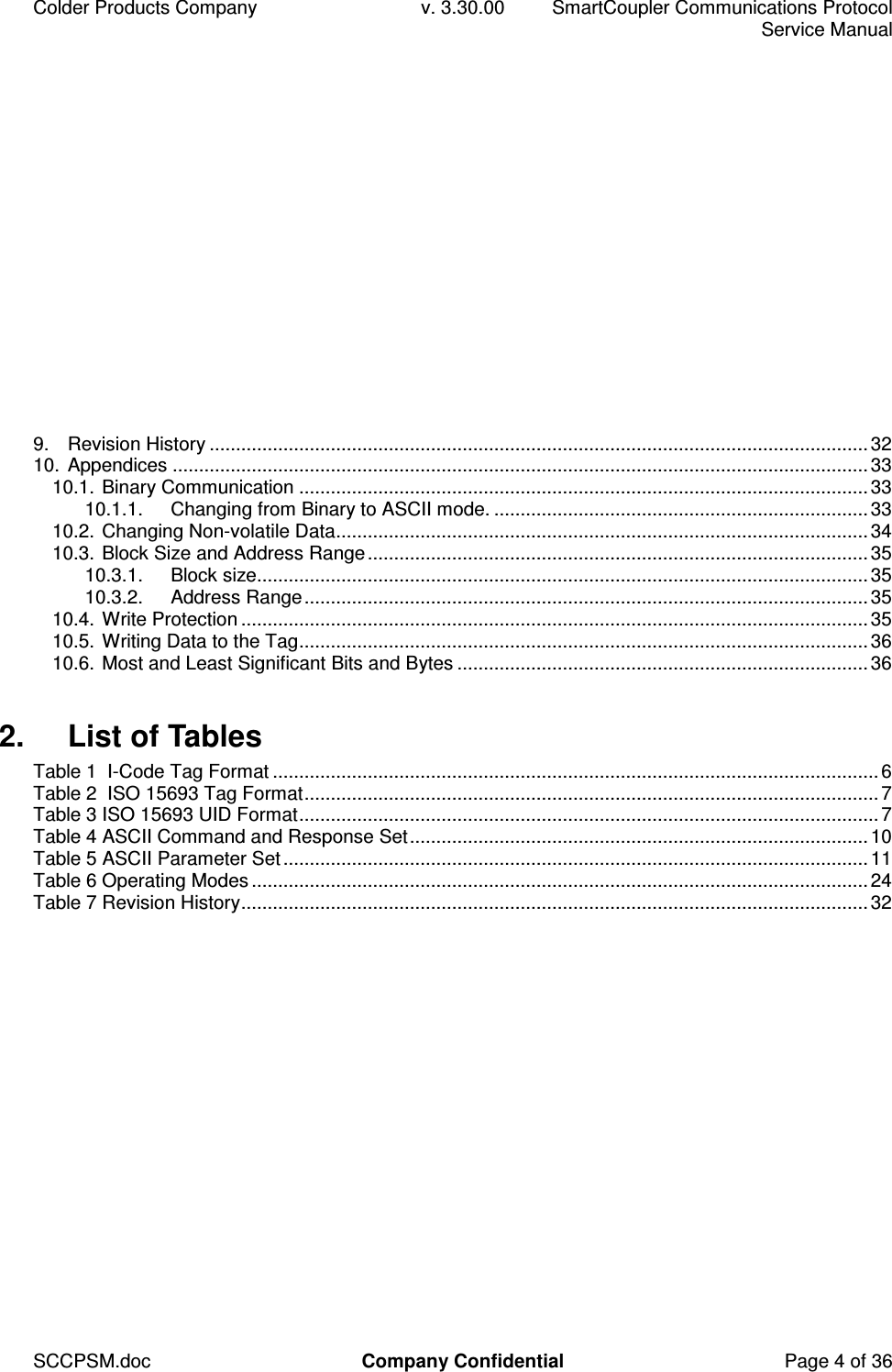
Colder Products Company  v. 3.30.00  SmartCoupler Communications Protocol     Service Manual SCCPSM.doc  Company Confidential  Page 4 of 36 9. Revision History .............................................................................................................................32 10. Appendices ....................................................................................................................................33 10.1. Binary Communication ............................................................................................................33 10.1.1. Changing from Binary to ASCII mode. .......................................................................33 10.2. Changing Non-volatile Data.....................................................................................................34 10.3. Block Size and Address Range...............................................................................................35 10.3.1. Block size....................................................................................................................35 10.3.2. Address Range...........................................................................................................35 10.4. Write Protection .......................................................................................................................35 10.5. Writing Data to the Tag............................................................................................................36 10.6. Most and Least Significant Bits and Bytes ..............................................................................36  2.  List of Tables Table 1  I-Code Tag Format ...................................................................................................................6 Table 2  ISO 15693 Tag Format.............................................................................................................7 Table 3 ISO 15693 UID Format..............................................................................................................7 Table 4 ASCII Command and Response Set.......................................................................................10 Table 5 ASCII Parameter Set...............................................................................................................11 Table 6 Operating Modes .....................................................................................................................24 Table 7 Revision History.......................................................................................................................32
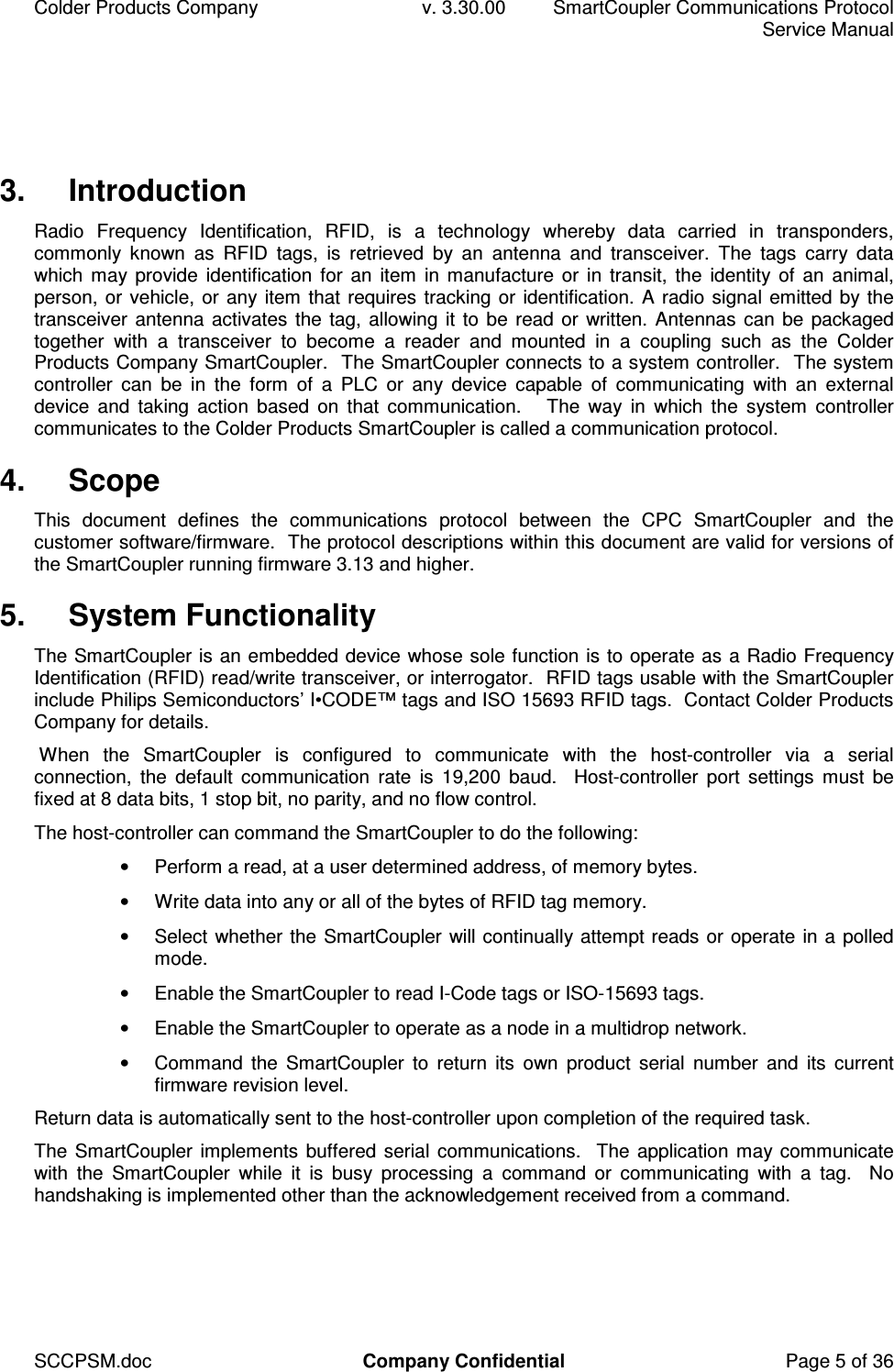
Colder Products Company  v. 3.30.00  SmartCoupler Communications Protocol     Service Manual SCCPSM.doc  Company Confidential  Page 5 of 36 3.  Introduction Radio  Frequency  Identification,  RFID,  is  a  technology  whereby  data  carried  in  transponders, commonly  known  as  RFID  tags,  is  retrieved  by  an  antenna  and  transceiver.  The  tags  carry  data which may provide  identification  for  an item  in manufacture or in  transit, the identity of an animal, person, or vehicle, or any item that requires tracking or identification. A radio signal emitted by the transceiver antenna activates the tag, allowing it to be read or written. Antennas can be packaged together  with  a  transceiver  to  become  a  reader  and  mounted  in  a  coupling  such  as  the  Colder Products Company SmartCoupler.  The SmartCoupler connects to a system controller.  The system controller  can  be  in  the  form  of  a  PLC  or  any  device  capable  of  communicating  with  an  external device  and  taking  action  based  on  that  communication.      The  way  in  which  the  system  controller communicates to the Colder Products SmartCoupler is called a communication protocol. 4.  Scope This  document  defines  the  communications  protocol  between  the  CPC  SmartCoupler  and  the customer software/firmware.  The protocol descriptions within this document are valid for versions of the SmartCoupler running firmware 3.13 and higher. 5.  System Functionality The SmartCoupler is an embedded device whose sole function is to operate as a Radio Frequency Identification (RFID) read/write transceiver, or interrogator.  RFID tags usable with the SmartCoupler include Philips Semiconductors’ I•CODE™ tags and ISO 15693 RFID tags.  Contact Colder Products Company for details.  When  the  SmartCoupler  is  configured  to  communicate  with  the  host-controller  via  a  serial connection,  the  default  communication  rate  is  19,200  baud.    Host-controller  port  settings  must  be fixed at 8 data bits, 1 stop bit, no parity, and no flow control. The host-controller can command the SmartCoupler to do the following: •  Perform a read, at a user determined address, of memory bytes. •  Write data into any or all of the bytes of RFID tag memory. •  Select whether the SmartCoupler will continually attempt reads or operate in a polled mode. •  Enable the SmartCoupler to read I-Code tags or ISO-15693 tags. •  Enable the SmartCoupler to operate as a node in a multidrop network. •  Command  the  SmartCoupler  to  return  its  own  product  serial  number  and  its  current firmware revision level. Return data is automatically sent to the host-controller upon completion of the required task. The SmartCoupler implements buffered serial communications.   The application may communicate with  the  SmartCoupler  while  it  is  busy  processing  a  command  or  communicating  with  a  tag.    No handshaking is implemented other than the acknowledgement received from a command.
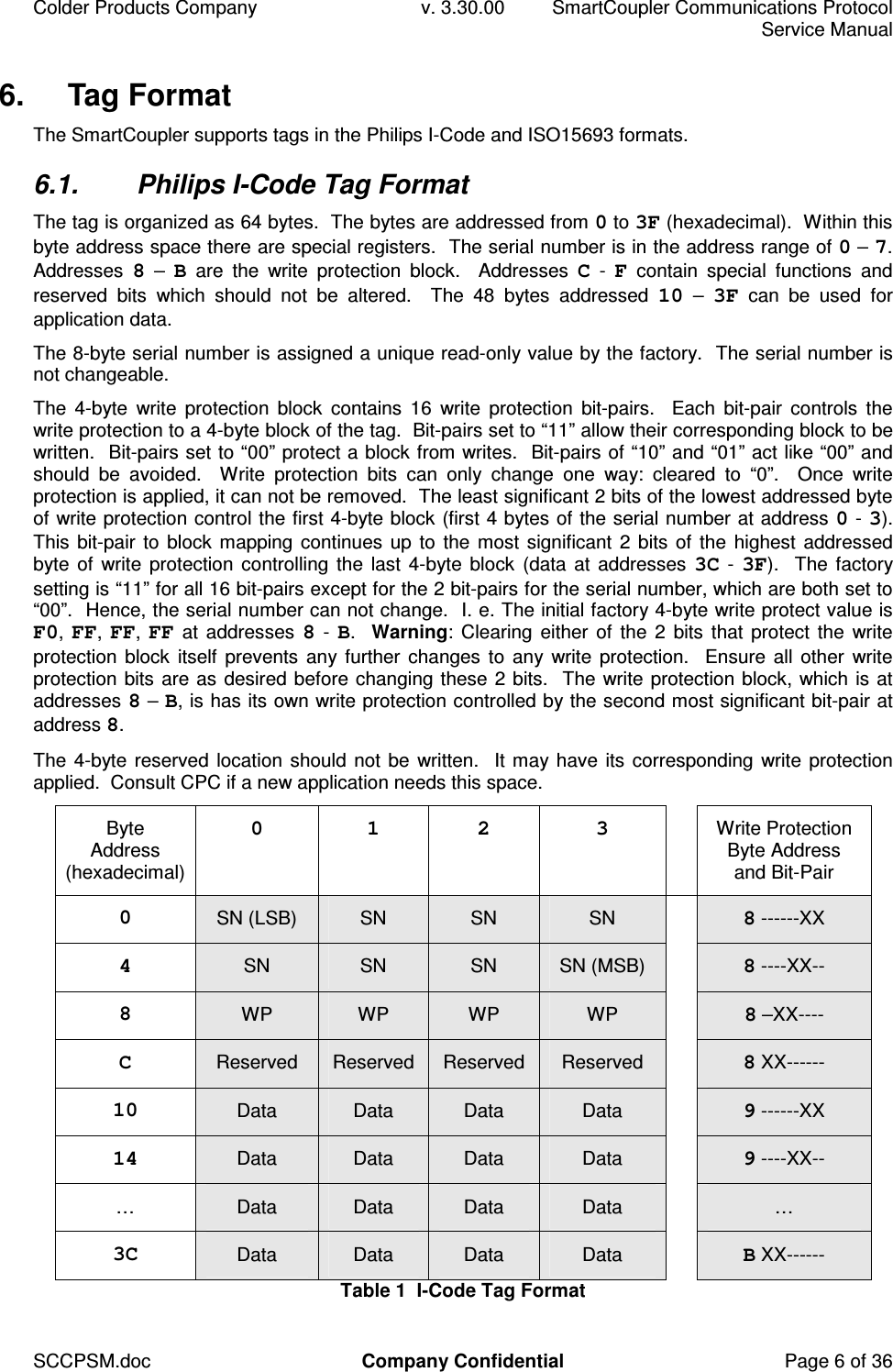
Colder Products Company  v. 3.30.00  SmartCoupler Communications Protocol     Service Manual SCCPSM.doc  Company Confidential  Page 6 of 36 6.  Tag Format The SmartCoupler supports tags in the Philips I-Code and ISO15693 formats. 6.1.  Philips I-Code Tag Format The tag is organized as 64 bytes.  The bytes are addressed from 0 to 3F (hexadecimal).  Within this byte address space there are special registers.  The serial number is in the address range of 0 – 7.   Addresses  8 – B  are  the  write  protection  block.    Addresses  C - F  contain  special  functions  and reserved  bits  which  should  not  be  altered.    The  48  bytes  addressed  10  –  3F  can  be  used  for application data. The 8-byte serial number is assigned a unique read-only value by the factory.  The serial number is not changeable. The  4-byte  write  protection  block  contains  16  write  protection  bit-pairs.    Each  bit-pair  controls  the write protection to a 4-byte block of the tag.  Bit-pairs set to “11” allow their corresponding block to be written.  Bit-pairs set to “00” protect a block from writes.  Bit-pairs of “10” and “01” act like “00” and should  be  avoided.    Write  protection  bits  can  only  change  one  way:  cleared  to  “0”.    Once  write protection is applied, it can not be removed.  The least significant 2 bits of the lowest addressed byte of write protection control the first 4-byte block (first 4 bytes of the serial number at address 0 - 3).  This bit-pair  to block mapping continues up to the most significant 2 bits of the highest addressed byte of write  protection  controlling  the last  4-byte block  (data at addresses  3C - 3F).  The  factory setting is “11” for all 16 bit-pairs except for the 2 bit-pairs for the serial number, which are both set to “00”.  Hence, the serial number can not change.  I. e. The initial factory 4-byte write protect value is F0, FF, FF,  FF at  addresses  8 - B.  Warning:  Clearing  either of the 2  bits that protect the  write protection block itself  prevents any further  changes  to any write  protection.    Ensure all other  write protection bits are as desired before changing these 2 bits.  The write protection block, which is at addresses 8 – B, is has its own write protection controlled by the second most significant bit-pair at address 8. The 4-byte reserved location should not be written.  It may have its corresponding write protection applied.  Consult CPC if a new application needs this space. Byte Address (hexadecimal) 0  1  2  3    Write Protection Byte Address and Bit-Pair 0  SN (LSB)  SN  SN  SN   8 ------XX 4  SN  SN  SN  SN (MSB)   8 ----XX-- 8  WP  WP  WP  WP   8 –XX---- C  Reserved  Reserved  Reserved  Reserved   8 XX------ 10  Data  Data  Data  Data   9 ------XX 14  Data  Data  Data  Data   9 ----XX-- …  Data  Data  Data  Data   … 3C  Data  Data  Data  Data   B XX------ Table 1  I-Code Tag Format
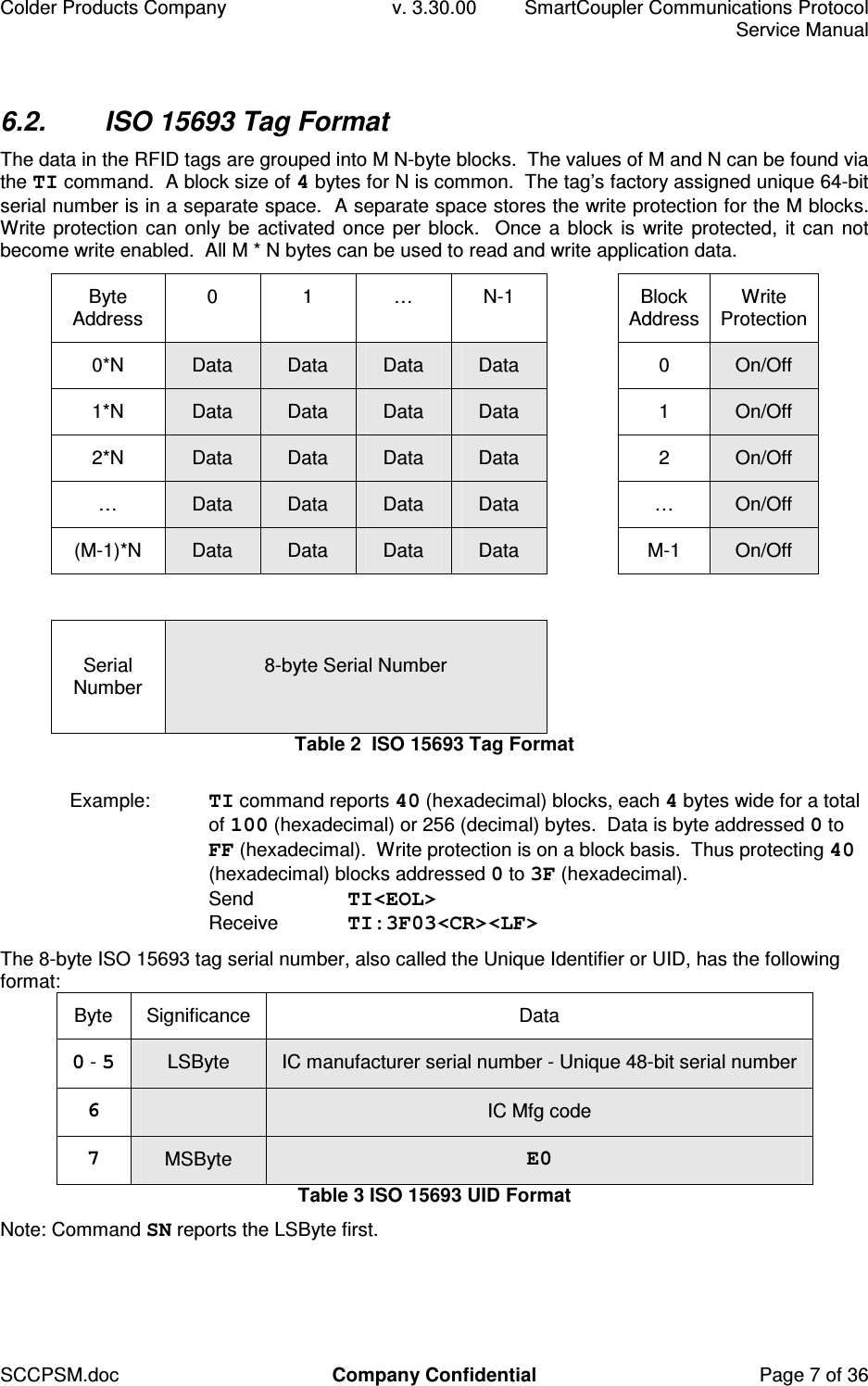
Colder Products Company  v. 3.30.00  SmartCoupler Communications Protocol     Service Manual SCCPSM.doc  Company Confidential  Page 7 of 36 6.2.  ISO 15693 Tag Format The data in the RFID tags are grouped into M N-byte blocks.  The values of M and N can be found via the TI command.  A block size of 4 bytes for N is common.  The tag’s factory assigned unique 64-bit serial number is in a separate space.  A separate space stores the write protection for the M blocks.  Write protection can only be activated once per  block.  Once a block is  write protected,  it can not become write enabled.  All M * N bytes can be used to read and write application data. Byte Address  0  1  …  N-1    Block Address Write Protection 0*N  Data  Data  Data  Data    0  On/Off 1*N  Data  Data  Data  Data    1  On/Off 2*N  Data  Data  Data  Data    2  On/Off …  Data  Data  Data  Data    …  On/Off (M-1)*N  Data  Data  Data  Data    M-1  On/Off                 Serial Number   8-byte Serial Number   Table 2  ISO 15693 Tag Format  Example:  TI command reports 40 (hexadecimal) blocks, each 4 bytes wide for a total of 100 (hexadecimal) or 256 (decimal) bytes.  Data is byte addressed 0 to FF (hexadecimal).  Write protection is on a block basis.  Thus protecting 40 (hexadecimal) blocks addressed 0 to 3F (hexadecimal). Send  TI<EOL> Receive  TI:3F03<CR><LF> The 8-byte ISO 15693 tag serial number, also called the Unique Identifier or UID, has the following format: Byte  Significance  Data 0 - 5  LSByte  IC manufacturer serial number - Unique 48-bit serial number 6    IC Mfg code 7 MSByte  E0 Table 3 ISO 15693 UID Format Note: Command SN reports the LSByte first.
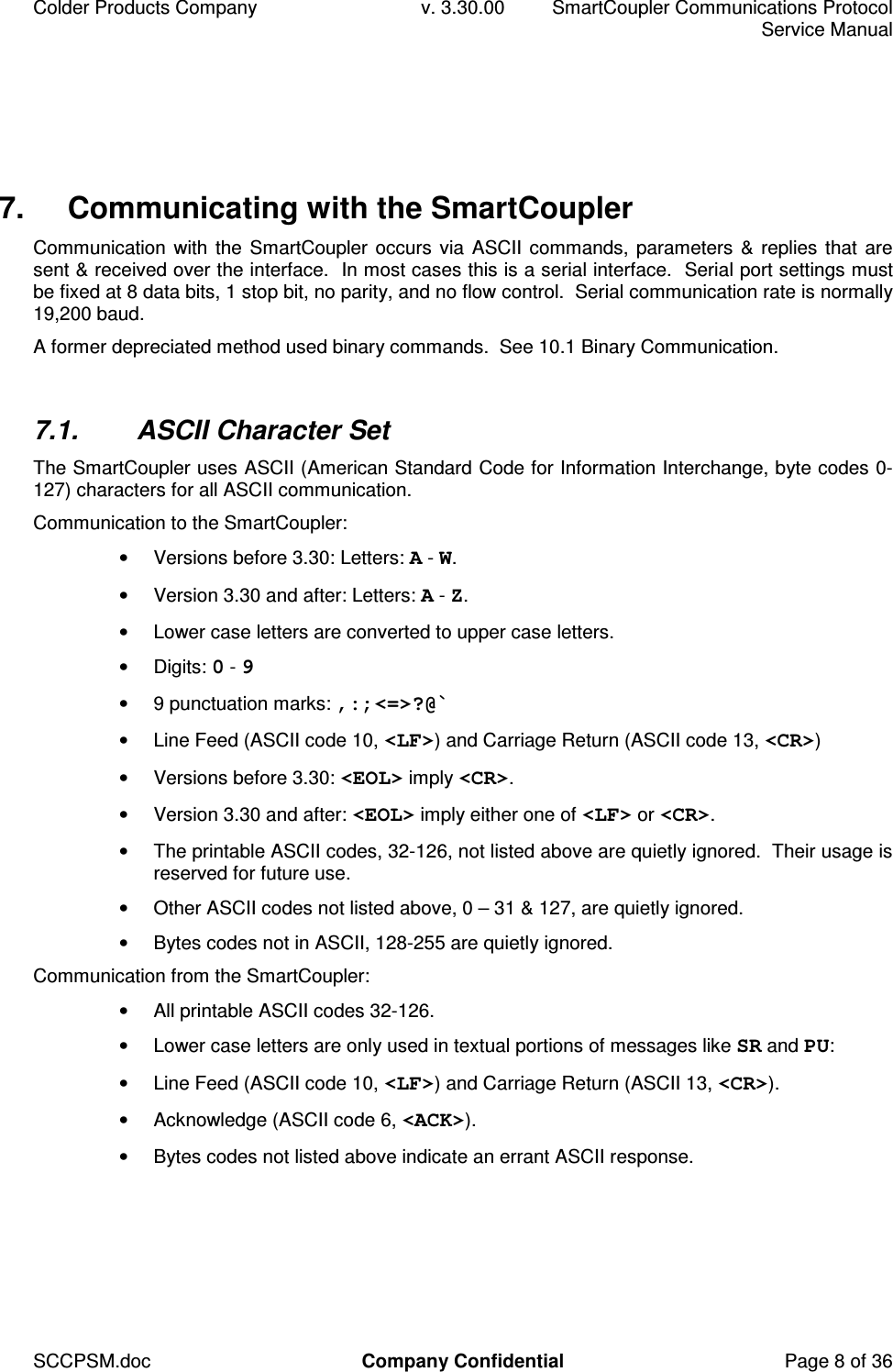
Colder Products Company  v. 3.30.00  SmartCoupler Communications Protocol     Service Manual SCCPSM.doc  Company Confidential  Page 8 of 36 7.  Communicating with the SmartCoupler Communication with the SmartCoupler occurs via ASCII commands, parameters  & replies that  are sent & received over the interface.  In most cases this is a serial interface.  Serial port settings must be fixed at 8 data bits, 1 stop bit, no parity, and no flow control.  Serial communication rate is normally 19,200 baud. A former depreciated method used binary commands.  See 10.1 Binary Communication.  7.1.  ASCII Character Set The SmartCoupler uses ASCII (American Standard Code for Information Interchange, byte codes 0-127) characters for all ASCII communication. Communication to the SmartCoupler: •  Versions before 3.30: Letters: A - W. •  Version 3.30 and after: Letters: A - Z. •  Lower case letters are converted to upper case letters. •  Digits: 0 - 9 •  9 punctuation marks: ,:;<=>?@` •  Line Feed (ASCII code 10, <LF>) and Carriage Return (ASCII code 13, <CR>) •  Versions before 3.30: <EOL> imply <CR>. •  Version 3.30 and after: <EOL> imply either one of <LF> or <CR>. •  The printable ASCII codes, 32-126, not listed above are quietly ignored.  Their usage is reserved for future use. •  Other ASCII codes not listed above, 0 – 31 & 127, are quietly ignored. •  Bytes codes not in ASCII, 128-255 are quietly ignored. Communication from the SmartCoupler: •  All printable ASCII codes 32-126. •  Lower case letters are only used in textual portions of messages like SR and PU: •  Line Feed (ASCII code 10, <LF>) and Carriage Return (ASCII 13, <CR>). •  Acknowledge (ASCII code 6, <ACK>). •  Bytes codes not listed above indicate an errant ASCII response.
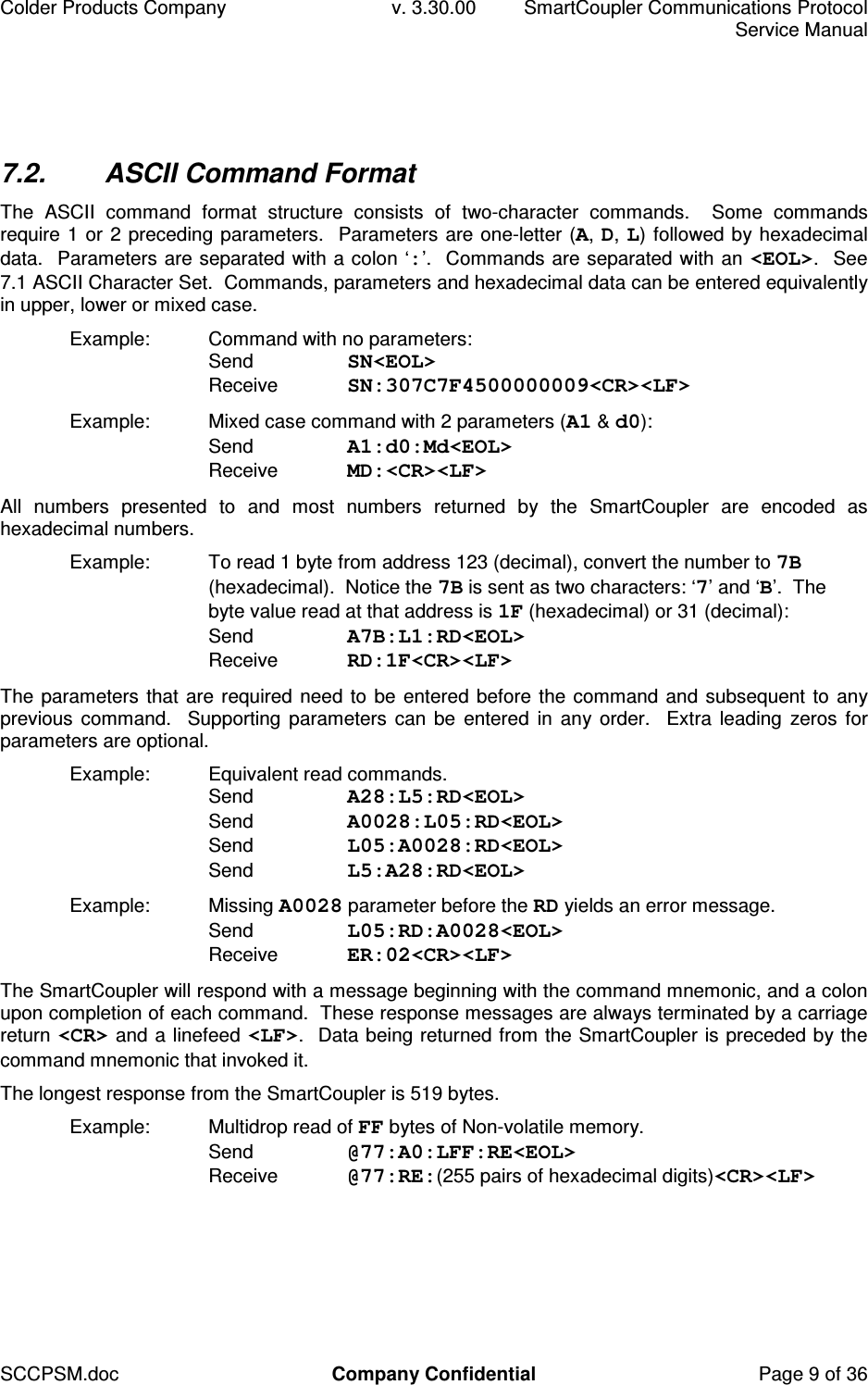
Colder Products Company  v. 3.30.00  SmartCoupler Communications Protocol     Service Manual SCCPSM.doc  Company Confidential  Page 9 of 36 7.2.  ASCII Command Format The  ASCII  command  format  structure  consists  of  two-character  commands.    Some  commands require 1 or 2 preceding parameters.  Parameters are one-letter (A, D, L) followed by hexadecimal data.  Parameters are separated with a colon ‘:’.  Commands are separated with an <EOL>.  See 7.1 ASCII Character Set.  Commands, parameters and hexadecimal data can be entered equivalently in upper, lower or mixed case. Example:  Command with no parameters: Send  SN<EOL> Receive  SN:307C7F4500000009<CR><LF> Example:  Mixed case command with 2 parameters (A1 & d0): Send  A1:d0:Md<EOL> Receive  MD:<CR><LF> All  numbers  presented  to  and  most  numbers  returned  by  the  SmartCoupler  are  encoded  as hexadecimal numbers. Example:  To read 1 byte from address 123 (decimal), convert the number to 7B (hexadecimal).  Notice the 7B is sent as two characters: ‘7’ and ‘B’.  The byte value read at that address is 1F (hexadecimal) or 31 (decimal): Send  A7B:L1:RD<EOL> Receive  RD:1F<CR><LF> The parameters that are required need to be entered before the command and subsequent to any previous command.   Supporting parameters can be  entered  in  any order.   Extra leading  zeros for parameters are optional. Example:  Equivalent read commands. Send  A28:L5:RD<EOL> Send  A0028:L05:RD<EOL> Send  L05:A0028:RD<EOL> Send  L5:A28:RD<EOL> Example:  Missing A0028 parameter before the RD yields an error message. Send  L05:RD:A0028<EOL> Receive  ER:02<CR><LF> The SmartCoupler will respond with a message beginning with the command mnemonic, and a colon upon completion of each command.  These response messages are always terminated by a carriage return <CR> and a linefeed <LF>.  Data being returned from the SmartCoupler is preceded by the command mnemonic that invoked it. The longest response from the SmartCoupler is 519 bytes. Example:  Multidrop read of FF bytes of Non-volatile memory. Send  @77:A0:LFF:RE<EOL> Receive  @77:RE:(255 pairs of hexadecimal digits)<CR><LF>
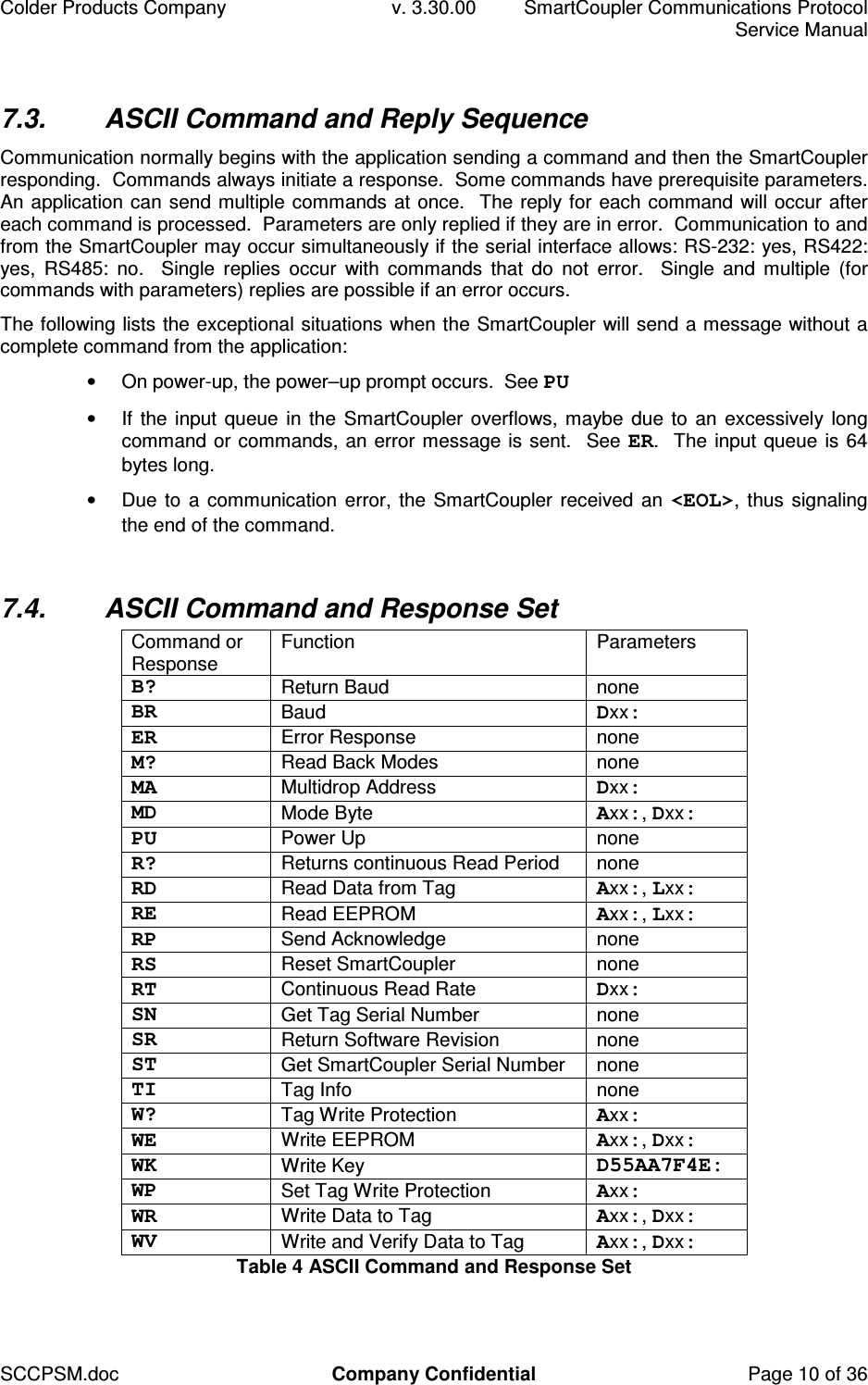
Colder Products Company  v. 3.30.00  SmartCoupler Communications Protocol     Service Manual SCCPSM.doc  Company Confidential  Page 10 of 36 7.3.  ASCII Command and Reply Sequence Communication normally begins with the application sending a command and then the SmartCoupler responding.  Commands always initiate a response.  Some commands have prerequisite parameters.  An application can send multiple commands at once.  The reply for each command will occur after each command is processed.  Parameters are only replied if they are in error.  Communication to and from the SmartCoupler may occur simultaneously if the serial interface allows: RS-232: yes, RS422: yes,  RS485:  no.    Single  replies  occur  with  commands  that  do  not  error.    Single  and  multiple  (for commands with parameters) replies are possible if an error occurs. The following lists the exceptional situations when the SmartCoupler will send a message without a complete command from the application: •  On power-up, the power–up prompt occurs.  See PU •  If the input queue in the SmartCoupler overflows, maybe due to an excessively long command or commands, an error message is sent.  See ER.  The input queue is 64 bytes long. •  Due to a communication error, the SmartCoupler received an <EOL>, thus signaling the end of the command.  7.4.  ASCII Command and Response Set Command or Response  Function  Parameters B?  Return Baud  none BR  Baud  Dxx: ER  Error Response  none M?  Read Back Modes  none MA  Multidrop Address  Dxx: MD  Mode Byte  Axx:, Dxx: PU  Power Up  none R?  Returns continuous Read Period  none RD  Read Data from Tag  Axx:, Lxx: RE  Read EEPROM  Axx:, Lxx: RP  Send Acknowledge  none RS  Reset SmartCoupler  none RT  Continuous Read Rate  Dxx: SN  Get Tag Serial Number  none SR  Return Software Revision  none ST  Get SmartCoupler Serial Number  none TI  Tag Info  none W?  Tag Write Protection  Axx: WE  Write EEPROM  Axx:, Dxx: WK  Write Key  D55AA7F4E: WP  Set Tag Write Protection  Axx: WR  Write Data to Tag  Axx:, Dxx: WV  Write and Verify Data to Tag  Axx:, Dxx: Table 4 ASCII Command and Response Set
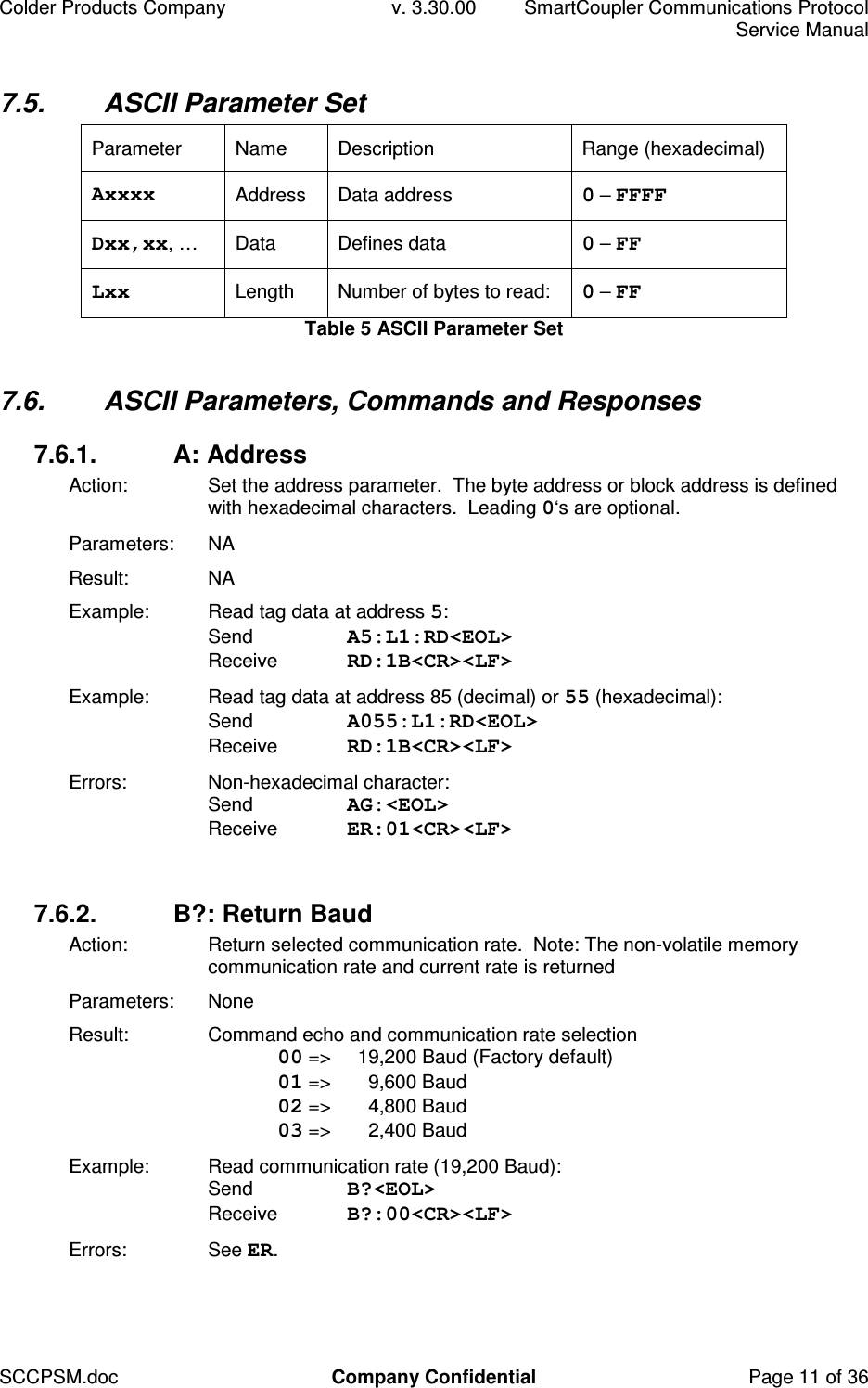
Colder Products Company  v. 3.30.00  SmartCoupler Communications Protocol     Service Manual SCCPSM.doc  Company Confidential  Page 11 of 36 7.5.  ASCII Parameter Set Parameter  Name  Description  Range (hexadecimal) Axxxx  Address  Data address  0 – FFFF Dxx,xx, …   Data  Defines data  0 – FF Lxx  Length  Number of bytes to read:  0 – FF Table 5 ASCII Parameter Set  7.6.  ASCII Parameters, Commands and Responses 7.6.1.  A: Address Action:  Set the address parameter.  The byte address or block address is defined with hexadecimal characters.  Leading 0‘s are optional. Parameters:  NA Result:  NA Example:  Read tag data at address 5: Send  A5:L1:RD<EOL> Receive  RD:1B<CR><LF> Example:  Read tag data at address 85 (decimal) or 55 (hexadecimal): Send  A055:L1:RD<EOL> Receive  RD:1B<CR><LF> Errors:  Non-hexadecimal character:  Send  AG:<EOL> Receive  ER:01<CR><LF>  7.6.2.  B?: Return Baud Action:  Return selected communication rate.  Note: The non-volatile memory communication rate and current rate is returned Parameters:  None Result:  Command echo and communication rate selection  00 =>   19,200 Baud (Factory default)  01 =>   9,600 Baud  02 =>   4,800 Baud  03 =>   2,400 Baud Example:  Read communication rate (19,200 Baud): Send  B?<EOL> Receive  B?:00<CR><LF> Errors:  See ER.
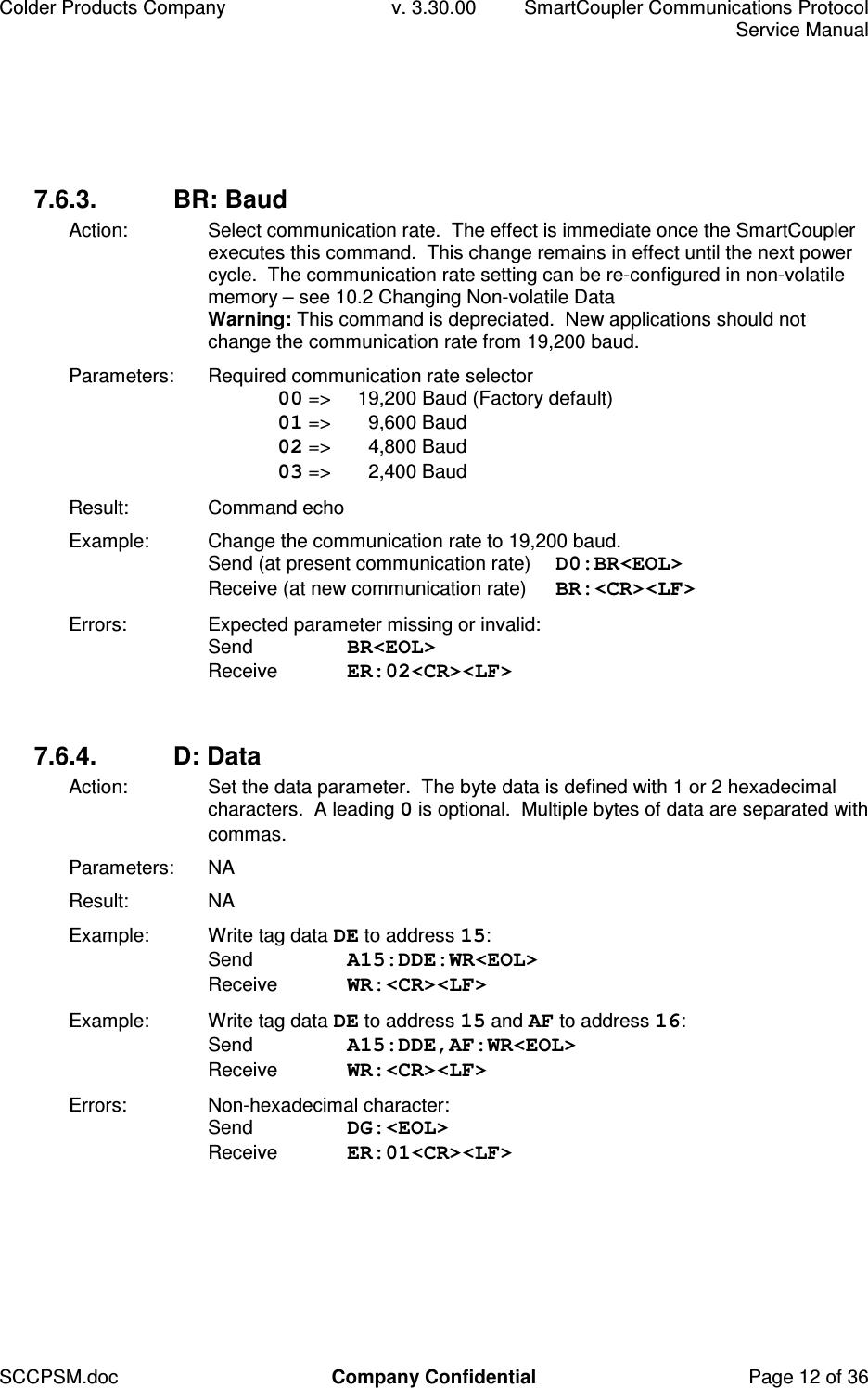
Colder Products Company  v. 3.30.00  SmartCoupler Communications Protocol     Service Manual SCCPSM.doc  Company Confidential  Page 12 of 36 7.6.3.  BR: Baud Action:  Select communication rate.  The effect is immediate once the SmartCoupler executes this command.  This change remains in effect until the next power cycle.  The communication rate setting can be re-configured in non-volatile memory – see 10.2 Changing Non-volatile Data Warning: This command is depreciated.  New applications should not change the communication rate from 19,200 baud. Parameters:  Required communication rate selector  00 =>   19,200 Baud (Factory default)  01 =>   9,600 Baud  02 =>   4,800 Baud  03 =>   2,400 Baud Result:  Command echo Example:  Change the communication rate to 19,200 baud.  Send (at present communication rate)  D0:BR<EOL> Receive (at new communication rate)  BR:<CR><LF> Errors:  Expected parameter missing or invalid: Send  BR<EOL> Receive  ER:02<CR><LF>  7.6.4.  D: Data Action:  Set the data parameter.  The byte data is defined with 1 or 2 hexadecimal characters.  A leading 0 is optional.  Multiple bytes of data are separated with commas. Parameters:  NA Result:  NA Example:  Write tag data DE to address 15: Send  A15:DDE:WR<EOL> Receive  WR:<CR><LF> Example:  Write tag data DE to address 15 and AF to address 16: Send  A15:DDE,AF:WR<EOL> Receive  WR:<CR><LF> Errors:  Non-hexadecimal character: Send  DG:<EOL> Receive  ER:01<CR><LF>
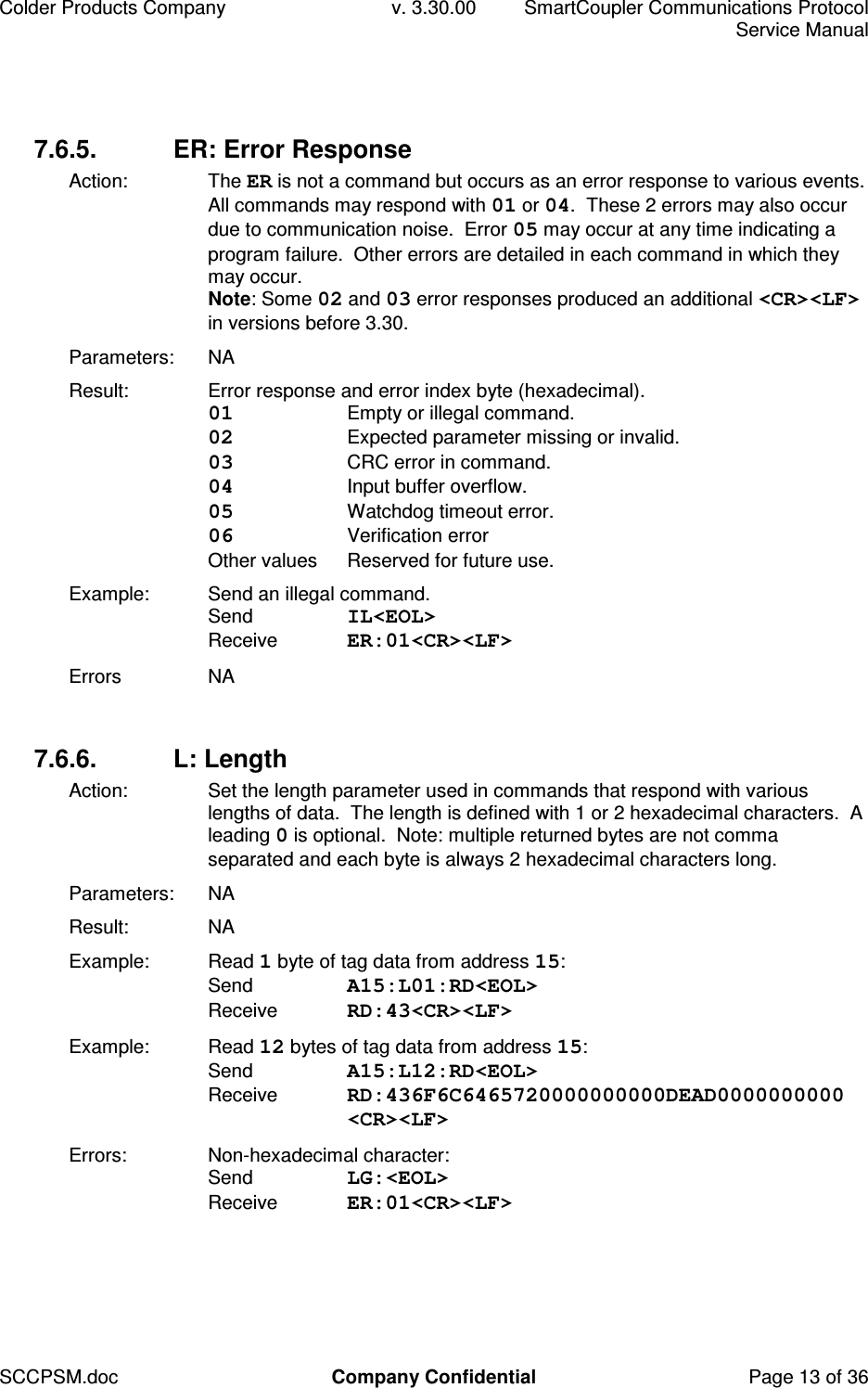
Colder Products Company  v. 3.30.00  SmartCoupler Communications Protocol     Service Manual SCCPSM.doc  Company Confidential  Page 13 of 36 7.6.5.  ER: Error Response Action:  The ER is not a command but occurs as an error response to various events.  All commands may respond with 01 or 04.  These 2 errors may also occur due to communication noise.  Error 05 may occur at any time indicating a program failure.  Other errors are detailed in each command in which they may occur. Note: Some 02 and 03 error responses produced an additional <CR><LF> in versions before 3.30. Parameters:  NA Result:  Error response and error index byte (hexadecimal). 01  Empty or illegal command. 02  Expected parameter missing or invalid. 03  CRC error in command. 04  Input buffer overflow. 05  Watchdog timeout error. 06  Verification error Other values  Reserved for future use. Example:  Send an illegal command. Send  IL<EOL> Receive  ER:01<CR><LF> Errors  NA  7.6.6.  L: Length Action:  Set the length parameter used in commands that respond with various lengths of data.  The length is defined with 1 or 2 hexadecimal characters.  A leading 0 is optional.  Note: multiple returned bytes are not comma separated and each byte is always 2 hexadecimal characters long. Parameters:  NA Result:  NA Example:  Read 1 byte of tag data from address 15: Send  A15:L01:RD<EOL> Receive  RD:43<CR><LF> Example:  Read 12 bytes of tag data from address 15: Send  A15:L12:RD<EOL> Receive  RD:436F6C6465720000000000DEAD0000000000 <CR><LF> Errors:  Non-hexadecimal character: Send  LG:<EOL> Receive  ER:01<CR><LF>
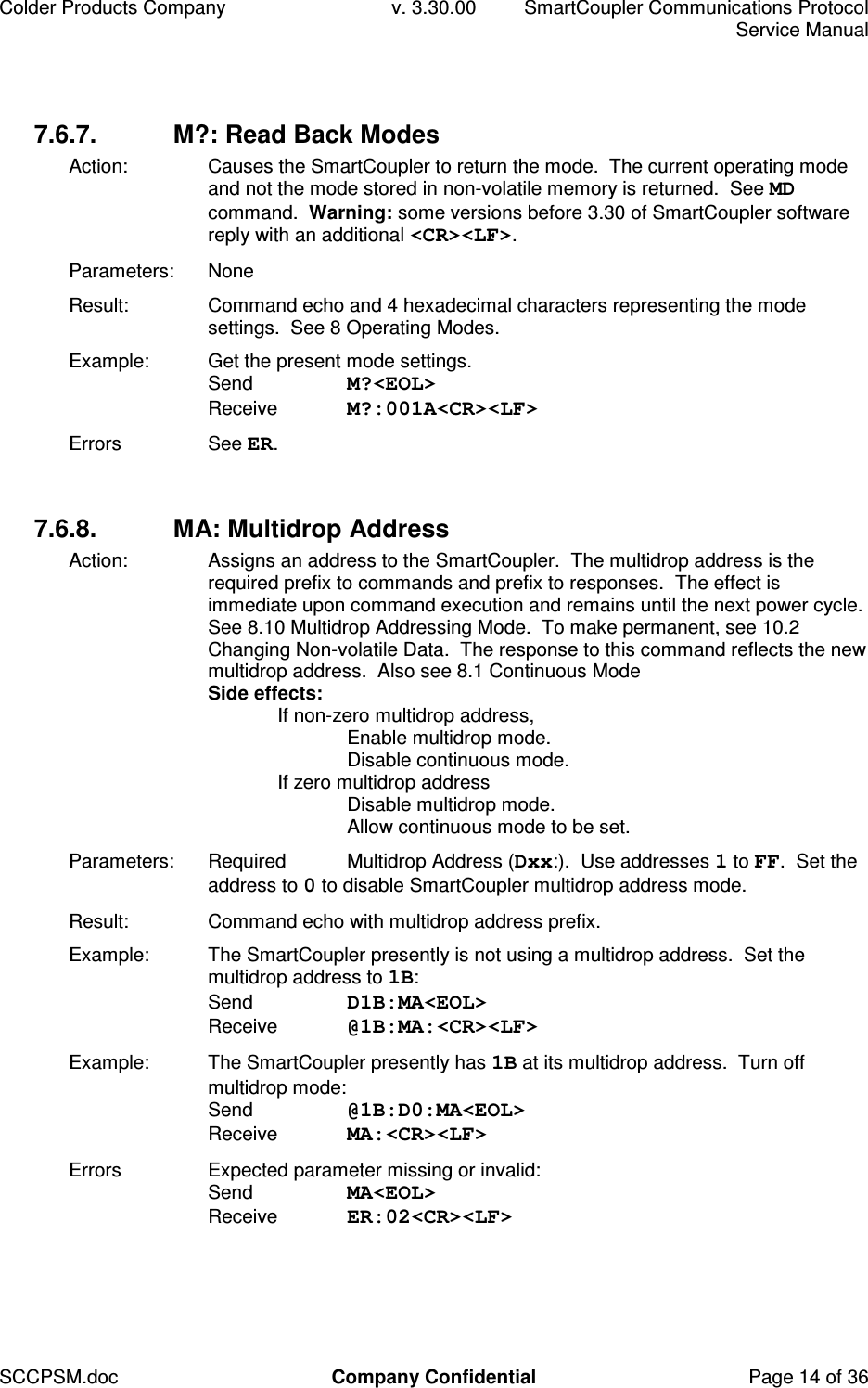
Colder Products Company  v. 3.30.00  SmartCoupler Communications Protocol     Service Manual SCCPSM.doc  Company Confidential  Page 14 of 36 7.6.7.  M?: Read Back Modes Action:  Causes the SmartCoupler to return the mode.  The current operating mode and not the mode stored in non-volatile memory is returned.  See MD command.  Warning: some versions before 3.30 of SmartCoupler software reply with an additional <CR><LF>. Parameters:  None Result:  Command echo and 4 hexadecimal characters representing the mode settings.  See 8 Operating Modes. Example:  Get the present mode settings. Send  M?<EOL> Receive  M?:001A<CR><LF> Errors  See ER.  7.6.8.  MA: Multidrop Address Action:  Assigns an address to the SmartCoupler.  The multidrop address is the required prefix to commands and prefix to responses.  The effect is immediate upon command execution and remains until the next power cycle.  See 8.10 Multidrop Addressing Mode.  To make permanent, see 10.2 Changing Non-volatile Data.  The response to this command reflects the new multidrop address.  Also see 8.1 Continuous Mode Side effects:   If non-zero multidrop address,     Enable multidrop mode.     Disable continuous mode.   If zero multidrop address     Disable multidrop mode.     Allow continuous mode to be set. Parameters:  Required  Multidrop Address (Dxx:).  Use addresses 1 to FF.  Set the address to 0 to disable SmartCoupler multidrop address mode. Result:  Command echo with multidrop address prefix. Example:  The SmartCoupler presently is not using a multidrop address.  Set the multidrop address to 1B: Send  D1B:MA<EOL> Receive  @1B:MA:<CR><LF> Example:  The SmartCoupler presently has 1B at its multidrop address.  Turn off multidrop mode: Send  @1B:D0:MA<EOL> Receive  MA:<CR><LF> Errors  Expected parameter missing or invalid: Send  MA<EOL> Receive  ER:02<CR><LF>
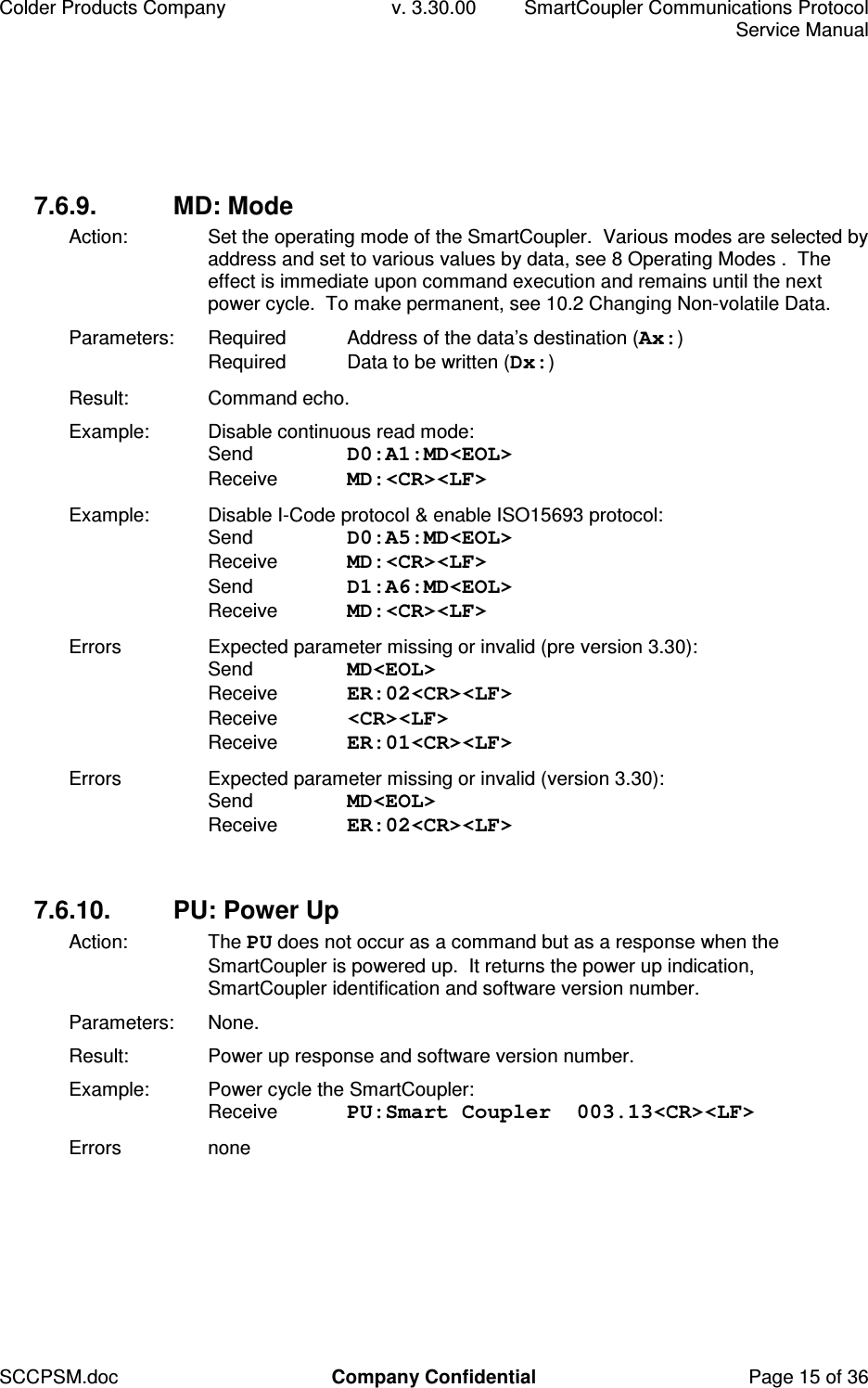
Colder Products Company  v. 3.30.00  SmartCoupler Communications Protocol     Service Manual SCCPSM.doc  Company Confidential  Page 15 of 36 7.6.9.  MD: Mode Action:  Set the operating mode of the SmartCoupler.  Various modes are selected by address and set to various values by data, see 8 Operating Modes .  The effect is immediate upon command execution and remains until the next power cycle.  To make permanent, see 10.2 Changing Non-volatile Data. Parameters:  Required  Address of the data’s destination (Ax:) Required  Data to be written (Dx:) Result:  Command echo. Example:  Disable continuous read mode: Send  D0:A1:MD<EOL> Receive  MD:<CR><LF> Example:  Disable I-Code protocol & enable ISO15693 protocol: Send  D0:A5:MD<EOL> Receive  MD:<CR><LF>  Send  D1:A6:MD<EOL> Receive  MD:<CR><LF> Errors  Expected parameter missing or invalid (pre version 3.30): Send  MD<EOL> Receive  ER:02<CR><LF> Receive  <CR><LF> Receive  ER:01<CR><LF> Errors  Expected parameter missing or invalid (version 3.30): Send  MD<EOL> Receive  ER:02<CR><LF>  7.6.10.  PU: Power Up Action:  The PU does not occur as a command but as a response when the SmartCoupler is powered up.  It returns the power up indication, SmartCoupler identification and software version number. Parameters:  None. Result:  Power up response and software version number. Example:  Power cycle the SmartCoupler: Receive  PU:Smart Coupler  003.13<CR><LF> Errors  none
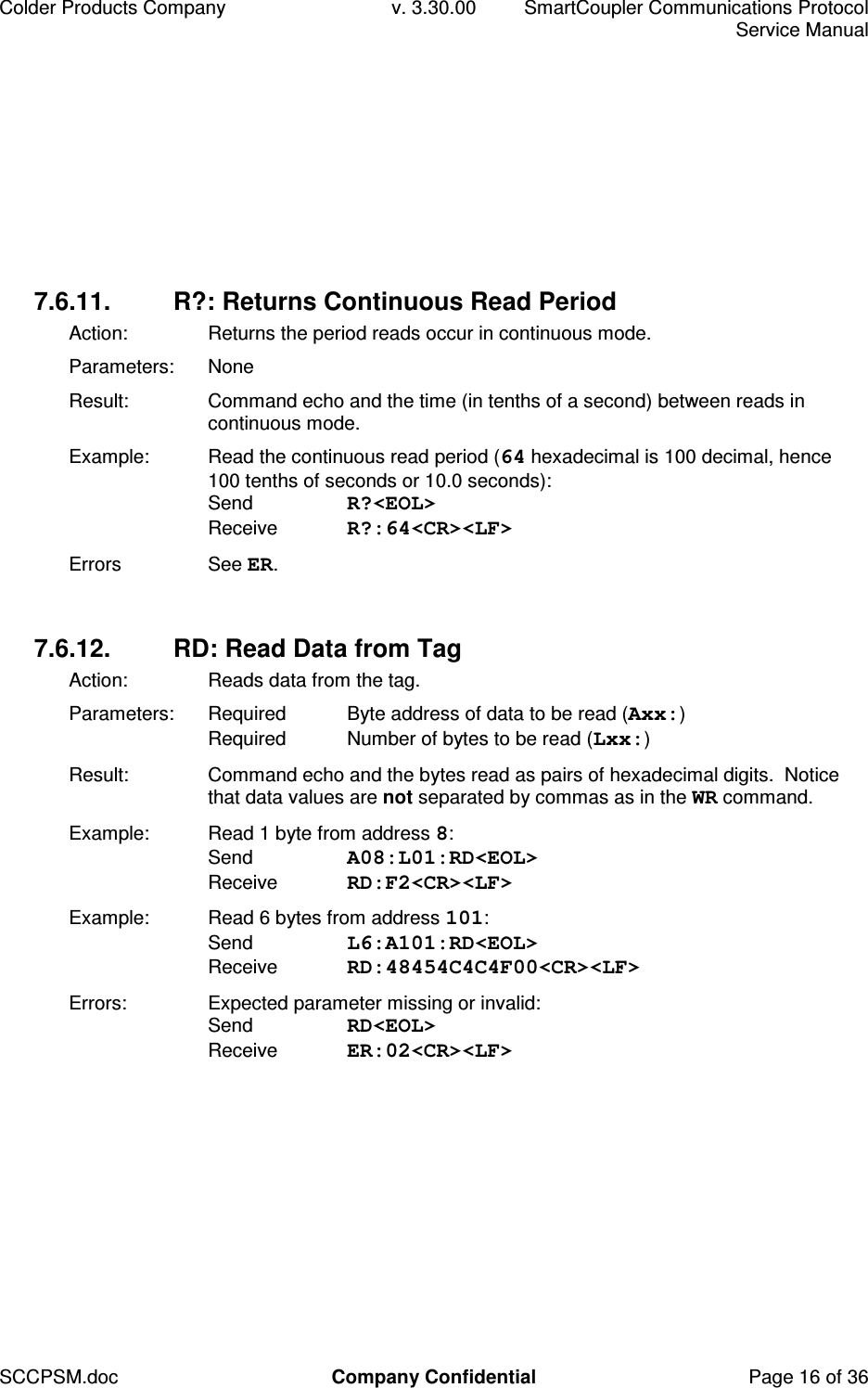
Colder Products Company  v. 3.30.00  SmartCoupler Communications Protocol     Service Manual SCCPSM.doc  Company Confidential  Page 16 of 36 7.6.11.  R?: Returns Continuous Read Period Action:  Returns the period reads occur in continuous mode. Parameters:  None Result:  Command echo and the time (in tenths of a second) between reads in continuous mode. Example:  Read the continuous read period (64 hexadecimal is 100 decimal, hence 100 tenths of seconds or 10.0 seconds): Send  R?<EOL> Receive  R?:64<CR><LF> Errors  See ER.  7.6.12.  RD: Read Data from Tag Action:   Reads data from the tag. Parameters:  Required  Byte address of data to be read (Axx:) Required  Number of bytes to be read (Lxx:) Result:  Command echo and the bytes read as pairs of hexadecimal digits.  Notice that data values are not separated by commas as in the WR command. Example:  Read 1 byte from address 8: Send  A08:L01:RD<EOL> Receive  RD:F2<CR><LF> Example:  Read 6 bytes from address 101: Send  L6:A101:RD<EOL> Receive  RD:48454C4C4F00<CR><LF> Errors:  Expected parameter missing or invalid: Send  RD<EOL> Receive  ER:02<CR><LF>
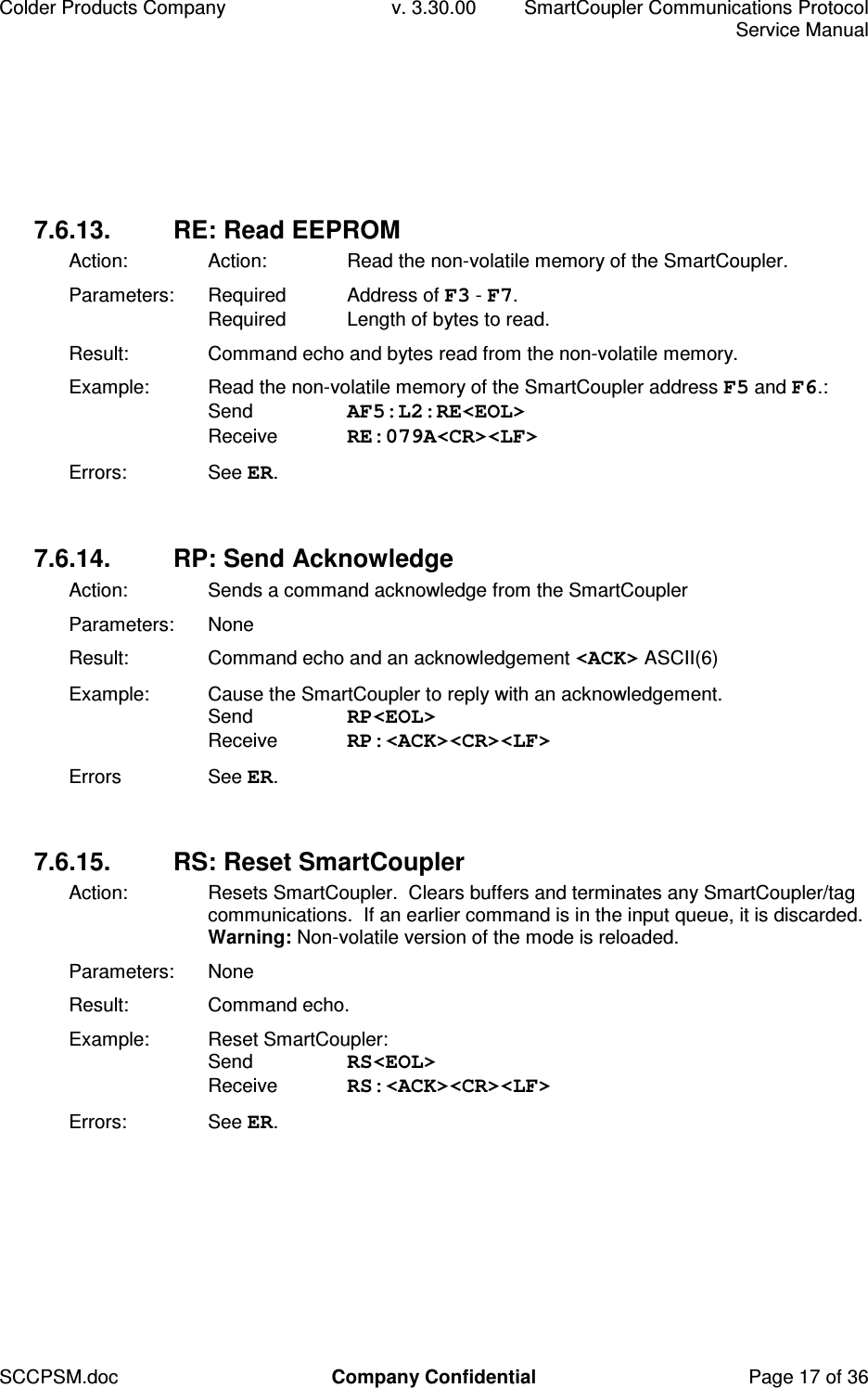
Colder Products Company  v. 3.30.00  SmartCoupler Communications Protocol     Service Manual SCCPSM.doc  Company Confidential  Page 17 of 36 7.6.13.  RE: Read EEPROM Action:  Action:  Read the non-volatile memory of the SmartCoupler. Parameters:  Required  Address of F3 - F7. Required  Length of bytes to read. Result:  Command echo and bytes read from the non-volatile memory. Example:  Read the non-volatile memory of the SmartCoupler address F5 and F6.:  Send  AF5:L2:RE<EOL> Receive  RE:079A<CR><LF> Errors:  See ER.  7.6.14.  RP: Send Acknowledge Action:  Sends a command acknowledge from the SmartCoupler Parameters:  None Result:  Command echo and an acknowledgement <ACK> ASCII(6) Example:  Cause the SmartCoupler to reply with an acknowledgement.  Send  RP<EOL> Receive  RP:<ACK><CR><LF> Errors  See ER.  7.6.15.  RS: Reset SmartCoupler Action:   Resets SmartCoupler.  Clears buffers and terminates any SmartCoupler/tag communications.  If an earlier command is in the input queue, it is discarded. Warning: Non-volatile version of the mode is reloaded. Parameters:  None Result:  Command echo. Example:  Reset SmartCoupler: Send  RS<EOL> Receive  RS:<ACK><CR><LF> Errors:  See ER.
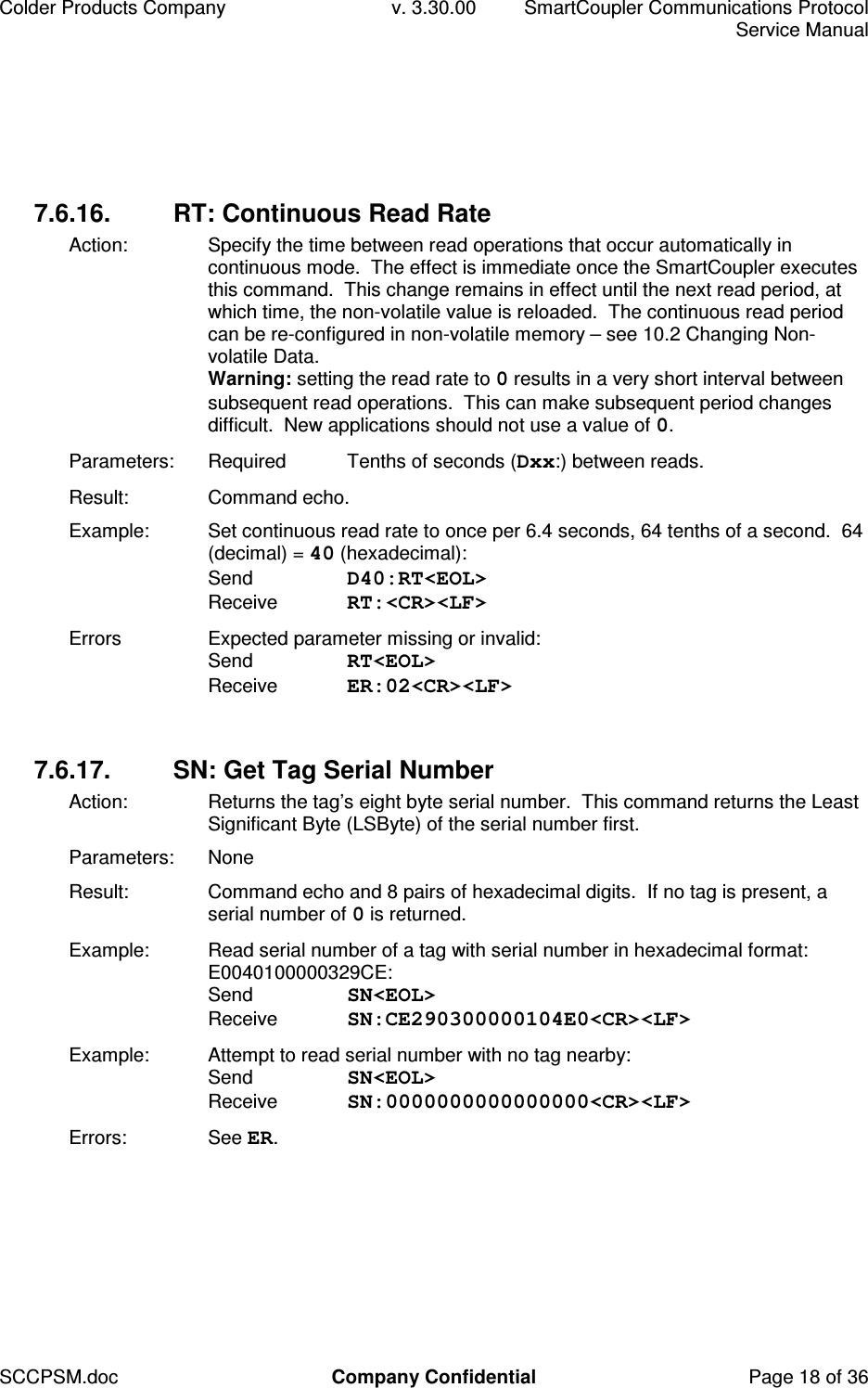
Colder Products Company  v. 3.30.00  SmartCoupler Communications Protocol     Service Manual SCCPSM.doc  Company Confidential  Page 18 of 36 7.6.16.  RT: Continuous Read Rate Action:  Specify the time between read operations that occur automatically in continuous mode.  The effect is immediate once the SmartCoupler executes this command.  This change remains in effect until the next read period, at which time, the non-volatile value is reloaded.  The continuous read period can be re-configured in non-volatile memory – see 10.2 Changing Non-volatile Data.  Warning: setting the read rate to 0 results in a very short interval between subsequent read operations.  This can make subsequent period changes difficult.  New applications should not use a value of 0. Parameters:  Required  Tenths of seconds (Dxx:) between reads. Result:  Command echo. Example:  Set continuous read rate to once per 6.4 seconds, 64 tenths of a second.  64 (decimal) = 40 (hexadecimal): Send  D40:RT<EOL> Receive  RT:<CR><LF> Errors  Expected parameter missing or invalid: Send  RT<EOL> Receive  ER:02<CR><LF>  7.6.17.  SN: Get Tag Serial Number Action:   Returns the tag’s eight byte serial number.  This command returns the Least Significant Byte (LSByte) of the serial number first. Parameters:  None Result:  Command echo and 8 pairs of hexadecimal digits.  If no tag is present, a serial number of 0 is returned.  Example:  Read serial number of a tag with serial number in hexadecimal format: E0040100000329CE: Send  SN<EOL> Receive  SN:CE290300000104E0<CR><LF> Example:  Attempt to read serial number with no tag nearby: Send  SN<EOL> Receive  SN:0000000000000000<CR><LF> Errors:  See ER.
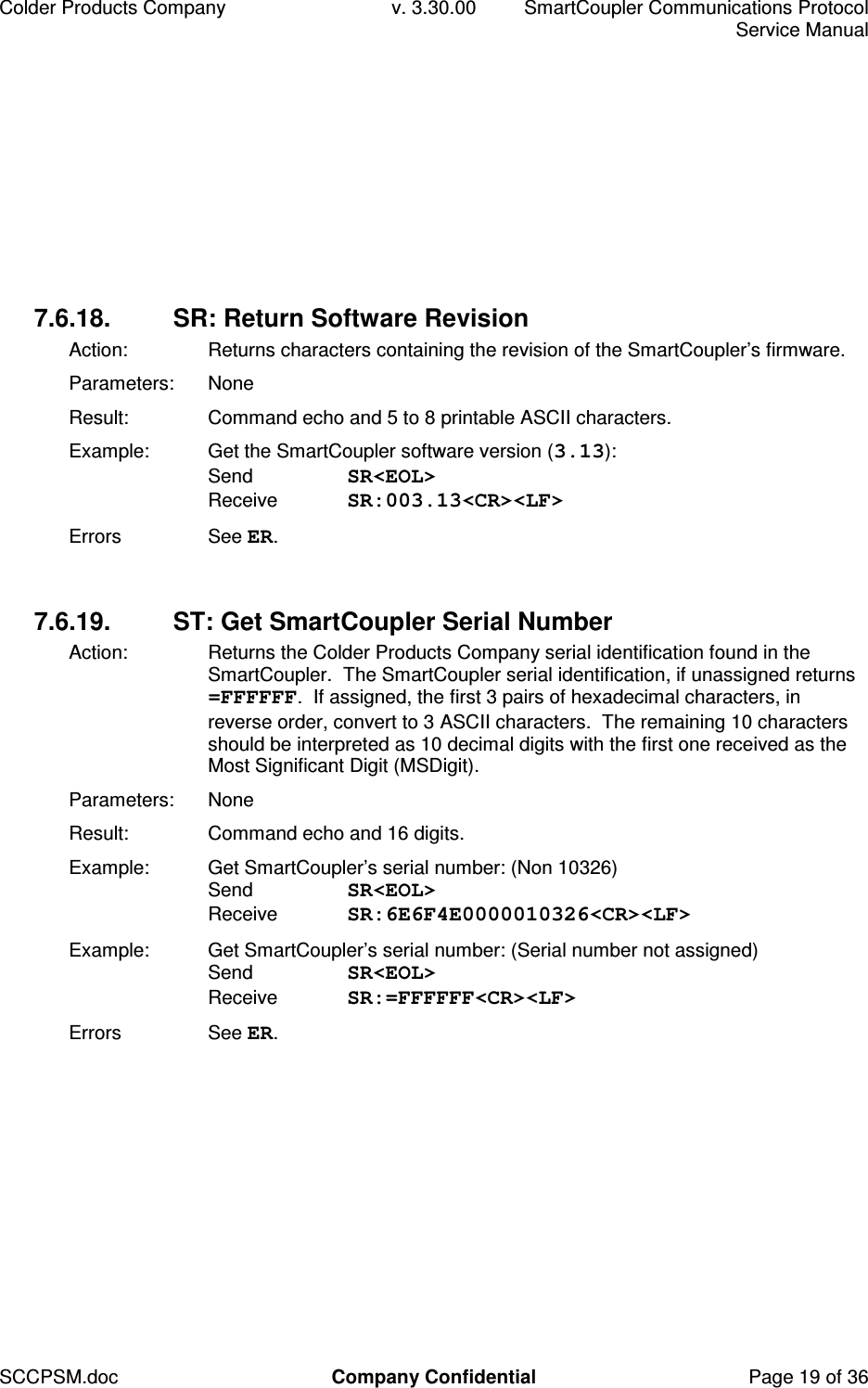
Colder Products Company  v. 3.30.00  SmartCoupler Communications Protocol     Service Manual SCCPSM.doc  Company Confidential  Page 19 of 36 7.6.18.  SR: Return Software Revision Action:  Returns characters containing the revision of the SmartCoupler’s firmware. Parameters:  None Result:  Command echo and 5 to 8 printable ASCII characters. Example:  Get the SmartCoupler software version (3.13): Send  SR<EOL> Receive  SR:003.13<CR><LF> Errors  See ER.  7.6.19.  ST: Get SmartCoupler Serial Number Action:  Returns the Colder Products Company serial identification found in the SmartCoupler.  The SmartCoupler serial identification, if unassigned returns =FFFFFF.  If assigned, the first 3 pairs of hexadecimal characters, in reverse order, convert to 3 ASCII characters.  The remaining 10 characters should be interpreted as 10 decimal digits with the first one received as the Most Significant Digit (MSDigit). Parameters:  None Result:  Command echo and 16 digits. Example:  Get SmartCoupler’s serial number: (Non 10326) Send  SR<EOL> Receive  SR:6E6F4E0000010326<CR><LF> Example:  Get SmartCoupler’s serial number: (Serial number not assigned) Send  SR<EOL> Receive  SR:=FFFFFF<CR><LF> Errors  See ER.
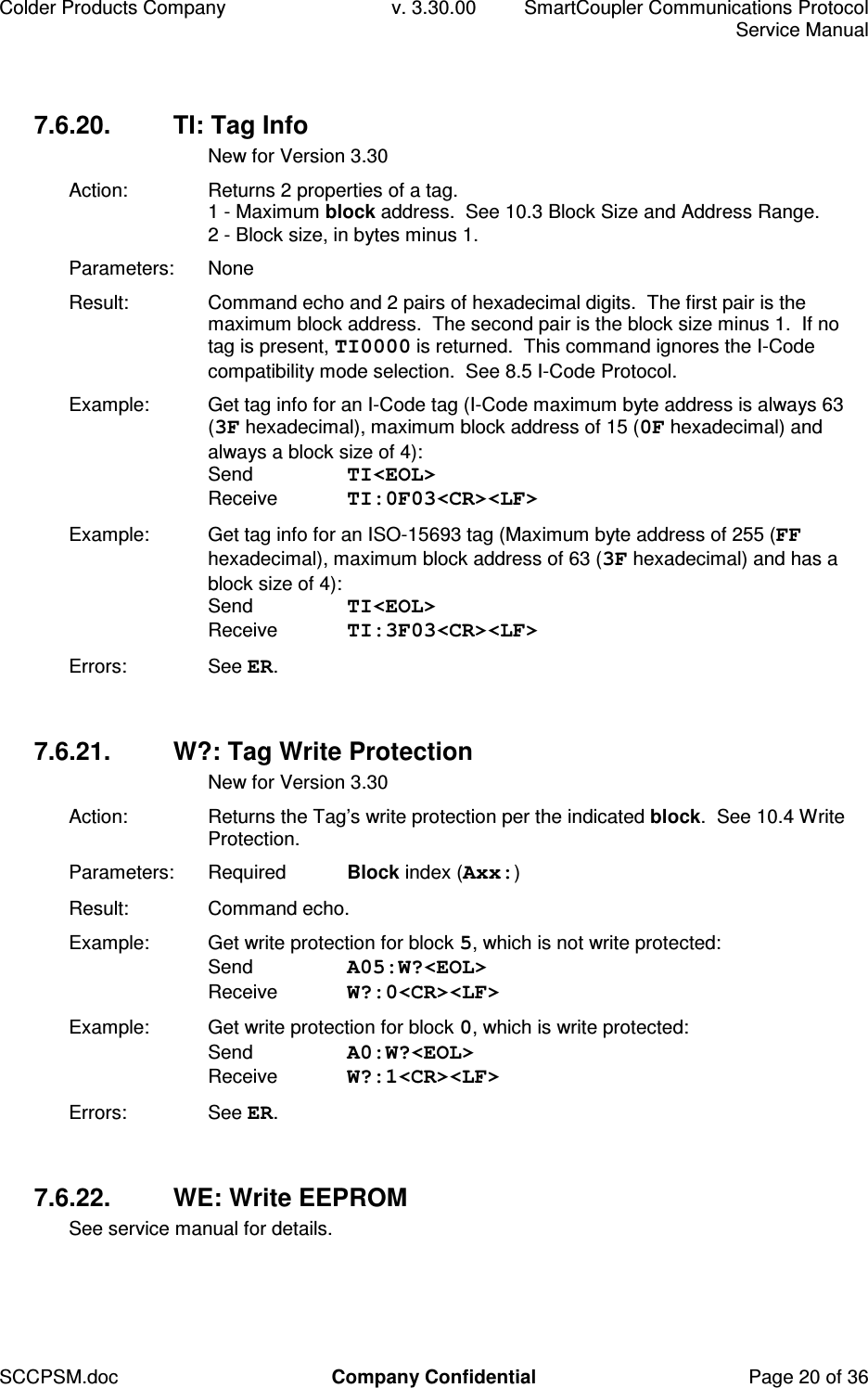
Colder Products Company  v. 3.30.00  SmartCoupler Communications Protocol     Service Manual SCCPSM.doc  Company Confidential  Page 20 of 36 7.6.20.  TI: Tag Info   New for Version 3.30 Action:  Returns 2 properties of a tag. 1 - Maximum block address.  See 10.3 Block Size and Address Range. 2 - Block size, in bytes minus 1. Parameters:  None Result:  Command echo and 2 pairs of hexadecimal digits.  The first pair is the maximum block address.  The second pair is the block size minus 1.  If no tag is present, TI0000 is returned.  This command ignores the I-Code compatibility mode selection.  See 8.5 I-Code Protocol. Example:  Get tag info for an I-Code tag (I-Code maximum byte address is always 63 (3F hexadecimal), maximum block address of 15 (0F hexadecimal) and always a block size of 4): Send  TI<EOL> Receive  TI:0F03<CR><LF> Example:  Get tag info for an ISO-15693 tag (Maximum byte address of 255 (FF hexadecimal), maximum block address of 63 (3F hexadecimal) and has a block size of 4): Send  TI<EOL> Receive  TI:3F03<CR><LF> Errors:  See ER.  7.6.21.  W?: Tag Write Protection   New for Version 3.30 Action:  Returns the Tag’s write protection per the indicated block.  See 10.4 Write Protection. Parameters:  Required  Block index (Axx:) Result:  Command echo. Example:  Get write protection for block 5, which is not write protected: Send  A05:W?<EOL> Receive  W?:0<CR><LF> Example:  Get write protection for block 0, which is write protected: Send  A0:W?<EOL> Receive  W?:1<CR><LF> Errors:  See ER.  7.6.22.  WE: Write EEPROM See service manual for details.
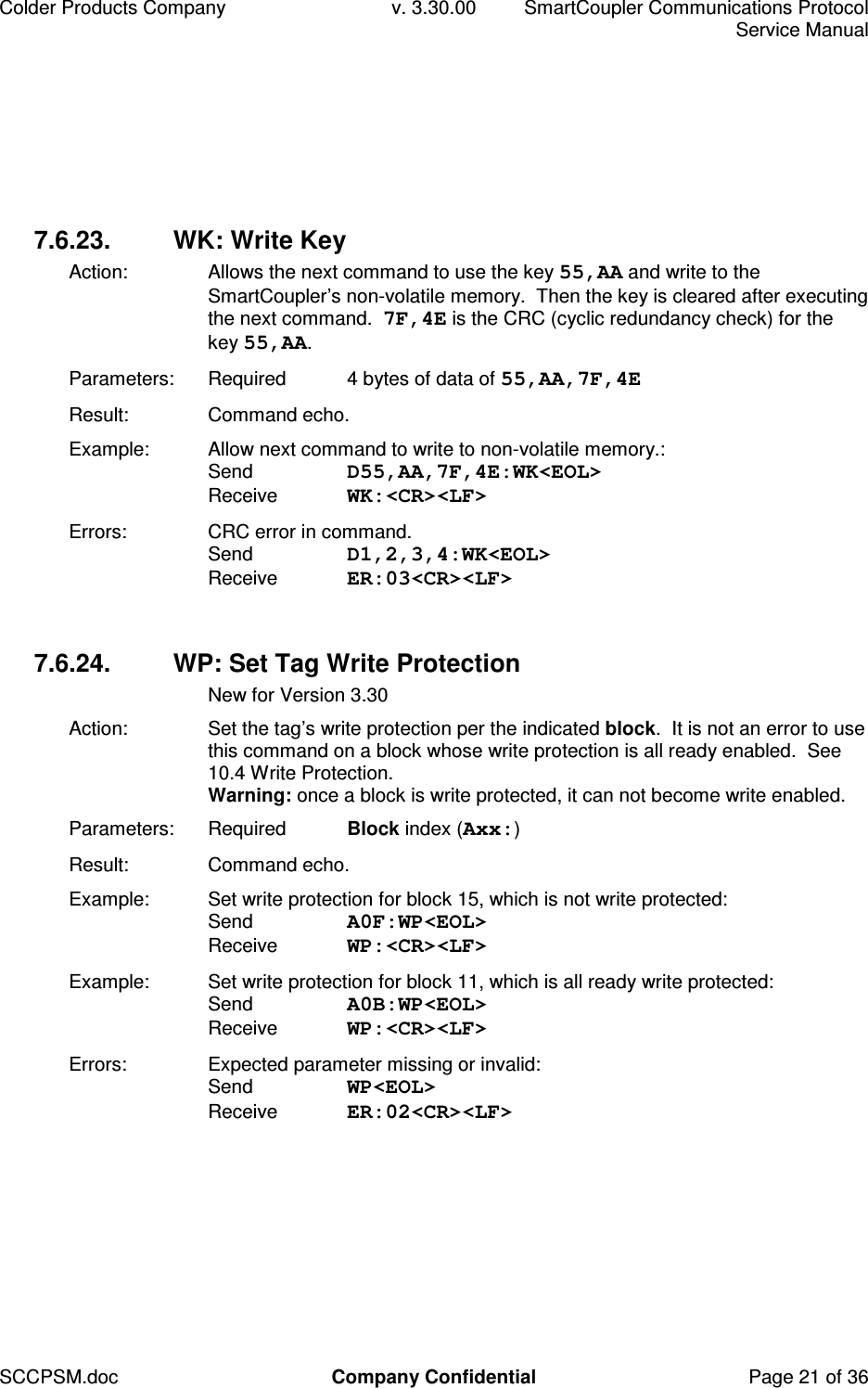
Colder Products Company  v. 3.30.00  SmartCoupler Communications Protocol     Service Manual SCCPSM.doc  Company Confidential  Page 21 of 36 7.6.23.  WK: Write Key Action:  Allows the next command to use the key 55,AA and write to the SmartCoupler’s non-volatile memory.  Then the key is cleared after executing the next command.  7F,4E is the CRC (cyclic redundancy check) for the key 55,AA. Parameters:  Required  4 bytes of data of 55,AA,7F,4E  Result:  Command echo. Example:  Allow next command to write to non-volatile memory.:  Send  D55,AA,7F,4E:WK<EOL> Receive  WK:<CR><LF> Errors:  CRC error in command. Send  D1,2,3,4:WK<EOL> Receive  ER:03<CR><LF>  7.6.24.  WP: Set Tag Write Protection   New for Version 3.30 Action:  Set the tag’s write protection per the indicated block.  It is not an error to use this command on a block whose write protection is all ready enabled.  See 10.4 Write Protection. Warning: once a block is write protected, it can not become write enabled. Parameters:  Required  Block index (Axx:) Result:  Command echo. Example:  Set write protection for block 15, which is not write protected: Send  A0F:WP<EOL> Receive  WP:<CR><LF> Example:  Set write protection for block 11, which is all ready write protected: Send  A0B:WP<EOL> Receive  WP:<CR><LF> Errors:  Expected parameter missing or invalid: Send  WP<EOL> Receive  ER:02<CR><LF>
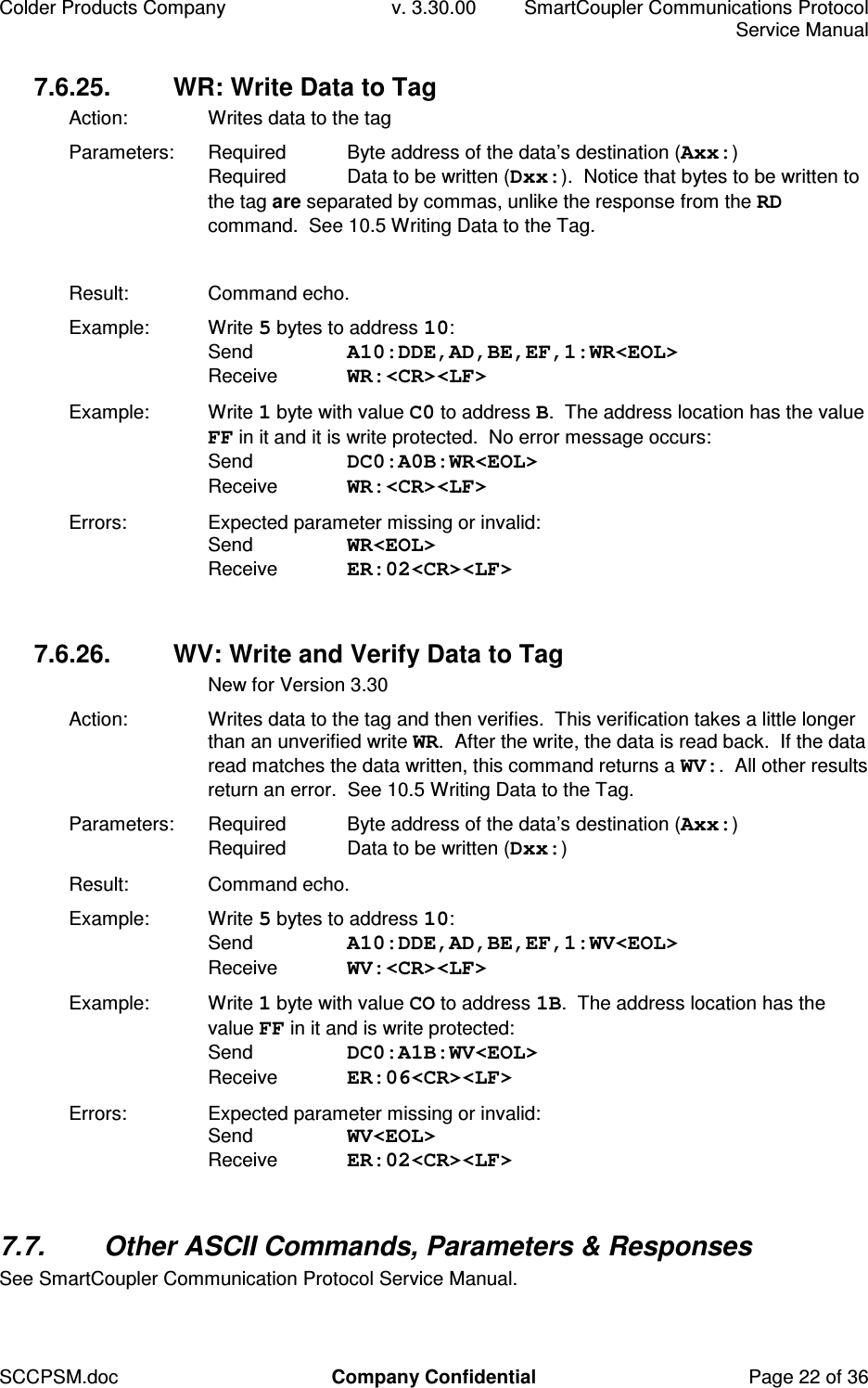
Colder Products Company  v. 3.30.00  SmartCoupler Communications Protocol     Service Manual SCCPSM.doc  Company Confidential  Page 22 of 36 7.6.25.  WR: Write Data to Tag Action:   Writes data to the tag Parameters:  Required  Byte address of the data’s destination (Axx:) Required  Data to be written (Dxx:).  Notice that bytes to be written to the tag are separated by commas, unlike the response from the RD command.  See 10.5 Writing Data to the Tag.  Result:  Command echo. Example:  Write 5 bytes to address 10: Send  A10:DDE,AD,BE,EF,1:WR<EOL> Receive  WR:<CR><LF> Example:  Write 1 byte with value C0 to address B.  The address location has the value FF in it and it is write protected.  No error message occurs: Send  DC0:A0B:WR<EOL> Receive  WR:<CR><LF> Errors:  Expected parameter missing or invalid: Send  WR<EOL> Receive  ER:02<CR><LF>  7.6.26.  WV: Write and Verify Data to Tag   New for Version 3.30 Action:   Writes data to the tag and then verifies.  This verification takes a little longer than an unverified write WR.  After the write, the data is read back.  If the data read matches the data written, this command returns a WV:.  All other results return an error.  See 10.5 Writing Data to the Tag. Parameters:  Required  Byte address of the data’s destination (Axx:) Required  Data to be written (Dxx:) Result:  Command echo. Example:  Write 5 bytes to address 10: Send  A10:DDE,AD,BE,EF,1:WV<EOL> Receive  WV:<CR><LF> Example:  Write 1 byte with value CO to address 1B.  The address location has the value FF in it and is write protected: Send  DC0:A1B:WV<EOL> Receive  ER:06<CR><LF> Errors:  Expected parameter missing or invalid: Send  WV<EOL> Receive  ER:02<CR><LF>  7.7.  Other ASCII Commands, Parameters & Responses See SmartCoupler Communication Protocol Service Manual.
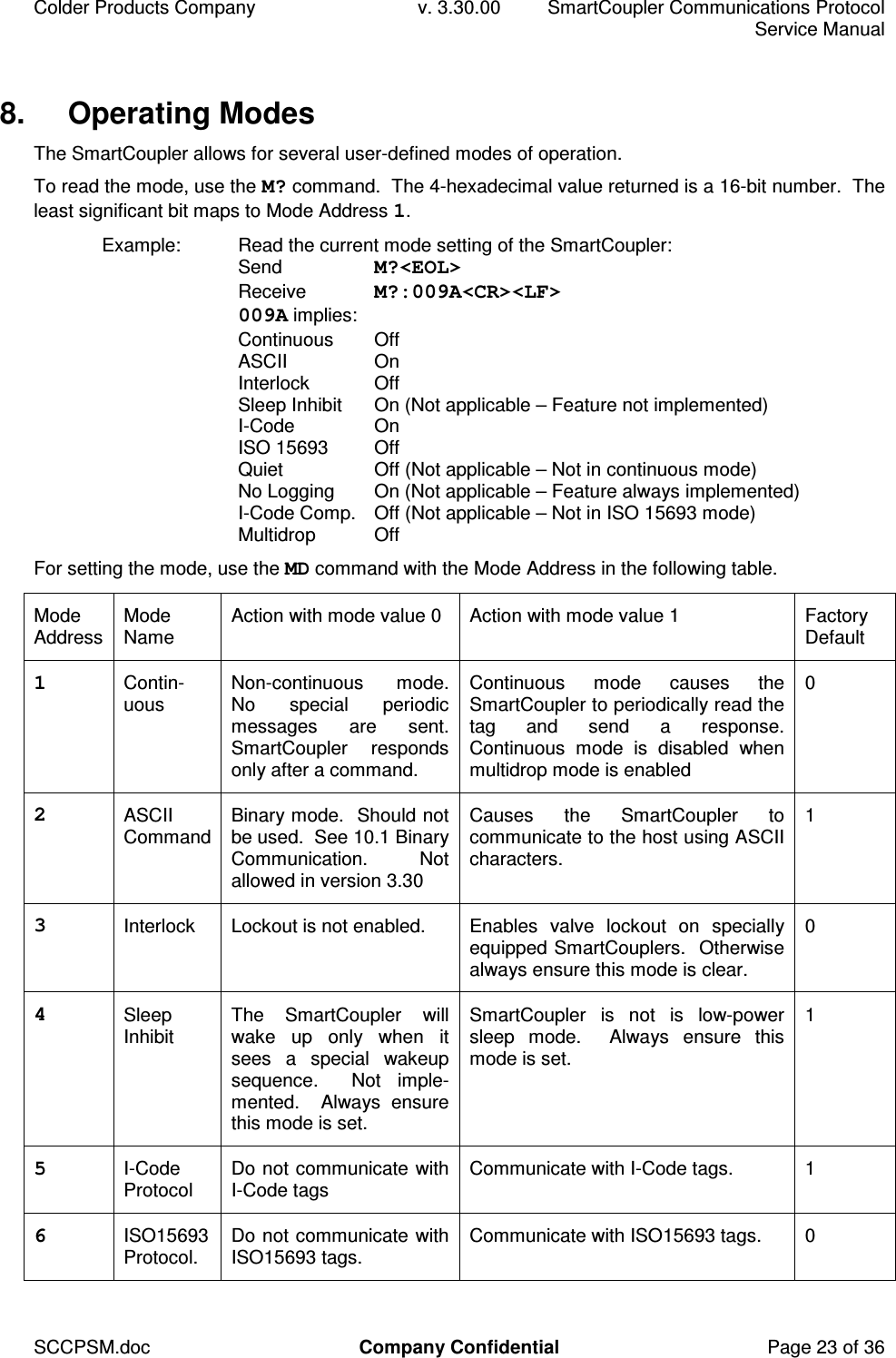
Colder Products Company  v. 3.30.00  SmartCoupler Communications Protocol     Service Manual SCCPSM.doc  Company Confidential  Page 23 of 36 8.  Operating Modes The SmartCoupler allows for several user-defined modes of operation. To read the mode, use the M? command.  The 4-hexadecimal value returned is a 16-bit number.  The least significant bit maps to Mode Address 1. Example:  Read the current mode setting of the SmartCoupler: Send  M?<EOL> Receive  M?:009A<CR><LF>  009A implies:  Continuous  Off ASCII  On Interlock  Off Sleep Inhibit  On (Not applicable – Feature not implemented) I-Code  On ISO 15693  Off Quiet  Off (Not applicable – Not in continuous mode) No Logging  On (Not applicable – Feature always implemented) I-Code Comp.  Off (Not applicable – Not in ISO 15693 mode) Multidrop  Off For setting the mode, use the MD command with the Mode Address in the following table. Mode Address Mode Name  Action with mode value 0  Action with mode value 1  Factory Default 1  Contin-uous  Non-continuous  mode. No  special  periodic messages  are  sent.  SmartCoupler  responds only after a command. Continuous  mode  causes  the SmartCoupler to periodically read the tag  and  send  a  response.  Continuous  mode  is  disabled  when multidrop mode is enabled 0 2  ASCII Command Binary mode.  Should not be used.  See 10.1 Binary Communication.    Not allowed in version 3.30 Causes  the  SmartCoupler  to communicate to the host using ASCII characters. 1 3  Interlock  Lockout is not enabled.  Enables  valve  lockout  on  specially equipped SmartCouplers.  Otherwise always ensure this mode is clear. 0 4  Sleep Inhibit  The  SmartCoupler  will wake  up  only  when  it sees  a  special  wakeup sequence.    Not  imple-mented.    Always  ensure this mode is set. SmartCoupler  is  not  is  low-power sleep  mode.    Always  ensure  this mode is set. 1 5  I-Code Protocol  Do not communicate with I-Code tags  Communicate with I-Code tags.  1 6  ISO15693 Protocol.  Do not communicate with ISO15693 tags.  Communicate with ISO15693 tags.  0
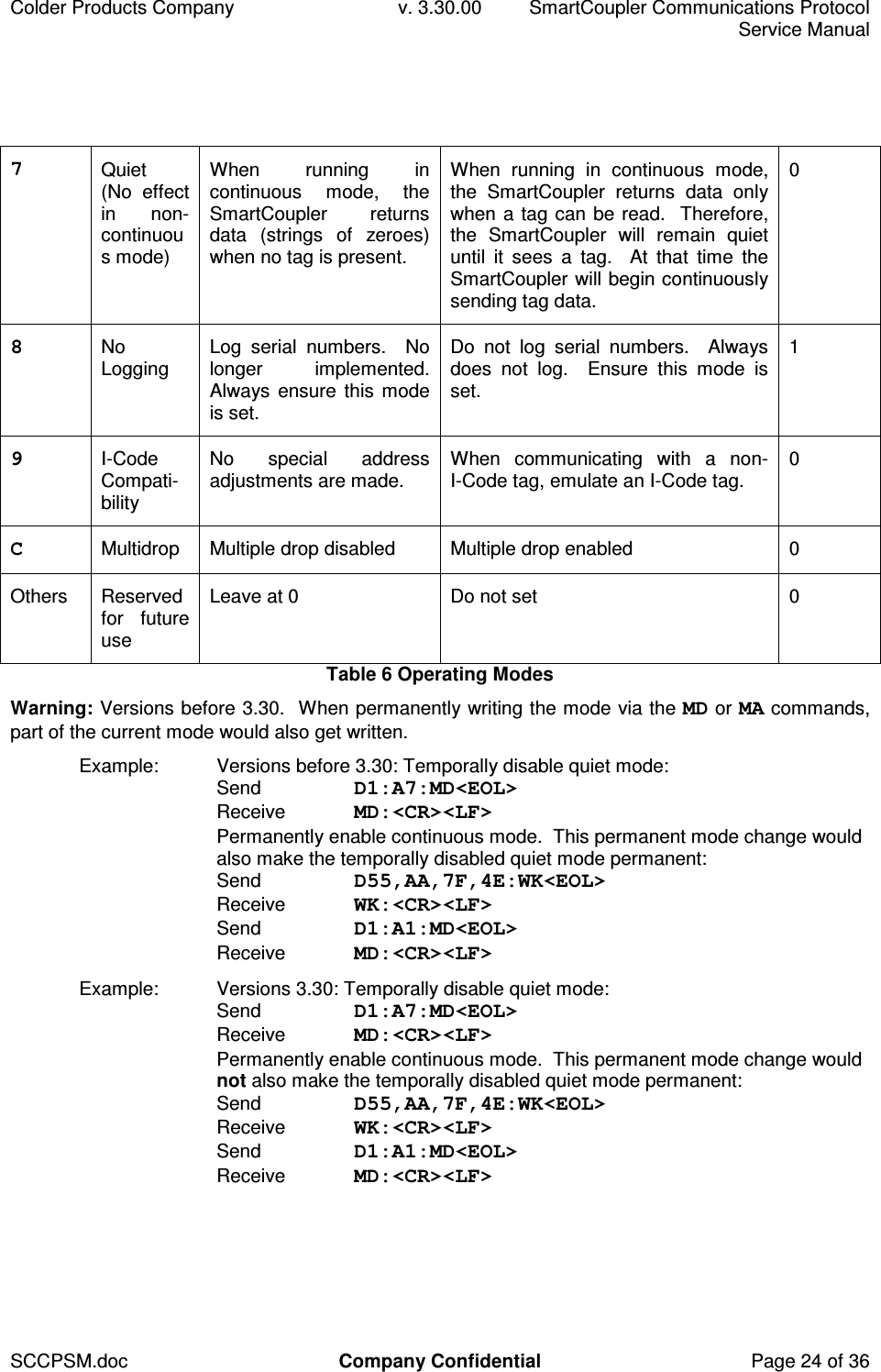
Colder Products Company  v. 3.30.00  SmartCoupler Communications Protocol     Service Manual SCCPSM.doc  Company Confidential  Page 24 of 36 7  Quiet (No  effect in  non-continuous mode) When  running  in continuous  mode,  the SmartCoupler  returns data  (strings  of  zeroes) when no tag is present. When  running  in  continuous  mode, the  SmartCoupler  returns  data  only when a tag can be read.  Therefore, the  SmartCoupler  will  remain  quiet until  it  sees  a  tag.    At  that  time  the SmartCoupler will begin continuously sending tag data. 0 8  No Logging  Log  serial  numbers.    No longer  implemented.  Always ensure this  mode is set. Do  not  log  serial  numbers.    Always does  not  log.    Ensure  this  mode  is set. 1 9  I-Code Compati-bility No  special  address adjustments are made.  When  communicating  with  a  non-I-Code tag, emulate an I-Code tag.  0 C  Multidrop   Multiple drop disabled  Multiple drop enabled  0 Others  Reserved for  future use Leave at 0  Do not set  0 Table 6 Operating Modes Warning: Versions before 3.30.  When permanently writing the mode via the MD or MA commands, part of the current mode would also get written. Example:  Versions before 3.30: Temporally disable quiet mode: Send  D1:A7:MD<EOL> Receive  MD:<CR><LF> Permanently enable continuous mode.  This permanent mode change would also make the temporally disabled quiet mode permanent: Send  D55,AA,7F,4E:WK<EOL> Receive  WK:<CR><LF> Send  D1:A1:MD<EOL> Receive  MD:<CR><LF> Example:  Versions 3.30: Temporally disable quiet mode: Send  D1:A7:MD<EOL> Receive  MD:<CR><LF> Permanently enable continuous mode.  This permanent mode change would not also make the temporally disabled quiet mode permanent: Send  D55,AA,7F,4E:WK<EOL> Receive  WK:<CR><LF> Send  D1:A1:MD<EOL> Receive  MD:<CR><LF>
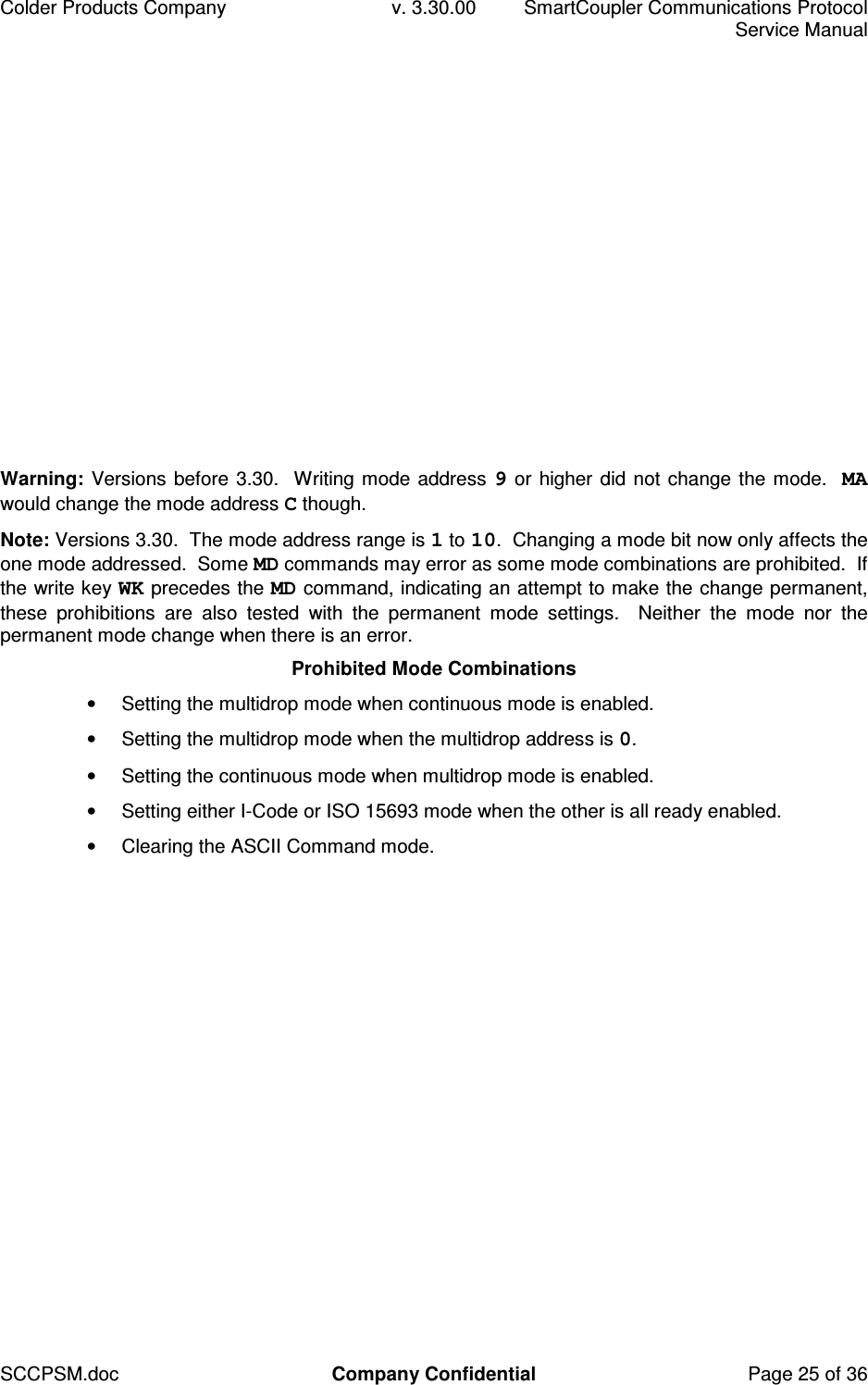
Colder Products Company  v. 3.30.00  SmartCoupler Communications Protocol     Service Manual SCCPSM.doc  Company Confidential  Page 25 of 36 Warning: Versions before 3.30.  Writing mode address 9 or higher did not change the mode.  MA would change the mode address C though. Note: Versions 3.30.  The mode address range is 1 to 10.  Changing a mode bit now only affects the one mode addressed.  Some MD commands may error as some mode combinations are prohibited.  If the write key WK precedes the MD command, indicating an attempt to make the change permanent, these  prohibitions  are  also  tested  with  the  permanent  mode  settings.    Neither  the  mode  nor  the permanent mode change when there is an error. Prohibited Mode Combinations •  Setting the multidrop mode when continuous mode is enabled. •  Setting the multidrop mode when the multidrop address is 0. •  Setting the continuous mode when multidrop mode is enabled. •  Setting either I-Code or ISO 15693 mode when the other is all ready enabled. •  Clearing the ASCII Command mode.
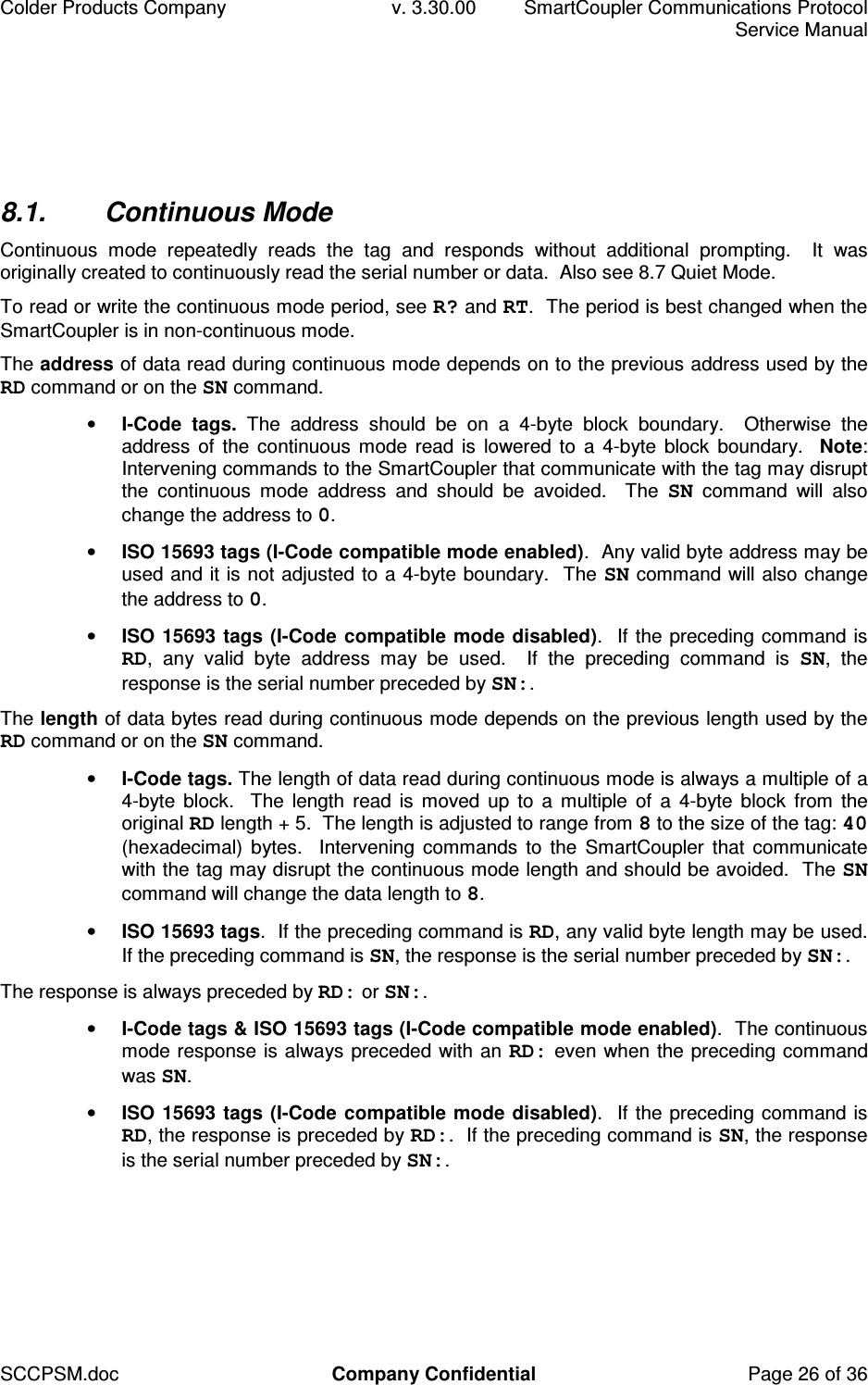
Colder Products Company  v. 3.30.00  SmartCoupler Communications Protocol     Service Manual SCCPSM.doc  Company Confidential  Page 26 of 36 8.1.  Continuous Mode Continuous  mode  repeatedly  reads  the  tag  and  responds  without  additional  prompting.    It  was originally created to continuously read the serial number or data.  Also see 8.7 Quiet Mode.  To read or write the continuous mode period, see R? and RT.  The period is best changed when the SmartCoupler is in non-continuous mode. The address of data read during continuous mode depends on to the previous address used by the RD command or on the SN command. • I-Code  tags.  The  address  should  be  on  a  4-byte  block  boundary.    Otherwise  the address of the  continuous  mode read  is lowered to  a 4-byte block boundary.   Note: Intervening commands to the SmartCoupler that communicate with the tag may disrupt the  continuous  mode  address  and  should  be  avoided.    The  SN  command  will  also change the address to 0.  • ISO 15693 tags (I-Code compatible mode enabled).  Any valid byte address may be used and it is not adjusted to a 4-byte boundary.  The SN command will also change the address to 0. • ISO 15693 tags (I-Code  compatible  mode disabled).  If the preceding command is RD,  any  valid  byte  address  may  be  used.    If  the  preceding  command  is  SN,  the response is the serial number preceded by SN:. The length of data bytes read during continuous mode depends on the previous length used by the RD command or on the SN command.  • I-Code tags. The length of data read during continuous mode is always a multiple of a 4-byte  block.    The  length  read is  moved  up to  a  multiple  of  a 4-byte block  from  the original RD length + 5.  The length is adjusted to range from 8 to the size of the tag: 40 (hexadecimal)  bytes.   Intervening  commands  to the  SmartCoupler  that  communicate with the tag may disrupt the continuous mode length and should be avoided.  The SN command will change the data length to 8. • ISO 15693 tags.  If the preceding command is RD, any valid byte length may be used.  If the preceding command is SN, the response is the serial number preceded by SN:. The response is always preceded by RD: or SN:.   • I-Code tags & ISO 15693 tags (I-Code compatible mode enabled).  The continuous mode response is always preceded with an RD: even when the preceding command was SN. • ISO 15693 tags (I-Code  compatible  mode disabled).  If the preceding command is RD, the response is preceded by RD:.  If the preceding command is SN, the response is the serial number preceded by SN:.
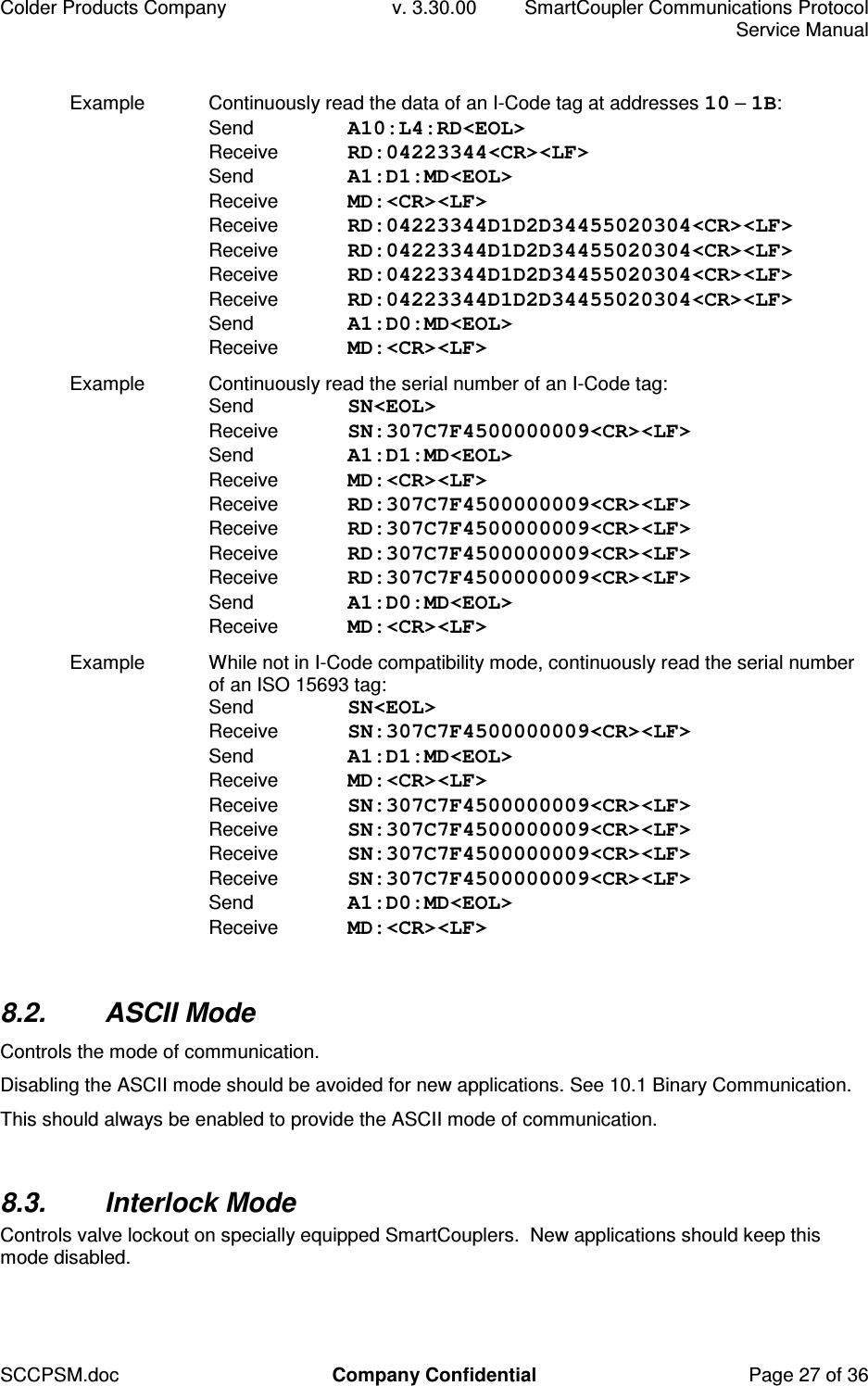
Colder Products Company  v. 3.30.00  SmartCoupler Communications Protocol     Service Manual SCCPSM.doc  Company Confidential  Page 27 of 36 Example  Continuously read the data of an I-Code tag at addresses 10 – 1B: Send  A10:L4:RD<EOL> Receive  RD:04223344<CR><LF>  Send  A1:D1:MD<EOL> Receive  MD:<CR><LF> Receive  RD:04223344D1D2D34455020304<CR><LF> Receive  RD:04223344D1D2D34455020304<CR><LF> Receive  RD:04223344D1D2D34455020304<CR><LF> Receive  RD:04223344D1D2D34455020304<CR><LF> Send  A1:D0:MD<EOL> Receive  MD:<CR><LF> Example  Continuously read the serial number of an I-Code tag: Send  SN<EOL> Receive  SN:307C7F4500000009<CR><LF>  Send  A1:D1:MD<EOL> Receive  MD:<CR><LF> Receive  RD:307C7F4500000009<CR><LF> Receive  RD:307C7F4500000009<CR><LF> Receive  RD:307C7F4500000009<CR><LF> Receive  RD:307C7F4500000009<CR><LF> Send  A1:D0:MD<EOL> Receive  MD:<CR><LF> Example  While not in I-Code compatibility mode, continuously read the serial number of an ISO 15693 tag: Send  SN<EOL> Receive  SN:307C7F4500000009<CR><LF>  Send  A1:D1:MD<EOL> Receive  MD:<CR><LF> Receive  SN:307C7F4500000009<CR><LF> Receive  SN:307C7F4500000009<CR><LF> Receive  SN:307C7F4500000009<CR><LF> Receive  SN:307C7F4500000009<CR><LF> Send  A1:D0:MD<EOL> Receive  MD:<CR><LF>  8.2.  ASCII Mode Controls the mode of communication. Disabling the ASCII mode should be avoided for new applications. See 10.1 Binary Communication. This should always be enabled to provide the ASCII mode of communication.  8.3.  Interlock Mode Controls valve lockout on specially equipped SmartCouplers.  New applications should keep this mode disabled.
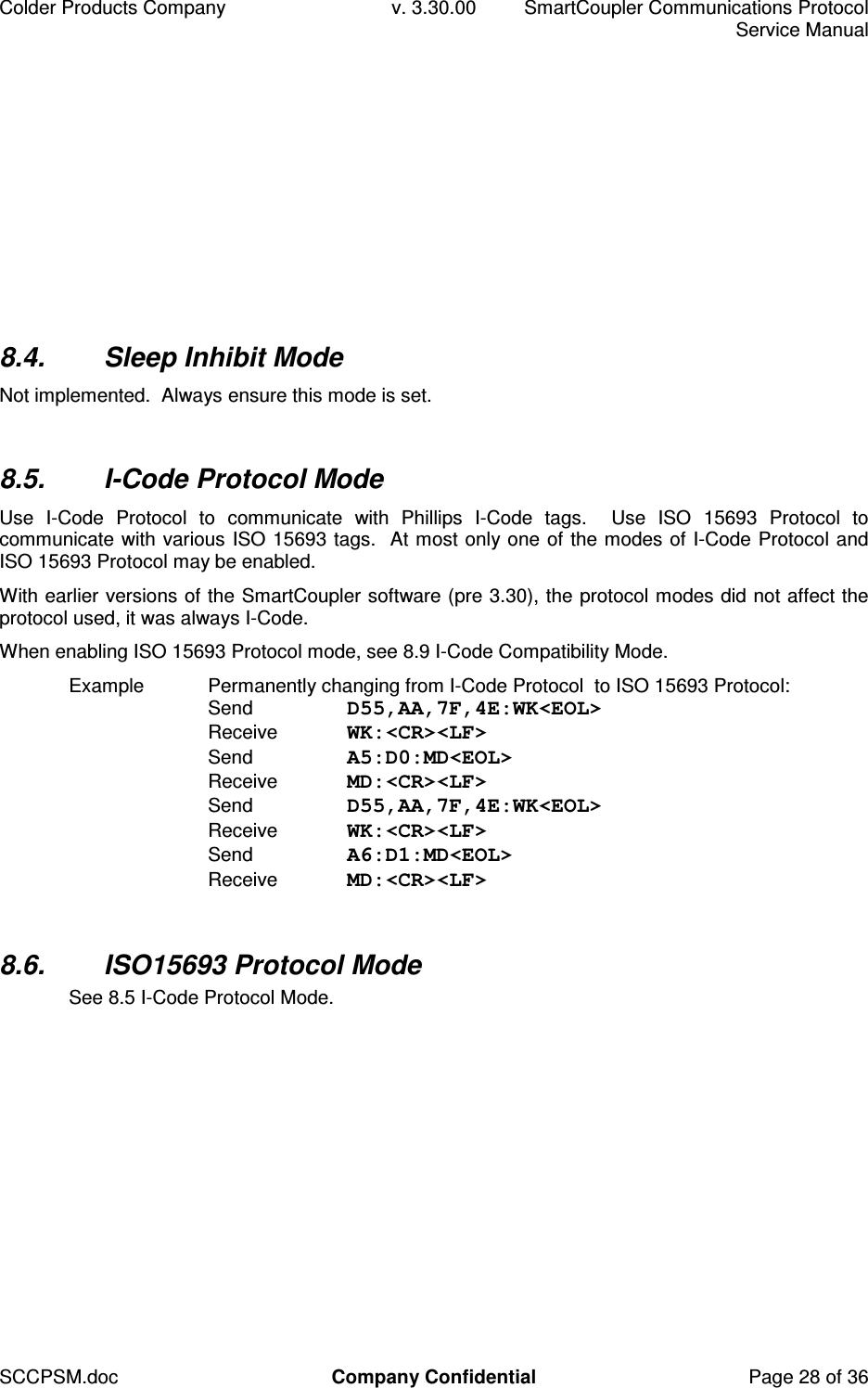
Colder Products Company  v. 3.30.00  SmartCoupler Communications Protocol     Service Manual SCCPSM.doc  Company Confidential  Page 28 of 36 8.4.  Sleep Inhibit Mode Not implemented.  Always ensure this mode is set.  8.5.  I-Code Protocol Mode Use  I-Code  Protocol  to  communicate  with  Phillips  I-Code  tags.    Use  ISO  15693  Protocol  to communicate with various ISO 15693 tags.  At most only one of the modes of I-Code Protocol and ISO 15693 Protocol may be enabled. With earlier versions of the SmartCoupler software (pre 3.30), the protocol modes did not affect the protocol used, it was always I-Code. When enabling ISO 15693 Protocol mode, see 8.9 I-Code Compatibility Mode. Example  Permanently changing from I-Code Protocol  to ISO 15693 Protocol: Send  D55,AA,7F,4E:WK<EOL> Receive  WK:<CR><LF> Send  A5:D0:MD<EOL> Receive  MD:<CR><LF> Send  D55,AA,7F,4E:WK<EOL> Receive  WK:<CR><LF> Send  A6:D1:MD<EOL> Receive  MD:<CR><LF>  8.6.  ISO15693 Protocol Mode See 8.5 I-Code Protocol Mode.
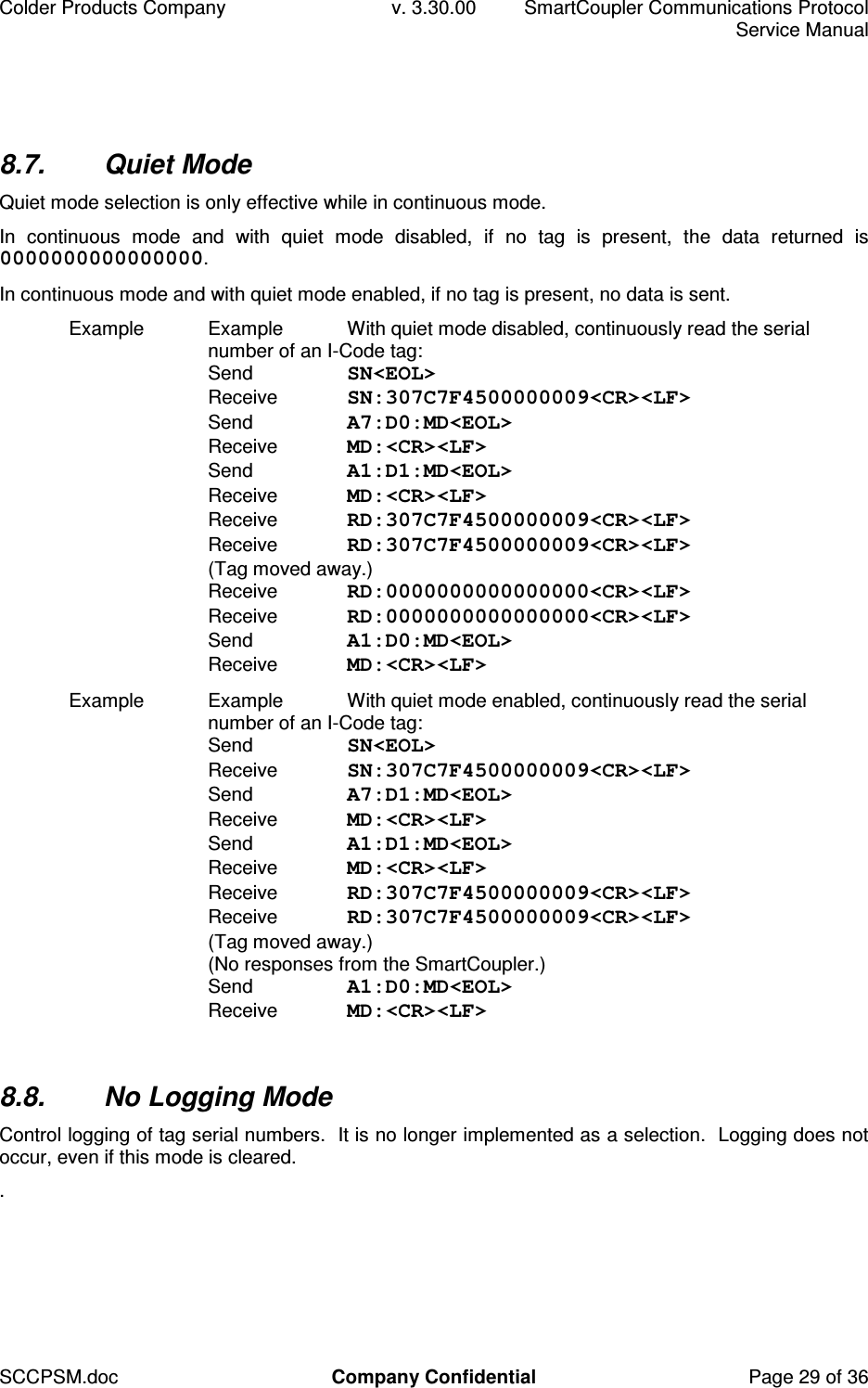
Colder Products Company  v. 3.30.00  SmartCoupler Communications Protocol     Service Manual SCCPSM.doc  Company Confidential  Page 29 of 36 8.7.  Quiet Mode Quiet mode selection is only effective while in continuous mode. In  continuous  mode  and  with  quiet  mode  disabled,  if  no  tag  is  present,  the  data  returned  is 0000000000000000. In continuous mode and with quiet mode enabled, if no tag is present, no data is sent. Example  Example  With quiet mode disabled, continuously read the serial number of an I-Code tag: Send  SN<EOL> Receive  SN:307C7F4500000009<CR><LF>  Send  A7:D0:MD<EOL> Receive  MD:<CR><LF> Send  A1:D1:MD<EOL> Receive  MD:<CR><LF> Receive  RD:307C7F4500000009<CR><LF> Receive  RD:307C7F4500000009<CR><LF> (Tag moved away.) Receive  RD:0000000000000000<CR><LF> Receive  RD:0000000000000000<CR><LF> Send  A1:D0:MD<EOL> Receive  MD:<CR><LF> Example  Example  With quiet mode enabled, continuously read the serial number of an I-Code tag: Send  SN<EOL> Receive  SN:307C7F4500000009<CR><LF>  Send  A7:D1:MD<EOL> Receive  MD:<CR><LF> Send  A1:D1:MD<EOL> Receive  MD:<CR><LF> Receive  RD:307C7F4500000009<CR><LF> Receive  RD:307C7F4500000009<CR><LF> (Tag moved away.) (No responses from the SmartCoupler.) Send  A1:D0:MD<EOL> Receive  MD:<CR><LF>  8.8.  No Logging Mode Control logging of tag serial numbers.  It is no longer implemented as a selection.  Logging does not occur, even if this mode is cleared. .
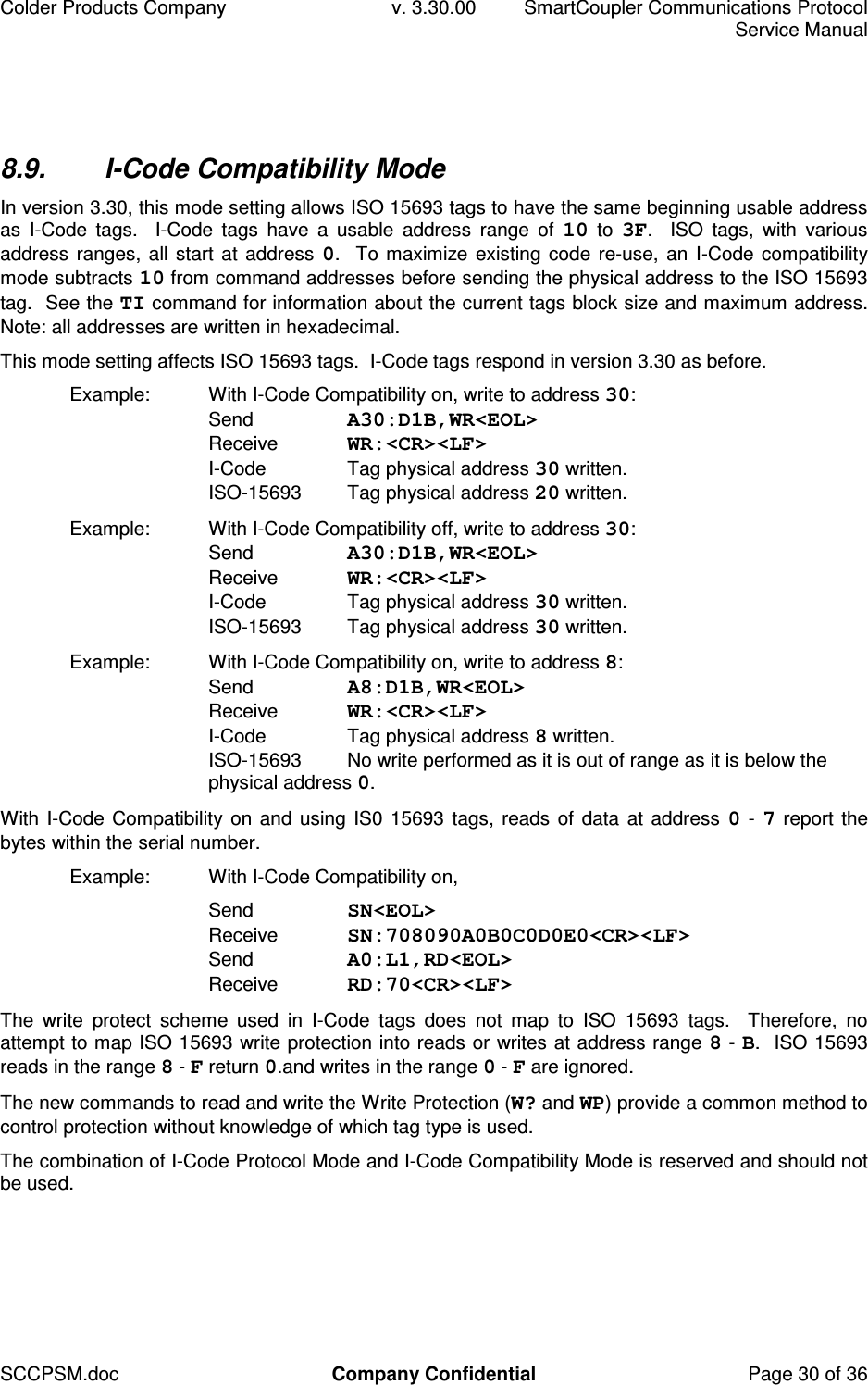
Colder Products Company  v. 3.30.00  SmartCoupler Communications Protocol     Service Manual SCCPSM.doc  Company Confidential  Page 30 of 36 8.9.  I-Code Compatibility Mode In version 3.30, this mode setting allows ISO 15693 tags to have the same beginning usable address as  I-Code  tags.    I-Code  tags  have  a  usable  address  range  of  10  to  3F.    ISO  tags,  with  various address ranges, all start at address 0.  To maximize existing code re-use,  an I-Code compatibility mode subtracts 10 from command addresses before sending the physical address to the ISO 15693 tag.  See the TI command for information about the current tags block size and maximum address.  Note: all addresses are written in hexadecimal. This mode setting affects ISO 15693 tags.  I-Code tags respond in version 3.30 as before. Example:  With I-Code Compatibility on, write to address 30: Send  A30:D1B,WR<EOL> Receive  WR:<CR><LF> I-Code  Tag physical address 30 written. ISO-15693  Tag physical address 20 written. Example:  With I-Code Compatibility off, write to address 30: Send  A30:D1B,WR<EOL> Receive  WR:<CR><LF> I-Code  Tag physical address 30 written. ISO-15693  Tag physical address 30 written. Example:  With I-Code Compatibility on, write to address 8: Send  A8:D1B,WR<EOL> Receive  WR:<CR><LF> I-Code  Tag physical address 8 written. ISO-15693  No write performed as it is out of range as it is below the physical address 0. With I-Code Compatibility on and using IS0 15693 tags, reads of data at address 0 - 7 report the bytes within the serial number. Example:  With I-Code Compatibility on,    Send  SN<EOL> Receive  SN:708090A0B0C0D0E0<CR><LF> Send  A0:L1,RD<EOL> Receive  RD:70<CR><LF> The  write  protect  scheme  used  in  I-Code  tags  does  not  map  to  ISO  15693  tags.    Therefore,  no attempt to map ISO 15693 write protection into reads or writes at address range 8 - B.  ISO 15693 reads in the range 8 - F return 0.and writes in the range 0 - F are ignored. The new commands to read and write the Write Protection (W? and WP) provide a common method to control protection without knowledge of which tag type is used. The combination of I-Code Protocol Mode and I-Code Compatibility Mode is reserved and should not be used.
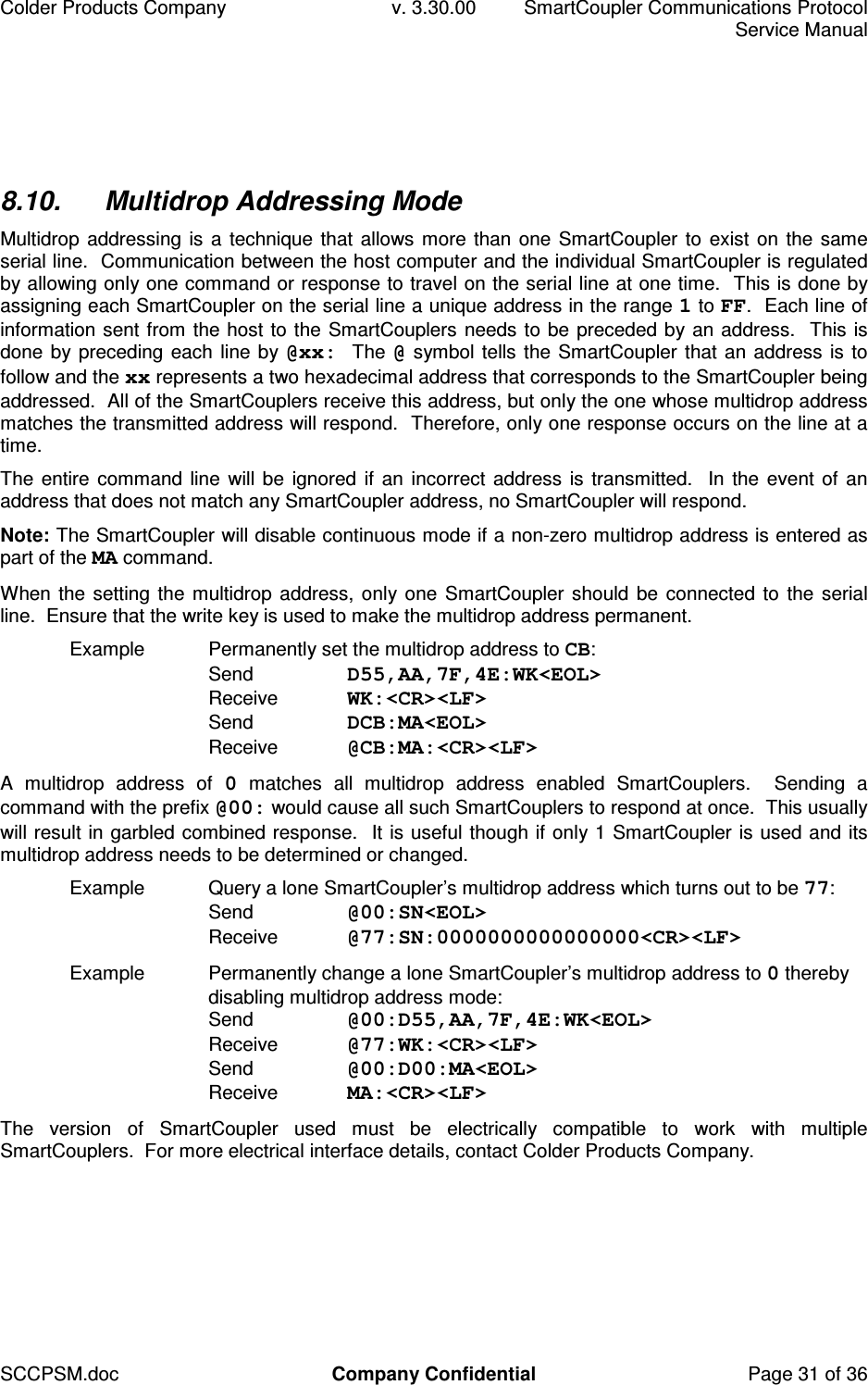
Colder Products Company  v. 3.30.00  SmartCoupler Communications Protocol     Service Manual SCCPSM.doc  Company Confidential  Page 31 of 36 8.10.  Multidrop Addressing Mode Multidrop addressing is a technique that allows more than one SmartCoupler to exist on the same serial line.  Communication between the host computer and the individual SmartCoupler is regulated by allowing only one command or response to travel on the serial line at one time.  This is done by assigning each SmartCoupler on the serial line a unique address in the range 1 to FF.  Each line of information sent from the host to the SmartCouplers needs to be preceded by an address.  This is done by preceding each line by @xx:  The @ symbol tells the SmartCoupler that an address is to follow and the xx represents a two hexadecimal address that corresponds to the SmartCoupler being addressed.  All of the SmartCouplers receive this address, but only the one whose multidrop address matches the transmitted address will respond.  Therefore, only one response occurs on the line at a time. The entire command line will be ignored if an incorrect address is transmitted.  In the event of an address that does not match any SmartCoupler address, no SmartCoupler will respond.   Note: The SmartCoupler will disable continuous mode if a non-zero multidrop address is entered as part of the MA command. When the setting the multidrop address,  only one  SmartCoupler should be connected to the serial line.  Ensure that the write key is used to make the multidrop address permanent. Example  Permanently set the multidrop address to CB: Send  D55,AA,7F,4E:WK<EOL> Receive  WK:<CR><LF>  Send  DCB:MA<EOL> Receive  @CB:MA:<CR><LF> A  multidrop  address  of  0  matches  all  multidrop  address  enabled  SmartCouplers.    Sending  a command with the prefix @00: would cause all such SmartCouplers to respond at once.  This usually will result in garbled combined response.  It is useful though if only 1 SmartCoupler is used and its multidrop address needs to be determined or changed. Example  Query a lone SmartCoupler’s multidrop address which turns out to be 77: Send  @00:SN<EOL> Receive  @77:SN:0000000000000000<CR><LF>  Example  Permanently change a lone SmartCoupler’s multidrop address to 0 thereby disabling multidrop address mode:  Send  @00:D55,AA,7F,4E:WK<EOL> Receive  @77:WK:<CR><LF> Send  @00:D00:MA<EOL> Receive  MA:<CR><LF>  The  version  of  SmartCoupler  used  must  be  electrically  compatible  to  work  with  multiple SmartCouplers.  For more electrical interface details, contact Colder Products Company.
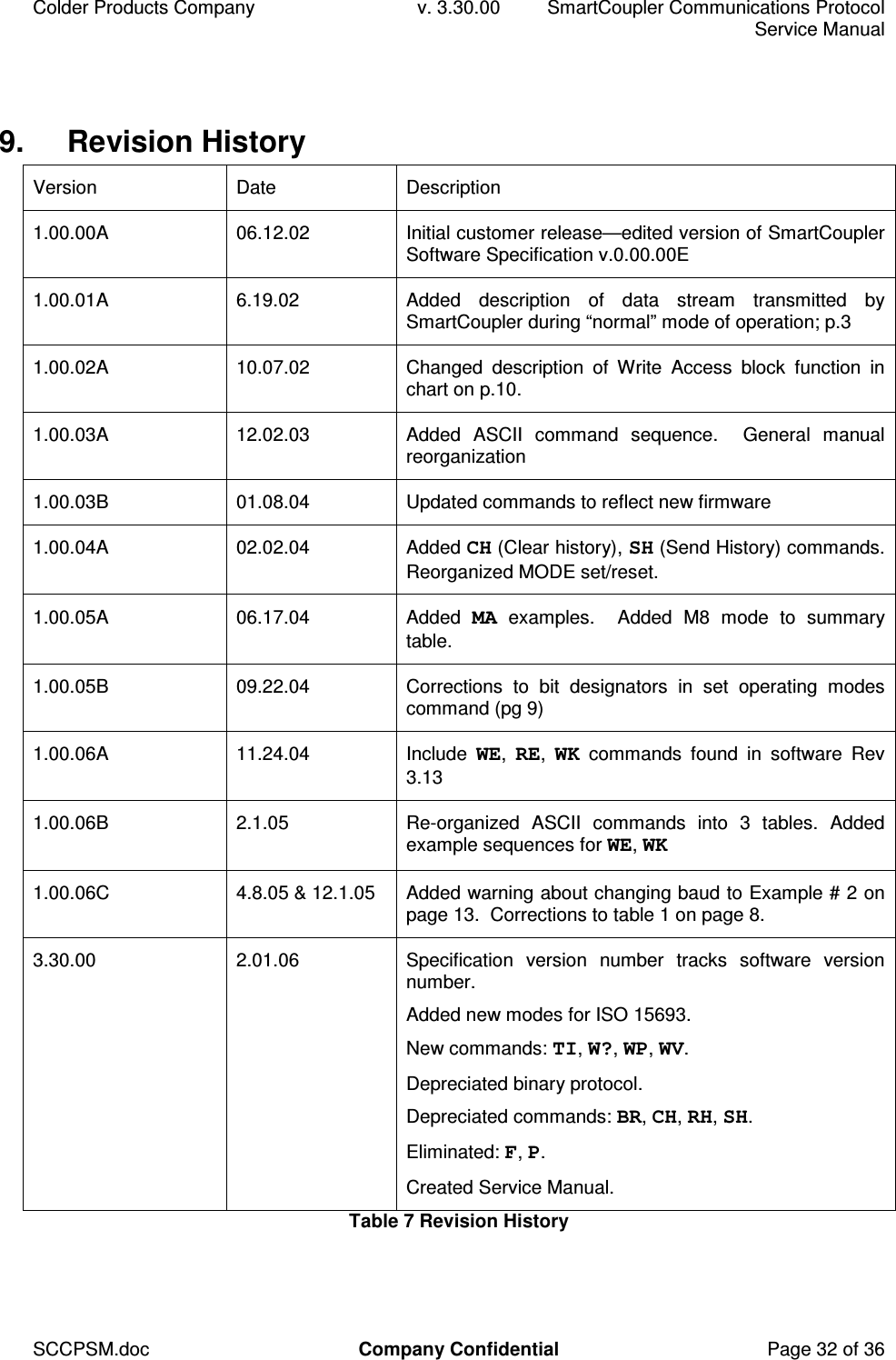
Colder Products Company  v. 3.30.00  SmartCoupler Communications Protocol     Service Manual SCCPSM.doc  Company Confidential  Page 32 of 36 9.  Revision History Version  Date  Description 1.00.00A  06.12.02  Initial customer release—edited version of SmartCoupler Software Specification v.0.00.00E 1.00.01A  6.19.02  Added  description  of  data  stream  transmitted  by SmartCoupler during “normal” mode of operation; p.3 1.00.02A  10.07.02  Changed  description  of  Write  Access  block  function  in chart on p.10. 1.00.03A  12.02.03  Added  ASCII  command  sequence.    General  manual reorganization 1.00.03B  01.08.04  Updated commands to reflect new firmware 1.00.04A  02.02.04  Added CH (Clear history), SH (Send History) commands.  Reorganized MODE set/reset. 1.00.05A  06.17.04  Added  MA  examples.    Added  M8  mode  to  summary table. 1.00.05B  09.22.04  Corrections  to  bit  designators  in  set  operating  modes command (pg 9) 1.00.06A  11.24.04  Include  WE,  RE,  WK  commands  found  in  software  Rev 3.13 1.00.06B  2.1.05  Re-organized  ASCII  commands  into  3  tables.  Added example sequences for WE, WK 1.00.06C  4.8.05 & 12.1.05  Added warning about changing baud to Example # 2 on page 13.  Corrections to table 1 on page 8. 3.30.00  2.01.06  Specification  version  number  tracks  software  version number. Added new modes for ISO 15693. New commands: TI, W?, WP, WV. Depreciated binary protocol. Depreciated commands: BR, CH, RH, SH. Eliminated: F, P. Created Service Manual. Table 7 Revision History
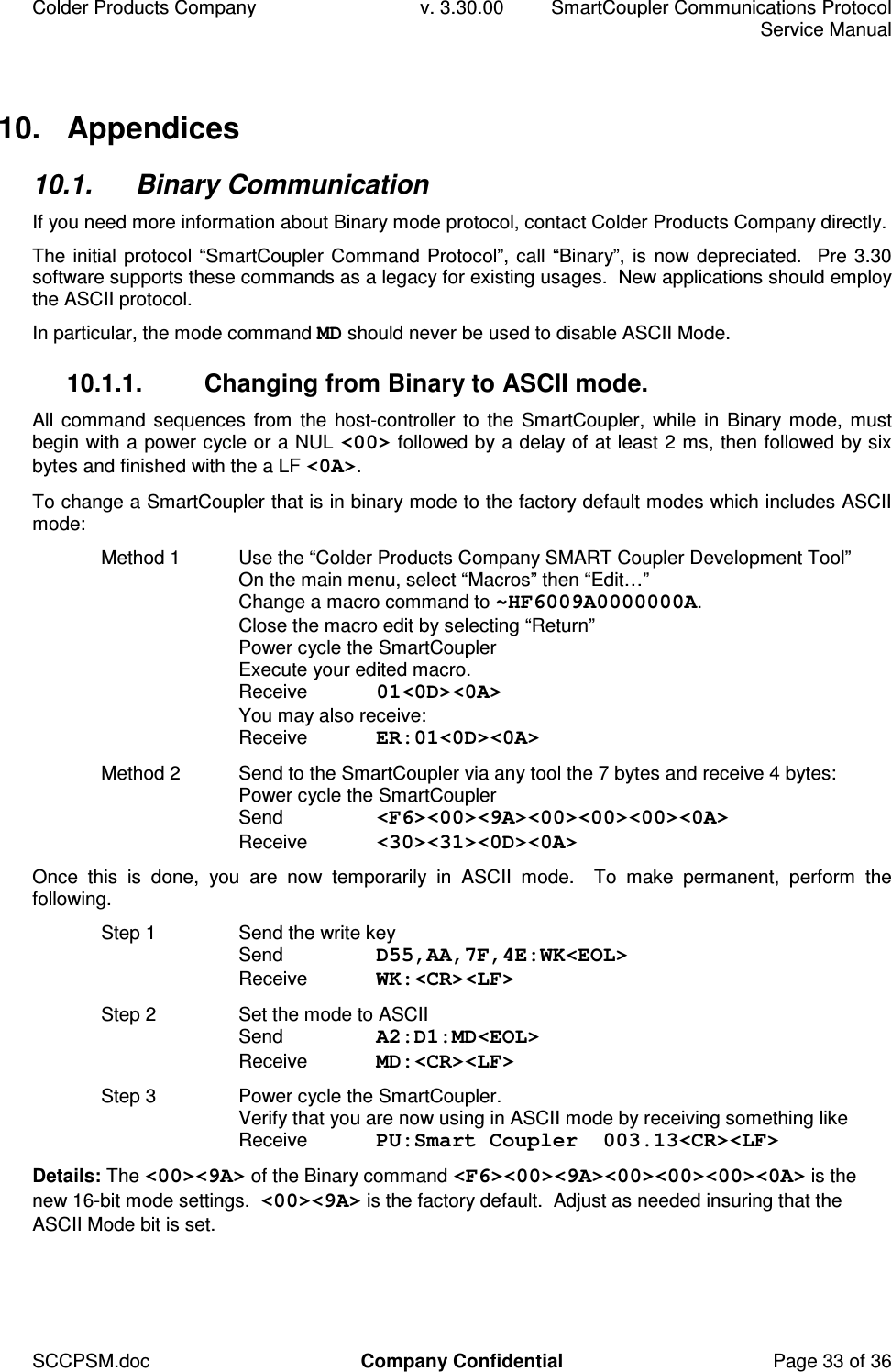
Colder Products Company  v. 3.30.00  SmartCoupler Communications Protocol     Service Manual SCCPSM.doc  Company Confidential  Page 33 of 36 10.  Appendices 10.1.  Binary Communication If you need more information about Binary mode protocol, contact Colder Products Company directly. The initial protocol “SmartCoupler Command Protocol”, call “Binary”, is now depreciated.  Pre 3.30 software supports these commands as a legacy for existing usages.  New applications should employ the ASCII protocol.  In particular, the mode command MD should never be used to disable ASCII Mode. 10.1.1.  Changing from Binary to ASCII mode. All command sequences  from  the host-controller to  the SmartCoupler,  while in Binary mode, must begin with a power cycle or a NUL <00> followed by a delay of at least 2 ms, then followed by six bytes and finished with the a LF <0A>. To change a SmartCoupler that is in binary mode to the factory default modes which includes ASCII mode: Method 1  Use the “Colder Products Company SMART Coupler Development Tool” On the main menu, select “Macros” then “Edit…” Change a macro command to ~HF6009A0000000A. Close the macro edit by selecting “Return” Power cycle the SmartCoupler Execute your edited macro. Receive  01<0D><0A> You may also receive: Receive  ER:01<0D><0A> Method 2  Send to the SmartCoupler via any tool the 7 bytes and receive 4 bytes: Power cycle the SmartCoupler Send  <F6><00><9A><00><00><00><0A> Receive  <30><31><0D><0A> Once  this  is  done,  you  are  now  temporarily  in  ASCII  mode.    To  make  permanent,  perform  the following. Step 1  Send the write key Send  D55,AA,7F,4E:WK<EOL> Receive  WK:<CR><LF> Step 2  Set the mode to ASCII Send  A2:D1:MD<EOL> Receive  MD:<CR><LF> Step 3  Power cycle the SmartCoupler. Verify that you are now using in ASCII mode by receiving something like Receive  PU:Smart Coupler  003.13<CR><LF> Details: The <00><9A> of the Binary command <F6><00><9A><00><00><00><0A> is the new 16-bit mode settings.  <00><9A> is the factory default.  Adjust as needed insuring that the ASCII Mode bit is set.
Colder Products Company  v. 3.30.00  SmartCoupler Communications Protocol     Service Manual SCCPSM.doc  Company Confidential  Page 34 of 36 10.2.  Changing Non-volatile Data Configuration data is stored in volatile memory (RAM) and non-volatile memory: communication rate BR, multidrop address MA, continuous read period RT, and operating modes MD, etc.  To allow for maximum flexibility, the application can specify whether the changes to parameters are temporarily stored in RAM, or also permanently stored in non-volatile memory by preceding the command with a write key WK. Non-volatile data writes only occur if preceded by the write key. To protect against spurious mode changes, the non-volatile memory data is normally locked.  It is unlocked, for the next command only, by sending the write key WK command: Write Key  Send  D55,AA,7F,4E:WK<EOL> Receive  WK:<CR><LF>  This is the write key for the SmartCoupler.  Once this command is sent, the non-volatile memory can be written.  The key is erased after the next operation the SmartCoupler performs.  The memory write command  has  to  follow  the  write  key  command  to  change  non-volatile  memory.    Additionally,  the SmartCoupler  must  be  in  ASCII  mode  and  should  be  in  non-continuous  mode.    If  an  erroneous command  is  sent  after  the  write  key,  or  if  the  SmartCoupler  performs  a  read  (because  it  is  in continuous mode) no change will occur to the non-volatile memory. Commands  that  write  the  configuration  data  may  be  immediately  preceded  with  the  write  key command to also cause the permanent storage in non-volatile memory as well as RAM. Example:  Temporarily set continuous read rate to once per 6.4 seconds. Send  D40:RT<EOL> Receive  RT:<CR><LF> Example:  Permanently set continuous read rate to once per 6.4 seconds.  Send  D55,AA,7F,4E:WK<EOL> Receive  WK:<CR><LF>  Send  D40:RT<EOL> Receive  RT:<CR><LF> Commands that write non-volatile data directly only write if preceded by the write key. Example:  Write the non-volatile memory of the SmartCoupler address F5 and F6: Send  D55,AA,7F,4E:WK<EOL> Receive  WK:<CR><LF> Send  AF5:D009A:WE<EOL> Receive  WE:<CR><LF> The SmartCoupler reads the configuration data stored in non-volatile memory and loads it into RAM every time  it powers up.   The SmartCoupler simply  reloads  from  non-volatile  memory if  there is a power interruption.  This ensures solid backup of the user’s desired configuration.
Colder Products Company  v. 3.30.00  SmartCoupler Communications Protocol     Service Manual SCCPSM.doc  Company Confidential  Page 35 of 36 10.3.  Block Size and Address Range The TI command provides information about the current tags block size and maximum address. 10.3.1.  Block size  Size:  Block size refers to the minimum number of bytes that can be write protected at once.  Block size is usually a power of 2.  Write protection is always block aligned. I-Code  The block size is 4. ISO 15693  The block size range is 1 to 32 bytes.  4 bytes is a common block size. 10.3.2.  Address Range The usable address range is limited by the SmartCoupler and by the current tag.  Avoid addresses outside the range of the both the SmartCoupler and the current tag. Pre V3.30  The SmartCoupler works with a 6-bit address range from 0 to 3F. V3.30+  The SmartCoupler works with a 16-bit address range from 0 to FFFF. I-Code tags  The maximum address is 3F.  The minimum address is 0, although general application memory begins at 10. ISO 15693 tags The minimum address is 0.  The maximum address, per the ISO specification, can range from 1 to 1FFF.  See the TI command.  The maximum address range values of 7, 1F and FF have been reported in existing tags.  With the I-Code compatibility mode setting enabled, the address range will be 10 bytes higher for use with the SmartCoupler.  See 8.9 I-Code Compatibility Mode.  10.4.  Write Protection A significant feature of RFID tags is the ability to selectively prevent written data from being changed.  Data  on  the  tag  is  normally  readable  and  writable.    Data,  a  block  at  a  time,  can  become  write protected via the WP command.  Once data is write protected, it can not become write enabled. The I-Code and ISO 15693 tags present different methods to control write protection.  I-Code tags memory map the write protection bits as part of the data space.  ISO tags control write protection in a separate addressable space from data.  The WP and W? allow a common command that work with either tag type. I-Code  tags  write  protection  status  is  at  data  addresses  8 - B.  A WP command to  an  I-Code  tag adjusts  the  proper  bits  at  these  addresses.    Directly  reading  and  writing  these  addresses  is  also permitted but not recommended for new applications. I-Code tags also allow for write protecting the write protect bits, thereby disallowing any changes to the write protection.  There is no equivalent ability with ISO 15693 tags.
Colder Products Company  v. 3.30.00  SmartCoupler Communications Protocol     Service Manual SCCPSM.doc  Company Confidential  Page 36 of 36 10.5.  Writing Data to the Tag Writes  to  a  tag  can  be  on  any  byte  address  and  any  length,  regardless  of  the  tag’s  block  size.  Optimal performance does occur, though, if the byte address and byte length are block size aligned. The  Write  Data  to  Tag  command  simply  attempts  to  write  data  to  a  tag.    Failed  communication between  the  application  and  the  SmartCoupler  may  result  in  an  error  or  timeout,  but  a  failed communication between the SmartCoupler and tag will not report an error with this command.  The WR: response simple means a write to the tag was attempted.  The Write and Verify Data to Tag commands combines a write with subsequent read and compare of the  data.    This  command  is  designed  to  employ  any  tag  protocol  features  that  help  provide  a verification that the data that was intended to be written was written. Data is written to the tag.  After the write, the data is read back.  If the data read matches the data written, this command returns a WV.  All other results return failure.  See ER A data compare mis-match returns failure.  If the communication to the tag is loss/garbled during the write or subsequent read, a failure is reported. Note:  A  return  of  a  failure  does  not  imply  the  write  portion  must  have  failed.    It  implies  that  a verification of success did not happen.  E.g.  The write could have worked, but communication to the tag was lost when trying to read the data back. Note:  If  data  is  written  to  a  write  protected  block,  the  write  itself  fails.    This  typically  results  in  a subsequent read and compare mis-match.  But if the data that was attempted to be written happened to be the same as the write protected data, the subsequent read of this write protected data would compare and report success.  10.6.  Most and Least Significant Bits and Bytes The Least Significant Bit (LSBit) and the Least Significant Byte (LSByte) are the lowest indexed or addressed values.  The LSBit of hexadecimal 1-byte data AA is 0.  The LSByte of the serial number in I-Code tags is at address 0.

Navigation menu