Canon F 789SGA (EXP Calcualtion Example) Front_P User Manual To The E7013ba5 C207 482d Bf7e C98ed719f6a3
User Manual: Canon F-789SGA to the manual
Open the PDF directly: View PDF  .
.
Page Count: 40

F-789SGA
Calculation Examples
Beispiele für Berechnungen
Exemples de calcul
Ejemplos de cálculo
Esempi di calcolo
Rekenvoorbeelden
Regneeksempler
Laskentaesimerkkejä
Beräkningsexempel
Exemplos de cálculos
αραδείγματα υπολογισμών
ENGLISH
DEUTSCH
FRENCH
ESPAЙOL
ITALIANO
NEDERLANDS
DANSK
SUOMI
SVENSKA
PORTUGUÊS
ΕΛΛΗΝΙΚΑ
E-IM-2724
2
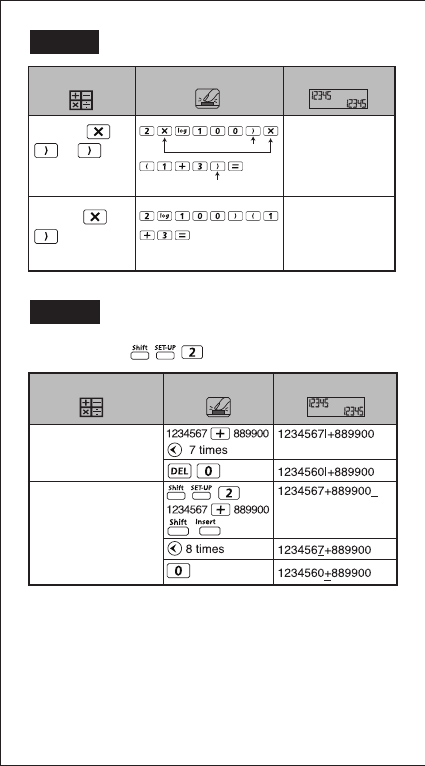
EX #1
Including *1,
*2, *3
Omitting *1,
*3
2xlog(100) x (1+3)
16
*2
*1
2log(100)(1+3)
16
3
Key In Operation Display
Example
Method 1:
Insert mode
Mode Setting
Display (input Line only)
Key In operation
Method 2:
Overwrite mode
EX #2
LINE MODE:
3
Insert mode 6times
1234567+|889900
1234567+2|889900
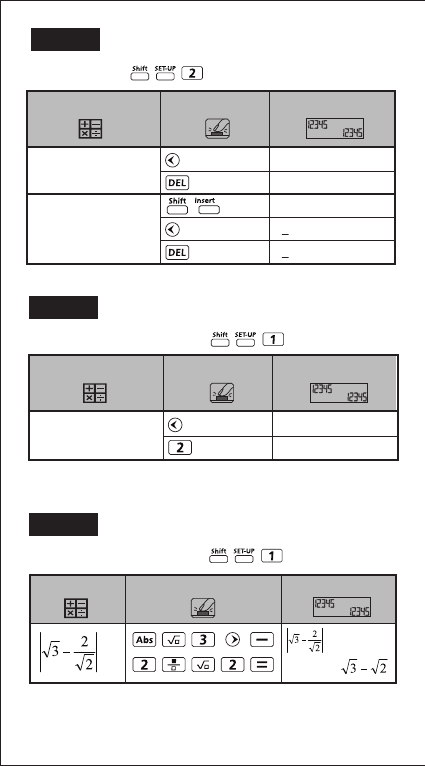
EX #3
Method 1:
Insert mode
Method 2:
Overwrite mode
12times
13times
12|34567+889900
1|34567+889900
1234567+889900_
1234567+889900
134567+889900
Mode Setting Display Key In operation
LINE MODE:
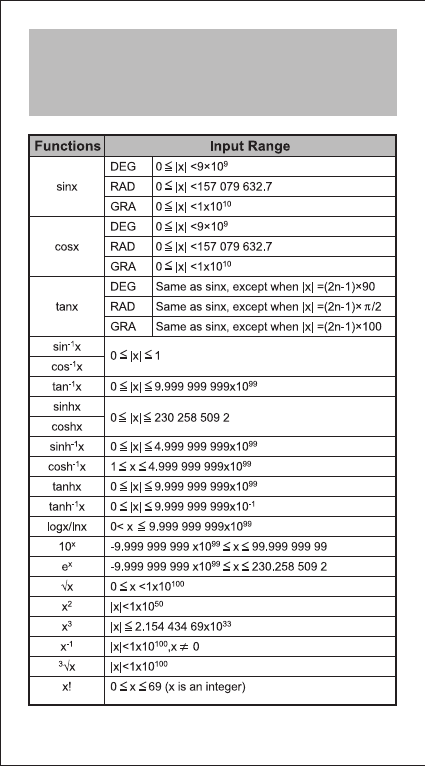
Mode Setting DisplayKey In operation
MATHEMATICS MODE:
EX #4
DisplayKey in operationExample
MATHEMATICS MODE:
EX #5

4
Number of Digits for
Internal Calculation
Precision*
Calculation Range
18 digits
±1 at the 10th digit for a single calculation.
±1 at the least significant for exponential
display
±1 × 10–99 to ±9.999999999 × 1099 or 0
Anzahl Ziffern für die
interne Berechnung
Präzision*
Rechenbereich
18 Zeichen beinhalten
±1 an der 10. Stelle bei einer einzelnen
Berechnung.
±1 an der letzten signifikanten Stelle bei
der Exponentialdarstellung
±1 × 10–99 bis ±9.999999999 × 1099 oder 0
Nombre de chiffres
pour les calculs
internes
Précision*
Plage de calcul
18 chiffres
±1 sur le dixième chiffre pour un calcul
unique.
±1 sur le demier chiffre significatif pour
l'affichage exponentiel.
±1 × 10–99 à ±9.999999999 × 1099 ou 0
Número de dígitos
del cálculo interno
Precisión*
Intervalo de cálculo
18 dígitos
±1 en el décimo digito (en cálculos
simples)
±1 en el último digito significativo (en la
visualización de exponentes).
±1 × 10–99 to ±9.999999999 × 1099 o 0
Numero di cifre del
calcolo interno
Precisione*
Intervallo di calcolo
18 cifre
±1 alla 10a cifra per un unico calcolo.
±1 all'ultima cifra significativa in caso di
visualizzazione esponenziale.
±1 × 10–99 a ±9.999999999 × 1099 o 0
Calculation Precision, Input Range /
Berechnung Präzision, Eingangsbereich /
Calcul de précision, plages des valeurs d'entrée /
Cálculo de precisión, Rango de entrada / Calcolo di
precisione, Rango de entrada / Rekenprecisie,
Invoerberelk / Beregning Precision, Inputområde /
Laskelma Precision, Syöttöalue / Beräkning Precision,
Inmatningsområde / Cálculo de Precisão, Limite de
entrada / Υπολογισμός ακριβείας, Περιοχή εισαγωγής
EX #6

5
Aantal cijfers van
interne berekening
Precisie*
Berekeningsbereik
18 cijfers bewaren
±1 bij het tiende cijfer voor één
berekening.
±1 bij het laatste significante cijfer voor de
exponentiële weergave.
±1 × 10–99 tot ±9.999999999 × 1099 of 0
Antal cifre i intern
udregning
Præcision*
Udregningsområde
18 cifre
±1 ved det 10. Ciffer for en enkelt
beregning.
±1 ved sidste signifikante ciffer ved
eksponentiel visning.
±1 × 10–99 til ±9.999999999 × 1099 eller 0
Sisäisen laskutoimituksen
numeroiden lukumäärä
Tarkkuus*
Laskenta-alue
18 numeroa
±1 yksittäisessä laskussa 10. Numerolla.
±1 viimeisessä merkitsevässä numerossa
eksponentiaalinäytössä.
±1 × 10–99 to ±9.999999999 × 1099 tai 0
Antal siffror i intern
beräkning
Precision*
Beräkningsområde
18 siffror
±1 vid den 10:e siffran för en enstaka
beräkning.
±1 är den sista signifikanta siffran för
exponentiell visning.
±1 × 10–99 to ±9.999999999 × 1099 eller 0
Αριθμός ψηφίων για
εσωτερικό
υπολογισμό
Ακρίβεια*
Εύρος τιμών
υπολογισμού
18 ψηφίο
1 στο 10ο ψηφίο για έναν υπολογισμό.
1 στο τελευταίο σημαντικό ψηφίο, για
τηνεκθετική προβολή.
1 x 10-99 έως 9.999999999 x 1099
Número de dígitos
de cálculo interno
Precisão*
Intervalo de cálculo
18 dígitos
±1 no 10º digito para um cálculo único.
±1 no último digito significativo para o
ecrã.
±1 × 10–99 a ±9.999999999 × 1099 ou 0
6
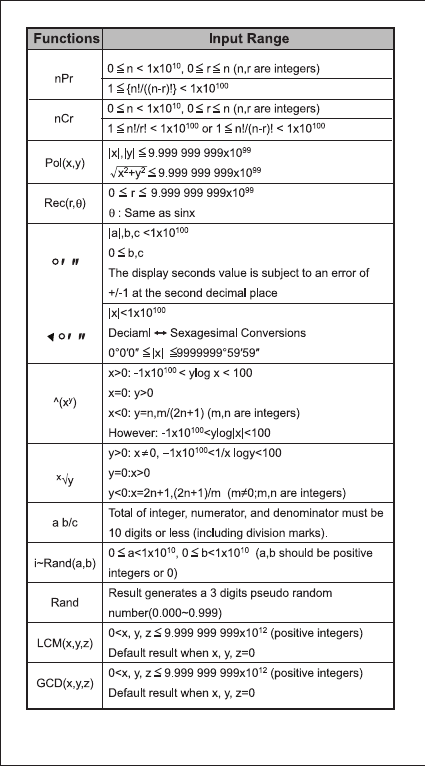
Input Ranges / Eingangsbereich / Plages des
valeurs d'entrée / Rango de entrada / Rango de
entrada / Invoerberelk / Inputområde / Syöttöalue /
Inmatningsområde / Limite de entrada / Περιοχή
εισαγωγής
7
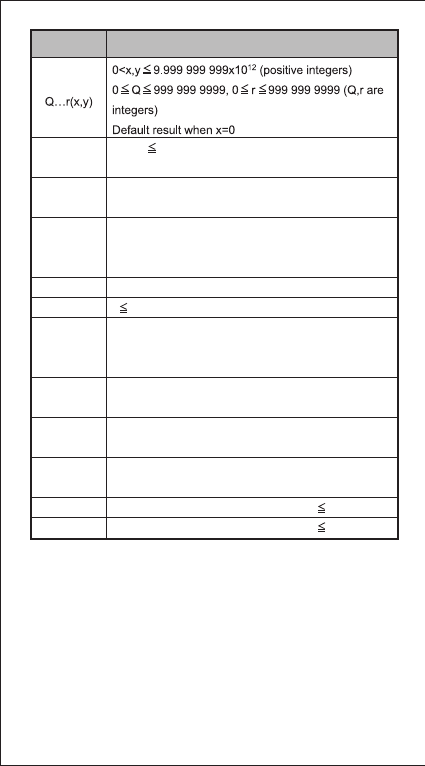
8
0<|x,y| 9.999999999x10¹²
Default result=x when y=0
|x|<1x10100
|FREQ|<1x10100
|x|<1x10100
|y|<1x10100
|FREQ|<1x10100
|x|<1x10100
x 9999999999 (positive integers)
Positive:
0~0111 1111 1111 1111 1111 1111 1111 1111
Negative:
1000 0000 0000 0000 0000 0000 0000 0000~
1111 1111 1111 1111 1111 1111 1111 1111
Positive: 0~2147483647
Negative: -2147483648~-1
Positive: 0~177 7777 7777
Negative: 200 0000 0000~377 7777 7777
Positive: 0~7FFF FFFF
Negative: 8000 0000~FFFF FFFF
a and b are integers in the range of –1 • 10^10 < a b <1 • 10^10.
a and b are integers in the range of –1 • 10^10 < a b <1 • 10^10.
Mod(x,y)
ABS
BIN
DEC
OCT
HEX
∑ (f(x),a, b)
∏ (f(x),a, b)
Pfact
Single-variable
Paired-variable
Input Range
Functions
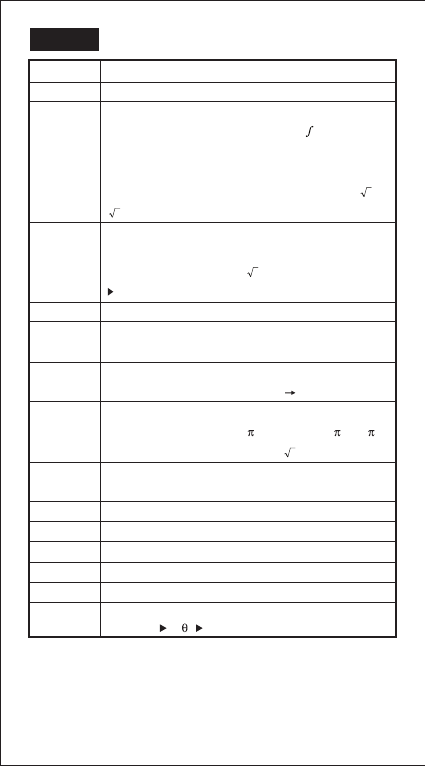
9
Recall memory (A, B, C, D, E, F, 0-9), Rand
Calculation within parentheses ( ).
Function with parenthesis that request the input
argument to the right Pol(, Rec(, d/dx, dx, P(, Q(, R(,
Det(, Trn(, Ide(, Adj(, Inv(, Arg(, Conjg(, Real(, Imag(,
sin(, cos(, tan(, sin–1(, cos–1(, tan–1(, sinh(, cosh(,
tanh(, sinh–1(, cosh–1(, tanh–1(, log(, ln(, e^(, 10^(, (,
3 (, Abs(, ROUND(, LCM(, GCD(, Q…r(, i~Rand(,
Functions that come after the input value preceded by
values, powers, power roots:
x2, x3, x–1, x!, ° ’ ”, °, r, g, ^(, x (, Percent %, logab, EXP,
t
Fractions: a b/c, d/c
Prefix symbol: (–) (negative sign), base-n symbols
(d, h, b, o, Neg, Not)
Statistical estimated value calculation:
Metric conversion commands (cm in, etc)
Multiplication where sign is omitted: Multiplication sign
omitted immediately before , e, variables (2 , 5A, A,
etc.), functions with parentheses (2 (3), Asin(30), etc.)
Permutations, combinations: nPr, nCr
Complex number polar coordinate symbol (<)
Dot: .
Multiplication and division: ×, ÷
Addition and subtraction: +, –
Logical AND (and)
Logical OR, XOR, XNOR (or, xor, xnor)
Calculation ending instruction: =, M+, M- STO (store
memory), r< , a+bi
1st Priority
2nd
3rd
4th
5th
6th
7th
8th
9th
10th
11th
12th
13th
14th
15th
x, y, x1, x2
ˆ ˆ ˆ ˆ
EX #7
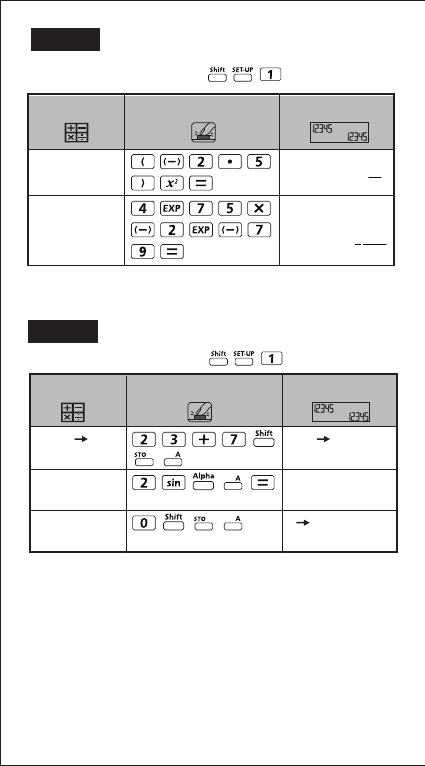
10
EX #8
MATHEMATICS MODE:
(-2.5)2
4E75x
25
4
1
1250
(-2.5)2
(4 x 1075)(-2 x
10-79)
DisplayKey in operationExample
23+7 A
30
2sin(A
1
0 A
0
23 + 7 A
2 x sin A = 1
Clear memory
DisplayKey in operation
MATHEMATICS MODE:
Example
EX #9

11
2.333333333
1 + =
1
2
(Fraction Decimal)
(Decimal Mixed
Fraction)
DisplayKey in operationExample
5
61 +
1
2
5
6
1 +
1
2
5
6
1 +
1
2
21
3
2
2.333333333
2.333333333
1
3
7
3
5
6
7
3
7
3
MATHEMATICS MODE:
MATHEMATICS MODE:
EX #10
Ans2
335241
789900-Ans
454659
123 + 456 M+,
Ans2 = 335,241
789900 – Ans =
454,659
DisplayKey in operationExample
EX #11
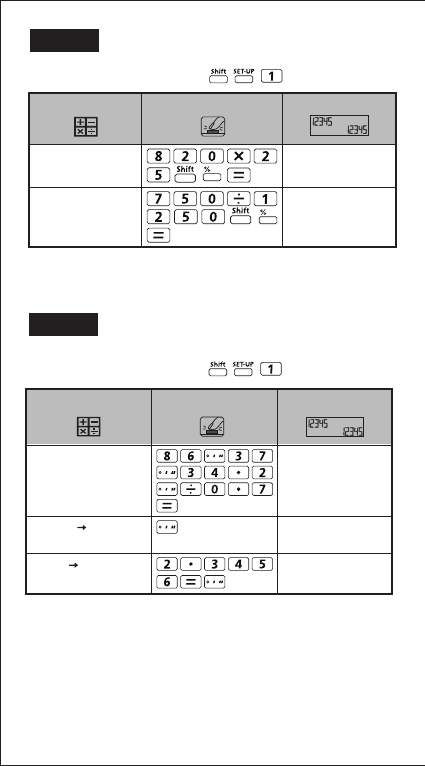
2
12
86º37 º 34.2 º ÷ 0.7
123º45’6”
86º37 º 34.2 º ÷ 0.7
123.7516667
2.3456
2º20’44.16”
86º37’34.2” ÷ 0.7 =
123º45’6”
123º45’6” 123.7516667
2.3456 2º20’44.16”
DisplayKey in operationExample
MATHEMATICS MODE:
820x25%
205
750÷1250%
60
To calculate 25% of
820
The percentage of
750 against 1250
DisplayKey in operationExample
MATHEMATICS MODE:
EX #12
EX #13

3
13
EX #14
MATHEMATICS MODE:
Disp
1x12:2+25|
1x12
12
2+25
27
1x12
12
1x12=12
2+25=27
using a multi-statement
Replay the previous
calculation history
(1 x 12 = 12)
DisplayKey in operationExample
EX #15
(menu selection page)
35
50
Key in Operation Display
Input 1 79 0 0
m
p
m
n
me m
µ
ao
g|
g+35
44.80665
Ansx50
2240.3325
MATHEMATICS MODE:
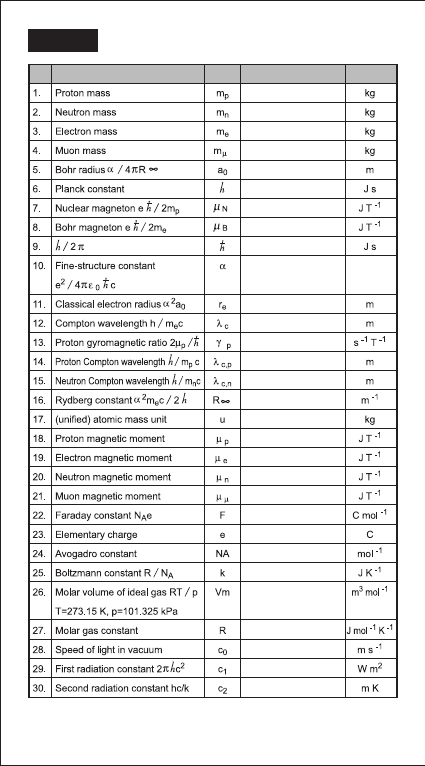
4
14
NO.
Symbol
UnitValueConstant
1.672621777x10⁻²⁷
1.674927351 x10⁻²⁷
9.10938291x10⁻³¹
1.883531475x10⁻²⁸
0.52917721092x10⁻¹⁰
6.62606957 x10⁻³⁴
5.05078353 x10⁻²⁷
927.400968 x10⁻²⁶
1.054571726 x10⁻³⁴
7.2973525698x10⁻³
2.8179403267x10⁻¹⁵
2.4263102389 x10⁻¹²
2.675222005 x10⁸
1.3195909068x10⁻¹⁵
1.660538921 x10⁻²⁷
1.410606743x10⁻²⁶
-928.476430x10⁻²⁶
-0.96623647 x10⁻²⁶
-4.49044807 x10⁻²⁶
1.602176565x10⁻¹⁹
1.3806488 x10⁻²³
22.413968 x10⁻³
3.74177153x10⁻¹⁶
1.4387770 x10⁻²
8.3144621
299792458
6.02214129x10²³
96485.3365
10973731.568539
1.32140985623 x10⁻¹⁵
EX #16
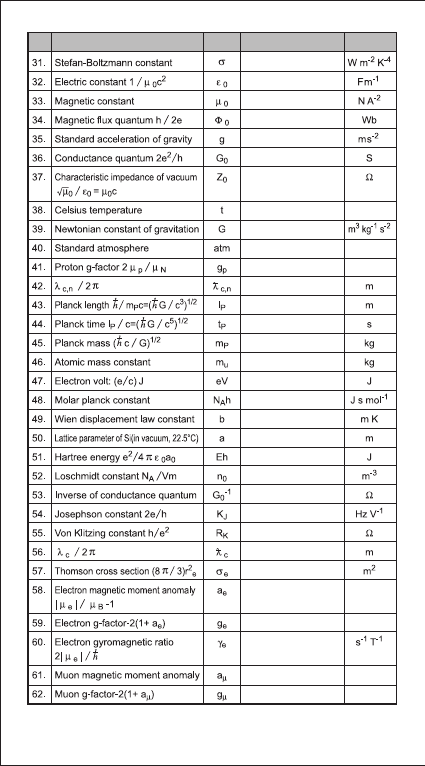
5
15
NO.
Symbol
UnitValueConstant
5.670373x10⁻⁸
8.854187817 x10⁻¹²
12.566370614x10⁻⁷
2.067833758 x10⁻¹⁵
7.7480917346x10⁻⁵
6.67384 x10⁻¹¹
0.21001941568x10⁻¹⁵
1.616199x10⁻³⁵
5.39106x10-44
2.17651 x10⁻⁸
1.660538921 x10⁻²⁷
1.602176565x10⁻¹⁹
3.9903127176x10⁻¹⁰
2.8977721 x10⁻³
543.1020504 x 10⁻¹²
4.35974434 x10⁻¹⁸
2.6867805 x1025
12906.4037217
483597.870 x109
386.15926800x10⁻¹⁵
0.6652458734 x10⁻²⁸
1.15965218076 x10⁻³
1.760859708x10¹¹
1.16592091 x10⁻³
-2.0023318418
-2.00231930436153
25812.8074434
9.80665
376.730313461
273.15
101325
5.585694713
Pa
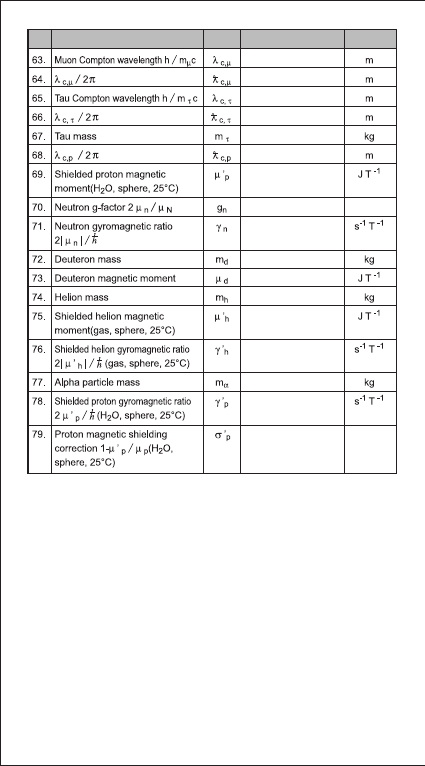
6
16
! Constant values cannot perform rounding. / Konstante Werte kann keine
Rundung. / Les valeurs constantes ne peuvent pas effectuer d'arrondi. /
Los valores constantes no se puede realizar el redondeo. / Valori
costanti non può eseguire arrotondamenti. / Constante waarden kunnen
niet worden uitgevoerd afronding. / Konstante værdier kan ikke udføre
afrunding. / Nykyarvoina ei tehdä eroja. / Konstanta värden kan inte
utföra avrundning. / Valores constantes não podem executar o
arredondamento. / Σταθερή αξία δεν μπορεί να εκτελέσει τη
στρογγυλοποίηση.
Source: CODATA Internationally 2010 / Quelle: CODATA Internationally 2010 /
Source: Conférence internationale CODATA 2010 / Fuente: CODATA
Internationally 2010 / Fonte: CODATA Internationally 2010 / Bron: CODATA
Internationaal 2010 / Kilde: CODATA Internationally 2010 / Lähde: CODATA
International 2010 / Källa: CODATA Internationally 2010 / Fonte: CODATA
Internationally 2010 / Πηγή: CODATA Internationally 2010
http://physics.nist.gov/constants
11.73444103x10⁻¹⁵
1.867594294x10⁻¹⁵
0.697787 x10⁻¹⁵
0.111056 x10⁻¹⁵
3.16747 x10⁻²⁷
1.410570499 x10⁻²⁶
1.83247179 x10⁸
2.037894659 x10⁸
2.675153268 x10⁸
3.34358348 x10⁻²⁷
0.433073489 x10⁻²⁶
-1.074553044 x10⁻²⁶
5.00641234 x10⁻²⁷
6.64465675 x10⁻²⁷
25.694 x10⁻⁶
-3.82608545
0.21030891047 x10⁻¹⁵
NO.
Symbol
UnitValueConstant
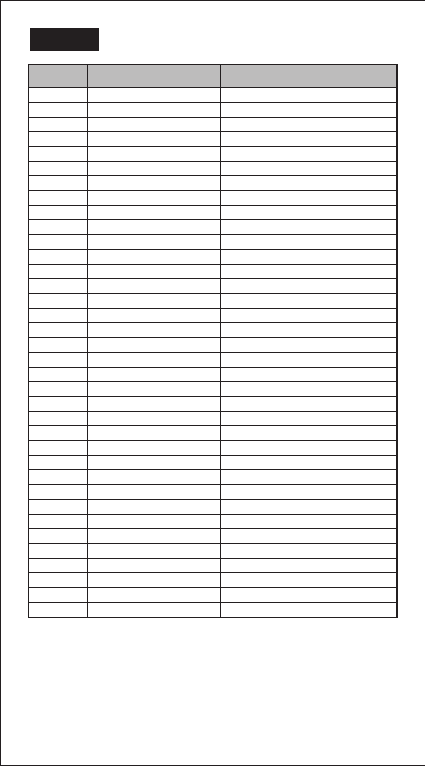
7
17
Page UnitSymbol
1 feet feet
1 m meter
1 mil milliliter
1 mm millimeter
1 in inch
1 cm centimeter
1 yd yard
1 mile mile
1 km kilometer
2 ft2 square foot
2 yd2 square yard
2 m2 square meter
2 mile2 square mile
2 km2 square kilometer
2 hectares hectare
2 acres acre
3
o
F degree Fahrenheit
3
o
C degree Celsius
4 gal gallon (U.K.)
4 liter liter
4 B.gal gallon (U.S.)
4 pint pint
4 fl.oz fluid ounces (U.S.)
5 Tr.oz ounce (troy or apothecary)
5 oz ounces
5 lb libra
5 Kg kilogram
5 g gram
6 J joule
6 cal.f calorie
7 atm standard atmosphere
7 Kpa kilopascal
7 mmHg millimeter of mercury
7 cmH2O centimeter of water
8 m/s Meter per second
8 km/h Kilometer per hour
EX #17
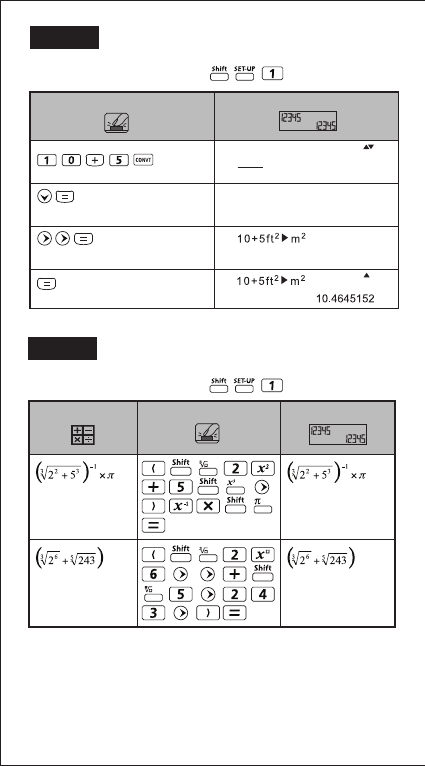
8
18
EX #19
MATHEMATICS MODE:
= 0.6217559776
0.6217559776
7
= 7
DisplayKey in operationExample
EX #18
(menu selection menu)
(confirm selection ft2)
(confirm the value
convert into m2)
Key in Operation Display
Unit (distance)
feet m mil mm in
cm yd mile km
ft2 yd2 m2 mile2
km2 ha acres
5
MATHEMATICS MODE:
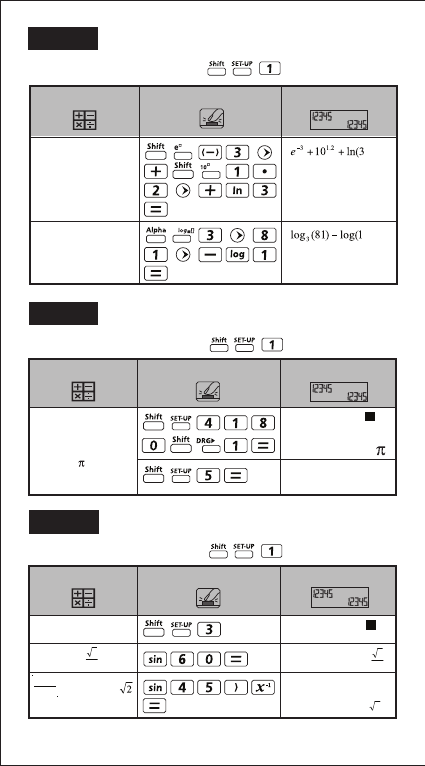
9
19
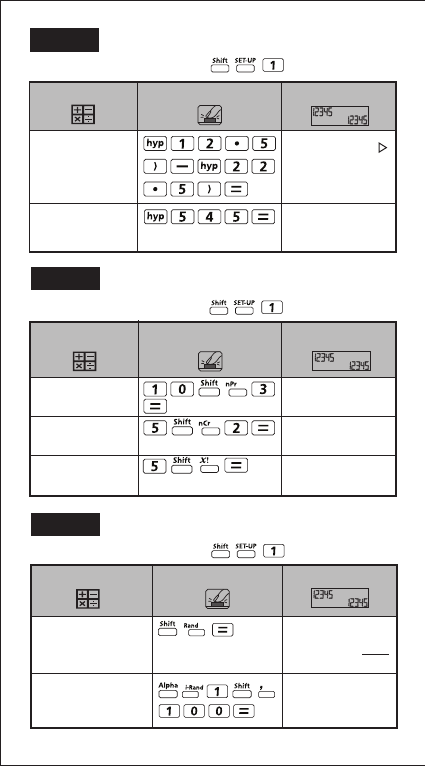
MATHEMATICS MODE:
EX #20
e-3 + 101.2 + In3 =
16.99733128
log381 – log1 = 4
16.99733128
4
DisplayKey in operationExample
EX #22
MATHEMATICS MODE:
Degree Mode
Sin 60 =
=Cosec 45º =
sin(60
sin(45)-1
DisplayKey in operationExample
1
Sin45
o
D
3
2
3
2
2
EX #21
MATHEMATICS MODE:
Convert 180
degree into radian
and gradient
(180º = Rad =
200Gad)
180º
180º
200
Display
Key in operation
Example
R
10
20
EX #23
MATHEMATICS MODE:
sinh2.5 – cosh 2.5
= -0.082084998
Cosh-145
= 4.499686191
sinh(2.5) – cosh(
-0.08208499862
DisplayKey in operation
Example
cosh-1(45
4.499686191
EX #24
MATHEMATICS MODE:
10P3 = 720
5C2 = 10
5! = 120
10P3
720
5C2
10
5!
120
DisplayKey in operation
Example
EX #25
Generate a random
number between
0.000 & 0.999
Generate an integer
from a range of 1 to
100
DisplayKey in operationExample
Rand
i~Rand(1,100
33
139
1000
MATHEMATICS MODE:
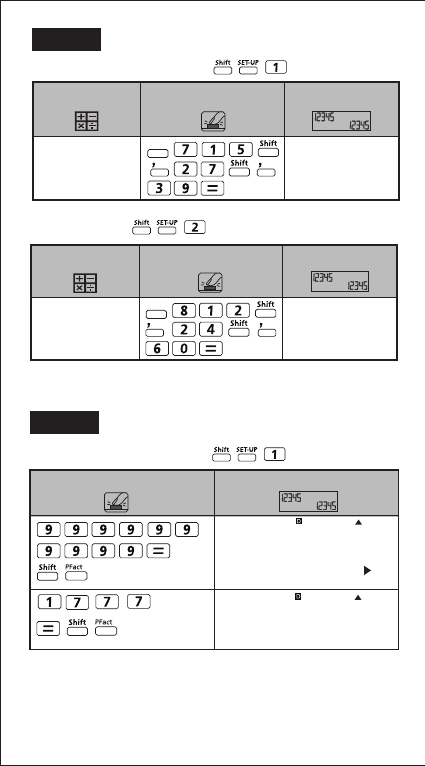
21
MATHEMATICS MODE:
LCM(15, 27, 39)
= 1755
LCM(15,27,39
1755
DisplayKey in operationExample
Apps
EX #26
LINE MODE:
GCD(12, 24, 60)
= 12
GCD(12,24,60
12
DisplayKey in operationExample
Apps
MATHEMATICS MODE:
Key in Operation Display
9999999999
3 2x11x41x271x(9
1777
(1777)
EX #27
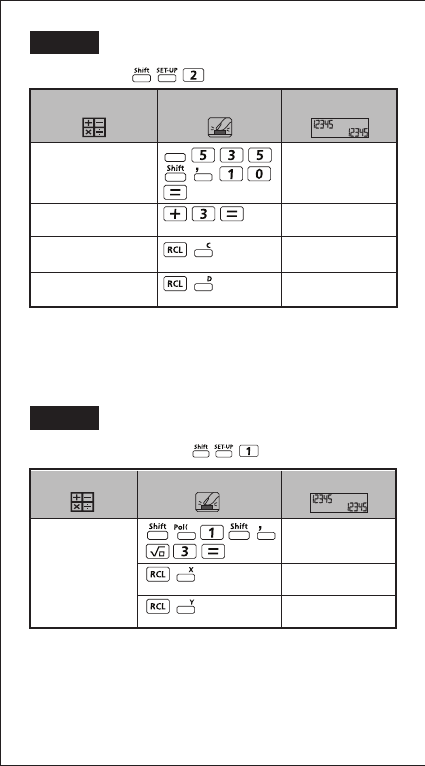
22
LINE MODE:
35 ÷ 10 = 3 x 10 +5
Q=3
R=5
Quotient value (Q) + 3
= 6
Recall Quotient
value (Q)
Recall Remainder
value (r)
Q…r(35, 10
Q= 3
R= 5
Ans+3
6
C
3
D
5
DisplayKey in operationExample
Apps
EX #28
MATHEMATICS MODE:
With rectangular
coordinate (x=1, y=
√3). Find Polar
coordinate (r, θ) at
degree mode
Pol(1, √3
r=2, θ=60
X
2
Y
60
DisplayKey in operationExample
EX #29
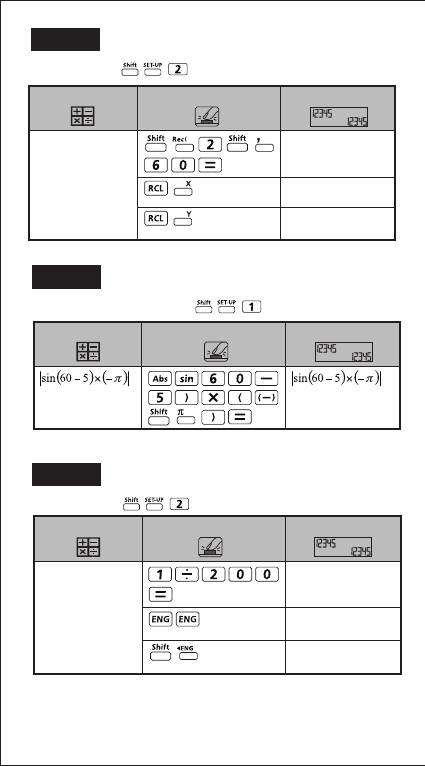
23
LINE MODE:
Rec(2, 60
X= 1
Y= 1.732050808
X
1
Y
1.732050808
With Polar coordinate
(r=2, θ=60º).
Find Rectangular
coordinate (x, y) at
degree mode
DisplayKey in operationExample
EX #30
MATHEMATICS MODE:
2.573442045
DisplayKey in operationExample
EX #31
LINE MODE:
1÷200 = 5x10⁻³ 1÷200
5x10⁻³
1÷200
5000x10-6
1÷200
5x10⁻³
DisplayKey in operationExample
EX #32
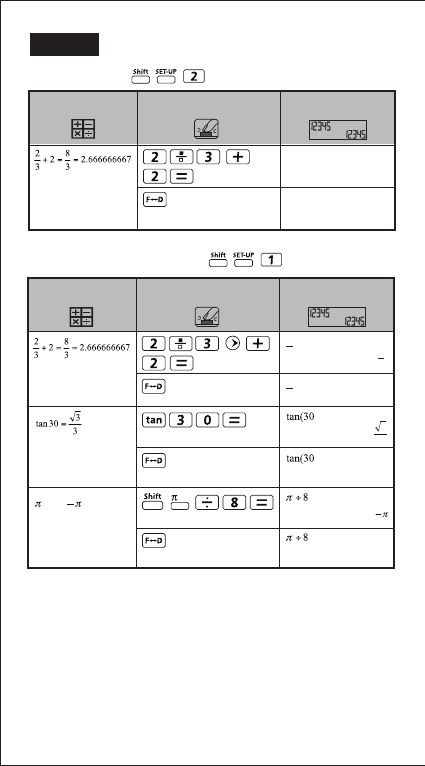
24
LINE MODE:
DisplayKey in operationExample
2_|3+2
8_|3
2_|3+2
2.666666667
EX #33
MATHEMATICS MODE:
=0.5773502692
=0.3926990817
DisplayKey in operationExample
÷8=1
8
0.5773502692
0.3926990817
3
3
1
8
+2 8
3
2
3
2.666666667
+2
2
3
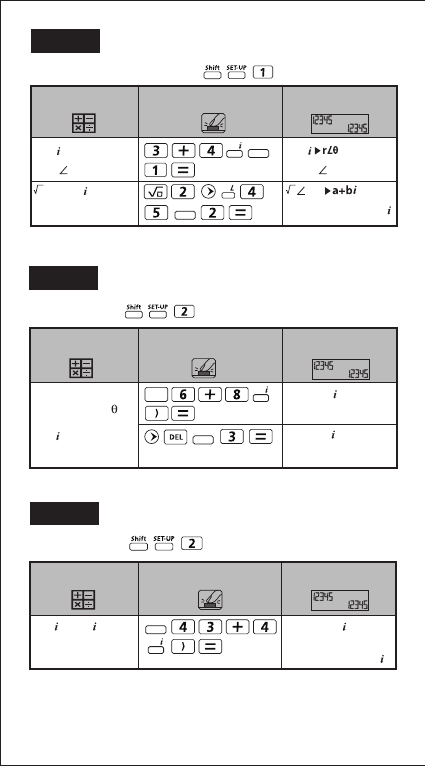
25
LINE MODE:
EX #34
MATHEMATICS MODE:
DisplayKey in operation
Example
3+4 =
5 53.13010235
2<45=1+
3+4
5 53.13010235
2 45=
1+
Apps
Apps
EX #35
LINE MODE:
Absolute value (r)
and argument ( ) if
complex number is
6+8
DisplayKey in operationExample
Abs (6+8 )
10
Arg (6+8 )
53.13010235
Abs
Apps
EX #36
3+4 is 3–4
DisplayKey in operationExample
Conjg (3+4 )
3
- 4
Apps
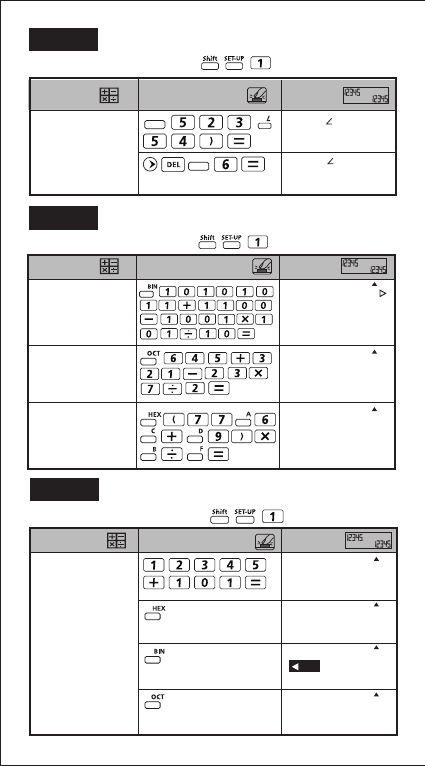
26
MATHEMATICS MODE:
Display Key in operation Example
12345+101=12446 12345+101
DEC
12446
12345+101
HEX
000309E
12345+101
OCT
00000030236
12345+101
BIK 1/2 BIN
1001 1110
EX #37
MATHEMATICS MODE:
Display Key in operation Example
Real and Imaginary
values of a complex
number is 23<54
Real(23 54)
13.5190608
Imag(23 54)
18.60739087
Apps
Apps
EX #38
MATHEMATICS MODE:
Display Key in operation Example
10101011+1100–
1001x101÷10
=10100001
(in Binary Mode)
10101011+1100–1
BIN
1010 0001
645+321–23x7÷2
=1064
(in Octal Mode)
645+321-23x7÷2
OCT
00000001064
(77A6C+D9)xB÷F
=57C87
(in Hexadecimal Mode)
(77A6C+D9)xB÷F
HEX
00057C87
EX #39
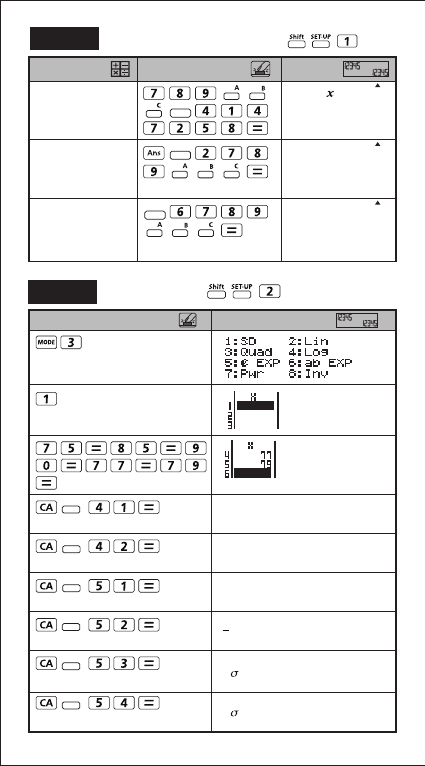
27
Display Key in operation Example
789ABC Xnor
147258
789ABC nor147258
HEX
FF93171B
Ans or 789ABC Ansor789ABC
HEX
FFFB9FBF
Neg 789ABC Neg(789ABC
HEX
FF876544
Apps
Apps
Apps
MATHEMATICS MODE:
EX #40
∑x2
33120
∑x
406
n
5
x
81.2
x n
5.528109984
x n-1
6.180614856
(SD)
Display Key in operation
Apps
Apps
Apps
Apps
Apps
Apps
LINE MODE:
EX #41
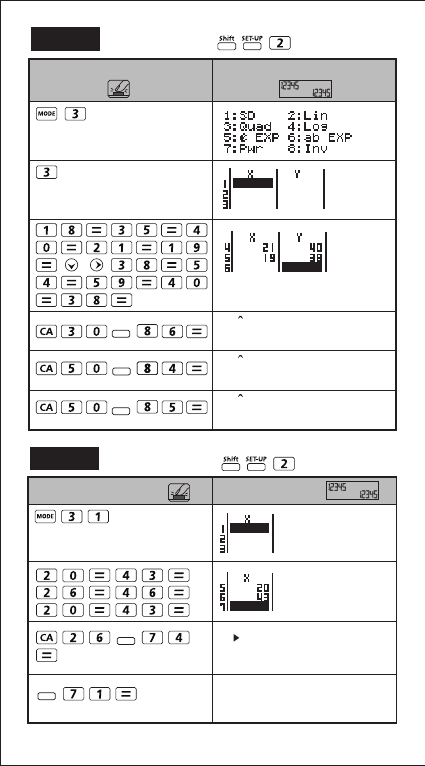
28
LINE MODE:
LINE MODE:
EX #42
(Quad)
30y
48.69615715
50x1
31.30538226
50x2
-167.1096731
DisplayKey in operation
Apps
Apps
Apps
EX #43
26 t
-0.6236095645
P(Ans
0.26644
Display Key in operation
Apps
Apps
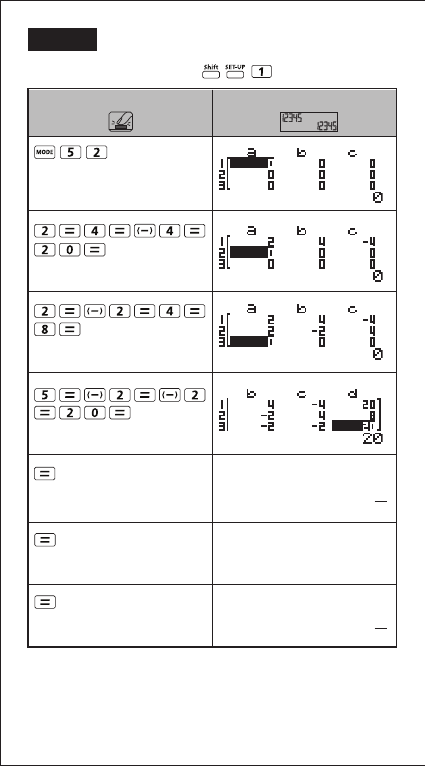
29
EX #44
MATHEMATICS MODE:
(3 unknowns)
X=
Y=
Z=
3
3
4
DisplayKey in operation
11
2
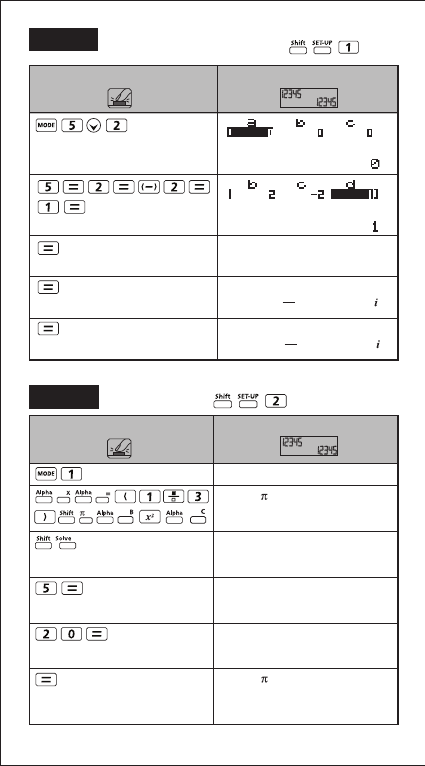
30
LINE MODE:
EX #45 MATHEMATICS MODE:
(Cubic equation)
X1=
X2=
X3=
DisplayKey in operation
3
10+0.331662479
3
10 -0.331662479
-1
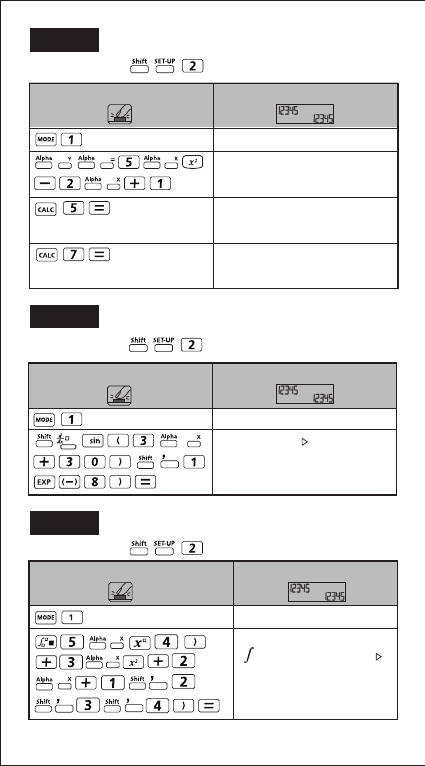
EX #46
(COMP MODE)
(radius is B=5cm)
(height is C=2cm)
(Calculate with new variables)
DisplayKey in operation
0
X=(1_|3) B2C
0
B?
0
C?
0
Solve for X
0
X=(1_|3) B2C
X= 523.5987756
L-R = 0
31
21
LINE MODE:
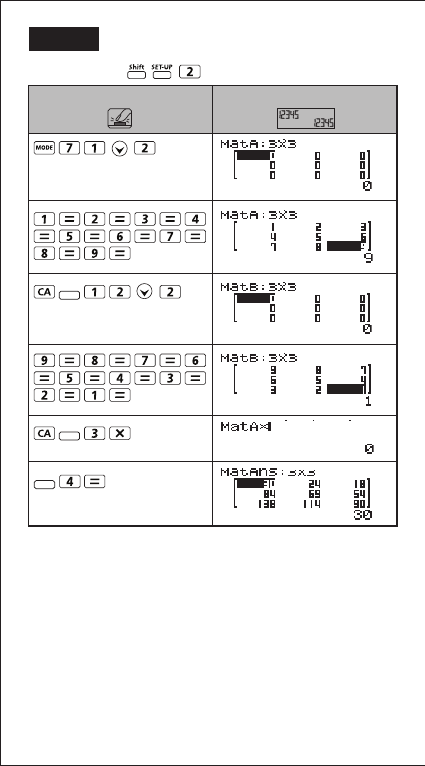
(COMP MODE) 0
Y=5X2–X+1
0
Y=5X2–X+1
116
Y=5X2–X+1
232
DisplayKey in operation
EX #47
LINE MODE:
(COMP MODE) 0
d/dx(sin(3X+30)
0.04534498409
DisplayKey in operation
EX #48
LINE MODE:
Display
Key in operation
0
236
(5X^(4)+3X2+2X
EX #49
22
32
LINE MODE:
DisplayKey in operation
Apps
Apps
Apps
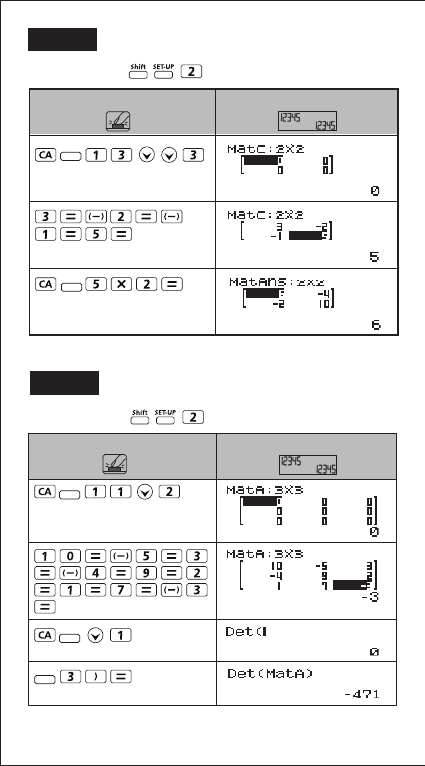
EX #50
23
33
LINE MODE:
Display
Key in operation
Apps
Apps
EX #51
LINE MODE:
Display
Key in operation
Apps
Apps
Apps
EX #52

24
34
LINE MODE:
DisplayKey in operation
Apps
Apps
Apps
EX #53
LINE MODE:
DisplayKey in operation
Apps
EX #54
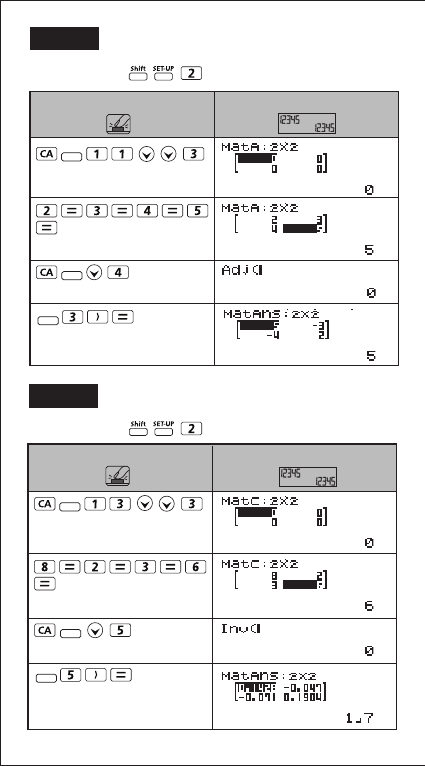
25
35
LINE MODE:
DisplayKey in operation
Apps
Apps
Apps
EX #55
LINE MODE:
DisplayKey in operation
Apps
Apps
Apps
EX #56
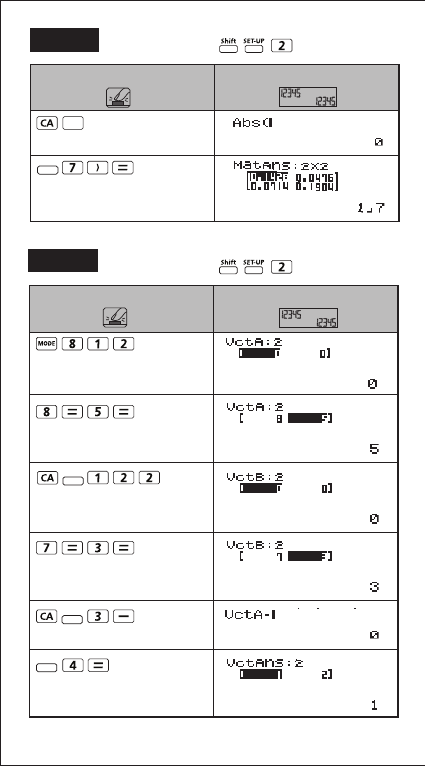
26
36
LINE MODE:
DisplayKey in operation
Abs
Apps
EX #57
LINE MODE:
DisplayKey in operation
Apps
Apps
Apps
EX #58
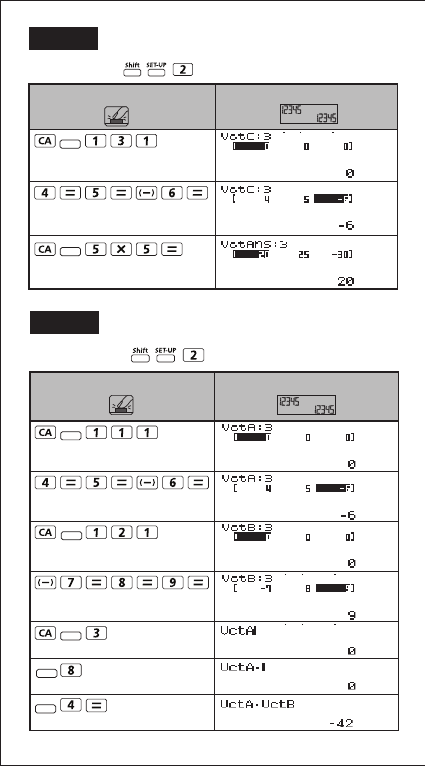
27
37
LINE MODE:
DisplayKey in operation
Apps
Apps
EX #59
LINE MODE:
DisplayKey in operation
Apps
Apps
Apps
Apps
Apps
EX #60
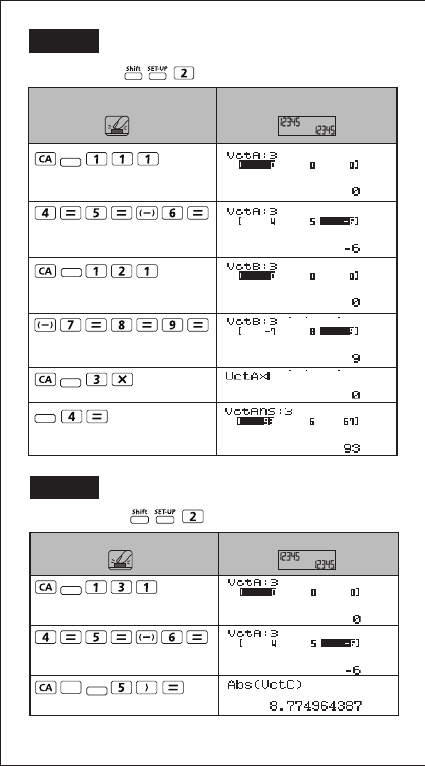
28
38
LINE MODE:
Display
Key in operation
Apps
Apps
Apps
Apps
EX #61
LINE MODE:
Abs
DisplayKey in operation
Apps
Apps
EX #62
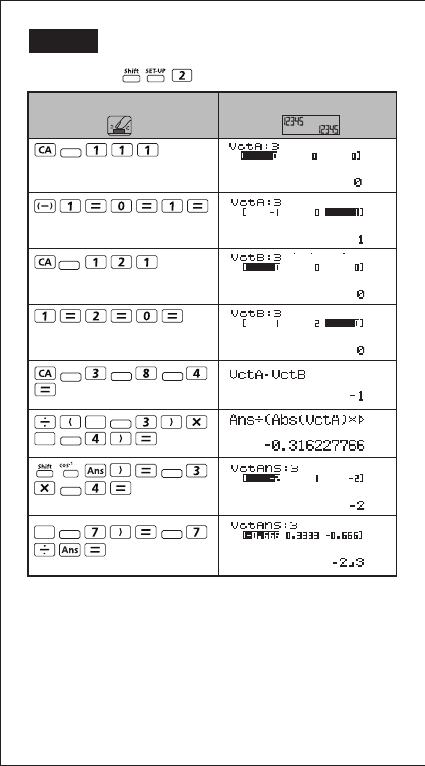
39
29
LINE MODE:
Display
Key in operation
Abs
Abs
Abs
Apps
Apps
Apps Apps Apps
Apps
Apps
Apps
Apps
Apps Apps
EX #63
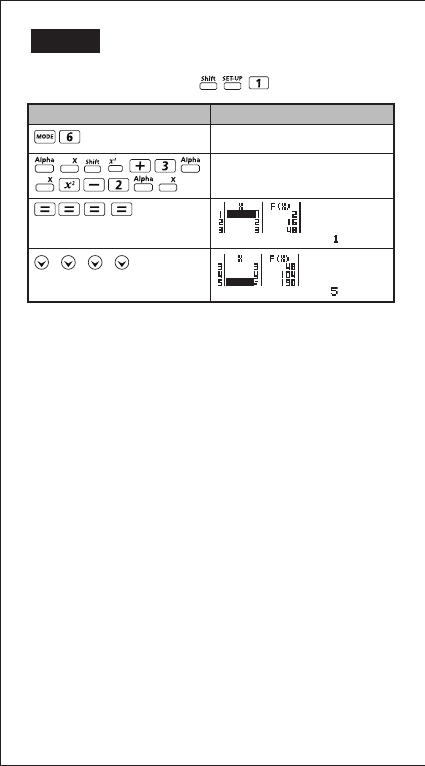
30
40
MATHEMATICS MODE:
EX #64
PUB E-IM-2724
© CANON ELECTRONIC BUSINESS MACHINES (H.K.) CO., LTD. 2012
f(x)=
f(x)= X3+3X2-2X
DisplayKey in operation
