Capital Prospect BR100 Remote Transmitter User Manual mBR100

Capital Prospect Ltd Remote Transmitter mBR100

User Manual

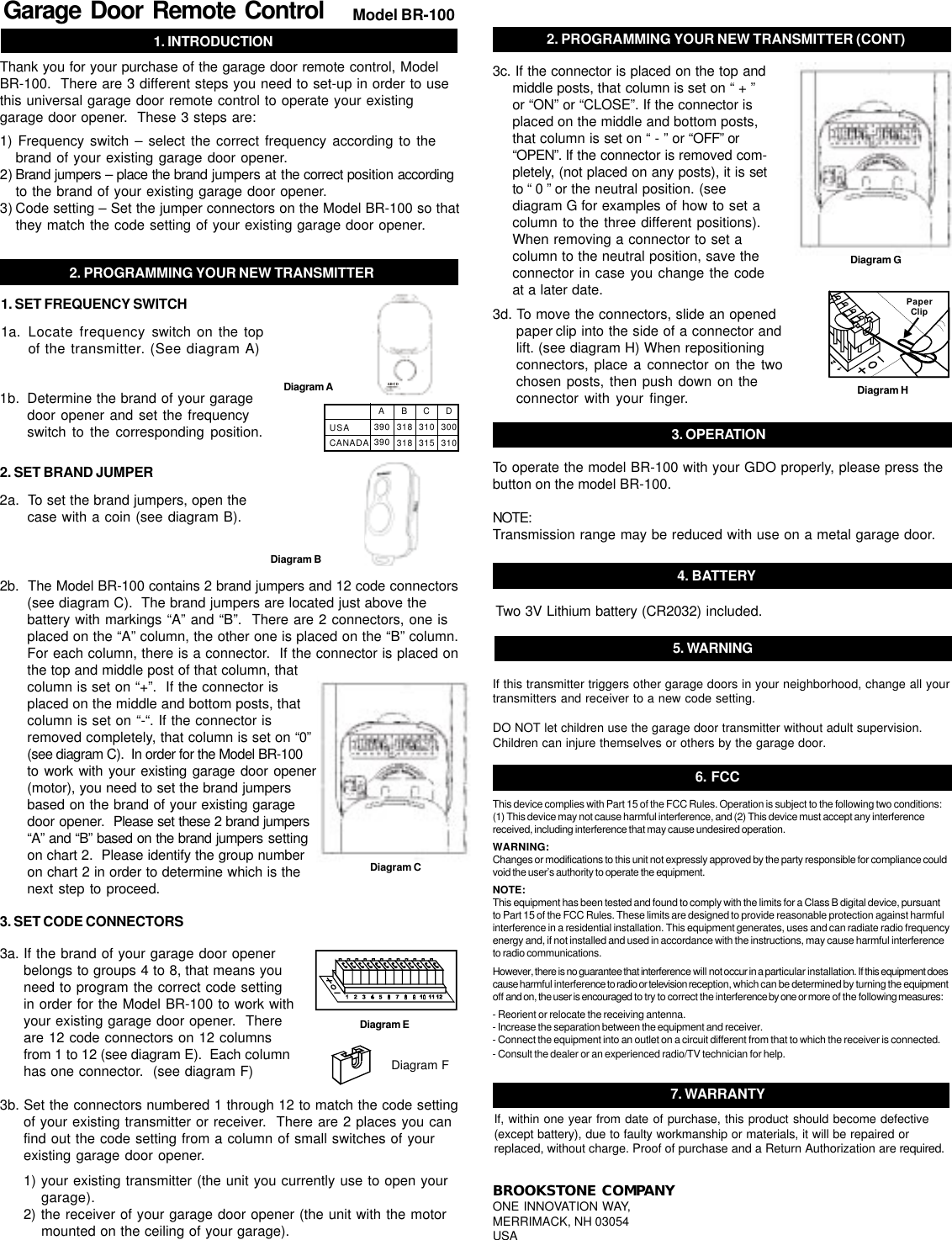
1. INTRODUCTIONGarage Door Remote Control Model BR-100Thank you for your purchase of the garage door remote control, ModelBR-100.  There are 3 different steps you need to set-up in order to usethis universal garage door remote control to operate your existinggarage door opener.  These 3 steps are:1) Frequency switch – select the correct frequency according to thebrand of your existing garage door opener.2) Brand jumpers – place the brand jumpers at the correct position accordingto the brand of your existing garage door opener.3) Code setting – Set the jumper connectors on the Model BR-100 so thatthey match the code setting of your existing garage door opener.2. PROGRAMMING YOUR NEW TRANSMITTER1a. Locate frequency switch on the topof the transmitter. (See diagram A)1b. Determine the brand of your garagedoor opener and set the frequencyswitch to the corresponding position.Diagram AUSACANADAA390390B318318C310315D3003101. SET FREQUENCY SWITCH2a.  To set the brand jumpers, open thecase with a coin (see diagram B).2b.  The Model BR-100 contains 2 brand jumpers and 12 code connectors(see diagram C).  The brand jumpers are located just above thebattery with markings “A” and “B”.  There are 2 connectors, one isplaced on the “A” column, the other one is placed on the “B” column.For each column, there is a connector.  If the connector is placed onthe top and middle post of that column, thatcolumn is set on “+”.  If the connector isplaced on the middle and bottom posts, thatcolumn is set on “-“. If the connector isremoved completely, that column is set on “0”(see diagram C).  In order for the Model BR-100to work with your existing garage door opener(motor), you need to set the brand jumpersbased on the brand of your existing garagedoor opener.  Please set these 2 brand jumpers“A” and “B” based on the brand jumpers settingon chart 2.  Please identify the group numberon chart 2 in order to determine which is thenext step to proceed.Diagram B2. SET BRAND JUMPERDiagram C3a. If the brand of your garage door openerbelongs to groups 4 to 8, that means youneed to program the correct code settingin order for the Model BR-100 to work withyour existing garage door opener.  Thereare 12 code connectors on 12 columnsfrom 1 to 12 (see diagram E).  Each columnhas one connector.  (see diagram F)3b. Set the connectors numbered 1 through 12 to match the code settingof your existing transmitter or receiver.  There are 2 places you canfind out the code setting from a column of small switches of yourexisting garage door opener.1) your existing transmitter (the unit you currently use to open yourgarage).2) the receiver of your garage door opener (the unit with the motormounted on the ceiling of your garage).3. SET CODE CONNECTORSDiagram FDiagram E3c. If the connector is placed on the top andmiddle posts, that column is set on “ + ”or “ON” or “CLOSE”. If the connector isplaced on the middle and bottom posts,that column is set on “ - ” or “OFF” or“OPEN”. If the connector is removed com-pletely, (not placed on any posts), it is setto “ 0 ” or the neutral position. (seediagram G for examples of how to set acolumn to the three different positions).When removing a connector to set acolumn to the neutral position, save theconnector in case you change the codeat a later date.2. PROGRAMMING YOUR NEW TRANSMITTER (CONT)Diagram G3d. To move the connectors, slide an openedpaper clip into the side of a connector andlift. (see diagram H) When repositioningconnectors, place a connector on the twochosen posts, then push down on theconnector with your finger.PaperClipDiagram H5. WARNINGIf this transmitter triggers other garage doors in your neighborhood, change all yourtransmitters and receiver to a new code setting.DO NOT let children use the garage door transmitter without adult supervision.Children can injure themselves or others by the garage door.3. OPERATIONTo operate the model BR-100 with your GDO properly, please press thebutton on the model BR-100.NOTE:Transmission range may be reduced with use on a metal garage door.4. BATTERYTwo 3V Lithium battery (CR2032) included.6. FCCThis device complies with Part 15 of the FCC Rules. Operation is subject to the following two conditions:(1) This device may not cause harmful interference, and (2) This device must accept any interferencereceived, including interference that may cause undesired operation.WARNING:Changes or modifications to this unit not expressly approved by the party responsible for compliance couldvoid the user’s authority to operate the equipment.NOTE:This equipment has been tested and found to comply with the limits for a Class B digital device, pursuantto Part 15 of the FCC Rules. These limits are designed to provide reasonable protection against harmfulinterference in a residential installation. This equipment generates, uses and can radiate radio frequencyenergy and, if not installed and used in accordance with the instructions, may cause harmful interferenceto radio communications.However, there is no guarantee that interference will not occur in a particular installation. If this equipment doescause harmful interference to radio or television reception, which can be determined by turning the equipmentoff and on, the user is encouraged to try to correct the interference by one or more of the following measures:- Reorient or relocate the receiving antenna.- Increase the separation between the equipment and receiver.- Connect the equipment into an outlet on a circuit different from that to which the receiver is connected.- Consult the dealer or an experienced radio/TV technician for help.BROOKSTONE COMPANYONE INNOVATION WAY,MERRIMACK, NH 03054USA7. WARRANTYIf, within one year from date of purchase, this product should become defective(except battery), due to faulty workmanship or materials, it will be repaired orreplaced, without charge. Proof of purchase and a Return Authorization are required.ABCD

Navigation menu