Capital Prospect LS318 LIGHTING REMOTE CONTROL User Manual mLS318
Capital Prospect Ltd LIGHTING REMOTE CONTROL mLS318
User manual
TM
Thank you for your purchase of a SkylinkHome lighting receiver, Screw
In Lamp Socket Dimmer, Model LS-318. This receiver module allows you
to wirelessly turn on and off, dim and brighten different lighting fixtures
TM
with the SkylinkHome lighting transmitters.
The Screw In Lamp Socket Dimmer LS-318 can communicate with up to
transmitters, so user has the option to add more transmitters to the
system, such as more remote controls, or motion sensors etc.
TM
All wireless signal communications within the SkylinkHome lighting
system are based on rolling code technology to ensure highest security
is used.
The following items are included in this package:
- Screw In Lamp Socket Dimmer
- Antenna
- User's Instructions
16
1. INTRODUCTION
Screw In Lamp Socket Dimmer Model LS-318
Antenna
Screw In Lamp
Socket Dimmer
2. SETUP
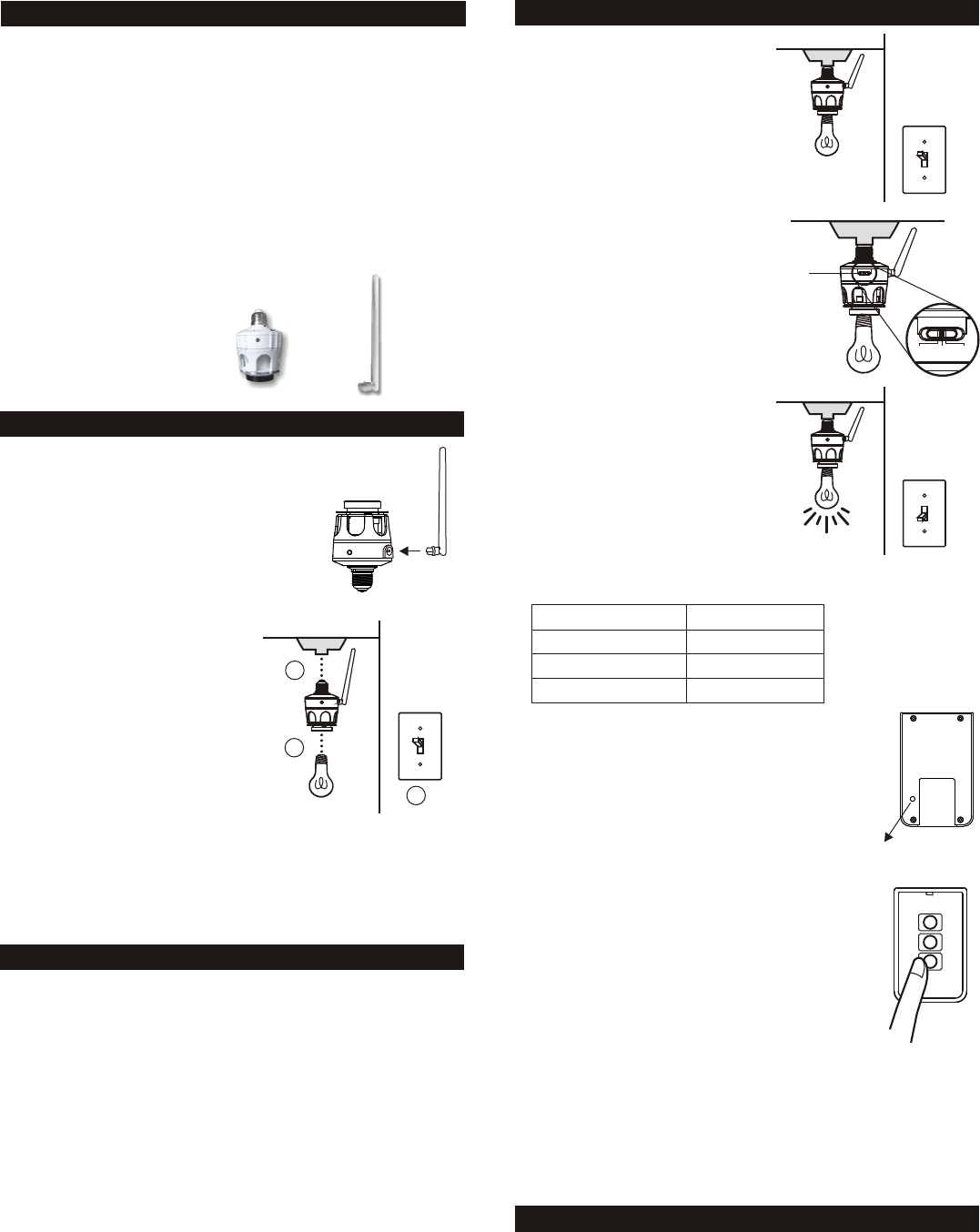
There is no wiring involved in setting up the
Screw In Lamp Socket Dimmer.
Insert the antenna to the Screw In Lamp
Socket Dimmer as shown.
CAUTION: Turn off the light switch of the
empty socket where you plan to install the
screw in Lamp Socket Dimmer.
Simply screw a light bulb to the fixture
end of the Screw In Lamp Socket
Dimmer. Then screw the light bulb with
the Screw In Lamp Socket Dimmer to
an empty socket.
Follow the programming instructions
below to get started.
Note: The antenna should be placed
away from the light bulb so it is away
from the heat generated by the light bulb.
3. PROGRAMMING TRANSMITTERS (TC SERIES) / SENSORS
4. SET TIMER DURATION
3. PROGRAMMING TRANSMITTERS (TC SERIES) / SENSORS
In order to operate the Screw In Lamp Socket Dimmer remotely with a
transmitter or sensor, it must be programmed to the Screw In Lamp
Socket Dimmer. Each module can be operated by up to 16 different
transmitters (or 16 different command signals).
There are 3 operating modes with the Screw In Lamp Socket Dimmer:
1) On / Off Mode - When a valid signal is received, it will toggle the load,
i.e. turning off or on the light
2) Flashing Mode - When a valid signal is received, the light will flash for
a specific period of time, which is the time defined in the timer duration.
This works as an alert indication.
3) Timer Mode - When a valid signal is received, the load will be on for a
specific period of time, from 1 minute, 5 minutes, 15 minutes, 30
minutes, and 60 minutes
You can program multiple transmitters / sensors to the module and each
transmitter / sensor can operate in its own mode.
To program a transmitter / Sensor into the Screw In Lamp Socket Dimmer,
follow the instructions below.
1. Turn off the light and Screw In
Lamp Socket Dimmer by the
wall switch.
OFF
OFF
2. Place the operating mode slide
switch at the desired position,
On/ Off, Flash, or Timer.
Operating
mode
slide switch
3. Turn on the light and Screw In
Lamp Socket Dimmer by the
wall switch. Light will be on.
ON
4. The red LED indication shows the
operation mode you have selected:
Operating Mode
On / Off
Flashing
Timer
LED Indication
One Flash
Two Flashes
Steadily On
5. Ensure the LED indication shows the operation
mode you have selected.
6. You can now activate the transmitter or sensor
you would like to program.
7. Press the PROG button on the back of the TC
transmitter with a sharp object. Red LED on the
transmitter will be on steadily.
8. Press the button on the TC transmitter that you
would like to program into the module.
9. Once the transmitter is programmed, the red LED
on the module flashes quickly then stops flashing,
indicating you have successfully programmed the
transmitter to the module.
10.You may operate the light with the programmed
transmitter.
Note: To program other transmitters/sensors (besides
TC transmitter), please refer to the instructions of the
transmitters/sensors.
Note: You must complete the programming sequence within the
15-second interval, otherwise, the module will quit from programming
mode and you need to start again from step 1 if the red LED is off.
You may follow the same instructions to program additional transmitters
or sensors to operate the receiver module.
“PROG” switch
Press the
desired
button
As mentioned, the timer can be set to the following durations, 1 minute,
5 minutes, 10 minutes, 30 minutes, and 60 minutes.
There is only one timer setting, so all transmitters that are programmed
in timer mode will have the same timer duration. To set the timer duration,
follow the instructions below:
1
2
3
ON/OFF FLASH TIMER
Note: Lighting Load
The is designed to operate maximum load
of 200W at 120VAC. It can dim incandescent light and designated dimming
compact fluorescent light. Do not connect other kinds of loading or loading
that exceeds this maximum rating.
Screw In Lamp Socket Dimmer
On / Off Mode Operation
4. SET TIMER DURATION (CONT)
4. ON / OFF OPERATING MODES
4. ON / OFF OPERATING MODES (CONT)
5. FLASHING OPERATING MODES
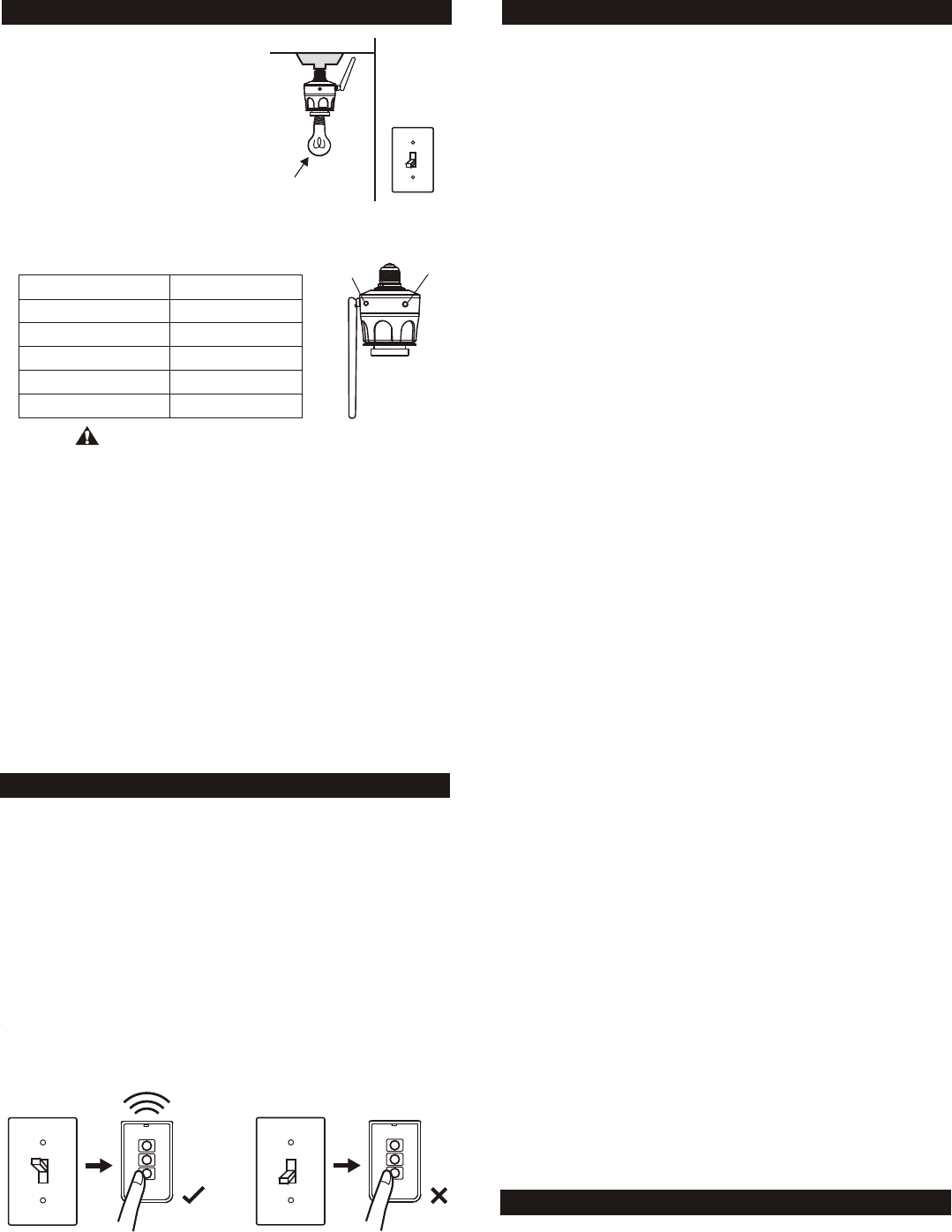
1. Screw In Lamp Socket Dimmer should
be powered up.
2. Turn off the light bulb by a programmed
transmitter. The light bulb must be off in
order to set the timer duration.
ON
Light Off
SET
Button
(Black)
Red
LED
(Clear)
Number of Flashes
1
2
3
4
5
Timer Duration
1 min.
5 min.
15 min.
30 min.
60 min.
3. Press and hold the SET button for 3 seconds, the
red LED flashes once.
The number of flash indicates the timer duration:
CAUTION
DO NOT TOUCH ANY METAL PARTS WHILE PRESSING THE SET
BUTTON. MAKING CONTACT WITH METAL PARTS CAN RESULT
IN ELECTRICAL SHOCK CAUSING SEVERE OR FATAL INJURY.
4. Continue to hold the SET button until it reaches the desired setting.
The status will change every 6 seconds, i.e. hold onto the SET button
for another 6 seconds, you will see the number of flashes changes
from 1 to 2, 2 to 3 etc.
Note: Once the number of flash reaches 5, it will stay at this setting. If
you would like to go back to other settings, such as 1 flash, release the
button and repeat from step 1 to start over.
Once a transmitter (button) is programmed in timer mode, activating this
programmed transmitter (button) will turn on the light for the specific timer
interval.
During a timer count down, if the module receives another signal for
timer operation, the timer will start again and overrides the previous timer,
therefore, extending the on period by another timer duration.
If a transmitter is programmed under ON / OFF operating mode, the
programmed transmitter can control the lights either in:
1) On / Off Mode Allows operating the light either on and off, without
dimming function.
2) Dimming Mode Allows operating the light in on, off and dimming
(dim / brighten) modes. Light must be either incandescent light and
designated dimming compact fluorescent light.
The Screw In Lamp Socket Dimmer allows on / off operation, when the
programmed button is activate, it will transmit a signal to toggle its current
status. For example, if a signal is received when the light is off, that signal
will turn on the light.
Transmitter can only be used to operate the light when the wall switch is
in the ON position. If the wall switch is in the OFF position, no power is
provided to the Screw In Lamp Socket Dimmer, therefore it cannot receive
signals from the transmitter.
ON
OFF
Remote
Works
Remote
Does Not
Work
There is a function "Power On - Light On" built in to the receiver module.
This means when the power supply to the receiver module change from
off to on, this will turn the light on. This function allows you to operate the
light with original wall switch.
When the wall switch is in the off position, switching it on will turn on the
light. Once the switch is on, you may use the remote control to operate
the light.
If the wall switch is switched from on to off, the light will be off. At the
same time, the remote control cannot operate the light cause there is
no power supplied to the Screw In Lamp Socket Dimmer.
In case you do not want to operate the light with the original wall switch,
you can disable this Power On - Light On feature and use only remote
control to operate the light. One incident that the light may be turned on
by accident is after a power failure. If you leave the wall switch on, but
turn off the light with a remote control. When power comes back on, the
light will be on. Therefore, there is an option not to turn the lights on when
power is supplied to the receiver module. The way to disable this feature
is to re-program a transmitter (button) that is already programmed to the
receiver module (i.e. program a transmitter twice). This will disable this
feature. You may re-program it again to toggle the setting between
enabling and disabling this feature.
If the Power On - Light On feature is disabled, the light will not be turned
on under most circumstances, i.e. power comes back up after power
failure, or manually turning on the wall switch. However, you can still turn
on the light by the wall switch with a specific power up sequence, that is
to turn on the wall switch twice within 2 seconds. So in case the remote
control is lost, you can still operate the light.
Power On - Light On
Besides turning on and off the light, you may also dim the light if the light
bulb is dimmable, i.e. either incandescent light and designated dimming
compact fluorescent light. Again, you can control this by a transmitter or
the wall switch itself.
To change the brightness, first turn on the light.
Press and hold the programmed button on the transmitter will change its
brightness. Hold onto the button until the desired brightness is reached,
then release the button.
Press and hold the same button again on the transmitter to change the
brightness again in the opposite way (i.e. Dim to brighten or brighten to
dim), until the desired brightness is reached, then release the button.
Dimming Mode Operation
The factory default operating mode is On/Off mode. However, if your light
is dimmable, you may change the operating mode to Dimming Mode. To
change the operating modes, please follow the instructions below.
1. Turn on the light by the programmed transmitter.
2. Press and hold onto a button on the transmitter that is programmed to
the module for 10 seconds.
3. The light will flash. If it flashes once, that means it is in On / Off Mode.
If the light flashes twice, that means it is in Dimming Mode.
4. Repeating step 3 above will toggle the setting between On / Off Mode
and Dimming Mode.
Changing Between On / Off Mode and Dimming Mode
If a transmitter or a sensor is programmed to the Screw In Lamp Socket
Dimmer under flashing mode, when that transmitter is activated, the
light connected will flash for the predetermined time interval. During the
flashing operation, the red LED on the Screw In Lamp Socket Dimmer
will flash, indicating it is now in flashing mode. After the timer interval,
the light bulb will be off.
Note:
When used with Compact Fluorescent Light, if there is flickering when you
switch off the light, it is recommended you replace a different Compact
Fluorescent Light with higher quality.

7. ZONE OPERATION
8. ERASING TRANSMITTERS FROM THE MODULE
A Zone Command allows you to operate multiple lights at the same time
in the same zone. To set this up, simply program the zone signal into the
Screw In Lamp Socket Dimmers and other receiver modules that are in
the same zone. For instance, you may assign zone 1 to the 3 lighting
fixtures in the family room (each light has its own receiver module).
You then need to program the Zone Command to all 3 receiver modules.
To activate the zone command, simply press “Zone On” or “Zone Off”,
then the zone number, i.e. [Zone On] + [1] means Zone 1 On.
Enter [Zone On] + [Zone Number] during step 8 of the programming
sequence (Section 3), the Zone Command signal would be programmed.
Repeat this step for all the receiver modules in the same zone.
You may erase a transmitter or sensor from the Screw In Lamp Socket
Dimmer, but you cannot erase a specific device, you must erase all the
wireless devices, then program the ones you want to keep. Follow the
instructions below to erase programmed transmitters / sensors.
1. Turn off the light and Screw In Lamp Socket Dimmer by the wall switch.
2. Place the operating mode slide switch to the “Timer” position.
3. Press and hold the SET button, while holding onto the SET button, turn
on the light and Screw In Lamp Socket Dimmer by the wall switch. You
may need another person helping you to do this. Do not release the
SET button until step 5.
4. The red LED will flash quickly.
5. You may release the SET button, the light bulb is now on, and the red
LED will be on steadily indicating you have successfully erased all the
devices.
6. You may now program the transmitters / sensors that you would like to
keep.
Input Voltage: 120V AC, 60Hz
Standby Current: 5mA
Maximum Load: 200W at 120AVC
Operating Frequency: 318MHz
10. ACCESSORIES
The Skylink Lighting System consists of many other devices from
multiple button transmitters, Motion Sensor, various receivers such as
Wall Switch Receiver, Plug-in Receiver with Repeater, Outdoor Receiver,
Dimmer Module etc. Please visit Skylink website at www.skylinkhome.com
for more information.
TM
Home
9. TECHNICAL SPECIFICATIONS
CUSTOMER SERVICE
17 Sheard Avenue, Brampton, Ontario, Canada L6Y 1J3
Email:support@skylinkhome.com
http://www.skylinkhome.com
P/N. 101Z708
Patent Pending
©2010 SKYLINK GROUP
7. FCC
The Remote Control is approved by the FCC and it complies with Part 15 of the
FCC Rules. Its operation is subject to the following two conditions :
1. This device may not cause harmful interference.
2. This device must accept any interference that may cause undesired operation.
WARNING:
Changes or modifications to this unit not expressly approved by the party responsible
of compliance could void the user’s authority to operate the equipment.
6. TIMER OPERATING MODE
If a transmitter or a sensor is programmed to the Screw In Lamp Socket
Dimmer under timer mode, when that transmitter is activated, the light
connected will be on for the predetermined time interval. During the timer
count down operation, the red LED on the Screw In Lamp Socket Dimmer
will be on steadily indicating it is in timer operation. After the timer interval,
the light bulb will be off.