Capital Prospect MD318 LIGHTING REMOTE CONTROL User Manual mMD318
Capital Prospect Ltd LIGHTING REMOTE CONTROL mMD318
UserManual.wiki
>
Capital Prospect
>
MD318 User Manual
>
User manual
Contents
1.
User manual
2.
KUTMD318 user manual
User manual
Navigation menu
Upload a User Manual
Namespaces
Wiki Guide
HTML
PDF
Info
Views
User Manual
Discussion / Help
Navigation
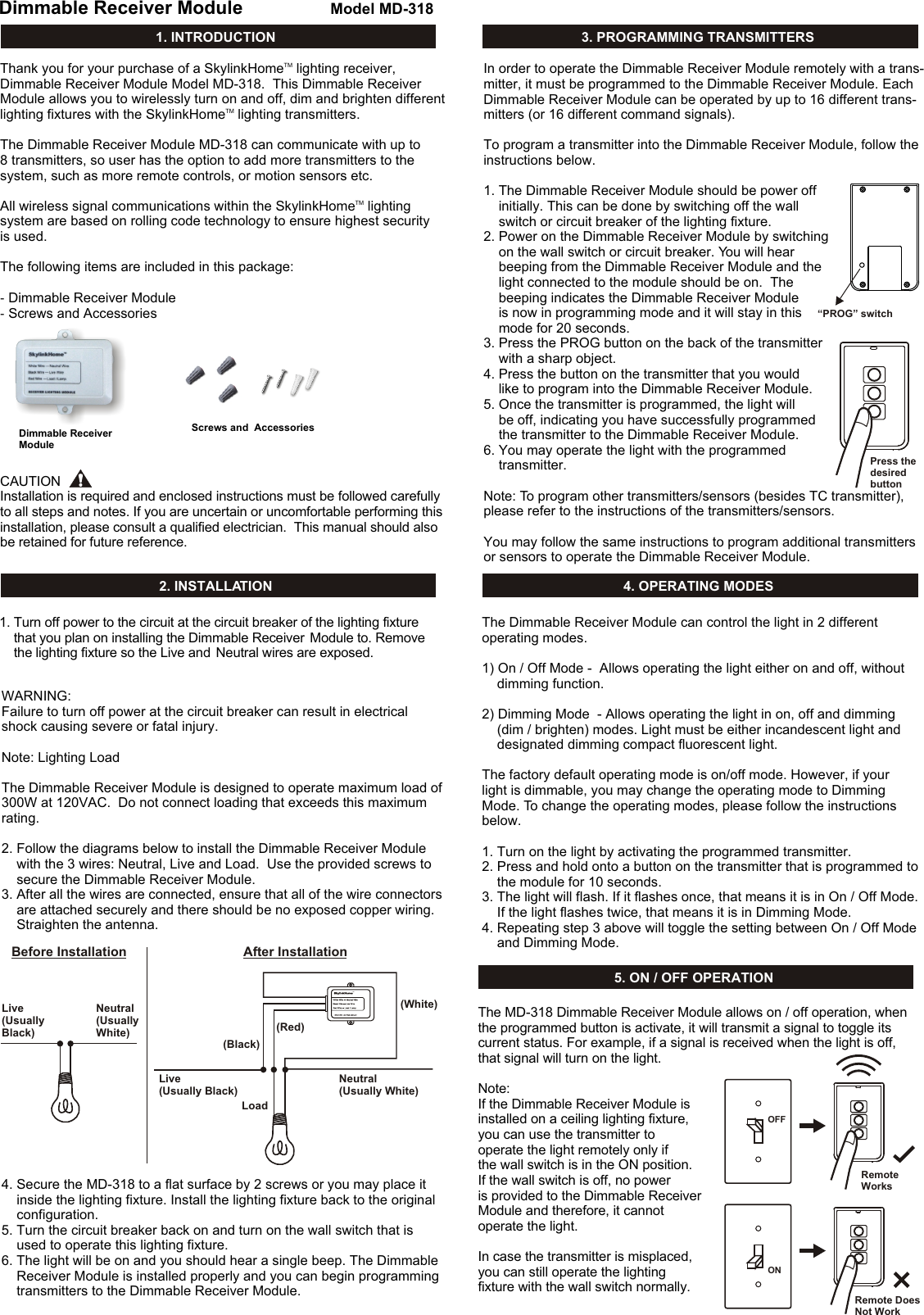
![Input Voltage: 120VAC, 60HzMaximum Load: 300W at 120AVC Operating Frequency: 318MHzWiring: Neutral, Live, Load (18 AWG)10. TECHNICAL SPECIFICATIONS11. FCCThe Remote Control is approved by the FCC and it complies with Part 15 of the FCC Rules. Its operation is subject to the following two conditions : 1. This device may not cause harmful interference.2. This device must accept any interference that may cause undesired operation.WARNING:Changes or modifications to this unit not expressly approved by the party responsible of compliance could void the user’s authority to operate the equipment.12. CUSTOMER SERVICEIf you would like to order Skylink’s products or have difficulty getting them to work or download latest information and user manual, please :1. visit our FAQ section at www.skylinkhome.com, or2. email us at support@skylinkhome.com, or3. call our toll free at 1-800-304-1187 from Monday to Friday, 9 am to 5 pm EST.Fax (800) 286-1320CUSTOMER SERVICE17 Sheard Avenue, Brampton, Ontario, Canada L6Y 1J3Email:support@skylinkhome.comhttp://www.skylinkhome.comP/N. 101Z699Patent Pending©2010 SKYLINK GROUP6. BRIGHTNESS CONTROL OPERATIONBesides turning on and off the light, you may also control the brightness of the light if the light bulb is dimmable, i.e. either incandescent light and designated dimming compact fluorescent light.To change the brightness, first turn on the light.Press and hold the programmed button on the transmitter will change its brightness. Hold onto the button until the desired brightness is reached, then release the button.Press and hold the same button again on the transmitter to change the brightness again in the opposite way (i.e. Dim to brighten or brighten to dim), until the desired brightness is reached, then release the button. 7. ZONE OPERATIONZone Operation On / Off (with the TC Series Deluxe Transmitter) A Zone Command allows you to operate multiple lights at the same time in the same zone. You may turn On or Off a zone. Dimmable Receiver ModuleDimmable Receiver ModuleDimmable Receiver ModuleTo activate the zone command, simply press “Zone On” or “Zone Off”, then the zone number.A zone command must first be programmed to the . Follow the programming instructions in Section 3 of the manual and program the zone command under On / Off Mode. For example, if you would like to assign the to be one of the devices in zone 1, you should press [Zone On] and [1] during step 5B under pro-gramming instruction Section 3. So the Zone 1 signal is programmed to the . Pressing [Zone On] then [1] will turn on all lights in zone 1. Pressing [Zone Off] then [3] will turn off all lights in zone 3. Zone Operation Brightness ControlYou can also change the brightness of all the lights in that zone, if the receiver modules and lights connected are dimmable. [Zone On] represents increase in brightness level, i.e. Brightening[Zone Off] represents decrease in brightness level, i.e. DimmingPress [Zone On] then hold [1] will brighten all lights in zone 1, release the button at the desired brightness level or it will stop until they are at the maximum brightness. Press [Zone Off] then hold [1] will dim all lights in zone 1, release the button at the desired brightness level or it will stop until they are at the minimum brightness. 13. ACCESSORIES9. ERASING TC TRANSMITTERS FROM THE DIMMABLE RECEIVER MODULENote:When used with Compact Fluorescent Light, if there is flickering when youswitch off the light, it is recommended you replace a different Compact Fluorescent Light with higher quality.On / Off Operation - Original Wall Switch Power On - Light On There is a function "Power On - Light On" built-in to the receiver module. This means when the power supply to the receiver module change from off to on, this will turn the light on. This function allows you to operate the light with original wall switch.When the wall switch is in the off position, switching it on will turn on the light. Once the switch is on, you may use the remote control to operate the light. If the wall switch is switched from on to off, the light will be off. At the same time, the remote control cannot operate the light cause there is no power supplied to the receiver module. In case you do not want to operate the light with the original wall switch, you can disable this Power On - Light On feature and use only remote control to operate the light. One incident that the light may be turned on by accident is after a power failure. If you leave the wall switch on, but turn off the light with a remote control. When power comes back on, the light will be on. Therefore, there is an option not to turn the lights on when power is supplied to the receiver module. The way to disable this feature is to re-program a transmitter (button) that is already programmed to the receiver module (i.e. program a transmitter twice). This will disable this feature. You may re-program it again to toggle the setting between enabling and disabling this feature. If the Power On - Light On feature is disabled, the light will not be turned on under most circumstances, i.e. power comes back up after power failure, or manually turning on the wall switch. However, you can still turn on the light by the wall switch with a specific power up sequence, that is to turn on the wall switch twice within 2 seconds. So in case the remote control is lost, the light can still be turned on. 5. ON / OFF OPERATION (CONT) 8. ZONE OPERATION (CONT)The Skylink Lighting System consists of many other devices from multiple button transmitters, Motion Sensor, various receivers such as Wall Switch Receiver, Plug-in Receiver with Repeater, Outdoor Receiver, Dimmer Module etc. Please visit Skylink website at www.skylinkhome.com for more information. TMHomeYou may erase a TC transmitter from the Dimmable Receiver Module, but you cannot erase a specific device, you must erase all the wireless devices, then program the ones you want to keep. Follow the instructions below to erase programmed TC transmitters.1. Power off the lighting receiver. (Switch off the wall switch)2. Press the PROG button on the back of the TC transmitter.3. Press and hold the programmed button on the TC transmitter for at least 2 seconds. Do not release this button until step 5.4. Power up the lighting receiver (Switch off the wall switch), you will hear beeping and the light will be on.5. You may release the button on the transmitter.6. When the button is release, the light attached to the Dimmable Receiver Module should be off, indicating you have successfully erased all the devices from the lighting receiver. To erase other transmitters or sensors, please refer to the instructions of the transmitters / sensors.](https://usermanual.wiki/Capital-Prospect/MD318.User-manual/User-Guide-1361887-Page-2.png)