Capital Prospect PS10X Motion Sensor User Manual SKYLINK REPEATER Model RP J01
Capital Prospect Ltd Motion Sensor SKYLINK REPEATER Model RP J01
User Manual
MOTION SENSOR Model PS-MT FCC ID: KUTPS10X
1. INTRODUCTION
The motion sensor model PS-MT is designed to monitor movement around your house. Once
motion is detected, the receiver will beep and flash.
In this package, you should find a motion sensor and mounting accessories.
Please follow the instructions below to setup the motion sensor.
2. INSTALLATION
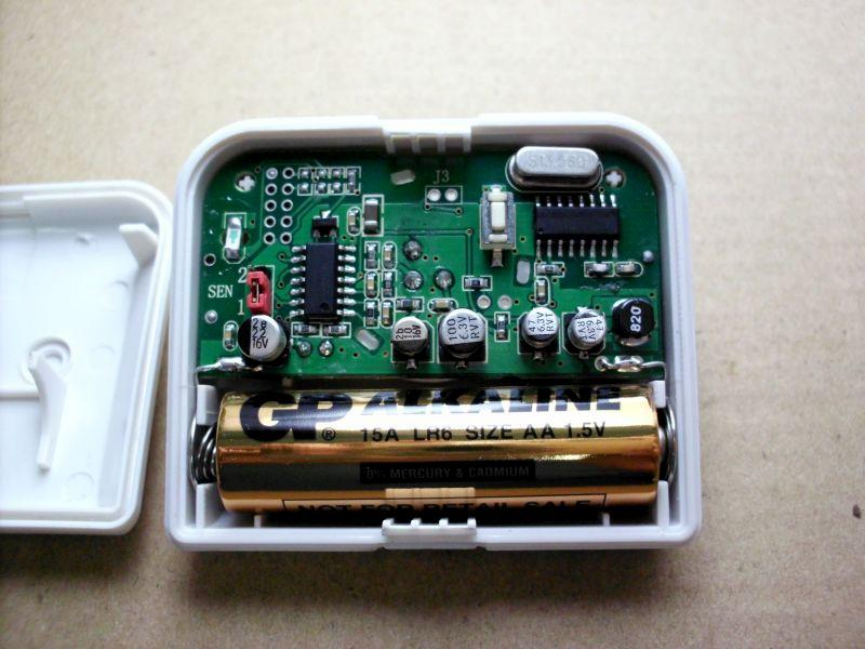
i) Remove the back cover on the motion sensor and insert one AA battery (not included) to the
sensor as shown in the diagram.
ii) After inserting the battery to the motion sensor and its LED will be on for 2 seconds. The
motion sensor requires a warm up time of approx. 30 seconds before it can function properly.
After powering up the motion sensor, face it to the wall where no motion will be detected.
iii) After 30 seconds, the motion sensor is ready. Press and hold the learn button in the receiver
unit, release the button when the receiver emits a beep. Select the zone location in the
receiver, press the zone button [1 or 2 or 3 or 4] once on the receiver unit. The corresponding
zone red LED on the receiver will flash.
iv) Wave your hand or walk in front of the motion sensor, the receiver will emit a beep and the
corresponding red LED on the receiver will stop flashing indicating it has learned the code
from the sensor.
MOUNTING LOCATION
Mount the motion sensor on the wall or ceiling with screws or double sided tape provided.
WALK TEST
After mounting the sensor at the desired location, it is important to perform a walk test in order to
determine if the sensor is detecting the things you want to detect.
You should walk in the area that you would like the sensor to monitor. The receiver will beep if the
sensor detects your movement. If the receiver does not respond, adjust the mounting accordingly.
Perform the walk test again after 20 seconds. Repeat this procedure until your motion is detected.
There should be no movement in the detected area during the 20 seconds.
Perform walk test in the undesired area to ensure movement cannot be detected.
Tips: The sensor should not face towards direct sunlight, placing near heat or clod producing
devices (i.e. A/C or furnace vents, fans, ovens, heaters etc) that may cause false triggers.
OPERATION
When motion is detected in the monitored area, the motion sensor will send a signal to the
receiver. It will beep and the corresponding zone red LED light will flash.
FCC
This device complies with Part 15 of the FCC Rules. Operation is subject to the following two
conditions: (1) This device may not cause harmful interference, and (2) This device must accept
any interference received, including interference that may cause undesired operation.
Warning: Changes or modifications to this unit not expressly approved by the party responsible
for compliance could void the user’s authority to operate the equipment.
WARRANTY
If, within one year from date of purchase, this product should become defective (except battery),
due to faulty workmanship or materials, it will be repaired or replaced, without charge. Proof of
purchase and a Return Authorization are required.
CUSTOMER SERVICE
If you would like to order Skylink’s products or have difficulty getting them to work or download
information and user manual, please:
1. visit our FAQ section at www.skylinkhome.com, or
2. email us at support@skylinkhome.com, or
3. call our toll free at 1-800-304-1187 from Monday to Friday, 9 am to 5 pm EST.
17 Sheard Avenue, Brampton, Ontario, Canada L6Y 1J3
©2014 SKYLINK GROUP
This device complies with Industry Canada licence-exempt RSS
standard(s). Operation is subject to the following tow conditions:
(1)this device may not cause interference, and(2) this device must
accept any interference, includinginterference that may cause
undesired operation of the device.
Le présent appareil est conforme aux CNR d'Industrie Canada
applicables auxappareils radio exempts de licence. L'exploitation
est autorisée aux deux conditions suivantes :(1) l'appareil ne doit
pas produire de brouillage, et(2) l'utilisateur de l'appareil doit
accepter tout brouillage radioélectrique subi, même si le brouillage
est susceptible d'en compromettre lefonctionnement.