Capital Prospect TC318 Lighting Remote Control User Manual mTC318 123
Capital Prospect Ltd Lighting Remote Control mTC318 123
User manual revised
TM
Thank you for your purchase of a SkylinkHome Lighting Automation,
Transmitter, Model TC-318-1 / TC-318-2 / TC-318-3. This transmitter
allows you to wirelessly operate different lighting fixtures with the
TM
SkylinkHome lighting receiver modules.
TM
All wireless signal communications within the SkylinkHome lighting
system are based on rolling code technology to ensure highest security
is used.
The following items are included in this package:
- TC Series Transmitter
- Mounting Bracket and Accessories
- Lithium Battery CR-2032
- User's Instructions
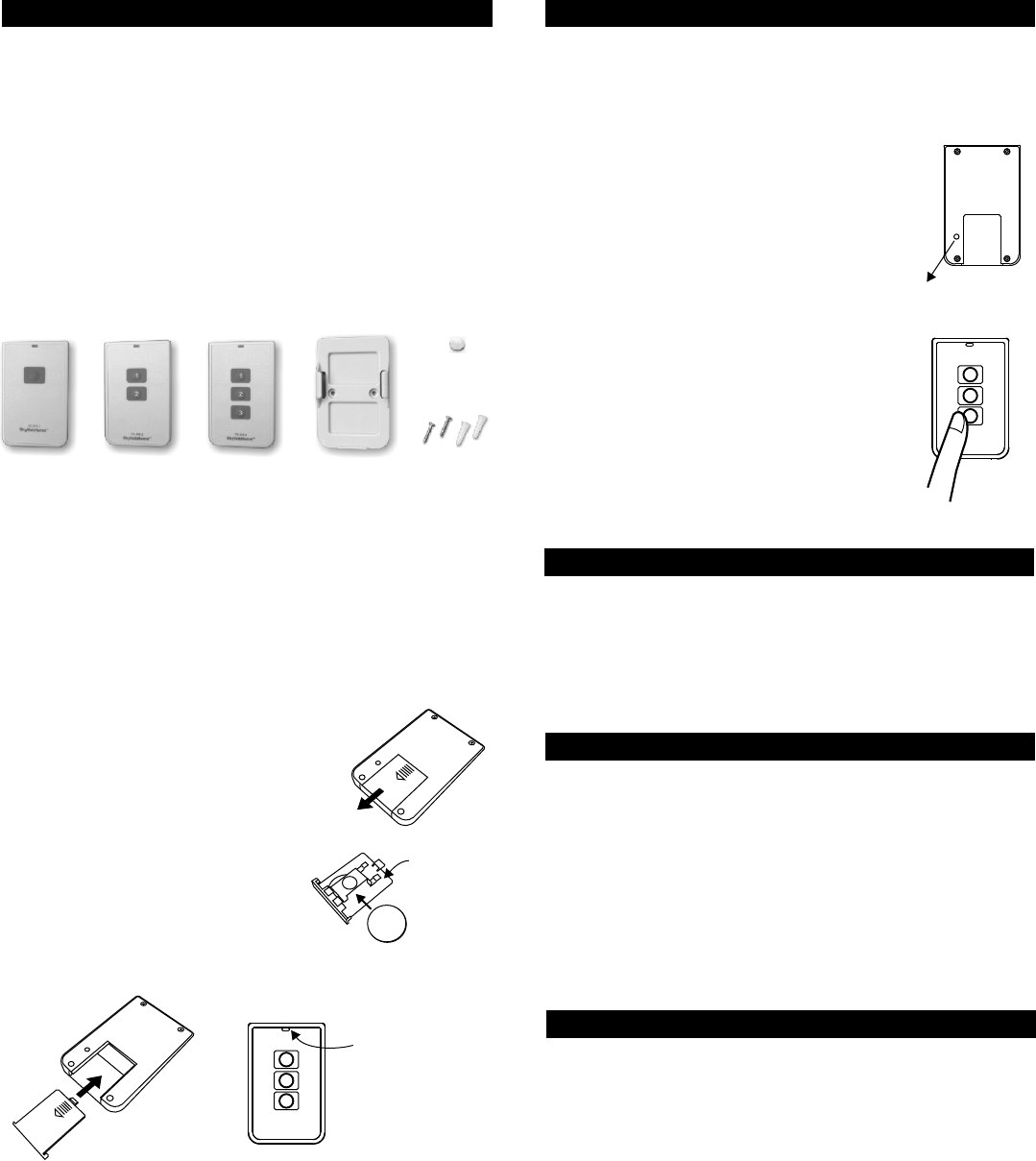
The 1-Button Transmitter can control one light, with 1 receiver module.
The 2-Button Transmitter can control two lights, with 2 receiver modules.
The 3-Button Transmitter can control three lights, with 3 receiver modules.
Installing Battery
The transmitter is powered by a lithium battery CR-2032. Follow the
instructions below to install the battery to the transmitter.
1. INTRODUCTION 2. PROGRAMMING TRANSMITTERS TO RECEIVER MODULE
4. BRIGHTNESS CONTROL OPERATION
In order to operate the receiver module remotely with a transmitter, it
must be programmed to the receiver module.
To program a transmitter into the receiver module, follow the instructions
below.
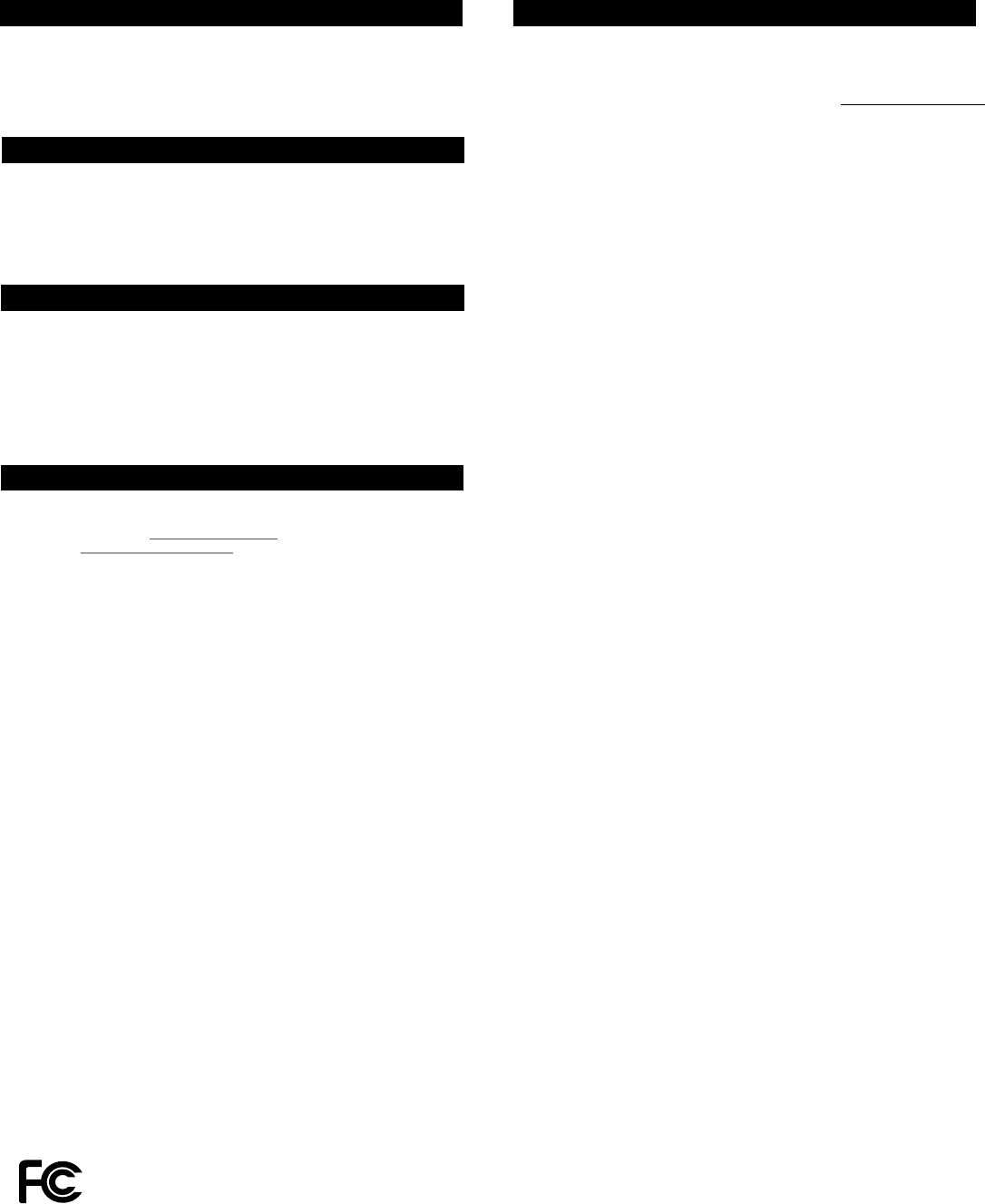
1. Put the receiver module that you plan to
program into programming mode. Refer to the
User's Instructions of that receiver module.
2. Once the receiver module is in programming
mode, use a sharp object to press the “PROG”
switch on the back of the transmitter. The red
LED on the transmitter will be on.
3. Press the number button on the transmitter that
you plan to operate this receiver module with.
Red LED will flash then off.
4. Once the transmitter is programmed, the receiver
module will quit from programming mode.
5. You may operate the light with the programmed
transmitter.
You may follow the same instructions to program
different buttons on the transmitter to different
receiver module.
1. Slide out the battery door from the unit.
2. Insert the CR-2032 lithium battery to the
battery holder. Positive side facing up.
3. Insert the battery door to the transmitter.
The red LED on the front of the unit will
be on for 1 second.
1-Button Transmitter
2-Button Transmitter
3-Button Transmitter
1-Button
Transmitter
Model TC-318-1
Model TC-318-2
Model TC-318-3
3. ON / OFF OPERATION
Pressing the programmed button on the transmitter once will toggle
the light that is connected to the receiver module, i.e. if the light is off,
pressing the button turns on the light, vice versa.
When the programmed button is pressed, the red LED flashes briefly
indicating signal is transmitting.
Besides turning on and off the light, you may also control the brightness
of the light if the receiver module and the light bulb is dimmable, i.e. either
incandescent light and designated dimming compact fluorescent light.
To change the brightness, first turn on the light.
Press and hold the programmed button on the transmitter will change its
brightness. Hold onto the button until the desired brightness is reached,
then release the button.
Press and hold the same button again on the transmitter to change the
brightness again in the opposite way (i.e. Dim to brighten or brighten to
dim), until the desired brightness is reached, then release the button.
5. ERASING TC SERIES TRANSMITTERS
You may erase a transmitter from the receiver module, but you cannot
erase a specific device, you must erase all the wireless devices, then
program the ones you want to keep. Follow the instructions below to
erase programmed transmitters.
1. Power off the lighting receiver module.
2. Use a sharp object to press the PROG button on the back of the
transmitter.
3. Press and hold the programmed number button on the transmitter for
at least 2 seconds. Do not release this button until step 5.
4. Power up the lighting receiver module, you will hear beeping and the
light will be on.
5. You may release the button on the transmitter.
6. When the button is release, the light connected to the receiver module
will be off, indicating you have successfully erased all the devices
from the lighting receiver.
“PROG” switch
Press the
desired
button
2-Button
Transmitter
3-Button
Transmitter
Before you can control the lights with the transmitter, you need to program
different buttons on the transmitter to various receiver modules. Follow
the instructions below to program the transmitter to different receiver
modules.
+
+
CR2032
Slide out
battery door
Battery door
with holder
LED on for
1 second
Positive
side up
Insert battery
door with battery
Mounting
Bracket
Accessories
Erasing TC series transmitters from the Dimmable Receiver
Module model MD-318 or On / Off Receiver Module model MR-318
Lithium
battery
6. BATTERY
7. FCC
8. CUSTOMER SERVICE
The Remote Control is approved by the FCC and it complies with Part 15 of the
FCC Rules. Its operation is subject to the following two conditions :
1. This device may not cause harmful interference.
2. This device must accept any interference that may cause undesired operation.
WARNING:
Changes or modifications to this unit not expressly approved by the party responsible
of compliance could void the user’s authority to operate the equipment.
If you would like to order Skylink’s products or have difficulty getting them to work
or download latest information and user manual, please :
1. visit our FAQ section at www.skylinkhome.com, or
2. email us at support@skylinkhome.com, or
3. call our toll free at 1-800-304-1187 from Monday to Friday, 9 am to 5 pm EST.
Fax (800) 286-1320
CUSTOMER SERVICE
17 Sheard Avenue, Brampton, Ontario, Canada L6Y 1J3
Email:support@skylinkhome.com
http://www.skylinkhome.com
P/N. 101A396
Patent Pending
©2010 SKYLINK GROUP
When the operating range is reduced, or when the red LED does not
flash during operation, it is time to replace the battery. Follow the same
procedure as installing the battery in section 1 of this manual to replace
the battery.
Note: Dispose of old batteries promptly and properly.
9. ACCESSORIES
5. ERASING TC SERIES TRANSMITTERS (CONT)
If you would like to erase TC series transmitter from other receiver modules,
such as WR-318, WE-318, PA-318, PR-318, LS-318 etc., Please refer to
the user’s instructions of that receiver module.
Erasing TC series transmitters from other receivers The Skylink Lighting System consists of many other devices from
multiple button transmitters, Motion Sensor, various receivers such as
Wall Switch Receiver, Plug-in Receiver with Repeater, Outdoor Receiver,
Dimmer Module etc. Please visit Skylink website at www.skylinkhome.com
for more information.
TM
Home
TM
Thank you for your purchase of a SkylinkHome Lighting Automation,
Deluxe Transmitter, Model TC-318-7 / TC-318-10 / TC-318-10 / TC-318-14.
This transmitter allows you to wirelessly operate different lighting fixtures
TM
with the SkylinkHome lighting receiver modules.
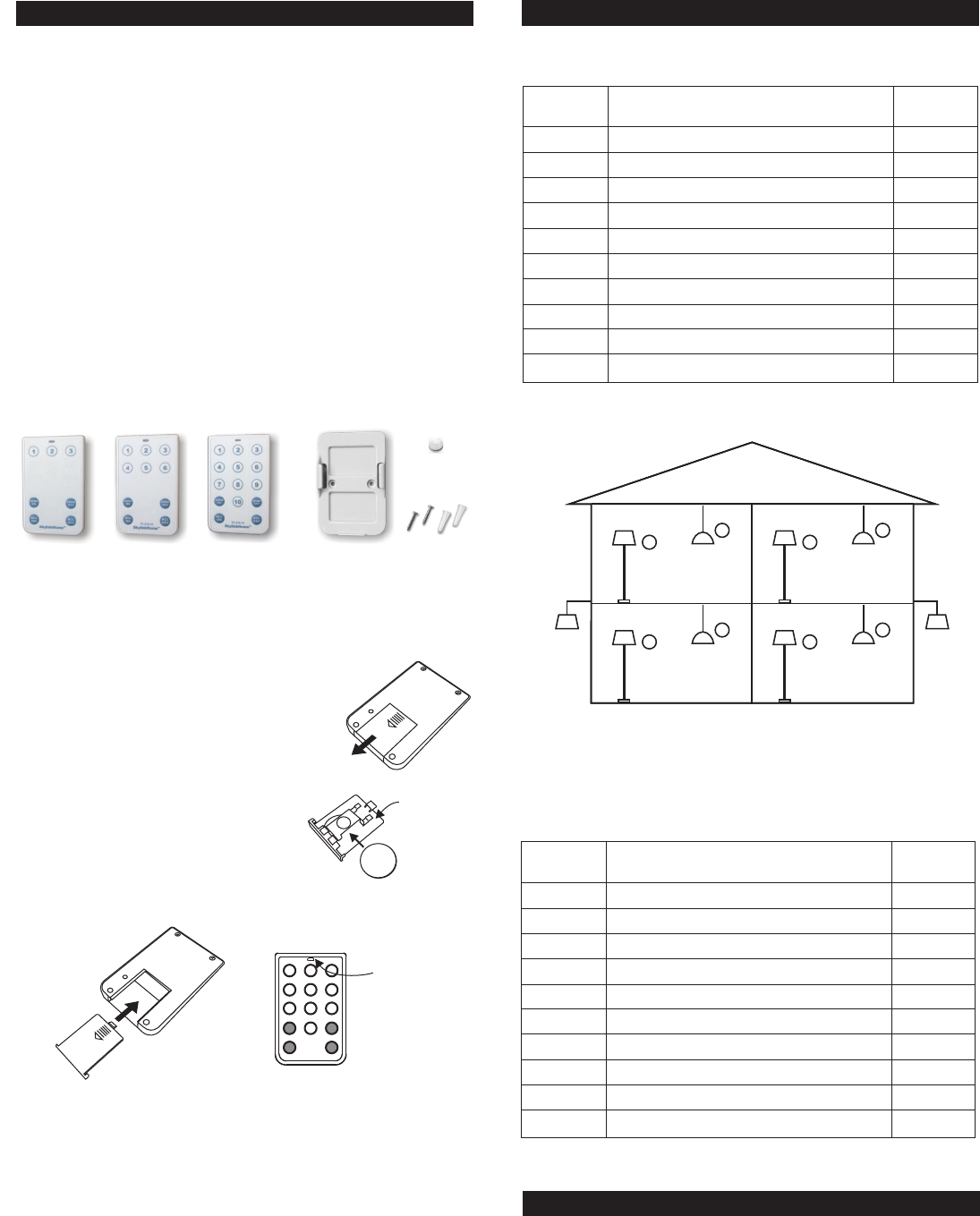
The transmitter TC-318-7 can communicate with a minimum number of
3 receiver modules, and 3 lighting zones.
The transmitter TC-318-10 can communicate with a minimum number of
6 receiver modules, and 6 lighting zones.
The transmitter TC-318-14 can communicate with a minimum number of
10 receiver modules, and 10 lighting zones.
TM
All wireless signal communications within the SkylinkHome lighting
system are based on rolling code technology to ensure highest security
is used.
The following items are included in this package:
- TC Series Transmitter
- Mounting Bracket and Accessories
- Lithium Battery CR-2032
- User's Instructions
1. INTRODUCTION 1. INTRODUCTION (CONT)
1. Slide out the battery door from the unit.
2. Insert the CR-2032 lithium battery to the
battery holder. Positive side facing up.
3. Insert the battery door to the transmitter.
The red LED on the front of the unit will
be on for 1 second.
10-Button
Deluxe
Transmitter
14-Button
Deluxe
Transmitter
Slide out
battery door
LED on for
1 second
Insert battery
door with battery
Model TC-318-7
Model TC-318-10
Model TC-318-14
7-Button Deluxe Transmitter
10-Button Deluxe Transmitter
14-Button Deluxe Transmitter
The Deluxe Transmitter can transmit 3 types of command:
1) Individual Operation - Operates one light only, i.e. the ceiling light in
the family room
2) Zone Operation - Operates one specific zone or area, which consists
of multiple lights, i.e. all lights in the kitchen
3) All On / All Off - Operates all lights in the premises, i.e. all lights in the
TM
house with SkylinkHome lighting modules.
Before you can control the lights with the transmitter, you need to program
different buttons on the transmitter to various receiver modules. It is a lot
easier if you plan in advance of how to setup your lighting system, you
may list out the lights and their locations with zone grouping that you plan
to include in your lighting system.
Installing Battery
The transmitter is powered by a lithium battery CR-2032. Follow the
instructions below to install the battery to the transmitter.
Number
Button
Number
Button
1
2
3
4
5
6
7
8
9
10
Light
Light
Zone
Zone
Family Room Floor Light
Family Room Ceiling Light
Kitchen Floor Light
Kitchen Ceiling Light
Bedroom Floor Light
Bedroom Ceiling Light
Master Bedroom Floor Light
Master Bedroom Ceiling Light
Front Yard Light
Back Yard Light
Zone 1
Zone 1
Zone 2
Zone 2
Zone 3
Zone 3
Zone 4
Zone 4
Zone 5
Zone 5
3
4
Back Yard
Zone 5
Kitchen
Zone 2
1
2
Family Room
Zone 1
7
8
Master Bedroom
Zone 4
5
6
Bedroom
Zone 3
Front Yard
Zone 5
You may use the following table to fill in the lights you would like to
control and their zone numbers, this will give you a clear direction during
the programming process.
2. PROGRAMMING TRANSMITTERS TO RECEIVER MODULE
Programming - Individual Operation
In order to operate the receiver module remotely with a transmitter, it
must be programmed to the receiver module. Follow the instructions
below.
Mounting
Bracket
Accessories
+
+
CR2032
Battery door
with holder
Positive
side up
Example :
Lithium
battery
7-Button
Deluxe
Transmitter
2. PROGRAMMING TRANSMITTERS TO RECEIVER MODULE (CONT)
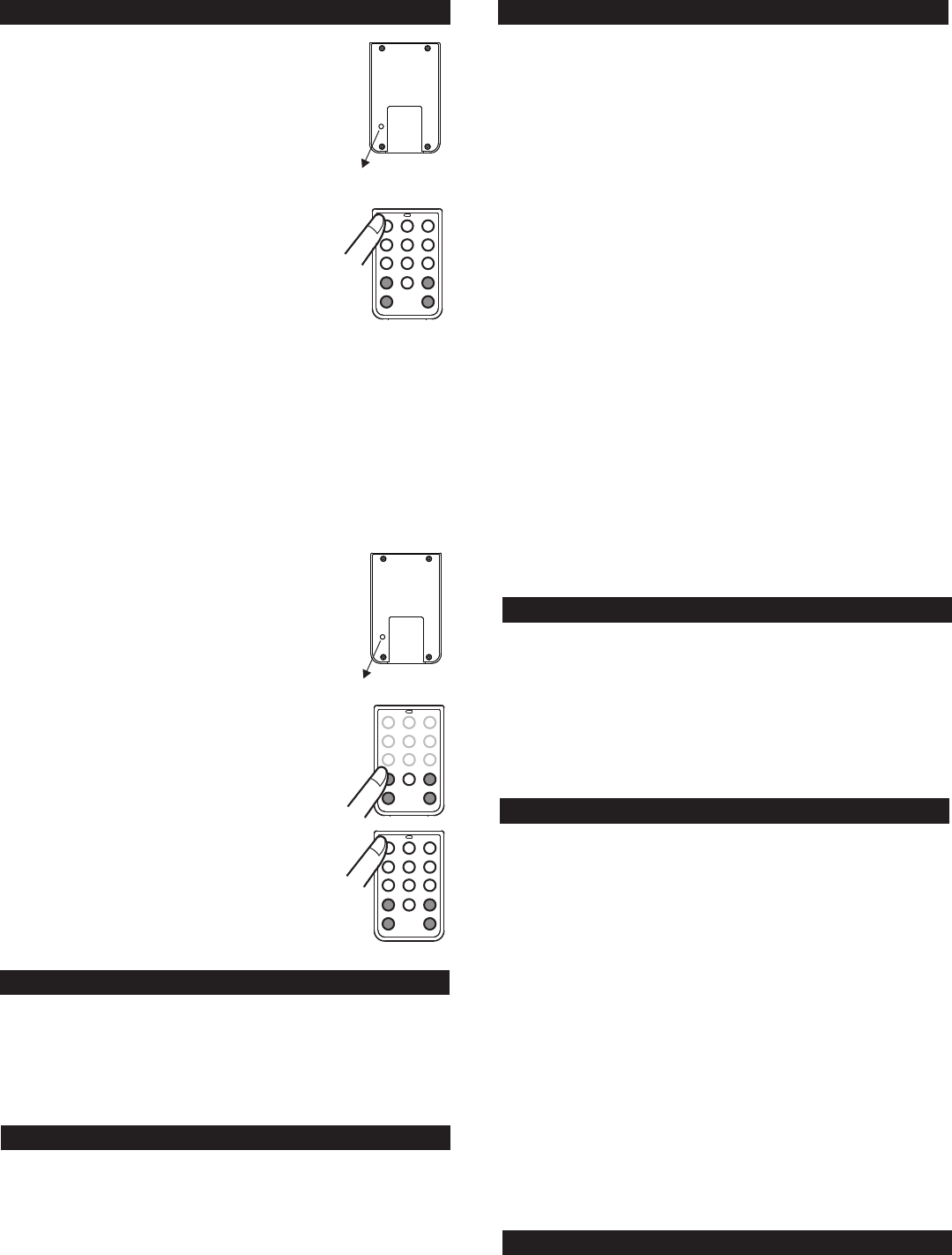
1. Put the receiver module that you plan to program
into programming mode. Refer to the User's
Instructions of that receiver module.
2. Once the receiver module is in programming mode,
you may transmit the programming signal from the
transmitter by pressing the “PROG” switch on the
back of the transmitter with a sharp object. The red
LED on the transmitter will be on.
3. Press the number button on the transmitter that
you plan to operate this receiver module with.
Red LED will flash then off.
4. Once the transmitter is programmed, the
receiver module will quit from programming
mode.
5. You may operate the light with the programmed
transmitter.
You may follow the same instructions to program different buttons on the
transmitter to different receiver module.
“PROG” switch
Programming - Zone Operation
In the above example, both the Family Room Ceiling Lighting and Family
Room Floor Light are in zone 1. You need to program the zone 1 signal
to both receiver modules in these 2 locations.
To assign a zone to a receiver module, follow the instructions below:
1. Put the receiver module that you plan to program
into programming mode.
2. Once the receiver module is in programming
mode, you may transmit the zone programming
signal from the transmitter by pressing the “PROG”
switch on the back of the transmitter with a sharp
object. The red LED on the transmitter will be on.
3. Press the [Zone On] button, then the zone number
button on the transmitter. i.e. “1” for zone 1.
Red LED will flash then off.
4. Once the zone number is programmed, the
receiver module will quit from programming
mode.
5. You may try by pressing [Zone On]+[Number
Button], the light(s) in the zone will be on.
Following the same instructions to program the
zone signal into various receiver modules
to form a zone with multiple lights, i.e. Zone 1 signal
to both Family Room Ceiling Light Module and
Family Room Floor Light Module.
“PROG” switch
ZONE
ON
4. BRIGHTNESS CONTROL OPERATION
5. ZONE OPERATION
6. ALL ON / ALL OFF OPERATION
3. ON / OFF OPERATION
Pressing the programmed button on the remote once will toggle the light
that is connected to the receiver module, i.e. if the light is off, pressing the
button turns on the light, vice versa.
When the number button is pressed, the red LED flashes briefly indicating
signal is transmitting.
Besides turning on and off the light, you may also control the brightness
of the light if the receiver module and the light bulb is dimmable, i.e. either
incandescent light and designated dimming compact fluorescent light.
To change the brightness, first turn on the light.
Press and hold the programmed button on the transmitter will change its
brightness. Hold onto the button until the desired brightness is reached,
then release the button.
Press and hold the same button again on the transmitter to change the
brightness again in the opposite way (i.e. Dim to brighten or brighten to
dim), until the desired brightness is reached, then release the button.
Zone Operation On / Off
A Zone Command allows you to operate multiple lights at the same time
in the same zone. You may turn On or Off a zone.
To activate the zone command, simply press “Zone On” or “Zone Off”,
then the zone number.
Pressing [Zone On] then [1] will turn on all lights in zone 1.
Pressing [Zone Off] then [3] will turn off all lights in zone 3.
You may turn on all the lights with one touch of a button, or turn them all
off as well. All Off function is especially useful when you are leaving the
house and do not want to leave any lights on.
TM
Press the "All Off" button to turn off all the lights in the SkylinkHome
lighting system.
TM
Press the "All On" button to turn on all the lights in the SkylinkHome
lighting system.
8. BATTERY
When the operating range is reduced, or when the red LED does not
flash during operation, it is time to replace the battery. Follow the same
procedure as installing the battery in section 1 of this manual to replace
the battery.
Note: Dispose of old batteries promptly and properly.
5. ERASING TC SERIES TRANSMITTERS
You may erase a transmitter from the receiver module, but you cannot
erase a specific device, you must erase all the wireless devices, then
program the ones you want to keep. Follow the instructions below to
erase programmed transmitters.
1. Power off the lighting receiver module.
2. Use a sharp object to press the PROG button on the back of the
transmitter.
3. Press and hold the programmed number button on the transmitter for
at least 2 seconds. Do not release this button until step 5.
4. Power up the lighting receiver module, you will hear beeping and the
light will be on.
5. You may release the button on the transmitter.
6. When the button is release, the light connected to the receiver module
should be off, indicating you have successfully erased all the devices
from the lighting receiver.
Erasing TC series transmitters from the Dimmable Receiver
Module model MD-318 or On / Off Receiver Module model MR-318
If you would like to erase TC series transmitter from other receiver modules,
such as WR-001, WE-001, PA-318, PR-318 etc., Please refer to the user’s
instructions of that receiver module.
Erasing TC series transmitters from other receivers
Zone Operation Brightness Control
You can also change the brightness of all the lights in that zone, if the
receiver modules and lights connected are dimmable.
[Zone On] represents increase in brightness level, i.e. Brightening
[Zone Off] represents decrease in brightness level, i.e. Dimming
Press [Zone On] then hold [1] will brighten all lights in zone 1, release
the button at the desired brightness level or it will stop until they are at
the maximum brightness.
Press [Zone Off] then hold [1] will dim all lights in zone 1, release the
button at the desired brightness level or it will stop until they are at the
minimum brightness.
Programming Zone Command
Enter [Zone On] + [Zone Number] during step 5B of the programming
sequence (ensure on / off operating mode is selected), the Zone
Command signal would be programmed. Repeat this step for all the
receiver modules in the same zone.

10. CUSTOMER SERVICE
If you would like to order Skylink’s products or have difficulty getting them to work
or download latest information and user manual, please :
1. visit our FAQ section at www.skylinkhome.com, or
2. email us at support@skylinkhome.com, or
3. call our toll free at 1-800-304-1187 from Monday to Friday, 9 am to 5 pm EST.
Fax (800) 286-1320
11. ACCESSORIES
CUSTOMER SERVICE
17 Sheard Avenue, Brampton, Ontario, Canada L6Y 1J3
Email:support@skylinkhome.com
http://www.skylinkhome.com
P/N. 101Z697
Patent Pending
©2010 SKYLINK GROUP
9. FCC
The Remote Control is approved by the FCC and it complies with Part 15 of the
FCC Rules. Its operation is subject to the following two conditions :
1. This device may not cause harmful interference.
2. This device must accept any interference that may cause undesired operation.
WARNING:
Changes or modifications to this unit not expressly approved by the party responsible
of compliance could void the user’s authority to operate the equipment.
The Skylink Lighting System consists of many other devices from
multiple button transmitters, Motion Sensor, various receivers such as
Wall Switch Receiver, Plug-in Receiver with Repeater, Outdoor Receiver,
Dimmer Module etc. Please visit Skylink website at www.skylinkhome.com
for more information.
TM
Home