Carlo Gavazzi Logistics RAD02 Motion Sensor User Manual Radar

Carlo Gavazzi Logistics SpA Motion Sensor Radar

User Manual

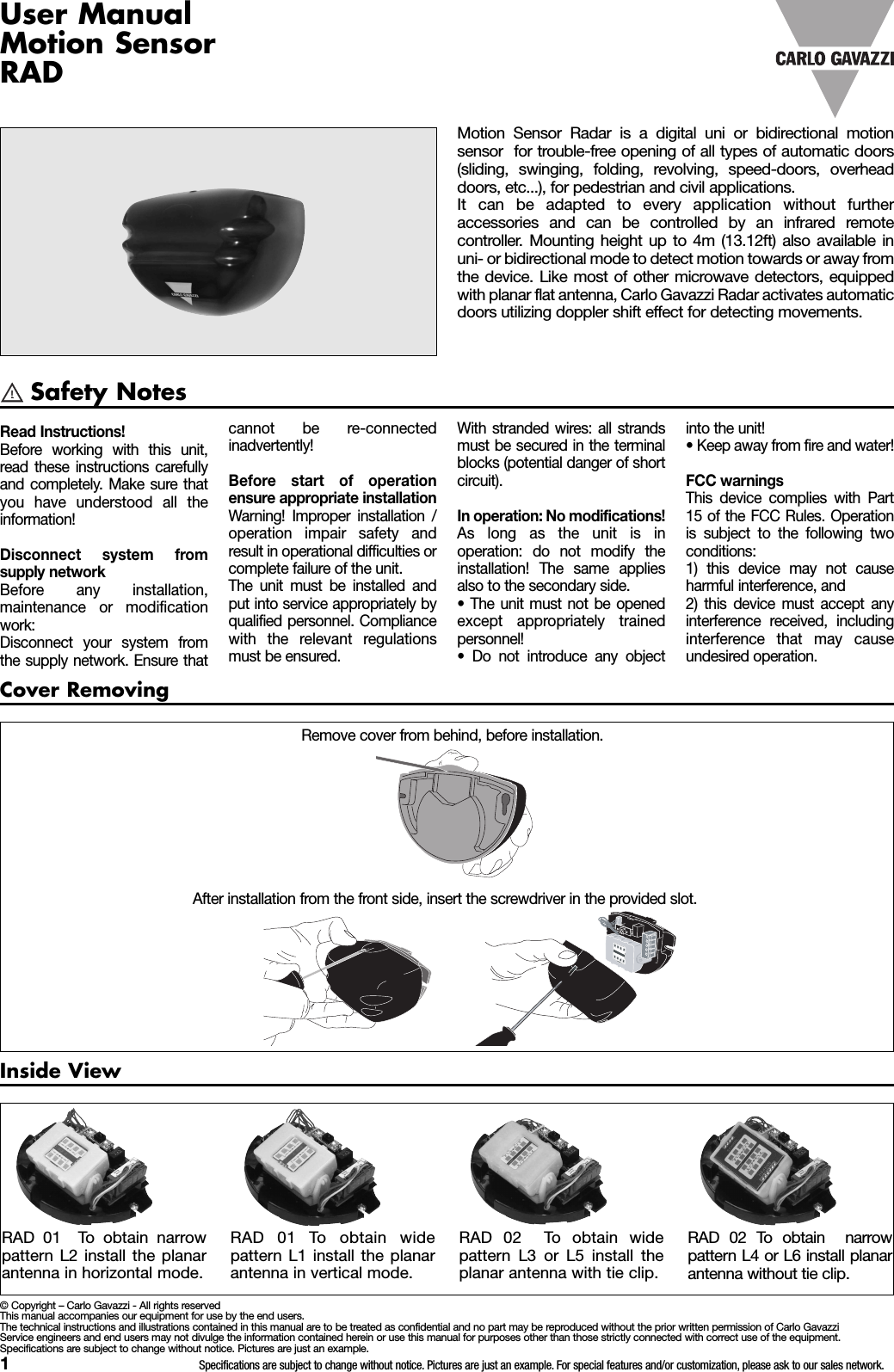
1Specifications are subject to change without notice. Pictures are just an example. For special features and/or customization, please ask to our sales network.Safety NotesInside ViewCover RemovingRemove cover from behind, before installation.After installation from the front side, insert the screwdriver in the provided slot.RAD 01 To obtain widepattern L1 install the planarantenna in vertical mode.RAD 01 To obtain narrowpattern L2 install the planarantenna in horizontal mode.RAD 02 To obtain widepattern L3 or L5 install theplanar antenna with tie clip.RAD 02 To obtain narrowpattern L4 or L6 install planarantenna without tie clip.Motion Sensor Radar is a digital uni or bidirectional motionsensor for trouble-free opening of all types of automatic doors(sliding, swinging, folding, revolving, speed-doors, overheaddoors, etc...), for pedestrian and civil applications.It can be adapted to every application without furtheraccessories and can be controlled by an infrared remotecontroller. Mounting height up to 4m (13.12ft) also available inuni- or bidirectional mode to detect motion towards or away fromthe device. Like most of other microwave detectors, equippedwith planar flat antenna, Carlo Gavazzi Radar activates automaticdoors utilizing doppler shift effect for detecting movements.Read Instructions!Before working with this unit,read these instructions carefullyand completely. Make sure thatyou have understood all theinformation!Disconnect system fromsupply networkBefore any installation,maintenance or modificationwork:Disconnect your system fromthe supply network. Ensure thatcannot be re-connectedinadvertently!Before start of operationensure appropriate installationWarning! Improper installation /operation impair safety andresult in operational difficulties orcomplete failure of the unit.The unit must be installed andput into service appropriately byqualified personnel. Compliancewith the relevant regulationsmust be ensured.© Copyright – Carlo Gavazzi - All rights reservedThis manual accompanies our equipment for use by the end users.The technical instructions and illustrations contained in this manual are to be treated as confidential and no part may be reproduced without the prior written permission of Carlo GavazziService engineers and end users may not divulge the information contained herein or use this manual for purposes other than those strictly connected with correct use of the equipment.Specifications are subject to change without notice. Pictures are just an example.With stranded wires: all strandsmust be secured in the terminalblocks (potential danger of shortcircuit).In operation: No modifications!As long as the unit is inoperation: do not modify theinstallation! The same appliesalso to the secondary side.• The unit must not be openedexcept appropriately trainedpersonnel!• Do not introduce any objectinto the unit!• Keep away from fire and water!FCC warningsThis device complies with Part15 of the FCC Rules. Operationis subject to the following twoconditions:1) this device may not causeharmful interference, and2) this device must accept anyinterference received, includinginterference that may causeundesired operation.User ManualMotion SensorRAD
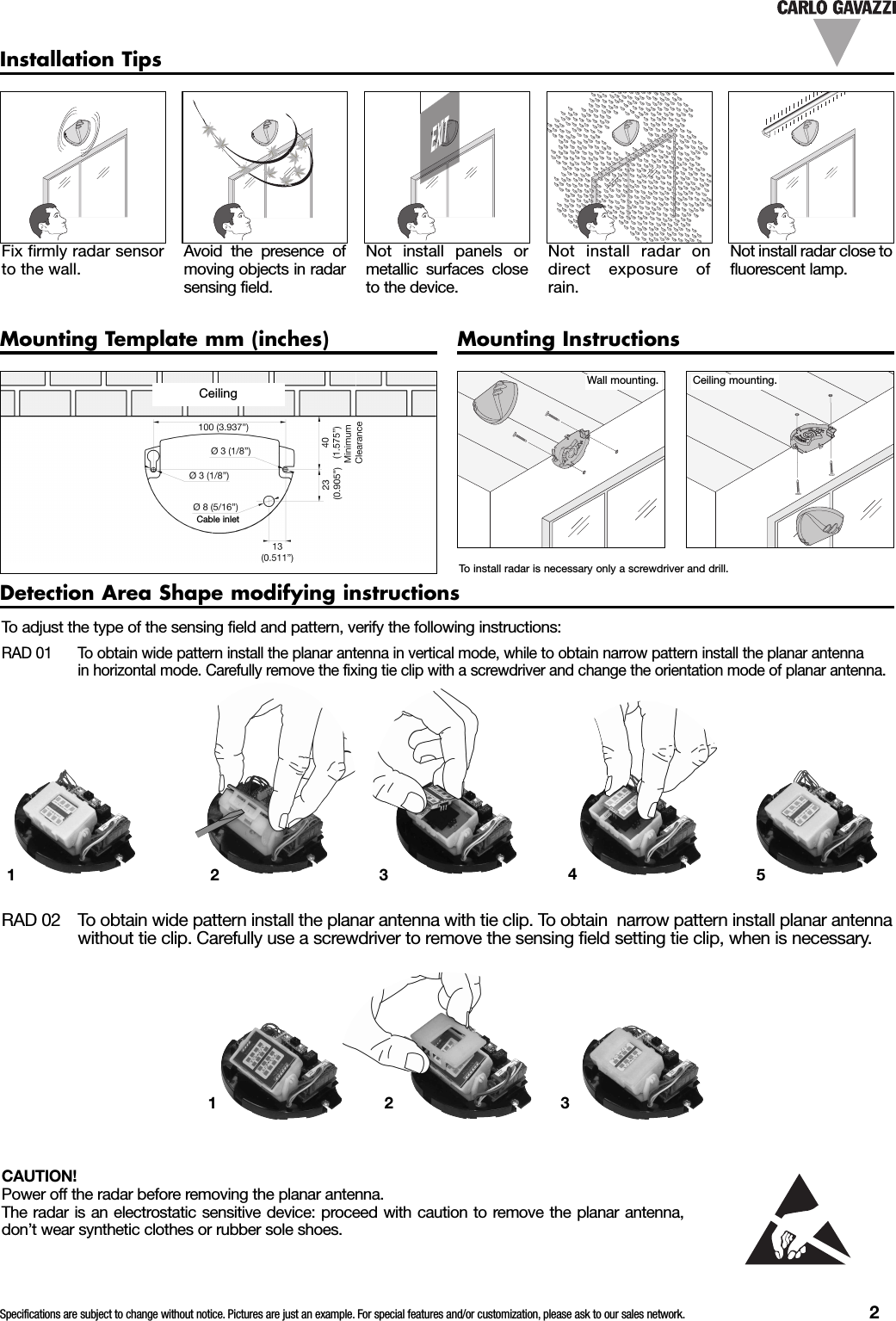
Specifications are subject to change without notice. Pictures are just an example. For special features and/or customization, please ask to our sales network. 2Installation TipsFix firmly radar sensorto the wall.Avoid the presence ofmoving objects in radarsensing field.Not install panels ormetallic surfaces closeto the device.Not install radar ondirect exposure ofrain.Not install radar close tofluorescent lamp.Mounting Template mm (inches) Mounting InstructionsWall mounting. Ceiling mounting.To install radar is necessary only a screwdriver and drill.Detection Area Shape modifying instructionsTo adjust the type of the sensing field and pattern, verify the following instructions:RAD 01 To obtain wide pattern install the planar antenna in vertical mode, while to obtain narrow pattern install the planar antennain horizontal mode. Carefully remove the fixing tie clip with a screwdriver and change the orientation mode of planar antenna.CAUTION!Power off the radar before removing the planar antenna.The radar is an electrostatic sensitive device: proceed with caution to remove the planar antenna,don’t wear synthetic clothes or rubber sole shoes.RAD 02 To obtain wide pattern install the planar antenna with tie clip. To obtain narrow pattern install planar antennawithout tie clip. Carefully use a screwdriver to remove the sensing field setting tie clip, when is necessary.EXIT12345123CeilingCable inlet
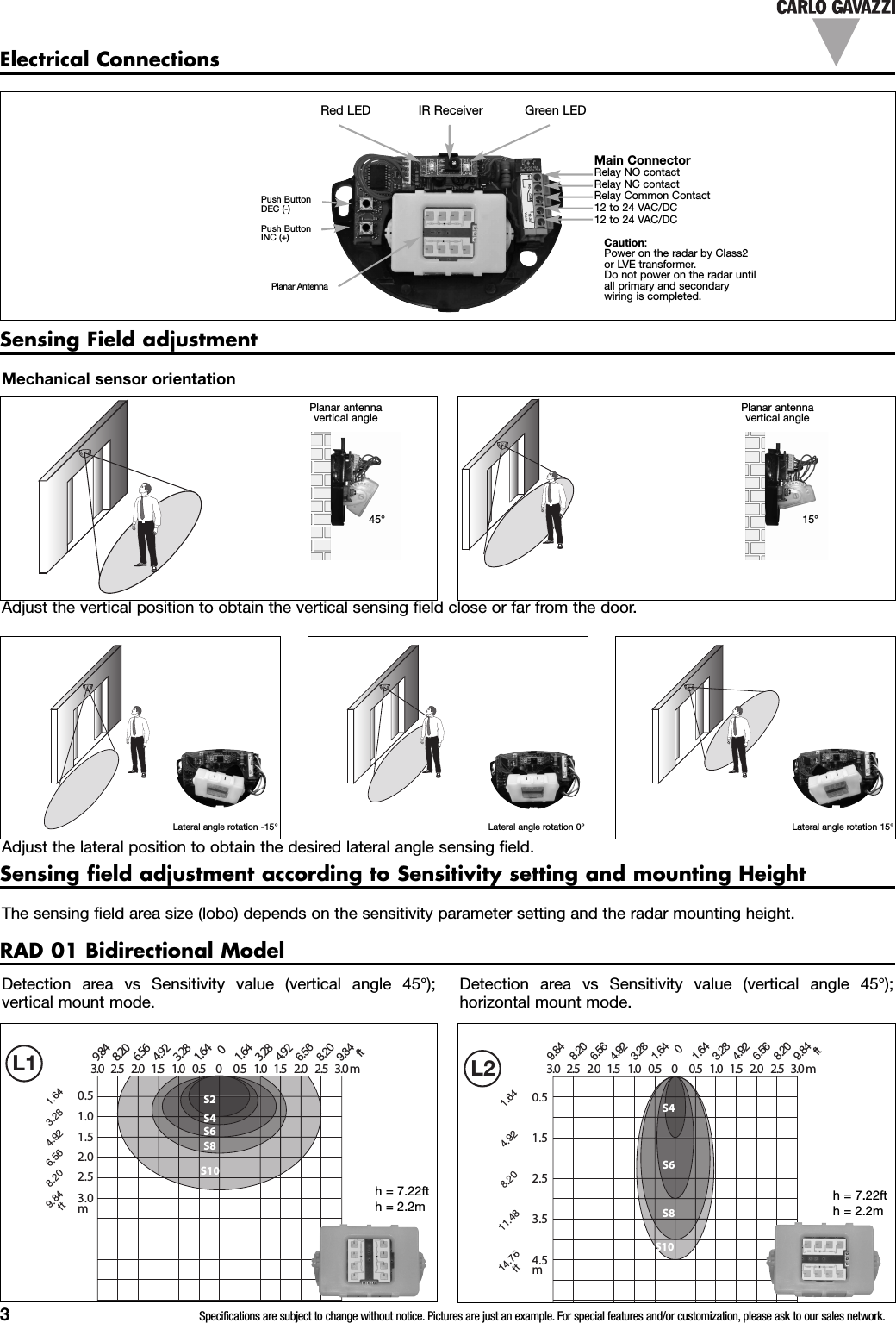
3Specifications are subject to change without notice. Pictures are just an example. For special features and/or customization, please ask to our sales network.Red LED IR Receiver Green LEDPush ButtonDEC (-)Push ButtonINC (+)Electrical ConnectionsMain ConnectorRelay NO contactRelay NC contactRelay Common Contact12 to 24 VAC/DC12 to 24 VAC/DCCaution:Power on the radar by Class2or LVE transformer.Do not power on the radar untilall primary and secondarywiring is completed.Lateral angle rotation -15° Lateral angle rotation 0° Lateral angle rotation 15°Planar antennavertical angleSensing Field adjustmentMechanical sensor orientationAdjust the vertical position to obtain the vertical sensing field close or far from the door.Adjust the lateral position to obtain the desired lateral angle sensing field.Planar antennavertical angleSensing field adjustment according to Sensitivity setting and mounting HeightThe sensing field area size (lobo) depends on the sensitivity parameter setting and the radar mounting height.RAD 01 Bidirectional ModelDetection area vs Sensitivity value (vertical angle 45°);vertical mount mode.Detection area vs Sensitivity value (vertical angle 45°);horizontal mount mode.Planar Antenna45° 15°0.51.01.52.02.53.0m00.50.5 1.01.0 1.51.5 2.02.0 2.52.5 3.03.0 0mS2S4S6S10S8S1.643.284.926.568.209.84ft 01.641.643.283.284.924.926.566.568.208.209.849.84ft0.51.52.53.54.5m00.50.5 1.01.0 1.51.5 2.02.0 2.52.5 3.03.00mS4S6S8SS1041.644.928.2011.4814.76ft01.641.643.283.284.924.926.566.568.208.209.84ft9.84h = 7.22fth = 2.2m h = 7.22fth = 2.2mL1 L2 L3 L4 L5 L6L2 L3 L4 L5 L6
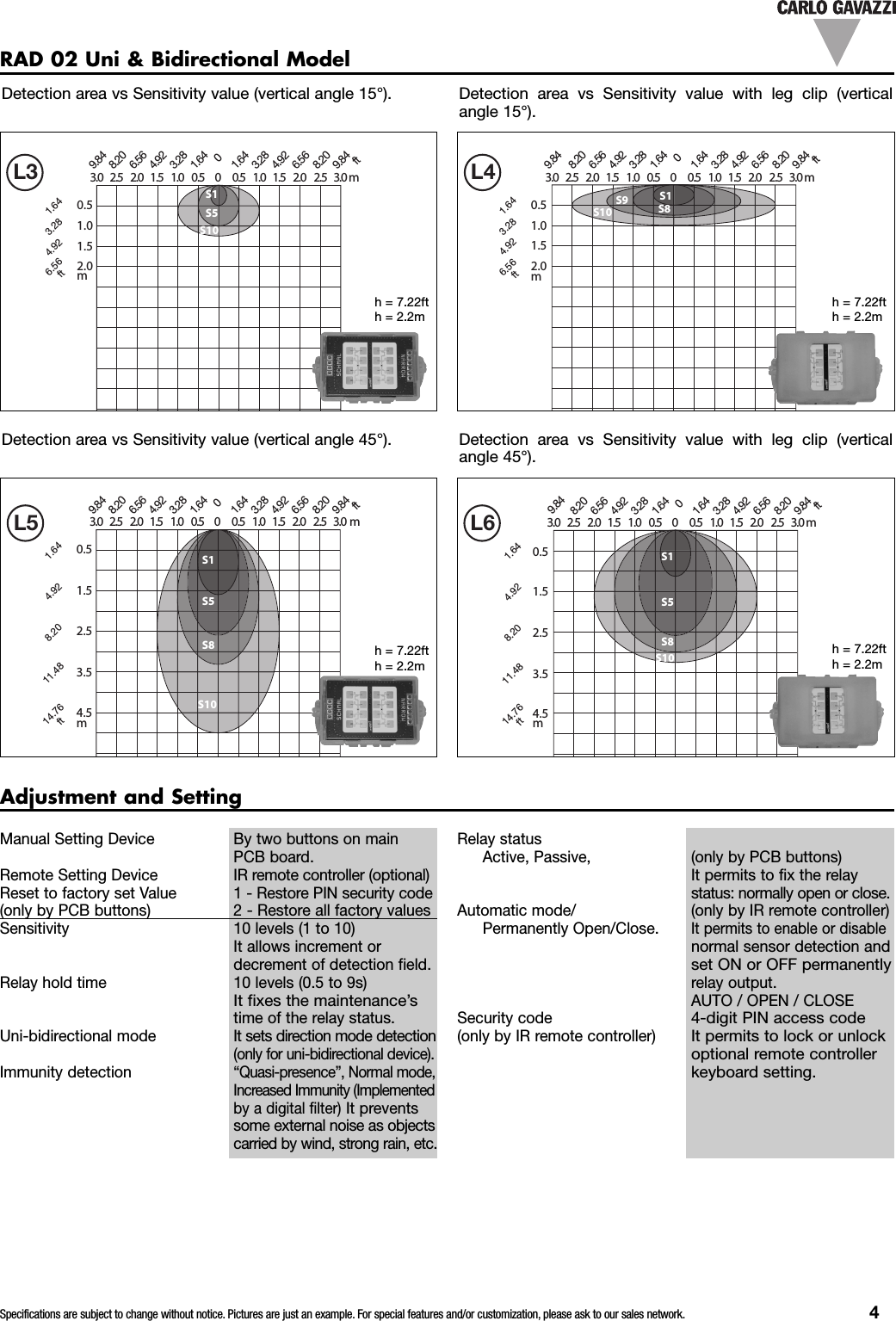
Specifications are subject to change without notice. Pictures are just an example. For special features and/or customization, please ask to our sales network. 4Detection area vs Sensitivity value (vertical angle 45°). Detection area vs Sensitivity value with leg clip (verticalangle 45°).Detection area vs Sensitivity value (vertical angle 15°). Detection area vs Sensitivity value with leg clip (verticalangle 15°).RAD 02 Uni & Bidirectional Model1.52.50.54.5m3.5000.50.5 1.01.0 1.51.5 2.02.0 2.52.5 3.03.0 0mS1S5S8S10S4.928.201.6414.76ft11.48 01.641.643.283.284.924.926.566.568.208.209.849.84ft4.5m0.51.52.53.5000.50.5 1.01.0 1.51.5 2.02.0 2.52.5 3.03.00mS1S5S8S10S4.928.201.6414.76ft11.48 01.641.643.283.284.924.926.566.568.208.209.84ft9.840.51.01.52.0m00.50.5 1.01.0 1.51.5 2.02.0 2.52.5 3.0mm3.0 0S1S5S10S1.643.284.926.56ft01.641.643.283.284.924.926.566.568.208.209.849.84ft0.51.01.52.0m00.50.5 1.01.0 1.51.5 2.02.0 2.52.5 3.0mm3.0SS1S8S10S9S1.643.284.926.56ft9.8401.641.643.283.284.924.926.566.568.208.209.84fth= 7.22fth= 2.2mh = 7.22fth = 2.2mh = 7.22fth = 2.2mh = 7.22fth = 2.2mL3 L4 L5 L6L4 L5 L6L5 L6L6Adjustment and SettingRelay statusActive, Passive, (only by PCB buttons)It permits to fix the relaystatus: normally open or close.Automatic mode/ (only by IR remote controller)Permanently Open/Close.It permits to enable or disablenormal sensor detection andset ON or OFF permanentlyrelay output.AUTO / OPEN / CLOSESecurity code4-digit PIN access code(only by IR remote controller)It permits to lock or unlockoptional remote controllerkeyboard setting.Manual Setting Device By two buttons on mainPCB board.Remote Setting Device IR remote controller (optional)Reset to factory set Value 1 - Restore PIN security code(only by PCB buttons) 2 - Restore all factory valuesSensitivity 10 levels (1 to 10)It allows increment ordecrement of detection field.Relay hold time 10 levels (0.5 to 9s)It fixes the maintenance’stime of the relay status.Uni-bidirectional mode It sets direction mode detection(only for uni-bidirectional device).Immunity detection“Quasi-presence”, Normal mode,Increased Immunity (Implementedby a digital filter)It preventssome external noise as objectscarried by wind, strong rain, etc.
5Specifications are subject to change without notice. Pictures are just an example. For special features and/or customization, please ask to our sales network.Factory Default ValueThe device is set up in factory at the following default values:1. Sensitivity 10 (max level)2. Relay hold time 1 (min: 0.5 sec)3. Uni-Bidirectional Detection Mode Bi-directional (Uni-directionalmode is available only for RAD 02)4. Immunity detection Immunity: OFF ;Quasi-Presence: OFF5. Relay Status: Passive6. PIN security: 0000 - block disabled(only for remote controller)At the first start up, the device loads the default values.Radar set value can bemodified through the twobuttons on the main PCboard (On Board settingprocedure) or with the IRremote controller [optional](IR remote controller setting).The differences between onboard settings procedureand IR controller settingsprocedure are only in “RelayIt is necessary to presssimultaneously for 1 secondthe two PC-board buttonsDEC(-) and INC(+) to enter inprogramming procedure.When the two buttons arereleased the Green LEDstates permanently activeOn board setting procedureProgramming procedurestatus”, “Restore” and the“PIN security code” features.“Restore” feature is onlyavailable by on board pushbuttons while PIN securitycode function is availableonly by remote controller.“Relay status feature” ispartly available by on boardpush buttons and partly byremote controller.(ON) so the device is readyto be set.Next setting action must bedone in 20 seconds,otherwise the device returnin normal operation modeand it’s necessary to restart.• Refer to the following table to change radar Set Values:STEPS STEP 0 STEP 1 STEP 2 STEP 3SETTING DESCRIPTION USER’SACTIONGREEN LEDSTATUSUSER’SACTIONRED LEDSTATUSUSER’SACTION RED LED STATUS USER’SACTIONPROGRAMMINGPROCEDURE START UPP r e s stogether DEC&INC per 1sec.Green LEDswitch onpermanently.XX X XPress DEC & INC per 1 sec. to goto Sensitivity (see Sensitivity STEP1) or wait 20 sec. to end settingprocedure.SENSITIVITY X XP r e s stogether DEC& INC per 1sec.Red LED willflash once.Press DEC or INC per 1 sec. toincrease or decrease Sensitivitycurrent value.Red LED flashes the number ofthe new set value (1…10 quickflashes).Return to Step 2 or press DEC &INC per 1 sec. to go to Hold Time(see Hold Time STEP 1) or wait 20sec. to end setting procedure.HOLD TIME X XP r e s stogether DEC& INC per 1sec.Red LED willflash twice.Press DEC or INC per 1 sec. toincrease or decrease Hold Timecurrent valueRed LED flashes the number ofthe new set value (1…10 quickflashes).Return to Step 2 or press DEC &INC per 1 sec. to go to DetectionMode (see Detection ModeSTEP 1) or wait 20 sec. to endsetting procedure.DETECTION MODE X XP r e s stogether DEC& INC per 1sec.Red LED willflash threetimes.Feature available only for RAD02 model.• RAD 01: press DEC & INC per1 sec. to go to Immunity.• RAD 02: press INC per 1 sec.to change Detection Mode cur-rent value.Only for RAD 02 model:1 quick Red LED flash: Toward;2 quick Red LED flashes:Backward;3 quick Red LED flashes: Towardand Backward;Return to Step 2 or press DEC &INC per 1 sec. to go to Immunity(see Immunity STEP 1) or wait20 sec. to end settingprocedure.IMMUNITY X XP r e s stogether DEC& INC per 1sec.Red LED willflash fourtimes.Press INC per 1 sec. to changeImmunity current value.1 quick flash: Immunity ON, QPOFF;2 quick flashes: Immunity OFF,QP ON;3 quick flashes: Immunity ON, QPON;4 quick flashes: Immunty OFF, QPOFF;Return to Step 2 or press DEC &INC per 1 sec. to go to RelayStatus (see Relay Status STEP 1)or wait 20 sec. to end settingprocedure.RELAY STATUS X XP r e s stogether DEC& INC per 1sec.Red LED willflash fivetimes.Press INC per 1 sec. to changeRelays Status current value1 quick flash: Relay modePASSIVE (NO);2 quick flashes: Relay modeACTIVE (NC);Return to Step 2 or press DEC &INC per 1 sec. to go to Restore(see Restore STEP 1) or wait 20sec. to end setting procedure.RESTORE X XP r e s stogether DEC& INC per 1sec.Red LED willflash sixtimes.Press INC per 1 sec. to changeRestore current value.1 quick flash: Restore PIN to00002 quick flashes: Restore all tofactory default values.Return to Step 2 or wait 20 sec. toend setting procedure.
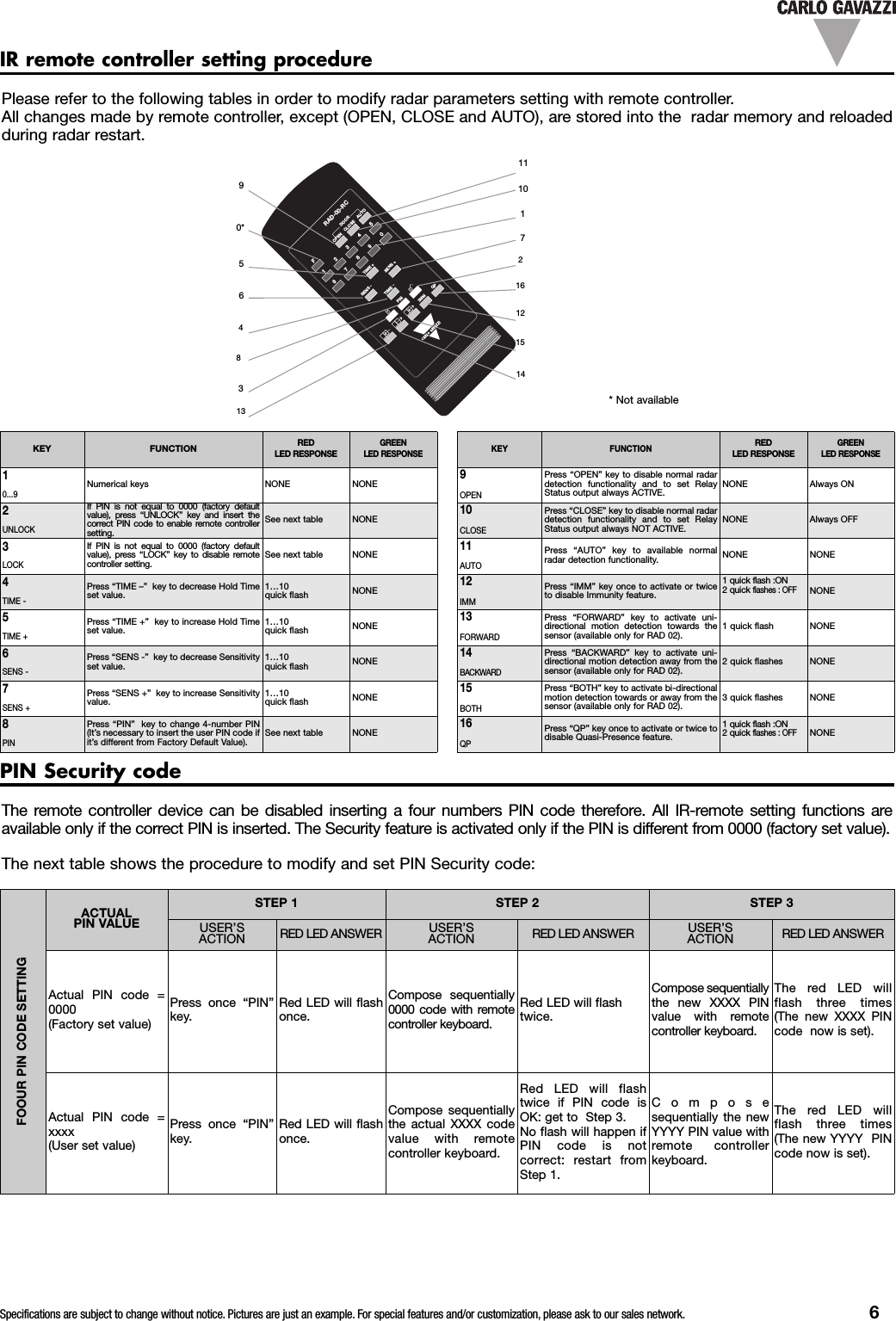
Specifications are subject to change without notice. Pictures are just an example. For special features and/or customization, please ask to our sales network. 6Please refer to the following tables in order to modify radar parameters setting with remote controller.All changes made by remote controller, except (OPEN, CLOSE and AUTO), are stored into the radar memory and reloadedduring radar restart.KEY FUNCTIONREDLED RESPONSEGREENLED RESPONSE10...9Numerical keys NONE NONE2UNLOCKIf PIN is not equal to 0000 (factory defaultvalue), press “UNLOCK” key and insert thecorrect PIN code to enable remote controllersetting.See next table NONE3LOCKIf PIN is not equal to 0000 (factory defaultvalue), press “LOCK” key to disable remotecontroller setting.See next table NONE4TIME -Press “TIME –” key to decrease Hold Timeset value.1…10quick flash NONE5TIME +Press “TIME +” key to increase Hold Timeset value.1…10quick flash NONE6SENS -Press “SENS -” key to decrease Sensitivityset value.1…10quick flash NONE7SENS +Press “SENS +” key to increase Sensitivityvalue.1…10quick flash NONE8PINPress “PIN” key to change 4-number PIN(It’s necessary to insert the user PIN code ifit’s different from Factory Default Value).See next table NONEIR remote controller setting procedureKEY FUNCTIONREDLED RESPONSEGREENLED RESPONSE9OPENPress “OPEN” key to disable normal radardetection functionality and to set RelayStatus output always ACTIVE.NONE Always ON10CLOSEPress “CLOSE” key to disable normal radardetection functionality and to set RelayStatus output always NOT ACTIVE.NONE Always OFF11AUTOPress “AUTO” key to available normalradar detection functionality. NONE NONE12IMMPress “IMM” key once to activate or twiceto disable Immunity feature.1quick flash :ON2quickflashes : OFFNONE13FORWARDPress “FORWARD” key to activate uni-directional motion detection towards thesensor (available only for RAD 02).1 quick flash NONE14BACKWARDPress “BACKWARD” key to activate uni-directional motion detection away from thesensor (available only for RAD 02).2 quick flashes NONE15BOTHPress “BOTH” key to activate bi-directionalmotion detection towards or away from thesensor (available only for RAD 02).3 quick flashes NONE16QPPress “QP” key once to activate or twice todisable Quasi-Presence feature.1 quick flash :ON2 quickflashes : OFFNONE*Not available1F234567SENS-8TIME +TIME -9SENS+0OPENCLOSEDOORAUTOIMMPINQPRAD-00-RC111107216121590*513648314The remote controller device can be disabled inserting a four numbers PIN code therefore. All IR-remote setting functions areavailable only if the correct PIN is inserted. The Security feature is activated only if the PIN is different from 0000 (factory set value).The next table shows the procedure to modify and set PIN Security code:PIN Security codeFOOUR PIN CODE SETTINGACTUALPIN VALUESTEP 1 STEP 2 STEP 3USER’SACTION RED LED ANSWER USER’SACTION RED LED ANSWER USER’SACTION RED LED ANSWERActual PIN code =0000(Factory set value)Press once “PIN”key.Red LED will flashonce.Compose sequentially0000 code with remotecontroller keyboard.Red LED will flashtwice.Compose sequentiallythe new XXXX PINvalue with remotecontroller keyboard.The red LED willflash three times(The new XXXX PINcode now is set).Actual PIN code =xxxx(User set value)Press once “PIN”key.Red LED will flashonce.Compose sequentiallythe actual XXXX codevalue with remotecontroller keyboard.Red LED will flashtwice if PIN code isOK: get to Step 3.No flash will happen ifPIN code is notcorrect: restart fromStep 1.Composesequentially the newYYYY PIN value withremote controllerkeyboard.The red LED willflash three times(The new YYYY PINcode now is set).
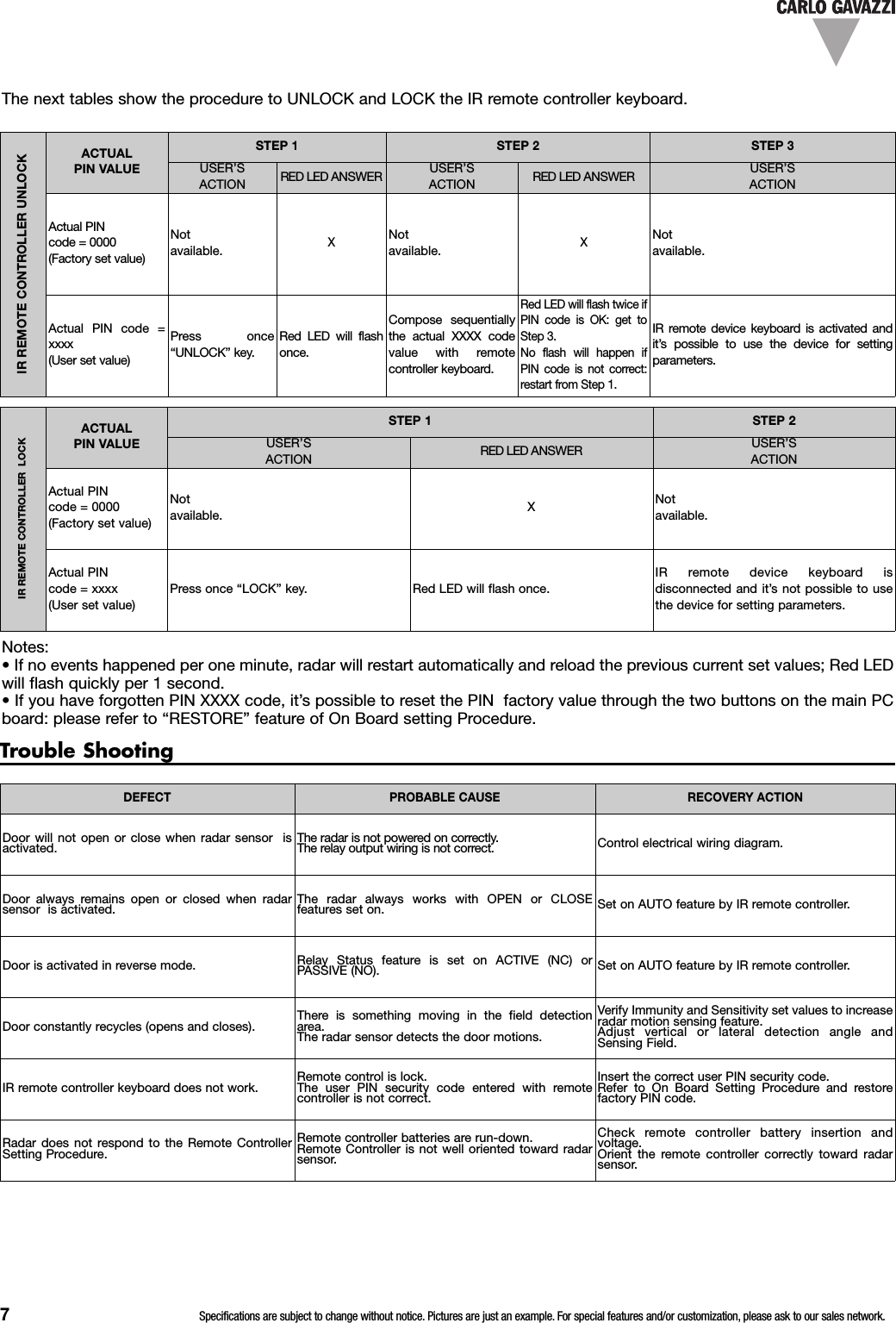
7Specifications are subject to change without notice. Pictures are just an example. For special features and/or customization, please ask to our sales network.IR REMOTE CONTROLLER LOCKACTUALPIN VALUESTEP 1 STEP 2USER’SACTION RED LED ANSWER USER’SACTIONActual PINcode = 0000(Factory set value)Notavailable. XNotavailable.Actual PINcode = xxxx(User set value)Press once “LOCK” key. Red LED will flash once.IR remote device keyboard isdisconnected and it’s not possible to usethe device for setting parameters.Notes:• If no events happened per one minute, radar will restart automatically and reload the previous current set values; Red LEDwill flash quickly per 1 second.• If you have forgotten PIN XXXX code, it’s possible to reset the PIN factory value through the two buttons on the main PCboard: please refer to “RESTORE” feature of On Board setting Procedure.DEFECT PROBABLE CAUSE RECOVERY ACTIONDoor will not open or close when radar sensor isactivated. The radar is not powered on correctly.The relay output wiring is not correct. Control electrical wiring diagram.Door always remains open or closed when radarsensor is activated. The radar always works with OPEN or CLOSEfeatures set on. Set on AUTO feature by IR remote controller.Door is activated in reverse mode. Relay Status feature is set on ACTIVE (NC) orPASSIVE (NO). Set on AUTO feature by IR remote controller.Door constantly recycles (opens and closes). There is something moving in the field detectionarea.The radar sensor detects the door motions.Verify Immunity and Sensitivity set values to increaseradar motion sensing feature.Adjust vertical or lateral detection angle andSensing Field.IR remote controller keyboard does not work. Remote control is lock.The user PIN security code entered with remotecontroller is not correct.Insert the correct user PIN security code.Refer to On Board Setting Procedure and restorefactory PIN code.Radar does not respond to the Remote ControllerSetting Procedure.Remote controller batteries are run-down.Remote Controller is not well oriented toward radarsensor.Check remote controller battery insertion andvoltage.Orient the remote controller correctly toward radarsensor.Trouble ShootingIR REMOTE CONTROLLER UNLOCKACTUALPIN VALUESTEP1STEP2STEP3USER’SACTION RED LED ANSWER USER’SACTION RED LED ANSWER USER’SACTIONActual PINcode = 0000(Factory set value)Notavailable.XNotavailable.XNotavailable.Actual PIN code =xxxx(User set value)Press once“UNLOCK” key.Red LED will flashonce.Compose sequentiallythe actual XXXX codevalue with remotecontroller keyboard.Red LED will flash twice ifPIN code is OK: get toStep 3.No flash will happen ifPIN code is not correct:restart from Step 1.IR remote device keyboard is activated andit’s possible to use the device for settingparameters.The next tables show the procedure to UNLOCK and LOCK the IR remote controller keyboard.
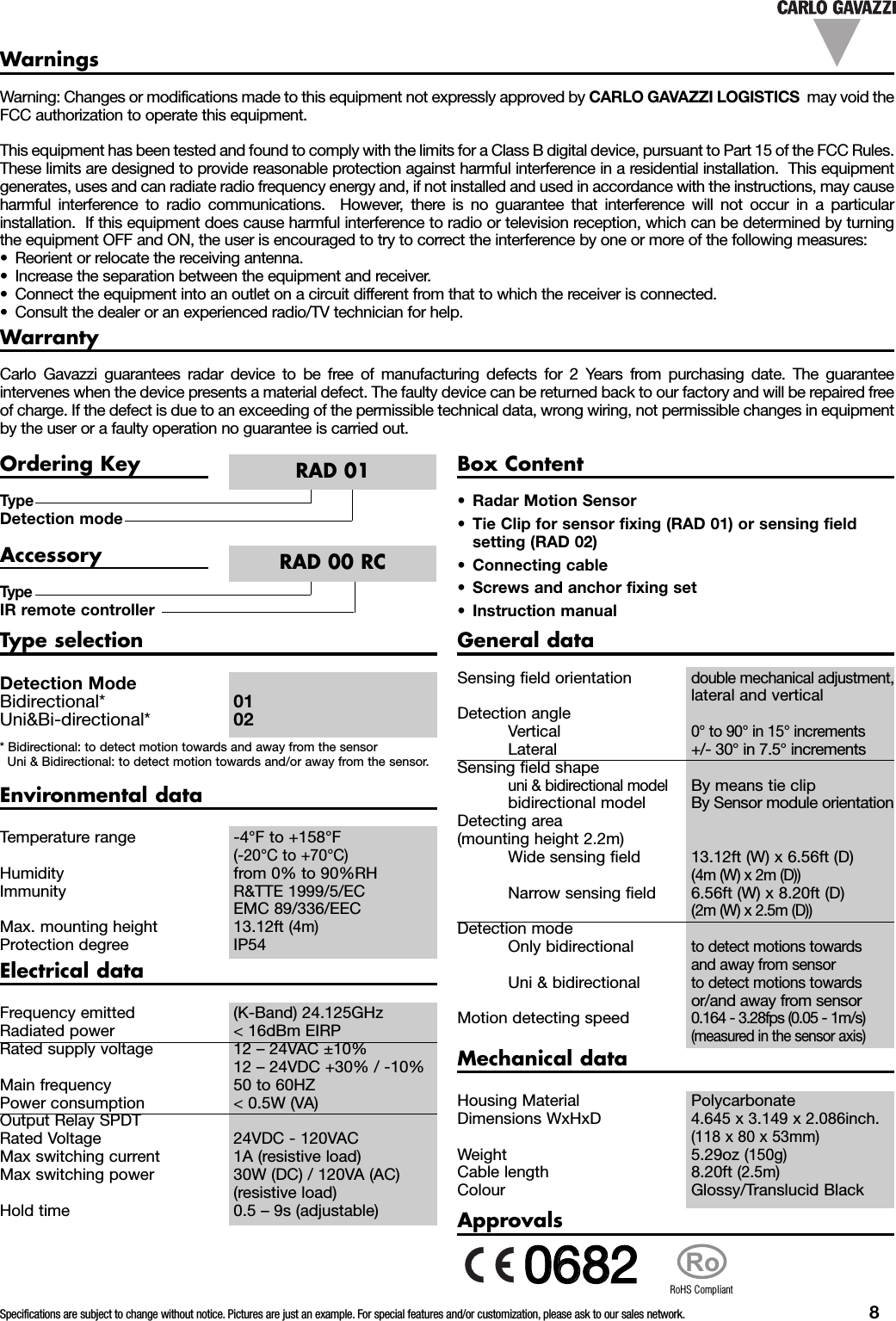
Specifications are subject to change without notice. Pictures are just an example. For special features and/or customization, please ask to our sales network. 8WarrantyCarlo Gavazzi guarantees radar device to be free of manufacturing defects for 2 Years from purchasing date. The guaranteeintervenes when the device presents a material defect. The faulty device can be returned back to our factory and will be repaired freeof charge. If the defect is due to an exceeding of the permissible technical data, wrong wiring, not permissible changes in equipmentby the user or a faulty operation no guarantee is carried out.Warning: Changes or modifications made to this equipment not expressly approved by CARLO GAVAZZI LOGISTICS may void theFCC authorization to operate this equipment.This equipment has been tested and found to comply with the limits for a Class B digital device, pursuant to Part 15 of the FCC Rules.These limits are designed to provide reasonable protection against harmful interference in a residential installation. This equipmentgenerates, uses and can radiate radio frequency energy and, if not installed and used in accordance with the instructions, may causeharmful interference to radio communications. However, there is no guarantee that interference will not occur in a particularinstallation. If this equipment does cause harmful interference to radio or television reception, which can be determined by turningthe equipment OFF and ON, the user is encouraged to try to correct the interference by one or more of the following measures:• Reorient or relocate the receiving antenna.• Increase the separation between the equipment and receiver.• Connect the equipment into an outlet on a circuit different from that to which the receiver is connected.• Consult the dealer or an experienced radio/TV technician for help.WarningsTypeDetection modeOrdering KeyRAD 01Box Content• Radar Motion Sensor• Tie Clip for sensor fixing (RAD 01) or sensing fieldsetting (RAD 02)• Connecting cable• Screws and anchor fixing set• Instruction manualTypeIR remote controllerAccessoryRAD 00 RCType selectionDetection ModeBidirectional* 01Uni&Bi-directional* 02* Bidirectional: to detect motion towards and away from the sensorUni & Bidirectional: to detect motion towards and/or away from the sensor.Electrical dataFrequency emitted (K-Band) 24.125GHzRadiated power < 16dBm EIRPRated supply voltage 12 – 24VAC ±10%12 – 24VDC +30% / -10%Main frequency 50 to 60HZPower consumption < 0.5W (VA)Output Relay SPDTRated Voltage 24VDC - 120VACMax switching current 1A (resistive load)Max switching power 30W (DC) / 120VA (AC)(resistive load)Hold time 0.5 – 9s (adjustable)Environmental dataTemperature range -4°F to +158°F(-20°C to +70°C)Humidity from 0% to 90%RHImmunity R&TTE 1999/5/ECEMC 89/336/EECMax. mounting height 13.12ft (4m)Protection degree IP54General dataSensing field orientationdouble mechanical adjustment,lateral and verticalDetection angleVertical0° to 90° in 15° incrementsLateral +/- 30° in 7.5° incrementsSensing field shapeuni & bidirectional modelBy means tie clipbidirectional model By Sensor module orientationDetecting area(mounting height 2.2m)Wide sensing field 13.12ft (W) x 6.56ft (D)(4m (W) x 2m (D))Narrow sensing field 6.56ft (W) x 8.20ft (D)(2m (W) x 2.5m (D))Detection modeOnly bidirectionalto detect motions towardsand away from sensorUni & bidirectionalto detect motions towardsor/and away from sensorMotion detecting speed0.164 - 3.28fps (0.05 - 1m/s)(measured in the sensor axis)Mechanical dataHousing Material PolycarbonateDimensions WxHxD4.645 x 3.149 x 2.086inch.(118 x 80 x 53mm)Weight 5.29oz (150g)Cable length 8.20ft (2.5m)Colour Glossy/Translucid BlackApprovalsRoRoHS Compliant00668822

Navigation menu