Carol Electronics Co CAROLDW20 Digital Wireless Microphone User Manual Jack DW 20 20130326 V 1

Taiwan Carol Electronics Co Ltd Digital Wireless Microphone Jack DW 20 20130326 V 1

User manual

DW-20 Digital Wireless Microphone User’s Manual Congratulations on your purchase of DW-20 Digital Wireless Microphone.  This manual is provided to help you understand the correct operation and obtain optimal performance, please read carefully before use.   DW-20 Digital Wireless Microphone, based on the concept of designing for modern lifestyle, with graceful curve, fine texture and user friendly design, is suitable for indoor activities such as family, school, organization or company events, and karaoke…etc.   1. DW-20 Product Contents:1.1. One DW-20R Digital Wireless Receiver1.2. Two DW-20T Digital Wireless Handheld Microphones1.3. One DC7.5V Power Adapter1.4. One f 6.3 M-XLR/M-XLR Cable1.5. One User’s Manual2. Parts and Functions:
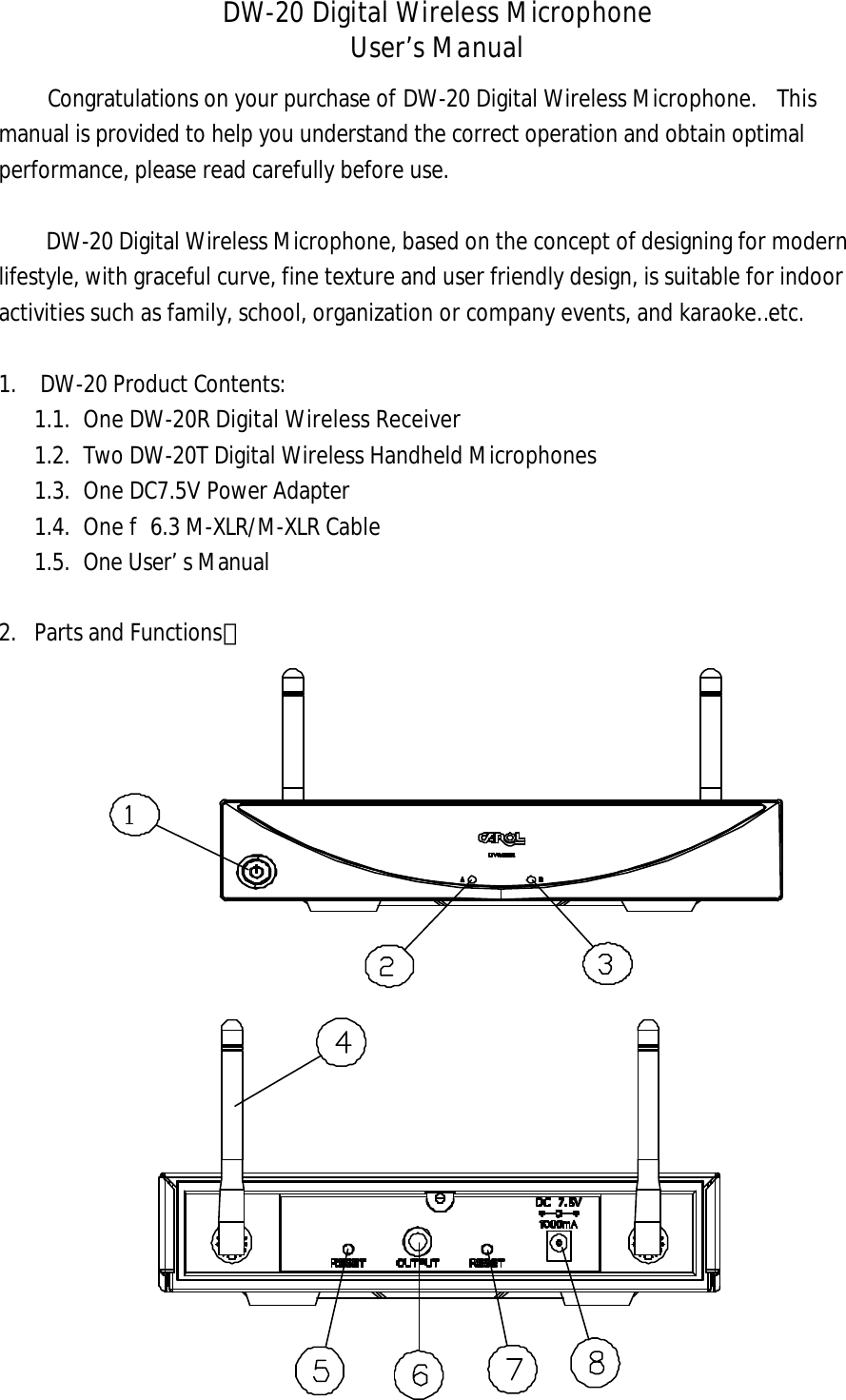
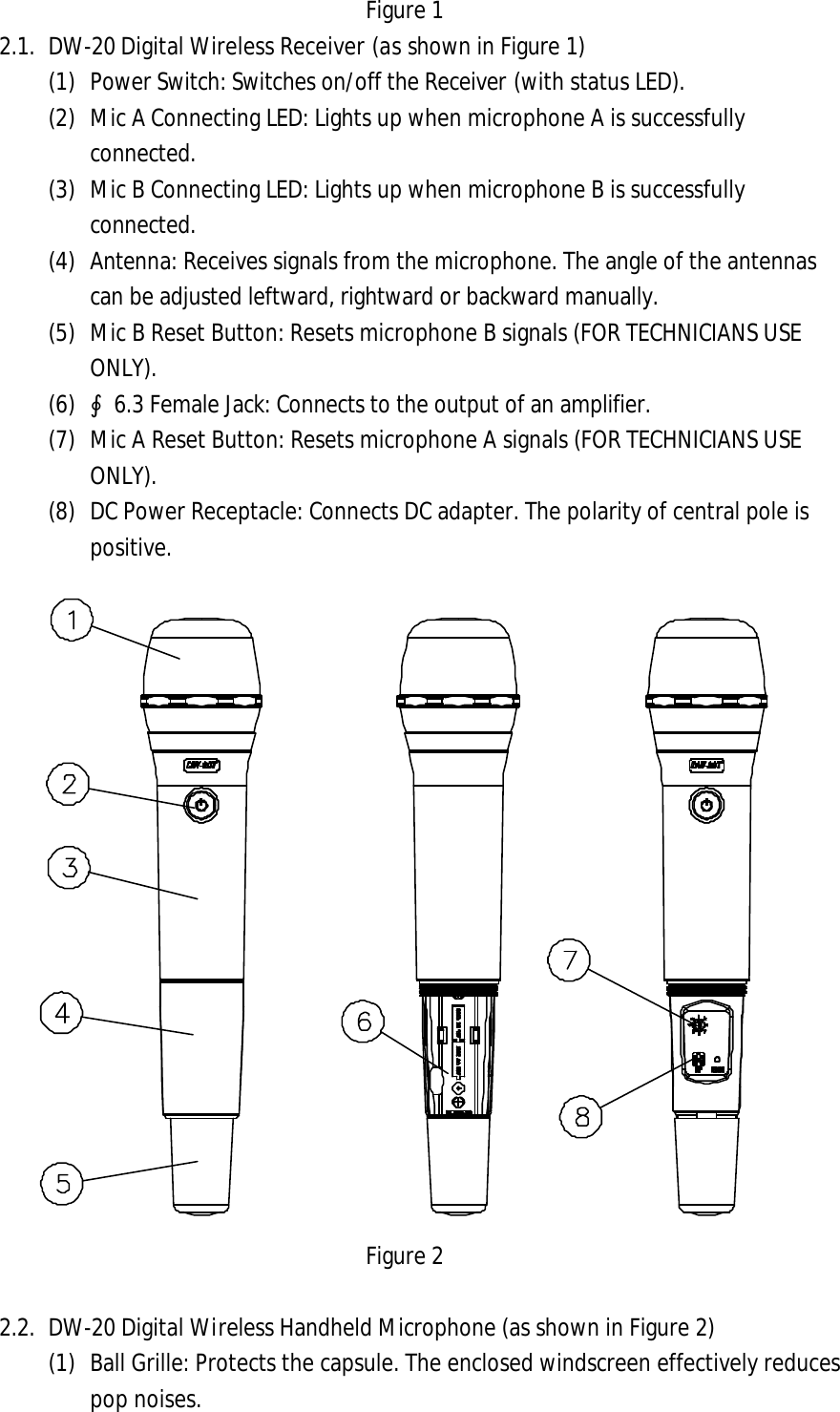
Figure 1 2.1. DW-20 Digital Wireless Receiver (as shown in Figure 1) (1) Power Switch: Switches on/off the Receiver (with status LED). (2) Mic A Connecting LED: Lights up when microphone A is successfully connected. (3) Mic B Connecting LED: Lights up when microphone B is successfully connected. (4) Antenna: Receives signals from the microphone. The angle of the antennas can be adjusted leftward, rightward or backward manually. (5) Mic B Reset Button: Resets microphone B signals (FOR TECHNICIANS USE ONLY).   (6) ∮6.3 Female Jack: Connects to the output of an amplifier. (7) Mic A Reset Button: Resets microphone A signals (FOR TECHNICIANS USE ONLY).   (8) DC Power Receptacle: Connects DC adapter. The polarity of central pole is positive. Figure 2 2.2. DW-20 Digital Wireless Handheld Microphone (as shown in Figure 2) (1)   Ball Grille: Protects the capsule. The enclosed windscreen effectively reduces pop noises.
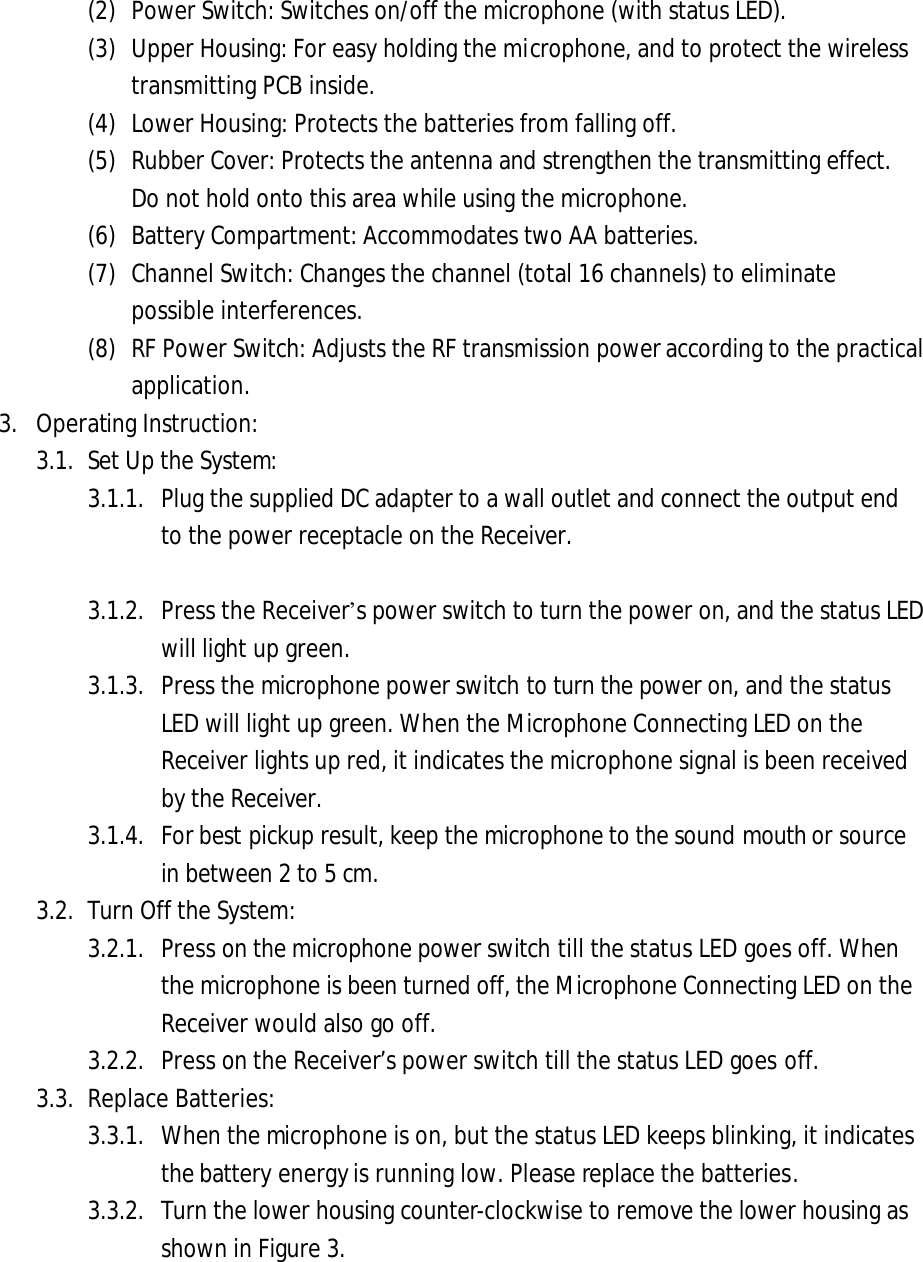
(2) Power Switch: Switches on/off the microphone (with status LED). (3) Upper Housing: For easy holding the microphone, and to protect the wireless transmitting PCB inside. (4) Lower Housing: Protects the batteries from falling off. (5) Rubber Cover: Protects the antenna and strengthen the transmitting effect. Do not hold onto this area while using the microphone. (6) Battery Compartment: Accommodates two AA batteries. (7) Channel Switch: Changes the channel (total 16 channels) to eliminate possible interferences.   (8) RF Power Switch: Adjusts the RF transmission power according to the practical application. 3. Operating Instruction:3.1. Set Up the System:3.1.1. Plug the supplied DC adapter to a wall outlet and connect the output end to the power receptacle on the Receiver. 3.1.2. Press the Receiver’s power switch to turn the power on, and the status LED will light up green. 3.1.3. Press the microphone power switch to turn the power on, and the status LED will light up green. When the Microphone Connecting LED on the Receiver lights up red, it indicates the microphone signal is been received by the Receiver. 3.1.4. For best pickup result, keep the microphone to the sound mouth or source in between 2 to 5 cm. 3.2. Turn Off the System: 3.2.1. Press on the microphone power switch till the status LED goes off. When the microphone is been turned off, the Microphone Connecting LED on the Receiver would also go off. 3.2.2. Press on the Receiver’s power switch till the status LED goes off. 3.3. Replace Batteries: 3.3.1. When the microphone is on, but the status LED keeps blinking, it indicates the battery energy is running low. Please replace the batteries.   3.3.2. Turn the lower housing counter-clockwise to remove the lower housing as shown in Figure 3.
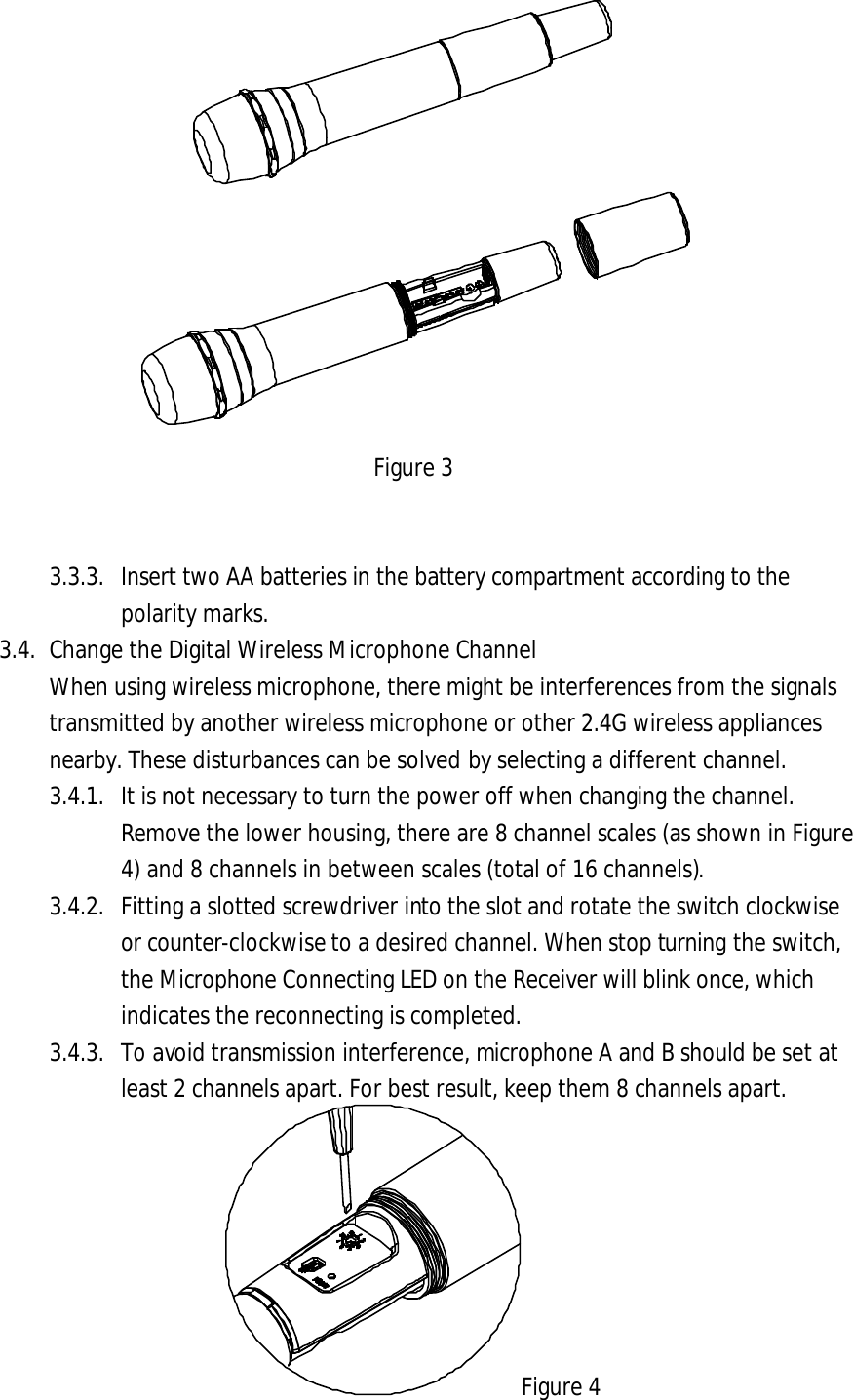
Figure 3 3.3.3. Insert two AA batteries in the battery compartment according to the polarity marks. 3.4. Change the Digital Wireless Microphone Channel When using wireless microphone, there might be interferences from the signals transmitted by another wireless microphone or other 2.4G wireless appliances nearby. These disturbances can be solved by selecting a different channel.   3.4.1. It is not necessary to turn the power off when changing the channel. Remove the lower housing, there are 8 channel scales (as shown in Figure 4) and 8 channels in between scales (total of 16 channels).3.4.2. Fitting a slotted screwdriver into the slot and rotate the switch clockwise or counter-clockwise to a desired channel. When stop turning the switch, the Microphone Connecting LED on the Receiver will blink once, which indicates the reconnecting is completed.   3.4.3. To avoid transmission interference, microphone A and B should be set at least 2 channels apart. For best result, keep them 8 channels apart. Figure 4
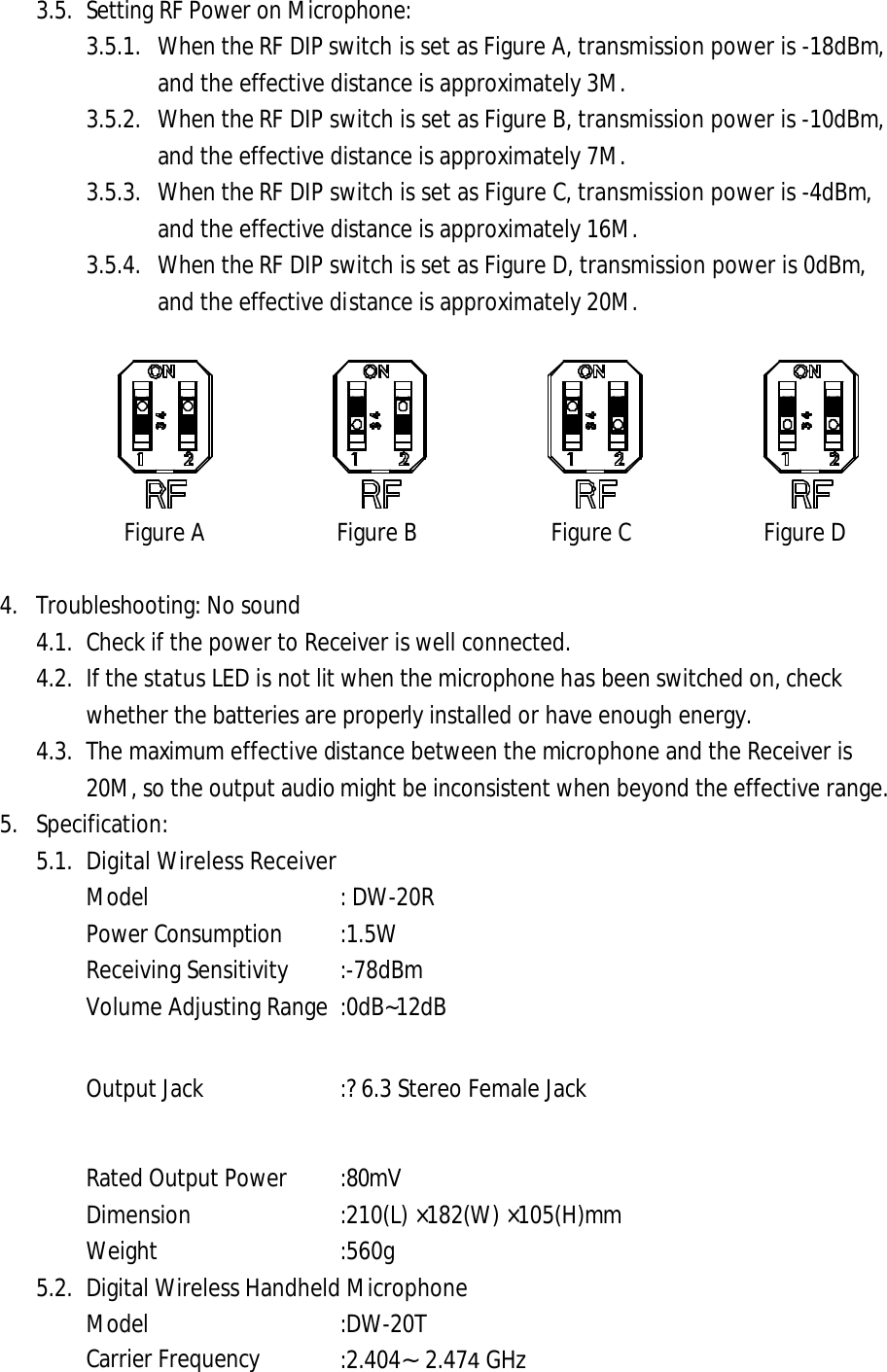
3.5. Setting RF Power on Microphone: 3.5.1. When the RF DIP switch is set as Figure A, transmission power is -18dBm, and the effective distance is approximately 3M. 3.5.2. When the RF DIP switch is set as Figure B, transmission power is -10dBm, and the effective distance is approximately 7M. 3.5.3. When the RF DIP switch is set as Figure C, transmission power is -4dBm, and the effective distance is approximately 16M. 3.5.4. When the RF DIP switch is set as Figure D, transmission power is 0dBm, and the effective distance is approximately 20M. Figure A Figure B Figure C Figure D 4. Troubleshooting: No sound4.1. Check if the power to Receiver is well connected.4.2. If the status LED is not lit when the microphone has been switched on, checkwhether the batteries are properly installed or have enough energy. 4.3. The maximum effective distance between the microphone and the Receiver is 20M, so the output audio might be inconsistent when beyond the effective range. 5. Specification:5.1. Digital Wireless ReceiverModel : DW-20R Power Consumption :1.5W Receiving Sensitivity   :-78dBm Volume Adjusting Range :0dB~12dB Output Jack :?6.3 Stereo Female Jack Rated Output Power :80mV Dimension   :210(L) ×182(W) ×105(H)mm Weight    :560g   5.2. Digital Wireless Handheld Microphone Model :DW-20T Carrier Frequency :2.404∼2.474 GHz
Transmitting Power    : 0dBm∼-18dBm Capsule    :Dynamic Polar Pattern    :Super-Cardioid Impedance :600O Frequency Response   :50∼15K Hz Power Supply    :Two AA batteries Battery Life    :Approx. 50hours Dimension   :f54 ×258(L)mm Weight    :280g (W/O batteries) 5.3. Power Adaptor Input   :AC 120/230 ,20W Output :DC 7.5V/1A 6. Precautions6.1. To avoid damaging the electric circuit, do not exposure the product to rain, wateror heavy humidity environment. 6.2. Avoid falling, or hitting by external force. 6.3. Do not use this product at areas with high heat. 6.4. To avoid damaging the electric circuit, do not use the power adapter with different specification. 6.5. To avoid interfering the display of a monitor, do not place this product near electronic appliances that have CRT, such as TV or computer monitor. 6.6. While using the wireless microphone, keep the receiver away from any interference sources such as a computer or communication equipments. 6.7. If not in use for a long period of time, remove the batteries and the power adapter, and store them separately. 6.8. When the status LED keeps blinking after the microphone is turned on, it indicates the battery energy is running low. Please replace the batteries. 7.FCC Caution Notice : The changes or modifications not expressly approved by the party responsible for      compliance could void the user’s authority to operate the equipment.   IMPORTANT NOTE: To comply with the FCC RF exposure compliance requirements, no change to the antenna or the device is permitted. Any change to the antenna or the device could result in the device exceeding   the RF exposure requirements and void user’s authority to operate the device. This device complies with Part 15 of the FCC Rules. Operation is subject to the following two conditions: (1) this device may not cause harmful interference, and (2) this device must accept any interference received, including interference that may cause undesired operation.

Navigation menu